#templates-archived
1 messages · Page 11 of 1
 dull burrow
I lurk here to try and learn through osmosis.. so far not much sticks.
 jagged totem
time is generally a mess, especially when you start talking about time zones and leap seconds
 lapis quarry
hey guys, what would be the oposite of this:
| rejectattr('object_id', 'search', 'tamper')```is there such a thing like includeattr or something silimar
I would like to only include entities that have tamper in them
 marble jackal
| selectattr('object_id', 'search', 'tamper')
lapis quarry
🙏
 floral shuttle
tbh, I dont just yet understand what this does.....
lapis quarry
hey guys i see you are talking about time, how can i change this to my local time instead of UTM
now().strftime('%A %d %B %Y at %X %p')) }}"
floral shuttle
 mighty ledge
avoid that thread
mighty ledge
avoid that thread
you didn't say that because of the source of it? ... https://community.home-assistant.io/t/the-epic-time-conversion-and-manipulation-thread/85786 seems a very useful thread, if not only for learning and understanding the (mis)conceptions?
 inner mesa
floral shuttle
tbh, I dont just yet understand what this does.....
inner mesa
floral shuttle
tbh, I dont just yet understand what this does.....
Last day of the current month
floral shuttle
yeah, sure, but why this works I mean
inner mesa
Just walk through it
Add 31 days from the first day of this month, which will always put you in next month
Then, move to the first day of that (next) month and subtract one day
It works for every month, regardless of length
floral shuttle
right! I do believe I am seeing the light there. and it will even work in 70 years from now 😉
mighty ledge
floral shuttle
you didn't say that because of the source of it? ... https://community.home-assi...
No, it's just because most of those templates are over-bloated, not optimized, and outdated.
I can tell when someone asks a question after using that thread
floral shuttle
cool. we'd need to run over the most useful ones....
like Marijn just did (always fun to say that, because its also my name...)
mighty ledge
It needs to be made into a community guide and completely updated to use new methods
 blazing burrow
i have a number of template sensors, where one depends on the others to be loaded first, or else i get this error in my logs:
TemplateError('UndefinedError: 'homeassistant.util.read_only_dict.ReadOnlyDict object' has no attribute 'timestamp'') while processing template 'Template("{% set all_entities = ['sensor.jasper_lights_off', 'sensor.jasper_lights_on', 'sensor.next_sunset', 'sensor.next_sunrise'] %} {% set sorted = states | selectattr('entity_id', 'in', all_entities) | rejectattr('attributes.timestamp', 'lt', (now() | as_timestamp)) | sort(attribute='attributes.timestamp') | map(attribute='entity_id') | list %} {{ sorted }}")' for attribute '_attr_native_value' in entity 'sensor.jasper_light_events'

Traceback (most recent call last):
  File "/usr/src/homeassistant/homeassistant/helpers/template.py", line 535, in async_render_to_info
    render_info._result = self.async_render(variables, strict=strict, **kwargs)
  File "/usr/src/homeassistant/homeassistant/helpers/template.py", line 421, in async_render
    raise TemplateError(err) from err
homeassistant.exceptions.TemplateError: UndefinedError: 'homeassistant.util.read_only_dict.ReadOnlyDict object' has no attribute 'timestamp'
my sensors look like https://gist.github.com/drinfernoo/1e58425b46ee6f3df6b4073f00ebbc2d
with jasper_light_events needing to read the attributes of the other four
mighty ledge
mighty ledge
It needs to be made into a community guide and completely updated to use new met...
then it needs to be continuously updated.
@floral shuttle the problem is, I can't make edits to community guides without the guide being uneditable by the community.
I could edit Finitys post, but then he'd get all mad
blazing burrow
blazing burrow
my sensors look like https://gist.github.com/drinfernoo/1e58425b46ee6f3df6b4073f...
what can i do here?
mighty ledge
add | selectattr('attributes.timestamp', 'defined') before | rejectattr('attributes.timestamp',
blazing burrow
ohhhhhhhhh
marble jackal
@floral shuttle It's actually Martijn (if you mean me)
blazing burrow
mighty ledge
add `| selectattr('attributes.timestamp', 'defined')` before `| rejectattr('attr...
i've run into that before, thanks for reminding me!
mighty ledge
marble jackal
<@679819945655533632> It's actually Martijn (if you mean me)
pretty sure your name is fes
dull burrow
Non negotiable
floral shuttle
marble jackal
<@679819945655533632> It's actually Martijn (if you mean me)
oeps. my bad....
inner mesa
And clearly the only one
floral shuttle
they always call me Martijn....
mighty ledge
that's why he's THE fes
inner mesa
<thread creation was a Good Decision>
floral shuttle
back on topic, dusting of my ancient Time package: - unique_id: remaining_days name: Remaining days state: > {% set now = now() %} {% set next_month = now.month + 1 if now.month + 1 <= 12 else 1 %} {% set next_year = now.year + 1 if now.month == 12 else now.year %} {% set last = now.replace(year=next_year, month=next_month, day=1) %} {{(last.date() - now.date()).days -1}} is bloated, or still ok...
discussed almost 2 years ago at https://community.home-assistant.io/t/templates-remaining-days-and-passed-days-are-mixed-up/256655/6
mighty ledge
that still looks pretty good
there's other ways to do it
if you want less lines you can change over to timedeltas
{% set next_month = today_at().replace(day=1) + timedelta(days=31)).replace(day=1) %}
{{ (next_month - today_at()).days }}
Does this refresh like now() does? So every minute? Or every day?
mighty ledge
honestly, I don't remember
if it doesn't, it should
if you want to use now, then thiswould be the update
{% set t = now() %}
{% set next_month = t.replace(day=1) + timedelta(days=31)).replace(day=1) %}
{{ (next_month - t).days }}
personally, i'd use today_at one with a trigger that fires at midnight.
floral shuttle
Yes I use it as trigger template
mighty ledge
if you use it as a trigger template, you need to use now
if you use it as a sensor, then you can use the other one with a trigger for the template sensor
 pale bane
{{ s }}
{% if "Hundo" in s | if "Shiny" in s & if "Appeared!" in s %}
  true
{% else %}
  false
{% endif %}```how do i do and and or operators in a template
inner mesa
with... and and or
pale bane
i tried that it didnt work either
inner mesa
well...
pale bane
{{ s }}
{% if "Hundo" in s or if "Shiny" in s and if "Appeared!" in s %}
  true
{% else %}
  false
{% endif %}```

`TemplateSyntaxError: expected token 'end of statement block', got 'string'`you keep repeating "if"
just write it out like a sentence, maybe using parentheses if you need to group things
there's also no point in returning "true" or "false"
just output the test
pale bane
wdym by output the test
inner mesa
Without commenting on the logic:
{{ "Hundo" in s or "Shiny" in s and "Appeared!" in s }}
that will return true or false
pale bane
inner mesa
that will return true or false
when i take out the stuff after that line i get TemplateSyntaxError: Unexpected end of template. Jinja was looking for the following tags: 'elif' or 'else' or 'endif'. The innermost block that needs to be closed is 'if'.
pale bane
ohh i see, its not an if statement anymore
ok cool thanks
now to find a shiny or hundo to test it lol
dull burrow
what is that automation doing lol
pale bane
dull burrow
what is that automation doing lol
announcing on my alexas and sending a notification to my main phone when pokemon go finds a shiny or 100% IV lol
pale bane
just using the latest notification
dull burrow
like is this using a bot or something?
pale bane
yeah
dull burrow
lol
pale bane
its a modded version of pokemon go lol
dull burrow
u crazy
inner mesa
all the conf rooms in my building at work are named after Pokemon characters
 dull stratus
No way to set the area in a switch template right?
inner mesa
you can set an area for any entity in the UI
dull stratus
This entity ('switch.doorbell_light') does not have a unique ID, therefore its settings cannot be managed from the UI.
inner mesa
add one
pale bane
so if i'm starting to understand this, then this should work right?
https://i.gyazo.com/6fc2ac37b660aad1518d35ecc301f397.png
dull stratus
@inner mesa lol didnt know i can thanks i will research that right now
inner mesa
it's right there in the docs that you hopefully used to write the thing in teh first place
inner mesa
pale bane
so if i'm starting to understand this, then this should work right?
https://i.gy...
No, because you're not actually retrieving the state (just the object) and I suspect that you need to group some parts of that expression
pale bane
I got it working, thanks for the help guys! 🙂
{{ "Hundo" in s or "Shiny" in s and "Appeared!" in s }}```you modified what you had up there and broke it #templates-archived message
pale bane
this is the trigger that worked
inner mesa
yes, that's better
pale bane
Thanks for the help 🙂
oh one more thing about this, will this top one work? the bottom one is how I have it setup rn, but I want it to just pass the notification text through to the Alexas
https://i.gyazo.com/5f9db9b4328e3affbcae0f657201bb9b.png
marble jackal
If you surround the template in quotes it will
pale bane
oh ok cool i'll try that, thx
marble jackal
But you should actually use
"{{ states('sensor.pokemon') }}"
I would have put in the right sensor if you would have shared your code as text
 dusty grailBOT
@shrewd dagger posted a code wall, it is moved here --> https://hastebin.com/acicocexeb
 shrewd dagger
I asked around in blueprints, but maybe it was the wrong place to ask about this, therefore I try here again with a little more specific description.
I retrieve the id of the entity <entity name> from the device id using "{{ (device_entities(device_id) | select('match', '.*<entity name>') | list)[0] }}"; This template works.
What I am doing is generating strings (text, sequences of characters) of these IDs in the action fields. This works however only for device_id.
my "code wall": https://hastebin.com/acicocexeb
This however results in Entity ID {{ (device_entities(device_id) | select('match', '.*<entity name>') | list)[0] }} is an invalid entity ID for dictionary value @ data['entity_id']. Got None in the logs
When I replace "{{ (device_entities(device_id) | select('match', '.*<entity name>') | list)[0] }}" with <entity_id> in between quotes, it just works.
This seems to indicate it doesn't execute the template for entity_id. While it does execute the template for device_id. Is this intended behavior and do I need some other method?
dull stratus
how do i assign an unique id for a switch reated by an integration
ex)
amcrest:
-host: 10.x.x.x.x
switches:
- privacy_mode
The switch is created but w/o unique id to move in the UI
 obsidian lintel
count }}```having some issues to filter out browser_mod
says theres no attribute type but there is in states
{{ expand(states.light) | rejectattr('attributes.type', 'eq', 'browser_mod') }}
Tried this as well
{{ expand(states.light) | selectattr('state','eq','on') | rejectattr('attributes.browserID', 'defined') | list | count }}
Went with another method, this works
marble jackal
shrewd dagger
I asked around in blueprints, but maybe it was the wrong place to ask about this...
Templates are not allowed there, just use the select.select_option service call
 true abyss
Hi,
I use a template trigger to start an automation. A simple sensor state comparizon.
Could you help me to expand it with the state is walid for 10 minutes
marble jackal
What do you have now?
true abyss
{{ (states.sensor.domi_thermo_temperature.state | int ) >
(states.input_number.domi_klima_meleg.state | int) }}
And I want only to trigger when this is valid for 10minutes
 warm owl
template sensor
inner mesa
please don't crosspost
 young laurel
inner mesa
please don't crosspost
young laurel
inner mesa
please don't crosspost
Sorry…moved it
marble jackal
true abyss
And I want only to trigger when this is valid for 10minutes
With a numeric state you need to create a binary sensor. After you've done that, you can simply use a state trigger/condition and hold the state for the period you want.
You should also use states('your.entity') instead of states.your.entity.state and you should add defaults to your int filter
young laurel
Looking for template that should do some simple calculation for conversion of received variables/numbers. My HA is receiving values from control 4 system that needed to be factored so I’m looking for commands that will allow me to write a simple formula
 compact rune
you probably want {{ ... is none }} -- None in python is special (and jinja2 lowercases it)
pale bane
ah ok thanks that works!
compact rune
(None is special because effectively it's a mimicry of SQL's ternary logic system and SQL NULL -- which stands for "unknown". and the idea is that an unknown value isn't equal to another unknown value, basically)
pale bane
there we go, got the automation working to tell me if my roomba gets an error message lol
marble jackal
Don't post images of code
marble jackal
pale bane
https://i.gyazo.com/1d97099c5e4ff07faf460a04c8f838f5.png
and you should use {{ state_attr('vacuum.sweeper', 'last_error_message') is not none }} instead of using the state object directly
pale bane
marble jackal
and you should use `{{ state_attr('vacuum.sweeper', 'last_error_message') is not...
isnt it the same thing?
marble jackal
nope
https://www.home-assistant.io/docs/configuration/templating/#states see the warning here
pale bane
marble jackal
https://www.home-assistant.io/docs/configuration/templating/#states see the warn...
ah ok i just switched it to what you said, thx
condition: or
conditions:
  - condition: template
    value_template: |-
      {% set s = states('sensor.kyles_note_8_last_notification') %}
      {{ "Shiny" in s and "Appeared!" in s }}
  - condition: template
    value_template: |-
      {% set s = states.sensor.kyles_note_8_last_notification.state %}
      {{ "Hundo" in s and "Appeared!" in s }}```
ok so i updated this condition in an automation the same way, did i do it right?the top condition is update and the bottom one is how i used to have it
marble jackal
yes, the top one is how it should be
one additional remark though, I would advice to stick to one type of quotes in your templates. You use single quotes in the first line now, and double quotes in the second one
pale bane
marble jackal
one additional remark though, I would advice to stick to one type of quotes in y...
ah ok, can that cause errors too or somethin?
marble jackal
no, but it will make your life easier if you also need quotes outside your template (for single line notation)
pale bane
oh ok thanks
true abyss
marble jackal
With a numeric state you need to create a binary sensor. After you've done that,...
Thanks,
good idea...
I've set it up... now I'm testing. Cross fingers
shrewd dagger
marble jackal
Templates are not allowed there, just use the `select.select_option` service cal...
Thank you for your answer. I just read the page about blueprints and it does indeed not say anything about normal automation actions and only something about scripts and services. Those however do feel like workarounds and the device_id seems to accept the template (or is just ignored maybe as it is useless anyway?). Is it planned for later or a deliberate design choice?
marble jackal
I don't know what is planned or not, I'm not a HA developer
I'm just answering questions here 🙂
But generally device triggers/actions/conditions are more limited compared to the service calls which do the same
shrewd dagger
marble jackal
I don't know what is planned or not, I'm not a HA developer
Ah okay, just curious if you knew. I'll use those from now on then.
Thank you very much
 paper hazel
With custom:fold-entity-row is it possible to template the entity in the head section? Or is there a different trick to get the same result? I thought of putting the whole custom:fold-entity-row in a conditional row, but it seems quite excessive... ```
- type: custom:fold-entity-row
head: >-
{% if is_state('timer.timer1', 'active') %}
timer.timer1
{% else %}
switch.switch1
{% endif %}
entities:- ...
Where would you want the entity_id to be in the head section? Could you give an example (doesn't need to work)?
 nocturne chasm
what is the best way to determine if an entities attribute has changed in the past 15 minutes?
{{ (as_timestamp(now()) - as_timestamp(state_attr.climate.upstairs.temperature.last_changed, 0)) > 900 }}
paper hazel
shrewd dagger
Where would you want the entity_id to be in the head section? Could you give an ...
In the head section where the fold icon is - Like the "nested" top row example here. (https://user-images.githubusercontent.com/1299821/59793890-ed65b380-92d7-11e9-9ed6-8dc1c15d749b.png)
mighty ledge
nocturne chasm
what is the best way to determine if an entities attribute has changed in the pa...
{{ now() - states.climate.upstairs.last_changed > timedelta(minutes=15) }}
oh an attribute?
not possible
well, it is but you have to make a template sensor of the attribute
shrewd dagger
paper hazel
In the head section where the fold icon is - Like the "nested" top row example h...
I mean where would you want to insert it in the YAML code (how exactly under the head section)?
From what I know from YAML at least, head: >- means that everything after it is a multiline string. with templating you generate strings. If the code you posted works, then: yes it should be possible to template the entity_id in the head section. You might have to enclose it with double quotes tho.
However I don't know the specifics of lovelace-fold-entity-row
 muted halo
Hello guys I have an issue with a template : ""{% if is_state_attr('sensor.XXX_last_notification', 'android.text', 'avant plein charge' ) %}
{% else %}
{{state_attr('sensor.XXX_last_notification','android.text') | string}}
{% endif %}""
I would like to don't take into account the notification when the text "avant pleine charge" is detect in the attribut
Can you help me ? thanks
marble jackal
you don't have anything for the if
{{ state_attr('sensor.XXX_last_notification', 'android.text') if not 'avant pleine charge' in state_attr('sensor.XXX_last_notification', 'android.text') }}
@muted halo that will do what you want (if I understood you correctly)
shrewd dagger
Btw, is there is nicer way to get the entity_id from a device_id than "{{ (device_entities(device_id) | select('match', '.*<entity_name>') | list)[0] }}"?
marble jackal
what is <entity_name>?
shrewd dagger
For a particular device (Zigbee environment sensor) it would be "device_temperature". It is the last part of an entity_id. It just checks whether it ends with it. This is not always automatically set, but I could of course do this manually and consistently for the devices I want to work with.
It would be best if there were IDs referencing entity ids, but then not unique in home assistant, but unique for a single device (Zigbee2MQTT has these at least).
This is needed when you want to set multiple entity_id values on multiple identical devices without copy pasting.
paper hazel
shrewd dagger
However I don't know the specifics of lovelace-fold-entity-row
Thank you! I know the author of lovelace-fold-entity-row is on here - Hoping he might provide insight 🤞
dusty grailBOT
@woeful wyvern posted a code wall, it is moved here --> https://hastebin.com/nohusujoro
 woeful wyvern
I have a sensor reporting power consumption, but it sends the values offset by factor of 10. E.g. 1000 watts where it should be 100 watts.
I successfully created a template sensor, that takes sensor's raw data and corrects it by divinding the values by 10. I can use the template sensor correctly in my dashboard and it displays values correctly. I created a riemanns sum integral helper for this template sensor, and it also shows the aggregated value correctly.
My problem is, that in the energy dahsboard, I can't select the new sensors nor the riemanns sum integral helper.
What am I missing? I will appreciate any comments that will point me in the right direction ??
here's the template I'm using.
template:
  - sensor:
    - name: "Fridge Power (Normalized template)"
      unique_id: 'dcac9af4-1300-4080-8a65-be58efa96b7b'
      unit_of_measurement: "W"
      state: >
        {% set a1_power = states('sensor.smart_socket_a1_power') | float / 10 %}
@marble jackal Thanks I will test that. And what if I want to add some key word like "avant plein charge" ?
marble jackal
{% set text = state_attr('sensor.XXX_last_notification', 'android.text') %}
{{ text if not 'avant pleine charge' in text and 'some other keyword' not in text  }}
 open hound
😐 Hmmmm 🤔
lapis quarry
Can someone help me with the right way to get the value of an input text in to a variable?
variable_name: "{{ states('input_text.villa') }}"
something like this?
marble jackal
Yes
 ancient lynx
Hi all, me again. I have a state that pulls from a calendar that always displays "Event (Location)". I want to split the state so that the event is on its own, then the same with the location, but without the parentheses. I keep trying a split("\(") but it keeps saying that split is not a filter. I imagine I want to do a split at the opening parentheses and then regex the parentheses out after. I have the regex figured out, but not how to split the event and location.
{{ event|string|regex_replace(find='\(', replace='', ignorecase=False)|regex_replace(find='\)', replace='', ignorecase=False) }}```That's what I have so far.
inner mesa
It's not a filter, but you can use the Python string method
young laurel
I need to convert percentage value (0-100%) to values range (153-500). the percentage value should receive from MQTT message. I need your support
lapis quarry
anyone good with regex?
 buoyant pine
young laurel
I need to convert percentage value (0-100%) to values range (153-500). the perce...
buoyant pine
young laurel
I need to convert percentage value (0-100%) to values range (153-500). the perce...
Are the values for the percentage 0 to 100 or 0 to 1?
If 0 to 100: 153 + value * 3.47
If 0 to 1: 153 + value * 347
young laurel
buoyant pine
Are the values for the percentage 0 to 100 or 0 to 1?
If 0 to 100: `153 + value...
Thanks..percentage values are 0 to 100
 dreamy sinew
Hi, anyone know if there’s a way I can append a prefix to entity ids in a package, based on either a string pulled in from jinja2 or just text entered once via yaml anchor?
(For the latter: I’ve gotten as far as getting my anchor to appear there, but space being an illegal character means I can’t get both a prefix and the rest of the id in there.. ie, I can get it to spit out entity_id: instance1_ pir which is incorrect syntax but not entity_id: instance1_pir)
young laurel
buoyant pine
Are the values for the percentage 0 to 100 or 0 to 1?
If 0 to 100: `153 + value...
Please review my code that convert values and send white temperature to led lamp. what am I missing here?
dusty grailBOT
@young laurel posted a code wall, it is moved here --> https://hastebin.com/oheyehabod
buoyant pine
value was just a placeholder for the percentage value from MQTT. what's an example of the payload that's being sent to house/rgb_balcony_projector_white?
young laurel
buoyant pine
`value` was just a placeholder for the percentage value from MQTT. what's an exa...
0% ---> 100%
buoyant pine
i mean share an actual example of a payload sent to that topic
buoyant pine
well anyway, if the payload is something like {"color_temp": 50} then replace value with trigger.payload_json['color_temp'] | int or if the payload is literally just 50 then trigger.payload | int
 orchid onyx
Hi, I have a binery sensor that gives state "on" and "off". It is from a detached switch of tasmota. Is it possible to change the state of binary sensor by some template, automation or something?
Sorry if wrong category, u maybe can point me to right category then. Dont know if it is mqtt, general, automation or what lol
buoyant pine
no, it's not possible to change the state of a binary sensor. what are you actually trying to do?
obsidian lintel
{%- if loop.index0 <= {{(expand(states.light) | count / 4)|round}} %}
Tryna use this condition, aint working
{%- if loop.index0 <= 22 %}
If I put a normal number, it works tho
orchid onyx
Well, I have a tasmota that i have detached, so now I have a switch.entity and a binary_sensor.entity. When I use the psyhical (real life switch) switch, the binary sensor changes state to on and off. All good. I then created an automation that when binary_sensor goes on -> turn on Zigbee light. Binary sensor Off > turn off zigbee light.
But if I turn on my zigbee light thru homekit or google home, the binary sensor stays off.
the problem is then - when I want to use the psyhical switch - i first have to toggle it (so the binary sensor goes on) then toggle again so it gets off
Found this but not sure if that helps:
TOGGLE THE BINARY SENSOR EACH TIME A MESSAGE IS RECEIVED ON STATE_TOPIC
mqtt:
  binary_sensor:
    - state_topic: "lab_button/cmnd/POWER"
value_template: "{%if is_state(entity_id,\"on\")-%}OFF{%-else-%}ON{%-endif%}"```But now we go into MQTT so I may be out in deep water lol sorry
 left canopy
Hello Everybody. I got some super weird value changes with my template-sensors. I use some shellys and whenever i have a connection loss or a restart the values are wastly increased. Any idea what that might be?
young laurel
buoyant pine
well anyway, if the payload is something like `{"color_temp": 50}` then replace ...
Sorry for my late response...I've full control of the payload format. currently I should send value of color_temp variable to RGB led lamp
 thorny snow
i would like to display the duration how long a light has been "on" over a day. Something like: "Livingroon light was on for 12h". any recommendations, not easy to search in the Forum.
inner mesa
the history_stats integration
lapis quarry
for petro to read
mighty ledge
Yeah, that would be one way to do it
if you do that, and create it from an automation that groups things on startup/reload, then you'd have a fast reacting system without 98037459283749328 triggers in all your automations
lapis quarry
is this the same you are sugesting in the thread?
and realisticaly how much will it improve performance? I need to know is it worth the effort changing everything
i just counted them i have like 2700 events fired per minute 😅
LOL
lapis quarry
your link doesnt show anything 😝
 glass ruin
Can anybody help me with a template? I want to check if my bedroom light is on at a percentage higher than 1% and if it is, I do not want my motion sensor to "turn on" that light to 1% red
Basically I want it so if I manually change the brightness of my light that should override the motion sensor until I turn the light off manually as well
Nvm I solved it and I think it works
 digital iris
I'm kind of new to templates, and I'm trying to do one within an automation
I want it to take a datetime helper, subtract 30 min from it, then save the new value as a different datetime helper
@fossil venture
I've actually read your articles about this subject
very interesting, I'm just a little confused
 fossil venture
Why do you need to save it? Why not just calculate the 30min offset whenever it is used? It may help to explain what your actual problem is that you are trying to solve. As a datetime helper and template may not be the best solution. (see https://en.wikipedia.org/wiki/XY_problem)
digital iris
I honestly just thought it would be simpler that way. I've tried doing what you describe, but I keep getting all sorts of error messages when I try to use it as a trigger
Essentially I have an wakeup time datetime helper... I need the the automation to trigger 30 min before the wakeup time value
digital iris
fossil venture
Why do you need to save it? Why not just calculate the 30min offset whenever it ...
What specifically would I type for the automation trigger with this method?
fossil venture
Ok, a template trigger is one way you could do this:```
trigger:
- platform: template
value_template: "{{ today_at(states('input_datetime.wakeup_time')) - timedelta(minutes = 30) >= now() }}"```
This assumes your input_datetime only has a time.
No date.
digital iris
lol I nearly palmed my face because thought for a second it included the date. It's only time though
Just tried your template trigger, but I got an error message... I'm not sure what it means
|| Message malformed: required key not provided @ data['trigger'][0]['platform'] ||
I just learned how to mark something as spoiler, not code
fossil venture
It seems to be missing this - platform: template
fossil venture
Delete that. Press the Add trigger button. Select a template trigger type. Paste just the template bit into the template field provided. Without the outside double quotes. i.e. everything inside and including the double curly braces {{ }}
digital iris
done
no error messages
I will test it now
I've set the alarm value to 9:10 now. In two minutes (30min before 9:10 my time) the automation should trigger
@fossil venture automation did not trigger
https://snipboard.io/Dz7QZL.jpg
Am I missing something?
wait if I want it to trigger before the time, I think I should make the value negative
I'll run that test real quick
inner mesa
Just plug it into  -> Templates
fossil venture
Yep, put this into the developer tools -> template editor and check what you get:```
{{ today_at(states('input_datetime.next_alarm')) }}
{{ today_at(states('input_datetime.next_alarm')) - timedelta(minutes = 30) }}
{{ now() }}
{{ today_at(states('input_datetime.next_alarm')) - timedelta(minutes = 30) >= now() }}
It's including a date, but the helper is specifically only defined as time
@inner mesa @fossil venture
inner mesa
No need for that
inner mesa
They're in the image 🤮
fossil venture
It can be done without it.
Oh ok, hang on.
Home Assistant thinks it is quarter to two in the afternoon. Do you have your location and timezone set correctly?
fossil venture
Settings -> System -> general
digital iris
(probably don't)
I'll check
this would explain so many other issues too though if I have the timezone wrong
I'm going to kick myself
dang it, I was kind of hoping it was wrong
this is the correct time zone, and my location is also accurate
@inner mesa @fossil venture
inner mesa
Please stop pinging
digital iris
sounds good, sorry bout that.
digital iris
I'm running on a raspery pi 4
fossil venture
Actually I read that time wrong. For some reason it thinks it is 20:47 according to this image you posted: https://snipboard.io/p3MTew.jpg It does have the timezone correct -7h.
digital iris
fossil venture
Actually I read that time wrong. For some reason it thinks it is 20:47 according...
that is actually the correct time
or it was at the time, so time isn't the issue?
fossil venture
Your alarm is set for 9:15 am according to that image.
(the input_datetime state)
digital iris
I set the alarm for 9:15 PM
The time was 8:47PM
I feel stupid
you're right, it's set to AM
I'll run a test again
paper hazel
Asking again - With custom:fold-entity-row is it possible to template the entity in the head section? Or is there a different trick to get the same result? I thought of putting the whole custom:fold-entity-row in a conditional row, but it seems quite excessive... ```
- type: custom:fold-entity-row
head: >-
{% if is_state('timer.timer1', 'active') %}
timer.timer1
{% else %}
switch.switch1
{% endif %}
entities:- ...
 final lark
Hello, I'm searching a way in yaml to translate a thermostat value from 20,22° into 20,0° and if it's 20,26 it would be 20,50°C
 jagged obsidian
there are filters for rounding
final lark
I know something about modulo can do that but in yaml ?
thank you @jagged obsidian I will check in that way
jagged obsidian
| round(0) but you can't get to x.5 that way
final lark
I see this example {{ 42.55|round(1, 'floor') }}
but yes not exactly what I need 🙂
may be round 2 times 🙂
{{ 42.24|round(1, 'half') }}
this is the one 🙂
shrewd dagger
Sorry for asking again, but I still couldn't figure it out. Is there a nice way to get the entity_id of a specific type of entity for a known device by using some name or id that is the same for all devices of the same model? Like the power_on_behavior for IKEA LED1536G5 (just an example, I don't own any).
mighty ledge
@marble jackal vote -------------> https://community.home-assistant.io/t/why-cant-we-template-the-entire-attributes-section-of-template-entities/467223
marble jackal
mighty ledge
<@723160143314812971> vote -------------> <https://community.home-assistant.io/t...
young laurel
I've add Automation code in File Editor but it doesn't shown in Setting/Automation menu. any one?
 slim elk
automations need a unique id in order to appear in the UI
young laurel
slim elk
automations need a unique `id` in order to appear in the UI
I've created new automation in the UI than made some code revision in file editor and after that the automation isn't shown in the UI
slim elk
did you validate and reload automations (dev tools -> yaml)?
young laurel
slim elk
did you validate and reload automations (dev tools -> yaml)?
Yes maybe my code is incorrect
young laurel
I'm trying to send color_temp value to RGB led which based on MQTT payload. what am I doing wrong here
- id: '1664550250537'
alias: White
description: Sending RGB code
trigger:- platform: mqtt
topic: house/rgb_balcony_projector_color
value_template: '{{ 153 + trigger.payload | int * 347 / 100 }}'
condition: []
action: - service: light.turn_on
data:
color_temp: 'value_template'
entity_id: light.smart_bulb_600hz
- platform: mqtt
dusty grailBOT
@meager pawn posted a code wall, it is moved here --> https://hastebin.com/rerenomoka
 meager pawn
oh boy
any help appriciated, it's regarding reading json output value into a template to show on the dashboard
buoyant pine
"{{ value_json['Global Quote']['05. price'] }}"
with value_template in the REST sensor itself: https://www.home-assistant.io/integrations/sensor.rest/#value_template
no need to create a separate template sensor
slim elk
young laurel
I'm trying to send color_temp value to RGB led which based on MQTT payload. what...
what do you get for an error when validating? try this: http://pastie.org/p/54gbHlMj8p8pAQRB3wEFyl
young laurel
slim elk
what do you get for an error when validating? try this: http://pastie.org/p/54gb...
Thanks. getting error message: Error rendering data template: UndefinedError: 'dict object' has no attribute 'payload'
young laurel
I'm trying to past the screen photo here with no success
buoyant pine
It's text, just copy and paste it
young laurel
50%
I think that the rule that you have sent me is converting from number to percentage. I need percentage to value
buoyant pine
it's not. it's converting from percent to value
however, since the payload has a percent symbol, change it to
"{{ 153 + trigger.payload.replace('%','') | int * 347 / 100 }}"
and update your automation to this if you haven't already (but with the template in my last message for color_temp): #templates-archived message
young laurel
buoyant pine
and update your automation to this if you haven't already (but with the template...
It works!! 👏 many thanks for your support
One small issue when I entering 30% I get the value 70...should be 100-X
buoyant pine
in that case,
"{{ 500 - trigger.payload.replace('%','') | int * 3.47 }}"
You are the best
shrewd dagger
shrewd dagger
Sorry for asking again, but I still couldn't figure it out. Is there a nice way ...
Really nobody that knows this?
inner mesa
I'm not sure that I'm parsing your question correctly, but you probably want this: https://www.home-assistant.io/docs/configuration/templating/#devices-examples
mighty ledge
shrewd dagger
Really nobody that knows this?
Can you rephrase your question, it's a really long run on sentence that's hard to understand
 tired zephyr
I'm not certain if this should go here or in #automations-archived, but I'm thinking here since it's about putting templates in yaml files. Can I put something like
- id: '123456789'
- trigger:
{% for val in arr %}
- platform: something
entity_id: something.{{ val }}
{% endfor %}```
into stuff like `automations.yaml` or other files? This failed config checks, so I assume this exact method doesn't work, but is there any way I can do stuff like this? rose scroll
tired zephyr
I'm not certain if this should go here or in <#672220450977349653>, but I'm thin...
rose scroll
tired zephyr
I'm not certain if this should go here or in <#672220450977349653>, but I'm thin...
Nope. The templates go only into the fields that support templating, and not just anywhere in yaml files. But there is a template trigger for automations where you can put a bunch of Jinja, including loops, into value_template:
https://www.home-assistant.io/docs/automation/trigger/#template-trigger
tired zephyr
rose scroll
Nope. The templates go only into the fields that support templating, and not jus...
Oooo, thanks! I'll check it out! Doesn't look like it's quite as powerful as what I want, but certainly some fun options exist within. Thanks very much!
 humble mortar
How would I correct this to work properly in current HA? https://raw.githubusercontent.com/wizmo2/TAudio-Case/main/hass/configuration.yaml
I tried to fix some of the indentation but I have really no understanding what I'm doing.
When I tried to run it through some yaml verifiers it just complains that there are dup entries for input_text which was not what HA was complaining about which seemed to be indentation problems:
The system cannot restart because the configuration is not valid: Error loading /config/configuration.yaml: while parsing a block mapping in "/config/configuration.yaml", line 119, column 12 expected <block end>, but found '-' in "/config/configuration.yaml", line 120, column 12
seems I fixed that indentation now it complains about this https://github.com/wizmo2/TAudio-Case/blob/main/hass/configuration.yaml#L156
Tried to take two spaces away from the start of it it still complained.
Error loading /config/configuration.yaml: while parsing a block mapping in "/config/configuration.yaml", line 209, column 5 expected <block end>, but found '-' in "/config/configuration.yaml", line 211, column 5
You're missing trigger:
left canopy
I'm Trying to create a yaml for input_number.
- input_number:
- box1:
name: "Strompreis"
min: 0.0
max: 100.0
icon: "mdi:currency-eur"
unit_of_measurement: "€"
mode: box
step: 0.01
- box1:
and always receive:
Invalid config for [input_number]: expected dictionary for dictionary value @ data['input_number']. Got [OrderedDict([('input_number', [OrderedDict([('box1', None), ('name', 'Strompreis'), ('min', 0.0), ('max', 100.0), ('icon', 'mdi:currency-eur'), ('unit_of_measurement', '€'), ('mode', 'box'), ('step', 0.01)])])])]. (See /config/configuration.yaml, line 12).
Something must be wrong with the alligment or syntax. Could someone help me please?
marble jackal
left canopy
I'm Trying to create a yaml for input_number.
- input_number:
- box1:
...
Not related to templates, but I guess you're better off creating it in the GUI under settings > devices & services > helpers
left canopy
marble jackal
Not related to templates, but I guess you're better off creating it in the GUI u...
Yeah i had this before. I just want to go full yaml
 silent vector
How would I extract just the first word of this output with the template.
{{ iif(states('sensor.thermostat_running_state') == '','idle',states('sensor.thermostat_running_state')) }}
Current outputting
Heating to 67 °
I only want the first word.
marble jackal
left canopy
Yeah i had this before. I just want to go full yaml
Ask in #integrations-archived then, and have a second look at the docs
dusty grailBOT
Command '.input_number' was invoked by: TheFes
thorny snow
Hi. Tried to find an answer in this channel with a way to show last value for an entity when unavailable, but no luck.
In my case the solar panel inverter goes offline when it's dark outside.
I've managed to make a value_template report as 0 so that the UI don't give me an orange box.
       unique_id: "968a088c-3d64-11ed-b878-0242ac120002"
       friendly_name: Inverter daily yield
       device_class: energy
       unit_of_measurement: "W"
       value_template: '{{ 0 if states ("sensor.inverter_daily_yield") == "unavailable" else states ("sensor.inverter_daily_yield") }}'```
What I would want, is for it to use the last recorded daily yield value instead.
Can I extract it from MQTT or InfluxDB and use that?
If so, how?This solution might not be elegant, but you should be able to write an automation that triggers when the state changes and use the data from the automation trigger to write the previous value into a number helper.
shrewd dagger
mighty ledge
Can you rephrase your question, it's a really long run on sentence that's hard t...
I'll try. Is there a nice way to get the entity_id for an entity related to a device? This would preferably be by using some name that is the same for all devices of the same model. Like the power_on_behavior for IKEA LED1536G5 (just an example, I don't own any).
dusty grailBOT
@honest spade posted a code wall, it is moved here --> https://hastebin.com/etajubebej
mighty ledge
shrewd dagger
I'll try. Is there a nice way to get the entity_id for an entity related to a de...
Yes
what rob linked does that
{{ device_entities('<replacewithdeviceid>') }}
shrewd dagger
inner mesa
I'm not sure that I'm parsing your question correctly, but you probably want thi...
I'm sorry, but I'm afraid this doesn't give me the entity_ids related to a device.
mighty ledge
yes it does
shrewd dagger
mighty ledge
`{{ device_entities('<replacewithdeviceid>') }}`
It only gives me a list of it tho. I'll need to search through it, which doesn't even work for all entities
mighty ledge
that's what you're asking, you literally said "Is there a way to get the entity_id for a entity related to a device"
templates can do anything with entity_id's
you can expand them and then search the states
shrewd dagger
Yes, but that doesn't work for say: climate entities. I'll need to give every entity a name shared with all the other devices of the same model.
While in zigbee2mqtt every value connected to an entity has a name that is the same for all devices of the same model.
mighty ledge
it works for all entities that are attached to a device...
are you referring to a physical device or a device in home assistant?
shrewd dagger
in home assistant
mighty ledge
then device_entities will show every entity that a device has regardless of domain (climate, light, etc)
so what you're saying is not correct
shrewd dagger
It will show it, but searching it is impossible without manually renaming it everywhere.
mighty ledge
what?
silent vector
Petro, do you know if I can efficiently extract just the first word of this output with the template.
{{ iif(states('sensor.thermostat_running_state') == '','idle',states('sensor.thermostat_running_state')) }}
Current outputting
Heating to 67 °
I only want the first word. Which would be heating or cooling.
mighty ledge
what do you mean "searching it is impossible"
are you referring to finding an entity_id in a device and where it's used in home assistant like automations and scripts?
that's not a templating question btw
which is why everyone is responding to you with template answers.
mighty ledge
silent vector
Petro, do you know if I can efficiently extract just the first word of this outp...
states('sensor.thermostat_running_state').split(' ')[0]
shrewd dagger
I'll give an example: I have a thermostat, which has multiple entities and the automatic naming of the entities is very clean except for the climate entity which is just a hexadecimal number. I have a template: "{{ (device_entities(device_id) | select('match', '.*_climate$') | list)[0] }}". This wouldn't work.
mighty ledge
{{ (device_entities(device_id) | select('search', '^climate') | list)[0] }}
Worked thank you.
shrewd dagger
mighty ledge
```
{{ (device_entities(device_id) | select('search', '^climate') | list)[0] }}
...
yes, but then I would need to have a different way of dealing with it everywhere.
mighty ledge
you can regex anything
shrewd dagger
And on top of this, I'll have to copy paste my template in all 15 actions.
Which makes it very hard to maintain.
In also multiple blueprints
mighty ledge
make a variable
make a template entity
you have many options
you're just making up barriers now when it can be done
shrewd dagger
mighty ledge
make a variable
Can I supply parameters to a variable?
mighty ledge
yes
mighty ledge
automation and scripts support variables
templates support creation of variables
you can store things in input_text
you can make template sensors that run code that maintain a single value
you have many of options for all of this, it depends on what you want to do
shrewd dagger
Would this be correct?:
variables: entity_id(device_id,entity_name): "{{ (device_entities(device_id) | select('match', '.*_'+entity_name+'$') | list)[0] }}"
mighty ledge
no
you can't have special characters in the field in yaml
variables:
  entity_id_device_id: "{{ (device_entities(device_id) | select('match', '.*_' ~ entity_name ~ '$') | list)[0] }}"
~ ensures that adding strings keeps all objects strings incase you screw it up and make entity_name a number or boolean
@shrewd dagger ^
also there's a limitation with variables, they will not overwrite existing variables
I.e. if you're supplying device_id to a script, you cant use device_id as a field name in variables.
shrewd dagger
It says entity_name is undefined.
mighty ledge
that means you didn't provide it
if you're calling a script...
service: script.xyz
data:
  device_id: xxx
  entity_name: yyy
or if you have to use the script.turn_on
service: script.turn_on
target:
  entity_id: script.xyz
data:
  variables:
    device_id: xxx
    entity_name: yyy
You said this was possible right?
I didn't know you meant a script
mighty ledge
it doesn't have to be in the script, it can also be in the template. Otherwise, how else would it work?
{% set entity_name = 'abc' %}
has to be included in the template in question.
or provided from another variable
e.g.
{% set device_id = 'xyz' %}
{% set entity_name = 'abc' %}
{{ (device_entities(device_id) | select('match', '.*_' ~ entity_name ~ '$') | list)[0] }}
or
variables:
  device_id: xyz
  entity_name: abc
  entity_id_device_id: "{{ (device_entities(device_id) | select('match', '.*_' ~ entity_name ~ '$') | list)[0] }}"
But then I would have to copy paste 15 times right (once for every entity)?
mighty ledge
I don't know what you mean
How about this
post your automation and I'll fix it, because these targeted questions are just leading to more confusion.
shrewd dagger
`variables:
device_id: !input 'trv'
action:
- service: select.select_option
data:
option: unlock
target:
entity_id: "{{ (device_entities(device_id) | select('match', '.*_keypad_lockout$') | list)[0] }}" - service: select.select_option
data:
option: setpoint
target:
entity_id: "{{ (device_entities(device_id) | select('match', '.*_programming_operation_mode$') | list)[0] }}"`
Just a snippet.
But it shows my problem well. I have to copy paste it everywhere
mighty ledge
@shrewd dagger are they all select option?
shrewd dagger
Unfortunately they are of many different varieties
mighty ledge
then you have to copy paste
shrewd dagger
That is a bummer
mighty ledge
simplify what you're trying to do
you can do a for loop on all select_options
make a template that generates a list and iterate the list
and you can do the same for other services as well
shrewd dagger
I think that would make it more confusing tho. Guess I'll just leave it like this then. Thank you very much for your time and patience.
mighty ledge
if the matches are all the same, here's an automation that can be easily expanded and it's pretty easy to use
variables:
  # calls tuple is ( service, regex_match, attribute to set, attributes value
  calls: >
    {% set calls = [
      ('select.select_option', '.*_keypad_lockout$', 'option', 'unlock'),
      ('select.select_option', '.*_programming_operation_mode$', 'option', 'setpoint'),
    ] %}
    {% set ns = namespace(items=[]) %}
    {%- for service, match, attribute, value in calls %}
      {% set ns.items = ns.items + [ {'service': service, 'match': match, 'data': {attribute: value} } ] %}
    {% endfor %}
    {{ ns.items }}
action:
- repeat:
    for_each: "{{ calls }}"
  sequence:
  - service: "{{ repeat.item.service }}"
    target:
      entity_id: "{{ (device_entities(device_id) | select('match', repeat.item.match) | list)[0] }}"
    data: "{{ repeat.item.data }}"
that's your full script
just add to calls
in 1 spot
@shrewd dagger ^
adding an item to calls would look like...
    {% set calls = [
      ('select.select_option', '.*_keypad_lockout$', 'option', 'unlock'),
      ('select.select_option', '.*_programming_operation_mode$', 'option', 'setpoint'),
      ('light.turn_on', '.*_bedroom$', 'brightness', 255),
    ] %}
Okay, that is undoubtedly a superior solution even if it was possible to have global functions/macros.
Why do we need items in their own namespace though?
mighty ledge
shrewd dagger
Why do we need items in their own namespace though?
because jinja's scope is limited in for loops, using namespace removes that limit
i.e. you can't do a simple counter in jinja without namespace
shrewd dagger
I see.
mighty ledge
jinja is a markdown langauge, it's not meant to 'create' new memory
at least that's jinjas design intent
anyways, namespace allows you to break rules and do other things safely
shrewd dagger
Cool. Thank you very much. This is very nice.
mighty ledge
you're welcome to look in my repo
I hate copy/pasting crap
I use every method I can to reuse code
the downside is that i'm at a point where I no longer need to change things and when I do it's only in one spot. So if you enjoy this crap, you don't do it often.
I enjoy it, so I rarely work on my setup anymore because it's at a mature phase
shrewd dagger
Nice. I'll take a look someday
 woven root
`{% set value_json = {
"hassmode": 'idle',
} %}
  mode_state_topic: stat/EQ3/eq3bad
  mode_state_template: >-
      {% if is_state('{{ value_json.hassmode }}', 'idle') %}
        yes
      {% else %}
        no
      {% endif %}`
why is this always no regardless what is in the first set value_jason
mighty ledge
it's a pre-populated variable if the value can be converted to json
woven root
this is just my test example from the template editor in hass
mighty ledge
woven root
`{% set value_json = {
"hassmode": 'idle',
} %}
mode_state_topic: stat/...
your template should be
{% if value_json.hassmode == 'idle' %}
  yes
{% else %}
  no
{% endif %}
is_state is only for entity's
value_json.hassmode is not a entity_id
woven root
thx thats helpfull
dusty grailBOT
@woven root posted a code wall, it is moved here --> https://hastebin.com/yiralawujo
mighty ledge
you can't overwrite value_json
woven root
oh
mighty ledge
also, remove the quotes
around {{ }}
you're in a multiline template, you do not need quotes around the outputs
          {% if value_json.hassmode == 'idle' %}
            heat
          {% else %}
            {{ value_json.hassmode }}
          {% endif %}
thx 🤦♂️
 hardy field
Does anyone know if it's possible to use a template to work out the difference between a sensor at an earlier point in the day to now? Maybe template is the wrong thing. Basically I want to know how much a sensor value has increased by since 5:30 am.
marble jackal
Templates can only access current states, so you need something else.
Either get the value at 5:30 out of your database using an SQL sensor, or store it in an input_number using an automation or in a trigger based template sensor at 5:30
 severe aurora
I'm a bit unsure if this channel is the correct place for this question but here goes.
Once a day I have an entity that updates my entire power usage. The problem is that the data is a few days late from the power plant. However there is an attribute called 'metering_date' which is e.g. 2022-09-29. Is there a way to make a graph in e.g. apaxcharts where it display data based on the attribute and not the date the data was received?
fossil venture
I can never remember (and can't find it documented) Is this valid or must minutes be less than 60? ```
for:
minutes: "{{ range(30,90)|random }}"
It's a state trigger.
buoyant pine
It's valid. I have something similar
fossil venture
Sweet. Thanks.
humble mortar
inner mesa
You're missing trigger:
What's the trigger?
inner mesa
You're literally just missing that word. See the others in your example
humble mortar
inner mesa
You're literally just missing that word. See the others in your example
Ok thank you so I did that and also moved that automation section to the automations.yaml and now getting ```
The system cannot restart because the configuration is not valid: Error loading /config/configuration.yaml: invalid key: "OrderedDict([("states('input_text.alert_trigger')", None)])" in "/config/automations.yaml", line 20, column 0
Im guessing that it's because input_text.alert_trigger is in the configuration.yaml and not in the automations.yaml ?I tried adding
input_text:
  alert_trigger:
    name: "Alert Trigger Source"
to the top of automations.yaml but that then dumped:
The system cannot restart because the configuration is not valid: Error loading /config/configuration.yaml: while parsing a block mapping in "/config/automations.yaml", line 3, column 1 expected <block end>, but found '-' in "/config/automations.yaml", line 7, column 1
That doesn't belong there
Directly in configuration.yaml or use an !include and put it in a different file(s)
humble mortar
So I will remove it back to configuration.yaml but then how does automations.yaml know about it?
humble mortar
buoyant pine
Directly in configuration.yaml or use an !include and put it in a different file...
So I just link back to the configuration.yaml from the automations.yaml?
configuration: !include configuration.yaml
``` put this in the automations.yaml??
Seems that it wants to know from that error?
buoyant pine
If you want to configure them manually in YAML, you can drop the input text config directly in configuration.yaml or, for example, put input_text: !include input_text.yaml in configuration.yaml and then make a file named input_text.yaml in the same directory as configuration.yaml that contains your input text configs
humble mortar
And that will fix the error in automations.yaml?
buoyant pine
Without seeing your current automations.yaml I can't answer that, but it will at the very least be a step in the right direction
humble mortar
that github link above is basically it all I did was cut out the automation: section at the bottom of that and dump it in automations.yaml and fix the missing trigger: word missing at the top as specified further above and included it into configuration.yaml.
Ok done still same error
The system cannot restart because the configuration is not valid: Error loading /config/configuration.yaml: invalid key: "OrderedDict([("states('input_text.alert_trigger')", None)])" in "/config/automations.yaml", line 20, column 0
.share your current configuration.yaml and automation.yaml
dusty grailBOT
Please use a code share site to share code or logs, for example:
- http://pastie.org/ (select YAML for the language)
- https://dpaste.org/ (select YAML for the language)
- https://paste.debian.net/ (you guessed it, select YAML as the language)
Please don't use Pastebin, since it can randomly add spaces to the main view. Please also don't share text as images since it makes it harder for people to help you. Remember that others may have colour blindness, impaired vision, etc.
Command '.share' was invoked by: Tediore
humble mortar
buoyant pine
Line 20 should be message: "{{ states('input_text.alert_trigger') }}"
In automation.yaml
humble mortar
Correct
humble mortar
Oh so
message: "{{ states('input_text.alert_trigger') }}"
sorry I missed those.
The system cannot restart because the configuration is not valid: Invalid config for [light.template]: expected dictionary @ data['lights']['taudio_all']['set_color'][3]. Got '{% set gain = state_attr("light.taudio_all", "brightness")|int %}{% for n in range(19) %}{% if gain == 0 %}0,0,0,{% else %}{% set rgb = state_attr("light.taudio_all", "rgb_color") %}{{ (rgb[0]|int * gain / 255)|round }},{{ (rgb[1]|int * gain / 255)|round }},{{ (rgb[2]|int * gain / 255)|round }},{% endif %}{% endfor %}' expected dictionary @ data['lights']['taudio_all']['set_level'][2]. Got '{% set gain = state_attr("light.taudio_all", "brightness")|int %}{% for n in range(19) %}{% if gain == 0 %}0,0,0,{% else %}{% set rgb = state_attr("light.taudio_all", "rgb_color") %}{{ (rgb[0]|int * gain / 255)|round }},{{ (rgb[1]|int * gain / 255)|round }},{{ (rgb[2]|int * gain / 255)|round }},{% endif %}{% endfor %}' expected dictionary @ data['lights']['taudio_all']['turn_off'][2]. Got '0' expected dictionary @ data['lights']['taudio_all']['turn_on'][2]. Got '0'. (See ?, line ?).
You have a bunch of weird lines in configuration.yaml that look out of place. Lines 78, 85, 92, 103
humble mortar
What would you do with them?
They seem like they have essential data in them?
Quite a long line of code.
buoyant pine
No clue, but they don't belong there
Looks like they're parameters like for the other template lights
humble mortar
How would I form that into current acceptable HA yaml syntax seems it used to work like that before but maybe not now?
buoyant pine
It never would have worked like that
humble mortar
Maybe it was more loosey goosy with what it accepted before and then got more strict over time.
buoyant pine
That has never been valid. Whoever shared that posted some garbage YAML
humble mortar
How would you go about ungarbagifying it?
buoyant pine
Most likely remove it because I have no clue where it's supposed to be at
 desert crane
pls help a nub, whats the format/syntax to just add a value?
state: "{{ [19.24 + states('sensor.elektri_tariifid') | float) | round (2) ] }}"
cant find good example.. just need to flap the 19.24 together with the sensor value
this results an error
buoyant pine
Get rid of the []
desert crane
still error
Invalid config for [template]: invalid template (TemplateSyntaxError: unexpected ')') for dictionary value @ data['sensor'][0]['state']. Got "{{ 19.24 + states('sensor.elektri_tariifid') | float) | round (2) }}".
buoyant pine
state: "{{ (19.24 + states('sensor.elektri_tariifid') | float(0)) | round(2) }}"
could it just be missing parameters: above those?
desert crane
the same thing worked before with the number being an entity
severe aurora
Is it possible to change the date/time as well as the state?
buoyant pine
desert crane
the same thing worked before with the number being an entity
You had an extra parenthesis. See my template above
desert crane
buoyant pine
You had an extra parenthesis. See my template above
thank you!
buoyant pine
humble mortar
could it just be missing parameters: above those?
Remove them. Those parameters are in the script that is referenced in the template lights
humble mortar
Well I commented them out and it loads now. Have no idea how it's supposed to connect to the device though haha.
"Failed to call service squeezebox/call_method. Service not found."
guessing I need some kind of squeeze box server now.
dusty grailBOT
Command '.squeezebox' was invoked by: Tediore
humble mortar
I guess I have to find a compatible squeezebox docker
Then attach that integration
Is squeezebox and squeezelite basically the same thing? or is lite just the client and box is the server?
(ie should I be looking for squeezebox docker or squeezelite docker)
Maybe I need an LMS docker https://github.com/Logitech/slimserver-platforms/tree/public/8.3/Docker
buoyant pine
No clue, I don't use squeezebox
humble mortar
What do you use?
buoyant pine
What do you mean?
humble mortar
Do you do audio prompts and audio sync in your system?
humble mortar
All I have is an esp32 + audio dac with a speaker attached to it no official hardware.
buoyant pine
Then you'll need to see if the squeezebox media server works with unofficial hardware
humble mortar
I just used this page https://raspiaudio.github.io/ to upload the firmware in I2S mode to the ESP32 as it supports a bunch of DACs
It's working through bluetooth so I'm sure it will work with LMS hopefully
DACs: "TAS57xx, TAS5713, AC101, WM8978 and ES8388" I'm using WM8978
 elder moon
is it possible to use a template in target of camera.snapshot service?
something like that:
service: camera.snapshot target: entity_id: {{ trigger.entity_id }}
buoyant pine
Yeah, but you'll need to wrap the template in quotes
elder moon
buoyant pine
Yeah, but you'll need to wrap the template in quotes
thanks!
elder moon
Ive got motion sensors formated as binary_sensor.blueiris_front_garden_motion. How can i - using a template - process this entity name to camera.blueiris_front_garden? Will something like that
"camera.{{ trigger.entity_id.split(".")[1].split("_")[-1] }}"
work?
inner mesa
you could plug that into -> Templates and see
{% set trigger = {"entity_id": "binary_sensor.blueiris_front_garden_motion"} %}
camera.{{ trigger.entity_id.split(".")[1].split("_")[-1] }}
-> camera.motion
so, something like:
{% set object_id = trigger.entity_id.split(".")[1] %}
camera.{{ object_id[:object_id.rindex('_')] }}
-> camera.blueiris_front_garden
elder moon
thanks
elder moon
inner mesa
so, something like:
```
{% set object_id = trigger.entity_id.split(".")[1] %}
ca...
gosh, this looks like a real rocket science 🙂
inner mesa
it's just outputting from the start of the string until the last "_" character
elder moon
`variables:
camera_id: '{{ trigger.entity_id.split(".")[1] }}'
action:
- service: camera.snapshot
target:
entity_id: camera.{{ camera_id[:camera_id.rindex('_')] }}`
am i doing it right?
it has saved successfully, guess i will need to go outside later on to test
dusty grailBOT
To test an automation there's three stages you can follow. Testing the action, the condition and action, and the whole automation:
- Use Configuration -> Automations to find the automation and then push Run Actions. If this fails your problem is in the
action:section, and details should be found in your log file - Use Developer tools -> Services and call
automation.triggeron the automation withskip_condition: false. If the first passes but this fails then the problem is in yourcondition:block - Use Developer tools -> States to find the trigger entity, click the name, then change the state (at the top) to something that'll trigger the automation before pushing Set State. If this fails then the problem is with your
trigger:section, or the automation is turned off (you can check that in Developer tools -> States).
You can also see this section in the docs and with HA 2021.4 onwards debug automations.
Command '~test' was invoked by: RobC
desert crane
failing with the damn basic stuff again.. whats the correct syntaks to subtract 0.05 from this template?
state: "{{ (0.1924 + states('sensor.elektri_tariifid') | float(0)) | round(3) }}"
if i just add - 0.05 in front of the float pipe, it fails to calculate and i'm dumb to understand why :/
i dont get any error messages to go by either. entity just becomes unavailable
state: "{{ (0.1924 + states('sensor.elektri_tariifid') - 0.05 | float(0)) | round(3) }}"
is what i tried and doesnt work
marble jackal
You need to convert the state to float first
state: "{{ (0.1924 + states('sensor.elektri_tariifid') | float(0) - 0.05) | round(3) }}"
desert crane
marble jackal
You need to convert the state to float first
thanks, but it manages to do the add calculation without conversion why?
marble jackal
desert crane
thanks, but it manages to do the add calculation without conversion why?
You have the float filter in the original template as well
desert crane
sure, i just dont understand how did it not fall under it in my version, while the first + second did
marble jackal
Because states are strings. You can't add a number to a string
So you need to convert the state to a number (using the float filter)
desert crane
oh so i broke the float off from the state entity? that was tied to it like that.. okay ty
marble jackal
You were applying the float filter to 0.05 which is already a float
 gritty sentinel
Hi all. I have a hopefully easy question. I have figured out how to get a string list of entity_ids in a home assistant light group. Yay. Is there a way to get a list of brightness values for each entity_id without doing a for loop?
expand('light.bed')|map(attribute='entity_id')|join(', ')
I feel like there should be some way to invoke state_attr on each member of the list... I just am not seeing it. map doesn't work for this purpose, or at least I don't know how to make it work.
inner mesa
Yes, map attributes.brightness instead of entity_id
gritty sentinel
So change the middle filter to: map(attribute='attributes.brightness') ?
Ohhhh I'm seeing my issue, I need to first filter out group members that are off since they apparently don't have a 'brightness' attribute. Thanks so much for this hint; I learned something new about how to make templates more effective for me.
inner mesa
Yes, that too
 sacred sparrow
  {{ is_state('climate.mitsubishi_hvac', 'off') or
  states('sensor.living_room_feels_like_temperature')|float >= 23.1 or
  is_state('light.bathroom_lights_main','on') or
  is_state('light.shower_lights_smartplug', 'on') }}
continue_on_timeout: true
timeout: '00:05:00'```how can I make sensor.living_room_feels_like_temperature state > 23.1 for 1 minute?
right now it stops waiting at 23.1 but sometimes it quickly drops to 23 and won't hit 23.1 for one minute or more
marble jackal
You need to create a binary sensor out of it. You can check the last_updated timestamp, however, if it changes from 23.1 to 23.2, it well still be true according to the numeric value, but last_updated will update, so you'll have to wait another minute
 red tapir
Hey, i try to publish a string to MQTT which is working fine, but i need some whitespaces in the string, they get stripped, no matter what i tried. Someone an idea?
service: mqtt.publish data: topic: homie/ledmatrix/text/on/set payload_template: "{{ now().strftime(' %H:%M') }}"
I tried multiline templates, i tried Jinja2 Whitespace Control in the expression, seperately in an outer if True Statement, i tried whitespaces before the expression an so on. Now i'm out of ideas.
gritty sentinel
I assume that anything within the {{ }} is interpreted as a template and the whitespace therefore is ignored. I don't know anything about MQTT so I don't know what you're trying to do, but it feels like you need to embed a template witin {{ }} that is narrower, or otherwise you need to escape the {{ }}
Ohhh nevermind. Someone with more info should chime in. I see that the whitespace is being passed to a function that actually should be paying attention to the whitespace.
Consider figuring out the length of strftime('%H:%M') and then actively padding it
red tapir
yeah, the paste is only one example of my efforts. I tried putting them into strftime, before the now(), before the {{ }} expression, in an extra expression, in a multiline template with ">+" and so on.
gritty sentinel
I assume there are enough string-manipulation capabilities in jinja to add the right number of spaces to get the length you want, if that's the goal
obviously not the ideal solution.
 tepid onyx
red tapir
Hey, i try to publish a string to MQTT which is working fine, but i need some wh...
tepid onyx
red tapir
Hey, i try to publish a string to MQTT which is working fine, but i need some wh...
This might work:
payload_template: > {{ ' ' ~ now().strftime('%H:%M') }}
marble jackal
otherwise it will probaly work if you put the entire data section in a template
marble jackal
red tapir
Hey, i try to publish a string to MQTT which is working fine, but i need some wh...
service: mqtt.publish
data: >
  {{ { 'topic': 'homie/ledmatrix/text/on/set', 'payload_template': '    ' ~ now().strftime('%H:%M') } }}
Is there a template that will return true / false depending on daylight savings?
tepid onyx
welcome to australia
fossil venture
All my peak / offpeak times have changed by an hour 🙄
tepid onyx
here's a petro one i used a while ago: https://community.home-assistant.io/t/daylight-savings-time-dst-template-and-automation/351889
fossil venture
Overkill. I don't want to know when it is. I wan to know if it is in effect. I should be able to do something with {{ now().dst() }}
Maybe?
Stuff it. I'll just change all my templates to UTC
marble jackal
I know there is something, I think I saw it in some templates @floral shuttle uses
fossil venture
This will do it for me: {{ now().hour - utcnow().hour == 11 }}
marble jackal
{{ now().dst() }} returns 1:00:00 for me, so that seems to work
floral shuttle
using dst_active: > {{now().timetuple().tm_isdst == 1}}
marble jackal
It's a timedelta. This works {{ now().dst() == timedelta(hours=1) }}
fossil venture
That'll do. Thanks
marble jackal
{{ now().dst() != timedelta() }} works for all daylightsavings offsets (I think, unless now().dst() returns none when not active)
fossil venture
    {% if now().dst() == timedelta(hours=1) %}
      {{ (now().weekday() < 5) and ( (7 < now().hour < 11) or (16 < now().hour < 22) ) }}
    {% else %}
      {{ (now().weekday() < 5) and ( (6 < now().hour < 10) or (15 < now().hour < 21) ) }}
    {% endif %}
i tried @tepid onyx and your suggestion, both unfortunately not working. The whitespaces are still stripped. Damn. I'm currently sending that Data via Node-Red but i want to migrate all my logic to Homeassistant 🙂
Using the mqtt send service with a fixed string as payload, the whitespaces are not being stripped. Hmmm
red tapir
okay i fired up a dev environment end breakpoint stepped thru the themplate code, problem seems to be here: https://github.com/home-assistant/core/blob/dev/homeassistant/helpers/template.py#L424
fossil venture
marble jackal
`{{ now().dst() != timedelta() }}` works for all daylightsavings offsets (I thin...
I ended up using marius's solution.
mighty ledge
red tapir
i tried <@953732232730791996> and your suggestion, both unfortunately not workin...
it should be
service: mqtt.publish
data: >
  {{ { 'topic': 'homie/ledmatrix/text/on/set', 'payload': '    ' ~ now().strftime('%H:%M') } }}
payload_template will run your string through the template engine which will strip your whitespace.
marble jackal
aah, okay, there you see I don't have mqtt experience 🙂
mighty ledge
well, that's more of a yaml with a sepcific template field
but I guess that would be considered mqtt though
I know payload in general in all of HA is unique in many ways
red tapir
mighty ledge
well, that's more of a yaml with a sepcific template field
thanks that worked. As you said then i will ne be processed by the template engine and not trimmed
 floral steeple
Hey all, I have a script here, https://dpaste.org/PVxUw, where it opens my over-head garage door if I arrive home within 4 minutes. I made it actionable, if say within the 4 minutes I can cancel this operation or open now. However, by default its a timeout situation where if I make it within 4 minutes it opens, if I don't it cancels, both done automatically.
the scipt above works well and does what I want, BUT, it throws error codes on the time-out scenarios
for example:
Logger: homeassistant.helpers.template
Source: helpers/template.py:535
First occurred: 8:21:34 AM (2 occurrences)
Last logged: 8:21:34 AM
Template variable error: 'None' has no attribute 'event' when rendering '{{ wait.trigger.event.data.action == action_stop }}'
Template variable error: 'None' has no attribute 'event' when rendering '{{ wait.trigger.event.data.action == action_open }}'
despite the script working as designed, how can I avoid these error logs? thanks!
muted halo
@marble jackal for my template
{% set text = state_attr('sensor.a52s_active_notification_count', 'android.text') %}
{{ text if not 'avant pleine' not in text and 'Bruit détecté' not in text }}
I have the error TypeError: argument of type 'NoneType' is not iterable
Can you help me ?
thanks
mighty ledge
muted halo
<@723160143314812971> for my template
{% set text = state_attr('sensor.a52s_act...
andriod.text is not a valid attribute
{% set attr = state_attr('sensor.a52s_active_notification_count', 'android') %}
{{ attr.text if attr and 'avant pleine' not in attr.text and 'Bruit détecté' not in attr.text else None }}
 mighty ledge
whyyyyyyy
buoyant pine
oof
that reminds me...
have you switched to #449717345808547842 yet @mighty ledge ?
mighty ledge
buoyant pine
have you switched to <#449717345808547842> yet <@372843932096397333> ?
Yes, I also wrote in my notes "Tediore said he would answer all questions"
buoyant pine
bring it on
mighty ledge
buoyant pine
bring it on
what is a container
mighty ledge
buoyant pine
bring it on
Who docks in docker?
buoyant pine
|| docker? I HARDLY KNOW 'ER! ||
mighty ledge
Where are all my ships on my docks?
 final arch
Yes
thorny snow
i've defined some value ranges in my gauge for better reading of my temperaturesensor.
can i get the color from the gauge in a template?
 solar island
What is not correct in this template binary sensor i try to create {{('sensor.nordpool_kwh_se3_sek_2_10_025') < ('sensor.medelpris_nordpol_1d') }} I get the message “will not be automatically uppdated”
marble jackal
almost everything 😛
you need to use the states() function to get the state
and that will be a string, so you need to convert it to a float (number) for a correct comparison
{{ states('sensor.nordpool_kwh_se3_sek_2_10_025') | float < states('sensor.medelpris_nordpol_1d') | float }}
solar island
Thank you so much
 waxen lynx
Hi is it possible to listen to webhook events soo that I can create template based on the value?
Im trying to send some json templates from jellyfin over webhooks to home assistant
I want to read the template values before I get started with some templete sensor
mighty ledge
waxen lynx
Hi is it possible to listen to webhook events soo that I can create template bas...
trigger template entities
 little forge
any idea why below template would still result in a value of 0.719999999999999?
service: input_number.set_value
data:
  value: >-
    {{ ((states('sensor.dryer_energy')|float) -
    (states('input_number.dryer_energy_startvalue')) | round(1, 'common')) }}
target:
  entity_id: input_number.dryer_energy_usage
remove the 'common'
also, you aren't int or floating your input_number, and you're over using parenthesis. And because you're doing that, you're only rounding the 2nd value.
service: input_number.set_value
data:
  value: >-
    {{ (states('sensor.dryer_energy')|float - states('input_number.dryer_energy_startvalue')|float) | round(1) }}
target:
  entity_id: input_number.dryer_energy_usage
it was the parathesis indeed, thanks!
lapis quarry
hey guys, good afernoon
can i get help with this line:
regex_result: "{{ states.group.room01.object_id | regex_findall('(room|living|kitchen)([a-z]+)([0-9]{2})') }}"
regex_sensor: >
   {% set g, r, = regex_result | first | default(['', '']) %}
   {{ {'group': g, 'room_number': r} }}
i want to extract from group.room01 2 variables. one should be room and the other 01 in this case
the result i want is this:
group: room
room_number: 01
floral steeple
floral steeple
Hey all, I have a script here, https://dpaste.org/PVxUw, where it opens my over-...
Anyone have an idea on this 🤔 🙂
inner mesa
My guess is that it's hitting the timeout and failing when it evaluates the conditions that assume it triggered
You could just add a test that wait.trigger isn't None behind trying to access the additional fields
floral steeple
@inner mesa thanks for your suggestion. When add the wait.trigger to the the template to say value_template: '{{ wait.trigger and wait.trigger.event.data.action == action_open }}' and value_template: '{{ wait.trigger and wait.trigger.event.data.action == action_stop }}' the error is now different.
inner mesa
My suggestion would be 'wait.trigger is not None and ...'
inner mesa
I can never remember which it wants
floral steeple
no worries, I can include that in my troubleshooting steps. Thanks again!
marble jackal
you should at least remove the comma after {% set g, r,
{% set regex_result = 'room01' | regex_findall('(room|living|kitchen)([a-z]+)([0-9]{2})') %}
{% set g, r = regex_result | first | default(['', '']) %}
{{ {'group': g, 'room_number': r} }}
Result:
{
  "group": "",
  "room_number": ""
}
might not be what you expect though
lapis quarry
thanks men , but even this line does not output anything:
regex_result: "{{ states.group.room01.object_id | regex_findall('(room|living|kitchen)([a-z]+)([0-9]{2})') }}"
been scratching my head for this last 2 hours
marble jackal
but don't know anything about regex
lapis quarry
i just need to get out some variables out of these 3 different groups i can pass to a script
group.room01
group.living01
group.kitchen01
i need to output room: (room, living or kitchen)
and also room number, 01 in this case
marble jackal
I understand what the goal is, but I have no clue how to do this with regex
lapis quarry
me either
this is petros magic
lol
i managed to figure out some other combinations out based on one example from him but cant get this one to work
 wanton coyote
that regex is looking for a letter between living and the numbers, if that helps
like roomx03
inner mesa
You have an entire thread just for this 🙂
lapis quarry
wanton coyote
that regex is looking for a letter between `living` and the numbers, if that hel...
because of the + symbol?
lapis quarry
inner mesa
You have an entire thread just for this 🙂
I know rob but nobody look there and i cant expect petro to do everything for me 🙄
and im stuck with this last 2 hours
this for example works:
regex_result: "{{ states.input_boolean.reset_sensorsbr01 | regex_findall('(reset_sensors)([a-z_]+)([0-9]{2})') }}"```outputs:
regex_result: "[('reset_sensors', 'br', '01')]"
slim elk
lapis quarry
because of the + symbol?
because of the [a-z]. The + indicates one or more of those letters found
lapis quarry
even if i remove the + still not working
i have tried a loooot of combinations lol
fuck
got it, was actually easy
dont know whjy everytime i post something and share it moments after i seem to find the solution 🤣
regex_result: "{{ states.group.room01.entity_id | regex_findall('(room|living|kitchen)([0-9]{2})') }}"
Looks the additions did not change the outcomes, but I wonder if it should be wait_for_trigger is not none
according to the documentation, wait.trigger only exists after wait_for_trigger.
inner mesa
wait_for_trigger is not a variable mentioned there
Maybe you need 'wait.trigger is defined and ...'
floral steeple
thanks again, Rob. I think I might have to restructure the script, because all options we tried lead to Rome
am I naïve to think the code does NOT allow for this?
the good news is, it does work as I want it to, but throws those logs everytime on timeout
inner mesa
It's clearly telling you that what you're checking is None, so I'm sure that it's possible to filter that case
floral steeple
in the last few attemps, the errors message did change to
Logger: homeassistant.helpers.template
Source: helpers/template.py:535
First occurred: 9:22:20 AM (2 occurrences)
Last logged: 9:22:21 AM
Template variable error: 'dict object' has no attribute 'event' when rendering '{{ wait.trigger is defined and wait.trigger.event.data.action == action_stop }}'
Template variable error: 'dict object' has no attribute 'event' when rendering '{{ wait.trigger is defined and wait.trigger.event.data.action == action_open }}'
 wooden tusk
If i have a sensor with current consumption of x kw at price of y SEK/kWh it gives amount x*y SEK for that hour, but by the next hour the price might be z SEK/kWh. I would like to log the cost accumulated per hour. Is this a template sensor doing the math and then a utility meter per h?
inner mesa
floral steeple
Logger: homeassistant.helpers.template
Source: helpers/template.py:535
First occ...
That just means that it's defined and is probably 'None'. You haven't said what the error was when you tried my first suggestion
floral steeple
inner mesa
That just means that it's defined and is probably 'None'. You haven't said what ...
sorry, for some reason I must have not included it in the message, but when I do the "wait.trigger and..." and any other additions to the "wait.trigger" the error message is this:
Template variable error: 'dict object' has no attribute 'event' when rendering '{{ wait.trigger and wait.trigger.event.data.action == action_stop }}'
Template variable error: 'dict object' has no attribute 'event' when rendering '{{ wait.trigger and wait.trigger.event.data.action == action_open }}'
inner mesa
That is not what I suggested
floral steeple
oh ok, which one were you referring to?
inner mesa
floral steeple
inner mesa
https://discord.com/channels/330944238910963714/672223497736421388/1026864665571...
ok, it won't actually allow me to save the changes.
Message malformed: invalid template (TemplateAssertionError: No test named 'None'.) for dictionary value @ data['sequence'][4]['choose'][0]['conditions'][0]['value_template']

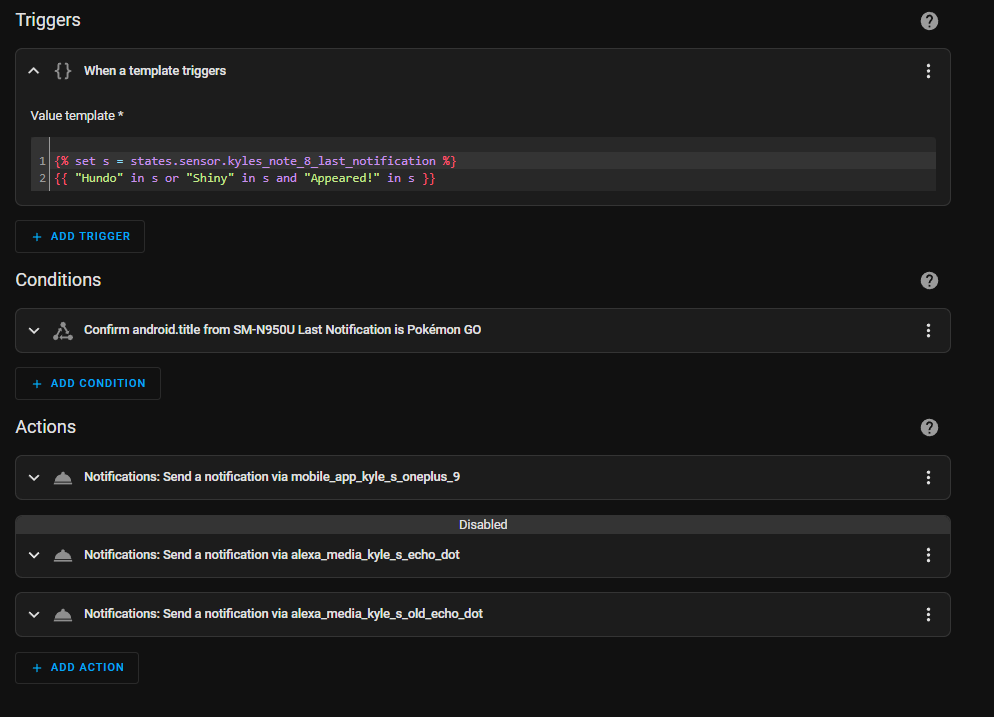
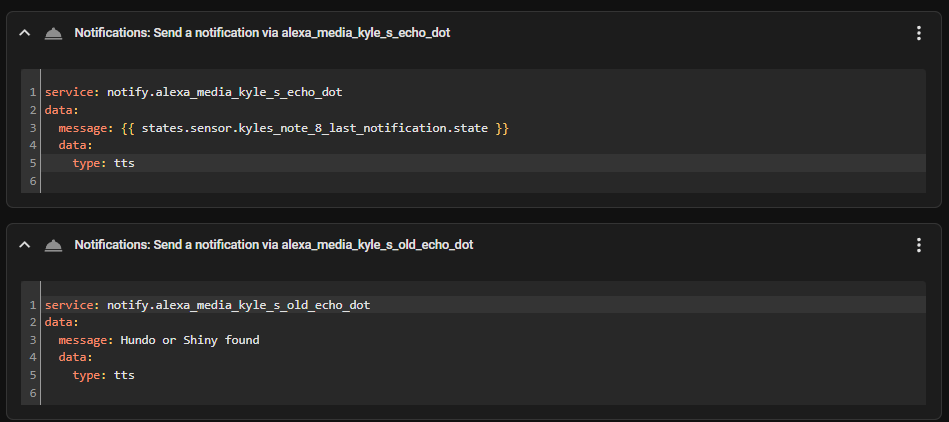
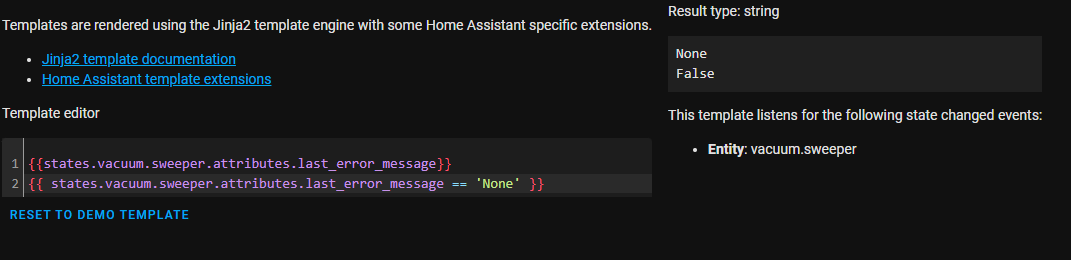
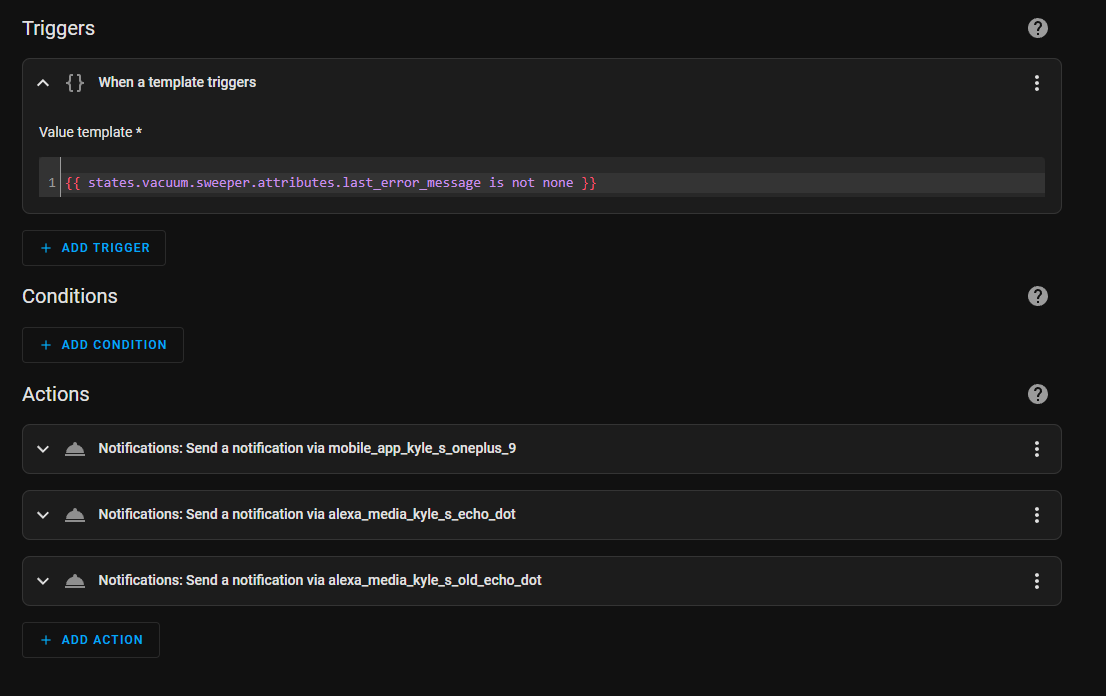


 floral steeple
Good to know!...i'm getting the error messages to you.....please stand-by
dusty grailBOT
@floral steeple posted a code wall, it is moved here --> https://hastebin.com/umatuleqep
floral steeple
bot didn't like all the lines 🙂
floral steeple
marble jackal
It's `is none` or `== None`
based on this, should it be is not none or ==None
marble jackal
is not none or != None
 woven jasper
Hello I'm having difficulties adding my template sensor that I created in developer tools -> Templates
In developer tools -> templates it is working.
But if I add it to my configuration.yaml Im getting errors:
- platform: template
sensors:
solar_total:
friendly_name: "solar total kWh"
value_template: "{{(states('sensor.ecu_lifetime_energy')|float + states('sensor.stp5_0_3av_40_237_pv_gen_meter')|float)}}"
unit_of_measurement: kWh
inner mesa
Im getting errors
sigh
you didn't format your code properly, you didn't say what errors you're getting...
I can already tell that you didn't indent your code properly
Review this and try again: https://www.home-assistant.io/integrations/template/#legacy-sensor-configuration-format
woven jasper
Cant copy a image here but VS says: end of stream or a document seperator is expected
But why can't I just copy paste it from the developer tools -> templates? thought it was especially designed for that.
inner mesa
the problem is with your sensor definition and formatting, not your template
woven jasper
Pff. lot to learn.........
woven jasper
Got it working!!
Happy me, because I'm not a programmer 😛
sensor:
- platform: template
sensors:
solar_total:
friendly_name: "solar total kWh"
value_template: "{{(states('sensor.ecu_lifetime_energy')|float + states('sensor.stp5_0_3av_40_237_pv_gen_meter')|float)}}"
unit_of_measurement: "kWh"
next step. finding out how I can add this value in Energy.
dusty grailBOT
To format your text as code, enter three backticks on the first line, press Enter for a new line, paste your code, press Enter again for another new line, and lastly three more backticks. Here's an example

Don't forget you can edit your post rather than repeatedly posting the same thing.
For over 15 lines you must use a code share site such as https://dpaste.org/ (pick YAML for the language), http://pastie.org/ (pick YAML for the language), or https://paste.debian.net/ (pick YAML for the language).
Command '~format' was invoked by: RobC
inner mesa
writing proper YAML is more about paying attention to detail (like spacing) than actual programming
woven jasper
inner mesa
more in <#872496321574088765>
I know, issue is already posted there. no correct self consumed energy.
At least now I found VS instead of the file editor. that makes it a lot easier to find the wrong spaces and so.
thanks for the help in the right direction.
thorny snow
wooden tusk
If i have a sensor with current consumption of x kw at price of y SEK/kWh it giv...
I think history_stats are an option.
thorny snow
thorny snow
i've defined some value ranges in my gauge for better reading of my temperatures...
Looks like nobody has an idea 😦
mighty ledge
thorny snow
Looks like nobody has an idea 😦
it's not possible, you can't access the frontend from the backend
just template the color out in an attribute
from the state and thresholds you set on the gauge
 neon laurel
I'm not sure if this is the right place to ask.
I have to make a bunch of template lights and the only difference between them is gonna be the entity_id, which I use for different attributes inside the template light. Is it possible to reference it in a template? Something I can put where I wrote "ENTITY_ID" that results in "theater_lights"
  - platform: template
    lights:
      theater_lights:
        friendly_name: "Theater Lights"
        level_template: "{{ state_attr('sensor.ENTITY_ID', 'lux')|int }}"
        value_template: "{{ state_attr('sensor.ENTITY_ID', 'lux')|int > 0 }}"
temperature_template: "{{states('input_number.temperature_ENTITY_ID') | int}}"```nope, have to have it in different spots.
neon laurel
Thank you
marble jackal
Would be nice to have variables in templates entities, but if that ever happens I guess they will be under the template integration
mighty ledge
marble jackal
Would be nice to have variables in templates entities, but if that ever happens ...
Na, they have to be in both
the way it's written
The new style templates are just passed to the old style objects
so old style needs to support it
TBH, adding variables would be easier than templating the attributes field
marble jackal
Ah oke, but old style template sensors don't support state_class
mighty ledge
well they do, they are just stopped through the validation process
it'd be like a 4 line code change to enable them + documents
pretty sure that was a political motivation on that one
They want to get all the old style templates into the new format
marble jackal
Ah, sneaky
mighty ledge
So basically, someone needs to go through and rewrite each template integration that's old into the new format.
It's definitely something that should be done
and, those changes would pave the way towards variables & templating attributes
maybe that's what I should do.
marble jackal
If only I could find the time to start learning Python 😅
inner mesa
once you're sufficiently motivated to implement/fix something, it'll just happen 🙂
My motivation was "I want to control my espresso machine, and my FR has been sitting there for too long..."
elder moon
ive got a silly problem. I want to extract sensors attribute in a template, but... the attribute has space in its name. How should i approach that?
replacing space with _ doesnt seem to work
neither does replacing space with "\ "
marble jackal
Are you sure it actually has a space? Did you check in developer tools > states?
elder moon
cant paste a screenshot but...
Pickup start: 2022-10-05T20:00:00Z Pickup stop: 2022-10-05T21:00:00Z Soldout date: 2022-10-05T16:49:46Z unit_of_measurement: pcs
elder moon
mighty ledge
`state_attr('xxx.xxx', 'Pickup start')`
thanks, that works, ive been trying to do it states.sensor......attributes.xxx way
there was a question actually 🙂
marble jackal
You should avoid using that
mighty ledge
I'm going to reward myself with beer
marble jackal
Well earned
elder moon
ohhh no, im not sure if thats gonna work... 😦
because i just realized that i want to get an attribute of a trigger
right now ive got a notification as follow:
{{ trigger.from_state.attributes.friendly_name }}
and wanted to expand it with more attributes
which unfortunately contain spaces
marble jackal
{{ trigger.from_state.attributes['Pickup start'] }}
elder moon
Amazing
 dull eagle
Hi,
I've been struggling too long with this... ??
I've got a bunch of Smart Plugs with EM.
For each I defined a template:
- unique_id: t0056_current_consumption
  device_class: power
  unit_of_measurement: "W"
  state: "{{ state_attr('switch.t0056', 'current_consumption') }}"
This seems to be working just fine => history graph nicely showing.
I also defined sensor:
- platform: integration
  source: sensor.t0056_current_consumption
  unit_prefix: k
  name: t0056_energy
  round: 2
  method: left
Entity t0056_energy is being recognized, but it has status "unkown", and history graph stays flat 0.
Could somebody give me a hint ? ??
marble jackal
dull eagle
Hi,
I've been struggling too long with this... ??
I've got a bunch of Smart Plu...
you did not define a name, so your entity_id is sensor.template_t0056_current_consumption
 opal dawn
Hi all does any one know why the template sensor Daily energy returns "unknown"?
I'm trying to define a static float value to a template sensor which I can than use multiple times in calculations.....
peak_kwh_costs:
  friendly_name: "Kosten per kWh normaaltarief"
  unit_of_measurement: kWh
  value_template:  0.32503

daily_energy:
  friendly_name: "Dagelijks Energieverbruik"
  unit_of_measurement: kWh
  value_template:   "{{ states('sensor.peak_kwh_cost')}}"
marble jackal
please use the proper code tags instead of quote tags
dusty grailBOT
To format your text as code, enter three backticks on the first line, press Enter for a new line, paste your code, press Enter again for another new line, and lastly three more backticks. Here's an example
Don't forget you can edit your post rather than repeatedly posting the same thing.
For over 15 lines you must use a code share site such as https://dpaste.org/ (pick YAML for the language), http://pastie.org/ (pick YAML for the language), or https://paste.debian.net/ (pick YAML for the language).
Command '.format' was invoked by: TheFes
marble jackal
and your first sensor is sensor.peak_kwh_costs, you are using sensor.peak.kwh_cost, without the s at the end
opal dawn
Oh dear....
marble jackal
not sure what you are trying to achieve here though, both sensors will have exactly the same state
and both will be a string
opal dawn
Trying to create a sensor which contains a float value which to be used in other calculations
and currently testing this in the dev page in home assistent. So no calculations behind it yet.
marble jackal
ALL states in Home Assistant are strings, so no state will be a float value
opal dawn
Because it still gives me "unknown" as return 🙂
marble jackal
it will be the string representation of a float value
opal dawn
Hmm oke. But can that be used for calculations in some sort of way?
marble jackal
yes, by converting it to a float using the the float filter or function
opal dawn
Cause I would find it nicer to have to adjust that "static" float value in 1 place instead of 10 calculations
opal dawn
in HA it has the state of 0.23xxx
marble jackal
okay, and did you reload template entities after adding the s?
opal dawn
Working with packages so I guess a full restart is the only option when using that right
opal dawn
Ah alright.
Seems to be a win there ! Thank you Fes
So I guess the combo "s" and also no using "{{ }}"
opal dawn
Yeah I forgot those at the template sensor fot the static value
marble jackal
ah, but you said that one was working already.. You don't need to use them if you are just providing a static value
dull eagle
marble jackal
you did not define a name, so your entity_id is `sensor.template_t0056_current_c...
Thanks for your advice!
I had to turn back to using name: -> and feed that to the riemann integrator
Sadly it's all very confusing...
 chilly locust
I've gotten a lot from this community, so I though I'd share something back. I wanted to humanize the readings from my history_stats sensors so instead of saying "2.15", it says "2 hours 9 minutes". Here's how I did it in case people are interested:
https://hastebin.com/mevuyohifi.csharp
floral steeple
inner mesa
then "none"
Thanks, @inner mesa i took this out to the forums, I can better flesh this out there
mighty ledge
chilly locust
I've gotten a lot from this community, so I though I'd share something back. I w...
That looks like the one I wrote but with more math
marble jackal
Reminds me that I still don't know anything about macros in jinja 😅
 half pendant
I have this template to aggreate a couple of my energy devices, https://pastebin.com/qpxSFSNb. I was told that would cover if one of them went unavailible. One of the heaters broke so it’s offline right now but the sensor still reports the error in the energy dashboard as Entity unavailable, anyone know why?
mighty ledge
marble jackal
Reminds me that I still don't know anything about macros in jinja 😅
there's nothing to know, it just makes a reusable function
same restrictions, outputs a string always.
can take anything as an input
mighty ledge
half pendant
I have this template to aggreate a couple of my energy devices, https://pastebin...
It fixes unavailable for the sensor itself. The energy panel will not display sensors that are unavailable.
you should get missing data for the sensor in history and when it's unavailable, you won't get data in energy. You can change the availability of the templates sensor to be available if only one is alive. But keep in mind that your data will only contain that one item instead of both.
half pendant
mighty ledge
It fixes unavailable for the sensor itself. The energy panel will not display s...
I’m not sure i follow. The aggregate sensor is the one that’s in the energy dashboard and that one is online.
This is what i’m seeing. https://imgur.com/a/T4JGyMX
mighty ledge
Your template will make your sensor unavailable if any of the sensors used in the calculation are unavailable
so it's working as you (or whoever helped you) designed it
half pendant
Oh i see.
You are right.
then the template is the issue here. I wanted a template that worked even if one of the sensors goes offline and that that one will just count as 0
mighty ledge
if you want it to be available with 1 sensor working and the other not working, you have to adjust the availability template
half pendant
How would i do that?
mighty ledge
can you read the template sensor availability template?
half pendant
Read as in read the code or?
mighty ledge
yes, the code
half pendant
Well i interpreted it as it would reject any sensor that did not have a number in the state but that might be wrong
mighty ledge
right but what does the code end with
half pendant
Length == 0 should be ”if there are no sensors where the state is not a number” ?
So unavailible if there are sensors that are not a number
mighty ledge
right, so if you want to capture 0 and 1, what would you change the end to?
half pendant
Not sure. Because i’m unsure of how the state calculation works if it would accept states which is not a number.
mighty ledge
you don't even need to know that
you know that when it's equal to zero it's available
you also know that when it's equal to 1 it's avaiable
so what do you change == 0 to to satisfy 0 and 1
mighty ledge
no, you don't want to capture 2
half pendant
Why not?
half pendant
But wouldn’t that just make the calculation 0?
mighty ledge
yes, it would
if you don't careabout that, then you don't even need the availability template.
availability is so that you don't get bad data in your sensor results and so that you can fix the problem
half pendant
But what will happen to {{ '%0.3f'|format(a+b) }} if a or b isn’t working correctly?
mighty ledge
you've already solved that with your default for float
half pendant
Oh then i might just get rid of the availability part. I have added the individual sensors to the global energy monitor. This is just to group them to the individual tracker so that i don’t need to add all there. If the heaters in the groups are offline then they are drawing 0 kwh and then the sensors would report 0 and in fact be ”working as intended”
mighty ledge
Just keep in mind, that the reason you did this in the first place was most likey to remove spikes
you remove availability and these sensors go unavailable momentarily, then you'll get spikes in your data
on the energy panel.
FYI, the risk is yours
@half pendant ^
Basically, you have to choose one or the other. Most people go with the availability template so that your daily, weekly, monthly, etc are correct.
half pendant
Not sure i understand. How would i get a spike?
mighty ledge
if one of your sensors momentarily drops from 500 to unavailable then back to 500, you're going to add 500 to your energy readings
then you'll have to edit the long term stats to remove the erroneous data
half pendant
Ok. Makes sense. So maybe i would change it to <2then because then it will report if at least one is availible.
half pendant
Yeah but then, like now, it doesn’t report at all since one of the heaters are permanently offline
(Until it’s repaired)
mighty ledge
yep, just realize the risks
half pendant
I guess maybe i should just remove the faulty device from HA until it’s repaired.
Also, A big big thank @mighty ledge for taking the time and walking through the code. Really helpful. Much more than just ”giving me the answer”
mighty ledge
half pendant
Also, A big big thank <@372843932096397333> for taking the time and walking thro...
np
thorny snow
mighty ledge
from the state and thresholds you set on the gauge
For defining vars i am using this addon https://github.com/Wibias/hass-variables
I defined the vars, but i am not shure how to use it in the gauge.
type: gauge
entity: sensor.kitchen_humidity
needle: true
min: 20
max: 80
segments:
  - from: 0
    color: {{states('variable.temperature_color_warm_indoor')}}
...
Is this the right way?
mighty ledge
the frontend doesn't support templates, you need something custom for that
thorny snow
any good tips?
mighty ledge
I use a JS one, but that might be above your abilities
it's called...
config template card
I believe there's a Jinja version by a different name. FYI you're using jinja code in the example you pasted above
(so that's the one you should look for )
thorny snow
I am fine with JS, just new to HA. thx, will give it a try.
mighty ledge
thorny snow
I am fine with JS, just new to HA. thx, will give it a try.
for the js, the template would just be
return states['variable.temperature_color_warm_indoor'];
pretty sure at least
inner mesa
.state
chilly locust
mighty ledge
That looks like the one I wrote but with more math
I think I used your original HA uptime one (not the streamlined one) last year for my own uptime sensor, and it's been used as the base code and modified for use with various other sensors ever since. So thank you for writing and sharing it! All I did with this one was split the state and add a little math to convert the decimal minutes into actual minutes.
mighty ledge
chilly locust
I think I used your original HA uptime one (not the streamlined one) last year f...
well the original template did that already, that's why it's odd that you posted or had to edit it
the math is caked into each line
chilly locust
mighty ledge
well the original template did that already, that's why it's odd that you posted...
The code snippit I used from you had timestamps. The split parses the history stats sting, converts to integers, then does the additional math needed to convert to minutes. They're relatively minor changes in the grand scheme of things, but I've seen people occasional ask about humanizing history stats in various places, so I figured I'd share it for those interested. Again, thanks for the base code.
mighty ledge
you don't need that conversion
you just need to use the new tools that have been added to do that conversion for you
and you leave the rest of the template the same
not to mention, taht will fail when you reach a day
chilly locust
mighty ledge
not to mention, taht will fail when you reach a day
It's meant to reset every 24 hours. I took out the day/week stuff on purpose.
chilly locust
mighty ledge
you just need to use the new tools that have been added to do that conversion fo...
New tools? Please elaborate
I'm by no means a coder, so I'd love to know how to improve it.
mighty ledge
I'll just reply on your post
mighty ledge
chilly locust
New tools? Please elaborate
I wrote that template with the intention that all you do is provide the total number of seconds to uptime variable.
and, as a user you'd just remove the phrase lines that you don't want
It was supposed to be plug and play, but it doesn't look like it fit the bill
@chilly locust also updated to fix the no first item in sequence
 plucky wyvern
Hi, I am trying to make a dynamic group. I want all device_class: problem to show up in that group. But only when it shows problem. Somehow I am not able to figure out how and where to start.
inner mesa
What did you want to do with that group?
mighty ledge
plucky wyvern
Hi, I am trying to make a dynamic group. I want all `device_class: problem` to s...
using group.set?
plucky wyvern
mighty ledge
using group.set?
Where can I read about that?
mighty ledge
not much to read about, but take a look at what robc asked you
chilly locust
mighty ledge
I wrote that template with the intention that all you do is provide the total nu...
I didn't realize you updated it to be plug-n-play. I came across the original over a year ago and have just used that. I can't seem to get it to work though. It's just blank. It should be showing "1 hour and 20 minutes"
mighty ledge
chilly locust
I didn't realize you updated it to be plug-n-play. I came across the original ov...
what's the output of your sensor in dev tools -> states page?
I don't see how it would fail to work if it's coming from history stats
plucky wyvern
inner mesa
What did you want to do with that group?
That's a good question. Let me explain. I have a lot of devices classes of type problem. So I thought to make a template which can be used in an automation as condition. Trigger is a state_changed event. Without a condition it will trigger my automation to death 🙂
chilly locust
mighty ledge
what's the output of your sensor in dev tools -> states page?
Just nothing. It's blank.
mighty ledge
I'm talking about the feed in sensor
sensor.furance... whatever it is
daily_furnace_uptime
chilly locust
1.34
mighty ledge
ooooooooh
neon laurel
{{state_attr('light.bedroom_light','brightness')/255*100|round(0)|int}}
why when I add anything after this template the output goes from 100 to 100.0?
trying to display brightness as percentage
inner mesa
plucky wyvern
That's a good question. Let me explain. I have a lot of devices classes of type ...
I don't see the case for a dynamic group there
plucky wyvern
inner mesa
I don't see the case for a dynamic group there
Yeah, I am a bit confused to be honest.
mighty ledge
chilly locust
1.34
updated it again
FYI, if someone else chooses different units, the templates wont work
either
neon laurel
neon laurel
``` {{state_attr('light.bedroom_light','brightness')/255*100|round(0)|int}}```
...
looks like the string output has the added decimal
with result type number I don't have it
plucky wyvern
inner mesa
I don't see the case for a dynamic group there
I have explained it here completely: #general-archived message
mighty ledge
plucky wyvern
I have explained it here completely: https://discord.com/channels/33094423891096...
Are these binary sensors?
if yes...
plucky wyvern
mighty ledge
Are these binary sensors?
yes, they are
mighty ledge
{{ states.binary_sensor | selectattr('state', 'eq', 'on') | selectattr('device_class', 'defined') | selectattr('device_class', 'eq', 'problem') | map(attribute='name') | list | join(', ') }}
@plucky wyvern ^
neon laurel
neon laurel
``` {{state_attr('light.bedroom_light','brightness')/255*100|round(0)|int}}```
...
had to add parenthesis, the way it was there I was only rounding 100
plucky wyvern
mighty ledge
```
{{ states.binary_sensor | selectattr('state', 'eq', 'on') | selectattr('devi...
That looks nice. I have pasted it into HA Template page but it does not display my two entities which actually are showing problem
chilly locust
mighty ledge
updated it again
Well, it's partially working now. But it's still not correct. It outputs "1 minute". It should be "1 hour and 20 minutes".
mighty ledge
chilly locust
Well, it's partially working now. But it's still not correct. It outputs "1 minu...
is it in hours or minutes or seconds, the input senor?
chilly locust
History stats outputs 1.34 (1 hour, .34 minutes which is equivalent to 20 minutes)
mighty ledge
ok, updated
all you have to do is multiply the sensor * 60 * 60
I assumed it was minutes
chilly locust
That works. Thanks.
 queen girder
Really dumb question. How do I get an attribute of an entity (such as a thermostat) to appear as a functional separate entity?
For example:
office_thermo_state:
        friendly_name: "Office Thermostat State"
        unique_id: "office_thermostat_state"
        value_template: "{{ state_attr('climate.office', 'hvac_action') }}"
Doesn't work, because when I graph it in history, it will say 'idle' or 'cooling' or whatever, but it will also state 'measured in F' and display an empty graph..
mighty ledge
The hvac action doesn’t have the temperature