#templates-archived
1 messages · Page 3 of 1
 wispy crown
 stuck dock
How to convert b to MB of GB on the fly?
 silent barnBOT
@wispy crown posted a code wall, it is moved here --> https://hastebin.com/avesojixit
wispy crown
is there a way to set those temperature in farenheight?
https://hastebin.com/avesojixit
stuck dock
wispy crown
is there a way to set those temperature in farenheight?
https://hastebin.com/av...
Yes change temp in UI
wispy crown
stuck dock
Yes change temp in UI
i dont have an option for this device only, and i do want to keep most of my sensors in celcius, its just this one i want to change
stuck dock
wispy crown
i dont have an option for this device only, and i do want to keep most of my se...
Yes you can change for this device only in UI
wispy crown
where is that? couldnt find it
wispy crown
i can change the name, icon, or area... not units
wispy crown
i see the screenshots, but the option does not seem to be in my sensor. maybe its a bug in the integration?
stuck dock
wispy crown
i see the screenshots, but the option does not seem to be in my sensor. maybe it...
Read github, entity class or something like that should be set to temperature
"It's a mistake/lack of clarity in the release notes; NumberEntity now supports setting device_class to temperature which means the temperature will be converted to the configured unit system, but support for overriding the unit of temperature number entities is not implemented. "
wispy crown
ok so its not available yet?
stuck dock
wispy crown
ok so its not available yet?
It is, you might need to change device_class
wispy crown
would it be in there to change the entity class?
https://www.home-assistant.io/docs/configuration/customizing-devices/
stuck dock
I think there is a Gui method too
Shouldn't the device class set to duration?
Uptime is duration
 sinful bison
Hello :)
Out of curiosity, i can't put template in the event data of an automation event trigger ?
 ivory harbor
hey y'all, I'm trying to add a condition to an automation based on the last triggered attribute of a script. I'm trying to wrap my head around templating and having a bit of a challenge. Do I want to start with now() and compare it to last triggered?
eg: {{now() >= state_attr('script.normal_evening_lights','last_triggered')|as_local + timedelta(minutes=1440) }}
 inner mesa
sinful bison
Hello :)
Out of curiosity, i can't put template in the event data of an automati...
inner mesa
sinful bison
Hello :)
Out of curiosity, i can't put template in the event data of an automati...
No, but you can use trigger variables in the condition
sinful bison
ivory harbor
eg: `{{now() >= state_attr('script.normal_evening_lights','last_triggered')|as_l...
you are missing a |as_local on the now() with a check like that
either put it everywhere, or don't :)
inner mesa
That shouldn't be necessary
sinful bison
inner mesa
No, but you can use trigger variables in the condition
noted; i am using id, but i wanted to use var as the entity id in the trigger data so everything was in a single placve
ivory harbor
sinful bison
you are missing a `|as_local` on the `now()` with a check like that
thanks - it is still returning as false. But that particular script was triggered within the last 24 hours ... am I doing the compair wrong?
or am I thinking about it wrong... if now >= last_triggered + 24 hours would be false since it is within 24 hours, right?
sinful bison
sorry something came up.
Let me test something
i am actively confused
{{ now() >= now() - timedelta(minutes=200) }} return true and {{ now() >= now() + timedelta(minutes=200) }} return false, so the check is ok
but i can't make it work with a "last triggered"
inner mesa
What are you trying and how is it not working?
sinful bison
last trigger + 200 mn is 2022-07-10 21:46:47.409119+00:00
now is >= of last trigger + 200 mn
True```
This make no sens XD marble jackal
Just say it in words, what is your goal
inner mesa
Or, ya know, actual code
sinful bison
oh ... no it does make sens, my last trigger is out of wack by a month sorry
@ivory harbor it does work
last trigger + 200 day is 2023-01-26 18:26:47.409119+00:00
now is >= of last trigger + 200 day
False```
With the check you are using, it's true if the script last run was less than 1 days ago and false else
```{{now() >= state_attr('script.your_script','last_triggered') +
timedelta(days=1) }}```i found #templates-archived message pretty clear of his goal ? no ?
marble jackal
This will be false if the last trigger was less than a day ago
sinful bison
damn me ... got can't read my own test
ivory harbor
does HA know the concept of individual holidays (in the US)? ... does the workday feature of templating provide that?
sinful bison
don't know ... #integrations-archived could help with that
ivory harbor
drat... wrong room again
ivory harbor
sinful bison
oh ... no it does make sens, my last trigger is out of wack by a month sorry
<@...
thanks!
Now Im working on a template to check between two specific dates
"{{ (11,24) <= (now().month, now().day) <= (4,24) }}" .... I want it to be true if the dates are between Nov 24 and April 24
for instance, shouldn't this be true: "{{(8,3,2022) <= (now().month, now().day, now().year) <= (4,24,2023) }}"
ivory harbor
also trying to find the number of dates between two dates
inner mesa
{{ strptime("02-03-2022", "%m-%d-%Y")|as_local < now() < strptime("09-03-2022", "%m-%d-%Y")|as_local }}
{{ (strptime("09-03-2022", "%m-%d-%Y") - strptime("02-03-2022", "%m-%d-%Y")).days }}
did you want fries with that?
 tender prawn
does anyone know if I can template the title field in a notification automation?
inner mesa
is it under a data: tag?
tender prawn
yes
inner mesa
then yes
tender prawn
it doesn't validate
silent barnBOT
Please use a code share site to share code or logs, for example:
- https://dpaste.org/ (select YAML for the language)
- https://www.codepile.net/ (select YAML as the language)
- https://paste.debian.net/ (you guessed it, select YAML as the language)
Please don't use Pastebin, since it can randomly add spaces to the main view. Please also don't share text as images since it makes it harder for people to help you. Remember that others may have colour blindness, impaired vision, etc.
Command '~share' was invoked by: RobC
tender prawn
hahaha. Just tried again and it is ok. I tried last night editing on an ipad and it kept giving me an error but ok now. Must be an ipad thing....
tender prawn
yeah I was sure I got the right ones but iOS is a PITA
 north radish
Hi, I have an automation that I want to add a condition for, which will be somewhat based on the value of another entity. This is for a Roborock vacuum that is integrated using the Xiaomi integration. The sensor "roborock.vacuum.a15 Last clean end" stores a value that is formatted like 2022-08-04T18:46:32+00:00 for the last time that it finished cleaning.
I want my automation to only trigger if the last time the vacuum finished cleaning was over 2 days ago. Can someone point me in the right direction of what I need to do?
I know I can set up an automation to only trigger once every two days, but that wouldn't account for the vacuum being started via other methods.
I already asked in #automations-archived, and they suggested I ask here.
 amber hull
I have done a reinstall and a template that pulled data from accuweather does not create a new sensor. It works in developer tools, but no sensor created.
sensors:
  wind_direction:
    friendly_name: 'wind direction'
    value_template: >
      {% set direction = ['N','NNE','NE','ENE','E','ESE','SE','SSE','S','SSW','SW','WSW','W','WNW','NW','NNW','N'] %}
      {% set degree = state_attr('weather.home', 'wind_bearing')|float (0) %}
{{ direction[((degree+11.25)/22.5)|int] }}```I would probably solve that by writing an automation that triggers whenever it starts cleaning and setting an input_datetime for 2 days in the future. Then an automation with a time trigger for that input_datetime to start vacuuming
otherwise, you can use a template trigger like this, but it will check every minute:
{{ now() > "2022-08-04T18:46:32+00:00"|as_datetime + timedelta(days=2) }}
replacing the string with state_attr() for whatever you need
inner mesa
amber hull
```platform: template
sensors:
wind_direction:
friendly_name: 'wind direct...
did you check your config?
amber hull
Meaning what?
silent barnBOT
Always run the configuration check command when you make changes. Don't trust the UI check - it misses some problems.
- HAOS & Supervised use
ha core check - Container uses
dockercommands - Core requires you to activate the venv first
Command '~check' was invoked by: RobC
amber hull
I think it is something else. I.e a formatting change. I have had these templates for almost a year with no issue. I had an issue in the last release of the beta, that I decide to reinstall rather than use my backup. I had save all of my yaml files and just copied them over. The sensors are not created
amber hull
I have no errors.
inner mesa
then review your logs
amber hull
No errors in the logs relating to the template.
time="2022-08-05T22:04:38-04:00" level=error msg="Unexpected server response. Status code: 500"
Unexpected server response. Status code: 500
It looks like my issue is the template (using the spit yaml) is not loading. Not sure why
I am not seeing any errors in any of the checks, but the template sensors are not created.
amber hull
No errors, but something was wrong with the format. Now working
north radish
@inner mesa Thank you! I'll have to look into that. That's a clever approach.
silent barnBOT
@crimson anvil posted a code wall, it is moved here --> https://hastebin.com/ekasevuxit
 crimson anvil
Hey, I'm trying to change state of kiosk mode with a button on my dashboard (using custom:floorplan-card) but can't figure out the right way to do this.. Any idea?
https://hastebin.com/ekasevuxit
marble jackal
- You can't do both a service call and a toggle in the tap action like that.
- Your if statement is incomplete
- The result of your if statement is not a valid service
- Why do you use an input_text to toggle kiosk mode?
crimson anvil
marble jackal
* You can't do both a service call and a toggle in the tap action like that.
* Y...
tbch i have no idea what i'm doing and i'm struggeling to find some documentation with good examples
marble jackal
I would suggest to change the entity in your kiosk mode settings to an input boolean for kiosk mode at well
Just like for hide header and hide menu
What are your trying to do with that if statement?
 young lake
Morning everyone. Needing help. I've searched the forums, reddit, and YouTube and can't seem to find an answer. Is there a way to list all of the attributes of an entity? I have a RESTful sensor and only the 'friendly_name' attribute shows in the Dev Tools States panel.
I'm post here because I need to get an attribute for use in the template of another sensor.
marble jackal
If dev tools only shows friendly_name then that is (currently) the only attribute of the entity
young lake
Interesting. There should be four additional attributes.
Here is the sensor declaration:
Specifically:
- apiversion
- geometry
- properties
- type
Where apiversion is a string, geometry is an array, properties a dict, and type a string.
I looked under the State Objects page but there doesn't seem to be a way to dump the dict of the entity attributes.
marble jackal
young lake
Interesting. There should be four additional attributes.
Here is the sensor dec...
You need to use resource_template when you use a template in your resource
https://www.home-assistant.io/integrations/sensor.rest/#resource_template
young lake
Thanks! I'll check that out.
 leaden perch
What are these kinds of timestamps called? https://i.imgur.com/qwBWiEc.png
Its kind of like relative_time, but that doesnt say "ago"
Wait, I can literally just put "ago" after and it'll be exactly the same right?
inner mesa
For that one, yes
leaden perch
It should work for hours and days too right?
inner mesa
I don't know if it will say 'yesterday'
inner mesa
I don't think so
 paper hazel
inner mesa
is it under a `data:` tag?
paper hazel
inner mesa
is it under a `data:` tag?
Is a rule of thumb where templates can & cant be used?
marble jackal
When the docs don't indicate they can be used, they can't
paper hazel
fair....
leaden perch
inner mesa
I don't think so
Thats unfortunate. Im making a custom mushroom template card and would like to retain the stock appearance for when the entity was last chhanged
inner mesa
paper hazel
fair....
In general, any value under a data: tag and the value for service: can be a template
marble jackal
target as well
inner mesa
I never use that 🙂
marble jackal
You just put it under data?
marble jackal
I've noticed in traces it will end up there anyway
marble jackal
Probably, I adapted it anyway. Guess I started using templates more at the time it was introduced, so I had to move it somewhere (instead of on the same level as service:)
 mental violet
Hi I am asking here, because I dont know where I should ask elsewhere.
I want to track my spendings in HA. I have an input_number.last_spendings that changes everytime I spend money.
Now I can see the last amount of money spend. But I want to make a list/ table in LoveLace where I can see all my spendings in this month. I thought I could do this via a markdown card.
But I dont know how to easily access the last x states. I thought that I can create atrributes where the older values will be stored. But I find that very cheap, because I dont know how many attributes I will need per month.
So the best thing I look out for would be a function like:
input_number.last_spendings.last_state(i) and then you replace i in a for loop with 0 until input_number.last_spendings.length
So for example I spend: 80€ 20€ and then 100€
I want a table/ list with: ```
| 80 |
| 20 |
| 100 |
You can just keep appending items to a list in an attribute
mental violet
how do I do that?
inner mesa
magic
- trigger:
    platform: state
    entity_id: input_number.test
  sensor:
  - name: spending_list
    state: "{{ states('input_number.test') }}"
    attributes:
      monthly_tally: >-
        {% set new_value = states('input_number.test')|float %}
        {{ [new_value] if states.sensor.spending_list is not defined or 'monthly_tally' not in this.attributes else this.attributes.monthly_tally + [new_value] }}
thank you
but wait, where do I put this? Can I just put this into configuration.yaml under sensor:
mental violet
ok thanks I got it. didnt work with template sensors until now. Thank you very much 😄
inner mesa
You'll need to add some logic to reset it when you want
mental violet
does it make sense recourse wise, if I take your template sensor and add 11 more attributes (each attribute for each month)? or would that not be good. I expect around 40-50 spendings per month. so 40-50 objects per attribute.
inner mesa
there's no limit
it's fine. or use separate sensors
you're really just replicating the function of the database, so you could probably use an SQL sensor to mine that as well
 ocean forge
Can you regex remove multiple spaces dynamically?
inner mesa
like this?
{{ "foo bar blah floop"|regex_replace(' +', ' ') }}?
-> foo bar blah floop
mental violet
@inner mesa yeah and I see now that I tinkered a bit, that all attributes will be reset after I reload the template sensor. I dont know if it is the same with restarts...
inner mesa
yeah, multiple SQL sensors with queries based on the original input_number and based on date ranges is probably the best way
and I have no experience with that, so that'll be your challenge 🙂
but I'm certain that it can be done
 radiant spindle
does anyone know how I could return a datetime on this format 08:30? Because this template: "widget_text" entity: "[[[ return entity.entity_id ]]]" returns 08:30:00
marble jackal
mental violet
<@558346704953540628> yeah and I see now that I tinkered a bit, that all attribu...
If you add a unique id, it should restore attributes on template reload or reset
I use a similar approach to store me and my girlfriend arriving and leaving home, and it still has data of 4 days ago. And I can assure you templates have been reloaded and HA has been restarted
inner mesa
Ah, good call
mental violet
@marble jackal an ID for that attribute ?
silent barnBOT
Please use a code share site to share code or logs, for example:
- https://dpaste.org/ (select YAML for the language)
- https://www.codepile.net/ (select YAML as the language)
- https://paste.debian.net/ (you guessed it, select YAML as the language)
Please don't use Pastebin, since it can randomly add spaces to the main view. Please also don't share text as images since it makes it harder for people to help you. Remember that others may have colour blindness, impaired vision, etc.
Command '.share' was invoked by: TheFes
inner mesa
I still think that SQL sensors per month based on the source sensor may be a better solution
mental violet
I just cannot find any documentation on how to implement a sql sensor
marble jackal
inner mesa
I still think that SQL sensors per month based on the source sensor may be a bet...
But then the data must be in the database, generally there is only 10 days of data. Unless you store it as statistics
mental violet
marble jackal
mental violet
https://dpaste.org/jUdZV/slim
The problem is that all you if statements need an else as well, which stores the existing attribute data
Now it indeed removes the existing data if the if is not true
marble jackal
No need to remove it, it's good practice to have it in
mental violet
          {{[new_value] if states.sensor.legro_spending_list is not defined or 'monthly_tally_01' not in this.attributes else this.attributes.monthly_tally_01}}
        {%%endif}```
this should satisfy it or ?and can I have more than 1 trigger? So could I have another trigger that deletes every attribute entrys when it is the 01.01.
marble jackal
    attributes:
      monthly_tally_1: >-
        {% set previous = this.get('attributes', {}).get('monthly_tally_1', []) %}
        {%if now().month == 1%}
          {% set new_value = states('input_number.legro_letzte_ausgabe_test')|float %}
          {{ previous + [ new_value ] }}
        {% else %}
          {{ previous }}
        {% endif %}
That should work
mental violet
yes i like that thank you
there is no way to implement this with a for loop isnt it? asking for a friend 😅
marble jackal
What do you want to loop?
mental violet
like: for i = 0, i<=12, i++ do 'monthly_tally_' + 'i': >- {% set previous = this.get('attributes', {}).get('monthly_tally_' + i, []) %} {%if now().month == i %} {% set new_value = states('input_number.legro_letzte_ausgabe_test')|float %} {{ previous + [ new_value ] }} {% else %} {{ previous }} {% endif %}
monthly_tally_1: '[Undefined]' i have now undefined attributes in the months which are in the future. Does this conflicts with anything internal?
marble jackal
All months besides the current should have an empty list if you put this in all months
And trigger the template by making a change to your input number
 opaque creek
Heya! I have made a utility sensor that show me the energy usage per hour out from my total increasing energy sensor. And if I also want a sensor showing me the price I pay per hour do I simple take that hourly utility meter sensor and multiply that with the cost per hour-sensor in like this:
{{ states('sensor.total_energy_use_per_hour') | float(0) * states('sensor.nordpool_kwh_se3_sek_') | float(0) }}
Will this be correct? Or is there some other better way to do this?
Hm not this wont be right since the utility meter also increases each hour? I must like use the last_period attribute or something to get the total?
marble jackal
This will show the current hour indeed, so about 20 minutes of usage now
The attribute last_period has the total of the previous hour
opaque creek
Hm right! And if I only want to show the total cost of each hour I make a hourly utility sensor out of this hourly sensor? Would that be right? 😄
Or do I spin this around to much with utility sensor above utility sensors? 😄
marble jackal
Yes, that won't work
Create a template sensor with state_class measurement and it will be stored in statistics
opaque creek
marble jackal
Yes, that won't work
Okay so like this then: ?
- sensor:
  - name: "Cost per hour"
    state: "{{ states('sensor.total_energianvandning_per_timme') | float(0) * states('sensor.nordpool_kwh_se3_sek_3_10_025_med_moms') | float(0) }}"
    state_class: "measurement"
    icon: "mdi:currency-usd"
    unit_of_measurement: "SEK"
Yep, although I would add a unique_id as well
and an availability template
To avoid it going to 0 after reboot, messing up your statistics
 ashen isle
hi folks, short question, when i use curl
curl "https://api.sencrop.com/v1/users/<userid>/devices/<deviceid>/data/raw?beforeDate=2022-08-02T00%3A00%3A00Z&size=10&measures=TEMPERATURE" -H "Authorization: Bearer <token>"
i get the expected result, but when i use:
  - platform: rest
    method: GET
    resource: "https://api.sencrop.com/v1/users/<userid>/devices/<deviceid>/data/raw"
    params:
      beforeDate: "2022-08-05T00:00:00Z"
      size: "10"
      measures: "TEMPERATURE"
    name: temperaturSenc
    json_attributes_path: "$[0]"
    json_attributes:
      - value
      - type
    headers:
      User-Agent: Home Assistant
      Content-Type: application/json
      Authorization: >
        Bearer "<token>"
    value_template: "{{ value_json }}"
i get a bad parameter error in return, so it seems, that the url which is build differs from the one i tested it with, esecially with respect to the parameters ... do you know how to check hot the construted url looks like, or whats the issue here ?
opaque creek
marble jackal
Yep, although I would add a unique_id as well
Hm ok but dont I kinda want it to reboot from 0? Since the hourly price is for my hourly total usage, right? So actually I want a sensor multiplying the total hourly energy usage with the current hourly price somehow
marble jackal
I thought you were planning to use last_period?
opaque creek
hm yes that would show the total usage for the previous hour. But the price-sensor doesnt have a last_hour I believe but show the current hour's price so then the price wouldnt be correct right?
I use the Nord Pool integration for the price
marble jackal
You can store the previous price in a template sensor or input_number
opaque creek
ah right
But actually hm.. I tried out of curiosity to do another Utility Meter sensor on that sensor I had above there.
And so yeha now I have 2 sensor show the same value.. but the utility one has more attributes like that "previous" hour etc
And that previous value on that Utility Meter sensor is the previous hour's total energy usage multiplied with that hour's energy price right? Wont this give me what I'm looking for?
marble jackal
The utility meter only tracks consumption, not costs
opaque creek
yes but if I point at the total cost sensor it doesnt matter right? Since the cost have already been multiplied in that sensor already?
So basically what I do:
Sensor 1: <My total energy-consumption resetted per hour in a Utility Meter multiplied with the current hourly energy price>
Sensor 2: Is sensor 1 that I put into a utility meter that resets each hour.
Gives me energy-price per hour that resets each hour with the attribute "Last period".
 thorny snow
Hi, I try to set up a webhook trigger and got stuck at a condition
Triggering it with curl -X POST -d '{ "preset": "3" }' or -d "" depending on what I want to do.
I would have gone dor a template like this
condition: template
value_template: '{{ trigger.json.preset in ["1", "2", "3", "4"] }}'
but when I safe I only get template value should be a string for dictionary value @ data['value_template']. Got None
Might have an tip on how to structure the template that it goes thou the editor?
Got further, apparently the automation editor buged out on me.
Reloading the editor let me save the automation. I guess my template is wrong
Error: In 'template' condition: UndefinedError: 'dict object' has no attribute 'json'
 mighty ledge
pin 1
thorny snow
bigger problem was that I was not able to safe, the error comes from the trace
mighty ledge
if .json doesn't exist, that means the webhook response is not json
thorny snow
aaah!!!!, jea sure, not sending the header!
That was it!, Thanks a lot petro. Wouldn't be able without you, no joke
marble jackal
opaque creek
So basically what I do:
Sensor 1: <My total energy-consumption resetted per hou...
Okay, if that looks correct then it's probably fine. Never used it like that
opaque creek
marble jackal
Okay, if that looks correct then it's probably fine. Never used it like that
yeha I'll try this an see if it suits what I need. Thanks 🙂
mental violet
    platform: state
    entity_id: input_number.legro_letzte_ausgabe
  sensor:
  - name: legro_spending_list
    state: "{{ states('input_number.legro_letzte_ausgabe') }}"
    unique_id: "legro_spending_list_id"
    attributes:
      monthly_tally_1: >-
        {% set previous = this.get('attributes', {}).get('monthly_tally_1', []) %}
          {%if now().month == 1%}
            {% set new_value = states('input_number.legro_letzte_ausgabe') |float %}
            {{ previous + [ new_value ] }}
          {% else %}
            {{ previous }}
          {% endif %}```
This doesnt create the attributes, when they are missing. How can I create them?Did you trigger it by changing the input number?
mental violet
I am sry. I dont know what happend, but a restart did it... Some serious weird stuff happened.
 nimble copper
What template should I use to convert a timestamp like this 2022-08-06 23:00:00+00:00 into a full word date e.g. Saturday 6 August 2022?
inner mesa
indeed. {{ ("2022-08-06 23:00:00+00:00"|as_datetime).strftime("%A") }} etc., etc.
nimble copper
Thank you
 zealous flame
I'm getting poor formatting when this message goes through: https://paste.debian.net/1249611/
the last part is the issue with the realfeel temperature. The message comes out as "('Expected Real Feel temperature for today is ', '33.0')
I assume its because I'm not using strict/proper syntax in my template and the code engine is trying to properly format it for me?
I'd like to understand how I'm supposed to properly format the text string portion of the message, and include the states('') portion of the message, before the if statement
inner mesa
What is the state of that sensor?
It looks like maybe you created that sensor and put a set in there, rather then the string you really want
In other words, the problem is with the state/definition of that sensor, not the template above
zealous flame
The state of the states("sensor.home_realfeel_temperature_max_0d") ?
inner mesa
Yes, since that's what you're displaying
zealous flame
it's 33.0, which shows up in the message to my app
inner mesa
Seems unlikely based on your earlier statement
zealous flame
it's just that it shows up with weird formatting, ie it has the ( and '
my statement may have been unclear, the issue is all in the format the message comes through as, and only on that last bit with the realfeel
inner mesa
Oh, never mind
The last line should look like this
`{{ 'Expected Real Feel temperature for today is ' ~ states("sensor.home_realfeel_temperature_max_0d") if is_state_attr('sun.sun', 'rising', True) }}
You were creating a set with the comma
zealous flame
so i need the tidle ~ ?
inner mesa
Yes, you can try it
marble jackal
It will combine both sides of it as strings
crimson anvil
How do i include custom card inside picture-elements?
I tried like this
- type: picture-elements
  elements:
    - !include config.yaml
but nothing happens
inner mesa
That's for #frontend-archived
 shell kelp
Any good ideas to find how many seconds I have until midnight? 🙂
inner mesa
{{ (today_at('23:59:59') - now()).total_seconds()|int + 1 }}
shell kelp
Of course I missed that in the docs.. Thx!!
 celest brook
Why are these not the same? Is that variable not an official attribute so I can only get it by digging into the object 'manually', as it were?
{{ state_attr ('sensor.govee_keuken_temperature', 'last_changed')}}

2022-08-08 00:07:18.363957+00:00
None```Correct. It's a property of the state object, not an attribute
 sick ice
So I've got a bunch of template sensors under
template:
  sensor:```
than also a bunch of binary template sensors under
binary_sensor:
- platform: template
I just saw that we can also have
template:
binary_sensor:
is there any difference between having template binary sensors under the `binary_sensor:` integration or the `template:` integration?The new format offers more options. The docs have the details
sick ice
template: being the new format, binary_sensor: being the old right?
I did spend some time a few weeks ago migrating template sensors from sensor: to bring them up to the new format. I guess this is the same
 trail ginkgo
How do I reference the last_updated field for a state object (sensor) in a template?
I previously used states.sensor.temperature.last_updated and that worked fine in my recollection. But I now find the same error 58 times in my log file, where the error reports "None" does not have an attribute last_updated" ... changing to the new format for attributes, state_attr() does not seem to work for me.
inner mesa
It's not an attribute
trail ginkgo
That's what I figured, but I'm not sure what it is then 🙂
trail ginkgo
Can those be referenced in a template?
inner mesa
Exactly as you posted
trail ginkgo
states.xxx ??
trail ginkgo
Hm ok
Ooooohhh hang on .... could it be that the errors "None has no attributed 'last_updated'" show up in my log for 58 different sensors because when HA starts up the sensor does not yet exist and/or has no state?
trail ginkgo
Weird. When I put it into the Dev tools -> Template playground it renders just fine. So I guess the entity did not exist when the template sensor was loaded, and is created after .... perhaps HA loads mqtt sensors AFTER template sensors?
Alright ... appreciate your help. I'll just leave it for now. It's just for a changing icon.
inner mesa
Yes, probably
trail ginkgo
Hm. So to avoid the error, before referencing it I could maybe test if the entity exists? states('xxx') is defined might do the trick.
Changing 58 sensors with that is a LOT of effort just to avoid an error in a log file! 😉
marble jackal
trail ginkgo
Hm. So to avoid the error, before referencing it I could maybe test if the entit...
You should use states.domain.object_id then
Wait, you should use
{{ states.sensor.i_do_not_exist_yet is not none }}
trail ginkgo
{% if is_state('sensor.navel_status_report_errors', 'True') or states.sensor.navel_status_report_timestamp is none %}
that i think does the trick. let me reload.
of error messages went down!
noice!!!
trail ginkgo
marble jackal
Wait, you should use
`{{ states.sensor.i_do_not_exist_yet is not none }}`
Thank you!!
 undone jungle
Hi all, I am trying to get a template sensor to return an (abs) of another sensor, which is simple enough. Though the outcome is that when the source sensor goes negative, the output of the child sensor is NaN or at least not graphed in HA. Is there a systemic way of dealing with such problems?
silent barnBOT
@undone jungle posted a code wall, it is moved here --> https://hastebin.com/gesunivure
undone jungle
silent barn
I was about to do it.
 fossil venture
You don't need the if and when you do use an if in jinja you must supply an else for what the template should do if the if is not true. Just do this: ```
state: >
{{ states('sensor.net_power_meter') | int(0) | abs }}
Thank you very much for the pointer on the else, but I believe this sensor will not return the same output as mine.
fossil venture
Why?
undone jungle
It'll convert every value to abs, while mine only takes what is already an above or below zero and then perform the abs on it.
I'd like to differentiate between two directions of energy flow, not have one sensor that shows both flows as positive.
I hope I am being clear enough.
undone jungle
Correct, but what your sensor would do with the following flow -5, -2, 0, 5 = 5,2,0,5 while my sensor is going to do 5,2,0,0.
Or actually I wanted it do this, but it's not doing the zeros because I am missing the else. 😉
fossil venture
Oh you only wan the negatives. I get it. Here do this: ```
state: >
{% if states('sensor.net_power_meter') | int <= 0 %}
{{ states('sensor.net_power_meter') | int | abs }}
{% else %}
0
{% endif %}
Same for the one where you only want the positive values, except don't bother using abs()
Don't forget to supply default values for your int filter |int(0)
undone jungle
fossil venture
Same for the one where you only want the positive values, except don't bother us...
Did it last night at 3am, and only now in the daylight, with you pointed it out, I realize it's moronic to run abs() on positive values... lol...
undone jungle
fossil venture
Don't forget to supply default values for your int filter `|int(0)`
Not sure I understand, what is a default value?
marble jackal
        state: >
          {{ [0, states('sensor.net_power_meter') | int(0) ] | min | abs }}
that should work as well
undone jungle
Sorry, I trust you, but don't understand the syntax. Would you mind explaining the logic in the code flow? If not, that is fine as well. Just wanted to learn something new.
marble jackal
undone jungle
Not sure I understand, what is a default value?
The default value int(0) eg 0 in this filter, will be used in case the input for the filter is not a numeric value
fossil venture
If your source sensor is not a number (e.g. 'unavailable' or 'unknown') the |int filter will return an error. You can supply a default value in that case. This returns zero |int(0) without erroring. If you want the sensor to be unavailable you can do |int(none) I think.
undone jungle
marble jackal
The default value `int(0)` eg `0` in this filter, will be used in case the inp...
Ahhh..got it!
marble jackal
undone jungle
Sorry, I trust you, but don't understand the syntax. Would you mind explaining t...
it creates a list with 0 and the state of your sensor, and takes the lowest value of those two
and converts that to an absolute value
marble jackal
so in case of negative values it will use that, in case of positive values it takes 0 as that is the lowest one
correct, use min then
undone jungle
max?
marble jackal
yes, max, sorry
undone jungle
Thank you, both, very much!!
marble jackal
instead of providing a default for the int filter, you can also make sure it is a numeric value, by using an availability filter
undone jungle
Again, beyond my skillset yet, but will look into it.
The default of 0 is really sufficient for solar power flow tracking!
Not a mission critical system, unless you are in a teaching mood still 😉
 sacred sparrow
how can I make it if:
sensor.outside_min_temp is unavailable make it "0"?
https://hastebin.com/ebarodavub.yaml
right now it has to wait for 5am to get a trigger if outside_min_temp is unavailable
marble jackal
undone jungle
Not a mission critical system, unless you are in a teaching mood still 😉
  - sensor:
      - name: Returned power meter
        state_class: measurement
        device_class: power
        unit_of_measurement: W
        unique_id: returned_power_meter
        state: >
          {{ [ 0, states('sensor.net_power_meter') | int ] | min | abs }}
        availability: "{{ states('sensor.net_power_meter') | is_number }}"
remove it from the availability template and use float(0)
undone jungle
marble jackal
```yaml
- sensor:
- name: Returned power meter
state_class: meas...
Learned several new things today, thank you @marble jackal !
sacred sparrow
use float(0) where?
state: "{{ iif (trigger.id == '5am' or states('sensor.outside_home_feels_like_temperature') | float(0) < states('sensor.outside_min_temp') | float(0), states('sensor.outside_home_feels_like_temperature'), states('sensor.outside_min_temp')) }}"
?
marble jackal
in the one you mentioned
marble jackal
do you still want this sensor to be unavailable when the other sensor is unavailable?
sacred sparrow
I want it to be 0 as long as sensor.outside_home_temperature is available
marble jackal
- trigger:
    - platform: time
      at: "05:00:00"
      id: 5am
    - platform: state
      entity_id: sensor.outside_home_temperature
  sensor:
    - name: "Outside Min Temp"
      availability: "{{ states('sensor.outside_home_temperature') | is_number }}"
      unit_of_measurement: "°C"
      device_class: temperature
      state: "{{ iif (trigger.id == '5am' or states('sensor.outside_home_feels_like_temperature') | float(0) < states('sensor.outside_min_temp') | float(0), states('sensor.outside_home_feels_like_temperature') | float(0), states('sensor.outside_min_temp') | float(0)) }}"
its showing as "unknown"
marble jackal
because it hasn't been triggered yet, and you did not provide a unique_id
sacred sparrow
I reset home assistant so my outdoor sensor is showing 13 degrees
which is more than 0?
marble jackal
yes, but there has been no state change of the sensor, and it is not 5am
so it is not triggered
you could add template reload and ha start to the triggers, but if you'd add a unique_id it should get the old state before the reboot
sacred sparrow
how do I add a unique Id?
marble jackal
see the example just above your question
sacred sparrow
I think I'll just use my old code and a unique_id:
marble jackal
that will not resolve the issue that your sensor is unavailable when one of the source sensors is unavailable
sacred sparrow
I was trying to fix this error in the logs:
hmm I cant find it now but it had to do with outside_min being unavailable
marble jackal
Well, the sensor in it's old state should not issue errors about that
undone jungle
marble jackal
```yaml
- sensor:
- name: Returned power meter
state_class: meas...
Sorry to bother you again, but I've got a follow-up for you. How would one do an availability check syntax if two (or more) sensors are used for the calculation of the child?
sacred sparrow
I think it only lost its state because I turned off my server - would a unique ID hold the state
?
undone jungle
- sensor: - name: House power draw state_class: measurement device_class: power unit_of_measurement: W unique_id: house_power_draw state: "{{ states('sensor.net_power_meter') | int(0) + states('sensor.solar_ac_power') | int(0) }}"
Grrr..how can I quote code in this channel - the typical '' doesn't seem to work.
sacred sparrow
undone jungle
` - sensor:
- name: House power draw
state_class: measurement
...
have a look at my link a few lines up for a "availability" example
undone jungle
Thanks! This said, I think your's is the same as mine only for 1 entity.
Am I looking at it wrong?
sacred sparrow
availability: "{{ states('sensor.outside_home_temperature') | is_number and states('sensor.outside_home_feels_like_temperature') | is_number and states('sensor.outside_min_temp') | is_number }}"
thats 3 different entities
undone jungle
Aaa...so a simple 'and'.... got it!
sacred sparrow
🙂
young lake
marble jackal
You need to use `resource_template` when you use a template in your resource
htt...
I read through the docs, which I didn't find useful in this case. I'm wondering if anyone has a working example?
Here is where I've landed and it still doesn't populate the status with "OK", or the attributes. https://zerobin.net/?8e27e436227b7577#0ZNfsMgSDsD8984bUReuJTc5aPHsfOdKV/ElgbOaAnc=
No attributes being created. No state set to "OK".
Sample JSON from a curl of the API: https://zerobin.net/?c34c6fe4d26af1e7#WU+NSPuRpCIs8f2upIN1QuqViERhEOEResPtjM0EuiY=
marble jackal
there must be something relevant in the logs
your template is incorrect
you should use {{ states('sensor.whatever') }} and not {{ sensor.whatever }}
undone jungle
@marble jackal - how do you post such neat code windows (with variable coloration)? Is this an internal/external tool.
silent barnBOT
To format your text as code, enter three backticks on the first line, press Enter for a new line, paste your code, press Enter again for another new line, and lastly three more backticks. Here's an example
Don't forget you can edit your post rather than repeatedly posting the same thing.
For over 15 lines you must use a code share site such as https://dpaste.org/ (pick YAML for the language), https://www.codepile.net/ (pick YAML for the language), or https://paste.debian.net/ (pick YAML for the language).
Command '.format' was invoked by: TheFes
marble jackal
for syntax highlighting add the language immediately after the backticks (so without a space)
undone jungle
  - sensor:
      - name: Incoming power meter
        state_class: measurement
        device_class: power
        unit_of_measurement: W
        unique_id: incoming_power_meter
        state: >
          {{ [ 0, states('sensor.net_power_meter') | int ] | max }}
        availability: "{{ states('sensor.net_power_meter') | is_number }}"
Here's the final sensor, and it works beautifully—thank you!!
 flint wing
Most stock markets are closed between 16:30 and 9:30. I have a sensor that record value of a stock every 30min but the graph get a steady value for many hours. Is there a way to create a template sensor from that sensor that would not record data between 16:30 and 9:30?
marble jackal
yes, create a template sensor using the other sensor as source, and add an availablitiy template based on the time
  - sensor:
      - name: Stock value sensor
        unit_of_measurement: your_currency
        unique_id: stock_value_template_sensor
        state: "{{ states('sensor.stock_value') }}"
        availability: "{{ states('sensor.stock_value') | is_number and today_at('09:30') <= now() <= today_at('16:30') }}"
So I started pulling part the inputs, hard-coding them to ensure that the attributes are being populated. Here is that definition, and it works:
silent barnBOT
@young lake posted a code wall, it is moved here --> https://hastebin.com/biwemotifi
young lake
(note. I tried to format the code, but then hitting return didn't work. Odd.)
marble jackal
young lake
(note. I tried to format the code, but then hitting return didn't work. Odd.)
That's because it was over 15 lines
silent barnBOT
[Rule #6](#rules message): Spam will not be tolerated, including but not limited to: self-promotion, flooding, text walls (longer than 15 lines) and unapproved bots.
Please take the time now to review all of the rules and references in #rules.
For sharing code or logs use https://dpaste.org/ (pick YAML for the language) or https://www.codepile.net/ (pick YAML for the language).
Command '.rule6' was invoked by: TheFes
marble jackal
Did you try to correct the template?
flint wing
marble jackal
```yaml
- sensor:
- name: Stock value sensor
unit_of_measurement...
It worked like a charm! Thank you so much @marble jackal! I'll add this template to my list of learned-lessons. I started graphing the new sensor, it should populate the graph fine, I'll update you in a couple days about this.
flint wing
While using a call service TTS, what is the way to convert a value in seconds so it can be said out loud in minutes,seconds. My TTS line is:
message: >-
Votre douche a duré {{ states('sensor.duree_ecoulement_eau_principale') | int }} secondes
young lake
marble jackal
Did you try to correct the template?
I did, thanks to your help... figured it out. Much thanks for pointing the way.
Here was the ultimate solution: https://zerobin.net/?7d3137b6b89a8014#Xfl0tj9Q8x2Vb0n3MGNQhutc4hTF9q11sBpFKjlwFqQ=
Again... much thanks!
marble jackal
flint wing
While using a call service TTS, what is the way to convert a value in seconds so...
We won't be able to help you without knowing what the output of that sensor is. Is it minutes, hours, swatch beats, petunias?
flint wing
marble jackal
We won't be able to help you without knowing what the output of that sensor is. ...
Original sensor is in seconds. Plain seconds.
marble jackal
So, what should be done then?
flint wing
I have a sensor that is counting seconds, and I need to convert that value to minutes and seconds so it can be used in a call-service to TTS that will read out loud how many minutes and seconds has an event lasted. So either I create a new sensor that convert seconds to minutes and seconds, or I find a way to use data in a string to convert seconds to minutes-seconds
flint wing
marble jackal
So, what should be done then?
Probably not the most elegant way to do it, but it works:
message: >-
Votre douche a duré {{ states('sensor.duree_ecoulement_eau_principale') | int | timestamp_custom("%M") }} minutes et {{ states('sensor.duree_ecoulement_eau_principale') | int | timestamp_custom("%S") }} secondes.
sensor.duree_ecoulement_eau_principale is a value in seconds
marble jackal
message: >-
  {% set t = states('sensor.duree_ecoulement_eau_principale') | int %}
  {% set m = t // 60 %}
  {% set s = t - m * 60 %}
  Votre douche a duré {{ m }} minutes et {{ s }} secondes
  {% if t > 480 %}
    That's {{ ((t - 480) / 480) | round(0) }}% too long
  {% endif %}
you could just use mod to get the remainder
flint wing
marble jackal
```yaml
message: >-
{% set t = states('sensor.duree_ecoulement_eau_principale...
Can I use this in an action with call service TTS?
marble jackal
Yes
flint wing
Ok, I'll try it out right now!
mighty ledge
just dont copy the word yaml
flint wing
marble jackal
```yaml
message: >-
{% set t = states('sensor.duree_ecoulement_eau_principale...
Flawless! It works perfectly! Check this out! I now have a fully integrated system which calculate the duration of each shower + litres used + an automation that will TTS those value to the bathroom's Google Nest Mini 15 seconds after water debit drop to zero. This will make a very interesting project to be presented for this fall webinar about Numerical Intelligence and how to make kids aware of technology to become problem solver! I'll make sure to credit you guys here for helping me with this project 🙂
marble jackal
mighty ledge
you could just use mod to get the remainder
I know for sure I've tested mod in devtools a while ago, but I can't get it right anymore now
flint wing
I might have a little extra to be added to my TTS script... After all, this TTS message should be informative to help people correct their behavior in reducing water usage. According to the Centers for Disease Control and Prevention (CDC), the average shower lasts 8 minutes. There must be a way to calculate how much % higher or lower the duration was compared to national average...
sensor.duree_ecoulement_eau_principale is a value in seconds that is the duration of the last shower.
Average shower duration in North America is 480 seconds.
I guess I could just divide sensor.duree_ecoulement_eau_principale / 480 and convert it into a percentage?
marble jackal
I would not mention it it's shorter
flint wing
Yes you are right, there's no reason to mention it if it's below. Unless if it is to encourage people as being a good behavior? But it's hard to say, sometime shorter shower can mean bad hygiene 😂
So maybe I could make a second action after the first one that would TTS the result only if it is above the national average
marble jackal
No need for that
marble jackal
flint wing
So maybe I could make a second action after the first one that would TTS the res...
Oh, whoops, I accidentally edited my message above
marble jackal
marble jackal
```yaml
message: >-
{% set t = states('sensor.duree_ecoulement_eau_principale...
This one
flint wing
I'm testing right now! 🤩
I'm not going to take a shower 😂 I have a sensor that calculate the duration since one of my light switch has been off, I'll just use that value 💡
flint wing
After a very long shower, I can confirm that it's working! This will make a great project to teach kids how smart homes can help society make better use of its ressources and make people aware of their behavior by providing them with proper feedback. Thank you @marble jackal, @mighty ledge , @inner mesa (Trying to name all of you that were great teachers for me)
mighty ledge
marble jackal
I know for sure I've tested mod in devtools a while ago, but I can't get it rig...
maybe you're overthinking it?
{% set seconds = 3849238 %}
{{ seconds % 60 }}
that gives the remaining seconds
so minutes would be {{ seconds // 60 }} and the remaining seconds would be {{ seconds % 60 }}
{% set seconds = 75 %}
{{ seconds // 60 }}
{{ seconds % 60 }}
Jep, I thought I had to use something like a function or filter, but it's just %
Thanks! I'll try to remember this time 😎
 random steeple
Hey there, I'm struggling to get the name of a device using a template. I want to send a notification when a plant needs watering, for that I created a script with a device parameter for the respective plant sensor device. I'm trying to get the name of this device using
{{ device_attr("720a8694eef8c91a4cb6dae8e2c312e0", "name") }}
which gives me Flower care instead of the actual device name. Using friendly_name just returns None.
inner mesa
I just tried it with one of my devices and it reports the right name
what name were you expecting?
{{ device_attr('549d018d94ea44efa5b4f575124ca2b9', 'name') }} -> Back Porch Light (3C FF ED 1)
 random steeple
I would expect the name in the devices view. I added and renamed my device via UI, maybe this makes a difference? I would make a screenshot showing it but Discord doesn't allow me to paste it for some reason.
Oh I see, I get the name of the integration and not of the device (if that makes sense somehow). My device is called Palme and the integration is named Flower care since I did not rename it yet.
I mean, that works for me since I can rename my integration to match my device name. But it still is a bit confusing tbh.
Nvm, renaming doesn't change anything.
silent barnBOT
Please use imgur or other image sharing web sites, and share the link here.
Image posting is blocked in most channels to discourage people from sharing text as images. Sharing text as images assumes that everybody sees the world as you do, which isn't the case. Some people are colour blind, or have visual impairment that means they can't make sense of an image of text.
Command '~images' was invoked by: RobC
inner mesa
it's possible that there's a bug somewhere
random steeple
https://imgur.com/a/zsOGx7M
First one is the integration, second one is the device name
inner mesa
that is the name of the device as shown on the device view for me. It looks like it just has the default name from the integration and I didn't change it
random steeple
Does it change in your template if you change the device name?
random steeple
Kinda glad it's not a layer 8 on my side, ngl
Alright, gonna do that later then, thanks
inner mesa
there are a bunch of naming changes coming in the roadmap and maybe something is messed up
 eager glen
can someone help me with this? it looks identical to another template in structure, one works, one doesn't. I've tried replacing spaces, I've tested in developer tools...it doesn't work inside my templates.yaml with other templates that work perfectly
binary_sensor:
- unique_id: bedroom_too_cold
name: Bedroom Too Cold
state: >-
{% if ((states('sensor.master_bedroom_closet_temperature') | float) - (states('sensor.hallway_st_hallway_temperature') | float) > 2) -%}
true
{% else -%}
false
{% endif -%}
also, is there a better debugger than the template page under developer tools, and check config? check config doesn't even check all the open/close parenthesis/brackets. One of my templates passed all checks and was bugging me for hours til I manually counted all open/close and came with a mismatch
 silent seal
Python uses True and False not true or false, I don’t remember off the top of my head but Jinja may well be the sae.
What do each of those sensors return right now? Sounds like maybe one of them is unavailable.
But you could probably just use:
{{ ((states('sensor.master_bedroom_closet_temperature') | float) - (states('sensor.hallway_st_hallway_temperature')|float) > 2 }}
it doesn't return true or false it doesn't even register state at all
silent seal
But what does the sensor itself return when you print that?
eager glen
unexpected ' at 12
silent seal
That's because I had smart quotes in there, you'll need to make sure to use straight quotes.
eager glen
if i paste exactly what i pasted here into template dev tools i get this...
binary_sensor:
- unique_id: bedroom_too_cold
name: Bedroom Too Cold
state: >-
false
replaced >- with > and still no change
silent seal
The - just removes spaces from the template, it doesn't alter the content in any other way
eager glen
state: >- is correct? i think it was a typo
also...just curiosity, sometimes I see {% and sometimes {{ whats the difference
silent seal
{% is for setting variables/calculating/running code, {{ outputs data
It's worth reading the background docs on templates and templating: https://www.home-assistant.io/docs/configuration/templating/
There are some useful examples too: https://www.home-assistant.io/integrations/template/#state-based-binary-sensor---washing-machine-running
Whoops, second link was wrong.
eager glen
I have read parts of it but I tend to learn by doing a lot...however, i'm used to scripting languages giving actual errors when your code is close enough that two people looking at the code think it looks correct lol
what's really confusing is when it works perfectly in template page ...then fails in the config
silent seal
The trick is there's more than code here
If the code works, then it's likely your configuration is wrong
eager glen
i don't see anything wrong with the config output either though...
binary_sensor:
- unique_id: bedroom_too_cold
name: Bedroom Too Cold
state: >
false
I also tried replacing with False
and True
silent seal
What's in the logs? That should give you a start
eager glen
hmm... duplicate key...have to modify config but I think I know how to fix at this point...It's still really odd that there is a config check that doesn't find the same errors loading the config will show in log...because syntax passes config check
apparently there can be only one sensor or binary sensor tag then each one needs to be named a platform....each one probably worked on its own but not when putting them together
silent seal
The binary tag can't be replicated, no. It contains a list of sensors. So just remove the binary_sensor: line wherever you have an extra one, and put the sensor you have above (without that line) below the other binary sensors
eager glen
yea. that fixed it. I know for next time...and will definitely look at log in future when everything appears fine but isn't working...
but I feel like "check config" should have thrown the same error that was in the log
silent barnBOT
Always run the configuration check command when you make changes. Don't trust the UI check - it misses some problems.
- HAOS & Supervised use
ha core check - Container uses
dockercommands - Core requires you to activate the venv first
Command '.check' was invoked by: Rosemary Orchard
silent seal
The first the the bot posted was not what I intended. But make sure to run the full check every time
eager glen
so "full check" from command line is different than developer tools> check configuration?
silent seal
Indeed, it can tell you more about what's wrong, amongst other things. You can run it through the Developer Tools > Services too
eager glen
btw, yes, everything works perfectly after removing extra sensor tags
silent seal
Glad to hear it
inner mesa
that's exactly the difference between the two checks
eager glen
Obviously, this isn't the ideal place to submit a feature request, but it would probably be a good idea to put a button right next to "check configuration" that does a full check then gives the same message telling you to check log. It's not very intuitive to say "yay!, the configuration is perfect, let's see if the config is ok a second time" but, if there were two buttons for "light check" and "full" check I would have run both and found the error
sick ice
how long is ha core check supposed to take?
I ran it about 25 mins ago, it's still processing and the web UI lost connection for quite a long time
inner mesa
flint wing
marble jackal
```yaml
- sensor:
- name: Stock value sensor
unit_of_measurement...
After market closed today at 16h30, the sensor became unavailable as expected, but the graph keeps populating the last known value. Do you know any other way this could be made so the graph does not keep adding values?
marble jackal
flint wing
After market closed today at 16h30, the sensor became unavailable as expected, b...
What kind of graph are you using? And what does the graph in the history of the entity show
flint wing
marble jackal
What kind of graph are you using? And what does the graph in the history of the ...
I use a custom:mini-graph-card.
The graph in the history of the entity shows a steady line after 16h30
https://paste.debian.net/1249756
marble jackal
And you replaced the original sensor with the new template sensor in the card configuration?
marble jackal
Ah, that's just how mini graph card handles unavailable states, it will just keep showing the last value
I don't see any configuration setting for that
flint wing
marble jackal
I don't see any configuration setting for that
@heavy crown suggested ApexCharts Card. Are you familiar with those cards? Any options with an ApexCharts Card to stop adding data points between some hours?
marble jackal
I'm not familiar with apex, only by name
It's a lot more advanced though
But mini graph card is fine for me
flint wing
Yes, I use mini-graph-card mainly too. I'll make a pull request in Github for that function to record data points only between defined timeframes. That could be valuable for stock options and maybe other sensors too.
marble jackal
I don't think it's maintained anymore, there has been one bugfix release in the last two years I think
But maybe if you do the work the code owner will merge it 😅
flint wing
I'm not that much of a nerd yet, I'm working on it, but I have a lof work ahead to reach your level (MOD/JEDI/PADAWAN) 😅
flint wing
marble jackal
But maybe if you do the work the code owner will merge it 😅
The PR has been created, I'm a little concerned it won't receive attention since you said it's not maintained anymore... but let's hope it will! 🤞
 loud mountain
i need documentation for the template card of mushroom chip, anyone got?
entity: sensor.redmi_note_5_battery_level
for example change the icon based on entity state
marble jackal
okay, that is not specifically related to Mushroom
The only thing specific to mushroom template cards is that you can use the variable entity to refer to the entity_id you specified there
I assume you want to change the icon based on the battery level?
marble jackal
this should work:
icon: >
  {% set level = states(entity) | int // 10  * 10 %}
  mdi:battery-{{ level }}
icon mdi:battery-20 and battery 20%
marble jackal
or
icon: "mdi:battery-{{ states(entity) | int // 10 * 10 }}"
let me paste quickly
loud mountain
marble jackal
this should work:
```yaml
icon: >
{% set level = states(entity) | int // 10 *...
it's good
thanks sir
entity: sensor.redmi_note_5_battery_level
icon: |
{% set level = states(entity) | int // 10 * 10 %} mdi:battery-{{ level }}
content: '{{ states(entity) }} %'``` hearty prairie
Is there no good way of re-using the same yaml template card over and over again with different entities? I've been using lovelace_gen and it worked perfectly, but since it doesn't work in the latest version of HA I'm looking for alternatives
marble jackal
you can have a look at decluttering card https://github.com/custom-cards/decluttering-card, but this is more related to #frontend-archived
inner mesa
lots of good information here: https://www.home-assistant.io/docs/configuration/templating/#processing-incoming-data
sigh
silent barnBOT
@deft cedar posted a code wall, it is moved here --> https://hastebin.com/enedotinay
mighty ledge
silent barn
yes, use the rest integration, not the rest sensor platform
 deft cedar
thanks will read up
silent barnBOT
Command '.rest' was invoked by: petro
 vestal yoke
i want to set some lights to a colour i fetch from a web service... do i want to make a RESTful sensor and then use that sensor value in my script?
vestal yoke
i got it working! that's what I did 😄
 amber zodiac
While searching chat...came across
I am looking to format a link
http://website.com/2021/nov/13nov21/Image1.jpeg
OR
http://website.com/year/MonthFirst3Letters/Date + MonthFirst3Letters + Yearlast2Digits/Image1.jpeg
How can i format it ? (I am actually using a function node in nodered but can use template in HA or something).
I tried till now : (
http://website.com/{now().year}/MonthFirst3Letters/{now().day}+MonthFirst3Letters+{now().year-2000}/Image1.jpeg
mighty ledge
amber zodiac
While searching chat...came across
I am looking to format a link
`http://websit...
"http://website.com/{{ now().strftime('%Y/%b/%d%b%y').lower() }}/Image1.jpeg"
 green summit
Hey all, I'd like to trigger an automation based off if a sensors attribute increases. Perhaps a scene or something else. I believe I'll need to do something with a value template just not sure how to do it.
 heavy crown
green summit
Hey all, I'd like to trigger an automation based off if a sensors attribute incr...
heavy crown
green summit
Hey all, I'd like to trigger an automation based off if a sensors attribute incr...
Check here... it does not seem very simple but it is what quite a few posts have referred to https://www.home-assistant.io/integrations/derivative/
green summit
hmmm ok
marble jackal
green summit
Hey all, I'd like to trigger an automation based off if a sensors attribute incr...
Use a numeric_state trigger with the attributes
platform: numeric_state
entity_id: some.entity
attribute: some_attribute
above: value
Does that not limit it to above a hard-coded value...i.e. it does not indicate 'increasing'
green summit
I think vingerha is right. It'll trigger when it goes above a value. Unless you can get a previous state or save the previous value to another variable or something.
heavy crown
green summit
I think vingerha is right. It'll trigger when it goes above a value. Unless you ...
if it fluctuates then this would not help too...hence the derivative over a certain period.... again, not simple but ...
marble jackal
Trigger on every state change then and compare the new value with the old value in a template condition
heavy crown
Example increasing: 15 > 20 > 16 > 21 > 15 > 22
marble jackal
trigger:
  - platform: state
    entity_id: some.entity
    attribute: some_attribute
condition:
  - condition: template
    value_template: "{{ trigger.to_state.attributes.some_attribute > trigger.from_state.attributes.some_attribute }}"
does not seem to cover my example.... anyhow...not sure what the OP wants 🙂
marble jackal
heavy crown
Example increasing: 15 > 20 > 16 > 21 > 15 > 22
You could als create a trend sensor
Above example triggers if an attribute increases
heavy crown
trend should be easier indeed !
green summit
This is for sports scores so I believe what TheFes has suggested is what I'm looking for. The to state is bigger then the from
BINGO, there it is! Thank you
In case anyone was curious I took the one NFL plugin and made an NHL and I Just finished a MLB version of it. Basically I wanted to write some automations that will trigger a couple things when the team scores. That condition template is what I was looking for.
marble jackal
@green summit You might want to add an additional check to make sure the to_state and from_state have the attribute defined
condition:
  - condition: template
    value_template: >
      {{
        trigger.to_state.attributes.some_attribute is defined
        and trigger.to_state.attributes.some_attribute is defined
        and trigger.from_state.attributes.some_attribute > trigger.from_state.attributes.some_attribute
      }}
for a template sensor, is tehre a device_class that indicates a number of seconds since something happened? So the number is basically going up at a steady rate until it drops to 0 and starts climbing again? I don't see it but I coould be reading over it.
marble jackal
celest brook
for a template sensor, is tehre a device_class that indicates a number of second...
device_class: duration seems relevant
trail ginkgo
So, I have a Xiaomi air filter and use the Xiaomi integration. The sensors published by that integration seem to hold a value (state?) of 'unknown' when my template sensors are loading. And somehow it seems this is causing them to fail loading!?
marble jackal
In combination with unit_of_measurement: seconds
marble jackal
trail ginkgo
So, I have a Xiaomi air filter and use the Xiaomi integration. The sensors publi...
On template entities reload you mean?
trail ginkgo
HA restart, but probably the same
knocks himself on the head for not reloading templates only
celest brook
marble jackal
`device_class: duration` seems relevant
That does sound like it would do the trick! Don’t know how my eyes managed to keep skipping over that one. Thanks.
trail ginkgo
Nope. Even weirder stuff is happening.
I'll need to dig into this.
Too tired right now.
trail ginkgo
marble jackal
On template entities reload you mean?
Thanks for the response anyway!
marble jackal
If it's only on restart, I assume it will be unknown until the integration is loaded. Seems more relevant for #integrations-archived
trail ginkgo
Alright. The problem is that NONE of the template sensors are loading.
My configuration.yaml contains:
template: !include_dir_list configuration/templates/
And /config/configuration/templates contains files that look like this:
sensor:
  - unique_id: backup_media_lastupdated
    name: Media backup report
    state: "{{ states('sensor.media_backup_result') }}"
    icon: >-
      {% if is_state('sensor.media_backup_report_errors', 'True') or states.sensor.media_backup_timestamp is none %}
        mdi:file-alert-outline
      {% elif (as_timestamp(now()) - as_timestamp(states.sensor.media_backup_timestamp.last_updated) > 100000) %}
        mdi:clock-alert-outline
      {% else %}
        mdi:progress-check
      {% endif %}
A lot of those, but even the simplest of template sensors will not load.
mighty ledge
trail ginkgo
And `/config/configuration/templates` contains files that look like this:
```
s...
You don't have a dash before sensor.
if you repeat that key over and over again without the dash, it replaces the one before it in the yaml file
trail ginkgo
Hmm, I'm looking at a config repo where no dash exists either and that seems to be working?
mighty ledge
yes, it will work
again, it will replace the one before it
so only 1 will work
whatever the last one is
template: requires a list. You're feeding it a single item.
then replacing that single item again
and again
trail ginkgo
@marble jackal I went and dug around in your config repo to figure out how to get it to load .. does it work as it's up on GitHub now?
trail ginkgo
mighty ledge
so only 1 will work
The last one then? That's not true for me either.
mighty ledge
regardless, you're missing the -
trail ginkgo
Assuming files get read in alphabetical order.
mighty ledge
trail ginkgo
Ok.
Back in 5 🙂
Thank you!
34 occurences of "Expected a dictionary. Got [OrderedDict([('sensor', [OrderedDict([('unique_id', 'navel_lastupdated'), ('na[...]"
It was all working just fine in the old setup. Argh.
trail ginkgo
trail ginkgo
My `configuration.yaml` contains:
```
template: !include_dir_list configuration...
!include_dir_MERGE_list for crying out loud, Rob .... jeez
Nope. Still not working. Argh.
mighty ledge
post your full config
marble jackal
Yep, I'm using another include
mighty ledge
you cant use !include_dir_list either, as it expects you to name the files properly
same with _dir_named
you need to use merge one for either
trail ginkgo
yeah i changed that
marble jackal
With include_dir_list you can only place one item in each file
mighty ledge
template: !include_dir_merge_list template
that will allow you to put any named file into a template folder
then you just need to make sure you have - in front of each sensor, binary_sensor, etc.
unless you're using trigger templates, then you'd need the - before the trigger and no dash with whatever is paired with it.
trail ginkgo
mighty ledge
```
template: !include_dir_merge_list template
```
I have template: !include_dir_merge_list configuration/templates/ ... note the trailing / which at some point years ago I think was a big deal?
trail ginkgo
I do 🙂
marble jackal
And with include_dir_list you should not place the dash
mighty ledge
it doesn't matter if you have the / or not
marble jackal
I've made my config rather complicated, I have 3 includes before you are at an actual sensor configuration
silent barnBOT
@trail ginkgo posted a code wall, it is moved here --> https://hastebin.com/vujejidewi
trail ginkgo
Oops
trail ginkgo
One sensor: per file, yeah? Even if it contains multiple?
trail ginkgo
- sensor:
  - unique_id: localbackup_navel_lastupdated
    name: Local navel backup report
    state: "{{ states('sensor.local_navel_backup_result') }}"
    icon: >-
      {% if is_state('sensor.local_navel_backup_report_errors', 'True') or states.sensor.local_navel_backup_timestamp is none %}
        mdi:file-alert-outline
      {% elif (as_timestamp(now()) - as_timestamp(states.sensor.local_navel_backup_timestamp.last_updated) > 100000) %}
        mdi:clock-alert-outline
      {% else %}
        mdi:progress-check
      {% endif %}
if you use !include_dir_list you can only have 1 per file
mighty ledge
trail ginkgo
```
- sensor:
- unique_id: localbackup_navel_lastupdated
name: Local navel...
that's not it
trail ginkgo
oh sorry
mighty ledge
your error states 'unique_id', 'navel_lastupdated'
localbackup_navel_lastupdated does not equal navel_lastupdated
trail ginkgo
- sensor:
  - unique_id: navel_lastupdated
    name: Navel status report
    state: >-
      {{ states.sensor.navel_status_report_timestamp.last_updated.strftime('%Y-%m-%dT%H:%M:%S') }}Z
    device_class: timestamp
    icon: >-
      {% if is_state('sensor.navel_status_report_errors', 'True') or states.sensor.navel_status_report_timestamp is none %}
        mdi:file-alert-outline
      {% elif (as_timestamp(now()) - as_timestamp(states.sensor.navel_status_report_timestamp.last_updated) > 1300) %}
        mdi:progress-alert
      {% else %}
        mdi:progress-check
      {% endif %}
The error occurred once for every file in configuration/templates though.
The error is gone now. But none of the 40-ish sensors is working.
celest brook
In a not quite entirely unrelated note: Ah, I figured out what I was doing wrong. I was looking at last_updated and last_changed and I thought I was looking at the last time it was changed vs the last time home assistant received an update from the sensor (given BLE and not receiving remotely close to all of the broadcasts). Instead it's a more esoteric difference. That explains why both last-updated and last_changed seemed to be exactly the same for what I was doing.
Is there a different property I could look at that shows the last time a sensor successfully let us know what its value currently is, even if that is the same value its been for a while?
mighty ledge
trail ginkgo
The error is gone now. But none of the 40-ish sensors is working.
that doesn't make sense.
trail ginkgo
celest brook
In a not quite entirely unrelated note: Ah, I figured out what I was doing wrong...
That is last_updated, I think.
mighty ledge
how are you testing taht they 'don't work'
trail ginkgo
Looking at the dashboard
mighty ledge
look at the states page, not a dashboard
trail ginkgo
"Entity not available: sensor.xxx"
mighty ledge
dashboards are set by the user and you may have set it wrong.
trail ginkgo
I've not changed anything in terms of naming. But let me confirm in the states page.
celest brook
trail ginkgo
That is `last_updated`, I think.
what I thought! But no, last_updated is the last time an attribute changed but not the value -- example given is when a light bulb changes color but not whether it's on or off. https://data.home-assistant.io/docs/states/
mighty ledge
unique_id drives the entry, and your entity_id's may have incremented
marble jackal
It could be that _2 was added somewhere in the process, although that should not be the case as you are using unique_ids
trail ginkgo
By way of example, sensor.navel_lastupdated does not show in the states page.
marble jackal
celest brook
what I thought! But no, last_updated is the last time an attribute changed but n...
If you want to know last_changed of an attribute, you have to make a template sensor out of it
trail ginkgo
I typed "sensor.navel_" and only "sensor.navel_lastboot" showed ... which is an MQTT sensor
celest brook
if the integration were to add an attribute that increments for each time it reads the sensor, that would give me a last_updated that would match waht I want.But I'm not sure that's where to look.
mighty ledge
trail ginkgo
By way of example, `sensor.navel_lastupdated` does not show in the states page.
as it shouldn't, your name is Navel status report, so it would be sensor.navel_status_report
celest brook
marble jackal
If you want to know `last_changed` of an attribute, you have to make a template ...
yes, but what I want to know is neither last_changed nor last_updated -- for this particular phase of the project I just want to know whether hass is still receiving updates, so I want a last_received_communication or something along those lines.
marble jackal
celest brook
if the integration were to add an attribute that increments for each time it rea...
No, because it could be updated for other reasons, maybe one per 30 seconds or whatever
celest brook
that's true, it could still have false-negatives
trail ginkgo
celest brook
yes, but what I want to know is neither last_changed nor last_updated -- for thi...
sensor.navel_status_report is an MQTT sensor, not a template sensor
mighty ledge
right, then that means your template sensor would have incremented your entity_id to sensor.navel_status_report_2
Name and Unique_id drive the enitty_id
if you omit name, it uses the unique_id, but it appends the word template. I.e. your entity_id would be sensor.template_navel_status_report
If you have a name, it will sliggify the name for the entity_id
if you have both, it will sluggify the name for the entity_id
trail ginkgo
There are no "status report" template sensors
mighty ledge
if you have a name conflict, it will increment the newly added sensor with the naming conflict to _x
mighty ledge
are they all unique?
trail ginkgo
they're unique
marble jackal
That could be a possible reason indeed
mighty ledge
it's usually the last resort I throw out
trail ginkgo
% grep unique * | awk '{ print $4 }' | wc -l
48
% grep unique * | awk '{ print $4 }' | sort -u | wc -l
48
2 template sections in configuration.yaml? nope.
trail ginkgo
hastebin was it?
mighty ledge
the other option is, did you restart after adding the template section for the first time?
silent barnBOT
Please use a code share site to share code or logs, for example:
- https://dpaste.org/ (select YAML for the language)
- https://www.codepile.net/ (select YAML as the language)
- https://paste.debian.net/ (you guessed it, select YAML as the language)
Please don't use Pastebin, since it can randomly add spaces to the main view. Please also don't share text as images since it makes it harder for people to help you. Remember that others may have colour blindness, impaired vision, etc.
Command '.share' was invoked by: TheFes
mighty ledge
if you just added the template section, you need to restart, you can't reload.
mighty ledge
I don't see any, maybe just your recorder and people won't have access to that anyways
trail ginkgo
right 🙂
mighty ledge
There's no reason it shouldn't be working then
celest brook
<insert hunter2 joke here>
mighty ledge
also, you can just make those secrets in the future
the entire recorder url and pw for influx
trail ginkgo
yeah it's a recent addition
mighty ledge
I even do usernames
marble jackal
A lot of your homeassistant: config can be done in Settings > General
trail ginkgo
I think I'll wrap it up ... and tomorrow add 1 file at a time back into the templates folder ... I've run through all 35 files several times now and I don't THINK there are any errors, but who knows ....
I prefer YAML to be honest
marble jackal
But that is not solving the problem 😅
mighty ledge
not to mention, 1 mistake in the file will only cause 1 to fail, not all of them
if they are all failing, look at your top most file as that likely has the error
even then, I think it will still continue
trail ginkgo
how do i know which one is the top 🙂
mighty ledge
sort them
trail ginkgo
by ...
mighty ledge
name...
trail ginkgo
oh. i thought you said thats not how it worked. misunderstood.
- sensor:
  - unique_id: docker_iclouddrive_lastupdated
    name: docker icloud drive report
    state: "{{ states('sensor.docker_iclouddrive_result') }}"
    icon: >-
      {% if is_state('sensor.docker_iclouddrive_report_errors', 'True') or states.sensor.docker_iclouddrive_timestamp is none %}
        mdi:file-alert-outline
      {% elif is_state('sensor.docker_iclouddrive_timestamp', 'True') and (as_timestamp(now()) - as_timestamp(states.sensor.docker_iclouddrive_timestamp.last_updated) > 100000) %}
        mdi:clock-alert-outline
      {% else %}
        mdi:progress-check
      {% endif %}
That looks fine
mighty ledge
are these all yaml files or yml?
trail ginkgo
yaml
mighty ledge
comments are fine, depending how they are written
good:
# foo
- sensor:
  # bar
  - ..
bad:
- sensor: # foo
  - ... # bar
no no ... only entire lines and mostly only at the top of the file
mighty ledge
then you're fine
are you SURE you named the folder templates?
like at this point, it's going to be someething stuipd like that.
trail ginkgo
% pwd
/opt/homeassistant/homeassistant/configuration/templates
the second homeassistant = /config
mighty ledge
🤷♂️
trail ginkgo
where configuration.yaml lives
mighty ledge
should be working.
trail ginkgo
I'll have a look at it again tomorrow. Most of these are just icons changing if no updates have come in for a while. Not critical functionality 🙂
Really appreciate both of you taking the time to try and help. It's not a fun problem to try and fix. Thank you!
marble jackal
Well, it's a puzzle 🧩
trail ginkgo
It sure is! 🙂
marble jackal
Puzzles are nice 👍🏼
trail ginkgo
I regret changing to the new structure now .... it was working just fine!!!
But I guess eventually i'd have to make this move anyway.
Thanks guys! Dinner time 🙂
fossil venture
Comments inside a template require {# #} tags though.
mighty ledge
people comment templates?

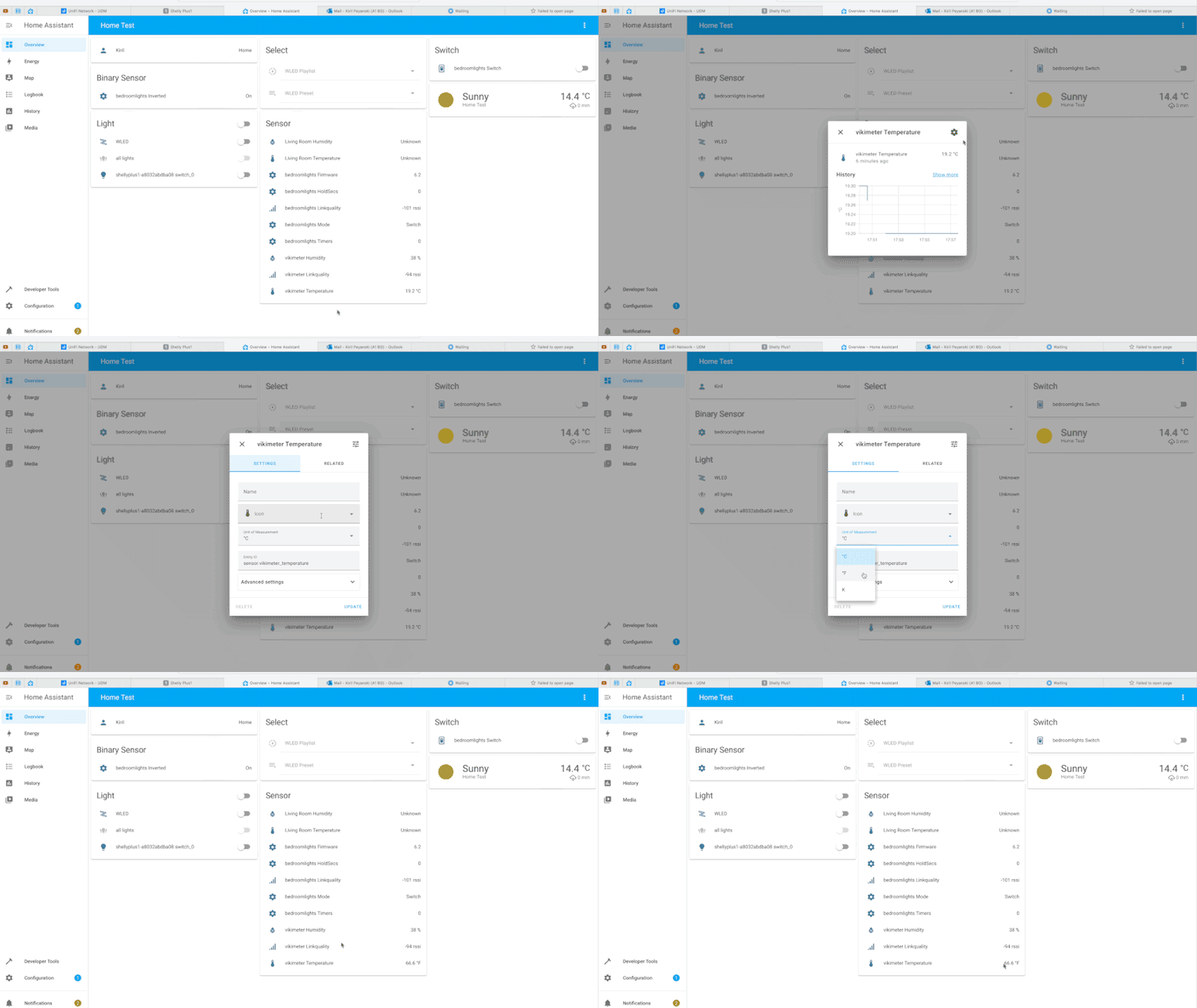


I only comment things when I do rediculous template backflips to get around list/dict auto generation.
fossil venture
I only include them as explanations in forum answers.
mighty ledge
marble jackal
This one: https://github.com/TheFes/HA-configuration/blob/main/include/script/00...
yeah but I'd file that under rediculous template backflips
at that point, you should just learn python
Something that complex, I just write a custom integration
I only have 2 custom integrations at the moment
both of which started out as crazy templates like that
it just gets easier to manage, and you can store information without storing it in attributes. Especially if you don't care about that information.
Also, it's faster
and you don't have to avoid dictionary/list safety operations
marble jackal
mighty ledge
at that point, you should just learn python
I probably should
But I have to find the time, and a proper way to learn it
mighty ledge
marble jackal
But I have to find the time, and a proper way to learn it
It's not hard if you understand jinja. Just use examples of other integrations.
 bleak wolf
anyone know how to convert a user_id to their display name in a template?
inner mesa
last pinned message
ocean forge
Am I doing something dumb with this template sensor? The template itself looks fine to me, but getting state unknown
- platform: template
  sensors:
   garage_last_motion_sensor:
    device_class: timestamp
    value_template: "{{ states('input_datetime.garage_last_motion') }}"
where input_datetime.garage_last_motion is just a helper date and time
mighty ledge
inner mesa
last pinned message
that doesn't work anymore
inner mesa
oh
mighty ledge
{{ states.person | selectattr('attributes.user_id', 'defined') | selectattr('attributes.user_id', 'eq', 'xxxxxxxxxx') | map(attribute='name') | first | default }}
I'll fix it
mighty ledge
ocean forge
Am I doing something dumb with this template sensor? The template itself looks f...
needs a datetime object
"{{ states('input_datetime.garage_last_motion') | as_datetime | as_local }}"
That did the trick, thanks!
As I'm new to templating, what exactly did it change? wasn't the input_datetime already a datetime object?
mighty ledge
np
 wanton jasper
Wonder if anyone can help figure out why my template is creating huge spaces in the output.
Air {{ states('sensor.acc_air_today') }}
It then outputs this
Air
22
inner mesa
it's probably in the state of that sensor for some reason. You can do this: {{ " foo ".strip() }}
wanton jasper
Sorry I'm having a hard time trying to figure out where to put the .strip in my template.
inner mesa
you have a super-simple template
Air {{ states('sensor.acc_air_today').strip() }}
there are no other options 🙂
wanton jasper
Thanks, templates are very much a foreign language to me still
inner mesa
if that fixes it, then I suggest looking at whatever created that sensor and fix it there, though
wanton jasper
It did fix it, it was created by the accuweather hacs that pulls in the asthma, air quality etc... I wouldn't know where to even begin to fix it.
marble jackal
mighty ledge
needs a datetime object
Why is that anyway, because the result will be a string again (as it is a state)
inner mesa
date/time states usually aren't formatted according to ISO8601
mighty ledge
I'm not sure, it used to work that way
inner mesa
not that I see: 2022-08-09 19:55:27
mighty ledge
It used to require an iso string
marble jackal
That also explains why it needs as_local when you want to compare it with now()
mighty ledge
Yes because it doesn’t have a tz
marble jackal
Yeah, I still thought it had it, so that's why I didn't understand why the template editor was complaining about missing time zone information
😅
Should have been a good reason to check the state in  > states
mighty ledge
well
tz in python are odd, it's built in a way to easily do date computations
but it's not really intuitive if you don't use it frequently.
so, as_datetime will attach a local timezone if the datestring has a TZ, otherwise it attaches UTC as the TZ
then as_local just changes the TZ to your local TZ
without changing the time
if that makes sesne
marble jackal
Yeah, it makes sense, and timezones are confusing
If I remember correctly the state was in UTC, so I guess that must have caused some issues about the state being incorrect
mighty ledge
yeah, it's odd
it'll click once you start inspecting the properties of datetime objects
but you can only do that in python
in jinja, you have to guess
e.g. this is all the accessible properties of a datetime object
['__add__', '__class__', '__delattr__', '__dir__', '__doc__', '__eq__', '__format__', '__ge__', '__getattribute__', '__gt__', '__hash__', '__init__', '__init_subclass__', '__le__', '__lt__', '__ne__', '__new__', '__radd__', '__reduce__', '__reduce_ex__', '__repr__', '__rsub__', '__setattr__', '__sizeof__', '__str__', '__sub__', '__subclasshook__', 'astimezone', 'combine', 'ctime', 'date', 'day', 'dst', 'fold', 'fromisocalendar', 'fromisoformat', 'fromordinal', 'fromtimestamp', 'hour', 'isocalendar', 'isoformat', 'isoweekday', 'max', 'microsecond', 'min', 'minute', 'month', 'now', 'replace', 'resolution', 'second', 'strftime', 'strptime', 'time', 'timestamp', 'timetuple', 'timetz', 'today', 'toordinal', 'tzinfo', 'tzname', 'utcfromtimestamp', 'utcnow', 'utcoffset', 'utctimetuple', 'weekday', 'year']
keep in mind, jinja doesn't allow you to access any of the properties that start with _
and jinja might limit some of those properties/functions
like combine, i don't know if that's usable
sick ice
https://hastebin.com/amuletuqor.csharp
I'm trying to show my last energy bill cost, my template sensor so far is linked above.
My bill resets on the 10th of every month, the missing link for me is how I can work out the number of days in the last billing period. What I'm trying to achieve (I think) is in the last comment block.
edit: got it sorted I think. Number of days in last billing month:
      {% set last_month = now().month - 1 if now().month - 1 >= 1 else 12 %}
      {% set last_year = now().year - 1 if now().month == 1 else now().year %}
      {% set reset = state_attr('sensor.monthly_energy_offpeak','last_reset') |as_datetime %}
      {% set last_reset = reset.replace(year=last_year, month=last_month) %}
      {% set last_days = (reset - last_reset).days %}
Such a script seems interesting. My recent automation that cast user litres consumption while having a shower use TTS but it cuts stream of music coming from Plex or Spotify. Is this the way to go and how do you integrate it in HA?
marble jackal
flint wing
Such a script seems interesting. My recent automation that cast user litres cons...
More info here (or in the link in the comments are the top): https://community.home-assistant.io/t/script-to-resume-google-cast-devices-after-they-have-been-interrupted-by-any-action/383896
Plex is not supported though
flint wing
marble jackal
Plex is not supported though
Plex uses Google speakers to output media. Isn't it possible to include it?
 lean yacht
Hi all,
I'm using a template to check if my phone is connected to a bluetooth device.
Worked fine until 2022.8 came along (or 2022.6 for the companion app).
Seems that the new versions now append the name of the bluetooth device next to the MAC address... This screws up my template, which expects only the MAC to be the value.
Hence my automation triggers timeout as it remain false forever.
Any way to add regex in the below template ?
{{'F4:B6:AA:BB:CC:DD' in state_attr('sensor.my_phone_bluetooth_connection','connected_paired_devices') }}
Example of sensor state attributes:
`connected_paired_devices:
- F4:B6:AA:BB:CC:DD (Headset)
paired_devices: - C1:93:AA:BB:CC:DD (Mouse)
- 00:1F:AA:BB:CC:DD (Speaker)`
marble jackal
flint wing
Plex uses Google speakers to output media. Isn't it possible to include it?
I have looked into that before, as you can see here: https://community.home-assistant.io/t/script-to-resume-google-cast-devices-after-they-have-been-interrupted-by-any-action/383896/303
The plex integration doesn't really provide the details needed to resume it. Based on what is provided to the media_player entity I can't determine what is playing, so what should be resumed. If it doesn't support snapshot creation/restore in the integration itself, there is not much I can do
marble jackal
lean yacht
Hi all,
I'm using a template to check if my phone is connected to a bluetooth de...
I had the same, and I just added the name to my template as well
so {{'F4:B6:AA:BB:CC:DD (Headset)' in state_attr('sensor.my_phone_bluetooth_connection','connected_paired_devices') }}
But you could also convert the list to a string, and then this should work:
{{'F4:B6:AA:BB:CC:DD' in state_attr('sensor.my_phone_bluetooth_connection','connected_paired_devices') | join(', ') }}
lean yacht
marble jackal
so `{{'F4:B6:AA:BB:CC:DD (Headset)' in state_attr('sensor.my_phone_bluetooth_con...
Would be great if we could add regex directly in the string, like:
{{'^F4:B6:AA:BB:CC:DD.*' in state_attr('sensor.my_phone_bluetooth_connection','connected_paired_devices') }}
marble jackal
you can if you do it the other way round
{{ state_attr('sensor.my_phone_bluetooth_connection','connected_paired_devices') | select('search', 'F4:B6:AA:BB:CC:DD') | list | count > 0 }
This should work without regex
trail ginkgo
@marble jackal / @mighty ledge : I think I've figured it out. The entity id for a template sensor used to be sensor.slug where slug was that bit of naming that went here ...
sensor:
  - platform: template
    sensors:
      slug1:
        friendly_name: xxx
        value:template: xxx
When migrating, I moved these slugs into unique_id and friendly_name into the new name: field.
So, my frontend is looking for all those sensor.unique_id where of course it needs to be sensor.name. And when I kept looking for those entities in Dev -> States, I was looking for something from the unique id rather than the name.
I apologize for wasting your time!!! 🙂
marble jackal
trail ginkgo
<@723160143314812971> / <@372843932096397333> : I think I've figured it out. The...
petro did mention that thoug 😛
lean yacht
marble jackal
you can if you do it the other way round
Thanks. Works fine.
Any documentation available that lists all of the possibilities to use in templating?
I was not able to find any userdoc linked to select on the HA templating docs...
trail ginkgo
marble jackal
petro did mention that thoug 😛
I must have misunderstood his suggestion. Ugh.
marble jackal
there are links in the pinned post, select is standard jinja2 functionality, so it's covered in the jinja docs
 elder moon
Hi. Im trying to round a number to maximum two digits after the dot, but it is not working. What am i doing wrong?
states.sensor.rockrobo_downstairs_current_statistics_area.state | float / 10000 | round() }
marble jackal
trail ginkgo
I must have misunderstood his suggestion. Ugh.
right here 🙂 #templates-archived message
marble jackal
elder moon
Hi. Im trying to round a number to maximum two digits after the dot, but it is n...
you are only rounding 10000 now
trail ginkgo
I'm an idiot. I am sorry.
elder moon
marble jackal
you are only rounding `10000` now
amazing! thanks
i thought it works more like pipe in bash
instead of math equation
marble jackal
filters are applied first in the order of operations
trail ginkgo
marble jackal
right here 🙂 https://discord.com/channels/330944238910963714/672223497736421388...
I was focused on finding the _2 bit, so I missed how entity naming was different from what I expected.
Next time either of you are in Bangkok, drinks on me all weekend 😉
marble jackal
I don't expect that in the near future, but I'll keep it in mind 😛
trail ginkgo
🙂
trail ginkgo
In the state of a template sensor, can I somehow obtain the value of the unique_id field?
Alternatively, does a thing like a "template template" exist ... ie. I have 34 exactly the same template sensors, the only difference is that each instance references a different mqtt sensor.
mighty ledge
trail ginkgo
In the `state` of a template sensor, can I somehow obtain the value of the `uniq...
no, that's not stored in the entity_id. That's stored in config entries which templates do not have access to.
mighty ledge
trail ginkgo
Alternatively, does a thing like a "template template" exist ... ie. I have 34 e...
You can use Yaml Anchors as long as the template is identical. Otherwise, no.
mighty ledge
for?
trail ginkgo
trail ginkgo
I was focused on finding the `_2` bit, so I missed how entity naming was differe...
@mighty ledge For not paying attention!
mighty ledge
ah, par for the course, no apologies needed.
trail ginkgo
Almost all have been fixed to keep me up and running until I figure out how to do a proper cleanup of my configuration. I went a little overboard when I first got going years ago, monitoring literally everything I could just because I could.
And in the end most never ever gets looked at.
 drowsy dawn
Extracting Variables from a Sensor Attribute sub Attribute
ivory harbor
I'm working on learning jinja2 today... I'm unclear why someone might dot notation (?) eg: states.MyThing.state vs sates('MyThing','state')
inner mesa
there's a big warning box in the docs about that
may your learning journey start with the docs 🙂 https://www.home-assistant.io/docs/configuration/templating/#states
ivory harbor
I've seen that (and frankly banged my head on that doc page for a year ... I'm just not smart enough to grock it that way which is why I'm deep on youtube currently) ... but I guess my question is conceptual. The doc warns against dot notation because of start up issues. But that sounds like an HA thing and not a language thing. Other than the HA issue, why might someone prefer sates() vs states.... ?
inner mesa
indeed, the functions like states() and is_state() are HA extensions
ivory harbor
ok... think I'm tracking
and part of the reason for those extensions to to prevent errors during the startup phase when an entitity may not be ready?
ivory harbor
fascinating! Thanks @inner mesa
ivory harbor
watching these videos and investing an hour or two in this has been the best investment in my next phase of HA! But I dont think I could have been ready for it until now either
ivory harbor
in this example, I'd like to be able to pull the battery % as an int
{% set output = namespace(sensors=[]) %} {% for state in states.sensor | selectattr('attributes.device_class', 'defined') | selectattr('attributes.device_class', '==', 'battery') | rejectattr('state', 'in', ['unavailable', 'unknown']) %} {{ state.name }} = {{ state.state }} {% endfor %}
but if I change to {{ state.name }} = {{ state.state | int }} I get an error in the for loop
inner mesa
that syntax doesn't really make sense
what are you trying to do with that specific line?
literally output a string like <name of sensor> = <state of sensor>?
ivory harbor
I want to ultimately do a test for any state.state that is <= 50
right now that line does exactly what you suggest ... just prints the name and state of sensor
inner mesa
that exact code works fine for me, both with an without |int
ivory harbor
odd, if I add | int I get
ValueError: Template error: int got invalid input 'Not Charging' when rendering template '{#Loops#} {% set output = namespace(sensors=[]) %} {% for state in states.sensor | selectattr('attributes.device_class', 'defined') | selectattr('attributes.device_class', '==', 'battery') | rejectattr('state', 'in', ['unavailable', 'unknown']) %} {{ state.name }} = {{ state.state | int }} {% endfor %}' but no default was specified
guese I need to filter out 'not charging'?
inner mesa
so you have an entity whose state is "Not Charging" rather than a number
either that, or provide a default like int(0)
ivory harbor
ah... thanks for the hand holding! I'm getting it slowly but surely
also have states of Full which I have to reject or map to 100
inner mesa
right
marble jackal
@abstract sapphire
{% set temp = 10 %}
{% set values = {"Protocol":"FUJITSU_AC","Bits":128,"Data":"0x1463001010FE0930D00401110728209B","Repeat":0,"IRHVAC":{"Vendor":"FUJITSU_AC","Model":1,"Mode":"Heat","Power":"On","Celsius":"On","Temp":29,"FanSpeed":"Max","SwingV":"Off","SwingH":"Off","Quiet":"Off","Turbo":"Off","Econo":"Off","Light":"Off","Filter":"Off","Clean":"Off","Beep":"Off","Sleep":-1}} %}

{% set new = dict(values.IRHVAC, **{'Temp': temp}) %}
{{ dict(values, **{'IRHVAC': new}) }}
FYI you really only need to use the ** method when you are adding unknown keys.
{% set new = dict(values.IRHVAC, Temp=temp) %}
{{ dict(values, IRHVAC=new) }}
** unwraps a dictionary into key=value
so you can skip it if you know the key
if that makes sense
 abstract sapphire
Turns out that every single command not only has every actual setting inside it, but the code under the "Data" heading is also unique. So looks like I may need to create scripts and use some input_selects.
trail ginkgo
I have an idea that may not be possible, or only with templates. I wrote a (shell) script that queries the UniFi Controller for guest devices and returns a list (name, IP, MAC, etc.) ... in Home Assistant, I would like to see entities created as input booleans that I can then toggle as I see fit.
End result is that I will toggle ON all guest devices that are a phone.
End-end result is to have this approach help in automatically marking my home as occupied or unoccupied.
Thoughts on feasibility?
marble jackal
So you automatically want to create an input boolean for each guest Mac device so you can determine which ones are phones?
trail ginkgo
- automatically create a new input boolean (ie. they stick around even if the device leaves)
- mark which are phones (as tablets, computers, etc. would not really qualify as person-presence-detection)
marble jackal
Yes, that's what I meant as well
marble jackal
I don't think that is possible with standard functionality HA offers.
What you could do is automatically add all the detected devices to an input_select. Then use that input select to add the phones to a second input select.
You can then compare the options op that second input select to the devices online on the guest network
trail ginkgo
Wondering if device_tracker may be a better option ... i dont know if the creation of a new entity can be a trigger for an automation? Wrong channel for that 🙂
marble jackal
My router automatically shows all connected devices as device tracker and also shows the wifi netwerk it is connected to
trail ginkgo
Yeah, there are integrations for both UniFi (my wifi) and Mikrotik (my router) that can be used as device trackers.
I'm trying to clear my config of any existing device trackers, so I can start with a clean slate. But entities for some reason cant be removed! 🙂
 queen harness
Is a template the best way to take a sensor state that is measured in seconds and turn it into something measures in months/days/hours/min/sec?
marble jackal
Yes
queen harness
OK I will do some more digging, thanks. I found some stuff for has_uptime but it doesn't seem to be as easy as a drag and drop solution for my router uptime
Is there a repository of templates that people have uploaded?
I'm essentially trying to convert sensor.router_uptime from seconds to months, days, etc. Or weeks, days, etc
marble jackal
@queen harness Does it display the total seconds since it was last started? So a constantly changing value, or a timestamp of the last boot?
queen harness
marble jackal
<@193237226270752768> Does it display the total seconds since it was last starte...
Total number of seconds counting up
constantly changing value
marble jackal
queen harness
constantly changing value
Okay, you can use something like this
{{ 3660 | timestamp_custom('%H:%M', false)}}
queen harness
That looks like what I've seen. How do I utilize the template? Do I need to make a new sensor?
marble jackal
Or you use {{ relative_time(now()-timedelta(seconds=3660)) }}
You can create a new template sensor, or display it in a card which supports templates
queen harness
OK thanks. I'll try and integrate it into my Minimalist UI
trail ginkgo
marble jackal
Okay, you can use something like this
`{{ 3660 | timestamp_custom('%H:%M', false...
Is the 3660 a number I don’t recognize? 61 minutes?
I’ve had so many fights with time stamps over the years. Not looking to add to those scars!
marble jackal
It was just an example, it should be replaced with the state of his uptime sensor
queen harness
marble jackal
It was just an example, it should be replaced with the state of his uptime senso...
Oh well that makes more sense now that I see that lol
  - sensor:
      - name: "Router Uptime"
state: "{{ relative_time(now()-timedelta(seconds=sensor.rt_ac68u_uptime)) }}"```Does this look right?
queen harness
states.sensor
  - sensor:
      - name: "Router Uptime"
state: "{{ relative_time(now()-timedelta(seconds=states('sensor.rt_ac68u_uptime'))) }}"```That looks right
Do note that relative_time only shows one time unit, so for example 3 weeks
inner mesa
probably needs an integer?
queen harness
Ohhh
marble jackal
And not 3 weeks 5 days and 6 hours
queen harness
And I'm trying to get something like days, hours, mins
kk
{{ 3660 | timestamp_custom('%H:%M', false)}} would be better then?
Probably add a %D in there for days?
queen harness
{{ seconds=states('sensor.rt_ac68u_uptime') | timestamp_custom('%D:%H:%M:%S', false)}}
marble jackal
And both templates need an | int as Rob mentioned
inner mesa
you can test this stuff
marble jackal
No, that's not what I proposed
inner mesa
TemplateSyntaxError: expected token 'end of print statement', got '='
marble jackal
replace the 3660 with states() | int
queen harness
ANd in the bracket the sensor?
marble jackal
Just test it in > templates
queen harness
I'm just going to leave it as seconds. nothing seems to be working
ValueError: Template error: int got invalid input '<template TemplateState(<state sensor.rt_ac68u_uptime=3813529; unit_of_measurement=s, icon=mdi:server-network, friendly_name=Router Uptime @ 2022-08-13T14:15:16.022041-06:00>)>' when rendering template '{{ states.sensor.rt_ac68u_uptime| int > timestamp_custom('%D:%H:%M:%S', false)}}' but no default was specified
{{ states.sensor.rt_ac68u_uptime| int > timestamp_custom('%D:%H:%M:%S', false)}}
marble jackal
You actually had it right before
The states part
Don't know where you got the > from in the version you just deleted
inner mesa
random pecking
queen harness
A combination of googling the issue and not wanting to bother you
marble jackal
marble jackal
Okay, you can use something like this
`{{ 3660 | timestamp_custom('%H:%M', false...
replace 3660 with states('sensor.your_sensor') | int
And adjust the custom time format to your liking
marble jackal
You are making it confusing.
There is a | after 3660 in my example, so that should still be there if you replace it with something else
But it would help if you would understand a bit what the template is doing
 silk smelt
Hi all!!! I am trying to make custom:buton-card show a state based on the state of a different entity. I think I have to do this with templating but I am unable to figure out the syntax. Wouldnt't this be correct? [[[return states['input_boolean.vvb_kjorer'].state]]]
marble jackal
Hooray! 🎉 🎉
marble jackal
silk smelt
Hi all!!! I am trying to make custom:buton-card show a state based on the state ...
That's not jinja but JavaScript, you need to ask in #frontend-archived
queen harness
Thank you
silk smelt
thank you!!
 floral shuttle
this template sensor - unique_id: calculated_bruto_minus_switches name: Ongemeten verbruik <<: *power icon: mdi:flash-off state: > {{(states('sensor.calculated_bruto_verbruik')|float(0) - states('sensor.sensors_huidig_verbruik_summed')|float(0))|round(2,none)}} availability: > {% set x = ['unavailable','unknown'] %} {{states('sensor.calculated_bruto_verbruik') not in x and states('sensor.sensors_huidig_verbruik_summed') not in x}}
calculates the unmeasured power usage in my home, and that works rather nicely. However, I just checked its history and saw a flat line.... becuae of a dip of - 536 870 889,04 W ;-)....
maybe add an availability to have it be positive and below lets say 4000? availability: > {% set x = ['unavailable','unknown'] %} {{states('sensor.calculated_bruto_verbruik') not in x and states('sensor.sensors_huidig_verbruik_summed') not in x and (0 <(states('sensor.calculated_bruto_verbruik')|float(0) - states('sensor.sensors_huidig_verbruik_summed')|float(0)) < 4000)}}
 marsh hull
This script calls the next
- service: script.test_passing_entity_id_response
data_template:
input_entity: binary_sensor.33sumpfull
alias: Test passing entity_id response
sequence:
- if:
- condition: state
entity_id: '{{ input_entity }}'
state: 'off'
then:
- condition: state
How do I resolve the error "{{ input_entity }} is neither a valid entity ID"?
inner mesa
You have to use a template condition
data_template: was also deprecated years ago
And you have no template there anyway
And I don't recommend using an entity_id that starts with a number. It can cause parsing issues
marsh hull
Great!
- condition: template
value_template: {{ state(input_entity) == "off" }}
gets
Message malformed: template value should be a string for dictionary value @ data['sequence'][0]['if'][0]['value_template']
inner mesa
That's not right
first, it's states and not state
second, you should use {{ is_state(input_entity, 'off') }}
third, you need to surround the template in quotes
marsh hull
Thank you, that is working as expected
marsh hull
- condition: and
conditions:
- condition: template
value_template: '{{ ( (states(''input_number.waterlevelsensorfault'') == 0) ) }}'
- condition: template
value_template: '{{ ( is_state(''input_number.pumptimedout'', 0) )}}'
When tested, both of these templates get the error "template value should be a string for dictionary value @ data['value_template']. Got None"
suggestions?
eager glen
marsh hull
- condition: and
conditions:
- condition: template
value_templ...
test in developer tools, the "test" button doesn't work
inner mesa
States are always strings, and you're comparing with an integer
And that
First pinned message
marsh hull
Great to be able to test states in developer tools. How does one do that?
Actually, I need to test the template.
silent barnBOT
@marsh hull posted a code wall, it is moved here --> https://hastebin.com/ocatiyudic
[Rule #6](#rules message): Please do not post codewalls (text longer than 15 lines, including whitespace) - use sites such as https://dpaste.org/ (pick YAML for the language), or https://paste.debian.net/ (pick YAML for the language).
Please take the time now to review all of the rules and references in #rules.
Command '~codewall' was invoked by: RobC
inner mesa
you're surrounding your variables in quotes
and you're still using data_template
review the thing that worked for you before: #templates-archived message
eager glen
marsh hull
Great to be able to test states in developer tools. How does one do that?
it's on the side bar https://www.home-assistant.io/docs/tools/dev-tools/
marble jackal
floral shuttle
maybe add an availability to have it be positive and below lets say 4000? ```
...
You probably want to actually do the calculation again in your availability template, and don't refer to the state of the template sensor. Your point of the availability template is to prevent it from having this state
 leaden cipher
Good morning all,
I'm rather at a loss, hope you can guide me. I've followed several tutorials and tied several different strings, I just get the same results.
I'm making a 12v battery monitor, using Wemos D1 mini running Tasmota (Sensor) 9.3.1. I also bought some voltage dividers, connected to A0 (GPIO 13). Tasmota reports a value of 845 (between 0 - 1024) as expected. So far everything is according to plan. Bringing it into HA is where the problem is. I used the following in the configuration.yaml file (one at a time).
sensor:
  - platform: mqtt
    name: "Study-wemos"
    state_topic: "tele/Study-wemos/SENSOR"
    unit_of_measurement: "volts"
    #value_template: "{{ value_json.ANALOG.A0 }}"
    #value_template: "{{(value_json ['ANALOG']. A0 | float * 100/1024) | round (1)}}"
    value_template: "{{ ((states('sensor.study_wemos_analog_a0')|float - 36 ) / 1024 * 3.3 * 5)|round (2) }}"
But HA still only shows the 845 value, and not the 12/13v converted value. It is as if HA ignores the code I put there. Yes I did test the YAML file in a YAML validator and restarted HA after every save. It is entirely possible I’m making a noob mistake as this is only the second time I’m editing the configuration.yaml file.
Your help will be greatly appreciated.
If I paste the last value template into HA template, resulting string shows 13.05 as confirmed by the multimeter.
I asked this question in the #integrations-archived channel, someone there suggested i try this channel instead.
trail ginkgo
Your formula needs to be (((states('sensor.study_wemos_analog_a0')|float - 36 ) / 1024) * 3.3 * 5)|round (2)
leaden cipher
thanks for the suggestion @trail ginkgo , however I'm fairly sure the formula is correct, because if I paste it into the "template editor" I get the expected 13.08 volts output.
I think it has something to do with the formatting of the yaml.
I've also tried not using MQTT.
sensor:
  - platform: template
    sensors:
    battery_monitor:
     friendly_name: "Study-wemos"
     unit_of_measurement: "volts"
     value_template: "{{ ((states('sensor.study_wemos_analog_a0')|float - 36 ) / 1024 * 3.3 * 5)|round (2) }}"
without any success.
trail ginkgo
You're right that the template editor renders the formula to such a value. I tried. A calculator app on my computer however, came to a different conclusion. Which is why I messed around with some changes to the formula where the desktop calc app yielded the correct result.
To test if the problem is your YAML or your formula, I would replace value_template: "{{ 5.432 }}" ... if that value shows up in HA, the problem is obviously your formula.
But, feel free to not try out recommendations of course!
leaden cipher
Thanks sir. I tried your suggestion, but it still shows 845, as if it doesn't even read the yaml.
template:
  - sensor:
    - name: "study battery test"
      value_template: "{{ 5.432 }}"
Which entity shows 845?
leaden cipher
this one sensor.study_wemos_analog_a0
marble jackal
But that's not the one that YAML will create, that YAML will create sensor.study_battery_test
marble jackal
leaden cipher
thanks for the suggestion <@505374734742192139> , however I'm fairly sure the fo...
And this one will create sensor.battery_monitor (if properly indented, which is not the case there)