#hardware-archived
1 messages · Page 41 of 1
 jagged crypt
jagged crypt
jagged crypt
need to figure out if I'm keeping crap on HUE, or moving to ZHA
(non-wiz lights)
no ota for hue firmware on ZHA?
yes, I'll go ask on zigbee
 cold moon
jagged crypt
no ota for hue firmware on ZHA?
cold moon
jagged crypt
no ota for hue firmware on ZHA?
Manually only for zha but I’d use z2m instead regardless
I still don’t think adding a ton of wireless clients like bulbs is a good idea for airtime fairness
jagged crypt
ZHA has worked fine for me, including OTA for ikea buttons, so all good there for now. Will figure out HUE.
cold moon
Your loss
jagged crypt
I added 20 WiZ lights, seem to be working fine now (only saw latency on a couple, but will see in a week, not calling it success right now). Air-Time issues aren't impacting me, maybe because the crap that i need anything on is 5ghz, so no conflict with IOT 2.4ghz. I also have 3 AP's in the house spread across.
 outer knotBOT
@merry lily I converted your message into a file since it's above 15 lines :+1:
jagged crypt
I don't use z2m, but the error seems to be pointing at "zigbee-herdsman" not starting
quick google search, adapter firmware issue, usb port mapping issue possible
 merry lily
jagged crypt
quick google search, adapter firmware issue, usb port mapping issue possible
merry lily
jagged crypt
quick google search, adapter firmware issue, usb port mapping issue possible
I tried to change out per some of the suggestions but no luck seems to be the same error
 golden thorn
The ezsp driver that is used for the SkyConnect is experimental so you can expect some issues. Is it on a USB extension cable?
merry lily
golden thorn
The `ezsp` driver that is used for the SkyConnect is experimental so you can exp...
Yes have it on the extension cable - tried direct to Nuc with no difference
I did remove the watchdog to see what was going on and now I get seems it is timing out waiting on communication to happen:
[19:05:15] INFO: Preparing to start...
[19:05:15] INFO: Socat not enabled
[19:05:16] INFO: Starting Zigbee2MQTT...
Zigbee2MQTT:info 2023-09-26 19:05:19: Logging to console and directory: '/config/zigbee2mqtt/log/2023-09-26.19-05-19' filename: log.txt
Zigbee2MQTT:info 2023-09-26 19:05:19: Starting Zigbee2MQTT version 1.33.0 (commit #unknown)
Zigbee2MQTT:info 2023-09-26 19:05:19: Starting zigbee-herdsman (0.18.5)
Error: Reset error: Error: {"sequence":-1} after 10000ms
at /app/node_modules/zigbee-herdsman/src/adapter/ezsp/driver/uart.ts:299:23
at Queue.executeNext (/app/node_modules/zigbee-herdsman/src/utils/queue.ts:32:32)
 fallow mulch
"If you have one of these recalled products, don’t worry< the company says it will remotely disable the smart plug, but make sure you are connected to the internet during this process"
TIL companies can remotely disable our IoT devices

CTVNews
Health Canada has issued a recall notice for certain smart plugs due to the risk of electric shock.
 patent river
RIP the contents of people's fridges
A total of 2,239 smart plugs were sold in Canada between July 2022 and August 2023
Seems popular 😄
Almost six sold per day
 gloomy spoke
Fridges on smart plugs seems like a recipe for sadness in any case
 tacit burrow
My iot switches are all blocked from the internet, so .... should be OK. I use the switches for power-monitoring.
fridges/freezers are high consumers (only below the Sauna, and the router/starlink/switch, in my house)
I turned off one, but still have a fridge-freezer and a (very old) chest freezer.
Month of september
 patent river
You clearly need a more efficient router 😉
I mean I can't talk, my router/switch/four APs/two UPSs/server/NAS is probably in the 200W kind of neighbourhood
tacit burrow
“Router” is a plug that has 1-2 proxmox hosts, Poe switch for my aps, and (most of the power) Starlink
My nas and workshop switch is not on the list fwiw
patent river
50kWh/mo ~= 70W, so I guess not that bad overall
tacit burrow
That’s about 95W (my nas+ups+switch)
Between solar and battery, I don’t pay for power 3/4 of the year anyway

Month of September
“Router “ easily the highest per month

I think nas would be a little higher if I was monitoring it like that
I’ll set up an integration for it…
Oops it already has one
Uses bang on 2kWh/day
jagged crypt
Lyricnz, got my first "crappy" day yesterday on solar, had a ~20% generation
tacit burrow
Yeah it’s spring here. Still going to have a few crappy days before summer
jagged crypt
we had the gray, and a little rain - https://www.youtube.com/watch?v=__QqQq9XBsQ
 gloomy juniper
Did you had a chance working with Dali?
I wonder if its possible to integrate it and using which BUS/PS model.
Thanks!
 drifting grove
 karmic cargo
Has anyone used the Aqara Presence Sensor FP2? https://www.amazon.com/Aqara-Positioning-Multi-Person-Detection-Assistant/dp/B0BXWZMQJ3?ref_=ast_sto_dp
Sounds like it's some really cool tech, but based on a couple of reviews at Amazon, it also sounds like it's not quite ready for the big time...

Aqara Human Precense Sensor
 winged knoll
Search should find quite a few people talking about it
cold moon
you cant really trust amazon reviews regardless
karmic cargo
winged knoll
Search should find quite a few people talking about it
Yup, seeing that now. My bad. Sorry.
cold moon
i havent kept up but in general i consider FP2 to be a good albiet overpriced product
karmic cargo
cold moon
you cant really trust amazon reviews regardless
True, especially for the positive "5-star+++" reviews. A number of the bad reviews are more than just "this doesn't work, it suxors!!" type reviews, so I feel they're more trustworthy. That is why I came here...
cold moon
unless they have some bad batch or something.. with them being like $80+ i would expect reddit and people here to be shouting loudly if they were fucked
merry lily
merry lily
Yes have it on the extension cable - tried direct to Nuc with no difference
I di...
Found that for some whack reason the firmware had been changed out. Went to the website https://skyconnect.home-assistant.io/firmware-update/ and reloaded the correct firmware and it now loads without any issue.
 zealous dune
karmic cargo
Has anyone used the Aqara Presence Sensor FP2? https://www.amazon.com/Aqara-Posi...
zealous dune
karmic cargo
Has anyone used the Aqara Presence Sensor FP2? https://www.amazon.com/Aqara-Posi...
It is not, zone detection is buggy and unreliable
cold moon
zealous dune
It is not, zone detection is buggy and unreliable
is this new?
i havent seen people talking about them sucking...
zealous dune
New? It's been like that since it came out even with firmware updates
cold moon
bummer
zealous dune
Noonecsaid "sucking"
cold moon
i definitely didnt have that impression based on what i have seen/heard
 gentle fossil
my mmwave sensor detects me around the wall
zealous dune
I prefer to make impressions by trying out the product for a longer time period
jagged crypt
still debating mmwave sensors, but looks like I can get hue sensors for $30/each new from costco
 tepid heart
I've been planning on trying out a couple of these (zigbee ceiling mount version) https://www.aliexpress.com/item/1005004793115950.html?spm=a2g0o.order_list.order_list_main.20.21ef1802RnIsde heard good things on the forum.
I just have to work out how to trial them without actually cutting holes in the ceiling. Only doing that once I'm happy with them.
patent river
Top looks flat enough. 3M Command adhesive strips.
tepid heart
That could work. 👍
I was thinking a bit of ply or acrylic mounted to the light fitting.
cold moon
Half the fun is rigging stuff up with tape like a crackhead tho
 inland onyx
Hey guys just have a question, i have just gotten my rasberry pi and SSD card for it. i have taken all the steps to make it boot of the SSD card but Home assistant just isnt booting. The adapter im using for the SSD card shows there isnt any power going to to the SSD. Does this mean i need to get an adapter that supplies power?
jagged crypt
I looked at the https://www.screek.io/ again, then just ordered 4 more hue sensors for now. Need to figure out the logic on disabling the motion sensor in the living room when the TV is on, which will probably alleviate current issues with living room changing size (new house), and optimal motion sensor placement has not been found yet.
tepid heart
inland onyx
Hey guys just have a question, i have just gotten my rasberry pi and SSD card fo...
Even if it was supplying power, you'd probably need one anyway. The pi power supply often does not have enough power for an SSD. SD cards use a whole lot less power.
inland onyx
tepid heart
Even if it was supplying power, you'd probably need one anyway. The pi power sup...
thanks for your help!
cold moon
I had no issues with a star tech 3.0 one with an inland ssd booting on a pi4 with the official usb power
But I’ve heard that
You also might need to update the bootloader or eeprom if it’s an old pi
inland onyx
i bought a rasbery pi 4
cold moon
And there’s also known working usb to sata adapters with pi’s
They don’t all just work
gentle fossil
tepid heart
I've been planning on trying out a couple of these (zigbee ceiling mount version...
I have two similar cheap mmwave zigbee sensors from ali, they detect movement in a completely different room just because there's a door open between
depending on your setup you may even want that but in my case its quite bad because I just need to move in my bed and the lights in the living room go on
gentle fossil
oh, its apparently exactly the same sensor, I have the flat square like one with usb
 gritty sequoia
Hi all!
I am thinking of purchasing home assistant yellow and wanted to explore the possibility of adding 4G M2 modem, basically to always have backup internet connection or even send SMS messages in case of any events.
Can some one clarify if its possible and if so propose some potential M2 modems I could use ?
gentle fossil
use something like GL.iNet GL-XE300 for your 4g connection, it even comes with a battery integrated and they are ultra customizable with openwrt. I wouldn't go with that m.2 and I doubt its easy to get working
patent river
You'd also need (at the very minimum) an M.2 B-to-M or E-to-M adapter, because the yellow has a M-key slot and most if not all modems aren't
gritty sequoia
patent river
You'd also need (at the very minimum) an M.2 B-to-M or E-to-M adapter, because t...

eBay
Find many great new & used options and get the best deals for For NGFF M.2 Key B Card to PCI-E NANO SIM Card Slot for 3G/4G/5G GSM LTE Module at the best online prices at eBay! Free shipping for many products!
patent river
Not quite. That's M.2 B to Mini PCIe
Look, if you're really desperate:
https://www.cm-tech.com.tw/en/product-634456/M-2-B-Key-or-M-2-M-Key-to-M-2-B-plus-M-Key-with-Dual-Nano-SIM-Card-N266A.html
Example modem: https://www.ebay.com/itm/264780577088 (I have no idea if this would work)
Your problem is you need a modem that works a) without an additional driver, and b) without "dialling" or any kind of software (just shows up as a network interface).

Detailed information of M.2 B Key or M.2 M Key to M.2 B+M Key with Dual Nano SIM Card, N266A offered by C-Ming Technology Co., LTD..

eBay
Find many great new & used options and get the best deals for Dell DW5811e 4G LTE 3P10Y Sierra EM7455 WWAN card For Latitude E5470 E5270 7490 at the best online prices at eBay! Free shipping for many products!
But all of this would be much simpler if you took @gentle fossil's suggestion and bought a cheap Ethernet 4G router
gentle fossil
and you will need to run debian on that yellow, which in itself will get you in trouble afaik
gritty sequoia
patent river
But all of this would be much simpler if you took <@664057275421556751>'s sugges...
its not the desperation its just that having it all in one place would be more dandy 😛
I suppose any USB 4g Modem would work too ?
gentle fossil
USB4 bro in what time do you live?
gritty sequoia
cold moon
Yea don’t get a yellow lol
already ordered it 😛
cold moon
Sucks
gritty sequoia
cold moon
Sucks
cant be that bad 🙂
cold moon
Like Wi-Fi 7 is a thing?
gentle fossil
USB4 Gen 4 wtf usb alliance?
cold moon
Usb naming conventions are some of the dumbest I’ve ever seen
Super speed!
With a cute little slanted ss logo
tepid heart
gentle fossil
oh, its apparently exactly the same sensor, I have the flat square like one with...
Ah, good to know. I ordered one to test as it is on special. Will see how I go.
I have PIR's for movement sensing but they don't work for sitting or lying still, so not much good for presence sensing. Is your sensor aimed through the door? I should be able to find a ceiling moounted location where that is minimised.
gentle fossil
green are doors, I suspect it reflects upon that wall opposite of the door
 cold moon
Is that a pokeball top left?
gentle fossil
yes, that is a roborock pokeball
tepid heart
Wow. Yeah that is a bit sensitive.
 fresh zenith

Surprise! Raspberry Pi 5 is coming in 2023. This video highlights everything new in Pi 5.
Find out more about Raspberry Pi 5: https://www.raspberrypi.com/products/raspberry-pi-5/
Some of the videos I referenced in this video:
- How Raspberry Pis are Made (Factory Tour): https://www.youtube.com/watch?v=k2C4lbbIH0c
- Pi Global Shutter Camer...
New M.2 hat looks good
 gentle fossil
thats not all i need to know. i need to know MORE
fresh zenith

Announcing Raspberry Pi 5, coming in late October: over 2x faster than Raspberry Pi 4, featuring silicon designed in-house at Raspberry Pi.
gentle fossil
alright alright cowboy
maybe you want to take a look around, these links are already posted
 gentle fossil
its nice that you now at least see the memory size without checking serial or booting it
and the projects with 3d capabilities and two cameras will be interesting
 glacial oracle
fresh zenith
https://www.raspberrypi.com/news/introducing-raspberry-pi-5/
glacial oracle
fresh zenith
https://www.raspberrypi.com/news/introducing-raspberry-pi-5/
The 5v@5a spec makes me worry lol
And it's still using microsd wtf
zealous dune
secret deal with Big SDCard
glacial oracle
they don't want us to know about this shhh
zealous dune
but hey, here's an M2 hat if you don't like it
glacial oracle
At least whatever than 2-3x performance gain is supposed to be will bring it up to speed with mid range core2duos

zealous dune
the rpi cult will buy em all up nevertheless
glacial oracle
Probably already happened
zealous dune
it did, people on twitter already complaining about availability
fresh zenith
Can't wait to load windows up on one and wait 20 minutes for task manager to open
zealous dune
that's like the worst way to use an rpi i heard of
glacial oracle
I am kinda interested in what will happen to the zimablade once it comes out
It would be -reasonable- if they wouldn't have fd up the port placements
Also emmc yuck
Like at the price it's more of a pi without the cake
zealous dune
i like the zimablade concept but hardware choices are meh
glacial oracle
Yea no idea why'd they put that old hw on it
zealous dune
cheap
 silver kayak
Not sure if this is the right channel. Are mini PCs highly recommended for HA ? Going to also run frigate and some cameras using coral. Wanted to know if there was a preffered model of like a beelink or similar easily ordered in US for ~500 or less
zealous dune
Model depends on your needs and power consumption preference
silver kayak
power consumption isnt super big deal as it is not super expensive where i live. More concerned with the thing overheating if anything related to power.
i just want to buy something that i will not need to replace for a while as well
 hexed galleon
Going to Buy a NSPanel
I see there are two buttons , can I setup those to control entities in HASS?
cold moon
No, but also yes
Pretty sure those have a lot of shit reviews tho
Sonoff isn’t known for quality
zealous dune
silver kayak
i just want to buy something that i will not need to replace for a while as well
Anything with a 12th gen Intel is fairly future proof
 minor quiver
zealous dune
Anything with a 12th gen Intel is fairly future proof
minor quiver
zealous dune
Anything with a 12th gen Intel is fairly future proof
How about 13th gen tho? 😛
zealous dune
sure, if you can find them
minor quiver
zealous dune
sure, if you can find them
Looks pretty available to me

£740 after the voucher, albeit still too pricy for my liking
zealous dune
sure if you want to dunk so much money on a small smart home server
minor quiver
zealous dune
sure if you want to dunk so much money on a small smart home server
Well in my case it would also be:
- general Docker/development host
- Plex + helpers server
- Matrix server
And a few other roles.
cold moon
Do you already have a NAS or server with a bunch of hdds for cameras and Plex?
Or do you plan to build out a DAS?
You’re way past all things on a nuc territory
zealous dune
thats not enough roles for that money
minor quiver
Technically, I already have that built out. Honestly I was just pulling blakadder's leg about the 13th gen 😄
zealous dune
well the op said 500$ or less which was taken into account
minor quiver
I have a QNAP TS-h973AX for storage, and an "M6 Mini PC" for Plex (the QNAP has an older Ryzen without GPU, even simple things like chapter thumbnail extraction takes ages), HA, and a bunch of other services
cold moon
Not great lol
minor quiver
If I upgraded the M6, it would be to something similar in size - a NUC is 4-6x larger
minor quiver
cold moon
Not great lol
Works for me, so
And the M6 uses about 4W idling, 8-10W under load
Oh, and runs off USB-C!
Specifially, I used a 60W capable travel adapter that comes with USB-PD
Not that it ever uses all the 60W
(but that was the only one I could find that supported 12V PD)
minor quiver
zealous dune
well the op said 500$ or less which was taken into account
I did not see that. An i5 is (almost) within that price range. Don't forget UK prices include taxes
 zealous dune
don;t all prices included taxes except muricas?
minor quiver
Yep, but presuming from the $500, I was guessing that OP was from there
Therefore a simple webshop showing a $480 mini PC could easily end up costing 20-30% more
zealous dune
american sales taxes aren't that high
jagged crypt
10% is easy estimate
glacial oracle
Why not take something not nuc branded
Usually that's twice the performance for not even half the price as a result
jagged crypt
I run an SFF with an i5-6500t (not running frigate) - it was around $150 with 16 gigs of ram and 256 nvnme ssd
silver kayak
so you guys recommend the nuc linked above over a beelink or something else?
im from US..
yeah 500 or less is ideal for sure.. i think 800 is probably overlkill for anything id put on it
cold moon
silver kayak
Not sure if this is the right channel. Are mini PCs highly recommended for HA ? ...
where will the footage for frigate save to?
silver kayak
Good question. I was thinking on the same hardware but I’m new to this so not sure if that works or not. I have a strong personal pc that can also house the videos I want to keep.
cold moon
Neither of those are good options
Assuming you are wanting to save recordings for days/weeks
silver kayak
Do you have recommendations ? This is my first time using frigate / saving video like this
cold moon
really gotta have some more info to make decisions like that for you
what's the end goal? fully local NVR with features you'd expect from a decent paid system?
 velvet granite
If no one has noticed yet a Pi5 https://www.raspberrypi.com/news/introducing-raspberry-pi-5/
Announcing Raspberry Pi 5, coming in late October: over 2x faster than Raspberry Pi 4, featuring silicon designed in-house at Raspberry Pi.
zealous dune
WHAT!?!?!?
glacial oracle
I don't think pi is 5
winged knoll
You too could spend more for a Pi than a second hand PC, and get worse performance per watt
silver kayak
cold moon
what's the end goal? fully local NVR with features you'd expect from a decent pa...
Yes that sounds reasonable. For me. Ideas to keep an eye on my property when home and away. Save videos etc if needed. Frigate / recognition for a fun project to toy around with. I think for my wife- she wants just fully basic remotely open and watch through the camera..
cold moon
It’s the SBC we all needed in 2013
glacial oracle
I suspect that they have hired the apple engineers
velvet granite
winged knoll
You too could spend more for a Pi than a second hand PC, and get worse performan...
Use case...If your project can run in its envelope and no PC is this small and can run at 4~5watts.
cold moon
pi5 isnt gonna run at 5watts if a pi4 runs at 5watts lol
it's a 5v5amp psu this time not 5v3amp
velvet granite
cold moon
it's a 5v5amp psu this time not 5v3amp
it still looks powered by a usb3
cold moon
also i thought you were on team mini pc
winged knoll
My old i5 laptop is way faster than a Pi4 and sits down in the 5 to 10 watt range
cold moon
ye
jagged crypt
i went from pi3 -> i5-6500t, the extra ram was the huge win
cold moon
i noticed my dashboards were a bit snappier, specifically the ones with multiple camera feeds on them
backups faster, restarts faster
addons faster.. just straight up a better option
plus all the guys who can now use proxmox and virtualize hass or add other shit to it
the m910q also can have a coral or 2.5GbE m.2 E key which is super useful
minor quiver
zealous dune
WHAT!?!?!?
Someone's gotta be taking the Pi55
 narrow elk
Does anyone know of any OOTB ready load cell/pressure/weight sensors?
minor quiver
glacial oracle
Why not take something not nuc branded
There aren't many 13th gen mini PCs available yet. All I saw were £500+ for an i3.
minor quiver
cold moon
Neither of those are good options
How 'bout a 5-disk RAID array over USB3?
cold moon
raid?
glacial oracle
Probably will work
minor quiver
cold moon
raid?
Probably RAID5/6 or ZRAID1/2
glacial oracle
minor quiver
There aren't many 13th gen mini PCs available yet. All I saw were £500+ for an i...
Id keep an eye open for minisforum when they release new stuff. You can grab pretty sick deals on older barebones then
minor quiver
But I'm just kidding
(although I've been planning on building such an array for backup using bare naked SATA SSDs)
glacial oracle
Me who runs zfs raid 5 over USB: 💀
minor quiver
glacial oracle
Me who runs zfs raid 5 over USB: 💀
Well see your primary problem was using RAID5 with ZFS. You gotta go RAIDZ1 for them performance points
glacial oracle
It's already SSD only storage
zealous dune
narrow elk
Does anyone know of any OOTB ready load cell/pressure/weight sensors?
ready how?
glacial oracle
It won't get faster than <10gbit
minor quiver
glacial oracle
It won't get faster than <10gbit
20 if it's USB4
glacial oracle
I tried slapping the USB port but it just won't work faster
minor quiver
(who am I kidding there ain't no USB4 SATA JBOD/RAID boards out there yet)
glacial oracle
It's a wonder they offer USB 3 speeds
Like there are exactly what 3 enclosures which make sense for that
minor quiver
Well for my purposes it doesn't need to be fast. The end goal is using 1TB/2TB SSDs for some semi-fast, rarely used storage (pushing backups and sometimes pulling them)
glacial oracle
Yea I kinda do use it for that exactly
The qnap ones
I forgot what their id was
minor quiver
ISTFG if someone mentions the Pi5 again...
 proper frost
pi 5 releasing soon
proper frost
proper frost
pi 5 releasing soon
80 bucks for the 8 GB version
Thats how much I paid for the 4
cold moon
minor quiver
ISTFG if someone mentions the Pi5 again...
found the zoomer...
proper frost
Nah resellers will get it up to 300
glacial oracle
TR-002/4 or TL-008 or something
proper frost
There is no way in hell its gonna be sold for 80
zealous dune
another one bites he dust
glacial oracle
Not entirely sure if I would trust the built in raid capabilities
minor quiver
glacial oracle
I forgot what their id was
Did take a look, but too fucking expensive for what it does. There was a Pi HAT that did 4x SATA3 over 2x USB3 ports, but it's not in stock anymore
zealous dune
it already is presold for that price
minor quiver
cold moon
found the zoomer...
Hardly, I'm borderline millenial
proper frost
They have a m2 head 😭
cold moon
i live somewhat close to the dallas microcenter if you guys want to get on a waiting list for me to resell pi5 at an unnecessary markup to you
zealous dune
the fun times are when the rest wants one and they overpay to ebay resellers
glacial oracle
minor quiver
Did take a look, but too fucking expensive for what it does. There was a Pi HAT ...
I felt like throwing money aways because shiny!!!
minor quiver
glacial oracle
I felt like throwing money aways because shiny!!!
Hey I did the same for the U.2 to double M.2 adapters
Tho I did not regret those
zealous dune
they definitely learned a lot from apple... look a new feature: power button
glacial oracle
I need you to slide me a link to those into my dms
proper frost
zealous dune
they definitely learned a lot from apple... look a new feature: power button
nah it was long needed
minor quiver
glacial oracle
I need you to slide me a link to those into my dms
Do you have a QNAP NAS that has U.2 ports? 😄
zealous dune
weird how they didnt think of it in its third and fourth iteration
glacial oracle
:pain:
cold moon
zealous dune
weird how they didnt think of it in its third and fourth iteration
i mean the official pi4 power adapter has a button on it.. that counts right?
minor quiver
Slapped 4x 1TB SSDs in there at full speed
glacial oracle
Used u2 SSDs are pretty rad priced. I want em
But Synology won't do that
Cough 500 bucks for the expansion unit to a 400 buck nas
zealous dune
these rpi fans sound exactly like apple cult when 15 was announced
minor quiver
zealous dune
weird how they didnt think of it in its third and fourth iteration
Isn't it literally just an extra GPIO hardcoded for power function?
glacial oracle
Yes rpis will need fans very soon
minor quiver
glacial oracle
But Synology won't do that
Wut
glacial oracle
Hopefully they implemented usbcpd correctly this time around...
zealous dune
minor quiver
Isn't it literally just an extra GPIO hardcoded for power function?
no, its a special feature only available in the newest generation of the beloved raspberry pi family
minor quiver
glacial oracle
Hopefully they implemented usbcpd correctly this time around...
BWAHAHAHAHAHAHAHA
Oh wait you're serious, let me laugh harder
glacial oracle
Yes
zealous dune
pi5 requires an active cooling solution already
glacial oracle
I do love this benchmark. Is it just me or is the soc actually about to use 11w
 cold moon
"longer is better" psh i knew that
glacial oracle
glacial oracle
I do love this benchmark. Is it just me or is the soc actually about to use 11w
At which it should use as much as your average N100 which does 9.6x that
zealous dune
mine maxes out at 18W during compiling esphome binaries
glacial oracle
But it also will reencode 4k video without breaking a sweat at around 10-15w
proper frost
zealous dune
pi5 requires an active cooling solution already
the official cooler is so loud 💀
The reason i use a pi over a mini pc is I dont need active cooling
zealous dune
not all mini pc's require active cooling
proper frost
true
zealous dune
i've heard so many "reasons" for using Pi over insert better alternative
minor quiver
zealous dune
i've heard so many "reasons" for using Pi over *insert better alternative*
The only borderline legitimate reason is the open source nature + support
For everything else, there's MasterCard about two dozen different SBC manufacturers
 sonic venture
Pcie slot hmm interesting with Home assistant
drifting grove
it works over sonoff lan of hacs
zealous dune
Mega resurrection
gloomy spoke
especially now that the Pi5 will be in the $80+ price point
they're even trying to call it a PC alternative
which is a long way from its hobbiest roots
zealous dune
Well it is, better than an Atom PC
zealous dune
Can't sell an 80$ device as hobbyist
velvet granite
gloomy spoke
they're even trying to call it a PC alternative
It is a valid alternative PC for developing countries
zealous dune
older PC are PC alternative for developing countries
velvet granite
ive used it as a pc myself and its fine for web browsing etc
zealous dune
there's an entire recycling industry for that
velvet granite
older PCs dont exist in developing nations and Pi's do
zealous dune
that's an odd statement
velvet granite
out of warrantee PCs is a developed nation thing, lets dump them somewhere
cold moon
velvet granite
ive used it as a pc myself and its fine for web browsing etc
Dude web browsing on a pi 4 ssd boot fucking sucks
I was so disappointed when I tried
velvet granite
Ive used a pi4 for that and I found it fine
jagged crypt
ug, turned on emulated hue to test something with alexa, now i am manually removing 150 devices from alexa.... because as far as I can tell, dark-design makes it impossible to do bulk removes
cold moon
that's what you get for piping data straight to bezos pockets 😛
jagged crypt
🤕
jagged crypt
delete all, turn off "auto expose", expose the 6 items i wanted to test with, smaller headache now
 quick smelt
Does anyone uses Sonoff Zigbee smart plugs?
 last creek
velvet granite
It is a valid alternative PC for developing countries
last creek
velvet granite
It is a valid alternative PC for developing countries
not if they're out of stock worldwide
they get used a lot now in specialised products just cause it saves engineering time
e.g. I found a company who sells budget indoor golf radar things powered by a CM4 (might have been a CM3)
and as stupid as that sounds, i'm not aware of another company who sells that kind of device for less than 5 figures
so clearly it works...
during the silicon shortage companies couldn't get their fancy custom silicon so they started hoarding all the raspberry pis so they could use them instead
 devout quartz
Trying to find a 60" ceiling fan in the US for under $350
not sure on amazon how to to tell which ones might be tuya or something else that HA works with
 devout parrot
Just buy a decent dumb ceiling fan and wire it to a flashed Sonoff ifan04 or, if you've got the wiring for it, an inovelli smart fan switch or something.
 faint raven
If I wanted something desktop-ish and open-source-ish, I'd have to look at PCs with CoreBoot.
zealous dune
quick smelt
Does anyone uses Sonoff Zigbee smart plugs?
Yes
 mortal minnow
Hello! Quick question - I am changing hardware from a RPi to ODROID. I have a ZWave stick running on the RPi. Is there anything specific I need to do before switching the stick over and restoring my backup onto the new server?
in terms of the stick - and the entire 50 device network - being properly recognized by the HA instance on the new hardware?
 wraith tiger
Hello, I want to buy something like this:
https://a.aliexpress.com/_mteL3ns
Display (WiFi connected) -> DoorBell -> door unlock
But I want it to Work with homeassistant and everything I found about this tuya device was its not supported. Is there any supported device same type?
Wifi display -> FTP POE -> door bell -> FTP -> Gate motor
Need to Ring bell -> see on display video + option to open/close gate from display + same on home assistant see notification when ring + video + unlock option
Please help me, I search for answers 3 days, nothing found
 signal mica
Hello, i have a compatible Tuya dual meter, i discovered that i can't use it via Tuya IOT platform as it is not reporting voltage and current consumptions. Is there a work-around to use the device logs ? "2023-09-29 12:39:39 Report Current_b 17732mA device itself"
gentle fossil
wraith tiger
Hello, I want to buy something like this:
https://a.aliexpress.com/_mteL3ns
Disp...
Get a doorbell with video thats supported.
Pretty much all you need. Leaving tuya out of play here is apparently hard for some but clearly doable
And please don‘t use FTP for anything
 lilac nova
sftp is much securer scnr
wraith tiger
gentle fossil
And please don‘t use FTP for anything
FTP cable 8 pin between devices
wraith tiger
gentle fossil
And please don‘t use FTP for anything
I need it because when Ill sell house not everybody like home assistant integration and they need standart wiring in fence
gentle fossil
My comment was regards using the FTP protocol, not UTP/FTP cabling.
It wasn‘t clear what that meant in your question
 subtle sail
so… i messed up. i’m stuck on the RPi boot screen/bootloader. my SD Card is getting probably 120°F after running it. it’s saying Unable to read then so on. hasn’t worked. i have backups but the UI/frontend isn’t accessible. this is a RPi4B!
 dreamy spear
has anyone looked into the RPI 5 and USB-PD?
it seems they are using a non compliant spec on the pi side
by demanding 5A, 5V
winged knoll
You'd have hoped they'd have learned from the Pi4 problems... but noooo
 tacit pilot
I have venetian blinds except there's no pull string to raise and lower them, you just push/pull to raise/lower. Is there any kind of device that would be able to raise/lower these kinds of blinds?
dreamy spear
I can't find any source which looked into it, but it seems non compliant? Essentially forcing you to use their own powersupply?
winged knoll
Could be PPS?
Newest version of PD apparently supports 5A
(yeah, given the track record, the odds aren't good)
dreamy spear
I was reading this: https://www.usb.org/document-library/usb-power-delivery
specifically page 76 of the PD 3.1 spec
subtle sail
subtle sail
so… i messed up. i’m stuck on the RPi boot screen/bootloader. my SD Card is gett...
can i get help?
winged knoll
You've power cycled the Pi?
subtle sail
about 10 times
subtle sail
i know. i’m wondering why
so, i have a USB drive, plug it in (the one that has a HA OS installation) and that doesn’t get hot
i have a case fan, heatsinks and more
winged knoll
Maybe the SD is toast
 winged knoll
A common problem with HA and SD cards
subtle sail
and as soon as the USB is in it boots
subtle sail
winged knoll
A common problem with HA and SD cards
😐
subtle sail
subtle sail
and as soon as the USB is in it boots
not fully but yeah boots
winged knoll
Power problems can also cause corruption on SD cards
subtle sail
power?
winged knoll
Power
winged knoll
SD cards are easy to corrupt, if the power supply for the Pi4 isn't stable and providing enough power (volts and amps) then the SD can be corrupted
winged knoll
Not enough power...
subtle sail
i don’t think thats possible with a old macbook charger tho
winged knoll
If it provides 4.5V, or only 2A when it needs 2.5A
subtle sail
it gives like 20
winged knoll
Well, good news, the Pi range is known to not exactly follow standards for power interfaces
subtle sail
is that bad
winged knoll
Also, the Pi uses 5V, not 20V
subtle sail
so that can fry it?
winged knoll
Well, yes but no, but yes
subtle sail
i’ll check the actual rating
winged knoll
it'll only provide 5V to the Pi
The question is whether it can provide enough amps
(and whether the Pi can negotiate enough amps)
dreamy spear
I've had nothing but bad experiences with anything but the official power supplies on a pi
subtle sail
how much amps required
winged knoll
Running a Pi with anything other than the official power supplies is a roll of the dice
The official recommendation for a Pi 4 is 5.1V at 3.0A
subtle sail
uhhh
winged knoll
(Thank you Google)
dreamy spear
haha
winged knoll
1.3 amps at 240V/110V?
subtle sail
well that didnit
subtle sail
winged knoll
1.3 amps at 240V/110V?
well its a chromebook charger
winged knoll
You've got to understand how V and A relate
subtle sail
ik
winged knoll
1.3A at mains voltage != 1.3A at 5V
subtle sail
i’m dumb
subtle sail
winged knoll
1.3A at mains voltage != 1.3A at 5V
good or bad?
outer knotBOT
@subtle sail When using Discord's Reply feature it defaults to pinging the person you reply to, which can get frustrating for the target. Use Shift + click on the Reply option, or click @ ON to @ OFF to stop this - on the right side of the compose bar.
You have to change this every time (thank the Discord devs for that).
subtle sail
outer knot
no i wont
winged knoll
Ok... bye then
subtle sail
winged knoll
That's a pretty meaningless question...
oh now i get it
subtle sail
winged knoll
Ok... bye then
i did
winged knoll
Time to get a new SD card, do a fresh HAOS flash, and restore your backup
winged knoll
Depends... you've been pretty vague about what it is
subtle sail
?
winged knoll
You said "old macbook charger" then "chromebook charger"
Those both encompass a lot of options
What kind of amps can it provide at 5V?
subtle sail
it’s a HP Chromebook Charger 100-240V- 1.4A, 50-60Hz

 glacial oracle
I don't think this is readable like that
wraith tiger
🤣🤣🤣🤣
wraith tiger
Sorry it was so funny for me at the moment I saw it… In Home Assistant Discord 👀🤣
winged knoll
So, 5V 3A should be ok
subtle sail
k. then its just then SD card?
winged knoll
Probably
subtle sail
k

 urban tusk
How is everyone handling fp2 at an angle to maximize the fov?
subtle sail
winged knoll
So, 5V 3A _should_ be ok
sorry for ping- WAIT! wouldn’t erasing the drive just erase my backup
subtle sail
then i wouldn’t get a answer and erase my drive 😐
winged knoll
And... finally... if you didn't ever download/upload your backups then you never really had backups
subtle sail
then uhm
winged knoll
Well, don't worry about getting any more answers from me 😉
winged knoll
You could have just asked the question and anybody could have answered, including me... but no, lack of patience wins out over manners
cold moon
tink i just ordered one of those aqara zig 3.0 motion sensors
wonder if i'm gonna end up liking it better than my trusty hue ones
i think i might put it on the stairs since hue is 30 second retrigger time compared to the aqara's 1...
subtle sail
i’m sorry
cold moon
it's too late once you ignore his requests multiple times you are on the shitlist
i think if you post a pic of yourself with a shoe on your head it has a chance to bump you off the shitlist tho
devout parrot
cold moon
i think i might put it on the stairs since hue is 30 second retrigger time compa...
the Aqara P1? That should have a configurable detection interval from 30 seconds to 3 minutes.
subtle sail
winged knoll
And... finally... if you didn't ever download/upload your backups then you never...
oh wait a second i did or did i-
welp
😦
cold moon
devout parrot
the Aqara P1? That should have a configurable detection interval from 30 seconds...
p1 says down to 1 second...
devout parrot
Ok yeah 1-200 so a little more both ways.
cold moon
well <30 second retrigger for stairs is useful imo
cuz a second person might come down or go up right after
or you turn around cuz you were zoned out and forgot your phone
etc etc
devout parrot
Yeah you could have whatever automations on some pretty small time windows with that. Lights only on if someone's actually on the stairs as opposed to being on for a minute or two after and stuff like that.
cold moon
devout parrot
Yeah you could have whatever automations on some pretty small time windows with ...
well basically i have lights go off after ~30seconds but with retrigger time being 30 seconds that window easily jumps to 1min, 1min30, etc
if it ever takes me more than 30 seconds to go up the stairs just take me out back and shoot me
hexed galleon
I bought a nspanel US version but It Is with horizontal View >.<

Any idea on how to fix that ?
I dont ser any orientation setting
cold moon
hexed galleon
I bought a nspanel US version but It Is with horizontal View >.<
probably best to flash it over to esphome or tasmota - i've seen some guides on them posted
 quick needle
This question might have been asked a thousand times but..
I'm on the hunt for a keypad for alarmo. I have a very solid and extended zigbee and wireless network, but I don't like stuff that requires apps or communicates with the cloud.
Months ago there was an abundance of zigbee keypads, now there is simply nothing on the market, neither on amazon (eu) nor on AliExpress (which is kinda funny)
What can I use as a solution? Does somebody have any ideas on where to find something like a wireless keypad working locally with home assistant?
cold moon
Ring keypads can be paired to a zwave controller and are a popular option
There’s lots of info on the forums about using them
jagged crypt
cold moon
wonder if i'm gonna end up liking it better than my trusty hue ones
Gonna have to let me know, I just ordered 4 more hue ones 🙂
seeing a ~10 second cool down on the hue it looks like:

 steep mist
Hi Peeps, I have a google speaker in my baby rooms I would like to stop the chime at the beggining, I am aware of some script that may or not work not sureifconvinced as threads look actively being discussed still so looking for the vibe here, i've heard sonos speakers don't play the chime natively based on a tts? so maybe a bose google assistant speaker best device for the room?
jagged crypt
 upper elbow
Landlord's fitted a new boiler with a cheap wireless sender receiver. Old one was an aging unit so I just hooked a relay into the thermostat signal pins on the boiler.
This one instead comes with a paired esrtp4rf+ unit.
Believe it works on the 868mhz range.
Anyone have any experience with hooking in to this as this time around id prefer to use the existing rather than mess around with anything that I'd need to change back at some point.
cold moon
jagged crypt
seeing a ~10 second cool down on the hue it looks like:
Hue is 30 for retrigger time
silver kayak
Is there any compatibility issues going amd beelink mini pc instead of intel? Seems like a lot of good options. Mostly basic devices plus cameras and frigate + coral is what I’ll use.
glacial oracle
you may loose or gain some accelerator features depending on what comes with those cpus
silver kayak
It seems if I want to target 500 or less, only amd models get me like 32gb ddr 5 ram. Probably overkill but just using it to compare since there are so many models to choose from.
Don’t really know how else to pick one from all the options
steep mist
jagged crypt
? https://www.googlenestcommunity.com/t5/Speakers-and-Displays/How-do-I-turn-off...
no I mean when you do a tts or playmedia it will ping the devices
karmic cargo
I'm considering setting up a WiFi VLAN for my IoT devices so I can block all internet acces to/from them. Since they're all already configured in HA, what things do I need to be aware of in order to ensure that they're still detectable by HA as I move them over to the new VLAN?
jagged crypt
cold moon
Hue is 30 for retrigger time
Looks like 15s or less in my logbook, maybe a newer firmware?
cold moon
jagged crypt
Looks like 15s or less in my logbook, maybe a newer firmware?
you can make it go back to occupied after 15seconds of going unoccupied -> occupied?
jagged crypt
look at the logbook paste i put it, motion detected -cleared -detected in 15 seconds
 glossy prism
It's configurable. The minimum cooldown is 10 seconds
cold moon
i thought that was it just resetting the no occupancy not the actual time it takes to be able to go back to motion detected
no_occupancy_since: Sends a message after the last time no occupancy (occupancy: false) was detected. When setting this for example to [10, 60] a {"no_occupancy_since": 10} will be send after 10 seconds and a {"no_occupancy_since": 60} after 60 seconds. The value must be a list of [object Object]. from: https://www.zigbee2mqtt.io/devices/9290012607.html
glossy prism
Right, the length of time after the last time motion was detected
devout parrot
quick needle
This question might have been asked a thousand times but..
I'm on the hunt for a...
The Xfinity XHK1-UE is a decent option for Zigbee. They're all over eBay new and used.
cold moon
devout parrot
The Xfinity XHK1-UE is a decent option for Zigbee. They're all over eBay new and...
those are pretty reasonable.. are they reliable?
devout parrot
I have a couple of the contact sensors, picked them up on Amazon because they were like $6, and they work fine as long as they're paired through a nearby router. Bulky though.
glossy prism
I had major battery drain issues on almost all of mine. I gave up on them
patent river
karmic cargo
I'm considering setting up a WiFi VLAN for my IoT devices so I can block all int...
What kind of device are you using for HA? Definitely the best way is to give HA a 2nd network interface in the IoT VLAN.
There's just so much stuff that needs broadcast traffic to work, or just outright fails to work unless you go through a bunch of NAT gymnastics.
If you're using HAOS this is a cinch (I think you will want physical console access, so probably easier if you have a VM), either can do VLANs on one NIC, or two NICs.
karmic cargo
patent river
What kind of device are you using for HA? Definitely the best way is to give HA...
Go easy on me, as I know just enough about networking to be dangerous (to myself).
I'm running HA in a docker with the network set up in host mode. I've only got a single NIC in the server that it's running on.
I've got a new Shelly device wired up, I need to finish the wiring to it, so I suppose I could set up the VLAN and connect the Shelly to it, then see if it "just works", but that's probably doomed to failure. At least I wouldn't break anything if it doesn't...
patent river
I think Shelly devices use HTTP? In theory should be fine communicating through a firewall, but you wouldn't get auto-discovery
Sorry I can't really help with the docker networking setup
 random ridge
Hey guys what video doorbell would you recommend?
 sullen shadow
Hey, I'm looking for a smart plug (Austrian/German/... standard) that:
- is a zigbee router
- can measure usage
- has a physical switch or button to turn on/off
- no or turnoffable LEDs
- does not block extra outlets on a strip due to bulk
- has a HA integration (obviously)
Shelly Plug S is almost there except for the Zigbee. Any alternatives? Thanks.
 brisk spade
Blitzwolf SHP13 or SHP15 with Z2M checks all the boxes (a bit depending on your outlets though)
sullen shadow
brisk spade
Blitzwolf SHP13 or SHP15 with Z2M checks all the boxes (a bit depending on your ...
Thanks!
 red glen
Hi, I'm probably the first here from egypt. I will use raspberry pi 4 with SSD and SD card.
I want to buy a cheap but reliable light bulbs. Also a motion sensor, and detection sensor.
 drowsy haven
how cheap?
and do you just want to turn the lights on and off, or do you want more? like dimming, adjustable color temperature or RGB?
red glen
Well for some places just basic things on/ off, but for living room I would certainly love those other options.
I have no actual budget rn, as I don't know the range of prices really.
Also, why can't I get normal bulbs, and connect electricity to the pi? idk if that works
drowsy haven
i would say the cheapest way to have lights that you can turn on and off with home assistant would be to buy an ESP-based board/device with relays. that connects to your wifi that you likely already have, so you don't need an interface to control them, like with zigbee
red glen
red glen
Also, why can't I get normal bulbs, and connect electricity to the pi? idk if th...
is that what u mean?
drowsy haven
because the PI does not supply mains voltage to power the bulbs. you could probably also connect a relay directly to the PI, but that would be extremely limited.
with an ESP- based device like something from sonoff, or shelly, or one of the countless other boards, you can wirelessly switch a circuit and control it with HA for like 5-10 bucks. plus you can flash ESPhome or Tasmote (i.e. open source firmware on them)
bucks being dollars or euros in this case
red glen
Is there a video you have, so that I can understand?
red glen
drowsy haven
because the PI does not supply mains voltage to power the bulbs. you could proba...
is thar device connected to a MC?
lol they are in egypt sonoff
drowsy haven
if you want more control, you'd likely be best off with zigbee bulbs imo. the Hue and Tradfri bulbs Cal mentioned in #general-archived would be a good for that use case imo. but you'll also need a zigbee stick/gateway to connect them to Home Assistant on your Pi
drowsy haven
red glen
is thar device connected to a MC?
MC?
red glen
micro controller
red glen
drowsy haven
if you want more control, you'd likely be best off with zigbee bulbs imo. the Hu...
I'm lost ):
drowsy haven
yes, ESP32/ESP8266 are very common, cheap and versatile microcontrollers in the IOT space
red glen
drowsy haven
yes, ESP32/ESP8266 are very common, cheap and versatile microcontrollers in the ...
connected to what?
 drowsy haven
it'd be good to just google some of those terms and familiarize yourself with some of it to be honest.
drowsy haven
red glen
connected to what?
yeah that works more or less, but you should get a board that has relays so it can switch mains voltage. this devboard by itself can't do that
or like I said, get a ready made device that contains those chips and relays, for instance from sonoff or shelly
red glen
drowsy haven
yeah that works more or less, but you should get a board that has relays so it c...
exactly this isn't a micro controller... this is just a module or whatever it's called
I've seen a relay lemme show u what I mean
drowsy haven
well it is a board that contains a microcontroller, among other things. or rather a small SoC, however you wanna call it.
red glen
drowsy haven
well it is a board that contains a microcontroller, among other things. or rathe...

This what I wanna shjow u
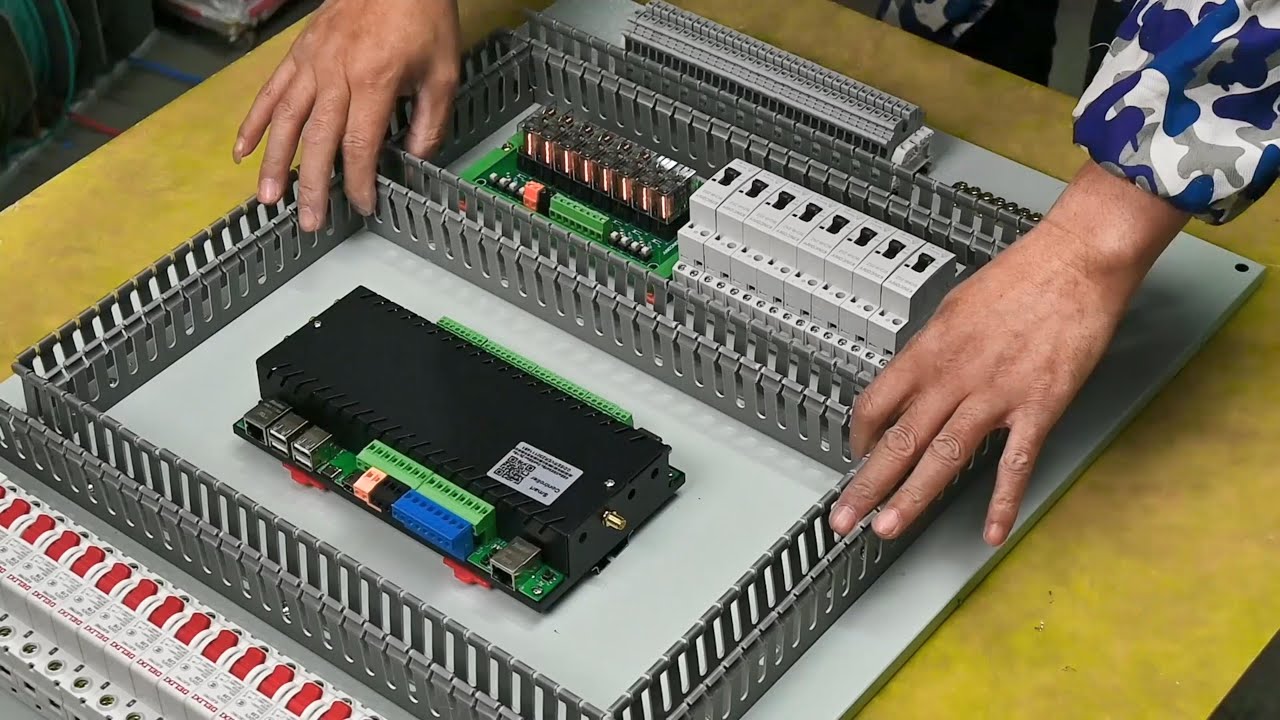
new explanation schematic video: https://youtu.be/mKjOv1IVVxo
KC868-Server is a Raspberry Pi CM4+ ESP32 Smart Server. Here is details: https://www.kincony.com/home-automation-local-server-raspberry-pi-relay.html
smart distribution panel diagram download:
https://www.kincony.com/forum/showthread.php?tid=2936
if you have interesting, you can or...
This
This someone built it?
red glen
drowsy haven
well it is a board that contains a microcontroller, among other things. or rathe...
I need to connect it to arduino? no?
drowsy haven
well someone built everything. but as it says in the comments, this uses an KC868-H32BS relay controller that costs a couple hundred dollars.
I don't know about the firmware situation, but apparently somebody was able to connect them to HA, there's a thread about it in the forums as well. https://community.home-assistant.io/t/32-channel-ethernet-relay-module-kincony-kc868-h32/155647/289
honestly I found this out just by reading the youtube comments and then entering that device name into google search
red glen
This is becoming more complicated
drowsy haven
also note how this switches 32 channels or so in the circuit breaker panel, which may not be ideal if you just want to control one or more lights that may share a fuse with other stuff. depends on your wiring though
If I were you, I'd start small and then learn along the way
drowsy haven
well if you get something like a sonoff basic (~5$) or a shelly 1 (~10$). you can switch a single circuit or line that the lights are attached to and control it from HA for real cheap. the shellys in particular are small enough such that you can mount them behind a light switch if you want
drowsy haven
red glen
I’m also 19😂
I guarantee you there's people here that are younger than you
if you are inexperienced with electricity at mains voltage, I would recommend you don't mess with that kind of thing unless you know what you're doing, because that is dangerous
something that uses Zigbee (like a tradfri bulb) does not require you to mess with the wiring at all, but you need a Zigbee USB stick or some other controller (i.e. a 'coordinator' in Zigbee terms) to connect them to Home Assistant. you can find a list of some that are known to work here: https://zigbee.blakadder.com/coordinators.html
red glen
But expensive when getting bulbs etc
drowsy haven
yes. more comfort/less hassle and more feature = more expensive, generally speaking
 ionic harness
hello guys! I have aquestion. I am thinking about buying aqara equipement, because its a cheap solution. Does anybody know, if I need an Aqara hub, if I already have ha?
drowsy haven
ionic harness
hello guys! I have aquestion. I am thinking about buying aqara equipement, becau...
you don't, but you need a zigbee coordinator if you don't have one already
 terse pebble
ionic harness
hello guys! I have aquestion. I am thinking about buying aqara equipement, becau...
terse pebble
ionic harness
hello guys! I have aquestion. I am thinking about buying aqara equipement, becau...
If you have a Zigbee coordinator stick (and aren't talking about Aqara's Thread devices) - no
ionic harness
thanks
red glen
I need someone who did use relays because I don’t understand anything
karmic cargo
patent river
I think Shelly devices use HTTP? In theory should be fine communicating through...
Yes, they are HTTP.
I think I'll give it a try with a new device and see what happens.
drowsy haven
red glen
I need someone who did use relays because I don’t understand anything
you do understand what a relay is, generally, right?
just to clarify: a relay allows you to open and close and arbitrary circuit (for instance one with mains voltage for lamps) with a much smaller voltage, like what is available from the GPIO pins of a raspberry Pi or a microcontroller
red glen
Yes the relays I dont understand them
drowsy haven
i.e. you could make a circuit that switches an LED to test it, then just attach a relay instead of the LED to it in order to switch on or off the mains voltage
red glen
ah
drowsy haven
it is basically a switch you can control with a low voltage
red glen
so it's like a switch but I control it basically through HA
drowsy haven
no. you control the microcontroller/SoC through HA. that may or may not have a relay attached to it's I/O Pins
red glen
obv relays are connected to actual devices such as bulbs.
red glen
drowsy haven
no. you control the microcontroller/SoC through HA. that may or may not have a r...
how so?
THought the I/O pins are connected to relay
drowsy haven
in the case of ready made devices (like Shelly, Sonoff etc) they do have relays already on the board, attached to the output pins, ready to go
yes
red glen
and the input is basiocally HA? through sensors etc
or do I actually connected them to the microcontroller
drowsy haven
well the microcontroller/SoC has software that is connected to HA (for instance via MQTT or some other integration) via Wifi or some other means
drowsy haven
if I were you, I would do a lot more reading tbh. or perhaps watching some youtube videos. it really isn't all that complicated, even if it may sound like that because you're unfamiliar with some of the concepts.
but you kinda need to know what you want to achieve as a first step and the basics of how those things fit together
you need an ESP board that has a relay on it. such devices exist and are available for cheap. they allow you to control the relay on the board over wifi with home assistant
 drowsy haven
red glen
I would require a MCU
drowsy haven
red glen
I would require a MCU
no. this contains an MCU/SoC. the ESP8266 is a microcontroller that has wifi, among other things
drowsy haven
red glen
this?
but yes, this would likely work
red glen
alone without an MCU?
Might get it and just try everything
then once I get familiar I move up
drowsy haven
you can programm the ESP8266 like an arduino
red glen
but when using raspberry pi u arent really coding?
drowsy haven
in fact there is already ready made firmware for it, like Tasmota, or the ESPHome firmware files generated by the ESPHome addon/integration in Home Assistant
drowsy haven
red glen
but when using raspberry pi u arent really coding?
I don't understand the question
drowsy haven
red glen
ah so I just connect to wifi and then boom check HA websitge
well on this device, you would have to put firmware on it first, like i said, but yes - after that it will be recognized on the HA web frontend
red glen
https://community.home-assistant.io/t/4-channel-relay-esp8266-wifi-board-working-with-esphome/120594

Home Assistant Community
Hi all, I’m posting my integrations with a 4 channel relay board which is both cheap and easy to configure. Board can be found here link to banggood It hosts a detachable ESP-01 (8266EX) with 1M memory. issue is that the ESP8266 is not using GPIO pins to trigger the relays, an additional processor is on board to do that called an STC15L10...
ah I see a forum here
nice.
drowsy haven
yup. notice though that you need a flash programmer or serial adapter to get the firmware onto the device, as it says in the forum post
red glen
whats that
 drowsy haven
if you get a device that already has some firmware on it, you can tinker with it a bit in HA before flashing your own firmware, if you like
drowsy haven
red glen
whats that
a board with an ESP8266 chip on the other side. the poster took it off the relay module in order to flash firmware on it with the device that is pictured to the left of it
red glen
drowsy haven
if you get a device that already has some firmware on it, you can tinker with it...
ios that like uploading code to the MCU
drowsy haven
drowsy haven
a board with an ESP8266 chip on the other side. the poster took it off the relay...
oh sorry, i looked at the wrong thing, that is the programming interface
yes
drowsy haven
red glen
ios that like uploading code to the MCU
yes, exactly like that
red glen
what program do I use for that? Also, they said about the flashing application but not the compiling app.
red glen
drowsy haven
oh sorry, i looked at the wrong thing, that is the programming interface
is that there or I need to modify something.
I will buy it tomorrow.
drowsy haven
you need that in addition to that board. this particular things seems a bit inconvenient to flash to me, but I don't know for sure
drowsy haven
red glen
what program do I use for that? Also, they said about the flashing application b...
I would recommend that you flash some ready made firmware on the device. like Tasmota or ESPHome. that way, you don't have to compile or code it yourself
red glen
ah so that I just download then flash, perfect
drowsy haven
yes
red glen
nice.
 drowsy haven
you can also check this: https://templates.blakadder.com/preflashed-type.html
it is a list of devices that are preflashed with Tasmota - a versatile open source custom firmware that you can replace with whatever other firmware you like down the line, such as ESPHome. If they are available for a reasonable price in your region
if you get any of those, you don't have to flash anything. you more or less just connect the device to your wifi and HA will recognize it
red glen
aren't it for free xd
drowsy haven
sure, the firmware is free
red glen
ah I understand
drowsy haven
but i don't know if you have a serial adapter or other device to flash the firmware to the device, or how experienced you are with that
hence the suggestion
red glen
drowsy haven
but i don't know if you have a serial adapter or other device to flash the firmw...
I have a f/lash device iirc
it gets connected to the MCU then connected to the pc
I flashed atmega32 before thats pretty much it xdf
xd
drowsy haven
yeah, there's different ones, but you can try. most of the time a serial adapter with the correct voltage and some cables is enough
even if that doesn't work, such adapters are available for cheap as well
red glen
I can check it in university lol
drowsy haven
and with that setup, you can get started experimenting with home assistant and wirelesslessly switching things on and off for like 10 dollars total or so
drowsy haven
how do you mean?
red glen
using HA
drowsy haven
most anything can be automated, since HA is a home automation system 😉

 drowsy haven
yes. i mean there's 8 pins and 8 holes, looks pretty tempting to me 😉
red glen
Fair enough lmao
drifting grove
Hey all. Just looking for options on cheap (cost) hardware light bulbs and switches that I can connect directly to my zigbee and bypass 3rd party apps. I have a variety of devices, but I’m looking for options on what’s lasting the longest for you and the most inexpensive. Thanks!
red glen
@drowsy haven 1 more question to finish that. Lets say I have a led connected to relay using that esp. will it detect that there is a device connected the this relay or what exactly? It meaning HA
jagged crypt
drifting grove
Hey all. Just looking for options on cheap (cost) hardware light bulbs and swit...
HUE lights in discount bins for me. I use a hue hub, but they work directly with a zigbee stick in HA.
drowsy haven
red glen
<@514537208632573967> 1 more question to finish that. Lets say I have a led conn...
generally not, at least not with very simple hardware like that. as far as HA is concerned, it is switching a GPIO pin on the ESP on and off. whether there's a small LED, a relay switching mains voltage for a lamp or nothing attached to that, HA doesn't know.
that said, there are also ESP32/ESP8266 boards and products available that also measure voltage/current/power going through the relay. firmware like tasmota and ESPHome supports reporting that back to HA as sensor data. so in that case, you could infer that something is attached and how much power it draws.
If you're looking for actual bidirectional communication with the lamp though, you'd need something like zigbee bulbs again.
red glen
Nope, i was just concerned abt the connection ifc abt bidirectional comm
But if I’m connecting a lamp will that show as a resistance to the wire or what
I want to know how it works
drifting grove
@jagged crypt thanks for the suggestion, I’m more looking for some probably from Amazon that I can buy right away and not look or wait for discounts. But if I do see any, I may give them a try.
drowsy haven
red glen
But if I’m connecting a lamp will that show as a resistance to the wire or what
if you attach a lamp, the resistance of the circuit changes - and thus how much current will go through it, and therefore how much power is drawn.
whether that change is measured is another thing, as I said.
some boards that are slightly more sophisticated than the one you picked will measure the power draw of the circuit attached to the relay, and some will not.
if a board measures that kind of thing, it will (with the right firmware) report the current/power draw back to home assistant
drowsy haven
not really trial and error. if you buy a device that can measure power draw, that is generally an advertised feature, since it requires additional components to measure that, which cost money
red glen
I'm getting ESP8266ESP8266
drowsy haven
yes, but there's literally thousands of different boards with an ESP8266. some of them have the components necessary to measure power attached to the ESP's I/O pins and some do not
outer knotBOT
@red glen I converted your message into a file since it's above 15 lines :+1:
red glen
this is legit same as what I saw in forums.
 zealous dune
Those boards are bad
zealous dune
Find one without the 8pin ESP01 module
red glen
on a very small scale
zealous dune
It's your money
red glen
zealous dune
Find one without the 8pin ESP01 module
why?
zealous dune
You'll find out during your small scale testing
red glen
I wanna know why bruh so that I get it
zealous dune
Nah bruh
red glen
thx for the help!
u mean this?

.........

what other modules then ?>??
u give me a word and leave
jagged crypt
drifting grove
<@532004461263192064> thanks for the suggestion, I’m more looking for some proba...
Looks like Hue White (not ambience, not color, just warm) are $14 for ~75 watt/1100 lumen bulbs, depending on your desires, that's not bad. Better wattage than the 850lumen ones.
Don't know how good the Sengled bulbs are $100/6 pack of color 60watt (800 lumen) bulbs
the diagram on amazon doesn't show them as a router though, just end point
CRI80 isn't that great
drifting grove
They are a bit pricey
jagged crypt
if $16/bulb for color is pricey, you are out of luck for "good" bulbs
drifting grove
I fitted my home with Sengled and I’m regretting it
jagged crypt
then buy the hue lights
drifting grove
So with hue, it goes into pairing mode and my zigbee detects it and I’m all set? No 3rd party app or hub?
jagged crypt
they should come in pairing mode, so yes. I've paired a hue bulb I deleted from my hue hub, to my sonoff-e stick on HA. Deleting from hue hub puts them in pairing mode.
if you are buying used/refurbs, you may want to pick up a hub or a dimmer switch to reset the bulbs
drifting grove
Oh so I may need a hub to start off
jagged crypt
you may be able to find a hub for cheap on ebay
drifting grove
Best thing about Amazon, is if I buy it and it won’t work, I can send it back
jagged crypt
you can see if any of the starter packs make sense for you.
drifting grove
I’ll look into that, I have pretty much my home covered, by mostly Sengled, but 8 of my bulbs from a few other brands are due for replacement
jagged crypt
local hardware store here is selling 2 60watt white bulbs + hub for $20 (they don't ship), on liquidation. I would check any local hw stores just to see if anything is on discount.
(northern california)
drifting grove
Good thing about hue, is it’s in local stores.
Southern Quebec,
Different state/province and country lol
jagged crypt
yah, i used to live in southern NH 🙂
(still wrong country, but much closer)
same power standards though
drifting grove
I’ve been to Salisbury beach there
Spelling?
Nice place.
I’m assuming it’s this one (Philips Hue White 10.5W Equivalent 75W A19 Base E26 LED Smart Bulb, Dimmable, Bluetooth & Zigbee Compatible, Voice Activated with Alexa & Google Assistant) your referring to
jagged crypt

Go bright by giving your largest spaces this bright, smart light. With a brightness equivalent to a traditional 75-Watt bulb, this bulb can tastefully illuminate living rooms, kitchens, and more with 2700 color temperature. Dimmable features allow you to control the level of brightness. Own our H...
drifting grove
Yeah same one, different packaging. It’s $21.99 each. Canada prices are a bit more
jagged crypt
amazon display post tax in canada? (usa is pre-tax advertising)
drifting grove
Nope, that’s pre-tax
jagged crypt
yeah so a couple extra USD in CAD
drifting grove
It matches the exchange rate
jagged crypt
$13.98 USD is USA pricing pre-tax.
These are warm lights ~2700kelvin only, if that's something you want to control.
hue's come in white (2700), white-ambience (2700-4000), and RGBW
drifting grove
Ok, I’ll look into those. Controlling them isn’t that important, but may be at a later date, so wouldn’t hurt to get them.
 modern python
hey guys i have an old mini pc id like to use for home assistant but i just noticed that the internal wifi card doesnt get recognized. can someone help me out since i only have very bad memories when trying to fix linus driver issues. its a realtek rtl8188ee
drowsy haven
maybe another driver is claiming the card or it's not actually an rtl8188ee? that one should have a normal driver in the kernel tree. you could check which modules are loaded with lsmod
there's some odd realtek wifi cards that have really terrible driver support or out of tree drivers
golden thorn
Also check lspci -k and perhaps lsusb -t. Which OS are you using?
modern python
well youre right in that its a really old card 😅
 golden thorn
On debian you'd install this: https://packages.debian.org/bookworm/firmware-realtek
Just have to have non-free-firmware enabled. Sometimes these work better than the included
modern python
soo i have a stupid question. i assumed i access the terminal from...well the terminal but apparently lspci is not a recognized command. what am i missing?
golden thorn
That's why I asked for the OS. Do you use HAOS?
modern python
yeah the generic image. just installed it too. so im on 10.5
golden thorn
Use the advanced SSH addon and disable protection mode. If not, use a keyboard and monitor and enter login into the ha prompt
modern python
golden thorn
Use the advanced SSH addon and disable protection mode. If not, use a keyboard a...
did that
golden thorn
You can't really install drivers though. Gotta ask here for driver support: https://github.com/home-assistant/operating-system
modern python
 golden thorn
Try apk add pciutils then run it again. Remember that this is not direct SSH access to the host.
You're inside a container. Not everything works as on the host
modern python
huh...seems to be...fine?
 golden thorn
No driver in use for it but that might not mean much
golden thorn
What were you planning to do with it?
modern python
golden thorn
What were you planning to do with it?
use it? what do you mean?
golden thorn
I mean you already have ethernet and WiFi isn't recommended for servers.
Also see here for networking docs/commands: https://github.com/home-assistant/operating-system/blob/dev/Documentation/network.md
modern python
golden thorn
I mean you already have ethernet and WiFi isn't recommended for servers.
Also se...
the ethernet is temporary during setup. generally id super agree but unfortunately at its intended site wifi is needed.
golden thorn
Well in that case one's got to use what's available. I'd recommend reading the whole docs but this specifically to see if it even works: https://github.com/home-assistant/operating-system/blob/dev/Documentation/network.md#enabling-wi-fi
modern python
but to do all that id first have to tell it what driver to use,no?
terse pebble
On HAOS you cannot include drivers to the OS
golden thorn
I don't know how with HAOS or if you can. The idea is that you don't have to fiddle with the OS itself and can concentfate on HA. "It just works". Well, mostly
 rich venture
a container or supervised solution is always avalibile
modern python
alright then can i resolve this with a 5 dollar pci minicard that is supported?
golden thorn
Perhaps. Did your current one show up in ha network info?
rich venture
modern python
alright then can i resolve this with a 5 dollar pci minicard that is supported?
do you maybe have coax avalibile at install location?
modern python
golden thorn
Perhaps. Did your current one show up in `ha network info`?
the realtek? no
modern python
rich venture
do you maybe have coax avalibile at install location?
sorry no deal
golden thorn
Might be worth a try to ask on github
rich venture
modern python
sorry no deal
well, if MoCa isnt a option you could always do powerline
modern python
but i did just check the lspci on a second mini pc i just installed at my uncles house and that runs an intel centrino advanced-n 6205 perfectly and i think i saw those in pci mini card form online
modern python
rich venture
well, if MoCa isnt a option you could always do powerline
listen i get it wifi sucks and im really thankful for all the help and suggestions but its not happening in this case. powerline adapters add cost. a 20m ethernet across rooms or a labor intensive inwall install of cables is also not happening. i ran a pi 3 b+ there and im changing it because i had a lot of issues but none them were wifi related
rich venture
modern python
listen i get it wifi sucks and im really thankful for all the help and suggestio...
you could install home assistant in docker and use the stock wifi at no cost altho you will lose addonn support
glossy prism
The good news is that add-ons are just pieces of software you can otherwise install manually
gloomy spoke
 modern python
right... so thank you everyone for helping me figure this out but i just went the easy route and spent 6 bucks for a wifi module that will work out of the box. so i can keep the setup as close to the original as possible
golden thorn
Feel free to let me know how it worked out
 visual lintel
I am looking for a wall switch with Zigbee (supported by Zigbee2MQTT), which only sends a signal when touched and does not in it self block/toggle the light.
I got smart LEDs in my lamps with WLED, which work fine with both HA and Alexa at the same time. However, when I turn them off with the old wall switch, I cant toggle them back on with Alexa/HA.
I still wanna be able to have some kind of "manual" control (i. e. with a physical switch, rather than voice command or HA app)
So my idea was a switch/button on the wall which simply sends a signal via Zigbee2MQTT.
Basically these:
https://amzn.eu/d/hPy0FDR
but wall mounted
zealous dune
that's called a wireless switch or wireless remote
Zigbee Device Compatibility Repository
Zigbee ID: lumi.remote.acn003 - Aqara WXKG16LM compatibility with third party gateways
visual lintel
thanks 🙂
as so often in life - you just need to know what to search for ❤️
 inland condor
Hi Everybody,
I am looking for a theromstatic valve where the inhabitant of the appartment can NOT set the temperature higher than what I set as the upper limmit. Lower is ok:=) I would appreciate your suggestions!
Thanks!
minor quiver
zealous dune
like this https://zigbee.blakadder.com/Aqara_WXKG16LM.html
Since we're talking switches... Any recommendation for a smart in-wall switch that is 2 UK gang wide, and handles four different lighting zones? (i.e. 4 switches)
Or even better, a touch panel
zealous dune
I don't do UK
faint raven
Does anyone know what PWM frequency the various Nanoleaf devices use, especially the bulb-format ones?
I had some Hue bulbs, but I had to stop using them, because their 1khz PWM flicker made me feel sick whenever they were on.
 upper yoke
what are my options for speakers? other than the google home speakers/home mini speakers.
 final gyro
So the Hue bulbs historically have a configurable "restore last state on power cycle" option that you can set such that the bulb will instead default to on after a power cycle, but I've noticed my beloved Aliexpress zigbee bulbs tend not to have this functionality.
I love having the ability for people to "fall back" to using the original wall switches to control the lights if something is wrong with home assistant or the wireless zigbee switches I have.
Does anyone know of cheaper zigbee bulbs that have this functionality too? Maybe the Ikea bulbs?
 pallid brook
Any advice for a garage door opener? Was using myQ but it’s all sorts of broken now
Would love a local option
 summer shell
pallid brook
Any advice for a garage door opener? Was using myQ but it’s all sorts of broken ...
summer shell
pallid brook
Any advice for a garage door opener? Was using myQ but it’s all sorts of broken ...
Build your own with ESPHome just need a board, a relay, and a reed switch.
But I guess it depends on on your garage door too.
pallid brook
summer shell
But I guess it depends on on your garage door too.
I’ll take a look at that. I have a chamberlain lift master
summer shell
pallid brook
I’ll take a look at that. I have a chamberlain lift master
That doesn’t mean anything. Just need to make sure your door opener isn’t more modern and rolls its codes. Those require a lot more work.
There are hacks around that as well as hard wiring into the button itself since it has the code logic and you “simulate” a pressing but if your button is really dumb good chance your system is older and works by just becoming another button.
pallid brook
41A5389-10 is the model. I’ll take a look. I’ve setup homelink with it before but I know that doesn’t tell us much
The opener I’d guess isn’t that smart as the house we’re in was built in 2004 and it hasn’t been updated
summer shell
pallid brook
The opener I’d guess isn’t that smart as the house we’re in was built in 2004 an...
It may work…. It says security+ on the logic board but not sure. Just get a simple esp32 with a 3.3v relay, doesn’t need to be much draw and test it by adding two wires to the same spot on the door opener as the current opener and tell ESPHome to close the relay. Just wire the relay in NO or normally open mode. If the door opens your good and go invest in time for running the reed switch and wire it into the board and configure it all up.
Mine is also security+ and works.

The learn button for your garage door opener is located on the back or side of the garage door opener motor. The learn button allows you to program compatible
Good reference
 fringe crater
I assume you don't need the esp and relay just to test it, isn't that essentially the same thing as just shorting the ports together? you can just test it with a short wire.
pallid brook
What's the reed switch for?
pallid brook
got it
summer shell
I have a magnetic reed switch on my door and the sensor screwed into the concrete
And then with ESPHome logic you can send a cover entity to ha and determine if open or closed based on reed.
pallid brook
okay that makes sense
ill look into this all more. wonder if you could use a shelly for the powering
summer shell
Some people do it with shelly relays and tilt sensors but I liked the hard wired approach for the reed
pallid brook
this looks like a good combo approach, https://www.youtube.com/watch?v=QMepwpyjMCY

READ THIS UPDATE!!!!
Tasmota updates have changed some necessary settings!
Here's what you need now: (Thanks Chris Norton)
Switchretain 1
Powerretain 1
switchtopic2 garagestate
switchmode1 0
switchmode2 2
GPIO 14 to 10 Switch2
GPIO 4 to 22 Relay2
cover.yaml
- platform: mqtt
name: "Sonoff SV Garage"
state_topic: "cmnd/garagestate...
i assume requires a dumb opener
summer shell
Yea. Same thing the esp does. There are so many ways to do it.
 nimble token
Does anyone know how to activate the scenes you can build for Nanoleaf Essentials Bulbs in the nanoleaf app from HA? I can call a scene with the turn_on service for Nanoleaf Shapes using the effect data. The same format does not call a scene for the essentials, however.
pallid brook
Got it so just a matter of wiring a “button” to the opener
summer shell
Yup.
Just test your door opener like @fringe crater recommended.
Just get some ether wire and strip two ends and insert it into the same spot your wired door opener goes to on your door and touch the two wires together. If the door opens a simple relay will work if not it’s a rolling code situation and requires more.
Or like 22 gauge wire.
You can get door bell wire or stuff from hardware stores cheap. Just make sure it’s solid strand.
pallid brook
I have some solid strand 14/16 gauge i've used for lightswitches. that should be fine right?
gloomy spoke
you can, it's just overkill
pallid brook
ya figured as much, just what I have in the toolbox 😄
gloomy spoke
Will be harder to solder to small pads and make a sturdy connection
patent river
I tend to use Cat6 cable 🙂
gloomy spoke
You could support several garage doors with that 🙂
patent river
I actually used all 8 wires in the end. Opener has a 6 pin spring terminal block, which provides permanent +24VDC, switched +24VDC (which serves as a "door moving" signal), an "auxillary" which is a generic trigger you can assign to the 2nd button on the remote, GND (used for all 3 of those), and then the dry contact.
So the "door moving" trigger now turns the garage lights on for 1 minute (great for coming home after dark), and I have an extra arbitrary button to do things with.
 harsh fable
CM4 still hard to find! Can someone explain why nothing else but CM4 would work with Yellow?
 mossy gazelle
Is ecobee the go-to smart thermostat? Would you guys suggest that or something just like a zigbee/zwave thermostat?
What about whole home energy monitors, I had my eyes on emporia vue since its a whole home monitor that can monitor each breaker as well which seems like it could really help.
terse pebble
harsh fable
CM4 still hard to find! Can someone explain why nothing else but CM4 would work ...
Because the Yellow and its software have been designed for the CM4. Other SBC producers are not 100% identical to the CM4, so they don't work.
patent river
There are two new Rockchip RK3566-based Compute Module 4 competitors, the Radxa CM3, and the Pine64 SOQuartz. Should you go buy one of these instead of a Raspberry Pi?
Maybe, but not yet. I'll explain why.
Mentioned in this video:
- Radxa CM3: https://wiki.radxa.com/Rock3/CM3
- Pine64 SOQuartz: https://wiki.pine64.org/wiki/SOQuartz
- Gi...
 true bear
hello, seeing that the echo dot is on sale, I was wondering if there is a way to set it up to work only locally with home assistant without an internet connection, sort of like the tasmota firmware for bulbs and plugs. does anyone know ?
faint raven
final gyro
So the Hue bulbs historically have a configurable "restore last state on power c...
Note that if you turn it off and on twice, it'll go to high brightness (I forgot whether it was 100% or something more like 60%). It's a safety feature... in case an emergency happens, you can trigger high brightness.
The Hue bulbs would be perfect if only they had a higher PWM frequency!
zealous dune
true bear
hello, seeing that the echo dot is on sale, I was wondering if there is a way to...
No
true bear
:(, such a shame, I wanted to try the voice control things in HA and this looked like a device that had everything it needs to do it
signal mica
is there a alternative firmware for CB2S, that i found in a dual power meter ?
zealous dune
Yes, esphome
signal mica
uuu nice, i did not find that reference yet, but now i have purpose, thank you @zealous dune
zealous dune
its been added in the latest release
signal mica
i saw there are MQTT issues, guess i'll wait
zealous dune
¯_(ツ)_/¯
summer shell
pallid brook
I have some solid strand 14/16 gauge i've used for lightswitches. that should be...
This won't work, those terminal blocks are very small and the gauge of 14/16 may be too large. Most garage door wiring for the door opener and/or door sensors are ususally 22-26 solid strand in my experience.
tacit pilot
Looking for light recommendations. I have some WiZ wifi bulbs now that have been alright, but I moved and need a few more and wanted to try something new. Open to any tech other than z-wave and I'm in NA
pallid brook
summer shell
This won't work, those terminal blocks are very small and the gauge of 14/16 may...
Okay. I have some breadboard wires I could use. Would that be too small?
summer shell
I protoyped mine with cat6 ethernet spares I had so that should be good for the simple "close circuit" test to determine if it will work with your door before you invest more money.
I can also share my yaml for my esphome device if you want.
red glen
which is bettwe esp32 or esp 8266
summer shell
esp32
red glen
summer shell
esp32
thjanks.
harsh fable
patent river
https://www.youtube.com/watch?v=aXlcNVKK-7Q
So the answer is No. I wonder if there’s anything in pipeline to replace CM4 and update the software. Is this even a possible scenario? @terse pebble
terse pebble
harsh fable
So the answer is No. I wonder if there’s anything in pipeline to replace CM4 and...
Unlikely. The next replacement might be the CM5. But that hasn't even been announced yet (and might not be for quite some time) and compatibility with CM4 is unknown.
patent river
The real thing holding it back IMHO - as noted in the video to some extent, and in the comments - is the whole bootloader situation. "Big" ARM systems (workstation/server) have just gone the full UEFI route, which significantly lowers the barrier to entry. "Small" ARM systems are just a mess of hard-coded proprietary grossness. For machines in those sort of form factors you'd still need some sort of standardisation of what pins do what, but the ability to just boot any generic ARM Linux distro on any piece of hardware is a major problem.
jagged crypt
not entirely hardware, but I'll ask. Devices added automatically from hue integration get generic entity names, but custom device name. I rename the device, i get the "entities will be renamed, are you sure", I answer yes. And the entities aren't changed. Is this potentially something with the integration, vs a user-error (mine)? (Trying to clean up things like "light.hue_bulb_17")
cold moon
something is broken.. for me they always change after choosing yes to that
jagged crypt
yea, ok, my workaround has been remove integration, and re-add, and it seems to do the correct thing.
thanks
cold moon
just dont manually change an entity under a device then try that
cuz the popup just wont pop up
jagged crypt
also, btw, when were talking about hue motion sensors, I didn't realize there are two generations, my 10 second cool down is on first gen. Haven't had a chance to validate cool down on the 2nd gen ones.
yeah, I may have made the entity rename mistake early in my HA playing, but i leave those alone.
 ancient belfry
Is anyone aware of a wall outlet (in wall) with consumption monitor?
pallid brook
summer shell
I can also share my yaml for my esphome device if you want.
sure thatd be great!
zealous dune
ancient belfry
Is anyone aware of a wall outlet (in wall) with consumption monitor?
Zigbee Device Compatibility Repository
Zigbee ID: TS011F | _TZ3000_0yxeawjt - LELLKI WK34 compatibility with third party gateways
summer shell
pallid brook
sure thatd be great!
When you think yours will work sure.
 runic tinsel

Zigbee Device Compatibility Repository
Zigbee ID: SOCKET/OUTLET/1 - Schneider Electric WDE002172 compatibility with third party gateways
drifting grove
I just ordered a Shelly 2PM and are planning to use it with an Orcon MVS15 with Perilex plug.


To be safe all I want to know is if my connection schematic is the right one.
Wish I could use an RFXcom 868Mhz USB dongle but HA, Orcon and RFXcom is not working together yet.
 dry heron
pallid brook
Any advice for a garage door opener? Was using myQ but it’s all sorts of broken ...
dry heron
pallid brook
Any advice for a garage door opener? Was using myQ but it’s all sorts of broken ...
I also have a Chamber lift master. I have used the Zooz Universal Relay ZEN17 Ver 1.0. I had in my automation parts boxes from another project. Working through the ZEN17 programming is a little strange. The connection with the ZEN17 to the opener is via https://www.garadget.com/product/security-2-0-dry-contact-adapter/. Been real happy with it while avoiding the myq drama. Although I did like the Myq integration while it was working.
 stable epoch
Hi All , I have problem i have more or less 40 tuya devices that are connected to one router "TP-Link Archer C1200 (1200Mb/s a/b/g/n/ac) USB DualBand" . Some of the devices from time to time dosent respond for automation. Other problem is, that i have issue with internet speed 10% of badwith that i have .
What can be wrong is that true that the problem is related with efficiency of router (low speed of processor ) ?
outer knotBOT
@stable epoch Please do not cross post. Read the channel description, post it and wait for folks to respond. Crossposting wastes people's time as they're unaware of the help you're getting elsewhere.
If you don't get any responses after an hour or more, and your message is no longer on screen, it is fine to re-post or post a link to it.
 lament cipher
Hi I like to migrate my home assistant setup to a intel nuc I got for cheap. But I fail to get the wifi working. I booted Ubuntu from an USB stick and then wrote the image onto the SSD. Wifi was also not working on Ubuntu out of the box. I would probably be able to get it to work somehow on Ubuntu but how would I be able to approach this on home assistant ?
rich venture
lament cipher
Hi I like to migrate my home assistant setup to a intel nuc I got for cheap. But...
Maybe someone removed the wifi card or its disabled in bios
lament cipher
rich venture
Maybe someone removed the wifi card or its disabled in bios
no it was working as it initially had windows installed
terse pebble
Some WiFi cards are not supported by Linux natively. Those require proprietary drivers.
lament cipher
terse pebble
Some WiFi cards are not supported by Linux natively. Those require proprietary d...
I probably would find a way to do this on a ubuntu, but how would I do this on hassio? How can I get to a shell to install packages ?
outer knotBOT
Hass.io was the old name for the appliance like install option, that uses Docker. It was renamed in January 2020 and is now called Home Assistant OS.
terse pebble
lament cipher
I probably would find a way to do this on a ubuntu, but how would I do this on ...
You cannot add drivers to HAOS yourself AFAIK
 pine oasis
Is Home Assistant OS now fully supporting Odroid H3?
golden thorn
At least it's not mentioned here or in code afaict: https://github.com/home-assistant/operating-system/tree/dev/Documentation/boards
 mighty herald
Saw Amazon fire hd for 90€. Is it good tablet to use as a wall mount device for ha?
glacial oracle
Would depend on the size, but generally other eastern stores have cheaper Android Tablets available
pine oasis
golden thorn
At least it's not mentioned here or in code afaict: <https://github.com/home-ass...
then it is not supported. sadly. So I have to find again a different solution
 fallen narwhal
What's the experience with HAS on SSD Kingston A400 with pi4, is it stable enough with original power supply?
 ruby socket
Any recommended speaker/mic combos that work well with HA for local fulfillment?
I’m looking for something that’s already integrated into a single ready-to-go package, like a Google Home speaker except compatible with local fulfillment
 reef hornet
Particulate Matter (PM) Sensors and espairqual
 lone furnace
Is there a generic hardware guide for things that will work without needing cloud services or an internet connection?
I'd like to find some smart power strips, but I dont want to have my house break when there's an outage.
jagged crypt
look for zigbee/zwave gear
lone furnace
jagged crypt
look for zigbee/zwave gear
Ah, I'm still learning as I go. I have a bunch of iot stuff but its all a mixed mess.
I suppose I'll need to buy a zigbee or zwave stick thingy. I have an Abode gate way that does both but it has compatibility issues.
jagged crypt
also "requires" cloud vs "prefers" cloud become something you need to figure out also. IE, just because a device is WIFI doesn't mean it's automatically "cloud".
winged knoll
All of HA's integrations tell you if they're local or cloud
lone furnace
Any recommendations for a security system that doesnt need cloud access?
 winged knoll
https://www.home-assistant.io/integrations#alarm has a few, but depends on whether you want commercial or not
lone furnace
Looks like Abode, SimpliSafe, Ring, and Nest all depend on the cloud. 😒
I guess I'll test my abode system when I get home. I can try unplugging my modem and see how it behaves with no internet access.
glossy prism
If you have one of the abode gateways that supports homekit, you can connect it locally to HA via homekit controller
devout parrot
lament cipher
Hi I like to migrate my home assistant setup to a intel nuc I got for cheap. But...
Best option is to ditch the WiFi and use Ethernet
lone furnace
glossy prism
If you have one of the abode gateways that supports homekit, you can connect it ...
Oh!
I do, I completely forgot about it's home kit support since I don't use anything apple.
I think I ignored the home kit integration, I'll need to figure out how to view hidden
Are there any downsides to going the home kit integration route if I don't have any Apple products?
ionic harness
hello guys! I am trying to install esp home on my raspberry pi pico w. The installation is working (I think), but If try to connect the raspberry pi using the web interface, it doesnt work... I have tried reinstalling everything multiple times... Thanks & help is appreciated!
outer knotBOT
ESPHome is a system to control your ESP8266/ESP32, with a native integration for Home Assistant.
You can find their documentation here, and get help with ESPHome itself here in the #diy-archived channel (#integrations-archived for the Home Assistant side integration with it). They also have their own Discord server too.
winged knoll
Try their Discord ☝️
ionic harness
thank you!
 sand oxide
Alright, I feel like I'm not getting anywhere with my research on Zigbee door locks. First off, options are limited? Second, why has every one moved to zwave plus? Third, does anyone have a good recommendation for a zigbee lock? I assume I don't want to go with wifi in this scenario purely from a battery efficiency point of view.
gloomy spoke
I'm happy with my Zigbee Kwikset locks. As always, where you live matters
sand oxide
I'm in the US. Are you referring to the Kwikset 916 Deadbolt?
Also, I'm using SkyConnect. I know there were issues initially with Matter/Thread. Has that been resolved? Would matter enabled locks also be an option for me?
karmic cargo
My wife has a tendency of leaving her curling iron on, so I came up with a great idea to fix the problem using a Shelly 1 PM. My plan was to use the PM part to note when power starts flowing, then start a timer and turn it off once the timer expiers.
However, now that I have it in hand, I'm not sure this is the right solution. It seems that the PM is designed to work with an existing switch in a 3-way (US, 2-way elsewhere) setup where it can be turned on/off from either the physical switch or digitally.
Is there a way to wire the PM directly to an outlet to cut power to the outlet when the timer expires or do I need a different tool for this?
The curling iron doesn't have its own switch, so she uses a little plug in switched receptacle adapter, so a smart plug with a switch might actually be better.
Thoughts, suggestions, etc greatly appreciated.
fringe crater
You can wire it to an outlet. I don't know if it's generally recommended due to you don't control what kind of loads get plugged into an outlet, and some kinds of inductive loads may be hard on electrical relays.
sand oxide
karmic cargo
My wife has a tendency of leaving her curling iron on, so I came up with a great...
Your closing thought is what I would do (the smart switch). Easier all around if it works.
karmic cargo
Suggestions on a smart plug with a built in switch? I'd rather not have that if possible, I like that it's more clean with everything hidden the box, but the more I think about it, the more it seems that's the better way to go.
(BTW- US standard 120V NEMA 5-15)
winged knoll
Innr do a Zigbee one or normal US sockets
sand oxide
Clean, yes... but what about mobility? You can move a smart switch around and keep the automations with ease. Also, it's apparent to the user of the curling iron where the device ought to be plugged in. I see your point though.
 spice rampart
does anyone have experience using this nuc as a server, running proxmox with HA and maybe some other smaller containers? i'm want to get started setting up my first home server
https://ark.intel.com/content/www/us/en/ark/products/89186/intel-nuc-kit-nuc6i3syk.html
Intel® NUC Kit NUC6i3SYK quick reference guide including specifications, features, pricing, compatibility, design documentation, ordering codes, spec codes and more.
i found an offer for this nuc with 16gb ram and a 256 M2-SSD for 72€, i am in germany
zealous dune
What kind of experience do you require? It can do the things you listed
devout parrot
karmic cargo
My wife has a tendency of leaving her curling iron on, so I came up with a great...
Sonoff S31 flashed with esphome
jagged crypt
spice rampart
does anyone have experience using this nuc as a server, running proxmox with HA ...
a number of us are running proxmox+ha in SFF machines, it works.
running a i5-6500t lenovo tiny thinkcenter m900 with 256 nvme ssd. But other vendors readily available easily - https://www.servethehome.com/introducing-project-tinyminimicro-home-lab-revolution/

STH Project TinyMiniMicro is set to revolutionize the home lab segment with clusters of high-quality, quiet, low power, and inexpensive nodes
15watt idle power usage
 tawny viper
karmic cargo
My wife has a tendency of leaving her curling iron on, so I came up with a great...
tawny viper
karmic cargo
My wife has a tendency of leaving her curling iron on, so I came up with a great...
Why not just have it yell at her if it's plugged into the outlet with a certain power level
karmic cargo
Well, @tawny viper, that's kinda the idea... I'll have it send a notification to her phone every 5 minutes then shut off after 15, but she doesn't check her phone often enough to notice the 3 notifications... 😦
And I don't have any sort of smart speaker because I really don't want google, apple or amazon listening to everything said in my house.
karmic cargo
winged knoll
Innr do a Zigbee one or normal US sockets
Good call. Only 10A/1200W - don't know if that'll be enough for the curling iron or not... May give it a try, though.
karmic cargo
devout parrot
Sonoff S31 flashed with esphome
Interesting... Cheaper than the Innr, but not sure I want to mess with flashing firmware right now. Has flashbacks to the old days of BIOS upgrades where bricking was a significant possibility.
karmic cargo
sand oxide
Clean, yes... but what about mobility? You can move a smart switch around and ke...
Fair point, but so far, I've had no desire for portability for any of the devices I'm using. I suppose that could change in the future, but not a priority ATM.
I appreciate the thought - not something that I'd taken into consideration before.
karmic cargo
devout parrot
Sonoff S31 flashed with esphome
What's the difference between the S31 and the S31 Lite zb? Do you happen to know?
devout parrot
The S31 is WiFi, the lite ZB is a Zigbee version of the plug and doesn't support power monitoring.
devout parrot
karmic cargo
Interesting... Cheaper than the Innr, but not sure I want to mess with flashing ...
I said that once but it's super easy and totally worth it as far as features go.
karmic cargo
What does flashing buy me that isn't in the standard Sonoff firmware?
devout parrot
Fully local control, as in completely cloud free, via open source firmware mostly.
 royal girder
lone furnace
Any recommendations for a security system that doesnt need cloud access?
royal girder
lone furnace
Any recommendations for a security system that doesnt need cloud access?
Elk? you would need to get involved in the setup
lone furnace
royal girder
Elk? you would need to get _involved_ in the setup
Yeah, doesnt look particularly fun.
I ordered a 2nd gen Aeotec home Energy Meter for $25 any recommendations on a z wave stick that will work with it?
something tells me that my abode gateway despite being zwave and zigbee is going to give me a hard time
This one seems to have decent reviews on amazon 🤔
https://www.amazon.com/Z-Wave-Stick-Assistant-HomeSeer-Software/dp/B07GNZ56BK

Zooz 700 Series Z-Wave Plus S2 USB Stick ZST10 700, Great for DIY Smart Home (Use with Home Assistant or HomeSeer Software)
tawny viper
karmic cargo
What does flashing buy me that isn't in the standard Sonoff firmware?
There is the cloudfree.shop
That sells them flashed. Donates some money back to open source projects

I have 4 very similar wifi plugs. I had them lying around from years prior to home assistant. Was able to put tasmota on them (gosund, not sonoff). If I didn't have the gosund already I would have bought those prefllashed too
 somber tartan
Hi,
I have a few LED lamps that are powered by this power supply: https://www.meanwell-web.com/content/files/pdfs/productPdfs/MW/PCD-25/PCD-25-spec.pdf
I'd like to connect a connected dimmable module to these lamps and control it with home assistant.
Do you guys know anything that would do that ? Thanks !
 red dagger
Hello! A newbie here...
I'm seeking support to control dumb switches in a way that also send state to HA if the switches are toggled manually
Can someone please point me to instructions / article that'll help me to wire it in such fashion?
I have really loved the design of Sebastian (SS4H) & his Hub 2.0.... But I'm clueless as to how the RJ-45 communication is handled at the "dumb switch board" level
Below is his synopsis / article published... But it doesn't answer all my questions
https://smartsolutions4home.com/ss4h-shh-smart-home-hub/
 wild atlas
red dagger
I have really loved the design of Sebastian (SS4H) & his Hub 2.0.... But I'm clu...
wild atlas
red dagger
I have really loved the design of Sebastian (SS4H) & his Hub 2.0.... But I'm clu...
I'm going to guess that all the lights are wired into the central control unit directly and the only thing the rj45 going out does is get connected to the switches so he can detect binary on off status of the switch
red dagger
Thanks for your response.. This was one of my theories as well.! But unsure on part B... How does the binary thing work? Coz he is able to control the lights independently from the switch alone...
Wanted to design a prototype once I have clarity on this
wild atlas
The relays controlling the lights are all in the central hub, so they can be turned on and off separate from the light switches
The light switches are all binary inputs into the esp controlling the bank of lights, and the relays are the binary outputs
Imo it would be pretty hard to install a system like that without building it into the structure from day 1
And including it in all the plans and schematics too
red dagger
My house is under renovation so I'm thinking of provisioning it... But seeking clarity prior to making hardware arrangements
I can manage the binary outputs... I need more understanding on the binary inputs & how it's getting passed onto HA via esp32
 timid nymph
anyone have these? https://www.bosch-smarthome.com/uk/en/products/devices/radiator-thermostat/
do they have away/eco or whatever it is called by bosch mode working in z2mqtt? bosch docs say they have, z2mqtt docs does not or I can't read.
mossy gazelle
can i power a shelly Plus 1PM with a 12V adapter?
 stable cloud
are there any mmwave & Pir sensors on the market, who can decide "where" you are " just like the FP2 from aquara, but not with more ppl ? cause the aquara FP2 are just....uargh....i have sometmes 3 "guests" here..... but i need something, like if im 3m away = trigger light a, if im 1m away trigger light b. Anyone know what i wanna say ? 😄
zealous dune
so... distance?
stable cloud
i have this Athom ES01 ? or what its called, but theres no "distance" indicator..... or is that FP2 exclusive (and no, i dont have any ideas how to solder and programming stuff 😄
yes
zealous dune

Blakadder’s Smarthome Shenanigans
This is what an affordable good presence sensor is.
or LD2410/LD2420 for diy
stable cloud
https://de.athom.tech/blank-1/human-presence-sensor i have 2 of these.... its nothing else as an esp i think

athom
mmWave and PIR Human Presence Sensor Model:PS01Input:DC 5V 1A Type-CWi-Fi Type:2.4GhzSize:442272mmWorking humidity: 5~95%RHOperating temperature: 0°C~+40°CRadar Frequency:24Ghz(ISM) Features: Integrated Luminance Sensor Build In CH340C serial chip, you can flash your firmware directly Radar sensitivity and detection distance are adjustable. Th...
but they have noting as sensor for distance
zealous dune
there is
stable cloud
there is ?
i dont see anything on the esp (internal webadress) nor in HA... i mean like sensors for: 1m away .... 3m away.... something like that, the FP2 have, where u can track on ur phone2 where u are... but the ghosting is awful.... have testet the FP2 in my hallway.... dont work...... the athom.... first class product 😄
zealous dune
athom sensor doesn't have distance measurement, otherwise it would already be in home assistant
distance measurement and location tracking of FP2 are not the same thing
so you need to be clearer what exactly you want
red dagger
red dagger
I can manage the binary outputs... I need more understanding on the binary input...
Any help on this?
zealous dune
not with those vague statements
 jovial pulsar
Easiest way is to use esphome. Then you can map a pin to a binary sensor or switch for input/output in hass and everything will just work.
stable cloud
normally, i dont need 2 persons or whatever its called, i just want maybe a "distance" thingie, cause i have a "big room" seperated in 2 rooms, with one "door" so if i stand up from my couch, going to toilett, the light in the 2nd "room" should light up, so it knews.... when im going into "2nd" room and going on my couch 😄
like (nearer?) (closer) 2m away = 1st room, more then 2m = couch
zealous dune
thats what i linked already
stable cloud
k, cool...
red dagger
zealous dune
not with those vague statements
Just to clarify, was this a response to my previous message?
stable cloud
no, to mine
zealous dune
red dagger
Just to clarify, was this a response to my previous message?
no
although it could apply
red dagger
jovial pulsar
Easiest way is to use esphome. Then you can map a pin to a binary sensor or swit...
Thanks for replying... But being a newbie... How was the question... Really a noob... Please guide / point towards some resources if possible
red dagger
zealous dune
no
Okay
red dagger
zealous dune
although it could apply
Hope you went through my previous texts tagged. I'm new to this, so a li'l help & consideration to take Baby steps is all I ask... Didn't expect to receive that response though... I know you guys are devs n pros in HA but just request a li'l assistance
stable cloud
@zealous dune is there a new version out ? sad, temu dont have it, lol 😄
zealous dune
why do you want a new version?
stable cloud
new name (and theres a bargain on temu, lol 😄 )
i think ill live with that atm.... i have 1 FP2 and 1 Athom spare laying around, not another one, lol, not for 30€
or more.....
on temu with some coupons, i could be triggered....
sad, that such a expensive device, got so often false stats, and not for me, all the internet is full of them, and theres no FW update or anything else the last 3 ? or more month, so its a dead device i think.... ill see an FP3 coming, with all the stuff they fixed, cause aquara = homekit = apple = mooonneeyyyyyy 😄
 warm topaz
Anyone know if a prebuilt flow sensor for not whole home exists? For instance thinking about a flow sensor for toilet and faucet lines, etc..
zealous dune
they do
warm topaz
zealous dune
they do
Any links 😄 I did some research and have only seen components or really expensive whole home ones
zealous dune
so... you've omitted the fact you're looking for "not expensive" sensors in your initial question
in that case defining expensive would help
warm topaz
zealous dune
so... you've omitted the fact you're looking for "not expensive" sensors in your...
Well I mean to start Id just like to see some. Expensive is relative. Im going to say sub 100$
zealous dune
thats why im asking you to define expensive
cause i can show you a 250$ sensor and youd freak out that its too much money
in your parameters the answer is: no
warm topaz
zealous dune
cause i can show you a 250$ sensor and youd freak out that its too much money
Well I mean if it wipes me it could be worth it 😉
Well what do you have at 250? And its not a whole home?