#devs_os-archived
1 messages · Page 2 of 1
 quartz pendant
 rare sable
@marble lintel you feature request is not possible since every arm SoC boot different
Boot on a SoC is not simple like boot with Uefi boards
 marble lintel
sry Pascal i'm new to the "PI" arch... and also to buildroot... But i found some interesting material... I have to better understand the HA architecture before... ( Jinja2, aiohttp, polymer, ecc... i'm on the way... ) i'm reading: https://sites.google.com/a/brian-beattie.com/home/opensourceprojects/buildroot-x86-installer so sorry again an thanks for all the really good works....
rare sable
No problem 😀
@Landrash if you really want join, I can give you certs to make dev OTA updates
 ashen radish
has anyone looked into getting rid of docker entirely and using https://www.freedesktop.org/software/systemd/man/systemd-nspawn.html instead?
Also wondering if there's any remaining blockers currently preventing the use of genimage for the image generation, I noticed home-assistant is using GPT partitions on the raspberry pi which should now fully be supported in genimage 13, I actually implemented the hybrid-MBR feature myself for genimage a couple months back here https://github.com/pengutronix/genimage/pull/96 for one of my own projects using buildroot.
 pastel umbra
has anyone looked into getting rid of docker entirely and using https://www.freedesktop.org/software/systemd/man/systemd-nspawn.html instead?
@ashen radish this takes care of starting the container but this does not seem to have any handling of images? ie this seems lower level than what docker provides?
ashen radish
@pastel umbra well I think you would just use https://github.com/systemd/mkosi for image generation and containers can be download+verified+launched with https://www.freedesktop.org/software/systemd/man/machinectl.html
I think the main advantage would be better integration with hardware since systemd is designed for that sort of thing
machinectl even supports gpg image verification looks like
 buoyant bramble
Is there a simple way to distribute os as an iso for install on normal x86/64 machines?
And if yes, how hard would it be to add nvidia support?
rare sable
we support intel nuc. It's a embedded linux distribution which make no sense to run on a desktop pc
and I have also no time to maintain somethings like this
 weak token
congrats on the 4.8 release.
rare sable
It will be come a blogpost, we just slowly roll it out too minimize flooding issues/questions
 velvet sierra
Anyone be able to help me. Trying to install the NUC image on my intel nuc Hassio version 4.5 with nvme support. Install goes fine however it doesn't connect to the internet or boot up properly
https://github.com/home-assistant/operating-system/releases/tag/4.5
This is what comes up last. Wont connect the ethernet or internet
 hollow lintel
.topic @velvet sierra
 granite krakenBOT
The topic of this channel is:
@small badge Development of the Home Assistant Operating System. No support!
Command '.topic' was invoked by: Ludeeus
hollow lintel
velvet sierra
Hey man. Sorry to bother you. I know you put a lot of work into the Hassio build and more recently added the nvme support starting in 4.5.
Just a FIY seems like with the NUC10 they switched to a different NIC I-219V. As of now they’re not supported by any of the current builds. I’ve opened up a ticket #697 however was wondering if it would be possible to support the network card?
Thanks again and keep up the great work, you’re very much appreciated 🤙 @rare sable
 radiant jasper
 snow gazelle
Hello, I just got notified of the HassOS update to 4.8, however after updating my deCONZ setup stopped working.
I'm using a Rapsberry Pi 3B+ with a Rasbee daughter board on its GPIO header.
It looks like the deCONZ addon is unable to communicate with the Raspbee anymore:
16:57:58:592 COM: --dev: /dev/ttyAMA0 (RaspBee)
16:57:59:678 device state timeout ignored in state 2
16:58:00:629 device state timeout ignored in state 2
16:58:01:578 device state timeout ignored in state 2
16:58:02:528 device state timeout ignored in state 2
16:58:03:514 device state timeout ignored in state 2
I'm trying to debug more, but if anoyone has any clue of what changed I appreciate the hints.
Maybe the new RPI Kernel 5.4 changed something in serial port configuration?
snow gazelle
Reverting to HassOS 3.13 brings everything back to normal.
rare sable
my working fine, do you add the correct adjustments for config.txt?
rare sable
@velvet sierra you need find out, which kernel driver it's needed and contribute a PR which add this = it work
snow gazelle
@rare sable no I did not touch my previous config.txt, where indeed I have the UART configuration.
I'm not aware of any necessary changes for the new 4.8 version, the changelog didn't mention anything at upgrade time.
Where can I find the relevnat documentation of what I have to update in config.txt ? Thanks !
Looks like I'm not the only one having issues with UART enabled + HassOS 4.8:
https://github.com/home-assistant/operating-system/issues/703#issuecomment-637450840
rare sable
the kernel and firmware are all from raspberrypi
so we need wait until they fix the issue and I can get the new kernel from there
snow gazelle
That's the general config.txt documentation yes.. I know it very well.
So I'm confused.. there is a kernel bug with UART or I'm required to change my existing config to an updated version? (what I understood from you before)
Note that my existing config.txt is just the stock HassOS config + enabling UART .. notihng esle
rare sable
if you said, all is correct, it need to be an issue with the kernel
snow gazelle
The same config works fine with hassos 3.13 so if there is nothing special to update for 4.8 then yes I would think their kernel is to blame
snow gazelle
Just for the record, this is the only change I made to config.txt for my setup:
# Disable BT and enable UART
dtoverlay=pi3-disable-bt
enable_uart=1
This on top of the official HomeAssistant image for RPI.
I will try to investigate more and see where is the problem.
Thanks for your help and kudos for the great work you guys do with HA.
 half hearth
Hi Guys! I am interested in how I could setup 2 raspberry pi 4 devices running Hassos, whereby 1 functions as a hot-spare of the other.
Is there already something like this?
Something wit btrfs-send maybe.. and a primary/secondary model?
rare sable
You create a new plugin on supervisor which called hassio_cluster they provide the connection/sync logic and a lot of supervisor code which handle that
 fallen cave
Is the datactl command to "easily" move the data partition accessible when running standard hassos ( homeassistant installation method ) or is a homeassistant_supervised installation method needed
rare sable
@velvet sierra we use this defconfig https://github.com/torvalds/linux/blob/master/arch/x86/configs/x86_64_defconfig#L158-L160
velvet sierra
Hmm I’m really not sure what to do with that. I’m sorry
pastel umbra
is this NIC I-219V supported by the vanilla linux kernel? If yes, by which kernel driver/which kernel version? it's likely to be e1000/e1000e, so hopefully it will be supported "automatically"
velvet sierra
It’s the e1000e
And yes supported by the Linux kernel. Works in latest Ubuntu 20.04 as well
pastel umbra
ok, so provided the kernel used is new enough, it should be all fine
velvet sierra
When does it usually get incorporated into hassio?
 jovial roost
I know a lot of people report problems with operating system 4.8 and 4.9. I have two RPI 3 boards, one booting from SSD, and one RPI1 on OS 4.9. They have all updated without problems and boot without problems on both 4.8 and 4.9. None of them have any UART boards connected.
 lofty shale
@rare sable My rspi 3b running hassos shows me, that an upgrade to 3.13 is available although I have 4.8 installed:
https://i.imgur.com/bG5Cudn.png

Is this intended?
 latent wigeon
yes
lofty shale
What is the reason behind that?
hollow lintel
The frontend check if the installed is the same as latest, if not present upgrade
lofty shale
But that's not a good logic if it presents me a older/lower version as upgrade
hollow lintel
True
jovial roost
@lofty shale It´s quite easy really. If you think of it as "recommended version" instead. So, version 4.8 is no longer the recommended version. 3.13 is, and version 4.8 is pulled because of problems...
For your device that is. Other boards might work OK with 4.8 and 4.9, but for RPI 3b 3.13 is the version that works best
 rapid bramble
@rare sable I see you released a new Hassos version 4.10, but it didnt seem to build for raspi was that intentional?
rapid bramble
ok seems to have fixed itself or been fixed, thanks @rare sable
 tropic magnet
building takes time 😉
 near quarry
Hello Guys! I am using HassOS and I am trying to add my custom script to autostart but I could not find systemd ? What HassOs is using instead ? I want to check cpu temperature and turn of fan when it is low.
rare sable
@near quarry there is no customable on the OS because all need be done with add-ons. Everthing is a container desgine
 orchid cave
When will rpi4 usb boot support be available for hassos?
orchid cave
Yeah but that seems to be about rpi3, different eeprom
Seems to work in Rapberry pi os, but unsure if there is any hassos image for rpi4 https://www.google.com/amp/s/www.tomshardware.com/amp/how-to/boot-raspberry-pi-4-usb
 royal grove
Hi I picked up a second hand HP mini i5 computer to run proxmox on and Home Assistant as a VM however I get the following error message
[ OK ] Started HassOS AppArmor.
[FAILED] Failed to start Network Manager Wait Online.
See 'systemctl status NetworkManager-wait-online.service' for details.
[ OK ] Reached target Network is Online.
Having spoken with wiskerz007 he tells me he thinks its because the service times out before the network can start so if it was possible to extend the time allowed for the network to startup it should be good - is there any chance to extend this time?
thanks
rare sable
sure you can bump it to an minute. Simplest way is to add a global patch for the networkmanager packages
royal grove
@rare sable hi thanks for coming back to me where do I get the patch from and is it the VM or proxmox i need to add it to as very new to this?
rare sable
royal grove
thanks will give it a go
@rare sable sorry I maybe being thick here but I do not understand the link it appears to be 2 years old and no instructions on what to do with it - please advise
rare sable
You need writte a patch with the git source of NetworkManager and place the patch on that location that the build system pick that up
Normal developer stuff
royal grove
Ok thanks thats beyond my capabilities - however thanks for your help in this.
rare sable
Yeah nothing is "simple" on a embedding system. Most needing knowledge is how you patch and write patches depending on other source code / projects
Maybe you find an software developer with will write the patch, feel free to point him into this channel and I can point him. You can also open an issue on OS repository and mark it as feature request, maybe someone help out
royal grove
thanks
 remote violet
Noticed the existance of /dev/ttyAMA0 on HassOS (raspberry pi 4, 64bit). Question: is this a serial port? what is it for?
 kindred sail
Nabu Casa is looking to hire someone to help with the Home Assistant OS. More info here https://github.com/home-assistant/operating-system/issues/751
 obsidian horizon
Hi everyone, I am hoping to avoid having to kvm the OS on a NUC10 and I suspect that more people would like to use NUC10 without adding another layer of components to update. There seem to be quite few drivers in the nuc image and NUC10 networking does not work out of the box https://github.com/home-assistant/operating-system/issues/697 .. Who could I talk to in terms of helping out/testing things in that area? I have no experience with buildroot but gentoo was my daily driver for years and I have some embedded linux experience ...
rare sable
you need just write an buildroot packages. They are very good documented and you can look into packages like wireguard_linux_compat if you need an example
based on how the driver are build, you can select the right documentation
you can but this package into https://github.com/home-assistant/operating-system/tree/dev/buildroot-external/package
obsidian horizon
Hi @rare sable .. thank you for the swift reply! So there should be nothing specific home assistant os and I can just go ahead and clone the repo and follow buildroot docs? I didn't find any doc within the home-assistant/operating-system repo on how to build or contribution guidelines.
I'll clone the repo after work and give it a try!
rare sable
all is here: https://github.com/home-assistant/operating-system/tree/dev/Documentation and if not specify, it's just buildroot
obsidian horizon
haha @rare sable I was just going to ask/complain that a patch does not apply during build ... seems you fixed that between me forking and now 😄
 lilac kestrel
@rare sable sorry to ask directly but your name is against the commits 🙂 I cannot get the HassOS 4.10 image working on a tinker board (non S) - it kernel panics about 10 minutes into the onboarding process. Shall I wait for 4.12 to build and try again?
4.11 even.
rare sable
4.11 is out
obsidian horizon
@rare sable ... if the module gets built but is not contained in the final image .. is that related to not rebuilding from a clean state? any way to avoid that? 😉
To be more precise ... I have ./buildroot/output/build/linux-5.4.50/drivers/net/ethernet/intel/e1000e/e1000e.ko but no matching file within buildroot/output/target/lib/modules/5.4.50/kernel/drivers/net where it should land as far as I understood
rare sable
You need it disable the kernel module from build with the kernel defconfig
The machine defconfig enable it as module, you can overwrite it with the kernel config in the nuc board folder and disable it
Because you don't need it from mainstream kernel if you build it later by the package
obsidian horizon
ah, you think it is being built from the kernel tree and not the external one?
rare sable
It think so, they is in the defconfig
All other should work like the wireguard-Linux-compatible package
obsidian horizon
ok, I was unable to find the correct place/syntax to disable a default flag .. most samples just add options ...
btw. what I did up to this point: https://github.com/sopelt/operating-system/commit/2c14590fe37f685961563b8df3b4fbe2a8b2615e
rare sable
You miss a lot on the package
That will do nothing
But all other looks fine
If you finish the package with the correct building details, it should work, maybe you need not the generic one and use the build tools one
obsidian horizon
Thanks a lot for taking a look. The logs look like the Makefile contained in the package is run just fine and many kernel modules have quite similar .mk files
But i guess install location or something like that might be an issue
obsidian horizon
ok, I changed the nuc kernel.config which results in something like grep E1000E buildroot/output/build/linux-5.4.50/.config
CONFIG_E1000E is not set
which should be better now ...
Looking at https://github.com/home-assistant/operating-system/tree/dev/buildroot/package/rtl8189fs I still suspect that I should be fine without manually calling stuff in the package .mk ... I am still wondering if I should make clean just to make sure it isn't related to some kind of state ...
rare sable
True
obsidian horizon
Good morning @rare sable ! Thanks for bearing with me. I submitted a PR https://github.com/home-assistant/operating-system/pull/765 and the image I built booted up fine and my NUC10 is networking as expected so far. Are there any further steps to take? I don't suspect there are automated tests for the driver builds? Any people that could/should test the image? And what would the release cycle look like for merging something like that?
rare sable
@obsidian horizon just a small comments, and after that we can merge it 👍 and it will be in the next release
obsidian horizon
Thanks for merging and your time. I'll go ahead and flash the current release and use a usb-ethernet-adapter until the next release 😉
obsidian horizon
Ah that sounds nice.. then my stuff would get some additional testing... So I would force the OTA without matching signature? Do you happen to have a link on how that would look like?
rare sable
The certs are built in, you can easy use ha OS update --version 4.12
To update later to 4.12 which includes you work
lilac kestrel
4.11 even.
@lilac kestrel Sweet, 4.11 works on Tinker. 4.10 borked.
rare sable
@obsidian horizon can you update also the Documentation/board/nuc.md (or so) with you device type?
obsidian horizon
ah, sure!
 dapper verge
@obsidian horizon nuc10i5fnk2 has same chipset
any chance to download the 4.12? would test it
obsidian horizon
@dapper verge https://drive.google.com/file/d/1OomurjptDMkB7yAaVxk7dub2PFfxDTSd/view?usp=sharing it seems to be labeled 5.0 ... but that should not be an issue as long as you don't accidently downgrade to 4.11 before 4.12 is released.
dapper verge
so only update to 4.12 without fresh install, right?
obsidian horizon
as far as I know it should upgrade to the OTA versions offered
dapper verge
@obsidian horizon is your wifi working? i think you have wifi 6 ax 200 too, right?
obsidian horizon
@dapper verge sorry, I had Ethernet as a priority... So I am afraid the wifi/BT hardware does not yet work... I looked at it for a few seconds but it might be slightly more complicated due to required firmware... And yeah.. afaik there is some ax200 in there
dapper verge
@rare sable is it definitely possible to update to 4.12 with a self-made image? or is it worth waiting for 4.12?
obsidian horizon
I am somewhat curious how well BT presence detection works... So I might look into the ax200 at some point... But cable is always better than wifi ;)
rare sable
Yes, every self made built can use the official OTAs
So long as the certification are not removed/modify from the building
He need can very the OTA updates again our PKI
obsidian horizon
@dapper verge I think we would just have to check the firmware loading kernel settings and create a buildroot package for the firmware/ucode for ax200 ... my NUC is already ceiling-mounted ... but i might try to build an image and USB-boot it ...
obsidian horizon
@rare sable have you had experience trying to contribute stuff like that to buildroot? They already have https://github.com/buildroot/buildroot/blob/b522710337b81312f018c2eb122a87941fc685a2/package/linux-firmware/linux-firmware.mk which seems to be the right place for that ...
rare sable
@obsidian horizon you can write a patch: https://github.com/home-assistant/operating-system/blob/dev/buildroot-patches/0006-odroid-ux4-firmware.patch
would be nice if you send the patch also to buildroot and we do not need stick forever on that
obsidian horizon
I was just looking if there were patches for buildroot 😉 Perfect mechanism! And yeah, getting that upstream sounds good! I'll take a look!
rare sable
I need get a ride at the end of the year and try to make more of that patches upstream
dapper verge
@obsidian horizon I'm not a dev 😉 I only can check your img if wifi and bluetooth is working 😄 So if you have a image for me - np.
obsidian horizon
@dapper verge https://drive.google.com/file/d/1PbsSpLldApSaEBKYpFkjT54afBBkEwR9/view?usp=sharing ... untested 😄 but should contain the correct firmware file for the ax200
dapper verge
@obsidian horizon do i have to reset the nuc? possible to update my installation?
obsidian horizon
i've only built the image ... I guess we should be able to burn that on usb and boot it just to see if the wifi interface shows up
OTA-Updates can only be built in the official infrastructure ... but as soon as you or me manage to give it a try I would create a PR to integrate
obsidian horizon
I have no idea what BT stuff is enabled in the NUC configs ... too long ago that I manually set something like that up .... I am also wondering why ha hardware info doesn't seem to show network interfaces ..
ah, ifconfig on ssh/terminal seems to work
or is that just the docker networking ...
dmesg | grep iwlwifi
Should give you an idea of what is happening ... hmmm, what's kind of strange is that I see it trying to load iwlwifi-QuZ-*.ucode ... the ax200 should use iwlwifi-cc-a0-46.ucode ... but maybe it works if the file is present ...
rare sable
@obsidian horizon if you want maintain the intel nuc, you can have an key to build OTA for dev
use the nm cli
i.e. nmcli device wifi list show all wlan if he found a wifi device
obsidian horizon
I assume I need to ssh to the host for that and it isn't present in the terminal addon?
Thanks for the offer. Lets see how things go on after the next PRs?
rare sable
You can but the OTA file to an USB stick and use the import from USB function on UI
obsidian horizon
uh, that sounds quite nice .. for small updates (where we do not expect things to break much) this would avoid having to get my nuc and connect it to a screen etc ...
dapper verge
@obsidian horizon should i wait? maybe you will get yor key?
obsidian horizon
depends on how desperate you are for Wifi 😉
@rare sable how are things structured in terms of keys? I would have suspected that the key only resides in a CI/CD system?
dapper verge
not that much 😋
obsidian horizon
Where are the official images built? Are there multiple keys? How are they managed/revoked/...?
I'll be back later ... dinner ... kids-chaos 😉
obsidian horizon
That looks great! I skimmed the article .. so I would have to place the dev CA onto the device once and then it should accept general and dev OTAs?
rare sable
if you build from dev, it will inject allready the dev CA
the dev would accept dev + prod but the prod only the prod
so you can every time update from a self build to an official but never from an official back to a dev
Means, I can make you a personal development cert which allow you to build valid OTA updates for stage development
 copper solstice
Hey, I'm getting a really weird scenario. Something borked my HASS setup today, so I reinstalled on a fresh image on a Pi4. I happened to have an older 3.11 image already on hand, so I slapped that in, restored a backup from a few days ago, and then updated HassOS to 4.11 (mariadb failed to restore data, which isn't a huge surprise to me, but I'll mention it here in case there are interested parties) However, after running the OS upgrade, supervisor doesn't start at boot. SSHing in to the pi, I can see nothing is running, with 2 stopped containers. I can run docker start hassos_supervisor and then everything comes up... until the next reboot. I've never actually looked at where the entrypoint for the os is, so I'm not really sure where to start troubleshooting. Any ideas? Anything worth looking for in logs to see what may have gone wrong in the first place?
rare sable
journalctl -u hassio-supervisor
systemctl status hassio-supervisor
could be that a service was failed which is require to load the supervisor -> journalctl should show you the full log
rare sable
oh, it's hassos-supervisor 🙂
copper solstice
so it looks like it's updating from hassos_supervisor to hassio_supervisor; the latter is giving me a single line in the logs execlineb: fatal: unable to exec /bin/importas: Permission denied
from docker.io/homeassistant/armv7-hassio-supervisor:229
so it seems dumb luck that I still have a hassos_supervisor container which I can still use to bootstrap into a running system while I troubleshoot this (which is good, as this is my "production" system for the home :D)
rare sable
what is the output of systemctl status hassos-apparmor?
Do the apparmor file merge /mnt/data/supervisor/apparmor/hassio-apparmor with https://github.com/home-assistant/hassio-version/blob/master/apparmor.txt ?
copper solstice
apparmor service shows Active: active (exited) since Fri 2020-07-24 13:12:14 UTC; 1h 2min ago - not sure if it's supposed to be monitorable (apparmor is something I never really played with)
the files are different, according to md5sum. Will try to get a proper diff... Also, file be me is /mnt/data/supervisor/apparmor/hassio-supervisor
It's starting to feel almost like the upgrade to OS 4.11 didn't quite complete. Like some stuff are legacy and some new. Does the RAUC tool install side-by-side or overwrite the existing filesystem?
Trying to understand if my instincts make sense at all
rare sable
the supervisor update this file on supervisor update
I did a small change which can be that is not local because the supervisor did no update after that
but that is 1 line
interesting would be, what the hassos-supervisor services does
because they should try to restart the service in a loop
otherwise fix it
can you post the full journalctl -u hassos-supervisor output after a reboot which was nothing happen
he restore logs over the boot
means: -b 1 should show the latest boot I think
for the apparmor, the updater don't touch such files because that is part of the regulary supervisor update and not the host update
copper solstice
because they should try to restart the service in a loop
@rare sable That's exactly what's happening. It's an endless loop of trying to update to supervisor 229, and then the supervisor crashing with the above message. Sorry maybe I should have made that more clear, but I figured you'd expect that (and you did :))
I'm going to try updating to a different supervisor and see if that helps
copper solstice
So both docker images were pointing to 229 (maybe that was somehow part of it?), After downgrading the manually started container to 228, then running supervisor repair and rebooting, I booted into supervisor 229. I don't think that's enough to really do a post-mortem and figure out what happened, sorry 😐
rare sable
Yeah, I know the problem if a repair had fix it
can you post the log?
He should auto fix this issue, but look like there is an bug. We can only fix that if I know the logs
I get @tropic magnet into loop, mabye he have an idea on which point the script miss somethings
tropic magnet
Hmz yeah, would need some dump
AppArmor sounds like the first culprit I would think of
rare sable
Nope, apparmor is out
then running supervisor repair and rebooting, I booted into supervisor 229
@copper solstice also not maintain any DENY on dmesg as I ask him
without DENY on dmesg, it's not an apparmor issue
but by the way, Maybe not a bad idea to update the profile too on a issue 🤔
tropic magnet
Hmm true
copper solstice
Will see if I still have logs to send
rare sable
we do not log sensitive information
 dusty swift
hi, i don't know if this is the right channel to ask, but when i log in to the home assistant os some keys on my keyboard doesn't work correctly, i need to change the keyboard map of the os, but it seems there is no localectl or the keymaps files to load through loadkmap. anyone knows how to change the keyboard map of hassos ?
rare sable
the local OS is small as possible, support only US layout
for work with SSH outside of development, use an Terminal Add-on
copper solstice
OK, I happened to have a terminal window with the supervisor logs from the repair. https://pastebin.com/gWn9hwLc
I don't have journalctl logs 😦 The earliest entry I can get is from after the upgrade
 cunning hazel
Just curious, will Home Assistant work on Windows 10, 2004 WSL 2?
latent wigeon
@cunning hazel This is the wrong channel for that. See #330944238910963714 or #330990055533576204
 left oar
Hi all, I submitted a couple of documentation PRs for Home Assistant OS (768 and 769) and wondered if there’s any more I can do to get them approved and merged in? 769 includes all of 768 if that helps.
 plucky socket
@left oar I like the added structure. The Virtual Appliance section will probably need some clarification since the other images are indeed distributed now.
left oar
Ok, happy to do that, where can I find the details of what images are distributed? Is there anywhere in the source code I can refer to to get a definitive list of what images are built?
plucky socket
@left oar sorry didn't notice this reply till now. The images are all listed when you check the assets for any release. https://github.com/home-assistant/operating-system/releases
All of those starting with ova...
there's ova, vdi, vhdx, vmdk, qcow2
left oar
ok - done it, just pushed to my docs branch
I saw my PR #769 got merged in, thanks @rare sable! And thanks @tropic magnet and
@agners too for your reviews and help with my first Home Assistant PR. @plucky socket i created PR #802 with the changes re Virtual Appliances which you suggested.
 valid stream
Hi Devs! I'm running the hassos_rpi4-64-5.0 on my Pi 4 8GB. Is there any way I can help out by sharing logs or something?? p.s. not experiencing any issues apart from a repeating message in the logs because there is no SD card connected
https://paste.ubuntu.com/p/83mGwJVgqs/
remote violet
My HassOS (lastest version) seems te crash every single night, on Raspberry Pi 4. I'm assuming this is a connectivity issue as i'm not able to reach the IP. Also looking in the connected devices on router, the homeassistant hostname isn't there anymore. Even after restarting it refuses to connect. Only in the morning, when i restart it again, it works like normal. I'm using Wi-Fi currently. Is this a known issue?
rare sable
I don't know. Never used wifi for an important central management system in my house
Can be a lot. There are issues with Bluetooth and wifi in same time, also with some wireless AP incompatibility
You need attach an serial interface or monitor with keyboard and debug it. All this drivers are closed source binary magics
 dusty ginkgo
I Would recommend hardline for your Pi
I also have HDMI running to my network closet for exactly this reason
 plain steppe
trying to use hassos_odroid-n2-4.12.img.gz but i can't get past petitboot. it should work on the n2plus right?
dusty ginkgo
this is #devs_os-archived, that would be for #330990055533576204
plain steppe
the hardkernel ubuntu 20.04 minimal image works on the same sd card, so i think there's some issue with the hassos image. i'll try the 5.1 dev build i guess
rare sable
yeah, we don't boot with betitboot
flash the emmc, take it to the board and set the boot mode to emmc
plain steppe
yea sorry the petitboot thing was due to spi switch. but on mmc with a microsd card i only get a black screen and no blue lights. whereas other images on same microsd boot up fine
rare sable
you need connect to the serial interface of the N2 and you will get more information what is going wrong
maybe try 4.11, maybe it work
plain steppe
thanks, i'll try that and if not dig out a serial interface
plain steppe
@rare sable 4.11 works, blue light and i see kernel bootup on screen now
plain steppe
hm does it auto update itself on first boot?
rare sable
Nope
 patent pier
Hi, trying out the newest 5.1 development build on Raspberry Pi 4 (4GB) but I can't get any display on HDMI after boot. I can get picture if I take out the boot drive. Display is detecting signal, but showing nothing. Tried hdmi_safe 1 on config.txt too but to a no avail... any ideas?
patent pier
Never mind... FWIW, I was using 32bit build and trying to boot from USB, found out it was available only on 64bit now.
velvet sierra
Hello to All, i am still new to HA but its great platform. I am trying to figure out if hardware watchdog is enabled or not?
granite krakenBOT
@glass cipher posted a code wall, it is moved here --> https://paste.ubuntu.com/p/qfspMYgmzc/
 glass cipher
With 5.0 is there changes about configuration.yaml ?
Invalid config
The following integrations and platforms could not be set up:

tts
zeroconf
default_config
Please check your config.
No, and use #330990055533576204 for support
glass cipher
ok sorry
 static tinsel
Greetings, I'm jumping right into the deep end here and working on a Buildroot configuration for the Odroid C4. I actually have something that appears close to booting successfully. Would questions be more appropriate here or #330990055533576204 ?
 wintry grove
hmm, i'm trying to build for my odroid-c2 and the build scripts don't seem to be quiiite as smooth as I'd hoped 😮
fortunately it looks like just a few small patches 🙂
static tinsel
@wintry grove I was able to build an odroid-c2 image with no problem (from a clone of the dev branch)
wintry grove
did you use scripts/enter.sh to build it?
i'm working on getting the odroid usb wifi 5a module to work
wintry grove
but there's a few places where dockerd fails to start because it's running in a debian image, and iptables commands fail
static tinsel
I am using enter.sh, yes... host is Pop!_OS 20.04 (amd64)
for what it's worth, this is the Docker package that's installed: docker.io/focal-updates,now 19.03.8-0ubuntu1.20.04 amd64
wintry grove
(well, i got it working: https://github.com/aircrack-ng/rtl8812au is working quite well 🙂 )
the issue for me was that debian forces you to run update-alternatives --set iptables /usr/sbin/iptables-legacy before dockerd will start successfully
i don't knw how recently this is an issue, and it depends what you have for debian:buster locally, i suppose
rare sable
we need docker in docker because we inject images and a running setup into images with the correct cpu architecture
which make the build a bit difficult based on the host system
static tinsel
Docker is an excellent way to abstract all the cross-compilation weirdness, yes
incidentally, I've been able to get a C4 to boot, but how far it gets in the boot process seems quite random
wintry grove
yea, docker in docker is ok 🙂 it's just probably some debian stuff changed so dind doesn't work out of the box
 prime carbon
Add support for snapshots/restore on OS level (#801)
Does this mean that when you snapshot it will take an OS level image?
rare sable
No OS level, the supervisor can snapshot the OS Overlay and restore
 fervent nebula
Does anyone have a suggestion/tips on how I would go about debugging https://github.com/home-assistant/operating-system/issues/820 ?
Essentially, some firmware that was previously there, has gone missing in a recent HASS OS release.
rare sable
we don't remove firmware. Maybe intel have update his binary blob with compatibility issues 🤷 it's all magic around https://git.kernel.org/pub/scm/linux/kernel/git/firmware/linux-firmware.git and linux-firmware buildroot packages
 dusk python
@fervent nebula
don't you need to modprobe to actually load the driver after installation?
rare sable
that are binary blobs with opcode, they getting loaded by kernel module
most Bluetooth chips are like a own hidden sub computer, which need code to boot
 swift meteor
I hop on to the discussion: Something happend that triggered this behaviour. I was running 4.12 and after reboot (no upgrade) my intel BT stopped working with failing to load intel/ibt-18-16-1.sfi i did then upgrade to 4.13 with no change. On the host /lib/firmware only contains the regulatory.db and regulatory.db.p7s files - no other firmware. I'm not familiar with buildroot, but it seems that linux-firmware is somehow gone.
swift meteor
I'm a bit confused now. I extracted the raw 4.13 image for NUC and 4.13, 4.11 qemu2 for OVA. On the 3. partition on the NUC image i see firmware files in /lib/firmware, but those are missing on the OVA image on both versions. I remember that BT firmware have been moved to global configs to be available for all devices. And I can not explain how my intel BT module could ever been working until yesterday after the restart, if the firmware was already missing in 4.11 🤷♂️ probably some maintainer is able to see the problem faster than me first digging into the build process.
Oh i see, I did power down the host yesterday since a long time - restarts do usualy not unload the firmware from the device. So we are missing the firmware files on the images somehow
swift meteor
And while having a monolog, it's also possible that the firmware have been injected by another OS previously - I had hassio on Arch Linux before and migrated to hassOS.
swift meteor
Interesting, just extracted 3.13 the version I first installed, and /lib/firmware is not even there. Looks like the firmware was still loaded on the module
Just tested to verify and yes thats how it did actually work before for almost a year without disconnecting the BT module from power. Booted Arch Linux, which loaded the firmware on the module and now back in hassOS working like a charm. So the only problem is now that linux-firmware is not available in the OVA image
prime carbon
how do i install SSH onto the home assistant core OS
box is partly bricked, docker isnt starting anything
hollow lintel
prime carbon
tried, no answer @hollow lintel
its annoying there doesnt seem a way to recover a dead box so seems like a good place to mention that
hollow lintel
unless you want to develop somthing for the OS it's not
granite krakenBOT
The topic of this channel is:
Development of the Home Assistant Operating System. No support!
Command '.topic' was invoked by: Ludeeus
weak token
Question: I'd like to add in reload options to the CLI tool. Does the API support reloading yet?
It'd be to save from having to run ha core restart every single time that I make a change. We've got these reload controls in the server control UI now, but I haven't seen anything come up in the CLI tool yet. I'd be willing to write it out if this is a thing. It'd either have to be a reload all as ha core reload or being able to specify domains as ha core reload domain (or ha core reload all as a catch all, probably as the default option if no domain is passed.)
I see where the core_restart.go file is (https://github.com/home-assistant/cli/blob/master/cmd/core_restart.go), but I'm not too terribly familiar with Go, so I want to make sure I've got the right idea before I fork the repo and try to build something out.
 inner widget
Feels more like something for hass-cli?
latent wigeon
that's what I've always used for that
something like this: hass-cli service call automation.reload
weak token
Yeah, I just didn't see a cli channel, and i figured one of the cli tool devs might be around here, as it gets packaged into hassos
rare sable
Hass-cli is in community development. Also they need python and we have no python on OS and never will have it
First step would be to add an API endpoint to supervisor which we can call from cli
Second step is to extend the cli
 rocky gate
Hey, I'm running HassOS ova under proxmox on an Intel NUC. The image doesn't have the bluetooth firmware for the Intel bluetooth controller that's built-in, nor for the bluetooth usb stick I bought - in fact there don't seem to be any Firmware files. Any idea how to get that to work, preferably without reinstalling? It used to work before .111 I think. Cf https://discordapp.com/channels/330944238910963714/330990055533576204/754934197285552138
(Sorry if this is a support question, I was thinking about rebuilding the image but don't know how to get started)
weak token
@rare sable I will go start looking into if that can be built into the supervisor then.
velvet sierra
Probably is a way already but if there isn't ..... Could there be a way to change an entity ID and have HA update wherever that entity is mentioned within things like automations and scripts etc?
plain steppe
If I want to add this patch (https://github.com/raspberrypi/linux/commit/e56026e9d907e10445cb6af67125df8e9066cdd4) to the RPI4 kernel in hassos, where should I start?
 vernal jasper
Anyone know what the deal is with this on HAOS 5.2
usb 2-2: Enable of device-initiated U1 failed.
usb 2-2: Enable of device-initiated U2 failed.
rare sable
@plain steppe we need first migrate dev to new 5. 4 branch. Since we use that kernel, all merged patch are automatically available
plain steppe
but 5.4 kernel was deemed not stable yet? https://github.com/home-assistant/operating-system/commit/f66fbda032e93de6450cbd382d966bcf9aa6efc0
plain steppe
looks like that patch is already part of 4.19.y and included (https://github.com/raspberrypi/linux/commit/02f18a908b8de64ffb2f18cc8acfd8892bc8b038)
plain steppe
how does hassos support NTFS for the CONFIG usb? i don't see ntfs-3g enabled
plain steppe
buildroot-external/ota/provisioning-ca.pem seems to be unused?
looks like dev-ca.pem replaced it starting in 3e8499ecbf8e55144c75aa6f35af27d590dd20fe
plain steppe
is there any way to regenerate the target without a full clean build? I managed to get it half-way working by removing install stamps (https://stackoverflow.com/questions/47320800/how-to-clean-only-target-in-buildroot) but the toolchain isn't being reinstalled into the target
plain steppe
i noticed that systemd-time-wait-sync.service gets stuck in activating on boot sometimes
i wonder if it needs a RequiresMountsFor=/run
plain steppe
actually i'm not sure how /run is even mounted..?
rare sable
systemd-time-wait-sync.service gets stuck in activating means he don't see the root partition / harddisk
/run is a virtual partition created by init system and is present before anything is running
 marsh stag
@rare sable What is the issue with moving to the 5.4 kernel and has that since been resolved? I see that even the Raspberry Pi OS has upgraded to it. https://9to5linux.com/raspberry-pi-os-is-now-powered-by-linux-kernel-5-4-lts
rare sable
the time. But it's the idea to have all at 5.9 on REL-5 and rpi on 5.4
maybe end of the year
 scarlet sparrow
Where is the right place to file a bug report for coreDNS as used in HassOS ?
rare sable
supervisor repo. But you don't need. It's on my task list to update the coreDNS plugin until end of november which fix the bug (I need rewrite some plugins which take time they I don't have now)
scarlet sparrow
Do you mean this #891 ? (https://github.com/home-assistant/operating-system/issues/891)
rare sable
I enable the issue on https://github.com/home-assistant/plugin-dns
yes, the forward plugin have an issue in that coredns version which is fix upstream with 1.7.0
scarlet sparrow
great, thank you for the info !
ha dns restart for another few weeks is do-able 😜
rare sable
the issue is, your dns server lacks and the forward plugin don't shape back correct
if you find out why your dns server stop to response, it will never fallback to next dns server
scarlet sparrow
i fully understand. It's just that I'm not finding any indication that the dns is having micro-interruptions.
rare sable
he check all 10s or 30s (I've forget the config) and if the dns server did not repsonse, he jump to the next and the issue on the plugin don't set it health again
however, I have plan it to do the update and restructure of our plugins to make a new update
scarlet sparrow
Yea, still; you're fixing something that is (seems) broken elsewhere...
rare sable
I can say it's done until end of November, but I hope sooner
well, the bug is annoying for sure
scarlet sparrow
don't give ETA's :p
all i wanted to know is : "is some one aware of this"
thanks !
plain steppe
var-lib-NetworkManager.mount needs to depend on mnt-overlay instead of mnt-data
plain steppe
how do i generate a new .hash file for a package?
plain steppe
systemd-time-wait-sync.service gets stuck in activatingmeans he don't see the root partition / harddisk
@rare sable i'm confused what you mean here.. the rootfs is mounted as is everything else
let me make an issue with more details
plain steppe
i wish i could figure out how to do incremental rebuilds more reliably.. i ran make systemd-dirclean inside ./buildroot but then the generated raucb is missing libapparmor.so.1 all of a sudden
plain steppe
i see, if libapparmor is built before systemd then it finds it in build/staging/ and uses it
 dusk phoenix
@plain steppe did you build/run a vanilla dev build recenlty? I get this:
[    2.273702] Kernel panic - not syncing: Attempted to kill init! exitcode=0x00007f00```
but maybe I have a stale build directory...yes that's what i was referring to above. if you want to do an incremental build you will need https://github.com/fancybits/operating-system/commit/8e3de3d3
otherwise you need to do a clean build which will work
dusk phoenix
Oh I see, we both ended up blowing away systemd and then hitting that problem.
Well, on CI we do full builds anyways, so this is a developer build issue. Given that it is fixed in upstream buildroot probably not worth patching...
plain steppe
i noticed the device doesn't reboot after the kernel panic.. so you have to manually reboot three times before rauc switches back to the working build
dusk phoenix
@plain steppe hm, yeah for release builds its probably worth setting CONFIG_PANIC_TIMEOUT to 5 seconds or so...
plain steppe
aha great, thanks for the pointer
static tinsel
I was able to get HassOS running on an Odroid C4. Although booting isn't reliable, I think I've at least found a deterministic way to get the board to come up. Once it does, it installs and performs initial setup without a hitch!
dusk phoenix
@static tinsel hm, do you have a serial console? Is it user space or kernel space hanging?
plain steppe
how do i recompute the .hash file?
plain steppe
anyone know how to invoke scripts/update-kernel-rpi.sh for the latest stable rpi 5.4 kernel
i guess i'm wondering where in the linux src tree for a commit sha the kernel version is stored
aha its in the Makefile
are the files inside ./buildroot-patches applied automatically ?
ah ok i see, they're applied manually during buildroot updates
dusk phoenix
Yeah Rpi 5.4 update is actually something we are considering for rel-5
plain steppe
is agners around here?
i compiled a 5.4 rpi kernel and am trying to usb boot.. it works every so often but most of the time just hitting a black screen
plucky socket
@plain steppe falstaff is agners
plain steppe
aha! things make more sense now
plucky socket
Also, I had a cat named falstaff
plain steppe
this is strange.. if i add enable_uart=1 it starts booting
maybe its just randomly working and not working though
here's what i'm using https://github.com/home-assistant/operating-system/compare/348b88d...4a67ca4
my old kernel won't boot anymore either.. is that because the dtb file in the boot partition was overwritten?
plain steppe
confirmed once i replaced bcm2711-rpi-4-b.dtb on the boot partition, now the 4.19 kernel boots up again. the size of that dtb file went from 40.5K to 46.7K with the kernel upgrade
i don't have a good understanding of how the dtb is used.. presumably from uboot, but how does it know which file?
static tinsel
@dusk phoenix, I do have serial console. It always hangs at roughly the same place, just after
  [    1.605185] ALSA device list:
  [    1.607572]   No soundcards found.
A successful boot would follow with some sort of SD card initialization:
  [    1.616630] Waiting for root device PARTUUID=48617373-06...
  [    1.663844] mmc1: new ultra high speed SDR104 SDHC card at address 0001
  [    1.665279] mmcblk1: mmc1:0001 SD16G 14.5 GiB
  [    1.680974]  mmcblk1: p1 p2 < p5 p6 p7 p8 p9 > p3 p4
Based on information I've gleaned from the Hardkernel and/or Armbian forums, there might be some kind of SD timing problem, but I haven't (yet) found the right combination of kernel/u-boot/patches to make it work reliably. And it doesn't boot from eMMC at all (u-boot comes up but then won't find the eMMC device that it just booted from)
rare sable
@plain steppe I have already ported RPi to 5.4 and reverted
the device tree between 4.19 and 5.4 changed by RPi itself for serial PL011
with that it should boot stable, but the serial console will not correct mapped to GPIO
the issue is the initialize of PL011 on uboot
also possible @dusk phoenix @plain steppe is to remove the PL011 driver complete from uboot and let linux deal with it. I get the best result with this but it feels so hack & durty that I never did it public
- Use my patch it boot but the GPIO is wrong mapped to the PL011
- Remove PL011 from uboot, all works but it feels durty
dusk phoenix
pelwell seems to suggest it's a uboot issue? I'll have to look into it.
plain steppe
Interesting. Is there an issue on the uboot side tracking this?
when you say to remove pl011, is that by adding a patch? Removing some existing patch? Or changing config?
why does it feel dirty?
plain steppe
it seems we are using TARGET_RPI_4 for uboot which is supposed to use mini UART instead of PL011
so I'm confused where/how pl011 is being enabled
plain steppe
but i mean rpi_4_defconfig for uboot doesn't enable pl011? unless uboot enables it by default?
for TARGET_RPI_4 it does say it will only work with uart enabled https://github.com/u-boot/u-boot/blob/3113c84ba25ec3ceae072cc5ad450c4238425939/arch/arm/mach-bcm283x/Kconfig#L173-L178
This option assumes the VideoCore firmware is configured to use the
mini UART (rather than PL011) for the serial console. This is the
default on the RPi 4. To enable the UART console, the following non-
default option must be present in config.txt: enable_uart=1. This is
required for U-Boot to operate correctly, even if you only care
about the HDMI/usbkbd console.
rare sable
the devicetree is manage by firmware, if you write enable_uart=1 it enable it on device tree which will be loaded by uboot but complete wrong mapped to GPIO anyway. If only linux load it because uboot miss the driver, it work. I think my PR is not needed anymore because they add it later to here device tree, unlike he said on the issue
if you don't need the firmware devicetree for you project, don't use it. I had in past more issue troubles to fix but for our project, people want that the rpi work like with raspbian
by the way: enable_uart=1 enable not the pl011
it enable the miniuart
and map it to the GPIO which you get on the serial output, but correct would be the PL011, that is also an issue
I just get it down (5 month ago, somethings can change to today) that if you remove the PL011 from uboot, all is fine. Somethings with that driver, active or not active all the issues
but I had not the time to fix that and revert it. Maybe stefan have more luck
plain steppe
ok it makes more sense now, i appreciate you providing some context
i don't need any gpio features, so sounds like i should disable the firmware devicetree and then let linux set up its own.
in the boot partition there is a dtb file, that comes from the linux kernel compile right? and then uboot sees that file and loads it?
how do i disable firmware devicetree ?
i found https://www.raspberrypi.org/documentation/configuration/device-tree.md so i will try to read that and understand better
dusk phoenix
Yeah I think the binary comes from the kernel build, but it is already picked up by the firmware.
The firmware then mangles it, and passes it on to U-Boot, which subsequently passes it on to Linux.
By mangling it, I mean it changes properties in memory, like disabling/enabling serial ports
depending on config.txt
plain steppe
right ok, i just read through how these overlays and params are used to modify it
dusk phoenix
Initially there were only complete device tree binaries which then get maybe changed by the firmware. This make sense if you have a static hardware setup with only discoverable buses (e.g. a PC, where all internal hardware is already known at manufacturer time, so you can write a complete device tree. External hardware such as USB etc is "discoverable", so no need to have it in the device tree).
plain steppe
hmm i see, but with rpi expansion boards and what not that's won't work. hence all these overlays
dusk phoenix
Now in RPi, where embedded/low-level busses etc. are used, you basically have to modify the device tree to reflect the hardware setup you have in front of you.
So the community (Linux kernel community/Beagle Baord/Rpi) invented device tree overlays to make such adjustment. The RPi firmware is basically a piece of firmware which supports non-discoverable hardware adjustments via config.txt...
That is the high-level idea anyway. In practice things are messy, of course 😄
plain steppe
interesting, so that's one of the major jobs of the firmware to ensure a correct device tree before kicking off boot
since the bootloader and kernel both need that to function
"On a Raspberry Pi it is the job of the loader (one of the start.elf images) to combine overlays with an appropriate base device tree, and then to pass a fully resolved Device Tree to the kernel. The base Device Trees are located alongside start.elf in the FAT partition (/boot from Linux), named bcm2711-rpi-4-b.dtb, bcm2710-rpi-3-b-plus.dtb, etc."
"The firmware will always try to load the DT and pass it to the kernel, since all kernels since rpi-4.4.y will not function without a DTB."
it sounds like for rpi kernels i can't disable firmware devicetree, it is basically a requirement
one thing i want to figure out is how to properly dual-boot 4.19 vs 5.4. right now they require different dtb files and conflict
dusk phoenix
Yeah I think initially that firmware mainly initialized low level hardware stuff (GPU, loading VPU firmware, I don't know exactly), but it also gained this capability...
plain steppe
it seems that config.txt can have a device_tree=XXX.dtb to force the filename, but then config.txt itself is also a fixed filename reused for both boots
dusk phoenix
For almost all Arm platforms you need device tree today. But just because you get one passed, you don't need to use it. You can "bring your own"
U-Boot as well as Linux have config options to use compiled in or appended device trees
plain steppe
aha ok, i did see that uboot configuration earlier
so that's what @rare sable meant, tell uboot to use its own and ignore the firmware modified version since i don't need any of those overlay features
dusk phoenix
Yes, I think so
plain steppe
will uboot pass that down to the kernel then?
dusk phoenix
Yes, U-Boot definitly will pass it down
RPi is a bit unique since its firmware already uses/provides a device tree (or further evolved, depends on the way you see it 🙂 )
For most boards U-Boot is the first piece of software knowing about device tree at all. For those boards U-Boot loads the device tree and passes the kernel
plain steppe
aha ok, i see
then presumably the dtb provided by uboot would be compatible with both 4.19 and 5.4 and the A/B boot would work as expected
ok this has been a huge help, i really appreciate it
i will try CONFIG_OF_BOARD=n + CONFIG_OF_EMBED=y in uboot and see how that goes
dusk phoenix
That is what @rare sable meant yes afaik. But it won't be a solution for us, so for HAOS we need to look into it a bit more
plain steppe
yea i understand that, its a tricky situation because people want to use all the addons with the rpi along with hass
dusk phoenix
I am actually not quite clear what was the problem in the first attempt. One problem was the UART thing, which I think can be solved by this patch: https://github.com/home-assistant/operating-system/blob/afe39c279b86da5abee3f25fb926a860fb58e73c/buildroot-external/board/raspberrypi/patches/linux/0001-rpi-dts-allow-uboot-find-serial.patch
plain steppe
hm yea i did not include that patch, and it likely would have fixed the boot problems i was having
so then the only issue is the conflicting dtbs, where the old kernel wont' boot with the new dtb
dusk phoenix
Yeah the problem is RPi maintains a downstream kernel, which often uses different device tree bindings ("standard") than the upstream Linux. I think the RPi usually adopt what upstream Linux specifies once they go to the new kernel, but there is always this in between
plain steppe
i guess that means pl011 is enabled by default in uboot, because its not in the rpi configs
dusk phoenix
enable/disable is something which is sometimes changed by the firmware, so just because the initial device tree has something enabled doesn't mean in the live tree this is the case.
And I think especially the UART devices are changed by the firmware according to config.txt
But the patch changes the binding strings.
The upstream Linux bindings are defined in the kernel tree under Documentation/devicetree/bindings https://git.kernel.org/pub/scm/linux/kernel/git/torvalds/linux.git/tree/Documentation/devicetree/bindings
brcm,bcm2835-pl011 is not in the upstream documentation, so this is a downstream/custom compatible property
plain steppe
ok, so must be uboot specific property to be able to find this device
dusk phoenix
However, upstream U-Boot has a driver which binds to that particular compatible https://gitlab.denx.de/u-boot/u-boot/-/blob/master/drivers/serial/serial_bcm283x_pl011.c
yeah basically...
U-Boot specific compatible string... U-Boot largely tries to follow Linux, unless for reasons....
@rare sable wrote:
I think my PR is not needed anymore because they add it later to here device tree, unlike he said on the issue
I don't think its true, the current rpi 5.4 linux kernel still seems not to have that compatible string:
https://github.com/raspberrypi/linux/blob/rpi-5.4.y/arch/arm/boot/dts/bcm283x.dtsi#L308
Maybe they add the compatible string in the firmware. Would be a hack, but certainly not the only one 🙂
I'll ask on the U-Boot mailing list, maybe they can shed some light on that issue
dusk phoenix
I think Pascals suggestion to not use the firmware device tree is not straight forward anymore as the U-Boot tree does not have a device tree for RPi4 at all. So you would have to use the one from Linux. And then you probably end up having the same problem with the missing/wrong bindings for U-Boot
I am 99% sure that U-Boot people test with upstream Linux, so I really wonder why it works for them...
dusk phoenix
Hm, the U-Boot Kconfig BCM283X_PL011_SERIAL says:
Select this to enable an overriding PL011 driver for BCM283X SoCs
that supports automatic disable, so that it only gets used when
the UART is actually muxed.
I think the regular pl011 should really work fine.
dusk phoenix
@plain steppe only saw your question about usb boot now: Could also be power or timing related. I noticed that some USB SSD have longer to startup, so maybe enabling serial changes timing. I also noticed that despite original RPi power supply, with my SSD detection was much better when connecting through externally powered USB hub.
@static tinsel around that time the kernel also disables clocks which it thinks are not used. Sometimes the clocks are not properly linked/assigned, and the kernel turns off clocks which are still used. I would try clk_ignore_unused, which prevents that behavior.
plain steppe
hmm that could be related. i am using HDD which has even longer startup time
plain steppe
does rauc know the version installed on the B partition, or would i have to mount and look at /etc/os-release
dusk phoenix
Idk, don't know rauc very well
plain steppe
to debug uboot issues (on stock 4.19 hassos), i can set enable_uart=1 and it will prompt me over serial?
is uboot supposed to be showing up on the screen too? right now i only get a black screen between the rpi eeprom and when the kernel takes over the framebuffer
static tinsel
@dusk phoenix, good to know, I'll set that and see how it goes...
dusk phoenix
@plain steppe no I don't think U-Boot supports HDMI display output. You should get a prompt when using enable_uart=1
static tinsel
it does on the C4, don't know about RPi
plain steppe
buildroot-external/board/raspberrypi/patches/uboot/0002-raspberrypi-Disable-simple-framebuffer-support.patch makes it seem like it was disabled explicitly
static tinsel
@dusk phoenix, that may have done the trick... have successfully booted multiple times off of two different SD cards
now if I can get u-boot and eMMC to agree...
rare sable
the issue with FB is, that uboot load the FB while linux load the explicit framebuffer for the SoC which end in issues on HDMI. We need prevent uboot to initialize the FB and later write it to devicetree
like I said, to use the devicetree from firmware (downstream) is the issue because uboot run again the mainstream devicetree which not use this downstream FB
so we are not alone 🙂
 wide marlin
Hey.... Is it possible to modify the docker service so tcp://0.0.0.0:2375 is exposed ? my end goal is to be able to use a volume storage plugin "docker-volume-vsphere" .. with the current setup docker volume ls doent show any back-end volumes.
is there a location that is non read only that i could copy the service, modify then run?
(opz sorry if this was the wrong place to ask this)
plain steppe
i confirmed by removing the uboot FB patch now i can see the uboot log on screen
plain steppe
i'm trying to figure out why some USB drives don't boot.. it seems u-boot is spitting out a lot of "Invalid GPT" errors and saying the checksum doesn't match
then it gives up and fallsback to netboot loop
plain steppe
hm i did a reboot instead of systemctl reboot and overlay/data ext4 were clean and then wouldn't mount.. is there some way to tell systemd to auto fsck and repair?
plain steppe
after removing buildroot-external/board/raspberrypi/patches/uboot/0002-raspberrypi-Disable-simple-framebuffer-support.patch i don't notice any framebuffer problems
maybe it is fixed in the rpi firmware update we merged a couple days ago?
dusk phoenix
I think there is a systemd service which checks if fsck is necessary
i confirmed by removing the uboot FB patch now i can see the uboot log on screen
Hm, seems there was a U-Boot/firmware issue back then, which caused all sorts of problems: https://github.com/home-assistant/operating-system/pull/503
@plain steppe are you using a externally powered USB Hub? I have JMS583 USB NVMe adapter here, which works 2 out of 3 times. Sometimes with weired USB errors. Once I power it with a powered hub, it works every time...
plain steppe
@dusk phoenix in https://github.com/raspberrypi/linux/issues/3139 it says the symptoms of that FB bug were yellow screen or wrong depth colors etc
i'm not seeing any of that anymore
plain steppe
i put 5.4 on back burner for now
so using stock dev with 4.19, i simply removed that uboot patch and observed the screen on boot. i see the uboot logs and then the kernel logs
colors and such seem fine. there are two /dev/fb0 and /dev/fb1 as noted on that thread
for usb boot, not using any hubs. i have a WD 12TB (w/ power brick) plugged directly into the RPI. it seems i'm running into some uboot bug with drives larger than 2TB
dusk phoenix
Ok. Yeah quite possible. Since dev is still not released I think we can just drop it and see how it goes...
plain steppe
if that patch was introduced 12/2019 then yea i think its likely not needed anymore
dusk phoenix
Ah yeah there is a 2TB border
plain steppe
oh yea?
i'm struggling to find much info about it or what the limitation is
https://channels-discourse.s3.dualstack.us-east-1.amazonaws.com/optimized/3X/3/7/37b24f38fbedb0818a12df7c59ef45438e3534cc_2_978x1000.jpeg is what uboot looks like with the larger drives
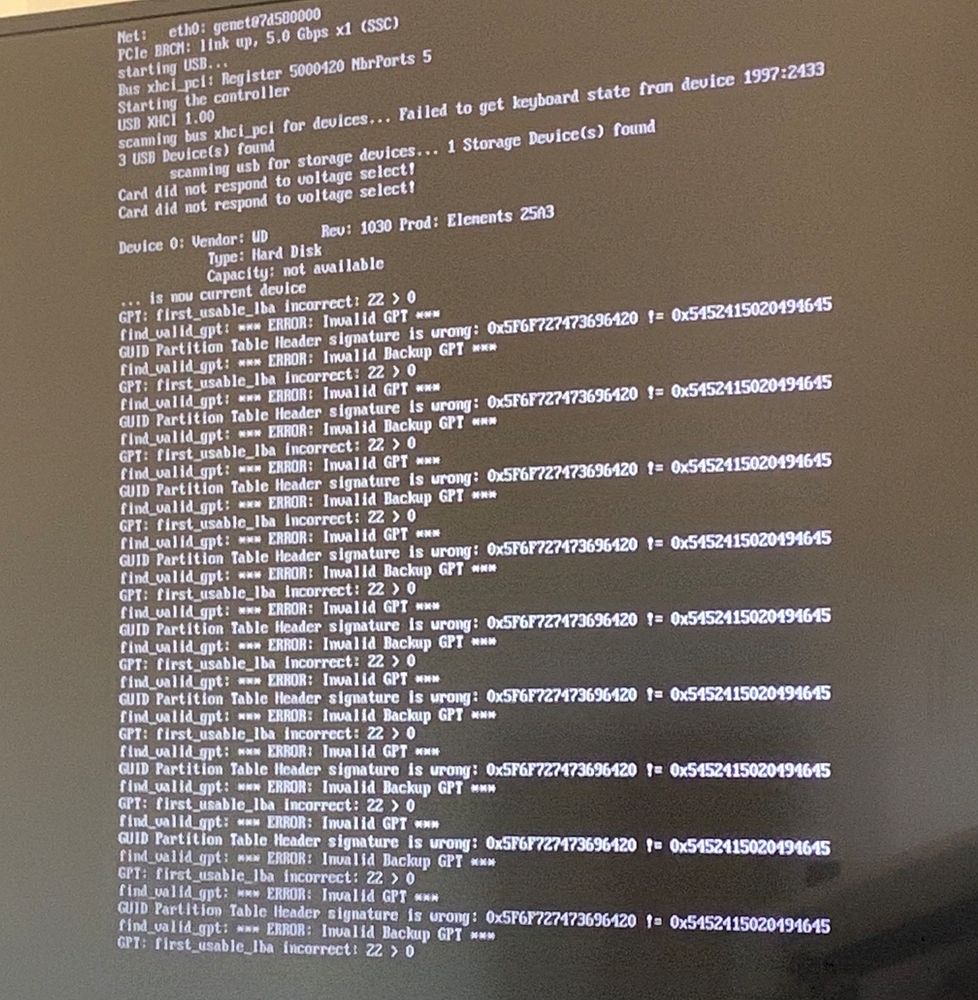 dusk phoenix
Its somewhere low level, I think Linux etc. fixed it quite qickly
Ok, wrong OS, but same problem, I guess 😄 https://docs.microsoft.com/en-us/troubleshoot/windows-server/backup-and-storage/support-for-hard-disks-exceeding-2-tb
Yeah 2TB makes LBA overflow 32-bit numbers
Since LBA's are 512 bytes
We also have the same problem with our EFI images (for Intel NUCs). Barebox seems to not like that limit as well 😦 https://github.com/home-assistant/operating-system/issues/819
Hm, there is CONFIG_SYS_64BIT_LBA
plain steppe
oh interesting
rare sable
The FB issue was only with arm not arm64 kernel because they had no own downstream BCM FB driver
plain steppe
i found https://forum.doozan.com/read.php?3,93799 has some fork which supports >2TB drives
dusk phoenix
Also this in disk/part_efi.c:
 * NOTE:
 *   when CONFIG_SYS_64BIT_LBA is not defined, lbaint_t is 32 bits; this
 *   limits the maximum size of addressable storage to < 2 tebibytes
 */
But maybe it was fix last 5 months. I never checked it after that
dusk phoenix
@rare sable was it visible on the console as the RPi issue was describing? (yellow screen or wrong depth colors etc)
Or what were the typical "symptoms"?
rare sable
Yes. It comes after a firmware update for 4.19
The new firmware modified the device tree in a way which take uboot to load simple FB and patch it to Linux kernel which load the BCM FB and causing the issue
Something like that. Is a bit longer away for remember me on all details
The issue starts after Linux loaded the BCM FB
dusk phoenix
Ok, got it. Yeah so needs a bit of testing, but I think with rel-5 we need to do that anyway
plain steppe
how does the release process work? at some time dev will get branched to rel-5 and then 5.0 stable comes out?
@torpid lava no luck with those defines unfortunately https://github.com/home-assistant/operating-system/commit/08797a22d750e9882fbbf6ddd0771d2b52f0bcc9
interesting that uboot says "Capacity not available", so lba/blksz are missing https://github.com/u-boot/u-boot/blob/master/disk/part.c#L192
and validate_gpt_header is getting lastlba=0 for the same reason probably
on linux i see [1204561.255808] sd 3:0:0:0: [sdb] Very big device. Trying to use READ CAPACITY(16). so maybe there's some other way of getting size of larger drives
ok i see the problem, scsi_read_capacity() will fallback to SCSI_RD_CAPAC16 but usb_read_capacity() only knows about SCSI_RD_CAPAC
plain steppe
this is enough to fix boot: https://github.com/home-assistant/operating-system/commit/c4017e1283df2d66cb8c369f7d8a8c08277daf85
plain steppe
i sent my first patch to buildroot upstream 🙂
rare sable
🎉
 cedar pollen
hi guys, sorry to bother you here
I'm plugging a BT 5.0 dongle into a HAOS machine, it gets picked up by the underlying os but it can't find the drivers
https://imagebin.ca/v/5e9L5rgJjk45
I tried going in and doing a wget to put the right file where the system is expecting it, but the file system is read-only and the entire rtl_bt folder is missing
what can I do to fix this, and what is the correct way to handle these issues?
 eternal blaze
@cedar pollen maybe 5.x has support for this stick, either that or you have to mount your sd in a linux machine with write permissions and place the firmware file where I told you
rare sable
A good start would be to write an RFC which describe a mechanics to deal with custom firmware files in a embedded Linux environment based on overlays and preexists CONFIG handling
if the RFC is approved, you can start to implement this to HassOS - after that it is supported and work
we use squashfs, custom modification are not possible like mstone suggest
cedar pollen
@rare sable I don't even know what the problem is with "custom firmware files in a embedded Linux environment based on overlays", so I would need more explanation to field the RFC
where I work we bake the drivers we need in the image
same thing the Raspberry foundation does with Raspian
bluetooth Tracker integration is part of the core functionality, and that needs a BT chip of some kind
so there must be a list of supported BT devices, right?
then I suppose users could request to add devices to such list?
also I see that the OS includes buildroot-external/package/bluetooth-rtl8723/bluetooth-rtl8723.mk, so can't we expand the list of supported realtek devices?
rare sable
Rasbian is not an embedded linux
Our system is limited to 250mb. Who decides which blobs we distribute to everybody also if they don't need it?
Until some one define a process, we don't add more as needed. Currently the Odroid Bluetooth dongle work
If you need a working dongle, take one of that
eternal blaze
or just run supervised on raspbian
cedar pollen
I downloaded the x86 OVA, and actually it's already many gigabytes in size
so nothing to do with these 250 megabytes size limit
and regarding running supervised, I am not sure which version would that be: docker?
I originally installed that, when I noticed it didn't have most of the self-update and supervisor features, I moved to the virtual appliance
eternal blaze
@cedar pollen https://github.com/home-assistant/supervised-installer has everything you need
and this is #330944238910963714 talk, not dev
plain steppe
how was buildroot-external/bootloader/mbr.img created?
dusk phoenix
I think it is a static partition table, probably created using fdisk.
 proven shadow
hey all, i was wondering if something in the latest hassos update broke bluetoothd? I've run bluetoothctl and it just waits forever for a device
(running on a rpi3+ so has bluetooth built in)
hcitool dev lists no devices either
presuming it's from the kernel update to fix the priv escalation exploit in bluez?
(also any ideas on how to rollback to the previous version of hassos? :P)
(oops never mind, figured it out to be ha os update --version "4.13")
latent wigeon
Questions like this should go in #330990055533576204
plain steppe
seems rpi should be able to use BOOT_SYS=efi instead of BOOT_SYS=hyprid
rare sable
mbr.img is the hyprid partition layout
gsdisk did not allow to handle that with the cli. So I created it manual and read it with dd from image into a template
A long time (and also my latest information) is/was the SoC only support MBR to load the firmware files from
which need to be the first partition on the disk
RPi4 can maybe update the eeprom to handle GPT, but RPi3 and older have no way to update this
plain steppe
I confirmed RPI4 eeprom can boot from GPT
in sgdisk 1.0.5 there are some improvements, but maybe still missing the option needed
"You can now put the 0xEE partition last in a hybrid MBR using sgdisk. (Previously, this was possible with gdisk but not with sgdisk.) See the sgdisk man page for details."
plain steppe
did you ever try overlayfs for hassos-overlay, or just mount bind was simpler?
rare sable
with OTA updates, it is
We have enough work with deal on broken overlayfs with docker, we need not do the same on the OS
The OS is designed to offering minimal possible effort and less as possible customizing to make it at least a bit possible to maintain it
rare sable
You need know, to run docker stable on a IoT device is more challenging as it look. Today, after 4 year research and working on that is my answer: Don't do that if you not need it. If you only have 1 application, make an fix image for this application as the old ROM images. Nothing is so stable as that. It's possible to have docker stable running, but worktime and team behind and all mechanics which need to be improved for only 1 application worth your time
I moved also from Yocto to buildroot. It's to complex for challenge multiple devices with 1 OS for a small team and I feel me right, because also Balena going to be quite with the amount of repos and construct which is needed for this which cost a lot man power that can be safed on buildroot
granite krakenBOT
@alpine prawn posted a code wall, it is moved here --> https://paste.ubuntu.com/p/mV4Qy5cM7v/
 fresh turret
I'm sorry if this is the wrong place, let me know if I need to switch to Core or AddOns. I'm researching what I need to build an addon that will take USB over IP packets and HA OS will detect it as a USB device. Normally, I can just install this (https://www.incentivespro.com/usb-server.html) on Linux and it JustWorks™, but HA OS is not a standard linux distro I can install this on top of (AFAIK).
rare sable
yeah, everything is an container on HassOS, you need package you software into a add-on
plain steppe
👍🏼 I have used many types of overlay fs in other projects and there are always weird bugs. So I agree bind mount is a good solution which is very simple and reliable.
around 2006 I was developer on OpenZaurus / OpenEmbedded
this is my first time trying buildroot, I really like it
rare sable
well, Yocto/OpenEmbedded is not bad and allow a lot more and is very flexible (also with package management). Buildroot is just simpler and work very well in mono repository style which lower the burden of maintenance for such project a lot. Hass.io was also first with yocto based on ResinOS. I was just not able to maintain it after a while
plain steppe
makes sense, esp for small team and so many platforms
rare sable
I'm very happy to have soon someone they work full time on the project which improve the quality and development speed a lot
plain steppe
oh that's great news
after rauc install and reboot, is it necessary to mark-good or does rauc daemon do it automatically also
rare sable
that is all handled by supervisor like a lot more functions and initialize
the OS is just the minimal spin up for run the Supervisor which is the head of the system and control jobs with systemd on it
the CONFIG handling was just a hack, we move more function over and in future we can remove this because the Supervisor can handle it up layer
also the Supervisor fix the docker overlayfs issues
plain steppe
i'm not using docker now, because i suspected its not a good idea. reassuring to hear you say the same. but i left it on our image, because the addon concept is a good design and maybe it can be useful for us in the future
static tinsel
Got the C4 to boot from eMMC! ...but kicking myself for not finding the issue sooner
static tinsel
now what? submit a pull request?
rare sable
A draft would be a good start with a list of needed task and missing feature
static tinsel
@rare sable cool, yes, there are some items that need addressing such as how to handle some of the required blobs
static tinsel
created draft PR https://github.com/home-assistant/operating-system/pull/926
 glad umbra
Is there documentation someone could point me to for adding dependency packages to the docker image? I submitted a PR to resolve an issue with the DHT component on Python 3.8 but it requires an additional OS package: libgpiod2 and I am not sure how to submit a request for that (or how to confirm if my assumptions make sense). I currently use the venv install method.
 wicked gulch
Hi everyone, can a NUC image be flashed on old laptop with similar hardware?
dusk phoenix
@glad umbra since the DHT component runs in the Home Assistant Core container you have to add it to the Dockerfile which builds the core container. That should be here: https://github.com/home-assistant/docker/blob/master/Dockerfile
@wicked gulch the laptop certainly need UEFI boot, but unless its a very old laptop it should have that. It could be that drivers are missing, but you can give it a try,...
wicked gulch
@dusk phoenix thanks, will try :)
glad umbra
Thank you @dusk phoenix!
plain steppe
has anyone tried to rebuild the target without a full buildroot rebuild?
i'm trying the technique in https://stackoverflow.com/a/49862790/332798 and it mostly works, but i can't figure out how to get the toolchain to reinstall
specifically libatomic.so is missing from the image so NetworkManager etc won't start
rm -f buildroot/output/build/host-gcc-final-*/.stamp_host_installed
static tinsel
@plain steppe yeah, I have selectively deleted .stamp files to avoid repeating certain parts of the build process
although I generally do a clean build eventually just to be sure...
plain steppe
i wanted to regenerate the target image fresh without recompiling anything
worked pretty well combining those two sets of commands
rare sable
I use ccache which speedup the build. If I just work on somethings, I delete the output/build/XXX to force just a rebuild of that package
I have a XEON with 16 cores, they are very fast to build it
the cache and build running on a ZFS with correct sized ARC for improve the cache read and good IO for compiling and linking
a full build take 15-20min
Well, not all core are real cores. HT is enabled
However, remove the build package is the fast way for trigger a recompile
oh, I had it wrong in my mind. The machine have 4 cores / 8 with HT
an E3-1230 v6
3.5ghz base and 3.9 turbo
 sage hornet
I want to mount a second disk to use in the plex container. However, I can't even get fdisk to give me anything. Likewise lsusb is almost useless. Am I missing something here?
hollow lintel
Use #330990055533576204 for support
rare sable
@plain steppe do you want an developer certificate for sign OTA updates?
plain steppe
i think i don't need it right now, but i will let you know if i do
fyi i tried to boot 5.4 kernel on rpi again, and it works more reliably after adding that uart patch; but still the 5.4 DTB causes 4.19 to fail to boot after manual rauc fallback; i see 4.19 is getting stuck "Waiting for root device PARTUUID=..." so i guess the DTB is not giving access to the USB devices correctly
plain steppe
new beta eeprom for rpi4 released https://github.com/raspberrypi/rpi-eeprom/pull/246
the eeprom has a new field for boot selection, and can toggle between config.txt and tryboot.txt
that may be one way to control dtb file selection
dusk phoenix
fyi i tried to boot 5.4 kernel on rpi again, and it works more reliably after adding that uart patch; but still the 5.4 DTB causes 4.19 to fail to boot after manual rauc fallback; i see 4.19 is getting stuck "Waiting for root device PARTUUID=..." so i guess the DTB is not giving access to the USB devices correctly
@plain steppe That is typical for downstream kernel, they break device tree backward compatibility all the time. Upstream tries to keep backward compatibility as much as possible, but even upstream had cases where they broke it. But usually there it at least boots.
I don't think we can do anything about it... I think during pre-release phase its not a big deal, and we need to make sure that we nail the first official release for RPi's
plain steppe
i see, so the fault is with the rpi kernel fork
plain steppe
Hybrid MBR has never been supported, it's worked by luck because the start.elf SD card file-system used to ignore GPT and skip to the next partition. It now switches to GPT, sees no boot partition and stops.
looks like that Sep 2020 firmware update did not support hybrid GPT and it only worked by accident before (in Jun 2020 firmware)
dusk phoenix
So I guess that means we should close https://github.com/home-assistant/operating-system/pull/936 then?
plain steppe
with the new stable Oct 22 2020 firmware i think it will work now
it understands GPT and hybrid GPT and MBR
dusk phoenix
Cool, is that mentioned in the changelog?
Hm, I see should already work with the 2020-09-03 eeprom: https://github.com/raspberrypi/rpi-eeprom/blob/master/firmware/release-notes.md#2020-09-14-promote-the-2020-09-03-release-to-be-the-default-eeprom-images
plain steppe
yea i think the eeprom supports it, but the videocore firmware for 2020-09-02 did not
it was fixed in the firmware a few days after that release, and only on master branch not stable (https://github.com/raspberrypi/firmware/commit/baec4d28b54c7f9c30aabdbc61fa0c4dedcb3e55)
https://github.com/raspberrypi/firmware/commits/stable on 10/22 master was merged and new stable firmware, that one is the first stable release that can handle GPT/hybrid correctly
that's why when i updated to 9/02 stable firmware, so many people had problems suddenly
dusk phoenix
Ah I see, the GPU firmware (start4.elf) located in our boot partition needs update too. Ok, yeah then lets update all the firmware! 🙂
dusk phoenix
@plain steppe I plan to work a on RPi kernel bump this week. I guess the first step will be to update the firmware, so I am starting with that now. Just FYI to avoid doing the too much twice 🙂
dusk phoenix
I can confirm GPT with firmware 2020-10-22 (https://github.com/raspberrypi/firmware/commit/2ba11f2a07760588546821aed578010252c9ecb3) works here as well on a RPi4 8GB
plain steppe
great!
I bumped atleast 12 RPI4 units to that 10-22 firmware and things are working fine on all of them
the 5.4 kernel also is working just fine after I pulled in the missing uart patch
dusk phoenix
One thing I just noticed: Reboot seems to hang. Did you try using reboot? That is with 4.19 though...
dusk phoenix
@plain steppe do you have a branch with the 5.4 changes, then I can give it a try here as well
plain steppe
where is reboot hanging?
here's what I used for 5.4 https://github.com/fancybits/operating-system/compare/dev-fancybits...fancybits:fancybits/rpi-kernel-5.4
dusk phoenix
In RPi boot screen
Just realized, I was still testing with Hybrid because I forgot to apply the 64-bit patch as well 🙈
Will rebuild with 64 bit efi only
But still, that is uncool since we won't migrate the partition layout... 🤨
Rebooting does work on Rpi3 with the new firmware
dusk phoenix
@plain steppe actually, reboot works fine here too. It was my setup which causes issues (I use a SD card muxer, which somehow seems to interfere with the reset sequence sometimes)
plain steppe
great, making progress atleast!
rare sable
We can remove the hyprid partition at OTA update if really needed
plain steppe
@dusk phoenix in the new oct 22 eeprom they made a fix to boot SD more reliably
dusk phoenix
We can remove the hyprid partition at OTA update if really needed
@rare sable just checked again, Hybird seems to boot fine as well with new firmware etc. so no need for that.
It was really my SDWire, which seems to cause issue in SD detection only on reboot 😕
rare sable
yeah, total fine. I just want to give the input that it would be possible if needed
dusk phoenix
@plain steppe FYI, worked on RPi 5.4 kernel today. I cherry-picked from upstream again which added some patches just to get the bindings correct. This is what I have currently: https://github.com/home-assistant/operating-system/pull/956
dusk phoenix
@rare sable (cc @static tinsel) wrt https://github.com/home-assistant/operating-system/pull/926, for me the changes are ok too. But does squash and merge work when there are merge commits in there? I guess I can just try
rare sable
yes, that work @dusk phoenix
static tinsel
@dusk phoenix, squash merges have worked for me in other projects when a feature branch occasionally merges the base branch into itself... but I'll submit a new PR if necessary
dusk phoenix
@static tinsel two minor changes, than I think we are good to go
static tinsel
looks like we got it there... thanks guys!
dusk phoenix
Thanks for your work!
plain steppe
any interest in exfat support? I guess the only advantage for HassOS would be that CONFIG usb stick can be exfat
plain steppe
it can be built as module. I have it working just wondering if it's worth sending PR
dusk phoenix
Yeah not sure, just for config it seems a bit too much trouble.
There is also a question open how to mount external drives e.g. for media etc. So I guess if we add something like this, we probably should also support exfat
Do you have a link to your current implementation? Wonder how that exactly looks currently as an external module.
dusk phoenix
@plain steppe I really like using GTP, but I think for the time beeing we need to revert again. There are too many boards out there still using the old firmware. And with GPT also update won't work...
Maybe we can do it in a year or so, and then advice people with old firmware to update first using other methods, but I think today it will cause too much trouble.
rare sable
@dusk phoenix people how update, have still the hyprid
oh, yeah there are many boards which not work after flash
dusk phoenix
Exactly, that RPi I got today has a firmware from June, so I think we need to give it a grace period of a half year or so...
rare sable
they need first update eeprom or flash an older HassOS und use OTA which is weird, I agree
I means, we use GTP
all our rpi are GPT
we just can disable the hyprid
🤷♂️
we can also ship that forever with the hyprid
after we boot uboot, they use the GPT
dusk phoenix
Yeah the hybrid stuff adds a bit of complexity and is not as clean as pure GPT I guess...
@plain steppe any other/specific reason moving away from hybrid from your side?
Hybrid is fine for me, for now anyway.
plain steppe
yea I think you are right, hybrid is fine and no rush for GPT
I will keep GPT in my images but HassOS can wait another year for the eeprom changes to become more widely used
@dusk phoenix https://github.com/fancybits/operating-system/pull/1 for exfat, pretty straightforward
I had to remove the rm -rf $TARGET/usr/lib/modules-load.d which I'm not sure why it was being used
that dir is empty for me already on rpi builds
I'll clean it up and send a PR, seems worth having in HassOS for easier config
lofty shale
@dusk phoenix The 5.5 build for virtual machines failed. Seems like a upload issue. Can you please rerun it? Thanks :)
dusk phoenix
@lofty shale yeah I noticed, will check
rare sable
I can retrigger it first in ~2h
plain steppe
@dusk phoenix nice you switched to resolved for mdns as well!
what does the _workstation._tcp advertisement achieve?
oh its in the commit msg, coreDNS
dusk phoenix
Yeah Core DNS is weiiird imho
They rely on DNS SD using _workstation._tcp service and translate it into regular DNS resolves
We use CoreDNS for all DNS resolutions
rare sable
and many of my IoT device / smart device use that too for browsing
 wicked sail
Question, when will the OS released for booting on Rpi4 with an usb ssd?
hollow lintel
when it's done
rare sable
more info about this on our conference
wicked sail
👌. But there is no indication about the release date? For example a month.
 keen kindle
 young ledge
lol
dusk phoenix
FYI, there are now dev builds available on https://os-builds.home-assistant.io/
They get built on-demand basis from dev branch
 dusty crane
Hi 🙂
Is Agners here? ::)
I'm F3mt0 in the forum :)
You asked anyone with a USB UART TTL to join, so hi 😄
hollow lintel
The issue has been identified https://github.com/home-assistant/operating-system/issues/1024#issuecomment-734735837
dusty crane
I see, cool beans! 😄
hollow lintel
but since you asked, @dusk phoenix == Agners
 merry grove
Hi, is anyone familiar with how to add a udev rule to the OS as according to this https://github.com/home-assistant/operating-system/blob/dev/Documentation/configuration.md .. I can add new ssh keys in fine. Just tested with an additional key. My issue seems to be even though im adding the folder structure to the USB key CONFIG/authorized_keys, CONFIG/udev/rules.d/disk.rules .... /etc/udev/rules.d/ <- doesnt import? .. or doesnt take?
merry grove
Hey, so yea i realised /etc/udev/rules.d/.. was persistent and my rules are being respected... the issue is actually with systemd-udev. I cant however overcome it with systemctl edit systemd-udevd Failed to create directories for "/etc/systemd/system/systemd-udevd.service.d/override.conf": Read-only file system Does anyone know if its possible to modify a service file default from production?
rare sable
You can't. Also udev rules from host are not shared to other container (supervisor container udev is the master). You need a backend on SU for using it with Core. Host udev rules are only useful to load driver/modules
 fast igloo
Can some one tell me how the AMD64-wheels:dev-3.8-alpine3.10 docker image and similar are built?
granite krakenBOT
The topic of this channel is:
Development of the Home Assistant Operating System. No support!
Command '.topic' was invoked by: Ludeeus
 sick flax
I would like to ask about HassOS, but the HassBot.....;)
what is the possibility to make USB SSD spped test under HassOS?
dusk phoenix
You can just do a docker run -it --rm --privileged debian, and then do you benchmarks. FWIW, I did it: Its quite ok, altough latency is not ideal, presumably due to USB stack...
dusk phoenix
OS rel-5 has been branched 🎉
latent wigeon
to be ready for 1.0, perhaps?
rare sable
🕵️ see you on the conference
plain steppe
@dusk phoenix i think you're right and removing the firmware upgrade is probably the most practical short term fix
dusk phoenix
It seems that with changing timings etc. they break other combinations... Until they have a well tuned firmware, its probably better to leave it up to the users to upgrade
I fear that its almost impossible to even come to that though 🙈
I'll post a patch tomorrow. Planning on doing a bugfix release tomorrow or on Friday
dusk phoenix
@plain steppe I also saw some apparantly new USB SSD boot issue on Rpi 3 (https://github.com/home-assistant/operating-system/issues/1095). Do you know if they share the codebase for Rpi 3 firmware (bootcode.bin?)/4 EEPROM?
plain steppe
i don't know. i thought the eeprom is completely new/separate but maybe there are shared parts
 wicked magnet
hey there, hope i'm not wrong posting here. i have centos 8 aarch64 running on a pi 4 (8gb) with kvm installed, willing to run home assistant os in kvm. I tried the qcow and the pi4 64bit images, both fail at start going to uefi prompt. The only uefi i have accessible in kvm is aarch64, no x86_64. Is it possible to boot hassos this way ?
static tinsel
just updated my dev ODROID-C4 to 2020.12.1 / 5.9.1 and it seems to have gone without a hitch! (still reports itself as an odroid-n2 though)
dusk phoenix
looks good on my end? https://imgur.com/a/yhgVRFx
static tinsel
this particular C4 was running a dev build back from when it still used some N2 config, so it probably still thinks it's an N2... I'll do a fresh install
 native cedar
Did anybody already put an active cooler on the 2pin header of it's ODROID N2+ / Blue edition and see it operating? Mine seems to be one of the silents types at this point 😉
dusk phoenix
@native cedar fan currently doesn't work, see https://github.com/home-assistant/operating-system/issues/1117
But shouldn't really be necessary with the massive heatsink. I did not get it over 65° here, even under full load.
native cedar
dusk phoenix
But shouldn't really be necessary with the massive heatsink. I did not get it ov...
I was totally googling for the wrong tings and ending up at the wrong fora's. Was already poking around for a potential solution. No problem for now, I leave it on.
My temps are ago at this point anyway.
The pwm pins are exposed in other Linux/Android builds so let me do some homework on what Hhssos axially is based on/doing and get back to it.
dusk phoenix
The pin is not a PWM pin, so GPIO toggling is required to throttle. There are patches for the device tree are linked in the issue, so it really shouldn't be all to complicated to get it working. Ideally we should also upstream the patches 🙂
native cedar
I understand, just read through the issue, it's clear to me know! Looks like were not the first to incorporate support 😉 Mixed up the pwm options through the gpio headers. I will monitor the issue and help testing. Got the hardware anyway.
 languid marten
On Rpi, I have to blacklist my USB device with quirks when I flash HA. it makes it difficult to upgrade. If I could submit a patch to the cmdline.txt, we could include both ArgonOne and DeskPi Pro. +++ " usb-storage.quirks=152d:0562:u"
Is that something which would be considered?
 near mulch
@languid marten I'm using an ArgonOne M.2 and I can't boot from USB. Did you manage?
near mulch
If anyone else is able to help, when I try to boot from USB, I only get a blank screen when using this ArgonOne M.2 case (m.2 sata ssd through USB)
How can I debug this, if I only see a blank scren?
dusk phoenix
This should go to #330990055533576204
near mulch
I tried in there. =/
came here bc I may be stepping into compatibility issues with this specific case and it's internal board, maybe?
dusk phoenix
There are lots of compatibility issues with USB SSD & RPi... See: https://www.home-assistant.io/hassio/hassos_faq/#is-usb-boot-for-the-raspberry-pi-4-supported
near mulch
I see. I was able to boot regular Raspberry Pi OS, so the device itself seems to work
dusk phoenix
It impossible for us dev to support all cases/SSD combination... So typically, if it works you have been lucky, if not 🤷♂️
yeah that is typically the case when U-Boot fails to enumerate the USB SSD
I have seen some instances of that, but debugging this would need quite some investigation into U-Boot USB stack..
near mulch
Is there a way to at least see a verbose of the boot process?
dusk phoenix
Serial console is the way to go: https://github.com/home-assistant/operating-system/tree/dev/Documentation/boards/raspberrypi#serial-console
near mulch
K. did that, let me try
k, now it blinked the bootloader screen 3 times
with some fast text scrolling
and went blank again
dusk phoenix
On the serial terminal? Are you using a USB to UART adapter?
near mulch
tried again, and this time went directly to blank
I was refering to the monitor
so, do I need an actual UART terminal?
no way to get it on the screen?
 dusky axle
You don't just have to add the text in the cmd file. You need an actual adapter connect to another device to get the logs
thus the GPIO pins are: 6 = GND / 8 = UART TXD / 10 = UART RXD comment
near mulch
so the "FTDI" adapter is what I need, right?
I have this USB TO TTL (D-SUN) adapter. Does this help?

So, do I connect 5V?
I can't even see the serial port for this sh** =/
dusk phoenix
Yeah that should work, but don't connect 5V
just TX/RX and GND
on the pins noted above
near mulch
K, the PI wont turn on if connected to the adapter
when I do connect it, the power led lights up, but very faintly
dusky axle
You have RX/TX/GND and then power from the pi's power supply?
near mulch
Yes, but I believe the case itseld may be messing up with this
it routes the GPIOs
and I also see an IR receiver on the board, so it may be connected to the same pins
dusky axle
Does the serial console even work with the 64-bit image, given gpio isn't available ?
near mulch
I'm using 32 bit
GOT THE CONSOLE
It seems to trying to boot from PXE
wow
I can see a hassos prompt
Where do I go from here @dusky axle @dusk phoenix
languid marten
near mulch
<@!212424795818688516> I'm using an ArgonOne M.2 and I can't boot from USB. Did ...
Yes I did.
I added "usb-storage.quirks=152d:0562:u" to cmdline.txt and Home Assistant booted the first time in less than 4 minutes.
languid marten
near mulch
are you using the M.2 version?
Yes. NVME drives WILL NOT work.
near mulch
it's SATA
languid marten
I thoroughly tested. The slot fits, but NVME is evil.
near mulch
what SSD are you using?
languid marten
well, then, boot HassOS from a thumb drive, then plug in the USB adapter, type login, and then "mkdir /tmp/sdb1; mount /dev/sdb1 /tmp/sdb1; vi /tmp/sdb1/config.txt" and add in that "usb-storage.quirks=152d:0562:u " at the start of the cmdline.txt in front of everything else.
I don't remember. Samsung non-nvme.
languid marten
space-delmited, no quotes.
btw, @near mulch I'm here to promote this https://github.com/adamoutler/HassOSConfigurator. It will enable your I2C once you get booted. 🙂
I haven't published on the forums yet, but if you'd want to give me some feedback, I'd appreciate it. I'm publishing on the forums once I am sure there's no oopsies.
near mulch
@languid marten config.txt or cmdline.txt?
languid marten
did I say config.txt? It's supposed to be cmdline.txt
It's for the Linux Kernel cmdline environmental variables.
Linux uses these variables as global variables when performing taskss.
gotta go. HassOSConfigurator! 🙂 https://github.com/adamoutler/HassOSConfigurator
near mulch
will try boot now
languid marten
Once booted, you'll need to enable i2c and pick a fan control mechanism. you can use the HassOSConfigurator to enable i2c, and I made an ArgonOne Fan Control as well. https://github.com/adamoutler/HasssioArgonOneAddon
I know... my stupid understanding of the difference between Hassio and HassOS. 😄
near mulch
@languid marten any chance those numbers differ?
languid marten
It's possible. Boot from SDCard and run lsusb while plugging in and unplugging the usb drive. The one that appears and disappears is your baby. you want the USB VID and UID. values. You can elaborate on the functionality with lsusb -vvvvvvvvv
languid marten
try that. I'm using an older model with a new adapter. This same command works for the DeskPi Pro.
One is an m.2 and the other is a SATA full drive, both use the same storage quirks.
I think it's the adapter, not the drive that you're blacklisting. So, :shrug\
🤷
OK, seriously. I'm out. gotta go. Been developing personal stuff all day and ignoring my family. I'm out.
near mulch
Same for me here =/
no boot
thanks anyway. If you can tell me how you found those numbers...
languid marten
near mulch
thanks anyway. If you can tell me how you found those numbers...
I just did. USB VID and UID from lsusb
near mulch
FML. It just doesn't work for me
dusk phoenix
near mulch
https://pastebin.com/j3QEFcvm
So this confirms my suspicion: U-Boot fails to enumerate your device. So from here you would have to start debugging the U-Boot USB stack, to understand why that fails.
near mulch
@dusk phoenix can you point me in the right direction?
dusk phoenix
Not really, as I have also no clue why it fails. This is non-trivial to debug, we are looking at a multi day/week debugging session, learning bout USB stack and whatnot... U-Boot source is here: https://gitlab.denx.de/u-boot/u-boot/.
To sidestep the issue and get all the performance benefit using the USB Disk as data disk as suggested by @rare sable is your best bet...
near mulch
@dusk phoenix Thanks of all your help.
dusk phoenix
This should be in #330990055533576204
 hazy viper
thank you 🙂
 little crater
Just wanted to throw in some kudos, os 5.10 worked out of the box with no tweaks on my dell thin client's eMMC. Thanks y'all!
 muted field
Hello devs
I'm trying to add my root-ca to be trusted system-wide by homeassistant os
I've got into debug / and can see the magic, but wondering what's the best way of doing this
obviously I could symlink up my root and intermediate cas (is this squastfs?), but they're as good as gone when the next update comes along
is there an easy way to import certs as part of config like one does with authorized_keys?
can I overlay this via /mnt/overlay/etc/ssl?
something like this: /mnt/overlay/etc/ssl/certs drwxr-xr-x 2 root root 1024 Jan 12 16:08 . drwxr-xr-x 3 root root 1024 Jan 12 16:06 .. lrwxrwxrwx 1 root root 14 Jan 12 16:07 5f95bb7b.0 -> ca_mb_root.pem -rw-r--r-- 1 root root 2208 Jan 12 16:07 ca_mb_signer.pem -rw-r--r-- 1 root root 2224 Jan 12 16:06 ca_mb_root.pem lrwxrwxrwx 1 root root 18 Jan 12 16:08 e3ca124d.0 -> ca_mb_signer.pem
#yolo 😄
well guess what, that didn't work 😄
muted field
ok, adding the certs to the end of /etc/ssl/certs/ca-certificates.crt in the homeassistant container did the trick
and thankfully I've got an upgrade at hand for both the core and OS, so I can validate whether it can sustain an upgrade
it survives the OS up. Not the HA Core up (not surprisingly) - so is this a scenario where this needs to be reinjected after each core up?
rare sable
Yep
The certification manager would only exist as RFC for Supervisor system. Currently it's not working what you want do, you need run Core only until someone implement the RFC of center certification manager
muted field
oh I see - for the time being I managed to get a quick script I can "curl -sk https://bootstrap.lan | sh" so it's rather easy to setup with a single commend
is that tracked / or can it be? It'd be great to push certs like this from USB, and retain throughout updates
not sure how common ppl maintaining their own PKIs tho
can addons access the core like that?
(sounds unlikely, but hey :>)
 lone lake
muted field
oh I see - for the time being I managed to get a quick script I can "curl -sk ht...
lone lake
muted field
oh I see - for the time being I managed to get a quick script I can "curl -sk ht...
@muted field Did you find any working techniques to add your own custom files to the / SquashFS/overlayfs-filesystem in a persistent way?
rare sable
If you need do that, you run the wrong installation type 🙂 You can run Home Assistant Core also as Container or inside virtualenv and have the full possibility. To do things on OS/Supervisor means to do it right as solution like the programming a cert manager instead hacking around
muted field
lone lake
<@!793406713469730817> Did you find any working techniques to add your own custo...
nope, but didn't have to. In fact there's a rather simple way to automate this within homeassistant
command: "a=curl -sIX GET 'https://yoursite.lan' && echo 1 || echo 0" # this gives you a sensor to act when you lose trust
muted field
rare sable
If you need do that, you run the wrong installation type 🙂 You can run Home Ass...
Is that so? I mean: unless you build that container on your machine (where it can take your ca-certificates as the default), you would still rely on the ca-certs in core's container.
I'm happy with handling home assistant as an appliance for as long as I can make some minor tweaks I need (and don't interfere with the upgrade process)
lone lake
@rare sable Well, I have been running Home Assistant in Docker for many years now. Since I purchased the Blue Odroid N2+ machine which came bundled with OS/Supervisor but have no hardware for Bluetooth radios etc, I would like to add drivers for my device... But, do I understand you correctly that I should wipe the preinstalled installation on the Home Assistant Blue and install a stock-linux-distro instead?
rare sable
or jump into programming or wait. I think that are the 3 options
if you don't want help, I would suggest to install the stock linux distro, all other will not work
discover a solution which work over all devices / installation can sometimes be hard to find
as you speak not about the certification manager, look like about a BT device, you can open a request and start a discussion on the issue tracker
lone lake
I was mainly looking to get some sort of code execution on boot, say modifying a startup script etc... So there is no way of getting some sort of persistent code execution on boot outside of the SquashFS image?
muted field
That is certainly a way
and I may have gone down that route, but... I realized that it's a lot easier to do this within homeassistant. From what I could see, there's no restriction on accessing /etc/ssl/certs in any way from homeassistant shellcommands
my eyebrows are still going up to the top of my head when I think about that though 😄
it is generally accepted in the homeassistant community that security should be around your network, not within your network - I will try my best to find some ways around that
 hardy mica
Is there anyone here keeping up with https://github.com/home-assistant/operating-system/issues/1119 ?
dusk phoenix
Reading on and off, but that thread contains so many issues don't know where to begin 😄
hardy mica
dusk phoenix
Reading on and off, but that thread contains so many issues don't know where to ...
Yeah. It’s been very tricky. We need help making sense of this
 steep crane
I have also posted there. I just did a new update and posted logs from my system after the freeze. To me my freeze is network related. Not sure what I can capture to try and help
steep crane
dusk phoenix
Reading on and off, but that thread contains so many issues don't know where to ...
Is there any information I can capture to try and help pin point the issue?
hardy mica
Home Assistant freezing the whole home network is crazy.
granite krakenBOT
The topic of this channel is:
@steep crane Development of the Home Assistant Operating System. No support!
Command '.topic' was invoked by: Tinkerer
 floral escarp
silly question. in hassio on RPi, we have zram. Is it not possible to put the data on a zram partition, and lazy copy to SD every now and again? I see literally hundreds of complaints about SD card wear; I've recently installed my own HASS, and see 250 blocks/sec writes? yet have an orangiepi which with a ramdisk & overlay has been running for 5 years. (failed every 3 months before I did that).
like this: https://github.com/ecdye/zram-config
steep crane
Is there anyway to get what changed after build 5.3.? 5.3 is stable for me and many others. Above is not?
steep crane
The kernel was updated to 5.4.72 after OS 5.3 (last stable release on my RPI 4) Is there a way to compile the latest changes of the OS with the old kernel? I can test this and see if the changes to the kernel are the cause of mine and other system freezes?
little crater
I run the intel nuc build on a thin client. The kernel does not have support for my SST audio device. Are there any docs on developing my own image to figure out which config options are missing? And if I go down that path, would there likely be any appetite from the devs to add those modules?
 rain galleon
Good to know: Can't import a OVA to AWS EC2. At the end of the process it errors with ClientError: EFI partition detected. UEFI booting is not supported in EC2.
rain galleon
@rare sable When you get online, can you advise me if there's any easy way to get a non-EFI image or if you have some other way to get Supervisor working on AWS? Really want supervisor so I won't be the only one able to update it.
fast igloo
Can anyone tell me how to build containers like homeassistant/qemuarm-64-homeassistant and homeassistant/raspberrypi4-64-homeassistant?
hollow lintel
fast igloo
hollow lintel
<https://github.com/home-assistant/docker-base>
<https://github.com/home-assista...
Many thanks Ludeeus
languid marten
@rare sable , I'm trying to make an API for system-specific scripts like rpi-config for HA-CLI. Where would be the best place for a script based on this, to be executed on Raspberry Pi version of HA OS? https://pastebin.adamoutler.com/ZEAkawyh3s4hxWJY im thinking /usr/local/bin would work. Normally I'd put them in a user dir, but it doesn't appear to have a home and I dont see any references in the overlay. Since this is new, I'd like your input.
rare sable
The design of the OS is that everything needs to be controlled over dbus for use it on supervisor. OS only features would be not t accepted
rare sable
We make no difference between the boards, so it means also it need to be generic assist. Keep in mind that we going mainline with rpi (~rel-7) and a lot of functionality going away and it going into one propose device. The current rpi with all the options are just horrible to maintain
languid marten
What are your thoughts on a /usr/local/bin/authorized_supervisor_script.sh?
Supervisor can check which scripts are valid by /proc/cpuinfo.
rare sable
we don't need move fast forward, so we can make it nice. Write a small go daemon which offering a good dbus interface to talk with supervisor. Supervisor can implement this "system/config/center" and provide the API which can back be used by frontend and cli. all other as that is just hacking around
 wide meteor
@rare sable hi. can we discuss https://github.com/home-assistant/supervisor/issues/2574 ?
rare sable
not sure what you want discuss there since the solution is still clear, it just need a developer work on it
wide meteor
I have written here before we come to a result in a ticket 🙂
languid marten
rare sable
we don't need move fast forward, so we can make it nice. Write a small go daemon...
I'd rather not send multiple commands via dbus which the exit statuses and return values need to be processed in Go to formulate the next command. I'd also like to avoid making a generalized sendCommand("") api. It would be simpler to call an authorized script and get the return value from that. Also potential changes/damage can be limited to items which the Operating System has approved and built-in.
rare sable
You can write up an architecture issue and if it got approved, you can try to integrate it: https://github.com/home-assistant/architecture
Supervisor speak over dbus with host process, that would be the interface which need to be respected
everything what you want do need at the and an supervisor implementation which allow the OS to use it over the cli
languid marten
rare sable
You can write up an architecture issue and if it got approved, you can try to in...
That's a gold mine. Thanks!
languid marten
Is there a place I can see the build process of Home Assistant Operating System? Specifically I'm looking for the kernel makefile in whatever form it is used to make a Raspberry pi 4 build.
plain steppe
it's all in the operating-system repo
I've been seeing this in dmesg boot, seems like some of the journalctl logs get lost on reboot:
[ 31.456634] systemd-journald[117]: Received client request to flush runtime journal.
[ 31.540803] systemd-journald[117]: File /var/log/journal/573fc30c4c534665a5af638df32eaead/system.journal corrupted or uncleanly shut down, renaming and replacing
languid marten
@rare sable @daring silo I'm attempting to perform a security profile on Home Assistant Operating System for a future contribution. Can you point me to the final build folder used to construct the kernel? Here's what I got so far. I'd like to improve Linux Security Features
Operating System
• UEFI Secure Boot (where avaialble)
• File system journaling & write barriers
• Automatic bootloader firmware updates
• SysV init
• AppArmor
OTA updates provided by RAUC https://github.com/rauc/rauc
• Secure x509 Image signatures
• Delta updates
• Full image (A/B) updates
• Slot based
• Atomic updates
Linux Security features
Of course we're not using both delta and full image updates, the profile changes per-platform, and these are just notes for now... I'm just collecting information. I'd like to dive into the build system and I don't see the place where the actual operating system source is being processed. Can you guys help?
languid marten
I was able to get what I needed by modprobing config then ungzipping from the device https://hackedyour.info/2kUQNPhXMPwhzQBj However, it would be better to see it online
languid marten
Compared to other modern embedded operating systems HAOS is good on or at least does not disable:
- Per-file encryption
- SHA512
-AES crypto
HAOS explicitly disables: - DM Verity CONFIG_DM_VERITY
- SELinux CONFIG_SECURITY_SELINUX
- Stack Initialization CONFIG_INIT_STACK_NONE ( should be N)
While none of these configurations values is a guarantee that the configuration is correct, the ones I mentioned should be changed to at least make it possible to implement in the future. Verity and SELinux both require substantial setup and greatly increase the security. Are these the default, or is there a technical reason they are not implemented?
rare sable
SELinux is compared to AppArmor not usefully. I hate that, the reason why we moving with AppArmor only
SysV init - Systemd would be correct
I think before we moving another security module, we should finish the AppArmor support to a perfect level and teach all people how AppArmor work
If they not use it, it's not very usefully
languid marten
AppArmor and SELinux compliment each other. I hate SELinux as well, it's really complicated and touchy. AppArmor is perfect for the containers. I think SELinux would be better on the host though. https://www.linode.com/blog/cloud-computing/mandatory-access-control-in-cloud-computing/
Yeah, I saw Systemd in the system, but the buildroot docs kept pointing to SysV so I made a judgement call. Thanks. Updating.
Yeah. AppArmor isn't really documented well. I think this is the extent of AppArmor docs. I rewrote a good portion of it
https://developers.home-assistant.io/docs/add-ons/presentation/
https://developers.home-assistant.io/docs/add-ons/security/
Nor are the other security features documented. Which is why I'm on a mission to play catch up.... Docs or it didn't happen 😄
If you're good with AppArmor instead of SELinux, then CONFIG_SECURITY_YAMA=Y should be implemented. Not sure about further configuration. https://www.andreasch.com/2018/05/08/lsm/
 trail cargo
do you guys manually replace the kernel for testing new builds, use a script, or some other mechanism?
plain steppe
plain steppe
I've been seeing this in dmesg boot, seems like some of the journalctl logs get ...
I think this is related to /etc/machine-id changing after systemd starts? https://github.com/openbmc/openbmc/issues/2545#issuecomment-343248990
languid marten
https://github.com/home-assistant/operating-system won't open in Github Desktop for Windows. Dev docs are here. https://github.com/home-assistant/operating-system/blob/dev/Documentation/getting_started_development.md
rare sable
plain steppe
I think this is related to /etc/machine-id changing after systemd starts? https:...
our machine-id is persist
stored on the bootstate and restore on bootloader
plain steppe
oh ok, I thought it was bind mounted also
rare sable
It need read this value in a very early state
so we set this over the kernel boot cmd for the systemd
obsidian horizon
Hi, not sure if my issue is more os related or supervisor ... in recent months I had issues of zwave/zigbee add-ons not coming up (being stopped) .. it seems that when the supervisor tries to start the addons the /dev/serial/by-id entries for the usb devices are not yet there. If I manually start them later on they work as expected. So it looks like the timing might have changed when what is starting up?
 jolly smelt
Sorry if this is the wrong place for this. I've noticed that with my very slow device, installing integrations or add-ons will spin for a while and then claim that the installation failed. Checking logs the latest entry is still "downloading docker image ..." so it hasn't really failed, it's just slow. I live in the boonies, my internet is s l o w. Just something to consider, I think there's just a pre-defined timer preceeding this message rather than it being based on an actual failure.
If I continue to wait the installations succeed silently in the UI, but you can see the success in the logs.
hollow lintel
For support use #330990055533576204 (at least next time), yes there was a bug with timeouts, it has been fixed and will be a part of core 2021.4.0
jolly smelt
Oops! Will do, thank you, and thanks for the note.
 atomic jasper
A few months ago I started to develop a TVHeadend add-on, but I stopped and stucked at that moment I realized I need to install the drivers for the DVB-S cards on the OS - So simple question, is there any way to realize that? (Drivers: http://sundtek.com/media/)
 fresh crown
So I noticed something very odd today. I have an addon I made with a custom apparmor profile. A user reported an issue with it spamming deny logs and not working properly. It turned out that user was running HA on Ubuntu which is why I hadn't seen that. Obviously that's not supported.
The reason I bring it up though is I looked at the deny logs and noticed something odd. The s6 service was complaining about being denied network access. This is true, I was denying it network access. So how did it never come up before when the addon runs in HAOS? The actual addon functionality should be identical.
So I did a test. I tweaked my addon by putting the profile in complain mode and removing all network access from it. Including the actual executable which I know for a fact needs network access since it is the running service. I saw no errors.
I guess my apparmor profile actually isn't correct but doesn't seem to matter on HAOS? How can that be? Is network access simply not controllable via apparmor right now? Not a big deal for my addon I was just really confused. Or is HAOS set up to default to allow for network unless something is specifically denied?
steep crane
Just installed the 4/19 version and CLI su log does not work anymore. Is this related or is it something else?
rare sable
fresh crown
So I noticed something very odd today. I have an addon I made with a custom appa...
Ubuntu use own Apparmor patches mark as dev (downstream)
We focus us to upstream only, the reason why Ubuntu is not supported
fresh crown
yea understood. I'm not really worried about what ubuntu does or doesn't do since its not a supported OS. I was just surprised my network rules didn't seem to matter in HAOS.
Is that part just under active development right now in AppArmor and hasn't made its way into the stable version?
I found the apparmor documentation extremely confusing in that regard. There's so many parts that detail out specific examples of syntax and then you realize right above it says "not supported, coming soon". It's hard to tell what is working in production and what is still in design
rare sable
Everything should work with the patches but not everything is mainline now
I'm not sure about the v3.0
Is I think some of the patches are in the pipeline for mainline
 dapper fern
trying to set up actionable notifications and reading the documentation. on my ios app i have version 2021.2.3. How do I get 2021.5? is that only in beta? the actions have changed and can't get it to work with node red.
latent wigeon
You’re confusing the app and HA core versions
Maybe
The latest iOS build in TestFlight is 2021.5
#ios_and_mac-archived for more
dapper fern
IOS VERSION
Versions of the iOS app prior to 2021.5 (BETA) require setting up categories in advance of using them. See iOS Before 2021.5.
I read that in the documentation ^
latent wigeon
This has nothing to do with #devs_os-archived
dapper fern
sorry mb
latent wigeon
velvet sierra
Hi there, I'm interested in porting haOS to a couple different friendlyarm boards - they have kernel support and buildroot support them - I'm just curious if the HA team has more detailed documentation on porting (I'm more familiar with yocto & mender rather than buildroot & ruca, but am happy with any extra info I can get)
 iron valley
Hi, hope im in the right place
regarding this open issue
https://github.com/home-assistant/operating-system/issues/1309?fbclid=IwAR0qhLQ5LuLbCCRu0WvcSC9mBbpBbSIlfutnbeIPEQGY4pU_LdqXE3RBEQg
i have an intel nuc 11 and having the same problem, no wifi/eth working , its 225 card
would like to find out if theres an expected release date for a version to get this matter resolved ?
plucky socket
@iron valley I assume the drivers need to be included for this newer hardware. agners would be the one to watch in the issue you posted and it looks like he is on it
iron valley
plucky socket
<@!497994683742552065> I assume the drivers need to be included for this newer h...
thank you, hoping it comes out soon 🙂 appreciate all you guys work.
 lapis tiger
Does anyone knows how to configure the bootloader on RPI4 (standard HS stack)? I'm looking for solution to this https://github.com/home-assistant/operating-system/issues/1011 booting problem. Guess is that RPI thinks arduino mega is something to boot from and hangs.
iron valley
i noticed theres a new RC OS version, may i ask how long does it normally take for the stable version of it to come out ?
velvet sierra
Hi, I'm trying to build the image of hass OS for Raspberry Pi devices, with a custom build of the core, but can't find anything about in the documentation, any advice on how to achieve that?
rare sable
that is not simple possible. You need write you own supervisor + inject this into OS build.
that is like you fork the half of our ~40 repositories
dusk phoenix
iron valley
i noticed theres a new RC OS version, may i ask how long does it normally take f...
There is no default time frame for that, it will depend on how well the rc phase goes
velvet sierra
rare sable
that is not simple possible. You need write you own supervisor + inject this int...
there will be any other way to make a custom build of the core only? I guess is a very noob question but I can't find out how to do it
rare sable
no, the system is designed not allow custom things and all run in the same way
you can build or own from scratch without limits
custom modification are not maintainable longterm in such big project. You can easy run your own system and add core on top of that in a way like you want
dusk phoenix
@velvet sierra not sure if you are aware, but there are custom components, maybe that fits the bill for the modifications you try to achieve?
velvet sierra
dusk phoenix
<@456226577798135808> not sure if you are aware, but there are custom components...
I would like to deploy some modification in the core, so a custom components will not do the job...
velvet sierra
rare sable
no, the system is designed not allow custom things and all run in the same way
Can you please argument the statement "You can easy run your own system and add core"?
I was thinking about build an images and push it to docker hub. In that way I should able to run it on every devices if the dependencies are installed. But I'm missing how to build an images of the core...
fresh crown
velvet sierra
I would like to deploy some modification in the core, so a custom components wil...
If there's some enhancement you want for core why not just submit a PR?
dusk phoenix
velvet sierra
I would like to deploy some modification in the core, so a custom components wil...
Custom components are running inside Home Assistant Core. But yeah, if you want to customize core things of core, it won't do I guess 🙂
velvet sierra
fresh crown
If there's some enhancement you want for core why not just submit a PR?
I'm pretty new to code developments, and I'm not pretty sure it will leeds to improvements 😅
and I would like to understand the full workflow