#zigbee-archived
1 messages · Page 81 of 1
 final kestrel
 woeful elk
Hmmmm - So I got this device, and I'm wondering if its possible to control the backlight? The Identify button works which flashes the switch, but I can't seem to control the backlight....
IEEE: a4:c1:38:0c:46:8e:ba:58
Nwk: 0x83a0
Device Type: EndDevice
LQI: 94
RSSI: Unknown
Last seen: 2024-04-16T15:19:37
Power source: Battery or Unknown
Quirk: zhaquirks.tuya.ts001x.TuyaSingleNoNeutralSwitch_2
It is a mains powered light switch
Ah - found it 🙂
I wonder if the power source stuff coming back as "Battery" indicates it isn't acting as a router as well?
or if that's purely a data presentation thing with info going back to HA
 ember raven
There's a lot of posts and messages about all the different adapters, but it seems there isn't really a consensus on the most stable option. But what I do seem to find is that the Conbee 2 isn't as good as it used to be. Can that be right?
I have a conbee 2 and I do get a few issues that I can't identify (and yes, using extension cord, etc)
 modest linden
My Aqara Blind is not updating its position unless I force a refresh in Zigbee2MQTT Expose feature. Does anyone know how I can force this to refresh after pressing close or open on a blind? Alternatively periodically like every 10 mins
 ebon ocean
Is their someone that can help me out with my problem?
 crystal wraith
can I use zha group somehow on entity cards (or similar). I have a pictureelement with light icons I want to use my groups but don't know how to reference them.
 tropic depot
If the groups contain 2 or more lights there should be an entity
And you use that like any other entity
ebon ocean
I now tried to use a usb3.0 controller, the stick is showing up in hardware section of homeassistant! Now i tried to run zigbee2mqtt by/id as you said. Its still not running, and afterwards the stick is also not showing in the hardware tab anymore? Whats going on? Its kicking the stick out?
crystal wraith
thanks for some reason I needed to delete the group and recreate, dunno
 short sandal
@crystal wraith ZHA groups are weird. They are owned by the coordinator device and look like : light. dresden_elektronik_raspbee_ii_kitchen_ceiling_spotlights
They work well, but confused the hell outta me at first, eg. You cannot access them as devices.
I have 4 or 5 light groups. Largest has 7 lights in it and I’ve not had any drops in a few months now.
crystal wraith
short sandal
<@207945811592478720> ZHA groups are weird. They are owned by the coordinator de...
thanks. Yeah naming was very off as well but now that i recreated them they seem to work great!
 woeful drum
Repost:
I'm unable to change RGB colors on my Sengled lights, were working fine with Zig2MQTT until recently, now I don't see the color functionality available, everything else works fine. What could have happened?
 formal kestrel
 slate ravine
So I just got a Sonoff Zigbee coordinator and a bunch of Aqara sensors, but I'm having a weird issue where I can't get any of them to pair. Right when I initially set it up, I was able to pair a single door sensor, but it was exclusively reporting the "Closed" status no matter how close the sensor was to the magnet, so I removed the integration, rebooted, and re-added it. Now when I go to pair a device, the device goes into pairing mode but nothing ever shows up in the window like it's just completely not seeing anything. Immediately detected the Sonoff coordinator as soon as I booted though so I'm a little confused. Using ZHA for reference
 austere patio
slate ravine
So I just got a Sonoff Zigbee coordinator and a bunch of Aqara sensors, but I'm ...
austere patio
slate ravine
So I just got a Sonoff Zigbee coordinator and a bunch of Aqara sensors, but I'm ...
Is your coordinator on a USB extension cable and away from USB 3.0 ports, SSDs, etc.?
slate ravine
austere patio
Is your coordinator on a USB extension cable and away from USB 3.0 ports, SSDs, ...
Ahh so looks like this is a case of reading the documentation explains the documentation lol, I fully missed that entire section of the ZHA documentation somehow. I'm literally plugged directly into a USB 3.0 port atm 💀
austere patio
That'd do it 😄
slate ravine
is there a recommended length for the extension cable?
austere patio
A few feet is fine, just as long as it isn't close to the USB 3.0 port or other noisy devices
slate ravine
ok dope, looks like I'm running to the store then, thank you!
modest linden
My Aqara Blind (ZNJLBL01LM-Firmware 10-09-2022) is not updating its position unless I force a refresh in Zigbee2MQTT Expose feature. Does anyone know how I can force this to refresh after pressing close or open on a blind? Alternatively periodically like every 10 mins. Controller is a Sonoff Zigbee 3.0 USB Dongle Plus (not E)
 orchid canyon
is it normal for OTA firmware device updates to take a very long time? I have a Third Reality motion sensor 3RSNL02043Z that has been updating for over an hour and is at 53% installing
 ashen bluff
orchid canyon
ashen bluff
https://discord.com/channels/330944238910963714/672223433907765288/1209807029569...
ashen bluff
orchid canyon
ashen bluff
https://discord.com/channels/330944238910963714/672223433907765288/1209807029569...
i knew it was a low bandwidth spec, but damn LOL
 distant flume
it really is :) helps to make sure that devices have a full battery before doing updates too, since the data transfer requires a fair bit more power than their normal standby behaviour.
 tall rivet
Recommendations on some low cost Zigbee humidity and temperature sensors?
woeful elk
I see them all the time on AliExpress for $3-4 USD
Does anyone have any hints of creating a group on the tuya light switches? I wanna bind together two switches in a group - one button on a 3 gang, and 1 button on a 2 gang to operate the same light
whatever the process, I'm missing something out of it
 last rain
austere patio
A few feet is fine, just as long as it isn't close to the USB 3.0 port or other ...
last rain
austere patio
A few feet is fine, just as long as it isn't close to the USB 3.0 port or other ...
what would you consider "noisy devices"? Not near wifi, but have a Z-wave stick?
woeful elk
So I'll be buggered if I can get this group stuff working.......
even if I create a HA light group, pressing the zigbee switch does nothing
turning on the group in HA works properly and turns on both switches
turning on the zigbee switch that doesn't have the light on it doesn't turn the group on
yet its status in HA shows as ON
I don't get wtf is going on
Surely I don't have to register automations as well as a group to make it actually do something
tropic depot
What are you trying to do?
woeful elk
So I have 2 zigbee switches..... one is 2 gang, one is a 3 gang.... The 2 gang has the actual light attached.
I want to assign one of the switches on the 3 gang to turn on / off with the actual light
so the status is reflected on both switches, and the light can be turned on / off from either switch
tropic depot
On the same circuit?
woeful elk
pretty much to emulate two switches on the same circuit
but the 2 gang and 3 gang switches are not interconnected physically
ie a press on either switch updates the status of both
tropic depot
What are the switches? Do you have the signature for them?
You may need an automation depending on what the devices themselves support
 rapid dawnBOT
@woeful elk I converted your message into a file since it's above 15 lines :+1:
@woeful elk I converted your message into a file since it's above 15 lines :+1:
tropic depot
So there are no output clusters for the actions you want to perform (treating one like a remote bound to the other)
Automation it is
woeful elk
Yeah - I tried with both a group in the zigbee parts - and in the HA light group
neither seem to function
tropic depot
Groups aren’t going to do anything w/ the physical interaction w/ the switch
woeful elk
is the output cluster a function that can be enabled?
woeful elk
cos the documentation that the manufacturer gives says that you can do multicontrol with their app
ie set it up
woeful elk
facepalms
tropic depot
Same as making an automation in HA
woeful elk
yeah ok - that's annoying, but at least I'm not going to keep going down a dead end
at least it should be a piss easy automation hahahaha
tropic depot
Yep
woeful elk
I won't waste my time any more with the groups - but it kinda annoys me - because having them in a zigbee bind was the entire reason for what I wanted to do
ie so it works if HA is dead
I did notice that I can assign groups within the devices using ZHA Toolkit
but I'm not 100% sure what that's supposed to do - if anything
tropic depot
You can add the switches to a group
If they have group clusters… Tuya may have it in the FW and not expose it in the signature
If you get them in a group… you should get a group entity in HA
That should keep them in sync from the UI if you use the group entity but one switch wont control another
rapid dawnBOT
@woeful elk I converted your message into a file since it's above 15 lines :+1:
woeful elk
but I removed all the groups when I could get them to do what I wanted lol
figuring I was doing something wrong and potentially causing breakage
maybe I'll just set an automation to mirror the entities tho
like, that seems the path of least resistance atm
woeful elk
Hmmmmm
Is there any more efficient way to do this in less than 4 different automations?
tropic depot
Automations can have n many triggers and if you want different actions you can assign the triggers an id and use a choose to perform the action you want to perform
But that is a topic for a different channel
woeful elk
yeah - I'm just trying to figure this bit out atm...... then I'll optimise later lol
 trail rampart
Hi, I have Z2M and Mosquitto broker (MB) up and running (both as addons on virtualized HA), one Ikea sensor added and working. During process of setup I went through MB docs and encrypted connection method caught my attention. I have few questions: 1) Is this encrypted connection for appliances (Z2M in my case) connecting through network (in my case it communicate on internal network inside virtual / docker (MB)? 2) If not is there some up to date manual how to set it up step by step noob style?
 sour shadow
That's encrypted Zigbee communication, and you can't turn it off (or on)
network_key is the setting that's relevant here
 gleaming merlin
I've got a cheap Tuya temp&humidity sensor that seems defective - new battery will give me a couple seconds of LED on but never a flash and holding the reset button has no effect. I've set up several of these before. Just thought I'd check to see if someone knows a fix other than just throwing it away
 ornate marten
Hi,
just a quick question. Haven't found a solution yet.
Every time an update is available (Core/OS) on specific Auara zigbee temperature/humidity sensor looses the connection.
When the update is installed it works again.
I have several other sensors of the same model and it only happens to this specific one.
I use Home Assistant SkyConnect - Zigbee Thread Matter USB Stick on a Raspberry Pi 4 8GB and I had this problem since I started at beginning of Januar this year.
tall rivet
woeful elk
I see them all the time on AliExpress for $3-4 USD
right thats the issue. they hae so many versions and wanted to know if anyone has experience on some "better" ones
woeful elk
I have one in the mail at the moment to play with
but no idea what its going to be like yet
tall rivet
 prisma osprey
I really like the Aqara ones
prisma osprey
I really like the Aqara ones
those dont have a display (and as you mentioned), quite pricey at $10+
prisma osprey
if it was me, I would pick up a dedicated display unit of some kind and use HA to post the sensor values to that display, instead of going the integrated route
tall rivet
prisma osprey
if it was me, I would pick up a dedicated display unit of some kind and use HA t...
that keeps adding cost 😦
prisma osprey
Welcome to home automation brother
 orchid tundra
tall rivet
Recommendations on some low cost Zigbee humidity and temperature sensors?
orchid tundra
tall rivet
Recommendations on some low cost Zigbee humidity and temperature sensors?
Take a look at the Xiaomi Mijia Bluetooth Digital Hygrometer, also known as the Xiaomi LYWSD03MMC. While they are Bluetooth by default, they're extremely hackable and the chip they use internally is capable of using Zigbee. It's stupid easy to flash them with Zigbee firmware once you know how to do so. I picked up three of them for $3-4 a piece from AliExpress's "3 for $0.99"/"Choice" section.
tall rivet
orchid tundra
Take a look at the Xiaomi Mijia Bluetooth Digital Hygrometer, also known as the ...
did you use this flasher? https://pvvx.github.io/ATC_MiThermometer/TelinkMiFlasher.html
orchid tundra
Yep, that's the one
 grim igloo
tall rivet
did you use this flasher? https://pvvx.github.io/ATC_MiThermometer/TelinkMiFlash...
grim igloo
tall rivet
did you use this flasher? https://pvvx.github.io/ATC_MiThermometer/TelinkMiFlash...
there have been reports of the battery draining much faster when flashed to zigbee and the reporting interval gets doubled so i'd suggest sticking to bluetooth with these
tall rivet
grim igloo
there have been reports of the battery draining much faster when flashed to zigb...
can't you just adjust the reporting interval to to slower?
tall rivet
orchid tundra
Yep, that's the one
i actually got a bunch of these but cant seem to keep them connected via blueooth. i'll try zigbee
did you use Z03MMC or devbis firmware?
orchid tundra
Not sure offhand. When you go into the flasher after you connect and get the bind key, it offers a choice of going to a few different firmwares. There should be only one Zigbee firmware listed on that screen
That's the one I used
tall rivet
yea now its showing two options. a zigbee Z03MMC_v0120.bin and devbis Firmware: 1.1.0.0
will try z03mmc and hope for the best lol
tall rivet
orchid tundra
Not sure offhand. When you go into the flasher after you connect and get the bin...
how did you get the value to show in F (or are you in a C based location)
orchid tundra
There's a way to do it by opening up the battery cover and bridging the bind pad
Alternatively
You can switch to displaying temperature in degrees Fahrenheit by "pressing" reset-gnd for 1 second. Or write 1 to 0x0204/0x0000 (Thermostat User Interface Configuration/TemperatureDisplayMode)
From here https://github.com/devbis/z03mmc
tall rivet
i should have used devbis instead of z03mmc lol
orchid tundra
If you want to return it to Bluetooth, here's the steps to do so
That should let you reflash it accordingly
tall rivet
reading now 🙂 it is showing up in z2mqtt which is nice. shows availability as "disabled" so gotta figure that out (after i figure out how to show F)
orchid tundra
IIRC I just used a paper clip on the bind pads under the battery cover
tall rivet
do you have the battery issue?
tall rivet
orchid tundra
IIRC I just used a paper clip on the bind pads under the battery cover
hmmm not able to get it - i'll keep trying
it shows up correctly in HA though (in F)
orchid tundra
It's reporting that I'm still at 100% battery, but Zigbee battery reporting is always a bit weird so who knows
I've also only had this one for about two months so that's not really long term
tall rivet
orchid tundra
It's reporting that I'm still at 100% battery, but Zigbee battery reporting is a...
i c. i'm getting some strange readings myself. a minute ago it was at 92, then 93.5 and now 12.5
tall rivet
orchid tundra
> You can switch to displaying temperature in degrees Fahrenheit by "pressing" r...
got it!
now comes the testing with an eve room to see how the sensor does 🙂
orchid tundra
Fingers crossed it goes well!
tall rivet
battery is now 85%
orchid tundra
I guess let it stabilize a bit
tall rivet
are you also on z2mqtt or zha?
orchid tundra
I'm on ZHA
tall rivet
ah ok so you dont have any view on this "avalaiblity" flag. i see it showing in HA so not sure what avaliblity "disabled" means
tall rivet
orchid tundra
Fingers crossed it goes well!
would you be able to share your refresh settings?
zigbee map says its got a great connection but appears the temperate hasn't changed in the past hour
orchid tundra
I think mine's on the default settings
The refresh interval leaves a bit to be desired honestly. I think mine does once every five minutes or so
tall rivet
maybe my bathroom is so well insulated that the temp hasn't changed
and humidity is so perfect that it doesn't move either
'"Min rep interval" with a value of 10 is 10 seconds or 10 minutes?
 last ruin
I'm trying to change sensitivity of Aqara vibration sensor in Z2M but it's not working. Ideas? I hit 'high' and immediately click the button on the sensor. After a while I get: Error 2024-04-18 09:23:08Publish 'set' 'sensitivity' to 'Vibrasjonssensor' failed: 'Error: ZCL command 0x00158d0002a22316/1 genBasic.write({"65293":{"value":11,"type":32}}, {"timeout":35000,"disableResponse":false,"disableRecovery":false,"disableDefaultResponse":true,"direction":0,"srcEndpoint":null,"reservedBits":0,"manufacturerCode":4447,"transactionSequenceNumber":null,"writeUndiv":false}) failed (ZCL command 0x00158d0002a22316/1 genBasic.write({"65293":{"value":11,"type":32}}, {"timeout":35000,"disableResponse":false,"disableRecovery":false,"disableDefaultResponse":true,"direction":0,"srcEndpoint":null,"reservedBits":0,"manufacturerCode":4447,"transactionSequenceNumber":null,"writeUndiv":false}) failed (Data request failed with error: 'No network route' (205)))'
EDIT: Repaired and set sensitivity while it was configuring. Seems to have worked.
trail rampart
sour shadow
That's encrypted _Zigbee_ communication, and you can't turn it off (or on)
Hi, I am bit confused you were referring and mentioning functionality from Zigbee network but I was talking about setting up encrypted communication in Mosquitto broker (MB) to have encrypted coommunication between Z2m And MB
trail rampart
I was removing device from z2m and "Zigbee2MQTT:info 2024-04-18 11:04:11: MQTT publish: topic 'zigbee2mqtt/bridge/response/device/remove', payload '{"data":{},"error":"Failed to remove device '0xxxxxx' (block: false, force: false) (Error: AREQ - ZDO - mgmtLeaveRsp after 10000ms)","status":"error","transaction":"nqtlq-3"}'". Force remove worked fine... Logs of Z2M front end showed no error, error report is from plugin log.
sour shadow
trail rampart
Hi, I am bit confused you were referring and mentioning functionality from Zigbe...
That wasn't clear, and that'd be TLS encrypted between the broker and everything talking to it. That's probably going to be less simple than you expect.
TLS certs need to be issued by a trusted CA, for the hostname used to connect to it
trail rampart
sour shadow
That wasn't clear, and that'd be TLS encrypted between the broker and everything...
Communication between Zigbee dongle (Z2M) and devices is probably encrypted by default - right? Do I need to setup TLS between Z2M and MB to enhance safety (virtualized HA with dockered MB with probably no capability to communicate outside HA virtual). Should I tune Z2M encryption somehow or to make it safer?
sour shadow
You should follow the Z2M docs about Zigbee encryption
And if you're worried about people sniffing your MQTT traffic then you have bigger problems to deal with first
trail rampart
sour shadow
TLS certs need to be issued by a trusted CA, for the hostname used to connect to...
It would not work with self signed certs?
rapid dawnBOT
@trail rampart When using Discord's Reply feature it defaults to pinging the person you reply to, which can get frustrating for the target. Use Shift + click on the Reply option, or click @ ON to @ OFF to stop this - on the right side of the compose bar.
You have to change this every time (thank the Discord devs for that).
sour shadow
Try it and see 😉
SSL cert validation is a thing, and bypassing that to make self-signed work kinda removes the point
trail rampart
sour shadow
You should follow the Z2M docs about Zigbee encryption
By following docs - you are reffering to docs you posted last time https://www.zigbee2mqtt.io/guide/configuration/zigbee-network.html (network_key). Ad Bigger problem - right I am in state of knowing what is opened and how does it communicate to tell if it is problem or not. By common sense Z2M to MB seems to be safe. Last thing is setting up Z2M to protect my devices being sniffed
sour shadow
@trail rampart
Yes,that link
Zigbee encryption means that, if you don't use the default key, nobody can sniff the Zigbee comms
To sniff your network traffic (comms to the MQTT broker) they have to be on your home network already
trail rampart
sour shadow
<@1006216876713582794>
Ok thank you will get into the network_key think. Btw - @of @on - I was looking for it, but it shows only when on reply process... Now I have it. thx.
 junior viper
Z2M question. For some reason Im not able to set friendly name of my devices, the blue little button in the UI is gone..?
junior viper
hilarious, it works in the desktop browser, but not on mobile
 raw mango
Hi,
I have a - I hope not so stupid - question regarding the Skyconnect dongle
I would like to know what the "orientation" is supposed to be for the dongle to get the best possible range
is it simply horizontally like laying on the shelf/table? is having it stuck vertically on a wall enabling a better signal? is the signal power larger on the "edges" or on the "tip" of the dongle?
basically how is the internal hardware antenna oriented and what's the best position for the dongle please?
thanks!
sour shadow
Upright, on a USB extension cable, probably
raw mango
yes, it is already on a USB extension cable, so I can place it in "any position", hence my question
sour shadow
Well, the range is just to the first router devices, but as I said you want it upright, not flat
(and ideally above head height since humans are bags of water which reduces the signal strength)
raw mango
thanks, I will do more test then, cause I've lost some end devices when putting it upright VS flat
maybe because it's not high enough then...
raw mango
yes, for now I dont have other zigbee routers, only the skyconnect controller
and I made sure the wifi and zigbee channels I'm using don't overlap
sour shadow
And your neighbours WiFi?
And all the end-devices are within 6 to 8 meters of the coordinator, no more than one wall away?
raw mango
it's an individual house with no wall-to-wall neighbors, so I should be fine with neighbours wifi, but I'll double check
the two end devices I am losing are indeed the farther away
I may be on the edge of the coverage
but I was surprised that it started when I moved the dongle from being flat to upright
I plan to buy routers / repeaters during the week end so I get a better mesh
meanwhile I will do more tests anyway, I am curious of if there is a dongle position that actually gives signficantly better result
 viral bane
Hi all, I got a new Ikea E2202 (Water leak sensor). It's working great and I've added it to Z2M, all working great. 1 Thing I noticed, is that it's beeping once in a few hours. 3 small beeps and then it's quiet again.
In the logging of Home Assistant, I don't see any weird values, all stable and no water detected. When I manually put it in a puddle of water, it's detecting it like expected.
Does anyone knows why this thing is sometimes beeping a bit? Thanks in advance 🙂
 rancid raven
Is there any dongle confirmed with support for zigbee smart energy & ZigBee direct?
austere patio
rancid raven
Is there any dongle confirmed with support for zigbee smart energy & ZigBee dire...
Smart Energy requires that you purchase a $10k certificate, it's not a matter of hardware support unfortunately. You cannot connect to a smart meter unless you have one.
rancid raven
So dongles don't have any compatibility whatsoever? It's an entirely separate enterprise spec?
How about ZigBee direct?
austere patio
I don't think anything uses that
tall rivet
kind of a silly qusetion but any wayt to change the device image in zigbee2mqtt - i added a device and i just have this big giant Z as the device image
sour shadow
tall rivet
looks like its gotta go into the official release? not something that can be done locally i guess?
woeful drum
How do I downgrade my Zig2Mqtt to a previous version?
Current version has bugs and my lights are not working as intended
sour shadow
Depends, do you use the Z2M add-on or not?
For add-ons you have to restore a backup that has the version you want to run
woeful drum
Yes it's an add-on. I found a way to restore my previous version. My issue is fixed.
 warm plover
Just got conbee 3....requesting advice....IT is safe now to migrate from conbee 2 to conbee 3? I am using deconz add on
 velvet thunder
So I'm looking for a rechargeable 9v battery with zigbee so that I can tell which and when my smoke alarms need to be changed. Does anyone know of such a thing, or is this something that I'll have to build?
tall rivet
orchid tundra
The refresh interval leaves a bit to be desired honestly. I think mine does once...
yea i think i'm having the same issue. id be ok with 5 minutes but it seems the temperature value is sometimes outdated by 50 minutes but humidity is updated more frequently. i think i'm going to have to play with the update interval in zigbee2mqtt
orchid tundra
Lmk if you figure anything out with that
tall rivet
Lmk if you figure anything out with that
 tough cypress
Hi, i've got an issue with a zigbee deivce, when i press the button on the frontend or physically, it doesn't power on, ive got 2 of the same device setup perfectly but this one doesn't want to... and the weirdest thing is that the zigbee antenna from the server is like 2 meters away
sour shadow
Just got conbee 3....requesting advice
 finite osprey
Sometimes, when adding a zigbee device using ZHA fails, you end up with "unk_manufacturer unk_model" device which has no option to remove it. Do I have to go into the core devices registry to delete it manually?
While adding this old sensor, I ended up with at least 3 of these "unk_manufacturer unk_model" devices but 2 of them had the menu where you could select "remove device" and this last one didn't.
 mellow geode
What HA version are you running?
Can you upload a screenshot of the device page showing there's no option to remove the device in those cases?
Also, what coordinator are you using? Is it on a USB extension?
prisma osprey
got a question fro the zigbee experts in the chat
I had a power outage last night and all my devices and coordinator lost power
nothing worked until I restarted Z2M this afternoon
now like 80% of stuff is working
What can I do about the weird behavior post power outage?
and what can I do to make my stuff more power outage tolerant?
 digital cave
@prisma osprey switch to a different protocol other than zigbee 💀
ashen bluff
prisma osprey
and what can I do to make my stuff more power outage tolerant?
Get a UPS for whatever your coordinator is plugged into.
prisma osprey
ashen bluff
Get a UPS for whatever your coordinator is plugged into.
had one. power outage lasted hours
Just SoL if the power goes out?
ashen bluff
Get a UPS with a USB port so you can initiate a proper shut down when it gets empty. Also get one with enough capacity to run a few hours.
How is the coordinator connected and to what?
prisma osprey
it's an HA Yellow running on PoE
prisma osprey
ashen bluff
Get a UPS with a USB port so you can initiate a proper shut down when it gets em...
working on it
ashen bluff
I suppose you can use an automation to power it off when the battery of the NUT sensor for the UPS gets low.
Maybe the NUT integration can do this itself. Not sure.
ashen bluff
Yes but NUT should work with it too. What coordinator is it?
ashen bluff
Oh. I forgot that the yellow comes with Zigbee.
https://www.home-assistant.io/integrations/nut/
prisma osprey
oh whoa thats really cool
ashen bluff
The yellow's Zigbee chip isn't recommended for Z2M, btw. It only has experimental support.
ashen bluff
prisma osprey
it was really unstable until I moved it closer to the devices
dang
ok
thank you for the info, that's super helpful
my next question is, of course, which z2M recommended coordinator has the most powerful antenna?
I ask because the building I'm setting all this up in is a church, it's around 7000 sqft, metal framed, and two stories
ashen bluff
Not sure but a big scream probably won't help if the receiving end can't talk back as loud. Probably not a good comparison. Some coordinators can boost their tx power. Having a router every 6m or so is a common recommendation for a strong mesh. In "open air" it can probably go a lot farther.
ashen bluff
I haven't tested it myself so take it with some salt but if I would have to buy one right now I'd probably pick one of the PoE SLZB ones and put it in a central place.
Zigbee isn't that great for long range as far as I know. I haven't had the chance to test its limits yet.
prisma osprey
lol thats the one I have for my house
but of course I'm using ZHA there
live and learn I guess
 fallen minnow
Hi everyone, I had no luck with the question on the forum. Maybe someone here could share their opinion about my problem.
A new HASS hardware setup selection problem
https://community.home-assistant.io/t/a-new-hass-hardware-setup-selection-problem/716174
tough cypress
fallen minnow
Hi everyone, I had no luck with the question on the forum. Maybe someone here co...
well in your case, i would purchase a Sonoff USB antenna and reconnect all the zigbee device to that antenna (the antenna is plugged on the HA server) for the wifi devices well replace them with zigbee or find an alternative path like a local app (LocalTuya for exemple)
I personally use the sonoff ZBDongle-E (I've got 2, one for the server as coordinator and a second as router due to my big concrete wall)
fallen minnow
tough cypress
well in your case, i would purchase a Sonoff USB antenna and reconnect all the z...
Thank you. Is its full name "Sonoff Zigbee 3.0 Dongle Plus"? Is it communicating with Home Assistant via Ethernet or serial/USB? Am I correct in assuming that its list of supported devices is derived from ZHA?
tough cypress
fallen minnow
Thank you. Is its full name "Sonoff Zigbee 3.0 Dongle Plus"? Is it communicating...
well, it's a USB dongle so it communicate via USB with Home assistant, and then you got two choice, working with ZHA or Zigbee2MQTT, and the full name is : "SONOFF Zigbee 3.0 USB Dongle Plus-E"
ashen bluff
The E version is a poor choice for Z2M as it's only experimentally supported. It's usually called a coordinator rather than a antenna.
 coarse forge
Just received my SLZB-06M (Zigbee gateway) for use with Zigbee2MQTT, on the recommendation of people on here. Thanks - it's works a treat.
Very polished (and hopefully stable) web interface too
tall rivet
What does it mean when one of the sensors is not connected to anything in the map? It still shows as “online”
 obtuse flicker
Hello here, I've got the Tuya motion detector and lum sensor, mainly for the lum sensor. Unfortunatelly even though it measures luminosity, it does only once per hour, which is kind of useless. I was checking the data history and it seems it can measure it more often if it is detecting motion but I have the sensor in a space where no motion is happening and also I need it give me the lum data not motion data. Is there a way to get the sensor report the luminosity more often?
 keen merlin
I have 9 zigbee leak detectors. 4 just got updates. Why not all of them. They all originally had the same firmware. Each update took about 20 minutes! Is this typical? Z-Wave updates are at least 4x faster.
After the initial updates were complete, I went through two rounds of additional updates by checking for updates
fallen minnow
ashen bluff
The E version is a poor choice for Z2M as it's only experimentally supported. It...
Looks like it won't be supported, I read topics from 2021 where it was experimental, despite it seems that the e version chip isn't exotica. Therefore, Is there a reason to prefer z2m over zha for home assistant? Feels like they are neglecting a support of a popular dongle... however, that's all I know about it now.
ashen bluff
Sure but I'm too biased to give you a fair comparison.
finite osprey
mellow geode
Can you upload a screenshot of the device page showing there's no option to remo...
I am on the latest HA version, using ZHA, and my Sonoff Dongle P is on an extension. The issue was related to the sensor having a low battery (good enough to stay alive but not to join). However, during the failed attempts (many) I ended up with that unknown device entry in ZHA. I got rid of it, as I did more than once in the past, by deleting it from the core device registry, however there must (or should) be a better way of doing it. This is a screenshot I took before getting rid of the device: https://imgur.com/xJA3G8d
ashen bluff
Either the SLZB-06 or the SLZB-06p7. See: https://www.zigbee2mqtt.io/guide/adapters/#recommended
The SLZB-06M is only experimentally supported: https://www.zigbee2mqtt.io/guide/adapters/#experimental
prisma osprey
i dont wanna wait 1 - 2 months for the SLZB-06p7 so SLZB-06 it is!
Thank you again @ashen bluff
 sullen shore

Mine only exposes "null"
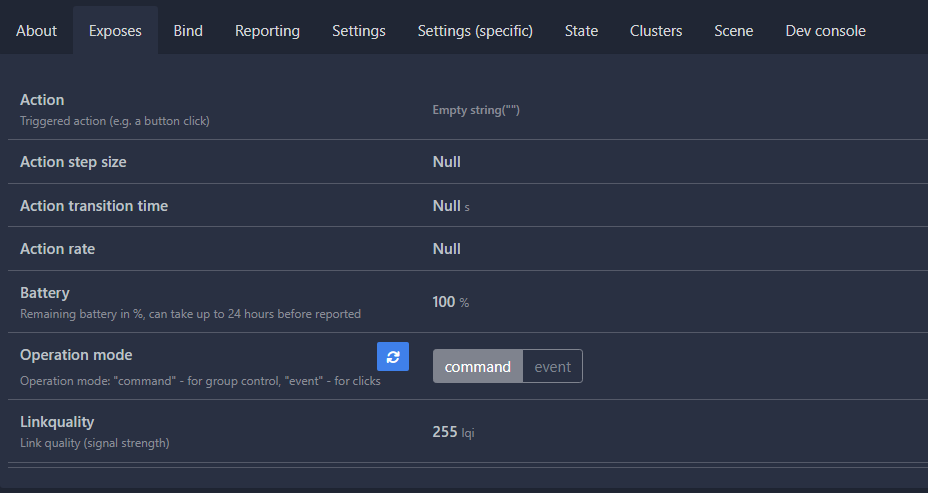
Regardless of what I do
It's always null
Anyone else with the same issue?
sullen shore
ashen bluff
<https://www.zigbee2mqtt.io/guide/faq/#why-is-the-action-property-always-empty>
Ah so its normal?
ashen bluff
Probably. You can't get a more official answer than what I linked 🙂
sullen shore
ashen bluff
Probably. You can't get a more official answer than what I linked 🙂
its just for some reason i can't get it to dim my lights
or toggle them
I only have the "action"
But not necessarily "brightness_step_up"
ashen bluff
You can monitor its state and history via MQTT Explorer to see if it changes or not.
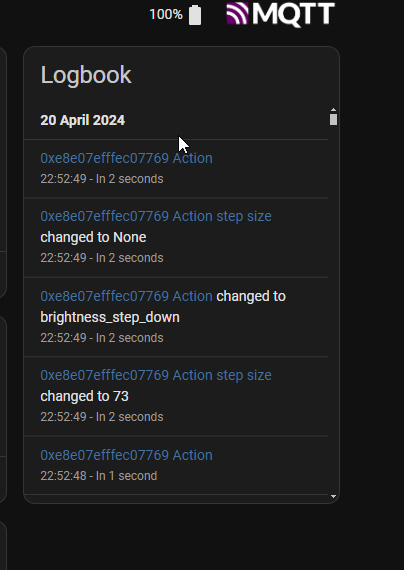 ashen bluff
Well or that.
sullen shore
Okay seems like the blueprint was broken
How do I step up the brightness of the light though?
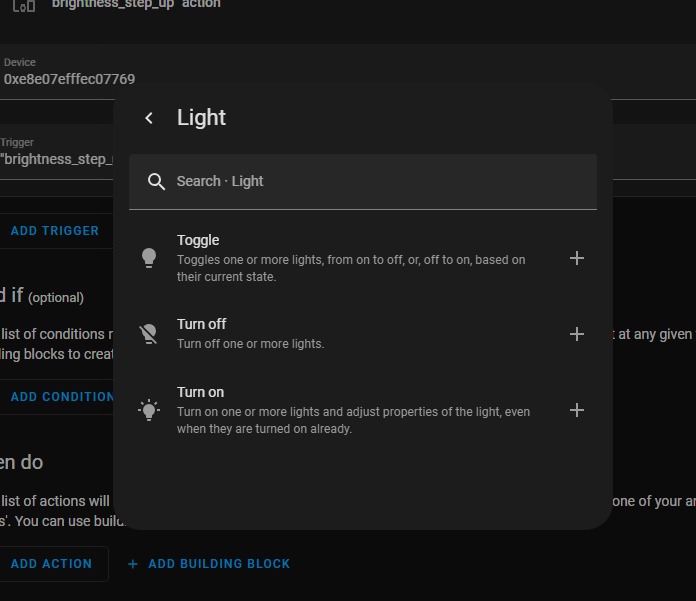
 next dirge
Not sure if this is a common bug. I have a few Jasco 43080 zigbee smart dimmers, and one of them stopped responding to physical input but is still responsive in the Home Assistant dashboard. Is the dimmer fried or can this be fixed through software?
 dusk kite
modest linden
My Aqara Blind (ZNJLBL01LM-Firmware 10-09-2022) is not updating its position unl...
dusk kite
modest linden
My Aqara Blind (ZNJLBL01LM-Firmware 10-09-2022) is not updating its position unl...
Did you find a solution for this? Currently have the same problem. Going to update coordinator firmware to see if that fixes it.
 mighty river
Can someone help?
I'm currently trying to setup Zigbee2MQTT with mosquito broker on HAOS running on proxmox
I was able to install the mosquitto broker and Zigbee2Mqtt but I'm struggling becasue the USB Dongle doesn't seem to show up in HAOS;s hardware list
I passed thorugh the usb device and the port to the HAOS but it doesn't show up at all.. I don't know what I'm doing wrong
Anyone have any ideas?
https://www.zigbee2mqtt.io/devices/EFR32MG21.Router.html I am using this dongle
 gentle aspen
Hi
I am not able to conect Nuki to MQTT
New connection from 172.30.32.2:44228 on port 1883.
Client <unknown> closed its connection.
anyone now why?
fallen minnow
ashen bluff
Sure but I'm too biased to give you a fair comparison.
Can you share any suggestions about HA z2m dongles (looking into Sonoff usb 3 -P, however, not sure about it)? How many problems I will have with installing z2m on HA running as HAOS inside VM?
ashen bluff
Why would you have a problem? Doesn't really matter how you install Z2M in most cases.
For coordinators I'd stick to the recommended list: https://www.zigbee2mqtt.io/guide/adapters/#recommended
I use a P model too but nowadays I'd probably buy a ethernet SLZB.
 unkempt cave
Hi, I'm fairly new to home assistant, but hopefully not a complete numpty when it comes to tech and following instructions...
But for the life of me I can't get a Tuya ZTH05 to connect to HA via zigbee2mqtt.
I'm running HAOS inside a VM in esxi, with a sonoff dongle p connected via a usb extension cable and attached to the VM. My Zigbee network is small with TuYa ZTH05 sensor connected already.
I have zigbee2mqtt in paring mode, and the device in pairing mode and nothing is coming up in the frontend or in the logs
does anyone have any ideas of what I could rule out?
I had asked this in the #general-archived channel and @ashen bluff suggested i post here
fallen minnow
ashen bluff
Why would you have a problem? Doesn't really matter how you install Z2M in most ...
I thought about problems, because its installation instructions at the top asked me to install packets. HAOS isn't a mainstream Linux distributive, so - no guarantees that the exact packets will work out of the box there.
ashen bluff
HAOS is most definitely not a mainstream linux distro. It also has no package manager. If you want to install Z2M you install it in the form of an addon: https://www.zigbee2mqtt.io/guide/installation/03_ha_addon.html
Personally I run both HA and Z2M in docker containers on debian.
fallen minnow
ashen bluff
Why would you have a problem? Doesn't really matter how you install Z2M in most ...
Is it okay to use an Ethernet instead USB to access the dongle? My concern is the response time. For example, I sometimes use schemes like Zigbee button + Zigbee light for various reasons, such as changing electrical schemes myself sometimes can be technically illegal or a bit hard by the 'landlord' way. As you can see, a 50-100 ms of additional delay can make a difference there.
ashen bluff
I don't know how much difference it makes. I expect single digit ms.
fallen minnow
ashen bluff
I don't know how much difference it makes. I expect single digit ms.
Hm, do you know, do they use just TCP/IP or bigger tech stacks like REST API (http requests)?
ashen bluff
Pretty sure it's just TCP <> Serial.
modest linden
dusk kite
Did you find a solution for this? Currently have the same problem. Going to upda...
No. Not found a solution yet. Let me know how you go?
woeful elk
Has anyone put a high gain antenna on their Sonoff controller USB stick thingo?
I'm guessing that the default antenna here is 3dB gain: https://itead.cc/product/sonoff-zigbee-3-0-usb-dongle-plus/
woeful elk
Thinking of something like this: https://www.aliexpress.com/item/1005005367683601.html
6db gain
Or apparently, 14dBi: https://www.aliexpress.com/item/1005005104764501.html
 fervent tiger
Hi, old Mac Mini broke down, installed HA again on old Macbook Air and used full backup from yesterday. Everything, except Z2M went back. Installed Z2M add-on manually and have only 1 device. If I unpack my backup.tar file I have a xxx_zigbee2mqtt.tar.gz file. If I unpack that one, I have a file addon.json and I folder data with 1 file options.json. How to restore to old configuration?
I hope I don't have to link again all my devices !
dusk kite
modest linden
No. Not found a solution yet. Let me know how you go?
State is now reporting correctly after flashing new firmware to my CC2652P dongle
 plush shuttle
I have a qs, before i had a pi and had the Sonogg zigbee stick configure. Now i bought a mini pc, and via proxmox i have configure the same usb zigbee stick and tried to migrate it. But i get the following message on my integration :
zigbee Home Automation Initializing
it seems i have two options : Migrate or Reconfigure
when i chose to migrate to a new, i get an unkown error message
and cant do anything
 steel kettle
Does anyone use Ikea tradfri lights with home assistant without the ikea hub gateway. If so how do you do it ?
Do i need a zigbee stick
and would they usb zigbee stick need to plug into the HA server
ashen bluff
You need a zigbee coordinator. It could be a USB stick but there's also PoE ones.
ashen bluff
The USB stick has to be connected to whatever runs the ZHA or Zigbee2MQTT software. A ethernet one can run "anywhere".
steel kettle
i run proxmox on a server. Is ZHA something i can just put in a vm / container
ashen bluff
ZHA is a HA integration. Z2M is a separate software which can have some benefits.
steel kettle
does z2m then connect to ha
ashen bluff
Through your MQTT broker.
steel kettle
is that another thing i need
ashen bluff
Yes. It's like a chat server for your devices and things.
steel kettle
like a stick / poe device?
ashen bluff
No it's a software. The server (broker) is available as addon in HAOS. You also need the integration to make use of it.
steel kettle
oh sweet
ashen bluff
The MQTT server can be hosted wherever you want too.
grim igloo
steel kettle
like a stick / poe device?
i use and suggest PoE zigbee coordinators like tube's https://tubeszb.com/product/cc2652p7-zigbee-to-poe-coordinator-2023/
@molten linden new stock when? ❤️
steel kettle
grim igloo
i use and suggest PoE zigbee coordinators like tube's https://tubeszb.com/produc...
£78 🤣 when a zigbee stick is like £30
grim igloo
you can build your own
it's an esp32 with ethernet and some pins to expose a zigbee coordinator
there are some chinese similar versions for cheaper on alie i think
steel kettle
grim igloo
there are some chinese similar versions for cheaper on alie i think
only thing with that is long ass delivery times
fervent tiger
Since I use a Macbook Air with VM I experience problems with connected Zigbee stick. The CLI prints:
'frame counter not updating: disabled'
'HC died: cleaning up'
'ttyUSBO: failed set request 0x7 status: -19'
'ttyUSBO: failed set request 0x12 status: -19'
'ttyUSBO: failed set request 0x0 status: -19'
Found this thread about this problem: https://community.home-assistant.io/t/hassio-kernel-usb-bug-ohci-pci-frame-counter-not-updating-disabled/100871/6 but does anyone knows how to resolve?
Before I used Mac Mini and never had this problem
Same VM version and same Mac OS versions
 tulip patrol
"Setting your VirtualBox USB settings to USB 3.0: xHCI, should fix this." Did you try this?
fallen minnow
steel kettle
esp 32's are cheap
You need ESP32, Zigbee CC2652 or equivalent chip, Ethernet controller, PoE power elements, antenna, all listed so far components are above $1. Try to assemble it yourself, why not. The estimated cost for a device for market survival would be around $15-20, this wil involde a lot of tradeoffs and meh quality. A version with more powerful and reliable components for controlling hundreds of devices could cost at least $25-30 per unit not counting Zigbee fees, logistics, software, support, etc. IMHO
 lucid sparrow
i posted my problem with ZBDongle-E in #hardware-archived .. its been working 99% of the time, but i've had a few dropouts with it, solved by replugging, but now its forgotten its manufacturer ID? 😬
sour shadow
Re-flash it and hope?
lucid sparrow
the weird part is it still seems to be working anyway.. im having another go at flashing it with the web updater? i dont know if theres a better way
but im getting to the point where im thinking of buying something more recommended
lucid sparrow
is the skyconnect going to be better?
sour shadow
Should be fine, though there's not exactly a lot of known problems with the Sonoff E either - you likely just got unlucky
lucid sparrow
i'll see how it goes with the updated firmware.. i also have a spare Sonoff E, so if I continue to have issues i'll swap it out
woeful elk
Has anyone put caps on their zigbee light switch stuff to stop flickering?
 grizzled loom
If like me, you looked for a Zigbee siren, you realized that there were few models on the home automation market.
I carried out 5 Feedback on 5 models and a summary comparative table.
https://www.sigalou-domotique.fr/comparatif-sirenes-zigbee
I hope this can be useful to you.
Do not hesitate to suggest other models that I can test or to give me your comments.
 lilac wharf
I've been trying to find a Zigbee siren that also doubles as a door open chime (really just a simple beep and definitely not a doorbell sound like many sirens do)
I do like the Heiman siren though. Very loud
grizzled loom
lilac wharf
I've been trying to find a Zigbee siren that also doubles as a door open chime (...
then take the NEO
lilac wharf
from what i've read, it doesn't have a simple beep unfortunately
grizzled loom
where did you read this? yes, there are beeps
 uneven bridge
Yo guys, nice to meet everyone, I am looking for the first components to start my project.
If possible I would like everything to be from the sam brand, priorizing low consuption over price.
i don't have any hardware except for a pc and a camera, and I am looking to temperature / humidity / quality of air sensor, sensor for windows and door when opened, curtain openers, pressure sensors for bed, led for kitchen and wardrobe, and so one.
Anyone can advise me anything available in italy?
sour shadow
Temperature/humidity - Xiaomi Aqara (E1 or T1 preferred over original)
Door/Window - Xiaomi Aqara (as above)
Aqara also do curtain openers, but it depends on the type of the curtain
Pressure sensors and affordable air quality sensors are mostly a #diy-archived thing. The reasonably priced Zigbee AQ sensors aren't awesome (the Tuya one is cheap but meh, the Ikea one doesn't give you lots of data)
LEDs... pick your strip and use a Gledopto (Pro) controller
 radiant spruce
I'm using ZHA anyone using the 'Wyze lock'? Dow you still need quirks and if can you share your working quirk? There's alot of conflicting information out there
tropic depot
They basically told me to screw (politely) when I asked for the spec for the non standard stuff they do. I haven’t really looked at it since but the data shared previously may still work. YMMV
 heady kayak
huh. the Badring sensor seems pretty neat.
(ikea's water leak sensor. zigbee, works with ZHA, and beeps when it has a detection.)
plush shuttle
Hi i need help, i configured my ZHA integration, and it runs fine, but my zigbee2Mqqt is not running
How to analyse and to solve pls
[21:25:04] INFO: Preparing to start...
[21:25:04] INFO: Socat not enabled
[21:25:04] INFO: Starting Zigbee2MQTT...
Zigbee2MQTT:info 2024-04-22 21:25:06: Logging to console and directory: '/config/zigbee2mqtt/log/2024-04-22.21-25-06' filename: log.txt
Zigbee2MQTT:info 2024-04-22 21:25:06: Starting Zigbee2MQTT version 1.36.1 (commit #unknown)
Zigbee2MQTT:info 2024-04-22 21:25:06: Starting zigbee-herdsman (0.40.3)
it stuck there
lilac wharf
you can't run both ZHA and zigbee2mqtt with the same zigbee adapter if that's what you're trying to do
plush shuttle
ah didnt know that, so i should disable the ZHA ?
lilac wharf
if you want to use z2m, yes
plush shuttle
then still getting this :
[21:29:47] INFO: Preparing to start...
[21:29:47] INFO: Socat not enabled
[21:29:48] INFO: Starting Zigbee2MQTT...
Zigbee2MQTT:info 2024-04-22 21:29:49: Logging to console and directory: '/config/zigbee2mqtt/log/2024-04-22.21-29-49' filename: log.txt
Zigbee2MQTT:info 2024-04-22 21:29:49: Starting Zigbee2MQTT version 1.36.1 (commit #unknown)
Zigbee2MQTT:info 2024-04-22 21:29:49: Starting zigbee-herdsman (0.40.3)
Zigbee2MQTT:error 2024-04-22 21:30:19: Error while starting zigbee-herdsman
Zigbee2MQTT:error 2024-04-22 21:30:19: Failed to start zigbee
Zigbee2MQTT:error 2024-04-22 21:30:19: Check https://www.zigbee2mqtt.io/guide/installation/20_zigbee2mqtt-fails-to-start.html for possible solutions
Zigbee2MQTT:error 2024-04-22 21:30:19: Exiting...
Zigbee2MQTT:error 2024-04-22 21:30:19: Error: Failure to connect
at Ezsp.connect (/app/node_modules/zigbee-herdsman/src/adapter/ezsp/driver/ezsp.ts:373:19)
at Driver.startup (/app/node_modules/zigbee-herdsman/src/adapter/ezsp/driver/driver.ts:171:13)
at Controller.start (/app/node_modules/zigbee-herdsman/src/controller/controller.ts:132:29)
at Zigbee.start (/app/lib/zigbee.ts:62:27)
at Controller.start (/app/lib/controller.ts:109:27)
at start (/app/index.js:107:5)
i am running in a proxmox, before i used to run it on a Pi without issues;
is my problem there ?
rapid dawnBOT
@plush shuttle Please use a code share site to share code or logs, for example:
- https://dpaste.org/ (select YAML for the language, and consider picking a longer expiry)
- http://pastie.org/ (select YAML for the language)
- https://paste.debian.net/ (you guessed it, select YAML as the language)
Please don't use Pastebin, since it can randomly add spaces to the main view. Please also don't share text as images since it makes it harder for people to help you. Remember that others may have colour blindness, impaired vision, etc.
sour shadow
What coordinator are you using?
mighty river
That's interesting I'm troubleshooting a similar issue on Z2M Discord, Also using Proxmox and having similar log results
 bright citrus
hi there, I have a group of two Zigbee smart outlets and I was turning it on/off from NodeRED, this was working fine but since I updated to the last HA version my problems started and now the group does not turn on/off the smart plugin. All I see is the following error:
"HomeAssistantError: Failed to send request: device did not respond"
can any point me to the right direction here meaning what to check or if anyone else is having or had a similar issue and knows how to get it fixed?
sour shadow
ZHA or Zigbee2MQTT?
bright citrus
ZHA
sour shadow
Does the smart plug work in HA?
bright citrus
yes it does
sour shadow
That then sounds more like a #node-red-archived problem since it works in HA
bright citrus
upps I can't upload images here but it is a weird behavior from HA itself, I turn it off and it tries to go back to on
sour shadow
Check the log then
bright citrus
sour shadow
Check the log then
I am seeing this now:
SmartPlug Bottom Fan Firmware became unknown
5:14:33 PM - 1 hour ago
should I reset the device so it connect again to ZHA?
woeful elk
So, I notice that all of my light switches now show Unknown as a firmware status - but after pairing, they say Up-to-date
any ideas what causes this or how to fix it?
slate ravine
Having a weird issue trying to add some Aqara devices, I've added a door sensor, a temp/humidity sensor, a cube controller, and a motion sensor all perfectly fine, paired basically immediately when I was pushing and holding the button. My problem though is when I try to add additional door sensors. i bought a 3 pack, and when I try to go to pair either of the other 2, nothing happens at all, and I can't see it show up in the logs when scanning either. Seems like it's treating all 3 as the same device maybe? I've got no clue honestly
lucid sparrow
has anyone seen a weird issue where a ZBDongle-E would just suddenly lose its manufacturer and product id? .. flashing it to the latest version updated the version, but didn't fix the manu/product/serial strings.. which I guess is to be expected? they're set at the factory.. the device still works though, it just changed the device id string and weirded me out
i kept a record of them just in case theres a way to write them back
sour shadow
I am seeing this now:
 night sable
hi all, I have a question. I'm planning to use ZHA and I'm thinking of buying something like this https://www.aliexpress.com/item/1005006007728129.html. In one of the pic, it mentions that it needs a wired zigbee gateway to work. Does it mean it can't be used together with zha? If that's the case, how would I know which one will work with zha?
fallen minnow
sour shadow
Pressure sensors and _affordable_ air quality sensors are mostly a <#44452927180...
If go WiFi - they have qingping brand https://www.qingping.co/co2-temp-rh-monitor/overview
sour shadow
Make sure it supports HomeKit or Matter
sour shadow
night sable
hi all, I have a question. I'm planning to use ZHA and I'm thinking of buying so...
That should work fine, they only talk about their own gateways because that's all they support
 halcyon vortex
Hey, I watched some videos and based on them I bought https://www.amazon.de/dp/B09KXTCMSC?psc=1&ref=ppx_yo2ov_dt_b_product_details
Then I tried to install mosquitto and zigbee2mqtt. But zigbee2mqtt can not log in to the mqtt mosquitto server. I alway get a no auth message.
I've no idea what else to try.
More information in the created zigbee2mqtt issue: https://github.com/zigbee2mqtt/hassio-zigbee2mqtt/issues/597
Is here maybe somebody who could help me?
rapid dawnBOT
@halcyon vortex I converted your message into a file since it's above 15 lines :+1:
 red gate
Hi everyone 👋
I am trying to connect my SkyConnect Zigbee dongle to HA, which is connected to my UnRAID server via Docker
But I keep getting this error?
sour shadow
What does your Docker container config look like?
prisma osprey
Hi all
I'm looking for a quality 24v AC Zigbee Thermostat. Any recommendations?
I saw the Zen one on Amazon
rapid dawnBOT
Looking for advice about a device to buy? Remember to provide guidance on:
- Which country you're in
- What your budget is
- What protocols you prefer (eg Zigbee, WiFi, Z-Wave)
- Any features you want (such as power monitoring, dimming, etc)
red gate
prisma osprey
Hi all
I'm looking for a quality 24v AC Zigbee Thermostat. Any recommendations?
Docker settings - https://imgur.com/aadNXN2
sour shadow
Oh... you're not using the official Docker image... all bets are off
red gate
Is their any offical one?
sour shadow
Clearly, yes
Hence the comment about not using the official one
You know, the one referenced in HA's own docs?
halcyon vortex
halcyon vortex
Hey, I watched some videos and based on them I bought https://www.amazon.de/dp/B...
Nobody here who can help me?
 finite pawn
I'm trying to set up a second Zigbee network using an smlight SLZB-06 PoE ethernet coordinator. I have read that it is possible to run two Zigbee nets by running the regular Zigbee2mqtt add-on and the edge version add-on of zigbee2mqtt on the same Home Assistant machine.
When trying to start up the edge version I keep getting errors about "z2m: Error: network commissioning timed out - most likely network with the same panId or extendedPanId already exists nearby"
The zigbee2mqtt docs talk about a place to put advanced: in the configuration.yaml, but I don't see that in the config page for the add-on
radiant spruce
are the quirks from here already in home assistant? https://github.com/zigpy/zha-device-handlers
mellow geode
Yes, all quirks from the latest release (0.0.114) are included in HA 2024.4.x
 vivid parcel
Are there any zigbee dimmer modules (ones that go in the ceiling rose) that will work with a regular retractive (momentary) wall switch so that pressing the switch briefly will toggle the light on/off, holding it will adjust the dimming level?
halcyon vortex
Okay I could connect my zigbee2mqtt with my mqtt broker.
Now I connected a temperatur sensor.
It is there. But how can I assign it to any of my rooms?:
sour shadow
Same as any other device
sour shadow
Go there, find it, use the ✏️ in the top right
 carmine hamlet
I mean, everyone still uses pencils that look like that, right?
 dark birch
These logs are a bit weird: "Unexpected transmit confirm for request id 27, Status: TXStatus.SUCCESS" any idea why they occure?
 slim tundra
red gate
Docker settings - https://imgur.com/aadNXN2
slim tundra
red gate
Docker settings - https://imgur.com/aadNXN2
Hard to see what you have in the device passtrough there
halcyon vortex
Why does my tuya sensor don't show its measurements?:
https://imgur.com/a/WaaluhO
No values:
https://imgur.com/a/zdKid2k
I tried two different sensors. Both did the same (N/a)
 nimble turret
Hi all , probably a symptom of something else but when I have a zigbee device not responding in Z2m if I enable pairing then out the device back in pairing mode this restores it. Question is - is there a “service” or can I write a script so I can call this / enable pairing mode from a button on a dashboard??
lilac wharf
yeah you could do something like that, but you're better off figuring out why the device goes unresponsive in the first place
sour shadow
Probably interference, though it may just need a new battery
 jaunty patrol
Hi, Just updated my IKEA Tradfri bulb(E27 CWS opal 600lm) to version 0x23086631 via ZHA, running haos 12.2. The bulb do not work any more. It is just off all the time. I have tried reading everything, any ideas?
mellow geode
Try resetting it by power-cycling whilst having the "Add device" page open.
Look up the YT video from IKEA to see the exact intervals.
jaunty patrol
@mellow geode , I tried it like 10 times before but decided to give it one more shot when you wrote. And it worked! I actually thought they were totally dead after the update. No light whatsoever. But anyhow, you solved my issue. Thanks!!!
mellow geode
Nice! The IKEA lamps are really annoying to reset
jaunty patrol
I am just updating another one and lets see if it behaves similar. Never did an update of the lamps before so a bit shaky when they didn't work and I couldn't reset them at first.
 trim ore
Running zigbee2mqtt - I cant seem to get my ikea parasoll (window sensor) to pair. Ive enabled pairing and pressed the sync button 4 times and it starts flashing... but nothing in Z2M.
Any ideas?
 odd halo
Hey. I bought 2x Philips Hue Play Bars and connected them to HA via Zigbee2mqtt. Both new, not used. After connecting, I noticed from the beginning that one of them has stability problems. Either it doesn't respond to on/off command or to color change or it takes 5 minutes or nothing happens at all. I have removed it from zigbee2mqtt, reset it to factory settings via bluetooth, connected it to other routers and nothing, still the same thing. I've been struggling with this for a week and totally don't know what else I can do. I'm new at this, I've only been playing with smart home for a month now so I thought I'd ask for advice here. This "not working" play bar has a connection quality of 216 where the other one, which works flawlessly, has a quality of 208 and no problems with it. The only errors I have been able to get are these: https://pastebin.com/AeU0H8EU
I have home assistant green + sky connect dongle
 pallid stratus
I have an existing Zigbee2MQTT instance that has some Hue bulbs configured. I am setting up a new Zigbee2MQTT instance and want to migrate the Hue bulbs across. I know it can be a PIA to re-pair Hue bulbs (I've done it before!). Can I copy the related HUE configuration details from the existing Zigbee2MQTT instance across to the new one to make life easier? Or is there an equally easier way?
ashen bluff
If you delete the bulb from the frontend it should go into pairing mode.
 limber eagle
Anyone have experience with a zigbee hose timer?
 sacred crane
Hi there all. Looking for some help I bought 2 zigbee candeo dimmer switches. One Connects to zigbee2mqtt absolutely fine and the other ones say unsupported. Any ideas how to fix please..
pallid stratus
ashen bluff
If you delete the bulb from the frontend it should go into pairing mode.
I deleted the device from the Zigbee2Mqtt frontend, but the bulb did not go into pairing mode.
 grim grove
odd halo
Hey. I bought 2x Philips Hue Play Bars and connected them to HA via Zigbee2mqtt....
grim grove
odd halo
Hey. I bought 2x Philips Hue Play Bars and connected them to HA via Zigbee2mqtt....
have you tried contacting product support? What are their answer. It could be just faulty product.
BTW I am just starting with zigbee and trying to point in the fastest response direction
I have a problem that I loose my zigbee China rgbw controller and Lidl sensor and one or two lamps. One day they are not on the device list. Does not happen at the same time.
In the logs I do not see anything -searched for disconnected, removed. But nothing.
I have noticed that it could coincide with HAOS updates (core, os). As long as I do not update everything seems to work.
I doubt the restart as I have restarted and everything continued to run smoothly.
I am new to this, but maybe I am overlooking something (or not knowing where and how to look)>
How to pinpoint the weak link propely?
sour shadow
- coordinator is on a USB extension cable?
- you picked a channel clear of all WiFi, including your neighbours?
grim grove
sour shadow
1. coordinator is on a USB extension cable?
2. you picked a channel clear of all...
-
Zigbee Coordinator was connected to HAOS via wi-fi first. After a few times moved to connection via USB cable to single out if this is a problem.
Turns out, on USB cable the problem repeats itself as well. -
I picked 25th Zigbee channel.
At home I have 2 wi-fi AP
1st. AP (Closest to Zigbee coordinator)
2.4Ghz ch6, 20MHz width
5Ghz Auto, 40MHz width
2nd. AP (Further from Zigbee coordinator)
2.4Ghz ch1, 40MHz width,
5Ghz ch60, 20MHz width.
So I beleive I have dodged this bullet
sour shadow
And your neighbours WiFi?
 grave dome
self.gen.throw(value)File "/usr/src/homeassistant/homeassistant/components/zha/core/cluster_handlers/init.py", line 75, in wrap_zigpy_exceptions
raise HomeAssistantError(message) from exc
homeassistant.exceptions.HomeAssistantError: Failed to send request: Failed to deliver message
Well that's new (logviewer)
Anyway, I unfortunately added some Aqara devices (wireless switches) and I suspect they're the kind not playing fair and spamming a network; unsure how to tell really, but I had quite a few ZHA reliability issues starting about to when I added that in. Would moving to Z2MQTT mitigate that, or the network congestion still be the same?
grim grove
sour shadow
And your neighbours WiFi?
I live in a single home in a rural area. Those are the only wi-fi's around.
 limpid oriole
mellow geode
Nice! The IKEA lamps are really annoying to reset
limpid oriole
mellow geode
Nice! The IKEA lamps are really annoying to reset
Yes they can be, i had big trouble pairing one bulb. I found out that they also support being reset with the Phillips Hue Light Switch. Just press the on and off buttons at the same time while in close proxity to the bulb (less than 5 cm) for 10 Seconds. Works every time
 carmine nebula
Does anybody have any recommendations for tutorials of how to move an instance of z2m from the add-on in Home Assistant to a separate machine (likely going to use my spare Pi 4)
What is best practice or method of setting up z2m for use by home assistant but from a separate device?
Currently, I have my z2m and mqtt broker as add-on in HAOS, but I want to move the z2m because when I have need to reboot or restart HA I do not want to also reboot the entire zigbee network.
Please advise
 forest cobalt
Are you going to be using docker for your Z2M/MQTT setup on the other machine?
Plus, how many devices do you have in Z2M currently?
modest linden
dusk kite
State is now reporting correctly after flashing new firmware to my CC2652P dongl...
That’s great. Could you let me know the best way to update the firmware?
carmine nebula
forest cobalt
Plus, how many devices do you have in Z2M currently?
I currently have about 80 zigbee devices in my current setup
And to be quite honest, I’m unsure of how I should set up the other machine. Should I create a second HA server and just have z2m and mqtt broker installed on in as add-ons? Or should I use a different OS?
forest cobalt
carmine nebula
I currently have about 80 zigbee devices in my current setup
And to be quite ho...
That's not too bad. So, I would go with just a bare-bones Debian or Ubuntu install and use docker compose for management (could also throw Portainer somewhere on your network should you choose to). In my setup, I have Z2M and Zwave2JS (along with Dozzle) in a docker compose stack and MQTT installed directly on the OS. A second HA server is just overkill for 2 addons, imho.
Once you have that setup, BEFORE you start Z2M, copy over the config files from your HA instance (I think they are stored in the /config directory). Place them into whatever folder you defined in your docker compose setup, make sure to stop the 2 addons in HA first and then start the containers docker compose up -d on your new machine. Z2M should pick up your previous PAN/ePAN and devices automatically.
I can provide you a docker compose layout for Z2M if you need it.
dusk kite
modest linden
That’s great. Could you let me know the best way to update the firmware?
With Z2M, there are guides for your device that you can find here if you click on your device: https://www.zigbee2mqtt.io/guide/adapters/
In the end, because I did not want to open my device to put it in bootloader mode, I used this python script: https://github.com/JelmerT/cc2538-bsl/tree/master
Up to you what you prefer 🙂
modest linden
dusk kite
With Z2M, there are guides for your device that you can find here if you click o...
Pretty sure mine is the plus and not the E version. Guessing you had to repair everything?
forest cobalt
dusk kite
With Z2M, there are guides for your device that you can find here if you click o...
There's a bug in the current build of the cc2538-bsl.py script. Just FYI: There is a quick fix for this in the issue thread. https://github.com/JelmerT/cc2538-bsl/issues/172
dusk kite
forest cobalt
There's a bug in the current build of the cc2538-bsl.py script. Just FYI: There ...
Thanks for that, I indeed required that issue thread to update mine!
Forgot about that 🙂
dusk kite
modest linden
Pretty sure mine is the plus and not the E version. Guessing you had to repair e...
No re-pairing necessary, except for the Aqara device!
forest cobalt
dusk kite
Thanks for that, I indeed required that issue thread to update mine!
It hit me this weekend when I had to update my 2652P2 and I spent like 2 hours banging my head against it. LOL
carmine nebula
forest cobalt
I can provide you a docker compose layout for Z2M if you need it.
Thanks for the advice, and yes that would be awesome to have if you’re able
I’ll see what I can do later today with setting it all up after work. (Looking forward to trying to figure it out later 👌)
forest cobalt
carmine nebula
Thanks for the advice, and yes that would be awesome to have if you’re able
I’l...
zigbee2mqtt:
    container_name: zigbee2mqtt
    image: koenkk/zigbee2mqtt
    restart: unless-stopped
    volumes:
      - /srv/zigbee2mqtt/:/app/data
      - /run/udev:/run/udev:ro
    ports:
      # Frontend port
      - 8080:8080
    environment:
      - TZ=America/New_York
Make sure to create the /app/data directory first and also copy over your config (and STOP Z2M on your HA instance). Also, if you are using a USB coordinator, you'll need to figure out where it maps on the new system using something like ls /dev/serial-by-id/ and picking the correct adapter.
 sinful fjord
Ever since I restored a backup, I have been having issues with my devices connecting to zha. I added an extension cable which fixed the issues I was having with zwave. However, zigbee has not improved. I checked the utilization of the channels and chose one that was extrememly low. I even brought one battery device close to the radio to see if I could get it to connect, but it didn't help. I do see 2 different things in the logs which could be problems, but I don't know what they mean exactly. One in wrap_zigpy_exceptions says "...ApplicationController is not running". Another is from bellows.uart saying "CRC error in frame b'11111320a1adc8757e' (b'c875' != b'b38a')"
forest cobalt
sinful fjord
Ever since I restored a backup, I have been having issues with my devices connec...
What kind of coordinator are you using? Did you enable multi-pan or thread or matter? I saw an older bug for the ApplicationController not running error, but I'm not sure it's relevant here.
sinful fjord
forest cobalt
What kind of coordinator are you using? Did you enable multi-pan or thread or ma...
I have a husbzb-1. My matter add-on has been disabled for a while. I don't use thread or multi-pan as far as I know, but I'm not really familiar with multi-pan
forest cobalt
sinful fjord
I have a husbzb-1. My matter add-on has been disabled for a while. I don't use t...
I kinda figured. Those things are a nightmare to try to debug, especially since they have been discontinued for quite a while. So, my "best" advice would be to upgrade it to the latest firmware. BUT, there's a risk to doing that. Personally, I would just say it's time to get a newer coordinator, but no one ever wants to hear that. https://github.com/walthowd/husbzb-firmware
sinful fjord
forest cobalt
I kinda figured. Those things are a nightmare to try to debug, especially since ...
Ah. I had been considering upgrading actually. I'll check the firmware and see if that solves the issue. If not, I will look into a new coordinator. Thanks
 rigid wagon
Hi, is there a way to know when devices are timing out or not sending any data anymore to the coordinator for say 10mins?
I created a device that runs on batteries and has 2 zigbee devices in it, but those zigbee devices are powered by usb, so i want to know when the batteries are empty.
sinful fjord
Is it still normal to get coordinators that have both zigbee and zwave or has that fallen out of favor? Seems like most people today are getting 2 separate coordinators
forest cobalt
sinful fjord
Is it still normal to get coordinators that have both zigbee and zwave or has th...
2 separate coordinators. To be fair, I still use my husbzb-1 for z-wave and I have a network coordinator for zigbee.
distant flume
just like thread and zigbee, i'd expect that for good reliability and performance you'd want separate radio interfaces for zigbee and z-wave.
forest cobalt
distant flume
just like thread and zigbee, i'd expect that for good reliability and performanc...
Pretty much. I think that's why Nortek discontinued their stick; There were SO MANY complaints about interference and such.
 vast vale
I feel like im an idiot but i most likely overlook something silly.
I have installed zigbee2mqtt as an addon and i installed MQTT, i have added a few zigbee device's @ zigbee2mqtt but they dont appear on mqtt
forest cobalt
vast vale
I feel like im an idiot but i most likely overlook something silly.
I have inst...
Can you post the mqtt: section from your Z2M config? That will help.
Also, are there any error messages in the logs?
vast vale
mqtt:
  server: mqtt://internal_ip:1883
  user: jaenster
  password: test
And in my mosquitto i got
logins:
  - username: jaenster
    password: test
I do notice in the logs of my mosquitto:
2024-04-25 21:08:00: New client connected from 172.30.32.1:37802 as mqttjs_33ed64ec (p2, c1, k60, u'jaenster').
2024-04-25 21:10:00: New connection from 172.30.32.1:40807 on port 1883.
2024-04-25 21:10:00: Client 1JxYGHQDfY89m6mev9mb5A disconnected, not authorised.
2024-04-25 21:11:42: New connection from 172.30.32.2:52490 on port 1883.
2024-04-25 21:11:42: Client <unknown> closed its connection.
2024-04-25 21:12:00: New connection from 172.30.32.1:36293 on port 1883.
2024-04-25 21:12:00: Client 1JxYGHQDfY89m6mev9mb5A disconnected, not authorised.
2024-04-25 21:13:42: New connection from 172.30.32.2:38398 on port 1883.
2024-04-25 21:13:42: Client <unknown> closed its connection.
2024-04-25 21:14:00: New connection from 172.30.32.1:43133 on port 1883.
2024-04-25 21:14:00: Client 1JxYGHQDfY89m6mev9mb5A disconnected, not authorised.
Seems to suggest it doesnt auth well hmm
forest cobalt
Yup, that's what I suspected. You're using the MQTT addon, right?
vast vale
yep
forest cobalt
Alright, hold on... let me check something.
vast vale
btw its very annoying that you cant select stuff @ the log's, well i mean you can but it constantly gets deselected
Zigbee2MQTT:info  2024-04-25 21:16:47: Connecting to MQTT server at mqtt://internal_ip:1883
Zigbee2MQTT:info  2024-04-25 21:16:48: Connected to MQTT server
And this seem to suggest it is able to connect
forest cobalt
Yeah, it's connecting, it's just that the auth is configured incorrectly. I don't use the addons, so I'm trying to figure out how to setup the auth.
sour shadow
For the Z2M add-on if you're using the Mosquitto add-on then the docs are very clear on what not to do...
You've supposed to leave the mqtt section blank 😉
vast vale
well okay, but it complained then about not being able to auth
sour shadow
The Mosquitto add-on uses HA users, so just create one for Z2M there
forest cobalt
Thanks @sour shadow
vast vale
Eh, okay, thanks 🤔
you are right it is in the docs but i have to admit this is a confusing one
sour shadow
I have seen quite a few times people report that the auto-detect doesn't work
You should use mqtt://core-mosquitto:1883 for the URL then
vast vale
Failed to save add-on configuration, Missing option 'mqtt' in root in Zigbee2MQTT arg
that is the hostname of the container or?
sour shadow
Make sure you set that up in the UI
Yeah, the container is core-mosquitto
You should also expose 1883 for the add-on and test with MQTT Explorer
vast vale
So should i make logins empty again @ mosquitto
sour shadow
Yeah, create the users in HA, and then test with MQTT Explorer
vast vale
hmm i have no experience with MQTT explorer
sour shadow
It's easier to learn than HA 😛
sour shadow
It's just a pretty tool, if you can read and click (and think) you'll be fine
vast vale
if i delete an addon and reinstall it, all old config stuff is gone?
sour shadow
No idea
vast vale
because i think i messed something up ;p
sour shadow
I run a zero add-on setup... Docker all the way
vast vale
ah there is a beautifal reset to default button
New client connected from 172.30.33.2:51002 as mqttjs_30ebea13 (p2, c1, k60, u'addons'). there we go
seems to have generated/used a username like you said
forest cobalt
woot
vast vale
Okay i had to readd the MQTT integration because somehow it didnt pick up, it all works now 🙂
Thanks all
 edgy moss
I just noticed the changes to the zigbee visualization.
Not seeing any documentation yet.
final kestrel
sour shadow
I run a zero add-on setup... Docker all the way
Come to the podman dark side… we have better security through namespace isolation.
 clever cedar
Has anyone tried this channel switching method in Z2M? https://github.com/Koenkk/zigbee2mqtt/discussions/7827
 elder surge
looking for zigbee smart plug that is power monitoring. what do ya'll use?
ashen bluff
The cheapest ones you can find on aliexpress 🔥 😄
 gleaming jay
elder surge
looking for zigbee smart plug that is power monitoring. what do ya'll use?
gleaming jay
elder surge
looking for zigbee smart plug that is power monitoring. what do ya'll use?
I got some 3rd reality ones from Amazon that seem good
Well priced
elder surge
link?
vast vale
ashen bluff
The cheapest ones you can find on aliexpress 🔥 😄
with battery powered zigbee device's im fine with it but with power device's specially those kinds im scared to use those cheapass aliexpress device's for things like my oven
 final wasp
Hi, I got three Paulmann E14 RGBWW leds in my livingroom that are unreliable. They sometimes turn on again after I turned them off and respond extremely slow in general (5s). The ConBee 2 is in a neighbooring room but has no line of sight. LQI is 255, RSSI is -62. What things can I do to troubleshoot?
PS: One behaves slightly worse than the others and turns on randomly. The other 2 just have lots of delay.
 latent path
Hi, I have a Sonoff Bridge pro coordinator with a lot of sonoff zbminis and other sonoff sensors. I'm thinking of introducing some ikea zigbee motion sensors. My question is: will my zbminis (they are repeaters) mesh togehter with the ikea sensors? or will the ikea sensors only work directly with the coordinator?
woeful elk
hmmmmm
so I'm looking at pulling down the diagnostics stuff for the zigbee controller to look at the channel energy.....
it ends up looking like this:
{"11":21.176470588235293,"12":32.549019607843135,"13":36.86274509803921,"14":47.05882352941177,"15":65.49019607843137,"16":85.49019607843137,"17":51.372549019607845,"18":95.68627450980392,"19":74.11764705882354,"20":60,"21":54.11764705882353,"22":35.68627450980392,"23":34.11764705882353,"24":32.549019607843135,"25":15.686274509803921,"26":35.68627450980392}
What would be the best way to get this into HA and display it?
preferably with logger stuff too - so I can look at history over time
some kinda line graph would be good
forest cobalt
elder surge
looking for zigbee smart plug that is power monitoring. what do ya'll use?
I use the ThirdReality smart plugs. But, some people report they drop off the mesh often. Mine (I have 12 of them rn) have been pretty solid. I did have 1 drop off the mesh, but that was due to a botched firmware upgrade to .74.
forest cobalt
final wasp
Hi, I got three Paulmann E14 RGBWW leds in my livingroom that are unreliable. Th...
How close is the nearest router device? How many router devices do you have in your mesh?
forest cobalt
latent path
Hi, I have a Sonoff Bridge pro coordinator with a lot of sonoff zbminis and othe...
Yeah, the Ikea sensors will just become part of the mesh.
final wasp
forest cobalt
How close is the nearest router device? How many router devices do you have in y...
Nearest router is about 6-8 meters in my bedroom (IKEA light) (no line of sight). In that room there's also multiple other routers (5 in total) plus the coordinator. Connection between coordinator to first router LED in the living room is displayed as 234/115 in the topology.
forest cobalt
woeful elk
so I'm looking at pulling down the diagnostics stuff for the zigbee controller t...
I wouldn't actually do this unless you need to. A channel scan introduces traffic into the mesh while scanning. If you have a lot of devices, then that can cause missed/dropped messages and such. I would only run a channel scan if you are experiencing things like that and never as a scheduled task. Basically, once you set your Zigbee channel, it should stay at that channel unless you are seeing issues within the mesh.
woeful elk
I'm more wanting to know what effect my wifi has on it - given I have a cisco AP under a metre away from the zigbee radio
but afaik, there's no real issues atm
forest cobalt
final wasp
Nearest router is about 6-8 meters in my bedroom (IKEA light) (no line of sight)...
That doesn't sound too bad, but if you can get yourself a smart plug or some other type of router closer to the LEDs, that would be better. In the topo map, are the LEDs connected to the IKEA bulb or another router?
woeful elk
I'm also looking to change the 3db antenna it came with to a 10db gain antenna
so might be all it needs
I'm running on Channel 26 atm - and that looks pretty dead in that json output
I changed my 2 x APs to ch 1 & 6, but now allowed 1 / 6 / 11 - and in theory, they'll autoswitch based on environment - so see what happens there too
forest cobalt
If you're on 26 and your WiFi is on 1/6/11, you should be fine. Especially if you aren't seeing issues.
final wasp
forest cobalt
That doesn't sound too bad, but if you can get yourself a smart plug or some oth...
They all have direct connections to the coordinator (174/85, 234/115, 244/112) and one red poor connection (124/91) to the lamp in my bedroom.
woeful elk
I scanned around with my hackrf on zigbee Ch26 - I can see it all..... and I can only see one other zigbee-like signal - but its pretty weak
forest cobalt
But adding the higher gain antenna, you might see some degredation, but if you can get another router device close to the coordinator, you should be fine.
woeful elk
however, the HackRF only shows +/- 6Mhz at a time - so I can't see a wifi channel for example
forest cobalt
final wasp
They all have direct connections to the coordinator (174/85, 234/115, 244/112) a...
🤔 Are the LEDs router devices? I've never heard of them.
 silk vortex
How do i listen to custom Zigbee messages? I have a zigbee remote and i want to create automations for it in HASS so pressing button x does y, etc. in the normal interface the remote does not expose any buttons/switches https://i.vgy.me/vBHK4P.png
 forest cobalt
woeful elk
however, the HackRF only shows +/- 6Mhz at a time - so I can't see a wifi channe...
forest cobalt
woeful elk
however, the HackRF only shows +/- 6Mhz at a time - so I can't see a wifi channe...
Ahhhhh gotcha, ok. TBH, unless you are actually seeing problems in the mesh, I wouldn't really worry about it too much. I have mine set to channel 25 and my 3 APs set to rotate between 1/6/11 as well.
forest cobalt
silk vortex
How do i listen to custom Zigbee messages? I have a zigbee remote and i want to ...
ZHA? Z2M?
woeful elk
fair. I can also see a sweeping signal that looks like something is seeking things - no idea what it is though..... Thinking some kind of BT seek.......
silk vortex
forest cobalt
ZHA? Z2M?
url bar says zha
final wasp
forest cobalt
🤔 Are the LEDs router devices? I've never heard of them.
"Device Type: Router" for the three lights in the living room. Paulmann RGBWW
forest cobalt
woeful elk
fair. I can also see a sweeping signal that looks like something is seeking thin...
Yeah, I get those time to time from my Wiz bulbs for some reason. 🤷♂️
silk vortex
is z2m better?
woeful elk
like this: https://imgur.com/a/avj1d9k
silk vortex
woeful elk
like this: https://imgur.com/a/avj1d9k
what is that?
forest cobalt
silk vortex
is z2m better?
lol that's a highly opinionated question to which I have a highly opinionated answer. 🙂 YES. (100% imho though)
woeful elk
let me get a better picture......
silk vortex
forest cobalt
lol that's a highly opinionated question to which I have a highly opinionated an...
can i run both in parallel or atleast migrate seamlessly from one to another?
woeful elk
Added a second picture that's a bit clearer: https://imgur.com/a/avj1d9k
You can see my zigbee network at 2480 Mhz - right on the 5M mark
but NFI what the scanning signal is
forest cobalt
final wasp
"Device Type: Router" for the three lights in the living room. Paulmann RGBWW
Ok, so as router devices they should be connecting to the coordinator. Given that the LQI values are actually ok, I wonder if maybe the LEDs themselves might actually be the culprit. If you toggle the power on them and then let them reconnect, are they fast for a while and then slow down?
forest cobalt
woeful elk
but NFI what the scanning signal is
I think you are spot on with the rouge BT scan going on. IIRC, BT/BLE scans occur near the upper part of the spectrum. Don't quote me on that though 🙂
woeful elk
hahahahahah - I wonder if its my the BT on my PC - even though its turned off...... 😄
forest cobalt
silk vortex
can i run both in parallel or atleast migrate seamlessly from one to another?
Uh, yes, but also not exactly. You'd need a second coordinator and then you would have to unpair devices from ZHA and the pair them to Z2M. Depending on how many devices you have, it could take a while. BUT... sometimes it's worth it. Especially if you have let's call them "wonky" devices that don't have any ZHA quirks.
But, anyhow, to listen to a ZHA event, you'll want to trigger on the zha_event service. If you go into developer tools > events, you can listen to the zha_events and see what's coming in and build your trigger off of that.
silk vortex
forest cobalt
Uh, yes, but also not exactly. You'd need a second coordinator and then you woul...
i have like 60 devices of which some are having tasks that cant have downtime so i think i pass for now
thanks, i will try the dev console trick
forest cobalt
woeful elk
hahahahahah - I wonder if its my the BT on my PC - even though its turned off......
Yeah, you only THINK it's turned off 😉 I had to physically pull the card out of my PC to get it to actually turn off. lol
woeful elk
I wouldn't be surprised......
final wasp
forest cobalt
Ok, so as router devices they should be connecting to the coordinator. Given tha...
I will have to test that. I'll get back to you once I have tested that. Thanks for your help so far. I'm not really happy with any of the Paulmann products to be honest. The much cheaper IKEA in the same room (connected via the Paulmann) reacts faster and without reliability issues....
forest cobalt
silk vortex
i have like 60 devices of which some are having tasks that cant have downtime so...
I'm always careful when suggesting a migration because it can be a BIG time suck. For me, Z2M works perfectly, but I've been using it since 2020, soooo yeah.
silk vortex
hmm when i go to http://homeassistant.local:8123/developer-tools/event and listen to zha_event i get nothing from any devices, even when i toggle a switch on a working good device that works fine in HASS's UI. the only thing that adds a event to that page is firing a empty zha_event with the UI button https://i.vgy.me/JJF2zW.png
 forest cobalt
final wasp
I will have to test that. I'll get back to you once I have tested that. Thanks f...
forest cobalt
final wasp
I will have to test that. I'll get back to you once I have tested that. Thanks f...
I've never heard of Paulmann, so no clue about their reliability, but to me that sounds like the culprit here. IKEA though, I'm not a huge fan of their kit either, but at least I know they follow the Zigbee3.0 standard pretty much to the letter.
forest cobalt
silk vortex
hmm when i go to http://homeassistant.local:8123/developer-tools/event and liste...
🤔 I can't help with that as I don't have ZHA setup. But that's odd. You should be seeing tons of events coming in.
silk vortex
forest cobalt
🤔 I can't help with that as I don't have ZHA setup. But that's odd. You should ...
do i maybe have to enable events first? idk
forest cobalt
Did you click the Start Listening button?
silk vortex
sure, otherwise i wouldnt have recieved the manual event either
woeful elk
ah ha! Found it 🙂
silk vortex
the zha docs https://www.home-assistant.io/integrations/zha only mention zha_events but even these dont seem to trigger in the dev tester
however this thread https://community.home-assistant.io/t/zha-events/353646/5 does say it's zha_event but that didnt work either so im kinda lost
woeful elk
its my wireless headset dongle 😄
its scanning for the headset - which is powered off
if I turn the headset on, the sweep goes away
silk vortex
forest cobalt
🤔 I can't help with that as I don't have ZHA setup. But that's odd. You should ...
do you know someone else that has ZHA and used the events before?
i would really love to get this remote working so i can have some control over HASS even when wifi dies
woeful elk
I use ZHA - but I haven't looked into events
silk vortex
woeful elk
I use ZHA - but I haven't looked into events
can you check if it is working for ya?
woeful elk
What do they do? How do I check? lol
forest cobalt
silk vortex
sure, otherwise i wouldnt have recieved the manual event either
🫣 I've had one cup of coffee this morning. I'm obviously blaming everything on that simple fact. hahaha
forest cobalt
silk vortex
do you know someone else that has ZHA and used the events before?
That thread is ancient. But, create a thread in the forums real quick. Might get a bit more traction there.
@woeful elk lmao damn headsets...
silk vortex
forest cobalt
🫣 I've had one cup of coffee this morning. I'm obviously blaming everything on ...
youre absolutely fine no worries lol
woeful elk
if I go into dev tools -> events then try to listen for zha_event and hit Start Listening, turning a light on / off does nothing.
silk vortex
woeful elk
What do they do? How do I check? lol
go to http://homeassistant.local:8123/developer-tools/event enter zha_event into Listen to events box and press START LISTENING and tell me if anything happens on the page for ya
silk vortex
woeful elk
if I go into dev tools -> events then try to listen for `zha_event` and hit Star...
ahh so im not the only one, thanks
woeful elk
I'm curious about what sensor.texas_instruments_coordinator actually is though
forest cobalt
Your coordinator? IIRC, ZHA actually creates sensors for the coordinator as well.
forest cobalt
😶 it could be? how often is it resetting? Part of the reason I don't use ZHA is because sometimes it just does weird things that I can't explain. lol
silk vortex
forest cobalt
That thread is ancient. But, create a thread in the forums real quick. Might get...
woeful elk
its probably resetting when I restart HA 😄
but I've been working on a protocol implementation in nodered, so I've been restarting a lot lol
forest cobalt
woeful elk
but I've been working on a protocol implementation in nodered, so I've been rest...
Eh, that makes sense then. I did a quick search and didn't see anything about that sensor... sooooooo, I'm stumped. lol
woeful elk
yeah - try googling for it, and Google says no 😄
 distant wasp
hm, does aqara require their hub, or can I use just that blue HA zigbee dongle? The things I look at say they use zigbee 3, but one can never be too sure
forest cobalt
distant wasp
hm, does aqara *require* their hub, or can I use just that blue HA zigbee dongle...
For some devices, to get full functionality (like the T1M light), you need their hub, but generally speaking, no. You just need a zigbee coordinator ("the blue HA zigbee dongle").
silk vortex
forest cobalt
That thread is ancient. But, create a thread in the forums real quick. Might get...
distant wasp
yeah, I'm looking at their wall switch https://www.aqara.com/en/product/smart-wall-switch-h1-eu-with-neutral/ and roller shade motor https://www.aqara.com/en/product/roller-shade-driver-e1/, and I kinda want them to be integrated into my HA and possibly with google assistant, I plan to use the switch to control the regular light, and a light via HA, so I kinda feel like there's better chance of it working if I connect it directly to my HA rather than via a hub
forest cobalt
silk vortex
any thoughts on https://community.home-assistant.io/t/how-to-listen-for-button-p...
Stiltjack is 100% right plus he knows way more about ZHA than I do. 🙂 There will probably need to be a custom quirk written for it. But, what still peaks my interest is the fact that no ZHA events show up. Let me poke him real quick and see if he can test it.
forest cobalt
distant wasp
yeah, I'm looking at their wall switch <https://www.aqara.com/en/product/smart-w...
Get yourself a decent Zigbee coordinator and connect them directly to HA. I have over 2 dozen Aqara devices attached to my instance (contact sensors, motion sensors, temp and humidity, curtain motors, etc).
distant wasp
any suggestions, tho? I don't have anything zigbee right now, tbf
oh yeah, my HA's installed on rpi5
forest cobalt
distant wasp
any suggestions, tho? I don't have anything zigbee right now, tbf
The Skyconnect stick is a solid choice (provided you also buy a USB2 extension cable for it to keep it away from interference). There's also the Sonoff Dongle P(?) that is very popular. I would go with either of those to start off. Obviously, I'm going to push you to the Skyconnect because, well, HA hardware. 🙂 But also look at the Sonoff as well.
distant wasp
yeah, I was looking at that blue HA thing in the first palce as well
forest cobalt
It's not a bad coordinator at all and obviously gets a lot of support in the forums. Solid choice for starting out.
distant wasp
tho aqara's hub m2 has an extra ir blaster 
woeful elk
Heh - I got the Sonoff P dongle - just cos it was ~$19 USD..... The HA one is ~$69 AUD - or about $48USD plus shipping.
distant wasp
but I bet it can't be integrated fully into HA or someshit
forest cobalt
distant wasp
tho aqara's hub m2 has an extra ir blaster <:ponder:331484122524549140>
I think someone managed to get it integrated by said it was crap compared to something like a Broadlink RM4 Pro. I would still avoid the Aqara hubs though versus direct connect to ZHA/Z2M.
forest cobalt
woeful elk
Heh - I got the Sonoff P dongle - just cos it was ~$19 USD..... The HA one is ~$...
My coordinator cost more than that... lol BUT, I went with a network coordinator versus a USB stick. Granted, I don't have a small mesh either soooooo yeah.
woeful elk
mine is 14 devices + the coordinator
no routers yet
I figured having an external antenna connector etc and being less than 1/2 the price..........
forest cobalt
Soooo, I'll be expecting the "why are my devices dropping off my mesh?!" post from you eventually? 😉 lmao
woeful elk
I mean, I live in a 4 bedroom house, but it isn't huge lol
like, even the switches at the other side of my house work
forest cobalt
woeful elk
I figured having an external antenna connector etc and being less than 1/2 the p...
Zigbee != WiFi. Two totally different topolgies
woeful elk
I got 2 x Cisco 3800 APs for wifi - they work reeeeeal well lol
but that's for high data rates
forest cobalt
My house is 1150 sq ft, so tiny really. I still have 48 router devices in my mesh to support 70 end devices. 🙂
forest cobalt
woeful elk
I got 2 x Cisco 3800 APs for wifi - they work reeeeeal well lol
I went with Unifi for my network. I have 3 of the WiFi6 APs. I can drown out my neighbors shitty wifi in an instant. lol
forest cobalt
ALMOST went Cisco... and then Meraki and I was like... nahhhhh I'm not paying monthly.
woeful elk
I get bored with stuff these days - I just want it to work lol
but I have a full setup of ubnt kit at work, and it shits me to tears lol
forest cobalt
woeful elk
oh wait - 300sqm == ~3230 sq ft?
It is 9:06am here. I am not doing maths yet. lol
distant wasp
heh, my place is less than 60sqm, and my room is the only place I have any smart stuff, and probably won't install anything outside of it
forest cobalt
woeful elk
but I have a full setup of ubnt kit at work, and it shits me to tears lol
We have Merakis at work and saaaaammmmeeee...
woeful elk
but I got these APs for free - and if I put them on 160Mhz channels, I can actually get ~140MB/sec on them
forest cobalt
distant wasp
heh, my place is less than 60sqm, and my room is the only place I have any smart...
I have a buddy that is in the same boat... tiny little apartment in NYC and he gets so pissed when I tell him new stuff that I buy. lmao
woeful elk
heh - I got my place recently - and yeah - its 4 bedrooms just for me - but at the same time, it was going to cost about the same for 3 bedrooms 😐
I should actually use the main bathroom one day to make sure everything works in there hahahha
forest cobalt
woeful elk
but I got these APs for free - and if I put them on 160Mhz channels, I can actua...
I don't have any client devices that can really use that kind of speed. Everything is either CAT7 to the switches or IOT kit, so no real bandwidth needs.
woeful elk
I splurged a while ago and got 2.5Gbit switches with PoE for the APs and my rack of play toys
then 8 port 10Gbit fibre switch, and another 8 port 1Gbit PoE
figure that'll probably do me for the forseeable future.
forest cobalt
Anyhow, before I get yelled at for off-topic stuff lol... @distant wasp Grab yourself a Skyconnect and attach it to HA (again, get an extension cable) then make sure you get at least one or two router devices (smart plugs, switches, bulbs, something) and then get your Aqara kit. 🙂
woeful elk
I was hoping my light switches would be routers - but they come up as endpoint devices 😦
forest cobalt
woeful elk
I splurged a while ago and got 2.5Gbit switches with PoE for the APs and my rack...
Pretty much the same here. I just did a full 2.5gb upgrade and 10gb fiber to my nas.
forest cobalt
woeful elk
I was hoping my light switches would be routers - but they come up as endpoint d...
No neutral switches?
woeful elk
they're "neutral optional" ones
forest cobalt
Yup. I have a few of those as well. Damn old house.
distant wasp
gah, I don't really have anything else that comes to mind that I could buy with zigbee router
woeful elk
I have a neutral wire to every lightswitch in the house
and its hooked up
but still only an endpoint 😦
forest cobalt
distant wasp
gah, I don't really have anything else that comes to mind that I could buy with ...
lol contact sensors for the windows/door. Motion sensor. Vibration/pressure sensor for the bed. Curtain/blind motors... mmWave presence sensor. 😄
distant wasp
tho my aquara devices will be up to 4m away from where my rpi sits
forest cobalt
Actually... duh... go with a USB mmWave presence sensor.
 sinful sun
zigbee2mqtt question. i have check that there is access to my controller and all the steps have done okay. but i am getting below error any reason why?
Using '/app/data' as data directory
Zigbee2MQTT:debug 2024-04-26 14:22:50: Loaded state from file /app/data/state.json
Zigbee2MQTT:info 2024-04-26 14:22:50: Logging to console and directory: '/app/data/log/2024-04-26.14-22-50' filename: log.txt
Zigbee2MQTT:debug 2024-04-26 14:22:50: Removing old log directory '/app/data/log/2024-04-26.12-35-13'
Zigbee2MQTT:info 2024-04-26 14:22:50: Starting Zigbee2MQTT version 1.36.1 (commit #ffc2ff1)
Zigbee2MQTT:info 2024-04-26 14:22:50: Starting zigbee-herdsman (0.40.3)
Zigbee2MQTT:debug 2024-04-26 14:22:50: Using zigbee-herdsman with settings: '{"adapter":{"concurrent":null,"delay":null,"disableLED":false},"backupPath":"/app/data/coordinator_backup.json","databaseBackupPath":"/app/data/database.db.backup","databasePath":"/app/data/database.db","network":{"channelList":[26],"extendedPanID":[221,221,221,221,221,221,221,221],"networkKey":"HIDDEN","panID":62335},"serialPort":{"path":"/dev/serial/by-id/usb-ITEAD_SONOFF_Zigbee_3.0_USB_Dongle_Plus_V2_20230329083155-if00"}}'
Zigbee2MQTT:error 2024-04-26 14:23:10: Error while starting zigbee-herdsman
Zigbee2MQTT:error 2024-04-26 14:23:10: Failed to start zigbee
Zigbee2MQTT:error 2024-04-26 14:23:10: Check https://www.zigbee2mqtt.io/guide/installation/20_zigbee2mqtt-fails-to-start.html for possible solutions
Zigbee2MQTT:error 2024-04-26 14:23:10: Exiting...
Zigbee2MQTT:error 2024-04-26 14:23:10: Error: Failed to connect to the adapter (Error: SRSP - SYS - ping after 6000ms)
at ZStackAdapter.start (/app/node_modules/zigbee-herdsman/src/adapter/z-stack/adapter/zStackAdapter.ts:103:27)
at Controller.start (/app/node_modules/zigbee-herdsman/src/controller/controller.ts:132:29)
at Zigbee.start (/app/lib/zigbee.ts:62:27)
at Controller.start (/app/lib/controller.ts:109:27)
at start (/app/index.js:107:5)
forest cobalt
What kind of coordinator are you using?
And how do you have it defined in the Z2M config?
sinful sun
forest cobalt
What kind of coordinator are you using?
SONOFF Universal Zigbee 3.0 USB Dongle Plus ZBDongle E
sinful sun
forest cobalt
And how do you have it defined in the Z2M config?
serial:
port: >-
/dev/serial/by-id/usb-ITEAD_SONOFF_Zigbee_3.0_USB_Dongle_Plus_V2_20230329083155-if00
mellow geode
silk vortex
hmm when i go to http://homeassistant.local:8123/developer-tools/event and liste...
You won't get a zha_event for an on/off switch, only for stateless "remotes" which do not provide entities in HA.
forest cobalt
if you do a ls /dev/serial-by-id/, do you see the device there?
mellow geode
sinful sun
serial:
port: >-
/dev/serial/by-id/usb-ITEAD_SONOFF_Zigbee_3.0_USB_Dongle_...
Did you add adapter: ezsp?
forest cobalt
🤔 I've seen this a couple of times... Yeah.. That ^^^
sinful sun
mellow geode
Did you add `adapter: ezsp`?
I did try but it made no difference
 ocean cloak
I have this Aqara vibration sensor and I can't seem to set it's sensitivity. I've done it before with these but this one isn't taking. Any advice?
Getting this is z2m:
Publish 'set' 'sensitivity' to 'Guitar stand vibration sensor' failed: 'Error: ZCL command 0x00158d000725b297/1 genBasic.write({"65293":{"value":1,"type":32}}, {"timeout":35000,"disableResponse":false,"disableRecovery":false,"disableDefaultResponse":true,"direction":0,"srcEndpoint":null,"reservedBits":0,"manufacturerCode":4447,"transactionSequenceNumber":null,"writeUndiv":false}) failed (Timeout - 64355 - 1 - 219 - 0 - 4 after 35000ms)'
mellow geode
sinful sun
I did try but it made no difference
You need it though. Please post your configuration.yaml with that again
mellow geode
ocean cloak
Getting this is z2m:
`Publish 'set' 'sensitivity' to 'Guitar stand vibration sen...
Are you pressing the button on the vibration sensor whilst writing the attribute?
ocean cloak
I'm pressing it before and after and just each and every combination I can think of
also tried just triggering it before and after sending
Should I be holding it down?
latent path
hi, I want to add my tasmota zigbee sensors to HA. I've created a MQTT broker and installed MQTT and TASMOTA integrations in HA. Do I need to add the zigbee sensor entities manually?
forest cobalt
ocean cloak
Should I be holding it down?
That would reset the sensor. I've had problems with those and P1 motion sensors too. Some of them just will not set until I unpair and re-pair them again.
forest cobalt
latent path
hi, I want to add my tasmota zigbee sensors to HA. I've created a MQTT broker an...
You will need a zigbee coordinator (which I'm guessing is your tasmota device?) and a software coordinator like Zigbee2MQTT to do that.
ocean cloak
forest cobalt
That would reset the sensor. I've had problems with those and P1 motion sensors ...
Yeah maybe I'll just end up doing that
latent path
forest cobalt
You will need a zigbee coordinator (which I'm guessing is your tasmota device?) ...
Yes my coordinator is a sonoff zbbridge pro flashed with tasmota. Can I not use that as my hardware coordinator? Does setting up then become too complicated?
forest cobalt
latent path
Yes my coordinator is a sonoff zbbridge pro flashed with tasmota. Can I not use ...
Yup. You can absolutely use that. You just have to setup either ZHA or Zigbee2MQTT. Since you have your broker already setup, I'd say go with Z2M. There is a little bit more of a learning curve, but there are countless posts on the forums on how to set it up (along with the docs on the Z2M website).
latent path
For ZHA, I think I need to have my tasmota in TCP mode which AFAIK just forwards everything to ZHA (i.e. ZHA becomes the coordinator). Is that the same for Z2M?
forest cobalt
Yup. Z2M and ZHA operate the same way when it comes to the hardware coordinator. You connect to it either via USB or TCP. Personally, I prefer TCP as I can keep my coordinator central in my house and away from interference.
My personal preference for Z2M is because they typically support more devices faster and also the more fringe devices as well. Z2M also usually has more complete support for devices where I don't have directly interact with the clusters to get something to work.
woeful elk
I wonder what it'd take to build a firmware for these light switches to make them router capable......
latent path
OK, thanks for the info!
forest cobalt
woeful elk
I wonder what it'd take to build a firmware for these light switches to make the...
What kind of switches are they? As far as I know, this is damn near impossible because the chip would be required to have storage to store routing tables and such. None of the non-neutral switches that I know of have the required hardware for that. Granted, they MIGHT have the right hardware, but tbh, I wouldn't risk my mesh on it.
limber eagle
Question. So the aqara mini switch button thing...it can be set to do different things if you press once, twice, hold it, etc
So if I were to bind it to a bulb...are all possible actions now locked to the bulb?
Like I want a single press of the button to toggle the light, but maybe the other actions do things to other devices in the room
forest cobalt
woeful elk
its a MOES brand
Good luck with that... their firmware SUCKS and they offer no support at all if you email support with questions.
woeful elk
agreed - however: https://github.com/doctor64/tuyaZigbee/
So I'll start with this: https://github.com/doctor64/tuyaZigbee/issues/32
limber eagle
Also...has anyone had any experience with a zigbee hose timer? The only ones I see look like they are tuya brands...which I'm not necessarily opposed to...so long as it does the job.
forest cobalt
limber eagle
So if I were to bind it to a bulb...are all possible actions now locked to the b...
AFAIK, only "basic" commands are supported in a bind. I think that's defined in the clusters though. Don't quote me on that though.
limber eagle
forest cobalt
AFAIK, only "basic" commands are supported in a bind. I *think* that's defined i...
Just to make sure I'm understanding...you would consider "basic" to be the single press action, right?
forest cobalt
limber eagle
Just to make sure I'm understanding...you would consider "basic" to be the singl...
Yup. I know some remotes like the Ikea remotes can be bound to Ikea bulbs and perform more actions, so that's why I think that's actually defined in the clusters for the remote.
gleaming jay
Any tips on getting ikea on/off buttons to pair? Theyre stalling at the “starting interview” stage
 lofty kindle
Are there any good alternatives to the SMLIGHT SLZB-06 coordinator?
Looking for an aio hub, zb+bt+wifi and poe (maybe matter as well?)
forest cobalt
lofty kindle
Looking for an aio hub, zb+bt+wifi and poe (maybe matter as well?)
I've not seen anything like that outside of a hub (hubitat, homey, etc). Personally, I wouldn't want those 3 radios that close to each other in the first place. No way to reduce interference in the same spectrum.
forest cobalt
gleaming jay
Any tips on getting ikea on/off buttons to pair? Theyre stalling at the “startin...
How far are you from the router or coordinator you are trying to pair with?
gleaming jay
Like 10’. I just got them going by putting them within 1’ of the coordinator, which I thought was something you arent supposed to do
forest cobalt
gleaming jay
Like 10’. I just got them going by putting them within 1’ of the coordinator, wh...
Ikea sometimes sucks? 🤷♂️ (I'm kidding)... could be interference, low batteries or sometimes it's just a Tuesday. lol
Also, should it happen again, try pairing to the routing device that is closest to there they are going to live. Sometimes that helps as well.
mellow geode
gleaming jay
Any tips on getting ikea on/off buttons to pair? Theyre stalling at the “startin...
Try a new battery
gleaming jay
Yeah tried that and tested the battery
These buttons have been in a drawer for a while cause I gave up on them previously
IKEA stuff does kinda suck actually
lofty kindle
forest cobalt
I've not seen anything like that outside of a hub (hubitat, homey, etc). Persona...
That's a good point, would a zigbee+bt proxy hub with a poe connection be okay in terms of inteferance?
I could always add additional bt proxies
forest cobalt
Personally, I would keep zigbee away from everything. It's like the kid on the playground that's picking his nose and no one wants to play with. BT proxies should be ok on their own provided you can keep their power low[ish], but if you want a stable zigbee mesh, I'd keep the coordinator isolated somewhere. With that said, there are good zigbee poe coordinators available. Tubeszb and Zigstar are both good.
lofty kindle
Thanks
 misty totem
I was having so many zigbee problems with things disconnecting and then I finally just bought a bunch of zigbee smart plug/repeaters and the problems all went away. sometimes you do just have to throw money at a problem I guess
forest cobalt
misty totem
I was having so many zigbee problems with things disconnecting and then I finall...
Well, lol yeah... Zigbee is a mesh... it's something people often forget.
misty totem
yeah. I was just surprised, my house is very small but there must be something about how it's built that really degrades signal quality through walls etc
forest cobalt
SAME. I have over 40 routing devices for a 1150 sq ft house built in 1952. My walls eat signals constantly.
misty totem
mine is also '52!
forest cobalt
Ha! but is it tiny as well? In my neighborhood, they were like "eh, who needs more than a breadbox to live in?" lol
misty totem
mine is 1200 sq ft, about the same size
forest cobalt
lol I feel your pain then... don't get me wrong, I LOVE my house, but common things like neutral wires... romex.. GROUND WIRES! Nah... they lived dirty in the 50s. 🤣
finite osprey
I have 2 identical Sonoff P Zigbee dongles. The one on my production system seems to stop working multiple times a day (stuck in initializing w/ network down). I'd like to swap zigbee coordinators but since the IEEE address gets copied from one to the other, I would end up with 2 coordinators with the same address. On my test system I have Zigbee2MQTT and on my production system I use ZHA. Can I backup coordinators on both systems, then migrate the production coordinator to the test coordinator, and then restore the test system coordinator to the production system coordinator? In other words backup both systems, then restore both but swapping the coordinators. That should also swap the IEEE address and keep both radios operational. Right? I want to do this to exclude a hardware fault causing my constant coordinator faults.
forest cobalt
finite osprey
I have 2 identical Sonoff P Zigbee dongles. The one on my production system seem...
In theory, I think that should work. The issues I see (and this is because I've never done it) are if the backups would keep the same PAN/ePAN ids and if the devices would get confused with a channel AND IEEE address change (unless you are running both coordinators on the same channel?).
Have you absolutely traced the problem to your production coordinator and not some other hardware issue (USB port, etc)?
finite osprey
I looked at the backup and it has pan, ch, ieee all in the backup so I am guessing it all gets moved over
forest cobalt
Ah, ok. That's good to hear. I mean, in that case then yes, again in theory, it should work from what I know.
finite osprey
The number of times this happens has been increasing. I have a cluster of 3 proxmox computers, and moved the HA VM from one to another and the problems followed. Unless it is an issue related to the specific hardware (not a fault type issue) then it must be HA SW or the coordinator
forest cobalt
finite osprey
The number of times this happens has been increasing. I have a cluster of 3 prox...
Gotcha. Yeah, I just wanted to make sure before doing something possibly destrcutive like this.
finite osprey
I am guessing that I can keep a log of all the numbers and that some tool will allow me to update the numbers as needed... or I can modify the ZHA backup with the desired IEEE/pan/etc and restore it essentially overwriting the dupliucate address(es)
I stopped Z2M and am adding ZHA to the test environment. One less variable...
forest cobalt
finite osprey
I am guessing that I can keep a log of all the numbers and that some tool will a...
Yeah, that sounds feasible.
 heavy path
Anyone know how I can get a philips smart plug to pair with zigbee, box shows bluetooth and zigbee but I cant seem to get it to connect. I can get it to connect to my phone with the hue app, but I dont think thats the right approach.. any ideas?
forest cobalt
heavy path
Anyone know how I can get a philips smart plug to pair with zigbee, box shows bl...
Has it ever been paired before or is it a new device?
heavy path
it was paired to an old HA instance before, but I cant remember how i did it. Ive since reset it from the hue app. Its currently paired to the hue app on my phone, but not sure if thats right or not.
 regal sandal
If this isn't the right channel for this question, just let me know.
I currently have a GoControl HUSBZB Zigbee/Z-Wave USB stick that I'm using (I'm only using the Zigbee portion as I have a Zooz USB 700 for Z-Wave). I just got a SkyConnect that I'd like to replace the GoControl with (it would get me Matter support and get rid of the unused Z-Wave controller that may be causing other unrelated issues). I have about 30 Zigbee devices already paired with the GoControl using ZHA. I know I'll have to un-pair/pair each device to move it to the SkyConnect, but is there a recommended procedure for doing that with minimal pain? Can I have both controllers active in ZHA and choose which controller a device pairs to? I'd like to do it device by device so I can update automations and scripts and such as I migrate each device.
forest cobalt
heavy path
it was paired to an old HA instance before, but I cant remember how i did it. I...
Nah, that's just a BT connection. Are you using ZHA or Z2M? You might need to get it close to your coordinator to get it to pair.
heavy path
ZHA, ill try it closer
should I reset it first, or is it fine staying connected via bluetooth?
forest cobalt
heavy path
should I reset it first, or is it fine staying connected via bluetooth?
You can go ahead and reset it. It might be better to do that from the Hue app anyhow.
finite osprey
All worked fine!
forest cobalt
regal sandal
If this isn't the right channel for this question, just let me know.
I currently...
Nope. There's not really an "easy" way to do what you want. You can only have one controller active in ZHA at a time. So, your best bet will be to re-pair your devices to the skyconnect. With that said, as long as your devices get named the same when you re-pair them, the entity ids should match up. The only issue might be if you are using devices in your scripts and automations as opposed to entities (pro tip, always use entity based triggers in your automations).
heavy path
forest cobalt
You can go ahead and reset it. It might be better to do that from the Hue app an...
No such luck, it's a couple feet away from sky connect but zha doesn't seem to find it
finite osprey
@forest cobalt I swapped the two radios and everything appears to be working fine. On my production system I did a migrate and picked the option of moving to a new radio (the radio from the test setup). On the test system I just did reconfigure radio (after plugging in the old production radio). On both I simply restored the autobackup from moments before.
forest cobalt
heavy path
No such luck, it's a couple feet away from sky connect but zha doesn't seem to f...
Try holding the button on it for about 10 seconds. The light on it should turn green when it resets.
forest cobalt
finite osprey
<@534201530895564800> I swapped the two radios and everything appears to be work...
NICE! I was wondering if it would go that smoothly. lol
finite osprey
lol, I also updated the firmware to try to make it fail j/k
heavy path
Flashes orange , then light goes off for a second then back to green
forest cobalt
finite osprey
lol, I also updated the firmware to try to make it fail j/k
See? Why you gotta live dangerously like that?!
forest cobalt
heavy path
Flashes orange , then light goes off for a second then back to green
Yup, that means it should be ready for pairing.
regal sandal
forest cobalt
Nope. There's not really an "easy" way to do what you want. You can only have on...
I can got through all the automations and make sure they're using entities and not device IDs. Great tip. Would I leave all the devices in HA/ZHA, remove the GoControl, add the SkyConnect, reset each device making sure to name them identically? Or do I need to remove the devices from HA but tell HA not to update automations and scripts?
heavy path
Weird it shows up on zha visualization as offline
forest cobalt
regal sandal
I can got through all the automations and make sure they're using entities and n...
Yeah, first I would go through your automations and scripts and get rid of anything that references devices and device actions. Change them all to your entities (at least for your ZHA stuff). then take a screen cap or something of your ZHA devices and remove the integration. Shut down HA, swap the stick and re-add the ZHA integration and start pairing your devices.
heavy path
At least I think it's it, as it's the only Philips thing I have ..
regal sandal
forest cobalt
Yeah, first I would go through your automations and scripts and get rid of anyth...
Awesome. Thanks for the help.
forest cobalt
heavy path
Weird it shows up on zha visualization as offline
In the device settings, can you toggle the device or is it unavailable?
forest cobalt
regal sandal
Awesome. Thanks for the help.
No problem! Best of luck AND TAKE A BACKUP BEFORE YOU DO ANYTHING. 😄
regal sandal
forest cobalt
No problem! Best of luck AND TAKE A BACKUP BEFORE YOU DO ANYTHING. 😄
For sure!
heavy path
Heh odd. So I have a brand new one. Grabbed that from the box , plugged it in , didn't even need to search for it, it was just there and working . The other one exists but I can't toggle it
ill remove and try re-add it
forest cobalt
heavy path
Heh odd. So I have a brand new one. Grabbed that from the box , plugged it in , ...
Hmmmm 🤔 dead plug maybe? It wouldn't surprise me, tbh. The Hue plugs always seem to have issues. But, it made it through the interview, so it did pair.
heavy path
I got it working, reset it again and this time it just worked
no idea why that happened, very odd. I dont even need two, i just grabed a fresh one as this one was messing about 😂 . least now when i do come to use it, its already sorted.
forest cobalt
heavy path
no idea why that happened, very odd. I dont even need two, i just grabed a fres...
Woot! So not dead plug at least.
heavy path
Yeah, wouldnt have been the end of the world, I got them free. A friend relocated to another country, and he couldn't sell them before he left so ended up giving them to me.
So im just finding creative ways to use 4 smart plugs I hadn't planned on owning 😂
forest cobalt
More routers for the mesh is almost always a good thing lol
heavy path
Yeah, im reasonable well covered, my flat isn't too big. Sky connect is in the lounge along with a presence sensor. hallway has 2 motion sensors and a door sensor. between the 4 of them they carry the mesh pretty well. This plug is at the opposite end from sky connect and is working fine.
finite osprey
In ZHA, if you look at entities you can expose for your zigbee coordinator, there is one calles Zigbee Coordinator 0 and it is an ever increasing number which I am guessing is related to traffic. When graphed mine has a saw tooth pattern which seems to coincide when all my LQI values revert to N/A (this happens when you reset the stick). If this is what is happening, it would explain a lot... the network is seemingly crashing many times a day.
 serene jungle
zigbee performance/interference issues??
woeful elk
Is an LQI: 61 a good value?
ie acceptable? Or should be improved?
that's for an end device.
 fierce parcel
Hello I flashed my Sonoff Zigbee 3.0 USB Dongle Plus with the MultiPAN RCP firmware (https://darkxst.github.io/silabs-firmware-builder/)
I ve "Installed the Silicon Labs Multiprotocol" Add-ons (and Open Thread Border / Thread integration automatically as well)
But I can't configure the Zigbee Home Automation integration, I don't know how to fix this error. "Unknow Error occured". And in settings I have this notification:
Zigbee radio with multiprotocol firmware detected. Your Zigbee radio was previously used with multiprotocol (Zigbee and Thread) and still has multiprotocol firmware installed: (CPC). To run your radio exclusively with ZHA, you need to install Zigbee firmware. Follow your Zigbee radio manufacturer's instructions for how to do this."
fierce parcel
Nevermind the integration was off (don't understand how) And after running it again, my problem were fixed
 mighty sage
Having trouble getting HA (with Z2M) to update my new Hue Tap Dial switches. After clicking "Install", nothing happens, and I cannot figure out for the life of me how to get them to update. Any idea?
Here's what the UI looks like, and after clicking Install, it just hangs and doesn't update: https://imgur.com/a/FPaH2p6
mellow geode
Try to press a button on the Hue Tap dial switches whilst pressing "install"
mighty sage
Ah; because it might be asleep?
 jagged ivy
Can someone hep me figure out what's wrong with my Aqara door sensor? I'm using HA Yellow which has Zigbee included. I paired it but it doesn't seem to be able to sense open vs closed. I paired another one earlier that is working.
mighty sage
mellow geode
Try to press a button on the Hue Tap dial switches whilst pressing "install"
That seems to have done the trick! Thank you sir! 😄
forest cobalt
woeful elk
Is an LQI: 61 a good value?
LQI shouldn’t carry too much importance unless you are having problems. If the device is responding properly and quickly, then the LQI doesn’t matter too much. If the device is giving problems, then you might want to investigate LQI/RSSI issues.
forest cobalt
jagged ivy
Can someone hep me figure out what's wrong with my Aqara door sensor? I'm using ...
How many router devices do you have? How far is the contact sensor from the nearest router device?
 tardy tendon
jagged ivy
Can someone hep me figure out what's wrong with my Aqara door sensor? I'm using ...
tardy tendon
jagged ivy
Can someone hep me figure out what's wrong with my Aqara door sensor? I'm using ...
I had similar issue. Paired 2 that worked perfectly but the 3rd one just constantly said closed. I literally went to bed and in the morning it just worked 😂 Maybe leave it and see what happens. Also check your Zigbee topology, when mine wasn’t working I could see it on there but with no line connecting it to my gateway. In the morning it was connected
obtuse flicker
Anyone else having the issue after the HA update wirh firmware? When I check my devices in ZHA all of them have firmware unavailable.
jagged ivy
tardy tendon
I had similar issue. Paired 2 that worked perfectly but the 3rd one just constan...
That's exactly what seems to have happened! Slightly annoying but hopefully it'll be stable now.
forest cobalt
So, generally speaking, Aqara devices are kinda picky to which routers they prefer to use. Known problem routers are SmartThings devices, some older IKEA routers and I think Lidl/Silvercrest routers. Tuya, Moes, linptech, and thirdreality routers all seem to work very well.
obtuse flicker
Hey, I have a Hue Light Strip. Can someone tell me how do I factory reset it when I have no longer the Hue Hub? It seems like the only way is to either remove it from a hue hub or use some controller. But I cannot do either of those
forest cobalt
obtuse flicker
Hey, I have a Hue Light Strip. Can someone tell me how do I factory reset it whe...
Those are the only two ways. I would buy a Hue dimmer and keep it on hand in a drawer.
obtuse flicker
I have a hue switch but I have it paired to HA. Should that still work?
mellow geode
Yes
obtuse flicker
Hmm, it seems it doesnt work. I hold the switch holding the on and off button close to the lightstrip control center and nothing is happening
mellow geode
You have the old (glossy) dimmer with the dedicated on/off buttons, right?
forest cobalt
obtuse flicker
Hmm, it seems it doesnt work. I hold the switch holding the on and off button cl...
For mine, it took a few times to get the magical sequence right. You have to power off the strip for about 30 seconds and then turn it back on and then within like 15 seconds, you have to do the on/off trick.
obtuse flicker
Oh, so there are other conditions. But thanks. Apparently there is a way to reset it without having any switch. You need to run a sequence of turn off/ons, each having at least 10 sec. In between. Doing it 5 times. This worked for me in the end.
mellow geode
Yeah, that's only supported on newer Hue firmware.
It's also correct that you need to power-cycle a Hue device before trying to reset it via TouchLink. It only allows resets in the first 10 minutes after powering on or so.
 quick hare
Hey there! I’m wondering if anyone has the new IKEA Parasoll?
Just baught 2 of them for ZHA and oh boy does it feel like hot garbage. Am I crazy?
 shadow tartan
Inaccurate reporting? Bad battery life? Something else?
quick hare
All of them actually. 😄 It’s hard to pair, somehow it ony binds in multiple steps so the initial pairing is always incomplete. It’s slow to report, not all clusters are updated all the time correctly. Battery seem to be an issue at first glance enven taugh it has a literal AAA.
I’m suspecting it’s also completely ignoring the fast polling requests from the coordinator or at least it time out so fast that it does not do much.
shadow tartan
I guess it might be best to avoid them unless you're using them with an Ikea Hub.
quick hare
I promised me to never buy ikea battery products ever again but look like I didn’t learn my lesson.
woeful elk
forest cobalt
LQI shouldn’t carry too much importance unless you are having problems. If the d...
That's fair. I don't even know what the LQI is - is higher better? 0-255? I assume its like a signal:noise ratio?
ashen bluff
Link Quality. Higher is better but not really comparable across devices.
woeful elk
nods
I'm used to doing stuff in dBm and dB for signal and S:N
I don't even seem to get a RSSI readout on my devices - maybe I need to enable it somehow lol
last ruin
I use Z2M. Why is the strength of Aqara vibration sensor not shown as a graph? The state value is numeric according to the docs.
forest cobalt
last ruin
I use Z2M. Why is the strength of Aqara vibration sensor not shown as a graph? T...
That's actually a good question. I just checked one of mine and noticed the same thing. 🤔
carmine hamlet
No unit_of_measurement?
forest cobalt
That could be it.
last ruin
Same goes for y_axis, x_axis and z_axis. All missing unit_of_measurement. Is that a bug?
forest cobalt
Hmmmm, might not be a "bug" per se versus just how the driver was written in Z2M. Might be worth it to throw a report up on the Z2M github as an issue.
carmine hamlet
You can add one through customize in HA, but yes, it should come from Z2M
You might be able to do it in the Z2M configuration
forest cobalt
I tried it through Z2M. No dice there. I didn't try to modify the actual driver though. customize.yaml could work as well. But yeah, I think it should come from Z2M itself.
carmine hamlet
 little wave
Seems my /dev/ttyUSB1 vanished, but I have /dev/serial/by-id/usb-ITEAD_SONOFF_Zigbee_3.0_USB_Dongle_Plus_V2_20221201113616-if00 Is there a way to change the port in home assistant zigbee config?
I see, the /dev/ttyUSB1 is just a label, inside .storage/core.config_entries it shows the "path" correctly.
Seems after updating python 3.12 today on my ubuntu , serial port is thowing errors. Exception in callback SerialTransport._read_ready() ValueError: (11, None) is not a valid NcpResetCode
TypeError: int() argument must be a string, a bytes-like object or a real number, not 'tuple'
mellow geode
Update to the latest HA beta
little wave
ty - since I'm core, I had a backup of my 3.11 py install, so I started that instead, and its working.. I'll await the next update b4 going back to 3.12
quick hare
shadow tartan
I guess it might be best to avoid them unless you're using them with an Ikea Hub...
It’s also chewing so fast thru it’s massive battery with ZHA, just lost 2% thru the night. Can’t blame ZHA since it’s following the standard.
shadow tartan
I'm still new to Home Assistant and based off what others have told me and what I've seen myself, I don't know how much I can trust the battery reporting.
Most of my zigbee devices saw big declines or gradual declines at first, but then have been stagnant for months.
Like this one Aqara button I have went from 100 to 56% in 1 month. And it's still 56% over 3 months later lol.
 midnight mist
does anyone know a good smart device for something like this?
quick hare
What would be the best ZigBee contact sensor at this moment? I saw Philips is coming with their, usually they perform above expectation but no review yet from users.
 tiny timber
IKEA Parasoll uses AAA which will be better for recharge/environment in the long run. I believe they have lower capacity though, so likely need to be replaced more frequently.
shadow tartan
I can only speak for Moes since I have a few. Response is fast and reporting is accurate. As for battery, the one that gets used frequently is at 77% after 3 months.
Considering they perform pretty well, the best part about them is how dirt cheap they are on Aliexpress.
 daring holly
Hi, it looks like my deconz zigbee install has gone awry and nothing zigbee is controllable. I rolled back to a backup from yesterday when everything was working but it did not change. So I would like to 'erase' the deconz install and start from scratch. Any suggestions on how to do that correctly?
I'm guessing its not as easy as just uninstalling the add-on and integration. I would think I would need to reset the conbee II also but not sure how
 split sage
Anyone got the Zigbee Dimmer Switch (FS-05R), how good are they?
 compact gyro
Hi guys, I have a zigbee dimmer which dims in the range of 15 to 140. I am able to set this range in the dimmer but the dim bar in HA is unaffected by this. I have a dim switch form 0-100% and only in the lower percentages it shows any effected on the brightness. How to approch this?
one of my ideas was to create an automation and a slider with these values but I am not abel to get it to work service: light.turn_on
target:
entity_id: light.esstischlicht
data:
brightness: "{{ input_number.dimmer_moes_esstisch }}"
forest cobalt
daring holly
I'm guessing its not as easy as just uninstalling the add-on and integration. I...
You don't have to reset the conbee II, but are you looking to get off of Deconz and move to ZHA or Z2M?
forest cobalt
compact gyro
Hi guys, I have a zigbee dimmer which dims in the range of 15 to 140. I am able ...
How is it connected to HA? ZHA? Z2M? Also, I'm guessing this is a Moes dimmer?
compact gyro
forest cobalt
How is it connected to HA? ZHA? Z2M? Also, I'm guessing this is a Moes dimmer?
z2m and yes moes 🙂
M-105-Z-MS (TuYa TS0601_dimmer_5)
it has max and min brightness and I set them
forest cobalt
huh, I thought those automatically translated from 0-100 from HA. 🤔
You're setting min and max via Z2M, right?
compact gyro
forest cobalt
You're setting min and max via Z2M, right?
yes. perhaps the dimmer needs a restart?
not sure if HA can see this min and max values
forest cobalt
It shouldn't. AFAIK, those dimmers should take the cluster command immediately. I'm wondering if perhaps the 140 is throwing the HA calculation off. HA only deals with 0-100 and 0-254 for values.
It can't.
See above.
compact gyro
a right it can see it
just check the dev tools
let me try to setr it to 99% and I check the states
forest cobalt
Ah, I see what you mean by "see" it, yes, but I don't think HA actually uses those in the brightness and brightness_pct fields.
compact gyro
compact gyro
a right it can see it
supported_color_modes: brightness
color_mode: brightness
brightness: 252
friendly_name: EsstischLicht
supported_features: 40
yes sorry it is unaware of the min max values. I looked in the wrong line
forest cobalt
lol stop making me think I'm crazy 😄
compact gyro
if set to 99% and the brigthness does up to 252
compact gyro
forest cobalt
lol stop making me think I'm crazy 😄
sorry
forest cobalt
IIRC, the min and max brightness are ONLY used in Z2M when publishing state to the cluster.
forest cobalt
compact gyro
sorry
lol don't be. All good 🙂
And yeah, that makes sense. HA only knows about 0-100 for brightness_pct and 0-254 for brightness. So, the min and max values would only be respected in Z2M and would kind of "override" what HA publishes to MQTT.
compact gyro
if I check the mqtt integration it gives me this:
Received 11:13:33
QoS: 0
Payload: brightness: 42
countdown: 0
light_type: led
linkquality: 200
max_brightness: 150
min_brightness: 28
power_on_behavior: 'off'
state: 'ON'
switch_type: momentary
(this is an old message just wanted to show the min and max are submitted)
can't send screenshots here
forest cobalt
Yeah, min and max would come in as attributes, but HA won't use them as they aren't part of the "base" light profile. As in, not all lights support min and max brightness. HA offloads that to whatever integration and/or controller to handle. It basically says "the user wants this light at 50% brightness, you need to figure out what 50% actually is".
rapid dawnBOT
Please use imgur or other image sharing web sites, and share the link here.
Image posting is blocked in most channels to discourage people from sharing text as images. Sharing text as images assumes that everybody sees the world as you do, which isn't the case. Some people are colour blind, or have visual impairment that means they can't make sense of an image of text.
compact gyro
forest cobalt
Yeah, min and max would come in as attributes, but HA won't use them as they are...
so how can I have a slider which dims more precise?
forest cobalt
compact gyro
so how can I have a slider which dims more precise?
🤔 You might be able to set the min_brightness down a bit to account for the lower values. That would cause Z2M to use a larger spread of values.
Although, what happens with the light if you just use 0 for min and 100 for max? Does that throw the light itself off?
compact gyro
I guess this will affect the manual rocker button
let me try
this is 80% on my HA slider
forest cobalt
Just to add a bit, min and max brightness are usually used for older incandescent/halogen type bulbs where they tend to freak out at lower and higher power levels. If you are using a recent LED bulb, you shouldn't really need to set them.
forest cobalt
compact gyro
this is 80% on my HA slider
Yup. 203 is 80% of 254.
compact gyro
sounds good
but still no solution 😄
is this a bug or do you think this is intended?
can I anyhow overwrite the behaviour of HA?
forest cobalt
This is intended. HA only knows base values and pushes them to Z2M to figure out. I'm guessing Z2M is doing it's "best guess" (or the firmware on the dimmer is) and that's where the values fall down.
forest cobalt
compact gyro
can I anyhow overwrite the behaviour of HA?
Honestly, I don't think so. I'm pretty certain things are working the way they are intended to. You might be able to mess with the driver in Z2M to increase and/or decrease the dimmer steps, but I have no idea if the firmware on the device will even accept that as the power ramp is set there.
But in terms of how HA handles the dimming, it's 0-100/0-254.
compact gyro
forest cobalt
Honestly, I don't think so. I'm pretty certain things are working the way they a...
ok thanks so far. I will go to the z2m discord and see if they have an idea here
forest cobalt
Sounds good! Sorry I couldn't be more help.
compact gyro
no worries
forest cobalt
You might also want to start a discussion on the Z2M github as well.
compact gyro
so in theory HA could take the max value and calculate the values from there instead of using 254 always
forest cobalt
In theory, yeah, I mean it's open source, so you could just modify the light profile code to do that, but you break updates if you do that without a PR into core.
And in my 7+ years of using HA, I've never seen this question asked (not that it hasn't, I've just never seen it).
compact gyro
forest cobalt
In theory, yeah, I mean it's open source, so you could just modify the light pro...
I thought a workaround may be a helper which can set the brigthnes values
but this is my first time working in yaml with the helper value
action:
- service: light.turn_on
target:
entity_id: light.esstischlicht
data:
brightness: "{{ input_number.dimmer_moes_esstisch }}"
does this make sense?
at least it does not work
forest cobalt
Anything above 100/254 will just be changed to 100/254. So you're still going to run into the same problem. I'm not sure if HA will throw an error (I think it does), but it will still cap out at those values.
Although, you can test that by see what HA publishes to MQTT with different values.
compact gyro
no this is the raw brightness value not the percentage
in the light service I can use both
forest cobalt
Yeah, that's why I said 100/254 (brightness_pct/brightness).
compact gyro
- service: light.turn_on
target:
entity_id: light.esstischlicht
data:
brightness: "{{ input_number.dimmer_moes_esstisch }}"- service: light.turn_on
target:
entity_id: light.esstischlicht
data:
brightness_pct: 99
- service: light.turn_on
I created a slider called "dimmer_moes_esstisch" with values ranging from 15 to 150
compact gyro
forest cobalt
Yeah, that's why I said 100/254 (brightness_pct/brightness).
I don't get this. I do not use the percentage in my slider
forest cobalt
compact gyro
I don't get this. I do not use the percentage in my slider
0-255 (I thought it was 254, but I was a digit off) is the brightness range for lights in HA.
This is what would have to be modified to accomplish what you want to do.
(actually lines 244..247)
sour shadow
You could use a template light to map HA's range to the lights range
forest cobalt
Do template lights override the base light profile? I thought base was the authority on stuff like that, including template lights?
(legit curious)
carmine hamlet
compact gyro
- service: light.turn_on
target:
entity_id: light.esstischlicht
da...
That's not how you get the state of entity in a template. https://www.home-assistant.io/docs/configuration/templating/#states
 wintry musk
Somebody knows what happened to the ZHA integration? My lights dont work anymore. I get this error when opening one of those devices:
This entity is no longer supportes by the zha integration. If the entity is no longer in use, delete it in settings.
Like, wtf? 🥲
Bought this sonoff zigbee reciever just a few months ago to get this lights working. Now its wasted money?
forest cobalt
wintry musk
Somebody knows what happened to the ZHA integration? My lights dont work anymore...
Sounds like the devices dropped off your mesh. How many router devices do you have and how many end devices do you have?
wintry musk
got the sonoff on my NAS (ground floor), then 2 innr external sockets on first floor, zigbee ecodimm on first floor and one on the second floor.
The smart lighting i use is all on the ground floor.
I notice those innr sockets dont work either. Ill go check the usb connection from the sonos device again this evening to see if it somehow disconnected (a bit).
forest cobalt
wintry musk
got the sonoff on my NAS (ground floor), then 2 innr external sockets on first f...
How many end devices? It might be that you just don't have enough router devices. The "general" rule of thumb is 1 router device for every 5-10 end devices. Router devices are literally the backbone of any good mesh. Plus, sometimes the devices themselves matter. Innr devices are usually pretty good when it comes to routing, so I don't think those would be suspect here.
 lethal canyon
IKEA STYRBAR firmware update is 215KB. The update is currently at 75% and it's been 3 hours. I have just calculated the bandwidth of that link and it's 19.9Bytes/second
8 times slower than Voyager 1, which is currently 24 Billion kilometers from earth, and still has a 160Bytes/second working link
what the fuck.
if you gave me a keyboard and an EEPROM programmer I'd literally be faster typing the update bytecode myself
forest cobalt
Welcome to Zigbee. It's a low power protocol and depending on how far the device is from a router, that could have a lot of affect on traffic speed. Also, that remote tends to go into deep sleep often, so it's probably asleep and failed the update. Most of my button remotes, I bring them as close to their router as I can and wake them up periodically to make sure they update.
lethal canyon
forest cobalt
Welcome to Zigbee. It's a low power protocol and depending on how far the device...
it's about a meter away
forest cobalt
Then it probably went to sleep.
forest cobalt
Huh... I'm actually surprised. My Ikea remotes all take forever to update, but I have to keep them awake the whole time. I've not dealt with the styrbar, but I assume it's like the rest of the Ikea kit.
But I def get the frustration lol
lethal canyon
if that update fails, I might throw this remote off a cliff ngl
the tradfri light that's nearly out of range updated in like 40 seconds
forest cobalt
hahaha totally get that. I have 3 of the 5 button remotes that I have threatened with a hammer more times than I can count.
lethal canyon
I had been dealing with 102 DELIVERY_FAILED errors on zigbee when interacting with my ikea bulbs for a few months
but I didn't know HA made the decision to not show you that your stuff had updates available by default
so I just assumed it was up to date 😔
it looks like it's kinda fixed, still laggy sometimes but no more actual instruction losses
wintry musk
forest cobalt
How many end devices? It might be that you just don't have enough router devices...
Just 4 lamps on the ground floor. Backed up by 2 wall plugs
forest cobalt
Most people that know me know I'm not a big fan of IKEA devices. The ones that I do have always seem to have issues unless I carefully pair them to specific routers. Then after a few months they hop routes and I break them and pair them back again. Huge PITA. Theire newer firmware seems to have fixed some things, but at least in their bulbs, the chips are still crap and still cause buffer overflows to this day which causes them to not only drop, but they keep reporting to the coordinator that they're fine and still routing when they aren't.
wintry musk
I think its the connection from the usb sonof device. Ill check that and if it isnt solved illet you know
forest cobalt
wintry musk
I think its the connection from the usb sonof device. Ill check that and if it i...
sgtm. Also make sure the firmware is up to date on the dongle. Some of the older firmwares were buggy.
lethal canyon
forest cobalt
Most people that know me know I'm not a big fan of IKEA devices. The ones that I...
yeah it's pretty bad, they also desync so if you manage to change brightness at the same time as turning off/on, it completely messes up the logic and you have to wait a while for it to resync
forest cobalt
Yup. Exactly. Fortunately, I've removed almost everything Ikea from my mesh. Soooooo much happier. 🙂
lethal canyon
yeah, I'm just too lazy to send back everything
and I've already installed my remotes on walls
also the update actually worked
it really was updating at 19.9Bytes/second 😂
and the philips bulbs are just better, but they're more oriented on their light diffusion and I need an omnidirectional bulb that does color temperature too
forest cobalt
lethal canyon
and the philips bulbs are just better, but they're more oriented on their light ...
True. I like Hue bulbs as repeaters, but their light output just sucks. I still keep a few of the 1100 lumen outdoor bulbs in my mesh, but aside from that, I ripped out all my zigbee bulbs and went with Wiz bulbs instead.
austere patio
lethal canyon
it really was updating at 19.9Bytes/second 😂
That's about right. Devices themselves manage the update and send requests for the next "chunk" of firmware. If the device is a sleeping end device and decides to ask slowly, it'll send a request every 3 seconds for about ~50 bytes of data 😄
lethal canyon
forest cobalt
True. I like Hue bulbs as repeaters, but their light output just sucks. I still ...
they're some of the best in color rendering for RGB tho
forest cobalt
lethal canyon
they're some of the best in color rendering for RGB tho
Color is lost on me... I'm red/green colorblind... soooooo yeah lmao
lethal canyon
oh lol
I'm currently on a 1100 lumen bulb with ikea
thats does white color spectrum
does wiz have a competing product ?
I'd love to switch and return that ikea pos if possible
forest cobalt
lethal canyon
does wiz have a competing product ?
Pretty sure it can do white color temp?
wintry musk
forest cobalt
sgtm. Also make sure the firmware is up to date on the dongle. Some of the older...
its fixed. I think the usb cable wasnt connected good enough anymore since i moved some stuff.
Checked it, added it again through my VM settings and restarted HA. Lamps are back online now 🙂