#zigbee-archived
1 messages · Page 71 of 1
 fickle otter

same issue
https://dpaste.org/V3Cex
the logs still didnt change (started retrying at 19:13) this is weird
 modest iris
Are you sure it's ttyUSB0? This says ttyUSB1
fickle otter
yeah i replugged it and then it changed the port again
modest iris
Maybe try using the /dev/serial/by-id path?
You can get it from Settings -> Hardware -> All Hardware
fickle otter
yep just got it from there and still same error
this is annoying, why does it say plug and play when i have to fuck around again to make it work :/
modest iris
Because it normally is Plug+Play
fickle otter
and why are my logs not logging lol 🥲
modest iris
Right, so you're adding the ZHA integration right?
fickle otter
yes
modest iris
When you get to the first screen, does it not just ask you to select a device?
fickle otter
yes it does
fickle otter
yeh
modest iris
And then get the failed thing from here?
fickle otter
no after i set the radio type to EZSP
and then press on submit on the next page

here i get the failed to connect
modest iris
https://skyconnect.home-assistant.io/new-zigbee/#step-locate-the-skyconnect-integration does it get recognised like this?
fickle otter
yes but after step 3 it just says: Failed to probe the usb device
and after that it disappears except i restart HA, so instead of restarting (even tho i tried 3 times with a restart now) i just press on add intigration, search ZHA and then at the last page i just get Failed to Connect
even tho it is up to date firmware wise and also connected and seen in hardware -> all hardware
modest iris
If you go to Settings -> Hardware, is there anywhere you an enable multiprotocol support? Seems like a few people are saying enabling that on the SkyConnect worked
I guess it depends on if you flashed it with the multiprotocol firmware or not
fickle otter
ill try that, thx
 unique creek
Hello, does anyone know how to create a switch 3 way in zigbee2mqtt?
I have one 2 gang switch (zigbee) connected to 2 dumb lamps and I want to connect it to another 2 gang switch (zigbee) in order to control the lamp from both switches
modest iris
Just set up an automation to toggle the first switch when the state of the second switch changes
unique creek
modest iris
Just set up an automation to toggle the first switch when the state of the secon...
How do I do that
 sour shadow
See the docs linked from the #automations-archived channel
Of course, the smart solution is to use switch modules, not multiple smart switches
unique creek
sour shadow
Of course, the smart solution is to use switch modules, not multiple smart switc...
My old switches were kinda ugly
unique creek
sour shadow
See the docs linked from the <#672220450977349653> channel
I don’t find it but I will message that channel
fickle otter
modest iris
If you go to Settings -> Hardware, is there anywhere you an enable multiprotocol...
i enabled it and it installed the silicon labs multiprotocol add-on and tried to start it but it just didn't start
logs of the addon: https://dpaste.org/7vGGs
fickle otter
still trying to get silicon labs multiprotocol working but it just wont stop crashing and i have no clue why
 opaque helm
does Zigbee device bypass HA automation if its binded to another device when HA is online
OR does the device use direct binded connection only when HA is offline/unavailable?
Example: Button binded to Light switch while having HA automation to disable motion sensor input in that room if button pressed
modest iris
If it's bound then it'll go straight to the light no matter if HA is up or not
 sullen peak
is there a way to change the SkyConnect IEEE address without using the migration wizard? I upgraded my Sonoff Zigbee-P based network to SkyConnect, ovewrote the IEEE on the SkyConnect but I'm not happy with the performance so I have gone back to the Zigbee-P network. I'd like to use the SkyConnect for Thread now but it has the same IEEE address as my Zigbee-P dongle.
 proud hinge
Do USB plugs exist where you can turn the power on and off with zigbee to a USB powered device? I don't seem to see anything, but also I am bad at searching for stuff online lately. Plenty of devices that plug into regular outlets, but that's not the question.
Maybe the wide variation in power supplied would make it difficult.
 mellow geode
sullen peak
is there a way to change the SkyConnect IEEE address without using the migration...
mellow geode
sullen peak
is there a way to change the SkyConnect IEEE address without using the migration...
If you update the firmware using https://skyconnect.home-assistant.io/firmware-update/, you should be able to change the IEEE as many times if you want (without a J-Link). Restore a backup with a different IEEE, re-download that backup and see if the IEEE changed as well.
Some info is in this PR: https://github.com/zigpy/bellows/pull/565
Also, two devices having the same IEEE shouldn't be an issue, as long as they're not in the same network (IIRC)
 stable monolith
I switched from ZHA to Zigbee2MQTT. Yes it was tedious, it took two days, but it got the presence sensor (radar) working. My concern right now is OTA updates, which I never dealt with while using ZHA because I didn't have it enabled. Two devices, same manufacturer same model, one will update and another won't. Some will begin updating, emitting progress, then mysteriously fail or hang. Notifications about updates in Settings come and go and come back again. Is it always a crapshoot like this? Also, where can I find release notes for ThirdReality (useless web site they have), Philips Hue, Xiamomi? I'll just skip the updates if they don't sound useful. Also, can I Disable automatic update check for only certain devices?
 edgy mesa
I have a RPI4 running HassOS, and just want to add some temp sensor to my house. Is there a zigbee hub available that also includes a temp sensor? Like those LCD screen type desktop units
wait, do I even need a zigbee hub if i have HASS on RPI?
 river hatch
Hey everyone, is transmit power a configurable variable on zigbee?
 carmine hamlet
edgy mesa
wait, do I even need a zigbee hub if i have HASS on RPI?
carmine hamlet
edgy mesa
wait, do I even need a zigbee hub if i have HASS on RPI?
if you want to use Zigbee devices, you need some sort of Zigbee dongle (called a coordinator)
you do not need a "hub"
 molten linden
FYI have a new addon for running some of the zigpy-cli commands (like energy scans) hopefully helps folks not comfortable with running python command line tools. Most of these are integrated into ZHA when forming a new network, or migrating and by downloading the diagnostics file. I still think it is useful for troubleshooting or for z2m users. https://github.com/tube0013/tubeszb_addons/blob/main/tzb-zigpy-cli-tools/DOCS.md
 keen patrol
Oooh. I was able to get my CentraLite Systems 3156105 to join on ZHA. Even though it was NOS, I had to do programming function 23:10 (Leave Network) and reset the unit with the button.
unit reports current temperature, setpoint temperature, and heating/idle state. Battery shows as unknown. And unfortunately when attempting to adjust setpoint I get an error, any insight?
Failed to call service climate/set_temperature. Failed to send request: Request failed after 5 attempts: <Status.NWK_INVALID_REQUEST: 194>
 rapid dawnBOT
@river hatch I converted your message into a file since it's above 15 lines :+1:
river hatch
I have this coordinator
https://www.ebay.com.au/itm/134734294691
Is that the same one that this thread is complaining about
https://community.home-assistant.io/t/zha-component-sometimes-falls-off-and-devices-become-unavailable-for-no-apparent-reason/270616/4
No because this is only if thats over wifi
https://github.com/zigpy/bellows#warning-about-zigbee-to-wifi-bridges
I have it serial straight into my rpi
My pi is on wifi though. Could that cause interference and cause the drop
sour shadow
Do USB plugs exist where you can turn
 blazing kernel
Hi, I have a sonoff ZigBee dongle P with zha, and randomly all the devices on the network stop receiving commands, but I can still see the updates like "door open", another time it gave me the MAC_NO_ACK, but I didn't change any configuration it just happened randomly, do you have any idea why that would happen and how to solve without re-pairing the devices every time? Thanks
 placid raft
How do you request a product to be created in ZHA? I found this in Z2M? : https://www.zigbee2mqtt.io/devices/ZTH05.html
modest iris
placid raft
How do you request a product to be created in ZHA? I found this in Z2M? : https:...
https://www.home-assistant.io/integrations/zha/#how-to-add-support-for-new-and-unsupported-devices about half way down this section it mentions how to submit a "device support request"
placid raft
https://github.com/zigpy/zha-device-handlers/issues/2694 Already requested I see
 ashen ibex
An ideas why the device is sending a message and becomes unavailable the same time?
Became unavailable
02:02:47 - 11 hours ago
Was closed
02:02:47 - 11 hours ago
Became unavailable
02:02:36 - 11 hours ago
Was closed
02:02:35 - 11 hours ago
Does anyone know how setting pi_heating_demand works on https://www.zigbee2mqtt.io/devices/UK7004240.html ? Does it only stay in effect until the temperature crosses the setpoint? Or does it disable the setpoint completely?
 north willow
Looking for a knob style fan control for my Fireplace Blower Motor. Anyone have any suggestions?
 ocean cloak
Is there a way to find out what's included in firmware updates? I see the FP1 has a firmware update and was just curious what changed
 rose mountain
Hey everyone - I've been trying to add my Ikea Tradfri remote to my HA, but something is not right. Its stuck at "Configuring" after being discovered. I've added multiple devices in the mean time, so everything should be working... Any ideas?
molten linden
ocean cloak
Is there a way to find out what's included in firmware updates? I see the FP1 ha...
you can check the PR that added the update to the zigbee-ota repo. - FP1 is the last one listed in this PR https://github.com/Koenkk/zigbee-OTA/pull/425
ocean cloak
molten linden
you can check the PR that added the update to the zigbee-ota repo. - FP1 is the ...
Awesome thanks! Good to know about that repo
 weak burrow
Hi guys! Am I bad at finding the same post or is it just me getting this weird update?
Installed version 65554 Latest version -1
It is showing in the HA updates for all my Ikea lights.
https://pasteboard.co/5fhfxZ5uOqBf.png
 ocean cloak
weak burrow
Hi guys! Am I bad at finding the same post or is it just me getting this weird u...
ocean cloak
weak burrow
Hi guys! Am I bad at finding the same post or is it just me getting this weird u...
It's a known issue and has been fixed on the Z2M side
weak burrow
ocean cloak
It's a known issue and has been fixed on the Z2M side
Oh! Cool, thank you. I was not able to find it.
ocean cloak
So a release to fix should be coming soon (though I don't know Z2M's release cadence)
 granite aspen
Losing my mind, zigbee started doing what zwave WAS doing and now my zigbee network is offline. It says Failed setup, will retry.
I can't find a log that shows anything relevant. I'm losing my mind. I thought it was something with unRAID and running as a VM, but nothing has changed. No amount of rebooting or reattaching the dongle seems to help. Just looking for any ideas. It's a ConbeeII dongle.
 tropic depot
what integration?
 quaint willow
blazing kernel
Hi, I have a sonoff ZigBee dongle P with zha, and randomly all the devices on th...
quaint willow
blazing kernel
Hi, I have a sonoff ZigBee dongle P with zha, and randomly all the devices on th...
I have had the same problem since the .1 update, i have tried removing them, they don't rejoin, I have removed all of zigbee and redone, both from backup and from new, I have power cycled, I have done everything, the update broke it 2 weeks ago.
granite aspen
quaint willow
I have had the same problem since the .1 update, i have tried removing them, the...
that sounds consistent with my timing as well
 eternal mountain
granite aspen
Losing my mind, zigbee started doing what zwave WAS doing and now my zigbee netw...
eternal mountain
granite aspen
Losing my mind, zigbee started doing what zwave WAS doing and now my zigbee netw...
Is this your issue? https://github.com/home-assistant/core/issues/107490
 ornate vault
is zigbee network selfhealing in the sense that devices will reroute themselves to the most efficient paths? or if i add more devices/repeaters, i need to reinterview/configure devices that were setup beforehand?
granite aspen
eternal mountain
Is this your issue? https://github.com/home-assistant/core/issues/107490
Found this last night when researching and don't think it's the same. Mine doesn't stick in initializing, it says that briefly then the error above. I've also rebooted many times and it's never come back
rapid dawnBOT
@granite aspen I converted your message into a file since it's above 15 lines :+1:
granite aspen
quaint willow
I have had the same problem since the .1 update, i have tried removing them, the...
I found an error log calling out zigpy deconz API file in this repo. See what I posted here. https://github.com/zigpy/zigpy-deconz/issues/246
river hatch
@PapaG I converted your message into a
river hatch
rapid dawn
<@335662517416361984> I converted your message into a file since it's above 15 l...
Can I please get help on the sonoff zigbee issues
Tldr since it got forgotten. Sonoff zigbee dongle added with zha, constant drops to initialising
river hatch
I see other people are having issues with the network dropping. Mine looks like dongle drops? See my replied post above for a debug log
quaint willow
It has been a week. They should just remove Zigbee "support" at this point. I'd throw away my Sonoff dongle and replace all my Centalite motion detectors with Zooz ZSE40s if anyone had any stock at this point.
river hatch
well like, I used zigbee to get it off wifi... so whats the option now...
I found some links stating that ezsp can dropout if it drops packets... how is that viable?! How has zigbee gone on so long with no recovery or redundancy
river hatch
I see mention of a tasmota firmware for sonoff, is that just the wifi bridges or serial too
eternal mountain
Anyone seen an issue where you get a bunch of "ERROR (MainThread) [bellows.ezsp] NCP entered failed state. Requesting APP controller restart" in the logs? From Google, it seems Zigbee, related. I only started noticing it today. I'm still running 2023.11.3, so I don't think it's related to any of the recent Zigbee changes. This is on an HA Yellow with the built-in Zigbee radio in single protocol mode. Perhaps unrelatedly, the serial console connection to my Yellow also seems to have stopped working, so I wonder if there's some issue going on with the serial connections on the device...
river hatch
blazing kernel
Hi, I have a sonoff ZigBee dongle P with zha, and randomly all the devices on th...
Do you know what version it was last working at
 astral meteor
How is the progress on the greenpower implementation for zha going? Any chance we will see it in the february release?
river hatch
So is there an issue with zha ATM? Is that why so many people are having issues? Are there just a lot of specific setup issues, or is the wider system broken?
sour shadow
If it was a widespread issue then it'd be pretty obvious
There's (well) over 60K people using ZHA - about a quarter of all HA users
Now, there are known problems with the Sonoff P - both hardware level ones and firmware version ones
Neither of those are ZHA specific
river hatch
I have the sonoff E, the newer one
sour shadow
Then that one at least isn't (currently anyway) known to have hardware problems
river hatch
I looked up specs and the E uses a different stack to the P so shouldn't affect it
river hatch
sour shadow
Then that one at least isn't (currently anyway) known to have hardware problems
Where should I start to debug my issue then
sour shadow
river hatch
I looked up specs and the E uses a different stack to the P so shouldn't affect ...
Yes, and overall different hardware, so you should avoid worrying about what problems P users have
sour shadow
river hatch
Where should I start to debug my issue then
No idea, but there are others here who can help you debug ZHA
river hatch
rapid dawn
<@335662517416361984> I converted your message into a file since it's above 15 l...
Error log here
river hatch
sour shadow
No idea, but there are others here who can help you debug ZHA
Yet no one has. This is not my first time posting in here about the issue 😦
sour shadow
river hatch
Yet no one has. This is not my first time posting in here about the issue 😦
I don't use ZHA. I don't have that stick. All I could do would be to search for that error, which you've probably done already
 verbal scarab
How to stop Z2M OTA update? I have an Aqara device that said it had a firmware update but for the last 10 hours it's been sitting with an empty bar. I have tried restarting HA and disabling the entity for updating the device. As soon as I reenable the entity it goes back to trying to download the firmware
sour shadow
Restarting HA won't have any impact on Z2M
verbal scarab
Anything that will? I stopped/restarted Z2M as well
 remote nest
Hi everyone
I just changed all the plates in the house with the Bticino living now ones in question, integrated directly via zigbee2mqtt with the sonoff dongle. Homeassistant recognizes them but they all have the same problem (of which I attach a video).
basically when the state is “off”, it keeps switching endlessly between “on” and “off” (without actually turning the light on), but preventing me from doing any kind of state-based automation. I really don’t know how to get out of this!
Help!!!
 empty igloo
Hi, just got a Sonoff MS1 motion sensor, and the time for it to go from Detected to Clear is quite long, and I'm wondering if there's some way to change that
 upper blade
Hey all
I've setup ha on a raspberry pi 5 in a docker container. I'm trying to get my sonoff zigbee 3.0 usb dongle plus v2 integration setup. When it want to configure it, it gives me 'unknown error occurred'. In the container logs I get "ERROR (MainThread) [aiohttp.server] Error handling request" I have no futher idea what is wrong or where i can find logs to see what exactly is the issue. Can anyone guide me in the right direction?
 proud oyster
I’m just the sengled zigbee led light strip and the topology shows it’s making it to my zigbee controller, but I’m unable to control the lights.
What are some troubleshooting steps I should perform?
 ember raven
I'm starting to get some errors with my Aqara TRVs, but I'm stumped on how to troubleshoot. Can anyone assist?
Error 2024-01-11 15:17:23Publish 'get' 'sensor' to 'Small Study Radiator' failed: 'Error: Read 0x54ef4410006fdbae/1 aqaraOpple([638], {"sendWhen":"immediate","timeout":10000,"disableResponse":false,"disableRecovery":false,"disableDefaultResponse":true,"direction":0,"srcEndpoint":null,"reservedBits":0,"manufacturerCode":4447,"transactionSequenceNumber":null,"writeUndiv":false}) failed (no response received (213))'
Ok problem solved, battery was empty without any notification. But also, way too soon that it's empty. What would be the advised batteries to use for such devices?
 deep light
How do I get my Hue Button to not be laggy? When it hasn't been used for over 10 mins, the first two presses literally NEVER respond - there's no entry in the logs, so it's not communicating with anything. And then the third or fourth click results in a response that's 5 or more seconds delayed. Sometimes the action fires multiple times.
 hasty bay
has anyone had any luck adding the aqara m2 hub to HA? its a zigbee hub by default
what about the aqara m1s
 broken estuary
New to home automation. Yesterday I was proud to set up HA with my first 3 zigbee devices (Aqara water sensors) using ZHA and a Sonoff v2 dongle (ZBDongle-E). They were working yesterday. Today they are not. HA shows them as "Dry" but doesn't appear to be actually communicating with the devices. Trying to re-pair one does not work at all. The ZHA integration appears fine -- doing Reset works, and the logs show ezsp debug messages back and forth. Nevertheless I unplugged and replugged the adapter to no effect. Any ideas on where to go from here?
 austere patio
Is your adapter on a USB extension cable?
broken estuary
Its plugged in to a hub, which was working fine yesterday
austere patio
Use a USB extension cable. Connecting it directly into a hub reduces the effective range significantly, often to the point of devices not working
broken estuary
I've just tried that and it hasn't fixed the issue
I'm trying to pair it 3 ft away, with open air in between the adapter now plugged in to an extension cable and the device
austere patio
Do your Aqara sensors have fresh batteries?
Battery percentage reporting for them is not reliable
broken estuary
They are new, but I just changed the battery in this one to be sure. Also, all of them went offline at the same time, so unlikely to be a battery issue.
austere patio
Are you using the multiprotocol addon or just the Sonoff dongle?
broken estuary
Just the Sonoff dongle, with the updated firmware.
austere patio
Hmm. Can you download diagnostics JSON for the ZHA integration and post a link?
hasty bay
for the visual map - square is the cordinator, oval is the routers and circles are the endpoints?
austere patio
The circles are end devices (mainly battery powered devices)
broken estuary
@austere patio https://pastebin.com/raw/9dd8Cf61
austere patio
According to your log, 28 of the last 28 broadcasts failed to send because the radio's firmware detected too much RF interference. Is your stick near any USB 3.0 devices or SSDs?
broken estuary
No it isn't but my extension cable is plugged into a USB 3.0 hub which is connected to a bunch of stuff (though no SSDs or mass media devices)
Are you comparing MAC_TX_BROADCAST with PHY_CCA_FAIL_COUNT?
sour shadow
has anyone had any luck adding the aqara
austere patio
broken estuary
No it isn't but my extension cable is plugged into a USB 3.0 hub which is connec...
Indeed. CCA is the clear channel assessment, it's a firmware feature that prevents the radio from transmitting if something else already is
I would try plugging your coordinator into a 2.0 port and move it as far away from 3.0 devices and ports as you possibly can
broken estuary
Thank you for the explanation. With that info I should be able to solve the problem, thank you!
I've plugged it into a 2.0 port and moved it to another location, and I've now got 16 broadcasts and 0 CCA failures
And it is working
A related question. Does the same thing apply to z-wave adapters like the zooz 710? Don't have it yet but am planning to add one.
 grim igloo
broken estuary
A related question. Does the same thing apply to z-wave adapters like the zooz 7...
grim igloo
broken estuary
A related question. Does the same thing apply to z-wave adapters like the zooz 7...
yes
https://tubeszb.com/product/cc2652p7-zigbee-to-poe-coordinator-2023/ you can use a zigbee coordinator like this to avoid usb entirely and place more centrally located in your house
sour shadow
My toaster is faster than the Pi2
sour shadow
To fast at clicking 😄
carmine hamlet
sour shadow
My toaster is faster than the Pi2
I wonder if you could make a really small piece of toast on a Pi2 if you loaded it enough...
broken estuary
It'd be nice if the HomeAssistant UI reported failures due to the CCA.
 winged coyote
So, I'm having issues with some devices randomly becoming unresponsive, and I'm not sure how to troubleshoot.
- I have a 14 total Hue bulbs connected to a Sonoff 3.0 Dongle
- In particular, a couple bulbs in my kitchen/livng room area have gone unresponsive a few times
- These bulbs are one room over from my dongle, probably 20ish feet total
- I have bulbs much further away (other end of the house) that haven't had any issues)
- Both bulbs in question are showing up as a Router in Z2M, which I thought would strengthen the network more than anything
- I'm using Zigbee channel 25
I can't think of any other info to help troubleshoot, but hoping someone has an idea on something I can try, and thanks in advance!
 dusty stream
Anyone here knows what's the purpose of the manuSpecificAmazonWWAH cluster, and why is it present on a SONOFF ZBMINIL2?
austere patio
broken estuary
It'd be nice if the HomeAssistant UI reported failures due to the CCA.
We don't actually know why requests fail, unfortunately. The radio just says the request failed to send and the counter goes up independently. It's a planned change though. Do you have any routers on your network or do you just have battery powered devices?
grim igloo
winged coyote
So, I'm having issues with some devices randomly becoming unresponsive, and I'm ...
sonoff p dongle or e dongle? on usb extender? away from usb ports, SSDs, wifi APs, network rack, etc? what about a zigbee energy scan? was channel 25 the best ZLL channel with the least interference?
broken estuary
austere patio
We don't actually know why requests fail, unfortunately. The radio just says the...
At the moment just battery-powered. I am planning to add some SONOFF S31 Lite 15A Zigbee Smart Plugs on the way though.
austere patio
Good to know, thanks
broken estuary
I'm working on another setup at my brother's house and he has started to have problems this morning as well. His CCA count is 0, but he cannot pair and all existing links show 0 in the topology graph. Any ideas what I could look for there?
austere patio
For networks where requests are rarely sent it's especially difficult to diagnose why things don't work. Maybe it'll be good to periodically send test broadcasts keep track of what happens in these cases.
I would start with the same changes: make sure your coordinator is on a USB 2.0 extension cable and away from 3.0 ports, SSDs, and wireless routers/mesh systems
winged coyote
grim igloo
sonoff p dongle or e dongle? on usb extender? away from usb ports, SSDs, wifi AP...
It's the e dongle (this one to be exact: https://www.amazon.com/gp/product/B0B6P22YJC/ref=ppx_yo_dt_b_search_asin_title?ie=UTF8&psc=1)
On a USB extender, the server is on the floor, and the extender brings the dongle up to essentially hanger height in the closet. The AP and network rack are also at the bottom of the closet, but I believe that should be enough clearance, although I could be wrong!
And good question on the interference, I actually moved recently and that setting was from my old apartment, maybe worth re-checking.
Edit: Greatly appreciate the response btw, thanks!
broken estuary
Is it "safe" from an RF perspective to plug both a zigbee and z-wave adapter into a usb extension with a usb y-splitter like this one https://www.amazon.ca/Splitter-MOGOOD-Extension-Charging-Transfer/dp/B098L7WJ4C/?
austere patio
Z-Wave and Zigbee are on different frequencies so you should be fine
grim igloo
winged coyote
It's the e dongle (this one to be exact: <https://www.amazon.com/gp/product/B0B6...
https://www.zigbee2mqtt.io/guide/adapters/#experimental that e dongle zigbee coordinator has experimental/beta support with z2m...
you should use a cc2652p based coordinator for z2m
 cerulean thorn
In Z2M: Any thoughts why the binding does not work with the group? Its a dimmer that say it support binding, and it binds with no issue to the group. In the group I see the switch turns on and off, but the lights in the group does not react. Is it something that can be done to force them to follow the binding?
empty igloo
are 5.8ghz presence detectors any good? found a few cheapish ones on Aliexpress
 violet wave
zigbee ones ? can you share the link if so ?
violet wave
ooooh luminance and distance too !
empty igloo
i know the EP1 will work but 60 bucks a sensor is... a little steep if you're asking me
also it's sold out atm
plus wifi based, i want to integrate more zigbee devices into my smarthome
https://www.aliexpress.com/item/1005006102947744.html i did also find this one
violet wave
too bad it's not IP44 🙂
sour shadow
The Aqara FP1 works well, particularly with the new firmware (58)
No mmWave is cheap though
(well, the random ass cheap 'n' nasty ones will be, but they're cheap for a reason)
empty igloo
has anyone tested them though? i'll settle for "good enough" where i don't have to move constantly like with a motion sensor. and i also would like to know if the 5.8ghz is also actually any good
i get that good hardware is expensive, but good enough isn't always expensive right
sour shadow
Somebody did a writeup about what the different frequencies mean for sensors, don't have a link though
empty igloo
sour shadow
Don't think so
It was one more looking at different sensor models, but ... that was months ago
empty igloo
hm...
would it even matter a lot for the average user who just wants to turn the light on and off when someone's in a decently small room?
sour shadow
May have been linked from the EverythingSmart Discord 
empty igloo
think 4 meters by 3 meters
sour shadow
empty igloo
would it even matter a lot for the average user who just wants to turn the light...
No idea TBH
https://www.dfrobot.com/blog-1654.html wasn't it either, but that's closer to what I read back then
grim igloo
sour shadow
The Aqara FP1 works well, particularly with the new firmware (58)
why only with the new fw? i looked at the patch notes but nothing stood out
empty igloo
also the FP1 is still somewhat expensive
winged coyote
grim igloo
https://www.zigbee2mqtt.io/guide/adapters/#experimental that e dongle zigbee coo...
carmine hamlet
Every so often my FP1s get stuck in "enter" mode and keep my lights on
empty igloo
i might just take the dive if i keep having issues with this motion light and get one of those cheap aliexpress 5.8ghz ones
carmine hamlet
I've updated both to 58 (although Z2M is confused about what's on there), and will keep monitoring
sour shadow
grim igloo
why only with the new fw? i looked at the patch notes but nothing stood out
Snappier, response time is better
empty igloo
would likely also report my findings, but as it is i might be moving enough for it to not stop detecting me
grim igloo
me too but it's only happened a handful of times so i wasnt sure if it was the fp1 itself or the mesh or what @ rob
sour shadow
(also whether related to that or just Z2M updates, regions work in Z2M now, so I can finally lock down where the detection triggers things)
grim igloo
i got regions working a while back with the fp1
i basically made home assistant automations and walked around the room until it dinged me so i knew where to start and stop the zone lmao
sour shadow
Yeah, I created one zone per Y line, and then did something similar
From the results of that I created two zones that cover the things that matter, so I can ignore the rest
grim igloo
i put it on my desk and setup a zone for knowing when i'm in my chair and also it can see my bed so a zone for "entering/leaving bed" to turn led strip under bed on if triggered after midnight
but i want to reposition it cuz i have a standing desk with a motor.. and now i cant use it or it breaks the automations lol
didnt quite think that one through
 sacred citrus
Cross posting here (sorry if that's not allowed) based on search history, it seemed enough people were talking about these TRVs via zigbee so figured it's worth a punt:
Got a question about the Danfoss Ally TRVs (Or if you're UK based - the Hive TRVs). Just got them set up with my Home Assistant install via Zigbee2MQTT about a week ago and have questions around the calibration/adaptation_run_settings
Question is kinda 2 fold:
Do I need to do an adaptation run (I think I do as they're not performing brilliantly)
I've set the adaptation_run_control to initiate_adaptation but nothing happens. Should I manually be changing the TRV temp or just leaving it alone post initiation? Have left 4 x TRVs for > 2hrs and they don't move at all.
Thanks!
 regal pumice
Those in wall junction switch boxes
Would they ignore a dumb Dimmer switch input?
I guess it's kinda dumb to do that since HA still wouldn't be able to dim the lights
Also do in junction smart switch blocks require their own junction box separate from the dumb switch junction?
Specifically working with Canadian electrical code
I guess the technical term would be a smart relay switch?
quaint willow
After my zigbee being offline for a week another user recommended I try updating the firmware (would have been nice to have had a warning my version was going to die after the HA upgrade), and after a bit of fighting with it, it updated and all my zigbee devices work again.
So anyone else having that issue with a CC2652-P (Sonoff Zigbee 3.0 USB Dongle-P), make sure you flash the newest firmware into it. CC1352P2_CC2652P_launchpad_coordinator_20230507.hex via Python cc2538-bsl.py script.
I tried every version of that TI SmartRF Flash Programmer 2 program and none of them worked and only threw errors. Only the python script worked to flash it.
 fallow warren
I notice when my HA restart it seems all my lights are now defaulting to a scene I recently made. How come this has become the lights default state? is there any logic to tihs
 jolly python
Is there a flush-mounted zigbee switch (like hue wall switch module) but with relais, where the relais function can be unbound from the switch? Something like a Aqara H1 but flush-mounted
river hatch
quaint willow
After my zigbee being offline for a week another user recommended I try updating...
where did you get the firmware from
I have a sonoff dongle P that constantly drops to initialising in zha
ember raven
I've been having some connection problems with a couple of zigbee devices. I think it might be related to my controller (conbee 2) but not sure. What method can I use to test the connections (Specifically an HTP sensor) to see if there is an error? The reason I want to do that is because I noticed it in the morning when one of the rooms has been turned into a sauna and probably burned €20 in gas to do so.
 fast walrus
hello everyone
i've been thinking about replacing my current intercom hack, an esp8266 with a relay attached to it that closes the circuit to open the door, with something battery-powered so i don't have a cable running along the wall (that cats are munching on)
is there any cheap, battery-powered relay option, maybe in the zigbee realm?
the relay only stays on for just 1 second each time the door needs to be remotely opened which is, well, not often all, 2 times a day AT MOST, so that shouldn't be a huge power drain
quaint willow
river hatch
where did you get the firmware from
I had to confirm my port, install the driver, then install Python and "pip3 install pyserial" and "pip3 install IntelHex" then ran this from an admin Powershell prompt in the folder where both the Python script was and the firmware were at:
python cc2538-bsl.py -p COM5 -evw --bootloader-sonoff-usb .\CC1352P2_CC2652P_launchpad_coordinator_20230507.hex
river hatch
quaint willow
https://github.com/Koenkk/Z-Stack-firmware/tree/master/coordinator/Z-Stack_3.x.0...
I found a link to the ZBDonlge E firmware and it only had an initial release firmware so I guess that's not for me
Does anyone know where I should be looking for ZBDonlge E firmware
river hatch
It looks like in the GitHub issues, a lot of people having issues with ZBDonlge E as it uses ezsp stack. Would be good for someone more in the know to just confirm it please
sour shadow
The E is fine with ZHA
However, support is still experimental in Z2M, and that GitHub is all about Z2M... hence issues there 😉
river hatch
One issue example
https://github.com/home-assistant/core/issues/106185
I have posted my own issue now
I am having my own issues with the E and zha. It's putting a dampener on jumping into ha 😦
https://github.com/home-assistant/core/issues/107798
sour shadow
It could just be Sonoff's legendary build quality striking again, though the E doesn't currently have any known problems
The P has issues, the older Zigbee 3.0 stick also has issues
Oh, and many of their Zigbee devices also have problems
rapid dawnBOT
@delicate obsidian I converted your message into a file since it's above 15 lines :+1:
 delicate obsidian
Note: I have a conbee2 stick before and replaced it with a SONOFF ZigBee 3.0 USB Dongle Plus, EFR32MG21 to try to solve the problem but the problem is still there. and I use ZHA
austere patio
When you say your channels are free, how are you measuring this?
delicate obsidian
austere patio
When you say your channels are free, how are you measuring this?
Wifi analyzer
austere patio
Wifi analyzers just plot wifi networks. They won't show interference from other sources. What integration are you running?
delicate obsidian
ZHA, thanks for your help btw
austere patio
ZHA has a channel scanner built in. Download diagnostics for the integration and search for energy_scan in the JSON.
rapid dawnBOT
@delicate obsidian I converted your message into a file since it's above 15 lines :+1:
austere patio
What channel is your network on? It'll be shown in the ZHA configuration page.
delicate obsidian
20 (auto)
austere patio
91% utilization. In the ZHA configuration page, click the pencil icon near the channel number and change your channel. You can leave it on auto so that ZHA picks a good channel for you for now.
delicate obsidian
It is already on auto
austere patio
Auto (which needs to be renamed) is only for picking a new channel
austere patio
The network will never change channels unless you open the dialog and do it yourself. Auto just picks the best from the list the moment you run it.
delicate obsidian
So if I understand it correctly. the best thing I can do is put it on channel 14?
because it has the lowest percentage?
austere patio
I'd pick 11. Leave it on auto and submit, that's probably what will be picked by auto as well.
delicate obsidian
Oke, I have put new channel to auto and clickec change channel
austere patio
Or move your 2.4GHz wifi network's channel so that more ZigBee channels clear up
delicate obsidian
austere patio
Or move your 2.4GHz wifi network's channel so that more ZigBee channels clear up
I don't think my Omada mesh supports that
but I can check
Thank you so much for you time and I hope this will solve my problems
Can I ask you another question?
I downloaded the diag again
"11": 39.90320178295578,
"12": 15.32285793082191,
"13": 13.711043742539033,
"14": 13.711043742539033,
"15": 73.50699819621309,
"16": 43.057636198227904,
"17": 65.26028270288712,
"18": 62.257682586134884,
"19": 31.01324838787301,
"20": 28.30261646762903,
"21": 43.057636198227904,
"22": 52.75969252664325,
"23": 43.057636198227904,
"24": 43.057636198227904,
"25": 21.09014924761344,
"26": 84.164247274957
Now channel 11 has allot more percentage
should I do another auto or it this normal?
austere patio
The energy scan includes noise from your devices transmitting as well. Any channel you switch to will include it.
delicate obsidian
Ah okay
So if this solves the problem and I have in the future new problems I do another auto
But for now just keep it as it is
does it take some hours before the battery powered devices change to the new channel?
austere patio
They'll usually switch on their own when they next try to send something. Walk past your motion sensor to speed it up, it should hop channels. If not, you may have to rejoin it.
delicate obsidian
Okay thanks!
 topaz seal
Why is that when you set the attribute ctrl_sequence_of_oper constat to Cooling_and_Heating in the quirk, then suddenly in the thermostat entity a selection for system_mode appears?
 supple torrent
Hey! I got a conbee ii stick. Doing a new setup of Home Assistant now. I have previously used ZHA, but I'm now looking at the options. Has ZHA caught up with the alternatives (deconz, mqqt)?
sour shadow
ZHA passed deCONZ years ago
Whether it or Z2M are "better" is largely personal taste
Z2M usually has better device support, but not always
ZHA is one less thing to run
(well, two if you don't otherwise use MQTT)
supple torrent
sour shadow
(well, two if you don't otherwise use MQTT)
Than you so much! Well, then we get into the z-wave stick.. If I should go MQTT for that 🤔
sour shadow
Well, Z-Wave JS doesn't use MQTT (or doesn't have to, and you shouldn't)
You've got less choice there
supple torrent
Thank you! That makes me confident to just stick with native setup! 
delicate obsidian
austere patio
They'll usually switch on their own when they next try to send something. Walk p...
Hello, channel has been changed but still problems with all battery powered devices. I now also have moved the SONOFF stick to a different location with a different extension cable.
Last seen was just a couple of seconds or minutes ago of the battery powered device.
The led goes on (motion or button press) but nothing happens inside ZHA.
What are my next steps?
Sometimes 1 button works but a button 2 meters from it doesnt work.
10 minutes later the other button works but then button 1 is not working.
Same with motion sensors
Routers (Ikea bulbs) have great responsive times. (They work great) but only have problems with all battery powered devices
The signal strength is good of the devices (green in the map) and is connected to a Ikea bulb wich is next to it
So they work 1 out of 2 times
topaz seal
supple torrent
Hey! I got a conbee ii stick. Doing a new setup of Home Assistant now. I have pr...
It hasn’t when it comes to device support. Z2M is far more active. I have been trying to get assistance in writing a quirk for a device for over two months now and I am constantly being ignored 🤪
I guess if the project had more active devs this wouldn’t be the case
 vernal fossil
Hello, I just bought the new Ikea Parasoll Sensor, but I cant get it to work with Zigbee (ZHA). I was not able to find anything online probably because they are pretty new in their line of Products. Does anyone have some advice for me?
 mellow leaf
Hi All, I am also using ZHA, and am looking at Zigbee channels. I also see that percentages wildly fluctuate over time. Does checking the diag file often introduce excess noise? Asking because I set up some sensors that read the diag endpoint every 10 minutes to see what the state is over time for all 16 channels and I don't know if I am just adding more noise or if this should be okay.
vernal fossil
vernal fossil
Hello, I just bought the new Ikea Parasoll Sensor, but I cant get it to work wit...
I found out how, its clicking the pairing buttons 4 times in a very short period of time
 full anchor
I'm having connection issues with 3 new bulbs I just installed
I checked the topology and they are going directly from the coordinator, rather than through eachother like it should
Is there a way to heal the network or even set them manually?
Now I just refreshed the topology and all the links have come up, but still I can no longer turn them on and off
They've been working for the past hour and now they don't
There is not a big physical gap between the devices. Literally the other side of the wall
violet wave
@full anchor don't expect bulbs to reliably work if they aren't always on
I moved all my lights and bulbs in a separate network because it was killing the rest of my devices' connections
full anchor
violet wave
<@320596098689400833> don't expect bulbs to reliably work if they aren't always ...
they are?
tropic depot
@full anchor what integration, and what is the mfg / model for the bulbs?
tropic depot
mellow leaf
Hi All, I am also using ZHA, and am looking at Zigbee channels. I also see that ...
Why are you doing this?
full anchor
tropic depot
<@320596098689400833> what integration, and what is the mfg / model for the bulb...
zha all ikea
tropic depot
IKEA what
full anchor
trafidera or something like that
tropic depot
The model will be on the device page in HA
What is your coordinator and how is it connected to HA
full anchor
SkyConnect via usb
full anchor
full anchor
trafidera or something like that
Tradfri
the other bulbs are fine it's just the new ones
same model of bulbs
mellow leaf
tropic depot
Why are you doing this?
Mainly to get a baseline of utilization across channels. Let it run for 24 hours, then see what channel has the least utilization. When i had mine set to auto, it pciked channel 22 and i received tons of errors. I changed it to 25, and its definitely better, but as some others have noted, the utilization on some channels varies a lot depending on when you check the diagnostics link. For me, it looks like channel 23 has the least overall utilization, while 25 bounces back and fourth between 0 and 100
though I don't know if the bouncing is due to actually checking the diagnostics link.
tropic depot
Hrm
Are you doing this while your network is active?
Personally I think it is overkill to run this forever like this
It’s really a point in time scan and can vary from run to run
mellow leaf
Agree, its not something that i would run all the time, just trying to determine which channel is best overall and then switch to that one, then disable the checkng service.
tropic depot
I get warnings about my channel every restart… but it is because I have 185 devices communicating on the channel
The “best” channel is gonna look different every time you move
Because all this does is measure noise on the channel
So if you have a bunch of devices currently on 25… it will look more noisy than another channel potentially… then if you move to say 15…. 25 may look better than 15 in subsequent (post move) scans
Catch what I am saying?
mellow leaf
yeah
tropic depot
The best channel is the one that works 😄
mellow leaf
in any case, 25 works much better than 22 at least, i was getting multiple undeliverable errors (Error 102) until i swiched. Also switching to Node-red helped with error handling/retry where I was unable to figure out how to do this in standard automations.
tropic depot
When were you getting them?
On restart it’s kinda normal
While the nwk is coming back up
mellow leaf
randomly, sometimes after a couple days of HA being up with no restarts.
tropic depot
Ok in cases like that
Were you trying to actively use a device? Or was it something that was just happening
And was it to mains powered devices?
Or battery?
mellow leaf
actively using the device, and this one is mains powered. though its 2 floors down from coordinator. I have also purchased additional Zigbee plugs that i put around the house to act as routers, and that also helped.
tropic depot
A lot of folks don’t like to hear this… but the mix of devices on the network is the biggest contributor to stability
Some mains powered routing devices really just suck
And cause chaos
mellow leaf
ah i have a pretty small network, 4 plugs, 1 device with 4 relays, and 6 Thermostats that are on mains power, but only operate as if they are on battery because they dont need mains.
mellow leaf
Third reality plugs, Model: 3RSP02028BZ
the relay is a MHCOZY device, i specifially chose it because it has both NC and NO contacts, and i want to fail on NC in case of a power outage.
The relay is a MHCOZY ZG003 which i think is just a tuya device rebranded.
in the ZHA topography, I can see other devices connected through them, so they do appear to be working at routers as expected so i have no complaints.
 lusty yew
Anyone use an xbee before?
I want to make it wake from an interrupt, read the coordinates off of a touchscreen (over spi from a controller), and send them to HA.
Looks like I'll need to pair it with a microcontroller too though.
delicate obsidian
Are there any other zigbee experts wich could please help me? Im out of options
violet wave
which expert did you try already ?
tropic depot
mellow leaf
Third reality plugs, Model: 3RSP02028BZ
The third reality plugs route fine… I am suspicious of anything Tuya
If the IKEA devices are routing through that I’d pull it from the network and see if the problems go away
delicate obsidian
violet wave
which expert did you try already ?
I dont know if he is an expert but Puddly helped me a bit 🙂
delicate obsidian
tropic depot
What do you need?
Are you asking me?
Okay here i go
I have a zigbee network
50 Ikea spots
2 smart plugs from another brand
5 retro bulbs from my local hardware store (Hornbach)
2 hue motion sensors, 3 hue wall switches, 1 silvercrest motion sensor, 1 Ikea door sensor and 1 aqara door sensor.
5 nous plugs for power monitoring
 frosty harness
Hey, I asked the same question in #automations-archived, but maybe it's more a Zigbee/zha question, so I'd like to make it visible here as well: I have a sudden problem with one of my automations. Its a script which turns off two Zigbee/zha plugs (with a delay of a few seconds in between). For a few days now, one of the two plugs does not react to this turn off script, the trace shows Error: Failed to send request: device did not respond. The weird thing is: The device seems completely fine. I have a turn on script to which both plugs react without any issues and I can manually turn off the plug via HA as well. What could be happening here? Is a turn_off from a script different than turning it off manually? I did restart HA and the whole device running HA and there are no other Zigbee devices showing any issues.
delicate obsidian
My zigbee network works great. Lamps turn on and off very fast
Very stable
But i have a problem with all my battery powered devices
They send a signal but it is not always coming through
My hue motion sensor: led goes on (motion) but 1/2 times the event comes through HA
Also with my hue wall switches
tropic depot
Hue motion sensors seem to cause issues a lot
delicate obsidian
tropic depot
Hue motion sensors seem to cause issues a lot
Okay then I replace those
But I also have the problem with hue wall switches
tropic depot
At least from what I have seen here / in issues… some ppl have no issues some have just issues
delicate obsidian
And my silvercrest motion sensor, same problem
tropic depot
delicate obsidian
But I also have the problem with hue wall switches
These the battery powered things that get hooked into normal switches?
delicate obsidian
I press the button, nothing in HA. I come back 2 minutes later, press the button and it works again
delicate obsidian
tropic depot
These the battery powered things that get hooked into normal switches?
Yes
tropic depot
Right… anything that sleeps can do this
They shouldn’t
What are these all connected to parent wise… so if you peek at the map… that are they connected to
tropic depot
frosty harness
Hey, I asked the same question in <#672220450977349653>, but maybe it's more a Z...
No exactly the same
delicate obsidian
But also with my door sensor from aqara. Green in visualizer. I open door. Nothing changes????? I close it and open it after 3 minutes and it works again?
delicate obsidian
tropic depot
What are these all connected to parent wise… so if you peek at the map… that are...
Ikea bulbs
tropic depot
frosty harness
Hey, I asked the same question in <#672220450977349653>, but maybe it's more a Z...
Put ZHA in debug mode and paste a link to a full log of this happening
delicate obsidian
Bought new zigbee stick (conbee2 old, new SONOFF)
Moved stick location
Bought new extension cable
sour shadow
But one many of us also hold 😉
tropic depot
But you can see on GitHub …. Nothing but friggin issues
violet wave
i have TRVs here sometimes buggy and doing a lot of mac_poll messages
it overloads the zigbee network and it creates delays like that
delicate obsidian
I dont know what to do next
tropic depot
Right… as I said above… many people don’t wanna hear it but device mix is super important to stability
delicate obsidian
Im out of options
tropic depot
1 rogue device can poison the nwk
violet wave
put zha in debug mode and grep for mac_poll
but zha in debug will definitely be a good start, it will show you if the queue is full or other issues
tropic depot
@violet wave there is nada we can do about that type of device behavior
frosty harness
tropic depot
Put ZHA in debug mode and paste a link to a full log of this happening
Thanks, I'll do that! I guess best way is to restart HA, then enable debug, then run the script to get a more compact log?
delicate obsidian
So, best thing to do, delete everything. Start building my network with only Ikea lamps and battery powered devices. Test if works better. Create backup. Add other devices. If problems start again put back backup and throw away other zigbee devices?
violet wave
tropic depot
<@776913272628051998> there is nada we can do about that type of device behavior
I know, I just reboot the device ...
delicate obsidian
Is that correctly?
tropic depot
frosty harness
Thanks, I'll do that! I guess best way is to restart HA, then enable debug, then...
Ha… if you do that it won’t be very compact
tropic depot
delicate obsidian
So, best thing to do, delete everything. Start building my network with only Ike...
You don’t have to rebuild… you can just subtract devices too
violet wave
delicate obsidian
So, best thing to do, delete everything. Start building my network with only Ike...
best thing to do is to troubleshoot with debug logs, not shoot in the dark hoping a reset will work
delicate obsidian
tropic depot
You don’t have to rebuild… you can just subtract devices too
Okay, i will remove everything except Ikea because they have good zigbee chips, right?
tropic depot
lol slow down
delicate obsidian
violet wave
best thing to do is to troubleshoot with debug logs, not shoot in the dark hopin...
What do I have to look for? If I look in zigbee logs when I press the button nothing appears?
tropic depot
delicate obsidian
2 smart plugs from another brand
What are these? And what are the 5 retro bulbs?
delicate obsidian
tropic depot
lol slow down
Ik Sorry, im so desperate. I wish I could just pay someone to fix it 😄
tropic depot
Hahaha it isn’t that easy
delicate obsidian
Retro Bulb Gold XXL white+ambiance
by MLI
tropic depot
The other thing you can also try is source routing if you don’t have that on
delicate obsidian
And also 2x TLSR82xx
by AwoX
delicate obsidian
tropic depot
The other thing you can also try is source routing if you don’t have that on
Im sorry, what do you mean?
tropic depot
Do you have any config in yaml? In the homeassistant config file?
Your sonoff stick… you are using that now right?
Is it a SI or TI based stick?
delicate obsidian
Is is the SONOFF ZigBee 3.0 USB Dongle Plus, EFR32MG21
Does that answer your question?
tropic depot
zha:
  zigpy_config:
    source_routing: true
You can try this if you want
tropic depot
It changes the routing mode for the nwk… if you try it: add to home assistant config file… validate the config w/ dev tools in HA to make sure you have it formatted correctly
Restart HA
Then be patient
delicate obsidian
What does it do?
Just out of curiosity
If this solves it I buy you a large pizza 🙂
delicate obsidian
Let me see if I understand 🙂
tropic depot
It’s just a more efficient way to communicate w/ a large # of devices
frosty harness
tropic depot
Put ZHA in debug mode and paste a link to a full log of this happening
Is it okay to remove some mqtt related lines from the log? They leak some personal information
delicate obsidian
If I understand it correctly, it saves the routes it uses to send data? So if it was a good transmission it saves that route?
English is not my native language so it is hard to read technical stuff 😄
violet wave
delicate obsidian
What do I have to look for? If I look in zigbee logs when I press the button not...
well you look for errors etc
hooo source_routing, nice. I've never seen that one before. gotta try that 🙂
@tropic depot is there a way to meter the zigbee bandwidth being used ?
like have some graphs of the bw beeing used
molten linden
may want to try and remove the silvercrest device - which is tuya and see if things improve. or just remove one manufacturers devices and test if things improve. process
molten linden
violet wave
<@333429747675693059> is there a way to meter the zigbee bandwidth being used ?
if you use a network adaptor you switch can monitor it. 😂
delicate obsidian
molten linden
may want to try and remove the silvercrest device - which is tuya and see if thi...
I first try the sollution of dmulcahey, if that is not solving the issue I will remove brand by brand
and I will start with the silvercrest motion sensor
I've heard the nous power plugs also are tuya, is that true?
molten linden
Here's my coordinator's used bandwidth since about May - https://imgur.com/a/qr0NZkX
violet wave
it's definitely not the zigbee bandwidth
molten linden
flip the TX and RX
and it makes sense, as the Network TX is all the zigbee data incoming, and RX is outgoing
I have 140+ devices
lots of sensors too. there's some esphome traffic too but I doubt it's as substantial as the zigbee
delicate obsidian
tropic depot
```
zha:
zigpy_config:
source_routing: true
```
You can try this if you w...
Dev tools says config is okay. is there a way to see if it realy is on source routing mode?
frosty harness
tropic depot
Put ZHA in debug mode and paste a link to a full log of this happening
tropic depot
delicate obsidian
Dev tools says config is okay. is there a way to see if it realy is on source ro...
Debug mode
delicate obsidian
Okay will turn it on.
mellow geode
delicate obsidian
Bought new zigbee stick (conbee2 old, new SONOFF)
If you have the Sonoff-E, you can use https://darkxst.github.io/silabs-firmware-builder/ for updating the firmware. It seems to work better.
The Sonoff-P should stay on 20221226, as it seems to be the most stable firmware.
mellow geode
delicate obsidian
My hue motion sensor: led goes on (motion) but 1/2 times the event comes through...
Do you have the SML001, 2, 3, or 4?
delicate obsidian
on the back it says ZZBDongle-E so I have the E i guess? I will update the firmware to its latest now. Thanks
delicate obsidian
mellow geode
Do you have the SML001, 2, 3, or 4?
001
mellow geode
The SML003 and 4 use Silicon Labs chips and have good firmware. The SML001 and 2 use older ATmel chips and require security settings to allow unsecured rejoins.
IIRC this is enabled by default in Z-Stack firmware, but needs to be enabled in zigpy/bellows config.
delicate obsidian
Thanks, but how do I change that security setting 😄
mellow geode
See the second part of this comment: https://github.com/home-assistant/core/issues/89311#issuecomment-1565740967
violet wave
@mellow geode could you please spend some time to review https://github.com/zigpy/zha-device-handlers/pull/1961 and https://github.com/home-assistant/core/pull/87546 ?
delicate obsidian
mellow geode
If you have the Sonoff-E, you can use https://darkxst.github.io/silabs-firmware-...
Zigbee (EZSP) 6.10.3.0 build 297
is the current
i can upgrade to 7.3.1.0
do you advice me to do this?
mellow geode
I’d do it, as the firmware it’s shipped with has some weird settings/quirks. Take a ZHA network backup before though to make sure.
delicate obsidian
Gonna do it now. thanks!
@tropic depot @molten linden @mellow geode Thank you guys so much for the help! realy appriciate it. I will do the tweaks you guys advice me and will let you know if it helps 😄
Thanks again!
mellow geode
violet wave
<@773609067264344105> could you please spend some time to review https://github....
I haven’t forgotten about it. I just don‘t have that much time at the moment.
Your HA Core PR should be merged with (directly after) a quirks bump with the updated quirk.
I also don’t have merge permissions on the HA repo, so even if your core PR is approved beforehand, someone else has to merge it at "the same time", as the quirks bump (probably not an issue though), so HA dev is not left in a state without a quirk for those TRVs when a nightly build is made.
violet wave
yeah it's not easy to get someone on both sides merge those at the same time 😦
anything I can do to help ? maybe someone else could help reviewing ? I'm not sure who else might have merging rights
tropic depot
We’ll make sure it all goes
delicate obsidian
tropic depot
Debug mode
I find in debug: source_route=None,
this is in my config:
zha:
  zigpy_config:
    source_routing: true
    ezsp_policies:
      TRUST_CENTER_POLICY: 0x0002  # ALLOW_UNSECURED_REJOINS
never mind. downloaded the diagnostics and it shows: "data": {
"config": {
"zigpy_config": {
"source_routing": true,
"ezsp_policies": {
"TRUST_CENTER_POLICY": 2
 languid sky
mellow geode
If you have the Sonoff-E, you can use https://darkxst.github.io/silabs-firmware-...
languid sky
mellow geode
If you have the Sonoff-E, you can use https://darkxst.github.io/silabs-firmware-...
I'm at 2021xxxxx, never flashed it before. https://www.zigbee2mqtt.io/guide/adapters/#recommended coordinator firmware for Sonoff Dongle-P links to 2023xxxx -> so u recommend NOT to go for the latest versions? Find an older one? Doesn't the newer version fix some kind of issues of the 2022 version(s)?
languid sky
mellow geode
If you have the Sonoff-E, you can use https://darkxst.github.io/silabs-firmware-...
after reading https://github.com/Koenkk/Z-Stack-firmware/discussions/483 I think I'm gonna go with 2022 version 😉
 young cliff
Are there any presence sensors that support temperature/humidity as well? Didn’t see anything on z2m site 😦
 prisma shell
I have the aqara temp/humid/pressure, no presence though
 ebon sequoia
Strange thing happened today. All of my zigbee devices went unavailable and a ZHA error popped up saying my setting have changed even thought I haven't touched anything. I restored it from a backup, as suggested. The devices all became available and reported state/attributes. But after that, the state never changed. For example, no motion detections were communicated to ZHA. Even hardwired zigbee plugs are not updating state or controllable via Hassio. I updated to the latest OS and HA version but no luck. I also tried unplugging my controller but that had no effect as well. Any ideas? Thanks!
 celest wolf
Is the Zigbee Home Automation the only integration I need for Zigbee devices?
 orchid tundra
yep
celest wolf
What is Zigbee2MQTT for? I hear a lot of people mentioning it.
orchid tundra
it's an older and alternative integration that does more or less the same thing as ZHA, but instead of integrating directly into HA it requires a separate MQTT broker to be set up
it may or may not work better with specific devices than ZHA. It being older means that it has a richer device library that might support more stuff
but whether that's something you'll really need depends on the stuff you're trying to use. The vast majority of the stuff I have works fine in ZHA, personally (21 of 22 devices, with the remaining one needing some Tuya-specific tweaks)
on the subject of ZHA, I've got a question of my own
I've got a couple of Third Reality energy monitoring plugs (model 3RSP02028BZ), and recently I picked up a new one from Amazon. I realized the new one is on a newer firmware revision than the old ones, as the new one has a functioning Power Factor readout whereas the older ones just say Unknown
I should have OTA upgrades enabled in my ZHA config, but it doesn't seem to be working as I haven't been prompted to install anything in ages. Was wondering if I needed to do anything else
From configuration.yaml:
zha:
  zigpy_config:
    ota:
      ikea_provider: true # Auto update Trådfri devices
      ledvance_provider: true # Auto update LEDVANCE/OSRAM devices
      salus_provider: true # Auto update SALUS/Computime devices
      inovelli_provider: true # Auto update INOVELLI devices
      thirdreality_provider: true # Auto update 3REALITY devices
      otau_directory: /config/zigpy_ota # Utilize .ota files to update everything else
I believe that's straight from the HA docs. Tried looking around to see if I could find direct firmware downloads for my stuff but I didn't see anything
orchid tundra
after verifying that was in my config, I also tried something I found online to see if I could force it to check for updates, which was to do the following:
- Go to plug
- Reconfigure -> Manage Zigbee Devices
- under Clusters, change cluster to Ota (0x0019)
- under Commands, select command image_notify (0x0000)
- Change payload_type to QueryJitter
- Change the jitter value to anything except 0
- Leave everything else blank, and hit "Issue Zigbee Command" even though it was grayed out
while the command appeared to be issued successfully, I didn't get any OTA notifications for those plugs (or anything, for that matter)
 solar dawn
I blindly just upgraded my HA - now my Current Home assistant with Zigbee2MQTT and EMQX broker stopped working. However - my Overview - when I click on on/off on my lights - they work - is matter controlling my network now?
river hatch
solar dawn
I blindly just upgraded my HA - now my Current Home assistant with Zigbee2MQTT a...
Matter and zigbee are two completely different control standards. If your lights are zigbee and not matter, then no.
 light pagoda
took my season lights out of the system (unplugged and stored them) but the ZHA integration (over Skyconnect) still shows them as available.... I've restarted, and now the Rssi is unknown, yet the lights still are on/off......
I do see an Emberstate alert in the logs. Is this a bug? Thing is, Ive added a condition (not unknown/unavailable) in the automation on these lights, which passes because of this.
The grouped light (kerststerren) is still available and toggle-able. Also tried reloading the integration, and it does not change that

 orchid gate
good morning, from today all my devices connected via zigbee are no longer visible and this error message is reported. Can anyone help me?
Error message: "This entity is no longer provided by the zha integration. If the entity is no longer used, delete it in settings."
mellow geode
ebon sequoia
Strange thing happened today. All of my zigbee devices went unavailable and a ZH...
What stick/coordinator model do you have? Did you start Z2M or deCONZ on that same stick?
mellow geode
orchid tundra
while the command appeared to be issued successfully, I didn't get any OTA notif...
It’s only in (debug) logs. Update entities will probably be available in a later release and won’t require YAML config or manual commands.
austere patio
orchid tundra
while the command appeared to be issued successfully, I didn't get any OTA notif...
OTA is currently performed in the background. We're hoping to get OTA entities into the February release.
 keen helm
Hello. I have a HS on my Raspberry Pi 5. And I was thinking, is possible to use my ESP32-C6 as Zigbee / Thread bridge? I mean not with ESPHome, but like normal dongle bridges.
 dapper sand
so, I have a bunch of "Commercial Electric (ETI) Smart LED downlights" running, and will be adding more.
question is, how does firmware updating work with zigbee/ZHA? and if anyone knows where firmware for these might be, I'd appreciate a pointer - currently hunting.
austere patio
keen helm
Hello. I have a HS on my Raspberry Pi 5. And I was thinking, is possible to use ...
Not at the moment
keen helm
austere patio
Not at the moment
Oh, that's sad
ebon sequoia
mellow geode
What stick/coordinator model do you have? Did you start Z2M or deCONZ on that sa...
I have a HUSBZB-1 zigbee/z-wave. I didn’t start Z2M or deCONZ. Im also seeing a bunch of errors saying “async_initialize: all attempts have failed”
dapper sand
any recommendations on a simple hardwired (USA 110v) zigbee light switch that has good router capability?
it's hard to tell just looking around at switches whether or not they're routers or just edge devices
austere patio
ebon sequoia
I have a HUSBZB-1 zigbee/z-wave. I didn’t start Z2M or deCONZ. Im also seeing a ...
Are you 100% positive that you have no other Zigbee integrations or addons running? Settings shouldn't change on their own
ebon sequoia
Yeah, I haven’t changed anything. It just happened all of a sudden. Honestly, I didn’t even play around with Hassio all day. All devices just suddenly became unavailable.
austere patio
If it happens again, ping me and take a screenshot of the settings change
dapper sand
I've got a mixture of 22 downlights around the basement, some are routers some are edge devices.
I've got them in several zigbee groups for zone based lighting which is working well.
However I tried putting them all in one group - I just put the groups together in a group.
when I tried to turn on the group it was pretty random as far as lights turning on rather then all of them turning on together.
any thoughts on why it won't work?
full anchor
Having more reliability issues with ZigBee lights, IKEA Tradfri. Lights are at most a room away, sometimes just behind a wall from eachother and most links are red. What am I to do?
Would switching channel or something help?
 tired radish
is anyone by chance using the aqara door sensors? lost my previous setup because of data loss where it was no problem, but now home assistant is not knowing the vendor and not creating the right entities. anyone who could help?
austere patio
tired radish
is anyone by chance using the aqara door sensors? lost my previous setup because...
What entities does it create?
tired radish
just a switch
austere patio
Can you take a screenshot?
 weak glacier
Do I need to do something special to get a zigbee button to show up in the device trigger options for automations? I have a few Linkind buttons added through ZHA, and they don't show any options other than virtual buttons for the device. (identify has been pressed, battery level has changed)
tired radish
austere patio
Can you take a screenshot?
Cant Upload with my phone
mellow geode
tired radish
oh..now it worked. strange
What is the Zigbee model of the sensor you’re using?
mellow geode
weak glacier
Do I need to do something special to get a zigbee button to show up in the devic...
There probably isn’t a quirk yet. Create an issue here: https://github.com/zigpy/zha-device-handlers/issues
tired radish
mellow geode
What is the Zigbee model of the sensor you’re using?
that is a good question Sir
mellow geode
You can check on the device page (settings)
tired radish
well right know it says unknown
the other one says LUMI
I'll try again with pairing
mellow geode
Ah, so you lost your zigbee.db file?
tired radish
mellow geode
Ah, so you lost your `zigbee.db` file?
yeah, well at least I'll try again, the other one needed 5 tries too
river hatch
Hi, the IKEA traffic motion sensor suggests it has a light and motion sensor as using it alone suggests you can set a lighting level trigger. I added it to zha and only the motion sensor comes through. I am hoping someone is able to tell me that IKEA only expose motion or if there is an issue?
 woeful urchin
river hatch
Hi, the IKEA traffic motion sensor suggests it has a light and motion sensor as ...
river hatch
woeful urchin
river hatch
Hi, the IKEA traffic motion sensor suggests it has a light and motion sensor as ...
river hatch
Ok right. I have been switching back and forth between z2m and zha. Why does zha only expose some zigbee configuration values? Using zha toolbox I can see and modify it all, but in ha only some configuration is exposed?
river hatch
I tried calling the zha toolkit scan device service on it and it doesn't seem to be doing anything?
service: zha_toolkit.scan_device
data:
  ieee: binary_sensor.front_door_motion_sensor_motion
  tries: 100
2024-01-14 17:22:53.791 ERROR (MainThread) [custom_components.zha_toolkit] Exception 'ApplicationController is not running' for service call with data '{'zha_toolkit_version': 'v1.1.8', 'zigpy_version': '0.60.4', 'zigpy_rf_version': '0.37.6', 'ieee_org': 'binary_sensor.front_door_motion_sensor_motion', 'ieee': '14:2d:41:ff:fe:35:70:2d', 'command': 'scan_device', 'command_data': None, 'start_time': '2024-01-14T07:16:39.367704+00:00', 'errors': ["ControllerError('ApplicationController is not running')"], 'params': {'dir': 0, 'tries': 255, 'expect_reply': True, 'args': [], 'read_before_write': True, 'read_after_write': True}, 'success': False}'
@river hatch I converted your message into a file since it's above 15 lines :+1:
river hatch
I can't even scan a router (mains powered)
 cloud swallow
i'm in the process of getting my zigbee network set up for the first time (HA yet to come, so limited ability to test things other than through the z2m frontend). sonoff dongle-P (still running original f/w 20210708 as supplied), only 12 devices but another 7 or so to come. things mostly seem to work, but it's not 100%. before i get stuck into HA, i'd like to make sure the zigbee network is solid. i haven't upgraded the coördinator yet, and it seems sensible to do so before going any further.
koen currently recommends f/w 20230507 on the main "supported adapters" page, but i've read a lot on koen's z-stack-firmware github repo from people who've had problems with the 2023 build and am wondering if i should stick with the 2022 (20221226) build instead. admittedly, all of those people having trouble had a substantially larger number of devices on their network, so 20221226 probably wouldn't have worked for them anyway.
what do you think — 20221226 or 20230507?
tbf, 20221226 had its problems, too, by the look of it.
 stray parcel
Hi All,
This morning I have updated everything in Home assistant and now I have a problem with Z2M:
Z2M doesn't seem to be running in the frontend (When I click on Zigbee2MQTT in the menu the message "The addon stopped" pops up), but it is running in the background (Every lamp will still turn on and off and the log works). Is there someone else who has this problem?
languid sky
cloud swallow
i'm in the process of getting my zigbee network set up for the first time (HA ye...
Ive had 2021 stock as well. It kinda worked, kinda were issues. So, I've decided to upgrade 3 days ago. And that's how my 8 Zigbee devices don't work for the last 3 days ;p
|| yeah, from what i'm reading, i'd also try 2022 for some time, see if everything is right, then upgrade to 2023 and get back to 2022 if there were problems ||
|| I failed flashing with the ZigStar Addon. Today I think I'll try the Python script… I hope my Sonoff dongle is not bricked ;p ||
cloud swallow
languid sky
Ive had 2021 stock as well. It kinda worked, kinda were issues. So, I've decided...
absolute worst case you can reflash it using a JTAG cable. professional ones like Segger cost a fortune, but digilent's cable is inexpensive and can be used with OpenOCD. some FTDI USB serial adapters (eg FT2232H) can apparently also be used. this guy managed to bit-bang it with a raspberry pi: https://gist.github.com/tobiasfrejo/d98e9f4cbbc6893662ab032b06388685
languid sky
cloud swallow
absolute worst case you can reflash it using a JTAG cable. professional ones l...
yea… i need to choose my battles. i think i'd rather buy a new coordinator instead in this case (my todo list of HA related stuff is just growing too big to make experiments like that viable ;p)
cloud swallow
languid sky
yea… i need to choose my battles. i think i'd rather buy a new coordinator inste...
aye, i already know the feeling, and i haven't even got HA installed yet!
JTAG is a massive PITA
 brave jungle
Hello to all... I've flashed my newly received Sonoff zigbee dongle plus E according https://dialedin.com.au/blog/sonoff-zbdongle-e-rcp-firmware, and then have installed the Silicon Labs Multiprotocol Add-on... but get in the log always
Info : Connecting to Secondary...
Info : Failed to connect, secondary seems unresponsive
Any clue on where this is coming from?
 astral seal
cloud swallow
i'm in the process of getting my zigbee network set up for the first time (HA ye...
astral seal
cloud swallow
i'm in the process of getting my zigbee network set up for the first time (HA ye...
I've been running 20230507 for a while with no issues. sometimes people attribute problems they're having to an update when it's just correlation, or they mess up doing the flashing, or any number of other things.
tropic depot
there are legit issues... Koen is working w/ TI trying to track them down https://e2e.ti.com/support/wireless-connectivity/zigbee-thread-group/zigbee-and-thread/f/zigbee-thread-forum/1288546/simplelink-cc13x2-26x2-sdk-firmware-not-stable-since-sdk-6-20-00-29
jolly python
I cannot calibrate the aqara temperature sensor with negative correction values for humidity in z2m, does anyone else does have this problem?
cloud swallow
astral seal
I've been running 20230507 for a while with no issues. sometimes people attribut...
it's readily possible, and also possible a bit of both. radio comms is sketchy at best of times. but yeah, there do appear to be some legit issues with the newer SDK. question is which is best for my situation right now. perhaps it could go either way, but i'll install the 2023 build, being that's what koen's recommending on his site.
got to finish off a little $dayjob work, then maybe i'll have another crack at upgrading it.
wasted half the day on some stupid docker issue that, as usual, is PEBKAC.
cloud swallow
jolly python
I cannot calibrate the aqara temperature sensor with negative correction values ...
don't have that particular device but, if the read-back of the sensor's config is accurate, the problem is most likely with the sensor. or is it rejecting the negative value in the first place
jolly python
I cannot even type a ,-‘ into the field of z2m
cloud swallow
jolly python
I cannot even type a ,-‘ into the field of z2m
what do you get if you tail the logs (or listen with mosquitto_sub) and then send a mosquitto_pub -t /zigbee2mqtt/FRIENDLYNAME/temperature_calibration/set -2 (going from memory on command syntax)?
(and you'll need to insert suitable -h host and possibly -u and -P flags, depending on how mosquitto is configured and where you're running it)
cloud swallow
astral seal
I've been running 20230507 for a while with no issues. sometimes people attribut...
did you upgrade from linux or windows? i daresay cc2538-bsl will get it into BSL mode, but i want to back up the existing firmware first. cc2538-bsl doesn't support reading the flash, it seems, and although zigpy does, it doesn't appear to support the BSL hack. will have to take a screwdriver to it, because i probably can't be ar$ed to do it on windows or adapt that little script.
astral seal
I used the docker image https://www.zigbee2mqtt.io/guide/adapters/flashing/flashing_via_cc2538-bsl.html
cloud swallow
don't think that makes backups. just paranoid, i guess.
jolly python
cloud swallow
what do you get if you tail the logs (or listen with `mosquitto_sub`) and then s...
Using mqtt for publishing, z2m promts the message no converter available for ‚humidity_calibration(2)‘ for following message:
Topic:
zigbee2mqtt/friendlyname/set
Payload:
{„humidity_calibration“ : „2“}
carmine hamlet
those are not valid quotes for JSON
jolly python
Iphone crap
I used the right ones
Tried to set motion sensitivity of hue motion sensor, that worked
cloud swallow
i'm being stupid. ofc it won't get to the device.
still, does sound like a definitions problem
jolly python
If i change the value with zigbee2mqtt it doesnt show an error like no converter available, so i think my syntax is somehow wrong
cloud swallow
jolly python
If i change the value with zigbee2mqtt it doesnt show an error like no converter...
oh yeah, no quotes around the integer: https://www.zigbee2mqtt.io/guide/usage/mqtt_topics_and_messages.html#zigbee2mqtt-friendly-name-set
jolly python
Its a device specific configuration, maybe it has something to do with that?
jolly python
cloud swallow
oh yeah, no quotes around the integer: https://www.zigbee2mqtt.io/guide/usage/mq...
Same error
cloud swallow
i wonder if it doesn't know how to encode a negative two's complement.. for which it would need to know the width of the int
jolly python
At the moment i am trying to set a positive value like its possible through the z2m interface, but even that i am not able to get to work, so my syntax must be wrong
When i worked this out, i will try to set a negative value
I think its not allowed through the interface to type in negative values
This things seem to be saved in devices.yaml, but dunno how to change them. If i change them whith studio code server, they are not retained
Yeah i think i need to make an issue in z2m, i see i have changed a value of a sensor to a negative one, and it works, but i cannot set a negative value anymore
Ok it works if i stop the z2m addon and change the setting in device.yaml
 spring olive
Hi guys, I'm looking for 6" recessed lighting that's operated by zigbee and these are my requirements:
a) Adjustable white color temperature
b) White only**
c) Zigbee, as mentioned
d) 120VAC (USA)
e) $5-$15 per piece, as I haven't been able to find any that aren't insanely priced. (I'm buying 150 of them)
Any recommendations?
 rotund mortar
Hey guys, I just integrated the SkyConnect Dongle into my setup (running in dual mode with Thread+Zigbee active).
I now have the Problem that it does find Aqara Lightswitches via Zigbee but not the Aqara Motion Sensors. Anybody encountered that problem before or may know a solution?
spring olive
rotund mortar
Hey guys, I just integrated the SkyConnect Dongle into my setup (running in dual...
which aqara motion sensors do you have
river hatch
tropic depot
there are legit issues... Koen is working w/ TI trying to track them down <https...
Would this affect the firmware shipped on the sonoff dongle E
tropic depot
No clue
mellow geode
river hatch
Would this affect the firmware shipped on the sonoff dongle E
No, only the Sonoff-P runs Z-Stack. The Sonoff-E firmware runs EZSP, you can use this to update the firmware on that dongle: https://darkxst.github.io/silabs-firmware-builder/
rotund mortar
spring olive
which aqara motion sensors do you have
P1
spring olive
ah, not sure then
 tall rivet
My HA does not have zigbee. Would this gateway give my installation zigbee and Bluetooth? Or would I need to get one of those USB ones that plug directly into the raberry pi ??
MOES Tuya ZigBee Wireless Gateway Hub Wired Multi-mode Bridge Bluetooth Remote Controller Mesh Smart Life APP Alexa Google Home
https://a.aliexpress.com/_mr7a9ta
 main ruin
you most likely would want to not get a dedicated hub for doing zigbee stuff
check out the page of zha/z2m for compatible/recommended gateway adapters
there are options for both usb and network attached ones
river hatch
river hatch
I tried calling the zha toolkit scan device service on it and it doesn't seem to...
Hi, I couldn't use zha toolkit to scan device?
mellow geode
Did you wake the device if it’s an end device?
 strange pollen
hey guys, I've got a bluetooth and zigbee gateway that is not plugged into my HA system but connects to devices over wifi. I'd like to start using buttons but when I try to add the zigbee integration I get a screen asking my radio type. Am I not able to use zigbee integrations outside of TUYA with my gateway?
I understand most people just plug a radio in directly to their server but my server is in the basement and I'm a few stories up, it wouldn't reach
astral seal
So yeah that contraption isn't going to connect directly to ZHA, you're stuck integrating through Tuya for now. I'd recommend getting a network connected coordinator like one of these from tubes https://tubeszb.com/
You can probably pair whatever Zigbee buttons you want with it for the time being through.
strange pollen
okay thank you!
do you know how the coordinator connects with HA? would it just be discovered in the integrations page or am I gonna have to jump through some hoops to get it installed?
 slate plover
I have a question about z2m… what is the alert sign above a bulb image? Can’t get rid of it
cloud swallow
jolly python
I think its not allowed through the interface to type in negative values
I haven't gotten that deep into z2m yet, but it's definitely plausible. it has to understand how to convert the number to binary (floats, for example, typically need to be converted to a 10–12 bit int). In this case, it has to know how wide the field is in order to represent a two's-complement negative int.
cloud swallow
jolly python
Yeah i think i need to make an issue in z2m, i see i have changed a value of a s...
i had a rummage around in zigbee-herdsman-converters and couldn't find a clearly obvious culprit (did find where the actual conversion is done, no obvious problem there), so yeah, file an issue. i'm afraid i've got to get some work finished that i should have finished over the weekend.
if it works by modifying devices.yaml by hand, it sounds like a UI problem, anyway, rather than something to do with herdsman
cloud swallow
slate plover
I have a question about z2m… what is the alert sign above a bulb image? Can’t ge...
screen shot?
tall rivet
main ruin
you most likely would want to not get a dedicated hub for doing zigbee stuff
I would or would not? I’m not following. Could you also link me the recommended devices pages?
astral seal
tall rivet
I would or would not? I’m not following. Could you also link me the recommended ...
You don't need a separate hub, you want to make Home Assistant your hub by adding a Zigbee dongle.
cloud swallow
astral seal
You don't need a separate hub, you want to make Home Assistant your hub by addin...
@tall rivet you can attach the zigbee dongle to a raspberry pi and use zigbee2mqtt, if the location of the HA box isn't convenient from a signal strength perspective. i gather from discussions on koenkk's repo that network-connected zigbee radios are less reliable than ones directly attached to the HA/pi box that is acting as the bridge.
 frank marten
Do I want this channel or hardware channel for discussion about which zigbee devices to purchase?
main ruin
i suppose either would be fine
sour shadow
Here would be more sensible
 serene hill
Anyone else have a notification that their zigbee bulbs need an update "-1"?
installed version: 38, latest version: -1
All Sengled Smart LED multicolor A19 bulb (E21-N1EA)
slate plover
cloud swallow
screen shot?
I can’t seem to add images to this thread not sure why. I do on other threads.
tall rivet
strange pollen
I understand most people just plug a radio in directly to their server but my se...
Once you have a single device in the mesh, don’t all the devices as a repeater? Seems to be a more cost effective option than buying that network coordinator. Buy dedicated dongle and get a few devices to repeat the strength along
sour shadow
serene hill
installed version: 38, latest version: -1
Known Z2M bug, fixed in the next release
sour shadow
tall rivet
Once you have a single device in the mesh, don’t all the devices as a repeater? ...
Well, most mains devices "repeat", but not all, and no battery ones.
A network connected coordinator makes more sense to cover "a few stories"
ocean cloak
Anyone else having issues with their FP1's after the latest firmware update?
Mine has stopped responding after some time
sour shadow
Nope, mine is much improved
ocean cloak
sour shadow
Nope, mine is much improved
Improved how?
The one in my bedroom that has seemed fine after the update is still losing occupancy when I'm sleeping.
 dark osprey
ocean cloak
Anyone else having issues with their FP1's after the latest firmware update?
dark osprey
ocean cloak
Anyone else having issues with their FP1's after the latest firmware update?
I don't know what an FP1 is, but I updated yesterday and none of my Zigbee stuff is responding to the app.
ocean cloak
I actually always thought with the action events the mmwaves respond pretty quickly. On par with PIRs
But def would be convenient if the main sensor responded that fast
sour shadow
dark osprey
I don't know what an FP1 is, but I updated yesterday and none of my Zigbee stuff...
Updated what?
dark osprey
Sorry, I should have been more specific. Updated Supervisor to 2024.1, and Core to 2024.1.3
sour shadow
And ZHA or Z2M?
And... are you using the multi-protocol add-on?
And (2) ... what coordinator?
ebon sequoia
I'm going to migrate to a SkyConnect controller and rebuild my entire zigbee network. Is there a way that I can export a list of devices and IDs so I can properly rename them to avoid breaking a bunch of automations and dashboards? Thanks!
sour shadow
ZHA or Zigbee2MQTT?
ebon sequoia
sour shadow
ZHA or Zigbee2MQTT?
ZHA. But open to switching to Z2M if there's a compelling reason.
sour shadow
Well, no, knowing what you're using helps people help you 😉
ebon sequoia
Yeah, I figured that didn't help with exporting devices/IDs, but I know a lot of people use Z2M and have been curious, but never tried it out.
 upbeat goblet
Any recommendations for color lights? A-19's https://www.amazon.com/Sengled-Multicolor-2000-6500K-Equivalent-Assistant/dp/B079ZLHQM9 this is $11 for 2 right now...
austere patio
ebon sequoia
I'm going to migrate to a SkyConnect controller and rebuild my entire zigbee net...
You don't need to rebuild your network if you're migrating, there's a button that migrates your settings to the new coordinator. Takes 30s.
upbeat goblet
wonder if that deal is an error, just a single bulb from them is $12 right now, so 2 + their hub for $11 seems like a steal
molten linden
Sengled bulbs don’t act as routers. Also they cause instability in some networks
upbeat goblet
yea, doesnt need to be a router, it's just for one room and there is already a router in it
 clever vapor
full anchor
Would switching channel or something help?
clever vapor
full anchor
Would switching channel or something help?
Are you pairing in final location or near your hub? Also how many devices? Lastly have you checked your home wifi channels v zigbee channel?
full anchor
clever vapor
Are you pairing in final location or near your hub? Also how many devices? Lastl...
Final location. 6 bulbs. I did check the channel, 20. 2.4ghz only goes up to channel 13 though?
clever vapor
full anchor
Final location. 6 bulbs. I did check the channel, 20. 2.4ghz only goes up to cha...
This may help you, https://www.youtube.com/watch?v=t-gw7kURXCk Improve Zigbee network performance.
 polar widget
jolly python
Is there a flush-mounted zigbee switch (like hue wall switch module) but with re...
polar widget
jolly python
Is there a flush-mounted zigbee switch (like hue wall switch module) but with re...
aqara opple?
ebon sequoia
austere patio
You don't need to rebuild your network if you're migrating, there's a button tha...
I saw that migrate flow and looks easy enough. But since the other day, all of my devices are unavailable and I've had no luck reconnecting without deleted the device and manually readding. Felt like a rebuild made the most sense.
dapper sand
ok, this is freaking me out.
I've got two zigbee lights in particular that will trigger based on an automation (presence sensor) but when I hit the toggle button in the HA UI manually they won't turn on. what's up with that?
sour shadow
ZHA or Z2M?
dapper sand
ZHA
sour shadow
Check HA's log file then
dapper sand
when they're on, the toggle in the UI indicates they are on, and I can turn them off. but I can't turn them on. The log file says they were turned on when I hit the toggle manually.
ok wait I think I just found it
the automation has the parameters in the entity to make them full brightness etc.
but with the toggle, they were at 0 percent brightness
topaz seal
Does anyone know how to flash a C2652P? It doesn't use the CC debugger anymore and seems to ship its own programmer
I didn't have any luck with UNIFLASH. It doesn't detect the device
 wide grotto
I have a problem with the ikea vallhorn. It detects presence and opening but it wont alternate, it wont change from detected to not detected or from open to closed. How can i remidy this?
Using ZHA.
topaz seal
Ah got it
topaz seal
wide grotto
I have a problem with the ikea vallhorn. It detects presence and opening but it ...
It is probably not well supported in ZHA yet then
wide grotto
topaz seal
It is probably not well supported in ZHA yet then
Got one working with no problem. Seems like its something with the on_off control, in the logs it states that on time is 600 and off wait time 0.
topaz seal
wide grotto
Got one working with no problem. Seems like its something with the on_off contr...
Maybe try to find an attribute where you can set that time in "manage zigbee device" and see if it differs
wide grotto
yeah i've tried that, but it wont respond. Tries setting on time but still it stays at 600.
mellow geode
Try to reconfigure the sensor through the UI. You need to wake up the sensor (by moving in front of it) whilst pressing the "start reconfiguration" button
It's possible that binding to the coordinator and/or attribute reporting for the OnOff cluster wasn't configured correctly when the device was first paired
Otherwise, did you try re-pairing the device?
wide grotto
yeah ive tried repairing it 4 times
mellow geode
Did you try fresh batteries?
wide grotto
They were fresh, tried reseating them, that is my last option, gonna buy new batteries tomorrow.
but when i look at the other vallhorn i have, it has the same settings.
but this one wont change state, just stuck at 'detected'
i had it sitting in a mailbox for context.
violet wave
@wide grotto usually the ikea motion sensors only have the detect event
the detect event ends after 3 mins
that's for the tradfri ones at least
wide grotto
violet wave
<@328228510843797514> usually the ikea motion sensors only have the detect event
it will never end, thats the problem. the other one i have, also a Vallhorn stops detecting.
 regal finch
Say all i got a question I'm currently looking at zigbee trv's to my home assistant but does someone know how I would combine them using HA to Tado as I use that for my thermostat
violet wave
@wide grotto ah I see what you mean
wide grotto
violet wave
<@328228510843797514> ah I see what you mean
so my last try is replacing the batteries tomorrow, im all out of them for now. Otherwise im gonna return it and replace it.
 wary harbor
what does it mean when it gets stuck here https://ibb.co/mqJdgwh ? (ZHA)
 narrow tartan
I have a few tradfri bulbs i want to install, how do i put them into pairing mode so my home assistant is picking them up? I'm using the dresden electronics zigbee stick
regal finch
narrow tartan
I have a few tradfri bulbs i want to install, how do i put them into pairing mod...
Flip the light switch a couple of times but check the wiki of zigbee2mqtt it should list the way
regal pumice
Hi, hoping to find some electrical help with a 3way switch and a inwall zigbee relay
I'm working with a sonoff ZB mini2
It has two neutral inputs, one hot input and one load output, finally two low voltage switch terminals
In my situation I have a dumb switch junction box at the top of the stairs, current flows from the circuit breaker to this switch, and then a common, neutral, traveler, and ground wire head down stairs to a junction that houses the wiring for the load, thus I'll be installing the relay here..
My issue is a lack of knowledge around wiring the 3way switches
My hot goes into the relay, same with load, and neutral.. so my last wire left is the traveler
How should I go around wiring the switches in this situation?
 hoary vortex
hello, i was wondering if someone can help me, im trying to set up a zigbee usb dongle(https://aliexpress.com/item/1005004299922560.html) in HA but i cant get it to work
basically my setup is ian intel compute stick running openmediavault in which i run docker with a HA container.
astral seal
How did you set up your container? docker run or docker compose?
either way you need to pass through the usb device to the container using the /dev/serial/by-id/ path.
narrow tartan
regal finch
Flip the light switch a couple of times but check the wiki of zigbee2mqtt it sho...
Thanks it worked
I'm really new to setting everything up, how can i set color temperature from a action? Something like decrease brightness would be nice, don't see it in the drop down
wide grotto
wary harbor
what does it mean when it gets stuck here https://ibb.co/mqJdgwh ? (ZHA)
no it means it's stuck in the state 'detected'
wary harbor
wide grotto
no it means it's stuck in the state 'detected'
waiting enough time works it seems
wide grotto
wary harbor
waiting enough time works it seems
it has been in the detected state for over 24 hours now. So what is "enought time" ? 😛
wary harbor
wide grotto
it has been in the detected state for over 24 hours now. So what is "enought tim...
not possible, I took it out of its box and installed its batteries myself
wary harbor
wide grotto
it has been in the detected state for over 24 hours now. So what is "enought tim...
also not sure why it reports battery as 47% even tho i just put it in, seems ikea are using cheap batteries or something lol
 wintry fern
Anyone familiar with Phillips hue bulbs that may be able to help me debug?
Couple months ago one of my bulbs started flashing, Half brightness and I can't get control of it. I assumed it just failed. Now a second one tonight started doing the same thing and I'm at a loss. The bulb itself seems to work fine, but it's like it's panicking and I can't seem to regain control. I rebooted HA, the zigbee network, power cycled the electrical switch, tried resetting the bulb and am running out of ideas. But two happening so spontaneously makes it feel like it's just whacky and was curious if anyone had ideas. I have a video of the flicker if that helps.
mellow geode
Did you migrate your Zigbee network to a new coordinator recently?
If you can, please upload a video somewhere and send it here (or via DM)
Also, newer Hue bulbs feature Bluetooth. Can you add it through the official Philips Hue app via Bluetooth? (no Hue Bridge required)
 high knot
hey, ive been using HA+sonoff dongle + centralite pearl for a few weeks now and it was working well
but yesterday I switched the usb port for my dongle while the pc was off
its still the same /dev/ttyACM0 however i cant connect to my thermostat anymore
tried reconfiguring the dongle which succeeds and the thermostat which fails with a log message
rapid dawnBOT
@high knot I converted your message into a file since it's above 15 lines :+1:
 gleaming path
I'm struggling setting up the Zigbe2MQTT integration with a Sonoff dongle on HAOS. Getting this error in the mosquitto log: Client <unknown> disconnected due to protocol error
slate plover
Has anyone seen the alert sign (red triangle 🔺 with an exclamation ❕ in the middle) on z2m next to a light? The interview says false no matter how many times I do a confirmation prompt.
cloud swallow
regal pumice
It has two neutral inputs, one hot input and one load output, finally two low vo...
assuming you mean the zb mini L2 which, looking at the docs, has no neutral terminals at all. i assume, then, that by 'neutral', you mean the switched terminals S1 and S2.
cloud swallow
regal pumice
In my situation I have a dumb switch junction box at the top of the stairs, curr...
in conventional 2-way switching, there are two common ways of wiring (see link) depending on whether the supply and load wires go to the same switch box (case 1) or different switch boxes (case 2).
in both cases, terminals L1 and L2 of one switch are wired to L1 and L2 of the other.
in case 1, where supply and load go to the same switch box, the commons of each switch are also wired to each other. supply connects to terminal L1 and load to terminal L2. current flows either A) from supply through wire L1 at terminal L1, through remote switch and common wire, then through local switch to terminal L2 and onto the load, or B) from supply through local switch and common wire, then back via wire L2 and onto the load.
here, all three conductors of the traveller are "lives" and there are no neutrals or earth conductors in that cable. the neutral and earths for supply and load are connected together somewhere. that might be in the same switch box, but it could be anywhere.
in case 2 — which seems to be your situation — where supply and load wires present at different switch boxes, only 2 wires of the traveller are needed and, instead, supply and load connect to the common terminals of their respective switches. current flows from supply common via switch and either wires L1 or L2 to load common at the other end.
here, the unused third wire can be used to pass neutral from supply box to load box (you'd need a 4-wire traveller to also pass earth) but, again, neutral and earth could be connected anywhere.
earths must be connected somewhere.
https://www.downlights.co.uk/media/FAQs/wiring-example-2-way-switches.jpg
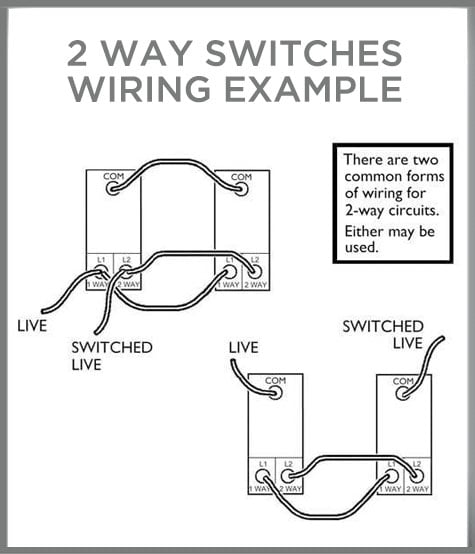 regal pumice
cloud swallow
assuming you mean the zb mini **L2** which, looking at the docs, has no neutral ...
regal pumice
cloud swallow
assuming you mean the zb mini **L2** which, looking at the docs, has no neutral ...
My model has two neutral inputs it's the zb mini2.
Load and Live are technically at the same junction in my case where I'm putting the relay.
But the live hot is coming from the upstairs switch to my understanding down to the main junction.
All hots have respective neutrals in my case same with grounding wires and red travel wires for the case of the 3 way.
Pictures and diagrams
Currently I have it wired in a way where the relay can control the light
But now I wanna implement 3 way, main issue is the live hot initially used as another traveler to complete the 3 way circuit is now directly going to the relay... so I only have one red traveler wire
One idea was to use the white neutral wire coming from the switch upstairs, it's direct from box a to box b and isn't necessary if I just use the low voltage the relay provides on s1 and s2 terminals
So one mobile drawing demonstrates the white traveler branching off to either s1 or s2
Both completing the parallel circuit between the switches and the relay
And another black wire coming from the local switch to either s1 or s2.. finally the red is still a traveler
The load is on mine relay
I would have to take the 120v ac line upstairs and terminate it to the black common heading from that switch downstairs
And the white neutral down stairs would need a 3 way bridge to break out to the relay s1 or s2 terminals and the switch.
Least that's my idea, I would really appreciate your suggestions and experience
cloud swallow
regal pumice
My model has two neutral inputs it's the zb mini2.
Load and Live are technicall...
ah, that appears to be the Mini R2, not mini L2. doesn't look like there is any such thing as a "mini2" as such, just L and R variants.
cloud swallow
regal pumice
My model has two neutral inputs it's the zb mini2.
Load and Live are technicall...
i'm a little unclear of your terminology: by "live", do you mean "supply" (ie from the circuit breaker) and "live hot" is "switched live"? that would make some sense if your conventional wiring was like case 2, where supply connects to the upstairs switch's common, and you have two switched lives (L1 and L2) to downstairs switch, where the load wire is.
regal pumice
The "supply" is upstairs on the living room circuit and "live hot" is I'm assuming "switched live"
Going downstairs via the two travelers
Common black and red travel so probably l1 and l2
The load wire is located downstairs
So case 2 covers me
There's flexibility here I guess
I could grab supply from the downstairs circuit
It's literally in that junction for the other lights
And just use the black common coming from upstairs to act as a passive traveler alongside the red (I'm assuming the relay provides a small amount of current on the s1 and s2 terminals)
cloud swallow
regal pumice
Currently I have it wired in a way where the relay can control the light
relay only, but not the physical switches?
regal pumice
But that would be wasteful having to cap off the live supply up there
regal pumice
cloud swallow
relay only, but not the physical switches?
Yep
cloud swallow
(hrm. US wire colour conventions are .. different from europe!)
regal pumice
I'm Canadian too the US is a little different as well
The neutral wire is technically free game
It's direct box a to b
And has a protective cover so unlike ground it won't be ugly
I think it's there to keep to code but since we're passing low voltage through switched circuit it's got no use really
But that was my theory, perhaps you've got a better or more optimized suggestion
However I guess I'm forgetting the neutral up stairs for the supply
It's currently tied to the neutral for 3 way switch romex
So I'm not sure how to work with that
cloud swallow
regal pumice
I'm Canadian too the US is a little different as well
The neutral wire is tech...
so just to be certain, your conventional code is white/grey is neutral, and black is live (phase 1)... do you use the same bi-phase scheme as in the US (ie where each dwelling gets 220V and transformer centre-tap, giving you two 180°/antiphase lives wrt the neutral centre tap)?
regal pumice
Yes to the first one, not sure on the second.. I would assume we get 220v at the panel and 120v at the wall but may be mistaken
cloud swallow
regal pumice
The "supply" is upstairs on the living room circuit and "live hot" is I'm assumi...
seems i'm on go-slow mode today, so you'll need to be patient... only 6 hrs sleep yesterday and 5 hrs this morning, got up 3 hours ago and am still not feeling myself! sleep patterns messed up this past week because of work stuff (although at least we got some good results yesterday)
so:
The "supply" is upstairs on the living room circuit
then the following is your upstairs switch box, showing incoming supply and traveller between switch boxes; i see two whites and two blacks but no earths. your traveller cable seems to have red, black and white. one black must be the supply live from breaker and the other from the traveller. one white is supply neutral and the other from the traveller (twist-on connector). then there's a red from the traveller.
https://media.discordapp.net/attachments/397426163649216512/1196711982645133353/20240115_162540.jpg

is that right?
cloud swallow
regal pumice
I think it's there to keep to code but since we're passing low voltage through s...
it's important to stay code-compliant because somebody else won't know that the other conductors are carrying low voltage. and if i understood correctly in my last post, then you have a mixture of "high" and low voltages in that upstairs switch box. lots of potential for things to go bad, if you pardon the pun.
brb
regal pumice
cloud swallow
seems i'm on go-slow mode today, so you'll need to be patient... only 6 hrs sle...
Yes, and the grounds are in the back of the junction, just not visible
regal pumice
cloud swallow
seems i'm on go-slow mode today, so you'll need to be patient... only 6 hrs sle...
Also no worries I'm on the same sleep schedule kuffle too, ahaha
I really appreciate the help
regal pumice
cloud swallow
it's important to stay code-compliant because somebody else won't know that the ...
The upstairs switch box is just 120v going to the switch then to the downstairs switch for the load.
The low voltage I was referring too was the amount of current from the s1 and s2 terminals on the relay
 hearty patio
👋 Howdy, anyone know any quick fixes (or the reason) for when on an Rpi4 fresh installation, the Sonoff Zigbee 3.0 USB Plus-E shows as an unknown coordinator when installed with ZHA? My SkyConnect shows the proper manufacturer and product. My Sonoff always say Unknown by Unknown for my coordinator. Thanks!
cloud swallow
@regal pumice so, downstairs, we have the sonoff switching the lighting load. the physical switches presently do nothing. upstairs we have supply neutral and live via the switches. so the switches have mains voltage, but no load (because the load is now being supplied by the sonoff mini-r2).
and you want to wire in the two switches, upstairs and downstairs, into the sonoff mini-r2, so that the lighting load can be controlled by either physical switch or the sonoff.
is that about right?
regal pumice
cloud swallow
<@282928940442451968> so, downstairs, we have the sonoff switching the lighting ...
Yep
Except only the switch upstairs has mains voltage
It's currently powering the sonoff downstairs
cloud swallow
via the traveller
which means that changing the upstairs switch would cut power to the sonoff mini-r2
?
regal pumice
cloud swallow
which means that changing the upstairs switch would cut power to the sonoff mini...
Yep
regal pumice
cloud swallow
via the traveller
Via the black common, and I would assume via the red if the switches are toggled
In a traditional wiring
Now the power is just being passed straight to the sonoff from the upstairs switch
rapid dawnBOT
@cloud swallow I converted your message into a file since it's above 15 lines :+1:
cloud swallow
i wish it wouldn't do that
cloud swallow
YMMV and, given how i feel rn, you absolutely shouldn't trust what i say!
good luck! if you need any help, i will try (may be delayed, today's going to be weird)
regal pumice
Understandable, I'm probably gonna catch some sleep for a bit and give it a try first thing here.
What you explained made sense to me, only confusion was the white common you refer too, is that currently my white neutral heading from my traveler conductor?
Am I still gonna supply power from the upstairs circuit to my switches or do I just cap that off?
cloud swallow
regal pumice
Understandable, I'm probably gonna catch some sleep for a bit and give it a try ...
yes, the white of the traveller, which i suggested be used for the upstairs switch's common terminal, is the white that you're presently using to conduct neutral from upstairs to downstairs.
cloud swallow
regal pumice
Am I still gonna supply power from the upstairs circuit to my switches or do I j...
in conventional 2-way switching, the load current is carried by one or two of the traveller conductors. here, the two physical switches are not carrying load current and, rather, are completely independent from the lighting and load current switching.
you need your mains supply at the downstairs switch box but you don't have enough conductors in your traveller to present all three terminals of the upstairs switch to the terminals of the downstairs switch and also (independently) carry the upstairs supply live+neutral to the sonoff mini-R2 downstairs.
so i think you're going to have to cap off the upstairs supply circuit and, rather, get the sonoff's supply from a downstairs circuit.
regal pumice
Sounds like a plan, I'll give it a shot and see how it goes in a few hours or early this afternoon. I'll let you know how it goes 😊👍
 sour plover
After about 18 months my Sonoff Zigbee USB dongle (P) doesn’t always start up when the VM running HA restarts. Ejecting, reinserting the dongle and restarting Zigbee2MQTT fixes the problem but I’m not popular in my house when the heating doesn’t start in the morning. I want to try replacing the dongle. If I get the new version (E) will I have to repair all devices? Thanks
sour plover
Thanks! I’ll get the old version while they are still available.
sour shadow
Well, don't buy Sonoff
 mint quail
I had usb dongle CC2531 but now want to plug ZigStar. Is it possible to have both as coordinators in HomeAssistant?
sour shadow
sour plover
Thanks! I’ll get the old version while they are still available.
Do buy something CC2652p7 based to replace your Sonoff
sour shadow
mint quail
I had usb dongle CC2531 but now want to plug ZigStar. Is it possible to have bot...
Not with ZHA, no. You could run Zigbee2MQTT for the second coordinator
Or... just migrate to the new one and never look back
mint quail
sour shadow
Or... just migrate to the new one and never look back
thanks!
from the performance / reliability prospective which one is better: ZHA or Zigbee2MQTT ?
sour shadow
Makes no difference
Performance and reliability are 99.999% down to your devices and mesh
mint quail
and from features prospective too? will Zigbee2MQTT provide the same features set?
sour shadow
Largely yes
They're both slightly different, providing slightly different things
Some people like having it all in HA, some don't
mint quail
then I guess makes sense to configure both and compare... thanks again!
sour plover
sour shadow
Well, don't buy Sonoff
Which one do you recommend?
sour shadow
Do buy something CC2652p7 based to replace your Sonoff
Last I checked there's only Tube and ZigStar selling those
sour plover
I’ll look at those.
river hatch
Is there a way to migrate radio settings from zha to z2m?
modest iris
river hatch
Is there a way to migrate radio settings from zha to z2m?
Sadly all needs re-pairing anyway
 frigid sky
hello. I'm in a bit of a crisis since I just updated my HA to 2024.1.3. It seems that zha isn't loading at all and I'm having trouble figuring out why
The only error I get in my logs is Error occurred loading flow for integration zha: No module named 'zhaquirks.quirk_ids'
austere patio
frigid sky
hello. I'm in a bit of a crisis since I just updated my HA to 2024.1.3. It seems...
Do you have the "custom deps" addon or a /config/deps folder? If so, delete both.
frigid sky
lemme check
I just restarted and things are updating....
aaand I've lost samba access to my HA
wait, I got it. I had a deps folder but it was empty. deleted it anyway
I have custom deps but it isn't configured to start and is not currently running
gleaming path
I'm struggling setting up the Zigbe2MQTT integration with a Sonoff dongle on HAOS. Getting this error in the mosquitto log: Client <unknown> disconnected due to protocol error
frigid sky
I think it's an issue with zha but I'm not sure where to start it there isn't anything in the logs to go on
I'm turning on debug logging for bellows, zha and zigpy
2024-01-16 08:43:25.103 ERROR (MainThread) [homeassistant.setup] Setup failed for 'zha': Unable to import component: No module named 'zhaquirks.quirk_ids'```could it be an issue with pyserial?
 tender kayak
I'm trying to setup a docker environment, I have a new Sonoff dongle I want to use with Zigbee2mqtt. I already have the Mosquito broker running in a container and Home Assistant in another. HA can connect to the broker and Zigbee2mqtt gives no qualms about that either. My issue is that Zigbee2mqtt gives no error in the logs but there's no access to the WebUI
I've tried changing the port from 8080 to 8099 as well as double checking there was no issue with the startup and that it connected to the broker and grabbed my adapter
HA is not using a docker compose setup its just using the normal docker run command, the broker and Zigbee2mqtt are using compose.
frigid sky
the zha integration still says it's trying to use /dev/ttyUSB1 and system:hardware shows ttyUSB1 ttyUSB1 /dev/serial/by-id/usb-Silicon_Labs_HubZ_Smart_Home_Controller_61201F54-if01-port0
austere patio
frigid sky
```2024-01-16 08:43:24.783 INFO (MainThread) [zigpy.serial] Using pyserial-async...
You have some dependency issue. Do you have any folder in /config called zhaquirks?
frigid sky
sure do
austere patio
I would delete it then
frigid sky
I've set zha: enable_quirks: false in configuration.yaml but I will also get rid of the folder
austere patio
You very much want enable_quirks to be true. Delete the whole zha: section
frigid sky
restarting without zha: in my config
okay... now zha is loading.
I'm not saying I don't always read the update notes, but when did removing zha: from the config become the correct configuration?
I did get migrating from version 3 in the logs so that's neat, whatever it means
austere patio
frigid sky
I'm not saying I don't always read the update notes, but when did removing ```zh...
The /config/zhaquirks folder you created was conflicting with the real zhaquirks package and preventing it from loading
You could have left the config as-is and ZHA would have loaded fine after you deleted that folder but it would break all nonstandard devices, since it disables quirks
frigid sky
yeah, thanks for the help. How should I go about re-adding the quirks for my mmWave Motion sensor? I guess I should add as little as possible back to the quirks folder and keep my fingers crossed
austere patio
Oh, you intentionally created zhaquirks. Just pick a different name, that's all.
Don't use zhaquirks, since that's the name of an existing package
frigid sky
oh, so I just need a different folder name? and zha: custom_quirks_path:
i don't know how discord works. is there a thank you emoji button?
austere patio
There isn't. I'm glad things are fixed for you though. This might be a good improvement for a future ZHA release...
tender kayak
I have Zigbee2Mqtt running and the broker running and connected.
I added two zigbee devices that home assistant reported seeing but now they don't apper in HA at all but they do appear in Zigbee2Mqtt
 tired dock
Is it only me or are there problems mit ZHA since 2024 release? Every day I get errors there is a problem, try go configure zha (sorry using german version, translation maybe a bit different)
When I restart HA it's working again
 bold trench
Hi can someone recomment a smart zigbee thermostat for floor heating? I found some on Aliexpress but I'm bit confused which one i need. My floor heating is with water. Its with 230v and has 3 wires (N L and L2). Basicly it works like a swtich
tired dock
L and L2? Sure it's not 400V? Can take a picture of your existing thermostaf
bold trench
No by L2 I mean the switched phase/wire
austere patio
tired dock
Is it only me or are there problems mit ZHA since 2024 release? Every day I get ...
What problem are you having and what Zigbee coordinator are you running?
austere patio
tired dock
Sky connect
What firmware? Multi-PAN or normal Zigbee?
How are you running HA OS? With a Pi?
tired dock
austere patio
What firmware? Multi-PAN or normal Zigbee?
Multi
austere patio
What version of the multi-PAN addon are you running?
tired dock
Ha OS inside a Promox VM
tired dock
austere patio
What version of the multi-PAN addon are you running?
All addons are up to date no betas.
austere patio
So 2.4.3?
tired dock
I double checked. Yes
austere patio
What does the addon log show?
tired dock
It just started after reboot. I'll have to check tomorrow when it crashes again
hearty patio
Hi all, does anyone have any idea on why with a fresh Rpi4 installation, when using the Sonoff Zigbee 3.0 USB Plus-E with ZHA, the coordinator's manufacturer and model always say "unknown" now. I feel like it used to always have information loaded there. I tried reinstalling a couple times, setting it back up a few ways, updating firmware, but it seems like ZHA shows it as an unknown. Sometimes a second device (Silicon Labs EZSP) pops up with the proper manufacturer and model, but the coordinator always says unknown.
 raven jewel
hearty patio
Hi all, does anyone have any idea on why with a fresh Rpi4 installation, when us...
raven jewel
hearty patio
Hi all, does anyone have any idea on why with a fresh Rpi4 installation, when us...
Do you have a USB extension cable between the zigbee dongle and the Pi? If not, it could well be interference.
hearty patio
@raven jewel Hi, yes, I have tried with USB extension of 6' directly to Rpi and where it currently sits, in a powered USB hub, several feet from Rpi.
austere patio
hearty patio
Hi all, does anyone have any idea on why with a fresh Rpi4 installation, when us...
Download a ZHA network backup and look at the node_info section. What shows up in there?
hearty patio
@austere patio Thanks, checking now..
@austere patio "node_info": {
"nwk": "0000",
"ieee": "4c:5b:b3:ff:fe:83:b0:00",
"logical_type": "coordinator",
"model": null,
"manufacturer": null,
"version": "7.3.1.0 build 176"
austere patio
Sonoff never programmed either into their stick
hearty patio
That version is correct, as I updated the firmware to test.
@austere patio That's funny, I didn't know that was a thing that occured.
austere patio
It can probably be fixed in a future firmware update (community-maintained, because Sonoff does not...). I wouldn't worry about it, before ZHA always showed the same info for all sticks. Now it shows what the stick reports.
hearty patio
Ah thanks. I was a SmartThings user for ages, and I only just went to using this stick. As I watched things online, I saw after install, it showed within ZHA with the information.
When I saw mine without it, I thought something else might have been going on.
austere patio
Nope, just Sonoff being Sonoff 😄
hearty patio
austere patio
Nope, just Sonoff being Sonoff 😄
Lmao. Good to know its common. Nothing we can do to update it right?
austere patio
I'm not 100% sure. I think it's possible to update the manufacturing tokens from within firmware but it's not something anyone has spent time looking into
hearty patio
Side question if i may, when I was testing reinstalling, sometimes, two devices would appear. The ZHA Coordinator with he unknowns, and the Silicon Labs EZSP with the right manufacturer and model. Do you know why sometimes only the coordinator would appear, and sometimes both devices appear?
hearty patio
austere patio
I'm not 100% sure. I think it's possible to update the manufacturing tokens from...
Ah ok, makes sense.
austere patio
Hmm, you should never have two. Did you re-install ZHA after having used it with a previous coordinator? It could be that the old /config/zigbee.db database contained an entry for it.
hearty patio
Ah ok. Yeah, I think when configuring ZHA from the dongle, it did one instance, but when I installed ZHA from the integration, it sometimes made two.
Right now, I have Silicon Labs EZSP right above the Zigbee Coordinator line, lol.
austere patio
Ah. I think that's the old device manufacturer, still in use by the visualization page. It'll eventually be updated to show what the coordinator device page displays.
hearty patio
Ok Cool, thanks again for the responses. It was driving me nuts, considering when I plugged in the SkyConnect, all names loaded correctly.
austere patio
Yep. The SkyConnect has the manufacturer and model info correctly programmed in
hearty patio
Yeah, it seems to just work, every single time.
 dim heath
I want to use the "SONOFF SNZB-02 ZigBee Mini" temperature/humidity sensor in my flat. What does a ZigBee device need in order to get the data out? Where does it send its data to? Do I need for ZigBee some kind of ZigBee server? Can I make my PC a ZigBee server? Can I use my phone for that? Maybe someone can point me to some intro site for connecting a ZigBee device to a PC/phone.
main ruin
You need a device acting as coordinator
Usually those are either in the shape of some usb stick or as a dedicated hub
dim heath
OK, something like the "SONOFF Zigbee 3.0 USB Dongle Plus - Zigbee Gateway TI CC2652P + CP2102N Zigbee USB Stick"? Are they working with a communication technique that goes through reinforced concrete or is it something like WiFi that stops at the first wall and needs lots of repeaters throughout the flat?
main ruin
It's 2.4ghz based
dim heath
2.4ghz sounds like wifi to me 😄
main ruin
Grid powered devices that are part of the mesh can act as router for further devices
Unless you try to span massive concrete filled gaps, you get fairly decent range of it
Avoiding frequency bands used by WiFi aps is far more important
dim heath
ok, hmm, i have massive problems to get wifi through my reinforced concrete walls, so if this is also using 2.4ghz i'm a bit scared, but there seems to be no way around it
 drowsy dagger
wide grotto
so my last try is replacing the batteries tomorrow, im all out of them for now. ...
drowsy dagger
wide grotto
so my last try is replacing the batteries tomorrow, im all out of them for now. ...
Hey, what voltage do you have on the batteries? I'm having an issue that it is constantly gives false readings. Read that some people fixed it changing from 1.5 to 1.2v. Maybe something worth trying?
astral seal
dim heath
ok, hmm, i have massive problems to get wifi through my reinforced concrete wall...
You might have to do some strategic positioning of mains powered devices that act as Zigbee "routers" to get the signal to go where you need it to, but it's probably doable.
main ruin
There are some tuya ones, but they aren't really accurate and already in a price range that isn't cheap
 vale nova
I saw some for 30 euros
But they aren't really accurate as you said
I consider <50 cheap
 astral terrace
Duck, https://shop.ecowitt.com/products/wh45?variant=41418886185122 with a ecowitt hub.... but its not cheap, but if you want to run a whole bunch of other sensors you'd have the option
GW1100
Duck it connects via the ecowitt integration
the hub itself can broadcast to 3rd parties
astral terrace
And its all local
I have it for monitoring aquariums and outside weather temp and soil mositure.... and rain, its got a lot of options
 soft mirage
Is there anyway to read a device ZB specifikation and know if the device is supported by ZHA?
And if so, Is there anyone who can look at this EV Charger that should be controlled by ZB (or BLE)🙏
soft mirage
soft mirage
Is there anyway to read a device ZB specifikation and know if the device is supp...
Longer version 😉
I am in the market for a new EV Charger, that would work and function without a cloud connection.
There is no problem if it could be controlled by cloud, but it must work locally.
I stumbled upon this charger from Norway, that will start to delvier out a charger called Alina S next week.
But information about HOW it should be used is very spare...
I got in contact with support, and got ZB tech info and it really seems lika a smart device - BUT how do I know it will work in my environment?
It is way to expencive to have electrians here to install just to try 💸
and when I asked Alina support what smarthome system they have tested it with they doged the question 💩
Is there anyway to get the info from spec in link above?
 dark birch
Trying to understand something. about device quirks. Why is there not a global registry of manufacturer specific clusters, keyed to the manufacturer_id? That seems like it could avoid a lot of quirks..
mellow geode
Manufacturer specific cluster IDs don’t have to be to unique and they’re not. Different manufacturers sometimes use the same cluster id for a completely different cluster.
But keying them to the manufacturer id would solve that issue (although they’re also not necessarily unique, even though they should be, so it's still an issue).
However, the same manufacturers also use the same cluster ID on different devices with completely different implementations. The attributes can differ between devices.
or did I misunderstand?
dark birch
Nope. You understood. I think assuming the manu did the right thing, keeping their manu clusters unique within their manu id would work for many devices. Could avoid us needing device quirks, just addition of clusters for many devices.
for those manu that breaks this and reuses the cluser id between devices with different features, we could still have quirks to replace the clusters
mellow geode
Check out https://github.com/zigpy/zigpy/discussions/1312. This would completely change how (new) quirks work.
It would allow creating entities directly from zha-quirks. Right now, we have to define attributes in quirks and entities in ZHA itself.
assuming the manu did the right thing, keeping their manu clusters unique within their manu id would work for many devices
I'm not sure for how many manufacturers and quirks this would work. Aqara and Tuya quirks do a lot of different things and I don't think it applies to anything there.
The case where we only have to specify what attributes are available on a manufacturer specific cluster (shared amongst many devices) also seems quite rare(?)
Are there any quirks/devices you thought of where this would work?
tropic depot
keyed by manufacturer id won't work
there are prob > 20 devices from aqara using the same mfg id and same cluster w/ a completely different implementation in each device
if anything... we may have to key it by mfg + model + cluster
but then you get issues w/ potential incompatible things w/ different fw versions - see IKEA battery issues. On older fw they didn't report % remaining out of 200 per the spec so we had to double it. On current fw they do it correctly and the quirks are actually causing issues now.
tropic depot
dark birch
Trying to understand something. about device quirks. Why is there not a global r...
what are you thinking this would avoid? want to make sure I understand
tropic depot
mellow geode
Check out https://github.com/zigpy/zigpy/discussions/1312. This would completely...
I agree that quirks need to change quite a bit.. the only benefit to the current structure is that you can do literally anything... there are 0 limitations.
tropic depot
dark birch
Nope. You understood. I think assuming the manu did the right thing, keeping the...
assuming any of them did anything correct is not something I would put any $$ on 🙂
hrm i am thinking about this some more... are you thinking something like a default "quirk" that looks at the registry and just auto replaces matches? That could work for a good chunk if we have enough uniqueness in the key...
there are still other things that need to be dealt with too. On some devices we add clusters that are missing from the signature but they are actually implemented by the device. In other cases we remove non functional clusters that are in the signature but are not implemented by the device.
we should definitely have a good discussion on a path forward soon
tropic depot
tropic depot
assuming any of them did anything correct is not something I would put any $$ on...
the endpoint id could play a part too. We have some multi endpoint devices that have the same cluster on several endpoints but only one cluster on one endpoint needs to be modified. As we discuss this an important goal should be making it easier to contribute. if we have n many ways to add support for something it will confuse folks that aren't used to contributing. I think consistency is important. If we have some stuff where all you add is a custom cluster and a registry entry and others where a full quirk is needed how can we document that in such a way where someone new would understand it? All of the issues can be solved. Just food for thought.
tired dock
austere patio
What does the addon log show?
now I got the error again: ```s6-rc: info: service legacy-services successfully started
Listening on port 9999 for connection...
Accepting connection.
Accepted connection 8.
otbr-agent[301]: 00:02:41.062 [N] MeshForwarder-: Failed to send IPv6 UDP msg, len:96, chksum:f75b, ecn:no, to:d693a8deabb1bca5, sec:no, error:NoAck, prio:net, radio:15.4
otbr-agent[301]: 00:02:41.062 [N] MeshForwarder-: src:[fe80:0:0:0:18a7:f771:47:7d4]:19788
otbr-agent[301]: 00:02:41.063 [N] MeshForwarder-: dst:[fe80:0:0:0:d493:a8de:abb1:bca5]:19788
otbr-agent[301]: 00:09:07.056 [N] MeshForwarder-: Failed to send IPv6 UDP msg, len:96, chksum:01ac, ecn:no, to:d693a8deabb1bca5, sec:no, error:NoAck, prio:net, radio:15.4
otbr-agent[301]: 00:09:07.056 [N] MeshForwarder-: src:[fe80:0:0:0:18a7:f771:47:7d4]:19788
otbr-agent[301]: 00:09:07.056 [N] MeshForwarder-: dst:[fe80:0:0:0:d493:a8de:abb1:bca5]:19788
otbr-agent[301]: 00:09:08.071 [N] MeshForwarder-: Failed to send IPv6 UDP msg, len:96, chksum:75e2, ecn:no, to:d693a8deabb1bca5, sec:no, error:NoAck, prio:net, radio:15.4
otbr-agent[301]: 00:09:08.071 [N] MeshForwarder-: src:[fe80:0:0:0:18a7:f771:47:7d4]:19788
otbr-agent[301]: 00:09:08.071 [N] MeshForwarder-: dst:[fe80:0:0:0:d493:a8de:abb1:bca5]:19788
otbr-agent[301]: 00:09:09.057 [N] MeshForwarder-: Failed to send IPv6 UDP msg, len:96, chksum:0d68, ecn:no, to:d693a8deabb1bca5, sec:no, error:NoAck, prio:net, radio:15.4
otbr-agent[301]: 00:09:09.057 [N] MeshForwarder-: src:[fe80:0:0:0:18a7:f771:47:7d4]:19788
otbr-agent[301]: 01:06:51.582 [W] P-RadioSpinel-: Handle transmit done failed: Parse
otbr-agent: ../../third_party/openthread/repo/src/core/mac/sub_mac.cpp:624: void ot::Mac::SubMac::HandleTransmitDone(ot::Mac::TxFrame&, ot::Mac::RxFrame*, ot::Error): Assertion `false' failed.
otbr-agent[301]: 01:06:51.582 [C] Platform------: ------------------ BEGINNING OF CRASH -------------
otbr-agent[301]: 01:06:51.583 [C] Platform------: *** FATAL ERROR: Caught signal: 6 (Aborted)
otbr-agent[301]: 01:06:51.590 [C] Platform------: # 0: /usr/sbin/otbr-agent(+0x20088c) [0x561d25e4a88c]
otbr-agent[301]: 01:06:51.590 [C] Platform------: # 1: /usr/sbin/otbr-agent(+0x2009b3) [0x561d25e4a9b3]
otbr-agent[301]: 01:06:51.590 [C] Platform------: # 2: /lib/x86_64-linux-gnu/libpthread.so.0(+0x13140) [0x7fae067ad140]
otbr-agent[301]: 01:06:51.590 [C] Platform------: # 3: /lib/x86_64-linux-gnu/libc.so.6 gsignal+0x141 [0x6415ce1]
otbr-agent[301]: 01:06:51.590 [C] Platform------: # 4: /lib/x86_64-linux-gnu/libc.so.6 abort+0x123 [0x63ff537]
otbr-agent[301]: 01:06:51.590 [C] Platform------: # 5: /lib/x86_64-linux-gnu/libc.so.6(+0x2240f) [0x7fae063ff40f]
otbr-agent[301]: 01:06:51.590 [C] Platform------: # 6: /lib/x86_64-linux-gnu/libc.so.6(+0x31662) [0x7fae0640e662]
otbr-agent[301]: 01:06:51.590 [C] Platform------: # 7: /usr/sbin/otbr-agent ot::Mac::SubMac::HandleTransmitDone(ot::Mac::TxFrame&, ot::Mac::RxFrame*, otError)+0xa8 [0x25eac3c0]
otbr-agent[301]: 01:06:51.590 [C] Platform------: # 8: /usr/sbin/otbr-agent ot::Radio::Callbacks::HandleTransmitDone(ot::Mac::TxFrame&, ot::Mac::RxFrame*, otError)+0x39 [0x25f79835]
otbr-agent[301]: 01:06:51.590 [C] Platform------: # 9: /usr/sbin/otbr-agent otPlatRadioTxDone+0x95 [0x25f794ff]
otbr-agent[301]: 01:06:51.590 [C] Platform------: #10: /usr/sbin/otbr-agent ot::Spinel::RadioSpinel::TransmitDone(otRadioFrame*, otRadioFrame*, otError)+0x55 [0x25f470b3]
otbr-agent[301]: 01:06:51.590 [C] Platform------: #11: /usr/sbin/otbr-agent ot::Spinel::RadioSpinel::ProcessRadioStateMachine()+0x7b [0x25f47131]
otbr-agent[301]: 01:06:51.590 [C] Platform------: #12: /usr/sbin/otbr-agent ot::Spinel::RadioSpinel::Process(void const*)+0xac [0x25f47234]
otbr-agent[301]: 01:06:51.590 [C] Platform------: #13: /usr/sbin/otbr-agent platformRadioProcess+0x27 [0x25e4547e]
otbr-agent[301]: 01:06:51.590 [C] Platform------: #14: /usr/sbin/otbr-agent otSysMainloopProcess+0x3a [0x25e478d1]
otbr-agent[301]: 01:06:51.590 [C] Platform------: #15: /usr/sbin/otbr-agent otbr::Ncp::ControllerOpenThread::Process(otSysMainloopContext const&)+0x37 [0x25f57f37]
otbr-agent[301]: 01:06:51.591 [C] Platform------: #16: /usr/sbin/otbr-agent otbr::MainloopManager::Process(otSysMainloopContext const&)+0x83 [0x25f5c5d7]
otbr-agent[301]: 01:06:51.591 [C] Platform------: #17: /usr/sbin/otbr-agent otbr::Application::Run()+0x1e0 [0x25dfc564]
otbr-agent[301]: 01:06:51.591 [C] Platform------: #18: /usr/sbin/otbr-agent(+0x1b3b5d) [0x561d25dfdb5d]
otbr-agent[301]: 01:06:51.591 [C] Platform------: #19: /usr/sbin/otbr-agent main+0x8f [0x25dfdd4a]
otbr-agent[301]: 01:06:51.591 [C] Platform------: #20: /lib/x86_64-linux-gnu/libc.so.6 __libc_start_main+0xea [0x6400d0a]
otbr-agent[301]: 01:06:51.591 [C] Platform------: #21: /usr/sbin/otbr-agent _start+0x2a [0x25dfbf7a]
otbr-agent[301]: 01:06:51.591 [C] Platform------: ------------------ END OF CRASH ------------------
[06:19:48] INFO: otbr-agent ended with exit code 256 (signal 6)...
OTBR_FORWARD_INGRESS  all opt    in * out wpan0  ::/0  -> ::/0
Chain OTBR_FORWARD_INGRESS (0 references)
@regal pumice I converted your message into a file since it's above 15 lines :+1:
regal pumice
So neutrals tied together. Black for mystery Romex is on the common terminal.
Red and black travelers heading back to the main downstairs switch (one we were working on last night) along with the neutral.
In the main switch box I don't see a load... which makes me think that the switch across the room houses the load, this would make sense since it's technically pyshcially closer to the lights.
In my main switch box however there's an additional white neutral and black common wire..
Now initially I thought that was the lights were trying to toggle now (there's two separate fixtures)
But it was never tied directly into that switch, if I recall correctly it directly grabing 120v power from the downstairs circuit via a wire nut and a lead that would act as a supply to the two switches in that main box..
This wire ain't live... so something was drawing power... any idea how I can trace the purpose of the wire? I'm not seeing anything obvious.
Since it's possible that the two light fixtures in the back (load) is handled by the switch back there, should I place the relay there and then follow the same concept we did last night but in reverse, it's definitely getting it's supply from the main switch junction box.
That would actually work nicely one less relay to cram 🤣
Finally my last question is copper grounding.
I've been told the modern code is to use a single grounding screw and tie all the grounds together.
From experience... this really hard to adapt since mostly the grounds in situation are cut back far enough that they only can access individual grounding screws... logically I don't see why this change is needed..
In this particular junction, to my surprise, it has all the grounds wayy too long acording to cec and they sit in the bottom of the three switch downstairs Junction.
Should I just cut these back for space.. like I'm not gonna have enough room if I follow that rule and have them all tied to a bridge and then a single grounding point.
 solar sluice
tropic depot
the endpoint id could play a part too. We have some multi endpoint devices that ...
solar sluice
tropic depot
the endpoint id could play a part too. We have some multi endpoint devices that ...
Have 'n' as small as possible to do the job
make n quirks with comments that could be referenced from the front page as examples
...
PROFIT! 😀
I'd say that would be enough for the majority of contributors as a starting point
regal pumice
@cloud swallow
But their currently too long and in the way, so personally I see the best option is to cut them back and leave them as is tied down individually to grounding posts.
What's your thoughts on that?
Thanks again I really appreciated the help last night, I needed to be able to talk through with someone.
regal pumice
rapid dawn
<@282928940442451968> I converted your message into a file since it's above 15 l...
Really wish they wouldn't do this, ahaha
cloud swallow
sour shadow
Well, don't buy Sonoff
what's sonoff's historic record like, then? i gathered that the sonoff cc2652P-based coördinator was one of the recommended devices for z2m?
cloud swallow
sour plover
After about 18 months my Sonoff Zigbee USB dongle (P) doesn’t always start up wh...
completely wild-arsed guess here, but USB attachment from host to guest OS can generally be a bit unreliable with various race conditions. is it possible that something has changed with (likely) the host OS, and it's no longer reliably enumerating the sonoff and attaching it to the VM? or else something in the host OS is grabbing the lock on the sonoff tty before the VM? might be worth looking at the host OS logs (especially dmesg) to see if that or some other problem is reported.
note that Z2M support for the sonoff "zigbee 3.0 USB dongle plus V2" aka ZBDongle-E is experimental. probably best avoided.
cloud swallow
sour shadow
Do buy something CC2652p***7*** based to replace your Sonoff
from what i've read, koen's firmware for the P7 is not entirely stable yet (memory management problems, suspected heap overflows and so on). it requires a newer SDK from TI which has caused him a lot of headaches, and even TI have not yet been able to identify what difference between SDK versions that might account for the trouble. koen suspects that the problem is rooted in a dependency library.
https://e2e.ti.com/support/wireless-connectivity/zigbee-thread-group/zigbee-and-thread/f/zigbee-thread-forum/1288546/simplelink-cc13x2-26x2-sdk-firmware-not-stable-since-sdk-6-20-00-29
https://github.com/Koenkk/Z-Stack-firmware/discussions/470
sour shadow
cloud swallow
what's sonoff's historic record like, then? i gathered that the sonoff cc2652P-...
Bad, pretty damn bad
sour shadow
cloud swallow
from what i've read, koen's firmware for the P7 is not entirely stable yet (memo...
Just search the history of this channel and the Z2M Discord for all the problems with the end devices, their sticks (the E is possibly the only one that doesn't have major problems), and their routers being really bad routers
cloud swallow
rapid dawn
<@282928940442451968> I converted your message into a file since it's above 15 l...
@regal pumice well done, glad it worked out!
regal pumice
cloud swallow
<@282928940442451968> well done, glad it worked out!
In the same downstairs Junction I'm trying to setup an additional 3 way switch with another relay
But it's in reverse this time
The switch across the room has the load 2 conductors and the traveler 3 conductors
Supply is drawn from the downstairs Junction we wprked on last time, via the common l1 from the traveler wire
So I think the relay has to be at the switch across the room since that's where my load is
cloud swallow
regal pumice
So neutrals tied together. Black for mystery Romex is on the common terminal.
R...
any idea how I can trace the purpose of the wire? I'm not seeing anything obvious.
a wire tracer such as this might help. these are cheap and cheerful, so ymmv, but something like it will probably do: https://www.amazon.co.uk/Extech-TG20-Wire-Tracer-Generator/dp/B00APD16D2/
regal pumice
cloud swallow
> any idea how I can trace the purpose of the wire? I'm not seeing anything obvi...
Interesting, that's definitely something I gotta figure out, that additional common and neutral have nothing to do with the lights, it was just pulling 120v before the switches
dark birch
tropic depot
the endpoint id could play a part too. We have some multi endpoint devices that ...
I think making sure the standard way is the easy way to start with is best. The assumed way is a manufacturer have identifier and a cluster id on a manufacturer is unique (it may have multiple features on different attributes).
If so we can have a global registry of ManufacturerClusters that get added to devices if they have that cluster. Say sonoff, in my case. I have no need for the device quirk. And the cluster does have expose a lot of extra attributes, but some for temp sensors some for other stuff, but i've seen no overlap in attributes. I'm quite sure there are others like this too.
When it comes to "fixes" for standard clusters, that might be a different story. However, the way we handle replacements are rather messy and verbose. We just want to switch a single cluster to a new definition, not replace the whole signature.
regal pumice
I'm not sure what it's purpose is.. maybe an outlet?
Atm I was focused on the second 3way configuration
regal pumice
regal pumice
So I think the relay has to be at the switch across the room since that's where ...
Issue here is that I need another conductor for the common
I only have 3 to work with plus ground
And I need to supply power from the downstairs Junction I was messing with Last night
Hoping you have a crafty idea 🤭