#frontend-archived
1 messages · Page 219 of 1
 fiery ledge
no, choosing RAW editor brings up the raw editor.... you can paste/edit yaml there, but you're still in UI mode.
 opal crown
I'm trying to just get the ac1 state (whether it is turned on cooling or dry or heat) and not the other two entities that I crossed out

Any idea how I can do this? I tried climate.garageac1.state as well as climate.garageac1.hvac_modes and they both gave me errors.
Also, is History Graph Card what I should be using? Or is there a better alternative?
 rich dirge
I found the answer I was looking for. Even though through the GUI you can edit the "Raw Configuration", you still do not have all the YAML capabilities. If you set up YAML for the default dashboard https://www.home-assistant.io/dashboards/dashboards/, then the !include tag works great. Doing this, you lose the capability of the GUI card creation and have to do everything in your .yaml text files.
fiery ledge
Yep, you can set the edit control type per dashboard.
Did your swipe card work out now.
rich dirge
fiery ledge
Yep, you can set the edit control type per dashboard.
The swipe card did work out. I have my floor plan set up where you swipe left or right to get to the different floors.
I am now trying to figure out how to “force” a card to change with the window height. I am messing around with the panel card, and when I change the size of the window, it shrinks with the width of the window. Leaving a scroll bar to scroll the panel up and down. I would like this to be reversed. I would like the card to change size with the height of the window, and scroll left to right. Is that possible?

 glacial ledge
Is there a frontend card that can have templated text that is clickable? I have an input_select that has a few options, I want to have a card that lists the options in the input_select and when one of the options is clicked on it selects it. Is such an idea possible?
 cloud belfry
Hi Guys
Using an input select entity with four options is it possible to have four different cards displayed, a different one for each entity option?
If so where do I start looking?
fiery ledge
rich dirge
I am now trying to figure out how to “force” a card to change with the window he...
you might want to have a look at card_mod and do things like:```
- type: custom:fold-entity-row
card_mod:
style: |
#measure {
max-height: 400px;
overflow-x: hidden;
overflow-y: scroll;
}
if its a matter of size adjusting to the main window size, that might be something else though. Maybe custom layout card offers some functionality in that regard,
fiery ledge
cloud belfry
Hi Guys
Using an input select entity with four options is it possible to have fo...
custom: state-switch
fiery ledge
glacial ledge
Is there a frontend card that can have templated text that is clickable? I have ...
you mean like this?

 mighty kraken
Hi Guys, I currently have 2 sensors that are populated from node red, lat and long. How would I go about having these plotted along a map?
 old relic
Using card-mod and am curious if its possible to target elements within a nested card vs only applying styles to the ha-card element itself?

could :deep or something else be used here to target the element with class .header which is within the nested card in the newly injected ha-card ?
fiery ledge
mighty kraken
Hi Guys, I currently have 2 sensors that are populated from node red, lat and lo...
2 sensors for separate lat and long? you could make a #templates-archived sensor, and plot that on the map
mighty kraken
fiery ledge
2 sensors for separate lat and long? you could make a <#672223497736421388> sen...
yeah 2 separate sensors, i'll take a look at the templates cheers
 rotund charm
could someone help me out here
i'm using minimalist for my frontend
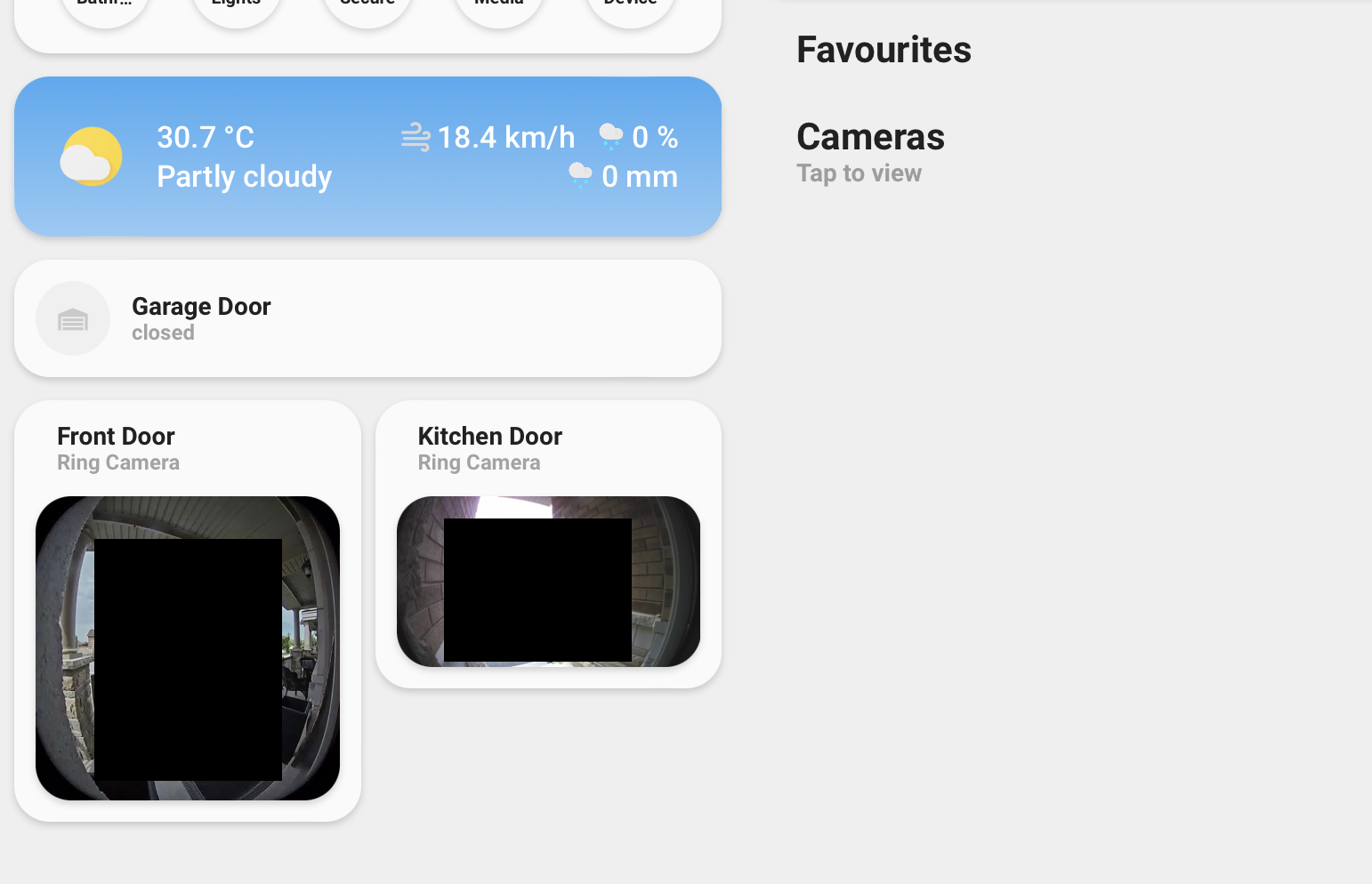
and this is what my tablet is displaying
it works fine on small resolutions like mobile, but the cameras need to appear under cameras and the garage door under favourites
glacial ledge
fiery ledge
you mean like this?
But that when I press it something happens. Like selecting that option without going through the input select.
fiery ledge
Not sure I follow … you@want to select, but not use an input_select?
You could use a template select which has
glacial ledge
I want to have a list like this in my frontend:
Who is not home now:
  Joseph
  Anna
  Marc
  Betty
  Sam
When I click one of the names it triggers an automation or a script etc..
 tranquil edge
How would I go about aligning content vertically, using view_layout in the custom:grid_layout cards provided by @polar kelp 's lovelace-layout-card?
It seems from the docs that all grid- properties are supported for the grid items - can I use one of those?
rich dirge
old relic
Using card-mod and am curious if its possible to target elements within a nested...
I just went down this rabbit hole with creating a left/right scrollable interface that has the cards auto size to the height of the window. You can work through the multiple elements starting at the ha-card. Use a web browser to see where the element is in respects to card-mod, then work through the flow from there. If you look at the image, I am changing the color of the entity words to blue. I did this by working at the level that I have circled. The code looks like the next image. I followed the path hui-generic-entity-row -> $ (used for #shadow-root) -> div
What is really cool with card-mod, you can go even higher in the tree. If you look at the first image again, there is another card-mod a few lines below the other one. If we start at this one instead... our path is div -> div -> hui-toggle-entity-row -> $ -> hui-generic-entity-row -> $ - > div which does the same thing! well almost, since there are two of the same type of elements, it applies it to both of them. applying this, you can go as far down the rabbit hole as you want!


 old relic
tranquil edge
It seems from the docs that all grid- properties are supported for the grid item...
old relic
tranquil edge
It seems from the docs that all grid- properties are supported for the grid item...
Yah, just figured it out by doing this:

This was just a stupid test, but it worked fine. With this control I think I can basically get the dashboard to look anyway I want. It's probably a bit risky customizing this much in terms of breaking changes with class names etc, but for me it's worth it
 hot stag
is there a way to get info from statistics into any card other than the statistics card? I'd like to display min/max/mean in a glance card or something similar.
tranquil edge
Afraid I have to ping the expert @polar kelp
So I'm stuck on attempting to vertically align content (see screenshot) within a grid item (using lovelace-layout-card's custom:grid-layout)
I can achieve this either by applying
#root { justify-content: flex-end }
or
hui-vertical-stack-card { margin-top: auto }
But it seems I cannot use use lovelace-card-mod to that end? The two approaches are:
styling a ha-card (there is none in my example)
or
use custom:mod_card to render a <mod-card> parent to the <ha-card>, which means I would have to apply my to the <mod-card> (and that's not possible?)

 sacred rampart
Did home assistant have some changes with markdown card?
This used to work it aint working now

 frosty flower
i know its possible to use browsermod to change the moreinfo card, but is it possible to use browsermod to just change the graph and keep the rest of the more info card as is
 analog island
not sure if this is the right place to ask. but i am running HA in a docker container, and am looking for documentation on how to add custom cards for the dashboard. i made a config/www folder and placed the JS inside of it, then try to use the examples and it says No card type found
 rich lotus
hey peeps.
Whats the best way of disabling the overview/maps/energy pages to general users WITHOUT going to their phones and editing in the app itself?
I have 15 users in my brewery using HA and it seems to be a daily thing with curious fingers getting access to areas that are irrelevant to the operation AND areas that I dont want them to have access to.
Worst case I can handle is being able to disable the Overview page to users
cloud belfry
fiery ledge
custom: state-switch
Thanks - that should do the trick if I can keep track of the yaml 😅
fiery ledge
glacial ledge
I want to have a list like this in my frontend:
```text
Who is not home now:
J...
That won’t work I think eg as Mardown. You could however create a vertical stack with custom button-card and have those look and do what you want
 blazing wren
rich lotus
hey peeps.
Whats the best way of disabling the overview/maps/energy pages to gen...
blazing wren
rich lotus
hey peeps.
Whats the best way of disabling the overview/maps/energy pages to gen...
Why are you giving people access to HA if they shouldn't see this?
You can disable individual dashboard pages for users though.
rich lotus
yes but theres no way of disabing overview/maps etc without actually going to ther persons device
and even then they can re-enable it
 polar kelp
There's lots of good reasons to do that. Unfortunately, there's currently no real access rights in HA. Anyone who has access has access to everything.
rich lotus
@polar kelp do i recall some time ago you did a card that had access rights?
polar kelp
Not real ones.
polar kelp
That probably wasn't one of mine.
rich lotus
- fair enuff
polar kelp
Kiosk mode or compact-custom-header or something
polar kelp
That's discontinued, unfortunately. The dev decided it was too much effort to keep up with the evolving frontend.
A bit of the functionality can be reproduced with card-mod, though https://github.com/thomasloven/lovelace-card-mod/wiki/Theme-cookbook
rich lotus
Unfortunately, not what I need..... as no access permissions 😦
Im not a programmer unfortunaely so I cant really contribute - but I do hope the devs will dedicate some time on the security layer of HA
soon
tranquil edge
tranquil edge
Afraid I have to ping the expert <@445886408000012289>
So I'm stuck on attempt...
No one to give me a hint on how to align content vertically in a grid item? Seems like such a basic thing
 coral thicket
I have a tricky issue. I have a sensor with a json list saved in attributes. I want to present this using the awesome flex-table-card. However, I want to filter the list before using it using jinja template... I've tried auto-entities, but as far as I can tell the result that yields will always be entities and not a json list/dicts... so in my case when I try to filter json it will only include the sensor, but the individual objects in the list... My idea is to dynamically get the logged in users person-object and then filter my json using distance() or closests() as the json contains long/lat data so a given user always sees the data close to his/her device. I've been looking into lovelace_gen, auto-entities, config-template-card, flex-table-card and list-card, but there is barely any info on how to filter/work with json data instead of filtering entities by attribute
 karmic tendon
A lot of text and I may not be that bright but it would be helpful to make it more tangible. From what I read you want to create a table out of the attributes of one sensor. If that is the case then I too would like to see other ideas. I did manage to do so with the markdown card for a sensor kicking back json via MQTT resulting in this as a attribute
date:
  - 06/07 08:00
  - 06/23 08:00
hours:
  - 7h00
  - 11h00
justified:
  - '1'
  - '0'
reason:
  - MALADIE SANS CERTIFICAT
  - Convenance familiale
the table then shows 3 columns (I only needed 3 of the 4)
karmic tendon
coral thicket
I have a tricky issue. I have a sensor with a json list saved in attributes. I w...
see above (forgot to reply to your message)
coral thicket
Found this on the forum... it looks like I can create "virtual" items based on a json list this way, but in the example it says type: attribute and it seems like it can't do multiple attributes.. is there a way to create an entity this way dynamically? Not sure what to search for: https://community.home-assistant.io/t/auto-entities-automatically-fill-cards-with-entities/147801/531?u=neoid

Home Assistant Community
- type: custom:auto-entities card: type: entities title: Power Saving Mode state_color: true show_header_toggle: false entities: [] filter: template: >- {% for sensor in integration_entities("mobile_app") -%} {%- if is_state_attr(sensor,"Low Power Mode",false) -%} {{ { ...
karmic tendon
I am chiming out...without example data I am lost, your info is too generic for me
coral thicket
@karmic tendon
 coral thicket
I've been using https://github.com/custom-cards/flex-table-card for json data. This is really easy to do here to, but the tricky part is that I want to filter the data before populating the card. I want to use the lon/lat info to determine what's closest to the logged in user and display all results within 30km
GitHub
Highly Flexible Lovelace Card - arbitrary contents/columns/rows, regex matched, perfect to show appdaemon created content and anything breaking out of the entity_id + attributes concept - GitHub - ...
I got the template code (https://community.home-assistant.io/t/auto-entities-automatically-fill-cards-with-entities/147801/640?u=neoid), but I have a hard time to pass this on to another card as auto-entities expects the output to be a list of entities, but in my case it's just a json array

Home Assistant Community
I have a rest sensor that pulls information on gas stations and their prices from a website and stores the whole list using json_attributes. Every item has a lot of metadata such as longitude/latitude for describing where the gas station is and it’s current price. What I want to be able to do is to present this data using the awesome flex-table...
karmic tendon
ok...getting there now 🙂
have you got something that calculates the distance? I myself have a solution fro French stationsbut the distance calc is not that simple
coral thicket
yes, it's built into HA, distance(item.latitude, item.longitude, current_person). without current_person it uses your home's info
karmic tendon
? so I learn something too
coral thicket
The stupid thing is that I rely on the user-object to get the users id in order to find the correct person-object, but the "{{user}}" object isn't supported everywhere... like markdown card doesn't
the end result should show you whatever gas station is close to you and their price
karmic tendon
so all your stations are in one sensor, not?
coral thicket
yes, it's a massive json I grap using a rest sensor
karmic tendon
I see... no immediate answer but I like the challenge,...and maybe someone else has ideas too
are you OK to share the attribute in a file or so, so I/we can play around?
I donot want to start typing
and have you tried to use the distance thing in the rest sensor when getting the json into the sensor?
I mean, you could loop through the stations
calcualte distance
and take the smallest one
coral thicket
not the problem, the only issue is that auto-entities expects the template filter to return a list of entities, something I don't have unless there's a way to fake it using json
karmic tendon
yes...is is auto-entities, not auto-attribs
karmic tendon
🤨
thinking still
does this need to be dynamic? i.e. will the 'person' move around showing ever changing table content?
because that is something I also have issue with when I collect stations as sensors
I would also prefer one large 'local' set of stations and dynamically select the closest
ugly solution is to create a set of e.g. 5 sensors that show the closest, closest -1 , closest -2
etc.
karmic tendon
other thinking... still not sure if you want dynamic not not or how often you refresh this sensor and its use in detail. If you could load the sensor and with attributes sorted by distance ... then a markdown card could get you the output.
Note, quite a while ago I too wanted to create a table from a single sensor and not found a solution other than markdown (so far)
will give brains a rest...hope someone else chimes in too
coral thicket
karmic tendon
other thinking... still not sure if you want dynamic not not or how often you re...
The plan is to make it dyanamic as long as I can get {{user.id}} to work properly. Again, markdown doesn't support that.. then I would have to hardcode the location or use some other method of filtering.. maybe an input_select
karmic tendon
understand but how to you make your set of json-data cover a wide-enough area...
coral thicket
but need a break for now, I've been at this crap for 10 hours now
 kind shellBOT
@inner stump posted a code wall, it is moved here --> https://hastebin.com/quligaruju
fiery ledge
seems my icon mods in card-mod-theme dont work anymore, and I fear the latest card_mod update caused that:```
card-mod-root-yaml: |

  paper-tab[aria-label='Presence'] ha-icon$: |
    ha-svg-icon {
      --card-mod-icon: {{states('sensor.presence_icon')}};
      color: {{states('sensor.presence_color')}};
    }``` Note the colors do still work and the icon and syntax is unchanged for several months now..
check the button, which uses the exact same sensor for icon and is correct, and color. Icon now falls back to as defined in the view

 exotic jay
Can anyone share how they render UPS details on their dashboard? Something as simple as showing battery % as well as active load. I have an APC UPS plugged up to HASS via NUT
 strange stratus
When I first started using HA, I was using autodiscovery for Tasmota devices and a number of automatic entries were created in the default Lovelace dashboard. I subsequently added additional cards using the UI editor. I recently switched to the built in Tasmota integration and now have a bunch of orphaned entries the entities for which are not in the editable YAML for the dashboard.
How do I get rid of them?
Thanks
 verbal tide
how do I get an input_number to appear as a slider in lovelace?
 dark dirge
when you create it:
 verbal tide
i'm using yaml; the number should already be a slider as I have not declared it as a box. this just makes the number appear in the frontend, and I have to click the icon to get a slider. I just want a slider on the frontend.
entity: input_number.z2_volume
i can find tons of pictures of what I want, but cannot find a configuration that allows it to happen. Ironically, this picture complaining about the number not showing would be ideal for my use:
 dark dirge
that's just an entities card:
 verbal tide
O_o I am entirely unclear why it didn't work the first few times I tried.
ok, well, I'm dumb, thanks, haha
hmm, looks like I had bad syntax, probably
exotic jay
exotic jay
Can anyone share how they render UPS details on their dashboard? Something as si...
Anyone?
fiery ledge
verbal tide
hmm, looks like I had bad syntax, probably
Yeah you were missing a -. Btw these tend to loose the number state, and you can use the slider-entity-row custom card to fix that
 broken marsh
I want a nice way of showing how much the TV is on and what Harmony activities we use. I have an entity select.harmony_hub_activities that shows timestamps of when activities are turned on or changed to. I also have a switch.harmony_hub_kodi for each activity that logs on/off. Ideas on how to display that in a graph?
 old fiber

 elder falcon
 lost coyote
Is it normal that the history tab now "groups" the items by 10?
hot stag
If this works in the developer tools template, but not in a card, is it an issue with the card or am I missing something to do with templating?
icon_color: >- {% if float(states("sensor.tangerine_temperature")) > float(states("input_number.tangerine_day_max")) %} "green" {% else %} "blue" {% endif %}
polar kelp
exotic jay
Anyone?
En entities card, hidden away in an area I never visit because it shows ONLINE 99.9999% of the time, and if it ever doesn’t I have other things on my mind. Really not sure what you’re after here…

 vapid field
Hi guys
what is the approach for icons to represent the color from a bulb?I guess some CSS. Can that be applied to a custom image?
I want this .png to represent the color of my bulb

problem is, if it's white, it doesn't react to hue-rotate
if it's from some other color, it does react, but mixing the hue-rotate with the base color of the rectangle
polar kelp
The icons are SVG, so they are not static but actually drawn live by your browser with the selected color.
vapid field
can I replicate that behaviour with an svg image of my own? sorry if I making some silly question,very new
if so, how?
exotic jay
polar kelp
En entities card, hidden away in an area I never visit because it shows ONLINE 9...
Just trying to see what's out there. Not really thinking of practicality, just learning. My particular install doesn't give me a load percentage which is disappointing
 unique scroll
is there a fix for the scrolling issues when lookinf for entities ?
now one cannot see the whole list when getting to the bottom
as in the drop-down gets too long so it's lowest part gets hidden behind the bottom windows bar
vapid field
Does anyone know how to create this? I’m trying to create a fan control that has three buttons on the top (Off, Light, Summer/Winter Mode followed by 6 speeds to choose from underneath it). I’m getting the controls/commands from the Broadlink RM pro.


 normal stirrup
I'd like to scroll the last TTS message delivered by the system across the bottom of the screen like a ticker tape (sometimes we miss the voice notifications due to noise, etc). Any ideas how to create this? My first thought is to use an input_text helper to keep the latest message spoken, but how to scroll it or display it at the bottom of the screen?
 light ice
hi all. i have this grid :https://pastebin.com/DgBqqu3r. im tryin to understand how does one get rid of an annoying empty space between two cards (the camera and chips)

does anyone know how thats possible, that is move the chip card right beneath the camera insted of the empty space *marked in red)
hot stag
If anyone is familiar with the custom templates card, I'm trying to figure out how to do math on a variable. The variable is encoding as a string instead of a float, so instead of 79+5=84 I'm getting 79+5=795 and Number(Variable) doesn't seem to work.
Pastebin
Pastebin.com is the number one paste tool since 2002. Pastebin is a website where you can store text online for a set period of time.
 quick siren
Is it possible to have like a satellite view when using the map to view zone locations? I need to see the streets and building better to fine tune my areas
 boreal mason
any way to make a switch created by the "wake_on_lan" platform able to tell the current state of the device? I'd like it to know the current state so it can display as a switch rather than an "on" and "off" button, as well as so it can change the icon to represent state like standard switches can.
fiery ledge
experiencing something I never noticed before: in any of my browsers, I can not copy text from the add-on terminal windows, either the official or the community . I can paste from elsewhere to the command line using my Macs command V keystroke buts thats about it.
whenever I select a line with the mouse (turning the selection orange) that selection just disappears when releasing the mouse....
old relic
is there any way currently to setup horizontal scrolling for a section (ie. room navigation or similar) on the dashboard?
In other words, showing maybe 2-3 rooms initially, with access to more via swiping left/right
 frozen hull
anyone using minimalist ?
 real pond
I got HA on a pi which was connected with a rj45.. I configured the wlan0 wifi network it should join and moved the pi.. i can't access the GUI anymore but I know my router sees the pi. what did I miss?
 lucid sonnet
frozen hull
anyone using minimalist ?
lucid sonnet
frozen hull
anyone using minimalist ?
yeah, it's tough for someone who has no programming experience, but super worth it
broken marsh
Are there any mods that can rotate a card 90 degrees?
 wet veldt
Hi, I have a https://github.com/custom-components/feedparser component pulling in https://www.rba.gov.au/rss/rss-cb-exchange-rates.xml, how can I make a card display entity.attributes.entries[0].cb_value

GitHub
📰 RSS Feed Integration. Contribute to custom-components/feedparser development by creating an account on GitHub.
or even better, put it on a graph
 opaque kiln
old relic
In other words, showing maybe 2-3 rooms initially, with access to more via swipi...
opaque kiln
old relic
In other words, showing maybe 2-3 rooms initially, with access to more via swipi...
Check out custom:swipe-card
old relic
thx!
opaque kiln
normal stirrup
I'd like to scroll the last TTS message delivered by the system across the botto...
Maybe this could work?
- An input_text to store the last TTS message, say of length
x, twice. Thus total length is2x. - Another input_text to store the ticker text, say of length
ywherex > y - An automation triggering once every 0.1 seconds, which updates the input_text in 2 to be the substring
[a:b]from the input_text in 1. awould start at 0 and increase by 1 every time the automation triggers, until it reachesx, whereby it would reset to 0.bwould start atyand increase by 1 every time the automation triggers, untilareachesx, wherebybwould reset toy.
Then just display the input_text from 2 on the frontend, eg. Via a very long button card.
But it is kind of hacky and demanding on your HA hardware.
 opaque oyster
Hey guys, is there a way to make the top bar in the dashboard transparent (so it shows the same background that is used in the current view) ? I found this issue on Github which talks about it https://github.com/home-assistant/frontend/issues/7974 but the issue has been open for two years and I cannot get the mentioned workaround to work
GitHub
Checklist I have updated to the latest available Home Assistant version. I have cleared the cache of my browser. I have tried a different browser to see if it is related to my browser. The problem ...

the background doesn't stretch all the way to the top under the bar, if I scroll down a bit I can see that the bar is actually transparent but since the background doesn't stretch all the way it's not showing properly 😕
 grand harbor
Can a dashboard be accessible by multiple users, but only editable from a single one (administrator is fine)
 glacial nexus
If I have light.garage_door_on_off (which is a momentary-switch relay for the garage door) and binary_sensor.garage_door_sensor (which is a contact sensor to tell me when the door is closed), can I just make a card like this:
      - show_name: true
        show_icon: true
        type: button
        tap_action:
          action: toggle
        entity: light.garage_door_on_off
        icon: |
          [[[
            if (binary_sensor.garage_door_sensor.state == 'on') return 'mdi:garage-variant';
            return 'mdi:garage-open-variant';
          ]]]
        name: Garage Door
... to make the icon change depending on whether the sensor says it's closed or not?
glacial nexus
That sounds like something I need to pull in through HACS?
dark dirge
Install it somehow
glacial nexus
kk
One meta-question - as I'm googling my way through people doing this, I mostly see that the card is tied to the sensor entity, not the switch entity. That's confusing to me because I don't see where the card definition includes what should actually happen if the button is pressed. Is there some way I can/should bind those two entities together?
dark dirge
Via the tap_action, same as you already have
There's nothing about it that's tied to sensors
glacial nexus
Ah, kk, so I would make a card for the sensor entity, but make the tap_action into a call-service that pokes whatever's needed?
dark dirge
If that's what you want, yes
 stuck tendon
Is there a good way to keep track of all components that provide a "firmaware update" sensor? I would like to see all devices that need an update on a dashboard.
fiery ledge
use auto-entities and filter on that domain
 spiral junco
Hello guys, I am very new to Home Assistant and this Discord so this might be in the wrong channel, if so I have to apologize.
I was wondering how to deploy my frontend, I've customized home-assistant/frontend, and used the development instructions, now wondering how to deploy. Currently I've got my dev environment set up like this as instructed for development, how can I do this for production? yaml frontend: development_repo: /workspaces/frontend/
broken marsh
I want a nice way of showing how much the TV is on and what Harmony activities we use. I have an entity select.harmony_hub_activities that shows timestamps of when activities are turned on or changed to. I also have a switch.harmony_hub_kodi for each activity that logs on/off. Ideas on how to display that in a graph?
 tender pine
how do i change the menu on the left side of home assistant ? i was tolled to change "panel_iframe.yaml" but can't seem to find that file
dark dirge
that sounds like a file that somebody created in their environment
if you want to remove, add, or rearrange items in the sidebar, you can click and hold the "Home Assistant" title or choose "edit" in your profile
if you want to add new things, you can do that with panel_iframe
kind shellBOT
Command '~panel_iframe' was invoked by: RobC
dark dirge
that somebody put that into its own file isn't relevant
tender pine
yeah i want to add node-red in my home assistant
in the menu
aldo i think it would also work in the node-red webinterface itself
dark dirge
or if you're running HA OS and the Node-Red addon, you can just turn on the "Show in sidebar" switch
tender pine
don't run HA os
broken marsh
dark dirge
if you want to add new things, you can do that with panel_iframe
Difference between that and panel_custom:?
dark dirge
looks like panel_iframe is used to integrate an existing web page into the dashboard, while panel_custom adds custom javascript
but I'm just reading the docs
fiery ledge
thats correct, the left side panel can be done like:```
panel_custom:
- name: panel-redirect
url_path needs to be unique for each panel_custom config
url_path: redirect-logbook
sidebar_title: Log
sidebar_icon: mdi:math-log
module_url: /local/resources/panel-redirect/panel-redirect.js
config:Where you want to redirect to
target: /config/logs
require_admin: true```
 eager pilot
Hello all, Im creating a one-screen sort of button-based lovelace based UI. Leveraging several great custom extensions out there i've been creating buttons and sliders and popups and such to build a more mobile friendly UI. Lots of custom button-card usage. The one thing that i want to be able to do is pull up pages like developer tools and configuration screens but still have the option at the top with a return button to get back to the main window. I have a grid display and i keep a set of quick access buttons at the top. However when i go to any of those pages that grid display is gone of course. Im not quite sure where to start with this. In a sense i almost want an iframe sort of thing so i can place configuration and developer tool pages within an iframe within a grid cell and still keep my buttons at the top. Here's a look at what I'm doing.
In the first image above that is my main button menu. A button per room and when i choose a room, the room cards come up but the menu is still there. However if i click the config wheel or the hammer (developer tools) then it jumps to that page and i lose the button menu.
Does anyone have any idea how i could incorporate some of the developer tools or config windows into this without losing the button menu? Either as cards or iframe or something? I hope this makes sense. For example, id love to click a button and see all my integrations in the integrations panel but have a way to click the 'home' icon to return back to the main button menu.


Also, ive been creating a lot of custom button-cards for various entities like cover, various types of lights, garage door, irrigation, etc. They all have a similar look and feel. They are leveraging some other cards like button-card, declutter, some scripts, etc. Its taken me a while to put all this together and id love to share it and also get feedback. Where would be the best place to share this sort of thing?
 normal pawn
Hey guys, anyone tried this before? i get a total black screen when launching home assistant in url, and it just looks like it keeps loading? I can use my automations just fine and everything, but cant load the dashboard or anything realted to it

It's inside a vm on unraid server
 feral pumice
Hey guys, super simple question: How do I add a dashboard to the left-hand menu? I find those easier to access on my phone.
fiery ledge
did you search for it? first hit:https://www.home-assistant.io/dashboards/dashboards/
 brisk root
@feral pumice HA Documentation is outdated
 spare moth
I know everyone says the History Graph card is limited. I plan to get Graphana and InfluxDB installed in the coming month. But in the meantime, quick question. When I add my Nest thermostat to it (climate.kitchen_thermostat), it displays a variety of values, including a colored fill to show when AC or Heat is on. That fill is what I love. Which attribute is it pulling to display that? Is there a way to just show that attribute without showing the high/low target temps? The "sensor" attached to the blue fill is called "Kitchen Thermostat cooling".
fiery ledge
brisk root
<@143026343389560832> HA Documentation is outdated
so did you try and make it better? theres a button on each page to invite you to do so. Next to that, it's still very adequate in pointing out how to add a dashboard...
feral pumice
@fiery ledge Yes I did? Your link didn't show up for some reason. In any case, I think I'll try to solve it a different way, thank you for the URL
 fleet depot
Sorry if this isn't the right place, but am looking for some help to setup Minimalist...
I was trying to use a custom card, and thought I had added it to the right location, but still getting this error:


Fixed it... I had to force Minimalist to reload the yaml
 ember forge
I want to set a dashboard as default, which makes the "Overview" not visible. Is there a way to add a dashboard Tab (sub dashboard) that will link to the "Overview"? I tried setting the tab url to /lovelace/0 but that just goes back to the first tab on the current dashboard. Or is there a way to create a new dashboard and have everything added automatically so it will act like the current Overview dashboard?
 cedar heart
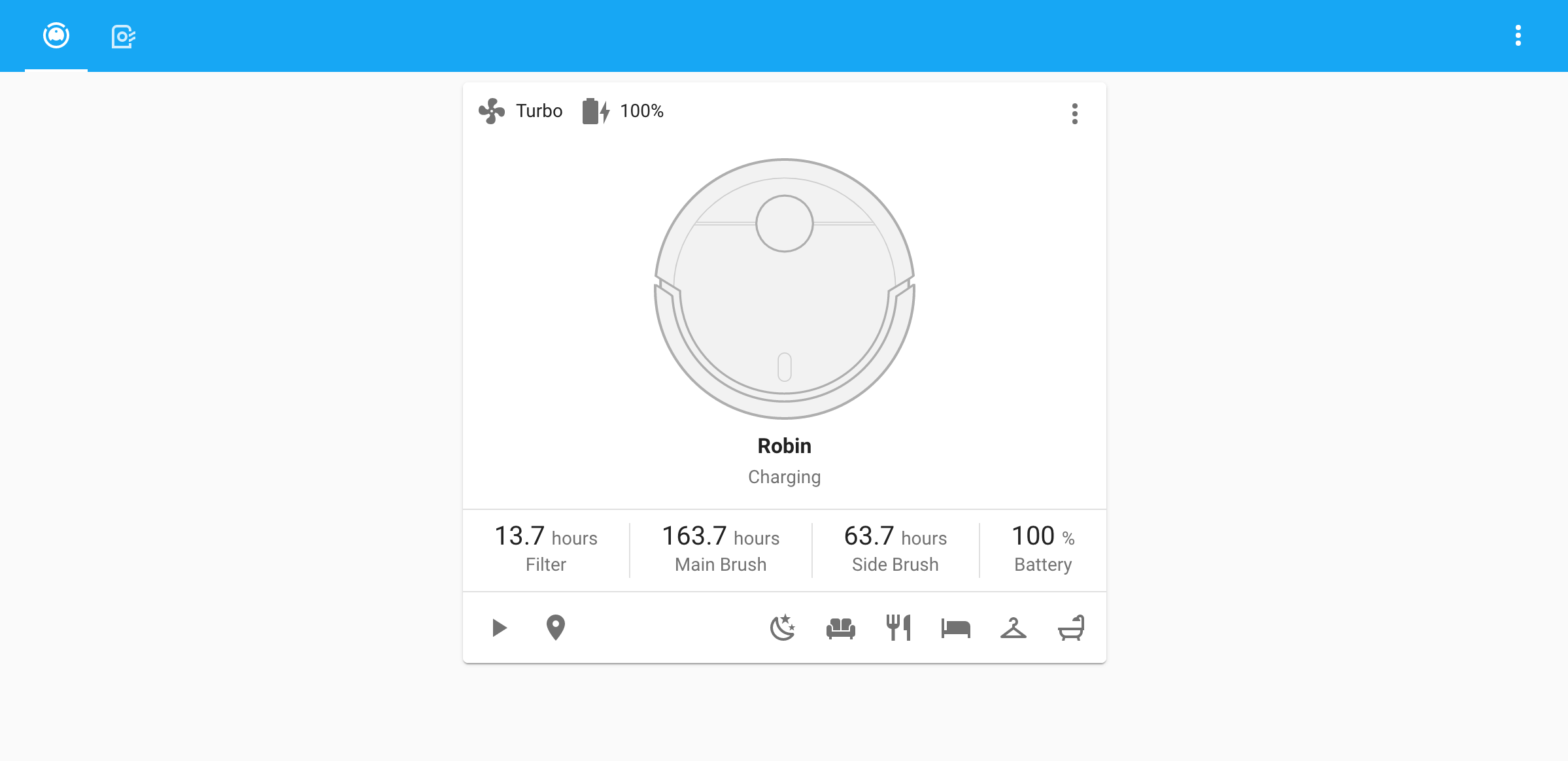
Hello, sorry if I'm posting in the wrong channel, but I'm trying to add the vacuum card extension from here: https://github.com/denysdovhan/vacuum-card
I have installed it through HACS > FrontEnd. Tried to add it manually. I restarted HA, however, the card is still not showing. Any help would be greatly appreciated!
Thanks 🙏
GitHub
Vacuum cleaner card for Home Assistant Lovelace UI - GitHub - denysdovhan/vacuum-card: Vacuum cleaner card for Home Assistant Lovelace UI
 digital lynx
I accidentally removed 2 dashboards from my love lace is there a way to get them back out of a backup or something? Where do I look?
 errant plover
/config/.storage/ but the Lovelace files will be in JSON not YAML.
rich lotus
anyone know how to put a small margin on the right side of a dashboard (say an arbitrary figure of 30-70px)

 broken phoenix
Hey how fix this ? https://ibb.co/HYwbHD5 it's cut

Image Capture-d-e-cran-2022-06-23-a-15-00-23 hosted in ImgBB
 next turret
i have been using mattieha's slider card. it looks like it was abandoned and rohankapoorcom has forked and taken over it. A merge has been done with HACS and it looks like it was accepted.
Now for the question. I am not seeing new repo in HACS. It looks liek HACS is up to date. is there something i need to do for this?
opaque kiln
Just try again later? Or you can add the forked repo manually.
The new canonical fork looks quite promising! But they have been making quite a lot of changes to the code, and I'm hesitant to switch over to that repo fully until they've properly documented the changes.
 formal tendon
Not sure if this belongs here or in general, is there plans to flesh out the users more? I'd like to create users that can only access specific dashboards with limited control. I know I can hide dashboards (but not the energy one which is annoying), but hiding != restricted.
 pastel wharf
is it possible to have conditional cards based on dates ? ie I need a card to be visible between sept 1st and juin 1st. and I need another one shown only the weekends. (this is just to help me understand the logic 🙂
real pond
how can I get a RGB controller on the dashboard?
 fair quest
Is it possible to use a template for the value of entities in the Entities Card? I want to have it dynamically update with entities that have a Entity ID that matches a certain pattern.
I've tried a few things and I cannot seem to get it to work. It seems to really want specifically an Array of Dicts.
dark dirge
You can fill it with the auto-entities custom card
fair quest
That sounds like exactly what I'm looking for. Thanks!
 lunar heart
cedar heart
Hello, sorry if I'm posting in the wrong channel, but I'm trying to add the `vac...
lunar heart
cedar heart
Hello, sorry if I'm posting in the wrong channel, but I'm trying to add the `vac...
Well, my card is showing, but it's not doing anything... Can't find any open issues regarding that problem though
 fallow root
hello, i was wondering if it was possible to create password protected entities cards or button cards? for example in order to ensure we do not accidentally trigger the siren
fallow root
and another question: is it possible to make it so that after a certain time of inactivity a dashboard automatically goes back to the default view?
 civic sedge
fallow root
hello, i was wondering if it was possible to create password protected entities ...
civic sedge
fallow root
hello, i was wondering if it was possible to create password protected entities ...
yep, search for lovelace password
civic sedge
fallow root
and another question: is it possible to make it so that after a certain time of ...
Ping me when you find something, thats a nice to have on a OLED screen
fallow root
civic sedge
yep, search for `lovelace password`
thank you
vapid field
idea: check brightness level of hue light, if its set to X then use cardmod to change card icon color. seems like it should work but i cant get the brightness check to work. Ideas? (tried by percent and num value of brightness)
 raw egret
does anyone know of an alternative to the entities card that allows me to replace the header toggle with buttons?
It can be done natively with an header but it doesn't look the same
 topaz haven
I am trying to use an Entity Card (not Entities Card) in Lovelace to display the time remaining of a countdown timer. I selected "remaining" as the attribute, however the time does not countdown and instead remains at the original time of the timer. I have tried with the Entities Card and it works as expected. I want to use the Entity Card because it is the right size and layout. If this is a bug, can someone please guide me in submitting for the Entity Lovelace card?
dark dirge
Displaying an updating countdown for a timer in the frontend is inefficient and inexact, so isn't supported in most cards
I also believe that the "time remaining" attribute only updates when you actually pause the timer, so it also doesn't update while it's running
cards that do support displaying the changing timer value in the frontend often do so by starting their own timer and display that, rather than getting the values from the backend
 shut river
Is it possible to list all Hue scenes for a given room or zone and dynamically create buttons or a dropdown?
 wooden pine
is there a broadlink card for lovelance? or some remote thingy
 last siren
hello, is there a way to show in real time the hours + minutes left between today's current HH:MM and another value?
vapid field
Is there any list of possible Icon colors ? Like i can enter and use yellow or green, but if i want something like gold, it just doesn't work ...
vapid field
got it, create new card, mushroom entity, then at the color window i can see all the possible colors 🙂
 worn meteor
Hi all... got a question about the markdown card, specifically using ha-alert component and the action property
what can go in the action property?
vapid field
Looking for a simple option to show lights on at the moment, p.s im totaly new so im using only ui and no yaml at the moment, and im using mushroom chip that will be on the top of my dashboard and show all the things on or opened at the moment
dark dirge
and you're not starting from scratch: #templates-archived message


 noble tangle
hi folks ... i wonder id there is a way to expand the tile size in the integrations site, because, i have plenty of shelly devices but the tile have only two to three lines, so finding a device (which imo should take less than a second) becomes a scrolling mess. thx!
 noble tangle
hi folks ... i wonder id there is a way to expand the tile size in the integrati...
noble tangle
noble tangle
hi folks ... i wonder id there is a way to expand the tile size in the integrati...
in the companion app, the tile sizs is as big as, there are shelly devices, so no scrolling at all.
 fallen badge
Can I change the size of the picture elements on the map and remove the circle somehow?
 trail frigate
whats the best way to get a quickly update of the frontend when doing stuff in VSC ?
blazing wren
Another tab?
trail frigate
refresh, clear cache, nothing helps
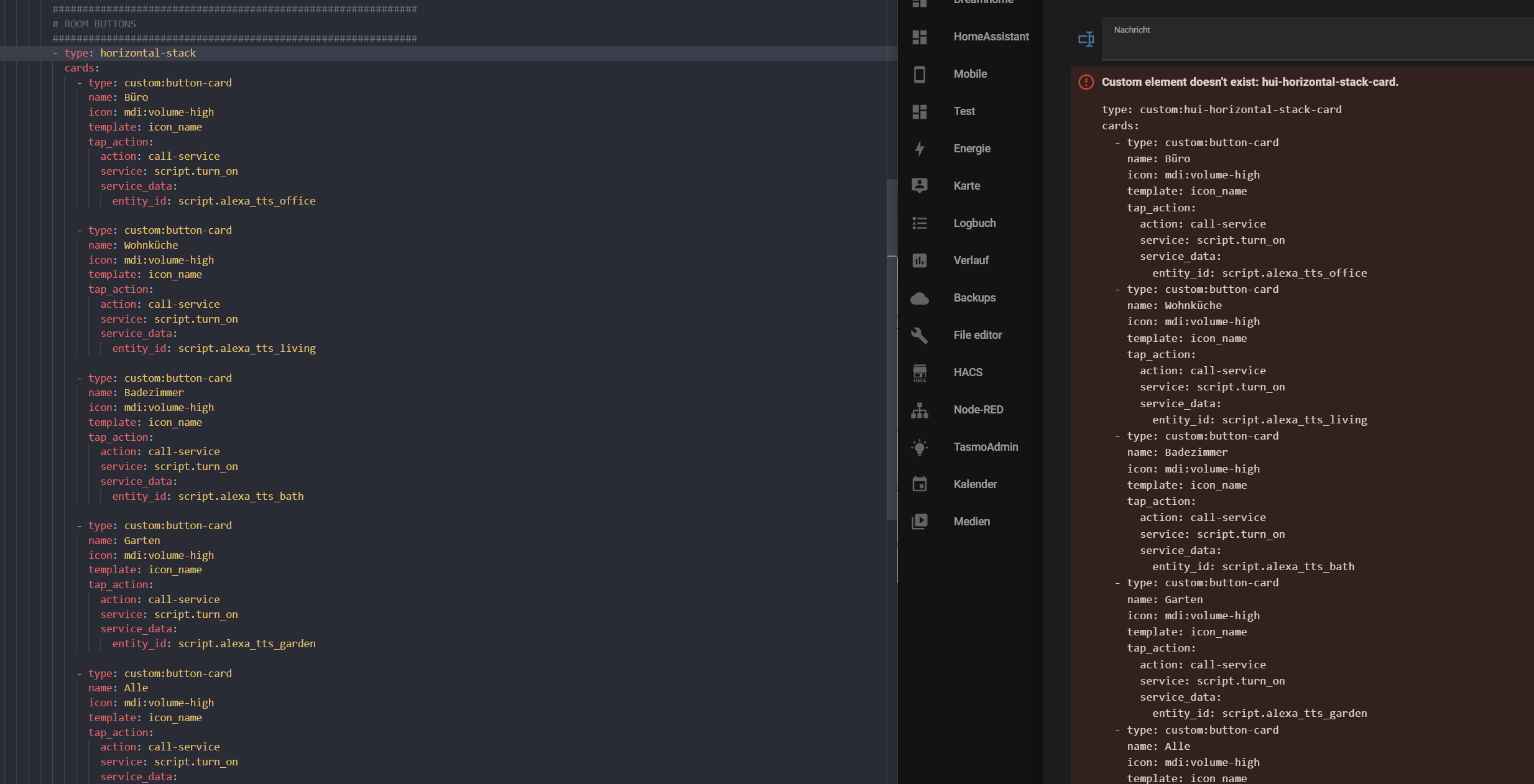
left actual code, right old frontend code
https://ibb.co/W2tMDtp
 blazing wren
Where is the file that you are editing?
trail frigate
192.168.1.100/config
blazing wren
That is not a file path
trail frigate
i am connected with smb and editing with VSC
the file is
192.168.1.100/config/popup/alexa.yaml
blazing wren
So, is this a custom card?
trail frigate
yes
blazing wren
I'm pretty sure you need to restart to get those changes loaded in. But you should check the #devs_frontend-archived to be sure.
trail frigate
hmm, that whould be lame , i am not a pro so i need to trial and error stuff and with restarts this would take ages
blazing wren
Well, as per the developer docs you should be doing this using VSCode and a container, and restarting a dummy install in a container shouldn't take that long.
But as I said, #devs_frontend-archived will know more.
 cold shoal
I am trying to build a live mermaid graph.
 tardy dock
how to you use a yaml file for custom buttons? i can't find anything on doing that. all i find is using hacs to install custom cards/buttons which i can't seem to get to work the way i want them to.
fiery ledge
you probably mean https://github.com/custom-cards/button-card ? did you read the Readme ?
or check maybe the largest thread on the community:https://community.home-assistant.io/t/lovelace-button-card which is a huge resource for questions and answers
tardy dock
the first one i have seen and hasn't done me much good. Just confused me which isn't hard as i an not the brightest bulb on the string. (more likely the ones thats burnt out lol. ) the second one i don't think i have seen. Will look at them both more. Thank you
fiery ledge
sure, feel welcome to ask for help,. if you're still lost, ask a smart question: http://catb.org/~esr/faqs/smart-questions.html 😉
tardy dock
i think i just bit off more than i can chew. i have zero programming skills and this all seems to be a programmers hobby. feel lucky i have what i have working as it is... oh well. lots of reading and confusion ahead. oh and thank you for the smart-questions link. should be an interesting read..
blazing wren
Take a step back and tell us what it is you want to achieve, someone may have a simpler solution.
It's very easy to get stuck on a solution and forget that the goal is solving a problem. Home Assistant has plenty of users, most problems won't have never been encountered before
tardy dock
don't take me wrong. this is a challenge. I do this for fun. i'm not mad. a little discouraged maybe (or just tired since i have been up all night).. if it wasn't a challenge what would the point of it. learning is living. if everything came easy what would life be about? i have made some progress. i have atleast got the button size right. still can't get the picture in it yet. and it won't do anything but its still progress. just lots of reading and trying. whats the worse that could happen. i have to rebuild ha? thats what backups are for lol!
fiery ledge
right.. but you wrote: " i can't seem to get to work the way i want them to." You at least need to explain what you do want, and what you tried to get them buttons to do what you want, in order for us to be able to help you
tardy dock
im just trying to get a button to trigger an automation.
fiery ledge
that would be an action
still talking about custom: button-card, or HA core button card?
tardy dock
in a nutshell i am trying to set up a kiosk to load a page with buttons. each button i want to have a cover picture of the movie that the automation will play on my main tv.
trying to use the custom button card
fiery ledge
ok. now we know what you want... 😉 must admit it is ambitious for someone that never used button-card before. Why dont you start with Rosemary's advise and take a step back. Or at least compartmentalize your goal. And start with the entity picture on the button, that would be relatively easy
tardy dock
thats where i am at the moment. lol. can't find the right path to the media folder of all things. its not as strait forward as /media/covers/image.jpg
i mean i got some progress. the button is the right size. can't get rid of the rest of the card though. one thing at a time.
fiery ledge
now that Is a generic issue indeed, but it has nothing to do with button card perse. 'Serving' or 'hosting' a picture is done in the /config/local/ folder, and that is in fact the /config/www folder in your system
tardy dock
ah.. okay.. that makes since. was trying to figure out why the examples i am looking at kept pointing to /local
fiery ledge
say you add them in /config/www/media/cover/image.jpg. you would set the entity_picture to /local/media/cover/image.jpg in the button-card config
tardy dock
didn't think about looking at the custom folders..
fiery ledge
nowadays, we can play sound files from the /media share and browse those via the 'Browse media' button in media_players. This however can not be done with image files (because there is no authorization ). So, you need to host image files from the /config/www share in your system and reference them as /local/etc
tardy dock
got the image file moved. now i just need to figure out how to put all these "instructions" together so ha knows what to do with them..
fiery ledge
heres a quick example of a button with a picture, and an action:```
type: custom:button-card
template: button_picture # forget about this for now
entity: script.reload_tradfri_integration
tap_action:
action: call-service
service: script.turn_on
service_data:
entity_id: entity
tooltip: Tradfri reload
entity_picture: /local/devices/tradfri.png```
tardy dock
okay. i see some issues i have looking at your example.
fiery ledge
post what you have
tardy dock
how did you post that so it kept its spacing?
fiery ledge
either add 3 back-ticks before and after the code block, or, select the code block and use the <> button.
but only 15 lines max...! or use a sharing site
tardy dock
entity_id: automation.tag_cars_3_is_scanned
entity_picture: /local/covers/Cars3.jpg
Name: Cars 3
styles:
  card:
    - width: 192px
    - height: 288px
    - border-radius: 0px
tap_action:
  action: call-service
  service: automation.trigger
  data:
  target:
entity_id: automation.tag_cars_3_is_scanned```well.. it was 15 lines on the card config......
tardy dock
im still working on what to put where. this is from the 2 sites posted above. still trying to understand whats goes where.
dark dirge
Third, you need to put the entity_id: under service_data:
fiery ledge
tbh, triggering an automation via a button is considered to be non-optimal. an automation should be what is is, an automation 😉 maybe change that to a script (which is essentially an automation without trigger and condition)
but if you miust, you can i this case also use entity_id: entity
tardy dock
i have never done a script. those have confused me from the get go.
haven't even looked at them in ha.
fiery ledge
at least do what Rob says, and read https://github.com/custom-cards/button-card#action
dark dirge
It's the action part of an automation
fiery ledge
but, reading your end goal, I believe youd be better of with an entity_picture template, opposed to the action you now think you need
whats the action of your automation?
blazing wren
I would take a step back further still: Why do you want a dashboard of films in HA? Isn't Plex or similar better for that? 😉
tardy dock
play a movie on the main tv using plex. its going to be a little kiosk where can play what ever movie he wants.
fiery ledge
or that, yes.
tardy dock
i have a zigbee button the turns on the tv, switches the roku to plex app.
blazing wren
But, you could just open the Plex web app and configure it (Chromecast icon) to play to the main TV?
tardy dock
i was using nfc cards to trigger the automations but they fail 90% of the time.
blazing wren
That's how I control my Plex a good chunk of the time 😛
tardy dock
which im sure is the automation since i didn't put in a "wait for state" but thats another issue.
he loves the nfc cards. when they work
this is one of those projects that i am really doing to learn and keep busy as i have no life lol.
fiery ledge
tbh, HA does this all in core now. You can select Plex as resource in the Media menu item, and select it all. The selected media player then shows you whats playing
tardy dock
i have plex connected. and media connected too. that all works fine. just trying a different way to trigger playing stuff.
grandson is only 2.
absolutely loves the cars movies. so i set up a way he can just play them without having to have one of us do it for him
fiery ledge
2 must be a record for tinkering with HA....
tardy dock
lol. yeah. hes about to get a tv for his room, his own ha server, and a tag reader if i can ever get it working right
im just not sure if its the automation thats the issue or the tag reader. which is another reason for trying to make this kiosk page. i want to see if it triggers every time or if it misses most of the time.
fiery ledge
thats another #channel ... I have no clue about tags
tardy dock
although i'm 80 sure its the automation. even when i had it set up to turn on the tv, switch roku to plex then play the movie it didn't always happen even with a wait time between actions
fiery ledge
#automations-archived then 😉
tardy dock
yeah. i may tinker with this button for a bit longer for kicks. and look at the scripts docs.. gotta work tonight so i best get some rest.. if i don't stop soon it will be time to go to work lol..
thank you all for your help
blazing wren
#tags-archived might be of assistance with that one 🙂
last siren
hello, is there a way to show a countdown between current hours + minutes and another given value?
 heavy pecan
Hi - trying to create a picture element with an icon
but the icon do not show
title: icon - Shut lights off
type: icon
icon: mdi:lightbulb-off-outline
entity: scene.office_lights_off
style:
top: 65%
left: 55%
tap_action:
action: call-service
service: scene.turn_on
service_data:
entity_id: scene.office_lights_off
What am I missing?

only the temp sensor is showing (and also how do I make it not display the sensor entity id?
nvm, icon is white!
so then the questions is different, can I change the icon color?
 shadow vessel
Using the pop-up service call inside of an auto entities is it possible to use a template for the pop-up to remove the word lights and list the light entities that matches/contains the words before it. For example I have it set to include entities with lights in their name because that's how I assign names for groups. Is it possible to use a template to take kitchen_lights for example and search all light domain entities containing kitchen to list in the pop-up entities card Every light has a number kitchen_1 for example.
trail frigate
blazing wren
I'm pretty sure you need to restart to get those changes loaded in. But you shou...
just to let you know, in HA just click the three dots - top right corner - an click refresh, thats it, thanks to thomasloven 🙂
digital lynx
Why does this goes to red in Lovelace?

And why when I want to change the time above that I need to select the number I put after every key press
I can't for example type 59 because after the 5 the focus on the input field is gone
polar kelp
You can if you're quick enough. But yes, the time inputs are currenly quite broken.
And the red is probably your primary theme color.
shadow vessel
polar kelp
You can if you're quick enough. But yes, the time inputs are currenly quite brok...
Hey thomas. Using the pop-up service call inside of an auto entities is it possible to use a template for the pop-up to remove the word lights and list the light entities that matches/contains the words before it. For example I have it set to include entities with lights in their name (light.living_room_lights) because that's how I assign names for groups. Is it possible to use a template to take kitchen_lights for example and search all light domain entities containing kitchen to list in the pop-up entities card Every light has a number kitchen_1 for example.
polar kelp
You'd have to use some other card for the templating.
Actually, never mind.
Yes, that probably is possible.
shadow vessel
Right now I have this https://dpaste.org/xRKoe but it would be great for double tap to do a pop-up and list what I described above ^
polar kelp
But you'd have to use a template filter and it'd probably not be worth the effort.
shadow vessel
Any suggestions on how to achieve this another way If possible at all?
polar kelp
Wait... which part is it you're trying to do? Having a card that makes the popups, or putting stuff in the popup?
shadow vessel
Using auto entities to do this https://dpaste.org/xRKoe but instead of double tap doing more info have it do a pop-up that takes the current light whatever it is removes lights and searches for the word before it and lists matches in the light domain. For example light.kitchen_lights remove lights and search for all light.kitchen_x I number them light.kitchen_1 for example. That way I can list the individual lights in a popup as more info is only the light group and because they are zha groups there's no attribute information on them either to pull in their child entities.
polar kelp
So both... then I have good and bad news.
Making the popup itself is probably quite easy: yaml type: custom:auto-entities filter: template: | {% set entities = some clever jinja filter to get all light.kitchen_x entities %} [ {% for e in entities %} {"entity": "{{e.entity_id}}", "name": "{{e.friendly_name[8:]}}"}, {% endfor %} ]
But having the popups auto generated is much harder. You may have to resort to doing it manually and being forced to update it yourself every time you add a new room to your house.
shadow vessel
Meaning do popups and use the area the light is in and listing the lights in the area? I also meant essentially the same filter I currently have that pulls all entities with lights in the name then removing lights and doing a regex or jinja to match all lights with whatever the value is so light.kitchen_lights would match light.kitchen_1 light.kitchen_2 for example.
 white drift
i feel like my lovelace is jacked up after so many years of updates, custom integrations, etc. How can i go about backing up/exporting all my dashboards and integrations and starting from scratch while still having a yaml version of those to reference? I feel thats the downfall of not doing it all manually through yaml files in the first place.
shadow vessel
Copying all of the yaml in each dashboard manually I assume and placing it into files
white drift
and integrations? (i know this is outside of #frontend-archived )
shadow vessel
No clue on that one
white drift
Anyone know how to troubleshoot this? This is really what im trying to clear up. Ive removed most of my custom panels and my existing ones just use stock cards.
 shadow vessel
polar kelp
But having the popups auto generated is much harder. You may have to resort to d...
shadow vessel
polar kelp
But having the popups auto generated is much harder. You may have to resort to d...
How would I do the manual way if the template way is extremely difficult if not impossible? I only have 10 light groups so it's not going to be too much of a pain to add. Templating is always preferred but if it's impossible manual is preferred over nothing lol. the worst thing that could happen is a pop-up with no entities on a new light group.
 scenic gale
I have a problem, website 500 error but observer works ok. Tried to restore from backup which completed but no different. anyone help??
 wanton lynx
What is the best way to implement radio buttons? I am looking to make a conditional card that will change a remote card based on which option I have selected. Here is a mock up of what I am trying to do. Based on the selection on the top I want to change the interface for the relevant device.

 molten mist
hi I'm new into home assistant and I really like mushroom but I find something weird with the dashboard sensor ,the shadow of the curve protrudes from the corner of the frame

Ps: sorry for my english
topaz haven
dark dirge
Displaying an updating countdown for a timer in the frontend is inefficient and ...
Do you know how the countdown display works within the Entities card? The Entities cards counts down the time remaining for the timer. However, I am looking for the size and layout of the Entity card. My use case is a countdown timer for my home gym which can be started/stopped and reset from a Hue remote via automations. Plan on using an Android tablet as a display.
 jolly briar
I am running 2022.6.7 and attempting to use the media browser to look at JPG snapshots taken with a security camera through the day. Prior versions I was able to view JPEGs, but now I get a message "incompatible items hidden"
is there a configuration that I need to change to add JPEGs to be considered "compatible"?
 dusky jackal
need help with sidebar view or layout card. basically I want 2 columns for a tablet view with one column being a vertical stack of buttons but more narrow than sidebar view does it. the other column will be conditional cards to take up most of the screen. thanks for any guidance
tender pine
question how do i make a icon change colour depending on state ? i got one standing light that is powered with a zigbee power socket and changed the icon to a lamp now offcourse it does not change on state change is there a way to make it change state ?
fiery ledge
sometimes we wonder,...https://github.com/home-assistant/frontend/issues/12726 even a simple thanks we will look into it would be nice
 quartz arch
G'day! Does anyone have a good Webpage card alternative for lovelace? The built in one is a bit limited for what I want.
blazing wren
fiery ledge
sometimes we wonder,...https://github.com/home-assistant/frontend/issues/12726 e...
Your link at the end takes you to the issue that you've linked to here
blazing wren
quartz arch
G'day! Does anyone have a good Webpage card alternative for lovelace? The built ...
Well, what do you want or need? 😉
quartz arch
blazing wren
Well, what do you want or need? 😉
Hi! Good question. Just something a little easier to manipulate rather than just the aspect ratio in percent. The size constraints with this method are a bit of a pill! 🙂
quartz arch
blazing wren
Well, what do you want or need? 😉
What I was actually hoping to do was have a view which displayed my Uptime Kuma dashboard but it is just blank through the Webpage card and there's no logging etc. I suspect it has to do with embedding...
fiery ledge
Thx Rosemary, I had saved the post too early before the image was uploaded .
trying to find out if I need to PR and add an icon to https://github.com/home-assistant/core/blob/dev/homeassistant/components/threshold/binary_sensor.py or https://github.com/home-assistant/frontend/blob/dev/src/common/entity/binary_sensor_icon.ts to fix it myself
I'll ask in #devs_frontend-archived
blazing wren
quartz arch
What I was actually hoping to do was have a view which displayed my Uptime Kuma ...
Well, what is the goal of embedding that dashboard? Would you be better served by reading the data from that and displaying that directly in HA instead of embedding a view?
fiery ledge
Zack took care of it! hope this settles the inspector issues
tender pine
tender pine
question how do i make a icon change colour depending on state ? i got one stand...
or any addon i can use to fixt this with hacs ?
 solid verge
 quartz arch
blazing wren
Well, what is the goal of embedding that dashboard? Would you be better served b...
quartz arch
blazing wren
Well, what is the goal of embedding that dashboard? Would you be better served b...
I know, but it seemed like double-handling. Ahh well. Will think about another way.
 fiery ledge
Thomas, was service-button left out of the migration to data: ? https://next.home-assistant.io/dashboards/picture-elements/#service-call-button
dark dirge
That was mentioned in the PR
fiery ledge
heck yes, now I missed that: https://github.com/home-assistant/frontend/pull/12628#issuecomment-1133890678... sorry for confusing with my confusion...
seems to me consistency will soon ask to change that too.
fair quest
I tried to set up HACS today and when I installed a few lovelace plugins using it, they all result in 404s.
I see that /hacsfiles/ is supposed to load /www/community/, but unless I edit the Resources to actually load from /local/hacsfiles/ (or /local/www/community/ they won't work. /local/hacsfiles/ seems to work and doesn't cause HACS to think that they're inactive, but this workaround is clearly not the intended functionality.
Is there something I have to do to expose this properly so that that symlink/redirect works correctly?
dark dirge
I see that /hacsfiles/ is supposed to load /www/community/
it's actually/config/www/community
then generally directories under that
fair quest
Yeah, sorry. I was thinking from a URI standpoint there, not the file system. But accessing config/hacsfiles via the browser results in 404s despite them being installed to the correct location
dark dirge
config/hacsfiles isn't a valid path
example:
  resources:
  - url: /hacsfiles/lovelace-hass-aarlo/hass-aarlo.js
    type: module
This might explain what I'm talking about better.
Second one has been modified and works. The other one doesn't
 dark dirge
and you shouldn't have a real "hacsfiles" directory
fair quest
Yes, I don't have a real directory there
dark dirge
it's a virtual endpoint
dark dirge
fair quest
This might explain what I'm talking about better.
Second one has been modified ...
I don't know why that would happen
fair quest
Me either. It's really weird. I'm not sure if there's some code not handling that redirect properly or what's going on
Edit: I ended up restarting Home Assistant later on for something else and now it works?
I had definitely restarted it (and the machine it is on) before then, so I don't know what actually changed.
dusky jackal
dont know if it because its not possible, how im asking or noone knows #frontend-archived message
pastel wharf
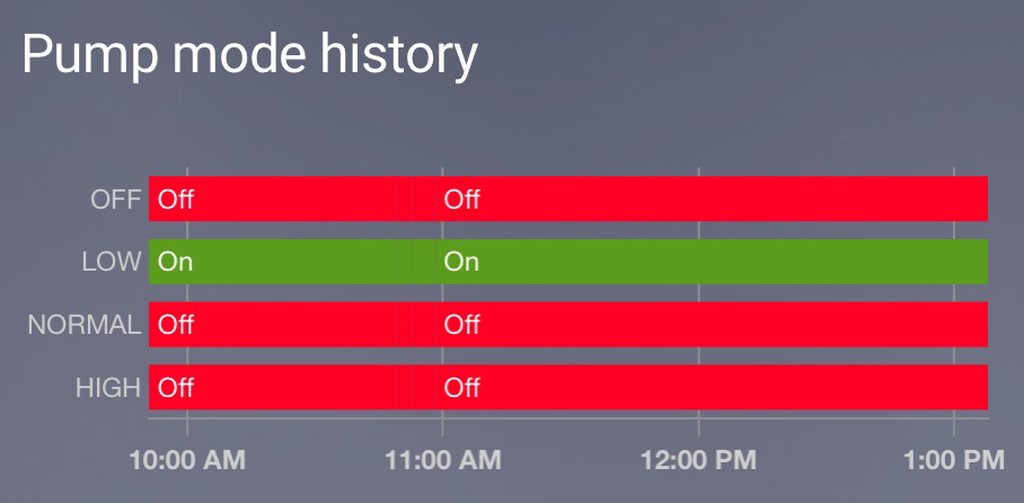
I do have a 4switch module that controls my poolpump speed. only one switch can be enabled at a time. I was able to create a history graph out of it but I was wondering if it would be possible to represent it differently ie having the x axis representing 0 to 3 ?
 tight steeple
Can anyone show me how to change the state text on a custom button card? I'm getting home/not_home and I want Home/Away, thanks
dark dirge
There's a 'state' section
here's one of mine, which uses the name field rather than state:
                      show_name: true
                      show_state: false
                      state:
                        - value: "[[[ return states['automation.away_timer'].state === 'on'; ]]]"
                          operator: 'template'
                          name: "[[[ return parseInt(states['input_number.away'].state) + 's'; ]]]"
                        - value: "[[[ return parseInt(states['input_number.away'].state) === 0; ]]]"
                          operator: 'template'
                          name: "Away"
                        - operator: 'default'
                          name: "Home"
Thanks, I'm sure I can work it out with this
Does this go in the styles/custom fields section?
dark dirge
There are several ways to do it. There are examples in the docs
You could also just use a template in the name field
 unreal ferry
Is there any way to give each user some kind of private page that only they can see? It doesn't matter if it still can be viewed by other users by entering the url manually because noone else in my household knows anything about tech anyway. Nevermind i figured it out
tight steeple
dark dirge
There are several ways to do it. There are examples in the docs
'''
styles:
custom_fields:
location:
- state: |-
[[[ if (states["person.sam"].state == "home") return
"H"; ]]]
'''
tight steeple
dark dirge
There are several ways to do it. There are examples in the docs
Any help on this? It's not working?
tight steeple
unreal ferry
~~Is there any way to give each user some kind of private page that only they ca...
You can set a dashboard as the default on a each device
shadow vessel
Anyone know why this is happening? https://github.com/home-assistant/frontend/issues/12982
GitHub
Checklist I have updated to the latest available Home Assistant version. I have cleared the cache of my browser. I have tried a different browser to see if it is related to my browser. Describe the...
dark dirge
tight steeple
Any help on this? It's not working?
As always, it depends on what "not working" means
I don't use it that way at all
tight steeple
dark dirge
As always, it depends on what "not working" means
It doesn't change the text of the states, still shows home/not_home
dark dirge
you're doing something completely different than I am
for one, I'm explicitly hiding the state. for two, I'm manipulating and explicitly displaying the name
I think you'll need to experiment if you continue down the route you're on
dusky jackal
is it possible to change column width on dashboard, not just card width? how? please
tender pine
Is there a way to make the gauge card smaller or more compact?
 knotty idol
When I try to use the generic Minimalist Custom Card I get this error with one of my buttons. But when I use a standard card it has no problem working. Any ideas on what the issue would be?
 knotty idol
I finally got it to work. I used this and wasn't sure why it wasn't working
-
tap_action:
action: call-service
service: button.press
service_data:
  entity_id: button.waggs_pc_open_plex
Used a different template and it worked
 shell torrent
I have a "monitoring view" with 12 Picture Glance Cards displaying monitoring cameras.
If I have my browser (Edge, Chrome, Firefox) open for a while with another view active - and then change to the monitoring view- the previews are often not loaded, or just some of them. The "Automatically close connection" is disabled.
A simple F5 reloads and then everything works, so I guess it is a cache/sleep thingy in the browsers, but can I do something in HA to prevent it?
Like a "force reload" every time that specific view get focused?
 feral saddle
Hi all, I'm looking for a way to specify a light and dark background, is this possible with Yaml? couldn't find forms on google 😦
fiery ledge
yes, that is possible... depending on which background you want to change, there are several options, eg check themes
feral saddle
fiery ledge
yes, that is possible... depending on which background you want to change, there...
Ah great, I'm searching for this: if light mode >> background one, if darkmode >> background 2. Now i have one working but it makes lightmode unreadable with a dark background >> background: center / cover no-repeat fixed url(/local/Background_2.jpg)
feral saddle
fiery ledge
https://www.home-assistant.io/integrations/frontend/#defining-themes
Thanks! will check! Great
feral saddle
feral saddle
Thanks! will check! Great
Got it working with >> background: var(--background) in yaml code >> background: center / cover no-repeat fixed url(/local/Background_2.jpg) in theme and a restart 🙂 Thanks!
fiery ledge
great. no need to restart though. just hit 'c' (for Quickbar) and reload themes next time you change
 inner stump
Does anyone know how change "last_changed" time from "2022-06-29T15:04:45.955Z" to e.g "10s ago" from this script in button-card
  type: "custom:button-card"
  ...
  custom_fields:
    last_changed: >
      [[[
      if ...{
        return `<span class="sensor_change">${states[variables.variable_sensor_id].last_changed}</span>`}
]]]```button-card supports that natively? show_last_changed: true
inner stump
yes, but I have hard customised grid -> grid-template-areas: "'i name divider label divider_2 changed sensor_data'"
for example sensor state "6.5kwh" with value and units aren't divided or placed in separated span or something for better css customising, that's why
 fiery ledge
I see, well I cant follow your variables ofc, because you didnt post any of that, but this is what the last_changed would be: let last_changed = entity === undefined ? ' ' : (time(Date.now() - Date.parse(states[entity.entity_id].last_changed)));
and then youd call that using ${last_changed}
 tidal canopy
Hi, I'm a noob here
I just setup my HA today and I'm having trouble to install mushroom (it's installed but the cards don't show up).
I saw online that the fix is to move mushroom.js to /config/www but I don't understand the exact thing to do here.
do I access this location in the url?
fiery ledge
but I now see you only need to format that, and the last_changed is already in the screenshot... [[[ var d = new Date(entity.last_changed); return `${('0' + d.getHours()).slice(-2)}:${('0' + d.getMinutes()).slice(-2)}` ]]] might help?
inner stump
fiery ledge
but I now see you only need to format that, and the last_changed is already in t...
works nice 🙂 result is HH:MM and if I want for e.g. 30min ago
fiery ledge
as for the 'ago' format check https://github.com/custom-cards/button-card/issues/553
inner stump
ok thanks Marius
vapid field
can anyone point me to the yaml location for the sidebar?
kind shellBOT
@valid gazelle posted a code wall, it is moved here --> https://hastebin.com/esudajamam
 valid gazelle
I have an entities card like this:
  - type: entities
    title: Flur
    entities:
      - type: custom:template-entity-row
        entity: binary_sensor.flur_bewegung
        name: Letzte Bewegung
        state: >
          {{ relative_time(states.binary_sensor.flur_bewegung.last_changed) }}
      - type: custom:timer-bar-card
        entity: timer.flur_an_nachts_timer
        name: Flur an nachts
I need this structure for multiple binary_sensor entities. Can I somehow reuse this structure dynamically for all sensors?
dark dirge
vapid field
can anyone point me to the yaml location for the sidebar?
There isn't a YAML config for the sidebar. What are you trying to do?
valid gazelle
I tried to use lovelace_gen, but it seems to only work when you have everything inside the ui-lovelace.yaml file, which I don't.
vapid field
dark dirge
There isn't a YAML config for the sidebar. What are you trying to do?
Need to remove an orphaned "File editor" entry that ended up there after restoring a backup from another system
i.e. entry didnt work after restore, had to re-install file editor, now have two entries (broken one is hidden for now)
dark dirge
I've never seen that before and I don't know what you can do about it
vapid field
meh, ill just leave it hidden i guess
opal crown
History Graph question: How do I change the labels on the car for entities?
 opal crown
Thanks!! I'm being blind reading the docs these days. Sorry for the dumb questions!
 sonic summit
if you wanna edit it visually you can also click the entities in the ui for more options
incl name
took me quite some time to figure that out 😂
kind shellBOT
@stoic bear posted a code wall, it is moved here --> https://hastebin.com/mamohuziha
 stoic bear
Hi, new here - hope this is the right channel 🙂 Can anyone help me do an 'else-if' in a mushroom-template-card?
I'm trying to control the icon. It works fine with any of the icons without elif statement. So the elif is my problem.
I've googled and searched the forum, but from what I can find, I'm doing it right - but I'm obviously missing something (probably some simple syntax 😅 ).
In the visual editor I put:
 mdi:air-conditioner
{% elif is_state('climate.aircon','cool' %}
 mdi:snowflake
{% else %}
 mdi:exclamation-thick
{% endif %}```can anybody please tell me how to do this in grid layout, i want 2 colums only with the left column being as arrow as can be and the right column showing full

pic is not mine, its what i want to do
dusky jackal
can someone at least tell me to piss off? reddit, fb, discord, forums. no help. am i asking a really dumb obvious question?
 frozen sapphire
@dusky jackal I can't help you, but I know the feeling
 lyric prairie
dusky jackal
can anybody please tell me how to do this in grid layout, i want 2 colums only w...
lyric prairie
dusky jackal
can anybody please tell me how to do this in grid layout, i want 2 colums only w...
Would be something like:
    layout:
# set width of columns
      grid-template-columns: "3% 97%"
# define columns
      grid-template-areas: |
        "left right"
i freaking love you
 brittle umbra
Hey can someone help? I@ trying to change this input select of my air purifier into a light switch so I can control it’s with a slider:
trigger:
    - platform: state
entity_id: select.kids_sensible_pure_light
action:
    - service: switch.turn_on
data_template:
               entity_id: >
                {% if   is_state('select.kids_sensible_pure_light', 'on') %}
                  switch.on
                {% elif is_state('select.kids_sensible_pure_light', 'dim') %}
                  switch.dim
                {% elif is_state('select.kids_sensible_pure_light', 'off') %}
                  switch.off
{% endif %}```I think you might need #templates-archived and to check the docs on how to .share
 prisma lion
Hello, I was looking and I can't find it. Anyone Know How To Get:
- hass_version_latest
- hass_version_latest_beta
fiery ledge
dusky jackal
i freaking love you
to make life easier on yourself in these channels, next time you should make clear you read the documentation of that custom-card, and at least show the config you tried for yourself. until then, most people here will just wait for you to find that out. its explained here: https://github.com/thomasloven/lovelace-layout-card#grid-layout
fiery ledge
prisma lion
Hello, I was looking and I can't find it. Anyone Know How To Get:
- hass_version...
those are from the Version integration, and you can set that up via the Add Integration in Settings. If in doubt ask in #integrations-archived
 prisma lion
fiery ledge
those are from the Version integration, and you can set that up via the Add Inte...
prisma lion
fiery ledge
those are from the Version integration, and you can set that up via the Add Inte...
Thx
vapid field
could someone please tell why the card shows by the usage unavailable ?, the original sensor name is correct, and i have the same type devices that work without any problems, i just don't see where is the problem...

 daring tendon
Is there a custom picture glance card that has a configurable refresh...?
vapid field
 daring tendon
Or similar - I just want a higher refresh on a camera shot card really
 dapper grotto
Hi all
I have this camera image config on my house map
- camera_image: camera.veranda
entity: camera.veranda2
style:
border: 2px solid red
border-radius: 10%
left: 55%
top: 75%
width: 10%
type: image
The image is shown, but then
to refresh it
the image disappears and there is a red circle
and then the new image loads again
is there a way to avoid it?
 rich inlet
Hi,
Does anyone know where can i change a user password?
I don't see the "change password" button that used to be part of the UI.
I'm running Home Assistant Core 2022.5.5
dapper grotto
I'm using custom:config-template-card'
valid gazelle
When using layout-card's grid-layout, how can I prevent content from overflowing leading to a scroll bar being shown, but instead scale down the content?
 shell torrent
I think I discovered a strange bug in the automation GUI editor. Is this the place to ask about that or #automations-archived ?
 fair egret
I'm having trouble modifying friendly_name in customize.yaml. Any thoughts? Here are some screenshots to illustrate. I've restarted HA and it doesn't change the name

 opal crown
Dumb question time again. How do I set up the state of the entity in the history graph?

If I put in climate.garageac1, I get this

But I don't want the rest of the data (current temperature, target temperature). I just want a simple bar graph on when it was on or off.
one of the states of climate.garageac1 is off.

I'm trying to extract that and put it into the history graph (I just need off or not off).
fiery ledge
you shouldnt really post images of yaml code... but you posted a template there, and the feedback cant be more specific: thats not supported...
so create a template sensor of what you want to filter out, and use that
fiery ledge
fair egret
I'm having trouble modifying `friendly_name` in customize.yaml. Any thoughts? He...
to be sure, you have other customizations that do work? (asking to see if you got the basics right...). Meaning the full hierarchy is: homeassistant: customize: #integration energy sensor.teller_1_cost: friendly_name: Teller 1 cost
fair egret
Yep, I have a few other customizations that work fine.
fiery ledge
since it doesnt have a unique_id, which integration creates this entity? Some just cant be changed
fair egret

GitHub
Orbit BHyve custom component for Home Assistant. Contribute to sebr/bhyve-home-assistant development by creating an account on GitHub.
It's a HACS integration
 atomic bison
I'm trying to figure out what string is being rendered at the label for each sensor in my history card, since it doesn't appear to be the entity name... am I missing something obvious ? It also isn't the entity ID either, since on some other charts its is a (not-current) string name

 limpid apex
am I doing something wrong?
    tap_action:
      action: call-service
      service: input_button.press
      data: {}
      target:
        entity_id: input_button.ativar_spotify_living
this leads to an error saying it must contain entity_id, device_id or aread id
dark dirge
try putting it under data: instead of target:
limpid apex
didnt work
got it
    tap_action:
      action: call-service
      service: input_button.press
      service_data:
        entity_id: input_button.ativar_spotify_living
you must be using an HA release before 2022.6
limpid apex
Version core-2022.6.7
dark dirge
what card?
tender pine
Anybody have a good way to intigrate pollen and allergies in the front end ?
 rain oriole
@limpid apex if you're using a custom card e.g. from HACs you may need to update it - and once you do then service_data may stop working in the future as it was changed to be data now
 burnt cave
hi, i accidently removed the default dashboard The card I'm missing is the one where I've added users with a photo (it also has their location over it). How do I retrieve/set up this card again please?
limpid apex
rain oriole
<@168543008864731138> if you're using a custom card e.g. from HACs you may need ...
Thx, but everything is updated to the latest version atm. If I replace service_data to data right now it It will still work?
rain oriole
It will work, but since service_data is the deprecated field, in the future it may stop working
limpid apex
Let me try data only then
rain oriole
The custom component you're using may need to release an update if they have not already in that case
limpid apex
yea, still not working with data only
opal crown
fiery ledge
so create a template sensor of what you want to filter out, and use that
Thanks! "template sensor" was the keyword I was missing. I posted the screenshots since I didn't think people would know what my specific problem was. I thought it was easier to show what I was trying to do by posting the unwanted graph and the error in my attempts at fixing it. But, thanks again for your help, as I'm still finding my way around the Home Assistant terminology.
inner stump
Hi, I need little help how to properly write script, what I have works, but I want modify through variable and not hard coded, what I want is if I have variable_sensor_decimal_state_2: 1 then var stateDecimal = 10 if variable_sensor_decimal_state_2: 2 then var stateDecimal = 100 etc. My code is simple:
var stateDecimal = 10
return `<span class="sensor_state_2">${Math.round(Number(entityState * stateDecimal))/stateDecimal}</span>``` bitter jewel
heyo so i set up the emby latest media integration but i still need to "link(?)" it to a custom card, the config of the integration is already finished and i olny need help with the custom card...
(picture is the config inside configuration.yaml)

 split granite
Please don't share pictures of text, share text as text
kind shellBOT
Please use a code share site to share code or logs, for example:
- https://dpaste.org/ (select YAML for the language)
- https://www.codepile.net/ (select YAML as the language)
- https://paste.debian.net/ (you guessed it, select YAML as the language)
Please don't use Pastebin, since it can randomly add spaces to the main view. Please also don't share text as images since it makes it harder for people to help you. Remember that others may have colour blindness, impaired vision, etc.
Command '~share' was invoked by: Tinkerer
split granite
Which card are you trying to set up though?
bitter jewel
Upcoming-Media-Card
split granite
Yeah, you may not want to leave your API key in there...
bitter jewel
ah s**t
kind shellBOT
Rather than putting sensitive information (passwords, locations, etc) into your configuration, you can store them in secrets to make sharing easier.
Command '~secrets' was invoked by: Tinkerer
bitter jewel
https://dpaste.org/AzY0r better?
split granite
That will have created an entity, that you can find in  -> States
(at least if you've restarted HA)
bitter jewel
split granite
That will have created an entity, that you can find in <:devtools:61909405187820...
let me look, one sec
okay, it appears now but how can i add it to the card now? it's a little confusing
 tender pine
i made this https://paste.debian.net/1245898/ for my minecraft info to pop up when a player is online on my server. it does not activate i tried to add sensor.minecraft_server_players_online to a helper to trip the helper then use said helper but all i get is value unknown
split granite
bitter jewel
okay, it appears now but how can i add it to the card now? it's a little confusi...
Edit the dashboard, pick add card, pick upcoming media card
Paste
type: custom:upcoming-media-card
entity: sensor.emby_latest_movies
title: Latest Movies
``` into the boxTAHNK YOU SOOO MUCHH <3333
split granite
That's the basic process for any card
bitter jewel
yeah but still i have never done it alone
"alone" as far as you can call that
my friend always helped me
split granite
Well, if you're going to run HA you really need to learn how to do it 😉
bitter jewel
yes, but still thank you
shadow vessel
Is it expected that browser mod pop-ups don't work when not on lan in the companion app but work in a browser? When on lan it works.
burnt cave
hi, i accidently removed the default dashboard The card I'm missing is the one where I've added users with a photo (it also has their location over it). How do I retrieve/set up this card again please?
blazing wren
Click the  in the top right > Edit Dashboard. Then use the Add Card button that appears in the bottom right. It might have been the map card, it might not have been
https://home-assistant.io/dashboards/map
vapid field
Hi guys
Is there any way to customize the header from a browser mod popup?
aside from that, is there any good documentation on building custom themes? at least some list with every possible field in HA? (primary-font-family, paper-font-common-base_-_font-family, etc...)
 tight olive
Is there a way to setup an entity-filter card that will work off of a regex of entities? The specific example that I have right now is for entities that begin with update., I want to build a card that shows all software that has updates available. I've done that by listing all of the entities manually. Where I really want to advance it is when there is a new update added to HA, I would like it to automatically find that new update and add it to the list if there is one available.
fiery ledge
just use auto-entities for that, either list them all, or with an additional filter on state : 'on'
    filter:
      include:
        - domain: update
          state: 'on'
and add some options: options: type: custom:template-entity-row state: > {% if states(config.entity) == 'on' %} {{state_attr(config.entity,'latest_version')}} {% else %} Up to date {% endif %} name: > {{state_attr(config.entity,'friendly_name')}} secondary: > Latest: {{state_attr(config.entity,'latest_version')}} - Installed: {{state_attr(config.entity,'installed_version')}} active: > {{is_state(config.entity,'on')}}
 still ocean
Hi, I'm trying to display on my dashboard a count of the number of history items (for how many times a scene ran) in the last 24, 48, 72 hours etc. I could or would also use a graph. I have a Rainpoint (tuya) water pump for my plants, it only shows up as scenes in Tuya and thus in HA. By knowing how many times the scene has run, I will know how much water the plants got.
 wheat latch
Clicking on one of my fan entities on the dashboard allows me to set the speed using a slider -
Is there any way to just move the slider itself to the dashboard?
 inner stump
Hi, how to write working script if I have some conditions, but variable var_number_2 is not declared (commented) as is in this example: ```type: "custom:button-card"
variables:
var_number: 1
# var_number_2: 2
state: >
if (variables.var_number == 1) && (variables.var_number == 2) && (all variables are declared)
{
do something
}```
Solution: typeof(variables.var_number) == "undefined"
 nova bloom
with mushroom card, is there a way to adjust the color of the card? ie the light card, I would like the icon and dimmer bar to be a diff color. The readme states there is a color picker, but I dont see it
neverminded. i can see the light card does not allow this but the entity card does
 bold kestrel
I’m trying to install some HACS cards but it says that since I’m not running lovelace in storage mode I need to manually install it under resources tab after downloading it. Does anyone know what is ”wrong” or what settings I should change for the card to load automatically
I managed to get them working automatically yesterday but I can’t figure out how. Then I mucked something else up and needed to redo my HA instance
 shadow field
Hello,
I want to start contributing to the HASS frontend repo, was looking for a #good_first_issue tag in the issues but found none...
wdyt about adding some?
 polar radish
I installed the time-picker card with HACS. I seem to be missing an essential step because when I edit my lovelace layout and add the time-picker card I get no display. I do see the edit box and I can edit the card details but nothing shows up .... I also get an error message. This is the default setup .... what am I missing?

I likely didn't fully understand the install instructions. It says to add resources:
- url: /hacsfiles/lovelace-time-picker-card/time-picker-card.js
type: module
It says to add this to the config file which to me means configuration.yaml but if I do that, a reboot will give me a failure in the connfiguration.yaml file. Also, there is no hacsfiles directory, the files seem to be under config/www/community/ .... I still get errors if I use that file path for a URL.
I am obviously missing some basic step somewhere but I have been unable to figure out what I am missing ....
Well crap, I don't know what I did but the card just showed up on my ui ..... so nevermind .....
shadow vessel
@polar kelp When on lan browser mod pop-ups work in the companion app. When not on lan it is temperamental. It didn't work through the companion app and then suddenly it did only for it to stop working again. The only way to get it to work when not on lan is to use a browser, and using a browser works on lan as well. I tried closing the app and force stops. I'm using this for device id if it matters.
 sudden lion
Getting a lot of these in my log today
2022-07-03 14:50:42 ERROR (MainThread) [frontend.js.latest.202206010] https://X/frontend_latest/app.5fef107e.js:850:116105 Uncaught TypeError: Failed to construct 'HTMLElement': This instance is already constructed
Any ideas how to troubleshoot?
 craggy yoke
Hello, I accidentally wiped out my dashboard. Where can I find the dashboard file in my backup?
polar kelp
.storage/lovelace_dashboards. Be careful when poking about in .storage, though.
shadow vessel
Still having the issue with popups, not sure why. Something on my end? Or the way the card works?
shadow field
shadow field
Hello,
I want to start contributing to the HASS frontend repo, was looking for a...
someone?
dark dirge
you want #devs_frontend-archived
wheat latch
Is there a way to make a dashboard slider for an entity's attribute? I.E. fan speed?
I'd like to not have to click into the fan entity to adjust speed

 deep flower
Man, adding a theme or front end is a pita. 😛
spiral junco
Guys, I've tried building my customized frontend forked from the frontend repo. I moved my dir to the server, then copied it from the host to the docker container running home assistant supervised
I run the pip install command and it says it works but now I am getting a 500 error on the panel. How can I install my custom frontend, working?
dark dirge
spiral junco
Aight sorry, will do
fiery ledge
wondering why the 'error /config/ui-lovelace.yaml not found' remains even though this is not an error, and I would guess for many Yaml users is different than the 'default'.
craggy yoke
polar kelp
`.storage/lovelace_dashboards`. Be careful when poking about in `.storage`, thou...
Thanks
 halcyon mantle
Is this allowed on a picture elements card?```
- type: icon
icon: >-
{% if states('sensor.solar_battery_state_of_charge') | int < 40 %}
mdi:battery-charging-low
{% elif states('sensor.solar_battery_state_of_charge') | int > 40 and states('sensor.solar_battery_state_of_charge') | int <= 80 %}
mdi:battery-charging-medium
{% elif states('sensor.solar_battery_state_of_charge') | int > 80 and states('sensor.solar_battery_state_of_charge') | int <= 100 %}
mdi:battery-charging-high
{% else %}
mdi:battery-charging-medium
{% endif %}
title: Battery
style:
top: 92%
left: 26.5%
The if statement renders correctly when testing it under templates, but when refreshing the ui no icon is displayed.
errant plover
No. Very few core cards allow templates.
inner stump
Hi, I have mqtt sensor witch calculating values by total (delta: off) and I want create from these data total today, yesterday, or same days with offset, etc but I don't know how. I created utitlity meter like this utility_meter: energy_yesterday: source: sensor.plug_computer_energy_total cycle: daily offset: 0 delta_values: false net_consumption: false tariffs: [] but first problem is set offset let say from today - 3 days back, second problem is keep data in database, I reed somewhere HA only keep data 10 days. Thanks.
vapid field
Hi guys
been looking for this for a couple of days but I can't find it
I want to retrieve the last clicked position in a image card or whatever
x y coordinates or something of the like
does anybody know how?
any hint
thanks
kind shellBOT
@shadow vessel posted a code wall, it is moved here --> https://hastebin.com/etuteqikik
shadow vessel
Whoops.
Does anyone have an issue with pop-ups not working in the companion app when not local.
When I switch to data or a non-local wifi network pop-ups don't work. I tried closing the app, restarting the phone, it doesn't seem to fix it.
However they do work if I open a browser and go to my nabucasa url. So I assume it's something to do with the way the companion app and browser mod interacts potentially with the device id?
I use this format on all pop-ups.
https://dpaste.org/vxrNW
I accidentally hit start conversation and backed out of it causing that loading screen to appear as if I just opened the app and pop-ups began to work. I recreated that twice by going back to wifi reopening the app it worked, going back to data reopening the app it didn't work. Once I hit start conversation and backed out of it forcing a reload, it worked again. @polar kelp Any ideas? Happening on other devices as well.
light ice
Hi all. anyone know of a way to make the keys in the native alarm/alarmo panels bigger (without scaling the entire UI up). currently its way too small (im getting old... :))
 boreal patio
I am looking for a gard that can show batterylevel and charging status for an entity is there such a thing?
 ivory kettle
does anybody know how to customize the information shown on the media_player entity
the only thing I can seem to change is the name of the player (Foobar2000)
ideally I'm looking to replace the name with the current song title, as it only shows me the artist and a tiny album art

 rotund sierra
can someone help me with this error "ERROR (MainThread) [frontend.js.latest.202206010] http://192.168.1.10:8123/frontend_latest/core.446aadfa.js:1:12617 Uncaught RangeError: Invalid time value"
it shows up over 750 times
also : Uncaught TypeError: Failed to construct 'HTMLElement': This instance is already constructed
also some pages were not loading until I refreshed, I dont know if this is related.
 manic harbor
Is there a slider that I can link to a countdown timer? So it would sit at 0:00 then if I added time, it would count down that time until 0:00 again. And allow me to for example turn on a heater for that countdown period
dark dirge
That's a timer entity. Set the duration, start it, trigger on the completion event
manic harbor
@dark dirge so i can just link a slider to it somehow?
polar radish
Is there a way to put comments into a custom button (or any other card for that matter) in the code editor? I am used to using # but as soon as I go away and come back, everything that I thought was a comment is removed.
Comments help me a lot as I am building things and assist in learning/understanding
dark dirge
Not unless you switch to managing your dashboard in YAML mode
Otherwise it's converted to JSON and comments are stripped because they're not supported
polar radish
crap 😦
polar radish
Configuring a custom button card and would like to set up a tap action but having troubles getting it right
tap_action:
action: call-service
service: switch:toggle
service_data:
entity_id: switch.sonoff_1_test_relay
This gives me a 'required key not provided @ data[' service']. Got none
What am I missing here?
dark dirge
It's switch.toggle
polar radish
LOL .... it's amazing what a little fly poop sized dot can screw up 🙂 Thanks!
polar radish
Another question on configuring the button card .... if I wanted to set a text entity to the value 'text' so I can test for it in node rd and start a flow based on this data, how would I do this?
ie ... I tap the button and the text entity data is changed
polar radish
If I do a manual service call, there is a "Input text: Set" call that I might be able to use. If I run that manually I can change the data in the variable but I can't figure out how to call that service from a tap action.
polar radish
This is what I have that doesn't work:
tap_action:
action: call-service
service: input_text.set_value
service_data:
entity_id: input_text.irrigation_status
data:
value: "active"
I was soooo close .... the following works:
tap_action:
action: call-service
service: input_text.set_value
service_data:
entity_id: input_text.irrigation_status
value: active
polar radish
One more question: I have a custom button that has a tap_action of 'toggle'. There are two states to this button and I set a number of parameters of how the button looks in the dashboard based on the state. Is there a way of calling an action from within the 'state' section of the button? I would like to set a text variable based on the 'state' of the button. This is something that I do through the tap_action on two other buttons but I need the tap_action for this button to do a toggle. In other words I would like to do a call-service from within the 'state' section based on the current value of the button (either on or off)
From what I understand, this is not supported so I guess I am wondering if there is some other way of setting a text entity's content that I haven't discovered yet.
 proud ibex
Hi, i am trying to use the custom card lovelace grocy https://github.com/isabellaalstrom/lovelace-grocy-chores-card chores card but i'm getting this error:


GitHub
A card to track chores and tasks in Grocy. Contribute to isabellaalstrom/lovelace-grocy-chores-card development by creating an account on GitHub.
Anyone got any ideas? 🙂
 azure canopy
I used to have a yaml dashboard for testing, which I don't use anymore. I removed the yaml files, but it keeps showing up in my sidebar.
I can't remove it from Settings > Dashboard as it is a yaml dashboard
How can I remove it?
fiery ledge
probably yes, but did you also take out the dashboard reference in configuration.yaml?
lovelace:
  mode: yaml
  resources: !include /config/dashboard/resources.yaml
  dashboards:

    ui-overview:
      mode: yaml
      filename: dashboard/dashboards/ui-overview.yaml
      title: Overview
icon: mdi:view-dashboard```hehe, no.. That will probably help 🙂
 elder willow
Is the best place to find cards HACS?
dark dirge
It's the easiest. That, or the forum, or Google
 restive raptor
Hi guys, is there a way to autofill entities in calendar card? If i create a new calendar in google calendar or calldav, i want the new entity in a calendar card without editing the card and add them and same for when i delete a calendar.
Thanks :p
 safe ember
Hi, I'm trying to shrink the padding around the Subtitle in a custom mushroom title card, and can't seem to make changes show up in the UI. What am I missing?
see lines 11 and 12. No matter what I put there, the card doesn't look any different.
If it seems like maybe I don't know how CSS works, that would be a fair guess.. 🙂
 static cloud
how do i use a local icon file for a button. Where do i store it in HA and how do i access it? eg. myicon.ico icon local:myicon
 twilit lintel
Morning guys! I notice that I can't select itens on lots of dropdown menus with the mouse pointer or with my phone (Android). is this a known issue? It's been like that for months.
e.g: I try to create a group through the UI and I can't select the entities. When I click on them, nothing happens.

Same when adding entities to the dashboard and etc ...
Tested on:
core-2022.6.7 Installation Type: Home Assistant Container
core-2022.5.0 Installation Type: Home Assistant OS
Chrome Browser and Android APP
inner stump
Hi, how to create sensor which show total wattage for day before yesterday (offset -2 days), now have sensor from mqtt which compute total wattage, therefore i created helper utility meter which reset daily, now I need from this take data but not current today, but with some days offset. How to do any hint ? Thanks.
 modest frost
Can some here please advise me as to how I would pull the setting in the orange box out into it's switch?

There are 5 possible values, but I'd be happy with off (auto) and on (on).
dark dirge
It's just calling a service
modest frost
Basically, how do I create a toggle that modifies the value of an entity's attribute to 1 or 0
It's not its own entity though
modest frost
But the entity, climate.maki_residence has two possible state values, on/off.
dark dirge
Did you review the link?
modest frost
I'll read the docs, you're probably right, I'm just not understanding yet...and no, I haven't read the link fully yet so will do that now
dark dirge
Do that before dismissing
modest frost
Oh, I wasn't dismissing, just not understanding
dark dirge
You can make a template switch to make service calls if you want a toggle switch
modest frost
That will be the next step.
shell torrent
I would like to create a "three step choice". I am thinking two input_select, (but it could be some other setup).
I want to choose from three static options, let's call them a, b and c. If I choose b in the first input_select, that's "number one", and then I can only choose from a and c in input_select and that becomes "number two". And the remaining option will then be "number three".
It feels like it shouldn't be to complicated, but I just can't wrap my head around it. Suggestions?
dark dirge
You can dynamically set the options for an input_select and store choice 1, 2, & 3 in an input_text or input_number
shell torrent
Hmm, yeah, but the elimination part?
dark dirge
I would probably set up an automation that triggers on a state change of the input_select, then use a choose: to see which options have already been chosen based on the value of each input_text or input_number, and then change the options based on waht was chosen
dark dirge
I would use a template for that. {{ state_attr('input_select.whatever', 'options') | reject('eq', states('input_select.whatever')|list }}
kind shellBOT
@lime oasis posted a code wall, it is moved here --> https://hastebin.com/ihokivixas
shell torrent
dark dirge
I would use a template for that. `{{ state_attr('input_select.whatever', 'optio...
Ping back: Three input_selects, two automations based on your template = Works like a charm. Thanks so much.
kind shellBOT
@lime oasis posted a code wall, it is moved here --> https://hastebin.com/imoluyuzet
 lime oasis
Apologies, I'm looking for help customising a mini-media-player card and I'm trying to share my .yaml code in case anyone can help, but the bot keeps moving it off the discord chat. If anyone can help me, the code is included in one of the links by HassBot above, I'd appreciate any help
 mild gate
hey yall, I'm trying to replace Dakboard (a web-based dashboard) with HA... there's a few big parts I need to recreate. First, I'm trying to display news headlines from RSS in Lovelace - anyone know a way? I've searched HACS to no avail
elder willow
Is there a way to delete the energy dashboard?
dark dirge
remove it from the sidebar?
elder willow
Yup. Or delete the entry in Settings -> Dashboards
modest frost
Alright, here's a deep in the weeds question, may have to go to a dev channel to ask but thought I'd try here first.
If you look at the raw file /root/config/.storage/energy for the energy dashboard, the device_consumption object has stat_consumption for each device. Since the recent introduction of "compare" for the energy dashboard only, you can compare two adjacent time periods. What would it take to leverage this sort of object for other statistics, say 24 hours of temperature readings? Anyone have any thoughts on this or guidance if it's already been covered?
mild gate
im trying to build a house dashboard and I'd like a rotating background image from either icloud or flickr ....anyone have any clever ideas?
like if I (even could) write a script to pull an image from flickr and name it something constant like ../local/background.jpg would Lovelace auto refresh it?
knotty idol
Is there anyway to use Card Mod to make the name of the device bold? Font-weight seems to apply to any words, but not the name
 modest frost
knotty idol
Is there anyway to use Card Mod to make the name of the device bold? Font-weight...
modest frost
knotty idol
Is there anyway to use Card Mod to make the name of the device bold? Font-weight...
--mmp-name-font-weight: heavy;
knotty idol
modest frost
--mmp-name-font-weight: heavy;
Thank you so much! Do you know that from experience or from documentation? I couldn't find anything related to it
modest frost
I knew from experience, but I still had to hunt.
In Chrome, I built the same card as you and then right-click, inspect
Then find the thing you want to know the details on and click it
 knotty idol
Oh wow, I didn't even think to look at it like that. That's actually incredibly helpful!
modest frost
And I only know because I have a good friend who is a web designer who taught me the above.
Yeah, it really is.
knotty idol
Hahahahahaha, I just had it as red to check if I was using Card-Mod right
modest frost
lol, I kind of figured as much...well, hoped.
I had been using cyan so as not to burn my eyes during testing, but changed to red to make it as accurate as possible.
knotty idol
Red just felt like the right color after 2 hours of failing to bold two words
 haughty vine
Logbook has a nice api that extracts info on what triggered state change of an entity (event, service_call, automation, state of other entity, ect). I really would like to use this in some other places, e.g. to setup badge icons in mushroom cards for nice visual indicators. But I dunno even how to begin...
vapid field
Hi guys, need some help here

how can I apply styles to the 23.1 value? font-size in particular.. I tried following card mod's suggestions but I can't figure it out
 final nacelle
Sub guys i've a weird problem. My custom made lovelace doesn't update in the android phone app, is it possible to reset the cache or smth without losing the app configuration? And yes the "your dashboard was updated. refresh to see changes?" does nothing..
polar kelp
I believe force closing the app will reset the cache on android?
final nacelle
I already did a restart, didn't help
I can even destroy my lovelace no changes in the app (only by editing names or smth like that in hass itself but changes to the javascript do not update)
haughty vine
final nacelle
I already did a restart, didn't help
btw. Do you attach it using /config/lovelace/resources tab or Lovelace.resources yaml key ?
If yes then You should make sure to change url every time otherwise it would be very hard to remove from cache.
e.g. /local/my/my_module.js?ts={timestamp}
HA uses CacheStorage API (https://developer.mozilla.org/en-US/docs/Web/API/CacheStorage), aside from standard browser cache, for most resources. And unfortunately standard android "clear cache" does not clear it.
 reef pond
Hi all, i'm interested in having a dashboard tile for lights that include the brightness and color temp numerically displayed. How should i approach this? I think i need a device template? Maybe just a pointer to some reading material. thanks
reef pond
When trying to download a HACS repo for a custom lovelace tile, i get this warning: After the download completes, since you are not using Lovelace in storage mode you need to manually add the resource with these settings:
I've never messed with the dashboard/UI before. Should i address this?
dark dirge
You didn't do this? https://www.home-assistant.io/dashboards/dashboards/
dark dirge
No, if you're just managing your dashboard in the UI, make sure that the resource is added to  > Dashboards->Resources
reef pond
but, i don't think i need multiple dashboards.. is it ok to operate in storage mode? auto-adding elements seems nice
dark dirge
It's fine
reef pond
ah yes, there i see that it is "UI controlled"
dark dirge
Your description of the warning indicates that you're not using storage mode, or it's just wrong
reef pond
So UI Controlled is the same as storage mode? And the only alternative is yaml controlled?
dark dirge
Yes
reef pond
i see. so yeah, that warning doesnt make sense
dark dirge
For UI controlled, you can have it automatically generated or take control yourself. It's possible that only the first one automatically adds the resources, but I don't remember
 opal jay
grid areas arent working properly.. Is it going to work better with next release or its just not good enough for now ? 😦

with the upcoming area changes which are kinda nice
opal jay
does anyone know how to create those 🙂

 foggy escarp
I have two temperature sensors in a room (area), one in a fridge, and another in the room itself. It seems as the area card is displaying the average of the two sensors. How can I select the individual sensor? Or if I had say a third sensor, how can I choose the two sensors to average for the area card?
IMO it Seems like a bug not a feature. Related: https://github.com/home-assistant/frontend/issues/10960

GitHub
Checklist I have updated to the latest available Home Assistant version. I have cleared the cache of my browser. I have tried a different browser to see if it is related to my browser. Describe the...
polar radish
I would like to tweak my dashboard layout. Reviewing the documentation, I should be able to click on a pencil icon next to the dashboard name while in the edit mode. This works fine and I get a view configuration popup with some options. The docs say that there should be an option called 'layout' .... but I am not getting that. Has the location of this 'layout' option been moved to some other location/area ?
Hmm .... looks like I have to install the lovelace-layout-card via HACS first. I guess because everything is as described except for that one option I thought I had that all installed as default. I will install this add-on and see what happens.
Yup, my bad .... everything shows up now ...
mild gate
anyone know of a way of displaying news headlines (maybe through RSS?) in Lovelace?
blazing wren
Home Assistant Community
Hello Everyone! After many years of benefiting from your awesome creations, I’ve finally been able to return a little something. This is a component to take RSS feeds and put them within a sensor as a list to be displayed with my list-card
mild gate
thanks @blazing wren - I've been playing with feedparser. I have an entry in config.yaml but I dont get any entries in HA or anything in my log
blazing wren
That's an #integrations-archived issue then, rather than frontend which are the cards 😉
mild gate
good point 🙂
so... I have the list card loaded through HACS as a custom repository, I've redownloaded it and restarted but when I try and add it as a manual card I get "card type not found"
dark dirge
Is it listed in -> Dashboards -> Resources?
mild gate
it is not
actually, I take it back, it is listed
it hasn't had an update in 4 years...maybe it is just broken
dark dirge
What exact card is it?
mild gate
list-card https://github.com/iantrich/list-card

GitHub
📰 Display sensor list data in a table. Contribute to iantrich/list-card development by creating an account on GitHub.
foggy escarp
foggy escarp
I have two temperature sensors in a room (area), one in a fridge, and another in...
It seems as though that marking a sensor as “hidden” removes said sensor from the area card average
polar radish
I have installed the lovelace layout card and I am working through the documentation. Let's assume I selected a 'vertical' layout. I can force each card in my view into a given column in the display by using the following lines in the individual card configurations:
view_layout:
column: 1
While I can specify the card's column position, there seems to be nothing to set the position of the card in the column. Let's say I have three cards in column 2 but I would like te first (top) card in that column to actually display as the third card (bottom) in that particular column. I would have assumed that the card could be moved with the standard up/down arrows that are presented when editing a dashboard layout but that does not seem to work.
Is there a way of moving a card to a different position in a given column?
Well never mind ... I was in fact able to use the arrows but not in a logical (to me) manner. I was able to move the top card down by one position but was not able to move it down two positions to the bottom of the three cards. I was however able to move the bottom card up by one position which then forced the card I was trying to move to the bottom, from the middle position to the bottom position.
blazing wren
Try putting a horizontal in each column 😉
polar radish
blazing wren
Try putting a horizontal in each column 😉
While I have solved my problem, I am curious as to what you mean. Do you mean to select a horizontal layout?
blazing wren
A horizontal stack
polar radish
Wouldn't that move views side by side instead of vertical as I have it now?
Yeah no, I think we are not on the same page here. I have a vertical layout and was trying to move an individual card within one column of that view.
Move it to a different vertical position in that one column that is ....
Thanks for chiming in though ....
wet veldt
I've got a markdown card with a link - in the iOS app I can't click it. Any ideas?
shell torrent
I have a problem with input_select that don't update the frontend properly.
I have three input_select (see below) with automations that set the options available for 02 and 03 (thanks again RobC) based on the option chosen in 1. Example: https://www.codepile.net/pile/lW4LnRWd
The automations work fine, I can see that the states changes as they should. But the input_select in the GUI doesn't always change even though the option is selected from the automation and the actual state changes. This gets quite confusing. I can reload the input_select, but then they all go back to the initial value which is no good.
F5 in the browser resolves in temporarily, but that doesn't seem like a solution.
Suggestions?

 azure canopy
Did you create the input_selects in YAML or in the GUI?
And you could maybe remove the initial_value, maybe then a reload to solve it
shell torrent
Created in YAML. Definitely worth a try without the initial. Thanks.
Nope, the reload makes them all go back to initial options.
But nor the state or the GUI change
shell torrent
As a work around: Can I force a client page reload (browser F5) from an automation?
final nacelle
haughty vine
If yes then You should make sure to change url every time otherwise it would be ...
I added a timestamp and it worked thank you! 🙂
shell torrent
azure canopy
And you could maybe remove the initial_value, maybe then a reload to solve it
I added a dummy option "- Choose -" to all of them, then it suddenly works in the GUI. No idea why, but that's good enough for me.
sonic summit
Is there a built-in dashboard card for stacked graphs?
 charred dawn
I'm currently trying to create a good dashboard for my rainmachine sprinkler controller. The one piece that seems to be missing is a good UI for setting the zone_run_time. I'm hoping to do something like this that would fire the start_zone service with the desired duration. Any ideas how I would handle this? Even a popup with a slider would be fine.

 upper blade
https://www.codepile.net/pile/rJnWlEYV Can i rename the entity on this point, only for the dashboard
{{ description }}
twilit lintel
Guys I notice that the related tab is not working properly for a long time ... is it like that for you guys as well?
 halcyon mantle
I'm using an image element with state_on & state_off pictures on a picture elements card. The tap_action on the image turns on a script. Is it possible to make the image flash, or change to another state image while the script is running ("on")?
 compact storm
twilit lintel
Guys I notice that the related tab is not working properly for a long time ... i...
compact storm
twilit lintel
Guys I notice that the related tab is not working properly for a long time ... i...
Click again on Settings and then Related, or the other way around, I cannot remember now which way, but it will should show up. Answering in whole, yes, it does the same for me.
 quick tartan
I got the Kiosk mode frontend, but when I navigate to a different dashboard on kiosk mode, the header is visible for i'd say 200ms, which is noticeable as it hides a little after that. Is there a way to solve that?
 shell torrent
charred dawn
I'm currently trying to create a good dashboard for my rainmachine sprinkler con...
shell torrent
charred dawn
I'm currently trying to create a good dashboard for my rainmachine sprinkler con...
I use timer and automations when the timers start/finish to turn on/off the sprinklers. An input_number slider to set the duration used by the timer, and a script to start the timer with that duration:
        data:
          duration: 00:{{ states('input_number.bevattningstid') | int }}:00
        target:
          entity_id: timer.bevattning
Maybe you can do something with that approach?
rich lotus
hey peeps... Ive bought a bunch of 4"x4" switch screens and I really want to remove the title/hamburger bar. Can someone point me to a custom componnt that removes that top bit???
Android 4x4 displays.
Oddly enough the media_player play to a Nest Display actually removes it
shell torrent
rich lotus
hey peeps... Ive bought a bunch of 4"x4" switch screens and I really want to rem...
Have a look at https://github.com/maykar/kiosk-mode. Archived, but still works fine.
 proper oasis
Does anyone know any good cards repositories for Home Connect?
For Washing Machines and Dishwashers?
azure canopy
shell torrent
Have a look at https://github.com/maykar/kiosk-mode. Archived, but still works f...
A fork has been added to HACS. https://github.com/NemesisRE/kiosk-mode
 distant briar
does anyone have issues with camera cards (i'm using type: custom:webrtc-camera)? I see this in my logs/notifications every time i open up my "view"/tab of camera entities.
Logger: homeassistant.components.http.ban
Source: components/http/ban.py:125
Integration: HTTP (documentation, issues)
First occurred: 12:53:29 (36 occurrences)
Last logged: 12:59:54

Login attempt or request with invalid authentication from 192.168.0.254 (192.168.0.254). (Mozilla/5.0 (Windows NT 10.0; Win64; x64) AppleWebKit/537.36 (KHTML, like Gecko) Chrome/103.0.0.0 Safari/537.36)
My father is also seeing the same issue (and for some reason his account gets banned/locked out too, mine doesn't appear to) and he has different cameras (which also all work ok)
looking into this this same notification seems to occur all over the place with different integrations such as media player and sonos too... there must be a overarching reason for these type of logs to be generated
tidal canopy
What are some good HA Dashboards with big interfaces to be casted on Nest Hubs?
Is there also a way to display the background of the dashboard when casting?
Also some icons such as the sun here do not show up, any fixes?
 fiery ledge
azure canopy
A fork has been added to HACS. <https://github.com/NemesisRE/kiosk-mode>
fiery ledge
azure canopy
A fork has been added to HACS. <https://github.com/NemesisRE/kiosk-mode>
Was it also updated to prevent the inspector errors Kiosk mode throws?
Or was it a plain fork to keep it in HACS
 rough coyote
I use something from HACS to slide the views left and right on my phone.
It's been archived and i am enclined to remove it if HA now natively supports sliding views on phone now. Does it? I am affraid to try incase i can't get it back. It was realy a gamechanger for me for phone app. (iOS)
Though i guess it's just in backup.. i will backup.. remove and test
blazing wren
What kind of "sliding between views" do you mean? Between dashboards?
There is a Swipe Card you could look at: https://hacs.xyz/docs/repositories/plugin/bramkragten_swipe_card
Card that allows you to swipe throught multiple cards for Home Assistant Lovelace
mild gate
I'm trying to set the background image on a dashboard to a random image. I might eventually use python to pull a random favorite from Flickr but for now they are all jpgs in a directory
 sullen wyvern
Hi guys, is there any CSS trick how to force 1 card view to fit on screen? I thought that it should fit per design, but actually I couldn't ever achieve that
wanton lynx
I am using the Minimalist UI (https://community.home-assistant.io/t/lovelace-ui-minimalist/322687) and was looking for some help. I am trying to add the custom_card_imswel_person card and am unsure how to create the device tracker for 'ulm_card_imswel_person_wifi_tracker:'

Home Assistant Community
My Home Assistant 👋 Hi, my name is Thomas and I’m a UX designer and have been using Home Assistant for 4 years. After showing a little bit of my interface on Bokub’s post, I had several requests for more details on my configuration. I drew a lot of inspiration from 7ahang’s work that I found on Behance. Interface composition I use my phon...
 rough epoch
Hello!
I need help!
I am trying to call a conditional service from an action. But it returns an error. Although if I call the service from developer tools it works
https://dpaste.org/yoUO1 this no work, but this https://dpaste.org/RHuaj yes
what am I doing wrong?
dark dirge
Same answer that Tinkerer provided:
cards don't support templates
dark dirge
call a script and put whatever you want in there
mild gate
I'm trying to make a dashboard to serve as a true dashboard to display on a monitor or TV. I've created one and set it to panel mode. I have a single grid card with two columns. Each column has some horizontal stacks. The result looks good but the resolution is way off... the cards are way too big and as a result they won't fit nicely on a single screen. Is there a way to change the resolution?
rough epoch
dark dirge
call a script and put whatever you want in there
Thanks!!!!!!!
 dry lodge
Hello! I'm trying to change the buttons on my lovelace. I've installed hacs and install a theme, tho i can't understand what code i should to add to apply the theme effects?
polar radish
I use a shopping list card as a to-do list. There are some items that have been completed (checked) and they move from the active list to the completed list below. I am wondering if there is a way of deleting single line items from the 'completed' portion of the list. While I can erase ALL completed items, I would like to just remove SOME of the completed items. Is there a way to do that? I would even consider going into the file, if there is a file, and manually edit it. I would rather not first reactivate all things that I want to keep, then kill all remaining line items and then deactivate those items that have been completed but that I wanted to keep.
Alternatively, it would be cool if I could take the completed list and move it off to some other list (I want to have a permanent record of some of the tasks that were done
)
polar radish
I did find the or rather 'a' list at /config/.shopping_list.json. Problem is that deleting one line entry and saving the file does not actually do anything. Even after a reboot, the file without the deleted line gets replaced with the line inserted back in. Obviously the data is kept in some other place (memory?) so the file corrects itself after the edit.
valid gazelle
Can I use card-mod or button-card styles to apply a fill: "currentColor" to the <path> tag inside a <ha-icon> tag?
Currently I have to manually copy the <path> of the icon into my button-card template, but I want to generalize the template so that I can pass in the wanted mdi-icon by variables.
mdi_icon:
  custom_fields:
    icon: >
      [[[
        let mdiIcon = variables.mdi_icon;
        return `
          <ha-icon style="width: 100%;" icon="${mdiIcon}"></ha-icon>
        `;
      ]]]
Something like this, but I now need to put a fill: "currentColor" on the <path> tag created inside the <ha-icon>
valid gazelle
I nearly got it, I just need to await the haIcon._loadIcon() promise within the button-card custom_field JavaScript code.
Which does not work apparently
shadow vessel
Has anyone ever tried multiple commands with fire-dom-event?
This doesn't work. The docs say using commands works well with fire-dom-event but didn't provide an example of using that. I can get using 2 commands to work without fire-dom-event but it doesn't respect deviceID - this and using fire-dom-event is better.
Command**s** with an **s**. Will call a list of commands consecutively.
This is mostly useful with the fire-dom-event method of calling commands.
 azure garden
Guys, i'm burning here. Trying to build up a floor plan for home assistant. Well, i managed to follow the ha-floorplan guide and made my map on floorplanner, now its time to make the .svg file on Inkscape but i can't really find out how to do it. Is there anyone more experienced here to help me out a little bit?
shadow vessel
@polar kelp Any ideas on what I am doing wrong? https://dpaste.org/2QDpo
polar kelp
You have only filled out the commands: parameter, but not specified the command: which should be commands.
Clear as mud.
shadow vessel
Like this? That's not working either
- type: custom:mushroom-template-card
   primary: Test HVAC
   icon: mdi:cog
   tap_action:
     action: fire-dom-event
     browser_mod:
       commands:
         - commands: navigate
           navigation_path: /lovelace/hvac-automations
         - commands: close_popup
browser_mod:
  command: commands
  commands:
    - ...
- ...```Still struggling.
                                                                     - type: custom:mushroom-template-card
   primary: Test HVAC
   icon: mdi:cog
   tap_action:
     action: fire-dom-event
     browser_mod:
       command: commands
       commands:
         - navigate:
             navigation_path: /lovelace/hvac-automations
         -  close_popup
Not sure if the navigation path is messing it up? I had to indent it. If i remove the indent it becomes null. The close_popup is correct that way? If I remove the semicolon on navigate it won't take it.
polar kelp
Why did you alwo change everything else and not just the part I told you to?
shadow vessel
Because I got errors I will try again
This worked https://dpaste.org/sgxTX Thank you for showing me the mud lol
valid gazelle
I have a button-card inside a swipe-card. The hold_action of the button-card doesn't seem to work due to the swipe-card catching the hold event. Can I somehow get both to work?
valid gazelle
This seems to be a known issue with swipe-card that unfortunately nobody has fixed yet.
dark dirge
you can be the hero
 grave river
With a Gauge card, after using the GUI to add severity figures and saving, the figures disappear in the GUI. Is that correct?
valid gazelle
dark dirge
you can be the hero
I'd love to, but I don't think I'm experienced enough with JS to do it ^^
 sour crag
Is there a way to "force" what column a card is in? I want Card A,B to be in the left Column and Card C, D, E in the right
valid gazelle
sour crag
Is there a way to "force" what column a card is in? I want Card A,B to be in the...
I would recommend using layout-card with grid-layout
valid gazelle
yup
sour crag
ok, I will check that out, thanks
kind shellBOT
@valid gazelle posted a code wall, it is moved here --> https://hastebin.com/dopejejefu
valid gazelle
Something like this
sour crag
is it also possbile to get cards to be left-biased instead of center? So free space is on the right, and not on both sides?
(the cards themselves, not inside the card)
valid gazelle
That's also possible with layout-card, for example you can set the sizes of the columns in px, percent or any other css unit
sour crag
but cards themselves are always placed in the center? Will it help with a different card type?
valid gazelle
I don't know how to achieve that without using layout-card, and with that I think the cards always take up all the available width of their column
I guess when you use card-mod to apply CSS styles to your cards you could also achieve what you want
sour crag
hmm, ok i will see if i figure out something with it. Thanks
but just to be clear, I dont want to change the card themselves, i just want the generated dashboard to not put the cards in the center when there is room to spare.
valid gazelle
I don't know if this is possible to do without using some custom stuff, maybe someone else knows?
polar radish
Bring up the dashboard you want to adjust, go into edit mode, edit the card you want to move, go into code editor mode, add the following to the code:
view_layout:
column: 1
Of course the column number is whatever column you want the card to show up in


 polar radish
Hmmm ... puzzling ... works for me. Have you tried a different column number? Of course this all presumes a vertical or masonary page layout with more than one column.
You say 'seems to be centered' ... but I see the entry on the right in the dashboard. What part do you call 'centered' ? Maybe we are talking about different things.
I don't know what the option "layout: horizontal" does, maybe it screws up things.
When you are in the edit mode and you see your listing of the dashboards at the top of the screen, click on the little pencil icon next to the dashboard you are working on. This brings up the layout options for the dashboard.In the 'view type' box it should say 'masonry' or 'vertical'
There is a secondary entry for the view type where you can give some options. In my case I have :
width: 450
max_cols: 4
column: 3
Maybe that is somehow messed in your setup? I would expect things to work if this extra data field is left empty (ie in default mode). I think default is for 3 columns but you might have something different specified someplace (I find that the number of places to specify things are overwhelming)
sour crag
the horisontal layout is juyst part of the card

maybe this is clearer
this is just an example, but i want the cards to fill from the left, not the middle
polar radish
Got it, now it makes more sense. Which layout pattern do you use? Do you use the default 'Masonry' layout? Are you sure you left the default at 3 columns? I believe that the default is to always center things. I am sure there is a way to change that but don't know at the moment. The only reason I know about the columns is because I just set that up for myself.
Something else - the default is that even if you use the default 3 column layout, lovelace will not start another column if you are below a certain number of cards, possibly 5. Only after you have reached that will the layout engine make another column. Try making a bunch of dummy cards to see if that is the case.
sour crag
yeah, i use the default masonary layout, not sure where i can set the default number of columns.
 quick basalt
I have a group of remotes (which control roku tvs) defined by yaml. I turn them all on and all off as a unit. I have the group added as a single entity to a lovelace card, and there is no toggle. It just says 'On'. How can I get the toggle to show up? If I click into the entity, I have a toggle for the entire group, but I'd like to avoid that.
 polar kelp
Just a heads-up. @raw brook is reviewing dashboards live over on youtube: https://www.youtube.com/watch?v=cw3KoNqdaiU

Submit your Dashboard here: https://twitter.com/ZackBarettHA/status/1497979399605346306
🐤 Twitter: - https://twitter.com/ZackBarettHA
#HomeAssistant #Dashboards #HomeAutomation
polar kelp
Stream over.
 raw brook
Thanks everyone!
 undone solstice
Any idea why one thermostat card would be showing the Celsius number, but with a Fahrenheit notation? It SHOULD be showing in Fahrenheit.... I have two cards on the same board, and one is displaying correctly, and the other is showing celsius (23.5) but with an F at the end... thoughts?
Note: in other places (Like a badge) the temperature is displaying correctly (74*F)
polar radish
sour crag
yeah, i use the default masonary layout, not sure where i can set the default nu...
@sour crag, the default, I am sure, is 3 columns. Did you try inserting a bunch of fake cards like I suggested ?
sour crag
yeah, i tried with many cards, but seems like it doesn't make a difference, the cards are still centered, with space on the left and right, also when i have several columns
polar radish
I am afraid that I can't help further. I did confirm that a default 'Masonry' dashboard has 3 columns in my setup which is default. Something or other is overwriting the defaullt layout.
 proud kite
Hey all, did anyone else have an issue where Home Panel can't be configured in Home Assistant?
I open the config, and change things, but they just...don't work.
azure garden
Hello guys. I would like to start using the floorplan, i've followed the instruction i found on the ha-floorplan git page, made my .svg and moved it on a folder on www directoy, downloaded the ha-floorplan through HACS, but i'm kinda stuck on what i have to do next. Most of the instructions i found online made me feel lost 😦 is there anyone who can possible help get to the next steps?
 ebon harbor
azure garden
Hello guys. I would like to start using the floorplan, i've followed the instruc...
ebon harbor
azure garden
Hello guys. I would like to start using the floorplan, i've followed the instruc...
hello mr Mario, is this like a floorplan that you could use as dashboard frontend? if so I'm looking for something exactly like that
azure garden
exactly, you are using an image of your house, either in 3d design or a 2d map, and on each room you can have your devices-sensors and switches
takes the home assistant into a whole next level
you can make from the simplest to something pretty reactive with css and gifs from what i saw
ebon harbor
dude thats awesome
@azure garden thats exactly what I want
could you share some links? maybe we could figure this out together
azure garden
ebon harbor
<@448113271732699137> thats exactly what I want
then, join the venture, you should start here

Floorplan for Home Assistant
Bring new life to Home Assistant with Floorplan. By mapping entities to SVG images, you’re able to show states, control devices, call services - and much more. Use your own custom styles to visualize whatever you can think of. Your imagination becomes the new limit.
ebon harbor
sure
this maybe a problem for me "Sadly Floorplanner doesn’t support export as a SVG-file."
nvm does it mean export or import?
I have CAD drawings
azure garden
so far, what i did, was to create my home through floorplanner.com using a free account. then, i took a printscreen (because they export on bad SD quality) and used this house image on Inkscape to mark each room and create the areas as entities, again, following the instructions of the link! Then i exported the file on .svg
ebon harbor
azure garden
so far, what i did, was to create my home through floorplanner.com using a free ...
wow
azure garden
And don't forge to check this one before you start

This will be the final chapter of the Home Assistant floorplan tutorial series. This video will show how to get the final result from putting it all together while using the svg format to produce and render an interactive floorplan.
Inkscape: https://inkscape.org/
ha-floorplan card: https://github.com/ExperienceLovelace/ha-floorplan
resource:...
ebon harbor
azure garden
https://www.youtube.com/watch?v=MCNxgb0mrSA
wow looks amazing
azure garden
this guy did some magic, not using the same way as the first link i gave you
but he has css knowledge and did lots of coding to made this happen. I know, i'm jealous too, i would love to get in touch with him and if the price is reasonable i would pay to get the same UI 😛
but, what's better than understand how to do it yourself so you can troubleshoot in the future?!
ebon harbor
azure garden
but he has css knowledge and did lots of coding to made this happen. I know, i'm...
I'd do the same
ebon harbor
azure garden
but, what's better than understand how to do it yourself so you can troubleshoot...
time! haha
time is better
but I see what you mean
talking about time, its time for me to grab my pizza brb
azure garden
hahaha sure!
azure garden
ebon harbor
talking about time, its time for me to grab my pizza brb
also, don't forget to take a look for more ideas here https://community.home-assistant.io/t/share-your-floorplan/21315/723
Home Assistant Community
Great job and a really nice writeup that will help many others. The relationship between Sweet Home 3D, Inkscape and Home Assistant gets many questions!
so again guys! if anyone has some luck with it already, i would appreciate any help
polar radish
I am not sure if I have suffered a brain fart or what .... I am trying to install a new lovelace card via HACS. It used to be that if you clicked on HACS in the left panel you would get a screen that amongst other things let you choose 'frontend'. That screen seems to have changed in the last upgrade and now you get two choices, 'about' and 'add ons', There is no choice for 'frontend' and under 'add ons' there is nothing about front ends, oly integrations. How do I install a new lovelace card via HACS now ?
ebon harbor
azure garden
so again guys! if anyone has some luck with it already, i would appreciate any h...
I just have the luck of living close to a pizzeria
polar radish
polar radish
I am not sure if I have suffered a brain fart or what .... I am trying to instal...
Never mind, looks like HA had the brain fart. Rebooting the system fixed the issue .....
polar radish
I seem to have a basic gap in understanding and maybe somebody can help
I am trying to set up a set point for an automation to start. It happens to be temperature but I would like this to be just a number. I have created a helper of type 'number' but I am a bit at a loss as to how I can use the UI to change the set point. I tried to set up the 'minimalist' theme/cards but got completely overwhelmed so I abandoned that attempt. All I would like to do is to display the set point (no problem) and allow changing of the set point via the UI. This could be an up/down arrow, a direct method of entry somehow (where you type in a number) or some kind of gauge where you can move the set point with the ui.
What lovelace card would be best to use and how do I get input into the helper variable?
opaque kiln
polar radish
I seem to have a basic gap in understanding and maybe somebody can help
I am try...
Why not just use an entities card with the input helper listed as one of the entities?
polar radish
opaque kiln
Why not just use an entities card with the input helper listed as one of the ent...
I can set up an entity card with the entity_id being the input helper (and that displays the set point) .... but how do I adjust the set point via the ui?
opaque kiln
polar radish
I can set up an entity card with the entity_id being the input helper (and that ...
Use the entities card, not the entity card. The former will generate a UI that will allow you to change the value of the input helper.
polar radish
Ahhhh ,,,,, that does the trick! Thanks!
.... good grief, the time spent trying to sort that out 😦
Ok, the entities card assigns a unit of 'degrees' and displays that in the card together with the numerical value. Is it possible to change the units? Looking at the entities card details it doesn't look like that is possible.
polar radish
Found it - it displays the units that were given to the helper.
sour crag
What is the color icons based on state toggel supposed to do?

doesn't seem to make a difference(?) when i try it
sour crag
at least in yampl you can change the "path"
i guess you also can in the raw config editor
sour crag
it works for me even in the web setup
there is a "path" for each view
with the name
not use what the reason might be for it not being there for you
mild gate
I'm working on a display-only dashboard. I've got a nice layout I like. But some cards take up way too much space. Is there any way to forcibly make them smaller?
restive raptor
Just make a new dash with the url you want and copy/paste the raw config of the old one. No need to remake everything
polar radish
I would like to make a button that has three states to it and I would like to flip through the different states when I tap the button (ie 'off', 'on', 'auto'). How can that be best accomplished ?
 alpine pecan
Maybe I just got it wrong, but shouldn't these the buttons to reorder the badges?

nothing happens if I'm using them ?!
polar radish
I would like to cycle through several states in a status button/helper. What 'on-tap' action could I use to cycle through three given states (ie 'on', 'off' and 'auto')
I seem to have a mental block on how to achieve this but at the same time this seems to be something that is likely not too unusual.
polar radish
I have discovered the helper 'drop down' which together with an entities card will do what I want - is there something that does the selection with radio buttons?
fiery ledge
can not figure out my first browser-mod more-info (in conjunction with auto-entities and template-entity-row...) please see https://community.home-assistant.io/t/browser-mod-turn-your-browser-into-a-controllable-device-and-a-media-player/123806/1514 and spot the issue?
trying to find the correct spot/reference to do```
tap_action:
action: fire-dom-event
browser_mod:
command: more-info
parameter: >
{{states(config.entity|replace('duration','route'))}}
I updated HA to 2202.7.3 and HACS to 1.26 today
and now I don't see any action buttons on items in HACS anymore.
(can still be accessed from three dots menu in item details screen)
WTF? Is this a bug or some weird un-ergonomical design choice?
 polar radish
When weird things happen, it seems best to just restart things .....
haughty vine
polar radish
When weird things happen, it seems best to just restart things .....
Thx. didn't help thou.
Turns out I guessed right about *** design choice... 🥲

 nimble dome
I just upgraded from 2021.10.x to 2022.07.x, am I missing where the “Supervisor” tab went? I checked under Settings but not explicitly seeing what I was looking for…
dark dirge
everything that was in there has been integrated into Settings
 lucid pumice
Got two cameras, one ffmpeg integration, the other is a tapo integration. I've created two area cards with show_camera: true and both don't work (or so I thought). Initially did not load but then I forgot about them and a while later (hours / days) they started working.
I've just restarted and once again, no image. They both work perfectly ok in a type: picture-glance though. Any ideas?
 frigid kayak
I’m not sure this is the right channel. But anyone else has this issue?
GitHub
Checklist I have updated to the latest available Home Assistant version. I have cleared the cache of my browser. I have tried a different browser to see if it is related to my browser. Describe the...
fiery ledge
its not, its a custom component. but you should try and load it via the frontend method, apparently it solves the issue. But I now see you already did that..A bit of an issue, as frontend devs are likely not going to assist in fixing issues with custom cards...your best bet would be to find the same issue with core stuff, so you can add that to the issue of Casting
frigid kayak
Yes I’m aware of it’s a custom component. But because it’s mentioned in the release notes of HA 2021.11 I was thinking it’s a general frontend/cast issue because it ‘officially’ supported.
But I will contact the custom component owner.
 devout vine
Hello! I'm trying to use a mushroom template card, but I can't set the color of the icon and the corners aren't round. Any fix?


 lucid stag
I'm trying to analyze some sensor values in the History Tab, but it does not show my start date correctly. Am I doing something wrong here?

 ocean timber
Does anyone know whether it is possible to flash a dashboard's icon when entities on said dashboard are at certain states? I've created an "anomaly" dashboard and would like to have the dashboard icon flash if there's an anomaly.
sacred rampart
Is there anyway I could go about to make my sidebar fixed on the page, so that scrolling does not affect its position?

Im using Layout card + a Horizontal stack to build the sidebar...
Because if I were to scroll, I will some empty spaces, it aint nice...
 polar radish
I use a standard lovelace weather card. In it it displays the forecast high temperature over the next week. If I wanted to obtain the forecast high temperature for the next day, how would I go about doing that? Is there a particular entity ID? I looked through all my entities and there appear to be none that contain the forecast weather but obviously there is something somewhere
.....
kind shellBOT
@torpid harbor posted a code wall, it is moved here --> https://hastebin.com/wovofedita
 torpid harbor
Hello,
I'm using the calendar card for the first time and it doesn't seem to be applying my dates. I'm also noticing a weird display issue where it's not displaying or even changing the initial view radio button selection after saving. Is there something wrong with calendar card or am I doing something wrong? the instructions were pretty straightforward. Can I not use input datetimes in calendar?
 verbal tide
I'm getting an error with button card I'm trying to use: Failed to call service light/toggle. expected int for dictionary value @ data['kelvin'] - the data provided comes from a template that is used in other similar automations with no problems kelvin: '{{ states.var.light_temp.state | int }}'
dark dirge
cards don't typically support templates
 zinc gorge
How can I play a local video (with any card but trying the picture-glance)?
Ring takes too long to download the video and play, so my idea is to download locally as soon as its available and present the local video instead instead of camera.ring . Can't work out how to reference a local video placed in www/local :/