#frontend-archived
1 messages · Page 218 of 1
 fiery ledge
this is in HA 2022.6.0.dev20220524, and Frontend 20220523.0
for six person entities in the card:
 fiery ledge
its on all history-graph cards, so: https://github.com/home-assistant/frontend/issues/12767
 distant phoenix
Is there updated documentation anywhere on setting a dynamic Person picture for all of HA? I want to update my picture based on conditions (not just device tracker) and I have multiple users/views that right now I have to update all manually. I found this https://community.home-assistant.io/t/person-entity-picture-based-on-state/155795/43 but it seems to be using an outdated custom addon custom-ui

Home Assistant Community
no, its not, this mod is about styling the various parts of the badge. if you want to use picture thats totally possible of course, in various ways. Here’s what I do: homeassistant: customize: person.marijn: &picture templates: entity_picture: > var id = entity.entity_id.split('.')[1].split('_')[0]; va...
 spiral vale
Hello. I am working on my own energy dashboard. And i wonder had some one already created a more old-school/analog style meter card? Would be cool to use something like that in the energy dashboard i am making
 white drift
- possible to have my outside temp/humidity with a decimal point of .0 added just to keep things similar to my actual sensors? 2) i cant seem to get unit_of_measurement to work for those same two values. nothing shows

 polar kelp
You'd have to make a template sensor to extract it and set a unit on that. https://www.home-assistant.io/integrations/template/
fiery ledge
distant phoenix
Is there updated documentation anywhere on setting a dynamic Person picture for ...
that is still very much alive.... and recently updated to support 2022.4 + (though as with all custom plugins, can change at the whim of HA Frontend changes) You could/should also try and use card_mod on the frontend config ofc. If you only use these entities in 1 card, there would not be such an issue of the customization not being attached to the entity itself.
fiery ledge
Thomas, is this an error (on hass.config.location_name) in inspector that could be caused by browser_mod? I've disabled BM for some time now, and the error didnt show after that: https://github.com/home-assistant/frontend/pull/12386#issuecomment-1136994935
fiery ledge
reenabling immediately brings it back. must be.
polar kelp
I've seen it too when working on browser_mod, but only on my dev setup.
fiery ledge
at least you can verify! thanks. I am not alone 😉 Ive string searched for location_name, but couldnt find it in BM code, so wasn't sure, but my latest testing must conclude that BM causes this. Even without it set in resources, and only loaded via the browser_mod: entry in config
white drift
@polar kelp whats odd though are the attributes of Temperature and Humidity come from the met.no weather integration and when you go to its entity of weather.home and look at its details, it has the following where the Temp and Humidity already have the right units

im simply just trying to fetch a single attribute at a time. are they just doing it differently for that view?
This is under the Settings -> Devices -> Entities area
i get the template might be needed for the decimal point part
 somber prawn
 dark dirge
Search Engine Optimization?
 errant cosmos
I'm looking at configuration variables for the Entity card, right now focused on secondary_info. Is there some rule of thumb about which configuration variables should be exposed to the visual editor and which ones need to be used in the code editor?
errant cosmos
coming from #general-archived:
I've got a Cover working fine in esphome. I see it as an entity in a dashboard. When I click on the cover properties in the editor, I see a slider, and that slider opens/closes my cover proportional to my movement of the slider. How do I make that slider what I see in the entity card in the dashboard?
 lavish vapor
How do I get hourly/daily/etc consumption graphs from this sensor? It looks like for graph cards only "sum" option is graphing something which obviously just keeps adding up when I want time periods

I tried creating utility meter with hourly/daily/etc reset intervals using delta and this as source but same thing
 silent smelt
Hey I have a little problem, has anybody an idea why sometimes the icon color doesent update until i refresh the browser or switch the dashboard?
@azure canopy could it be cache although I don't need to reload the browser? A dashboard switch is enough
 plain mortar
can we edit our lovelace dashboards yaml from vs code or must it be done in the web ui editor?
connected via ssh remote and do not see it anywhere
dark dirge
you can only hand-edit the YAML if your dashboard is configured in YAML mode
plain mortar
ok I will check the docs for that, thank you
 short vale
Is anyone else seeing a ui issue where zwave devices action panel disappears if you use the use as integration (renaming switch to light) the new device is not apart of the entities list and all actions are gone
So I have a failed zwave device I can’t do anything with it until I remove the use as light addon entity
I’m messing up that new integration name.. but point stands
I haven’t dug into it, but it’s like since the device is composed of two integrations the light addon is winning election and the panel is hidden
 kindred anchor
Is there no way to hide sidebar items or the entire sidebar for non admin users?
 shell torrent
kindred anchor
Is there no way to hide sidebar items or the entire sidebar for non admin users?
shell torrent
kindred anchor
Is there no way to hide sidebar items or the entire sidebar for non admin users?
Not natively, but check out https://github.com/maykar/kiosk-mode, with that, you can configure a lot.
Like non_admin_settings
Another thing:
Can I create a view that automatically opens/forwards to a dashboard?
I want this to open the dashboard "System" to avoid navigating in the sidebar.
 fiery ledge
shell torrent
Another thing:
Can I create a view that automatically opens/forwards to a dashbo...
fiery ledge
shell torrent
Another thing:
Can I create a view that automatically opens/forwards to a dashbo...
sure:```
- type: custom:button-card
icon: mdi:cogs
tap_action:
action: navigate
navigation_path: /config/system
o wait, you said a view. mmm interesting thought... I have this in my custom menu bar without issue, but the main tabs I am not sure
spiral vale
Hello is there a card which you can overlay multiple graphs? i would like to make a graph of the voltage from the 3 fases of our house
fiery ledge
why wouldnt history-graph or statistics-graph not suit the purpose?
spiral vale
if i add a 3th entitie it makes a seccond graph and doesnt add it to the same graph
fiery ledge
that shouldnt be happening... can you confirm all entities have the same unit?
spiral vale
nvm now it works. just retried it
fiery ledge
ofc there's also the custom apexcharts card and mini-graph card
shell torrent
fiery ledge
sure:```
- type: custom:button-card
icon: mdi:cogs
tap_action:
...
Thanks. I looked at that, and also dived in to layout-card and traditional links, but I can't seem to find a way to "re-direct" automatically, without interaction.
I am pretty sure there is a way, the question is just how hard it is to find the solution 🙂
fiery ledge
well, it wont be in core, so you'd have to check things like custom card-mod-themes maybe. Though, I have never seen anything like auto-redirecting a tab (= view) to another landing. Which doesn't say its impossible ofc 😉 As said, have a look at my dynamic button-shortcut-menu if you want, I use that more than the official tabs.
 whole fog
Does anyone know how to resize the area card using a custom method? I tried card_mod with no result
 static cloud
I want to send and display (cast) media random pictures to a roku tv and have the images change at specific intervals. Similar idea to a screensaver. Any suggestions greatly appreciated.
 lucid bronze
Hi Guys not sure if its possibly or not but can I make a device state used in an entity card as ''secondary_info'' in my example I have a light in my living room but be cool to use another devices temperture you state the temperture in that room
 surreal jasper
this is a horizontal stack of glance cards (several cards so I can use card_mod template colours), is there a way to make the whole card shorter - ie cropped to just be the height of the icons?

I plan to add more glances for different things in my home - this is intended as a quick status view at the top of my wall mounted tablet
shell torrent
lucid bronze
Hi Guys not sure if its possibly or not but can I make a device state used in an...
You can do that and a lot more with https://github.com/thomasloven/lovelace-template-entity-row
lucid bronze
Thankyou bonehead
 exotic jay
Anyone have any tips on how to best display a zwave fan control on my dashboard? I have HACS if that's got something nice.
 dusty granite
on device tracker how to set a different picture of person is away?
 amber turtle
exotic jay
Anyone have any tips on how to best display a zwave fan control on my dashboard?...
exotic jay
amber turtle
https://github.com/finity69x2/fan-percent-button-row
amber turtle
exotic jay
Anyone have any tips on how to best display a zwave fan control on my dashboard?...
exotic jay
amber turtle
https://github.com/finity69x2/fan-percent-button-row
Thanks. I ended up using this, but I'm a little disappointed that I can't make the buttons larger.
amber turtle
You can set both height and width for the buttons. It's in the README on the git.

 uncut reef
I am trying to overlay the value/state of a template sensor onto a Picture-elements card, what do I have to put for "attribute" to have the state value of the sensor be shown? (state does not work) thx
dark dirge
State is not an attribute 🙂
attribute string (optional)
If present, the corresponding attribute will be shown, instead of the entity’s state.
uncut reef
Figured it out, needed to set color 😕
uncut reef
Is it possible to make a button that changes the activated "home" in the IOS app?
The Settings>Companion App > Choose home > Activate seems REALLY cumbersome
would be amazing if eventually you could long press on the ios icon and pick the home you want to open
(Like Blue Iris)
 chrome lark
Does anyone have any experience with the custom spotify card? it isn't showing my playlists and is just stuck on loading
 daring bay
Just want to point out this is a little insane:

I have all this space, but it crunches the information in the timezone box to the point you can't read it.
I am also getting this fun error. I was asked what integrations I wanted, added Tasmota, because I have a bunch of tasmota-based devices, then had to click submit (not sure what I was submitting?) then it added it, refreshed the page, and now I am stuck here.

Seems I have bricked the onboarding entirely.
 simple heath
Hello, I'm trying to get a Google Maps card on the dashboard as shown here https://www.home-assistant.io/examples/google_maps_card/
So how does one actually get the card to like, show on the dashboard? I copied the yaml, changed the relevant bits (api key, device tracker), restarted Home Assistant with no errors, but I don't know how to actually get the card on the dashboard.
There is also this https://www.home-assistant.io/integrations/generic which is what the card is based on I think but this seems like duplicate effort setting it up again in the GUI so I'm guessing this is not what I'm looking for.
 remote sorrel
Is there a card I can use to swipe along? For example I want to have a horizontal stack with multiple similar cards inside it that I can keep adding as many as I want because then I can swipe along them?
 lyric prairie
remote sorrel
Is there a card I can use to swipe along? For example I want to have a horizonta...
lyric prairie
remote sorrel
Is there a card I can use to swipe along? For example I want to have a horizonta...

GitHub
Card that allows you to swipe throught multiple cards for Home Assistant Lovelace - GitHub - bramkragten/swipe-card: Card that allows you to swipe throught multiple cards for Home Assistant Lovelace
remote sorrel
lyric prairie
https://github.com/bramkragten/swipe-card
Thanks, looks good I'll give it a look!
 bitter prairie
posting this here as well cuz maybe its more of a front end question....
does anyone know what setting I might have wrong somewhere. my HA setup seems to be missing colors on my iphone. on the web browser on pc its fine the buttons i setup have diff color for on/off but on my phone via the HA app or even the HA web on my ios (iphone13 pro max) have no colors, even the graphs lines are in black and white. I've checked under my user profile and I do have primary and accent colors set. the only color that shows up on the app is the little dot on notifications or within the settings section where the icons have diff colors... just a little confused if anyone can point me in the right direction
lyric prairie
bitter prairie
does anyone know what setting I might have wrong somewhere. my HA setup seems to...
Have you set the same theme on your mobile devices as on your browser in your user_profile? Themes need to be set separately for each device
 winter blade
What color does the markdown card use for it's text. Is this primary-text-color in themes?
because I'm trying to change it but it doesn't seem to have any effect
white drift
anyone else have issues when building a card and selecting an entity that the drop down just closes and nothing is filled? its frustrating
winter blade
white drift
anyone else have issues when building a card and selecting an entity that the dr...
Yep. Seems to only be an issue when using chrome
white drift
only an issue with the large majority browser? 😛
winter blade
Yea sadly, I'm also using chrome and this issue has been around for quite a while
I asked some questions about it here in the discord but never got a response
 bright terrace
I've got a custom addon that doesn't seem to want to load in the Add Card UI. Is there a way to figure out which one it is, short of disabling everything one at a time? Inspect Element doesn't seem to help.

 cobalt hill
I'm trying to use a picture-elements card to show a camera and I want to overlay the time the screenshot was taken. The time is a timestamp though (entity: camera.back_snapshot, attribute: timestamp). Is there any way to convert the timestamp to a time (or maybe 'x minutes ago') in a state-label or some other kind of overlay?
 timid beacon
Anyone know what happened to this integration? It was archived but there's no mention of why or alternatives which you typically find when a project is archived:
https://github.com/maykar/kiosk-mode

GitHub
🙈 Hides the Home Assistant header and/or sidebar. Contribute to maykar/kiosk-mode development by creating an account on GitHub.
lyric prairie
timid beacon
Anyone know what happened to this integration? It was archived but there's no me...

Home Assistant Community
Though I can’t speak to the HACs error, I can say that these have not been updated. I archived them all earlier today as, for quite some time now, I haven’t been active in the community and no longer use Plex, Radarr, Sonarr, etc. Apologies. I received a few donations and subscriptions recently. I imagine this is because my projects have sprout...
timid beacon
lyric prairie
https://community.home-assistant.io/t/hacs-updates-seem-bogus-started-today/4253...
Oh wow so this is breaking stuff then lol. Thanks
breaking as in breaking news, but I guess in general too lol
Really odd way that they handled this though...
Well maybe I'll ask what I was hoping to accomplish. I would like to hide the sidebar on a per-user basis. Does anyone know how to do this?
 grave river
I'm having trouble editing a entity card. I start typing the entity i'd like to display, click on the item and it disappears ! Anyone else seeing this?
 dark dirge
yes, it's apparently an issue in the latest Chrome
grave river
Great, thanks.
dark dirge
and b2 was released after that message, so you can update to the beta if you like
grave river
I'll wait until the release on wednesday.
 vast prairie

 vapid field
Guage card... is there a way to reverse the severity? I want red at zero, green at 100 for a fuel tank.
"segments" doesn't appear to be working as expected.
dark dirge
how do you want it to behave?
uncut reef
vapid field
"segments" doesn't appear to be working as expected.
It sounds like you just want to move the colors, to me a "reverse" would be if you wanted 0 to be all the way on the right. to reverse colors make yourself a new theme that sets the gauges to whatever you prefer and just apply it per gauge.
I wanted gauges that had blue on the left, green middle and red on the right, so I made this theme. this is the entire contents of Gauges-Blue-Green-Red-ModernLight.yaml
  success-color: "#5499C7"
  warning-color: "#52BE80"
error-color: "#D98880"```yup started a few days ago, so annoying. simplest work around is to start typing the name (or exact name) and then once its in the list, I use arrow keys to highlight and press enter to select it
 broken marsh
Soo.... It's not possible to do a negative temperature (like -5 C) in the automation UI? You have to use yaml for that?
fiery ledge
timid beacon
Well maybe I'll ask what I was hoping to accomplish. I would like to hide the si...
 worthy tapir
How would I begin going about re-creating the Alarm Card behavior but for a lock? What I want to do is when the lock/unlock button is pressed, it blinks while waiting for the state to update. Similar to how an alarm card goes from "Disarmed -> Arming -> Armed"
because I'm finding people are tapping the lock/unlock button repeatedly because they aren't sure it's working (because they're being impatient)
 plush pawn
I'm using the hass-fontawesome to utilize my FA pro icons, and I am encountering an strange issue in which FA icons show up in my internal address but dont on my external address (duckdns with let's encrypt)
external:

internal:

 spare meadow
shell torrent
worthy tapir
How would I begin going about re-creating the Alarm Card behavior but for a lock...
spare meadow
shell torrent
worthy tapir
How would I begin going about re-creating the Alarm Card behavior but for a lock...
Do you need the advanced logic in an Alarm Card? Otherwise you could maybe just use a timer or an automation with conditions or whatever helper that changes the entity icon and/or state. I have a setup like that for my coffee maker. It changes the icon, text and icon colour depending on a helper state with a conditional-card (and custom:template-entity-row): White/default = Loaded with coffee and water, but no power on, brown = brewing, green = coffee ready.

 crimson shadow
timid beacon
Anyone know what happened to this integration? It was archived but there's no me...
crimson shadow
timid beacon
Anyone know what happened to this integration? It was archived but there's no me...
Hi @timid beacon , I'm here for the same reason. I though it was a bug at first because HACS is displaying "you are running 1.7.2 but 5c29a5a is available". Clicking update in HACS doesn't work and there is the second message, "'Removed repository maykar/kiosk-mode'. Repository is Archived". First time I've seen this in Home Assistant. Although I have error messages that it isn't loaded properly in Lovelace it looks like it's still working even after a restart. What are we going to do to replace KIOSK mode???
timid beacon
crimson shadow
Hi <@438530264751276032> , I'm here for the same reason. I though it was a bug a...
Yeah still seems like it's working fortunately. Still find it odd how the maintainer handled this and archived with seemingly no warning
I imagine when something breaks due to a HA update more people will take notice
 median shadow
Is there any way to change the built in calendars so they start the week on Mondays?
 median shadow
shell torrent
Do you need the advanced logic in an Alarm Card? Otherwise you could maybe just ...
median shadow
shell torrent
Do you need the advanced logic in an Alarm Card? Otherwise you could maybe just ...
Snyggt!
 nova bloom
are there any cards that will display a switch and a sensor? ie showing when my heater (switch) is on and what temp (sensor) we're at
 compact sail
it appears that maykar / kiosk-mode has been archived. is there any alternatives to this as i believe that quite a few use this to hide menus on a wall mounted tablet dashboard
dark dirge
You can continue to use them
compact sail
but how do i remove the annoying messages from hacs front end ?
dark dirge
I moved the directory temporarily, removed it from HACS, and moved it back
compact sail
ok thanks
nova bloom
Rather, can a history graph show both on/off state and numerical state at same time?
 analog summit
is there an alternative to KioskMode since Ryan has archived it? I know i can install it manually and clear the "errors", but i would prefer to move to something that will be actively maintained...if that exists.
 lapis badge
Anyone have a suggestion for a plant card? The included one is a bit too basic for my liking
lapis badge
also for the picture entity if in my config I have an image with the path “/config/images/image.png”, how do I get this to show up properly
uncut reef
My goal is to have the equivalent of a camera entity with clickable "zones" and an overlay of a template sensor value. I started trying to do this with picture-entity, wasn't possible, then picture-elements, and while it was almost possible, guidance kept pointing to using CSS and custom button card. Currently I have: type: custom:button-card entity: camera.t1_skycam show_icon: true show_name: false show_live_stream: true size: 100%
this works as a base almost, but there is a padding on the top and bottom that I can't seem to eliminate. thanks for any help
vapid field
anyone that have fixed the windspeed of smhi in the weather card?
median shadow
nova bloom
are there any cards that will display a switch and a sensor? ie showing when my ...
Try the template card, there you can put whatever info/sensors etc
 short jetty
Is there some way to get Home Assistant to provide a more specific title than "Settings" when on any of the settings pages? Like "Devices and Settings - Settings - Home Assistant" or something?
 cunning flume
uncut reef
My goal is to have the equivalent of a camera entity with clickable "zones" and ...
cunning flume
uncut reef
My goal is to have the equivalent of a camera entity with clickable "zones" and ...
I just worked on something very similar
Created this from the default card

Is this what you mean?
uncut reef
Yes!
cunning flume
I used card-mod
card_mod:
style: >
ha-card { padding: 0px !important; background-image: linear-gradient(rgba(0,
0, 0, 0.1), rgba(0, 0, 0, 0.5)), url("/local/images/rasbora.jpg");
background-size: cover; background-position: center; } #container { display:
flex !important; flex-direction: row; justify-content: space-between;
height:48px !important; background-color: rgba(0, 0, 0, 0.3); align-self:
end; } #state { padding: 4px 8px } #img-cell { max-width: 48px !important; }
#name { font-size: 14px; }
uncut reef
Is it possible to have the right 1/5 be one action and the center be another two action?
cunning flume
That, I'm not sure
Just starting with HA since yesterday
And I'm not good in JavaScript but it should be doable
uncut reef
That’s awesome I’ll give it a try
cunning flume
The !important overrules any styles from the default card. Probably any front-ender will pull their hair out but for me it works
If it looks stupid but works, it's not stupid 😄
uncut reef
100% agree. Thanks bud
cunning flume
What I do is I start with a layout that I can fix
uncut reef
I’m the same
cunning flume
Then I heavily use the inspector from Chrome
And flexbox https://css-tricks.com/snippets/css/a-guide-to-flexbox/ helps a lot

Our comprehensive guide to CSS flexbox layout. This complete guide explains everything about flexbox, focusing on all the different possible properties for the parent element (the flex container) and the child elements (the flex items). It also includes history, demos, patterns, and a browser support chart.
Then just find whatever element the original card uses, and override that with !important
But if you can't figure it out, can't you just make two different behaviours for a tap/hold? Not ideal but it might get you to a releasable software this evening, and that for me is always important
Small baby steps
uncut reef
So your example above will let me just plug in a camera.entity?
cunning flume
That I have no idea, because I don't know how cameras work 😄
I just made the layout for a simple button
uncut reef
Ah ok I’ll try to build on that then
cunning flume
I guess the background-image would have to be your camera stream
I'm just looking at the layout of the camera default card
polar kelp
I think most of what you want can be done with the stock picture-elements card too.
cunning flume
And I wanted to use that styling
uncut reef
polar kelp
I think most of what you want can be done with the stock picture-elements card t...
The man himself?
polar kelp
This is where I hang out.
uncut reef
I thought that I’d hit a wall with elements once I want to overlay one sensor but have action/tap areas of diff function than opening an entity?
polar kelp
The trick is to put a transparent image element on top, and give that the tap_action you want.
uncut reef
@polar kelp can I separate that (or another) image(s) so that the item can have 3 columns of tap action.
My goal is to tap the center to see the camera and tap the right or left edge to cycle to next
(I have the functionality working it’s just at the moment it’s all one tap action that cycles)
polar kelp
Here's something to get you started ```yaml
- type: image
image: ''
entity: light.bed_light
style:
border: 1px red solid
width: 20%
height: 10%
top: 32%
left: 40%
opacity: 1
Play around with width, height, top and left. Then you just change it to opacity: 0 and remove the border and you're golden
 glossy meadow
I updated Dockerized HA recently and found that Helpers have disappeared from Automations and now I see Blueprints there where they used to be. Where can I find Helpers now? Frontend version: 20220504.1 - latest
dark dirge
 glossy meadow
Thx, didn't wander around enough to spot it. There they be!
 outer echo
Is it possible to get these figures for display in the dashboard? This is the "Energy" dashboard

I want to display That "Grid Total" value in the lovelace dashboard as "todays power usage"
 icy mauve
Just noticed that there was an update to an add-on for my instance (ESPHome and some others) but they seem to only be showing in the Addon store and not when opening the Addons through the side menu. Is this intended or could we use the same visualization (with highlight bar) when updates are present for both?


 pine heron
is there an option to auto-size card ?
 cosmic flume
Is there a way to edit y-axis settings on history-graph? I've got a few cards that really ought to be log scale. And a couple others that ought to be fixed scale.
 versed forge
Hi all! Is it possible to bulk edit rooms? Means adding mutliple entities to a room?
polar kelp
Only if the entities belong to the same Device. But for what you mean; no.
 burnt valve
Hello all,
I’ve done extensive research before posting here, I know there are already similar topics, but nothing seems to work for me.
The Theme selector is greyed out in Profile. I enabled frontend in configuration.yaml.
homeassistant:
customize: !include customize.yaml
Configure a default setup of Home Assistant (frontend, api, etc)
default_config:
system_health:
Example configuration.yaml entry
frontend:
themes: !include_dir_merge_named themes
i have a folder with named themes and inside i have two folders for each theme , did i missed anything ?
polar kelp
It's hard to tell since you didn't use code tags, but it looks like you indented frontend:.
 tulip shore
i swear i was able to restart core or supervisor separately. i can't find the option anymore after the new settings UI
usi hassio x86 vm and android app
fiery ledge
i have a folder with named themes and inside i have two folders for each theme , did i missed anything
inside that folder, you can have multiple themes in 1 single file. as long as you start them without a - (dash), like Dark blue:, or night:
sorry bout the delay, my fingers were killing the keyboard...trying to quote you and add my own comment in 1 post.
using ```
frontend:
themes: !include_dir_merge_named /config/frontend_themes

haha, I now see one can even make typos in the file names 😉
eg the 3d, themes_lovelace_card_view.yaml has content:```
meteoalarm:
card-background-color: rgb(16,55,115)
primary-text-color: rgb(254,255,244)
secondary-text-color: rgb(101,158,198)
plex:
card-background-color: black```
 frosty sage
Does anyone have a good solution for a color picker? I have some automations I need to provide just an RGB color, it's not for a light or anything.
 digital lynx
Why cant i use my own icons for the entities like: update.home_assistant_core_update
if i do so the standard blue icon disappears but non return
fiery ledge
there are many ways to set an icon, so first show us what you're trying to do?
eg, this works: ```
entities:
- entity: update.home_assistant_core_update
icon: mdi:thermometer
Can I split a grid card 1/3 and 2/3. ie a button card in the 1/3 column and an entities card in the 2/3 wide column?
polar kelp
No. But you can do it with layout-card
nova bloom
bravo will take a look at that
 somber coral
Hi, forgive my silly question, has anyone looked at writing the app in webassembly using rust or blazor for example
polar kelp
Which app?
Home assistant, the 9.5 MILLION lines of code python app? No, I don't think anyone has looked at rewriting that in rust and cross compile it to run in a browser.
I guess you could write a frontend to run through webasm, but I don't think rust is the best choice...
Must admit I never heard of blazor.
And just for the record, it's not a silly question. My answer is silly, but seriously, I don't think anyone is prepared to put in that kind of effort.
 hasty kernel
Can I customize an input booleans icon depending on its state?
fiery ledge
yes 😉
there's card_mod, and there custom-ui
but it would depend on you demands for the card so why dont you show us what you want to do?
 frosty flower
having a little trouble with the mini graph card. i've changed hours to show and points per hour, but my graph is still showing the default of both, am i doing something wrong? (please ignore the horrible attribute name, i just added the device and havent fixed it yet)
name: speed
entities:
  - entity: sensor.lexus
    attribute: Speed (OBD)(mph)
hour_to_show: 4
point_per_hour: 60
graph as its shown

even if i change points per hour to less than default, it still shows .5
nvm, typo 😅
frosty flower
with the apexcharts card, is it possible toset a span start or offset based on a template value?
 tranquil edge
looking for a custom card that includes both an icon "button" (tap to toggle on/off) and a slider to control the brightness, along the lines of this ^
or perhaps just a hint in the right direction of a collection of examples to look through 🙂
 polar kelp
Like this?
 tranquil edge
polar kelp
Like this?
tranquil edge
polar kelp
Like this?
That's perfect, except maybe the switch toggle (right side) would be redundant if bulb icon is clickable and reflects current status (yellow for on, grey for off)
tranquil edge
polar kelp
<https://github.com/thomasloven/lovelace-slider-entity-row>
Cool, I'll go witht that! For future reference, is there some site that I can check for lovelace dashboard examples?
polar kelp
People often post cool stuff on the forums. https://community.home-assistant.io/
tranquil edge
polar kelp
<https://github.com/thomasloven/lovelace-slider-entity-row>
Can I make the lights toggle when I click the icon on the left, instead of opening the dialog by default (really just an annoying extra click?)
 shut sable
with grafana do i need port 3000 open on my router if its embedded in HA?
and will chrome ever stop saying my site is insecure 🙂
polar kelp
22.6 is released. One change that's not in the release notes but I think will make people giving support here very happy is that service_datais dead. It's just data now.
service_data still works, but datais the preferred way, just like in the backend.
 spice barn
Im trying to get this one to work: https://github.com/thomasloven/lovelace-fold-entity-row. Have installed using HACS and it shows up in resources but when i want to use it gives me: Custom element doesn't exist: fold-entity-row. What am i missing?
polar kelp
ctrl+shift+j to check your browser log for errors
spice barn
failed to load resource and uncaught (in promise)
it has been downloaded to my www folder btw www/community. Don't know if that's right since this is my first custom card though..
polar kelp
That's right
spice barn
ok so probably it has to do with what i placed in config.yaml file..
i've added the line:
frontend:
extra_module_url:
- /hacsfiles/lovelace-fold-entity-row/fold-entity-row.js
should that then be: "/local/community/fold-entity-row.js" instead?
polar kelp
That shouldn't be in frontend at all.
This is the right place: https://my.home-assistant.io/redirect/lovelace_resources/
But it's best to let HACS handle all that.
spice barn
Yeah they are showing there (card mod and fold entity row)
and now when i do ctrl-shift-j it shows as installed 🤔
polar kelp
Refreshing the browser can work wonders
spice barn
Yeah i did ctrl-F5 a few times.. weird.. Gonna check if it works right now
edit: yes works!
tranquil edge
polar kelp
<https://www.home-assistant.io/dashboards/entities/#tap_action>
what would be the simplest way to go about making 'toggle' the default tap action for my entities cards? defining my own custom card is overkill I assume?
frosty flower
tranquil edge
what would be the simplest way to go about making 'toggle' the default tap actio...
Pretty sure toggle is the default tap action for most entity types
tranquil edge
more-info needs to take a hike in my UI 😄
polar kelp
You can't set an overall default behavior. It has to be done for each entity.
tranquil edge
all right, so custom card is the only way to go?
frosty flower
Does anyone know any graphing cards that support template-defined windows of time. Using apex charts and it's got lots of customization for time window, but i want my time window to be based off a time attribute in one of my devices
spice barn
Thomas, is it possible with your fold entity row to set up a 'category'. For instance: Lights TV (without a toggle, just header) and under the different light entities?
 open seal
is there a way to disable tap_action and hold_action for the entity card?
This is not disabling them:
type: entity
entity: binary_sensor.car_sensor
name: Toyota
icon: mdi:car
tap_action:
  action: none
hold_action:
  action: none
Sure, with a section row as the header. There's an example in the readme.
spice barn
polar kelp
Sure, with a section row as the header. There's an example in the readme.
A yes, nice! i was using it the wrong way 😅
frosty flower
i'm having an 'issue' with the browser mod popup service not working? idk how to describe it more specifically. ive tried the run action button in an automation as well as straight up adding it as an action to a card. the run action say success, but neither work. this happens regardless of the contents of the card. ive got a browser mod toast service working on my dashboard, so idk whats up with this
frosty flower
polar kelp
<https://github.com/gadgetchnnel/lovelace-card-templater>
so this only works for strings, is there something like this that works for numbers?
i'm trying to define the viewable area of the graph based on a template, it doesnt seem like theres much in terms of options for this
fiery ledge
 wicked bone
i have very little experience in ui customisation, how would i turn this into a button or entity card to interact with? https://quad.pe/e/47C2VVBhN2.png
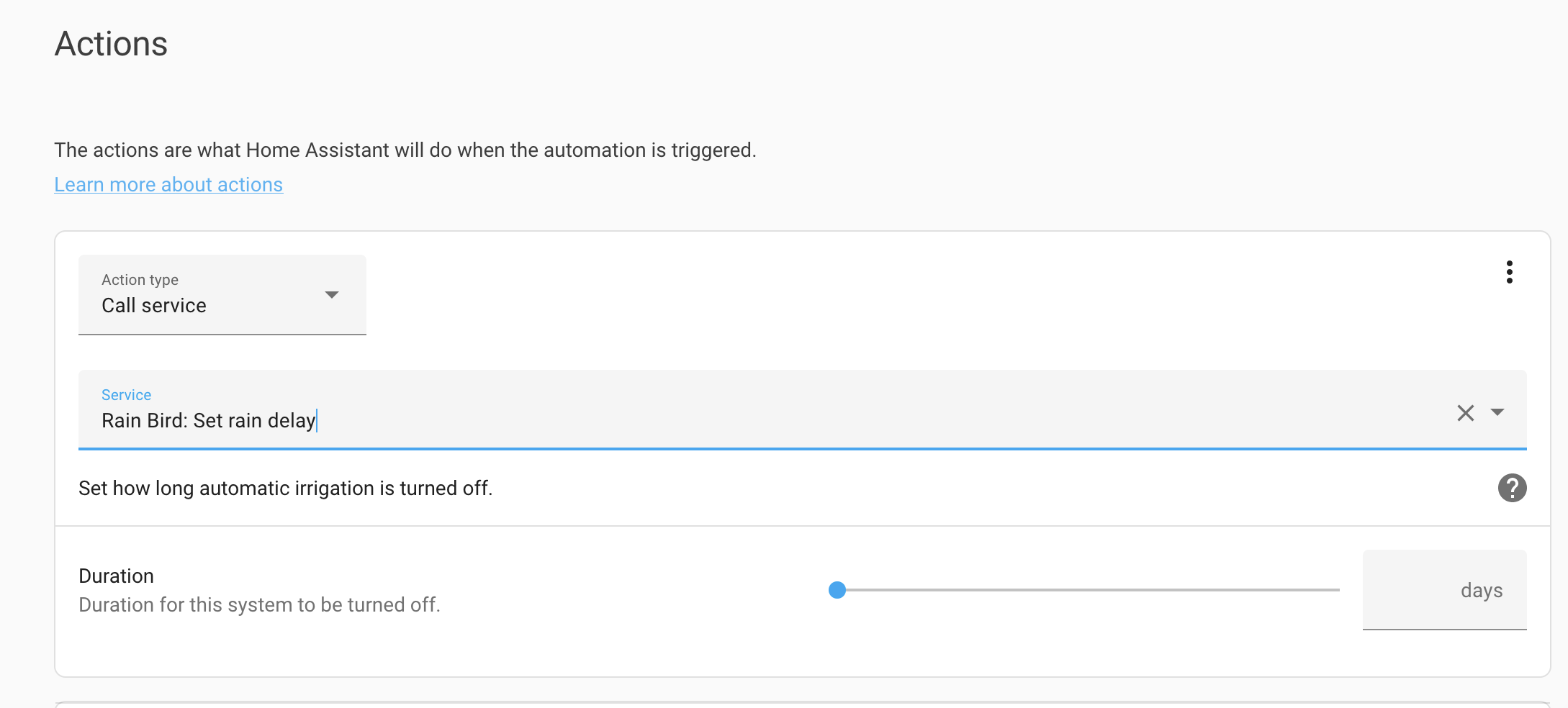
i have searched the forum but i dont really understand the conversations on how to do it, guidance much appreciated.
 grim grotto
So i'm trying to add this custom card to my HACS but it's just "spinning" and then doesn't do anything... the logs say nothing either. Repo: https://github.com/custom-cards/text-element

GitHub
An element that can be used to show static text on the picture-elements card - GitHub - custom-cards/text-element: An element that can be used to show static text on the picture-elements card
literally just sits here

tried following the instructions on the git repo but i don't think it cares about my ui-lovelace.yaml file
 vivid swift
Hi! The new mdi icons have two icons for roller shades - one open, once closed. Is there an easy way to configure HA to use both of them?
 tender pine
Hey, how do i make the alarm panel card bigger i'm casting it on my google nest and the card is reallllly smal
frosty flower
wicked bone
i have searched the forum but i dont really understand the conversations on how ...
not 100% sure what youre trying to do, but if youre trying to use an action to pop up a button, youd want to use browser mod for that, its on HACS
frosty flower
fiery ledge
check https://community.home-assistant.io/t/apexcharts-card-a-highly-customizabl...
this is actually the solution that i had come to figure find worked best, had just spent some time trying to see if this would work. glad to know im headed down the right path
frosty flower
how can i fix the margins in apexcharts

theyre super wonky
better if i change show_legend to false, but still right up on the edge
here's my card: https://www.toptal.com/developers/hastebin/iminubebas.yaml
Hastebin is a free web-based pastebin service for storing and sharing text and code snippets with anyone. Get started now.
 blazing wren
What theme are you using? That might be causing it
frosty flower
mushroom, but best i can tell, all disabling it does is unround the corners

what is looks like disabled
and disabled with legend: show: false

still pretty slim margins
blazing wren
Not as slim though, which is definitely effecting things.
Why are you using the custom card instead of say the gauge card?
frosty flower
its an attribute, so the gauge card doesnt support it
but i believe this happens with my other current apex card

which i straight up dont think another graphing card exists that will let me define all these things
 grand harbor
Can I add a title to a conditional card? Tried adding the "title" property, but it didn't work. Docs don't mention it, so I guess there's nothing I can do?
dark dirge
The only purpose of a conditional card is to decide whether to show another card. Docs are here, and don't show a title: https://www.home-assistant.io/dashboards/conditional/
if you want a title, that would come from the card that it decides to show
grand harbor
Ah, I've been using it wrong then. Going to do it the proper way
uncut reef
I'm trying to use custom:button-card and I was hoping to change the text color based on the values I am defining, but it only seems to be changing the icon color, while the text takes the value of the last color listed. Is there a way to change text color instead of icon based on state?
frosty flower
so the problem with my apex card is something to do with layout:minimal
frosty flower
fixed it with apex_config: chart: parentHeightOffset: 20
wicked bone
frosty flower
not 100% sure what youre trying to do, but if youre trying to use an action to p...
My goal is to have a button that when pressed opens a slider menu to specify the amount of days and send that to the service. Pretty much what the ui looks like when creating an automation action that calls a service.
frosty flower
check out browser mod. you can use it to create a tap action which lets you define anew cardto popup
wicked bone
frosty flower
check out browser mod. you can use it to create a tap action which lets you defi...
Thank you!
vivid swift
Hi! I'd like to use mdi:roller-shade when my shades are open, and mdi:rolle-shade-closed when they're closed. Is there an easy way to do that?
Ah, I just found https://community.home-assistant.io/t/change-icon-for-cover-open-and-closed/158038/10 - from 2019 but I guess it's still accurate
Home Assistant Community
Your template syntax is nothing like what is shown in the card instructions. Try: type: 'custom:config-template-card' entities: - cover.roller_shutter_for_ha_0_1 card: type: entities entities: - entity: cover.roller_shutter_for_ha_0_1 icon: >- ${ states('cover.roller_shutter_for_ha_0_1') === 'open' ? 'mdi:window-shutter...
 muted saddle
i was hoping to use "fold-entity-row" together with "restriction-card" but i cant get it to work, this is how i thought it would be possible : https://paste.debian.net/1242812/
 raw stream
Is there a card that would be appropriate to use to represent a three way toggle? I want something that will let me have an open, closed and mid-way state for some template covers.
 velvet marsh
Does anyone have any idea on a good way to stop accidently pressing a unlock switch in Lovelace that could open my gate or something risking the homes security.
It's quite easy on the phone in the pocket or something or forgetting to lock your device.
frosty flower
Change the tap action to none, and make the hold or double tap action unlock
crimson shadow
Has anyone found a replacement for KIOSK yet? It stopped working altogether now for me a few days after the author archived the repository in GitHub. Maybe HACS disabled it eventually? Anyways all my dashboards look bad with extra toolbars on the top and side. Wish we had some info from the author.
 void salmon
Is it possible to get my energy "Grid total" cost as a card on my dashboard?
fiery ledge
crimson shadow
Has anyone found a replacement for KIOSK yet? It stopped working altogether now ...
Kiosk mode is still working, nothing has changed thusfar
fiery ledge
void salmon
Is it possible to get my energy "Grid total" cost as a card on my dashboard?
sure, sounds like a single sensor? why do you ask?
crimson shadow
fiery ledge
Kiosk mode is still working, nothing has changed thusfar
Mine worked after one restart but it stopped a couple days later. Did you install yours with HACS?
fiery ledge
yes, but I went back to manual loading because HACS kept saying there's an update (which there isn't)
just do:```
https://github.com/maykar/kiosk-mode
- url: /local/resources/kiosk-mode/kiosk-mode.js?v=1.7.2
#- url: /hacsfiles/kiosk-mode/kiosk-mode.js
type: module
theres a single error in inspector on Kiosk mode, but it has been there since forever, so nothing new: https://github.com/maykar/kiosk-mode/issues/75 Would be cool if someone with the knowledge would fork and fix this 😉
crimson shadow
Thanks @fiery ledge. It's working again after removing from HACS and manually installing. I'm looking to buying a coffee or pizza for whoever picks up the project if anyone's looking for a hobby!
 magic tapir
Hi. I have a view where I put energy cards. The last release brings the new compare feature, but it seems that this feature does not work in my custom view
Only works on energy dashboard. Is this a bug?
note that other functions to select a day, week, month work well in a custom view that contains the energy cards
frosty flower
custom layout card, grid layout, how do i say i want both rows total to be, say 250 pixels, with the first row taking up as much space as it needs and the second row filling the rest
i know it has to do with this, but idk how to say that
grid-template-rows: calc(100% - 91px) 50px
like if row 2 is 250px-row1, how do i define what row 1 is
frosty flower
also is it possible to round a number on an entities card without creating a whole new sensor?
dark dirge
nope
frosty flower
dang. gotta find a similar card that lets me or that i can at least use template with
 opaque kiln
custom:button_card
dark dirge
or even markdown if you want a built-in card
 lavish solar
I'd like to use an entity's last_updated state object info with the filter card so that I can only show entitles that have not had an update in a given amount of time. It doesn't look like this is possible with stock cards, but i'd love to be wrong. Any thoughts?
lavish solar
i caved and use the auto_entities card
 timber saffron
I have a question about the logbook card. Since version 2022.6 there is showed the text: "triggered by service logbook.log" after my message. Before version 2022.6 this wasn't showed.
I have some dummy entities created. And I use the logbook.log service to log an action of an automations on those entities. In the logbook I show those dummy entities.
Here you don't want to see that extra text of triggered by..... Does anybody know how I can hide this extra text?
 flat steeple
how can i change icon color and the icon itself based on state( would love to use template) in picture elements ?
fiery ledge
frosty flower
dang. gotta find a similar card that lets me or that i can at least use template...
template-entity-row is the most versatile entity replacer you could wish for
fiery ledge
flat steeple
how can i change icon color and the icon itself based on state( would love to us...
see the many posts on that in the card_mod thread in the community. there';s a pinned messaged on the overview post by Ildar
 wicked raptor
Hi. Im trying to add show_last_changed to one entity on glance card. Looks like isnt working.

BTW, i tried to add it to all entities and also to the card
 astral vortex
I'm trying to track the location of my mower using the map card, unfortunately open maps is lacking any detail, so it's pretty much just showing a blank area other than the street. Is there a way to provide an image or use satellite imagery for this card?
 tacit cave
wicked raptor
Hi. Im trying to add `show_last_changed` to one entity on `glance card`. Looks ...
tacit cave
wicked raptor
Hi. Im trying to add `show_last_changed` to one entity on `glance card`. Looks ...
read the description in the docs, it says it overwrites the state... which you are not showing


 rocky reef
Hi all , I'm new to HA . I have created a lovelace template but I get an error when I try to include it in a card. After some research I think !include is deprecated, how do you get around this ?
dark dirge
What do you mean by 'Lovelace template'? What did you create?
rocky reef
well I'm following these instructions , trying to do the household task, part https://github.com/Burningstone91/smart-home-setup#household-tasks . it's a yaml file for locvlave gen , when I do the card part I get an error

GitHub
Installation and Configuration of my Smart Home Setup - GitHub - Burningstone91/smart-home-setup: Installation and Configuration of my Smart Home Setup
I'm still learning HA, I think I did all right , it's the !include part that doesn't work - any help would be very welcome and very apreciated 🙂
dark dirge
You jumped right up a pretty advanced and little-used method to build a dashboard
rocky reef
yes I know, but I tried grocy and another method without success...
would you recommend I scrap that route and try something else ?
dark dirge
I have no experience with Lovelace gen
I suggest building your dashboard in the UI until you're comfortable with it and then investigating other methods
rocky reef
I'll try to do it another way . I'm sure it's possible to do what I need with helpers. Thanks for the help
 solemn narwhal
Anyone have or know of a custom card written in SolidJS? Looking for an example.
 jagged jungle
Hi folks! Anyone here have experience with using https://www.home-assistant.io/integrations/sensor.rest/ ? I've added one to my configuration.yaml. But it doesn't really wanna show up on my dashboard. And I'd like to avoid having to disable the automatic dashboard if possible

 jagged jungle
Realising I can't find the sensor in Developer Tools either 🤔
fiery ledge
just posted in Integrations (because provided by Browser_mod), but since you mention here: have some players being hidden, but cant unhide them to enabled. what could prevent that?
jagged jungle
Found the solution - had forgot to set the protocol 😅 (http://<ip>)
fiery ledge
found mine too. the BM id's hd changed, and I had reset them, using an incorrect number sequence. user error. sorry.
frosty flower
are there any options other than an entities card for input select dropdowns? i dont really like the look of it
dark dirge
frosty flower
saw that one, but its not a dropdown, looking for a dropdown specifically
frosty flower
seperate question, since theres no header support, far as i can tell, im using a single column grid layout with a single card as the header, and the rest of the gards nested in a custm:ayout-card grid. how do i define the margins on the "header" card to make it take up the same width
frosty flower
figured this out a little more. if i set a max width, its no longer centered, so how do i center it?
blazing wren
margin: auto;
You may want to be more specific and set the left and right margin specifically
frosty flower
not sure if im doing something wrong here, but that doesnt work., looks fine with no margins, but with margins its left-aligned rather than centered
i tried margin: 0px auto 0px auto and margin: auto;
so its like

this
when it reaches its max width
 humble mica
@frosty flower , sidebar.. what integration is that?
frosty flower
sidebar?
humble mica
off topic, I was trying to see what integration that is
frosty flower
which one, the chart? the grid?
humble mica
mpg
frosty flower
oh, technically its torque, but my research showed the torque integration is kinda broken so i just have it sending through mqtt
im a stats nerd so its super cool to me lol
frosty flower
anyone who has the answer to css-grid centered auto margins on page, youll be my lifesaver forever
vapid field
Hi, I have a gas counter with an monthly reset. So I try to use a helper to translate this to a sensor that I could use in the energy dashboard. however it does not show up in the energy selection box. I read somewhere that this might be related to the device class not being 'gas' but how do I change the device class of a UI-created helper?
 craggy tartan
I try to load my last snapshot in a home assistant picture entity, when I use image path: /media/local/camera/camera.png in the enitity it doesn't work but when I use image: /media/local/camera/camera.png in my notification it works fine. Some suggestions?
fiery ledge
how can this be https://community.home-assistant.io/t/apexcharts-card-a-highly-customizable-graph-card/272877/1639. a fellow apexcharts-card user shows a template on the graph_span: option, but that isnt possible according to the docs?
using config-template-card myself to do that, but ofc, would love to do natively in the card like the poster does... cant make it happen, and even saw a this popup for the first time since I use the UDMpro..... internet taken down because of a custom-card trying to load.
 fiery ledge
need a blank transparent image for use with a type: picture card... how do I make that? (and set a templated background image...)
- type: custom:hui-element
card_type: picture
image: /local/blank.png
card_mod:
style: |
ha-card.type-picture {
margin: 0px -16px -16px -16px;
box-shadow: none;
padding: 8px;
background: url({{state_attr('this.entity_id','entity_picture')}});
background-size: cover;
}``` warped yew
I have a statefilter that says:
state_filter:
- operator: '!='
value: idle
how do i change it so that its "NOT idle OR paused"?
tender pine
question: so you need to install HACS into home assistant to be able to use themes ? I have been reading https://www.home-assistant.io/integrations/frontend/ there is no mention of it but when i search howto videos they all say you need to install it
dark dirge
HACS isn't required for anything. It's just a downloader
it makes it easier to download custom things, but you can do what it does manually
tender pine
yeah got it to work fine without HACS just did it all manual 🙂
tender pine
how do i know witch path this is ? lovelace-background: 'center / cover no-repeat url("/local/night.jpg") fixed' it's a line in a theme that i downloaded
dark dirge
/config/www
craggy tartan
Does someone knows how I can access my media from the media tab in the picture card?
fiery ledge
I've asked that many times myself, and still would love to know too. Seems. not possible..?
blazing wren
Would a generic camera work?
fiery ledge
not sure this was meant for the media tab question?
blazing wren
Yup. It's an idea. A weird one. But sometimes the weird ones help you find good ones.
astral vortex
On the xiaomi-vacuum-map-card, what format is expected for the vacuum_postion attribute?
 brazen pine
Is this where I would ask questions about trying to use the REST API to make a custom Javascript frontend?
 honest moth

This image took up 45.1 KB
 worthy compass
honest moth
https://ss.lucaswebber.dev/
worthy compass
honest moth
https://ss.lucaswebber.dev/
Show the original image
honest moth
worthy compass
Show the original image
 worthy compass
honest moth
worthy compass
honest moth
Sounds like you deleted lots of custom cards
Cz their type have custom in it
honest moth
worthy compass
Sounds like you deleted lots of custom cards
using the button-card hacs integration
worthy compass
honest moth
using the button-card hacs integration
Show the hacs page
honest moth

This image took up 80.86 KB
worthy compass
honest moth
https://ss.lucaswebber.dev/
So click into the button card
What it shows
honest moth

This image took up 102.07 KB
worthy compass
honest moth
https://ss.lucaswebber.dev/
Try updating it
(Might fail cz it isn't maintained anymore)
honest moth
worthy compass
Try updating it
(Might fail cz it isn't maintained anymore)
It is already the latest version
I am also using Lovelace UI Minimalist
worthy compass
honest moth
I am also using Lovelace UI Minimalist
Does it works before restart
honest moth
it did
worthy compass
honest moth
it did
What u did before restart
honest moth
worthy compass
What u did before restart
Updated some things in hacs
worthy compass
honest moth
Updated some things in hacs
So it might be broken
Can you undo it and restart again
honest moth
worthy compass
So it might be broken
Can you undo it and restart again
I tried alot of the button-card versions, and none work
worthy compass
honest moth
I tried alot of the button-card versions, and none work
Try disabling all except button-card
Then restart
Then enable one of them and restart
Do the third step repeatedly until u find the addon the causes issue
honest moth
worthy compass
Try disabling all except button-card
Then restart
Then enable one of them and r...
None are the issue
worthy compass
honest moth
None are the issue
So you already did it and can't find any problem?
honest moth
no
worthy compass
honest moth
no
Do you remember what u upgrade before reboot
honest moth
no
worthy compass
honest moth
no
So it just breaks randomly?
It's also expected cz its already unmaintained
honest moth
worked 1 hour ago with it
worthy compass
honest moth
worked 1 hour ago with it
Erm how many times it break alr
honest moth
only just now
worthy compass
honest moth
only just now
So you upgraded bunch of things
Rebooted
Then break
honest moth
👍
worthy compass
Try check logs
worthy compass
honest moth
had to add the integration and then remove it
So what you added
And what you removed
honest moth
it's a lovelace minimailst thing
worthy compass
Oh
vapid field
Hi guys
 rough coyote
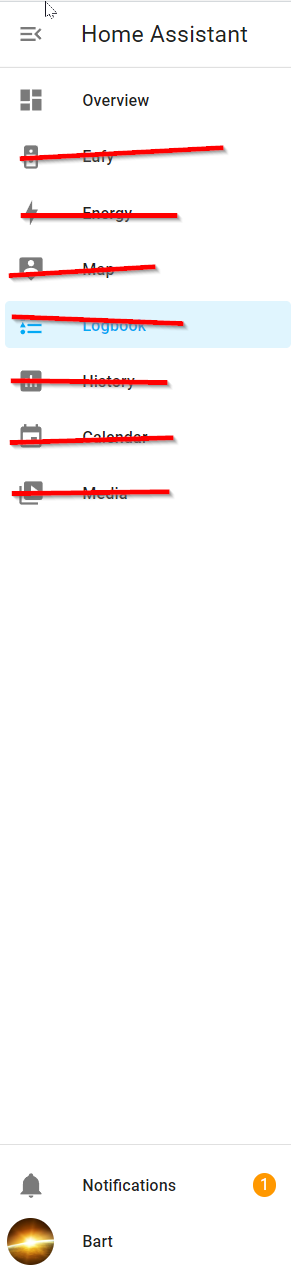
Is there anyway to limit what users see in the sidebar menu? I don't want a user to see logs of anything but the Notifications, his 'name' that links to his settings and Overview. Hide, forever and so it can't be enabled again by user, Energy Map Logbook History Calendar Media etc.. all the others realy. I want a side menu with 3 options. Overview, Notifications and <username>linkto config. https://i.imgur.com/ZR8ijDO.png
 vapid field
does anyone know a way to limit the number of elements shown by the shopping list?
if you have, let's say, 23 elements, show a page with 10. Then clickin some button, show the next 10, and so on?
and still be able to remove, add an element if need be
rough coyote
the term is: paging
I am not aware of it being available but usually they refer to the method you describe as 'paging'.
fiery ledge
blazing wren
Yup. It's an idea. A weird one. But sometimes the weird ones help you find good ...
yes, you're right, I like that strategy. So I tried it, but I guess Im doing it wrong, none of the picture cards have a browse button (so we can not reach the Media source share in the UI). Maybe the concept Media does no include imagery and we should give up to try and do that
rough coyote
aha
I am just gonna add links inside a dashboard card to the things in side menu i only want me to see.. and not put them in sidebar anymore. That should work
Yeah winner plan. Also gets my sidebar nice and clean.
fiery ledge
even though the icon for Local media would suggest otherwise

 mossy echo
hey all, is it possible to add a link to the left-hand sidebar and iframe in a website? For example, using HA in Docker and I have esphome/grafana/etc on the same system. I know you can do it in a supervised install through the HACS
I guess I just found the panel_iframe which is what I want. https://www.home-assistant.io/integrations/panel_iframe/
 hushed wasp
How can this person have 2 colors on the icons? something from HACS?
 polar kelp
 chrome agate
hushed wasp
chrome agate
hushed wasp
thx!! 😄
 dense thicket
I'm trying to make a card display temperatures for certain sensors in deg C vs deg F (but I want to retain my default of F everywhere else). I'm not finding any way to change that... help?
chrome agate
@dense thicket one way to do it would be using Template Sensor and simply make a new sensor that converts from F to C and put it in the state https://www.home-assistant.io/integrations/template/
Another way would be using a Template Card (like for example custom:mushroom-template-card) and do the conversion "inline" in a template value
Personally, I would do the new-sensor one
dense thicket
ok I'll give those ideas a shot and see 🙂 Thanks
 bright sky
Is it possible to embedd a horizontal stack in a entities card?
dense thicket
chrome agate
<@171041591086022659> one way to do it would be using Template Sensor and simply...
Tried a template sensor... and it converted it back to F....
YAML-> https://pastebin.com/17skKPqu

Pastebin
Pastebin.com is the number one paste tool since 2002. Pastebin is a website where you can store text online for a set period of time.
 tacit pumice
Hi, does anyone know how to get the "room" of an entity from the REST API? seems like every info except that one passes through.
dense thicket
dense thicket
Tried a template sensor... and it converted it back to F....
YAML-> https://past...
nvm I got it licked. Forced the unit_of_measurement to C instead of °C and it left it alone.
frosty flower
~~javascript question. how do i get hh:mm from a timestamp? using the config taemplate card ive got
${(Date.parse(states[this._config.entity].attributes['Device Time']))} which returns a timestamp 1654457964877. I'd like to extract hh:mm from this~~
frosty flower
am kinda keen on the design of the regular entity card right now, but would like something that i can put whatever instead ofg just a state name. there any custom card like that?
 terse flame
Has anybody seen any weird energy usage following update to 2022.6.2? I update yesterday and my energy dashboard showed 90kWh of usage for the first hour following the update. It seems fine before and after this day.
 rough coyote
anyway to disable MEDIA ?
Media shows my cams, i wanna share with someone some things but not Cams.
Same for Calender to lesser extent. But the camera thing is a showstopper.
 simple grotto
Hi, I have this in my config.yaml:
sensor: !include_dir_merge_list configuration folder/sensors/
In that folder I have two yaml files. sensors.yaml(which works) and template_sensors.yaml which has:
template:
  - sensor:
    front_door_lock_battery:
      name: "Front Door Lock battery level"
      unit_of_measurement: "%"
      state: "{{ state_attr('lock.front_door_lock', 'battery_level') }}"
      device_class: battery
Why won't this work?
tacit cave
simple grotto
Hi, I have this in my config.yaml:
```
sensor: !include_dir_merge_list configura...
- this is not #frontend-archived question, this would be #integrations-archived
- Your yaml spacing is wrong. Remove the word
template:and remove 2 spaces in front of the line- sensor:.
I suggest you take some time to understand the yaml basics, like spaces and object types.
fiery ledge
bright sky
Is it possible to embedd a horizontal stack in a entities card?
sure. what did you try, and what went wrong?
fiery ledge
frosty flower
am kinda keen on the design of the regular entity card right now, but would like...
"put whatever", sounds very much like custom:button-card, or template-entity-row
fiery ledge
tacit cave
1. this is not <#460846676358332417> question, this would be <#6722205413437603...
he'd also need to add - unique_id: in front of front_door_lock_battery to make that work (note: take out the : )
tacit cave
fiery ledge
he'd also need to add `- unique_id: ` in front of `front_door_lock_battery` to m...
No, he's using the old format
 azure canopy
simple grotto
Hi, I have this in my config.yaml:
```
sensor: !include_dir_merge_list configura...
azure canopy
simple grotto
Hi, I have this in my config.yaml:
```
sensor: !include_dir_merge_list configura...
- your sensor is part of the template integration and not the sensor integration
tacit cave
3 would be... change state to value_template and name to friendly_name
he's trying to use merge_dir_list, so he needs to use the legacy format
fiery ledge
template:
  - sensor:
      - unique_id: front_door_lock_battery
        name: "Front Door Lock battery level"
        unit_of_measurement: "%"
        state: "{{ state_attr('lock.front_door_lock', 'battery_level') }}"
device_class: battery```@fiery ledge that won't work with merge_dir_list on the sensor: field
he has to use the old style
fiery ledge
a no. he'd need to move that to a package like this, or take out the main template: and create a merge_dir_list on that
azure canopy
Well there are a lot of things he can do to solve this, but nothing he needs to do
Lots of ways to skin a raccoon
fiery ledge
well. needs to do something
fiery ledge
hehe. at least read all of this when he comes back
simple grotto
thanks for the reply 🙂 I'm trying a different approach thats worked but is there still "availability" for the new way to do templates? it used to work on legacy
eg:
      - name: "Office Temperature"
        unit_of_measurement: "°C"
        device_class: temperature
        availability_template: "{{ 'current_temperature' in states.climate.dyson_pure.attributes }}"
state: "{{ state_attr('climate.dyson_pure', 'current_temperature') }}"```Yes availability instead of availability_template
But it's all in the docs I linked to in #templates-archived
But all of this is #integrations-archived not frontend
 topaz mauve
What do you all use for floorplans?
I imagine there is some simple webservice that lets you draw out basic floorplans since I am seeing hundreds of them show up in google image results when I go to add a floorplan card, and they all look like they are done from very similar software, I could do this in photoshop but I bet there is a floorplan app or website to mock up basic layouts. I have not looked yet just thought I would ask first to save a few clicks
I have my frontend up to a point where I have enough hands on with HA to move things around in the code etc and a layout I currently like I am just looking to fill in areas with more stuff now like I have tabbed overviews and all now
 dreamy tendon
I used floorplanner.com but it's become more annoying to use since. You can only export one pic every ten minutes and when all different lighting options required their own image....
topaz mauve
I see, Well I have a 4 bedroom place atm, I am not worried about adding details like lights and stuff into the plan just the rooms width and size, general colour texturing and entry ways. I add badges too the image later in the code for the floorplan card as I was messing around with one early on before I started automating with HA and realised I can control the pos of objects on the floorplan straight in the card and figured meh I will just use icons and make it interactable that way putting badge icons on the floor plan card.
dreamy tendon
the floorplan was the biggest waste of my time with HA. I literally never use it
topaz mauve
unsure what you mean exactly by lighting options require own image, as for me it just needs to make doors and let me map out the area anything inside the are I don't care about I will use badges for that
dreamy tendon
So when I turn on a light, it lights up in the floorplanner image as well. So if a room has 3 lights I need 2^3 images for that room plus the same for night time, so 2^3*2=16 images
topaz mauve
I mean it probably is not efficient as atm I have this https://imgur.com/a/LChifHJ
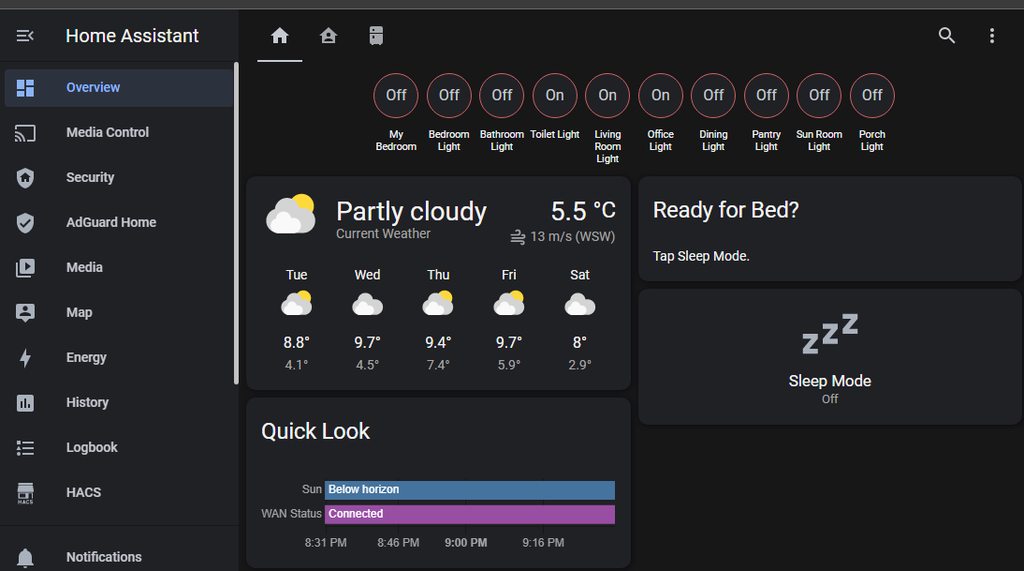
I just wanted to add a floor plan for filler and for sake of pretty things, ofc you can tap on the entities added if you really wanted too
topaz mauve
dreamy tendon
So when I turn on a light, it lights up in the floorplanner image as well. So if...
Oh that yeah I was not going to do that.
I was just going to add the entities ontop of the image in the card code and move them via Width and Height % I don't care to animate the plan itself so that rooms go dark or not when things are on or off ofc you could, I just feel same as you prob a waste of time.
I may have misinterpreted what you mean by light up tho
dreamy tendon
I'll try and find a pic if I figure out the discord search 😄
topaz mauve
You can make the floor/room itself light up in a floor plan with way more work I was just going to put an entity into a space very simple copy pasta my friend, copy paste and rename the entity and pos it accordingly voila entity lights up or not with its state I already tested that its like 1 line per entity you can choose how it looks by changing its icon for me I just used icons added to HA intergration but they already change state auto you just have too add the actual entity line to your card code.
Example of all I intend to be using floorplan for, just adding entities of various types so I can read binary sensor state have it displayed here instead of being a badge across the top of the dashboard or maybe both
Stupid easy

all I did was this -
elements:
  - type: state-icon
    entity: light.bulb_rgbcw_7w_1dde10
    style:
      top: 30%
      left: 14%
  - type: state-badge
    entity: binary_sensor.remote_ui
    style:
      top: 10%
      left: 50%
image: https://demo.home-assistant.io/stub_config/floorplan.png
I stumble upon this stuff just messing around and I can do things with it like change colour if I wanted too.
Clicking light brings this up

Hopefully that gives you idea of what I intend to use floorplan for, nothing too crazy.
So I can remove all of this and put into something visually pleasing yet functional.

You can even adjust the icon displayed when editing the dashboard the icon or badge will reflect its current state. I am sure there is fancy things I could do but this is what I discovered just tinkering without reading a single doco
dreamy tendon
Yeah I went with a lot fancier UI but it's just not very useful at all
 topaz mauve
Holy balls you went with full 3D render, mate I am not spending that kind of time lol
dreamy tendon
I know, agony 😂
topaz mauve
It looks like it would more hassle to operate then it looked pretty hence I was going to go with a simple visual top down
What did you do anyway use some kind of javascript element to load a render
I can't see anything in your floor plan to click on no wonder it was was a pain to use 😛
Wait a min you glorious person gave me a sweet idea
dreamy tendon
It's images just stacked. Same render multiple times (71 images in total and it doesn't support all lighting combos since I got tired)
topaz mauve
I will just use the Sims 4 to model my house and then top down view with no roof fricken genious
topaz mauve
dreamy tendon
It's images just stacked. Same render multiple times (71 images in total and it ...
See above I could do this in half the time in a game.
dreamy tendon
the lights all have a box around them that you can click
topaz mauve
I see
what about the render it self floor plan would have taken ages I don't think the stacking was the issue, I still I have stumbled onto a cool soluton by using The Sims 4 to model my house and landscape then use top down view camera mode and snap me some pics use them in HA Dashboard
dreamy tendon
render was quite quick actually. The problem is the overlapping lights and the amount of combinations you run into
topaz mauve
dreamy tendon
render was quite quick actually. The problem is the overlapping lights and the a...
Ah yes, well I won't be going that extreme I just want to see the states of things in a general gist of the layout in some pretty fashion yet functional as prev mentioned
I could use 2D top down which arguably may be more material like or I can model the house fully 3D in the Sims lol and save me messing with CAD not that I can't I have modelling experience, alternatively I can use REAL images of the house with the roof cut off and the 3D model inside.
I actually fly drones commercially so I have my share of photometric ortho of my own land
I can literally use a birds eye of the property and just photoshop off the roofing
abd cut me out the areas for layout later
dreamy tendon
hehe, use it to create a real pic instead of a render 😉
topaz mauve
I could make a render, my tools can make 3D point cloud models
dreamy tendon
nice
topaz mauve
that is how I got a 3D model of the local lighthouse
I did a full 360 around it taking 300 pics vertical cylinder up and down and then over the top
and around and around it its what I use my drones for besides cinematic reels
fully autonomous mind you, I did a top down of the area first so I overlay that into google earth right then import my flight plan ontop of that to see the path of drone and see if is going to clear everything as best as I can without real world testing
get things lined up best I can then go test fly
dreamy tendon
That's pretty cool. The 3d modelling from pictures seems to have made some leaps in the last few years. It's quite cool
topaz mauve
Google image is not enought thjey take images at certain offset which is terrible for getting accurate measurement if I do my job right I can get within 0.3cm accuracy of reality measuring from air as you would by hand on ground just by later drawing ruler lines to measure between two points
topaz mauve
dreamy tendon
That's pretty cool. The 3d modelling from pictures seems to have made some leaps...
It is much easier than you think sure it takes some pre thinking and thought too but with workflow understanding you can get it done with the right tools lidar sensors are pretty good if u need to do lanscapes as they generally will give you more points and can see right through medium canopy's of trees and bushes
in cases u can't see the surface but want height data you use lidar or combination of that and ortho
I plan to build my own lidar glider from a hobby glider using common FPV drone parts some stage in life there is open source soft for mission planning and flying
I like DJI I do but I need distance coverage I want to fly it 15-20km and use little battery that is what those small gliders are for at which point you just dronify the actuators pretty much and give it GPS tracking
dreamy tendon
Yeah it's something I've been seeing people use more and more. Like creating simple 3D models for short movies etc. I suspect it will become super handy for a lot of things in the near future
I got myself a dji mini because it was so cheap. It can't do any of that fancy stuff but it's still fun
topaz mauve
I would say the mini 2 is better
I started with a Mavic Pro Plat then moved to Mavic Pro 2 and I have that and a Mini 2 atm
Mini 3 is out seems to have a bigger cmos sensor so I am keen on getting that its almost an Air2 in formfactor of a mini2
I got that smart controller heap of ND filters 3 batteries for everything
I def recommend mini2m upgrade the range increase and stability of the HD view is so much better thanks to not using Wifi but proper RF
dreamy tendon
The mini was on a sale since it's being discontinued. 250€ for the flymore pack. The price difference to the mini2 was quite big. The mini3 pro is already quite expensive
topaz mauve
not wrong mini2 does cost more but mini3 is out now so maybe you can find a cheap one
I basically sold my Mavic Pro complete with 3 battery 2 barely used battery in terms of life on em and a set of peter McKinnon polarized ND filters
dreamy tendon
For my use the mini will do just fine for now. Just need to find courage to use it on the sailboat 😄
topaz mauve
for $100 more then mini 2 and fly more
I don't get some features of the Pro with mini 2 but I do get the same sensor size with ability to use Occusync 2.0 so I can use same remote for both my drones now and or the mini2s with my mavic 2 pro, I just basically don't some of the collision sensors and able to film in D-LOG which tbh is not a HUGE deal it means more edit work to aka shove a LUT onto the footage to first create flat colour then start from scratch
But mini 2 makes up for it with better signal and penetration quality/ range has equal the flight time and form factor of my pocket and for anything more diverse I have the Mavic 2 Pro with a full 1" sensor anyhow and everything the Mavic 1 pro don't have + more
Mavic 3 is stupid expensive not buying that unless clients start paying more $ to keep the studio a float they start at 3k lol 5k AUD
Mini 3 I don't what it costs but could be a good upgrade if I sold the mini 2 first, and throw in $500 of my own cash It has a 1" sensor so it would be basically a pocket sized air2 S
dreamy tendon
the mini 3 pro is like 900 iirc
topaz mauve
Yeah but that is your money I am Aussie pounds for me is just over 2.x and USA its about 50% more
dreamy tendon
1300 for you, depending on the taxes
topaz mauve
yeah sounds about right
so I sell mini2 with my accessories for like $600 is a good deal
I only had it for about 4 months and its done 4 flights maybe 6
dreamy tendon
The weird thing about the minis is that for us the 249g weight makes no difference
topaz mauve
I got the cage for it too
Yeah same here I have that sub-2kg exclude category I can fly anything under 2KG commercially under one permit
if its less than 249g I can fly it without the fee
dreamy tendon
In the EU the 250g limit is only true for drones without a camera. The next level is probably around that 2kg mark
So for the mini we'd need a license
topaz mauve
Ay hes I hope we don't go the way of USA and require this tracking bs and all that other nonsense they are introducing and have to spend some $1500+ to just fly commercial and have to map your area out like a cartographer is really a joke imho
I think just give us a drug test now and then and see if our IQ is not caveman and let us do what we have to do lol we pay our fees for commercial use anyway so just make it simple
I understand extra training for beyon VLOS and night flight but we have that its called rePL
$1300-1600 course and some $500 extra gets you RF training so you can fly beyond VLOS and at night with approval aka filling out the mission plan doco before hand
but for basic commerical work you can just pay a yearly fee of $60 a drone if its above 250g
the actual exclusion is free
Been nice chatting but we prob should stop while ahead and not flood the heck of frontend any more than we have
I think I will just go with easier route for my use for the dashboard though and get myself into a floorplan drawer webdesigner thing or just fire up the Sims 4 and build my layout to spec and just take top down screenshot with no roof on the house 😆
dreamy tendon
My advice on that would be that don't spend too much time on it since the whole point is to automate your way out of using any kind of UI
topaz mauve
For sure. I wanted a pure google nest like UI minimalist is my thing
The floorplan was just for at a glance of the states in pretty way can interact if you want too but generally its just so I can throw a pretty layout onto a smart mirror web-front 😛
at some stage
dreamy tendon
It has some uses I'm sure. I prefer voice control though and I like remotes too
topaz mauve
I am total newb so atm I am trying to make scenes for sunset and sunrise then call a service to run on every entity in them as there isno way I am manuallysetting all the lights so I just intergrated adaptive lighting to handle all that and just run the adaptive state service trigger or the sleep trigger on whatever
atm all I got is 2 scenes called sunset sunrise with all the light devices added
to be used later in automation that will call a service lol
dreamy tendon
Adaptive lighting is great. I use it and then some scenes based on sun angle (which works better than just sunset/rise)
topaz mauve
I could do it in google assistant routine but I wanted it on the HA server as that way it does not strictly RELY on google services to function yet I can still use them in the routine if I so wish
topaz mauve
dreamy tendon
Adaptive lighting is great. I use it and then some scenes based on sun angle (wh...
If you want to DM we can discuss as I need more help with adapative lighting
fiery ledge
any chance you all could get this back on topic #frontend-archived
topaz mauve
Can do sorry about that
 dark pewter
show_state: false
show_name: true
camera_view: auto
type: picture-entity
entity: person.koen
image: >-
  https://my-assistant/api/image/serve/32c06c87684b2617e83af9f5c17783a9/512x512
name: |-
  '{% if is_state("person.koen", "home") -%}
    {{states("person.koen")}}
  {%- else -%}
    {{states("sensor.koen_naar_huis")}}
  {%-endif %}'
So.. Why is this thing just showing my template in the name field, rather than parsing the template?
I tried it with and without quotes around it
(i'm trying to have some element that shows when either i or the girlfriend are at home, and if we aren't, to show how long it takes us to get home
fiery ledge
because the card doesnt support templates. practically no core card does, except for Markdown
dark pewter
Ah.. here i thought that every field in home assistant supported templates
fiery ledge
just check the docs for the possibilities
dark pewter
well i didn't saw it explicitly mentioned so..
fiery ledge
exactly: not mentioned, not supported
dark pewter
That makes sense
fiery ledge
you could easily build that though with custom:button-card
fiery ledge
sure, whatever works for you. there are several options most of the times 😉
dark pewter
Yep! Would've loved to be able to combine entities like this 😛
fiery ledge
you could even embrace the config in a custom:config-template-card, and make the template work, though that is a heavy card for the system
dark pewter
config-template-card?
dark pewter
just found it, that looks VERY op
fiery ledge
or lovelace-card-templater, which uses Jinja templates, like yours. For the config-template-card, you use javascript templates, which in your case is dead easy too
dark pewter
Thanks for the help!
 cosmic wigeon
Does anyone know of a repo that has dropdown menus upu can put on your dash with no yaml editing?
void salmon
fiery ledge
sure, sounds like a single sensor? why do you ask?
I ask because I'd love to get just the total cost of energy, shown on my "Dashboard" in a card, that is reported on my "Energy" tab.
void salmon
cosmic wigeon
Does anyone know of a repo that has dropdown menus upu can put on your dash with...
Have you tried using a dropdown from the Helpers? https://www.home-assistant.io/integrations/input_select/
Home Assistant
Instructions on how to integrate the Input Select integration into Home Assistant.
cosmic wigeon
I have not.
I didn't think they'd work on the dash side for some reason.
I'll take a look ty
I was thinking of something to make my mushroom cards more compact

 summer mulch
I am using the custom:slider-button-card but the styling of the card doesn't follow the selected theme. I can not see where this is happening.. anyone can help me out?
And I do not have card-mod installed. I also tried different browsers and stuff../

 drifting horizon
http://0.starset.net/screenies/2022-06-06_11-37-46.png
Is there anyway to remove/hide the various modes for a climate entity?

 fleet jay
Hello I was just working on my home assistant dash board installed hacs then installed mushroom cards but i cannot see the mushroom cards in mu dashboard i was wondering if anybody could help me?
 zealous sedge
I upgraded to core-2022.6.2 and my dashboards got scrambled. They all display the same metrics even though they are set to something else. They all show the metrics from the same tile (the one where I track backup status) and updating the settings doesn't change their display. https://www.dropbox.com/s/10sbwfg292szcf7/Screen Shot 2022-06-06 at 9.53.33 AM.png?dl=0
 frosty flower
im having a problem with css-grid if anyone can help.
i have an autoentities on the custom layout grid card, and i want it to be a 2 column grid, or if just one entity, have it take up the whole grid. grid-template-columns: 1fr 1fr works if its 2 or more, but if its just 1, then it leaves an empty space. obviously 1fr or 100% works if its just one, but how do i combine these 2 so thats its 1fr if just 1 entity or 1fr 1fr if more than one?
fiery ledge
void salmon
I ask because I'd love to get just the total cost of energy, shown on my "Dashbo...
in that case I misunderstood you, sorry. those are calculated internally, and not exposed in the states.
void salmon
ok
 wanton lynx
Is there a way to get the map card dark_mode: true to match the theme of the computer or phone?
I could have sworn it was working that way at one point but couldn't find any info on it.
frosty flower
thats the default iirdc. remove any yaml about dark mode, should default to device theme
frosty flower
fiery ledge
"put whatever", sounds very much like custom:button-card, or template-entity-row
custom:button-card and template-entity-row are both great and super versatile, but iw as honestly hoping for something a little more managed in scope. i want to use the entity card, i just want to make modifications so what shows up in the entity spot, for example rounding a number of appending the start of the text. short of recreating the card from scratch, i haven't found something that lets me
blazing wren
You likely want #templates-archived for that
Create a template sensor with the modified (e.g. rounded) value, then show that in the entity card or similar
frosty flower
i was hoping to avoid having to make 27 template sensors 😅 but if thats the only way thats the only way
fiery ledge
that must be possible with card_mod. Did you check the examples on entity card in the Pinned message? or deeper down there, for rounding a state. though I confess not having found that so quickly. still, I would advise you to look into custom:button-card, which allows you to do just about anything, and still have it look like a core card 😉 1 simple button-card-template certainly beats creating 27 backend template sensors
 dusky jackal
did i miss something, upcoming media-card no longer part of hacs?
fiery ledge
yes, Maykar archived his repos. You need to install it manually now
dusky jackal
ty, i have but of course getting the dreaded custom component not found. i have resources set correctly and js file copied over
fiery ledge
sure its a matter of cache and reload resources, (add the version number after the url)
like:```
https://github.com/maykar/kiosk-mode
- url: /local/resources/kiosk-mode/kiosk-mode.js?v=1.7.2
#- url: /hacsfiles/kiosk-mode/kiosk-mode.js
type: module```
dusky jackal
resources:
- url: /local/custom-lovelace/upcoming-media-card/upcoming-media-card.js?v=0.1.1
type: js
fiery ledge
yeah well, that seems alright, and if the path is correct, should do it.. not sure if the type: js is still accepted, but I guess it is, because I have the odd resource that is still using that too. Still, reload resources a couple of times, refresh and it should work. If must, restart to be sure. (really shouldnt be required though) any error in inspector for that resource?
dusky jackal
yep nothing i do can get them to show in cards.
frosty flower
im trying to move the elements around on button-card and it's just...not working the way i want it to. for example
type: custom:button-card
...
style:
  name:
    <options>: <value>
for options ive tried so many different things: align-self, top/left/etc, object-position, xxxx (which im not sure if thats a stand in for options or not). justify-self will let me align to start or end, but i want more control than that as well as vertical control. are there some basic paramters here that i'm missing?
fiery ledge
dusky jackal
yep nothing i do can get them to show in cards.
Any dependencies the card needs? And, to be sure, the path in /config/www/custom-lovelace/etcetc is correct?
fiery ledge
frosty flower
im trying to move the elements around on button-card and it's just...not working...
You should be able to use any css variable to your liking. Please check the button-card thread for options. ( can have a look in my bio and find button-card-templates in the Gist too)
dusky jackal
fiery ledge
Any dependencies the card needs? And, to be sure, the path in /config/www/custom...
triple checked, only dependent on the entity: sensor.sonarr, radarr etc
bright sky
Anyone got problems after latest update? I get "Custom element doesn't exist" for varius cards like better-thermostat-ui-card, mini-media-player, vacuum-card
Oh, cleaned browser cache and reloaded, everything back there 🙂
 forest thicket
Is there a simple way to say "all the cards in a grid row should be the same height"?
frosty flower
have i formatted this right for browser mod? running into an issue with the call-service. if its first, neither action is executed. if 2nd, the first action is executed properly but call-service fails to execute, leading me to believe its an issue with how ive formatted the call-service action
  action: fire-dom-event
  browser_mod:
    command: commands
    commands:
      - command: close_popup
      - command: call-service
service: shell_command.pc_off```this is the error i get:
    at JSON.parse (<anonymous>)
    at C.call_service (browser_mod.js:145:10513)
    at Object.call-service (browser_mod.js:145:9855)
    at C.msg_callback (browser_mod.js:145:10056)
    at Object.commands (browser_mod.js:145:9927)
    at async C.msg_callback (browser_mod.js:145:10021)```
Home Assistant Community
@Littlejoe I also did this yesterday. I put the js file to: www\custom-lovelace\upcoming-media-card I clicked on configure in any UI page and then on the 3 dot menu “Manage ressources” I added /local/custom-lovelace/upcoming-media-card/upcoming-media-card.js?v=0.4.3 and selected JavaScript module. As 0.4.3 was the latest release I installed...
fiery ledge
Yeah should be the same though.. anyways , good for you 😉
frosty flower
it possible to get an input_select to control a hash with state switch? cant assign a tap action to input select with the dropdown in entities afaik, but maybe something that mimics that?
 small pecan
has anyone done a calendar template that looks like the google calendar sidebar in Gmail?
 glossy zinc
Is there some way to make new dashboards start out empty? I have so many entities that when it tries to create the initial autogenerated dashboard, my computer lags like crazy
fiery ledge
no they start out like they do, and then you can take control, and start an empty dashboard. Would be a valid FR I figure, have a toggle in the settings maybe even to control that. hop over to https://github.com/home-assistant/frontend/discussions and submit your thoughts
fiery ledge
frosty flower
it possible to get an input_select to control a hash with state switch? cant ass...
sorry but no idea what you are trying to do. maybe give us a mockup?
frosty flower

not sure if you can get the idea from this
but rn the dropdown is an input select, and it obviously works but, if 2 different users are looking at it at the same time, maybe theyre fighting to select the view they want or are confused why its changing or something
(usiung state-switch to select the view based on the input select state)
i want to keep the drop down, but somehow have it let me do a navigate action so i can use state-switch with hashes on a per user basis rather than an input_select which is the same for all users
if thats possible..but since the only time the drop down appear is in the entities card with an input select, im not so sure if thats possible
opaque kiln
A hacky workaround could be to make one dashboard per user, each with its own input_select? But not ideal as there would be a lot of repetition.
fiery ledge
frosty flower
i want to keep the drop down, but somehow have it let me do a navigate action so...
hmm, interesting. It might well be that with an input select deciding the Frontend representation like here, this is already taken care of in the logic of the Frontend itself? Given the fact the Dashboards are on a per user base, I would imagine something like this to be personal also? Did you test it with 2 windows and different users at the same time?
side question: what custom card did you use to have that select control the other cards?
just tested that in my own dashboards, and yes, this is a global change, seen on any user logged in... so would indeed need what you ask
honestly: not sure if this is easily done... in my config, these type of cards are only available to the admin, which is an easier way out 😉.
 pine heath
im having troble with a website card
it wont connect to https://www.vesselfinder.com/?imo=9675171
DEEPWATER PROTEUS last position is 27.58825 N, 92.28165 W heading to DRILLING OPS REQ 2NM. TRACK ON MAP...
pine heath
i get refuse to connect. the api is behind a pay wall. but they do have one enbedded thing I want to try
can i run <script type="text/javascript">
fiery ledge
you mean on a tap_action of sorts?```
tap_action:
action: url
url_path: !secret weatherio_api_url
got to give us the bigger picture here of what you're trying ti achieve
pine heath

just something like the weather or wind, a update someone can see to make sure the rig didnt blow up lol on my home dashboard
fiery ledge
if you click that in your browser, it would show that full url in the address bar . What happens when you add that in a url_path like I showed above
pine heath
fiery ledge
if you click that in your browser, it would show that full url in the address ba...
the only free thing they offer is the embed a site
i think im close
maybe lol
fiery ledge
HA wont be able to show anything the API doesnt allow you to I would think
but if you have a working url (like the weather you mentioned) you could do: - type: custom:hui-element card_type: iframe aspect_ratio: 100% url: !secret roosendaal_br
pine heath
<script type="text/javascript">
// Map appearance
var width="100%"; // width in pixels or percentage
var height="300"; // height in pixels
var names=true; // always show ship names (defaults to false)
// Single ship tracking
var imo="9506291";        // display latest position (by IMO, overrides MMSI)
var show_track=true;      // display track line (last 24 hours)
</script>
<script type="text/javascript" src="https://www.vesselfinder.com/aismap.js"></script>
fiery ledge
to do things like
 fiery ledge
tried that for you:
 fiery ledge
I guess you would have to fix the error, and then the iframe would be able. As long as the authentication doesnt work, nothing will allow this. And, I dont know all of HACS 😉 you have to find something yourself.. Maybe its just a matter of fixing this url. Id compare it to some of the weather urls/services and check what they do to get it in a https://www.home-assistant.io/dashboards/iframe/
pine heath
fiery ledge
I guess you would have to fix the error, and then the iframe would be able. As l...
Well thank you for trying because I clearly do not know what the fuck I’m doing hahah
pine heath
fiery ledge
I guess you would have to fix the error, and then the iframe would be able. As l...
possibly? maybe?
The site does offer free premium membership for using some type of device or smart phone out thee
well the pi is going to be running firefix. ill wait and see <script type="text/javascript" src="https://www.vesselfinder.com/aismap.js"></script>
fiery ledge
did manage this, but it results in a lot of errors
 pine heath
darn
pine heath
fiery ledge
did manage this, but it results in a lot of errors
frontend just mean the ui and gui?
fiery ledge
lot of google being blocked 😉

yeah, if you want more backend support on this that would be #general-archived or maybe #integrations-archived for the iframe part
pine heath
do you happen to know what this "screen save" is

24" Touchscreen Digital signage monitor.
OS - Android
Fully kiosk browser
Dakboard Screensaver
Home Assistant running on a Raspberry pi 4 with Argon m.2 case
fiery ledge


 dire folio
  entity: media_player.ytube_music_player
  artwork: cover
  hide:
    shuffle: false
    icon_state: false
  shortcuts:
    columns: 3
    buttons: null
``` I m trying to install mini media player with hacs. i downloaded it but it still doesn t show up@fiery ledge you're one of a kind! i see what you did. thank you!!
when I get back ill ask them how the live view is
fiery ledge
and this works - type: custom:hui-element card_type: iframe url: https://www.vesselfinder.com/vessels/DEEPWATER-PROTEUS-IMO-9675171-MMSI-538005124 but still throws many content blocker errors.
pine heath
Sweet! I haven't made anyones view yet but I will put that beind their cards
fiery ledge
found another solution, and that seems to work better:```
- type: iframe
title: Vessel
url: /local/html/vessel.html
and create the local html file, with the embed code from the forst page you mentioned: <html> <head> <title>Vessels</title> <script> function httpGet(theUrl) { var xmlHttp = new XMLHttpRequest(); xmlHttp.open( "GET", theUrl, false ); // false for synchronous request xmlHttp.send( null ); return xmlHttp.responseText; } </script> </head> <body> <script type, rest of the script embed goes here> </script> </body> </html>
dire folio
dire folio
```- type: custom:mini-media-player
entity: media_player.ytube_music_player
...
any ideeas for this?
i keep getting Custom element doesn't exist: mini-media-player.
fiery ledge
reload cache, reload resources, reload cache...
fiery ledge
pine heath
Sweet! I haven't made anyones view yet but I will put that beind their cards
use the html solution

 tawny vault
dire folio
i keep getting Custom element doesn't exist: mini-media-player.
tawny vault
dire folio
i keep getting Custom element doesn't exist: mini-media-player.
check that the resource actually exists under Settings --> Dashboards --> 
fiery ledge
the code to add to that html file posted above
 dire folio
I still can t figure out how to make the media player switch which speakers it plays on
fiery ledge
dire folio
yep i added a bunch of resource paths till one worked
there's only 1 correct path, and that's the right one 😉
tawny vault
when installed through HACS it's supposed to add it itself / ask you
otherwise it's usually listed in the github repo too for people using yaml
dire folio
it didn t add itself corectly or something
yeah i found an issue on github and that gave the good path
fiery ledge
there';s no such thing as the good path. you can give it any path in /local (/www) as long as you do that correctly
dire folio
type: custom:mini-media-player
entity: media_player.ytube_music_player
artwork: cover
hide:
  shuffle: false
  icon_state: false
shortcuts:
  columns: 2
  buttons:
    - name: Camera Mea
      type: source
      id: My Room speaker
    - name: Party
      type: source
id: Party Audio```so this works
but the buttons won t change the speakers
or i m misunderstanding things and it s not what they do
tawny vault
the id is probably referring to an entity ID so it's very likely spaces won't be part of it
as is media_player.xxxxxx
you'll never have a media_player.my room speaker
fiery ledge
no the id is described here https://github.com/kalkih/mini-media-player#shortcut-item-object as the media identifier. see the config example https://github.com/kalkih/mini-media-player#card-with-media-shortcuts as
if you want speaker group management you need to do this:https://github.com/kalkih/mini-media-player#speaker-group-management
dire folio
tawny vault
as is media_player.xxxxxx
yep that made it work
astral vortex
I recently upgraded to 2022.6.1 core, where do I enable the energy view on the sidebar? I see it on the dev container instance, but not on my main install.
fiery ledge
the energy panel should be available if you use default: or if not, have energy: in your configuration.yaml
configure it in /config/lovelace/dashboards
astral vortex
Sweet, I'll add it, thanks
fiery ledge
or config/energy directly
astral vortex
I fired up a new dev container yesterday and stumbled on the energy panel, looks useful
 vale tulip
Hi guys, not sure if this is the proper channel. If not, sorry about that.
I'm building a bridge to integrate a 433mhz controller fan using home assistant to mqtt to esp8266 to 433 mhz.
The communication is working great and I'm able to send the payload to the esp and make it do whatever i want.
I need to parse into the payload the value of an slider named: input_number.nivel_luz
The templeate {{int(states('input_number.nivel_luz'))}} returns the value of the slider.
If i put this templeate into a button which on tap runs the mqtt:publish service and as a payload template i use the previous template it doesn't work. After saving it changes the template to [object object]: null
I not really sure what I'm doing wrong here, if you could give me some guidance it will be great
fiery ledge
none of what you say is related to #frontend-archived really.. so why you'd have doubts about that 😉 hop over to either #templates-archived or #integrations-archived ?
unless you're asking how to put a service on a button? which would be explained here:https://www.home-assistant.io/dashboards/button/ but that wont support templates. custom:button-card would
vale tulip
Thanks @fiery ledge
I was sure that this was not the right place to ask, but not sure where to
fiery ledge
so, is it the dashboard question, or the mqtt to esp issue your having trouble with
here, we do the first 😉
  tap_action:
    action:  call-service
    service: mqtt.publish
    service_data:
      payload: >
        [[[ return states['input_number.nivel_luz'].state; ]]]
could be like it? see: https://github.com/custom-cards/button-card#action
developer-tools/service payload_template doesnt support template so it seems. which is an issue really...
but, its known, even with corrected quotes


see: https://community.home-assistant.io/t/cannot-publish-via-mqtt-sensor-state/395555/19 where it seems to have worked
simple heath
Is there a way to create entities that are persistent across reboots from a custom card? Preferably without using an integration/pyscript/etc. Currently I've got a button that creates an entity using HASS API but the entity does not stick around after HA reboots.
frosty flower
simple heath
Is there a way to create entities that are persistent across reboots from a cust...
Mqtt with retain set to true or a helper entity
 plush dune
Is there a way to turn on background-color: transparent !important; background for ALL my cards? Currently, I use the Ha Dark Theme and the only mod I have to add to EVERY SINGLE CARD is above. So anoying as it then takes away from ever using the vis edit.
I have already tried to "consult with my co-worker" Mr Goo many times. Best I found was to make my own theme and yet that really seemed excessive and honestly hurt my brain.
plush dune
Sorry to be so helpless but how?
I don't know why, but for some reason setting up a "theme" is something my brain can comprehend...
 fathom tree
Whats up fellas?!?
 inner stump
Hi, I need advice, I am using custom:button-card and custom:browser-mod for popup window. Normally works ok, but if I set for button-card custom width with margin, then whole card is shorted and upper element button-card get automatically generated and unwanted style max-width: fit-content. I don want this unnecessary behavior. How to fix it?
  <button-card style="max-width:fit-content">
    <div id="aspect_ratio">
      <ha-card id="card">

type: custom:button-card
styles:
  card:
    - margin: 12px
    - width: calc(100%-24px)```
https://imgur.com/NQvLLhj fathom tree
Question: I really love JuanMtech's Metro Themes (love the glow around the cards in "more details" view), but I want an image in the background, like the ios Themes. There's a way to do it I'm sure. What/How?
polar kelp
One of the example themes in card-mod has a background for the more-info dialogs: https://github.com/thomasloven/lovelace-card-mod/blob/master/test/themes/airy.yaml#L203-L211 That should work with background: url(/local/...);
inner stump
Hi, I have browser-mod module for popup button-card window and I need change background color for mdc-dialog__surface, but I don't how to properly write in style part, My code is:
  action: fire-dom-event
  browser_mod:
    command: popup
    ...
    style: |
      .mdc-dialog .mdc-dialog__surface {
          background-color: none;
        }
    card:
      type: "custom:button-card"
      template: layout
...```still, it isnt very difficult if you follow this: https://www.home-assistant.io/integrations/frontend/#defining-themes, especially if you only want the 1 variable to be different from the default. You dont have any theme defined yet I take it then?
 livid peak
Is it possible to have a dynamic title in a picture-glance card?
I want to use a sensor to change the title
livid peak
Figured it out. Used the card-templater custom card. Did exactly what I needed it to.
 mystic fern
Dumb Q but is the refresh interval for history cards in seconds or minutes?
dark dirge
refresh_interval integer (optional, default: 0)
Refresh interval in seconds.
That one?
mystic fern
ah yep thanks
 broken phoenix
Hey
How to set size image of picture-elements
I will tested: ```
style:
width: 50px
But nothing change
Minimum size is 512x512 ?
 ashen cradle
Is this the right channel if I'm having a problem getting a custom card to work?
 kind shellBOT
@ashen cradle posted a code wall, it is moved here --> https://hastebin.com/quwimadutu
 hybrid lodge
GJ hassbot!
ashen cradle
Here's the git link: https://github.com/AnthonMS/my-cards

GitHub
Bundle of my custom Lovalace cards for Home Assistant. Includes: my-slider - GitHub - AnthonMS/my-cards: Bundle of my custom Lovalace cards for Home Assistant. Includes: my-slider
hybrid lodge
someone would know better than me, but I think different light devices have different ranges? Sounds like it goes out of range and just skips to 255
ashen cradle
Actually I think I solved it. Just needed to look at the readme one more time. I think the input range on the slider card is a %. Shows a max value of 100 so setting it over that is probably what's making it all wonky.
Yarp, that did it.
So, for posterity, it was an RTFM problem. 😳
hasty kernel
Morning, is there anyone willing to help me out in a button card layout problem?
Trying to create a custom minimalist UI card based on two inputs.
 versed kettle
hey guys! missing a simple but fatal step here trying to add pictures to my dashboard. I know how to add backgrounds via a URL, but I am having trouble using pictures saved within my config.
"/config/images/374.JPG"
in studio code server when I copy the address this is what I get.
 versed kettle
I can get URL's to work just fine, but I can't get locally hosted pictures to work
dark dirge
I would have expected any files that you hope to access from the frontend to live under /config/www and be referenced as /local/xxxx
but frontend isn't really my thing

 urban vapor
need help with a code, here it is my front end code for a xbox one controller, but i want to add a conditional to show, anyone care to help a non coder?
type: picture-elements image: >- data:image/svg+xml;base64,PD94bWwgdmVyc2lvbj0iMS4wIiB - 76ffae082
 cobalt echo
A quick question before I start digging: Has anyone noticed issues with lovelace-paper-buttons-row in extend_paper_buttons_row mode registering tap actions of both the underlying entity row and the buttons?
Clicking any of the green marked icons on the right does the scripted action but also opens history for the blue entity on the left.

 timber peak
Quick question: I'm running 2022.6.4, but there is no Energy dashboard in my sidetab? Do I have to enable something in the configuration.yaml to get it? (Yes, I have read some documentation, butr I could not find anything about it)
Nvm - I must put energy: in my config.
simple heath
frosty flower
Mqtt with retain set to true or a helper entity
Thanks for the response but I've went with using the Var integration, using pyscript to recreate the entities every time on startup. I don't know of a simpler way. Are there no "official" ways of creating entities from a custom card that are stored permanently?
I think I've seen the Scheduler integration use homeassistant.helpers.storage.... ugh
fiery ledge
Thomas, if you're around, could you please have a look at https://community.home-assistant.io/t/card-mod-add-css-styles-to-any-lovelace-card/120744/3352. Because of Arganto's post I realized we have a transition to the actual set mods in the cards. Would be great if somehow we could stop that from happening. globally. Is this card_mod, or is it something else we're seeing here?
polar kelp
It's been there forever https://github.com/home-assistant/frontend/blob/dev/src/components/ha-card.ts#L26
transition: none !important; should work.
fiery ledge
ok let me try, thx
so that is a bit better, and 5 out of 10 make the mods immediate, (even without the !important). Not perfect though... would some global setting be possible? Maybe in card-mod-theme? so we dont have to set that on each and every style?
o wait, this is a HA core styling thing, not a card_mod thing..? now I notice
 turbid violet
how to define a gauge with same color twice e.g for humidity graph
fiery ledge
now why is it in core ha-card in the first place.... is this something we use at all?
wonder if we could use: card-mod-card: | ha-card { transition: none !important; } and card-mod-glance: | :host { transition: none !important; } in card-mod-theme and have it catch all and be done with it...
turbid violet
turbid violet
how to define a gauge with same color twice e.g for humidity graph
https://www.home-assistant.io/dashboards/gauge/ Why can't we have segments in UI too, just like severity?
 opaque oyster
Anyone here could help me with card-mod? I am trying to remove padding on cards inside stack-in-card. When I add "padding-bottom: 0px" to CSS via Chrome dev tools it works but cant get it to work via card mod
vapid field
Hello guys, silly question I'm unable to find
how can I change the font from a lovelace card whithin style? on top of that, is there any place with the whole documentation for the field style?
thanks
 obtuse solar
Hi All
Does anyone know of a HA Front End purpose built for monitoring elderly loved ones?
Would combine smart home / wellness / safety data into a few screens?
vapid field
vapid field
how can I change the font from a lovelace card whithin style? on top of that, is...
Responding to myself: https://www.w3schools.com/html/html_css.asp

W3Schools offers free online tutorials, references and exercises in all the major languages of the web. Covering popular subjects like HTML, CSS, JavaScript, Python, SQL, Java, and many, many more.
inner stump
Hi, why styling browser_mod popup window not working in this example, where I want set .mdc-dialog__surface. How to do that ?
  action: fire-dom-event
  browser_mod:
    command: popup
    style: |
      .mdc-dialog__surface {
      box-shadow:none; }
    card:
      type: "custom:button-card"
...```you need to specify a title or no_header for a popup card. check the documentation for specifics, i could have no_header wrong
inner stump
frosty flower
you need to specify a title or no_header for a popup card. check the documentati...
I have specified, but I don't want show to much code here, normally I have there additionally
hide_header: true
auto_close: false
large: false
time: null``` honest hemlock
I don't know what I'm doing wrong but one of my custom cards to display a Roku remote doesn't show unless im in edit mode. https://www.toptal.com/developers/hastebin/menunucoqu.yaml.
Hastebin is a free web-based pastebin service for storing and sharing text and code snippets with anyone. Get started now.
never mind I fixed it by changing it to state is not equal to
 ornate grotto
Anyone using mini-media-player card here ? I would like to force a source, so that it does not take ages to update when i start song on that source . Right now, i need to select the source from drop down (or wait a few dozen of seconds for the active source to be selected), which can be a bit problematic when you want to quickly reduce volume
 lofty pebble
hi there
i get this

trying to get my camera working

still saying doesn't exist
dark dirge
Is the second image the resources tab? Neither is a valid path
Where did you put the js file?
 hollow sand
hi theres an update for the flipdown timers, and says You need to manually clear the frontend cache after updating.
just wondering, where to do that from
dark dirge
From your browser
dark dirge
Yes
fiery ledge
TLDR (yet so sorry if obvious) migrating helpers to Ui: cant we set initial on Booleans? and, cant we set a smaller (decimal) step size for numbers?
nice discrepancy found: UI toggles and Dropdowns vs YAML/Quickbar Booleans and Input selects?
lofty pebble
@dark dirge already found it.
another question how from the main dashboard i have a navigation bar with icons
i create a second dashboard and want to redirect with a icon from the first dashboard to the second
inside the sidebalk and i navigate to it my address change to ***:8123/lovelace-camera/0
I paste that link on the URL link from the icon from the first dashboard
but there it makes : /lovelace/lovelace/lovelace-cameras or /lovelace/lovelace-cameras always putting lovelace before
- theme: Test
path: /lovelace-cameras
badges: []
cards: []
 vast flare
Hey! I can't figure out which theme this is, does anyone know perhaps?

 cloud belfry
Apexchats - card
I would like to be able to have a different chart background based on an input helper value.
I’m guessing I need to have different annotations blocks for each dropdown list value? I can’t seem to find an "if then else" function that will work for this?
Does anyone have any idea how I might accomplish this?
SteveW
 karmic path
Does anyone know how to force last-changed for secondary info to always display in minutes? Once it gets to an hour it automatically changes to hours but I want it to stay in minutes.
 hazy gazelle
wseA
 flat belfry
hey guys, I am having issues with the markdown card since some recent update. It simply stops updating and is stuck at a value randomly. It is configured to show a bunch of values from my energy monitoring sensors and is placed on a dashboard which is permanently shown on different iPads (running the Home Assistant Companion App in Kiosk mode) around the flat. Now since a couple of days it randomly stops refreshing and I have to pull-down to get it working again. Any1 else having similar issues?
 half idol
How do I resize a card?
I have a custom card I want to make larger
It's a picture elements card showing a camera feed
vapid field
Any inspirations for a fan card? I have a few ceiling fans with RF remotes and I’m ordering Broadlink RM Pro to make them work with HA. It has 6 speeds, summer winter mode and 3 step dimmable lights.
 azure wind
Hi all, does anybody know what the widget used in this photo is ? they show this on the HA website so i assume it is a default card but cannot find it anywhere

 azure wind
oh ok thanks
 errant plover
half idol
How do I resize a card?
errant plover
half idol
How do I resize a card?
Cards are automatically sized depending on the View layout. Try changing it to Panel or Sidebar.
broken phoenix
@honest falcon
polar kelp
No.
fiery ledge
we can hide a single tab with card-mod-themes: paper-tab[aria-label='Solar'] { display: none; } ?
or conditional: paper-tab[aria-label='Help'] { display: {{'none' if states('input_boolean.test') == 'on'}}; }
broken phoenix
polar kelp
If possible.
https://github.com/galloween/custom-sidebar-v2 i found this and works
GitHub
Home Assistant (HACS) plugin that allows you to rearrange, hide, and add sidebar menu items. Refactor of https://github.com/Villhellm/custom-sidebar - GitHub - galloween/custom-sidebar-v2: Home Ass...
 vale umbra
why do i have to have lovelace in yaml mode to pick up custom cards?
polar kelp
broken phoenix
https://github.com/galloween/custom-sidebar-v2 i found this and works
Didn’t know that. Thanks!
polar kelp
vale umbra
why do i have to have lovelace in yaml mode to pick up custom cards?
What made you think you do?
vale umbra
polar kelp
What made you think you do?
when playing with a custom card and ludeeus container, if i comment out yaml mode it doesnt pick up the ui-lovelace.yaml custom card config.
it would have to be added in manual mode but i guess i figured it would pickup what was already in ui-lovelace.yaml
polar kelp
Settings -> Dashboards -> -> Resources is the way to do it regardless of mode.
vale umbra
it is normal that i have a card defined in ui-lovelace.yaml and see it in yaml mode but when i go into ui edit mode it is no longer displayed on the dashboard, correct?
dark dirge
the dashboard configuration when in YAML mode is completely separate and unrelated to the config used when in "storage" mode
if you want something that you added in YAML mode in the UI-managed dashboard, you need to add it manually
 fossil kindle
Hello, anyone using this https://github.com/Farfar/hass-skoda-card
and can help me ?

GitHub
Home Assistant Lovelace UI card for Skoda Connect integration - GitHub - Farfar/hass-skoda-card: Home Assistant Lovelace UI card for Skoda Connect integration
dark dirge
You need to be more specific about what help you're looking for
Looks like you want #devs_frontend-archived
urban vapor
what programming languaje is used in the HA front end?
like the one we write in the yaml files
dark dirge
The frontend is written in JavaScript, but what you write in YAML isn't a language at all. It's more of a data structure
urban vapor
ok cool thanks
fiery ledge
broken phoenix
https://github.com/galloween/custom-sidebar-v2 i found this and works
I now see you meant the left side menu bar, and not the menu bar tabs for the views (for which my card-mod-theme mods work). Sorry for the mixup
broken phoenix
fiery ledge
I now see you meant the left side menu bar, and not the menu bar tabs for the vi...
no worries
broken phoenix
I try to addind a iframe in sidebar with https://www.home-assistant.io/integrations/panel_iframe/ but my webpage don't reach. I have error message. 192.168.xx.xx does not allow connection. or unifi.ui.com does not allow connection.it's Unifi Panel for information
but this webpage work perfecty in web tab.
 buoyant pelican
Is there any way to make all fields templatable?
For example, I'd like to fill in the image field on this card like so:
type: picture-glance
title: Andy
image: "{{state_attr('person.andy', 'entity_picture')}}"
show_state: true
entities:
  - entity: person.andy
  - entity: sensor.andy_s_iphone_steps
  - entity: sensor.andy_s_iphone_battery_level
  - entity: binary_sensor.andy_s_iphone_focus
But as you might imagine, the result is my URL for the image gets filled in as a literal string reading "{{state_attr('person.andy', 'entity_picture')}}"
I feel as though I'm missing something obvious on how to do this 😅
Originally posted in general and so far sounds like it's not possible but have anyone any useful workarounds to make this work?
fiery ledge
yes, use config-template-card. Core cards dont support templating, but this custom card embeds any core card, and allows the templating 😉
buoyant pelican
fiery ledge
yes, use config-template-card. Core cards dont support templating, but this cust...
Amazing! Is that something I'd find on HACS? 🙂
fiery ledge
sure, why dont you search first ;-0
 cold shoal
Does anybody have suggestions on how to get tooltips on a bar-card? I have a bunch of them in a button-card, and I would like to display different tooltips for the different bar-cards. Button-card only allows me to set up one tooltip for all the cards.
buoyant pelican
fiery ledge
sure, why dont you search first ;-0
You don't have a lot of conversations in life I take it XD. Thanks anyway.
fiery ledge
was I too direct? You seemed to know the answer to your own question though. Just give it a try and let us know if you need further assistance
 boreal idol
hi; hope this is the right place to ask:
is there a way to bring back the old color picker for a light? I use hyperion as driver for my lamps and it only works w absolute RGB values. that means while i can change color with the current color wheel the lamps always stay at 100% brightness. the brightness slider does nothing. Hence what i need is a color picker that includes blacks and whites. is it possible to manually reimplement the old one?
thanks
 kind shellBOT
@buoyant pelican posted a code wall, it is moved here --> https://hastebin.com/vovupogazo
buoyant pelican
Ah never mind, I see what I'm doing wrong now.
cold shoal
Any ideas on how I can get a tooltip on a custom:bar-card? Nothing? Anything?
 main zealot
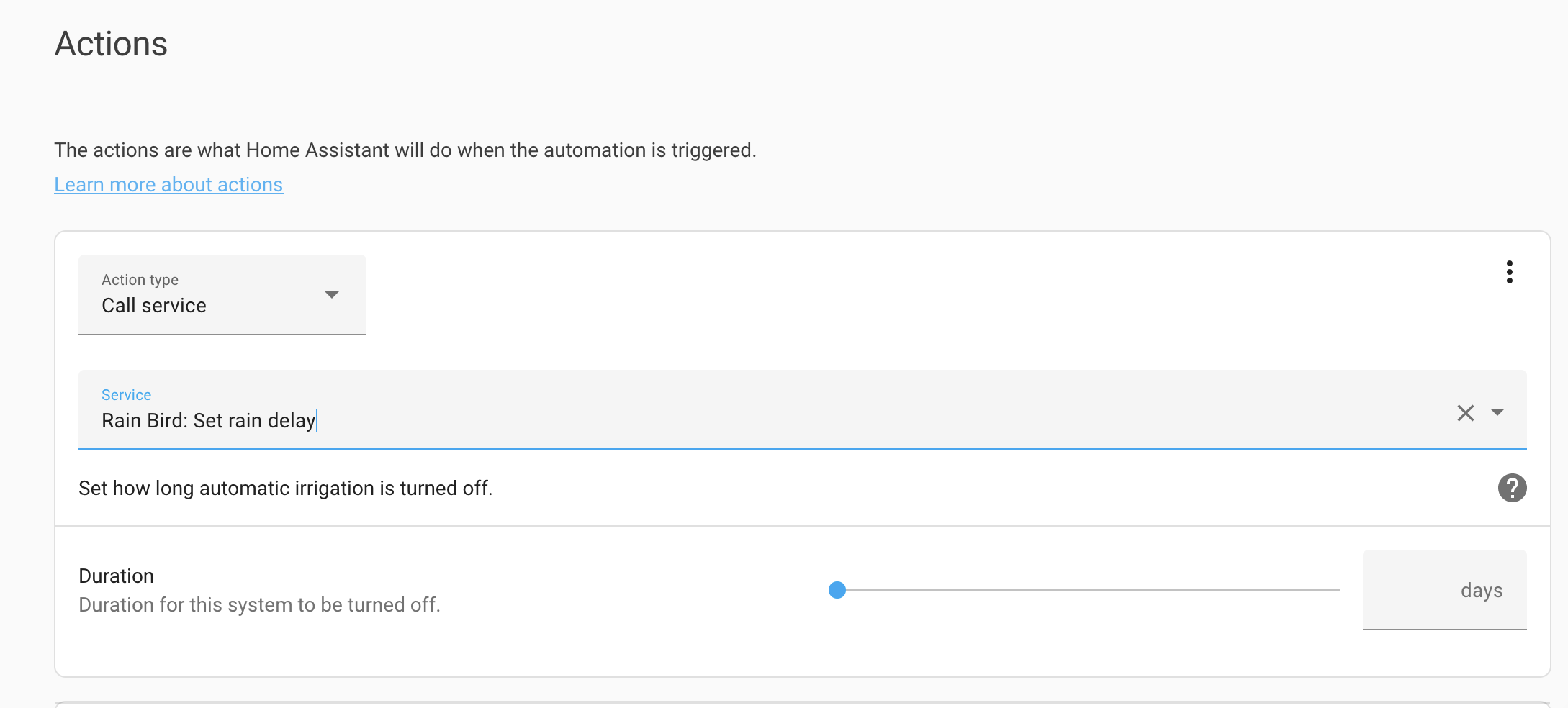


 leaden yarrow
maybe im terrible at searching, but does anyone have a good baseline start to build a responsive dashboard for a mounted tablet? i dont mind using somene elses yaml as a starting point
vapid field
Dwains hash oordeel maybe
 rich lotus
anyone can help me out with where the default dark theme is stored???? I want to copy it and make modifications
fiery ledge
There is no such thing. However there are dedicated settings for when your device is in ‘Dark mode’
You can find these in the Frontend repo in styles.ts
 plain onyx
occasionally in logs these pop-up anything i can do to prevent these ?
Logger: frontend.js.latest.202206010
Source: components/system_log/__init__.py:190
http://*.*.*.*:8123/lovelace/default_view:0:0 Uncaught
http://*.*.*.*:8123/lovelace/default_view?external_auth=1:0:0 Uncaught
 manic mica
So im starting to feel that only experts in HA can customize and change things.... Newbies to HA like me.... Well nothing seems easy or basic.... I feel that most of the documentation assumes that you have extended knowledge of HA to accomplish something.... OR maybe its just me .....
That said. I managed to install HACS... Now I added "Animated Weather Card" and "Custom Animated Weather Card" under "Frontend in HACS.... But how do I get my weather on my Dashboard to appear like either of these two?
Preferred one being Custom Animated Weather Card....

 sweet lintel
plain onyx
occasionally in logs these pop-up anything i can do to prevent these ?
```
Logge...
sweet lintel
plain onyx
occasionally in logs these pop-up anything i can do to prevent these ?
```
Logge...
I get these too. Be good to know what's causing them!
fiery ledge
manic mica
that is modified DarkSky animated weather card in my config... or the BOM weathercard by David, isnt that available in HACS
Nevermind me, its the BOM card, which is renamed
manic mica
fiery ledge
that is modified DarkSky animated weather card in my config... or the BOM weathe...
Yes it is availible in HACS. Thats where I found....

this is how far I got.....
fiery ledge
so you didnt yet add it to your dashboard? because thats what you need to do
HACS only downloads and installs the resource, but youve still got to start using that resource
manic mica
fiery ledge
so you didnt yet add it to your dashboard? because thats what you need to do
Figured out th ehard way I need to search for it.... to add it...

ANd now stuck here......
 fiery ledge
well, thats not the hard way, thats the UI way 😉 supposed to be the easy way
did you start with reading the instructions?
mainly these:
Required entries must be present
in your configuration. The card will not work at all if any of these lines are missing. EDIT gosford/kariong to match your observations/forecasts
manic mica
fiery ledge
did you start with reading the instructions?
Yes the easy way instructions..... but doesnt work.... no wgoint th e"hard way by downloading files manually and creating folders and editing config files.... But not holding my breath......
fiery ledge
not sure what your issue is, but it's really quite simple: the card requires several entities to be available in your config. Without those it wont show. So, youv'e got to create those entities first
manic mica
My frustration is this..... There is soo much talk about setting up Lovelace Ui and using it. But was told Youtube Videos are outdated. So now I'm only looking at Home-assistant.io documentation..... But https://www.home-assistant.io/lovelace takes you to https://www.home-assistant.io/dashboards/ So is Lovelace none existent? Did it change?
manic mica
fiery ledge
not sure what your issue is, but it's really quite simple: the card requires sev...
THis is my issue, Documentation doesnt say you have to add entities.... manually when doing the "Easy" install.... Let me rephrase it. The Documentation Has NO Install Instructions.... Had to track down the Author on Github, to get some install intructions there......
 rich dirge
Hello, I am trying to organize my cards in my dashboard. I would like to use the same custom card over multiple dashboards. The card I am using is getting obnoxious and I don’t want to have to change it in every dashboard every time something changes. I would like to have a single file that I can modify that would transfer to all dashboards. I am trying to use the !include tag, which is not working. Here is the error I am receiving. Is it possible to reference an external file for cards?
 fiery ledge
Yes Lovelace is now called Dashboard, it's a way better name
instead of focussing of getting angry, please try and find the logic behind all of the cards. You name a type, add some entities and show in the Dashboard. Thats basically it
there can be a small learning curve here and there, but soon you'll get the hang of it
fiery ledge
rich dirge
Hello, I am trying to organize my cards in my dashboard. I would like to use the...
yes it is possible, its after all simple YAML, but probably not through the UI.
rich dirge
fiery ledge
yes it is possible, its after all simple YAML, but probably not through the UI.
Thank you. Where would I access the raw yaml file for the cards?
manic mica
fiery ledge
instead of focussing of getting angry, please try and find the logic behind all ...
Im not angry, just frustrated...
but thanx
fiery ledge
  - type: custom:swipe-card
    #various config and styling
    cards:
      - !include /config/dashboard/includes/button/include_button_updater.yaml
      - !include /config/dashboard/includes/button/include_button_hassos_update.yaml
      - !include /config/dashboard/includes/button/include_button_supervisor_update.yaml
At Chaos: not a UI configurer here, I write in all in yaml except for the experiment 😉 Just tried it with the swipe card and indeed the raw editor cant be found... hmm, did you check the community posts? https://community.home-assistant.io/t/lovelace-swiper-card/72447
manic mica
@fiery ledge Add the card reference to resources If you installed using HACS, the resources should be updated automatically (see below) What does this mean?
oh wait, thats must be added to configuration.yaml?
fiery ledge
Just what is says. If you use Yaml mode you need to add the resource to the resources.yaml file manually. If you are in GUI mode, the HACS integration takes care of that. see: https://www.home-assistant.io/dashboards/dashboards/#resources
manic mica
Add the card reference to resources If you installed using HACS, the resources should be updated automatically (see below)
Note: Ensure type is set to module and not js
Note: /local/ points to the <config-dir>/www/ dir. Note: /hacsfiles/ points to the <config-dir>/www/community/ dir.
Note that neither /local/ of /hacsfiles/ physically exist! The directory structure is as per above.
For a HACS Installation:
resources:
- url: /hacsfiles/bom-weather-card/bom-weather-card.js
type: module
For the manual installation:
resources:
- url: /local/custom_ui/bom-weather-card.js?v=0.1
type: module
kind shellBOT
@manic mica posted a code wall, it is moved here --> https://hastebin.com/pulopofito
manic mica
but this states that even for HACS the configuration needs to be added manually still?
fiery ledge
depends. what is your lovelace: mode?
manic mica
So I edit the resources.yaml and add
resources:
- url: /hacsfiles/bom-weather-card/bom-weather-card.js
type: module
fiery ledge
btw, dont post more than 15 lines of code .... thats called a code-wall and not allowed
manic mica
fiery ledge
btw, dont post more than 15 lines of code .... thats called a code-wall and not ...
ok
Im going through this installation manual
GitHub
Custom Animated Weather Card for any weather provider - GitHub - DavidFW1960/bom-weather-card: Custom Animated Weather Card for any weather provider
fiery ledge
yes thats correct, though it should have been an automatic action if you dont use yaml mode. So what is your lovelace: mode?
manic mica
fiery ledge
yes thats correct, though it should have been an automatic action if you dont us...
lovelace:mode? I dont know.... where do I check that? thought Lovelace isnt relevant anymore?
fiery ledge
anyways, you should 'reload resources' to have HA see the card
top right menu in the dashboard. 3 dots probably in your setup
manic mica
fiery ledge
top right menu in the dashboard. 3 dots probably in your setup
Im not with u....
fiery ledge
manic mica
lovelace:mode? I dont know.... where do I check that? thought Lovelace isnt rel...
ok, I get this can be confusing, but you got to give some effort in trying to iunderstand how all of this works. Ive handed you the link to the Dashboard documentation, please read that
check https://demo.home-assistant.io/#/lovelace/0, and see the 3 dots top right?
what do you see when you click that in your config?
manic mica
The Open Dashboard Menu dots?
fiery ledge
yes
manic mica
I have that in my install
manic mica
edit Dash board
fiery ledge
right, that means you're in GUI mode, not YAML mode.
rich dirge
fiery ledge
```
- type: custom:swipe-card
#various config and styling
cards:
...
I have tried testing not using the swipe-card and trying to implement !include with the “picture-element” card. Using https://dpaste.org/Z3bus gives the generic picture-element card. I took the meat of the card and put it into a file. Now I have the picture element card called out like https://dpaste.org/szyB2, and the external file https://dpaste.org/s1oft. An error comes about when trying to save the modified configuration file:
 manic mica
fiery ledge
right, that means you're in GUI mode, not YAML mode.
manic mica
fiery ledge
right, that means you're in GUI mode, not YAML mode.
Im busy reading through the Dashboards/resourses link. Let me see If i can get it from here. That link already has answered a coule of my questions...
manic mica
fiery ledge
right, that means you're in GUI mode, not YAML mode.
Choosing RAW Configuration Editor takes you into Yaml Mode....
fiery ledge
being in GUI mode, means you dint have to edit those resource files if you download them via HACS. If HACS has downloaded a resource you see:
 manic mica
Did the reload