#frontend-archived

1 messages · Page 217 of 1

livid prairie
#

configuration.yaml

small root
#

That should do it too indeed. What is the outcome in the developer tools when you retrieve the template there?

#

(Just trying to break down the issue)

livid prairie
#

shows known

#

I got your idea. I didnt know I could test it in template

small root
#

But it should show the temp

#

You can retrieve the template name in the states of Developer tools and see what the outcome is

livid prairie
#

ok another typo

#

sorry

small root
#

Sensor name that is

livid prairie
#

s/sensors/sensor

#

now it shows in test

small root
#

Can you dump the custom sensor that you've created in configuration.yaml?

livid prairie
#

Already in pasttebin above

small root
#

Ow, sorry

livid prairie
#

yeayyy

#

got it

#

Thanks man

small root
#

Hmmm, I think I misunderstood what you meant.

#

Oh great!!!!

livid prairie
#

Yes but your idea helped me find my typo's

small root
#

Brilliant!

livid prairie
#

Thats my dashboard if you have any idea for further improvement then I am all ear's

#

I have been looking for a clock card since morning but nothing fancy

small root
#

Everyone has different preferences for his dashboard. I am currently fond of using the Mushroom cards.

livid prairie
#

I have mushroom cards, I installed yesterday maybe I need to learn more about them

small root
#

There's a very good video on that from Everything Smart Home

livid prairie
#

Yes maybe will learn more about it soon but soo far this looks decent for what devices I have. Only Aircon and lights which are from touch switches so nothing fancy to use like light card or dimmer etc.

#

I would like a graph or better gauge card though

frosty flower
# livid prairie

What's you using for the transparency, and also for the rounded corners?

livid prairie
native field
#

Hello, I'm trying to change the icon next to a switch on an entities card based on it's state. I've done a lot of searching but can't seem to find how to do this or even where to put this code. My card configuration is as such:
type: entities
entities:

  • entity: binary_sensor.garage_status
  • entity: button.garage_door
  • entity: switch.garage_door_lockout
  • entity: binary_sensor.keypad_lockout
    title: Garage

i know i can add the "icon" property but how do i make it so it's dependent on the state of the switch entity

#

I was hoping something like this would work:
type: entities
entities:

  • entity: binary_sensor.garage_status
  • entity: button.garage_door
  • entity: switch.garage_door_lockout
  • entity: binary_sensor.keypad_lockout
    states:
    "on":
    icon: mdi:lock
    "off":
    icon: mdi:lock-open-variant
    title: Garage
fiery ledge
#

you either use card-mod for that on a per card base, and check the second link under the Pin in the channel titlebar, or use custom-ui, and set an icon_template for the entity globally. check the link in my Bio 😉 First option always btw is to use a device_class: switch, but then you are tied to the core icons.

opaque thorn
#

I migrated to Z Wave JS and was cleaning up some of the devices. One has a binary_sensor that was configured with a device_class of "door" for some reason which isn't right. Basically I want no device_class like it used to have so that it just has on/off state like the others. In the UI that device_class is set as via the "Shown as" dropdown. But if I clear that to be empty it doesn't save the change, it just retains whatever it was set to before. Anyone else run into this?

errant kraken
#

Sorry for the MIA Spiker, I'm trying to set up a specific room dashboard, then have the screensaver be magicmirror2

livid prairie
#

I have removed the lag by cleaning the dashboard like removing cards which are not needed and re arranging all the cards for wall panel use case now it's much better but only issue is that the wall panel app seems to open ads in browser i didn't suspect wall panel app before until i removed all the apps available in the tab

rough coyote
#

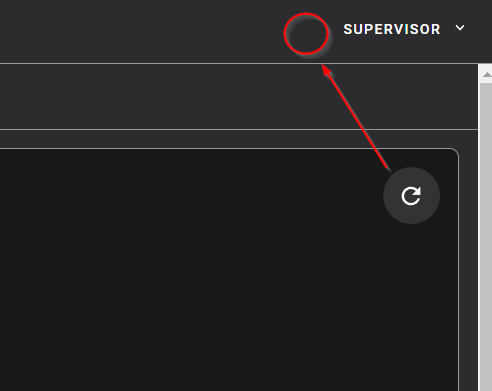
The refreshbutton in the log: I keep having to scroll back up and down to refresh/see the end. I know it's all new and probably gonna change some more. It would realy be helpfull if there also was a refresh at the bottom. Or.. have the refresh button always stay in view. Or have one next to the dropdown in the top right.

#

Should be relatively simple.. when ppl press the new refresh next to dropdown just trigger same action as if the dropdown changed . no? ¯_(ツ)_/¯

rich eagle
plucky rock
#

GM. I am trying to update HA core and getting an error. Is this the correct place to look for help

#

Sorry HA OS not core

rich eagle
turbid violet
#

from where I can change the theme...

hollow sand
#

within the glance card edit screen I can't seem to click on the drag icon next to entities and drag them up and down. Is this a known issue or am I the only one?

mystic fern
#

is there any way to remove the energy dashboard?

polar kelp
#

Profile settings (bottom left) -> Change the order and hide items from the si...

livid prairie
#

Helllo everyone.
I have temperature sensor i created in yaml to find cpu temp of my proxmox server and firewall on opnsense
both are just an ssh command to fetch the current temperature.
Now I want to turn it into a graph and save the reading in database

soft jetty
#

Hi everyone, I am trying to figure why my UI-Lovelace-Minimalist dashboard doesnt show custom cards ONLY in the home assistant android app

#

it says "Custom element doesn't exist: button-card" but all standard cards are working on the same dashboard

soft jetty
#

hmm, thats weird, updating home assistant to yesterday's release seems to have fixed the issue on android app (even though I tried restarts and reinstalls on both home assistant and the android app without sucess)

polar kelp
#

It was probably an issue with caching.

frosty flower
#

I'm using state switch in conjunction with the mushroom entity card and even though the card seems to be switching, the icon color flashes to the color of the new card and then switches back. Anyone know how to fix this?

https://dpaste.org/M7qmt

Dpaste is a website where you can store text online for a set period of time. Dpaste is written in Python using the Django framework.

rough coyote
#

@rich eagle What is Front end repository and where do i find it?

polar kelp
#

But I think the forum is better for feature requests. Edit: Never mind. The bot says I'm wrong. Told you it hates me.

#

.feature

#

I swear the bot hates me

kind shellBOT
#

If you have a feature request for the frontend you can open one here, for Home Assistant itself please post on the forum. All other feature requests should be made to the developer of that custom card/component.

rough coyote
#

I can see why, Thomas. 😉

#

What category should i choose for the feature request?

#

lovelace?

#

Meh i put lovelace .. triage can re-assign it if it is wronk

polar kelp
#

Supervisor?

rough coyote
#

Apparently i am ET on github 🙂 LOL i completely forgot. No For the log refresh button @polar kelp .

polar kelp
rough coyote
#

Oh yes that's just the supervisor log that's selected in the dropdown

brave pebble
#

Hey everyone. I'm trying to create an automation that when there is a person detection on my deck, that my video glance card full screens on my dedicated home assistant tablet for 3 minutes. Is there an integration for this or it's something built in that I don't know how to access? Thanks.

polar kelp
#

It can be done with the custom integration browser_mod. But it's not very beginner friendly.

brave pebble
polar kelp
#

The one linked from the readme is pretty great

brave pebble
polar kelp
#

Correct

brave pebble
# polar kelp Correct

Thank you for the work. I'll dig into it and if I have any questions, is it ok if I ask you?

polar kelp
#

Sure. I'm usually keeping up in this channel.

brave pebble
#

Thank you!!

spark ingot
#

@half osprey Hi Paulus, here is still a "lovelace" 🙂 https://github.com/home-assistant/core/issues/new/choose and https://github.com/home-assistant/frontend/issues/new/choose and in the template for an issue here: https://github.com/home-assistant/frontend/issues/new?assignees=&labels=bug&template=bug_report.yml (Please not not report issues for custom Lovelace cards). Just want to let you know...

GitHub

GitHub is where people build software. More than 83 million people use GitHub to discover, fork, and contribute to over 200 million projects.

GitHub

GitHub is where people build software. More than 83 million people use GitHub to discover, fork, and contribute to over 200 million projects.

GitHub

GitHub is where people build software. More than 83 million people use GitHub to discover, fork, and contribute to over 200 million projects.

grave river
#

I'm getting an error when trying to set a static IPv4 address in the UI. I get the same error when setting IPv4 to static on the console. Is this a bug?

fiery ledge
#

is there a better/shorter way to do this:```

  • type: custom:state-switch
    entity: user
    states:
    Marijn:
    !include /config/lovelace/buttons/buttons_switches_appliances_locked_switchable.yaml
    Person2:
    !include /config/lovelace/buttons/buttons_switches_appliances_locked_switchable.yaml
#

Custom groups would be cool... but dont think a FR would see the day, so hope I am missing something obvious

frosty flower
#

There any way to change a devices on or off icon and keep state based icons?

shrewd garnet
#

with the new update I can't find the lovelace resources?

frosty flower
#

i wanna make a header so that this small musrhoom chip card that says my user just sits up top by itself. whats a good wait to do that. i heard of using the custom button card, but i cant get that to work

#

aha, got it

hidden tinsel
#

What’s the easiest way to switch a switch on/off every day at specific times, that I can still change via the UI?
I need this for 8 switches with 3 on/offs per day each.
Atm I have a 2 input_datetimes (on+off) that I can modify via ui when I put them in a entities card + according automations, for 1 switch. They show up in AM/PM format instead of 24h format and are a pita to change in iOS (alwas skips field after entering 1 digit).
I can’t seem to change a times-of-the-day helper once it‘s set up.
Third option that came into my mind was to set up 4 input_number helpers per switch and interval (hour-on, minutes-on, hour-off, minutes-off) I can control via sliders and 2 template sensors per switch and interval (on/off) based on the helpers.
Did I overlook / miss some way easier method ?

simple talon
#

i suppose frontend /config/server_control endpoint has been removed/replaced in the latest update?

warped yew
#

Is there anyway i can trigger something happening when i'm turning off my radiator using the lovelace card?

#

Basically i have a state variable that saves whenever an automation does something (for instance opening a window i would save away the state before turning the radiator off so i can return it to the state it had before when i close the window). This works for all automations but i don't know how to save the state when i manually turn the radiator on or off.

dark dirge
#

How are you turning it off manually? If via a card, what card?

warped yew
#

Simple thermostat card

#

I realize I could make custom buttons for it but that would mean I couldnt use the cards and it wouldn't look as pretty. Also would have to reuse it on multiple views.

dark dirge
#

You can use a state trigger to know when the radiator is turned off (presumably there's an entity)

warped yew
#

Yes but the problem is only want the thing to happen when I do it manually. But there are other automations that also turns it off and i don't want it to happen there.

dark dirge
#

If you want to differentiate when you click a button in Lovelace, you can use the context in the trigger.

warped yew
#

Yeah that's exactly it. How do I do that?

#

I can't see a context field in state trigger.

dark dirge
#

It's right in that post

#

You need to use a template

livid prairie
#

Hello I am trying to get numeric state of a device battery
I cannot get it in developer tools template test. While in states I can see the battery percentage

#

found it in templates

livid prairie
#

current_temperature_template: '{{ state_attr("sensor.mbr_temp_temperature", "temperature") }}'

I use this in climate with platform mqtt and it does comes on the thermostat card but it does not update regularly

#

only update when some action is triggered on the thermostat buttons like turning on ac or off

#

is there anyways to make it listen to the changing temperature and update it in the thermostat itself ?

mystic fern
#

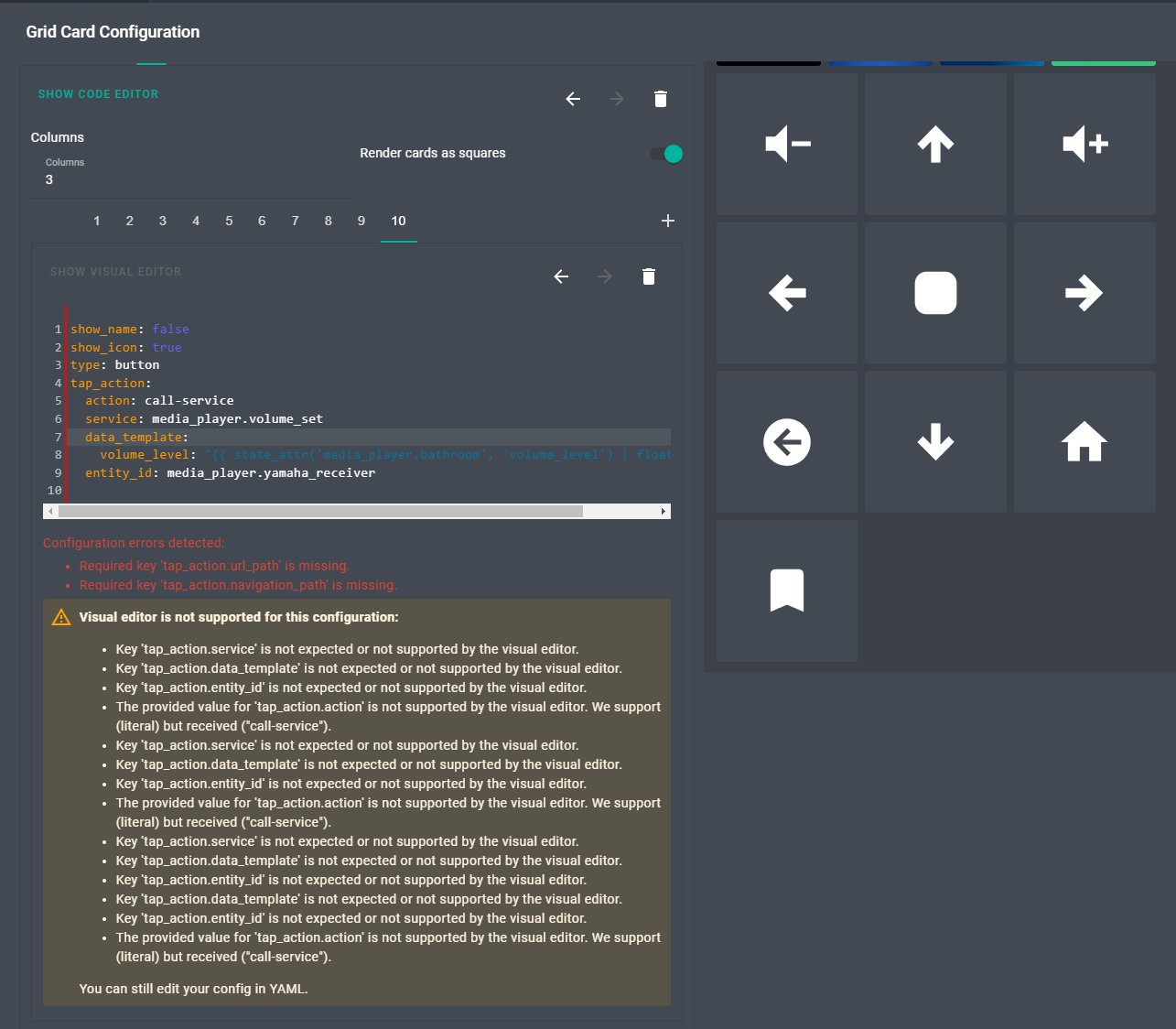
can someone explain why the custom button-card is unhappy with this? If I change type to button it works fine, but this throws an error

type: custom:button-card
tap_action:
 action: call-service
 service: scene.turn_on
 service_data: {}
 target:
   entity_id: scene.office_daylight
icon: mdi:weather-sunny
dark dirge
#

it probably doesn't like the target: dict

#

that's relatively recent (within the last couple of years)

#

it will probably be fine with this:

type: custom:button-card
tap_action:
  action: call-service
  service: scene.turn_on
  service_data:
    entity_id: scene.office_daylight
icon: mdi:weather-sunny
mystic fern
#

Awesome! that worked.

thorn ridge
#

Hey guys,

i've made a graph with Apexcharts where i want in/outgoing traffic monitored p/day. However, the graph just log everything in total and adds it to the columns, instead of logging in/out per day with a new column per 24h. Anyone about to help me understand this problem? https://pastebin.com/9JNEH4iw

mossy otter
#

Can anyone help with a lovelace tap_action? I can't find my answer in the documentation, trying to change an input_text based on what button I click

#
tap_action:
  action: call-service
  service: input_text.set_value
  target:
    entity_id: input_text.kitchen_lovelace_display
  data:
    value: Overview
#

Keep getting the following error:

#
Failed to call service input_text/set_value. required key not provided @ data['value']
#

can't see where I'm going wrong, tried a number of different iterations of YAML based on different documentation and threads I've read

#

wondering if lovelace acts different to normal scripts/automation services

polar kelp
#

It’s service_data in the frontend for some reason.

mossy otter
#

brill - that did it, thanks @polar kelp

limpid mauve
#

I installed Homeassistant today and I don’t know how to enable the button Supervisor to install some plugins. Can someone help me?

dark dirge
#

How did you install HA?

limpid mauve
#

I went on the website -> getting started -> installation -> raspberry pi and copied the link for rpi 4 64 bit. Then I used it in Balena etcher.

dark dirge
#

Then, configuration -> Addons

limpid mauve
#

But I can’t find Bluetooth low energy there

dark dirge
#

Do you have a pointer to what you're trying to install?

limpid mauve
#

In the YouTube tutorials they have the button supervisor but do I have to do to have that too?

dark dirge
#

YouTube tutorials are outdated almost as soon as they're published

limpid mauve
#

So I this moved to settings -> addons?

dark dirge
#

And there were many UI changes in the last two releases

onyx nexus
#

Hi, I try to use floorplan to color fan icon based on speed. on/off coloring works already. Im usign class: '${(entity.state === "on") ? "spin-" + entity.attributes.percentage : ""}' How i can check that this returns spin-25, spin-50 etc?

pallid needle
#

Is there a way to force the frontend to reload?

#

I have a device that won't pick up the new ui even though I've logged out and logged back in

#

I don't have a a way to clear the cache

#

e.g. when you make a change in HACS you get the reload UI prompt

#

I'm looking for a way to trigger that manually

halcyon arrow
#

after 2022.05 lovelace mediaplayer card started hiding controls if song changes. Is this the intended from now on? is it possible to make it behave like in 2022.04?

rich eagle
rich eagle
pallid needle
#

@rich eagle thanks, it's a mobile device so I couldn't get to the dev tools

rich eagle
pallid needle
#

It eventually started working though

timid beacon
winter blade
#

Seems like it works fine when switching between browser tabs

#

Moving between dashboards not so much

frosty flower
#

Nested vertical stacks within nested vertical stacks to make this happen..

outer vine
#

How do you just display an on/off switch state without giving the opportunity to change it in lovelace? (I want to display a door being open or not)

outer vine
#

Button with no actions maybe?
Edit:
For now, I have a HACS markdown, and I've made a helper input text named garage_door_state :

type: markdown
content: |
  ### Garage port is {{states.input_text.garage_door_state.state}} 
theme: dark_teal

This works, but ideally, I'd love to just show one icon mdi:garage-open when the garage door is open and another one mdi:garage when it is closed. I could use some help with that from any of you yaml wizards. I do not want any input on those, only to show the state

outer vine
#

Made some progress:

type: markdown
content: |
  {% if is_state('input_text.garage_door_state.state', 'closed') %}  
  Garasjeport åpen <ha-icon icon='mdi:garage-open'></ha-icon>
  {% else %}
  Garasjeport lukket<ha-icon icon='mdi:garage'></ha icon>
  {% endif %}

Now all I need is to figure out how to blow up that icon in size 🙂

fiery ledge
#

as for the helper, Id create a binary sensor (with device_class: door) simply following the state of the switch, and reference that in the markdown. but please use the correct way for states in a template {{states('binary_sensor.garage_door')}}, see the Yellow Warning block under https://www.home-assistant.io/docs/configuration/templating/#states

outer vine
#

the state is a text_input, it is set by automation, I'm using a distance sensor that points to the roof, and changes value when the garage door is open (roof distance is higher than the garage door when open)

fiery ledge
#

but you can not directly open/close via a switch at all then? so whats the risk of using a direct state?

outer vine
#

This is sensor detection, not commands to open/close

fiery ledge
outer vine
#

Bad choice of words I guess, the "on/off switch state" is referencing a boolean helper, not an actual switch, so I don't want it to show as something I can press.

#

(I'm not an English native)

fiery ledge
#

a right. then a markdown could be a good choice indeed

#

Or a custom:button-card

outer vine
#

I am reading your post now, where do I set these styles? (which file)

fiery ledge
#

you mean for the icon size in the markdown?

outer vine
#

yeah

#

in frontend.yaml?

fiery ledge
#

no. in the Markdown card 😉

outer vine
#

oh!

#

lol, thanks

fiery ledge
#
      - type: markdown
        card_mod:
          style: |
            ha-card {
              background: #103773;
              color: white;
              --mdc-icon-size: 50px;
            }
        content: >
#

and you need to have the resource card-mod installed.

outer vine
#

from hacks?

fiery ledge
outer vine
#

added

fiery ledge
#

what device is that distance sensor btw, never used those

outer vine
#

IT's a HC-SR04

#

Plugged it into an ESP8266 and had it up and running with ESPHome in less than 3 minutes 🙂

#

Gives me distances btween ~17cm up to 2 meters at specified interval (using 5s right now)

#

Hmm, card-mod is installed, but not available, the info only says "install card-mod.js as a module" how do I do that?

#

nevermind, I entered card-mod and not card_mod 😄

kind shellBOT
fiery ledge
#

cool, could well be my first ESP project then . though I dont really like the non-commercial realizations of most of the contraptions I see in the community 😉 anyways, offtopic here

outer vine
#

True, I was posting my current yaml, but got the code-wall thing - question is, once you go if-then-else, you cannot add a states() thing after?

#

I also don't understand the meaning of the pipe-symbol vs the greater-than symbol in the markdown cards?

fiery ledge
#

about the templates: you can use any valid Jinja template in the content block, but have to remember that the output is also valid for Markdown. Simply test anything in the dev tools template and see the result

#

state('input_text.garage_door_state') is a typo, it should be states('input_text.garage_door_state')

#

and {% if is_state('input_text.garage_door_state.state', 'closed') %} needs to be {% if is_state('input_text.garage_door_state', 'closed') %}

outer vine
#

so my if/else works, it is when I try to add the text again later that it stops working

#
  {% if is_state('input_text.garage_door_state.state', 'closed') %}  
    <ha-icon icon='mdi:garage-open'></ha-icon>
  {% else %}
    <ha-icon icon='mdi:garage' mdc-icon-size='50px'></ha icon>
  {% endif %}   
  {% states('input_text.garage_door_state') %}

The last line here breaks it

#

if I remove that, then it shows me the icon only

#

(nevermind the icon-size parameter, that is cleanup waiting to happen)

fiery ledge
#

thats because you need pairs of curly brckets {{ }} to make it a template on the last line

outer vine
#

!

#

That worked!

fiery ledge
#

ofc 😉

outer vine
#

Confusing, but ok! Now I understood a little more 🙂

#

Thx a ton, @fiery ledge !

fiery ledge
#

welcome!

thin dome
#

Hi, i have a weird issue : (maybe dur to recent updates?) I am not able to move/reposition entities on entity cards.
Any ideas ?

thin dome
errant plover
#

I noticed that a while ago using firefox. Still works in Chrome.

sinful scarab
#

I have a sensor for a smal water tank (sensor.akab_out_of_water) with value 0 when it's OK and value 1 when it's empty. I would like now to change that in my Home Assistent GUI, instead of 0 to be OK and instead of 1 to be Refil. So can anyone be kind and guide me how I can do these changes in the Lovelace (so I don't want to change any thing on the real sensor) I just want to rewrite 0 to OK and 1 to Refil in the presentation in Lovelace

deft ginkgo
#

How can i make the zoomed in my default view? I want my view to look the same as it is after i pressed the home button. Is this possible?

#

this is my config

kind shellBOT
thin dome
main meteor
#

Can a state-label be rounded without creating a template for every entity?

warm bane
#

May 2022 Update: custom elements/cards not found! Does anyone else have this error where upon update all my custom cards are not found? Things like stack-in-card slider-entity-row and all other custom elements

distant phoenix
#

Is there any way to put ApexCharts in a Custom Button card other than copying the JS code over?

noble skiff
#

I have a Goldair Heater over MQTT (Tasmota) Fan mode changes the heater modes from low to high like its suppose to but the only way to change modes its to click the 3 dots in the corner of the box, can i move it to where the power button is above the name?

gloomy grotto
#

So, I got my alarm panel started here, but I need some help. I like the way the pin code system is setup. Its setup to only show digits when alarm is anything but disarmed, and only show home/away/night buttons when the alarm is disarmed. I have a glance card in the arrow shown in this picture: https://prnt.sc/httuC9997E4B that when clicked on brings up "arm away, arm home" or "disarm" buttons. I dont want it to do anything when clicked on. I just want the icon and stuff to update as the variable changes. Should I be using something other than glance card?

Lightshot

Captured with Lightshot

#

tap_action:
action: none

😎 I figured this one out too 😛

frosty flower
#

is it possible to use templates in browser mods toast command, ex:

          action: call-service
          service: browser_mod.toast
          service_data:
            message: Double tap to {{if is_state('lock.front_door', 'locked') unlock else lock}}
            duration: 2000```
#

this just shows the line in plain text

dark dirge
#

I don't see any indication in the docs or the code that it does

#

you could pass whatever parameters you want to a script and have the script call browser_mod.toast with the template

#

service_data: there doesn't evaluate templates like data: does in a script

frosty flower
#

ah ok, calling a script it is, then

frosty flower
#

so uh, paper-buttons-row, this is the example and it doesnt left justify. anyone know the proper syntax?

# styles applied to the row container
styles:
  # override off/on colors
  --paper-item-icon-color: red
  --paper-item-icon-active-color: green
  # align all buttons to the left
  justify-content: flex-start
buttons:
  - entity: light.bedroom_light```
simple grotto
#

Hi, in UI its saying I am running
Version core-2022.5.0

But version 2022.5.3 is out - normally it just shows I need to update in UI but it's not showing that. I've never had this problem before. Is there a way I can force upgrade? am I missing something since updating to 2022.5.0?

slim steppe
#

Hey, in my setting tab are the point "Area & Zone" and "NFC Tags" missing. It is nearly a freshed installed version 2022.05 HA. Someone know how I fix this?

slim steppe
slow sundial
#

my zones map is only showing in the first 3rd of the screen. Am I the only one or is this a general bug?

scarlet osprey
#

Hey! Can I somehow disable Quick Bar per user or dashboard? And I don't mean shortcut but icon itself.

barren nacelle
#

Hey y'all, Is there a way to display a msg.payload from Nodered on to the frontend of the UI?

slow sundial
scarlet osprey
#

@slow sundial Thanks for reply - but no. I want to keep ability to switch between multiple dashboard views but hide 🔍 icon.

slow sundial
#

not sure what you want to hide then

slow sundial
scarlet osprey
#

@slow sundial this

dark dirge
#

No, it is not possible to hide that

#

You're also not the first or last to ask

scarlet osprey
#

Thanks @dark dirge. I will fetch a PR in free time then. Unless someone did it already :)

fiery ledge
polar kelp
#

It never ceases to amaze me what lengths people are prepared to go to for 24x24 pixels... Not saying they shouldn't. Just that it's amazing.

scarlet osprey
#

@polar kelp I run Kiosk mode on one of my devices which is in theory accessible for everyone who comes to my house. Quick Bar is allowing to see all the stuff for everyone.. so it's kind of breaking privacy. I don't personally care about 24x24 pixels on other devices I find it interesting and useful. Just in this case... it's privacy concern.

#

@fiery ledge Thanks! Will check a bit later. If available I will look for solution to apply those changes only for one dashboard.

dark dirge
#

I don't think there's any reason for that icon to show up for non-advanced users, or for "users"

scarlet osprey
#

I agree. Till HASS will get better privileges management I would show it only for Administrator accounts.

fiery ledge
#

Using the mod prevents that icon, you’d still need to guard against the key stroke though

marsh delta
#

Running 2022.5.3 and I have no color on the icons in the combo box. I deployed a new home assistant container with same version and there the icon have color. I'm trying to debug and see what causing this. But can't find where the icons get is color from. Trying to use the build in tool on Chrome to inspect elements but the combo box closes when entering inspect mode.. :/ Any one have idea of what can be the problem? Or do know from what value the icons in this combo box get the color?

marsh delta
#

Found the issue. Was Vaccum Card that caused it. Updated to 2.6.3 and works good

shell torrent
fiery ledge
#

recently moved from manual to Hacs installs, and now face an issue with kiosk mode not working because of config errors. returning to manual immediately makes Kiosk mode kick in. do we also need to change the config file in any way?

fiery ledge
#

kiosk mode errors when using Hacs:

shell torrent
#

Yep, those are great, but they don't affect a simple switch where you don't even have a "Show more", it just displays without mercy

fiery ledge
#

on the Kiosk mode: I now see that my manual dl file shows version 1.7.2 in the inspector, while Hacs shows 1.3.4 Now hows that possible...

winter blade
#

Did anyone else experience this before? When selecting an entity (in any card) my mouse doesn't actualy select the things I'm hovering over.
When clicking it just clicks behind the selection menu, and so closes it

#

Has been like this for quite some time. Doesn't seem to be an issue when using a different browser than chrome. HA frontend is the only place I've noticed this. Not an issue on any other website with selection boxes like these.

frosty flower
#

not sure if here or #templates-archived , can i make a front end template that displays differently depending on the active user?

dark dirge
#

Depends on the card you're using

#

state-switch can change which cards are displayed based on the logged in user

#

custom button card gives you access to the user in its JavaScript templates

frosty flower
#

ooh, ill have to take a look at the custom button card then

cinder yarrow
#

before I restore from backup - does anyone have any tips for me? My custom cards have stopped working, nor can they be added again

polar kelp
cinder yarrow
#

nope, they aren't there! Weird I didn't have to do that before, and didn't see a way to navigate (container version). Thank you!

#

I'll add them and let you know

rare junco
#

hey guys , i'm using mushroom template card and im trying to get the temperature for my secondary information , im using the following for my temp sensors "{{ states ('sensor.livingroom_temperature') }} °c" however I cant seem to work out how to get an attribute for other rooms where its part of my AC - can anybody assist ?

I have tried "{{ states ('climate.office.current_temperature') }} °c" aswell as ('climate.office' , 'current_temperature') to no avail

slow sundial
#

it's in the templates example

rare junco
#

I have tried that aswell mate - if I enter that into the 'secondary information' it just prints state_attr("climate.office", "current_temperature") it doesnt actually display it for me

slow sundial
#

what's the entity name and the attribute name?

rare junco
#

entity is climate.office and the attribute I am trying to get from is is called "current_temperature"

slow sundial
#

if you type {{ state_attr("climate.office", "current_temperature") }} in the developer-tools/template do you get the result?

rare junco
#

yes I do

#

ah my bad I missed the final } !

#

thank so much for your help mate!

slow sundial
#

👍

rare junco
#

give me 2 secs to reboot mate and ill check mine for you

rare junco
slow sundial
formal python
#

Hello. I have a custom card displaying still image inside it. It uses css to round corners of that image. But radius is fixed in card code. Is it possible to get corner radius from frontend theme and paste it into card script (into css part)?

shrewd dragon
#

this link is broken since last 3 versions, if I remember. It goes nowhere. is it already a known bug?

azure canopy
#

It should automatically redirect to developer tools > yaml

shrewd dragon
#

it doesn't

#

it's strange because it's been like this for 3 releases

cinder yarrow
outer vine
#

Not sure if this is the right place to ask but..
I'm starting to get a decent amount of devices and sensors in my house. Is there any way to get a measure of how many events that actually happen every second? as in a combined total of all sensor updates, and such?

polar kelp
#

Excellent question.

#

I can think of one way. It's not a very good one, but you can go to Developer Tools -> Events and subscribe to * for a while and look at how quickly the list grows.

outer vine
#

oh lala

#

lol near 25 events/s

polar kelp
#

You could probably make a trigger sensor that keeps track of it too, somehow.

outer vine
#

If I can jam that into a helper, I could set up an events/minute or something fun like that and just display it as "Traffic" on my dashboard

polar kelp
outer vine
#

Maybe as a Riemann sum

#

Hmm, it didn't accept * as entity hehe

polar kelp
#

That's why I think you need the trigger sensor. You can trigger on events and make it increase its value, I think.

outer vine
#

Tried to do this 🙂

#

Hmm, this is a challenge:

  - platform: template
      - trigger:
        - platform: time_pattern
          minutes: /1
        sensor: *

I'm pretty sure that sensor: * will not be accepted, second thing I'm unsure of is how to add a counter to that, something that catches all sensors, and counts each one as one thing and adds to a sum total

#

Why is Hassbot unhappy with me?

#

Challenge of the day

vapid field
#

Hi, I would like to have temporary mapcard for my dashboard monitor tablet. Is there a yaml code to show a card for example 60 seconds? Like some meteoalarm have a 'Hide when there are no warnings' option.

main meteor
#

How to round a value wo using a template sensor. eg in a picture element card?

fiery ledge
outer vine
#

Yeah, we are workign through this in "challenge of the day" thread 🙂 not sure if you can see it. Only remaining task now is to reset the counter every minute

fiery ledge
kindred anchor
#

If I'm using custom iframe panels, can these be set to only show for the admin and not for all users?
For example

panel_iframe:
  zwave2m:
    title: "Zwave2M"
    url: "https://zwave.mydomain.com"
    icon:  mdi:z-wave
    
  frigate:
    title: "Frigate"
    url: "https://nvr.mydomain.com"
    icon: mdi:cctv
fiery ledge
#

since you asked for a frontend config: - type: entities title: Count state changed card_mod: class: class-header-margin show_header_toggle: false state_color: true entities: - counter.state_changed_counter - input_boolean.count_state_changed - entity: automation.state_changed_counter secondary_info: last-triggered - entity: automation.state_changed_counter_reset secondary_info: last-triggered

#

ah, now see I missed your thread, sorry. and see you've got additional expectations 😉

kindred anchor
#

are you talking to me?

fiery ledge
#

who. me? 😉

#

just kidding,no I was replying to digitaldias

vapid field
#

Is there any workaround or best practise to edit automations via UI in directories?

dark dirge
#

You can't

#

The UI only edits automations.yaml

vapid field
#

Do I have to move those automations temporarily to automations.yaml or there other best practices?

dark dirge
#

There is no best practice for that. Either create and edit automations in the UI or do it manually

#

Manually moving automations around will just cause pain

polar kelp
#
  • Create new automation in GUI
  • Switch to yaml mode
  • Delete everything and paste your automation
  • Switch back
  • Make your edits
  • Switch to yaml mode
  • Select all, copy and paste back in your file
  • DO NOT CLICK SAVE
dark dirge
#

Gack

polar kelp
#

I'm not saying it's good

dark dirge
#

I guess there's profit in there somewhere

vapid field
#

I'm a newbie to yaml and adopted some automations in subdirectories. Now I would like to change them to my environment. UI would be nice.

dark dirge
#

Then I recommend collecting them all in automations.yaml and using the UI to manage them all. Trying to switch back and forth is going to be a nightmare

vapid field
#

I don't understand why the system can handle automations in directories and UI not .

dark dirge
#

If you're using the UI, the underlying directory structure wouldn't matter. There are lots of requests for folder support in the UI, but that may not result in an actual directory tree

main meteor
#

How to round a value wo using a template sensor. eg in a picture element card?

shell torrent
#

Works great. Thank you both so much!

brazen fern
#

I'm trying to set up external access to my home assistant instance, but when I go to the Network page, it comes up completely blank.

Nothing shows up in either the server logs or the devtools JS console.

Server is HA Container on RPi OS via Podman
Client is Firefox on Arch Linux with no addons

timid beacon
#

Is there a way to have a card not even show up given a certain state? I swear I saw something like this at one point

timid beacon
#

Thanks, I'm still a real noob when it comes to the dashboard

#

I saw state switch but I thought it was more of a manually controllable thing, but I think that might be what I'm looking for

dark dirge
#

it's a more flexible version of the conditional card

timid beacon
#

Yeah, I'll be needing an OR condition so I think that's what I want

#

But I think for some other simpler cases the basic conditional will still work

dark dirge
#

I use state-switch mainly because it provides more attributes to test against, such as the logged-in user

timid beacon
#

Oh wow that's pretty powerful. Seems like I have my work cut out for me to get into this dashboard business

#

Added it via HACS, but I don't see it show up in my list of cards. I can edit the YAML manually and the card type seems to be recognized though. Should it show up in the card list?

dark dirge
#

if the docs don't say it should, then it almost certainly doesn't

timid beacon
#

I mean the docs don't say the sky is blue but it is

dark dirge
#

point is that if somebody took the time to add that capability, they'd call it out in the docs for the card. If they didn't, there would be no mention of it

timid beacon
#

I guess that just seemed like it was something tied to a card type. So I didn't think they would have had to do anything

dark dirge
#

not true at all

#

plus, this one is more complex, incorporating other cards

timid beacon
#

Ah I see

#

Interesting. So this is like a meta card that acts as configuration of sorts for all the cards on a particular dashboard? At first I was thinking you'd put entities on this card to be controlled

#

But it seems like there's a 1:1 relationship actually. So 1 of these state-switch cards can only control 1 other card?

#

No wait I had it all wrong, it controls itself

#

Damn you know I'm not even sure if this is going to be able to handle the use case I was looking for. I have a few entities and I only want the card to show up if any of them are on and display the ones that are on. So for instance showing everyone who's home and just hiding the card if no one is

dark dirge
#

I do that with a conditional card + auto-entities

#

or state-switch + auto-entities

#

I have a bunch like that

timid beacon
#

Off to check out auto-entities then. Thanks!

dark dirge
#

auto-entities can actually do all that on its own with show_empty: false:

#
                - type: 'custom:auto-entities'
                  filter:
                    include:
                      - entity_id: "binary_sensor.*_leak_detected"
                        state: 'on'
                  show_empty: false
                  card:
                    type: glance
                    title: Leaks!
                    show_state: false
#

forgot about that

timid beacon
#

Thanks for the help!

#

Now I have all of these empty cards on my dashboard (while editing) and I don't know which is which though lol

#

Any tips there?

dark dirge
#

I edit everything in YAML

timid beacon
#

Can you split up dashboards into multiple files?

dark dirge
#
  - !include view-climate.yaml
  - !include view-cameras.yaml
#

or if you really mean dashboards, then there's a whole doc page on it

timid beacon
#

Are you able to edit your dashboards in VS Code? I don't see anything in the config dir

#

Oh wait hold up. When this doc says default dashboard what does it mean by that? It sounds like it's saying you just need to switch over to using yaml

#

That's unfortunate

dark dirge
#

there's more on that page

timid beacon
#

Yeah I think I'll probably end up doing this eventually, but I'll have to dig into it later

#

But that did answer my question. You can use the filename to split up your dashboards and then !include to split it up further

#

Or just any one of the other config splitting !'s I assume

dark dirge
#

you do have to switch to YAML mode for whatever dashboard you want to use !include in

timid beacon
#

It's too bad it doesn't work like automations, scripts, etc where you can edit it in the UI or the file itself

dark dirge
#

you shouldn't do that there either because it will reorder and reformat your code, including removing any comments

timid beacon
#

Well that explains why I was thinking that, cuz I don't actually ever edit those files haha

timid beacon
#
type: custom:auto-entities
card:
  type: gauge
filter:
  include:
    - entity_id: sensor.disk_use_percent

Why is this giving me the error Entity must be specified? If I change gauge to glance it works fine.

dark dirge
#

Maybe it doesn't support more than one entity and won't work with auto-entities

#

It generates a list of entities

timid beacon
#

Ah I see. So the underlying card needs to support multiple entities?

halcyon arrow
#

Any idea why or condition seems to not work at all? - type: conditional condition: or conditions: - condition: state entity: media_player.bedroom_speaker state: playing - condition: state entity: media_player.bedroom_speaker state: buffering card: type: custom:mini-media-player entity: media_player.bedroom_speaker hide: source: true progress: true

fiery ledge
#

having a few (max 5) svg icons no longer in the core mdi: set, I am using FontawesomePro CC to be able to use those with the fapro: prefix. Not using ay of the other icons of that component, that seems a bit heavy. Especially since the Fap icons take a lot of space (and maybe activity on first load?)

#

can we not use another lighter tool for those (custom) icons? I do like to use them as .svg, and not have to use the full path - D code of the svg icon

opaque kiln
# halcyon arrow Any idea why or condition seems to not work at all? ``` - type: conditional ...

You can't use or in a conditional card. You can only list some conditions and they all have to be true for the conditional card to display the card. https://www.home-assistant.io/dashboards/conditional/ If you really need this behaviour with a conditional card, create a template binary sensor that is on when the media player is playing or buffering, then use a conditional card that shows if that template binary sensor is on.

Home Assistant

The Conditional card displays another card based on entity states.

fiery ledge
naive topaz
#

hey, im using ui lovelance minimalist and want to hide (or if possible deactivate) the original lovelance for a cleaner interface. any ideas how to achieve this?

tacit cave
#

make ui minimalist your default and switch the autogenerated to a secondary

#

or delete the autogenerated

naive topaz
tacit cave
#

I have no idea how you implemented it so you'll actually have to share details and this most likely can only be done through yaml.

turbid violet
#

is there any countdown timer card?

slow sundial
turbid violet
slow sundial
# turbid violet I am looking for a countdown timer to check on my dishwasher
turbid violet
#

entity is "sensor.dishwasher_remaining_time" from LGsmart thinq

slow sundial
turbid violet
slow sundial
#

yes, but is that sensor.dishwasher_remaining_time a Timer type of entity?

opaque kiln
#

It is not. I have a LQ ThinQ thing also.

turbid violet
#

I mean convert it to a timer?

opaque kiln
#

Lol I wouldn't. The sensor already gives you the time remaining, just display the sensor state.

#

But if you really want to use the flip down timer card, you'll need to create a separate timer helper.

turbid violet
opaque kiln
#

Then when the dishwasher starts, call service timer.start on your timer helper with the duration set to the value of the remaining time.

#

Though it doesn't seem that the duration accepts templates...so how to get the remaining time into the timer.start duration attribute is an additional step to overcome.

dark dirge
#

anything under data: can be templated

opaque kiln
#

I guess the qn is, how badly do you want to display a value (that is already the info you want) in a fancier way?

turbid violet
#
slow sundial
#

you could also try to format with css in a card-mod to make it "fancier". but probably a lot of work

turbid violet
#

bigger it is the better... says....

tacit cave
#

make a button

opaque kiln
#

Markdown card?

tacit cave
#

sensor.time on a button card

turbid violet
tacit cave
#

yes...

#

it's a built in basic card

turbid violet
#

going somewhere

#
elements:
  - entity: sensor.dishwasher_remaining_time
    style:
      color: var(--secondary-text-color)
      font-size: 600%
      left: 50%
      top: 45%
    type: state-label
image: /local/fono_malplena_largxa.svg
type: picture-elements
turbid violet
#

button card

tacit cave
#

play with the options and see if it fits your needs

#

you might actually have to click on things and play around 😉

turbid violet
tacit cave
#

my man, you always do this

#

look at the config

#

read the options for the card

#

it's literally in your face

#

turn things on and off until you see what you want to see

#

if you want to see the state... would you click on 'show state'?

turbid violet
#

experimenting

#

where do I place the background images? HA>media?

#

I remember it was something on the lines of www/

#

config>www?

#

I think I need to apply some Photoshop skills

#

after 2mins photoshop and some tinkering with orientation

#
elements:
  - entity: sensor.dishwasher_remaining_time
    style:
      color: var(--secondary-text-color)
      font-size: 700%
      left: 63%
      top: 50%
    type: state-label
image: /local/SmartThinQ logo only.png
type: picture-elements
turbid violet
turbid violet
#

these setting I used from UI and if editing from yaml ``` show_name: true
show_icon: false
type: button
entity: sensor.dishwasher_remaining_time
tap_action:
action: more-info
show_state: true
view_layout:
position: sidebar

turbid violet
#

can't display headers and footers with vertical or horizontal grid card?

shell torrent
#

I just noticed that the info box when you hover a history graph doesn't show the friendly name, but a "friendlier" entity name. Is this new? I'd like to say it has shown the friendly name before:

timid beacon
#

Is there a way to apply static coloring to an icon? For instance, if I always wanted the icon to be red?

#

When I say static I mean not based on status, since I know that's a common thing people want

timid beacon
#

card-mod seems to be what I want 🙂

polar kelp
#

It is

#

What was the question?

slate silo
#

is there any way to add a simple line break or a line in between some entries on the sidebar?

frosty flower
#

im looking for some kind of custom component that will let me implement themes on a per card basis. does anyone know of something like this?

fiery robin
#

Hi folks.. Is there any guide for edit size of custom card in minimalist yaml mode

polar kelp
#

@raw brook why can't I find that in the docs?

timid beacon
frosty flower
#

haha okay, thanks

timid beacon
#

I did run into that bug already that caused issues with it rendering with auto-entities though :/

#

Also thanks for all your dashboard related work. Really great stuff!

raw brook
polar kelp
#

I found it now. I looked at a couple of card pages, but not well enough...

#

My bad

errant birch
#

I'm having trouble finding the right selector to style one of my cards

#

could anyone help ?

#

trying to add the selected css to the card
I've already used

        style: |
          fluid-level-background-card {
            width: 1195px !important;
          }

but it wont work

polar kelp
#

Where in that tree is the card-mod element with that style in it? Is it inside the ha-card element?

errant birch
#

yes

polar kelp
#

Try yaml style: | :host { width: 1196px; }

errant birch
#

wow, that did it !!!

#

been at it for hours, thank you soooo much 👍

opaque kiln
turbid violet
#

let's give it a try

frosty flower
#
            type: custom:button-card
            color_type: blank-card
            header: null
            styles:
              card:
                - height: 80px```
this works on desktop for a blank card but not on mobile. are ther any mobile  solutions for a blank card
turbid violet
#

experimenting

#

fan is animated

timid beacon
#

A lot of sensors seem to support a value_template. Is there a value_template I could use for any sensor that supports value_template that would prevent that sensor from ever being unknown or unavailable, most importantly EVEN AFTER A RESTART?

timid beacon
#

oops that's where I thought I was

frosty flower
#

Is there anyway to make these graphs mobile friendly? Maybe an add on or something? I want to be able to tap on certain times to see the temp and it is just...extremely frustrating with the default graph

prisma condor
#

Hello,
i'm new in HA and i have some simple questions regarding to the UI.
Is there a workflow how to style the backend UI?
For example change coloring, logo, etc
And is there a way to manipulate the sidebar or a permission management for users?

shut elk
#

Can anyone help me on how to use custom weather cards like this one: https://github.com/DavidFW1960/bom-weather-card
I have my Weather service setup, working fine. I have the named weather card installed through HACS. But i have literally no idea on how to create a new dashboard card with that custom card

GitHub

Custom Animated Weather Card for any weather provider - GitHub - DavidFW1960/bom-weather-card: Custom Animated Weather Card for any weather provider

tacit cave
#

typically with small graphs, and huge thumbs, it makes physically clicking on points near impossible

fiery ledge
#

flip the phone into landscape, and the graph fills the screen?

shell torrent
#

That may depend on your thumb 🙂
For me it works quite well. But since you by design have your finger right on top of what you want to see - it's definitely not perfect.

#

It is much smoother to follow a chart's values in the apex-chart than the history chart

fiery ledge
#

hmm. guess youre right, but is that a more-info? Jack posted a more-info, and I tested those here, they flip correctly.

tacit cave
#

just keep in mind that it's resource heavy, last I checked that card was poorly optimized but romrider made a bunch of changes to it since then

shell torrent
fiery ledge
#

at Petro: was just about to type that. It's a great card, but I have to minimize its use because of that

#

and thats not even using custom-ui 😉

sudden lotus
#

is it possible to have the date of date helpers displayed in the system date format (dd/mm/yyyy in my case)?

cold bluff
#

in an entities card, I am trying to trim a date/time value, so it only shows the date eg '2022-05-13' instead of '2022-05-13 20:13:27+08:00'

#

I found {% set value = '2019-01-01T13:11:17' %} {{ value.split('T')[0] }}

#

which works in the dev tools\template but I dont know how to make use of it in the entities card

#

I tried state: {{ value.split('T')[0] }} but that gives me an error

trail frigate
#

i changed some entities in VSC and refreshed HA , but i dont get the update on frontend ?

#

i reloaded all YAML Configs, but still the old entity

tacit cave
#

change your langauge settings or override the time format in your user

tacit cave
sudden lotus
tacit cave
#

on your user

#

click your name in the sidebar

sudden lotus
#

oh thanks

#

i dont think i have ever clicked that before

tacit cave
opaque kiln
# turbid violet fan is animated

I use mattieha's slider button a lot too - really neat way to display the state of lights, fans and climates. But there is an issue with the fans as the code hasn't been updated to work with the new fan model in HA. https://github.com/mattieha/slider-button-card/issues/180 I'm using rohank's branch in the meantime to overcome this issue.

GitHub

[yes ] I updated to the latest version available [ yes] I cleared the cache of my browser Version 1.10.3 Suspect compatibility issue with latest version of HASS core. Home Assistant mobile app late...

opaque kiln
# prisma condor Hello, i'm new in HA and i have some simple questions regarding to the UI. Is th...

You can have a look at how the HACS themes handle themes, eg. https://github.com/JuanMTech/google_dark_theme/blob/master/themes/google_dark_theme.yaml

You can control which user can see each view in the dashboard. You can also control the visibility of individual cards to users using HACS custom components.

GitHub

🎨 By JuanMTech -- A Home Assistant theme inspired on the Google app dark mode. - google_dark_theme/google_dark_theme.yaml at master · JuanMTech/google_dark_theme

trail frigate
#

i already changed the entity to the working one, but in lovelace its still the old broken one and it doesn't update

tacit cave
mortal holly
#

i had a card that has a few wifi switches and also my user with location/area i am currently in. i was trying to add weather with 5 day forcast and high/low to this non weather card but kept getting errors. ideally i want all of my things on one card instead of multiple but adding the weather info (openweathermap iirc) is impossible?

tacit cave
#

Not really sure I understand your question

#

If you're trying to add a normal forcast card with a forcast entity, it should work

#

if you're doing something custom, we'll need to know the custom card you're using

mortal holly
#

i am trying to add forecast + high/low for 5 day forecast to a non weather card

#

sorry im on the phone brb

tacit cave
#

That wont' really be possible unless you have a card that can template

#

which is custom

mortal holly
#

ok, so there is no way to kind of join two cards into one? ill go back and try again and i will take screen shots of the code editor side. but all i did was try to copy/paste the weather card into the non weather card that had all my wifi switches and user location. would be cool if there way a way to just visually stitch it all together into one single card though. also thanks for your help this far

tacit cave
#

There is ways to do that but it's all custom

#

and it typically can't be done via the UI

#

and you'll need card-mod

#

TLDR: It's advanced

mortal holly
#

card-mod? i have plenty of experience in programming, mainly in C and Perl and very little Python. wish i would have learned more python but ill give it another wack i guess. shouldnt be to bad. so i can look up this card-mod and go from there? thanks again

tacit cave
#

None of it is python

#

It’s yaml

#

Card-mod is a custom card

#

Either way entity rows accept custom cards, so you add the weather card as a row item with custom: in front of the name. Then you use card-mod to remove the border and configure the card like normal

mortal holly
#

that dont seem so bad. thanks ill give it a go

near kernel
#

Hello, I noticed the restart button not working from UI in HACS page after update addons it navigates to blank page, any one knows that?
Thanks 🙏

azure canopy
dark dirge
#

it doesn't for me

sinful ledge
#

So I switched from duckdns to cloudflare, and the only thing that appeared to break is my pictures won't load. I think it's some weird cache issue because sometimes they show and sometimes they don't and this happens on all devices

#

Even my profile pic in the navigation pane has the same issue

frosty flower
#

so if a card shows Visual editor is not supported for this configuration: At path: theme -- Expected a value of type `never`, but received: `"Mushroom-copy"` You can still edit your config in YAML.when i try to do theme: your-theme does that mean it doesnt support per-card themes?

#

or am i doing this wrong

type: custom:mushroom-light-card
entity: light.kitchen_lights
fill_container: true
hide_state: true
use_light_color: true
show_brightness_control: true
collapsible_controls: true
show_color_temp_control: true
layout: vertical```
tacit cave
#

visual editor = clicky ui

#

non visual editor = yaml

polar kelp
#

It probably does not support individual themeing, no.

#

One of the main points of mushroom cards is their 100% gui editor, I believe. So if that breaks down you may have done a bad.

inner stump
#

Hi I trying load custom css, but without success, Can you helkp me ?

#

configuration.yaml:

#
lovelace:
  mode: yaml
  resources:
    - url: /local/myfont.css
      type: css```
#

and in folder config > www I have myfont.css

thorn ridge
near kernel
azure canopy
near kernel
#

Yes , is not big deal, but to people now to fix it 👌🏻

fiery ledge
#

using regular yaml, I now do this```
- type: grid
columns: 6
cards:
- type: custom:button-card
icon: cil:apple-homepod
tooltip: apple-homepod
- type: custom:button-card
icon: cil:apple-homepod-mini
- type: custom:button-card
icon: cil:cellphone-iphone
- type: custom:button-card
icon: cil:laptop-mac
etcetc

#

this is mererly a testing card, so no further needs, simply need to see the icons

fiery ledge
#
          {% for i in ['apple-homepod','apple-homepod-mini','cellphone-iphone','laptop-mac'] %}
               {{
                { 'type': 'custom:button-card',
                  'icon': "cil: " + i,
                  'tooltip': i
                }
              }},
          {% endfor %}
``` works ok in the template editor, but unfortunately throws errors when used as auto-entities template filter, complaining about ```Unhandled Promise Rejection: Error: Invalid entity ID at position 0: {'type':```
#

which might be caused by the auto-entities looking for an entity.... which there isnt , Is this something we ca do with lovelace-gen?

polar kelp
#

Try adding a [ before and a ] after all of that

frosty flower
fiery ledge
#
    - type: grid
      columns: 6
      cards:
        - type: custom:auto-entities
          card:
            type: entities
          filter:
            template: |
              [{% for i in ['apple-homepod','apple-homepod-mini','cellphone-iphone','laptop-mac'] %}
                   {{
                    { 'type': 'custom:button-card',
                      'icon': 'cil: ' + i,
                      'tooltip': i
                    }
                  }},
              {% endfor %}]``` gives me a vertical grid inside an entities card... with buttons showing a correct tooltip, but no icon yet. So, progress, but no complete succes yet 🙂
#

top is the grid/auto-entities, below is the verbose entities

#

heck, I had a space in the icon line, 'icon': 'cil: ' + i, while it needs to be 'icon': 'cil:' + i,

#

better, though a bit tiny and dont just get why it doesnt fill the grid as I hoped it would

#

found it..... ! - type: custom:auto-entities card_param: cards card: type: grid columns: 6 filter: template: | [{% for i in ['apple-homepod','apple-homepod-mini','cellphone-iphone','laptop-mac'] %} {{ { 'type': 'custom:button-card', 'icon': 'cil:' + i, 'tooltip': i } }}, {% endfor %}]

#

thanks Thomas!

frosty flower
simple grotto
#

Hi, in UI its saying I am running
Version core-2022.5.0

But a newer version is out - normally it just shows I need to update in UI but it's not showing that. I've never had this problem before. Is there a way to fix it so the update shows up in the UI again?

Thanks!

buoyant gorge
#

Hi all. Is it possible in Lovelace to provide a way to select one or more lights for some action to be taken through, say, a button. E.g., if I press the button, the lights are passed as parameters to a script.

simple grotto
#

also my "Server Control" page does not want to load either

dark dirge
#

Review your logs

simple grotto
#

nothing showing in logs

#

I figured out the Server Control but still can't see the update

lavish solar
#

What determines whether an entity shows the battery icon or a % in the entity list? I have 2 battery powered zwave devices indicating the battery differently. They have same device class, unit, and state class.

frosty flower
#

really liking how you can use layout card to hide cards depending on screen size, but is there any way to make edit mode only show cards visible in your current view, rather than all cards?

polar kelp
#

No

#

I suggest experimenting in separate views and then copy-paste the relevant stuff from the code editor for the layout-card.

fiery ledge
# fiery ledge found it..... !``` - type: custom:auto-entities card_param: cards ...

with core entities: - type: custom:auto-entities card: type: entities title: Test Custom icons state_color: true filter: template: | [{% for i in ['apple-homepod','apple-homepod-mini','cellphone-iphone','laptop-mac','etc'] %} {{ { 'entity':'input_boolean.test', 'icon': 'cil:' + i, 'name': i } }}, {% endfor %}] Cool, only need to auto generate the list of names in my custom-icons plugin repo, and we're set.

errant plover
fiery ledge
#

seems I don't have that in my setup 😉 so quick suggestion based on other card-configs: did you try```
style: |
:host {
color: red;
}

errant plover
fiery ledge
#

thats remarkable though. whenever I need to test the color, I first change it to the fixed option, like I suggested above, and if that wrks, simply replace it with the template within { }. hmm. my tester: - entity: input_number.power_threshold card_mod: style: | :host { color: {{is_state('input_boolean.test','on')|iif('red','green')}}; } could you check that, just for the sake of it?

#

I now notice though you have the 2nd style: on another level than the card_mod always uses, and you don't use card_mod: at all?

#

Thomas, regarding the earlier auto-entities template, I now use this in another card:```
{{
{ 'type': 'custom:button-card',
'entity':'input_boolean.test_custom_icon',
'show_name': false,
'aspect_ratio': '1/1',
'icon': 'cil:' + i,
'label': i,
'show_label': 'true',
'tooltip': i,
'template':'styles_test_custom_icon'
}
}},

errant plover
polar kelp
#

All of style has to be a string.

fiery ledge
#

At Tom: Not sure. but I would think the core card uses its own specific options, like you do. And, for each element, you should set a card_mod, according to the syntax that goes with that. I did notice the card_mod overview by Ildar doesnt have a picture-element example...

polar kelp
#

On phone

#
Style: |
  :host{
    Color: {{ template goes here }};
  }```
#

Ignore autocorrect capitalization

errant plover
#

Ha yeah i got that.

#

Testing...

fiery ledge
polar kelp
#

Yes

errant plover
#

I missed the braces before. Re-trying...

fiery ledge
#

just try this: - type: picture-elements image: /local/homeassistant/homeassistant.png elements: - type: state-label entity: input_boolean.test style: top: 33% left: 77% card_mod: style: | :host { color: {{is_state('input_boolean.test','on')|iif('red','white')}}; }

#

works here

#

changed to white to be more visible

errant plover
#

The template works in dev tools and this is accepted but does not change the colour:```

  • type: state-label
    entity: sensor.air_temperature
    style:
    top: 0%
    left: 40%
    card_mod:
    style: |
    :host {
    color: |-
    {% if states('sensor.weatherflow_air_temperature')|float(0) > 10 %}
    magenta;
    {% else %}
    cyan;
    {% endif %}
    }
#

Tried with and without the ;

#

This does work though:```

  • type: state-label
    entity: sensor.weatherflow_air_temperature
    style:
    top: 33%
    left: 77%
    card_mod:
    style: |
    :host {
    color: cyan
    }
#

Are multi line templates not supported?

#

Yeah, this does not work: ```

  • type: state-label
    entity: sensor.weatherflow_air_temperature
    style:
    top: 33%
    left: 77%
    card_mod:
    style: |
    :host {
    color: |-
    {{'cyan'}}
    }
#

So I have to fit a template to switch 5 colours on one line 😣

fiery ledge
#

quick: you can create template sensor, and use the state of that sensor

errant plover
#

Ugh. Seven template sensors.

polar kelp
#

Remove the |- after color

#

All of that is css, not yaml

errant plover
#

Thank you!

polar kelp
#

You can also do {{ ”magenta” if state(…) > … else ”cyan” }} by the way.

errant plover
#

Not if I have four choices though. ```

  • type: state-label
    entity: sensor.tank_temperature
    style:
    top: 48%
    left: 40.5%
    card_mod:
    style: |
    :host {
    color:
    {% set temp = states('sensor.tank_temperature')|float(0) %}
    {% if temp > 50 %}
    #e45e65
    {% elif temp > 40 %}
    #e0b400
    {% elif temp > 30 %}
    #0da035
    {% else %}
    #039BE5
    {% endif %}
fiery ledge
#

how odd, I did have this in some recent history, and saw no issues style: | :host { --paper-item-icon-color: {% set level = states(config.entity)|float %} {% if level == 0 %} black {% elif level < 1 %} maroon .... {% elif level < 33000 %} lightskyblue {% elif level < 40000 %} lightblue {% elif level < 40000 %} lightcyan {% else %} azure {% endif %} ; }

errant plover
fiery ledge
#

granted it was on another card config, but still:```

  • type: custom:auto-entities
    card:
    title: Test auto coloring light level (lux) sensors
    type: entities
    filter:
    include:
    - entity_id: sensor.*_sensor_light_level_raw
#

a ok, sorry, I missed that. Glad you got it working, great cool card you have there

errant plover
#

Thanks now I just have to use the data to work out how to get the power use down.

fiery ledge
#

hehe, was going to ask you that.... what is your main point of focus in that depiction 😉

errant plover
pine plinth
#

I have a picture_entity card in my interface with the following: ``

  • type: "picture-entity"
    entity: camera.garage
    name: "Garage"
    show_state: false
    aspect_ratio: 16:9``

However, when clicking on it I would like to have the same live view in large - what am I missing? Upon clicking it does open a larger viewing window but loads no live stream

#

adding camera_view: live actually breaks the live view in the front end and does not allow pressing at all anymore

uncut reef
#

I have a card which has 11 buttons on it and one "Glance" as the 12th box. Is it possible to conditionally hide/show that glance?

#

The main card is a grid card with 4 columns

vestal aspen
inner stump
#

Hi, is there way to combine two modules button-card and multiple-entity-row. I want pop-up window when I tap on button to show multiple sensors data.

#
  - type: custom:button-card
    entity: switch.laundry
    tap_action:
      action: more-info
      entity: sensor.plug_computer_energy_today```
dark dirge
fiery ledge
#

The grid will ignore the card if the condition isnt met

errant plover
vestal aspen
vestal aspen
#

By that I meant physically not in a Frontend

frosty flower
#

i cant get per card themes working ;-; im using theme: theme here as the first line in my card, its not changing anything

#

how do i get this working

frosty flower
#

also is it possible to get, for example, the person. entity of the current logged in user?

plush pawn
#

Metrology looking nice

#

the little blur around the pop ups are nice too

prisma crown
#

that's a css drop shadow if i'm not wrong. not exactly blurred - does have the blur-radius param tho

fiery ledge
# frosty flower also is it possible to get, for example, the person. entity of the current logge...

it is. using button card: - type: custom:button-card show_label: true label: | [[[ return 'System variables:' + '<br>' + 'UserID: ' + hass.user.id + '<br>' + 'Username: ' + hass.user.name + '<br>' + 'Owner: ' + hass.user.is_owner + '<br>' + 'Admin: ' + hass.user.is_admin + '<br>' + 'DeviceID: ' + localStorage['lovelace-player-device-id'] + 'Version: ' + hass.config.version + '<br>' + 'Href: ' + window.location.href + '<br>' + 'Path: ' + window.location.pathname + '<br>' + 'UserAgent: ' + navigator.userAgent + '<br>' + 'Entity id: ' + window.browser_mod.entity_id; ]]] 😉

#

or use markdown and simply use {{user}} in content: - type: markdown content: | Hello, {{user}}

fiery ledge
# frosty flower how do i get this working

like:```

  • type: custom:hui-element
    card_type: markdown
    theme: plex
    etcetc
    or:
    card:
    type: entities
    title: Weeralarm
    theme: meteoalarm
    entities:
    • binary_sensor.meteoalarm_brabant
    • sensor.weer_alarm```
#

ofc depends on what you have set in that theme, which should be available. check that in the services page, or profile settings

turbid violet
#

previously we could view the ram usage of supervisor, core and OS under supervisor. How to view that now?

fiery ledge
#

where did you look? (hint: try Settings/System, and then check the various icons)

simple grotto
#

Hi, in UI its saying I am running
Version core-2022.5.4

But a newer version is out - normally it just shows I need to update in UI but it's not showing that. I've never had this problem before. Is there a way to fix it so the update shows up in the UI again? Theres no error logs so I am not sure how to fix this - I can update manually but thats a bit of a pain every release

sly pulsar
#

Settings-System-Updates-Show skipped (if you skipped a update?).

obtuse sundial
#

For some reason, 4 out of 5 of my NODEMCU's temperature sensors are now showing up with their units in °C rather than °F. (dining room is an ecobee and the bathroom is a heated floor I installed 2yrs ago)
I do stay current with updates, and I did make sure the right time zone and unit of measurement is defined in the UI. I even went so far as to remove the hardcoded config from the yaml file.
I've compared the settings in ESPHome for each sensor, and I have checked the configuration in the UI.. they are all the same. Where else can I look?

slate silo
#

is there anyway to trigger an automation when lovelace dashboard is loaded?

polar kelp
#

browser_mod

slate silo
#

thanks

wheat viper
#

Hi. Is it possible to delete the default dashboard somehow?

vestal aspen
plush pawn
vestal aspen
#

A nice font can really lift the look of everything 😊👍

#

And yes, more updates ahead!

#

I'm planning to tweak some of the default cards

simple grotto
#

Hi, in UI its saying I am running
Version core-2022.5.4

But a newer version is out - normally it just shows I need to update in UI but it's not showing that. I've never had this problem before. Is there a way to fix it so the update shows up in the UI again? Theres no error logs so I am not sure how to fix this - I can update manually but thats a bit of a pain every release

dark dirge
#

that's the latest version

simple grotto
#

sorry I was running core-2022.5.3

#

I updated manually to 2022.5.4

dark dirge
#

it doesn't check constantly. I think it's once a day

#

you can manually check for updates from the three-dot menu

simple grotto
#

I did a manual check at the time and it still said no update available

dark dirge
#

that is usually indicative of a network issue

simple grotto
#

Hmm ok - I guess I will just wait and see what happens next release 🙂 thanks!

sage owl
#

Hi, I'm getting crazy here, I'm building a floor plan dashboard but the air conditioner icon doesn't change color when the state changes

#

Need help, tks in advance

quaint snow
#

say i wanted to make the section in the yellow box a conditional card, that depending on which room you pressed, changed all room buttons to display the room instead, would that be achievable with the state switch card or the conditional card?

#

Essentially would like it to switch from this. to the room view

polar kelp
quaint snow
polar kelp
#

No. content is part of the markdown cards I used as examples.

nova bloom
#

is there a way to have a button in HA lovelace that when you click it, it opens a window (kind of like More Info screen). showing a number of different toggles for entities (sort of like entities card)?

polar kelp
#

Legacy groups will do that

nova bloom
#

i just tried making both binary sensor and switch group in the UI but neither allowed me to add my input_booleans.

dark dirge
#

you can't make legacy groups in the UI

kind shellBOT
#

Groups allow the user to combine multiple entities into one.

nova bloom
#

got it! will go to my config!

frosty flower
dark dirge
#

you can, but it's a hassle

polar kelp
#

If you're lucky {{user}} is {{states('person.'+user)}}. will do it.

#

If you're not it can be signlificantly more involved.

dark dirge
#

yeah, I'm going to retract my comment. I'm not sure how to do it

#

I thought you could go from user to the id and then index into person state objects, but I don't know how to do the first part

polar kelp
#

I think user is the friendly_name.

#

Which is not necessarily unique.

dark dirge
#

and I don't think you could iterate through users in a template even if it was

vestal aspen
#

Does anyone know how to select the dom element of a history-chart? It seems that it is generated a while after the page is loaded so that card-mod doesn't seem to know how to look for it. https://github.com/thomasloven/lovelace-card-mod/issues/200

GitHub

My Home Assistant version: 2022.5.3 My lovelace configuration method (GUI or yaml): yaml What I am doing: I'm attempting to theme the History Chart within a More Info dialog. What I expecte...

#

(awww GitHub now generates a nice cute opengraph thumbnail)

formal pulsar
#

I feel like I'm missing something terribly obvious. I'm trying to pull some static images from remote webcams. Simple image URL. I can use the generic camera and that works fine, but as I understand it, that's constantly polling even if nobody is viewing it. Probably a waste. I can use Markdown with HTML, but then I lose the click-expand lightbox/modal (and no native css afaik). As far as I can tell, all the other image entity type cards don't do an expanding lightbox either.

Am I missing something simple? View an image URL and provide a click-expand lightbox, ideally without a lot of custom stuff..

fiery ledge
#

on iterating person entities and their attributes.user_id, I have things like: message: > {% set message = states('input_select.intercom_message') %} {% set device = states('input_select.intercom') %} {% set language = states('input_select.intercom_language') %} {% set id = trigger.to_state.context.user_id %} {% set time = now().timestamp()|timestamp_custom('%d %b: %X') %} {% set user = states.person|selectattr('attributes.user_id','eq',id)|first %} {% set user = user.name %} {{time}}: {{user}} played "{{message}}" on {{device}} in {{language}}

#

or even the other way round:```
data:
message: >
{% set message = states('input_select.intercom_message') %}
{% set device = states('input_select.intercom') %}
{% set language = states('input_select.intercom_language') %}
{% set id = trigger.to_state.context.user_id %}
{% set time = now().timestamp()|timestamp_custom('%d %b: %X') %}
{% set user = {'3a8redacted63':'Me',
'ed4redf0':'W',
'57966redd9':'M',
'425dredfa66':'H',
'329red0fe7a':'L',
'734fcred4a6a':'F'} %}
{% set user = user[id] if id in user else id %}
{{time}}: {{user}} played "{{message}}" on {{device}} in {{language}}

#

so, given the fact all user_id's are known to your system for the person entities, you can template those yes

inner stump
#

Hi, i have problem with 2 modules, browser_mod, button_card, each one works normally, but when I used it for popup, i get strange result from variables (undefined), and this is code:

#
  tap_action:
    action: fire-dom-event
    browser_mod:
      command: popup
      title: Title
      card:
        type: custom:button-card
        variables:
          number: 1
        name: >
          [[[
              return `<span>${variables.number}</span>`
          ]]]```
torpid harbor
#

Hello, I'm observing what appears to be a display issue on the selectors for "show ignored/disabled integrations" The check shows for a split second then disappears. functionally, the selectors still work, it's just they don't appropriately display the current selection. Do I need to report this somewhere?

jovial copper
#

Specifically the following: It's behaving strange tho, the css properties only apply if I refresh themes while the more info dialog is up..

uncut reef
#

Can I change the "theme" of a sensor card based on an attribute/state of a sensor?

#

I have a grid with 6 sensors on it. I would like the box to be one theme if a separate sensor is value true, and another theme if that other sensor is false

obsidian bear
#

Good Morning 👋
can someone tell me how to create such a view?

fiery ledge
#

anyone around using Fontawesome via HACS? I installed it, configured the integration, restarted 2ce , but can not use it in the icon-picker. it simply wont showup using any of the acronyms or the fapro:

fiery ledge
#

and it is back again. how odd, must have been a cache thing then..

fiery ledge
polar kelp
#

I'd rather not just to avoid more security considerations with exposing directories. But changing CUSTOM_ICONS_PATH in __init__.py should do it.

oak parcel
#

Hey all, just a small question to guide me in the right direction. I've a 3d printer that will go offline when I'm not printing. Is there any nice card, to show a sort of 'placeholder' or 'disabled' styling to say that the printer is offline? Instead of the 'not available' text HA provides itself? Also the camera that is not showing etc.

slow sundial
polar kelp
nova bloom
fiery ledge
slow sundial
tacit cave
#

that's typically a hold

#

click, hold -> more info

nova bloom
slow sundial
#

ah, ok got it, thanks

tacit cave
#

hold action should already default to that on buttons

slow sundial
#

so the more info of a group shows all entities in that group

tacit cave
#

yes because it's more info on the group

slow sundial
#

if I want to show text in that window, would putting a text helper in that group work? or is there an easier way?

tacit cave
#

No, that's custom

#

if you want custom more-info, you need to use custom cards to do that

#

it will require browser-mod

#

which is a custom integration

slow sundial
#

ok, will look into browser-mod then. tkx

polar kelp
#

Why can't I write anything?

#

Now I can...

polar kelp
#

Apparently you can't start a discord message with /...

slow sundial
fiery ledge
#

Ok thanks will try and report back!

slow sundial
#

ok maybe a stupid question but does browser mod consider the companion app a browser?

vapid field
#

Hi! I have a weather warning on my dashboard and I'm wondering if there is a yaml code to adjust the height of the warning?

fiery ledge
#

At Thomas: Yes, can report it works! Great, thank you very much. I'll level with you: I was in fact only looking for a way to use custom_icons, and would rather leave out all Fapro options/icons from then system completely. Is there an easy way we can carve that out? Or maybe even have a config option for that on the integration panel?

#
- title: Custom icons
  path: custom_icons
  icon: fapro:ikea-death-star
polar kelp
#

There's pretty much no overhead anymore. Only the icons you actually use are downloaded from the backend.

tacit cave
#

🤣 I do the same thing with fa

polar kelp
#

But I've also been thinking that it's shifted focus a bit.

#

I also only use it for custom icons.

fiery ledge
#

but all icons are downoaded locally..?

tacit cave
#

I haven't noticed any latency or issues with it. I removed them in a fork and saw no difference

#

they don't take up much space though

#

anyways, I decided I didn't want to maintain the fork and just use FA now

fiery ledge
#

I published a custom resource for these local icons, but it requires manual editing of the path's in the .js file. Simply jotting an icon in there is way easier 😉. Which made me have a look if I could simply carve that out of Fapro, and only leave the custom_icons bit. Wasn't that easy for me...

tacit cave
#

yes, but then you have to maintain it

#

there's basically no reason to do what you're doing unless you're worried about ~8 mb of svg files

fiery ledge
#

sure, but thats ok isnt it

tacit cave
#

I'd give you my fork but I deleted the branch

#

actually, i deleted the fork

fiery ledge
#

did you only remove the icons, or also adapt the code of the integration, because thats what I was trying to do.

tacit cave
#

I removed the icons and the loading of said icons

#

doesn't matter, fork is gone

fiery ledge
#

a too bad, thanks anyways.

tacit cave
#

it's not that hard, just remove the for loop on the brands, etc in the init file. Format the main.js file and remove window.customIcons.fab, and the corresponding dict item

#

for each type

fiery ledge
quaint snow
#

@polar kelp - I'm playing around with the state-switch card. The two buttons I have on my test dashboard change the stack below it as they should, great. But is there a way that those buttons disappear and just the new view displays, then with a home button navigate back to the original?

polar kelp
#

Just put the buttons in the stacks

#

And a special default one that's your "home screen"

quaint snow
#

thats the code I am playing with, the buttons would go in the second section?

#

instead of the first?

oak parcel
woeful light
#

hello, I'm usually providing help to the portuguese users not so kin of speaking/writing other then their own language. Today is the day I come here to get help.

Im following the instructions in https://developers.home-assistant.io/docs/operating-system/debugging/ on HASS version core-2022.5.4 Installation Type Home Assistant OS.

Somewhere in there it says "From the UI, navigate to the Supervisor system page and choose "Import from USB"." <-- I can't seem to find this in the new version, nor do i find someone in both portuguese or english spoken fora that already came across the same dificulty.

I would very much apreciate the help finding this in version 2022.5.4 UI.

polar kelp
#

The next sentence says "Alternatively, the file will be imported from the USB when the Home Assistant OS device is rebooted."
I take that to mean you could try rebooting the device with the USB plugged in and it should set it up automatically.

wheat current
#

It was decided to move out of the UI
Use the alternative route or ha os import

hybrid lodge
#

How can I automatically update a Lovelace card with entities like HA UI does before you take control? Thanks

polar kelp
formal pulsar
stuck forge
#

is there anyway to make a card expand two columns would love to make the camera view bigger but still remain within the same grid element

fiery ledge
#

anyone else seeing this (unable to find icon for domain threshold) flooding the inspector console in config/devices/dashboard (helpers)

formal pulsar
#

but as I understand it, it's polling 24/7, even if someone only looks every couple days?

#

seems like a simple HTML image would be much more efficient (and faster, when it's actually used)

#

My goal isn't so much to save bandwidth, as to not abuse the service it's polling.

polar kelp
#

Maybe you want an iframe card?

#

But that won’t give you the popup either…

formal pulsar
#

Well, that doesn't get me the modal/lightbox .. yeah

#

The site also didn't seem to like cross-origin, but I could have probably worked around that with an http proxy

#

Markdown card would be nice also, if it did css/js natively 🙂

fiery ledge
#

right...thought I had it fixed in a shamelessly copied CC custom_icons, and in fact I saw the icons appear and being listed! slimming down a bit more, and things went downhill after that.... resulting in __init__ assert not prefix or prefix.startswith("/"), prefix AssertionError: www/custom_icons/ whihc must have something to do with: DATA_EXTRA_MODULE_URL = 'frontend_extra_module_url' LOADER_URL = f'/{DOMAIN}/main.js' LOADER_PATH = f'custom_components/{DOMAIN}/main.js' ICONS_URL = 'www/custom_icons/' ICONLIST_URL = 'www/custom_icons/' ICONS_PATH = 'www/custom_icons/'

#

does the error mean I need a / in front of those URL's?

#

the error mentions in async_setup hass.http.register_static_path( which I have set like: hass.http.register_static_path( ICONS_URL, hass.config.path(ICONS_PATH), True )

hybrid lodge
polar kelp
#

Yeah… that’s old. Just use HACS.

#

You won’t regret the minute spent setting that up.

fiery ledge
polar kelp
#

Don’t change any of the _URL variables. They have to match what the .js file expects.

#

Same with DOMAIN. If you change that you have to change the frontend part too (.js)

fiery ledge
#

Ok thanks, I did edit that a bit too but might have forgotten that indeed..

hybrid lodge
fiery ledge
#

Yah, domain is working ok, I had it running. Until I overdid it in the init

sage owl
#

Just want the air conditioner icon to turn blue when AC state is "cool" on a picture element card

polar kelp
#

Only very few types of icons change color.

#

You can make it happen with card-mod, but that has a learning curve of its own.

hybrid lodge
#

Is there a way to get the Yaml code from the Automatically generated UI without taking "control" over it? Basically I want to use the Autogenerated cards as a starting point and modify them in another view and make them dynamic with the auto-entities function.

dark dirge
#

not easily. It looks like you have to take control just to get to the raw editor

hybrid lodge
#

thanks, guess I could just take control, copy paste what I want, delete the lovelace file and move the other config files. Reboot, have it regenerate then move everything back...seems a little labour intensive...but seems like the only way?

#

It's probably a very dumb way of doing it, but it's all I can think of ATM\

dark dirge
#

theoretically you can go find the JSON file in config/.storage and convert the relevant part back to YAML 🤷

hybrid lodge
#

Oh! yes, very good. thank you. I didn't know it was a jason file in the .storage folder! very helpful thanks.

dark dirge
#

it looks like maybe it just generates it on the fly

#

I just created one and the only mention of it is in lovelace_dashboards with no JSON content that I can find

#

but as soon as I take control of it, it dumps the JSON file in there

stuck forge
#

best I can do with camera card would really love to make it take over 2 columns on larger displays any way how?

hybrid lodge
hollow valley
#

Man, I love setting up dashboards. So good.

Even have cards that'll show when it's things like trash days so I don't have to think about it.

dark dirge
#

regrettably, it does not take the trash out

hybrid lodge
#

Wow..this program is awesome. No idea why it took me so long to set up home assistant properly.

sudden topaz
bright sphinx
#

Is there a way to mimic how the default admin dashboard works in a dashboard that is controlled by yaml? I'd like to have a Lights card that updates when new devices are added.

dark dirge
bright sphinx
#

Thanks, so not possible without a plugin?

frosty flower
#

how can i use card mod (or something else) to vertically center a card?

frosty flower
#

also is it possible to use kiosk mode on a specific view? it seems like i need to refresh in order for it take become active

late creek
#

good morning, is it possible to change the color from a badges depend on the value?

fiery ledge
#

sure it is, did you check any of the examples in the pinned link above?

frozen olive
#

Hey all - anyone experiencing an issue where selecting an entity when you search in a card configuration, it doesn't seem to select it? You have to type out the full domain.entity_id for it to work

fiery ledge
quaint snow
#

@polar kelp - only if you have a moment, could you look at my formatting here? https://www.codepile.net/pile/AObV39O7
It is throwing an invalid config. I have just one button at the top which should act as a home button to take it back to p1, then the navigation buttons are nested in the stacks as you suggested, each with a tap_action to the respective path which is listed below. Just cannot get it right 😦

reef wadi
#

anyone have suggestions to use media_player.volume_(up/down) that doesn't force a 10% volume change? I've found some old code that uses volume_set, but nothing seems to work within a button card. this is just one example of something i've tried. i just can't figure out what's missing here:

https://i.imgur.com/k1beADO.png

reef wadi
#

just ended up using node red to sort this out

hallow lotus
#

Hi all, I've got an odd issue with a card. It seems to work/error somewhat randomly, with page refreshes changing between the two sporadically. I've tried to replicate, but can't seem to. And searching for the error yields nothing that seems to be related.

#

It does seem to error more often than work, and it seems to work more often on mobile

#

This is what it looks like when it works, for reference:

supple bear
#

Does anyone know if theres some trick to get fontawesome working. I have installed the integration and restarted HA. Instead of say mdi:heart I'm trying to use say fas:heart but the icons don't show up where as the mdi ones do. Did I miss some other step thats not documented on the doc for fontawesome haas page https://github.com/thomasloven/hass-fontawesome

Refreshing the browser doesn't work. I tried adding a custom svg into my config/custom_icons/, one called frying-pan.svg. I tried referencing it as fapro:frying-pan and fapro:frying-pan#fullcolor

I have a feeling the docs might need extra instructions, ie after doing x you need to refresh y / restart the integration?

GitHub

🔹 Use icons from fontawesome in home-assistant. Contribute to thomasloven/hass-fontawesome development by creating an account on GitHub.

plush pawn
#

however while FA icons show up on my windows pc and a family member's iphone, icons dont show up on my android phone

#

I am pretty sure fapro is reserved for FA Pro users, but I have pro so I am not really sure

bronze mortar
rich lotus
#

Any way of stopping an iframe URL from identifying it as a "mobile" device? For some reason https://www.rain-alarm.com/ redirects to play.google.com to install the rain alarm app whereas on a desktop it goes directly to the website???

raw stream
bronze mortar
spiral vale
#

Hello what is a good place to search for custom cards?

polar kelp
spiral vale
#

Thnx

solid agate
#

Hi All,

I have a question about the Flexible horseshoe gauge card from HACS.
Is it possible to have the gauge start in the middle and have it go right for positive values and left for negative values?
I would like to use it to display Grid import/export.

native laurel
#

yo guys rq

#

im so confused

#

how can i make a button on the frontend that calls a service

#

i have a service called rest_command.garagedoor_open

#

and same for close

#

and im so confused how to trigger that with a button on the frontend seperately

#

on lovelace

polar kelp
#

Three dots (dotsvertical)
✏️ Edit Dashboard
➕ Add Card
Button
Tap Action: Call Service
Service: rest_command.garagedoor_open
Save

#

Tweak as wanted, e.g. by removing the Entity and selecting a suitable Icon and Name.

native laurel
#

legend thanks

#

really appreciate it

spring mulch
#

is there any way to change another usernames password via frontend?

#

(shell doesnt work either, and yes I am Admin)

#

okay nevermind, it says that its not possible and still in development

#

Then I will delete the user and create it again

vagrant shore
#

IS the only way to move cards on the frontend is by up/down arrows? Is there a way to drag and drop the cards where I want them?

dark dirge
#

That was in furious development with much fanfare a couple of years ago, but has been stagnant for a while. I think there were broken corner cases and I don't know if it still works

#

there was a threat that Zack's employment with Nabu Casa would revive it, but we'll see 🙂

vagrant shore
#

Seems to be working so far. Fingers Crossed and we'll see, lol 😉

vivid trout
#

so just out of curiosity is there a way to have a box shadow as a gradient or will I just have to play to find it with normal box code css

placid shell
#

Is it possible to make the items that show up in the sidebar static? I keep going in and removing items I don't need like Energy or Media, but as soon as I clear my browsers cache, then all the items show up again. How do I make the items that appear in the sidebar static?

simple grotto
#

Hi, in UI its saying I am running
Version core-2022.5.4

But .5.5 is out - normally it just shows I need to update in UI but it's not showing that. I've never had this problem before until the .5.x releases. Is there a way to fix it so the update shows up in the UI again? Theres no error logs so I am not sure how to fix this - I can update manually but that's a bit of a pain every release

obsidian bear
#

hey 👋
I'm currently experimenting with a strategy card.
can someone tell me how to work with "button_card_templates" here?
I can't include a file directly in the RAW using include.
but I can't find a quick way to do this in the editor.

whole fog
#

Hey guys I’ve been trying for a while to resize the area card and change its height but without success, documentation is pretty limited from what I can see. Any idea would be helpful

oak island
#

Hey. Where is supervisor panel in newest releases ?

azure canopy
#

Gone, spilt over several other settings

placid shell
#

@errant plover Thanks for the link. I am not sure why this cannot be added as standard functionality. Why would anyone want their sidebar setting cleared every time they clear the browsers cache? Makes no sense to me. I get that maybe they thought people might like to have different options on different devices, but there has to be a better solution than what we have now.

winter blade
#

Is it possible to change the default lovelace dashboard for all devices?

#

It's now just the default "Overview" page

#

And also, when I change it on each device, the default overview dashboard disappears from the sidebar. I would still like to access that. How can I fix this?

ruby nexus
#

Experiencing a little problem with the new UI design. I just can't find those buttons where you could reload a single integration without restarting the whole server. They were previously located below the STOP and RESTART buttons.

winter blade
#

@ruby nexus They are located at Dev tools -> YAML config

ruby nexus
#

Oh thanks!

cloud hatch
#

Not sure it's the right channel, but I have a simple problem that's hard to search for

Certain buttons in my dashboard require 2 presses to do anything, like it doesn't detect the first press, what could that be causes by?

Running OS on a raspbi4

#

the weird thing is, sometimes only one is needed

opal wigeon
#

how can i change the icon on my main Lovelace UI if the sensor state changes?

frosty flower
#

so is it possible to make an auto enties card hide all entities, including non-filter entities, when there are no filter entities

frosty flower
#

basically i have an auto entity and when it appears, i want a blank card to appear with it, but when its gone, i want the blank card to disappear

errant plover
frosty flower
#

yeah

#

show empty to false still keeps the non-filter entities

errant plover
#

What is a "non-filter" entity?

frosty flower
#

sorry, non-filter entry

#

i dont see it in the documentation but its in the gui

#

oh, i guess its the equivilent of the "type" special option

errant plover
#

That is not an auto-entities card.

frosty flower
#

im awfuly confused

errant plover
#

show_empty: false only works for the auto-entities card. Your card starts with type: custom:state-switch which is, the custom-state-switch card.

frosty flower
#

right, but this is within the auto entities card

errant plover
#

Also you cant use cards as filter elements

simple grotto
#

Hi, in UI its saying I am running
Version core-2022.5.4

But .5.5 is out - normally it just shows I need to update in UI but it's not showing that. I've never had this problem before until the .5.x releases. Is there a way to fix it so the update shows up in the UI again? Theres no error logs so I am not sure how to fix this - I can update manually but that's a bit of a pain every release

frosty flower
#

i have 2 cards in a horizontal stack, but i'd like the widths of each card to be different. by default theyre both 50%. Is there a way to set one to be 70% width and the other to 30% width?

polar kelp
#

Layout-card

frosty flower
#

thanks, could you point me a little more in the right direction? which layout and which parameters should i be using?

polar kelp
#

Horizontal is a good layout to approximate a horizontal-stack card.

frosty flower
#

so ive got it set up like this:

layout_type: custom:horizontal-layout
cards:```

and the cards i have would show next to each other in a horizontal stack, but here, theyre in two seperate rows, not really sure why
polar kelp
#

Come to think of it, you probably want a grid layout: yaml type: custom:layout-card layout_type: custom:grid-layout layout: grid-template-columns: 33% 66% cards:

frosty flower
#

Tysm

hardy compass
#

Hi everyone, i have a Odroid N2+, that i tried learn about but I need to sell it instead.
Wich is the easiest way to make a factory reset on it before selling?
Note; i'm not good at this.😂

frosty flower
#

how can i tell a card not to wrap a row around to the next line and to just truncate the contents

#

so for example:

#

all this should be on one line, and if its not, i want the contents that goes to the second line to just not show at all

static cloud
#

how can i change entity icon color based on status of another entity

dark dirge
#

you would use card_mod, which is advanced, or a card that lets you do it natively, like custom button card

static cloud
#

thanks

placid shell
#

@errant plover Hi Tom. I installed the customer-sidebar-v2 using HACS, but i cannot get it to find my sidebar-order.json file. HACS installed the addon in www/community/custom-sidebar-v2. In my configuration.yaml for frontend I have tried multiple paths for the extra_module_url, including /local/community/custom-sidebar-v2/custom-sidebar-v2.js and /hacsfiles/custom-sidebar-v2/custom-sidebar-v2.js. I have placed the sidebar-order.json file in the /www directory and in the /www/community/custom_sidebar_v2 directory, but it still didn't get picked up. My sidebar-order.js currently is very simple just to test ```{
"order": [
{
"item": "overview",
"order": 2
},
{
"item": "supervisor",
"order": 1
},
{
"item": "energy",
"hide": true
},
{
"item": "media browser",
"hide": true
}
]
}

kind shellBOT
placid shell
#

Any idea what I might be doing wrong?

glossy idol
#

When I use yaml anchors in dashboard/lovelace cards, save, close and edit again, the anchors are gone and the yaml I get is already "compiled" with a lot of repetition.
Is this a known issue? Are there any workarounds to keep the anchors intact when saving/re-editing?

Thanks a lot!

placid shell
#

@errant plover I got it to work using the original custom-sidebar HACS addon.

frosty flower
#

Either in auto entities or generally in home assistant, is there a way to evaluate how long it has been since a certain specific state?

#

Specifically i want to only include a person entity if it's state has been "home" in the last 24 hours

#

And if the answer is history stats, is there a way to automatically create an entry for all entities in a domain

mild pike
#

can we bring back the number keypad on the alarm control panel rather than a real keyboard?

fiery ledge
frosty flower
frosty flower
#

So I'm looking to have something like

  include:
    - template: {{states('sensor. state_attr('this.entity_id', 'friendly_name')~'_home_value')|float > 0 }}```
#

Once I figure out how

dark dirge
#

First, this.entity_id shouldn't be in quotes

#

It's not a string, but a variable

#

Second, you didn't close the quote after 'sensor.

#

Third, if you want to concatenate 'sensor.', you need the same ~

frosty flower
#

Yeah I'm not home yet, just on mobile so I was just jotting something rough down

frosty flower
#

so this might be a super dumb question, but how do i include options with an auto entities template?

#

this is my template

filter:
  template: >-
    {% for person in states.person %}{% if
    states('sensor.'~person.attributes.friendly_name~'_home_value')|float > 0 
    %}{{ person.entity_id}},{% endif %}{% endfor %}
card:
  type: custom:mushroom-chips-card
  alignment: start
show_empty: true
card_param: chips
#

there are my options:

#
        type: template
        content: '{{state_attr(''this.entity_id'', ''friendly_name'')}}'
        icon: >-
          {{'mdi:home' if is_state('this.entity_id', 'home') else
          'mdi:home-export-outline'}}
        icon_color: grey
        tap_action:
          action: more-info
        hold_action:
          action: more-info```
#

with include and exclude you put it somewhere that doesnt exist with template, hence why im a little confused

south sandal
#

I just noticed something weird. I changed my theme to MacOS theme. However, when I access HAOS through "homeassistant.local" I get the default white theme. But if I access it through the IP address my router gave it, I get the MacOS theme. Same device. Hell, even the layout and cards are the same, it just gives me a different theme depending on how I access it. Ummmmmm.....WHAT?!

frosty flower
#

different cookie in your browser depending on which url you visit

#

your browser sees them as 2 different sites

south sandal
#

Why would the theme be different though? Does HAOS think of each possible connection as a whole different system, and apply themes to each connection individually?

#

The layout stayed the same, so the theme should as well. No reason for it to be different, no matter where I access it from

frosty flower
#

the information is stored in cookies. your browser things .local and your external are seperate websites, so when you visit the .local it reads the cookie for homeassistant.local to return the theme, but when you visit your external, it reads a different cookie to figure out what theme to be

#

which theme to use is stored locally in your browser as a cookie

south sandal
#

So on every device that will access HAOS UI, I need to set the theme for the whole system all over again.....

frosty flower
#

there's a way to set it for every device, i believe

#

never tried it myself, so idk if it works, but you should be able to find something on the forums

south sandal
#

I can't imagine this was overlooked. Themes should be set on the host HAOS device, not locally. That would be like saying my browser decides what a website should look like, and it's not up to the website owner. It should be like a website. Remote device asks for website data, and displays what it is given.

#

Unless there is an actual solution, I'm going to have to stick to the default theme. I'm not setting up the whole system theme on multiple devices. And if I were ever to change the theme somehow, I would have broken the whole system and have to reset every devices theme settings individually again......SMH

frosty flower
#

for most sites, something like dark mode is usually on a browser to browser basis. check youtube.com or the twitter app for example. every device you go to assumes you want the default theme

#

not saying i dont think there should be a way to set it, ive seen some debate about that, but its not really that unheard of

south sandal
#

I

#

I'll keep looking. But it looks like theming will be almost last on my list.

vagrant shore
#

I tried using the drag and drop frontend but it was too inconsistent and there hasn't been any development for at least 17 months. What other frontend integrations are there that will allow me more control over the look/feel of my dashboard panels?

frosty flower
#

Are frontend templates processed locally on each device or on the ha machine?

dark dirge
#

Depends on the card. Jinja templates in the backend, JS in the frontend

dapper grotto
#

Hello

#

is it possible to show on the UI lovelace map a mdi icon not associated to any sensor or entity?

#

just an icon as label

#

?

fiery ledge
#

note this has the [ ] brackets around the template, without which this particular template didnt resolve in the card. Important thing is there should be a valid list for auto-entities to show. Not all templates are equal in how that is created. tbh I hadnt used the brackets like this before either...

broken phoenix
#

Hey how set default lovelace for all user witout change in settings per user. I want a global parameters for all.

#

?

polar kelp
#

Make the first dashboard the one you want the default.

broken phoenix
#

Okay Thanks 🙂

broken phoenix
silent smelt
#

Hey hoo what's up, I'm trying desperately to find a list of default colors to color the icons on the dashboard. Is there one?
Many thanks in advance ^^

kindred anchor
#

Is it possible to create a dashboard button for a the "Run Action" of an automation?

#

or do I need to create a script for that

#

script it is

dark dirge
#

You can use automation.trigger, but it's better to just make a script

kindred anchor
#

yea figured as much