The closest option to "design for both" would be to use panel mode: false with a single vertical stack. But you won't get 2 rows of information. You'll get 1 row of cards. In my experience, this is how everyone handles mobile/desktop now adays on websites and thats how I handle it at my house. However that has the issue of "large whitespace on the left and right".
#frontend-archived
1 messages · Page 216 of 1
 tacit cave
 icy shard
Yeah, but as you said, probably best to seperate
tacit cave
exactly
so the choice is yours
I don't bother designing for desktop because I only develop on desktop.
icy shard
Thanks for the amazing tips 😃
tacit cave
np
 steady totem
did you get an answer? i am facing the same problem (withings integration)
 oak steppe
@steady totem - nope, I ended up adding internal / external URLs directly into the configuration.yaml instead, just unfortunate as this then locks the UI on that page to read-only, ah well
steady totem
thanks for the answer
 grave knot
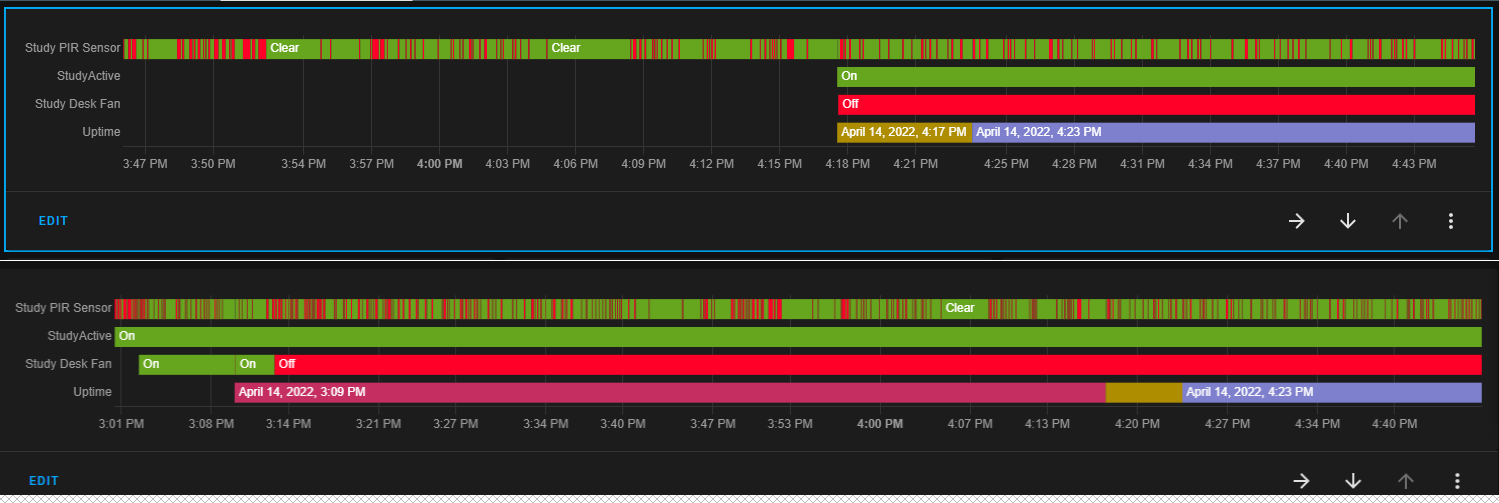
On a history graph card in a view on the UI, if I alter the history card time span from 1hr to 2hr, some missing data (on 1hr) becomes visible - ~~https://imgur.com/Pq7Ag8z anyone else experiencing this and/or has resolved it?
 tacit cave
history will only show data that exists
tacit cave
grave knot
On a history graph card in a view on the UI, if I alter the history card time sp...
if you just made those sensors ~20 minutes ago and you tell the history card to show an hour, what state do you expect to see for the first 40 minutes of that hour?
grave knot
tacit cave
if you just made those sensors ~20 minutes ago and you tell the history card to ...
yet they do exist, e.g. Study active was on at 3.01pm through 4.43pm as seen on lower view, but upper view it only appears at 4.18pm (or am i misunderstanding you?)
tacit cave
was it being recorded? Have you set up recorder or history, or is that set to default?
grave knot
I have got some entities excluded from both recorder and history, yes; but it must be recorded (?) to be visible at 3.01. they only change between these 2 images is the timespan (1hr or 2hr)
tacit cave
If you didn't record the information, there's nothing to display
recorder does exactly what recorder implies
it records states
if you don't record a state at the moment that it happens, it's not in the database, and therefore can't be displayed at a future time
recorder is what you use to configure what home assistant stores in the database
history adds a page that you can configure to display things you recorded in the database
history card is basically a mini-history page that you can put anywhere in your interface. That too only displays what recorder recorded
lastly, if you DID have that info recorded, it's possible that you'd run into a caching issue or an update interval issue. Just refresh the page with a CTRL+F5
grave knot
I am now surmising that this is a result of the 2022.4 change "When the same set of state attributes already exists in the database, newly recorded state changes now only store a reference to the state attributes instead of saving the whole set of state attributes." and that when using a "history graph card" then in the time span selected it only picks up on a change (or restart), so older data can be missing
grave knot
grave knot
I am now surmising that this is a result of the 2022.4 change "When the same set...
if this is the case, maybe the data should be back filled on the 'assumption' there wasnt a change to record?
tacit cave
state attributes are attributes of a state object
things like 'friendly_name', and 'device_class'
state is not a state attribute
grave knot
tacit cave
state attributes are attributes of a state object
Petro, thanks.. I am not an expert in the terminology, nor HA, so dont full understand what you are telling me, but I cant see why a shorter time span shows data as missing when it is there on a longer timespan view
tacit cave
tacit cave
lastly, if you DID have that info recorded, it's possible that you'd run into a ...
^
grave knot
tacit cave
^
Ctrl-F5/caching does not appear to be a factor 😦
tacit cave
Then you're running into a bug assuming everything you've stated is correct
grave knot
tacit cave
Then you're running into a bug assuming everything you've stated is correct
or a 'limitation', I agree
tacit cave
not a limitation, I use these graphs all the time, and you'd also see this issue on the history page
they all use the same code
it should be showing all the state history if it exists
regardless of the time period
if it's not, it's a bug
grave knot
tacit cave
they all use the same code
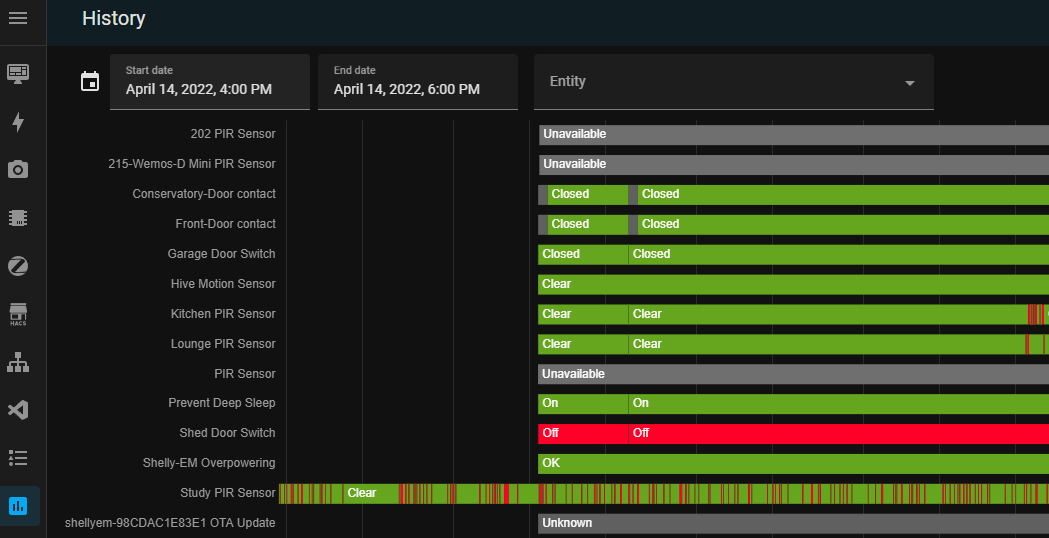
indeed.. if I reduce the timespan on the history page, I lose older data. https://imgur.com/A0rCq2N
 long laurel
How does one hide a yaml dashboard (from everyone) when the UI doesn't allow me to untick "Show in Sidebar" like I can with a UI created one?
 compact flame
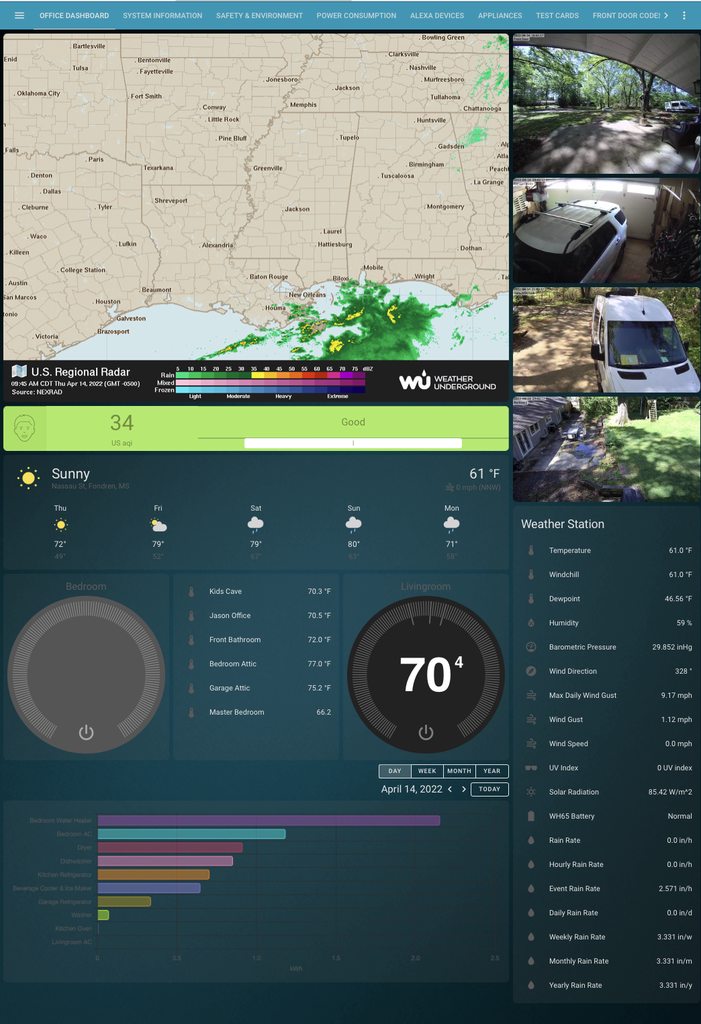
Super simple request. Is there a way to change the text color in the energy-devices-graph?
Everything else in the dashboard follows the theme color of white for text except the energy dashboard. Thoughts?
 polar kelp
Try secondary-text-color
long laurel
polar kelp
Yaml dashboards are handled in yaml
Thank you, I was on the page right before that
 calm plank
Hello, I still have error 404 in browser and black screen on android app after upgrading to last core ver.
I find that in log:

I # frontend section in configuration.yaml and restart systemctl service but still no luck.
What can I do with that?
polar kelp
A lot more than any of us.
Seriously, what do you expect us to do with a cropped picture of a log? Pictures of text are ridiculous in itself, but a part of a picture of text is a whole new level.
Yes, it mentions frontend not being able to load. That's probably part of your problem. I'd guess there's something related to it above, but I can only guess.
calm plank
That is important part of log. This is very big log.
Most are that notification of devices.
Can I delete themes folder?
calm plank
That is log file.
polar kelp
You seem to be missing some required software for running core. Specifically a compiler.
Or well.. it's a requirement to install some python wheels.
I suggest you take this to #installation-archived
Especially if I'm wrong and you're not running a core install.
calm plank
I upgrade home assistant with script. I see there's info for pip upgrade but when I try that commend it not help.
https://www.toptal.com/developers/hastebin/ukedihivep.sql
Hastebin is a free web-based pastebin service for storing and sharing text and code snippets with anyone. Get started now.
dietpi@DietPi:/home/homeassistant$ /home/homeassistant/.pyenv/versions/3.9.7/bin/python3.9 -m pip install --upgrade pip
Defaulting to user installation because normal site-packages is not writeable
WARNING: Ignoring invalid distribution -ip (/home/homeassistant/.pyenv/versions/3.9.7/lib/python3.9/site-packages)
WARNING: Ignoring invalid distribution -ip (/home/homeassistant/.pyenv/versions/3.9.7/lib/python3.9/site-packages)
Requirement already satisfied: pip in /home/dietpi/.local/lib/python3.9/site-packages (22.0.4)
WARNING: Ignoring invalid distribution -ip (/home/homeassistant/.pyenv/versions/3.9.7/lib/python3.9/site-packages)
WARNING: Ignoring invalid distribution -ip (/home/homeassistant/.pyenv/versions/3.9.7/lib/python3.9/site-packages)
Thank you @polar kelp
I had been trying to add that to the individual cards which did not work. I changed that attribute in my theme yaml and it worked.
polar kelp
Yeah, the graph backend reads the css values a bit weirdly, so there'd be timing issues if you try to do it with card-mod I think.
 marsh wadi
hi everyone. I am trying to use history card to display TDS and Temp sensor output on the same chart. Is it possible? Temp is 25C and TDS is around 400ppm
 errant plover
You can only combine sensors with the same unit in the one core History Graph Card. Different units will display on different charts. Check out the third party ApexCharts card if you want different units on the one chart as it supports multiple Y-axes.
marsh wadi
thank you
 true merlin
is there a way i can duplicate an entire dashboard?
ok, i see, i can just copy/paste with the raw configuration editor
 hoary anchor
Hi! Can not for the life of me get browser mod popup to work. Have tried restarting/clearing cache/reinstalling plugin and both the variants with fire dom event/call service. I don't understand what I'm doing wrong; https://pastebin.com/HZahiqdn
Have tried different card types and so on. Any tips?
Pastebin
Pastebin.com is the number one paste tool since 2002. Pastebin is a website where you can store text online for a set period of time.
hoary anchor
Got it working. I think I forgot to add this to configuration.yaml 🤦♂️
browser_mod:
 odd hatch
Hi, i have a question about Picture Elements Cards: how can you integrate to view the thermostat card when you tap (tap_action) on the entity: sensor.temperature?
odd hatch
which service do i have to call for that?
 boreal sluice
anyone know if I can put the closed on the right of the tile for the main door? mushroom theme

 winter karma
have installed mushroom with HACS, but it does not appear when I select cards. I have restarted Home Assistant, and delete carshe. anyone know?
 empty escarp
did you check if mushroom.js is entered in the resources
sometimes it can happen that hacs doesn't manage to do it by himself
winter karma
is there
winter karma
cache is deleted
empty escarp
then try to reinstall it
winter karma
empty escarp
then try to reinstall it
how do i delete it?
empty escarp
go into hacs click on the three dots and click on download again
winter karma
empty escarp
go into hacs click on the three dots and click on download again
have tryed it
empty escarp
what home assistant version do you have installed?
 icy patrol
Hey guys, is there a process to follow in order to convert from yaml mode to the new UI Gui mode?
 glass sandal
How to create a card like this?
Link multiple data in one

 kind shellBOT
@winter karma posted a code wall, it is moved here --> https://hastebin.com/yojemisowi
 jovial swan
I tried with https://gist.github.com/Thynix/45fb4ba3e64946de5e9fb9043d089435 but the card is empty in edit mode and removes itself entirely outside of it. I'm not sure how to proceed in troubleshooting from there. Is it evident to you what I've done wrong?
 lime imp
I would like to move from light groups defined in YAML to groups defined in the UI, now that this is supported in 2022.4. I haven't been able to locate any documentation or conversation online about making this transition. What would be the best channel to direct my question to? I'm hoping to find a path that's less work than copying over all my many light groups manually, but will do that right away, if it's the only way. Thank you to all the experienced folks who are contributing, BTW!
 vapid field
Hello, having a problem with an manually created mqtt button. I made a project with an ESP and used the mqtt discovery and the mqtt integration to autodiscover some buttons provided by my ESP project. The buttons are also recognized as Entities and I can press them and the magic happens. However I want to add the Buttons to the Card "Livingroom" in the Dashboard, so I configured the Area to be "Livingroom", but the buttons do not appear at the dashboard. What do I make wrong? Here an example message defining the button autodicovered by HA:
Topic: homeassistant/button/beamer_power_button/config
Payload: {"unique_id":"beamer_power_button","name":"powerbeamer","command_topic":"ir_beamer","payload_press":"power","entity_category":"config"}
 fiery ledge
lime imp
I would like to move from light groups defined in YAML to groups defined in the ...
fiery ledge
lime imp
I would like to move from light groups defined in YAML to groups defined in the ...
there's no other way 😉 but, tbh, there's no need either, nor an advantage.. if you have set a unique_id in yaml, you can still edit them in the UI, and keep the quick list of contained entities within reach.
fiery ledge
jovial swan
I tried with https://gist.github.com/Thynix/45fb4ba3e64946de5e9fb9043d089435 but...
tbh I dont see anything obvious.... you say it is empty in the editor, but is it empty in the frontend too? Dont you see anything? Do you have any errors in the inspector console? btw, you did install the config-template-card ....?
jovial swan
fiery ledge
tbh I dont see anything obvious.... you say it is empty in the editor, but is it...
Ooh I didn’t think about the inspector. I’ll check that. And yes I did.
 halcyon mantle
Hi, I'm trying to to use this on a picture elements card, but the color doesn't want to apply. Am I missing something obvious? - type: icon icon: mdi:transmission-tower-off style: top: 36% left: 88% "--paper-item-icon-color": red
polar kelp
It's much easier nowadays: yaml style: color: red
halcyon mantle
Thank you! Worked a charm... 🙏
Do you perhaps have a pointer to some documentation on this to save me some time in future?
 signal hornet
halcyon mantle
Do you perhaps have a pointer to some documentation on this to save me some time...
signal hornet
halcyon mantle
Do you perhaps have a pointer to some documentation on this to save me some time...
ah i do see its a little outdated
halcyon mantle
... and very scarce on the options/examples to use under 'style:'
polar kelp
The best thing you can do it get comfortable with your browsers element inspector and CSS rules for shadowDOM. It's in no way obvious stuff.
halcyon mantle
Thx! I have been trying to dodge that one, but guess the time has come to brush up on it...
lime imp
fiery ledge
there's no other way 😉 but, tbh, there's no need either, nor an advantage.. if ...
It seemed like the advantage was to maintain the groups in the UI, instead of the file editor. I think you are saying that the right way to transition is to manually recreate the groups entity by entity in the UI, if I want to maintain them there, is that correct?
fiery ledge
Correct
 icy verge
is there a way to show a secondary value on the entity card?
jovial swan
I'm trying to show statistics for sensor.closet_temperature but it's not appearing as something with long-term statistics, and I don't yet understand why. Thread has details.

Never mind, I see now that I got state_class and device_class reversed - it has device_class: measurement state_class: temperature Oops.
true merlin
boreal sluice
anyone know if I can put the closed on the right of the tile for the main door? ...
Use a template card
 arctic field
Hello, how can I change name of ui-lovelace.yaml dashboard in left menu?
 opaque kiln
Lol just saying...I just realized that we can nest custom:state-switch cards 
 unborn hollow
Hey there. I am using the switch.command_line integration, and i was wondering how can i prompt a confirmation dialog when the button is clicked (both on and off cases), and if the user does agree to the action performed, display a toast or a notification saying Request Sent or anything to notify the user
fiery ledge
arctic field
Hello, how can I change name of ui-lovelace.yaml dashboard in left menu?
in yaml mode:```
lovelace:
mode: yaml
resources: !include /config/lovelace/resources.yaml
dashboards:
ui-overview:
  mode: yaml
  filename: lovelace/dashboards/ui-overview.yaml
  title: Overview
  icon: mdi:view-dashboard```
change the title
 dark dirge
unborn hollow
Hey there. I am using the switch.command_line integration, and i was wondering h...
dark dirge
unborn hollow
Hey there. I am using the switch.command_line integration, and i was wondering h...
Ah, custom button card to the rescue yet again: https://github.com/custom-cards/button-card#confirmation
fiery ledge
in UI mode, its here: config/lovelace/dashboards
and click the dashboard you want to edit

 pseudo berry
I have custom button card in play but I have no clue how its possible to center my buttons in the lovelace card:

Anyone a hint?
unborn hollow
dark dirge
Ah, custom button card to the rescue yet again: <https://github.com/custom-cards...
How can i use this with the switch.command_line integration i am using? Sorry i am new to this stuff
dark dirge
it's just a switch, so you would follow the instructions to install custom button card and use the switch as the entity
unborn hollow
okay an entity is not a card. I think I get it now
dark dirge
this does the confirmation part:
type: custom:button-card
entity: switch.fr_table_lamp
confirmation:
  text: Really?
Thank you
unborn hollow
dark dirge
```
type: custom:button-card
entity: switch.fr_table_lamp
confirmation:
text: ...
in my brain, I was thinking this part that is typed in config.yaml IS what will appear in the dashboard.
that stuff still isnt completely set in my mind, but I am getting there
unborn hollow
is there a way to bind the c key to search to /?
i think this is the correct place to ask this.
How do I install custom button card? I've installed HACS already. But when I search for button-card on it I don't find it
I cant even seem to follow the manual instructions
Place the file in your config/www folder
I have nowwwfolder inside myconfig folder
signal hornet
pseudo berry
I have custom button card in play but I have no clue how its possible to center ...
what do you mean by center the bottons?
custom button card has a blank card which you might find useful
also you can use the custom layout card (https://github.com/thomasloven/lovelace-layout-card)
thats what I use for my mood tracker card
 fiery ledge
test version for custom-ui, if you used it before, please have a try and report in the repo? https://github.com/Mariusthvdb/custom-ui/releases/tag/20220417-beta
pseudo berry
signal hornet
what do you mean by center the bottons?
as you can see the tree collums are aligned left. But they should align centered in the card. I know about the blank cards, but a full card is way too much isn't it?
signal hornet
pseudo berry
as you can see the tree collums are aligned left. But they should align centered...
ah I see, are these in a grid card?
 inner stump
Hi, I am debugging some JavaScript from dashboard where is used button_card and there is this code return entity === undefined || Math.round(entity.attributes.brightness / 2.54);. Is correct say if entity, this mean entity specified in config dashboard entity: switch.light_bedroom strict equal to "undefined" and if false then then return what is behind operator ||, but what return if is true ?
pseudo berry
Pastebin
Pastebin.com is the number one paste tool since 2002. Pastebin is a website where you can store text online for a set period of time.
is the code of the card
signal hornet
instead of a vertical stack with horizontal stacks try using a grid card with 3 columns
and then remove the width / height styles from the button cards
and just turn on the squares option in the grid
that way your cards will scale with whatever display you're on
pseudo berry
thank you will try that
dark dirge
inner stump
Hi, I am debugging some JavaScript from dashboard where is used button_card and ...
It should return true based on the comparison
 fluid cypress
has anyone had issues with password managers not autofilling on home assistant?
unborn hollow
How can I use a conditional inside a string? This is for the confirmation text of custom button card
Here's what I tried ( I just used what is done in python lol but ofc it doesnt work.) is it possible?
text: Are you sure you want to turn ${'Off' if entity.state=='On' else 'On'} NAS?
unborn hollow
I saw this example yes
confirmation:
  text: '[[[ return `Are you sure you want to toggle ${entity.attributes.friendly_name}?` ]]]'
  exemptions:
    - user: befc8496799848bda1824f2a8111e30a
but my issue isnt getting it to popup
I've got that
The alert box shows this directly
Are you sure you want to turn ${'Off' if entity.state=='On' else 'On'} NAS?
rather than something like
Are you sure you want to turn off NAS
understand? I can send an image if needed
dark dirge
Set a variable before the return and reference it exactly as in the example
It's just JavaScript
unborn hollow
dark dirge
Set a variable before the return and reference it exactly as in the example
Where do I set it?
okay I got it to work
thank you
unborn hollow
Has there been any fix for ##5186?
GitHub
Checklist I have updated to the latest available Home Assistant version. I have cleared the cache of my browser. I have tried a different browser to see if it is related to my browser. The problem ...
 wet pond
is there any way to make a group of lights (let's say 2 lights) that in the UI when is clicked (more info) to show all light entities contained in that group
right now with a normal group on more info screen you can set the brightness, color, ct etc
doesn't show what lights it contains
 plush monolith
ok this is a bit of an odd issue. for some reason for one of my manual cards when i go to edit all the text typed is prepended. dunno what i pressed or selected to do that. anyone got any idea?
example would be if i wrote out "taco" it comes out as "ocat"
fixed itself but am curious. might just be a firefox thing
polar kelp
What version are you running? This used to be an issue way way back…
 open seal
I have updated to core-2022.4.5 and now the Sidebar can't be hidden with Custom Header in the iPad app. My Custom header config hasn't changed, and it works properly in the web, and the Android app
I'm coming from core_2021.11.5
dark dirge
Custom Header was deprecated a long time ago and is no longer maintained
 novel dust
History graph card
inner stump
Hi, I'am using "button-card" and I want in corner of my card add empty object stylized with css (red circle) -> https://pastebin.com/xwBsmAEK
Pastebin
Pastebin.com is the number one paste tool since 2002. Pastebin is a website where you can store text online for a set period of time.
but this will add unwanted text "[object Object]" in circle, how to do ?
 carmine shoal
webpage card question:
Can you stick a sensor value as the URL??
I tried using a template
carmine shoal
butterfly mode: how you you send a notification to an appleTV
 quasi flare
Thanks to everyone that replied and/or contacted me. 👍
- I've now found what the problem was.
REF:
"Unable to check for updates"
"You do not have any integrations that provide updates."
 shadow jay
does anyone know how to configure authelia with oidc with home assistant
 bronze wedge
Looking for a nice set of room images to add to the areas section, is there sets of shared images for this?
 orchid dome
Hi, all - Is it possible to know either 1) which user, or 2) whether the companion app or a browser is viewing a dashboard? I would like to have some conditional cards based on either one of those. I know that I could create fully separate dashboards for particular users, but that's a lot of duplication to maintain over time.
polar kelp
orchid dome
polar kelp
<https://github.com/thomasloven/lovelace-state-switch#mediaquery> could help
I think that may well do the trick. I realized that I've had lovelave-state-switch installed for ages thinking that it would come in useful sometime. I'm thinking that I can combine browser_mod and lovelace_state_switch to control the card shown based on the viewing device.
Or even I class of device by adding a common prefix like "app" or "browser" to browser_mod device IDs and using a template to choose in the state switch card. Sound plausible?
 wanton trail
Is there a way to set device_class for device_trackers?
I want them to show "Connected" / "Disconnected" instead of "Home" / "Away"
opaque kiln
If you use a template binary sensor, you can set the device class to any of the supported options. But why don't you want the device_tracker to show Home/Away?
wanton trail
@opaque kiln Its network devices from the unifi integration. So switches and accesspoints will always be "home" but might not be "connected". U see my point?
opaque kiln
Right, and they are created as device trackers by default by the integration I suppose. Then a template binary sensor whose state is the state of the device tracker but with a device class you specify could be the easiest way to get your results.
fiery ledge
i just tried: homeassistant: customize_domain: device_tracker: device_class: connectivity but guess that wont work 😉
template-entity-row can help out in this case
  - entity: device_tracker.unifi_udmpro
    secondary_info: last-changed
  - type: custom:template-entity-row
    entity: device_tracker.unifi_udmpro
    state: >
      {{iif(states(config.entity) == 'home','Connected','Disconnected')}}
    active: >
      {{is_state(config.entity,'home')}}
    secondary: >
      {{relative_time(states[config.entity].last_changed)}} ago```
throw that in an auto-entities card for your trackers, and you're set
 jagged jungle
Hi Guys! Just got started with Home Assistant. Super cool stuff! I've tried creating a rest_command from here. https://www.home-assistant.io/integrations/rest_command/ by just putting this in the bottom of my configuration.yaml file.
# Example configuration.yaml entry
rest_command:
  example_request:
    url: "http://example.com/"
I thought that it would magically generate a button in my dashboard that I could click and it would fire the rest command but thats apparently not how it works. Can anyone help me figure out what I'm missing?
 polar kelp
If you click the little hammer at the bottom left and then go to the Services page I think you should be able to find rest_command.example_request there. As said in the page you linked this creates a service which scripts and automations can call.
You can also call it by e.g. a button card, but that has to be setup manually
If you make a REST switch on the other hand, that will create a switch entity which will show up in the frontend automatically https://www.home-assistant.io/integrations/switch.rest/
jagged jungle
Thank you @polar kelp ! Looks like the rest SWITCH doesn't support get method unfortunately so it'll have to be a button card
thanks for clearing it up!
for some reason though it seems the rest command isn't showing up as an entity. Do i need to register it somehow?
Oh it's optional it seems
 mystic fern
Is stuff like this possible anymore? https://community.home-assistant.io/t/scenes-operating-as-a-switch/237228
I tried it and it didn't work but I am also super new to HA, so it could just be me. I know the UI has apparently changed a bit since 2020.

Home Assistant Community
I have four HUE lights (2 - strips/2 - bulbs) that are together operating in four scenes. Scene 1 is all four lit up and one color. Scene 2 is all four lit up, but a different color than Scene 1. Scene 3 is the two bulbs, same color, and lit without the strips (strips are off). Scene 4 is the same as Scene 3, but a different color for the bulbs....
polar kelp
The button solution should work. Or you vould make template switches to trigger the scenes. The switches wouldn’t turn on and off, though.
mystic fern
Yeah this is what I have now, all scenes, I was mainly wanting the UI to be less tacky looking

 tranquil sphinx
I'm not sure if this is a bug, or I have too many custom cards interacting. Notice the further left the picture element the larger it is the further right the smaller it is. Has anyone else had anything like this happen before? Almost like the card is moving it further right and further away on a z axis.
 hollow sand
is there any way to use the sun card from HACS to plug the 'moon' entity into it?
 turbid violet
how to get two gauges in same card?
vertical stack two gauge card
found it
Home Assistant
The Vertical Stack card allows you to group multiple cards so they always sit in the same column.
 plush bone
Hi all. I would very much like to customize the sidebar for all users. Specifically to remove the map. Or maybe just customize the map to only show certain people. The new setting of hiding an entity does not hide it from the map.
 muted sequoia
Logger: frontend.js.latest.202204050
Source: components/system_log/init.py:190
First occurred: 18. April 2022, 05:46:25 (22 occurrences)
Last logged: 10:27:08
http://192.168.178.19:8123/frontend_latest/core.d9b4dced.js:1:9429 Uncaught Error: Suspend promise not set
http://192.168.178.19:8123/lovelace/default_view?external_auth=1:0:0 Uncaught
http://192.168.178.19:8123/frontend_latest/app.b39ee8d3.js:850:0 Error: Failed to execute 'define' on 'CustomElementRegistry': the name "mini-graph-card" has already been used with this registry
https://2ep1ibrhzgrdyo.ui.nabu.casa/lovelace/default_view?external_auth=1:0:0 Uncaught
Someone a solution for this error?
 uncut quartz
hey guys, does anyone know if its possible to load the HA dashboard on ipad air?
i think my ipad is a gen 4 if im not wrong
or do i have to buy an adriod tab and use wallpanel instead
TIA
 blazing wren
It depends on the version of iOS it's running, but if it's not been updated in a few years then it's not supported.
errant plover
What version is the "latest version"?
if you have a GEN 1 Air then that is only iOS 12. Which is actually supported now I've looked it up (iOS 10 and up supported).
 civic osprey
This would be super neat to have
https://github.com/martinwairegi/ReactIndoorMapping
GitHub
Contribute to martinwairegi/ReactIndoorMapping development by creating an account on GitHub.
 formal python
Hello guys! Is it possible to add sensor reading to bottom of button card?
I have a button (switch) for my heater and have a sensor showing power drawing in object card. So I would like to combine them in one card to save space. Can’t find a way for a few days.
fiery ledge
you mean something like this? That's definitely possible yes

you should check the custom: button-card, and the thread on the community, it has a vast amount of examples how to do this
formal python
@fiery ledge Yes, exactly. Thank you.
 dusky jackal
@polar kelp or anyone who may know is there a way to hide title for browser_mod popup card? i tried removing it, leaving blank and show_title: false
polar kelp
There's an option to the popup command https://github.com/thomasloven/hass-browser_mod#available-commands
dusky jackal
hide_header? I like that too, except on vertical stack cards i prefer just no title. Tyvm
i have popup showing my fans with the new mushroom card
fiery ledge
formal python
<@679819945655533632> Yes, exactly. Thank you.
Sure, let us know if you found it and when you need help to adjust to your liking
polar kelp
title: " " could work too
fiery ledge
Hey Thomas, thanks for the update to Browser-mod, now playing music to the browser again 😉
formal python
I’ve found and installed it, now looking for good example to start from. The one on your picture looks really good.
polar kelp
That one's thanks to a pull request.
fiery ledge
Yeah, glad you merged and thanked gadgetchannel for the effort 😉 really nice
formal python
@fiery ledge do you mind sharing code for this card as example?
fiery ledge
Not at all, but I am prepping dinner currently 😉 you can check the gists in my bio for button-card-templates and look for button-switch . It should all be there
formal python
Okay, I think this will do the job. Thanks.
fiery ledge
Sure. And all you need next to the template in the button-card config is the entity and the triggers-update field.
formal python
Will take a look 😉
formal python
Hm, harder than it looks while having zero coding skills
 placid birch
I'm having issues getting connected to the panel.
fiery ledge
formal python
Hm, harder than it looks while having zero coding skills
Best take it to the community ( for ease in copying/pasting yaml) and give us what you have now
Feel free to tag me there
 royal patio
I'm using for the firs time card_mod to modify 2 mushroom cards inside a vertical stack, but even if I see the DOM tree getting updated, I don't see any changes applied, what am I doing wrong?
card_mod:
  style: |
    mushroom-state-item {
      color: black;
      display: flex;
      align-items: center;
      justify-content: center;
    }
@fiery ledge Thanks. I have spent almost 3 hours yesterday to read documentation on GitHub and create this small button by myself. Ain’t much but it’s honest work 🤣 For now I need to add section to this button with time when it was switched (like 1hr ago) and something to do with localisation of units system-wide.
royal patio
royal patio
I'm using for the firs time card_mod to modify 2 mushroom cards inside a vertica...
I think it's a problem loading the card-mod.js, I have configured it with /config/www/community/lovelace-card-mod/card-mod.js but that redirects me to a blank config screen, if I remove /config I just get a 404, should I configure anything to make www public or something like that?
royal patio
I managed to access successfully the js file replacing /config/www with /local. No errors now, but the styles aren't applied anyway
fiery ledge
anyone around to test window.location.pathname in inspector console, and notice the path isnt included on the first tab in any dashboard? (throwing errors on the Js templates in button card..... ) please see: https://github.com/home-assistant/frontend/issues/12373 would appreciate some feedback
royal patio
fiery ledge
anyone around to test `window.location.pathname` in inspector console, and notic...
I get this in mine
location.pathname
'/lovelace/default_view'
right, thx, just realized I updated to the latest frontend 20220420.0 - latest in dev nightly. so unless you use that too, my question wouldn't apply. You have more than 1 dashboard in yaml mode?
fiery ledge
formal python
<@679819945655533632> Thanks. I have spent almost 3 hours yesterday to read docu...
np. just for your info, this is all you need for that button, when you also have the templates in place: - type: custom:button-card template: button_switch entity: switch.tv_library triggers_update: sensor.tv_library_actueel name: Tv Library and it is using the icons set in the backend for the switch.
if you dont have those set in the backend, you can add it to the button-card with the same templates in place, but a slightly adjusted config per button: - type: custom:button-card template: - button_switch - var_icon entity: switch.printer_library triggers_update: sensor.printer_library_actueel name: Print Libr. variables: on_icon: mdi:printer off_icon: mdi:printer-off
entities _actueel are the power sensors for the switch, and make the display of the actual power up to date in the button
 dull tinsel
I am trying to use a apexcharts but get the error "/// apexcharts-card version 1.10.0 /// value.series is missing." I am setting "type: custom:button-card" from the examples but seems like I am missing version and cannot find any documentation how to specify version. Anyone who know what I am missing here?
formal python
fiery ledge
if you dont have those set in the backend, you can add it to the button-card wit...
Ok. Thanks again. As for now I made it without templates. Just a card based on button states.
fiery ledge
dull tinsel
I am trying to use a apexcharts but get the error "/// apexcharts-card version 1...
where? you didnt post any config. we need more to be able to help you.
royal patio
royal patio
I'm using for the firs time card_mod to modify 2 mushroom cards inside a vertica...
I guess my issue is with the selectors inside #shadow-root... but I've been following the documentation and trying something like this doesn't work either:
card_mod:
  style:
    mushroom-state-item:
      $: |
        div.container {
          justify-content: center;
          background-color: yellow;
        }
do I have to select from the root element? I'm applying this outside of the vertical-stack in the yaml
dull tinsel
fiery ledge
where? you didnt post any config. we need more to be able to help you.
Thanks, your answer helped. New to cards and thought the error was to the only line I had written but it was referring to the total config. Solved now, thanks!
fiery ledge
hehe, glad to have been of assistance, even by only asking for more info 😉 cool.
 hallow mango
anyone else seeing this? https://github.com/galloween/custom-sidebar-v2/issues/9

GitHub
2022.4.0b0 introduces updates this is also introducing a badge with the number of updates for configuration. Like below but with custom sidebar, those updates are showing up on all custom entries a...
kind shellBOT
@pseudo berry posted a code wall, it is moved here --> https://hastebin.com/fohiducanu
pseudo berry
Hey guys, situation as follows:
Have a shelly, controlling my garage door, and a external wifi reed sensor (binary sensor). What i'm trying to archive is, that if the garage door is open an open icon is displayed and if it is closed, a closed icon. In custom button card there is a state object but as fas as i understand it'S relative to the controlled entity and this is the shelly... Any Ideas? Code looks like this:
https://hastebin.com/fohiducanu
Hastebin is a free web-based pastebin service for storing and sharing text and code snippets with anyone. Get started now.
pseudo berry
got it! thank you anyway
 tepid raft
Anyone know if it's possible to vertical align mushroom card chips? I can do it fairly easily if I edit the CSS in the inspector, but wasn't sure if there was a built-in way. And if not, is there a 'standard' way to add custom CSS to a HA dashboard?
 lime glacier
I am casting some lovelace views to a chrome cast, but I find its not centered... from left to right its fine, but the standard weather card I am using seems to have a lot of dead space/white space above and below it... so the content is at teh bottom of the screen.
formal python
Hello
Does anyone know any good thermostat card different from default one? Don’t like circular controls. I tried simple thermostat card but it’s development is abandoned and it’s buggy in latest HA. Or does anyone have fixed version of it? For me it does not display temp. control arrows and it displays switch state with doubled text like “Off (off)”
opaque kiln
I'm a fan of https://github.com/mattieha/slider-button-card Not specifically for thermostats per se and does not have all the functionalities of the default card, but it is nice and graphical!

GitHub
A button card with integrated slider. Contribute to mattieha/slider-button-card development by creating an account on GitHub.
 gusty vine
Hello, does anyone know if there has been a change made in the dev version that affects tap_action - navigate? Since updating my dev instance to 2022.5.0dev20220421 none of the navigation works on my dashboards.
royal patio
tepid raft
Anyone know if it's possible to vertical align mushroom card chips? I can do it ...
in theory you can use card mod for that, but I wasn't able to get the correct selector yesterday when I tried, if you manage please let me know how you did it!
formal python
@opaque kiln that one looks good, thank you
fiery ledge
gusty vine
Hello, does anyone know if there has been a change made in the dev version that ...
not here, seems all are doing their job. Only thing I experience is : https://github.com/home-assistant/frontend/issues/12373 where the dashboard items dont navigate to the path url for the first tab in the dashboard. All others, custom or core work as expected
 loud thistle
A CSS question. How can I get the sidebar transparent? I have a animated background running and it clearly runs behind the sidebar, but the only thing I managed to get done is a background pic, trying to make it transparent makes it simply white. Where should I look at? https://snipboard.io/VMCEQX.jpg This is the current state. If a custom addin is needed for getting this done, I likely already have it, but did not realize how to make it work
 leaden bay
Hi all, I'm trying to use Feedpasrser and list card to show an RSS feed on one of my dashboards, but when I try to add the custom: list-card, I'm getting the error "no card type configured"
I've added the repository through HACS and I can see the files are in the community folder but not sure what to do to fix
loud thistle
leaden bay
I've added the repository through HACS and I can see the files are in the commun...
F12, then right click on refresh and let it wipe all cache.
fiery ledge
loud thistle
A CSS question. How can I get the sidebar transparent? I have a animated backgro...
i guess you did try sidebar-background-color: transparent? because I also see it showing white.... must be yet another background shining through? this needs some more investigation... how did you get your image to show as you have it?
gusty vine
fiery ledge
not here, seems all are doing their job. Only thing I experience is : https://gi...
Thanks @fiery ledge that makes sense.
 rare jetty
my front end is giving 404: not found today when I logged in. I can login to server though . what could have gone wrong? what I can look for?
I tried rebooting server , but no luck
dusky jackal
ive spent all day trying to figure out how custom layout card can have 3 columns of cards in a view but the top card (paper button row) span the the whole view?
loud thistle
fiery ledge
i guess you did try `sidebar-background-color: transparent`? because I also see ...
https://github.com/dreimer1986/yourname_card_mod this is my theme. I changed the line 84 aka removed it and installed the Lovelace Addin from HACS for animated backgrounds. That's it
And yes I tried the same in the debug console, it happily becomes white transparent. I assume right now that the section touched by the Addin is being shrinked when you collapse or extend the sidebar. I did not tinker more yet
 eager mason
Does anyone use a webpage card to show stock prices/charts? Any recommendations on URLs?
icy patrol
eager mason
Does anyone use a webpage card to show stock prices/charts? Any recommendations ...
Avanza Stock via HACS
 patent scaffold
Is there no easy way to tell a card to display the exact date/time of last change/update? I want a card showing the date and time of the last movement of my camera. And I added the entity "binary_sensor.XXX_person_detected" to a card and added the secondary information "last changed" but its not that exacy, just "yesterday" or "2 hours ago"
loud thistle
patent scaffold
Is there no easy way to tell a card to display the exact date/time of last chang...
- entity: switch.whateverentity
secondary_info: last-updated
patent scaffold
Yes, but that only gives a rough "5 minutes" ago, "2 days ago". Is there a way to there have the time stamp?
fiery ledge
check the attribute format option https://www.home-assistant.io/dashboards/entities/#attribute a bit down
ofc last_changed isnt an attribute, so that might not work....
patent scaffold
thx!
fiery ledge
does work: - entity: sensor.astral_solar_midnight secondary_info: last-changed format: time showing last-changed, and the state in time format
quite nifty actually, didnt use that myself 😉
loud thistle
@fiery ledge progress. I was right... Sadly. Because now I don't see a way to get this done right. Depending on expansion or not of the sidebar the width is changed. In <partial-panel-resolver> you can find --app-drawer-width when expanded being calc(256px + env(safe-area-inset-left)) else --app-drawer-width is 56px. Changing these around changes the drawing window for the cards AND the background video. Result: https://snipboard.io/gIsauM.jpg It would be way better if I can make it stay with all the cards where they were and only the background is full size. Maybe ther eis a value for, too. But I did not find it yet
 sullen stump
Hi, Is it possible to show an entities controls as induvidual items in an entities card
 radiant holly
Is there an issue with themes at the moment, I've installed ones that have worked on previous instances for me but even after a restart and cache clear they're not showing up as options
fiery ledge
why do I see an inspector console error on some template in a custom:button-card which is not shown because of a condition not met in conditional/state-switch. The error perse is correct, but I didnt expect it to show, because the button-card is not displayed at all
 opal veldt
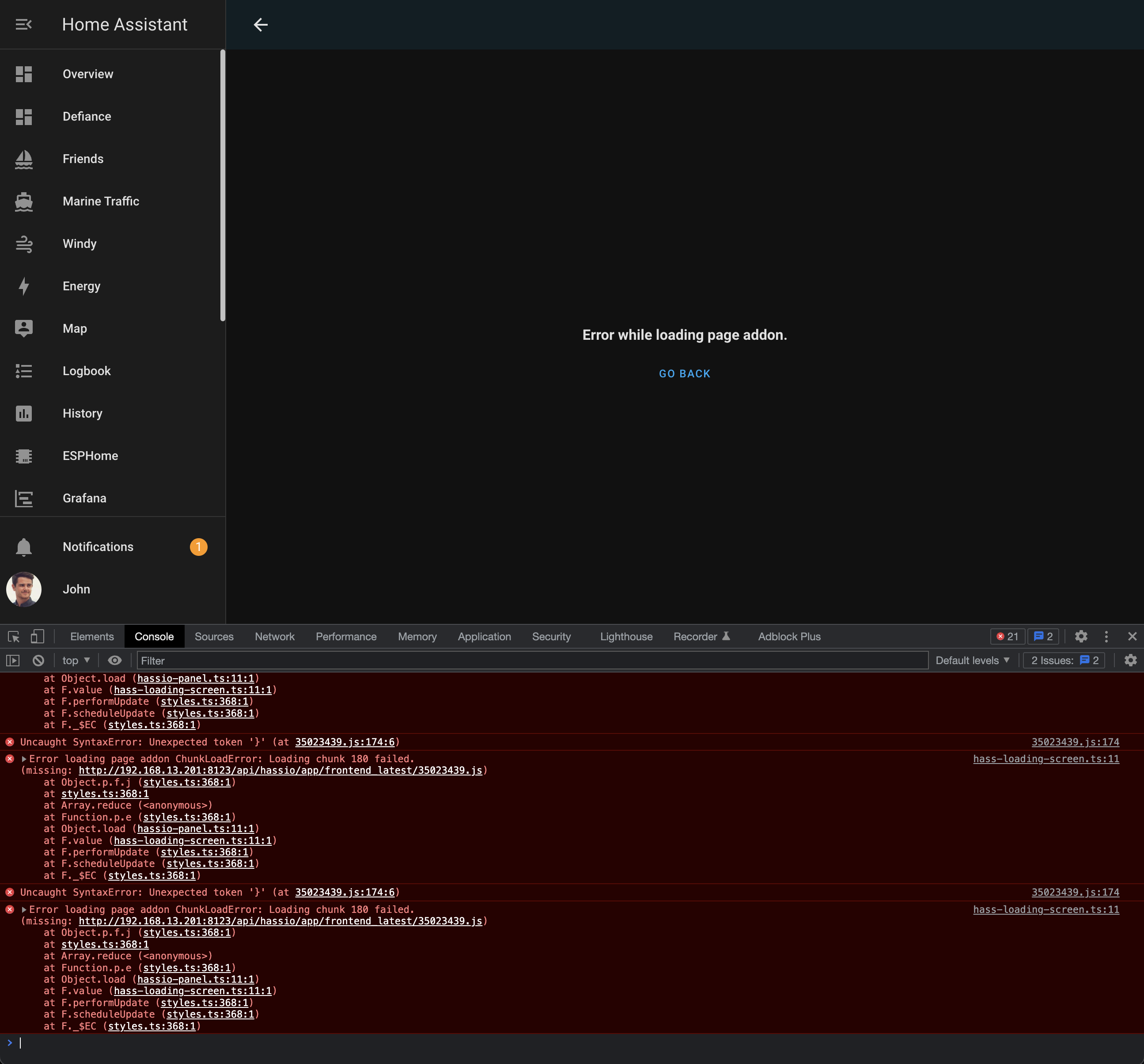
Quick Q - was directed here from #general-archived - can anyone think of why I might be getting frontend ChunkLoading errors when loading HA over ethernet?
Screenshot: https://user-images.githubusercontent.com/120485/164946273-65ca57c0-9f91-42d9-8001-e600eb17e4f1.png
Running HA Supervised on a NUC. When the NUC is connected to network over Wifi - no issues - but when the NUC is connected to the network over Ethernet, I get these frontend errors.
Have tried: Cache clearing frontend, multiple browsers/devices, swapped out ethernet cable, no firewalls or anything else active.
Only seems to happen over ethernet on my Pepwave BR1 Pro router - no issues when connected over ethernet to a TPlink router instead. I'm stumped 🤔
 opal veldt
Welp. It was just a local network cache somewhere, changing the DHCP reservation address fixed it.
 frosty flower
is there anyway to get this card to show up on the dashboard
 errant plover
Card mod or browser mod?
 outer vine
Is there any way to display this in a table, or perhaps in a larger card than the standard size card on the dashboard?

Trying to get daily averages for temperatures and energy consumption in one thing, but the screen estate is too small. Not sure how to increase the card sizes (I only operate HASS on desktops with large displays)
Alternatively, if there is a port that I can connect to on HASs, I can hook up my powerBI to it, and I'll get all the data I need 🙂
 cloud tulip
Does anyone has a good slider card for adjusting input_numbers?
fiery ledge
outer vine
Is there any way to display this in a table, or perhaps in a larger card than th...
try https://github.com/alexarch21/history-explorer-card for full width and highly adjustable History views
vapid field
Anyone an idea which icon to use for the cellar (room)? I struggle anything that looks fitting.
opaque kiln
Are you referring to a picture for the Cellar area card, or an mdi icon for a cellar? If the latter, your pickings are slim...just put in mdi:stairs-down?
 tame dove
I use a glances card with an entity-filter card to display icons related to waste pickup. I like the entity filter because the card is only relevant on Sunday so the rest of the week, it is not visible. I do not like the size of the icon for the card though. I want bigger icons than the standard glances card provides. Suggestions?
fiery ledge
use a conditional markdown, and set bigger icons?
or simply resize the icons:```
type: glance
entities:
- entity: sensor.cleargrass_1_co2
- entity: sensor.cleargrass_1_co2
style: |
ha-card {
--mdc-icon-size: 60px;
}``` see: https://community.home-assistant.io/t/card-mod-add-css-styles-to-any-lovelace-card/120744/1238
vapid field
I'm currently creating a new dashboard based on mushroom. Works great and looks cool. The only issue so far: action-navigate does not seem to work when casting the view on a Google device. Guess I need to use urls instead, right?
tame dove
fiery ledge
or simply resize the icons:```
type: glance
entities:
- entity: sensor.cleargr...
I like this but can’t get the icon size to change
type: glance
title: Garbage and Recycle
show_state: false
show_name: false
entities:
   - entity: sensor.garbage
   - entity: sensor.recycle
   - entity: sensor.grass
style: |
          ha-card {
            --mdc-icon-size: 120px;
            }
did yiu add the card_mod: key? its probably still not adjusted to the new techniques in card_mod
   - entity: sensor.grass
     card_mod:
       style: |
         ha-card {
           --mdc-icon-size: 120px;
         }
Added, no change
fiery ledge
yes, that works....``` - type: glance
title: Trädfri gateway
card_mod:
class: class-header-margin
style: |
ha-card {
--mdc-icon-size: 80px;
}
another problem though.... as you can see the icons overflow the state...
 tame dove
Man, still not working
fiery ledge
on the card level, or on a single entity level. the latter requires different syntax
tame dove
Card level
fiery ledge
hmm, what could that be? version card-mod ?
tame dove
Do I need to load a custom card?
 fiery ledge
black, or empty? there s a bug, and its being fixed at the moment: https://github.com/home-assistant/core/issues/70346#issuecomment-1106829838
 lost coyote
Probably empty

So should I upgrade?
Oh now its back to green
Weird but ok, seems fixed 😄
tame dove
fiery ledge
sorry, it's such a default card, I presumed you had that...
auh, now i am getting somewhere. thank you
can the header be removed so the icon looks more centered?
fiery ledge
you mean of the glance card itself? most of the time you can simply use title: ' '
icy patrol
Hello; hoping to get some help on an issue i noticed with browser Mod - When i press a button - i see the pop up works but the input_select is getting cut off

 gloomy iris
Is it normal that picture elements cards look wrong on mobile devices compared to their look on computers? I used relative positioning (using % instead of px) but my cards look messed up on my mobile :(
 dreamy phoenix
Any know how I can have two devices with same friendly name in Home Assistant bedroom one >> light.Main, bedroom two >> light.Main and not light.Main_2 ? using esphome.
dark dirge
that's an entity_id, not a friendly_name, and it must be unique
further, all entity_ids are lowercase, so "light.Main" is invalid
you can assign whatever name you want to the entity and use that for displaying in the frontend
mystic fern
is custom button card still the de facto custom button addon despite being out of support, or is there something better and newer?
dreamy phoenix
dark dirge
you can assign whatever name you want to the entity and use that for displaying ...
Thanks @dark dirge sorry I was not really clear, I do understand I need the entity_id unique is it possible to have light.bedroom_room1 >> friendly name >> Main. and 2nd unit. light.bedroom_room2 >> friendly name >> Main. I can see that I can do in and rename them in HA but was hoping with esphome I could just add an extra line 😉
dark dirge
the friendly_name is just an attribute and there's no restriction on them being unique amongst all entities
the friendly_name is an HA thing, so I doubt that you can set it via ESPHome. But the docs would say
dreamy phoenix
Thanks, I have read the ESPhome doc a few times.. guessing I will need to just do a Customizing entities long as it all in yaml I am happy 👍
 verbal wedge
What is the best way to fix the history page where it comes up blank? it's been like this for a while through several versions, just never took the time to look into it. When I hover my mouse over the page it'll show entities but none of them are displayed.
frosty flower
tame dove
<https://github.com/denysdovhan/vacuum-card>
Thanks
dark dirge
verbal wedge
What is the best way to fix the history page where it comes up blank? it's been...
It's a giant image that some browsers don't like, especially mobile ones. I don't think there's anything you can do about it.
verbal wedge
dark dirge
It's a giant image that some browsers don't like, especially mobile ones. I don...
Chrome on my MacBook used to render the page fine.
frosty flower
Probably dumb question but how do I do m² so it displays as such and not m^2
frosty flower
Also is it possible to create a line break in a card
 sacred grotto
can anyone help me find the ipv4 address

i also having difficulty opening the websites homeassistant.local.8123
sacred grotto
dark dirge
you probably aren't using bridged networking
oh
sacred grotto
dark dirge
your VM doesn't appear to have one

i had this before
i was watching a tutorial
i also tried using fing to find the ipadress but i couldnt
dark dirge
#installation-archived was the right place for this
sacred grotto
dark dirge
<#944337294389805056> was the right place for this
oh sorry i just cant send images
dark dirge
that doesn't mean "post in a different channel"
kind shellBOT
Please use imgur or other image sharing web sites, and share the link here.
Image posting is blocked in most channels to discourage people from sharing text as images. Sharing text as images assumes that everybody sees the world as you do, which isn't the case. Some people are colour blind, or have visual impairment that means they can't make sense of an image of text.
Command '~images' was invoked by: RobC
sacred grotto
dark dirge
that doesn't mean "post in a different channel"
oh sorry
kind shellBOT
When using Discord's Reply feature it defaults to pinging the person you reply to, which can get frustrating for the target. Use Shift + click on the Reply option, or click @ ON to @ OFF to stop this - on the right side of the compose bar.
You have to change this every time (thank the Discord devs for that).
Command '~reply' was invoked by: RobC
sacred grotto
its showing the same message
 unique scroll
i have a sensor in google calendar that provides a date and time for an event to start.
format is : yyyy-mm-dd hh:mm:ss
is it possible to manipulate the string to remove the seconds ?
entity: calendar.liverpool_fixtures with the attribute: start_time: 2022-04-27 21:00:00
vapid field
vapid field
I'm currently creating a new dashboard based on mushroom. Works great and looks ...
Neither navigate nor urls work when casting to Google devices.
Any other idea how I could switch to a different view?
unique scroll
{states['calendar.liverpool_fixtures'].attributes.start_time}
 cold bluff
Is there a card that would allow me to click on a button representing my living room and have it pop up another card that shows lights, fans, temperature etc? I can use conditional cards and hide/unhide a card, but I was hoping for something similar to the more info option
errant plover
You can make custom pop-ups with browser-mod.
opaque kiln
unique scroll
{states['calendar.liverpool_fixtures'].attributes.start_time}
If it's just returning a string, just do string subsetting:
{{ state_attr('calendar.liverpool_fixtures', 'start_time)[:-3] }}
The [:-3] will give you all the characters in the string except the last 3.
Unless you're doing this in custom:button-card, where you need to do templating in JavaScript?
unique scroll
unfortunately: type: custom:button-card
opaque kiln
Well then use JavaScript substring method: https://www.w3schools.com/jsref/jsref_substring.asp#:~:text=Definition and Usage,not change the original string.

W3Schools offers free online tutorials, references and exercises in all the major languages of the web. Covering popular subjects like HTML, CSS, JavaScript, Python, SQL, Java, and many, many more.
But it is imo clunkier. I would prefer to handle the subsetting at the sensor rather than at the frontend, if you can use Jinja string subsetting at the sensor, as that is much more elegant.
unique scroll
it gets too complicated for little me....ocd will have to live with the seconds even tho they are not needed
 tribal field
Does anyone know why this graph has started to look weird?
https://imgur.com/a/bkmaMiD
It's plotting download speed using speedtest.net - I disabled the auto update feature and set up an automation to run instead so that I can easily toggle it off at times when I don't want it running.
You can see on the graph that when I switched to the automation, the points on the graph started to be disconnected.
It's not super important, just weird.
Anyone know why it's happening?
 unique scroll
guess i could use the :-3 in the sensor.yaml file @opaque kiln
value_template: >-
{% set a=((as_timestamp(states.calendar.liverpool_fixtures.attributes.start_time) - as_timestamp(now()))) | default(99) | int %}
tribal field
@opaque kiln suggested in #automations-archived that it's to do with entity state being unavailable. How do I view the raw data over time?
opaque kiln
tribal field
<@948583549651537970> suggested in <#672220450977349653> that it's to do with en...
Use the logbook and see if your entity's state ever becomes unavailable.
 burnt horizon

 velvet bloom
Is it possible to show a sensor attribute as a entity ?
opaque kiln
Why do you want to do that? You can create a template sensor whose value takes the value of the attribute in another entity, but that seems a bit redundant.
velvet bloom
I just want to show the attribute within a card
so i dont have to click on the sensor within the card
opaque kiln
Which card are you using?
velvet bloom
Entities
opaque kiln
https://www.home-assistant.io/dashboards/entities/ third sentence indicates it can display attribute data. Read down to see how.
Home Assistant
The Entities card is the most common type of card. It groups items together into lists.
opaque kiln
Heh I don't use this vanilla card myself, but the level of yaml you may need doesn't seem daunting. Just adjust one of the examples below.
tribal field
opaque kiln
Use the logbook and see if your entity's state ever becomes unavailable.
No logbook events found.
It doesn't appear that the Speedtest Download entity shows anything in the logbook.
opaque kiln
Try adjusting your time range to a longer range.
tribal field
I did - I've done the whole week
opaque kiln
Oh wait. Yeah numeric sensors don't display in the logbook.
You mentioned you have an automation that can turn off the speed test from running. Do these gaps correspond with when that automation is off?
tribal field
No... the automation is running every 10 minutes (I might make this less frequent later) and has a condition to check an input_boolean
I set the input_boolean to false when I was to stop the automation from running. e.g. If I am gaming and don't want speedtest ruining my ping for me.
The speedtest integration was also configured to run every 10 minutes before I swapped to an automation. So the time period between tests is the same.
The only difference is that I've also added the input_boolean changing to on as a trigger so that when I turn it back on it runs a speed test immediately
Pastebin
Pastebin.com is the number one paste tool since 2002. Pastebin is a website where you can store text online for a set period of time.
opaque kiln
Hmm...I'm wondering if there is any significance that each of your data line segments seems to contain exactly 3 value changes.
Ok, and what is your config for the sensor that contains the speed test results?
tribal field
Hmmm I see what you mean. Only 2 changes though - because step graph ignore me, reading it wrong. it is 3.
 brisk bone
Hi, might be a stupid question, but where do u edit the new group helpers (from UI) if u want to add or change an included entity?
opaque kiln
Aren't they listed under helpers once created? That being said, I'm still on 2022.3 so I haven't used the new group helpers directly.
tribal field
opaque kiln
Ok, and what is your config for the sensor that contains the speed test results?
Nothing special in configuration.yaml as it's just standard integration
https://www.home-assistant.io/integrations/speedtestdotnet
brisk bone
opaque kiln
Aren't they listed under helpers once created? That being said, I'm still on 202...
No, i cant find them anyway, there is only a group link in config for a new group that links you to the integration page ... without any "group" functionality
opaque kiln
tribal field
Nothing special in configuration.yaml as it's just standard integration
https://...
Hmm strange...I'm out of ideas I'm afraid. But does it impact your UX if the history graph is intermittent?
tribal field
No not really - it's just an oddity that was "bothering" me.... and I thought I might learn something if I knew why it's doing it
🤷♂️
opaque kiln
Haha hopefully someone more experienced in the arcana of HA will pick up on it.
tribal field
Maybe I'll find some place to report it as a UI bug...
opaque kiln
Any other sensors also displaying this intermittency in history? To better determine if this is an issue with the history graph or the speed test integration.
tribal field
The "ping" and "upload" sensor on the speedtest integration do the same, and it started at the very time I stopped using the built in integration's "auto update" and switched to my own automation.
Other sensor graphs (phone temperature etc) appear just fine.
brisk bone
opaque kiln
Aren't they listed under helpers once created? That being said, I'm still on 202...
Sorry my mistake, found it. Under configure state. Case closed 🙂
opaque kiln
Heh if you remove your automation, will it resolve this issue? If so then reporting a bug may get no traction...
unique scroll
what is wrong with this line.
value_template: >-
{% set a=((as_timestamp(states.calendar.liverpool_fixtures.attributes.start_time([:-3]))) | default(99) | int %}
error is:
Invalid config for [sensor.template]: invalid template (TemplateSyntaxError: unexpected ':') for dictionary value @ data['sensors']['liverpool_match_time']['value_template']. Got '{% set a=((as_timestamp(states.calendar.liverpool_fixtures.attributes.start_time([:-3]))) | default(99) | int %} '. (See ?, line ?).
tribal field
opaque kiln
Heh if you remove your automation, will it resolve this issue? If so then report...
Ha, yes that would probably stop the graph being iffy, but I don't want to have to go into the integration configuration every time I want to switch off tests. 😺 So I think I'll live with the graph being iffy.
unique scroll
trying to make a sensor with the time from the calendar
tribal field
unique scroll
what is wrong with this line.
value_template: >-
{% set a=((as_timest...
Is there supposed to be a - after the >?
Ignore me, I'm fairly new to HA (and YAML as a result). Apparently the - is used to strip newlines at the end of the string.
tribal field
I think you are setting a variable a - are you using this later on in your template? Also, maybe #templates-archived is the best channel to ask?
unique scroll
ok. i asked here cuz i wanted to use in dashboard/lovelace
tribal field
Yeah makes sense to me... but I've had a mod on me for not using the right channel already. 🤷♂️
Since you are setting a variable, what's the rest of your value_template?
opaque kiln
You have too many brackets. And the [:-3] should be the very last operation you do, after converting the processed output to a string.
Why do you need to convert it to a timestamp?
unique scroll
this is accepted but returs unknown
value_template: >-
{% set x=((as_timestamp(states.calendar.liverpool_fixtures.attributes.start_time) - as_timestamp(now()))) | default(99) | int %}
all i want is hh:mm
opaque kiln
Try building your template in Dev Tools> Template, starting with {{ state_attr('calendar.liverpool_fixtures', 'start_time') }} and adding on formatting step by step.
unique scroll
i want to remove the minus part to have the actual start time of the event presented
opaque kiln
So the calendar gives you a countdown and you want to convert it into a time?
unique scroll
this is taken from a countdown yes
but the attribute start_time is the actual start of the event
opaque kiln
Ok, so just work with the start_time attribute.
opaque kiln
opaque kiln
Try building your template in Dev Tools> Template, starting with `{{ state_attr(...
Pop that template into Dev Tools > Template, what do you get as the output?
unique scroll
this is the result of start_time
start_time: 2022-04-27 21:00:00
i just want the 21:00
opaque kiln
So if you do {{ state_attr('calendar.liverpool_fixtures', 'start_time')[:-3] }}?
Ok if you just want the time without the date, try {{ state_attr('calendar.liverpool_fixtures', 'start_time')[11:-3] }}
This of course assumes that the time you're getting from the attribute always returns in that format.
unique scroll
that did it......many many many thanks

11:-3 means skip first 11 , grab the stuff there and skip last 3 ?
opaque kiln
You got it.
unique scroll
going to do another with the date only...
now i know the syntax
opaque kiln
Enjoy! If the string doesn't return in the same format all the time, you can just adjust the logic for determining x and y in the [x:y].
unique scroll
i'm impressed by the oracles that knows the internet of things by hand
 fading reef
In my front end history graphs, like RAM, or any, the time zone seems to be UTC/something, even though my settings in HASS are my own time zone. How to fix this? see things in my time zone?
Seems its a browser issue and depends upon browser time
[ https://github.com/home-assistant/frontend/issues/10502 ]

GitHub
Checklist I have updated to the latest available Home Assistant version. I have cleared the cache of my browser. I have tried a different browser to see if it is related to my browser. Describe the...

 native galleon
i would like to make more cards in my dashboard in a row, is this even possible? When i have around 5 cards in a row, they split to 2 fields. (on my pc Dashboard)
 quick otter
Is there a way to show different entities (scripts) based on time of day and/or sun state? Wanting to show next script moving mode of home forward (morning/day/evening/bedtime/sleep).
fiery ledge
a bit of a # channel issue, but allow me this please on templates and the get() method: can anyone confirm I am writing this longer mapper (top one) correctly using the get() method (bottom one) in js ? return mapper[state] ? mapper[state] : 'red'; return mapper.get(state,'red'); I cant find a complete source on the fallback (else) value, but its the way I do it in all of my Jinja templates....
polar kelp
.get(property, default) is python syntax
The same thing in javascript would be mapper[state] !== undefined ? mapper[state] : 'red'. Or in typescript mapper[state] ?? 'red', but that probably doesn't work in a button card template or whatever.
Your first row would evaluate to 'red' if mapper[state] was set to false or 0, for example. The second one (in python) would not.
fiery ledge
tha would at least explain why it works in Jinja. and yeah, the top line in my post is what I have using since forever, but since I got to appreciate the brevity of the get() methid in Jinja, I figured it might also be possible to shorten the JS
meyabe I should have posted the mappr too:```
icon_color: >
var mapper = {'0':'grey','1':'blue','2':'green','3':'orange'};
return mapper.get(state,'red');
If you're OK with falsy statements returning the default mapper[state] || 'red' might work.
fiery ledge
thanks will try that!
so mapper[state] ? mapper[state] : 'red'; is not the same as mapper[state] !== undefined ? mapper[state] : 'red' ?
polar kelp
No. But mapper[state] || 'red' is the same as the first one.
Example from the browser console:

Any value that retuns false would give you "red"
fiery ledge
the diffference would be that in the first the state could be another value than mapped, and default, and the !== undefined would also check for existence altogether?
polar kelp
In your case where the states are clearly defined there's no practical difference.
fiery ledge
yeah, its my practice to always use them that way
polar kelp
Since you always read your mapper variable you will always either get a color or undefined.
fiery ledge
and on https://developer.mozilla.org/en-US/docs/Web/JavaScript/Reference/Global_Objects/Map/get, its not the same? there is no default as far as I can see that?
polar kelp
No. A Map is not the same as an Object as it's called in js.
fiery ledge
thx Thomas, appreciated
 long crane
I have some picture element cards that are hosted on my NAS web server. I updated the images size and then reuploaded to NAS. I cannot get the change to occur in HA. Shows the old versions of the pictures. Have tried destiny history/cookies, new browsers, and incognito modes
Or at least HA is not displaying them as all the same size
opaque kiln
native galleon
i would like to make more cards in my dashboard in a row, is this even possible?...
Do you mean you want to force the 5 cards to always display in a row? Have you tried putting them into a horizontal stack?
long crane
Maybe that’s what i need to try. Right now there 7 picture entities (vertical stack with mark down) cards in a grid
It looks like this. I’d like them to line up evenly

All those pics have same height. They aren’t displayed that way for some reason.
icy patrol
hey guys i am trying to make the mdi icon charge colors based on the alarm state but cant seem to get it going, any pointers?
type: entities
entities:
  - entity: sensor.ringalarmmainstate_custom
    icon: mdi:shield-home
    state:
      - value: 'Armed Home'
        icon: mdi:shield-home
        color: red
    name: Home Alarm State
 distant phoenix
What's the best way to reuse snippets of Lovelace in different cards? There's a few Template cards I found, but they were last updated 1+ years ago
dark dirge
YAML anchors, but you need to use Lovelace in YAML mode
icy patrol
Is there a way to change the state text? Instead of armed to Armed
If i make a sensor with a template, this works but then i loose the alarm class icons
distant phoenix
icy patrol
Is there a way to change the state text? Instead of armed to Armed
If i make a s...
should be able to put text-transform: capitalize under style
icy patrol
seems like the UI does not like style - it shows ok on the front end but then the UI shows an error
distant phoenix
Do you have card-mod?
icy patrol
i do yes
 azure canopy
fiery ledge
a bit of a # channel issue, but allow me this please on templates and the get()...
azure canopy
fiery ledge
a bit of a # channel issue, but allow me this please on templates and the get()...
Not sure if already resolved, but you need quotes around state
Oh wait, that was probably js
polar kelp
long crane
It looks like this. I’d like them to line up evenly
The grid card makes every card on the same row the same height. That means your vertical-stack cards stretches out, but the cards inside them do not.. You should probably use a combination of stack cards instead of a grid.
radiant holly
Does anyone have any idea if themes are currently having issues? I've cleared cache, logged out, in and made sure I'm up to date with everything and restarted HA but no matter what theme I install through hacs, it doesn't show up as an available option. Despite them working fine on my previous installs.
I'm not sure how else i can go about fixing it.
 polar kelp
Did you do this: https://hacs.xyz/docs/categories/themes#enable-themes-in-home-assistant?
radiant holly
polar kelp
Did you do this: <https://hacs.xyz/docs/categories/themes#enable-themes-in-home-...
Oh god 😆 , that was a novice mistake, thanks Thomas.
fiery ledge
azure canopy
Oh wait, that was probably js
yep, and it was state, and not a string
so glad we got custom-ui working again in HA post 2022.4, so we can do templates: icon_color: > var bat = {'Full':'gold','Charging':'maroon','Not Charging':'steelblue'}; return bat[state] || 'grey'; 😉
azure canopy
fiery ledge
yep, and it was state, and not a string
Yes, I didn't notice I was in #frontend-archived I thought it was Jinja, then you need to use quotes with . get(), even around state or attributes
fiery ledge
depends doesnt it? in this case of regular template: sensor using a mapper on panel (which is the state of my alarm panel), one shouldnt quote that either: mdi:{{mapper.get(panel,'shield-check')}}
like:```
- unique_id: alarm_panel_icon
state: >
{% set panel = states('alarm_control_panel.ha_rpi4_alarm') %}
{% set mapper = {'disarmed':'shield-check',
'armed_away':'shield-lock',
'armed_custom_bypass':'security',
'armed_home':'shield-home',
'armed_night':'shield-home',
'arming':'shield-outline',
'triggered':'bell-alert'} %}
mdi:{{mapper.get(panel,'shield-check')}}
{{mapper[panel] if panel and panel in mapper else 'mdi:shield-check'}}``` where the last line was what I used before I learned about get()
azure canopy
Not if you use a variable indeed, but if you just use a direct reference to the attribute, you need to use quotes. But this all is very offtopic here anyway 🙂
fiery ledge
hehe.
well, it's useful to see which techniques *can * be used in both JS and Jinja, and which can't. This one (get() )can't, and needs adjusting to the js specifics, so its good to have that explicit in the channel...
 deft ginkgo
how can i change the time that an Entities Card refreshes. I want it for example to refresh every 5s. Is this possible?
fiery ledge
another challenge: icon: > var pre = 'mdi:numeric-'; var post = '-box-multiple-outline'; var sens = {'Very low':'0','Low':'1','Medium':'2','High':'3','Very high':'4'}; return sens[state] ? pre + sens[state] + post : 'mdi:help'; I seem to recall that if numbered like this, we can use the index of the mapper. could anyone point me in the right direction to do that in JS please? a bit like:```
var pre = 'mdi:numeric-';
var post = '-box-multiple-outline';
var sens = {'Very low','Low','Medium','High','Very high'};
return sens[state] ? pre + index + post : 'mdi:help';
Don't think so. It will refresh as soon as it receives new data.
fiery ledge
thanks, and struggling... this isnt an easy win..
return pre + sens.findIndex(state) + post;``` complains callback should be a function (as stated in the doc) but all I have is `state`maybe I need indexOf() ? sens.indexOf(state) ? https://www.w3schools.com/jsref/jsref_indexof_array.asp. will test if my sytem gets back ..... guess the last effort was too much for the frontend....
fiery ledge
yes! that's it: icon: > var pre = 'mdi:numeric-'; var post = '-box-multiple-outline'; var sens = ['Very low','Low','Medium','High','Very high']; return pre + sens.indexOf(state) + post; now I only need to add a catch for invalid input (state)
 hasty kernel
So far I lived happily with the standard Home Assistant Dashboards using a couple of custom cards for specific use cases, such as display of weather data, or photovoltaik output.
I have started to put together a new dashboard using the UI based on mushroom cards, but am not quite happy with the improvements compared to the standard Dashboard I have been using. This is where I start to fall into the rabit hole. Adding conditional cards, and further custom cards like the custom stack in card, swipe card aso and the configuration is getting more and more advanced.
Is there any introduction in how the lovelace ui can be managed and modified in VS Code for example? Where can I find the dashboard yamls? Currently I only have \config folder as connected to my Windows computer to have easy access to the sensor and automation yaml files.
Is there a preferred way to split the configuration file to easily manage various pages/rooms aso.?
opaque kiln
.storage/lovelace
fiery ledge
well, are you using Yaml mode? if so you can set that under the lovelace key in configuration.yaml, like: ```lovelace:
mode: yaml
resources: !include /config/lovelace/resources.yaml
dashboards:
But you can access the yaml from the dashboard editing mode, three dots menu in the top right corner.
fiery ledge
opaque kiln
Haha yes, but if you go full yaml mode you'll never see the UI dashboard editor anymore right?
hasty kernel
Yes currently I am using UI guided mode and from time to time I jump into YAML view of the full dashboard, but its just one large file.
fiery ledge
I only use it on my test instance... my full system is configure like this, and a matter of dropping the view files in the right place 😉

using: ```
button_card_templates: !include_dir_merge_named ../button_card_templates
decluttering_templates: !include_dir_named ../decluttering_templates
kiosk_mode: !include ../kiosk-mode/kiosk-mode.yaml
views: !include_dir_merge_list ui-test```
or make it explicit like:```
title: Ha Rpi4
views:
- !include ui-overview/view_overview_Home.yaml #0
- !include ui-overview/view_overview_Lights.yaml #1
- !include ui-overview/view_overview_Covers.yaml #2
- !include ui-overview/view_overview_Home_summary.yaml #3
- !include ui-overview/view_overview_Intercom.yaml #4
- etc
See, this is where I start to get lost...
Whats in buttons? whats in button_card_templates? view_data_light.yaml seems to be one specific page with a list of entities aso I assume (i.e. describing what you want displayed on one lovelace page
fiery ledge
using UI mode can be very easy/safe. if you need more finegrained control, Id say Yaml mode (for now still) has the better of UI mode.
correct. button_card_templates etc are from certain custom cards, that need global settings, per dashboard
opaque kiln
Heh have a look at how the yaml is structured using the UI's raw configuration editor first. That would give you an idea of how you can structure the yaml in a directory structure.
You can really modularise yaml with all the flavours of !include.
fiery ledge
and yes, every file in that map beginning with view, is a, well, a view 😉 ```
title: Light data
path: light_data
icon: mdi:home-lightbulb-outline
type: custom:horizontal-layout
layout:
max_cols: 2
cards:
- !include /config/lovelace/includes/include_path_switch.yaml
- !include /config/lovelace/buttons/buttons_shortcut_menu.yaml
etc
Okay, I think I slowly get behind.
I am doing all automations and so on in yaml, but only configured the \config folder as a network drive.
I'll try to get access to the \lovelace folder aswell and have a play
fiery ledge
follow what Daniel says, it's sound advice for sure. I am still stuck in yaml typing and love the easy of it, compared to the UI, which for me feels limited and overly complicated. You cant make mistakes in UI though,, the system guards you there, and that is very nice indeed 😉
just so you know, the /lovelace folder is in the /config folder, and if you have acces to the /config folder , you have the /lovelace folder too..
hasty kernel
At least I dont see it...
 fiery ledge
thats because you are still using UI mode, and the lovelace is stored in your .storage hidden folders. Above I copied the yaml way of configuring, but left out the dashboards you also need to set there: ```
lovelace:
mode: yaml
resources: !include /config/lovelace/resources.yaml
dashboards:
ui-overview:
  mode: yaml
  filename: lovelace/dashboards/ui-overview.yaml
  title: Overview
  icon: mdi:view-dashboard
#repeat for each yaml dashboard
Ah I see and if I do so I am stuck in yaml. So I'll have a better overview being able to split files. But I loose the ability to perform changes supported by the UI...
hasty kernel
Guess it is similar to the automations, where the UI was also limited, but protecting you. I have all automations in yaml, but it prevents me to do some actions in the UI.
frosty flower
I guess this is frontend, i want to make a remote control card that i can use to control my vacuum manually. The problem is, as far as I know, there's no way to get a continuous action from holding down a button. Does anyone know how I can accomplish this function
formal python
Hello. Does anyone know an easy method of switching between home assistant servers?
formal python
Yeah, mobile app
dark dirge
polar kelp
At least on ios there's an Add Server button right at the top of the app settings.
formal python
Forgot about different addresses in web ui, so definitely mobile app question.
 queen mountain
Man from general sent me here.
Hi very new, lost on how do you add switch confirmation eg, "Are you sure you want switch on" yes/no? Thanks in advance. When explaining please talk like your explaining it to your nan!
dark dirge
There isn't a straightforward and generic way to do that
The easiest way involves installing a custom card, such as the custom button card, and using the built-in confirmation functionality for that, but you'll end up with a completely different experience than the switch you're currently using
the same question was asked here: #frontend-archived message
 shell python
I need some help setting up Energy Dashboard. It updates every hour exactly on the hour, but some sensor data isn't available until some seconds after the hour. That data then gets shifted to the next hour. Is there a way to make the dashboard wait for the sensor data, or some other way of backdating the sensor data later?
 prime umbra
it seems that sense 2022.4 the templates on state is no supported is there any way with card-mod do this on a entities card
if (state === 'on') return '/local/img/sonbuttonV.png'; else return '/local/img/sonbuttonB.png';
with icons i know is possible to change colors using the--paper-item-icon-color: just want to know if with pictures is also possible?
 mild veldt
@dark dirge @queen mountain the built in cards support confirmation for actions except for switch rows
dark dirge
I do see it in the action docs: https://www.home-assistant.io/dashboards/actions/#confirmation
good to know, wasn't aware
frosty flower
is it possible to show or hide an entity on a card based on a condition, rather than showing or hiding the entire card
lime glacier
oh, hi. @polar kelp I found your layout card the other day, Love it. Great work.
on another note; I am casting some views onto a Google Cast + 55` TV but I find the weather card (default) is not centered (really low in the screen) and it is kinda small with lots of white space. Can we zoom in and adjust its location somehow?
 drowsy igloo
hey. Can I have a web browser inside one of tabs?
lime glacier
looks like your mod card can do this, um. How can I zoom in on an image in a picture-elementscard?
because if I just use zoom, it changes the icons only.. not the image.
 static talon
Hey everyone, I'm getting Flower Care sensors via Xiaomi Miio, but all sensors are loose and there is no entity I could use with the Plant Status card, is there any way to solve this?
velvet bloom
Wondering if someone can help. I have a sensor that has an attribute called "Position". This includes Longitude and Latitude details. Is there a way i can use this info with a map card?
blazing wren
velvet bloom
Wondering if someone can help. I have a sensor that has an attribute called "Pos...
Did you try putting the entity into the map card already? https://www.home-assistant.io/dashboards/map/
If not, you may need a template sensor with {{ state_attr('my_entity', 'position') }} as the value (or similar)
velvet bloom
Already tried putting the entity in a map card, and this didnt work
will take a look at a template sensor now
 barren nacelle
I use history stats to display how long my pool pump ran for the entire day. I want to also have a notification to show the current time my pool pump has been on, but I want the time to reset every time I turn it off. Is there a way to do that?
long crane
Probably a stupid question. I installed the animated background module (https://github.com/Villhellm/lovelace-animated-background). After installing, how do i get it to work/how do i use it?
polar kelp
barren nacelle
I use history stats to display how long my pool pump ran for the entire day. I w...
An automation that sets an input_datetime to the current time when it turns on, maybe?
long crane
long crane
Probably a stupid question. I installed the animated background module (https://...
I added entity “weather.home” as a lovelace card on a dashboard and the background is just white
polar kelp
Do you have a specific question about one of the three steps outlined in the readme you linked to, or where should we start this from?
long crane
polar kelp
Do you have a specific question about one of the three steps outlined in the rea...
I completed all 3 steps in the second installation method (HACS).
But then how do i get the animated background to actually show up in a dashboard?
barren nacelle
polar kelp
An automation that sets an input_datetime to the current time when it turns on, ...
I am not familiar with this. So I would set the time to current on that date time, how would the elapsed time be calculated?
long crane
long crane
But then how do i get the animated background to actually show up in a dashboard...
Nevermind. It appears to be working now.
polar kelp
F5 can work wonders
 narrow sentinel
question: Is it possible to have one card spread over 3 columns?
 gusty marten
Does someone know the way to do this. Like shall I make a helper or template or what to do here.
I have a slider in my dashboard to control brightness. When I pull the slider either to low/brighten the light it also turn on the other lights.
So I want it to check for only lights that are turned on.
Pseudo code:
If light is on then change brightness on those lights only.
Screenshot: https://go.seee.link/msedge_TdYTxnoOFe.png
SOLVED
Screenshot: https://go.seee.link/msedge_oPDyA54eMm.png
- platform: template
lights:
on_lights:
friendly_name: "On Lights"
set_level:
- service: light.turn_on
target:
entity_id: "{{ expand('light.alt_lys') | selectattr('state','eq','on') | map(attribute='entity_id') | join(',') }}"
data:
brightness: "{{ brightness }}"
turn_on:
# what to do if a group with all "on" lights is off and turned on then?
- service: light.turn_on
data:
entity_id: light.alt_lys
turn_off:
- service: light.turn_off
data:
entity_id: light.alt_lys
Inspiration:
https://community.home-assistant.io/.../light.../296398/14
https://community.home-assistant.io/.../service.../269849/6

 polar kelp
You could make a carefully crafted template light... https://www.home-assistant.io/integrations/light.template/ Probably won't be easy, though.
gusty marten
I'll check it out. Thanks
barren nacelle
barren nacelle
I am not familiar with this. So I would set the time to current on that date tim...
NVM I just used node red.
gusty marten
polar kelp
You could make a carefully crafted template light... <https://www.home-assistant...
What if I make a template that looking for lights that are turned on and store those as an entity light.im_on or some thing.
Then I can use my slider on that entity
gusty marten
polar kelp
You could make a carefully crafted template light... <https://www.home-assistant...
See my post, I solved it.. 🙌
polar kelp
Very nice!
You may want a value_template and a level_template for increased stability, but that's really cool!
gusty marten
polar kelp
You may want a `value_template` and a `level_template` for increased stability, ...
I read not to do so, because it's not a script but a service... But don't know what I'm doing, just got it working.
AND i just added tempature: https://go.seee.link/msedge_gzPpIrnp1X.png

Video of my little dashboard: https://www.seee.link/5zuLk974

Now I just want this button to go to current state
So it should somehow save the last state on click end then shut of.
Then when clicked, turn on with saved value.
You know what to Google to get started with this?
https://go.seee.link/msedge_SRDToItfND.png
 frosty flower
gusty marten
-------------------------------------------------------
Now I just want this but...
frosty flower
gusty marten
-------------------------------------------------------
Now I just want this but...
howd you make your home assistant look like that 👀
eager mason
frosty flower
howd you make your home assistant look like that 👀
Mushroom add-on from HACS (frontend)
frosty flower
ty
gusty marten
frosty flower
howd you make your home assistant look like that 👀
https://m.youtube.com/c/SmartHomeMakers/search?query=mushroom
And the latest video on Playlist is a new drag n drop from another. But check these 3 videos, helped me a lot

YouTube
We give you the tools to live a more digital life and get the best of your multimedia
We have found out that there is an overwhelming amount of choices in the digital space from mobile phones to smart home gadgets to voice assistants.
Videos you can expect around home automation, internet security, home multimedia streaming.
This is the list...
inner stump
Hi, I have in js module in path /root/config/resources/button-card.js and in configuration.yaml
resources:
- url: resources/button-card.js
type: module```
but HA cant find this js module, I tried different paths, but without success. frigid delta
Guys I have the following card
  - '#ff0000'
  - '#ffff00'
  - '#00ff00'
entities:
  - entity: sensor.aeotec_zw129_wallmote_duo_battery_level_2
  - entity: sensor.aeotec_zw129_wallmote_duo_battery_level_3
  - entity: sensor.aeon_labs_zw130_wallmote_quad_battery_level
  - entity: sensor.aeotec_zwa003_nanomote_quad_battery_level
title: Recharchable Batteries
tap_action:
  action: more-info
type: custom:battery-state-card```Is there a way to round the values of these sensors on the card to no decimals?
inner stump
frigid delta
Is there a way to round the values of these sensors on the card to no decimals?
you can try add round: 0 to your config as is mention in https://github.com/maxwroc/battery-state-card for all entities or per-entity as you need
GitHub
Battery state card for Home Assistant. Contribute to maxwroc/battery-state-card development by creating an account on GitHub.
frigid delta
Thanks. For reference can this be done in general or only for that specific card?
 agile drum
Hello everybody,
I installed Home Assistant OS on a RPi3 and uploaded pictures via the Media Tab to "Local Media". How can I use these pictures in my picture-elements card? I tried
type: picture-elements image: /local/picture1.png (...)
but it's not showing. Can anybody give me a hint on which path to use? Thank you in advance.
mild veldt
uploaded pictures are not stored in the 'www' folder i.e. /local. They are in the /image directory and you have to use an api call to grab them. so not something that you can use in picture-elements in its currently implementation, unless someone knows of a workaround
 crisp rapids
Is there any way to position the view type "side bar" to the left instead of right?
agile drum
mild veldt
uploaded pictures are not stored in the 'www' folder i.e. /local. They are in th...
Thank you!
 lavish basin
hi i trying to remove the clock-card.js from HA i keep getting http://192.168.0.12:8123/hacsfiles/clock-card/clock-card.js:1:6 Uncaught SyntaxError: Unexpected identifier.... so i tried to find it.. i removed it from the uilovelace file. and i deleted it from the directory... but i keep getting that error.. i not even sure what clock-card it is... is there a purge program to just removed it from HA... or where else can i look to remove any reference
polar kelp
It’s something you installed through HACS. That would be the best place to remove it.
lavish basin
never used hacs when it was installed
resources:
- url: /local/clock-card.js
type: js
i removed it from ui-lovelace.yaml
and deleted the folder..
rebooted ha and its still there
this clock-card isnt part of HACS
i dont think it existed at the time i installed clock-card more then a year ago
 split granite
HACS has existed for more than 1 year
The path you posted points to HACS being used too
lavish basin
hacs was never installed at the time and i did not know of hacs at the time of install..
and it has actually 2 folders
hacsfiles is not even a real directory
clock card has only be entered via the ui-lovelace.yaml file
logs show the clock-card.js points to 2 directories
let me go find it
polar kelp
/hacsfiles corresponds to <config>/www/community I think. And someone certainly installed it through HACS, otherwise it would not be in hacsfiles...
Either way if you can't remove it via HACS you need to go here and remove its entry in the list: https://my.home-assistant.io/redirect/lovelace_resources/
lavish basin
i only have the reference of the ui-lovelace.yaml cuz i only been using hacs maybe 6 7 months and installed the thing more then a year... but ok let me check the link.. as i cant even find who makes the clock-card to see if there is an update
maybe i adeed as a resources
found it...
hopefully it fixes it now.. as i even tried uninstalling all clocks in hacs
dark dirge
if you're talking about this one:
 lavish basin
been even googling
dark dirge
that's not going to get any updates
lavish basin
no i uninstalled that too
'''/clock-card/clock-card.js''' i couldnt find the orginal owner google search..
but i just deleted it so i hope it works
rebooting HA... i trying to fix a bunch of errors/warninings i have i didnt know i had
that seemed to fix it.. thanks.. working on the next error.. as it was frustrating me i looked in the hacs and it was never there to uninstall..... i appreciate the help so far (:
is browser_mod considered frontend or intergration as the error shows Integration: Home Assistant WebSocket API
polar kelp
Integration
lavish basin
ok thanks (:
 weak osprey
My Lovelace UI Minimalist Dashboard.
inner stump
I created folder my_dash in my HA /root/config/ and in folder I have button-card.js. In my **configuration.yaml **I have this:
  mode: yaml
  resources:
    - type: module
      url: /my_dash/button-card.js```
but HA can't find route to this js. I get this error:
Failed to load module script: Expected a JavaScript module script but the server responded with a MIME type of "text/html". Strict MIME type checking is enforced for module scripts per HTML spec.
2efde559.js:2 Uncaught (in promise) http://homeassistant.local:8123/config/my_dash/button-card.jsPent!
polar kelp
inner stump
I created folder **my_dash** in my HA **/root/config/** and in folder I have **b...
You need to put the files in config/www/whatever and access them through /local/whatever https://www.home-assistant.io/integrations/http#hosting-files
inner stump
polar kelp
You need to put the files in `config/www/whatever` and access them through `/loc...
thank you, there isn't some posibilities to put these files out that folder ? I tried, this but without success.
  whitelist_external_dirs:
- /my_dash```Nope. They absolutely have to be in www/ if you want to access them through the web.
inner stump
polar kelp
Nope. They absolutely have to be in `www/` if you want to access them through th...
👍
 pale jewel
change color of text based on state value.. can i use this or variant in toggle?
 pearl mauve
Where'd the link to the inline release notes go?

 errant cosmos
Long time listener, first time caller.... I'm getting familiar with the basics of cards. I've got some basic MQTT integration, switches and sensors that allow me to use a Button as an action and a Gauge to measure the change. But what's it called when I want these two things - Button and Gauge - in the same relative container? I think I read once that this is literally called a Container but I can't find where I read that, or the docs that mention it in this context. Can someone give me some pointers?
 sterile warren
Hi 🙂
I have a old tablet on my wall running the android HA app. I wish to monitor the door sensor of our kids room, so that if the door opens/detects something i get a visual alert (something really visible, a sound vould also be nice) on the tablet. Is this possible?
errant cosmos
sterile warren
Hi 🙂
I have a old tablet on my wall running the android HA app. I wish to monit...
I'm new here but there might be better options, but I've used this for similar actions/reactions in other projects https://www.home-assistant.io/integrations/ifttt/
polar kelp
Maybe check out browser_mod too?
 sage helm
Hi. Can anyone recommend a custom card for fan speed and on/off control? Something like the light dimmer card with a slider and switch. Thanks!
(I'm just now catching up on the discussion on dropping round sliders from over a year ago)
 errant kraken
Can someone please tell me how I can cache credentials - or otherwise automate sign in for a specific user on a tablet using Fully Browser Kiosk (or similar app)?
All the videos I see simply put username and password into Fully Kiosk to sign in, but that's not working for me even with a fresh (test) install of Home Assistant.
Even tried on multiple android devices with no success.
hasty kernel
I swapped a mushroom entity card for a mushroom template card, as I wanted to adapt the icon dynamically.
How can I print the last changed as a secondary for the template card?
{{ states.sensor.washer_status.last_changed }} does only print the timestamp, but not the usual x minutes/hours/days ago
dark dirge
it gives limited granularity, but relative_time may do what you want.
{{ states.switch.fr_table_lamp.last_changed|relative_time }} -> "14 hours"
hasty kernel
Thanks 👍
errant cosmos
Is there like a test or temporary placement entity that I can use in the creation of a Dashboard just to mimic some sort of data in the process of creating a layout?
fiery ledge
anyone around using card-mod-theme and able to assist me here, on setting an icon on a multi word view/tab: https://community.home-assistant.io/t/card-mod-super-charge-your-themes/212176/1082
 arctic sphinx
Hey I have a question about love lace.
I really like the entities cards but is there a way to tie them to an area and have them auto update? I really don't like the area cards how they just truncate all the controls and info and take up space. I like this
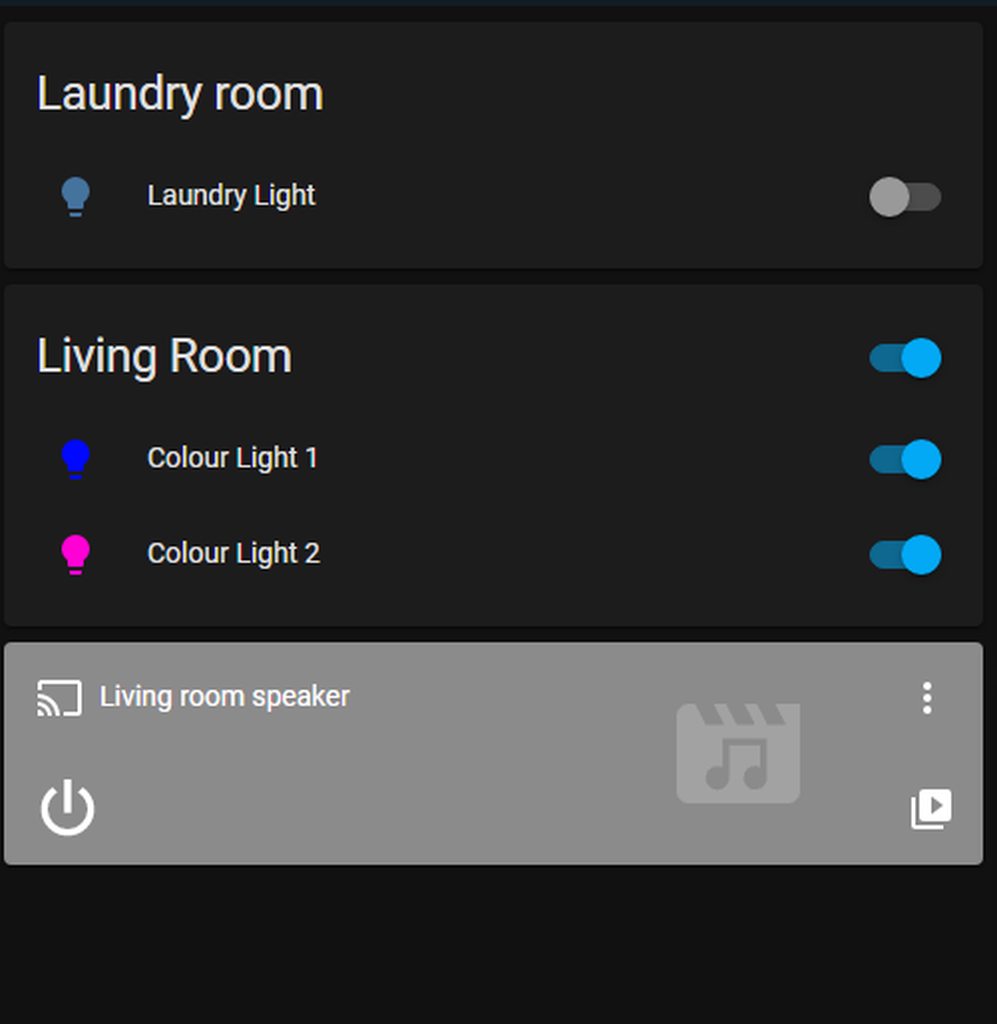 dark dirge
your best bet is probably the "auto-entities" custom card
From the "Filters" section:
area: Match entities in given area (e.g. Kitchen)
dark dirge
no, I installed it via HACS
it even says that:
I recommend using HACS to install and keep track of plugins.
arctic sphinx
What is hacs exactly? Sorry still new
kind shellBOT
Home Assistant Community Store is the successor to the old Custom Updater, and can do so much more - you should check it out. They even have a Discord server for issues with HACS itself.
Command '~hacs' was invoked by: RobC
arctic sphinx
Wait whats the addin store than?
dark dirge
if you meant "manual install" vs. a built-in card, then yes, you have to install it
somethign completely different
and unrelated
arctic sphinx
OKay time to install HACs
 worn peak
i cant install list card - any suggestions?
 dark dirge
downloaded fine for me. I suggest you see the log for details

 dark dirge
please no more screenshots of text
worn peak
yeah, sorry
worn peak
in router settings?
dark dirge
or in HA
worn peak
Where is that? 😄
sage helm
polar kelp
<https://github.com/thomasloven/lovelace-slider-entity-row>
This is great! Thanks so much
errant cosmos
If I have a diagram of a thingy I made which has lights and switches on it that I both observe the status of and control the operation of, is there a type of Card or a modification I can do to a particular kind of Card that lets me superimpose indicators and controls of my lights and switches - including their status and a means of controlling them - on top of an image of my thingy?
I've gotten familiar with Vertical and Horizontal Stack Cards and they work out pretty well, now I'm wanting to make it more friendly. What's this kind of drawing/configuration called?
opaque kiln
errant cosmos
If I have a diagram of a thingy I made which has lights and switches on it that ...
https://www.home-assistant.io/dashboards/picture-elements/ does this meet your needs?
Home Assistant
The Picture Elements card is one of the most versatile types of cards. The cards allow you to position icons or text and even services! On an image based on coordinates.
 real anchor
 errant cosmos
@opaque kiln that's exactly what I was looking for, thanks for the suggestion.
 harsh anvil
hey, where inside a react app should i place the websocket
this is where it is atm

i just want it to check or service change like if a light gets turned on or a lock gets unlocked
frosty flower
Is it possible to change the order of entities on an entity card based on state or value
outer vine
Hi, I am struggling with markdown card and possibly posted this in the wrong category (apologies for that).
I have an automation that sets an input_text.timeofday to morning, afternoon, evening and night, and I am trying to get a greeting card up and running. According to the documentation, I should do something like this, but I only get a blank output.
type: markdown
entity_id:
  - input_text.timeofday
content: |
  # Good {{input_text.timeofday}} {{user}}!
I get this error: Key 'entity_id' is not expected or not supported by the visual editor. but it's fine, I'm editing the card using markdown editor.
From the manual, it SHOULD be there:
entity_id string | list (optional, default: none)
A list of entity IDs so a template in content: only reacts to the state changes of these entities. This can be used if the automatic analysis fails to find all relevant entities.
What am I doing wrong?
outer vine
Answering myself here:
type: markdown
content: |
  # Good {{states.input_text.timeofday.state}} {{user}}!
The trick was to call states before the helper. Thanks for nuffn, everyone 🙂
 craggy yoke
Hello, I want to use the Picture Elements Card as a floorplan in Docker, but I cant find the correct path for the pictures. The Card doesnt load the picture. The picture is stored on my pi in /home/Konsti/docker/hass/config/www/flurplan (storage on the container is shown at the photo) and I dont know what i am doing wrong.
 fiery ledge
outer vine
Answering myself here:
```yaml
type: markdown
content: |
# Good {{states.inpu...
fiery ledge
outer vine
Answering myself here:
```yaml
type: markdown
content: |
# Good {{states.inpu...
The trick was to call a correct Jinja template… btw you better use states('input_text.timeofday'), see the docs Notes on startup issues with templates
outer vine
fiery ledge
The trick was to call a correct Jinja template… btw you better use `states('inpu...
Jinja templates aren't mentioned anywhere in the docs?
 fiery ledge
finally, I found the way to change and animate my tab/view icons in the menu bar, thanks to card-mod-theming: https://community.home-assistant.io/t/card-mod-super-charge-your-themes/212176/1082
polar kelp
That error is because the selector chain is split at whitespaces. So it searches for all paper-tab[aria-label='Settings it can find, and then all motion'] in those.
I've known of this problem for a while, but I really really don't want to write a parser, and hoped noone would run into it in practice.
fiery ledge
Hehe. So adding the &nsbp doesn’t fix that either?
Still it’s not that uncommon to have white space in a view title. Maybe there’s another ‘trick’?
Also: it does work in the .: | section, why is that different ?
polar kelp
Anything after 😐 is what’s sent to your browser and parsed by it. And the browser does css much better than I.
On phone. Won’t correct the smiley. You know what it says
kind shellBOT
@blazing heart posted a code wall, it is moved here --> https://hastebin.com/yedepinuga
 blazing heart
Retrying without the code snippets...
Does card-mod support media queries on cards? I have an entities card that I'm trying to vertically center the content on but I only want to do that if the screen is larger than 1200px.
Examples here: https://hastebin.com/yedepinuga
 novel knot
Anyone can tell me after i installed https://github.com/nervetattoo/banner-card via HACS i can not create such a custom card?

GitHub
A fluffy banner card for Home Assistant 🥰. Contribute to nervetattoo/banner-card development by creating an account on GitHub.
dark dirge
Why can't you?
novel knot
it simply tell me that "type: custom:banner-card" is unknown
dark dirge
Did you add the resource?
polar kelp
Start by pressing F5 a few times, and then tell us the exact error message
…actually banner-card writrs the documentation the right way. It’s probably not the problem I thought…
 uncut reef
Is there any way to make a custom climate entity?
dark dirge
uncut reef
I have a few instances (my pool for example) where the entities are temperature readings as sensors only, and I'd love to display it as a thermostat like a normal thermostat. i don't need HA to do the thermostat functioning (I can do that on my own if i wanted) i just would like to visually display the temp like a normal circle
THANKS ROBC!
 vapid field
i have a question, i want to use statistics the statistics card to see how much kwh i use a day from the last 14 days or so, but somehow it keeps counting up so lets say im using 1kwh every day, in statistics it keeps adding the amount. im using sum so probally thats the issue. but if i dissable it or chose mean i see nothing. im using a helper"utility meter" for my data
 opaque kiln
Yes, you could use a template. What kind of card is that?
 dusk schooner
opaque kiln
Yes, you could use a template. What kind of card is that?
dusk schooner
opaque kiln
Yes, you could use a template. What kind of card is that?
its a normal entity
 opaque kiln
Yup that's the sensor. But what is the card you are using to display the data from the sensor on the dashboard?
 opaque kiln
Hmm this is the vanilla entities card from HA dashboards?
dusk schooner
opaque kiln
Hmm this is the vanilla entities card from HA dashboards?
yes

 kind shellBOT
Please use a code share site to share code or logs, for example:
- https://dpaste.org/ (select YAML for the language)
- https://www.codepile.net/ (select YAML as the language)
- https://paste.debian.net/ (you guessed it, select YAML as the language)
Please don't use Pastebin, since it can randomly add spaces to the main view. Please also don't share text as images since it makes it harder for people to help you. Remember that others may have colour blindness, impaired vision, etc.
Command '.share' was invoked by: DanielLeong
opaque kiln
Please share your code using the above, makes it easier to read.
opaque kiln
Could you share more of the yaml from your entities card? The yaml seems a bit strange.
Is there more than beyond those 4 lines?
dusk schooner
opaque kiln
Ah apologies. I thought you were using the Entities card, not the Entity card. The format option is available for the former.
dusk schooner
i see
opaque kiln
If you want to use the Entity card specifically, you may need to modify the value at the sensor level. How are you getting the sensor data into HA?
dusk schooner
through an intergration
opaque kiln
Ok. I'm not sure if this is the most efficient way to do it, but you could make a template sensor that takes the last 5 characters of the state of sensor.dhuhr_prayer.
Then reference to the template sensor instead of sensor.dhuhr_prayer in your entity card.
dusk schooner
how do i make templates?
split granite
opaque kiln
If you're willing to go down this route, in your config.yaml, add:
template:
  - sensor:
    - unique_id: sensor.dhuhr_prayer_time
      name: "Dhuhr Prayer Time"
      state: "{{ states('sensor.dhuhr_prayer')[-5:] }}"
Then in your Configuration > Settings > Server Controls, check config and reload template entities.
dusk schooner
i just restarted my ha
opaque kiln
The above assumes you don't already have template: in your config.yaml. Do you have that?
opaque kiln
Did HA come back?
Haha it may not be the most efficient, but if you must use the entity card then you have to do the data manipulation at the sensor level rather than at the card level.
 opaque kiln
Do you see the sensor under your Entities list?
dusk schooner
yeah
opaque kiln
Any errors?
split granite
You should have run
ha core check
``` before restartingYou can also test templates in  -> Templates
opaque kiln
Alternatively, you could do the entities card which can format datetime sensors.
 brittle peak
Hi guys. I've been using this https://community.home-assistant.io/t/solved-how-can-i-get-my-dashboard-to-refresh-automatically-instead-of-showing-the-refresh-prompt/357842/2 for the past few months, and since the update to HA 2022.4.x it's not working any more. Has anyone been able to find a workaround yet? Thanks!

Home Assistant Community
It took me ages to figure this out, but I finally figured out how to load some custom JS. Docs: Frontend => Loading extra JavaScript You only need to use extra_module_url for any modern browser, can probably ignore extra_js_url_es5. Added to configuration.yaml: frontend: themes: !include_dir_merge_named themes extra_module_url: - /lo...
inner stump
Hi, I modified **button_card **where I have 3 variables, X is sensor.id **Y **is bolean for show units, and last **Z **is custom units. I something do in JS but looks ugly, is there way to do better ? This is code: https://pastebin.com/H9C6v5W5 and full as I have https://pastebin.com/WLSAaQ1Q
Pastebin
Pastebin.com is the number one paste tool since 2002. Pastebin is a website where you can store text online for a set period of time.
Pastebin
Pastebin.com is the number one paste tool since 2002. Pastebin is a website where you can store text online for a set period of time.
 barren venture
Does anyone know if with Mini card graph it's possible to have a binary entity not go to the very top of the graph?
 magic mountain
I want a mobile only dashboard, my original is a bit cluttered. Any tips where I can get inspiration how to design it?
 livid prairie
Hello
I have prayer time set using islamic prayer integration I added them to entities but it is showing the time duration in which the prayer time will arrive but the actual time unless I click on it

When I click on one then I can see its time

 worn solstice
Anyone knows installed the UniFi dashboard add-on to the Dwains Dashboard?
opaque kiln
livid prairie
Hello
I have prayer time set using islamic prayer integration I added them to ...
If your sensor returns a datetime, try changing the format attribute: https://www.home-assistant.io/dashboards/entities/#format
Home Assistant
The Entities card is the most common type of card. It groups items together into lists.
 rustic bobcat
Does anyone know of a way to create container cards that are theme-able? I've been trying to theme vertical-stack to suit this purpose with card-mod via a theme.yaml file. I'm getting close, but cant seem to implement a new background colour on hui-vertical-stack-card without interfering with all ha-card elements.
Edit: I think trying to keep things in theme.yaml is the thing that's tripping me up. I can achieve something close when editing the page directly. Seems a bit cumbersome doing it for every vertical stack card.
fiery ledge
You could probably do that with card-mod-theme, check the dedicated thread in the community
livid prairie
opaque kiln
If your sensor returns a datetime, try changing the `format` attribute: https://...
Thanks that fixed it, I was looking for the right option. Cheers
errant kraken
Can anyone share with me how they're using Fully kiosk browser, or another app to store HA login credentials please?
All the videos I see for FKB just store username and password as HTTP auth and sign in, but that doesn't work for me, I've tested multiple android devices and even tried a fresh Home Assistant server without success.
livid prairie
errant kraken
Can anyone share with me how they're using Fully kiosk browser, or another app t...
I use wall panel instead of fully kiosk browser
wall panel is free with all functions
fully kiosk browser is paid
https://github.com/thecowan/wallpanel-android
The developement for this have stopped though but it works fine

GitHub
WallPanel is an Android application for Web Based Dashboards and Home Automation Platforms - GitHub - thecowan/wallpanel-android: WallPanel is an Android application for Web Based Dashboards and Ho...
livid prairie
errant kraken
Can anyone share with me how they're using Fully kiosk browser, or another app t...
you need to enter the url of your home assistant first
errant kraken
livid prairie
you need to enter the url of your home assistant first
Ah I'd seen posts about wallpannel, but all referencing dead links, I'll check this out thanks!
I've already got fkb paid from a previous project, and I set my-homeassistant-url.com as the homepage, I expected it to auto fill when I refreshed the page from there, unless I'm doing something else wrong
livid prairie
errant kraken
Ah I'd seen posts about wallpannel, but all referencing dead links, I'll check t...
Normally hass has this function where you login once and it ask if you want to always start logged in. Then if you press yes it will stay logged in forever
errant kraken
livid prairie
Normally hass has this function where you login once and it ask if you want to a...
That's true, but I had the experience of everything slowing down after a while, so I set the cache to clear for the screensaver, a different webpage, which seemed to help, but also forces ha to sign out.
Then the waf is lower because of manually signing in after
livid prairie
Which tab are you using? I feel same when I load all the dashboard pages
I redisgned the dashboard for tab which is wallmount panel as it only have 2gb ram which i doubt would be 1gb as its a Chinese unbranded device
 dense haven
Hello, How can I change the size of icons on lovelace dashboard?
dense haven
fiery ledge
be more specific, and we can probably help you out
Im sorry. wasnt sure on the exact naming
I mean the icons for example when using a lamp, plug, .. card in the lovelace dashboard
The way they are now is just off to have them fit nicely next to each other
fiery ledge
yeah, but depending on the card you use, we need to adapt the way to change the icon size.
entities card or entity card have their own 'mod' so to speak
dense haven
For my lights I use lamp card, the stock one I believe ?
where you have a drag bar around them
fiery ledge
did you check the 2nd link to the card-mod post in the pinned posts in this channel?
dense haven
material design icons?
fiery ledge
no, this
 dense haven
oh no I havent. It said card mod so I thought it was something else/more advanced
I'll take a look at it
fiery ledge
yes, it is more advanced. You need to install card-mod for that. Out of the box, Lovelace wont allow you to change the icons, so need to set CSS on the elements via card-mod
tbh, I dont use the light card, and I dont believe there are examples for it in that post. Your best bet would be to open Inspector Elements (right click Inspect in the view) and see which element needs customizing in that card
though, when you use that card, there's not much use for increasing the size (it has to remain within the slider). Do want to reduce the size maybe?
still, using ``` - type: light
entity: light.lounge_chair_long
card_mod:
style: |
ha-state-icon {
width: 10px;
}
 dense haven
fiery ledge
still, using ``` - type: light
entity: light.lounge_chair_long
ca...
dense haven
fiery ledge
still, using ``` - type: light
entity: light.lounge_chair_long
ca...
Hey sorry for the late response 🙂 had an issue at home
I just took a look at it but I was again wrong in my explanation, not native english sorry 😄
Im mean the size of the card as a whole
so instead of just the icon of the chair, also the bar around and the card itself really
I found a part in the link that goes over font size
I think I need to look at that
dark dirge
fiery ledge
That looks like a lounge chair for a mouse 🙂
polar kelp
/r/thingsForAnts
vapid field
Hello! I've been looking for away to increase the font size of the Calendar Card list view. I found a solution (https://community.home-assistant.io/t/modify-font-size-for-calendar-card-event-time-and-title/272929) for the day view. I can't find any CSS variable similar to the fc-small-font-size to change the list view. Do you have any suggestions?
EDIT:
I mean to use a theme to change the font size if possible.
Home Assistant Community
Hello. I’m trying to increase the size of the event time and title for the calendar card so it’s larger for a wall mounted tablet. The CSS appears to be fc-event-time and fc-event-title. If I change these within Chrome Dev Tools, the font increases. Now I’m trying to override the CSS in my theme so it will apply automatically to the calendar car...
fiery ledge
dark dirge
That looks like a lounge chair for a mouse 🙂
hehe, only when the house is set to the correct mode.....

 winter blade
Did anyone else experience this before? When selecting an entity (in any card) my mouse doesn't actualy select the things I'm hovering over.
When clicking it just clicks behind the selection menu, and so closes it


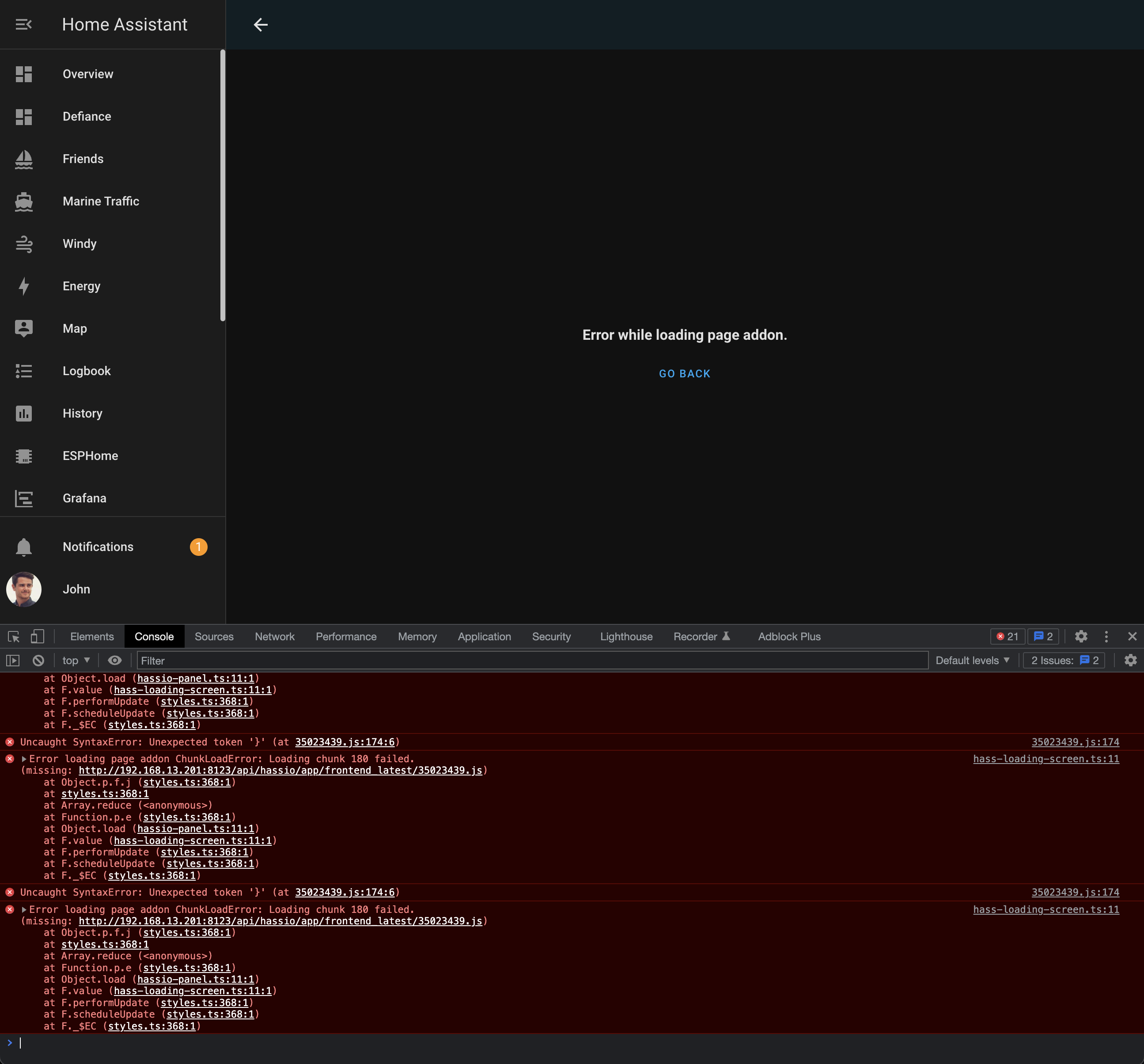


Currently using chrome, seems to be working fine in firefox. HA is the only place that I've noticed this. Other websites with menu's like this (like node-red) are working fine
fiery ledge
dense haven
so instead of just the icon of the chair, also the bar around and the card itsel...
the obvious way to do so would be to add several light cards in a horizontal-stack, or a grid with several columns
searched in #energy-archived and community: can we not rename the energy panel (left side menu) config/energy ? Maybe it it tied to other pages so needs to be fixed?
 fallow quiver
Hi, im running into an issue with the display of a sensor attribute. In the template editor they are identical but in the UI they appear differently. Here is the difference from templates vs states section of the dev tools; https://www.toptal.com/developers/hastebin/wikojokedo.rb
Hastebin is a free web-based pastebin service for storing and sharing text and code snippets with anyone. Get started now.
When I add both sensors as a lovelace "entity" they also appear differently in that the 2nd one appears in lovelace with the leading " [' " while the 1st sensor just shows the text.
Any pointers as to why there would be such a difference?
 lone umbra
captain obvious here but i cannot find it in the docs. How do i run more then 1 script with a button card?
Hastebin is a free web-based pastebin service for storing and sharing text and code snippets with anyone. Get started now.
dark dirge
You call a script that does whatever you want, which may include calling other scripts
lone umbra
a script to call 2 scripts?
dark dirge
Yes
lone umbra
thats..... silly
dark dirge
Ok
lone umbra
i cant choose something like enity_id and pick 2 scripts?
dark dirge
Actually, maybe yes. script.turn_on
lone umbra
thats what i thought, but is turn on the same as run....
or is it just enabling it...
dark dirge
They'll be run concurrently. It's in the docs
dark dirge
There's no enabling of scripts
dark dirge
I'll have to remember that
lone umbra
maybe devs should rename it to runinstead of turn_on
so whats turn_off script then. Kill and terminate?
dark dirge
'Stop'
lone umbra
...and stop running actions
errant cosmos
I've got a bunch of entities that I want to build out but I don't have them yet. I want to mock some of them ahead of time just to build some of my Dashboard out. Is there a placeholder, or a fake entity that I can use to mock the behavior or action or association with/of another entity just for the sake of mocking this up?
errant cosmos
While poking around I found this guy but wondering if there's something more appropriate https://github.com/thomasloven/lovelace-state-switch
GitHub
🔹Dynamically replace lovelace cards depending on occasion - GitHub - thomasloven/lovelace-state-switch: 🔹Dynamically replace lovelace cards depending on occasion
I like the plugin ecosystem of course but for lots of reasons I'd like to first exhaust the built-in options.
 worthy tapir
Anyone know of a button (maybe in hacs) to make locking my front door lock behave the way the alarm card works, where it starts blinking when you press it until it finishes arming
I ask because theres a delay when pressing the lock button before it updates as locked, and it can cause a user to keep pressing it not realizing its waiting
opaque kiln
errant cosmos
I've got a bunch of entities that I want to build out but I don't have them yet....
What kind of entities do you want to build placeholders for? You can make template sensors, binary sensors, lights, fans, thermostats etc that just reference helpers and no physical devices. Or you can try the demo platform: https://www.home-assistant.io/integrations/demo/
opaque kiln
errant cosmos
While poking around I found this guy but wondering if there's something more app...
More appropriate than the custom:state-switch card for handling multiple possible states? You could use n x vanilla conditional cards for n states, but it gets tedious quickly.
errant cosmos
Ah ha. Sorry for the open ended questions, think I'm just trying to get the feel of things here.
opaque kiln
No worries, getting inputs early before you build out is a good policy.
dense haven
Hello,
My lovelace dashboard is starting to look pretty good 👍 if I may say so myself. Thanks for pointing me to the right documentation @Mariust
Now I have a question about using my dashboard to activate an automation. Not sure if possible but I have a few automations that start playing a set radio station on my speakers. I use a zigbee switch to start and stop those but would like to use my dashboard for this. Preferably a picture button that activates the required automation. Is this possible? I added a normal button card set as switch which activates the automation but that doesn't seem to work. Is there a good to do this? As I said preferably a button that I can use an image url with so I can add a picture of the radio stations
opaque kiln
Sounds eminently doable with a button card that calls the automation.trigger service targeting the automation of your choosing.
If you really need to use a picture...then custom:button-card could do that for you.
dense haven
Thanks for the feedback, ill give it a try. I was looking into calling service but must have looked over automation.trigger service
Custom button card is something that must be added I suppose? Through HACS?
 main locust
@loud glen What addon did you use to get the iPhone dimensions in your latest front end video?
novel knot
Is there a way to set a fix hight to a card?
My atomic-calendar card is a bit to long for my feelings and i would love to have a fixed hight (if possible scrollable?)
main locust
I'm trying to follow @loud glen 's guide here for their minimalist UI, but I am getting an error "button card template "card_esh_welcome" is missing. I've followed the guide exactly to this point so I'm not sure what I am missing?
 novel knot
main locust
I'm trying to follow <@719114903381606440> 's guide here for their minimalist UI...
novel knot
main locust
I'm trying to follow <@719114903381606440> 's guide here for their minimalist UI...
can you link the part of the video i ve created it my self without any error
main locust
novel knot
can you link the part of the video i ve created it my self without any error

The long awaited Minimalist Guide is finally here! In this video, I talk you through how to recreate my own Home Assistant Dashboard with Minimalist as the project to build the best smart home mobile dashboard there is in 2022!
Thank you to Anker for sponsoring this video, check out the Anker Portable Power Station here: https://ankerfast.club/...
I made the custom_card_esh_welcome folder and file, I added the YAML and copied from the repository
Then I copied the template code like he says and refreshed and got that error above

@novel knot Looks like a restart of HA fixed it
Annoying
novel knot
haha no worries 😄 i still try find a way to make my calender fit on screen -.-
main locust
And now another error when adding a person card
I give up
It shouldn't be this hard to make a dashboard for a piece of software
opaque kiln
dense haven
Custom button card is something that must be added I suppose? Through HACS?
Yup HACS.
 loud glen
main locust
It shouldn't be this hard to make a dashboard for a piece of software
loud glen
main locust
It shouldn't be this hard to make a dashboard for a piece of software
Good you figured it out - btw you can just restart minimalist from the restart menu rather than doing a full restart (I mentioned this in the video)
Also, it's not this hard - your making a choice to go down the hard route (which is totally fine) but it's not a requirement
As in, there are many other dashboards available (including stock) which you can use instead
main locust
loud glen
Good you figured it out - btw you can just restart minimalist from the restart m...
I’ve been able to hobble through so far. I hope HA keeps up with these UI changes and we have some simpler options in the future
Speaking of, I noticed that the room card has enough space on it to possibly list 2 items (temperature and humidity for example)
 autumn olive
hi all, I've been looking around for quite some time now but I can't seem to find a solution toe the challenge that I'm facing.
I am creating a new dashboard and normally I only use the "Dark" theme so any custom icons I use are based on that. (by code)
Now I want to make it a little more user friendly but because I'm using custom images one of the images is not visible when I use the "Light" theme. (The image is white on a transparent background)
I would like to know how I can use the "conditional" card so I can check the current theme and change the Image according to that. (so on dark theme use white image, on light theme use black image)
Is there anyone who has/had this issue and does anyone know a solution for this?
Any ideas would be very much appreciated.
fiery ledge
i do exactly that with my maps and use the config-template-card for that, to only template the relevant section```
- type: custom:config-template-card
entities:
- input_select.theme
variables:
theme: states['input_select.theme'].state
card:
type: custom:hui-element
card_type: map
dark_mode: ${(/ight|Dark|Matrix/).test(theme)}
entities:
- sensor.here_origin
- sensor.here_destination
if you dont need to template the config option, you can also use state-switch to do it:```
entities:
- type: custom:state-switch
entity: template
template: >
{{states('input_select.theme')|regex_search('(ight|Dark|Matrix)')}}
states:
 real lark
Can I combine (sum) two power sensors with helpers? (I know I can use templates)
autumn olive
fiery ledge
i do exactly that with my maps and use the config-template-card for that, to onl...
Thanks @fiery ledge ! I will look in to this.
novel knot
Is there a way to set a fix hight to a card?
My atomic-calendar card is a bit to long for my feelings and i would love to have a fixed hight (if possible scrollable?)
frosty flower
how can i change/convert the unit of an entity on a gauge card (for example, vacuum shows filter left in seconds rather than hours)
barren venture
Hey there - is it possible to have a state filter in a horizontal stack?
barren venture
frosty flower
how can i change/convert the unit of an entity on a gauge card (for example, vac...
there may be an easier way but you can create a template entity that's just the entity/3600 and use that for the gauge
@dark dirge so ideally a horizontal stack of mini-graph-cards but I'd like to only show graphs that have a value great than 0
dark dirge
a state-switch card could do that
 thorny obsidian
for some reason dropdowns are no longer clickable for me.
I can only use arrow keys
touch events also doesn't work
i think it's a z-index issue but I can't get it to stay open by forcing :active, and :focus state on the input field, and I can't seem to find the the dropdown contents' component in the DOM

it's definitely not my theme either, I think it is a lovelace card installed through hacs because it only happens on lovelace dashboards. It does not happen at http://homeassistant.local:8123/developer-tools/service for example
main locust
Does anyone know how to break out of a horizontal-stack via YAML?
dark dirge
what do you mean? you define the cards that go in the horizontal stack
the next peer to the horizontal-stack will be "out" of it
main locust
dark dirge
what do you mean? you define the cards that go in the horizontal stack
It doesn't seem to be working like that. I want the top 2 cards horizontally stacked, but the devices cards I want vertically stacked
 dark dirge
then you you should put them in a vertical-stack
dark dirge
you can use a vertical-stack
main locust
- type: vertical-stack
cards:
dark dirge
if you want to go crazy, there's the grid card and layout card and others
polar kelp
I replaced all my stacks with grid cards.
main locust
This is for a mobile view but I would proabbly use a grid when I gop to customize my wall panel
dark dirge
I use three stacks that end up side-by-side on desktop and sequential vertically on mobile, but there are probably other ways to do it
my YAML is far too complicated to play with it when I already like the result
frosty flower
can i have a dififerent layout for mobile vs desktop. the layout turns super wonky on my phone cause how how cards stack
but in the same dashboard, obv
dark dirge
I use state_switch based on the user for that
autumn olive
I use a different dashboard for my (portrait) mobile devices.
that way I can influence exactly what I want to have on them.
frosty flower
oh, i guess you can pick a different default dashboard for your mobile device
and is it possible to straight up hide the default dashboard from non admin users
 lethal phoenix
Hello, I was wondering why the default Weather Forecast card does not show today's forecast? It displays the current temperature, and then the highs and lows for the next 5 days, but it does not show today's information. It's fine that it's 41 degrees when I wake up and look at it, but doesn't tell me what to expect as my day progresses. I do not see an option in the card to show this information. It seems odd that it's not there. Any help here?
 royal spear
Hi, where should report a minor bue. The background on the new addons page is not themed. Is fixed as #11111 ... it should be primary-background-color
kind shellBOT
Want to see what issues are open (or were open and are now closed)?
- The core (backend) - for HA itself, and integrations
- The frontend (UI) - for cards and display issues
- The Supervisor
- HassOS
- The documentation
Don't forget to check for any alerts
If you think an upgrade broke something then:
- Downgrade to the previous version to check if it works correctly there
- If it does then change the
loggersettings for that integration todebug - Upgrade to the new version again
- Look in the logs for errors
- Open an issue, following the template provided and including the log information
Command '~issues' was invoked by: RobC
frosty flower
jk it was an error with edit mode only
 fading root
frosty flower
and is it possible to straight up hide the default dashboard from non admin user...
fading root
frosty flower
and is it possible to straight up hide the default dashboard from non admin user...
This doesn't seem to be possible. What I did is "take control" of the default dashboard and just put a welcome message on it, then create a new auto-generated dashboard and mark that one admin only.
 queen iron
So, I seem to be having an issue with icons on old Android (5.1 I think?) web views for my dashboards - the mdi icons (like light bulbs, lamps, etc) don't show up. I have several wall boards that cannot seem to be updated to newer browser/web view versions. Is there any sort of workaround for this, other than not using icons? (The wall boards just use Fully Kiosk to bring up a browser that goes to the default dashboard)
queen iron
Also is there a way to display a clock (digital, analog, both?) for a card on a dashboard?
frosty flower
trying to get the cards to line up on the dashboard the way i want them to is mindnumbingly frustrating. there was got to be a better way than just pressing up and down and praying the cards go to the right spot...
 raw stream
Hi. I have just converted a template sensor showing time to some event in hours to the new 2022.5 device_class: duration. The unit_of_measurement is set to h. The entity card is now (I guess correctly) interpreting the 0.6 hours as 36 minutes and shows 36:00. How do I change this to show the duration in in the units of fractional hours again (to 1 decimal place). Thanks!
signal hornet

Im trying to add a picture element for a room as a state image, for some reason, the image is showing up cropped (in the bottom left of the preview, image file on the right). I have tried messing a bunch with width, height, and aspect ratio but nothing seems to just show the whole image.
polar kelp
You need to add a top and left to it. Now it's centered on 0,0 which is the bottom left corner.
 frozen olive
Hey - has anyone managed to figure out how to rotate the image within a picture-entity using card-mod?
edit; nevermind, just figured it out
card_mod:
  style: |
    :host hui-image {
      transform: rotate(180deg);
    }
 small root
Hi all,
Is the Mushroom Cards release 1.7.3 pulled? HACS seems to only support 1.6.2 now. I installed 1.7.3 a couple of days ago through HACS and want to install it again on a friend's instance, but now it seems that only 1.6.2 is available. I cannot find info about this. Maybe I am overlooking something. Any idea?
livid prairie
Hello.
I have had this setup since long where I have climate card with mqtt commands.
Now I have a temp sensor in the room so I need to display current temperature in the center of the climate card.
I am reading climate documentation and some videos where they used target_sensor: {sensors_id} but documentation does not have this anywhere
I cannot find configuration check button in 2022.05
small root
livid prairie
I cannot find configuration check button in 2022.05
It's in Developer Tools->YAML
livid prairie
Ah thanks
ok target_sensor is invalid for climate
Ok so I have Climate with platform as mqtt so I cannot use target_sensor
So now is there any way to display current temperature from existing sensor ?
ok found current_temperature but sadly that is also invalid for climate.mqtt
  "curr_temp_t":"homeassistant/climate/livingroom/state",
  "curr_temp_tpl":"",
Found this in documentation
Now sure how I can assign a sensors there
Ok Now I understand that Current temp is more of what is set for the ac
ok so current_temperature_topic it is and I am trying to fetch the state of the sensor
no luck
current_temperature_template: '{{ state_attr("sensors.mbr_temp_tempurature", "temperature") }}'
small root
I see a typo in there
sensors.mbr_temp_tempurature. Shouldnt that be sensors.mbr_temp_temperature ?
livid prairie
checking the state
small root
"tempUrature"
livid prairie
Yes I was checking in the entity name if its a typo there on in the config i set
current_temperature_template: '{{ state_attr("sensors.mbr_temp_temperature", "temperature") }}'
I love yaml part reloader
small root
That should work
livid prairie
no luck 😦
small root
Can you dump a screenshot of the state outcome in the developer tools for this sensor?
livid prairie
It should appear here right ?
 small root
Owwww, not sure. I thought you didn't get the value at all
livid prairie
