#frontend-archived
1 messages · Page 211 of 1
 random mantle
"Because of that custom-ui doesn't work with Entity card" oops and i am using that card
testing it anyway
oops checking which file i need to edit , i just need to read your instructions decently 🙂
random mantle
ah those examples have to be placed in the configuration.yaml file?
 fluid cypress
is there any way to toggle an area on or off with a single button
 tacit cave
make a script and call the script from the button
 fiery ledge
random mantle
ah those examples have to be placed in the configuration.yaml file?
fiery ledge
random mantle
ah those examples have to be placed in the configuration.yaml file?
not all Lovelace cards use the same backend.... Entity card is something special in that regard, entities card works just fine. And all those customizations go where they always go, under:```
homeassistant:
customize:
@fiery ledge Thank you !
fluid cypress
tacit cave
make a script and call the script from the button
thank you! is there any way to make them show their state? (i mean like when toggling all of them at once) they don’t have state sensors but when toggling them alone they still show their state( they’re hue bulbs)
 errant birch
could anyone help me with some css styling please ? I've been at it all night and cant find a way to achieve my goal...
I'm trying to use an iframe card but without the scrollbar
for the life of me, I cant find the right selector or way to do it
 gleaming flame
did the customization of entities go away with the new settings page ?
nevermind, it did, only wants to be done with the yaml, got it
 dry cargo
errant birch
I'm trying to use an iframe card but without the scrollbar
dry cargo
errant birch
I'm trying to use an iframe card but without the scrollbar
Usually it’s: overflow: hidden;
dry cargo
dry cargo
Usually it’s: overflow: hidden;
But it’s also very important to select the right box that is overflowing. So go into your browsers inspector/debugger and check which box is overflowing
 vivid trout
yes and no, for the ring yes, camera no the camera pushes the pip through a app on the fire called notifications (but as far as I am aware the only the fire cube supports pip, but any android device that has pip will work) the Ring was the worst to setup though as for some strange reason despite being owned by amazon, you can live view on a amazon tablet the ring, without either using the ring-mqtt and boolean (which causes a week lasting battery) or through tasker. My way of doing it was a Virtual smart things switch (which is a both a switch and sensor) which I set to pressed with doorbell ding, then on the tablet via alexa rountine say alexa view doorbell on tablet only)... also have automation trigger a 2 minute timer that tells fully to reloads the start url after 2 mins... lol probably a bit long winded but it works.
errant birch
dry cargo
Usually it’s: overflow: hidden;
Indeed it should work, but since I'm using an iFrame, I cant seem to find the right css selector 🙁
 polar kelp
You can't remove an iframe scrollbar with CSS. It's an element attribute <iframe scrolling="no"
Good opportunity to learn how to make a one-off custom card.
This should get you started: https://gist.github.com/thomasloven/1de8c62d691e754f95b023105fe4b74b
 warped yew
Can anyone help me figure out why my guages look like this using the ios app (both iphone and ipad) https://imgur.com/a/rGkNedp
polar kelp
It's a known problem. A fix is in the works.
 rain tiger
hello all. I just installed HA on a raspberry pi 4 yesterday. I have my wifi lights imported and they all work, however, This is what is happening with a few. The icons for the china cabinet and living room don't display the same as others when turned on. The lights are all the same type and brand. Any ideas? If this isn't the right place for this question, please tell me which group to use.
well, guess I can't put the picture in...
basically, the blue lightbulb disappears when the light gets turned on
polar kelp
I guess this is an RGB light which is currently set to white?
The icon follows the color of the bulbs. If you click the name of the light you can probably switch it over to color temperature mode.
rain tiger
yes, it is an RGB that is set to white right now
thanks, I'll try that out
that did it, thanks!
 severe pendant
Hi folks!
I'm trying to create some kind of graph that shows correlation between outside temperature and power usage. I have hourly power usage that is collected at the minute interval
I also have my climate setup available.
I use graph mini card, but it's not particularly useful because i can't scale the entity
"Scale the entity" as in, I can't apply scale to entities individually.
I would have to create dedicated sensors or something like that, which I prefer not to do.
polar kelp
Put two graphs in a vertical stack. Should be easy enough to read, and you won't have to worry about the different units.
 tepid hedge
Just tried YAML mode but want to change back to using UI. I have the original RAW but where do I put it in?
 hallow mango
severe pendant
"Scale the entity" as in, I can't apply scale to entities individually.
hallow mango
severe pendant
"Scale the entity" as in, I can't apply scale to entities individually.
you can use two different scales on one mini-graph-card, by setting secondary_y_axis: true for one of the entities, and specifying the min/max for that axis
see the docs, IDR exactly off the top of my head
severe pendant
Oh wonderful, thank you!
hallow mango
👍👍
I use it for the detection fps vs inference times from my frigate instance, which often vary wildly from each other
random mantle
are you also using a coral ?
hallow mango
yep, the USB one
random mantle
for some reason , the door contact state color won't change on my entity card , using custom_ui
 rough bone
I am currently setting up HomeAssistant for the first time in combination with Frigate. Both also runs separately only I fail when setting Frigate Lovelace Card... My problem is the cameras are running somewhere else and are included in frigate via rtsp and are therefore not recognized by HomeAssistant as Camera_Entity.
hallow mango
random mantle
for some reason , the door contact state color won't change on my entity card , ...
that should probably just change by default... are they binary_sensors?
hallow mango
rough bone
I am currently setting up HomeAssistant for the first time in combination with F...
check the docs for the frigate card for proper setup
or take it to #cameras-archived, most frigate questions get answered quickly there
rough bone
oh sry I write it there ^^
random mantle
hallow mango
that should probably just change by default... are they `binary_sensor`s?
Hello @hallow mango yes, binary_sensors
random mantle
it doesn't seem to work at all strangely , i am doing something wrong
the example code should be placed in the configuration.yaml ?
hallow mango
hmm, not sure what you're working with exactly... I don't use custom_ui, but binary_sensors should usually change their icon color when they're on
random mantle
yes that indeed works here ! default blue and when i open the door it's yellow
i just want to change yellow to green 🙂
hallow mango
aha, so you're trying to do different colors
random mantle
yes
hallow mango
just for that one sensor or all?
random mantle
just for that sensor
hallow mango
have you checked out the examples on the wiki?
hallow mango
think you'd use something like:
icon_color: >
  if (state == 'on') return 'green';
  return 'yellow';
exactly
hallow mango
can you share your card yaml?
errant birch
polar kelp
This should get you started: <https://gist.github.com/thomasloven/1de8c62d691e75...
thanks for the info ! but I'm afraid that's out of my league 😵💫 Will try alternate solutions 👍
hallow mango
random mantle
https://pastebin.com/BhRPyyXm
seems silly, but do you have custom_ui installed?
might be easier to use something like card_mod in the end
something like:
        style: |
          :host {
            --paper-item-icon-color:
              {% if states('binary_sensor.whatever') == 'on' %}
                'green'
              {% else %}
                'red'
              {% endif %};
          }
maybe on your entity in the card
quick c&p from one of my own
random mantle
hallow mango
seems silly, but do you have custom_ui installed?
yes i'm going to switch to that one i think, i was just checking and i can't see anything in the log , that it even loaded the custom_ui, you might be right there!
no it's not loaded
that's indeed the issue
hallow mango
aha!
random mantle
restarting HA
hallow mango
prob need to clear browser cache too
random mantle
hallow mango
prob need to clear browser cache too
you rock ! Thank you for helping ! it works perfect now
hallow mango
awesome! I might actually use that myself lol
 static cloud
I am trying to add a webpage card with an internal http://... address. Webpage works in separate browser window but not within lovelace page. Any help greatly appreciated.
random mantle
it works very well , and my mistake was that i made one typo , i loaded "ustom-ui.js" in stead of "custom-ui.js"
hallow mango
nice lol
 wind coyote
How would I go about having a tap on a camera icon (on a basic floorplan picture card) open a live webrtc feed?
hallow mango
not a super great way that I know of, but you could try opening a webrtc card as a pop-up from browser_mod
 shy folio
Probably the wrong place, but how am I meant to set the external url to this when you can't have anything after the slash? I need to set a base url for my nginx server
https://i.imgur.com/1kWZzMu.png

 dark dirge
you can't serve HA from a path like that
shy folio
How am I meant to serve it then? I have other apps like Sonarr and Radarr like this
dark dirge
via a subdomain. ha.somethign.com
shy folio
That's the only way? If so do you think a GitHub issue would be worth it?
dark dirge
That is the only way. It has always been that way.
it's not a bug, so a github issue wouldn't be useful
A feature request would be more appropriate
 kind shellBOT
If you have a feature request for the frontend you can open one here, for Home Assistant itself please post on the forum. All other feature requests should be made to the developer of that custom card/component.
Command '~features' was invoked by: RobC
dark dirge
and it was closed because it's as-designed
However, it seems like you are looking for a way to host Home Assistant behind a reverse proxy in a subpath. This is (and never was) supported, nor are we going to implement support for it. More information can be found in the linked architecture issue above.
shy folio
Seems like a massive oversight, considering every other application I can think of supports this type of configuration
fiery ledge
now that I've discovered Log card (...) I kind of like the scrolling aspect of that, and would love to have that on some of my larger Markdown cards. Would anyone know of a way to do that? Is some CSS option available for use in card_mod maybe?
forget that, its easy!```
card_mod:
style: |
ha-card.type-markdown {
box-shadow: none;
margin: 0px -16px -16px -16px;
overflow-y: scroll;
height: 300px;
}
 twin sierra
How in the world do I change the url of a dashboard?
 crude lotus
I'm trying to set the default dashboard on my devices(mobile+workstation) but the dropdown menu is disabled on all devices? Anyone know whats wrong?
I have 6 different dashboards, all named individually and i'm logged in as admin with access to all of them.
 hollow sand
could just bookmark the dashboard link
hey guys and gals, anyone know how to have resizable buttons in a dashboard?
crude lotus
Well I cant in the mobile application.
 karmic spire
I'm using a picture element with a State-badge on it for my front page. Is there any way for the state-badge's title to be hidden? The Title variable only effects the tooltip.
 lean harbor
I am trying to figure out what is the recommended way to manage Home settings. I wanted to manage Home setting in the ui but I not seeing how to adjust the Home Zone radius in the UI. Is that not a thing? https://www.home-assistant.io/docs/configuration/basic/
karmic spire
quote: "In the UI go to configuration>customizations and on that page find your home zone in the pulldown. Then you can override the default radius."
I just can't find customizations anymore with the new settions GUI 🤦♂️
lean harbor
Sadly I'm not seeing configuration>customizations as well.
Thanks for the clue, updating configuration.yaml with customize worked.
homeassistant:
customize:
zone.home:
radius: 20
dark dirge
It was removed. Mentioned in the release notes
tacit cave
karmic spire
I'm using a picture element with a State-badge on it for my front page. Is there...
state badges aren't really configurable as they lead you to believe. The display and look is 100% based on the domain of the entity and most cannot be changed.
 deft patrol
Trying to align text in a nest entities card that is part of a grid. How do I fix the text so everything is proper here: https://imgur.com/GL93XDz
 thick meteor
Damn, I restored a backup. now the web interface is not accesible. But I can login through SSH.......
never mind. took more then half an hour.now lovelace just popped back up
 tribal galleon
How can I change the color of the name based on an attribute? This is what I've been able to piece together but it only works for the icon.```yaml
state:
- operator: template
value: |
[[[ return states['light.bedroom1'].attributes
&& (states['light.bedroom1'].attributes.brightness >= 254) ]]]
color: rgb(255,255,0)- operator: default
icon: mdi:lightbulb```
- operator: default
hollow sand
crude lotus
Well I cant in the mobile application.
are you using the hacs browser mod? I know it's just a workaround and doesn't address your problem but you could use that to set an automation for its sensor: when you use your mobile app it lights up and you set it to switch to a different dashboard url for each device
 cloud snow
Hey all,
using the input_text & custom:multiline-entity-card to display output from Node-red. is there a way to make it preserve formatting?
input
msg.playMessage = 'the Current Temp on '+ msg.data.attributes.friendly_name +' is ' + msg.data.state + '°C, Time to Turn ON Aircon \n Last Updated: ' + msg.data.timeSinceChanged
desired output
the Current Temp on Dyson Fan Temperature is 28.05°C, Time to Turn ON Aircon
 Last Updated: 13 minutes ago
actual Output
the Current Temp on Dyson Fan Temperature is 28.05°C, Time to Turn ON Aircon Last Updated: 13 minutes ago
 white glade
hey guys im trying to install "light-popup-card" and in the readme its saying "HACS installation: Go to the hacs store and use the repo url https://github.com/DBuit/light-popup-card and add this as a custom repository under settings." but if i add a custom repository in HACS i have choose a category. am i trying to install it wrong? (https://github.com/DBuit/light-popup-card)
 wise osprey
Is there a way to specify a upper and lower bound of either statistics graph or history graph?
hallow mango
white glade
hey guys im trying to install "light-popup-card" and in the readme its saying "H...
choose Lovelace
hallow mango
wise osprey
Is there a way to specify a upper and lower bound of either statistics graph or ...
not sure about the standard card but you can with mini-graph-card
white glade
hallow mango
choose Lovelace
thanks now its working... well not all the way https://imgur.com/KGDEN0N
any ideas on how to fix this? added the resources to my ui-lovelace.yaml
 bronze spindle
I've got 3 sensors on a page here (sunrise, sunset, solar noon) and all 3 are publishing the date and time (January 14, 2022, 05:05)... how do I change this to only show the time and not the date?
hollow sand
can anyone find this in hacs? It doesnt show up in my list https://github.com/custom-cards/button-card.git
 wicked lake
Hi! I want to display a randomly-selected image (from a folder) in a view that I will cast to a Google Home. It looks like the built in Lovelace cards for picture* don't allow templating for me to set an image dynamically - is this right, or am I missing something?
I can get it to work with a custom:button-card card, which does allow templates, but then the image doesn't show up on cast (some custom things don't, it seems).
hollow sand
dark dirge
Where are you looking?
sorry for the delay. Looking at /hacs/integrations, clicked on explore n download repositories bottom right
searched for button, nothing shows up
then I looked in /hacs/frontend and It doesnt show up there either
tried directly adding the link into the custom repo section but it doesn't let me, saying that it's already in the store ^^
 azure canopy
Button card is under frontend
And use the big blue button at the bottom of the screen to install a new custom component, the search bar at the top searches in your already installed components
hollow sand
argh, thought that was only in the first tab for some reason, not in the frontend tab as well
cheers for reminding me
found it
bronze spindle
bronze spindle
I've got 3 sensors on a page here (sunrise, sunset, solar noon) and all 3 are pu...
Would anyone know some code to remove the date?
azure canopy
I guess you either need to use something like this https://github.com/thomasloven/lovelace-template-entity-row to template the state shown on your Lovelace dashboard, or create a template sensor and use that one on your dashboard. For help with the actual template, check #templates-archived
hallow mango
white glade
thanks now its working... well not all the way https://imgur.com/KGDEN0N
clear browser cache
white glade
i did that but its still not working
 scarlet osprey
Hey guys! I have weird problem. On my friends HASS we have sonoff switches with esphome. All latest versions.
Switches in front are changing from state ON to OFF in ~1-2 seconds after they are turned ON by itself.
Problem is disappearing after we toggle physical button on sonoff devices itself, but returns after HASS instance is restarted.
Any clue why there's need for initial button "touch" and HASS can't keep correct state?
polar kelp
That's not a #frontend-archived problem. Hass doesn't know what their state is, maybe they don't reply when it tells them to change or something.
 junior isle
I think this is a #frontend-archived question but correct me if I'm wrong. If you set unit_system: imperial your temp sensors will show as Fahrenheit even if the sensor values come through as Celsius but why doesn't wind speed or rain totals also get converted to Imperial units?
tacit cave
junior isle
I think this is a <#460846676358332417> question but correct me if I'm wrong. If...
Only temperature is converted
There’s no reason other than “nothing else has been implemented”
junior isle
Well that explains it then, I just wanted to double check. Seems a bit odd to have unit_system yet only convert temperatures
So what's the "best way" to convert sensors from metric to imperial then? Do I have to create new template sensors or is there a way to just convert before displaying?
vivid trout
scarlet osprey
Hey guys! I have weird problem. On my friends HASS we have sonoff switches with ...
change switches from 1 tap for light.on and 2 for light.off
scarlet osprey
vivid trout
change switches from 1 tap for light.on and 2 for light.off
Sorry. I don't follow/understand
vivid trout
I dont have the sonoff switches no more, but I had to set them up with call service switch.turn_on from one press and switch.turn_off from two presses as they kept doing the same to me when I tested them, I would push the button on, light would turn on 3 seconds later it would turn off with toggle.
or it was hold to turn off cant quite remember
vivid trout
scarlet osprey
Sorry. I don't follow/understand
looked at old back up, I had single press call service light.turn_on and long press call service light.turn_off the double press I used for scene switch
scarlet osprey
We prefer toggle solution. It's working without any issues for me, so most likely something went wrong during HASS update. I'll dig into it (enable debug) next time, but thanks for try!
vivid trout
Yep my skill set a patience was not into digging, it was into replacing lol.
scarlet osprey
hehe, I prefer to dig 🙂
 split remnant
is it me, or the customize menu disapeared in the latest version? I can't find it 😣
dark dirge
You missed the release notes
split remnant
probably did for that :/
dark dirge
First breaking change, I believe
split remnant
tks @dark dirge !! my bad
 stray mauve
I'm getting a Custom element does not exist error for a custom view that I have made. I've cleared cache, and can confirm that the file is being downloaded. Any ideas?
stray mauve
stray mauve
I'm getting a `Custom element does not exist` error for a custom view that I hav...
Seems to be related to unpkg being down.
tribal galleon
tribal galleon
How can I change the color of the name based on an attribute? This is what I've ...
I figured how to change the color of the name based on light brightness. Was an easy fix (once I figured it out). ```yaml
state:
- operator: template
value: |
[[ return states['light.bedroom1'].attributes
&& (states['light.bedroom1'].attributes.brightness === 254) ]]]
styles:
name:
- color: yellow
 silent drum
I have an ingress question... Not sure if it belongs here, but I'll give it a shot... If I have something open in ingress (node red, grafana, esphome) and I navigate to another tab, and then back again, it will often cause the whole tab to reload, causing my to lose my work/place. Is that a known bug?
 errant plover
silent drum
I have an ingress question... Not sure if it belongs here, but I'll give it a sh...
errant plover
silent drum
I have an ingress question... Not sure if it belongs here, but I'll give it a sh...
Go to your profile and turn off "Automatically close connection"
silent drum
errant plover
Go to your profile and turn off "Automatically close connection"
Oh nice! What are the downsides to that?
dark dirge
Sometimes HA will freak out if you restart/update and the session is still open. I recommend just opening a new browser tab.
or is that what you're already doing?
silent drum
dark dirge
Sometimes HA will freak out if you restart/update and the session is still open....
Do you mean bypass ingress all together? That kinda defeats the purpose
dark dirge
No, nevermind. I misread your initial concern
But "Automatically close connections" was added to avoid stale sessions from causing lots of problems and turning it off may reintroduce them.
silent drum
Any chance you have a better idea?
dark dirge
no, that's probably causing your issue
silent drum
Think this is GitHub issue worthy? To me it is a legitimate issue...
dark dirge
it's kinda by design
silent drum
I like having grafana graphs up often (through ingress) but have to re navigate to my dashboard all the time because if the reload
dark dirge
If it thinks that a session is inactive, it closes the connection. Reopening the connection may very well introduce a reload
silent drum
And is that design helping something? If I didn't use ingress, then I would just have a grafana tab constantly open
dark dirge
yes, lik I said...
The backend would get into a state where it wouldn't be able to communicate with a stale frontend session and flood the event bus
It caused some very bad behavior until you found the machine with the stale session and manually closed the tab
silent drum
So it sounds like the "best" solution here is to stop using ingress for things I expect to leave alone for more than five minutes?
dark dirge
yes
silent drum
Ok cool. Thanks for the awesome explanation!
dark dirge
you're welcome to file an issue
silent drum
I think a good middle ground could be to add your explanation to the ingress docs, as it seems like quite an issue
Or at least a warning maybe... Like "ingress pages open for more than 5 minutes may be reloaded and your work will be lost"
That would have saved me some headache
Maybe this is just a blog post, and it shouldn't be updated, but putting it in the faq/known issue section could be nice https://www.home-assistant.io/blog/2019/04/15/hassio-ingress/
errant plover
I've got it turned off because I got sick of backgrounded tabs reloading when focused again. I've never had any issues. I do close all tabs when I'm done though.
dark dirge
This was the change: https://github.com/home-assistant/frontend/pull/6149
For me, it was always some old Windows box that I never use, but happened to have a tab open
it was the least enjoyable treasure hunt ever
errant plover
Pretty sure it is a per browser setting. If you only disable it for the the one you constantly use and are careful to close all sessions it should be ok.
white glade
hey i wanted to ask if Light popup card and browser mod are working in the hass app? bc i got it to work on my pc but its not working on my phone... i cleared the cash and restarted it already
 marsh wadi
Hi everyone. Need some suggestions, please. I have a power sensor that sends a cumulative pulse data for hourly and daily pulses. But I have issues with it rebooting at random times and hence starting to count pulses from scratch.
https://ibb.co/1nxNFcq
Just wondering if its possible to somehow sum the max hourly values, so that I can plot total daily ones?
errant plover
marsh wadi
Hi everyone. Need some suggestions, please. I have a power sensor that sends a c...
This is not a frontend question. Try #integrations-archived or #templates-archived
 dusky iris
any idea how its looking to get drag and drop interface to setup dashboards into core ? there is no update on the official addon for over 1 year and no news about it in core.... anyone know anything ?
polar kelp
Things are looking pretty good there, actually… https://youtu.be/KjTFsGahRog

I left my job to become an employee of Nabu Casa! Come see my goals for the year!
Home Assistant YT: https://www.youtube.com/channel/UCbX3YkedQunLt7EQAdVxh7w
Like what I do? Sponsor me: https://github.com/sponsors/zsarnett
▬▬▬▬▬▬▬▬▬▬▬▬▬▬▬▬▬▬▬▬▬▬▬▬▬▬▬▬▬▬
Drop some love to the other social media:
🐤 Twitter: - https://twitter.com/ZackBarettHA
📸 ...
 cold shoal
Does anybody know if the aspect_ratio option in an image element of the picture-elements card can be templated with card-mod? I am trying to set the height of the image element and transform: scale doesn't work correctly.
 tacit gate
What is the best place to get input on a card i'm working on?
polar kelp
Here’s good. Or possibly #devs_frontend-archived for technical stuff
dusky iris
polar kelp
Things are looking pretty good there, actually… https://youtu.be/KjTFsGahRog
i didn't see that vid from him... nice
 signal kayak
Hi All! (Hopefully) a trivial question; How to implement a "Back button" in Lovelace? I'd like to go back to the preview view, not to a specific view (using navigation_path and view name). Thanks in advance!
 willow oriole
Sorry, the message above was actually sent by me, not by Juttu... he must have been using Discord on my laptop and had not logged out 🙂
So, how to navigate back to the ***previous ***view, was the question here. If it makes any difference, I'm using two Google Nest Hub displays and Home Assistant Cast. Each Hub has its dedicated default/home view and from there you can navigate with buttons (tap_action/navigate) to shared views. I'm trying to find a way back to the original view from any shared view. So I cannot use fixed navigation path here. I'd simply need to "go back", but how?
 tulip fable
Hello dear member of this community. I would like to display an image in a markdown. I know where to find the url but I am missing a conversion according to me. Can anyone help me on this
{{state_attr("media_player.michael_echo_dot","entity_picture")}}
this is hoe to extract my url = https://cdn-radiotime-logos.tunein.com/s7732q.png
how can i use the URL obtained from "{{state_attr("media_player.michael_echo_dot","entity_picture")}} " and use it in ![Image] (here)

This may be a basic question for some people. But a little help would be greatly appreciated
 fast jetty
At some point recently my menu button icon has become invisible and I'm not sure why/how to fix it. Any ideas? https://i.imgur.com/MEj5ik6.png
 tulip fable
try clear cookie and restart HA
fast jetty
Its not a cookies thing and its been restarted many times; the icon is missing on any device that logs into the homeassistant UI
My theme is just set as the default Backend-selected/Auto
tulip fable
same here : https://imgur.com/a/k313oUv
fast jetty
aha ok- interesting. Going into profile settings and toggling "Always hide the sidebar" collapses the sidebar, and makes the icon appear- but only on the profile page. It's still missing on every other page
very strange behavior going on there.
tulip fable
i solved my problem
{{state_attr("media_player.michael_echo_dot","entity_picture")}}
 sly pulsar
Why is it not possible to have the scripts.yaml in a folder? I’m trying to use packages: !include_dir_named include but after dropping my scripts.yaml there the config check complains that these scripts can not be found. It seems to work fine for automations.
dark dirge
that's an #automations-archived question
but the UI will only ever touch something called scripts.yaml in the root of your /config directory
cold shoal
polar kelp
Here’s good. Or possibly <#351047592588869643> for technical stuff
@polar kelp will it also be possible to have a look at my question on card-mod? How can I set the height of a image element in a picture-elements card? I'd like to template the height. The scale transform doesn't work correctly, so is there some other way of setting the height with card-mod?
fiery ledge
anyone around using the config-template-card please? I have this config working fine, but it only updates (the embedded auto-entities card) upon refresh of the view, and not on update of the entities. https://community.home-assistant.io/t/100-templatable-lovelace-configurations/105241/576 . Wondering if i missed a config setting for that, or should that be expected https://github.com/iantrich/config-template-card/issues/95
 shell island
Hi all! I'd like to create a banner with some buttons and some attributes from some entities. What is the best way to accomplish this?
 grim cape
hi any tricks to bring the GUI back ? i only receive 404 Page not found results ? i added a sensor (PWS) with wunderground and currently i can't load the GUI 😭
 mild veldt
fiery ledge
anyone around using the config-template-card please? I have this config working ...
mild veldt
fiery ledge
anyone around using the config-template-card please? I have this config working ...
What you are trying to do is not supported. It’s a FR. You have to list out each entity.
fiery ledge
Hi Ian, thanks. It’s a FR indeed as I was made aware in the Community. I’ve added that to the ‘issue’ in your Repo… hope you would see the benefit and could consider .
 muted dew
polar kelp
You can make a custom one the main one instead, though.
muted dew
polar kelp
You can make a custom one the main one instead, though.
How do I do that? I’ve only found out how to do it per device rather than just admin only or display to no one
polar kelp
No, I was wrong. You can customize the default one and add a new one which is auto generated, if that's what you want.
 sullen pine
Does anyone's frontend also lose connection after ± a minute of use forcing you to reload the webpage/close and reopen the app to make it load things again?
willow oriole
Any ideas how to create a "back button" in Lovelace? Still trying to figure out how to return to previous view from any view.
polar kelp
I gave it some thought yesterday but couldn't come up with anything...
fiery ledge
I have those and will post when I get to my desktop. Also Forward;-)
polar kelp
Oh! Custom button card with the js templating?
fiery ledge
Yep!
And an automation
see https://gist.github.com/Mariusthvdb/6c09d36d8a0c227e067820605f6585d7, and the comment where I just copied the automations. Sorry to have them commented currently.
if this could be done better, Id be glad to hear btw... so dont hold back 😉
 tame monolith
I am having a weird issue were some users are unable to see elements within a dashboard but can see the dash board itself
like just nothing appears, but works on admin
fiery ledge
anything set in the view options on visible? https://www.home-assistant.io/lovelace/views/#visible
 junior mantle
i'm trying to create a history graph with a 3 temp sensors and another one with the weather temp sensor
the issue is that when i add the weather sensor that goes to a separate graph
type: history-graph
entities:
  - entity: sensor.sonoff_a480024229_temperature
  - entity: sensor.sonoff_a480024231_temperature
  - entity: sensor.weather_home_temp
hours_to_show: 24
refresh_interval: 0
and this is the wheather_home_temp
  - platform: template
    sensors:
      weather_home_temp:
        value_template: "{{ state_attr('weather.home', 'temperature') }}"
        friendly_name: 'Outside temperature'
        unit_of_measurement: '°C'
 fiery zephyr
Hi all, I have a number of binary_sensors automatically created as part of a device from an add-on. If I want to change the device class for one particular sensor, is this possible through the UI and, if not, what's the correct way to do it for a sensor that is not managed through config files?
hollow sand
how to add a bunch of scripts as buttons all at once?
willow oriole
fiery ledge
see https://gist.github.com/Mariusthvdb/6c09d36d8a0c227e067820605f6585d7, and th...
Thx! I'll give this a try tomorrow and report back how it went 👍
 languid summit
hi! my frontend stopped working. I updated my exired ssl cert, but it's still not working
i got Unable to connect to Home Assistant.
it was working yesterday, i did not change a thing, except cert expire
i can connect via ssh, but webserver is not working
willow oriole
willow oriole
Thx! I'll give this a try tomorrow and report back how it went 👍
Tried this already. It kind of works, but not really; it is working fine on laptop, but not with Google Nest Hub (HA Cast). Actually when I press the custom button-card based back button on the Hub, my laptop's changes back to the previous view it had on the screen. So I can remote control a web browser with the Nest Hub - it's cool, but not really what I was after 😆
 wicked bone
languid summit
i can connect via ssh, but webserver is not working
wicked bone
languid summit
i can connect via ssh, but webserver is not working
care to elaborate how you are running HA
 red plover
Any thoughts on how to display how much time is left until an event that's triggered with:
platform: time
at:
  - '09:00:00'
  - '11:30:00'
  - '14:00:00'
  - '16:30:00'
My cat wants to know when she's getting fed next. 😸
red plover
red plover
Any thoughts on how to display how much time is left until an event that's trigg...
I could create a sensor using a template with a bunch of ifs, but maybe sometime has something a little more elegant.
shell island
Hi all! Are there any good ways of integrating a history.back() to a button? I'd like to go to the previous page.
languid summit
wicked bone
care to elaborate how you are running HA
sorry, i'm using HAos on rasberry Pi
Home Assistant Core: 2021.12.9
Home Assistant URL: http://hassio.local:8123
Observer URL: http://hassio.local:4357``` woven needle
Who do dashboard URLs require a dash '-' symbol?
Actually the first time I've noticed
polar kelp
Discerns them from the built-in stuff.
woven needle
Interesting...
wicked bone
languid summit
sorry, i'm using HAos on rasberry Pi
think you are better off asking in #330990055533576204
they will know how certs are handled
languid summit
ok, thanks
 charred mortar
Hello , i'm migrating to docker . Can someone tell me where to find the lovelace settings , cards etc so i can copy them ?
dark dirge
in all cases, just copy the entire contents of your config directory, including the hidden .storage directory
charred mortar
I have but it came up with a blank dashboard
hallow mango
then you missed something
dark dirge
Probably the last bit
charred mortar
I'll run a diff , thank you
willow oriole
willow oriole
Tried this already. It kind of works, but not really; it is working fine on lapt...
As a work-around to the "back button" with Google Nest Hub / HA Cast; Is there a way to identify the client using UI? My goal is find a way to return to a client specific view (from any view), i.e. on my office nest hub, I'd always return back to "office main page view" and same for the kitchen's nest hub. I cannot figure out how to identify the client being used to do some stuff based on that info. In my case, HA Cast may be complicate things (e.g. history.back() did not work as expected)...
willow oriole
shell island
Hi all! Are there any good ways of integrating a ```history.back()``` to a butto...
Here's a solution: #frontend-archived message
hollow sand
dark dirge
Expand on your 'all at once' requirement?
when I type "script" in the add entities to lovelace section, I select them all and they get added as text rows with the "run" option next to them.
is there a way to do the equivalent of this but to have them show up as button cards instead?
I know I can do this individually but that's not really feasable
willow oriole
hollow sand
when I type "script" in the add entities to lovelace section, I select them all ...
You can do this with the Button card. Just leave the "Entity" field empty and use Call Service -> Script: <your script name here> on as Tap action/Service
hollow sand
yes
that is exactly what I am trying to avoid
seeing as there are like 20 scripts I'd have to manually select the options for
willow oriole
So, you'd like to change the default appearance of the Entities card with Scripts?
willow oriole
How about this (no typing needed): Add Card -> By Entity -> Select (one) script -> Pick different card -> Button card -> Done. Repeat 20 times 🙂
I guess it takes about 5 seconds per button
You'll get individual buttons cards that can of course be organised using e.g. Grid Card (or vertical/horizontal stack cards)
In case you still want to use the Entities card, it's possible to tweak the default "RUN" text, mdi icon etc, but will require code editor usage.
hollow sand
thanks
I guess that works, in lieu of batch adding
but it's problematic because you do have to type
"script" every time
and even then, you still don't know which of the scripts you've already added or not
willow oriole
yes, that's true. you can save two key strokes by typing only "scr" though 😄
hollow sand
thats actually my only problem, the last part
wouldnt mind the typing or the extra work
willow oriole
you in fact CAN select all the script, but when you then select button card as a card type, only the first button is created
hollow sand
yes
I figured I'd try doing the same but with grid
thought maybe then it would batch add
but no
willow oriole
ok
hollow sand
also trying to add a webpage to my lovelace
and I get this message
Website will not allow Firefox to display the page if another site has embedded it
do you perchance know how to circumvent this?
it's because both pages are https
 young hedge
I guess it's kinda front end. When HASS recorder is querying sql it slowly tacks up connect_errors and causses sql to block the host when attempts > max_connect_errors
my hunch is that HASS is doing a health check of some kind and SQL is taking it as a connection error
interim forced sql's error count up with set global max_connect_errors =10000;
 frail iron
anyone using the multi entity row card? is it possible to only display the icon of a sensor entity?
I've created some trend entities where the icon changes dynamically
just would need a good way to show it inline with other info
frail iron
frail iron
I've created some trend entities where the icon changes dynamically
icon: true
 hollow carbon
How can I get the color temperature bar in lovelace as a card? When I add my lamps I only get on/off and brightness slider. I have some ikea leds
young hedge
does hass see them as adjustable color lights?
hollow carbon
if I press the three dots there, I see color temperature
But I want to change temperature without needing to press the three dots
dark dirge
might want to ask in #android-archived
 daring hinge
It is possible to set the application to a simple mode (children's or visitor) so that the person has only the default view, in the profile he has only the option to change the password, theme, language. So some read-only mode where you can't change anything?
 south crypt
i've got what i suspect is a really dumb question. in this post, where are things like --state-on-color set? https://github.com/home-assistant/frontend/pull/10698#issuecomment-977293430
dark dirge
in a theme, or in something like card-mod
south crypt
ahhh, themes. ok, got it. i haven't tried those yet but that makes sense, thanks
is the default theme not specified in the themes.yaml file?
i just want to tweak the default, not make a whole new one
dark dirge
The "default theme" is just the defaults in the frontend. If you want to modify it, make your own theme with the overrides that you want
fiery ledge
when using a button in an entities card with entity script, is it supposed to Not use the icon set in the scripts config?
dark dirge
you don't need to define everything, just overlay CSS variables that you care about: https://www.home-assistant.io/integrations/frontend/#theme-format
 mossy gale
good evening. Any using the mini graph card for displaying temperatures? If so have you ever seen the graph flatline even though the sensor is changing temperatures?
the history graph is just flat lined
dark dirge
I'm not using that card anymore, but I used to see it get wedged from time to time. Sometimes going into the browser dev tools and clearing the local data helped
south crypt
ahhh, it just overrides CSS values. ok great, thanks again
mossy gale
@dark dirge thanks I will give it a blast. I did install a new frontend card for graphs, maybe i should try that
dark dirge
I really like apex-charts
south crypt
sorry, one more question. it looks like the true default theme is the light theme. is there a way to access default dark theme? i ask because as an experiment i tried just overriding one color in my new custom theme and everything turned light
hollow carbon
Isnt a "property" of a light an entity? how can I access and change the color temperature of a light from a card?
dark dirge
south crypt
sorry, one more question. it looks like the true default theme is the light them...
I don't think you can differentiate between light vs. dark because it's not a theme, but I'm no expert in the frontend
dark dirge
hollow carbon
Isnt a "property" of a light an entity? how can I access and change the color te...
do you mean an "attribute"? You can see all the attributes in  -> States
it is not a property of the state object
hollow carbon
yeah I probably mean a state. so I want to change a state of this particular lamp with a slider with a card
dark dirge
you're still probably talking about an attribute
and you change things like that with light.turn_on
which is an #integrations-archived
mossy gale
@dark dirge that worked! what i cant understand is the HA app had the same flatline data lines. Just checked after clearing cache on Firefox on my MBP and its visible now there too.
dark dirge
I never figured out what was going on, but I don't see it with apexcharts
mossy gale
i need to look at Apexcharts then, as this is not the first time it happened. Last time it just started working again on its own eventually
dark dirge
I found apexcharts to be more flexible, too. And RomRider builds great stuff and maintains it
mossy gale
thanks, will have a look now
 oak mortar
Sorry not sure if this is the right channel but,
I have a media player media_player_samsung_55 which works really well but i literally only use it for the on off rather than the volume switches
i wanted to nab that on off button from the media_player card
and just cal that from a button
mossy gale
grrrr, custom card does not exist for Apex. I've had it installed for sometime and the resource is named in configuration.yaml
i've only tried super simple graph to start
hollow carbon
I have installed HACS and then added this repo in "frontend" https://github.com/thomasloven/lovelace-slider-entity-row
But when following the quickstart guide I get the error
Custom element doesn't exist: slider-entity-row.
Edit: solved by updating/rebooting hassos
 swift halo
Is is possible to make a button fire a scene without getting a popup? I tried using toggle as tap action, but it sais "Service not found". Call Service? scene.apply or scene.activate ?
fiery ledge
looking for a full line input_text, I found a 3 years old card https://github.com/gadgetchnnel/lovelace-text-input-row/ which seems to do the trick, but uses .js and some older code. Would there be any need to update this to prevent from breaking?
 light monolith
Im trying to figure out Lovelace. Is this instructions still valid: https://www.home-assistant.io/lovelace/dashboards/
 exotic idol
Looking for opinions on sweet home 3d vs floorplanner for designing a house plan, tbh I am more interested in a 2D representation to start with but an option to go 3d as well would be nice
young hedge
Do you have a software budget?
exotic idol
I dont mind buying something thats useful
young hedge
if you know a college student you can get Revit for free while they are in school
exotic idol
Yeah, you also used to be able to use 10minutemail and just free trial your way through 😉
Probably more complicated then I am after
I am ok with fusion but properly sucked at revit
young hedge
maybe, another option is to outsource it on fiver or similar
assuming you just want a cartoony render of your house for lights and stuff?
exotic idol
Not necessarily, my plan is to take an overall design of the house and then be able to click a room and it load a specific layout of that room which would also be used on some NSPanels I have
I actually think 3D would get in the way more then anything
Might start with sweet home 3d and see how it goes
exotic idol
And the conclusion is both sweet home 3d and floorplanner are terrible for houses with out square rooms
dark dirge
So much for yurts
exotic idol
dark dirge
So much for yurts
Exactly! My house is an octogon
dark dirge
Are you a UFC fighter?
willow oriole
willow oriole
As a work-around to the "back button" with Google Nest Hub / HA Cast; Is there a...
Morning, one more take to the "Back Button with Google Nest Hub" challenge. Maybe a feasible workaround; 1) Instead of just using Tap action / Navigate to get into a (sub) view, first save the originating view name somewhere, then navigate away 2) When navigating back, just check the original view name from the stored info to get back into right view. But how to do this? Can you have a button that has two actions; 1) store/read page info and 2) navigate somewhere? I could write a script, but don't know how to add "tap action/navigate" in a script. It should be possible to use cast service (https://www.home-assistant.io/integrations/cast/) to recast a view instead of "tap action/navigate", but maybe a bit heavy duty... Ideas?
light monolith
With the new HA upgrade do I need to enter edit .yaml files to make a path to cast to a Google Nest, or can everything be done within the UI?
willow oriole
No need to edit yaml. First authorize your Nest Hub using https://cast.home-assistant.io and then use cast service to cast any view/path
light monolith
Thanks..........how do I set and/or find my paths. In the configuration pop ups I get I can set URL.
willow oriole
I recommend reading this post and using the automation shown there: https://community.home-assistant.io/t/cast-and-re-cast-a-lovelace-view-to-a-google-hub/259631/93?u=mikkot
Has been working great for me at least
light monolith
Wilco...thanks alot. Guess nothing comes easy, but damn is rewarding learning so much 🙂
light monolith
Oki authorized the Nest........get the connected screen, but I only get HOME view as option, and this gives the error: "Error: Uanble to find a view path with default_view"
I made a scrtipt through the UI. But I cant fine the URL. Can anyone give me some hints on whats the correct way to enter the URL and Path
Finally got it to work. The thing was that the dash I made as a test is not added to lovelace, so instead I had to make a additional card on the OVERVIEW, then I got the lovelace URL and path
This was the saviour https://www.youtube.com/watch?v=RBEz9nhFuG0&t=0s
 narrow spoke
I have various climate entities defined, and use them to control radiators, underfloor heating and boilers. However one of them has recently started behaving oddly. As far as I can tell the sensor (Tasmota on a bare ESP board) is happily reporting the temperature back to HA at all times. It's certainly showing a value now which agrees with the value I see if I log onto the sensor directly. However the history graph suggests that there has been no data for the last several hours. It's only this one climate entity which is showing this behaviour (although it is also the only one with a split sensor/switch configuration). Any ideas which bits of string I ought to be pulling to see what's catching?
 vapid field
Hi folks, I have an issue with my frontend / Lovelace.
It isn't displaying within the android app correctly. It doesn't seem to follow my theme. If I use a browser it displays as expected.
Any tips on where to start?
polar kelp
Did you set your theme by calling the frontend.set_theme service?
 rugged mica
tips on trouleshooting suddenly slow UI on home assistant?
takes minutes just to change meny
*menu
have a tab with system info, and diskuse is 30%, cpu only 4% and memory 40%
so not sure why it suddenly is so slow
nvm, restart helped 😛
hollow sand
any way to have a horizontal stack spread accross both sides of the screen?
narrow spoke
Panel mode will render the first card full width
Use the pencil icon by the second level heading - toggle at the bottom of the settings tab
(Actually that rather limits it to only that card, but that card could be nested H/V stacks as you need)
mossy gale
Still having some strange behaviour with all my temperature sensors + power monitoring ones (zigbee/wifi). The value is changing on the device but the history data remains flat lined, i tried clearing cache etc. Maybe rebooting the platform might sort it. I look in the history and its just a single flat line mostly for last few days. I know Zigbee is ok as I have motion sensors + window sensors all working fine.
hollow sand
narrow spoke
(Actually that rather limits it to only that card, but that card could be nested...
in the same menu I chose sidebar, and it made it exactly like I wanted, cheers!
narrow spoke
mossy gale
Still having some strange behaviour with all my temperature sensors + power moni...
Seeing the same, but only for one sensor, and it (apparently randomly) traces the history for a while
 gray wing
Hi, I am trying to add an alarm panel to the dashboard and when I add the card it states that it is invalid. Any suggestion?
light monolith
What different methods are there for starting and stopping a cast of dashboard to Google Nest?
 strong basalt
How do I make a lovelace card with a brightness slider and color temp presets for an adjustable white LED?
Looks like HACS has a bunch. Anyone recommend good lighting cards?
strong basalt
Really just the one, but there were some great modifications
You can just do kelvin: 2700 for specific colors, really cool
 opal crown
Question about current state of UI: I want to implement a raspberry pi kiosk type display to show the current temperature of several rooms in the house. It's not interactive and display only. Is the current recommended method to use https://github.com/maykar/kiosk-mode or is there something else that is now recommended?
narrow spoke
mossy gale
it had been stable
And the rest of mine still are stable... I thought the sensor was on the blink, but it's not - the simple thermostat lovelace card shows the right temp, it just doesn't log it.
Almost as if it doesn't log temperature when the heating is off:
 rough coyote
Hi, is there a way to have a button with lights (Example: https://i.imgur.com/rQqM3eq.png ) always be the same color. My only interest if is it ON or OFF. I don't' care heavily about colours. I am not 5. 🙂
I just want all my on and off lightbulbs to be uniform regardless of set color or brightness. Is that possible?
 mossy gale
@narrow spoke as you can see from mine they all keep flatlining. The temp on the history graph/minigraph/apex does not match the reading, which has recent update times. No idea what is going on.
 royal totem
Hi, I have problem that all sensors and Philips hue lights flap between unavailable and available. Problem started yesterday after updating to Ha-core 2021.12.10. Tried to restore backup before core update but problem persists so I have no idea how to fix this problem now
polar kelp
That's not a frontend problem. The frontend only displays what Home Assistant (thinks it) knows. Try #integrations-archived for debugging tips.
split remnant
hello
type: entities
entities:
  - entity: switch.virtual_test_motion1
  - type: conditional
    conditions:
      - entity: timer.test_timer
        state: active
    row:
      - type: custom:timer-bar-card
        entity: timer.test_timer
        full_row: true
        text_width: 0px
i'm getting a error when I add this... is there a bug or i'm doing somting wrong?
I get:
No card type configured
'0':
  type: custom:timer-bar-card
  entity: timer.test_timer
  full_row: true
  text_width: 0px
  translations:
    paused: Movimento Detectado
state_color: true
and custom:timer-bar-card exists and I'm using it. The error appears when the condition from conditional is met
never mind... I found the problem... should not be a list
warped yew
Looking for inspiration on how to display temperatures in a nice way around the house. Anyone have a nice way of doing it?
 cedar breach
Hi! Looking to integrate Plex/Radarr/Sonarr using upcoming-media-card, but seems to not work at all. Could someone help me out?
kind shellBOT
@obsidian orchid posted a code wall, it is moved here --> https://hastebin.com/xirorivudo
 obsidian orchid
kind shell
obsidian orchid
kind shell
wow, I guess I did something wrong here
Hi, I have a question regarding the history-graph card.
I noticed that when a sensor is 'off' for a significant period of time, it changes its state on the card and becomes "RAS" (french for nothing to declare).
But the binary_sensor entity did not change and is still at "off". The change of name also induces a change of color. It looks like the sensor is active but it is not.
Do you have any idea how I can avoid this ?
Print screen: https://ibb.co/23V8W6m
Config:
- type: history-graph
  hours_to_show: 1
  refresh_interval: 20
  entities:
    - entity: input_boolean.dog_walking
    - entity: input_boolean.dog_person_detected
    - entity: binary_sensor.group_allee_person
    - entity: binary_sensor.exterieur_input
    - entity: binary_sensor.group_allee_dog
    - entity: binary_sensor.front_driveway_car_motion
    - entity: binary_sensor.allee_dog_motion
    - entity: binary_sensor.allee_person_motion
    - entity: binary_sensor.lumi_lumi_sensor_motion_occupancy
    - entity: binary_sensor.lumi_lumi_sensor_magnet_on_off
Is there any way to view "currently playing" as a card for my Plex Media Server?
 quartz arch
cedar breach
Is there any way to view "currently playing" as a card for my Plex Media Server?
quartz arch
cedar breach
Is there any way to view "currently playing" as a card for my Plex Media Server?
The only thing I found (and haven't really played with yet) is Tautulli which has a hassio addon and some other integrations/sensors that might suit your needs. I haven't done much with it and can't help with setup but it might be something for you to look at.
split remnant
hello, I didn't know where to post this, I use vscode with Home Assistant Config Helper (https://marketplace.visualstudio.com/items?itemName=keesschollaart.vscode-home-assistant) and I'm having a error in yaml lint when validating the schema! But the code is ok, this is a include. I have
binary_sensor: !include_dir_list ../entities/binary_sensors
then i have in the folder:
platform: template
scan_interval: 31536000
sensors:
  babyroom_cover_data:
    value_template: "off"
But I get a error "Property platform is not allowed." and "Property scan_interval is not allowed." and "Property sensors is not allowed." all of them on source "yaml-schema: http://schemas.home-assistant.io/integration-binary_sensor"
azure canopy
There are some bugs since the last version, I know they are aware of it, and trying to fix it
It's apparently difficult to pinpoint the exact source of this bug
But if the config check gives green light, you are safe to proceed.
split remnant
tks @azure canopy, i just like to have all green to know that all is good to go...
 short jetty
How do I change the entries that show up in the side bar in the new version of Home Assistant?
obsidian orchid
obsidian orchid
Hi, I have a question regarding the history-graph card.
I noticed that when a...
Does anyone has an idea about my question ☝️ ? Maybe this is not the right place. If that is the case, please let me know.
 exotic siren
If I have type: history-graph, is there a way to show the average of all the other entities?
exotic siren
obsidian orchid
Hi, I have a question regarding the history-graph card.
I noticed that when a...
I don't know exactly how to do it but I think you'd need to define a sensor that used platform: filter and convert that value to off. https://www.home-assistant.io/integrations/filter/
hollow sand
hi, anyone use browser mod?
the one in HACS
I had it before, and it got overpopulated with entities, tried to use the 'clean' service and it wouldn't work
so I deleted it and just redownloaded
and now it doesn't wanna show up in HACS
I see it in my custom_components folder, but it doesn't show up in HA
tacit cave
hollow sand
I see it in my custom_components folder, but it doesn't show up in HA
you have to restart
hollow sand
Yes I know, have done so multiple times
tacit cave
did you remove it through hacs or did you delete it yourself?
tacit cave
well, you probably screwed up something in the hacs files by doing that
tacit cave
not sure, haven't done this myself
hollow sand
😩
tacit cave
restore
shell island
I was hoping @polar kelp was here and could give me a quick answer to if the excellent Layout Card supports casting to Nest Hub? I've been googling but found no definitive answer. The card is showing up on my other devices but not on my Nest Hubs. Have a great evening guys 🙂
Or is there any other way to define Grid Width ?
polar kelp
If you tried it and it didn't work, it probably doesn't. I haven't checked in a long time.
shell island
Ok, thank you Thomas!
obsidian orchid
exotic siren
I don't know exactly how to do it but I think you'd need to define a sensor that...
Thanks ! I will give it a look
 halcyon basin
Good evening, Does anyone know is it possible to remove the "Media Browser" tab for some users?
 sharp fractal
I have a custom weather card I really like - except the fact that it makes the row it is in taller than I would prefer. Can I somehow set it to 75% of scale?
Edit: I used card mod and got it changed with this:
style: 'ha-card { height: 80%; }'
 sterile violet
Good evening, I have a Cover device_class: garage in ESPHome (i asked there first) I am trying to use all the code and logic in the ESPHome cover I have configured because of all the dynamic code, but still want to be able to use dynamic icons with mdi:garage-variant and mdi:garage-open-variant as it is wider and looks like our 2-car garage. They're saying I can't do a lambda/template in ESPHome to pass/change the icon dynamically and that it is controlled in HA front end. I was trying to use these to mimic the default behavior but with the wider garage icons (or equivalent in HA) to have all 4 states and icons:
esphome::cover::COVER_CLOSED;
esphome::cover::COVER_OPERATION_OPENING;
esphome::cover::COVER_OPERATION_CLOSING;``` spiral vale
Can i add a 3th page to the light buttons.
The place where you change the color and brightnes there is DETAILS and HISTORY. i would like to add a 3th page there with scenes
PS: Why can you not upload pictures in these channels? that makes explaining questions a lot more easy
hollow sand
@polar kelp sorry to bother you,
I deleted browser_mod from hacs and then from the folder too(in explorer) and now folder shows up but it won't show up in hacs after I redownload. Any advice please?
polar kelp
Are you looking under Integrations or Frontend?
hollow sand
Integrations. I only typed in this channel because I figured it was a frontend mod
is there any way I can jump-start hacs to detect it? not sure if it's fully downloaded, I only see the .py scripts in the folder here and the yaml. I don't see any folders
 night patrol
Just a quick question. Is there a way to exlude items from history in the UI that I am missing, or is that still done in YAML?
hollow sand
dunno about that but you can have a logbook card on a dashboard if you're looking to track just a few select entities
hollow sand
thomasloven I got it working, it just showed up on its own after a couple more restarts and some idling. Dont know how or why. So if you get pestered like this in the future just tell them to wait^^
shell island
sharp fractal
I have a custom weather card I really like - except the fact that it makes the r...
Hi! Do you mind sharing the complete code for your card? Looking for the same thing 🙂
I have used custom:button-card to create a grid where I've inserted three cards inside "custom_fields". I would like to center the entire grid at the START of the buttom-card but it is centered. Is this possible?
sharp fractal
@shell islandHere is mine - it is from a horizontal row.
cards:
- type: horizontal-stack
cards:- type: custom:weather-card
entity: weather.openweathermap
number_of_forecasts: '5'
style: 'ha-card { height: 80%; }'
- type: custom:weather-card
I do not understand the rest of your question.
 devout hatch
hello I want to call a script with service_data param
    name: Find My Phone
    icon: mdi:cellphone
    tap_action:
      action: call-service
      service: script.find_iphone
      service_data:
        phones:
          account: stefan_account
          device_name: stefaniphonex
target: {}```but Im getting this error Failed to call service script/find_iphone. Error rendering data template: UndefinedError: dict object has no element 0
this is example of executing script
data:
  phones:
    - account: stefan123123@gmail.com
device_name: stefansiphone```and it works from my developer/services tab
Ok I fixed it with a dash:
name: Find My Phone
icon: mdi:cellphone
tap_action:
action: call-service
service: script.find_iphone
service_data:
phones:
- account: stefan_account
device_name: stefaniphonex``` near knot
I can allow various users visibility of any of the tabs on my frontend. Everyone can always see "History" in the sidebar, though. Is it possible to hide History for certain individuals?
 sinful robin
Are there any cool visual widgets for weather? Or...can someone share the most visual elements you've used to create a fun central home automation dashboard...?
hollow sand
there's a pretty cool sun card in HACS
sinful robin
I've found some examples of really cool dashboards people have setup. I think what I was missing is some of the componentry on how it get's built since the OOTB cards were not quite as visual as I was hoping. I found this resource - https://www.awesome-ha.com/#lovelace-user-interface
Are there other sites that would teach a newbie how to get something a bit more engaging?
hollow sand
hollow sand
there's a pretty cool sun card in HACS
and also there's that weather map
showing cool/hot air fronts
atm pressure, wind, etc
just search youtube for weather map home assistant
vapid field
mossy gale
the history graph is just flat lined
any idea yet? I have the same, suspect a DB issue
hollow sand
@sinful robin you find the sun card in hacs yet?
sinful robin
Sorry to be thick. HACS?
hollow sand
yes, install hacs first, you'll need it for a lot of things not just frontend stuff
its a community addon store
sinful robin
ah. that would make sense
found the setup page/site - https://hacs.xyz/ - appreciate the assist. I'll dig into this a bit
hollow sand
pretty good guide
ok. after you got it installed, just search for "sun" in the frontend section of hacs
mossy gale
vapid field
any idea yet? I have the same, suspect a DB issue
Yes all sorted. Gimme a sec to get what you need to add
@vapid field in configuration.yaml for the db_url: for Recorder add this to the end of the URL string ?charset=utf8mb4
fixed my issue immediately after a restart
had history and everything working (inc graphs) since
vapid field
mossy gale
had history and everything working (inc graphs) since
Thanks for the reply, unfortunately I had that already....
mossy gale
Dang
woven needle
I'm using card-mod to change the Alarm Panel's buttons around. I've got everything where I want it, with the exception of the height of the buttons... Looks like the mdc-button class is under a #shadow-root which is making it difficult to get to I think. I can get to the #keypad no problem... I can even get to #keypad mwc-button pretty easily.
I'm pretty novice when it comes to messing with CSS, learning as I go - does anybody have any pointers? Here's what I'm looking at: https://i.ibb.co/BL9zg2F/Capture.jpg
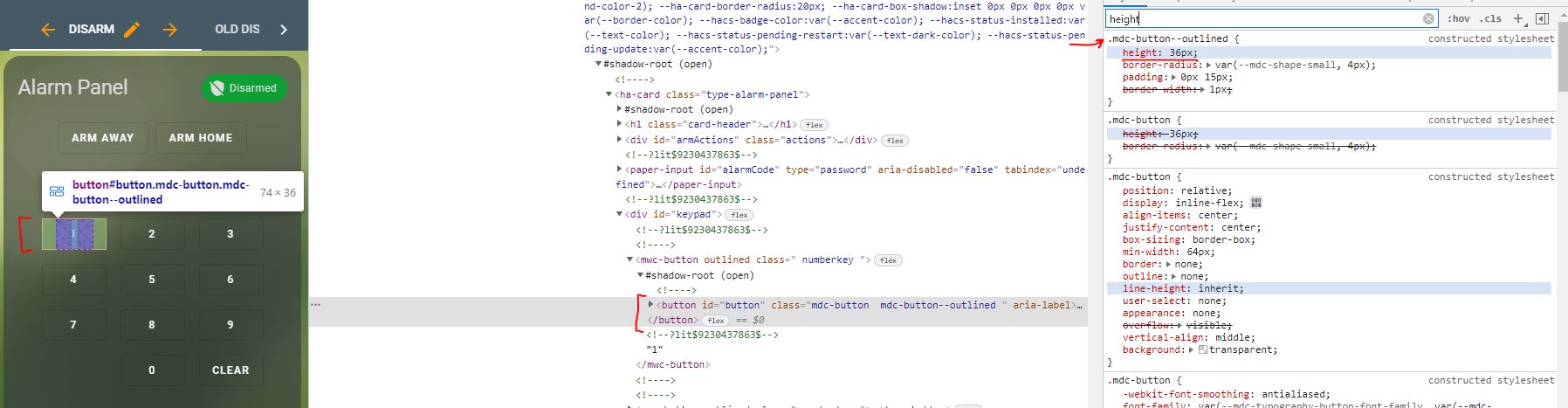 polar kelp
card-mod has a specific way to get into shadow roots. It's in a folded section of the readme.
woven needle
polar kelp
card-mod has a specific way to get into shadow roots. It's in a folded section o...
Thanks, looking into that now!
polar kelp
Yup
 edgy nacelle
Trying to get a generic thermostat set up. Using a temperature sensor and a switch to control turning on and off a space heater. I'm following the documentation I could find, and I've got my climate yaml set up, but I must be missing something. When restarting my core I'm not seeing a new climate card I could add.
polar kelp
Also, check out the wiki
polar kelp
edgy nacelle
Trying to get a generic thermostat set up. Using a temperature sensor and a swit...
woven needle
Suppose I don't know what you mean by folded section. Hahaha
edgy nacelle
@polar kelp thanks
polar kelp
woven needle
Suppose I don't know what you mean by folded section. Hahaha
I misremembered. It's right under "DOM navigation".
woven needle
polar kelp
I misremembered. It's right under "DOM navigation".
Thanks again! I'll do some reading.
polar kelp
It's a bit tricky. You need to keep track of what's yaml and what's CSS, but I'm sure you can do it. The wiki and forums are full of examples too.
woven needle
Hahaha! I usually get to an answer tripping and stumbling down a long rocky hill.
polar kelp
Oh, and the alarm-panel card is one of my test cases: https://github.com/thomasloven/lovelace-card-mod/blob/master/test/views/5_dom_navigation.yaml#L91-L117
woven needle
I find the solution all battered and bruised! 😛
polar kelp
woven needle
Hahaha! I usually get to an answer tripping and stumbling down a long rocky hill...
Perfect! That's the way card-mod is developed too.
woven needle
I'll try not to ask too many questions that the internet can answer for me, but do you have a TLDR of what .: is? xD
Holy crap, I just changed the width from within the :host section.
lmao
woven needle
polar kelp
Oh, and the alarm-panel card is one of my test cases: <https://github.com/thomas...
This is perfect.
polar kelp
.: is just like the current directory in unix. Say you have html <element-a> #shadow-root <element-b> #shadow-root and you want to add styles to both shadow roots.
They you'd do yaml style: element-a $: .: | styles added to element-a shadow root element-b $: | styles added to element-b shadow root
polar kelp
Since yaml style: element-a $: | styles added to element-a shadow root element-b $: | styles added to element-b shadow root is bad syntax
woven needle
Because it wouldn't make sense to go back to the root directory in this analogy.
That make sense
So, if there's a <button id="button" ...> within a shadow-root under mwc-button which is also under <div id="keypad">... it would look something like this?
style:
  #keypad mwc-button $:
    .: |
    button $: |
      height: 200px
Phew, that was difficult for me. lmao
polar kelp
Just yaml style: #keypad mwc-button $: button $: | height: 200px
polar kelp
: | starts a multiline string
Or even yaml style: #keypad mwx-button $ button $: | height: 200px
woven needle
woven needle
Wouldn't I need `style: |`?
nope
polar kelp
Ah. You're right. You need to quote any line starting with #: yaml style: "#keypad mwx-button $ button $": | height: 200px
It's all a dirty hack, so some quirks are to be expected.
woven needle
polar kelp
Ah. You're right. You need to quote any line starting with #: ```yaml
style:
"...
This should work even with the shadow-root between mwx-button and button?
polar kelp
Well... no. It's friday night and I'm on the third wiskey. But you also need correct css.
woven needle
Hahaha, no problem! I'll keep playing!
polar kelp
And then you'll run into a special thing about the selectors.
When you say "#keypad mwc-button $ button $" you will select the first #keypad, the first mwc-button in that, the first shadowroot in that, the first button in that and the every shadowroot in that.
What you probably want is to select the first #keypad and every mwc-button in that, then the first shadowroot and button in each of those.
When you chain selectors, card-mod will pick the first one of each, except for the last one where it will pick all.
So you want yaml "#keypad mwc-button": # Find ALL mwc-buttons in #keypad $: | # Find the shadowroot of EACH found mwc-button button#button {height: 200px} // button doesn't have a shadowroot, so it can be styled directly from the shadowroot of the mwc-button
woven needle
I'll look into this now!
polar kelp
It's clear as mud when you've been staring at the code for a couple of months. Trust me.
dark dirge
I picture Thomas with a black pointy hat stirring a bubbling cauldron of CSS
What selector couldn't use an eye-of-newt?
polar kelp
That would probably be :host-context Pure magic, but only supported by chrome - and about to be gone from that too.
(I just edited the last line of my code above to button#button {... because CSS prioritization 🤷)
woven needle
polar kelp
So you want ```yaml
"#keypad mwc-button": # Find ALL mwc-buttons in #keypad
$:...
THAT WORKED
😮
Heck yeah
 restive raptor
Hi everyone,
Trying to set a floorplan with picture element, I've set my view to panel mode and add a picture element card fort testing, but my image is not taking full height of the screen. Maybe it's because the sidebar on the left (https://github.com/DBuit/sidebar-card)
Is there a way to do it without resize the render picture ?
woven needle
polar kelp
So you want ```yaml
"#keypad mwc-button": # Find ALL mwc-buttons in #keypad
$:...
Now, my only remaining question is how do I incorporate changes to mwc-button with this?
Actually, all I need to do now is change #keypad
 stuck garden
Hi Folks,
Not sure if this is the right channel,
I'd like to remove Map Logbook History from Side Panel for non-admin users, is that really not possible?
woven needle
stuck garden
Hi Folks,
Not sure if this is the right channel,
I'd like to remove `Map` `Logbo...
You could get rid of the entire bar with kiosk-mode
https://github.com/maykar/kiosk-mode
You'd put this at the very top of your lovelace.
kiosk_mode:
  admin_settings:
    hide_header: false
    hide_sidebar: false
  non_admin_settings:
    hide_header: true
    hide_sidebar: true
    ignore_entity_settings: true
can I force a specific user into kiosk mode?
woven needle
You can differentiate between admins and non-admins only - as far as I'm aware.
Kiosk mode can also get rid of the header bar - my favorite.
stuck garden
what about the side panel?
stuck garden
ok let me give it a try, thanks for the info
woven needle
hide_header and hide_sidebar
woven needle
woven needle
~~Now, my only remaining question is how do I incorporate changes to `mwc-button...
Man, why is this so hard? xD
stuck garden
I installed from HACS, restart HA, and then added the configuration, when I check configuration I'm getting this error
Package kiosk_mode setup failed. Component kiosk_mode Integration 'kiosk_mode' not found.
woven needle
Where did you put the config?
Just in case, I'll reiterate what I posted above:
This goes in the lovelace yaml, not the configuration.yaml
kiosk_mode:
  admin_settings:
    hide_header: false
    hide_sidebar: false
  non_admin_settings:
    hide_header: true
    hide_sidebar: true
    ignore_entity_settings: true
I don't have lovelace.yaml, I have ui-lovelace.yaml
woven needle
ah, today's the day, then!
At the very top.
Even above the views:
kiosk_mode:
  admin_settings:
    hide_header: true
  non_admin_settings:
    hide_header: true
    ignore_entity_settings: true

views:
  - title: Home
    path: home
    icon: mdi:home
Alright, @polar kelp, I'm lost again. With the use of .: I can't seem to simply access #keypad to change the max-width anymore. lmao.
This didn't work:
style:
 .: ''
 '#keypad': |                // This doesn't work
   max-width: 100%
 '#armActions mwc-button':   // This works
   $: |
     :host {
       width: 200px;
     }
  '#keypad mwc-button':      // This works
    $: |
      button#button {
        height: 70px
      }
Thank you, Editing the ui-lovelace file didn't work, but editing from the top right it worked.
Thank you for your help it is much appreciated.
Working fine 👍
woven needle
Nice! Now, a word of caution! If you set hide_header to true, you won't be able to edit the yaml naturally! Hahaha
In order to get around this, simply disable Kiosk Mode by appending this to the end of your URL ?disable_km=&edit=1
This will disable kiosk mode and put your straight into edit.
stuck garden
wow, that sucks, I understand the need, but that is a security breach, in fact as a regular user that does have only one panel enabled, I was able to see everything by appending that, including all other panels that I wasn't able to see before kiosk
woven needle
I wouldn't say security breach...
Do you anticipate malicious attackers using your home assistant dashboard?
stuck garden
any regular user would be able to see everything by just appending the query param
woven needle
If they knew that they could, sure.
stuck garden
no, but there is a reason why there are user isolations
woven needle
Can can make specific dashboards admin only if you'd like.
Configuration > Dashboards > (selected dashboard) > Admin only
stuck garden
what is the point of having for each panel the option to hide from specific users if there is a backdoor?
woven needle
This has nothing to do with Kiosk Mode
A non-admin will not be able to visit an admin dashboard.
Won't even be able to see the icon I think.
stuck garden
probably not, as I didn't test it without the kiosk, but that is a serious flaw in HA
woven needle
Still not following the issue
Technically, Kiosk mode isn't even Home Assistant, it's a community app addon.
stuck garden
I added a new user
Went to every tab in the dashboard, selected the visibility and removed the user
Then I added a single Tab that had visibility
Logging in as that user, I only see that tab
All good, however I was also seeing Map History LogBook
I wanted to hide those as well, hence why I asked the question., all i wanted is a simple one page no frills for such users.
So I added the kiosk and it hid the side and top panel all good
Adding ?disable_km=&edit=1 to the url and logging in with that restricted user, i had full view to lovelace, all tabs and everything.
You don't see that as a flaw?
woven needle
You never mentioned that it added the tabs back.
I assumed the side panel just opened back up.
stuck garden
yeah, maybe I did not explain properly, but yes it did. all tabs that were hidden showed up
woven needle
So, obviously, kiosk mode isn't what you're looking for then.
Back to the drawing board.
stuck garden
😦
I can't believe that there is no way to hide Map History LogBook
What business regular users have in seeing those?
woven needle
Looks like if you remove the default_config: from your configuration.yaml, it might do the trick.
stuck garden
trust me I searched and read everything written about it, I don't even have default_config in my yaml
woven needle
A caution from the solution:
"Be aware that removing default_config: will remove a lot other components besides the Map."
woven needle
stuck garden
trust me I searched and read everything written about it, I don't even have `def...
Which yaml are you looking at?
stuck garden
I grep-ed my entire Home Assistant folder and didn't see it anywhere
I suppose configuration yaml
woven needle
It would be within the configuration.yaml
95.6% of users have it active. I would be surprised if you didn't.
kind shellBOT
@stuck garden posted a code wall, it is moved here --> https://hastebin.com/uhiniwejen
woven needle
What's this? Doesn't look like yaml to me
Also, I just learned something new, click and hold the "Home Assistant" name on the top left
You can remove tabs
stuck garden
no it is grep-ing for the string and showing the matches,
as you can see it is only found in frigate component
yeah that I know, but that is a per user setting (user preferences) to customize their own panel
it does not remove them, it just hides, and the user can show it back
woven needle
Correct
stuck garden
and it turns out that ?disable_km=&edit=1 has nothing to do with kiosk_mode component, I removed it and am still able to see everything
this is not good
woven needle
In that case, I would say that the edit=1 part has nothing to do with kiosk_mode.
Just putting ?disable_km= is a kiosk mode parameter. I suspect if you put ?edit=1 at the end, you'd get the same effect.
stuck garden
yep
woven needle
btw, if your users are using the HA app, they won't have the ability to access the URL.
i.e. they won't be able to get out of kiosk mode if they're using the app
stuck garden
but they can always use the browser
stuck garden
thanks for all the assistance, have a nice evening
woven needle
You too!
woven needle
Good questions, hopefully someone can provide some answers!
 deep hedge
I'm building a card using Thomas Loven's auto-entities card, and have had the .js file in my www directory, but see there is a custom:auto-entites card (AND custom:button-card) now listed as options in the Add Card in Lovelace. Have these two been integrated into the UI, and if so, are the .js files still required?
 ivory escarp
the new "Can only log in from the local network" toggle is broken for me. any requests to log in do not work and a notification is sent about invalid authentication. is this a known issue? what can i do to resolve it?
has it got something to do with hass being behind a proxy?
yeah that seems to be the case as login direct with the ip (no https) works fine
 torn pasture
Hi Guys I'm busy getting into Card mod from Hacs does anyone know if there is a discord for this? I find reading through discord post as the easiest way to learn this type of stuff.
dark dirge
No, that would be here. But you can read an entire conversation about it from yesterday here: #frontend-archived message
strong basalt
Whats the best way to use a lovelace dashboard on a 2 in 1 touchscreen laptop? Essentually a windows tablet
torn pasture
Thanks I'll have a look. 👍
 simple talon
strong basalt
Whats the best way to use a lovelace dashboard on a 2 in 1 touchscreen laptop? E...
simple talon
strong basalt
Whats the best way to use a lovelace dashboard on a 2 in 1 touchscreen laptop? E...
i would assume edge in fullscreen mode
polar kelp
There's also an excellent discussion going on in the forums about card-mod. Lots of skilled people over there.
And great guides.
 vale umbra
this repo has an invalid discord link, does anyone know where it goes? https://github.com/custom-cards/boilerplate-card#boilerplate-card-by-iantrich
dark dirge
it's a card, so presumably here
 whole heron
can I use antoher icon in a view beside the mdi icons?
shell island
hi all 🙂
 velvet hemlock
shell island
hi all 🙂
velvet hemlock
shell island
hi all 🙂
Hi!
polar kelp
whole heron
can I use antoher icon in a view beside the mdi icons?
Yes. There are some icon packages in HACS. Both under the integrations and the frontend section.
My personal favourite is fontawesome, because that allows you to use your own icons, duotone icons and icons including advanced css. And also I made it, so I may be biased.
https://github.com/thomasloven/hass-fontawesome
Here are some other popular ones
https://github.com/elax46/custom-brand-icons
https://github.com/arallsopp/hass-hue-icons
https://github.com/vigonotion/hass-simpleicons
whole heron
polar kelp
Yes. There are some icon packages in HACS. Both under the integrations and the f...
thanks
ah damn still no shelly icon 😉
shell island
I am trying to create some design in my custom theme file. How can I design different ha-card-box-shadow: none for different elements that I note in the lovelace-config itself? Is there a name I can specify in the style part or something?
whole heron
custom_icons, nice
woven needle
woven needle
Alright, <@!445886408000012289>, I'm lost again. With the use of `.:` I can't se...
@polar kelp Mind giving me a bit of extra help? Trying to modify the max-width of the #keypad and not having any luck. I thought I had it, but the solution still escapes me.
 blazing wren
I'm pretty certain it's 3-4am for him right now
kind shellBOT
Generally, don't tag people to ask for help - it comes across as bad manners, you’re demanding somebody answers you. It’s different if you’re thanking somebody, obviously. If you do tag somebody keep it polite and respectful. Remember that everybody is a volunteer, and nobody has to help you, and people may block you.
Similarly, please don’t DM (direct message) people asking for help. It also comes across as demanding, and means that others can’t learn from what you do.
Finally, please keep tagging people in replies to a minimum. That too can become annoying very quickly and should be used only when it's necessary (such as if it's been a long time, or there's multiple conversations going on). When using Discord's new Reply feature it defaults to pinging the person you reply to, click @ ON to @ OFF to stop this - on the right side of the compose bar.
Command '~tagging' was invoked by: RobC
 left wren
Can you set lightbulb color by RGB/hex code in the web interface or app? I got some new color bulbs but can't get the colors to match with just the sliders.
blazing wren
If you poke around and look for the paint palette icon, you should be able to change to a colour wheel.
left wren
Yeah I saw the color wheel, I was just really hoping for something I could match exactly
 wind tulip
Hi, I am searching for a way to switch dashboards (I want a dashboard with cards for all rooms). The main dashboard shall have cards "Kitchen", "Bathroom", "Bedroom", "Livingroom"... I want to get to the dashboard "kitchen", when I press "Kitchen". How can I configure this?
 shy blaze
is it posible to use a dropdown menu for rooms in any way from the lovelace "View https://www.home-assistant.io/lovelace/views/" whit a plugin/skin or use input_select in some way?
the goale is that i am trying to achive is to have a room selector on the top bar insted of having a start dashboard with the rooms in it with links to the dashbords/rooms. as i want to have to select each room and have the view tab with a selector for rooms and icons for whats in each room like sensors, temprature, camra, sceens.
shy blaze
wind tulip
Hi, I am searching for a way to switch dashboards (I want a dashboard with cards...
i did try using a picture card with links to the rooms, and then as the first card in the view field i made a home icon so linked back to the stard dashboard
not greatest way but it kinda work
dark dirge
Any card that supports a tap_action, such as a button card, can have a navigate action where you specify a path
simple talon
is there a list for the theme yaml entries (primary-color, text-primary-color etc)
 warped juniper
I uploaded a png image of my 3D floorplan and it's showing as a broken image. Other png files in the same directory display no problem. I've tried restarting. Any suggestions?
vale umbra
can the config yaml be edited from the frontend without any additional addons? the HA container writes all the files as root so it makes editing them remotely via vscode a pain.
dark dirge
no, you need one of the many addons
 formal onyx
After updating to the most recent build Im finding that my Time Helpers are no longer displaying the AM/PM selector on some devices. Has Anyone experienced this? If this isn’t the proper channel I apologize.
fiery ledge
looking for the correct theme variables in an alert card in configuration... please can anyone help me out? https://community.home-assistant.io/t/which-variable-are-used-in-an-alert-card-in-configuration-panel/383687
fluid cypress
hey i’m looking for a way that users can control toggle automations on and off and if they’re off for more than 12 hours they auto turn back on
 harsh anvil
heyo, anybody can help me to use the home assistant web socket in react native?
 quasi depot
So I have a question about front end design -
If I have a crapton of devices / modules
Lets say every single light switch and window / door has a data point
am I better off making a few tabs of just devices and then putting together a tab with major operations?
errant plover
quasi depot
If I have a crapton of devices / modules
It depends on what you are using to view the Lovelace dashboard. For example, this view in my settup: https://i.imgur.com/k7Rmdqy.png really struggled to load on my mobile devices (but was fine on my desktop pc) when I had the number of points per hour up too high for the graphs. You would really have to have a huge number of light switches and binary sensors to reach that sort of bandwidth issue though.

 glad pulsar
Hi All, im hoping someone has the answer, i am looking to create a conditonal card based on the attribute of a sonoff switch, it has both a local and cloud attribute and i want to create a conditional card to show when either of these attributes show a state of offline, im not sure how to do this as it seems the card doesnt allow selecting attributes ?
 umbral garnet
Is it possible to have this 2 merged into one single item ?
https://images.ciubi.net/bEQi3/WOfeWoGi80.png
I would like to have the controls first and then the Temperature sensors
 wind tulip
Hi, is there a way to change the grid in the dashboards from 3 to 4?
fiery ledge
fiery ledge
looking for the correct theme variables in an alert card in configuration... ple...
found it. I had set an error-color: white variable which apparently takes care of both the button background and the card-header background. changed that to primary-color and all set.
 tender hazel
Hi I asked this in the forum, but no response, maybe someone here knows:
I know that the interface language can be changed by going to profile->language
The question is can I change the language by calling a service or some other way programmatically ?
The use case is I have two dashboards in two different languages, I have buttons I created for switching between them, but I’d also like the interface language to change when I click that button.
Anyone know if this is possible?
Thanks
glad pulsar
Hi All, im hoping someone has the answer, i am looking to create a conditonal card based on the attribute of a sonoff switch, it has both a local and cloud attribute and i want to create a conditional card to show when either of these attributes show a state of offline, im not sure how to do this as it seems the card doesnt allow selecting attributes ?
fiery ledge
you can create a binary template sensor and use that in the condition. or use any of the custom config template cards
wind tulip
Hi, how would you create a dashboard like a floorplan? Each card for one room. I need 4 in a row and empty cards, because the house is not in a square form
glad pulsar
thanks, not versed in templates, but will attempt to read on them
 cedar girder
is there a way of changing the entity abbreviation shown on Map cards without changing the entities name?
wind tulip
Hi, do you get this working (blank card)? https://community.home-assistant.io/t/blank-spacer-card-in-grid/317682 I used a button card with a generic entity, no name, no state and no icon. Then turn off the tap and hold actions and viola, a card that does nothing and shows nothing!
This guy has 4 columns and "render cards as squares". This is what I am searching. Where can I do this settings?
fiery ledge
its this: - type: custom:button-card color_type: blank-card
or, if you create a template out of that and use```
- type: custom:button-card
template: blank
o wait, you actually want to see empty cards? Opposed to an empty place holder?
that would be:```
- type: custom:button-card
aspect_ratio: 1/1
tap_action: &none
action: none
hold_action: *none
empty place is perfect
Your code gives a config error. I tried to create a manual card with yaml code
fiery ledge
what error?
tribal galleon
probably a spacing issue. I copied and once I got it spaced in line with the rest of my YAML, it rendered fine.
fiery ledge
yes, I use it all the time 🙂 combine in a grid card and it works easy as can be
tribal galleon
interestingly, it renders in the editor UI as a grayish square but on my dashboard it is blank.
fiery ledge
guess that is merely the placeholder? I dont use the UI editor at all, so could not comment on that, sorry
tribal galleon
looking back at the code, mine doesn't seem to like tap_action: none but is okay with tap_action:
fiery ledge
playing with those yaml anchors to reduce code and increase legibilty, I do this in larger grids:```
- <<: &empty
type: custom:button-card
template: empty
- <<: *empty```
how does that differ from a template put into the RAW?
fiery ledge
not sure what you mean, but I guess the raw editor would accept that code without issue? It might not render correctly in the preview though?
wind tulip
Where do I have to put the code? Dashboard -> Add cart -> manual (YAML-Code)=
Custom element not found: button-card
fiery ledge
you havent installed button-card yet? I figured you had, because of what you posted above
tribal galleon
fiery ledge
not sure what you mean, but I guess the raw editor would accept that code withou...
you can see my dashboard here. https://github.com/dsellers1/home-assistant/blob/main/dashboard.yaml at line 6 where I start defining templates that I use throughout the dashboard. some of the templates refer to other templates too. this is all entered in the raw.
fiery ledge
well, in that case, there wont be an issue I figure, simply add the template, and call in it your button configs
tribal galleon
I might do like you suggested and make a "blank" template to match the rest of my buttons.
using the YAML you posted above, I definitely have a spacer but nothing visible (which is fine for my use)
fiery ledge
yeah, well, I am a sucker for code compression 😉 so if at all possible, I write a template , and call that, and, if called repeatedly in one file (I use includes all over) I create an anchor for it
wind tulip
fiery ledge
you havent installed button-card yet? I figured you had, because of what you pos...
no I havent installed button card
tribal galleon
I'll have to look into the anchors some more. There were some lines across my YAML that I couldn't "template" and they get repeated a bunch.
wind tulip
Is there another way to install button card, than downloading a file and paste it to config/www folder? I am not at home = I can not use samba/ssh
fiery ledge
tribal galleon
I'll have to look into the anchors some more. There were some lines across my YA...
sure, let me know if I can help
fiery ledge
wind tulip
Is there another way to install button card, than downloading a file and paste i...
HACS ?
wind tulip
fiery ledge
HACS ?
How does that work? I am a beginner
fiery ledge
well, thats a core question 😉 maybe wait until you're back at your desk and can easily check the docs for that.
wind tulip
Ok no chance from remote?
fiery ledge
well, check https://hacs.xyz/docs/setup/prerequisites and see if you meet the requirements. I guess not, so best wait until you do
 vast timber
Hello all, I can only access Home Assistant frontend from Incognito mode on my browser. If I use regular Chrome browser or any browser without private mode the frontend crashes the tab. I have tried this on different devices and browsers and it renders the same result for all. Yes I did clear my cookies/site data/cache as well.
sinful robin
Anyone on here aware of how to leverage Plex libraries through HA? I saw/found the few add-ins and cards for media, however with Plex it only really displays/shows media playing via a streaming browser. I use native apps on Samsung TVs and Xbox to stream via Plex. Is there a better way to display what is actively playing via Plex through a native app?
sinful robin
sinful robin
Anyone on here aware of how to leverage Plex libraries through HA? I saw/found ...
I also have access to the paid version of Plex...so LMK if there's any implementations of Webhooks that would work better to give a more visual experience.
 grim compass
I have rtsp cctv configured through synology, I wonder what is the best (low latency / low cpu usage on ha side) way to display live feed in lovelace ? I see multiple option on forum and internet.
 split granite
https://github.com/AlexxIT/WebRTC works well
grim compass
i'll give it a try thanks
 broken marsh
When adding stuff to Phoscon and renaming it afterwards, is there a way to get the new entity ID in HA without restarting HA?
 winter wasp
sinful robin
Anyone on here aware of how to leverage Plex libraries through HA? I saw/found ...
winter wasp
sinful robin
Anyone on here aware of how to leverage Plex libraries through HA? I saw/found ...
the built-in integration creates a media_player per client and shows what's playing (if anything). there's also a sensor that aggregates all active playing sessions. what are you looking for?
sinful robin
I think I'm probably looking for the sensor item. However it doesn't seem to display a "now playing" preview in the media card if I'm playing something via the Samsung TV
winter wasp
no, that's purely text
you can use some custom cards like auto-entities to dynamically show the active Plex media_player instances. then it'll show one for each active session and hide them otherwise
those players will show art for the active media
sinful robin
How about showing a badge of each family member and their status...? Which card type would that typically use?
Newer to this...so apologies for the basic quesitons
Or, where do I go to specify badges...?
left wren
Is there an easy way to change multiple bulbs' color at the same time? I had hoped I could set them as a group and change the group color, but I can't find any option like that in the UI
polar kelp
You need to make a light group. https://www.home-assistant.io/integrations/light.group/ That's only configurable from yaml for now.
left wren
Once I make the group, is there a way to adjust the color from the UI? Or do I have to go back into the yaml every time?
polar kelp
If you make a light group (and not a regular group) that will create a new light. entity which controlls all your lights at once. If all the lights in the group supports changing color, so will the group light.
And you can still adjust the light individually
left wren
That's perfect, exactly what I was looking for. Thank you!
fluid cypress
so im having issues with URL path in the actions option of buttons, i put the url path as "living-room" but when i click it on desktop it opens a new tab but i want it to just change the url in the same tab and on mobile it opens the phones browser instead of switching in the app?
dark dirge
if you're trying to navigate to a different view/tab/etc, use navigate
fluid cypress
oh that makes sense thanks
dark dirge
navigation_path
 primal wolf
I see a lot of talk about integrating UPS (power, not delivery service) stats within the frontend of HA, but it seems like most everything I'm finding involves NUT which sounds like the UPS is connected to a different server via USB/NIC. Is there an approachable way in the event the UPS USB is connected right to the HA box?
dark dirge
The integration doesn't talk to a UPS. For that, you need to run NUT somewhere and have the integration talk to it. It's available as an addon for supervised installs, and that will work with a directly connected UPS
primal wolf
ah, no kidding? I guess I read too far in to it with all of the "my UPS is connected to a separate box" posts.
In my case my UPS serves my main servers + my HA server so it makes no difference where the USB goes as long as HA can play nicenice with it 😄
dark dirge
I have one connected to pfSense and one connected to my Synology NAS, both exposed through the integration
primal wolf
@dark dirge do you happen to know if you're connecting to a localhost NUT server what the default user/pass would be?
dark dirge
No
 meager grotto
I'm having strange behavior in the graph history, the graph doesn't reflect the current state. is there an issue with the DB (mariaDB)?
kind shellBOT
@meager grotto Your message has been deleted as it contains a link or a domain name 'pasteboard_dot_co' that is on the blocked list because of: 'Virus detected!'.
Please re-post by removing/changing the domain name/link. Your original message has been DM'ed to you.
meager grotto
Screenshot of the graph: https://imgur.com/DTOJVhK
 haughty vine
FYI
I just found out card-mod supports defining a style as a list.
This could be very helpful with button-card in building templates.
(dead on replacement for buggy extra_styles:)
 wooden root
Not sure where to drop this question, but it ultimately ends on the lovelace frontend, so I'll start here. Anyway, node-red runs a timer and sends a status via an HA entity. I see the entity in HA and can display it's status, etc. it reflects the state of a switch being controlled via node-red. anyway, what I'm trying to do is have the icon for this entity display the state, on or off, graphically. i tried to reference the entity directly, no graphical change on status change. so I then setup a template entity with some quick logic on the icon_template. no dice there either. it's not picking up the original entity state. This has got to be simple and I'm an idiot. all help is greatly appreciated.
tacit cave
wooden root
Not sure where to drop this question, but it ultimately ends on the lovelace fro...
what do you mean by graphical
wooden root
I'd like mdi:lightbulb-on displayed on the card when the switch is on. mdi:lightbulb-off when the switch is off
tacit cave
the state of the switch is coming from node red?
wooden root
yes
tacit cave
how are you doing this? is it turning on/off an input_boolean?
or is it a legit switch that you're calling the turn_on/turn_off service
wooden root
inside node-red I a have a HA entity attached to the output node of the timer. that crates an entity in HA that reflects the status
it's node-red calling partical.io to tell a photon to toggle a relay
tacit cave
is it bascially just "Timer going -> on", "Timer going -> off"?
wooden root
right
tacit cave
ok, i'm still trying to clarify, is the switch created from node red or toggled from node red
there's a big distinction here
wooden root
created
tacit cave
and to circle back, the automation is simply "Timer going -> on", "Timer going -> off"
because using node red is shooting you in the foot
in this situation if that's your automation
wooden root
at least i didn't go int HA and create an entity. it appeared once I added the entity in node-red from the pallet
tacit cave
ok, so if you can't attach the icon to the switch state from node red, you ahve to create a template sensor
wooden root
i can see the status of the entity change in HA
right. did that.
or at least tried. not being successful with that.
tacit cave
also, is this just for display in the frontend or is the abliity to turn on and off doing something in node red?
wooden root
just display
tacit cave
ok, then if it's just for display, make a binary_sensor instead with a binary_sensor template
no need to deal with turn_on or turn_off commands when you aren't going to use them
wooden root
indeed. more simple = more better
tacit cave
anyways, once you get your binary sensor that's created from node red, wrap that sensor in a template sensor with an icon_template. Then use the template sensor in the UI.
wooden root
alright. I'll set the type in node and try from there.
tacit cave
template:
- binary_sensor:
  - unique_id: from_node_red_wrapper
    name: My Timer thingy
    state: "{{ is_state('binary_sensor.entity_id_from_node_red_binary_sensor', 'on') }}"
    icon: >
      {% if is_state('binary_sensor.entity_id_from_node_red_binary_sensor', 'on') %}
        mdi:xyz
      {% else %}
        mdi:abc
      {% endif %}
thank you!
tacit cave
I don't know node red at all, but you probably can set the icon via node red when you set the state
I would guess that you just need to provide attributes with a dictionary that contains 'icon':'mdi:abc'
wooden root
I've got that part down with the dictionary. i think the key is the binary_sensor type.
tacit cave
also, if your 'automation' is just when the timer is on, this binary_sensor is on, then you really can just forgo the whole automation and write a template sensor.
wooden root
node is managing a bunch of stuff around this, so I really just wanted a status to flow thru into HA for display purposes. Thanks again!
 violet carbon
Hi,
What would be the easiest way to create a lovelace card with multiple and diverse type entities ?
I did the Home Assistant one (top left) with button card, but I have issues in controlling the layout on different screens ... https://imgur.com/a/V7AxEGL
wooden root
@tacit cave IT WORKS! 🙂 Thanks again
 sharp flare
Hello. I'm installing a new frontend. Is the "root of your Home Assistant installation" /config/ ?
I'd assume that one level before that is the root, but I cannot copy anything there afaik
polar kelp
It's most likely /config if that exists, yes.
shell island
Hi all! I was wondering if anyone here knows why I get an error message when using the Conditional Card inside a custom:button-card grid when casting to a Google Nest Hub? The code works fine in my web-browser.
 nimble zephyr
I keep getting problems refreshing the changes i make to lovelace, for example i completely comment something out and Ctrl + F5 in chrome takes few times before it goes thru, any ideas what it's causing this, it's really frustrating !!!! 😞
vapid field
Can someone tell me how to change color in Energy tab? i have 3 tarrifs i have only blue colors ... how change that
 sullen wyvern
Hi all. Could someone please explain to me what should I expect from pattern in text helpers? If I apply regex to it I can see in frontend if I typed a wrong value, since underline becomes red. But if I click out of that card the input stay there or if I check the helpers attributes, there is no mention about if the input is wrong or not. Also if my automation depends on the input, it fires no matter what has been typed in. Is the pattern field suppose to be just visual validator, nothing else?
 gentle quartz
Quick question folks....clocks.
Right now I have a clock on my dashboard. It's nothing fancy, it just uses a markdown card with the following content:
      - type: markdown
        content: >-
            # {{ states('sensor.time') }}

            ## {{ states('sensor.date') }}
The issue is, it doesn't make great use of the space and what I basically end up with is:
15:42
2010-01-25
That's fine, but I'd like a clock that maybe looks a bit nicer.....
Is there a way to do this?
vapid field
Ah sorry il move it
 primal vine
there are time sensors that show time such as "5 minutes ago" in lovelace, is it possible to show the exact time? I can see the time when clicking on it but I want it to be displayed in the UI directly, any ideas? https://ibb.co/WzCHHgV
 modern bear
Hi so I am seeing an error in the logs which I know the source of, but am trying to troubleshoot.
File "aiohttp/_http_parser.pyx", line 551, in aiohttp._http_parser.HttpParser.feed_data
aiohttp.http_exceptions.BadStatusLine: 400, message="Bad status line 'Invalid method encountered'"
 rich eagle
primal vine
there are time sensors that show time such as "5 minutes ago" in lovelace, is it...
rich eagle
primal vine
there are time sensors that show time such as "5 minutes ago" in lovelace, is it...
Depends on the card. With the "Entities" card you can: https://www.home-assistant.io/lovelace/entities/#format
fiery ledge
gentle quartz
Quick question folks....clocks.
Right now I have a clock on my dashboard. It's ...
guess the answer would yes 😉 all depends on your wishes. did you search the community? https://community.home-assistant.io/t/lovelace-button-card/65981/5106 or something like https://community.home-assistant.io/t/lovelace-analog-clock-card-based-on-magicmirror/173520/2
 lilac sandal
hello I would like to know if it is possible to condition the card display according to the connected user? I get there in a markdown card with an if user == "myuser" but impossible on a conditional card any idea? I try to create template sensor but not a success
 small gyro
@polar kelp - I'm trying to work out how to use your browser-mod when casting to my Nest Hub, however my popups only appear on my computer and not the Nest itself when I press the button. Any ideas on what could be wrong? I've tried adding deviceID: and various way to execute the service call, but still it won't pop-up on the Nest.
polar kelp
I don't think it would work on cast. It works quite differently from the rest of HA.
small gyro
Ah, understood. Do you know any other way to get a pop-up working on cast by any chance?
I'm making an interface for my sonos and a pop-up would be great to choose playlists etc
Alternatively I'll make it "flat" but that doesn't look as good 😉
haughty vine
polar kelp
I don't think it would work on cast. It works quite differently from the rest of...
Hi
I have a small question.
Is it possible to display original more-info dialog somehow once it was replaced by browser-mod ?
polar kelp
No
haughty vine
thx
polar kelp
Well, there's https://github.com/thomasloven/lovelace-more-info-card, but I'm not sure that's even working currently.
haughty vine
polar kelp
Well, there's <https://github.com/thomasloven/lovelace-more-info-card>, but I'm ...
My main concern is that popups don't have link to entity settings.
more-info-card doesn't provide those so I have to find the entity again in entities list to edit it.
winter wasp
small gyro
I'm making an interface for my sonos and a pop-up would be great to choose playl...
have you used the media browser? it's getting some nice upgrades in the next release
small gyro
winter wasp
have you used the media browser? it's getting some nice upgrades in the next rel...
@winter wasp Nope - but will look into it. Actually interesting that you comment on this as I'm trying to get your Sonos Cloud to work, but I can't get it to play atm.
winter wasp
small gyro
<@!348136391638515714> Nope - but will look into it. Actually interesting that y...
likely dns or https i'd guess. make an issue if you can't figure it out
small gyro
winter wasp
likely dns or https i'd guess. make an issue if you can't figure it out
Will do - I'm not 100% sure, running on https, but when trying your CHIME example it throws back: UPnP Error 714 received: Illegal MIME-Type
winter wasp
sounds like you might be targeting the wrong media player
small gyro
Nope, changed the data to a random .mp3 file hosted online now, and that works..
I'll just play around some more
winter wasp
it creates separate entities from the built-in integration. i'd bet you're not using the new one in the service call
small gyro
I'll try that - thanks!
@winter wasp you were correct, "lost in translation" as my Norwegian entity was suddenly also available in English. Stupid mistake. thanks a million!
 versed obsidian
I'm not sure if this is the correct channel, but my History page does not load past just the filter line at the top. Not sure what I can do to fix it as no error seems to show in the log viewer.
In chrome if I wait long enough, where the graphs and what not would show just shows a sad face
rich eagle
Any errors in the browser log?
versed obsidian
nope
polar kelp
Do you get state history for individual entities?
versed obsidian
page doesnt load so I get nothing
polar kelp
I mean otherwhere. Like in the more-info dialogs.
versed obsidian
im thinking of deleting the db file under the assumption maybe something in it is corrupt
no that stuff appears fine when I look
welp that didnt help
versed obsidian
looks like purging it seems to have fixed it
gentle quartz
fiery ledge
guess the answer would yes 😉 all depends on your wishes. did you search the com...
I did yes, but the answers on there seem to require custom elements or something else installing. It seems like a fairly simple task I'm surprised that a clock card doesn't exist in HA by default.
 main locust
Does anyone know where I can find the love lace configuration file? I can't seem to find it on the file editor addon
gentle quartz
@main locust you have to create it.
main locust
Oh my
gentle quartz
It's not hard.
main locust
Nope I just didn't know I had to. I'll google it. I assume it goes in the same folder the configuration.yaml is
gentle quartz
Add this to your configuration.yaml
lovelace:
mode: yaml
main locust
kk thanks
gentle quartz
then you need to create ui-lovelace.yaml in that same directory
main locust
IS this the correct resource? https://developers.home-assistant.io/docs/frontend/custom-ui/registering-resources/
gentle quartz
In there, you can create your dashboard YAML
title: Home
views:
  - title: Home
    path: home
    icon: mdi:home
    badges: []
    cards:
      - type: markdown
        content: >-
            # Hello
            ## World
that tells you how to register resources like additional JS files you want to use.
You don't need to use it to just create custom dashboards with YAML
main locust
I'm trying to install kibibit theme and I need to add a resource to my lovelace configuration, according to it's readme
main locust
  - url: https://fonts.googleapis.com/css?family=Comfortaa&display=swap
type: css```You do that in configuration.yaml thusly:
lovelace:
  mode: yaml
  resources:
  - type: module
    url: /local/content-card-example.js
Yeah, so in your case:
lovelace:
  mode: yaml
  resources:
  - type: css
    url: https://fonts.googleapis.com/css?family=Comfortaa&display=swap
So then I don't need to create another yaml?
Sorry, I wish themes were a little easier to install and manage
gentle quartz
What are you trying to do here?
main locust
I am attempting to follow the instructions for installing this theme: https://github.com/Kibibit/hass-kibibit-theme
gentle quartz
Gotcha. I take it you're not already using YAML for your dashboards?
main locust
No I am not
gentle quartz
Then forget everything I just said about lovelace and YAML.
You can just add those resources via the GUI
using the link you sent earlier
gentle quartz
main locust
IS this the correct resource? https://developers.home-assistant.io/docs/frontend...
this link
main locust
I've added the front end portion to my configuration.yaml file, I'm just trying to figure out how to add the font
(Sorry for the confusion)
gentle quartz
that's okay
remove the bit from your configuration.yaml file - if you're doing all this through the GUI you don't need it.
main locust
Do you mean through HACS?
gentle quartz
You mean this, right?
lovelace:
  mode: yaml
Right now, this theme requires you to add the Comfortaa font as a resource to your lovelace configuration:
  - url: https://fonts.googleapis.com/css?family=Comfortaa&display=swap
type: css```yeah, take that out - you can do that through the GUI
main locust
I've already added
  ... # your configuration.
  themes: !include_dir_merge_named themes
... # your configuration.```Oh right. Leave that alone then
I was just telling you to undo the config changes I told you to make 🙂
main locust
So I just need to figure out where to put
  - url: https://fonts.googleapis.com/css?family=Comfortaa&display=swap
type: css```Add it as a resource.
Enable "Advanced mode" in HA.
(that link tells you how to do that)
main locust
Gotcha and it's a stylesheet
gentle quartz
yep./
main locust
Thanks so much!
main locust
I am working on it now. I'll update in a moment
gentle quartz
awesome.
gentle quartz
Great!~
main locust
Even got a sick wallpaper set up for it
gentle quartz
neat
main locust
Are there any lovelace cards you would suggest I download from HACS?
gentle quartz
I don't know. I don't use HACS
Just in general I would say be careful with anything you download from HACS, for no other reason than you are running someone else's code on your machine.
main locust
Yes for sure
gentle quartz
Not wanting to cast any aspersions on HACS specifically, it's just something to keep in mind with any kind of app store.
There is the temptation to go mad and start installing stuff (I know, I've been there too!) but it's always worth keeping that in mind 😉
I've actually never used HACS, but I'm thinking about this through the lens of (for example) NPM
main locust
Yea it's always good to have security in mind
If I want to reference a png for a background that I put in /config/www the url should be /local/config/www/<file name>, correct?
 wheat current
gentle quartz
Just in general I would say be careful with _anything_ you download from HACS, f...
wheat current
gentle quartz
Just in general I would say be careful with _anything_ you download from HACS, f...
This checks out 👍 (from inside HACS):

 round vault
Home Assistant becomes slow/goes to sleep after few minutes
Hardware:
- Pi 4 4GB
-Official PSU
-UGREEN USB 3.0 to Sata Adapter
-MX500 250GB SSD
-Conbee 2
-Aqara Mini Switch - Wifi Light
Software:
Supervisor Version - supervisor-2022.01.0 (i was on regular version earlier and just tried the BETA and same issue)
Operating System - Home Assistant OS 7.2
Core Version - core-2021.12.10
so the issue I'm having is that after few minutes it feels like Home Assistant WebUi goes to sleep and when I try to access it, it takes around 5-10 to load and once its loaded, I can go to any other page or reload and it loads in an instant. its just that initial loading time thats happening. if i was on config page and didnt do anything for few minutes, same happens when i refresh, first refresh takes time and then its instant after that.
is there any reason why it would do that? I have the App installed on my S10+ and it loads up quick without any issues.
Aqara switch seems to be working OK(ish) but there were 1 or 2 times when it didnt respond either and once I opened the webpage it also started working but I need to investigate this more before I pass it as same issue.
kind shellBOT
@round vault posted a code wall, it is moved here --> https://hastebin.com/vofugafoqe
round vault
having the above issue if someone could help please
gentle quartz
round vault
having the above issue if someone could help please
Got any logs?
Preferably captured during the time it's running slowly
Also take a look at top see if there's anything else going on
gentle quartz
Ah, so if you go into settings and them server
gentle quartz
main locust
If I want to reference a png for a background that I put in /config/www the url ...
Uh, I think it's just /local/public but I could be wrong. Check the docs for sure
main locust
Sorry I got it working 😄
gentle quartz
Great!
main locust
Thought I deleted all the messages
gentle quartz
I can't immediately think of a reason why not. At the end of the day, it's just css on a web page
gentle quartz
main locust
Thought I deleted all the messages
Oh, don't do that :)
Your question might help someone else
lilac sandal
@polar kelp thanks i will try .
polar kelp
@median jungle @gentle quartz Home Assistant makes heavy use of webcomponents, which are individually isolated elements each containing their code, and styling information inside themselves. Since they are made to be portable, they can't be easily modified from "outside". So It's not just CSS on a web page, and they will ignore almost any CSS you throw at them.
The exception is CSS variables, which is what themes are. A theme with yaml ha-card-background: teal ha-card-border-radius: 20px corresponds to the CSS css --ha-card-background: teal; --ha-card-border-radius: 20px; and core elements and well made custom cards will use e.g. css border-radius: var(--ha-card-border-radius, 5px); in their internal styles.
That way you can modify things to an extent.
No. sorry
gentle quartz
polar kelp
<@!266279741089120257> <@!277537844363395083> Home Assistant makes heavy use of ...
D'oh. I forgot about that. Good old shadowDOM
 winged elbow
Evening, I'm sure someone will tell me it's possible/not possible but I'm trying to use the custom-button card to colour change if my hive is currently in boost mode, this is one of attributes of my climate.hive_receiver called system mode. I'm trying to make it pickup if the mode is (for example) emergency heating then turn red. I've tried various versions and can't make anything seem to work. I thought you'd be able to style based on a attribute?
kind shellBOT
@winged elbow posted a code wall, it is moved here --> https://hastebin.com/ejafizuwoz
vapid field
Hi, I need a little help... I have disabled top bar in custom ui and now can not get to the ui config. Anyway to fix it?