#frontend-archived
1 messages · Page 142 of 1
 mild veldt
 torpid echo
ah okay. Anyway it was good coding, it's been a long time I worked on CSS
mild veldt
👍
torpid echo
I don't use any fan module though. I control my "normal" fan through IR (I have put together ESP-01S with IR transmitter)
 oblique rain
How do I get source speakers into spotify
I have them specified as aliases - but they are not there by default
 polar kelp
@hexed bramble look up "regexp"
 fervent vine
Hi folks, I have seen a screenshot of a HA setup I would love to reproduce. The code for it is on Github so might be able to figure it out but it is shown on a second "tab" in the header which I can't seem to get to work...is it ok to link to the screenshot here to see if anyone can help?
polar kelp
sure
fervent vine
 full sand
Can I put every tab in a different yaml file or will this affect reliabillity? So I'll just add for every tab !include xxxxxxx.yaml
polar kelp
How are you configuring the frontend, @fervent vine ? Through the GUI or in yaml?
fervent vine
I think I turned on manual control (Sorry still learning the terminology)
polar kelp
@full sand That's a perfect use case for includes. For normal use, the performance hit wouldn't even be measurable.
full sand
alright, thanks
 gleaming cobalt
is there a way to live edit shadowdom style? it's painful re-compiling every time i need to make a change.
polar kelp
Then when you go into edit mode, there will be a little plus on the header bar to add a new view, @fervent vine
@gleaming cobalt There's a plugin for that: https://github.com/thomasloven/lovelace-card-mod#advanced-usage
It's not easy, though.
But the fact that you know the word "shadowDOM" is promising. I'm sure you'll be able to pull it off.
gleaming cobalt
ok, i was hoping there was some vscode extension
polar kelp
What exactly are you recompiling, btw?
gleaming cobalt
i am trying to integrate swiperjs and glance card
polar kelp
And compiling with webpack? rollup?
gleaming cobalt
using the boilerplate set-up, so rollup
polar kelp
Try running start instead of build then.
That should keep going and recompile only the necessary stuff when it detects any change in any file.
much much much faster
gleaming cobalt
thanks for the tip!
fervent vine
Progress...I have a second tab...its empty but there!
full sand
views:
  - !include /config/lovelace/main.yaml
Why is this returning https://imgur.com/a/TmLVDhe
must do something wrong 🙂
fervent vine
Thanks @polar kelp been trying for hours just to get the tab there!
 ancient harness
@muted inlet here's what i've done with the info so far... Need to pretty up the graphs some (maybe ditch a few), and maybe add a few more data points... I'm using a rolling average for filter lifespan rather than determining an arbitrary time and figuring out hours until consumed, etc.... I felt it was more akin to how I normally treat filters, change once it looks dirty 🤣
https://i.imgur.com/gP0nqPA.png (helps if i post the image)
i need to tighten up the red line on the graph.. it's meant to represent when the HVAC is active
fervent vine
damn...now I want carbon fibre wallpaper!
ancient harness
hehe, i usually do cf or a dark dark wood texture
also, i need to tell the image to fill the screen so there's more light difference on the texture
here's the one i'm using - https://imgur.com/sTF8815
actually looking for a new one because that one is 1:1, and doesn't look good on a 16:9 display
here's a few cool looking ones http://getwallpapers.com/collection/hd-carbon-fiber-wallpaper
fervent vine
any tips how I might add the info from the link below in my newly created tab...
I feel it isn't just as easy as copying it across?
ancient harness
that's an entire lovelace config, not just a little bit of info... you'll likely never find a config that will work for you out of the box (unless you have the exact same setup, which again is very unlikely)
but you can look it over to get an idea of how someone did something
ancient harness
should be fairly easy once you get the hang of the config
fervent vine
The system and network config bits at least
full sand
Can I use a picture entity to navigate to another tab?
 muted inlet
@ancient harness nice, looks good!
 kind shellBOT
Command '.picture-entity' was invoked by: nfgCodex
ancient harness
is there a place to see all the CSS vars for a theme? I'm not having any luck finding the complete set in the docs
 vapid field
How would I go about linking these card headers, to another tab page respectfully? thanks
https://imgur.com/a/DWTnGnN
ancient harness
err.. well i guess since they're vars, i could probably see them in chrome
don't believe you can @vapid field, not without a custom card that allows it, which i haven't seen
polar kelp
There's a pretty comprehensive list on github somewhere. Hold on
ancient harness
hmm well, appears I can't do what i want via that anyway
polar kelp
Tip: Even if variables don't always show up in the listing in the inspector of chrome, you can see them in the "computed" section.
ancient harness
yeah, i know, but sometimes it's good to see where/how it's applied outside of the naming context
usually a design language will define these settings, and give a preview of how they appear when following the standards
but i'll tell you what, i have hated every second working with lovelace 🤣
so many times i've just about built a simple framework to just use the API and build my own UI, but i keep falling to the Sunken Cost Fallacy
polar kelp
That would bee awesome. There's only a couple of alternative interfaces around. Should be many more.
ancient harness
i have a list a bajillion miles long of stuff i need to work on :S maybe one day
but, if i finish a platform i was working on on the side, i should be able to churn something out pretty damn fast afterwards... it has a lot of functionality for oauth2 integration and adapting to APIs
managed to pull off what i wanted with the box-shadow, although not EXACTLY what i wanted... https://i.imgur.com/LFzM5Ku.png
also want to add margins to all the cards 😦
polar kelp
Have you tried card-mod. That gives you some more options.
 civic sedge
What's the card called where you can scroll throu diferent cards inside it?
swipe card!
civic sedge
Could I force a Picture Elements Card t be maximal 1200px wide?
polar kelp
with layout-card
 neon stump
Hey fellas! I have a quick question. Does the Media player card has style values that can be added? I can't seem to find the options
polar kelp
Or card-mod I guess, but that will leave a gap.
If it’s not in the docs, it doesn’t exist @neon stump
But this lets you add styles to anything: https://github.com/thomasloven/lovelace-card-mod
neon stump
Yeah. I figured. I checked the list. I don't really use it. However someone was asking me for one of my themes. Thanks @polar kelp
polar kelp
Ask me again in a couple of days
civic sedge
already using layout card 🙈
just tryed max_width: [45%, 170px, 55%] style: | ha-card { max-width: 1600px; } but meh out of obvius reasons
ancient harness
@polar kelp of course, i love your projects! but i didn't want to set a style for EVERY card
i'm still trying to resize the map card, will get back on that soon
polar kelp
I have something coming up for that. As above, ask me again in a couple of days.
The not having to set the style for every card individually, that is.
ancient harness
damnit, i got it resizing, but the map isn't centered in the viewport anymore
Modified: https://i.imgur.com/uFTrEq9.png
vs original: https://i.imgur.com/E4aXOCE.png
 smoky depot
lol those icons
ancient harness
🙂 why not?
 inland badger
I've been googling (ducking?) this for a few weeks and haven't found an answer until searching the discord logs: Why are my new installations of Home Assistant not allowing a "Check Config" or other reloads on the server control pages? Answer: Go to your user profile and turn on "Advanced Mode". Thanks @polar kelp for the answer a while back.
 amber sun
question about changing icon colors on picture elements card. I can change the colors of binary icons (type:state-icon) like Lights, Motion detection using:
style:
'--paper-item-icon-active-color': red
'--paper-item-icon-color': limegreen
However when I apply this to covers and locks, it will change the icon color, but not the active icon color (I'm guessing open or unlocked don't count as active)
Anyone have a solution to that?
mild veldt
@amber sun that will change in 0.105 release
 swift marten
does anyone here have the new iOS dark mode theme automation up and running well? I can get my frontend to change the background, but not the light/dark mode
kind shellBOT
@half cairn posted a code wall, it is moved here --> https://paste.ubuntu.com/p/wnDgXmy3Jz/
 half cairn
^^ I have a picture entity card in a horizontal stack using card-templater for the name (number of days left till collection) Is there any way to center the name on the card? Currently the text is aligned to the left
 unreal wind
Does anyone have the Spotify Playlist card from HACS installed and working? I have it added to my UI but when I click authenticate it just says redirect url invalid
 pearl hound
Hi i would like to put a circle/icon (with css) on top of an iframe card. Is there a way to do this?
 formal tide
am I the only one missing the burger icon on hass.io tab?
https://imgur.com/a/BzekOnX
 wheat current
Disable 'always hide sidebar' in your profile
formal tide
ok I take it as a feature 😄
wheat current
It shows in dev, so will probably re appear in a future update
vapid field
I want to add a google calendar card to my lovelace UI, how do I do this? I don't really understand the documentation online
Download atomic-calendar.js file to /www directory in your Home Assistant - latest release - link not working (in development)
What does this mean?
wheat current
you need to ask the developer of that spesific item for that
vapid field
@wheat current what is the easiest way to add a google calendar card to my lovelace ui?
wheat current
I have no clue
full sand
I'm struggling to code the yellow boxes as drawn with stacks, how would you do this?
For my tablet tab
 wide nest
Anyone here use CalDAV with iCloud? Set it up yesterday for first time and it worked great. This morning when I woke up all I get is “calendar.family Response error: 500”
wide nest
Okay really weird, worked fine yesterday but today it was complaining that it couldn’t parse a line in one of the calendar entries causing it to fail. That entry was there yesterday so not sure why it failed now. Edited that specific entry and it loads now.
mild veldt
@full sand use layout-card
full sand
@mild veldt I was. This is how far I got: https://pastebin.com/95X7b6jr
I want the gap card to be smaller
More like this: https://pastebin.com/wGLzQpUR
But this aint working 😞
torpid echo
what is the right format to call a service with service-data? tap_action: action: call-service service: conversation.process service-data: text: Fan on
Gives error Failed to call service conversation/process. required key not provided @ data['text']
seems to be correct, any idea why this is not working?
 dark dirge
_ not -
torpid echo
my goodness . thanks! I should have copy-pasted from example 🙂
torpid echo
I am using the card-mod and in Glance card, I plan to rotate the icon. So far I could only till state-badge. I cannot get hold of ha_icon. Icon does rotate with below code , but it is due to the state-badge card and not icon really. Any ideas? ```entities:
- entity: switch.fancontrolspeed
icon: 'mdi:fan'
style: |
state-badge
{
animation: wiggle 2s linear infinite;
}
@keyframes wiggle
{
0% {transform: rotate(-720deg);}
}```
torpid echo
not in this glance card. in Entity-button card, just by using ha-icon I was able to set the color. But in glance card, the ha-icon sits one layer deeper than state-badge. I am not sure how to go down to that level to retrieve the ha-icon
vapid field
Ooh it wasn't based on your question
I was just wondering if you could change icon colour at the top of the lovelace ui.
mild veldt
@vapid field yes with themes or card-mod
 tight olive
I just installed hass.io and I'm having an issue, wondering if it's a known issue. When I click on certain elements of the UI, like Updater, I get a pop up with details, but when I click the X to close it, I get no response. Sometimes, I'll get a browser warning that the site is unresponsive. Is this a known issue? Do I have something configured improperly?
Clicking around other places, Overview, Map, Logbook, Notifications, Configuration, all respond well
I'm also not seeing any logs that might indicate a problem, but I'm pretty new to this
smoky depot
@tight olive make sure you don't have any kind of ad blocker or anything running. Those kind of issues are either going to be something with the browser you are using to view the page or network related
tight olive
hmmm, I'm using brave as my browser, I wonder if that's what's causing the issues...
omg, that was it
thanks
I keep forgetting about that, sometimes I wonder if it's causing more trouble than it's worth
smoky depot
lol
smoky depot
we always overlook the small things
tight olive
yup. glad I asked for help today, this might get me over some of my hurdles
or is there a better channel to ask this in?
 split granite
#add-ons-archived about add-ons, but that I'd expect would be a way of installing the UniFi controller
Add-ons are basically Docker containers, with a pretty UI for managing them. Basically, just a way of installing software
tight olive
OK, that's probably the best explanation I've heard. that being said, I would prefer to manage my own containers, so I guess I'm going to install homeassistant as a container...
split granite
Yup, welcome to the #672217570283094017 approach 😉
tight olive
LOL that's a thing?
split granite
Lots of us run what's now called #672217570283094017 - basically not Hass.io
tight olive
Yeah, I had that set up before, but I got the impression that the hass.io store would give me something that I wasn't getting with #672217570283094017. Now knowing that the store will just spin up other containers, I think I'll go back to where I was before.
is there a way to save off the UI config that I have in hass.io as a starting point, like to a file?
NM, I think I got it
mild veldt
HA has more than just add-ons when compared to core
split granite
Ingress?
mild veldt
That just happens to be the big one
Ingress and snapshots come to mind
And even more over time I would imagine
split granite
Sadly, no
wheat current
hassos, supervisor, and every add-on have their own version
split granite
The underlying Home Assistant Core is the same regardless
 tight olive
ok, I get that, the core HA package is the same, regardless of how it's installed
split granite
And, to be honest, snapshots help less people than you'd think. They use it on a Pi, the SD fails, and all their snapshots go with it 🤣
tight olive
Yeah, I'm not installing on a pi, I'm installing on a synology nas, I'll take care of my own backups
so snapshots aren't something I'm interested in
mild veldt
I guarantee they help more than fail people
tight olive
snapshots?
mild veldt
Yes. To what Tinker said
split granite
Yeah, I'm sure they help more than 50% of folks, but I know a lot have posted here after it all failed
Lots of people confuse snapshots and backups
tight olive
Ahhh, gotcha. yeah, I would imagine that snapshots help the audience that's installing onto a pi with SD cards.
split granite
It's a lot better than not having them though
smoky depot
they are nice especially when you want to quickly jump through versions
tight olive
I'd rather have a tiered backup that I can go back to as needed
mild veldt
Yes. Take a snapshot and then backup the snapshot is the way to do it. Knowledge is power
split granite
Yup, I can go back in hourly steps to when I began 😄
tight olive
but I would be that also depends a lot on the technical experience of the user
mild veldt
HA is ideal for probably 99% of users. Core for the other 1%
tight olive
yup
split granite
Is in the 1% of something
wheat current
That's just because they are scared
mild veldt
sigh
split granite
Knowledge is power, but not enough to run my TV 😛
tight olive
yeah, scared I'm not
wheat current
I see no reason not to run HA or HA Supervised
tight olive
I just don't have the time that I really want for this stuff
split granite
If you had time, you'd still not have enough money for it 😛
tight olive
fortunately my day job has me working on docker in AWS so the knowledge transfers easily
that's absolutely true
split granite
Nice
tight olive
it's good and bad when you do the same thing in and outside of work
split granite
Eh, knowledge is knowledge
I wanted to learn Docker before I switched my use of HA to it (still haven't), and learning it for work helped me on that journey a lot
tight olive
true, but sometimes I feel that when I'm not changing gears outside of work, I get bored. at least when I'm doing this stuff at home, I'm doing it on something I like to do, not moving wordpress sites from on-prem to docker in aws
smoky depot
core is likely going to become harder to deal with as well down the road won't it? I know they said it won't ever go away but if they continue to focus more on HA it's only a matter of time before something gets implemented that core users won't have an easy way of working around
tight olive
that's unfortunate
wheat current
not possible
split granite
Core underpins it all
Unless you're doing something in the Supervisor or add-ons...
wheat current
all devs run core while developing
split granite
It'll likely be easier in HA/Hass.io, since it'll be one click magic to add things
And cursing and swearing when it breaks in a strange way 😛
wheat current
New add-on "Recursively delete everything under /"
NICE!, Install, start, ||fuck||
tight olive
I'm curious, for those of you that are running HA in docker, how are you managing the containers? like, when the image is updated, how do you update the image and reload the container?
wheat current
half cairn
pff configure your garbage card they said.. it will be fun....
slowly pulling out my hairs here.. arg
cant figure out how to config mod-card to align some text to center on a horizontal stack with picture entities and using card-templater..
 hexed bramble
Quick question: How can I add a execute button for a service call in my frontend?
For example, have a row in entities card and show "execute" where the value would be
kind shellBOT
@half cairn posted a code wall, it is moved here --> https://paste.ubuntu.com/p/bZQ826BDsq/
half cairn
Could someone please show me how to center the text under the icons using card-mod?
I know I should use ' mod-card' due to the horizontal stack , but I cant figure out the correct indentation and positioning to get this to work, The fact that its also a card-templator isnt making it easier for me..
all these ' types' are making it so hard..
unreal wind
Can someone help me with the mini-media-player? Im having trouble getting it to play from spotify, and then making it output to a certain media_player
polar kelp
It's bound to a single fixed media_player, is it not?
unreal wind
So is it just used more as a controller? like to display the playing content?
But it does have this little dropdown option which if clicked triggers spotify to open on my tv
hexed bramble
Is it possible to change the card padding of the Lovelace UI? I mean that the cards would have larger spaces between them
unreal wind
@hexed bramble there is a gap card in HACS
hexed bramble
That doesn't really do the job, if we are talking about universal card padding
I would need to add the gap card manually between all cards
unreal wind
Isnt it possible to edit the actual CSS of the cards? somewhere in the files?
 buoyant wraith
Hi. I am running 0.104.3 version under Hass.io and don't see 'Scenes' in the menu under configuration?
How is that? Is there any setting to enable scenes?
polar kelp
@hexed bramble I think it can be done with a combination of card-mod and layout-card, but I've never tried.
buoyant wraith
shouldn't there be scene editor available in the UI after 0.102 ?
hexed bramble
Seems like an interesting idea, but I think that it might be too hard for me to try 😄
full sand
@polar kelp I'm trying to display 2 cards with layout-card like this: https://imgur.com/a/bZ4lr62
This is what I have but it aint working 🙃
https://pastebin.com/xGyQtczf
What am I doing wrong?
polar kelp
You set up a 3x3 grid, then you add two cards. One stretching from row 1 to 3 and one from row 2 to 3...
full sand
I have to admit it's a bit out of my coding league
 atomic glacier
maybe horizontal-stack with the layout-cards inside? seems easier
set view in panel mode
ancient harness
lol no clue how grids work but you made the layout-card?
i personally prefer flex over grid, but they have unique use cases as well that give each a valid place
 atomic glacier
what you have now is basically what your code is. A gap-card on the left( <-- invisible) and then the entities-card on the right. I don't use the grid stuff, (never had a use for it yet), but in combinations of layout-cards, can pretty much make anything appear anywhere on a screen, knowing screen display size and what is trying to be displayed @full sand
full sand
Hmm, so how would you achieve this layout?
https://imgur.com/a/bZ4lr62
@atomic glacier
atomic glacier
looks like my tablet layout, using layout-card set to vertical and setting pixels for each column, inside of a horizintal or vertical-stack if you want the border to go around like in the pic...example here of what I mean: https://github.com/Dino-Tech/Home-Assistant-Main/blob/master/ui-lovelace.yaml#L2238-L2242 for the layout code
the screen for that display is 1280px but I set total px's to 1276px for my flashing borders I use
mild veldt
@hexed bramble type: call-service to get a row that can execute
You can customize the text with action_name
full sand
@atomic glacier thanks, I'll have a read, do you have your frontend displayed somewhere?
 wicked hemlock
Need some help...
Lovelace theme's
I created theme's in themes.yaml and the include is my configuration.yaml file.
I can chose all the theme's I have created but the regardless of what option I select every theme is a dark navy blue colour.
Any idea's?
atomic glacier
@full sand same link at top: https://github.com/Dino-Tech/Home-Assistant-Main/blob/master/ui-lovelace.yaml#L2238-L2242 and here older: https://community.home-assistant.io/t/dinotechs-update-10-18-2019/84271
@wicked hemlock "choose?" from select dropdown under your profile tab?
do the different names show?
full sand
exactly the first screenshot in your older one is what I want to achieve 😄
with the system and bar cards next to eachother
atomic glacier
that's the code I linked you to first, but it can be simplified much because I use flashing borders for alerts and my background images change every few minutes via automation, so that stuff can be left out to simplify setup...
full sand
I'll have a read, thanks alot
wicked hemlock
yes the different names show.
Is there a theme option for the Hassio for default?
It use to be under General but no longer there
found
 pine mesa
Hi all
I was wondering if anyone could help me with an issue I have with using Grafana charts in Lovelace UI. On my PC I see all the charts without issue, but any other device I try to go to the dashboard I get the 401: Unauthorized error. I can't seem to figure out how to fix this.
I use InfluxDB with it.
wicked hemlock
@atomic glacier yes they do show,
No matter what theme I select it gives me the same theme.
atomic glacier
does it change if you select default theme? or stuck on one theme? try service: frontend.reload_themes or frontend.set_theme @wicked hemlock
wicked hemlock
@atomic glacier yeah I don't know.. its either the standard theme or this other them regardless of what data I put in.
Will look at this again tomorrow
polar kelp
🎉
Themes in card-mod! https://github.com/thomasloven/lovelace-card-mod/blob/beta-themes/card-mod-themes.md
Only on the branch beta-themes for now.
 odd light
how come some websites won't display in an iframe card at all? pihole admin page for instance.
polar kelp
Security
odd light
@polar kelp so I guess tempating can be used in custom cards now?
polar kelp
That's been possible for a while
odd light
security? so what is the security requirement.
sweet, that could come in handy, templating that is
Blocked by Content Security Policy
An error occurred during a connection to duckduckgo.com.
Firefox prevented this page from loading in this way because the page has a content security policy that disallows it.
lol well damn
polar kelp
If anything opened in an iframe, some site could open your bank in a full-page iframe, but listen in on your keyboard when you type your password.
You might be able to turn the function off in pihole, or at least allow access from your hass hostname. It varies.
It's up to the card makers to implement it, though.
odd light
yeah it doesn't matter that much, was just toying around
does the iframe panel have the same limitations as the iframe card?
You can't embed sites using HTTP if you are using HTTPS for your Home Assistant.
that could also be an issue haha
polar kelp
That's correct.
odd light
on the templates thing, if you used one for say, pulling your gps location for a sensor, would it dynamically update the sensor or would you still have to restart HA?
polar kelp
It would update, if made correctly.
odd light
you mean if the template successfully pulls the gps?
polar kelp
If the template can be made aware of which entity it pulls the data from.
odd light
I'm thinking maybe having dark sky use my phones current location so when I pull up the frontend on my phone I get the weather there.
polar kelp
If it can, it will update when the entity updates.
odd light
should that work?
polar kelp
That's a different thing entirely. That requires your frontend to talk to the backend and then back again.
odd light
so that would need a restart then
polar kelp
Probably...
odd light
damn
smoky depot
@polar kelp the custom icon loader integration. are those forced/come same size as the material design icons or is there nothing in place to restrict their size? asking prior to checking it out.
smoky depot
it's your new Custom Icon loader thing i'm looking at. uses fontello
wait it has you listed at the bottom, but are you not the author? it shows no author lol
ah my bad man
use to seeing the author section at the top and there was nothing listed and when I scrolled down it listed you so like a dummy I jumped to assumption
 warped helm
Hey ho. Quick Question. Anyone knows why lovelace is not showing any custom group icon? Only the default one.
mild veldt
@warped helm you gave a bad icon?
 livid folio
Morning/afternoon/evening all ... I was wondering if anyone would be able to point me in the right direction. I've created these entities cards and was hoping to include a separate sensor value in the title either before or at the end of the title of the card ... https://i.imgur.com/iHiMhvU.png.
mild veldt
@livid folio config-template-card or templater-card
wide nest
Anyone have an idea why I cannot power on my LG TV using HA? I have connected apps turned on along with mobile tv within the tv settings. This should allow me to use the wake on lan functionality but it’s just not working.
 outer gulch
anyone got any suggestions to a (cheap) tablet to use to display the lovelace UI?
polar kelp
Do not get the cheapest one you can find.
outer gulch
that's why i'm asking.. anyone got any suggestions?
vapid field
Question.. is there any way to setup custom overview pages based on login? Like I want the kids to be able to use the iOS app, but not have access to every light/option but have access to the stuff they are going to use but not everyone's room lights etc.
polar kelp
full sand
I'm struggling to make the mini-media-player cards visible when the device is off.
nvm, got it ☺️
full sand
  - type: entity-filter
    entities:
      - entity: sensor.back_door
      - entity: sensor.front_door
    state_filter:
      - open
    name: Doors and Windows
The name part, or title doesn't work, any ideas?
It's a card with the entities, but no title
Maybe it's not even the correct card for the job. I want to list the sensors of doors and windows that are left open, and I'd like to have a title above
mild veldt
type: entity-filter
entities:
  - entity: sensor.back_door
  - entity: sensor.front_door
state_filter:
  - open
card:
  title: Doors and Windows
try this
full sand
Alright, that worked, thanks!
 simple rock
Hi, is it possible to edit the air-conditioner widget on the overview and add humidity to it? It doesn't seem like an easy hack from the UI configuration.
 tame dove
In one of my themes, the power button and right three dots on media player are not colored correctly. Any idea which items needs to be changed to correct this?
mild veldt
@simple rock are you referring to this https://www.home-assistant.io/lovelace/thermostat/?
mild veldt
no, it is not
Sounds like a solid feature request though https://github.com/home-assistant/home-assistant-polymer/issues/new?labels=feature+request&template=FEATURE_REQUEST.md
simple rock
Which one? Requesting editability or including humidity? 😉
mild veldt
humidity. you're free to create your own custom cards, just requires a quite a bit of work
simple rock
I've investigated that and read somewhere that it's not included because different devices have different features and one model cannot fit them all.
I can still request it if you see fit though.
Is there a way to inherit from that widget as in terms of C++ inheritance? Or what's the proper way of adding this to the widget?
mild veldt
i imagine current_humidity is the common attribute for climate devices, right? or are you talking about setting it?
simple rock
I don't own many but I guess it is. Ok I'll make a request.
mild veldt
@simple rock docs on creating custom cards https://developers.home-assistant.io/docs/en/lovelace_custom_card.html
you can extend core cards after grabbing the element from the window. I'm sure there are examples of that out there, but none come to mind
are you a C++ dev?
simple rock
I cannot be considered as a C++ dev but I can do pretty advanced C++. My main profession is electronics.
mild veldt
👍 I'm a C++ dev by day. Find that this frontend stuff is a good outlet for nightime tinkering 🙂
simple rock
I made a request, let's see how it goes.
I guess I need to code in js for this, right?
mild veldt
well it will likely be me or bram that would look at it 😜 or if you find yourself inclined to learn typescript and submit a PR
mild veldt
it is pretty much typed-javascript
simple rock
Hmm as long as it's C syntax, I'm in. 😉
mild veldt
eh...not quite 🙂
simple rock
It looks manageable.
mild veldt
yeah, it is. I can't stand looking at the JS files in the project 🤣
simple rock
Is it possible to inherit, or should I just copy the code as starters?
If I can locate the code of course. 😉
mild veldt
you cannot just copy the code
you'd have lots of missing dependencies and helper functions
but you can extend it
simple rock
I guess I don't need to compile this but how painful it is to run this in a browser to test?
mild veldt
you'd do something like
const HuiThermostatCard = customElements.get('hui-thermostat-card');
export class HumidityThermostatCard extends HuiThermostatCard {
  protected render() {
    // existing code plus your changes
  }
}
customElements.define('humidity-thermostat-card', HumidityThermostatCard );
That looks as horrible as Java. 😉
mild veldt
and actually, that will likely not work
well not without some tweaks, some things are private on that class, so you'd need to re-implement them
OR follow this https://developers.home-assistant.io/docs/en/frontend_development.html and submit a PR to core 😉
simple rock
Well node.js doesn't do well on this Win10. I need to check that at work tomorrow which I'm not sure I can find time to. This looks like heavy work.
Why can I not just copy the code and make the necessary changes?
mild veldt
because it is typescript
typescript does not run in the browser, it has to be compiled down to javascript
simple rock
Ok got it.
Having had a glance now, deploying a UI seems much easier with Qt or something. 😉
I need to have a dev environment to work on this, maybe I'll just group stuff for now. 😉
 rare iron
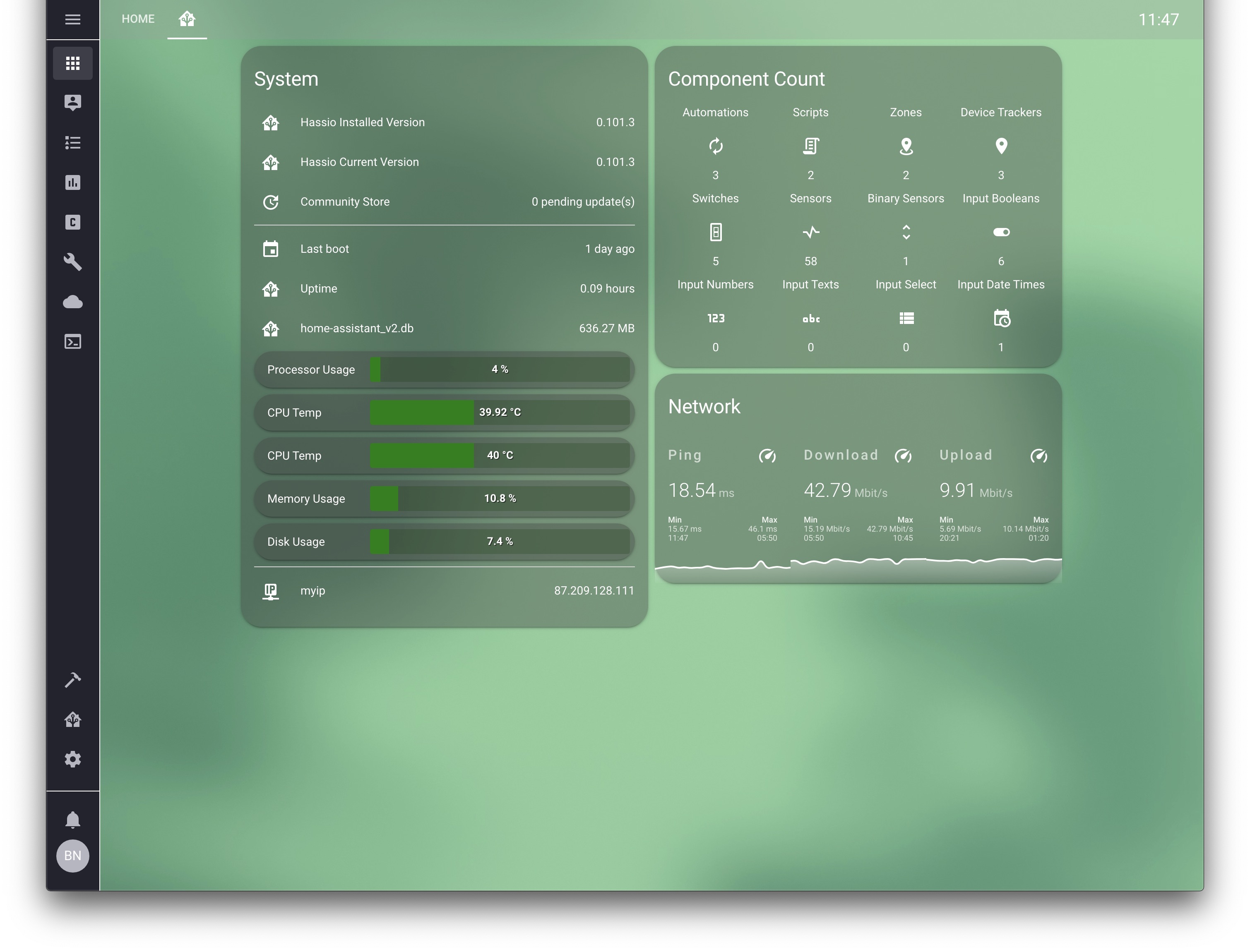
Soon to be released. . finally haha 😄 https://community.home-assistant.io/t/dwains-theme-an-auto-generating-lovelace-ui-theme/168593?u=dwains
smoky depot
@rare iron that's awesome. can see you put a lot of work into that 👍



 simple rock
@mild veldt Thanks for the help, I don't know if I can set up an environment but I'll try to come up with something. Good night everyone.
 dreamy tendon
Looks fantastic Dwains!
rare iron
Thanks! 😄
Started at beginning of october 2019 on it
Spend more then 200+ hours on it I guess
dreamy tendon
It should be very useful for those who don't care to tinker with their UI that much
rare iron
Yes that is the goal, just a simple 1 time setup for people who dont want to spend hours on lovelace UI/yaml
mild veldt
...but what else would I do with my free time then? 🤣
rare iron
Run thought the house and trigger sensors 😛
 winter blade
Is there a way to make one switch control 2 automations. (for a light that turns on at nighttime and off at daytime) I tried a switch with template platform + on/off commands for the automations but that would require a value_template
mild veldt
@rare iron I joked with Paulus earlier that I imagined you doing that for your demo 🤣
polar kelp
Oh, @rare iron. Did you see the new card-mod beta version?
 oblique apex
Hey guys I screwd up big time and could need some help... I installed the custom headder bar via hacs made a guest account and enabled kiosk mode thinkin it would only be kiosk mode on the active account. Well I cant get into my normal ui with any account now... My only hope is to maby acces it via samba? Can someone please help me or do i need to reinstall and load a backup?
oblique apex
thanks for the tip... funny enough it got me on my second ui tab but not in regular mode c0
never minde now it worked... thanks a thousend times that spared me a painfull reinstall and loading backup 😄
ook now my hacs is gone 😄
 left aspen
Hello people. Sorry if I'm in the wrong place ... Is it possible for me to use lovelace on a tablet but only present a few "tabs"? With another "user" for example?
ancient harness
you can even use the same user, but do a query lookup and change as desired.. a few different ways to accompoish that
left aspen
I will check 👍
winter blade
Is there a way to make one switch control 2 automations. (for a light that turns on at nighttime and off at daytime) I tried a switch with template platform + on/off commands for the automations but that would require a value_template
anyone?
polar kelp
I don't understand quite what that means.
Do you mean a switch to trigger them, or a switch to make them only run if it's on, or something else entirely?
rare iron
@mild veldt for that yt video I ran though the house yes to trigger some motion sensors and open some windows and doors xD haha
winter blade
@polar kelp Well you can turn on/off automations with a switch (so decide if they are active or not). I have 2 seperate automations that I want to control with one switch. Hope that makes more sense
polar kelp
Then you need an input_boolean https://www.home-assistant.io/integrations/input_boolean/, and use the state of that as a condition for each automation https://www.home-assistant.io/docs/automation/condition/.
winter blade
Amazing! thank you
civic sedge
can I use secrets in ll?
split granite
I think only YAML mode supports that
civic sedge
Bloody neat - it worked - thanks for the heads up
fervent vine
can I just check, is it icon: mdi:mdiCellphoneIphone or icon: mdi:CellphoneIphone (Neither seems to work atm)?
split granite
Neither
split granite
It's the name at the top, prefixed by mdi:
Don't use the bit in the code block below
mdi:cellphone-iphone in this case
fervent vine
got it thanks as always
fervent vine
I had it working last week but I somehow reset the know_devices
winter blade
is it possible to use 00:00:00:20 for 20ms within wait or delay in a script. using it to make a custom remote, 1 second is way to long
if not, any other way to make it wait for a tiny bit?
mild veldt
@winter blade #automations-archived
winter blade
Sorry, will post it there
 burnt shard
does anybody have some expierience with https://github.com/kalkih/mini-graph-card ?
i installed it via hacs and did the entry to my raw config file
but i dont get how to add a card afterwards
should there be a point "custom" card ?
mild veldt
@burnt shard use the manual option and then just enter the YAML necessary
burnt shard
sorry a little more detail pls? new to frontend modding ^^
this is how my raw config looks like
do i need to change somethin in my configuration.yaml also?
all cards i can add
 rough grove
howdy. i have a theme that i found online that is great everywehre except when viewing Iintegrations. white text on white background....yuck. thoughts on the name of that element so i can change it?
 latent moss
@rough grove i believe the line u wanna add to the theme is card-background-color: "var(--paper-card-background-color)"
rough grove
it is
took me some time to figure out how to search it, but i found https://community.home-assistant.io/t/help-with-dark-themes-in-latest-home-assistant-101-2/146334
thanks for confirming!
latent moss
np
polar kelp
I kind of like how I beat Final Fantasy VIII on google for "Card mod". Four times.
 rose garden
hello
 river bane
Anyone here who can assist me in getting the homekit-card to work? I'm following the instructions but all i get is a blank overview 😦
installed using HACS
polar kelp
Working on a showcase card-mod-theme
polar kelp
The entire configuration for that demo is here: https://community.home-assistant.io/t/card-mod-add-css-styles-to-any-lovelace-card/120744/334?u=thomasloven Anyone can install the theme and card-mod v.13 and it's done.
wide nest
Does anyone know if badnest still works with accounts not migrated to google? Been struggling to get it to work but I have a feeling Nest auth no longer works.
 daring tendon
Anyone managed to get a live mjpeg picture_entity card to work with casting lovelace to a Chromecast?
It just comes up as a dead image :/
mild veldt
@wide nest #integrations-archived
wide nest
Oops, sorry!
 late seal
is there a way to reset graphs?
wheat current
Delete the db
late seal
seems like I lose all my users
wheat current
Users are not in the db
late seal
is it the home-assistant_v2.db file?
I moved it and lost all my users and configuration
late seal
and I lost the hass store as well 🤷
latent moss
db is just history stuff
i would guess you probably removed config: from configuration.yaml
late seal
nah it's intact
wheat current
Ooh, "the hass store", is that new?
late seal
I think some services might not have started correctly
that's weird
the docker containers are all running except for Home Assistant
hm, my config was reset 🤷
 velvet python
would this be the right place to ask about scripts vs scenes?
mild veldt
@velvet python I would try #automations-archived
velvet python
thanks..
 halcyon mantle
Can one use templates in the tap action of a picture elements card?
mild veldt
if you were to wrap it with custom-template-card or templater-card, yes
halcyon mantle
Thx!
 turbid cipher
Hi, I've got a bunch of entity-buttons to control scenes and in some cases individual lights. The light entities change color to indicate if they are on or off, is there any way to do the same with scenes?
I did look at 'custom:button-card' but I don't think that will work as it relies on the state changing, and as I understand it the state of a scene is always 'scening'
 zenith crypt
You might be able to do this manually, but you are correct, a scene is always "scening"
mild veldt
@turbid cipher there's no concept of an 'on' scene
zenith crypt
You'll likely have to compare how your entities are expected to look after you've called the scene, and then modify your cards look based on that
mild veldt
Yes, that is what used to be done, but it was unreliable as the devices didn't always get set to the exact same attributes or report them slightly different
turbid cipher
should I look at templates to do this?
zenith crypt
Theres a handful of different ways. I'd probably use https://github.com/thomasloven/lovelace-card-mod with a template
turbid cipher
cool, I'll take a look, thanks for your help everyone
zenith crypt
Here's a simple example using entities card: https://hastebin.com/uvubitagug.bash
Your template will likely be much more complicated 🙂
turbid cipher
@zenith crypt thanks, that looks like a starting point!
vapid field
Hi al, does anyone know how to reset the legend / names given to graphs when using the History Graph in Lovelace? I changed my sensor names, but the graph still uses the old names. Restarting Home Assistant doesn't work. Interestingly enough, changing the order I use to mention the sensors does work. I guess there's a hidden file somewhere storing the sensor names for card or so?
left aspen
Hi. a quick question... to work the pop up card in the browser mod is I need to have the paid license is not it?
 prime umbra
no
polar kelp
Sure there is. It's Apache.
But I'm also curious. I certainly offer no paid license for browser_mod.
vapid field
Hello
I am new to Home Assistant. In frontend I cannot find hass.io pannel - I try to install an addon from store - MariaDB.
Any ideas ?
Thanks
vapid field
Did you install Hass.io?
@split granite yes, I installed. I am able to trigger events, to connect to it using my smartphone
split granite
What instructions did you follow?
Because if you installed Hass.io, and not one of the other methods, you'd have that menu
left aspen
@split granite in the Fully kiosk browser. I forgot to say
vapid field
auch
vapid field
yep .. so what I need to do ? which guide ?
polar kelp
@left aspen No. Popups do not require FKB Plus.
polar kelp
The only things that require Plus, I think, is motion detection and screen dimming...
left aspen
and also camera?
polar kelp
Yeah... I guess. The browser_mod camera doesn't work well with FKB, so it's better to use the built-in one and ignore that browser_mod feature.
polar kelp
It won't work without a title
winter blade
Can I add a glance card inside of glance card? Like a glance card inside of a entities card here: http://werra11.eu/i/04-02-2020_23:26:47.png
 ancient harness
lol, literally spent like 15 minutes trying to find a device in a dropdown, but could clearly see it on mobile... then i go to the default theme and see the problem: https://i.imgur.com/Gx8tNHl.png
 polar kelp
@winter blade No. You can't put anything else inside a glance card. But you can put two glance cards in an entities card...
winter blade
ah nice, that would work out too, thx!
polar kelp
@ancient harness Wow, that's annoying. Can you please add an issue to the frontend github repo? https://github.com/home-assistant/home-assistant-polymer/issues
polar kelp
Lol. The oldest still open issue, even.
wheat current
Just set a sensible max height
winter blade
@polar kelp it works! now I can make a nice remote http://werra11.eu/i/04-02-2020_23:38:46.png still working on it
 ancient harness
well max height requires an item to be block display, likely a dropdown is absolute positioned, which bypasses any of the DOM sizing
but if it's a calculated height, then yeah, also a simple fix
wheat current
https://discordapp.com/channels/330944238910963714/609399695466430465/610570419686080612 I guess that is still valid then 🤷🤣
ancient harness
lol silly
polar kelp
torpid echo
Is it possible to modify the Tab icons using card-mod or mod-card. I tried to apply the same logic as that of the cards, but no effect. I guess because the tab and technically not a card thatswhy?
mild veldt
@torpid echo no. I think you can for with custom header
torpid echo
okay thanks let me check. and I must say what a control card-mod provide. loving it. Thanks thomasloven appreciate your work
 small robin
Anyone know why the selected theme return to Backend-selected on the profile page after login out and back in? I've configured a theme, and it is selectable on the Profile page, and works great within the current login session. But if I log out, and log back in, the theme is no longer active, and when I check the Profile page, the theme selection is back to Backend-selected. I don't see anything in the logs indicating that something went wrong with the profile.
I'm on version 0.104.3 running Home Assistant as in a VM.
 hearty basin
Hi guys, I'm struggling to rest my groups now the auto generated have been removed??
Do I now have to manually create groups if i want my automation to switch off everything?
split granite
Or use entity_id: all
hearty basin
Ok so just put that in the automtaion it it should all work again?
hearty basin
I tried that and it isn't working - id: '1576792944065'
alias: All off
description: ''
trigger:
- at: '23:00:00'
platform: time
condition: []
action: - entity_id: all
service: homeassistant.turn_off
split granite
Well, that's a question for #automations-archived
hearty basin
OK thanks
split granite
Do format your code correctly when you post it there
 inner bloom
oof, the light card sure has a small draggable area for the slide
polar kelp
It's 1.5 times the handle.
odd light
can the HA map be changed to google maps? Or is there an easy way to just have google maps in an iframe and have it show your current position at all times? I like google maps because it has more information.
polar kelp
I'm sure I've seen an example of that on the forums or somewhere... but that was a while ago, and sometimes it feels like google change their apis once or twice per day, so I wouldn't trust that to work today...
polar kelp
That's the one
odd light
ahhh, but it may break often lol meh
 vague blaze
For current position, you can use the Google Maps tracker. However, as @polar kelp said, the APIs change all the time and relying on them is hit and miss. Also, this: https://cloud.google.com/maps-platform/pricing/ (basically, they claim $200 free monthly credits, but I've been charged a couple of times over the past 6 months for less than 1000 hits a day.
@odd light You can pretty much count on any Google API to break often. Their quality control is total crap.
odd light
@vague blaze I've got a device tracker that uses the native android app, so I can pop that entity into anything to get coords, I just thought using a different map might be cool lol.
I don't want some trash that's gonna break all the time though.
wide nest
Trying to add a picture for a person and it just shows up as blank on the card. I did the same thing for my picture and it shows fine.
wide nest
Think it was a cache issue...renamed picture file and it worked.
vague blaze
@wide nest I was just about to suggest clearing your cache and/or restarting your browser. LOL
wide nest
Lol figured it had to be something silly! Thanks
vague blaze
Isn't it always? lol
 deep moat
I'm trying to use Fully Kiosk and/or Wallpanel on my nexus tablet (android 6.x), and HA always gets stuck on "initializing". However, chrome browser works just fine. Anyone seen something like this before
full sand
How would I start with creating buttons to activate scenes in the frontend?
Picture entity, glance, ...? How did you guys implement this?
torpid echo
I am using a Custom-header card. Somehow I am unable to reach the ha-icon from which I plan to rotate a fan icon. I am unable to see how nested I should go to handle the ha-icon . The style is under ha-app-layout. So logically, it should traverse like ch-header -> ch-stack -> paper-tabs -> paper-tab[Attribute] then the ha-icon. I have done that and it does not work. so I was thiking whether it is as simple as below?
   '3': |
     ha-icon {
               animation: wiggle 2s linear infinite;
             }
             @keyframes wiggle
             {
0% {transform: rotate(-360deg);```@full sand https://github.com/custom-cards/button-card
There's scene examples in the docs too
full sand
Alright, thank you
deep moat
There are other ways but this might get you in the right direction
 golden rose
Is there an "easy" way to start with lovelace, when I was so "smart" as to not install hass.io, but the core?
wheat current
There is absolutely no difference in regards to Lovelace
rose garden
Hello
I'm using PING with hostname, and It's not returning online
if I use IP it works
any help on this?
 clever ore
@torpid echo You're trying to use CH styles like card-mod does it, unfortunately they don't work the same. Using the custom css styles in CH adds inline styles, keyframes don't work in that way. Although, I have a pretty silly hack for you:
custom_header:
  header_text: >-
    <style>@keyframes wiggle {
    0%{transform:rotate(-360deg)}}
    </style>Header Text
  tabs_css:
    '3': 'animation: wiggle 2s linear infinite;'
Then change the "Header Text" after the closing style tag </style> to be whatever you want your header text to be.
Since text options like header_text are rendered as HTML, you can just insert any valid HTML in there, like style tags. Not really documented or supported
winter blade
I want to split my scipts.yaml into multiple files, but not every script in a seperate file. is it correct if I make a folder like \config\scripts | Add a reference into configuration.yaml like this: scripts: !include_dir_merge_list scripts/ | and now make for example 2 files with a layout like: http://werra11.eu/i/05-02-2020_20:38:19.png in each file? Just checking to be sure.

 last aspen
Hello guys, I need help with Mini Graph Card. I have the following graph of my bathroom temp and humidity, and it's looking great. But whenever I hover the humidity or temperature line, it always displays that point information on the temperature state text. https://imgur.com/a/FkD3Bcx Already tried fixed_value with no success
mild veldt
@winter blade not frontend related
winter blade
oh, sorry
 frank crest
thoughts on how to use custom:layout-card' with panel: false so that I can have badges still?
full sand
type: picture
image: /local/home.png
tap_action:
  action: call-service
  service: switch.turn_on
How can I add the script in it has to fire?
 mortal cape
@full sand tap_action: action: call-service service: script.my_computer_lock
your scripts are script.some_name
pearl hound
Hello, iam having trouble with my frontend. I cant click any buttons, for example delete a card
 sonic glade
Hi, i'm trying to create a lovelace.yaml file and include it into my configuration.yaml. but i can't get it to work. Or is this something that's not possible?
pearl hound
my error https://pastebin.com/QkaFMDVU
 grim compass
Which card should I use to display just a number like for exemple the number of switches or lights ?
wheat current
Template sensor to count/extract value, the a sensor card to display it
mortal cape
@sonic glade https://www.home-assistant.io/lovelace/yaml-mode/
sonic glade
@mortal cape thanks, i googled with wrong tags i guess
mortal cape
or take control and use the raw config editor. Then you have UI editing and a file
full sand
@mortal cape , I get script/coming_home not found
grim compass
alright thanks @wheat current . AS you are here, are you aware of an ansible playbook to install hacs ?
wheat current
No
mortal cape
@full sand are you using the ui?
full sand
manually in yaml
coming_home:
  alias: Coming Home
  sequence:
  - service: light.turn_on
    data:
      entity_id: light.living_room
  - service: switch.turn_on
    data:
      entity_id: switch.plug_living
How can I count the amount of switchs or lights ? I guess there is a matching filter in jinja
clever ore
{% set count = namespace(value=0) %}

{% for i in states.light %}
  {% set count.value = count.value + 1 %}
{% endfor %}

{{ count.value }}
using group ? I'm not sure how to call it within a jinja statement
oh alright thanks
 raven nacelle
@wheat current Great work on the new UI 👏
 hollow perch
With the changes to groups - what is the correct way to set a group as a view? and to hide the control (switch) for a group?
split granite
You don't set groups as views any more, not with stock cards anyway
Each card will have a set of configuration options. For the control look for show_header_toggle
hollow perch
Okay - currently I have not customized the UI - using the default...
I have not changed anything in the UI... I simply modified the groups and the front end updated to match.
When I started using HA (last year) Lovelace was already the default UI (at least that is what I remember)... so is the default lovelace effected by this too then?
wait I think I might understand now... I have no lovelaceui.yaml or whatever it is called... I only modified my groups by adding the view tag... so do I need to move what I use to do in groups.yaml to a lovelaceui.yaml? Is that what I need to do?
Okay reading the docs I think I get it... although I don't need to use a yaml file... I can use the GUI... but either way my previous setup must have been using the status UI and I didn't know it.
mild veldt
@full sand
tap_action:
  action: call-service
  service: script.turn_on
  service_data:
    entity_id: script.coming_home
@hollow perch groups and areas can be used for grouping in automated mode of the UI
 stuck garden
Hi,
Just upgraded to 0.105.0
Right of the bat, I'm seeing few minor issues and one major issue
1- Let's start with the major one first
Where is the Edit of the Lovelace cards?
I enter Edit mode, and I no longer see the Edit or move buttons under each card, how are we supposed to edit? Text based only
2- The Supervisor Dashboard, no longer showing the current version, the only way to know is look into the logs, is this normal?
3- The supervisor Dashboard, nice Eye candy with the logos, but less practical also, impossible to tell if a Add-On is running or stopped?
Yeah I know the icon turns black if it is stopped, but there are add-ons that have black Icons (Example TasmoAdmin)
I'm not sure if my system has issues or this is the current behavior for everyone, if it is I'll just wait for fixes, if it is not, then I'd have to find out what is wrong with my system.
smoky depot
@stuck garden Not too many that have upgraded yet, so you may have to wait a little before getting solid answers.
stuck garden
Thanks @smoky depot It's ok, I can wait, I'm not complaining, just trying to find out if it's my system or others have seen the same issues.
Can I paste images here to show? C/P didn't work nor did drag and drop of the image
smoky depot
you'd want to use something like imgur to show images
 uncut valve
Hi Guys, Im new here i was wondering if you guys can help me figure it out why my input boolean state is not restored after a restart
hollow perch
@mild veldt yes that is what I was going, but I was using nested groups and the to level was set as view: true to make my tabs. This is no longer supported.
raven nacelle
@uncut valve I am guessing you have defined an initial state for the input_boolean
don't specify initial: if you want it to restore state
uncut valve
@raven nacelle This is everything i have in my configuration
garen_home:
name: Garen Home
initial: off
icon: mdi:human-male
Let me remove initial and see what happens
mild veldt
@hollow perch correct. Single view in auto mode
@stuck garden try clearing your browser cache for #1
And probably#2 as wel
 reef cairn
I cant find the answer to a simple question. I just want to concatenate a string value after a sensor's value. How can I do this? I have looked online, but the results were more for concatenating values of sensors.
mild veldt
@reef cairn use a template sensor
reef cairn
OK let me try. What is the proper syntax? SensorState & String? Or SensorState + String?
uncut valve
After updating to 0.105 i notice Icons no longer change color based on state it looks like they have added state_color option but im confused how to add so i can have the old behavior back
uncut valve
@mild veldt but when i add i loose the functionality on visual editor on that card
mild veldt
Yeah I did not add support to the UI editor for that option
tame dove
Does anyone know an actual dark theme that works with all the new frontend additions
mild veldt
@uncut valve I'll add that in a future release
uncut valve
Ok perfect
 vocal kiln
is it intended that type: entity no longer works in a vertical stack card?
i'm seeing lots of Unknown type encountered: entity. where i was seeing little toggle switches prior to the update.
mild veldt
@vocal kiln that has never been a card type
vocal kiln
🤔
mild veldt
can you share your config?
kind shellBOT
Please use https://www.hastebin.com/ or https://paste.ubuntu.com/ to share code or logs.
Command '.share' was invoked by: iantrich
@vocal kiln posted a code wall, it is moved here --> https://paste.ubuntu.com/p/2W7fN8HR9V/
mild veldt
did you add those types?
vocal kiln
the custom:slider-entity-row entries are fine, i added those as custom types
but i didn't add entity...
those just worked as toggle switches.
mild veldt
odd, well, delete them. a type is not needed
vocal kiln
lol fair enough. so just remove the type: entity lines?
mild veldt
yes
reef cairn
How far off am I on this?
value_template: 'The value is: ' + "{{ states('sensor.river') }}"
tame dove
Use the template editor in dev tools
 midnight imp
Hello, i just installed the Deconz add-on via Hass.io, and i am trying to configure it via the Supervisor screen (i am running the latest 0.105.1). It says i need to add the device in quotes, so i add something like that:
device: "/dev/serial/by-id/usb-dresden_elektronik_ingenieurtechnik_GmbH_ConBee_II_DE2131520-if00"
vnc_password: ''
Then i save the configuration, but when i navigate to another screen and back, the configuration looks like that:
device: >-
  /dev/serial/by-id/usb-dresden_elektronik_ingenieurtechnik_GmbH_ConBee_II_DE2131520-if00
vnc_password: ''
I don't know if there's an issue when saving, or if it's a display issue?
mild veldt
@midnight imp that's just how long strings are saved
midnight imp
@midnight imp that's just how long strings are saved
@mild veldt oh ok, i've never seen that before, so i got confused. Then my problem starting the addon must be somewhere else, i'll keep looking!
 polar kelp
Try a hard refresh.
Chrome: F12 -> Right click the normal refresh button to the left of the address field -> Pick last option in menu
Safari: Option+Cmd+E then Cmd+R
IE: Alt+F4, repeat until you come to your senses
 devout hatch
it works 🙂 thanks!
 heavy cove
Is this the right place to ask about "layout-card" questions?
polar kelp
sure
heavy cove
I'm trying my hardest to make a few of the graph cards span the whole width of the page... there are 5 graph cards... now on the PC it spans 5 in a row.. on the phone it is 2 per row.. and the table is 3 per row.. phone is fine. tablet i want 5 in a row aswell
                layout: horizontal
                max_width: 100%
                min_columns: 2
                min_width: 20%
type: 'custom:layout-card'```the layout came out wrong in here tho
polar kelp
Set column_width to slightly less than 1/5 of your tablett screen width. Remove min_width
Maybe set max_width: 500px too.
heavy cove
haha.. that works great on the tabled and the PC.. but fails totally on the phone
 sacred turtle
Hey all, can someone explain to me how to get the color change of icons back to the old way? I don't understand how to use the state_color option they've added.
heavy cove
sacred turtle
Eurgh.. ok so you can set it at a card level, but if you do that you can't use the visual editor anymore.. this seems like a really strange implementation to me.
torpid echo
@clever ore Thanks, my Header Tab Fan now rotates! Understood now clearly about how CH works.
one more thing. after using the CH , the entire tab header in mobile_app (Android) does not utilize the complete width. However, no such problem in PC browsers
the header and footer in 105 are awesome!
clever ore
Read the second response on this post: https://community.home-assistant.io/t/custom-header/155399/473
torpid echo
Ah I see now...good scrolling thought 😀
polar kelp
You know those "Extra" features of mdi icons that don't work with hass? (bottom of this page https://cdn.materialdesignicons.com/4.9.95/)
formal tide
https://imgur.com/a/CzO9pfu
what's going on here? 😄 (picture glance has colored image, picture entity seems to be grayscaled, cards use the same camera)
vague blaze
@formal tide what camera integration are you using?
formal tide
stream:
one with mjpeg:
one with generic:
the upper one in the screenrecording is the mjpeg, the lower one generic
polar kelp
picture-entity gets grayscaled when the entity is off (or closed)
 full orchid
How do you show a todoist project? I've set up the integration but not sure how to get it to show in lovelace
tame dove
Is there a way to do a vertical stack without a break in the card. With the new icon colors I am trying to figure out a way to have some entities on the card set to state_color: true while others are not.
 sacred quarry
Hey guys, I think this is happening since the "105" update: https://pastebin.com/sUPzyJ5p and it happens only when I have this code (restriction card): https://pastebin.com/nUAmfjpq Any clue?
mild veldt
@tame dove vertical-stack-in-card, but that's not necessary for your goal. state_color: true can be set at the entity level
tame dove
Auh, awesome, thanks. Where can I find out how to do it at the entity level. Also, where can I find docs on vertical-stack-in-card
Ok, I found the custom card.
mild veldt
@tame dove
type: entities
entities:
  - entity: light.test
    state_color: true
Ian is it possible that the restriction-card needs some tweaks/update for latest card-mod and/or HA release?
 wanton rover
hassio is always asking for login and password even thou i already saved the password and user... any ideas of might be wrong?
mild veldt
@sacred quarry I don't design my cards with card-mod in mind and use it myself and am having no issues
what issues are you noticing?
 signal vigil
hello, i have a question, is there a pannel where i get a warning befor switching somthing on or of on the lovlace, like: "Do you realy want to switch the devide off?"
mortal cape
@signal vigil do you have HACS?
signal vigil
yes
signal vigil
oke i found it i will look in it
oke looks good thank you i did not found that tnaks
mortal cape
you can enter a code or answer a confirmation
sacred quarry
No issue, that's the strange part @mild veldt , the card show up and work perfectly, but everytime I open that view I got those errors in the logs (see previous message), if I remove the card I don't get those errors... quite odd 😄
 lavish solar
@signal vigil look up confirmation. I use this for my garage door button using a native card
signal vigil
@lavish solar thanks
lavish solar
signal vigil
okey that is way easyer
mortal cape
didn't even know about that 🤦
mild veldt
@sacred quarry those look to be related to card-mod as that's where your templates are, and like I said, I don't really test against other custom cards
@mortal cape plus you're not promoting my card instead! 🤣 I actually came across that one right after finishing up my restriction-card 🤷♂️
mortal cape
well now I know 3 ways, I'll still include yours if anyone asks 😄
sacred quarry
Thanks @mild veldt , apparently the problem was caused by the "style" in the card, odd 🙂
 junior isle
Where can I find some explanation on how to configure ui-lovelace.yaml. I started experimenting and I now have a "tab" named UNAMED VIEW and I'm trying to figure out how that happened. I'm currently in yaml mode so I can't go the "configure UI route
mild veldt
@junior isle is there a reason you're in yaml mode? Not recommended if you're just getting started
junior isle
I took a break from HA for a couple of years so just starting things up again with a new install and this was the way to do it in "the old days"
mild veldt
a lot has changed since then. I'd recommend using the UI to configure the UI. There's little you can't do
Really only yaml anchors that you can't use
And you have the benefit of the live previews
junior isle
OK, I'll revert and see how it goes then. It was just a bit confusing on the structure of the YAML, like when you use a - and when you don't
That doesn't work as I had created a custom card (Fan Control Entity Row) and that doesn't show now
mild veldt
@junior isle whatever you currently have in ui-lovelace.yaml, copy and paste it into the raw config editor. found in the top right menu after you select configure ui
as for -, that is for specifying a list
junior isle
OK, will that then write back to ui-lovelace.yaml so I can see what I had done wrong (after I delete this unamed view tab)
junior isle
Hmmm, this discord server moves code that I enter, right? If so I can paste my yaml (70 lines) and perhaps you could take a quick look?
wheat current
Don't....
mild veldt
YOU BROKE THE BOT@
wheat current
I BREAK ALL THINGS, WHAT DO YOU EXPECT?
mild veldt
@junior isle just use the UI mode, if you find limitations you can always do the reverse and copy back to ui-lovelace.yaml
wheat current
junior isle
Thanks, I went ahead and post but I know I've got more learning to do, https://paste.ubuntu.com/p/yyV7Wj9Fz2/
mild veldt
- path: default_view is your unnamed view
FYI, includes are not supported by the UI mode as there is only a single file being used
wheat current
On the plus side HACS will manage the resources for you 😅
junior isle
OK, thanks. It's obviously a bit of copy and paste as I'm getting my feet wet again. I saw one example that used that include method and that seemed like a good path to go down as things get more complicated
Thank you, it was the path
mild veldt
!include is nice if you're using yaml mode. if you're using UI mode, everything is easily accessible via the individual cards
 echo forge
Hey guys, I just updated Home Assistant to the newest version (running in Unraid/Docker) and now the raw config editor is blank when I try to access via UI. My custom layout still exists (I'm assuming it's loading from /.storage/lovelace, in json format) but I can't edit on the frontend anymore. Any ideas on how to get that back?
Or I guess a better question is this - I'd like to copy my current configuration in yaml format so I can move over to yaml mode, but I can't figure out where my current lovelace config is stored. I think it's being loaded in json format from /.storage/lovelace. Is there an easy way to grab this as a yaml to copy/paste into /ui-lovelace.yaml?
polar kelp
.storage/lovelace is json, which is technically valid yaml...
Did you try a hard refresh to get the editor working again?
Also, while you have the console open, check if you get any errors when opening the editor
echo forge
Hard refresh worked - I've got HA running as a desktop app (chrome wrapper) so I didn't have the address bar... And coming from a Mac I thought hard refresh was ctrl+shift+r - in Windows it's ctrl+F5.
Thanks for the help @polar kelp!
heavy cove
I have a strange issue with the card layout plugin... When I set it up it (mostly) works the way I want it and I get this: https://imgur.com/a/K72Rbka .... then if I switch to one of the other lovelace tabs and back to this one it all of a sudden changes to this: https://imgur.com/a/cY1deAi ... has anyone come across this or know of a fix for it?
This is the lovelace YAML for it: https://pastebin.com/887w6umK
polar kelp
@heavy cove For layouts with a single column of 100% width, I really recommend using vertical-stack instead.
heavy cove
I tried that when I first came up with this idea, but it didn't work.. maybe it could be worth retrying
 fickle helm
Does anyone know how to exclude frontend/themes from recorder?
I use automations to change themes, which works but here's what's logged: https://hastebin.com/mopimaviba.sql
Which is kind of hilarious
In my config under recorder: I've tried to exclude frontend but that didn't work
If anyone does know please @ me
 minor viper
Hi! Question regarding entity-button
Prior to 105 my card worked perfectly with:
      - type: entity-button
        entity: light.fasad_belysning
But now it doesnt work unless i swap it to custom:hui-entity-button-card. Problem is that i want to use the view as it was prior to 105, which entity type should i use then? Cant seem to find it anywhere
 full cosmos
Is there a slider card that looks like the custom bar_card? I am lloking for something like this: https://imgur.com/a/ifY0CfQ
mild veldt
@minor viper you answered your own question. That is the full type
stuck garden
@mild veldt Thanks for the tip, indeed no.1 ras resolved by Hard refresh, however No.2 did not, can anyone confirm if they see the version info on the Supervisor Dashboard?
stuck garden
How did you show the image directly here?
mild veldt
I have powers 💪
stuck garden
Ah, :)
This is what I see
https://imgur.com/qwKrRCG
That I see too, but I don't see 0.105 on the Dashboard Tab, which I used to
I guess that moved to Developer Tools | Info?
Also, not new to this version, but for be Unused Entities always shows up empty, not sure why, and I know I have unused entities
torpid echo
I am using Custom Headers, I am trying to modifying the style when a certain header tab is active, how do I check for that?
 analog mason
Hi, just updated to 0.105.2 and Firefox rendering is broken. Ok on Edge.
heavy cove
OK... So I've got this far.. I've been playing around with this card layout for a little bit but I can'tget it to do quite what i want it to do... This is the PC: https://imgur.com/a/dBGoG2d (looks how I want it to look), This is the Tablet: https://imgur.com/a/c4z9EHO (last card spills over the edge, not what I want), This is the phone: https://imgur.com/a/Ji4oKJ8 (How I want it to look so I can read the temp graphs) .. If I change the "min_columns" to 20% the Tablet looks correct, but the phone is unreadable... How do I get them all to look the right way so nothing breaks and it's all readable?
ancient harness
@torpid echo it's in the docs yeah - https://maykar.github.io/custom-header/#styling/advanced
look under Custom CSS
heavy cove
OH.. and this is the YAML for it: https://hastebin.com/lavexohegi.bash
torpid echo
Yeah but somehow the jinga code in active tab does not work properly. Or maybe my script is wrong. Let me debug a bit
smoky depot
jinga code you say? lol
 static cloud
custom header - how can i disable menu item for editing the custom header menu option, similar to disable sidebar or Hide 'configure UI'
 narrow fable
Hi, I have a little holiday home in the countryside that I would like to use Home Assistant to monitor. The holiday home does not have internet, so my plan is to connect to my setup there with mobile broadband. A limitation I have, then, is that the internet is going to be expensive. I wonder if anyone has any thoughts about creating a home assistant UI that is as lightweight on data and stuff like push updates as possible? If I could do something completely free of javascript or images that would be great. Any idea if this kind of use case is well supported, or am I going to have to do a lot of hacking?
mild veldt
@analog mason clear your browser cache
analog mason
done that. cleared all cookies. logged back in. but no pages rendering. renders fine in edge.
 green raft
The standard UI elements should be very lightweight @narrow fable. They're just CSS afterall. As long as you don't use any picture-elements, it should be quite minimal. Just make sure you only load the UI on your client side when you want to check statuses, otherwise it will be constantly feeding updates. There may be some way to reduce update frequency in the UI too, but not sure on that one.
analog mason
@mild veldt restarted firefox. all good now.
analog mason
Anyone know how to edit the default Home Zone in maps?
heavy cove
Configuration -> General
torpid echo
The new zones editor is cool. Don't have to manually enter the lat, long
analog mason
The default "Home" location is not editable.
reef cairn
Hello. Does anyone know how to remove the white space from unit_of_measurement:?
For instance it displays as 22.22 '
I would like to see 22.22'
@analog mason can you not edit your location from configuration.yaml? Don't use the UI.
analog mason
@TK161900 it's not in the config. It seems to be hard coded from the "General" settings page.
narrow fable
@green raft thanks!
 slender wraith
Configuration -> General
@heavy cove where ??? https://imgur.com/H53ee1q I realy want to try new Zone setup but can't find it
heavy cove
Have you set it manually in configuration.yaml? if so you prob can't edit it in the configuration page
slender wraith
will check once more - but I have disabled Zone-reference and location setup in config
well nothing regarding Zones - but what about frontend: setup ?
heavy cove
you have to have the word "zone:" in your config file tho if I remember right
slender wraith
well this is now my config setup - I cannot see that I could do more and yes Zone: is gone https://imgur.com/UjNTX6I
heavy cove
you need to keep "zone:" in there.. with nothing in it.. just the next tag
slender wraith
well here is my quite messy config: https://paste.ubuntu.com/p/wsYVDjCSgr/
heavy cove
dunno then
slender wraith
hm I have created a support incident: https://community.home-assistant.io/t/how-to-setup-zones-in-0-105-2/169719
analog mason
Doesn't seem to be any way to modify the attributes of the home zone set in "General". The default radius is set to 100m.
split granite
Create another zone called Home, it'll override that
slender wraith
dunno then
@heavy cove Well now it works - like the UI suddenly reloaded and then this part appeared in the configuration: https://imgur.com/eKJvCMo
analog mason
@split granite Tried that. It just creates another zone called "Home" that overlaps the hardcoded one.
 orchid stratus
can someone take a look at this for me and tell me what i have wrong: (this is a standalone tab called "Garage" which i will ideally put my car, my wife's and son's all with their own cards - my code causes whole app to not load
 clear echo
I would like to make a button in Lovelace that when clicked, does a POST request to an IFTTT webhook, shouldn't be too hard, but I cant figure it out.
Anyone able to help me?
It should just do the request in the background, nothing fancy.
Problem is that I dont have an entity that I can refer to.
split granite
clear echo
Thanks!
Can these rest commands only be called from automations and scripts?
Because I'm trying to make a button, not sure how to combine that with scripts
split granite
It becomes a service call you can make
You can call that from a card directly, or wrap it in a script and call the script
Scroll down that page for an example of it being used
clear echo
Thanks, will try it, just found the way to use it in scripts and automations
split granite
Service calls are service calls 🤷
    tap_action:
      action: call-service
      service: rest_command.my_request
Is anyone able to help me with the new state_color option?
I want everything to by default go yellow when turned on.. as it used to be.. however when setting it in customize_glob.yaml for switch.* it doesn't work..
i don't want to do it card by card as it breaks the visual editor in love lace.
devout hatch
Custom element doesn't exist: aftership-card.

I also added to my resource path to the aftership module
where am I wrong?
 frosty elk
After following all of the instructions from the frontend development page, I'm receiving the following errors from gulp when I run script/develop and the HA UI does not populate.
I'm new to node (and the associated ecosystem), but fairly experienced otherwise. Can anyone give me recommendations for where to start troubleshooting?
https://pastebin.com/9wDcF87J
mild veldt
@frosty elk do you have a home assistant instance pointed to the frontend repo?
frosty elk
Yes
mild veldt
did you restart after configuring it to point to the repo?
@devout hatch how did you install?
@sacred turtle you have to do it card by card. I plan to fix the visual editor in the next release
frosty elk
Yes. I restarted a little early though, the build wasn't complete although I thought it was. I refreshed and it has not populated the UI - since the UI isn't available and I'm running it in a container, there's not a great way to restart
mild veldt
I have issues as well if my frontend build is not complete before I start the backend
polar kelp
Yeah, you need to wait for that. Sucks.
frosty elk
OK, thanks!
mild veldt
@sacred turtle if you wish to track it https://github.com/home-assistant/home-assistant-polymer/pull/4785
polar kelp
But that error looks like yarn failed.
Just run yarn in your frontend container and keep repeating until you don't get any errors.
mild veldt
ah, didn't look at the pastebin. Yeah, thomas is right
frosty elk
OK, I can work with that. Thank you both.
sacred turtle
thanks @mild veldt
devout hatch
@mild veldt @wheat current Custom element doesn't exist: aftership-card
I installed via HACS
here is the sample code
icon: mdi:home
panel: true
cards:
  - type: 'custom:aftership-card'
    entity: sensor.aftership
title: Packages```@devout hatch resource section
mild veldt
that's not right if you used hacs
go back to the hacs page and use what it says to add it to resources
devout hatch
 mild veldt
that looks like a screenshot of my repo, not what hacs generates
devout hatch
it says just that
yes, but on HACS, when I click repository
it takes me to your repo?
mild veldt
scroll to the bottom
devout hatch
yup, I assume that I need to edit resource with - url: /community_plugin/aftership-card/aftership-card.js type: module
suggestion: put above this resource config
🙂
mild veldt
OR read all the documentation...
 feral rivet
Hey guys is the Custom Tiles Card no longer a thing? I am not finding it in HACS. looking to build a remote with it.
 vague flower
Hi I am trying to understand my upgrade path now that Default groups have been removed from Home Assistant.
https://www.home-assistant.io/blog/2020/01/15/release-104/#breaking-changes
It says "If you want to show cards in your Lovelace UI with all entities for a single domain, use the auto-entities card."
I can't find the auto-entities card. What am I suppose to do?
 polar sun
@vague flower https://github.com/thomasloven/lovelace-auto-entities
Installable via HACS if you use it
vague flower
@polar sun - Thanks that helps, but what is HACS?
winter blade
Is this a bugg? http://werra11.eu/i/07-02-2020_17:23:24.png the script is actually off but the card thinks it's still on. After refreshing the page it's off again, same behaviour with turning it on, after 1 sec the switch turns off but it's actually still on when you check it.
 polar kelp
Is it just an entities card or is it an entities card inside a stack/vertical-stack-in-card/layout-card/template-card/etc. ?
winter blade
just an entities card
 tight plank
Hey all; very new to ui-lovelace.yaml looking to get the following code on the right integrated with my lovelace.yaml file on the left.
question is where am I throwing this code? nested under cards:?
mild veldt
@tight plank would not recommend using ui-lovelace.yaml unless you need advanced features like !include and yaml anchors. Editing via the UI is much more approachable
tight plank
alright let me tinker for 5 mins
would I do "edit raw code" and then post this at the very top?
resources:
  - url: /community_plugin/calendar-card/calendar-card.js
    type: js
awe mate I got it; that's exactly what you do
@mild veldt Thanks brother
vapid field
Hello, I'm trying to figure out how to setup 'Greetings' card, where the markdown say's either Good Morning/Afternoon, is there a guide on how to set this up? thanks
mortal cape
@vapid field there was this one https://sharethelove.io/picture-elements-cards/greeter-card
feral rivet
anyone know if the tiles card still good?
mortal cape
I don't know if it's relevant anymore
feral rivet
I am looking for a remote card for controlling media devices and i came across something that someone build using the tiles card.
mild veldt
@feral rivet entity-button or custom button-card
feral rivet
got it
 spiral pasture
@feral rivet or picture-elements with state-icon elements that’s really flexible, examples here https://community.home-assistant.io/t/context-aware-harmony-remote-setup/106057
static cloud
how can i change background for a vertical-stack
vapid field
@mortal cape thanks, seems like a lot of unnecessary code, do you know if I can make use of the sun.sun sensor?
feral rivet
@spiral pasture did you every implement Thomasloven's remote model?
atomic glacier
@static cloud background: using card-mod should work, I use that repeatedly throughout my setup
static cloud
@atomic glacier Thanks for that
atomic glacier
Might be card-modder if that doesn't work. Not sure which one it is. One doesn't work on vertical-stack or custom:vertical-stack-in-card
static cloud
card-mod does not work with vertical-stack i will try card-modder option. Appreciate your confirmation.
odd light
what was the card that can dynamically pull in entities by matching a filter?
atomic glacier
@odd light auto-entities
odd light
yesssss
 patent timber
is there something is Home Panel that needs to go into configuration.yaml to enable the news API?
*in
ancient harness
Any ideas why this one particular script would appear as a boolean? https://i.imgur.com/WzT4F65.png
 latent moss
@ancient harness i believe that any scripts which contain a delay inside them appear like that, so you can cancel the script.
ancient harness
oohh interesting
junior isle
I'm struggling a bit with a custom vertical stack, the code is at https://paste.ubuntu.com/p/kN9Nwv7QhV/. The 30/60/90 buttons are going to be to set a timer for the Garage AFS Fan to turn off after the time selected. What I'm struggling with is trying to get those buttons placed in the same block as the titled "Garage AFS". If I indent the horizontal-stack block back I get a configuration error.
 finite pollen
Hi I am using google_travel_time and waze_travel_time to calculate time taken to drive between two places. I want to place it on a card, where the time taken is calculated when I either click on the card or have a link that says recalculate time. Any ideas how I can do it?
latent moss
@finite pollen use service: homeassistant.update_entity and a tap_action or hold_action
try this, replace the entity id with your sensor obviously.
- entity: sensor.your_google_travel_time_sensor
  tap_action:
    action: call-service
    service: homeassistant.update_entity
    service_data:
      entity_id: sensor.your_google_travel_time_sensor
update_entity thats sweet. Was not aware of it before. Should fit my bill. Thanks!
latent moss
yeah, it's not too well known, but useful for services with API limits like google travel time
mild veldt
TIL
 sullen stump
Hi, I am having an issue creating a new tab, I already have 7 tabs, ive now created a new one for my 3D printer stats
it created no worries, but when i clieck it, the selected tab goes back to one of my others
if i try edit it, ensuring im on my new "3d tab" then it brings up edit window for one of the others
latent moss
make sure the two views/tabs don't share the same url path. i don't know if it'd even allow that, but that's the first thing that comes to mind.
sullen stump
i first thought that
they dont appear to be
and cache cleared
tried new pc / browser
here is an example - https://imgur.com/a/C55jNzc
i am clicking edit icon next to "3d printer" yet i get the edit page for the comfort tab
 carmine flare
Hi, newbie on lovelace configuration here. It was holding me off from manual configuration, because I still want newly added entities automatically configured. Is there still a way to get "everything" configured automatically if I switch to manual? Or, I see in other places that I will still see "unused entities" when new entities added, and easy enough to manually add later.
sullen stump
Raw editor shows
  - title: 3D Printer
    path: 3d-printer
    badges: []
    cards: []
Yeah that is weird. I have no idea on that, might be worth opening a bug report for https://github.com/home-assistant/home-assistant-polymer/issues
hmm
i have an idea, change teh path to just "printer" and save
sullen stump
yep - works
latent moss
ok that is definitely a bug then... i think it was loading view(tab) 3 or something, it either doesn't like the number or the hyphen.
atomic glacier
@junior isle maybe try indenting the horizontal-stack in 2 spaces, which would make it line up with the other entities in the card...
or perhaps a custom card? I've seen a few that have multiple buttons on a row. I use a few in my setup.
junior isle
I had tried doing that and it through an error, back 2 indents I get an error in red on the page. If I back indented it once I get a test error on the page with nothing rendered
Actually, sorry, I moved to the left and got errors. I just tried what you said and no error but it looks the same
latent moss
@carmine flare no, when you switch to manual mode you will be responsible for doing everything yourself, no way to get things automatically added. But the "unused entities" screen shows everything that is not in your user interface. You can just click the checkboxes next to them and then hit the plus button to add them, fairly simple. And you can also easily switch back to autogenerated mode now by going to "Raw config editor" and then deleting the entire contents of that and pressing the Save button. It will ask if you want to switch back.
atomic glacier
or maybe this would be closer: https://github.com/custom-cards/button-entity-row @junior isle
mild veldt
@atomic glacier @junior isle hopefully in core soon https://github.com/home-assistant/home-assistant-polymer/pull/4714
You can already do a button row as a header/footer in an entities card
 sturdy bough
How to imprt zones from zones.yaml to HA, to be able to edit them in the UI?
grim compass
Did anyone already achieved to include grafana as an iframe ? I am struggling with reverse proxy CSP directives without success :/