#frontend-archived
1 messages · Page 137 of 1
 velvet marsh
so you saying this is a platform for using automation scripts more than displaying stuff on a screen for UI ?
velvet marsh
ok
 split granite
The UI has been receiving a lot more love of late, but... it's not a smart home platform
 wheat current
Again.... WHAT IS WRONG WITH HTIS?
split granite
Also, this is open source
Anybody can contribute
velvet marsh
@wheat current where do you see that
split granite
If you don't like it, do something about it 😉
split granite
2020 is ... proving rather different to 2019
velvet marsh
sorry which link there have been a few
wheat current
Is this yet another day with not reading responses?
Will my noughtyblock list grow
 smoky depot
he asking for a lock card or a popup notification?
velvet marsh
im asking for a popup confirmation on a switch not a lock card. i dont know why both of you are confused and insulted
i understand you can do it on a button entity.
smoky depot
you can do the persistent notification but not a popup like how other things do in the ui
I had already brought this up once lol
wheat current
https://discordapp.com/channels/330944238910963714/460846676358332417/663310993883136000
https://discordapp.com/channels/330944238910963714/460846676358332417/663310993883136000
https://discordapp.com/channels/330944238910963714/460846676358332417/663310993883136000
https://discordapp.com/channels/330944238910963714/460846676358332417/663310993883136000
https://discordapp.com/channels/330944238910963714/460846676358332417/663310993883136000
smoky depot
lemme read about that card, he might be hinting at an alternative means of using it
wheat current
smoky depot
ah
smoky depot
i see now
wheat current
smoky depot
yes it's exactly what we are talking about with the options
wheat current
YES!
smoky depot
the name lock card is kind of decieving till you read the details lol
wheat current
Sure, but actually reading helps
velvet marsh
oh in a LOCK card you can do a confirmation ?
smoky depot
yea
velvet marsh
i see sonomaGTS - yes its decieving
smoky depot
it can do popup comfirmations
split granite
The idea is that we point you at things and you read 😉
smoky depot
bad name for the card
velvet marsh
yep
split granite
Yes, but ... we're pointing you at stuff
Admitting you're ignoring us... well, that's a good way of getting ignored in future
smoky depot
although i'd rather it be implemented into core so any card could enable it lol
velvet marsh
lol sorry my bad - i dont think that you guys new there was a conrirmation anyway i thougth you were just pointing me with an alternative solution which i was not happy with.
split granite
Then somebody should submit a PR for that 😉
velvet marsh
@smoky depot would be great yep.
split granite
Well, now you've learned - hopefully
velvet marsh
whats a PR ?
velvet marsh
u want to block me ?
split granite
Let's just say that 2020 has had a flood of people doing what you just did
Ignore what we're telling them
Because clearly we're wrong
smoky depot
oh good you can nest other cards into it.. that's the key
velvet marsh
well you could have just sayd " you can do a confirmation dialog with a lock card"
to avoid the confusion surely ?
velvet marsh
i disagree
its like a customer asking me for a new tv and i keep telling them to buy a carpet and they are confused. then they realise if they buy a carpet it comes with a TV 😁
smoky depot
too bad that card doesn't do confirm on action, only on initial click of the card. 😦
velvet marsh
arg ok
split granite
So ... you put it in a card by itself
Or you give people their own view
Or you look at all the other cards that are out there
velvet marsh
cool. thanks tinkerer
wheat current
Like https://github.com/thomasloven/lovelace-toggle-lock-entity-row/blob/master/README.md which is linked from the lock card
smoky depot
well to be clear he was asking for a popup like how when you click save and the popup asks you to confirm, these popups are merely unlocking the card to even use the card. it's as close as we can get but it's not the same thing lol
split granite
Maybe this will spur somebody to develop that - since they have a need for it 😉
smoky depot
if I knew JS as well as I know other languages i'd already done it lol
wheat current
Do it in typescript and have the compiler give you a js file
velvet marsh
ill try the toggle lock thanks!
smoky depot
never messed with that either, i'll get around to it still scratching my way through python but I did most web development back when JS was viewed more of annoyance than a lifter so avoided it lol
hmm that typescript sounds interesting, you guys use that?
wheat current
That has become my goto for anything ui
smoky depot
watching the video on it, thats nuts.. you don't even learn js technically lol
wheat current
Most of the HA frontend, many many custom cards, and the HACS frontend are buildt with TS
smoky depot
ugh i didn't have anything like this when i started out lol
can't even image what i would know if i was 20 years younger right now with all these fancy toys
 ancient harness
i swore off JS in the early 2000's, but it's come around a LOT... love me some TS/JS these days
smoky depot
was actually frowned upon when it first came out. people didn't like thing that ran client side
wheat current
Now we have more then 256MB RAM so that is fine 😛
smoky depot
lol
ancient harness
well it wasn't so much that people didn't like it running client side, is that most clients DIDN'T run it, or didn't run it well because of opinionated implementations
then you had WAP for mobile which meant progressive sites were mandatory
now, not so much
smoky depot
I was one of the first people to create an entire website out of flash so it didn't bother me but because it wasn't a tool I used I avoided it like a plague and now look what happend with flash.. the irony lol
ancient harness
i know a lot of people dislike flash, but that's because they actually never used it, and most people who did were designers and NOT developers.... Flex was an amazing framework for as3 that still has proper OOP features that even typescript won't have for another 5-10 years
smoky depot
flash was a trip to learn
ancient harness
anything below as3 was garbage really, but yeah you could do some fun stuff with it
smoky depot
but i do design as well so it went hand in hand
ancient harness
document classes ftw
smoky depot
gonna add this typescript to my chicken scratch learning since it seems to fit so well along side python lol
ancient harness
if you're not used to type-based languages you can get into some crazy rabbit holes
but, let me first say, research composition over inheritance... it'll save you headaches later
smoky depot
There is a saying I like to use, I know enough about a lot of things to get me into trouble and then back out of it (usually) lol
 vapid field
Is there a way to address multiple elements in a floorplan based on the state of a single HA entity? For example, changing the text in floorplan based on the state of a light as well as showing an image in floorplan based on the same state of the same light. There would be an ugly workaround in creating input_booleans and automations that mimic the light state, but this won't scale. So, is there a better solution to that?
velvet marsh
Love-Lock-Card only works with light. entity 😦
smoky depot
that cannot be true even the picture on there shows it working on a non light
but you could try this one he linked as well https://github.com/thomasloven/lovelace-toggle-lock-entity-row/blob/master/README.md
velvet marsh
tried that one - first time you click it basically the lock icon goes away and then the second time it toggles. so its quite easy to just double click it and open the garage. - i prefer something with a password
smoky depot
it has a password option
velvet marsh
thought it only has per user access ?
smoky depot
the first one https://github.com/CyrisXD/love-lock-card
velvet marsh
yes thats the one im takling about that seems to only work with light entity - soon as i add a switch. to the code it breaks
smoky depot
it's a container type card, you put whatever card you want to password within it just like how the examples show
they are showing light examples but it should accept any, i don't see where it says light only
velvet marsh
yep i agree but soon as i add something that isnt light. it breaks
smoky depot
type: 'custom:love-lock-card'
title: Lounge
popup: password
password: angryludeeus
cards:
  - entity: switch.hue_white_lamp_1
    name: dumb hue switch
    type: glance
cards:
- cards:
- entity: light.christmas_tree_lights
name: christmas tree
type: light
- entity: switch.lounge_lamp_1
            name: llll
            type: light
password: 1234
popup: password
title: Lounge
type: 'custom:love-lock-card'
path: newcard
title: newcard
soon as i change the switch. to light. its fine
smoky depot
your trying to use a switch in a light card
          - entity: switch.lounge_lamp_1
            name: llll
            type: light
oh i see
your saying it works like that?
smoky depot
switch
- entity: switch.lounge_lamp_1
name: llll
type: light
to this
          - entity: switch.lounge_lamp_1
            name: llll
            type: entities
try that, and tell me if it works
velvet marsh
ok
nope
didnt work
cards:
- cards:
- entity: light.christmas_tree_lights
name: christmas tree
type: light
- entity: switch.lounge_lamp_1
name: llll
type: entities
password: 1234
popup: password
title: Lounge
type: 'custom:love-lock-card'
i can duplicate 2 of the light.chrismas_tree_lights so its not a issue of having 2 entities
smoky depot
how is your format? cause your paste shows the indent messed up
nm it's just my eyes in the wee morning
or not that cards: at the top
velvet marsh
cant paste a screenshot here ?
smoky depot
use imgur
smoky depot
having those multiple path, title and badges with a new line of cards: seems to weird to me but then I don't know if different install methods makes that different or versions. irregardless if the card works using light but nothing else thats strange
the first entry with the light has too many spaces
- entity: light.christmas_tree_lights should be - entity: light.christmas_tree_lights
smoky depot
what is the error?
smoky depot
ok so rather than trying to combine multiple lock cards into one, create a separate lock card
velvet marsh
still cant use a switch.
dont understand why there is -cards
all my other views only use cards:
 kind shellBOT
@smoky depot posted a code wall, it is moved here --> https://paste.ubuntu.com/p/zg5WYkkK8G/
smoky depot
actually i think i did that alittle wrong lol
yea your layout has me alittle confused
maybe someone else can answer that cause mine don't look like that
velvet marsh
thanks but your code is giving me bad indentation when i save.
strange
cos it looks right
smoky depot
no i messed it up
velvet marsh
oh
wheat current
Switches work, your definition of an etities card is wrong, look at the docs instead of inventing things (that will not work)..
type: 'custom:love-lock-card'
title: LOCK TEST
popup: confirm
cards:
  - type: entities
    entities:
      - entity: switch.sw1
      - entity: switch.sw2
@smoky depot posted a code wall, it is moved here --> https://paste.ubuntu.com/p/QmnkSbND6F/
split granite
~rule6 @smoky depot
kind shellBOT
@smoky depot Rule #6: Spam will not be tolerated, including but not limited to: self-promotion, flooding, codewalls (longer than 15 lines) and unapproved bots.
Please take the time now to review all of the rules and references in #rules.
Command '~rule6' was invoked by: Tinkerer
smoky depot
like noway around that without using pastebin off the bat lol
velvet marsh
let me try that
smoky depot
what ludeeus wrote is right
smoky depot
i'm barley hanging on here as is lol
velvet marsh
ok i dont know where to put that code and which part to replace
smoky depot
why does his yaml look like that? https://imgur.com/n9SDbY5
is that like an older structure or something
cause it's really throwing me off
split granite
Without knowing what you're referring to 🤷
velvet marsh
might got it
split granite
Ignoring the fact that it's an image of code...
smoky depot
he has multiple entries for badges ect
wheat current
multiple views
velvet marsh
OMG its working
velvet marsh
@wheat current and @smoky depot really appreciate it
smoky depot
was all him not me lol
velvet marsh
u can actually create a manual card in the GUI and then paste the @wheat current code in there
but the yaml that the visual editor creates i dont like ?
doesnt seem very logical but it could be me i dont know the yaml for lovelace
split granite
Any of the automated tools for creating YAML create it in a purely logical way
That doesn't mean it aligns with what humans view as logical
wheat current
most custom cards do not have an editor, that require the developer to do stuff
velvet marsh
yes but i cant work out where each card starts and ends with this messy code so i just created a dummy card in gui and pasted the code in there
smoky depot
so if those are diffrent views does that mean it's one card per view?
i'm still stuck on how that looks lol going delirious
wheat current
or in a "test" view
split granite
Yeah, I've got one of those that gets random cards thrown at it
wheat current
 smoky depot
I been so fixated on only having one view that i haven't even looked at any of that
velvet marsh
views are the tabs at the top right ?
velvet marsh
each of my other cards start wth -entities: this just starts with -type
so confusing
son: none
split granite
https://www.home-assistant.io/lovelace/ explains how all the YAML works for Lovelace
split granite
Nah, I'm just a mod
velvet marsh
ok
split granite
I'm no dev, and I'm not working for Nabu Casa
I just spend my time here pointing folks at the relevant section of the docs, or helping them spot their typos 😛
split granite
The "main boss" runs Nabu Casa 😉
velvet marsh
oh
i setup my google assistant manually in HA. is there any benefit in using Nabu Casa over that ?
i had to use the google api etc.
wheat current
split granite
Well, no need for port forwarding, and it won't stop syncing after 30 days (or whenever the cutoff is)
Actually
(could be either, or even #cloud-archived, though)
wheat current
#general-archived then
velvet marsh
oh so mine will break in 30 days then?
split granite
#voice-assistants-archived for that 😉
 half cairn
Im using the fold-entity-row card for my lights, but the arrow to open the lights in the folded row is very small, is it possible to make the whole first row open/close the folded lights?
https://i.imgur.com/Vv5Dcuu.png <-- example of what i mean, can the area marked in red be used to open the folded rows?

or is there maybe an alternative I could use to get something similar?
 cobalt vine
What is the syntax for combining three horizontal of "custom button cards" into one vertical stack?
vapid field
Is it possible to paste an entity state (e.g., temperature sensor) to css to show, for instance, a bar with the length of the current temperature?
 atomic glacier
@half cairn the way I use it, anywhere on the head can be tapped to open the folded rows, take a look at my repo for pics and example code.
@cobalt vine the same way any vertical-stack is set up per the docs
@vapid field try custom:bar-card I think that may be your answer
vapid field
@atomic glacier Thanks, but I am in floorplan, so this is not possible. Any other idea?
atomic glacier
Circle-sensor card works with picture-entity cards, maybe that one?
@half cairn https://github.com/Dino-Tech/Home-Assistant-Main
vapid field
Hmm, no. I am not using the floorplan-card as it didn't work.
atomic glacier
I'm on mobile right now, but would need more info on what you are using and set up, etc. for someone to help in figuring out what may work
half cairn
@atomic glacier Thanks, that worked 👍
 hoary jungle
Hello, Been on HA for a while but never had time (new dad) to really customize my front-end. Today I have time now (yeah!) and would like to know if it is possible to customize the Home page per person account? So my wife have a simple view.
 harsh plaza
there for sure is a plugin or a way to limit views by user. I don't know though I think I saw someone telling someone as I scrolled down this morning maybe scroll up. I can help search since I want to do that too after I get some coffee. 🙂
What cool cards you doing for baby tracking? Sounds interesting.
hoary jungle
The baby have it own tab for now with Camera, ESPHome Temperature/humidity/pression and working to add sound and PIR movement.
Thanks @split granite I did check the docs in Person and lovelace but I dind't see this information. Would you mind give me a hint where I can find it?
hoary jungle
Great thanks!
vapid field
Can I insert the output of a service to a script?
entity_id: media_player.{{browser_mod.debug}}
This is not working. The goal is to call the media_player of the currently used browser. For that I need the current deviceID, but I couldn't find a function to get it except from the browser_mod.debug. Any advice here?
split granite
No, you can't use templates in the Lovelace configuration
vapid field
Argh... thanks 🙂
hoary jungle
Looking to split my configuration and on the documentation https://www.home-assistant.io/docs/configuration/splitting_configuration/ on the debugging multiple conf, they mention using command line "hass --script check_config --files". Using hass.io on VM, is there an alternative command with hassio? I try hassio ha but there seem to be only check command
my bad sorry won't channel
split granite
~check @hoary jungle
kind shellBOT
@hoary jungle Always run the configuration check command when you make changes. Don't trust the UI check - it misses some problems.
Command '~check' was invoked by: Tinkerer
split granite
See the docs there
hoary jungle
@split granite I try the views/visible and it can hide the tabs but whatever user logging still got to the first tab even if it is hidden. Just to clarify my need, I would like to have different home page per user when they loggin.
When I log with my wife account it's still go to the first tab in the lovelace config even if I hide this tab from her.
Look like this feature "Per user Default view" have been request but still not implement. https://community.home-assistant.io/t/per-user-default-view/113985/13
Just add my vote to the feature request https://community.home-assistant.io/t/default-view-per-user-basis/70131
half cairn
@hoary jungle https://www.home-assistant.io/lovelace/views/
hoary jungle
Views won't work as it only hide the tab. I just try it/.
When I use my wife account she still land on my default page even if I hide this page from her.
She won't see the tab but she still land on the first page of lovelace config
half cairn
I think you can also set access to views with the Custom Compact Header, has ' Per user/device settings'
and has an option for a default view, per user
harsh plaza
do I need to add something more to an entity-button card to make pushing it toggle locked / unlocked - i have tap_action: toggle
hoary jungle
Interesting, I'll look into default_tab feature
half cairn
damn, almost had it 😄
hoary jungle
I'm about to install CH and looking at the installation they mention to install HACS store (or manually). Seem interesting, anyone of you have been using this HA Community store?
kind shellBOT
Home Assistant Community Store is the successor to the old Custom Updater, and can do so much more - you should check it out.
Command '~hacs' was invoked by: Tinkerer
split granite
Only about the easiest way to install custom components, lovelace cards, and themes
 polar tendon
Is it possible to have a different icon and different colour based on the state of an input select?
I've tried the following in customize.yaml
Doesn't seem to work.
atomic glacier
@hoary jungle state-switch works flawless for me for quite some time now
Quite easy to configure as well, solves the problem for initial logins
hoary jungle
Thanks @atomic glacier, I'll take a look.
atomic glacier
I am on mobile, but you can check out my repo if you need an example of how to set it up
hoary jungle
But so far it work perfectly well with Custom Header and it was very simple to implement. I just test with browser and IOS and it land on the perfect page with only one line of code:
default_tab: 'home_{{ user }}'
atomic glacier
Use whatever works best for you, compact header is an awesome way to go as well
I actually use both now but have an updated my repo yet for the compact header
hoary jungle
I'll be interest to see your repo, example are good way to learn. 🙂
@atomic glacier Nice repo! Thanks for sharing
 solar marsh
Hey guys, I added the following code to my configuration.yaml to control my Shutter switch, but now i dont know how i can add an button/interface to open/close/stop the shutter within homeassistant
the entity is called: cover.tuya_wf_cs02_shutter
Can someone help me with this?
https://paste.ubuntu.com/p/pwdZ4TykDW/
split granite
An entity card should do what you're after - search this channel for cover and you'll find a bunch of chatter about exactly that, including some yesterday
solar marsh
i will try that first then, tnaks 😄
okay i think my entetie is not corret, is just shows me "group.all_covers" as an option and not cover.tuya_wf_cs02_shutter when trying to add a entetie card
 icy patrol
Hey guys, what would be the best card to use for displaying a summary of my home. Planning onto making a new tab view which will summarize certain devices. Number of lights on, front door, lock and garage status, thermostat temp. Anyone have any examples of this?
solar marsh
ahhh i finally found out why, it was just hidden, i was able to edit that in the dev tools to hidden: false and now i finmally have the correct entitie 😄
split granite
You could do that with some template sensors and a glance card @icy patrol
icy patrol
Thanks @split granite have you ever seen any visual examples of such summary tab? I would like to get some ideas.
split granite
I haven't, but I do what you're talking about in notifications
My own use of "summary views" is https://github.com/DubhAd/Home-AssistantConfig/wiki/lovelace-ui-home
Glance cards that only show the things in the "interesting" state(s)
icy patrol
Got it, thanks!
split granite
https://github.com/DubhAd/Home-AssistantConfig/blob/master/automation/notification/telegram/command_check.yaml is a template I use for the kind of summary you're talking of
solar marsh
Can i show the position of my shutter in the lovelace UI somehow? currently i only have buttons for open/close and stop
and the status seems to be reportet as unknown
icy patrol
Pretty cool
split granite
Sounds like the shutter isn't reporting it's status
solar marsh
i can see my status under the tasmota webpage though, so maybe i am listening on the wrong mqtt message or something?
that would be my position_topic right? but how would i check if the one i sue is correct or not?
if i have the position configured corretly, will i have an indicator on where my shutter is xyz%?
well so my shutter is reporting its stat (93%) for example, but its not displayed in the UI, is "position_topic" the right place to put that information to?
split granite
I think so, but that's more a #330944238910963714 question
solar marsh
well a missing slider would be lovelace woulndt it?
solar marsh
ahh found it, needed to change this
value_template: ''
to that
value_template: '{{ value | int }}'
now i have a slider that works, but the slider is only visible if i click on the entetie, can i make this visible always without clicking on it?
 sacred gulch
Is there a way to add a strikethrough of an MDI icon? Im using a custom button-card that changes icons when touched. I want to use the exact same icon, just a strikethrough (like its disabled/off). Is the only way to find an MDI icon with the strikethrough in it already?
sacred gulch
Ok, thanks @smoky depot. I have it colored currently as a temp fix (well now permanent fix).
 cold zephyr
I'm pretty new to Lovelace (never modified it manually), but I use the default UI that automatically adds everything all the time. Is it possible to create an additional UI? So the default keeps getting auto-populated, but I can create a minimalist one as well? Or at least, can I revert to the auto-generated one fairly easily?
 muted fossil
I just added the "postnl" sensor. Trying to get it in my Lovelace panel, but it's not showing up under Unused Entities.
Any idea how i can add it?
 feral comet
hi everyone. quick question, if that's OK. my entity list is being displayed as white text on a white background. I was wondering how I can update the value for .mdc-data-table in my theme please?
icy patrol
Would anyone know how to add a icon within Markdown? I did  but it just shows the image and the text next to is not centered to the icon (how typical entities are shown)
 mild veldt
@icy patrol you can use html in markdown, so wrap the text in some tags; e.g. span, and then apply some in-line CSS style to that span
icy patrol
oh really?? thanks; i will read into this
 honest elbow
has anyone seen any documentation around how to do what Paulus talked about in the state of the union in regards to cameras recording? I have been able to get the camera.record function to work. However, I havent been able to figure out a way to view that video through the lovelace ui.
 twilit cloud
I have a simple question that I cannot seem to figure out... how do I get these two binary sensors off of my main page: https://staging.conwaytraining.com/issue.png
I have gone to customization and told it to hide them from the UI, but they still persist
wheat current
If you have taken controll of you UI that is expected
twilit cloud
when I go to configure ui there is no way to edit them that I can see... How do I remove them so that I can put them on a lovelace card instead
wheat current
They belong to the "view" part of the configuration
twilit cloud
ah okay thank you
once you said badges then it all clicked... didn't relize that was what a badge was
 dusky condor
Badges are removed by clicking on Configure UI then clicking the pencil icon next to the view name and then the Badges tab
twilit cloud
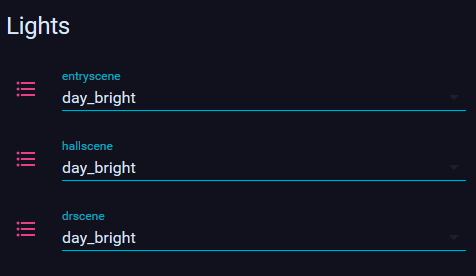
any suggestion on how to make input selects look nicer? this is the default and it looks pretty ugly: https://staging.conwaytraining.com/lights.png
 twilit cloud
maybe a better way to ask would be: Any suggestions on a quick, compact way to allow changing between scenes?
wheat current
A row of buttons with different icons
 odd light
recording cameras with your HA box will require a pretty beefy box.
velvet marsh
Hi all hope you doing well. Can someone point me in the correct direction in lovelace how to show when last binary sensors were last triggered. eg for motion detectors
split granite
There's a few ways of doing that, but it's either a custom card, or a template sensor, that you'll be using
I use the Home-Assistant-Lovelace-HTML-Jinja2-Template-card and a template (as you'd expect from the name)
split granite
Ooooh
Well, that one wins, by default
{{ relative_time(states.binary_sensor.WHATEVER.last_updated) }} ago
when you want to use custom cards, is it generally just a matter of adding some stuff to your lovelace config and copying a file?
kind shellBOT
Home Assistant Community Store is the successor to the old Custom Updater, and can do so much more - you should check it out.
Command '~hacs' was invoked by: Tinkerer
split granite
It's generally a case of seeing if HACS supports it 😛
wheat current
Basically, yes
split granite
HACS will do some parts for you, and walk you through the rest
velvet marsh
thanks guys!
You can actually just add: secondary_info: last-changed under the entity you dont need a template or custom card.
mild veldt
@polar kelp plans to add other row types to the template row? Namely a toggle row?
 tight plank
so fairly new to home assistant && lovelace specifically; I am at a point where I integrated google calendars; and have downloaded the google calendar card custom card via HACS here: https://github.com/ljmerza/calendar-card
I would like to add the following to my ui-lovelace.yaml file; but I can't seem to get it right.
title: "My Calendar"
progressBar: true
entities:
- calendar.ljmerzagmailcom```
I am curious where to put it. polar kelp
Maybe.
kind shellBOT
@tight plank posted a code wall, it is moved here --> https://paste.ubuntu.com/p/WCQKFWMByY/
split granite
~rule6 @tight plank
kind shellBOT
@tight plank Rule #6: Spam will not be tolerated, including but not limited to: self-promotion, flooding, codewalls (longer than 15 lines) and unapproved bots.
Please take the time now to review all of the rules and references in #rules.
Command '~rule6' was invoked by: Tinkerer
tight plank
@split granite Ty. does hassbot show everyone or just me? should I repost the pastebin link?
split granite
It shows for everybody
It takes your mess, shuffles it off to the side, and leaves the message there to remind everybody to play nicely 😉
tight plank
sounds good 😄 I wasn't aware of the rule, I knew there was a bot to convert it so just threw it up there.
split granite
See, that's why #rules exists, and all new joiners are directed to read it 😉
~welcome @tight plank
kind shellBOT
:pray: Welcome to the Home Assistant Discord Server!
@tight plank Please read #rules
For sharing code, please use https://www.hastebin.com
If it is less than 10 lines of code, make sure it is formatted using below format:
```yaml
code
```
Command '~welcome' was invoked by: Tinkerer
smoky depot
never clicked channel even once for full disclosure lol
split granite
🤔 People still get issued souls? Wonder where mine went then
smoky depot
layaway
vapid field
how can you read an entity's attribute in lovelace: binary_sensor.door_front "temperature" attribute?
binary_sensor.door_front.temperature obviously does not work
split granite
Generally speaking, you'll need to create a template sensor
vapid field
thanks
 modern plume
Does anyone know if it's possible to only show elements in the sidebar depending on which user is connected to HASS ?
odd light
so I installed the roku card through hacs, It gave me config/www/community/roku-card do I need to create a local folder in there and get things like /local/netflix.webp?
kind shellBOT
@grim compass posted a code wall, it is moved here --> https://paste.ubuntu.com/p/XBcGQWBpsF/
 grim compass
Hi there, I am trying to setup a new lovelace path but it is just not displayed without any error and I am out of ideas. I did tried to copy entites to another path and I see, at least an error message. (see previous paste)
mild veldt
@odd light /local === /www
odd light
ahhh
vapid field
views:
  - path: battery_status_view
    title: Battery Status
cards:```@grim compass see my example above
grim compass
@vapid field ? My other paths are owrking :/
I do include them using a lovelace/ directory, thatś why I don specify views
odd light
and find those files?
kind shellBOT
@grim compass posted a code wall, it is moved here --> https://paste.ubuntu.com/p/sCw757g2db/
odd light
Talking to @mild veldt
or really anyone who knows about the roku card
it doesn't tell you how to get the images for the app buttons
ancient harness
@odd light have a link to what you're using? I might look into it soon as well since i have a few roku tv's
odd light
its the roku custom card in HACS
it shows a bunch of options that seem to be already configured like the arrows and stuff
I've set up netflix and slingtv apps, but the pictures for the buttons are missing
none of the links in the descriptions in the docs go anywhere lol
ancient harness
ah i haven't bothered with HACS yet
 elder pendant
You have to find the images for app buttons on your own. The easiest place to put them is somewhere in your www directory
You define the location in the apps config https://github.com/iantrich/roku-card#app-options
smoky depot
i wish the roku thing could show whats currently playing ect lol and not just what the app is
elder pendant
🤷 that's a roku api limitation
smoky depot
yea they gimped the api lol
odd light
does anyone have a link to the files, I'm sure someone who is using it found them?
smoky depot
google fu
odd light
yeah I'm looking
but, if anyone has them already, because I'm coming up bupkiss, I'd be much obliged lol.
smoky depot
noone would have all of them cause not everyone has all the same apps lol
 somber hare
Hi all, does anyone knows if there is a way of adding http headers for the calls in the lovelace iframe card or for the panel_iframe feature?
and have these headers set with values in the configuration
@smoky depot thanks for the feedback regarding not being possible.
smoky depot
it IS possible through elaborate means lol
but that you'd have to setup seperate and google on your own
somber hare
yeah...one thing I thought of is through a translation in nginx, from a request parameter, into the header value on the backend service
smoky depot
yea it would all have to be done prior to entering HA
odd light
I mean the major ones like netflix, anyways my remote isn't doing anything, odd.
somber hare
yes, in my scenario is the other way around: I have an iframe card that points to the vacuum cleaner valetudo UI. It has basic authentication. If I would provide the authorization token in the request placed by lovelace to load the iframe, I would not need to manually authenticate
odd light
I think I know why
somber hare
so mapping from the request parameter configured in lovelace into the Authorization header will eventually work, even though is slightly elaborate
smoky depot
one of the integrations for tp link I think or something (was an older 3rd party type thing) used a method injecting the authorization using javascript I believe that allowed HA to stay connected to the router. You can look that up and see if that is something you might be able to customize for your own needs @somber hare
somber hare
thanks @smoky depot, I'll look into that too
smoky depot
@odd light welcome to open source
odd light
I know right
smoky depot
does the git for the card not give any clues? I haven't really looked at it
odd light
it looks like you just map the buttons from here https://www.home-assistant.io/integrations/roku/
like back command is back, but it seems kinda dumb not to include all that in the card by default
and then people can change it
so now I am tediously mapping buttons
Like
back:
  tap_action:
    action: call-service
    service: remote.send_command
    service_data:
      entity_id: remote.living_room_roku
      command: back
but you have to do that for every button
I know beggers can't be choosers but geez
 gilded veldt
does anyone know how to allow a gif to show on the ui only when some entity triggers it?
i am trying to get an alarm clock to show anytime my alarm goes off
odd light
got it all set up, sweet just need to find pictures for the buttons.
That's done, I'll find pictures for the buttons later, are there any cool custom cards for amazon echos?
how about any cool cards in general. 😄
odd light
Besides https://community.home-assistant.io/c/projects is there any other places for seeing HA examples of lovelace and stuff?
 heavy cove
ok.. so I suck at understanding documentation but I'm trying to get a button that changes the TV source to 'netflix'.. I wrote this code but it seems i got it wrong.. what am I supposed to have?
image: local/images/netflix.png
tap_action:
  action: call-service
  service: media_player.select_source
  entity_id: media_player.tv_bedroom
source: Netflix``` - image: /local/Netflix.webp
app: Netflix
hold_action:
action: call-service
service: media_player.select_source
service_data:
source: Netflix
type: 'custom:roku-card'
entity: media_player.livingroomroku
tv: true
apps:
  - image: /local/Netflix.webp
    app: Netflix
    hold_action:
      action: call-service
      service: media_player.select_source
      service_data:
        source: Netflix
then just copy from - image to source: and edit for the next app
I'm screwing with pictures trying to make a netflix webp but it puts white bars down the sides, annoying
everything works though
if you get pictures lemee know, I'm doing netflix, slingtv, disney+ and primetv
got it
lol
heavy cove
isn't that the same as what i have?
what is different with the roku-card?
ooo i see the difference
heavy cove
I have the card type as a "picture"
won't that work though?
image: local/images/netflix.png
tap_action:
  action: call-service
  entity_id: media_player.tv_bedroom
  service: media_player.select_source
  service_data:
source: Netflix```all I am wanting is a photo of netflix... I press that and netflix comes up on my TV
odd light
oh
okay yeah
lol
I think the bottom is wrong
hold on
just source: Netflix
no service_data
heavy cove
it errors saying "required key not provided @ data['source']"
 unkempt steeple
odd light
unkempt steeple
odd light
is your spacing right?
unkempt steeple
met.no integration came preinstalled, so it's not necessarily a requirement
it actually locks up my entire brave browser
I can't even click on tabs
heavy cove
image: local/images/netflix.png
tap_action:
  action: call-service
  entity_id: media_player.tv_bedroom
  service: media_player.select_source
source: Netflix``` Thats what Ive ended up with but still no go"Failed to call service media_player/select_source. required key not provided @ data['source']"
 tired quail
I wish secondary_info supported custom text with templates 😦
mild veldt
@heavy cove entity_id is not a valid option for tap_action. That should be under service_data
e.g.
type: picture
image: local/images/netflix.png
tap_action:
  action: call-service
  service_data:
    entity_id: media_player.tv_bedroom
  service: media_player.select_source
  source: Netflix
on the bright side i broke somethign and now lovelace just keeps making the chrome process take 100% cpu until chrome kills it
unkempt steeple
lol that's what I'm experiencing on a fresh install
heavy cove
@mild veldt that still didn't work.. still getting the same error code
mild veldt
source too should be in service data @heavy cove
tired quail
what on earth
if i navigate to a page with layout-card and then try to navigate to a different page the browser process just shoots up to 100% cpu
but it was working fine yesterday and nothing has changed with layout-card since then
heavy cove
@mild veldt yay.. that worked.. thanks
 toxic pelican
Anyone know how the heck to make an actual grid layout?
I tried making everything into one card with a vertical-stack as the root element, but it doesn't fill the whole width of the window
And just using the default dynamic flow layout sucks because on one screen it'll look fine (which is already a pain) but on any other screen it looks terrible
tired quail
check out layout-card
it may do what you want but the latest version of it is freezing my browser 🙃
rolled back from v7 to v6 and it's working OK though
toxic pelican
Where's the documentation for that?
tired quail
correct
toxic pelican
Would you recommend this HACS thing?
tired quail
yes
HACS makes installing custom lovelace cards super easy
and custom integrations too
and you can one-click update them when updates come out
toxic pelican
Awesome, I didn't know about this 😄
Is it supposed to take forever when I click to add the HACS integration under Configuration -> Integrations?
Oh and then it just went back to the integrations list
heavy cove
How come my image has all that white space and a bullet point on the left hand side?
OK.. so I found out what is causing the big space on the side.. it was the image itself.. but now.. I've shrunken the image and cropped it.. but now I have this big ass "N" on my page instead.. HA seems to have stretched it image... the image is small.. how do i constrain the size of the image shown in HA?
heavy cove
the image is only 68x116 px
smoky depot
this the roku thing?
heavy cove
yes.. but i'm not using a roku 😛
smoky depot
your just trying to display an image?
heavy cove
yes.. just displaying an image.. the switching of devices now works fine
just to give some perspective: https://imgur.com/a/39UC2N5
smoky depot
if your trying to "fit" the image in so that it's height and width match whatever you have it along side you should adjust it's size accordingingly prior to going into ha with it
heavy cove
yes
smoky depot
yes to which?
heavy cove
it's on it's own tab.. but not in a vertical stack
but before it.. there is a custom-card on the previous tabs
heavy cove
just the "picture" card
smoky depot
try this using this, https://www.home-assistant.io/lovelace/picture-glance/#aspect_ratio
you can use number like say 50 instead 16x9 ect
and adjust accordingly
toxic pelican
Is there any way to display badges when using layout-card in panel mode?
heavy cove
hmm.. that means that I have to reprogram the card
because I don't actually want entities in it
i'm not sure how i would work that
smoky depot
what do you mean reprogram the card? lol
oh nm
I see
trying to think of what card you could place the picture card into that would give you that sizing control
you could use something like https://github.com/thomasloven/lovelace-layout-card
heavy cove
picture-entity does the trick
smoky depot
ah
heavy cove
haha.. well done.. you were close though
smoky depot
well there are always options, just depends how far someone wants to go with it lol
heavy cove
I think I need to make some kind of template and stick the buttons on it so they are all the same size
heavy cove
hahahaha... don't you hate that
smoky depot
i'm distracted tonight lol
heavy cove
https://imgur.com/a/dFlpO1G <-- I don't know about you all... but this to me.... is a really big BUG
smoky depot
lol
heavy cove
what service am i calling to turn the media player off?
entity: media_player.tv_bedroom
aspect_ratio: 50%
image: local/images/power.png
show_name: false
show_state: false
tap_action:
  action: call-service
service: media_player.turn_on```i have no idea what i am doing lol
  action: call-service
  service_data:
    entity_id: media_player.tv_bedroom
action: media_player.toggle``` is what I have so faryou can find a list of every service you can call in config > services tab
smoky depot
I don't have any media cards so I can't give you experienced answers lol
smoky depot
are you using the ui to make these cards or doing it yaml?
smoky depot
I don't believe you need that secondary entity_id in there
heavy cove
Failed to call service media_player/toggle. must contain at least one of entity_id, area_id
smoky depot
tap_action:
  action: call-service
  service: media_player.toggle
  service_data:
    entity_id: media_player.tv_bedroom
try that
i'm swapping between channels and discord servers so I may get confused lol
heavy cove
ohhhhhhhh that's what it was
atomic glacier
<iantrich> if your still up, you'd better put your sunglasses back on 😎 🤣 just a tad colorful this time...https://community.home-assistant.io/t/dinotechs-mobile-designs-4-new-themes-jan-06/143180/10
https://youtu.be/o9ezYaE2avo
ancient harness
i can't wait to get into themes
i have one i modified from another, but i have "plans"
 smoky depot
badges 🤢
ancient harness
i'm workin on it ok?
but honestly as often as the HA app shows me away it's a nice quick glance
this is still mostly default, i moved to custom, but not yaml mode yet
i've been avoiding a lot of stuff until i can get all my switches installed... tore up my wall today :S need to repair it some
smoky depot
used a hammer instead of screwdriver installing new switch? hehe
ancient harness
basically
had to remove a 2-gang box and move to a 3-gang
was more of a PITA than i expected
but, now that i know where the tabs are to nail it into the stud, i can use my oscillating tool to rip through the other one i need to do
ancient harness
yeah but i don't like that
wheat current
So... You prefer hole-in-wall instead?
ancient harness
i like the sleeper look
lol, yes
it's just some chipped away drywall around the box
all i know is i HAD to get away from this garbage https://i.imgur.com/ZgV11lc.png
 smoky depot
I have these on just about evrey fan in my house http://www.lutron.com/en-US/Products/Pages/StandAloneControls/FanControls/Maestro/Overview.aspx
they aren't "smart" switches tho
I like them cause they don't require a canopy to be installed
find taking the fan down and putting it back up to be one of the last things i want to do more than once lol
ancient harness
yeah i mean, that doesn't look bad, but i just like dedicated switches for some reason... and i TOTALLY agree with dealing with fans... this is the 3rd one installed (yesterday) and it's ticking internally already... going for a 4th
 indigo mirage
Morning, I have added a group as a badge. The group is a group of "family members" which groups device trackers. Is there a way I can change the icon to be the same as the person icon? Also can change the text? Persons are shown as "Home" / "Away" but this shows "home" or "not_home". Thanks in advance.
smoky depot
@indigo mirage you can change the icon for any entity through Configurations > Customizations however you gotta setup the customize.yaml via https://www.home-assistant.io/docs/configuration/customizing-devices/
if you had not already
indigo mirage
Thanks @smoky depot will take a look.
indigo mirage
When changing configuration using Configurator, do I need to reload hass or just reload core ?
smoky depot
restart hass
indigo mirage
Thanks. So I've done all of that. The badge displays "not_" presumably for "not_home" but when I click on it I see the mdi-account-multiple icon (which I have specified as mdi:account-multiple). Is there a way to force the badge to use the entity icon?
smoky depot
the badge is displaying the icon thats set for the entity, the entity you customize through the customizations
yit shows you state
nm i'm tired lol
 short edge
@heavy cove I was having the same problems with my call service. It seems they made a few changes to how it works.
heavy cove
@short edge I got it to work.. but I have no idea what I did differently
short edge
Me either. I just kept at it until it worked but I can't tell the difference between my new code and all the old ones
smoky depot
@indigo mirage a quick search doesn't indicate that it's possible to change what a default badge displays however if you read this it gives some workarounds. https://community.home-assistant.io/t/badge-state-image/111192/17
@heavy cove sounds like glitch coding hehe
heavy cove
The only thing I remember doing was testing the service "notify.notify" and it worked through the android app... but then i gave it the same data that i gave "notify.pushover" and i got the same error... after that... i tried again and it worked on both devices.. one with pushover and the android app for HA... so I tried "notify.pushover" with the exact same data and it has worked ever since
heavy cove
haha .. thanx
indigo mirage
@smoky depot thanks will take a look shortly
 haughty gorge
@atomic glacier love your new themes. How would I go about installing them?
atomic glacier
@haughty gorge Thanks, the installation is the same as any other theme, https://www.home-assistant.io/integrations/frontend/ should get you going. Not at a computer now, but let me know if you have any problems, also there are a few good YouTube videos on setting up themes in HA
vapid field
just found out: copy raw -> pasto to bbedit -> edit (with tabsstop 2!) -> copy from bbedit back to raw doesnt work. it looks absolutely the same, but tabstop and spaces are not the same, even if it looks the same. what a crap. so i got a yaml error who i couldnt find - of course not when it looks the same.
solution: replace \t with ' ' and paste it then works.
im really waiting for a frontend designer, whre you can place elements like cards in a grid and done. is such planned? espacially making horizontal/vertikal-stack is a pain in the a.
atomic glacier
lovelace-layout-card uses grids now @vapid field should take a look
vapid field
whaaaaaaaat?!?! i didnt know that! and im frickeling around for 3hrs to find a invisible error i didnt make... ok, lets have a look! tnx for the hint!
yah okay... still no user interface with drag&drop action of elements, but anyways i give em a try.
naah. is bs too as far as i saw by now. made a horizontal layout who is displayed vertical for most times, and need to use panel mode with is not editable anymore (exept in bare raw) cause there is no edit button anymore. no, doesnt work for me this way -> delete it.
...and its almost the same work as by doint it with the usual type horizontal-stack. so, wheres the adventages?
atomic glacier
There are few, but necessary rules for yaml. I learned a lot from here and it made life a bit easier for my coding --> http://thomasloven.com/blog/2018/08/YAML-For-Nonprogrammers/ and not to say you are not a programmer, but this covers the differences in yaml formatting, etc...
mild veldt
@vapid field it's 'bs' because it doesn't have a feature rich drag & drop system...? yeah...okay, dude. you realize people do these things in their free time for the community, right? pretty annoying to hear someone talk like this
velvet marsh
how do most people actually do device trackers ? I dont find the router entity for checking via dhcp last active very reliable as phones go into power saving mode. what do you recomend ?
mild veldt
@velvet marsh #330944238910963714
velvet marsh
oh yes thanks
vapid field
@mild veldt no, its bs cause it doesnt make too much sense replacing typework with similar typework. This has nothing to do with all the hard work and effort peoples spend in to this project wich i appreciate very much and i support (not only with critism and bad words). Why i do wish a drag&drop? Shouldnt be ha not userfriendly? Configurable without typing? Easy to understand and simply to configure? It is this what users want. Espacially not the ones who did masters MIT, are willing to learn yaml, json, some api‘s and you name it. Thats the biggest lag of ha. A pretty fine stable and good way for homeautomation tasks. But the way to make it work is way too long and complicated. But: its getting better and better from version to version wich is the best progress i can see - and its the right way.
So, hopefully my attitude is declared with this.
mild veldt
@vapid field I don't question the desire for drag & drop, just the dismissive attitude you seemed to portray to anything but that. Developing something like that is obviously ideal, but this is, again, a project almost entirely built by volunteers; so someone who has the abilities to develop that would have to want to spend their free time adding such functionality.
vapid field
@mild veldt ok, so lets make peace my friend and look forward that our all wishes are fulfilled sometimes (and a drag&drop interface 🙂 )
 formal tide
is there a <video> card available?
I have a directory full of video files archived by month and would like to integrate that to HA
I'd like to have some sort of collapsible list for the months (containing a video for each day)
and play them in a card when selected...
Do I need to use a iFrame? (the files are perfectly playable by browsers, mp4 without audio)
elder pendant
iframe card is the easiest way
vapid field
Does anyone know here if it is possible to prevent an icon of a light is changing according to the color of the light?
formal tide
@elder pendant thanks, do you have a tip for displaying a iframe in panel mode with 100% height on mobile?
https://imgur.com/a/uay3fvD
and can i make the iframe transparent? Don't think so 😛
elder pendant
You can try card mod
 errant birch
I've been trying to get something working but have had 0 success..
I use mini-media-player for showing my media players, but I'd like to hide the ones that are "off" or "unavailable" or "standy".. is there any way I can do this ?
I've tried auto-entities and entity filter but none seem to do what I want
elder pendant
 full sand
In HA integrations there's the shopping list, here you can read:
"The shopping_list integration allows you to keep track of shopping list items. Includes the ability to add items via your voice using the sentence “Add eggs to my shopping list”."
Can I integrate this with Google assistant voice commands?
errant birch
@elder pendant so If i understand correct I shoud create one of those conditional cards per media player ?
formal tide
https://imgur.com/a/TcggOLn
thanks @elder pendant @polar kelp
full sand
@errant birch
      - card:
          entity: media_player.tv
          type: media-control
        conditions:
          - entity: media_player.tv
            state_not: 'off'
          - entity: media_player.tv
            state_not: unavailable
        type: conditional
This is my setup to hide those that aren't active.
mild veldt
@errant birch auto-entities should be able to handle that. What did you try?
errant birch
how exactly do I get the "mini-media-players" card displayed with auto entities ?
I'm not sure how to go about it
mild veldt
You have to out them in an entitiies card
I can give an example when I get out of this meeting in an hour
errant birch
perfect ! txs
mild veldt
@errant birch
card:
  show_header_toggle: false
  type: entities
filter:
  exclude:
    - state: 'off'
    - state: unavailable
  include:
    - domain: media_player
      options:
        type: 'custom:mini-media-player'
show_empty: false
type: 'custom:auto-entities'
@full sand there are service calls to add/complete items. So you could probably integrate it via Google Assistant -> IFTTT -> Webhook service call
errant birch
@mild veldt thank you
would have never figured that out myself.. still a lot to learn ..
 raw cape
I'm think I've seen somewhere that you can align entity buttons to the right side of a picture-glance card without adding CSS rules, but I can't seem to find it again. Is it possible without CSS, or should I mess around with some CSS? This is what it currently looks like; https://i.imgur.com/CZvKhTn.png and I want those 2 buttons to move to the right
 polar kelp
The position of the picture-glance buttons depend on their type. Switches and lights (iirc) go to the right, sensors in the middle.
raw cape
Hmm, both of them are scripts with a tap action that triggers them
 winter blade
Can anyone help me, these are both scripts. The second one is a script with a delay. How do I change that to an execute button just like the first one? http://werra11.eu/i/07-01-2020_23:04:50.png
 split granite
Don't have a delay
winter blade
But I need a delay
split granite
Then you get a toggle/switch
split granite
Develop your own custom card
winter blade
Won't be very helpfull I think, Need it for use inside a scene
split granite
The use of a scene has nothing to do with the UI
The underlying service call is no different
The UI shows it differently because if it doesn't have a wait or delay, you can't stop it running
If it does, you can
polar kelp
You could make a second script which calls the one with the delay
polar tendon
Why does the vertical/horizontal card not extend round the name.
Seems it drops the name onto the background of the view.
Looks Messy
polar kelp
screenshot?
polar tendon
polar kelp
Oh. That thing
You may want to try this instead https://github.com/custom-cards/vertical-stack-in-card
odd light
I like it
solar marsh
Is it possible to make something like this combined into one card but with lights?
https://ibb.co/C69xwTp
smoky depot
@solar marsh with enough researching and doing you can make just about anything you want work
polar tendon
Thanks
solar marsh
i feel so dumb right now xD just doing exaclty the same as with shutters to jsut use entetie cards...man xD
 mild hornet
Trying to work with picture-entity to create an icon over a floorplan that will open something like a glance full of entities within that room. Does that make sense? Any suggestions? Very new to this
atomic glacier
lovelace-browser-mod popup card, perhaps? @mild hornet
mild hornet
I'll take a look, thanks
Possibly dumb but related question to help me understand this - is it possible to call a glance or some kind of popup card from a tap_action?
odd light
not that I know of, not unless you're doing it from some custom card that can do that.
Does anyone know of some good places to get inspiration for stuff to do in lovelace?
mild veldt
@mild hornet from a pop-up, you'd have to dismiss the current (possible with browser mod) and then open the new one. So a script
atomic glacier
browser mod used from a scripted popup has a close_popup feature, that basically closes the one open before it opens the one you clicked on. Thus making it possible to open a popup form an already opened popup. Cool feature Thomas added when the major overhaul took place 👍🏻
@odd light There is a lot out there in the forums and also others repos. Where I got a few ideas 💡
odd light
yeah I'm looking around
 feral rivet
Hey I am a begin to configure my frontend and I want to start with a calendar. I am see a lot of projects others have built, but nothing in the tutorials. I was hoping to use the UI to set things up.
mild veldt
@feral rivet tutorials quickly become outdated
There's not really a good calendar in the core lovelace
but there are some good custom cards
I would recommend getting HACS to start for installing/updating custom integrations/cards
Once you have that setup, you can search the Plugins for calendar cards
feral rivet
Ok got it
feral rivet
@mild veldt Currently I don't have a love ui.yaml file in my setup should I create one?
mild veldt
No
feral rivet
So no edits via yaml?
polar kelp
Actually, iirc, just opening a popup with browser mod should close the previous one now (I think). That should even enable popups from popups (not nested, though).
errant birch
I'm using the "atomic-calendar" card and displaying this on a kiosk, but when a calendar event gets tapped it takes us to the google calendar website and without a back key (chrome in kiosk mode) we're stuck there
any way I can prevent the calendar from doing this ?
 livid oracle
HI guys, just switched over to yaml mode, my discovered devices have disappeared is that normal?
lost alot of sensors.
I guess then the next question has to be are people staying with doing the lovelace in the UI?
full sand
Hey pros, I'm trying to configure the setup in the picture I'll post below and it's not working as intended. I can't figure out the correct mapping to achieve this, any tips?
https://pastebin.com/y3XyMtq9
this is what i want to achieve: https://imgur.com/a/cWHSh8p
split granite
YAML mode requires you to manually manage your UI entirely @livid oracle - unless you've a really good reason, don't use it 😉
modern plume
@full sand what's with the last type: horizontal-stack line
livid oracle
@split granite Reason I switched was to use some of the pop up button features.
split granite
You can do that in the UI
livid oracle
I was told I had to switch to yaml mode
split granite
Who told you?
livid oracle
I saw it on the forums
split granite
That's likely noise then 😉
livid oracle
hahaha ok
split granite
Other than using secrets or YAML anchors, there's no good reason to use YAML mode
full sand
@modern plume You're right, that one has to be removed, ive added type: horizontal-stack at the top to be more simple but forgot to remove the one at the bottom. Still i'm getting bad mapping 😦
livid oracle
modern plume
i think under every - type: horizontal-stack you still need to do cards:
so on line 29 @full sand
  cards:
  - type: vertical-stack
    cards:
- aspect_ratio: 0%```thanks alot, now I know why my mapping was off.
polar tendon
I had an issue with the title of a horizontal card header not being maintained with the card. It looked messy https://ibb.co/b1ZFxgK and someone very kindly suggested vertical-stack-in-card but that doesn't seem to play nice with either card-mod or button-card.
However I just came across a post in the community that suggested using the entities card as a replacement for the vertical stack and it seems to work pretty well.
mild hornet
Re: the conversation above about using UI instead of YAML, I thought I had to use YAML in order to call resource files (.js) to add things like browser-mod. Is that incorrect?
polar tendon
Badge styling is nice @polar kelp thanks!
polar kelp
@mild hornet You can add them to the RAW editor. See gif here: https://github.com/thomasloven/hass-config/wiki/Lovelace-Plugins
And browser_mod isn't a lovelace thing anyway. It's an integration.
polar kelp
@polar tendon That trick is explained further here: https://github.com/thomasloven/hass-config/wiki/Misc-tricks#cardelemententity-row-triality
 violet swallow
Curious, what would people rate better: Picture Elements Cards, or Floor Plan when creating their own Floor Plan. I'm currently using Picture Element Card for my designed floor plan, but not sure if this is the best way to do this?
polar kelp
Whatever works best for your case and is easy to maintain.
polar tendon
Nice thanks.
 devout hatch
I want to use some kind of lock https://github.com/iantrich/restriction-card
just a question, this lock is can be used only on cards? not on whole tab?
for example if I have tab Settings I would like to add just on tap Settings tab
not for each card in this view/tab
thanks
mild veldt
@devout hatch yes, cards/rows only
use https://www.home-assistant.io/lovelace/views/#visible to restrict tabs
devout hatch
ok. thanks @mild veldt
and another question, I want to add secondary row with some decsription to my entity switch, but that switch is in alist of entitias in cards section
          - type: entities
            title: Switches pre-Trafo
            entities:
              - input_boolean.bed_time
              - switch.bedroom_led_light_trafo
              - switch.living_room_above_tv_led
          # - type: entity
          #   entity_id: switch.living_room_above_tv_led
          #   type: "custom:secondaryinfo-entity-row"
# secondary_info: "<b style='color:red'>[[ sun.sun.entity_id ]]</b>"```switch.living_room_above_tv_led I want for that entity to add secondary info, and my question is that possible in custom:layout-card, in cards which takes all of entities as a list?
sacred gulch
Is there a way to use browser_mod to show a custom popup box (already have this part working) that is a basic yes/no? The no would do nothing and the yes would turn off multiple lights?
Basically I have a mode, that when pressed on Lovelace, will toggle the mode and in addition I also want a box that says "Do you want to turn off all lights?"
mild veldt
@sacred gulch yes
type: vertical-stack
cards:
  - type: markdow
    content: Do you want to turn off all lights?
  - type: horizontal-stack
    cards:
      - type: entity-button
        entity: script.dismiss_popup
        name: No
      - type: entity-button
        entity: script.turn_off_all_lights
        name: Yes
use scripts so that you can include the dismissal of the popup
sacred gulch
You mean the dismissal happens in the script?
I was able to dismiss the popup using browser_mod's dismiss popup
                    content: Do you want to turn off all lights?
                  - type: horizontal-stack
                    cards:
                      - type: entity-button
                        name: No
                        entity: input_boolean.mode_movie
                        tap_action:
                          action: call-service
                          service: browser_mod.close_popup
                          service_data:
                            deviceID:
                              - this
 neat vector
If i got a lamp which needs 3 bulbs. What is the best way control it as one bulb?
kind shellBOT
Command '~light.group' was invoked by: Tinkerer
neat vector
Thanks bot
mild veldt
@sacred gulch but you can't do multiple actions without a script e.g. turn on lights and dismiss the popup
But yeah, for "no" you don't need a script
sacred gulch
Haha I literally was just researching that, I realized that issue on my accept button.
odd light
okay so I figured out how to pull the attribs I want from my zwave devices, friendly name, query stage and battery level, is there a nifty card for displaying all 3?
sacred gulch
Now my issue is I need to pass the browser_mod deviceID over to my script. If I hardcode the variable passed to the actual ID, it works. But if I try and use the browser_mod's current deviceID (aka this), the variable seems to pass the word "this" and not the actual deviceID
sacred gulch
Got it, it was a formatting issue. Didnt like a list for some reason
 steep knoll
Is there anyway to show the current user logged in a lovelace card?
mild veldt
@steep knoll yes, markdown card should be able to do that
steep knoll
@mild veldt I tried with markdown card using {{user}} I got nothing back
mild veldt
i lied, markdown is backend templating; jinja2. so you'd need something that does templating on the front-end or exposes the user variable
config-template-card or custom header are two that I can think of off the top of my head
...don't do it, thomas
🤣 he's going to tell me I'm wrong
polar kelp
I was going to tell you you are right. Markdown card only did that in my version, while I was experimenting with the jinja templates.
mild veldt
🎉
steep knoll
Ok thanks I'll look into that
mild hornet
Can anyone suggest the cheapest raspberry pi to pair with the 7” touchscreen to exclusively run a Lovelace interface in kiosk mode (smoothly)? Should I just go with a 3b 1gig ram?
polar kelp
🎉 State-switch with jinja2 templates! https://github.com/thomasloven/lovelace-state-switch/releases/tag/4
sacred gulch
Is there a way to have templates in Lovelace? I want to do a simple if statement, if a bool=true, then display card A, else display card B
 muted inlet
Conditional cards combined with a horizontal/vertical stack for something simple like that is what I do
Otherwise I think there's a custom card
mild veldt
@sacred gulch or the card referenced directly above your message
muted inlet
Oh lmao
I think there's a custom card... somewhere
can't quite put my finger on it...
polar kelp
lol
 rose garden
Hello
I have 2 TV controlled by mqtt
I want to have a switch on lovelace that can select when I press volume up to which device the mqtt is sent
Is it possible?
 proven vector
Hi, I'm new to this channel and also lovelace (i run HA since 8 month). I want to integrate a UI i saw in a demo but my first try was not a succes. Is there a web site that can be useful for newbe of lovelace? thanks
vapid field
Hi. Having trouble understanding the basic syntax/architecture of home assistant automations/scenes/entities, etc. I've read a bunch on the HA wiki, but it's still not clear. Maybe someone here can help. As an example, I'd like to create a button (some form of manual trigger) that I can activate that would then tell my sonos music player to play something. I've tried creating entities but those don't seem to be able to be created manually. I've tried scenes, but I can't figure out how to have them change state from something to another something. I can't seem to use automations without first having some form of button, but can't create the button until it has an action of some kind. It's like a chicken / egg problem and I'm feeling kinda dumb. lol. Anyone know what the magic pill is that can help me see how these all fit together? 🙂 Thanks so much.
mild veldt
@proven vector the demo site is a good starting point
@vapid field not a question for here. Try #330944238910963714
@rose garden yes you can make a service call from a button
rose garden
@mild veldtany example available?
mild hornet
Finally set up browser_mod - great suggestion. It's showing my media player pretty strangely though. Just a line of text (b56576a1125540a9a9b476acaec812c701191284_en_-_google_translate.mp3) and then a play button that doesn't do anything rather than the player that normally appears. Any suggestions?
mild hornet
Oh so the line of text is a "song" I figured out. So basically the browser_mod popup is showing a playbutton with no other options... Any way to get more of the options that come with a media player normally?
atomic glacier
mini-media-player has quite a few options
mild hornet
I'll check it out, thanks!
atomic glacier
Works well in a popup too
mild hornet
Oh sweet, so I use that in place of an entity within the popup service?
mild hornet
tap_action:
action: call-service
service: browser_mod.popup
service_data:
title: Living Room
large: true
card:
type: entities
entities:
- media_player.gym
So essentially the issue is the - media_player.gym entity though, right?
rose garden
I neer help
kind shellBOT
@rose garden posted a code wall, it is moved here --> https://paste.ubuntu.com/p/Gd7S99Wj3F/
rose garden
It says no card type configured
mild hornet
Hopefully the pros help you, but did you just add custom:state-switch? If so you need to restart your system
odd light
I made a sensor template for my door sensors, and gave them a door icon, but there is no device class to make them turn yellow when they are opened up it seems?
rose garden
Yes. That is working...
odd light
in the customize part of the gui I get some device classes to choose but none make sense for a door
mild veldt
@mild hornet you do not need to restart after installing custom cards
@rose garden your syntax for the state switch is wrong
Each state expects a card object
rose garden
Yes I know
mild veldt
So you fixed it?
mild veldt
Well you can't have a bull card
rose garden
I'm testing the one that has ode
mild veldt
*null
mild veldt
And the second one is a list, instead of a single card
mild veldt
👍
atomic glacier
🤔hmm...was checking my repo and it seems I have a few rogue bull cards you were referring to <iantrich> 🤪...guess they gotta go
livid oracle
@atomic glacier Happy New Year! Question for you I am trying to replicate my Control4 UI with HA you can see with my screen shot they have the views navigation in the pop up, and some various menu items at the top and bottom on all screens. How would you suggest I replicate this?
hmmmm
I guess I have to use pastbin
I will send a private message
livid oracle
@mild veldt Perfect thanks
atomic glacier
@mild veldt ☝🏻 "Well you can't have a bull card" IDK why, but it cracked me up for some reason, 😂
@livid oracle answered in DM...
 viral sorrel
is there any way to get a value from a text sensor into the mini graph?
mild veldt
create a template sensor
vapid field
Hey, Anyone able to help me out with a icon_template on "custom:button-card"? I haven't been able to get it to work.. clearly not doing it correctly
I think my statement is correct, I just don't know where to place it ..
      {% if is_state('states.fan.dysonfan.attributes.["auto_mode"]','false') %} mdi:fan
      {% else %} mdi:fan-off
      {% endif %}
I am on - https://github.com/custom-cards/button-card#Available-operators but no luck..
smoky depot
@vapid field you don't use {% %} in the button card. You just use [[[ ]]]
most of mine will be something kind of like this,
vapid field
ah
i just saw on the bottom of that page , so I was just writing up this to try..
        state:
          - operator: template
         value: >
            [[[ return states['states.fan.dysonfan.attributes.auto_mode'].state === 'true' ]]]
         icon: mdi:fan
         - operator: template
         value: >
            [[[ return states['states.fan.dysonfan.attributes.auto_mode'].state === 'false' ]]]
         icon: mdi:fan-off
[[[
  if (states['sensor.st_patricks_holiday'].state == "active")
    return "rgb(66, 134, 244)";
]]]
yes you got it
viral sorrel
@mild veldt how do you create a template sensor inside a mini graph card?
formal tide
@viral sorrel you create your own sensor from your sensor with a template and use that in the graph
sensor:
- platform: template
sensors:
viral sorrel
but it's TEXT :/
smoky depot
@viral sorrel could you elaborate? maybe post an example of what you get and what you want it to display exactly?
viral sorrel
I can't get anything because as far as I can tell mini graph does not support text sensors at all
smoky depot
if it's not a number then yea lol
viral sorrel
so my original question was whether there was a way to somehow get a text sensor into it.. just as a label basically.. I know all sorts of magical plugins exist that can potentially modify existing cards
smoky depot
Not with the generic graph, you'll have to go custom card for something like that. Especially if your just looking to dynamically change a "label/name" on the card using a state as the label/name
viral sorrel
I'm not using the generic graph.. I'm using the mini graph
does that mean some sort of CSS mod plugin is the only way to do this?
formal tide
@viral sorrel whats wrong with text for a template sensor?
viral sorrel
what's the point?
that would be like making a sensor of a sensor :/
unless a template sensor can INCLUDE a lovelace card
smoky depot
https://github.com/kalkih/mini-graph-card this what your using?
viral sorrel
yes
smoky depot
yea the only way to modify something that wasn't built for templating is to find a card that the custom graph card can fit into that will allow you to modify/add additional templating to it
I think there might be a couple
I don't use them tho
vapid field
Hello,
Maybe anyone can help me... I would like to display content of the text file in the Lovelace card, but can find the right way to do this. Is it possible to display txt file content in HA?
smoky depot
@vapid field give this a looky and see if it helps. https://community.home-assistant.io/t/reading-from-a-text-file/6023
another possible option would be to open the file in the iframe card. something like this
<iframe src="file:///C:\Users\Nils\Desktop\Programmiersachen\HTML\Projekte\Mit_HTML_Hacken\TXT.txt" width=200 height=200 frameborder=0 id="frame">
@smoky depot I tried to create command line sensor, but the problem is that it reads all lines as one line
- platform: command_line
command: "cat /config/file.txt"
name: some_txt_file
vapid field
not working for me... don't know why...
smoky depot
the iframe?
smoky depot
well there is you just gotta get creative lol
try hosting the txt remotely and not locally
and calling that into the iframe
vapid field
okay, maybe there is other ways?
my txt file is a output of remote command via ssh. but if I use it with sensor, I get the same problem - all lines from the output placed into sensor value into one line
smoky depot
what does it show when you try and iframe it locally?
you may have have to whitelist the dir
maybe the rror can help
error
vapid field
iframe show nothing. dirs already whitelisted
smoky depot
bummer, was hoping it be something simple lol
vapid field
i think so, but already several days cant find solution 🙂
let me describe a little bit more
i have mikrotik router with vpn configuration enabled and i would like to show on HA number of vpn connected users
i can get info from mikrotik by running command using ssh <- this working ok
i tried to create command line sensor and its working, but the problem is that output from the ssh command placed as value into sensor as one line, even output contain more than one line
smoky depot
you can format it some through templating
vapid field
so i tried to put data to command line sensor using cat /config/file.txt command, but the problem is the same
can You please guide me how to format it using templates?
smoky depot
I can give you this. https://jinja.palletsprojects.com/en/2.10.x/. there are far better people who can answer how to probably split lines ect than me but depending on how your text is laid out is there is repating data or not ect will determine just how involved you will need to get
I would pipe your command line sensor into another template sensor and template the heck out of it ajnd use that template sensor to show your data
really about the only thing i can think of
vapid field
currently output is looks like:
0 username l2tp external_ip internal_ip 1m20s cbc(aes...
ican get it with column names, like this:
NAME SERVICE CALLER-ID ADDRESS UPTIME ENCODING
0 username l2tp external_ip internal_ip 1m20s cbc(aes...
smoky depot
yea so it looks like you only need to pluck preset fields
cause those parts like # NAME stay the same on file update?
vapid field
yes, the first line is always the same in the second example
smoky depot
jinja has a search function, split, line all kinds of stuff. shouldn't be too hard to muster something together
vapid field
can you maybe show me some example? just im new in HA and not a programmer...
 sage harbor
Hi guys, I have recently connected my Roomba 980 to Hassio, which was very straight forward. However I'm now trying to create a customized card for it in lovelace and I'm struggling with triggering the commands and reaching the statuses etc. Been browsing around for quite some time now but I'm not sure if I'm searching for the wrong keywords or what.
So to clarify my question:
- Anyone that knows what commands I can use to control and fetch info from my roomba vacuum cleaner? Similar to what you get from the default card shown in the image below?
--
(well never mind about the image - can't paste images here 🙂 )
So basically:
-
Start/Pause
-
Stop
-
Locate
-
Return Home
-
Status (e.g. charging or similar)
-
Battery level
-
Bin full - true/false
smoky depot
@vapid field ok so at this point you should be asking back #330944238910963714 on how to format the txt file. I'm not that advanced but I will try and help but maybe if you ask there how you can template format a txt file with tabs someone might answer
vapid field
@smoky depot okay, il try. thank you!
@sage harbor hmmmm, me to have Roomba, but i haven't seen guides how to connect it to HA... How You connected Roomba to HA?
sage harbor
@sage harbor hmmmm, me to have Roomba, but i haven't seen guides how to connect it to HA... How You connected Roomba to HA?
@vapid field - Here's the link that shows how to connect Roomba to HA (not compatible with all versions of roomba it seems but works well for mine 980)
https://www.home-assistant.io/integrations/roomba
formal tide
@sage harbor https://imgur.com/a/sn1t7FS like that?
sage harbor
@formal tide - for some reason I can't see the image 🤔
vapid field
@sage harbor i see. username and password is from iRobot app?
formal tide
yeah I made my own, the rooba.py has drawmap=false and the hassio image does not include opencv so here you can have my code:
https://community.home-assistant.io/t/irobot-roomba-wifi-support/21235/29
sage harbor
@sage harbor i see. username and password is from iRobot app?
@vapid field If you scroll down to the bottom you will see linked services you need to follow in order to get the cridentials you need
formal tide
@vapid field https://github.com/six0r/tobira980 you may be faster using this instead of trying to install node etc...
vapid field
@sage harbor i see thank you!
sage harbor
yeah I made my own, the rooba.py has drawmap=false and the hassio image does not include opencv so here you can have my code:
https://community.home-assistant.io/t/irobot-roomba-wifi-support/21235/29
@formal tide Interesting! I'll dig deeper into it - appreciate the help 👍
vapid field
mmmm need to try to understand which way is simpler for me
maybe its (Roomba) exist as addon for hassio? 🙂
mild veldt
Roomba addon? No. Nothing like that would ever exists. That doesn't make sense
vapid field
so i cannot use Roomba with hassio?
formal tide
well you can start your roomba with homeassistant, not sure about using
vapid field
so is it okay just add this into configuration.yaml
Example configuration.yaml entry
vacuum:
- platform: roomba
host: IP_ADDRESS_OR_HOSTNAME
username: BLID
password: PASSWORD
in case i have username and password, or i still need to install something in hassio?
mild veldt
@vapid field this is better discussed in #330944238910963714
vapid field
ok
livid oracle
Hi, I am using the button-card with my lights but I want to have a way to use the dimmer functionality. can the popup card be used? If so can someone point me to an example.
this doesn't seem to work
livid oracle
So looking at the docs on browser-mod...... what happens with guests that come to the house?
perhaps I am missing this LOL
odd light
does anyone else's lovelace get laggy sometimes when they are working on stuff?
its running on a vm with plenty of power, maybe it's firefox
will test that
that seems to be it, ugh
sacred gulch
I have 2 conditional cards show depending on if lights are on or off (on shows 1, off shows another, same location). If I turn a light on, I have to refresh my browser for the ON card to show. Its then fine until a light gets turn off, then the card disappears until I refresh my browser again. Is that a conditional card limitation?
odd light
why do you have 2?
I wouldn't think that would cause an issue like that anyways but
does it do it in different browsers, in the app, etc.
sacred gulch
I have 2 because the card will do different stuff depending on if the light is on. (if light on, the card becomes a browser_mod popup button asking if you want to turn lights off). This button doesnt directly control lights, just looks at the status of them.
Issue doesnt appear on my phone app (official app) but does happen on my PC chrome browser
odd light
try firefox
just to see if its a browser issue
like just now I figured out chrome hates my blue iris interface but firefox works fine.
firefox makes lovelace laggy but chrome is fine
stupid web browsers
"standards" buhaha
sacred gulch
Whats even crazier...I swear this worked yesterday (its a complex card, spent a long time setting it up/testing)! But I could also have thought it was working fine and it actually wasnt
livid oracle
how are you guys doing pop ups now? Using browser-mod?
odd light
if it works on your phone I'd say its a browser issue but who knows
I haven't tried one of these fancy pop up cards yet
sacred gulch
Im using browser_mod @odd light
livid oracle
its........... DEEEEEEEEEP
odd light
maybe its an issue with the browser mod
livid oracle
So..... what happens when guests come to the house with a different phone?
odd light
maybe its a bug lol
@livid oracle yeah I kinda like to keep things where they will work everywhere.
sacred gulch
Well...IE doesnt even load HA properly at all and my firefox version currently wont let me visit any webpages (IT at work issue)
sacred gulch
But chrome browser on my phone also shows the same bug