#frontend-archived
1 messages · Page 107 of 1
 vapid field
 fathom mantle
is there a card that allows me to enter text and pass it to a configured service? I have a speak utility that sends whatever I type in to alexa. It monitors service calls and sends whatever it gets to alexa. So I need that ability to enter a text string and after hitting enter or pressing a submit button, it calls a service and passes the appropriate data through.
 latent moss
@fathom mantle probably an input_text (https://www.home-assistant.io/components/input_text/) inside of an entity type card
 tribal nimbus
Anyone know if vertical and horizontal stack are fixed on mobile yet?
 timid burrow
i didn't realise they were broken
 timid wigeon
Not sure if this is related to Lovelace but anyone know why my Google Home displays it's timer sensor in HA like this: Living Room Speaker Timer 2019-02-27T03:17:55+00:00?
 mortal cape
Isn't it an alarm sensor?
timid wigeon
There's the alarm and the sensor.living_room_speaker_timer
mortal cape
Hmm I haven't tried it yet. I doubt it is Lovelace related.
timid wigeon
Yea probably not. I thought I'd set up a conditional card if there is an timer running
 copper mural
How to know if an custom-card should be used as module or js? Can it be figured out by the code?
 wheat current
AFAIK all cards can be modules, and if it import stuff from other files it has to be, but I'm not a frontend guy so I might be wrong 🤷♀️
 pine bane
Just a question regarding lovelace im running haasbian, if i upgrade to the latest version now will all my configs etc be converted to lovelace? Or is there an easy way to do a conversion? I remember seeing some migration scripts but what would the output be from them?
 split granite
You don't need to do anything
 warm stone
Do I need to do something with the custom updater card to get it to work again after the update?
 polar kelp
Did you upgrade it to version 4?
warm stone
According the the card I have 4.2.15
polar kelp
I'm not using it myself, but I think it isn't doing the cache invalidation trick with the version numbers anymore... so it might be that all you need is a hard refresh
In chrome: F12, right click refresh button to the left of address bar, select bottom option
In safari (I think): option+cmd+E followed by cmd+R
In Edge: https://www.google.com/chrome/
On mobile: Eh... wait... I guess
warm stone
I just changed /local to /customcards/ as per new docs so will clear cache when it comes back
polar kelp
That should remove almost all caching for those cards (for good and bad), so that probably also solves it.
 visual meteor
i added ``` - type: js
url: /local/card-modder.js?v=1
- type: js
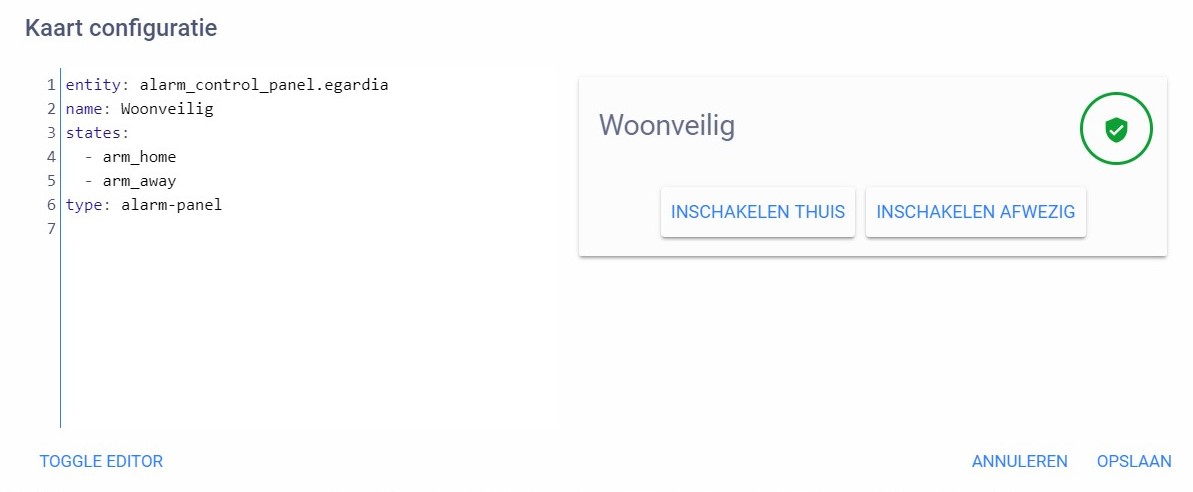
url: /local/card-tools.js?v=1``` to my config, but im not sure how to add round corners to a card: see link: https://ibb.co/s2LmT2y and https://paste.ubuntu.com/p/f9kX3nV9mp/ (in the chrome console, it says that card-tools is installed)
 polar kelp
You can have rounded corners in themes now. Saves you a lot of typing. Add e.g. ha-card-border-radius: 25px to your theme definition.
Also, please read the readme for card-modder and show us what you tried rather than what you had before even attempting anything.
warm stone
@polar kelp looks like it just needed the local swap fpr customcards
visual meteor
the line border-radius: 25px doesn't do anything...... i've tried te following: https://ibb.co/mvCJ0Fh
 polar kelp
Remove the dash from the first line
 sharp talon
I can’t seem to add border-radius to a custom button card of type label card. I’ve tried the following:
https://ibb.co/TB2kdBP
visual meteor
@polar kelp https://ibb.co/4McsPSs
 polar kelp
@visual meteor Glad you got it to work
visual meteor
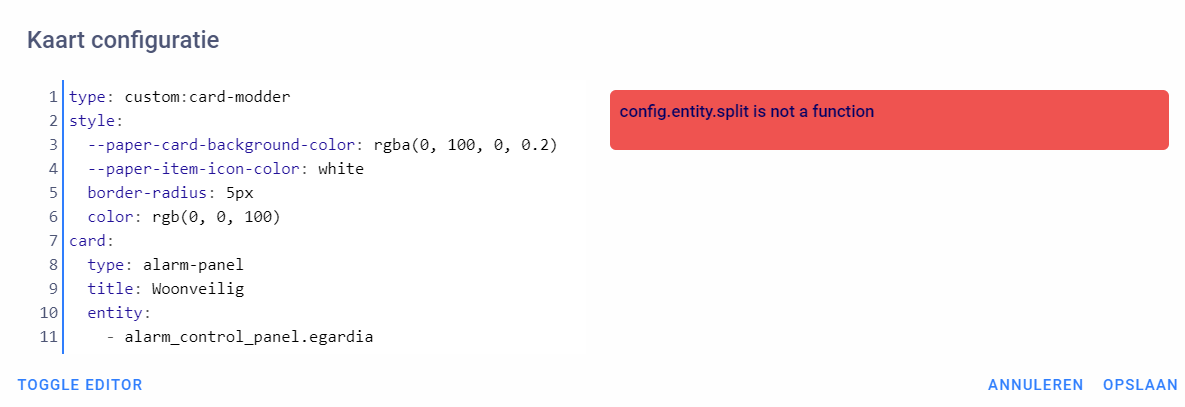
i still have the error config.entity.split is not a function
polar kelp
Sure, but that's unrelated to card-modder
visual meteor
beside the round corners, i wanna make more visual changes 😄
okay, thanks for helping anyway
polar kelp
The solution is here: https://www.home-assistant.io/lovelace/alarm-panel/
visual meteor
thank you 😄 finally got it working
 prime umbra
@polar kelp all working good put at dev getting this
what this means?
customcards/github/thomasloven/card-tools.js?track=true:54:9 Uncaught TypeError: Cannot read property 'shadowRoot' of null
polar kelp
panel: true?
prime umbra
i got panel true in some view not in all
polar kelp
I released a new version of card-tools about five hours ago. Try that
sharp talon
Any help on my above issue?
polar kelp
From the source code it seems that would only work with color_type: blank-card... weird
sharp talon
Does something need to change in button card for this to work?
 civic sedge
Is it possible that the lovelace-fold-entity-row dont work atm?
sharp talon
Mmmm setting to card and it works.
polar kelp
I actually think that changing line 139 to <ha-card style="color: ${fontColor}; ${config.card_style}"> could work
may need to change 141 to <div> too
@civic sedge Have you made sure you have updated fold-entity-row and card-tools?
civic sedge
auto updater takes luckaly care of this
6d11d3 & 01e9af - ll try it once more
polar kelp
Did you change your resources to use /customcards/ instead of /local/?
civic sedge
Lol - its my main view wich dont like it as I see 🤔
🤦
because its a glance
Working fine 😅 Thanks
prime umbra
@polar kelp ok fixed the problem, for some reason i had this in my raw editor
      tts:
        entity_id: null
        platform: alexa
 dark tartan
how do i show a badge for the person.xxxx entity?
split granite
 elder pendant
A badge is a small representation of an entity that you don't (or rather should not) interact with. Like sensors or device trackers.
dark tartan
I know i want to show a badge for the new person component in a glance card
but don't know how
elder pendant
"a badge... in a glance card"... that's not how that works. Badges have nothing to do with cards
I think you just want a glance card
dark tartan
i have a glance card that used to show the badge image in it but now i have changed to the person component i don't see the badge image
elder pendant
Badge != picture or icon. You need to add a picture to the entity by customizing it. Though I'm not positive how priority works as far as picture vs icon vs name https://www.home-assistant.io/docs/configuration/customizing-devices/
dark tartan
tried that doesn't work
elder pendant
You added the picture to the entity and it doesn't show up in the glance card? How did you add the picture?
wheat current
carefully
dark tartan
i added it to the device_tracker entity which shows the pic in the glance card but i was trying out the new person entity and tyhat doesnt show the picture which is why i asked how you can show the picture using the person entities
elder pendant
Did you add the picture to the person entity?
dark tartan
i tried to but it said invalid configuration
elder pendant
What exactly does it say
dark tartan
i also tried entity_picture and got same result
elder pendant
Without an exact error message it's very difficult to help
elder pendant
Already linked that 😉
split granite
I wonder if he's not using it correctly 😉
elder pendant
If he's getting an invalid config then probably
I've never seen customize.yaml kick out customizations on anything before. Even if they don't really make sense
dark tartan
there is no way to add a picture to the person using the new person configuration so i added a person.yaml file and added the lines in there which threw back the error invalid config
elder pendant
You need to put the customization in customize.yaml
That's what both Tinkerer and I linked to.
wheat current
If I use customize: !include waterpistol.yaml should I still use customize.yaml @elder pendant ?
elder pendant
Well actually to be fair that page doesn't reference customize.yaml, it tells you to do it through UI
Well if you do that then you can't use the UI customization @wheat current 😉
wheat current
Ok by me 🤣
split granite
Well, the page also tells you to put it under homeassistant: 😉
dark tartan
it doesn't mention the new person entity there either
split granite
The entity is irrelevant
elder pendant
Oh I see what you're saying. I pulled a dumb
wheat current
I think he is saying #330944238910963714 are better? maybe 🤷♀️
elder pendant
I think he's just saying the config would never go under the person component directly in configuration.yaml, it will always be somewhere under homeassistant:
split granite
Yup, though now we've clarified it's not actually about badges this is entirely #330944238910963714 territory
dark tartan
lol i asked in home assistant and they sent me here
elder pendant
Because you asked about badges
dark tartan
they look like badges so i called them badges
split granite
🤷 consider this a learning moment, about some of the terminology 😉
dark tartan
ok adding it to customize.yaml didn't work either i;ll just stick to the life360 entity till they worked on the person component some more
 vapid tapir
Anyone using the lovelace folding-entity-row plugin with hass.io 87+
this custom card was working perfect in 86
polar kelp
Did you update it and card-tools?
vapid tapir
I did a few days ago
I git is updated, I'll check it
should folding-entity-row be set to module or js ?
vapid tapir
the latest card tools fixed it
thanks for the great work!
If I upgrade hass.io to 88 is anything going to break?
 kind shellBOT
There are a number of FAQs at https://home-assistant.io/faq/, including one explaining the difference between Home Assistant (the software) and Hass.io (an installer) https://www.home-assistant.io/faq/#home-assistant-vs-hassio.
split granite
Then you'll know that Hass.io is an installer for Home Assistant
Home Assistant is the thing you'll be upgrading to 0.88
vapid tapir
i kind of use them interchangable sorry
split granite
However, that's all discussions for #330944238910963714 not #frontend-archived 😉
They're not interchangeable 😉
vapid tapir
well HA 88 says it has breaking changes for custom stuff
but I don't see a way to know which of my custom components will stop working
anyways, it's off topic
so nevermind
polar kelp
Anything that depends on card-tools should be ok
And I’d guess most other cards are fixed by now too.
 tired hare
Firefox decided to downgrade itself ? (odd behaviour ....) was running the beta 😦
 rocky merlin
thanks @winter hollow for your custom weather card. I modified it to support precipitation and m/s as wind speed as we have in Sweden.
 pallid kestrel
anybody know homeassistant 24h/12h time converting
- platform: time_date
display_options:- 'time'
this only show 24h ineed 12h
- 'time'
fathom mantle
@latent moss that did it. Thanks.
 silent heron
so I have a card that controls a smart plug https://i.imgur.com/skqWlvB.png, I want to put a graph, preferably ON the same card, to monitor power usage from that plug https://i.imgur.com/oGOyLYo.png


@pallid kestrel is it really that hard to subtract 12 after 12?
latent moss
@pallid kestrel here is a template_sensor that will do what u want.
#Converts 24h time to 12h time with AM/PM
  - platform: template
    sensors:
      current_time_12hr_format:
        entity_id: sensor.time
        value_template: "{{ as_timestamp(now()) | timestamp_custom('%I:%M %p') }}"
A bit of a preview...
polar kelp
Middle column is 300px, the other two divide the remaining space 70/30.
Expect a release sometime tomorrow CET
Last teaser for now
 shut harness
what repo will this be in @polar kelp ? I envisage a night rebuilding my UI entirely 😄
 raven nacelle
@shut harness Keep an eye on https://github.com/thomasloven lot of cool stuff there.
shut harness
it's already in my bookmarks 😃
 odd glacier
Hi people. I am hoping someone can help me...I am trying to use include files for LoveLace as my file is getting big, however it's not working
The simplest example doesn't even work:
title: Dashboard
views:
- !include '/config/lovelace/test.yaml'
test.yaml
- title: Thing
 jovial elm
hi guys, how do you code ui-lovelace.yaml to make a Entity Button to run script? I have made a script in scripts.yaml but I don't know how to code the button function
  alias: fan1
  sequence:
  - data:
      entity_id: fan.smartmi_dc_pedestal_fan
      speed: Level 1
    service: fan.set_speed
 restive lance
I have a card in the webif for a device that was added through Discovery. I removed the device from my network, how do i remove the card from HA ?
Now the card just shows the device as unavailable, which it is, since i threw it out
 prisma swallow
Just click on edit GUI in the top right corner when you are on the page that has the card, then click the bin to delete the card. Hit the cross at the top left to exit edit mode
I could have that slightly wrong as I'm going off bad memory 🤔
restive lance
Configure ui
prisma swallow
That's it
prisma swallow
Hang on, I'll grab my laptop
prisma swallow
Cool
wheat current
There is a bin if you click edit om the card
restive lance
looking at my other devices (which aren't unavailable devices), there is no bin
🤷
there is Toggle editor , Cancel, and Save
anyway, the offending card is history :p
prisma swallow
Oh well, you got it deleted. Like I said, I was running off bad memory! Maybe it's different cards that have the bin somewhere..?
wheat current
Hmm.. looks like bin is only on views
 errant birch
when I use states it adapts to the changes I make by adding / removing entities.. is there similar functionality for lovelace or is it a "statically" configured interface ?
For a "finished" setup I guess it would be fine but for developement and adding stuff a view that simply show all is a must imho
wheat current
Give control back to HA and it will be automagic
civic sedge
Mhmm - Is it possible that the custom:slider-entity-row' is deam hungry? - my main view taking like 20 secconds to load
or do I maybe need the card loader?
 icy robin
@polar kelp , thank you for the continues development of card-tools! I just looked through your recent commits and the changes in the template parser. I see that there is some new code related to parsing functions - is that ready for use yet (thinking about the date formatting request).
polar kelp
Oh right. Forgot about that one...
Yes, the parser is ready for use.
The only function it handles for now is if(condition, then, else), though.
icy robin
Do you envision it being able execute external functions down the road?
polar kelp
See https://github.com/thomasloven/lovelace-useful-markdown-card - but it works everywhere that uses the parser, like card-modder and this: https://github.com/MizterB/lovelace-secondaryinfo-entity-row
Maybe, if I get a convincing use case.
Just realized the readme for useful-markdown-card is wrong. It says only else can be an if function call. Now then can too. And possibly parts of the condition as well...
icy robin
The best use case I've heard is for my secondary-entity-row....being able to format the ISO8601 date strings that are in last_changed, last_updated, and other types of entity attributes. Probably not worth recreating the wheel for a date parsing library - but if I could call functions already in the frontend, or event better, in an imported module like moment.js, that could open up a world of options and flexibility.
polar kelp
That's a good idea... I could make the time parser a function!
Will look into that.
In the meantime...
Ladies and gentlemen. I'm about to unveil what might be my greatest achievement yet.
@mild veldt you'll want to see this
I give you...
Nothing!
icy robin

polar kelp
Can't understand why I didn't do this sooner.
gap-card (https://github.com/thomasloven/lovelace-gap-card) is the perfect companion the new improved layout-card (https://github.com/thomasloven/lovelace-layout-card )!
icy robin
Thanks again for the card-tools features - look forward to seeing what might be done with the functions!
 silk shoal
Hi, I'm having some problems with my dark sky sensor, im not able to get cloud coverage from it to use for light automations. Any help would be greatly appreciated. This is my code:
 old karma
@silk shoal , you must use the sensor https://www.home-assistant.io/components/sensor.darksky/ for this to work.
polar kelp
@silk shoal #330944238910963714
errant birch
@wheat current how do you mean "give power back to ha" ?
wheat current
That HA manages your UI, and you do not
silk shoal
I got it working now thanks guys 😃
 past falcon
Does anyone have a tough time having the custom swiper card loading? It's there, but often all I can see is the position indicator and none of the cards
 gritty swift
so how do I add a custom card to lovelace?
past falcon
Are you using yaml mode or default?
gritty swift
default
elder pendant
make note of this part If you are using the GUI editor for Lovelace, you can add the resources section using the Raw config editor, which you reach by entering Edit mode and then clicking the three dots in the top right corner.
DO NOT create a ui-lovelace.yaml file if you want to continue using the UI editor
gritty swift
@elder pendant how would https://community.home-assistant.io/t/custom-dark-sky-animated-weather-card/59816 translate into a type: horizontal-stack
gritty swift
would it translate something like ```cards:
- entities:
- entity_sun: sun.sun
type: custom:dark-sky-weather-card```
- entity_sun: sun.sun
yes
elder pendant
I would assume so, since it's a card
gritty swift
not sure if its liking the format or needs everything
elder pendant
Does the custom card have an entities: object? I think you just list the entities in the root of the card
At least that's what it looks like on the forum post
gritty swift
Please define entities error
elder pendant
Did you get the card to work outside a horizontal stack?
gritty swift
keep freezing the UI
elder pendant
What do you mean freezing it? Does the card show up at all or do you get errors?
gritty swift
cant edit the card
 forest star
is there template for device tracker , I want to convert a binary sensor to device tracker to use with the new person feature
gritty swift
give me a few mins to read up more about the card and potential changes with lovelace
ah, a lot has updated in git since that post
elder pendant
@forest star that's a #330944238910963714 but you can just change the device_class of the binary sensor to presence and you should be able to add it to a person component
forest star
@elder pendant is that documented somewhere ?
forest star
thanks !!!
 thorny verge
In the new cacheless version of the custom updater, using "- url: /customcards" instead of /local, do you need to still pull the .js file manually, I thought it pulled it when you ran custom_updater.check_all.
Just want to make sure it is working correctly for me, but nothing pulls down.
vapid field
How do i add a picture here? 😃
wheat current
.images
kind shellBOT
Please use imgur or other image sharing web sites, and share the link here.
 summer eagle
@polar kelp Are you running a Hotel? lol
 fair hamlet
I did a quick google, I added the Lovelace yaml mode to my config, then I took it out. My "system health" is still showing mode as yaml and as expected I can not try out the editor. It there some else I need to do?
latent moss
did you restart @fair hamlet ? simply deleting it from config doesn't work immediately, must restart too.
fair hamlet
yes
I am running in VM on windows. I create a snapshot every time I do some upgrade to hass or Ubuntu. I was cleaning up my snapshots, so I might have been confused. I double check and it was not there, then I even restarted the OS (VM). My fear was once set to yaml mode then it was locked in. So the expectation on .88.1 that removing the yaml mode from configuration.yaml should revert back. Correct? If yes then I will do more checking for my dumb mistake. 😃
polar kelp
@summer eagle I don’t get it...
summer eagle
@polar kelp all the bedroom lights
polar kelp
Ah! Never thought of that. Hehe
vapid field
I use Hue-sensor-HASS and had som problem to get in, but now i find the temperature sensor but it display none
and i have no clue :/
fair hamlet
@split granite I don't see one.
I did run across those having issue where they added mode and a cache clear fixed it, but I did not see any going from yaml mode yes to yaml mode no having issues. I was just seeing if someone could confirm that it should work, and you just did, then my next question is can anyone confirm it does work on .88.1?
Just to see what would happen, I move my ui-lovelace.yaml out of the configurations directory. So in my configurations.yaml I do not have lovelace mode yaml on, and I do not have a ui_lovelace.yaml in the configuration directory. The system health still says yaml mode and I still have the last ui_lovelace.yaml configured showing up. Does those steps tell anyone anything?
If the configuration setting lovelace: in configurations.yaml mode yaml means use yaml, can I set mode to "edit ui" or something like that to force back to not using the yaml?
Here is where I am talking about https://www.home-assistant.io/lovelace/yaml-mode/
split granite
You restarted Home Assistant after all that?
You checked by using Incognito mode in the browser that it's not a cache issue?
#330944238910963714 @forest star
forest star
sorry
fair hamlet
@split granite , I did not do incognito, let me check and I will get back.
Well two things I learned.
- I get the same results in lovelace, system health still shows yaml mode.
- I forgot my password. I have been logged on for so long, the one I expected would not work. I was able to use the old API, but how do you change a password? I have not google that yet, just discovered it was not an off the cuff thing.
I created a test user and it worked, I am surprise as an owner account that I can not see user login name or reset the password, somewhat like Active Directory users.
When I said it worked, I was talking about logging in only, the lovelace yaml is still an issue for me.
errant birch
@wheat current or anyone who can answer.. how do i give back management over lovelace to HA ?
fair hamlet
@errant birch what do you mean? I trying to see if it is the same issue I have.
 feral owl
Hallo, Anyone know why my themes are not changing the entire webpage to the theme and only the cards?
errant birch
@fair hamlet I'm trying to get my lovelace to act like my states interface. Every time I add or remove a componenet or entity I get missing stuff in loveloace and on the states UI it auto adds/removes
fair hamlet
@feral owl are you talking about your question, or answering mine?
feral owl
I was answering yours 😃 but it would be cool if i can get an answer this white background is killing my eyes
errant birch
have no experience with themes (yet) so can't really help, srry
feral owl
errant birch
@wheat current suggested to "Give control back to HA and it will be automagic" .. so there should be a way to go back no ?
 mortal cape
@errant birch delete the lovelace file in .storage?
@feral owl the theme you set from your user page?
feral owl
Think so, I cant figure out how to set the actual theme
mortal cape
You have 3 places to set themes. User Account page, each view can have a theme, and most cards.
mortal cape
@feral owl That is the "old" theme which applies to more than views and cards
fair hamlet
@mortal cape can you reverse from lovelace from yaml mode to internal editing mode?
fair hamlet
@mortal cape I have both, but non of them are related to lovelace, does that matter?
mortal cape
sorry...I mean in your lovelace config specifically
not the usual includes and secrets
those are fine
You would remove yaml mode from your configuration.yaml. I'm not positive but I think you would end up with a "dead" ui-lovelace.yaml at that point. It won't be removed, but it will no longer be used. You might copy it off just in case.
Then in UI editing mode, you could paste the contents into the raw config editor.
You would get your setup back, and be in UI editing mode
fair hamlet
Right now I do not have yaml mode in my configuration and I did move the ui-lovelace.yaml out of the configuration directory. But it still thinks I am in yaml mode. In fact the system health says I am in yaml mode.
here is my configurations in case I am doing something stupid https://hastebin.com/aborukanof.shell
wheat current
removing it is not engough, you need to remove mode: yaml from HA config and restart
fair hamlet
@wheat current I did. Or at least I thought I did. Check this out. So all my changes have been over the samba share. If you look at the hastbin I posted it is not in the configuration. So to get a directory listing, since it is not easy to post a screen shot, I opened terminal from hass.io and took a directory. Low and behold the ui-lovelace was still there. So then I nano the configuration.yaml in the config directory and the mode yaml was still there. I can not explain why samba is giving me different results. Let me do some reboots and I will report back.
mortal cape
just a restart of HA, not a reboot
fair hamlet
Bottom line, I exited my "windows explorer", when back in and the ui-lovelace was in the config and the mode: yaml was still in the configurations.
I bet it had something to do with me deleting/merging the snapshots.
@mortal cape as I did not even have to restart HA, just the "tool" looking at the samba share.
Man, this was driving me crazy.
so now it's time to start over.
the deleting/merging sanpshots confused the samba share and the right hand (samba share) did not know what the left hand (linux file system) was doing 😃
mortal cape
I am confused as to where you are at now
A save to a file from within a samba share is instant. I don't understand what you mean by merging snapshots
fair hamlet
@mortal cape I hear you, all the changes I thought I was doing, I was doing through a samba share, for some reason that was not making it all the way through to the linux file system.
Yes, a save thorough samba should be instant. That is why I was putting so much faith in with what I was seeing.
To answer your question on snapshots. It was a detail I mention in passing and at the time I did not see how it could have anything to do with my problem. My HA is running in a VM, running on a windows 10 box. Every time I update linux or HA, I create a snapshot and let it run for a few days. Then at some time I delete the snapshot and that merges all the changes into the vm's file system. I had explorer open and was on the samba drive when I started do it. What even more amazing is after I did that, I created another snapshot, then updated linux, then because of the update, the VM rebooted and the explorer still did not "refresh".
I think this is a prefect storm that got me really confused. I don't think it will happen to many people. Now I expect that when I remove the mode: yaml, it will work. I will let you know in a minute.
mortal cape
ah. ok I see now.
fair hamlet
Man it was driving me crazy. I was about to start swearing that I am not smoking anything 😃
fair hamlet
The world is as it should be. I removed the mode yaml and it went to mode storage. Then I removed the ui-lovelace.yaml and it looks like the yaml's last configurations.
Now I think I see, so the mode is either yaml or storage. Now I see the loveace file in the .storage directory. I assume if it is in storage mode and the lovelace file does not exist, then it builds the lovelace file based on the yaml if it exists.
polar kelp
If you're not in yaml mode (you can check in  if you have the system_health component enabled) it generates a number of views based on your legacy groups and all your entities if
 .storage/lovelace does not exist.
ui-lovelace.yaml is only used in yaml mode.
 cinder rapids
can templates be used with the entity filter card? for example filter everything that's is not unavailable since the google timer sensors are unavailable until a timer is actually set up.
fair hamlet
just started messing around with storage mode.
Looking at https://www.home-assistant.io/lovelace/entities/
I guess you have to go into toggle mode to get at the more advance features?
For example I was trying to do an entities. I was doing a device tracker. It shows the picture and if home/away. But I wanted to show the address also, so I thought that would be secondary info. Guess not. Do I need to go back to a custom card to get that functionally or do I need to dig a little deeper?
 ashen glacier
Hi, i want to use a glace card for my light scenes and I cannot find how to trigger the scene as tap_action?
does someone have a tipp for me?
wheat current
@fair hamlet "manual" mode has to be used for advanced config, and yes that would be a custom-card.
fair hamlet
Ok, just getting the feel for the storage vs yaml mode. Now just to be clear, you can do "manual" in storage mode, correct?
ashen glacier
Im a little frustrated by now....
I can't find any real documentation to activate scenes.
wheat current
I would assume this should work @ashen glacier
    tap_action:
      action: call-service
      service: scene.turn_on
      service_data:
        entity_id: scene.romantic
Running scene services ar at the bottom here https://www.home-assistant.io/components/scene/
ashen glacier
I want to die a little bit......
Am I really that blind?
It does not work sadly...
https://hastebin.com/wiheyeyeke.css
polar kelp
Compare your codes carefully. Especially around the action: parts
ashen glacier
..... thanks.....
polar kelp
An odd discrepancy, that, which we’re likely stuck with for ever.
split granite
Meh, breaking changes are normal 😉
 inner osprey
hi, is it pobbile to use a verticak stack with an horizontal stack?
raven nacelle
yes
inner osprey
@raven nacelle is it possible to do in the "add manual card" ui mode?
do you have an example?
raven nacelle
It should be. I don't use the UI, so not 100% sure
wheat current
It is, I tried it.. do yourself a favor and don't 😜
inner osprey
nice
raven nacelle
Here's an example of horizontal stack in vertical stack https://github.com/arsaboo/homeassistant-config/blob/master/ui-lovelace.yaml#L724
wheat current
And that would "translate" to this https://i.ibb.co/g6WWRJH/image.png in "add manual card"
 raven nacelle
I am sure you can add custom cards there
wheat current
That you can 😉
raven nacelle
Ok....here's one that does not use custom cards https://github.com/arsaboo/homeassistant-config/blob/master/ui-lovelace.yaml#L852
wheat current
The boxes changed to yellow (missing entity) 😛
raven nacelle
difficult to make you happy 😉
 raven nacelle
that definitely looks ugly 😜
wheat current
yuuuuup 🤣
wheat current
Neat!
raven nacelle
yeah, I love that card
although I am guessing it will go away once the person component matures
wheat current
Yeah, there are high hopes for that one 😁
 junior onyx
What's the simplest way to share my lovelace config ? its not in the config folder anymore (im on hass.io) so doesnt sync with the rest of my stuff on git push
wheat current
I prefer json to yaml so I would say just share the json file 😅
junior onyx
im not good enough with git to really know how/if i can get it in the same repo?..
wheat current
If that is true, and the repo is public don't try, it's in the same location as your auth files
cinder rapids
can {{ trigger.to_state.state != 'unavailable' }} be used as a state_filter in the entity filter card?
raven nacelle
no templates in LL
cinder rapids
ok thanks 😦
wheat current
And trigger is only available in a running automation
cinder rapids
umm yeah, i over looked that.
what about something along this? state_filter: != 'unavailable'
 high seal
I am running HASS.IO 0.88.2 in a VM on Windows 10, I cant seem to add Lovelace cards, after clicking Configure UI the orange circle with a + does not appear...? I have tried the Lovelace demo the + option appears and works perfectly on that so its not my browser.
Interestingly I do get the orange circle with a + if I goto Configuration -
- Area Registry
- Automation
- Script
- Customization
Any ideas...?
 buoyant portal
@cinder rapids thomasloven has a card that can show you unavailable entities. There is also the old monster-card that can do this too
Sorry I forget the name of the card 😆
raven nacelle
cinder rapids
Thx, l I’ll look further into it. The state for the sensors google home timers are always unavailable until a timer is set and I’m looking for a way to get them to show up on the front end.
raven nacelle
@cinder rapids Here's how you can do something like that https://github.com/arsaboo/homeassistant-config/blob/master/ui-lovelace.yaml#L713
that is for media_player, but you can use the same idea
cinder rapids
Thanks @raven nacelle
 sudden lion
@raven nacelle Do you have a screenshot of your media view with the sonos buttons etc?
 devout onyx
Is it possible to use an and statement in useful-markdown?
Like if this is true AND this is true, then this?
vapid field
Quick question. I run with !include merge dir/name in my lovelace.yaml. I need to restart hassio everytime I make a change to one of the views.yaml files to see the changes, simply reloading the webpage doesn't work. Is this how it should be or is there an issue on my side?
polar kelp
@devout onyx No, but you can nest ifs to get the same result
if(this == true, if(and that == true, "good", "bad"), "bad")
@nocturne osprey Just open ui-lovelace.yaml and save it again without any changes.
It looks on the modification date of that file and compares to what's in cache before deciding whether to reload.
wheat current
Another win for UI edior 😄
 cloud oriole
ok - so I'm confused as hell.....
https://www.home-assistant.io/lovelace/thermostat/ <-- shows AUTO / HEAT / COOL / FAN controls at the bottom
but whenever I set up a thermostat in HA, I get either heat or cool depending on if I have ac_mode as true / false
also considering there's SFA in the way of documentation for that, I'm not sure if its a different config problem.
 versed forge
Hi guys I hope there are few KNX Pro´s online 😃 I have several blinds which I can control perfectly via hass.io. The only thing is that only one Blind is sending the status into Lovelace. The addresses are correct. Any Ideas?
restive lance
There's a blue badge on the homepage with the label not found. How can I find which entity that state badge refers to ??
polar kelp
I assume you are in storage mode?
restive lance
me, @polar kelp ?
polar kelp
yes
restive lance
is storage mode an alias for lovelace ?
polar kelp
Storage means you have at some point used the gui editor to take control of the lovelace interface.
restive lance
yes
polar kelp
Then you can see your badge settings by opening the gui editor and clicking the pencil next the the name of the current view.
restive lance
i went into configureUI , then raw editor, and i see the badges there. Turns out the ghost badge is binary_sensor.doorbell
thank you @polar kelp
polar kelp
That works too
 severe stirrup
            name: Cảm biến cửa chính
            icon_template: >
             {% if binary_sensor.door_window_sensor_158d0002b7b0c0.state == 'on' %}
               mdi:lightbulb-on
             {% else %}
               mdi:lightbulb
{% endif %}```I want to change the icon of my sensor state but the icon does not show. Is my code has a problem?
please help me
polar kelp
Where in the documentation did you find that?
raven nacelle
@severe stirrup The template is wrong....please test it in  first
first
polar kelp
Templates doesn't work in lovelace anyway...
raven nacelle
that is not in LL @polar kelp . Some sensors allow icon_template
Although, that only applies to template sensors.
polar kelp
Look again
wheat current
- entity: something is lovelace?
wheat current
Mixing configurations like a mad man😜
 wicked bobcat
Working on a new card using chart.js and would also like to use the annotations plugin for this. I'm not clear how I would define the adding the plugin - is there any other cards that I can look to for reference?
severe stirrup
@raven nacelle so I fix like this. is this correct? ```- entity: binary_sensor.door_window_sensor_158d0002b7b0c0
name: Cửa Chính
        icon_template: >
         {{ is_state('binary_sensor.door_window_sensor_158d0002b7b0c0.state', 'on') }}
           mdi:lightbulb-on
         {% else %}
           mdi:lightbulb
         {% endif %}```
again....LL does not use templates.
you can use icon template in template binary sensors
severe stirrup
sory but I dont understand LL means
raven nacelle
Lovelace (frontend)
severe stirrup
oh
raven nacelle
so, you should create a template binary sensor with icon_template
and then use it in the front end
severe stirrup
oh. let me try
thanks
I try to use the icon from MDI https://cdn.materialdesignicons.com/3.4.93/ I used mdi-motion-sensor with my entity: - entity: binary_sensor.motion_sensor_158d0002248147 name: Cầu Thang Tg3 icon: mdi:motion-sensor but it does not show the icon. I can use another mdi icon like mdi:alert-decagram. Dont know y. can any one know that?
 thorn tide
The home-automation icons they added in the last releases are really interesting. Is it a good time to update mdi with the current beta and everything?
 covert wharf
is there a way to define the size of a picture entity card? i see you can change the aspect ratio, but can you set a specific size of it?
raven nacelle
The width cannot be controlled....it expands to cover one column
beyond the map card not showing the entity picture, there is another issue. If you go to another tab and come back to it, it sometimes shows blank
Logs: Log Details (ERROR) Fri Mar 01 2019 11:21:23 GMT-0500 (Eastern Standard Time) https://bla.duckdns.org/frontend_latest/be93c55dcf3a06a940b1.chunk.js:4:46753 Uncaught Error: Map container is being reused by another instance
covert wharf
ok, thanks.
 ornate pollen
hi, anybody using the light cards in a horizontal stack and could fix it to work on mobile ?
 sacred quarry
not sure what you mean, I use it on an horizontal stack and I cannot see any issue, but maybe you are facing something I am not (or I haven't noticed), you might want to open a issue on Github (https://github.com/ljmerza/light-entity-card) or on the community forum (https://community.home-assistant.io/t/light-entity-card/96146/35)
vapid field
is there a way to control "height" of buttons in the custom-cards/button-card? for some reason my senor readings are jumping between 1 and 2 lines, doesn't matter if i shrink the "font size"
 white marten
Im not sure if this is a bug, but in lovelace if I do Add card -> Entity button -> (tap action: call-service), then it ask to switch to toggle editor: When I add the service data it saves, and the service works ( so it save the config), but if I open the card editor again, even with toggle editor the service call info is gone
 trail pike
Has anyone ever run into an issue where Lovelace will only refresh entity states upon a full browser refresh? My lovelace stopped being "live" a few weeks ago. This is occurring on multiple devices (laptop Chrome, mobile, etc.).
It only occurs when switching to a different HA "tab" (map, logbook, etc.) and then back to overview.
forest star
Which card can I use to show only when some elements are home for example ?
polar kelp
entity-filter
forest star
thanks @polar kelp
 next aurora
Hey guys, anyone used the button-card w/ a cover ? Currently I have two buttons ( up and down ) and i'm trying to have a single button that will dynamically change to call cover.close_cover or cover.open_cover based on its state... Is this possible ?
old karma
 visual bluff
Hi, I got some sensors for stats of my plex server in a simple entity card. Can i somehow change the number of hours to show for the different sensors?
      - title: Plex Status
        type: entities
        entities:
          - sensor.plextemperature
          - sensor.plexcpuload
          - sensor.plexcpufreq
          - sensor.plexfan1
          - sensor.plexfan2
          - sensor.plexdiskspace
        show_header_toggle: false
I konw i can ue "hours_to_show" but i want different hours for different sensors in the same card. Is that possible?
 olive forge
Hi! I have 6 Mi Flora plant sensors. I use the plant cards to display them in my UI, but I want to group them by room. What is a good way to do that?
 torpid jasper
Hey, is there an easy way to have the "More Info" popup as a card itself? So a card that automatically shows the full state info + services?
 white trellis
I'm missing the name for a custom card that allows you to open/close a card containing multiple rows? I saw it once in a lovelace video where the card had an arrow in the top allowing the card to be exploided when pressed? Is there someone who knows the name for it?
^^Oh of course it was a ThomasLoven card named: fold-entity-row...
 wispy vessel
is it me or is lovelace add-on confusing ?
polar kelp
Not at all imho...
wispy vessel
i can seem to get anything working correctly.
polar kelp
It’s all clear as mud after you’ve lived and breathed the lovelace source code for a couple of weeks
wispy vessel
lol!
mortal cape
lovelace addon? don't use that
wispy vessel
i have ultra wide screen and i want to be able to use the whole screen
so much unused space on my screen
 tranquil cargo
How can I resize a picture-element inside a panel? I have a floor plan image but it is huge even if you resize the actual png image.
fair hamlet
any good custom cover cards?
 tired thicket
hey all can someone help me ? seems like some of my card are not working , how do i fix that 😃 ?
example : https://gyazo.com/02c90b9fc051c09ec0db2fc7ee0e2e23
it says card config incorrect
tired thicket
@hexed owl i know but that is yaml , the problem is almost all of the cards use a ui mode without yaml (hass.io) and these cards do not have that , is this a problem in my configuration or is this normal?
 hexed owl
you type it in as yaml, it converts it to json, and that's what's shown in the red box. that card has two required fields, you only gave one.
 radiant wraith
Hi Everyone, quick question from a newbie! In order to use a Custom Card, do I need to enable YAML mode for the UI? I have created the ui-lovelace.yaml file and added the resources to it, but im still getting a "Custom element doesn't exist: mini-media-player." error
wheat current
You do not need to enable yaml mode, and you certainly do not need to create a ui-lovalace.yaml file, everything can be added to the raw editor
radiant wraith
OK thanks @wheat current do I just add the "resource: and url:" code into the raw editor?
tired thicket
@hexed owl i mean this most of the ui is clickeble and selecteble ,: https://gyazo.com/1f697baa138acdeaf3ed0619427adc6a but the some of them only allows yaml or not?
hexed owl
Those fields only allow text. TOGGLE EDITOR will let you do it in yaml.
wheat current
@radiant wraith https://www.youtube.com/watch?v=BYZjVCfrWD8&t=317s Super bad quality, but should give you an idea
radiant wraith
@wheat current thanks for the video.... still having trouble..... im trying to figure out how to paste a snapshot here haha
feel like a new noob this morning!!
wheat current
.images
kind shellBOT
Please use imgur or other image sharing web sites, and share the link here.
radiant wraith
OK, is I was trying to take the screenshots I figured it out!! The "preview" in Manual card, does not seem to show anything, but once you hit save, the card appears. Thanks @wheat current , really appreciate the help 😃
wispy vessel
is there away to make cards bigger?
wheat current
Hold ctrl then hit + (untill you get it in correct size)
wheat current
you are doing it wrong
wispy vessel
how so
wheat current
 wispy vessel
dont follow
wheat current
if you have so much space "split" your screen and do more stuff
wispy vessel
yeah well i have a wall mounted ultrawide that i would like to display some stuff not just my desktop
so no way to adjust column width?
torpid jasper
Is there a documentation on the various <ha-xxxx> tags? Cant find it in the dev docs
Or how to get a button working on a custom card.
Using <paper-icon-button icon="mdi:play" on-click="clean"></paper-icon-button> makes it clickable but does not run the command somehow.
And: Is there a way to position an icon-element on the picture elements card via template? Draw the Roomba Icon where the Roomba actually is on the floorplan?
 quick rampart
you guys know where I can get a 4K digital picture frame?
it's got to be paper thin
budget $50
and it needs to be at least 2ft by 3ft
vapid field
hello ppl!
 errant plover
@quick rampart For $50? No chance.
You're looking at $250 for the cheapest 43" TV.
split granite
4K... paper thin... $50... 🤣
vapid field
if i just only one sensor for battery in the "Entities"-card. is there a way to remove the text and just have the icon and % ?
tranquil cargo
How can I resize a picture-element inside a panel? I have a floor plan image but it is huge even if you resize the actual png image.
polar kelp
Re: that 4k screen, that simpsons quote from one of the flash-forwards comes to mind... "Everything's so much easier now, since scientists invented magic".
@vapid field Sounds like you actually want a glance-card.
@tranquil cargo Add margins to the image
In panel mode, it fills the window.
@vapid field If glance isn't your thing, you can do name: ' ' on that entity.
vapid field
@polar kelp haha yeah thats one even better! thanks! now i just need to figure out how to get the icon bigger 😃 thanks!
tranquil cargo
@polar kelp Do you mean adding margins to the picture itself or with style?
Style does not seem to affect anything
polar kelp
To the picture itself
It's not optimal, but It's the best you can do without custom cards
If you don't mind custom cards, this can help: https://github.com/thomasloven/lovelace-layout-card
torpid jasper
How can I open a more-info-popup when clicking on a <ha-icon> with an attached click listener? dispatching the Event from the card itself does not work. And the card itself has no shadowRoot.
polar kelp
Make sure the event bubbles
Otherwise you can dispatch it from the first child of (ha-app-layout #view)
torpid jasper
Ill try that, ty!
torpid jasper
I might actually do that. I suck with frontends 😄 Anything easing my work is welcomed.
polar kelp
Tip of the day: Add lovelace-background: 'center / cover no-repeat url("/local/background_light.jpg") fixed' to your theme and background: var(--lovelace-background) to ui-lovelace.yaml or in the raw editor. Et voilà - theme controlled background.
 midnight shadow
hi, any ideas why lovelace isn't populating the "Unused Entities" function from the frontend? the only clue i have is "obj.entities.forEach is not a function" in the browser console
lovelace is in yaml mode if that matters
sudden lion
You probably have a custom-card that confuses the function
midnight shadow
thanks, just found out by process of elimination that it is indeed flex-table-card in my case
sudden lion
Same here
midnight shadow
and, as always, as soon as i find the problem i find google hits on that exact problem
sudden lion
I've reported the bug in his repo a while ago
midnight shadow
fair hamlet
I have bar lights, that are domain switch. I can set up an entity, but it has a lighting bolt. How can I switch that to a light bulb that show a state? I see a icon: but that is just a picture, correct?
sudden lion
Check this @fair hamlet: https://www.home-assistant.io/components/light.switch/
fair hamlet
@sudden lion Worked like a champ, thanks. First I tried the light card, then just went back to entities.
rocky merlin
ohhh I almost ripped my hair off lol I just could not get the translation of states (localization) to work in my custom component. It seems like it works nicely in the old GUI using a group. The state is localized but not using it in lovelace entities card. Anyone else experienced this?
wish I tried it two hours ago 😃
tried the sensor card as well, same the translations are not showing
copper mural
If I want a panel_iframe to open a specific lovelace-file/tab, isn't that possible? I tried url: /lovelace/3 but it opened the whole hass-page again inside the iframe.
polar kelp
That’s what the tab is. It’s all of it.
copper mural
I asked it in swedish on the other discord-server, maybe you know better what I ment there 😛
polar kelp
I understand what you mean, and it's not possible (well... it is, but it's not easy).
If you use an iframe, you get a new session of the page, and that will include everything - side menu, top navbar and notifications panel.
If you really want to do it, you'd have to create a custom panel which gets the relevant parts of the lovelace view you want and manages the states and communications to the backend that are normally done by the frontend wrapping it.
silk shoal
Hi, I'm currently using the following weather card:
https://github.com/bramkragten/custom-ui/tree/master/weather-card
I am wondering if someone could help me remove the part that tracks Humidity, Wind Speed, Sunrise, Air Pressure, Visibility and Sunset so that the card will become vertically shorter. Thanks in advance!
copper mural
Comment those lines out in the js-file should work.
rocky merlin
You should be fine set comment from https://github.com/bramkragten/custom-ui/blob/bc4a50843cb8dab149bc89817302598127493d7a/weather-card/weather-card.js#L172-L216
silk shoal
How do I comment it out?
fair hamlet
I was going to ask a question but can not post to hastbin. Is anyone else having issues? Any other way of post a configuration file?
split granite
~share @fair hamlet
kind shellBOT
@fair hamlet Please use https://www.hastebin.com/ or https://paste.ubuntu.com/ to share code.
fair hamlet
@split granite Not sure why hastebin comes and go, seems a lot worse on Saturdays and Sundays. Can you post something?
I have a vertical-stack that has to cover components and one custom to show .jpg and .gif. I was using the cover to change the sates. I would like to use something like name:
https://paste.ubuntu.com/p/qHh2y5QKTz/
 blissful anchor
hi, just upgraded to 88 from 73 adn lovelace is default UI, but I cannot find ui-lovelace.yaml and if I edit it via the UI at SAVe gives me error https://cl.ly/8652b1fdd42b
I red the docs, creating a new lovelace yaml, but I wnat the curent lovelace 😃
that somehow copied the default UI
with all my cards and such
fair hamlet
@blissful anchor Just went through the same thing. There is a yaml mode setting that switches between storage and yaml. If you are in storage mode, there is a raw click that will give access to the storage configurations.
blissful anchor
I put this in my configuration.yaml https://cl.ly/c6e0e85592b9
but still no lovelace yaml in my config folder
fair hamlet
@blissful anchor and restarted?
fair hamlet
you have to manual create the ui ymal
 brisk moss
Hi everybody
fair hamlet
that is why you may need to switch back to storage and go to raw to get what is there.
brisk moss
Crime encountered problems with cloud connection when trying to log into hassion
I need some help
blissful anchor
and after I get the ray I put it in a new lovelace.yaml ?
manualy created?
raw*
fair hamlet
yes, that would be my guess
I had mine backed up to start with. I have now switch to storage, it does not seem any different than yaml
blissful anchor
how do you back it up? I use dropbox addon and it backs up automaticly what is in the backup folder
seems now the lovelace is out of reach for any backup procedure if left raw (wherever it is now)
blissful anchor
i use hassio, how do you get there to the storag folder? https://cl.ly/a1d5302405d5
fair hamlet
samba
fair hamlet
just gets access, nothing automated
blissful anchor
are you using hassio?
fair hamlet
yes
blissful anchor
or homeassistant on top of linux
ok
there was an addon-on "lovelace-migrator" any idea why is gone?
fair hamlet
actually both, I have a windows OS, with a VirtualBox vm, running ubuntu, then when i installed HA, and Hass it loaded the docker versions. :-)
https://paste.ubuntu.com/p/TSsBrhTZ7M/
split granite
You don't need the migration tool, it's now built in to HA @blissful anchor
@brisk moss If you're having issues with cloud, see #cloud-archived
@blissful anchor If you're looking for the Lovelace config, it (and many other things) now can be found in .storage/
You really want to be backing that up
blissful anchor
I have an automated backup system and that .storage is inaccessible by ordinary means
how do one get access to it?
why is it there and not with all other config files ?
is it included in the snapshot procedure?
polar kelp
It’s in .storage because it’s not to be messed with.
That said - sometimes you must - but that’s why.
blissful anchor
since I it is a file meant to be messed with, because everyone is doing his own UI why is it lableled as "not to be messed with" ?:)
I mean I edit the hell out of that file...
anyway... meybe is something I don't get.. menwhile I got this https://cl.ly/617469c5d82c
but I have this in .storage https://cl.ly/35873694f0a3
which does not look like a lovelace yaml
sudden lion
Thats because its a json format file, not yaml
vapid field
Hi, I'm new here 😀, I'm trying to install mini graph card https://github.com/kalkih/mini-graph-card on my home assitant config, it's my first time installing a custom component, and my dilemma is where store all custom js, tried in my home, in .homeassistant folder, adding pieces of config in configuration.yaml, never got it working, js file is not found. I'm running on ubuntu server x64 with pip installation
any help please?
sudden lion
Its a custom card, not a custom component 😃 And it says in the instructions: "Download and copy mini-graph-card-bundle.js from the latest release into your config/www directory."
If you dont have a www folder create it, and then restart HA
vapid field
@sudden lion where I need to store that folder?
sudden lion
In the same folder you have your configuration.yaml file
split granite
How is .storage inaccessible?
It's hidden by virtue of the leading ., but hardly inaccessible
vapid field
@sudden lion done but not working
blissful anchor
well, hidden means "not accessible easy " 😃
sudden lion
@vapid field did you have to create your www folder or did it exist?
vapid field
@sudden lion I created it
sudden lion
Restart HA, then move on to step #2 under simple install here: https://github.com/kalkih/mini-graph-card#install
Note that if you are not using yaml mode you do the same step in the raw editor
split granite
@blissful anchor If your backup software can't see a hidden folder, your backup software is junk
blissful anchor
anyway, is there a procedure to get my lovelace on a yaml file in the config folder like in the old days?
split granite
Sure, use YAML mode 😉
sudden lion
yaml mode @blissful anchor https://www.home-assistant.io/lovelace/yaml-mode/
blissful anchor
so yaml mode will firs read the lovelace yaml ignoring thet hidden config?
vapid field
I'm using yaml mode, yes already restarted
split granite
Yup
sudden lion
It will not first read that then another thing. It will only read the ui-lovelace.yaml file
blissful anchor
I see
vapid field
if folder is hidden where I can store custom js?
sudden lion
What folder is hidden @vapid field?
vapid field
@sudden lion .homeassistant
blissful anchor
@split granite my software can backup that hidden folder too 😃
sudden lion
Show hidden files/folders?
blissful anchor
for mac users look for a free app "HideSwitch" 😉
to see hidden folders
and files
vapid field
@sudden lion config/www is in .homeassistant folder, which contains config.yaml etc... but it's not working. Is any conf needed inside config.yaml?
vapid field
done
vapid field
done
sudden lion
Do step #2 from the install page
vapid field
done
sudden lion
Test that your js file is accessible trough https://hass/local/nameoffile.js
vapid field
is not accessible, from browser console i get 404
sudden lion
Then you did something wrong 😃
blissful anchor
I cannot get back my lovelace (autogenerated) , reloading does nothing, also restarting https://cl.ly/617469c5d82c , I took out the yaml mode from configuration.yaml, there is no lovelace.yaml in my config folder.
I have that hidden file tho
in .storage
split granite
If you weren't using YAML mode, you'll have .storage/lovelace
sudden lion
Fix the json in the file under .storage or just delete it to have it regenerate
blissful anchor
I don't use yaml mode, I have the lovelace file, but there is no lovelace UI, I am using the default one
oh, ok
I will delete it and restart I presume
sudden lion
and dont edit the file manually
if you want to do it manually use yaml mode, else use the UI editor
split granite
JSON and YAML are really twins 😉
split granite
Technically YAML is a superset of JSON https://yaml.org/spec/1.2/spec.html#id2759572
Personally I prefer JSON 🤷
blissful anchor
sry
no offence, I am used to yaml.. that's all 😃
I must make a ascript to also delete that json lovelace, in case I need to reset the UI 😃
I have one for clrearing the log
and reseting homekit
vapid field
Double checking steps:
- folder
config/wwwinside folder that containsconfiguration.yamlexists - needed js is inside
config/www ui-lovelace.yamlhas needed lines from step 2 ui-lovelace.yaml- restarted home assistant from configuration/server management -> restart
https://my.server.com/local/mini-graph-card-bundle.js?v=0.3.0
Returns 404
What’s wrong?
split granite
Wall of text from hell 😮
Please don't post walls of text, that's really nasty if you're on mobile
ui-lovelace.yaml lives in the same folder as configuration.yaml
vapid field
sorry
split granite
the mini-graph-card-bundle.js file goes in config/www/
If you had to create www/ then you need to restart Home Assistant
vapid field
@split granite I have done it and is still not working
I have a proxy forward https://www.home-assistant.io/docs/ecosystem/apache/, does involve any issue?
vapid field
@split granite same error http://192.168.1.254:8123/local/mini-graph-card-bundle.js?v=0.3.0 returns 404
split granite
To check, when you SSH on, what does ls -l /config/www/mini-graph-card-bundle.js show?
vapid field
config folder is not inside root, but in /home/myhome/.homeassistant/
sudden lion
Should be /home/myhome/.homeassistant/www then
.homeassistant is your config folder 😉
split granite
ls -l /home/myhome/.homeassistant/www/mini-graph-card-bundle.js
split granite
https://www.home-assistant.io/docs/configuration/ may be worth a read for you 😉
vapid field
@split granite @sudden lion it works, thanks a lot
blissful anchor
lovelace is back 😃
now... enabling yaml mode for lovelace... will it create a lovelace yaml in config folder or do I have to create it myself then the hassio just populates the file?
sudden lion
no no no
Open the raw editor in the UI, copy the contents of that file. Paste it into ui-lovelace.yaml and then enable yaml mode.
mortal cape
@blissful anchor in yaml mode you populate the file
blissful anchor
so AFTER I have the lovelace yaml file ready I enable yaml mode
sudden lion
You can do it before or after. But once its enabled you cant reach the UI raw editor.
blissful anchor
I ask this because i wnat to create some custom cards (maps, video feeds etc) and I don;t think is possible via the UI editor (or am I wrong?)
blissful anchor
oh, I've just say this "+" sign https://cl.ly/4bf9905f758a
nice, glad I updated my hassio 😃
so that list all the card possible in lovelace ,right?
sudden lion
No, you have the manual card option as well
Read the installation instructions of the card you want to use and go from there.
blissful anchor
ty
sudden lion
@knotty moss I have that card installed, how can we help?
 knotty moss
I did everything in the readme
but it still says: Custom element doesn't exist: mini-media-player.
I'm still pretty new to this
sudden lion
How did you install the card? Have you tested if its available at https://yourhadomain.com/local/mini-media-player-bundle.js ?
knotty moss
I used the Simple install on https://github.com/kalkih/mini-media-player/blob/dev/README.md
And yes, its available!
sudden lion
Running yaml mode or ui mode?
knotty moss
UI i guess
sudden lion
Did you add
resources:
  - url: /local/mini-media-player-bundle.js?v=1.0.2
    type: module
In the ui-lovelace.yaml file or raw editor in the UI?
knotty moss
i added it into the ui-lovelace.yaml
and that file is located in: /config/ui-lovelace.yaml
sudden lion
If you are not running yaml mode you will have to click the 3 dots in the upper right corner of your UI and select Configure UI and then click again to get Raw editor and add it there
knotty moss
Why is that?
wheat current
You can check the mode you are using by visiting http://my-ha-domain.duckdns.org:8123/dev-info under "System Health" there is a "Lovelace" section
sudden lion
By default Lovelace runs with UI editor, if you prefer you could enable yaml-mode. However if you are new at this i would recommend the UI editor. Its really powerful and has nice previews.
wheat current
heck even if you are not new I would recomend the UI editors 😛
sudden lion
Agreed! Poor choice of words.
split granite
There are only two reasons to use YAML mode
- You've always been using it and are too lazy to convert
- See (1)
I'm totally in the first category 😛
wheat current
To the old folks "scared" of the UI editors, they are better than the editors you are used to 😉
split granite
To be fair, pen and paper would be better than that editor 😉
 undone egret
^^^^^^
split granite
Then again, my file editor of choice is vi... I'm not a good benchmark for usable
split granite
Hey, I liked WordPerfect too
knotty moss
If i run a script, should i turn it off when it finishes?
split granite
It will, yes, if it has a delay or wait_template
vapid field
Is their anyway to change lovelace tabs with Alexa?
 subtle rune
vapid field
subtle rune
vapid field
@subtle rune thanks!
blissful anchor
just to drop some impressions... I like the new lovelace editor A LOT, so simple and so flexible. I am glad I upgraded my hassio from 0.84 and from classic UI
I have zero experience with lovelace, never used it , but this edit mode made the transition easy
 dim jolt
anyone know if its possible to use picture-elements with the monster card?
essentially have assembled a nice square icon with iphone battery - and want it to show up if present (or not if away)
silk shoal
Is it possible to customize the width of a horizontal-stack card so that the first card takes up 2/3 of the horizontal stack and the second card 1/3 of the horizontal stack?

 simple jolt
Has anyone gotten the animation to work with card-modder? I get an error every time I try to set it up. @polar kelp
vapid field
@silk shoal dosent looks like it, ive been google this about and cant find a solution on this got the same problem :/ https://imgur.com/UhDDlKp this is what i have and want to do.. i think its very limited vad u can and can not do with the look in the UI. would be nice if you could set a card to act like 3.. like column: 3 or something.
polar kelp
I’ve gotten it to work, yes.
As a general tip, once you try animations, you should be way past the point where you could get errors...
Because nothing you need to change between changing the text color of a card and animating it should be able to cause an error.
silk shoal
@vapid field Yeah we have the exact same problem it looks like haha
simple jolt
@polar kelp I set up the template example and copied the code to get the red blinking animation. But I’m getting the below warning. https://ibb.co/hmH6hVM
polar kelp
Which of my examples has a newline after animation:?
simple jolt
@polar kelp the editor must have appended it. Here is the copied code. https://ibb.co/LS1yBk7
https://ibb.co/S0jnfJj
Same error.
polar kelp
Try adding quotes around everything to the right of the colon
@glad sparrow Get a version of card tools that's compatible with Home Assistant 0.86 or later. Preferably the latest one.
 glad sparrow
@polar kelp I thought I already did, but I will replace them once more. I will keep you up to date
wheat current
Clear you cahce @glad sparrow Your card files are up to date
 keen ridge
Anyone got a clue on what to change in my config?
https://pastebin.com/CNrNCsXK
Getting quite frustrated on this..
wheat current
You know lovelace config are seperate from homeassistant?
keen ridge
yeah, but when I remove this yaml file HA starts.. So something is wrong with the design in the lovelace yaml file.
wheat current
You are loading it as part of the home assistant config
keen ridge
here is the yaml file in full
https://pastebin.com/5w7LHWjV
wheat current
does not matter
wheat current
it is localized under your "packages" dir, and HA will therefor load it
 strong falcon
is there are way to show a media player as unavailable instead of getting the red error box when it is offline?
vapid field
@subtle rune Do you know why I´m only getting this in my lovelace card "messages
[object Object], [object Object]" the card is KrisInfo
subtle rune
@vapid field What card are you using? There's a specific card for the component that writes put the objects in a way that you can read them. It's available in a repo on my github.
I'm sorry, I read to fast, you are using the krisinfo card?
vapid field
yes
smiley: - type: js
url: /local/krisinfo-card.js
@subtle rune hmm might be a problem with the component, i can se this under states
i messages: [object Object],[object Object]
friendly_name: Krisinformation Göteborg
icon: mdi:alert
wheat current
That is expected there
subtle rune
No that's correct. If you press the name of the sensor in dev tools you should get them written out at the top. The card is taking that into account and writing the information accordingly.
Can you share the part of your Lovelace config with the card?
Also - are you getting any errors in the console of your browser (open with F12 and click console)?
vapid field
@subtle rune Custom element doesn't exist: krisinfo-card.
{
"type": "custom:krisinfo-card",
"entity": "sensor.krisinformation"
}
subtle rune
Have you followed the instructions for downloading the card? Do you have other custom cards working?
vapid field
@subtle rune hmm i might have missed something, let me check if i have done everything correct
subtle rune
Have you cleared cache in the browser too? That can cause some problems with cards
vapid field
Good point!
@subtle rune I have no luck 😦
@subtle rune Don´t know what i´m missing
subtle rune
The resource is pointing to the right place?
No misspelling in either resource or card file name?
vapid field
I have put the js file
/config/customcards/compact-custom-header.js
sorry
I mean
/config/customcards/krisinfo-card.js
copied the wrong file path
subtle rune
You need to have it the www folder
vapid field
and in Lovelace
resources:
- type: js
url: /customcards/krisinfo-card.js
Aha ok
@subtle rune Awesome!!!
visual meteor
hello everyone, how to add a custom font i downloaded from google? 😄
vapid field
@ it worked 😄
visual meteor
to all the elements in the frontui
subtle rune
Great 😃 all cards need to be in the www folder.
vapid field
@subtle rune that´s maybe why I´m not able to get any other customcard to work
@subtle rune but i have seen that if I want the custom updater to work i need to put them in "customcards" folder
or should the "customcards" folder be in "www" folder?
subtle rune
No its only the resource that needs to point to customcards, the actual file is supposed to be in www
If you are confused, read the custom updater info again, it took me a couple of tries to get it right too 😃
vapid field
@subtle rune ok I´ll give another go! Thank you for all the help 😄
subtle rune
Np!
visual meteor
hello everyone, how to add a custom font i downloaded from google? for example, i downloaded a special font with the .ttf extension, how to implement this in lovelace?
strong falcon
In the following card config, how do I hide the card(s) so they don't show if there is "no state available"
`cards:
- cards:
- entity: media_player.emby_family_room
type: media-control - entity: media_player.emby_basement
type: media-control
type: vertical-stack
type: horizontal-stack`
- entity: media_player.emby_family_room
elder pendant
next aurora
Is there any way to get entity cards to be a consistent size ?
https://www.dropbox.com/s/y9pylf9j8l18phh/Screenshot 2019-03-04 08.45.05.png?dl=0
strong falcon
@elder pendant how does that apply to my code? When i enter type: conditional I get a duplicate error with the type: hirizontal-stack
icy robin
@polar kelp , is it possible to nest other custom entity rows (such as secondaryinfo-entity-row) under a fold-entity-row?
 whole cloud
jag vill få ut en tiden då sensorn slog på senast. hur gör man ett sådant kort ?
polar kelp
@icy robin yes
@whole cloud This is the international server. https://www.home-assistant.io/lovelace/entities/#secondary_info
whole cloud
@polar kelp wrong discord.... 😃
icy robin
Could you please provide an example for nesting a customized row? Doesn't seem to be obvious from the docs / examples.
polar kelp
You just replace the entry in items: with the specification of the special row, exactly as if it was directly in the entities card itself.
elder pendant
@strong falcon you nest you card inside a conditional card
You have too many layers for me to format everything for you on the fly
strong falcon
@elder pendant ok, i will keep playing around with it
elder pendant
The spaces are wrong, but it will look something like this
type: conditional
conditions:
  - entity: whatever
     state: whatever
card:
  cards:
    - cards:
      - entity: media_player.emby_family_room
         type: media-control
      - entity: media_player.emby_basement
         type: media-control
      type: vertical-stack
    type: horizontal-stack
So the configuration of "items" is identical to that of "entities"?
strong falcon
is it possible to show a media_player card as "unavailable" rather than hiding it when it gets the "no state available" error?
 mild veldt
@strong falcon use a conditional
strong falcon
@mild veldt what would I use for state?
polar kelp
@icy robin yes. And head too
strong falcon
right now I am using "state_not: unavailable" and that completely hides the card. I would like the card to always show, but show as unavailable instead of showing that red box
elder pendant
Have another conditional card for when the state is unavailable. It can say whatever you want
strong falcon
Not sure how to do that to replace the red error card with a proper unavailable card
 gentle tide
Anyone know whether it is safe to break up the ui-lovelace.yaml file into individual, per-view files? And by safe, I am referring to "won't be broken by the devs any time soon". My current ui-lovelace.yaml file is much larger than it should be.
 tepid locust
only people who can be sure of that is the HA/Lovelace devs
they did remove it and then add it back in so I would assume its here to stay if you use YAML mode
 wary quest
anyone have a working example of auto-entities showing battery levels on devices?
mild veldt
YAML mode is here to stay
polar kelp
@wary quest yaml filter: include: - attributes: device_class: "battery"
 violet jungle
hi guys, can someone help me with the lovelace custom button-card? since I installed home assistant 0.88, the custom card stop worked. Thanks
 wind tusk
Just did my monthly upgrade of HA (or maybe it was 2 months this time :D) That included the breaking change of the pop-up card and now I'm kinda stuck because I have my lovelace config in separate files using includes, and for some reason I can't find the correct config for including the configuration for a popup-card.
This is my "home.yaml" pointing at my specific config for that view
https://hastebin.com/totudiqeyu.makefile
And this is "home_presence_popup.yaml" I've tried several different combinations of indents and where to place the "- !include" in the home.yaml file..
https://hastebin.com/omivuqoveg.css
 gilded plume
Hopefully my question fits here. I am using Weatherflow (my own weatherstation) and have it connected to HA by Node-Red. Now i get the wind direction in degrees (int) for example 39, 146, 355 and i want to use a template sensor to give it the wind direction....the sensor is giving blank at the moment and i guess i'm doing something wrong i can't see (sensor itself gives no error when checking)
wind tusk
@gilded plume think you should post that in regular "homeassistant" channel since it's not a Lovelace question
gilded plume
I understand, it has to do with what i want to archieve in lovelace
old karma
@violet jungle , welcome to the club!
https://community.home-assistant.io/t/lovelace-button-card/65981/376?u=vdrainer
violet jungle
@old karma , Thanks!
sacred quarry
Hi guys, quick one (hopefully), is there anything custom cards devs have to do to allow us to use the new format for custom gards? (github/user/js file)?
I was able to switch to those new path for almost all the custom-cards, but with some it is not working for some reason I am not aware of
mild veldt
@gilded plume #330944238910963714 is indeed the best spot for that question
@sacred quarry new format? There’s no new format for custom cards
sacred quarry
Sorry @mild veldt maybe I am confused, before I was downloading the card and setting the path to be local/cards/new-card.js (example), while now i use local/github/GITHUB-USER/new-card-js and "the system" donwload the file automatically on the local folder creating right paths to those files
sacred quarry
I presume that it is custom_updater that is taking care of that bit
and by "the system" I meant whatever is doing it since I am not ure it i HA itself or custom updater to be honest 😃
silk shoal
Is anyone else having problems with their calendars? I woke up this morning and my calendar card doesnt work anymore, it just shows the title and a loading circle and never loads the actual calendar.
I am using google calendar with the following calendar card:
https://github.com/atomic7777/atomic_calendar
 pine whale
@silk shoal using the same one, and mine is still working fine
silk shoal
Any idea what could be causing the problem? I have been using it without problems for a while now but it just stopped working today
Not getting any errors either
 patent bobcat
Howdy all is there as way to move or set the tabs to be in the menu side bar instead of a horizontal scroll on top? It really just doesn't work on mobile well.
vapid field
Hey friends! I just wanted to share a card I've done called Spotify Card which can be found here: https://github.com/fondberg/spotify-card. Hope this channel is ok for this. If not I apologise.
I have announced it on the forum a a project but wanted to share it with the developers of lovelace as well.
 mental copper
I'm looking for a nice card, some kind of picture card for an harmony remote. With just basic functions. Does someone have a nice design do start with?
severe stirrup
this is my card: https://imgur.com/yzcQv3w and this is my code : https://paste.ubuntu.com/p/V29VFFmMsj/ I want to make the icon smaller and make the UI better. Please help me.
elder pendant
Change the width to change the size of the image. "Better" is subjective, so you'll have to be more specific
severe stirrup
sorry for my bad English. I dont know how to explain. just want all the icon is not overlap each other
mild veldt
@patent bobcat no, suggest you look at compact-custom-header to give you more screen real estate on mobile
elder pendant
Changing top will move the images up and down
severe stirrup
may be the high of card is not enough for 2 row. Can I change the high of the card?
mild veldt
@vapid field nice! You should see about bringing it over the the custom-cards org https://github.com/custom-cards
severe stirrup
i changed the top value but the high of card is not enough for 2 rows.
mild veldt
Also add it here: https://sharethelove.io/custom-resources/cards
patent bobcat
@mild veldt Im using that. The main issues is still horizontal scrolling for tabs/views for 14 or 15 tabs
mild veldt
Create a main dashboard and hide all tabs then
elder pendant
@severe stirrup you need to change your background image then
mild veldt
@mental copper just use entity-buttons in stacks or picture-elements
severe stirrup
already make a new background image with higher dimension but the card on lovelcace still have same high
elder pendant
You need to clear your cache to update images like that
or go to <your-ip>/local/backgroundTV.png and hit F5 a few times until it updates
patent bobcat
not really what I want either. Individual room control and segmentation is what im trying to do. Having 50+ entities to control on a single dashboard page makes a large amount of vertical scrolling and it hard for find what your looking for. And the wife would be very annoyed 😃
mild veldt
You misunderstand.
- Add paths for all your views
- Use compact-custom-header to hide all tabs (expect for your dashboard probably)
- Use entity-button, or custom button or any button, to make a grid of your 14/15 tabs that navigate to your hidden tabs respectively
You then have a main screen that is navigation to all others
patent bobcat
Ahh ok thats cool thanks.
next aurora
Is there any way to get entity cards to be a consistent size ?
raven nacelle
the height depends on the number of entities in the card
next aurora
I'd attach a screenshot but I cant seem to do it in this space for some reason
moderation ?
raven nacelle
the entity button card?
raven nacelle
yeah, that card needs a lot of love. Right now the only thing you can do is make the text on all the three buttons to be of the same length
next aurora
yea, its causing my OCD to take hold
raven nacelle
should be fixed....I know the devs are aware of it
next aurora
"must be same height !!!"
raven nacelle
especially since the button card is also broken
raven nacelle
don't think there is anything yet
raven nacelle
@mild veldt I can give you all the motivation
I can remind you 10 times in a day, if it helps
even minor improvements would go a long way...that card is entirely useless right now 😦
 mossy otter
I'm trying to set up an entity_picture for my device tracker so it shows slightly different pictures depending on where that person is (e.g. relaxed me at home, me in suit at work, etc etc). I have no problem setting that up but when elsewhere, there is no image.
Is there a way to have "not_Home" etc for all other locations?
mild veldt
@raven nacelle that would probably just make me bitter and provide zero motiviation
 calm rock
hi, all!, im testing the browser_commander , and i may have something wrong as i cant get the simple example to work , here is my script config https://pastebin.com/TBLyBT2n , the rest of config is as per docs : https://github.com/thomasloven/lovelace-browser-commander , any clue is welcomed ..tks
polar kelp
The first command you should ever run is debug, to make sure everything works.
I also recommend test-driving from /dev-event 
And keep an eye on your browser console. (in the receiving tab)
F12 in chrome
calm rock
ok, will try debug first , tks
@polar kelp is this the correct way to fire the debug command on the event? ..
Fire an event on the event bus.
Event Type
browser_command
Event Data (JSON, optional)
{"command": "debug"}
polar kelp
looks good
polar kelp
By the receiving tab I mean the window or tab where you have lovelace open so you can receive the command
elder pendant
@vapid field https://github.com/thomasloven/lovelace-card-modder this should get you where you need to be
calm rock
@polar kelp , no message , no error .
polar kelp
What do you get if you type window.LovelaceBrowserCommander into the console?
polar kelp
Please don't tell me the problem is exactly the one mentioned in the "common problems" section of the installation guide.
calm rock
just undefined , the other error appear , when i try the external url
ok, will take a new look
polar kelp
Ok. If you get undefined, then browser commander isn't installed properly. Perhaps you didn't clear your cache, or didn't restart hass after first creating the www directory?
calm rock
i have been using www for other cards , so was there already , i restarted too , so something else may be missing
when fired the event , it appears as a status 200 , so it seams ok , but no message
vapid field
what card would be most suitable to show when garbage collection is scheduled? its 4 different values (food, glass/metal, paper, plastic)
It just shows a date, like 27/03
wheat current
vapid field
thanks
 wintry gull
Hello
Im new to HA and I got a questions of understanding lovelace. Seems that before people need to make a ui-lovelace.yaml file and add it to their configeration.yaml file but now do we just have to write out code in the configure UI > raw config editor? Is this the same as a ui-lovelace.yaml file??
pine whale
@silk shoal try clearing the cache, I just had mine hang on me, and that cleared it.
 astral vortex
I'm sure i'm missing it, but is it possible to template text in lovelace? I tried the following without success ```
- type: picture-entity
name: 'Front Porch - {{ states("sensor.front_porch_events") }} Events'
entity: camera.front_porch
camera_image: camera.front_porch
try
name: 'Front Porch - "{{ states.sensor.front_porch_events_.state }}" Events'
probably not possible though
astral vortex
Nope, that doesn't work either
tepid locust
if it is you would have to force refresh (ctrl+f5 on chrome) for it to update I believe
astral vortex
@tepid locust Thanks, tried a few more variations, and the force refresh, looks like it's not possible
tepid locust
you could display a custom attributes card that will show the value of that sensor
not as clean but you can get a display with it
or a template sensor on a default lovelace card that displays the number of events
astral vortex
That's a good thought, was thinking I could just add it to the name and have it overlay, not that easy
tepid locust
that would be awsome 😦
mild veldt
Templates are not available in Lovelace, but I’m hoping to change that with a custom card soon. Just need to find the time to finish it
timid wigeon
@mild veldt did you create Lovelace?
mild veldt
Nope
timid wigeon
Oh
mild veldt
Just a contributor
past falcon
hey is there anyway with a horizontal stack to not make it a 50/50 split? Like have it be more of a 70/30?
astral vortex
@tepid locust I was able to get the look I was after, had to switch to picture-elements
tepid locust
congrats!
buoyant portal
@mild veldt there is @polar kelp useful-markdown-card that allows templates. Works quite well!
mild veldt
I'm aware
buoyant portal
Sorry 😐 I knew you would be!! 😊
raven nacelle
@mild veldt which is why I'm not doing that 😜
 grim birch
Rando question regarding lovelace, is there a way to just disable the top badges in any fashion? if not, is it a case of using customize.yml to hide them?
polar kelp
compact-custom-header
Found at your favourite source of lovelace plugins.
(as long as that's the forums, github or google)
grim birch
oh nice!
thanks
hmm, not too sure that's actually the thing im after, the header is fine as is - i dont see any option of removing the circular badges
unless it does so by default
polar kelp
Oh those. Click the pencil next to the view name in edit mode.
polar kelp
It's not entirely intuitive, to be fair.
grim birch
i always thought the pencil was just indicative of "you are currently editing your view"
if you get me
just to make it noticable you're still in edit mode
polar kelp
I'll remember that feedback.
grim birch
Thanks for the help @polar kelp 😃 you've solved mine and a friends badge woes!
He had "not found" entities, couldn't figure how to remove them or what they were
strong falcon
Still trying to solve an issue from a few days ago...is it possible to show a media player card as "unavailable" or "offline" rather than have the red "no state available" card show up. This happens a media player is not on when HA restarts. I would rather not hide the entire card.
mild veldt
on 0.88 it should show as a yellow warning, but no, there's not a way around that besides the options we already discussed
strong falcon
@mild veldt Thanks. Are you referring to using a conditional card?
mild veldt
Yes
strong falcon
@mild veldt and that would just hide the error card right?
and if the block is still red, not yellow, do i need to update something?
mild veldt
no, it will be red. the media-control card has not been updated yet. I forgot.
media/plant/weather/history will render red error blocks if the entity is unavailable. All others will be "nice" yellow warnings. Try adding your media_player as a row in an entities card and you'll see what it looks like.
Regardless, for now, it will render the red error or you can hide it with a conditional. The only other suggestion I can think of is to investigate the usage of a universal media-player https://www.home-assistant.io/components/media_player.universal/
 civic stream
Is there a way (and even a point?) in hiding entities from lovelace?
In "Unused entities", I have quite a lot of weird entities
wheat current
"Unused entities" are the hidden entities
civic stream
Alright. Just thought if there was a way of making HA take no notice of them at all. Just seeing the quantity made me think it could affect performance..
After all, it has the state of all these entities, even though I have excluded them from the recorder.
mortal cape
If they are weird entities in unused entities, then they exist as weird entities in the backend. Get rid of them there, and lovelace won't list them.