#frontend-archived
1 messages · Page 99 of 1
 split granite
 mental crystal
Well, I see 😃
 mild veldt
@elder pendant there are 2 advantages in my mind:
- sharing on github
- custom updater
split granite
Also, at this case, I've already done all the hard work. Switching to the UI editor buys me nothing for now
mental crystal
so should I take all my old configuration files and simply remove any grouping or customization from it?
split granite
That may change in a few months
mild veldt
for #2 I still have a ui-lovelace.yaml file that just has my resources in it
mental crystal
Other than that, the old structures would work right?
mild veldt
@mental crystal keep everything as is and just bring up lovelace in auto mode and then select take control and you'll have everything there and ready to edit in lovelace
 elder pendant
Couldn't you just go into raw edit and copy everything into a file to share it via github?
 sacred fog
Nobody? C'mon guys, someone must have done a view with a root vertical-stack that required setting the width to more than 1/3 of the page...
split granite
Panel mode 😉
 mossy otter
any idea why lovelace keeps blowing up my picture-entities to massive sizes?
sacred fog
Hahaha, good to know @split granite, give me a tip on how to unhide my badges in that mode 😃
mossy otter
i've tried resizing the actual pictures to make them smaller but doesn't do anything...just makes the pictures more pixelated when lovelace blows them up
split granite
@sacred fog Read the docs 😉 The short version is - you can't
 mortal cape
@mossy otter they become smaller when you put them in horizontal stacks...I kind of made use of that
mossy otter
@mortal cape i'll give it a try...slightly worried if i put an entity-filter next to it it'll make that massive too
sacred fog
@split granite, can always overwrite the CSS (the undocumented way)...
mild veldt
@mossy otter I can think of one way to find out
sacred fog
Just not very practical as it's more than likely set in code that gets overwritten on updates/upgrades
mortal cape
these presence cards were as big as the car presence card, until i put them in 2 pairs of stacks
mossy otter
@mild veldt 🙄
mortal cape
mild veldt
@mortal cape you need an automations icon
mortal cape
elder pendant
I was just thinking the same thing
mortal cape
@mild veldt yeah yeah
elder pendant
That automations tab is a bit jarring
mortal cape
no timer countdown?
mild veldt
4
split granite
3⃣
elder pendant
You don't like mdi:home-automation ?
mortal cape
ah that's a long one
mossy otter
might not look like it but that pc image and the steam online list are in a horizontal stack
elder pendant
The steam friendlist is neat, didn't know that was a thing
mild veldt
@mossy otter might want to give this a try https://github.com/thomasloven/lovelace-card-modder
mortal cape
our mrs reynolds is my favorite christina hendricks
mossy otter
mild veldt
but more importantly; why would your gaming rig every be off?
mossy otter
it's a fine line with "Mrs Reynolds"
@mild veldt haha it rarely is...but every now and then i like to be able to tell my alexa to turn the pc on 😄
elder pendant
Until she mishears someone and turns it off on you
mossy otter
@mild veldt thanks, that looks quite useful (if intricate)
mild veldt
it really is 😃
 deep quartz
@split granite still having trouble getting my zwave devices to show now as a switch. as they all show under the <> as zwave.zooz_zen21_zwave_toggle_switch only. have tried manually on/off and restart HA
is there a file that I need to edit or clear?
split granite
#330944238910963714 is probably the best place to ask about that, since it's not Lovelace related 😉
I'm guessing too you're still having the same issue with other entities, so mention those too
mild veldt
or #zwave-archived ?
deep quartz
ok.. it just happened in this release when I came from 85.2 but I can do that
split granite
Well, it's wider than just Z-Wave from what he said earlier
Another welcome to 0.86, let's see what we can break 😉
deep quartz
yes.. could be.. I am missing a couple of wifi ones.. thanks
 trail bane
Man, y'all with your nice UIs and I'm patting my back for just having two cards: Pi-Hole info and up/downrate gauges lol
mossy otter
anyone know if there is a horizontal equivalent of this card: https://github.com/custom-cards/vertical-stack-in-card
split granite
Why not just the horizontal stack card?
mossy otter
i want to get rid of the borders, make it appear as if it's one card
 polar kelp
The modernized monster-card implementation is coming along great
What? @north spear Haven't seen you in ages!
Hope you don't mind.
 lapis oriole
@north spear 👍💯
 north spear
I was listening to the podcast as I am going home from snowboarding
Sooo many cool things happened
I have to review my repo and put banners for stuff that is obsolete
And update the rest once I check this new in browser editor
I missed the community and vibe here
 tepid locust
can you use jinja to change the icon of a sensor in lovelace ui yaml file or do I need to make a template sensor?
polar kelp
You need a template sensor.
tepid locust
ok thanks
polar kelp
Perhaps I should hold off on the release for a bit then, and see if it can be done as a PR instead...
Btw, have you been lurking around, did I have exceptionally great timing on that screenshot, or do you have a custom ping for "monster-card"?
 sharp pulsar
is there a way to make the light card scale with screen size? i have a horizontal stack with 3 of them and it looks fine on desktop but it doesn't fit on the phone in portrait mode
polar kelp
If you use horizontal-stack, you're on your own layout-wise.
sharp pulsar
is there a way to make the light card smaller if not using a horizontal stack?
polar kelp
No
north spear
@polar kelp just great timing. Literally reading this chat first time in a few months
polar kelp
Wow
 ornate mason
Does anyone know of a way to anchor and alias a card in the yaml? I've got the compact-custom-header card repeated for every view, and it's a pain to change.
polar kelp
If you're in yaml mode, normal node-anchors work. See near the end of this article: http://thomasloven.com/blog/2018/08/YAML-For-Nonprogrammers/
If you're in yaml mode, you can also use lovelace-gen to repeat things using jinja templating
https://github.com/thomasloven/homeassistant-lovelace-gen
See: https://github.com/thomasloven/hass-config/blob/master/lovelace/main.yaml
and: https://github.com/thomasloven/hass-config/blob/master/lovelace/floorplan.yaml
ornate mason
Nice. I got it working I think.
Thanks. It's been way too long since I've messed about with the more clever features of YAML. 😃
 open perch
hey there... i'd like to play a bit with lovelave by installing this sexy card here: https://github.com/kalkih/mini-graph-card
i followed the instructions
placed the js-file into a folder calledwww in my config folder
then i opened the raw-lovelace editor
and on the very top i entered:```resources:
- url: /local/mini-graph-card-bundle.js?v=0.1.0
type: module```
polar kelp
If you created www/ just now, you need to restart Home Assistant once.
open perch
then below the entity: cards: - type: custom:mini-graph-card entity: sensor.sensor_illumination height: 100 line_width: 4 font_size: 75
ahhhhhh
polar kelp
Also, that card has been adopted to core: https://www.home-assistant.io/lovelace/sensor/
Not all functionality, but still.
open perch
i see...
but it's only taking sensor entities?
so no climate?
I'd like to plot temperature curves
 raven nacelle
you will have to create a template sensor for the temperature and then you can plot the curves
mild veldt
Any aesthetic input on this PR https://github.com/bramkragten/custom-ui/pull/21? Add it to the PR as I'll probably miss/forget if you add it here.
polar kelp
I'm slightly annoyed that Bram was first with the editor for a custom card...
mild veldt
disclaimer: I know shit about design
@polar kelp I know! I put mine up right away after I saw him add it 😃
polar kelp
Then again, most of my cards wrap other cards, and that's not even manageable in core yet.
ornate mason
Hah, I did wonder if devs would ever start adding editors for their custom cards. Not that I use the UI editor myself. 😃
polar kelp
Reminds me: The problem with card-modder and the animated card for darksky sensors has been fixed.
open perch
@mild veldt I'd say in expanded mode it seems that the weather-icon as well as the temperature (both on top) have a strange padding... I'd say they should align and have a bit of padding
btw... do you guys know any youtuber who's talking about all the different lovelace cards there are (and being up-to-date... meaning it's default UI now)?
ornate mason
Yikes, just loaded up the animated weather card on an ipad... The main icon is really low res for some reason. Probably due to some "retina" scaling crap...
polar kelp
@open perch Lovelace has been evolving too fast for anyone to want to make a video that's deprecated in two weeks.
I expect them to start popping up soon, though.
Perhaps @fading sorrel has been streaming something lovelace related?
raven nacelle
@ornate mason There was some discussion on the forums about using two versions of the icons. If we use the same version of the icon, sometimes, the smaller icons (used for the lower half) are used for the top icon
open perch
😃
polar kelp
After all, lovelace has been default for what, like 60 hours?
open perch
true that 😃 but I am pretty excited about it (though being super new to home-assistant in general)
one other question... dark theme.... (like can be seen in the screenshots here: https://github.com/kalkih/mini-graph-card) .... I guess I need to install that myself, right? That's not part of the new lovelace-as-a-default-ui-update, right?
polar kelp
Themes work the same way as before, mostly.
open perch
perfekt... then i'll search a tutorial for that... thx
mild veldt
@open perch check out https://sharethelove.io/custom-resources
ornate mason
@raven nacelle Ah, makes sense. At least it's only the ipad I'm seeing it on, and it's not that important. 😃
mild veldt
@polar kelp @fading sorrel does a little bit on his Lovelace setup, but mostly sticks with the add-on dev work but does touch on it when checking ha-awesome PRs
 fading sorrel
I'm not a frontend type of guy 😉
ornate mason
@polar kelp Any chance of adding tap_action and hold_action to the useful markdown card? I was trying to do it myself but I could only find typescript cards that have it.
polar kelp
What would you expect it to do?
ornate mason
My own use case is that I've got a card with the status of my local train line. I'd like to be able to tap it to view the full status message.
so mainly more-info.
polar kelp
I think a picture-elements would be more useful for that.
You can add useful-markdown-card as an element as well. Just add box-shadow: none to the styles.
ornate mason
Hmm, good point. I'll have to look into that.
 violet talon
I really thought you'd pick trevor as the new name
polar kelp
Damn! Must have missed your message. That's brilliant!
violet talon
It was too obvious
 naive knot
Hey guys, not sure how to frame this question, but I'm trying to reset Lovelace to a default view. or some kind of view that brings in all of my components.
I remember there was some template engine that did this, but can't for the life of me remember what it's called.
polar kelp
Remove the file /config/.storage/lovelace
mortal cape
@naive knot there is also a way to see unused entities using the 3 dots in the upper right if you are using that mode
naive knot
@mortal cape yeah, I use that as well, but I swear there was something that scanned your entities and then setup a base for you.
mortal cape
hmm. early on the unused entities was in its own view...
polar kelp
Yes, but that's not recommended for 0.86
mortal cape
maybe that's what you're thinking of
polar kelp
I believe you're thinking of the lovelace configuration generators.
The built-in one is better imho
And lets you use the gui editor
 prime umbra
@winter hollow can your LL weather card have option to be able to be detected by the custom updater component?
polar kelp
Did you add a version number to the url when you imported it?
polar kelp
Perhaps you need to add a card_url to the tracker: https://github.com/custom-components/custom_updater/wiki/cards
violet talon
The custom updater only works with yaml mode, right? Is there a way to just display updates without actually doing the updates in storage mode?
prime umbra
yes
mild veldt
@violet talon I have a ui-lovelace.yaml file with JUST my resource section so that I can still use the custom updater in storage mode
prime umbra
you just need to keep the file ui-lovelace.yaml
mild veldt
after updating you just need to clear your cache to bust it or copy the contents of the resource section into storage using the raw editor
violet talon
So make ui-lovelace with the resources and then add the card in storage mode?
prime umbra
@mild veldt i usualy never need to clean no cache or copy nothing to raw editor
 torpid cypress
hi all, does the UI config allow you to use custom cards?
prime umbra
it will update without doing those steps
violet talon
@torpid cypress yep
mild veldt
@torpid cypress yes
polar kelp
@torpid cypress yeah
torpid cypress
wow! never had so many replies lol
polar kelp
i messed up 😦
torpid cypress
i should of had more questions lined up!
prime umbra
lol
polar kelp
You add them in the raw editor as usual
mild veldt
and now we shun @torpid cypress
torpid cypress
so is there any advantage of using yaml mode then?
mild veldt
but no ui editors
prime umbra
im pretty happy with ui editor it rox
ornate mason
Argh. The calendar-card stopped working on my nexus 7 tablet... Says moment isn't defined.
mild veldt
@ornate mason saw that today as well, but only sometimes. Not sure what is up
ornate mason
I'm hosting moment.js locally, tried to change it back to unpkg, no difference
I'm guessing it's because moment isn't loaded at the time it tries to use it. (similar reason as to why card-tools has a breaking change in the newest version, probably)
polar kelp
Is moment imported as a resource or by the card?
ornate mason
resource.
polar kelp
You could try
- add
import /local/moment.js;to the start of the calendar card - make sure calendar card is imported as a module, not js
could work
raven nacelle
@ornate mason calendar card requires ```
- url: https://unpkg.com/moment@2.22.2/moment.js
type: js```
prime umbra
i have a bunch of core.1066 files in my directory created was wondering where they come from
ornate mason
@raven nacelle Yeah, I have that. I think something changed with 0.86
Nevermind, it was because I was importing it as Thomas suggested. 🤦
torpid cypress
how do i organise the cards better? I keep using the up and down arrows but it seems to have a mind of its own as to how far up or down it moves cards
 visual meteor
since the 0.86 update, everything is broken due to lovelace 😦
my whole interface is now broken\
ornate mason
@visual meteor That doesn't seem lovelace related. Check if any of your entity ids are now invalid. For example, they can't end in underscores any more.
visual meteor
before the update, my whole update was perfectly working @ornate mason
polar kelp
@visual meteor Lovelace can break lovelace, nothing else. The whole point is separation of concerns.
visual meteor
how am i able to fix this, any suggestions?
visual meteor
how to force update?
visual meteor
because im now at 0.83.2 and dont have an update notification
polar kelp
$ hassio homeassistant update
polar kelp
Then try #330990055533576204. I've never used it myself.
 old karma
Updating 3 releases without reading the breaking changes is like russian roulette!
naive knot
I'm testing out Lovelace and trying to rebuild my UI from scratch without touching an IDE. So far REALLY pleased. Great job, guys!
Is it possible to configure these vertical/horizontal stacks from the Lovelace editor?
polar kelp
Only via the yaml fallback. Not through gui options yet.
ornate mason
Right. commenting out the line setting the moment locale fixes it, but breaks locale support.
naive knot
@polar kelp Well now I'm slightly confused. With the deployment of Lovelace default, HA isn't using my ui-lovelace.yaml file anymore. Soooo... where exactly am I customizing this yaml? /config/.storage/Lovelace ?
 sudden lion
read the manual and enable yaml mode.
polar kelp
When you add a card in the demo and select a stack, you will get a popup where you can fill in the yaml for that card.
torpid cypress
really cant get the hang of this lovelace. Unsure if i feel more comfortable in yaml mode or the UI mode.
cannot even get the cards to stack properly either
old karma
In yaml mode you see what you get, in storage mode you guess at the moment.
naive knot
@sudden lion If I do that, then I can't use the UI editor anymore.
sudden lion
Then use the raw config editor inside the UI
torpid cypress
can you do vertical and horizontal stacks in the UI editor? Im really struggling to get things to line up as they were on the original states UI
torpid cypress
how can i easily adjust the order of the tabs at the top?
do i have to amend that in the raw editor?
mortal cape
@polar kelp 86.3? Not seeing it.
@naive knot you don't have to be in yaml mode to use stacks. Not sure why they are saying that
mortal cape
You can use the UI, or you can use the raw config editor
The UI is a little clunky for it, but it can be done
polar kelp
Can’t get the link to the right part of the post on mobile...
mortal cape
it would be here first, no? https://github.com/home-assistant/home-assistant/releases
torpid cypress
this raw editor isnt good for the eyes lol
ornate mason
It's part of why I went back to yaml, so I can use VSCode...
mortal cape
@naive knot using the UI
naive knot
@mortal cape Thanks! I got it working. It was confusing because there's an "toggle editor" button, but not clickable because it's already in editor mode.
polar kelp
Yeah. That’s the yaml fallback.
polar kelp
The gui editor isn’t finished yet for all cards, and for those you get to efit the yaml instead.
polar kelp
Only with the raw editor I think
 wispy portal
And I can't really mix raw & editor
can I
Imo a good addition ( at least until full lovelace compatibility with editor ) would be to have raw YAML editing option for every component
even for those existing a simple switch between editor/text would be neato
But I guess I'll be falling back to raw editing for now
 vapid tapir
Is there no way to show an attribute in lovelace as if it were an entity?
polar kelp
@wispy portal the “raw” editor is accessed by clicking the three dots again while already in edit mode in the gui. It’s definitely compatible with the gui editor.
vapid tapir
I can't find a way to insert a single attribute
polar kelp
Best way is to create a template sensor to extract the attribute you want.
vapid tapir
yea, but that makes creating a card take 5 time more effort
polar kelp
How often do you plan to do that?
vapid tapir
i guess, but it makes creating UI for something like a vacuum take way more effor than it should
polar kelp
How often do you plan to view it?
vapid tapir
is there a way to embed the "pop up" directly in a card?
it has basically everything I want
but I need to hide a few things
polar kelp
Not at this point.
vapid tapir
ok thanks
mortal cape
horizontal and vertical stacks could have cards: entered by default.
I mean, you always need that, right?
wispy portal
@polar kelp I've completly missed entire raw dump can be accessed. NEAT. Thank you 😃
vapid tapir
@wispy portal becareful with the built in editor for comments, it will strip them out
when you hit save
kind of annoying
Where are the built in pop ups defined?
mortal cape
@vapid tapir how they look?
vapid tapir
nevermind
mortal cape
in themes
vapid tapir
I found the source
no, the polymer js that makes the pop up info boxes
I was thinking about how to make a custom card that lets you embed the pop up into a normal card
and filter the controls/displays you don't want
seems like the info window controls could be reusable
wispy portal
is there a way of having CSS include with HA theme?
 regal summit
hi! wondering - is there anything i have to do to get the 'configure ui' option to work. clicking on it does nothing. on 0.86.3 docker.
wispy portal
So there is not "easy" way of doing styling of ha-card HTML entities is there
I've seen @polar kelp plugin: card-modder is it the only way of css editing cards?
 lucid trail
If using packages (heavily in my case) is it best to just stay on Lovelace "yaml mode?" ... I like all the work that has been done on the UI editor but not sure I trust the cutover from all I have done 😃
mortal cape
hassbian.com users are keeping up with lovelace and custom cards
vapid tapir
anyone know why custom text of template binary_sensor doesn't display in love lace
i've been working on this forever
code works in dev-template when tested
vapid tapir
nevermind, apparently you can't override binary_sensory with a template
it has to be a regular sensor...
what a waste of 2 hours
lol
 strange finch
Any idea why I can't get images to work in lovelace. Try with a simple picture entity defined as:
- type: picture
image: /local/image.jpg
with image in /config/www/image.jpg
Tried full address https://<duckdns-url>/local/image.jpg as well
If I instead use https://www.home-assistant.io/static/icons/favicon-192x192.png it works. Tried to scale other image down to 512x512 with no differece
i'm running out of ideas to try
strange finch
accessing full image url gives a 404 as well
https://<duckdns-url>/local/image.jpg
Running HA 0.84.6
 jade bough
check permissions user homeassistant not root?
strange finch
Owner of file and dir is root that's correct but there's no homeassistant user on my system
Also I tried setting permissions on both www-folder and file in it to 777 with no difference
Tried downloading the favicon and put it in /config/www as well to see if there's an issue with my image but that didn't work then either
Also tried
whitelist_external_dirs:
- /config/www
in configuration.yaml
mortal cape
@strange finch did you restart HA after creating www?
strange finch
@mortal cape I thought I did. What does the restart under Configuration->General->Server management->Restart do? I did that as well as reloading some configuration files but that didn't help.
mortal cape
That's the one
strange finch
Now I did a
hassio homeassistan restart
in terminal and it actually worked after it came up again...
without changing in the configuratoin files. Seems like the UI restart doesn't really work
 dreamy tendon
does lovelace use the same theme system as the old UI or is there another and/or better way? I'm looking to try a darker theme to better suit wallpapers
 timid burrow
Same pretty much
dreamy tendon
okay, thanks
mortal cape
@strange finch it does a configuration check when you use it. An error will prevent it from restarting so you can fix it. Maybe that's what happened?
strange finch
I don't think so because
Configuration->General>Check config reported config files were correct.
mortal cape
Hmm. 🤷
Also the ui check doesn't catch everything
The command line check is better, and that's what runs when you restart
Hard to say what happened there
strange finch
Yeah, somewhat confusing.
mortal cape
You got it now at least
strange finch
Thanks though
 ripe mulch
Super stupid question - any idea how to turn climate devices on/off with the new lovelace cards?
split granite
Change the Operation mode in the card
ripe mulch
Which one is "off" ?
I can change between modes sort off, have lost control of the fan etc - but that's fine. I just can't work out how to actually turn on/off
ripe mulch
split granite
I'd guess the fan or the arrows, since I don't have the same list of icons you do (but mine's a generic thermostat with just heat and off)
ripe mulch
Yeah, it's none of the icons.
I thought there was some secret magic.
I assume it's just been overlooked.. no on/off seems to exist.
sudden lion
 buoyant portal
I have a power icon on my thermostat card. I have the ecobee that just runs heater
split granite
The other option is to open the dialog for the entity in  (using
  ), set it to whatever the off state is, then see what icon is illuminated
ripe mulch
Yeah - I use state control - https://ibb.co/r2jLDN4 at the moment
The operation mode icon remains highlighted
regardless of power state
split granite
https://github.com/home-assistant/home-assistant-polymer/issues/2581 will provide a work around
Possibly worth opening an issue of your own for it though, since that's a work around not a solution IMO
ripe mulch
Yeah - that is not a solution
I'm adding a whole bunch of input_booleans for climate control
So, that fixes for now sort of
 ember vessel
@split granite https://www.hastebin.com/sucabuguto.makefile
split granite
So... what's that got to do with migrating to Lovelace 😉
For re-doing the migration, delete /config/.storage/lovelace and then use the Refresh option in the three dot menu
[miio.device] Unable to discover a device at address 192.168.1.23
[miio.device] Unable to discover a device at address 192.168.1.24```the .23 and .24 are vacuum cleaners... and the the hp_ilo is the component that was error since version 0.52 i guees
@split granite in the 3 dots don't have refresh option
split granite
Try refreshing the browser then
ember vessel
yep that works
less warnigs now 😄
but now if if went to configure ui i get a warning asking if i want assume the control
@split granite the lovelace file wasn't recreated in storage
split granite
Yes, you're now in the default setup
If you want to configure the UI, it'll create the file for you
 shut sleet
Hi, im kind of new to lovelace (and home assistant tbh), but was wondering if anyone could tell me if there is any way to have a state label using a different entity for a tap action. my example is displaying an indoor temperature but when you tap the image you get the thermostat more-info?
ember vessel
@split granite ok, that is then... thank you 😄
shut sleet
@split granite ok thanks for that, will have to look at another way of doing it 😃
split granite
Create a custom card 😉
 mossy gale
hi everyone, been a while since I posted for advice in here. I am about to probably ask a dumb question about custom card for surveillance-card
i added the js file into the www folder, added it to resources in the yaml file, but its still saying it doesnt exist
ive just flipped from Pi to Virtualbox, not sure that has any bearing on it
 errant plover
Was there a reason for not having a title available in the vertical or horizontal stack cards?
mossy gale
also, I removed the PiHole addon but it left the badges in my main screen
 dire helm
Hello, does anybody know how to change that text color from themes?
shut i cant post images
i changed background and it went black : https://i.imgur.com/s7wOX15.png
sacred fog
paper-toggle-button-checked-*
paper-toggle-button-unchecked-*
sacred fog
Just do F12 in Chrome and play with the colors as much as you want
You'll see them in the CSS
mossy gale
anyone got any ideas on the custom card issue I have? I've added loads in Lovelace before the 0.86.x updates with no issue. I can't figure this one out
done all the normal things, add .js to the www folder, added to resources: etc
"Custom element doesn't exisit" though
sudden lion
what card isnt working?
mossy gale
surveillance-card
sudden lion
What errors do you get in the console?
sudden lion
Click F12
mossy gale
oh sorry the web console doh!
when i click on it nothing extra appears
just grabbing screenshot
ive not struggled with this before
sudden lion
Not sure how to help then, dont have cameras or newest HA version 😦
mossy gale
its really nice, but i cant seem to add this custom card for love nor money 😉
polar kelp
Make sure the entity_id is correct. Some entities have changed with the latest update.
mossy gale
i have the 3 cameras on the main "home" view with the same ID so I think that's ok
polar kelp
Never the less, the only way that card should give that error message is if it's somehow gotten a camera entity_id that doesn't exist.
if that error message is caused by the surveillance-card, that is. That's not a given.
mossy gale
This there ids, same as in my yaml https://imgur.com/a/FwhGifP
        cameras:
          - entity: camera.lounge_camera
          - entity: camera.office_camera
          - entity: camera.kitchen_camera
not sure why that looks spaced weird
polar kelp
That config looks ok, so the error in the log is probably from something else.
sudden lion
https://github.com/custom-cards/surveillance-card/pull/11/files Probably need to change this manually until there is an update
polar kelp
Ah. #cardgate
mossy gale
ah thanks for spotting that, will have a look now
still same message after changing Line3 and clearing cache/restart
Incognito mode same too
 low parcel
If I use gui, I'm super confused about the syntax en indents, plus horizontal stack/vertical stack adding is difficult. Should I use yaml mode back?
prime umbra
@low parcel how you putting?
basically same has exemple you just dont use the - on start
ex:
type: vertical-stack
cards:
  - type: picture-entity
    entity: camera.demo_camera
    show_info: false
  - type: entities
    entities:
      - binary_sensor.movement_backyard
 neat flume
So I'm a little confused about lovelace. I used the Lovelace Migration add-on and have a ui-lovelace.yaml file but the changes all seem to be on the .storage/lovelace file. Which one should I be editing?
mild veldt
@shut sleet lookup popup-card
low parcel
@prime umbra you say don't use the -, yet you're using the - for your types, I'm really confused about the markup in the gui
dire helm
@sacred fog that's was not it, here's wat changed: https://i.imgur.com/o25uNbu.png
low parcel
and if I add horizontal stack I've to add configuration, don't know what to type there to be honest
prime umbra
@low parcel just on the main one
when you start a new card you see that doesnt have it
low parcel
going back to yaml mode, I need custoim cards anyway
prime umbra
you can use custom cards ui there also
 potent fulcrum
After the initial Lovelace migration that happened after the update -> If I too want to move to yaml-mode, what's the "correct" way to get the current lovelace ui config to the yaml-file? Add the yaml-mode to configuration.yaml -> does it create the ui-lovelace.yaml automatically? As empty? And then I copy paste the contents from the ui raw editor?
prime umbra
https://www.home-assistant.io/lovelace/yaml-mode/
if you read says Create a new file <config>/ui-lovelace.yaml
 lone anvil
I put the raw editor on the left, VS Code on the right and copy and paste back and forth.
¯_(ツ)_/¯
 thorny verge
@polar kelp I mentioned the other day that certain custom cards won't display in vertical-stack-in-card, it seems something doesn't load first, not really sure what is going on. I thought it was card-tools not loading, but a couple of custom cards that don't use card-tools I don't think (tiles-card for one) also cause the error.
You thought that vertical-stack-in-card should be loaded last in resources, but I have tried it first and last, no difference.
I get 'vertical-stack-in-card TypeError: element.setConfig is not a function' errors in console.
Any ideas?
polar kelp
I think the problem is that lovelace has been seriously sped up, really.
And it's not redrawing all cards every time a custom card is loaded in anymore.
thorny verge
If I load a blank page first, with just navigation buttons, every page loads correctly when navigated to.
dire helm
Why is paper-button color == --primary color?
paper-button { color: var(--primary-color); font-weight: 500; margin-right: -0.57em; }
i tried changing it in the themes
paper-button-ink-color: '#5294E2'
paper-button-color: '#5294E2'
but to no avail
polar kelp
Say you have a mini-media-player in vertical-stack-in-card. Before what would happen is:
- lovelace draws all core cards on screen (to get an interface up as soon as possible), custom cards are replaced with a placeholder but kept track of (i.e. lovelace tracks vertical-stack-in-card, but not mini-media-player)
- lovelace loads in all custom cards
- When VSIC is loaded in, the ENTIRE view is rebuilt from scratch. During this process, there's plenty of time for MMP to load in as well and there's no problem.
Now the first two steps are the same, but in the third step, only VSIC is rebuilt, and when that happens MMP hasn't had time to load in yet.
thorny verge
Am I just SOL, I use a lot of custom cards, and I had to take vertical-stack-in-card out of about 15 views, and my interface is sloppy now. Any mod I can try with vertical-stack-in-card?
polar kelp
Well... you could try rebuilding the entire card-loading process of it to either use directly or use the same method as card-tools...
We'll probably need to change how custom cards are handled in the frontend. I'll bring it up with the devs.
thorny verge
Thanks. vertical-stack-in-card is too great of a card to lose, it should be part of core, it really improves the look.
Or, just a way to be able to get rid of the gap between cards, and use a regular vertical-stack... but I assume that's what the card does.
polar kelp
You can use entities and card-modder...
But it's not pretty
type: entities
entities:
  - type: custom:card-modder
    style: {box-shadow: none}
    card:
      type: entities
      entities: ...etc...
  - type: custom:card-modder
    style: {box-shadow: none}
    card:
      type: custom:mini-media-player
entity: ...etc...```I'm curious, do you guys create separate panels/tab for your mobile interface vs your pc interface?
mossy gale
when the new UI kicked in, as part of the migration how did the lovelace config pickup my conversions (E.g KM to Miles on some of my BMW sensors)
Did it reference the old sensor files under /include
mossy gale
when it was all yaml i was in control (in my head anyway) 😉
sorry, where is that in ui-lovelace now. I am just rtrying to understand how it is still rounding up/down to the same decimal places i had to use value template for etc before
polar kelp
That's not in ui-lovelace.yaml. That's in configuration.yaml, for the backend.
mossy gale
so ok i think i missed something fundemental here 😃
so all the includes etc in configuration.yaml are still valid?
prime umbra
yes
 umbral sable
hi, what type of card shouyld i use to display a list of automation i can swtich on/off ?
mossy gale
ive had my HA instance running without touching it since October, so im a bit behind the curve here with recent UI change in 0.86.x
apologies
 sinful fulcrum
@umbral sable entities: https://www.home-assistant.io/lovelace/entities/
split granite
@umbral sable If you want a traditional look, then the entities card. If you want something more compact, glance
umbral sable
thx a lot
lone anvil
Can you put a script in a glance? Or does it need to be in an entity button? If it needs to be in an entity, is it possible to get a column or stack of entities that look the way a x column glance does?
split granite
You can put any entity in a glance card
low parcel
a date and time on the right (same level as the view icons in the banner) would be nice, anybody who has done that yet?
prime umbra
thorny verge
@polar kelp One more question on the vertical-stack-in-card issue.
Am I slowing down my interface by using that card, because of the way it loads the card.
low parcel
who's thje genius that made layout-card.js?
thorny verge
@low parcel thomasloven, check it out, many amazing cards
https://github.com/thomasloven?tab=repositories
polar kelp
@thorny verge Likely not noticeably
umbral sable
i'm using device tracker to detect if devices are online or not but the cards display home/away, how can i display online/offline instead ?
thorny verge
@polar kelp Ok, thanks. Really hope something can done, but will just wait and see.
split granite
@umbral sable Wrap them in a template sensor and define your own states
umbral sable
ok thx
low parcel
how do I make cards bigger and smaller, I would love to have a row with cards, and the first card should have 4 things in it on a row, so 3 columns, first column 4 hçrizontally placed icons
neat flume
is there a list of all the mdi:home type icons?
 vapid field
I have a problem with the newest update 0.86.3. When I am updating I am getting the new lovelace ui, but after a while it takes an automatic restart and reverting back to the old ui.
low parcel
@neat flume yes, https://materialdesignicons.com/
neat flume
@low parcel so these choices are all built in?
or do they need to be downloaded and referenced?
low parcel
yes, I think so, mdi:cctv, mdi:flower all work for me, so you need them to be referenced
- title: Home
Unique path for direct access /lovelace/${path} and unique icon
path: Home
icon: mdi:home-assistant
panel: true
neat flume
yeah I have just been trying ones from sample code
didn't know if there was a master list somewhere
sinful fulcrum
Is there an easy way to reference the existing domain icons in entity-button cards? Ex: specify bulb instead of the default lightning bolt?
mossy gale
Is there a way to get rid of "NOT FOUND" badges? I removed the pihole addon and the badges are still in the home screen, cosmetic but annoying
 ancient holly
Hey :)
I've just installed homeassistant for the first time and I have some problem with Lovelace.
I can't access it via chrome (71.0.3578.98 Win10). It works on firefox.
sinful fulcrum
@mossy gale configure UI -> click the pencil for the view -> switch to badges -> delete
sinful fulcrum
I spent yesterday converting
ancient holly
@sinful fulcrum @mossy gale which browser are you using?
mossy gale
chrome
ancient holly
Hmm, any ideas why I can't make it work with my chrome?
mossy gale
what happens?
ancient holly
I've just installed newest version on my RPi with docker.
mossy gale
i get some weird screen draw sometimes where the i cant see titles or the panel is squashed
ancient holly
And in chrome I get this in js console
Uncaught TypeError: Illegal constructor
at CSSResult.get styleSheet [as styleSheet] (app-3b4bb4ed.js:365)
at renderRoot.adoptedStyleSheets.styles.map.s (app-3b4bb4ed.js:377)
at Array.map (<anonymous>)
at HTMLElement.adoptStyles (app-3b4bb4ed.js:377)
at HTMLElement.initialize (app-3b4bb4ed.js:377)
at new UpdatingElement (app-3b4bb4ed.js:344)
at new lit_element_LitElement (app-3b4bb4ed.js:377)
at new <anonymous> (app-3b4bb4ed.js:1305)
at new <anonymous> (8ee9235853b66c6b78f9.chunk.js:1071)
at new hui_root_HUIRoot (8ee9235853b66c6b78f9.chunk.js:5370)
mossy gale
I moved to Virtualbox running on Mac yesterday from Pi 3+
so vanilla build and it doesnt work
ancient holly
and also I can't open demo page (https://demo.home-assistant.io/)
yup, and only this overview tab doesn't work
prime umbra
try empty cache hard reload
ancient holly
I've tried it, also in incognito and it's still the same
sinful fulcrum
@ancient holly do you have any expiremental features on?
ancient holly
yup, experimental webplatform
sinful fulcrum
turn it off and try again
prime umbra
chrome://flags
prime umbra
restore default
sinful fulcrum
😄
ancient holly
I must have enabled it some time ago
polar kelp
@thorny verge I have an idea. Need to take care of the family first, but I'll try some things in a few hours.
lone anvil
If I want a glance to behave like an entity button do I need to add service calls or do I embed an entity button? service calls become awkward for locks.
sinful fulcrum
@lone anvil https://www.home-assistant.io/lovelace/glance/
2nd example at the bottom
you can set tap and hold actions
thorny verge
@polar kelp Man, you're the best, let me know, no hurry.
lone anvil
I had to experiment to figure out what worked. Thank you.
potent fulcrum
I'm trying to parse this together from different posts etc but no luck so far. Should it be possible to make an Entities-card and make one entity (sensor) so that it shows the state/value as it normally does, but clicking the entity name would fire a script?
If I understand correctly, the Glance card would support this?
I have a template sensor that counts days from an input_datetime value. And a script that sets current date to input_datetime value, so kind of resets it back to 0.
So far I've had the sensor and then the script below the sensor in the UI. But I would like to combine the two rows so it would be more compact.
sinful fulcrum
@potent fulcrum https://www.home-assistant.io/lovelace/entity-button/
for a single entity
Glance should work too
potent fulcrum
Yes, but if I would want the entities card 😐
I have so many entities that for now I like to keep one Entities card = one room. And I have 10 entities in that room (indoor pool with lots of temperatures etc) from which 2 are those reset date scripts.
split granite
https://www.home-assistant.io/lovelace/entities/#call-service @potent fulcrum 😉
potent fulcrum
- entity: sensor.allas_kemikaalitasapaino_viimeksi
tap_action:
action: call-service
service: script.turn_on
service_data:
entity_id: script.allas_kemikaalitasapaino_nollaus
I tried this but no luck
sinful fulcrum
@split granite I think he wants the tap action of an entity to call a service so there is only 1 row
split granite
Then, at this time, that's not possible
sinful fulcrum
@potent fulcrum Glance will do it but the display isn't as compact as entities
split granite
Maybe somebody will do a custom version that does 🤷
potent fulcrum
Thought so too. Thanks guys.
 burnt moon
How do you rearrange the different views using the new UI tool in 86?
Change the order they are in
sinful fulcrum
the arrows at the bottom of each card
in edit mode
whoops
views... try raw edit mode
burnt moon
Can I just cut and paste the order?
sinful fulcrum
I haven't tried... but that's what I would try
burnt moon
Ok
That’s what I was thing but Haden’s tried it yet
Wasn’t sure if that messed up the UI config tool or not
sinful fulcrum
I don't think it will... I already added some custom stuff via that
just haven't tried moving order
just back it up if you're worried 😃
 sleek warren
can i set a default start tab for lovelace? eg tablet in kitchen defaults to kitchen tab?
mild veldt
@sleek warren google home-setter
 sharp talon
This may have been covered before but I can’t find reference, I’m using the lovelace gauges and to me the colour severities are wrong. Green should be when it’s 100%, yellow 50% and red 0%. Is there anyway to reverse the values? Is it a case of using negative values?
raven nacelle
@sharp talon You can add the values manually https://www.home-assistant.io/lovelace/gauge/#severity
 sharp nebula
is it possible to have the entity button run multiple services (e.g. turn off all lights, then turn on certain ones with a certain color)
or should I just have it trigger a scene
raven nacelle
if you know the sequence of activities, use scripts/scene
sharp talon
@raven nacelle this is what I’m trying for example green 100, yellow 50 and red 0. But this doesn’t seem to be changes in the front end. I have a value of 42% which is showing as red, not yellow or a combination of red/yellow.
sharp nebula
yeah, alright
raven nacelle
that is correct...it will show as red
                severity:
                  red: -8 <- greater than -8 and less than -2
                  yellow: -2 <- greater than -2 and less than 0
                  green: 0 <- greater than 0
``` @sharp talon this is how it works (from one of the examples that I am using)Hello, i have a question about modifying the properties of an object in the CSS (paper-button) trough the use of themes, can anybody help me?
sharp talon
@raven nacelle Not sure what I'm doing wrong here. https://imgur.com/a/QERfArV
raven nacelle
again...it is right outcome 😃
what are you trying to do?
you want >100 as green?
don't use those numbers, I used for a range -8 to 8
sharp talon
the closer to 0 its red, 50% yellow/red 100% green
Sorry I assumed you gave me the solution to what I wanted 🤓
sharp talon
yes
raven nacelle
use red: 0, yellow: 50, and green: 100
this is based on what you said, but don't think this is ideal as the gauge will be mostly red/yellow
sharp talon
Not working. I have a 100% showing as yellow.
raven nacelle
yes, it will be green only for values > 100
if you want it to be green only for 100
change green: 99
sharp talon
Does it not gradually mix the colours like in the example on the HA page: https://www.home-assistant.io/lovelace/gauge/
raven nacelle
no gradual mixing
it just changes the color
from red to yellow, for example
I am sure, we will get more features soon on that card. Wider range, more color options, transitions, etc.
mossy gale
where do i add the resources: now?
if i am using editor to manage HA rather than yaml
hang on think i found it Raw Editor
 crude geyser
Is it possible to add custom cards in the Lovelace UI where there is no ui-lovelace.yaml? I've downloaded the files to /config/www and restarted HA
mossy gale
that what i m trying to do
i was about to add Resources: in the top of the Raw Editor file
see what happens 😉
crude geyser
@mossy gale That's what I was thinking of doing as well but couldn't find anything online to backup the idea..
sleek warren
@mild veldt thank you just found the github
mossy gale
well ive just done it... @crude geyser
lets see what happens
nope 😦
FFS grrrrr
different error though in the card, now get "Cannot read property map of undefined...."
sharp talon
@raven nacelle Thanks for your help 😃
mossy gale
@crude geyser any other ideas? Im all out
mild veldt
@mossy gale @crude geyser creating a resources section at the top of your file while using the Raw Config Editor is the correct solution for using custom cards
mossy gale
interesting
mild veldt
@mossy gale your entity provided to the card is likely incorrect
what card are you trying to use?
mossy gale
surveillance-card
its confusing me having the yaml around the other way in the Raw Editor
mild veldt
"around the other way"?
I'm pretty sure surveillance-card is broken currently
but your error looks like you just didn't give it a list of cameras
what's your config for the card?
mossy gale
yes ive made a momunemetal incorrect assumption
i stupidly have been editing the migrated file for Lovelace!
which i realised 30 minutes or so ago
other way round bit was just the way the editor lays out the sections, having the title at the bottom of the yaml not the top like I used to havve before
mild veldt
it's alphabetical
mossy gale
that explains that
 balmy oxide
surveillance-card is broken
last week was broken cuz bad unpkg referencing localhost:5000 for something
this week some CORS policy error
balmy oxide
mossy gale
    cards:
      - type: 'custom:surveillance-card'
        thumb_interval: 15
        update_interval: 2
        cameras:
          - entity: camera.lounge_camera
          - entity: camera.office_camera
          - entity: camera.kitchen_camera
    icon: 'mdi:cctv'
    panel: true
    title: CCTV
thats my code in Raw Editor
mossy gale
2 tick
balmy oxide
i reset it back to original import statement, works again
mossy gale
i changed to this
balmy oxide
i was using lit-element from https://unpkg-gcp.firebaseapp.com/@polymer/lit-element@0.5.2/lit-element.js?module last week when it broke
mossy gale
} from 'https://unpkg-gcp.firebaseapp.com/@polymer/lit-element@0.5.2/lit-element.js?module';
yeah i had same thing as you, it wasnt working for me. you might still be seeing a cached version?
idk w/e shit breaking all the time
mossy gale
i can see my cameras in a panel 😃 i am happy
sudden lion
How does the card look? can you share a screenshot?
mossy gale
sure
hold on
her indoors wont be happy shes in it 😃
they are all in IR mode at the moment, if u wonder why they are all black and white
 odd light
Anyone doing anything cool in lovelace these days? I read that there's a way to customize in the GUI now?
mild veldt
nope. we gave up on cool
odd light
boooo
sudden lion
Cool stuff is just sooo 2018
mossy gale
are there roadmap plans for the Raw Editor to show syntax colour etc?
elder pendant
That would be neat
odd light
do I have to convert from using the config file to get the edit on my cards?
mild veldt
@mossy gale raw editor will evolve
mossy gale
excellent 😃
cant believe i was editing the ui-lovelace.yaml file all afternoon wondering why nothing was working!
elder pendant
I mean you can still use that, you just need to be in yaml mode
odd light
I was about to edit mine then thought, is the GUI editing good enough yet?
mossy gale
its easier in the editor i think
elder pendant
I think it is. The raw editor is there if you need it
odd light
Do you lose some of your customization using the gui?
mild veldt
I would rather just present a resources UI editor
elder pendant
Custom cards are the only reason I have
mossy gale
yes resources is my main reason to go into it
mild veldt
@elder pendant but for resources, right?
you don't need to use it for adding custom cards
mossy gale
i love we can just add entities via the edit option
mild veldt
you can use the regular add, then select "SKIP"
although i'm going to change that to be "MANUAL CARD" instead of "SKIP" in the next release
low parcel
it's better in yaml mode, that' for sure, so two months ago I said I'll come back when Lovelace is mature
mild veldt
@low parcel that's totally subjective
elder pendant
I prefer doing it in raw when adding a custom card, I just like to see the way it sits around everything else
low parcel
two months later, nah, it misses a grid build system and layout options for cards
but it's still better than the normal ui
odd light
how do I use the card editor? I don't see it in the docs
mild veldt
@odd light top right menu "Configure UI"
odd light
oooooh
low parcel
@mild veldt nope it's not, it crashed 3 times when using it
odd light
I'll try that when she comes back up
elder pendant
Is there not a way to setup detection for custom cards so they show up as an available card when you hit the add button?
odd light
I'm running the newest update
mossy gale
i made the move to virtualbox from my Pi, wish i did it ages ago. Restarts 100 times quicker
elder pendant
That would be a pretty huge step in the direction of total usability for the UI
mild veldt
@elder pendant no, but we will eventually give custom card creators the ability to add to the list
there are a few cards that have UI editors now, but only when editing, not in the initial add dialog
odd light
I set up a vm and it was awesome but I don't have a box to run it for now
so I'll suffer with the pi a little longer lol
elder pendant
Right, making the option to add them to the list would open up new worlds to people that aren't comfortable with coding on their own
Though I suppose at this point if you're using HA you kinda have to a little bit
mild veldt
ideally we have a store of sorts someday for seeking out new custom cards
low parcel
don't custom cards come also with the javascript problem and the update problem?
mild veldt
that is a very vague question
mossy gale
i had a really nice panel on my old manual Lovelace back in August for location of my family using Life360 data. I'm going to see if i can bring it into here
elder pendant
What's "the javascript problem"?
mossy gale
i have a manual tracker for the customer components
i just manually update when i see a badge saying 1 😉 not very elegant
elder pendant
"Customer" components. I type that all the time 😂
low parcel
version 999 or something, it didn't work properly and you had to had latest javascript to your frontend config and had to play with versions in order for it to work, happend to my first custom card i tried
mossy gale
oh ffs
elder pendant
It would be nice to see a custom_sources.yaml or something where you can just add the URL to the download link of the latest release of your components and they get pulled automatically when a version difference is detected
And then maybe an option to just reload the custom components rather than having to restart HA
tepid locust
I use custom_component and tracker card to keep my custom cards up to date it wont automatically update cards but its just one click button in the UI to update
mossy gale
are you using that on the new UI ?
is this going to be a pain to add in via the UI https://hastebin.com/ilamewonip.bash
tepid locust
I use yaml mode for lovelace
mossy gale
i wonder if there is a way to get all of my cards in the link into one "card"
 winter hollow
with background and all?
you can just copy paste that in the raw config editor btw
you will lose your comments
mossy gale
ah ha didnt think it would be that simple, need to add the big numbers card first
sudden lion
Mini media player should be a part of stock lovelace, the card is amazing:
https://i.imgur.com/2n4Arlg.gifv
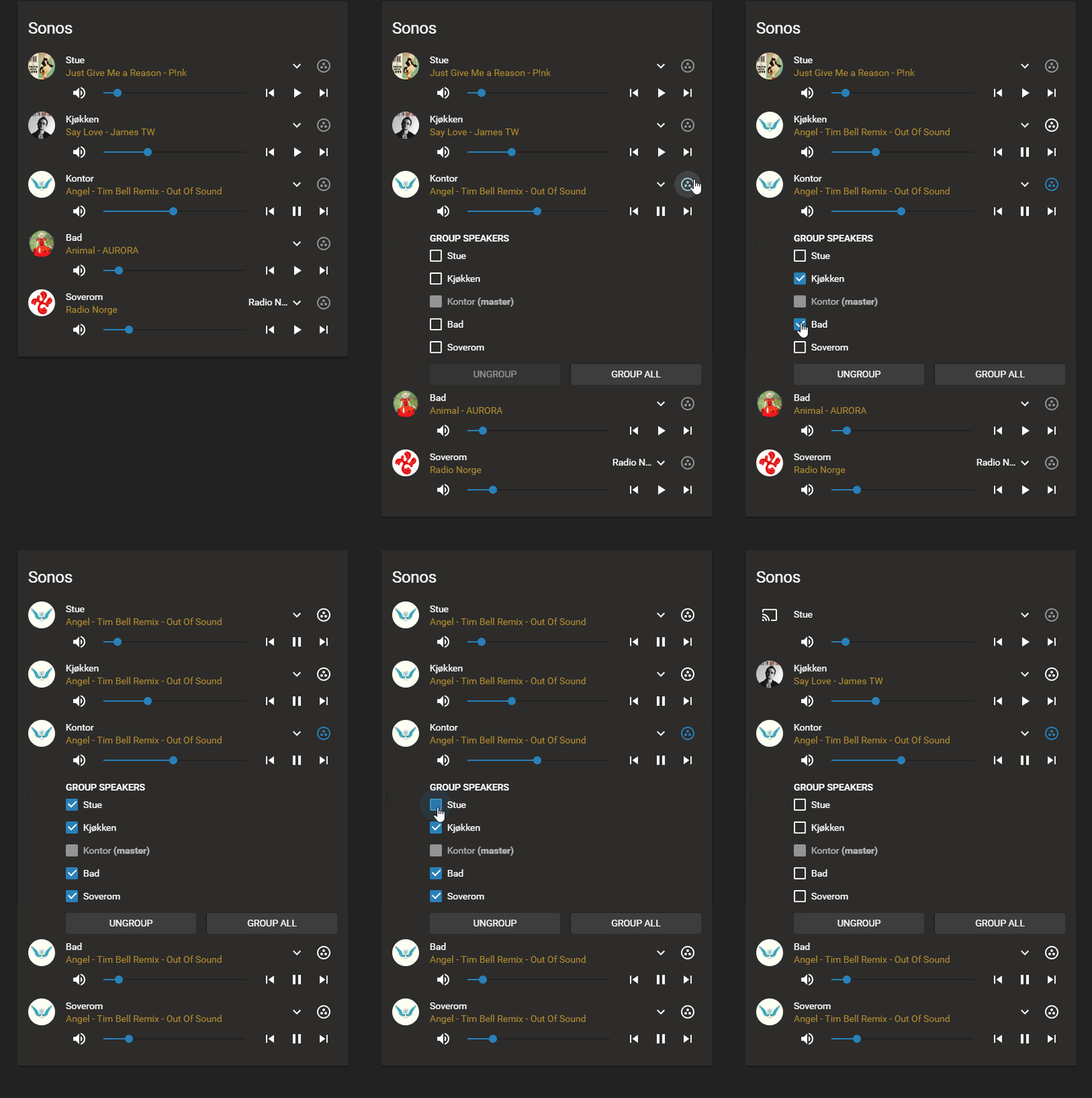




 split granite
Now set the option to make the background the album art...
sudden lion
Didnt like that for this setup, only use that for the single players, not the grouped ones
split granite
I haven't, yet, used the grouping option for Sonos, time to start setting up includes for my Lovelace first 😄
crude geyser
@sudden lion This is the reason I'm trying to get Custom Cards working with Lovelace via the Raw Editor, mini media player is excellent
I keep getting the error "Custom element doesn't exist: mini-media-player."
mossy gale
did u add it at the top ok?
sudden lion
Add the resources
crude geyser
resources:
  - url: /local/mini-media-player-bundle.js?v=0.9.8
    type: module
title: Home
yup
tepid locust
open that file and tell me if it is a big html file or if there is code in there
the correct file is one long line and starts with the word function
 frank ocean
How do you add a slider to a switch in lovelace
crude geyser
@tepid locust Think that's the problem, saved it as HTML instead of .js
frank ocean
I want it on the main page, not a click and slide
split granite
You can't add it a switch, you can add it to a light with https://github.com/thomasloven/lovelace-slider-entity-row
frank ocean
By switch I mean light
sorry
I wound like to add sliders here https://nextcloud.mddrop.com/index.php/s/rH3BBnBqSEN4YQ9/preview
Instead of on off switches
split granite
Look up, look at the link I posted, follow the link 😉
tepid locust
oooh soo using that 😃
odd light
okay so to use the console UI I have to switch from yaml mode, is there anything I really lose moving to console UI?
split granite
It's awesome
odd light
like customizability etc.
tepid locust
if you long press on it does it still bring up the color picker and other options?
split granite
The ability to use !secret or !include is about it @odd light
odd light
you mean people use !include in the lovelace config?
split granite
Yes
odd light
I only have that stuff in my config.yaml
tepid locust
awsome!
odd light
sweet, now to see how to switch to console UI mode
winter hollow
it is easy, just remove mode: yaml
click edit config in the top right menu
take control
and click raw editor in the top right
paste in your yaml
odd light
will it start editing my lovelace config file after that on its own?
winter hollow
click save
odd light
oh
winter hollow
and done
odd light
haha
here we go
I think I have to restart HA to get it to recognize I'm out of yaml mode
winter hollow
yes you do
crude geyser
OK so I've got "mini-media-player-bundle.js" in my config/www directory
In the Raw Editor I've got the following code at the top
resources:
  - url: /local/mini-media-player-bundle.js?v=0.9.8
    type: module
title: Home
ohh I like this
sudden lion
How does your file look? https://ha.install:8123/local/mini-media-player-bundle.js?v=0.9.8
 manic obsidian
hi all. could you recommend a place to learn about lovelace (upgraded to 0.86 ystarday and I'm not 100% sure howto customize). I've whatced a couple youtube vids recommending the use of the UI editor (which I've done), but when I look at sample configs (on the forum or github) everything is a yaml. And here is where I'm having problems... I don't fully understand how to make changes without using the UI and, when using the UI, I don't know how to leverage the yaml files from github/the forum.
crude geyser
@sudden lion That works, get the raw javascript
crude geyser
If I go to Configure UI>Add A card>Skip> I paste in:
type: custom:mini-media-player
entity: media_player.denon_avr_3313ci
icon: mdi:router-wireless
artwork_border: true
show_source: true
use the raw editor <-- as in a plain text editor?
crude geyser
It throws: "Custom element doesn't exist: mini-media-player."
manic obsidian
I just pasted my lovelace config <-- I don't have a lovelace.yaml in the folder where configuration.yaml is
odd light
not sure about the cards yet, I just started messing with mine, I'm trying to figure out how to get a new view to use an icon.
mossy gale
jsut add it on the Edit option
i cant work out how to get 3 x picture entity cards inside a Horizontal stack
odd light
but like I tried the name from mdi, I tried mdi:bed
I'm trying to set up a view for just the bedroom
mossy gale
should work fine
odd light
which one
mossy gale
using editor? or Raw Editor
odd light
just the GUI editor
odd light
yeah in the raw config it looks right, but it shows up blank lol weird
wait wait
got it
sweet
mossy gale
excellent... now if u can just work out how to get 3 picture entities in a horizontal stack I will be over the moon 😉
odd light
how are you laying out your lovelace? I'm trying to split it into views for each room
then I think I will have a "dashboard" with stuff that doesn't fit
something like that
mossy gale
yes same here
mossy gale
ive grouped all my temp sensors / battery levels (dont ask why??) / Travel related/ Weather / CCTV for the moment
manic obsidian
@mossy gale - how are you doing weather?
mossy gale
currently working on the Location for trackers one, but cant fathom out how to do cards
@manic obsidian I am just having a view with the different weather info (Dark Sky/Met Office/French Weather/Windy.com etc)
crude geyser
Well looks to be working now, worth noting is it seems to automatically change the syntax of my resources declaration
odd light
I removed the weather view, didn't really use it
crude geyser
resources:
  - type: module
    url: /local/mini-media-player-bundle.js?v=0.9.8
@mossy gale thanks. so, not the 'weather forecast' card? (was trying to add this with darksky and it doesn't work; and all the exmpales I find talk about modifying the yaml, but as I said above, I can't find how to play with the yaml for lovelace)
mossy gale
ah no sorry aint got that fair yet
top right hand corner and click Raw Editor
if u click Configure UI first
sorry its called Raw Config Editor
mossy gale
i didnt know either 4 hours ago 😉
 vapid lance
hi all
mossy gale
good evening
vapid lance
o/ @mossy gale
is it possible that defaultPage (in localstorage) prevents lovelace from loading ?
I think it's since 0.85
mossy gale
thats a question for someone far more technical than me
hopefully someone will pick up on it
vapid lance
oki 😃
maybe I could have a look at the code, where is the repository of lovelace source ? it's within home-assistant 's one ?
winter hollow
Yeah, it was changed a bit
it can only contain the path to a panel
no sub paths
and this is the source https://github.com/home-assistant/home-assistant-polymer/
odd light
lovelace still needs a little more customization with the cards I think.
winter hollow
we are still working on it
winter hollow
hehehe what do you miss?
prime umbra
@winter hollow does your Lovelace animated weather card can be intergrade with card tracker for the updates or is there any tracker.json address to keep track off new updates?
odd light
nothing, just things like for example, I can do a horizontal stack, but then if I look at that on my phone it will be smushed because it will be forced to be in one column, if I could tell it to take up the width of the browser window it would be horizontal on my laptop and in a column on my phone, maybe lol.
winter hollow
prime umbra
nice @winter hollow , and awesome job on that card, roxxx!!!!
winter hollow
@odd light yeah that is something we are struggling with for a while... we haven't found the right solutions yet 😦
odd light
it's probably a pain in the butt programming wise
winter hollow
it is the balance between keeping it easy to configure and have flexablility
sudden lion
@odd light show us!
odd light
hold on, still a few more things to add lol
 hearty marten
hi there when i get "Entity not available" errors on all KNX lights when switching to lovelace, is this then a problem on my setup or do i have to adopt something within knx-component? (running current dev)
winter hollow
you don't have to change anything for Lovelace, are the KNX lights in your states? Is the entityid changed?
and, in what mode are you running Lovelace, automated or controlled?
hearty marten
@winter hollow : "mode", i dont know, i just pressed "try out lovelace". I did not configure anything else.
@winter hollow : What do you mean with "entity id changed" ? the entites are generated by the KNX component ..
(I contributed that component, so i wonder if anything has to be changed within the modules)
winter hollow
Current dev should give Lovelace by default....
hearty marten
yes, i noticed, I had to switch back 😃
have to run dev in production bc I'm working on #18738. And i dont have a test environment with velux windows 😃
winter hollow
Living on the edge...
hearty marten
haha, indeed!
winter hollow
but anyway, your are in automated mode
and it just uses your groups
if you have entities in your groups that don't exist, it shows that warning
hearty marten
ic!
hmm, is it possible that lovelace uses a different escaping algorithm for replacing special characters?
odd light
weird, I added a temp sensor, then a humidity sensor and it kicked me out of lovelace
hearty marten
hmm, yes, it is an escaping problem, the ID of my entity is: switch.kitchen_coffee and within lovelace UI it tries to integrate switch.kitchencoffee. sigh
winter hollow
@hearty marten I don't think that is Lovelace
do you have it correct in your groups?
hearty marten
yes, and it works for the old ui perfectly.
winter hollow
@odd light blacklisted yourself?
odd light
How would I black list myself adding a sensor card to lovelace?
winter hollow
might be something else on your network logging in with wrong creds
odd light
well I can still load it on my phone so maybe I did get black listed lol
no
it literally happened right when I was adding that sensor
I wonder if it got angry at my laptop and blocked my IP because my phone can load the page
everything is working fine from my phone lol
hearty marten
@winter hollow for #19192 i already had to change all entity ids 😕
odd light
brb gonna close my browser
nope
is there a place IPs get black listed in the software, I did have security setup on it
winter hollow
you don't have to change you entity ids for lovelace
odd light
login_attempts_threshold: 5
but my lan is also white listed
maybe the web UI freaked out and sent my creds a bunch of times fast
yep, it banned me
LOL
I removed my IP from ipbans yaml
that was totally the softwares fault
here's a question
before I went to use the UI config I had - background: darkslategray on all of my views, the new view I created is white and I don't see a place to pick background, and in raw config its almost like it mixed the new views config with the last view from my old config
the old views show nothing for theme, the new ones forces you to choose
I used to have dark-mode theme, now that isn't in the list
is that a limitation of the config UI ?
 woven echo
Is there any middle ground between being able to use custom cards and coding my entire Lovelace views in yaml? I really want the buttons and mini media player cards.
polar kelp
@thorny verge https://github.com/thomasloven/lovelace-card-loader
I haven't tested it. I don't experience the problems myself...
odd light
is there any way to force thing thing to let me use the theme I had before?
and when I tried to manually put my theme in the config it freaking banned my laptops IP again
that's a pretty crappy bug, who do I report that to
I set ip ban to false for now >.<
 solid sage
When i add a entity-filter the header dissapear ```type: entity-filter
entities:
- entity: light.vardagsrum_fonst_154
- entity: light.vardagsrum_tak_635
state_filter: - 'on'
title: Vardagsrum
@polar kelp Awesome, I won't have a chance to test it today, but I will tomorrow and let you know how it goes. Thanks!
odd light
is anyone else able to use a theme besides default and backend-selected in the new console UI?
white background is pretty ugly
mild veldt
@woven echo I'm not sure what you're asking. There is no method (mode) of Lovelace that restricts you from using custom cards
 kind shellBOT
Please follow the rules, @mossy gale! You have 5 warning(s) left. You posted a message/code that is more than 15 lines. It is moved here --> https://paste.ubuntu.com/p/g85x3yhrzX/
mossy gale
whoops my bad...
the code https://paste.ubuntu.com/p/g85x3yhrzX/ has 3 images that sat on one line before in a Horizontal stack it automatically seemed to make the fit the space
cant seem to achieve the same currently using UI/Raw Config
 true wasp
@polar kelp Hi Thomas... not sure if you are still on but quick question for you. If we want to continue to use your lovelace-layout-card custom card but use the default Configure UI, what do you suggest is the best way to do that. Is it to remove all cards off the dashboard and add the lovelace-layout-card as the first card (kind of defeats the purpose of adding cards through the UI) or by editing the config and adding lovelace-layout-card that way
I hope that was clear 😃 (it's clear in my head lol)
polar kelp
I’m thinking about how to make a gui editor for it. Have patience.
odd light
it says :When themes are enabled in the configuration.yaml file, a new option will show up in the user profile menu: but doesn't say how to enable them, and if they aren't, why was i able to use them before?
prime umbra
reboot maybe
true wasp
@polar kelp Perfect... I tried searching before asking but couldn't quite find the answer I was looking for (that's more my bad than anything). I am sure you've received that question a few times so my apologies if my question was a annoying. I truly appreciate the work you put into this project!
prime umbra
its there
odd light
when I go to users and click my user I see nothing about themes
I'm running the newest version of hass.io
a new option will show up in the user profile menu - I guess I can't find that?
odd light
where is that?
prime umbra
dont know how you have it
mild veldt
@mossy gale https://pastebin.com/Yi8MjFnU
odd light
I mean I was using a theme before lol
and my old lovelace views look fine
but the new one is just white background
maybe it didn't like me copying and pasting my old lovelace config into the raw editor I dunno
in config yaml I have # Enables the frontend
frontend:
Enables configuration UI
config:
is there something else I need to do to "enable" themes?
mossy gale
@mild veldt I am trying to spot the difference, but it has made them much smaller
thanks
mild veldt
you didn't have them in the stack
prime umbra
you can create a folder call themes and put there individual files with themes
exemple themes
https://www.juanmtech.com/themes-in-home-assistant/3/
then you add this into configuration.yaml and reboot
frontend:
  themes: !include_dir_merge_named themes/
the docs don't tell you it just says if you have them enabled
mild veldt
@odd light yeah, those docs need a refresh. after you get this sorted out, you should submit a PR to make them clearer. People that run into issues are the best people to fix docs 😃
odd light
yeah I dunno how I was using dark-mode theme before I guess that was a thing that went away or doesn't work in the config UI
default and backend-selected do nothing
mild veldt
it all changed when profiles were introduced, I believe
woven echo
@mild veldt how do I add a mini-media-player card? I get custom element doesn’t exist.
prime umbra
read up @odd light my last post
mild veldt
odd light
@prime umbra looking, guess I have to find one and download it, before it just let me specify the background color in my config
prime umbra
just creat a new file give a name.yaml
copu paste from link i showed you
put inside a folder called themes
its there a video showing you anyway
just follow
odd light
I think I may have figured part of the problem, It looks like the raw config editor jumbled my stuff all around
I may just re-create the lovelace setup from scratch so it formats it correctly
 summer eagle
Guys, when the recent update came out there was a post here somewhere about Lovelace with a link showing 3 or 4 Lovelace configurations to show off the Lovelace UI
does anyone know where or what that link is
raven nacelle
summer eagle
Thanks, finally
here comes the next question
https://demo.home-assistant.io/#/lovelace/0 if you scroll down to the "Ring Doorbell card"
Front Door Last Motion > I need that template
manic obsidian
automations are still done with code in 'automations.yaml', right? I mean, the lovelace change is only for UI, not for how we create/manage automations.
sinful fulcrum
@manic obsidian there is also the automation config panel that’s been around for a while now
manic obsidian
@sinful fulcrum ah, right. almost never use it, so I'd forgotten
so, that UI and edditing 'automations.yaml', right?
sinful fulcrum
Yes
manic obsidian
thanks!
sinful fulcrum
np
odd light
the way the raw config is arranged is completely wacked
sinful fulcrum
@odd light it’s better than having to go to the file system for quick things. I installed plugins earlier from my phone... was easier than having to remote into a machine. Not sure it’s meant to be a full fledged editor at this point.