#frontend-archived
1 messages · Page 40 of 1
 shut robin
 tacit cave
No Im saying you need to play around
tacit cave
if 80% is making the button large and outside the grid size, try a percent that works well
then make your margins the opposite %
shut robin
tacit cave
if 80% is making the button large and outside the grid size, try a percent that ...
but that 80% only works for the height - i can't get the width to be smaller and have the margins still work with percentages
tacit cave
the percentages should equal 100%, but sometimes the percent is based on the parent card, not the card you're in
There's no magic bullet, you have to play around
Personally, I wouldn't use button cards in a button card
I'd use custom:layout-card
with button cards
shut robin
the issue though is if i width set to anything, i have to use the px in the margin, not the percentage
i've been using button-card within button-card so far and it's been good, but maybe this is one i might have to change things up a bit
 velvet sky
Morning everyone - just wanted to share that my new video is out! Quick tutorial on how to add free fonts from Google to use in your Dashboards!
Let me know what you think - hope you don't mind me sharing in the forum and via discord - let me know if you do?
Hope you find it interesting - help my channel by liking, commenting and subscribing if you do! 🙂
https://youtu.be/OvXgr0Y7U7Q

 short kite
Is there a way to make one card conditionally visible based on the number of entities that meet the conditionals in an auto-entities card? That is, I want there to be a bubble card separator separating an auto-entities card, but that auto-entities card is set up to only be visible if one of its conditionals resolves, and I'd like the separator (bubble card) to also be hidden if there are no conditionals resolving to true. Does that make sense?
 dark dirge
you can probably write a template that counts the number of entities that auto-entities would include and use it as a template condition for a conditional card
short kite
Thanks, I'll try that
 gusty vine
Since updating to 2024.5.0b0 is appears the 'app-header-background-color' variable in my themes is being ignored and the top bar on Android is now using the 'primary-color' variable, anyone know what the change was or if there is a new variable name that has to be used for this?
 vast crane
gusty vine
Since updating to 2024.5.0b0 is appears the 'app-header-background-color' variab...
vast crane
gusty vine
Since updating to 2024.5.0b0 is appears the 'app-header-background-color' variab...
didn't follow this too closely but it's probably this:
https://github.com/home-assistant/frontend/pull/20558
If you want to discuss further take it to #beta
gusty vine
Thanks @vast crane I'll check that
vast crane
looks like --app-theme-color is the new var to use instead of --app-header-background-color
gusty vine
Yep, thanks again.
shut robin
hey guys, i want a bit of feedback on my tv remote card i'm making - the idea is that i'll have one card that'll be in a bubble pop up that i can use to control my tv, but i'm not a designer or anything and struggle to make things look good, so i'm a little stuck on the finer details
here's two options that i've got so far - the bottom parts are both identical but the top parts are a little different - the first one is more compact compared to the second version
it's also a bit interactive - the power button is red if the tv is on vs black if it's off, the play/pause button shows either the play or pause icon depending on the status of the media, and when nothing is playing it's missing (it'll be under the right arrow and next to the down arrow), and finally the mute button icon changes depending if the tv is muted or not
eventually i'm also going to add a conditional "what's playing?" section that only shows up when something is playing, along with a progress bar, but i'm struggling with the progress bar so haven't added that in yet
if anyone has any suggestions or anything on what else i could do to make it better, or suggestions or ideas i'd love to hear it


 vast osprey
hey, i noticed that in the default dashboard my integrations/cards got updated and i'd like to just update mine as well. is there an easy way, like just some clicks instead of removing and re-adding all those things by chance? :/
tacit cave
shut robin
hey guys, i want a bit of feedback on my tv remote card i'm making - the idea is...
I've been using my previously linked remote for years. The goal of my remote was to have all of the main controls fit within 1 cellphone scroll window, while also having grab areas to refresh the page by pulling down. With that being said. I settled on my previous image to you.
The main features are a 3 rows of activity buttons with On/off controls for my reciever and TV. The activity buttons are all-in-one buttons that will turn on the tv, the reciever, and the activity (Like netflix or plex).
Below that are tailored controls for each activity. A top row of activity specific buttons. A left sidebar for volume controls on the reciver. And bottom buttons for play, ff, rewind, and pause.
In the middle is a 4 way directional control, with a 'go back' button in the upper left corner of that grid. The upper right, lower left, and lower right are emtpy spaces for grabbing the page.
It took me about 5 years to get to this layout and it works great. Any additional controls like Source or Surround Mode are access through a button that take me to a scrollable 'more info' style remote page that gives more granularity of control.
With all that being said, I think your both of your images have activity buttons that are too large. Your first button, the controls are too small. The second, the controls are just right.
So, I'd make the activities smaller because you're pressing them less, while making your controls larger because that's where the bulk of your finger movement will be.
shut robin
tacit cave
With all that being said, I think your both of your images have activity buttons...
Interesting point - so at the moment I'm in the middle of rebuilding my dashboard from scratch because I had issues with the old version, but I'm the old version I actually had 6 activities there in a 3x2 grid, but with this new remote button since we don't have Netflix any more because of the password sharing stuff I changed it to a 2x2 but kept the aspect ratio the same without thinking of the consequences - I'll play around with different things but maybe I'll go for a 1x4 thing instead and see how that goes?
Put of curiosity, I think I remember that one you linked but would you mind linking it again or linking to the message again? With everything going on I don't know where the link for your remote card is to see it
tacit cave
shut robin
This is a 1x4 - ignoring the fact that the volume has somehow disappeared, does that feel better with sizing?
 shut robin
tacit cave
https://discord.com/channels/330944238910963714/460846676358332417/1233021009653...
shut robin
tacit cave
https://discord.com/channels/330944238910963714/460846676358332417/1233021009653...
That's the one - thanks! I like how with yours there's the buttons for different sources - when I started getting the first version of this remote made I think I had issues with getting the hdmi to switch and gave up, but I might play around with it again and see if I can add some inbuilt source buttons too
 rancid rover
Good morning, I set up 2 factor authentication on my google authenticator for home assistant and can't find my 4 digit code. Do I have to start all over with home assistant or can I get in another way?
 hexed harbor
hey,
is it possible to switch the entitiy by tapping on it on the dashboard? i'm using a tapo c200 as a dog-cam but unfortunately sometimes the hd stream isn't available, sometimes the sd stream isn't available so i have to change the entity by hand everytime i need the camera
 hushed hull
Hi. Does anyone know if there is a way to launch the "Disarm" keypad from an alarm entity when tapping on a button? I want to be able to disarm my alarm without having to go through the more-info popup (which is buggy if you enter the wrong code)

 weak nova
Create a button which, when tapped, invokes a script that calls the "Disarm" service
something along those lines
vast crane
(which is buggy if you enter the wrong code)
Is there a reported issue about this?
hushed hull
weak nova
Create a button which, when tapped, invokes a script that calls the "Disarm" ser...
I've tried calling the disarm service without a code but it doesn't do anything. If you pass a code it just disarms immediately (obviously not wanting to hard code the pin code in the dashboard)
hushed hull
vast crane
> (which is buggy if you enter the wrong code)
Is there a reported issue about t...
I've not checked tbh, I've only just noticed it while playing with the options. It's just a UI bug in that if you enter the wrong code the Disarmed button stays highlighted green even if the alarm is still armed.
But it would be nice to not have to go through the more-info popup to disarm the alarm if its armed anyway, just tapping and entering the code is a nicer experience and quicker.
vast crane
Does the Alarm Control Panel card not have what you want?
I don't think there's a way to go straight to that popup.
vast crane
hushed hull
I've not checked tbh, I've only just noticed it while playing with the options. ...
hmm I don't reproduce this, mine snaps back to the original state if you put in the wrong code 😕
hushed hull
vast crane
hmm I don't reproduce this, mine snaps back to the original state if you put in ...
Maybe its a theme thing then, let me try with the default
The alarm control panel card does more than I really want on the UI, I'm trying to keep it simple and just show a single button if the alarm is armed with a popup to disarm it. Dont really want the whole keypad always visible
vast crane
got it. If I wanted to achieve that I would either make a button take me to a subview with the alarm panel card, or have a button that unhides an alarm control panel card right below the button.
I think there's some custom cards that allow you to launch a popup as well with cards in it.
hushed hull
Ah okay. I was hoping I could just use the popup as thats formatted nicely, the other card styles leave a bit to be desired but maybe I could theme them
Thats my "more-info" screen after entering the wrong code after clicking disarm with the default HA theme
 vast crane
Do you get the failed toast?
 hushed hull
no nothing, it just closes the popup
vast crane
I think frontend might be expecting the service call to raise an error with an invalid code. Your integration might be just silently ignoring.
could be worth reporting an issue for that maybe
hushed hull
Its the Alarmo integration
I guess the bug would be with that if thats the case, not HA itself if yours is working correctly
vast crane
it's a bit of a grey area
the frontend seems to be assuming one kind of behavior, and maybe not all alarm integrations are behaving the same way
the demo alarm_control_panel raises that service call failure, which triggers the more-info to reset to the correct state
but if Alarmo also raised an execption in the same way that would improve their UI experience
hushed hull
I'll raise it on there when I get a few minutes as it would be nice to have it fixed.
I wonder what the chances are of getting a feature request in HA to give access to these other new popup elements in the UI like the keypad popup...
vast crane
I would consider maybe an option to alarm panel card to hide the keypad and use the popup.
would that be what you're looking for?
hushed hull
I was trying to keep it even more light weight than that tbh for a mobile UI. Single button for the alarm state which opens a popup to set the alarm mode. And then if the alarm is armed tapping the same button pops up a keypad to disarm it. I was also playing around with the tile card which almost does what I want but I was trying to keep it minimal...


Those are the 3 different options I'm playing around with. I know, I know, being picky 😂
The pill button would open the more-info page to select a state, or open the keypad if its already armed.
The Tile card I've managed to hack around with some card-mod CSS but takes up more room, the CSS also makes the page a bit jumpy but could live with it
Then theres the full alarm card which needs a UI update
vast crane
The pill button
That's a custom thing right?
 pure sapphire
just set up the wall tablet! my wife wants me to make it "pretty", any idea where to start? are there themes or templates I can use?
 north monolith
Hello Lovelace gurus
I'm trying to change the font-size of the Area name on the Area-Card, I tried using the lovelace-card-mod but don't seem to be able to change the font size at all
 golden mistBOT
@unborn prawn I converted your message into a file since it's above 15 lines :+1:
hushed hull
vast crane
> The pill button
That's a custom thing right?
Yeah. It’s a custom button card I set up.
 winged frost
is there a reason why a python upgrade might be "held back"?
I noticed when I was doing my updates that I got a message about python not being upgraded and I think it is affecting my HA performance somehow
I get the following message: The following packages have been kept back:
python3-update-manager tracker-extract tracker-miner-fs update-manager update-manager-core
 split dock
I've created a custom:popup-card that works well for displaying the input_select and input_datetime i want to prompt the user to set at the time the underlying card is actioned. The problem I'm running into now is that input_datetime uses another popup for a calendar selector on the date and that calendar doesn't show up when the calendar icon is selected from the popup. I have a workaround where the icon to the left of the date (the one for the input_datetime itself) does bring up the full editor for date and time, but that makes my custom popup go away. Any good way to keep the normal behavior of the datetime control's calendar selector ?
shut robin
hey guys, i want to get a bit of feedback from here about an energy card i'm creating based on an retro style bar and i'm a little stuck on it and trying to figure out the details
the idea is that you have something like the first screenshot which is in green to show that my solar panels are generating power, and the bars on the right go from orange to green with the more power being generated (see screenshot 2), but if my solar panels aren't producing power, then the card is red and goes from the top down, and once again the more power being used the more red the bars get
the thing that i'm not sure about is that this is currently based on whether my solar panels are producing power or not - so if the solar panel production > 0 then it's the green card, otherwise it's red, which is mostly fine, but the issue is i'm generating 200W of power towards the end of the day but the house is using 3kW, it'll look green even though the house is using more power from the grid by a long shot, which i think feels kind of weird?
that said, i'm going to have a single energy card on my dashboard and when you press it it'll open a popup with more info, like house usage, grid usage and solar production
is it worth making any changes to this or does this make sense? i'm not entirely sure if there's a better way to present this or if i'm just thinking too much into it all?


 vapid field
Hey 👋🏻 does anybody know if it is possible to map the value of a custom:bar-card? I would like to see a string instead the number. Or is there another good way to combine it? Thanks 🙏🏻
 fleet leaf
That did it! I don't know why I didn't think to try Vertical; I tried both Horizontal and Default, but totally skipped Vertical. THANK YOU!
 loud wind
Hi!
I have a few lights using the mqtt integration
and they seam to have lost the brightness icon color.
They are all just gray.
The two new zigbee ones I just bought have the icons changing colors properly as i change the brightness
 tall pewter
Looking to pay someone to design a HA dashboard for me!
 timid beacon
Is there a container card that "floats" cards rather than having them act as block elements? Basically looking for something similar to how the mushroom chip cards work.
I was thinking the layout card could do this, but I've never had great luck with using that and I don't even quite understand from the docs how it's supposed to be a "card". Seems more like it's meant to control a view's layout
tall pewter
Just leaving this message here. If anyone creates dashboards for $, let me know. Willing to pay. Thank you!
 vague blaze
timid beacon
I was thinking the layout card could do this, but I've never had great luck with...
vague blaze
timid beacon
I was thinking the layout card could do this, but I've never had great luck with...
I think the bubble card does something similar to that? Or it does flyouts or something like that?
timid beacon
Oh yeah I saw some rumbled about that card but I haven't taken a look, let me do that now
Yeah not really seeing how that would be done with this card
Mushroom chip cards work perfectly, I'd just like to be able to use any card with that sort of fluid layout
 tribal galleon
Is there a container card that "floats" cards rather than having them act as block elements?
@timid beacon I'm assuming you're looking for a little bit better placement control when you say "float" cards. Depending on the card you're wanting to use, you might be able to use some card_mod and put the card exactly where you want it. This example puts a Markdown card showing the time on top of the header on the right side. (Just don't cover theDonebutton...)
type: markdown
content: '{{ now().strftime("%m/%d/%y, %H:%M") }}'
card_mod:
  style: |
    ha-card {
      background: transparent; color: white
    }
    :host {
      position: fixed; top: 0px; right: 8%; z-index: 99; font-size:25px;
    }```
Another option could be to use custom:button-card as a container. Add the cards as custom_fields which could give you better flexibility of placement within the custom:button-card. This idea was proposed by @velvet sky #frontend-archived message
 arctic field
Hello, any tip how to optimize dashboard loading? I'm using card_mod a lot. When I load dashboard it's Tak some time to render. It looks like a weird animation.
timid beacon
tribal galleon
> Is there a container card that "floats" cards rather than having them act as b...
Yeah just ended up using card mod and basically replicated what chip cards do
 dry perch
i have 10 T/humid sensors. Just added to the HA. Is there some easy way to have line chart over last 7 days with all of them (one chart for T, one for H)?
vague blaze
dry perch
i have 10 T/humid sensors. Just added to the HA. Is there some easy way to have...
Yes. Use the History Graph card and set it to 168 hours. However, it should be noted that it will probably slow down your frontend as it loads the state for all 10 sensors.
vast crane
Consister a statistics graph instead for larger datasets
dry perch
Is there some easy way to group intities, so i could add them to single chart without picking one by one?
vague blaze
dry perch
Is there some easy way to group intities, so i could add them to single chart wi...
You could use a group, but it will aggregate the sensors to a single value, which I don’t think you want.
tribal galleon
If you're still in the planning/experimenting phase, FKB has the following options that might be useful for when you do get the tablet: Auto Reload on Idle, ...after Page Error, ...on Screen On, ...on Screensaver Stop, ...on Network Connect, and ...on Internet Reconnect.
You might spend more time and effort trying to get similar options with browser_mod just to be able to turn around and let FKB do the job itself.
(Note: None of these options (Settings > Web Auto Reload) are Pro options so even the Free version will let you accomplish this. Fully Kiosk Browser will let you test Pro options without a license but it puts a watermark on the screen. Useful in deciding if you want to purchase a license which, honestly, the Free version does a really good job.)
 elder pewter
are there any commonly recommended resources for getting started with dashboards? its a bit bewildering where to begin.
 errant plover
elder pewter
are there any commonly recommended resources for getting started with dashboards...
elder pewter
errant plover
elder pewter
are there any commonly recommended resources for getting started with dashboards...
elder pewter
I was thinking more tutorial format that also works with things like 3rd party cards, hacs, etc. while i can trawl the docs thats hard work to get started.
 visual harness
Hey, is it possible to only Show the median of humidity between like 10am to 8pm?
 gloomy spire
So I just updated from 2024.3 to 2024.4 and there is a HUGE difference in my dashboard now. For one, all of my additional dashbaords are gone and everything has been pulled into the Home dashboard. All of my entities have been regrouped and the Edit button at the top only lets me re-arrange and hide the areas. How do I add/remove entities from the cards now?
vast crane
gloomy spire
So I just updated from 2024.3 to 2024.4 and there is a HUGE difference in my das...
I can't think of anything that would explain how that could happen. There's nothing under settings/dashboards? Sounds like your config just got wiped and replaced with the default dashboard.
gloomy spire
Settings/dashboards only has 4 dashboards: Overview, Energy, Map, and Mobile. I had additional dashboards for everyone's phones, for all my Alexa devices and a "lab" where I just threw a bunch of stuff for testing purposes. Now all of that stuff is in the Overview dashboard.
Hmmm, ok well I can at least edit the entities. I created a new dashboard and set it to "Default" then selected "Take Control". So I can now edit the entities. But now I have to go around to all of my devices and change the default dashboard to the new one...
Still don't know what happened to my other dashboards. I gues they got wiped, like you said
vast crane
Did you have a backup?
gloomy spire
I do.
vast crane
I would try to go back to that maybe
gloomy spire
I could try restoring, and then updating again
tacit cave
I don't see how they would be wiped out
vast crane
yeah I don't know either 😕
visual harness
visual harness
Hey, is it possible to only Show the median of humidity between like 10am to 8pm...
Any help?
tacit cave
it's not possible without extra effort
SQL sensor can do it, nothing else can
I highly doubt anyone has done that before with the sql sensor though.
so you won't have examples to go off of
visual harness
Sad :/
tacit cave
you could cobble things together to get it to work, but there's only 1 integration that looks at a period of time, that's history_stats, which is rather limiting
visual harness
Got it working with the ApexChart from HACS
gloomy spire
vast crane
I would try to go back to that maybe
How long does it take to restore from a backup? I started the process almost an hour ago and my HA still hasn't reloaded (I keep getting the "Unable to connect to Home Assistant" message)
 cerulean remnant
Any Alarmo users?? I have a fairly simple setup, I have a notification setup in alarmo sending an alert to my phone, but it sends 3 notifications on each alarm. Anyone else have this happen? Are there any log I cac check? service: notify.mobile_app_sm_n986u data: message: "The alarm is triggered! Cause: {{open_sensors}}." title: "" data: channel: alarmo
`
vast crane
I don't know. It seems to take a long time sometimes.
gloomy spire
ok, I'll give it some more time. hopefully it's just taking a while
gloomy spire
vast crane
I don't know. It seems to take a long time sometimes.
ok, it has now been 3 hours and my HA instance has not come back up. My backup is only 135meg and I am running it on a RPi4. Should I manually cycle the power on the RPi? Will that cancel the restore, or will that just break my HA and require me to fully reinstall?
vast crane
I wish I knew what to tell you, sorry. Maybe ask in #installation-archived . Anecdotally I've heard of it taking like a whole day 🤷
I don't know if that's normal or not
gloomy spire
ya, I've been trying to look up what people have been saying. I see posts saying it takes 1-2hours, but those backups are almost a gig.
vast crane
IMO backup restore sounds like a hot mess, wish it got more attention 😞
 tender wedge
How do I shorten last-changed state so it shows as 2hr instead of 2 hours ago?
I want it to apply system wide, not just per card (if possible)
tacit cave
not possible
tender wedge
Can it be achieved per card?
tacit cave
Yes, but it depends on the information you're exposing and it will require a template
meaning, you're limited to cards that allow templates
tender wedge
Oh okay, at the moment I'm using Tile card with this code, but just want to truncate last-changed as much as possible so it fits into the card more cleanly:
show_entity_picture: false
entity: sensor.iphone_battery_level
name: iPhone
hide_state: false
state_content:
  - state
- last-changed```tile card doesn't support templates
dark dirge
I guess you could create a template sensor with whatever content you want
then reference that
tender wedge
This is beyond my scope, are there any examples I can use?
dark dirge
a whole page: https://www.home-assistant.io/integrations/template/
looks like this is closest, but you're going to need to learn some templating: https://www.home-assistant.io/integrations/template/#self-referencing
tacit cave
I built a lib that does this
{% from 'easy_time.jinja' import easy_time %}
{{ easy_time(states.sensor.iphone_battery_level.last_changed, short=True) }}
 tender wedge
I only just discovered this today and read it briefly, thank you for this 🙂
dark dirge
it's like petro is from the future and anticipated exactly your need
gloomy spire
vast crane
IMO backup restore sounds like a hot mess, wish it got more attention 😞
Ya, at this point it would have been MUCH faster to just re-create my other dashboards
 surreal otter
How can I make the app-header transparent with a fixed background set? I've tried setting the following, but it just shows a black header on iOS with kiosk_mode enabled:
app-header-background-color: rgba(0, 0, 0, 0.1)
app-header-selection-bar-color: rgba(0, 0, 0, 0.1)
So basically, the background should show under the status icons on mobile
surreal otter
Did you manage to figure this out? I'm all out of ideas here. : (
 modern kernel
surreal otter
Did you manage to figure this out? I'm all out of ideas here. : (
modern kernel
surreal otter
Did you manage to figure this out? I'm all out of ideas here. : (
I did! If you can shoot me a message in like 4hrs I’ll send you the code
surreal otter
modern kernel
I did! If you can shoot me a message in like 4hrs I’ll send you the code
Cool will do, thanks! 😃
 untold elk
Set the mushroom card format to vertical layout?
 cerulean prism
Is there a way to define either/or/both the text color or background color of these boxes in the scripts/automations, but apply the color to only these boxes?

I know the primary text color will change it but I don't want to do all the text just in the boxes
As you can see it's kind of hard to read
lol
vast crane
cerulean prism
Is there a way to define either/or/both the text color or background color of th...
Probably need to set some of these theme variables:
https://github.com/home-assistant/frontend/blob/dev/src/resources/codemirror.ts
cerulean prism
oof
 grave parcel
https://www.reddit.com/r/homeassistant/comments/1bskxzd/my_simple_wall_tablet_dashboard/#lightbox
I have similar 10in but my dashboard is only 2 column in landscape. How do I make it show 3 like in this example ?
 spice estuary
I think this is where to ask. Is there a card or something that can show CPU usage, performance, temps of stuff?
 lavish mirage
I got a old samsung tablet that i want to use as a dashboard, any recomendations on how best to set it up (software etc) ?
 broken marsh
Any specific reason why I can't select multiple automations and move them to an area? I can only move to category or add a label in bulk it seems.
tacit cave
because it wasn't added in 2024.4
broken marsh
As in there's a PR for it but it didn't made the release or as in 'no specific reason - just noone has made it yet' ? 🙂
tacit cave
there's no specific reason, it just wasn't added in 2024.4
it's in the beta, i.e. it will be out tomorrow
broken marsh
Ah, thanks. I read the beta release notes a week ago but apparently skipped that part
I'm gonna do something else than move 143 automations manually now then
tacit cave
Yeah, I'd wait too 🤣
grave parcel
grave parcel
https://www.reddit.com/r/homeassistant/comments/1bskxzd/my_simple_wall_tablet_da...
Is this possible ??
tribal galleon
grave parcel
Is this possible ??
If you're using the default Masonry view, HA is going to set the columns. I use the Panel (1 card) setting in conjunction with a grid card, for example. Then I use the appropriate layout-type cards to get the desired layout.
 unborn prawn
golden mist
<@555756657674551309> I converted your message into a file since it's above 15 l...
unborn prawn
golden mist
<@555756657674551309> I converted your message into a file since it's above 15 l...
Someone can help me please?
 inner storm
Hello, I've successfully added my 1st working home automation device, a smart plug! I'm wondering how I can add it to the HA dashboard please? I've tried Edit Dashboard -> ADD CARD -> BY ENTITY -> eWeLink Smart Home Update -> but this is a website update, not the on/off button which is all I need?

 near salmon
 gaunt eagle
May I know what step 2 means?
gaunt eagle
May I know what step 2 means?
If you're on latest stable, Settings -> Dashboards -> 3-Dot-Menu (Top Right) -> Resources then in that view click Add resource, paste that URL and select JavaScript Module.
 pastel grove
Greetings, I am trying to create a full screen dashboard with 'ha-floorplan' but, but when I edit the dashboard list (remove dashboards I don't want to be seen by this user), the list isn't conserved if the user logs out an then logs back in again. Is this a bug?
tacit cave
what dashboard list?
are you referring to visibility tab for the view?
Did you mark the dashboard itself as admin only?
pastel grove
@petro I might be doing some this wrong, but I can remove dashboards from the list in the left side bar.. (hold click on the left title, or select 'edit' in the User setiting)... they can be added back with a '+' option.. but if I log out and log back in again these changes are lost.
tacit cave
yeah, that's normal
if you don't want a dashboard shown for a user, you hide it
through the visibility tab (if dealing with a view) or through the Admin only toggle on the dashboard
Outside that, there are no ways to have dashboards for specific users.
gaunt eagle
near salmon
If you're on latest stable, **Settings -> Dashboards -> 3-Dot-Menu (Top Right) -...
I just did that, so how do I actually show this card on my dashboard? Thanks!
I'm trying to get this to work. I have installed this and the Google keep sensor. I don't see the Google keep sensor entity as well
https://github.com/PiotrMachowski/Lovelace-Google-Keep-card
golden mistBOT
@near salmon I converted your message into a file since it's above 15 lines :+1:
near salmon
gaunt eagle
I'm trying to get this to work. I have installed this and the Google keep sensor...
As to why you're not seeing the sensor entity itself... well, that's another story. I don't use it so I'm not familiar with it.
As it's a custom integration from what I see, and there's a million of them, I guess the best course is to keep googling it? Look in your logs ( Settings -> System -> Logs ) to see what the issue is and solve each new one as it appears. There should be plenty of other people on the web with that specific integration + problem so you won't have to search too much.
 winter cairn
Hi, i'm facing a little problem, i wanted to use a Image that i host on my NAS, but HASS doesn't want to load it, but if i got on that same link but with my browser the image load perfectly this is a screen of what HASS is displaying on the card

 chrome cobalt
``
type: custom:list-card
entity: sensor.topstories
title: Top Stories
feed_attribute: entries
columns:
- title: ''
type: ''
add_link: https://bbc.co.uk
``
There's nothing pulling back from feedparser I've confirmed it works in a default card but can't get it to work on list card

What it shows
tacit cave
Post your sensor from developer tools states page showing the attributes
golden mistBOT
@chrome cobalt I converted your message into a file since it's above 15 lines :+1:
 winter cairn
Is it possible to load local Iframe in HTTP if Ha is on HTTPS ? becaus I may found my problem is that
chrome cobalt
@tacit cave can't seem to get it to work tried playing around with entries but no luck
tacit cave
That should work, check yo ur logs for errors
chrome cobalt
 chrome cobalt
tacit cave
That should work, check yo ur logs for errors
chrome cobalt
tacit cave
That should work, check yo ur logs for errors
Found this
tacit cave
that's just telling you it' cant save the attributes to the database
tribal galleon
winter cairn
Hi, i'm facing a little problem, i wanted to use a Image that i host on my NAS, ...
Post your code so we can see what you're trying to do.
winter cairn
tribal galleon
Post your code so we can see what you're trying to do.
found a way to repair the problem ^^
tribal galleon
winter cairn
found a way to repair the problem ^^
What ended up being the fix?
winter cairn
tribal galleon
What ended up being the fix?
Instead of using the url to see the image, i use the downloader integration to download the image locally and everytime my sensor witht he name of the image changes it automatically redownload the new one and delete the old one
tribal galleon
winter cairn
Instead of using the url to see the image, i use the downloader integration to d...
Seems like a roundabout way to make it work but at least it works.
winter cairn
Well, yes, and the problem was that the image was in reality an Iframe, and my HASS is in HTTPS so he didn't liked when i was trying to load an HTTP one

 polar kelp

Home Assistant
The history graph card allows you to display a graph for each of the entities listed.
 spark venture
I do something wrong?
 chrome cobalt
@tacit cave I managed to do it! It doesn't look very good though I've seen loads online that are better

Might be some CSS fuckery I can do with it
tribal galleon
spark venture
I do something wrong?
What does the error translate to?
spark venture
tribal galleon
What does the error translate to?
graph still unlimited.
the error simply says that the visual editor is unavailable.
 mossy cargo
Need some help. Updating HA Core beyond 2024.3.3 makes my lights show up with duplicated names, like this:

Anyone knows what could be going on?
 shell torrent
Hi. On my PC, I have HA installed as an "web app". After updating to 2024.5, the top row is suddenly very blue. I guess someone thought that was a great idea to promote HA that way, but for me it is terribly blue in a dark environment. Anyone know how to change that back to follow the browser's theme?

 tame oriole
Can anyone tell me why sorting by name is putting these results that start with the letter "C" higher than the rest? Makes no sense.

 covert widget
Hi guys, does anyone have experience with the HACS module "Favicon-changer" from Thomas Lovenn?
I just cant get it to work, ive followed the instructions, created favicons of all sizes needed and put them in the advised folder
tacit cave
shell torrent
Hi. On my PC, I have HA installed as an "web app". After updating to 2024.5, the...
There is no official HA web app for PC.
That doesn't look like windows or mac
what OS is it?
shell torrent
It's just "install as app" on Chrome or Edge.
It basically "installs" the website so it acts like an app, no favorites, always opens in a separate window.
 tacit cave
what os
tacit cave
the top bar for windows is based on your windows theme
vast crane
shell torrent
Hi. On my PC, I have HA installed as an "web app". After updating to 2024.5, the...
I'm sure this was not intentionally done, but there were some recent PRs mucking with the themes in this area. Its likely just an accident.
shell torrent
Yes, but obviously the website can affect it. Mine is dark, but from updating HA to 2024.5, it is suddenly blue. And only the HA "app", no other sites.
shell torrent
vast crane
I'm sure this was not intentionally done, but there were some recent PRs mucking...
Ok, maybe worth to look into it.
 shell torrent
Yes
shell torrent
Well, it used to. But not since this morning when I upgraded 🙂
tacit cave
write it up then
tacit cave
TBH, that requires alot of effort to change the color. Unless this "make it an app" thing does something special
is that windows 11 btw?
shell torrent
tacit cave
is that windows 11 btw?
Yep
tacit cave
I find it odd that the maximize button doesn't have a stacked set of boxes
tacit cave

that's win10
Typically, it takes a mountain to change that bar color too
kinda comical that it happened by mistake
I'm guessing it's something to do with that whole "make this an app" thingy
anyways, reference the PR that karwosts mentioned in your issue
vast crane
Maybe this is the fix for it already, but I don't really know this area:
https://github.com/home-assistant/core/pull/116313
 dark hinge
Does anyone have any tips on how to change color of a binary status, such as my microphone being on or off, and changing from red to green etc with card-mod?
 sour garden
is it just me or, is there no way to set height of cards in a vertical-layout card ?
tacit cave
height and witdh of cards is set by the container you put it in and it's calculated
if you want to override it, you have to use card-mod
sour garden
@tacit cave ive tryed that but it aint changing
shell torrent
vast crane
Maybe this is the fix for it already, but I don't really know this area:
https:/...
It seems like the change actually is intended, that the bar should pick up the theme's main color.
Something I strongly disagree about being a good idea, but I'll wait and see where this lands. Thanks for the research!
tacit cave
Well, if you just use a normal browser link as a shortcut...
you won't have that problem
it doesn't apply to a normal browser
at least from what I can tell
dark hinge
i'm trying to find card-mod examples with binary off/on color changes.
I'm trying to also understand if this is the best approach or I should try and use conditional cards?
I simply want to change a card to red if my microphone is on, and green if it's not.
tacit cave
post your full cards configuration
dark hinge
type: entities
title: Microphone Status
show_header_toggle: false
card_mod:
  style: |
    ha-card {
    color: green
    }
entities:
  - entity: binary_sensor.brianpc_microphoneactive
    name: Microphone
    secondary_info: last-changed
please format it
dark hinge
my apologies, let me see how to do that here.
golden mistBOT
@dark hinge To format your text as code, enter three backticks on the first line, press Enter for a new line, paste your code, press Enter again for another new line, and lastly three more backticks.
```yaml
example: here
```
Don't forget you can edit your post rather than repeatedly posting the same thing.
tacit cave
dark hinge
```
type: entities
title: Microphone Status
show_header_toggle: false
card_mod:
...
type: entities
title: Microphone Status
show_header_toggle: false
card_mod:
  style: |
    ha-card {
      color:
        {% set state = states('binary_sensor.brianpc_microphoneactive') %}
        {% if state == 'on' %}
          green
        {% elif state == 'off' %}
          red
        {% else %}
          deep-red
        {% endif %}
    }
entities:
  - entity: binary_sensor.brianpc_microphoneactive
    name: Microphone
    secondary_info: last-changed
oh my
tacit cave
(No idea if deep red is a color)
dark hinge
chatgpt has nothing on you petro.... goodness, I was up last night late trying to figure this out
all to help my wife/kids stop charging in my room when im on calls lol.
tacit cave
chatgpt is terrible with HA
FYI
maybe when it gets more training it will be good, but for the most part, it makes up crap
dark hinge
yeah, I was trying to understand from the most basic of things.
it actually helped me install HA, then get everything set up. I just installed unraid last month, and was going to go a way different route for this - and it suggested this, so im basically day 1 into all of this.
so, i wouldn't even know about this without it, so lol - I can see it has faults though 🙂
I greatly appreciate your help on this.
this is a really neat system and I had heard of HA before - but never delved into it, so I gotta really figure out what I want to do.
sour garden
okay so now ive tryed to play a little with the card-mod but i cant see to find the right solution, i would like to have the markdown cards the same height as the light cards
 tacit cave
card heights are dynamic and are based on what you're viewing the dashboard in.
sour garden
so you cant get them to align so they all have the same height ?
tacit cave
THere's no way to query the height of a seprate card and apply it to another card. It might be doable from card-mod, but it would likely be something you set on ALL cards instead of a card reacting to the height of another.
sour garden
okay so i should find a way to set the height of all cards, instead og the heights on cards individual
tacit cave
you can also just use grid or some other view
sour garden
so it would be easier to do it with the grid view ?
tacit cave
grid fiew makes everything fit in the grid
as a sidebar, you're going to be struggling with this forever. Static heights aren't really a thing in HA's frontend

 hearty minnow
hey guys, i try to get the new tile card feature (lock-open-door) working with my template lock entity.
Does anybody have a hint for me what to add to the template to get this to work? I cant find anything right now on the homeassistant website..
Thanks for some help / hints 😉
vast crane
I don't think template locks support open based on the documentation.
So I would say you can't. And that's not really anything to do with tile card, but just a limitation of the template lock entity, it doesn't support that service.
hearty minnow
@tacit cave : I tried, but the button will not appear.
@vast crane :ok, so this would make sense why i cant get it work. Thanks
 floral scroll
Does anyone know why some cards in the Sections dashboard span across columns, but others don't? For example the All Lights card here in my example
 tame oriole
are you messing with vertical and horizontal stacks
vast crane
Only a few card types are optimized for sections. All the rest get the full section width.
shell torrent
tacit cave
Well, if you just use a normal browser link as a shortcut...
Yes, but then you get the favourites bar and new tab and other unwanted stuff. Anyway, thanks to @vast crane , I noticed that there's a new tag (app-theme-color) that reverts to primary-color if not set.
So it easy to set a new dark app-theme-color, and then all is good.
 wooden flicker
Why in the Zone editor is the bottom entry covered up so you can't edit it? (Home zone in this case)

Inspired by this question, I was looking at my end and noticed that the "+ Add Zone" covers up the last entry on screen even.
https://www.reddit.com/r/homeassistant/comments/1cilu23/why_is_changing_the_default_home_in_home/
vast crane
Just a bug I guess. Feel free to report on the frontend github issue tracker.
wooden flicker
Fixed under this one now. 🙂 https://github.com/home-assistant/frontend/pull/20706
Thanks!
tribal galleon
shell torrent
Yes, but then you get the favourites bar and new tab and other unwanted stuff. A...
I run Firefox in its Kiosk Mode on a 24" touchscreen. It works pretty well.
It's also possible to set up a AutoHotKey configuration to hide the top bar of a window. I've used it on Plex while windowed and it acts kinda like how YouTube videos can be popped out of the browser. I've also used it on my cable TV provider's streaming site set as a web app so it shows just the video.
I can get the configuration for you when I get off work if you're interested.
 celest karma
Hi guys, I want to create a pop-up when you click something in your dashboard it it pop up a menu that you configure it what integration that I can use to create that. Thank you.
tribal galleon
celest karma
Hi guys, I want to create a pop-up when you click something in your dashboard it...
Browser Mod is probably the best option for pop ups. Takes a bit of work to get configured but worth it.
Bubble Cards have a pop up capability. Not as configurable as BM and a bit limited in its use but still can be useful.
 fiery ledge
celest karma
Hi guys, I want to create a pop-up when you click something in your dashboard it...
fiery ledge
celest karma
Hi guys, I want to create a pop-up when you click something in your dashboard it...
just as an alternative in core, did you consider a subview? Its not the same experience, but in mine (experience) Browser_mod was taking the system to a grind sometime, its very heavy. I didnt yet test Bubble card because I switched them all to Subview and never looked back... just have a look, you might like it
 static ivy
I installed Apex Chart Graph from HACS and inserted the entity of my device. Since it couldn't fetch the values, I created a virtual entity with the corresponding 'clean' data, and now it shows the graph. However, the real-time value in the top left corner doesn't have a unit of measurement, and I don't know how to add it.
 pearl roost
Is there a way to have entities discovered with MQTT automatically show up on a map?
tacit cave
they need to have lat/lon and it needs to be a device_tracker
vast crane
any entity with latitude and longitude can be on a map (not only device_trackers)
tacit cave
vast crane
any entity with latitude and longitude can be on a map (not only device_trackers...
I wasn't sure if it was automatic
on the default map, I don't use that map anymore
Well, I never used that map
but i'm 99% sure that device_trackers automatically appeared on that map
pearl roost
I assume its only automatic for the default map as new map cards need the entities specified?
tacit cave
new map cards?
map cards aren't new
they've always required a defined list of entities
pearl roost
No I mean when I create a map card, its not possible to have entities automatically be added to it correct?
So for that use case I would had to use the default map
vast crane
pearl roost
No I mean when I create a map card, its not possible to have entities automatica...
yes, not possible
tacit cave
you can use auto-entities with map card to have automated things happen
that's about it
pearl roost
Would a custom integration be able to add entities to a map card?
pearl roost
I misunderstood you then I thought you said they only will be usable in automations
I will look into it thank you
 tropic hazel
is there no way to change the colors of the calendars in the ui?
vast crane
I believe not
tropic hazel
that's uhmn... unfortunate 😦
hm, and I can't find any clear lovelace cards to show todays events either :/
tacit cave
the calendar card
tropic hazel
yeah, sorry, but that's just not clean at all to me
tacit cave
Then use something custom
 hushed wasp
Hi! anybody smarter than me that knows this? hope it is the right sub to ask in!..
I made custom buttons in a custom button card to change temperature on my AC, but i dont know how to make the button increment + 1 to the temperature. This is the climate entity i want to change on: https://i.ibb.co/Kb8mmwk/image.png i want to be able to press the plu icon but on my custom card and not that one
Input number: Increment, service call did not work 😛
Any1 knows? 🙂
Found this and it works in developer tools, but not when adding it to the tap action: i get error message "Failed to call service climate/set_temperature- expected float for dictionary value @ data['temperature']
      tap_action:
        action: call-service
        service: climate.set_temperature
        target:
          entity_id: climate.ac
        data:
          temperature: "{{ state_attr('climate.ac', 'temperature') | float +1 }}"
tap actions dont support templates
hushed wasp
oh okey ;/ i see
tacit cave
make a script
change_temperature:
  sequence:
  - service: climate.set_temperature
    target:
      entity_id: "{{ climate }}"
    data:
      temperature: "{{  state_attr(climate, 'temperature') | float + change }}"
Then your +1 would be..>
tap_action:
  action: call-service
  service: script.change_temperature
  data:
    climate: climate.ac
    change: 1
and your -1 would be
tap_action:
  action: call-service
  service: script.change_temperature
  data:
    climate: climate.ac
    change: -1
@hushed wasp
 bitter anvil
Hi all
Is it possible to make something like this on my dashboard?
5 cameras with buttons at the top and it will change which camera is displayed?
 hushed wasp
bitter anvil
Hi all
Is it possible to make something like this on my dashboard?
5 cameras wit...
bitter anvil
hushed wasp
bitter anvil
Hi all
Is it possible to make something like this on my dashboard?
5 cameras wit...
bitter anvil
Thank you--- this may be exactly it. Installing now and trying it out. Why is it not showing...
bitter anvil
OK- installed...and now trying to figure it out. and am a bit lost
 eager lantern
My map page is throwing an error, can someone help me fix?


i am wondering if the config got messed up?
vast crane
eager lantern
My map page is throwing an error, can someone help me fix?
could be just a clear caches issue
you can also try deleting the map view and creating a new one
bitter anvil
hushed wasp
https://github.com/thomasloven/lovelace-state-switch 🙂
Alrighty--- that is the card I need. Am I asking too much for some hand holding as I learn about coding custom cards?
vast crane
You can do the same thing with just core conditional cards, just a little more verbose to implement maybe.
bitter anvil
Oh?
I am fine with as much code as it has to be...
Button 1, Button 2, Button 3
Button 1: changes camera to Cam 1
Button 2: changes camera to Cam 2
Button 3: changes camera to cam 3
Would the button be a single button that changes the state of a helper to 1 of 3 different states and then the conditional is 'show is if Button is in 1 of the 3 states?'
bitter anvil
is there a helper type that has multiple 'states'?
vast crane
input_number or input_select could fit the bill
 sudden hearth
Hello, not sure if this is the right place to ask, but I'm using a custom sidebar to hide certain dashboard from some users/non admin, but I can't seem to some stuff like log, history and frigate. Please help.

 bitter anvil
vast crane
input_number or input_select could fit the bill
bitter anvil
vast crane
input_number or input_select could fit the bill
HOT DAMN! IT WORKS!
THANKS!
 stuck spire
is there a way to format the entity card? I'd like this to say "2 days ago" vs the full date. If 2 days ago isn't possible what can I do to the date displayed?
 tacit cave
stuck spire
tacit cave
stuck spire
what does the entity look like in developer tools -> states page
that's not the sensor
 tacit cave
that's alreayd a relative time
so at this point, your only option is to make a custom template sensor
stuck spire
bummer, thanks petro
tacit cave
have you tried a different card? Like tile card?
stuck spire
I hadn't, but looking at it now it may work for me. Thanks!
 stuck spire
yeah, that should be perfect. Much easier solution too!
vast crane
that's just how sections work. a tile with 2 features is too large for a 2x height tile, so it stretches to fill a 3x height tile
tall pewter
gotcha!
vast crane
the tiles in a column snap to integer multiples of original height
tall pewter

Which channel do i post this in
Google nest hubs struggling with TTS (Sending to 5 of them)
 static plank
does anyone know or the tile card will allow using templates in the (near) future as mushroom (template) card does?
vast crane
doubtful, templates have never been supported by any frontend cards (except markdown).
 grave river
Is there a way to make labels always be shown in the automation list? I have light switches that are labled with their possible actions etc. and not being able to see all labels is not helpful in this case.
Seems to limit at 2, then adds a " +2" icon. I have a nice wide screen, loads of space to show all labels at once.
vague blaze
grave river
Is there a way to make labels always be shown in the automation list? I have li...
Currently no. Perhaps in a future release.
grave river
Thanks, it would be nice to be able to see them all, and as a bonus: be able to drag/drop them to rearrange the label display order 😛
vague blaze
grave river
Thanks, it would be nice to be able to see them all, and as a bonus: be able to ...
I think there’s a FR up on the forums asking for this same thing. I’m mobile atm, but you should add a vote to it.
grave river
ok i'll search for it, thanks for your help.
 tawny crest
I have created an automation with a switch in node-red. I would like to see and use this switch in lovelace UI. How can I do this ?
celest karma
Hello, I'm using mini graph card, and I want to take off the big number, 129.21 mbit/s, and put the value of each center beside their name. How I can do that? Thank you.
 tribal galleon
tawny crest
I have created an automation with a switch in node-red. I would like to see and ...
tribal galleon
tawny crest
I have created an automation with a switch in node-red. I would like to see and ...
You'll need to use an action of the card in order to trigger the switch. ```yaml
tap_action:
action: call-service
service: nodered.trigger
service_data:
entity_id: switch.nodered_goodnight
 tribal galleon
celest karma
Hello, I'm using mini graph card, and I want to take off the big number, 129.21 ...
tribal galleon
celest karma
Hello, I'm using mini graph card, and I want to take off the big number, 129.21 ...
I don't think that is possible though there is a request for that feature. Show state next to a legend's label #1081
It looks like someone has used card_mod to kind of fulfill the request for the time being. #679 (There's this example and a bit of a discussion below this post.)
 steel creek
Hi guys, i’m new in HA. I have I question, i can’t find an answer: how can i delete a device and all its entities that is no more working/responding, which is added via the HomeKit device integration? I can’t find options to delete it from the companion app. I need to delete it because this device is de-associating for some reason and i have to re-add it everytime, but when i re-add it i end up with a the same device which is seen as a different device and entities from the old one which is no more responding…. So i want to delete the old one.
Or, there is a way to tell HA to point the old device/entity to the new added one, so that all the automations/alexa/siri exposed devices continues to work ?
sour garden
anyone who can point me in the right direction on adding a picture background for a dashboard ?
tribal galleon
sour garden
anyone who can point me in the right direction on adding a picture background fo...
You'll have to go into the RAW configuration for the dashboard. (Click the Edit button in top right > click the 3 dots in the top right > Raw Configuration Editor). Find the view that you want to add the background. ```yaml
views:
- title: layout
background: center / cover no-repeat url("/local/front.jpg") fixed
path: layout
type: panel
badges: []
cards:
```Add thebackground:as shown above with your appropriate path to the background image. (Remember that/config/www/translates to/local/.)
sour garden
@tribal galleon yeah i tryed that, but nothing happends, does it mind that im running on docker ?
tender wedge
How can I add a mdi icon under secondary information in the Template card?
tribal galleon
@sour garden I don't think that should matter. Can you post a couple lines of code like what I posted above to see what you're working with?
sour garden
sure
title: Hjem
background: center / cover no-repeat url ("/local/castwp.jpg") fixed
views:
- title: TEST
path: test
icon: mdi:test-tube
theme: Google Dark Theme
badges: []
tribal galleon
I think the background is in the wrong spot. Looks like you added it in the Dashboard section (root or whatever it is called in YAML); it needs to go into the views section. Cut the background line and paste it below title: TEST ensuring it is lined up with the rest of the lines (indented).
tribal galleon
And you have it saved in the /config/www folder?
tribal galleon
@sour garden what about trying to link to an image on the internet as a test?
sour garden
let me try that
hmm that seems to fix it
so i should save it somewhere online instead
tribal galleon
sour garden
so i should save it somewhere online instead
The short-term fix that might work. That just confirmed that your background is working but perhaps the issue lies with the mapping of the /www/ folder. Maybe it isn't mapped in your installation. I'm not too familiar with all that; it's always just seemed to work with /local/.
sour garden
@tribal galleon ah okay, i just looked at the resources and tryed to point it there but no luck either so i will just have to host it my self so i know i have it 🙂
tribal galleon
@sour garden Did you have to create the 'www' folder? If so, did you restart?
Also seeing references to the /www/ folder being saved in just the /homeassistant/ folder.
For future readers, in common parlance, “/config” or [config] refers to your homeassistant configuration folder, usually ~/.homeassistant or /homeassistant or wherever your configuration yaml files live. The folder “config” is not an actual folder.
Place the “www” folder in your homeassistant configuration folder directly.
chrome cobalt
Anyway to get my cats age to show up in a dashboard? I have a helper with a date as my cats birthday and want it to convert the date into an age
errant plover
chrome cobalt
Anyway to get my cats age to show up in a dashboard? I have a helper with a date...
Yes, create a template sensor. #templates-archived can help.
sour garden
tribal galleon
<@323172495429468160> Did you have to create the 'www' folder? If so, did you re...
No i did not create it my self, but i found out that if you place the background where i placed it first it applys the all titles of the dashboard, the way you suggested only applys to the title you put it under.
Will try and play a little with where to put the image, thx for looking it up
tribal galleon
sour garden
No i did not create it my self, but i found out that if you place the background...
That's good to know. I never tried applying a background across all views at once. Thinking back at our discussion, it makes sense that it should have worked where you put it but the problem was with something else.
sour garden
@tribal galleon yeah i just tryed to put the image in the root of ha but still no luck, will have to use a hosted picture for now
tribal galleon
@sour garden
i just looked at the resources and tryed to point it there but no luck either
I don't think the mapping ofwwwtolocalis considered a resource. I'm not sure how it is handled as it simply just works for me but is not listed as a resource either.
i just tryed to put the image in the root of ha but still no luck
I think it still needs to go into awwwfolder. I think what that post was trying to say is maybe it should be/opt/homeassistant/www. (I don't know enough about Linux but isoptthe correct folder?)
sour garden
thats where i have my ha folder yes, but its /opt/homeassistant/config/www
tribal galleon
Is your configuration.yaml file in the config folder? Www folder location for /local documents

 twilit wigeon
hi
 white nova
Hello, I have a power plug and I want to set the device type to "TV", and see it in HomeKit as a TV switch and not just a simple switch. how to do that ?
 misty mango
How do I force certain zoom settings.
I have a dashboard for a wall-panel. but when I reload it it resets the zoom settings.
For exmaple: default=200%
what I need would be zoom-settings=150%
How do I force my dashboard to retain these zoom settings. {I am currently using FULLY Kiosk browser}
 solemn shuttle
When you edit cards, anyone know if you can get the "edit" part of the window bigger ? Like the part where you would select the options/edit yaml.
Its getting smaller for every stack you add, kinda wish one could make it fullscreen 🙂
vast crane
click on the title of the editor @solemn shuttle
solemn shuttle
vast crane
click on the title of the editor <@662231550687051787>
Thank you 🙂 The things you learn 🙂
 daring python
How can we customize our sidebar I want to add some addons to sidebar.I know there is edit and reorder but I want to add
dark dirge
you add or remove addons by using the switch in the overview page for the addon
or perhaps you're not actually talking about addons?
daring python
dark dirge
you add or remove addons by using the switch in the overview page for the addon
I want to add an addons into sidebar.
Why there is a switch to do that so weird
daring python
dark dirge
because you should have a choice?
Do you have a tutorial I still don't understand
Like If I want to add AdGuard addon here : Why switch in overview would help and how to map a switch into addon
 tribal galleon
daring python
Like If I want to add AdGuard addon here : Why switch in overview would help and...
tribal galleon
daring python
Like If I want to add AdGuard addon here : Why switch in overview would help and...
Settings > Add-ons > AdGuard Home > Show in Sidebar

 carmine grove
I have noticed this happens 2-3 times also. Posted in iOS App first but realized it could just be a frontend issue. Probably only notice it on iOS because scroll and DnD are the similar but very different on desktop + mouse scroll wheel.
 dusky haven
Having a dumb moment. What's the difference between the "To-Do list" integration and the "Local to-do list" ingegration?
polar kelp
The To-do List integration provides the todo entity type which provides functionality shared between other todo integrations (https://www.home-assistant.io/integrations/#to-do-list) such as the Local to-do list, which is hosted entirely on your Home Assistant machine.
In a way it's like the difference between the Light integration and the Philips integration.
gaunt eagle
I'm using a mushroom card and I want to change the icon colour depending on the state of an entity:
icon_color: {% if is_state('fan.living_room', 'on') %} orange {% endif %}
What am I doing wrong here, and error pops up
Configuration errors detected:
missed comma between flow collection entries (16:18)
tribal galleon
gaunt eagle
I'm using a mushroom card and I want to change the icon colour depending on the ...
Only the mushroom-template-card accepts templates like you're trying to use. The regular Mushroom cards can be modified with card_mod. Here's one of my examples using the template-card: Mushroom template card with custom icon color and icon.
Which Mushroom card are you trying to use?
gaunt eagle
I'm using the list mushroom card
tribal galleon
List or Light?
gaunt eagle
List, I have a list helper to control fan speed of my ceiling fan
I want the helper's icon to turn colour when my fan state is on
Is using card mod the way?
tribal galleon
I'm not familiar with a List Mushroom Card. Do you have a link for it? Is it made by someone other than piitaya?
gaunt eagle
It's the main one, I only have that installed
Oh sorry
It's called Mushroom Select Card
tribal galleon
That makes more sense. Lemme see what I can figure out.
You should have several Mushroom cards; not just one. Cards
Card-modding Mushroom Select Card
 heavy grove
gaunt eagle
It's called Mushroom Select Card
heavy grove
gaunt eagle
It's called Mushroom Select Card
check out this guide for mods https://community.home-assistant.io/t/mushroom-cards-card-mod-styling-config-guide/600472
tacit cave
Who has sprinker systems out there? What do your UI's look like? Looking for inspiration
 smoky depot
is @mild veldt list card obsolete now? replaced by something else? I see there hasn't been any update to it in over a year so wanted to ask before giving it a try
tacit cave
IIRC he had life catch up to him and all his cards are no longer managed
smoky depot
ah i see
 mild veldt
As far as I know it still works and there are some forks of it that might even be better.
tall pewter
I'm on the experimental layout with drag nd drop, how would i add a cctv camera? Specifically a nest cam?
vast crane
same way as on any other layout/dashboard, use a picture card I believe supports cameras
 normal valve
I have recently been given a bunch of OLD ipads. We're talking ios 9 or 12. I was hoping they would be usable as wall dashboards. However, the lovelace dashboard doesn't render on them. Get's stuck on the HA logo after logging in. Presumably it is using web technologies that are newer than these old browsers can support.
Is there anything I can do? Does hass have a "simple" frondend that might work better in old browsers. I acknowledge this is a long shot.
vast crane
If you're on 2024.5 there's a new regresson this month that's getting a lot of noise about being broken on old ipads
normal valve
I am on 2024.5, although have only just got the ipads so don't know if it worked before that.
vast crane
I'd either try an older version or watch the issue ticket and see if it gets resolved before tossing out the ipads.
I assume it will be fixed eventually but can't speak to when
short kite
Is it possible to use wildcards in conditional card conditions? I'd like to use the following instead of a conditional for every single one of my devices' batteries, but it doesn't seem to be working (unless I'm missing something else that's wrong)
- condition: numeric_state entity_id: '*battery*' below: 50
tribal galleon
short kite
Is it possible to use wildcards in conditional card conditions? I'd like to use ...
Check out the Auto Entities card and the Battery State card.
short kite
tribal galleon
Check out the [Auto Entities card](<https://github.com/thomasloven/lovelace-auto...
Thanks, although my goal is to show a different card (a bubble card) only if certain conditions are met. I’ve only ever used auto entities for “default” (Lovelace?) entities cards, but I’ll do my research. Thanks again.
tribal galleon
short kite
Thanks, although my goal is to show a different card (a bubble card) only if cer...
The Auto Entities card will probably do what you want. You can "feed it" with an example card and it will "spit out" individual cards for entities that meet your criteria.
I have an example at home that I can post when I get off work.
short kite
tribal galleon
The Auto Entities card will probably do what you want. You can "feed it" with an...
Thank you again! That’d be great if you find the time later, but no pressure, of course. Cheers!
tribal galleon
Auto Entities with individual cards
 neon trench
I’d like to have a Scrypted NVR camera feed (iframe) or RTSP feed as a dashboard background. Any ideas?
 sudden lotus
hi, is there a way to have a card that is just the value of a template? i dont want to make a template sensor because the template is a time since a date time helper and im woried making it an actual sensor will just fill the DB with its history that should update every second
or is there some other way of showing this data?
dark dirge
yes, a markdown card
sudden lotus
yeah, just found that. i wasnt sure it would take templates. is there a way (other than bolding it) to make the text bigger?
dark dirge
it takes all kinds of formatting
sudden lotus
i cant find any that would change the font size
the top one here is using a template sensor in an entity card and the bottom is the same template in a markdown card, idealy i want to get the markdown to look like the entity card
 dark dirge
Heading 1 Heading 1
=========
Heading 1Heading 2 Heading 2
Heading 2
sudden lotus
i think thats as close as i can get (also, discord messed up that paste)
i dont like that it is bolded and still has a massive padding above it (even if i put the title in the markdown not the card title) but i can live with that
 sudden lotus
damn, i was hoping that if it takes html i could use inline css but it looks like that gets stripped
oh, that works, thanks
is there any documentation for what can be put in the font tag?
sudden lotus
ah, looks like it is a HTML 4 thing. i was not doing much with HTML when that got replaced so i never came across it
thanks
kind of annoying it strips the inline css that html 5 calls for using instead of the font tag

 azure canopy
Are you using the sections view?
 upbeat hinge
how?
azure canopy
select a horizontal stack card, then in the horizontal stack put the card you are currently using
azure canopy
well, it's all still being developed (hence the experimental label)
sudden lotus
upbeat hinge
but i have to redo all of them 😦
you can just copy the yaml from the card you have into the card in the stack
upbeat hinge
without losing any GUI view etc? I know from OpenHab that code change can mess up alot 😄
sudden lotus
as long as you dont change the code yeah
sudden lotus
np
i find stacks very useful. most of my dashboards are panel view ones with a single Horizontal Stack and then vertical stacks nested in each column
i hate the way the stock view will just randomly decide where to put cards
sudden lotus
sudden lotus
the top one here is using a template sensor in an entity card and the bottom is ...
i had to delete 4 cards from my test dashboard just to get these 2 consecutive cards to be next to each other
upbeat hinge
awesome what HA allows us to do
 lime pike
Hi everyone 👋 The sections view has not been updated since its launch in 2024.3. So I understand that it’s still experimental but it’s nice and I started to migrate my dashboard 😃 Should I stop or continue?
tacit cave
continue
 clever plover
In development tools I have a service with a slider bar to set a value for an entity. That works fine. I'd like to have this in the Lovelace Dashboard. How is that possible?
 quartz arch
Quick question: I've done quite a bit of research on this but come up with nothing. Humidifier card. Can I change the steps from 1s to 5s? Card doesn't mention it but is there something crafty that can be done to make it go in 5s?
vast crane
step size looks pretty fixed to 1. for climate entities it can be adjusted, but doesn't look like there is such a feature for humidity
quartz arch
Bugger. Thanks for confirming that. I was afraid it would be that way but was worth an ask! 🙂
tacit cave
clever plover
In development tools I have a service with a slider bar to set a value for an en...
input_number with an automation
clever plover
Short answer but can I find any example online. No idea how to start or how to achieve
vague blaze
Create an input_number helper and an automation to trigger off it changing and then call your service from the automation.
clever plover
Thanks @vague blaze but it's Chinese for me. I'm not a programmer, apologies
No problem to make a helper (input_number) but no idea how to make the automation
clever plover
I'll start with an empty automation from scratch, I guess...
tacit cave
exactly
tacit cave
well, what did you just create?
clever plover
So selected above. And than no fixed number but 'Numeric value of anther entity' and there I selected 'input_number.my_helper'
So far so good
vast crane
If you just want something to happen when it changes, you probably just want state and not numeric_state
clever plover
It's clear it's not that easy
First thing is to add a trigger. Cannot select an input_number
tacit cave
what's not easy about it?
clever plover
I will Google guys, no worries. Bye
I thought the intention of this chat is to help someone
tacit cave
Yes but this is literallyt one of the easiest automations and it's all ui
im not giong to write the whole thing for you otherwise you wont learn
you need a state trigger
clever plover
It's not. I'm not stupid but there are many options !!!
clever plover
Doesn't work
 clever plover
I was searching for input_number.blablabla. You see
For you guys it's easy peasy but please understand that it's not easy for everybody!
 nova wigeon
👋 I' Felix, new here and wonder where to get full documentation for the yaml configurations for the dashboard.
I am asking because the documentation here: https://www.home-assistant.io/dashboards/picture/#image is misleading. It states image string REQUIRED, but it is clearly not, as I can provide image_entity which works. Even wonder why that attribute is not mentioned in the documentation.
Is there a complete one elsewhere? Hope I am correct in this channel 🙂
tacit cave
clever plover
For you guys it's easy peasy but please understand that it's not easy for everyb...
We can't help it if you don't read what we write
you had 2 people tell you "state" and you decided to search for your input_number
clever plover
You have a point, was on the wrong path
Apologies but now at least I feel you want to help me
And how can I link now my input_number to the service I call?
description: ""
trigger:
  - platform: state
    entity_id:
      - input_number.charge_current
condition: []
action:
  - service: easee.set_charger_max_limit
    metadata: {}
    data:
      current: 16
      device_id: 276dadb4c47eea642a878ea0a71bea42
mode: single```The current is fix (16) and should follow my input_number, based on a slider in LoveLace
tacit cave
change to
current: "{{ trigger.to_state.state }}"
then put your input number on your dashboard
clever plover
That works, thank you very much !!!
And apologies once more because I became a bit pissed off 😉
tacit cave
np
golden mistBOT
@sleek nimbus I converted your message into a file since it's above 15 lines :+1:
 sleek nimbus
^ re-posting intro text and leaving code in document:
Hi! I'm finding that I'm re-using the same pattern over and over again. Is it possible to set up a variable in a card so that HA only has to perform the state check once, and then re-use that value? I've been looking to see if I could do something like {% set sensorState = is_state('binary_sensor.basement_door_contact_sensor', 'off') %} but am not sure where to put it so that all options could see the value.
tacit cave
that reused code is redundant
are you just doing that for the icon color?
switch to cardmod instead, and you won't have to use custom:mushroom-template-card
you can use the normal cards and just alter the icon color
gaunt eagle
I'm using card mod for my mobile dashboard. It looks fine on my Android phone but the card mods stylings does not appear on my partner's iOS device. Any idea why?
tacit cave
you're probably styling the wrong field
iOS, macos, windows, chrome, etc all tread css differently and you have to use what works best for all
sleek nimbus
tacit cave
that reused code is redundant
I know it's redudant. My initial plan is to create a macro template for each option, get variable and pass it into each macro.
sleek nimbus
tacit cave
are you just doing that for the icon color?
I'm using it for the icon itself (open / closed), color (green / red for this one), and for display value (Open / Closed)
tacit cave
sleek nimbus
I'm using it for the icon itself (open / closed), color (green / red for this on...
Yes but my point is, you don't need to even have the primary/secondary coded with a normal mushroom card
so the icon, and the state translation will be handled by the card, not by you
and if you use card-mod, you card-mod the icon color only.
and at that point, you can use it as a yaml anchor
assuming you're using yaml
if you aren't, you can make a custom macro
sleek nimbus
tacit cave
Yes but my point is, you don't need to even have the primary/secondary coded wit...
I don't? Even though this is a template card?
tacit cave
you'd switch to the non-template card
binary_sensors by default use the icons and state translations you listed in your templates. Just make the device class door, selectable from the UI. Then use card mod to change the color of the icon.
sleek nimbus
And cardmod will change it based on state?
tacit cave
you have to write the template
using card mod
type: custom:mushroom-entity-card
entity: binary_sensor.main_door
card_mod:
  style:
    mushroom-shape-icon$: |
      .shape {
        background-color: {{ 'green' if is_state('binary_sensor.main_door', 'off') else 'red' }} !important;
      }
does the same thing
as yours
1 template

not only that, but you could theme this behavior out with 0 templates
but you'd have to learn theming
sleek nimbus
Thanks @tacit cave! I'll give it a try. But in regards to the original question about variables, is that possible? Just in case I find other uses or situations where I would like to minimize redundant calls.
I know how to do it for scripts, I just don't know if I can do the same inside a card object
tacit cave
it is but you'd have to make a custom macro
sleek nimbus
Do macro's save state? I thought they were just blind functions
tacit cave
you can import them with context
 final cypress
hello, is it possible to set severity levels on a bar card if using state attributes? anything i have tried, doesn't seem to be working...
Here is my current code ( i have tried many things, but can't get it to change color...
https://pastebin.com/52ia3sFb
tacit cave
device_tracker.andrew_batman_warmer is going to have a state of home or not home
so that's why that isn't working
this also seems wrong
- Type: attribute
usually lowercase
and if it is an attribute, then you need to provide the attribute
oh man, I just looked up the docs...
you're mxing and matching random yaml all over that
follow the documentation
 tall monolith
what's a batman warmer?
final cypress
tall monolith
what's a batman warmer?
 final cypress
tacit cave
device_tracker.andrew_batman_warmer is going to have a state of home or not home
final cypress
tacit cave
device_tracker.andrew_batman_warmer is going to have a state of home or not home
yeah, I'm scavaging what i can find that works. So i added an omada integration that only shows relevant info via attributes....does this mean i need to convert it to a sensor first?
tall monolith
ok... why do you need to track a thing that's plugged in to AC?
final cypress
If so, that's close to 70 sensors
final cypress
tall monolith
ok... why do you need to track a thing that's plugged in to AC?
you'll notice the kasa plugin behind it.
I'm tracking the wifi signal of the plugin
tall monolith
that's not what the device_tracker entity is for, that's for location
final cypress
well, it's what i got from the omada integration...i didn't make it.
in hacs. "TP-Link Omada"
The built in omada integration basically does nothing...
well not 'nothing, but close enough, it shows a connected/disconnected status for devices that are plugged in to the router....so basically useless to me.
the hacs integration is the only thing i've found that shows relevant data...if there's a better one for omada equipment out there, i'd like to know
 pliant eagle
Does anyone know how i can use card_mod or something else to modify the new tables group headers? I am open to other solutions as well that dont involve card_mod
I know the css tag for it is group-header, i added this into my theme:
skynet_theme_v2: card-mod-theme: skynet_theme_v2 card-mod-view: | .group-header { font-weight: 800; font-size: 18px; color: #FFC10A; }
...and its no worky
 ornate mason
Is there a way to get a separate dark mode theme for the default theme? I have several clients that don't support OS- or browser-level light/dark mode, so they're forever stuck on blindingly-bright mode...
vast crane
Isn't there a radio select in user preferences?
 stuck spire
anyone using apexcharts-card?
I'm trying to hide the data points shown in the x-axis and I can't really figure out how
I know I can use the minimal layout, but that hides x and y axis info
 foggy viper
hi, anyways to disable blocks or more than 1 entity at once? thanks
vast crane
"blocks"?
foggy viper
like many entities
vast crane
entities table can multi-select and multi-disable
vast crane
config/entities
foggy viper
oh thanks, im assuming this is not a UI approach?
tribal galleon
stuck spire
anyone using apexcharts-card?
For help with Apex Charts, I usually refer people to the forum. #frontend-archived message
has the link and why.
final cypress
tall monolith
that's not what the device_tracker entity is for, that's for location
So is what we're saying is that this integration has an issue because all enitites are showing as 'device_tracker' and they should not be that way? I can raise an issue on the repo but I'm pretty certain he or she will tell me it is what it is and you should be so lucky that i did this for you for free. (as per my usual feedback)
stuck spire
tribal galleon
For help with Apex Charts, I usually refer people to the forum. https://discord....
Thanks!
final cypress
 barren hazel
https://i.imgur.com/pSKN83S.png
barren hazel
https://i.imgur.com/pSKN83S.png
can't you just add 'name:' underneath the entity?
barren hazel
I would think so... however it has no impact.
well. let me try it under entity
no dice
 golden mirage
name: not label:
barren hazel
final cypress
no...literally "name: test"
 final cypress
instead of line 353, put it on 357
final cypress
not sure about the conditions though, perhaps they need to be satisfied before the name would show...
barren hazel
they're satisfied.
schedule.tuesday is true
and the boolean is enabled.
which is what makes the button show up in the first place
final cypress
what's the error?
stuck spire
just curious, are you saving the card and checking it on the actual dashboard?
or just using the preview?
stuck spire
try saving it for kicks-- I was having issues today with the preview not refreshing consistently
final cypress
pastebin your card
barren hazel
ok
teeth, help, bathroom, and homework are the buttons that are showing up due to the conditions
for ava
Visual editor is not supported for this configuration:
Key 'entities.34.conditions.0.name' is not expected or not supported by the visual editor.
Key 'entities.34.conditions.1.name' is not expected or not supported by the visual editor.
Key 'entities.34.name' is not expected or not supported by the visual editor.
You can still edit your config in YAML.
i lied to you, there is an error.
just didn't show up till i saved and came back
final cypress
seems 'name' is not usable on a conditional card...
final cypress
Is there a name on the input boolean?
barren hazel
yes.
final cypress
what are you trying to do?
barren hazel
well, there's a friendly name.
is that different than a name?
My kids have chores i made a static chore list but due to scheduling conflicts with school i had to re-arrange them awhile back
moving them around proves difficult so i made it configurable
golden mirage
share code
barren hazel
i enable a boolean for a certain day and this is supposed to check that against the schedule.day
The pastebin is most of it.
I can share the booleans
There are the entities.
in chores.yaml
and input_boolean: !include chores.yaml
is in my config.yaml
to answer your question, I'm just trying to get a label next to the configurable buttons.
final cypress
So you're aiming for something like this?
 barren hazel
or an entities list WITH labels that populates entities based on 2 criteria, another input_boolean, and the day of the week.
yeah, kinda like that, does that meet criteria?
This is my config dashboard
that determines what chores show on what day
final cypress
it's just an entities card, the toggle would change the value to on... I assume you have some automation to toggle the chores that get activated when the boolean is switched 'on'
barren hazel
no, the conditional entity card does that
final cypress
input boolean 'on' , and it's sunday, then ava brush teeth, tidy room, etc
barren hazel

Ok, so clean the bathroom is checked, on tuesday
i'm gonna uncheck this

okay, unchecked


now she no longer has to do bathroom, on tuesdays

She can still do teeth, or help out, but not bathroom.
final cypress
why not put that in a grid card with 2 rows and make a seperate card with names?
barren hazel
I suppose I could, would just need to map it dynamically, the same way i did the buttons
or the whole conversion to configurable was a bust
golden mirage
barren hazel
share code of this card
final cypress
are the names just visual queues for who needs to do the chores or do the names serve a functional purpose?
final cypress
ok, the icon is for the chore name, not the kid, got it. hmmm
barren hazel
hope someone has some idea of how to do this.
golden mirage
barren hazel
change to
row:
type: buttons
entities:
- entity: input_boolean.sunday_trash_ava_chore
name: test
 barren hazel
This works. Thank you much much much
final cypress
great, now who's going to assist with getting tplink omada integration fixed?
 minor rain
hello everyone. someone uses emulaed-hue?
final cypress
yeah, that's about right..
 mint frost
Hi,
I am looking for a logbook card - but not an automated one that filters entity states.
Im controlling multiple terrariums and id like to have the possibility to add information about feedings, shedding, etc.
I imagine something like a card with a text input field, and when a user submits something, the input gets added to a list.
Is there something like that? Google always points me to the shopping list, or the logbook card...
static ivy
"Is it still possible to integrate 'Custom Header' in Home Assistant?"
tacit cave
mint frost
Hi,
I am looking for a logbook card - but not an automated one that filters enti...
there's a number of ways you can do that. There's a feed reader card, a logbook card, a newsfeed card, and a bunch of other cards that produce lists of information. You can even template it with auto-entities card or markdown card.
mint frost
tacit cave
there's a number of ways you can do that. There's a feed reader card, a logbook...
Yeah the showing side of things is pretty much doable, but what about the text input?
tacit cave
You have to build that with automations or template entities
there's integrations that do this stuff too. But I have no idea what your source is for the information and that will heavily direct what path you take.
mint frost
Im really just want to be able to add notes, like submitting "fed 5 crickets" and this goes into a list card with datetime attached.
The source is me, the data is text. No state, no entity.

i could mockup something if it helps?!
Basically like the shopping list card, but without the checkboxes that remove entries, and a datetime string instead...
tacit cave
Just use an input text then with a logbook card
automation that populates the input text, then show a logbook card on the dashboard, which will show the state changes for the input_text and when it changed.
mint frost
Thats seems possible, although i cant locate the "input text"
tacit cave
it's a helper
mint frost
gotcha, ill try that. thanks!
fiery ledge
still I wonder why this doesnt get any traction... https://github.com/thomasloven/lovelace-auto-entities/issues/438 is no one using the new option in auto-entities for label? (use label in a template filter works super fast, use label as include filter and notice the terrible drag)
fiery ledge
it's such a severe issue, I am tempted to tag the author, but I wont, bite my fingers, hoping he'll see this and might have a look
sleek nimbus
tacit cave
I tried getting it to work well, but it turns out I'm not great with css. I was able to get it looking the way yours does, but unable to get the faded green and dark green combo look. Macro and template may be the approach I go since I understand the software development side better than the css side of things. Importing the macro doesn't seem to be working though in the card. Is there somewhere specific I need to enter the import?

 - type: custom:mushroom-template-card
    primary: Basement Door
    secondary: How are you?
    icon: mdi:door-closed
    icon_color: |-
    {% from ''color.jinja'' import greenOrRed %}
greenOrRed('binary_sensor.basement_door_contact_sensor')```why not simply set those colors in your theme:
state-binary_sensor-door-off-color: var(--primary-color)
state-binary_sensor-door-on-color: var(--alert-color)
This is the macro, located in /config/custom_templates/color.jinja
tacit cave
sleek nimbus
```
- type: custom:mushroom-template-card
primary: Basement Door
second...
You have to use {{ }} when outputting a result for templates
sleek nimbus
fiery ledge
why not simply set those colors in your theme:
That's an idea. I haven't gotten into theming yet.
fiery ledge
it's the preferred method really. Set it system wide for those binaries. All cards (including good custom cards) will use that
fiery ledge
the trouble with those mushroom cards (and Tile card too btw) is they calculate the cards colors based on the state color, and if you start templating that, things get dirty. Hover the card, and it changes. The icon background circle, all have their own calculations.
sleek nimbus
icon_color: >-
{% from 'color.jinja' import greenOrRed %} {{greenOrRed('binary_sensor.basement_door_contact_sensor') }}```also produces no change
tacit cave
then your macro is wrong
sleek nimbus
I will def look into themeing. But this is also a helpful exercise for me to learn more about HA
sleek nimbus
{{ green if is_state(entity_id, 'off') else red }}
{% endmacro %}```{{'red' if is_state(config.entity,'on') else 'green' }} (this is not for the macro, this is the template you can use in the card directly)
tacit cave
you're missing quotes around green and red
fiery ledge
why the macro....
sleek nimbus
{{ 'green' if is_state(entity_id, 'off') else 'red' }}
{%- endmacro %}```like that?
tacit cave
yep
sleek nimbus
I just followed the example in the HA blog
Is the {{ state_attr(entity_id, 'friendly_name') }} on?
{{ (states(entity_id) == 'on') | iif('Yes', 'No') }}!

{% endmacro %}```Yep, but that's outputting a phrase, which would want the whitespace
sleek nimbus
Does Jinja define when quotes are needed or is that HA? It seems a bit inconsistant from my inexperienced view.
tacit cave
Jinja defines when quotes are needed in jinja
yaml defines when quotes are needed in yaml, you need to learn both jinja and yaml to know when/how to manage your quoting
sleek nimbus
   {% from 'color.jinja' import greenOrRed %}
{{greenOrRed('binary_sensor.basement_door_contact_sensor')}}```{%- macro greenOrRed(entity_id) %}
{{ 'green' if is_state(entity_id, 'off') else 'red' }}
{% endmacro %}
don't add whitespace to the macro
sleek nimbus
removed, reloading
sleek nimbus
I added it already
tacit cave
sleek nimbus
```{%- macro greenOrRed(entity_id) %}
{{ 'green' if is_state(entity_id, 'off') e...
Not sure why you changed it from this
sleek nimbus
The whitespace keeps getting added back in somehow when I reload the config.
tacit cave
what are you using to edit the custom macro file?
sleek nimbus
VS code
tacit cave
screenshot please?
sleek nimbus
It stuck this time
First reload looked like this after removing returns and saving:

Next time it saved one of the whitespace removals but not the other and looked like this:
 sleek nimbus
Thanks. And I'll look into theming for a permanent solution. But I'm glad to have learned something about macros and imports.
What is the scope of an import on a card though? Is it per attribute? Or can I declare an import higher up and use a macro in multiple places without re-importing?
tacit cave
it's per attribute
sleek nimbus
thank you!
sleek nimbus
I believe I am following the instructions correctly. I have the themes directory imported, and I have defined a basic theme, and I have enabled the theme. I have confirmed the device class info. The color hasn't changed though. I know I must be missing something. Are custom cards exempt from themes?


 vast crane
Custom cards can do whatever they want. If they ignore or are not coded to understand the theme, then they won't change color.
did you test is it colored correctly in a standard card?
sleek nimbus
vast crane
did you test is it colored correctly in a standard card?
It appears to be colored correclty in a standard card
I was under the impression that the mushroom card would follow a theme.
 sullen quail
Can map edge continuity be fixed somehow? The issue isn't straightforward to explain but here's an example:

The borders for some reason limit only the overlays on the map, not the map content, and result in that weird horizontal jump line for pathing history
fiery ledge
sleek nimbus
I was under the impression that the mushroom card would follow a theme.
you should check the huuuuge threads at https://community.home-assistant.io/t/mushroom-cards-card-mod-styling-config-guide/600472
and check what is said in https://github.com/piitaya/lovelace-mushroom?tab=readme-ov-file#theme-customization
 summer mist
MDI icons lack landscape lights
tender wedge
I'm trying to understand, why is primary-color linked with text color, when there is primary-text-color?
It is also linked to the header colour on the browser, which makes no sense
vast crane
sullen quail
Can map edge continuity be fixed somehow? The issue isn't straightforward to exp...
If you find a bug you would like addressed, generally the process would be to file an issue in the frontend github. That said seems like that fix might not be simple and it seems a fairly niche case.
fiery ledge
summer mist
MDI icons lack landscape lights
Not sure what you’re looking for but did you check out custom hue-icons?
summer mist
fiery ledge
Not sure what you’re looking for but did you check out custom hue-icons?
looking for something like this: https://thenounproject.com/icon/outdoor-light-1521103/
and also like a spotlight that shines up
have not checked hue-icons
sleek nimbus
fiery ledge
and check what is said in https://github.com/piitaya/lovelace-mushroom?tab=readm...
I saw this, and saw the mushroom variables, but unfortunatly door is not listed as an option.
mush-rgb-state-fan: var(--mush-rgb-green)
mush-rgb-state-light: var(--mush-rgb-orange)
mush-rgb-state-entity: var(--mush-rgb-blue)
mush-rgb-state-switch: var(--mush-rgb-blue)```I just installed the multiple-entity-row card from HACS and the instruction says:
OR install using HACS and add this (if in YAML mode):
resources:
- url: /hacsfiles/lovelace-multiple-entity-row/multiple-entity-row.js
type: module```
How do I add that in YAML mode? unreal urchin
anyone have a conditional weather alert card they like? mine looks like butts https://hastebin.com/share/ogayonizow.yaml
 vestal atlas
Is it possible to have a card show an image from a camera entity and have it update every n seconds? (Like out of the box functionality)?
fiery ledge
gaunt eagle
I just installed the multiple-entity-row card from HACS and the instruction says...
Exactly like that 😉
tawny crest
tribal galleon
You'll need to use an action of the card in order to trigger the switch. ```yaml...
d_sellers1 thank you for your help
sleek nimbus
fiery ledge
you should check the huuuuge threads at https://community.home-assistant.io/t/mu...
This is very helpful thank you. The links here have been very instructive. What I cannot tell though is if it’s possible to restrict the cardmod changes to particular device types like ‘door’ rather than ‘entities’ or ‘binary_sensor’ in general. I don’t see any examples of it in the thread, in the docs that I’ve read, or through other searches. I’m assuming I can’t, but figured it was worth an ask before abandoning the theme and going back to template.
tawny crest
tribal galleon
You'll need to use an action of the card in order to trigger the switch. ```yaml...
I got an error message "Entity not available"
What am i doing wrong?


 dark dirge
Looks like #node-red-archived
 hushed agate
i may be looking in the wrong place. i disabled a template helper but now i cant find a way to delete or even reenable it from the ui
vast crane
entities table, but tick disabled entities in the filters
hushed agate
thanks!
vast crane
I don't know why it's so screwy from the helpers table 😕
surreal otter
Is it possible to create a button card to open the Notification panel in HA?
 willow berry
Hi, any idea how to add a reboot button on the menu bar ?
solemn shuttle
Gonna sit down and make a bit more of a elaborate dashboard, making heavy use of the custom button card, among others.
I wanted to see if anyone had good advice for tools and resources to make the workflow a bit smoother, considering you do a lot of raw yaml /java-script editing ? 🙂
Card suggestions, dashboard inspiration or resources for design patterns are also welcome 🙂
barren hazel

How do things like locks and garage doors change icons based on state?
I want to do that with an input_boolean
 visual rain
Is there a card that when clicked shows a larger version of the image/video it's displaying instead of some far too small view in the "info" panel?
 mint frost
tacit cave
automation that populates the input text, then show a logbook card on the dashbo...
mint frost
tacit cave
automation that populates the input text, then show a logbook card on the dashbo...
can you elaborate?! I tried to set this up, but all i could manage was that. i dont get the automation part... but to keep it simple: is it even possible to get this text area into the dashboard?


 tacit cave
is_state(), not state()
barren hazel
thank you
vestal atlas
how can i have a card that will show a static image from a camera and update it every n number of seconds?
heavy grove
vestal atlas
how can i have a card that will show a static image from a camera and update it ...
vestal atlas
great, thank you.
golden mistBOT
@barren hazel I converted your message into a file since it's above 15 lines :+1:

 golden mistBOT
@barren hazel I converted your message into a file since it's above 15 lines :+1:
barren hazel
Why doesn't this work?
tribal galleon
barren hazel
Why doesn't this work?
This is part of the chores list that you were working on, right? What are you trying to get to happen here?
barren hazel
I got most of it working, but sometimes the trash man comes a day late
So I want the chore to remain visible if it is EITHER (wednesday, and I have enabled the chore) OR (thursday and I have enabled the chore, and the chore is incomplete)
tribal galleon
What's the difference between these two entities: input_boolean.wednesday_curbb_ava_chore and input_boolean.wednesday_curbb_ava?
barren hazel
The former is the actual entity the kids mark, the latter is a toggle on a dash that determines if the entry is enabled or not and thus displayed on said day or not

For example
That sets up what chores show on sunday

This is the markoff dash the kids use
tribal galleon
Yeah. I was looking through you posts the other day and watching its development. Is everything handled with conditional statements?
barren hazel
Most everything
tribal galleon
Honestly, looking at your conditional statements (now that I better understand what you're trying to do), I would think that it should work. Only one of the AND conditions should return true. The OR should return a true if one is true. And then subsequently show the input_boolean.wednesday_curbb_ava_chore. So... I dunno... 🤷♂️
I'm assuming your schedule entities are working like they are intended. (I've never used them before.)
barren hazel
The error i screenshotted above appears to be a limitation or a bug
It seems to be requiring an entity rather than allowing nested conditions
Is there a place to put a bug report?
Or do you think this is intentional?
tribal galleon
I'm pretty sure it should work. There was a bug noted about nested conditions (in an automation) but that was back in 2016 and was fixed.
golden mirage
Why in your code have row: in type: conditional
surreal otter
surreal otter
Is it possible to create a button card to open the Notification panel in HA?
I'm guessing not?
vast crane
barren hazel
It seems to be requiring an entity rather than allowing nested conditions
if you haven't solved it, can you put the full card yaml into a pastebin or similar?
unreal urchin
unreal urchin
anyone have a conditional weather alert card they like? mine looks like butts ht...
on further inspection, the card looks like i expect it to in a masonry view (or in a sidebar), but gains a bunch of extra padding when it's stretched to a panel. how can i overcome this?
 tribal galleon
golden mirage
Why in your code have row: in type: conditional
tribal galleon
golden mirage
Why in your code have row: in type: conditional
He's using an Entities card with the conditional option. If true, it shows the entity defined; otherwise, it won't appear.
tribal galleon
unreal urchin
on further inspection, the card looks like i expect it to in a masonry view (or ...
My guess is that it has something to do with size: 100% shown in Line 7 but then have height: 60px at Line 10. The combination is probably conflicting with each other. Might consider removing Line 7 and adding width: 100% at Line 11. You can also adjust the padding and margins for the card.
barren hazel
@vast crane https://pastebin.com/PH74SYpQ
Feels good to work side by side with a fellow jedi.
 vast crane
barren hazel
<@720771853949337610> https://pastebin.com/PH74SYpQ
vast crane
barren hazel
<@720771853949337610> https://pastebin.com/PH74SYpQ
I pasted this in a card and it doesn't have any problem with the syntax or visual editor.
tribal galleon
I don't think he has the conditional that was causing the issue shown in the pastebin.
vast crane
well that would be kind of important 😂
barren hazel
oh, no i dont
tribal galleon
I think it is an addition that he's trying to get working. To me, the nested conditional (shown in the code embed) should work. Unless neither of the two ANDs are returning true...
vast crane
works fine for me again
barren hazel
did you see the edit?
 barren hazel
yeah, and it works?
vast crane
seems to not have any visual editor or compilation issues
oh hmm actually let me check that
ok nvm I do see an issue if I drill into card 2 of the grid
barren hazel
Yeah, you're right, there is a visual issue.
but it functions... I guess i didn't think to check if it functions.

I just pasted it in mine, and it shows up like it's supposed to, but with that error
vast crane
probably just a visual editor error
not sure why it says configuration issue, you can put a ticket on frontend github if you want
barren hazel
I'll do just that, if there's a bug i may as well report what we found.
starting to hate yaml though.
 gritty aspen
Any 1 knows wy the image is not loading


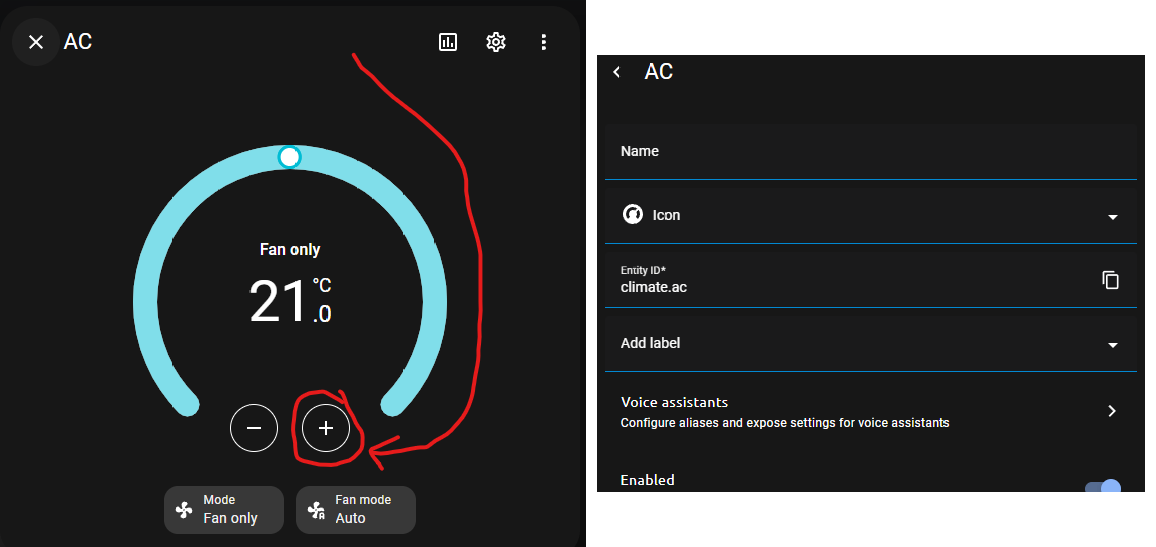


 fiery ledge
And when trying to remove it this happens

So even though it obviously does exit , the frontend seems to think it doesn’t …. Huh
vast crane
I believe that looks like a message from the backend, a failed response to the api call.
fiery ledge
but how can it be, that an obviously existing todo item can not even be ticked?
btw I just opened a Core issue for it https://github.com/home-assistant/core/issues/117163
figuring this might be more than Frontend 😉
vast crane
Is that local_todo?
fiery ledge
see https://community.home-assistant.io/t/can-not-delete-todo-item-automatically-but-why/726951 created by todo.add_item, and removed with todo.remove_item
tbh I am not exactly clear on the difference between local todo and todo list...
vast crane
I guess I thought you can have a list managed either by HA (local_todo), or by like a 3rd party integration, e.g. like google keep (though I don't know if is actually supported or not)
Both would create todo entities.
fiery ledge
right, no this is created by my own HA automation, triggered by a check for a calendar item
that would be local todo then 😉
tribal galleon
gritty aspen
Any 1 knows wy the image is not loading
Check your use of quotation marks. Looks like a double quotation mark missing from the first path.
heavy grove
gritty aspen
Any 1 knows wy the image is not loading
entity: person.xxx
variables:
    state_on: >
      [[[ return states["your.device"].state == 'on' ]]]
styles:
  card:
    - background-image: >
          [[[
             if (variables.state_on)  {
              return 'url(/local/pics/space.png)';
              } else {
               return 'url(/local/pics/bluespace.jpg)';
              }
          ]]]
When i do it exactly like that I get this result
No image
But when i use old code thad i posted here and do show_icon: true than i get the icon and the image together but when i change it to false the both disappear
 gritty aspen

 flint hazel
Simple question: How do I delete a timer created as a helper via the UI, or do I need to edit the core.entity_registry?
gritty aspen
I got the old code working only is the custom button super smal

 main vector
Hi guys! Can you please tell me how to change the css style of a card through automation?
golden mistBOT
@heavy grove I converted your message into a file since it's above 15 lines :+1:
sullen quail
vast crane
If you find a bug you would like addressed, generally the process would be to fi...
Yep, I'll do that - I was lowkey hoping that this is a known limitation (by my understanding, infinitely rendering every point would be a resource hog, and given not many HA-added items go around the planet on a regular ~90min interval, it would be a pointless thing to enable by default) and there was a way to work it around.
 old relic
I decided to scale back my HA dashbboard ambitions and go with something simple, so I based this design on HA-Fusion, but extended it with missing features. Wondering if anyone could point me in the right direction on how I can acheive this layout. I'm assuming it starts with a custom layout card grid?

 stoic cedar
Is there a good way to prevent code duplication in my lovelace yaml?
For example: I have a conditional card, which shows one of two button cards, with particular behavior. Then I have several copies of this setup, with the only difference being on which two entries they work. What I would like is to define the structure once, and then be able to say for which pairs of entries it should be used
(for context: after a hardware failure, I'm redoing my entire install. I'm enjoying making my install much more maintainable using things like scripts and blueprints. I'm looking to do the same for my dashboards.)
 swift ore
Not getting any luck on a search, is there a good way to order entities on a card based on their value? I kind of want a single list that shows my highest energy consumers in real time, preferably presented in an interesting way for a dashboard like a bar - but ultimately be able to see whats sucking power at a given moment, highest to lowest - animated to re-order without refresh
sullen quail
By the way, I have a quick question - I've been considering making a PR that would introduce a somewhat breaking change, but would help cleaning up the Themes list and management. Currently, every single defined theme in every single YAML is added to the frontend selector. For many themes this is not desirable, as they use a number of sub-styles to create a shareable base, so you end up with a bunch of "[DO NOT USE]" etc. themes (take a look at e.g. the Metro or LCARS themes).
My idea is quite simple, introduce a root level exported field in the ThemeVars interface (or quite possibly the Theme interface itself?), and then filter that list by either when the theme list is fetched from the HA backend, or when it is displayed. If exported is set to true (default would be set to false with the final implementation, but there should be a 'grace period' of 2-3 months for theme devs to make this update, during which the default is true with a warning about the theme lacking explicit definition of the variable).
This would clean up the theme selector dropdown, and theme devs could avoid all the wonky ________________________________________Common Base (Do Not Use): &common-colors or (DO NOT USE/MODIFY)=== LCARS Colors: &lcars-colors etc. names.
Would such a PR be welcome? Should I even bother with it?
sullen quail
stoic cedar
For example: I have a conditional card, which shows one of two button cards, wit...
Check out https://github.com/custom-cards/decluttering-card - that's how I e.g. do my parameterised "gimme everything in this [[room]]" approach, so that I can have a single definition of e.g. the sensors.
stoic cedar
sullen quail
Check out https://github.com/custom-cards/decluttering-card - that's how I e.g. ...
Thanks, that looks like it's exactly what I was looking for!
stoic cedar
sullen quail
By the way, I have a quick question - I've been considering making a PR that wou...
If you make it so that in absence of the exported field, everything is exported, the change wouldn't be breaking]
sullen quail
stoic cedar
If you make it so that in absence of the `exported` field, everything is exporte...
But then the theme devs wouldn't be forced to update 😉 The goal is for them to have to set it explicitly.
Essentially saying "we want you to tell us which themes can be used, otherwise we'll assume none of them are"
stoic cedar
Themes that cared enough to add the "do not use" markers, will be happy to add the clean up option there, if their creator hasn't moved on. And that way, the themes whose creators have moved on, will still work and it won't cause problems for the less technical people that try to use them
sullen quail
If a theme creator moved on, it means there aren't any updates coming, therefore the end user is free to insert that one copy-paste line into the theme(s) they want to enable.
stoic cedar
True. But I'd say that's an argument for making it backwards compatible, not against. Because those users who don't know what yaml is, won't want to add the line for a working but unmaintained theme. And most of the ones that are actively maintained will be happy to get rid of the clutter once they find out it is possible
But that's just my opinion, of course
 tired quail
old relic
I decided to scale back my HA dashbboard ambitions and go with something simple,...
tired quail
old relic
I decided to scale back my HA dashbboard ambitions and go with something simple,...
oh man i like like that layout. adding that to my list of ideas for when I finally redo my dashboards
i have this problem where i know enough about JS that i want to just make my own dashboard from scratch but also want to be able to use some of the existing cards but have a hard time bending the normal UI to my will without tons of work so then i end up starting projects and never finish them 🫠
old relic
tired quail
oh man i like like that layout. adding that to my list of ideas for when I final...
I wish i could hire someone to code it for me so i could drop in my entities lol. I'm a designer by day with knowledge of HTML/CSS etc, but don't want to spend the time tinkering lol
yet i want a dashboard that is more custom than what I can get off-the-shelf hah