#frontend-archived
1 messages · Page 33 of 1
 acoustic wraith
 golden mirage
can are you share that code
 twilit dragon
golden mirage
can are you share that code
twilit dragon
golden mirage
can are you share that code
Hé I’m not behind my desk right now but I’ll share it later
golden mirage
twilit dragon
Hé I’m not behind my desk right now but I’ll share it later
thanks
twilit dragon
acoustic wraith
does anyone know if it is possible (with mushroom entity card) to get a full col...
I don’t think there is an easy way. You either need to change the theme file or use card-mod to customize the styling.
 fierce sandal
Hi, how can i use file from Media (home.svg) in floorplan? When try to use /media/local/home.svg it doesnt work, but when paste /media/local/Jasielska.svg?authSig=eyJhbGciOiJIUzI1NiIsInR5cCI6IkpXVCJ9.eyJpc3MiOiJkMDNhMDI5YzJiNTQ0YTVjYmMzMGVjYTMwMTYyMWI5NSIsInBhdGgiOiIvbWVkaWEvbG9jYWwvSmFzaWVsc2thLnN2ZyIsInBhcmFtcyI6W10sImlhdCI6MTcwNTM5NTI1MCwiZXhwIjoxNzA1NDgxNjUwfQ.ISxWWLzP4Mn15CZoelJXxW4QKsyUxxuDV861tYB-LSU .... then work for few hours/days
 ivory sigil
I use the Map Card in many places to show the location of my family members. Currently I am manually adding the Zone entities to be also visible in those individual maps.
Is there a way to make it more dynamic, so it would always show all zones which I might create at a later date?
 balmy socket
Morning!
I want a card to simply display the storage status on my server.
I was thinking a box that fills up and changes colour depending on the %.
I had a hard time finding something like it to. Right now it looks really cramped in the box:

 lyric prairie
It is actually fixed 2 months ago, just update to the latest available version from hacs/github
 maiden juniper
Hello everyone, each room is a separate vertical stack card configuration, is it normal that they are not spread over the entire area?

 dry veldt
lyric prairie
It is actually fixed 2 months ago, just update to the latest available version f...
dry veldt
lyric prairie
It is actually fixed 2 months ago, just update to the latest available version f...
latest version of what? miniamlist?
lyric prairie
Yes
twilit dragon
fierce sandal
Hi, how can i use file from Media (home.svg) in floorplan? When try to use /medi...
Not sure, but I have to use /local/folder/file.svg
Maybe try adding the file to the a subfolder in the www folder
twilit dragon
balmy socket
Morning!
I want a card to simply display the storage status on my server.
I was ...
Maybe this could help: https://youtu.be/f_bIfYVhARI?si=yMC3aFoRrL9jYYpS
twilit dragon
maiden juniper
Hello everyone, each room is a separate vertical stack card configuration, is it...
If those cards are in a vertical stack then yes, it’s normal.
So each room is a vertical stack but all those rooms together are also in a vertical stack.
maiden juniper
twilit dragon
So each room is a vertical stack but all those rooms together are also in a vert...
each room is its own stack
twilit dragon
Yeah, but are those rooms together in a vertical stack?
 zenith stag
twilit dragon
Maybe this could help: https://youtu.be/f_bIfYVhARI?si=yMC3aFoRrL9jYYpS
zenith stag
twilit dragon
Maybe this could help: https://youtu.be/f_bIfYVhARI?si=yMC3aFoRrL9jYYpS
Would love to know who this guy is...
zenith stag
I was wondering that first 😛
 hard blaze
He's Norwegian though, so we might be related 🤣
zenith stag
He has good tutorials but I really don't like the anonymity
"he"...could be a she for all we know
twilit dragon
zenith stag
He has good tutorials but I really don't like the anonymity
He/she/they must be around here on this server, it’s has to be
zenith stag
100%
hard blaze
Yeah I used his tutorials before the one and only @zenith stag released a theme on GitHub.. now i like the yaml more then front end editing hehe
But he is a really good YouTubeer, I love the tutorials.
maiden juniper
twilit dragon
Yeah, but are those rooms together in a vertical stack?
no
 golden mistBOT
@maiden juniper I converted your message into a file since it's above 15 lines :+1:
maiden juniper
 twilit dragon
Hmmm then I have no clue. Maybe it’s default behavior but my thought would also be that the rooms are spread across the view.
 torn python
Why does one grid card with the same thermostat id has Activity available as option, but the other grid card on another dashboard not? https://imgur.com/a/H1rnsuQ
balmy socket
twilit dragon
Maybe this could help: https://youtu.be/f_bIfYVhARI?si=yMC3aFoRrL9jYYpS
I mean, it could function. It's similar to the bar card looks like.
However I basically just want a box that fills up.
Appreciate it to
Something like the bubble card, but vertical and not so bubbly
 zenith stag
balmy socket
I mean, it could function. It's similar to the bar card looks like.
However I ba...
zenith stag
balmy socket
I mean, it could function. It's similar to the bar card looks like.
However I ba...
How about the bar card, and just fill the whole area with the bar and hide all the extras
https://github.com/custom-cards/bar-card
balmy socket
zenith stag
How about the bar card, and just fill the whole area with the bar and hide all t...
Will look into it, seems to require some coding. Did not know it was possible to modify that much
Appreciate it 💪
 vast crane
torn python
Why does one grid card with the same thermostat id has Activity available as opt...
vast crane
torn python
Why does one grid card with the same thermostat id has Activity available as opt...
I think the available options are baked into a list in the editor.
If you edit the card, you will see the options you can choose. I think this is to allow users to hide unwanted presets
torn python
vast crane
I think the available options are baked into a list in the editor.
If you edit t...
That was it, spot on 🙂 I think some got left there by the old thermostat device, fixed everything manually now 🙂
 tropic torrent
totally bizarre thing just happened.. all of a sudden slider-entity-row which i installed via hacs ... doesn't exist anymore (those red inline errors saying the entity doesn't exist). i didn't update/change anything in homeassistant at all. browser erports this error. homeassitant app says it too on my phone. I even ran another browser (ffox as opposed to chromium) and it says the same - so not a client-ide cache issue. it suddenly did this... what would cause this all of a suddenly to happen and... how do i even fix this (yeah yeah - shift-reload doesn't help - kill and restart ha app doesnt help)... this has been just working fine for many many months... ?
ivory sigil
ivory sigil
I use the Map Card in many places to show the location of my family members. Cur...
Anyone? Basically I want to add zone.* to the entities of my map card - is that possible somehow?
 karmic tendon
ivory sigil
Anyone? Basically I want to add zone.* to the entities of my map card - is that ...
karmic tendon
ivory sigil
Anyone? Basically I want to add zone.* to the entities of my map card - is that ...
I am not 100% sure what you want but assume that every time you create a 'zone' you donot want to update each card manually. In that case, use auto-entities on top of the map card and filter on zone.* e.g.
type: custom:auto-entities
card:
  type: map
filter:
  include:
    - entity_id: zone.*
    - entity_id: person.me
  exclude:
    - state: unavailable
wow... ha has lost all the custom stuff. custom weather cards (hourly weather, radar), my roborock stuff... everything "custom" vanished
so everything hacs managed is ... gone...
 tribal turtle
ivory sigil
karmic tendon
I am not 100% sure what you want but assume that every time you create a 'zone' ...
tribal turtle
ivory sigil
karmic tendon
I am not 100% sure what you want but assume that every time you create a 'zone' ...
Yes, exactly. When I add new zones I don't want to update each Map card manually - all zones should automatically become visible on all Map cards. I'll give auto-entities a try!
That did the trick exactly the way I wanted. Thank you @karmic tendon !
golden mistBOT
@spring pollen I converted your message into a file since it's above 15 lines :+1:
 spring pollen
 golden mistBOT
@spring pollen I converted your message into a file since it's above 15 lines :+1:
spring pollen
I don't know why z-index doesn't work for me ??? I would like when the light in the room is on, to have a sparse border (and to be above the green) otherwise green!!
 jade tendon
Question im trying to get this code to trigger on the friendly name

value: |
[[[
return states['input_text.sleeping'].friendly_name === 'Sleeping';
]]]
is it return attributes?
this is the whole bit
state:
- operator: template
value: |
[[[
return states['input_text.sleeping'].friendly_name === 'Sleeping';
]]]
icon: mdi:bed
color: '#ffffff' - operator: default
icon: mdi:bed-empty
color: '#ffffff'
 willow berry
I want to put a image on a lovelace card and put entity on it ? Is thaht possible ?
jade tendon
willow berry
I want to put a image on a lovelace card and put entity on it ? Is thaht possibl...
yea with custom button-cards it is
willow berry
jade tendon
yea with custom button-cards it is
have you a link or something to guide me ?
jade tendon
jade tendon
state:
- operator: template
value: |
[[[
return states['input...
fixed it its a state
not a friendly name
When sleeping

When awake 😛
 willow berry
jade tendon
https://github.com/custom-cards/button-card
willow berry
jade tendon
https://github.com/custom-cards/button-card
Not finding what i one like example
jade tendon
you need to make it yourself, you can set the entity with
entity:
and the icon with
Icon:

 hard blaze
Last one
willow berry
jade tendon
you need to make it yourself, you can set the entity with
entity:
and the icon ...
I think i found. now im trying to add icon for my sensor : ```type: picture-elements
image: /local/blazerhaut.png
elements:
- type: state-label
entity: sensor.2022_chevrolet_trailblazer_tire_pressure_right_rear
style:
top: 20%
left: 8%
icon: mdi:tire```
 strong falcon
I realize this is for a custom card but can the tap action be simplified if the entity_id matches the card entity?
      - entity: select.basement_activities
        name: Series S
        icon: mdi:microsoft-xbox
        tap_action:
          action: call-service
          service: select.select_option
          target:
            entity_id: select.basement_activities
          data:
            option: Play Xbox Series S
        template: input_button_thick_icon
        show_name: true
        type: custom:button-card
 dark dirge
Only if you use one of the other actions, I think. Like Toggle
strong falcon
thats what i thought, thanks
 velvet knoll
When looking at an entity in the code editor of lovelace, there is the field "name" that is the display name for the entity. Is there a way to change it dynamically from an automation, template or script?
dark dirge
Nope
velvet knoll
Thanks for the reply
 tribal galleon
velvet knoll
When looking at an entity in the code editor of lovelace, there is the field "na...
tribal galleon
velvet knoll
When looking at an entity in the code editor of lovelace, there is the field "na...
What exactly are you trying to do? Maybe there is an alternative.
velvet knoll
I want to have the display name change based on the state of the input boolean toggle
tribal galleon
@velvet knoll With the stock HA cards, probably not. However, using third-party options, such as custom:button-card or Mushroom card, you can make that happen. For example, one of my custom:button-cards changes its name depending on if any lights are on and it is capable of either turning all the lights on or off. In this case, the code is ```yaml
type: custom:button-card
template: generic_custom_button
entity: light.all_lights
icon: mdi:lightbulb-group-outline
name: >
[[[ if ((entity.state === 'on')) return "All Lights Off"; else return "All Lights On"]]]
 velvet knoll
ok, thanks... I will take a look at that
 pastel grove
Is there a way of setting the width of cards? I am trying to display several 'todo' lists in a horizontal statch, and they are displaying as quite skinny (on laptop).
 delicate pebble
Hi, how can I change the background of a dashboard in function of dark and light mode?
delicate pebble
pastel grove
Is there a way of setting the width of cards? I am trying to display several 'to...
Maybe you should checkout card-mod and/or layout-card, because I think there is no way to define the width of card with build-in functions of HA.
pastel grove
delicate pebble
Maybe you should checkout card-mod and/or layout-card, because I think there is ...
Tx
tribal galleon
I forgot that I had worked with this a while back. Templating the action in a Mushroom card would not work. In fact, there is a warning that states Templates are not supported here when attempting with a templated entity.
Templating an action with a custom:button-card, however, did work. ```yaml
type: custom:button-card
name: custom:button-card
show_label: true
label: '[[[ return variables.var_service ]]]'
variables:
var_service: >
[[[ if (states['input_boolean.tester'].state == 'on') return
'light.toggle'; else return 'light.turn_off'
]]]
tap_action:
action: call-service
service: '[[[ return variables.var_service ]]]'
target:
entity_id: light.living_room_lights

 clever plover
Hi, I try to copy/paste https://community.home-assistant.io/t/mushroom-inspiration/484525/47?u=johanvh
It seems the code for the card is not up-to-date.
First error I got:
Custom element doesn't exist: vertical-stack-in-card.
I believe it:
cards:
  - type: custom:vertical-stack-in-card
    cards:````
must be:That post is over a year old. Instead of using the vertical-stack-in-card, use the stack-in-card which is a replacement for the vertical-stack-in-card and horizontal-stack-in-card. Update the card type as -type: custom:stack-in-card.
clever plover
Next issue is the custom:gap-card. Seems also outdated
tribal galleon
clever plover
Next issue is the ``custom:gap-card``. Seems also outdated
What do you mean by outdated? The custom:gap-card is included with the layout-card (which has been around for years).
clever plover
I've copy/pasted the code in my lovelace dashboard, first error gone by changing your suggestion above.
Now I have the next error: Custom element doesn't exist: gap-card.
tribal galleon
The code you copied and pasted relies on additional third-party add-ons. They're not included with HA.
You'll also need Mushroom card in order to make that code work.
clever plover
OK, thanks. Mushroom card is installed. The gap-card as individual card doesn't exist anymore, it's now part of the layout card. I have to change a lot...
tribal galleon
You don't have to change a lot. Just add the stack-in-card and the layout-card and you'll be good to go. (Those two are commonly installed add-ons so they're good to have installed.)
clever plover
According https://github.com/thomasloven/lovelace-layout-card I shouldn't change anything for the gap-card, If I correctly understand.
Installed the layout-card by HACS, restarted HA but still same error: custom-element gap-card doesn't exist...
tribal galleon
Refresh your browser and/or clear the cache.
clever plover
1 step further, at least I see now a card with the amount of active lights. There should also be a dropdown menu but the card has on the right side a sign with a red explanation mark
tribal galleon
Did you make the template sensor and input_boolean described in the instructions which the card is looking for?
clever plover
Yes and the templates sensor works because I see 2/20 lights on
I also changes the room names
If I remove
        entity: input_boolean.lights_on
        icon: >-
          {{ 'mdi:chevron-up' if is_state(entity, 'on') else 'mdi:chevron-down'
          }}
        icon_color: black
        hold_action:
          action: none
        card_mod:
          style: |
            ha-card {
              align-items: flex-end;
              background: none;
              --ha-card-border-width: 0;
            }
            mushroom-shape-icon {
              --shape-color: none !important;
            }````
The explanation mark disappearsBut that also removes the drop-down, correct?
clever plover
The drop-down doesn't work. Instead of the symbol for the drop-down list, I have the explanation mark
tribal galleon
Did you make the input_boolean.lights_on helper?
clever plover
Yes, I just double checked. But there are 2 light on and the state of the input_boolean is off
There was also an issue when creating the template but guys in the channel helped me
clever plover
Yes, I use it, and works for other cards
I don't use Philips Hue so I removed | rejectattr(‘attributes.is_hue_group’, ‘true’) from the template sensor but it is part of the card code. Maybe I also have to remove it in the card...
No, remains the same
tribal galleon
Did you at least get the up/down chevron to work? Because I copied that portion and it works for me (using my own entity.)
 clever plover
Hmm, which part should I copy / try
Have technical skills but code and programming...
Pffff, try and try, bad indentations...
Sorry, I don't know how to test
Seems I have to install the template-card as well....
tribal galleon
It seems to work for me (for the most part). There is an issue with the card_mod not accessing the shadow-root properly which I fixed on my test (at approx. Line 45) but that should not affect the function of the card.
 tribal galleon
clever plover
Seems I have to install the template-card as well....
tribal galleon
clever plover
Seems I have to install the template-card as well....
The Mushroom Template card is included with Mushroom card.
clever plover
I really like this mushroom card but... so far
tribal galleon
it is custom:mushroom-template-card
clever plover
My god... Explanation mark gone. The drow-down works but there is no dropdown/up icon

 tribal galleon
Hmm. That's kind of weird that it works but not showing the icon.
clever plover
Also searching why it shows 3/20 and only 1 listed...
I have a group lights_all_bulbs, so maybe this is also counted as 1 light entity
tribal galleon
You may need to reject the all_bulbs group from the template to keep it from being counted.
clever plover
Ok, have to search how, but that's for later. But the 'chevron' icon is not shown..
Neither up or down
tribal galleon
Ensure the icon field didn't get messed up: ```yaml
icon: >-
{{ 'mdi:chevron-up' if is_state(entity, 'on') else
'mdi:chevron-down' }}
That was already, exactly the same, in the card
tribal galleon
That's really the only line that does anything with the icon (other than the color and hiding the shape in card_mod).
clever plover
Try to try it with another input_boolean and simplify the code to an individual card but that takes a while for me...
Any idea what's wrong with this:
  entity: input_boolean.guest
    icon: >-
    {{ 'mdi:chevron-up' if is_state(entity, 'on') else 'mdi:chevron-down'
    }}
    icon_color: black
    hold_action:
action: none```I've put is a new card but get
Configuratiefouten ontdekt:
bad indentation of a mapping entry (2:9)
1 | type: custom:mushroom-template-card
2 | entity: input_boolean.guest
-------------^
3 | icon: >-
4 | {{ 'mdi:chevron-up' if is_state(enti ...
tribal galleon
Check your indentation for the icon:. What you just posted does not match what I posted above.
Indentation is important in yaml. type, entity, icon, icon_color, and hold_action all need to be inline.
clever plover
Thanks.
Result:
entity: input_boolean.guest
icon: '{{ ''mdi:chevron-up'' if is_state(entity, ''on'') else ''mdi:chevron-down'' }}'
icon_color: black
hold_action:
  action: none```
No up or down icon shownSeems theme problem!
When I use the default HA theme, it works

Many thanks @tribal galleon !!!
Now the exclusion for the template...
tribal galleon
@clever plover If you want to fix the weird box-shadow between the two cards when dropped down, look around Line 45 for ```yaml
}
card_mod: null
style: |
ha-card {
background: none;
--ha-card-border-width: 0;
}
Change it to ```yaml
}
.: |
ha-card {
background: none;
--ha-card-border-width: 0;
}
And at the bottom of the code, remove null and indent the lines after that by two spaces.
clever plover
tribal galleon
<@796742721448181860> If you want to fix the weird box-shadow between the two ca...
You're the best!
 tawny lotus
Updates don’t work on iOS with lockdown mode enabled
I get a notification that an update is available but tapping on it doesn’t do anything
tribal galleon
From the link you posted the other day:
When Lockdown Mode is enabled, your device won’t function like it typically does.
Why are you using lockdown mode anyways?
Lockdown Mode is an optional, extreme protection that’s designed for the very few individuals who, because of who they are or what they do, might be personally targeted by some of the most sophisticated digital threats. Most people are never targeted by attacks of this nature.
hard blaze
anyone using the custom bar-card?
Im struggling getting the "target" to have its own background color

i found it
tribal galleon
You'll probably have to card_mod it. Styling looks like it relies on it.
hard blaze
its padded all the way outside of my card lol

so if i use margin or padding. and place it with the target value correctly, will it then move accordingly when changing the target values?
that was actually a stupid question, i can just test it.
got it working, you were right @tribal galleon 🙂
ty
tribal galleon
I didn't do anything. That was all you. 😉
hard blaze
ey.. you made my brain think, so its on you hehe
tribal galleon
Fine. I suppose I will just have to take the credit. 😄
hard blaze
indeed you must 🙂 hehe
delicate pebble
delicate pebble
Hi, how can I change the background of a dashboard in function of dark and light...
Any suggestion?
hard blaze
background color or image?
hard blaze
delicate pebble
Any suggestion?
Background color you can change in the theme yaml files, there is usually one section with dark and one with light mode
delicate pebble
hard blaze
background color or image?
Image
hard blaze
delicate pebble
Image
background: center / cover no-repeat fixed url('/local/images/pic.jpg')
this is just a example though
delicate pebble
Ok, but hoy to change it based on the dark and light Mode?
hard blaze
if you read here, you can find the solution 🙂
hard blaze
so, if you place the code in your theme, you can place it eighter in the light or dark mode
then copy the code, change the picture and place it on the other light/dark mode
tawny lotus
tribal galleon
From the link you posted the other day:
> When Lockdown Mode is enabled, your de...
All the other apps and websites I visit on my phone work fine.
tribal galleon
hard blaze
so, if you place the code in your theme, you can place it eighter in the light o...
I wonder if this can be implemented in the RAW with a template. Not sure how to check the light/dark mode though. 🤔
hard blaze
tribal galleon
I wonder if this can be implemented in the RAW with a template. Not sure how to ...
that might be possible, lets google
hard blaze
delicate pebble
Thank You
no problem but read this one instead: https://community.home-assistant.io/t/background-image-in-theme/81486
i belive that topic covers exacly your question
tribal galleon
hard blaze
that might be possible, lets google
💡 While the setting may not be directly accessible via a template, we could always cheat and use the sun entity... yaml name: "{{ 'Day' if states.sun.sun.state == "above_horizon" else 'Night' }}"provided background: can accept a template basically making our own light/dark mode switcher.
hard blaze
or you create a toggle helper, and use a light/dark mode button on the dash
this is duable! 🙂 i might need to test it one day hehe
tribal galleon
but do you really want to have to remember to push a button to change the mode when it can be made to happen automatically? 
hard blaze
not really.... but i want the option to override the automation
tribal galleon
build that part into the template.
hard blaze
and the reason for it: my wife hates dark mode...
😛
But one issue.. if we do it eighter of the ways, it will change for all users when one changes it?
tribal galleon
so you build that part into that other part that does the automation...
hard blaze
i tried this with fredrik`s theme, and when i change on one device... it changed on all the devices
tribal galleon
That's basically because the theme is the command and control over everything. At least handled at the dashboard level, you could write your own control methods.
hard blaze
sure, that will be possible.. but is it worth it in the end?
tribal galleon
It depends on the use case. My tablets, for example, have automations configured for the screen brightness based on room illuminance. I don't switch between light/dark modes; always dark mode.

 hard blaze
ah ok
tribal galleon
Motion detection handles turning the screen on/off and smart plug handles turning charger on/off.
I recently started incorporating animated backgrounds because, well, why not? But they're based on holiday schedule. So during Halloween, I had a couple of random Halloween-themes backgrounds playing. Didn't really get around to configuring for Thanksgiving, Christmas, or New Years. Normally, they show cool looking smoke animations.
hard blaze
Ah nice
delicate pebble
hard blaze
no problem but read this one instead: https://community.home-assistant.io/t/back...
I'm still doing something wrong:
# Load frontend themes from the themes folder frontend: themes: # !include_dir_merge_named themes Home Assistant: modes: dark: lovelace-background: center / cover no-repeat fixed url("/homeassistant/backgrounds/dark.jpg") light: lovelace-background: center / cover no-repeat fixed url("/homeassistant/backgrounds/light.jpg")
I can't see the background in my views and in my profile the "Home Assistant" theme appears twice.
hard blaze
delicate pebble
I'm still doing something wrong:
`# Load frontend themes from the themes folder...
i use: background: var(--background) in the view
and place the image in the theme yaml code
delicate pebble
problem was that I haven't copied the picture to /config/www
hard blaze
Nice!
 safe berry
does anyone use card mod? i'm trying to use it and it works only if i edit the card. if i refresh the browser, it doesn't show. when i click edit on the card it starts to work properly. i did put the card-mod.js in my frontend in configuration.yaml like it suggests.
tribal galleon
safe berry
does anyone use card mod? i'm trying to use it and it works only if i edit the c...
You have to be more specific. What card are you trying to card_mod and what are you trying to do?
 shut robin
Hi everyone - I have a ceiling fan that I'm making smart with an esp32
It's got 6 speeds, an on/off toggle, a light that can dimmed and a reverse button
I can't seem to find any good looking cards for my fan - does anyone have any suggestions for cards that I can use to make my fan controls look good?
safe berry
tribal galleon
You have to be more specific. What card are you trying to card_mod and what are ...
i'm applying custom css to the tile card (spin icon if its on), it does work if i edit the card and save. if i refresh it goes away and comes back if i edit the card
tribal galleon
What have you tried so far?
safe berry
tribal galleon
What have you tried so far?
ok i just figured it out, it has this flaw b/c its in a grid. if i take it out of the grid its fine.
oh wait false alarm...
tribal galleon
Post your code.
safe berry
its really wierd. i've restarted home assistant and i've moved cards around like i said but i haven't tried much more. not sure what else i can try
golden mistBOT
@safe berry I converted your message into a file since it's above 15 lines :+1:
tribal galleon
@safe berry You code pretty much works for me, even in a grid card. Changed the IF statement a bit and condensed the keyframes which didn't really mater as far as it functioning, though. (Icon rotates when on.)```yaml
{% if states(config.entity) == 'on' %}
animation: spin 1.25s linear infinite; /* Adjust duration as needed */
{% endif %}
@keyframes spin {
from { transform: rotate(0deg); }
to { transform: rotate(360deg); }
}
 safe berry
i am going to have something in the other side i was just experimenting
i'm sure this has to do with my setup of the mod. this is what i put in my configuration.yaml
frontend:
  extra_module_url:
    - /hacsfiles/lovelace-card-mod/card-mod.js
@tribal galleon are you on the latest version of HA? did you install it via HACS?
tribal galleon
~~You shouldn't have to do all that if you used the installation script. https://hacs.xyz/docs/setup/download~~
safe berry
i did install it via HACS yes
tribal galleon
Meant to say: you shouldn't have had to do all that if you installed via HACS.
safe berry
let me undo it and see if that changes anything
 unreal urchin
evening all. just deleted all the myq nonsense and now i'm feeling good about a UI update. i've got a 3d render already done for the whole house. is picture elements still the way?
last time i tried it i know there were some scaling issues, and placing the elements on top of the image was pretty tedious
golden mistBOT
@junior girder I converted your message into a file since it's above 15 lines :+1:
 junior girder
Anyone can Help me to fix this issue, was working, but stopped after an Update a while ago, cant remember when

Maybe the issue is that the Warnung color Returns
#ffeb3b - i dont know If the Problem is the "<#null>
 errant plover
What does this return in the template editor: {{ state_attr('sensor.wetterwarnung_stadt_detmold_current_warning_level', 'warning_count') }}
junior girder
I'll Check in a few min
junior girder
errant plover
What does this return in the template editor: `{{ state_attr('sensor.wetterwarnu...
this returns null
hard blaze
Is it possibe to add opacity to only the background color of this card?
I read on a forum, that i can use: - background-color: rgba(var(--contrast-0),0.8) but not working as expected
junior girder
issue solved, somewhow at sometime the sensor name changed to sensor.dwd_weather_warnings_wetterwarnung_stadt_detmold_current_warning_level
 cosmic mountain
hi, can anyone point me in the direction of a photo slideshow card ? if such a thing exists
hard blaze
cosmic mountain
hi, can anyone point me in the direction of a photo slideshow card ? if such a ...
https://community.home-assistant.io/t/dashboard-with-photo-slideshow/393915
This forum might sout yor needs 🙂
cosmic mountain
hard blaze
https://community.home-assistant.io/t/dashboard-with-photo-slideshow/393915
Th...
thanks for the reply , I will take a look 🙂
 lime siren
I want to display a icon if any of the lights.* is ON (and if possible witha badge to display the count). Any tipps how to do that?
 vocal sky
Hi, the Matter roller shade I've only supports lift operation and not the tilt operation, but on the frontend, it shows up both lift and tilt, however only lift works as expected. What might be the reason?

 soft fulcrum
I'm looking for some guidance on how you all handle rooms. I currently have 19 different areas to monitor. 14 of those are rooms with climate elements, some with two and some one with three. I could just slap all the climate controls in one dashboard but there has to be a better way.
hard blaze
soft fulcrum
I'm looking for some guidance on how you all handle rooms. I currently have 19 d...
I use floor tabs.. so 1st floor in one view, then 2nd floor in a other view.
if all your 19 rooms are in one floor, then you might want to just use "area" like south, west and such.
And then using some custom button card, whitch states the room, shows if light on/off and the temperature
soft fulcrum
hard blaze
I use floor tabs.. so 1st floor in one view, then 2nd floor in a other view.
if...
I've got 3 floors with one roommate being on 2nd floor, 6 on the 1st and the rest on the ground.
 soft fulcrum
Central "Hall" between the floors (stairways and landings) has 3 temperature entities (technically 5 but I'm counting 3 of them as 1 since it's technically the thermostat).
hard blaze
this is the card i use, to show the room name, its white background if ligh on, and shows the temp
then you can create as an example (hold_action), and make a popup where you can look deeper into the room
or navigate to a room view
soft fulcrum
hard blaze
then you can create as an example (hold_action), and make a popup where you can ...
Oh you can you make clickable entities that drills down into another "dashboard"? If so how many levels?
hard blaze
you can create a new sensor, that takes the 3 temperature entities and find the average between them.
soft fulcrum
If I could make a climate card I can click that opens up to let me select floor which I can click to let me select room, which then brings up climate options for said rooms... That'd be great!
hard blaze
soft fulcrum
Oh you can you make clickable entities that drills down into another "dashboard"...
In one button there are 3 actions.
- Tap
- Hold
- Double tapp
You can customize each of the actions
You could... but i would probably do it like:
- Tap (Turn off light for a room).
- Hold (Open room card) where you can have overivew of all the stuff and the termostat for that spesific area
In general, i like to select the room, and then what action i need to do from there. not the other way around.. but that is up to you how to handle
soft fulcrum
What I should really do is check out the forums and see how people handle this and what templates they use. I've basically been doing it all by the seat of my pants without getting ideas from anywhere.
hard blaze
indeed
hard blaze
soft fulcrum
What I should really do is check out the forums and see how people handle this a...
go into Youtube, and search for: rate my dashboard home assistant
There you have a youtube channel named Everything smart home.
Loads of insiraton there 🙂
soft fulcrum
hard blaze
go into Youtube, and search for: rate my dashboard home assistant
There you hav...
Will do!
vast crane
vocal sky
Hi, the Matter roller shade I've only supports lift operation and not the tilt o...
What the frontend shows depends on what the entity reports for its capabilities.
What does your entity supported_features attribute read?
https://developers.home-assistant.io/docs/core/entity/cover/#supported-features
 thick nacelle
I've hidden the headers on my mobile dashboard, but I'm unable to swipe from left to right to still get into the settings if needed. In the video I saw about this they were able to. Is this something that has been removed?
I've added
kiosk_mode:
  mobile_settings:
    hide_header: true
To the dashboard code
vast crane
Mobile swipe behaviors would probably be a better question for #android-archived or #ios_and_mac-archived
hard blaze
Home Assistant Swipe Navigation, found in hacs (navigates between tabs).
But getting into settings, you can create a button to navigate to settings if needed
 thick harbor
Hi, I'm looking to better understand how mqtt.climate entity state is updated. I have a device which is publishing state updates every 60s to a topic, but I don't see the state actually being updated in Dev Tools (and therefore the UI). I can confirm in Device Info > Debug info that it is receiving the state messages every 60s on the topic, but there seems like a disconnect between that an setting the device state (the values I can check with Dev Tools)
vast crane
thick harbor
Hi, I'm looking to better understand how `mqtt.climate` entity state is updated...
States of entities are not really a frontend thing, probably a better question for #integrations-archived
tribal galleon
I was also thinking that states won't show an updated time unless the state actually changes. So the MQTT is probably updating the entity with its current state but unless it changes, there will not be a noticeable value that shows that it received the update.
 dusky haven
Looking for an opinon here. If you had a custom:mod-card which you want to display only when certain conditons are true would you put the mod-card inside a custom:state_switch as a card, or would you include the mod_card as one of the states inside the a state_swtich card. Is one way better thant he other, or does it not matter much?
hard blaze
do you mean card-mod?
 quasi knot
What is the best way to have wall mounted dashboard return to main page after inactivity. I have fully kiosk and browser mod.
hard blaze
quasi knot
What is the best way to have wall mounted dashboard return to main page after in...
that one
Fully Kiosk browser has an auto reload on idle setting which returns to the start URL after an interval.
quasi knot
hard blaze
https://community.home-assistant.io/t/change-panels-after-an-idle-time/351387
thank you i will give this a try. currently have it working with automation to update input_text when page changes and a automation that will trigger on that change to then change page after a timer. but just dont feel a good way of doing this.
hard blaze
quasi knot
thank you i will give this a try. currently have it working with automation to u...
Well automations are fun, but default settings are probably better at this
quasi knot
hard blaze
Well automations are fun, but default settings are probably better at this
just tried this. unfortunately two issues. 1. reload is then reloading the start page which looks horrible seeing it load back up. and its not as quick as going back to the main tab page. 2. it causes a loop reloading start page. even if i tick the box that states dont reload if on start url.
will give the other option a go
tribal galleon
dusky haven
Looking for an opinon here. If you had a custom:mod-card which you want to dis...
You should be able to get either method to work. The custom:mod-card shouldn't produce anything visible by itself. Therefore, in theory, it should be able to be used inside or outside of the state-switch card. I guess it depends on what you're wanting the custom:mod-card to do.
I use a custom:mod-card to "put" a vertical stack card in the bottom right corner of the screen. Inside that is a conditional card that shows a mushroom-media-player-card when Plex is playing. Under that is a horizontal stack holding a weather card and a radar card.
 runic rune
How can I display the value of this attribute in a custom:multiple-entity-row?
Normal template: states['sensor.vindkast'].attributes.series[0].gust
That does not work in the attribute field here:
- type: custom:multiple-entity-row entity: sensor.vindkast entities: - entity: sensor.vindkast attribute: XXX? name: Nå
series[0].gust does not work
 torpid magnet
Picture Element Problem
quasi knot
hard blaze
Well automations are fun, but default settings are probably better at this
also tried with that view timeout. this didnt work either. the url changed as needed but the page didnt move. ive now gone back to the automation which will do for now. just rather something thats simply as selecting the home page and a timeout. thanks for your help
 scenic current
I'd like to use the custom layout card and use the css grid option. I have the example working and modified for my use but it seems to be tied to the view. What I would eventually like to do is have multiple custom layout cards but have them use different css grid layouts. Is that possible or is the grid configured only in the view options?
 jaunty pivot
Hi there, I'm using the Synology intergration and the battery-state-card frontend. I'd like to knwo if any of you succes is displaying a card with all Wifi network and indicates number of clients connected on each network ?
 molten cipher
Is there a better way to get these chip cards in one line.. without overlapping... and without looking like they have a weird border
 vocal sky
vast crane
What the frontend shows depends on what the entity reports for its capabilities....
vocal sky
vast crane
What the frontend shows depends on what the entity reports for its capabilities....
Hey @vast crane - Thanks for point me to this. I'm wondering where the value for the supported feature is been read from?
 faint sentinel
Any idea what kind of cards were used to make this? I can't seem to find anything resembling it. Both the link cards themselves, but also the dividers!
 hard blaze
molten cipher
Is there a better way to get these chip cards in one line.. without overlapping....
hard blaze
molten cipher
Is there a better way to get these chip cards in one line.. without overlapping....
Horizontal stack, grid card or layout card
 mental wraith
Anyone familiar with apex charts? Got a weird issue where the shared tooltip only works when the dashboard is in "edit" mode, as soon as I "save" it - the tooltip only shows a single serie...
type: custom:apexcharts-card
chart_type: line
update_interval: 30sec
graph_span: 2d
hours_12: false
header:
  show: true
  title: Temperatures
  show_states: true
  colorize_states: true
now:
  show: false
  color: red
  label: now
show:
  loading: true
apex_config:
  tooltip:
    enabled: true
    shared: true
    onDatasetHover:
      highlightDataSeries: true
    x:
      show: true
    'y':
      show: true
  legend:
    show: false
  dataLabels:
    enabled: false
    dropShadow:
      enabled: true
all_series_config:
  stroke_width: 1
  float_precision: 1
  fill_raw: last
  curve: stepline
  data_generator: ''
  show:
    in_brush: false
    extremas: false
    legend_value: false
  group_by:
    func: last
    duration: 1m
series:
  - entity: sensor.envsensor_temperature
    name: Outside
  - entity: sensor.door_sensor_device_temperature
    name: Coridor DS
  - entity: sensor.bk7231t_corridor_temperature
    name: Corridor AC
  - entity: sensor.movement_sensor_device_temperature
    name: Kitchen PIR
  - entity: sensor.t_h_temperature
    name: Bedroom
  - entity: sensor.esphome_web_c510e3_temperature
    name: Living Room
  - entity: sensor.bk7231t_br2_temperature
    name: Bedroom2
 errant turret
Does anyone have any pointers as to how I could reduce the hight of this row? I assume I could reduce the top/bottom padding from the 2 items in the centre column but struggling to target them.
 mental wraith
Make the 2 buttons horizontal and place the graph bellow ?
hard blaze
errant turret
Does anyone have any pointers as to how I could reduce the hight of this row? I ...
Are you using a layout card or grid card ?
zenith stag
faint sentinel
Any idea what kind of cards were used to make this? I can't seem to find anythin...
I think custom:button-card would be the easiest in terms of layout and styling
errant turret
hard blaze
Are you using a layout card or grid card ?
custom:grid-layout with a grid card + 2 buttons.
errant turret
mental wraith
Make the 2 buttons horizontal and place the graph bellow ?
Not a bad shout. If I can't figure out how to get some styling into the cards I'll give this a go.
hard blaze
I would do as @mental wraith , make the two buttons horizontal and the grap under the buttons
Did you take away the "square" option in the grid card btw ?
errant turret
Ah no. Perfect!
errant turret
 hard blaze
Nice. If you change those two buttons to a custom button card, you can edit the height and stuff much better
errant turret
Ah so is that the way to go to get css in? I've never had to deal with css and nested web components/shadow roots like this before!
hard blaze
using custom:button-card woud allow you to do many nice things with css 🙂
mental wraith
Apex charts weird problem...
runic rune
How can I display the value of this attribute in a custom:multiple-entity-row?
Normal template: states['sensor.vindkast'].attributes.series[0].gust
That does not work in the attribute field here:
- type: custom:multiple-entity-row entity: sensor.vindkast entities: - entity: sensor.vindkast attribute: XXX? name: Nå
mental wraith
you mean the unit of measurement ?
 slow ledge
I have a stupid question if anyone knows the answer. In my frontend I've put a few image (car/rooms etc). I added the images to the media section of HA, then used the image URL from them by opening them from the media folder and copying link. They worked fine until I used the system remotely! Where's the best place to stick images for HA? Or is there a permission thing I need to resove somehow? Thanks 🙂
hard blaze
slow ledge
I have a stupid question if anyone knows the answer. In my frontend I've put a f...
In a image folder inside your www folder

 upbeat dagger
Hey all, I know I will probably sound stupid but I'm brand new to HA. Looking to install the UI Lovelace Minimalist theme however, I get this issue once I install and not sure where to go from here. Trying to follow a tutorial from YouTube but this step I keep getting stuck on. Any ideas on how to fix this?
 hard blaze
upbeat dagger
Hey all, I know I will probably sound stupid but I'm brand new to HA. Looking to...
hard blaze
upbeat dagger
Hey all, I know I will probably sound stupid but I'm brand new to HA. Looking to...
Did you install all the required cards as described in the howto?
If you have the button-card installed, it looks like you have not put in the resources into your configuration.yaml file
This is my config:
lovelace:
  mode: yaml
  resources:
    - url: /hacsfiles/bar-card/bar-card.js
      type: module
    - url: /hacsfiles/kiosk-mode/kiosk-mode.js
      type: module
    - url: /hacsfiles/lovelace-card-mod/card-mod.js
      type: module
    - url: /hacsfiles/button-card/button-card.js
      type: module
You basically need to tell your configuration.yaml where to find your resources 🙂
upbeat dagger
Ahhh, ok. I think I understand now. Thank you so much.
hard blaze
No problem at all
upbeat dagger
hard blaze
No problem at all
Hey, sorry for bothering again. What you told me worked perfectly but now I'm just wondering if you would happen to know why the UI looks quite pushed up together. Here is an example of the YT Tutorial compared to mine.

 hard blaze
upbeat dagger
Hey, sorry for bothering again. What you told me worked perfectly but now I'm ju...
hard blaze
upbeat dagger
Hey, sorry for bothering again. What you told me worked perfectly but now I'm ju...
You need to apply the theme to your phone or device. Go to settings and choose minimalist desktop theme as an example
vast crane
vocal sky
Hey <@720771853949337610> - Thanks for point me to this. I'm wondering where the...
How the value is created is integration specific, it's a bitwise or of logical flags that the integration thinks the entity supports. If the integration gets it wrong, you can file an issue for that integration, or you can use customize in yaml to override the supported_features to take away what shouldn't be there.
upbeat dagger
hard blaze
You need to apply the theme to your phone or device. Go to settings and choose m...
Where abouts in settings would that be?
hard blaze
Profile settings
vocal sky
vast crane
How the value is created is integration specific, it's a bitwise or of logical f...
Thanks for the explanation @vast crane.
upbeat dagger
hard blaze
Profile settings
It's showing there is no themes available.

Aha, nevermind. After rebooting home assistant it gave me the options.
upbeat dagger
Thanks so much for putting up with my newbie skills. I really appreciate the help.
hard blaze
upbeat dagger
Thanks so much for putting up with my newbie skills. I really appreciate the hel...
No worries
 muted saddle
I feel like floorplan is the only way to display entities in a somewhat nice way for a wallpanel?... adding 20+ buttons for all lights will just make the UI so damn cluttered anyway?
Or does anyone have other idea's?
or do people have 1 button to bring up a new page for each room? doesn't that just add alot off extra actions and presses needed to do the desired task?
hard blaze
muted saddle
I feel like floorplan is the only way to display entities in a somewhat nice way...
You can have a button card for each room/area, then use the toggle to turn off/on lights. Use the hold action to jump into a more detailed room overview
muted saddle
yea but... in most rooms i got 3-4 lights, and 99% of the time i will only want to controll one at a time
hard blaze
muted saddle
yea but... in most rooms i got 3-4 lights, and 99% of the time i will only want ...
Well you can use toggle to open a popup, for individual control
muted saddle
This horrendus thing is my current wallpanel ui... and its missing alot of lights even
 hard blaze
 lyric prairie
muted saddle
or do people have 1 button to bring up a new page for each room? doesn't that ju...
lyric prairie
muted saddle
or do people have 1 button to bring up a new page for each room? doesn't that ju...
I mostly divide my dashboards up in a main page, pages for each room, and pages for each important device type like; lights,mediaplayers, thermostats,utilities and all of these pages are accessible with one click from each page
hard blaze
This is a card I'm working on, just as an example
There are so many ways of doing it, you just need to find what suits you the best!
muted saddle
Yea, i just want it to look clean right, the walltablet is supposed to be a proud feature of the house, not look so bad and cluttered id rather turn the display off before guests come over 😄
hard blaze

A bit buggy, but this is how I used to do it, using bubble card as a pop-up
That is nice ,🙂
This is how I sort it, and all the details are in room views when using hold action
 hard blaze
That is nice ,🙂
hard blaze
hard blaze
That is nice ,🙂
I really like that left side there!
lyric prairie
Sorry had some personal url in the previous picture😅
 lyric prairie
hard blaze
I really like that left side there!
lyric prairie
hard blaze
I really like that left side there!
Just some button-card with other cards as custom fields in a grid arrangement
tribal galleon
@lyric prairie Per your screenshot, your current weather is cloudy and NaN C? 🤔
 vital burrow
Below 0 K
hard blaze
Why do states display with decimals on my dashboard, yet when I access devices to edit them and adjust the decimal settings, it doesn't have any effect?
Is this simply because i use yaml dashboard instead of normal?
I have found out how to display it correctly with some java, but feels a bit unnecessary.
vast crane
hard blaze
Why do states display with decimals on my dashboard, yet when I access devices t...
Could you be more specific, what dashboard card is not working properly?
yaml shouldn't matter
hard blaze
vast crane
Could you be more specific, what dashboard card is not working properly?
my apologize, i will try to be more specific 🙂
So this is my code:
abel: > # change the sensor "mg5_range" to a sensor stating remaining milage on the battery.
            [[[ return 'Last session: ' + states['sensor.zaptec_home_session_total_charge'].state ]]]
It returns my last session as 6.66666kwh but in the device settings, i changed decimals to max 2.. so it should state 6.66
same with my charger power consumption in the screenshot:

 karmic dawn
hey everyone! I'm having trouble achieving the look I want in the entities card. Here's the picture https://ibb.co/wzLcFcF and here is the code https://pastebin.com/6SbY3UKv. I've read through the entities card tutorial on HA website but can't wrap my head around the function that I need... Any help would be greatly appreciated!
 hard blaze
karmic dawn
hey everyone! I'm having trouble achieving the look I want in the entities card....
hard blaze
karmic dawn
hey everyone! I'm having trouble achieving the look I want in the entities card....
you are using a cover. entity, you need to use a sensor entity to show off/on i think
sorry i ment alarm entity
vast crane
hard blaze
my apologize, i will try to be more specific 🙂
So this is my code:
```
abel:...
Ah ok. Display precision does not change the value in the hass.states object, it is an instruction for the card as to how to display it.
If you're using custom cards or custom templates, they need to coded to respect display precision, if you want them to do so.
hard blaze
vast crane
Ah ok. Display precision does not change the value in the hass.states object, it...
oh ok! thank you 🙂 that explains it!
tribal galleon
hard blaze
my apologize, i will try to be more specific 🙂
So this is my code:
```
abel:...
try adding .toFixed(2) to the end of your state (for two decimal places)
vast crane
if you have the hass object, the chosen precision is at hass.entities[entity].display_precision. Or you can use hass.formatEntityState(stateObject) to get it automatically formatted with unit.
hard blaze
thanks, then i have some reading and learning to do 🙂 nice!
hard blaze
tribal galleon
try adding `.toFixed(2)` to the end of your state (for two decimal places)
states['sensor.zaptec_home_session_total_charge'].state.toFixed(1) like this ? if so, not working 🙂
vast crane
toFixed is a number method, and state is a string.
Number(states['sensor.zaptec_home_session_total_charge'].state).toFixed(1) maybe, but I'm sure it has some caveats
tribal galleon
Oops. I missed the part where it had not been converted to a float yet...
parseFloat(states['sensor.zaptec_home_session_total_charge'].state).toFixed(2)
hard blaze
oh, that worked! never seen the parseFloat before, good to know!
tribal galleon
parseInt() returns an integer.
I spent this past weekend working on a templating basics guide which shows examples in Jinja and JavaScript.
hard blaze
nice, i would like to learn more about the codes not just typing them but understading them 🙂 so i have started googeling allot the past few days hehe
tribal galleon
That's pretty much the point of the guide that I'm putting together. Quickly show how to do something specifically in HA without having to extrapolate something from w3schools or Mozilla Dev or wherever.
Guide is currently in a private repo. Probably has enough info in it so far that I can make it public but I want to do some file organization first. I should be able to get it done this evening when I get off work in a few hours. I'll tag you when I get it done.
hard blaze
tribal galleon
That's pretty much the point of the guide that I'm putting together. Quickly sho...
Perfect! 🙂 Where is that buy me a coffee badge in github? 🙂
After I convert my cards into templates, I feel my dashboard is a lot faster, and easier to navigate into the right place when needing to change stuff. It is a steep learning curve, but worth it in the end!
 upbeat valve
having a hard time learning enough css and how it translates to the frontend to create a custom layout. I'm using layout-card and just trying to create a custom grid like this https://imgur.com/a/cn1uIt8 and just can't seem to get the cards added in correctly without getting all kinds of formatting errors. I can rebuild the cards from scratch if I need to, just wondering if there's a good way to do it.
zenith stag
upbeat valve
having a hard time learning enough css and how it translates to the frontend to ...
Did you look at the cards documentqntion? It’s a bit simpler than in your screenshot 🙂
 lofty remnant
https://imgur.com/Tjc6ndK
Is there any way to hide the slider in widgets? I'm trying to use card-mod but unfortunately it doesn't make any changes.
upbeat valve
zenith stag
Did you look at the cards documentqntion? It’s a bit simpler than in your screen...
yeah, but it seems like a lot of it assumes you already have somewhat of a working knowledge of CSS / CSS Grid. So I had to use a tool to help me lay it out but it's coming out in a different arrangement/format against what the layout-card is looking for, so I'm having an issue translating it basically
if someone came out with a visual drag-and-drop front end editor tool then they'd have my $.
 vernal dune
Hi, i have setup an esp32 for esphome and enabled the web_server part. All works fine.
I have one button there. I looked at the webserver api part, but cannot figure how i can post the right url to activate the button switch from an external call. Can anybody show me how the post url should look like? I try to POST the url from Falcon FPP but can't figure how the data should look.
vital burrow
vernal dune
Hi, i have setup an esp32 for esphome and enabled the web_server part. All works...
Wrong channel. That is not frontend related
zenith stag
upbeat valve
yeah, but it seems like a lot of it assumes you already have somewhat of a worki...
I learnt to use css grid trough the custom button card and layout card:) looking at thr examples and adapting for my need. I can help with yours when I’m at the computer tonight
hard blaze
upbeat valve
if someone came out with a visual drag-and-drop front end editor tool then they'...
Could you paste the code you have so fare? its easier to help when seeing how fare you have come
unreal urchin
not sure if this is the right channel, but i'm trying to tshoot an issue with the upcoming-media-card not showing images at my duckdns url. http works fine. i'm reverse proxying through the LSIO SWAG container. others with this issue usually just have an adblock problem

the relevant console error appears to be this one
 karmic dawn
Does anyone know how I can achieve this, here is my code https://pastebin.com/6SbY3UKv I have tried the suggestion of using the alarm card but can't seem to get it to work... The closest I can get is using the entity-filter card but it's not 100% what I want. Any ideas?
 vast crane
You just want to replace the toggle with the state? Is that entities card?
just add type: simple-entity to the row.
@karmic dawn
karmic dawn
vast crane
You just want to replace the toggle with the state? ~~Is that entities card?~~
j...
you are genius! That did the trick, of course "type" was the one variable I didn't try... Facepalm
vast crane
Yeah it's kind of obscure.
karmic dawn
I should have read further to because it mentions "This can be used, for example, to replace a helper with an editable control with a read-only value"
thx again!
tribal galleon
I never knew about the simple-entity. That could be kind of useful especially if you're just looking for status indicators but not actually needing to control the entity. It's a shame it breaks the Visual Editor.
vital burrow
You can work around that warning by using a type conditional without conditions
type: conditional
conditions: []
row:
  type: simple-entity
  entity: input_number.example
(type sensor-entity instead of simple-entity is working too)
tribal galleon
Not sure what kind of sorcery makes that work but it does. (Rarely use the Visual Editor but still good to know that it can be done that way.)
vital burrow
It's not perfect, but better than that warning message 😅
 ornate yacht
Hi, I think I managed to find the answer to my question, but figured I would double check. Is there a way in the dashboard config to get cards to display next to each other?

 hybrid pulsar
Hi, I'm trying to get the new Valve entity to work using MQTT. My thermostat reports the valve position in a range from 0 - 100. It shows up with the correct position in the "current_position" attribute. I would like the state to reflect the position (0-100) instead of just "open" or "closed". The "reports_position: true" is set in the yaml. Any ideas how I can achieve this? Thanks
- name: "Floorheat Valve - 1.93.2 - TV-Room" #command_template: '{"PWD": {{ value }} }' #command_topic: "hdl/hm/1.93.2/set" state_topic: "hdl/hm/1.93.2" reports_position: true value_template: "{{ value_json.PWD }}"
 pine swallow
In case anyone else is searching this place for the answer... The GUI scene editor depends on having the Advanced Mode enabled in your user profile.
Who would have known!

 silent wind
do yall think if it's better to do the graph like based on temps or something and if yes how should i go about it?
 silent wind
do yall think if it's better to do the graph like based on temps or something an...
silent wind
silent wind
do yall think if it's better to do the graph like based on temps or something an...
entity: sensor.synologyb_volume_1_average_disk_temp
type: custom:mini-graph-card
icon: mdi:information
double_tap_action:
  action: null
animate: true
line_color: green
entities:
  - sensor.synologyb_volume_1_average_disk_temp
Which card do you use for family calendar ?
molten cipher
golden mirage
Which card do you use for family calendar ?
atomic calendar
and watched the video somewhere in that thread about how to use card_mod and f12 browser
golden mirage
thanks
 quaint aurora
I've noticed that when I put an input_number on a History graph, after it's been some period of time after Home Assistant has restarted, it stops displaying the line on the graph. Is there any way to fix this?
 plush mural
is there a way to make dashboard cards
golden mirage
document.querySelector("body > home-assistant").shadowRoot.querySelector("home-assistant-main").shadowRoot.querySelector("ha-drawer > partial-panel-resolver > ha-panel-lovelace").shadowRoot.querySelector("hui-root").shadowRoot.querySelector("#view > hui-view > hui-masonry-view").shadowRoot.querySelector("#columns > div > hui-entities-card").shadowRoot.querySelector("#states > div > hui-buttons-row").shadowRoot.querySelector("hui-buttons-base").shadowRoot.querySelector("ha-chip-set")
i have that
golden mistBOT
@golden mirage I converted your message into a file since it's above 15 lines :+1:
zenith stag
molten cipher
Nice work 👍🏼 I think you should utilise the layout card to make sure everything aligns well. You can combine it with card_mod to adjust the column, row and card height/width to make a cleaner layout
muted saddle
if i change something in my theme yaml, do i need to restart home assistant for it to update?
hard blaze
muted saddle
if i change something in my theme yaml, do i need to restart home assistant for ...
No, but you can use the devtool and call for theme reload
 muted saddle
cool ty
 fiery ledge
can anybody help me out with the layout card mediaquery option on a card in a Panel view? I cant get it to do anything.....https://community.home-assistant.io/t/layout-card-take-control-of-where-your-cards-end-up/147805/801?u=mariusthvdb
essential bit is```
title: Cameras buiten
path: cameras_buiten
type: panel
icon: cli:home-video-outline
cards:
-
type: vertical-stack
cards:- type: markdown #this shows always, no matter what
content: |
This is only shown on screens more than 1200 px wide
view_layout:
show:
mediaquery: "(min-width: 1200px)"```
- type: markdown #this shows always, no matter what
zenith stag
fiery ledge
essential bit is```
title: Cameras buiten
path: cameras_buiten
type: panel
icon:...
it works fine on Core 2024.1.3.
I'm updating now to check with the latest version
still works on 2024.1.5 for me
lyric prairie
Panel is not one of the layout modes from layout-card
zenith stag
panel: true is what I have, not type: panel
lyric prairie
So unless you change the type to a lay-out card specific one or add the markdown card to a custom:layout-card it will not evaluate the mediaquery
muted saddle
i'm trying to use grid-area with layout card but cant seem to get it to work, i have set my tab to "Grid (layout-card)" and then i add a layout-card, add some other card into it, and set "grid-area: sidebar" in the settings, but it seem to do nothing?
fiery ledge
lyric prairie
So unless you change the type to a lay-out card specific one or add the markdow...
right... I need the type: panel, so how can I change that specific card to a layout card then? I did try what Thomas wrtoe below that, but could not make that happen either.
molten cipher
zenith stag
Nice work 👍🏼 I think you should utilise the layout card to make sure everythi...
I started using it..,. But I screwed up somewhere. Then it got confusing. I also stole most of the code and then ripped that apart. But I did fix the height issue with the middle column.
fiery ledge
especially useful in panel mode... 😉
lyric prairie
fiery ledge
right... I need the `type: panel`, so how can I change that specific card to a l...
By changing the vertical stack to a vertical layout card
title: Cameras buiten
path: cameras_buiten
type: panel
icon: cli:home-video-outline
cards:
  - type: "custom:layout-card"
    layout_type: "custom:vertical-layout"
    cards:
      - type: markdown #this shows always, no matter what
        content: |
          This is only shown on screens more than 1200 px wide
        view_layout:
          show:
            mediaquery: "(min-width: 1200px)"
ok let me try that. though I had hoped to use this on the markdown, and not replace the vertical-stack.
lyric prairie
fiery ledge
ok let me try that. though I had hoped to use this on the markdown, and not repl...
You have to somewhere to tell it needs to use the layout card; either for the whole view or by putting the card is some stack/grid from the layout card. Else it's just a plain HA dashboard without the option for mediaqueries
fiery ledge
I see. I think I had hoped it to be something like type: hui-element card_type: markdown and then continue business
the way its turning out now, I might just as well keep using the conditional card as I do.
though I will try and feedback, much appreciated! Looking for the cleanest code
just tested that, but it kills the panel view completely. It does work on the mediaquery alright, but no longer shows full width
muted saddle
layout-card realy couldn't care less about grid-row, grid-area, grid-column properties
lyric prairie
fiery ledge
just tested that, but it kills the panel view completely. It does work on the me...
A grid layout could potentially fix that, but complicates the code a bit more
fiery ledge
been thinking about that. my use case is: when wide enough show a grid of 2 columns with cameras, when not, show the vertical stack of the same cameras. All in panel view, so full width
lyric prairie
Grid is the most ideal for that I suppose.
Then you can set the whole view to a grid-layout and ditch the panel type as both take the full width
zenith stag
or use panel view and put all the other cards into the layout-card
lyric prairie
That's basically the same, but with some extra lines of code hahaha
fiery ledge
but that is what we tried here isnt it: #frontend-archived message
zenith stag
are you sure? does it not add a lot of extra options too?
fiery ledge
and that ruined the panel view
considering a vertical stack is basically a grid with 1 column, I would be looking for changing the columns only, based on the mediaquery
now the vertical stack is containing a grid, or another vertical-stack, which seems a bit overly-complex
just figured to post the full view, so you can see what I am doing
lyric prairie
This does exactly what you want without overcomplicating the code.
Just changed type: panel from your original code to type: custom:grid-layout
  - title: Cameras buiten
    path: cameras_buiten
    type: "custom:grid-layout"
    icon: cli:home-video-outline
    cards:
      - type: vertical-stack
        cards:
          - type: markdown #this shows always, no matter what
            content: |
              This is only shown on screens more than 1200 px wide
        view_layout:
          show:
            mediaquery: "(min-width: 1200px)"
Works also without having the markdown card within a vertical stack
lyric prairie
fiery ledge
considering a vertical stack is basically a grid with 1 column, I would be looki...
The difference is that a vertical stack has pre set max-width without panel mode while the width of a grid is always the full available width
fiery ledge
yes, this works! changed it a bit so I can ditch the vertical stack at the top even:
now Ive got to decide which of those is better.... the simpler yaml with a custom card, or the somewhat more complex (and nested stack) card, only using core cards...
youv'e at least make me create the first type: grid-layout card in my Dashboards 😉
muted saddle
man, placing cards is so fucking wierd, im litteraly gonna need to have a ton of vertical and horizontal stack cards nested inside eachother aint i?
couse "grid-row: 1/3" to make the card take 2 rows wont work
golden mistBOT
@lyric prairie I converted your message into a file since it's above 15 lines :+1:
@zenith stag I converted your message into a file since it's above 15 lines :+1:
lyric prairie
@fiery ledge Or you can do this to reduce the code even more.
Note: you dont need to specify as much areas as cards. The two; a and b are enough to auto-arrange the cards based on their place in the yaml list.
golden mistBOT
@lyric prairie I converted your message into a file since it's above 15 lines :+1:
lyric prairie
muted saddle
man, placing cards is so fucking wierd, im litteraly gonna need to have a ton of...
or use one of the options we are discussing
muted saddle
u are discussing grid area tho? ive tried to get that to work for hours, it seems nothing i do have any effect? i dont think its implemented?
fiery ledge
thanks Bas, I need to consume this. Basically I (think I) understand. Suppose this wqould make even more sense when the desired output is more complex, and requires more conditionals based oin the mediaquery and some others. for the view I posted above, the new grid-layout seems very clean.
zenith stag
golden mist
<@1006623249569943592> I converted your message into a file since it's above 15 ...
Hey @lyric prairie am I using an older setup or something?
lyric prairie
No, I am just using the default grid css auto flow properties
zenith stag
well it looks very similar to mine, but shorter.... but in your last example, the cards are not assigned to a grid-area?
lyric prairie
Nope cause they autoflow to the defined columns
zenith stag
based on screen height?
oh ok max-width, got it
then perhaps not a replacement for what I have then, since I need to be able to rearange cards a lot
lyric prairie
Seems that even this works, because it only looks at the available columns
    layout:
      grid-template-areas: >
        "a b"
      mediaquery:
        "(max-width: 1200px)":
          grid-template-areas: >
            "a"
did some more comparing. Even though these are very similar:```
title: Cameras binnen
path: cameras_binnen
type: custom:grid-layout #panel
icon: cli:home-video
cards:
- type: vertical-stack
cards:
True, assigning cards gives more control over their placement, but in this "simple" case it works well
fiery ledge
meaning, that even with the additional vertical-stack in panel view, that uses just a bit more screen estate for the cameras
lyric prairie
fiery ledge
did some more comparing. Even though these are very similar:```
title: Cameras b...
It's the other way around. The vertical stack has normally a defined max-width property. The panel type sets it to 100% instead a pixel counted value
You can also remove the margin from the grid card in the layout options
fiery ledge
uhm, when I use the panel, I need to also use the vertical-stack atop. that is wider, than the grid-layout without the vertical stack...
lyric prairie
title: Cameras binnen
path: cameras_binnen
type: custom:grid-layout #panel
layout:
  margin: 0px
icon: cli:home-video
cards:
O I didnt do that yet, let me try that
yep, that is exactly it, nice
hard blaze
Hi.
In a custom:button-card, what can create this issue?
typeerror cannot assign to read only property '0' of object ' object array '
 fiery gate
I'm trying to add a js to a custom card.
To return the attr I have to write:
````${states["sensor.test"].attributes.xxxx}```
But what if I want to return the state itself?
Ok:
${states["sensor.test"].state}
Does the trick...
Any option of round(2), for exemple, or I have to create a new template with that?
Solution:
${Number(states['sensor.test'].state).toFixed(2)}
delicate pebble
Hi, how can set the opacity of the background of a tile card?
 normal axle
I have a Waze entity that gives me the time to get to a location in minutes. I would like to show, on a lovelace card, the time of arrival to that destination. What is the best way to do this? I was thinking about a Helper that is updated using an automation, but I'm sure that isn't the best way to do this. This means I need to show, on the card, now() + waze_entity_in_minutes
hard blaze
normal axle
I have a Waze entity that gives me the time to get to a location in minutes. I w...
Are you thinking of a count down in minutes until it arrives ?
normal axle
hard blaze
Are you thinking of a count down in minutes until it arrives ?
No, rather a card that says, in the morning for example, "If you leave now for work, you'll get there at hh:mm" (hh:mm being something like now() + waze_entity_duration_of_travel_in_minutes)
hard blaze
Oh sorry I read your message wrong
You can probably do that in java, but would probably be easier with a helper ?
Hold on, I will test something
normal axle
I was looking for docs that would show me how to create a Helper that is a time calculation... Couldn't get the proper config setup to work.
hard blaze
I am not 100% sure if this will work, but worth a try?
state: "{{ 'If you leave now for work, you\'ll get there at ' + (as_timestamp(now()) + state_attr('sensor.waze_entity_duration_of_travel_in_minutes', 'value')*60) | timestamp_custom('%H:%M') }}
normal axle
hard blaze
I am not 100% sure if this will work, but worth a try?
```state: "{{ 'If you le...
Seems that as_timestamp(now()) + an integer does not work... Trying to figure it out
hard blaze
try just now()
I though have a feeling you need to to this in a template, and not in the front end
try reading up o this one
normal axle
Got it! Your initial template works
hard blaze
ah nice
normal axle
It was my pointer to the value
(it actually is "duration" and not "value" in those Waze entities)
hard blaze
good work then 🙂
normal axle
Thank you very much!
hard blaze
normal axle
Thank you very much!
You are most welcome. Due note that searching true the community forum leads to good results 🙂
normal axle
Been doing that for a year and couldn't find the answer this time. Got a solution "live" from you here. 😉
I was finding this so basic, couldn't craft the proper search query I guess 😛
hard blaze
hehe searching can bee tricky sometimes 🙂
 unreal tinsel
  - type: entity
    # renders as "info" (showing the current value)
    entity: input_boolean.is_wake_up_at
  - type: entities
    entities:
      # renders as "switch" (allows to control the value)
      - entity: input_boolean.is_wake_up_at
Can anybody explain the logic for me? Why does the input_boolean render differently, when used in entity/entities?
Can i use entity and have the "switch" or use entities and have the "info"?
 tribal galleon
They're two different cards. The entity card is used for showing a single entity while the entities card can be used for showing more than one.
I believe the entity card can toggle the input_boolean and the entities card does have some for secondary_info. Follow the two links above for more info on each.
unreal tinsel
tribal galleon
They're two different cards. The [entity card](https://www.home-assistant.io/das...
They're two different cards.
yep.
The entity card is used for showing a single entity while the entities card can be used for showing more than one.
that's my logic.entityshould display one entity,entitiesshould display multiple entities.
I believe the entity card can toggle the input_boolean and the entities card does have some for secondary_info.
yep, that's what i noticed.
my question is: WHY? what's the logic? why displaying multiple entities allows me to control an input_boolean, while displaying a single entity doesn't?
That's the logic I don't see. I'd even add: that's counterintuitive.
tribal galleon
Looking into it a bit more, the entity card is just intended to show a status. It doesn't support a tap_action. For that, you could use a button card.
You can change how the entities card shows the entity. If you don't want to be able to toggle, you can get it to just show the state. #frontend-archived message
unreal tinsel
tribal galleon
Looking into it a bit more, the entity card is just intended to show a status. I...
I actually wanted a reverse thing: for the entity card to have the "switch". That would make more sense to me, as I want to display only one entity (and control it ;-)).
I can see the type configuration option in the entities docs now -> thanks.
it's still illogical to me xd I mean, if entities does have this option now, why entity doesn't? 😉
 crisp viper
what am I doing wrong with this dashboard yaml? icons do not change color based on state, neither for people, no for locks/covers :/
 tribal galleon
crisp viper
what am I doing wrong with this dashboard yaml? icons do not change color based ...
tribal galleon
crisp viper
what am I doing wrong with this dashboard yaml? icons do not change color based ...
You have to use - type: template chip or use card_mod.
Also, if you defined the entity in the chip, you don't have to repeat it in the code. You can use the variable entity instead.
 hexed pendant
Does anyone have any ideas why a bunch of my custom frontend cards seemingly can't be seen by lovelace?
I'm getting the error: Custom element doesn't exist: layout-card.
(I get this for a bunch of my custom cards from HACS, but they're still installed, and as far as I can tell, being included still)
The only thing I'm aware changing, was the most recent HA Core update
crisp viper
tribal galleon
Also, if you defined the entity in the chip, you don't have to repeat it in the ...
can you elaborate on that a little bit?
hexed pendant
Hmm, no - I can't, it appears to have fixed itself.
Basically, most frontends I had installed via HACS were giving an error about them not existing. Happened yesterday sometime, couldn't find out why - and just got fixed, without me doing anything to fix it.
dark dirge
Browser cache
hexed pendant
That would make sense
tribal galleon
crisp viper
can you elaborate on that a little bit?
Since I have the entity defined in the chip, I can call the entity_id with the variable entity. Cuts down on having to repeat yourself and makes the code easier to copy if you want to use it again without having to change each reference to the entity_id.
This example also shows an alternative IF for simple true/false conditions.```yaml
- type: custom:mushroom-chips-card
chips:- type: template
entity: input_boolean.guest_mode
content: Guest Mode
icon: >
{{ (states(entity)=="on") | iif("mdi:home", "mdi:home-off-outline") }}
icon_color: |
{{ (states(entity)=="on") | iif("green", "red") }}
press_action:
action: toggle
- type: template
 amber matrix
Hello,
can someone help, I want to add a card that show on or off if the state is 1 or 0.. the icon change color from green to black?
 muted saddle
i installed kibibit theme, but the dropdown in selects is transparent aswell, anyone know how i can fix that?
 fiery ledge
how do you all lock your covers in a Tile card? surprised this does not get a lot of attention, as it seems a main feature to get into our homes..... https://github.com/home-assistant/frontend/discussions/14524#discussioncomment-8230156
the restriction cards works alright, but is no longer maintained, and tbh, a lock seems a true core feature
hard blaze
Did you reload theme in devtool?
tribal galleon
amber matrix
Hello,
can someone help, I want to add a card that show on or off if the state ...
To dynamically change the icon color of a button card, you would need to use card_mod or use a different card. I suggest taking a look at the custom:button-card which has more styling capabilities.
To use card-mod with the button card, check out this example: Card modding a button card's icon and icon color.
 long yacht
I have an area card on a dashboard. Two entities are assigned to the area and in Areas/Zones they show in the area. But, the entities don't show in the on the card. WHat am I missing? One entity is a input_boolean and the other is input_button.
vast crane
The area card only shows specific types of entities, not everything.
I think it's only light, switch, and fan maybe
@long yacht
long yacht
So, only something with a brand name?
tribal galleon
Not really a brand name. Just specific types of entities.
You might be able to change the input boolean to a switch by changing the entity's Show As.
vast crane
if you want a switch from a boolean you need a template switch
well actually maybe I don't know
tribal galleon
I just looked. The input boolean does not allow a Show As change like a switch entity can.
long yacht
What I'm hearing is, unless I have a physical switch I can't fake one until I do.
tribal galleon
You can. You just need to make the template switch like karwosts mentioned. #templates-archived can help with that.
 thorn granite
The Area card is pretty limited, so if want more configuration options have a look at the Room Card in HACS.
long yacht
I suppose this is all obvious after a while, but all the abstraction confuse me to no end.
tribal galleon
There are plenty of options to choose from. It just depends ultimately on what you want to do (and how much time you want to invest getting it done.)
So far you have two options: the template switch and the Room Card. In all honesty, try them both. Will be good learning experiences.
clever plover
I have below code:
{% if is_state('sensor.lights_on','0') %} Geen lampen aan {%else%}
{{states('sensor.lights_on')}}/{{ states.light |
rejectattr('attributes.is_hue_group', 'true') |
map(attribute='entity_id') | list | count }} Lampen aan {% endif %}```
that gives:
X/23 Lampen aan.
I want to get rid of the total amount of the bulbs, so I only want to see X lampen aan.
I played around with the code by removing list and count but I'm not able to reach my goal.
Any help would be appreciated thorn granite
Probably
secondary: >
          {% if is_state('sensor.lights_on','0') %} Geen lampen aan {%else%}
          {{states('sensor.lights_on')}} Lampen aan {% endif %}
 devout quiver
Hya. I'm looking into a way to get some different ways to interact with lights; I want to build custom cards with Big horizontal or vertical sliders that will work nicely with a tablet mounted on a wall
I have programming experience, but not a lot of experience with building custom stuff for Home Assistant. Where do I start? Or is there even already something like it out there?
so from this to something like

 thorn granite
Have you checked through all the cards on HACS? Slider Button card might work.
clever plover
thorn granite
Probably
```
secondary: >
{% if is_state('sensor.lights_on','0') %} G...
Thanks, this works!
lyric prairie
Or bubble card, or mushroom
devout quiver
I'm only finding Bubble Card in HACS, but yeah, already looks nicer for a touch device
thorn granite
Mushroom light card
 devout quiver
Im not finding anything in HACS called mushroom, do I add it manually?
looking in Frontend btw
lyric prairie
The tile card can almost do the same btw
devout quiver
so there's Definatley nice options out there, thanks
And, lets say I want to customize the cards more (width 100% for example), that'
that's all YAML in HA, right?
So I could find a nice slider / card layout I like, then edit it myself to fit my needs, correct?
trying to go for a real Minimal view to just control stuff in the room where the tablet is hanging, and also have a main view with everything else for on PC and phone / etc
 mystic timber
Hey there,
I got a button card that showing state of climate device and temprature, however the white border color is showing ONLY if state is Cool and not also on Heat (which also means that the AC is on)
my question is how can I do & Heat in my card to show both of them in that color.
http://pastie.org/p/4l2AJsz6ZlO73UMFGABcVi
I talk about line 13
lyric prairie
mystic timber
Hey there,
I got a button card that showing state of climate device and tempratu...
return entity.state === 'cool' || entity.state ==='heat'
There are lots of customisation options in HACS, unless you want to become a full front end developer and an expert in Javascript and CSS, I would try those out first, There are options to control almost everything.
mystic timber
lyric prairie
```yaml
return entity.state === 'cool' || entity.state ==='heat'
```
still no white background

that's how it looks like on Cool mode
 devout quiver
thorn granite
There are lots of customisation options in HACS, unless you want to become a fu...
devout quiver
thorn granite
There are lots of customisation options in HACS, unless you want to become a fu...
yeah I code in CSS and Javascript, so that won't be That big of a leap. But I'm willing to try HACS customisation options. Do you have an article or a link I can start reading up on that?
lyric prairie
mystic timber
still no white background
Oh sorry I see that the code you posted does not correspond with the styling of the card
thorn granite
devout quiver
yeah I code in CSS and Javascript, so that won't be That big of a leap. But I'm ...
lyric prairie
devout quiver
yeah I code in CSS and Javascript, so that won't be That big of a leap. But I'm ...
If you are familiar with css and JS you could use custom:button-card and build almost everything with that
devout quiver
Ahh. Yeah I had that open, I thought you meant Other then coding there's build in / plugins that'll give me more flexibility
mystic timber
lyric prairie
Oh sorry I see that the code you posted does not correspond with the styling of ...
So it's not possible in my case?
lyric prairie
mystic timber
So it's not possible in my case?
It is possible but the needed part of the code is somewhere in the referenced templates
mystic timber
is it possible to add a different icon if it's on 'heat' state? or i'm going too far here
'#5daeea' : '#9da0a2' i assume those are the two colors for cool and fan only modes
lyric prairie
mystic timber
`'#5daeea' : '#9da0a2'` i assume those are the two colors for `cool` and `fan on...
Nope, the first one is the color of the icon if the state is either cool or fan_only the second is for all other states
You will need
[[[ return variables.state === 'cool' || variables.state === 'fan_only' || variables.state ==='heat' ? '#5daeea' : '#9da0a2'; ]]]
Can I make a third color for heat mode?
lyric prairie
if you want another color for heat you could also try:
[[[ return variables.state === 'cool' || variables.state === 'fan_only' ? '#5daeea' : variables.state ==='heat' ? '<the_color>' : '#9da0a2'; ]]]
still same color as 'cool'
I changed the <the_color> to #a34841

also there's no white background
lyric prairie
Cause it's only the style for the icon...
I just edited the code a bit, you may try that
But for the background the same principles apply
mystic timber
ok trying
[[[ return variables.state === 'cool' || variables.state === 'fan_only' ? '#5daeea' : variables.state ==='heat' ? '#a34841' : '#9da0a2'; ]]]
still blue
devout quiver
Ok, I got layout of cards down, thanks guys
mystic timber
I guess the background color is taken from the base template
http://pastie.org/p/6OHY2xMwctO89aNmFqFXjY
I added heat option there, but it is still showing gray background unlike the white background when device is on cool mode
OK managed to fix that
problem was with the first line you've sent me, it confused it for some reason
return entity.state === 'cool' || entity.state ==='heat'
spring pollen
Hey guys!
In the floor plan card I have:
- entities:
      - switch.tm_mi
    tap_action:
        action: call-service
        service: homeassistant.toggle
    state_action:
        action: call-service
        service: floorplan.class_set
        service_data: switch-${entity.state}
enteties switch.tm_mi is the same for SVG and HA
HTML DevTools doesn't show me the class

 blazing wren
spring pollen
Hey guys!
In the floor plan card I have:
```yaml
- entities:
- switch.tm_m...
blazing wren
spring pollen
Hey guys!
In the floor plan card I have:
```yaml
- entities:
- switch.tm_m...
Which floorplan card are you using?
scenic current
I'm trying to make my card use the entire viewport and all other elements within to also use the full viewport. I obviously do not know what I'm doing. Can someone tell me what I need to modify to make that happen? I have two conditional cards defined but when I get things right only one will show at a time and it will display full viewport.
spring pollen
blazing wren
Which floorplan card are you using?
type: custom:floorplan-card
blazing wren
spring pollen
type: custom:floorplan-card
A link to that custom card would not go amiss, there's several out there from memory 😉
blazing wren
scenic current
https://pastebin.com/Ad6tbkQN
I'm trying to make my card use the entire viewpor...
Just checking, did you set the view type of the dashboard to "Panel (1 card)"?
spring pollen
blazing wren
A link to that custom card would not go amiss, there's several out there from me...
                    - entities:
                        - switch.sw_st
                      tap_action:
                        action: call-service
                        service: homeassistant.toggle
                      state_action:
                        action: call-service
                        service: floorplan.class_set
                        service_data: switch-${entity.state}
``` It works without a problemI can't help you if I don't know which custom card are you using.
Otherwise you're asking me how to fix a problem with your car, but I have no idea what kind of car it is 😉
spring pollen
blazing wren
I can't help you if I don't know which custom card are you using.
Otherwise you'...
Soory floorplan card.
spring pollen
blazing wren
I can't help you if I don't know which custom card are you using.
Otherwise you'...
I think the problem is Shelly where switch: false as the pasted picture shows.
blazing wren
homeassistant.toggle is almost certainly not the service you're looking for.
spring pollen
blazing wren
I can't help you if I don't know which custom card are you using.
Otherwise you'...
 blazing wren
As per the docs, to work with a Switch, you want to use the switch.toggle service: https://www.home-assistant.io/integrations/switch/
spring pollen
blazing wren
`homeassistant.toggle` is almost certainly not the service you're looking for.
Ok, it's logical because it's not a light switch.
blazing wren
You can tell what services you need to use by looking at the part before the . in the entity_id, in this case it says switch, so you check the HA docs for switch, and see what services there are 🙂
golden mistBOT
@spring pollen I converted your message into a file since it's above 15 lines :+1:
blazing wren
From your earlier post:
                    - entities:
                        - switch.sw_st
It is also what you had as the entity in the HA dev tools (not HTML devtools btw, browser dev tools which include HTML are very different)
spring pollen
blazing wren
From your earlier post:
```yaml
- entities:
...
This is a zigbee smart switch for light
blazing wren
My point is, you have the entity ID right there. You used it in the dev tools as well.
spring pollen
blazing wren
It is also what you had as the entity in the HA dev tools (not HTML devtools btw...
;=)))) yes browser dev tools
spring pollen
blazing wren
My point is, you have the entity ID right there. You used it in the dev tools as...
Yes it is same ID for SVG object and HA entity
spring pollen
blazing wren
My point is, you have the entity ID right there. You used it in the dev tools as...
this Shelly device is an energy meter
could this be the problem?
blazing wren
No, the problem, as I already said, is you're using the wrong service call
Don't use homeassistant.toggle, use switch.toggle
 wind spire
Hi all,
I have a button card that shows a senor with a numeric value. is there a way to change the color of the icon on the card based on the sensor value? e.g. similar to as how the button card works for a switch entity (on/off --> yellow/blue)
so sensor value < 10 --> blue and sensor value > 10 --> yellow
spring pollen
blazing wren
Don't use `homeassistant.toggle`, use `switch.toggle`
Ooh. OK I got it!!!
blazing wren
wind spire
Hi all,
I have a button card that shows a senor with a numeric value. is there ...
I think you may need to use a custom button card 🙂
https://github.com/custom-cards/button-card#examples
wind spire
ah ok i see, will check it out
tribal galleon
wind spire
Hi all,
I have a button card that shows a senor with a numeric value. is there ...
Similar question posted earlier today. Easier to look at the response I sent earlier rather than retyping it all. #frontend-archived message
wind spire
ok, i see, thats quite helpfull! thanks for the tips. will check it out but good to know that i did not overlook a native feature
blazing wren
Nothing missed! The docs for the card only reference changing colour based on state: https://www.home-assistant.io/dashboards/button/
tribal galleon
Not really a native feature. Just how you get it to work with the button card. The custom button card that Rosemary mentioned is more flexible.
wind spire
blazing wren
Nothing missed! The docs for the card only reference changing colour based on st...
yep that's what i found but since my entity has not binary state but a numeric value it does not trigger the change of color.
blazing wren
Yeah, the docs do reference "when the entity is active" which implies it's a boolean, but doesn't explicitly state it.
blazing wren
wind spire
so sensor value < 10 --> blue and sensor value > 10 --> yellow
There's an example for more or less exactly this: https://github.com/custom-cards/button-card#with-operator-on-state
wind spire
it would actually a quite nice feature for a button card to use the same logic as a threshold sensor helper with an upper and lower bound to decide is something is considered ON or OFF
blazing wren
scenic current
https://pastebin.com/Ad6tbkQN
I'm trying to make my card use the entire viewpor...
Did you know that both the cards are using the same condition?
scenic current
blazing wren
Just checking, did you set the view type of the dashboard to "Panel (1 card)"?
I had not and that was the solution. Thanks for helping out. Much appreciated!
scenic current
blazing wren
Did you know that both the cards are using the same condition?
I do. I made the first version at the top and am working on translating it to CSS Grid at the bottom. The condition is set that way temporarily.
I'm trying to replicate this and other Alexa Show screens in the hopes of replacing those devices. The amount of ads and constantly showing me things I'm not interested in has pushed me to this point. I'm anticipating that the great work that has been done with HA Assist will translate over to Android and I will truly be able to roll my own voice assistant with visual feedback.
All said, while I have hobby experience reaching back to the 90's with web dev, graphical layout and CSS is mostly uncharted waters for me so I'm expecting struggles at first
 golden mistBOT
@spring pollen I converted your message into a file since it's above 15 lines :+1:
 tame oriole
i wrote some manual code to display my motion sensors around the house

 obtuse ermine
Hi there, has anyone done nested conditions on a lovelace card?
I have a bunch of conditions setup on a card currently, but I only want these showing if another condition is met first?
 blazing wren
You need to nest conditional cards from memory. So the first condition goes into the "outer" card, and then add a conditional card inside that card, which checks the secondary conditions.
obtuse ermine
if you have an example handy that'd be great, haven't had much luck on google so far nor from testing within HASS
I thought maybe you'd be able add a top level condition and have other conditions sit underneath it
I essentially want to various check sensors on my computer for various states, but don't want any of them showing up on the card if my PC is offline
blazing wren
obtuse ermine
if you have an example handy that'd be great, haven't had much luck on google so...
obtuse ermine
Legend, I'll have a tinker with that
blazing wren
You need to add a conditional card for the PC being on, and then inside that set the card to another conditional card which checks the individual PC states.
 wheat shell
I know I can filter a given list of entities by state via entity-filter state_filter. Can I also filter all entities e.g. by domain, without specifying a list?
obtuse ermine
blazing wren
You need to add a conditional card for the PC being on, and then inside that set...
Can you add multiple top level conditions? ie if PC is off, show this card, if PC is on show this card?
blazing wren
No, those would be separate cards.
Conditional card 1 for PC is on, conditional card 2 for PC is off.
(No nesting)
obtuse ermine
kinda odd the way they've implemented it, requires a lot of repeated config
blazing wren
It is open source, you could PR changes to it 🙂
obtuse ermine
Well if they change it it would annoy all the people who've poured hours and hours into their cards so I doubt it haha
thanks for your help
 next sandal
Hello,
I have an issue with variables not showing.
Followed the instructions, but unfortunately no success.
Any obvious errors?
Using: Notifications: Send a notification with android_notify
fontsize: large
position: top
duration: 8
transparency: 45%
color: red
interrupt: 0
video:
  path: /config/www/cam/-camera_person.mp4
``` It returns with the message on my tv and android app. but no video or picture.Only if the change is breaking 😉
You may also want to try something like the state switch card: https://github.com/thomasloven/lovelace-state-switch
blazing wren
next sandal
Hello,
I have an issue with variables not showing.
Followed the instructions, bu...
The video path looks broken. What is the full YAML for the card?
next sandal
blazing wren
The video path looks broken. What is the full YAML for the card?
im not using a card. its a push notify.
blazing wren
Well that sounds like #templates-archived or #automations-archived, likely the former 😉
next sandal
thank you 🙂
dusky haven
          [[[
            if (states['input_text.lcars_alert_status'].state == 'red')
            {
               return `url("data:image/svg+xml;utf8,<svg xmlns='http://www.w3.org/2000/svg' viewBox='0 0 115.5 99.8' ><polygon points='67.2,98.8 114.3,17.6 104.3,1 11.3,1 1.2,17.6 47.6,98.8' style='fill: none; stroke: red; stroke-miterlimit: 10; stroke-width: 2px;'/></svg>");`
            }
            else
            {
               return 'url("/local/images/testimages/greentest.png")'
            }

          ]]]```
Any ideas as to why this doesnt work? On the initial page load it will pick up the state of the input_text and show the appropriate background image. Changing from state 'red' to something else works, but changing back to red does not. I am 100% sure that state change event is being picked up becasue I put an alert() in the JavaScript template, and I also debugged it. I'm guessing it has somehing to do with the inline SVG. I've tried various combinations of double and single quotes and using temaplate literals but nothing seems to help.First off, you should try using is_state('input_text.lcars_xxx", 'red') instead of directly accessing the states object. If states haven't loaded yet that'll mess things up.
Secondly, why not just save the SVG into your www folder?
spring pollen
again question if i can:
                     - entities:
                         - sensor.me_bo_current_consumption
                         - sensor.me_hour_current_consumption
                       tap_action: false
                       state_action:
                         action: call-service
                         service: floorplan.class_set
                         service_data:
I have sensors that show the current consumption of various devices, which is rarely zero (TV on standby, refrigerator at rest, etc.) What would be the code to add class: it_is_on to my html element?
hard blaze
blazing wren
First off, you should try using `is_state('input_text.lcars_xxx", 'red')` instea...
This is good to know, I always use if (states[]).. time for a change 🙂
muted saddle
how can i use the layout card to make a "footer" ?
i've tried with grid area, tried with grid-row: 4/5, tried with "grid-template-rows: 0.3fr 0.3fr auto 0.3fr" but it seems nothing i do will push the buttons down to the bottom of the page


Damn i hate frontend stuff so much, there's just no bloody logic to CSS, 15 different things said to do the same thing and none of them ever works as expected...
spring pollen
Can you please help me because I don't know how to write javascript and then I write something and hope it works!!! It almost never works without your help!!!```yaml
- entities:
- sensor.me_bo_current_consumption
state_action:
action: call-service
service: floorplan.class_set
service_data:
class: '${% if states('sensor.me_bo_current_consumption') | float > 0.5 %} switch-on {% else %} switch-off {% endif %}'
tap_action: false
the code should read the state of sensor.me_bo_current_consumption from HA and add the class "switch-on/switch-off" to the same ID in the HTML.
lyric prairie
hard blaze
This is good to know, I always use if (states[]).. time for a change 🙂
I guess Rosemary mixed up jinja and JS templating. In JS there are no build in functions to retrieve states/attributes/booleans_conditions. So you will actually need to access the state object or the entity object
 junior iron
hi guys, I'was wondering if it was possible to change the color of the arc circle of the thermostat card ?
lyric prairie
spring pollen
Can you please help me because I don't know how to write javascript and then I w...
class: '${(parseFloat(entity.state) > 0.5) ? "switch-on" :
  "switch-off"}'
Thanks! Do you know what I'm doing wrong this time? Unable to parse YAML: YAMLException: bad indentation of a mapping entry (257:25) 254 | service: floorplan.class_set 255 | service_data: 256 | class: '${(parseFloat(entity. ... 257 | - sensor.me_hora_current_consum ... -------------------------------^ 258 | tap_action: false 259 | state_action:
I found out! I forgot to add ```yaml
- entities:
i have a horizontal stack, with 5 buttons (3 are conditional). when the number of button changes, for some reazon the horizontal stack height changes? why?
it changing height changes the entire order of my UI just because one or two buttons are hidden? why dont it just adapt width wise and not height?
i even have a fixed height set for the row
spring pollen
lyric prairie
```yaml
class: '${(parseFloat(entity.state) > 0.5) ? "switch-on" :
"switch-off...
Thanks to you, the floor plan card now looks more and more to my taste!
You helped me to set the class for the heating panels (blur-orange color) and to show the electricity consumers when they are actually on "using more energy than on standby" (blue border).
Thank you very much!
The result is as follows:
 muted saddle
CSS realy is the root of all evil in the world aint it? you tell something to be height 100px, and then you inspect it and see that it just completly ignores what you tell it
spring pollen
muted saddle
CSS realy is the root of all evil in the world aint it? you tell something to be...
set it max-heigh: 100vh !important
spring pollen
muted saddle
CSS realy is the root of all evil in the world aint it? you tell something to be...
sorry just add: max-heigh: 100px !important
the !important https://www.w3schools.com/css/css_important.asp
muted saddle
yea that did absolutly nothing
spring pollen
muted saddle
yea that did absolutly nothing
what you see in Devtools from the browser?
muted saddle


 spring pollen
muted saddle
spring pollen
muted saddle
in principle, it is best to place the loading of the CSS file at the end of the HTML page!
muted saddle
if i do this : grid-template-rows: auto auto 1fr 12vh
on the tab it locks the height, but for some damn reason it still scales the icons, so the text is removed

i aint loading any css, its all HA stuff
spring pollen
Are you using ```yaml
card_mod:
style: |
i've tried the card_mod but i cant get anything to happen with that either
this is why i hate CSS, atleast in C# if i tell it to do somehting i can expect the code to actually do it... CSS just does whatever the fuck it wants no matter what you tell it
ieven tried creating a 20x20 grid and then place stuff with grid-column: and grid-row: ... well, it did place the stuff, but it still just randomly scale and change things by itself
spring pollen
muted saddle
ieven tried creating a 20x20 grid and then place stuff with grid-column: and gri...
Try to add under entity: ```yaml
card_mod:
style: |
:host {
max-heigh: 100px !important;
width: auto;
}
``` on :host or ha-card if it is a separate element!
muted saddle
i spent 5 hours, just trying to get that "footer" to attach to the end of the page... finnaly just had to give up and accept it'll never happen... I need to remove my damn wallpanels and just make sure everything is voice controlled instead.. having a UI is just impossible
muted saddle
spring pollen
Try to add under entity: ```yaml
card_mod:
style: |
:host {
max-hei...
that did nothing
spring pollen
muted saddle
that did nothing
and devtools open ha-card and paste the image! Or try ˛:ha-cardinstead :host
spring pollen
muted saddle
ha-card is under the other elements, or there is probably something else under ha-card and can determine the size.
muted saddle


i set --layout-height to 100%, and still it's --layout-height: auto in the browser
now, if i edit in the browser to 100% it actually works and my footer actually attaches to the bottom...
there is css on the #root object saying "height: var(--layout-height);" if i change that to 100% it also takes the entire screen (and gives me scrollbar because apparently the margin is added ontop of that 100% rather than a part of it
tribal galleon
@muted saddle Your card_mod code is not indented correctly. Remove null and indent the next four lines by two spaces.
spring pollen
muted saddle
you have card_mode: null!!! I was making the same mistake. Delete null , and move style: and everything below one tab to the right. Then you will no longer have card_mode: null and it will actually read what you have style: written below.
muted saddle
yea its the damn editor that keeps doing things like that, happens when i try to set grid-templates and stuff aswell, i write "1fr" and it just jumps down a row so i cant continue and shit, ill fix it
like this? (didnt work either)
 fiery ledge
need a tile card guru.... how to change the background color of the badge icon? https://community.home-assistant.io/t/card-mod-add-css-styles-to-any-lovelace-card/120744/5917?u=mariusthvdb
spring pollen
muted saddle
like this? (didnt work either)
Take all the elements you have inside the grid and try to set styles only for the grid!!
tribal galleon
I just realized you're trying to card_mod the grid-layout card. I don't think it will work.
NOTE: card-mod only works on cards that contain a ha-card element. This includes almost every card which can be seen, but not e.g. conditional, entity_filter, vertical-stack, horizontal-stack, grid.
Note, though that those cards often include other cards, which card-mod can work on.
See the manual for each card to see how to specify parameters for the included card(s).
muted saddle
waaaaait... why does it say this? tried to set height directly on the element, why does it say display:inline ? it should be display: grid or something no?
 fiery ledge
iow, how to touch the --tile-badge-background-color ?
muted saddle
@tribal galleon but there has to be a way to make the damn page take all avaible height no?
tribal galleon
I'm not the greatest at getting layout cards to work properly. There are a couple of guys that are in here regularily that can probably help out. I usually just hope and pray and then if it gets close enough, I stop messing with it and just use whatever is the closest.
spring pollen
muted saddle
waaaaait... why does it say this? tried to set height directly on the element, ...
element.style takes over the height setting because you don't have !important added to your element, or it is the same as the default setting, which is higher in the DOM.
fiery ledge
heck, !important was required to overrule the theme colors... .badge { --tile-badge-background-color: green !important; }
muted saddle
.... wth is !important? if i tell it to style some specific way, then that must be important no? why does that flag even exist, whats the point of specifying a height if you dont want it applied anyway.. !important realy should be the default
man i hate css with a fiery passion
spring pollen
You should understand that an image/icon in a grid can force the grid to appear larger than specified by styles. Therefore, it is necessary to specify the style directly to the element and not to the "parent" grid.
muted saddle
now i have height 100%, but then i get scrollbar, because there is a 4px margin wich makes it 100%+4px height, wich is just wierd and dumb... quite obviously if something is 100% height the damn margine should be taken FROM that 100% not added ontop of it
spring pollen
muted saddle
.... wth is !important? if i tell it to style some specific way, then that must ...
you should understand DOM priority! https://www.w3schools.com/whatis/whatis_htmldom.asp
muted saddle
its like they sat and said... "ok, lets take everything that is logical, and just do the exact oposite" when they made css ^^
this is why i told my boss i refuse to do frontend shit ^^ i'll make the api and he can hire a frontend dev to put a UI around it
spring pollen
muted saddle
now i have height 100%, but then i get scrollbar, because there is a 4px margin ...
spring pollen
muted saddle
its like they sat and said... "ok, lets take everything that is logical, and jus...
In computer science, logic is such that what is logical for one person is not for another. Therefore, there are standards that must be adhered to. Something is logical to you, but if you use the same logic in a different case, it doesn't work. CSS is a simple matter, but first you need to know HTML DOM.
lyric prairie
Or set the margin to 0 like I did here #frontend-archived message
spring pollen
muted saddle
this is why i told my boss i refuse to do frontend shit ^^ i'll make the api and...
It's not that complicated!
muted saddle
i did use flexbox ones tho, i gotta say, that was by far the easiest css ive ever met... things like padding and margin was just taken out of the size rather than added ontop, just like you'd expect things to work
spring pollen
muted saddle
i did use flexbox ones tho, i gotta say, that was by far the easiest css ive eve...
I can't believe the table is still supported in CSS. We used this before grid. https://www.w3schools.com/css/css_table.asp
Don't ask me when that was ;)))
muted saddle
yea i know, i've used that alot, hell i still use it
its fucking easier to do pages using nested tables than it is with css ^^
spring pollen
muted saddle
its fucking easier to do pages using nested tables than it is with css ^^
Did you solve the case? If not, copy the ymla card and write one element so I can write the style for you.
fiery ledge
followup issue: ha-tile-image { filter: {{'grayscale(1) !important' if not is_state(config.entity,'home') else 'none'}}; } filters the entity_picture nicely in Chrome, but not in Safari.... I can also leave out the !important btw, theres nothing o override. How to apply the filter in Safari (Mac)?
muted saddle
spring pollen
Did you solve the case? `If not, copy the ymla card and write one element so I c...
well, in a hackish kinda way... i managed to get the page height to 100%, had to remove margin to get rid of the scrollbar...
Then in my horizontal stack (the footer) i had to go into every picture and specify "40px" icon height so it dont scale, then i had to set the footer row height to 100px in the view_layout of my page
so now the footer is at bottom, and locked size


the TV / playstation is changing input for the receiver, and are conditional based on tv status
also got some more conditional buttons down there
spring pollen
muted saddle
so now the footer is at bottom, and locked size
have you seen the floor plan card?
muted saddle
this thing ? https://experiencelovelace.github.io/ha-floorplan/
ive looked at it, and thought about doing something like that
i'm trying to get the wife to fix the design for the wallpanel, my self awareness lets me know that design is realy not my strength 😛
spring pollen
muted saddle
this thing ? https://experiencelovelace.github.io/ha-floorplan/
This guy explain it quite nice: https://youtu.be/oJ9Yr2dSqUk?list=PLNaeA0iHcKdQIfb0TjdS93yqvXJHjTb45
muted saddle
the design i had before getting the wife involved was black background, and then each card had its own background (ofc set with fixed names like background-color:green, background-color:blue)
but yea i like floorplan, and it does make the walloanel look pretty nice and easy use, even for guests... but i just gotta find the time and energy to sit down with it, and draw up the house
tribal galleon
fiery ledge
heck, !important was required to overrule the theme colors...```
.ba...
I hadn't messed with the badge but I did some work with a Tile card. Everything pretty much had to be ! important. Card modding a tile card's icon and icon color
fiery ledge
thx. odd thing is, no matter if I add !important or not, Safari doesnt apply, and Chrome does. inspector shows it alright

this is my current decluttering template
so I only need to do - type: custom:decluttering-card template: person_tile variables: - id: marijn in the Dashboard
everything else works without !important...only overriding the badge background
tribal galleon
I'm almost willing to bet that the decluttering card has some sort of higher precedence or something since it is sitting between the Tile card and root.
I wonder if Safari doesn't like the filter and maybe it is called something else. I've seen code that will send multiple options to accomplish the same thing but it ensures browser compatibility.
fiery ledge
its not decluttering (in this case). I always test the full config before moving to decluttering, and this is identical in full config or decluttering. And this specific filter is applied on all of my entity_pictures in regular card_mods in non tile cards, and work fine. It must be a specific Tile/Safari combination And on this specific element.
Ive just tested this exact filter 1 step up on the container: .icon-container { border: solid {{states('sensor.'~id~'_background_color')}} 3px; border-radius: 24px; /*filter: {{'grayscale(1)' if not is_state(config.entity,'home') and states(config.entity) not in zones else 'none'}};*/ } and then it is apllied immediately (but in the process kills the border 😉 )
fwiw, I normally use grayscale(100%) and tested that here too, makes no difference
golden mistBOT
@pastel creek I converted your message into a file since it's above 15 lines :+1:
fiery ledge
golden mist
<@748878041266126891> I converted your message into a file since it's above 15 l...
but how did you think it would change color like that?
you need to add card_mod config there
please check the docs and compare
tribal galleon
fiery ledge
Ive just tested this exact filter 1 step up on the container:```
.icon-con...
Have you tried double quotation marks around the ID? That almost sounds like a quotation mark/string issue.
fiery ledge
or, set the state-colors in your theme
fiery ledge
tribal galleon
Have you tried double quotation marks around the ID? That almost sounds like a q...
ehm, no. let me see why that would be the case...
 pastel creek
fiery ledge
or, set the state-colors in your theme
pastel creek
fiery ledge
or, set the state-colors in your theme
how do I do that?
fiery ledge
by first checking the docs on creating a theme 😉
tribal galleon
Great minds think alike.
fiery ledge
hehe
lyric prairie
Btw the default theme should already have some state colors configured by default
pastel creek
fiery ledge
or, set the state-colors in your theme
I changed to the default theme of HA still no change
I want to change specific entities, not all of them
fiery ledge
then set a card_mod on those entities
pastel creek
what is a card_mod?
fiery ledge
card_mod:
  style: |
    :host {
      color:
        {% set state = states(config.entity) %}
        {{'pink' if state == 'on' else 'brown'}};
}```Nvm. I think I read it wrong. Just noticed the two sets of single quotation marks. But it still does sound like a quotation mark issue somewhere.
golden mistBOT
@spring pollen I converted your message into a file since it's above 15 lines :+1:
lyric prairie
paper-item-icon-color is not used anymore by HA Core
fiery ledge
pastel creek
what is a card_mod?
first read up here https://github.com/thomasloven/lovelace-card-mod, then install, then try, and if not working, come back
fiery ledge
tribal galleon
Nvm. I think I read it wrong. Just noticed the two sets of single quotation mark...
those quotes are only used to split the templates and tie the variables in
{% set id = '[[id]]' %} is the main one, and is required for the standalone decluttering variable. Besides, they all work and are correctly evaluated. Its just that that particular browser does not apply it to that particular element
even if I do ha-tile-image { filter: grayscale(1); } it gets applied in Chrome, and Not in Safari
pastel creek
golden mist
<@480284412593045504> I converted your message into a file since it's above 15 l...
I get this
 spring pollen
lyric prairie
`paper-item-icon-color` is not used anymore by HA Core
spring pollen
lyric prairie
`paper-item-icon-color` is not used anymore by HA Core
Sorry, apparently it works!
 spring pollen
pastel creek
I get this
spring pollen
pastel creek
I get this
The code must be:```yaml
card_mod:
style: |
according to the new one, it is not enough style:
spring pollen
pastel creek
I get this
and hoast: it must be tabbed like everything else below it.
example of correct notation:```yaml
card_mod:
style: |
ha-card {
background: grey;
}
using card_mod, you can replace any --paper-item-icon-color with --card-mod-icon-color
depending on the card, and modding style you use different syntaxes / elements to mod
spring pollen
fiery ledge
using card_mod, you can replace any `--paper-item-icon-color` with `--card-mod-i...
So where is the problem then? Use dev tools in browser and thets it. Or maybe not?
fiery ledge
I dont understand what you are saying here
spring pollen
fiery ledge
I dont understand what you are saying here
Fine. Whatever! Sorry.
tribal galleon
@pastel creek If you're looking at an example that is more than a couple of months old, the proper syntax is like what Robert mentioned. This was a recent breaking change where starting with just style: no longer works.
spring pollen
tribal galleon
<@748878041266126891> If you're looking at an example that is more than a couple...
You are my man!👏
fiery ledge
except it is still using the deprecated 'paper' icon color variables. Be future proof, and replace with the card-mod variables
Given the fact @pastel creek is still unfamiliar with card_mod, the best advice is to learn from the docs, and readup there
and next visit https://community.home-assistant.io/t/card-mod-add-css-styles-to-any-lovelace-card/ for a lot of examples, especially in https://community.home-assistant.io/t/card-mod-add-css-styles-to-any-lovelace-card/120744/1396
tribal galleon
And then my example for the entities card. 😎
Card modding an entities card's icon and icon color
fiery ledge
haha, yes, how could I have missed that....
pastel creek
tribal galleon
<@748878041266126891> If you're looking at an example that is more than a couple...
still nothing work
 tribal galleon
Indented wrong.
Highlight starting at style and select everything down. Press Tab once.
thorn granite
Is is possible to reload YAML Dashboards without restarting, I know you can with Minimalist, but can't seem to find a way with normal YAML dashboards.
tribal galleon
thorn granite
Is is possible to reload YAML Dashboards without restarting, I know you can wit...
Are you trying to get the dashboard to reload itself after an update? You shouldn't have to restart. The lovelace_updated event should fire which is what brings up the refresh button on the bottom left.
thorn granite
Yes, but this does not seem to work with my Yaml ones.
tribal galleon
I have an automation based off that which has Fully Kiosk Browser reload the start URL
lyric prairie
@thorn granite
 pastel creek
tribal galleon
Highlight starting at style and select everything down. Press Tab once.
pastel creek
tribal galleon
Highlight starting at style and select everything down. Press Tab once.
I removed things that I don't need to simplify, and corrected what you said - still not working
 tribal galleon
It does for me when I'm in VSCode and press Ctrl+S to save. I will say though if your working on a "!included" yaml, you have to save that one and the main view yaml.
spring pollen
For anyone who uses a specific browser to view the work you've created, use these settings in Dev Tools and you won't need to clear the cache just ctrl+F5 key is enough:
 fiery ledge
Please dont post images of code, but post the yaml in a formatted code block
thorn granite
I never change the top level one, I will experiment with that.
tribal galleon
pastel creek
I removed things that I don't need to simplify, and corrected what you said - st...
Do something simple like make the color pink.
Without the IF code.
thorn granite
tribal galleon
Do something simple like make the color pink.
You also need to test for "on" or "off" not open.
tribal galleon
Good catch. Didn't notice that setting as how I had to scroll the image...
fiery ledge
Ahum…
thorn granite
Changing the top level file fixed it. Thanks for the hint.
tribal galleon
Still, the ELSE should have triggered...
tribal galleon
thorn granite
Changing the top level file fixed it. Thanks for the hint.
Np. I just noticed that a couple of days ago myself.
thorn granite
There are a lot of blank lines and I thought the style stuff had to be done with js not templates?
tribal galleon
Even if you don't make a change to the top level, save it any way.
thorn granite
But I do not fiddle much with it as I use mushroom template cards.
pastel creek
 tribal galleon
Put pink on the same line. There might be a /n messing with the line. Also close with a } after pink..
pastel creek
tribal galleon
Put pink on the same line. There might be a /n messing with the line. Also close...
 tribal galleon
Try changing to --card-mod-icon-color
pastel creek
 tribal galleon
Can you confirm that you have card mod installed? That is about as simple as we can get the style to go.
fiery ledge
not even trying to decipher those screenshots, but was card_mod installed at all?
ah, second time today
pastel creek
tribal galleon
Can you confirm that you have card mod installed? That is about as simple as we ...
I installed it thrue HACS, I added this to my Config
frontend:
extra_module_url:
- /hacsfiles/lovelace-card-mod/card-mod.js
tribal galleon
I don't use that manually added stuff and mine works fine. Did you restart afterwards?
pastel creek
tribal galleon
I don't use that manually added stuff and mine works fine. Did you restart after...
I did a restart - should I remove the config thing?
tribal galleon
Maybe refresh and/or clear cache in your browser?
fiery ledge
screen shotting back, even an incomplete mod already shows the correct color
 tribal galleon
It shouldn't matter. Some instructions say either install via HACS or manually and some people do both. Card mod at least says it can help performance.
fiery ledge
and ofc the correct version would be
 tribal galleon
Agreed. Looking like a card mod installation issue at this point.
fiery ledge
might it be the state_color: true? if that causes requiring overriding the theme colors....
tribal galleon
I was looking at that but I figured card mod would still work. But maybe not now that you mention it. Maybe variables change with that.
fiery ledge
ive tested it just now, and it doesnt cause trouble. card_mod should work. there is another issue there
believe me, I have not set pink as theme colors 😉
 tribal galleon
@pastel creek Did you do a full restart or a quick restart? I would try a full system restart. Next, try reinstalling card mod with another restart.
fiery ledge
first let him show card_mod in inspector pane
tribal galleon
He has state_color at the entity level and not the card level.


 pastel creek
finally something was changed!! thank you so so much!!!!!!!
now how can make a change only to the on state or off state?
again, thank you very much!!
 fiery ledge
pastel creek
finally something was changed!! thank you so so much!!!!!!!
now how can make a c...
fiery ledge
pastel creek
finally something was changed!! thank you so so much!!!!!!!
now how can make a c...
did you read the card_mod documentation now??
its all there!
tribal galleon
Go look at the link I posted earlier. #frontend-archived message
pastel creek
amazing!! thank you all very very much!!!
I was drilling with it on my own for a lot of time now and finally some progress 🙂 thank you very much!!
tribal galleon
Card mod is not the easiest thing to learn especially at a beginner level (no offense). I consider myself at an intermediate level and I still struggle with trying to get card mod to work sometimes. But that is more in terms of inspecting the card to figure out what elements to use. (The Tile card and slider-entity-row were a blast to try to figure out.) 🤢
fiery ledge
fwiw, Ive just tried another filter in the Tile card: ha-tile-image { filter: {{'blur(5px)' if not is_state(config.entity,'home') and states(config.entity) not in zones else 'none'}}; } and the same thing happens: Chrome applies immediately, Safari doesnt see it.
appears to be a generic filter issue on those ha-tile-image elements
tribal galleon
All I'm hearing is don't use Safari... 😛
fiery ledge
or this ha-tile-image { {{'filter: grayscale(1)' if not is_state(config.entity,'home') and states(config.entity) not in zones else 'filter: none'}}; }, same thing.
fiery ledge
tribal galleon
All I'm hearing is don't use Safari... 😛
never had this before, anywhere. and you've got to believe me I have a few mods here and there....
tribal galleon
Try --webkit-filter:
fiery ledge
great thought... -webkit-filter works in Chrome.
not in Safari...
I've also searched https://caniuse.com/?search=filter but tbh, I am not sure how to interpret those
I am really starting to think Ive run into a bug on the Tile card.
unless the element ha-tile-image is incorrect, and I should use another
 dark tundra
Is there a way to display the history of text entities on the dashboard?
tribal galleon
fiery ledge
not in Safari...
I pulled that straight from Apple Dev page. Link
Have you tried putting it in the ha-card and see if it will filter the whole card?
thorn granite
Have you tried using inspect on the web page in Safari and playing around directly?
 rose lintel
does anyone know if there is a url that can be used to show/hide the side bar?
Ive created a few navigation buttons in a system view page, but it would be very helpful to be able to show the side bar sometimes.
 tribal galleon
rose lintel
does anyone know if there is a url that can be used to show/hide the side bar?
...
tribal galleon
rose lintel
does anyone know if there is a url that can be used to show/hide the side bar?
...
I use Kiosk Mode with entity_settings. Then, an input boolean helper can be used and a button to toggle it.
fiery ledge
thorn granite
Have you tried using inspect on the web page in Safari and playing around direct...
yes, Ive done most everything I can think of...
and that Apple dev page is ancient 😉
 loud lagoon
hi, this might be a really stupid question but is there away to template complex yaml. I'm using buttons in entities card and want to create the same set of buttons for each of 10 radiators and just need to change some entity names, I know I can just copy and paste but my (admittedly a long time ago) training in programming makes me wince if I do that.
I tried googling but came up against not really knowing the right words for the problem so happy to just take guidance on better search terms 🙂
lyric prairie
You can use yaml anchors but than you have to write the full dashboard in yaml
loud lagoon
ok thanks, I suspect as much as doing the whole dashboard in yaml would produce a more elegant solution simplicity might be to stick with what I have
tribal galleon
loud lagoon
hi, this might be a really stupid question but is there away to template complex...
Check out the decluttering card or consider using the custom:button-card which supports configuration templates.
fiery ledge
And lovelace-gen… as ultimate geek tool for templating yaml configs https://github.com/thomasloven/hass-lovelace_gen
loud lagoon
decluttering card certainly helps for one instance @tribal galleon thanks.
the lovelace-gen looks like it is worth a bit more looking into as does custom:button-card although both will need a bit of time to get my head around
fiery ledge
There is a quick example for decluttering here #frontend-archived message
rose lintel
tribal galleon
I use [Kiosk Mode](https://github.com/NemesisRE/kiosk-mode) with entity_settings...
Thanks, works well, I just need to add a button to my navigate bar now 🙂
loud lagoon
fiery ledge
There is a quick example for decluttering here https://discord.com/channels/3309...
would that work within an entites card?
fiery ledge
With anything really
You set variables for anything you need duplicated
The rest is c&p directly
spring pollen
Hi need help again! V inkscape sem naredil polje za tekst in ne vem, če se tako dela?

In dev tools from browser i can see <rect id="sensor.povprecje_temperature_di" x="184.07" y="784.2" width="112.67" height="98.933" stroke-opacity=".6" style="paint-order: stroke markers; cursor: pointer;" class="static-temp">14.2°</rect>
golden mistBOT
@spring pollen I converted your message into a file since it's above 15 lines :+1:
spring pollen
how to put class="static-temp">14.2° in floor plan card.
what am i missing? Please if anyone knows.
ah, only result 14.2°
tribal galleon
fiery ledge
And lovelace-gen… as ultimate geek tool for templating yaml configs https://gith...
So lovelace-gen basically enables YAML anchor-like and templating capabilities to cards?
spring pollen
to put in SVG element, if that's how it's done
fiery ledge
tribal galleon
So lovelace-gen basically enables YAML anchor-like and templating capabilities t...
You should ask Petro and check his config. He has set it up 💯 lovelace_gen I believe
 marsh wyvern
So Areas and Zones are pretty straight forward..
whats the best way to give rooms some type of Sub Area category
so for example right now, I have to add my upstairs and downstairs thermostat to a particular room
would be nice to add it to "The Upstairs"
and maybe the upstairs include all upstairs lights and switches?
or even if I could add two areas to devices
dark dirge
fiery ledge
You should ask Petro and check his config. He has set it up 💯 lovelace_gen I be...
lovelace_gen and supervised. Definitely a fringe config 🙂
fiery ledge
Only for Dudes.
 tacit cave
it's great TBH
If I add a new light, I just go to my master Jinja file, add the light entity_id and it's built into all my buttons & UI
just need to refresh the page.
tame oriole
spring pollen
Thanks to you, the floor plan card now looks more and more to my taste!
You help...
how do people do this 3d room map-y thing-y ?
spring pollen
tame oriole
how do people do this 3d room map-y thing-y ?
Let's say in inkscape yes. There are objects that have the same properties as SVG files only. To edit them via CSS in a layer (z-index), which is better known in HTML + CSS. Once it's in HTML, it's basically still a vector graphic, but here it's no longer x Y +x +y and so on.
spring pollen
tame oriole
how do people do this 3d room map-y thing-y ?
I mainly use it only in the floor plan card, because once you see what it can do, you don't even bother with the others anymore!!! In the floor plan, these SVG objects are represented as ID elemetn HA entites as ID entity! So kind of fast!
tacit cave
tame oriole
how do people do this 3d room map-y thing-y ?
if you are on the fence about adding it. Let me tell you my floorplan story. I spent hours & days getting a floorplan up and running. Had it running for a few years. My wife and I used it exactly 0 times. I removed it and when to buttons.
tame oriole
tacit cave
if you are on the fence about adding it. Let me tell you my floorplan story. I...
i have a floor plan already made (just the outlines), but i was seeking to see why people would want to do this lol
tacit cave
I thought it was cool, so I made it. Then I realized I wasted my time 6-8 months later.
If you don't have a tablet on the wall, you're going to stick to the toggle buttons.
tame oriole
yeah thats what i thought. i was thinking of something for my sensors, but then i just decided to start with this yesterday instead
 tacit cave
Yep, even then. I made something like taht and I look at it twice a year
tame oriole
ah. im always looking at that and my temps lol
tacit cave
at this point, my most used interface is the remote I set up for the TV and the on/off buttons I have for rooms and garage doors.
I have my temperatures attached to my area's page

apparently I have a dead battery in the bonus room
tame oriole
yeah that sounds useful. maybe i should do that. right now i just have them all in a big list
 tame oriole
had to chuck some into the fridge because the door was left open lol
ive gotten a lot from amazon vine so i have more than i need for now
next step might be to change font color or add an emoji if the temps go above or below a value, so it stands out
tame oriole
tacit cave
is this just one of the built-in HA cards?
 flat sphinx
Recently ran into an issue with one of my buttons not showing up when its powered off... https://paste.debian.net/1305296

 blazing wren
Did you make it conditional? If you share the code, someone can look at it and try and help 😉
tacit cave
tame oriole
is this just one of the built-in HA cards?
It’s custom button card
flat sphinx
Trying.. paste.debian.net is slow 🙂
tame oriole
might as well ask this. when i try to close my curtains, it shows the wrong icon. where would this bug be at in terms of the integration / card?
 fiery ledge
trying something new: added local calendar, and got an integrtion auto add events there. However, they are all purple. I found the element .fc-daygrid-event-dot and want to see if I can color that, based on the type of event its showing (waste pickup).
so, blue (paper), black (waste), green (veggies) and orange (plastic). HAs anyone already done that?
somehow I get the feeling this is the type of calendar color, and not so much related to whats inside that particular event...
 oak oyster
I am using the mushroom person card on a dashboard, but recently it stopped updating with current area like it was. Location information has old data and hasn’t been updated. Any ideas?
blazing wren
oak oyster
I am using the mushroom person card on a dashboard, but recently it stopped upda...
What does the person entity in HA say?
oak oyster
Says I’m home still from yesterday
blazing wren
Then you need to update your device trackers 🙂
 lean hedge
i've got a collection of switches (mostly from telnet commands to an av switcher). Is there a convenient way of mapping those commands to a media player card?
hmmm maybe the universal media player with a bunch of children is what i'm after
blazing wren
The universal media player is essentially a template media player and what I would recommend
https://www.home-assistant.io/integrations/universal/
dark dirge
oak oyster
Says I’m home still from yesterday
be honest, it knows that you haven't left the couch since yesterday
lean hedge
how can I troubleshoot the "command_state" from the telnet switch integration?
lean hedge
I keep getting "empty response" to the posted command.
blazing wren
I think you need the #integrations-archived channel, but you'll need to share the code for whatever it is you're doing
lean hedge
ok
 compact pebble
I made a copy of my ui-controlled overview dashboard to have a copy of it. Now I made my overview configurable in yaml. However now my Overview 2 dashboard can't access the resource file for my mushroom cards, it says they don't exist. I have the mushroom.js resource in my yaml. Why isn't it loading it in my ui-controlled dashboard?
Also when I try to take control of my new yaml-controlled overview i see the default dashboard and when I click take control I get a popup saying that Saving Failed:not supported
compact pebble
compact pebble
Also when I try to take control of my new yaml-controlled overview i see the def...
I have got my custom cards functioning again but still have this issue
 gloomy iris
Is it possible to change the text-content of an entities card?
I know how to change before and after but somehow not the "in the middle", so the actual state.
.text-content::before {{ content:
same for ::after
But not working without any suffix after .text-content
Essentially it should be the name that is being replaced. But I cannot figure out how.
The text itself can be styled in info.text-content but I cannot figure out how to change the actual content rather than style the content 😦
thick nacelle
I'm assuming the answer will be no but it won't hurt to ask. Ideally it want to push a notification that'll only go away once a certain trigger has been met. Example; the washing machine is done, which sends a notification, which needs to only go away after we've been in the washing room (which will be monitored by either a door or presence sensor)
gloomy iris
thick nacelle
I'm assuming the answer will be no but it won't hurt to ask. Ideally it want to ...
Notification by companion app? If so, ask in #android-archived or #ios_and_mac-archived
thick nacelle
That'll be a better place I think yeah, it's a phone notification I'm looking for. Thank you!
 dreamy shoal
How do i set cookies for a iframe card?
oak oyster
blazing wren
Then you need to update your device trackers 🙂
But this seems to be happening for all my phones. How can they all stop around the same time? Both android and iOS.
gloomy iris
oak oyster
But this seems to be happening for all my phones. How can they all stop around t...
Were they maybe deactivated by default with an app update?
Did you check when the state was last updated in dev options?
Also check if the apps are updating the sensor
 rare junco
is there anyway to set up a template that shows an image based upon a different entity e.g. the entitiy I need to use is "fan.master" however I need the colour to change based upon climate.ac state
 turbid jetty
Installed the Mushroom Cards & themes, can anyone point me to a guide for changing the background? I'd like to use the gradient background pictured.
https://smarthomescene.com/wp-content/uploads/2022/02/mushroom-full-card1-1024x576.jpg.webp
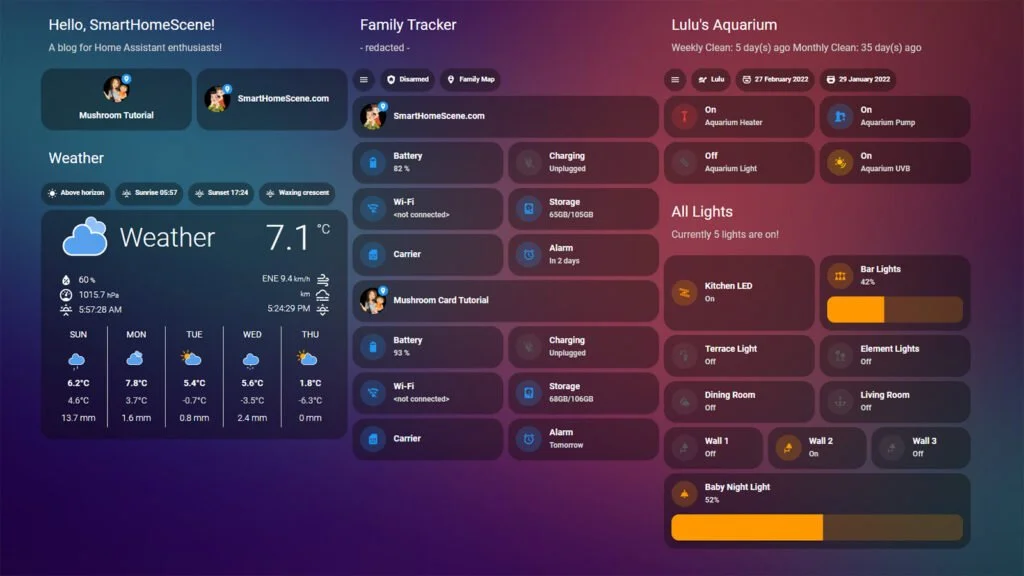 errant plover
rare junco
is there anyway to set up a template that shows an image based upon a different ...
errant plover
rare junco
is there anyway to set up a template that shows an image based upon a different ...
You can change the colour of an icon with card-mod. Otherwise if it has to be an image use a template image.
rare junco
errant plover
You can change the colour of an icon with card-mod. Otherwise if it has to be an...
Yeah ive got the card mod and am changing it based upon the entity state, I just can't figure out if I can change one entity icon based upon a different entity
rare junco
just to clarify my question here - I am trying to change the colour on a mushroom chip card
fiery ledge
fiery ledge
yes, Ive done most everything I can think of...
@tribal galleon found the solution to the image filter issue in Safari here: https://community.home-assistant.io/t/mushroom-cards-build-a-beautiful-dashboard-easily/388590/9806. Essentially, it is solved by targetting the element directly inside the Shadow with: card_mod: style: ha-tile-image$: | .image { {% set zones = states.zone|map(attribute='name')|list %} filter: {{'grayscale(100%)' if not is_state(config.entity,'home') and states(config.entity) not in zones else 'none'}}; }
the decluttering is changed to this now and works very nicely indeed, Ive documented the change inside to make it clear for others in the future:
fiery ledge
see here what it looks like: https://community.home-assistant.io/t/card-mod-add-css-styles-to-any-lovelace-card/120744/5920
spring pollen
Hi. I have a question: how/with what would I make the floor plan card play the camera video (pop-up) in the window if figate detects objects on the individual camera?
tribal galleon
I'm not sure what the floor plan card's capabilities are and I'm assuming you're using a wall mounted tablet. I think I would use browser_mod's pop-up along with an automation set to trigger off the object detected entity. The tablet's browser would need to be registered with browser mod in order for the automation to target that specific screen.
I would take a phased approach to get this working; don't try to get it to work all at once.
Install browser mod. Get a pop up working the way you want it to look using a button's tap_action. Register the browser. Get an automation to show a blank pop-up. Bring over the code from the tap_action into the automation. Set up the trigger. Then remove the button used for testing.
golden mistBOT
@spring pollen I converted your message into a file since it's above 15 lines :+1:
spring pollen
And this is where my current knowledge ends!
The current layout is as follows:

which I don't like. I would like the camera to appear only if it detects an object (person, car, etc.)
tacit cave
that's an automation
remove the cameras from your view
the automation will make the camera pop up
if you want to conditionally show the cameras, you need to use a conditional card
golden mistBOT
@spring pollen I converted your message into a file since it's above 15 lines :+1:
tacit cave
just remove the camera cards
tribal galleon
Looking at the code for that automation, that's exactly what I was talking about.
spring pollen
What do I have to do in the floor plan card (in the part I pasted earlier)?