#the-water-cooler
1 messages · Page 394 of 1
 unreal orbit
 low linden
I haven't set up my mobile app either, going to do that now, it's behind apache https with cert, we'll see if it works here
can't detect my server, because I'm also missing mobile_app:, adding and trying again
unreal orbit
Not a fan of the fact that it scans for HA as the default, but that's a minor annoyance I suppose.
 boreal pewter
It's forbidden to talk about HA here tho...
low linden
good point, we should be in support
 scenic radish
VERBOTEN
 unreal orbit
Me removing the PWA and installing the new Android app > https://www.youtube.com/watch?v=DT4SCsDfg7c
 fallow galleon
Is ecobee's server as horrible as internet make?
fallow galleon
I'm researching nest vs ecobee
scenic radish
But you can't control nest thermostats in home assistant anymore
scenic radish
Well there's a custom component for it now
fallow galleon
that's a even larger deal breaker
scenic radish
But that could break at any time
fallow galleon
ecobee it is then.
scenic radish
You can also control ecobee thermostats locally (no internet access required) in home assistant through HomeKit controller
Although with limited functionality
No fan control, no comfort settings, etc
But you can change temp and mode
fallow galleon
any options other than homekit? I'm not familiar with it. Google home?
to control if the cloud server go down
scenic radish
homekit controller is a home assistant integration

Home Assistant
Instructions for how to integrate your HomeKit devices within Home Assistant.
it's easy to use and will detect any homekit devices on your network
but no, that's the only local option
fallow galleon
OK I'll dig into that if that's the only option. Still sounds better than nest I guess
for HA support
unreal orbit
Believe it or not, there are more options than just Nest or Ecobee 😉
scenic radish
that too lol
there are z-wave thermostats too, and a wi-fi honeywell one i think that's compatible with home assistant
but the honeywell one is a cloud-based integration 🤢
fallow galleon
I don't have zwave hub.....
scenic radish
you can buy a z-wave stick
unreal orbit
A zwave stick + a thermostat + like 5 zwave switches would still be cheaper than ecobee
scenic radish
well not necessarily with utility rebates...
i got my ecobee3 lite for like $38 after rebates lol
fallow galleon
pseg selling ecobee/nest/honeywell
$44 for nest e & ecobee lite
if only there are good (and cheap) zigbee option
 wicked cairn
a week ago i'd also toss venstar in the ring as viable, its a wifi thermostat with completely local api and optional cloud integration
only downside is the wifi chip/api server is spotty at best
i'm considering replacing it already but i don't want to go back to zwave
unreal orbit
I've heard the build quality on those leaves something to be desired
wicked cairn
its slightly more visually appealing than the zwave ones as well
plus wife likes the touchscreen
so any recommendations for wifi + local thermostats send them my way
and keep those honeywell/nest/ecobee trojans to yourself :p
unreal orbit
You could always DIY, then you can make it exactly the way you want
Oh damn. I was going to try to experiment with the laser to mic hack, but the cost of the components is like $500 
boreal pewter
Uh @clever mortar
You have some method to call sensitive informations for scripts and copy paste lines to publish setups in git and such?
 clever mortar
This is the sanitised of the script I use to sanitise the files I upload.
Missing a word, but it amuses me 🙂
boreal pewter
I have no idea how to explain too
I don't even know what I want
Got some magic bro?
 boreal pewter
Like publishing a setup in Git and you want sensitive informations to be securily and universal saved on the host. Pasting a command like "init --pass $pass1289" would resolve to a password defined as this variable if you have it defined on the host before
Just secure, encrypted, maybe even hidden from bash history
Magic
So a User would get a list of "variables" he had to define before starting installation and then all commands could be copy paste
clever mortar
Ooooh, yeah, not something I've really done
boreal pewter
B ut you are the almighty one!
clever mortar
There's things like keyring for that, but I've never had the need/want
I'm also lazy as fsck
boreal pewter
😛
 minor nexus
continuing a well off topic conversation from #609399695466430465
clever mortar
I've built entire systems where passwords can be found in plain text in config files - because any other approach is just insane
wicked cairn
definitely work in the industry
boreal pewter
Insane, that describes me well. Thank you
clever mortar
Home Lab == fun + money + fun
boreal pewter
😛
 midnight adder
@minor nexus Yea the crazy setups you see are usually guys working on CERTS or are sys admins and it's not really a "LAB" Anymore but their home setup because they are just super geeks 😄
minor nexus
lol
clever mortar
I have a half dozen or so Pi3s, a Xeon server, and a couple of old laptops running Proxmox
minor nexus
yeah I just never got the appeal
clever mortar
I use it for learning/testing/learning
clever mortar
I got into home automation partly for learning
boreal pewter
Proxmox was paid, wasn't it?
boreal pewter
Ah Proxmox != Portworx
midnight adder
Hahahahaha
minor nexus
that's what all the cool guys do
wicked cairn
xeon home server, 2 nucs (+2 coming), an 8 bay synology for backup, 2 rpis, a sff pc for pfsense/routing, and another vm host machine (22 cores, 128gb ram)
boreal pewter
I are doing too much Kubernetes
clever mortar
I do test in prod too, but... only at work 😛
midnight adder
Well I work in Storage.. I don't have a SAN Home lab
wicked cairn
k8s is gonna be something i toy around with next
midnight adder
I have a pretty decent storage setup but no SAN lol
wicked cairn
gonna drop vsphere on the vm host, and do some deployments
midnight adder
I just couldn't justify even running 10gig in my home . I WAS VERY close to running some fiber
boreal pewter
Ok so if noone has an idea for my usecase Ima google some more hours 😛
midnight adder
but it's just not needed..
minor nexus
gotcha
midnight adder
It's more just to say I have it lol
wicked cairn
i do a lot of k8s for work, but i want to eat my own dog food
minor nexus
I think the only thing I would have ever invested in at that level is networking
storage and compute didn't really excite me
wicked cairn
10g @ home is unecessary
midnight adder
Right, I was going to do 10 gig networking
wicked cairn
unless you're doing remote video editing
minor nexus
and I lost interest in infra
midnight adder
lol @wicked cairn but then you can just say you have it..
minor nexus
and I can no longer justify that its "for my job"
midnight adder
Well " remote " being between floors or to a rack
wicked cairn
10g nic, 10g switch, 10g router, 10g coffee maker...
midnight adder
won't make a difference unless you have some crazy line coming in and then we're just talking entire different ballgame lol
wicked cairn
my apartment modem doesn't have a 10g port coming out of it, so there is no point
minor nexus
those keurigs nowadays need a lot of bandwidth to apply their machine learning based image recognition software to detect that your k-cup is legit
midnight adder
Yea if someone can link a 10g espresso machine
minor nexus
so I get it
midnight adder
lolol
@minor nexus .. dont kill me man
all the AI in the K-CUPS ..
So much bandwidth
minor nexus
lol, anyway, have fun with your homelabs
midnight adder
Yea man I need to get to some work also
minor nexus
no disrespect meant, I was just curious
wicked cairn
nah you're fine, we all know its a money sink and an expensive hobby
gotta do something to keep us busy tho right?
minor nexus
oh yeah, work
midnight adder
Haha none taken! We can lure you in if you want another battle with the better half 😛
minor nexus
🙂
 orchid rose
wooooo, we're going to the Euros ⚽ ⚽ ⚽
 storm summit
Wth. 26 reply’s in 24 hours to the thread about not being able to reload automation in packages. Geez. Stop whining people.
unreal orbit
Not using HA automations master race 🟥
scenic radish
Villhellm: might I interest you in some Node Red?
unreal orbit
💉 yes please
clever mortar
I should rename him, shouldn't I... 🤔
clever mortar
Villhellm the Red
scenic radish
Lol
unreal orbit
I would accept the title with honor 🤣
scenic radish
Anyway, anyone here use Node Red for automation?
 torpid fjord
Node Red, nah, way too complicated for me.... I just rebuild HASSIO from scratch and migrating my automations.yaml to the GUI version
scenic radish
oof... automation UI 🤢
clever mortar
It's getting better, finally
scenic radish
yeah they've been putting some love into it for a bit now
clever mortar
Admittedly, it'd be hard to actively make it worse 😛
clever mortar
Yup
scenic radish
that's what i recommend if someone brings up the UI
clever mortar
I like the idea behind device automations, but they're still a work in progress
 brisk glen
low linden
brisk glen
low linden
I usually use the UI to build the basic automation, then edit the yaml to make it do what I actually want it to do, which the ui didn't
torpid fjord
#ifreakinglovelovelace #justsayin'
scenic radish
Didn't know this is Twitter/Instagram 😉
 clear mirage
torpid fjord
clear mirage
torpid fjord
yeah yeah yeah 🙂
OK, is there a way to create Scenes in HA? Or do you have to go the route of boolean_input and create Automations?
 velvet horizonBOT
:point_up: Let me Google that for you...
Here , try this:
http://letmegooglethat.com/?q=home+assistant+scenes
Command '.lmgtfy' was invoked by: Villhellm
torpid fjord
LOL, no, I have scenes created in YAML but I was wondering if you can do it through the GUI
unreal orbit
You can create scripts through the UI. The scenes UI editor is coming 
torpid fjord
OK, will give that a whirl, thank you!
scenic radish
Got my hacktoberfest shirt today 👌
clear mirage
My local pubs selection of draft beer. Only one that never changes is Guinness.
scenic radish
Is that stone IPA?
 clear ferry

 hushed basalt
Keep the beer
Give me cider
Although drinking out in Australia is crazy expensive
$12-14/pint is pretty standard rate
Are there any wifi repeaters that aren't hot garbage
boreal pewter
No.. You have defined the word garbage when saying 'repeater'
clever mortar
Any that have a dedicated 5 GHz channel for their link should be ok
Not awesome, but ok
hushed basalt
What about bridges then
clever mortar
Run a network cable, use a dedicated access point
If you're looking for point to point, use a dedicated point to point device
https://mikrotik.com/product/RBSXTsq5nD for example
boreal pewter
Yeah just some common Unifi Setup
clever mortar
Just be aware that they tried to pull a fast one there
there are plans in place to release another firmware update that will allow customers to opt out of the data collection. No release date has been given, and Ubiquiti did not respond to a request for comment on the matter.
I'd have been fine with opt-in, but that's some shady stuff to sneak in
 hearty depot
yea... Unify..
https://community.ui.com/questions/Update-UniFi-Phone-Home-Performance-Data-Collection/f84a71c9-0b81-4d69-a3b3-45640aba1c8b

Ubiquiti Community
Hi All- We want to help respond to concerns voiced over the recently added phone home/performance data collection feature in UniFi and want to explain what this feature is and the future plans for this.What data is being collected: We have started to gather crashes and other ...
hushed basalt
Lock it all down :D
 young sigil
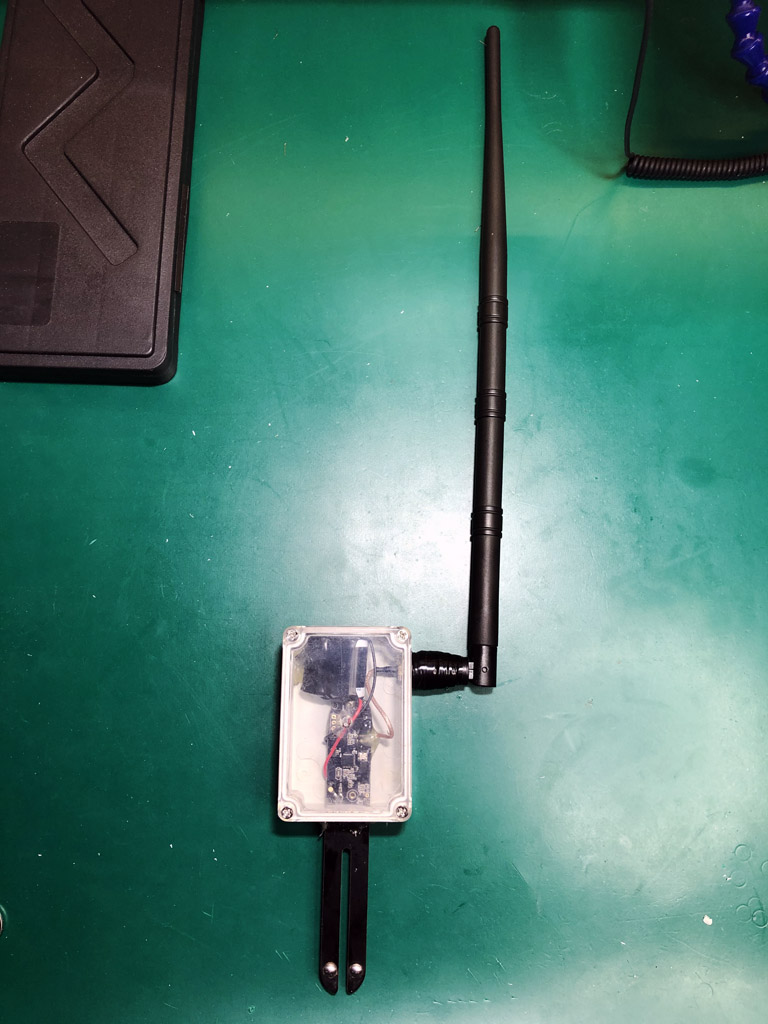
Tonight I have been performing mi flora surgery. 220mAh battery? Bah! Try 1.8Ah. And the antenna transplant has taken my RSSI from a poorly -90dBm to a robust -66dBm. I call it franken-flora https://i.imgur.com/GLreyHO.jpg and will be surprised if it lasts a month outdoors.
 scenic radish
@hushed basalt @clever mortar could also use a powerline Ethernet adapter with an access point. Not as reliable as actual Ethernet but still better than a repeater
clever mortar
I have previously used "200 Mb/s" powerline adapters, and they worked fine - just nowhere near 200 Mb/s
A pretty stable 80 Mb/s TBH
scenic radish
Yeah. I'm using one solely for my security system gateway. Wanted it in a different location than my router and I don't have Ethernet run throughout my condo
I got a pair of tp-link "up to 1000 Mbps" (yeah right) refurbished for $35 last year
 tiny tapir
looking for some advise on OSS etiquette. I'm using a project dead seems dead (for the second time), dude has open pull requests from January 2019, doesn't commit, doesn't respond.
I want to create a github.com/project/project instead of github.com/dude/project, what's the correct way to do this? Trying to get in contact with the dude doesn't seem to work.. 😦
clever mortar
Just fork it
tiny tapir
I was thinking of at least inviting him to the newly create organization
with regard to packages that get published; he probably owns that part so I'd have to change the name or something
scenic radish
Fork you, @clever mortar !
tiny tapir
it's Apache2
clever mortar
https://en.wikipedia.org/wiki/Apache_License read the summary there
tiny tapir
seems fine.. so to avoid problems with npm / nuget, it's a good idea to rename the packages yeah?
clever mortar
If you're going to publish there, yes
scenic radish
Euro face?
tiny tapir
that's next to the ) on phone 😉
scenic radish
Oh lol
tiny tapir
and one more.. are there best practices on branch naming? does it make sense to have an alternate master branch that keeps in sync with 'upstream'? (in case he wakes up from his hibernation)
young sigil
@scenic radish I thought it was the flying spaghetti monster.
scenic radish
Lol I could see that
scenic radish
So Wyze doubled my sensor order for no apparent reason and told me to keep the extra. So I received 8 contact sensors instead of 4. I do actually have 8 windows so I could put one on each window but...is there a point to that? I guess I could use it to turn off the furnace when I open a window but any other interesting ideas related to that?
Was thinking of putting one on the fridge door to mock me when I open the door more than x times per day lol
 sage timber
Bit of a random question but anyone know of any smart garden taps? I have a garden tap connected to an automated watering system. Turn the tap on and the garden is watered but currently have to do it manually. Are there any smart taps I can integrate into HA?
 woven drum
has anyone here connected their philips smart tv to home assistant?
 late gate
@young sigil Would not a gardena sensor be easier? Not sure if those anennas is even legal since you are spamming 2.4ghz
clever mortar
@woven drum I'd ask in #330944238910963714 😉
boreal pewter
I woulrd rather get a LG tho
fallow galleon
Anyone uses OwnTracks and how is it on phone's battery?
@sage timber I read about using a wifi switch to control solenoid valve.
clever mortar
Should be fine on the battery - it was when I ran it
Obviously if you set it to update every 5 seconds it'll have a bigger impact than every 5 minutes, or every hour
fallow galleon
I see. I'm gonna give it a try. If it's good, I'll deploy to all family members.
clever mortar
I went with GPS Logger, but if you're on iOS look at the official app
Heck, on Android the (just released) official app is worth a look
clever mortar
fallow galleon
😮
clever mortar
I don't think the Android app does location and notification yet but it'll come soon I'm sure
fallow galleon
Still better than Chrome
scenic radish
It's basically a web wrapper at this point if I understand correctly
So comparable to the PWA
clever mortar
Yeah, but looking at the issues list, more to come
And, honestly, why re-invent the wheel as far as the UI goes
scenic radish
Right, it's nice to see a release at all
Touch is a little janky sometimes with the PWA (and vibration is... inconsistent at best) so it will be nice to eventually have a native solution
clever mortar
I so rarely use the UI, the first time I discovered it had vibration it came as a shock
scenic radish
I know you're not about the UI but it's so surprising to me because I like using it as a central app for everything
But obviously we're different people so that's why
Well. I'm a person, you're a 🤖
clever mortar
I kind of view reaching for the UI as a sign I've failed to account for something
I mean, there's voice control for most of that, but ... yeah, automation is my key word
scenic radish
Ah gotcha. Yeah automation handles most things for me but I do like having manual control for stuff too

 scenic radish
Big if true
 vast dove
Anyone around and able to help me out with figuring out permissions over NFS ?
vast dove
So i want to export my homeassistant dir over NFS to edit the files from another computer so on on the server side i have /home/homeassistant/.homeassistant/ 192.168.2.0/24(rw,sync,no_root_squash,no_subtree_check) and client to mount it trough fstab: 192.168.2.119:/home/homeassistant/.homeassistant /mnt/ha_config nfs _netdev,auto,nofail,noatime,nolock,intr,tcp,actimeo=1800 0 0
clever mortar
Ok, so, that should export /home/homeassistant/.homeassistant to all of 192.168.2.0/24
vast dove
And it does, from client:
https://images.sjabby.com/401fe/FAhIGAhUZu060.png


but no permissions
clever mortar
Ok, so ... that means that the remote user has UID and GID 1001
And you don't have a local user with that UID and GID
NFS uses the UID and GID for access control, not the account name
vast dove
So i should create a user with uid and gid of 1001 on my client side?
vast dove
Then i get access when changing into that user on client. But when using that share from a docker i still dont get access
clever mortar
Probably it's still a UID problem
NFS is a PITA until you get everything using the right UIDs everywhere
vast dove
Because in my compose file i'm using both local folders and this NFS share so i cant just change the user running the docker
hmm
clever mortar
You can do UID mapping, but it requires all the clients to support it
vast dove
How? 🙂
vast dove
thanks, ill give that a try
 vital glade
I don't get my WLED auto-discovered in HA 😦 I have no idea why, I have given the ip and port in wled, and the mosquitto is running, but it doesn't show up by itself, anybody that has an idea on what to look at?
Oh, and I have also given a user and password in the wled 🙂
Ahh, found the error, a space sneaked into the ip address 😮
hushed basalt
scenic radish
Aren't all deadbolts digital? They can only be locked or unlocked
 wet pilot
they can also be jammed i think
scenic radish
I was just making a dumb binary joke lol
Can they actually report jammed in home assistant?
 rapid musk
Anyone interested in joining a chill homelab server? I’d post a link if it’s allowed
rapid musk
Yeah, I can dm you the invite if interested
scenic radish
@storm summit brb, gonna crash your instance
scenic radish
This a good deal at all? I have $58 in gift cards
About to give in and upgrade from my pi lol
Possibly
I know it's refurbished
 quartz ether
4th gen is a little old
hushed basalt

170 votes and 27 comments so far on Reddit
@scenic radish i would get a USFF optiplex
7020/9020 core i5 refurbished
scenic radish
oh gosh those things lol
thanks for the suggestion. looking for something with a smaller form factor, but i'll keep it in mind
hushed basalt
Usff are very tiny
TBH Nucs are too small
They're sort of the size of a big Bible
Also they include the power supply
wet pilot
but is it as disappointing as coke zero? i guess its not as bad as caffeine free coke zero
scenic radish
lol
hushed basalt
It's only fair if you compare the power brick and the cabling bundle space
scenic radish
oh that is smol
wet pilot
crack the case and custom loop it 😄
hushed basalt
Double the radius of a fan and it came move the same amount of air at 1/4 of the RPM
Inverse square law is powerful
So small chassis can get noisey very quickly
scenic radish
i was thinking of a totally different machine
hushed basalt
What were you thinking
scenic radish
the slim optiplex tower
clear ferry

hushed basalt
Everythings a tower if you have enough of them to stack :D
scenic radish
Lol
clear ferry

hushed basalt
I'm sure @clear ferry has some blades he could classify as towers
wet pilot
but you used UDP so you'll never know
orchid rose
the NUC fans are indeed pretty noisy when there's high cpu usage but that shouldn't matter in most cases
In general use it should be unnoticeable. Personally I really like the form factor and I think they look rather nice
 north sphinx
Hi there!
Quick question: where should I request assistance with an ESP32+ESPHome build I'm doing?
wet pilot
i believe they have their own server. link should be in #551843558676758569
north sphinx
Yeah, they do. I asked there yesterday, no reply, sadly
Also, is there somewhere that lays out dimensioning your HA server? I'm not sure if a RPi 4 4GB is enough for what I'm trying to do 😛
wet pilot
probably #330944238910963714 but could be #330990055533576204 if you're going that route
orchid rose
for the ESP stuff #diy-archived could also help
clear ferry
RPI is enough for most people, but I grew tired of the slowness quite quickly
So moved to venv after two weeks
wet pilot
i lasted a few months and moved to docker
north sphinx
I am hoping to go HassIO, yes. So far, the RPi4 is doing nicely, but you know, I fear I'm going to start taxing it a lot, if I try to add on to it.
Like, I'd like a Plex server to be there, as well as some other stuff (PiHole, Unifi Controller, etc), and between a weird random loss of connection to MQTT or BT, and the ever-increasing amount of Sonoffs and Shellys on my network, not to mention the automations... Well, that might push it a bit too much
I'll try #diy-archived, then. Thanks!
north sphinx
Really?
wet pilot
as soon as you start transcoding you're going to have a bad time
north sphinx
No transcoding, I know the Pi will not handle transcoding
clear ferry
Heck, a dl380g4 had a hard time with two users running only Plex 😛
wet pilot
lol
north sphinx
Wait, what? How?
clear ferry
Because transcoding will occur at some point
north sphinx
Ah, the transcoding was what was killing it. Got it
clear ferry
I haven't had any issues running on a hp bl460c g5, g7 or a Dell r510
clear ferry
But on the g5 and g7 I also ran 50 other vms
north sphinx
I'm not expecting transcoding, honestly. The clients will be either PCs capable of hardware decoding, or an NVIDIA Shield, or maybe a TV with AndroidTV on it.
wet pilot
i do want to get off of it at some opint
honestly, plex would run better on the shield itself
north sphinx
But it does tell me that I should expect to need more ooomph than a Pi
wet pilot
it depends. HA, PiHole and unifi aren't that rough
clear ferry
I should nag my boss for a dl360 Gen10 for my labbing with nsx and vsan, then I could move some dockers that require more unf there too 😛
north sphinx
Yeah, maybe. But I don't want to have the Shield on all the time. If I can cut that out from the equation, it would be nice
wet pilot
but at the end of the day, you're attempting to run server level software on what's basically a toy
wet pilot
ooo transcoding can cream a sd card even worse than HA does 😄
north sphinx
lol
clear ferry
north sphinx
Yeah, right. That's yet another reason why I'm considering moving away from the Pi.
But I do have a NAS (custom build, running on a Celeron).
I might just stick the Plex server there and call it a day, though 😛
wet pilot
celeron would be slightly better
clear ferry
I run my docker host (mini itx with 4 bays running suse tumbleweed) off a ssd
Made the performance nice for my dockerinos
Plex runs in my freenas jails, storage on 4x10tb drives
I should move my jails themselves to ssd also, I have an extra laying around
north sphinx
Right now, I have a Celeron (G3600) doing NAS duties. I also have a Celeron G1610 machine parked, and my current gaming rig (i5-3470) will become available on X-mas, when I upgrade
So, I could devote either one of the Cellys to NAS or HA, or go for broke, and use the i5 for an "everything but the kitchen sink" (or in this case, NAS) server 😛
orchid rose
I ran HA on my gaming rig for a long time before moving to a dedicated NUC 🙂
wet pilot
for HA at least, its not that big of a deal to move it around to try things out
orchid rose
running it in Windows was a bit of a pain though
wet pilot
plex can be obnoxious to move if you don't backup its library db
north sphinx
Yeah, I'd like to avoid that, if at all possible 😛
clear ferry
@wet pilot I have actually never backed up the dB of Plex 😂
I probably should
It's been on my to-do for 5 years
wet pilot
😄
its not that big of a deal, but can be obnoxious to re-scan everything on large libraries
clear ferry
The biggest problem would be losing viewing history imo
wet pilot
that too
clear ferry
Been running Plex since... 2011 I think, stills same db
wet pilot
i've lost mine a couple of times
i just tar up the persisted volume for my plex containers these days
clear ferry
I have 30ish users, so I know some people would be annoyed 😂
wet pilot
oh yeah
since its a container and it all lives in that one volume, i just rsync with archive to somewhere else
clear ferry
Yeah, but shouldn't Plex be stopped before copying the dB? 
Thought I read that somewhere
Which is probably why I have put it off
clever mortar
In theory everything that runs a database should be stopped or you use a built in backup tool
The lazy approach is file system snapshots
orchid rose
Plex doesn't connect to something like Trakt?
clever mortar
The normal approach is to go fsck it and copy the files 😛
wet pilot
😛
i have tested the approach and it has worked
so its not a "backup" at least
apparently its a sqlite db
boreal pewter
Honestly the Nvidia Shield is shit, or at least the Plex app, I rage having it bought only for streaming and the Plex App is fucked up like 90% of the time. The only benefit now are the side-features
Fun fact tho, you can't even buy a new power cable for it. The connector is custom and the cable not for sale. If you lose it or fucked up after the 2 years warranty you most likely have a 200€ brick 😄
Not as expensive as Samsung Shit-Phones, those made me already 800€ bricks 
 lofty coral
mrning all...
just began with Home assistant and it really looks awesome...
Trying to get connected to a mariaDB on my synology but got stuck on a error on the config...anyone who can help me out?
boreal pewter
Idk Synology specifically but depending on installation #449717345808547842 #330990055533576204 #551864459891703809
Maybe even generally #330944238910963714
Well you double posted already anyway..
lofty coral
I have a hassio installation, and sorry for the double... 🙂
 tame cove
hello everyone
does someone here maybe has experience with KNX, i never used it before myself
clear ferry
I was going to back up my Plex database
But now I'm stuck with a baby sleeping on top of me
But atleast I'm watching plex
😂
boreal pewter
Oh you can get up to 50k for these
clever mortar
@tame cove KNX and Home Assistant would be a #330944238910963714 question
hushed basalt
Anyone have the roborock s6?
clear ferry
@brazen sand does according to search 😛
hushed basalt
There is a 25% sale on
But I don't like being pressured :D
I think I'll wait
House atm isn't set up fabulously for a robot anyways
Two stories, three baby gates
Means 4 zones
clear ferry
Yeah, same here, vacuuming with the S5 all house worked fine before she started moving 😛
Now it mostly does the kitchen
clear ferry

Official music video for 'Yuve Yuve Yu' by The Hu. Stream or Buy the new album 'The Gereg' - https://thehu.ffm.to/thegereg UK - CD / Double Vinyl Link - http...
hushed basalt
She's climbing stairs super fast now
Can't leave her alone near stairs for a second
clear ferry
Yeah, stairs are a nono
She's been walking for almost two months now
She tries to run away from me often
 brazen sand
@clear ferry I have 2 and they work great and fast
 light trout
I doubt I have a say in it :/
scenic radish
Sure you do. I... DECLARE... RETIREMENT!!!
clever mortar
#general-archived would be where to ask about Tileboard.
lofty coral
ok, sorry...
 ebon meteor
Finally got my Konnected stuff setup, and finally (after about 10 years of talking about it), I implemented my "after midnight, low level, pee nightlight" automation in my master bath, and a few other lighting automations with low hanging fruit.... (patio, front door, after midnight hallway, etc).
 toxic birch
Hey guys and good evening, I have a question regarding home servers in general (including (mostly) hassio, pihole and open media vault). I'm planning on redoing my current setup and upgrade to a NUC / Mac Mini from multiple raspberry pi's.. May I ask here or is it not the right place for that?
clever mortar
General hardware chat is fine here
velvet horizonBOT
@toxic birch posted a message that is too long, it is moved here --> https://paste.ubuntu.com/p/yxjWSXZBv2/
toxic birch
Kind of a long question but I'm new to this, I hope you can help me out and give me some advices :D
Please don't loose your hair because of my (current) stupid backup plan 😅
clever mortar
Death by wall of text...
So... backups first...
You should ideally have both local and cloud backups
Local backups will be the primary go-to for when you mess up or something dies. Cloud backups cover you when it all goes horribly wrong - house burns down, ransomware strikes, etc
Don't simply rsync though, use versioned backups. A dumb rsync risks losing files if things fail part way through a backup. Versioned backups allow you to recover a file version from three changes ago.
As for the Mac, it'll be significantly better than the Pi in terms of performance and reliability
toxic birch
Is this all achievable (if it's a good idea at all) to do with one mac? Currently the NAS and Home Assistant are completely separated. I don't really know how to (if I should) combine them.. OMV on the Mac Mini and then hassio in a OMV Docker container or is there a better way?
Is it worse to have the 2 HDDs attached via USB3 to the Mac mini than it is currently? (Sata3 and Backup on USB 2.0)
Is there an easy way to versionize and backup files in OMV? I'd still keep the 2 partiton attempt with one being backed up and one not, right?
clever mortar
Yes, it's do-able
toxic birch
Thanks for you response @clever mortar, I'll look into a cloud backup too for stuff that needs to be really safe
clever mortar
https://rclone.org/ is good for cloud backup
I've never used OMV, but you'll want backups done outside of that too
toxic birch
I googled it and found several ways to do it on the mac but I don't really know which route to go... It currently works fine but pi-hole sometimes is really slow (probably SD Card)
clever mortar
Honestly, running Linux on there (if it can be done) is likely to give you more flexibility
toxic birch
I'm not bound to OMV (if there's something else you'd recommend), it was the easiest to setup as a NAS
hearty depot
sshfs 😉
clever mortar
My "NAS" is a FreeBSD server running Samba (and Plex, and MariaDB, and Mosquitto, and ...)
Don't ask me for advice on all-in-one software 😛
toxic birch
I though about that too, just debian with a samba share.. I don't need 90% of OMV :D
All I want is to keep Homeassistant (probably Hassio over doing all the docker work myself?), pi-hole and a Network storage.. That's pretty much it. I hope to get a more reliable solution by going with the mac mini since I already had some dead SD-Cards in my rpi's
scenic radish
Yeah I have an extremely powerful server, it's a raspberry pi 3b+
hearty depot
you ll - but fyi an pi also takes an SSD
hearty depot
my old macbook pro (2011) is atm my HA server - on the way to transition to my old gaming rig 🤣 When I would finnaly find the time to clean up my config
toxic birch
@clever mortar Are you doing all that with docker? I read that it's easy to install debian on my mac mini, is that a good starting point for hassio and a NAS?
@hearty depot I didn't know that a pi can use an SSD :D I just have this old mac laying around and though I put it to good use and maybe get a better solution than my rpi3
scenic radish
It can, but not the pi 4 (yet)
USB boot support hasn't been added to the firmware yet
Per the raspberry pi foundation
toxic birch
Ah ok, the problem is that I'd have to buy a Pi4, I have the mac laying here collecting dust
I mean getting debian to run on there shouldn't be a problem but what then, install hassio in docker or rather homeassistant and use separate containers for zigbee2mqtt, mosquitto, etc? What I really love about hassio is the configuration, it was so easy to setup mqtt with my zigbee devices, without hassio it could be much more complicated
scenic radish
#613790866523422723 huh? 😉
But it's really up to you as far as installation method
toxic birch
I already red through that but I'm not sure, is there any disadvantage of hassio over doing it myself? I mean having pi-hole integrated in hassio is pretty neat but since it's one more point of failure. What's your opinion on that?
Might you have an idea to get a simple yet functional NAS on debian?
scenic radish
Well the containers all run independently of each other even if you install via hassio
All the add-ons, home assistant itself, and the supervisor all run in separate containers
Really is just up to you. Hassio does have the convenient snapshot capability
toxic birch
Just that I get it right, hassio uses docker, right? That means it would look like this:
Debian -> Hassio (Docker container) -> Pihole (Docker container inside a docker container?)
@scenic radish That's a good reason for hass, the snapshot to google drive and locally is pretty neat, not having to setup pi-hole if something breaks
But it kind of scares me to have docker inside of docker (it that's how hass works)
Just asking for your opinions / experiences with it
toxic birch
But the addons inside hassio are docker containers?
So they are all in one layer but one container manages the other ones?
toxic birch
That sound pretty awesome to me :D It reminds me of portainer
scenic radish
So you can stop any of them and the others keep running
You'll notice if you have the pihole add-on installed and restart home assistant, pihole keeps running. No interruption to your internet access
toxic birch
Yes, I had homeassistant crash and could ssh and do hassio homeassistant restart.. That was awesome :D
That's my next question.. If hassio runs in docker, should I enable ssh on my debian host? maybe on a different port? Having SSH on the root system and in one docker container seems odd to me but configuring through home assistant overlay is nice
So my current plan would be to install debian on my mac mini, then install docker on it and follow the hassio in docker.. Later on I would try to get a NAS in my docker pool any at the end get a working online backup.. Am I missing something?
You all really already helped me out a lot, thanks @scenic radish for explaining the usage of docker to me :)
clever mortar
Docker... yeah, no 😉
scenic radish
Did I get something wrong?
toxic birch
No docker? I'm confused
clever mortar
Nah, I was responding to the earlier question
About whether I did "all this in Docker"
scenic radish
Oh lol
clever mortar
Only now I'm beginning to know Docker would I consider running it for anything I rely on
scenic radish
Same
I just understand the concept of containers and specifically how they're deployed with the Hassio installer
toxic birch
I don't have much experience with docker but it seems nice, if you mess up you can just recreate it and not install the whole system again.. a NAS in docker, I'm not sure about that yet
scenic radish
Well and it avoids dependency hell
toxic birch
I mean getting hassio shouldn't be a big problem but I'm not sure about what comes after that
Yes :D
Thanks again for helping me decide, I'm gonna go with hassio and run the hassio version (community made) of pi-hole
Any idea about the NAS part so far while I'm setting up debian?
scenic radish
No prob. No clue, I'll leave that to tinkerer 😉
clever mortar
NAS is just Network Attached Storage
Disks + Samba == NAS
If you want a pretty web based UI, that's different
That's where things like FreeNAS come in, but you'd not want to run those inside a VM/Docker
toxic birch
So a simple docker container, install samba and voila.. What about the versioned backups? I though about splitting the big HDD in 2 partitions (3,5TB and 0.5TB) and then versionize everything on the small one to the 2TB SSHD.. Does that sound like a plan? 4x the size means I should be able to keep some versiond
I have the important stuff in a veracrypt disk on my nas, is it possible to versionize it or do I have to manually make it after I do changes?
clever mortar
Backups... many choices
For local backups, I like rsnapshot, for cloud I like the previously mentioned rclone
But... lots more out there
toxic birch
I probably put the whole encrypted vdisk on cloud storage too, just in case :D But just attaching the HDDs via USB3 and share them to the network with samba should be easy, right?
clever mortar
Yes
toxic birch
@scenic radish What about SSH if I may ask? Enable it on the host system or only the hassio ssh container? Can I access the system from that?
clever mortar
SSHfs is an option - ultimately it comes down to what clients are you using
For Windows clients, Samba is the easiest - no effort is required on the client
toxic birch
I have 3 windows clients, one iMac and 2 chromeOS devices (chromeOS does work with smb shares currently)
I'm just not sure about how to do it.. I like the web gui of OMV but I cannot find a containered OMV version
scenic radish
ChromeOS also supports SMB shares if that's of any value at all
toxic birch
Setting debian up right now, should I install SSH on the root system or just later in Hassio? :D
scenic radish
Whatever you want boo 😉
clever mortar
That's the only way you can remotely reach it to fix things
toxic birch
@clever mortar Hassio on the mac mini is probably a little upgrade over the rpi3, I just thought all in one place would be nice :D
scenic radish
I'd like to get ssh access working with a public key instead of username/password but it doesn't see my public key for some reason despite generating it
massive
scenic radish
Ah I have a dumb, thank you
toxic birch
I'll probably leave my Odroid OMV for now then, shoud I change something about it? My rsync "backup" seem janky that I feel bad for it 😂 Not sure about the 2 partitons, it was my first try and it worked so I left it this way 😅
velvet horizonBOT
rsnapshot makes it easy to make periodic snapshots of local machines, and remote machines over ssh.
Command '~rsnapshot' was invoked by: Tinkerer
clever mortar
That uses rsync, but gives you versioned backups
toxic birch
But when I have a 2TB partition than will be versionized to a 2TB hard drive there probably won't be many versions or am I wrong?
clever mortar
Versioned backups mean you have a list of (effectively) changes
So that static 2 GB file, there's only one copy
That file that keeps changing, there's lots of versions of it
toxic birch
Does that work for the encrypted vdisk too? Since it's encrypted it cannot see the changes, right? It's only 30gb anyway
clever mortar
No, that'd be backed up as-is every time
You probably want to back that up another way
toxic birch
Seems like there's a rsnapshot plugin, I'll try that one
@clever mortar How would you backup the vdisk? Can I explicitly not versionize it?
clever mortar
You can just exclude it from that backup
Back it up another way, or mount it decrypted and backup the contents
toxic birch
What would you say, how many daily / weekly / monthly backups? I'm going through the config right now and am not sure
clever mortar
Enough
How you define enough... that's personal, and will depend on the value you place on the data
retain          hourly  12
retain          daily   7
retain          weekly  4
retain          monthly 12
retain          yearly  10
This is how the setup looks like, I guess one backup a week should be plenty
clever mortar
Eh, no
toxic birch
Oh okay, you have a lot of backups :D
clever mortar
I backup often - not the same 😉
You want to back up often enough to catch changes
So that you're not finding yourself having lost a week (say) of effort
That's another reason for versioned backups, you can do that easily with little overhead
I mean, my cloud backup for HA has been taking place every 2 hours since I started using HA. If I want to recover a change from 2 years ago, odds are I can
(that is slightly extreme 😛 )
toxic birch
You're right.. One backup per hours doesn't waste space if I don't edit it for 2 days... Right?
toxic birch
It's just strange than I have to say how many backups a year.. Can't I just say backup every hour until storage full then delete the oldest one?
clever mortar
Normally you'll want something that does aging off automatically
Ah, right, so... that config above...
Let me explain what it really means
boreal pewter
Using unlimited cloud makes deleting irrelevant
clever mortar
retain          hourly  12 # Keep the most recent 12 hourly backkups
retain          daily   7 # Rotate the oldest hourly backup to be the most recent daily backup. Delete the oldest daily backup once you have 8
retain          weekly  4 # Rotate the oldest daily backup to be the most recent weekly backup. Delete the oldest weekly backup once you have 4
retain          monthly 12 # Rotate the oldest weekly backup...
retain          yearly  10 # ...
Yeah, with Backblaze I've got every one of those 2 hourly backups, from almost 3 years ago
toxic birch
Wait, is that a thing too? Just one 4TB partition in OMV and conigure an automatic cloud backup?
boreal pewter
Ofc.
 sacred carbon
Just saw this on Facebook. Looks interesting

GitHub
Contribute to tuanha2000vn/hasskit development by creating an account on GitHub.
boreal pewter
If you Backup only locally it can end up like having none at all
sacred carbon
Anyone try it yet?
boreal pewter
HA is forbidden here
clever mortar
My own setup is:
- RAID for everything that matters
- Snapshots (ZFS)
- Local network backups (rsnapshot)
- Cloud backups (rclone - multiple destinations)
@sacred carbon Please read the channel topics before posting 😉
toxic birch
I know that RAID is recommended but honestly I just want a simple network storage to play movies from, etc (and maybe some important stuff with cloud backup) :D I have these 2 HDDs available and wanna put them to good use
Which way would you go with the current setup?
Rsnapshot + Cloud?
clever mortar
RAID... is recommended like breathing is recommended
sacred carbon
Well it isn’t official... so
boreal pewter
He still hasnt read topic then
clever mortar
Disks fail, anything you're running with only a single disk is waiting for data loss
boreal pewter
@toxic birch i wouldn't make use of something just because I have it if it makes no sense tho
clever mortar
Hell, my secondary local backup server had the disk die the other month, all those backups went bye bye
clear ferry
😛
clear ferry
Sure, in nested raids, or cache
sacred carbon
Technically @clever mortar it talks to HA. It isn’t ha itself it’s it’s own product
boreal pewter
Stop fucking discussing and gtfo
clever mortar
Right ... and ... off topic here
clear ferry

toxic birch
@boreal pewter I though about that too, just use the 4TB HDD as NAS and use cloud backup?
clever mortar
go to the right place, or begone...
sacred carbon
Wow that’s rude.
boreal pewter
@toxic birch i even stream from cloud now, the 4tb is just Cache and can upload 750GB a day
That uploaded into the cloud and streamed back from plex
clever mortar
@sacred carbon You posting where it's explicitly off topic, and ignoring the requests to post in the right place is what's rude 😉
boreal pewter
Also backups and such
toxic birch
@boreal pewter I have a 50Mbit/s conenction, that's probably not enough 😅
clever mortar
Ad... test the recovery
boreal pewter
Well get a external Gigabit Server
toxic birch
But that sounds like a good solution, just get a cloud storage provider and backup to that.. If anything happens they probably got better security than I ever could
clear ferry
Pff, just have a 42u rack in your garage
More fun
And a secondary site with another 42u rack 😛
boreal pewter
That doesn't help Internet speed @clear ferry
clear ferry
Just move to the middle of nowhere in Norway then, gigabit for everyone 
toxic birch
I'm in the middle of nowhere in germany.. DSL for everyone 😂
toxic birch
@boreal pewter @clever mortar So it would also be possible to keep the Odroid HC2 with just one SATA Drive (no USB HDD) and automatic online backups? Maybe off topic but which provider would you recommend?
clever mortar
https://rclone.org/ lists a whole bunch of supported providers
toxic birch
Mac mini is making progress 👍
clear ferry
I need to get my rclone up and running
boreal pewter
@toxic birch Backblaze cheap Plan is for Windows and Mac only, Linux Server backups to gdrive
clever mortar
B2 is cheap, but it's pay as you use
boreal pewter
Yeah not cheap for a few TB
toxic birch
So I should just buy Gdrive space and do rsnapshot to that? Or how exactly? Sorry I'm a noob
boreal pewter
Rclone does magic Butter I found it very difficult tho when starting
clever mortar
For online rclone all the way
boreal pewter
But I even can stream 4k from it
clever mortar
It does the heavy lifting
clear ferry
Does backblaze care what you back up?
clever mortar
Well, if you don't use their app, you can back up anything
clear ferry
But.. my... Dvd backups....
clever mortar
If you use rclone, you can encrypt it before you back it up
toxic birch
Side question, I used the hassio script on my mac, where does it actually keep all the config files that the hassio-samba addon shows? Can I see them from the root?
boreal pewter
toxic birch
The mac mini works :D And damn it's fast.. Thank you so much guys :)
clever mortar
🎉
light trout
mac? mini? fast?
Are you sure?
toxic birch
It hast an i5, 16gb ram and a samsung ssd, much faster than my pi :D
@clever mortar I'll look into cloud backups later, rsnapshot on the external HDD works for now too, right? We kind of lost focus on that :D
clever mortar
Baby steps ...
hearty depot
someone meight know if I can set an locale in grub?
or at least prittey early? luks getting me a hard time
toxic birch
@clever mortar May you explain me again how many snapshots you have set up?
How can I load data from one snapshot?
clever mortar
One
toxic birch
I mean how often.. Sorry :D
toxic birch
Ah ok that's how it works
clever mortar
Yeah
toxic birch
Seems like I got everything working then now, atleast no error logs :D
Thanks everyone again, couldn't be happier with my new hassio installation, let's see how the little mac keeps up
 brazen root
Is it not advised to put the HA-controller inside a rack? Considering options, but have heard that it might disturb the signal to the Z-dongles.
Regular wall mounted thing, with a glass door.
clever mortar
If you've got a Zigbee or Z-Wave stick, put it on a USB extension cable so that it's outside of the rack
brazen root
Yeah that was an option.
clever mortar
Or, if you've got a stick with an external antenna, attach one
brazen root
It's either that, or getting an IKEA SKADIS peg board, which can be really nice.
clever mortar
USB extension has the advantage of moving the stick away from the (RF) noise of the PC too
brazen root
Thanks, never though about that.
TBF the mini-computer looks silly with a giant Aeotec USB poking out of it, and the TINY Conbee.
I'm going to assume a Phillips Hue hub should be on the outside as well them.
*then
 normal ferry
hi all, anyone aware of an e-shop that ships world-wide (or at least EU-wide) that I can get good prices on Raspberry Pi W(H) ? any recommendations besides the obvious (amazon) would be welcome
hushed basalt
Is element14 in EU
 strange vapor
Articles
By bert hubert / bert@hubertnet.nl
This post is an excerpt of a far longer post on Galileo, its structures and the cause of the outage. Here we’ll only focus on the outage - the potential underlying reasons behind it are described in the full article.
Since the week-long ou...
storm summit
anyone know a good link to buy APA102 s?
 static plinth
stefan in my experience you will want a Zrange extender or two or four
especially as a rack mounted HA system is going to be out of the way and surrounded by metal. It will transmit a little but you will be lucky to get up stairs and then 50'
without one
I think I missed something funamental about HA.... does it NEED internet AT ALL? without it... without internet acess, would you just plug into a router and get an IP address via local wifi? And is local wifi even needed if it just plugged into a switch with no wifi?
Basically can a prepper in north idaho with no internet get HA up and running so long as they have an ip-issuing router/switch/thing?
 static schooner
Sure
static plinth
soooo if im running just a Zwave only network off a Pi on HA, is any internet connection necessary?
im thinking about making a z-wave based energy management system using HA and it would be nice to not bother with internet access at all, out of the box at least
im thinking about how it gets an IP adress
scenic radish
Once it's set up you don't need internet access
static plinth
does it even need an IP address... i.e. operate headless?
if that is the same thing
scenic radish
I know at least with the Hassio installer it downloads the latest home assistant version so you need internet for initial setup
static plinth
im thinking about pre-programming and shipping
scenic radish
Headless means without a UI
static plinth
so i have internet
yea so i get started and then ship out to them and they don't even see the UI if they dont want too... or they can plug in and start playing around
scenic radish
As in, you plug it in a display and all you see is terminal output
static plinth
that's the idea
see im not running mine off a Pi but this will be, so I am a little limited in knowing what it wil actually be like
like
so running HA on a Pi
and you plug the Pi into a display
but if the Pi is not connected to the internet, even locally, it has no IP address
so the front end of HA won't be accessible but it will still function... that is my understanding
but i dont know if im an idiot
customers are funny and I want to say "no dammit, it does not require internet access at all if you dont want it to"
static schooner
I would think so, but I haven't tried. This thread contemplates a disconnected Pi: https://community.home-assistant.io/t/what-will-happend-if-i-use-homeassistant-in-local-internet-without-wan-network-connection/112515

Home Assistant Community
Can i use homeassistant in a completely offline environment? The whole local network won’t connect to internet after install. Is that OK? Will the function of control local device unavailable? Can i still use components(like mqtt or so)?
but without a network connection at all? Try it, I guess
 green inlet
You can set a static ip on the pi.
From there, a simple switch and both the pi and whatever they want to see it with on the same subnet.
No access outside the home though
static plinth
thats what i am thinking paddo
look most would want this to be internet connected but in the solar industry some customers are quite funny.... obsessing over security upfront but then chucking it out the window the next day.
here is what I am trying to do: http://www.levll.com/
 torpid pelican
heh
 jade tartan
i refuse to get new poke
torpid pelican
I just got into downloading games after modding. I know some forums aren't cool with that topic, tho I assume the HA community doesn't have much of a stance
torpid pelican
Having modded many other phone/console/etc in the past, it was a pain
(I'm also in IT)
but In the end its excellent
the library of games and the simplicity of portable+console experience is really nice
jade tartan
they got a DS emu working well yet?
torpid pelican
well they have retroarch, so I would assume there is a core. Need to check
jade tartan
interdasting
torpid pelican
There are way too many methods and guides out there - but if you decide to go that route, keep this in mind
You can install custom firmware over your stock, but you don't have to - you can just make a virtual firmware install on an SD card instead, leaving your original switch in original condition. Half the guides don't tell you this until after you get to the end of them or just it's in another guide. Since the mods to the original firmware are sort of permanent, I thought this was a shitty beginners pitfall
jade tartan
ok, theres new shit then because i havent looked into the modding at all
torpid pelican
Need to pass out - work in AM
jade tartan
so your saying now you can basicly live boot a switch hack?
torpid pelican
Yea, you need 2 small things with you but they are portable.
torpid pelican
thanks man
I suspect we have a lot of similar interests, especially with that (e36?) in your profile pic?
jade tartan
yeah
it's my baby
but it's in disrepair atm
been sitting for 3 years now
been broke and just bought a bike
lol
next summer ill work on it
torpid pelican
Ah, I've had one of those. I don't regret no longer having a baby in the garage that goes weeks untouched
But the alternative (putting daily miles on a "baby") has its downsides
night
clear ferry
Hmmm is Docker hub down?
strange vapor
 pure vine

Openreach (BT) plan to launch a new symmetric "low speed" 500Kbps (0.5Mbps) tier on their UK Fibre-to-the-Premises (FTTP) broadband ISP network, which
Openreach are planning voice only fiber lines
 wintry crow
So labour are talking about nationalising BT and providing fibre to every home. Now that 5G is rolling out and fibre will be redundant for many.... Typical UK :/
Next they'll be offering every household a mangle
young sigil
5G won't make fibre redundant.
strange vapor
Can't remember the exact quote, but a WISP engineer at a local talk last year was quite happy to state that Fibre backhaul is a wireless engineer's best friend.
 leaden adder
https://github.com/andrew-codechimp/ha-menu
Awesome stuff

GitHub
A Mac OS Menu Bar app to perform common Home Assistant functions - andrew-codechimp/ha-menu
 lethal granite
Hey Guys, Can someone tell me how to comment out multiple lines at once, i forgot the procedure
light trout
carefully
clever mortar
sed -i -e "s/^/#/" yourfile
clever mortar
That sounds like a #330944238910963714 question 😉
 glad depot
If I set state for an entity (mqtt light) and there are missing attributes in the mqtt message(s). Where should I start to look?
glad depot
Not sure where it fits :/
clever mortar
Well, this channel says For chat around things that aren't Home Assistant related so certainly not here 😉
#330944238910963714 would be the obvious starting point
pure vine
5G is going to end up being just as bad as 4g is now
clever mortar
Can't wait for 42G
clear ferry
The meaning of wireless
strange vapor
@clever mortar Quantum Entanglement for zero latency?
velvet horizonBOT
Tinkerer is away for 1m 21s with a message :point_right: Google can bring you back 100,000 answers. A librarian can bring you back the right one.
unreal orbit
I hope I live to see a day in which quantum entanglement is a viable option for communication
scenic radish
from the google search for "quantum entanglement"
why is quantum entanglement spooky??
clear ferry
Because of the ramifications of me being a donkey

I should probably ship your Christmas present soon @scenic radish 
scenic radish
ahhhhhhhhh
i'll still of course ship you something but i'll wait until you're in the US so i don't pay $200 shipping it lmao
you can of course also do the same
clear ferry
unreal orbit
Wow, not even invited to the gift exchange. I'll just stay in my corner
scenic radish
my fiancee would be...less than pleased if i spent that much shipping something
yeah bye felicia
😉
clear ferry
@unreal orbit did you say... Secret santa? 
unreal orbit
That would be fun if it weren't for the astronomical shipping cost
I can mail you a coupon for sarcasm free help with 1 home assistant issue
clear ferry
You will never honour it
unreal orbit
If I tried really hard I might be able to. Have some faith in me 🙂
clear ferry

strange vapor
Have they won the Franchise Wars yet?
scenic radish
In my book, yes
scenic radish
It's delicious either way
scenic radish
Boo
hushed basalt
How long until Disney owns it all
wet pilot
clear ferry
I consider trying taco bell the last time I was in new york
But I didn't want to shit for two weeks
That said, we make homemade tacos atleast once a week, sometimes twice
 hushed basalt
They're lemo
Lemo make a shitload different type of connectors
Mostly medical and broadcast use afaik
I think those connectors are probably about $120 each
Loose
brazen root
Hey, I'm looking for a Windows-app to organize my home. Something like Notion, or Coda, but preferably open source and offline.
- Ability to categorize/itemize
- Calendar
- Attach PDFs (for receipt organizing) and images (or any kind of file) is nice.
- To-do lists
- Mobile app not important.
Any ideas?
hushed basalt
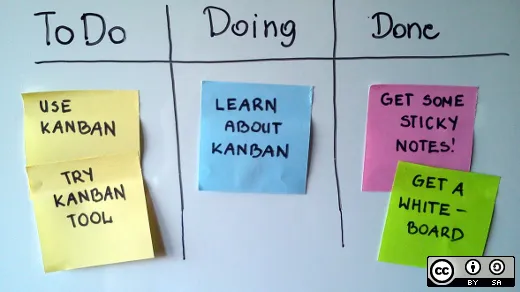
@brazen root you probably want some sort of open source kanban
Opensource.com
Interested in using a kanban board like Trello to help you manage your daily tasks and workflow, but want an open source option? We take a look at five free Trello alternatives.
That should get you most of the way there
Calendar will probably be something different though
hushed basalt
:'(
 final acorn
can someone suggest best way how to control tv?
I was looking to buy Sony BRAVIA
and to integrate it with bravia platform, but I dont know whch TV's are supported?
 low harness
I'm stupid. (Removed proof)
There's a link here, though, to a list of supported models: https://www.home-assistant.io/integrations/braviatv/
Home Assistant
Instructions on how to integrate a Sony Bravia TV into Home Assistant.
clear ferry
It's ok to be stupid
As long as you are self aware
Or your wife tells you every day
boreal pewter
Does this some day get critical? Like when she tells me 5 times a day?
boreal pewter
Mh thx
I ordered my Unifi USG yesterday
And when the NanoHD got back in stock the order process broke and is since then
clear ferry
👎
boreal pewter
Yeah screw you and your 1990-net @clear ferry
clear ferry
Atleast my networks are up 🤣 most of the time
boreal pewter
-Most of the time- So you have it shut off during night and work hours and are happy it runs the other 7 hours? 😄
low harness
I know it's ok to be stupid. That's why I left the admission. I didn't want to make you guys have to watch it, though.
boreal pewter
👀
clear ferry
But, we... enjoy watching stupid
Which is why @boreal pewter downloads all episodes of The Kardashians
scenic radish
@clear ferry @wet pilot can't say I've ever had diarrhea from taco bell... you guys must have some weak stomachs 😉
final acorn
Control your Sony Bravia TV with Video & TV SideView.
Im affraid that this list is a little bit outdated 🙂
 clear ferry
how about a.... 




 low harness
Well... there we go. I'm going to Norway.
low harness
It's a small dash, but I saw.
scenic radish
it ain't much but it's honest work
clear ferry
Whereabouts @low harness ?
light trout
Why?
unreal orbit
Because it's such a lovely place to be 🙂
light trout
You clearly have not been there That's right 🎉
orchid rose
this weather tho... Not sure if it's similar in Norway, but all the snow we got is now melting 😢
light trout
It's long gone now 😢
scenic radish
i actually remembered all the column names in the table i was referencing in my sql query this morning 🎉
instead of needing to look them up
i am the smartest man alive
light trout
Seek a doctor
scenic radish
i have an appointment with dr. mcgillicuddy tonight
unreal orbit
It's been a while since I last handwrote a sql query. Even though I really need to to update our reports... oh well. There's always next year 🙂
scenic radish
there's always... never
 hearty thorn
is there a gallery of lovelace configurations that I can use as an example? I'm very lousy when come in style
orchid rose
there's a couple of demos on the home page
not sure if there's a collection somewhere. Probably. More of a #frontend-archived question though I suppose
 frail adder
Is flashing with tasmota the recommended practice when installing sonoff devices as light switches ? Can I just use the built in ifttt functionality ? Why MQTT over ifttt? 🤔
unreal orbit
ifttt and mqtt are.... not even remotely the same thing
scenic radish
why a chainsaw over an impact driver?
frail adder
Apologize, So I should I flash the sonoff devices with tasmota and not keep the out of box integration ?
clear ferry
Ifttt is always a last resort imo
scenic radish
yeah ifttt is... not great
unreal orbit
ifttt is not even a resort to me. It's completely unusable.
clear ferry
I don't use it and I never recommend it, but I see the need for weird components that are too expensive to replace
frail adder
Awesome! That answers my question, I will flash them . Thanks guys
scenic radish
i used ifttt before i even knew about home assistant
orchid rose
there's also a #609399695466430465 for lazy people like me that don't worry too much about internet access @frail adder https://github.com/peterbuga/HASS-sonoff-ewelink
 vestal mango
H/A cloud not connecting to my H/A today. Is something down?
unreal orbit
#cloud-archived is the channel you're looking for
vestal mango
thx - found it already - sorry
 oak patio
any MQTT wizards in the house?
I'm testing something and I want to wrap my mind around wildcards in a topic
I want to see all my tasmota devices that are posting to STATUS11 for their wifi info
stat/+/STATUS11 doesn't seem to work, am I off base?
scratch all that, my mqtt lens app didn't work with the wildcard, but good ole mosquitto_sub did
mosquitto_sub -h mqtt.mydomain.net -v -t 'stat/+/STATUS11'
low harness
@clear ferry Oslo
light trout
bring umbrella
clear ferry
Me and @light trout can come stalk you
scenic radish
I'll be there
scenic radish
Same
 pallid basin
Hi everyone - I wanted to share the results of the tablet survey I posted a week or two ago. Hope this helps with the upcoming black friday sales. https://docs.google.com/document/d/1qoCctNofq9H4zdND8K4nRtpFqK248X6bnTKMdW2p0Gw/edit?usp=sharing

Google Docs
The following is a summary I’ve made by analyzing the data I received from 76 survey submittals. Admittingly, my “Great Tablet Survey” wasn’t that great. Putting out a survey like this with a bunch of different questions seemed like a great idea, but I admit that I c...