#bluetooth-archived
1 messages · Page 3 of 1
 late jasper
 cosmic raptor
Add more bluetooth proxies
late jasper
And for Bluetooth proxies its not something unique to esphome? What hardware do I need?
cosmic raptor
It is unique
 fallow viper
it's also easy
 rotund sail
I'd almost say idiot proof
cosmic raptor
You are in the open source space, no manufacturer bothers creating these devices so thats your option. Esphome.
cosmic raptor
You can also go batshit crazy and install a second ha installation integrated with remote ha on your original installation. Just so you can use shite bt usb sticks
late jasper
Okay thanks for all your inputs and I will check esphome later today
Just a quick question. How much do I need to spend in the hardwares to get started in esphome for this purpose?
cosmic raptor
I had to spend around 7 euro money on a batch order for esp32devkits
late jasper
Okay! That’s pretty all right. I thought I also need to buy a central device to control all esphome things
cosmic raptor
Ethernet connected esps are preffered by now btw
fallow viper
That atom lite is an option though. and a cheap one. and not a bare circuit board 😉
the Olimex ESP32 is going to be better (wired network connection) but requires a cable to where it's going and you also need to get a case.
(also can have an antenna with the right version)
late jasper
I don’t seem to find oilmex ESP32 on amazon will check other places
I don’t live in US
And which version should I get for the devkit here?
cosmic raptor
Thats the price for what I‘d say the „best“ you can get
If you want cheap you can get away with a bunch of wifi devkits also
fallow viper
the atom lite is a significantly cheaper unit. and is supported by their bluetooth proxy installer page. the only other thing you need for it is a usb power supply (going to usb c. but it's just for power)
it is wifi though. which has its downsides.
late jasper
Thanks
I will check all the options later today and hopefully today I can make a decision
cosmic raptor
If you want small the wemos lolin c3 pico also just needs usb and I think is a little cheaper than the atoms, the atoms have their plug system which is also nice if you don‘t need the boards exposed
But yeah, wifi and bluetooth on small devices is another topic
 cosmic raptor
It even has a battery charging curcuit
 shell mural
There is a option RF TX POWER
 oblique oak
Also more proxies is almost always better. Trying to boost signal is usually a waste of time since it’s two way and whoever has the worst side of the connection is the limiting factor
shell mural
@atomic moss this is fun... Using the atc1441 Xiomi Temp sensor firmware running in Fahrenheit mode (Display and broastcast) this is my living room temperature https://srmservices-my.sharepoint.com/:i:/p/skydiver/ER2J1V_OioNNofo7o0zCUH8BWsQSplSKaNGlxJHLFpvhNg?e=d8VwdM
 atomic moss
lol, well at least you don't get a cold
 neat magnet
My local store has these door and window sensors for the equivalent of 5 usd, should I get a bunch of them?
https://www.zigbee2mqtt.io/devices/MCCGQ14LM.html
I heard door sensors can be used in a million different diy mods, and I'm good with a soldering iron
 fiery timber
Anyone able to give me some help regarding some issues im having with HA OS 10 + ?
 spark cairnBOT
Don't ask to ask, just ask your question. Then people can answer when they're around.
When you do ask a question, try to provide as much background detail as possible. Ask yourself these questions first so that others don't have to:
- What version of the Home Assistant are you running? (remember, last isn't a version)
- What exactly are you trying to do that won't work?
- Is the problem uniform or erratic?
- What's the exact error message?
- When did it arise?
- What exactly don't you "get"?
- Can you share sample code, ideally with line errors where the error occurs?
fiery timber
My issue is that i have a switchbot bot and when i update to any HA OS version above 10 that i loose functionality of the device. So when i press the bot nothing happens until i reload the bluetooth integration then the bluetooth command will be sent and the bot will be pressed.
This happens on all versions above 10 because as soon as I roll back to HA OS 9.5 the functionality comes back and works as it should.
Im running a Rpi 4 8GB with boot from usb SSD. Using the onboard bluetooth of the Rpi but I don’t see the being the issue as it works with 9.5.
I get no errors in the log
I have to reload the integration every time I want the bot to be pressed
 fringe field
fiery timber
My issue is that i have a switchbot bot and when i update to any HA OS version a...
fringe field
fiery timber
My issue is that i have a switchbot bot and when i update to any HA OS version a...
If its only the haos version that you are changing to get it working.. You probably won’t get help here for that, you probably need to report it: eg https://github.com/home-assistant/operating-system/issues/2485
 sharp radish
hey all - am confused about active vs passive setup for the bluetooth proxies. Do I want passive on esp32_ble_tracker: OR bluetooth_proxy: or neither? The default config has them both active, but this page says passive is best performance: https://www.home-assistant.io/integrations/bluetooth/#troubleshooting I am using an ESP32 dev board, btw
oblique oak
Usually you want active to discover new devices
Once you have all your devices configured you can usually change to passive scans
sharp radish
in both locations?
sharp radish
ok so leave the BLE tracker at active
oblique oak
The tracker is the scanner
sharp radish
ok sorry so dumb.... then under bluetooth_procy? should that be active or passive?
oblique oak
Proxy should always be active
sharp radish
ok coo! thanks. One other thing - so I only have one BT lock... but sometimes (usually after firmware update), I will get the error that all of the connection slots are full
eventually it fixes itself, but is this expected?
oblique oak
That error means all the connection slots are full for all scanners in range of the device
If there are no scanners that can see the device than you’ll get that error as well in some cases
So you may have a range issue
sharp radish
hm - ok the proxy is about 1m from the lock with unobstructed view. I'll keep messing with it - does a reboot clear the connections?
oblique oak
Yes reload and reboot clear connections
It’s also always good to deploy proxies in pairs
Since when one is connecting it can’t be listening for advertisements
sharp radish
got it - thanks!
 silk bone
Been using 3 esp32 for ESPresense. But after the new ha update i added one of them as BT proxy and they can see BT distance i see? So what to do with the other 2 esp now 😛 Is it possible to use 3 esp32 as BTproxy ?
 faint eagle
You can (and should) use multiple proxies
Ensure coverage, reduce missed advertisements, and if pairing - have open connection slots
silk bone
faint eagle
Ensure coverage, reduce missed advertisements, and if pairing - have open connec...
Oh ok thanks! Then i add one more, beacuse what i see so cant btproxy find like tile's/tags/keyfinders ? And how do i set connection slots to always open? Thanks you 🙂
 untold ermine
Has anyone else used BTHome with the Shelly BLU Button1? It seems to eat through the battery really fast
fringe field
I’ve heard people say that before, but no resolution that I’m aware of.
 tame wharf
untold ermine
Has anyone else used BTHome with the Shelly BLU Button1? It seems to eat through...
tame wharf
untold ermine
Has anyone else used BTHome with the Shelly BLU Button1? It seems to eat through...
Have you updated the button's firmware yet with the Shelly BLE Debug app? I think they had an update, fixing some battery issues (maybe this one too)
untold ermine
tame wharf
Have you updated the button's firmware yet with the Shelly BLE Debug app? I thin...
I did update the firmware at some point in the past few weeks
Yeah there don't seem to be any updates. Just checked
It's pretty disappointing how they touted this BTHome open standard as being so great but these are the results
tame wharf
Haven't tried their BT stuff yet, but wasn't impressed with their battery powered devices yet. Early adopters are more or less beta testers.
 urban edge
Hey everyone, trying to install ESPHome Bluetooth proxy... anyone successful doing this with a mac? using the generic ESP32 Board, website shows connect but it doesnt seem to actually be abe to connect
fringe field
urban edge
Hey everyone, trying to install ESPHome Bluetooth proxy... anyone successful doi...
I did it with a Mac but I used the esphome python code to make my own image. I don’t remember having to do anything special.
Are you using chrome?
urban edge
fringe field
Are you using chrome?
Yes, had to... issue was my cable... tried a few different USB cables and finally got one that saw it
 river tapir
Could someone tell me if I'm barking up the wrong tree with a project I'm working on.
I've built out an arduino on an adafruit feather 2040 that detects when a button has been pressed. I elected to go with a BLE SPI add on, rather than a wifi so that 1) It would save battery 2) It wouldn't have to wait for the device to fully wake up and reconnect to the wifi connection.
I've been able to send a UART string that indicates the button has been pressed that my BLE app on my phone can see.
I thought I'd be able to use an M5Atom to act as a Bluetooth Proxy to ESPHome and have ESPHome pick it up, but either I've done it all wrong, or the device the BLE Proxy picks up needs to have an existing ESPHome or HomeAssistant integration, as the device doesn't show up in ESPHome, even when transmitting.
Should I try emulating an existing supported BLE item and fudge what value is being sent, or should I dig into stuff and and try building something that is directly supported under BLE?
faint eagle
Maybe not a direct answer. But have you heard of the BThome standard?
river tapir
faint eagle
Maybe not a direct answer. But have you heard of the BThome standard?
I did see that, but it was my understanding that it is being phased out as bluetooth devices began getting 'native' HA support. But, now that I say that I can't find that post that I read that so it may habe been a DIFFERENt service doing that. But looking at it closer, it supports Shelly Buttons, I could bust open a shelly button and wire it in to mine. I'm using a giant 'arcade' button for my dog to press when he wants outside. When its completed, it will trigger an event in HomeAssistant that broadcasts over our smart speakers to let the dog out, if it doesn't detect the backdoor open within 3 minutes, it will turn off the kid TVs and computers and lock out their smart phones
This grew out of a "Goggle Home has gone to crap, time to reignite the homeassistant project, followed by I'm old and I need a hobby, let's pick up arduino and electronics"
I think the problem I had with BTHomes format was that the work is done in the advertising payload, great idea, but changing packet components isn't just a simple var for most things.
faint eagle
I have seen some reports of short battery life in the Shelly buttons. May want to research that a bit if you head that way. There are 2 versions of the BThome protocol but I'm not sure of the differences.
 gaunt berry
Hello everyone, I'm using a xiaomi mi scale on the ESP32 Bluetooth proxy via esphome. Since the ha 2023.7 update, ha has no longer received any data from the scale. Anyone have an idea why?
 lusty briar
gaunt berry
Hello everyone, I'm using a xiaomi mi scale on the ESP32 Bluetooth proxy via esp...
lusty briar
gaunt berry
Hello everyone, I'm using a xiaomi mi scale on the ESP32 Bluetooth proxy via esp...
Not sure, but I would revert the update until a fix is made, if it was working before the update. I haven't done the update yet because I wait for a few versions to be done before updating to newer versions.
river tapir
gaunt berry
Hello everyone, I'm using a xiaomi mi scale on the ESP32 Bluetooth proxy via esp...
Have you checked the reported problems for the proxy?
oblique oak
gaunt berry
Hello everyone, I'm using a xiaomi mi scale on the ESP32 Bluetooth proxy via esp...
river tapir
Petro31 says that removing the proxy portion fixed his issue. That's weird because the proxy doc says
The Bluetooth proxy depends on ESP32 Bluetooth Low Energy Tracker Hub so make sure to add that to your configuration.
Or is that why there is an upcoming fix?
river tapir
I appreciate you sharing that, I haven't gotten mine to the 'i'm probably the reason mine doesn't work' phase. 🙂
fringe field
river tapir
Could someone tell me if I'm barking up the wrong tree with a project I'm workin...
Some of these questions would be better in the dev Bluetooth channel. But you are right - Bluetooth proxies only extend the range of stuff supported by HA integrations. And all the existing integrations are GATT or advertisement based, I don’t think I’ve seen a UART one? Basically, can you make a client for it with the python bleak library. If you can, you can write an integration for it that uses proxies. If you can’t, you can’t.
fringe field
fringe field
Some of these questions would be better in the dev Bluetooth channel. But you ar...
If power consumption is a concern, BTHome and advertisement data is the way to go. Anything else is going to use 2 way connections which will be slower and more power hungry
Proxies also have a limited number of active 2 way connection slots, so avoiding needing persistent connections is important
Advertisements carrying events isn’t a novel or unusual idea, it’s the most common way of doing this stuff. Eg homekit does a 2 way handshake to agree an encryption key but then sends all its state updates encrypted in the advertising payload. Inkbird, xiamoi, gove etc use advertising too
river tapir
fringe field
Advertisements carrying events isn’t a novel or unusual idea, it’s the most comm...
Thank you. I'm going to dive into BTHome then. I was trying not to ask stuff in the dev channels, because this seemed more like a "Do i go with path A, path B, or am I dumb?" question.
fringe field
Lol
 timber meadow
following up again
oblique oak
its a bit messy but https://www.icloud.com/sharedalbum/#B0PGgZLKuGz4Poc
the olimex board relays are just spliced into the up and down manual controls
and its got a POE adapter
harmony turns on and it triggers the up relay
harmony turns off and it triggers the down relay after 30s
timber meadow
i was hoping for a bit more. - i dont have experience using servos to move things, especially not heavy things. i am comfortable with esphome and some templates / editing a bit of that yaml plus wiring with various wled projects
can you expand on the manual controls of X part?
 wild sinew
could someone recommend a bluetooth range extender that is pretty much turn-key from within HA
oblique oak
Olimex ESP32 Power-over-Ethernet ISO
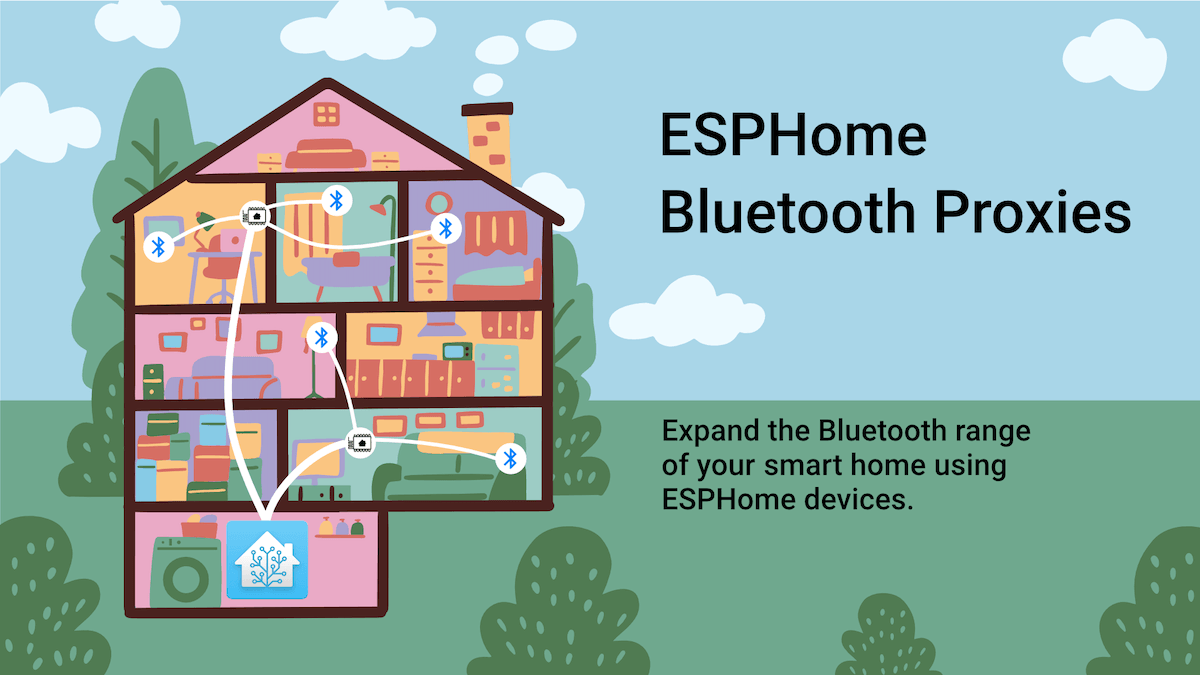
ESPHome Bluetooth Proxies
Expand the Bluetooth range of your smart home using ESPHome devices.
oblique oak
timber meadow
can you expand on the manual controls of X part?
It’s just a generic tv lift. Almost every vendor will have a place to hook in using a relay
oblique oak
There are lots of vendors that make them. Mono price has them for 250$ all the way up to a vendor that will make the cabinet as well
That one has a nexus21 lift. https://www.tvlift.com/ there are much cheaper options though as that was just what the local wood craftsman uses
untold ermine
@oblique oak Is there a reason the iBeacon integration doesn't honor the "Enable newly added entities" integration system option?
oblique oak
Something like this https://www.touchstonehomeproducts.com/products/srv-2800-pro-32800-tv-lift-mechanism?currency=USD&variant=13836037914669&utm_medium=cpc&utm_source=google&utm_campaign=Google Shopping&utm_source=google&utm_medium=cpc&utm_campaign=shoppingtvlifts&gclid=CjwKCAjw2K6lBhBXEiwA5RjtCeuYNFYlwZtQchFNo9EKzcipGC_Vf3Eyyl7y3kxIzPQx_4sv4U4e9hoCddwQAvD_BwE is likely a cheaper option and likely can be easily spiced into
No specific reason
untold ermine
How does that option actually work? Should it prevent devices from being added or does it still allow devices to be added but it disables all of the newly added devices entities?
oblique oak
Never used it before so would have to dig through the code
untold ermine
Yeah this is the only integration where I've used it as well
oblique oak
Device trackers are still kinda messy. Always complaints about too many or not enough. Probably need some architectural changes. I’ve been quiet on the iBeacons issue in that regard because there are currently mostly bad answers
untold ermine
The fix paulus made here almost makes it look like the integration needs to explicitly support using that system option?
https://github.com/home-assistant/core/issues/66934
oblique oak
Seems that is the case. Happy to take a PR if you want to fix it
untold ermine
oblique oak
Seems that is the case. Happy to take a PR if you want to fix it
Possibly yeah. Might do a little more investigating to make sure that is the case. Those system options seem pretty misleading though and we shouldn't just blindly show them on the frontend if it's something that needs to be manually implemented
I've been up and down the docs for creating a new integration and I didn't see anything about that setting mentioned
oblique oak
Might be easiest to find the PR it was added in and work forwards from there
untold ermine
Where that system option was added? I imagine that was pretty old
oblique oak
I have no idea where though. If you get stuck you could grep the frontend code for the strings, find the PR by looking at blame and look for the linked core Pr
oblique oak
some more advanced archaeology is needed there
untold ermine
Interesting that the original description says "If disabled, newly discovered entities will not be automatically added to Home Assistant". Nothing about devices mentioned
Maybe something was lost in translation (literally and figuratively lol)
untold ermine
oblique oak
some more advanced archaeology is needed there
Yeah for sure. I'm not really familiar with the frontend code though so I'll have to try to see where it hooks into the backend
oblique oak
you could always open the network panel (in browser) and watch the websocket and mess with the ui
it should trigger an api call which should be grep able in the core code
untold ermine
Oh yeah good call. I think I found it, but who knows how old this code is so that's probably a more reliable method
untold ermine
oblique oak
it should trigger an api call which should be grep able in the core code
You know I was trying to do this the other day with something in HA and I didn't get a network call
I'm not seeing one now either. Maybe it has something to do with the fact that it's websocket? But those should still show up
All my filters are off and I have "All" selected
Or maybe it literally does do nothing lol
oblique oak
Right click, inspect, shift/option + reload
find websocket
look for messages
trigger the api call
untold ermine
oblique oak
Right click, inspect, shift/option + reload
No I mean that's what I'm doing. I change the state and then click update. Literally nothing shows up in the network activity
oblique oak
{"type":"config_entries/update","entry_id":"23a9715c3de8dbf0e8fff204d1f4632d","pref_disable_new_entities":true,"pref_disable_polling":false,"id":44}
 untold ermine
That entry shows up when you hit "update"?
I was just able to reproduce the behavior I suspected with the steam_online integration. I first tested adding new friends as entities (which was a little buggy, I think this integration might not kick off a reload properly) as a baseline. Then I removed them and turned off that system option and tried adding them again. It ended up still adding the entity, but it's disabled
This integration doesn't add new devices, but I suspect if entities are normally added with devices then those devices are still going to be created
From a quick search of that integration, it doesn't look like it's doing any custom implementation of that system option. So that's good news
I think we could either make a breaking change that causes that system option to just stop having the entities and devices added altogether, add another option that causes new entities and devices to not be created at all, or what might be the best option for now, to add an options flow to iBeacon that allows users to disable adding of new devices/entities.
Thoughts @oblique oak?
oblique oak
honestly not sure how the option is supposed to work.
it looks like new entities should be added by as disabled
            disabled_by is None
            and config_entry
            and config_entry is not UNDEFINED
            and config_entry.pref_disable_new_entities
        ):
            disabled_by = RegistryEntryDisabler.INTEGRATION
homeassistant/helpers/entity_registry.py
untold ermine
Yeah exactly
Adding more information on my findings in this issue: https://github.com/home-assistant/core/issues/88111
But the description says "devices". I don't think that setting has anything to do with devices
untold ermine
oblique oak
honestly not sure how the option is supposed to work.
What I was asking though, was what you thought of an implementation specifically for iBeacons? Like adding an option flow where the user can say whether new entities/devices should be discovered and added at all?
I think that could be a system option, but at least in the mean time this is a very common complaint I've seen with iBeacons so I think a change to that integration specifically would make sense
oblique oak
The answer will generally be that we shouldn't make integration specific options like that as it should be a system option
untold ermine
oblique oak
The answer will generally be that we shouldn't make integration specific options...
So you think that PR would be rejected?
oblique oak
Given the original frontend one you just pointed out had a rejected PR linked to it for that reason, I would say yes
untold ermine
Ah you're referring to I assume? 26036
Will try to keep this on my radar for a fix. Have been meaning to get more familiar with the frontend and this seems like a good entrance into it
oblique oak
yes #26036
wild sinew
what do most people use to pwer the m5stack ATOM Lite ESP32
untold ermine
usb?
wild sinew
I mean more like what kind of usb / power source.
oblique oak
Any standard 5v usb brick will likely work. The power requirements are very low
wild sinew
so any 5v power cube with a usb a cable on both ends?
river tapir
It also has a VIN doesn't it? so depending if you've got it attached to something
 modern viper
Any chance of getting something like this working with home assistant on a RPi4? Sengled Alexa Light Bulb, S1 Auto Pairing with Alexa Devices, Color Changing Light Bulbs, Smart Light Bulbs that Work with Alexa, Bluetooth Mesh Smart Home Lighting, E26 60W Equivalent,800LM, 10-Pack https://a.co/d/fIUutfU
 worn helm
Hi guys! Is there a way to find out, if this is going to work with my BT proxy? I need a simple and cheap finger robot, that will be used once in months, so I wanted it to be as cheap as possible. https://www.aliexpress.com/item/1005005240504102.html?spm=a2g0o.order_list.0.0.3e991802KhEQYK&gps-id=pcOrderListRecommend&scm=1007.38956.333894.0&scm_id=1007.38956.333894.0&scm-url=1007.38956.333894.0&pvid=d2d18c38-5a2e-40e4-a9e5-bd13d1127d02&_t=gps-id:pcOrderListRecommend,scm-url:1007.38956.333894.0,pvid:d2d18c38-5a2e-40e4-a9e5-bd13d1127d02,tpp_buckets:668%232846%238113%231998&pdp_npi=3%40dis!USD!38.09!11.81!!!!!%402101c71a16890996904813032ebae6!12000032328062853!rec!CZ!174465398
 earnest ore
is it possible to control bluetooth 5.0 lights with HA?
 willow solstice
Maybe
fringe field
earnest ore
is it possible to control bluetooth 5.0 lights with HA?
There isn’t a “standard” for Bluetooth lights. So every device is different. You should look for the vendor in the home assistant documentation.
Make sure you include the vendor in your searches, as “controlling Bluetooth lights with ha” is not specific enough
Worth checking this integration out because it covers a lot of generic rebranded lighting products - https://www.home-assistant.io/integrations/led_ble/
 solemn hazel
Is there a way to make rhasspy work with a Bluetooth combination speaker/microphone? I am getting audio from the speaker, but it isn’t detecting my voice. When I download the wav file, its duration is 0, and testing microphones leads to none of them saying “working”
river tapir
Anyone here familiar with the Passive BLE Monitor integration?
It indicates you can use ESPHome BLE Gateway
https://custom-components.github.io/ble_monitor/parse_data
With lots of information on configuring BLE Gateway, but no actual information on "what" this component is.
I want to build a BLE Gateway, but all it has is "here's the configuration."
What file am I attacking with my sharp scalpel of digital 1s and 0s.
I have ESPhome installed as an Add on in HomeAssistant (running HAOS)
I have Passive BLE Monitor installed via the HACS.
I've spent 4 days reading two forum posts, github comments, and am now at the point in time where I have to say "I am a dum, where I go to make work."
river tapir
Passive BLE Monitor
 devout hearth
solemn hazel
Is there a way to make rhasspy work with a Bluetooth combination speaker/microph...
devout hearth
solemn hazel
Is there a way to make rhasspy work with a Bluetooth combination speaker/microph...
That could have changed since April, but I'm guessing it hasn't based on your experience.
late jasper
For homkit bluetooth devices added to HA through Homekit Device integration, is there a way to control how often a sensor reading is pulled?
fringe field
Its generally pushed based - the device broadcasts when something changes
late jasper
So I have a homekit temperature sensor, on device it's showing 26.5 deg for example. But on HA control panel, it still shows as 27. Is this normal behavior? I see other metrics from the same device (for exmaple humidity) is updated more frequently.
Is this expected behavior?
fringe field
Maybe?
So double check the precision HA is using for that sensor, it could be getting rounded by HA
late jasper
yeah it's to 1 digit after the decimal point
fringe field
But the other thing is the device might not update Ha as frequently as it updates it’s display
late jasper
so that shouldn't be the problem
fringe field
And that’s not something we can control
We’ve seen this with ecobee humidity via homekit which have some bizarre rules about when it actually sends an update
We also see it with some xiaomi ble stuff
late jasper
okay I see thanks
Just a little bit paranoid about whether it actually fired the temp update but my HA did not recieve it properly
fringe field
Then it could be also signal quality, if it’s not below -85 it’s possible we could miss push updates.
Or if you have a crappy Realtek ble dongle then it’ll probably be broken more than it works
Homekit has 3 tiers for ble. In the ideal tier we connect once and get an encryption key, and then we never connect again and we process the current state from broadcasts that are encrypted with that key
Iirc, There are failsafes in that so if it misses pushes, it will be able to tell from future pushes
The next tier is the state number, which the device increments whenever it thinks no one is connected and there is an event
The state number is broadcast often, so if we seen that change we know we need to reconnect and poll.
If both of those fail, we do fall back to polling.
But if you are relying on polling then you really want to be adding Bluetooth proxies or better ble dongles to your setup - polling is slow, needs a strong signal to be reliable and is the worst for battery
late jasper
I have a 'premium' dongle according to the list on the HA bluetooth page. But I am not happy about the signal quality I get.
In total I have 2 bluetooth homekit devices. Both are roughly 2-3 meters from the HA server. 1 is in the same room and the other is in the hallway so separeted by a conrete wall
And the signal quality for both are around -80 - -75. That's pretty bad to me
fringe field
Yeah, ideally for 2 way stuff I’d want to see it stay below -80 but it should be “ok”
late jasper
For now for active things (it's a motion sensor so I mean triggers like if someone is detected or cleared) are always pickup by HA but since the signal strength is pretty low and the temperature is not updated very often (sometimes it takes a few hours to update the number) I'm not sure if every update from the device is picked up by HA
And also unfortunately I don't know which tier my homekit devices belong to
 icy gale
Hi folks, I have given a friend some Xiaomi BLE thermometers (standard firmware, not linked to any Home Assistant installation). Purely being used visually at this point. Now they are asking if they can see the readings on their phone, but are not yet ready for a HomeAssistant installation. Which leads me to ask whether there are any mobile apps for viewing BTHome broadcasts? The family is iOS-focused. And yes, I realise that I could just tell them to install the Xiaomi app to receive the broadcasts.
earnest ore
I have Bluetooth 5.0 LED Lights that use the BRMesh phone app. Is there a way to connect to HA.
fringe field
icy gale
Hi folks, I have given a friend some Xiaomi BLE thermometers (standard firmware,...
Could they handle a HA install that was exported to iOS via the homekit bridge integration (so they never normally use the HA UI)?
Not aware of any other BTHome clients
I hope they don’t have to use the offices xiaomi apps 🤢
fringe field
earnest ore
I have Bluetooth 5.0 LED Lights that use the BRMesh phone app. Is there a way t...
It doesn’t sound likely: https://community.home-assistant.io/t/brmesh-app-bluetooth-lights/473486/16
icy gale
fringe field
Could they handle a HA install that was exported to iOS via the homekit bridge i...
Oh, I’m sure they could handle the HA ui, I’m just going for baby steps at this point.
 ember finch
Apologies if this has already been asked a million times... all the BT adapters i've seen listed as supported are 4.0/5.0/5.1... are any of the 5.3 adapters known working well? seems a waste to not just get one with the latest long range / low power options
ember finch
okay thanks! just ordered the sena
 idle basin
ember finch
okay thanks! just ordered the sena
idle basin
ember finch
okay thanks! just ordered the sena
I have poe, so I actually just decided to use an Olimex poe bt proxy
Sena is great though. I added a 9db antenna for it
If you want insane range. Lol
Up to a 1000m is pretty good. Lol
ember finch
it may end up being too much range, depending on whether it makes my zigbee network less reliable 😉
the only wires we have in the walls besides power are security system cat3 and worse wiring from the 80s
eventually i may change course and grab some of the esphome proxies
late jasper
If you already have a cable there it's pretty straightforward to replace with with a new one
 iron frost
Even HA devs recommend proxies over dongles
late jasper
Just to share my experience on this. I was running HA on my rpi and I was having issues that occasionally the event of the bluetooth sensor can't be picked up by HA. Then i bought a recommended USB dongle, now the problem is gone
Since it's recommended, the dongle is plug and play so 0 effort there.
ember finch
iron frost
Even HA devs recommend proxies over dongles
ah, the sort of thing that the documentation doesn't really mention...
idle basin
ember finch
ah, the sort of thing that the documentation doesn't really mention...
HA not having something in documentation?
I don't believe it
late jasper
It's mentioned, on the bluetooth integration description page
ember finch
if you mean this page: https://www.home-assistant.io/integrations/bluetooth
then yes, there is a remote adapters section. but no, there are no specific recommendations or best practices
in fact the remote devices section specifically says that proxies are for devices that don't need an active connection, implying reduced functionality... and it then goes on to contradict itself a few lines later by saying esphome proxies support active connections
late jasper
I can't find it there anymore. But for sure somewhre on their website I saw a form comparing different ways of using bluetooth and the most reliable way is the proxy
Found it, it's at almost the bottom of the page
search IMPROVING CONNECTION TIMES on the page
So actually if you can enable passive scanning for the usb dongle it's not that bad
ember finch
the recommendations are on display in the bottom of a locked filing cabinet stuck in a disused lavatory with a sign on the door saying ‘Beware of the Leopard.”
😉
late jasper
yeah gotta say the HA docs are definitely not for the faint heart..
ember finch
but also thanks for the pointers, i've now canceled the sena order and ordered some esp32s to make into esphome proxies. (i've had far too much fun trying to get zigbee and zwave to reliably work from a single location)
late jasper
NP
devout hearth
ember finch
but also thanks for the pointers, i've now canceled the sena order and ordered s...
FWIW, your timing is impeccable, that performance improvement is brand new https://www.home-assistant.io/blog/2023/07/05/release-20237/#lightning-fast-bluetooth-proxies
iron frost
Documentation has an edit button to add and correct everything discussed here
idle basin
iron frost
Documentation has an edit button to add and correct everything discussed here
which we should be doing. Completely agree
late jasper
Just enabled passive scanning on the bluetooth dongle hopefully it will be faster
idle basin
@iron frost thanks for the reminder to update the simplisafe docs, i forgot to do tihs weeeknd
 hidden oasis
hi I wanted to ask about home assistant with raspberry how to use bluetooth to connect a speaker
ember finch
iron frost
Documentation has an edit button to add and correct everything discussed here
I put in a PR for adding to the docs linking down to the ranking of adapter types https://github.com/home-assistant/home-assistant.io/compare/current...jcam:home-assistant.io:patch-1
maybe not the best wording, but a starting point at least.
oblique oak
The WiFi based ESPHome ones might be less latent than the local ones with BlueZ + DBus on 2023.8.x, but YMMV greatly based on the quality of your wifi.
 mint summit
Hey there, I have a light that uses BLE mesh communication Where there is no integration available yet 😱 so I thought I can write one myself. While I’m use to python i have no idea about BLE and BLE mesh. What would I need to connect to such a network. Does Someone have an example or guide at hand how to handle BLE mesh with python?
wild sinew
So now that I can see my little bluetooth proxy in HA do I just put it in the house where I need to get the extra BT range?
 indigo kindle
wild sinew
So now that I can see my little bluetooth proxy in HA do I just put it in the ho...
indigo kindle
wild sinew
So now that I can see my little bluetooth proxy in HA do I just put it in the ho...
Yep, exactly! As long as it has power and can connect to WiFi, the proxy will automatically relay any BLE advertisements/messages to Home Assistant
wild sinew
yep I added it in but I don't see the little green light anymore is there a way to turn that on/off
iron frost
i don't know what little green light you're referring to
wild sinew
oh on the atom lite
iron frost
the RGB LED is not configured in the bluetooth proxy yaml so I wouldn't expect any kind of lights
wild sinew
Will HA show it as offline?
iron frost
did you even add the bt proxy esphome device to ha?
wild sinew
yes
iron frost
then you'll know if its avaiable or not by going to the device card
wild sinew
plugged it in and in the log it showed safe mode boot
iron frost
you don't want that, you want the normal mode boot
" If for some reason your node gets into a boot loop, ESPHome will automatically try to detect this and will go over into a safe mode after the configured unsuccessful boot attempts (Defaults to 10). In that mode, all components are disabled and only Serial Logging + Network(WiFi or Ethernet) + OTA are initialized"
wild sinew
then it showed atom-bluetooth-proxy-9d0dec was detected at home
does that mean it is functioning properly?
iron frost
no
wild sinew
It does not appear to be looping in the boot mode or anything
iron frost
open the device from the esphome dashboard and look at the logs, then you'll know how its functioning and whether its properly
wild sinew
I am looking at the log
devout hearth
I think the UI is confusing here. See #bluetooth-archived message I mention this because I think I also originally thought mine was booting to safe mode even though it wasn't. Maybe yours is, or maybe you caused it to by hitting that button, but otherwise, following from that link might help you confirm it is working.
Or maybe the logs will be way more helpful and I should have tried that 🤷♂️
iron frost
when in doubt check the logs
 dreamy monolith
hey, sorry if this was asked 1000 times, but how to actually pair BLE sensors to HA? I configured the dongle, but can't find a way to scan for devices
fringe field
dreamy monolith
hey, sorry if this was asked 1000 times, but how to actually pair BLE sensors to...
You don’t scan, HA is always listening and if it sees them they appear as a discovery on the integration page.
dreamy monolith
how soon should it appear ?
fringe field
Depends on the device
dreamy monolith
the sensor is supported
not sure about the dongle, it's something generic, but didn't have issues with the config
fringe field
Check it against the documentation
There is a list of known broken devices
And a list of devices that work well
If it’s realtek, replace it
dreamy monolith
I am not sure how to identify the chipset, but I'll google around
fringe field
Make sure it’s on a usb extension to get it away from other usb3 devices
Usb3 will kill your range
Without knowing exact hardware of everything all we can do is guess. Eg contact sensors and motion sensors might only broadcast when they detect a door opening or motion.
And iirc Inkbird only works if your Bluetooth integration is in active mode - passive mode does not.
Homekit devices can only be paired to one device at once
So won’t be shown
dreamy monolith
it's a mmwave presence sensor, I've seen many videos of it being used with HA, and the phone sees it, so I guess the issue is with the dongle, I'll put it on an extensions but if it doesn't work it's probably unsupported
fringe field
Realtek ones look like they work but then they crash, and they can not have the usb reset pin wired up so HA can’t recover them.
So unplugging and replugging can unstick things
At least for a few minutes
dreamy monolith
hmmm, I think it's the dongle, I unplugged it, put it on an extension and now it gives an error
deleted it and now won't show up
killed my RDP too for some reason o.O
wild sinew
So the proxy doesn't listen to bluetooth signals from devices, and transmit it to HA is that correct?
It only sends out bluetooth commands to devices like say say a switchbot switch or curtain?
 random hinge
Hi, I just purchased some M5Stack Atom Lite modules to act as bluetooth proxies. Issue I'm having when configuring via: https://esphome.github.io/bluetooth-proxies/ is at the "Configure Wi-Fi" step. It error with "Unable to connect". In case it is relevant: my IOT wifi network is hidden. I'm doing this on a Windows 10 laptop via Google Chrome Web Browser. Does anyone have a solution for this?
wild sinew
You may have to unhide the the network temporarily.
I just got a few of those and put the first one to use last night and it seems that I went from devices responding very slowly or not at all to almost instant.
for whatever that is worth 🙂
random hinge
Thanks, I did just that, and it worked while the IOT network wasn't hidden. Once I hid it again the Atom Lite devices became "Unavailable". Strange since I have regular ESP32 boards acting as bluetooth proxies with no issues when the IOT network is hidden. So I'll do it the old fashioned way. 🤷♂️
fallow viper
the config which is in use is on the page. so you can just use it directly through esphome. which will probably get round your issue. just add fast_connect:on to your wifi settings.
fast_connect (Optional, boolean): If enabled, directly connects to WiFi network without doing a full scan first. This is required for hidden networks and can significantly improve connection times. Defaults to off. The downside is that this option connects to the first network the ESP sees, even if that network is very far away and better ones are available.
fringe field
wild sinew
So the proxy doesn't listen to bluetooth signals from devices, and transmit it t...
It forwards all BLE advertisements to HA, which decodes them and decides if they should trigger a discovery or whether it should forward them to an existing integration that you already set up. That integration might be able to extract sensor data without every establishing a full BLE 2-way connection (which is slow and bad for battery). Most BLE sensors in HA are able to use advertisements partially or fully, so are quite efficient.
Not all proxies are able to open connections and send commands and are only useful for this advertisement data. Shelly is an example of that
 rough sierra
Hi, does anyone knows how can I use a beacon in my car to trigger an automation (with device_tracker.see) with my iphone?
 atomic mica
I'm having problems with my HA build not finding the bluetooth adaptor on my Rasberry PI 4 Model B. Does anyone know how to find/turn it on?
fringe field
atomic mica
I'm having problems with my HA build not finding the bluetooth adaptor on my Ras...
Do you mean the built in one or a usb one?
And are you using haos? Or Ubuntu / Debian / rasbian / etc
atomic mica
The one built in to the PI 4. I’m using the build from the home assistant website, not sure if that helps.
fringe field
atomic mica
The one built in to the PI 4. I’m using the build from the home assistant websit...
Sometimes Bluetooth modules can crash. HAOS will try to restart them if that happens. But the one in the pi 4 cannot be restarted, you have to fully power cycle it. We also encourage an external usb Bluetooth dongle from the high performance list on the documentation, with an extension cable to get it away from interference generated by the pi.
fringe field
atomic mica
The one built in to the PI 4. I’m using the build from the home assistant websit...
That description doesn’t really help figure out what you are actually running 🤪 was it an image you flashed to an sd card? Or did you do something with docker?
atomic mica
fringe field
That description doesn’t really help figure out what you are actually running 🤪...
Sorry, this is all new to me, I used the Raspberry PI Imager flashed to an SD card.
fringe field
So that’s probably home assistant OS.
Did you install it recently? If not, are you up to date with updates?
atomic mica
I installed it about a week or 2 ago and did an update today.
fringe field
atomic mica
Sorry, this is all new to me, I used the Raspberry PI Imager flashed to an SD c...
And when you look under your integrations you don’t see “Bluetooth”?
atomic mica
Nope, when trying to add the bluetooth integrations I get 'No unconfigured Bluetooth adapters found. There are 0 ignored adapters.'
atomic mica
That was my thinking, I have restarted a few times but nothing.
fringe field
You might need to cut power to reset the chip
atomic mica
I will shut it down and pull the power now.
fringe field
If that doesn’t work, make sure your power supply is good enough. You need 3A minimum.
atomic mica
I got the starter kit so I got a 5V 3A power supply.
fringe field
Oh one more check, when you looked at integrations did you look to see if Bluetooth was already configured or did you just go straight to adding a new one?
Because I get the exact same error as you if I try to add a new Bluetooth integration when i already have one
You wouldn’t believe how often it’s actually working but people miss that it’s there or it’s been set to ignored.
atomic mica
I can't see any other integrations for bluetooth.
fringe field
Short of standing over your shoulder and watching for pebkacs, i can only think you have a hardware problem then. Check it works in another os, or just get an external usb dongle.
atomic mica
I'm happy to screenshare in the hangout lobby if you want. I'm hoping it isn't a pebkac issue being the tech and built a few rigs in my days, just new to HA and PI's
I am starting to think a hardware issue, but wanted to elimate that.
fringe field
It’s 1am here so I’m going to have to bow out
You do want a usb dongle on an extension anyway - for range and for the auto restart
atomic mica
I will look into getting one, it is 1am here as well, I'm in rainy Wales, so not much else to do but play with tech inside, lol
fringe field
Seriously Linux Bluetooth bites, not having Bluetooth that ha can reset will make you sad very quickly
In the beta I had a realtek chip and it would crash once an hour minimum
atomic mica
It has been frustrating me for a bit. I was hoping to avoid spending more, but I may have to, to get it working, I might ask my wife to throw it on her prime and get it running soon.
fringe field
If you have some esp32s kicking around they are meant to be on par with usb when running the Bluetooth proxy esphome firmware
Anyway nn
atomic mica
Goodnight and thanks for the help Jc2k.
random hinge
fallow viper
> fast_connect (Optional, boolean): If enabled, directly connects to WiFi networ...
Thanks for clarifying. I had forgotten that fast_connect: true was required for hidden networks. I coded my own yaml and always include that line of code, that is why the "old fashioned way" way worked.
 south stone
Is it possible to send data using the bluetooth proxy? I am using a script to control a fan and have been using a plug in bluetooth dongle to send the command but it has stopped working. I have a bunch of ESPHome bluetooth proxies setup. Is it possible to send commands from them? If so, how? I can't find anything using search.
Im using an atom lite
 oblique oak
If you write your integration using bleak it will just work and use the proxies when you use it under HA
south stone
Is there another way? I'm not intelligent enough for that
 bronze thistle
I feel this is something obvious:
- RaspberryPI 4 / HASS running. Current version (Home Assistant 2023.7.3, Supervisor 2023.07.1,Operating System 10.3).
- using the RPi4 built in BT - I need just a single BT LE device to work that's nearby for the temperature outside.
- Trying to get a Govee H5074 working.
- If I have bluetoothctl running in a shell and do "scan le" then Govee is discoverable and data updates in HA.
- If I quit bluetoothctl it stops any data transfering.
- starting bluetoothctl again works fine.
I'm sure there's something super obvious I need to do but can't quite get my google-fu to find.
fringe field
south stone
Is there another way? I'm not intelligent enough for that
Not with the proxies. They are designed to be used how bdraco said. You could probably do something like this: https://esphome.io/components/ble_client.html#ble-client-ble-write-action. It would expose a switch in Ha and when you turn it on, it would write Bluetooth commands you put in a yaml list.
fringe field
bronze thistle
I feel this is something obvious:
- RaspberryPI 4 / HASS running. Current versio...
Iirc, bluetoothctl stops any scans it started when it exits. HA should be doing the same underlying command as “scanle”, unless of course you’ve turned on passive mode in the Bluetooth settings. And it should try and restart things if it’s not seen data for a while.
I had similar troubles a year with my Bluetooth (Realtek) and switching to a better dongle fixed pretty much exactly the behaviour you described. The pi Bluetooth should be better than that, but it does seem to really struggle for some people. And when the chip does eventually crash, HA can’t recover it without a full power cycle. The usb dongles can be reset electronically.
I would try turning it off and on again to see if that helps.
south stone
Thanks for your advice
bronze thistle
fringe field
Iirc, bluetoothctl stops any scans it started when it exits. HA should be doing ...
thanks - the "passive" bit was exactly what i needed to disable in the config. Did a shutdown and power cycle to make sure but all working and I have outside temps again.
 hollow torrent
Hi, does anyone have a guide on how to get bluetooth devices working in Home Assistant. And I mean how to get non supported bluetooth devices to work. I'm trying to get these products to work directly with Home Assistant but not sure where to start. https://www.coolblue.nl/product/922668/motionblinds-retrofit-rolgordijn-motor-met-bluetooth.html
rotund sail
You'd have to develop an integration to support them
hollow torrent
I understand @rotund sail but any how to on where to start or use BLE monitor or something?
fringe field
hollow torrent
I understand <@332579266623438848> but any how to on where to start or use BLE m...
What do you know about the devices protocol? Do you already know what characteristics you need to read and write? Do you know what it’s advertisements look like?
hollow torrent
Yes, we have all the advertisements and read and write characteristics
fringe field
If you know that stuff, probably start with bleak, which is the library we use in Ha for ble, and get that working first.
hollow torrent
Do you have a link for that?
fringe field
I don’t think there is a blind already supported over Bluetooth (other than homekit), so there isn’t a good integration to crib from but we normally point to led_ble as an example of an integration that reads and writes
I have to google it every time
Python bleak should do the job
Sorry on phone right now
fringe field
Yeah
hollow torrent
Ok great will look into that.
fringe field
HA has its own wrappers around bleak so that we can transparently support the esp32 Bluetooth proxies. But it’s still easier to start with plain bleak to get a feel for the api
hollow torrent
Also what do you think about controlling. Don't want to drain the batteries to fast. Is there a way to set poll interval or what would you recommend?
fringe field
Most good Bluetooth devices we’ve seen have some kind of push scheme based on advertisements, so if this device relies on polling and is battery powered… it’s a bit of an exception unfortunately.
hollow torrent
Ok, will see how it goes than
fringe field
Eg homekit encrypts state updates in its advertisements so sensors never need to be polled
And I’d that feels it has a simple counter in the advertising data - if it goes up you know to poll.
hollow torrent
Not sure if it is polling. But typically you are not connected constantly with the roller. Once you connect you get position and battery percentage
fringe field
The xiaomi coin cell sensors last ages and they also just blast sensor data in the advertisement field, never needing polling
fringe field
Ah that might be a good one to look at yes
hollow torrent
fringe field
The xiaomi coin cell sensors last ages and they also just blast sensor data in t...
Will look into that. Don't believe they do that.
Any idea where to search for such a integration?
fringe field
If you look in the Ha repo and gif grep bluetooth_adaptor you should be able to find all of them
This is probably best in #devs_bluetooth-archived now I think about it 😂
hollow torrent
Ok good but what should i ask there 🤣
Did not think I should post there 😂
Just for your info we have made it possible to control the blinds with python.
So hopefully it wont be to hard to get it to work with bleak
Will dive into it more tomorrow. Time to go to sleep. Thanks for the help
 warm surge
hello, I bought an esp32 because of some sensors and now I had a farther led controller and I thought it would control it too, am I wrong or is it a bad configuration
 sinful pawn
I'm working with espresense and I'm trying to dial in the settings. I pull up my beacon in the companion app to get the current distance. I can have my phone about 2-3ft from the espresense and I'm getting distances in the 4-5 range (meters). I have default values for Calibration. In the companion App: Advertise Mode: Balanced, Transmitter Power: Low It's just odd that my phone distance doesn't go <2m or even <1m
 hardy pawn
Hello evryone, i am looking for evrywhere but cannot find a solution, i have HA install on rasperry and add correctly a usb bluetooth. now i need some addon to pair with a bluetooth device and comnuicate with spp (serial port profile) just read and write message over bluetooth, is it possible?
fringe field
hardy pawn
Hello evryone, i am looking for evrywhere but cannot find a solution, i have HA ...
The Bluetooth framework in HA is written around BLE and GATT, and uses the bleak python library. I don’t think SPP can work like that. The Bluetooth integration you added won’t help with SPP. You’d need to code your own integration.
hardy pawn
ok thanks @fringe field
warm surge
anyone to help install an esp32 atom? just the doubt of how to add there a tape that does not seem to read
 lime timber
Anyone recommend a good BT stick for HA ? and do i need an usb extension cord for it , like with zigbee ?
spark cairnBOT
The topic of this channel is:
lime timber
BT proxy , you mean an ESP32 flashed .. ?
rotund sail
If the device you're trying to connect is supported, yes
lime timber
so no need for a bt usb dongle , an esp32 should do ? for presence sensing etc
or connecting my OBD bt car dongle
rotund sail
For things that proxies are supported for, yes
I'm sure the experts can answer if you provide details
lime timber
want to make a car presence sensor based on the OBD2 car monitor BT dongle in my car , maybe by pinging it at intervals ...
fringe field
HA's bluetooth integration is a framework for other integrations to build on, theres no user consumable features there.
most of the integrations in HA that use it are for a particular vendor's products (govee, inkbird, etc)
the closest to what you want is probably the ble tracker integration
However, its fairly common for BLE devices to randomize their MAC address for privacy
e.g. imagine a speed trap that tracked your car's BLE every mile of a highway
it should work with bluetooth proxies, though
there is also https://www.home-assistant.io/integrations/bluetooth_tracker/. that is basically unmaintained, and does not work at all with bluetooth proxies.
otherwise, especially if you wanted to e.g. parse out data the ODB2 dongle was broadcasting, you'd need to make a custom component on top of the bluetooth integration
iron frost
You can just drop an ibeacon device in your car for presence
fringe field
or if you really really want to query your ODB dongle, you might find it easier to use esphome, e.g. https://esphome.io/components/ble_client.html
fallow viper
esppresense may be worth looking at too.
 edgy heath
Question for you folks. I've set up an esp32 as a bluetooth proxy. It comes online and all, but I can't install the bluetooth integration in HA because HA doesn't see bluetooth hardware. Is there something I need to do to get HA to use the bluetooth proxy?
Interestingly, on my old HA (I'm in the process of moving to a new VM in a new VM host) which does have the bluetooth integration added (from an old dongle that's no longer present), it also can see the esp32 proxy and does detect bluetooth devices using it
devout hearth
From what I've read and/or been told, you shouldn't need the bluetooth integration. HA should automatically detect it using the ESPHome home integration, but if it didn't, you may be able to manually add it via that integration.
edgy heath
if so I haven't figured out how yet
idle basin
Correct, you won't see Bluetooth integrations. You will just discover devices with proxy
edgy heath
ok, I've got something missing somewhere then. I'll dig deeper
rough sierra
Hi all, does anyone can share a recent guide to use ibeacon in car for tracking (parking mostly)?
 inner bison
What is currently the best BT dongle for HA? I have been through the list, but most are copies. is it worth with antenna, or other brands that is good and PnP (no extra driver needed)
iron frost
copies of what?
spark cairnBOT
There is no universal best anything. There's always trade-offs, you need to explain:
- Your priorities/desired features
- Where in the world you are
- Your budget
- Any protocols that you'd prefer (eg Zigbee) or want to avoid (eg Zigbee)
willow solstice
😛
faint eagle
inner bison
What is currently the best BT dongle for HA? I have been through the list, but m...
If you search here you may find the ones bdraco likes for his use case. But also look closely at an esp32 as a proxy if you haven't.
warm surge
does anyone here use theAtomLite m5 ?
iron frost
did you mean M5Stack Atom Lite?
 heavy shell
Hi guys! I'm developing an integration for a BLE device and I see connection attempts often fail with a timeout.
I noticed some integrations use bleak-retry-connector library to deal with that. Unfortunately its docs don't provide problem context so I decided to ask here. I want to understand why such connection issue happens and why bleak itself cannot handle it so a separate lib exists. Thanks in advance!
warm surge
iron frost
did you mean M5Stack Atom Lite?
yes, can control things through it or is it just to collect data
iron frost
you will need to put more context on that question/statement
warm surge
iron frost
you will need to put more context on that question/statement
is the following, I have a control tape rgb the sp110e.
I can add the mac through the Universal Light Controller but it never starts, it says no device or entities
iron frost
does Universal Light Controller work with BT proxies?
warm surge
I don't have this information
iron frost
once you get it you can proceed
warm surge
I've been reading the pagination and it doesn't have that information.
is there any known rgb controller addon that works with the proxies?
fringe field
heavy shell
Hi guys! I'm developing an integration for a BLE device and I see connection att...
That question probably belongs in #devs_bluetooth-archived. But it’s no uncommon for retrying policy to be decoupled from your transport. We also have some concepts that don’t really exist upstream. For example, if your device is roaming around a house full of proxies, bleak_retry_connector can interrupt a retry loop and use a different proxy with a stronger signal.
fringe field
warm surge
I've been reading the pagination and it doesn't have that information.
is there ...
If you have a BLE integration for HA that uses the bleak library and references the Bluetooth or bluetooth_adaptors integrations in its manifest, it should work with the proxies. If it doesn’t use bleak, then there is no chance of it working. You can find both of these things in it’s manifest.json. The led_ble integration in code is probably the most tested led lighting controller but I don’t know if it covers anything like what you need.
inner bison
Im looking for a good bluetooth adapter for my new server, one that is supported and can hold on at least 7 devices. Need to stay connected to the endpoint for yale doorman to not use forever to unlock
any suggestions
other than that can the proxy bind to end units?
and dongles are no needed more?
oblique oak
edgy heath
Question for you folks. I've set up an esp32 as a bluetooth proxy. It comes on...
There is nothing to configure on the HA side once the ESPHome device is added. All the configuration is in the ESPHome YAML
oblique oak
inner bison
Im looking for a good bluetooth adapter for my new server, one that is supported...
and most adapters get unstable past 5 devices
so I wouldn't bother looking for something more than 5
thats what I use on my production
but the ESPHome ethernet based proxies are faster
the ESPHome wifi proxies might be actually be faster than the local adapters as well in 2023.8.x depending on your wifi and distance
also if you don't mind some DIY https://blakadder.com/gl-s10/
I use Olimex ESP32 Power-over-Ethernet ISO and the GL.iNet GL-S10 for my production as well to expand range. I would drop the local adapters if I didn't need them for development testing
willow solstice
do you find that they are a bit too powerful?
willow solstice
oblique oak
also if you don't mind some DIY <https://blakadder.com/gl-s10/>
this is .... gorgeous
timber meadow
oblique oak
From best to worst <https://www.home-assistant.io/integrations/bluetooth/#improv...
When do you consider Bluetooth/le a good option for devices over WiFi, zigbee, and zwave?
oblique oak
I wire everything I can
timber meadow
i have a strong zigbee and zwave mesh and 4 wifi APs throughout the house so intentionally choosing bluetooth seems wrong in most scenarios
oblique oak
Bluetooth is great for battery powered devices though
timber meadow
sorry i meant wifi not wired above, autocorrect got me
timber meadow
oblique oak
Bluetooth is great for battery powered devices though
right but for example, hue zigbee motion sensors last 3-5 years on one battery
oblique oak
If zigbee works well for you than it’s a good option
timber meadow
well due to hardware choices i went with zigbee bulbs and zwave light switches which makes me very reliant on home assistant to be the middleman
oblique oak
I don’t have much luck with it due to congestion on zigbee bands
All my switches are Insteon
timber meadow
i just wanted to see if you could pinpoint use cases specific to bt/ble
timber meadow
oblique oak
All my switches are Insteon
that's basically proprietary zwave no? ~800mhz low bandwidth using a proprietary "hub"?
oblique oak
Basically. But it’s rock solid. No issues ever
timber meadow
yeah
timber meadow
personally i consider zwave or zigbee a better option in that case due to mains devices becoming repeaters for all zigbee or zwave devices
i'm also personally not a fan of the insteon on/off/up/down dimmers all on a single gang vs decora up/down style but that's just opinion
oblique oak
Zwave is probably a better choice to deploy today but zero issue ever is a hard to beat proposition
timber meadow
yeah
well to be honest as much as i like zwave-js, and al calzone, and co, the fact that basically one guy is manning the entire ship is not a positive look for it re-home assistant and zwave-js
but i suppose technically one could not use zwave-js and still integrate with hass another way with zwave
https://github.com/zwave-js/node-zwave-js/issues/5471 he's basically fighting an uphill battle with device manufacturers releasing devices and firmware for devices that are actively going against the best interest of user's low bandwidth meshes
idle basin
Isn't it close to being officially zwave certified? That should help too, right?
timber meadow
So just to summarize you don’t suggest any specific bt devices over other protocols unless battery life for end devices is concerned?
inner bison
oblique oak
From best to worst <https://www.home-assistant.io/integrations/bluetooth/#improv...
Thank you. I do run some of the first gen proxy (the long red ones), but those look smoother, so might get a couple of those too. BUT can a proxy replace BT at all? If I dont have a BT dongle, but just proxy it wont work on bt devices like my door
oblique oak
the proxy replaces the functionality of the local adapter
I use all my yale locks on one of my setups with no local adapters at all
it all goes over the proxy
inner bison
esp32-poe-iso - I just installed the default one from the official website
I will try to reflash it, but probably will get a new one
 frank trout
I haven't seen a way to use homeassistant (raspberry/yellow) as bluetooth speaker, using the devices audio port. Is there a way or is an integration planned?
inner bison
In the docs it say running both passive and active helps on a good BT environment. Is it suggested having two dongles (or proxies), one running in active and one in passive mode?
or does it exist ones that can run in both?
fringe field
It is suggested to run pairs of proxies. The esp radio isn’t magic, and when you are running wifi traffic you aren’t doing Bluetooth traffic. I think also when you are connecting to a device you can miss adverts. Pairs mitigate that.
I don’t think I’ve seen an esp that has multiple Bluetooth radios.
I don’t know if this is the reason behind the advice but some devices need active Bluetooth otherwise they don’t transmit. But some devices broadcast every time they see a device in active scanning mode (anecdotally). So minimising your number of active scanners is code if you have those sorts of devices.
inner bison
so you are saying one proxy in active and one in passive?
fringe field
I’m saying you could
I run a single proxy in active and it’s fine for my particular setup
I believe bdraco runs pairs? My memory might be failing me there.
fringe field
timber meadow
So just to summarize you don’t suggest any specific bt devices over other protoc...
I use BLE sensors. Originally because I’m a dev and want to dog food stuff in my integrations. Sensors that broadcast (don’t need a connection) work great. At this stage, I’d happily mix and match between my zigbee and ble, rather than putting my eggs in one basket. I do find BLE easier to debug than zigbee simply because it’s simpler (there’s no tea leaves working out why an Aqara sensor won’t mesh with whatever brand router). And at this point I’m more interested in the BLE mode of my Wemo Stage than the thread mode.
If I was building from scratch, not a dev and interference wasn’t an issue, I’d go zigbee as much as possible.
timber meadow
I’m pretty invested in both zigbee and zwave with 4x cheap bt xaiomi temp/hum sensors flashed to bthome or w/e that atc flasher does. I’m happy with them but wondered what devices I might add to a bt mesh
I’ve seen a lot of switchbot bt stuff like automated blinds coming out lately
inner bison
im just so tired of zigbee is so hit and miss, especially the contast between v 1.2 and 3. The transision everyone lied and said it was v3 when it was not. I dont even know if thats fixed now
timber meadow
I stick to hue for most of my zigbee stuff with z2m and it’s been pretty flawless
idle basin
I had an igrill3 built into my grill, There was a pretty cool ESP32 module to take that signal and plug right into home assistant
timber meadow
For a smoker or just regular grill?
idle basin
That is just my regular grill, it came built in when we got it from costco, but Inkbird sells smoker ones, but then I need a smoker
which I want,
I think our Sous Vide has Bluetooth too. Its cool when existing BT stuff I have can suddenly be smart
timber meadow
idle basin
That is just my regular grill, it came built in when we got it from costco, but ...
But what do you actually use it for? Other than heating the grill up I need to actually tend to the food
idle basin
monitoring the internal temp of the food. depending on the type of meat I can know when its done
not for burgers or anything, but like a larger steak,
idle basin
Yea, thats what I have built into my grill, I wouldn't buy that model again, but nice it works
timber meadow
Cool
idle basin
openmqttgateway has a list of devices (mostly bt) that they work with, if you are looking for BT things to buy
likely they are supported elsewhere too, (if you need inspiration and are bored)
timber meadow
idle basin
openmqttgateway has a list of devices (mostly bt) that they work with, if you ar...
I’m not I was just asking to gain some insight
oblique oak
fringe field
I believe bdraco runs pairs? My memory might be failing me there.
I used to deploy two in the same room but I found as long as there is one in the room next to it the passive range is so much more than the active range that the on in the next room will pickup advertising data when the one in the first room is connecting. So in most cases you avoid needing a second one in the same room as long as there is a second one in an adjacent room that doesn't have the signal blocked by a metal wall
But its good to deploy two in the same room if all your bluetooth devices are in the same room
 dull vault
https://a.co/d/c7iXHBW would this work with the Bluetooth proxy stuff?
Not sure what kind of esp32 to look for
 dawn coral
I’m looking to setup SwitchBot blind tilts on a HA Docker install. They need Bluetooth. Right now I’m using the SwitchBot Hub Mini. Is there anyway to get this to work on the Docker install? It works great on the OS install.
 stable panther
I must be so stupid that I can't get this to work. I bought two Bluecharms Beacons that I can't get to show up in Home Assistant. My Minisforum that HA is running on has BT as does the olimex esp bluetooth proxy. I know they both work because the olimex connects to Airthings BLE and the Minisforum controls switchbots. I have the bluetooth integration set up as well as ibeacon tracker and I've turned on passive scanning and checked all the checkmarks. I know the bluecharms work because I can see them with the KBeacon app. Any chance anyone can help me with whatever incredibly dumb thing I'm doing wrong?
fringe field
stable panther
I must be so stupid that I can't get this to work. I bought two Bluecharms Beaco...
Have you configured the beacon to have an iBeacon slot?
stable panther
Probably not, do you by chance have a link I can look at?
fringe field
There seems to be a manual here: https://manuals.plus/kkm/kbeaconpro-app-manual#axzz892sNZvL9?utm_content=cmp-true, sorry it’s not the original
It looks like you need to make sure you have an iBeacon slot, and you probably want to make sure “trigger only advertisement” is off
I don’t have one so guessing
timber meadow
oblique oak
I used to deploy two in the same room but I found as long as there is one in the...
Is there a rule of thumb for us plebs on when a device is using active vs passive?
oblique oak
its all device and manufacturer specific. Generally if it just a sensor its usually passive (if they designed it well). If its some thing like a lock or light its active
hollow torrent
How can I get access to the windows bluetooth adapter from a Docker container that was created using a fork of the Home Assistant core repository: https://developers.home-assistant.io/docs/development_environment/? Adding --net=host to the runArgs in devcontainer.json does not work.
 supple notch
hi all. i've got a couple of yale locks that i control using the excellent august (cloud) integration [1]. i've noticed that i - sometimes - need to manually launch the yale app for its cloud services to manually fetch the latest state of the locks, which in its turn seems to push a state update to the HA integration so that its eventually in sync with the doors' open/closed and locked/unlocked states. in an attempt to rely less on the cloud, i've been playing around with the idea of running esphome on a couple of shelly 1 plus pm devices, and having these act as a bluetooth proxies for the locks. is this a decent path? i've tried setting this up but i've stumbled upon challenges in having wi-fi and ble coexist properly, and it seems i'm not alone:
fringe field
hollow torrent
How can I get access to the windows bluetooth adapter from a Docker container th...
Bluetooth in HA uses bleak, which in turn uses bluez over dbus. So net=host irrelevant to Bluetooth. You need to make the dbus socket accessible inside the container with -v. If it’s possible.
https://github.com/dorssel/usbipd-win/discussions/310 talks about how this can work with WSL2, but I have no idea how that interacts with docker on windows.
It might be easier to use an esphome Bluetooth proxy
fringe field
supple notch
hi all. i've got a couple of yale locks that i control using the excellent augus...
ESPHome is probably the best path. Can’t comment on the precise esp hardware. Ethernet is best if possible. Things should improve with latest esphome and Ha (lot of work to reduce WiFi airtime by coalescing advertisement data and offloading parsing to HA instance). This should improve experience with WiFi esps. I think there are further performance enhancements dropping in august HA release.
If you have a particular error in your logs you probably are best taking it to GitHub
hollow torrent
fringe field
It might be easier to use an esphome Bluetooth proxy
Thank you, will look into that.
 safe hawk
Hi, I am trying to add Bluetooth integration.
It automatically discovered the integration once. Then disappeared. Since then have tried multiple times but it just doesn’t show up. Tried in built Bluetooth and Bluetooth dongle with pass through.
My setup is
Windows 11 NUC
Virtualbox
HA OS
Bluetooth dongle with 2m cable extension
USB pass through in virtual box
Can someone please help?
idle basin
May I ask a dumb question?
rotund sail
On this server... it's required 😛
idle basin
Why windows 11? Why not just install HAOS
BTW tink, thank you for your site. You reminded me I have a harmony hub. And holy crap they for for real money now. Remotes especially
safe hawk
idle basin
Why windows 11? Why not just install HAOS
I was trying to use it for other purposes too. That’s why I put HAOS on VirtualBox
safe hawk
idle basin
BTW tink, thank you for your site. You reminded me I have a harmony hub. And hol...
It’s a shame they stopped that line! Such a great device
idle basin
@safe hawk sorry, but what other purposes?
Bluetooth is finicky, windows 11 is finicky, VirtualBox is finicky, home assistant is finicky
I know I'm not really helping, but my guess is it's windows drivers related
You can also just get a Bluetooth Proxy and call it a day?
safe hawk
Media server
idle basin
On windows 11 :(
safe hawk
idle basin
You can also just get a Bluetooth Proxy and call it a day?
Sorry not familiar with Bluetooth Proxy. Kind of a noob. Are you able to explain how I can implement it for my scenario?
safe hawk
idle basin
On windows 11 :(
Just starting out. Hopefully can get a standalone system soon for HA
idle basin
Yea, you buy a little ESP32 chip. Or pre assembled. Ethernet preferred. Wifi works too. It takes the ble signal and sends it to home assistant
It just works.
Tubez sells this https://tubeszb.com/product/bt/
If you bought a Bluetooth dongle, just return it.
 tranquil shuttle
my wife just got me a reclining chair that has bluetooth speakers and built in controls. I don't really plan to use the speakers, but I'd love to be able to use the controls to control my TV. Basically, have a device that connects as an audio device to the chair but never plays any music, and intercepts the controls to then do something with home assistant (or just roku directly). anyone know if something like this exists or should I look into doing it myself with an esp32?
lime timber
have an ESP32 flashed with WLED , how can i reset it so i can flash bluetooth proxy on it ?
 digital pike
Hi, I have a Beurer TL 100 bluetooth lamp, that I used with https://github.com/Deadolus/ha-beurer until yesterday. Since the latest update of core, that no longer finishes registration. Since I am completely lost in that async setup code, is there an overview what changed in the API recently? The actual issue is TypeError: homeassistant.helpers.device_registry.DeviceRegistry.async_get_or_create() got multiple values for keyword argument 'config_entry_id'
fringe field
digital pike
Hi, I have a Beurer TL 100 bluetooth lamp, that I used with https://github.com/D...
What I would do for an error like that is find the file: https://github.com/home-assistant/core/blob/dev/homeassistant/helpers/device_registry.py
Then click on the history button https://github.com/home-assistant/core/commits/dev/homeassistant/helpers/device_registry.py
Or you could use blame view https://github.com/home-assistant/core/blame/dev/homeassistant/helpers/device_registry.py
That integration is using BleakScanner directly. It probably needs overhauling to use the new Bluetooth integration properly
Using BleakScanner has been discouraged since native Bluetooth support landed in ha
https://github.com/Deadolus/ha-beurer/blob/e5bbeeb122c5366e0a331b5b3e3a606dad641d2a/light.py#L99 - I think this line shouldn’t be there
That function is meant to return a DeviceInfo as defined here https://github.com/home-assistant/core/blob/614f3c6a15713aa762269f7c628d4420987cbd4c/homeassistant/helpers/entity.py#L177
So it was probably working by accident before
safe hawk
idle basin
Yea, you buy a little ESP32 chip. Or pre assembled. Ethernet preferred. Wifi wor...
Alright I will read up on it and give it a try
 barren cliff
Hi, is there a good sample integration for a simple GATT based BLE integration? I wanted to try creating an integration for a Bluetooth tap timer (https://github.com/scottmckenzie/holman-linux-python)
I know the service IDs and GATT characteristics and how they work, so should be fairly straightforward, but I was hoping there's a similar integration I can copy to save learning the ins and outs of HA's BLE stack
digital pike
fringe field
https://github.com/Deadolus/ha-beurer/blob/e5bbeeb122c5366e0a331b5b3e3a606dad641...
Thats the solution, thank you
lime timber
esp bluetooth proxy needs to work together with a BT stick ? will not detect on its own ?
while scanning on my phone it detects my TV, car obd etc , but esp proxy in HA , nothing...
fringe field
lime timber
esp bluetooth proxy needs to work together with a BT stick ? will not detect o...
Bluetooth proxy does work without a BT usb stick, yes
fringe field
lime timber
while scanning on my phone it detects my TV, car obd etc , but esp proxy in HA ,...
None of the things you say sound like HA integrations
Bluetooth isn’t a universal protocol like matter or homekit or zigbee. You need a integration that supports those specific devices. We don’t show devices we don’t support.
Eg the Inkbird integration uses the bluetooth, esphome or Shelby integrations to support Inkbird
Note that the bluetooth integration you see in HA is for usb/internal Bluetooth. If you have a Bluetooth proxy connected via the esphome integration and no Bluetooth integration, Inkbird devices would still be discovered by the Inkbird integration
For presence detection of generic devices there is the ble_tracker integration
fringe field
barren cliff
I know the service IDs and GATT characteristics and how they work, so should be ...
If it’s truly GATT based you’ll need to be able to make it work with bleak as a starting point. This integration might be a good one to look at after that: https://www.home-assistant.io/integrations/ld2410_ble/
Most of our sensors are advertisement based - this is much more more efficient and doesn’t require a persistent connection. BLE on Linux can only handle 5 concurrent connections, with the best BLE adaptor. So being able to collect data via advertisements is best as it doesn’t count towards that total.
barren cliff
fringe field
If it’s truly GATT based you’ll need to be able to make it work with bleak as a ...
Excellent thanks! I was going to start directly with HA mostly because it's a tap timer that's right next to one of my BT proxies but nowhere near any of my computers
I was kind of hoping I could run standalone Bleak through the proxy actually
fringe field
Not yet
Work has started to pull it out but it’s a long term goal
In which case directly in HA is probably the best
barren cliff
fringe field
In which case directly in HA is probably the best
Heh, it is right outside my bathroom so I guess there's always laptop on the toilet as an option 😄
Thanks, I'll take a look
 solar sluice
digital pike
Thats the solution, thank you
solar sluice
digital pike
Thats the solution, thank you
Hey, did you get your Beurer to work again? If so, what bluetooth "state" do you have the lamp in to be discovered ? I tried just "trusted" as well as "connected", pairing does not seem to work but I would expect that to be done via the discovery?
 wet tangle
It seems like i have an issue with my RaspberryPi-4 HCI0 component. It doesn't load from the integration page
fringe field
wet tangle
It seems like i have an issue with my RaspberryPi-4 HCI0 component. It doesn't l...
Have you tried restarting your whole pi ? Possibly even turning off the power (after a safe shutdown)
wet tangle
fringe field
Have you tried restarting your whole pi ? Possibly even turning off the power (a...
Yes did it a couple times.
Still trying a lot of things. Will update you later
fringe field
The internal Bluetooth module on a pi is connected by onboard UART, so if it crashes there is nothing HA can do to recover it. That’s one of the reasons we prefer external usb devices - most (but not all) can be reset in software if they crash (by simulating a hot plug)
Assuming you are using HAOS and are up to date with HAOS updates there’s no reason why it shouldn’t work. It works on lots of other pi 4s. So I’d be suspicious of power brick not being up to it (which is apparently the cause of looooots of random haos problems) or some other kind of hardware problem.
Not the cause of your issue right now but something to watch out for. The pi internal ble range is compromised by interference from the pi. Usb 3 devices and ssds in particular. A dongle on a cable can greatly increase your range. Just don’t get one with a Realtek chip.
(I’m assuming you see a Bluetooth integration on your integrations page that is stuck “Retrying”, if that’s not post a link to a screenshot of what you mean)
fringe field
wet tangle
Still trying a lot of things. Will update you later
Ill be headed to bed shortly (uk) so you might not get any more replies for 6 or so hours
wet tangle
fringe field
Ill be headed to bed shortly (uk) so you might not get any more replies for 6 or...
Problem solved. I made so many attempts and what ended up working was uploading the firmware (BCM4345C0.hcd) for the bluetooth module of the RPi4 in the specific directory of my Raspberry Pi 4 (RPi4) operating system. In the case of Debian-based Linux distributions, the correct path was be /lib/firmware/brcm/.
 wary perch
wet tangle
Problem solved. I made so many attempts and what ended up working was uploading ...
wary perch
wet tangle
Problem solved. I made so many attempts and what ended up working was uploading ...
I'm having similar issues on a rpi4 running hassio. Know where I can find the fw and where to place it?
fringe field
I'd expect the firmware to be included in HASSIO tbh
wet tangle
wary perch
I'm having similar issues on a rpi4 running hassio. Know where I can find the fw...
Firmware can be found here:
https://github.com/RPi-Distro/bluez-firmware/blob/master/broadcom/BCM4345C0.hcd
Folder where this firmware should be dropped is here: /lib/firmware/brcm/
One more thing I should mention, before installing this firmware, my hci0 was appearing in HA with this MAC address: AA:AA:AA:AA:AA:AA, now I have a normal MAC address.
fringe field
(HAOS does ship the firmware out of the box, so you have a different problem)
wary perch
ah ok, probably not a FW issue then since I have a MAC address but I have a reload/init setup issue
wet tangle
fringe field
(HAOS does ship the firmware out of the box, so you have a different problem)
I'm with HA-Supervised. I don't know if it has significance to understand the root cause of the issue I had, but I mention it. My HA-Supervised is up-to-date and no warning message in my dashboard.
fringe field
wet tangle
I'm with HA-Supervised. I don't know if it has significance to understand the ro...
In discord at least, supervised is considered the "cursed" install method. Never used it myself so can't comment.
AIUI, it feels like you are getting more control than with HAOS, but in reality you are getting a shit version of HAOS where it breaks a lot because there is a tension between your own personal customisations and the management supervised is trying to do for you
Did it make you install the faster version of dbus?
wet tangle
fringe field
In discord at least, supervised is considered the "cursed" install method. Never...
I know the reputation of HA-Supervised on Discord. After further discussing with the HA-Supervised community I'm now in peace with that version. I wouldn't recommend it for someone who want absolute peace of mind, but it's quite fun if you like to play a little more with the background configuration
fringe field
It certainly explains why you don't have the right firmware out the box
I would also avoid thread completely
Your version of NetworkManager will be completely incompatible with it
wet tangle
About the faster version of dbus, I'm not sure what you are referring to.
fringe field
So theres a piece of software called the "dbus broker"
HAOS has the modern version. Debian based distros have the slooooow version.
It is documented on the bluetooth page, but i don't know if its part of the stock supervised setup
It's alongside the other requirements (bluez and kernel versions)
i ended up backporting bluez packages by hand on my debian box to try and make things not suck
the modern one is called dbus-broker
iirc, there was a sizeable cpu usage reduction with that
wet tangle
I will check everything you said to make sure my system is up-to-date
wet tangle
I've just upgraded to dbus broker. Thanks @fringe field
Quick question, when you configure a Bluetooth Proxy node, can you add more code (services) on that microcontroller? Or should the ESP32 with the Bluetooth Proxy code only run the code for that Bluetooth Proxy?? I'm asking this question because I'm thinking of adding a LD2410 radar on an existing BT-Proxy node
fringe field
Isn’t the ld2410 Bluetooth
Like isn’t there an integration in ha for it
Without having to reconfigure the esp
wet tangle
Yes, there is an integration for LD1240: https://esphome.io/components/sensor/ld2410.html
But can I add this integration on an existing BT-Proxy yaml configuration file?
I want to use the ESP32 and UART pins to have a steady LD2140 node instead of the regular BLE integration which keeps disconnecting (https://www.home-assistant.io/integrations/ld2410_ble/)
fringe field
Has anyone raised a bug for that? Is it a limitation of the device? Or our bug?
Anyway the answer is as ever, “it depends”
All I can say is try it and see if it’s stable
I personally have seperate proxies
wet tangle
Yeah, I'll go ahead and give it a try. The worst that can happen is that I reverse back to a simple BT-Proxy
wet tangle
Quick update, it works like a charm. I had to first clean the build files and start from fresh, but it worked.
 silk oyster
I recently ordered an nRF52840 dongle to use for thread and bluetooth. However i cantr figure out how to use its bluetooth capabilities. does someone here have some experience with it?
fringe field
I am not aware of a combo Bluetooth/thread dongle working with HA
But look out for bluez support
That’s the important bit
silk oyster
Oh thats a little disappointing. Is this a limitation of HA or the dongle? I took "multiprotocol support" for being able to use both concurrently
fringe field
Just because I’ve never heard of it doesn’t mean it’s a think
HA uses bluez on Linux
If you want Bluetooth to work your dongle needs to support bluez
If it does, you plug it in and it should be discovered (on haos, you might need to do some manual steps from the docs to let the container access bluez otherwise)
fringe field
silk oyster
Oh thats a little disappointing. Is this a limitation of HA or the dongle? I too...
https://devzone.nordicsemi.com/f/nordic-q-a/37237/flashing-nrf52840-dongle-to-support-bluez suggests there’s a special firmware to enable Bluetooth support
And it doesn’t sound like it’s both at the same time
I suggest searching for nrf52840 and bluez
silk oyster
Thanks for your help, will do 👍
 novel onyx
Anyone here is running the ESPresense detection with mqtt_room? I'm having issues with randomized MAC address of my Galaxy watch 5. I wonder if there's a workaround.
 mossy scroll
Hey guys - has anyone run into the error that keeps cycling the Bluetooth adapter?
 candid stump
novel onyx
Anyone here is running the **ESPresense** detection with `mqtt_room`? I'm having...
candid stump
novel onyx
Anyone here is running the **ESPresense** detection with `mqtt_room`? I'm having...
I used to have a Samsung phone, and there was a setting to turn that off. Maybe the watch does too?
 gritty viper
Does anyone use a NUC and bluetooth? Do I need to install a driver or set up something in the BIOS?
fringe field
gritty viper
Does anyone use a NUC and bluetooth? Do I need to install a driver or set up som...
You’ll probably need to give more details. What NUC? Are you using HAOS? What is/isn’t happening?
gritty viper
Sure, I'm using an Intel NUC7CJYH. HA is running on alpine on a docker (default method I think)
I think bluetooth is properly installed, this is the output I get https://dpaste.org/61Cdi
and if I add the bluetooth integration within HA, I find an adaptater named "Bluetooth adapter hci0"
but no devices are being discovered
I'm not sure if I need to start a scan or if it's automatic
fringe field
gritty viper
and if I add the bluetooth integration within HA, I find an adaptater named "Blu...
If you have a hci0 then you don’t need driver or bios changes. And if HA can see it, everything is configured correctly
Unless you have accidentally enabled passive mode (it’s not the default) then compatible devices should be discovered automatically
Key word is compatible - a lot of people are confused that all devices don’t show up. We only show it if there’s an integration that supports it
gritty viper
Is there a way to discover my phone if the companion app is installed? I'd like to make sure that it's working properly before buying a compatible device
fringe field
No
In general we recommend getting a Bluetooth adapter that’s on the list of supported ones in the doc
As there’s a lot of variance in quality
Usb and on an extension cord - usb 3 can cause too much interference on internal boards
gritty viper
alright, thanks for the help
fringe field
And you could look at the diagnostic report for the Bluetooth adapter
It will at least tell you the MAC addresses it can see and the signal strength
But that’s not really actually reliable to answer your question
Can have a great signal quality but won’t show if your adapter is resetting itself left right and center
Or a myriad of other things that won’t surface until you have the actual device to test
 frank vortex
I have a question that I havent been able to find the answer to. I have ESP32 Bluetooth proxies around my house and have been using physical iBeacons as well as Software iBeacons on Linux devices to determine which room a device is in and run automations accordingly. I have some new uses where I would like to have a beacon on some of my ESP32 projects (ESPHome).
I configured an esp32_ble_beacon with a uuid, major, and minor on an ESP32, then configured a binary_sensor using ble_presence on another ESP32. This works fine, but it just shows the boolean value of the binary_sensor on the particular ESP. Now I could set this up on each proxy, but I'd rather use HAs iBeacon functionality so it works just like my other beacons.
Nearest I can tell, this doesn't work. I found some claiming its because there is no way to set a name on the beacon ESP and HA rejects it due to a decision made during the iBeacon development. Is this possible and am I missing something? Thanks
 alpine grove
What is the recommended practice for setting up BLE trackers? I use ESPHome on a bunch of Switchbot plugs that are esp32c3 and have a few tracker devices (Nut keyfob). How do I go about getting them into HA?
Right now I have ```
BLE Tracking
device_tracker:
- platform: bluetooth_le_tracker
If that yaml is from your HA config, and If the esp32s are setup as Bluetooth proxies and already added to HA you should be all set to use that integration. The stuff on https://www.home-assistant.io/integrations/bluetooth_le_tracker/ should just work.
You might need https://www.home-assistant.io/integrations/device_tracker/ for help managing known_devices
alpine grove
I got them in but my wife left and came back with one but it’s not fully updating status. How do I troubleshoot that?
faint eagle
So those integrations use the new ble implementation with ble esp32 proxies?
fringe field
Ble tracker should yes
alpine grove
When you setup your BLE device tracker platform and have turned off " track_new_devices" how do you ADD a device for tracking? I saw the note about known_devices being depreciated but it still seems to be there.
I also don't want to kill my DB by having those unknown added.
 muted merlin
Hello I am a beginner in domotic with home assistant and to try home assistant I created a VM with HAOS on VMware. When I installed it everything was correct after that I decided to add Bluetooth extension. To try it I used the integrated Bluetooth on my intel computer and when I want to use this it show this.
It is detected as hci0
fringe field
alpine grove
When you setup your BLE device tracker platform and have turned off " track_new_...
The ble tracker hasn’t been modernised so still uses known_devices.yaml aiui
https://www.home-assistant.io/integrations/device_tracker/ says that you can track / untrack by editing known devices yaml
fringe field
muted merlin
Hello I am a beginner in domotic with home assistant and to try home assistant I...
Sorry I don’t have any particular advice to help here, just bitter experiences. I used to do something similar with VMware and it was notoriously flakey to pass through Bluetooth. I gave up and got rid of VMware eventually.
 tall summit
fringe field
Sorry I don’t have any particular advice to help here, just bitter experiences. ...
tall summit
fringe field
Sorry I don’t have any particular advice to help here, just bitter experiences. ...
+1. Unless you’ve a need for vCentre and ESXi, I’d move to Proxmox.
 stiff elm
hello
i am having a problem with setting up my new xiaomi plant care sensor, and Making this work. https://github.com/Olen/homeassistant-plant
home assistant did ad the new xiaomi sensor alright, no issues with that does messure and logg,
but after ading the custom compoment and the card
the custom compoment does not messure any sensor (Says unknow)
and the normal The Xiaomi BLE integration does not work anymore (but reading that github page) that is normal...
This makes zero sense ,
fringe field
I wrote the current xiaomi plant care sensor support in home assistant core, but I can’t help you with custom integrations. It seems unlikely that adding this custom integration would break things. I kinda wonder if it’s a coincidence and it’s actually a problem with your Bluetooth (eg Realtek Bluetooth is very crashy). But if it really is that integration your best bet is really to contact them directly for help, unless they say they frequent here.
stiff elm
i am using a Edimax Realtek stick, so u might be rigt,
hmm i would get rid of the custom one and use the standard plant card,
but that one i could not setup either with the xiaomi
might some one have a idea with that one?
fringe field
Tbh I didn’t bother using the plant entity for any of mine
stiff elm
Got it working.
i re added everything.......
and reset the sensors.
anoying but thank u for ur responds 🙂
 dapper slate
Can anyone help.me?
I have some tuya BT lights which work as expected through the tuya smart app do I need to have a tuya gateway so I can use tuya local (I have uuids and local keys)
iron frost
yes
dapper slate
iron frost
yes
Thanks for the reply,
So I guess the tuya gateway assigns i.p to each of the Bluetooth lights so they are accessible via tuya.local on the internal network?
Is this how it works.
willow solstice
not exactly but you can think of it like that
dapper slate
willow solstice
not exactly but you can think of it like that
Thanks, ordered a tuya Bluetooth and ZigBee dual gateway.
wet tangle
While casting a dashboard to a Chromecast devices, it seems the casting will not work for more than 5 minutes... The chromecast puts itself in screen saver mode and show pictures after 5minutes. Is there a way to avoid this from happening?
tame wharf
Doesn't sound like #bluetooth-archived
But I've seen a blueprint, which prevents that.
wet tangle
tame wharf
Doesn't sound like <#1065905393047449601>
You're right, I thought I was in the General channel. My bad...
wet tangle
tame wharf
But I've seen a blueprint, which prevents that.
Thanks! I'll give it a try!
wet tangle
fringe field
Has anyone raised a bug for that? Is it a limitation of the device? Or our bug?
New update, when you add more code on a BT-Proxy, the update function when a new ESPHome version is available does not seem to work.
iron frost
That's why there's a SAFE mode button in the default configuration
wet tangle
iron frost
That's why there's a SAFE mode button in the default configuration
How do I apply the safe mode? The BT-Proxy and added LD2410 component still works fine, but keeping it up-to-date is always nice.
fringe field
wet tangle
How do I apply the safe mode? The BT-Proxy and added LD2410 component still work...
Found this on google: https://esphome.io/components/switch/safe_mode.html
wet tangle
fringe field
Found this on google: https://esphome.io/components/switch/safe_mode.html
Booting in SAFE mode would allow me to update the BT-Proxy node?
fringe field
Probably
fringe field
wet tangle
Booting in SAFE mode would allow me to update the BT-Proxy node?
The theory is that you have added too much code to your esphome config (Bluetooth is quite big) so there isn’t enough space left for OTA to work. Safe mode means Bluetooth and LDwhatever isn’t running, so more RAM
wet tangle
Ok, I get it
wet tangle
fringe field
The theory is that you have added too much code to your esphome config (Bluetoot...
While trying to add the safe button in the BT Proxy node, it shows the same message as when I was trying to update it:
Failed config
ld2410: [source /config/esphome/esp32-bluetooth-proxy-8bd0a4.yaml:24]
The 'timeout' option has been moved to the 'timeout' number component.
timeout: 120s

The 'max_move_distance' option has been moved to the 'max_move_distance' number component.
max_move_distance: 5.25m

The 'max_still_distance' option has been moved to the 'max_still_distance' number component.
max_still_distance: 5.25m
(there are more for each gate, but I removed it so it can fit in a Discord message.
iron frost
esphome is telling you what changed in the config
wet tangle
fringe field
To me it just looks like your config is wrong
But that config is presently running on the BT-Proxy and working fine. It's only when I tried updating after the most recent ESPHome update that it started to display those error messages
fringe field
wet tangle
But that config is presently running on the BT-Proxy and working fine. It's only...
The LD2410 component has had a massive upgrade thanks to regevbr! It now supports settings most if not all configuration parameters via switches / numbers and selects and exposes more data via various sensors. This includes breaking changes that mean the existing gate configuration options have been moved to the number platform.
If you get an error telling you a setting has moved, and this happens when you are installing an upgrade, the setting has moved. And that means your config is wrong. Maybe it used to be right. But it is now wrong.
In this case the release notes say there is a breaking change at the top of the page for the LD2410 component
If your config looks like https://esphome.io/components/sensor/ld2410 but you are getting errors telling you your config is wrong then you are probably not deploying the config you think you are
But you probably need to ask in the esphome community in that case
Hope that helps!
 heavy vigil
Good day,
Where can I get started on adding a new BLE device?
I have an Elektra Body Composition Smart Scale that works with the Feelfit Mobile app - All info is sent via BLE and I would like to get this info into HA.
Happy to write a custom integration, I just need a pointer as to where to start
 solid vale
Hey all - first time I am looking into BlueTooth for HA. I have a lot of Shelly devices around the house that are BT enabled. Is there anything cool I could be doing, say tracking presence or anything else handy to start implementing into HA?
fringe field
heavy vigil
Good day,
Where can I get started on adding a new BLE device?
I have an Elektr...
For dev questions, #devs_bluetooth-archived is the place to go. but the first step is to figure out how the mobile app works, because we can't tell you which integration is best to look at for clues without that. for example, xiaomi_ble primarily works off data that things broadcast. every time you weigh yourself, it just blasts your weight onto 2.4ghz and our integration can just listen for it. we have lots of helpers for that, and you'll probably be able to take one of the existing integrations and do lots of find and replace. but some integrations require a persistent 2-way bluetooth connection and do "GATT". these kinda suck, especially for battery powered devices and for range also (2 way connections require a more stable signal quality). and its a completely different set of integrations we'd point you at. those use GATT, so we'd probably say prototype the API you've found in bleak and prove you can read the values with that first.
fringe field
solid vale
Hey all - first time I am looking into BlueTooth for HA. I have a lot of Shelly ...
if the shelly devices are already bt enabled and installed in HA, then any compatible devices with an integration in core would be found automatically and shown as a discovery in the HA UI. The only exceptions to that that spring to mind are ibeacons (https://www.home-assistant.io/integrations/ibeacon) and the generic BLE tracker (https://www.home-assistant.io/integrations/bluetooth_le_tracker/). The generic tracker is kind of annoying because BLE devices sometimes rotate their MAC address for privacy reasons (typically no good for your phone etc).
Sorry I can't really answer whats "cool" - 20 years in the industry; im jaded and think its cool if something even manages to turn on without crashing.
solid vale
right, so assuming ibeacons run off your iphone, that would have to be set up manually?
fringe field
solid vale
right, so assuming ibeacons run off your iphone, that would have to be set up ma...
i don't use ibeacons myself, so all i know is whats on that link, but if you add the ibeacon integration to HA then it will add any ibeacons in range automatically
fringe field
solid vale
and any advice on active vs passive bt?
so normally active vs passing refers to scanning
solid vale
yeah did some reading into it, looks like you want active if you want to know exactly where devices are?
fringe field
scanning doesn't need 2 way connections, its just looking for "advertisement data" that is broadcast to anyone thats listening
solid vale
oh right
fringe field
some devices are always sending advertisement data
solid vale
and devices like phone broadcast advertisement data?
fringe field
some send it when an event happens (like a motion sensor)
those can be found through passive scanning alone
some devices will only broadcast when they see a broadcast that says someone is listening
they need active scanning
the "active" part is that HA (well, linux really) is constantly broadcasting scan requests, to get things to send us data
this uses less battery power than something thats holding open a full 2-way connection (which would hurt your battery) - testing shows for some devices it has no real effect on battery life vs passive. though there are always exceptions.
so my stuff is all set to active
(also, "passive scanning" is considered experimental on Linux/BlueZ)
sometimes when we talk about "active" BLE we might mean GATT, rather than broadcasts
so an "Active Connection" is not the same thing as "active scanning"
thats an actual 1 to 1 connection that is held open, requires devices to have a good signal to each other (i.e. in both directions), and we ask the device something and it replies
shelly's don't support active connections so thats not a problem for you
solid vale
fringe field
thats an actual 1 to 1 connection that is held open, requires devices to have a ...
like a bluetooth headset for audio?
fringe field
sort of
GATT is a bit more lightweight than a bluetooth headset
but i guess in principal
solid vale
starting to make sense, thanks so much for explaining things to me
wet tangle
fringe field
> The LD2410 component has had a massive upgrade thanks to regevbr! It now suppo...
Yes! That was the problem. The LD2410 component had a major upgrade! That's crazy how much it improved! It was the first time I had an ESPHome component going through such a major breakthrough! .I managed to correct the code and it's working perfectly fine now. Thanks @fringe field for pointing me in the correct direction. I'll know if it happens again! Thanks! 🙌
 alpine shadow
Regarding the iBeacon integration...how do I get it to stop adding new devices?
I already tried un-checking "Enable newly added entities", but it still keeps adding them. Every week I have to go and clean out devices that aren't mine.
Apparently I live very close to the Rivian factory because I keep racking up dozens of Rivian keys lol.
fringe field
alpine shadow
Regarding the iBeacon integration...how do I get it to stop adding new devices?
...
It sounds like you can’t - https://github.com/home-assistant/core/issues/88111
alpine shadow
Well that sucks. I guess I'll just disable the integration for now since I don't really use it anyway. I was hoping it would work well with Tile trackers or Apple Tags, but it doesn't.
fringe field
Apple tags are way more tricky than iBeacon, would be nice though.
 molten dawn
Any recommendations on 'half mini' wlan+bt modules for NUC type system? Intel? other oem? bgn, bgn+ac, BT 3.0, 4.0, 5.0?
Won't be using the WiFi for anything, just want solid BT presence detection.
Sorry for the double post in the hardware section
devout hearth
With the latest HA update recommending a newer bluetooth proxy firmware, I started researching how to update these "ota" (technically otw in my case). I found the esp32home add-on and installed it, which allowed me to adopt my proxy and updated it during that process, but it also told me I would need the encryption key to add it to HA. HA had previously detected and added it, and picked up the firmware version entity from this process. This leaves me with two bluetooth proxy questions that may or may not be better suited in an esp channel, but I don't see one, so I'm going to try asking here:
-
Is that message just old and defunct, or will having the add-on change how I add new bluetooth proxies in the future?
-
Now that I have the add-on, and since I'm using ethernet (vs wireless), can I just plug the next olimex proxy I acquire into the network and adopt it, or will I still need to do the initial install over serial?
devout hearth
molten dawn
Any recommendations on 'half mini' wlan+bt modules for NUC type system? Intel? o...
I think the answers you are going to get are as follows: "proxies perform better than onboard adapters now"; "it shouldn't have a realtek chipset"; & "see the list of supported chipsets"
iron frost
devout hearth
With the latest HA update recommending a newer bluetooth proxy firmware, I start...
- No, still the same procedure, 2. No, still have to initially flash over serial
fringe field
 modest oriole
anyone manage to this working?
modest oriole
anyone manage to this working?
It uses BLE Mesh, that’s not something that is supported out of the box for sure.
modest oriole
fringe field
It uses BLE Mesh, that’s not something that is supported out of the box for sure...
no wonder i couldnt find anything related to ble mesh
been google all day for this topic
fringe field
modest oriole
no wonder i couldnt find anything related to ble mesh
The version of ble mesh that bluez supports is not compatible with normal BLE - you can only have one or the other. So enabling it would break all the existing Bluetooth integrations we have unless you had multiple Bluetooth dongles. But AIUI there are also multiple mesh implementations. It sounds like a bit of a mess.
modest oriole
fringe field
The version of ble mesh that bluez supports is not compatible with normal BLE - ...
i have no ble now.....trying to get started with this
wanted this presence sensor for the bathroom.... i dont want to run extra wires in there
fringe field
I think more than 10% of HA users use normal xiaomi ble sensors. Their range have motion sensors. Might be worth a look.
modest oriole
fringe field
I think more than 10% of HA users use normal xiaomi ble sensors. Their range hav...
do u know which model?
using this integration?
fringe field
modest oriole
using this integration?
Yes
fringe field
modest oriole
do u know which model?
No sorry. I primarily use zigbee for my motion sensors.
I have Phillips hue motion sensors and an Aqara p1. All connected to a SkyConnect (which is made by the company that backs home assistant and employs the core devs)
modest oriole
skyconnect looks need....im using sonoff.....i guess they more or less works the same.....i have p1 but having trouble controlling the automation to turn off
 versed crescent
morning all, if I have a zimaboard, do I need to install a Bluetooth adapter in order for HA to find integrations like Flic or switchbot hub mini?
iron frost
yes for bluetooth devices, switchbot hub mini is already a bluetooth gateway. alternatively you can use bluetooth proxies
versed crescent
sorry, new to HA and single boards, need it spelled out exactly what I should do ha sorry mate
iron frost
then you need to state what exactly you want to do
versed crescent
I need to get Flic and switchbot integrated into HA so I can run automations between the two
Zimaboard doesnt come with a bluetooth module so wondering if that is what I need for HA to recognize those integrations
iron frost
flic uses an add-on which requires access to the bluetooth dongle so you need one for that
if you're running flic switchbot devices will require another dongle or a bluetooth proxy
versed crescent
so I need two separate dongles, one for each integration?
can I hardwire either of them?
iron frost
dongles are by default hardwired since they're plugged into the USB port
you need a separate dongle for the flic add-on
iron frost
one of which hubs?
versed crescent
switchbot or flic, well flic really
iron frost
no, you don't need either for integrating with home assistant
versed crescent
would it make it easier though, likely not is what im guessign
iron frost
if it would i wouldn't mention dongles and proxies and addons
rotund sail
HACS has no add-ons
iron frost
if i were you i'd buy a sinlge dongle to see if you can even install what's required for flic
rotund sail
Their docs make that very clear, and you have to confirm you know that as part of the install 😛
versed crescent
🤦♂️ sorry fellas, im learning slowly
iron frost
then don't try to do all the things at once
versed crescent
well I have everything else I need running so this is last automation im trying to complete. but the others were simple autodetected integrations
accept Aqara, need to do that too after
iron frost
switchbot devices will be as well as soon as you get a BT device that can interpret their signals
iron frost
have you tried searching for one?
versed crescent
ah ya, sorry, being annoying noob now, my bad, thanks for help
fringe field
(The flic buttons have to be the most over engineered thing I’ve ever seen. I don’t think they could have made the protocol any more needlessly complicated if they tried. I have given up on mine).
 buoyant badger
Does anybody know if the Shelly BLU Button will support distance information in the future to determine the distance to the nearest Bluetooth adapter?
solid vale
do I need a BT 'coordinator' for lack of better words, like a hub, to track BT around the house?
iron frost
You need BT proxies if you want to track 'around the house'
solid vale
iron frost
You need BT proxies if you want to track 'around the house'
could Shelly Gen 2 devices do that?
iron frost
Yes
solid vale
hmm how do I set them up for that?
iron frost
You activate the feature in firmware
solid vale
I have 7 installed so far (slowly changing out the Gen 1 devices) so its starting to build a decent area of coverage
Yeah so I turned Active scanner mode on in the config
and is there some other integration I need? essentially, how do I track something like a phone kicking around the house?
iron frost
You need to make the phone visible to the proxy by turning it into an iBeacon
solid vale
ah sweet will look that up, have already added the ibeacon integration
wait, you have to make your own app to run in the background of the phone? (iOS iPhone here)
fringe field
its designed for things that already are ibeacons
if you have an app that can make your iphone an ibeacon, thats great
otherwise, its not
bluetooth_le_tracker is also useless here because the iphone mac address rotates every 15 mins or so (might be faster than that now)
when i've gotten the IRK out of my phone i think i can whip something up, but it'll be a few releases before its PR-able probably.
 wraith quartz
Hi all, i've just received my first Switchbot and trying to get it to work with a Shelly Plus 2 PM using bluetooth proxy which is in the same room. The shelly web interface has 'enable blueooth' 'enable RPC' and 'enable bluetooth gateway' all ticked, and the HA integration config is set to Active. However nothing is showing up in HA's integrations page even when trying to add the Switchbot integration manually. I'm getting conflicting results when searching the forums so hoping someone has had any luck with this specific combination of hardware?
fringe field
wraith quartz
Hi all, i've just received my first Switchbot and trying to get it to work with ...
That combination won’t work last I heard.
Shellys can forward Bluetooth packets to HA, but unless something has changed recently you can’t use them to control other devices.
ESPhome can do this.
wraith quartz
Ah that's a shame. So do you believe if I reflashed the Shelly with ESP home then it could work?
fringe field
wraith quartz
Ah that's a shame. So do you believe if I reflashed the Shelly with ESP home the...
So I’d be hesitant to suggest anyone do that because if you get your esphome config wrong you can bake your Shelly. Not a theoretical thing, on some there are GPIO lines that if they are configured incorrectly it gets very hot very quickly.
But if you choose to do that, then maybe? It’s just an esp32 at the end of the day.
Whether the antennae will be good enough for your needs is a whole other kettle of fish
There’s no absolutes or guarantees with BLE 🤷♀️
wraith quartz
fringe field
So I’d be hesitant to suggest anyone do that because if you get your esphome con...
Understandable. I will consider my options then. Thank you very much for your advice
 grave raven
Hey all, I’m looking at getting a SwitchBot Bot but I realised it’s Bluetooth and not Zigbee. My OptiPlex has Bluetooth, will that work with HA? Or do I need some kind of external Bluetooth usb or something?
tame wharf
The most reliable would be an ESP BT proxy
 true holly
@grave raven should work fine. I got dell3060 w/bt and connects up fine with new switchbot temperature/humidity sensor
fringe field
grave raven
Hey all, I’m looking at getting a SwitchBot Bot but I realised it’s Bluetooth an...
Look at the docs for the Bluetooth integration. There’s a list of Bluetooth devices that have been tested. You really want a “high performance” one from that list with a good antennae, or an ESPhome proxy. You don’t have to look far in here or GitHub to find random instabilities with some intel and most Realtek chips. Also, make sure you are using HAOS. It had patches to fix recent kernel regressions, and better dbus (used by Bluetooth stack) than stock Linux.
grave raven
Thanks all - appreciate the advice 🙂 I’ll see if I can get the built in one working and if not I’ll try a Bluetooth device I have, if that doesn’t work I’ll get one of the recommended ones.
fringe field
grave raven
Thanks all - appreciate the advice 🙂 I’ll see if I can get the built in one wor...
Mostly likely it will work, the problem will be the failure frequency and whether HA can reset it without physical intervention
 subtle snow
Can someone help with ORICO BTA-403 (CSR8510A10) its a recomend usb controler but i cant get it working in ha im runnig the latest version of ha
dankata@HomeLab:~$ lsusb
Bus 001 Device 002: ID 8087:8000 Intel Corp.
Bus 001 Device 001: ID 1d6b:0002 Linux Foundation 2.0 root hub
Bus 003 Device 001: ID 1d6b:0003 Linux Foundation 3.0 root hub
Bus 002 Device 002: ID 0a12:0001 Cambridge Silicon Radio, Ltd Bluetooth Dongle (HCI mode)
Bus 002 Device 001: ID 1d6b:0002 Linux Foundation 2.0 root hub
dankata@HomeLab:~$ ls /dev/bus/usb/002
001  002
dankata@HomeLab:~$ bluetoothctl
Agent registered
[CHG] Controller 00:1A:7D:DA:71:13 Pairable: yes
Button when i go and open a shell in to the docker container
home_assistant:/config# lsusb
Bus 003 Device 001: ID 1d6b:0003
Bus 001 Device 001: ID 1d6b:0002
Bus 001 Device 002: ID 8087:8000
Bus 002 Device 002: ID 0a12:0001
Bus 002 Device 001: ID 1d6b:0002
home_assistant:/config# bluetoothctl
Waiting to connect to bluetoothd...dbus[116]: arguments to dbus_connection_get_object_path_data() were incorrect, assertion "connection != NULL" failed in file dbus-connection.c line 5969.
This is normally a bug in some application using the D-Bus library.

  D-Bus not compiled with backtrace support so unable to print a backtrace
Aborted (core dumped)
home_assistant:/config#
Any help will be aprichiated
Nvm just clicked recreate inside portainer at magicly now it works i shoud have tried that erlier
fringe field
subtle snow
Nvm just clicked recreate inside portainer at magicly now it works i shoud have ...
are you running HAOS or standalone container on Ubuntu/Debian/something else? Or venv?
(i ask because you are likely to have a worse time on anything thats not HAOS with this stuff - HAOS is now carry kernel patches for kernel regressions that aren't anywhere else AFAIK; and most distros have a slow version of dbus that can't really handle heavy bluetooth use out of the box - you will likely wasting CPU by quite a bit)
 shy narwhal
can the bluetooth device on the pi4 actually be used for anything?
i want to passively detect nearby devices
i see that the bluetooth device is set up under devices
and i also have the ibeacon tracker there, but i'm unsure how to proceed here
fringe field
shy narwhal
can the bluetooth device on the pi4 actually be used for anything?
It can actually be used for something. For some people the range can be too small. But for other people it’s fine. So how it normally works is, you have a device that has a dedicated integration. Like xiaomi_ble or govee_ble. If there is a device compatible with that integration, we show it as a discovery in the integration panel. Then you add it like a normal device.
fringe field
shy narwhal
and i also have the ibeacon tracker there, but i'm unsure how to proceed here
And with that one, it creates a device tracker for any device sending iBeacons.
fringe field
shy narwhal
i want to passively detect nearby devices
For this you probably want to also look at the Bluetooth tracker and Bluetooth Le tracker integrations. The Le one uses the new Bluetooth stack so is the better one (works with proxies etc)
It can’t handle devices that randomise their Mac address for privacy. Hoping to have something for that in place in October.
shy narwhal
but if i want to use it for presence detection.. i'm not really interested in who is there, but rather that someone is there
so i should look for a bluetooth le tracker integration?
fringe field
The, not a
fringe field
shy narwhal
but if i want to use it for presence detection.. i'm not really interested in _w...
None of them solve that directly. I think the norm is to layer something on top. “Separation of concerns”.
I was going to create an “Anyone” person and add both mine and wife’s trackers to it. But I haven’t got that far yet, maybe there’s a better way.
If you are looking for room presence, that’s a whole other kettle of fish
shy narwhal
Could not cycle the Bluetooth adapter hci0 [DC:A6:32:A9:D7:F3]: [Errno 110] Operation timed out
Bluetooth adapter hci0 [DC:A6:32:A9:D7:F3] could not be reset:
the logs are filled with this
fringe field
So yeah, pi4 Bluetooth is not going to work for you
The biggest downside to it is that it’s not connected by usb
So HA can’t reset it when the chip crashes
shy narwhal
so no one has gotten bluetooth working on pi4?
fringe field
Oh no plenty have
shy narwhal
then what's the difference here, then? i have a bad bluetooth device?
fringe field
Maybe?
If you power cycle the whole thing it will work for a while
But right now it’s not in a state where the OS can recover it
Hence “could not reset”
Are you running HAOS?
fringe field
It’s a known problem that some chips crash and can’t be recovered without unplugging them first (which you can’t do for internal)
Lots of firmware bugs, kernel bugs, bluez bugs.
Why some peoples pis are fine and others aren’t, no idea if anyone is working on that.
I started off with a Realtek device and it crashed every few minutes. Got a Broadcom usb dongle from the documentation list and never looked back.
The recent kernel updates broken Bluetooth while trying to improve mesh support (linux wide bug, not just HA). So haos has to carry patches to revert upstream regressions.
shy narwhal
which broadcom dongle?
fringe field
On my phone and not near it so all o can say is one from the high performance list
cosmic raptor
most people work with proxies
shy narwhal
what do you mean with proxies?
cosmic raptor
esp32 bt proxies
cosmic raptor
but thats not for tracking
cosmic raptor
oh ok
fringe field
Bluetooth_tracker does not
shy narwhal
what is then those used for? if not work tracking?
cosmic raptor
I mean, the le tracking is kind of useless with modern smartphone imo
shy narwhal
well, i'm not interested in who, but just someone
cosmic raptor
they randomize their address right?
fringe field
Just got that working perfectly with my iPhone
You need an AES key so you can hash all the nearby MAC addresses and resolve which one is your phone
But it’s pretty easy to get it
Now I even know which proxy my phone is near
cosmic raptor
show me senpai
shy narwhal
so you got presence detection working through proxies?
ah, bluetooth_le_tracker works
but i see shelly supports it.. that was interesting
as i have quite a few shelly devices spread around
fringe field
cosmic raptor
show me senpai
Soon. Just trying to wrangle a sensible value for tx_power so I can include a distance estimate then I’ll be throwing up a PR for October release
shy narwhal
can i use passive scanning mode to detect if someone is near?
or do i have to use active for that?
fringe field
It depends
So like iPhones spam constantly
Passive scanning will spot them no bother
Some devices will only broadcast when you are scanning
If the device was designed to be tracked then it should work passively
Some devices won’t broadcast if they are paired (fitness watches)
Shelly was last time I looked only a partial proxy solution - fine for tracking and some sensors but not a complete proxy.
Esphome proxies can control switchbot, homekit, led lighting and more.
shy narwhal
i guess i need to enable bluetooth on the shelly to begin with?