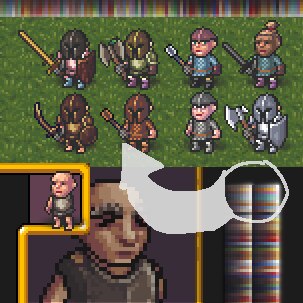
#Paletted Dwarf Armor Graphics (50.13/51.01+)
79 messages · Page 1 of 1 (latest)


 autumn tinsel
:D
 fleet hazel
:D
fleet hazel
update time!
layer groups for everything to reduce overdraw
wood items should now display properly, and i raised the brightness on the helmet for clarity with darker items
steam link:
https://steamcommunity.com/sharedfiles/filedetails/?id=3245292624
github (text only):
https://github.com/ATP-Kraken/DF-layered-graphics-examples/tree/main/mod/accurate_dwarves
GitHub
Examples of layered graphics from Dwarf Fortress, as a community modding resource. - ATP-Kraken/DF-layered-graphics-examples
and here's a nice blown up preview
 autumn tinsel
:D
fleet hazel
i decided that if i wanted people shamelessly copying my work for a couple months i wanted it to be something i was satisfied with lol
autumn tinsel
so i notice that in your mod your tilesets are still these giant deprecated sheets of duplicated images. paring these down to remove all the copies is the main appeal of this infrastructure so are most of these just unused or like whats going on with it?
 fleet hazel
i still have those because I don't want to change any tile entries
especially not for weapons
the "silver shield" is what I'm using for leather shields
should probably be brown but eh
so yeah, they're mostly unused textures in there
autumn tinsel
using the same sprite coordinates/mappings is understandable since its totally arbitrary, but it would be helpful to people who want to use this for modded races if you erased all the unused sprites! it would really clarify everything!
fleet hazel
 fleet hazel
just worked on wielded items and human armor
it's really cool that goblins and kobolds share offsets
as well as humans and elves
unfortunately human armor is not as clean as i would have liked
 young cradle
Wow
I don't understand anything about the description, but it looks so good it should be vanilla
fleet hazel
I am doing this to beat the art team to the punch
so yes
should be vanilla
fleet hazel
 fleet hazel
ok everything is done
i have a bug with wood mail showing up over everything but its such a minor item that it doesnt really matte
 autumn tinsel
how wonderful!
fleet hazel
ok clean spritesheets and multiracial support is live
 storm ridge
is there somewhere i can change the palettes that are used for different metals? there are image files such as dwarf_portrait_hair_palette where you could change the colors used in the portraits, but i can't figure out how i could change the colors the game uses for iron or steel etc
fleet hazel
it uses palette_default
which is used for all items
you can change that by editing the state colors of the material, including pointing to a custom state color and overwriting the default colors to have new entries
"metallic" does this
storm ridge
ok great, thanks.i see the palette_default and the state colors are in inorganic_metal from what I can see. the palette_default file points to n image though, [FILE:images/palettes.png], and I... can't find this image?
autumn tinsel
isnt that in the vanilla_descriptors folder?
storm ridge
there's a file descriptor_color_standard which seems to give rgb values for the different colors, i just tried mesing with it though and it doens't seem to work, hmmm
fleet hazel
the rgb colors aren't used in premium
fleet hazel
autumn tinsel
isnt that in the vanilla_descriptors folder?
vanilla_descriptors_graphics, the images subfolder
storm ridge
ah there it is! sorry i'm an idiot. weirdly searching didn't pick it up. thanks a lot!
i've actually already done all the work in my mod of making a giant armor and wieldables image with columns for every material and item quality, but at least now i know how to do it more easily
fleet hazel
the first row of the palettes have some p specific colors, all the images in my mod use em
storm ridge
alright awesome i think i've got it all sorted out. actually one last question, for higher item qualities, my armor and weapons have gold filigree, but the gold is a little different for different materials. i could probably manage this by having custom palettes where both the material color and the gold color are in the same row, but i'd have to make the rows longer to add a couple colors, is there a way to make the palettes have more than 9 colors each?
fleet hazel
you can extend the color sheet yeah
editing the default palette is not recommended since it's all overwritten but you can just do that
storm ridge
do i have to tell the game somewhere, like you have to change tile_page_creatures to extend the armor image?
fleet hazel
you just have to tell the game to load your edited palette
storm ridge
also, i realize i don't understand why the palette image has two columns. sorry about all the questions!
fleet hazel
nah i appreciate it all
storm ridge
alright, i'll see if i can maybe get this working. thanks a lot, here's a couple screenshots of my images if you're interested. just small changes from the vanilla graphics, but i like them

and here's different item qualities:
 autumn tinsel
storm ridge
alright, i'll see if i can maybe get this working. thanks a lot, here's a couple...
autumn tinsel
storm ridge
alright, i'll see if i can maybe get this working. thanks a lot, here's a couple...
i think its cool!
fleet hazel
always like to see the spectacle helm :)
storm ridge
alright, so I have it completely working now just editing the default palette, my only concern is that the way i did the gold filigree is just to replace colors on the left column with the gold colors. this seems to work because none of the game images seem to use the left column colors but i'm worried there might be something i haven't seen that's going to turn unexpectedly gold. what's the point of that left column? it just seems almost like a desaturated copy of the right, does anything use it?
 true ermine
I'm on latest Adventure beta and it doesn't let me launch with it

oh I can't read lmao
it tells me why
 tired lantern
I tried modifying this to work with my custom armor graphics, but I couldn't get it to use the color palette with modded graphics. Is there a reason?
autumn tinsel
theres a million potential points of failure
fleet hazel
This is going to be more conjectural than anything
But I think your images aren't set up right
There's a set list of colors that get auto swapped, it can't just use any old colors
tired lantern
ooooh, I see, is there a list of those colors?
 tired lantern
Awesome, that fixed it, many thanks!
fleet hazel
may i see em? curious
tired lantern
 tired lantern
Its really nice because if I want to add further custom metals I don't have to touch the graphics. Super nice
fleet hazel
exactly! i was rly excited to get to work with automatic colors, saves me however many lines
fleet hazel
As of 50.13-beta20, dwarves now use palletized graphics in vanilla. Praise the miners!
autumn tinsel
hmm looking at it now. still primitive, its palletized but still doesnt work for bismuth bronze or any other nonstandard material for example. your mod is still superior ^_^
fleet hazel
there's wearables planned to use it, havent seen a column for the brown palette but its not strictly necessary rn
storm ridge
tired lantern
These are amazing, do you have a mod or somehwere i could download these?
 winter hatch
tired lantern
winter hatch
tired lantern
Oh wow! It's so cool! I want it tooooo!!!!