#HELP NEEDED!!! I'm looking for
1 messages · Page 1 of 1 (latest)
 shut token
The primary contenders at the moment are
- Adafruit Feather
- (if I'm reading it correctly) supports either 4 analog io pins and 9 digital pins or 6 analog and 7 digital pins
- excluding I2C SCL/SDA, RX/TX, and SPI (other than chip select) pins, so you aren't "losing" shield pins if you want to use I2C, etc...
- has a decent amount of pins and dedicated I2C / SPI / UART pins, which makes stacking multiple FeatherWings much more realistic than D1 Mini shields
- (if I'm reading it correctly) supports either 4 analog io pins and 9 digital pins or 6 analog and 7 digital pins
- Xiao/QtPy
- great tiny form factor
- but only has 11 IO capable pins including I2C/SPI/RX/TX, so only 4 are IO only
- Pi Pico
- looks promising, but most of them don't have enough ram/flash to comfortable run LCPF
 obsidian pelican
shut token
The primary contenders at the moment are
- [Adafruit Feather](<https://www.lume...
obsidian pelican
shut token
The primary contenders at the moment are
- [Adafruit Feather](<https://www.lume...
There are third-party Pico-compatible boards with PSRAM, such as the Pimoroni Pico LiPo 2.
obsidian pelican
obsidian pelican
There are third-party Pico-compatible boards with PSRAM, such as the [Pimoroni P...
The LiPo version doesn't (yet) have CircuitPython support, but this one does: https://circuitpython.org/board/pimoroni_pico_plus2/
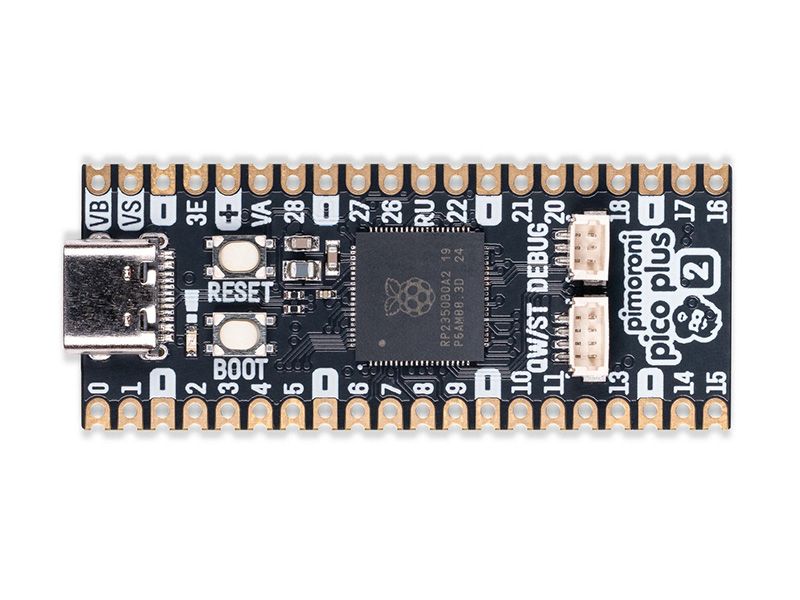
A top of the line Pirate-brand RP2350 microcontroller with 16MB of flash memory, 8MB of PSRAM, USB-C, Qw/ST and debug connectors.We adore the versatility and value of Raspberry Pi Pico but we also enjoy a souped up RP2350 board with all the extras baked in. With Pimoroni Pico boards, we’ve tried ...
shut token
Yeah, I've found a few Pi Pico options, but they tend to be pretty far down on the CircuitPython downloads "popularity list". I really like the layout though, probably get one to play with eventually.
Another concern is that a primary goal of my project is to make building things with interactive effects very easy for beginners - even (or especially) those who don't want to learn anything about programming.
 white wedge
and there are Arduino-shaped boards like Metro RP2350 with PSRAM that can use Arduno-shaped shields, but they are large and not breadboardable
shut token
So there need to be readily available, "off the shelf" parts I can add to a curated list with links to buy and tell people "order this and it will work" (just to clarify, I'm not planning on selling them, just providing links to Amazon, Adafruit, etc.)
shut token
white wedge
and there are Arduino-shaped boards like Metro RP2350 with PSRAM that can use Ar...
large doesn't necessarily disqualify it, and "breadboardable" is almost irrelevant. Although size does matter a bit for people building tabletop terrain, which is the main arena of users I've been working with so far.
white wedge

Choo! Choo! This is the RP2350 Metro Line, making all station stops at "Dual Cortex M33 mountain", "528K RAM round-about" and "16 Megabytes of Flash town" and a ...
obsidian pelican
shut token
Another concern is that a primary goal of my project is to make building things ...
Maybe take some inspiration from WLED, and make a web GUI for users to configure things?
shut token
If I could "wish list" it, I'd love to have something like the RP2040 Prop-Maker, just maybe a bit faster( RP2350 version?) and with PSRAM. Squeeze an SD card socket in and it I'm not sure I'd have anything left to ask for in terms of an ideal conroller for my project
shut token
obsidian pelican
Maybe take some inspiration from [WLED](https://kno.wled.ge/), and make a web GU...
Long story short, adding a "quick start" GUI (probably based on blockly ) is on mid-term "to do" list. However, that will probably make more of an impact in the perception of how easy it is to get started than the actuality. While this project is built on CircuitPython, and the "configuration" the user needs to write is directly parsed and run by the CircuitPython interpreter, it's probably not like anything you'd expect (or have seen often - if ever - in Python)
It's an almost completely declarative system, where the user simply describes what hardware they're using, and what the want to happen. They don't know or care how it happens.
obsidian pelican
shut token
If I could "wish list" it, I'd love to have something like the [RP2040 Prop-Mak...
I still don't understand what you could possibly be doing with the peripherals on the RP2040 Prop-Maker Feather that would necessitate having that much RAM.
shut token
"Shields" are so important because all the user needs to know and "configure" is what shield they're using. If they're using a TerrraunTronics Caernarfon Castle board on a Lolin S3 Mini, all they have to say is something like
caernarfon = main.TerrainTronics.addCaernarfon( )
lidServo = caernarfon.initServo( 1, movePeriod=0.05 )
neoPixels = caernarfon.addNeoPixels(pixelCount=45)
Well, it's approaching 20K lines of code... Which is about 500K "installed" - with most of them converted to .mpy files
There is a LOT going on "behind the curtain" to make things "easy"
And of course, ram makes a difference dealing with GC. Things like active WebSocket connections with interactive data flowing both ways can chew through memory pretty quickly.
 hidden root
You've bullet-listed 3 smaller form factors with readily-available expansion boards (FeatherWings, BFFs, PiCowbells). Dan added Metro series that takes Arduino-type shields. If quantity of I/O is an issue on the smaller boards, you could add some kind of I/O expander (some work over stemma QT / quiic I2C).
shut token
That's another bit of the details I had written up on my discord channel :
The LCPF is intended to make building things with interactive effects very easy for beginners - even (or especially) those who don't want to learn anything about programming. One way it does this is by minimizing (if not completely eliminating) the need for users to know or care about details like pin names/assignments on the specific controller they are using, hardware specific addresses, etc. Two important concepts which help achieve this are
- using standardized cable connections (like StemmaQT/Qwiic)
- using shield compatible controller boards.
StemmaQT/Qwiic is a huge part of the system - I've already got support for half a dozen StemmaQT boards and that will continue growing. Without something like StemmaQT/Qwiic and/or "shield" standards, it becomes very difficult to provide a "beginner friendly" environment were users never have to tell the framework what controller specific pin it need use to run a NeoPixel chain, PWN a servo, read capacitive touch input... (FWIW I absolutely love the Stemma/QT MPR121 Capacitive Touch Sensor Breakout for adding "stealth" buttons to tabletop terrain projects)

Add lots of touch sensors to your next microcontroller project with this easy-to-use 12-channel capacitive touch sensor breakout board, starring the MPR121. This chip can handle up to 12 ...
Technically, since it's built on CircuitPython, you could use any StemmaQT/Qwiic/I2C device with a decent CircuitPython driver/module, but it takes a little extra wrapping to "fully" support and integrate it with the LCPF architecture.
Quick example : Pretty much all LCPF access to hardware is through factories, and "IO" is normalized into something akin to producers/consumers of values which change over time. So using an MPR121 looks like ```python
capTouch = main.adafruitFactory.addMPR121()
leftStoneTouch, centerStoneTouch, rightStoneTouch= capTouch.addInputs( 1, 2, 4 )
leftRimTouch, centerRimTouch, rightRimTouch= capTouch.addInputs( 5, 6, 7 )
bottomTouch = capTouch.addInput( 8 )
Obviously they still need to specify which pins to use _on the device_, but those are typically labeled clearly on the PCB and have nothing (directly) to do with, say, the I2C address for a breakout board or the controller GPIO number for the shield pin providing PWM for Servo 2 - and more importantly _do not change_ regardless of which controller is actually running the code.Also, each of those (i.e. leftStoneTouch) is a full object based on the InputSource class/interface, and as such
- can be remotely queried via REST api calls
- can be used to trigger actions on change, including debounce / edge detection so there's a simple canonical way to use any on/off
InputSource- whether from an MPR121, an I2C GPIO expander, a GPIO pin on a shield interface, or even a virtual square wave oscillator - as a "button" to trigger an action.
Of course, creating a hierarchy of dynamically named, introspectable, async capable wrappers for every single piece of the system does require a wee bit more resources than, say ```
button = digitalio.DigitalInOut(board.IO21)
button.direction = digitalio.Direction.INPUT
while button.value == True:
...
which is part of the reason a project aimed at making things (look) simple needs a controller with 2MB of ramQuick side note: While I might be more chatty than average, I usually don't get quite this one-sidedly verbose in conversations like this. However, I'm also in the process of fleshing out the user's guide, so there's a bit of reuse going on...
shut token
white wedge
ok so https://www.adafruit.com/product/6267
Those things left unsaid keep biting me... Another requirement - at least for now - WiFi support. At least as I currently envision it, there may be projects which for which users don't care about WiFi support after it's "finished" and they're using it, but it will still be very helpful in the initial project setup and any future troubleshooting.
white wedge
shut token
Those things left unsaid keep biting me... Another requirement - at least for n...
There are Metro ESP32-S2 and S3 boards as well
shut token
white wedge
There are Metro ESP32-S2 and S3 boards as well
Yeah, I noticed that when I went back and checked. I'll add it to the list of candidates for potential future support, but my guess on what potential users will want first (primarily going by downloads on CircuitPython) is support for Feather, XIAO/QtPy, and Pi Pico/PiCowbell shields. Also, there might be interest in support for controllers which don't fit into a popular shield ecosystem but do have lots of on-board "devices", for example the MatrixPortal S3
I'll probably add XIAO/QtPy first, because it's probably the easiest and I already have a XIAO ESP32S3 Sense available to test on. Also, at the moment the XIAO/QtPy Adafruit Audio BFF) is the only "shield" option I'm aware of so far for a "zero config" beginner friendly I2S audio output. (A Fruit Jam could also work, but that's probably overkill for the kinds of projects the LCPF is initially targeting).
I think FeatherWings might be the most sought after option, so I want to add support for those as well, but unfortunately none of the Feather (or QtPy for that matter) controllers I've got on hand have enough memory (not sure all of them even have CircuitPython support) to run a full featured LCPF project.
hidden root
ESP32-S3 Feathers are very capable (Adafruit with or without TFT or, for more flash and RAM: UnexpectedMaker)
shut token
I'm also a little surprised that I haven't seen any FeatherWings with an I2S + amplifier combo. Hooking up and configuring an I2S breakout is trivial for me (I'm using a MAX98357A breakout for testing) but it doesn't fit into the zero config requirements for "curated" LCPF hardware options.

Listen to this good news - we now have an all in one digital audio amp breakout board that works incredibly well with the Raspberry Pi! If you're looking for an easy and low cost ...
shut token
hidden root
ESP32-S3 Feathers are very capable (Adafruit with or without TFT or, for more f...
Definitely, at the moment I'm leaning towards starting with the ESP32-S3 Reverse TFT
hidden root
ESPs support I2S but yeah the amp. There's a QT Py BFF, but that's awkward to connect to a non-QT Py (from experience) - standard breakout is easier
white wedge
The Prop-Maker FeatherWing, which is probably the closest to what you might want, was designed before I2S was so common in our board lines. It has an analog amp. You can make product suggestions at https://www.adafruit.com/contact_us
shut token
Anybody here have experience pushing the envelope on audio through I2S and through "direct" out on an ESP32 (if that's even supported on CircuitPython)? The Prop-Maker FeatherWing at least has the amplifier and speaker connection built in, but if it's not supported - or even if it is but chews up a noticeably more resouces than audiobusio.I2SOut ....

The Adafruit Feather series gives you lots of options for a small, portable, rechargeable microcontroller board. Perfect for fitting into your next prop build! This FeatherWing will unlock ...
shut token
white wedge
The Prop-Maker FeatherWing, which is probably the closest to what you might want...
synchronicity....
white wedge
The ESP chips have fairly lousy DACs
shut token
To be fair, I'm not aware of many tabletop terrain projects using audio, but my hope is if I can make it "easy" more people will try.
shut token
white wedge
The ESP chips have fairly lousy DACs
True - I've used them directly for audio in C++/Arduino projects (even rolled my own equivalent of audiomixer.Mixer) so I know they're not exactly "hi-fi". However, at least for tabletop terrain projects, most of the "sound effects" I expect people to want are already noisy - chains rattling, engine noise, doors opening / creaking / closing, explosions, etc... Not really trying to stream music or playback long clean samples, at least in the early rounds.
So while I2S might be more significant if/when people want "cleaner" audio, my immediate concern is whether it's possible to use "direct" audio from an ESP32 with a PropMaker with audio.Mixer etc. without taking up noticeably more system resources than audiobusio.I2SOut
white wedge
shut token
So while I2S might be more significant if/when people want "cleaner" audio, my ...
I think you'd just want to test audioio vs audiobusio. I don't have a sense of whether one is much more resource intensive than the other.
shut token
white wedge
I think you'd just want to test `audioio` vs `audiobusio`. I don't have a sense ...
Yeah, just realized I already have everything I need to do that - doubt the results would be any different just because an ESP32-* is sitting on a Feather layout board - and I have plenty of ESP32 flavors to test with.