#help-with-linux-sbcs
1 messages · Page 3 of 1
 faint sparrow
 crisp lion
actually, speaking of hiccups... that's what I am getting from neopixels... must be the poor Pi choking
faint sparrow
I've never done this and never will so I could have something very very wrong here. ;)
crisp lion
as you mentioned earlier, it doesn't like them neopixels too much, very precise timing etc
faint sparrow
Beware the Turing tar-pit: where anything is possible and nothing is easy.
crisp lion
oh well, what is the worst that could happen? another reel of neopixels that misbehave terribly 🤷♂️ so what else is new lol
faint sparrow
Every day in every channel on discord I hear pie-in-the-sky fantasies about multiplying multipliers multiply. ;)
> what could go wrong:
Blow your last Raspberry Pi and wait 3 years for them to restock them.
crisp lion
yeah speaking of which that green icon next to my name probably doesn't add too much credibility to my ideas
faint sparrow
haha yeah and it's a scarlet letter that lasts probably 30 days or so.
(a better measure sometimes is to just check their stats here for how many posts and when they joined and such)
I think Discord should make you at least check a profile to see the Mark of the Poppy
 arctic bobcat
New problem, why is that everytime I load up chromium, my wifi stops working in my raspberry pi?
crisp lion
never happened to me; but would it be possible to perhaps install a different browser just to see if the problem persists?
although they could all be chromium based... still, wouldn't hurt to give it a try I guess
 zealous seal
Not sure who/if anyone needs this...but I need to hit up microcenter in the boston area today and they have 15 Pi 4 2gb in stock
 turbid rivet
zealous seal
Not sure who/if anyone needs this...but I need to hit up microcenter in the bost...
turbid rivet
zealous seal
Not sure who/if anyone needs this...but I need to hit up microcenter in the bost...
Thinking about possibly going tomorrow. How much do I need them…
zealous seal
I didn't happen to need one. My friend got one though. When we left they had 6 more in stock
turbid rivet
Ehhhh it’ll probably be gone by the time I can go
In hindsight I’d really only use it to upgrade a 3b+ that still works
zealous seal
The only pi I need right now is a zero 2 but those seem like they're unobtanium
arctic bobcat
crisp lion
never happened to me; but would it be possible to perhaps install a different br...
What os did you use on the pi?
 livid fractal
Heyo Idk if anyone else has made a pigrrl 2 but I’m getting some audio issues
The wires are soldered to the pi but it’s only giving me a really faint buzzing sound
I’m wondering if I should resolder the wires or it’s the sound settings
Which audio device and which audio card should I use in the retropie sound settings ?
zealous seal
I haven't - but I saw a bunch of pigrrl 2 boxes at microcenter the other dayand was wondering what they were!
arctic bobcat
Yep, just like I expected, when I oopen up chronium on my raspberry pii, it disconnects from wifi, but when I opened up firefox, it stiill works like noormal.
what is going on?
 subtle tapir
Hey, Is there a way to share my screen from PC to connected raspberry pi and use raspberry pi to "control" my PC's mouses / keyboards based on whatever is visible on my PC`s screen by running pyautogui for example for image detection and mouse movements etc?
and even more complex things like realtime objects detection etc? What I would like to do is to upload my scripts into RPi and run them from there instead from my local PC .. not sure thou if this is possible. I`ve spent whole week in research but have not found anything helpful and everything leads me to the answer = NO
faint sparrow
vnc maybe
 wispy hazel
What’s everyone’s best advice purchasing a raspberry pi at retail prices? I need an 8gb but I’m not looking to spend $200 for one.
zealous seal
I haven't seen an 8gb in a while - lots of 2gb at retail prices
wispy hazel
I’ve occasionally seen 2gbs, even less the 4 and almost never the 8. It’s so frustrating. It seems all other areas impacted by the chip shortage are clearing up, why not pi’s?!
faint sparrow
Hey, i wish to use BH1750 Ambient Sensor with Raspberry Pi i2c pins (without using any package), is tehre any way to do, without using smbus ?
 umbral sable
faint sparrow
Hey, i wish to use BH1750 Ambient Sensor with Raspberry Pi i2c pins (without usi...
umbral sable
faint sparrow
Hey, i wish to use BH1750 Ambient Sensor with Raspberry Pi i2c pins (without usi...
I mean, sure, you can bit-bang the I2C protocol via the GPIO driver if you want. Though it seems that you're making things a lot harder for yourself by vetoing the "normal" way to get this sort of sensor running.
faint sparrow
umbral sable
I mean, sure, you can bit-bang the I2C protocol via the GPIO driver if you want....
Yes, am doing it the hard way, actually I am learning it, for an assignment. Can you please redirect me to the resources for this, thank you.
 signal karma
I have a tofu board and a cm4 to run it. Been doing some m2 Drive testing and added a heat sink today. The sink seems to be highly needed. The speed test is crazy. The eMMC flash is leaps and bounds over SD cars and m2 is even higher performance.
 torn trench
faint sparrow
Yes, am doing it the hard way, actually I am learning it, for an assignment. Can...
torn trench
faint sparrow
Yes, am doing it the hard way, actually I am learning it, for an assignment. Can...
Hm, this is kinda a weird thing to do. Usually i2c is done through a dedicated peripheral. How have you been assigned to implement it?
Also just to be sure, what raspberry pi are we talking about? A 4/3/zero/etc? Or a pico?
 rustic vault
Looking for the circuit diagram for raspberry pi pico?
the datasheet that actually would tell me about the IC's on the board
looking to replace a chip on one that arrived DOA
 hard pike
rustic vault
looking to replace a chip on one that arrived DOA
hard pike
rustic vault
looking to replace a chip on one that arrived DOA
Which chip is dead?
rustic vault
chip designated 036 with a 6 leg package between 2 SMD capacitors
hard pike
Picture?

 hard pike
Oh the buck converter
rustic vault
yep it burned me, DOA
rustic vault
hard pike
Oh the buck converter
thanks! I didn't know which one it was
would you by some miracle have a digikey link?
hard pike
I’m not seeing a “singles” listing which is weird
Looks like it’ll let you add a single
rustic vault
two buckaroos
hard pike
Yeah, basically half the price of a new Pico
rustic vault
I might wait on this one, and add it to another part order
hard pike
Just tells you how many raspberry pi bought 🙂
rustic vault
hard pike
Yeah, basically half the price of a new Pico
- shipping that'd cost 3x of a new pico loll
hard pike
Yeah lol
hard pike
rustic vault
+ shipping that'd cost 3x of a new pico loll
Anyway, for future reference just check out the Pico data sheet for the schematic
rustic vault
hard pike
Anyway, for future reference just check out the Pico data sheet for the schemati...
appreciated
faint sparrow
torn trench
Also just to be sure, what raspberry pi are we talking about? A 4/3/zero/etc? Or...
4B
rustic vault
so I just got my replacement pico
in the mail today
after the first one tried to make creme brule out of my finger
plug it in
"this usb device is not recognized"
whether I use the bootSEL button or not
not good vibes
all's good
false alarm
 lucid nebula
Idk where to install this: https://github.com/Tyrrrz/DiscordChatExporter/releases/tag/2.36.4
 true oar
Hi all! picked up this gorgeous momentary push button for a project, but am having trouble figuring out how to best wire it up. The goal is to have it trigger a GPIO pin when pushed.
I think it's a DPDT switch, which is overkill for what I need, but what's the best way to wire it up? It has 8 pins (the central two are for the bulb), with the following labels:
1 - NO
2 - C
3 - NC
4 - NO
5 - C
6 - NC
 torn trench
NO is normally open. NC is normally closed. I guess C is center?
DPDT basically just means two switches controlled by the same button, right?
So I think you could just set the switch up with NO and C to ground out a gpio when the switch is activated
true oar
Got it, so let's say 2C to a ground pin, and 1NO to whichever gpio I'm using?
torn trench
That’s what I would assume
I think you’d want to pull up the gpio
Or do it all in reverse. Pull down the gpio and have the switch set it high
true oar
i'll give this a shot, thanks @torn trench
torn trench
Would love to hear how it turns out! Good luck!
turbid rivet
torn trench
NO is normally open. NC is normally closed. I guess C is center?
Close, C usually stands for “common” in this context.
Right idea, though.
 alpine fox
i need massive help coding a project, i'm trying to make my own version of the adafruit IO canary with a regular raspberry pi pico and a SGP30 air quality sensor from pimoroni, but i'm completely lost in the rabbit hole of github trying to figure out how to program it! any help would be massive! https://shop.pimoroni.com/products/sgp30-air-quality-sensor-breakout?variant=30924091719763 https://learn.adafruit.com/iot-canary https://www.adafruit.com/product/4864 (edited)

Measure indoor air quality—total volatile organic compounds (TVOC) and equivalent CO2 (eCO2)—with this digital sensor for Raspberry Pi and Arduino.

Adafruit Learning System
Build a CO2 sensing project using Adafruit IO and WipperSnapper.

The Raspberry Pi foundation changed single-board computing when they released the Raspberry Pi computer, now they're ready to do the same for microcontrollers with the release of the ...
 sonic pulsar
To use the Adafruit Mini GPS PA1010D on pi zero, do I need the full circuitpython installation?
Let me know if this is not the right channel to ask
I have a few sensors connected with the simple qwiic wiring and have been fantastic. But reading the GPS guide I am not sure if I need the full circuitpython... Which I don't think I need so far.
Any pointers and guidance will be great. Than you
 lost wolf
@sonic pulsar For CircuitPython-related questions, I'd suggest #help-with-circuitpython. Even when it's Pi-related-CircuitPython, that channel might get you more folks to help out than this one. We discourage crossposting in multiple channels, but in this case I suggest it.
sonic pulsar
Thanks for the quick response. I shall post it there.
Was not even sure if I need that on pi... Thought it is more pi related. Thx
torn trench
alpine fox
i need massive help coding a project, i'm trying to make my own version of the a...
What do you want to happen when the sensor detects co2 above a certain amount?
alpine fox
The same as the original project, move the servo from up to down
torn trench
Ok the original project also talks about using adafruit.io, but that would require a device with wifi
moving the servo should be pretty doable though
I'd break it down into a few different tasks. I'd probably start with a pico program that just prints "hello world" every second over USB serial. That will let you know you're programming the board correctly
then I'd make it move the servo back and forth every second
then I'd make it print the C02 reading over serial every second
and then you can combine the pieces together, and change the servo position based on the CO2 reading
lucid nebula
lucid nebula
Idk where to install this: <https://github.com/Tyrrrz/DiscordChatExporter/releas...
Could use some help with this
torn trench
what does that have to do with raspberry pis?
that project seems to have its own discord server in any case, where you're more likely to find someone who knows how to install it

GitHub
Exports Discord chat logs to a file. Contribute to Tyrrrz/DiscordChatExporter development by creating an account on GitHub.
lucid nebula
torn trench
https://github.com/Tyrrrz/DiscordChatExporter/wiki/Linux-usage-instructions
I need to install .NET, but I seem to be having issues doing so
 night sail
lucid nebula
I need to install .NET, but I seem to be having issues doing so
night sail
lucid nebula
I need to install .NET, but I seem to be having issues doing so
If you provide details, that makes it easier to help - "having issues" is much more vague than a specification of actions taken, expected behavior, actual behavior, etc.
lucid nebula
I'm not at home right now.
 bold hornet
hello, im trying to get a webserver on raspberry pi pico w, with circuitpython on it (sorta as a wireless microcontroller), but i cant get it to connect to wifi when i import network module

 vocal lava
bold hornet
hello, im trying to get a webserver on raspberry pi pico w, with circuitpython o...
vocal lava
bold hornet
hello, im trying to get a webserver on raspberry pi pico w, with circuitpython o...
I would recommend asking in #help-with-circuitpython - this channel is more for the Raspberry Pi computers. You'll probably have better luck there, too
bold hornet
i see, sorry
vocal lava
no need to apologize. 🙂
 lusty perch
dumb question, first time making a button, https://raspberrypihq.com/use-a-push-button-with-raspberry-pi-gpio/ do i really need a resistor for this pushbutton? "The resistor is used as a current limiting resistor to protect our input pin by limiting the amount of current that can flow" i got no problem soldering it inline, but... why? how would "The resistor is used as a current limiting resistor to protect our input pin by limiting the amount of current that can flow" ever be relevant? I appreciate any really good answer.

A great starter hardware project using the Raspberry Pi is hooking up a simple tactile switch to the Raspberry GPIO and detecting button presses in Python. This guide will guide you through setting up the circuit with the Raspberry Pi and reading the state of the button in Python.
also, would a resistor be relevant to a 5v l.e.d. workign on a 3v pin? Im currently doing that and it works fine. Im really curious why everyone wants to use resistors and breadboards but really you just connect one to the other and it works?
is the breadboard diagram just for design clarity, (opposed to just showing a wire in a line?
torn trench
sparkfun seems to have a pretty good explanation: https://www.sparkfun.com/tutorials/219
Although they state the reasoning as protecting the LED, not the input pin
lucid nebula
night sail
If you provide details, that makes it easier to help - "having issues" is much m...
Resolved. Now I'm looking for where Docker has put the files I just pulled from it
lucid nebula
night sail
If you provide details, that makes it easier to help - "having issues" is much m...
Nvm, ran into another issue. See screenshot:

 keen summit
any cool idea what can I do with measuring temperature,I display data in a website and in a chatbot.Any idea what can I add to make my project "cooler"
 terse mantle
Good afternoon. If I want to add a fan to my Pi but I've added an Adafruit RGB Matrix Bonnet. What other ways can I connect the fan to my pi?
The fan came with my Cana kit
 civic rune
I have a program on the pi that plays music with pygame. I started the program with thon y and then ended it with thonny but it's either still running or pygame is. What can I do to stop them both?
 steady rose
depends on the program, how it initially ran pygame, and how you "ended" the program
could always just look for the processes and kill them
civic rune
Figured it out.
The cmd window was open and somehow picked up control of the program?
Idk
 indigo cave
i am not too sure where to put this issue, but I made a custom rp2040 board, and it seems to work just fine (when i plug it in, it shows up as a "usb drive")
however, when i put a uf2 to it, it will eject itself, wait around 2 seconds, then it will appear back as if the code did not flash at all
this board is meant to be used as a keyboard, but neither qmk nor zmk flash without running into the same error mentioned
hard pike
indigo cave
this board is meant to be used as a keyboard, but neither qmk nor zmk flash with...
The likely issue is there is an issue with the flash chip connectivity
I’d make sure the solder joints on the flash chip and the RP2040 are good, reflow with flux as necessary
indigo cave
Yeah so I got jlcpcb to make it
So I don’t think the connections are wrong
Could it be the qspi comms from the rp2040 to the flash?

@hard pike does this look right?
hard pike
Hard to know without seeing the schematic
I will say also that the crystal is too far away from the RP2040
indigo cave
hard pike
I will say also that the crystal is too far away from the RP2040
do you think that will make a significant impact?

this is the schematic
indigo cave
hard pike
I will say also that the crystal is too far away from the RP2040
it is around 20mm away
thank you so much for helping btw
hard pike
indigo cave
I think you have SD0 and SD1 swapped on the flash
indigo cave
Dang it. Thank you for finding it 😅
 sand lion
Hi guys so I'm having a problem with setting up my pi zero w with pitft screen using retropie command prompts I've been following the guide for the pigrrl zero but the installation code that's on the guide doesn't do what its supposed to do
 digital sparrow
I recently moved my computer (raspberry pi) and switched monitors. I have the latest OS and a can’t get it to resize can anyone help?
sand lion
I keep on trying to run the install PiTFT (fbcp) support into the retropie cmd in my raspberry pi zero and I'm not getting anything am I doing something wrong?

Trying to build a pigrrl zero but having trouble with setting it up to my pi zero w
 modern matrix
@sand lion try the instructions again. it may not be clear, but there are two commands you want to run:
curl https://raw.githubusercontent.com/adafruit/Raspberry-Pi-Installer-Scripts/master/pitft-fbcp.sh >pitft-fbcp.sh
and
sudo bash pitft-fbcp.sh
https://learn.adafruit.com/pigrrl-zero?view=all#install-pitft-fbcp-support-2156480
sand lion
modern matrix
<@303772396710789120> try the instructions again. it may not be clear, but there...
I'll give it a shot
 dim spade
is there an easy way to open a gif from the terminal on a raspberry pi? i have done it before but dont remember how, all i can find on the internet is to advanced and time consuming.
steady rose
try eog
 tight solar
Hello! I had a general question if there's anyone here who may be able to help? I was wondering if this product https://www.adafruit.com/product/3662 would also be fine to use on a raspberry pi zero 2 w? I only saw that it mentioned zero, so just wanted to confirm it would be ok? Thank you !

If your soldering isn't quite up to scratch, or you just don't own a soldering iron yet, then these nifty hammer headers from Pimoroni might be just what you ...
turbid rivet
tight solar
Hello! I had a general question if there's anyone here who may be able to help? ...
Yes, they should work fine on any pi variety with the 2x20 connector.
 mint field
tight solar
Hello! I had a general question if there's anyone here who may be able to help? ...
mint field
tight solar
Hello! I had a general question if there's anyone here who may be able to help? ...
I have used them on Pi Zero, Pi Zero W and Pi Zero 2 W without any issues
tight solar
Cool 😎 thanks again I appreciate it!!
 midnight sage
is there a some kind of 3.3v to 5v converter I can use? - Amiga 1200 LEDs are 5V and can only run on 5V and not 3.3v
or anything to power 5V LEDS
 fickle rose
midnight sage
is there a some kind of 3.3v to 5v converter I can use? - Amiga 1200 LEDs are 5V...
fickle rose
midnight sage
is there a some kind of 3.3v to 5v converter I can use? - Amiga 1200 LEDs are 5V...
The 5v pin on the gpio
midnight sage
how that can work as a converter?
fickle rose
? What is your setup? Are you asking for a logic-level converter?
midnight sage
I was gonna think to get one as I notice that the a1200's LEDs are about 2v-3v and the resistor value is 330 ohms making it needing 5v power - I'm gonna use the for the following
Green- Power/Status through TXD
yellow(orange) - HDD GPIO 23 (Amiberry HDD)
RED Floppy Drive GPIO 18 (Amiberry Floppy Drive Status)
I'm basically using two Leds for Amiberry's status while the Green to be my Pi's Power Indicator that it is on and running
fickle rose
You don’t need to power them from 5v 3.3 will work
If you need the 5v you can use a 74ahct125 (https://adafru.it/1787)

Level shifting chips let you connect 3V and 5V devices together safely. This chip is similar to others in the shop (such as the 74LVC125) except this one is particularly good at converting ...
 cosmic imp
Hi everyone, was hoping to get some help with RGB 32x32 matrix panel connected with pi4 w/ HAT. I can’t seem to figure why only part of the matrix works

 midnight sage
Are the Pi GPIO Pins off by default if not in use? here's what I need to do
Setup pins TXD (for power Status)
18, and 23 (these are the Amiberry Status
midnight sage
fickle rose
You don’t need to power them from 5v 3.3 will work
seems the pi does the pins as input not output
midnight sage
Turns out I'll need to make a circuit for the Amiga's LEDs as it needs 5v but how I make one?
 raw solar
You could use a transistor to switch the 5v rail to an LED
fickle rose
cosmic imp
Check wiring/unplug and replug any cables
cosmic imp
Hey thanks for responses, I’m checking the soldering and I changed the ribbon from HAT to panel still nothing
 fickle rose
do you see anything out of the ordinary? (like a trace that looks odd)
rustic vault
any recommendations for stress-testing / Diag of a pi I used to think was short circuited and dead?
I plugged it in and loaded rasbian 32bit and it made it to the homescreen
I'd like to put it back into use, but I wanna make sure that it's good and working
I am not sure to the extent of the failure that caused me to put it into the storage
IIRC I had octopi running on it, and then it shorted, and failed to boot, so IDK if at that point I just considered it Ded and moved on
raw solar
I’d just run something that uses resources like calculating Pi to 10 million digits or something. If it doesn’t crash, probably fine
Maybe have a few browser windows open at the same time to stress RAM
fickle rose
run "stress -c 4" (i think it's been a while)
rustic vault
fickle rose
run "stress -c 4" (i think it's been a while)
that sounds like a awesome builtin tool
fickle rose
i will warn you it doesn't stop on it's own so you have to ctrl-c to exit
raw solar
Oh yeah, forgot about stress, lol
fickle rose
rustic vault
that sounds like a awesome builtin tool
it's not built in it's part of a package
actually i'm pretty sure it's preinstalled on the desktop versions
rustic vault
anything that can test the component list?
I do a lot of phone repairs, and samsung, apple, and google phones all have a auto-diagnostic suite we have to run before returning a phone to a customer
rustic vault
fickle rose
actually i'm pretty sure it's preinstalled on the desktop versions
awesome! that's news to me!
what a thoughtful tool!
fickle rose
rustic vault
anything that can test the component list?
idk maybe
run "sudo apt install agnostics" Once installed, you will find the new application “Raspberry Pi Diagnostics” in the main menu under “Accessories”
 sharp quiver
rustic vault
any recommendations for stress-testing / Diag of a pi I used to think was short ...
sharp quiver
rustic vault
any recommendations for stress-testing / Diag of a pi I used to think was short ...
In Python, run 2**2**2**2**2**2. That will attempt to calculate a number so large that the observable universe doesn't have enough particles to store it, but Python will try anyway. It will consume all of the computational resources of one core, and it will eventually consume 100% of the memory. If you want to test all of the cores, open one Python interpreter for each core and run that line in every window. That will run it on every core.
This works both for testing your memory and your CPU. If the kernel does not kill the processes when you run out of memory, your machine will eventually crash, due to lack of memory. You might want to have a window open with htop running, so you can watch it. If things start crashing before all of the memory is consumed, your chips might have a problem. (Individual instances crashing with OOM (out of memory) errors is normal though.)
rustic vault
sharp quiver
In Python, run `2**2**2**2**2**2`. That will attempt to calculate a number so l...
Or I could just forkbomb it at that point lol
:(){ :|:& };:
But that is quite a creative answer
sharp quiver
Lol! That might be faster for testing all of the CPUs as well!
rustic vault
fickle rose
run "stress -c 4" (i think it's been a while)
Tried to run it on vanilla Raspian replied that the particular command was not found
rustic vault
sharp quiver
Lol! That might be faster for testing all of the CPUs as well!
Well, I'd really like to find is an outgoing quality check for the device, something that could really all in one process walk you through each core functionality of the device
In the phone repair business there's OQC processes after a phone repair in order to do warranty work that walks through testing the cameras. Microphones displays, touch signal, and any other device component
I'll be right back my phone's about to die
sharp quiver
Memory and CPU are pretty easy to test. Another option that won't crash due to lack of memory is calculating Fibbonachi sequences. Run one of those for each core, and you have a good CPU stress test. Memory testing can be done with a loop that continually traverses a list, increasing the size a bit each time until you run out of memory.
Testing other components is harder.
cosmic imp
fickle rose
do you see anything out of the ordinary? (like a trace that looks odd)
It was a soldering issue, thank you 🙏
Anyone try using an IR remote control with the 32x32 rgb matrix w/ HAT on a pi4?
fickle rose
It should work
 half nexus
Hi there. Any C libraries for neopixels/ws281x that work on pi
Just choosing one to begin with. I've seen some, but not sure which to use, so I am asking here.
 dense comet
half nexus
Hi there. Any C libraries for neopixels/ws281x that work on pi
Just choosing one...
dense comet
half nexus
Hi there. Any C libraries for neopixels/ws281x that work on pi
Just choosing one...
I'm getting very good results from Jeremy Garff's rpi_ws281x library in a C / RPi / neopixel project. https://github.com/jgarff/rpi_ws281x
Simple clean API, and it's pretty compact, the whole thing is a hair over 3300 LOC
half nexus
dense comet
I'm getting very good results from Jeremy Garff's rpi_ws281x library in a C / R...
I've had this lib for a while on my pi.
As a noob I've had some concerns regarding not having any C demos (they have only python demos) and seeing C# mentioned in the readme.md
And as I accumulated more information, I think it's okay to conclude that mixing C and C# is okay
 gaunt plover
Hello! I have an issue regarding i2c communication using the BNO055 Adafruit library on my sensor
I am trying to connect it to my RPI PICO and the sensor cannot detect the sensor on the line
I tried to see if I would have the same issue on an Arduino and that was not the case, the same code worked perfectly fine on it
(I quadruplechecked the connections ^^)
umbral sable
gaunt plover
(I quadruplechecked the connections ^^)
Chances are, you're checking against the wrong reference, like you're totally confident that you have things hooked up to the I2C0 pins, but the software is actually defaulting to I2C1, etc.
gaunt plover
I will try it, thanks!
faint sparrow
Hey. I have a LPD8806 led strip I belive. But I cant figure out the rasp pi GPIO pins I used with this.
I had this working some years ago and using the same code. But I had this problem figuring out the GPIO pins before. I tried a bunch of different things but just cant get it working

Trying this. My code says
datapin = 10
clockpin 11
but I get nothing
raw solar
Missing an = for clockpin, but also might need to do datapin = GPIO10?
faint sparrow
Sorry. I got it working
things seem to work better if you run the right python script 😄
raw solar
lol
 still notch
I am failing installing Twine on a Rasp Pi running latest bullseye. The challenge is the cryptography pkg which is packaged in what I'm getting as an SDIST. Bummer because cryptography takes a Rust compiler. Why can't I just get a wheel? I thought I googled about updating PIP. Did this. Didn't help...still SDIST. I think I am being dumb, but because it's dumb I'm not sure... help appreciated. Thank you.
still notch
OK. That was (NOT) fun. BUT on the bright side, the difference between a package distributed as SDIST versus a wheel is very clear. 1) Install Rust by swinging a chicken over your head 2) keep ohming and chanting pip install twine ... because the poor thing keeps failing until you install all this python dev stuff that rust needs...ohm a few more times have a few pieces of candy...because really, this is sad...but...but....lalala...AND FINALLY TWINE HAS BEEN PIP'D (enter rainbow stage left).
midnight sage
okay this is from LemonAmiga fourms how I can use transistors to make the amiga 1200 LEDs work out I have no idea on how to make it work I'm also may need to invert it too

 tame light
Question on RP2040 internal pull-up resistors for I2C bus with CircuitPython 8.0.0 beta 4
Trying to test an OLED display with an I2C controller chip on a bare Raspberry Pi Pico board and running into problems getting the I2c bus set up. Using the dead simple code:
`import board
import busio
i2cBus = busio.I2C(scl=board.GP1, sda=board.GP0)
(using busio because of the multiple I2C buses and SCL and SDA pin choices), I get the following output:code.py | 8.0.0-beta.4\Traceback (most recent call last):
File "code.py", line 5, in <module>
RuntimeError: No pull up found on SDA or SCL; check your wiring`
Is busio actually doing an analog voltage test? Does it not set the GPIO pins to active pull-up (tried to do that with digitalio, but that appears to be incompatible with busio) and, if so, is that not sufficient? Are external pull-up resistors required in this case? (RP2040 datasheet states that internal pull-ups and pull-downs are in the 50K to 80K range, so I can see where a lower value would be required to achieve I2C rise-time specs.)
gaunt plover
Regarding my post from 2 days ago:
The solution was to check which pins are used for SDA, SCL as default in the pins_arduino.h file for the pico. By looking at the values I can connect to the right pins or change them in my script.
I have another question regarding the pico:
Would I be able to program a bit of the software in c and the rest in python, since it does support both natively?
tame light
OK, re my question just above, apparently external pull-ups are required. Tested with a low value (330 ohm) on both pins to 3.3v and error went away.
Will use something in the 1K to 10K ohm range when I figure out what's appropriate.
umbral sable
tame light
Will use something in the 1K to 10K ohm range when I figure out what's appropria...
It's a bit fuzzy depending on your bus speed and the length of the wires you use. The faster the bus and the longer the wires, the lower the value you want. 5k is a good first pass for most uses, down to 2k or so if you are going off-board with a cable.
half nexus
half nexus
I've had this lib for a while on my pi.
As a noob I've had some concerns regardi...
I'd like to continue asking on questions regarding this library, as I haven;t figured out how it works in these alsmost three days
 unkempt loom
Good evening everyone, does anyone know if it's possible to have inputs to the RTC. I'm trying to set up a non interned connect alarm clock that displays date and time. I'm using an RTC and am trying to have 4 buttons to control the time up and down and the date month and day. Any input or direction will be greatly appreciated
 earnest roost
unkempt loom
Good evening everyone, does anyone know if it's possible to have inputs to the R...
earnest roost
unkempt loom
Good evening everyone, does anyone know if it's possible to have inputs to the R...
I think you need to set the OS clock first with date -s and then set the RTC with hwclock -w
earnest roost
According to https://man7.org/linux/man-pages/man8/hwclock.8.html, you can just do hwclock --set --date='16:45'
@unkempt loom These are command line calls.
Also what "didn't work"?
unkempt loom
earnest roost
I think you need to set the OS clock first with `date -s` and then set the RTC w...
This didn't work
earnest roost
What happened? Did you do hwclock -r to read the clock?
unkempt loom
No it didn't didn't accept it
earnest roost
Did you get an error?
unkempt loom
Yes sir
earnest roost
It would be nice if you told me the error.
Normally, you might paste your output here.
unkempt loom
I will it's rebooting. Sorry
earnest roost
@unkempt loom Did you follow these instructions to disable the fake clock? https://learn.adafruit.com/adding-a-real-time-clock-to-raspberry-pi/set-rtc-time
unkempt loom
Yes
I'm using this

You can now create a dazzling display with your Raspberry Pi Model Zero/A+/B+/Pi 2/3/ or Pi 4 with the Adafruit RGB Matrix HAT. This HAT plugs into your Pi and makes it super easy to control ...
It has a built in rtc
unkempt loom

I want to be able to change the time and date while using the rtc function if that makes sense
 earnest roost
@unkempt loom Well, that Python error has nothing to do with date or hwclock
fickle rose
the error says serial port not found so it's unrelated
unkempt loom
Ughhh yeah it's the nano that's connected to the pi which is giving me an error
Let me resolve that
midnight sage
okay I'm using this as my main Amiga/amiberry emulator project and I used up the two 5v pins one for LCD and the other for a fan - can a PCB like Shim can be made to give me extra 5v and GND can be made so my LCD and fan can still have their power? - something like this Pi Fan Shim?

 tight wing
I am trying to read an analog microphone using MPC3008 as ADC and Raspberry Pi. I could not find how to use this MPC3008 to read microphone. The available example code is for other sensors and does not include sampling rate etc. I have used that code but could not see any reasonable results. Can you help me with that?
half nexus
Hello there. I'd like to receive some help guidance on jgarff/rpi_ws281x as I've had some struggles earlier understanding it.
fickle rose
what u need?
half nexus
Live support in general, don't know where to start
Learning a new language on a shiny thing is probably good, right now I've got a hand of STDIO and MATH global extensions
lucid nebula
I need help with editing the permissions of a folder to 1: access it and 2: make sure something got installed correctly
umbral sable
lucid nebula
I need help with editing the permissions of a folder to 1: access it and 2: make...
You'd use the chmod command to change the permission modes for a folder, or chown to change its owner and group settings.
lucid nebula
So sudo chmod FOLDERPATH_HERE?
umbral sable
lucid nebula
So `sudo chmod FOLDERPATH_HERE`?
Before the path you'd want to provide the mode modification you want. This is often a numeric octal value encoding read-write-execute flags, or you can give a short parameter like "+x" to modify the flags. Depends on what you want to do to the permissions.
lucid nebula
umbral sable
Before the path you'd want to provide the mode modification you want. This is of...
Tried it and still getting the error
 umbral sable
Can you do ls -l /var/lib and see what permissions the docker directory has?
lucid nebula
drwx--x--- 13 root root 4096
umbral sable
Well, that explains why nobody but root can access it, though I'm a bit puzzled why the chmod commands seemingly didn't affect it. Just to get past this, you can do sudo chmod 777 /var/lib/docker to give it wide-open permissions, though that's probably not the correct setting it should have in this installation.
lucid nebula
umbral sable
Well, that explains why nobody but `root` can access it, though I'm a bit puzzle...

Is there a way to get access to all the subfolders inside docker?
umbral sable
You can add the -R flag to recursively change the permissions the same way. However, I'd generally advise against that, since there's no way to set them back the way they were afterwards.
 prisma fiber
Anyone able to give me the run down on how Debian installs packages from per say discord.deb, Also having trouble reading an external usb c baracuda sea gate external ssd connected one time said it was in read mode could be a bad cable
 barren viper
tight wing
I am trying to read an analog microphone using MPC3008 as ADC and Raspberry Pi. ...
barren viper
tight wing
I am trying to read an analog microphone using MPC3008 as ADC and Raspberry Pi. ...
Anyone can help with this problem?
umbral sable
That may be difficult to do from a userspace app on a Pi, since you'd need to do ~10,000 SPI transactions per second at a regular sampling rate, and there's all sorts of process scheduling which could screw that up. It might need a kernel driver or something instead.
 plucky bone
prisma fiber
Anyone able to give me the run down on how Debian installs packages from per say...
plucky bone
prisma fiber
Anyone able to give me the run down on how Debian installs packages from per say...
Are you wondering how to install a DEB package on a Debian system? The quickest way is to navigate to the directory where the package file is, and inside your terminal running sudo dpkg -i <package_name>.deb...This will run the package installer utility to add the package to your system 👍
prisma fiber
God bless
lucid nebula
Help! This box popped up after a reboot and everytime I enter the password, it pops back up after a black screen
 vocal lava
lucid nebula
Help! This box popped up after a reboot and everytime I enter the password, it p...
vocal lava
lucid nebula
Help! This box popped up after a reboot and everytime I enter the password, it p...
Two things - are you sure you're typing the right password or do you use a different user other than 'pi'?
lucid nebula
If I type in any other password, it throws an error, there are no other users
@vocal lava
vocal lava
Huh, I've never seen that when you're typing the right password. Can you SSH into the Pi from another computer?
lucid nebula
I never set SSH up
I have XDRP, but that's a black screen
@vocal lava
Got it. I just removed .profile
Ok, now I'm having a storage leak
Keeps dropping to 0 then resetting
@vocal lava You able to help with this?
vocal lava
lucid nebula
<@273162248615100417> You able to help with this?
Sorry, had to step away. Glad you got it, but I've never heard of a storage leak, sorry. Hopefully someone else might know
lucid nebula
vocal lava
Sorry, had to step away. Glad you got it, but I've never heard of a storage lea...
Do by chance know how to change pip to use Python3.8
vocal lava
lucid nebula
Do by chance know how to change pip to use Python3.8
I don't, sorry
lucid nebula
vocal lava
I don't, sorry
I'm probably just going to reformat the card
lucid nebula
Ok, onto my next issue
I have a Pi Zero W that is not outputting display. I just did the USB test and it is not dead
Anyone have any ideas?
turbid rivet
lucid nebula
Help! This box popped up after a reboot and everytime I enter the password, it p...
What kind of power supply are you using? Has it worked before?
lucid nebula
Using one from Microcenter that says it's designed to work with the Zero. Comes in a plastic bag with a black background and white text for the product information
lucid nebula
lucid nebula
Help! This box popped up after a reboot and everytime I enter the password, it p...
This is resolved, btw
lucid nebula
lucid nebula
I have a Pi Zero W that is not outputting display. I just did the USB test and i...
This is still in progress
fickle rose
lucid nebula
Do by chance know how to change pip to use Python3.8
type pip3
 primal path
Ermmmn hi guys,
Anyone familiar with adafruit ble?
civic rune
Lots of folks are! It helps everyone help out to just post your question.
primal path
I used the adafruit ble phyton library on rasberry pi
Apparantly, i wanna fix my data channel on BLE for some troubleshooting purpose
Is this possible?
Central device: Rasberry Pi with adafruit BLE phyton codes
Pheripheral device: nordics nRF52840
lucid nebula
What is the latest version of Raspbian?
 fresh oriole
Hi guys does anyone know any open source code for using a Pico to read and log electricity meter readings? 😁
half nexus
half nexus
Hello there. I'd like to receive some help guidance on jgarff/rpi_ws281x as I've...
I keep forgetting about this stuff
 gray wharf
I have a CM4 and the I/O board. Are there wire kits that you can use for plugging things in to the pins on to that 40-pin port?
Also, are there better I/O boards made my third parties, that have newer features you can use with the CM4, or is that a myth?
fickle rose
lucid nebula
What is the latest version of Raspbian?
bullseye (version 11)
 languid leaf
Hey everyone I am trying to use nau7802 (https://learn.adafruit.com/adafruit-nau7802-24-bit-adc-stemma-qt-qwiic/python-circuitpython#step-3118890) with raspberry pi - 4. I am connecting it through a seeed studio CAN Bus board. I have followed the procedure mentioned in the guide. (https://learn.adafruit.com/adafruit-nau7802-24-bit-adc-stemma-qt-qwiic/python-circuitpython#step-3118890) to interface it through python. But currently when I try to run t he "simpletest" program I am getting an error " NameError: name 'I2CDeviceDriver' is not defined.
Can someone help me with this?
 languid leaf
fickle rose
that's i2c not canbus
languid leaf
fickle rose
that's i2c not canbus
Yeah I understand it is I2c protocol. The shield has interface pins on the top left for two I2c ports through the gpio pins. https://www.seeedstudio.com/CAN-BUS-FD-HAT-for-Raspberry-Pi-p-4742.html

This shield is a 2-Channel CAN-BUS(FD) Shield for Raspberry Pi (MCP2518FD), supports the CAN FD protocol and supports transmission speed up to 8 Mbps.
fickle rose
oh
i just read canbus and thought it was canbus only
did you enable i2c in the config?
(it's been a year at least so i might be incorrect) add the line "dtparams-i2c=1" to /boot/config.txt
or just use raspi-config to enable it
steady rose
@languid leaf post full text of stacktrace output when hitting the error
oh. nvm. look like this is being handled in #help-with-circuitpython
languid leaf
@steady rose from now on I will do. I apologize for cross posting. I was not sure where to post it and that's why I did that. From now on I will stick to just one.
gray wharf
So, no recommendations on kits for use with the Official I/O Board?
 worldly oasis
lucid nebula
What is the latest version of Raspbian?
worldly oasis
lucid nebula
What is the latest version of Raspbian?
It is actually called Raspberry Pi OS now (https://www.raspberrypi.com/software/operating-systems/).
 cunning wyvern
Anyone here know a little networking? I know a decent amount, but I'm wondering: how do two devices on the same network discover each other? Like if two mobile phones on a network are play a game together, or in my case, I want a Pi Pico W to find another Pico on the network automatically once powered on.
All I can think of is spoofing an ARP protocol message, or some sort of UDP broadcast/multiplexing method. Anyone know how something like this is usually done?
 humble nova
Not that i'm a networking expert, let alone on embedded devices, but couldn't you make your being-connected device send a broadcast message when it powers on? (maybe on a loop until it gets a reply from the 2nd one)
cunning wyvern
Yeah, I guess some sort of UDP broadcast on a known-to-all-picos port containing the actual connection info could be the way to go
hard pike
Generally devices don’t know another exists on a network until it asks the gateway (might be router) if the device exists, and subsequently sends a message/data
cunning wyvern
hard pike
Generally devices don’t know another exists on a network until it asks the gatew...
yeah so presumably a pico sending a UDP broadcast actually just sends data to the router and that router sends the message to the entire subnet
hard pike
But I’m general of a device is trying to discover other devices on the network, they send ARP messages
 rotund pivot
DNS or mDNS
cunning wyvern
isn't ARP a link-layer protocol? It's definitely not transport level, and I'm not quite sure how to go about spoofing that low of a protocol.
hard pike
ARP messages allow devices on the network to resolve routes to the destination through the local gateway. Basically saying “hey, does this address exist”
ARPs are for resolving physical addresses from IP addresses
And to confirm if some IP exists on the network
You don’t really spoof ARP, you can flood a network with ARP and resolve all reachable devices
rotund pivot
you can easily spoof MAC addresses, IP addresses, and hostnames on microcotrollers
cunning wyvern
Ooh interesting 🤔
rotund pivot
I suspect that on your original question, they are using a highler-level protocol like mDNS / DNS-SD / ZeroConf / Avahi / Bonjour, or perhaps something custom over UDP
most of those wouldn't require a central server
hard pike
Anyway, you can technically spoof ARP messages https://en.m.wikipedia.org/wiki/ARP_spoofing
night sail
So DNS would be my go-to here, giving them DHCP reservation and registering in the firewall's DNS server
but if you know any identifying characteristic, you don't have to "search" for it, you can just "talk" to it.
If you know the MAC ahead of time, just send packets. If you know the IP address, send them there and it'll be translated to the MAC address via ARP.
If you know only a partial MAC, you can sometimes ping the broadcast address to populate the ARP table with devices that respond to ping.
fickle rose
Use dhcp reservation and just give them a high ip in the hundreds so they won’t conflict with the other devices and hardcode the ip for the other pico in the software
I use it with a small server so i always know the address (192.168.1.103)
 tranquil stratus
where would be the best place to ask questions about the rpi pico, specifically, writing something in PIO for one of the state machines on the pico
faint sparrow
@tranquil stratus Pico Unoffical discord ;)
tranquil stratus
faint sparrow
<@748456101065916476> `Pico Unoffical` discord ;)
you dont happen to have a server invite for that do you? 😄
faint sparrow
I don't know what the rulez are about that. ;)
tranquil stratus
faint sparrow
I don't know what the rulez are about that. ;)
dm?
faint sparrow
go for it @tranquil stratus
 marsh belfry
I am designing a custom baseboard for a Raspberry Pi Compute Module 4. I want to add a 20 pin ZIF connector for a FFC/FPC to a DIY USB Cable Parts - Straight Type A Jack Product ID: 4110 https://www.adafruit.com/product/4110. Can anyone point me to the pinout for the FFC ZIF connector for this DIY USB cable?
fickle rose
marsh belfry
I am designing a custom baseboard for a Raspberry Pi Compute Module 4. I want t...
If you look closely at the pcb you can see most of the lines are power and a usb pinout will tell you which pin is D+ and D-
Looking at this image all you would need is a continuity tester and a usb pinout
 keen summit
One question,I have some sensors in chain and I am using a LTC4311 I2C Extender to reach distances like 2-3m,but the bus should also be hot swap so I bought a Adafruit TCA4307 Hot-Swap I2C Buffer.Will this work?And is there any importance is I place befeore the Buffer or after the extender.So can the components be placed in this order Raspberry--Buffer--Extender--Sensor1--Sensor2--Sensor 3.
half nexus
Hi there. anyone active? Just same ol' question with LEDs. I've got 15 minutes to spare to get a contact with one of members to rule out the LED situation. Forgive me if I'm being pesky, just kinda feeling lost here
umbral sable
half nexus
Hi there. anyone active? Just same ol' question with LEDs. I've got 15 minutes t...
Your best bet is to post your question with information about your setup and what difficulties you're having with it.
fickle rose
keen summit
One question,I have some sensors in chain and I am using a LTC4311 I2C Extender ...
the extender just makes the rise times faster so it doesn't matter
in theory you could use the extender on any 3.3v pull-up signal
also it's discouraged to cross-post
half nexus
New objective:
Learn to drive WS2812b matrix on raspberry pi using C
Library chosen: jgarff/rpi_ws281x (suggested by Xanthia)
Step stuck on: Getting started
I would like to have a conversation ruling out the different questions that might pop up
steady rose
that's a potentially broad topic question
readme has a brief desc of what's needed:
https://github.com/jgarff/rpi_ws281x#usage
and the source code for main could be used as ref:
https://github.com/jgarff/rpi_ws281x/blob/master/main.c
and if you're familiar with cmake, use this as ref for how to build:
https://github.com/jgarff/rpi_ws281x/blob/master/CMakeLists.txt
half nexus
Extended information: Currently I have some clues of importing the library into the code, but I don't think it's the right way
#import "ws2811.h" with the project file located in the same directory as the all of the extracted files from rpi_ws281x
And I am accustom to $ gcc -o [result] [source.c]
half nexus
whoops, my fault of writing import.
Looks like the code was right when I attempted to write it

I haven't done the rest part, because I like to approach problems in order
faint sparrow
I like to setup a Makefile very early on for testing and repeatability. ;)
half nexus
Yeah, I have a junk folder of prototypes, dull part is they're are complied, so the only way I can mess with them is in the intended one
steady rose
just cloned that repo, ran cmake, built the example, attached some neopix to pin 18, ran example and the neopixels lit up
pi@raspberrypi:~ $ git clone https://github.com/jgarff/rpi_ws281x.git
Cloning into 'rpi_ws281x'...
remote: Enumerating objects: 975, done.
remote: Counting objects: 100% (70/70), done.
remote: Compressing objects: 100% (45/45), done.
remote: Total 975 (delta 32), reused 53 (delta 25), pack-reused 905
Receiving objects: 100% (975/975), 417.17 KiB | 603.00 KiB/s, done.
Resolving deltas: 100% (588/588), done.
pi@raspberrypi:~ $ cd rpi_ws281x/
pi@raspberrypi:~/rpi_ws281x $ mkdir build
pi@raspberrypi:~/rpi_ws281x $ cd build/
pi@raspberrypi:~/rpi_ws281x/build $ cmake ..
-- The C compiler identification is GNU 10.2.1
-- The CXX compiler identification is GNU 10.2.1
-- Detecting C compiler ABI info
-- Detecting C compiler ABI info - done
-- Check for working C compiler: /usr/bin/cc - skipped
-- Detecting C compile features
-- Detecting C compile features - done
-- Detecting CXX compiler ABI info
-- Detecting CXX compiler ABI info - done
-- Check for working CXX compiler: /usr/bin/c++ - skipped
-- Detecting CXX compile features
-- Detecting CXX compile features - done
-- Configuring done
-- Generating done
-- Build files have been written to: /home/pi/rpi_ws281x/build
pi@raspberrypi:~/rpi_ws281x/build $ make
Scanning dependencies of target ws2811
[ 11%] Building C object CMakeFiles/ws2811.dir/mailbox.c.o
[ 22%] Building C object CMakeFiles/ws2811.dir/ws2811.c.o
[ 33%] Building C object CMakeFiles/ws2811.dir/pwm.c.o
[ 44%] Building C object CMakeFiles/ws2811.dir/pcm.c.o
[ 55%] Building C object CMakeFiles/ws2811.dir/dma.c.o
[ 66%] Building C object CMakeFiles/ws2811.dir/rpihw.c.o
[ 77%] Linking C static library libws2811.a
[ 77%] Built target ws2811
Scanning dependencies of target test
[ 88%] Building C object CMakeFiles/test.dir/main.c.o
[100%] Linking C executable test
[100%] Built target test
pi@raspberrypi:~/rpi_ws281x/build $ sudo ./test
I am ready to take a second approach on this topic:
Currently stuck at: understanding cmake
It sure has a lot of functions, but this load of functions dumped on me isn't gonna help
I've tried something yesterday, the logs look... well, I'll better start from scratch again
half nexus
steady rose
```
pi@raspberrypi:~ $ git clone https://github.com/jgarff/rpi_ws281x.git
Clonin...
pi@raspberrypi:~/rpi_ws281x $ mkdir build
pi@raspberrypi:~/rpi_ws281x $ cd build/
pi@raspberrypi:~/rpi_ws281x/build $ cmake ..
Oh that's why they use address .., now it makes sense to me
pi@raspberrypi:~/c/rpi_ws281x/build $ cmake ..
-- The C compiler identification is GNU 6.3.0
-- The CXX compiler identification is GNU 6.3.0
-- Check for working C compiler: /usr/bin/cc
-- Check for working C compiler: /usr/bin/cc -- works
-- Detecting C compiler ABI info
-- Detecting C compiler ABI info - done
-- Detecting C compile features
-- Detecting C compile features - done
-- Check for working CXX compiler: /usr/bin/c++
-- Check for working CXX compiler: /usr/bin/c++ -- works
-- Detecting CXX compiler ABI info
-- Detecting CXX compiler ABI info - done
-- Detecting CXX compile features
-- Detecting CXX compile features - done
CMake Error at CMakeLists.txt:86 (add_executable):
  The target name "test" is reserved or not valid for certain CMake features,
  such as generator expressions, and may result in undefined behavior.


CMake Error at CMakeLists.txt:87 (target_link_libraries):
  Cannot specify link libraries for target "test" which is not built by this
  project.


-- Configuring incomplete, errors occurred!
See also "/home/pi/c/rpi_ws281x/build/CMakeFiles/CMakeOutput.log".
Currently it looks like it doesn't like the "test" name, let's see if I can do something about it
half nexus
Nah, I have no idea, even after a break
The line 87 refers to this target_link_libraries(${TEST_TARGET} ${LIB_TARGET})
And currently I have no idea in which part it is wrong
 shrewd flax
Is it possible to use the midi feather wing with the pi 4? https://www.adafruit.com/product/4740?gclid=Cj0KCQiAkMGcBhCSARIsAIW6d0Dgky_4fKmfqwq11SRXS6FmYlmDh0u0JVhmDYlDHX1DPLbF3XMRhR0aAtg5EALw_wcB and what libraries would you use?

Turn your Feather into a song-bird with this musically-enabled FeatherWing that adds MIDI input and output jacks to just about any Feather. You get both input and output DIN-5 MIDI jacks, a ...
 polar timber
hi there, not sure if this is the right place, but i have a raspberry pi rgb matrix bonnet https://www.adafruit.com/product/3211, and i also have one p2 128 * 64 rgb matrix that i am looking to use with my rpi3 with the bonnet. i was reading the guide for the bonnet https://learn.adafruit.com/adafruit-rgb-matrix-bonnet-for-raspberry-pi/pinouts, and it looks like that i would need a 5v power supply with more than 10 amps to power my board properly. is that correct? if this is the case, i'm curious as to what makes this different to the rgb cube that uses 6 of the 64 * 64 panels https://learn.adafruit.com/rgb-led-matrix-cube-for-pi and only uses a 5V 3 amp power bank (cube would power ~24,000 leds and my panel powers ~8,000 leds) any advice?

Adafruit Learning System
3D PixelDust, Globe, and other fun designs
 vital lodge
Does anyone have any examples/library for a http server on a pico w?
^ using the C sdk
turbid rivet
shrewd flax
Is it possible to use the midi feather wing with the pi 4? https://www.adafruit....
Possible, probably, but it would need a considerable number of hookup wires or a feather connected over usb to properly connect the two. Unless you already have the two on hand and want some quick and dirty prototyping, I’d recommend a usb midi controller or a midi hat instead.
 gaunt sphinx
Hello
Is it possible to run NeoPixel without sudo? Basically I want to start a script from a CI
fickle rose
polar timber
hi there, not sure if this is the right place, but i have a raspberry pi rgb mat...
This is the right place and the 10a requirement is for all of the pixels to be white at max brightness
That’s why the cube can get away with a 3a power bank because the leds are at full white all the time
polar timber
fickle rose
This is the right place and the 10a requirement is for all of the pixels to be w...
i see, thank you very much for your reply. will be getting a new power supply then, the one i have is 5 volts 2 amps so that won’t cut it
one last question, if you happen to know what info about the panel would i need to determine what to solder for the address e port?
fickle rose
It will work just don’t light up all the leds at once
fickle rose
polar timber
one last question, if you happen to know what info about the panel would i need ...
Idk
polar timber
fickle rose
Idk
thank you regardless! i really appreciate it!
fickle rose
Np
faint sparrow
1.8 Amps / 0.06 Amps = 30 RGB's at full brightness using 1.8 Ampere capable supply (100%, not derated for practical use).
So figure 60 RGB's at 50% brightness .. and they're very bright at 10% brightness (they are absurdly bright for indoor daylight/well-lit conditions, at full brightness).
I would put in a PTC (a type of 'fuse') in the main power going to the array.
I would think that would protect the power supply.
 mystic jasper
I have a Raspberry Pi zero 2 W that I can’t get to boot. I’ve tried multiple sd cards and cables, including a set that works with an older zero W. When plugged into USB, I get 5v on the 5v pad, but only 2.5v on the 3v3 pin.
I don’t think the image is from a power delivery circuit, but can someone else see if their board is missing a component by the SD card slot/HDMI port?
 raw solar
omg I didn’t know there was a new Zero
The one in the stock photo on the RPi site lacks that component as well
 mystic jasper
raw solar
*omg I didn’t know there was a new Zero*
The one in the stock photo on the RPi ...
mystic jasper
raw solar
*omg I didn’t know there was a new Zero*
The one in the stock photo on the RPi ...
Thanks... Not sure when they were released wikipedia says 28 October 2021, but they are in very short supply.
raw solar
I had kinda lost touch with the maker world a little before that, so no wonder I missed it! I shall dream of having one...
steady rose
missing component seems normal:
https://cdn-shop.adafruit.com/970x728/5291-05.jpg
@mystic jasper have you tried this test?
https://learn.adafruit.com/raspberry-pi-zero-creation/is-my-pi-zero-dead
mystic jasper
steady rose
<@352630061628915723> have you tried this test?
<https://learn.adafruit.com/rasp...
Thanks for the link. The Zero 2 W doesn't show up without an SD card. The Zero W does. It is dead.
steady rose
bummer. that'd agree with the vreg output though. seems like it got zapped maybe 😦
mystic jasper
Not sure how, I hadn't gotten around to solder headers to it yet.
 edgy oar
mystic jasper
Not sure how, I hadn't gotten around to solder headers to it yet.
edgy oar
mystic jasper
Not sure how, I hadn't gotten around to solder headers to it yet.
Dead on arrival is also a possibility. That does happen.
 naive holly
Has anybody got a remote idea when a raspberry pi 4B might ever be available again? I know we are in the middle of a worldwide chip shortage but this is ridiculous. You can't buy one anywhere friend or a couple of hundred dollars which is ridiculous since the list price on the 8MB model is $75.
raw solar
The RPi foundation has maintained that they're "working on the supply chain issue", and sounds like they hope to have it resolved/eased early 2023
mystic jasper
naive holly
Has anybody got a remote idea when a raspberry pi 4B might ever be available aga...
https://www.raspberrypi.com/news/supply-chain-update-its-good-news/
Published today.

For the first time in a couple of years of semiconductor supply chain hell, we've got some good news for you. A bump in single-unit availability this month, and a cheerful outlook from the second quarter of next year onwards.
raw solar
It sucks the prices must rise, but... c'est la vie
faint sparrow
I have two RPI 3's (3B?) I rarely use, and a single RPi4 that gets used 'once in a while'.
raw solar
I have an original, 3 of the 2B and 3B, 3A, and for the 4 I have an 8GB, a 4GB, 2 2GB, and 2 1GB... I need to use them more >~> some of those are used for OctoPrint servers
The original is currently in its box in a container in my basement... Not sure what to do with it
Might just make it a display piece...
fickle rose
The only working rpi i have is a zero w with broken wifi
I think my pi 4 8gb was zapped or smthn
fickle rose
raw solar
Might just make it a display piece...
Yes
raw solar
Probably for the best, it can't do much
Oh, I also have 2 of the Pi Zero and like a billion of the Zero W, lol
rotund pivot
worldwide shortage now makes more sense
raw solar
Hey, I bought them like 3 or 4 years ago!
I worked at Micro Center and would basically buy a Zero W every time I took lunch or was leaving for the day, lol
turbid rivet
That accounts for maybe a thousand of em, tops. Where’s the other 999,999,000 from lmao
raw solar
Space?
half nexus
mystic jasper
https://www.raspberrypi.com/news/supply-chain-update-its-good-news/
Published to...
Nice.
Finally I'll have a chance to see a pi zero
torn trench
raw solar
I worked at Micro Center and would basically buy a Zero W every time I took lunc...
I used to live near a microcenter and do the same thing on my lunch break
thanks past me
raw solar
Hehe
torn trench
I just had to swap out a zero w in a project today and it made me sad to think about how hard they are to get now 😦
Although I'm tempted to spin a PCB for compute modules
but my application really doesn't need aarch64 at all...
raw solar
Hopefully they will be easier to get soon... Even the compute modules are rare
torn trench
Is it normal that I have to ping my 0w for a while before it will respond?
and if I walk away with an SSH session up, it takes a while to get back to normal when I come back to it (unless I leave a shell up pinging the pi in the background)
this feels like some kind of brcmfmac power saving "feature"?
I believe I had this problem with an OS I got off the rpi web site. Currently using a buildroot image, so there's a possibility it's just a setting somewhere I need to change
raw solar
Like, when it first boots? Or when it's idle?
torn trench
either
basically there needs to be like 5-10 seconds of IP traffic going to the pi for it to start responding
raw solar
Hmm... I've had networking take a bit of time to get started after boot, but never had one not respond to pings when idle
torn trench
actually with my buildroot image it might be even worse... it doesn't seem to come "back" once it goes away. So basically unless I'm pinging the pi while it boots, I will never be able to reach it via ssh
faint sparrow
The Pi has a getty on the Serial port if enabled.
CP2102N will talk to the Pi's USART and offer a USB interface to a connected host PC.
The device associated with it plays the role of a connected Hayes Smartmodem.
torn trench
I'm testing out a solution adding iw wlan0 set power_save off to /etc/network/interfaces post-up hook for wlan0
this seems to fix the issue
half nexus
half nexus
The line 87 refers to this ` target_link_libraries(${TEST_TARGET} ${LIB_TARGE...
I think I'm ready to continue my shenanigans on the PI
Just a quick refresher:
Learn to drive WS2812b matrix on raspberry pi using C
Library chosen: jgarff/rpi_ws281x (suggested by Xanthia)
Step stuck on: building the project; using cmake
half nexus
Yeah, can't figure that out, search results haven't been changed much upon the cmake, maybe I'm reading instructions wrongly.
 dusk grotto
Old boy
half nexus
Yh
torn trench
Ok and are you running into an error? Or just don’t know where to begin?
I can try and read chat history a sec lol. On my phone
half nexus
I was replicating the steps that cater did to run the demo included with the library
half nexus
steady rose
```
pi@raspberrypi:~ $ git clone https://github.com/jgarff/rpi_ws281x.git
Clonin...
^
half nexus
half nexus
```
pi@raspberrypi:~/c/rpi_ws281x/build $ cmake ..
-- The C compiler identificat...
vs mine
torn trench
Ok that error sounds like the lib declares a target named test and that’s not allowed. Maybe a difference in cmake versions. But should be fixable.
Gonna peek at the cmake source a sec
Try just bypassing the tests for now, with cmake .. -DBUILD_TEST=Off
Instead of plain cmake ..?
Or change line 20
Of CMakeLists.txt so that TEST_TARGET is named something other than “test”
My guess is that maybe different versions of cmake disallow that? It is a bit strange though
What does cmake —version output btw?
I think my iPhone glyphed that double dash btw so copy paste might not work
half nexus
3.7.2
torn trench
That’s extremely old I think?
 zinc jackal
You aren't doing anything "quick" at that speed... 😅
half nexus
The seller tried to scam me, but the marketplace was generous enough to give me some compensation
it was 2018 I think
Unfortunately the marketplace isn't around us anymore
torn trench
Does the project build with either of those changes?
half nexus
Which changes?
half nexus
torn trench
Try just bypassing the tests for now, with `cmake .. -DBUILD_TEST=Off`
I haven't tried this one yet
torn trench
torn trench
Or change line 20
This should work too I think
To rename the test executable to something cmake allows
half nexus
pi@raspberrypi:~/c/rpi_ws281x/build $ cmake .. -DBUILD_TEST=off
-- Configuring done
-- Generating done
-- Build files have been written to: /home/pi/c/rpi_ws281x/build
pi@raspberrypi:~/c/rpi_ws281x/build $ ls
CMakeCache.txt  cmake_install.cmake  Makefile
CMakeFiles      libws2811.pc         version.h
pi@raspberrypi:~/c/rpi_ws281x/build $
Sucsess!
Can you remind please how to run these?
torn trench
Run make next
half nexus
Right, now it's made into a file called ws2811
but where is it now?
Too bad files and directories look the same in this terminal session
Although it's deep linux stuff it's my messy client theme
pi@raspberrypi:~/c/rpi_ws281x/build $ make
Scanning dependencies of target ws2811
[ 14%] Building C object CMakeFiles/ws2811.dir/mailbox.c.o
[ 28%] Building C object CMakeFiles/ws2811.dir/ws2811.c.o
[ 42%] Building C object CMakeFiles/ws2811.dir/pwm.c.o
[ 57%] Building C object CMakeFiles/ws2811.dir/pcm.c.o
[ 71%] Building C object CMakeFiles/ws2811.dir/dma.c.o
[ 85%] Building C object CMakeFiles/ws2811.dir/rpihw.c.o
[100%] Linking C static library libws2811.a
[100%] Built target ws2811
pi@raspberrypi:~/c/rpi_ws281x/build $ ls
CMakeCache.txt  cmake_install.cmake  libws2811.pc  version.h
CMakeFiles      libws2811.a          Makefile
Just for a recap
torn trench
Now you can link your application to libws2811.a
half nexus
ugh, more specifics?
torn trench
It looks like you turned off the test app? Try renaming it instead, then you should be able to use the test application it builds to change LEDs
torn trench
half nexus
ugh, more specifics?
I might need to wait til I’m home to go into detail
half nexus
right
torn trench
Do you know how to use a library in C? You basically need to include the header in your program, and then link to the library when you compile
half nexus
Also been thinking of routing SSH trough messengers though, to access my machine without opening ports or showing my IP to everyone wherever I log
half nexus
torn trench
Do you know how to use a library in C? You basically need to include the header ...
I don't quite understand the second part as I haven't happened to bump into it. Until now.
torn trench
half nexus
Also been thinking of routing SSH trough messengers though, to access my machine...
Hm, what do you mean?
half nexus
Just like... Don't know what to do on that step
I've used only gcc before on this the raspberry
torn trench
So assuming you have a normal home network, your router gets a WAN IP but your LAN is separate and firewalled
When you connect the pi to the LAN it gets an IP from the router in a private subnet (10.x.x.x, 192.168.x.x, 172.16+.x.x)
torn trench
In order for anyone to access the LAN from the WAN, you would need to tell your router to say, forward port 22 connections from the WAN interface (With a public ip) to the private IP of the pi
half nexus
half nexus
haven't paid attention on the message you've pinged to
People say it codes better late at night, so far it's been true.
But it seems like my attention is slowly declining
I know how port-forwarding works, just don't like the idea of entering my personal IP somewhere that I can't thrust, if I have a middle man that I do to some extent thrust.
Well, I'll better go sleep by now, bye
torn trench
Ok I guess I see what you’re suggesting. I guess I never really understood why people seem to have so many misgivings about their IP being public
fickle rose
Ngrok works well and is secure
ngrok is the fastest way to put anything on
the internet with a single command.
It’s only big problem is it needs an account to work
torn trench
I feel like some of the “hide your IP’ concern has been overblown to sell VPN subscriptions
torn trench
But prove me wrong lol. Pwn ahepp.dev
fickle rose
Like right now I’m pretty sure my ip is listed as in texas but I’m in a completely different state
torn trench
I’d rather it be a curious hobbyist than some Russian hacker
dusk grotto
Hey so im trying to update my pi but I keep getting this error

It say 404 on some of the things

Can I manually download all the files
Or can I bypass it
zinc jackal
It's showing a 404 result.. update the repos with ones that work.
zinc jackal
Repository mirror is a technique by which you can update the repository. This guide is about changing the Repository mirror of Raspberry Pi OS.
Why can't you change it?
torn trench
https://raspberrypi.stackexchange.com/questions/27479/cannot-connect-to-mirrordirector-raspbian-org has some suggestions too

Raspberry Pi Stack Exchange
I can't connect to mirrordirector.raspbian.org in Raspbian, but I don't know why.
I've already re-installed Raspbian, but it looks like this is not the problem.
How can I resolve this?
After I
dusk grotto
That’s what my source file looks like

Which fits with what the pi page says
Anyone got ideas
torn trench
The link I posted has a couple possible solutions. One seems to be DNS related, but I am not convinced your problem is DNS since Wheezy is just so old. But the link also contains a suggestion to update your mirror
torn trench
here's a video of what appears to be a brcmfmac power save bug, if anyone was interested from my earlier post:
dusk grotto
Hmmm I know that my router is has a security feature and I wonder if it’s blocking it
torn trench
That seems unlikely to me
no wheezy
wheezy was initially released almost 10 years ago
but maybe a different mirror still has it
dusk grotto
So I should Change wheezy to diets?
Sorry autocorrect
Diets
I swear to god
You know what I’m saying
turbid rivet
dusk grotto
So I should Change wheezy to diets?
It doesn’t change the fact that there is no wheezy available anymore, meaning it’s no longer officially supported.
Which means I don’t even think there are any updates available specifically for wheezy
Another mirror might have it still, but you’ll have to do some serious hunting to find one…
faint sparrow
dunno if this is usable:
http://downloads.raspberrypi.org/raspbian/images/
dusk grotto
So what should I do?
turbid rivet
dusk grotto
So what should I do?
Do you need to update?
Does it have to be wheezy?
I guess the question here should be “what is your objective”
dusk grotto
Honestly I don't know much about wheezy im just trying to update my software to the latest update
turbid rivet
Which pi?
dusk grotto
3 model b if I'm not wrong
turbid rivet
Oh
At that point I’d consider doing a fresh install of the latest pi OS instead
Just backup your files and reimage the SD card?
zinc jackal
It would certainly save a lot of faff.
dusk grotto
A lot of what??
faint sparrow
;) haha
dusk grotto
Did you mean fluff?
zinc jackal
dusk grotto
A lot of what??
Faff... Messing around, breaking stuff, borking.
zinc jackal
No worries.
I just mean that reinstalling will be far less hassle than trying to upgrade the OS install.
zinc jackal
Don't worry, just odd Englishisms.
My wife is American, so I love catching her out with odd words she doesn't know.
dusk grotto
Lmao
dusk grotto
How come this is not working?

It says it works on the website
Is my crap so out of date it doesn't work
raw solar
Try apt-get
 raw solar
That’s… really weird. Apt not working if it’s old makes sense because that’s newer, but apt-get is ancient
zinc jackal
Shall we assume you don't have another PC to write the SD card image with... ?
dusk grotto
Not really
zinc jackal
Dang.
dusk grotto
I could convince one of my family members to let me use theirs but besides that no
raw solar
Try sudo apt-get update and sudo apt-get upgrade?
zinc jackal
If I were at least in the same country, I'd help you out. Lol
dusk grotto
Look up I cant
zinc jackal
'apt-get' isn't the same as 'apt', if I recall..
dusk grotto
dusk grotto
Look up I cant
 raw solar
And apt-get update isn’t the same as apt-get upgrade
zinc jackal
Ohh, yes.. the original 404.
dusk grotto
Yup
zinc jackal
I'm on night shift and it's a slow one. Lol
raw solar
You’ll need to update your sources
dusk grotto
If you dont mind me asking what do you work?
zinc jackal
IT tech support.
dusk grotto
Ahhh
dusk grotto
raw solar
You’ll need to update your sources
That's what my file looks like
 raw solar
Here’s the current repos https://www.raspbian.org/RaspbianRepository
dusk grotto
Still brokes
 zinc jackal
Do you have another SD card to write to?
dusk grotto
Yeah
zinc jackal
Ohh.. you'd need an SD card reader too
dusk grotto
Yup I got that to
zinc jackal
Might be worth using 'dd' to write it.
dusk grotto
Wdym?
zinc jackal
But then.. you'll need enough space to download the image.
dusk grotto
Its a 64gb so I'm good on space
zinc jackal
'dd' can write the image to an SD card and should already be part of the installed OS.
It's just the old fashioned way of doing it.
All command line.
dusk grotto
Hmmm
zinc jackal
'dd --version' should work, to see if it's installed.
dusk grotto
Would you be able to walk me through that process
zinc jackal
Uuuugggggghhhhhhhhhhh... Not me.
I'm too tired for that.. and I don't have a Linux machine with me.
dusk grotto
Lmao
zinc jackal
sudo dd if=NameOfImageToWrite.img of=/dev/rdiskNUMBER bs=1m
Something like that
Of course... If you get it wrong, it's a world of hurt.
Like, overwriting the current OS....
No bueno
dusk grotto
Wait could install it on my phone and have a flash drive hooked up to move the app over
zinc jackal
I'm actually struggling to stay awake here. Lol
dusk grotto
zinc jackal
I'm actually struggling to stay awake here. Lol
Hangin there
zinc jackal
dusk grotto
Wait could install it on my phone and have a flash drive hooked up to move the a...
Honestly no idea there.
Not something I've ever considered.
dusk grotto
Because I have a type c to usb
zinc jackal
I think having image writer apps has made my old brain lazy..
Took a while to even consider dd. Lol
raw solar
I have no idea how to help here XD
zinc jackal
I'm going out for a smoke.. see if -5c wakes up a few braincells. 😅
dusk grotto
Oops didn't realize I can't curse
My bad
Lmao
Well crap it kinda sounds like we're out of ideas
raw solar
Time to beg to borrow a computer
 boreal juniper
quick question does anyone know when adafruit will get rpis back in stock?
dusk grotto
God knows
raw solar
RPi foundation says stock in general will be better in Q2 2023
dusk grotto
Sorry that wasn't really answer but all we know is what kyoshii just said
raw solar
Yup. I think in the meantime it’s random
dusk grotto
I mean you really want one you could buy it on eBay and pay hundreds of dollars
raw solar
Don’t do that
dusk grotto
Yeah
boreal juniper
no worries I'm just astounded at the moment of what re sellers are asking ive been looking at doing a variant of the pelican pis with a sdr,lora focus
dusk grotto
I'm actually thinking about selling one of my old pies and getting some money off of it
Before the crash happens
boreal juniper
not a bad idea
dusk grotto
I have a pi 3 and 2 well I have 2 pi 3s but one doesn't work so I'm thinking about selling the pi 2 and maybe see what I could get off the broken one
raw solar
Maybe I should sell my Pi 4 8GB
 dusk grotto
 raw solar
Weird
boreal juniper
if you guys want to make the bank yee
 raw solar
I need to feed my Adafruit addiction
dusk grotto
Lmao
raw solar
dusk grotto
Should I just go to it
I think that install is just totally borked and who knows what you can trust anymore
dusk grotto
Bro sounds like that what NPC that sends me on a quest to find the treasure but only gives me riddles
raw solar
Lol
zinc jackal
I still have my Pi model B, 512MB. 😂
raw solar
I have an original Pi B! Forget if it was 256MB or 512MB
zinc jackal
256
dusk grotto
raw solar
I think that install is just totally borked and who knows what you can trust any...
So is that a yes or a no
zinc jackal
Sorry.. the first Pi was 256MB.
raw solar
dusk grotto
So is that a yes or a no
I would say no, don’t trust anything until you reinstall the OS

 zinc jackal
Narp. 😅
raw solar
I don’t remember last week
dusk grotto
It does load anymore
dusk grotto
raw solar
I don’t remember last week
I don't even remember what I had for breakfast lmao
zinc jackal
I never used that.
dusk grotto
You take the blue pill, the story ends, you wake up in your bed and believe whatever you want to believe. You take the red pill, you stay in wonderland, and I show you how deep the rabbit hole goes
Lmao
raw solar
My pills are green
zinc jackal
If you think this is fun... I'm expecting delivery of the Pine64 Ox64 SBC soon.
You have to flash the OS onto it via serial UART.
...and that's still in early development.
raw solar
Omai
dusk grotto
yo they both work
I could get about a 100 off of both
Which means I only need 148 dollars more
zinc jackal
Oof
dusk grotto
And i don't have a job
zinc jackal
Dayum
dusk grotto
Yeah
torn trench
zinc jackal
'dd' can write the image to an SD card and should already be part of the install...
fun fact: you can also just use cp
although it's nice to be able to do things like specify the block size, and see status, etc
I just think that's a fun bit of trivia
zinc jackal
Never used cp for block writes to a device..
torn trench
is there a way to read from a file in linux, repeatedly, without closing the file descriptor?
for broader context, I've opened a file in /sys representing my temperature sensor
and I would like to repeatedly read it
I believe the gpio /sys entries can do this, but it might be down to the backing driver? (this is an IIO device)
It seems like lseek(fd, 0, SEEK_SET) fixes the issue
dusk grotto
So about the thing about manually downloading it I found the USB to type c thing so im planing on downloading the imager later today
 solar meteor
I'm trying to get Node-Red to play an audio file but am having issues. I have an exec node run "paplay -p --device=3 /usr/share/sounds/alsa/Front_Center.wav"
That command runs fine via terminal, but when called from Node-red I get this in the debug-log
Command failed: paplay -p --device=3 /usr/share/sounds/alsa/Front_Center.wav
Connection failure: Connection refused
pa_context_connect() failed: Connection refused
turbid rivet
dusk grotto
So about the thing about manually downloading it I found the USB to type c thing...
I’m sorry the type c? I don’t recall a 3b having type c anything…
You only need a microSD reader, no?
dusk grotto
For my phone because I dont have a computer to download the imager on and I for some reason can't get the link to download the imager working on my rpi so I'm using my phone to install it and then move it over to my rpi
raw solar
There’s an app to write images on a phone? :0
dusk grotto
Yeah
torn trench
dusk grotto
For my phone because I dont have a computer to download the imager on and I for ...
just use dd?
 uneven solstice
I'm having a problem with a Raspberry Pi Zero 2 W: I configured the device as an USB multigadget, with a serial port and an Ethernet interface. It has DNS and DHCP servers, so I can use it as an USB modem. I'm noticing a problem that, when transferring a lot of data from/to the internet, errors may start to happen and the wlan0 interface dies:
[  840.686461] brcmfmac: mmc_submit_one: CMD53 sg block read failed -110
[  840.686511] brcmfmac: brcmf_sdio_rxglom: glom read of 9216 bytes failed: -5
[  840.688557] brcmfmac: brcmf_sdio_rxfail: abort command, terminate frame
[  840.689543] brcmfmac: brcmf_sdio_hdparse: HW header checksum error
And then I have to power off and on the Pi to get the wlan0 working again. The Wi-Fi seems to overheat. Is it OK to add a passive heatsink to the Wi-Fi chip or it can cause interference/connection problems?
torn trench
is there something that makes you think it's heat, specifically, as opposed to a software bug in the driver?
https://github.com/raspberrypi/Raspberry-Pi-OS-64bit/issues/152 this looks promising
GitHub
Sometimes a crash of Wifi occurr. This problem happens randomly. (I encountered it during the upload from an external drive.) Here the log. [ 3053.918262] brcmfmac: mmc_submit_one: CMD53 sg block w...
are you on USB power?
that could explain it
uneven solstice
It may be a software bug, but I can stand only a few seconds touching it after it happens
uneven solstice
torn trench
are you on USB power?
Yes, it was. Now I connected a portable charger to the power port, so there are two USB interfaces powering it. I'll see if it happens again
Edit: 🤣 Now the 4G modem crashed first, it got in a boot loop. Have to use the 3G modem now. It seems it was an issue with power on the Pi, really
torn trench
is that gonna cause issues with two different grounds? (I legitimately don't know)
uneven solstice
I never had problems doing this (that I'm aware of)
I made that error happen before when the data USB was connected to the computer and the power USB was connected to a modem, so the Pi and the modem were getting power from the data USB. Which had the multigadget file limiting to 250 mA. I set it to 500 mA now
 supple yoke
hlo
pls help me
when i connect my pico to computer it alwasys shows as a mass storage device
 worn glen
You don't need to say "please help me". You are in a channel with the word "help" literally in its name
faint sparrow
My guess is it shows mass storage as it 'sees' no second choice.
For RP2040, the boot sequence is affected by that button on most boards, which simply disrupts reading from external flashROM.
With no alternative, then, it does an 'internal' boot sequence that does not directly depend on the flashROM chip.
Part of that is to present a mass storage device on the USB interface.
So (presumably) if flashROM storage doesn't have some minimum signature stored on it, a similar process happens.
You can leverage this for daily development: if you compile to a RAM-only image, it'll load the .UF2 (as usual) but won't change flashROM contents (at all).
I use this to keep a permanent copy of a debugger on flashROM (it is in fact a Forth interpreter that lets me examine contents of memory, interactive at the keyboard).
Then I'll upload a nearly identical program to RAM, and use that to examine the debugger (Forth code) stored in flashROM.
dusk grotto
worn glen
You don't need to say "please help me". You are in a channel with the word "hel...
Looks like someone woke up on the wrong side of the bed
dusk grotto
Lmao
 smoky birch
I have a Pico W and Circuitpython problem: I've uploaded the adafruit_requests.mpy library to the pico, I import it but then when I try to use it the error message says: "File "adafruit_requests.py", line 809, in get
AttributeError: 'NoneType' object has no attribute 'request'"
I VSCode with the Circuitpython extension

I bet I miss something obvious but can't figure out what.
dusk grotto
Probably would have better luck asking in #help-with-circuitpython
smoky birch
Thank you, will try that
worn glen
dusk grotto
Looks like someone woke up on the wrong side of the bed
Yeah sorry; that wasn't very nice of me. Apologies to @supple yoke
dusk grotto
It's fine as humans people make mistakes and sometimes are in the right head space so it totally normal to get annoyed sometimes
worn glen
Thanks
fickle rose
smoky birch
I have a Pico W and Circuitpython problem: I've uploaded the adafruit_requests.m...
Wait vscode has a circuitpython addon?
 tired marsh
yep
 twin helm
third-party, but yes. i'm not sure how well it's maintained
 dark wagon
hi guys, i have a problem, every time i upload a version of circuit-python on my raspberry pi pico the upload starts but when it' finished there are no folders like "lib", but there is a file named boot_out. nothing more, nothing less. obviusly evry time thath i upload the file the pi change name into "circuitpy". i am trying to use the pi as a bad USB just to test how it works. pls elp
i tried to reset the pi but nothing changes
dusk grotto
Like I said earlier probably you would have a better chance asking in #help-with-circuitpython
dark wagon
ok thz
 limpid mulch
i have a question is it here i need to ask things about my raspberry pi pico?
turbid rivet
limpid mulch
i have a question is it here i need to ask things about my raspberry pi pico?
You can, but if you’re asking about coding in specifically arduino or circuitpython, those each have their own channels.
limpid mulch
ok becouse i want to make the ultimate prank and i have a azerty keyboard and becouse of that it types wrong code and i cant find the rickroll/prank script
turbid rivet
What language is it coded in?
limpid mulch
python
i think
and i want to make my pico work like a rubber ducky
what do i need to do
how can i change the keyboard layout
tired marsh
limpid mulch
how can i change the keyboard layout
are you using pico-ducky ?
the pico-ducky repo has info on how to setup a layout
tired marsh
limpid mulch
O thx and do I need to change my payload?
limpid mulch
Becouse my keyboard is azerty
tired marsh
normally no, unless there are characters that can't be typed with the normal layout, in xhich case they should be on a separate line as a key shortcut
tired marsh
yeah it should not be a problem
limpid mulch
Ow ok can I add you for tomorrow i wil finish it
tired marsh
just follow the readme to use the correct keyboard layout
limpid mulch
Ok can I add you on discord
tired marsh
no, just ask here or #help-with-circuitpython if you have followup questions
limpid mulch
But if you try to turn it of is there a way I can make the cursor move so he can't trun the file of
 echo hare
.
 paper crater
I'm reading through some beginner examples and have a question about buttons
The diagrams show connecting one terminal to the power rail and another to the pin on the pi
But what controls the current in this situation? Since the button is low resistance, wouldn't it be better to wire it to a low-voltage output pin instead of the main power line of the circuit? I don't want to overheat my board if someone holds the button down
Or maybe the board itself has built in resistance on the pin and will limit the current appropriately?
faint sparrow
The button gets a pullup resistor. There are internal pullups available for most target boards' GPIO pins.
   +----------------------------------------------+
   |                                              |
   |              10k           \                 |
   |     Vcc o---/\/\/---+----o  o-----o Ground   |
   |     +5V             |    SPST                |
   |                     |                        |
   |                     +----o GPIO pin          |
   |                                              |
   +----------------------------------------------+
External 10k pullup.
The pullup pulls the GPIO pin up to Vcc 5.0 volts. When the pushbutton switch is pressed (SPST, normally open) it grounds the pin, and the 10k resistor conducts as well.
I = E / R
I = 5 / 10,000
I = 0.5 milliamperes
The two rails are always separated by a 10k resistor, in the worst case scenario.
paper crater
Thanks, that looks kind of like what I was expecting with the resistor to limit current.
I think the difference in the tutorial I'm reading is that they use the 3.3v out from the board, instead of direct from VCC - so maybe the available current is much lower and its ok to connect it without a resistor? Or would you still expect to see a resistor in this circuit for the switch
https://learn.adafruit.com/assets/98808
Alternatively, sometimes I see schematics connecting one side of the button to ground, and the other end to a pin, which seems safer to me. That seems to be what most of the diagrams on this page do
https://learn.adafruit.com/circuitpython-essentials/circuitpython-digital-in-out
 faint sparrow
Using a pulldown turns the logic right side up. Pullups invert it. So code is usually easier to write (and to read) using pulldowns.
Older tech often only had pullups. Some more recent chips can do both. ;)
No idea why you think you need to 'select a' Vcc ;)
Every datasheet states something very similar about GPIO: when it is on (logic 1) it's at Vcc.
If you're confused buy a target board that is supplied with documentation (a schematic) and look for the Vcc pin on the chip.
Look in particular at the 32u4 since it can be strapped for 3.3 or 5.0 vdc logic.
steady rose
might also help to understand the general issue that the pull up/down resistor helps avoid - "floating inputs"
since the pull can be either up or down and the pull resistor itself might be internal or external - you'll end up seeing lots of variations in button wiring
paper crater
Thanks for the help. I'm on an rp2040 (pi pico). Guessing there's an internal resistor which is why that adafruit sample didn't add a resistor with the high side switch?
Another concept thats confusing me is low side vs high side switching, I didn't realize they were both options
steady rose
if no resistor is shown, that typically implies an internal one is being used. but always best to verify somehow. for example, the associated code should show enabling the internal pull
that same guide discusses how the arrangement can go either way, in terms of wiring to GND vs VCC
 pliant anchor
hi everyone, so i'm on a rp2040 (the pi pico) running circuitpython and i would like to control a single neopixel with a gpio of the pi pico, to be sure the 1 and 0 logic would be read i put a n-channel mosfet (the bs270, r_ds(on) = 2ohms, 400mA, t_on = t_off = 10ns) with the following circuit (where the +5V is provided by a voltage regulator, the L7805CV, which provides 5V 1.5A and the +3.3V is provided by the 3.3V(OUT) pin of the pi pico) to convert the 3.3V logic to a 5V one. Would I be fine running the neopixel white at full brightness? thanks
 civic rune
A single neo at full consumes .06A
pliant anchor
will the bs270 be fast enough to transmit the 24 bits of data correctly? because i tried with a bs170 and the results where unstable (there were mostly flickerings)
and the color was totally wrong sometimes
pliant anchor
it's the only one i have on my hands rn
pliant anchor
data transmission time is 1.25us according to sk6812 datasheet there's like a 1000 factor difference i think it should be fine
steady rose
the current on the data line generally shouldn't vary with power draw
could try with 3.3V level logic on din and see if it works
pliant anchor
3.3V was very inconsistent when i tried
steady rose
bummer. yah. it's out of spec for neopixels (theyre 5v). but quite often can get away with it.
pliant anchor
i could try and cheat with the 5v on vdd but i'm not sure that's a very reliable practice
steady rose
you mean power at 5V and data at 3.3V?
pliant anchor
this is what i read: https://hackaday.com/2017/01/20/cheating-at-5v-ws2812-control-to-use-a-3-3v-data-line/
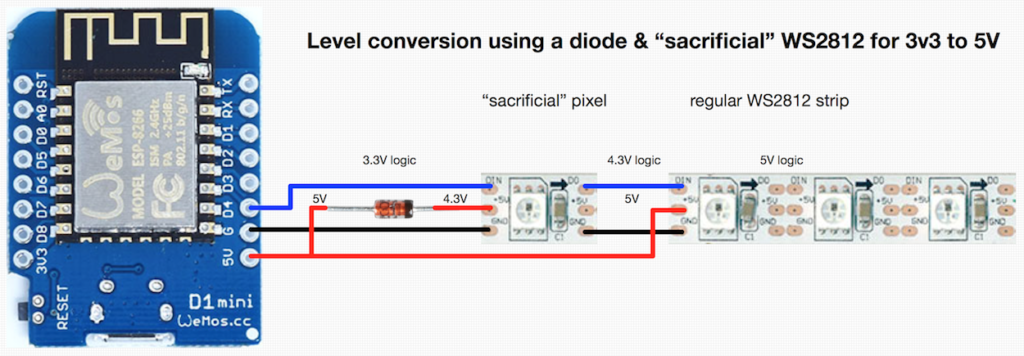
If you’re looking to control WS2812 (or Neopixel) LEDs using a microcontroller running at 3.3 volts, you might run into some issues. The datasheet tells us that a logic high input will be det…
but i don't know it feels really hacky lol
steady rose
yah. it's a hack.
fickle rose
it might work tho
steady rose
yep. general idea is it all becomes 5V after the second pixel.
sort of like using the neopixel itself as a level shifter
fickle rose
the first pixel brings the 3.3v up to ~4.3v and that becomes 5v after the second pixel
steady rose
i've gotten away with 5V power and 3.3V data without any extra hardware though. might not work for all setups. but can try.
pliant anchor
well i will give it another shot then maybe this time it will work
but running it like that means that the neopixel can't draw more than 16mA otherwise the gpio of the pi pico would suffer no?
steady rose
its the power line that needs to worry about the current draw
not the data line
which is what the gpio is connected to
steady rose
here's another guide fwiw, in case you haven't found yet:
https://learn.adafruit.com/adafruit-neopixel-uberguide/the-magic-of-neopixels
has some good basic power etc. info
pliant anchor
thanks i'll read it carefully
 brisk leaf
Howdy, I'm trying to setup a rpi pico with a separate esp32 wifi module to make api requests, and an rgb led matrix, to display some info like time/stocks/weather.
I've excluded the led matrix for now, because I want to get the data fetching working performantly. I originally was just using the basic requests lib in a forever while loop, but some api requests take multiple seconds, and I want the display to be updated multiple times a second, so I'm looking into adding asyncio to let the api requests be deferred, but I'm having trouble setting up the async stuff.
As it stands now, the loop runs once, makes one api request and prints the data, and then the second loop fails with AttributeError: 'list' object has no attribute '__await__' and googling that error didnt turn up anything
rotund pivot
@brisk leaf better question for #help-with-circuitpython ...there is no async for Requests right now
brisk leaf
Here's a pastebin of the code.py https://pastebin.com/3ZYz1CLM
The update stock info method is pretty basic, it awaits the api.get request and then unpacks some data. stock_list is an array of objects, for the specific stocks to get (ie different stocks fetch from different apis, and have different response models to handle)
Pastebin
Pastebin.com is the number one paste tool since 2002. Pastebin is a website where you can store text online for a set period of time.
rotund pivot
I mean, you can run asyncio, but Requests is still a monolith
brisk leaf
yeah I saw a closed issue in the requests github about a future async supported requests library. are you saying it's just not possible to do async http requests with circuitpython? or there might be and I should ask in that other channel?
rotund pivot
what line number is the exception?
brisk leaf
here's the full stack:
#   File "code.py", line 55, in <module>
#   File "asyncio/core.py", line 265, in run
#   File "asyncio/core.py", line 229, in run_until_complete
#   File "asyncio/core.py", line 214, in run_until_complete
#   File "code.py", line 49, in main
#   File "asyncio/funcs.py", line 113, in gather
#   File "asyncio/funcs.py", line 108, in gather
#   File "asyncio/core.py", line 214, in run_until_complete
#   File "code.py", line 39, in update_data
# AttributeError: 'list' object has no attribute '__await__'```you can do async requests, but requests isn't written for async right now, so it will still take a few seconds
brisk leaf
although I think the line numbers are off by 2 in the pastebin
rotund pivot
no await here: data = await update_stock_info(stock_list=data)
brisk leaf
so its actually line 37 in the pastebin
youre saying I should remove that await from update_stock_info? I made it (and all it's downstream method calls) be async def although the only actual async thing I'm awaiting in that stack is the await requests.get(url) call
rotund pivot
you may be doing some advanced usage I'm not savvy to, but the await asyncio.sleep() are the key ways to release and re-schedule
why don't we move this to #help-with-circuitpython ...more eyes there with circuitpython knowledge
brisk leaf
cool, will do thanks!
civic rune
What language are you using?
 placid linden
python
civic rune
Circuitpython?
placid linden
yeah
civic rune
I'd move your post to #help-with-circuitpython then. This is really more for the SBC Raspberry Pi. Delete your post here tho so folks don't get confused.
See above 🙂
Single board computer. It's a bit confusing since they called it a raspberry pi Pico. This channel was named a long time before the Pico existed
The Pico is a microcontroller, a bit of a different beast.
No stress at all
It's a very common occurrence
 compact crypt
Hey
I recently got the 400 and was just wondering what moniter to get?
I have only a laptop and right now I only have the display working on my TV
civic rune
Are you working from home wifi most of the time?
torn trench
do you want to use the pi with a display, or would you be interested in VNC / SSH access?
(from your laptop)
 tropic flame
Hi! Does anyone know of a good way to confirm that my PI 0 W is connected to the internet with Python with some sort of output? I'd like to use the output to light an LED if i'm correctly connected.
tropic flame
Just figured it out. I'm going to use the requests to try and connect to google. If it returns an error i'm not connected.
rotund pivot
@tropic flame you could also ping a server
prisma fiber
my pi went straight red light im yet to reset the card curious if theres any other issues i may be missing
 wheat escarp
hello can i install kali sticky fingers to raspberry pi 4 model b
tropic flame
Hi! I’m working on a raspberry pi project that uses a relay to control a high voltage pool pump. I’m using the guide here: https://www.instructables.com/Raspipool/?amp_page=true
While hooking up the pump it says to use contractors between the relays and pump. Is this standard practice? If so why?
wheat escarp
wheat escarp
hello can i install kali sticky fingers to raspberry pi 4 model b
or how can i add my waveshare 3.5 inch display to my raspberry pi 4 b with kali beacuse i buy it and and i think its posible beacuse i read documentation
torn trench
tropic flame
Hi! I’m working on a raspberry pi project that uses a relay to control a high vo...
I am not really an expert on this, but I think of a contactor a heavier-duty relay
 ornate verge
Hi All, I'm curious if any one has any suggestions on a C/C++ library to interact with the GPIO pins on a raspberry pi running 64bit Raspberry Pi OS. Looks like WiringPi won't be a good option moving forward https://git.drogon.net/?p=wiringPi;a=summary. Any Ideas?
torn trench
I've been using sysfs
In general, to turn on GPIO 17:
$ echo "17" > /sys/class/gpio/export
$ echo "out" > /sys/class/gpio/gpio17/direction
$ echo "1" > /sys/class/gpio/gpio17/value
(you should be able to write to these files using any programming language)
torn trench
Or read them. And you can to similar things for sensors even!
 gloomy carbon
Hey folks I was wondering what you would like to see added to the Raspberry pi pico w like any improvements etc
dusk grotto
Question how would I go about running a .deb program
twin helm
dusk grotto
Question how would I go about running a .deb program
can you be more specific? usually a .deb is a package, not simply a program
twin helm
where did you find this? and which Linux are you running?
twin helm
the https://www.raspberrypi.com/software/ page says sudo apt install rpi-imager if you're on Raspberry Pi OS. have you tried that?
dusk grotto
Due to past issues I can't do that
It says it doesn't understand install
And I can't update or upgrade
twin helm
i think the .deb on that page is for x64, not ARM, so i'm not sure you can install it on Raspberry Pi OS
torn trench
What are the issues preventing you from installing rpi-imager from apt?
torn trench
Yeah I remember this now haha
The easiest way to do this would be to backup any files you need, then use another computer to reimage the pi’s disk
twin helm
@dusk grotto from looking at your prior issues, you seem to be running an outdated release, and it might be so old that you don’t have an easy upgrade path. if you’re also getting SSL handshake errors, you’re going to have trouble accessing other web sites, because your cipher suite support is probably out of date in your OS. it might be theoretically possible for you to upgrade, but it would take a lot of specialized knowledge and locating an active legacy package archive that still hosts wheezy packages
ornate verge
torn trench
Or read them. And you can to similar things for sensors even!
Awesome, Thanks so much! I'll give it a try
turbid rivet
I’m wondering if rpi-imager works on wheezy. Will it even allow you to install it?
dusk grotto
twin helm
<@529161420609421312> from looking at your prior issues, you seem to be running ...
But the is other websites work just not the rpi.com/org website
twin helm
dusk grotto
But the is other websites work just not the rpi.com/org website
you might be in luck and be able to access the legacy wheezy archive at legacy.raspbian.org https://forums.raspberrypi.com/viewtopic.php?t=237469
 river spade
Hey, I'm looking to attempt to make a drone largely from scratch. For this I want to take some arduino or maybe raspberry pi and have that run the show. I'd want it to have capability to stream video back to me through LTE or wifi (not sure yet). I was looking for advice on what should my main microcontroller or sbc be?
I imagine processing video and streaming as well as controlling the craft on top of all that could require a fair bit of performance and I am not sure what could deliver that. Obviously I am looking to not spend any more than I have to. Thanks.
torn trench
That sounds like a really cool project. I have heard of a maybe similar project called ardupilot. I think they have moved on from just arduinos though.
My suspicion is that you'll want both MCUs and an SBC
MCUs running real time control algorithms to keep the thing in the air, and the SBC crunching video, getting high level commands and sending them to the MCUs, etc
Something like the BeagleBoard/Bone products could work really well right out of the box. The cheapest ones have PRUs (programmable realtime units) on the SOC, but the main application cores of the SOC run linux. All in one convenient pacakge. Higher capabilities of the same product family have additional Cortex-M MCUs, GPUs, DSP coprocessors
But I think a raspberry pi with a UART connect to an MCU might work just as well.
ornate verge
gloomy carbon
Hey folks I was wondering what you would like to see added to the Raspberry pi p...
I'd love to see MQTT included in the C/C++ SDK for the Pico W. From what I can tell reading the docs here https://raspberrypi.github.io/pico-sdk-doxygen/modules.html It's not included in the lwip wrapper. It would be awesome to include support for MQTT, and some examples.
dusk grotto
twin helm
you might be in luck and be able to access the legacy wheezy archive at legacy.r...
I love you so much it's working thank you so much
I would have never known where to find that kind of stuff
So thanks again
 robust copper
Anyone know how to hold down a key in VNC viewer mobile? I'm trying to hold down arrow keys but I can only tap.
fickle rose
robust copper
Anyone know how to hold down a key in VNC viewer mobile? I'm trying to hold down...
i don't think you can
paper crater
I'm confused about the flash storage on the Pi Pico. From the product page (https://www.adafruit.com/product/5526):
It does not have built-in FLASH memory. Instead, that is provided by the external QSPI flash chip. On this board, there is 2MB, which is shared between the program it's running and any file storage used by MicroPython or CircuitPython
How is that 2mb of memory different than flash memory? I am wondering if I can write to it for logs and temp files, or if thats a bad idea for some reason
Would it degrade the chip lifespan to write and rewrite the same sectors of the onboard qspi with dynamic files during execution?
umbral sable
It's flash, but it's in a separate chip accessed over SPI instead of inside the microcontroller on the direct memory bus, so it's slower to access. It'll have the same sort of 100,000-write lifetime.
paper crater
Ah so thats what "it does not have built-in flash memory" means: the RP2040 microcontroller doesn't have any built in, but the pi pico has a 2mb chip accessible via SPI
I was under the impression that QSPI was a type of flash, but I think I get it now. Thanks for the help
I want to use it to write a small audio file downloaded from the net, then read it back using the audio libraries. I think it should work speed-wise since it will be reading from the same place as a file copied from my computer
twin helm
it kind of is; QSPI is a Quad SPI interface, so you can say QSPI flash to mean a flash chip with a QSPI interface
paper crater
(I was going to try to stream the network packets into the mp3 decoder, but circuitpython doesnt want to take a BytesIO instance)
wispy hazel
What’s my best option if I need a 25ft 5v 4a power supply?
torn trench
25ft being the length of the cable between the supply and the wall outlet?
wispy hazel
From outlet to pi. It’s outdoors
steady rose
[outlet]=======(basic 25ft extension cord)=======[5V 4A supply]--(USB cable)--[RPI]
twin helm
yeah, your resistive losses will be lower if you do the long cable run at line voltage instead of 5V
wispy hazel
steady rose
[outlet]=======(basic 25ft extension cord)=======[5V 4A supply]--(USB cable)--[R...
Problem with that is it’s outdoors. The outlet is a weather proof outlet so I know the power supply portion will be fine. I don’t have enough room in the enclosure to add the power supply too so don’t really have a way of running an extension cord and keeping the power supply safe form the elements.
steady rose
do you already have the 5V 4A supply?
wispy hazel
Yes, but the cord isn’t long enough. I thought about just cutting it and splicing my own.
I guess I could do a secondary enclosure for just that
And then be able to run the extension cord.

Protects Your Electrical Devices Ideal for landscape lighting, water features, Christmas decorations, power tools and more, this outdoor connection cover keeps your outside outlets safe and dry, protecting you and your electrical devices. Resistant Against Water, Dust, and Dirt IP54 rated to prot...
Might just do that
civic rune
You can get away with quite a lot with something like that
Leave drainage space and try to add some extra cover
IP54 isn't amazing so be cautious
wispy hazel
That’s just an example I found so not set on it and will keep looking. Thanks though!
steady rose
can you link to info on the 5V 4A power supply
wispy hazel
steady rose
can you link to info on the 5V 4A power supply
Don’t have that offhand. Bought it off Amazon last year.
steady rose
is it just a basic wall wort type?
wispy hazel
 wispy hazel
Yeah I think that’s the route I’m going to go. Definitely sounds easiest. Thanks everyone!
steady rose
does it terminate in a barrel style connector?
 wispy hazel
steady rose
does it terminate in a barrel style connector?
wispy hazel
steady rose
does it terminate in a barrel style connector?
It does, it’s used with a hat that accepts barrel connectors.
steady rose
could possibly make a "custom" extension cable - barrel to micro-usb
[outlet][5V 4A supply] }}=======(custom 25ft extension cord)========{{ [RPI] }}
squiggle brackets are weather proof enclosure
wispy hazel
Yeah I think I’m just going to go with running an extension cable and using another weather proof enclosure to house the power supply and then running the cable into the enclosure with the pi. Seems the easiest option. Can mount that enclosure right under the pi enclosure.
faint sparrow
You may be undervoltage at the far end. I'd run it hot to at least 5.4 volts at the source end.
twin helm
assuming it's adjustable, which it might not be
torn trench
wispy hazel
Yeah I think I’m just going to go with running an extension cable and using anot...
so you're saying you're running the long AC cable to an enclosure right beneath the pi, then using a power supply and shorter cable for the 5v? I think that's a good idea
wispy hazel
torn trench
so you're saying you're running the long AC cable to an enclosure right beneath...
Yes, that’s the route I’m going to take.
dusk grotto
Alright quick question if I have one pi os could I install a another image and then flash that on the same device
 copper summit
Would it be possible to use a pico to do 1.3v uart without additional hardware?
umbral sable
Do you really mean 1.3V? That's an unusual voltage.
copper summit
umbral sable
Do you really mean 1.3V? That's an unusual voltage.
I do unfortunately:(
umbral sable
You'll likely need some extra hardware, then. On the Pico TX, you could get away with just a resistor divider, but the RX is likely too low-voltage for the GPIO pin threshold, so probably the best bet is a real level-shifter.