
#help-with-3dprinting
1 messages · Page 10 of 1
 faint sky
as does everyone, it goes with the territory.
 balmy pulsar
theres not enough room here for my cnc mistakes
faint sky
there's plenty of room here for a lot more action is all I'm saying. some days are pretty slow in here.
balmy pulsar
yeah
can we talk about stuff sent out to services? or just diy prints?
cause i have lots of mistakes in those too
hahah
faint sky
I don't see why not. Part of 3D printing is 3D modeling.
and we have no pinned messages or channel description saying what is or isn't allowed.

 faint sky
maybe i'll work on suggesting one. if anyone has input on a pinned message decribing what the scope of this channel should include i'm all ears.
faint sky
balmy pulsar
my 3d printed boxes for key caps turned out nice.
Those are so good it's almost like cheating. Very well done.
balmy pulsar
i think with the services it is important to not try to promote or endorse them
but yes, black SLS nylon is super nice. the right side box bottom has a little bit of oile on it which makes it look more uniformly black
faint sky
Well the live streams have been more active in promoting 3D printed services in the past couple months, it actually might not be out of scope to suggest using a service but recommending specific ones I am hesitant about... and though they are not sponsored to suggest a particular one they have promoted one in particular lately. It's not just the Ruiz Brothers but Lady Ada herself has mentioned them by name. I will likely need to pass that one by the mod staff just in case.
balmy pulsar
well, the trick is to say "hey i used x and this is what i got" which someone asks. vs "use x, they are the best" which then could come bite you if someone has a bad experience
faint sky
as with any service your mileage may vary.
balmy pulsar
yup
hmm. i guess i need to send the 3M rep a et of keycaps now...

haha
gluing delrin, nylon, tpe, etc is not an easy task
faint sky
I think the Ruiz brothers and JP used them in particular without wanting any type of preferential treatment just to see what a normal service would provide... which is really the best way to go about evaluating a service.
What is Tape Primer? Never seen that.
balmy pulsar
its mostly for automotive use. car bumpers and trims are made of PP so you prime with this, and then use a 3m double stick tape to glut the burmper on
faint sky
oh wow that's for specialized materials, you're pretty deep into something to need that.
balmy pulsar
in my case i am using their CA glue, not tape
well my keycap stems are delrin (may as well be teflon). plus i did some in SLS nylon, which is also hard to glue
very little sticks to those
faint sky
nice choice. delrin is really nice stuff. they use delrin for shift linkage bushings.
balmy pulsar
hence my fail key. the stem popped off cause the jbweld did not stick at all. not even a little
delrin for the stems is awesome. stiff, grips super strong, but does not deform even after 50 reinstals.
it just needs to adher to the wood! haha
hopefully the 3M stuff works
faint sky
jbweld, 3m primer, delrin... definitely sounds like you have an automotive background or at least familiar with bodyshop materials.
balmy pulsar
ha. i have a background in making weird things. the inlays on the keys are an epoxy putty.
faint sky
your material selection is excellent
balmy pulsar
that was part of the project really. the caps i see online have cast resin stem whihc are abysmal.
so i needed to remedy that
i printed stainless steel ones too
faint sky
like if i suggested someone to 3d print keycap stems in delrin i'd probably get some funny looks. having a mill has a ton of material advantages.
balmy pulsar
but the prints do not have a fine enough tolerance so they didnt fit
yeah, the delrin is amaing to cnc
best plastic ever. worth every penny
(over cheaper plastics)
faint sky
agreed, it's like teflon and so satisfying just to touch
balmy pulsar
1mm cutter, 5mm deep, single pass at 2m/m. zoom haha
im gonna make a video of a full production cycle once its all nailed down and working well
i have a cable issue on my X motor i need to resolve
it ate the padauk keys

i wonder if this room should cover cnc as well. its sorta overlapped
faint sky
We've discussed that before due to the 3D modeling involved. This is the only channel that's somewhat close other than perhaps robotics.
We can include it but just not in the main name because channel names need to stay short.
balmy pulsar
ah
faint sky
You have a mill so you would be a great person to ask. Are you more comfortable sharing your milling projects here or in robotics?
balmy pulsar
the machine itself might be robotics. but the projects it makes seems not for robotics.
seems to fit here more cause people talk about USING printers here more than making them
faint sky
it's kind of an in between subject since CAD is required. i mean take away the actual 3D printing aspect and 3D printers would belong in robotics.
balmy pulsar
yes
printers and cnc are basicalyl the same type of robot
robotics looks really silent too. ha
 keen raft
I think 3D printing is a very well defined field - It's about additively creating three dimensional objects, the machines and software to do this and CAD insofar as restrictions and opportunities for designing a model arise from this specific manufacturing process.
In my opinion, CNC is actually more of a "best fit" among the available channels, because it is a substractive process and therefor not actually 3D printing. Same with laser engraving and cutting.
And while you could consider a printer to be a robot, I think taking printers out of that category makes perfect sense because it is a sub-category that requires special experience.
balmy pulsar
dunno. i think it is more about building vs using. robotics is about making the robots. printers seems (maye it wasnt intended to years ago) to be about using the robots. cnc and printing in that regard are basically the same, except cnc is vastly more complex and involved with tooling, fixtures, etc
 arctic dragon
I don’t think this channel ever funneled itself into specifically 3d printing or additive manufacturing. If anything, the focus has been more along the lines of digital fabrication, of which 3d printing tends to be the most accessible.
balmy pulsar
yes, ill agree with that
keen raft
That would be something to put in the sticky 😉
keen raft
Thanks, but I've already got some chicken nuggets, which without a doubt are also in some way 3D manufactured 😉
balmy pulsar
hahahaha
 misty gyro
I finally got my Ender V2 hooked up to a computer in the Den using the USB hookup. I've done a couple of print jobs, it's far easier than running the microSD card back and forth. Sneaker-net is just so "1990s". 🙂
However I've noticed something I wasn't expecting: after a print job I turn the power switch on the back of the printer off, yet the display stays on. Is this normal? I assume it's pulling power via the USB connection.
If it makes a difference, I'm using Pronterface to send the job to the Ender..
keen raft
misty gyro
I finally got my Ender V2 hooked up to a computer in the Den using the USB hook...
You can probably get rid of that power draw by disconnecting the USB +5V line. There's a common, reversible mod where you put tape on the corresponding pad inside the connector. Do keep the data lines and GND connected though.
Not sure though if this power draw would actually cause any further problems in your scenario. I do know that it can cause issues when you connect a Raspberry Pi with Klipper, so you will probably find explanations of that tape mod in connection with one of those.
 iron remnant
I have issues with the Ender control board's USB port.
It's not supposed to backfeed power to the connected device and presumably it might damage the connected computer (although it looks like most USB ports are well protected enough)
So, yeah, there's the tape mod, you can get a USB breakout connector and add wires, or there's this: https://www.th3dstudio.com/product/ezblocker-usb-power-blocking-cable/
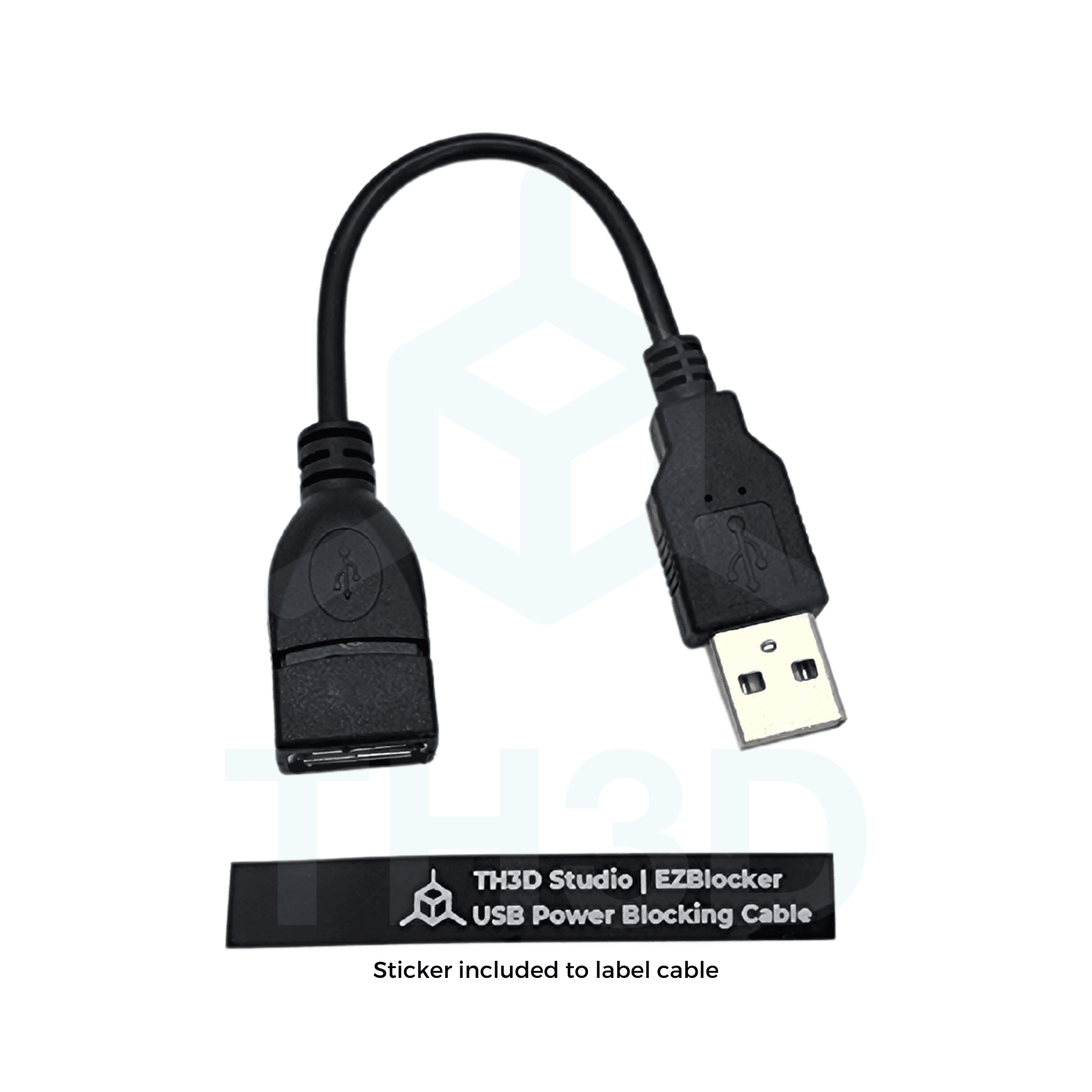
Prevents the 5V from your Pi or EZPi from keeping the printer LCD on when AC power is off. Works GREAT with Creality and BTT boards that do not have the 5V rail isolated properly. Includes label to apply to the cable end so you can differentiate it from other USB cables in your collection
 random urchin
Update on the keyboard concept... Got the mechanisms working fairly well. Now doing a 4-key test using parameterized input to generate the model. Image here shows the 4 layers (keys,cover,springs,base) in exploded view. The base doubles as a substrate for the crosspoint switch mechanisms.
 random urchin
Not too shabby...
 balmy pulsar
O_o
so am i right in that you press a button and 2 wires touch and that is sensed by the mcu??
i wonder if youll have to constantly clean the wires with contact cleaner
random urchin
Yep, the "switches" look like this. And, no, they're definitely not going to hold up as well as Cherry keyswitches, even if I used gold-plated wires. 😄
 balmy pulsar
but i guess thet trade is they would be really easy to fix, rebend, clean, when they do start having bad contact
faint sky
Excellent precision prints, beautifully done.
random urchin
balmy pulsar
but i guess thet trade is they would be really easy to fix, rebend, clean, when ...
Yeah, that'd be the big advantage. You can completely take it apart and replace any piece with stuff you have lying around or at least can print.
balmy pulsar
when i got old cnc machines, one of the biggest issues is the keypads. all worn out matrix membranes usually, no way of fixing them. something like this could be printed to drop in
random urchin
The precursor to the keyboard design is this keypad. Not as configurable, but could definitely work as a replacement for a matrix keypad. https://www.printables.com/model/527993-another-parametric-matrix-keypad

Printables.com
A parametric matrix keypad entirely 3D-printed except for the wires | Download free 3D printable STL models
random urchin
Technically possible...

 arctic dragon
I imagine ghosting is still a problem though
random urchin
Yeah. You can mitigate that a bit by keeping the modifier keys (shift, ctrl, alt,...) on separate lines from the regular keys. But, if you really wanted to use this code to generate a practical keyboard, you'd probably skip printing the bottom layer, and create a PCB with tactile switches, diodes and maybe even a microcontroller to decode it all.
 coarse coral
from watching my recent print which i tried to run at 100ms when 50ms is recommended it looks like the problem is the plastic just couldn't get through the nozzle consistently if at all at the right speed and led to breaks in the layering (layer 1 basically), you could see it dropping blots of plastic rather than a steady bead. dropped the speed to 60ms and no such trouble. so maybe i need a better nozzle or maybe further up better parts. that said printing at 50/60 is fine 🙂
balmy pulsar
standard printers are limited to 50-70mm/s. that is the practical limit for pla through the common hot ends. the new printers that go much faster have all sorts of changes to allow that starting with hot ends that are many times more powerful and special nozzle internal geometry.
coarse coral
understood
coarse coral
Anyone have experience with hardened steel nozzles? Any quality benefits to prints out the gate or is it just longevity?
iron remnant
Print quality is actuallly a bit worse (outside of I guess the latest tungsten carbide fancy nozzles) because the heat transer is better for brass.
OTOH, carbon fiber tends to make for really nice print quality in many cases.
keen raft
coarse coral
Anyone have experience with hardened steel nozzles? Any quality benefits to prin...
They are more expensive, harder to temperature-tune and unless you print abrasive stuff, you don't really get anything in return at all.
balmy pulsar
steel ones clog more. they are strictly for use with abrasive filaments like cf/gf as noted.
err, what they said
ha
ha
matte filaments can be abrasive too
as they are basically filled with sand or talc
 elder oxide
Matte filament are great.. until you switch to another kind and your nozzle decides it hold onto every mm of material
balmy pulsar
ha
i had a lot of partial and intermittend clogs with amtte. but the results are soo nice
keen raft
@coarse coral: And in the context of your previous question: There are several possible reasons why your printer can't reach 100 mm/s, one of them being insufficient heating power. If that's the case, a steel nozzle might make that issue worse, because the usual way to compensate for the lack of heat transfer in steel is to bump up the nozzle temperature. So if you're already at the limit there, then you'd have to print even slower.
The problem with this is that the slower you print, the more time the filament spends inside the heat block and if you have to bump up the temperature there to get the nozzle tip warm enough, you might overheat it. This can lead to clogs, for example.
Not all matte filaments are abrasive, but at least some are. And, surprise: Most white filaments are as well. The white pigment is almost always titanium dioxide, which is very hard. Definitely harder than brass.
coarse coral
@keen raft yes. i have a thermistor that's not fitted right, i have temp issues occassionally as is, in combination with creality hot end screws coming loose. 1/20 prints abort because temperature errors in software, normally a big drop.
i did a temp towers as per @bleak flare and @faint sky postings and 210 looked best for my brand of pla...... sadly switching to a different colour may have caused that decision to change again, similar for retraction test i'm getting much more stringing now, but the common denominator change was colour / style of filament, same brand means nothing here (so my test is trash).... knowing that mattes have abrasives now so completely different from non matte pla. big eryone fan at the moment, the cheaper pla break too easy. e.g a small keychain ornament with cheap vs branded pla made a difference with me. i'm sure brands are still figuring out stress tests tho but on this occasion that was the case, my entry to mid branded pla is stronger (altho not tension tested (i'm not sophisticated enough for those tests today))
good knowledge.
i've recently ordered a new printer so waiting for those new feels, i went fdm altho sla is desirable 2 things put me off. not having the ability to multicolour print..... and the mess.
i ended up buying .3mm (brass) nozzles. i just like the feel of .3mm even tho it takes longer it's the sweet spot for me. previous was .6mm protypes but now it's .4 or .5 for that, on these entry level fdm printers.
.... back to the movie 🙂
faint sky
If you print very finely detailed prints you can go smaller nozzle size but you'll take a big speed hit doing so. The .6 is good for really large parts and you can go faster with larger nozzles if your nozzle temp is capable of reaching higher temps and I know yours is. Every nozzle size requires a completely different profile.
With PLA and Marlin I can comfortably go about 50mms. With PETG about 25-30mms. The higher temperature stuff requires slower speeds otherwise you'll get tons of stringing. I haven't run Klipper yet but I've seen my same S1 pro on Klipper do 100mms. There are speed gains to be had with input shaping and pressure advance.
I haven't used a smaller nozzle but if you combine a smaller nozzle with higher temp filament like PETG I imagine I'd be printing everything at 15-20mms and only on small parts. That combination would be for high detail strong but small prints.
At .3 with PLA I imagine I'd go about 30-40mms max and would likely use .12 or .16 layer heights. Bet I could make some really detailed prints.
If you go fast with that setup you're probably looking at a ton of stringing and potential clogs.
"i've recently ordered a new printer" ohhh a 2nd printer or did something happen with your current one?
I want to say it's a CR6 or CR10 can't remember.
also for abrasive filaments i've heard the glow in the dark filaments can be quite abrasive. I've never tried them.
balmy pulsar
i use 0.3mm a lot for nylon gears and such. it does clog a lot more often.
one thing i did notice though... i got the random assortment of nozzles and took very close up pictures... none of them were the size they claimed. 0.2 was bigger than 0.4, 0.8 was smaller than 0.6, etc.
your regular cheap nozzles are NOT precise at all
keen raft
balmy pulsar
one thing i did notice though... i got the random assortment of nozzles and took...
What kind? Chinesium?
balmy pulsar
yeah amazon
keen raft
Kinda explains itself then 😛
balmy pulsar
i do have some higher end ones, and even they are poor
faint sky
yeah they're not exactly known for precision, go with nozzles from reputable manufacturers for nozzles.
balmy pulsar
they use the tip of a drill to make the hole (as opposed to the round diam).
my ninjaflex extruder nozzles were just as bad
i have the e3d steel one, but never looked close at it
faint sky
I've seen amazon nozzles where the nozzle isn't even straight through the middle and I'm just like yeah I'll stick with creality nozzles for the time being.
I did cheap out on the initial purchase of the printer and didn't get the variety pack. You'll end up needing it someday. I put hundreds of hours on the original nozzle if not a thousand by now.
balmy pulsar
i bet the original is more like a 0.6 now 🙂
faint sky
I haven't taken it apart to compare yet, possible. I haven't run anything other than PLA, PLA+, and PETG so far.
My PETG I had dialed in so perfectly when I did the full build mailbox... then updated Cura and every profile got hosed. It's completely hosed everything and I had to start from scratch. I was very very upset.
balmy pulsar
that is sorta my point, the nozzle diam kinda doesnt dictate as much as people think. you can print with 0.4mm nozzle settings with a 0.6 nozzle and it will be more or less identical
obvious 0.2 to 0.8 is a real difference. but 0.3 to 0.4 is basically marign of error
faint sky
true, maybe i'll just try a .8 instead
balmy pulsar
0.8 is nice. (if the hot end and part cooling can keep up)
faint sky
the mailbox took about 130 hours of deep prayer and an entire spool to finish. with a larger nozzle hoping to cut down full build times with bigger lines.
balmy pulsar
haha
large nozzle is great for fast structural things.
i was trying to use it to make rought ABS guitar body tops, that would then get cnc'd. didnt really work as the print was full of gaps.
faint sky
.4 nozzle with .12 layer height at 20mms. i watched it like a hawk the entire time which was anxiety inducing.
 balmy pulsar
0.12? ha
faint sky
yes with clear PETG
keen raft
balmy pulsar
obvious 0.2 to 0.8 is a real difference. but 0.3 to 0.4 is basically marign of e...
A tolerance of 0.1mm would be horrendous.
Just to put that into some context: Brozzl nozzles have a diameter tolerance of +/- 0.01 mm, for example.
balmy pulsar
keen raft
A tolerance of 0.1mm would be horrendous.
Just to put that into some context: Br...
not the ones ive seen. they are +- 0.25mm or worse
keen raft
Are you sure you're really buying (and receiving) quality products?
balmy pulsar
as mentioend, some ar bargain specials, some are expensive. all the same.
faint sky
shortly after i printed that i updated cura and could barely even print a temp tower or calibration cube without serious issues.
balmy pulsar
holding a 0.01mm tolerance on a drilled hole is not easy, doing it with the drill tip is near impossible. anyone claiming that as a spec i question.

0.25mm drill bits
faint sky
yeah that would probably be difficult even for a professional machinist, there is a margin of error but it has to at least be some what straight and not have the hole obviously not straight.
but the majority of nozzles are made in china so don't expect perfection from mass produced chinese stuff. they're not exactly known for their quality control.
balmy pulsar
if i drill a 0.25mm hole with that bit, my machine would probably keep it within +-0.1mm. and my machine is going to be better than most.
keen raft
balmy pulsar
holding a 0.01mm tolerance on a drilled hole is not easy, doing it with the dril...
I know, and that precision is certainly reflected in the price. A 75 bag of Chinese ones costs 12€ on Amazon, one of theirs costs 10€.
balmy pulsar
10 euros is a super cheap nozzle, i would charge more than 10 euros to drill one hole that size.
anyhow, you get the point. im sure it might be better than the amazon nozzles, but i would expect their tolerance to be a bit madeupium
faint sky
the problem with nozzle manufacturing is there are so many different variations even among same printer families. if you can make your own better than the manufacturer can I'd go for it. not everyone has that capability, dare i say few people have that capability.
few hobbyists anyway
balmy pulsar
sure. the root of what im saying though is it kinda is irrelevant. doesnt matter. 0.3, 0.4, 0.5... kinda all close enough to the same
faint sky
yeah, i would have no problem throwing on a .3 and printing as if it was a .4 with slight setting tweaks.
balmy pulsar
yes, if any tweaks were even needed at all
youd get a bit more backpressure on the extruder
faint sky
I was planning on trying the .6 next but might as well just go .8 now. This is good info thank you.
will probably feel like I'm laying down toothpaste sized lines in comparison. looking forward to it.
balmy pulsar
yeah
things in vase mode work really well
and you get a kinda ribbed texturing
looks nice
faint sky
ah that's a good point. i've never printed in vase mode, makes a lot of sense as a way to instantly make thicker walls in one line.
balmy pulsar
i cant find the pics now. i made an enclsure cover thing for the motor/drive on my cnc.
it was petg and was in the end too brittle and cracked. ill eventually do a new cover set in abs
id do nylon but large things tend to fail. this was 400x150x250mm
faint sky
PETG is definitely more structurally rigid but brittle yes. PLA is the best all around durable filament from watching makers muse and cnc kitchen testing.
 vivid helm
PLA is very brittle.
balmy pulsar
pla on the cnc would be too susceptible to the solvents and heat
vivid helm
PETG tends to bend long before it breaks.
balmy pulsar
in relative terms the are both brittle. strong, but cant take an impact
faint sky
however if you print PETG in .12 layer height and really thick infill like 65+% you can make some seriously strong parts. PETG's is best if printed really thick.
balmy pulsar
and poor layer adhesion. abs is much better if its something that will be smacked around
nylong you can take a hammer to.
sls nylon is more brittle for some reason
vivid helm

CNC Kitchen
Even though you can nowadays get almost any thermoplastic as a 3D printing filament PLA, PETG and ABS are still the most common ones used. PLA is the most printed material due to being very easy to print without any significant smell but with the downside of being a bit brittle and thermally not ver
faint sky
In CNC kitchens videos I think it was the opposite. PETG will break while PLA will bend?
vivid helm
balmy pulsar
and poor layer adhesion. abs is much better if its something that will be smacke...
PETG has very strong layer adhesion. Much stronger than ASA in my experience.
vivid helm
faint sky
In CNC kitchens videos I think it was the opposite. PETG will break while PLA wi...
Nope.
balmy pulsar
in strain, or impact. they are very different
faint sky
I'm specifically talking about the lateral weight test.
balmy pulsar
vivid helm
PETG has very strong layer adhesion. Much stronger than ASA in my experience.
im talking about abs though 🙂
faint sky
not lateral, vertical
balmy pulsar
asa is not abs
neither is that abs plus nonsense
grr
i got 4 rolls of that terrible stuff
vivid helm
balmy pulsar
asa is not abs
My understanding is that ASA and ABS are very, very similar.
balmy pulsar
they are similar in the way steel is similar to pig iron 🙂
vivid helm
balmy pulsar
neither is that abs plus nonsense
And yeah "plus" is marketing for "we added impurities and marked up the price"
vivid helm
balmy pulsar
they are similar in the way steel is similar to pig iron 🙂
Data?
balmy pulsar
well, they are trying to make it easier to print. but they make a worthless material in the end
faint sky

Which 3D printing material is best for your application? I tested PRUSAMENT PLA, PETG and ASA to see how the perform in the categories: Price, Printability, Printing Quality, Static Strength and Layer Adhesion, Ductility, Stiffness, Impact Resistance and Thermal Resistance.
Let's find out how the materials perform and when you should use which!
...
vivid helm
See link above
balmy pulsar
thats a strain test though. not relevant
vivid helm
He performs multiple tests
balmy pulsar
yes, but no abs
vivid helm
It is worth noting that layer adhesion issues with ABS and ASA likely have more to do with the fact that most people don't print them in a 90°C chamber than it does any intrinsic material properties.
balmy pulsar
not in impact, they werte basically the same for that
faint sky
I like that the tests were all done for different scenarios. If you're going to design something to hang then PETG is a better choice.
balmy pulsar
vivid helm
It is worth noting that layer adhesion issues with ABS and ASA likely have more ...
yes. but overally abs is better. also 1/2 the price. $12us a roll i paied
vivid helm
I've never seen it that cheap.
balmy pulsar
i dont think its that cheap anymore. let me look
faint sky
but ABA/ASA require fume extractors. the most I can do comfortably in my room without coughing up a lung is PETG.
vivid helm
And again "better" is always a big if. You probably don't want to put ABS outdoors as it will degrade.
faint sky
and even PETG does produce some plastic hair like fibers that float in the air.
balmy pulsar
vivid helm
And again "better" is always a big if. You probably don't want to put ABS outdoo...
im not putting it outdoors. im specifically talking about a part on my cnc
vivid helm
balmy pulsar
nah, the fumes form abs are niceee.
This explains a lot 
faint sky
I print in orange PETG mostly and found orange dust and hairs everywhere in my room. :/
vivid helm
faint sky
and even PETG does produce some plastic hair like fibers that float in the air.
Yeah and so do the carbon pellets in the filters.
balmy pulsar
all the plastics are bad to some degree.
faint sky
the high temp prints naturally create a kind of thermal air current that whisks away fine particles into the air.
vivid helm
faint sky
I print in orange PETG mostly and found orange dust and hairs everywhere in my r...
As a general rule I strongly recommend against keeping your printer in the bedroom.
balmy pulsar
nylon smells like licorice. and the teflon tube starts burning
vivid helm
balmy pulsar
nylon smells like licorice. and the teflon tube starts burning
Ok that actually is toxic.
faint sky
Due to environmental conditions in Florida i don't really have much choice. It's the room with the lowest humidity.
vivid helm
It's just as toxic to humans, but we are bigger than most pets.
balmy pulsar
sorta yeah, but it does something different to birds. they die instantly.
vivid helm
balmy pulsar
nylon smells like licorice. and the teflon tube starts burning
Also why are you not using an all metal hotend? You really shouldn't even be running whatever you have now over 240C.
faint sky
and the fight against humidity in Florida is a losing battle if your house doesn't have good insulation.
vivid helm
balmy pulsar
all metal hot end clogs
That likely just because you have insufficient hotend cooling.
Or bought a crappy hotend (of which there are a lot)
balmy pulsar
.... no
faint sky
I've had a clog on my direct drive hot end because I had over extrusion issues after updating cura and layer lines were too close which built up backpressure.
balmy pulsar
anyhow. why is is ever "accurate" cherry key cap cad model or drawing is completely different from each other?
faint sky
tolerances
balmy pulsar
a lack of understanding of the word accurate
faint sky
i design my models with tolerances built in specific to my printers tolerances.
vivid helm
There are a lot of things that can clog a hotend. And there is an equally large number of companies that are incompetent at hotend design.
balmy pulsar
i ordered a set of supposedly decent ones as a reference, but they wotn be here for a week
vivid helm
Keep in mind that both ABS and ASA do shrink when they cool.
faint sky
the ruiz brothers mostly build in .02 tolerances which my printer cannot do so i have to modify some parts of the model to be a little looser and they fit right up.
vivid helm
So if you are using ABS and the model wasn't designed for it you'll have to scale it up by 0.5 or 1%.
balmy pulsar
faint sky
i design my models with tolerances built in specific to my printers tolerances.
no, i mean like not even vaguely similar. 2-3mm height differences, angles way out to lunch, stems all wrong
faint sky
hmm dunno, shouldn't be off by that much. maybe a scaling issue?
balmy pulsar
nah, these people just made bad models. no big deal, but there basicalyl is no actual good one out there.
i wonder if i can probe/scan them hmm
faint sky
different materials could account for it yes. if the model was designed for PETG and you print in PLA or whatever.
vivid helm
faint sky
different materials could account for it yes. if the model was designed for PET...
Not by 2-3mm. I'm suspecting it's a printer issue.
balmy pulsar
O_o these are cad models, nothing related to printing haha, sorry. just an annoying sidetrack
vivid helm
ah
faint sky
balmy pulsar
nah, these people just made bad models. no big deal, but there basicalyl is no a...
or that, especially on thingiverse were people steal models and upload them as their own, perhaps with tweaks that won't work.
balmy pulsar
im just saying that multiple people claim to have precise accurate models, and none of those models are even remotely similar to each other. and none of them are similar to the real thing either
faint sky
if you could provide examples maybe we could print some and figure it out together.
balmy pulsar
nothing to do with printing
vivid helm
I've said it before and I'll say it again: the desktop 3d printing community and industry have a severe misunderstanding of what actually constitutes 'open source'.
balmy pulsar
vivid helm
I've said it before and I'll say it again: the desktop 3d printing community and...
thats a whole separete topic
vivid helm
I was replying to Devon's statement.
balmy pulsar
i know
faint sky
maybe i should have specified they're stealing open source files and selling them for profit without attribution
thingiverse has a big issue with that, and why most people switched to printables.
vivid helm
Yeah that happens too. Or they provide attribution only after you buy it, or the attribution is hidden/obscured.
balmy pulsar
nothing being sold here in this case. just bothersome. i am super fussy about details (even on cgi non real life models) and i wish people put more effort in, haha
vivid helm
This is particularly rampant on sites such as etsy.
faint sky
and many other 3rd party 3d model sites.
balmy pulsar
my laser scanner doesnt do things this small, so that wont help me
turbosquid was bad for people selling models that werent theirs
vivid helm
faint sky
and many other 3rd party 3d model sites.
Yes, and then there are sites that have limited license options (looking at you, Prusa).
faint sky
they are limited but also moderated and cross referenced for existing models. you do have to prove in some ways you're the original author or authorized to remix a model.
at least they're trying in some capacity
balmy pulsar
i wonder if anyone has tried to resell my guitar models haha.
faint sky
they usually target models with a high download rate, popular models.
vivid helm
I would love to have a community-run and curated/moderated 3d model site with no monetization built in, but unfortunately the requirements for 3d model sites are... considerable.
faint sky
my models with only like 5 downloads i'm not worried about it.
That would be nice and that idea comes up a lot but would eventually fall prey to scammers and it's just a headache. At least Prusa has some skin in the game.
balmy pulsar
the most hilarious thing i have on etsy is the number of people that buy the cad file and ask why i didn't mail them a real guitar (for $15)
vivid helm
Aside from needing to store and serve people's 500MB ||[REDACTED]|| models, you need to have a working search, model previews, etc. All of this is nontrivial.
faint sky
I don't even own a prusa but I like printables. Because of the way they run things it does make me want to get a Prusa someday they're just sooo expensive.
and the server cost would eventually become substantial.
vivid helm
faint sky
and the server cost would eventually become substantial.
You would pretty much have to run it through Cloudflare or S3.
faint sky
it's 1am, going to sleep. everyone have a good night.
vivid helm
faint sky
I don't even own a prusa but I like printables. Because of the way they run thi...
I'm becoming less and less satisfied with the way Prusa is doing things. Particularly when it comes to marketing their products as 'open source'. I'm also not a fan of the monetization creeping its way into printables.
keen raft
It's an unfortunate truth that open source is difficult to do if you actually want to live off it. I'm always amazed that Adafruit manages to do it. To make something open source, you actually have to make something first, but once it's open source, you invite everybody else to just copy it and undercut you in price. People don't care about how good a product is, where it's made or by whom. All they care about is saving another cent.
balmy pulsar
open hardware is a little easier since someone still has to make it. digital files/code/3d etc just goes out in to the ether
keen raft
Yeah, and that someone then seamlessly sells it on Amazon and ships it from China.
If you look at this as a customer and the only thing you value is price, then you will definitely never buy anything made in the EU or in the US.
balmy pulsar
well, yes and no. some american companies price themselves in such a way that it is very easy to copy and make the same thing for half the price. with something like a feather for example, you cant make it for that much less, and you cant replicate the support structure, ease of buying etc. so they can retain buyers even while every random chinese company can duplicate the product
NSK for example. they price their ball screws that drive my cnc machine around at $1500. but i can buy THEIR ballscrews from japan for $500. and i can buy THEIR ballscrews from chinese suppliers for $149. and we havent even gotten to knock offs yet.
my keyboard caps are the same. theres nothing anyone cant copy, but the amount of work and equipment doesnt change. no one will under cut me by half cause they would lose money. ha

bah
thats as close as i can get until i receive a set to emasure
vivid helm
keen raft
It's an unfortunate truth that open source is difficult to do if you actually wa...
People support Adafruit because of the support Adafruit provides. This used to be the case for Prusa as well, but not so much anymore.
 shy kelp
Wait, does adafruit make everything from sales of objects?
shy kelp
keen raft
If you look at this as a customer and the only thing you value is price, then yo...
You don't even if you think that you buy from ue
Most products here at least, are rebranded junk
Yet to justificate the pricing of the middleman, they talk about no sense such as "quality"
balmy pulsar
o_O
vivid helm
Not sure. They do have a couple of subscription services, but I suspect most of it is product sales.
balmy pulsar
a feather isnt rebranded junk
shy kelp
balmy pulsar
a feather isnt rebranded junk
I was talking about the market in ue
balmy pulsar
oh, sorry
vivid helm
At one point (not sure if they still do) Adafruit was also one of the official manufacturers of Arduino boards.
shy kelp
Also they're a pain to deal with, nobody states the pricing, because they need to quote, aka see how much money can they get out of you
Why do I need to deal with all of this?
balmy pulsar
ha. the cnc industry is like that. i walk around the machine show and ask, "oh, how much is this" and i get "give us your contact info"
no.. tell me the &^&^$%& price
keen raft
shy kelp
You don't even if you think that you buy from ue
Most products here at least, ar...
I'd say if the place of manufacture is truly important, you'll spend as much time looking into that as you will spend comparing prices. As I said: It depends on what the customer truly values.
Also, if you look at the price difference between genuine and copied Arduinos, I think you'll understand how much cheaper something like a Feather would get once you strip away the support, PCB colour, silkscreen, manufacture in the US and open source idealism.
vivid helm
balmy pulsar
no.. tell me the &^&^$%& price
The reality is that for something like that it isn't a fixed price. There's often some degree of customization for each deployment, and they also take into account installation costs.
balmy pulsar
i dont usually care about where it was made. i try to avoid usa made stuff if possible.
vivid helm
Things like that can also have significant export restrictions, so there's the legal end to it as well.
Long story short, there are reasons that these companies have quote systems, and it's not just to hide the prices.
balmy pulsar
vivid helm
The reality is that for something like that it isn't a fixed price. There's ofte...
except that they dont. the price is fixed. they just dont want to tell it to you. as if its some trade secret.
shy kelp
keen raft
Also, if you look at the price difference between genuine and copied Arduinos, I...
Well it depends from the market, china is known to manipulate their pricing... Also online forms are available, although with both paid and unpaid support, I find that it stops if you don't ask generic questions...
vivid helm
There is a bit of that as well.
balmy pulsar
vivid helm
There is a bit of that as well.
all of that. ha. only that. a few are smartening up but not many
vivid helm
Don't get me wrong, quote systems are obnoxious. But at the same time I understand why they do it.
And selling to individuals can result in a significant loss for some companies/products.
balmy pulsar
2 reasons they do it. one is to hide the price form competitors. 2 is to to force you into communication so they can harass you about buying things.
i phoned one guy and was like "how much is this machine" and he responsed "well we dont know if thats the best machine for you". i said ok, ill buy from the other rep.
sigh
ha
shy kelp
3 you may accept their offering, if you're short on time, since everyone does that
shy kelp
balmy pulsar
i phoned one guy and was like "how much is this machine" and he responsed "well ...
Or they ask you to come at their shop to "see you" or "talking in person is better"
Yeah good luck
State your price or die
balmy pulsar
a lot of times when you need to spec a machine for a process you are not buying, you are just filling in numbers. how can i know if the project is even viable if noone will tell me the prices of what they sell.
keen raft
shy kelp
Or they ask you to come at their shop to "see you" or "talking in person is bett...
So long as they don't walk into your shop... 😉
keen raft
shy kelp
State your price or die
Well let's not get ahead of ourselves here.
balmy pulsar
ha
vivid helm
This is why big companies have entire departments dedicated to procurement.
vivid helm
keen raft
Well let's not get ahead of ourselves here.
Attack first, ask questions later. Good idea.
vivid helm
balmy pulsar
haha
Yes but at least I don't have to deal with it.
coarse coral
faint sky
At .3 with PLA I imagine I'd go about 30-40mms max and would likely use .12 or ....
I've done .1mm at 50mms the finish wasn't great so you are accurate that reduced speed / smaller nozzle is the right thing. it's the cr6se yeh, felt really good about it and still do but the assembly aint great, i expect similar with ender v2 so will take a look at the bothersome areas, specifically the loader and the hot end, it's so cheap on the cr6 and basically painted red to disguise the wea screw assembly
coarse coral
balmy pulsar
i use 0.3mm a lot for nylon gears and such. it does clog a lot more often.
i just buy luter, they are reasonably well recommended and good price online
coarse coral
faint sky
.4 nozzle with .12 layer height at 20mms. i watched it like a hawk the entire t...
beautiful and worth the effort. truly beautiful
coarse coral
New printer. Stock fans are so much noisier than cr6se but it is silent steppers
 keen raft
Does the cable on the left need to be untied and tucked away?
balmy pulsar
seems like it needs to be untied for the z to go up
coarse coral
keen raft
Does the cable on the left need to be untied and tucked away?
you know i was thinking that, it's a crazy design. it pretrudes exactly where you see it. need to see what the solution is, i haven't had chance to see how it moves yet
vivid helm
Creality is... not known for good printer designs.
coarse coral
it's the quick assembly nature, ideally that cable would be run inside one of those posts but that's too much cost. it's a 300mm x 300mm x 320mm build volume and yet only 300 ish
but it's crazy the cable pretrudes on the front, when the z motor is on the back side. madness
furthering this notion when the spool holder is backside also
vivid helm
coarse coral
it's the quick assembly nature, ideally that cable would be run inside one of th...
That's massive for a bedflinger.
faint sky
It's pretty big. Massive would be the CR10 Max at 450mm. You could probably print a life size mannequin on the CR10 Max, sections at a time.
coarse coral
yeh it's pretty big, i can't imagine a need to go bigger but i'm sure the time will come 🤣
it does have a nice aesthetic and can only use pla since i'm in a small room and the fumes from others i don't really want. today i had bad sushi and that was enough
coarse coral
Very pleased with this calibration test
 vivid helm
faint sky
It's pretty big. Massive would be the CR10 Max at 450mm. You could probably pri...
vivid helm
faint sky
It's pretty big. Massive would be the CR10 Max at 450mm. You could probably pri...
And how long would that take 4 or 5 months per section?
coarse coral
I swear creality are losing some screws on new models
Just look at this for progress on changing nozzle
Note how to replace your heat shield at the end
Mine already broke

Accessories purchase, Please contact our official email or website, remember to attach your machine type and accessories pictures
Official email:info@creality.com
Official website: https://www.creality.com
Any technical support in need, Please contact our official service email,remember to attach your printer model、complete orderscreenshot、purch...
They actually win the prize here for most annoying
coarse coral
Creality stock nozzle replaced. Block on first layer
keen raft
I think the appeal of a large print bed isn't necessarily to print huge, solid cubes. Current printers can print things about the size of a rat, but the range that is handy for a human extends all the way to wolf size. Cat size would probably be a reasonable size for home printers.
coarse coral
300mm is also good for flat box pc cases
There's a business for someone right there, custom pc cases
I lost my wallet tonight
😢
 winged helm
I've been emailed a leaked Pic of the Prusa Mk 5. Super secret. Don't tell.
 winged helm
Don't tell any Austrian physicists!
keen raft
coarse coral
There's a business for someone right there, custom pc cases
Already working on that 😉
https://www.printables.com/model/364429-large-pc-enclosure-for-radiators-wip
(Although I'll probably put in some aluminium profiles instead of printing the whole thing, that'll be much easier)

Printables.com
It's like space: Big, cold and mostly empty. Comes in black if you want it to! | Download free 3D printable STL models
 gloomy anchor
print is fading in some areas. Not sure why. Its autolevelled and the bed had been cleaned with acetone
 gloomy anchor
gods laser
keen raft
gloomy anchor
print is fading in some areas. Not sure why. Its autolevelled and the bed had be...
What do you mean? This?

If so: The nozzle is too close to the bed there
balmy pulsar
basically, bet not quite flat, raise that zone if possible, or if not, just add another 0.05mm-0.1mm in overall heigh.
other areas behhind that one look to be scraing along as well
faint sky
coarse coral
<@126221640559362048> got any glue?
you know how i feel about glue
or anything touching the build surface other than filament... including my own fingers.

 vocal flax
Your approach feels like overreaction to me but never used pei either.
elder oxide
Sometimes glue/adhesive is necessary
Also, some materials will destroy things like glass beds so you need to use things like Kapton tape
balmy pulsar
for pla generally you should need nothing. for abs, nylon and some other materials an adhesive is mandatory
arctic dragon
Once you use one release agent, there really is no going back. Textured PEI in particular is nearly impossible to clean without placing significant wear on it.
balmy pulsar
release agent is the opposite of what you want
pva glue comes off with water. abs acetone slurry comes off with acetone. should be no wear. you arent using abrasives.
if you are really that fussy just get different pei sheets for each material
arctic dragon
I've been pretty happy printing without adhesive or release agent on my "carborundum" glass plate. PLA and PETG work great at the right temperatures.
faint sky
PEI sheet is sand blasted with tons of little dimples which actually contract when heated (each dimple expands) and retracts when cooled (each dimple retracts).
This is a dramatization of how a PEI sandblasted sheet works when heated vs cooled

This is on an almost microscopic level.
You get anything in those little sandblasted dimple pockets and you almost forever ruin the potential effectiveness of your PEI sheet and that includes hand oils from simply touching the surface.
It's not an over reaction. I've seen the results myself from touching my build plate and having the part not stick exactly where my fingers touched it.
When you're trying to dial in your settings and z-offset down to a hundredth or thousandth of a millimeter these things matter.
dish soap and a sponge will clean hand oils no problem. it will not clean adhesives unless they're solvent soluble. i'd rather not go the route of needing solvents and scrubbing the heck out of the build surface, therefore, me no touchy.
watching people pick up their build surface and bend it to remove a part makes me die a little inside.
vivid helm
I do that, but I also clean it every time.
elder oxide
I use 99.99% ipa on my build plate
And a nice shop paper towel
Lower purity ipa would work too
coarse coral
Yeh glue is a quick fix. I like it. Saves me messing around with too many tweaks and a layer of glue will be above any oils and things it's also easy washable when it builds up but leaves good margin of error. On glass some times though it's hard to remove, my new trick is to put the plate in the fridge for 20 mins if it's particularly adhered
Also helps cure the plastic 😎
If my bed is slightly less trammed in one area I can just add an extra layer of glue instead of futzing around with the screw posts on the hot plate
However that said, my phylosophy is re calibrate every 3 months. A good few hours of dialling it all in again
elder oxide
I print on the smooth side of my bed
coarse coral
And the glue when it's dialled is fine
elder oxide
When it’s cool it releases really easy
coarse coral
I'm using both sides of the glass plate, I like both finishes and can choose for which. Little box lids are nice on the smooth surface because it finishes so shiny
The textured side adds a wee bit of texture, if I want a glassy finish I'll take the extra steps to have no glue. It's nice to have that choice
balmy pulsar
the grippy side is fore pla only really. works really well at "auto releasing" as is cools due to the different thermal expansions. but using petg on it can be a disaster, ive seen lots of pics of the petg pulling out glass chunks
faint sky
The major benefit to running a smooth sheet or glass is you get the option of making 1 face super smooth. It can turn out looking like an injection molded face. As stej has shown it's great for flat faces of handheld gaming controllers for example. It's another method or technique in the toolbox of tricks to use.
balmy pulsar
i almost always use a raft, so thats kinda a non thing for me
elder oxide
I want to get diffusion grating to do holographic prints
faint sky
you mean lithographic?
I've seen some recently that aren't just lithographic but do actually have a holographic illusion to them.
 vivid helm
elder oxide
I want to get diffusion grating to do holographic prints
vivid helm
elder oxide
I want to get diffusion grating to do holographic prints
I read "holographic" as "homophobic"
faint sky
kind of like that but in a lithographic style. combination of lithographic and 3d illusion.
Word mix ups, like illusions, the brain sees what it wants to see.
balmy pulsar
there was a company near me that did hologram images. they were really cool. some had 100s of angles
coarse coral
I was thinking about signing up to a be printer for a company but the returns are so small you'd really need a farm to make it a job. Since I'm donating my cr6se to a friend I have one printer again and don't really have space for it
A farm of high speed printers would be ideal
What would you say maybe 5 would be enough to get started? That's about a 3-5k investment and no guarantees you'll see a return because it changes very fast
balmy pulsar
yeah, printing is so cheap now that i dont think there is much money in being a service with hobby fdm machines
coarse coral
Yeh its moving at fast pace a lot of people are getting into it which is just great
balmy pulsar
i mean these were $1 each in nylon and 25 cents in resin.
 coarse coral
Wow
balmy pulsar
exactly
coarse coral
Beautiful finish, love the bevelling
balmy pulsar
fdm can of course do some different things but i think it is mostly dead as a service
coarse coral
But have u got any fish?
coarse coral
Gotta love peaches. I'm going for crispy chicken and potatoes tonight
balmy pulsar
i grew these peaches so they are better cause... reasons
(actually they are really good thouh)
coarse coral
Not had a great time with ender 3 max neo yet. Stock Bowden and stock nozzles are cheap. Got a block in the nozzle, and then filament snapped in the Bowden. So can only put that down to bad lubrication in the tube and nozzle fitment not great. Not to mention the horrible heat shield placement and that wire which snakes from front to back between the spool holder.
Looks like it needs upgrades out the gate. Vertical spool holder and Capricorn Bowden tube for sure. Nozzles, anything but creality stock. Heat shield sock replacements on standby.
Early prints are expected to fail, yeh? 😑
But I think it's dialled in now, those upgrades will just add a bit more life to any major calibrations.
arctic dragon
coarse coral
Not had a great time with ender 3 max neo yet. Stock Bowden and stock nozzles ar...
“Early prints expected to fail” is basically a standard creality set for everyone else. Anything that doesn’t is, by today’s standards, a great printer.
But hey, if you don’t consider the upgrade cost, you get quite a bit of bang for the buck.
Some sarcasm is intended there. Text doesn’t convey that too well.
vocal flax
coarse coral
Not had a great time with ender 3 max neo yet. Stock Bowden and stock nozzles ar...
There shouldn't be any lube inside the Bowden tube. The break is probably due to old filament.
arctic dragon
The clog would cause issues for any system, even with a good filament. Probably not directly related to the Bowden tube.
Nozzle and hotend definitely need attention more than the tube. I bought a Capricorn tube years ago to replace my stock Ender 6 tube, but the stock tube has yet to fail me…
keen raft
coarse coral
Not had a great time with ender 3 max neo yet. Stock Bowden and stock nozzles ar...
Didn't want to discourage you the other day, so I left this juicy detail unmentioned, but here it is: Your printer has an uncanny resemblance with the Anycubic Vyper I purchased a while ago and that was a bit of a disaster.
The biggest change I made that solved most of the issues it had out of the box was a new direct extruder (a Sprite, also from Creality, they're actually pretty good). Might be something to consider. It is an investment, but so is buying a bunch of other parts, especially if you want to cheap out like me and have to buy the extruder in the end anyway 😉
But then again, filament shouldn't snap in a bowden tube and if you're really just dealing with bad nozzles and filament, that would be way easier to fix.
vocal flax
Looking at ender 3 max neo pictures online that's a standard extruder, I'm pretty sure I've seen direct drive modifications for that and v roller carrier.
I was searching for older single gear extruder to prusa direct drive, I think Eva extruder had something similar to yours might be a good spot to check it out.
coarse coral
keen raft
Didn't want to discourage you the other day, so I left this juicy detail unmenti...
yeh i bought it in a rush, i didn't do anywhere near as much research as i should have done. it was a stupid purchase, the only thing it solved for me was having a bigger build volume. i should have relaxed and researched but "ender neo" has the new vibe so i just went in with it. last night i realised when watching a vid that it was bowden setup when direct drive has been on my radar for 6 monhts. i just forgot about it when buying. im going to run with it for now, have some capricorn tube which has made a different on other printers, even it's lubricated better but yeh.... not my best move-------- nor my worst
coarse coral
vocal flax
There shouldn't be any lube inside the Bowden tube. The break is probably due to...
the capricorn tubing i'm sure has a very smooth oily feel, maybe not lubricated but quite possibly a plastic that is just very non abrasive
this is my 3rd printer in basically a year now. ender 3 blew up, cr6se got upgrade to ender 3 max... cr6se got out the gates went very well but very hard to get a true level build plate because they use like 13 post system. it's odd. ender 3 max is 100% more true than cr6se but needs manual dialling.... which is fine.
coarse coral
yet another block. time to change tubes
that's 3 failed prints because blocks or snaps
arctic dragon
Is it a physical clog at the hotend? That could be an indicator of your hotend cooling fan not working…
coarse coral
Absolute clog. This has happened twice. I swapped it out, there's every chance it wasn't seated right during pre fab. Either way, new Bowden (had some handy anyway) so hopefully that fixes it

Rip my sanity
vocal flax
That looks like an insufficient hotend fan.
arctic dragon
coarse coral
Absolute clog. This has happened twice. I swapped it out, there's every chance i...
Is your hotend fan and your part cooling fan swapped?
Hotend fan is always on when hotend is heated, while part cooling fan is only on during printing.
keen raft
Does the PTFE tube extend all the way down into the hot part of the heatbreak?
coarse coral
Withdraw the comment about the heat shield silicon sock, I damaged the stock one but even still it's not a great fitment there. Have retramned, changed nozzle, and tube. I'm going to check the tube seating one last time before trying to print again
Fans look like they're all spinning
No glue let's see what the issue is
🤪
Getting so much oozing on travels
The flow just looks whack
But then it looks good
Need patience here to see a full print
Not particularly impressed with first layers, stock retraction at all. They seem to have gone back steps there
I'm literally watching this first layer picking up surplus
coarse coral
keen raft
Didn't want to discourage you the other day, so I left this juicy detail unmenti...
Is there a way to bookmark a comment on discord?
I was actually using an old .4mn replacement so it probably didn't help matters. Now running a new .6mm. Later lines look better but the travels are bad
Could be a good print tho
faint sky
coarse coral
Is there a way to bookmark a comment on discord?
copy message link and create a browser bookmark. i will say that message link often do not end up showing the actual message, it's in the general vicinity of a copy message link.
coarse coral
yeh
discord could literally allow users to have "wall of snippets"
i'll send them the invoice
 loud fog
The connector
balmy pulsar
oh
molex?
most connector companies like molex, te phenix, hirose etc will have cad models on their product pages. you may need to creat e an accouint to access them though
loud fog
Yeah trying to update a model to accommodate the wires/headers I’m using
balmy pulsar
well, you need the product number of the connector first.
loud fog
Feel like they’re pretty standard
balmy pulsar
if its just a plain pin header, measure the pitch and look on molex
 coarse coral
Who hates travel lines?
faint sky
that would would likely be best answered in #help-with-hw-design
They'll know all the terminal block sizes
Oh for 3D models.. sometimes you can find them on digikey listed with the part... sometimes.
or if it's an Adafruit board specifically, check out adafruit's CAD Parts repo.
Typically for a full board like that they will have all the individual 3D parts on the board. Use a 3D modeling program to pull them apart. Most of their CAD files are made with Fusion360.

The .f3d file is a Fusion360 project file.
balmy pulsar
i think he just means basic header wires though. molex should have those.
as in, the wire side connector
could be wrong though
loud fog
Yeah I already made the case adjustments for my stuff but just needed to add room for connectors/headers
however i end up adding wires
faint sky
coarse coral
Who hates travel lines?
Until they invent teleportation it needs a way to get from A to B.
coarse coral
Yeh need to come up with better retraction settings. I've increased speed but think that's adding to the problem, it's probably a combination of speed and hot end temp to get a good retract
New nozzle and Bowden tube seems to have fixed my main issues. Print has gone well at .6mm
If it helps anyone I've found putting my build plate with print attached in the fridge for 20 mins after a print makes it delicious
coarse coral
K1 Max looks awesome
coarse coral
yep no problems with flow was pushing .6mm nozzle with layer height at .32 so yeh printer is up and running and i'm so close to stopping glue, just can't quite make it yet
not sure if upgraded firmware on ender 3 has this but the neo max has a "tune" option mid print where you can adjust the z height and fan speeds. pretty cool for on-the-go adjustments
keen raft
coarse coral
Not particularly impressed with first layers, stock retraction at all. They seem...
Retraction is very likely not handles by the firmware of that printer, so you need to find the right amount and set it yourself in the slicer. In any case, it's harder to do on a bowden setup.
faint sky
yeah bowdens have larger retractions generally. do a retraction tower?
coarse coral
yeh did a retraction tower and 5mm was the cleanest but that was for cr6 will do another ....
faint sky
you can't say you did a retraction tower on a completely different printer. that's not how that works lol. i know you know better than that. made me laugh.
keen raft
coarse coral
yeh did a retraction tower and 5mm was the cleanest but that was for cr6 will do...
You need to do this (and almost all calibrations) for every printer, every nozzle and every filament. Some even say for every filament colour.
vocal flax
faint sky
This is a dramatization of how a PEI sandblasted sheet works when heated vs cool...
Sorry for the late reply but I thought about it, and it didn't made sense to me. For pei to grip the filament you need to lay the filament when the table is cool and heat it up. Unless your workflow is different than 99% of users, you heat up the bed then print. I understand filling up those voids can help but it's microscopical and nozzle is huge compared to those voids (I assumed idk what size powder pei sheets use) air would've trapped in those void. Additionally, glass or smooth pei sheets also grip filament well, glass is smooth and mostly dimensionally accurate (it has a smaller expansion coefficient than even plastics)
I'd love to know if I'm missing something, lmk.
faint sky
oh right right right. i'll offer you a better hypothesis that's easier to understand then.
 vocal flax
Productive discussion
faint sky
sandblasting and or powder coating does not leave a perfectly shaped divot or bump, it's has malformations.
it's not like a bullet hole or drilled hole.
heating the surface increases the dimensions of the divots or bumps in all ordinal directions.
that is thermal expansion
i own a metal pei sheet and see how it works when used properly. it is in fact somewhat magical and the perfect surface for 3d printing as it releases as it cools.
one of the downsides is if you lose power during a print, there's no reattaching it simply by reheating the surface unfortunately. when the surface cools below 20C it'll begin detaching itself and by 0C you can slide a full volume print off the plate with 1 finger.
but while that bed is heated... it'll take about 100lbs of force to rip it off and you'll likely rip off part of the surface with it.
Here's a video that demonstrates the cooling release of a metal pei sheet. https://www.youtube.com/watch?v=Z7LK28tL028

By request: What are the advantages and disadvantages of a PEI/PEX 3D printer bed and when is it best to use smooth or textured? This video guide is a summary of my experiences using PEI over the years. I explain why it is my favourite bed material and how I use it for various filaments.
0:00 Introduction
0:39 What is PEI and how is it used wi...
It does not however detail exactly why it does it on a microscopic level. I did my best to explain it via text but a video is really warranted for things like this because the real answer would take far too long to describe. You didn't like my explanation and that's ok, an attempt was made.
coarse coral
if it helps anyone u can export a .step file from kicad, and use a converter to go .step > .stl then u can import to sketchup, and then print a sample pcb. i've successfully test fit a pcb with through hole mounts on a .4mm standard print, i'm trying a .6mm nozzle now for a pcb
keen raft
coarse coral
if it helps anyone u can export a .step file from kicad, and use a converter to ...
Do keep in mind that the measurements and part placement on 3D previews of products are "perfect", but on the actual product they may not be. So you'll need tolerances larger than what you would need to fit two printed parts.
coarse coral
yeh i'm just using it as a general area for drill holes and through hole mounts, it's giving me a good insight before commiting to buying boards
going surface mount is a bad idea, because i can't put the plastic on top of sand on the frying pan
 keen raft
You lost me now. I thought you were making an enclosure for a product. 🙂
coarse coral
heheh yeh i am, just checking the pcb fits and the enclosure actions meet the pcb depth correctly
don't worry i wont be soldering onto the plastic, although i actually tried this
keen raft
😄
winged helm
What might be happening here?
Matter hackers ASA with Prusament ASA profile
Prusa mk3s+
Matter hackers enclosure.
. 3mm layer height.


 arctic dragon
winged helm
What might be happening here?
Matter hackers ASA with Prusament ASA profile
Prus...
arctic dragon
winged helm
What might be happening here?
Matter hackers ASA with Prusament ASA profile
Prus...
Is that the overhang side? Printing cylindrical bodies on their side often results in suboptimal overhangs like that. Try reorienting the print or printing it in two halves.
winged helm
It is the overhang. OK thanks. What about the flat part? It almost looks like the top layer didn't print or adhere
keen raft
Is the corner warped upwards?
winged helm
keen raft
Is the corner warped upwards?
No. The enclosure seems to have fixed that issue
Now I'm getting a HOTEND FAN ERROR. How can I spin the HOTEND fan independent of anything else?
I've check the connections
Well it's definitely spinniny
faint sky
.3m layer height won't get you super fine resolution on your prints. I think it came out well considering the layer height. If you want a better resolution print, slow down your speed, and use a .12 or .16 layer height. This will force your slicer to slice in higher resolution. If you're using a .4 nozzle that is. If your printer is nicely calibrated you'll get better resolution out of it by using smaller layer heights.
You'll also introduce a higher chance of clogs from backpressure with smaller layer heights. Printing in smaller layer heights for more detail is a journey in itself.
Yes it will also dramatically increase the print time. Print time vs layer height go hand in hand.
As for the fan error that could be a fan fault or inability to properly control the fan speed which could have an affect on cooling especially for higher temp materials. That would be a concern but with an enclosure less of a concern unless the fan dies.
coarse coral
winged helm
What might be happening here?
Matter hackers ASA with Prusament ASA profile
Prus...
you may as crazy as it sounds have to reinstall your firmware. this fixed layer shifts, intermittent fan issues for me.
i tried all the hardware adjustments and at a last roll of the dice reinstalled the firmware. literally everything working again
but it's prusa so i'm not sure at all
i'm doing a .3mm always for more control at higher resolution independent of layer height. e.g. if i have 5mm lettering my .4mm nozzle will not make that, but the .3mm will @faint sky
that said, this is more apparent on flat objects printing horizontally. lettering and cylinder holes print different when going up vertically so your mileage may vary
very impressed with neo max
winged helm
coarse coral
you may as crazy as it sounds have to reinstall your firmware. this fixed layer ...
I'll try that thx
coarse coral
gl
winged helm
Can anyone recommend a metric set of bits for drilling holes in plastic? I found a nice, if pricey, range in English from Norseman, but they only have English.
iron remnant
So... if you want plastic, you can always go to McMaster Carr and order plastic-specific drillbits.
I found a Makita branded set on a super-sale a while ago that's general purpose metric bits, but that was a specific sale.
faint sky
regular wood or metal bits will work fine. taps for use with aluminum also work great for tapping threads but you have to ensure you add a cylinder where you want to tap otherwise you risk attempting to tap or drill through an infill void which will provide no structural integrity to your hole other than outer/inner wall.
the same cylinder or hole design approach also applies for providing material around a heat set insert. same rules apply. you want your hole to have round cylinder walls where you plan to drill, tap, or heat insert.
attempting to heat insert without a cylinder for example will have you watch your heat insert fall right into an infill void and you'll be sad when you lose it inside the part and it rattles around unable to ever be retrieved.
coarse coral
Also infill holes should be right size meaning that don't make them overly small thinking you can just insert and be done, you'll get melted plastic in the thread barrel and won't be able to screw in
 wind glade
I have a question about prusa slicer: I have parts that are symmetric, but prusa insists on adding non/symmetric layer lines on the top layer. any thoughts?

Another server helped me figure out: Increasing the desh density allows for straighter lines.
 faint sky
coarse coral
Also infill holes should be right size meaning that don't make them overly small...
faint sky
coarse coral
Also infill holes should be right size meaning that don't make them overly small...
I put a screw into it level with the bottom of the insert then use my soldering iron on the screw. Takes a little longer to heat the screw + insert but almost guarantees no backfill into the threads.
I’ve abandoned using the hakko heat insert tips. A better specialized heat inset tip would have a phillips end to put into the top of the screw. This of course only works with metal screws initially. Once the insert is set you can remove the metal screw and replace it with a nylon one if you want. A part with a lot of heat inserts and metal screws is much heavier. Using nylon saves a little weight, better for portable handheld projects.
arctic dragon
faint sky
I put a screw into it level with the bottom of the insert then use my soldering ...
You could try using a socket cap screw instead? Might make for a better mate than a Phillips.
In either case, some solder might make it harder to unscrew after, but it would make much better heat transfer to the screw and insert.
faint sky
Well some of the inserts I use are like 1.5mm or 2mm sometimes. a soldering iron works fine don't need a fancy setup to do heat inserts. heat transfer is not a problem. it only takes about 10 seconds more.
and has the added benefit of not backfilling. figured out that way works best for me.
I had a lot of holes to experiment with and they had to be precise
 coarse coral
faint sky
I put a screw into it level with the bottom of the insert then use my soldering ...
coarse coral
faint sky
I put a screw into it level with the bottom of the insert then use my soldering ...
great tip
coarse coral
faint sky
I’ve abandoned using the hakko heat insert tips. A better specialized heat inset...
this is my first foray into inserts, i'm using gnurls as they seem the most grippy
coarse coral
faint sky
I put a screw into it level with the bottom of the insert then use my soldering ...
Actually amazing tip
shy kelp
I ended up getting this thing
Even obtaining the 4$ upgrade kit seems to be a pain

Paid 400$ with a good discount
coarse coral
shy kelp
I ended up getting this thing
Even obtaining the 4$ upgrade kit seems to be a pa...
the k1?
faint sky
looks like a K1 Speedy CoreXY to me. Good deal.
Advertises 600mms then in fine print (normal avg speed 300mms)
Which is still about 250mms faster than I normally go. Likely running Klipper though they claim it's CrealityOS.
vivid helm
The K1 is... something. It is an actual corexy machine, which creality hasn't done before. As with all creality machines, I've heard that the toolhead and extruder are weak points. It also has a reputation for vibrating itself apart. And yes it is running Klipper and connected to creality's new cloud service because apparently some people think that's a good idea.
faint sky
Don't even get me started on their cloud 🤢
Advertising for their g-sensor and pressure advance is just the same image with a photoshop blur. Creality is notorious for marketing lies. With that said it's likely a good printer at slower speed and does have an enclosure which looks suspiciously like a Bambu...
vivid helm
To be fair it's better than Bambu's, mostly because it is no functional.
vivid helm
faint sky
Advertising for their g-sensor and pressure advance is just the same image with ...
It is creality's extremely rushed response to Bambu.
faint sky
Does Creality really do anything other than extremely rushed printers though... that's a fair question from what I've seen.
vivid helm
I consider Bambu's printers to be "above average" for the price range, but largely unproven and from a company that blatantly ignores open source licensing (kind of like creality). I support neither of them.
faint sky
I do see generational progress happening even if most of it is from their philosophy of "take ideas from others, hurry up and make it, then sell it".
We've come a long way from Anet A8 clones made from acrylic and DIY assembly though...
Only concern I have with the trend of faster and faster printers is eventually they'll become so fast that 1 little failure could turn into a catstrophic failure of self-destruction.
It'll be like NASCAR inside your enclosure.
Not to put Ly4c79 off from their new printer. I'm sure it'll be fine. I have a Creality S1 Pro that I'm quite happy with at 50mms.
vivid helm
faint sky
Only concern I have with the trend of faster and faster printers is eventually t...
This is already a reality with Bambu. The x and y rods are carbon fiber, and they are an assembly.
faint sky
That does not sound cheap to replace.
shy kelp
I was aware of the problems, I just wish that it will not be that much of a pain
I was also thinking to get a bamboo but this one was cheaper and had a faster shipping, also I usually tend to avoid products with almost no negative reviews, may be weird and illogical, but in my experience that usually happens when they abuse copyright and stuff to influence public perception
But the timing eh
The first package did end up getting stolen, they sent me another package the week after, and I need to rma my pc, so at least for a couple of week I can't operate it
coarse coral
fast fdm is the dream
arctic dragon
vivid helm
The K1 is... something. It is an actual corexy machine, which creality hasn't do...
This is not the first corexy machine, but it is the first fully enclosed one that ships with input shaping. Enders 6 and 7 were both great corexy gantries, but their success fell short due to their lack of features and underwhelming performance.
In comparison, the K1 definitely has a much better formula, but the hardware and compatibility don’t seem to have undergone any long-term testing.
shy kelp
arctic dragon
This is not the first corexy machine, but it is the first fully enclosed one tha...
It sorta isn't, there's a lot of places which look like they have messed up with tolerances, like in the front panel
I may recycle some packaging material or some silicone like stuff to fully enclose it
iron remnant
Also, Banbu has their own Printables equivalent functionality they are launching and I'm like "Geez, folks, didn't you just have a massive scary weird cloud incident? Are you sure you are actually up to this sort of a coding task?"
I dono, I think I am presently lusting at a Voron Trident because there are semi-sketchy toolchanger and IDEX mods for it that look plausible and I make poor life choices sometimes.
arctic dragon
I’d be lying if I said I never considered ditching my Ender 6 for a proper Voron of some variety.
I’m still considering a voron0.2…
shy kelp
what is a creality k1? I see no klipper option //been stuck at marlin ~2016 machines
 iron remnant
I mean, for me, it's I've got an Ender 3v2 and I've been really good about avoiding all of the questionable community mods, pretty much just did the Bondtech DDX with Mosquito conversion and lately I've been adding Misumi extrusion bits to make it enclosed. And I looked at the Switchwire conversion but that seems like too much effort for marginal gains, whereas keeping it around as a spare print and/or offloading it to my best-friend-besides-my-spouse and getting something "better" might be nice. Where "better" is mostly "a bit larger" but also "enclosed" and "multi-material" and I guess starting with a Trident and trying out the mods sounds more appealing than trying to enclose properly a Jubilee printer?
arctic dragon
shy kelp
what is a creality k1? I see no klipper option //been stuck at marlin ~2016 mach...
Most creality printers should be running Marlin 2 IIRC.
shy kelp
Klipper docs just says marlin
But dunno if legacy or 2.0
I'll try thanks
faint sky
There's a public notice for all K1 users to update their firmware.

Our team has been working tirelessly to enhance your K1's performance, security, and overall user experience. This latest firmware brings a host of improvements, ensuring your K1 RUN SMOOTHER than before!
Watch the video to update and enjoy the latest firmware now!
Buy one:
US store: https://to.store.creality.com/K1-US
UK store: https://to.st...
Has a bowden tube. Here's a nice setup video... if you can read Chinese.
Here comes the unboxing stage, do not skip it if you are not that familiar with its operation.
K1 Max Online Manul: https://www.crealitycloud.com/product/details/6490151604ff2413920cee2a
Looks like it wants to use Creality Print software for integration with your LAN and mobile device.
11 minute benchy with 300mms. About 45 seconds into the video, Creality is like "I see nothing wrong here".

In this video, we showcase the K1 as it prints a Benchy in just 11min 40s. The video is unedited and in real-time! You can watch as the printer works its magic from start to finish, without any post-production tricks or time-lapses.
This video is a little bit longer than usual, pls stick to the end.
PS: The updated firmware will be released ...
You can see the inertia rattling the enclosure sides. Creality's business model is "you want a fix for the rattling enclosure on the K1 well you're in luck here's the K2 version with improved vibration dampening only $800 or $650 with this coupon code".
It doesn't matter what Creality printer you get... be prepared to modify it in some fashion eventually.
I suppose the same can be said of any 3D printer. There is no perfect printer.
coarse coral
faint sky
It doesn't matter what Creality printer you get... be prepared to modify it in s...
they took backwards steps in neo because it couldn't just be a good design
 faint sky
Yeah I don't understand the Neo updated version target demographic. Seems more like they just wanted to saturate with small upgraded options for the Ender 3 or V2 as a full package. Intentionally confusing a first time buyer with different variations and options (my opinion).
vivid helm
There is no technical justification for versioning like creality. It's all marketing.
faint sky
The K1 looks like a pretty solid attempt at a fully enclosed printer though. Easier to print high temp ABS with some type of modified exhaust system would be easier.
I still don't have an enclosure because the printer is just as big as the dresser it's sitting on. I'd have to build a huge enclosure out of wood to really do what I need if I ever want to do ABS. Providing enclosures with the printer definitely has advantages.
iron remnant
Yeah, like, I've got a corner shelving unit that I made from 2020 extrusion and it's great but it's also in the corner and trying to enclose the section that holds the printer would suck.
Also, I'm under the impression that it's overall better to make the printer self-enclosed because then you can segregate the hots from the colds.
faint sky
Yes but if you must exhaust to the outside through a window then outside temp & humidity can work its way into the printer. Might not be a big deal in northern climates but in sub-tropical Florida that's a big no can do.
iron remnant
I imagine that can be exhausting.
faint sky
role checks out
faint sky
You're living by it now 😛
iron remnant
But, yeah, I guess except for PLA where it really likes to be cooled ASAP, most of the filaments are generally happier being cooled slowly and so it's proooobably better to just use a recirculating filter.
faint sky
In my case the outside heat would actually help. It's the humidity that would ruin everything. Dry arid desert heat like in the south west might be a benefit. Could probably just stick a 3D printer outside in Arizona and be fine other than the dust kick ups.
iron remnant
Yeah, I have some friends in the desert and I was really proud of my drybox setup and they were like "Yah, don't need that."
It's not that humid here, generally 40-60% RH but it's still enough to benefit from a drybox and filament dryer.
faint sky
Kind of what I thought. Thanks for confirming. Ambient climate can make a big difference and I'm in a losing fight every summer.
Come this fall and winter I'll be printing like crazy... hopefully.
iron remnant
I mean, that being said, my drybox stays generally under 20% RH with the desiccant packs and nylon still needs to be dried before I use it.
faint sky
Because I have an old house that leaks like a bucket hit with buckshot I'd have to run dehumidifiers in every room to even have a chance.
coarse coral
faint sky
Yeah I don't understand the Neo updated version target demographic. Seems more ...
neo literally uses cr parts. the build quality is somewhat better out the box but the assembly in other areas if just awkward and when they are using cr parts on the hotend why didn't they just make at least as good as cr hot end assembly, however further up this part it's more solid. they just seem to do essential upgrades and shoot from the hip at parts. it's odd. doesn't make sense. blasto.
i always get warping on upper front left of my build plate, this happened on ender 3, cr6, and also neo. means i either need to increase supports when printing in that problem area or just move the print further back. it seems to be a strange spot
this is with pla also
faint sky
could be where the heating element has a lower heat spot. a thermal imaging device might show build plate temperatures differences. i've some some articles on it. just because a printer has a build surface heating element doesn't mean it heats perfectly even around the entire surface.
a temperature gun might show some differences too but a thermal imager would really be needed for best accuracy.
coarse coral
faint sky
could be where the heating element has a lower heat spot. a thermal imaging dev...
yeh valid, but as a everyday consumer atm it's the lightning apparently does strike in the same place twice for me. 3 times actually. maybe i just need to up the fan speed
that said looking back on the days i did the prints with warps the rooms were very warm
summer time
 shy kelp
faint sky
Looks like it wants to use Creality Print software for integration with your LAN...
shy kelp
faint sky
Looks like it wants to use Creality Print software for integration with your LAN...
there's an hack going around to make you gain access to the full klipper/fluid interface; although just for confirmation, since I´m new in klipper, upload/upload and print, does upload the file to the printer board right? I mean it doesn´t share the file to who knows what cloud?
 faint sky
I don't know. I'm not running a lan interface on my printer. Their cloud stuff is relatively new and only really works on a certain set of their printers... unless you get the sonic pad which that in itself isn't compatible with all of their own printers. This is the world of Creality where every interface is different and sometimes things make no sense.
They release new printers with new interfaces almost on a monthly basis sometimes. Quantity over quality is part of their business model. The more they move into the cloud direction the more locked down they'll eventually make their entire ecosystem you can bet on that. Some functions of their cloud model will simply not work unless you agree to share every stl you print. That is a very concerning policy and should give you and everyone else pause to think of the future implications of their ecosystem.
Printables sharing is optional, you have a choice of license to distribute with your files. You have no such choices with Creality Cloud.
faint sky
coarse coral
that said looking back on the days i did the prints with warps the rooms were ve...
A warm room should help contribute less to warping not more.
coarse coral
controversional comment - you don't really 'get' 3d printing until a year later
 strange ledge
Seems like a "speak for yourself" moment. 😅
 faint sky
There are so many variables to 3D printing I think people should get a merit badge just for successfully printing their first benchy.
coarse coral
haha yes, when do i get my badge @faint sky
faint sky
lol yes, we need a benchy merit badge, spin with up with ai please
faint sky
adafruit used to sell merit badges. sad they discontinued doing that. https://www.adafruit.com/product/662

You made a catapult! Adafruit offers a fun and exciting "badges" of achievement for electronics, science and engineering. We believe everyone should be able to be rewarded for ...
although a catapult merit badge seems oddly specific
coarse coral
they are actually cool, here in scotland we have code academys for early coding and i'm sure there are similar for maker communities
most schools have access to a 3d printer now
faint sky
most of the world has some type of junior scouts programs with merit badges.
there are some pretty good ones out there
first spaghetti badge
 coarse coral
we used to have this game in scouts at the hall when we had a 8ft globe of the world. we broke the troop into 2 sections, 1 at each side of the hall. the object was to work as a team and score a goal with the earth ball by hitting the opponents wall. if you kicked the earth ball u got a penalty against u, whereby you would be required to lay flat on the floor and the other team would raise the earth ball directly above you and then drop it
faint sky
honestly that one is unfortunately far too easy to earn, we've come so far in 3d printing yet still so far to go.
coarse coral
 faint sky
that does not sound like a fun game
faint sky
could be worse yeah
coarse coral
i think the PLs made all the rules to suit themself
faint sky
when someone dropped some food on a camping trip we uhh lashed them to a tree and poked them with sticks
coarse coral
well
faint sky
yes i was that PL. not my finest moment.
coarse coral
i only ever made APL just as i was reaching the max age limit
because i ate my burger upside down probably
faint sky
i would honestly love to have some 3D printer badges to send to people that join up here. kind of how gamblor sends an "as see on show & tell" electronic badge for people who go on show and tell for the first time.
coarse coral
yeh badges are actually amazing in the digital world i'm all for it but not sure how many people look at them
faint sky
well if you were a scout then the badge is the reward really, and it's yours for all time.
iron remnant
Printables has badges and if you earn them, you get a file of a printable badge.
I actually have some worthy badges there and downloaded the file... and haven't bothered to print them.
faint sky
I have some badges, didn't know you get a printable file of the badge. I don't see where to access the file.
I see it now. The download isn't available for every level or every badge. It's very sporadic.

There's no download for my current level, only the beginner level for example.
shy kelp
Online I find about placing the file path under quotes "", but it doesnt work... I cant find much else


 elder star
hello. how to polish and make waterproof a 3D printed case ?
shy kelp
I may have got pure junk
What's this
 vivid helm
Looks like a broken ceramic heater.
coarse coral
What am I looking at here. Is that a hot end? Why is it so rusty?
shy kelp
Indeed
The way that they jointed it it's trash
coarse coral
Is this on your k1?
shy kelp
Also the metal itself is trash, it's too much soft
shy kelp
coarse coral
Is this on your k1?
Yes
coarse coral
I had a metal rod sheer with a cr6 stepper motor
10mm thick. Sheered by a rubber belt
That's a rma
Send it back
shy kelp
I've already dm the seller, let's see
Likely they will just send a replacement part but what a pain
faint sky
I've never seen rust on a hotend like that. If you bought that new send it back and get your money back. There's something seriously wrong there. There's signs of rust on the board in that image too. As if it was sitting outside and got rained on.
Means your thermistor is probably rusted and won't return the correct temp. You'll have nothing but problems with it in every facet imaginable including dry rotted belts, rusted motor bearings, z-axis rod inconsistencies. Rust all over means the entire printer is a complete loss.
The K1's are brand new printers too. It makes no sense how a brand new printer could rust that fast... maybe it was dropped in the ocean and retrieved on the way over?
balmy pulsar
shy kelp
Also the metal itself is trash, it's too much soft
it is the heat break. they make them super thin to prevent transfer but obviously if you hit the bed or a well stuck print, not going to be too durable.
high end ones are titanium, but they cost a lot so creality is probably using stainless
hot end is a $25 part. so at least it isnt too expensive.
but it sucks to be donw
with a enw printer
faint sky
Creality typically ships with either copper or hardend steel nozzles. This is the first ceramic one I've seen and due to the overall condition of the printer I'm not going to base my judgement on ceramic nozzles because of this incident.
It's not wholly uncommon to see a nozzle shear off but typically only happens when replacing the nozzle and overtightening it to the point it snaps. It's uncommon to see a nozzle shear off from use.
vivid helm
The K1 has a ceramic heater.
But that one was very obviously damaged during shipping.
faint sky
ah yes sorry meant heater not nozzle. ceramic doesn't rust.
I think the K1 ships with a pack of both copper and hardend steel nozzles, if you get the combo bundle anyway. Default is usually the copper nozzles.
vivid helm
Personally I just recommend avoiding Creality.
You really do get what you pay for, although some brands are arguably overpriced.
faint sky
Their marketing is very good and price point is too tempting.
Well if we're talking about Prusa you get actual support that comes baked in where with Creality... good luck getting a comprehrensible or straight answer. 🫡
It's why most people end up at 3D printing subreddit asking for support.
balmy pulsar
the ceraimic heater did not break here. the thin metal "heat break" seems to be what broke.
super thin 4mm tube
could have been shipping, or from impact during printing. its a fast printer
im not sure if he actually printed yet though
vivid helm
Creality preys on first time customers who don't know any better. They also like to say they have better value than the competition due to massive build volumes. The reality is that they don't hold tight enough tolerances to be able to properly calibrate and tune such large machines. They also like to use roller bearings instead of linear rods or rails. While quiet and cheap, it also means that the entire motion system depends on the aluminum extrusions staying straight, which isn't going to happen in a heated chamber. They also take shortcuts on the control board, extruder, and hotend.
balmy pulsar
blanket statements not relevant here
vivid helm
In the case of the K1, they installed a load cell because that's what Prusa is doing now, but I don't think they've actually tested it or gotten it to work reliably.
faint sky
That could be said of almost any component or software from them. rush rush rush.
balmy pulsar

see the super thin heat break. that is where it seems to have snapped
likely made of stainless
which is not very strong
high end machines use titanium
vivid helm
balmy pulsar
blanket statements not relevant here
I disagree. I've been involved in the 3d printing community for 3 or 4 years now, and I've seen the same issues pop up with creality machines repeatedly. They just keep releasing "new" printers with additional features but never really address the core design issues.
balmy pulsar
(older class machines dont have this so it doesnt break)
not relevant doesnt addrersws what actually broke and why.
"cheap machine is cheap" doesnt ghelp anyone
of course its cheap
thats the point
ha
i think the design has an issue for sure. that much length hanging on a tiny weak tube is not good. warped print will bend or break it easily
vivid helm
balmy pulsar
(older class machines dont have this so it doesnt break)
Most creality hotends don't actually have a heatbreak since they don't have all-metal hotends. Instead they run the PTFE tube clear up to the nozzle, meaning they can't safely be heated over 240°C (230 is a more realistic limit).
balmy pulsar
exactly
most new style amchines are all metal though
but even old all metals (i have ninjaflex one and a swiss one, both titanium) are not this weak. the old style mk5? heads were strudier
faint sky
to make a really rugged printer would cost more than people are willing to spend for a cheap printer. they have a proven business model and are sticking to it. they do offer much more expensive printers but it's more like they're charging what the market will allow. kind of like the GPU shortage. if people will pay for extremely overpriced things, they'll be happy to overcharge.
balmy pulsar
peopel used to buy makerbots for $2000 and never get one single print out of them
those were trash
ha
faint sky
3D printing has a long way to go in terms of reliability and longevity. it's a mechanical device. anything mechanical will wear over time. that why automotive mechanics have jobs. there are no local 3D printing mechanics you can take your printer to if something breaks. it's all still DIY.
balmy pulsar
it is remarkably similar to paper printers. (including the ink con) but basically, they take what was a cnc machine worth $100000, and keep chipping btis off until they have the minimum functional device. that it can be $99 now is remarkable.
but if you need more than the minimum, there are plenty of high end ones for $20k.
but you really dont get to say "hey this cheaper printer isnt as nice as the more expensive one".... duh!
a voron is what, $1500?
faint sky
and like automobiles there are generational advancements in safety and usage. i think we're past the infancy stage and starting to see some maturity of the industry as a whole.
balmy pulsar
and people still mod the heck out of those
vivid helm
balmy pulsar
it is remarkably similar to paper printers. (including the ink con) but basicall...
Most creality machines are loosely descended from reprap designs.
balmy pulsar
no, they are clones of the prusa
vivid helm
balmy pulsar
a voron is what, $1500?
... And that's what it costs to build a decent machine using mostly off the shelf components. Those prices are not inflated.
vivid helm
balmy pulsar
no, they are clones of the prusa
... which is a reprap design.
balmy pulsar
loosely maybe ha.
vivid helm
Look up Prusa Mendel.
balmy pulsar
thats a reprap sure, but not the i3
anyhow, doesnt matter
there seem to already be upgraded hoit ends for the k1
faint sky
let's say your TV breaks, completely stops working, do you repair it yourself or take it to an electronics specialist to repair? if the cost is almost equal to repair vs purchasing a new TV you'll purchase a new TV. the same in a way applies to 3D printers. if you can't fix it yourself then you're looking at throwing it in the trash and/or getting a new one. if we get into a situation where Creality becomes the only manufacturer I guarantee you we'll start seeing intentional design flaws baked in for planned obsolesce. in a Monopoly it's very common for the company to stop innovating. competition breeds innovation.
and the 3D marketplace right now is saturated with a lot of competition.
balmy pulsar
we are decades away from printers being good enough to think about planning obsolecense
faint sky
which means we're decades away from a winning design
faint sky
that would be the goal now that you bring it up. maybe this is all just one small step towards replicators.
balmy pulsar
tea, earl grey, hot
coarse coral
i've encountered many import products that just break. they don't build it for longevity
it's actually a cultural choice, right to repair isn't really a thing
but if it's modular then the hit isn't so bad, that k1 printer tho is rusted and new. how does that even happen
balmy pulsar
haha
coarse coral
dodge charger
balmy pulsar
actually weirdly a lot of american cars are made here
coarse coral
i love american muscle
balmy pulsar
like the ford gt


 long jay
The bigger the burnout the smaller the D
vivid helm
coarse coral
but if it's modular then the hit isn't so bad, that k1 printer tho is rusted and...
K1 isn't modular, that's part of the problem. IIRC it copies bambu with the carbon fiber rods, which forces you to replace an entire assembly when they wear out.
coarse coral
long jay
The bigger the burnout the smaller the D
lol
probably true, engine size matters
plus tuning
yeh at this time i'm glad i never dropped 900 on a k1 but they do look cool when used with real world vs crealitys big ideas
can't get over how rusted this users is on a new printer
strange ledge
coarse coral
probably true, engine size matters
The exact same logic applies...
coarse coral
sorry i meant to say drive type applies
@faint sky gyroid fixed the warp on previous prints r.e. the comment from couple days ago, i forgot to change support structure with the slice.... it's been a while
coarse coral
00:00 Intro
01:55 Setup
03:21 Eryone PLA calibration cube, benchy and big ben
06:05 Eryone TPU lizard
06:47 Eryone ABS screw box
08:09 Overtune Nylon wrench (dry with FIXDRY filament dryer @70C for 6hrs)
09:13 VOXELPLA PRO printing trashcan w/0.8mm and 1.2mm diameter nozzle
11:36 Eryone PETG printing trashcan w/0.8mm diameter nozzle
12:29 Klippe...
coarse coral
coarse coral
https://www.youtube.com/watch?v=hFMCORlVZ3A
some issues with printing in general highlighted in this video. pretty cool
arctic dragon
Is that actually rust though? Looks like the same black filament residue that’s on the nozzle. I don’t want to say creality DIDN’T screw up bad, but I just want to make sure we’re all seeing this picture correctly…
coarse coral
why did i buy a neo over and s1 plus max 🤦♂️
arctic dragon
Every machine has their pros and cons. Best not to dwell on your machine’s cons and others’ pros.
I want to buy a smaller printer because my build plate takes so long to heat up and cool down…
coarse coral
it's that sprite extruder 🙂
balmy pulsar
arctic dragon
Is that actually rust though? Looks like the same black filament residue that’s ...
rust?
winged helm
Prusa Mk 3s. What could be causing this?
 balmy pulsar
it lost position.
bumped the part maybe
or just fluke
is it in the table direction or the cross gantry direction?
the table is more likely to lose steps cause it is much heavier
winged helm
I don't recall
How can I prevent step loss?
I mean, encoder of course but is that an option?
balmy pulsar
make sure nothing is impeding motion. check there is no binding int he axes
philisopically, nothing you can do. all you can do it try to prevent causes.
anbother thing to check is loose wiring. i just had that issue on my cnc. one wire lose and when it shook it would drop steps.
winged helm
I checked wires recently. I they are ok
I cut some zips that were dragging on the y axis
faint sky
that's called layer shifting and is not an easy problem to track down.

The most common causes is belt tension loosening over time from wear, worn belt tooth, or worn motor gear. From your image it looks x-axis related.
Because you printed a long tall cylinder it's also possible your entire gantry isn't perfectly perpendicular which can manifest as slanted parts the taller they get or layer shifters the higher up in the part you go.
Double check your entire printer frame for square. Measure the x-axis frame to the bed to ensure it's parallel (at all heights).
Be careful with belt tension though. As Stej will be the first to tell you, overtightening a belt has the potential to shear off a motor spindle. Yes it's a real thing and can happen.
coarse coral
faint sky
Because you printed a long tall cylinder it's also possible your entire gantry i...
yes the eccentric nuts can be tightened on this point if there is wobble in the assembly somewhere
coarse coral
faint sky
Double check your entire printer frame for square. Measure the x-axis frame to ...
yes you can use a ruler to make sure the gantry is the same distance from each z axis. adjust as needed
coarse coral
faint sky
Be careful with belt tension though. As Stej will be the first to tell you, over...
well. rubber vs metal. that classic fight
coarse coral
faint sky
The most common causes is belt tension loosening over time from wear, worn belt ...
my fix for layer shifting was to reinstall firmware as stupid as that may be.
coarse coral
lol
coarse coral
if i'm looking for overall better quality prints on a entry level fdm printer what's the step up in filament from PLA?
vivid helm
coarse coral
if i'm looking for overall better quality prints on a entry level fdm printer wh...
It depends on what you are trying to accomplish and what types of parts you are printing.
coarse coral
less flexible than pla and probably higher tolerance to heat
iron remnant
Most of the PLA alternatives are generally more flexible, unless you get a filament that contains glass or carbon fiber.
Also, PLA tends to have the best print quality simply because it bridges well, etc. So you might be chasing a mirage.
coarse coral
understood, i've watched some videos and abs looks to have smoother finishes and is resistant to higher heats. pla is fine
i've started sanding parts, it's mostly the travel and layer lines i'm trying to remove
vivid helm
PLA is pretty brittle. As far as layer line removal is concerned, you can't do that without some form or post processing.
PETG is what people often consider to be "the next step up" from PLA. It can handle up to ~50°C and has excellent chemical resistance; but you can't print it as fast and it tends to string a bit. ABS/ASA can handle even higher temperatures (60-80°C) and can be chemically smoothed with acetone vapor, but you will need an enclosure in order to print them. And if you really want high heat resistance, some PC-based filaments can withstand up to 110°C.
keen raft
If heat resistance is an issue: GreenTec Pro has an advertised VICAT A of 160°C (which I haven't tested myself) and it is very easy to print (that I did test). White isn't really white though and there aren't a lot of other colours.
And you can also reduce layer lines by using a smaller nozzle and much thinner layers. With a matte filament, it becomes hard to feel the layers somewhere around 0.1-0.05mm. It does take considerably longer to print, though.
iron remnant
If you want really really high performance, then PEEK and PEKK are available, albeit requiring a considerable amount of printer mods.
Unfortunately, not many colors are available. After all, this is what PEEK performance looks like. You may not like it, but that's what PEEK performance looks like.
coarse coral
thanks all
coarse coral
vivid helm
PLA is pretty brittle. As far as layer line removal is concerned, you can't do t...
i've found a light sand finishes the surfaces well and doesn't take much time, that's on less detailed parts
vivid helm
Not too many people have access to a sand blaster. It's a good idea though.
coarse coral
yeh that is a good idea, also fuzzy is kinda cool in cura but some times it's easy enough to sand things
vivid helm
PrusaSlicer has it as well, but I never had a use for it. Slows things down and potentially kills the dimensional accuracy. Also I never cared that much about layer lines.
iron remnant
It's nice to see a nicely-sanded and otherwise well finished 3D print when folks are making cosplays and props and stuff.
But, yah, most of my functional stuff, why bother?
vocal flax
coarse coral
controversional comment - you don't really 'get' 3d printing until a year later
Here is my controversial comment, I've never printed a benchy.
arctic dragon
That feel when I want a second 3d printer for printing mods for the first one.
Well, a second WORKING one, anyhow.
strange ledge
I'm going to start my DIY 3D printer when I move and get settled in.
coarse coral
vocal flax
Here is my controversial comment, I've never printed a benchy.
They're not even real anyway, they're actually holograms. The world has been tricked
coarse coral
iron remnant
But, yah, most of my functional stuff, why bother?
Yes there are many levels to 3d printing and many roads and some seriously talented people in the fdm sanding space
iron remnant
I have printed exactly one benchy.
I mean, yeah, OK, so I've got an Ender and it's only designed for printing benchies and poorly engineered mods that don't actually help any.
strange ledge
lol
One of my colleagues has 4 or 5 prebuilt 3D printers.
I asked if he would ever build his own.. He just scoffed. lol
"Why? I can just buy one.."
🙄
shy kelp
Kits are a pain, and often aren't any better
strange ledge
Granted.. but I won't be going for a kit. 😄
iron remnant
It annoys me that the popular open source printers still use non-open-source tooling.
So I kinda wanted to go back to designing a printer using solely open source tooling.
But, also, what I really want is to make useful things for around the house plus to make weird stuff for circus performers and dancers and other interesting people. So it's like.. well, a fully-open-source-including-tooling printer is fun but it's kinda a distraction from the weird stuff.
strange ledge
I've not actually considered the software side yet. 😅
I've got 2 old Sanguinololu boards in my stash, so I was looking at using those.
iron remnant
Yah, I mean, Klipper and Marlin are great open-source tools. The boards are simple enough that they are fully inspectible even if they aren't open-source.
But, like, a lot of the earlier printers from the RepRap days tended towards being more open source and using tooling like OpenSCAD.
Mostly, NopSCADLib is just asking for some good printer projects.
strange ledge
If I ever get mine built, I'll certainly be looking for advice. 👍
balmy pulsar
the real question is, why would you NOT buy one? There has to be a goal to get something buying one doesn't.
strange ledge
balmy pulsar
the real question is, why would you NOT buy one? There has to be a goal to get s...
"Because I can" is valid reasoning. 😁
I want to build one for the achievement of building one.
I like building stuffs.
strange ledge
Of course..
balmy pulsar
i would never bother making one. there is not much i would gain.
shy kelp
balmy pulsar
but most people just want to print, so that doesn't occur to them.
And given the fact that they just don't print, it's just added pain
strange ledge
It's nice that I have colleagues with 3D printers, so I have no problem getting parts made.
shy kelp
Also corpos have always better tooling and somewhat cost
Cnc is Bloody expensive
strange ledge
I doubt I'll need CNC, but I can build that too.
balmy pulsar
cnc is cheap as free
shy kelp
balmy pulsar
cnc is cheap as free
Where
strange ledge
In fact, it's not too far a stretch to modify a 3D printer to do both jobs
balmy pulsar
 shy kelp
strange ledge
It's nice that I have colleagues with 3D printers, so I have no problem getting ...
shy kelp
strange ledge
It's nice that I have colleagues with 3D printers, so I have no problem getting ...
Anyhow lucky
I have the type of environment where everyone is friendly just to get issues and tell the boss
strange ledge
I work with some high level IT nerds. 😅
 shy kelp
balmy pulsar
shy kelp
balmy pulsar
As service, I can't have that thing in an apartment
shy kelp
When I walk everything moves
balmy pulsar
yeah, too big even for me. but its cool that old machines with obsolete controls can be so cheap
spens $1500 or so on new electronics and software and you have a business
shy kelp
Also here I'm paid like 1200 monthly
Rent costs half, although I don't sorta pay it
balmy pulsar
rent here is $2000+/m
shy kelp
How much are you paid?
shy kelp
Also food here depends on location
You can get like 5€/kg apples in the city center, and 0.25€/kg from the local distrubutor (but you need to buy tons)
balmy pulsar
i have apple trees.
food is bad right now. the stuff i buy is up maybe 20% the last 2 years.
strange ledge
balmy pulsar
8600lbs
Not sure the elevators in this apartment *building will take that weight. 😅
coarse coral

Check out my 2nd channel, TT Racing: https://www.youtube.com/@ttracingYT
Velcro is cool but fully 3D printable velcro is better (or maybe I’m just biased). In this video, I explore the models available on Printables and then convert my favourite to be fully parametric in OpenScad. What will you make with 3D printable velcro?
Printables page wi...
misty gyro
What options do I have to help permit me to increase the "overhang angle" when slicing. The two settings I seem to remember reading about on the web are the print speed and the layer height.
I can already print reliably with an overhang angle of 60 degrees, that's at the default 0.2mm layer theight, and 50mm/s print speed, I can dramatically reduce the support needed for one model if I can increase that angle to 70.
Can either of those two settings help, or should I just try it and see what happens.
shy kelp
misty gyro
What options do I have to help permit me to increase the "overhang angle" when s...
There are arc overhangs but in that section you print slowly, 90 degrees straight lines without support
Also usefull to make parts without infill, saving up filament
Superpleccer has it, there was also some post processing script for other slicers on GitHub
keen raft
misty gyro
What options do I have to help permit me to increase the "overhang angle" when s...
For PrusaSlicer, I'd say: Low speed (using dynamic overhang speeds would probably be best to keep everything else fast), high cooling (also possibly with dynamic overhang fan speed; Note that excessive cooling may reduce layer adhesion), "Extra perimeters when needed" on, "Extra perimeters on overhangs" on, "External perimeters first" off.
shy kelp
Does anyone have suggestion for cheap shredders for printed parts?
For domestic use, so no industrial heavy stuff
balmy pulsar
what are you trying to acheive. just break them down, or prep them for recycling into new filament"?
cause the latter is a lot more challenging than it seems at first.
(my old neighbour make a commercial filament recycler and it was a bit of a disaster, especially the shredding part)
shy kelp
balmy pulsar
what are you trying to acheive. just break them down, or prep them for recycling...
My main purpose is destroying them into tiny bits so you can't tell what it was
Then if it's possible to recycle it why not
balmy pulsar
ah ok
you need something with a lot of strength and torque. with big toothed grinders.
shy kelp
Ehh yeah but what dunno
keen raft
shy kelp
My main purpose is destroying them into tiny bits so you can't tell what it was
...
Throw it in a bowl, put it in an oven and heat it up to whatever temperature melts your filament
balmy pulsar
do not do that. ha
ruin your oven, overload on tox fumes. and it wont even really melt, it need some pressure to deform.
iron remnant
That's not a solution to every problem, you know.
misty gyro
I'm getting mixed answers from the Internet on this search topic, so I'll ask here for the combined wisdom of the local 3d print experts.
I need to print something that will be out in the weather 24/7, hopefully for a good number of years. It's a support for a rain gauge if it makes a difference. I live in Oregon, so we get a good variation of temperatures, anywhere from freezing in the winter to 100 degree plus in the summer, we saw temps peaking at 104 this past summer.
Plus the proverbial Oregon rainfall. 🙂
If I print in white PLA how long can I expect it to last? I'm using white because one useful thing that did come out of the search is that black PLA can cause it to absorb enough heat from sunlight to start deforming.
balmy pulsar
pla will last weeks
abs days
ok, not that bad. but they are not at all rated for outdoor uv exposire
asa is a bit better
misty gyro
Weeks won't be enough, this wants to be a permanent fixture
balmy pulsar
petg is ok i think
petg may deform in the sun, im not sure though. people use pet/g for all sorts of outdoor things (and bottles) and it seems to last
misty gyro
How bad are ASA and PETG? I'm thinking in terms of the obnoxious fumes you get off of ABS while printing that
balmy pulsar
(not talking about prints specifically, jsut the mateiral in general here)
asa is claimed to be better, but i havent tried it.
petg doesnt smell too much to em, BUT, i know people who are super sensitive. they can smell petg cooking containers 100 ft away. ha
misty gyro
Worst case, I can send it off to Shapeways and have them do it in Nylon. That should take anything the elements can throw at it. And that might be cost effective in the long run, given that I'd have to buy a spool of whatever filament I decided to use.
balmy pulsar
SLS nylon is not water resistant. it soaks it up.