#circuitpython-dev
1 messages · Page 412 of 1
 blissful pollen
 idle owl
blissful pollen
Whats the IO bug? Though I'm "running" into a meeting in a few minutes
idle owl
blissful pollen
Whats the IO bug? Though I'm "running" into a meeting in a few minutes
Already in the process of reporting it. But it turns out I may have been doing the wrong thing anyway. Bug still stands, but it might not be an issue with what I'm. supposed to be doing. Bug is trying to create a Randomizer of any data type other than pronounceable nonsense words, doesn't work.

 lone sandalBOT

 solar whale
Here now, what’s up?
I see from follow-up comment it was about Randomizer?? I am not familiar with that at all. Sorry.
 tulip sleet

Adafruit Industries - Makers, hackers, artists, designers and engineers!
From the GitHub release page: This is CircuitPython 7.2.0, the latest minor revision of CircuitPython, and is a new stable release. Notable additions to 7.2.0 since 7.1.1 Continuing work on Raspber…
 onyx hinge
Thanks Dan & all authors of this release!
onyx hinge
hah! apparently I deleted more code than I added during the 7.1.1 -> 7.2.0 process !?

 stuck elbow
I didn't even like that code so much.
idle owl
solar whale
I see from follow-up comment it was about Randomizer?? I am not familiar with th...
The bug is in randomizer. However, I was supposed to be using a color picker anyway, it turns out. It's not working, but it's not due to a bug at this point. Working with Limor to figure it out.
 orchid basinBOT

In readthedocs I've enabled the checkbox for https. Note that this requires https (all http URLs redirect to https) but I don't know of any real use cases for reading documentation with a browser that is not https-capable these days.
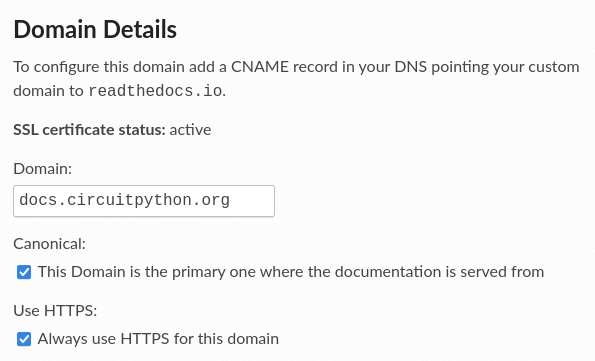
This redirecting with https for me now, thanks @jepler!
@jwcooper Never mind!
idle owl
@blissful pollen @solar whale So..... The reason to use Adafruit IO MQTT over HTTPS, is that the first can send and receive, and the second can only receive? I'm fuzzy on this.
blissful pollen
idle owl
<@!228322543507865601> <@!343570430042308609> So..... The reason to use Adafruit...
I thought both send or receive. I know MQTT does have the subscribe model so it can push updates to you while I think with HTTPS you would have to poll for updates
idle owl
blissful pollen
I thought both send or receive. I know MQTT does have the subscribe model so it...
Oh ok. Then why pick one over the other in general?
I guess I don't get why they're even separate. Other than I guess they work differently.
 winter mortar
The MQTT protocol is much more efficient, so useful for MCUs
blissful pollen
I don't have a definitive answer a lot could be "it depends". Size, keeping a connection open vs reopening it every transmission. Could be another library you use already can deal with HTTPS and not MQTT.
idle owl
Fair enough.
solar whale
idle owl
<@!228322543507865601> <@!343570430042308609> So..... The reason to use Adafruit...
I don't have anything to add. I just did whatever the guides told me to 😉 I have used MQTT for other projects as well and it has worked well. I am mostly just cutting/pasting though.
idle owl
Fair enough! That's all I've done too. So... my only experience is with HTTPS.
blissful pollen
An example I just read was say for a light switch. With HTTPS you would have to poll the server every X seconds so there would be a lag in the switch changing. With MQTT the connection is constant so a change would be transmitted and you only have network lag to slow you down
idle owl
Huh ok
 fallow verge
This is about blinka, but it still seems the best place to ask? It turns out blinka does not support usb_hid. And when I asked about it, they said I could contribute it. I'm willing to do that, but I have almost 0 experience with circuit python and even less with it's internals. Could someone help me get started?
solar whale
@idle owl Do you need an MQTT - AIO example?
idle owl
solar whale
<@!330227457296957440> Do you need an MQTT - AIO example?
Nope! I have one here. I was confused by it, because I was used to HTTPS functions. But got it figured out.
It's sending temp data to AIO, and getting NeoPixel color data from AIO. 🙂
Have to create the feeds manually though. Because my "auto create" thing I added is HTTPS only.
That's where I got lost for a bit. heh.
solar whale
Ah -- That has been a useful function!
Looking at my projects, most of my AIO stuff from CircuitPython boards has been HTTPS. I have used mqtt more with MircoPython and on the Raspberry Pis and for projects connecting to my "Home Assistant"
idle owl
Ah ok
 jaunty juniper
@tulip sleet circuitpython_typing uses Protocol and the / syntax for function arguments, that both require python 3.8
 slender iron
@stuck elbow have you done any usb coding in python on linux? my brain just realized there already may be a usb host api there
stuck elbow
I have not, I know there are some python libraries for usb, but I don't know which ones are the good ones and I have never used them.
fallow verge
fallow verge
This is about blinka, but it still seems the best place to ask? It turns out bli...
Am I in the right place?
stuck elbow
slender iron
<@!351136009922019331> have you done any usb coding in python on linux? my brain...
I think pyusb is popular
 viscid pine
fallow verge
This is about blinka, but it still seems the best place to ask? It turns out bli...
viscid pine
fallow verge
This is about blinka, but it still seems the best place to ask? It turns out bli...
if you mean using blinka to support usb_hid on micropython, it's not possible. USB is built into the core of circuitpy and micropy
slender iron
or at least, someone would need to make a wrapper around some way to do usb gadget from python on linux
tulip sleet
jaunty juniper
<@!329766224093249548> circuitpython_typing uses `Protocol` and the `/` syntax f...
That is from the most recent PR. There is also use of Protocol in circuitpython_typing.socket, but only a few libraries import that. Hmm, we could remove the / for now, or ask Melissa if we should stick to 3.7 compatibility. You saw this on RPI buster, is that right?
 manic glacierBOT

I will attempt to recreate with a test program that includes most of the major modules in the original program.
lone sandalBOT

 lone axle
fallow verge
Am I in the right place?
lone axle
fallow verge
Am I in the right place?
Yes. this channel is the right place for discussing circuitpython development which does include Blinka.
jaunty juniper
tulip sleet
That is from the most recent PR. There is also use of `Protocol` in `circuitpyth...
yep, it's 3.7 there
tulip sleet
jaunty juniper
yep, it's 3.7 there
we could create a dummy class Protocol: pass to import instead (maybe, not sure that would work). For the /, we could just omit it for now.
(dummy Protocol if importing it fails)
winter mortar
@tulip sleet The build-doc of the msgpack PR (#6085) failed again, and shared-bindings/circuitpython_typing.__init__.pyi didn't change with the update of of circuitpython_typing to 1.1.0. Is it supposed to? or is it really a separate source file?
tulip sleet
winter mortar
<@!329766224093249548> The build-doc of the msgpack PR (#6085) failed again, an...
i was assuming it would install the latest pypi version. I will take a look, sort of related to the other issue above.
winter mortar
It also has some decls that aren't in the .py version
tulip sleet
there shouldn't be a shared-bindings/circuitpython_typing, I think, I'm surprised
all that stuff is generated
it is not checked in
fallow verge
slender iron
or at least, someone would need to make a wrapper around some way to do usb gadg...
Well there is talk about supporting usb_hid from a couple years ago. As far as I can tell, no-one has bothered to get around too it. It was mentioned in the context of the BeagleBone Black and RPi Zero, which can be made into usb gadgets
winter mortar
tulip sleet
there shouldn't be a shared-bindings/circuitpython_typing, I think, I'm surprise...
That was the only .pyi file I found when I searched on github
slender iron
@fallow verge I don't know of anyone who has done it either
fallow verge
it has been an open issue on the github since 2020
tulip sleet
winter mortar
It also has some decls that aren't in the .py version
ok, it is a submodule I have to update
or you can, but hold off until we fix https://github.com/adafruit/Adafruit_CircuitPython_Typing/issues/3
winter mortar
Am I correct in assuming that the .pyi typing file is the one the the msgpack.pyi is being processed against?
tulip sleet
I think so, but I will double-check
but I think so, because make circuitpython-subs generates all the other .pyi files
winter mortar
tulip sleet
or you can, but hold off until we fix <https://github.com/adafruit/Adafruit_Circ...
k, I'll sit tight until the dust settles
tulip sleet
@jaunty juniper Melissa says she would like 3.7 compatibility, I will try to make it work
slender iron
ok, @tulip sleet. I think I changed my usb host mind. it makes sense to me to make a pyusb compatible api
tulip sleet
i will take a look at pyusb
tulip sleet
will you then do HID in Python, or make an extension?
slender iron
we can build class specific stuff on top
tulip sleet
build in C or Python?
slender iron
I'll probably do a native HID so that we can have internal keyboard support
but then in blinka, we can make a python version
pyocd is built on top of pyusb. that could be cool...
You can also use the PyUSB log functionality. It uses the logging module. To enable it, define the environment variable PYUSB_DEBUG with one of the following level names: critical, error, warning, info or debug.
this is a reason for us to move towards environment variables
tulip sleet
@jaunty juniper I can use typing_extensions for Protocol for 3.7
or, supposedly, I can
jaunty juniper
try/except then from typing_extensions import Protocol does it on my pi (after pip installing typing-extensions) (and removing the /)
at least for my example
manic glacierBOT
Here is a test program that replicates the issue. The exception occurs on line 33 when .close() is called.
import board
import time
import sdioio
import storage

print("Initializing Data Storage...")
# data storage setup #

# initialize sdcard and storage
sdcard = sdioio.SDCard(clock=board.SDIO_CLOCK,
                        command=board.SDIO_COMMAND,
                        data=board.SDIO_DATA,
                        frequency=25000000)

vfs = storage.VfsFat(sd...
I appreciate the clarification.
manic glacierBOT
I appreciate the clarification.
You were right to use MP_REGISTER_MODULE. The comments re MICROPY_PORT_BUILTIN_MODULES were obsolete. I am having trouble getting it to pass one test. Not quite there yet.

No luck with the community, it is not very active. I am not sure how to move forward from here.
manic glacierBOT
I am having trouble getting it to pass one test. Not quite there yet.
I suspect that tests/unix/extra_coverage.py.exp should be updated (_asyncio module may appear in repl auto-completion), though I failed to build unix/micropython-coverage so far.
manic glacierBOT

you could request it from raspberry pi on behalf of lilygo - we also recommend emailing a reply to your order, or email some of the addresses
http://www.lilygo.cn/contact.aspx?FId=n7:7:7
we don't own this hardware, and customers can help get manufacturers to support their products
I suspect that tests/unix/extra_coverage.py.exp should be updated (_asyncio module may appear in repl auto-completion), though I failed to build unix/micropython-coverage so far.
Yes, that was it. I had to sudo apt install pkgconf libffi-dev to get micropython-coverage to build: make VARIANT=coverage -j12` # or whatever -j is appropriate for you
manic glacierBOT

CircuitPython version
Adafruit CircuitPython 7.3.0-alpha.0-9-gf39c2b2e1 on 2022-02-24; FeatherS3 with ESP32S3
Board ID:unexpectedmaker_feathers3
Code/REPL
import time
import alarm

time_alarm = alarm.time.TimeAlarm(monotonic_time=(time.monotonic() + 600))
alarm.exit_and_deep_sleep_until_alarms(time_alarm)
Behavior

...
I think we canremove shared-bindings/circuitpython_typing and instead make it part of requirements-dev.txt. I thought at first it was a reference to a submodule, but it's just a copy of what was in adafruit-blinka and is now in adafruit-circuitpython-typing.
@jepler do you think that would work for the stubs generation?
I will try this in the morning; it's too late now.
I threw some code in to publish microcontroller.cpu.reset_reason to MQTT. (ignore the battery voltage, the voltage divider math is wrong.)

manic glacierBOT
Also reproduced the issue (and reset_reason) using the Unexpected Maker TinyS3.
manic glacierBOT

Reproduced on esp32 s3 devkitc n8r8
manic glacierBOT
With some printf debugging, I tracked it down to this line hanging: https://github.com/adafruit/esp-idf/blob/circuitpython-v4.4/components/esp_hw_support/sleep_modes.c#L509.
If I comment that line out, sleep works as expected.
manic glacierBOT
Thank you for the update.
manic glacierBOT

Regarding item 2:
The latest ESP32 idf has a function to copy a color mapped bitmap to a location in the RGB LCD frame buffer.
Here is a snippet from the LCD example:
    // copy a buffer's content to a specific area of the display
    esp_lcd_panel_draw_bitmap(panel_handle, offsetx1, offsety1, offsetx2 + 1, offsety2 + 1, ...
Turns out that the pulseio was imported in examples by mistake, it's not needed.
lone sandalBOT
 manic glacierBOT
After my last set of tweaks, I tested this with a two-task blinking LEDs program on a Metro M4, and it's working. Thanks for this, @t-ikegami !
I have to shrink the matrixportal build slightly, or perhaps turn off uasyncio in that build.
After my last set of tweaks, I tested this with a two-task blinking LEDs program on a Metro M4, and it's working. Thanks for this, @t-ikegami !
lone sandalBOT

d1e53fa http:// -> https:// - z00rat
46286cc https://discord.gg/adafruit -> https://disc... - z00rat
ebe38f3 https://circuitpython.readthedocs.io/en/latest/... - z00rat
f55f08c https://github.com/adafruit/CircuitPython_Commu... - z00rat
d5001c6 https://store.makerdiary.com -> https://maker... - z00rat
manic glacierBOT

Thank you for the test program! That'll be helpful when someone has time to debug this issue.
 idle wharf
I was going to look at this PR and didn’t feel I understood all the typing changes well enough to do so.
https://github.com/adafruit/Adafruit_CircuitPython_DotStar/pull/59
Walking through that would be a good Tannewt or FoamyGuy Deep Dive if you’re looking for topics.

GitHub
Just wanted to make sure this is the correct way to type libraries using the new external circuitpython_typing library. I'll turn this to a real PR once that's confirmed. This would resol...
idle owl
idle wharf
I was going to look at this PR and didn’t feel I understood all the typing chang...
I think @lone axle is best suited to covering that.
lone axle
idle wharf
I was going to look at this PR and didn’t feel I understood all the typing chang...
I think I did do a few of the typing PR reviews on my stream one Saturday. But I don't know for certain which week (was a little while back I believe).
The timing is perfect though (I'm usually looking for topics for my saturday stream around this time on fridays). I'll plan on reviewing that one during my stream tomorrow.
I'm happy to get more videos out there showing "behind the curtains" of the review process for typing and other PRs as well.
idle wharf
That would be great.
Somewhat related, I was thinking I could take the GH action I did for deep dives and turn it into something more reusable that also outputs into GH pages or maybe RTD… not sure when I’d have time for that yet. But let me know if that’s interesting to folks who stream.
manic glacierBOT

CircuitPython version
Adafruit CircuitPython 7.2.0 on 2022-02-24; Adafruit LED Glasses Driver nRF52840 with nRF52840
Board ID:adafruit_led_glasses_nrf52840
Code/REPL
import board
import busio
import displayio
import framebufferio
import is31fl3741
from adafruit_is31fl3741.led_glasses_map import glassesmatrix_ledmap
from adafruit_display_shapes.circle import Circle

displayio.release_displays()

i2c = busio.I2C(board.SCL, board.SDA, frequency=1000...I'm definitely interested in this. I do think there is quite a lot of room for improvement in the ancillary content related to my streams. The notes docs and automated processing you've set up in the deep dive notes repo are amazing and super useful for folks looking to find specific things covered in the past.
At one point you mentioned something about a YT API that could possible pull transcripts. If you have more information or a link to the relevant docs that you could send my way I'm interested in looking into that as well. The more that can be automated the better IMO.
idle wharf
lone axle
I'm definitely interested in this. I do think there is quite a lot of room for i...
There’s a link and some basic info in this issue.
GitHub
As well as making the show easier to search, Maybe it would also make the content more accessible to more people who could also translate the captions in their browser. Might be other use cases ......
 proven garnet
idle wharf
I was going to look at this PR and didn’t feel I understood all the typing chang...
proven garnet
idle wharf
I was going to look at this PR and didn’t feel I understood all the typing chang...
It me! Let me know how I can help explain my choices or if any don't seem right for some reason 
idle owl
Hah found a bug in my code. The CPU temp wasn't changing, and I thought for a minute that you couldn't affect the temp on an ESP32-S2 because of the housing or something. Then realised I was fetching my temp outside the loop, so it was only getting a reading the first time the code ran. 🙄
manic glacierBOT

Did some quick research. First off from what has been mentioned I can have just decompress in zlib but any thoughts on a module name if we want/need DecompIO? Maybe just that decompio or maybe zlibio?
I also looked quickly into how CPython works and what it uses. The full zlib is almost 100K so that is a non-starter.
I think if things are set up and then future work could be done finding a smaller zlib compatible library (or zlib may have some smaller options already I'm not sur...
I thought the requirements changes in #6041 were sufficient to fix the doc build failures, but that was not the case: https://github.com/adafruit/circuitpython/actions/runs/1900267735
Adding adafruit-circuitpython-typing to requirements-doc.txt as well.
lone sandalBOT
 manic glacierBOT

 idle owl
I've got this Adafruit IO code running, and this is the second time this has happened or at least that I've noticed it, it's hanging after running for a while. I only notice it when I get bored and try to change the NeoPixel color, and nothing happens. I have the serial console connected, and it's printing data to it, but when it hangs, ctrl+c/ctrl+d do nothing. I have to hard reset the board to get the code running again. Which works. The Adafruit IO code is sending CPU temp to a feed, and listening for NeoPixel color changes on another feed. Running RC2 (Adafruit CircuitPython 7.2.0-rc.2 on 2022-02-23; Adafruit Feather ESP32-S2 TFT with ESP32S2). Making changes to code.py while it's hung doesn't work, the changes don't take, the board does not reload. Until physical reset button press.
Added some time.monotonic() print code to indicate how long the board has been running since last reload (soft or otherwise). I'll see if it happens again. And note the time. And repeat to see if it's consistent.
Hung after 252 ms or whatever time.monotonic() is returning, I can't remember now.
Restarting.
 crimson ferry
I don't know if the debug pins are exposed on that board, but would be interesting to see if it happens on other esp32-s2 boards... a debug build on a board where you can monitor the debug console (assuming it's hard crashing and not going into safe mode)
the fact that you lose access to CIRCUITPY... I don't know if network stalls block USB (I have seen them block control-C)
idle owl
Thing is it's not losing access to CIRCUITPY. I can still get to it. And I think, if I remember correctly, the changes I made are there on reset. But it doesn't reload the serial console, and there's no interacting with the serial console, and the network data doesn't come in.
Still going this time at 765.
crimson ferry
could be a network issue that isn't being caught by timeout
crimson ferry
if watchdog timer catches it, then you know CircuitPython is still on the job
idle owl
I need to go deal with dinner. I can get back to troubleshooting this on Monday. Thanks for the suggestions, @crimson ferry.
Something failed earlier one time with MQTT handshake or something, and actually threw an error. This hang isn't throwing anything.
I totally agree it might be a network failure, it is my understanding that it's kind of precarious, and that's why there are sometimes a lot of try/excepts to deal with that. But this example was reviewed by someone who knows it way better than me, and they said it was fine, so I guess it's not supposed to be needed here.
crimson ferry
oh, CPU temp... that's a problem
I had to disable mine b/c it did just that, sometimes
I guess I forgot to file an issue
crimson ferry
but if you try/except on that, it should be ok
crimson ferry
oh wait, I didn't disable it, but I do have watchdog that occasionally fires, so not positive that's the issue (I think it used to be judging from the comments in my code) ...other suspect would be back to network stall
(reading CPU temp on esp32-s2 used to occasionally hang, so I reduced the frequency and when it's done and put some prints around it, and it doesn't seem to happen anymore so I forgot about it... not sure if some change in the core fixed it, or if it conflicted with something happening elsewhere in the code)
blissful pollen
idle owl
I need to go deal with dinner. I can get back to troubleshooting this on Monday....
I saw similar behavior a year or so ago when I was working on an Adafruit IO project. But my project normally was in deep sleep so reset between runs so I only noticed it while it was plugged in while writing it.
I took a quick look and it seemed to be some networking code issue when it was long running but I can't recall details now.
 idle shuttle
Never having done a pull request to Adafruit before I'm curious how failures such as :
`1m 20s
Run ./pylint_check.sh
Using pylint bin at /opt/hostedtoolcache/Python/3.10.2/x64/bin/pylint
************* Module midi
Macropad_Hotkeys/macros/midi.py 8: Trailing whitespace (trailing-whitespace)
Macropad_Hotkeys/macros/midi.py 10: Trailing whitespace (trailing-whitespace)
Macropad_Hotkeys/macros/midi.py 11: Trailing whitespace (trailing-whitespace)
Macropad_Hotkeys/macros/midi.py 16: Trailing whitespace (trailing-whitespace)
Your code has been rated at 10.00/10
Error: Process completed with exit code 123.`
affect the likelyhood of a request being merged.
idle shuttle
No, CLI on my linux machine
slender iron
did you see the pre-commit setup page? I can find it if not
idle shuttle
I'm not a "real developer" 🙂 so I'm not sure what fix with pre-commit means
slender iron
kk, let me find it
slender iron
thanks for doing that! this is the best place to get help with this setup 🙂 we're happy to help

Adafruit Learning System
Syntax done right with CircuitPython, Pylint and Black!
(may be the same page actually)
idle shuttle
amusing that the extraneous whitespace was in the comments 🙂
slender iron
🙂
idle shuttle
sorry to continue to ask basic questions. is .pre-commit-config.yaml something that is created by the pre-commit install or is it supposed to be part of the repository I cloned? I'm getting an error that it does not exist.
blissful pollen
I see it in other repos so almost certain it should exist
idle shuttle
Adafruit_Learning_System_Guides maybe doesn't have it?
I just manually corrected the 4 extra spaces at the end of the comment text.
blissful pollen
Ah from what I know the Learn repo is special (having just made a commit for it recently). I think the version of lint is older too
idle shuttle
ok. I feel less inept then. I suspect manually correcting the files will also work as it now passes the checks that github is running.
Thanks!
slender iron
good work! sorry I didn't realize you were in the learn repo. it's a bit of a monster compared to the lib repos
manic glacierBOT
viscid pine
Can I pull request changes to .po files, or must they be editted using weblate?
 balmy pecan
Has anyone gotten time of flight distance working on the esp32-s2 chips? Not an external sensor, but wifi ToF
blissful pollen
balmy pecan
Has anyone gotten time of flight distance working on the esp32-s2 chips? Not an ...
I looked into the API but at the time it needed a later version of the IDF that was not out yet so I hadn't done any more work on it
lone sandalBOT
 orchid basinBOT

The most significant (and maybe controversial) change in this set of commits is to follow the SI standard more closely. In short: Between the numerical value and the unit of measurement is a space. Or 1Apple is now 1 Apple :wink:
This will require more iterations as only a partial amount of boards is covered so far.
Other changes:
- Use USB-C instead of USB Type c, USB Type C or USB Type-C
- Add periods
- Update specs
- Remove some marketing statements
- Add blank line after...
lone axle
Does make fetch-submodules in the core repo find any new commits on any of the submodules? or will it only find commits that have also had a release made of the repo that they came from?
i.e. if commits were merged, but no release made for one of the submodules would it be expected that to still be on the old version after running make fetch-submodules?
jaunty juniper
submodules are pinned to a specific commit, fetch-submodules only retrieves the files for the version that the main repo points to
or did you mean make update-frozen-libraries ? (which updates the frozen libraries submodules to the latest release)
tulip sleet
viscid pine
Can I pull request changes to .po files, or must they be editted using weblate?
I think it's easier to use weblate, and that's what our regular workflow for this is.
solar whale
sigh.. the pio assembler only has nine instructions...how hard can this be to understand...🤯
blissful pollen
solar whale
sigh.. the pio assembler only has nine instructions...how hard can this be to un...
Do you have any questions about it? Been a while since I looked at it but can try
solar whale
blissful pollen
Do you have any questions about it? Been a while since I looked at it but can tr...
Thanks --- not really, I'm just trying to understand an example of a frequency counter I found --- The overall flow makes sense but it hangs if you do not read data out fast enough.. Trying to understand the blocking IRQ and FIFO usage.
there was a hint of how to make it not hang -- and it does not hang, but it also does not give the correct results ....https://forums.raspberrypi.com/viewtopic.php?t=306250#p1841768 I am hoping to figure out how to get this implementation working working.
I'm just venting after several hours of reading, googling and trying things....
blissful pollen
yeah I get it. Went to look at how I did countio (one fo those I know I wrote it but forgot how) but I used the PWM module for that to count pulses not PIO
solar whale
I am working on a Raspberry Pi Pico and unfortunately frequencyio is not implemented for the rp2040. this example is for MicroPython. I may try to port it to CP....once I understand it.
pulsein in the pulseio module uses PIO -- lots to learn from that.
lone axle
jaunty juniper
or did you mean `make update-frozen-libraries` ? (which updates the frozen libra...
in this case the submodule I'm interested in isn't a frozen library. It's the nina-fw repo which is where the root certificate resides for espressif port.
Do you know the process to update a non frozen lib subodule to point to the latest commit? The change in nina-fw has been made already but not sure how to get circuitpython to start using it.
jaunty juniper
you would go into the submodule directory, fetch/pull/checkout it to whatever version you want with normal git commands, and back in the CP repo you git add the submodule and commit the change as part of a PR
lone axle
Thank you
jaunty juniper
there's like git submodule update ... and such, but I find that more esoteric than using just git commands you already know
now I'm wondering if I'm missing something in how submodules are used though
lone axle
Ah, ty. The limited interactions I have had with submodules so far I generally open them up and treat them as their own project from IDE and terminal perspective and have found it is nice to stick with the commands I already know. git submodule foreach has some neat usages but thats beyond just pulling to update.
jaunty juniper
there's that feeling with git that things can never be as simple as you think 😛
even when you already think they are complicated
manic glacierBOT

[adafruit/circuitpython] Pull request opened: #6095 Add STM32F412Cx Microcontroller to CircuitPython
I had to add this for a personal project, so I figured I'd contribute it.
lone sandalBOT
 manic glacierBOT
Working on this in #6085, so making this draft for now.
manic glacierBOT

CircuitPython version
Adafruit CircuitPython 7.1.1-dirty on 2022-02-11; Blackpill 16MB SSIS edition with STM32F411CE

This version was compiled 16 days ago and works. The new 7.2.0 does not compile because of the missing /extmod/ulab/code
Code/REPL
import ...

We don't get that far :(
Behavior
mk@zbook:~/circuitpython/ports/stm$ make BOARD=stm32f411ve_discovery
Use make V=1, make V=2 or set BUILD_VERBOSE similarly in your environment to incr...
orchid basinBOT
manic glacierBOT

Thank you for the analysis on the descriptor, and your corrections to mine also work with my KVM, as you probably expected!
When I set boot_device=1, the KVM doesn't work unless I supply your descriptor as a parameter. I don't think it's ignoring it.
#usb_hid.enable((usb_hid.Device.KEYBOARD,), boot_device=1 )
# above line does not work with Belkin SOHO KVM

#usb_hid.enable((reference_keyboard,), boot_device=1 )
# above line works fine with Belkin SOHO ...
manic glacierBOT

For #6085 at least, it looks like the circuitpython_typing package needs a py.typed file, and setup.py-stubs needs an item entry["circuitpython_typing"] = ["py.typed"] in the build_package_data function.
I've also noticed in tools/extract_pyi.py that there's a set CPY_TYPING with names that were in the old circuitpython_typing.cpi file, that seems to be used to compose an import of (just) those names from circuitpython_typing, around line 246. (And ByteStream isn't in t...
manic glacierBOT
For #6085 at least, it looks like the
circuitpython_typingpackage needs apy.typedfile, andsetup.py-stubsneeds an itementry["circuitpython_typing"] = ["py.typed"]in thebuild_package_datafunction.
Thanks, yes, I did some research on this earlier this morning, came to the same conclusion as you, and am testing exactly this locally. I also am conditionally adding some definitions that were in shared-bindings/circuitpython_typing to the library.
Whether `circuitpython_...
proven garnet
@lone axle thanks for reviewing my PR on stream, I'm catching up now! Very helpful to see it reviewed for own sake! I noticed you talking about feeling weird that the return for __init__() is None not the class, which also confused me until I ran into __new__() which does actually return the class. I think the function of __init__() is to only initialize values as opposed to __new__() which handles instance creation.
So I think the order of calls is __new__() then __init__()
solar whale
Is flash_nuke.uf2 only for the RP2040 or can it be used for all boards? How was it generated? https://learn.adafruit.com/adafruit-qt-py-2040/circuitpython#flash-resetting-uf2-3091244-20
proven garnet
I've only come across it elsewhere for the RP2040 as well, for what its worth, but I don't know if it would work across the board (pun intended I guess)
solar whale
At one point, there were "erasers" for several boards but I have not kept up with the evolution of this.
lone axle
proven garnet
<@!382939733107408897> thanks for reviewing my PR on stream, I'm catching up now...
Interesting, thank you. I never heard of __new__() before
jaunty juniper
solar whale
At one point, there were "erasers" for several boards but I have not kept up wit...
but they don't look like they are updated ?
solar whale
jaunty juniper
there is that <https://learn.adafruit.com/welcome-to-circuitpython/troubleshooti...
Thanks! That was what I recalled - always have to hunt for it. I assumed it was board, or at least port specific.
solar whale
jaunty juniper
but they don't look like they are updated ?
It is hard to keep up.
I used to generate them myself by just forcing a rebuild of the File system on boot. Not sure if that is all this does or not.
jaunty juniper
there was that discussion too https://github.com/adafruit/circuitpython/pull/4722
solar whale
hmmm -- I would assume it has to be build for each board or chip type ... not clear to me from the discussion how it was left.
ah - it is a per variant build
but it appears to have been abandoned
manic glacierBOT

update nina-fw submodule to latest commit from that repo so we get updated root cert in Circuitpython builds.
Not sure if I've done this properly, if there is something else needed or needs done differently let me know
manic glacierBOT

Just like Feather M4 Express.
 uneven mango
Was something like an error_out.txt ever implemented? I have a project that stops sending to MQTT randomly, but I can't reproduce while connected to the REPL. Watchdog would reset the board if it hung, so it has to be sitting at some uncaught exception.
tulip sleet
uneven mango
Was something like an error_out.txt ever implemented? I have a project that sto...
We haven't implemented this, but you are welcome to open an issue. You can always wrap the outermost part of the program in a try-except and capture the exception in some way (e.g. by writing to a file)
uneven mango
tulip sleet
We haven't implemented this, but you are welcome to open an issue. You can alway...
thanks. I'm debating taking the big try/catch approach or just attaching an oled display. 😉
tulip sleet
you can put code.py in a a main() function or similar and just wrap the call to main()
manic glacierBOT
Under previous CircuitPython versions, there was a blinking pattern that would give you the line number for an uncaught exception. This is useful when there is no serial connection showing the REPL or instances when an error cannot be reproduced when connected to the REPL. (i.e. only reproducible on battery)
One option could be to overwrite error_out.txt when an uncaught exception occurs. Alternatively, it could append the uncaught exception to the text file. (or configurable to overwri...
manic glacierBOT
https://github.com/adafruit/Adafruit_CircuitPython_Typing/pull/6 has some required changes that should then enable further changes here to finish this PR.
 ebon ember
quick question about custom builds for the raspberrypi port : if I set : 'CIRCUITPY_PULSEIO = 0' in mpconfigboard.mk, there is a build error "undefined reference to `pulseio_module''. Is this to be expected, or is there a way to leave out this (or other) module(s)?
jaunty juniper
did you make clean ?
ebon ember
jaunty juniper
did you make clean ?
does a 'clean' need to be done after editing the .mk files?
jaunty juniper
worth trying when there's errors like that
ebon ember
thank you
ebon ember
If I'm not mistaken, it seems that if one enters REPL in circuitpython, all the RAM is cleared... this is quite a big shift away from how REPL works on micropython. Having the ability to stop a program, and inspect various objects in RAM via REPL is (in my opinion) one of the most useful debugging features. Is there perhaps a way to build circuitpython to retain the state of RAM, when entering REPL?
onyx hinge
@ebon ember no, there's not right now.
proven garnet
@lone axle for the CursorControl PR, what are your thoughts on turning is_clicked() into a method that takes the button as a parameter with defaulting to the A button?
def is_clicked(self, button = "btn_a"):
    ...
Not renaming the method makes it feel vague as to which button is_clicked() refers to, but good documentation is also probably sufficient.
Or something like the above
lone axle
proven garnet
<@382939733107408897> for the CursorControl PR, what are your thoughts on turnin...
I think that I lean toward the different functions with different names similar to how it was submitted in the PR.
Truthfully I don't have a strong opinion either way, but slightly for the more descriptive function names because it would be harder to write vague code that way.
With the function / argument like you mention here it's possible to do something like this:
something = "btn_a"
# ... lots more code
cursor.is_clicked(button=something)
And when reading the code if you don't know the value of something then you won't know which button the code is attempting to read.
It's a somewhat convoluted counterexample though and could also be remedied by using good variable names. I'm not sure how realistic of a fear it is that people would write code like that. But with is_clicked() being primary button only, you always know exactly what that line of code will do without needing any further context information.
proven garnet
lone axle
I think that I lean toward the different functions with different names similar ...
That's a really good point
lone axle
On the topic of CursorControl library though, I do think it would be great if we could somehow decouple the button clicks from the library altogether. As it is now CursorControl inits and holds the shift register object that the buttons are connected to. I think it would be better if it could accept that object as a parameter. And then user code outside of the cursor control library would be responsible for handling the click checking and stuff. Leaving CursorControl to manage specifically only the position of the cursor.
If it could be done that way, then there would be no need to alter the library in order to add new button functionality like alt (B) button, and the newer start / select ones. Or any of the fancier debouncing logic. It could all live outside of CursorControl. Since that shift register object could be shared amongst different libraries and user code.
proven garnet
Want me to make an issue for that? I wouldn't mind trying to work on it.
manic glacierBOT
@dhalbert do we want to bring this back to 7.2 as well? I don't know how many websites it's affecting.
lone axle
proven garnet
Want me to make an issue for that? I wouldn't mind trying to work on it.
Sure, an issue would be great. It will be nice to have a place to collect discussion around the idea. It's not something I've put deep consideration into and am happy to get input from others as well.
 digital shoreBOT
 adafruit
Owner
adafruit#3230
Category Channels
8
Text Channels
61
Voice Channels
6
Members
33380
Roles
35

ID: 327254708534116352 | Server Created
·
onyx hinge
Hey <@&356864093652516868> the weekly meeting is coming up in about 75 minutes. Please add your notes to the meeting doc, it's super helpful! https://docs.google.com/document/d/1CtfTbhzjGUZczy9LULKjNmz8eXSboHFM93cvudDZc0g/edit?usp=sharing If nothing else, if you plan to speak, add a placeholder so I know to call on you.

Google Docs
CircuitPython Weekly for 28 February 2022 Welcome to the CircuitPython Weekly meeting notes! Feel free to add your Hug Reports and Status Updates early. During the meeting, we go through them as a round robin sorted by username. If you can’t make the meeting and would still like to participate,...
I can't wait to catch up with y'all!
manic glacierBOT

@retrospecced thx for your effort.
i tried your descriptor (and boot.py) but for some reason the device gets an exclamation mark in the device manager. So i was unable to test with the mentioned startech kvm switch.
@retrospecced's original descriptor has some errors. Did you try the left-hand one in the diff above.
 main furnace
ebon ember
If I'm not mistaken, it seems that if one enters REPL in circuitpython, all the ...
main furnace
ebon ember
If I'm not mistaken, it seems that if one enters REPL in circuitpython, all the ...
You can import whatever from code in the repl and then inspect it. It helps if you put the usual forever loop inside if __name__=="__main__":
idle owl
BRB!
lone axle

Adafruit Industries - Makers, hackers, artists, designers and engineers!
Mu 1.1.1, the latest stable release of the Mu Python Editor is finally available after a lengthy contribution and beta period. So many upgrades and translations. Due to limitations in the way Windo…

A quick video showing all the contributions, over time, to the Mu code editor.
The circular blobs are source code files. The lines connecting them describe how the code is organised into directories. The colour of the blobs tells you what sort of file they are. The user avatars flying around the screen and "zapping" files, tell you who is makin...
idle owl
😊 Yep!
lone axle
I’ve decided to start a podcast! The very original show name is The CircuitPython Show, about - you guessed it - CircuitPython! More specifically, about the people and the cool things they’re doing with CircuitPython.
The show will be a question and answer style interview podcast. I’m shooting for each episode to be about 30 minutes. I’ll interv...
GitHub
This is my code for running the RVR using CircuitPython. - GitHub - emwdx/rvr_circuitpython: This is my code for running the RVR using CircuitPython.

Zoom Video Communications
An introduction to the field of software development, coding, and coding accessibility challenges.
Each session is 90 minutes
Target Audience: Adults and young adults
Pre-requisite knowledge:
• At least intermediate familiarity with a screen reader with speech and/or braille, or intermediate familiarity with a screen magnification program ...
 turbid radish
Please subscribe
idle owl

GitHub
This library stems from the original PR here: adafruit/Adafruit_CircuitPython_Register#35 @maholli you mentioned wanting to be pinged if anyone started this up. There is renewed effort to get this ...
turbid radish
Thanks foamyguy!
lone axle

Twitch
I stream electronics,, CircuitPython, and other maker stuff. Computer geek, electronics/space nerd, singer/musician, writer/novelist. LGBTQIA+ rights are human rights. Black lives matter. Down with racism and fascism. Feminism must be intersectional. Just say no to hatred and bigotry.

GitHub
Moving the MicroPython extmod/uzlib to the CircuitPython shared-bindings/module pattern.
Provides zlib decompression functionality.
turbid radish
Thanks all
 gilded cradle
Thanks
viscid pine
thanks everyone
lone axle
Thanks all 👋 Hope everyone has a nice afternoon!
viscid pine
7am - time for coffee
onyx hinge
ports/atmel-samd/boards/circuitplayground_express_displayio/mpconfigboard.mk:CIRCUITPY_PIXELBUF = 0
ports/atmel-samd/boards/pewpew_m4/mpconfigboard.mk:CIRCUITPY_PIXELBUF = 0
ports/atmel-samd/boards/ugame10/mpconfigboard.mk:CIRCUITPY_PIXELBUF = 0
ports/nrf/boards/microbit_v2/mpconfigboard.mk:CIRCUITPY_PIXELBUF  = 0
ports/nrf/boards/pca10100/mpconfigboard.mk:CIRCUITPY_PIXELBUF  = 0
ports/nrf/boards/simmel/mpconfigboard.mk:CIRCUITPY_PIXELBUF  = 0
ports/stm/boards/swan_r5/mpconfigboard.mk:CIRCUITPY_PIXELBUF = 0
This isn't everything. Where is Trinket, GEMMA, QT Py M0?
onyx hinge
py/circuitpy_mpconfig.mk:CIRCUITPY_PIXELBUF ?= $(CIRCUITPY_FULL_BUILD)
manic glacierBOT
Rev C has been fixed and will be available shortly. i just verified the draw in deep sleep with neopixel turned off is 80uA
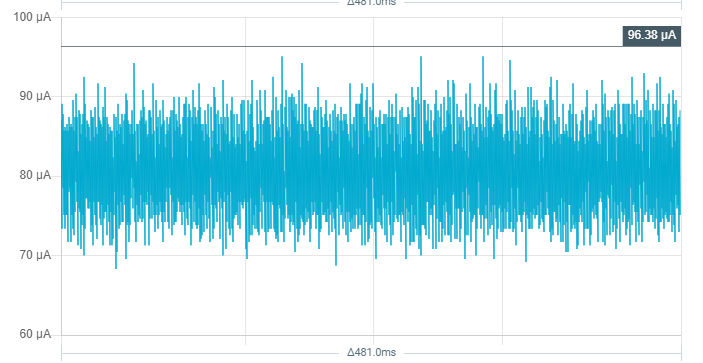
onyx hinge
Here is the notes document for next Monday’s CircuitPython Weekly meeting. It is at the normal time of 11am Pacific / 2pm Eastern here on Discord. Everyone is encouraged to attend! Please add your hug reports and status updates even if you’ll be attending the meeting - it’s super helpful! If you are unable to attend but would still like to include updates, feel free to include them in the notes and we’ll read them off during the meeting. Hope to see you there! <@&356864093652516868>
https://docs.google.com/document/d/1lQB-bN-XISGtWKES5DahLV3XOXG6elVJaedQBdsOd0Y/edit?usp=sharing

Google Docs
CircuitPython Weekly for March 7, 2022 Welcome to the CircuitPython Weekly meeting notes! Feel free to add your Hug Reports and Status Updates early. During the meeting, we go through them as a round robin sorted by username. If you can’t make the meeting and would still like to participate, ...
onyx hinge
onyx hinge
Here is the notes document for next Monday’s CircuitPython Weekly meeting. It is...
manic glacierBOT

Thanks, much appreciated! And isn't that PPK II great...
manic glacierBOT

FWIW, I am getting this error today using 7.2.0-alpha.2 on 2022-02-11; Adafruit QT Py ESP32S2 with ESP32S2 using board.STEMMA_I2C() with FRAM plugged in. Error is:
code.py output: Traceback (most recent call last): File "code.py", line 17, in <module> File "adafruit_fram.py", line 216, in __init__ ValueError: No I2C device at address: 0x7c
@richsad Please open a new issue, because your error is different, and also please try with 7.2.0 final.
manic glacierBOT
There was a little bit of discussion around this topic in the weeds during weekly meeting on 2/28. The issue here is meant as a central place to discuss and collect ideas about the concept.
The core of this idea is to attempt assign "difficulty ratings" to issues and PRs within the circuitpython ecosystem. Good First Issue is essentially the same concept this, but we're proposing to have a few other statuses that indicate different / higher difficulty levels.
The primary goal being to...
lone axle
@main furnace we discussed your weeds topic a bit during the meeting and I've created an issue: https://github.com/adafruit/circuitpython/issues/6100 to have a central more permanent and easily accessible place to hold further discussion.
idle owl
@tulip sleet So... it looks like there might be a race condition happening when polling microcontroller.cpu.temperature every time through the while True: loop. Inside the loop is a time.monotonic 10 second delay block, and that's when the cpu temp is printed. Initially, the call to get the temperature was in the main loop. I moved it to inside the 10 second delay block, and it so far isn't hanging. temperature returns None if there is nothing available, so I'm wondering if when it's called that quickly, that sometimes it returns None, and crashes things. Only the serial console and auto-reload are borked, though... I can edit and save code.py, and access CIRCUITPY just fine. But it doesn't reload, and trying to ctrl+c/ctrl+d in the serial console do nothing. Also, the code is listening for NeoPixel color values from Adafruit IO, and that stops working as well when it hangs.
microcontroller.cpu.frequency did not hang in the original every-time-through-the-main-loop code. So that says it's not microcontroller.cpu related, it's specific to temperature. But the frequency value doesn't change, so I don't know if that's part of it, and frequency is a bad test.
I'm going to change it to generating a random number in the main loop, and see if that hangs. As a final test against what's causing it.
I'm supposed to file an issue if it turns out to be temperature. Does this sound like enough information?
(Currently, it's still going beyond where it usually hangs with the temperature being called only every 10 seconds.)
tulip sleet
idle owl
<@!329766224093249548> So... it looks like there might be a race condition happe...
we call some ESP-IDF thing to get the temperature. That appears to not like being called too quickly. I don't think you have to try things other than .temperature. If you have some idea of a minimum delay, that would be nice, but don't spend much time on it.
idle owl
tulip sleet
we call some ESP-IDF thing to get the temperature. That appears to not like bein...
Hmm ok. Then should I not bother with an issue? Or maybe file it and close it for posterity?
tulip sleet
my own personal experience calling .temperature was that it always returned the same value, which was kind of odd.
idle owl
tulip sleet
my own personal experience calling `.temperature` was that it always returned th...
That happened to me but I was calling outside the loop. So it only got the temp once.
tulip sleet
is there already an issue for .temperature? We do need an issue for that
idle owl
tulip sleet
is there already an issue for `.temperature`? We do need an issue for that
I don't see one open...
tulip sleet
I mean I wrote a completely separate program that fetched the temperature (I was testing my webserver code), and I thought it was odd it returned the same value every time. There was no loop. ... Yeah, please make an issue for ESP32-S2 .temperature hanging when called too fast or whatever
blissful pollen
@lone axle thanks for the summary of the in the weeds issue I had about zip. You summed it up exactly what I was thinking. This week is crazy for me but hopefully this weekend I could work to make zlib with just decompress to at least unblock your project, and given a bit more energy move the stream part to a new module (name TBD)
idle owl
Testing now without Adafruit IO code, to eliminate all of those variables. Also so the code I upload can be simpler.
onyx hinge
@idle owl @tulip sleet https://github.com/espressif/esp-idf/issues/8088
idle owl
Hmm.
It's not rebooting though. It's hanging.
I had the usb-to-serial set up connected as well, and it gave me 0 information.
 faint grove
(moving this to #help-with-circuitpython )
tulip sleet
idle owl
I had the usb-to-serial set up connected as well, and it gave me 0 information.
I don't remember seeing stuff unless debug builds are turned on
tulip sleet
idle owl
It sends startup info at least.
there may be some; there is a lot more with debug
idle owl
Oki
tulip sleet
faint grove
_(moving this to <#537365702651150357> )_
if you can run a program on your laptop that detects that keypress, then you can transmit that to CircuitPython over a USB serial connection. You can use the secondary "data" USB connection.
but CircuitPython itself has no access to that
manic glacierBOT
Did you update the git submodules? Do make fetch-submodules from the top level of your repo.
main furnace
lone axle
<@!439129780865204259> we discussed your weeds topic a bit during the meeting an...
Thanks @lone axle , you gave a great explanation of the idea and how it could work for the Circuitpython community.
faint grove
tulip sleet
but CircuitPython itself has no access to that
Thanks, that's sort of what I expected
tulip sleet
faint grove
Thanks, that's sort of what I expected
viscid pine
thats one cool thing you could do when the usb host support is in, proxy a keyboard through circuitpy
i think that's what the authoer of the pio usb library made it for originally
tulip sleet
in this case, it's the laptop embedded keyboard, so not even usb, but yes, you could use an external keyboard
idle owl
@lone axle We forgot to meet with Eva to learn Adabot patching today. Too late at this point for today, so I rescheduled for next Monday. After the CP Weekly meeting, we can get started on that. Does that work for you as well?
lone axle
idle owl
<@!382939733107408897> We forgot to meet with Eva to learn Adabot patching today...
Whoops, slipped my mind as well. Next Monday is tougher for me. I'm going on a short vacation to a nearby town next week on Monday/Tuesday. Currently planning to leave for that after the meeting on Monday. So I could do it earlier in the day before the meeting, but will be on the road for a while afterwards.
idle owl
lone axle
Whoops, slipped my mind as well. Next Monday is tougher for me. I'm going on a s...
We can bump it to the following week. Would that work?
lone axle
idle owl
We can bump it to the following week. Would that work?
Yep, the following is clear for me.
idle owl
OK, I'll see if Eva's free as well, and we'll move it then. Thanks!
idle owl
lone axle
Yep, the following is clear for me.
Everyone is free. I sent an invite this time so maybe one of us will remember. Thanks again!
lone axle
Sounds good. Thank you for coordinating.
idle owl
onyx hinge
<@!330227457296957440> <@!329766224093249548> https://github.com/espressif/esp-i...
Bugger. The simpler code isn't crashing. So maybe it is this. Even though whatever I have going on isn't quite the same.... And doesn't explain why it doesn't crash if delayed by 10 seconds each call.
onyx hinge
Is your "simpler code" still initializing wifi?
idle owl
No.
I was trying it without any of the wifi code.
But it's still running long past when it crashes with WiFi and Adafruit IO code in there.
tulip sleet
long ago I fixed a seemingly unconnected problem with wifi and I2C being used together, this could be another manifestation
it happened just from importing wifi, not even using it
idle owl
Trying that.
I'll get back to you in 1000 seconds. Or maybe longer if I end up heading out for dinner or whatnot.
idle owl
tulip sleet
it happened just from importing wifi, not even using it
Not crashing with WiFi only imported.
onyx hinge
if you add in actually establishing a wifi connection?
idle owl
on it
crimson ferry
In my case microcontroller.cpu.temperature would hang without wifi being connected. I used to call it more often, and sometimes different timing loops that called it might have coincided. But I only recall one hang since backing off on how often I call it.
idle owl
onyx hinge
if you add in actually establishing a wifi connection?
Oof. Crashed on first read.
Same type of crash.
All I added was wifi.radio.connect(secrets["ssid"], secrets["password"])
idle owl
So now it's crashing super fast. Doesn't even get to printing the CPU temp with the temperature call in the main loop. So it fails on the first time through on the first temperature call that way.
Now testing it with the temperature call in the 10 second delay block.
I think I have enough to file an issue at this point. Simple code that consistently fails.
And a modification that allows it to at least run a bit. We'll see if this hangs before I file the issue.
idle owl
This hasn't hung with it in the delay block. So the issue involves WiFi, but a delay resolves it. Issue incoming tomorrow.
¯_(ツ)_/¯
manic glacierBOT
descriptor -> report_descriptor (must match the name in allowed_args)

Any idea what next steps need to be done to get this working? @anecdata I also tried flashing the CircuitPython firmware for N8R8 on my N32R8 and got the same results, able to get to the REPL, but the CIRCUITPY drive doesn't show up.
@dhalbert do we want to bring this back to 7.2 as well? I don't know how many websites it's affecting.
That's a good idea, though I don't think we have to have 7.2.1 immediately. @FoamyGuy, are the updated root certs broadly used?
manic glacierBOT

@kylefmohr All indications are that we are waiting for Espressif to complete the development discussed in the issue kmatch98 linked above.
The only specific site I know of that needs this is https://jwst.nasa.gov/content/webbLaunch/flightCurrentState2.0.json?unique=12345
I have not run into any others at this time.
ebon ember
Is there any easy way to build circuitpython using the full uasyncio library from micropython? The _asyncio module from CP does not have the Event class
winter mortar
CP asyncio does have the Event class.
ebon ember
winter mortar
CP `asyncio` does have the Event class.
>>> from _asyncio import Event Traceback (most recent call last): File "<stdin>", line 1, in <module> ImportError: cannot import name Event
winter mortar
asyncio not _asyncio. You can install it with circup or from the bundle.
ebon ember
winter mortar
`asyncio` not `_asyncio`. You can install it with circup or from the bundle.
thank you!
orchid basinBOT

Interstate was the wrong aspect ratio
Picosystem still had pre-aluminium case photos
ebon ember
main furnace
You can `import whatever from code` in the repl and then inspect it. It helps if...
when I import the following code (stored in push.py) from REPL :
`import board
from digitalio import DigitalInOut, Direction, Pull
greenLED = DigitalInOut(board.GP12)
greenLED.direction = Direction.OUTPUT`
The LED turns on (and stays on), but the 'greenLED' label disappears from the namespace? Yet when I do a ctrl-E and paste this code in REPL, the 'greenLED' object remains. I'm struggling to understand the difference between import push.py (from REPL), and pasting the code directly into REPL
jaunty juniper
ebon ember
when I import the following code (stored in push.py) from REPL :
`import board
f...
it's push.greenLED
ebon ember
jaunty juniper
it's push.greenLED
aah, thank you...
jaunty juniper
or you can import *
manic glacierBOT
The failing CI checks are all CI glitches.
I think this is OK for now. I updated https://github.com/adafruit/Adafruit_CircuitPython_Typing, and made various build changes and other changes, as you see.
Thanks for initiating this and working with me on this!
Superseded by additional changes to #6085.
I think the next step here is to submit one or more PR's (depending on versions) to es to fix https://github.com/espressif/esp-idf/issues/4999. We can also patch this in https://github.com/adafruit/esp-idf for now, since we are already using that fork.
And I thought this was going to be an easy one! Thanks so much for seeing this through; I've learned a lot following the various changes you've had to make.
manic glacierBOT

Ok. Tried but getting a problem
`
import _bleio
new_address = _bleio.Address(b"\x00\x00\x00\x00\x00\x00", _bleio.Address.RANDOM_STATIC)
_bleio.adapter.address = new_address
And here its output:
code.py output:
Traceback (most recent call last):
File "code.py", line 3, in <module>
_bleio.BluetoothError: Could not set address`
 timber mango
Hello everyone, I happen to have the Gemma M0 board. I want to use it with the NFC EEPROM ST25DV16. But I have a problem, the 24lc32 library is 775KB, so I can't use the Gemma with this library. Can you help me if there is a smaller library with which I can read this EEPROM. Or maybe you can tell me how to use part of the library without all the files contained in the folder.
 timber mango
Can anyone help me get a Circuit Python Bluefruit Onboard Microphone to record more than just the magnitude of sound input? Can I also have pitch or tone?
idle owl
timber mango
Can anyone help me get a Circuit Python Bluefruit Onboard Microphone to record m...
This channel is more for CircuitPython development discussion. Please post your question to #help-with-circuitpython - you'll be more likely to get help there. We discourage crossposting in multiple channels, but in this case, it's fine.
idle owl
timber mango
Hello everyone, I happen to have the Gemma M0 board. I want to use it with the N...
Please don't post the same question to multiple channels unless instructed to do so. Everyone has access to all of the channels, so your question will be seen regardless of where you post it. Please post once, and be patient - most of our community is made up of volunteers who give their time when they can.
timber mango
I'm sorry, I thought that the channel was not suitable for the topic, so I posted it in another one that was more suitable. It will not happen again.
idle owl
timber mango
I'm sorry, I thought that the channel was not suitable for the topic, so I poste...
No worries! Thank you for your response. In Discord, you can delete your own message after posting it. If you'd rather not do that, at least post another message indicating the reason you're posting it to another channel as well. Thank you!
orchid basinBOT
Remove whitespaces from lists and add specs for M7.
manic glacierBOT
I believe DecompIO can be made into gzip.GzipFile(). The wrapped "stream" is the fileobj parameter because it can be a BytesIO or any other file-like object. Streams and files are basically the same.
GzipFile implements the io.BufferedIOBase interface that has read, readinto, and readline.
We're not sure what wbits is used for, so I'd just drop it and make it gzip.decompress().
So, I still think we want to make this gzip.
manic glacierBOT
We do have supervisor.get_previous_traceback() now. Perhaps it could be part of that mechanic.
Thanks for trying this @willwade. I suspect it needs to be done when no advertising or scanning is happening. Could you try it with supervisor.disable_ble_workflow() in boot.py? That will prevent CircuitPython from advertising before user code does. Thanks!
manic glacierBOT

CircuitPython version
Adafruit CircuitPython 7.2.0 on 2022-02-24; Adafruit Metro ESP32S2 with ESP32S2
Board ID:adafruit_metro_esp32s2
Also, TFT Feather on 7.2.0
Code/REPL
import time
import board
import neopixel
import wifi
import microcontroller
from secrets import secrets

wifi.radio.connect(secrets["ssid"], secrets["password"])

# Initialize NeoPixel
pixel = neopixel.NeoPixel(board.NEOPIXEL, 1, brightness=0.3)

last = 0
start = time.monoto...wait what ?
orchid basinBOT

Why are you editorializing the description of the other people's boards ?
idle wharf
jaunty juniper
wait what ?
yeah, that's an odd PR.
manic glacierBOT
rev C of the PCB has inverted-inverted polarity (e.g. now its what most would expect) this code should support both
orchid basinBOT

Bumps image_processing from 1.12.1 to 1.12.2.
Changelog
Sourced from image_processing's changelog.
1.12.2 (2022-03-01)
Prevent remote shell execution when using #apply with operations coming from user input (@janko)
Commits
12e7cf5 Bump to 1.12.2
038e457 Prevent remote shell execution in #apply
183c058 CI: Add Ruby 3.1 to build matrix (#99)
d6ae192 Update Readme based on debian/ubuntu command (#95)
f28553a Revert "Test on JRuby 9.3&qu...
orchid basinBOT
Making the headings consistent is good, but I agree that trimming content is something we should ask of the original submitters. It was OK with us before. I would suggest reverting this and making the consistency changes only for now.
manic glacierBOT
Having the same pin with two apparently equal opposite names I think will be confusing. I'd suggest I2C_POWER_INVERTED_REVS_AB or _PRE_REV_C` or something like that.
@kattni got any ideas?
manic glacierBOT
I agree entirely it's confusing as-is. I think referencing revs A/B makes more sense because they will be the more finite supply in the end - e.g. eventually most folks will be using rev C or later.
Maybe I2C_POWER_INVERTED_REV_A_B. Or the first one @dhalbert suggested also works.
slender iron
anyone know if we have an example that returns a generator? maybe I should just do an iterator
I think they act the same
tulip sleet
slender iron
anyone know if we have an example that returns a generator? maybe I should just ...
slender iron
returning a generator from C
manic glacierBOT
i would rather get rid of INVERTED altogether and just provide a functional example that works with either
slender iron
ah, it is an iterator

GitHub
USB access for Python. Contribute to pyusb/pyusb development by creating an account on GitHub.
manic glacierBOT
i would rather get rid of INVERTED altogether and just provide a functional example that works with either
So check the initial value before changing it and assume that state means "on", I guess. If you want to turn it off, toggle it.
Deleting I2C_POWER_INVERTED pin name.
lone axle
Trying to figure out how to build the docs for the core. Is there a difference between running a sphinx command like:
sphinx-build -E -W -b html -D version=${{ env.CP_VERSION }} -D release=${{ env.CP_VERSION }} . _build/html
vs. using the make command like:
make html
make html does run sphinx, and may do other things. I usually check by doing make html, since it's a lot easier. You can always look at the Makefile to see exactly what it's doing.
manic glacierBOT
lone axle
Is there a guide page or anything that documents the requirements and setup for building the docs for core? I'm getting this error from make html:
WARNING: mathjax_config/mathjax2_config does not work for the current MathJax version, use mathjax3_config instead
But just guessed at what things I needed to install, and maybe had most from building library docs.
tulip sleet
pip3 install -r requirements-doc.txt will install what you need. You might want to do --upgrade in case they are out of date
lone axle
Thank you. I must have had something out of date. Got successful build after doing that.
manic glacierBOT
I did some rework of the autoreload logic to make it a bit more straightforward, but I don't know if I've actually fixed anything.
I've tried to reproduce this and have failed. I wrote a small LED blink program that doesn't use time.sleep(), and just counts in a for-loop for a delay. Then I either edit the program or just touch the file. It is always restarting.
For those of you that hit this problem, can you say anything about when it came about?
- Were you connected to the REPL?...
If I understand correctly this is the resolution that was discussed here: https://github.com/adafruit/Adafruit_CircuitPython_Typing/pull/5
Changed all of the ReadableBuffer typed arguments in wifi to str
for me it was a prox trinkey, using the repl and doing some HID development. i plugged it back in and now auto-reload is working :/
I've looked at the low-level stuff in ports/espressif/common-hal/wifi/Radio.c, and it's not so easy. The ESP-IDF routines take uint8_t for the ssid and password, and take const char for the hostname. I don't know if they assume ASCII or not, or just "some bytes".
For the string-like values, we may want to convert them to bytes() before passing them down, and describe them as Union[str | ReadableBuffer]. The fact that you can pass either right now is an accident of MicroPython treat...
The given default value is a bytes, not a str.
//| password: str = "",
The given default value is a bytes, not a str.
//| password: str = "",
The given default value is a bytes, not a str.
//| bssid: Optional[str] = "",
I have an Itsy Bitsy M0 7.2.0 that I noticed this issue on the other day. I am able to reproduce it reliably with every code change currently using a basic code.py that prints different things. I can update code.py with new print messages and then save, IDE reports file saved (astrisk disappears) but code is not rerun. I can either reset button, or ctrl+c then ctrl+d to run the latest code.
The issue does seem to be tied to the REPL. I disconnected tio and subsequent changes to code.py do get executed when the file is saved.
When the REPL is connected via tio then it will consistently not update upon saving code.py. It seems to me like it is not sporadic. Not running any time that I save. When the REPL is open I must use ctrl+C then ctrl+D to get the latest code to run at all.
Do you mean serial? When the REPL is active (with >>> prompt) auto-reload is intentionally disabled.
Ah, yeah I did mean serial when connected via tio not specifically in the REPL.
lone axle
Is it concerning that after using displayio.release_displays() the board.DISPLAY object is sort of None but sort of not None?
>>> import displayio
>>> import board
>>> displayio.release_displays()
>>> print(board.DISPLAY)
None
>>> print(board.DISPLAY is None)
False
It seems odd to me, but I don't know that it's really problematic.
manic glacierBOT
I was able to recreate the extra key presses issue with a slightly modified version of the code on CLUE:
import board
import displayio
import digitalio
import keypad
import usb_hid

from adafruit_hid.keyboard import Keyboard
from adafruit_hid.keycode import Keycode

keyboard = Keyboard(usb_hid.devices)
display = board.DISPLAY
bitmap = displayio.OnDiskBitmap("/parrot-240-sheet.bmp")
parrot0_grid = displayio.TileGrid(bitmap, pixel_shader=bitmap.pixel_shader,
...I also meant serial, not specifically REPL.
SSID can be composed of any byte values, not only those that can be represented in a string.
these bytes ones appear to have caused the actions to fail on build-docs task as well. I must have something still out of alignment with the CI environment I got successful builds locally.
I'll add a commit tomorrow with these changes. Thanks for taking a look
manic glacierBOT
More mentions of apparently the same problem:
https://devzone.nordicsemi.com/f/nordic-q-a/83266/spim3-not-work-standalone/350598 (quite recent -- I commented)
https://forums.adafruit.com/viewtopic.php?f=62&t=188798 (user encountering this)
orchid basinBOT
Why are you editorializing the description of the other people's boards ?
Because duplicating the exact same content which is available on the vendor's site (https://www.cytron.io/p-maker-pi-rp2040) doesn't add value for the users here.
From my point of view, is a lot of talking about Arduino, how "awesome" the board is and the vendor's opinion on LEDs and circuitry, not relevant for using the board with CircuitPython.
manic glacierBOT
Enable rgb status led with inverted pwm on Seeed_XIAO_nRF52840_Sense. Tested on hardware, it makes it much easier to get into bluetooth discovery mode!
onyx hinge
lone axle
Is it concerning that after using `displayio.release_displays()` the `board.DISP...
yes it's not quite ideal 😦 It costs RAM to make the board module's contents changeable, so board.DISPLAY is always the very same object. We use a hack to kinda change it into None but as you see it is possible to tell the difference. There might be some better thing to do but I don't think anybody's looked for a solution lately.
For instance maybe it could be a new <NoDisplay> object, or maybe there's some other false-y object that we can change it into like an empty tuple.. or maybe take another stab at making it possible for built-in modules to have properties, so that board.DISPLAY can return the result of calling a function, instead of the un-changeable object specified in the static module dictionary
manic glacierBOT

Appears to also be fixed by #5842 ; getting 160 samples again. Thank you @dhalbert .
Please close.
proven garnet
If anyone has the SI7021 breakout, would you mind testing a PR? Can't get it on Adafruit or Digi-Key right now. Thanks! https://github.com/adafruit/Adafruit_CircuitPython_SI7021/pull/29
manic glacierBOT
solar whale
proven garnet
If anyone has the SI7021 breakout, would you mind testing a PR? Can't get it on...
hooking it up now
proven garnet
Pre-emptive thanks to @solar whale and @crimson ferry for this PR assistance, one day I'll learn to count past 10 
manic glacierBOT
I am reproducing this now with:
for j in range(10000):
    for i in range(1000):
        pass
    print("doing stuff", j) #
I am editing the last line in emacs and adding an additional # each time. The output pauses a bit during the right, but then just keeps on going.
My feeling is that difficulty ratings will be too vague. I think categories could be more informative and less arbitrary.
Instead, I think we could do a better job labeling issues (aka categorizing) and explaining which are easier than others. For example, "crash" is tough if you don't use a debugger. "documentation" may be easier. "circuitpython api" may be easier because the API structure is regular. The port labels make it easier to find an issue for boards that you already have.

Issue #5982. Made the countio object long-lived so it persists across imports.
Are we missing the release events from the keypad queue? I think I've heard of this problem as "sticky keys". press/release APIs have this problem if events get lost. Instead, folks use an API that always provides pressed state so that any dropped events don't result in missed presses.
    // Make long-lived because some implementations use a pointer to the object as interrupt-handler data.
    countio_counter_obj_t *self = m_new_ll_obj(countio_counter_obj_t);
Thanks! I have been thinking about how to fix this without dragging implementation details into shared-bindings, but it's a lot more complicated (keep a list of Counter objects, etc.). This is certainly fine.
Suggestion to add a comment to say why it's long-lived.
Are we missing the release events from the keypad queue?
I am not sure that is the problem. Adding usb_background() doesn't do anything for delayed key presses, if it's the scanning that's being delayed as opposed to the transmission.
It would be easy to test this by giving a longer queue length for the Keys object.
Made the suggested change.
press/release APIs have this problem if events get lost. Instead, folks use an API that always provides pressed state so that any dropped events don't result in missed presses.
Stuck keys would be missing releases, right?
That would be a big change to the API. If the queue is long enough, this is rare, and there is already a mechanism to check and reset. We could open another issue for this.
idle owl
@gilded cradle So the rest of the issue I wanted to discuss with you is being essentially put off until it's necessary. There is a new Arduino built-in TFT template, and the included example will be for the specific board from the ST7735/ST7789 library. Not all boards with built in TFTs have an example in that lib yet. So the plan is, when I get to adding that template to those board guides, I will ping you and have you write up the graphics_test demo specific to that board (so basically copy/paste, fix display initiation, and add to library under board name). So for now, there's nothing to do. But I wanted to let you know since I had brought it up.
proven garnet
If it's any consolation @crimson ferry I don't think your sensor is fried - just bad logic, whoops, patched
gilded cradle
@idle owl when you say template, do you mean learn guide template or something else?
idle owl
gilded cradle
<@!330227457296957440> when you say template, do you mean learn guide template o...
Yeah, sorry. I made a new Learn template for Arduino usage of the built-in TFT, which will eventually go into all board guides for boards with a built in TFT.
gilded cradle
Ok, most of the displays are using a single example with just a few changes. Is the plan to make it so we have a bunch more files to maintain?
idle owl
gilded cradle
Ok, most of the displays are using a single example with just a few changes. Is ...
Yes. I would have put them in Learn, but Limor told me to use examples from the library instead. So yeah, more slightly tweaked example files.
gilded cradle
idle owl
Yes. I would have put them in Learn, but Limor told me to use examples from the ...
Ok.
idle owl
gilded cradle
Ok.
Nothing to do at the moment. I'll let you know eventually when we get to something to do.
gilded cradle
idle owl
Nothing to do at the moment. I'll let you know eventually when we get to somethi...
Ok, I have the 1.47" TFT, but it looks like the 1.9" is still "Coming soon"
idle owl
gilded cradle
Ok, I have the 1.47" TFT, but it looks like the 1.9" is still "Coming soon"
Yeah, I'm talking like CLUE and FunHouse don't have specific examples. But I'm not headed back to those guides yet. Too many new guides needed.
gilded cradle
idle owl
Yeah, I'm talking like CLUE and FunHouse don't have specific examples. But I'm n...
Oh, gotcha now. Sounds good.
idle owl
Thanks!
gilded cradle
np
proven garnet
Oh @idle owl just thought I'd ping you that I submitted some changes to a couple Learn guides for the PyBadge that use gameshiftpad with changes to switch to keypad, and tested them myself. I think one of them had an issue outright that needed to be fixed.
idle owl
proven garnet
Oh <@!330227457296957440> just thought I'd ping you that I submitted some change...
Ok, Anne usually handles those, but I can get involved if needed. Did you note that you tested the examples?
proven garnet
Yup! Though I guess I should remove the PR template text haha
slender iron
should debug uart only work when CIRCUITPY_DEBUG is set?
idle owl
slender iron
should debug uart only work when CIRCUITPY_DEBUG is set?
I'm in support of it working without DEBUG set, but I don't know if that makes for more overhead or something.
As in, if it makes CircuitPython beefier somehow when running. I could understand requiring DEBUG if that's the case.
slender iron
I think the risk is that user code wants to use it for something else
idle owl
Can user code even use it for something else?
slender iron
if we have it on for release builds
idle owl
I thought it was specific to debugging.
slender iron
user code may want to use it as a uart itself
slender iron
GitHub
Trying to use board.TX or board.RX, or board.UART raises a pin in use error. For example like this: import board uart = board.UART() ValueError: TX in use I assume that comes from #5894 circuitpyth...
idle owl
Huh.
slender iron
qtpy is a bit weird though because it isn't actually a debug uart like other boards have
maybe we can have it on but only for boards that explicitly have a separate uart to usb converter
for debugging
idle owl
I was looking at the Metro.
Which is what I was using yesterday and the day before for debugging.
Not knowing I needed a debug build.
idle owl
slender iron
maybe we can have it on but only for boards that explicitly have a separate uart...
That could work.
slender iron
this imx dev board has a uart literally connected to the debug mcu
idle owl
Makes sense for a dev board, I suppose
slender iron
@tulip sleet @onyx hinge do you know a quick way to find how sbrk is trying to be linked in? somehow I'm pulling in printf with enabling tinyusb debugging I think
onyx hinge
@slender iron sort of! Add -Wl,-y,symbolname to the link commandline and it'll get you ONE step back in the depdency thread that makes you need symbolname.
so it'll tell you that foobar.o needs it, but that may be e.g., malloc.o and now you need to trace back another layer..
printf calls malloc? how rude.
tulip sleet
slender iron
I should write a python script
I sometimes wander around in the assembler output: arm-none-eabi-objdump -D -Mforce-thumb
manic glacierBOT
idle owl
So uh... I think I killed an ESP32-S2 Feather. What tricks are there to get into the ROM bootloader? I tried boot, reset, release boot, and hold boot + unplug/plug in USB. Neither of them are providing a port in the Web ESP tool, which has worked previously.
When I plug it in, chg light flickers momentarily, and that's it. Nothing else.
I was trying to get blu tack on the back of it in the right place so I can get pictures of it, and CIRCUITPY ejected, and the board went dark. So... I don't know what I did, but it's not coming back.
idle owl
With it plugged in?
stuck elbow
yes
idle owl
Grabbing now.
stuck elbow
and set it to DC voltage
idle owl
Thank you for answering the next question before I knew I was going to ask it 😄
stuck elbow
sorry for being vague
idle owl
No worries, I'm sure if I knew using a multimeter better than I do, I would have known that. I'm still basically a newbie though.
stuck elbow
not for long
idle owl
19.6mV
stuck elbow
and between gnd and vbus?
idle owl
Is vbus labeled USB?
idle owl
5.17V
stuck elbow
ok, the LDO is fried
idle owl
Oops.
OK. Good to know I'm not fumbling the bootloader.
Guess I'm down to 1.
Signing up to be notified when back in stock, but I don't think that's coming soon.
stuck elbow
it usually doesn't go so easily, so probably was faulty to begin with, or there was an ESD that killed it
you can replace it :)
it's that small black part with 5 legs
2 on one side and 3 on the other
idle owl
Ohhhhh.... wait. I heard a pop that I thought was a blu tack bubble, because that made a lot of sense in what I was doing. I bet that was it.
stuck elbow
does the LDO have a hole in it with smoke raising from it? ;-)
idle owl
What the.......
it's working again.
It doesn't smell funny or anything.
I'm not sure what the LDO is to see if it looks fried.
But how is it working again? And should I expect it to be flaky at this point?
Nothing looks fried, but I'm using a flashlight and looking at it visually. I don't have a microscope. I could get a high res image...
stuck elbow
maybe it just got hot and shut down, and when it cooled it came back
idle owl
Is that a thing? Didn't know that.
It's running a blinking NeoPixel program. As in red, green, blue, repeat. Nothing else going on.
 idle owl
Maybe it really was a bubble popping.
stuck elbow
it looks like this
idle owl
Ooh. OK, checking again.
stuck elbow
there are probably two such parts, one is the LDO and one is the battery charger
stuck elbow
lucky :)
idle owl
Oof. Not sure how else to get this board to sit flat for pictures. Blu tack worked so well 😦
Didn't think it would cause hardware issues.
stuck elbow
I think the AP2112K that Adafruit uses is pretty smart at shutting down when something is wrong
idle owl
Oh right. That's what's used for power stuff.
stuck elbow
I wonder... can you switch your multimeter to ohms and check the resistance of that blue tac?
idle owl
0
stuck elbow
just stab the probes into a ball of it
idle owl
I verified it's working on me. Value changes when I test my hand.
Flat 0 on the blu tack.
tulip sleet
0L?
stuck elbow
so must have been static
idle owl
I've zapped these boards so hard before and nothing went wrong. Oof.
stuck elbow
hmm, I wonder if bluetac gets charged when you knead it
I'm making wild guesses now, btw, I have no idea what happened
stuck elbow
it probably got hot for some weird reason and shut down, and then cooled down
idle owl
Fair enough. Guess I should hit it with my ridiculously cold fingers next time.
All the CPU temp examples say "put your finger on it to see the temp go up" but I started changing it to "see the value change" because it .. never.... goes up... for me.
stuck elbow
yeah, fingers and noses are not the best for this
though nose is great for sensing the temperature
the most sensitive part of the body, apart from that dip just above your lips
idle owl
Which is more awkward.
stuck elbow
but it automatically checks the hotness of your food
it's actually sensitive to infrared, like a third eye
idle owl
That's neat.
@stuck elbow Thanks for walking me through troubleshooting this. 🙂
Now I'm leery about using the blu tack again. 🙄
stuck elbow
the procedure works with any feather, btw
idle owl
Good to know.
JP uses blu tack all the time and has never had an issue. So I'm inclined to think this was a confluence of factors.
idle owl
Haha
The blu tack wasn't on the ESP32-S2, so it wasn't getting insulated or anything. Nothing obvious to cause overheating, I mean.
proven garnet
Any thoughts on this? The SI7201 heater separates the heater enable and the actual level. I'm adding the functionality for using it, and originally combined into one level property where 0 was disable and 1-16 were settings. However, it seems the Arduino library separates them. I ended up separating them to follow that library, where there's an enable property and a level property that takes levels 0-15 per the data sheet. Just looking for feed back on what seems most sensible
idle owl
Anyway. It will remain a mystery. Hoping it doesn't happen again.
proven garnet
PR for reference: https://github.com/adafruit/Adafruit_CircuitPython_SI7021/pull/29
idle owl
proven garnet
Any thoughts on this? The SI7201 heater separates the heater enable and the act...
Functional consistency between Arduino and CP is worth considering. Though, it's not always present. In this case, I think separating them makes sense because they're two different concepts, and combining them into level might be confusing.
I mean, either way, documentation is crucial and would clear things up. But making it clearer in code is also very useful.
idle owl
Sigh. Happened again. So something's up with that Feather or I'm good at making blu tack charged. I didn't even mess with it this time, I put it where I wanted it the first time. Switching to Feather with headers, which I was hoping to avoid using for most of these images.
idle owl
@stuck elbow So um.... If I connect GND to USB, it comes back up. That's what did it last time, and it was immediate following using a jumper wire to connect the pins.
I mean, doing that with the multimeter brought it back last time, but I figured a jumper wire would have a similar effect. I was apparently right.
idle owl
hmm ok.
stuck elbow
you can damage your computer this way
stuck elbow
a multimeter in voltage mode has very high resistance, so it's fine
a jumper wire is not fine
idle owl
Got it.
idle owl
Mine is not cheap. It is in a hub though. The cheap ones I usually use aren't recognised by the latest OS (thanks Apple).
stuck elbow
ugh
idle owl
So they're attached up under the riser on my desk, not plugged in. Because Apple.
Should check them again, what with having a couple of minor updates. Probably not resolved though.
stuck elbow
in any case, you can short gnd to usb with power disconnected
idle owl
Nope. Still power only.
stuck elbow
but don't do it with any power attached
stuck elbow
same about shorting gnd with 3.3V
no idea, maybe it discharged the capacitors on board
or maybe it's just random
idle owl
Ok. Bleh.
I was hoping that result meant something more than who knows. 😄
It's letting me update code, unplug/plug in, and reset the board, and it's coming back up every time at the moment.
So blu tack is out for this one. Not sure how to demonstrate pressing the button to light up the LED without the board secured. Not enough hands. Will need to enlist assistance. Which is not available until later.
manic glacierBOT
Seeed_XIAO_nRF52840_Sense and swan_r5 were missing CIRCUITPYTHON_BOARD_DICT_STANDARD_ITEMS. Tested on the seeed xiao board.
idle owl
I simply picked it up to move it and it died again. No blu tack involved. Now I'm done with this Feather. I have work to do. 😞
proven garnet
@idle owl and @lone axle I forgot that PyPI gets mad when you try to push another release that's identical the last, so I quickly added typing to this SI7201 library. I can re-re-release it if the typing looks good.
I'm running out of "re"s though 😬
jaunty juniper
@viscid pine when you added the RGB LED to the the Xiao you left the MICROPY_HW_LED_STATUS (which uses one of the pins of the RGB LED). I believe the single LED is only used when the RGB LED is not defined anyway but I think it still could be removed
viscid pine
jaunty juniper
<@!746659220581122048> when you added the RGB LED to the the Xiao you left the `...
👍
jaunty juniper
(and you could slip that in your latest PR)
idle owl
stuck elbow
bad solder joint?
This is what JP suggested, but I don't have a microscope to investigate.
idle owl
stuck elbow
loose usb socket?
Also something I considered.
manic glacierBOT
I snuck in another change relating to 9ad50dfefba5d724521c2217e3367c4600cb358c (thanks @Neradoc).
There is one build error, but I think it is CI-related. The error does not look like the usual network problems, but it only shows up on one build, and there's nothing special about that build, I think.
Consder backporting to 7.2.x
manic glacierBOT
Stuck keys would be missing releases, right?
Yup. I meant an API that always tells you every key that is pressed.
That would be a big change to the API. If the queue is long enough, this is rare, and there is already a mechanism to check and reset. We could open another issue for this.
I don't think it needs to be a huge change. (Though I'm using keypad on my keyboard and not seeing this issue with RP2040.) We could add a bitmask (bytes object) to the existing events in the short...
Thanks for testing! We'll need to take a more detailed look at this.
manic glacierBOT

CircuitPython version
Adafruit CircuitPython 7.2.0 on 2022-02-24; Adafruit Macropad RP2040 with rp2040
Board ID:adafruit_macropad_rp2040
Code/REPL
import math
math.erf(1)
Behavior
math.erf(1)
Traceback (most recent call last):
File "", line 1, in
AttributeError: 'module' object has no attribute 'erf'
Description
I tried to call erf by doing
import math
math.erf(1) and the call fails.
This function is present in the documentatio...
manic glacierBOT
manic glacierBOT
We don't have MICROPY_PY_MATH_SPECIAL_FUNCTIONS turned on, which add erf, erfc, gamma, and lgamma. It is a bug in the documentation that they are not noted as possibly being optional.
We can consider turning these one for certain builds. It depends on how much code these add.
manic glacierBOT
Looks like there may still be some 16MB limitations. Do we wait until we update esp-idf, or try to incorporate Espressif's changes into CircuitPython sooner when it's ready enough?
manic glacierBOT
In readthedocs but not in math: expm, log2, log10, cosh, sinh, tanh, acosh, atanh, erf, erfc, gamma, lgamma.
Conversely, log is in math but not readthedocs.
slender iron
@lone axle what time is best for you to join the stream tomorrow?
lone axle
slender iron
<@!382939733107408897> what time is best for you to join the stream tomorrow?
3pm pst (1 hour into show) is best for me for tomorrow.
slender iron
kk, perfect!
lone axle
Will we link up with video call here on discord? or is there something else easier to pull into the stream?
slender iron
ya, I usually just do discord
could try whereby
you may not be able to see my video
I think obs has a monopoly on it
lone sandalBOT

Thank you. The pace of new boards exceeds our ability to update the awesome list, so the list is being revamped to have pointers to circuitpython.org.
Thank you for reviewing the list and if you find more, please issue a pull request or open a new issue.
lone axle
slender iron
you may not be able to see my video
I'm not familiar with whereby, but I could set it up tonight if that is preferrable? It's probably okay if I can't see your video in the discord video chat, as long as your mic sound comes through discord I can listen there and watch on YT or Twitch with sound muted there.
slender iron
whereby is just in chrome. let's plan on discord since you have it setup and that's what I've done before
lone sandalBOT
manic glacierBOT
I will take a look into the DecompIO being able to read files. Just need some time to figure out how that all works but I don't see it being too hard.
I did read some information on what wbits are and how they matter. It has to do with the type of compression used. I think for gzip we may not need them or they can be limited. I will do some more research on it as well.
One thing just to keep in mind (for anyone reading this in the future) the CPython gzip module uses the zlib mo...
lone sandalBOT
manic glacierBOT
I want to try and add support for 9-bit SPI protocol to displayio. It works almost exactly like the 4-wire protocol, except instead of the D/C pin, there is an additional bit sent before every byte to tell the device if the following eight bits should be treated as command (0) or as data (1).
While initially it would seem that such support would require 9-bit SPI from the underlying hardware, in practice we can easily simulate the 9-bit SPI using 8-bit SPI transmissions, exploiting the fac...
lone sandalBOT
manic glacierBOT
Sorry, I think this solved it. I missed this step from https://learn.adafruit.com/building-circuitpython/build-circuitpython after a switch to 7.2.0 didn't worked as expected, so I started with a fresh copy. make BOARD=circuitplayground_express now works without error message. Just have to confirm it works with the altered mpconfigboard.h and mpconfigboard.mk for the blackpill with 16MB flash chip, but it looks it was not a bug at all
lone sandalBOT
idle owl
@tulip sleet Ugh. So, I have basic one-pin touch code running on this TFT Feather, and if I put it on a breadboard, it's reading touched, even when it's in the breadboard on startup. If I take it off the breadboard, it works correctly. I kind of need it in the breadboard.... What's going on here? And if I run code with two touch pins instead of one, only the first pin acts like it's being touched. The second one is acting fine.
tulip sleet
idle owl
<@!329766224093249548> Ugh. So, I have basic one-pin touch code running on this ...
which pins, exactly?
some may have special pullups or something
idle owl
TFT Feather. A5 and D5. D5 acts fine regardless of breadboard, A5 immediately acts touched, but only in the breadboard. It's fine if it's standalone.
I verified they're touch-capable.
tulip sleet
hmm, what's the .raw_value for each when you are not touching, and what is the .threshold?
idle owl
Not sure, can I read those values? I can check.
@tulip sleet On A5 alone, it's 7500 not touched. Goes up to 8k-9k when I touch it, and spikes to 10.5k when I barely push it into the breadboard.
Do you want D5 as well?
Wait, you wanted threshold.
Threshold is 7627. On A5.
idle owl
Welp, both pins are exceeding threshold with the raw_value when put into the breadboard.
Sigh.
 violet thistle
"Espressif ESP32-S3 and ESP32-C3 support, including BLE."
Me: Cool I cannot wait to build a keyboard with this!
hid = HIDService()
NotImplementedError:
 viscid pine
esp ble is quite new in circuitpy, because it never had support for the original esp32 and the s2 didnt have bt
idle owl
idle owl
Welp, both pins are exceeding threshold with the raw_value when put into the bre...
So JP said he's seen this before with cap-touch and breadboards. I guess I could plug in a Feather ESP32-S2 and see if it also fails in a breadboard... I don't have another working TFT Feather. So I have no way to see if it's the same across these boards specifically. The idea being, I could set the threshold higher, but then it wouldn't work the same if not plugged into a breadboard.... this is frustrating.
slender iron
@violet thistle we'd love help with it if you have experience with nimble
I ran into a bit of a hurdle when I was working on it
tulip sleet
idle owl
Do you want D5 as well?
that is weird because the threshold is set when you create the TouchIn. It reads raw_value, assumes that is false, and then sets threshold as original raw_value + 100.
Are you creating the TouchIns and then turning on wifi or some other stuff? Try creating the touchins last
idle owl
tulip sleet
that is weird because the threshold is set when you create the TouchIn. It reads...
That's why I am confused.
That's what I thought.
No this is touch only.
There's nothing else going on.
tulip sleet
upload the prog and I'll try it
tulip sleet
ok, i'll try some stuff and ping you
idle owl
Thank you.
This is for the Capacitive Touch template, so it's supposed to "just work". Has so far on other boards. This is the first I've run into this.
tulip sleet
i'm thinking one might be affecting the other
tulip sleet
oh, bleh, ok, I'll reproduce and then look at the impl
idle owl
Thank you
tulip sleet
does it work ok with the non-TFT ESP32-S2?
tulip sleet
actually i have QT Py I can try it on
idle owl
Pretty sure the template is in the guide, but I missed testing on one at some point, and some of the code didn't work right.
So I test all template code now.
tulip sleet
USB broke and I need to reboot
idle owl
tulip sleet
that is weird because the threshold is set when you create the TouchIn. It reads...
OK, so I restarted it plugged into the breadboard, and the threshold is way higher than not, but it's still exceeding that threshold immediately.
idle owl
tulip sleet
USB broke and I need to reboot
Oof. Sorry 😕
violet thistle
slender iron
<@!378925458487640076> we'd love help with it if you have experience with nimble
Thanks, but C development is extremely not fun for me anymore, so I rather just wait until they finish the code.
tulip sleet
@idle owl I am seeing similar weirdness on the QT Py. raw value started lower, then rose, not true on all pins
not true all the time
idle owl
tulip sleet
<@!330227457296957440> I am seeing similar weirdness on the QT Py. raw value sta...
Oof.
idle owl
I think this code is in both the Feather and QT Py ESP32-S2 guides.
idle owl
😕 Yeah ok
tulip sleet
the workaround is to set the threshold higher manually
idle owl
Right.
tulip sleet
we should fix this, I don't know why it fell off the radar
idle owl
I guess I'll add another template area for the caveat. Including to add the code for how to raise the threshold manually, I suppose.
tulip sleet
i'll move this to the 7.x.x milestone
idle owl
Needs to go into the other ESP32-S2 board guides as well, apparently.
tulip sleet
yeah
idle owl
OK. Thanks for looking into it with me. Appreciate it. Getting tired of finding bugs, though. Which takes a lot, I'm usually totally into it. So many issues in the last week or so.
manic glacierBOT

Resolves #6108 by adding information to relevant functions that the may not be available in some ports.
idle owl
@tulip sleet I'm thinking here for the caveat? (Full page: https://learn.adafruit.com/adafruit-qt-py-esp32-s2/capacitive-touch) Or do you think it would be better off elsewhere? Probably put the caveat after both examples, really..... Maybe only explain the threshold code under the first example along with alert, and include only the alert after the second example...
 manic glacierBOT
I'm implementing the first option, because it costs much less code.
manic glacierBOT
A couple thoughts from what I recall when I was starting out not too long ago. I found that a lot of "Good First Issues" were almost too simple. Maybe not bad to direct someone to do one to get used to the CI and how PRs work but if you have some C experience they really are a "first issue only".
I'm not sure of the value but I could see having wanted to look at levels like:
- Add a feature to an existing module / fix bugs in something existing
- Add a new module to a single port or shar...
tulip sleet
idle owl
<@!329766224093249548> I'm thinking here for the caveat? (Full page: https://lea...
yes, just before or after both examples sounds fine
idle owl
tulip sleet
yes, just before or after both examples sounds fine
Thanks. Will do.
manic glacierBOT
Latest commit changes mac_address and mac_address_ap back to ReadableBuffer. Also change the str types to be Union[str | ReadableBuffer] and remove the bytes b from the default values that had it.
I think these are the changes that you suggested, but let me know if I've misinterpreted something.
I wasn't sure what you meant by "convert them to bytes() before passing them down" Does it mean like on this line: https://github.com/FoamyGuy/circuitpython/blob/6a792ab373bff7e47adca...
manic glacierBOT

CircuitPython version
Adafruit CircuitPython 7.2.0 on 2022-02-24; Adafruit Metro M4 Express with samd51j19
Board ID: metro_m4_express
Code/REPL
from adafruit_bitmap_font import bitmap_font
from adafruit_display_text import label
from adafruit_led_animation.animation.solid import Solid
import audioio
import audiomp3
import board
import digitalio
import displayio
import framebufferio
import neopixel
import rgbmatrix
import time

# RGBMatrix
dis...This tiny PR fixes a typo in bitmaptools.
manic glacierBOT
CircuitPython version
Adafruit CircuitPython 7.3.0-alpha.0-21-g6af4c7797 on 2022-03-04; Adafruit Feather M4 Express with samd51j19
Code/REPL
import board
import displayio
import busio


_INIT = (
    b'\x2f\x00' # power on
    b'\x8f\x00' # contrast
    b'\xa6\x00' # invert off
    b'\xa4\x00' # display normal
    b'\xaf\x00' # display on
    b'\x40\x00' # start line
)

displayio.release_displays()
#spi = busio.SPI(clock=board.SCK, MOSI=board...If the command pin is None, that information will instead be
sent as a ninth bit in the SPI transactions.
Fix #6109
Note: I verified the code produces correct output, however, I can't test it with a real display until #6113 is fixed.
manic glacierBOT
It looks like the
subrectangles = rows_per_buffer/8;  // vertical (column mode) write each separately (height times)
rows_per_buffer = 8;
is problematic when color_depth is not 1. There should probably be a check for this?
manic glacierBOT

CircuitPython version
Adafruit CircuitPython 7.2.0 on 2022-02-24; Adafruit Feather M4 Express with samd51j19
Code/REPL
from ulab import numpy as np
np.argsort(np.array([]), axis=0)
Behavior
The micro crashes into the HardFault_Handler:
You are in safe mode because:
CircuitPython core code crashed hard. Whoops!
Crash into the HardFault_Handler.
Description
argsort works fine with a non-empty array. With an empty array, I su...
manic glacierBOT
The MP3Decoder object requires a lot of contiguous memory. gc.mem_free() can only show how much total memory is available. (and, because CircuitPython always clears the memory when you re-start code.py or enter the REPL, the free memory value shown is not actually what was free in your program when you reached line 72! It may be the case that it still won't fit no matter what you do)
Over time, the microcontroller's memory tends to become "fragmented", meaning that it has smaller str...
onyx hinge
The more I look at that #6111 program .. it does a bunch of things that are memory hungry! RGBMatrix, fonts, labels in addition to the MP3s
manic glacierBOT

Heads up @v923z - the "ulab" label was applied to this issue.
manic glacierBOT
There are some details and tips about memory usage in this guide: https://learn.adafruit.com/Memory-saving-tips-for-CircuitPython/reducing-memory-fragmentation
I can't comment much on the internals of MP3 Decoder or many of the other things used by this script, but one thing I do know about that I noticed is that it's using adafruit_display_text.label. In my experience you can often use a little bit less RAM and still have the same visual effect by using `adafruit_display_text.bitmap_lab...
manic glacierBOT
I tested it with an RH-112 display, but something is still off, I will work on this further.
onyx hinge
@lone axle did you write something that helps store structured data in nvm or was that someone else?
lone axle
onyx hinge
<@!382939733107408897> did you write something that helps store structured data ...
onyx hinge
that's it, thank you!
manic glacierBOT
This problem doesn't seem to occur with micropython + ulab @ 4.0.0-119-g4407bec, so it may be that an update of ulab in circuitpython is needed in order to resolve this issue.
 tidal kiln
type checking question - the typical try/except at the top of the library says Used only for typing on the imports - but those modules still need to be present, right? otherwise the code will just fail later?
lone axle
tidal kiln
type checking question - the typical try/except at the top of the library says `...
My understanding is the modules do not need to be present when the code executes on microcontrollers. It doesn't end up failing because CircuitPython ignores everything to do with the types.
tidal kiln
this is blinka related. rpi specifically.
lone axle
I am not sure how it behaves in RPi / Blinka environment.
I would have expected similar behavior at runtime (i.e. it's able to run without failing since the types are ignored at runtime). But I'm not actually sure if it is the case or not in CPython.
tidal kiln
post for ref:
https://forums.adafruit.com/viewtopic.php?f=47&t=189065
i'm pretty sure what's happening is there is some missing library - something happened during the blinka install maybe
so an import is failing
but is getting silently consumed
lone axle
Ah, PIL is the culprit in this case is my guess.
tidal kiln
so later, python has no idea what busio is
yep. i bet if the busio import were moved up. it might work.
lone axle
I think you are right. And the fact that it's failing does seem to mean that CPython is different from CircuitPython with regards to the types being ignored at runtime.
tidal kiln
could we add something to the except?
try:
    # Used only for typing
    import stuff
except ImportError:
    raise SomeAppropriateError("some message")
I think we can't make it raise an exception because then it would cause it to also not work on CircuitPython devices since they will always be missing typing which is typically the first import attempted.
Unless there is some way to dynamically check the environment to determine whether it's Blinka or Microcontroller? If that is possible it could only raise on Blinka environment maybe
proven garnet
lone axle
I think you are right. And the fact that it's failing does seem to mean that CPy...
If I remember correctly this is what caused that cryptic I2C error a little while ago: CPython wasn't able to ignore types the same way the microcontrollers do
tidal kiln
>>> sys.implementation.name
'circuitpython'
Moving busio up in order to make it not crash in this case would also have the adverse effect though. On microcontrollers ideally we don't want busio to get imported because it won't be used but will eat up some RAM if imported.
Nice! I do think that could be used to conditionally allow the ImportError (or some other exception type) to get raised in cpython but not circuitpython.
proven garnet
tidal kiln
```
>>> sys.implementation.name
'circuitpython'
```
Ooo nice
tidal kiln
is there a good place to open a new issue for this? it's not really a core thing. so not sure if there's a good single repo?
proven garnet
Would it also help to move the busio import up?
It will successfully import until it fails
So if it's failing on PIL, you could move busio before PIL
idle owl
tidal kiln
is there a good place to open a new issue for this? it's not really a core thing...
You can file it on the core, and I will add it to the Libraries milestone.
lone axle
tidal kiln
is there a good place to open a new issue for this? it's not really a core thing...
I think it would have to be changed across pretty much every library in order to be comprehensive. My best 3 ideas for where to open the issue are: 1) on the specific library that is noted in forum post even though we know ultimately it will need to be done more widespread 2) on the library bundle repo, or 3) on the core even though it's a library thing.
idle owl
Link me once you file it.
tidal kiln
@idle owl cool. will do. thanks.
idle owl
Oof. Discord is doing this thing where it plays the notification bip three times quickly for every one notification. bip bip bip Bleh.
lone axle
proven garnet
Would it also help to move the busio import up?
I think it would solve this specific case assuming that PIL is actually the thing missing in the environment it's being run in. But more generally the same issue could still arise in other situations where type classes get imported after anything that isn't present in the environment. Having a solution that will work across the board would be best in the long term IMO. But as a quick fix to get their project back up and running moving the import higher would work in the short term I think.
proven garnet
lone axle
I think it would solve this specific case assuming that PIL is actually the thin...
Good point, I'm at my laptop and can at least submit a hotfix for this instance if that would help
tidal kiln
i'm just going to have them manually install the missing libs - for the forum, and whatever to get them working
but in the long run, need to do something, so will open issue for that
i think that forum issue can be fixed by just getting the missing libs installed
lone axle
We could also potentially make a "stub" version of the ImageFile class inside our typing library. That would shift the requirement from PIL to our typing lib which is now used more widely than PIL accross our other libraries and auto installed via pip as a requirement of Blinka I believe.
proven garnet
If the library is intended to potentially be used with PIL, should that also be added as a dependency to setup.py?
I guess it doesn't truly "depend" on it
lone axle
proven garnet
If the library is intended to potentially be used with PIL, should that also be ...
It could be and that would help ensure people aren't missing it. But I think it's a "soft" requirement. It's only actually needed if you want to use the specific functions that work with it. But many other functionalities can work fine without it.
manic glacierBOT
On further investigation, I found that there is a problem in current ulab. For whatever reason, this doesn't result in a crash in our testing environment but the problem can be seen with a debugging tool known as valgrind. I've submitted a change with ulab that can fix it; we'll incorporate it in CircuitPython in a future release. See https://github.com/v923z/micropython-ulab/pull/514
$ valgrind ./micropython/ports/unix/micropython-2
==2358956== Memcheck, a memory error detector
==...
CircuitPython version
N/A - this issue relates to library usage on non-native targets.
Code/REPL
import adafruit_is31fl3741
Behavior
Traceback (most recent call last):
File "/home/pi/code.py", line 4, in
import adafruit_is31fl3741
File "/home/pi/.local/lib/python3.7/site-packages/adafruit_is31fl3741/init.py", line 61, in
class IS31FL3741:
File "/home/pi/.local/lib/python3.7/site-packages/adafruit_is31fl3741/init.py", line 92, in IS...
onyx hinge
@tidal kiln When circuitpython encounters a type annotation, such as x: Union[str, bytes] = "hello world", the actual type annotation part is only parsed and discarded, so Union doesn't have to be defined.
tidal kiln
@idle owl bip!bip!bip! (sry)
https://github.com/adafruit/circuitpython/issues/6116
onyx hinge
this is different than standard Python, which requires that it can evaluate Union[str, bytes] as a Python expression, so Union has to be defined by importing it
idle owl
tidal kiln
<@!330227457296957440> bip!bip!bip! (sry)
<https://github.com/adafruit/circuitpy...
@lone axle I added the library label and Libraries milestone.
onyx hinge
but I see the problem is not what I was just describing, so my answer may not be super-relevant
tidal kiln
@onyx hinge thanks. that seems to explain why the current approach works on CP, but not for !CP.
onyx hinge
Also Dan has been working on some of these as well, he may have additional expertise
I don't know if there's a way to have the CI help us find these things, that would be best
waits impatiently for their bundle clone to finish updating
tidal kiln
yah. i'm very much just a messenger here. i have yet to even read up on the whole type checking thing. currently writing a new library, so will need to for that though prolly.
onyx hinge
    # Used only for typing
    from typing import Optional, Tuple, Union  # pylint: disable=unused-import
    from PIL.ImageFile import ImageFile
    from adafruit_framebuf import FrameBuffer
    import busio
except ImportError:
    pass
``` It may be that one of these other imports, such as PIL.ImageFile, is the real import failure. Then the later lines like `import busio` would be skipped.requirements.txt is incomplete in other ways too, it doesn't list adafruit_bus_device but that's required.
requirements.txt lists Pillow and framebuf so tbh it looks like that block should work as long as you installed via pip
(except for the busio problem)
tidal kiln
@onyx hinge i think you are correct. it's pillow that's missing. why it failed to install is ???, but, when it comes to a blinka install, there are many layers and things that depend on things that depend on things that depend on things that depend on things. i just did a pip install of the is31 lib in a venv to test this.
looks like it barfed somwhere in the blinka install maybe? but it continued to run the install and had the appearance of working. but pillow never got installed.
tulip sleet
The annotation stuff is still not completely finished off, even in Python 3.10. PEP 563 (Postponed Evaluation of Annoations) allowed you to have forward references of types. This is available in Python 3.7 and later if you do from __future__ import annotations. Basically internally it does the equivalent of putting all the annotations into strings (which is another way of deferring evalution). mypy, which is a type checker, knows how to handle this.
They intended to make PEP 563 the default in Python 3.10 (so from __future__ import annotations would not longer be necessary), as a part of implementing PEP 649 (Deferred Evaluation of Annotations Using Descriptors). However, they found out at the last minute that this would break the pydantic tool), which uses descriptors for other purposes. So it was backed off. So even in 3.10 you still need to do from __future__ import annotations.
For instance, try this in various versions of Python, with and without the from ...:
#from __future__ import annotations

def f(x: SomeType):
    pass

class SomeType:
    pass
It works, commented, in CircuitPython, but fails uncommented (doesn't know about __future__. If you comment the from in Python 3.7 through 3.10, it fails, uncommented, it works commented out. mypy is fine either way.
manic glacierBOT

The code works fine, just needed some additional parameters for the Display.
tulip sleet
We need to support python 3.7 and later, but also need this to work in CircuitPython. We could guard or catch the from __future__ import annotations error. We might also consider just making it a no-op for now
As for Protocol, it was not added until Python3.8, but is available backported to Python 3.7 in the pypi typing_extensions package.
I think I would like eventually to make circuitpython_typing have .pyi files instead of .py files, and guard the imports with if typing.TYPE_CHECKING But I am still a bit confused about that.
I should write this all down in an issue.
idle owl
@proven garnet @lone axle ^^ Everything Dan is saying above is relevant to your current work.
idle owl
tulip sleet
I should write this all down in an issue.
File it on the core under the Libraries milestone.
tulip sleet
the main reason for python 3.7 support I think is only older RPi installs
This is a good explanation of the PEP stuff: https://dev.to/tiangolo/the-future-of-fastapi-and-pydantic-is-bright-3pbm
onyx hinge
@tulip sleet oh I did not know about that! however, I don't think we can use it, because isn't it an error in CircuitPython? ```>>> from future import annotations
Traceback (most recent call last):
File "<stdin>", line 1, in <module>
ImportError: no module named 'future'
right, but we could do:
try:
    from __future__ import annotations
except ImportError:
    pass
and/or we could actually implement it to do nothing
onyx hinge
tulip sleet
oh blah
onyx hinge
'inside a try:' isn't close enough to the beginning of the file; it has to be the very first statement
tulip sleet
another alternative is to use string annotations various places, but that's kind of old school in CPython
since this from __future__ became available
i am looking at the micropython issues to see if this came up yet
onyx hinge
micropython kinda acts like from __future__ import annotations is already the default, if I understand what it does
tulip sleet
yes
onyx hinge
making the parser parse and ignore from __future__ import ... altogether might work, but we'd have to implement it now to be able to start using it in the future .. after we no longer want/need to bundle for 7.2. sigh.
or providing a __future__ module, same limitations on using it; but that probably takes more space than making the parser do magic
tulip sleet
I think we can put a hold on some type annotation stuff now, as we discussed on Wednesday
yes, it can just be a regular module that does nothing
onyx hinge
https://github.com/micropython/micropython/issues?q=is%3Aissue+__future__ nobody seems to have reported "we wish from-future-import could work for compatibility"
tulip sleet
right, that's what I see
manic glacierBOT
onyx hinge
even an 'empty module' will take a bunch of storage for its qstrs and dict; couple hundred bytes hurts.
manic glacierBOT
tulip sleet
I might add one, but I don't think much will happen
I think it is only one entry in the top dictionary and one module dict, with one entry
so it might be <100 bytes
i can try it
manic glacierBOT
I'm not sure how color_depth factors into the code you posted. I'd trust your fix. :-)
Cute display! Minor questions for you on this. Did you look in some ports to see if they support 9-bit writes? I feel like some SPI implementations may already.
I think it'd be good to document what 9-bit words means above in a new paragraph. Throwing away 7 bits may surprise people.
Is this timing sensitive? I'm a little worried it'll depend on the SoC's clock speeds.
Please document this trick at the start of this code.
idle owl
@tulip sleet Do we think this touch pin threshold calibration issue is ESP32-S2-specific, or would it apply to other boards? Updating the template to have a section to provide the caveat on updating threshold if needed, but want to know how to title that template section.
tulip sleet
it may end up being true for S3 and C3 boards too.
idle owl
Oh ok. I can do ESP32-* .
tulip sleet
and could conceivably be for other chip families in the future, but we know of no such ones now.
idle owl
Thought I figured out why I didn't notice it in the others, but the Feather ESP32-S2 was in a breadboard, and I assume it worked properly (there's a GIF of me touching the pin anyway... so I assume I tested the code along with that).
QT Py ESP32-S2 was not soldered up.
The only other board with this template in it is the KB2040.
idle owl
tulip sleet
and could conceivably be for other chip families in the future, but we know of n...
Sounds good.
tulip sleet
the original issue did not show up on FeatherS2, or did, or something, it seems to have to do with the board traces
something very touchy about their implementation, or we need to change some parameters
manic glacierBOT
It's just a normal CS wiggle, the same as what happens when you set CHIP_SELECT_TOGGLE_EVERY_BYTE, except it only ever happens at the end of a block of data, not at every byte.
I noticed during debugging that with very slow SPI clock speeds (around 1000), the CS is toggled before last bit of the DMA transfer finishes, but I suspect that is a general bug in the SAMD implementation of SPI — the write call waits for the last bit to begin, not for it to end. With normal speeds that are more ...
We only throw away bits at the end of the write call, otherwise they are packed into 8-bit chunks. I will add better docs.
idle owl
Oof. Biggest template area I've ever written. Realised I needed to explain how to manually set the touch threshold. So I made a new template area at the end of the page, and used alerts above to point to it. But it involves 5 separate Learn elements, and therefore 5 steps in the template area.
manic glacierBOT
For type annotation purposes, we would like to write code that uses:
from __future__ import annotations
This from __future__ is part of PEP 563, which allows postponed evaluation of annotations, so that forward references work without stringifying the annotations. It is available in CPython 3.7 and up, and a lot of CPython .py code uses it. We would like to use it in code that can be used in both CPython and CircuitPython.
MicroPython (and CircuitPython) already effectively...
Even if some platforms had support for 9-bit SPI, we would have to rearrange the bytes to insert the D/C bit anyways, so I see no advantage to using that.
tulip sleet
idle owl
Oof. Biggest template area I've ever written. Realised I needed to explain _how_...
I hope that soon we could fix this, even initially in a simple way of just pushing the threshold a bit higher to begin with instead of +100.
idle owl
tulip sleet
I hope that soon we could fix this, even initially in a simple way of just pushi...
Eh, the first time through is the longest. Adding it to guides now takes 2 minutes. I know there are other priorities and so on. We can simply delete the template areas when we're certain things are fixed, and they will disappear from the guide pages without messing with any other content.
jaunty juniper
about the type annotations things, among issues with it there's the fact that there is a guide on using Blinka on micropython on the raspberry pico. That's a whole other can of worms (I tried and it didn't even fit on the MP pico drive without removing files for the other boards), but if it's a goal of blinka, adding __future__ to CP might be an issue.
manic glacierBOT

I'm on an Itsy Bitsy RP2040.
I'm running the following code, from the example on https://learn.adafruit.com/mp3-playback-rp2040/pico-i2s-mp3, modified to set the pins.
import audiocore
import board
import audiobusio

audio = audiobusio.I2SOut(bit_clock = board.D10, word_select = board.D11, data=board.D12)

wave_file = open("StreetChicken.wav", "rb")
wav = audiocore.WaveFile(wave_file)

print("Playing wav file!")
audio.play(wav)
while audio.playing:
    pass
print("Done...Anyone have an idea for automating copying a UF2 to a CPB in bootloader mode, waiting for CIRCUITPY to mount, and then loading a set of files onto it? I know it's possible, one of the folks involved with a maker space where I gave a workshop helped me prep the boards and had a script that did what I listed here. But, it's outside my wheelhouse to do myself.
Bonus points if it can easily be modified to work on CPX. (I will need to prep both, but way more CPB than CPX.)
onyx hinge
@idle owl on linux, maybe! but setting up a linux box for that task seems like a big scope creep
idle owl
onyx hinge
<@!330227457296957440> on linux, maybe! but setting up a linux box for that tas...
Oof. Yeah that would be a bit much.
onyx hinge
When you plug in a drive, something called CPLAYBOOT appears, is that right?
idle owl
I mean, a lot of Linux stuff Just Works ™️ on Mac....
onyx hinge
what's the specific location where it appears?
oof I'm going to step away to dinner but we can talk about it later ?
idle owl
onyx hinge
When you plug in a drive, something called CPLAYBOOT appears, is that right?
Um... close to CPLAYBOOT yeah, CPB might be a little different.
idle owl
onyx hinge
what's the specific location where it appears?
At /Volumes/CPLAYBOOT
manic glacierBOT

Sounds different from my original issues. I recently updated my project (that I originally was working through these issues on) to CP 7 and the audio issues were fixed as long as I'm running .wav files at 11250 htz. For some reason 22500 htz (.wav) have some weird noise, but the quality different isn't noticeable on my project so I haven't spent any timing poking around at it.
idle owl
idle owl
I mean, a lot of Linux stuff Just Works ™️ on Mac....
But not all.
onyx hinge
@idle owl something like this, to be saved in flash-cp.sh then run with sh flash-cp.sh? ```sh
#!/bin/sh
BOOT="/volumes/CPLAYBOOT"
UF2="/path/to/whatever.uf2"
while true; do
echo "Insert next board and activate bootloader"
# wait for CPLAYBOOT to appear
while ! [ -d "$BOOT" ]; then sleep 1; fi

echo "Copying uf2...."
cp "$UF2" "$BOOT"/

# wait for CPLAYBOOT to disappear
while [ -d "$BOOT" ]; then sleep 1; fi
done
Maybe? Except I also want it to copy the contents of a folder to CIRCUITPY.
onyx hinge
okay, maybe you said that and I ignored you 🙂
idle owl
So the boards have default code already present.
onyx hinge
gotcha
idle owl
Code and assets, which is why "contents of a folder".
onyx hinge
#!/bin/sh
BOOT="/volumes/CPLAYBOOT"
CIRCUITPY="/volumes/CIRCUITPY"
UF2="/path/to/whatever.uf2"
CONTENT="/path/to/content/"

while true; do
    echo "Insert next board and activate bootloader"

    echo "Waiting for BOOT"

    # wait for CPLAYBOOT to appear
    while ! [ -d "$BOOT" ]; do sleep 1; done

    echo "Copying uf2...."
    cp "$UF2" "$BOOT"/

    echo "waiting for CIRCUITPY"

    # wait for CPLAYBOOT to disappear
    while [ -d "$BOOT" ]; do sleep 1; done

    # wait for CIRCUITPY to appear
    while ! [ -d "$CIRCUITPY" ]; do sleep 1; done

    # Copy the initial content over
    cp -r "$CONTENT"/ "$CIRCUITPY"/
    sync

    echo "Content loaded & safe to unplug"
done
```totally untested of courseone at a time
idle owl
Because CPX and CPB are definitely different. I checked.
onyx hinge
updated, I had some shell errors
onyx hinge
you'd have to change the top lines then the rest should be okay
idle owl
Right on!
jaunty juniper
I would add a delay after the drive is seen, just in case
onyx hinge
if it doesn't quite work we can figure it out together next week
idle owl
Excellent, thank you!
onyx hinge
but that's the general idea. afk for real this time
idle owl
jaunty juniper
I would add a delay after the drive is seen, just in case
Where exactly? (Which drive are you referring to?) Also, I don't think I know how to add a delay.
jaunty juniper
just a sleep 1 after the "wait for X to appear"
idle owl
Ah.
jaunty juniper
the issue being that once the directory is there does not mean the drive has necessarily finished completely mounting
idle owl
jaunty juniper
the issue being that once the directory is there does not mean the drive has nec...
Ah fair enough.
does it need a ; after the sleep 1
jaunty juniper
no
idle owl
So the beginning looks like this? ```sh
while true; do
echo "Insert next board and activate bootloader."
echo "Waiting for *BOOT drive..."
sleep 1

# wait for *BOOT to appear
while ! [ -d "$BOOT" ]; do sleep 1; done

echo "Copying uf2...."
cp "$UF2" "$BOOT"/

echo "Waiting for CIRCUITPY..."
sleep 1```
@jaunty juniper Or am I off on what you were suggesting...?
idle owl
oh
I don't think I follow. Can you post what you mean?
oh same thing but after the while lines waiting for drives to appear?
jaunty juniper
    while ! [ -d "$BOOT" ]; do sleep 1; done
    sleep 1
OK got it
lone axle
@idle owl I'm a bit late to the conversation but I think this CLI tool might be able to do the automatable loading of UF2s that you were asking about: https://github.com/bcr/blinka-cli/
 foggy cave
idle owl
So the beginning looks like this? ```sh
while true; do
echo "Insert next boa...
foggy cave
idle owl
So the beginning looks like this? ```sh
while true; do
echo "Insert next boa...
This reminds me of the feature in TI Connect CE that allows you to send to all calculators
lone axle
I forget the exact command but one of them does the reboot/bootloader -> wait -> copy UF2 files for you.
jaunty juniper
what ? they mount automatically
foggy cave
Yes, but if you mount it directly so you have two/three different mount points, can't you flash them all at once?
jaunty juniper
you have one board at at time
idle owl
I guess they always load as the same thing when there's more than one? Though PyCharm has been failing to work with multiple boards lately, so I'm wondering if the new OS doesn't differentiate the same way.
jaunty juniper
I don't know what you're talking about, these are not partitions, you put the board on bootloader mode, copy the UF2 to install CP, the board reboots, you then put files on its drive
there's nothing to "mount directly"
foggy cave
If this is a partitions vs volumes thing, I meant volumes
foggy cave
jaunty juniper
there's nothing to "mount directly"
No...block device? Filesystem?
Huh
jaunty juniper
I don't know what you are talking about
foggy cave
Never mind :)
idle owl
foggy cave
Never mind :)
Thanks for jumping in, anyway! I get the idea you're doing for, but have no idea how to make it happen.
jaunty juniper
you can also do it with multiple boards at the same time, having one script that does the bootloader thing while the other does the CIRCUITPY thing in parallel
foggy cave
jaunty juniper
you can also do it with multiple boards at the same time, having one script that...
Okay...can the /volumes/CIRCUITPY be unmounted using mount?
¯\_(ツ)_/¯
Well
idle owl
Yeah as far as I know. It is a tiny USB drive, technically speaking.
foggy cave
It matters not
jaunty juniper
what would that do ?