#circuitpython-dev
1 messages · Page 398 of 1
 idle wharf
The name or key of the feed is a string.
I don't know if it is simpler...
But if you wrote a setup_feed(feed_name) function and called it for each feed, it would read better.
And a send_io_data(key, value) function
 idle owl
Hmm ok
idle wharf
But that's a very "style" \ personal choice
idle wharf
I'm looking through some stuff I've writen...
I was using MQTT
So nothing to cut n paste ...
idle owl
Ok, no worries, thanks
idle wharf
If it helps.... I've seen you build more complicated things. You'll totally get it.
idle owl
Heh.... thanks. 😄
@idle wharf ```py
def setup_feed(feed_name):
try:
# Get the temperature feed from Adafruit IO
return io.get_feed(feed_name)
except AdafruitIO_RequestError:
# If no temperature feed exists, create one
return io.create_new_feed(feed_name)
def send_io_data(feed_name, value):
return io.send_data(feed_name["key"], value)
Or am I wrong on what you had in mind for the second one?
The first one definitely simplified things. And it worked, I renamed all the feeds, and it generated all new ones.
I'm a little confused about needing the second one because the io.send_data lines are all only one line themselves.
Is it simply to clean it up a bit?
idle wharf
I’m away from keyboard back in a bit.
idle owl
Ok!
This doesn't seem to like to come out of the REPL cleanly.
it hangs until I reset it.
I keep dumping it into the REPL to have it stop sending while I iterate.
Hangs, and no keyboard interrupting works.
Sometimes.
Oh!
idle wharf
back
idle owl
Hello
I did just figure out one thing that I think you may have been getting at.
Use the setup_feed() line in the io.send_data() line. Don't set the feed up separately. Or is that a bad idea?
It works. But that doesn't make it a good idea.
idle wharf
I would setup feeds once not every time you try to send
idle owl
Ok
I'm not sure how to do that with the function then.... if I set the function = to a variable name, isn't it running the function every time?
Every time I call the variable
idle wharf
You can put the setup outside your While True and send inside the loop;
idle wharf
I don't understand your qustion here "if I set the function = to a variable name, isn't it running the function every time?"
idle owl
Ok so I have the function I pasted above.
Then I use it here ```py
bme280_temperature_feed = setup_feed("bme280-temperature")
Then if I do io.send_data(bme280_temp_feed, temperature), isn't it setting it up again on every send?
idle wharf
no
 tulip sleet
Fixed - thanks
idle wharf
bme280_temperature_feed is the return from setup_feed which is your feed you created
idle owl
Ahh.
But io.send_data(setup_feed(feed_name), temperature) is a bad idea?
As in using the function directly in the send line
idle wharf
It just doesn't seem necessary, because you only need to setup feed once.
tulip sleet
Right, there's an implied "loop", because the program restarts completely.
idle owl
It tries to set it up every time it runs, every 5 minutes though. That was the discussion earlier with regards to maybe telling folks to set it up manually in the UI.
idle owl
tulip sleet
Right, there's an implied "loop", because the program restarts completely.
Thanks.
idle wharf
I think the python answer is if you only use something once, you don't need to assign it and then use it.
idle owl
Ok
idle wharf
But in your case, you're creating it and using it over and over
idle owl
So give it a name, and use the name instead? Even though the whole program is what is "looping", imports and all?
I think I understand... it's the concept of being Pythonic when deep sleep is a bit wonky as a Python concept?
idle wharf
I've not used Deep Sleep ...
I didn't know the entire file would run each time.
idle owl
I didn't know until today 😄
 onyx hinge
idle owl
<@!624005998696333331> ```py
def setup_feed(feed_name):
try:
# Get t...
onyx hinge
idle owl
<@!624005998696333331> ```py
def setup_feed(feed_name):
try:
# Get t...
def send_io_data(feed_name, value):
    return io.send_data(feed_name["key"], value)
``` in this snippet I wonder if there's a better thing to call the parameter than `feed_name` , because it's not the name of a feed, but (I think) something returned from setup_feed, which is probably some kind of feed object. Could the parameter just be called `feed`?it's a loop the same way that pressing the reset button over and over is a "loop"
idle owl
onyx hinge
```python
def send_io_data(feed_name, value):
return io.send_data(feed_name[...
Agreed.
idle owl
onyx hinge
```python
def send_io_data(feed_name, value):
return io.send_data(feed_name[...
feed is more accurate.
onyx hinge
okay, thanks for accepting the nit-pick
idle wharf
Good catch @onyx hinge ! 100% right.
... thinking about the file running every time...
idle owl
tulip sleet
it's a loop the same way that pressing the reset button over and over is a "loop...
Does CircuitPython remember anything through the sleep? Like would it remember a variable if I made a simple state machine to do something on the first run of the code, and then not again? Or is that not a thing. Or is that the nvm thing that has come up, and it's bonkers complicated to deal with and I'm barking up the wrong tree here.
idle wharf
I guess in that case my general thoughts aren't as helpful. I was thing there was some "run once" and then a loop.
tulip sleet
idle owl
Does CircuitPython remember anything through the sleep? Like would it remember a...
there's alarm.sleep_memory, I think that's what it's called
idle owl
idle wharf
I guess in that case my general thoughts aren't as helpful. I was thing there wa...
The setup_feed function was super helpful though!
idle owl
tulip sleet
there's `alarm.sleep_memory`, I think that's what it's called
Ah ok, fair enough
tulip sleet
that is not in flash, it's in a special place that is preserved during sleep. So wont' wear out flash.
but it's accessed the waynvm is.
idle owl
Ah
tulip sleet
they share some code internally
idle owl
Hmm. Not sure it's worth it.
I don't think it's doing damage trying to generate the feed every time, if it's not there.
It checks the sensor value before doing anything else, so it's not like it matters that the MCU is doing a little more later.
tulip sleet
it's harder to store an object in sleep memory, it's more like for storing counts, or state, or something
idle owl
yeah nah.
 crimson ferry
but alarm.sleep_memory only survives reloads, not resets as in deep sleep, right?
idle owl
No it persists during deep sleep.
Power loss wipes it.
According to the docs (I had up right now)
crimson ferry
oh, cool, I thought deep-sleep was more like a reset than a reload, that's handy
idle owl
tulip sleet
it's harder to store an object in sleep memory, it's more like for storing count...
I mean, I would have tracked a true/false is all, but still.
crimson ferry
I guess that's why it's alarm sleep_memory, d'oh
idle owl
I don't think it's causing issues to do what I'm doing in this code.
Brent would know best, but he's not around the rest of the week.
Not sure who else knows AIO that well. Mark said earlier he's done a lot, but Brent gets the backend and could tell me if doing this every 5-10 minutes is a Bad Idea.
idle wharf
Is there an API Call limit ... or only for sends (looking)
idle owl
I want to say it's no biggie. But I have no idea what I'm talking about.
The eventual wait time will be 10 minutes in this example.
And I was reloading the code a ton eariler while iterating and never hit an error....
So if there is, it must be higher than what I'm doing.
idle wharf
You'll be fine ...
https://io.adafruit.com/api/docs/#rate-limiting
idle owl
Wow yeah.
No way I hit that.
This stuff is pretty neat. Not sure why I never did anything with it before.
Daunting I guess.
idle wharf
I think all the LED stuff you do is daunting
but now I'm curious about sleep and how to run once or if you can ...
idle owl
idle wharf
I think all the LED stuff you do is daunting
Fair enough!
For a second there I thought I had reproduced the weird hanging thing.
But no, it isn't happening again now with the same actions.
idle wharf
When it works... I try not to question it.
idle owl
It's that it keeps happening randomly is what's irritating.
Anyway, I now have a working thing to leave running overnight. And it's time of late here.
Thanks for your help! @idle wharf
idle wharf
Glad to help... have a great night
 proven garnet
Catching up from the day, let me know if you want some extra help applying patches or doing any clean up 🙂
Also, couldn't listen in on the meeting live today, but whenever someone gets a chance, could I get the CircuitPythonista role? Want to stay on top of meeting times with holidays creeping up 
 solar whale
proven garnet
Also, couldn't listen in on the meeting live today, but whenever someone gets a ...
solar whale
proven garnet
Also, couldn't listen in on the meeting live today, but whenever someone gets a ...
Done
proven garnet
solar whale
Done
Thanks!
 manic glacierBOT

I understand! The link to my post is below. I posted my question on Friday so it has only been 1-2 business days so far: https://forum.sparkfun.com/viewtopic.php?f=99&t=56759
manic glacierBOT

Done now. The build was cancelled, but I think it was not because of my change.
manic glacierBOT

When an RGBMatrix is initially constructed, its framebuffer (as well as other data used to do the low level "scan the matrix out" activity) is placed in the GC heap. Because displays are 'kept' over soft resets, there is a moment when it is necessary to destroy the RGBMatrix and construct a fresh one, placing the framebuffer in supervisor storage instead. This is what the common_hal_rgbmatrix_rgbmatrix_reconstruct function does when it's called during the interpreter teardown process. (the...
idle owl
proven garnet
Catching up from the day, let me know if you want some extra help applying patch...
Thank you so much! I'll let you know if there's something to be done. Right now, foamyguy is sort out what needs to be done.
idle owl
@onyx hinge Do you understand ADC values in CircuitPython, and potentially the non-linear values returned by the ESP32-S2/nRF52840?
onyx hinge
I mean, who really understands anything
idle owl
I'm trying to figure out how to explain the 51375 max value on the ESP32-S2. It's not the full 16 bit range anymore. So the wording has to be changed.
idle owl
onyx hinge
I mean, who really understands anything
haha
onyx hinge
In a perfect ADC, an integer output of 0 indicates 0V and an integer value of 65535 means it's the full "reference voltage"
but they're all imperfect
the ESP32-S2 is a lot more imperfect than the others
idle owl
In this case it's that above that voltage range, it's non-linear
onyx hinge
what's the starting (guide?) text we're trying to make it better?
 ornate breach
Quick question, did Circuitpython pave the way for SAMD support in MicroPython?
idle owl
so they stopped it answering
at that level.
Hold on, I don't think you can preview templates.
What do these values mean? In CircuitPython ADC values are put into the range of 16-bit unsigned values. This means the possible values you’ll read from the ADC fall within the range of 0 to 65535 (or 2^16 - 1). When you twist the potentiometer knob to be near ground, or as far to the left as possible, you see a value close to zero. When you twist it as far to the right as possible, near 3.3 volts, you see a value close to 65535. You’re seeing almost the full range of 16-bit values!
onyx hinge
@ornate breach I didn't look at the micropython code that was recently added so I don't know if it's literally "derived from" the code in CircuitPython or not.
ornate breach
Some of the stuff seemed really similar from what I looked at
idle owl
2.58698V is the ESP32-S2 max.
Because above that it's "non-linear"
so something something non-standard AREF something something
(which is to say, no idea how to explain this)
ornate breach
Obviously there is MicroPython optimizations and features
onyx hinge
I wouldn't put so many digits in the number
idle owl
That's just what I grabbed from the serial console
not in the guide
Though the original template has a serial console screenshot with that many in it
¯_(ツ)_/¯
More even.
Could fix that in code I guess.
Anyway, I have to make this template copy more dynamic to allow for non-standard numbers, which is the easy part
the hard part is changing that paragraph above to make sense
with this.
onyx hinge
What do these values mean? In CircuitPython ADC values are put into the range of 16-bit unsigned values. This means the possible values you’ll read from the ADC fall within the range of 0 to 65535 (or 2^16 - 1). When you twist the potentiometer knob to be near ground, or as far to the left as possible, you see a value close to zero.
This much is still true everywhere
idle owl
Ok
onyx hinge
When you twist it as far to the right as possible, ...
This is where things get murky
idle owl
Make the rest follow the numbers and not say "you're seeing the full range"?
onyx hinge
When you twist it to the right, the value gets bigger up to some value that is dependent on the microcontroller. Many microcontrollers get a value very close to 65535. Some, such as ESP32-S2, have a smaller limit of about 50,000 or 2.5v.
idle owl
Oooh.
onyx hinge
https://randomnerdtutorials.com/esp32-adc-analog-read-arduino-ide/ some of this might help as background for you to understand better than just from what I said
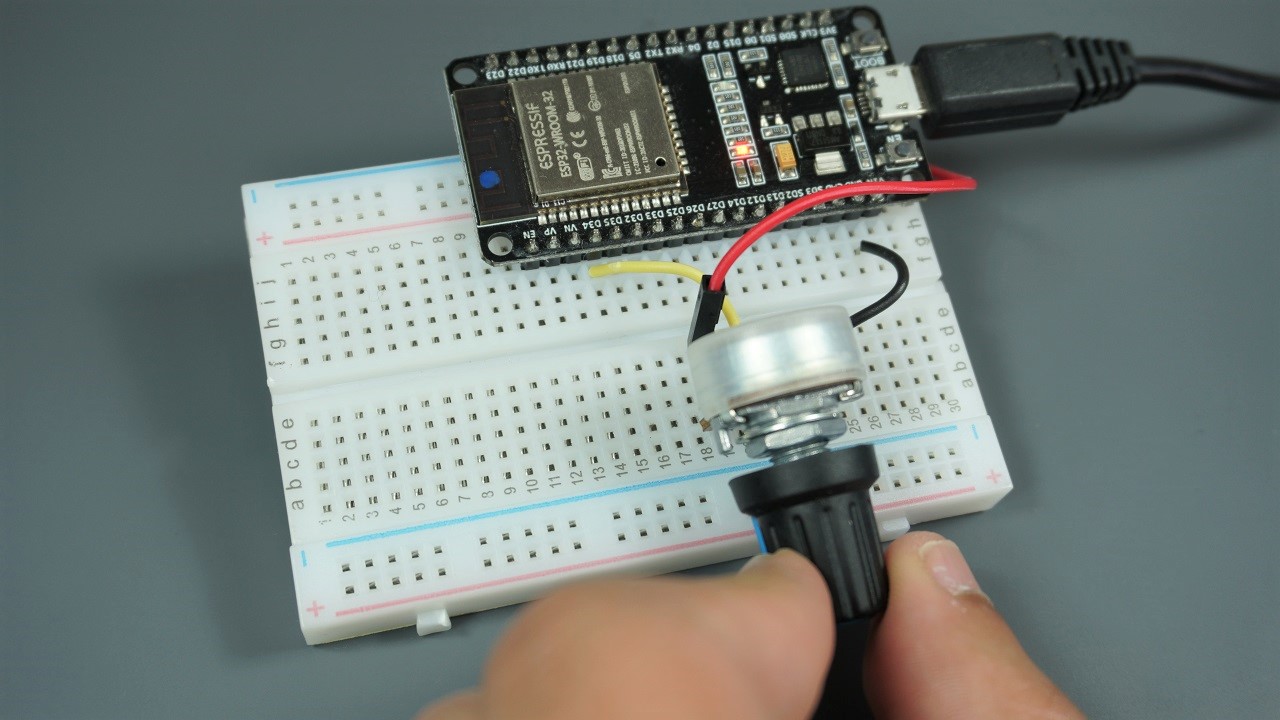
Learn how to read ESP32 Analog Inputs with Arduino IDE using analogRead function. Analog reading is useful to read values from potentiometers, analog sensors, etc
onyx hinge
the limits on esp32-s2 are a bit more severe than they were on the esp-32
idle owl
nRF is the same apparently
onyx hinge
GitHub
The reference_voltage of an AnalogIn is the value that lets you scale from the 0..65535 integer value to a floating-point voltage value. However, the documentation also states that the ADC can read...
I wanted to improve the docs but I didn't come up with specific text for it
idle owl
ah hmm.
onyx hinge
might also be good to cover it here but it's not https://learn.adafruit.com/adafruit-metro-esp32-s2/esp32-s2-bugs-and-limitations

I appreciate the humor in this image
 stuck elbow
analog circuitry is hard
idle owl
Whee ok template updated I think.
 lone axle
@idle owl updating the rtd config file looks to be working correctly on a small subset and the whole bundle. I think I'm ready to add the final step of pushing the changes afterward. I'll do the small subset again first when I get that added.
Should I push directly to main or make a PR for each? If push directly, do you have a preference on the commit message to use?
I'm also going to make a releases on pcf8563 and ticks before I do it so those get updated as well (they were skipped my test runs so far due to the submodule being behind main slightly)
manic glacierBOT
As @neradoc and @anecdata noted, we can't depend on the reset reason.
Instead, just rely on the existing safe mode logic (the write already is skipped anytime boot.py was skipped), and otherwise potentially write boot_out.txt anytime it differs from the version on disk (or if the file doesn't exist in the first place)
Testing performed: On qtpy m0 haxpress, removed boot_out.txt, projectly ejected, then clicked reset button. verified boot_out.txt was recreated.
Closes #5588
Thanks, the info about reset_reason was super helpful!

CircuitPython version
Adafruit CircuitPython 7.1.0-beta.0-8-g28b5733bd on 2021-11-12; Adafruit Feather RP2040 with rp2040
Board ID:adafruit_feather_rp2040
Code/REPL
# SPDX-FileCopyrightText: 2021 ladyada for Adafruit Industries
# SPDX-License-Identifier: MIT
# adafruit_circuitpython_adafruitio usage with an esp32spi_socket
import board
import busio
import displayio
from   digitalio import DigitalInOut, Direction, Pull
import gc
import microcontroll...Please excuse typos in Description. Edit location and cursor location got out of sync for some reason. Last two lines should read:
I presume the code I write while supervisor.disable_autoreload() was in effect, causes the start of code.py.
My code runs in disable mode for 2 to 5 seconds then runs in enable mode for 15 seconds..
idle owl
lone axle
<@!330227457296957440> updating the rtd config file looks to be working correctl...
I don't want to RIP everyone's inbox with PRs. Maybe PR a few to make sure things pass, and then push to main is fine for this.
manic glacierBOT
You can use the edit button (inside the 3 dots menu) to edit your comment at any time to fix typos.
 tidal kiln
hey. have question on new CP 7.x RGB status blinks. who's in the know of that?
 slender iron
I know
tidal kiln
the blue blinks are BLE builds only?
slender iron
yes
tidal kiln
does this look like those blinks? for the blue ones:
https://www.youtube.com/watch?v=onGAFhu8KgU
slender iron
that's an older version of cp
tidal kiln
pre 7.x?
manic glacierBOT
You can use the edit button (inside the 3 dots menu) to edit your comment at any time to fix typos.
Thank you!
slender iron
the yellow solid is the exception and the blink is part of the line number
tidal kiln
ah. good eye. i was seeing the steady as just the first blink.
so "other error"
line 430
idle owl
@tidal kiln Can I borrow your brain for a minute? Or probably a few.
tidal kiln
urgent?
idle owl
No
tidal kiln
can i ping you in a bit?
tidal kiln
will do. want to get through some forum stuff first.
idle owl
No worries.
tulip sleet
@tidal kiln Scott wrote up the 7.0 blinks here: https://learn.adafruit.com/welcome-to-circuitpython/troubleshooting#circuitpython-7-dot-0-0-and-later-2978455-19
tidal kiln
@tulip sleet thanks. i think it's 6.x blinks in this case.
tulip sleet
those are further down that page, maybe you know that already
 blissful pollen
@idle owl If you need to review any of the IO stuff still I'll have some time later today. Home from a medical appointment and kinda loopy from some stuff they gave me but should be good 🙂
idle owl
blissful pollen
<@!330227457296957440> If you need to review any of the IO stuff still I'll have...
Oh fun! Loopy code review!
idle owl
blissful pollen
<@!330227457296957440> If you need to review any of the IO stuff still I'll have...
I ended up talking to one of our internal dev people about whether what I was doing was ok or not, and he said it was fine, and ultimately couldn't think of a better way to do it. I would appreciate you going over the code anyway in case there's something that could be done better, but I at least verified it's not straight up a Bad Idea.
@blissful pollen For your perusal.
It is not commented yet. But it probably is all familiar to you anyway.
blissful pollen
Sure, what's the basic purpose of the program? Read some values, save them to IO and sleep?
idle owl
blissful pollen
Sure, what's the basic purpose of the program? Read some values, save them to IO...
Yeah. Read the values before the board heats up, send to IO, sleep long enough to keep the board cool, repeat.
slender iron
np @tidal kiln
blissful pollen
idle owl
Yeah. Read the values before the board heats up, send to IO, sleep long enough t...
Sure just making some food and will look over it in a few minutes while I eat soup
idle owl
Brilliant, thanks!
slender iron
@tulip sleet or @onyx hinge: will one of you do my rpi review?
tulip sleet
I started on it last night but haven't finished yet
slender iron
thanks! just wanted to make sure someone was looking at it
manic glacierBOT

Looks good! Thank you! No worries about the CI hiccup.
Thanks! Let's give them a week and if we don't hear back then we'll sort something out.
idle owl
Hmm.... My Feather crashed.
Red NeoPixel blink intermittently, no data being sent.
Plugged it in, and now it's fine. So I never got to see the error.
It didn't register that it had crashed initially because the little red LED is on when data is being sent, so it has an "intermittent red LED" when it's running and when it crashes. 😄
lone axle
@idle owl okay I did a PR for this one: https://github.com/adafruit/Adafruit_CircuitPython_74HC595/pull/20 and actions check look good. After that I did a subset of 2 libraries with direct push: https://github.com/adafruit/Adafruit_CircuitPython_ADS1x15 and https://github.com/adafruit/Adafruit_CircuitPython_AWS_IOT both seem good so far. I'm going to wait a few minutes for actions to finish on both of those and as long as everything is still good I'll do the remainder of the list.
manic glacierBOT
@DavePutz I did not put together hardware to test your suggested fix. If you're able to test this, please do so and let me know how it goes.
I hope this Closes #5418
idle owl
lone axle
<@!330227457296957440> okay I did a PR for this one: https://github.com/adafruit...
Approved. Thanks for doing this.
lone axle
Yep, you're welcome. I'm also going to include a few seconds of sleep in each one to hopefully avoid any github rate limits. So it will take a few minutes to get through everything.
idle owl
lone axle
Yep, you're welcome. I'm also going to include a few seconds of sleep in each on...
No worries, that's completely fine.
blissful pollen
@idle owl Code looks good to me and similar to the code I use in my weather monitor. I was using the HTTP API too though the python library is limited in how much of the API it uses (I modified it for my use)
idle owl
blissful pollen
<@!330227457296957440> Code looks good to me and similar to the code I use in my...
Nice, thanks!
blissful pollen
I did use a try/except block around the whole thing as I wanted mine to run forever, and if for some reason it crashes (and with wifi it will happen) then it just went to deep sleep for 30 seconds and retried
idle owl
Yeah, Justin and I were wishing there was a "create_and_get_feed" type thing that did all of that at once.
idle owl
blissful pollen
I did use a try/except block around the whole thing as I wanted mine to run fore...
Hmm. Mine did just crash a bit ago.
No idea how or why. Never got to see the error.
What do you except? Pylint hates bare except
blissful pollen
idle owl
Hmm. Mine did just crash a bit ago.
It happened often enough, not even sure why or sometimes just the wifi/internet being bad
idle owl
blissful pollen
It happened often enough, not even sure why or sometimes just the wifi/internet ...
It lasted at least 14 hours this last run.
But since it reconnects every time, yeah, I can see that. Jerry had the wifi connection code in a try/except, I presume for that reason.
blissful pollen
I excepted it all. Like a global if anything goes wrong sleep for 30 seconds and let's try this again. Pylint may not like it but seemed the easiest way to do it
blissful pollen
https://github.com/gamblor21/Weather_Monitor_MagTag Was my project though I have my own copy of adafruit_io.py in there cause I modified it
idle owl
But the wifi stuff doesn't throw errors, it gives nice messages.
So I can't except anything specific for that.
Wow. A lot going on there.
blissful pollen
Mine is not a trivial example. Its three main things are reading the current time/date, reading the current forecast from an API and then reading my own IO feeds for temp/pressure. But I modified the IO HTTP API to read X values and average (or sum) them
idle owl
Ahh ok
blissful pollen
There are a lot of features in the REST API that are not in the python library
tidal kiln
@idle owl ok. whatup?
manic glacierBOT

Making these be uint16_t makes validation harder in the bindings. Could you just use mp_uint_t or uint32_t? If they do need to be narrowed to 16 bits, let's validate that.
Why so few pins? Aren't these the same as the RPi4 pins?
Only `UART`` is used below. Is this permanent? What happened to UART0? Could you add a comment of explanation if it's being used for debugging, etc.?
// These versions exist so that the prototype matches the protocol,
Ok... I have this table in a datasheet for the LC709203 battery monitor. That allows you to specify mAh size on the battery you're using for more accurate readings. It has "typical" sizes. But I wanted to try to add another size. I can't figure out a pattern or how they came up with the values. Page 11, Table 7 https://cdn-learn.adafruit.com/assets/assets/000/094/597/original/LC709203F-D.PDF?1599248750 and here is a screenshot of a spreadsheet I made so I had the decimal values to go with it, though I bet you don't need those.

I wanted to add 400mAh. But.... those values do not make sense to me.
That list is in the library.
 idle owl
I tried to match it up!
They don't really match up 😄
Or I guess they mostly do?
now that I see that plus my spreadsheet
hadn't compared the two since I wrote out the decimal values
So at that point, I'd be picking an arbitrary number from that graph, and it might not be that accurate anyway. Hmm.
Google didn't produce anything useful for me.
tidal kiln
do you know the "type"?
idle owl
The library uses 01 or 03, because those are the values in the lib.
So no I don't know really. Going based on numbers.
lone axle
If you want to get into pixel counting you could take a chunk of that graph into gimp or similar image editor and determine the pixel that is 80% of the way to 500 along the bottom (which should be 400mah) and then also count pixels on the left to determine more precisely where it falls between 10 and 20 on the left.
There must be a formula that the values could be plugged in to in order to get the output (I assume they used one to create the graph) but it doesn't look like they shared the formula and my algebra is definitely not up to where it would need to be in order to solve and find it.
idle owl
lone axle
If you want to get into pixel counting you could take a chunk of that graph into...
I was just thinking that I could blow it up and guess. 😄
tidal kiln
yah, i'm not sure either. in terms of what "type" is referring to.
but if you know type, can interpolate to other values.
or use graph to pick off value at 400
idle owl
Well 01 and 03 are apparently the same
tidal kiln
right. but what about the other types? i'm not sure what those are.
idle owl
How do I interpolate to the other values though? They don't really follow a pattern.
tidal kiln
the trend isn't linear unfortunately
but you could linear interpolate between the table's 200maH and 500mAh values
probably close enough
idle owl
Do math..........
idle owl
Easier than counting pixels I think. But then again, I'd be doing that some kludgy manual way, so...
tidal kiln
i think simpleio has something
idle owl
I should ask Noe (not Ruiz) in #general-chat ... They just did some massive proof the other day 😄
tidal kiln
yah, can just use map_range
idle owl
But... how would that work, the ranges are different for each gap
simple_math would work too then, that's all that's in simple_math I think.
tidal kiln
you'd make different calls depending on which range you are in
let me look at that... i'm probably behind in my knowledge of these helper libs.
idle owl
Eh, it was that no one was using simpleio for anything but the map_range for the most part, so Dan made it its own thing.
tidal kiln
ok, yah, it's essentially same thing
so, for example, if you're interested in 400mAh, then use the values from 200 and 500.
if you wanted 800mAh, use the values from 500 and 1000
etc.
tidal kiln
"piecewise linear approximation" is what you're doing
idle owl
Good to know.
tidal kiln
if they had provided a formula for the curves, then could have just used that
APA = f(mAh)
tidal kiln
it's not there
idle owl
ok
tidal kiln
like whatever the actual functions for those curves are
 tidal kiln
doesn't seem right. should be between 11 and 16.
idle owl
ohwait
I put in the wrong values.
I put in 100mah
and 200
I think.
14.3 which means 14.
tidal kiln
that seems more correctish
idle owl
Yeah, I picked the wrong range initially.
100-200 is what I had.
So is it worth adding when it's not specifically accurate?
tidal kiln
"table lookup" is another term for this
are you adding a feature to the library for the LC??
idle owl
Can you do decimals in hex? Seems like it goes weird
There's already this feature in there, using the existing table from the datasheet
I was going to add 400mAh as an option to that list
idle owl
tidal kiln
are you adding a feature to the library for the LC??

GitHub
Library for I2C LC709203F battery status and fuel gauge - Adafruit_CircuitPython_LC709203F/adafruit_lc709203f.py at ed41dd44605110f1d1411ed694ec2b5676dd8d9c · adafruit/Adafruit_CircuitPython_LC709203F
Or was looking into whether I even could add it
idle owl
Right.
tidal kiln
a fancier approach would be to incorporate the lookup into the library code, so could then specify arbitrary sizes
instead of the current fixed options
idle owl
🤯 heh
I'm supposed to be doing the guide for the Feather 😄
This was a detour because I only figured out what the PackSize even was earlier today
And realised those 400mAh batteries we have designed for the Feathers are going to be common to Feather projects
tidal kiln
ok. yah. just add a new explicit 400 entry.
can get fancier later. if needed, wanted, etc.
tidal kiln
>>> 0x0e
14
>>> hex(14)
'0xe'
>>>
i don't have one of those brains that can think in arbitrary bases, like hex. so i always have to check also. 🙂
idle owl
Here I thought you were some kind of hex wizard.
stuck elbow
hex is easier if you think about bits
crimson ferry
Deep Sleep: is it fair to say that when a device enters Deep Sleep, it does the usual deinit things as if a Control-C is entered in the serial console (e.g., GPIO get switched to high-Z generally except on never-reset and pin alarm pins), and when a device wakes from Deep Sleep, it does the usual init things as if a Control-D is entered in the REPL? What kinds of things fall into the "not always the case" category: Sometimes these on-board devices are controlled by the microcontroller pins, and may be turned off as a consequence of the pins being turned off, but this is not always the case? https://learn.adafruit.com/deep-sleep-with-circuitpython/power-consumption
blissful pollen
crimson ferry
Deep Sleep: is it fair to say that when a device enters Deep Sleep, it does the ...
I think it is not quite equivalent to Ctrl-C/D. It is probably closer losing power/powering on but sometimes a bit of state can be retained
crimson ferry
there's alarm.sleep_memory which survives deep sleep (and reloads), but not hard resets / power cycles
what's different about a power cycle (or deep sleep) than a reload, oither than the code.py is restarted? boot.py doesn't run for waking from deep sleep, does it?
blissful pollen
I'm not sure how much is but something like pins for displays or anything set as "never reset" would be reset I believe after deep sleep. Been a while since I read the specs
tidal kiln
@idle owl anyone specific reviewing type hint PRs?
idle owl
tidal kiln
<@!330227457296957440> anyone specific reviewing type hint PRs?
I've been leaving them to foamyguy only because he's more familiar with them than me, but otherwise, no they're up for grabs by anyone. If you have cycles, please jump in.
tidal kiln
i'm not up to speed on them 😦
idle owl
tidal kiln
i'm not up to speed on them 😦
Who's the author? Because at this point I'd merge Tekktrik's with a basic readthrough. They've done enough of them. I think FoamyGuy was importing them into an IDE and testing them, but I'm not sure he's doing that anymore.
crimson ferry
oh, boot.py does seem to run on waking from deep sleep, at least in simulated (USB connected), so I'd expect that to be true for real ...but sleep_memory didn't behave as I expected
idle owl
tidal kiln
there was a dedicated PR, but things got a little confused
Yeah I think a quick readthrough to make sure they make sense, and it's fine to merge that one. Yeah, I told Tekktrik it was ok to include other cleanup in those PRs.
Oh I see, a whole new example there.
Eh, if the example's been tested, and the type hints make sense, go for it.
tidal kiln
yah. that also, which i'm thinking about. but for the type hints, are there CI checks?
idle owl
tidal kiln
yah. that also, which i'm thinking about. but for the type hints, are there CI c...
Um... not specifically? If the PR passes, it's passing.
Maybe I'm not understanding your question
tidal kiln
if there was an issue with the type hint stuff, would CI catch it?
idle owl
I have an unrelated question (tangentially related to earlier).... this is the LC709203, right? I can provide the schematic and board file if useful. (They're also on GitHub, but I have them here already.)
 idle owl
tidal kiln
if there was an issue with the type hint stuff, would CI catch it?
idle owl
tidal kiln
if there was an issue with the type hint stuff, would CI catch it?
Ah.... not exactly. If someone picked the wrong type for one of them, I don't think CI would know. It only knows formatting, I think.
That's why you want to read through and make sure, yeah that's an int, etc.
tidal kiln
tidal kiln
good skill build opportunity
idle owl
I have been clicking on a part of the part with the eyeball this whole time
and guessing based on what the connections are
I had no idea you could click on the WHOLE part.
mind == blown.
(It is the right part)
tulip sleet
crimson ferry
Deep Sleep: is it fair to say that when a device enters Deep Sleep, it does the ...
When I wrote that, I was referring to on-board sensors that don't have a separate power control. For instance, on CPX the LIS3DH is always powered, so sleeping won't turn off its power consumption. I will try to clarify that sentence.
manic glacierBOT

In testing, this patch seems to fix the initial issue in #5418. However, the second hang mentioned in that issue; where a similar hang can be generated when running the script from https://learn.adafruit.com/rgb-led-matrices-matrix-panels-with-circuitpython/connecting-with-feather-rp2040-featherwing by hitting CTRL-C during startup; still exists. I captured a stack from that hang:
#0 0x1008cd78 in blast_long (data=0xbc, core=0x2000391c <displays+20>) at ../../lib/protomatter/src/core.c...OK, I see, thanks, things on-board that are directly powered in hardware
lone axle
tidal kiln
if there was an issue with the type hint stuff, would CI catch it?
There are not currently any CI checks for type hints. Eventually we could implement one using mypy but there is discussion to be had about how strict we want it to be configured. And at present we don't have a majority of the type hints in yet so a large percentage of the libraries would fail the check if it did exist today.
For the existing PRs I've been looking over them to confirm the types make sense and testing some of them by viewing the hint popup in PyCharm (some are harder than others to do this with depending on library structure and what code is used in the examples).
tidal kiln
@lone axle thanks. does the type hint stuff look OK in that PR? (see above)
idle owl
Any reason to include the extra 0 in a hex value, such as 0x0B, versus 0xB?
Or not include it?
lone axle
tidal kiln
<@!382939733107408897> thanks. does the type hint stuff look OK in that PR? (see...
yep, type info looks good to me. I'll leave a review on the PR as well.
tulip sleet
idle owl
Any reason to include the extra 0 in a hex value, such as 0x0B, versus 0xB?
I think it's clearer that it represents an 8-bit value (2 hex digits). Also it's clearer that there's not a typo in the value, and it tends to make things line up nicely.
idle owl
Like the default I2C address listed on the back of a breakout is 0x0B, but the I2C scan returns 0xb.
idle owl
tulip sleet
I think it's clearer that it represents an 8-bit value (2 hex digits). Also it's...
Ah ok. Thank you.
tulip sleet
in that case, maybe you need to say something about leading zeros, if it's not obvious
"0x0b" is the same as "0xb: it just has leading zeros"
idle owl
tulip sleet
in that case, maybe you need to say something about leading zeros, if it's not o...
Nah it's pretty clear the way I did it. I guess maybe it's less clear if someone runs the scan? But I think it's ok
idle owl
tulip sleet
"0x0b" is the same as "0xb: it just has leading zeros"
I added this note anyway.
Wait..... .format is the preferred string format right?
 jaunty juniper
yup on Circuitpython because f-strings are not available everywhere
idle owl
Keen thanks
jaunty juniper
for libraries in particular, but of course you can do what you want if the code doesn't need to run on samd21
idle owl
This is for an example. It is from a while ago and uses %, I wanted to update my adaptation.
@tulip sleet Do we have an ETA on another 7.1 release? It occurs to me that all these examples in this guide will only work with latest. Because of the I2C_POWER_INVERTED rename. At least I'm about 80% sure it's not in the current beta (I thought it failed for me until I went to an S3 version).
tulip sleet
jaunty juniper
yup on Circuitpython because f-strings are not available everywhere
@idle owl f-strings take 410 bytes extra. Hmm, maybe in the long run...
idle owl
I am ok with putting a warning in to use unstable, but telling folks to use S3 is kinda meh.
Ah fair enough. I knew they weren't supported, but I was second guessing .format vs %
tulip sleet
idle owl
<@!329766224093249548> Do we have an ETA on another 7.1 release? It occurs to me...
no ETA, when is this guide to be published?
idle owl
tulip sleet
no ETA, when is this guide to be published?
Um..... maybe tomorrow. More likely next week, but I'm getting close.
It's the main board guide for the Feather ESP32-S2.
crimson ferry
deleting the above, n/m, boot.py doesn't seem to run in (simulated) deep sleep
idle owl
I'm out Thursday and Friday though, so I have to get as far as I can tomorrow. At this point, it definitely won't make the AaE cutoff tomorrow morning.
tulip sleet
another release could be any time. It takes me about an hour of work. I'm not sure there are many substantial fixes so far, which is why I was holding off. But board support is an OK reason.
I could certainly do one early next week
idle owl
tulip sleet
another release could be any time. It takes me about an hour of work. I'm not su...
It would be ideal. I've already had to correct it for folks.
Hmm.
Alright.
That'll have to do. I'll let you know how far I get on it today. Are you here tomorrow?
tulip sleet
yes, I am working a regular day tomw
the shorter the interval, the shorter the list of changes, so the shorter time
idle owl
Ok, if it becomes urgent, I'll let you know tomorrow.
tulip sleet
after that, mostly it's babysitting the builds
idle owl
Whee found another spot to simplify!
crimson ferry
Deep Sleep (simulated) gives microcontroller.ResetReason.POWER_ON & supervisor.RunReason.STARTUP, but boot.py doesn't run. Do we need a new reason for deep sleep? It's a little confusing to know if we had a (possibly unexpected) power cycle, or an (expected) sleep cycle . I may be missing something.
I guess if alarm.wake_alarm is None, then it was a power cycle.
Maybe microcontroller.ResetReason.DEEP_SLEEP_ALARM just isn't set for simulated?
idle owl
Any reason why this Feather won't mount when plugged in....? Wait! If it's deep sleeping, does it have to wait to wake up to mount?
crimson ferry
it should stay mounted if it's simulated deep sleeping
idle owl
No, it was real deep sleep
blissful pollen
yeah if it was not plugged in and you plugged it in while deep sleeping you would have to wait (or reset it)
idle owl
blissful pollen
yeah if it was not plugged in and you plugged it in while deep sleeping you woul...
Ok that's exactly what I've been doing. And thought it was a failure somewhere. That makes more sense
 ember iris
I believe if it's in deep sleep, then plugged in, then wakes and goes back to deep sleep, it'll go into simulated deep sleep because it notices it's powered from the USB
the esp deep sleep wake alarm reason bug gave me a ton of time to explore that one 😅
idle owl
Heh fair enough
crimson ferry
ember iris
the esp deep sleep wake alarm reason bug gave me a ton of time to explore that o...
i may have just encountered that... for simulated? (see my paragraph just above)
ember iris
crimson ferry
i may have just encountered that... for simulated? (see my paragraph just above)
For deep sleep it would fail to recognize the wake reason--for simulated it recognized it
https://github.com/adafruit/circuitpython/issues/5343
crimson ferry
oh, I'm seeing the wrong reason for simulated
ember iris
Deep sleep wake reason worked in circuit python 6.x, but didn't (doesn't?) in 7.x, I haven't worked on tracking it down much past that though because the core is a bit difficult to dig into
ember iris
crimson ferry
oh, I'm seeing the wrong reason for simulated
Let me grab the latest build and try the simulated code on a magtag. I'll see if I can still reproduce that bug or if I get something like yours
idle wharf
ember iris
Let me grab the latest build and try the simulated code on a magtag. I'll see if...
I just happen to be running a magtag in a time based sleep loop want me to test anything?
 lunar gull
I just spoke with @lone axle on my other account. Can I please have the circuitpythonistas role?
idle owl
lunar gull
I just spoke with <@!382939733107408897> on my other account. Can I please have ...
Done.
crimson ferry
If I've been in simulated since power-on, I get: None microcontroller.ResetReason.POWER_ON supervisor.RunReason.STARTUP on power-on, then on subsequent sleep cycles: <TimeAlarm> microcontroller.ResetReason.POWER_ON supervisor.RunReason.STARTUP But if I come back to connected from unconnected, I get: None microcontroller.ResetReason.DEEP_SLEEP_ALARM supervisor.RunReason.STARTUP the first time
oh, but once that happens, on subsequent sleep cycles, I continue to get simulated: <TimeAlarm> microcontroller.ResetReason.DEEP_SLEEP_ALARM supervisor.RunReason.STARTUP
ember iris
I think I'm going to be a bit slower to give it a shot--I just upgraded esptool to v3.2 and am running into protocol errors when I'm trying to interface with it. I'll be more helpful shortly I hope
 main furnace
tulip sleet
"0x0b" is the same as "0xb: it just has leading zeros"
main furnace
tulip sleet
"0x0b" is the same as "0xb: it just has leading zeros"
Put that on a t-shirt.
ember iris
@tulip sleet Did you ever get a better solution than "Revert to v3.1" on this issue? https://github.com/espressif/esptool/issues/685
tulip sleet
ember iris
<@!329766224093249548> Did you ever get a better solution than "Revert to v3.1" ...
If you specify the --chip explicitly, that's a workaround. Otherwise we just await the next release.
ember iris
Thank you! I downgraded but wanted to be mindful that a lot of users would be on v3.2 and wanted a solution that's easier than, "Downgrade a version"
ember iris
crimson ferry
If I've been in simulated since power-on, I get: `None microcontroller.ResetReas...
I finally have the latest version and am able to duplicate this issue still: https://github.com/adafruit/circuitpython/issues/5343. Which strikes me as odd because that means it's simulated deep sleep is preserving alarm reasons. Do you have a sample code snippet I could use to test your reset demo?
- I am using a magtag for this test
crimson ferry
MagTag, latest S3: I print a bunch of other stuff, but then these are the key lines:```py
print(alarm.wake_alarm, microcontroller.cpu.reset_reason, supervisor.runtime.run_reason)
al = alarm.time.TimeAlarm(monotonic_time=time.monotonic() + 10)
alarm.exit_and_deep_sleep_until_alarms(al)

I don't know if this is a different issue, or if the current issue is more complex.
Testing with:
Adafruit CircuitPython 7.1.0-beta.0-85-g387a8a46b on 2021-11-22; Adafruit MagTag with ESP32S2
in code.py:
print(alarm.wake_alarm, microcontroller.cpu.reset_reason, supervisor.runtime.run_reason)
If I've been in simulated since power-on, I get:
None microcontroller.ResetReason.POWER_ON supervisor.RunReason.STARTUP
on power-on, then on subsequent sleep cycles:
`<TimeA...
ember iris
Awesome, I'm on magtag and latest S3 as well, and I'll try it in a moment--I just discovered that the magtag 'sleep memory' isn't working from the magtag example here: https://learn.adafruit.com/deep-sleep-with-circuitpython/sleep-memory
Could you verify if deep sleep increments the counter on your magtag?
crimson ferry
it was
ember iris
I have no idea why my counter is sitting at 1 when in deep sleep if yours is incrementing
crimson ferry
that was in simulated
ember iris
Ohh, ok. Deep sleep my counter is staying at 1, but in simulated it increments
crimson ferry
I'll put the counter back in and try more disconnected testing
ember iris
If you have it disconnected and it's in full deep sleep and the counter stays at 1 after multiple wake cycles, that might help narrow the issue down to the sleep memory
crimson ferry
when I plugged it back in, it actually restarted... boot.py and all, so it makes sense that it would reset alarm_memory
I'll keep it disconnected but send the count to the cloud
ember iris
Adjusting the text display to state reset reasons:
# Display the current battery voltage and the count.
magtag.set_text(
    "battery: {}V    count: {} mrsr:{}    srr:{}".format(
        magtag.peripherals.battery, alarm.sleep_memory[5],
        str(microcontroller.cpu.reset_reason).split('.')[-1],
        str(supervisor.runtime.run_reason).split('.')[-1]
    )
)
I tried just flashing the NeoPixels, but unplugged they don't reflect incrementing alarm_memory
ember iris
Ok--here's what I've got
from reset Powered by battery or by usb:
microcontroller.cpu.reset_reason: Power On
supervisor.runtime.run_reason: startup
Count is 1 (it increments prior to printing)
alarm.wake_alarm: None
From Simulated Sleep (Has at least one cycle of 'reawakening' after reset)
microcontroller.cpu.reset_reason: Power On
supervisor.runtime.run_reason: startup
Count is > 1 (incrementing as expected)
alarm.wake_alarm: <TimeAlarm>
From Deep Sleep:
microcontroller.cpu.reset_reason: DEEP_SLEEP_ALARM
supervisor.runtime.run_reason: startup
Count is 1 regardless of number of times it's been in deep sleep
alarm.wake_alarm: None
crimson ferry
yeah, that's pretty much what I'm seeing, I added in the MagTag text to make sure
ember iris
I'm willing to bet this is all tied to the same bug. microcontroller.ResetReason. is super helpful.
Is there a way I can test circuit python on either side of a specific pull request?
crimson ferry
yeah, each merge should have a build on S3
ember iris
Sweet, thank you! I'll start digging
crimson ferry
at least going back until the last release or so
ember iris
To go further back, would I need to fork the repo and build for a target board? (I probably should learn to use that process anyway, so it's not a bad thing to do it that way)
crimson ferry
there should be UF2 and .bin files out there for recents, but before that, yeah I guess build though I'm not really sure how to do an old build
hm, if someone wants to throw all of this into a thread, that would be fine
I don't know if that's possible after-the-fact
ember iris
Deep Sleep vs Simulated Deep Sleep and Memory
manic glacierBOT
I just hadn't copied them over. All of the pinouts for the official boards are essentially the same.
It only warns when mp_obj_t isn't a pointer type. (I had tried repr D before realizing it was weird 64 bits on 32 bit platform.)
jaunty juniper
ember iris
To go further back, would I need to fork the repo and build for a target board? ...
you can always checkout any older commit inside a git repository, and build it, don't forget to run the commands to sync submodules, so they match the version of Circuitpython you are testing
in fact with the gh command, you can checkout pull requests (open or closed) with gh pr checkout 5613 for example, which I use to test PRs (it's faster to build locally than wait for CI to finish, and/or dive on the site to find the right file in the artifacts)
ember iris
thank you! I will have to look into this tomorrow. I think that's exactly what I'll need. I have a pull request I want to try on either side of so that's exactly what I need!
idle owl
ember iris
thank you! I will have to look into this tomorrow. I think that's exactly what I...
gh pr checkout #### does some git commands in the background, basically. It's possible to check out a PR using git as well. But the gh commands are simpler. It requires installing the gh tool.
ember iris
sweeet! Thank you both!
jaunty juniper
in this case it will pull the PR branch from the submitter's fork, which would otherwise be a little more annoying to do manually, having to lookup the user, the name of the branch...
manic glacierBOT
Added a comment. All of the other uarts are a different peripheral type that isn't handled yet.
manic glacierBOT
Ok, I've pushed a new version. It includes I2C support too.
manic glacierBOT
Thanks for the updates, and hurrah for I2C! zero2w port is failing for some compilation reason, but the pi4b is working.
This simple code shows the issue on my machine. The wait time to auto start varies.
Resave the code.py during disable
Hit Ctrl-C during enable
import time
import supervisor
while True:
supervisor.disable_autoreload()
print("Disable for 5 Seconds")
time.sleep(5)
supervisor.enable_autoreload()
print("Enable for 10 Seconds")
time.sleep(10)
Bruce
manic glacierBOT
The Learn Guide Cooperative Multitasking in CircuitPython has been published. More parts need to be added to it, but it currently includes a number of simple examples.
I'm closing this issue for now. Thanks for all your input! See the previous comment for more information. Please open other issues for asyncio followups and suggestions for further enhancements.
 lone sandalBOT

The Awesome list hasn't been updated in a while - I've added some Podcast notes, some new boards and other misc. updates. I'm sure there are a number of boards that are still missing. If any changes need to be made, please let me know. Thanks!
A best practice is to use "main" instead of master to be more inclusive.
The video that is embedded in the README on line 11 displays fine if you're viewing the Awesome List on Github.
But if you view it at https://circuitpython.org/awesome it displays the URL and not the video file:
https://user-images.githubusercontent.com/1685947/115119719-d6e21f00-9f77-11eb-84bf-3f7af59948a3.mov
We should decide which site is the main site and whether the video should be included or not. Or if it can be embedded in HTML instead?
 manic glacierBOT

CircuitPython version
Adafruit CircuitPython 7.1.0-beta.0-91-gaf2ac0aa6 on 2021-11-23; Adafruit Feather ESP32S2 with ESP32S2
Code/REPL
import time
import board
import digitalio
import adafruit_icm20x
ip = digitalio.DigitalInOut(board.I2C_POWER_INVERTED)
ip.switch_to_output()
ip.value = True
i2c = board.I2C()
icm = adafruit_icm20x.ICM20649(i2c)
while True:
print("Acceleration: X:%.2f, Y: %.2f, Z: %.2f m/s^2" % (icm.acceleration))
pri... timber mango
@languid whale my ANO encoder arrived and got to test your code.
Works great!
manic glacierBOT

ESP NOW for offline communications in areas without internet?
manic glacierBOT

Not really, the bit rate is extremely small. An example of the use for this tech is to transfer temperature/humidity readings to another esp microcontroller with distances less than 200m. > ESP NOW for offline communications in areas without internet?
Wishing to utilise the WIFI on Raspberry Pi or ESP32 for education delivery in rural communities
manic glacierBOT

Changes in this PR:
- Update esp-idf to v4.4.
- Add esp32s3 support.
- Add analogio on esp32c3.
- Disable rgbmatrix on all espressif soc.
- Formatting changes in espressif makefile.
Thanks @tannewt and @UnexpectedMaker for the initial heavy-lifting.
lone sandalBOT
Done -- Thank you for noticing this!
df0691e Add VS Code extension to Frameworks - prcutler
bffc525 Add a number of missing Adafruit boards, mostly... - prcutler
2382479 Add Circuit Python 7 Release Poster in SWAG sec... - prcutler
36e3441 Add podcast episodes and make a subsection for ... - prcutler
da4c998 Update author name to Anne Barela - prcutler
Hi @mcauser -- thanks for this. Unfortunately, we at Adafruit dropped the ball and now the pull request requires conflicts to be resolved before we can merge it. If you can, please update the pull request and feel free to tag me when you've updated it.
Hi @MatzElectronics -- thanks for this. Unfortunately, we at Adafruit dropped the ball and now the pull request requires conflicts to be resolved before we can merge it. If you can, please update the pull request and feel free to tag me when you've updated it.
Thanks again... I was able to resolve the conflicts myself.
manic glacierBOT
Thanks for the updates, and hurrah for I2C! zero2w port is failing for some compilation reason, but the pi4b is working.
Looks like a simple fix: I added a #include. If this works I will merge.
lone sandalBOT
I resolved the conflicts, but checking over the result would still be appreciated!
manic glacierBOT
@tannewt Making a commit from the GitHub web interface seems to have upset the build cloning optimizations you added. From https://github.com/adafruit/circuitpython/runs/4313459204?check_suite_focus=true:
Run git describe --dirty --tags
  git describe --dirty --tags
  echo >>$GITHUB_ENV CP_VERSION=$(git describe --dirty --tags)
  shell: /usr/bin/bash -e {0}
  env:
    pythonLocation: /opt/hostedtoolcache/Python/3.8.12/x64
fatal: No tags can describe 'e98223cbae0c9dfe636badcc49bb...@tannewt I pushed an empty commit from your repo, and it didn't fix the problem. Hmm.
manic glacierBOT
What's up with disabling rgbmatrix, can you explain why it was necessary?
lone sandalBOT
manic glacierBOT
Previously, Floyd-Stenberg dither couldn't be accessed, because its constant had the wrong value.
When it was enabled, there were occasional artifacts in all-white areas. Switching from an under-parenthesized shift to a well-parenthesized division makes the artifacts go away.
There was also an off-by-one problem loading image data that caused row 2 to be duplicated. You could see this most clearly by repeatedly dithering an already-dithered image back into itself.
manic glacierBOT
What's up with disabling rgbmatrix, can you explain why it was necessary?
Nothing major, protomatter needs to be updated, timer_index_t struct has changed in the newer idf.
I have got a PR out https://github.com/adafruit/Adafruit_Protomatter/pull/41 but don't have the hardware to test it.
lone sandalBOT
More README updates:
- Update Events with PyCon 2022
- Add new Adafruit CircuitPython boards (mostly RP2040, I'm guessing there are still a lot missing)
- Add Nina Zakharenko's 2021 PyCon talk.
- Fix a couple typos
lone sandalBOT

I think the page is rendered from this file here: https://github.com/adafruit/circuitpython-org/blob/master/awesome.html int he CircuitPython_Org repo.
It might make sense to move this issue over to that repo.
Only took a quick peek into it, but looks to me like the gets rendered via the Jekyll build process. The template loads in the contents of the md file and renders it using a markdownify template tag. I'm not sure if that functionality specifically comes from Jekyll or is a feat...
crimson ferry
This board is a Raspberry Pi Pico RP2040 with built-in Ethernet (uses SPI and a couple of pins for that). It runs the CircuitPython for Pico UF2 fine. Should we encourage the manufacturer to add the board to CP code & .org due to the dedicated pins, or just use it like a Pico? https://www.wiznet.io/product-item/w5100s-evb-pico/
W5100S-EVB-Pico is a microcontroller evaluation board based on the Raspberry Pi RP2040.
slender iron
@crimson ferry ideally they'd add it. I get the impression they want to freeze the drivers in when they do
@tulip sleet want to finish this review? https://github.com/adafruit/circuitpython/pull/5422#event-5666936967
manic glacierBOT
@jepler Want to update protomatter next week for this?
Thank you! The changes all look good to me. We just need to update protomatter so that we can leave rgbmatrix enabled.
Thank you for the fixes!
 orchid basinBOT
This is meant to resolve: https://github.com/adafruit/awesome-circuitpython/issues/33
I looked into it a bit and markdownify is a template filter provided by the Jekyll project. The templating language used is called Liquid, but Jekyll adds some functionality that isn't in the upstream Liquid project. Markdownify is documented on this page: https://jekyllrb.com/docs/liquid/filters/
I couldn't find a way to instruct it to render video elements. Theoretically that functionality could be...
lone sandalBOT
 lone sandalBOT
Some recent PRs mentioned tidying the markdown code with https://github.com/sindresorhus/awesome-lint -- is it something that we could/should do automatically during CI, similar to how we do pylint & black?
manic glacierBOT
Yeah if there's code that builds I can at least test it on esp32-s2 and get it merged in. It looks like there's not a variant which works with both old and new esp-idf so doing it in steps with rgbmatrix briefly disabled is probably not a bad way to handle it. Please open an issue here so that I have a reminder of the task.
slender iron
any intuition on the value of reworking the table structure used by map to use 16 bits for the key when all keys are qstr?
I think it'd drop the sizes by 25%
8 bytes an entry to 6 bytes an entry
manic glacierBOT
Thanks for working this. I have a question re gc, and also some suggestions on making the pin copying to and fro more self-evident.
Let's just pick one name here; I think STEMMA is good enough.
e.g. following up on the struct idea, here would be:
const mcu_pin_obj_t mosi = spi_pin[instance].mosi;
etc.
Even if these are allocated outside the heap, they still need to be scanned and marked during garbage collection, because they may contain object pointers that need to be marked in the gc mark phase. I'm not sure why you took this out, then.
tulip sleet
slender iron
any intuition on the value of reworking the table structure used by map to use 1...
which map? I don't know what you mean?
also, do you understand what's going on with the broadcom build failures at all?
slender iron
the tables that define objects
qstr -> function object usually
@tulip sleet no, it's weird. I added a thing to print git log if the describe fails
tulip sleet
the commits the logs complained about make no sense to me
tulip sleet
i happen to have more full access to your repo than is usual (you gave it to me a while ago), but I don't know why that would make a difference here. The PR now has merge conflicts, btw, if you did not see that already
@slender iron, you mean like the STATIC const mp_rom_map_elem_t busio_i2c_locals_dict_table[] = { etc.?
slender iron
I figured it would
yup, those tables
I'm trying to reduce the build size so we can merge translations in
tulip sleet
there are 1497 non-pin-table entries like that, so it would save 750 bytes, but only if every module was in every build
which builds are not fitting?
slender iron
my arch build has 2k free on arduino_zero ru
tulip sleet
and it was overflowing before?
tulip sleet
CIRCUITPY_ONEWIREIO = 0 has worked for me for a lot of tight builds
slender iron
ya, I'd rather not remove it from existing boards though
tulip sleet
the only boards where it was an issue were ones that saw very little use. Since it's just a compatibility thing for now until we get to 8.0.0, I thought it was the least annoying
slender iron
👍
I'd do the table optimization if I knew a C macro trick to have the key and value on the same line still
slender iron
right now it's KVKVKV in memory but I'd want it to be KKKVVV going forwards
so that K can be 16 bit, not 32
tulip sleet
ah, got it
slender iron
but maintaining it with K, V on a line is nice
bonus points for reordering keys to speed up lookup 🙂
tulip sleet
cpp is just too weak to do anything like that, I think
slender iron
ya, I think so too. not the first time I've been tempted to post-process a build artifact 🙂
or... we have templates that generate c
MP_QSTR ordering depends on the generator though too
MP_REGISTERED_MODULES kinda does that
tulip sleet
i think this is interesting, but perhaps deferrable 🙂
slender iron
ya, the three boards that need it are arduino_mkr1300, arduino_zero and stringcar_m0_express
tulip sleet
the first two have no external flash anyway, so not that interesting, and the last doesn't need onewireio compatibility 🙂
idle owl
@blissful pollen Greetings! Are you around?
blissful pollen
Sorta right now. I’ll be home in an hour or so
idle owl
blissful pollen
Sorta right now. I’ll be home in an hour or so
Maybe you can answer this now, or maybe later. My question is, what is going on here, which is to say, if I'm doing a walk-through of the code, what sentence can I put to explain this. Right now it's "Connecting to Wi-Fi" but I think this is not quite part of that? Or is it? pool = socketpool.SocketPool(wifi.radio) requests = adafruit_requests.Session(pool, ssl.create_default_context())
It's in my Adafruit IO sending code.
I can gloss over it if it's bonkers to explain.
blissful pollen
It’s not about connecting to the wifi (that’s happened already) but about setting up for communication using the wifi.
The first line sets up a pool of socket objects to use. The second initializes the requests library with said pool.
That doesn’t really say much on its own I know
blissful pollen
Welcome! It confuses me as well. I’d have to look back into the libraries to see exactly what is set up. But for the average user just steps you need to take
 daring pumice
Hello everyone,
I hope I'm not interrupting. I've been corresponding with @tulip sleet on the adafruit/curcuitpython forums, and was invited to join this discord to contribute to help find issues with the build for the nrf52833 dk board.
Is this the right place to ask questions and/or ask for help?
idle owl
daring pumice
Hello everyone,
I hope I'm not interrupting. I've been corresponding with <@!3...
You're in the right place! Welcome!
daring pumice
Thank you, Kattni 🙂 Pleased to be here.
Is it alright if I ask for some help with building the firmware? I've been slowly progressing towards what I think is the intended build, but have encountered some problems and wanted to run them by you guys to see what you make of them.
That ok?
idle owl
Absolutely! Ask away.
tulip sleet
daring pumice
Hello everyone,
I hope I'm not interrupting. I've been corresponding with <@!3...
I am here, so go ahead. Did you fetch all the submodules as shown in the guide? That might be your issue, based on what you posted in the forums
daring pumice
@idle owl Thanks again 🙂
@tulip sleet I did, and thanks again! I've posted my latest issue on the forums, but I realize people are in the middle of work, so I thought I'd come here to see if anyone has some free time and a kind point in the right direction.
tulip sleet
i will try to reproduce your build. On what system are you building?
daring pumice
As it stands, I can build the .bin, .hex., and .uf2 files - no issue. However, the next step in the make appears to try and create firmware.combined.hex (if I'm reading that correctly - I may not be), using hexmerge.py.
Hexmerge.py doesn't exist on my box. Have I missed somehting?
Win 10
tulip sleet
with wsl?
daring pumice
Nope, native.
I have a mac at my disposal, so can try there - either works - but right now I've made more progress on win10 (if that can be believed).
tulip sleet
you're building the bootloader or circuitpython?
daring pumice
curcuitpython
I can post a SShot if you like - not sure if that's helpful
can also paste the text from the make attempt
tulip sleet
we don't have instructions for building on windows except for using WSL, so I'm not sure how you got started. The paths in your errors have forward slashes, so it didn't look like windows
you can upload a file with the + to the left
daring pumice
Sounds good - I'll post
daring pumice
Gotcha - should be ok
To get this error, I mirrored the repository for adafruit/circuitpython from git
ran the submodule command that appears in the page you sent, Dan
and then ran "make V=1 BOARD=PCA10100"

It runs quite far, and can build the files I mentioned above, but gets stuck here immediately after
tulip sleet
that doesn't look like windows, I'm confused
daring pumice
I'm using the terminal app running cmd
tulip sleet
that will basically not work at all. do you have some Unix utilities installed somehwere
i'm surprised it got this far
daring pumice
I have a bunch installed
mingw, etc.
which are you referring to?
(and thanks, Dan, appreciate your time)
tulip sleet
it really won't work. It's sort of possible to do with mingw, msys, etc, but it's quite painful. It would be much easier if you installed WSL or used a Linux VM or a native Linux box
daring pumice
ok, so you're saying I should try this on my mac?
tulip sleet
no, I'm not saying that either 🙂 . The mac has its own issues. A clean Linux system like Ubuntu 20.04 is what the rest of us use for day-to-day development
you can get it working on Mac more easily, but there's still a lot of homebrewing to do, and making sure you have the right python, etc.
for instance, on Mac, you need to create a case-sensitive filesystem
to do the work in
daring pumice
Ok. I admit, I'm not looking forward to installing WSL - it doesn't forward resources attached via USB in my experience... perhaps I'm just doing it wrong
Regardless, your point is well made and well taken. I'll set up an Ubuntu install and try it there
Good idea?
idle owl
I am able to build on MacOS, but Dan's right, it takes a bit of work to get there.
tulip sleet
The USB business is an issue, but you can do the testing on the Windows side. Note the instructions about using the filesystem inside WSL, not the Windows filesystem, again due to case sensitivity and symbolic links
if you have any other old box, even an old laptop, and can get Ubuntu on it easily, you may be more productive.
Use WSL2. The filesystem performance on WSL has been an issue in the past, making for slow builds, but they have been working on it.
daring pumice
I hear you - I'll try both. I've installed brew and a bunch of build tools, so I'll see how that goes as I install WSL2 (I see that advice, and will follow it).
Thanks again - very kind 🙂
@tulip sleet and @idle owl 🙂
tulip sleet
sure, np, follow the steps carefully in the guide, and there may yet be problems with new homebrew or the latest macOS
idle owl
And don't use Homebrew to install Python!!
It leads to bad things later because of how updating it is designed.
daring pumice
Ok. I'm really new to MacOS - last time I wrote for mac was OS 8 or 9 (1993/4?)... what would you suggest, @idle owl ?
@tulip sleet will do
idle owl
Hah yeah, been a while there. I would recommend pyenv. It's well documented, and you definitely sound like you're up on things enough to get it sorted out with the docs.
idle owl
Cheers!
@daring pumice Also, pyenv-virtualenv and pyenv-virtualenvwrapper. Long story short regarding Brew to install Python, is that it will update out from under you and break all your virtual envs. Along with updating dependencies that maybe you didn't want to or intend to update.
daring pumice
Interesting - I didn't realize that. I admit, I'm a little confused at all the package management paradigms these days - my first linux install (in ~1999) didn't really have that... I think apt-get came in a little while after and everyone loved it.
Appreciate the insights.
idle owl
Yeah, brew is meant to be a package manager for MacOS, as there is not a native one to be had.
But it handles Python really awkwardly. They kind of wrote their Python implementation for themselves, not for others. And it breaks thing if you're not paying attention.
So, either install Python directly from python.org , or use pyenv to manage multiple Python versions without a lot of nonsense.
Bear in mind, I got help with most of this, so don't feel bad about asking for assistance. Frankly, if you run into issues, I'll be asking someone else to help out 😄
daring pumice
Ok. I'll def do that. Would you suggest rolling back all of the stuff I've installed with brew thus far? Hasn't been that much, and the projects I've been trying to build with the packages it has installed haven't worked yet.
No issue - I'm very glad for the help! 🙂
idle owl
Depends on what you've installed, but I wouldn't be too concerned.
But if nothing has worked yet, you could start fresh.
daring pumice
Alright. I'll pull out brew for now and start over. Thanks again!
idle owl
You're welcome!
@blissful pollen Wait, you said it's probably best to wrap this whole thing in a try/except because Wi-Fi is sketchy? Does it make more sense to put only the Wi-Fi connection into a try/except?
Jerry had it that way, I took it out not realising it might be needed.
If I'm going to add that back in, I need to make the deep sleep a function because it's used twice in that case.
blissful pollen
I wrapped the whole thing just in case anything failed I wouldn’t stay awake wasting battery power.
The io requests like send/get can fail too. Internet hiccups or anything
idle owl
Ahhhhh.
OK. Fair enough.
I guess it's worth it then.
Since this tiny battery will last at least 2 days, so a bigger one could last a week or something.
And I doubt the code will run for a week without some kind of exception.
Not consistently anyway.
blissful pollen
I ran into that in my magtag project. Something would fail and then the battery would die. It’s not perfect but worked well enough. I was tracing a weird wifi issue but never found the root cause
idle owl
blissful pollen
I ran into that in my magtag project. Something would fail and then the battery ...
Am I doing this right? Do I need to do the sleep function outside the try/except like I did?
It works... but I'm not sure whether it's right.
ember iris
I would change it so your try/excepts are covering smaller ranges of the code, that way if something goes wrong you know what went awry. This will safely wake up every 10 minutes and try again regardless of what happened last time but if you're getting an error it can make debugging harder
For example if you don't have a secrets.py file, the code won't raise the error and break because that error is caught, so in 10 minute's it'll try again
idle owl
ember iris
I would change it so your try/excepts are covering smaller ranges of the code, t...
This is designed to run on a battery.
You can't see what went wrong anyway.
Oh you mean before getting it going
I see.
Yeah fair enough.
Ok, let me try that.
ember iris
Right. So if your sensor isn't connected, or your credentials are bad or missing, or you didn't add a library, it'll quietly fail. Wrapping the things that interact with the wifi only will help keep the program running during wifi issues, without being quiet about the other parts
ember iris
The wifi stuff is a pain! There are so many parts that could go wrong in the middle you have no control over. I have a 'retry x times' if I get an exception because sometimes it breaks and trying again works
idle owl
ember iris
The wifi stuff is a pain! There are so many parts that could go wrong in the mid...
Better?
The Wi-Fi doesn't fail with an exception, it fails with a nice message. Which is useless for excepting anything useful. Not sure about AIO, so I left it bare as well.
Hate doing that, but eh.
Better to have this code keep running.
ember iris
That looks contained. You can add,
except Exception as e:
    print(e)
that way if any of the exception blocks occur while the micro is plugged in you can see what's failing
idle owl
Ok
idle owl
ember iris
That looks contained. You can add,
```py
except Exception as e:
print(e)
```...
Thank you!
ember iris
# Fetch the feed of the provided name. If the feed does not exist, create it.
def setup_feed(feed_name):
    try:
        # Get the feed of provided feed_name from Adafruit IO
        return io.get_feed(feed_name)
    except AdafruitIO_RequestError:
        # If no feed of that name exists, create it
        return io.create_new_feed(feed_name)
I don't know what the io stuff is--if there's no wifi, could this last line io.create_new_feed(feed_name) break? or is it just created a new feed name--a completely on the device no wifi kind of thing?
idle owl
It gets called inside the second try/except block
I assume the function doesn't do anything until you call it?
Or am I misunderstanding how all of that works
Because that definitely requires a network connection. But I don't do anything with it until inside another try.
ember iris
I keep reopening it and tracing everything and missing a ton because of it 🙂
Looks like the code should be stable from what I can see
if you have i2c errors it'll break, but I think that's a good thing?
orchid basinBOT

It looks like it works with embedded html (See https://github.com/adafruit/awesome-circuitpython/blob/main/README.md?plain=1#L1-L3). Why not just embed the video as html too?
idle owl
Yeah, I don't foresee those happening once the code is working.
The sensors are either going to work or not.
Because they're built in.
so if they don't work, you'll know when you're setting up to begin with.
ember iris
and if a wire gets cut over it's life, it is actually broken, so the code shouldn't pretend it's working
idle owl
True.
You'll get an intermittent blinking red NeoPixel if the code crashes.
If it's on battery and you can't see the errors.
Dinner time!
ember iris
Well, one way to test if it can handle radio failure is to throw it in a microwave (don't turn it on). That'll cut off the radio and if it comes back and works 10 minutes after you pull it out then the radio code is stable
ember iris
idle owl
Dinner time!
Have a good one!
manic glacierBOT
blissful pollen
idle owl
It works... but I'm not sure whether it's right.
Followed the discussion after this and I agree. Wrapping it all in one block catches all but makes debugging harder. Wrapping small blocks will catch things but if you are running battery only it is only good while debugging on the PC.
orchid basinBOT
If that doesn't work, maybe give it a class of video or an ID and use that for the JavaScript so that additional videos could make use of the code.
manic glacierBOT
daring pumice
@tulip sleet you still around?
tulip sleet
yes
slender iron
just ask your questions. multiple folks can help
daring pumice
haha glad. Let me know if/when you're done for the night - don't want to bother you during off-hours
@slender iron thanks 🙂
I've installed Ubuntu over WSL2 as you advised
and have gotten to precisely the same spot with this process
exact same errors
tulip sleet
i will try it myself
daring pumice
Much appreciated. In the mean time I'll post a shot of my terminal - maybe that'll help?

Is it (perhaps) a pathing error?
idle owl
blissful pollen
Followed the discussion after this and I agree. Wrapping it all in one block cat...
Thanks for following up!
blissful pollen
Quick question if someone knows, was going to open a tracking issue for both implementing the eye glass rings as pixelbuf objects (which is obvious core) and also a python helper library for IS31. For the helper library does it make sense to include it with the current IS31 python library?
idle owl
blissful pollen
Quick question if someone knows, was going to open a tracking issue for both imp...
Oh probably.
 blissful pollen
idle owl
Oh probably.
blissful pollen
idle owl
Oh probably.
Thanks, since it is a CP library just wanted to make sure that sounded reasonable first
daring pumice
slender iron
hexmerge is a tool from that package
Saw that
slender iron
can you run hexmerge.py yourself?
daring pumice
But much appreciated 🙂
idle owl
blissful pollen
Thanks, since it is a CP library just wanted to make sure that sounded reasonabl...
Wait... maybe I'm misunderstanding.
daring pumice
slender iron
can you run `hexmerge.py` yourself?
Nope - this leads me to believe there's a pathing error
just tried [code]python3 hexmerge.py[/code] (hope the braces work)
lol nm
slender iron
the other trick can be what python is setup. sometimes you want pip3 install intelhex
It's backticks around code
idle owl
daring pumice
just tried [code]python3 hexmerge.py[/code] (hope the braces work)
Use a single backtick on either side of code.
daring pumice
idle owl
Use a single backtick on either side of `code`.
nice!
daring pumice
slender iron
It's backticks around code
Cheers 🙂
this is what I ran. perhaps I should just do pip install intelhex?
blissful pollen
The new IS31 core module could use some helper python functionality (the glasses LED mapping for example is passed in). Figured if the helper is another file in https://github.com/adafruit/Adafruit_CircuitPython_IS31FL3741 then it is all togeher.
So you could include adafruit_ledglasses.py for the python library and say native_ledglasses.py (just made that up) for the native library?
tulip sleet
daring pumice
Cheers 🙂
The issue is probably that in that terminal instance, it was the first time that .local/bin was created, so it was not in your path. If you started a new terminal, it would notice the .local/bin and add it to your path
idle owl
blissful pollen
The new IS31 core module could use some helper python functionality (the glasses...
Oh hmm...... maybe not. That might be confusing and cause issues.
@blissful pollen We could do Adafruit CircuitPython LED Glasses or something?
tulip sleet
there is a conditional in .bashrc or someplace that does that
daring pumice
@tulip sleet trying now - @slender iron thanks a lot for jumping in, btw 🙂
slender iron
np 🙂
blissful pollen
idle owl
<@!228322543507865601> We could do Adafruit CircuitPython LED Glasses or somethi...
In theory the native code can work for the other displays too. I just don't own any so didn't write a mapping for them (or test them)
idle owl
blissful pollen
In theory the native code can work for the other displays too. I just don't own ...
Oh hmm.
blissful pollen
I can always write some code, put it somewhere and decide a home for it later
idle owl
That also works.
I would have to see some of it, I think, to make a more informed decision.
So that might make sense.
blissful pollen
I'll ping you when I have something or bring it up on Monday for discussion if I have an example to share
idle owl
blissful pollen
I'll ping you when I have something or bring it up on Monday for discussion if I...
Great! Sounds good.
daring pumice
@tulip sleet @slender iron this is weird - now make BOARD=pc10100 gives me there are no targets specified and no makefile found...
tulip sleet
cd ports/nrf
daring pumice
yup, I'm there 🙂
sorry, was in /boards
from /nrf I get "Invalid BOARD specified."
tulip sleet
do make -j<n> where n is the number of cores you have, to speed things up
pca10100 not pc10100
blissful pollen
I'm half around @daring pumice if you have a question and can try to help with what I know
daring pumice
/home/mountain/gcc-arm-none-eabi-10-2020-q4-major/bin:/usr/local/sbin:/usr/local/bin:/usr/sbin:/usr/bin:/sbin:/bin:/usr/games:/usr/local/games:/usr/lib/wsl/lib:/mnt/c/Program Files/Python310/Scripts/:/mnt/c/Program Files/Python310/:/mnt/c/Windows/system32:/mnt/c/Windows:/mnt/c/Windows/System32/Wbem:/mnt/c/Windows/System32/WindowsPowerShell/v1.0/:/mnt/c/Windows/System32/OpenSSH/:/mnt/c/Program Files (x86)/NVIDIA Corporation/PhysX/Common:/mnt/c/Program Files/Git/cmd:/mnt/c/Program Files/PuTTY/:/mnt/c/Program Files/CMake/bin:/mnt/d/Ginkgo/Development/ninja:/mnt/d/Ginkgo/Development/MinGW/bin:/mnt/c/Program Files (x86)/GNU Arm Embedded Toolchain/10 2021.10/bin:/mnt/c/Users/scath/AppData/Local/Microsoft/WindowsApps:/mnt/c/Users/scath/AppData/Local/Programs/Microsoft VS Code/bin:/mnt/d/Ginkgo/Eclipse IDE/arm_tools/bin:/mnt/d/Ginkgo/Development/MinGW/msys/1.0/bin:/snap/bin
daring pumice
blissful pollen
I'm half around <@!447309542863273985> if you have a question and can try to hel...
Thanks, man 🙂
tulip sleet
you may need to start a shell from the top-level, not from inside the previous shell
e.g. exit this shell and start naother one from windows
tulip sleet
you did pip3 install, not sudo pip3 install, right
daring pumice
I didn't, but have done so now - 1 sec
tulip sleet
just uninstall it
daring pumice
I'll uninstall
done
still installed without sudo - I still see it
Go to your meeting, Dan 🙂 You've certainly done enough for right now and don't want to make you late 🙂
With my thanks 🙂
ember iris
How is python installed on your WSL2--did you use pyenv or do you have a virtual environment option available?
tulip sleet
the stock python should be ok
daring pumice
no venv, just straight
however, I've added the dir that hexmerge is in to the path
this appears to succeed, but only renders mpversion.h
 slender iron
try cleaning and then make again
daring pumice
You got it - running now /w V=2
Interesting. Failed at at the hexmerge step, despite that dir being in my path
No rush if you're busy, guys. I appreciate it, but don't want to distract anyone from their day jobs
Interesting. hexmerge.py is not in that dir
 slender iron
can you run hexmerge yourself? if so, you can do which hexmerge.py
tulip sleet
This is in .profile, which should get run, I think, when you start a terminal, or start WSL:
# set PATH so it includes user's private bin if it exists
if [ -d "$HOME/.local/bin" ] ; then
    PATH="$HOME/.local/bin:$PATH"
fi
hexmerge.py should be in .local/bin
daring pumice
I added the wrong dir to the path
@tulip sleet will check - reasonably sure you're correct
the build succeeded
@tulip sleet @slender iron @idle owl thanks so much
tulip sleet
only the beginning 🙂
idle owl
You're quite welcome!
slender iron
np, I'm happy someone is looking to fix it 🙂
daring pumice
@tulip sleet @slender iron completely - I'm going to look into how to get this thing on my board now. The uf2 file is currently too big, as I previously explained to @tulip sleet. Looking for a file I can drag and drop onto the bootloader (<= 128k) or some other methodology.
Won't bother you with this just now, I'll take a look and come back if I get lost or go nowhere.
Thank you again for all your kindness and patience 🙂
slender iron
the bootloaders drive is fake so I'm surprised it's too small
daring pumice
@slender iron honestly, so am I - this one issue has caused me no end of problems; have been hard-stuck trying to work around this for 2 days and counting. lol
manic glacierBOT

I am getting an issue after my script runs for some period of time - fairly arbitrary time period
from adafruit_bme280 import basic as adafruit_bme280
i2c = board.I2C() # uses board.SCL and board.SDA
bme280 = adafruit_bme280.Adafruit_BME280_I2C(i2c)
Traceback (most recent call last):
File "code.py", line 123, in <module>
File "adafruit_bme280/basic.py", line 200, in temperature
File "adafruit_bme280/basic.py", line 115, in _read_temperature
File "adafruit_bme280/basic.py...
daring pumice
Question: is the firmware.hex file the complete build?
If so, seems like I should be able to drag that file onto the mounted drive - not the bootloader - and reset.
blissful pollen
Does anyone know of an example of a native C implementation of a python class having a super class?
slender iron
@daring pumice the hex is as well but the bootloader won't know what to do with it. uf2 is a different encoding of the hex contents
@blissful pollen I don't know of a native class with a native super class
blissful pollen
slender iron
<@!228322543507865601> I don't know of a native class with a native super class
Thanks, just found one if you ever need. In Watchdog the WatchDogTimeout extends the Exception class
slender iron
ah, that's true

 manic glacierBOT

Ok. With @dhalbert's help, I'm now up to speed and at the same point as @jpconstantineau.
The dk board has a built in segger jlink, and I'm able to successfully executemake BOARD=pca10100 flash
This appears to complete properly, but when the device restarts there is no change - the board reboots and appears as a drive to the OS, but with the same volume label and contents as before.
I have left a message on the nordic dev boards asking for some insight here - perhaps there's some k...
daring pumice
@tulip sleet Update: I now understand the issue #5498 on git. I have posted an update.
lone sandalBOT


 onyx hinge
Submodule 'ports/broadcom/peripherals' (https://github.com/adafruit/broadcom-peripherals.git) registered for path '../broadcom/peripherals'
Cloning into '/home/jepler/src/circuitpython/ports/broadcom/firmware'...
``` does this take a verrry long time the first time? It's been running for minutes and minutes.18 minutes, in fact.
stuck elbow
it's a big processor ;-)
onyx hinge
ah it finally finished. the magic of complaining on the internet
18GB, that's a lot of data
stuck elbow
@onyx hinge on a completely unrelated note, fyi, I'm going to be playing with your camera code: https://hackaday.io/project/182342-camera-shield-for-s2-mini

OV2640 shield for the S2 Mini ESP32-S2 board.
onyx hinge
neat, have fun!
manic glacierBOT
What BOARD= can I build with to test esp32-s3 support in this PR?
manic glacierBOT

make sure you are setting pin 7 to be output and LOW to enable the i2c power!
blissful pollen
I have some familiarity with them. What about?
daring pumice
Hi Mark,
I'm curious about the requirements for loading a hex manually.
From what I understand, the process is as follows:
- Erase the chip
- Upload the softdevice (ANT/BLE stack)
- Upload the bootloader
- Upload the settings for the app
- Upload the app itself
- Reset the chip
When I run the make command for circuitpython, I only ever see step 5... could it be this is what I'm missing?
blissful pollen
Hmm I haven’t loaded from a hex myself only from the uf2 using the installed uf2 boatloader.
Is it possible for you to install the uf2 loader? I’m not sure I can be of much help offhand otherwise. Maybe if I looked at it a while
daring pumice
Sadly, no. Throwing the board into bootloader mode works, but the drive it exposes only has 128k - the uf2 file is ~460k
blissful pollen
Im not sure then unfortunately. If I get a moment I’ll take a look later today but not sure if I’ll find much on that.
onyx hinge
A .uf2 file is twice the size of a .bin file, but still a 460KiB uf2 file would not "fit" in a device with 128KiB of flash. Normally during the build process of circuitpython, a 'too big' flash file is detected and treated as an error, but perhaps that's not working in this case.
daring pumice
onyx hinge
A .uf2 file is twice the size of a .bin file, but still a 460KiB uf2 file would ...
Yup, correct. However, it is possible to flash the board with larger .hex files using nrfjprog - this is where I'm at now. Unfortunately, this accomplishes nothing: the board resets but CPY doesn't appear - the drive appears and the .hex is gone.
daring pumice
blissful pollen
Im not sure then unfortunately. If I get a moment I’ll take a look later today b...
Appreciate it, Mark, but no worries - this seems like a deep well I've fallen into 😉 lol
lone sandalBOT
resolves: #33
This PR resolves the issue by specifically using an embedded `` tag for the video rather than relying on github markdown viewer to render the video.
I tested both on github on my branch from this PR, and on a local build of circuitpython.org/awesome page. Both are embedding the video correctly using this technique.
This is a better and more general approach to solve the problem than my first attempt from: https://github.com/adafruit/circuitpython-org/pull/792
orchid basinBOT
Thanks for the review @makermelissa. I didn't look through enough of the MD file before, I didn't realize it was possible to embed HTML tags within it and have them get rendered. That is definitely a much better and more general solution than this javascript one.
https://github.com/adafruit/awesome-circuitpython/pull/36 presents a better solution to this by specifically using an embedded <video> tag in the markdown. Closing this in favor of that one.
manic glacierBOT

CircuitPython version
When running `git submodule update --init`, the size is >8gb just for `circuitpython/ports/broadcom/firmware`

Is there a way to target a different repo or branch when building?
Code/REPL
git submodule update --init
Behavior
long module sync time, local dev image size required
Description
No response
Additional information
No response
manic glacierBOT
Build location has 20gb capacity :
<img width="269" alt="Screen Shot 2021-11-25 at 10 05 14 PM" src="https://user-images.githubusercontent.com/24796700/143520663-1e5349d3-0bd7-46c7-a27f-f3ca21203895.png">
manic glacierBOT
What BOARD= can I build with to test esp32-s3 support in this PR?
You can take any esp32s2 board and replace s2/S2 with s3/S3.
@microDev1 we tried to build but got this
�ESP-ROM:esp32s3-20210327f
Build:Mar 27 2021
rst:0x7 (TG0WDT_SYS_RST),boot:0x8 (SPI_FAST_FLASH_BOOT)
Saved PC:0x40048836
invalid header: 0xffffffff
invalid header: 0xffffffff
invalid header: 0xffffffff
maybe we did something wrong, do you mind also commiting a board we could try against like one of the ESP S3 eval boards? they all have 4MB flash and one has 2 MB PSRAM. it would help us with testing :)
SCL/SDA are reversed from pins.c
lone sandalBOT
 manic glacierBOT

@dhalbert
Hi Dan
Does this mean I can use this for the Adafruit Bootloader for this same board
https://github.com/adafruit/Adafruit_nRF52_Bootloader/pull/233
USB_VID = 0x239A
USB_PID = 0x00BB

Anyone have a working example with CircuitPython 7.0?
Unfortunately i can't get it working with CircuitPython 6.3 on PICO :-(

I have one and will upload it here over the weekend.
BUT: It works on MacOS but not on IOS !
Did not check Windows and Linux.
I opened a feature request to Apple for making it work also under IOS.
That would be very helpful. Thanks.
I have one and will upload it here over the weekend. BUT: It works on MacOS but not on IOS ! Did not check Windows and Linux. I opened a feature request to Apple for making it work also under IOS.
manic glacierBOT
Just tested it on MacOS (Big Sur) and absolute mouse positioning works fine.
Do you mind posting your code example?
For some reason i can't get it running with 7.0 and PICO.
Thanks
lone sandalBOT

Adding a hardcoded width: 720px; results in a bit of a broken experience on mobile devices. The following screenshot is a simulation from Chrome DevTools for a Pixel 2 XL:
Perhaps change it do be more responsive and do something like max-width: 720px; width: 100%.
A bit unrelated to this pull request, but in the responsive vein on line 2, the Blinka logo could also be ma...
manic glacierBOT

@jepler https://github.com/hathach/tinyusb/pull/1208 help a lot with this PR. It is worth a re-try. In my test, it does still has missing characters, but much less frequent. I have to hold ctrl+shift+v (constantly pasting with newline) to reproduce that. It could be caused by other buffer overflow or something.
jaunty juniper
it is
lone sandalBOT
Thanks for the review @FlantasticDan, good catch on the width looking broken on mobile. The latest commit changes to use max-width 720px and width: 100%. I tested this change successfully with chrome in a small width window and Android phone with Firefox browser.
I see what you mean about the image at the top as well. In the interest of limiting the PR to one change I'll make a separate PR to apply a similar responsive size fix to the image.
lone axle
How would I go about testing a newer version of tinyusb that has already been merged on a given circuitpython device? Would it be just update submodules and then make a build from main branch in the circuitpython repo?
or, secondarily, is there a way to check the version of tinyusb on a given device / circuitpython build?
lone axle
I think I managed to do it with these:
cd lib/tinyusb/
git pull origin master
Then go back and make the build as normal. Still not sure if there is a way to verify. I suspect maybe not an easy one because there are newer commits in tinyusb (than where the repo sits after a submodule update in cp repo) but no release yet. So I'm maybe not technically on a new version, just happen to have some newer commits.
blissful pollen
What you said should work I'd assume. If there isn't any version of tinyusb stored i the code you could add a printf to CP somewhere to output it. Not elegant but may work
manic glacierBOT
I do think this is much better after https://github.com/hathach/tinyusb/pull/1208 :tada:
I tested for a bit with a CLUE pasting:
print(123456789123456789123456789123456789123456789123456789123456789123456789%11)
Over 2-3 dozen tests pasting that I had only 3 times where there was a difference in what got pasted in the REPL. With a current stock build of circuitpython the ratio of different pasted values felt much higher (I didn't record stats for it but felt more like 50% or s...
manic glacierBOT
thank @FoamyGuy for trying it out, it does not fix this issue 100%. I guess there is (probably) other factor such as buffer overflow of some kind.
With the latest changes I was able to get the https://www.adafruit.com/product/5310 working, including spiram. Thank you.
I believe following change was lost when I rebased my branch and merged main before making the PR.
The BOOTLOADER_OFFSET for esp32, esp32s2 is 0x1000 and esp32c3, esp32s3 is 0x0, I have corrected this now. :-)
manic glacierBOT

Same problem with Feather M4 Express with Air Lift ESP32 Coprocessor- breakout board. Using CP 7.0.0, and have tried both of the adafruit_airlift (mpy & py) library versions.
code.py output: Traceback (most recent call last): File "code.py", line 50, in <module> File "adafruit_airlift/esp32.py", line 193, in start_bluetooth _bleio.BluetoothError: Timeout waiting for HCI response
lone sandalBOT
@FlantasticDan I tried in a different branch making the image responsive as well, but it seems there is some issue with the way Github renders the image. You're proposed change does fix the image on circuitpython.org/awesome page for mobile layouts. But on the github side the style gets overwritten to max-width 100% even though it's definitely coded to max-width: 400px in the file. Which results in that image getting stretched and a bit fuzzy on larger displays. Tried a few different ways...
manic glacierBOT

I just released my keyboard firmware on github: https://github.com/akaenner/picosplit
And the building instructions for my raspberry pi Pico and CircuitPython based keyboard: https://kaenner.de/picosplit
lone sandalBOT
Solves the responsive image issue I raised in reviewing #36
@FoamyGuy Thanks for looking into the image business, I thought it would be a one-liner. I looked at the commits you made in that branch on your repo and it seems that GitHub does some unique (and undocumented) markdown -> html generation for their rendered READMEs. Luckily it seems they don't mess with CSS functions, so I've opened #37 to resolve this. If you could review that I'd appreciate it.
manic glacierBOT
PSRAM for thanksgiving mmm
Looks good.

@akaenner : On a quick look I did not see exception handlers. See PR #1929. Without, on my Windows PCs the software would not re-connect on re-boot or when the BIOS takes a few seconds before Windows is booting. If you have exception handlers, please point me to the positions, as I would like to update the PR with the actual exception types instead of catching all.
I've made an extremely lightly tested board definition for the psram variant of the esp32s3-devkitc at https://github.com/adafruit/circuitpython/compare/main...jepler:esp32s3-devkitc?expand=1 if you want to make that a part of this PR that would be great. If not I can make a fresh PR after this one is merged. I tested that it comes up, that os.uname() seems right, and that the neopixel works.
manic glacierBOT
manic glacierBOT
Update:
While trying to flash firmware.hex over to the board using nrfjprog, I get the following errors:
`
d:\CircuitPython\circuitpython\ports\nrf\build-pca10100>nrfjprog -f NRF52 --program firmware.hex -erasesector --verify --log
Parsing image file.
Verifying programming.
ERROR: [ nRF52] - Data does not match in address range [0x00027000-0x00027100] (Flash)
ERROR: [ nRF52] - Expected byte value 0x02 but read 0x00 at address 0x00027002.
ERROR: [ nRF52] - Flash verification fai...
manic glacierBOT

I used the drag/drop feature of the JLink that's embedded with the PCA10100. I didn't use the command line.
What you provide as command line is indeed progress!
From the address, it seems to fall within the flash address space.
I don't know if the memory map is similar to the nrf52832/40 (at the bottom), but if it is, this would fall well within the application space (See [here](https://learn.adafruit.com/introducing-the-adafruit-nrf52840-feather/hathach-memory-map?gclid=CjwKCAiAqIKNBhA...
manic glacierBOT
Found a good nugget of information in the nrf makefile here
It does the flash in multiple steps, including an overwrite of a bit to bypass the validation check. I suspect this is something we don't do with the UF2 or the drag/drop of the Hex file; making the bootloader reject circuitpython. However, that doesn't explain the verify error @scath999 found.
@scath999 If you can figure out the parameters passed ...
manic glacierBOT
@jpconstantineau
try make BOARD=pca10100 flash
Progress! Thanks! However, nrfjprog within wsl isn't found... I know I have it on the windows side... I'll try adding it to the path but I suspect I got to fix my hexmerge first.
manic glacierBOT
I got a backtrace of this issue from a Raspberry Pi Pico using JLink and GDB. I'm not entirely sure what it means or what to do with the information I found but here is a paste of the backtrace in-case some else a little bit more knowledgeable knows what is going on "under the hood here".
Upon crashing the first backtrace I saw was this:
Program received signal SIGTRAP, Trace/breakpoint trap.
data_cpy () at sdk/src/rp2_common/pico_standard_link/crt0.S:275
275 blo data_cpy_l...@jpconstantineau
To install hexmerge, try pip3 install intelhex?
manic glacierBOT
I have done that already. Something is actually broken... Somewhere...
I get this when I do my build:
Traceback (most recent call last):
  File "/usr/local/bin/hexmerge.py", line 11, in <module>
    load_entry_point('intelhex==2.3.0', 'console_scripts', 'hexmerge.py')()
  File "/usr/lib/python3/dist-packages/pkg_resources/__init__.py", line 490, in load_entry_point
    return get_distribution(dist).load_entry_point(group, name)
  File "/usr/lib/python3/dist-packages/pkg_resources...
Progress! Thanks! However, nrfjprog within wsl isn't found... I know I have it on the windows side... I'll try adding it to the path but I suspect I got to fix my hexmerge first.
One trick you can use is add nrjfprog to your PATH somewhere (e.g. adding /mnt/c/Program Files/... to your PATH), then call it by running nrjfprog.exe instead of nrjfprog.
You may also be able to symlink the .exe into your wsl root to get it to work. Since the interfaces are identical, the Makefile wo...
@jpconstantineau
If you're in WSL, can you which intelhex?
manic glacierBOT
@scath999
which intelhex
returns nothing... As is it's not installed... would "pip3 install" install it or just get it as a module?
manic glacierBOT
Seems like it's not installed, or not installed properly.
I'd try pip3 uninstall intelhex and see what happens.
Pending that, pip3 install intelhex?
 hidden oxide
There is a meeting on Monday, right
 edgy drum
hidden oxide
There is a meeting on Monday, right
edgy drum
hidden oxide
There is a meeting on Monday, right
I believe so, there's a pinned meeting document for Nov. 29th
manic glacierBOT
I tried that a few times yesterday with no luck. I am thinking of setting
up a script to setup the full environment on wsl/Ubuntu so that it's
replicable...
On Fri., Nov. 26, 2021, 23:35 scath999, @.***> wrote:
Seems like it's not installed, or not installed properly.
I'd try pip3 uninstall intelhex and see what happens.
Pending that, pip3 install intelhex?—
You are receiving this because you were mentioned.
Reply to this email directly, view it on GitHub
<https://git...
manic glacierBOT

# boot.py

import time
import usb_hid

# https://stackoverflow.com/questions/36750287/two-byte-report-count-for-hid-report-descriptor
absolute_mouse = usb_hid.Device(
    report_descriptor=bytes(
        # Absolute mouse
        (0x05, 0x01)  # Usage Page (Generic Desktop)
        + (0x09, 0x02)  # Usage (Mouse)
        + (0xA1, 0x01)  # Collection (Application)
        + (0x09, 0x01)  # Usage (Pointer)
        + (0xA1, 0x00)  # Collection (Physical)
        + (0x85, 0x...
Probably the best approach is to just avoid initializing those large submodules that you don't need. I believe there may also be a submodule deinit command.
manic glacierBOT
@jpconstantineau Are you using a virtual environment?
manic glacierBOT
Nordic's documentation may possibly point to the issue, which @jpconstantineau's previous comments raised: The application spaces for nrf boards are all different, and change depending on which SoftDevice is deployed.
NRF 833
S113 v7.0.x softdevice: The soft device address range is 0x0000 1000 to 0x0001 C000 (148kB). The application area is then 0x0001 C000 to 0x0007 8000 (368kb).
S140 v7.0.x softdevice: The soft device address range is 0x0000 1000 to 0x0002 6000 (148kb). The a...
manic glacierBOT


I tried to debug this today, but the PyBadge I have seems to have locked MCU, and PyGamer doesn't seem to have the debugging port at all. I can't reproduce this on PewPew M4.
I managed to get the pybadge unlocked.
This seems to be related to backlight handling, as it seems to be stuck in this loop:
Program received signal SIGTRAP, Trace/breakpoint trap.
0x00013f98 in common_hal_pwmio_pwmout_set_duty_cycle (
    self=self@entry=0x20000840 <displays+184>, duty=duty@entry=65535)
    at common-hal/pwmio/PWMOut.c:309
309	        while (tc->COUNT16.SYNCBUSY.bit.CC1 != 0) {
Removing backlight_pin=board.TFT_LITE does not help, but changing auto_brightness=True to False makes it work again.
manic glacierBOT
As per https://github.com/adafruit/circuitpython/blob/main/ports/nrf/mpconfigport.mk#L88, it seems that the 833 uses 7.0.1 and the 840 uses 6.1.0.
@jpconstantineau Good find. However, when I build the project, I find s140 v7.2 in the build directory and none others.
@scath999 Regarding virtual... I build on windows using WSL. I now have this repo to script the creation of the WSL environment, setup the dependencies, clone the repo, setup the python dependencies, then do a build of the pca10100.
That new broadcom firmware module is a beast! at 1 GiB and only 5% done. Takes forever to download...
Is WSL ultimately running in a virtual machine? I guess so... I am still stuck at trying to get ...
 dusk mauve
finally back to work on some driver PRs and it looks like Github's all-500's. 😦
After years working on big SaaS web apps it feels kinda ... sad to watch a site fail in real-time. 
Tried a git pull on a repo cloned 30 min ago and, bleh, 504 error. Guess that means we should all just enjoy a weekend day huh? 😂
lone axle
Yep, looks like Github is having some issues from my end as well. Pretty wide spread outtage I guess.
dusk mauve
I feel bad for their SREs and/or ops team. holiday weekend failures are the worst. 😦 worked way too many 36-hour incidents in my day.
The status page was all-green until a minute ago, so at least the pagers are going off.
Welcome to GitHub's home for real-time and historical data on system performance.