#circuitpython-dev
1 messages · Page 397 of 1
 idle owl

 manic glacierBOT

 proven garnet
Do you have to mock import pwmio? I added Blinka to the Sphinx requirements.txt but I'm getting AttributeError: module 'pwmio' has no attribute 'PWMOut' when building the docs
 tulip sleet
proven garnet
Do you have to mock import `pwmio`? I added Blinka to the Sphinx requirements.t...
tulip sleet
proven garnet
Do you have to mock import `pwmio`? I added Blinka to the Sphinx requirements.t...
Yes. There are implementations of PWMOut for some boards in blinka, but not for "generic Linux PC" or whatever, which comes into play when the CI runs.
proven garnet
tulip sleet
Yes. There are implementations of `PWMOut` for some boards in blinka, but not fo...
Awesome, thank you!
 slender iron
@tulip sleet here is an async use case: https://forums.adafruit.com/viewtopic.php?f=60&t=185304
manic glacierBOT

Please consider supporting SparkFun's Thing Plus STM32 board in CircuitPython. Although this board is similar to the Adafruit Feather STM32F405 Express there is at least one notable difference - a larger 16M SPI Flash chip.
To help with this I have made an initial port and created the following pull-request: https://github.com/adafruit/circuitpython/pull/5597
For more information about this board: https://www.sparkfun.com/products/17712

Was the compiler unable to detect this? Shouldn't this have broken the build with the 1.17 update?
idle owl
Hello! I finally got a chance to test rotaryio on the QT Py RP2040 with the divisor argument. I am not using the ANO encoder, but it shouldn't matter. I'm finding no issues. The code runs fine, the board is still fine. Perhaps it was a glitch?
manic glacierBOT


I'm fine with changes to raw repl since Thonny is the only user of it that I know of.
This isn't a high priority for us to do though. I bet you can sort it out. We have a single main.c so you'll only need to fix it once. The loop that switches between code.py and the repl is here: https://github.com/adafruit/circuitpython/blob/main/main.c#L851-L865
tulip sleet
slender iron
<@!329766224093249548> here is an async use case: <https://forums.adafruit.com/v...
that user's code is I think completely analogous to an example of two blinking LEDs I am writing up in the new Learn Guide at this moment.
 jaunty juniper
tulip sleet
that user's code is I think completely analogous to an example of two blinking L...
jaunty juniper
tulip sleet
that user's code is I think completely analogous to an example of two blinking L...
note that in the mean time, this is still relevant:
https://learn.adafruit.com/multi-tasking-with-circuitpython
tulip sleet
import asyncio
import board
import digitalio

async def blink(pin, interval, count):
    with digitalio.DigitalInOut(pin) as led:
        led.switch_to_output(value=False)
        for i in range(count):
            led.value = True
            await asyncio.sleep(interval)       # Don't forget the "await"!
            led.value = False
            await asyncio.sleep(interval)       # Don't forget the "await"!

async def main():
    led1_task = asyncio.create_task(blink(board.D1, 0.25, 10))
    led2_task = asyncio.create_task(blink(board.D2, 0.1, 20))
    await asyncio.gather(led1_task, led2_task)  # Don't forget the "await"!
    print("done")

asyncio.run(main())
I've been testing some stuff with asyncio by the way, just loops with asyncio.sleep for now, but outside of one use of sys.print_exception, it's promising
tulip sleet
yes, I think I ran into the exception printing issue as well. I 'm in writing mode so I'll get back to that too
idle owl
Really wish I had ordered two of these displays. Have to solder and desolder a jumper to test SPI. Bleh. At least I remembered, I guess, and didn't bang my head against it not working for hours.
idle owl
So um....
Actually, I guess I'll try simpler code before saying I have a problem.
Nope. That's as simple as it gets, and I'm still having the issue.
So, I'm using the new monochrome 1.12" 128x128 OLED. It's using the SH1107, and therefore the Displayio_SH1107 library. When I write to the display (using SPI if that matters), it's shifted by about 1/3 of the display. Pic incoming.
It should say "Hello World" across the top.
Blergh.

That was an ordeal. 🙄
Hmm. Wonder if it has its own offset.
that doesn't match the default.
Hah!
It does!
Fixed it.
 analog bridge
@slender iron I have got C3, S2 & S3 building successfully in my branch espressif but I am reluctant to submit a PR as the esp-idf/release/v4.4 branch is still being actively updated.
slender iron
@analog bridge I'd like to switch. since it's branched it shouldn't change too much
limor put S3 dev boards in the adafruit store today
so folks will want to use CP on them
we can let it stabilize in 7.1 betas
thanks for getting it going!
 tidal kiln
@idle owl hey, has there been any discussion about updating the i2c scan example to show or mention non-default bus use? like for pico.
idle owl
tidal kiln
<@!330227457296957440> hey, has there been any discussion about updating the i2c...
There has not been any discussion about that, no.
tidal kiln
not sure best approach. the code is easy. but requiring commenting/uncommenting lines of code sort makes things not as simple and clean.
idle owl
tidal kiln
not sure best approach. the code is easy. but requiring commenting/uncommenting ...
I mean, I'm up for adding a commented out setup for non-standard boards, it's what, two lines? But I'm not going to explain it in the guide template or the existing guide page.
tidal kiln
ok. i'll PR something. and can discuss there.
tidal kiln
idle owl
I believe there's two instances of it right now because the templates aren't fully deployed.
Look for the Template one too
tidal kiln
idle owl
Yep, got it.
That one is going to eventually be the one in all guides.
eventually....
tidal kiln
want me to just copy-pasta updates to both files?
idle owl
tidal kiln
want me to just copy-pasta updates to both files?
Sure. And tag me on the PR so I can make suggest any tweaks or whatever.
tidal kiln
idle owl
tidal kiln
<@!330227457296957440> <https://github.com/adafruit/Adafruit_Learning_System_Gui...
Reviewed!
tidal kiln
@idle owl semi-related, i'd like to update the feather rp2040 pinout page with info on stemma being Wire1 in arduino. i'm thinking doing that here?
https://learn.adafruit.com/adafruit-feather-rp2040-pico/pinouts#logic-pins-3084824-8
idle owl
Doesn't make more sense here? https://learn.adafruit.com/adafruit-feather-rp2040-pico/pinouts#stemma-qt-3084853-22
Or am I not understanding what you're referring to.
tidal kiln
yep. thanks. that's def the place.
idle owl
Nice
tidal kiln
ok to just edit that, or is it like a template page?
idle owl
Oh noooooop. That's not a template. Way too different from all other boards for that to be the case.
Edit away.
tidal kiln
@idle owl for that PR, any thoughts on commented out code having a space or not? like
#print("hello")
vs
# print("hello")
 atomic summit
@slender iron did you (anyone) every get the dbl press reset circuit going on the ESP32S2? I cant see any code for it in CPY.
idle owl
atomic summit
<@!252717193496756235> did you (anyone) every get the dbl press reset circuit go...
As in, getting into the bootloader?
idle owl
tidal kiln
<@!330227457296957440> for that PR, any thoughts on commented out code having a ...
Not sure how you did it, but I prefer it with the space.
idle owl
tidal kiln
<@!330227457296957440> for that PR, any thoughts on commented out code having a ...
You have until it finishes CI to fix it, lol. I told Anne it was good to go.
atomic summit
idle owl
As in, getting into the bootloader?
Yes. It was the plan originally, but I cant see any code to support it.
tidal kiln
it has spaces. it's just what vscode does. but i could see how people might "uncomment" by just hitting backspace once and then getting indent error
idle owl
atomic summit
Yes. It was the plan originally, but I cant see any code to support it.
I have bootloader on double reset on my Feather... It turns out the Feathers Adafruit shipped may not have shipped with a bootloader installed. It turns out it comes with installing an Arduino sketch on the board, so I installed "Blink" and got the bootloader.
So, the code must be there somewhere?
I mean, you can load it manually too, but the Arduino trick is quick and easy.
atomic summit
idle owl
I have bootloader on double reset on my Feather... It turns out the Feathers Ada...
On which feather? A new Adafruit Feather ESP32-S2 ? Hmm, ok. I've searched for how that would work in the code. Cant see any board level pins exposed for this unless it was just recently added.
idle owl
atomic summit
On which feather? A new Adafruit Feather ESP32-S2 ? Hmm, ok. I've searched for h...
Yes, the new Adafruit Feather ESP32-S2.... I only did it on the one without the BME on it, but the concept is the same. (I had to check which one I fixed.)
 atomic summit
I'll take another look.
slender iron
@atomic summit it’s in tinyuf2 not CircuitPython
idle owl
Ah good to know. I had no idea.
slender iron
(On my phone otherwise I’d link you)
atomic summit
slender iron
<@195765176035835904> it’s in tinyuf2 not CircuitPython
Oh, doh, of course it would be, hahahah...
goes to get his dunce cap .....
atomic summit
tidal kiln
<@!252717193496756235> check me. is that ^^ correct repo?
yup, that's the correct one.
#define PIN_DOUBLE_RESET_RC 34
is what I was looking for... wicked, thanks!
tidal kiln
@idle owl This connector uses the SCL and SDA pins for I2C meaning it is peripheral I2C1.
from here:
https://learn.adafruit.com/adafruit-feather-rp2040-pico/pinouts#stemma-qt-3084853-22
why I2C1?
idle owl
That's an RP2040 thing.
tidal kiln
Adafruit CircuitPython 7.0.0 on 2021-09-20; Adafruit Feather RP2040 with rp2040
>>> import board
>>> dir(board)
['__class__', '__name__', 'A0', 'A1', 'A2', 'A3', 'D0', 'D1', 'D10', 'D11', 'D12', 'D13', 'D24', 'D25', 'D4', 'D5', 'D6', 'D9', 'I2C', 'LED', 'MISO', 'MOSI', 'NEOPIXEL', 'RX', 'SCK', 'SCL', 'SDA', 'SPI', 'TX', 'UART', 'board_id']
>>>
so different than the I2C from board?
idle owl
Yes, different concept.
tidal kiln
like rp2040 i2c, 0 vs 1, ?
 tidal kiln
yep
idle owl
From the datasheet.
In theory, you read the whole page, and you'd understand what that meant by the time you got there 😄
Feel free to clarify.
tidal kiln
This connector uses the SCL and SDA pins for I2C, so ends up being RP2040 peripheral I2C1.
idle owl
Thanks
tidal kiln
@idle owl tweaked it slightly and added arduino ref:
https://learn.adafruit.com/adafruit-feather-rp2040-pico/pinouts#stemma-qt-3084853-22
idle owl
Looks good
idle owl
@tulip sleet The "How Do I Learn Python?" page is published apparently. FYI.
In the Welcome guide.
idle owl
You asked about it the other day... Said you wanted to link to it.
That's why I mentioned it.
tulip sleet
yes, I mean it was suggested I ask L to do the review, but I didn't do that
idle owl
Oh, right. I know.
She got to it today.
But you wouldn't have been notified in Basecamp or anything. So I figured let you know myself.
tulip sleet
i appreciate it
idle owl
@tulip sleet Did something end up happening with the I2C_POWER pin on the Feather ESP32-S2? Or what pin inversion thing were you all discussing the other day?
tulip sleet
idle owl
<@!329766224093249548> Did something end up happening with the I2C_POWER pin on ...
anecdata changed the pin name, and I merged it: https://github.com/adafruit/circuitpython/pull/5595
we did NOT keep the old name
idle owl
@tulip sleet Ok, does the PR conversation explain the choice?
tulip sleet
not really, the PR conversation is whether it's really inverted or not
idle owl
Hah ok.
tulip sleet
but it matches some other board pin names
idle owl
I am curious about the choice, if someone has a chance to explain quickly at some point.
Ah ok.
tulip sleet
$ ag _INVERT ports/*/boards/*/pins.c
ports/espressif/boards/adafruit_magtag_2.9_grayscale/pins.c
49:    { MP_ROM_QSTR(MP_QSTR_NEOPIXEL_POWER_INVERTED), MP_ROM_PTR(&pin_GPIO21) },

ports/nrf/boards/raytac_mdbt50q-rx/pins.c
10:    { MP_ROM_QSTR(MP_QSTR_INVERTED_LED), MP_ROM_PTR(&pin_P1_13) },
@tulip sleet And is it supposed to be True or False to have it be "enabled" or whatever it's supposed to be for the BME?
Oh ok. I was wondering what other POWER_INVERTED pins there were, but I see.
tulip sleet
it gets set to False to enable, so the name has _INVERTED to remind you
tulip sleet
the grep above is other existing pins, not the new one
idle owl
Limor told me what she wanted it to be a while ago. I wish I had jumped in to assist on that PR. Shrug. It got sorted.
idle owl
No, I think that works. She specifically said she wanted us to do what we did on MagTag. Whatever that means. I hadn't verified yet.
I think the pin name is fine, she didn't specify that.
tulip sleet
NEOPIXEL_POWER_INVERTED is what it is on the MagTag
idle owl
Then we're good 🙂
tulip sleet
I2C_POWER_INVERTED on the new board
tulip sleet
anecdata wrangled the details; i just reviewed
idle owl
Good on anecdata, then. And still, reviewing is important.
manic glacierBOT

CircuitPython version
CircuitPython 7.1.0-beta.0
Code/REPL
import os
# import audiobusio
import audiopwmio
import audiocore
import audiomixer
# import bitbangio
import busio
import sdcardio
import storage
import board
import array
import time
import math
import sys
# from audiomp3 import MP3Decoder
import analogio
import digitalio


print("Files on SD Card:")

sd = sdcardio.SDCard(busio.SPI(board.GP6,board.GP7,board.GP4), board.GP9)
vf...Potential asyncio users: A guide is underway. You can see the developing draft at https://learn.adafruit.com/cooperative-multitasking-in-circuitpython/overview?preview_token=di81p2zLknUEEkeM-57bPw. Comments welcome.
 sharp jacinth
Just sent to my friend who I've been trying to get to check out circuitpython but "hates polling"
 crimson ferry
Dan, finally figured out the issue was a minor bitmap_font library version... hadn't even registered that 1.5.2 - Updated pylint version, linted would be substantively different, it went over my head as one of the dozens of pylint updates that flow through.
manic glacierBOT
 manic glacierBOT

Thanks for the useful article and breakpoint advice.
I found out my issue with stm32 is most likely related to it being bare metal and me not doing the right thing in terms of wiring up the standard library entry points (malloc/free, c++ new/delete) to use the micropython heap instead.
I was able to get the Adafruit feather RP2040 to build just fine: https://github.com/mocleiri/tensorflow-micropython-examples/actions/workflows/build_rp2.yml
I'm part way through getting tflm to build...
manic glacierBOT

it seems the bin file at https://circuitpython.org/board/ai_thinker_esp32-c3s/ "adafruit-circuitpython-ai_thinker_esp32-c3s-en_US-7.1.0-beta.0.bin" is made with 4Mbyte partition table. and need to re make with 2MByte partion table.
 lone sandalBOT
 manic glacierBOT
manic glacierBOT
manic glacierBOT

Was the compiler unable to detect this? Shouldn't this have broken the build with the 1.17 update?
The warning is being ignored:
../../shared-bindings/camera/Camera.c: In function 'camera_make_new':
../../shared-bindings/camera/Camera.c:68:30: warning: passing argument 2 of 'mp_arg_check_num' makes integer from pointer without a cast [-Wint-conversion]
   68 |     mp_arg_check_num(n_args, kw_args, 0, 0, false);
      |                              ^~~~~~~
| ... onyx hinge
@tulip sleet @slender iron maybe something to sign circuitpython/adafruit up for? https://github.blog/changelog/2021-10-27-pull-request-merge-queue-limited-beta/
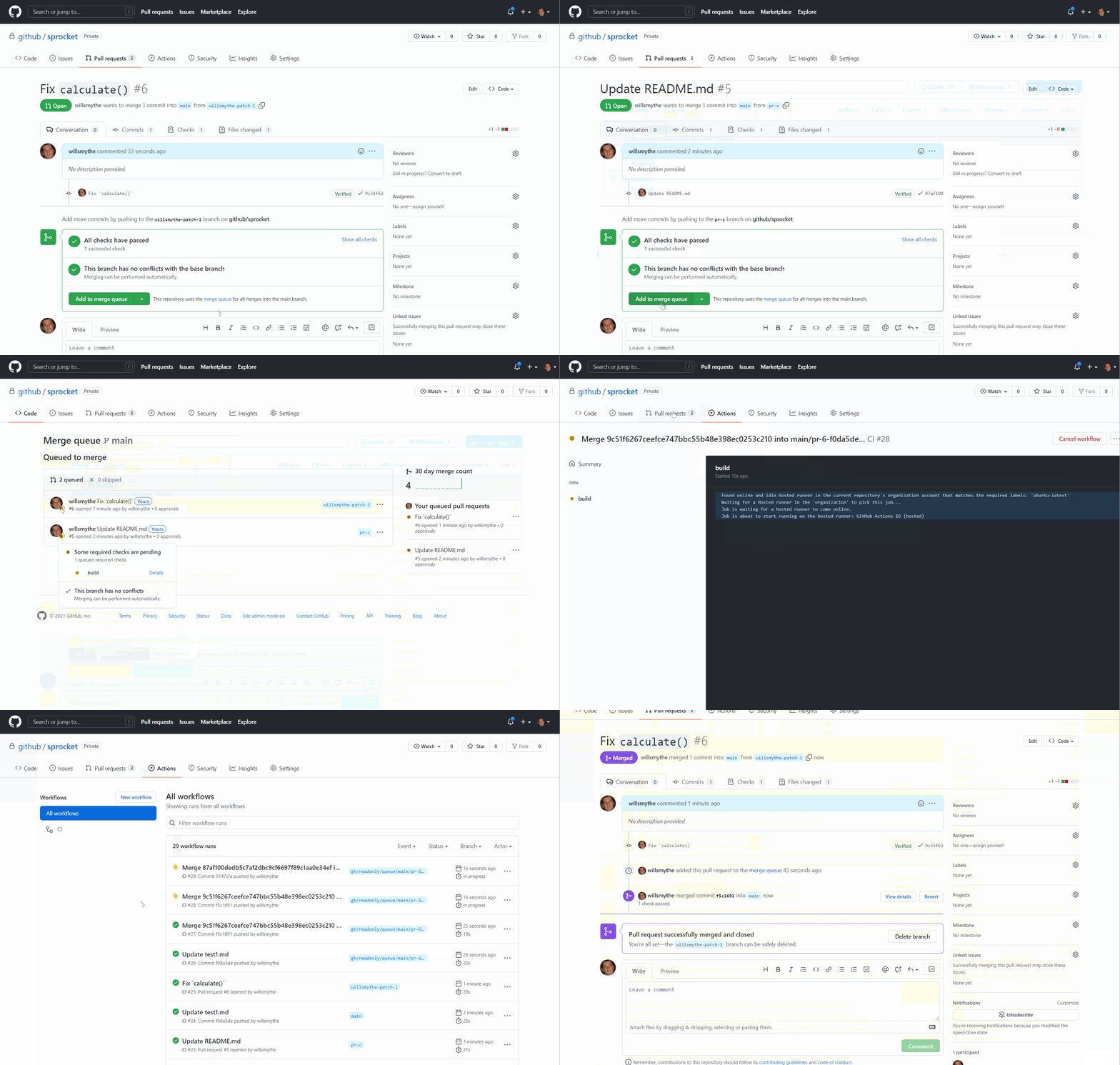
Pull Request Merge Queue Limited Beta
manic glacierBOT

Thank you! I'm sorry I didn't catch this during the 1.17 merge, but as you may have guessed I was relying solely on fatal compiler diagnostics to find all the relevant sites.
If possible, as a fresh PR, can you enable -Werror & other diagnostic flags so that we catch these errors during builds? If there are sites in the SDK that have diagnostics, they can be selectively disabled; there are examples of this in the atmel-samd port.
If you're able to take on that additional work, thank y...
 lone axle
When you open a file using a with context processor like this:
with open(filename, "rb") as font_file:
Is it possible to somehow specify that the file needs to remain open even after the block inside the with is complete?
In this case the open file in getting passed as an argument to initialize another class. That class assumes the file will remain open and be able to be read from:
    with open(filename, "rb") as font_file:
        first_four = font_file.read(4)
        if filename.endswith("bdf") and first_four == b"STAR":
            from . import bdf

            return bdf.BDF(font_file, bitmap)
But I am suspecting the file is getting closed due to the ending of the with block and therefore is no longer able to be used later when the BDF class is trying to read more things from it.
tulip sleet
onyx hinge
<@!329766224093249548> <@!252717193496756235> maybe something to sign circuitpyt...
This looks quite interesting. Thanks for keeping up with these things. I put us on the waitlist
tulip sleet
lone axle
In this case the open file in getting passed as an argument to initialize anothe...
it's the whole point that the file is closed on exit from the with. This is somewhat more important for writes.
lone axle
Ah, that is what I was thinking as well, that leaving it open defeats the purpose of with. I'm not sure the best way to handle this situation in the BitmapFont library due to that behavior though. It will either need to not use with or get some relatively substantial refactoring to make it not assume the file is going to stay open. In this case maybe load_glyphs() could be removed, and instead an extra parameter provided to the init function?
actually it looks like many of the other functions inside of BDF class work similarly to load_glyphs currently in that they try to read more information out of the file. So there would need to be refactoring of most of the functions inside BDF, not just load_glyphs if I understand correctly.
tulip sleet
yes, that looks wrong
lone axle
or maybe inside BDF init function it could accept the filepath instead of the open file, and re-open it for itself. But I'm still not sure how to reconcily the with if it's opened in init using with it won't be available for use inside of the other functions if I understand correctly. Maybe only the filepath should be stored on self, and then every function that needs it has to explicitly open the file again for it's own use?
tulip sleet
we have changed some of the native core modules to take filenames instead of open files, e.g. https://github.com/adafruit/circuitpython/pull/5017, which was provoked by https://github.com/adafruit/circuitpython/issues/4197
that is the same kind of problem
lone axle
Is there much overhead involved with opening a file? is it undesirable for any reason to open it over and over any time it's contents are needed? If not that might be a viable solution.
tulip sleet
the object that needs it can decide whether to keep it open or not. The reason to pass file handles instead of filenames is because you might want to pass a stream, and an open file is a stream. But that's not applicable here. So I think we should change the API, and maybe make it backward compatible for a a while.
crimson ferry
My ESP32-S2s now get caught by WATCHDOG, about once per day or two when while executing this read: microcontroller.cpu.temperature. But, only when it's embedded in other code. I've got a loop doing nothing but that read on several devices, and no crashes yet in several days. Anyone have any ideas what other processor activity might complicate a temperature read?
tulip sleet
crimson ferry
My ESP32-S2s now get caught by WATCHDOG, about once per day or two when while ex...
a WATCHDOG problem was fixed recently, I think. What version is that?
crimson ferry
Yes, it used to hardfault, now the WATCHDOG catches it, which is awesome. I'm trying to reduce reloads and resets.
(these devices are 7.1.0-beta.0 and newer)
tulip sleet
crimson ferry
Yes, it used to hardfault, now the WATCHDOG catches it, which is awesome. I'm tr...
. This may be some kind of "second-order" bug, e.g. memory corruption that doesn't show up until later. we have seen weird interactions between esp-idf functions. There was that wifi/I2C interaction that I tracked down to some semaphore freeing or something in the IDF. The fix I made shouldn't have been necessary, but it did fix it. The actual wifi code is closed-source, so we can't debug it.
crimson ferry
Got it, thanks, I assume it is something odd in the IDF. there's a history of [cpu] temperature read issues on this chip family. It's not the end of the world - WATCHDOG is a lifesaver since no human intervention is necessary 🙂
lone sandalBOT
 lone axle
Would it be worthwhile to try adding an extra warning onto the QTPy download page on circuitpython.org that mentions the file downloaded from that page is meant for the stock QTPy without extra flash chip, and possibly link to the haxpress variant within the warning? There was an instance recently in help-with where someone downloaded the wrong one: #help-with-circuitpython message
idle owl
lone axle
Would it be worthwhile to try adding an extra warning onto the QTPy download pag...
I think that most folks are using it without the chip, so I'm not sure that's necessary. If anything, a warning, but I wouldn't add a link. That could lead to folks downloading the wrong one the other way.
manic glacierBOT
In case it helps to eliminate potential causes, I was unable to reproduce the above issue on a different M4 board running a build of 6.1.0 with the same pin mappings.
Adafruit CircuitPython 6.1.0 on 2021-11-18; Adafruit Grand Central M4 Express with samd51p20

>>> import board, busio, ps2io
>>> kbd = ps2io.Ps2(board.A2, board.A5)
>>> spi = busio.SPI(board.SCK, board.MOSI, board.MISO)
>>>
you could revert the latest PR and disable pylint's consider-using-with for those lines for a quick fix in the next bundle release before reworking it, since the library is broken right now.
tulip sleet
lone axle
Would it be worthwhile to try adding an extra warning onto the QTPy download pag...
There is a warning already, but if you don't read the text, you wont' see it:
 lone axle
tulip sleet
There is a warning already, but if you don't read the text, you wont' see it:
lone axle
tulip sleet
There is a warning already, but if you don't read the text, you wont' see it:
Ah, I missed it myself infact 😅. I was imagining something in a red or yellow/orange box right near the download button. But I'm not sure it would actually be easy to customize a single download page in that way. And I do also see Kattni's point that it could inadvertently lead to more confusion for some folks.
lone axle
jaunty juniper
you could revert the latest PR and disable pylint's `consider-using-with` for th...
That sounds like a good to me for the short term. @idle owl Does this sound okay to you? Reverting the pylint PR for Bitmap_Font library and temporarily adding pylint disable comments for the with context thing. It turns out that the changes from that PR cause the library not to function properly. I can give you more details about specifically whats going on as well if it is helpful.
idle owl
lone axle
That sounds like a good to me for the short term. <@!330227457296957440> Does th...
Whatever you need to do is fine. I would be careful reverting the PR though in case other things were included in it - there were a whole host of updates that went along with the Pylint update and some ended up in the same PR as the linting. So I ask that you pay attention for that.
 ember iris
lone axle
In this case the open file in getting passed as an argument to initialize anothe...
ember iris
lone axle
In this case the open file in getting passed as an argument to initialize anothe...
Just jumping in--is this where the with issues are originating from?
jaunty juniper
luckily that one is just the problematic linting https://github.com/adafruit/Adafruit_CircuitPython_Bitmap_Font/pull/50/files
lone axle
I'll make a new PR and be careful to include only those specific changes.
jaunty juniper
at least I think, you should definitely not take my word on it 😉
lone axle
ember iris
Just jumping in--is this where the with issues are originating from?
In this case inside the BitmapFont library yes. The way the library is structured it was passing along the open file instance to the font format specific Classes like BDF. Since the change to using with that file actually ends up getting closed by the time those other Classes try to read from the file.
idle owl
lone axle
I'll make a new PR and be careful to include only those specific changes.
Do what you need to get it working, and passing Pylint, and that's entirely fine.
ember iris
Ok cool--was trying to catch up and make sure I was following what was going on. Thank you
lone axle
ember iris
Ok cool--was trying to catch up and make sure I was following what was going on....
you're welcome. In the medium to longer term we will refactor the library in such a way that it won't rely on that file instance remaining open. I'm not aware of any others specifically but wouldn't be surprised if maybe we end up needing similar refactoring in a few other places.
ember iris
lone axle
you're welcome. In the medium to longer term we will refactor the library in suc...
That's good to know. I'll have to dig into it and see if circuit python supports some lower level file read features that python has--if you know the offset you can open and read from a provided index, so you can avoid rereading chunks of the file you've already processed. But that's for the long term. A new PR seems like a good solution for the time being
jaunty juniper
it can seek(), and the library seems to seek(0) every time, so reopening the file should fit with few changes
(or seek(something) at least)
ember iris
That's the command, thank you!
lone axle
it struck me as odd that it's able to seek when the file is closed. But I don't have much experience with this aspect of CPython either, maybe that is expected.
tidal kiln
@gilded cradle ping. hey. have magtag question if you're free.
 gilded cradle
Hi @tidal kiln. Sure, what is it?
gilded cradle
On CP7?
tidal kiln
yep
gilded cradle
Possibly something changed between 6.3 and 7
I know there were some other displayio changes, so I'm not too surprised.
tidal kiln
i think so. there are changes. looks like code is even being updated.
what's weird is it works if i go through the steps manually
but not with magtag lib
gilded cradle
Maybe it needs a delay somewhere
Like this maybe? https://github.com/adafruit/Adafruit_CircuitPython_IL0373/blob/main/examples/il0373_2.9_grayscale.py#L27
GitHub
CircuitPython displayio driver for IL0373-based ePaper displays - Adafruit_CircuitPython_IL0373/il0373_2.9_grayscale.py at main · adafruit/Adafruit_CircuitPython_IL0373
Same display
tidal kiln
Adafruit CircuitPython 7.0.0 on 2021-09-20; Adafruit MagTag with ESP32S2
>>> from adafruit_magtag.magtag import MagTag
>>> magtag = MagTag()
>>> magtag.graphics.set_background("/bmps/weather_bg.bmp")
>>> magtag.display.refresh()
>>>
that ends up with dark display
gilded cradle
Hmm, ok. Want to open an issue?
tidal kiln
Adafruit CircuitPython 7.0.0 on 2021-09-20; Adafruit MagTag with ESP32S2
>>> import board
>>> import displayio
>>> display = board.DISPLAY
>>> with open("/bmps/weather_bg.bmp", "rb") as bitmap_file:
...     bitmap = displayio.OnDiskBitmap(bitmap_file)
...     tile_grid = displayio.TileGrid(bitmap, pixel_shader=getattr(bitmap, 'pixel_shader', displayio.ColorConverter()))
...     group = displayio.Group()
...     group.append(tile_grid)
...     display.show(group)
...     display.refresh()
that works
sure. can open issue. i'm guessing it should be in magtag repo?
gilded cradle
Could be magtag or portalbase library needs updating (on library side, not your board)
Yeah, magtag is fine
I think I did epaper stuff in ther
tidal kiln
yah, i took a quick look and not seeing anything obvious.
gilded cradle
Ok, please post what failed and what worked and I can take a look. Was going to try and get 2.9 tri-color working, but I think ladyada is out atm.
tidal kiln
ok. will do. thanks.
gilded cradle
Thank you 🙂
manic glacierBOT
Why put this here rather than in the loop below that calls run_code_py. Not calling this code at all seems clearer to me than hiding this check.
tidal kiln
@slender iron ping. have EPD question if you're free. not urgent.
manic glacierBOT
Cool. Thanks for the update! Sorry I can't help with the C++ stuff.
tidal kiln
np. this came up with arduino, but seeing same behavior in CP. just wondering if you ever noticed this or have any ideas what might be causing it.
https://github.com/adafruit/Adafruit_EPD/issues/55
the CP init sequence is different than the arduino library. but that did not change anything when changing to the CP init sequence.
slender iron
they must have the same behavior then
the border state is usually set in the init sequence
it's not clear what the desired border color would be
tidal kiln
ah. so there is some kind of "border state" config for the EPD?
slender iron
ya, that's what limor is referring to
let me find a datasheet. I do think it is documented
what display are you looking at?
tidal kiln
magtag
slender iron
kk
tidal kiln
thanks!
slender iron
init is here: https://github.com/adafruit/circuitpython/blob/main/ports/espressif/boards/adafruit_magtag_2.9_grayscale/board.c#L42

GitHub
CircuitPython - a Python implementation for teaching coding with microcontrollers - circuitpython/board.c at main · adafruit/circuitpython
tidal kiln
yep. i changed arduino lib to match that, testing locally, but no change.
slender iron
look for border here: https://cdn.sparkfun.com/assets/1/1/0/a/b/1.54in_ePaper_Driver.pdf
tidal kiln
but no surprise, since both ard and CP are doing same
slender iron
looks like the line I commented "CDI setting"
tidal kiln
hmm. yep. thanks. let me try some stuff with this.
 slender iron
👍
gilded cradle
@tidal kiln I have a fix in, but there was another PR that's been sitting for over 2 weeks that it became part of. Want to take a look? https://github.com/adafruit/Adafruit_CircuitPython_PortalBase/pull/53
GitHub
Fixes #52. If a user uses exit_and_deep_sleep(), it creates a TimeAlarm for backwards compatibility, but also allows for PinAlarm and TouchAlarm.
tidal kiln
@gilded cradle cool. thanks. yep. will look after messing with this border thing.
ember iris
gilded cradle
<@!337989520962093057> I have a fix in, but there was another PR that's been sit...
I may be totally off base, but this feels like it addresses a similar issue as this: https://github.com/adafruit/circuitpython/issues/5343
Does that seem accurate or are these two completely different issues
gilded cradle
ember iris
I may be totally off base, but this feels like it addresses a similar issue as t...
Different issue. This just adds the ability to set pinalarm though the portal libraries.
Not really a bug, just adding a feature
ember iris
gilded cradle
Different issue. This just adds the ability to set pinalarm though the portal li...
Good to know, thank you!
tidal kiln
@slender iron i guess it is undocumented, in terms of VBD settings. datasheet has nothing other than mentioning the bits. i tried all combos and got:
VBD[1:0]:
00b dark gray
01b dark gray
10b black
11b light gray (default)
it's a bummer there's no option that sets blank/white, which would probably be the most visually benign option.
lone axle
@ember iris Are you going to make a release for BitmapFont as well (or do you know that process?) No problem either way. If you aren't or don't know how yet I'll make one. We do want to do it tonight though so the version in the bundle tomorrow will be the new one.
ember iris
lone axle
<@!459119350851567626> Are you going to make a release for BitmapFont as well (o...
I do not know the process
(And didn't know that was something to do)
idle owl
Teaching moment!
slender iron
@tidal kiln sounds like it did change things. I didn't mess with it myself
tidal kiln
@slender iron i think it's just a feature of the display. i'll probably call it that and close the issue. thanks for the help!
lone axle
@ember iris I can show you how to do it if you got a few minutes now?
ember iris
let me grab a glass of water then yes
idle owl
lone axle
<@!459119350851567626> I can show you how to do it if you got a few minutes now?
Thanks for doing this!
lone axle
idle owl
Thanks for doing this!
yep, you're welcome. Always happy to get new helpers up to speed.
ember iris
lone axle
<@!459119350851567626> I can show you how to do it if you got a few minutes now?
Ok got the water and am ready to learn!
lone axle
ember iris
Ok got the water and am ready to learn!
Okay, on the main github page for the repo, look on the right hand side of the screen and find where it shows the current release and has a link to all releases:

Click on that releases link (the number will be different for different libraries since it's the number of previouses releases.
ember iris
Quick aside--should this be it's own thread to refer to in the future?
lone axle
It is easiest to do this with two tabs in your browser... Use middle click or your prefered tab opening method to get one tab loaded up on the "Draft new release" page. Should be near the top right.
 tidal kiln
@gilded cradle that PR fixes display issue, but did not test anything for the pin alarm thing
gilded cradle
tidal kiln
<@!478616919721771019> that PR fixes display issue, but did not test anything fo...
That's fine. I tested that the Timer Alarm still works so it doesn't break anything and the others should work, but we can always open an issue on those.
tidal kiln
ok. want me to approve PR? seems ready?
or wait @gilded cradle is that fix for CP 7 only?
gilded cradle
tidal kiln
or wait <@!478616919721771019> is that fix for CP 7 only?
The eink fix is for cp7 only
I mean set_background fix
gilded cradle
Probably, but now that CP 7 is the current version, it shouldn't be a problem, right?
manic glacierBOT

Trying this out. Is the scrolly font available?
manic glacierBOT

Trying this out. Is the scrolly font available?
tfont.zip
This was converted from your Arduino font (possibly badly) but seems to work. Let me know if the zip attachment of it worked if not I'll upload it elsewhere.
Trying this out. Is the scrolly font available?
This is a quick copy of the test code I used (its messy)
import is31fl3741
import displayio
import framebufferio
import board
import busio
import time
from adafruit_display_text import label
from adafruit_bitmap_font import bitmap_font
from rainbowio import colorwheel
displayio.release_displays()
i2c = busio.I2C(board.SCL, board.SDA, frequency=1000000)
is31 = is31fl3741.is31fl3741(width=54, height=15, i2c=i2c, s... hidden oxide
OK, so @bronze geyser discovered an issue that I've come into also, and I just blew off as my malfunctioning camera.
On RPI Bullseye, they removed PiCamera, and so that kinda screws up all the supporting code for Adafruit and other RPI camera devices, like the BrainCraft HAT and other things. @bronze geyser may have filed a GitHub issue, but just wanted to give a heads-up for the next CP release etc. to not support PiCamera any longer.
IDK where the GitHub code is, or if there is a repo
manic glacierBOT
analog bridge
What's the reason for issuing different pids for bootloader, arduino & cpy? Is it used by the host for detecting the software running on board?
tulip sleet
analog bridge
What's the reason for issuing different pids for bootloader, arduino & cpy? Is i...
On Windows, third-party drivers can only be chosen by a VID/PID combination. This was more of an issue before Windows 10, which added the system-provided USB serial device. It is a "class driver": any device of that class can use that driver. But third parties can't supply class drivers.
Arduino also uses the VID/PID, though I'm not quite sure what for.
It doesn't vet the combination: you can upload to the wrong kind of board
Arduino boards with chip USB have had multiple PIDs since the start.
I will ask if there is another reason as well.
idle owl
@gilded cradle @tidal kiln It would require a major version bump, and an all-caps note in the release that it no longer works on 6.x. Also, any guides that use it would need to be updated with an alert that says "You must use the latest CircuitPython for this code to work" or some such. I'm fine with it, but that's what would need to be done.
idle owl
hidden oxide
OK, so <@!336817795117481996> discovered an issue that I've come into also, and ...
Yeah we're well aware. I believe Jerry found it immediately after it was released. Thanks for letting us know.
idle owl
@tidal kiln Maybe you know: Is this still valid about the BOOT button on the Feather? https://learn.adafruit.com/adafruit-metro-esp32-s2/pinouts#step-3076720
I'm so used to RP2040 that it's all mixed up in my head.
tidal kiln
the "Reset and DFU" section?
tidal kiln
yah, it's same
idle owl
Excellent, thank you
 languid whale
idle owl
Hello! I finally got a chance to test `rotaryio` on the QT Py RP2040 with the `d...
languid whale
idle owl
Hello! I finally got a chance to test `rotaryio` on the QT Py RP2040 with the `d...
I'll try again, @idle owl . I'll let you know what I find. Thanks!
idle owl
languid whale
I'll try again, <@!330227457296957440> . I'll let you know what I find. Thanks!
You're quite welcome! Thanks for testing it again.
manic glacierBOT
Hi @tannewt. I obtained these values using lsusb as soon as I received the board. However, these don't look correct at all :disappointed:
I will try contacting SparkFun to get the correct values. Thank you for catching this Scott.
 dusk mauve
Any APDS-9960 fans out there that have time today or this weekend to help me test a heavily refactored gesture detection algorithm?
I’ve tested on a Clue and Prox Trinkey so far but it’d be nice to have confirmation that it’s an improvement before I step back from many days of math/algorithm stuff and dive into (much needed) memory optimization. 😅
idle owl
dusk mauve
Any APDS-9960 fans out there that have time today or this weekend to help me tes...
Do you want to put in a PR with "WIP DO NOT MERGE YET" in the title so we can tag the review team on it and folks are more likely to see it and test it? You can always close it if you're not happy with it in the end. Alternatively, I (or maybe you?) can make it "Draft" status once filed.
That way also, it's easier to collaborate if there are suggestions.
dusk mauve
idle owl
Do you want to put in a PR with "WIP DO NOT MERGE YET" in the title so we can ta...
I'm thinking I'll do that once I get two things done: confirmation that its actually an improvement (outside my own biased testing, lol) and at least a first pass at size/memory optimizations.
The second is kind of important to at least get started on since the memory footprint with my first pass almost doubles (~12k vs ~6k) and the compiled filesize goes up quite a bit too (~5-6k vs 3.5-4.5k).
So yea that's definitely coming soon. Just a bit more cleanup once I make sure I'm on the right track.
idle owl
dusk mauve
I'm thinking I'll do that once I get two things done: confirmation that its actu...
Ok. That's fine. Simply know that you can put in a PR anytime, regardless of where your code is at, if you want input. 🙂
 solar whale
I'm surprised this hasn't been commented on yet but In my quick tests the the adafruit feather esp32s2 with BME280, I am seeing that the temperature sensor is significantly impacted by board heating due to the ESP32 module. In a room at about 70 F, the BME280 was reading well over 90F.
dusk mauve
solar whale
I'm surprised this hasn't been commented on yet but In my quick tests the the ad...
I remember this behavior happening with the Pimoroni Enviro+ phat I used on two of my home environmental sensors. Their demo code actually included an interesting correction algorithm that kinda worked. But even with the PCB cutout isolation they included in their design it was wonky.
dusk mauve
solar whale
I'm surprised this hasn't been commented on yet but In my quick tests the the ad...
I think this is the demo code I was thinking of:
https://github.com/pimoroni/enviroplus-python/blob/master/examples/all-in-one.py
solar whale
That was with the board continuosly running -- I have not yet tried with deep sleep -- I'm hoping it can get a good ambient measurement after waking up, before the board heats up.
solar whale
dusk mauve
I think this is the demo code I was thinking of:
https://github.com/pimoroni/en...
interesting approach
tulip sleet
analog bridge
What's the reason for issuing different pids for bootloader, arduino & cpy? Is i...
more background: Windows has traditionally gotten confused when a USB device presents differently but with the same VID/PID, due to caching the previous driver and device state for that VID/PID. That issue may be less of an issue than it used to be, but PID's are basically free, so we are liberal with assigning them.
dusk mauve
solar whale
interesting approach
Yeah it was more effective than I thought it'd be, tbh. But still not anywhere near as reliable as having an off-board sensor dangling from a STEMMA QT cable. With some iterative testing/tuning the approach might actually be useful though
idle owl
solar whale
I'm surprised this hasn't been commented on yet but In my quick tests the the ad...
It is in the guide that is not yet published. We know. I think the plan is to show some lower power demos that don't run the ESP for lengthy periods of time and heat up the sensor.
@tidal kiln I need schematic halp.
jaunty juniper
there are other boards using an on-board temperature sensor, where the proposed solution is deep sleep and only measure the temperature as you wake up
tidal kiln
@idle owl yo
idle owl
Is this "5k pullups on SCL and SDA"?
 tidal kiln
yes
idle owl
tidal kiln
yes
Aren't they usually 10k?
tidal kiln
which board?
tidal kiln
new one?
idle owl
Yep
Sorry, heh. I forget we have more than the ESP32-S2
Non-CircuitPython boards aren't in my brain. 😄
tulip sleet
re 10k: some of the flakier I2C devices we have require stronger pullups
idle owl
tulip sleet
re 10k: some of the flakier I2C devices we have require stronger pullups
Oh ok.
tidal kiln
^^ could be that. there's nothing specifically magical about 10k. just the most commonly used generic value.
idle owl
I suppose only Limor would know.
tidal kiln
yep
idle owl
I've bugged her enough for one morning. Although I guess it's afternoon now 😉
It's fine.
tulip sleet
is this the BME280 board?
tidal kiln
could have something to do with the LC709?
idle owl
tulip sleet
is this the BME280 board?
Same for both versions.
idle owl
tidal kiln
could have something to do with the LC709?
The what now?
tidal kiln
if it were a BME requirement, the breakout would have those values as well
 tidal kiln
yah. that.
idle owl
Fair enough.
This datasheet for this module doesn't make much sense to me.
Sigh.
I mean, RP2040 was complicated, but at least I understood what pins were what.
Wait maybe I found something useful.
Maybe if I had any idea what half of this table meant. Bleh.
Eh. I'll leave this section for Limor to fix if needed. (Spoiler alert: it's needed.)
tidal kiln
@idle owl ^^ ESP32-S2 datasheet? what's the Q?
idle owl
tidal kiln
<@!330227457296957440> ^^ ESP32-S2 datasheet? what's the Q?
Yeah ESP32-S2. Trying to provide pin details. But I can't figure out what pin is what, or what they do other than what the silk indicates they do. It's fine. Limor often ends up tweaking the pinouts pages anyway. Though I just realised I forgot to include NEOPIXEL_POWER and I2C_POWER, so that needs to be fixed.
slender iron
looks like the ru translation is our largest now
idle owl
@tidal kiln I2C_POWER is set to what in Arduino for it to work?
tidal kiln
LOW
tidal kiln
NEOPIX appears to be opposite
idle owl
Yep.
That's why it's not NEOPIXEL_POWER_INVERTED in CircuitPython 😄
@slender iron Is the purple-status-LED-when-it's-time-to-hit-reset-a-second-time-to-get-into-the-bootloader thing an ESP32-S2 only thing?
dusk mauve
Anyone have any good resources/examples for ways to do zero-byte reads/comparisons of bytearray objects or chunks within those?
Trying do a quick comparison of individual 4-byte chunks of a 128-byte bytearray buffer against constants during a tight loop without causing allocations, or at least with as few as possible. Basically a min/max/high-pass filter thing for 4-byte data sets of 4 8-bit ints within a larger data frame.
Although the stuff I've tried so far comes out in the wash after GC comes around I'm trying to keep this as lightweight as possible and having GC kick in repeatedly during what, to the user, is a single op is less than ideal.
idle owl
I don't know where the code is for the status LED, nor do I think I could read it properly anyway.
slender iron
@idle owl it may be a tinyuf2-only thing
idle owl
That's odd then, why did the Feathers that shipped out with no bootloader have a purple LED on startup?
Maybe they had a damaged bootloader instead?
Weird.
slender iron
were you pressing boot during purple?
idle owl
No, reset.
slender iron
the reset trick requires extra circuitry that might be missing
idle owl
I installed the TinyUF2 bootloader on one of them, and it works properly on that one now.
idle owl
Boot isn't working on this one either.
That's what I'm wondering.
I mean, once I installed the bootloader, it worked fine.
But it means something on the tester was messed up because none of the Feathers that went out had a proper bootloader.
I did the load-an-Arduino-sketch-and-get-the-bootloader-for-free trick. Works great now. But I still have 2 I haven't done that with.
That the bootloader doesn't work on.
slender iron
¯_(ツ)_/¯
dusk mauve
i flashed my new feather-s2 with the webserial tool like 2 hours ago. but I did grab a backup of the first 2 MB of flash out of habit in case that would help?
idle owl
dusk mauve
i flashed my new feather-s2 with the webserial tool like 2 hours ago. but I did ...
Eh. I'm not sure it's that big of a deal. I certainly don't know what I'd do with it 😄
hidden oxide
idle owl
Yeah we're well aware. I believe Jerry found it immediately after it was release...
I see, cool. Thanks!
idle owl
Is TinyUF2 only for the ESP32-S2 boards? I mean, I'm looking at the list of files in the release, and it looks like that's the case, but I guess I didn't realise that. I thought it was more ubiquitous, or I guess I was equating UF2 in general with TinyUF2.
languid whale
manic glacier
@idle owl, ANO is working with QTPYRP2040! stripped my app down to make an encoder test and it works great. Thank you for following up!
idle owl
languid whale
<@!330227457296957440>, ANO is working with QTPYRP2040! stripped my app down to ...
For sure! Glad to hear it. The divisor argument is working for you?
Excellent!
hidden oxide
idle owl
Is TinyUF2 only for the ESP32-S2 boards? I mean, I'm looking at the list of file...
I think so
But I'm not sure
idle owl
I don't think it's been used much yet, so that's excellent to hear.
tulip sleet
idle owl
Is TinyUF2 only for the ESP32-S2 boards? I mean, I'm looking at the list of file...
it is starting to be implemented for other ports as well: https://github.com/adafruit/tinyuf2/tree/master/ports, but I think we only use it for esp32-s2 right now. I think maybe eventually the nrf52 bootloader will be merged with it
idle owl
tulip sleet
it is starting to be implemented for other ports as well: <https://github.com/ad...
Hmm. Ok.
hidden oxide
tulip sleet
it is starting to be implemented for other ports as well: <https://github.com/ad...
mmm, that'll be good
idle owl
I guess I'll call this template "Install CircuitPython on boards with a TinyUF2 Bootloader"
instead of "On ESP32-S2"
tulip sleet
yes, that's safer in the long run
idle owl
@tulip sleet Can you tell from this what the timing of the purple LED is? I put "approximately half a second later" for when to tap a second time, but I presume there's something more precise than that. https://github.com/adafruit/tinyuf2/blob/22cc393dfb8891304608c86ffb231d90829d67ae/src/main.c#L140
tulip sleet
looking...
tulip sleet
@idle owl yah, it's 500 msecs
tulip sleet
wasn't sure if it was 1024th of a second ticks or actual msecs. Looks like the latter
tulip sleet
np
idle owl
Is it one click of reset or two clicks of reset to get into the UF2 bootloader after using esptool (through chrome or not)? I guess I need to simply try it, because I'm unclear on that, and this guide template says to explain how to get into the UF2 bootloader, but doesn't clarify what that entails in this case.
Looks like one click.
tulip sleet
idle owl
Is it one click of reset or two clicks of reset to get into the UF2 bootloader a...
that may be true if there is no program loaded besides the bootloader. If the bootloader fails to find a program to run (it looks to see whether it looks like there is a program, or just junk (zeros or maybe ones)), it will not try to run the program
but if there is a program loaded it may take two clicks.
tulip sleet
i don't know whether loading tinyuf2 via esptool clears the rest of the memory or not
idle owl
I thought it wipes everything
tulip sleet
it probably does. Try this: load tinyuf2 via esptool, then load CircuitPython, then load tinyuf2 again via esptool.
after tinyuf2, then CircuitPython, it will take two clicks, right?
after tinyuf2 loaded before CircuitPython, either one or two clicks will work, I think
idle owl
OK hold on
I'll do that.
One click worked before CP.
Now it's not working at all 😕
Trying again
tulip sleet
I always do a flash_erase when switching from non-UF2 to UF2 or back. I'm not sure if you need to do that before replacing tinyuf2
idle owl
I'm trying to do what someone in general might do 🙂
One click.
Even after CP was loaded.
Using WebSerial if that matters.
tulip sleet
one click gets you to the BOOT drive, even with CP? Then how do you reset?
and start CP
idle owl
No, you said load tinyUF2, then load CP
then try to load tinyUF2 again
so I did those steps
tulip sleet
ok, got it
idle owl
and to get into the UF2 bootloader after the second tinyuf2 loading, it's one click still
tulip sleet
what is the esptool command you use to load tinyuf2?
idle owl
I did it using Chrome... mentioned above. isn't it called WebSerial?
maybe I'm wrong about the naming
but I did it with the Chrome thing
I can do it with esptool if that would help clarify something
tulip sleet
ah, ok, I have no idea what that does under the covers. Do you have the output from it?
idle owl
Connecting...
Connected successfully.
Try to reset.
Connected to ESP32-S2
MAC Address: 82:2D:FA:24:8D:A5
Uploading stub...
Running stub...
Stub is now running...
Attempting to change baud rate to 460800...
Changed baud rate to 460800
Writing data with filesize: 3084464
Erase size 3084464, blocks 189, block size 16384, offset 0x0000, encrypted no
Took 35937ms to write 3084464 bytes
To run the new firmware, please reset your device.```That's all that's left since I hit reset.
tulip sleet
that is loading tinyuf2 or CP?
tulip sleet
doesn't combined.bin include CP?
idle owl
Because when I tried bootloader.bin, a second time, it acted like it did nothing.
idle owl
tulip sleet
doesn't combined.bin include CP?
If it does, it's not loading it.
I'm only getting bootloader here.
tulip sleet
I thought combined.bin was a combination of tinyuf2 and CP?
so you don't need to load tinyuf2 separately if you're loading combined.bin
because it's loading them both
idle owl
This is at the end of the instructions "Then you will need to load or reload CircuitPython using the .uf2 file." for combined.bin on cp.org
I started with tinyuf2.bin
ugh.
This is getting confusing and I'm not sure how to explain myself.
I'll put "single click or double click" I guess in the guide page.
But it keeps being single click.
tulip sleet
ok, I am wrong about combined.bin
it does not include CP
it's just one big file, mostly empty, except for tinyuf2. It even says so on the learn page
idle owl
Ok, that's good, because I do not have CP on this thing yet. heh
@gilded cradle Would it be worth tweaking the wording on this page to include the name of the "ESP32-S2 Feather with BME280" as well? I mean, I haven't heard any confusion yet, but most of the early folks with products like this are more savvy than some.
gilded cradle
Sure @idle owl. Want to submit a PR? It's just markdown.
idle owl
gilded cradle
Sure <@!330227457296957440>. Want to submit a PR? It's just markdown.
Sure.
gilded cradle
idle owl
Sure.
Thanks. 🙂
lone axle
In the first talk of Hackaday Remoticon Elecia White discussed memory maps and gave us a look at a specific example of CircuitPython on the seeeduino xiao device. Really interesting talk. If folks are interested in that sort of thing check out the replay 
 orchid basinBOT
 gilded cradle
idle owl
Sure.
gilded cradle
idle owl
Sure.
Oh, one little trick I discovered when editing markdown is to use a free app called Typora that lets you copy/paste and then switch to markdown view to grab the code. You may have your own tricks though.
idle owl
gilded cradle
Oh, one little trick I discovered when editing markdown is to use a free app cal...
I use PyCharm, it renders it right in the editor while editing.
@gilded cradle https://github.com/adafruit/circuitpython-org/pull/791
 gilded cradle
Oh nice, I'll take a look
 solar whale
idle owl
It is in the guide that is not yet published. We know. I think the plan is to sh...
solar whale
idle owl
It is in the guide that is not yet published. We know. I think the plan is to sh...
FYI -- I am running a test with a feather esp32s2 w/bme280 and an si7021 temp/humidity sensor. Readings from both sensors are sent to AIO with deep sleep in between. I have is set for sampling once every 5 minutes. When I started it, the board was warm ( bme280 high by about 15 degrees F) but it appears to be cooling down quickly.. After 10 minute, they are within 2 degrees.... I'll let you know what i find....
idle owl
solar whale
FYI -- I am running a test with a feather esp32s2 w/bme280 and an si7021 temp/hu...
Thanks!
solar whale
encouraging! The temperatures are converging nicely. Humidity, not so much, but that is a different problem...one step at at time.
 idle owl
@tidal kiln Just found this on the Metro ESP32-S2 Arduino usage page... heh.
 tidal kiln
i agree with what has been said 🙂
solar whale
ooh..having a snow squall...it was in the 60's yesterday (in NH)
hidden oxide
solar whale
ooh..having a snow squall...it was in the 60's yesterday (in NH)
It's in the 80s yesterday XD
idle owl
That was weird. Added a Blink program to my CIRCUITPY drive, and it didn't start running until I connected to the serial console and reloaded.
It's running now regardless of what I do after reset, so it's not able to be replicated.
hidden oxide
idle owl
That was weird. Added a Blink program to my CIRCUITPY drive, and it didn't start...
I had that same problem with Thonny Python until I switched to Mu
Just recently with the Eyelights glasses that happened
idle owl
Hmm.
hidden oxide
I officially gave up Thonny after that
I personally think you should remove Thonny from your recommended editors list, since it kind of eliminates the CP experience of no-compile
idle owl
Eh, it doesn't cause a corrupt filesystem, which is what gets you added to the recommended editors list. And some folks use it, so we want them to know that's fine.
hidden oxide
I've had to save the code, plug in batteries, remove the USB cable, and never turn off power to get the code to work
hidden oxide
idle owl
Eh, it doesn't cause a corrupt filesystem, which is what gets you added to the r...
I see
idle owl
It's not that we think they provide an excellent experience, that's why we promote Mu. It's that it won't screw up your board on a regular basis, and we checked to make sure that was true.
Otherwise, we suggest Mu, or whatever each of us uses personally. I use PyCharm for example.
hidden oxide
And also, when you turn on the board, the code doesn't work until you re-"compile" and save the code to the board
idle owl
Interesting.
hidden oxide
idle owl
Otherwise, we suggest Mu, or whatever each of us uses personally. I use PyCharm ...
I've used PyCharm
idle owl
I've never used Thonny, so I've never dealt with that.
solar whale
@idle owl I've had some odd issues after loading -- fixed by reset, but head scratching. Nothing I could pin down to report.
idle owl
Same! Those issues are the worst.
solar whale
They come back at the most inopportune time....
hidden oxide
Even reset doesn't work for the EyeLights - IDK if it's just the nRF52840 chip...
I'll test the ESP32-S2 and see if the code still doesn't work if you just turn it on and don't "compile" it
idle owl
@solar whale Do you mind sharing the code you're using to test the BME280?
I mean, I need to write up an example of using it standalone, but maybe I can strip yours down...
solar whale
it's a bit of a kludge....
idle owl
Fair enough.
I don't know how to do the deep sleep stuff, and I should probably include it.
solar whale
the temps are about 1.3 degrees apart -- not bad... I'm not concerned about the humidity. the bme280 is in better agreement with other sensors I have running near it. I'm don't trust the si7021 humidiy,
idle owl
Weird.
solar whale
idle owl
I don't know how to do the deep sleep stuff, and I should probably include it.
it has been working great. I set this example up quite a long time ago and have not looked to see if there are better ways but it works!
idle owl
solar whale
it has been working great. I set this example up quite a long time ago and have...
Good to know. Thanks!
Now if I can figure out how to get it down to only the BME stuff.... 😄
crimson ferry
is there a difference between the BME and non-BME boards other than the BME, or is the new board def mainly to have a unique name, PID, etc?
same pins, singletons, etc. I assume
idle owl
crimson ferry
is there a difference between the BME and non-BME boards other than the BME, or ...
No difference except for the sensor, and the sensor is I2C, so not built into CP.
Yeah.
solar whale
is there a different build? -- I have been using the same build for both.
crimson ferry
an alias board, like: <#circuitpython-dev message>?
solar whale
Let me know if you have question about the code .
idle owl
Yeah.
idle owl
solar whale
Let me know if you have question about the code .
Ok will do
Trying to get it down to printing only at the moment
crimson ferry
I'm trying to figure out how to handle the new Espressif boards, a couple of variants could be aliases to Saola, but there will be coming a veaiation with more flash (8MB), so that has to be a full-fledged board
idle owl
crimson ferry
an alias board, like: <https://discord.com/channels/327254708534116352/327298996...
Anyway I think that's the plan. There was a discussion earlier that did not come to a definite conclusion.
solar whale
]the deep sleep can be a bit finicky in the REPL -- since it "simulates" sleep
also if it is not code.py it won't run on the wake-up...
hidden oxide
OK, so on Thonny, the code also won't run without re-"compiling" and saving without removing power at all on the ESP32 as well
I'm using the MagTag and the Bitcoin demo
idle owl
solar whale
]the deep sleep can be a bit finicky in the REPL -- since it "simulates" sleep
code.py output:
Current bme280 Temperature: 82.49*F
Current bme280 Humidity: 14.22%
Current bme280 pressure: 1014.77%
Current Voltage: 3.887V
Current Percent: 2.4%

Code done running.

Press any key to enter the REPL. Use CTRL-D to reload.
Pretending to deep sleep until alarm, CTRL-C or file write.```Yeah, that really is low.
Hey it ran again!
Excellent.
Winter is terrible for my skin. Heh.
solar whale
Time to break out the lotion!
idle owl
I have a bottle in every room 😄
@solar whale Thanks so much for the code for this. I haven't worked with the deeps sleep stuff at all, and would have struggled to sort that out.
I can simplify this a bit for the guide, and include it.
@solar whale What is this, anyway? Does it expect a battery to be plugged in? Current Voltage: 3.887V Current Percent: 2.4%
solar whale
Yes — it uses the LC7….thing
solar whale
It works well on a battery — runs for a long time…
idle owl
That's excellent, especially with you networking things.
I was about to say, my temp is WAY off, but the board's been running constantly most of the day. So that makes sense. Hasn't had time to cool down yet.
The MCP9808 I tested earlier says 74F in here.
solar whale
If it is on USB REPL — it really does not sleep so it won’t cool… needs to be on batter or just USB power
idle owl
Ohhhhh
Duly noted.
I would have been deeply confused in a few hours when it was still the same.
solar whale
That is why I used AIO — so I could run on a battery and still see the data.
idle owl
Yeah I get it now. 😄
Have you plugged anything into the STEMMA connector on yours yet?
Was it much tighter than on the other boards like the RP2040s?
solar whale
Yes - it is very tight.
idle owl
Ok it's not only me. Thanks.
Sliced my thumb up getting the cable out of there. Not bleeding luckily.
solar whale
Ouch!
idle owl
Better than putting header pins into my thumb, heh
I guess I need to solder one of these up to test some of the rest of this.... Eh, I'll use those handy little test points instead. Lazy-wiring.
I got 2 w/o the BME, and one with. Could solder up one of the withouts.
solar whale
You mean the little red/black/white things the plug in? I use them a lot!
idle owl
solar whale
You mean the little red/black/white things the plug in? I use them a lot!
Yeah those things. They're great!
I've colored the white ones with sharpie before to differentiate.
idle owl
solar whale
I have to go for now. Good luck with it. Have a great weekend!
You too, thanks again!
manic glacierBOT

Same problem with the Metro M4 AirLift Lite microcontroller. Bluetooth Low Energy works fine on version 6.3.0 but on version 7.0.0, the following error occurs when executing the line "adapter = esp32.start_bluetooth()".
Traceback (most recent call last):
  File "code.py", line 53, in <module>
  File "adafruit_airlift/esp32.py", line 193, in start_bluetooth
_bleio.BluetoothError: Timeout waiting for HCI response
Line 193 points in the stop_bluetooth method (line 'return').
``...

In original Micropython already emplemented "JOIN FIFO" functionality.
Do you have any plans to do it in CircuitPython?
This is very useful thing, when working with HISPEED interfaces, because single RX_FIFO extremally quick overloads on 32bit data at 2..4Mhz dataline. Python does not have time to transfer data to the buffer, and FIFO is already full. Doubleling FIFO cal solve this issue.
from MicroPython GitHub
issue:
- rp2 PIO: Allow merging Tx/Rx FIFOs together [#6854]...
manic glacierBOT
CircuitPython does it automatically when a state machine only goes one direction: https://github.com/adafruit/circuitpython/blob/main/ports/raspberrypi/common-hal/rp2pio/StateMachine.c#L291-L296
dusk mauve
got my dev environment set up and building rpi
(ports/broadcom) images from scott's rpi branch! a few notes in case anyone runs into the same issues..
- The
aarch64-nonetoolchain stuff stumped me for a bit but the github actions workflow had the answers under "install dependencies": https://github.com/tannewt/circuitpython/actions/runs/1483213997/workflow mkfs.fatv4.1 (the latest version available on ubuntu 20.04 via apt) doesn't support theoffsetflag, so i got a build error at the end. Cloning andmake installing the latestdosfsutilsfrom Github (v4.2) fixed that. edit: and of course that's in the workflow too, hah
Those were basically the only bumps on the road to building rpi images. Neat. 
manic glacierBOT
As a starting point I have posted a question on the SparkFun Forum and will follow this up.
For the time being, I have changed the values to be the same as the MicroMod STM32, just in case anybody is interested in playing with this port.
lone axle
Are the mpy-cross versions downloaded from this button still relavent for very many folks? Would it be good to update this button to point to a zip containing the current versions? It's from this guide page: https://learn.adafruit.com/creating-and-sharing-a-circuitpython-library?view=all#mpy-2982472-11
 tulip sleet
lone axle
Are the mpy-cross versions downloaded from this button still relavent for very m...
tulip sleet
lone axle
Are the mpy-cross versions downloaded from this button still relavent for very m...
There is a pointer a few paragraphs up to the current mpy-cross versions, but it is not a big red button. I'll make it more prominent
 blissful pollen
I have to pass in a list of int16 for the IS31 LED mapping. I can pass it as a bytearary but then converting it in C the byte-ordering matters. Will that ever come up on some builds vs others? Or maybe I am better passing in a python list/array and converting it to uint16 for speed? Anyone have any thoughts?
manic glacierBOT
I had similar question about safe_mode check -- why is it here instead of main function? I simply followed its example.
Would you prefer turning https://github.com/adafruit/circuitpython/blob/932131b4ff4b95066a872b5b299a84e80b7c45d3/main.c#L861
to
            if (pyexec_mode_kind == PYEXEC_MODE_FRIENDLY_REPL) {
            	skip_repl = run_code_py(safe_mode);
            } else {
            	skip_repl = false;
            }
instead?
This would skip the `Pre...
dusk mauve
So I've got raspberrpi_zero2w builds completing but it seems to be crashing somewhere between printing the version string and entering the REPL.
Here's what it looks like on the serial output:
Board ID:raspberrypi_zero2w```

Feels like something missing from my build process, since I'm seeing `5.0.0` in the version string even though I'm building from scott's fork's `rpi` branch, which has the right version string in his builds. For kicks I checked the string in the actual build output img/elf and, yep, it thinks its `5.0.0` 😂

```me@hidalgo:~/code/tannewt/circuitpython/ports/broadcom$ strings build-raspberrypi_zero2w/kernel8.elf | grep -i "adafruit circuit"
Welcome to Adafruit CircuitPython %s!
Adafruit CircuitPython 5.0.0-beta.0-11505-ge6421bd8d-dirty on 2021-11-19; Raspberry Pi Zero 2W with rp3a0```if anyone has any ideas, I'm all ears. Diving into the build scripts is fun though
jaunty juniper
check the git tags, maybe you need a git pull --tags or something ?
though why wouldn't they be there to begin with ? 🤷
dusk mauve
jaunty juniper
check the git tags, maybe you need a git pull --tags or something ?
Looking into that. Looked like Scott was just building from the rpi branch in the deep dive vid. Hmm
I cloned down a new repo altogether to work with scott's fork so I'm going through my original repo setup notes (and the excellent "building circuitpython" guide) to make sure I didn't miss anything too.
Its nice to dig into the build process. I can tell a lot of work went into making ports build right. Much less of a maze than some of the crazy elaborate Java build systems I've dived into in my professional life 😂
Was always amazed at and impressed by the breadth of build output for CircuitPython
jaunty juniper
Scott's fork of Circuitpython is still on master in the default branch, that might be the reason when you pull from it
https://github.com/tannewt/circuitpython last update on 3 Sep 2019
dusk mauve
Yea, I'm on the rpi branch which has had updates quite recently.. but the most recent tag is 5.0.0-beta stuff. Git is fun
jaunty juniper
I think you would want to add adafruit/circuitpython as a remote, pull main from it, rebase on that, something something ? I don't know, that might break everything
dusk mauve
jaunty juniper
I think you would want to add `adafruit/circuitpython` as a remote, pull main fr...
Its been awhile since I've used a multi-origin repo setup, had issues with that long ago in a galaxy far away. But I'm pretty sure you're onto something there
Added the main repo as a second remote, did a pull --depth=1, and the tags came in, so that feels like the right direction. 🙂 thanks for the tip @jaunty juniper
dusk mauve
learned an important lesson about git today. 🙂
- Add dev forks as a new remote instead of doing a direct repo clone into a new directory
thanks again @jaunty juniper! Fixed my version string (yay!) but boot still halts pre-REPL. Progress tho. 😄
I'll bug scott next time he's around, or on monday or something. It's weekend chill time for most of the world and I'm off in the woods here kinda doing my own thing with pre-pre-alpha stuff anyway 😎
 zealous current
I wonder: is it possible to have cp console and data show up as something else than ‚USB Serial Device‘ in Windows?
manic glacierBOT
Hmm rebasing to try to fix possible conflicts I seemed to have added a lot to this PR... I'll see if I can figure out how to fix that or may have to ask (or just re-PR it I think it is ready to come out of draft)
manic glacierBOT
The main bugfix is one that caused wrong blending when the int 0 or 1 was used as a blend factor.
It also fixes a problem that prevented bitmaptools.readinto from working in the unix build, and uses mp_get_stream_raise which can prevent a problem if the stream doesn't support the needed operations (and potentially raise a better error)
It adds some manual "tests". These reproduced the bitmap blending bug but didn't seem to reproduce the dithering bleed bug (#5568). More investig...
 spiral elk
lone axle
Are the mpy-cross versions downloaded from this button still relavent for very m...
spiral elk
lone axle
Are the mpy-cross versions downloaded from this button still relavent for very m...
I'd think people with legacy esp8266 projects would be the only audience for that.
manic glacierBOT
LGTM! I implemented the suggestions that I had, need a second opinion before merging.
jaunty juniper
@analog bridge thanks for taking on the stemma_i2c PR, I tried to bite more than I can chew
analog bridge
jaunty juniper
<@!747673663419187281> thanks for taking on the stemma_i2c PR, I tried to bite m...
Thanks for doing the initial heavy-lifting! 🙂
manic glacierBOT
LGTM! I implemented the suggestions that I had, need a second opinion before merging.
manic glacierBOT

This might also be interesting for use on boards like the Maker Pi RP2040 that provide multiple I2Cs on grove connectors.
manic glacierBOT

countio.Counter was originally added to handle rotary encoders, but it can also be used as a general-purpose pin-interrupt detector. However, it could use some more functionality.
- [ ] Right now
Counteronly counts falling edges. Generalize it to handle rising edges, and also transitions in either direction. - [ ] Provide an atomic fetch-and-clear operation, to avoid losing any counts.
- [ ] Add an
asyncmethod so you can await changes in the count.
tulip sleet
zealous current
I wonder: is it possible to have cp console and data show up as something else t...
That name is provided by the Windows 10 "class" driver for USB serial devices. Without providing our own driver (which we had to do for Windows 7 and 8.1), I'm not sure there is a way.
If you want to identify which COM port is which, take a look at https://github.com/adafruit/Adafruit_Board_Toolkit, which we wrote partly so that Mu could identify which port is the REPL port and which is the CDC data port.
zealous current
tulip sleet
That name is provided by the Windows 10 "class" driver for USB serial devices. W...
Thanks, Dan. In the meantime, I found the following script https://github.com/nqtronix/windows-usbserial-rename which should rename the port based on VID&PID (except for the fact that it currently doesn't work for me because it stumbles over registry entries left behind by disconnected devices, I believe). I'm not able to read to code fully, but it might be something that could be added to the toolkit?
GitHub
Change the generic name of any USB serial device to a custom string - GitHub - nqtronix/windows-usbserial-rename: Change the generic name of any USB serial device to a custom string
tulip sleet
zealous current
Thanks, Dan. In the meantime, I found the following script https://github.com/nq...
There are several different names available here. The device itself includes a name for each CDC interface, both REPL and data. That is what the tookit uses to differentiate them. You can just run a script to print out each serial port found and its name.
That name is not what Windows shows in Device Manager. The Device Manager name comes from the driver.
Since the latter name is Windows only, the toolkit provides a more platform-independent way of identifying the name for each COM port.
What is your goal? Is it to make your device identifiable in Device Manager? Instead of using Device Manager, using a different tool that shows the interface name would give more information.
A tool like this gives more info about the USB devices: https://www.uwe-sieber.de/usbtreeview_e.html
that website has other useful tools, e.g. the USB Device cleanup tool: https://www.uwe-sieber.de/misc_tools_e.html
[driver, not browser -- corrected]
The nqtronix tool must be run as administrator.
zealous current
tulip sleet
What is your goal? Is it to make your device identifiable in Device Manager? Ins...
yes, my goal is indeed to male the devices identifiable in Device Manager, because the latter is what my colleagues are familiar with. It's not a big deal, but it would be nice to have if it were possible.
thanks for your help and the links.
tulip sleet
in the case of REPL vs data ports, the VID/PID are the same. The devices differ only by interface number.
So a script would have to look at that too. It might be easier to write a registry script that copies the interface name for the device to the driver's name
zealous current
tulip sleet
So a script would have to look at that too. It might be easier to write a regist...
that sounds interesting 🙂
tulip sleet
also, the interface number can move around, depending on which other devices are enabled when the driver is installed. So it's kind of tricky. This is why I would want to steer you away from the Device Manager: it has the info you want, but it's buried in dialog boxes. Writing another tool that just gives you info you want, as a simple python script, I think might be easier in the long run.
(the dynamic USB device capabilities in CircuitPython number the interfaces in the order encountered)
zealous current
tulip sleet
also, the interface number can move around, depending on which other devices are...
you're probably right - that would have some additional advantages too (the tool could query the device for and display its serial number, for instance, if several identical devices were connected at the same time)
jaunty juniper
(FYI I made a tool/python library that retrieves some information like USB name, serial number, port names, drive path if available, from connected boards to help with finding and connecting to them https://github.com/Neradoc/discotool)
tulip sleet
https://github.com/adafruit/Adafruit_Board_Toolkit/blob/main/adafruit_board_toolkit/circuitpython_serial.py shows you how we fetch port.interface to get the interface name after we get all the comports.
^^ maybe that is exactly what you want! Thanks Neradoc
zealous current
jaunty juniper
(FYI I made a tool/python library that retrieves some information like USB name,...
fabulous - that's exactly the info I was looking for - thanks!
manic glacierBOT
LED mapping python file and font file to help with anyone who wants to test.
Code above should work but the new initializer for the glasses is:
from map import glassesmatrix_ledmap
is31 = is31fl3741.IS31FL3741(width=54, height=15, i2c=i2c, scale=True, gamma=True, mapping=glassesmatrix_ledmap)
@dusk mauve that sounds like the zero 2w issue I was seeing and unable to sort of. it's flakely which means it's hard to debug
zealous current
I'm not sure whether this has been discussed: would it make sense to have a standard int-derived type to accompany the new (favoured) ticks_ms function?
onyx hinge
zealous current
I'm not sure whether this has been discussed: would it make sense to have a sta...
One of the goals for the function is to have an allocation-free way of working with time. A derived class would require allocations.
solar whale
@idle owl FYI -- I ran my temperature comparison over the weekend and with a 5 minute deep sleep between readings, the BME280 on board was within a degree F of the si7021 sensor consistently. However, I did find that when I plugged in a USB power supply (not data) to charge the battery, the bme280 rose by 10 degrees! Apparently the charging circuit also warms the board... after unplugging the power, it cooled back into agreement. so bottom line is that with deep sleep on a battery connection, the bme280 temperature is accurate as long as you read it quickly after wake-up and don't rely on when charging the battery. This is great for my applications. I will be able to make use of the onboard bme280 for my projects.
manic glacierBOT
Note: I will try to add in something for the ring lights but figured it was better to put this PR in now and expand on it. Will also have to decide how/where a helper library to initialize and include the mapping for glasses (and other boards?) exists.
You now pass in an array. Make it easy as the values are uint16 so no worries about byte ordering.
The speed seems to match the Arduino code. I could play with blasting it all out at once but haven't had a chance to.
idle owl
solar whale
<@!330227457296957440> FYI -- I ran my temperature comparison over the weekend a...
Oh hmm. This is all great information! Thanks so much. And the battery is always going to intermittently be charging if you use USB power as it slowly drains every so often. Did you try it with USB power and no battery?
manic glacierBOT
CircuitPython version
Adafruit CircuitPython 7.1.0-beta.0-5-g1d76be2db on 2021-11-12; Adafruit Metro M4 Express with samd51j19
Code/REPL
def g():
    raise ValueError("a message")

def f():
    g()

f()
Behavior
Traceback has only one entry:
code.py output:
Traceback (most recent call last):
  File "code.py", line 7, in
ValueError: a message
Description
Traceback should be:
code.py output:
Traceback (most recent ...@analog bridge (see above) I am seeing incomplete tracebacks after your PR #5574. Not sure what the issue is. Thanks.
analog bridge
tulip sleet
<@747673663419187281> (see above) I am seeing incomplete tracebacks after your P...
oh no, my bad, its a silly mistake... will pr a fix now.
tulip sleet
Thanks! I was just debugging some asyncio stuff and encountered this
lone axle
Does anyone know the circuitpython.readthedocs.io URL is set up? Specifically trying to figure out if projects hosted in that domain space are equivalent to ones hosted at readthedocs.org or if they are seperate instances that could be out of sync with each other?
idle owl
lone axle
Does anyone know the circuitpython.readthedocs.io URL is set up? Specifically tr...
That's on RtD's end, I believe. Can you provide links please?
lone axle
These are the two I'm looking at atm, although I just noticed both are actually readthedocs.io subdomains but with different prefixes:
https://circuitpython.readthedocs.io/projects/ble/en/latest/index.html
https://circuitpython-ble.readthedocs.io/en/latest/
I'm mostly trying to understand if these are two different project instances or are the same one in RTD.
idle owl
Those two are not the same thing.
https://readthedocs.org/projects/adafruit-circuitpython-ble/ is the ble only one
https://readthedocs.org/projects/circuitpython-ble/ is the second link you sent.
lone axle
On the latter I can go to this URL: https://readthedocs.org/projects/circuitpython-ble/builds/ to see a history of builds and the output from them. I'm unable to find something equivalent on the former. I tried https://circuitpython.readthedocs.io/projects/ble/builds/ but it's 404.
lone axle
Awesome, thank you 😄
idle owl
The project name and the project slug are typically different - project name is the whole lib name, the slug is the name without "adafruit circuitpython"
So the one that says "circuitpython ble" is something else that hasn't built in years.
solar whale
idle owl
Oh hmm. This is all great information! Thanks so much. And the battery is always...
Trying it now with no battery attached. Will let you know...
idle owl
solar whale
Trying it now with no battery attached. Will let you know...
Thanks! I was more thinking you might have already had that data. Appreciate it!
tulip sleet
@lone axle it is listed in the circuitpython subprojects:
 lone axle
tulip sleet
<@382939733107408897> it is listed in the circuitpython subprojects:
lone axle
tulip sleet
<@382939733107408897> it is listed in the circuitpython subprojects:
Is that page with the list publicly viewable? or need to be authenticated as the author account?
tulip sleet
I am logged in as adabot to see that
manic glacierBOT
idle owl
Somebody want to come over here and solder this Feather for me? 😄
(brb soldering a Feather.)
tulip sleet
lone axle
These are the two I'm looking at atm, although I just noticed both are actually ...
The circuitpython-ble project may have been an error on my part long ago. I will see who owns it. Adabot does not have control of it.
lone axle
tulip sleet
The circuitpython-ble project may have been an error on my part long ago. I will...
If I understand correctly I think it's this account: https://readthedocs.org/profiles/cslv1/
analog bridge
manic glacier
@tulip sleet #5608... hopefully no more bugs with traceback now...
This reminds me of traceback_test.py that I put in tests/circuitpython directory but the test in that directory aren't being run, I'll open an issue for it.
solar whale
idle owl
Thanks! I was more thinking you might have already had that data. Appreciate it!
It seems to be OK without a battery connected -- they are back with a degree of each other.It warms up as soon as I connect a battery.
tulip sleet
analog bridge
<@!329766224093249548> #5608... hopefully no more bugs with traceback now...
Th...
thanks! I will test after it builds.
lone axle
Interestingly in this case the real (current) RTD pages for that library don't seems to be building properly. But the ones for that older not currently in use project do seem to have built properly when they were built a while ago.
tulip sleet
That project belongs to this person. I have no idea who it is. There's only one project.

I seem to remember now that I found this a long time ago and was unable to attribute it to anyone (including myself)
there is no fork with a github username of cslv1
There is a github user with no interesting info: https://github.com/cslv1
solar whale
@idle owl to summarize my observation : without deep sleep (REPL connected or just running non sleep code, it gets the warmest ~15 degrees F warmer . Best is running on a battery alone. - appears to be with in 1 degree F. With a battery under charge it warms up about 10 degrees F.
idle owl
solar whale
It seems to be OK without a battery connected -- they are back with a degree of ...
Nice, ok! Thanks!
idle owl
solar whale
<@!330227457296957440> to summarize my observation : without deep sleep (REPL co...
Thanks for the summary!
solar whale
You're welcome. I'll let it run today with the battery charging to see if the temperature drops when it reaches full charge. Its a small battery (500mah) so it should not take too long.
idle owl
Ah yeah, fair enough.
solar whale
It is clearly cooling slowly as the charge rate drops. The battery is nearing full charge. Still about 4 degrees high
tulip sleet
@lone axle - these are the only libraries that specify python 3.6 in .readthedocs.yaml. ALSO, most libraries use .readthedocs.yml, not .yaml. Perhaps that's why these are still 3.6: a sweep did not fix these
libraries/drivers/apds9960/.readthedocs.yaml
12:  version: "3.6"

libraries/drivers/circuitplayground/.readthedocs.yaml
12:  version: "3.6"

libraries/drivers/tmp117/.readthedocs.yaml
12:  version: "3.6"

libraries/helpers/airlift/.readthedocs.yaml
12:  version: "3.6"

libraries/helpers/asyncio/.readthedocs.yaml
12:  version: "3.6"

libraries/helpers/avrprog/.readthedocs.yaml
12:  version: "3.6"

libraries/helpers/pybadger/.readthedocs.yaml
12:  version: "3.6"
@idle owl this might be better suited to "in the weeds", if so I can add it in the meeting notes. Want to get your input on it for sure though. I am suspecting that the version of python configured here: https://github.com/adafruit/Adafruit_CircuitPython_BLE/blob/5b4f87f2643f9fee45e71a433a99c86a95a4f563/.readthedocs.yaml#L12 3.6 is causing RTD to not be able to successfully build the docs pages with all of their content. I built locally with 3.8. The errors in the RTD build log indicate a problem importing annotations from __future__ which I think did not exist until 3.7.
The root of my question is basically is it okay to / do we want to update this library (and perhaps the ones Dan listed above) to use a newer version of python in their readthedocs configuration file?
tulip sleet
wait a minute, the ble one should be in there
idle owl
lone axle
<@!330227457296957440> this might be better suited to "in the weeds", if so I ca...
Yes.
Should be .yaml now.
lone axle
This stems from the issue here: https://github.com/adafruit/Adafruit_CircuitPython_BLE/issues/143 which has a few more details if interested.
idle owl
With version 2 specified.
tulip sleet
we should make .yml vs .yaml consistent
lone axle
If there is a mix of them currently that change is probably scriptable with git submodule foreach inside of the bundle repo.
idle owl
In theory Dylan was supposed to have verified all of that. I guess this got missed. I'd rather not send her down another rabbit hole.
@lone axle See how much there is to update, if you can, and let me know.
 turbid radish
?serverinfo
 digital shoreBOT
 adafruit
Owner
adafruit#3230
Category Channels
8
Text Channels
61
Voice Channels
6
Members
31825
Roles
36

ID: 327254708534116352 | Server Created
·
tulip sleet
e.g. this commit renamed the file and added the 3.6: https://github.com/adafruit/Adafruit_CircuitPython_BLE/commit/781f46b73f71817b709d2e279fc188a7c1e69423
idle owl
Yeah ok so it was partially updated I guess.
Or we didn't catch that we need to use 3.7+
lone axle
do we have a preference between specifying 3.7 vs. just 3 like it was previously? ( assume the latter would take the latest release from 3.X, but not actually certain.)
idle owl
I don't have a preference, I guess. If it grabs the latest, it's fine.
I don't know that it works that way though.
I suppose you can test it though.
lone axle
I'll see if I can find out from the documentation, or test it if not.
looks like it will grab latest stable:
 idle owl
Ugh.
lone axle
Although to muddy the waters just a tad more it also seems that using python.version inside the config file is deprecated now, and the perferred new method is build.tools.python
idle owl
That's good
The ugh is that really we need to do another patch if we're going to update all the libs.
lone axle
 lone axle
same file, just under a different "headers" within the tree
tulip sleet
what is the default if you don't specify the version at all
lone axle
 lone axle
tulip sleet
what is the default if you don't specify the version at all
lone axle
tulip sleet
what is the default if you don't specify the version at all
I don't see a default specified in the docs. I could try removing it on one of my own repos and triggering a build and check the RTD logs to see what it does.
tulip sleet
that would be interesting
lone axle
Actually I did find it the docs. Looks like 3 is default:
 tulip sleet
most of the libraries have a .readthedocs.yml that doesn't specify it at all, so perhaps that's the easiest?
idle owl
All should have the same readthedocs.yaml at this point.
Regardless, it sounds like we need to fix them all again.
lone axle
it looks like github actions ends up using 3.7
 lone axle
Maybe it would be good to specify 3.7 for RTD (instead of just 3) so that it matches actions and we see the same outcome from both hopefully.
idle owl
Oh bugger, I'm running the meeting
tulip sleet
I was looking in the bundle for the latest versions but if there are still many version catchups to do, my inventory may be wrong
idle owl
<@&356864093652516868> Hello, all! The CircuitPython Weekly meeting is in 1.5 hours. Everyone is welcome! If you plan to participate, or want your notes read off during the meeting, please add your Hug Reports and Status updates to the notes document. Looking forward to chatting with you all soon! https://docs.google.com/document/d/1RgQT9ewtW6Cv9KzgOScNCrulTTyw6J9XdErM7ZnrsLU/edit#
idle owl
I feel like the answer here is yes, but I don't remember exactly where I read it or why it would be. Is it expected that I would be getting 2.58698V from a potentiometer at max on A0 on the ESP32-S2? Maxes out at 51375 / 65535.
gilded cradle
@idle owl, I have a question for you about the Feather S2. Did you have trouble getting it into bootloader mode?
idle owl
gilded cradle
<@!330227457296957440>, I have a question for you about the Feather S2. Did you ...
Is it fresh out of the bag?
idle owl
Something happened with the initial shipment, they don't have a bootloader.
gilded cradle
Ah, thanks
idle owl
If you load any Arduino sketch, it also comes with the bootloader.
Also esptool works.
Also webserial.
gilded cradle
Thanks, good to know
idle owl
Yeah, it's not you. It's the board 🙂
gilded cradle
🙂
solar whale
@idle owl at full charge -- with the charging light off, the bme280 temperature us back within 1 degree F of the si7021 so it does appear it will cycle with the charging.
idle owl
solar whale
<@!330227457296957440> at full charge -- with the charging light off, the bme280...
Keen. Good to know.
manic glacierBOT

Great enhancements.
Also allowing to control pulls (pullup/pulldown), just like alarm and digitalio allows would be nice
CircuitPython version
Adafruit CircuitPython 7.1.0-beta.0-75-g932131b4f on 2021-11-18; Adafruit Feather Bluefruit Sense with nRF52840
Code/REPL
>>> ulab.numpy.sum(ulab.numpy.array([False, False, True], dtype=ulab.numpy.bool))
1
>>> ulab.numpy.sum(ulab.numpy.array([True, False, True], dtype=ulab.numpy.bool))
2
>>> ulab.numpy.sum(ulab.numpy.array([True, False, False], dtype=ulab.numpy.bool))
0
>>> ulab.numpy.sum(ulab.numpy.array([True, True, False], dty...If someone could do a backup recording today, I would greatly appreciate it. Every test recording since the last one I did has turned out fine, but last time I needed it to work, it didn't, with no outward indication that it was failing.
@lone axle ^^ If you have the option.
lone axle
idle owl
<@!382939733107408897> ^^ If you have the option.
Yep, was just verifying sound in a few places with OBS. Am all set, will make a backup.
idle owl
Cheers.
turbid radish
Lurking
solar whale
silence your cat...
manic glacierBOT
ember iris
Let's be honest, we're all probably excited to hear a cat if they join the meeting
onyx hinge
Ahoy. Just happen to be in transit today, won't be saying anything in the meeting but wanted to wave at y'all
lone axle

GitHub
MicroPython - a lean and efficient Python implementation for microcontrollers and constrained systems - micropython/ports/samd at master · micropython/micropython
manic glacierBOT
Ya, that option looks better.
We have the safe mode stuff here because of the "code.py finished" state here. It used to be tightly coupled due to flashing error codes but we've removed that. We should probably refactor this to better separate the two. You don't need to do that though.
 inland tusk
@idle owl I don't seem to be showing up on the list of the people for the meeting
lone axle
 onyx hinge
idle owl
I feel like the answer here is yes, but I don't remember exactly where I read it...
onyx hinge
idle owl
I feel like the answer here is yes, but I don't remember exactly where I read it...
Didn't see if you got an answer.. yes esp32s2 analog in is limited to some arbitrary seeming value less than 3.3
It's a hardware limitation
lone axle
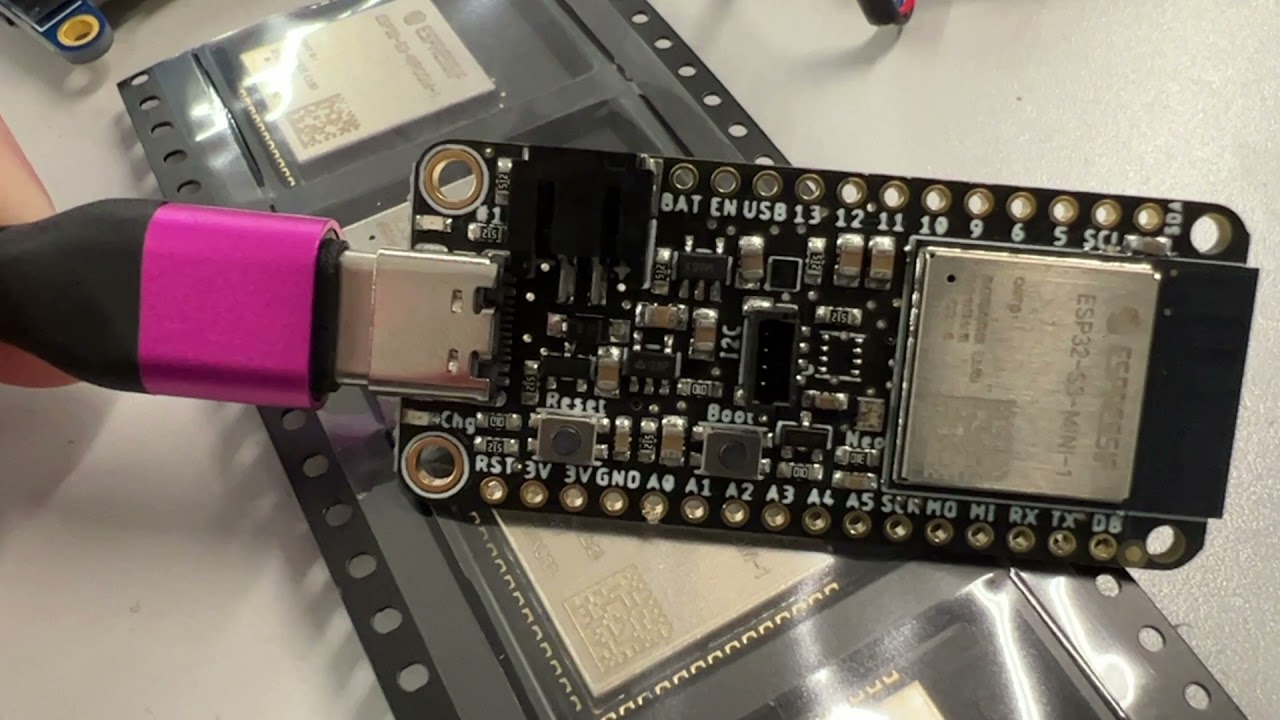
Adafruit Industries - Makers, hackers, artists, designers and engineers!
We just picked up some ESP32-S3 Mini modules from Digi-Key and, surprise! They are pin compatible with the S2 Mini modules. That means we were able to upgrade our ESP32-S2 Feather to use the newest…
solar whale
is esp32-s3 build for CP in the plan?
manic glacierBOT
SF is usually pretty responsive with PIDs. Could you post a link to the post here? Generally we don't like to duplicate PIDs beforehand.
lone axle

Adafruit Learning System
Using only a Web Browser, you can write code directly over Web Bluetooth
slender iron
solar whale
is esp32-s3 build for CP in the plan?
yup, @analog bridge has a branch going and I'm hoping it'll be PRed soon
solar whale
OK -- will it support the devkit with the WROOM module?
lone axle

Adafruit Industries - Makers, hackers, artists, designers and engineers!
Adafruit engineer Anne Barela is interviewed for the latest issue of HackSpace Magazine, Issue 49. If you’ve ever programmed anything in CircuitPython and understood the instructions first time, yo…
 errant grail
Super interview @turbid radish !
slender iron
ya, my goal will be to support all of the boards we sell
solar whale
👍
tidal kiln
lurk
tulip sleet
Pie Request
gilded cradle
First a Raspberry Pi then an Apple Pie.
turbid radish
Nice work on the widgets @errant grail
errant grail
turbid radish
Nice work on the widgets <@!339922377746022402>
Thanks!
lone axle
Awesome new widgets!

@tidal kiln if you end up having a moment sometime I'm interested to get your thoughts on what I have so far on this new "Label Updating" page in the display_text learn guide: https://learn.adafruit.com/circuitpython-display_text-library/label-updating?preview_token=u4hwkc8ZyJhER7RdG1bvkw
I need to get a PR in to the Learn system repo and get the code embed's fixed to use that. But I think I've got the bulk of the wording and layout in there nicely. Let me know if there is anything else you think it would be good to cover on this page.
 thorny jay
That was fast!
errant grail
Thanks!
slender iron
thanks!
gilded cradle
👋
thorny jay
So the position will be different each time?
Oh
Ok
Perfect.
Yeah, the only negative is that it will always be the same last. 🙂
🙂
ember iris
Thanks all!
lone axle
Nice, the backup just finished uploading here just in-case it becomes needed: https://www.dropbox.com/s/aveoa4opa0m0i30/circuitpython_weekly_2021_11_22.mkv?dl=0
ember iris
lone axle
Nice, the backup just finished uploading here just in-case it becomes needed: ht...
if you use obs, What quality settings do you use? My recording came out to be 1.7 gb (in a .mkv format)
idle owl
Mine is 756MB. In Matroska format.
lone axle
@errant grail if you haven't looked into vectorio you might find some of it interesting as an alternative to the display_shapes library: https://circuitpython.readthedocs.io/en/latest/shared-bindings/vectorio/index.html? It doesn't have exact 1 to 1 functionality so it may or may not be applicable to some of the widgets you're working on. But in the cases where it can be used I think it should help save some memory.
lone axle
ember iris
if you use obs, What quality settings do you use? My recording came out to be 1....
I do use OBS. The same settings that I initially set up for my streams on saturdays:
 ember iris
Ah that would be the difference, I've got a higher bitrate for both audio and video
idle owl
Keep MKV - if it crashes, it closes the file. If you change it to MP4 or whatever, it doesn't close the file, and you can't concatenate any subsequent recordings.
lone axle
I'm a little scared to touch most of it honestly, but truthfully I wouldn't mind if my recordings came out a bit bigger. To my eye they look just a tad fuzzy on the smallish text inside of the discord window.
idle owl
lone axle
I'm a little scared to touch most of it honestly, but truthfully I wouldn't mind...
I apparently have your settings.
idle owl
ember iris
Ah that would be the difference, I've got a higher bitrate for ~~both audio and~...
What do your settings look like?
ember iris
Ok, I might keep mine at it's current settings just for alternatives. You managed to upload it really quickly so I guessed it was a smaller file
video bitrate: 6000 Kbps
lone axle
about 700mb for this one. I am relatively lucky to have REALLY fast internet.
idle owl
ember iris
video bitrate: 6000 Kbps
FWIW, YouTube doesn't care. It takes huge files and deals with them. We used to transcode the videos first, but then stopped bothering.
lone axle
I am in one of the few google fiber zones that they put infrastructure in for before giving up on that initiative (I think at least they aren't expanding any more, not certain)
ember iris
I've got fiber as well, which is why my settings are a bit higher. It's not overly high but I guessed your file wasn't 1.7 gb based on the upload speed, even with fiber 😅
 lone axle
ember iris
video bitrate: 6000 Kbps
lone axle
ember iris
video bitrate: 6000 Kbps
Thank you for sharing, I'll try tweaking mine up a bit, if needbe I can separate the streaming from recording config. Would love to get slightly more crisp text in the recordings if I can.
ember iris
Yeah I need to go through and figure out what the recorded quality was of my old streams. I have no clue if my text was crisp or if it was unreadable
manic glacierBOT

Had the same issue - glad I'm not alone.
When I drag and drop the .UF2 file onto the bootloader in windows, I'm told that the bootloader doesn't have enough space for the file.
adafruit-curcuitpython-pca10100-en_US-7.0.0.ut2 filesize: 458k (460k on disk)
Bootloader capacity :128k
Does this help?
(PS I'm brand new to firmware development - no idea what's relevant or not. Sorry if I'm muddying the water or asking a stupid question. Appreciate the patience).
idle owl
Here is the notes document for Monday’s CircuitPython Weekly meeting. It is at the normal time of 11am Pacific / 2pm Eastern here on Discord. Everyone is encouraged to attend! Please add your hug reports and status updates even if you’ll be attending the meeting - it’s super helpful! If you are unable to attend but would still like to include updates, feel free to include them in the notes and we’ll read them off during the meeting. Hope to see you there! <@&356864093652516868> https://docs.google.com/document/d/15ZV9VO13jx1LbBbM5c1mDOc7gCEVaq447AILy0qHh0Y/edit
idle owl
idle owl
Here is the notes document for Monday’s CircuitPython Weekly meeting. It is at t...
tidal kiln
Learn Guide Display Text Update
errant grail
lone axle
<@!339922377746022402> if you haven't looked into `vectorio` you might find some...
@lone axle Yes, there are a few places where vectorio would work nicely. My current plan is to exhaust Display Shapes 's capabilities then follow-up with performance tuning. Would be nice to get back some memory capacity with larger widgets.
manic glacierBOT
PS - to be clear, I'm referring to the dev board, not the actual production board.
idle owl
@tulip sleet Is it possible that future boards with an I2C_POWER pin on them may need to be pulled high? (Trying to write up this template section to fit possible future situations.)
thorny jay
@tulip sleet for sharing preview of your learn guide, you better share this: https://learn.adafruit.com/cooperative-multitasking-in-circuitpython?view=all&preview_token=di81p2zLknUEEkeM-57bPw
Else any click on another page lose the token.
idle owl
Oh that's right, each page has its own preview token.
thorny jay
That token works for me for the full guide.
idle owl
Thanks, David, for catching that.
tulip sleet
It is possible, but I think the usual circuitry makes active-low be more typical.
thorny jay
I had the issue last time with I don't remember what preview... forgot to mention.
idle owl
tulip sleet
It is possible, but I think the usual circuitry makes active-low be more typical...
Hmm. Ok.
tulip sleet
Thanks for that. We may publish the guide in draft form without preview tokens. @idle owl can you edit the meeting notes to use the view=all URL, or is it too late
or I could make a PR
thorny jay
@tulip sleet for the "Two LEDs" without assyncio you may want to reference https://learn.adafruit.com/multi-tasking-with-circuitpython/multiple-leds as a solution.
And that guide could link to yours.
tulip sleet
thorny jay
<@329766224093249548> for the "Two LEDs" without assyncio you may want to refere...
I did see that, but I ended up writing the class instead, because it was somewhat cleaner. But the guide could reference it. I would not use dictionaries the way that guide does: I would use a class instead.
lone axle
@slender iron Do you know if the Deep Divers role is set up specifically to disallow mention pings from anyone but you? On Friday's when you're off I will stream if I have nothing else going on. Last time I did I was going to ping that role when I started up the stream, but couldn't figure out how, discord doesn't auto-fill it if I type an '@' and the space in the name seems to prevent it from mentioning if I type it manually.
idle owl
lone axle
<@!252717193496756235> Do you know if the Deep Divers role is set up specificall...
It appears to be restricted.
lone axle
Thank you for the confirmation. I wasn't aware if that was something discord allowed to be configured. Thought I was going crazy for a minute when I was trying. It's the most confused I've been by Discord since discovering that "streamer mode" make the search work differently
idle owl
There's no way to differentiate between mentioning "all roles" and being allowed to use "Everyone/here" which we are not enabling. It's all one setting is my point.
So I can't make it so you can mention other roles, and not include everyone/here. Or not that I see anyway.
idle owl
lone axle
Thank you for the confirmation. I wasn't aware if that was something discord all...
Yeah I can see that for sure.
lone axle
Okay, no worries. Definitely best to keep everyone/here mentions disabled. Last time folks found me from the activity in live broadcast chat anyhow so not a big deal, but appreciate knowing how it works and that my client isn't just weirdly broken.
idle owl
lone axle
Okay, no worries. Definitely best to keep everyone/here mentions disabled. Last ...
Fair enough. Glad to help. If one of the admins is around, we can ping the role. Otherwise, yeah, go with what works. 🙂
@tulip sleet I was about to ask how this code repeatedly runs when there's no loop, but it ends with a deepsleep.... which means it reruns the entire program when it wakes up, am I understanding that correctly?
so if I want it to do a Thing in a particular order, I simply rearrange the order of operations in the code. It doesn't require a loop.
?
crimson ferry
I2C_POWER_INVERTED? Should we train people to interpret power control pins with and without _INVERTED so they know whether to activate by setting True or False? There are a handful of control pins now across CircuitPython-capable boards, and they vary in active-high vs. active-low, and I think they are all named appropriately now.
idle owl
crimson ferry
`I2C_POWER_INVERTED`? Should we train people to interpret power control pins wit...
Yes that is the plan. I was specifically asking about whether there was going to be a potential for I2C_POWER in the future. Limor said do not plan on it, they should all be _INVERTED, in not so many words.
idle owl
Yeah, I happened to see there was a message here and checked in to see if it was a reply to my question 😄
The "training" will happen over time with more pins like that.
I can't think of a good place to put general info like that when it applies across so many boards. So, we'll simply make sure we name the pins properly, and continue to be consistent with it.
crimson ferry
sounds like a good plan
idle owl
Now..... who has experience with CircuitPython WiFi because I have code I don't understand, and I'm not finding anything canonical in guides
crimson ferry
I have some
idle owl
OK, this code is written to connect to wifi and then send sensor data to AdafruitIO
What are these two lines doing and why do I need them? py pool = socketpool.SocketPool(wifi.radio) requests = adafruit_requests.Session(pool, ssl.create_default_context())
Mostly confused about the requests line, because I can't find it in an IO guide, only in an MQTT guide
crimson ferry
that's a pretty normal requests line for the ESP32-S2
idle owl
And I see it's included in the io setup.... but I don't quite get why it is what it is and not something else
Ah ok
thorny jay
tulip sleet
I did see that, but I ended up writing the class instead, because it was somewha...
In the guide: "This program only has one task, so it's not that interesting. Bu you could use the techniques described on the"
manic glacierBOT
Just a few more things. Thanks for working on this!
Please search for all capitalization variations of this. They should all be the same (all caps) for the class, lower for the module.
crimson ferry
@idle owl for ESP32-S2 (as opposed to ESP32SPI), CircuitPython provides a pool of sockets via that native socketpool module
idle owl
crimson ferry
<@!330227457296957440> for ESP32-S2 (as opposed to ESP32SPI), CircuitPython prov...
Ah ok, that makes a little more sense. Everything points to the AirLift guide, which uses the SPI version.
crimson ferry
yeah, there are basic examples around for ESP32-S2, lemme find one
idle owl
I've never dealt with wifi or IO until today.
So I'm messing with code new to me.
I mean, it's working.
I have feeds and such on IO
No idea how to make them into a group or how to make graphs and all that 😄
But I have data!
crimson ferry
I've done very little with IO, but used both forms of wifi
idle owl
Anyway, I'm trying to simplify it as much as possible, and that means understanding the code.
slender iron
@lone axle I'm happy to ping the role for you. when are you streaming and at what link?
crimson ferry
@idle owl, is this what you're looking at? https://github.com/adafruit/Adafruit_CircuitPython_MiniMQTT/blob/main/examples/native_networking/minimqtt_adafruitio_native_networking.py
idle owl
crimson ferry
<@!330227457296957440>, is this what you're looking at? <https://github.com/adaf...
I guess I found that and couldn't quite translate it in my head to what I'm looking at.
Ooh checking requests.
Ah yeah I saw that too, and again, struggled to translate it.
I think what I have is about as simple as I can make it
Thanks for clarifying!
crimson ferry
(MQTT is a sibling protocol to HTTP (requests), so we typically don't see them together unless code is doing different things with different sites). But Adafruit IO has both APIs apparently.
though I think usually the MQTT is presented
idle owl
Ah ok
lone axle
slender iron
<@!382939733107408897> I'm happy to ping the role for you. when are you streamin...
Thank you! Typically when it occurs I start 1 hour later than your normal deep dive time (5pm central instead of 4pm central) But I have the day off from work this time so I plan to start at the normal deep dive time instead (2pm pacific / 4pm central) https://www.youtube.com/watch?v=5wKQtcsRdFg or https://www.twitch.tv/foamyguy_twitch
idle owl
@crimson ferry One of those examples has the network connection code in a try/except, one of them does not. Is it not needed because once it's right, it's right, or what's the deal there? Right now, Pylint is complaining about except Exception as e being too broad, but I'm causing errors and they are throwing nice messages, not exceptions (obviously from one of the libs involved).
So I can't even identify a good thing to except anyway.
lone axle
@idle owl @tulip sleet with a freshly cloned and updated Bundle I'm only seeing 3 libraries that still contain .readthedocs.yml (as opposed to .yaml):
- LSM303 - This library was split into multiple, the newer ones contain `.yaml` already. Don't think this one gets used any longer, possibly it should be removed from the bundle?

- pcf8563 - Already updated to `.yaml` in main branch, just no release yet so the bundle submodule doesn't have it yet I think.

- ticks - same as pcf8563, already changed to `.yaml` in main.
So I think we are mostly good on the file extension.
idle owl
lone axle
<@!330227457296957440> <@!329766224093249548> with a freshly cloned and updated ...
That's good at least.
lone axle
If I could make a script to update the libraries to python 3.7 and push it to each of them, should I try to do that? Or do we want to just go case-by-case if any other RTD build issues come up?
idle owl
Hmm.
I'm ok with updating them all, I'd rather they be the same.
Makes for less awkward troubleshooting later.
lone axle
Okay, I'll work on that script and do some small scale testing tonight, but will probably wait until tomorrow to run through everything.
idle owl
lone axle
Okay, I'll work on that script and do some small scale testing tonight, but will...
Sounds like a good plan.
crimson ferry
@idle owl for a basic example, I wouldn't think try / except is necessary for wifi connection
idle owl
crimson ferry
<@!330227457296957440> for a basic example, I wouldn't think `try` / `except` is...
Alright, keen. Thanks.
It's not working for common errors anyway, heh. Code stops for those.
crimson ferry
if connect doesn't get an exception, it is connected (and can be verified by checking for a wifi.radio.ipv4_address)
idle owl
I print that in there.
It's supposed to run standalone on battery though
so the prints go nowhere in use.
and in that case, I don't need the go_to_sleep function, because the code is only used once.
Simpler!
idle owl
Anyone who knows the CircuitPython AdafruitIO code, do I need this whole block for each feed? ```py
try:
# Get the temperature feed from Adafruit IO
bme280_temperature_feed = io.get_feed("esp32s2-bme280-temperature")
except AdafruitIO_RequestError:
# If no temperature feed exists, create one
bme280_temperature_feed = io.create_new_feed("esp32s2-bme280-temperature")
This targets the 64-bit CPU Raspberry Pis. The BCM2711 on the Pi 4
and the BCM2837 on the Pi 3 and Zero 2W. There are 64-bit fixes
outside of the ports directory for it.
There are a couple other cleanups that were incidental:
- Use const mcu_pin_obj_t instead of omitting the const. The structs
themselves are const because they are in ROM. - Use PTR OBJ conversions in more places. They were found when
mp_obj_t was set to an integer type rather than pointer. - Optimize submodule ...
idle owl
I was going to combine into one giant block, but then realised it would try to create all of them if one of them didn't exist, so I kind of think maybe? But I'm not sure.
manic glacierBOT
These are temporary USB PIDs under the Raspberry Pi VID. I'm waiting to hear from @ghollingworth about the official values.
 idle wharf
idle owl
I was going to combine into one giant block, but then realised it would try to c...
idle wharf
idle owl
I was going to combine into one giant block, but then realised it would try to c...
If the feeds exist already then the Try and Except is not really needed. Is that what you mean ?
You can create the in the web UI too. So if you're doing that you don't need to check for them and create them.
idle owl
No, pretend this might be for someone who hasn't created the feeds yet.
Oh ok
Is that expected AdafruitIO behavior?
(Noob here.)
Because I sure didn't have the feeds when I ran it the first time 😄
 idle owl
Right, but I'm asking, is it normal for someone to create the feed first?
Or do they expect the code to do it for them?
idle wharf
Hmm... either way is totally acceptable.
blissful pollen
I create my feeds first, you could code it - and maybe in an example makes sense - but for something long running it really is a one time setup task
idle wharf
That is also true.
idle owl
Ah ok. This is going in the Feather ESP32-S2 guide. I don't see it in any other examples I can find on Learn.
But I'm sure I'm missing something.
Ah, looks like this guide, at least, tells folks to create first.
blissful pollen
I think in general it makes things simplier to tell someone how to make the feed in the UI and then just code to write/read from it.
idle owl
Via the UI
Ok. Keen. I'm on board with that.
So all I need to do is get_feed then?
Because I'm also not seeing get_feed in any of the examples. It's all some other feature of CP AIO I think. Like this ```py
Set up Adafruit IO Feeds
print('Getting Group data from Adafruit IO...')
station_group = io.get_group('weatherstation')
feed_list = station_group['feeds']
altitude_feed = feed_list[0]
eco2_feed = feed_list[1]
humidity_feed = feed_list[2]
pressure_feed = feed_list[3]
temperature_feed = feed_list[4]
tvoc_feed = feed_list[5]
uv_index_feed = feed_list[6]
wind_speed_feed = feed_list[7]
For example.
idle wharf
Are you sending data, displaying data ?
idle owl
Um...
How about I post the code, and you tell me the answer to that question 😄
I think yes
This was adapted from a self-described kludge example written by Jerry that I am super grateful for because I would have been totally lost.
But I'm coming from the angle of it existing already, and trying to understand it.
idle owl
Ok, noted 🙂
idle wharf
Given the long-names and the need to get it all perfect... I'll leave the service setup in the code.
blissful pollen
I have to run now but if you still have questions tomorrow feel free to ping me should be about in the afternoon. I've done a bunch of IO work for my weather monitor but its been a while.
idle owl
blissful pollen
I have to run now but if you still have questions tomorrow feel free to ping me ...
OK will do, thanks.
idle wharf
But I'd document it could be done in the Web UI.
idle owl
Basically, trying to make this as simple as possible.
idle owl
idle wharf
Given the long-names and the need to get it all perfect... I'll leave the servic...
Hmm ok
I can simplify the names significantly
Those were the names the code came with, and probably are put into an AIO account with a bunch of other feeds. Mine is empty except for these feeds.
Ooooh, I could put the feed names at the top of the code
and make them variables.