#circuitpython-dev
1 messages · Page 393 of 1
 idle owl
 tulip sleet
"Advanced" for serial means "non-Mu". Are you averse to changing the page titles?
idle owl
No, page titles can change, page URLs cannot.
tulip sleet
like we could have "Connecting to the Serial Console with Mu"
The screenshots could be replaced with the fake-screenshot code blocks in the long run, to make it easier to maintain
idle owl
Fake-screenshot code blocks?
tulip sleet
maybe that would miss the highlighting, hmm
idle owl
I thought that was only for CIRCUITPY contents. Did I miss something?
tulip sleet
if you just use a text code block, it has a dark them (I think)
idle owl
oh
tulip sleet
hold on, lemme check
 idle owl
Hmm.
I think Limor will want screenshots.
Because she wants screenshots for the... Connecting to Serial Console page.
tulip sleet
yeah, the terminal block doesn't show the color highlighting, oh well
 pallid creek
Where is bitmap tools? I don't see it in the libs dir of the latest circuitpython 7.x bundle
tulip sleet
pallid creek
Where is bitmap tools? I don't see it in the libs dir of the latest circuitpyth...
it's a built-in C module
it's not enabled on all boards, but on most larger ones
 lone axle
Yep, its written in C inside the core like the TileGrid code that you found before.
pallid creek
ah. thanks.
tulip sleet
@idle owl screen is the only terminal program on Mac that comes with macOS, is that right?
no tio or minicom?
idle owl
tulip sleet
<@!330227457296957440> `screen` is the only terminal program on Mac that comes w...
I brew installed tio.
tulip sleet
i kind of hate screen
idle owl
So yeah.
screen is default.
They don't make a big deal out of tio being in brew but it is.
But you have to have Homebrew setup. 😕
tulip sleet
not too fond of putty but it's well known
idle owl
Right
tulip sleet
yeah, I would not inflict that on most people
lone axle
@pallid creek main logic of it is here if you're interested in looking inside: https://github.com/adafruit/circuitpython/blob/main/shared-module/bitmaptools/__init__.c
idle owl
Otherwise tio involves some shenanigans to get installed on MacOS I think.
I don't remember because I used brew.
@tulip sleet Also I'm going to ping you when I put together ideas for new product photos and get your thoughts on that. Not tonight though.
pallid creek
wow. That's so much faster. it went from 0.3s to 0.009s.
Strangely there's still a tiny bit of tearing, but good enough for now.
tulip sleet
https://learn.adafruit.com/welcome-to-circuitpython/advanced-serial-console-on-windows#windows-7-driver-2977913-1 top part can just point to the 7/8.1 drivers page now.
you probably already were going to do that
tulip sleet
you can copy over my caveat blue box
tulip sleet
it is looking good already
the Linux groups p;ermission thing is very short on the Mu page and very long and involved on the advanced page. I'm not sure it needs to be that long on the advanced apge
idle owl
Updated the Advanced Serial Console on Windows page. Also published the Drivers page.
idle owl
tulip sleet
the Linux groups p;ermission thing is very short on the Mu page and very long an...
Oh right, good idea.
Kind of convoluted on our page. Unnecessarily involved. Mu put it better.
Added to my list of updates to do
tulip sleet
https://learn.adafruit.com/welcome-to-circuitpython/kattni-connecting-to-the-serial-console#setting-permissions-on-linux-3027345-8 is the short way. I forgot that Mu has its own description.
idle owl
This is the option to install tio on MacOS, on their site: From source tarball:
So..... yeah.
I'll mention it, but I won't change over the whole page to it.
tulip sleet
This is too short: https://codewith.mu/en/download
 idle owl
tulip sleet
This is too short: <https://codewith.mu/en/download>
idle owl
tulip sleet
This is too short: <https://codewith.mu/en/download>
Ah ok
So.... kinda put them together? or?
Put it on its own nested page?
Wait, can't doublenest
nevermind. Bad idea.
tulip sleet
idle owl
Oh.
oh oh oh.
Ok.
Replace with that.
Got it.
So where are we at with the Advanced Setup header page versus nesting pages under similar pages?
tulip sleet
that link refers to the more general narrative in https://learn.adafruit.com/welcome-to-circuitpython/advanced-serial-console-on-mac-and-linux#permissions-on-linux-2978572-15
idle owl
tulip sleet
that link refers to the more general narrative in <https://learn.adafruit.com/we...
So wait. Am I updating this section or not? I'm confused now 😄
Should it be updated to refer to the section on the Connecting to the Serial Console page?
tulip sleet
The section in "Connecting to the Serial Console" is nice and short, and refers to the other section already. You can leave the "Advanced Serial..." for Linux alone for now, I think.
idle owl
Ah ok
tulip sleet
I think actually that the "Advanced Serial Console on Mac and Linux" should be split into separate Mac and Linux pages. They really are not the same at all, except for the actual connection part with screen, and even, then, the device names are quite different. There's kind of too much, "on Mac...", "on Linux..." shuffled together. What do you think.
tulip sleet
then the Linux group part doesn't seem quite so long, and we can just leave it alone for now
idle owl
Also true.
Alright, I think I've hit my max for the day. Thanks for all your help. I will definitely be asking for more 😄
tulip sleet
sure, thanks for doing this!
idle owl
Absolutely!
 fallen bone
Anybody working on circuitpython ESP32-S2 static ip addressing?
 onyx hinge
@fallen bone not that I'm aware of. I don't see an issue about it, for that matter. Consider opening an issue as a way to document the limitation, and let us know if you plan to work on it.
looks like the ESP-IDF APIs are esp_netif_set_ip_info and friends https://docs.espressif.com/projects/esp-idf/en/latest/esp32s2/api-reference/network/esp_netif.html#_CPPv421esp_netif_set_ip_infoP11esp_netif_tPK19esp_netif_ip_info_t and presumably this new info would need to be passed in through common_hal_wifi_radio_connect
 slender iron
🤦 hdmi issue on rpi was that the module wasn't fully seated. I wonder if usb is on that side too...
yup, it is
 lone sandalBOT

 mental nexus
You may want to look at the vectorio functions too. It may better fit what you’re trying to do without having to build bitmaps.
 manic glacierBOT

So currently the default firmware has cdc hard coded to interface 0 because the windows driver is also hard coded to interface 0. Is this a requirement by windows or could it also use a hardcoded interface number 1? (having 0 as unused/reserved for boot keyboard).
What about making it the default firmware where the user can choose the interface number?
manic glacierBOT

Fixing CDC to interface is a requirement due to the limitations of third-party drivers in Windows. A third-party cannot write a "class driver", which identifies the device by class and subclass. That is reserved for system-supplied drivers. I can only identify the device by PID/VID, and (optionally) interface number. If I scramble the interface numbers, then it can assign the wrong driver (e.g. MSC for CDC). I have also seen that at least some versions of Windows expected CDC on interface 0 a...
onyx hinge
slender iron
🤦 hdmi issue on rpi was that the module wasn't fully seated. I wonder if usb is...
I can understand why you'd take a walk after discovering that... but we're eager to hear how much IS working now that you've tried plugging it in.
manic glacierBOT
Boot keyboard support on interface 0 is now merged into the main branch on CircuitPython, and will be in CircuitPython 7.1.0. Right now the order of the interfaces is fixed, so we are just turning off enough to bring HID to the top as interface 0. Since most keyboard projects are standalone things, and you don't want CIRCUITPY and CDC to be present anyway, especially in the case of a boot keyboard, this didn't seem like a serious limitation.
The boot keyboard suipport works on a few PC B...
idle owl
@tidal kiln Good morning! Your opinion is desired again with regards to guide layout, if/when you're around.
 tidal kiln
@idle owl hello. again i am here.
idle owl
This is a good thing for me.
Ok, so, I have two options for overall organisation of pages in the Welcome to CircuitPython guide.
First: Putting all similar pages together, nested. For example, all of the "Advanced Serial on *" pages would go under "Connecting to the Serial Console". This means folks would click on the beginner page, and it would expand to reveal the advanced pages.
Second: Putting all of the "advanced" page under an "Advanced Setup" header, so beginners are only working through beginner pages, and all the extras are separate.
Which do you think is better for the user experience and support purposes?
@tidal kiln Basically in my mind, both have their merits, and both have downsides as well. So I'm hoping for thoughts from you, or at least a discussion that leads to a decision. 😄
idle owl
Ok
idle owl
Right. Since there are folks who go through entire guides, in order, regardless of whether that makes any sense at all.
I didn't realise this until getting a few guide feedbacks indicating that was what they had done.
Alrighty, thanks!
tidal kiln
yep. also because of that.
i think a fair amount of people use the PDF output as well
like, download PDF, open that and go through it
tidal kiln
which even more drives a sequential journey
idle owl
Exactly
slender iron
onyx hinge
I can understand why you'd take a walk after discovering that... but we're eager...
I just saw I got a frame buffer pointer back and a black screen. I think I have more downstream changes to make. Today is for figuring that all out. 🙂
idle owl
@tulip sleet Take a look - https://learn.adafruit.com/welcome-to-circuitpython/advanced-serial-console-on-mac-and-linux and the page below it.
onyx hinge
hummm I wanted to make this gif code testable from the "unix port" but .. turns out it needs displayio.Colorspace and that's not going to be trivial to bring in
tulip sleet
idle owl
<@!329766224093249548> Take a look - https://learn.adafruit.com/welcome-to-circu...
This looks good. The sentence at the very top "You'll use a terminal program to find and connect to your board. Terminal comes installed by default." is a little confusing, because you can't use Terminal to connect; you have to use screen.
The Linux guide could use tio, since it's easy to install, but that could be updated later.
idle owl
Fair enough
idle owl
tulip sleet
The Linux guide could use `tio`, since it's easy to install, but that could be u...
Hmm yeah. That would involve a new section and new screenshots. I don't have a Linux setup at the moment.
I think it would be good to add, but I don't have the means.
tulip sleet
For now, you could just add a sentence that the tio program works well too, and will reconnect automatically. I can do some screenshots and text later, at some point.
manic glacierBOT

I have just downloaded the automatic build and it seems to fix my problems on Windows. The keyboard can be used right after booting. Thanks a lot for the great work.
idle owl
@tulip sleet If there are .bin files for CP installation, are they on circuitpython.org for sure now? The guide says "two places: cp.org and GitHub" but that's as of April 2019.
tulip sleet
idle owl
<@!329766224093249548> If there are .bin files for CP installation, are they on ...
both .bin and .uf2 are available on circuitpython.org, e.g.
 idle owl
Beautiful. Thank you.
slender iron
looks like I should be able to get a shirt:
This year Maintainers will be able to earn a t-shirt pack (the same pack contributors receive) without having to do 4 pull requests. In order to qualify you’ll need to meet our criteria, which are outlined below. This new feature of Hacktoberfest is intended to reward the actions you’re already doing when you manage your participating Hacktoberfest repositories.
tulip sleet
The Hacktoberfest profile only shows participant contributions. Maintainer actions will not be shown here, and will be tallied up in a one-time check performed by the Hacktoberfest team after Hacktoberfest has ended.
manic glacierBOT

@tannewt I duplicated the GPIO configuring into set_alarms and tested on a couple boards.
NOTE: PinAlarm and TimeAlarm aren't doing much of anything in prepare_for_deep_sleep atm. This will require additional static variables or something to persist through the VM reset. There's a todo in the code here.
manic glacierBOT

This involves:
- Adding a new "L8" colorspace for colorconverters
- factoring out displayio_colorconverter_convert_pixel
- Making a minimal "colorspace only" version of displayio for the
unix port (testing purposes) - fixing an error message
I only tested writing B&W animated images, with the following script:
import displayio
import gifio

with gifio.GifWriter("foo.gif", 64, 64, displayio.Colorspace.L8) as g:
    for i in range(0, 256, 14):
data = byte...I'll be doing a bit more testing before I mark this as ready for review.
manic glacierBOT

With further experimentation...
It is not import microcontroller that alone is the issue.
I added code, modified code, and removed code with no issue, no crashes.
Then I made a minor change and the crashes came back at a different place. It was after 4 SKIP30 sends, now it is after 10 SKIP30 sends. It can be 10 sends at one time or two of 5 sends.
I stopped the crashes this time by adding import supervisor. supervisor is never called, but the crashes stopped.
I am st...
manic glacierBOT

Everything should be using the keypad module instead.
Note: there are several boards that still had gamepadshift enabled. I
did not contact their authors to make sure they already switched to
keypad in their code and documentation. We should probably wait with
merging this for their go ahead.
We were going to do this when we started on 8.0.0. We haven't yet made a 7.x branch yet, so we will keep main compatible for a while. There is no 8.0.0 issue for removing gamepadshift yet, but there should be.
@deshipu OK to make this a draft until then?
Of course, how do I do that?

I don't think it is just size. There is memory corruption somewhere. You might leave all these imports in and turn off various parts of the program with if False: etc.
 orchid basinBOT
 idle owl
@tulip sleet You updated the "Here's the old bundles" question, right? That was one of the things you got to before realising you were heading in too deep?
manic glacierBOT
Dan,
I have narrowed it down to this function call:
print(SKIP30, IR_Command, Ky, 1)
encoder.transmit(pulseout, reverse_bits(IR_Command), nbits=32)
print(SKIP30, IR_Command, Ky, 2)
Encoder is defined much earlier by:
Create an encoder that will take numbers and turn them into NEC IR pulses
encoder = adafruit_irremote.GenericTransmit(header=[9500, 4500], zero=[562, 562], one=[562, 1687], trail=562, debug=False)
I have no control over adafruit_irremote or the intrinsic...
tulip sleet
right, I just simplified the language and the title. But there are duplicate "old bundles" sections in the FAQ and in Troubleshooting
I rewrote the one in Troubleshooting
idle owl
tulip sleet
right, I just simplified the language and the title. But there are duplicate "ol...
Oh ok, good to know. Fair enough. Thanks!
tulip sleet
it was seeing that duplication that kind of led me on the whole thing
I think someone asked for the 5.x bundle and I was tracking it down
idle owl
Makes sense. I'll update one to refer to the other more so.
manic glacierBOT
There have been changes in the native PulseOut code recently. I suspect that some memory or timing problem may be coming from that. @DavePutz and @tannewt may be interested in this bug.
slender iron
 idle owl
@tulip sleet Limor mentioned the UF2 bootloader pages in the context of the Welcome guide, they're not in the Welcome guide, they're in the Feather M0 (UF2 Bootloader Details) and CPX (Updating the Bootloader) guides. It's mirrored into a ton of guides so I don't think moving it makes sense, but should it be mirrored under Advanced Setup do you think? I can ask Limor tomorrow what her feelings are on it, but I wondered yours.
idle owl
I feel like we should update the help() command in the REPL to return something about circuitpython.org, either instead of or in addition to the Learn link. I git grep'd that message, and it shows up in a number of places due to translations. I don't know where I'm supposed to update it, or whether I'm supposed to do it in all the locale/* directories. I feel like there's one place it should be done, and then the translations are updated at a later date - but I don't know for sure.
tulip sleet
idle owl
<@!329766224093249548> Limor mentioned the UF2 bootloader pages in the context o...
I would leave it per device, because the procedure for updating varies. Also, people seem to think they should try to update the bootloader, but they rarely need to. So I'd just leave it out.
idle owl
tulip sleet
I would leave it per device, because the procedure for updating varies. Also, pe...
It's all one page for all devices. But ok, sounds good.
You're right about people doing it when they don't need to.
It's mirrored into most board guides already. Which kind of explains that.
tulip sleet
The place to change the help message is in circuitpython/py/builtinhelp.c. Just change the English message there. It will get propagated to circuitpython.pot, and then it's up to the translators to redo the translation.
idle owl
tulip sleet
The place to change the help message is in `circuitpython/py/builtinhelp.c`. Jus...
Ah ok
I found that one and was wondering
I was between that one and circuitpython.pot, so I was at least close.
tulip sleet
I'd just change the one link, and you could take out the both "Please"'s to save space.
idle owl
Replace what's there?
tulip sleet
I don't think we have to be that polite 🙂
idle owl
Valid.
tulip sleet
yes.
"Welcome to Adafruit CircuitPython %s!\n\nVisit circuitpython.org for help.\n\nTo list built-in modules do `help("modules"
idle owl
Oh!
manic glacierBOT
On Kaluga I can capture 320x240 to SD card at about 2.4fps.
idle owl
@tulip sleet Should I remove "Adafruit"? Isn't that kind of the plan?
So it's simply "Welcome to CircuitPython Foo!" ?
manic glacierBOT

kk whats the bottleneck, data xfer?
tulip sleet
idle owl
<@!329766224093249548> Should I remove "Adafruit"? Isn't that kind of the plan?
The opening prompt still says "Adafruit', e.g.:
Adafruit CircuitPython 7.0.0-193-gfc440e760 on 2021-10-19; Adafruit CircuitPlayground Express with samd21g18
idle owl
Oh hmm. True.
tulip sleet
let's leave that for now
idle owl
Ok
I'm not going to build because it is less text than it was before. she said knowing the PR will fail anyway
@tulip sleet Do I have to do something to make it populate or is that a remote event?
So I PR only the change to builtinhelp.c and it does its thing remotely? Or do I need to do something.
tulip sleet
do a make translate in the circuitpython dir after you change the message
idle owl
Ok
tulip sleet
hold on a sec, I am seeing if "Adafruit CIrcuitPython" is already somewhere else
idle owl
Looks like it worked!
Ok holding.
(Mostly surprised it worked the first time. I did remember to start my env though.)
tulip sleet
no, never mind
idle owl
Nevermind which... don't remove it?
tulip sleet
#define MICROPY_FULL_VERSION_INFO ("Adafruit CircuitPython " MICROPY_GIT_TAG " on " MICROPY_
BUILD_DATE "; " MICROPY_HW_BOARD_NAME " with " MICROPY_HW_MCU_NAME)
Or take it out of both places
tulip sleet
eventually we might change that, but it doesn't have a name for now
yeah, let's wait on that
idle owl
Ah ok
So this is correct? ```Changes not staged for commit:
(use "git add <file>..." to update what will be committed)
(use "git restore <file>..." to discard changes in working directory)
modified: locale/circuitpython.pot
modified: py/builtinhelp.c
no changes added to commit (use "git add" and/or "git commit -a")```
tulip sleet
I try to take the opportunity to shorten unnecessarily long messages when I can, though it's work for the translators
yes, those are the only changes I expect. Are you caught up from main?
idle owl
tulip sleet
I try to take the opportunity to shorten unnecessarily long messages when I can,...
Right. But Adafruit isn't translated, so there's that.
I did pull and gitsubmod before making this branch.
(gitsubmod is my alias to the submodule update)
tulip sleet
is it a branch in your fork or adafruit
idle owl
I haven't pushed it yet, but it'll get pushed to my fork first.
Want me to do that so you can see it?
tulip sleet
right but you need to merge from upstream
idle owl
oh hmm.
I thought pull did that. Maybe it didn't do anything. Let me check.
Oh oops. I never did pull. Fixing now.
tulip sleet
git checkout main
git fetch adafruit
git merge -ff-only adafruit/main
git checkout -b change-message
-ff-only is fast-forward only to make sure your main does not have changes that are not on adafruit/main
idle owl
I have a set of untracked files now 😕
  (use "git add <file>..." to include in what will be committed)
    lib/uzlib/.gitignore
    lib/uzlib/LICENSE
    lib/uzlib/Makefile
    lib/uzlib/README.md
    lib/uzlib/examples/
    lib/uzlib/lib/
    lib/uzlib/src/
    lib/uzlib/tests/
    ports/esp32s2/```
CircuitPython version
Adafruit CircuitPython 7.0.0-509-gcf4597c6d on 2021-10-20; Adafruit Feather M4 CAN with same51j19a
Code/REPL
>>> import board
>>> import busio
>>> bus = busio.UART(board.TX, board.RX, baudrate=9600, receiver_buffer_size=1024, timeout=5)
>>> bus = busio.UART(board.TX, board.RX, baudrate=9600, receiver_buffer_size=1024, timeout=5)
Traceback (most recent call last):
  File "", line 1, in
ValueError: D0 in use
>>>
paste mode; Ctrl...those are just junk left over from the micropython 1.17 merge and renaming of the esp32-s2 port
you can do git clean -xfd lib/uzlib and rm -rf ports/esp32s2'
idle owl
ok
manic glacierBOT
A very superficial look at a digital scope trace of the SD "clock" pin implies it is mostly waiting for the SD card to signal a write is complete. The shaded portion represents transferring a 512-byte sector (4096 bits) while the spiky bit after it represents the time waiting for the card to confirm the write has completed. The larger gaps would represent the CPU processing time, and the shorter spiky bit before the write starts is setting up the write operation.
 (use "git add <file>..." to mark resolution) added by us: ports/espressif/certificates/nina-fw
Oi.
I'm on the right commit it looks like at least
Compared to GitHub anyway.
tulip sleet
did you do the merge --ff-only yet?
tulip sleet
it should say up to date. It won't hurt
it looks like you're in the middle of a merge. you can do git merge --abort, and then git status
idle owl
There is no merge to abort.
Apparently.
Sigh.
I can reclone.
I don't have anything special.
tulip sleet
that's probably fine. do all the catch up before you change the file
tulip sleet
it's an encoding technique we use to compress strings
idle owl
Huh. Fair enough.
Ok I'm back to ```Changes not staged for commit:
(use "git add <file>..." to update what will be committed)
(use "git restore <file>..." to discard changes in working directory)
modified: locale/circuitpython.pot
modified: py/builtinhelp.c
no changes added to commit (use "git add" and/or "git commit -a")```
Haven't had to reclone in a while, heh. As in I haven't completely borked everything in a while. Guess I had a good run 😄
Um.....
There are other changes in here.
tulip sleet
that is good 🙂 I had similar stuff left over after my latest catch-up just not the certificates
 tulip sleet
yes, it completely redoes the translations, don't worry about the changes.
idle owl
Ok
tulip sleet
things get out of order, etc.
idle owl
Ah fair enough.
tulip sleet
as long as you are caught up.
idle owl
It's a brand new clone, I sure hope I'm caught up.
tulip sleet
you caught up in main, and then branched main for the PR, right?
slender iron
@onyx hinge when using double buffering with framebufferio I need to copy dirty rows to the new buffer in swap buffer right?
idle owl
Yes. There were no other branches that I had created until I had dealt with main.
I cloned, added my remote, did the gitsubmod, and pushed main to my remote.
Then branched.
onyx hinge
@slender iron each "framebuffer" style display has been a bit different. seems like you're looking at sharp display which worked that way
tulip sleet
great, sounds good. will wait for the PR!
onyx hinge
while rgbmatrix (the LEDs) just copies the whole thing everytime because it doesn't know better
manic glacierBOT
 slender iron
kk, I'll have a framebuffer that is twice the height and I can set the offset
idle owl
@tulip sleet Thanks for the help. This is how it goes, update a guide, update the core to go with it, heh.
tulip sleet
we have the power 🙂
idle owl
Now to watch something fail. 🙄
@tulip sleet How long do PRs take to run lately? I haven't submitted one in a bit.
tulip sleet
up to 2 hours
idle owl
Ah ok. I will not wait to watch it fail then. lol.
Dinner will be here long before that.
tulip sleet
and you are behind another run that is finishing
tulip sleet
I think we might be able to do an rc or beta next week or the week after. But there are still a number of bugs to find and fix. That doesn't mean we can't do 7.1.1 etc.
idle owl
Alright good to know. I'll decide what to do for the screenshots for the REPL page. Maybe 'shop the version number so I can show the updates message without the long hash after it. Or make a note to update it when we release. We'll see!
manic glacierBOT
Thanks for the update! One of us can merge after the jobs run successfully.
I found some performance by using "CMD25" (write multiple blocks) but it's still not super-fast. This got me a bit over 5fps.
At some point: suggest removing Adafruit from before CircuitPython" in the board info line in the serial console/REPL, and the help()` message.
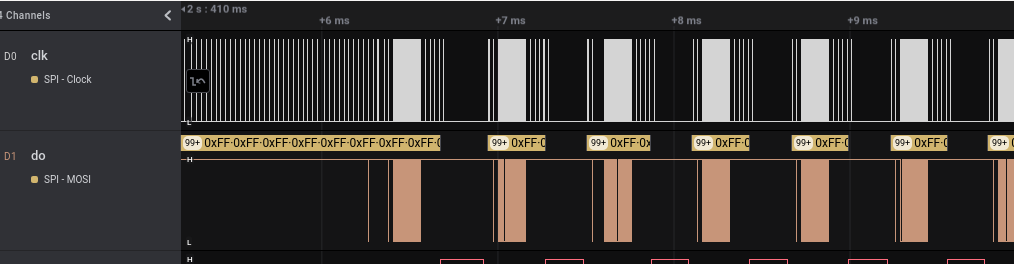
When the optimization is working, there are fewer post-write spikies (note different horizontal scale). But this depends on the blocks written to be at contiguous block numbers. It's true on a fresh card, but less so on a card that has had files added & erased (fragmentation).
idle owl
@tulip sleet Current boards are SAMD51, ESP32-S2, nRF, and RP2040. Am I missing anything? (Other than SAMD21, obvs) Oh, STMxx. Not sure that's worth including in a product photo though.
Nearly food time here. Will pick this up again tomorrow.
manic glacierBOT
The sd card optimization may be wrong (truncating or corrupting files at the end), needs more investigation and should probably be broken into a separate pr.

This might be a bit outside the scope of this bug report, but it doesn't look like either the STM32F7 or the STM32H7 parts will have much support within CircuitPython for the foreseeable future. So should someone like me who is experimenting with Python on those parts shift focus to MicroPython? I created board files for both of my boards using MicroPython and it seems to work just fine.
I don't see any STM32F7/STM32H7 boards from Adafruit so I don't see much reason for Adafruit to suppor...
tulip sleet
idle owl
<@!329766224093249548> Current boards are SAMD51, ESP32-S2, nRF, and RP2040. Am ...
Those seem fine to me
manic glacierBOT

@tahunus So did you try upgrading the bootloader? Let us know if that fixes it.
Hi @dhalbert. I tested with 0.2.9, 0.2.13 and 0.6.2 and it works fine! Thanks! and thanks to @Neradoc!
The only open item: the Feather nRF52840 Express board won't come out of bootloader mode (even after pressing reset once). Only after copying the CircuitPython .uf2 file does it come out (i.e. drive name changes from FHTR840BOOT to CIRCUITPY). I did the same bootloader update on an ItsyBitsy nRF52840 bu...
If there's no program to run, the the bootloader stays running. I'm actually more surprised the Itsy came out of bootloader mode. Or it may have simply gone back into the updater. Anyway, the behavior after loading CircuitPython is fine.
Did you use the Itsy-specific updater for the Itsy?
In any case, I am going to close this, but we'll take note of this issue mentally in the future. Thanks for reporting and trying the bootloader update.

 onyx hinge
itsalive
slender iron
yup, after I fixed code I wrote that was trying to be too smart
bitmap was trying to store data in a size_t array
lone sandalBOT
 manic glacierBOT

Good catch @jepler, I have updated the regex to allow period . in board names. I prefer explicit declaration for consistency.
manic glacierBOT
Good catch @jepler, I have made the suggested change.
 tame fiber
Hi! i'm new here, recently i bought an Macropad rp2040, and i love it! absolutely ❤️
Actually I use with the action to change between different macros configurations, the same that comes whit the module, but I[m triying to go a fews steps ahead, and this is my question for the team, exists a way to detect if I am in specific applications to setup a specific macro? for example, If the app active is Figma setup the figma macro, in chrome setup the chrome/youtube macro...
slender iron
@tame fiber you'd need an app on the host side to send that info back down to the macropad. USB doesn't have that ability on its own
tame fiber
slender iron
<@!838807657439297568> you'd need an app on the host side to send that info back...
Thanks! I understand, I will search about that!
manic glacierBOT
I've backed out the changes I made to sdcardio to start implementing "CMD25". Those will come in as a separate PR.
The current way of writing to SD cards is slow, because the usual path uses "cmd24", which requires that the SD card fully commit each 512-byte block as it is written. (There is limited use of "cmd25" but only when a single writeblocks call spans multiple 512-byte blocks)
Implement cmd25, with logic similar to:
- writeblocks() checks
if in_cmd25 and next_block == first_block. If so, it continues an in-process cmd25 - Otherwise, it sets up a fresh cmd25
- writeblocks updates `n...
the same should be investigated for sdioio

I have not been able to reproduce this on my RP2040 ItsyBitsy running CP 7.0.0. Can I ask you to add an import of the gc module and then put a 'print ("Mem Free: ", gc.mem_free())' right before the encoder.transmit line? This will show us if we're running low on memory as a possible cause. Thanks!
manic glacierBOT
Dave,
Here ya go. Crash after 4 IR commands sent. No joy in Mudville.
IR listener started...
got an IR Code...
Received Skip_10 eBay remote control press!
10 Mem Free: 174944
9 Mem Free: 174256
8 Mem Free: 173568
7 Mem Free: 172880
idle owl
@tidal kiln You up for helping out with this guide? I would not feel bad if I didn't have to deal with the Arduino side of things. Also, does this not have docs? https://github.com/adafruit/Adafruit_VL53L1X
Or am I missing something.
Wait, found this. https://adafruit.github.io/Adafruit_VL53L1X/html/index.html But there's no content?
Wow this is the first time I've seen this. Good on GitHub.
 tulip sleet
I renamed a couple of branches from master to main recently, and saw this as well. Quite helpful.
manic glacierBOT
Dave,
GC Supervisor
OFF OFF = Crash @ 4 sends
ON ON = OK
Insert print mem statement
OFF ON = Crash @ 7
On OFF = Crash @ 4
Print mem commented out
OFF OFF = OK
Delete print statement
OFF OFF = OK
Delete import gc, Import supervisor commented out
OFF OFF = OK
Remove # from import supervisor
compile error - - - - 7 good loops then throw error code. No crash this time.
Received Skip_10 eBay remote control press!
10 9 8 7 6 5 4 Tra...
 blissful pollen
Am I the only one who isn't seeing anything on the PR page for https://circuitpython.org/contributing ?
manic glacierBOT
[ @b-blake you can put code or output in triple back-ticks (or single if it's one line). I have been editing your posts a bit to do that. You can use the "< >" button in the post editor. Select what needs to be shown as code or output and then click the button. ]
idle owl
blissful pollen
Am I the only one who isn't seeing anything on the PR page for https://circuitpy...
No. It's an issue.
We're looking into it right now.
blissful pollen
okay just wanted to make sure someone knew
tidal kiln
@idle owl i'll take a look at those docs. the arduino lib readme's aren't consistent with having a doc badge. but they be built - that url you found. not sure why blank though.
idle owl
@tidal kiln Thanks.
idle owl
blissful pollen
okay just wanted to make sure someone knew
Appreciate it!
tidal kiln
can help with guide too if you want. but arduino stuff shouldn't be difficult. just run lib example and show screen cap.
idle owl
@tidal kiln Also I set up the docs for the CP library for you.
tidal kiln
what step was that? just so i know
idle owl
tidal kiln
what step was that? just so i know
It's separate from anything to do with the repo or the bundle. You need a Read the Docs account, and some instructions to go with it.
I can walk you through it sometime.
idle owl
tidal kiln
you can be keeper of the sekrets 🙂
Don't wanna keep these sekrets!
idle owl
tidal kiln
can help with guide too if you want. but arduino stuff shouldn't be difficult. j...
Yeah I know it shouldn't be difficult, it's that today is my short day and I'm attempting to pump out the entire guide in the next hour.
Already started it.
And also dealing with this issue on circuitpython.org 😕
lone axle
On Linux my CIRCUITPY drive shows up as a directory on my file system /media/username/CIRCUITPY/ and if I have multiple devices connected they will show up in the same place with numbers appended to their name. i.e. /media/username/CIRCUITPY1/
Is there a similar parent directory on Mac that the removable storage shows up in? I don't think there is on windows, since it gets presented as a seperate drive with it's own letter, but I'm unsure about how Mac works.
 gloomy shuttle
/Volumes/CIRCUITPY
lone axle
Thank you! 😄
manic glacierBOT
lone axle
I'm working on the PyCharm page, and I've found it helpful to add that parent directory to a project as a "content root". So that all connected devices are available in the same project. And it wont get confused when the project is open but there are no devices connected.
idle owl
lone axle
I'm working on the PyCharm page, and I've found it helpful to add that parent di...
Thanks much for working on that.
idle owl
Welcome @ember iris to the CircuitPythonLibrarians review team!
 ember iris
Thanks! Happy to join and help out!
lone axle
@idle owl if you're still around. I'll be working on the changes to the readme file tonight and tomorrow. Should I plan to make PRs with the change? or push it to reach repo? And either way, once I get it worked out do you want me wait until next week to run it on them? or do it whenever it's ready?
idle owl
lone axle
<@!330227457296957440> if you're still around. I'll be working on the changes to...
You missed me by a few minutes 😄 I would say if it's good to go, push it to each repo, doing 220 PRs does not sound pleasant. And you can feel free to do it whenever ready. Maybe start with a subset to make sure it's working on multiple repos, like you have in the past, but if it's fine, I'd say deploy.
(Stopped in to order dinner. Sushi!)
@lone axle DM me if you have any further questions or issues tonight. Tomorrow I'll be driving, so... I won't be answering.
manic glacierBOT
Well, that's clear evidence that memory is getting stepped on. Line 377 in adafruit_irremote.mpy is
durations[out] = self.one[0]
in the transmit function. The 'out' variable is a simple integer, so something has corrupted where it
is stored. I will continue to attempt to reproduce the issue. May I ask what hardware you are using for
the IR receiver and transmitter (in case that may be having some impact here).
manic glacierBOT
Dave,
The Line 377 error drop is the first real clue I saw. Previously all I got was a crash. If you can't reproduce my symptoms, I have .zip file with ALL that is on the ItsyBitsy. It is 980MB so quite big. If I remove the lib subdirectory it drops in size considerably. The library DTG is 10/2/2021 @ 12:59 PM. I agree the IR parts should not have an effect, but . . .
IR (Infrared) Receiver Sensor - TSOP38238 PRODUCT ID: 157
Pin #1 goes to the RX pin on the ItsyBitsy. Groun...
 zinc kiln
When I do a call to time.localtime() with too high of a number I get OverflowError: overflow converting long int to machine word but looking around the functions I can't find where it overflows. https://github.com/adafruit/circuitpython/blob/65ffcf146582d37977b40a6c2eb5cc6b39d88ef6/shared/timeutils/timeutils.h#L61-L64 The timeutils_seconds_since_epoch_to_struct_time even takes uint64_t
blissful pollen
lone axle
<@!330227457296957440> if you're still around. I'll be working on the changes to...
If you are pushing a lot of PRs on the weekend feel free to ping me if you need a lot of reviews to match those. I should have time this weekend
manic glacierBOT
Bruce,
Just curious; is there a reason you are using the esp32spi PWMOut instead of the RP2040 PWMOut that is part of pwmio? I've tried both and saw no hangs with either; but I was wondering why you did things that way.
Dave
manic glacierBOT
@DavePutz I think @b-blake is using the native pwmio.PWMOut. These are the imports:
import pwmio
from   adafruit_esp32spi import PWMOut
and this is the sole use I see:
pwm = pwmio.PWMOut(IR_TX, frequency=freq, duty_cycle=duty)

Forgot to add the neopixel to the config.
It's useful to have it to see the boot status.
Tested on working hardware...
manic glacierBOT
CircuitPython version
adafruit-circuitpython-pca10100-en_US-7.0.0
Code/REPL
no code...
Behavior
Cannot flash CircuitPython on nRF52833 Dev Kit.
Bootloader was flashed with embedded JLink. Tried with latest release of bootloader (0.6.2) as well previous version (0.6.1)
Nothing happens is what I see...
When I drag/drop the UF2, it copies, the device reboots back into bootloader mode.
Description
No response
Additional informa...
manic glacierBOT
manic glacierBOT

CircuitPython version
Adafruit 6.3 and 7 tested on nrf itsybitsy

Adafruit CircuitPython 6.3.0 on 2021-06-01; Adafruit ItsyBitsy nRF52840 Express with nRF52840
Code/REPL
import gc
import time
from adafruit_ble import BLERadio

ble = BLERadio()
devices = set()


while True:
    while ble.connected:
        connection=ble.connections[0]
        time.sleep(2)
        connection.disconnect()
        print([gc.mem_free(),devices])
time.sl...@DavePutz Dave,
is there a reason you are using the esp32spi PWMOut instead of the RP2040 PWMOut that is part of pwmio?
Yes, a very sophisticated reason. It is what I copied off of the AdaFruit web site and github. If had stumbled on code that uses RP2040 PWMOut, that is what I would have used. How would I use it? P.S. I had to look up how to spell 'sophisticated' ;-)
@dhalbert Dan,
See above. No sophisticated reasons for what I do. My only class on programming was for F...
lone axle
It seems that the pull requests and issues on the circuitpython.org page have gotten broken: https://circuitpython.org/contributing I'm seeing nothing in the list for both pull requests and issues atm.

The easiest way to program microcontrollers
manic glacierBOT
@DavePutz Dave,
OK... I made the following change.
from   pwmio import PWMOut
#from   adafruit_esp32spi import PWMOut
What have I made better by doing this? Eliminating the need for adafruit_esp32spi is a plus, but is there more?
Bruce
With the above change I get the following on the second push of Skip 10;
Traceback (most recent call last):
  File "code.py", line 345, in <module>
NameError: name 'OK' is not defined
The error goes away when I import supervisor.
Bruce
blissful pollen
lone axle
It seems that the pull requests and issues on the circuitpython.org page have go...
I mentioned that to Kattni yesterday and they are aware of it
lone axle
@blissful pollen Thanks, and also for offering help with the PRs. I'll let you know if we end up with PRs. Current plan will be to go ahead and push directly without a PR though.
blissful pollen
That would be easier if there are 200+ ha 🙂
lone axle
I'm going to have 1 semi-related PR to change a link in a readme before the full batch is ready to go. If you're up for it I would definitely appreciate a review and merge on it so the script does not need to make an exception for this one repo that is a bit different.
blissful pollen
Sure just feel free to ping me here, I should be around most of today and tomorrow during the day
lone axle
@blissful pollen Here we go: https://github.com/adafruit/Adafruit_CircuitPython_Thermal_Printer/pull/26 Thank you 😄
manic glacierBOT
A reminder. It only happens on the ItsyBitsy. What is so unique with the ItsyBitsy? The errors/crashes do not happen on the Raspberry Pi Pico or the QT Py. To my mind the QT Py is no more than a folded ItsyBitsy.
blissful pollen
lone axle
<@!228322543507865601> Here we go: https://github.com/adafruit/Adafruit_CircuitP...
Ladyada beat me to it!
lone axle
Thank you anyhow.
blissful pollen
No problem, i'm trying to be somewhat useful to anything this weekend instead of just sitting here 🙂
 ornate breach
Ladyada is like a a quick shooting gun slinger when it comes to PRs lol

Accurate representation of her handling foamyguy’s PR
Just much less violence
manic glacierBOT
The from adafruit_esp32spi import PWMOut should be irrelevant, because the only use of PWMOut is in pwmio.PWMOut. If removing the from adafruit_esp32spi import PWMOut affects the bug, then that points even more to some kind of memory problem, where random changes about what's in RAM cause problems at different places in the program.
ItsyBitsy vs Pi Pico vs QT Py also points to that. The ItsyBitsy has more definitions in board, and some other slight differences. It is just an acci...
orchid basinBOT

The sample was missing a space before -b and the double hyphens were being rendered as an emdash instead of two hyphens (--).
manic glacierBOT
@dhalbert Dan,
Removing the from adafruit_esp32spi import PWMOut does not affect the bug.
Of all the people in all the world using CP 7.0.0, why only me? Is it that obscure?
Bruce
P.S. Dan, I am watching laundry wash, what is your excuse for not enjoying Saturday? Get a 6-pack of PBR or a bottle of T-Bird and sit by the lake and relive your teens. Take your SO with you and make bad decisions.
Dan,
< where random changes about what's in RAM cause problems at different places in the program. >
At one point I was getting wrong IR output with the .py library, but when I changed to the .mpy library the problem went a way.
Bruce
lone axle
What is responsible for updating the commit hash that is tracked by the submodule inside of the bundle repo? Like the ones listed on this page: https://github.com/adafruit/Adafruit_CircuitPython_Bundle/tree/main/libraries/drivers
Is that something that adabot does on it's nightly upkeep? I've noticed at least one of the libraries thermal_printer is showing a commit hash that is several months old and there are a handful of newer commits to that repo that occured after the one the has is currently indicating. So when you clone the Bundle and have it clone all of it's submodules you end up with an out of date version of that repo that is different than the current main
 jaunty juniper
good question, I believe you are supposed to run update-submodules.sh anyway, which will pull all the latest tags
onyx hinge
lone axle
What is responsible for updating the commit hash that is tracked by the submodul...
It's supposed to follow releases (tags) not a branch (such as main)
So.. Is the thermal printer library behind and needs to have a release made?
lone axle
I made a release for it today for something semi-related.
so if it did need that it doesn't any longer.
onyx hinge
Okay, check it out tomorrow then. If it's still way behind then it's time to dig deeper
lone axle
It seems like the github interface has made it difficult to find when previously releases were actually made. I think maybe the previous release was before some of the newer commits. So I think there were newer commits that hadn't be released yet. Sounds like that would explain why it wasn't including that stuff in the bundle submodule.
onyx hinge
@lone axle good question / observation. I also don't see an easy way in github to compare a release to main. There are some quick ways to do it at the git commandline, but doing it on the website would be so handy.
manic glacierBOT
Guys,
With the latest change;
from pwmio import PWMOut
I now can get the Feather to crash.
manic glacierBOT
CircuitPython version
At least 7.x.x; samd51j19 but likely as early as... 6.x? (whenever external flash switched to TOML definitions).
Code/REPL
make BOARD=pycubed_mram_v05
Behavior
CP builds, but upon flashing, the filesystem is never created and the board never mounts.
Description
No response
Additional information
I'm investigating now. Hoping it's something to do with the everspin.toml
ornate breach
hey @analog bridge have you done any ESP32-C3 designs yet? I'm designing a feather format with the C3 Mini module. I was curious if you broke out the USB pins (IO18 and IO19) for use if it was used for circuitpython ble
 lime trellis
@slender iron @tulip sleet some CP update since 5.4 broke external MRAM flash. Can you think of major changes that I should look into?
lime trellis
tulip sleet
on SAMD51 board?
I originally build the MRAM functionality (doesn't have JEDEC so it's a little goofy)
Yes D51
tulip sleet
if it's using the flash stuff, we are now using a toml "database" of flash chip characteristics. Maybe your code is not updated to handle that? Is this in your fork?
or was it PR'd back?
or it's possible the update to use the toml database introduced an error in your special code
lime trellis
tulip sleet
or was it PR'd back?
no this is the main CP branch. it builds just fine, it just doesn't initialize the filesystem when booting CP
tulip sleet
toml change was here: https://github.com/adafruit/circuitpython/pull/4481 you could try before and after that. You could do a git bisect also to narrow it down
lime trellis
tulip sleet
toml change was here: <https://github.com/adafruit/circuitpython/pull/4481> you ...
thank you that was the pull I had been hunting for. I'll give it a go
orchid basinBOT

Adjusted the processor family for the Feather STM32F405 Express from samd to STM.
Fixes #779
manic glacierBOT
Ok narrowed it down to the offending commit: https://github.com/adafruit/circuitpython/commit/0105b30a07790ee1716ab3b14fab416c7d16a14c works, and then https://github.com/adafruit/circuitpython/commit/5810461adf297f625dd108956e74e04a9600767a does not.
I'll keep combing through https://github.com/adafruit/circuitpython/compare/0105b30...5810461and hopefully find what broke.
 solar whale
I just updated a MAGTAG that had been running for many months but now it is failing when trying to get the localtime ```
Auto-reload is on. Simply save files over USB to run them or enter REPL to disable.
code.py output:
Connecting to AP Needell Airport
Getting time for timezone America/New_York
Traceback (most recent call last):
File "code.py", line 92, in <module>
File "adafruit_portalbase/init.py", line 411, in get_local_time
File "adafruit_portalbase/network.py", line 231, in get_local_time
File "adafruit_portalbase/network.py", line 200, in get_strftime
File "adafruit_requests.py", line 615, in get
File "adafruit_requests.py", line 556, in request
File "adafruit_requests.py", line 428, in _get_socket
TypeError: extra positional arguments given
Code done running.
Press any key to enter the REPL. Use CTRL-D to reload.``` What did I miss?
updated to current tip of main ```
Adafruit CircuitPython 7.0.0-520-g210ce1d1d on 2021-10-24; Adafruit MagTag with ESP32S2
and updated all libs
posted an issue to requests...
jaunty juniper
have you tried with 7.0.0 ? (not latest)
 analog bridge
ornate breach
hey <@!747673663419187281> have you done any ESP32-C3 designs yet? I'm designing...
analog bridge
ornate breach
hey <@!747673663419187281> have you done any ESP32-C3 designs yet? I'm designing...
Yes, I am working on esp32-c3 based microC3. I have broken out the USB pins and have also connected them to a USB connector.
Apart from firmware loading and jtag debugging they can be used for repl in CP.
jaunty juniper
so, I am getting this error when trying to advertise BLE, but only after PR 5452 (I tried the S3 right before it)
Traceback (most recent call last):
  File "code.py", line 23, in <module>
  File "adafruit_ble/__init__.py", line 195, in start_advertising
TypeError: directed_to must be of type Address
which is the Use mp_arg_validate_type for keyword args PR
manic glacierBOT

[adafruit/circuitpython] Issue opened: #5502 \(BLE\) TypeError: directed\_to must be of type Address
CircuitPython version
Adafruit CircuitPython 7.0.0-516-g1e52cc604 on 2021-10-23; Adafruit ItsyBitsy nRF52840 Express with nRF52840
Adafruit CircuitPython 7.0.0-183-gdb20e05c3 on 2021-10-10; Adafruit ItsyBitsy nRF52840 Express with nRF52840
Code/REPL
from adafruit_ble import BLERadio
from adafruit_ble.advertising.standard import ProvideServicesAdvertisement
from adafruit_ble.services.nordic import UARTService

ble = BLERadio()
uart_service = UARTServic...
-Os and -ffreestanding to save some RAM on LPC1768, since it has only 64 KiB.
-pipe to speed up the compilation process.
Just left over from early porting phase. I am not completely certain about the final optimisation linker flags. I will rename it accordingly to keep as a reminder.
manic glacierBOT
I could not identify it clearly either. Let me double check it.
Actually these files are board specific. So each single board should have own version of RTE_Device.h configuration file. Does it make sense to move the to separate repository?
In fact it's another board/port specific file. I need to rework this part later on anyway. Replacing the misleading file header for now.
I clean up some leftovers, but some functions like common_hal_digitalio_digitalinout_get_pull are not yet implemented.
I have to provide own implementation of printf in order to use DEBUG_printf when MICROPY_DEBUG_VERBOSE is set. Let me double check it. MICROPY_DEBUG_PRINTER has been implemented recently in micropython upstream. I am going to check it out.
I did not find that code available anywhere in github. I copied it from NXP SDK of LPC55S28. I could place it in separate repos too. But there is no upstream for it.
I see. I'll take care about that.
You are absolutely right about this. I'm going to resolve the board/port dependencies in a better way in next future. For now adding some comments as a reminder.
Let me merely remove this file.
solar whale
jaunty juniper
have you tried with 7.0.0 ? (not latest)
Yes, it does work normally with 7.0.0 -- Thanks for tracking down the cause.
manic glacierBOT
 manic glacierBOT

This commit adds support for the upcoming RP2040 Stamp board.
The USB VID/PID used is a pidcodes one currently under review pending publishing of HW files (https://github.com/pidcodes/pidcodes.github.com/pull/688).
The Stamp itself is as flexible as possible with GPIO assignments so no functions or buses are hard-coded, but there is an extra file frozen so the users can mount the Stamp into the Carrier board and use import stamp_carrier_board as board to transparently access the Carri...
This part must be clearly reworked. It's a interim solution.
orchid basinBOT

Looks good to me. Tested successfully on local server
Thanks for this fix @zachOS-tech !
manic glacierBOT

Hardware: ItsyBitsy M4 + Neopixel Jewel 7
Bootloader: 3.13.0
CircuitPython: 7.0.0
Initially, all 7 LEDs are off as expected. When I execute this code the center LED on the Jewel lights bright green (brighter that the 0.3 level that was selected), even though I sent them as all off:
import board
import neopixel

OFF = (0, 0, 0)
RED = (255, 0, 0)

pixels = neopixel.NeoPixel(board.A1, 7, brightness=0.3, auto_write=False)
pixels.fill(OFF)
pixels.show()...
Well, I've managed to re-create memory corruption using a Pico. Now the issue is hunting down the source of the problem.
Should have mentioned that the library bundle I was using was adafruit-circuitpython-bundle-7.x-mpy-20211023.zip for the 7.0.0 release, and adafruit-circuitpython-bundle-6.x-mpy-20211023.zip for the 6.3.0 release. Only neopixel.mpy was copied from the bundle to the ItsyBitsy.
 mortal mica
I have a RP2040 hardware + CP related puzzle/question. I got 5 boards assembled but one of them behaves strangely. When I put the board in boot mode, the RPI-RP2 drive shows up immediately (as expected). I copy over the CP UF2 and it seems to copy fine. However, when I put it back in "run" mode and reset, CP doesn't start. The other 4 boards work just fine. What's different between booting from ROM (as is pressing the BOOTSEL button) and booting from flash? Seems like a hardware issue but somehow, I was able to flash and run it once which doesn't point to a flash chip issue. Does the RP2040 uses the crystal oscillator when booting from rom? I would see the capacitor selection and tolerances having an impact if the oscillator isn't used in boot mode but some insight would help me pinpoint where I should start my hardware troubleshooting...
ornate breach
mortal mica
I have a RP2040 hardware + CP related puzzle/question. I got 5 boards assembled...
Sometimes there is timing issues on startup with the RP2040
Some boards need extra delay to let the crystal come up, others are fine without it. It mostly seems to be random.
I’ve had instances where two of the same boards with one needing the startup delay and the other not.
Same crystal, same capacitance, series resistor, etc..
This might be fixed on the B2 variant of the RP2040
manic glacierBOT
Dave,
I wish you the best of luck. I am available for testing at any time. Being retired has its advantages.
Bruce
manic glacierBOT
This PR fixes https://github.com/adafruit/circuitpython/issues/5501.
I recently discovered external flash MRAM builds had stopped working on hardware (but built just fine). Originated around the time of https://github.com/adafruit/circuitpython/commit/5810461, but actual cause turned out to be two-fold:
devices.htoml generator was missing three variables :no_ready_bit,no_erase_cmd, andno_reset_cmd.
mortal mica
ornate breach
Some boards need extra delay to let the crystal come up, others are fine without...
That's interesting. Silicon lottery looser I guess. Perhaps I should swap the chip for another one and see if that helps.
ornate breach
It’s possible, but you can add a clk delay in your circuitpython build
@mortal mica try looking at this: https://github.com/adafruit/circuitpython/blob/main/ports/raspberrypi/boards/odt_bread_2040/pico-sdk-configboard.h

GitHub
CircuitPython - a Python implementation for teaching coding with microcontrollers - circuitpython/pico-sdk-configboard.h at main · adafruit/circuitpython
Mine and a lot of RP2040 use it to overcome the issue
mortal mica
My board doesn't have it. I'll give it a try before putting heat to the board... Thanks
Looks like that's going to help a lot. I used the UF2 of one of my other board that already had that setup. and it started up no issue. Thanks
ornate breach
More of a broad question for anyone.. does Circuitpython have support for writing a USB sata drive or even writing a sata drive directly?
ornate breach
mortal mica
Looks like that's going to help a lot. I used the UF2 of one of my other board t...
Good to hear! 🙂
slender iron
ornate breach
More of a broad question for anyone.. does Circuitpython have support for writin...
no, that would require usb host
ornate breach
But a RP2040 could technically if used in host mode? Maybe not in circuitpython yet though?
slender iron
yes in theory. I'm not sure the exact protocol a sata drive uses
ornate breach
I’d be interested if there was a way to use a circuitpython board in host mode.
I’m not sure what that would take though
slender iron
ya, it's on my radar at least for HID devices
specifically the usb keyboard in the pi 400
manic glacierBOT
Had some random issues with startup on some boards where it could enter the boot mode but circuitpython could not start. The issue is quite random as it's seen on identical hardware, made within a single batch.
After some discussions on discord, it was suggested that adding a clock delay would eliminate the issue.
After testing on affected hardware, this fixes the issue observed.
ornate breach
So perhaps there’s a straight forward way to use at least like NVMe storage devices with circuitpython
mortal mica
Has the Github action filter to only build the updated boards been removed? (my simple commit wants to build all of them...)
jaunty juniper
mortal mica
Has the Github action filter to only build the updated boards been removed? (my ...
I think it's an effect of how it compares files to know what was changed in a PR
*that makes it not work on a fork
oh wait it's not on your fork
mortal mica
It's on my fork indeed...
jaunty juniper
ok yeah, you can stop it then
mortal mica
yeah but I want my package so that I can test it...
I can cancel it but I won't get the package I need...
jaunty juniper
i believe the action that figures out the changed files compares to your main branch, so you want to update from upstream
but I might be wrong
mortal mica
humm. that would be one thing... I didn't update my main.
jaunty juniper
you'll get it in the PR, it should be fast since that should build only your changes
mortal mica
good point. No point doing it twice for such a simple change...
manic glacierBOT
Tested the build on that "faulty" or "picky" hardware and it resolved the issue...
orchid basinBOT
manic glacierBOT
It looks like the issue can occur when an incoming pulse (even a stray IR signal) comes in while sending the pulseout.
The following stack was captured:
#0  0x10040b4a in common_hal_pulseio_pulsein_interrupt (self=0x20009200) at common-hal/pulseio/PulseIn.c:148
#1  0x1003468a in rp2pio_statemachine_interrupt_handler () at common-hal/rp2pio/StateMachine.c:819
#2  <signal handler called>
#3 0x200025aa in supervisor_run_background_tasks_if_tick () at ../../supervisor/shared/tick.c:127...Bruce,
Are you able to pull and build this test patch? https://github.com/DavePutz/circuitpython.git, branch issue_5469.
If not we'll have to work out some other way to get you some test uf2s.
Dave
If not we'll have to work out some other way to get you some test uf2s.
You can zip the .uf2 and attach it to an issue comment.
Bruce,,
Attached is a zip file with uf2s for Pico, ItsyBitsy, and Feather. If you can test, let me know how it goes; thanks!
The Python interface only supports two arguments for SocketPool.socket(). It was an accident that three args worked. I am documenting this in the PR that I'm submitting.
-
Fixes #5503.
-
Fixes #5502.
-
Improve documentation noting that
SocketPool.socket()does not take all the arguments that CPythonsocket.socket()takes. -
Fix arg checking for
Adapter.start_advertising(..., directed_to=...). -
Implement passing
directed_toarg via HCI in BLE HCI device support. Not tested.
@Neradoc I tested the start_advertising() fix in the REPL, but if you could try too, that would be great.
manic glacierBOT
Works, thanks !
Tested on the Circuitplayground Bluefruit with the code with which I discovered the issue.
manic glacierBOT
I don't feel competent to review this. Given @Neradoc successful test it looks good.
idle owl
lone axle
It seems that the pull requests and issues on the circuitpython.org page have go...
We had an idea that might have fixed it, but apparently it did not work.
I'm not sure where to begin with it short of reverting the last couple of PRs entirely. But there were some important changes in them.
It's failing because the json file it reads from is formatted wrongish.
lone axle
@idle owl it took me a bit to figure out how to get my authentication to cache but I've got everything worked out now for adding the docs link text to README. I ran it on a small subset of 4 libraries and noticed an issue.
Some libraries have commits that have come in more recently than the last release. When I clone the bundle / submodules it's giving me the branch from the latest release (which in these cases is behind main by a few commits) When my script modifies the readme and then commit / push it we lose any changes to README that occured in those commits that weren't released yet. The one I've seen is changing master to main in the Conduct link.
We will either need to make releases on all libraries that have new commits (if they touched README) or I can try to make my automation script specifically pull main instead of staying where the submodule checkout leaves it on the latest release branch.
idle owl
Oh..............
I know why.
The Adabot check used to return ANY change to the library, which meant when you do what you're doing now, we'd have to release all of them every time. So we decided to modify the check to ignore CI and non-critical changes (e.g. the README). Which means Dylan hasn't released libraries with only README changes because they don't show up in her list as needing a release.
So yeah, they all need to be released if the README was touched for the bundle versions to be up to date.
That's how the bundle is formed. Releases.
lone axle
Ah, do you think it's worth trying to automate making a release on any that are in that state? Or just try to make the docs link script pull main and work from there which should make it not lose any of the newer changes I think.
idle owl
Hmm.
idle owl
lone axle
Ah, do you think it's worth trying to automate making a release on any that are ...
I don't know that we've done automated releases yet. Is that a thing?
lone axle
idle owl
I don't know that we've done automated releases yet. Is that a thing?
I've never done it before, but it looks like the GH CLI can do it: https://cli.github.com/manual/gh_release so it should be possible to automate in a similar fashion.
It'll take some tinkering to get the right release notes maybe.
idle owl
I feel like grabbing main and working from there is perhaps a better idea.
I'm not prepared to unleash automated releases today. 😄
lone axle
Okay, I'll see if I can get that going.
idle owl
Thanks!
lone axle
I'm up for poking around at the issue / PR page generation a bit later on as well if that is still not resolved. Though I don't really know how it works at all, so not sure how much help I could offer without digging in a bit.
idle owl
I can point you in the right direction at least.
Where to look for how it works and the issue.
Dylan was trying to fix it, but she's int he dark as well, tbh.
idle owl
lone axle
I'm up for poking around at the issue / PR page generation a bit later on as wel...
Ping me later when you're ready and I'll give you some links.
lone axle
Will do.
idle owl
@tulip sleet Good morning. It's opinion time. The following is on the CircuitPython Libraries page. If you need another version, you can also visit the bundle release page which will let you select exactly what version you're looking for, as well as information about changes. I feel like it should straight up be removed - we mention on other pages how to get older versions, and I feel like it could be confusing to folks. What do you think?
I mean, it's a valid sentence, but I'm not sure that's the place for it.
tulip sleet
it's not even true any more. the only other bundle is the .py bundle
tulip sleet
idle owl
<@!329766224093249548> Good morning. It's opinion time. The following is on the ...
yes, just deleting it seems fine to me
manic glacierBOT
Dave, Dan,
I have not been able to cause a crash or memory violation on the three platforms that replacement *uf2 files were provided for. As I do not trust electronics, I will never say it is 100% fixed. I have been bit too many times ;-)
When will this change be posted to BROWSE S3?
Thank you both very much for all your help.
Bruce

"Implement passing directed_to arg via HCI in BLE HCI device support. Not tested."
Does this mean, that I can find the address of a host somewhere in BLE HCI?
idle owl
Oi, we tell people they should make example files .mpy if they run into space issues. I kind of think no.
manic glacierBOT
"Implement passing directed_to arg via HCI in BLE HCI device support. Not tested."
Does this mean, that I can find the address of a host somewhere in BLE HCI?
No, sorry, I did not add that, so this support is latent.
 turbid radish
?serverinfo
 digital shoreBOT
 adafruit
Owner
adafruit#3230
Channel Categories
8
Text Channels
60
Voice Channels
6
Members
31446
Roles
35

ID: 327254708534116352 | Server Created
·
manic glacierBOT
Issue #5469. Corrected possible memory corruption due to a buffer index not being reset. This showed up when a pulsein pulse interrupt was being handled while sending a pulseout.
lone axle
@idle owl Just got a successful push on another subset of 4 libraries. Got it working with pulling main before making the change so it will keep / not touch the change from the other commits that haven't been in a release yet.
Cloning things now to start it up on the remainder of the list in a few moments.
idle owl
Beautiful!
slender iron
sorry for the pastes in the doc @tulip sleet
tulip sleet
np, I am eating lunch at the same time, not intent on the typing right now
slender iron
👍 should be done
manic glacierBOT
This increases write rates (of gifio from #5490) from about 2.4fps to over 5fps by making more efficient use of the SD card protocol.
Because of details of oofatfs, it usually manages 64 writes in a single CMD25, then two writes in a different area of the SD card (presumably, filesystem metadata). I couldn't find where to increase "64" to a higher number. 512*64 = 32768 bytes is the cluster size of the filesystem.
I tried preallocating too, but oddly it significantly lowered the wr...
CircuitPython version
Adafruit CircuitPython 7.0.0 on 2021-09-20; Adafruit CLUE nRF52840 Express with nRF52840
Code/REPL
[Disconnected]
[Connected]
Auto-reload is on. Simply save files over USB to run them or enter REPL to disable.

Press any key to enter the REPL. Use CTRL-D to reload.
[Disconnected]
[Connected]
Running in safe mode! Not running saved code.

You are in safe mode because:
CircuitPython core code crashed hard. Whoops!
Attempted he...@lone axle I think you're putting a hug report in status updates.
lone axle
ah, yep. Thank you
@idle owl the bulk of the readme updates are done now. Looking over the output from the script it looks like there were 3 that did not push successfully: https://github.com/adafruit/Adafruit_CircuitPython_Ticks , https://github.com/adafruit/Adafruit_CircuitPython_OV5640 and https://github.com/adafruit/Adafruit_CircuitPython_VL53L1X All are relatively new I think. I'm guessing maybe the permission is not set up the same for them yet for CircuitpythonLibrarians.
There was also some different output on the two BNO08X and BNO08X_RVC libraries. It outputted something similar to this for both of them:
remote: This repository moved. Please use the new location:
remote:   https://github.com/adafruit/Adafruit_CircuitPython_BNO08x_RVC.git
To https://github.com/adafruit/Adafruit_CircuitPython_BNO08X_RVC.git
Looks to me like maybe the repo was renamed to have a lowercase x near the end (or maybe changed to uppercase, not sure which way). In any case it seems like the push did go through on both of them so this seems more like warning output than error.
idle owl
lone axle
<@!330227457296957440> the bulk of the readme updates are done now. Looking over...
I'll take a look.
idle owl
lone axle
Looks to me like maybe the repo was renamed to have a lowercase `x` near the end...
Hmm, yeah, fair enough.
idle owl
lone axle
<@!330227457296957440> the bulk of the readme updates are done now. Looking over...
CircuitPythonLibrarians was "read" on all three. Changed to write.
Thanks so much for doing this!
lone axle
You're welcome for sure
onyx hinge
Hey all <@&356864093652516868> -- the meeting here on discord will be in around an hour. Please add your notes to the document https://docs.google.com/document/d/1DQ8EHH68msQwsLGN8UvH01C_hHFnvcaLBmJowbrsvBM/edit?usp=sharing and note if you WON'T be reading them during the meeting.

Google Docs
CircuitPython Weekly for October 25, 2021 Welcome to the CircuitPython Weekly meeting notes! Feel free to add your Hug Reports and Status Updates early. During the meeting, we go through them as a round robin sorted by username. If you can’t make the meeting and would still like to participa...
 heady island
Well the PicoSaber prototype is finished 😄 https://youtu.be/eUmxML8Wq7Q
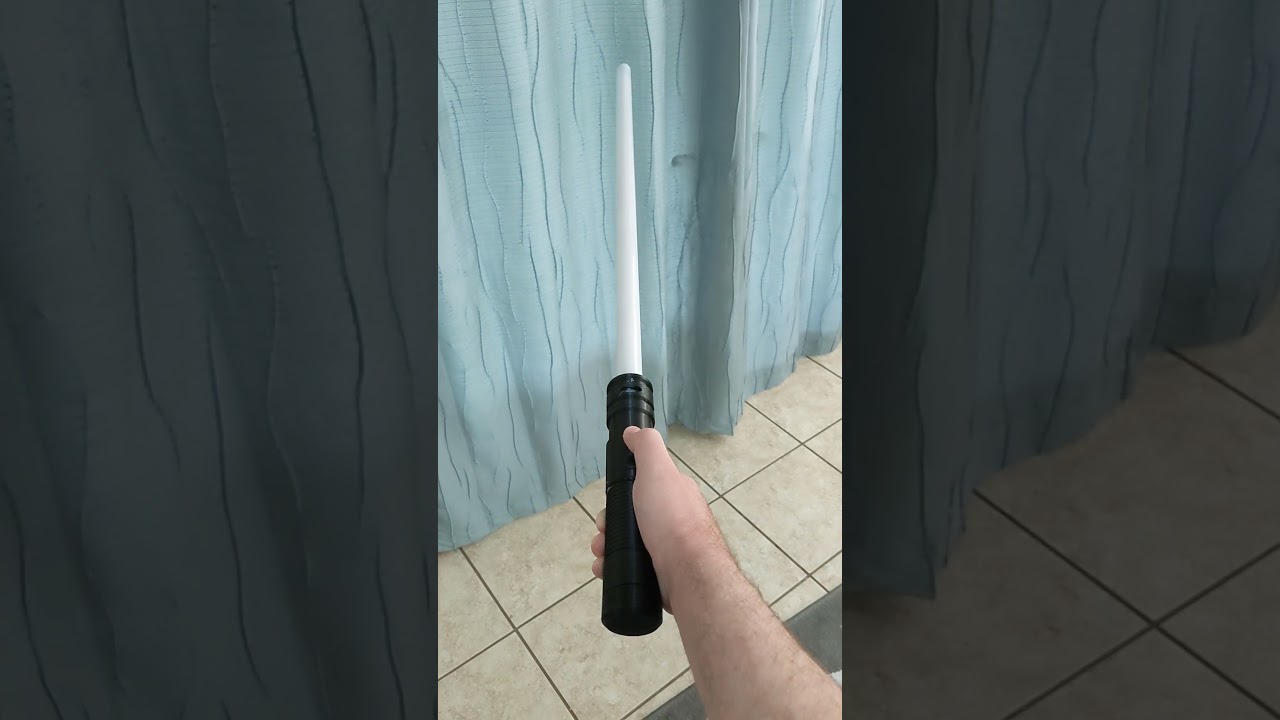
And my kiddo loves it
Thanks so much for getting circuitpython to work with the RP2040 - made for an awesome project with my Son.
idle owl
@lone axle The adabot fix was submitted, so no need to look into it now.
manic glacierBOT
Occasionally we have trouble where we want to deal with a big json file, and are interested in a small portion of the total data.
One pattern for doing this is exemplified by the visitor pattern as implemented by this Python package: https://github.com/daggaz/json-stream#visitor-pattern
It looks like this is pure Python and it may be possible to convert (a subset of) it to work with CircuitPython.
tulip sleet
@slender iron would it help as a debugging/existence proof to make an RPi RAM-based CIRCUITPY? That would vet that the filesystem code was working in 64-bit, etc.
turbid radish
lurking
 trim elm
lurking
onyx hinge
@solar whale you are unmuted
 thorny jay
Skipping the meeting until I find time to replicate this https://twitter.com/BeBoXoS/status/1452386855874408461 and contribute to it. 🙂


Demo of all New functions added to cPyBasic à @CircuitPython basic now can manage hardware of #Adafruit pyportal & m5stack CardKB, terminal and graphic mode. Sound . Repository updated https://t.co/tFqPoDg9wm
 Twitter
·
lone axle
Twitter
·
lone axle
This year we are conducting the fifth iteration of the official Python Developers Survey . The goal is to capture the current state of the l...
Adafruit Industries - Makers, hackers, artists, designers and engineers!
Now when you go to you’ll be presented with a lightweight version of VS Code running fully in the browser. Open a folder on your local machine and start coding. No install required. With the …

Trick or Treat, It's Time to Hack Halloween! Bring Your Costume Upgrades, Haunted House Hacks, and Halloween-themed Technical Projects!
The easiest way to program microcontrollers

October is Open Hardware Month. get started 01 Introduction. October is Open Hardware Month! Join us at OSHWA by Certifying hardware as open source, becoming a member, or – where it is safe due to the pandemic – hosting a small event. We are providing resources and asking the community to host small, local events… Read More »Home
onyx hinge
we're just early for next year
manic glacierBOT
@dhalbert that's ok.
Don't hurry!
You anyway move so much ....
idle owl
@lone axle Excellent! Please me know when that page is ready for review.
lone axle
idle owl
<@!382939733107408897> Excellent! Please me know when that page is ready for rev...
Ready now on that separate page. Chose a nonsensical name for it https://learn.adafruit.com/welcome-to-circuitpython/blueberry-pycharm-cereal
idle owl
lone axle
Ready now on that separate page. Chose a nonsensical name for it https://learn.a...
Ah great, thanks! I'll take a look after the meeting. Then we can get it copied over to the current page. There's a "replace page" feature that was designed for me for templating, but I think we can use it here so you're not pasting everything over. Is it formatted exactly how you'd want it?
 ember iris
If there's any attempt at running code execution, you can raise a warning as an extra layer?
lone axle
ember iris
If there's any attempt at running code execution, you can raise a warning as an ...
I'll look into this option as well. Would be great to offer a specific helpful error message if someone does get as far as trying to initialize or run any of the code.
idle owl
lone axle
Ready now on that separate page. Chose a nonsensical name for it https://learn.a...
Ooh! Skimmed this at least, and it looks amazing. Thank you so much for this! I think it'll be an excellent resource since we get a lot of questions about this and you have to repeat yourself. I'll give it a deeper look in a bit here.
lone axle
Sounds good. Thank you.
 gilded cradle
Thanks
ember iris
Thanks all!
blissful pollen
Thanks everyone
onyx hinge
November 8 seems to be the first meeting that is in a different time zone -- It'll be 2PM in UTC-5.
blissful pollen
Glad my new job has me work mostly from home on Mondays so easy to listen in at least
onyx hinge
signing off, have a good week all!
 onyx hinge
must still be growing, there's room left in the bed
idle owl
It's a dog bed 😄
solar whale
Ruh- Roh...
idle owl
Designed to hold body heat. My bestie's sister-in-law got it for their old dog, and the dog wanted nothing to do with it. So it came to my house. My cat moved right in.
onyx hinge
@slender iron if you're strapped for time today, I could grab the newsletter edits that are NOT the meeting links that are typically done by the meeting host
solar whale
My cats keep taking over my dogs bed. She is not amused.
gilded cradle
I'm dropping off 👋
idle owl
Dropping off as well.
 supple gale
what about cm4's with emmc only ? no sd card. although it is stil flashed with imager i guess
differnt on the cm4
but for a future date. lol
slender iron
@onyx hinge I think I'll be ok. the next meeting won't have me talking much. just gotta sit in it in case they call me
supple gale
i'm just staring at some writeup. so my knowledge is not really great.
it seems you have to prepare the rpi emmc and put it into a mode where the flash looks like a usb drive. then the imager wiill just write to it. so the same as an sd card essentially
so it all just 'works' ok, thanks all, was fun to listen to.
idle owl
@lone axle For future reference, we do bold text for drive names and file names, not code formatting. Same for key commands, I think, I'm checking on that. But definitely not code formatting for key commands. I'm going through and fixing up the page, but I wanted to make sure you knew for yourself.
lone axle
idle owl
<@!382939733107408897> For future reference, we do bold text for drive names and...
Ah, good to know thank you.
idle owl
We did code formatting ages ago, but it was eventually settled on bolding things.
So there are still guides using code formatting for drives/files etc.
ember iris
lone axle
I'll look into this option as well. Would be great to offer a specific helpful e...
Looking more into it, I don't think the pyi file can raise warnings unfortunately
idle owl
@lone axle This is great! I did some light formatting. Sending it to Anne for a final review now.
lone axle
ember iris
Looking more into it, I don't think the pyi file can raise warnings unfortunatel...
I wonder what happens if user tries to execute code from a pyi as though it were actual python code. Maybe there is some sort of relevant error already. If not maybe it's worth including just enough actual python code to raise that exception.
ember iris
Could you point me to a repo that this applies to? I want to give a couple of things a shot. I'm curious if it'll even accept a pyi file without a py file, we might need to provide that py file with mock functions (and in those functions we can add warnings or raise errors, but it get's messier at that level)
manic glacierBOT
Dave,
I am trying adafruit-circuitpython-arduino_nano_rp2040_connect-en_US-20211025-66e7dbe.uf2 on my Nano RP2040 Connect and the issue shows its ugly head. No add or subtract of libraries makes it work.
Am I using old code?
Bruce
slender iron
Here is the notes document for Monday’s CircuitPython Weekly meeting. It is at the normal time of 11am Pacific / 2pm Eastern here on Discord. Everyone is encouraged to attend! Please add your hug reports and status updates even if you’ll be attending the meeting - it’s super helpful! If you are unable to attend but would still like to include updates, feel free to include them in the notes and we’ll read them off during the meeting. Hope to see you there! <@&356864093652516868> https://docs.google.com/document/d/1a51XK_vdeGpNmDW2_LaNkq26y7VZr2VaOBVIkhj8irw/edit?usp=sharing

Google Docs
CircuitPython Weekly for November 1st, 2021 Welcome to the CircuitPython Weekly meeting notes! Feel free to add your Hug Reports and Status Updates early. During the meeting, we go through them as a round robin sorted by username. If you can’t make the meeting and would still like to participa...
slender iron
slender iron
Here is the notes document for Monday’s CircuitPython Weekly meeting. It is at t...
manic glacierBOT
Bruce,
As far as I know the Pull Request has not been merged, so there is
no build yet on circuitpython.org
that includes it. You can follow the Pull Request (at
https://github.com/adafruit/circuitpython/pull/5509 )
and after it is approved and merged it will be in the latest build(s). Hope
this helps,
Dave
On Mon, Oct 25, 2021 at 2:45 PM b-blake @.***> wrote:
Dave,
I am trying
adafruit-circuitpython-arduino_nano_rp2040_connect-en_US-20211025-66e7dbe.uf2
...
idle owl
@lone axle I want to be clear - your page is how you want it to look for final publishing? I'm pulling the trigger on deploying it. Always get a little nervous replacing other pages, but I tested it in staging to make sure I remembered how it worked. It's basically getting dropped in as a replacement for the current page - so you don't have to delete everything, and then copy and paste it all from the page you wrote. Since I kind of told you that's what you'd have to do, I wanted to make sure you didn't format anything oddly in the page you wrote with the intention of pasting it into the other page in the end.
It looks great to me and Anne, but I wanted to verify with you.
manic glacierBOT
Thank you for this quick fix! It did not look it was so easy to find.
@b-blake Thank you for the testing.
 minor glade
hey. i've followed the instructions for building CircuitPython (i've also built it before, a few computers ago). when i do make BOARD=pimoroni_picosystem in ports/raspberrypi the compile fails with this error:
../../lib/tinyusb/src/portable/raspberrypi/rp2040/rp2040_usb.c: In function 'rp2040_usb_init':
../../lib/tinyusb/src/portable/raspberrypi/rp2040/rp2040_usb.c:61:3: error: 'memset' offset [0, 155] is out of the bounds [0, 0] [-Werror=array-bounds]
   61 |   memset(usb_hw, 0, sizeof(*usb_hw));
      |   ^~~~~~~~~~~~~~~~~~~~~~~~~~~~~~~~~~
../../lib/tinyusb/src/portable/raspberrypi/rp2040/rp2040_usb.c:62:3: error: 'memset' offset [0, 4095] is out of the bounds [0, 0] [-Werror=array-bounds]
   62 |   memset(usb_dpram, 0, sizeof(*usb_dpram));
and i do not know what to do
lone axle
idle owl
<@!382939733107408897> I want to be clear - your page is how you want it to look...
Yep, it should be good to go now I think. I laid it out as I thought it would be best for final presentation, didn't do anything specifically in anticipation of the copy pasting.
idle owl
lone axle
Yep, it should be good to go now I think. I laid it out as I thought it would be...
Ok great. I've kind of fudged things if I knew I would be pasting it elsewhere, so I was simply checking that you hadn't also done that. Thanks so much!
jaunty juniper
minor glade
hey. i've followed the instructions for building CircuitPython (i've also built ...
if you don't need a custom build, you can get the latest from: https://adafruit-circuit-python.s3.amazonaws.com/index.html?prefix=bin/pimoroni_picosystem/
minor glade
jaunty juniper
if you don't need a custom build, you can get the latest from: <https://adafruit...
lol, incredible timing. i just did exactly that
thank you
jaunty juniper
you're welcome then 😉
minor glade
7.0.0 seems to be broken on the PicoSystem btw. blank screen on the device and can't connect to the serial port
idle owl
lone axle
Yep, it should be good to go now I think. I laid it out as I thought it would be...
jaunty juniper
also I don't know that error, if you still want to build, my first idea would be to make sure to update the submodules first
lone axle
idle owl
https://learn.adafruit.com/welcome-to-circuitpython/pycharm-and-circuitpython 🙂...
Hooray! 🎉 Youre welcom.
jaunty juniper
minor glade
7.0.0 seems to be broken on the PicoSystem btw. blank screen on the device and c...
but you get the drive ? o_O
minor glade
jaunty juniper
but you get the drive ? o_O
yep! and with the latest snapshot i have console output on the device's screen, as expected.
minor glade
jaunty juniper
but you get the drive ? o_O
oh nvm, lmao. the display not turning on in 7.0.0 is real but not being able to connect to the serial port is because my udev rules don't have an entry for pimoroni devices 
i'm never using a computer again
thank-you for your help :)
tulip sleet
minor glade
oh nvm, lmao. the display not turning on in 7.0.0 is real but not being able to ...
could you add yourself to the dialout group, assuming it or similar exists? That saves having a lot of udev rules.
minor glade
tulip sleet
could you add yourself to the `dialout` group, assuming it or similar exists? Th...
that's a good idea, i can add myself to uucp
minor glade
it's uucp
 tulip sleet
minor glade
it's `uucp`
tulip sleet
minor glade
it's `uucp`
Got it. Which Linux do you happen to be running?
manic glacierBOT
My Nano RP2040 Connect is happy now.
Thanks Dave and Dan.
Bruce
minor glade
tulip sleet
Got it. Which Linux do you happen to be running?
Arch Linux
tulip sleet
I will keep that group in mind for Arch. thanks.
idle owl
@tulip sleet When you have a few minutes, can you go through this page and make sure it's still up to date and accurate? https://learn.adafruit.com/welcome-to-circuitpython/advanced-serial-console-on-windows
manic glacierBOT
This might be a bit outside the scope of this bug report, but it doesn't look like either the STM32F7 or the STM32H7 parts will have much support within CircuitPython for the foreseeable future. So should someone like me who is experimenting with Python on those parts shift focus to MicroPython? I created board files for both of my boards using MicroPython and it seems to work just fine.
I don't see any STM32F7/STM32H7 boards from Adafruit so I don't see much reason for Adafruit to s...
idle owl
@tulip sleet I guess same with the Linux page. Which is below the Windows page in the guide.
manic glacierBOT
Does CircuitPython work if you flash it directly with JLink?
Flash the uf2? I don't have the tooling to get the hex file as I rely solely on GHA CI. I don't recall seeing the hex files anywhere.
mortal mica
@slender iron hex file for nrf52833... Is there a way to get it other than setting up the tool chain on my PC?
slender iron
I'd recommend setting it up. It'll save you in the long run
there is a good guide for it
mortal mica
Ok. Good for Windows?
I'll have a look at it tonight once I am done updating one of my old PCBs. (JLC wants to charge more for the same design I have ordered a bunch of times before...)
manic glacierBOT
What device are you testing from?
slender iron
@mortal mica most of us aren't on windows but I do think it works
manic glacierBOT
Looks good overall but has some prints in it still.
thanks for catching it, will do
tulip sleet
idle owl
<@!329766224093249548> When you have a few minutes, can you go through this page...
both look good. Eventually I might consider updating the Linux screenshots, because the group for /dev/ttyACM* is now dialout
idle owl
tulip sleet
both look good. Eventually I might consider updating the Linux screenshots, bec...
OK, I'll leave that to you when you get a chance. Thank you for going over them!
manic glacierBOT
Thank you ! sorry for being slow to re-review.
The Samsung Galaxy Tab A7 Lite.
lone sandalBOT
 mortal mica
@slender iron setting up the toolchain was relatively easy. especially with wsl. Got the hex file and flashed it using the embedded jlink (drag/drop) and connected to the nrf52833 usb and nothing showed up. Even a double-reset to get back in the bootloader didn't work. I guess it messed up with the bootloader too. I'll give it a check again by reflashing the bootloader but I suspect I will need greater powers to look into this...
Flashed back the bootloader and it's indeed a bad firmware.hex
tulip sleet
mortal mica
<@!252717193496756235> setting up the toolchain was relatively easy. especially...
When you loaded the bootloader, did it include the nRF SoftDevice? It's possible to load the bootloader without the SoftDevice, but I think the bootloader (and certainly CircuitPython) both depend on the softdevice.
I do have an nRF52833 dev board, so I will try this myself when I can.
mortal mica
I do load the one that includes the softdevice. (Not the no_sd one)
mortal mica
tulip sleet
When you loaded the bootloader, did it include the nRF SoftDevice? It's possible...
I assume that "pca10100_bootloader-0.6.2_s140_6.1.1.hex" has the SD included.
tulip sleet
looks correct; i just wanted to make sure; thanks
manic glacierBOT

I tried using displayio.release_displays() in boot.py, but I still get a flash of the blinka logo when the device boots up and when reloading the script.
I found that the initialization of a FramebufferDisplay (in my case via a Matrix object from adafruit_matrixportal.matrix) displays the terminal (and blinka) in the brief time until something else is shown on the display. I managed to stop this by setting auto_refresh=False when creating the FramebufferDisplay, and setting i...
manic glacierBOT
manic glacierBOT
ornate breach
Hey @onyx hinge was it you who was working on the can bus stuff for circuitpython?
onyx hinge
@ornate breach yes but I haven't touched it in an age
ornate breach
Do you remember enough that you might glance over in the #help-with-linux-sbcs channel to maybe say yay or nay if the can bus signs seems right?
It looks right to me but I’ve not done as much with can bus as I would have liked
onyx hinge
no, I'm not really any more qualified than you.
I relied on the transceivers working and didn't delve into the voltages much
jaunty juniper
@tulip sleet when trying on the Circuitplayground Express are you doing a new CP build ? The frozen adafruit_hid is taking precedence
tulip sleet
I changed the commit in the frozen/ directory, to test it in as it would ship. See my latest comments anyway. The whole thing is a red herring.
jaunty juniper
ok, I was not able to reproduce
tulip sleet
🤷 it's very odd, but it has nothing to do with your code
jaunty juniper
could there be something in the recent tinyUSB changes ?
tulip sleet
it was an unfortunate coincidence that I saw it with your code and not with 7.0.0, the first time I saw it. Now I see it with 7.0.0 as well.
I'm not sure. it may also be some kind of internal race condition w/r/t trying it in the REPL. I didn't write a code.py to try to reproduce. I will try that. I only added the time.sleep() originally so I could move focus to another window.
jaunty juniper
could it be a race condition with the poll rate of the host ? is that a thing ?
ah, I don't know anything about USB, I shouldn't speculate 😉
tulip sleet
not that I know of. This is an unusual case where the board is sending, and it gets echoed back. It may simply be dropping characters, or some special handling of \n in the repl is getting lost for some odd reason
jaunty juniper
ah yeah because it's in the REPL I see
tulip sleet
like, is it really the \n, or just the fourth character? would 'abcdefg\nabcdefg\n` work, etc.?
I may try to characterize it, but it's not a library bug, in any case. I made a new release, 5.2.0, so it will be in the bundle after tonight.
and we will update the frozen libs before doing the next release
thank you for all this work on this
jaunty juniper
thank you for all your help 👍
idle owl
@lone axle Greetings. Are you around for something you may or may not be able to help with?
lone axle
idle owl
<@!382939733107408897> Greetings. Are you around for something you may or may no...
yep, whats up?
idle owl
lone axle
yep, whats up?
Ok, https://circuitpython.org/contributing is still empty. But the JSON file is working properly now: https://adafruit-circuit-python.s3.amazonaws.com/adabot/web/libraries.v2.json ..... Do you understand what builds the site, and what the timing is on it? Am I being impatient or is something still broken?
The easiest way to program microcontrollers
Basically what was happening was the json was malformed and caused an error, and never populated.
That was fixed yesterday.
I figured it would have been updated by now, so now I'm concerned something else is happening. Actions is passing on all the things: https://github.com/adafruit/circuitpython-org/actions/workflows/adabot_cron.yml
lone axle
Hmm, I do think I understand how to build the page locally. But I don't know what is responsible for doing that on the live site or when it occurs.
idle owl
Ok. Fair enough. That's what I figured, but wanted to ask anyway.
lone axle
possibly these tasks in the actions do the prod build and deploy https://github.com/adafruit/circuitpython-org/blob/master/.github/workflows/build.yml#L40-L48
idle owl
Build site with Jekyll is a separate workflow
which passed. 6 hours ago.
1 hour after the JSON was generated, if I'm reading everything properly.
So.... I am confused.
lone axle
Yeah, definitely confusing. It does look like it ran with no issues from this output https://github.com/adafruit/circuitpython-org/runs/4008142666?check_suite_focus=true
idle owl
Yeah that's what I found as well.
But it was passing when the json was malformed.
So ...
That's not an indicator of much.
tidal kiln
weird behavior here if anyone has ideas:
https://forums.adafruit.com/viewtopic.php?f=63&t=184223
can't get CIRCUITPY to show up on Metro ESP32-S2. A FunHouse (also ESP32-S2) works OK on same machine.
idle owl
idle owl
Ok, https://circuitpython.org/contributing is still empty. But the JSON file is ...
@gilded cradle How much do you understand about how circuitpython.org is built, and how it relates to the adabot generated info for the Contributing bits? (See the above message.)
You're the only other person who I feel might know.
lone axle
@idle owl to add to the weirdness... when you build / run the site locally the contributing page is populated.
idle owl
lone axle
<@!330227457296957440> to add to the weirdness... when you build / run the site ...
That's good though. Might be the site needs to be rebuilt.
Justin is also still looking into it
Thank you for checking, that's one more piece of info to add
@gilded cradle Justin's still looking into it as well.
ember iris
tidal kiln
weird behavior here if anyone has ideas:
<https://forums.adafruit.com/viewtopic....
I think I ran into that--Just to make sure I didn't miss it if you've already suggested it have they tried to erase the flash yet? I think this is the code I used for mine:
esptool.py --port /dev/ttyACM0 chip_id
esptool.py --port /dev/ttyACM0 erase_flash
esptool.py --port /dev/ttyACM0 --after=no_reset write_flash 0x0 adafruit-circuitpython-adafruit_magtag_2.9_grayscale-en_US-7.0.0-rc.0.bin
After erasing the flash I was able to transfer the file and get it to show up without issue (Adjust the binary as needed--it happened on a metro esp32-s2 and two magtags for me)
gilded cradle
idle owl
<@!478616919721771019> How much do you understand about how circuitpython.org is...
As you had mentioned, it's built using jekyll. It should be built automatically once it's merged in. I usually try building locally beforehand and it's usually a pretty good representation of what will happen with the live site.
idle owl
gilded cradle
As you had mentioned, it's built using jekyll. It should be built automatically ...
Hmm ok. Tim built it locally and it worked. So ... Justin forced a rebuild on it. It's fixed up! @lone axle
Aaaaand this also works now: https://circuitpython.org/contributing/open-issues?label=hacktoberfest
The easiest way to program microcontrollers
gilded cradle
Ok cool. Sounds like a glitch
gilded cradle
Glad you were able to get it working.
idle owl
Thanks for clarifying!
tidal kiln
@ember iris thanks. no. that hasn't been tried yet. will suggest it.
onyx hinge
@slender iron or others with strong API opinions .. I want to enable capturing camera frames in the background, because it can give a good speed-up. so I've sketched it out here. https://gist.github.com/jepler/82363c737a08ff02acd2fbf0a00b002a#file-continuouscapture-py-L25
The gist of the gist is that users would write code like this:
cam = ...
buffer1 = bytearray(cam.capture_buffer_size)
buffer2 = bytearray(cam.capture_buffer_size)
cam.start_continuous_capture(buffer1, buffer2)
while True:
    with cam.continuous_capture_frame as buf:
        # do something with buf
``` which could operate more quickly than `while True: cam.capature(buffer)`.continuous_capture_frame shouldn't be a property, because then dir(cam) would take a frame and never give it back
onyx hinge
yeah I think that's going to be likely to trip people up
idle owl
The rest basically makes sense, conceptually speaking. I don't get the details, but I basically get it.
onyx hinge
like I said, you have to take & give back frames. so not using with, it would be: ```python
while True:
buf = cam.take_frame()
try:
... # do something with buf
finally:
cam.give_frame(buf)
so it's similar to with self.i2c_device as i2c:, it takes something when you start, and gives it back when you're done
manic glacierBOT
I am not in favor of adding a parameter to the python API of
board.I2C()...
I agree about discoverability of the bus and thus in the implementation above I have set up following redirect at board level:
// in pins.c
STATIC mp_obj_t board_stemma(void) {
    return board_uart(mp_obj_new_int(0));
}
MP_DEFINE_CONST_FUN_OBJ_0(board_stemma_obj, board_stemma);

STATIC const mp_rom_map_elem_t board_module_globals_table[] = {
{ MP_ROM_QSTR(MP_QSTR_STEMMA), MP_ROM_PTR(&board...Hmm.
onyx hinge
buf can be a ulab array of pixels, or it can also be a displayio bitmap
(not sure this really intersects well with displayio)
idle owl
I don't feel like try/finally is better than with but this whole thing sounds complicated overall.
onyx hinge
I know. 😦 it does feel complicated
idle owl
So... pick the better one, and document it well.
We've done with in audio code, so it's not foreign.
onyx hinge
but for this gif capture project it's a difference between 6fps and 9fps or something, it's substantial
ember iris
with is also one of the most common way to open files for reading and writing
idle owl
Ok, then go with the faster one. Like I said, as long as it's documented, that's what matters
Better GIFs is a better experience.
It's a matter of getting folks there
ember iris
@lone axle Can I borrow you later to ask some type hinting questions?
lone axle
ember iris
<@!382939733107408897> Can I borrow you later to ask some type hinting questions...
yes definitely. Depending on what time it is I may not be around. Teaching class tonight so I'll be out during that window. Will get back to you when I can though.
ember iris
lone axle
yes definitely. Depending on what time it is I may not be around. Teaching class...
Sounds good, I mostly want to ask about how best to review the pull requests, because there's a lot of scope I can tell I can easily miss. So whenever you're free will work
lone axle
In general when I am reviewing the type PRs if I'm not familiar/experienced with the library I will try to search around in the example code (or other libraries that use this one) to find usages of the functions and then try to verify from those that the types added in the type PR match the ones that are present in the usage code. Readthedocs pages can help sometimes as well, because some classes and functions have docstrings with typing information included already (though not 100% of everything).
Another thing to check on is the way the imports are done. We want to make sure none of CPython typing imports occur on microcontrollers because they'll raise exception. So we have to have those in try/except. And we've been putting other imports that are only used for typing at the end of that try block, so that even though they can be imported without crashing, we won't import them on microcontrollers which will save a bit of RAM.
ember iris
lone axle
Another thing to check on is the way the imports are done. We want to make sure ...
That section was a large bit of my confusion.
What about when a type could be a byte/byte array but is typed as an int?
manic glacierBOT
@microDev1 board.STEMMA_UART, right, to distinguish STEMMA_UART and STEMMA_I2C?
lone axle
ember iris
What about when a type could be a byte/byte array but is typed as an int?
I try to find a usage of the function / argument and match that. If there are multiple conflicting usages (some each way) or I can't find one then it's a bit of a judgement call if I understand correctly. If there are numerical math operations performed on the value I'd lean toward int, but if there are bitwise or shifting type operations then I'd go toward byte.
ember iris
lone axle
I try to find a usage of the function / argument and match that. If there are mu...
Thank you! That gives me enough to chew on for the time being. Thanks for your help and explanation!
lone axle
For sure, thanks for helping out with the reviews!
manic glacierBOT

CircuitPython version
Adafruit CircuitPython 7.0.0 on 2021-09-20; Raspberry Pi Pico with rp2040
Code/REPL
import board
import time
import digitalio

# variables
forever = 1

# main program
def main():
    heartbeat_toggle = False
    print("Hello")
    boardled = digitalio.DigitalInOut(board.GP25)
    boardled.direction = digitalio.Direction.OUTPUT
    out0 = digitalio.DigitalInOut(board.GP0)
    out0.direction = digitalio.Direction.OUTPUT
...@microDev1 board.STEMMA_UART, right, to distinguish STEMMA_UART and STEMMA_I2C?
Yup, my implementation is just a poc... any name or even multiple names can be pointed to same instance at board level.
Thanks for the report. You mentioned 6.2.0. Did you also test with 6.3.0? That would just help us narrow it down.
Hi @dhalbert thanks for the response! Release 6.3 seems fine too. With release 6.3, the code.py startup time is slightly longer than release 6.2. Startup time is about 350 msec longer with release 6.3 compared to the approx 1-second startup time of release 6.2.
I tried power-cycling at 1.2, 1.3, 1.4 and 3.0 second intervals with release 6.2, and there was no code-wiping observed.
onyx hinge
@slender iron I noticed that 'failure help text' is failing but I don't know why. https://github.com/adafruit/Adafruit_CircuitPython_ESP_ATcontrol/runs/4013526108?check_suite_focus=true "Error: Cannot read property 'number' of undefined"
manic glacierBOT
yay everyone loves PSRAM!
Add PSRAM support for the Feather ESP32-S2
Over in #5516 there was a build error about the removed board:
Adding docs/boards to build based on changed files
Building docs: False
Building boards:
Traceback (most recent call last):
  File "ci_set_matrix.py", line 131, in
    main()
  adafruit_feather_esp32s2
  File "ci_set_matrix.py", line 127, in main
  adafruit_feather_esp32s2_nopsram
    set_boards_to_build(build_all)
  File "ci_set_matrix.py", line 91, in set_boards_to_build
arch = PORT_TO_ARCH[board_to_port[bo...Maybe remove debug UART?
Add regular board.UART().
We don't have to freeze these in now: plenty of space.
I don't see these on the schematic as even being on the mini module. Are they available? If not can just delete.
Add board.UART():
    { MP_ROM_QSTR(MP_QSTR_UART), MP_ROM_PTR(&board_uart_obj) }
};
@onyx hinge sorry, I was distracted. I don't have any good ideas for the camera interface. maybe we should video about it
(I have a meeting in 15 minutes though)
onyx hinge
We could do a quick video if you feel like it @slender iron -- I have to start something at the top of the hour too
slender iron
when are you free after?
onyx hinge
.. tomorrow
idle owl
@onyx hinge @slender iron I would like to be a part of the conversation as well, please.
Might have to stay muted, but still would like to be a part of it.
slender iron
ya, I think we'll talk tomorrow too
onyx hinge
Scott thinks there's a simpler way to accomplish my goal, so we didn't get to really discussing the merits of a particular user-facing API. I think we mostly talked past each other.
since we were in a hurry, I think we were micro-focusing on things and both missing something from the other's big picture
and I need to start prepping food, we have guests tonight. 🙂
idle owl
Have a lovely evening!
onyx hinge
thank you
slender iron
buffers = [bytearray(cam.capture_buffer_size), bytearray(cam.capture_buffer_size)]
# captures into the buffer but waits for any previous capture to finish before returning
cam.start_capture(buffer[0])
i = 1
while True:
    empty_buffer = buffer[i % 2]
    full_buffer = buffer[(i + 1) % 2]
    cam.start_capture(empty_buffer)
    # do something with full_buffer while empty buffer is filled
    i += 1

BuildJet
In this performance review, we will take a close look at the cost of slow hardware. Firstly, we will compare CI runs with different codebases, on different hardware. We will then explain the different CI runs, by drilling into characteristics of the respective codebase, programming language, and the available CI hardware.
Granted they're selling something but it is interesting to know how GitHub actions compares to alternatives.
blissful pollen
onyx hinge
<@!252717193496756235> or others with strong API opinions .. I want to enable ca...
Taking a look at this, is there any merit in passing 1 to n buffers to the camera and let it manage them. Maybe then I just give it 10 buffers and I know I can only process 1 buffer for every 3 that are captured. But only capturing for a short time (1-2s) if that makes sense.
buffer = [ ARRAY of buffers here ]
cam.start_continuous_capture(buffers)
with cam.continuous_capture_frame as buf:
  # do stuff
If I'm doing a small capture I may be willing / have the memory to just record it all and process it after. Hope that makes some sense.
manic glacierBOT
Been in contact with MengDu from Seeed on discord.
Preparing new board for their new Seeed Xiao RP2040.
Pending review from Seeed and their PID.
EXTERNAL_FLASH_DEVICES to be confirmed. Seems small (Seeed to confirm) and not sure if this config is available (build will let us know).
This PR will kick-off a GHA job for Seeed to test the UF2 on actual hardware.
Link to Design files: https://www.seeedstudio.com/XIAO-RP2040-v1-0-p-5026.html
Wiki: https://wiki.seeedstudio.com/XIAO-R...
manic glacierBOT

Sorry for digging out the old PR as I just noticed this.
@DavePutz For your information, this port is for the MAKER PI RP2040 and it's not for the MAKER PI PICO. Both of them are different boards. Pin GP25 is not connected on MAKER PI RP2040. Can you please revert?
FYI, we don not have custom CircuitPython firmware for MAKER PI PICO as we can use the Raspberry Pi Pico firmware directly.
manic glacierBOT
See https://github.com/micropython/micropython/pull/7943, which uses tinyusb_cdcacm_write_queue()and its return value, instead of needing to usecdcacm_write_flush()`.
15x (!) speedup on ESP32 in MicroPython.
onyx hinge
@slender iron @idle owl if you like, we could meet today sometime, such as before the CE meeting, to talk about the camera API stuff.
I've thought about it more, and I think Scott's right that my thinking is bound up in how the espressif "C" API works, but since it's the only working example of background capture I have I don't think it's the worst headspace to get into. The problem is, what should it look like to a Python program. (and, secondarily, the ease or difficulty of implementing it for samd51 and pico, both of which have ParallelImageCapture enabled right now)
I have an "option C", which (as befits the option I thought of most recently) I think is better than the others.
with camera.continuous_capture(buffer1, buffer2) as capture:
    for buf in capture:
        # do something with the frame in `buf`
It gets the 'good part' of my original API, which is that the continous capture needs to be modeled as a resource to be acquired & given back .. but it moves from its weird location INSIDE the loop to a natural location OUTSIDE the loop. It frees the user from having to think about the "empty" and "full" buffers in Scott's parlance. It gets rid of the confusing fact that the way you ensure that full_buffer is ACTUALLY full is by calling cam.start_capture(empty_buffer) and the need to do a start_capture just before entering the loop.
The implementation of continuous_capture has to account for all these things, of course, whether it is in the core or in the Adafruit OV### libs.
I think that yesterday I insisted to tannewt that "his way" wouldn't let you get to fullest speed, but on further reflection I see that's probably false. It's just MY initial implementation of start_capture that wouldn't have been able to do it.
"Capture N frames as fast as possible (if they fit in RAM)", @blissful pollen 's suggestion, is an interesting idea. I think passing an N-frames sized buffer might actually do this right now, but I'm not sure.
manic glacierBOT

CircuitPython version
Adafruit CircuitPython 7.0.0-513-g65ffcf146 on 2021-10-22; SparkFun MicroMod RP2040 Processor with rp2040
Board ID:sparkfun_micromod_rp2040
Code/REPL
N/A
Behavior
The file system will appear as a read-only(write-protected) file system on ubuntu 20.04. This is happening on the nRF52840 and RP2040 Micromods.
Not tested with AdaFruit RP2040 Feather yet.
Description
import storage
storage.remount('/', readonl...note: we might just NOT implement this mode on pico or samd51, as neither of those micros can fit 2 QVGA frames in RAM at the same time. Though, 2 QQVGA (160x120) frames might fit, at just 75KiB.
manic glacierBOT
I cannot reproduce this on an Adafruit Feather nRF52840.
Do you mean it is read-only to the host or read-only to CircuitPython code?
If you do the storage.remount(), does it become read-write to CircuitPython?
Please try
import storage
storage.erase_filesystem()
to make sure the filesystem is not corrupted.
The SparkFun MicroMod boards use the W25Q128JVxM flash chip, which is only used on one other board we support. It's possible there is something wrong with the ...
manic glacierBOT
After I wiped the file system, the drive is accessible again! How do I prevent such a thing from happening again? Because the issue is ubuntu only. Such an issue does not affect Windows.
manic glacierBOT
To avoid filesystem corruption, if you are copying data to CIRCUITPY, do a sync afterwards. Linux eventually writes all the metadata to the drive, but it can take a few tens of seconds.
Many editors, but not all, do a "flush" after writing code. This section of the Welcome to CircuitPython guide discusses this issue in more detail: https://learn.adafruit.com/welcome-to-circuitpython/creating-and-editing-code#editing-code-2977443-13
slender iron
onyx hinge
<@!252717193496756235> <@!330227457296957440> if you like, we could meet today s...
I really like this. 👍
onyx hinge
slender iron
I really like this. 👍
I can just go ahead with "option C" then
I may initially leave it unimplemented on the other boards, but I fully believe it should be doable
slender iron
works for me. just make sure and document that the capture is ended when the with exits
@tulip sleet I was thinking a bit about the higher level async library and like the term coordinator
(a different name for scheduler)
tulip sleet
i will keep that in mind! were you inspired by another library?
slender iron
no, just thinking about the terminology for the with statement ```python
with something as coordinator:
coordinator.manage_task(foo)
I'm not a huge fan of spawn but start_soon makes sense too
manic glacierBOT
@jepler Just watched a video on the cache thing: https://github.com/micropython/micropython/pull/7680 I think it only changes the unix byte code. Not the one we use on micros.
idle owl
@onyx hinge Not bothering to meet at this point then?
onyx hinge
@idle owl If you would still like to talk about it, I'm game. but it may not be needed at this point.
idle owl
onyx hinge
<@!330227457296957440> If you would still like to talk about it, I'm game. but ...
I wouldn't mind understanding it a bit better, but that can happen at anytime, it's not time sensitive. If you've already figured out what your plan is, then there's no need for further input from me. It would only be about me hearing about it.
@tulip sleet I've gone and forgotten which question you updated - the "old libraries" question... in Troubleshooting? Or the one in Frequently Asked Questions?
I'm going to remove it from Troubleshooting, but I want to use your updated one, so if it was Troubleshooting, I'll copy it to FAQ.
manic glacierBOT
I was able to reproduce this using an imxrt1010_evk. It appears that there is a buffer overrun when receiving more (or faster?) bytes on the UART than specified in the ser.read(). Symptoms vary depending on what gets stepped on. A workaround would be to increase the size in ser.read(); I'm looking at what is needed for a real fix.
idle owl
@onyx hinge I'm available for the next hour and a half if you think chatting about it is worth it. But as was already said, I understand that it's probably not useful to you at this point. Since you'll have to explain it all to me for me to even begin to have useful input.
Unrelated, when you do from library import foo what is foo called? Module? Element?
Class?
Also from library.bar import baz what is bar called?
Adding a section on understanding what initial libraries you need to install instead of using cascading ImportErrors.
And wanted to show what import statements can look like, but without actual lib names.
Do any of the built-in CircuitPython modules have subset things? Which is to say, would you ever from module import foo or from module.something import foo or is that only an external library thing?
 formal summit
Hello everyone, I want to build circuitpython for a new board. Is this the right place to ask questions?
idle owl
formal summit
Hello everyone, I want to build circuitpython for a new board. Is this the right...
Yes!
formal summit
Ty, I'm trying to build cp for the new WeAct mini STM board, but I don't quite understand the flash/filesystem requirements
The board has a STM32H750 with 128K PFLASH, 8MB QSPI and 8MBSPI flash. I already have tinyuf2 in the PFLASH capable of programming the RAM, SPI and QSPI flash. My plan was to load cp to the QSPI flash and have the code run from there
onyx hinge
I don't know that we use "XIP" to run code from external SPI flash on STM microcontrollers yet. this document indicates it is at least possible file:///tmp/mozilla_jepler0/dm00514974-external-memory-code-execution-on-stm32f7x0-value-line-and-stm32h750-value-line-mcus-stmicroelectronics.pdf
formal summit
But reading through the build guide, it seems that cp will also need a CIRCUITPY fs, which cannot be the QSPI flash since it'll be executing cp.
formal summit
onyx hinge
I don't know that we use "XIP" to run code from external SPI flash on STM microc...
Ah thanks, that was exactly what I was getting to
I will check it out
onyx hinge
we have boards which place both the CircuitPython native code and the CIRCUITPY drive on QSPI flash. ESP32-S2 is this way, so is RP2040. Certain routines (like, everything that is needed while writing to CIRCUITPY) have to be placed in a different memory area (RAM in the case of ESP32-S2) so that it's always available.
I don't know the details of how that happens off the top of my head
formal summit

GitHub
Now I have a board based on STM32H750 MCUs. It has a 64 Mbit external flash. So now I confused how I can build a firmware for it,it only have 128 kb ROM. I can't write a bootloader to jump ...
I found this as well
formal summit
onyx hinge
we have boards which place both the CircuitPython native code and the CIRCUITPY ...
I'll check out the RP2040 port since I'm a little familiar with that
onyx hinge
circuitpython/ports/raspberrypi/supervisor/internal_flash.c supervisor_flash_write_blocks calls into the SDK functions flash_range_erase and flash_range_program. The SDK defines them with a special note that ensure the code is NOT placed in the XIP flash: src/rp2_common/hardware_flash/flash.c:void __no_inline_not_in_flash_func(flash_range_erase)(uint32_t flash_offs, size_t count) {…
__no_inline_not_in_flash_func is a macro that I suspect causes the function to appear in a different section, which the linker (in the case of rp2040) places into RAM. Since you have non-XIP flash you might locate it there... you'll have to figure out the best course of action.
solar whale
I just upgraded my Mac to "Monterey" -- when I try to build mpy-cross I am getting this ```jerryneedell@Mac-mini circuitpython % make -C mpy-cross
Use make V=1, make V=2 or set BUILD_VERBOSE similarly in your environment to increase build verbosity.
ld: warning: ignoring file build/supervisor/stub/stack.o, building for macOS-arm64 but attempting to link with file built for unknown-x86_64
Undefined symbols for architecture arm64:
"_assert_heap_ok", referenced from:
_mp_obj_subscr in obj.o
_instance_subscr in objtype.o
"_stack_ok", referenced from:
_mp_obj_print_exception_with_limit in obj.o
ld: symbol(s) not found for architecture arm64
clang: error: linker command failed with exit code 1 (use -v to see invocation)
make: *** [mpy-cross] Error 1
jerryneedell@Mac-mini circuitpython %
is your Mac x86_64 or M1?
solar whale
That did it --- thanks
Apple break something ???
I probably am being premature in upgrading, but I did it anyway...
tulip sleet
12GB to download, sheesh
solar whale
I did a few test builds of boards (rpi_pico and funhouse) -- seem to have built OK
tulip sleet
i usually upgrade quickly, but only because the main use I have for Macs is to check to see if things work
solar whale
I do most of my work on the Linux box now -- just like to keep the Mac uptodate and ready if needed.
Now that Linux has stopped crashing when boards are disconnected
tulip sleet
solar whale
Now that Linux has stopped crashing when boards are disconnected
I have no idea what they fixed to prevent that. I have read the release notes on and off, but it's hard to tell
solar whale
🤷♂️
I'm glad it is working!
Now that I have the M1 Mac, I will put Linux on the 2014 Intel Mac Mini and see how it compares to y 2012 Mac Mini.... I have on app that will not run on the Mini but runs on other Linux system. Apparently they changed chips in 2013. We'll see...
formal summit
onyx hinge
__no_inline_not_in_flash_func is a macro that I _suspect_ causes the function to...
Hm.. looking at the flash_range_erase and flash_range_program , XIP is disabled, the actual code is run from bootrom and XIP is enabled again
I'm not sure what supervisor_flash_init does (if that's even relevant)?
But it should be possible to do something similar, where I can have some RAMCODE do the erase and program while XIP is disabled and enable it before returning
I don't want to add the QSPI driver from the WeAct repository (it's not very pretty) , any suggestions?
idle owl
@lone axle Tagging you on a couple of type hint PRs - feel free to tag other folks looking into them
If you can't look into them
I don't remember who all has been looking into them
lone axle
Mark Gamblor has done a few, and KeithTheEE showed some interest the other day as well.
idle owl
Ah ok. I'll tag them as well in the future. (I say future, it's like 2 more days.)
lone axle
I will make a pass through them tonight.
idle owl
Ok right on, thanks so much!
@lone axle There's a bunch, I'm going to stop tagging you folks. Go through the open PRs on cp.org/contributing and let me know if you have any issues.
The site's been fixed, it's showing updated info now.
lone axle
Will do.
ember iris
lone axle
Mark Gamblor has done a few, and KeithTheEE showed some interest the other day a...
I'm setting tomorrow aside to go through the type hints pull requests as well, so hopefully that'll help
idle owl
Does anyone mind reading through this new section for the Welcome guide? I put it in a temporary page so it wasn't live while I was editing it. It's called "Understanding What Libraries to Install", and is destined for the CircuitPython Libraries page.
Mostly explains how to use import statements to know what libraries to load. The next section in the guide page already covers using ImportError to catch the less obvious dependencies etc.
idle owl
ember iris
I'm setting tomorrow aside to go through the type hints pull requests as well, s...
Great! I tagged you on a couple, but there are more.
ember iris
idle owl
Great! I tagged you on a couple, but there are more.
Awesome! Thanks for tagging me!
lone axle
idle owl
Does anyone mind reading through this new section for the Welcome guide? I put i...
I can take a look if you need it still.
lone axle
idle owl
Yes please! https://learn.adafruit.com/welcome-to-circuitpython/temporary-prickl...
working my way through it. should "statement" be plural here? (statements):
The final two imports are not as clear. Remember, when import statement are formatted like this,
@idle owl looks good to me.
idle owl
@lone axle Thanks so much! I was trying to figure out how best to convey this. Turned out longer than I planned, but I think it's worth it. Since we apparently never covered this.
Appreciate the look!
lone axle
You're welcome. Great to have it written out! it's something that you take for granted once you know how to do it, but I do see new folks struggle with it their first time sometimes.
idle owl
That's one thing I'm evidently really good at is not forgetting what new folks need with things like this, even when I've reached a point where it's second nature. Makes for being really good at writing guides like this, I suppose.
I remember in my first guide explaining while loops and so on, and blowing Scott's mind because it never occurred to him that someone would need it explained. 😄
tulip sleet
idle owl
Does anyone mind reading through this new section for the Welcome guide? I put i...
This is very good and really worth explaining. I would say "which libraries to install" instead of "what", that's my grammar sense, but maybe I'm wrong
idle owl
tulip sleet
This is very good and really worth explaining. I would say "which libraries to i...
You're right, I think. Sounds better anyway. Fixed. Thanks for taking a look!
manic glacierBOT
Between SD card improvements, gifio code optimizations, & (not yet pull-requested) camera speedups, I can capture >10fps for 240x240 GIFs, while dithering.
idle owl
@onyx hinge This link doesn't work from RTD for CircuitPython. I wanted to update an example, but I guess I don't know where the shared-bindings docs are now coming from?

Nevermind I found it. (Thank you git grep.) Not sure why the link in ReadTheDocs isn't pointing to the right thing.
@tulip sleet Before I switch to a new branch to fix this, I did git pull adafruit main and git push kattni main......... Do I need to do anything else to update some docs? Should I be running gitsubmod if I don't intend to build CP?
I don't want to end up all borked again before I even get started.
tulip sleet
did you git fetch adafruit; git merge adafruit/main into your own main?
idle owl
I thought pull did fetch and merge together.
I used to do them separately because it meant if you had uncommitted work, you wouldn't end up stuck like you do when you run pull but I had nothing unfinished...
tulip sleet
oh, i don't know, maybe so; i learned fetch&merge a long time ago.
idle owl
Ah fair enough. Yeah pull does both.
idle owl
Oh.... yeah you can run it without remote-name and branch name
but it doesn't work the same.
tulip sleet
anyway, if that worked, I think you're in good shape
idle owl
Ok, thanks!
manic glacierBOT

Any news on this? Still indent is not available in dumps I think.
idle owl
@onyx hinge Why would git grep not return all the instances of a thing? Nevermind, I figured it out. The digitalio example imports * form board, and then uses D13 instead of board.D13, so it didn't show up.
What is frequencyio? @tulip sleet The example for it uses D13, but it doesn't appear to be related to the LED. Should I still change it to board.LED so it works on all boards?
tulip sleet
idle owl
What is `frequencyio`? <@!329766224093249548> The example for it uses `D13`, but...
frequencyio uses the pin for input, so don't change that. It should really be D1 or something
idle owl
Oh hmm. Ok.
tulip sleet
it measures frequency
tulip sleet
lemme look
idle owl
Ok thanks
 idle owl
That's not what I'm looking at.
//|   import time
//|   from board import *
//|
//|   frequency = frequencyio.FrequencyIn(D13)
//|   frequency.capture_period = 15
//| time.sleep(0.1)```I don't even know where the D11 example is.
I am not finding these through RTD, I'm finding them by searching D13 in the repo.
idle owl
Ah yes I am
ok
Thanks!
I think I'll finish this tomorrow when I can ping about it and not be causing folks to work late. This next one might need input as well. The one after that definitely needs input. Bleh. Regardless, dinner will be here soon enough. Thanks for your help Dan. I'll likely ping you tomorrow.
@onyx hinge Feel free to answer this tomorrow. But, while I'm thinking about it, how would I form a git grep to return all instances of D13 that are not MP_QSTR_D13? Is that a thing? I searched for (D13) and board.D13 but I guess there could be more?
onyx hinge
idle owl
<@!426200547024961539> Feel free to answer this tomorrow. But, while I'm thinkin...
git grep has the idea of 'a word', which is sort of like what humans think of as words. You can make it search for "whole words" with -w: git grep -w D13.
it gives about 19 results vs over 300 results for git grep D13 in circuitpython
idle owl
Ah fair enough. Yeah that returned all the things the other searches returned. Thanks!
lone axle
If you are on linux or have access to "regular" grep you could chain that on as well to get the excluding a string logic.