#circuitpython-dev
1 messages · Page 378 of 1
 onyx hinge
 idle owl
It should be quick!
I want to integrate this feature: https://github.com/adafruit/Adafruit_CircuitPython_Simple_Text_Display/blob/main/adafruit_simple_text_display.py like I did here: https://github.com/adafruit/Adafruit_CircuitPython_CLUE/blob/3fb9fefbccd5cf36fb378e2c819b2e81c98ff14d/adafruit_clue.py#L63 (which is where the Simple Text Display library came from, it started in CLUE). I don't need colors, which I can easily update Simple Text Display to have a "monochrome" option. My question is, should I put it directly into the MacroPad library? Or should I super init the separate Simple Text Display library since I already wrote it separately?
onyx hinge
Basically, you're thinking about how the color argument isn't useful? Does the macropad have a reverse video option, in which case passing BLACK and WHITE at least would be useful?
idle owl
Oh I don't know. I'd have to check.
Let's say it does, and they are.
Would you add a separate class to the MacroPad lib, or would you integrate the external library?
Like I said, color is easy to deal with by adding a monochrome kwarg to Simple Text Display.
onyx hinge
I guess MagTag didn't use adafruit_simple_text_display so I can't check what was done there
idle owl
No, nothing used it, it's too new
It was a feature in CLUE
That I wrote.
But someone wanted it for FunHouse, so I made it a separate thing.
onyx hinge
I think I'd make a __init__ of the class in the MacroPad library call the super().__init__ of SimpleTextDisplay with either colors=WHITE or colors=BLACK depending on a reverse video flag; or, just always pass WHITE if reverse video is not implemented.
idle owl
Ok thanks.
onyx hinge
Ask me again tomorrow, I'll give you a different answer. But does that seem to you like it's going to work?
idle owl
Hah!
Yeah I assume so. It was simply a matter of that or including all the same code.
I'll let you know if it doesn't work, heh.
onyx hinge
I'll have to remember this is available and use it when I start my calculator, it looks like a useful class!
onyx hinge
I'm going to go have some 🥞 now
onyx hinge
ttyl
idle owl
later!
@tidal kiln @stuck elbow I got NoneType object has no attribute 'show' again. The display was working, but showing garbage, I should have taken a pic, I didn't. And then I went back to Carter's simple example, and got the None failure again. I hard reset the board, and it's working again. So something is getting into a weird state apparently?
 tidal kiln
do you have any calls to displayio.release_displays()?
idle owl
I added one to see if that would fix it, and it didn't work, so I removed it.
The display was showing some really odd garbage with non-display-related code running. Simply showing the REPL.
Then tried your code, and it pretended to work but still garbage.
Then failed with None.
Reset fixed it, have your Hello World! now.
tidal kiln
hmmm. i guess just proceed as normal. and if it starts happening again, see if you can correlate it to something.
tidal kiln
calling release displays will get you a none type
idle owl
@tidal kiln Another question. Jeff referred to a "reverse video" option or something with a monochrome OLED. Any idea what he's talking about? Or where one passes that flag?
I mean I get what he's referring to
Black on white vs white on black.
But I have no idea where that flag is.
Or where it should go.
tidal kiln
not sure. could be a hardware feature of the oled? would be something to look for in datasheet.
tidal kiln
like a single bit in some register that would invert the display
onyx hinge
in magtag there's "default_bg" in the "adafruit_magtag.graphics.Graphics" constructor https://circuitpython.readthedocs.io/projects/magtag/en/latest/api.html#adafruit_magtag.graphics.Graphics but I don't know how it works
idle owl
I can't find a datasheet even close to what I'm looking at.
Uses PortalBase, which I've also been looking at.
MagTag I mean.
onyx hinge
then maybe for now you want to have your constructor NOT take in any color value and just always pass WHITE down?
idle owl
That's why I wanted to add a monochrome kwarg.
Or should I just give it white for the color and be done with it?
onyx hinge
yeah if your code just calls super().__init__ with colors=WHITE or maybe colors=(WHITE,) won't that do what you need without having to update the simple text display lib?
onyx hinge
(there's a note that says single colors work without an enclosing tuple but ... looking at the code I was not confident that actually would work but THAT has got to also be a side-track)
idle owl
Hmm fair enough. I may not have known what I was talking about, or the CLUE version might have required a tuple, and I never tested it without.
tidal kiln
oh..that...looks like a simple software thing.
for magtag, it just gets passed to base class
and just calls set_background
if it's a color, it just fills a bitmap with it
idle owl
I apparently don't know how to super things.
idle owl
Trying one more thing.
Then I'll get help when it doesn't work.
It's sort of working.
And the display goes wonky when trying to print key events.
I'm getting garbage again.
Reset fixed it temporarily, and then fail again.
Ok it seems like what the key event is returning doesn't play nice with string formatting. Even key_number isn't working, which returns an integer. Also apparently this doesn't display anything if you simply include a string with no data to .format. Which is weird, but I never tested it without sensor data, so I guess it's a bug.
Event is not a string and therefore cannot be parsed as one.
I don't know how to work with this data.
onyx hinge
that does seem weird
wonders why the "Submit new issue" button is greyed out on github
idle owl
omg.
It's a bug in something.
That won't print anything on that line.
I moved it to the next line which I had temp data on to see if I had screwed something up, and it worked.
That line on the display works, there's text on it when the REPL is loaded. so it's not as though there's a dead spot on the display.
onyx hinge
that was just the question i was coming to ask
What colors are you passing? Could you be passing one that gets treated as black?
idle owl
Wait. Maybe?
Checking.
🎉
Yes.
Apparently that was it.
Also, colors has to be a tuple.
Thank you, Jeff.
onyx hinge
OK, now you know .. file an issue to update the doc (or fix the code, but I bet that's tougher than it sounds, given that colors can be tuples too)
 manic glacierBOT

I am using the uf2 bootloader (0.4.0) installed with Adafruit ESPTool.
Firmware downloaded from s3 and installed via uf2/KALUGA1BOOT:
adafruit-circuitpython-espressif_kaluga_1.3-en_US-20210625-5a4a803.uf2
Behavior
With the above named firmware version, the CIRCUITPY drive does not appear. The LEDs do blink, so CircuitPython appears to start.
Linux dmesg shows errors like device descriptor read/64, error -110
Reverting to adafruit-circuitpython-espressif_kaluga_1.3-en_...
 mental nexus
@still zephyr thanks for poking me on that PR. Sorry for the delay in closing it. I’ve had some new work cross my desk that is filling my time. Feel free to ping me on anything else I’m overlooking.
manic glacierBOT

Agreed. Unless there's a compelling reason, we should avoid breakage.
 austere acorn
ohai 🙂 does anyone have time to help a GitHub noob like me with why my first PR check is failing... on a comment? 🤦♀️ 😆
 jaunty juniper
what does the check's transcript say ?
austere acorn
GitHub
Added more examples of how to read the data form the color sensor in tcs34725_simpletest.py.
Also added a comment explaining the gamma correction calculations that are done on the raw values from t...
W0105: String statement has no effect (pointless-string-statement) 🤷♀️
idle owl
@gilded cradle Good morning! I am at a point where I would appreciate some help with the MacroPad library. I would like to include some graphics features, but I'm not sure where to start. I've looked at GraphicsBase, and its usage elsewhere like FunHouse, but I don't know how to apply it to a monochrome OLED. I mean, I assume you can display images, but they have to be black and white?
manic glacierBOT
The BGR565_SWAPPED mode is needed for OV2640 cameras.
idle owl
austere acorn
ohai 🙂 does anyone have time to help a GitHub noob like me with why my first ...
It may be the use of a docstring not at the beginning of a function.
Redo it using # for each line and see if that makes it happier.
jaunty juniper
it is a multiline string that is not the docstring, maybe pylint doesn't like that and prefers you use # for comments
remember Python does not support multiline comments, """ is a string literal
austere acorn
ohhh, needs to be at the beginning of the function only?
idle owl
At least in the """ format.
But you can write a novel using the # formatting for comments and it's fine. 😄
austere acorn
oh, okay
idle owl
Put # at the beginning of each line instead of wrapping it in """ """.
austere acorn
thank you... that was confusing 😆
onyx hinge
If you'd like to know more about the difference between a # comment and a """ docstring """ we can get into the details too. But if not that's fine as well!
idle owl
@gilded cradle Nevermind for now. I need to get the guide going before working on the lib, so I'm switching gears.
 half gale
Hi, I am a CircuitPython beginner who is looking to understand the C code that is used to implement CircuitPython (or rather, MicroPython). I want to approach the problem of implementing deep sleep on the SAMD51, but I'm confused about the code structure (shared-modules, shared-bindings etc) and was wondering if anyone has any tips on how I should begin.
(I have seen the PR for alarm and sleep implementation on the STM32, and was wondering if I should just mimic that)
onyx hinge
@austere acorn a "docstring" goes only at the start of the function, and is placed in the documentation that can be viewed online. https://circuitpython.readthedocs.io/projects/tcs34725/en/latest/
so it is good for giving an overview of what someone who calls the function needs to know
A "comment" can go anywhere, and gives an overview of what someone who wants to understand or update the library itself needs to know
jaunty juniper
the docstring is also actually a property retrievable in code, not actually ignored by the runtime like a comment, with module.__doc__ or my_function.__doc__ , myclass.__doc__ (not in Circuitpython because that would waste RAM, but in desktop python it is)
onyx hinge
(a docstring can also go a few more places: at the top of a file, at the top of a class, and a few other places; but the start of a function is the super common one)
austere acorn
didn't think it was different 🤦♀️
onyx hinge
There is not a multi-line comment in Python, only the single-line # comment. """ docstring""" is also just a string, you can write print("""hello there""") and it's the same as print("hello there").
jaunty juniper
the docstring can also be a regular single line "string"
onyx hinge
jaunty juniper
the docstring can also be a regular single line `"string"`
Yes, that's a good point as well
jaunty juniper
though pylint rejects it and demands a oh wait no"""
 gilded cradle
@idle owl, just saw this. Sounds good. I'm trying to wrap up the WipperSnapper/Web Serial ESPTool project so that works. Just let me know when you're ready.
idle owl
gilded cradle
<@!330227457296957440>, just saw this. Sounds good. I'm trying to wrap up the Wi...
Will do, thanks!
idle owl
@slender iron Have a moment for a question about 7.x safe mode?
I realised we can't only document 6.x because some boards don't have 6.x builds - so I'm adding to that section I previously wrote to include 7.x behavior.
But I want to make sure what I add is accurate.
Here is what I have: To enter safe mode when using CircuitPython 7.x, plug in your board or hit reset (highlighted in red above). Immediately after the board starts up or resets, it waits 1000ms. On some boards, the onboard status LED (highlighted in green above) will blink yellow three times. If you press reset during that 1000ms, the board will start up in safe mode. It can be difficult to react to the yellow LED, so you may want to think of it simply as a slow double click of the reset button. (Remember, a fast double click of reset enters the bootloader.)
 slender iron
it'll just blink yellow. I removed the three
idle owl
Ok.
Fixed. Thanks!
@slender iron And once in safe mode, intermittent three blinks is still valid?
slender iron
yes
idle owl
(It's doing that on this board right now, but wanted to make sure you didn't change it)
Thanks
I'll remove the 6.x documentation when we release 7. But for now, it has both.
jaunty juniper
half gale
Hi, I am a CircuitPython beginner who is looking to understand the C code that i...
have you seen https://github.com/adafruit/circuitpython/issues/4837 ?
half gale
jaunty juniper
have you seen <https://github.com/adafruit/circuitpython/issues/4837> ?
Yep, I was going through that, but I am finding the code a little overwhelming to go through. I'm unable to understand some of the specifics (or rather basics) of how the code is structured, and why a lot of it is the way it is.
For example: There seems to be init files in both shared-bindings and shared-module.
Also, there are a lot of macros that are performing functions that I don't really understand, so I was wondering if there was some kind of documentation that I could take a look at? (For example MP_DEFINE_CONST_FUN_OBJ_0, MP_DEFINE_CONST_FUN_OBJ_1 etc)
jaunty juniper
for the structure, look at the rp2040 implementation, you want to create ports/atmel-samd/common-hal/alarm/ which is the port specific implementation of the interface defined in shared-bindings (shared-modules holds port-independant implementations if any)
half gale
@jaunty juniper Thanks! Is there any documentation I could reference for conventions? Or would I just have to use other modules as reference for this?
 tulip sleet
Also https://docs.micropython.org/en/latest/develop/index.html, though there are some differences in CircuitPython
When I make a new module, I copy/paste and adapt from existing modules. There are simply too many details to keep in my head to generate it from scratch.
half gale
That makes sense, thank you so much 😁
slender iron
a lot of the MP_DEFINE macros are doing struct definition or declaration to make static objects to represent something


 slender iron
@lone axle for later when you have a chance: https://forums.adafruit.com/viewtopic.php?f=60&t=180765
 still zephyr
austere acorn
sure 😄
still zephyr
austere acorn
sure 😄
Hello Silvia
Let me know if you need any hep regarding your PR in the TCS34725 🙂
austere acorn
yes pls 😄
austere acorn
more like complete confusion, since i have no idea why it fails this time lol
so yea, i guess general about the process
still zephyr
ok no problem, I understand. Do you know how to run pre-commit locally?
austere acorn
trying to figure it out now... i ran it on the repo locally, and i got like 50 fails, not just one, so i'm doing some configs wrong?
still zephyr
interesting, if you are not in a hurry, I could try to see why it is failing now, and if you could share in the PR the information I could take a look also, is that ok?
austere acorn
sure
still zephyr
ok good, So I will answer in the PR, and we can go from there,
 thorny jay
slender iron
it'll just blink yellow. I removed the three
thorny jay
slender iron
it'll just blink yellow. I removed the three
@idle owl : I am wondering is the yellow bling could be confused with the charging LED yellow blink. Maybe something need to be written in the guide... I mean if you believe this confusion could occur.
idle owl
thorny jay
<@!330227457296957440> : I am wondering is the yellow bling could be confused wi...
I don't think it's likely to be confused - the NeoPixel or DotStar status LED is indicated by an image or fritzing diagram with a rectangle indicating its location, so folks already know what they're looking for.
thorny jay
Ok
idle owl
@thorny jay Did you see I closed your PR on Pypixelbuf? Do you understand why I did that?
thorny jay
Yeah no problem.
idle owl
OK, simply making sure. Didn't want you to think it wasn't appreciated 🙂
thorny jay
I was checking where the code was and based on my assync listening of the meeting, I said to myself, this must be the code you want to remove. I did not see the full plan.
idle owl
The full plan wasn't even entirely sorted during the meeting. So that's understandable.
manic glacierBOT

@jepler i'm away from my desk for a few days. But I do have a Kaluga and can try to repo next week.
manic glacierBOT

I will double check this, not sure if I understand you totally.
Specifically, if reload_requested == false and next_code_options == SUPERVISOR_NEXT_CODE_OPT_RELOAD_ON_ERROR and (hypothetically) result.return_code == PYEXEC_FORCED_EXIT, then the result is skip_repl = false. Correct (and achieved in the goto solution) would be skip_repl = true.
Currently the system masks out deep sleep exceptions and will never skip when they are present.
That much is fine. That is the ...
manic glacierBOT

@UnexpectedMaker, ESP-IDF4.3 was merged so you should be clear to look at this again.
I need to wait fore the next S3 silicon to get into my hands... the latest stuff Espressif are working on for S3 is in IDF4.4 and they have not back ported everything to 4.3 and there was a breaking firmware change that makes my S3 dev kit board incompatible :(
I have the initial beta silicon, they are on beta 3 internally but not releasing that and so whatever the next one is, is what I am waiting f...

@cwalther if you are entering a deep sleep exception for true deep sleep, the code stickiness situation is irrelevant - all of that information will be lost when the RAM shuts down. The program will never reach a decision point where it would use it. This is slightly different for a fake deep sleep, but we try to make fake sleep as similar to true deep sleep as possible, so the stickyness should not be retained in that case either.
Think of deep sleep as basically being an exception that causes the entire chip to lose power for a set duration of time, and start up essentially from scratch, with some very limited data that we can fetch out of a special section of memory.
 ionic elk
@opal crystal if you still frequent this discord, had a minor question - did you envision a use for people having a file length of zero for set_next_code_file?
since the assignment of the filename is bounded by if (options != 0 || len != 0) {, which implies you could set options without actually providing a filename
@tulip sleet are you around? Could I get your advice on some C shenanigans?
ionic elk
Ah, right. No problem
I need to extract this section of the filename assignment code into supervisor allocated memory, https://github.com/adafruit/circuitpython/blob/54cadb96ec597bddab270de4844336267db1e475/shared-bindings/supervisor/__init__.c#L194, so that it can be called by Main after waking from deep sleep and fetching the filename string from sleep memory. It currently uses pointers for strings without length storage
I'm not sure how much I need to modify it to make it safe for internal use
 sterile bronze
@idle owl @tulip sleet I was just having a look at the new learn guide for the Macropad and on the page for using the keys example as a short block of code that looks good but when you download the file you don't get a zip file and you only get the code.py block of code. I put feedback in on the page of the learn guide.
idle owl
sterile bronze
<@!330227457296957440> <@!329766224093249548> I was just having a look at the n...
Yeah........ An Arduino thing broke the Learn repository CI, which means until it's fixed, we can't merge any PRs, even though my code is entirely unrelated. So to get the guide out, we embedded the code directly into the guide. It's on my list to fix as soon as that PR is merged.
sterile bronze
@idle owl That's fine but the library file/folder is missing so there is no keypad file or folder available. It's not in the bundle either.
idle owl
sterile bronze
<@!330227457296957440> That's fine but the library file/folder is missing so the...
Oh!
keypad is built into CircuitPython!
But you have to use the absolute newest off of S3.
I assumed we'd have a new release by the time we published the guide
but that did not happen
I will make a note in the guide!
sterile bronze
I'll test again as it gave me an error message earlier. Thanks
manic glacierBOT

Hi, I'll be trying to implement the deep sleep functionality. I'm a newbie when it comes to the SAMD51 and CircuitPython in general. I have begun going through the code used for the deep sleep implementation on STM32 and would love to hear if there's a better way I should approach this project (maybe some basics I should know beforehand).
tulip sleet
@slender iron @onyx hinge I finished a draft of 7.0.0-alpha.4 release notes, incorporating all PR's already merged since alpha.3. I'll take a look at what else can be merged quickly tomorrow morning. If you have anything to get in, let me know.
slender iron
thanks!
onyx hinge
@tulip sleet did you see that I could not get the post-idf-merge working on my kaluga with uf2 bootloader? https://github.com/adafruit/circuitpython/issues/4951 it got labeled long-term by @slender iron but it seems pretty serious if it affects esp32 generally, or even just esp32-with-uf2 specifically. OTOH I only tested one board so it could just be as well.
GitHub
I am using the uf2 bootloader (0.4.0) installed with Adafruit ESPTool. Firmware downloaded from s3 and installed via uf2/KALUGA1BOOT: adafruit-circuitpython-espressif_kaluga_1.3-en_US-20210625-5a4a...
sterile bronze
@idle owl I tested the macropad with the latest S3 build, ...20210630-54cadb9, and it all works well. Thanks
manic glacierBOT

Thanks, tested with bytes(1,2,3), bytearray(1,2,3), and with the example from https://forums.adafruit.com/viewtopic.php?f=60&t=150071 that provoked the original PR, #4224.
>>> class onetwo():
...     def __init__(self):
...         self.data = [1,2]
...     def __bytes__(self):
...         return bytes(self.data)
...
...
...
>>>
>>> o = onetwo()
>>> bytes(o)
b'\x01\x02'
>>> o.__bytes__()
b'\x01\x02'
>>>
@jepler Is this still to be addressed?
Either #4935 or #4936 is OK with me. @jepler do you have a preference after thinking about it?
manic glacierBOT
 manic glacierBOT

[adafruit/circuitpython] Issue opened: #4954 DigitalIO OUTPUT to dinit\(\) to AnalogIO Does Not Work
CircuitPython version
Adafruit CircuitPython 6.3.0 on 2021-06-01; Teensy 4.0 with IMXRT1062DVJ6A
Code/REPL
import digitalio, analogio

pot = digitalio.DigitalInOut(board.D23)
pot.direction = digitalio.Direction.OUTPUT
pot.deinit()
pot = analogio.AnalogIn(board.A9)

print((pot.value,))
Behavior
If I use a digital / analog combo pin first as a digital output pin, then later use deinit() to release the pin, and then finally try to use the sam...
 lone sandalBOT

 main furnace
Where would I find the audiomixer module for ESP32S2?
manic glacierBOT

I can play WaveFiles over I2SOut but I want to control the volume and interleave samples. The audiomixer module would allow both.
manic glacierBOT
I think that I'd rather leave monotonic as is, and add this new functionality only. I studied the LED animation library and I think it's pretty easy to adapt it to wrapping ticks (made harder by the need for compatibility with 6.x). If that's typical of libraries that like to count intervals, then this is the way to go and the other complication is not needed.
We still need to address the problem with this not fitting on a couple of boards, though, and decide whether to offer this as 1 fun...
tidal kiln
@tulip sleet thanks for the work on this:
https://learn.adafruit.com/key-pad-matrix-scanning-in-circuitpython
very handy for macropad use 🙂
manic glacierBOT
These libraries are still using gamepad or gamepadshift`:
- [ ]
adafruit-circuitplayground,were_pressed(), and inconf.py - [ ]
adafruit-pybadger - [ ]
adafruit-cursorcontrol - [ ]
adafruit-clue
manic glacierBOT
CircuitPython version
Adafruit CircuitPython 7.0.0-alpha.2-734-g6ee9acc90-dirty on 2021-07-01; Adafruit Feather RP2040 with rp2040
Code/REPL
import time
import board
import displayio
import adafruit_displayio_sh1107

displayio.release_displays()
# oled_reset = board.D9

# Use for I2C
i2c = board.I2C()
display_bus = displayio.I2CDisplay(i2c, device_address=0x3C)

# SH1107 is vertically oriented 64x128
WIDTH = 128
HEIGHT = 64
BORDER = 2

disp...go ahead and change it to 7.0. I go through a lot of stuff and don't always get it right
manic glacierBOT
I suspect this is the same issue as #4944.
I believe this was disabled for ESP32-S2 because the implementation used ARM assembly. We now have a C implementation as well. I'd suggest trying to enable it yourself in a build. It may just work.
Looks like the meowmeow build ran out of space.
manic glacierBOT
manic glacierBOT

Using the .bin , mine boots but goes in to safe mode
uto-reload is off.
Running in safe mode! Not running saved code.

You are in safe mode because:
CircuitPython core code crashed hard. Whoops!
Crash into the HardFault_Handler.
Please file an issue with the contents of your CIRCUITPY drive at
https://github.com/adafruit/circuitpython/issues

Press any key to enter the REPL. Use CTRL-D to reload.

Adafruit CircuitPython 7.0.0-alpha.3-474-g37c52110c on 2021-07-01; Kaluga 1 wi...ah -- but it is OK if I remove my old code.py (using the OV7670 demo code from a few weeks ago
Auto-reload is on. Simply save files over USB to run them or enter REPL to disable.

Press any key to enter the REPL. Use CTRL-D to reload.

Adafruit CircuitPython 7.0.0-alpha.3-474-g37c52110c on 2021-07-01; Kaluga 1 with ESP32S2
>>>
>>>
Also fixes 0-length writes meant to truncate a file.
tulip sleet
@solar whale if you have the time and could try the latest builds on one or two other ESP32-S2, I would be grateful. I wonder if it is specific to the Kaluga or whether, say, the Metro ESP32-S2 (or MagTag or other more conventional board) has the same issues. Also whether it is dependent on .uf2 vs .bin for those boards.
I am deep into RP2040 audio debugging at the moment.
 solar whale
I won't have time today, but I'll test some tomorrow morning. As noted, I have no issue on the Kaluga at this point.
onyx hinge
It may not be coincidental that @solar whale and I both had camera programs in code.py when we saw the problem.
solar whale
I have not tried running any code.
tulip sleet
hmmm... I just wondering whether to hold up alpha.4 or not about this.
yes, if you run something not-camera, does it fail?
onyx hinge
something that is i2c?
though I assume i2c was tested, it was a known potential problem
tulip sleet
could be, or really anything, and also whether kaluga-specific
solar whale
standard wifi test runs OK on my Kaluga
tulip sleet
i don't want to break all the ESP32-S2 boards, but if only Kaluga is broken that would not be a show-stopper for alpha.4
solar whale
Sorry -- I have to go now. Will be happy to run more tests tomorrow if it is not too late.
tulip sleet
np, thanks for your testing so far!
onyx hinge
I have a magtag right here that I can try real quick, but I'm also trying to wrap up for the day
For me, magtag loaded with adafruit-circuitpython-adafruit_magtag_2.9_grayscale-en_US-20210701-37c5211.uf2 blinks purple neopixels forever, doesn't appear on USB
@tulip sleet but 6.3.0 does
tulip sleet
suppose you loaded the .bin
I think you may have to erase_flash before loading the bin
onyx hinge
what does purple neopixel mean in 7?
@tulip sleet so you want me to wipe the uf2 bootloader and see what happens?
the blinking purple is with or without a code.py file
tulip sleet
if you are willing
purple doesn't seem to mean anything PURPLE is defined but not used
jaunty juniper
the only purple I know is the bootloader waiting to press boot
tulip sleet
aha
jaunty juniper
(so it's like a reset cycle if it blinks)
onyx hinge
so what I think I see happening is actually: all LEDs blink purple once, then 4 quick flashes of yellow, then all LEDs blink purple forever.
tulip sleet
I think the yellow is the get-into-safe-mode delay, but then something bad happens
onyx hinge
tulip sleet
thanks, is that with .bin?
onyx hinge
no that's with uf2
I can't get esptool to work; I'm on my laptop (also linux), not my usual machine.
onyx hinge
esptool.py v3.1-dev
Serial port /dev/ttyACM0
Connecting...
Traceback (most recent call last):
...  File "/home/jepler/.espressif/python_env/idf4.3_py3.9_env/lib/python3.9/site-packages/serial/serialposix.py", line 715, in _update_dtr_state
    fcntl.ioctl(self.fd, TIOCMBIC, TIOCM_DTR_str)
OSError: [Errno 71] Protocol error
esptool is from esp-idf
same with make flash which runs esptool.py --chip esp32s2 -p /dev/ttyACM0 -b 460800 --before=default_reset --after=no_reset write_flash --flash_mode dio --flash_freq 40m --flash_size 4MB 0x0000 build-adafruit_magtag_2.9_grayscale/firmware.bin
(it's not a permissions problem on the serial device)
onyx hinge
$ python3 -mpip install esptool==3.0
$ esptool.py
esptool.py v3.0 - ESP8266 ROM Bootloader Utility
.. same error
I am going to set this aside for now, sorry I couldn't be more useful in my testing today.
tulip sleet
thanks anyway!
 turbid radish
?serverinfo
 digital shoreBOT
 adafruit
Owner
adafruit#3230
Region
us-west
Channel Categories
8
Text Channels
58
Voice Channels
6
Members
29776
Roles
35

ID: 327254708534116352 | Server Created
·
manic glacierBOT
I also have a magtag with uf2. 6.3.0 works, but adafruit-circuitpython-adafruit_magtag_2.9_grayscale-en_US-20210701-37c5211.uf2 apparently goes into a bootloader loop, blinking purple on all LEDs once, then yellow/orange on the first led 4 times, then blinking purple on all LEDs forever.
https://user-images.githubusercontent.com/1517291/124188732-464eb180-da85-11eb-9f5b-dae6d26a244e.mp4
At Dan's suggestion I was going to try wiping the uf2 bootloader and try with a bare "bin" file, but...

 manic glacierBOT
Fix RP2040 PWMAudioOut, which stop playing after playing six samples.
The essential problem was that the 12 DMA channels were being used up because the two that were being used were not freed after use, due to a missing
audio_dma_stop(&self->dma);
in PWMAudioOut.c.
In the course of this I made some other more minor changes:
- Rename
single_channeltosingle_channel_outputto clarify its meaning. This changed a lot of files. - Do pin claiming in
PWMOut, n...

Now that max_size has been disabled in shared-bindings/displayio/Group.c ready for removal in CircuitPython 7, it needs to be removed from all the libraries that make use of it before this can happen.
https://github.com/adafruit/circuitpython/blob/37c52110c5fdcc4b47567e85cba628470f658f84/shared-bindings/displayio/Group.c#L45
I propose to work through the libraries and make the necessary PRs. This Issue is intended as a central tracking point which will eventually allow the removal of th...
manic glacierBOT

Thanks for putting this together. We'll need to run a similar pass through the learn guide repo to change instances of this as well.
manic glacierBOT
manic glacierBOT
When I copy the .UF2 adafruit-circuitpython-adafruit_funhouse-en_GB-20210701-37c5211.uf2 to my funhouse the dotstars flash purple. Doesn't happen with the 7.0.0-alpha.3.
I can then go into boot mode and install 7.0.0-alpha.3 (tries to run code.py, fails because I haven't updated the libraries yet).
manic glacierBOT
The code looks good!
I am not sure how to test this. I loaded it on a Feather '840, and didn't see it advertising in the Bluefruit app or in the Web Bluetooth Dashboard.
Fixed one failing build. Ready for re-review. I will look at crackling audio separately, since this fixes an immediate problem.
I tried the latest builds on a Metro ESP32 and a Feather S2. Without a code.py, they come up and I can use the REPL.
I had a random test program on the Feather S2, and found that this simple program causes a crash:
import busio
import board
import displayio
import adafruit_il0373

displayio.release_displays()

spi = busio.SPI(board.SCK, board.MOSI)
epd_cs = board.D9
epd_dc = board.D10

display_bus = displayio.FourWire(spi, command=epd_dc, chip_select=epd_cs, baudrate=100...@kevinjwalters This may partially fix #4208, but I have not tested it for noisy output yet. I was testing with an artificial audio file with non-audible data to make sure the buffers were filling properly.
manic glacierBOT
Boards with USB and BLE won't advertise unless they've got bonding info stored. If not, you need to press reset when the status led blinks fast and blue. That'll reset and then publicly advertise. The tx power is -40 so it needs to be close to the other device at that point too. Once it's connected, it goes back to 0 tx power.
manic glacierBOT

I was able to duplicate the crash on the Feather S2 with the latest from s3.
import busio
import board
import displayio
import adafruit_displayio_ssd1306

displayio.release_displays()

i2c = busio.I2C(board.SCL, board.SDA)

display_bus = displayio.I2CDisplay(i2c, device_address=0x3C)
display = adafruit_displayio_ssd1306.SSD1306(display_bus, width=128, height=32)
The last line is what causes the crash as well.
I confirmed that it doesn't crass with `adafruit-circui...
manic glacierBOT
 stiff pelican
Does anyone recognize the following directory of examples from the Bundle and what library is it from?
examples/client_examples:
battery_daughter.py
door_daughter.py
neopixel_daughter.py
neopixel_setter_daughter.py
neopixel_setter.py
relay_daughter.py
relay_hi_daughter.py
temp_humid_daughter.py
 manic glacierBOT
I can confirm that this PR fixes #4951 on the Kaluga esp32s2 (v1.3) the OC7670 code from a few weeks ago now runs as expected. No crash. If it matters, this was using the .bin file. I don't have the UF2 bootolader on my Kaluga.
This PR also fixes the Adafruit_Funhouse -- It now boots and runs the demo code normally. Prior to the fix, it would not boot.
See comments on PR #4960 -- it fixes this issue on the Kaluga and on the Funhouse
manic glacierBOT
Confirming that #4960 fixes my crash as well. Will merge!
Thank you so much for this quick fix!
I am OK with adding this to supervisor per the PR, and then writing a small Python library. It's most important on small boards that are tight on space already. @tannewt, what do you think?
manic glacierBOT
@jepler How are you feeling about the imminence of some version of this? Even a simple version frees up a lot of flash we could use at the moment.
manic glacierBOT
@ladyada should we merge this for now to fix existing FunHouse (et al) issues temporarily while we explore further?
manic glacierBOT

I put a somewhat arbitrary 10us minimum pulse check into the RP2040 pulsein
code.
This was necessary because while testing the irremote device (which uses
pulsein) I
was consistently seeing stray pulses from IR being picked up from the
surrounding environment.
10 us seemed to give me the most consistent readings for the irremote
device. If you
really need to make a 10us measurement I could drop that down to 7 or 8
us, which would have a
marginal impact on the infrared readings.
On Tue, Jun ...
So we are looking for a PR to restore MICROPY_EPOCH_IS_1970 = 1, right? I will make such a PR.
Fixes #4893. Rolls back changing the epoch to 2000, which happened due to #4744.
Merging this now anyway; the meowmeow overflow is fixed in #4958.
onyx hinge
@stiff pelican I think they're from "dash_display". Here's how I found one of the files using the "find" command which is on linux and probably in git bash on windows. jepler@babs:~/src/Adafruit_CircuitPython_Bundle$ find -name battery_daughter.py ./libraries/helpers/dash_display/examples/client_examples/battery_daughter.py
manic glacierBOT
manic glacierBOT
stiff pelican
onyx hinge
<@!690965887167103008> I think they're from "dash_display". Here's how I found ...
Cheers Jeff. I was searching against the packaged PY bundle. I should have cloned the repo and pulled in the submodules.
manic glacierBOT
LGTM
Adafruit CircuitPython 7.0.0-alpha.3-493-gb830eccbf on 2021-07-02; Adafruit MagTag with ESP32S2
>>> import time
>>>
>>> s = time.mktime((2021, 06, 16, 20, 0, 0, -1, -1, -1))
>>> s
1623873600
>>> time.time()
1625220470
>>> time.localtime(s)
struct_time(tm_year=2021, tm_mon=6, tm_mday=16, tm_hour=20, tm_min=0, tm_sec=0, tm_wday=2, tm_yday=167, tm_isdst=-1)
>>> time.localtime(time.mktime((2021, 06, 16, 20, 0, 0, -1, -1, -1)))
struct_time(tm_year=2021, tm_mon=6, tm_mday=1...?serverinfo
digital shoreBOT
adafruit
Owner
adafruit#3230
Region
us-west
Channel Categories
8
Text Channels
58
Voice Channels
6
Members
29779
Roles
35
ID: 327254708534116352 | Server Created
·
manic glacierBOT
What's the impact of this on builds without long ints?
 orchid basinBOT
This reduces the tokens we need to manage and uses one scoped to this repo.
 midnight current
Hi,I just took a quick look at the pypi page.
But not very clear where to start with.
midnight current
Thanks. I see the pyi for the modules. It will be nice if there is a one for the CPy core.
slender iron
you mean the built-in keywords? they are mostly the same as cpython
midnight current
Is there any buildin functions that are specific to CircuitPython? Maybe inherited from MicroPy?
manic glacierBOT

@DavePutz thanks for your reply. Looks like the real signal which raised this issue is even a bit less than 10us. I understand if that's asking too much of such a system which needs to be optimized for more common use cases.
However, there's still a bug. Suppose the real incoming signal is 100,95,5,100,100. If you want to suppress the "5" as noise, the correct output is 100,200,100. The bugged output is 100,95,100,100 which shortens the total time and flips the polarity.
Picture of real...
 tawdry bobcat
hello. I would like to ask what are the main benefits of microPython and circuitPython instead of Arduino core? I'm working on Arduino core from few recent years now I would like to explore these also
tulip sleet
@tawdry bobcat I will answer you in #help-with-circuitpython . This is more a development channel
tawdry bobcat
oops. okay
manic glacierBOT

@lesamouraipourpre I give all the thanks here for all these PRs. This is hard work!!!
midnight current
@slender iron Hi. I get the highlighting work. If I want to contribute to circuitpython.org, how do you want it to be like. I know I would follow the guide https://learn.adafruit.com/contribute-to-circuitpython-with-git-and-github. The question is: what is the best way to merge my stuff into what is already there? Thanks for your help.
slender iron
@midnight current make an issue or pull request on https://github.com/circuitpython/web-editor

GitHub
Contribute to circuitpython/web-editor development by creating an account on GitHub.
it's using codemirror 6 and I think you are using 5
it is working well on android
midnight current
I guess the problem of android is not CM. It does not have the Serial API and the File API.
slender iron
ah, I implemented it with web bluetooth
it'd be nice if both worked
on code.circuitpython.org at least
midnight current
Yep. It will be nice. Currently, I do not have Bluetooth enabled devices. For some reasons I focused on cheap boards only. So maybe I need to get a new board to at least play with what is already there.
slender iron
I'll be demoing it on my stream in just over an hour
 stuck elbow
@slender iron is there some way to get notified about those streams?
(sorry to interject)
stuck elbow
awesome, can you please add me
slender iron
yup, just did (its deep divers)
stuck elbow
much appreciated
 midnight current
Sorry, I am new to the 21th century. What is a 'stream'?
midnight current
Just found it out.
 gloomy shuttle
How do I find a CircuitPython Build that is for a specific PR merge?
solar whale
There are artifacts "somewhere" I'm trying to recall how to find them....
gloomy shuttle
Thanks! I found it on the Github page. The artifacts are listed under the Checks tab.
solar whale
Ah yes -- there they are -- someone should write that down 😉
stuck elbow
I always instantly forget anything I write down
gloomy shuttle
Any idea why some PR's have artifacts and others don't?
stuck elbow
if they failed to build...
gloomy shuttle
I don't think that is the case. For example: https://github.com/adafruit/circuitpython/pull/4891/checks
stuck elbow
I think they get deleted after some time too
gloomy shuttle
that was what i thought at first, but it doesn't seem like that is the case either. Here is an older one with artifacts - https://github.com/adafruit/circuitpython/pull/4819/checks
stuck elbow
I'm out of ideas
manic glacierBOT
CircuitPython version
Adafruit CircuitPython 7.0.0-alpha.3-493-gc37f354d2 on 2021-07-02; FeatherS2 with ESP32S2
Code/REPL
import busio
import board
import displayio
import adafruit_displayio_ssd1306

displayio.release_displays()

i2c = busio.I2C(board.SCL, board.SDA)

WIDTH = 128
HEIGHT = 32  # Change to 64 if needed
BORDER = 5
display_bus = displayio.I2CDisplay(i2c, device_address=0x3C)
display = adafruit_displayio_ssd1306.SSD1306(display_bus,...I don't know why the presentation is different, click on "build CI" on the left
it takes you there https://github.com/adafruit/circuitpython/actions/runs/966117533 and you scroll to get the artifacts
gloomy shuttle
jaunty juniper
I don't know why the presentation is different, click on "build CI" on the left
Thanks!
thorny jay
And a CircuitPython client to the BLE device?
manic glacierBOT

Not to revive a dead thread for nothing.. @askpatrickw can you link to an example of using RTC to get time synched? I stumbled across this thread looking for the best way to get NTP going. I have no idea what I'm doing with my -S2 so I'm not following what I have t assume is pretty straight forward dialog here 🤯
manic glacierBOT
Best place to ask for help like that is the Adafruit discord or Forums.
manic glacierBOT

I get also a hard crash when using the the SPI display on the Kaluga V1.2 . It worked a month ago. Happens at the same line of code (except SPI bus)
manic glacierBOT
SPI seems to work now, as of build today (c37f354d2d9faca7bb827c775335421ffa98bf33). I see some SPI fixes were commited
manic glacierBOT
I2C works OK on an ESP32s2 SAOLA-WROVER with the current tip of main.
Auto-reload is on. Simply save files over USB to run them or enter REPL to disable.

Code done running.

Press any key to enter the REPL. Use CTRL-D to reload.

Adafruit CircuitPython 7.0.0-alpha.3-493-gc37f354d2 on 2021-07-03; Saola 1 w/Wrover with ESP32S2
>>> import busio
>>> import board
>>> import displayio
>>> import adafruit_displayio_ssd1306
>>>
>>> displayio.release_displays()
>>> i2c = busio.I2C...And it also works now on a FeatherS2
Auto-reload is on. Simply save files over USB to run them or enter REPL to disable.

Press any key to enter the REPL. Use CTRL-D to reload.

Adafruit CircuitPython 7.0.0-alpha.3-493-gc37f354d2 on 2021-07-03; FeatherS2 with ESP32S2
>>> import busio
>>> import board
>>> import displayio
>>> import adafruit_displayio_ssd1306
>>>
>>> displayio.release_displays()
>>>
>>> i2c = busio.I2C(board.SCL, board.SDA)
>>>
>>> display_bus = display...Trying to reproduce the failing test setup - I have a STEMMA OLED SSD1306 132x64.
It also works for me on the FeatherS2
Auto-reload is on. Simply save files over USB to run them or enter REPL to disable.

Press any key to enter the REPL. Use CTRL-D to reload.

Adafruit CircuitPython 7.0.0-alpha.3-493-gc37f354d2 on 2021-07-03; FeatherS2 with ESP32S2
>>> import busio
>>> import board
>>> import displayio
>>> import adafruit_displayio_ssd1306
>>>
>>> displayio.release_displays(...It works fine when running in REPL the first time, but crashes on import adafruit_displayio_ssd1306 after a soft reboot.
Adafruit CircuitPython 7.0.0-alpha.3-493-gc37f354d2 on 2021-07-02; FeatherS2 with ESP32S2
>>> import busio
>>> import board
>>> import displayio
>>> import adafruit_displayio_ssd1306
>>> displayio.release_displays()
>>> i2c = busio.I2C(board.SCL, board.SDA)
>>> display_bus = displayio.I2CDisplay(i2c, device_address=0x3C)
>>> display = adafruit_displayio_ss...Ah -- that reminds me of a very old issue I ran across on the feathers2 -- I had that problem if I used the .uf2 bootloader, but not if I flash with the .bin file ....
https://github.com/adafruit/tinyuf2/issues/74
I have not been using the UF2 bootloader on the featherS2 or the Saola
Ah -- never mind -- I just crashed mine trying to run the code after a soft reboot....
but it crashes before the last line -- mine crashes on the import adafruit_displayio_ssd1306 line
solar whale
@gloomy shuttle strange bug -- glad it is reproducible now -- issue after soft reboot have come up quite a bit - especially with the esp32s2
manic glacierBOT
@jfurcean If you'd taht it works if I do a
import displayio
displayio.release_displays()
after the soft reboot
then I can run the code repeatedly after soft reboot
I wonder if this is a displayio issue -- or even an expected behavior if the display is not released.
I enabled the audiomixer module for ESP32-S2, built the .uf2 file, installed it on my feathers2, and was able to mix WaveFiles.
Here's the diff:
diff --git a/ports/esp32s2/mpconfigport.mk b/ports/esp32s2/mpconfigport.mk
index 1f5021bc1..479725211 100644
--- a/ports/esp32s2/mpconfigport.mk
+++ b/ports/esp32s2/mpconfigport.mk
@@ -18,6 +18,7 @@ CIRCUITPY_AUDIOBUSIO = 1
 CIRCUITPY_AUDIOBUSIO_PDMIN = 0
 CIRCUITPY_AUDIOBUSIO_I2SOUT = 1
 CIRCUITPY_AUDIOIO...
Well -- that does not make senses sice the code does the release, but for some reason, it has to be done before importing the ssd1306 library...
Adafruit CircuitPython 7.0.0-alpha.3-493-gc37f354d2 on 2021-07-03; FeatherS2 with ESP32S2
>>> import displayio
>>> displayio.release_displays()
>>> import busio
>>> ipormt board
>>> import displayio
>>> import adafruit_displayio_ssd1306
>>>
>>> displayio.release_displays()
>>>
>>> i2c = busio.I2C(board.SCL, board.SDA)
>>>
>>> d...Allows playing sounds via Mixer on I2SOut. Tested on the feathers2.
As requested in https://github.com/adafruit/circuitpython/issues/4955
It also works fine with QT PY Haxpress and the QT PY RP2040 without changing the order.
Adafruit CircuitPython 7.0.0-alpha.3-493-gc37f354d2 on 2021-07-02; Adafruit QT Py RP2040 with rp2040
>>> import busio
>>> import board
>>> import displayio
>>> import adafruit_displayio_ssd1306
>>> displayio.release_displays()
>>> i2c = busio.I2C(board.SCL1, board.SDA1)
>>> display_bus = displayio.I2CDisplay(i2c, device_address=0x3C)
>>> display = adafruit_displayio_ssd1306.SSD1306(display_...it does seem like an issue with the esp32s2 ...
FWIW -- this works repeatedly with soft reboot
import busio
import board
import displayio
displayio.release_displays()
import adafruit_displayio_ssd1306

i2c = busio.I2C(board.SCL, board.SDA)

display_bus = displayio.I2CDisplay(i2c, device_address=0x3D)
display = adafruit_displayio_ssd1306.SSD1306(display_bus, width=128, height=64)

Well -- that does not make senses since the code does the release, but for some reason, it has to be done before importing the ssd1306 library...
The adafruit_displayio_ssd1306 library doesn't do anything on import, other than setting a few constants: https://github.com/adafruit/Adafruit_CircuitPython_DisplayIO_SSD1306/blob/main/adafruit_displayio_ssd1306.py
This sounds like some kind of a race condition — maybe there is a delay required between releasing the displays and creating...
manic glacierBOT
A garbage collection is done after each import, so I wonder if it's a storage management problem.
manic glacierBOT
This (& my calculator project) are my main targets for next week!
onyx hinge
@tulip sleet was any thought given to making split keyboards with the keypad module?
tulip sleet
We might eventually add more scanners that include I/O extenders.
onyx hinge
I assembled 2 of these and realized it's a split-ortho keyboard..
 tulip sleet
how is it split? Two matrices, or I/O extenders
onyx hinge
well it's not designed to be a split keyboard.... it's just two copies of this same calculator keypad
tulip sleet
you can run two scanners; they are not singletons
onyx hinge
so they would both be driven by "something feather shaped" and there was no plan for how to get power and data to the other board
tulip sleet
it is only QWERT -- YOUIP without any side keys
onyx hinge
this is not an immediate goal, it's just a thought prompted by seeing these two boards together
30% keyboards are apparently a thing, this would even be 40%. https://fossbytes.com/30-percent-mechanical-keyboard-pi-pico/
tulip sleet
you could also run it as one big matrix if you provided the connections
onyx hinge
they're so cute and I can't imagine using it
 tulip sleet
i agree 🙂 I am not fond of ortho keyboards. The Stanford AI lab designed their own keyboard in the 70's. For some reason whoever did it decided the qwertyuiop row should be offset from the asdfghjkl row by the same half key as zxcvbnm instead of the 1/4 key or whatever it is. I am a touch typist and I thought it was terrible. My muscle memory was off by 1/4 key.
also they put ? over . for some reason
onyx hinge
I appreciate the people who see that the QWERTY is only convention, not ordained by basic physical law or human anatomy, and look for better solutions. But also I do well on QWERTY
tulip sleet
it's what I learned, starting with manual typewriters, and I am fine with it. If someone wants to start a new convention, great, but make it a "standard"
onyx hinge
@storm minnow typically those small keyboards make extensive use of modifier keys and layers, the details vary from keyboard to keyboard and firmware to firmware.
 storm minnow
I think I would just get confused XD
onyx hinge

https://raymii.org/s/articles/Gherkin_30_key_keyboard_build_log_and_review.html so in this case those two bottom middle keys switch you to "layer 1" or "layer 2" while pressed, so you can enter those symbols. Pressing and releasing them on their own I think does Esc and Space as shown.
storm minnow
Not sure how well I could type on a QWERTY without key offsets...
onyx hinge
I like the keyboard I have, I'm good at it 🙂 but I'm also happy that some people geek out about stuff like this
onyx hinge
me too -- this is my design. very traditional. https://www.thingiverse.com/thing:4129809
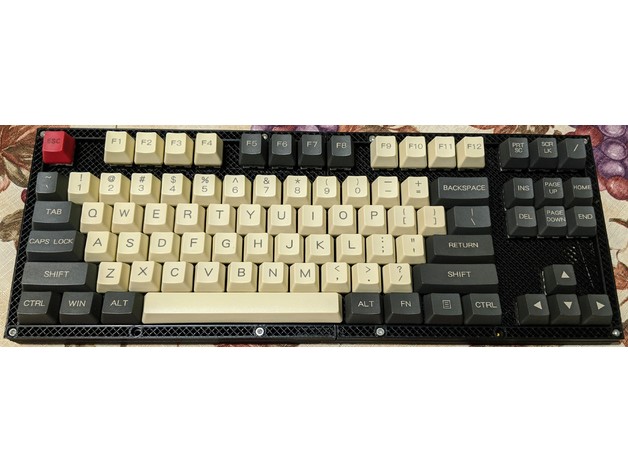
I was inspired by the SiCK-68 but wanted a tenkeyless layout, so I designed it from scratch.
Here are some other features I added in my design:
Case holds plate at a slight incline
Threaded inserts are used for the case-closing screws
Provision for 4 8-neopixel strips inside, for some mood lighting (but I didn't actually install them in my keybo...
Stanford AI Lab (SAIL) keyboard layout http://www.quadibloc.com/comp/kyb01.htm

there are some interesting layout choices there wow
aside from how the punctuation is placed and all those weird symbols --JKOP cursor keys for instance are new to me
I want an infinity key!!!!
tulip sleet
that is not the one I had to use, it is more rational
onyx hinge
yeah OK it doesn't have those characteristics you named. I'll keep looking for the real thing.
 onyx hinge
oh hey that's a better photo than the one I found at http://infolab.stanford.edu/pub/voy/museum/pictures/display/1-6-RAIL-keybd.jpg

I see it has an infinity key though
tulip sleet
MIT sort of copied it with many shift keys but they didn't tamper so much with the basic layout
I used the Knight keyboard on that same page (scroll down)
The Xerox 1108 Lisp Machine keyboard there is the same as the Xerox Star keyboard (same hardware)
I wrote my thesis on that keyboard.
I even drew a diagram of it
 onyx hinge
(further off topic, seeing stuff like the early Xerox makes me see that the original Mac already had a real clear model of where they wanted to get to albeit in much more expensive products)
tulip sleet
The DELETE, COPY, MOVE, and PROPS buttons were great, a considerable improvement over their successors
The Mac is a lot like the Lisa, which was a lot like the Xerox products
I am on a ex-Xerox email list. Someone just sent this old cartoon, which is about the UI-copying lawsuits of the time:

this is pretty #general-chat 🙂
onyx hinge
yeah maybe not the right topic anymore
tulip sleet
but fun
onyx hinge
I doodled up a class that could, in principle, merge multiple keypad event queues
so then I could even write a pure-python i2c/uart/whatever keypad-alike class and merge the streams
tulip sleet
we might add some kind of timestamp at some point to the Event class, so you could preserve the ordering
also I could make a constructor for the EventQueue class so you could write your own scanner (e.g. NeoKey)
onyx hinge
yeah, I thought about "what if so many events arrive on queue 1 that queue 2 is never consulted" and coded around that, but events could still come out of order
I imagined just duck-typing it
there's nowhere in the C API that needs to take the EventQueue back, yet
my two halves of a keypad wouldn't be on the same micro so I'm not sure timestamps would help order their events
(well if the background task could sample from an i2c peripheral it might)
tulip sleet
I agree abt duck-typing. Also two scanners could conceivably share an EventQueue. There is internal locking for other reasons
onyx hinge
I also wondered about Events linking back to a Keypad object; instead, I just made the 2nd Keypad's key numbers be bumped up by the number of keys on the first Keypad.
https://gist.github.com/ed1c8735837902f2aecf565122f07fe5 (totally untested, just a doodle)
onyx hinge
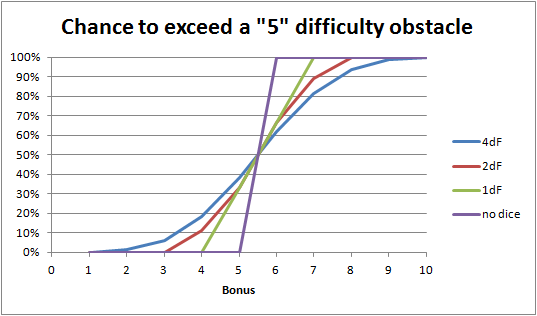
For those times when 4dF just doesn’t make sense.
if the standard deviation of 4df is 1.6mumble then a +2 bonus or invoked aspect is >1 standard deviation improvement which is a lot. no wonder stacking 3 of them gets you a lot.
stuck elbow
@onyx hinge you don't need anything special for a split keyboard: https://hackaday.io/project/179496-chocolad-keyboard-hacking

Make it run CircuitPython
you basically run separate programs on each of the halves, and communicate over uart
you could also use a shift register on the other side, I suppose
manic glacierBOT
This issue stems from the fact that PulseOut is using PWM at a given
frequency.
That means that values that are less than the width of the PWM pulse are
not going
to be handled correctly. At 38Khz, a pulse is about 26 microseconds; 13
high and 13 low.
So, trying to send a pulseout pulse of 1 microsecond is not going to work.
That said;
hanging in a non-responsive state is obviously not the correct way to
handle this.
Some thoughts on what could be done; an error could be returned to the
Pytho...
manic glacierBOT
I think what you are looking at here is a timing issue. As stated in the
documentation;
pulsein.len() "Returns the number of pulse durations currently stored.".
So, since your
example is constantly streaming pulses, there will be times when you check
the len() and get
less than the maxlen you have specified. I don't believe this is an issue
with accuracy; just an
issue with calling popleft() before the maxlen pulses have been received.
If you replace the "pass"
in your first loop with a "time...
manic glacierBOT
It looks like there is some conflict between the digitalio on GP0 and
the pulseins on GP1 and GP2. If the pulsein pins are changed to GP5
and GP6 then things run as expected. I will continue to investigate.
On Tue, Jun 29, 2021 at 2:51 PM dmcomm @.***> wrote:
Sorry, that's more than I want to take on at the moment. If I'd known how
this was going to go, I probably wouldn't have started, but I hope it was
useful ;)—
You are receiving this because you are subscribed to this...
lone sandalBOT
 manic glacierBOT

Is milestone 7.0.0 for this feature still estimated?
 noble mango
stuck elbow
<@!426200547024961539> you don't need anything special for a split keyboard: htt...
noble mango
stuck elbow
<@!426200547024961539> you don't need anything special for a split keyboard: htt...
Is it me or do others see batman wings in the design...
stuck elbow
it's a Rorschach test
others see butterflies or other things
https://www.keebtalk.com/uploads/db8059/original/3X/e/2/e244aff1fc470019c5a134417ee497ec754ed47e.png
 manic glacierBOT
I still plan to do this, but I have been busy with keypad and other things. I plan to get back to it.
manic glacierBOT
Thanks for your reply. The maxlen isn't relevant here as long as it's at least 20. But indeed, more testing suggests the accuracy issue in this example is caused by calling popleft() before the desired number of pulses is reached (20 in this case). In other words, calling popleft() reduces the measured duration of the pulse currently in progress.
(I initially didn't think it was that because I had another example which seemed to work; but really the other example was introducing a delay th...
manic glacierBOT
Adafruit CircuitPython 7.0.0-alpha.3-495-gcece6492a on 2021-07-03; Raspberry Pi Pico with rp2040
Currently, 5us hangs while 10us does not, whether the frequency is 38kHz or 500kHz. So the hang doesn't appear to be due to the number of PWM cycles requested.
10us at 38kHz sometimes produces a pulse and sometimes does not, which isn't really a problem.
If that needed to be fixed, I would choose "delay for the specified number of microseconds without outputting anything".
manic glacierBOT
It appears we are talking past each other. 🙂 Sorry, I should have been clearer which of my suggestions apply to the current situation where storage in sleep memory for persistence across deep sleep is not implemented yet, and which to the future situation where it is.
we try to make fake sleep as similar to true deep sleep as possible, so the stickyness should not be retained in that case either.
I agree with that goal. But I claim it is not what your code does.
In order to stop sp...
manic glacierBOT
PulseOut without a carrier would also be useful on the PWM-based boards. (Creating a 100% duty cycle PWMOut is wasteful and limits the timing precision.)
 plucky flint
Morning folks. After a bunch of fiddly work (and I don't mean violin-like fiddly..!) the new beta (5) of Mu is out. This includes a fix by the incomparable @tulip sleet for Apple M1 devices (thank you for the contribution and apologies it's taken so long to land in a release). Announcement and details all here: https://madewith.mu/mu/users/2021/07/05/beta5.html As always, constructive feedback is most welcome..! 👍

Made With Mu
A blog to celebrate projects that use the Mu Python code editor to create cool stuff.
tulip sleet
plucky flint
Morning folks. After a bunch of fiddly work (and I don't mean violin-like fiddly...
I would like to thank @jaunty juniper for actually writing the M1 fix.
plucky flint
tulip sleet
I would like to thank <@199811382793863168> for actually writing the M1 fix.
Aha.... thank you @jaunty juniper - stonking work. 🙂 Here's hoping folks make funky things with it. 👍
jaunty juniper
and Hugo's and Dan's testing that made it possible 😉
manic glacierBOT
Arrowline Done --> https://github.com/jposada202020/CircuitPython_ArrowLine/releases/tag/0.8.1
Candlesticks Done --> https://github.com/jposada202020/CircuitPython_Candlesticks/releases/tag/0.6.1
Styles Done --> https://github.com/jposada202020/CircuitPython_styles/releases/tag/0.5.1
manic glacierBOT
Since PWM is being used for PulseOut, there can never be a pulseout pulse that is less than the 'high' portion of a PWM pulse. The hang reported in issue #4937 was due to the timer being set to less than the time required for a single PWM pulse. This fix calculates a minimum pulseout pulse based on the selected PWM frequency and enforces no timer delays less than that value.
 fathom violet
Hi everyone! i have been trying different appproaches to see what is happening with the USB on my SAML21 port, but sometimes when i do debbug the USB is working properly and some times it does not work

Sometimes i got until this while and it does not do anything else
while (USB->DEVICE.SYNCBUSY.bit.SWRST == 0) {}
onyx hinge
@fathom violet have you considered trying another board (maybe component damage) or a tinyusb example rather than all of circuitpython? either could help you rule out various factors for why this is happening.
manic glacierBOT

Hi everyone - thank you for the quick response and insight.
In the past week I have tried various different approaches with changing the order of initializing the ESP32 module etc but no luck. One thing that I did find is that setting WIFI_MODE_NULL causes the response of esp_wifi_get_mode() to return 0 - meaning an initialization error - this may be one reason it wasn't working since the expected result is 1 or ESP_OK. Based on the example in `examples/wifi/iperf/main/cmd_wifi....

I'm still having this problem. On an ESP32S2 MagTag 2.9", I do the following:
esptool.py  --port  /dev/tty.usbmodem01 erase_flash
esptool.py --port  /dev/tty.usbmodem01 write_flash 0x0 ~/adafruit-circuitpython-adafruit_magtag_2.9_grayscale-en_US-20210703-cece649.bin
and I get a fresh CP7 install. I then create the following boot.py:
# boot.py
import usb_midi
usb_midi.disable()
print("disable MIDI")
import usb_hid
usb_hid.disable()
print("disable HID")
...
manic glacierBOT

CircuitPython version
Adafruit CircuitPython 7.0.0-alpha.3-471-g7f39779f4 on 2021-07-01; Adafruit Macropad RP2040 with rp2040
Code/REPL
import board
import displayio
from adafruit_displayio_sh1106 import SH1106
OLED_WIDTH = 128
OLED_HEIGHT = 64
displayio.release_displays()
display_bus = displayio.FourWire(
board.SPI(),
command=board.OLED_DC,
chip_select=board.OLED_CS,
reset=board.OLED_RESET,
baudrate=1000000,
)
dis... atomic summit
Not sure if this has been posted anywhere yet, but this is amazing news!!!
Both Damien George & @slender iron together on Michael's live stream/podcast! (Talk Python To me)
https://www.youtube.com/watch?v=VKBmeFb7zHY
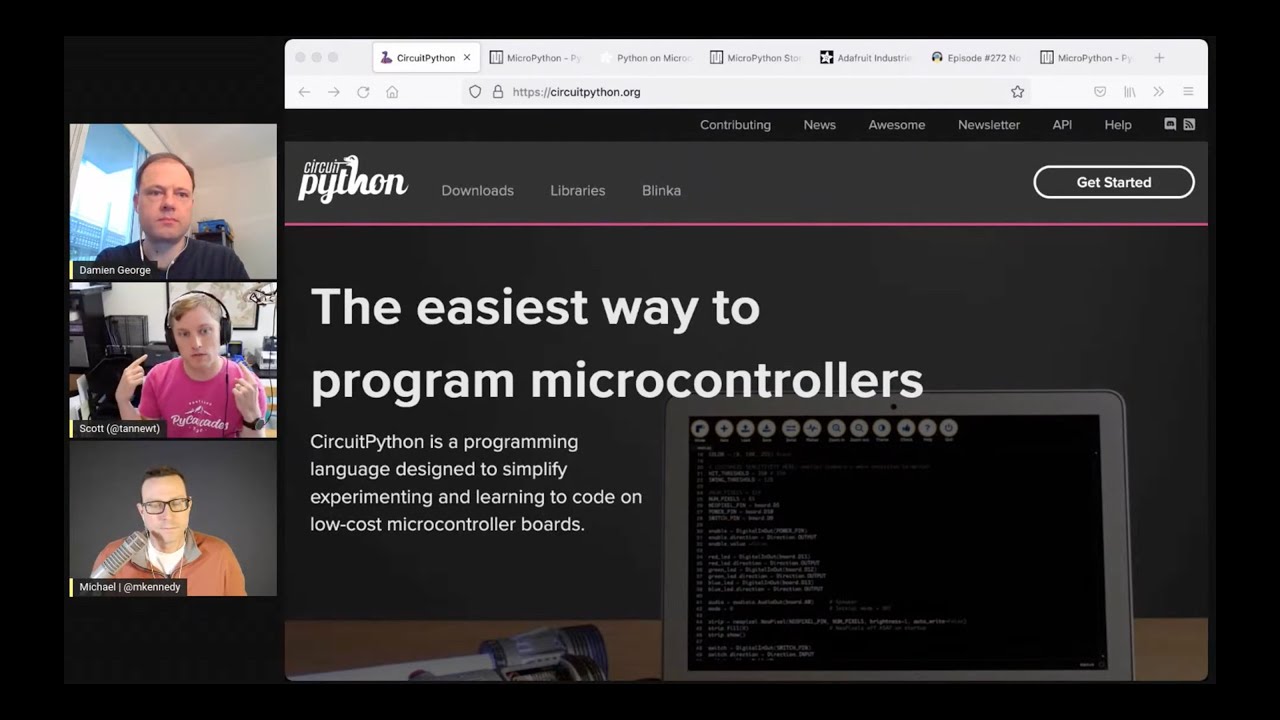
Join Michael and guests Scott Shawcroft and Damien George to discuss how MicroPython and CircuitPython are working together to further embed Python onto all the small things.
manic glacierBOT

I was able to reproduce with the Magtag (7.0.0-alpha.3-495-gcece6492a built locally, without tinyuf2).
- The Magtag does not appear on USB.
- It is able to be recovered by pressing boot on the yellow blink on reset. (Manually go to safe mode).
The Feather S2 in the same conditions reboots into safe mode (with the second boot.py).
You are in safe mode because:
USB devices need more endpoints than are available.
make BOARD=... DEBUG=1 will enable debug messages to the debug console on pins 43 & 44.
jaunty juniper
@devout jolt now that I think of it, it's probably better to open a new issue referencing https://github.com/adafruit/circuitpython/issues/4746 than comment on the closed one
lone sandalBOT
 manic glacierBOT
manic glacierBOT
manic glacierBOT
@dgriswo Thanks for spotting and fixing this issue. :)
manic glacierBOT
Adafruit CircuitPython 7.0.0-alpha.3-495-gcece6492a on 2021-07-03; Raspberry Pi Pico with rp2040
import array
import board
import time
import pulseio
import pwmio

pwm = pwmio.PWMOut(board.GP0, frequency=500_000, duty_cycle=0x8000)
pulseOut = pulseio.PulseOut(pwm)

for i in range(20, 0, -1):
    time.sleep(2)
    print(i)
    pulses = array.array('H', [100,100,i,100])
    pulseOut.send(pulses)
Crashes somewhere between 8 and 5. The same if I change...
Hi, I guess you missed my update on the issue. I posted another example just now.
noble mango
stuck elbow
it's a Rorschach test
yeah now I see the Rorschach test. Man a lot opinions out there about the inkblots... etc.. I dont read watchmen but I always wondered why the patterns moved on the mask .. Now I now. Thats cool.
manic glacierBOT
#4958 fixed the hanging, but there is still inconsistent scratchiness and also sometimes nothing is played at all. Still investigating those problems.
idle owl
<@&356864093652516868> Greetings! This is a reminder that the CircuitPython Weekly meeting is happening today at 2pmET/11amPT (in approximately 3 hours). If you're planning to attend and participate, or have notes but are missing the meeting, please remember to add your hug reports and status updates to the notes document. Hope to chat with you all soon! https://docs.google.com/document/d/1g_QB0qxg528hkBo45Li_ROzIdkxiCx5j8t3EeJMPIxk/edit#

Google Docs
CircuitPython Weekly for July 6th, 2021 THIS MEETING IS ON TUESDAY! Welcome to the CircuitPython Weekly meeting notes! Feel free to add your Hug Reports and Status Updates early. During the meeting, we go through them as a round robin sorted by username. If you can’t make the meeting and would...
@tulip sleet Do you have a moment for a question about keypad and the MacroPad?
tulip sleet
idle owl
<@!329766224093249548> Do you have a moment for a question about `keypad` and th...
sure
idle owl
Ok. Thanks.
@tulip sleet Do I understand it correctly that the way you setup keys in the code is simply an index, and if I want to "rotate" the keyboard, all I have to do is play swapsies with the keypin order in setup?
I moved a couple around, and it appeared to do what I needed, but I want to verify that this is accurate and the proper way to do it.
tulip sleet
yes, the key_number corresponds to the order of the pins argument.
idle owl
Ok. Excellent.
Mildly irritated that the key_number starts at 0 but the key pin names in CircuitPython start at KEY1, but I guess a lot of folks will never see that with the MacroPad library anyway.
tulip sleet
i mention that in the guide because it's confusing
idle owl
Ok, I'll mention it as well in the MacroPad guide.
Definitely means I have to think harder when generating these rotated key layouts. 😄
tulip sleet
0 makes sense based on how sequences are subscripted. We could have named them KEY0..KEY11, but that might also be confusing. No way around it, I think.
idle owl
I agree. I would have named them starting at 0, but I understand it is what it is.
tulip sleet
KEYA..KEYL
tulip sleet
righto
manic glacierBOT
Accepting that the intention is to ignore stray pulses <10us, here is an illustration of the bug:
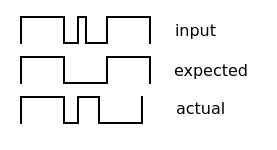
(For my own problem, the protocol above has pulses of ~8us, gaps of >90us, and I only care about the time between the start of one pulse and the next. So I solved that by changing my circuit to stretch the pulses out a bit.)
jaunty juniper
@tulip sleet I've seen questions due to the alpha 3 on the MacroPad download page having the wrong NEOPIXEL pin, is the next unstable release ready to go soon ?
tulip sleet
i had hoped to fix a few more things before alpha.4, but that will probably not happen. So, yes, it should be soon, and we will live with what it has (macropad audio problems, etc.)
idle owl
@tulip sleet I added the pixelbuf shuffle to my list for this week. I wanted to get it in to a release, but I understand if it doesn't get done in time.
tulip sleet
i think we will have an alpha.5 sooner rather than later
idle owl
Fair enough.
onyx hinge
shared-module/keypad/EventQueue.c|48 col 96| warning: overflow in conversion from 'int' to '_Bool8' {aka 'unsigned char'} changes value from 'encoded_event & 32768' to '0' [-Woverflow]
||    48 |     common_hal_keypad_event_construct(event, encoded_event & EVENT_KEY_NUM_MASK, encoded_event & EVENT_PRESSED);
``` @tulip sleet this seems weird ... If `bool` isn't really the C bool type, then it's true .. is it a bug in a header, that `bool` is typedef'd wrong?
spresense-exported-sdk/nuttx/include/stdbool.h: * use _Bool8 as the underlying type (unless CONFIG_C99_BOOL8 is defined)
spresense-exported-sdk/nuttx/include/stdbool.h:# define bool _Bool8
It seems we should consider defining CONFIG_C99_BOOL8 so that it typedefs to `_Bool` insteadwhich compiler is giving you that warning?
onyx hinge
It is a special local build with a bunch of stuff jumbled together, but it looks like spresense build. compiler is gcc version 10.2.1 20201103 (release) (GNU Arm Embedded Toolchain 10-2020-q4-major
manic glacierBOT
onyx hinge
@tulip sleet it can be seen on github actions https://github.com/adafruit/circuitpython/runs/2979846174?check_suite_focus=true in the spresense build, not sure how to link to it directly
make: Entering directory '/home/runner/work/circuitpython/circuitpython/ports/cxd56'
Use make V=1, make V=2 or set BUILD_VERBOSE similarly in your environment to increase build verbosity.
make -C mkspk
make[1]: Entering directory '/home/runner/work/circuitpython/circuitpython/ports/cxd56/mkspk'
make[1]: Leaving directory '/home/runner/work/circuitpython/circuitpython/ports/cxd56/mkspk'
QSTR updated
../../shared-module/keypad/EventQueue.c: In function 'common_hal_keypad_eventqueue_get':
../../shared-module/keypad/EventQueue.c:48:96: warning: overflow in conversion from 'int' to '_Bool8' {aka 'unsigned char'} changes value from 'encoded_event & 32768' to '0' [-Woverflow]
   48 |     common_hal_keypad_event_construct(event, encoded_event & EVENT_KEY_NUM_MASK, encoded_event & EVENT_PRESSED);
| ^```@onyx hinge it seems like nuttx is doing the nonstandard thing. We could define CONFIG_C99_BOOL8, but would it break some nuttx stuff? I can't tell.
onyx hinge
I can't tell either for sure. We would need to ensure all the files are built with CONFIG_C99_BOOL8. We don't care about non-C99 compilers and hopefully not about binary blobs, but maybe there are some in there?
tulip sleet
we could change those boolean expressions like encoded_event & EVENT_KEY_NUM_MASK to encoded_event & EVENT_KEY_NUM_MASK != 0
onyx hinge
yes, maybe with extra parens
nuttx/libs/libnuttx.a
``` no, we link in two binary blobs from itso if it's abi-changing I guess maybe we can't do it
manic glacierBOT
There may be an issue having some of these lines in the start_prom function:
  esp_wifi_stop() ;
  nvs_flash_init();
  esp_netif_init();
  ESP_ERROR_CHECK( esp_event_loop_init(event_handler, NULL) );
  wifi_init_config_t cfg = WIFI_INIT_CONFIG_DEFAULT();
  ESP_ERROR_CHECK(esp_wifi_init(&cfg));
  ESP_ERROR_CHECK(esp_wifi_set_storage(WIFI_STORAGE_RAM) );
  ESP_ERROR_CHECK(esp_wifi_set_mode(WIFI_MODE_STA));
Most of that is already done at system start up time, I'm not sure w...
@ladyada, a huge shout-out to @tannewt for the Friday Deep Dives. I'm not a C programmer and a marginal Python programmer, sometimes knowing where to look and how things work is half the battle. 😉
manic glacierBOT
onyx hinge
oh junk, clang doesn't like the way I use the flexible array member 😕
Use make V=1, make V=2 or set BUILD_VERBOSE similarly in your environment to increase build verbosity.
QSTR updated
../py/runtime.c:1008:5: error: designator into flexible array member subobject
    EXTENDED_FIELDS(
    ^~~~~~~~~~~~~~~~
../py/obj.h:643:34: note: expanded from macro 'EXTENDED_FIELDS'
#define EXTENDED_FIELDS(...) .ext[0] = { __VA_ARGS__ }
                                 ^~~~~~~~~~~~~~~~~~~~~
../py/obj.h:644:29: note: initialized flexible array member 'ext' is here
    struct _mp_obj_type_ext ext[];
                            ^
1 error generated.
make: *** [build/py/runtime.o] Error 1```you'd think that C is C
idle owl
(╯°□°)╯︵ ┻━┻
Turns out you can't have a singleton for importing a library and only use if half the time, while trying to do something in init the other half of the time. It initialises the library twice that way. And gives you pin in use errors.
I really wanted the singleton import for this lib, but there are a couple of things you might do on initialisation. So... that's out.
tulip sleet
if you want to share the code we could cogitate on it
manic glacierBOT
CircuitPython version
7.0.0-something
Code/REPL
N/A
Behavior
N/A
Description
I have noticed that after loading a new version of CircuitPython via UF2, it can start up in safe mode immediately after loading. I did not see this before 7.0.0. For example:
halbert@tuna:~/repos/circuitpython/ports/raspberrypi$ macropad-load    # my alias for copying to RPI-RP2
halbert@tuna:~/repos/circuitpython/ports/raspberrypi$ acm0 #my alias for con...Just listening for the meeting today. Nothing to report.
 modern wing
Happily listening quietly for the meeting today. Thanks everyone for their hard work.
thorny jay
Just listening too.
idle owl
Having audio issues. Naturaly.
modern wing
Audio issues? Remember to unplug your monitors! [yay apple]
idle owl
I did that already 😄
<@&356864093652516868> Reminder: it's CircuitPython Weekly meeting time! 🙂
onyx hinge
OBS hears me. I feel heard
https://docs.google.com/document/d/1g_QB0qxg528hkBo45Li_ROzIdkxiCx5j8t3EeJMPIxk/edit?usp=sharing <== notes doc
Google Docs
CircuitPython Weekly for July 6th, 2021 THIS MEETING IS ON TUESDAY! Welcome to the CircuitPython Weekly meeting notes! Feel free to add your Hug Reports and Status Updates early. During the meeting, we go through them as a round robin sorted by username. If you can’t make the meeting and would...
manic glacierBOT
tried removing these lines and few variations (STA / AP modes and including/removing start/stop wifi) but no luck - still freezing on the line esp_wifi_set_promiscuous(true);. in terms of "debug console on pins 43 & 44", could you elaborate on this? is this something to enable a log or a output other than the REPL ? thank you for your help!
attempt #1 :
void common_hal_wifi_radio_start_prom(wifi_radio_obj_t *self, uint8_t channel, mp_obj_t callback) {
esp_wifi_stop() ;
ESP_ERROR...
 lone axle

Adafruit Industries - Makers, hackers, artists, designers and engineers!
As of today, the Adafruit Learning System has 2,500 guides! Thank you to the entire team at Adafruit who builds and makes learn.adafruit.com one of the best resources online for learning. Thank you…

GitHub Copilot
GitHub Copilot works alongside you directly in your editor, suggesting whole lines or entire functions for you.

Want to know how that Python API you're working with is usually used and learn from others? 🤔
Now, with a single click you can see example usages. 🥳
Try API Usage Examples in the new IntelliCode Insiders release for VS @code ! https://t.co/LdCLs2HxUL #vsintellicode https://t.co/WUXcKyuagM

 Twitter
·
Twitter
·

Adafruit Industries - Makers, hackers, artists, designers and engineers!
Playback of wave audio files inside CircuitPython is a snap! You can even pick different sample rates to fun effect! Shown here running on QT Py with a NeoKey 1×4 keyswitch board. Learn more a…
GitHub
Contribute to dgriswo/Macropad_RP2040 development by creating an account on GitHub.

Having added USB MIDI to my “Toy Keyboard” – I wanted the option to choose either USB or serial MIDI as the output. This returns to the Toy Keyboard USB Matrix Decode with the Pi…

Adafruit Industries - Makers, hackers, artists, designers and engineers!
Sick project from bdsvac on GitHub: A NeoKey keyboard with a raspberry pi pico and adafruit airlift Has integrations to openweather, slack, and adafruit io. Read more and see more on Thingiverse Ea…

Panel hosted by Carol Willing, organized by CS4ALL for their fundraiser in Seattle, WA. April 2, 2019. Edited to remove 48 minutes of other material before the main attraction: the language creators' conversation. Unrevised subtitles automatically generated by Trint.com.
 old smelt
Just finished listening to Python Bytes Episode 240, and Michael talked about Copilot:
https://pythonbytes.fm/episodes/show/240/this-is-github-your-pilot-speaking...

News and announcements from the Python community for the week of Jul 2nd, 2021
tulip sleet
i can do core
onyx hinge
thank you dan!
sterile bronze
lurking
manic glacierBOT
The RX and TX pins on the FeatherS2 can be connected to another USB port on your computer via a USB breakout or similar, and output can be monitored with your serial program. This requires rebuilding circuitpython with the DEBUG=1 flag as above. There are some messages that are output by the underlying Espressif core code, some have been added by CircuitPython contributors in common-hal, and you can add your own to aid in debugging. For example, see messages starting with ESP_LOG in...
tulip sleet
@thorny jay in order to test the SNES controller with keypad, I bought these from Amazon: https://www.amazon.com/gp/product/B079SRJWGZ/ (two controllers) ; https://www.amazon.com/gp/product/B075K4R86R/ (two extension cables).
I cut the extension cable and added some dupont pins. Note that the color code on the extension cable does not particularly correspond to some color codes you may see in SNES documentation, so verify with a multimeter
austere acorn
It was my first contribution, hopefully out of many future ones 🙂
Thank you so much to everybody who helped me! (sorry, I don't know everyone yet)
Hugs from me too!
onyx hinge
 solar whale
@tulip sleet late hug report -- the keypad guide is great! Thank you.having fun with it.
tulip sleet
yw!
 blissful pollen
Have to drop off for another meeting
solar whale
@onyx hinge sorry I missed the release of the camera guide -- will check it out over the next few days. Thanks!
My attention span has not been 10 minutes lately 😉 I have not seen it but will try to reproduce.
sterile bronze
@idle owl yes I had issues on the macropad display
solar whale
Does it happen with just the repl?
lone axle
GitHub
I tried to get 2 sh1106 displays working on the raspberry pi pico for the last 2 days. One of them is a Waveshare 1.3 inch 128x64 SH1106 OLED (in SPI mode), the other one is a generic 128x64 SPI OL...
 modern wing
Thanks everyone!
onyx hinge
Next meeting is on the 12th (monday) at the customary time
lone axle
Hope everyone has a great week
 raven canopy
Thanks all! Have a great week.
 errant grail
Thanks!
austere acorn
It's okay, i don't have a mic ready anyway 😄
gilded cradle
Record short meeting in quite a while
onyx hinge
I'm going to sign off, see y'all later!
gilded cradle
Bye Jeff, I'm going to sign off too

 stuck elbow
I might have set wrong polarity/phase in the board.c
idle owl
That's displaying text, but it does the same thing with REPL display only as well.
Sometimes Blinka goes upside down etc.
blissful pollen
that looks similar (but different) to what I've seen on ESP32S2. The col/row values being sent to the display are off. I know lowering the frequency "fixed" it but that's probably not the underlying cause but could be a temporary fix.
I don't have a macropad to test on though
stuck elbow
@idle owl can you try with this image?
idle owl
@stuck elbow Yeah as soon as I'm done with the post-meeting whatnot.
stuck elbow
thanks
idle owl
Here is the notes document for Monday’s CircuitPython Weekly meeting. It is at the normal time of 11am Pacific / 2pm Eastern here on Discord. Everyone is encouraged to attend! Please add your hug reports and status updates even if you’ll be attending the meeting - it’s super helpful! If you are unable to attend but would still like to include updates, feel free to include them in the notes and we’ll read them off during the meeting. Hope to see you there! <@&356864093652516868> https://docs.google.com/document/d/17UaJ2NvMP61i1V6rIwAq5VecsdoTKfSQVTOHetINmQw/edit

Google Docs
CircuitPython Weekly for Welcome to the CircuitPython Weekly meeting notes! Feel free to add your Hug Reports and Status Updates early. During the meeting, we go through them as a round robin sorted by username. If you can’t make the meeting and would still like to participate, add your notes ...
idle owl
idle owl
Here is the notes document for Monday’s CircuitPython Weekly meeting. It is at t...
onyx hinge
Thanks @idle owl !
idle owl
stuck elbow
<@!330227457296957440> can you try with this image?
It starts up, flashes blue fourish times, and then nothing. No display. I can connect to the serial output, but apparently didn't have anything printing there in my code.
tulip sleet
@idle owl could you drop that program that causes the display issue here? I also have some tests to run.
idle owl
@stuck elbow Sure.
tulip sleet
@stuck elbow I am seeing if disabling SPI DMA fixes things.
idle owl
@tulip sleet It includes an in progress library. Let me see if I can get it without the lib because I'm pretty sure I can simply using keypad.
@tulip sleet Or maybe not. Maybe it needs to involve displayio or board.DISPLAY. At least it's not happening as quickly without those two anyway.
tulip sleet
I did this which improved the audio playing. It's only scratchy the first time now:
import displayio
displayio.release_displays()
time.sleep(1)
wait!
No. I thought it started doing it, it did not.
I'll add that.
Serial output stops displaying if I add that.
hmm.
tulip sleet
it just disables the display, so you don't see anything. I am not trying to debug the display, just figure out why it's interfering with audio.
idle owl
There it goes.
Ok it's giving me garbage on the bottom row with this example: https://learn.adafruit.com/key-pad-matrix-scanning-in-circuitpython/keys-one-key-per-pin#macropad-example-3099041-9

Adafruit Learning System
Read buttons, keys, keypads, keyboards, and game controllers fast!
tulip sleet
@stuck elbow disabling SPI DMA did not help. There is a fallback non-DMA transfer in SPI.c, but using only that did not help.
stuck elbow
here is another one, with another combination of polarity/phase
idle owl
I at least have display with that one @stuck elbow
idle owl
@tulip sleet What's with the blue flashing on startup? I don't remember that.
tulip sleet
i am not seeing bottom-row garbage with the macropad keypad example
idle owl
@stuck elbow Now I try to get garbage. 🙂
idle owl
tulip sleet
i am not seeing bottom-row garbage with the macropad keypad example
It took a few minutes.
tulip sleet
i'm not sure - Scott's new BLE-pairing stuff does that, though this doesn't have BLE.
idle owl
It only started since I updated to the latest today.
Wasn't doing it last week.
@stuck elbow Garbage displaying 😦
@tulip sleet Let me send you a zip of the code that makes it happen quickly.
tulip sleet
the pairing blinking was recently merged
idle owl
Apologies for the half-done code.
tulip sleet
yeah, I am not seeing an issue
idle owl
@tulip sleet Ok here. "working" code, that produces garble on the display pretty quickly.
brb.
idle owl
tulip sleet
the pairing blinking was recently merged
@tulip sleet I think perhaps there is a bug with the blinking.
manic glacierBOT

CircuitPython version
Adafruit CircuitPython 7.0.0-alpha.3-497-g23baa02c1 on 2021-07-06; Adafruit Macropad RP2040 with rp2040
Code/REPL
Issue occurs on startup.
Behavior
After updating to the latest build of CircuitPython, the status LED blinks blue after the yellow safe mode blinking on the MacroPad. I was informed that the blue flashing is related to Bluetooth pairing, however the MacroPad has no Bluetooth capabilities. I did not test it on oth...
tulip sleet
i am banging on the keys like a 3-year-old, and am seeing no display problems
idle owl
Interesting new format of bug submission. Weird not being able to preview my entire post.
idle owl
tulip sleet
i am banging on the keys like a 3-year-old, and am seeing no display problems
It used to take a while, now it's all the time for me.
That's confusing because it's happening on two of them for me.
I guess I could unscrew the back and reseat the cable?
gloomy shuttle
did you try a soft reset via the REPL?
tulip sleet
certainly you could try the cable. Mine looks ok
gloomy shuttle
I meant for @tulip sleet
idle owl
Ah sorry 🙂
tulip sleet
do you mean that it would happen after a soft reset?
gloomy shuttle
Yes, I reproduced it by doing that
idle owl
Oh!
tulip sleet
I am not seeing that: I ctrl-C'd and restarted several tikmes
idle owl
@gloomy shuttle It happened immediately after a soft reset for me as well. It was taking a while this time, so I did a reset from the REPL, immediate garbage.
I reseated the cable, no effect.
I didn't even have to interact with the hardware directly to get it to start this time.
tulip sleet
are you using the absolute latest build? This is what I am using (just pulled from main and freshly built)
idle owl
Most recent thing on S3. Is what I'm using. I'll try yours.
gloomy shuttle
7.0.0-alpha.3-497-g23baa02c1
tulip sleet
yes, same here
idle owl
Same fail.
tulip sleet
i tried it as code.py and as a different .py I imported from the REPL
I see no fail.
i will ask limor a q
idle owl
@tulip sleet Connect to the serial with screen or whatever.
Oh you just said you did.
That's what seems to make it happen fast for me.
manic glacierBOT
@dmcomm - There was an issue when the timer interval being used to time the pulses was too short. I've made a modification to correct that. If you have a chance could you test again (with the fix I was successful running your newest test script).
tulip sleet
ok, now it's happening for me. This is very odd. Maybe it had to be warmed up.
idle owl
Oh good. I was starting to think I was causing the issue somehow.
tulip sleet
i was thinking maybe there were multiple versions of the display that were put on the board
stuck elbow
sh1106 has a lot of clones
idle owl
Fair enough, but I don't think the displays differ on this small initial run.
stuck elbow
if that helps, I'm using exact same init code with a similar display with samd21, and it works fine for me
but no keypad
idle owl
Trying to get it with simpler code.
tulip sleet
I think it has something to do with the SPI, possibly the SPI being interrupted by ctrl-C, and the display getting in a bad state due to that.
idle owl
Got it.
With this: ```py
import time
import digitalio
import board
button = digitalio.DigitalInOut(board.BUTTON)
button.switch_to_input(pull=digitalio.Pull.UP)
while True:
pass
print("some text")
print("")
print(button.value)
time.sleep(0.3)```
So it's not keypad.
Unless you mean the existence of the physical keypad.
tulip sleet
The SPI code checks for ctrl-C and can stop what it's doing abruptly. That could cause garbage data to be sent to the display (data interpreted as commands), which could easily mess up the display.
i don't think it has anything to do with the keypad.
idle owl
Fair enough.
tulip sleet
@stuck elbow this code is in SPI.c for the RP2040:
        while (dma_channel_is_busy(chan_rx) || dma_channel_is_busy(chan_tx)) {
            // TODO: We should idle here until we get a DMA interrupt or something else.
            RUN_BACKGROUND_TASKS;
            if (mp_hal_is_interrupted()) {
                if (dma_channel_is_busy(chan_rx)) {
                    dma_channel_abort(chan_rx);
                }
                if (dma_channel_is_busy(chan_tx)) {
                    dma_channel_abort(chan_tx);
                }
                break;
            }
@tulip sleet Should I file the issue? Or do you want to?
I got it with ```py
import time
while True:
pass
print("some text")
print("")
time.sleep(0.3)```
Guess I don't need the pass in there. Started with no prints.
tulip sleet
so a DMA can be interrupt while in progress, which could easily leave things in a bad state. I reduced the SPI speed of the display to 100kHz (from the initial 1MHz), and it was easy to produce. I increated the SPI speed to 10MHz, and I did not reproduce it.
idle owl
Yeah it eventually garbles with only the prints.
stuck elbow
I don't think ctrl+c should interrupt SPI transactions :/
tulip sleet
i agree
blissful pollen
I would think interrupting SPI may mess the current transaction up but future ones should be fine, unless the display core settings itself get "off"
stuck elbow
right, among other things it has registers for where the active display begins and ends
this looks like they get set to smaller values, so only part of the display is used
blissful pollen
I guess if the command itself got garbled (instead of the row/col/data commands) that could cause an issue
tulip sleet
also I saw the text become upside-down at the top
stuck elbow
I hope it doesn't mess with the voltage pump registers
tulip sleet
i also saw it flicker
stuck elbow
I believe the voltage registers can only be changed while the display is off
as protection from this kind of things
idle owl
@tulip sleet So adafruit_macropad.py has two classes in it. (You have a currentish version of it from the zip I sent you.) The second one is initialising the Simple Text Display library. Is there a way to make the second class accessible from the MacroPad class (the first class), so I can import only from adafruit_macropad import MacroPad and have everything? So I could do something like macropad.TextDisplay(title="Titlehere!") instead of having to import SimpleTextDisplay separately.
If this makes any sense anyway.
I tried to make it a property or something, but then it complained about the inclusion of the Title, which is only one of many things settable when creating the instance of it.
Googling it isn't helping.
manic glacierBOT
CircuitPython version
7.0.0 latest, easily visible on MacroPad
Code/REPL
# code.py could be as simple as:
import time

i = 0
while True:
    print(i, "some text")
    i += 1
    time.sleep(0.1)
Behavior
The MacroPad display can become garbled if the code above is run, and then interrupted with ctrl-C, and then restarted with ctrl-D. Trash will appear on the right side of the display. Other more display-intensive programs can cause worse pr...
tulip sleet
idle owl
<@!329766224093249548> So `adafruit_macropad.py` has two classes in it. (You hav...
If you do import adafruit_macropad, then both will be available, as adafruit_macropad.MacroPad and adafruit_macropad.SimpleTextDisplay. Otherwise you would want to do from adafruit_macropad import * or from_adafruit_macropad import MacroPad, SimpleTextDisplay
tulip sleet
@idle owl I'll be out for a few hours startin soon
idle owl
I think I figured out how to do what I wanted. It's kind of kludgey but it'll work.
idle owl
tulip sleet
<@!330227457296957440> I'll be out for a few hours startin soon
Ok, thanks for the heads up.
manic glacierBOT
Sounds good! I don't have the build system set up (my comment on this pull request was only based on the description).
manic glacierBOT

I've just noticed @Jacksonbaker323 has an i2c library https://github.com/Jacksonbaker323/CircuitPython_SPS30/ - that one doesn't follow the style of https://github.com/adafruit/Adafruit_CircuitPython_PM25
I'm tidying the code for my library in the mold of the Adafruit_CircuitPython_PM25 library, I've not implemented the UART version yet...
manic glacierBOT
lone sandalBOT
 manic glacierBOT
There's a difference in the level of support for static initialization of flexible array members in gcc vs clang.
typedef struct flex {
   int i;
   struct {
       int a, b, c;
   } j[];
} flex_t;

flex_t f1 = {.i = 3};
flex_t f2 = {.i = 4, .j[0].a = 1, };
flex_t f3 = {.i = 4, .j = {{.a = 1,}}, };
Styles f1 and f3 are supported in gcc and clang; style f2 is supported in gcc but not in clang. Therefore, we must select style f3 when extended fields are being initialized.
onyx hinge
OK, the discovery of the difference between styles f2 and f3 puts me back on track and lets me NOT make a bunch of changes to the C types of the type structures that it looked like I would have to do. (I had done style f3 the first time but thought style f2 "read better")
I discovered it after making many/most of the edits 😬
solar whale
None of those "read well" IMO 😉
That is any one will send me to google at first glance
onyx hinge
You're not wrong.
manic glacierBOT
There's a difference in the level of support for static initialization of flexible array members in gcc vs clang.
Will this work on older compilers (eg older gcc, v4.8)? If it doesn't then we'll need a compile-time option to disable this feature.
manic glacierBOT

There is a folder circuitpython/ports/nrf/examples/, but the BLE examples are not working, no ubluepy module. Any BLE examples that actually work ?
manic glacierBOT
manic glacierBOT
The ubluepy module is no longer in use and is replaced by _bleio. You can find more info and examples at:
manic glacierBOT
@microDev1 Thanks for the links. I expected the high-level BLE library to be included in the nrf port. Also isn’t too slow providing such functionality with python code ?
manic glacierBOT
https://godbolt.org/z/h8coM6MPv
This is set up to test it on current gcc and clang, as well as gcc 4.1.2, the oldest available. Not in that link but I also pushed clang back to 3.0.0, the oldest available, and it accepted the trick too.
The "f3" style being the only one supported means I only see how to enable a single static split, none of the more sophisticated things we conjectured about.
 cobalt quiver
When is the keypad module set to be standard in circuitpython?
onyx hinge
@cobalt quiver in version 7.
right now you need to grab the latest builds from S3, look for the link like this on your board's page on circuitpython.org:
 cobalt quiver
I know about the s3 thing, I was just wondering
onyx hinge
I think that we hope to release "alpha 4" soon, which will also include it
wow there are over 500 changes since "alpha 3" according to github.
cobalt quiver
Oh my
stuck elbow
SHIP IT!
idle owl
I need some help with I2C addressing with jumpers.
Someone wants some idea what the I2C address situation is using these jumpers https://learn.adafruit.com/neokey-1x4-qt-i2c/pinouts#address-jumpers-3098419-13 and I don't know how to explain it. I found something on another board that explains what the jumpers do there, but I don't know if that's standard, plus there are 4 in the product I'm trying to explain and only 3 here: https://learn.adafruit.com/adafruit-mcp9808-precision-i2c-temperature-sensor-guide/pinouts#optional-pins-2958189-4
onyx hinge
@idle owl I'll try to help you with some wording
idle owl
onyx hinge
<@!330227457296957440> I'll try to help you with some wording
That would be great.
I'm not even sure where I got the default address. Might have I2C-scanned it.
I can't find it in the product copy or wherever.
onyx hinge
I don't have a board to test so I'll be going off what I can see from source code
idle owl
I'm not going to test all possible permutations either 😄
onyx hinge
I am pretty sure that A0 adds 1, A1 adds 2, A2 adds 4, and A3 adds 8; that's what a programmer would do
idle owl
Ok that matches the other one with 3 jumpers too.
I guess I thought it would be 0x30-(whatever the next 15 hex values are), but I think that's wrong.
onyx hinge
do we write i2c addresses as hex usually?
onyx hinge
OK
I think that yes, the possible addresses are 0x30 through 0x3F. 0x30 is with all jumpers open, 0x3F is with them all closed.
onyx hinge
If you wanted to give it a test you could close A0 and check that you get 0x31, also close A1 and check that you get 0x33, A2 -> 0x37 and A3 -> 0x3f but that is, like I said, what a programmer would do
Knowing that after 0x39 is 0x3A is where a learner would get tripped up, but someone who wants more than 10 of these things maybe should learn something while they're busy soldering and wiring 🙂
idle owl
Hah. Yeah.
onyx hinge
that's not a specific wording suggestion, but does it help?
idle owl
Yes.
Verified your hunch with Limor.
So I'll grab the wording from the MCP guide
and tweak it.
And then have you tell me what the addresses should be. 😄
onyx hinge
Now I want the flex PCB version of this so you that with 3d printed parts can make an ergonomic keypad/keyboard
idle owl
@onyx hinge What is 0x30 + 4 + 1 ? 0x35 ?
onyx hinge
should be! ```python
hex(0x30 + 4 + 1)
'0x35'
Thanks.
@onyx hinge The default address is 0x30 and the address can be calculated by “adding” the A0/A1/A2/A3 to the base of 0x30.
A0 sets the lowest bit with a value of 1, A1 sets the next bit with a value of 2, A2 sets the next bit with a value of 4, and A3 sets the high bit with a value of 8. The final address is 0x30 + A3 + A2 + A1 + A0 which would be 0x3F.
So for example if A2 is tied to VDD and A0 is tied to VDD, the address is 0x30 + 4 + 1 = 0x35.
If only A0 is tied to VDD, the address is 0x30 + 1 = 0x31
If only A1 is tied to VDD, the address is 0x30 + 2 = 0x32
If only A2 is tied to VDD, the address is 0x30 + 4 = 0x34
Is that accurate?
Spacing got weird.
But still.
onyx hinge
Yes I think that's all correct. Do you say that soldering up the jumper "ties" to VDD somewhere? Would it be better to say that "connecting the jumper" (or closing or soldering it) has an effect instead?
idle owl
No I do not mention that. I will.
onyx hinge
It at least looks like that MCP board doesn't have solder jumpers, it just has A0/A1/A2 as pins, so you do have to connect those to the pin labeled Vdd .. as opposed to this board
so I'd remove "tie[d] to VDD" and replace
onyx hinge
probably you don't want to connect VIN to the solder jumpers, you just want to close the jumper with solder. thanks!
idle owl
Yes.
onyx hinge
VIN might be a damaging voltage if you connected it there
idle owl
I'll link you to the page when I'm done so you can give me final feedback
onyx hinge
https://gist.github.com/fbafa0b7aa793c0e64028a6b088ae370
>>> from compute_i2c_address import *
>>> compute_i2c_address_hex(base=0x30, a2=True, a3=True)
'0x3c'
Sure thing, I'll be around much of the afternoon
onyx hinge
which ties the pin to VIN.
I'm not sure this is accurate, but you would be able to tell from the schematic.
idle owl
ok I'll remove it
onyx hinge
'0x38'
idle owl
Don't care that much 🙂
Thanks, I realised it was an easy one after I asked 🤦
Ok fixed
onyx hinge
about the photo .. is it usual to leave the view as the whole board when highlighting the small area? I don't have the easiest time telling which is the highlighted area when it's so small.
but that's outside the scope of your question, sorry
idle owl
Yes, it's usual. Only showing part of the board gets confusing.
Folks get confused about what they're looking at and where it is.
That's why I try to use super high res photos for pinouts.
So you can look at the original and zoom.
I don't always have high res photos tho.
I mean, look at Power LED. Even tinier.
¯_(ツ)_/¯
onyx hinge
Is it worth saying you could just write out in your code 0x30 + 8 + 4 + 2 + 1 instead of figuring out 0x3f?
idle owl
Mmmm...... nah.
onyx hinge
OK
idle owl
Because they can I2C scan for it too.
If I get further complaints, I'll add it 🙂
That's the last of my guide feedback for the day!
onyx hinge
I think the technical bits are right
On the back of the board, are four address jumpers
I'm not sure whether this comma belongs here
onyx hinge
Thanks for taking my suggestions!
idle owl
Thank you for your help!
My hex is..... bad.
So...
heh
I mean I get it
but I have to write it out every time
my brain doesn't do it naturally
onyx hinge
That's why to pull up Python and make it calculate for you
I couldn't calculate 0xf - 0xc in my head like I can calculate 9 - 6, don't sweat that.
 crimson ferry
I usually scribble a little binary-to-hex chart if I get confused
 onyx hinge
did you check at least one solder jumper setting to make sure we're on the right track?
idle owl
No. But I asked Limor about what jumper added what. And she said you were right.
onyx hinge
Turns out that soldering the jumper connects a pin to GND but I wouldn't bother explaining it there. Someone who wants to know can see the schematic.
 idle owl
Fair enough.
idle owl
This display garbage is getting really frustrating.
Trying to work on displaying an image and have to hard reset every minute or so
I think I got it working 😄
Except now it displays the image and never mounts CIRCUITPY. I can reset into safe mode ok. Borked something, clearly.
idle owl
@gilded cradle I have a question about the graphics code in PortalBase. Why do you create a splash (https://github.com/adafruit/Adafruit_CircuitPython_PortalBase/blob/6ffe1034509c09f64a8790abd1137c186d9c484d/adafruit_portalbase/graphics.py#L51) and then create _bg_group (https://github.com/adafruit/Adafruit_CircuitPython_PortalBase/blob/6ffe1034509c09f64a8790abd1137c186d9c484d/adafruit_portalbase/graphics.py#L55) and then use set_background after show()? I wrote up some simpler code that "works" (worked) but it's now causing major issues and I'm trying to figure out what I did wrong.
I guess I'm asking why create two groups.
I don't think that's the problem I'm having, but it's the only major difference I can see in what I took out of this code. (Except mine is its own method, not class level setup.)
Wait I think I get why you did it. And I'm not sure I need to do it because I'm not handling things at class level and method level separately. So then I have no idea what my issue is.
It bogs everything down, CIRCUITPY disconnects, and doesn't come back up. I have to go into safe mode and rename or edit code.py to get it back.
There is garbage collection in PortalBase. I added it to MacroPad. It seems to be helping. Hmph.
Using with as Pylint insisted also seems to be helping without the garbage collection.
fathom violet
Hi everyone! my USB proble got solved, it was a bad configuration of the crystals and the GCLK selected for the USB
idle owl
Glad it was resolved!
fathom violet
now im facing the problem while mounting the Flash 😄
idle owl
idle owl
Using `with` as Pylint insisted also seems to be helping without the garbage col...
It's still running with no issues, so the with apparently solved the issue.
gilded cradle
@idle owl I think I did it that way so the background could be changed out without removing all the other stuff inside splash. It could be done without the second group, but it requires more careful manipulation of everything. Much of the code in PortalBase originally came from the original PyPortal library that Limor wrote. Awesome that you got it working with with.
idle owl
Thanks
gilded cradle
Sorry for the late response, my computer was muted, so I didn't hear it.
idle owl
It was confusing there for a bit.
No worries.
I'm onto struggling to document things 😄
gilded cradle
🙂 That's always the hard part.
manic glacierBOT

We would need a plan for how ulab could be compatible with both CP and MP since it both needs to declare types with the extended fields, and also query an optional field.
I think it would be really great, if this proposal ended up in micropython proper. However, I just want to re-iterate my position with regards to ulab: if micropython needs more time, this fact shouldn't block development on the circuitpython side, and I am more than happy to accommodate temporary patches, if by...
idle owl
It seems to randomly fail with random issues that aren't really issues. Recopy the lib and it works again.
¯_(ツ)_/¯
gilded cradle
Like what kind of issues?
idle owl
Like this out of nowhere (e.g. it was working for an hour then this) AttributeError: 'tuple' object has no attribute 'pixel_shader'
Then recopied the lib, the only changes to which are documentation, and it runs fine again.
gilded cradle
Probably because it restarted
idle owl
It reloaded a bunch with that failure once it popped up.
gilded cradle
It's hard to say without seeing the code
idle owl
Yeah. I'm not sure the code will even help. I can push what I have to my branch though anyway.
gilded cradle
I could take a look if I could see the code and get some line numbers regarding the failure
gilded cradle
ah
idle owl
I know what it was complaining about though, and it makes no sense.
Hold on, linking.
Would help if I committed before pushing 🤦♀️
gilded cradle
No worries. I'm just sitting here working on getting annoyed with the Raspberry Pi OS not cooperating. 🙂
idle owl
This is what it was complaining about being a "tuple object" - specifically background.
https://github.com/kattni/Adafruit_CircuitPython_MacroPad/blob/e4a3c2d69a10d76bb5c378fc9e736b6598d4b73a/adafruit_macropad.py#L338
gilded cradle
Perhaps displayio.OnDiskBitmap returned a tuple for some reason
gilded cradle
Yeah
idle owl
Thanks for taking a look anyway.
gilded cradle
no worries
idle owl
Lib is coming along. Other than audio which is waiting on it being fixed in CP, I think it's got everything worth adding.
gilded cradle
Cool, I was holding off playing around with the Macropad since I knew the library was forthcoming.
idle owl
I think it's feature complete if you want to test it. I haven't documented everything with examples though.
I have a quick example that uses a few of the main features running right now.
@tulip sleet I'm trying to document keys and I'm not sure how to describe it. It's the keypad.Keys() object with the key pin index and so on already provided. So you can do macropad.keys.event.get() etc in your code with it.
tulip sleet
keys is a scanner. It scans all the pins provided for key transition events. It records those events in keys.events. (Is that the kind of thing you're looking for?)
idle owl
Maybe? I think that might work.
Maybe higher level than that.
Because the pins are provided and so on
User never sees that.
gilded cradle
Cool, I won't have time to test today as I'm trying to get a demo going before the meeting.
idle owl
gilded cradle
Cool, I won't have time to test today as I'm trying to get a demo going before t...
No worries, simply letting you know.
tulip sleet
is there any language in the keypad guide Overview or Keys page that might help?
idle owl
I'll take a look.
I've gone to it so many times during this that typing "keypad" into my browser search bar brings that up as the first option.
No idea if this will render properly. I'll find out when I finally bother to get Sphinx building.
Also not sure if this is too much information.
¯_(ツ)_/¯
@gilded cradle Documentation question. I wrappered the entirety of MIDI and HID into this lib. Think it's reasonable to simply link to the RTD documentation for the individual things? RTD renders links, so they would be clickable in the RTD docs for this library.
Or I guess link to the general docs for MIDI and HID in case it's refactored later and the links change... I dunno.
gilded cradle
It's hard to say @idle owl. Either way would work I'd imagine.
idle owl
I linked it to the main docs and specified "look at this section". Probably good enough.
manic glacierBOT
Our ultimate plan will be to offer this upstream to micropython!
manic glacierBOT
Tested locally with make html
Before:

After:

OK I'll get back to you on that.
@dmcomm you can get the already-built artifacts here: (got to here from the checks):
https://github.com/adafruit/circuitpython/pull/4964/checks?check_run_id=3002465675
Click on the Artifacts drop down which is toward the right:

manic glacierBOT
Full disclosure, I didn't test this on hardware yet :wink: but that's next now that all the builds are passing. I figure if the Unix tests are passing it's a good sign.
Note to reviewer: please check that anytime there's an EXTENDED_FIELDS() in a C type object, that I remembered to add MP_TYPE_FLAG_FULL to .flags.
manic glacierBOT
@mtk11 Hope the following helps. :)
I expected the high-level BLE library to be included in the nRF port.
- Native modules provide only basic connection between the python layer and hardware.
- Libraries are built on top of native modules and act as a wrapper for them. These make the interaction with the native modules easier and also provide functions that aren't related to hardware.
Flash space constraints is the primary reason for not including libraries with the port.
A...
manic glacierBOT

I'm seeing this extra byte on Macropad RP2040 as well.
manic glacierBOT
- My example with the countdown now runs to completion.
- PulseOut crashes with the same symptoms if the first pulse is less than 40us, at both 38kHz and 500kHz.
- I retested the first example in #4908 but changed to 500kHz, and that was OK for as long as I watched it for.
- If we want to guarantee that a pulse is output for too-small values, stretching to half a cycle doesn't achieve that. I expect a full cycle is needed.
manic glacierBOT

Without having taken a look at your wifi myself id still go with the suggestion of it being a "wifi is wifi" sort of thing.
Im getting the same errors here and im in a very bad room, wifi wise. Its not uncommon to get request denials or getting similar issues when there are bad conenctions. Remember, the antenna on the esp32 isnt that big and since wifi is as it is...
However thank you all for the code, il try it myself and see if it works.
tulip sleet
@idle owl I have a potential fix for the scrambled macropad display. You seem to be very good at provoking it, so would you have time to test a .uf2?
idle owl
tulip sleet
<@!330227457296957440> I have a potential fix for the scrambled macropad display...
I will in about an hour. It's that ok?
tulip sleet
sure
idle owl
Apologies for the delay. Slow starting day today.
tulip sleet
np
idle owl
@tulip sleet Lay it on me.
onyx hinge
@tulip sleet I wanted to enable a special mode in my calculator if two keys on the key matrix are held at start-up. How would you recommend doing that with keypad?
would I be guaranteed that all the held keys (up to the queue size) would be available immediately after creating the matrix? or are initially-held keys not sent as key presses?
manic glacierBOT
@dmcomm, a PWM 'cycle' includes both high and low states, whereas a pulsein
'pulse' is only one or the
other. That is the reason for using a half-cycle for PulseOut. I will check
on the short initial pulse, I did not test for that.
On Thu, Jul 8, 2021 at 5:06 AM dmcomm @.***> wrote:
- My example with the countdown now runs to completion.
- PulseOut crashes with the same symptoms if the first pulse is less
than 40us, at both 38kHz and 500kHz.- I retested the firs...
tulip sleet
onyx hinge
would I be guaranteed that all the held keys (up to the queue size) would be ava...
The scanner will notice that they are held down: it starts with the assumption all keys are up, so it will notice immediately. You will get two key-pressed events (without intervening key releases) so you need to remember the pressed/release states to check for that
onyx hinge
would I need to wait up to the polling time for the first poll? or is the first one immediate? i.e., do I need to sleep(.040) or something
tulip sleet
idle owl
<@!329766224093249548> Lay it on me.
macropad uf2 with I hope a fix for scrambled displays. I tested this by ctrl-C'ing your problematic programs and could not mess up the display.
idle owl
@tulip sleet I have it sitting here spewing garbage right now, so it's the perfect test 😄
Already getting artifacts 😦
Not nearly as bad yet though
give me a minute to stress it.
tulip sleet
onyx hinge
would I need to wait up to the polling time for the first poll? or is the first ...
it's conceivable there would be a race, so you could wait briefly before trying to read events
@idle owl try power-cycling
idle owl
tulip sleet
<@!330227457296957440> try power-cycling
Good call. Ok so far so good.
tulip sleet
so do a ctrl-C and restart, that's really what the problem is
if you have not done that already
idle owl
There are artifacts showing up on the right side.
tulip sleet
with the little sleep program?
tulip sleet
are you doing neopixel stuff
manic glacierBOT
You are a C programmer now! :-D
idle owl
Yes.
tulip sleet
I will change something in neopixels also. keep trying and i'll see about that.
onyx hinge
module 'isort' has no attribute 'SortImports'
internal error with sending report for module ['CircuitPython_Templates/cap_touch_one_pad.py']
module 'isort' has no attribute 'SortImports'``` wow this message occurs a lot in learn git repo during the pylint step
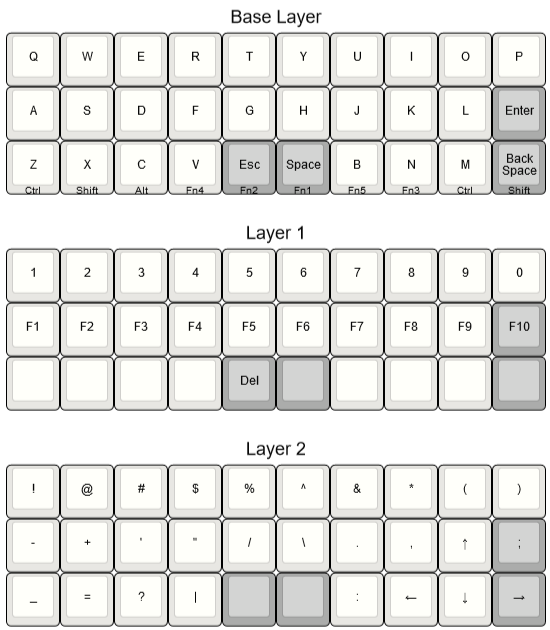
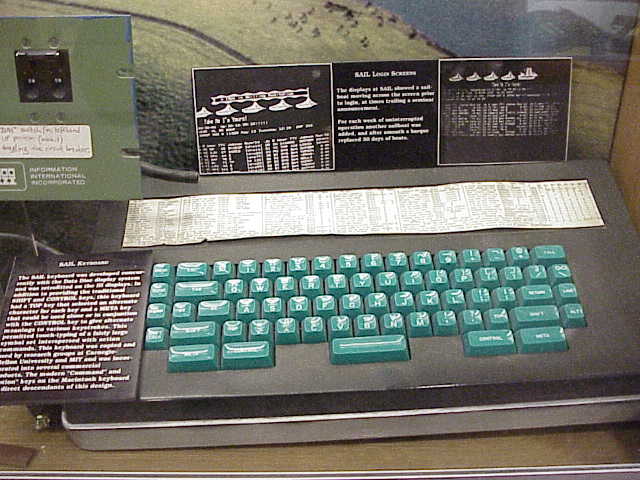
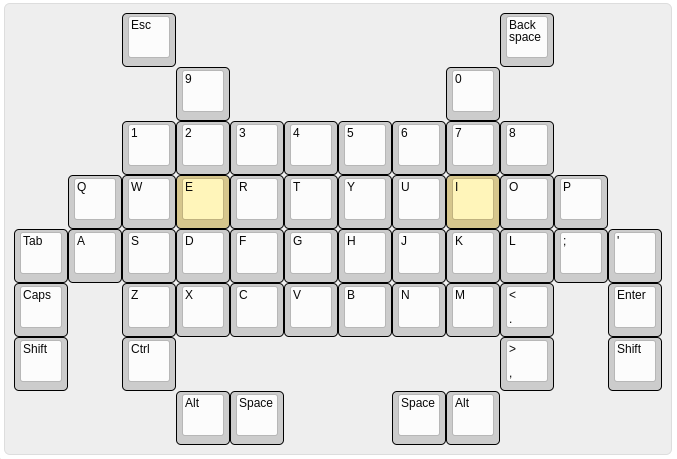 onyx hinge
pylint 3.9 (standard on debian testing / bullsye) is incompatible with the learn repo github 😕
pylint-3: AttributeError: module '_ast' has no attribute 'Str'. Tried to use pylint for the first time, this does not look right: $ pylint-3 -h Traceback (most recent call last): File...
idle owl
Yeah the Learn repo is still on 1.9.2 😢
onyx hinge
It will get harder to stay on 1.9.2, but it's not easy to change either
tulip sleet
again, load this and then powercycle. This removes being able to ctrl-C the rp2pio, which is used to drive neopixels (and uses DMA).
idle owl
onyx hinge
It will get harder to stay on 1.9.2, but it's not easy to change either
Yes I know. To both. I want it changed, but... yeah.
idle owl
tulip sleet
again, load this and then powercycle. This removes being able to ctrl-C the rp2p...
So far so good.
@tulip sleet So is that a viable solution? Or a kludgey workaround?
Display is so far fine. There's random flickers of individual lines of text, but I think that's not related. I think it might be due to how the code works to update part of the line. It's not ending with artifacts or garbage.
tulip sleet
idle owl
<@!329766224093249548> So is that a viable solution? Or a kludgey workaround?
Part of it is clearly right (don't let SPI be interrupted by ctrl-C). Not being allowed to interrupt an rp2pio transaction is probably also good, because it could be used for something like SPI. For the neopixel case, it should not matter. I know there is still some underlying DMA problem. But we can take this for now and I will continue to work on the DMA issues, and maybe undo some part of this later.