#circuitpython-dev
1 messages · Page 375 of 1
 idle owl
 lone axle
hmm that was my first thought
idle owl
Right?
I thought I was so slick figuring it out.
Hold on, I can do it and give you the failure.
lone axle
okay cool, maybe it's because it tries to read the value later in one of the other prompts should be some way to get it going though.
idle owl
Oh come on.
It worked this time.
Well, almost. There's a space after Product Name. pid [0]: 4458 sensor_name []: Product Name directory_name [Product Name_pcb]: sensor_description []: product_name [Product Name ]: repo_name [Adafruit-Product-Name-PCB]: github_repo_url [git@github.com:adafruit/Adafruit-Product-Name-PCB.git]: product_copy [INSERT PRODUCT COPY HERE]: image_url [https://cdn-shop.adafruit.com/1200x900/4458-01.jpg]: eagle_file_directory []: designer [Limor Fried/Ladyada]:
How do I make the space exist only if there's a description?
I assume it's this "product_name": "{{cookiecutter.sensor_name}} {{cookiecutter.sensor_description}}", adding the space.
lone axle
yep I think you are right. Generally speaking conditionals work like:
{% if condition %}anything in here gets included if condition was true{% endif %}
so something like
"product_name": "{{cookiecutter.sensor_name}}{% if cookiecutter.sensor_description %} {% endif %}{{cookiecutter.sensor_description}}",
I think
oof the line breaks
idle owl
Trying it
I renamed some things, fixing all the usages now.
Got it! @lone axle Thank you so much. This will save me a little bit of time every time I do this. Cheers!
 idle owl
lone axle
idle owl
lone axle
Nice you're welcome. happy to help out
idle owl
Doesn't seem like much, but oi, not having to deal with fixing that every time will help me a lot.
 manic glacierBOT

Thanks. It's a shame I can't use atexit for this. I'm thinking mini-game code that potentially has a big while loop, and I'm assuming the soft exit doesn't come through as an exception that I could handle with a finally clause. Are there any good patterns for that?
idle owl
@lone axle Hah, apparently the same issue is present in the main cookiecutter. Choose from 1, 2 [1]: github_user [adafruit]: author_name: Kattni Rembor company [Adafruit Industries]: library_name: Simple Text Display library_description []: A helper library for displaying lines of text on microcontrollers with built in displays. library_keywords []: library_prefix [adafruit]: adafruit_pid []: requires_bus_device []: no requires_register []: no other_requirements []: pypi_release [yes]: no sphinx_docs [yes]: gives adafruit_simple text display.py
I don't even have a clue where to start fixing that. Wait..... is that what your PR fixes?
lone axle
I think it is one of the things.
there were several spots that ended up needing changed up a bit.
idle owl
Yeah I would assume so.
Hmm ok. Can you take a look at that PR? I pinged you on it anyway for other reasons. It looks mostly done?
lone axle
Yep, just noticed further updates on that. and realized I missed a hug report this week for patrick, will get it in next week.
idle owl
@lone axle I just tested your PR and ended up with an empty folder with .github in it. Am I missing something?
At least I'm pretty sure I checked out the PR. I used the gh command
lone axle
odd, I ended up with files inside of there when I run it
idle owl
Let me try again.
lone axle
 lone axle
to run it you did gh pr checkout 140 and then cookiecutter path/to/cookiecutter-adafruit-circuitpython/ ?
idle owl
I ran cookecutter . for running it from inside the repo directory. Is that wrong?
and yeah that's the gh I ran.
lone axle
I tend to do it from one directory above so I end up running cookiecutter cookiecutter-adafruit-circuitpython/ and the new library gets created along side of the cookie cutter repo
idle owl
Ok let me try that.
Same empty directory.
@lone axle Wasn't there a second jinja directory causing issues?
Is it that it wasn't removed locally for me?
lone axle
Hmm yeah must be something else going on, I just verified I am able to use cookiecutter . as well and that does generate the files as expected for me.
Ah that is true when those PRs got crossed and it introduced a second one. I'm not sure how it decided which to use.
idle owl
This is my cookiecutter repo directory.
 lone axle

 still zephyr
Will do 🙂
idle owl
@lone axle That made it work.
@lone axle I'm going to merge this. The README is fixed, I trust the rest already worked.
lone axle
sounds good I believe it should be all good now. if anything else pops up we can get it fixed up in a future PR still
idle owl
For sure.
manic glacierBOT

[adafruit/circuitpython] Pull request opened: #4851 Start to use GitHub caching in the build process
Partial #2969
This aims to cache the download of gcc-arm.zip in the ports-windows.yml workflow using https://github.com/actions/cache
Note: The Windows runners have issues with caching but this implementation (hopefully) works around the current limitations.
- GNU
taris required, but BSDtaris default on Windows. BSDtardoesn't support the required compression of Zstandard (.zsdt) - Even with GNU
taravailable I couldn't get it to store the zip file.
This is achiev...
manic glacierBOT

@ladyada yes a good point! I tried using the 3.3V pin for power using a different version of the test code above, which utilized a different pin and had no luck.
After looking over the detailed pinout I saw that a number of the digital (and analog) pins are routed through the Nina Wifi/BLE module which I'm sure I've seen you mention elsewhere.
**I have tested using the 3.3V and the same pin above, D9, just now and have gotten the NeoPixel test code to run properly with the prope...
manic glacierBOT
In my recent testing, this is affecting samd21 quite a lot and rp2040 essentially not at all. Given that these both now use "softencoder" to interpret the sequence of encoder A/B values (#4580), it tends to point at a problem with sampling at all the necessary moments. samd21 uses pin change interrupts, while rp2040 uses a PIO state machine to sample at a very high rate (over 1MHz) and report all state changes to C code to interpret.
When giving the Adafruit rotary encoder a good swift t...
manic glacierBOT

Added support for the Sparkfun MicroMod SAMD51 board. Board follows a pin layout similar to other MicroMod boards, like the MM RP2040 and MM nRF52840 boards already supported by CircuitPython. This board definition was derived from the Sparkfun SAMD51 Thing+ support, with pin mapping and external flash changes.
I have confirmed the vendor USB PID with Sparkfun.
I’d love a code review. :)

Oh, so it would require to modify TinyUSB if we want to be able to intercept ctrl-C with a full buffer ?
If we can't solve it, then maybe the Mu issue should be fixed over there, since I found the issue really easy to trigger with a Circuit Playground Express for example.
 jaunty juniper
huh releasing 6.3.0 didn't remove the rc0 😒
back to the drawing board (not tonight though)
manic glacierBOT

There is code to watch for a wanted character:
https://github.com/adafruit/circuitpython/blob/26751c9afe612b1b56db1cbf24651f76f93215d1/supervisor/shared/usb/usb.c#L81-L88
which causes this callback:
https://github.com/adafruit/circuitpython/blob/26751c9afe612b1b56db1cbf24651f76f93215d1/supervisor/shared/usb/usb.c#L290-L298
So it does sound like the ctrl-c has not arrived yet.
Tagging @hathach for interest.
jaunty juniper
ah wait, that's because that PR si not part of the selection for the 6.3.0 update !
sigh of relief
still, need to manually remove the rc.0 now 😛
 orchid basinBOT
Since https://github.com/adafruit/circuitpython/pull/4594 is not part of 6.3.0, this has to be done manually again.
Created by a script that filters at the json level, and checked by comparing with git diff --histogram which gives much more relevant results than the default algorithm: it correctly identifies the missing entries in the versions array rather than the mess of comparison of unrelated parts that the default algorithm does.
manic glacierBOT
I don't know if it's the source of the build errors but you've got MP_QSTR_SCL1 again here, it's up at line 61 as well.
manic glacierBOT
The MicroMod board uses the 64-pin SAMD51J20A which doesn't expose a PB18 pin - it doesn't appear until the 100-pin variant.
Removing this line gets it to build for me locally. I don't have one to test with so you'll need to check it works.
manic glacierBOT
That builds for me locally now
make -j8 BOARD=sparkfun_samd51_micromod
Use make V=1, make V=2 or set BUILD_VERBOSE similarly in your environment to increase build verbosity.
{}
QSTR updated

463884 bytes used, 560116 bytes free in flash firmware space out of 1024000 bytes (1000.0kB).
35248 bytes used, 226896 bytes free in ram for stack and heap out of 262144 bytes (256.0kB).

Converting to uf2, output size: 928256, start address: 0x4000
Wrote 928256 bytes to build-sparkfun_samd...Thanks, it should have been PA18
manic glacierBOT
@lesamouraipourpre Looks like CI is happy now. I’ve confirmed the pins against the schematic, and I’ll be testing on hardware, too.
manic glacierBOT

This PR fixes the cursor move escape sequence, ESC[y;xH, added to terminalio.Terminal at #4527. Originally, it is coded as top-left corner as (x, y) = (0, 0), which is fixed as (1, 1) to meet ANSI standard. With this fix, cursor movements on the default DISPLAY screen is correctly reflected on the serial monitor.
 twilit kiln
Hey @tulip sleet.I did coordinate with the Zephyr folks.They did share this link with me https://github.com/zephyrproject-rtos/zephyr/issues/22748, regarding the progress on the pinctrl api.They told me that it can be used for runtime pin assignment, because it makes it possible to construct the pinmux routing at runtime.Can you please have a look once.Like you told me previously that most of the work revolves around build systems, what can I do from now onwards for porting CircuitPython to Zephyr RTOS.

GitHub
Primary Git Repository for the Zephyr Project. Zephyr is a new generation, scalable, optimized, secure RTOS for multiple hardware architectures. - zephyrproject-rtos/zephyr
manic glacierBOT
great, thank you! This seems good to merge if the CI likes it too.
@stonehippo thanks again — can you follow up by adding the board in circuitpython.org? https://learn.adafruit.com/how-to-add-a-new-board-to-the-circuitpython-org-website?view=all https://github.com/adafruit/circuitpython-org/
orchid basinBOT

Ok, it sounds like this removes 6.3.0-rc.0 from under Latest unstable release. Does it replace it with anything else or just remove latest unstable release altogether?
manic glacierBOT
Firmware
Adafruit CircuitPython 7.0.0-alpha.2-755-g9cde8a226 on 2021-06-03; SparkFun MicroMod SAMD51 with samd51j20
Behavior
When connecting the MicroMod SAMD51, the CIRCUITPY drive does not mount, but I can still access the REPL via the serial port. The system is running in safe mode.
Auto-reload is off.
Running in safe mode! Not running saved code.

You are in safe mode because:
CircuitPython core code crashed hard. Whoops!
Att...There is no 7.0.0-alpha release, but I am preparing one and it should be out soon (today or a few days).
Ok cool. Just tested locally and it looks good.
idle owl
@lone axle For cookiecutter, the .py file generated has two copyrights in it, Scott 2017, and the author, this year. Why is that? Scott has written a lot, but not every new library four years ago 😄
manic glacierBOT

I think this can still be related to the problems with gamepad and pewpew, where the interrupts were being disabled. While the worst of it has been fixed, there is still a noticeable jitter, so maybe there are more places like that.
 lone axle
idle owl
<@!382939733107408897> For cookiecutter, the .py file generated has two copyrigh...
lone axle
idle owl
<@!382939733107408897> For cookiecutter, the .py file generated has two copyrigh...
I don't think I've ever been told a specific reason. The conclusion I came to myself though was that Scotts copyright applies to the template, whereas the newer one with the new user applies to the new library file that has been created from the template.
still zephyr
@idle owl hello could you take a look at this PR, to see if you agree with the proposal. thanks 🙂 Just wanted to validate with you https://github.com/circuitpython/CircuitPython_DisplayIO_SwitchRound/pull/4#issuecomment-853832947
idle owl
still zephyr
<@!330227457296957440> hello could you take a look at this PR, to see if you agr...
Done.
still zephyr
idle owl
Done.
WOW Thanks 🙂
idle owl
Anyone have a PyPortal Titano they can test something for me? I know I have one but I'm struggling to find it.
orchid basinBOT

Automated website update for release 7.0.0-alpha.3 by Blinka.
New boards:
- sparkfun_samd51_micromod
- cp_sapling_m0_revb
- sensebox_mcu
- atmegazero_esp32s2
- adafruit_macropad_rp2040
- cytron_maker_pi_rp2040
idle owl
Nevermind, found someone with a Titano.
orchid basinBOT
Do not merge until circuitpython builds are complete.
idle owl
@gilded cradle You around for a quick discussion about a helper lib I'm working on?
I'm extracting SimpleTextDisplay out of the CLUE library into its own helper. https://github.com/adafruit/Adafruit_CircuitPython_CLUE/blob/f879c341765bcf0506013aa9037f91aaf6e673a7/adafruit_clue.py#L63 and https://github.com/adafruit/Adafruit_CircuitPython_CLUE/blob/f879c341765bcf0506013aa9037f91aaf6e673a7/adafruit_clue.py#L889.
 frozen flume
How can I make this box appear on my board? https://circuitpython.org/board/atmegazero_esp32s2/

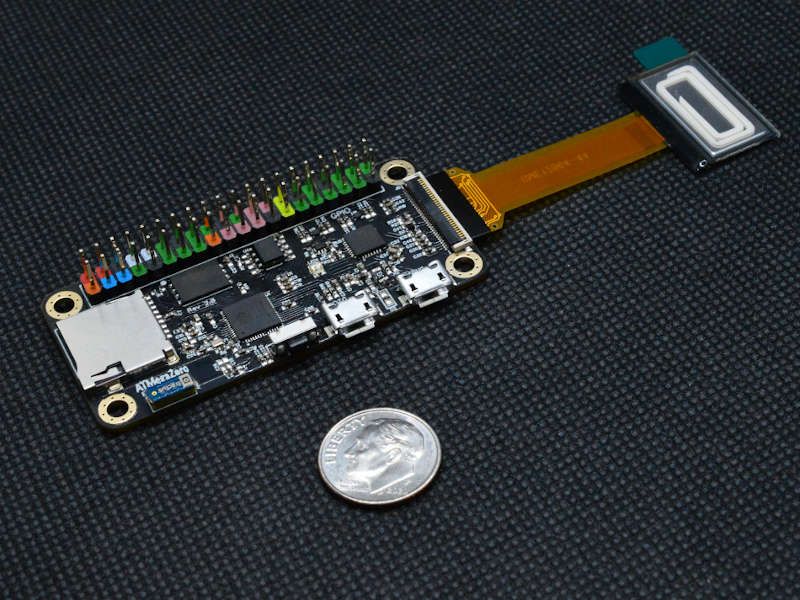
** COMING SOON! **Introducing the new ATMegaZero ESP32-S2Features: 32-bit 240 MHz single-core processor 16 MB SPI Flash 8 MB extra PSRAM 2.4 GHz Wi-Fi - 802.11b/g/n 3D Antenna Raspberry PI Zero form factor SD card slot OLED Display ConnectorLearn More ATMegaZero Official WebsitePurchase ...
idle owl
@frozen flume It would have needed to be included in the 6.3.0 release.
There will be a 7.0.0-alpha.3 soon which will show up similarly. And is a direct download, so folks don't have to deal with S3.
frozen flume
I haven't seen it show up and it's been a while
I've seen a few releases and nothing
idle owl
The 6.x releases were a different branch. Dan's working on the 7.0.0 release right now.
There hasn't been a 7x yet which is why it hasn't shown up.
frozen flume
ah ok, that makes sense. Thanks for your quick reply 🙂
idle owl
You're welcome! Dan's literally working on the release as we speak. I believe he's out for a few days, so if it doesn't get out today, it'll be next week. But that's when it'll show up.
@lone axle Display Text question, if you have a moment.
lone axle
idle owl
<@!382939733107408897> Display Text question, if you have a moment.
yep, whats up?
idle owl
lone axle
yep, whats up?
Label. Has max_glyphs. If you give it a number, and then enter more characters than that number, it should fail right? Or did something change in how that works.
Here I specify 45, but I can enter WAY more than that and it displays them all properly: https://github.com/adafruit/Adafruit_CircuitPython_CLUE/blob/f879c341765bcf0506013aa9037f91aaf6e673a7/adafruit_clue.py#L140
lone axle
Two things: BitmapLabel has mostly the same API and never did have the max_glyphs restriction, so generally I recommend folks to use that one instead of Label. But also that max_glyphs inside of Label was tied to the max_size inside of displayio.Group which did end up changing in the core and there is no longer a max_size restriction on Groups which means that Label will no longer fail if you go over the max_glpyphs value. We could probably remove max_glyphs all together from Label to avoid confusion.
idle owl
Ahhh.... ok
Right on.
On both counts.
I'll see about converting this to BitmapLabel
 gilded cradle
idle owl
<@!478616919721771019> You around for a quick discussion about a helper lib I'm ...
gilded cradle
idle owl
<@!478616919721771019> You around for a quick discussion about a helper lib I'm ...
Sure @idle owl
lone axle
I'll throw it on my list to PR Label to remove that max_glyphs parameter.
idle owl
lone axle
I'll throw it on my list to PR Label to remove that max_glyphs parameter.
Perfect thank you.
idle owl
gilded cradle
Sure <@!330227457296957440>
I'm extracting SimpleTextDisplay out of the CLUE library into its own helper. https://github.com/adafruit/Adafruit_CircuitPython_CLUE/blob/f879c341765bcf0506013aa9037f91aaf6e673a7/adafruit_clue.py#L63 and https://github.com/adafruit/Adafruit_CircuitPython_CLUE/blob/f879c341765bcf0506013aa9037f91aaf6e673a7/adafruit_clue.py#L889.
lone axle
If everything is working as intended it should be as easy as changing the import and constructor over to BitmapLabel, everything else should work the same as with the regular Label.
idle owl
@gilded cradle Within the CLUE library, the imports for the text display are INSIDE the class because we didn't want them to tie up the display stuff unless you wanted it.
gilded cradle
idle owl
I'm extracting SimpleTextDisplay out of the CLUE library into its own helper. ht...
Ok, I'll taking a look...
idle owl
But since I'm extracting it into its own library, I can just import at the top right? Because you have to have those things if you're using this new library.
So there's no point in doing the funky inside-the-class-imports.
idle owl
lone axle
If everything is working as intended it should be as easy as changing the import...
Oh nice. OK. Thanks
gilded cradle
Yeah, that's what I did with the FakeRequests library
idle owl
gilded cradle
Yeah, that's what I did with the FakeRequests library
Right on, ok. Simply wanted to make sure I wasn't missing something. Thanks!
gilded cradle
idle owl
Right on, ok. Simply wanted to make sure I wasn't missing something. Thanks!
Nope, it should be pretty straightforward.
The hardest part is just getting all the new library framework all set up.
idle owl
Yeah, and tweaking this for other updated code.
idle owl
lone axle
If everything is working as intended it should be as easy as changing the import...
I did from adafruit_display_text import bitmap_label as label and everything works. Is that sufficient?
lone axle
yep that works as well. if you rename it in the import like that then there is no need to update any of the rest of the code.
idle owl
Right on. I tried renaming it everywhere and it got sad. So I did the import trick instead.
Wanted to make sure it was actually doing what I thought it was.
idle owl
@lone axle board.DISPLAY is only available for boards with built in displays, right? And if you connected a display to a board, it would involve multiple pins. But you could create a display object with multiple pins and then feed it into something else as a single object, right?
Trying to figure out if this simple text display thing can be used with non-built-in displays.
lone axle
yep, I tend to do it with renaming like that so that I can easily switch code back and forth to test both types of labels. So that is definitely a correct way to do it.
That is correct board.DISPLAY won't exist on devices without a built-in screen. Instead the user would set up the Fourwire and end up creating a display object using the driver matching their hardware.
idle owl
But the FourWire thing ends with a single display object?
so if there's a display= kwarg, you could feed it that?
lone axle
yep, that is correct and that is probably how I would approach it as well.
idle owl
Ok
lone axle
https://github.com/adafruit/Adafruit_CircuitPython_DisplayIO_SSD1306/blob/master/examples/displayio_ssd1306_simpletest.py here is a good example that sets up the external display
idle owl
Ah thanks.
lone axle
line 34 creates the display object and once that object is created you call show() on it just like you would board.DISPLAY for a built in one.
idle owl
excellent.
 tulip sleet
FYI, 7.0.0 alpha.3 is released. Blog post scheduled for 2pm EDT. circuitpython.org will update as soon as its job runs. Uploads are all there (except for one stuck job; the duplicate run that always happens will cover that).
idle owl
tulip sleet
FYI, 7.0.0 alpha.3 is released. Blog post scheduled for 2pm EDT. circuitpython.o...
Thanks so much, Dan!
 slender iron
thanks for the release @tulip sleet !
manic glacierBOT

Do we want to use essentially the same release action from the libraries? if so I can PR that, or if there is a different way that is needed I'd be happy to give it a try, but may need further direction.
Ya, I think so. I think the existing releases were manually done. Following the library approach is a good idea.
 idle wharf
@slender iron may I join the Deep Dive thing (role\group). Reminders sound great !
manic glacierBOT
[adafruit/circuitpython] New comment on issue #4849: Automate including only used pins in pins table
It might be better to go one step further and extract the board -> pin mapping and then generate the MCU and board tables. (MicroPython has csv files I think.)
slender iron
idle wharf
<@!252717193496756235> may I join the Deep Dive thing (role\group). Reminders s...
done! thank you!
idle wharf
Thank me... you do all the diving! Thank YOU !
manic glacierBOT
Thanks. It's a shame I can't use atexit for this. I'm thinking mini-game code that potentially has a big while loop, and I'm assuming the soft exit doesn't come through as an exception that I could handle with a finally clause. Are there any good patterns for that?
The MicroPython merge brought in atexit functionality but they lumped it into sys so I disabled it. It shouldn't be too hard to move and enable.
You may be interested in #3454 which was done with game code in mind too. ...
Oh, so it would require to modify TinyUSB if we want to be able to intercept ctrl-C with a full buffer ?
If we can't solve it, then maybe the Mu issue should be fixed over there, since I found the issue really easy to trigger with a Circuit Playground Express for example.
What is the state of circuitpython when this happens? If nothing is reading the serial then I'm not sure the ctrl-c is ever actually sent from the host. TinyUSB won't accept more CDC data if it's buffers are full.
Triple check your SPI flash pinout. If it was trying to construct a static busio.SPI on the wrong pins it'll try to raise an exception which requires an allocation.

Instrumentation shows that the issue is that occasionally the PIO input from the Pico is returning a zero bit in a result word when it should be a one. As a result, the code detects that as an edge change and returns the short value. The logic analyzer confirms that the pulse coming in from the HCSR04 does not have any drops in the signal. Changing pins and voltages does not have any effect on the issue. Will pursue what might be done to correct this.
 ionic elk
@lime trellis @tulip sleet off this week but we can definitely start an issue for SAMD low power. The new internal structure should make it easier for community contributors to help, too. I imagine SAMD features will probably be closest to STM32, as opposed to more unusual implementations like NRF or the RP2040
slender iron
anyone with an m0 bluefruit want to help test: https://github.com/adafruit/Adafruit_CircuitPython_BluefruitSPI/pull/20
GitHub
Using command() and command_check_OK() locks up the processor for a significant amount of time.
This is problematic for use cases where we need to hand back control to the caller as soon as possibl...
slender iron
ionic elk
<@!492049388152029185> <@!329766224093249548> off this week but we can definitel...
Issue is here: https://github.com/adafruit/circuitpython/issues/4837
manic glacierBOT
Take changes from https://github.com/micropython/micropython/pull/3694 (expected to be merged soon) as well as other accumulated stuff from upstream that we want.
Leave our desired differences, including:
- silencing warnings in python3
- renaming the file descriptors returned by openpty()
- adding ulab tests
- Adding "." to the import path for skip_if
This speeds up make test_full and should also reduce the time in CI a little bit.
Yeah, checked it against the schematic a couple of times, but will do it again.

The common challenges, in my experience:
- Debugging, as Scott mentioned. Using a Saleae logic analyzer is useful, since you can manually yank some designated test pins up and down to help measure timing and detect problems.
- Making sure alarms correctly re-enable after triggering in light sleep, or don't trigger repeatedly/constantly.
- Determining the differences between viable triggers for deep sleep vs light sleep (often RTC is basically the same, but PinAlarm uses totally different...
 blissful pollen
During "in the weeds" a couple weeks ago discussing the FunHouse display it was mentioned it would probably need a saleae to figure the timing out. Been thinking of getting one but wondering is the basic Logic 8 probably enough or worth the extra to get the Pro? Not sure if anyone working on CP has an opinion on it?
orchid basinBOT
 idle owl
blissful pollen
During "in the weeds" a couple weeks ago discussing the FunHouse display it was ...
idle owl
blissful pollen
During "in the weeds" a couple weeks ago discussing the FunHouse display it was ...
Scott's worked with both, afaik. I have the 8 and it's been enough. I think the Pro goes to higher speeds, so if you're in a situation to need that, get the Pro. Otherwise the 8 is excellent.
blissful pollen
Thanks, yeah I saw the speed was the main difference and not sure if I'd ever need it, but I'd hate to buy it and a month later wish i'd go the better one
still zephyr
@ember iris 🙂
 ember iris
How's it going haha
still zephyr
ok so the any reference
sphinx will tell you the number of the problem as normal python code does, however sphinx only counts from the start of the """
so adafruit_sgp40.SGP40:29: will be in line 29 of the docstring
probably you mentin somenthing enclosed with ....
with backsticks and sphinx could not find the reference to that, sphinx will look in the function, the class documentation, and lastly the interphinx mapping
to look for the reference enclosed in the backsticks.
ember iris
Ok, based on that I'd guess it's upset about,
(...) you can access the class function `sgp.measure_raw` for a humidity compensated raw reading
still zephyr
so easy fix, would be to enclosed in doble backsticks
yes
if this is a function
you need to do it like this :meth: ` measure_raw
and end with another backstick
:meth:`measure_raw`
as mentioned before sphinx will look for in the class for that method so the sgp most of the time is not needed
ember iris
Ok, I'll do that and drop the leading sgp.
still zephyr
yeah try, if everything fails you could use double backsticks, it is accepted in sphinx, and in our design guide 🙂
the difference, is for the user when you use the :meth: method the user could clik and go to the function definition directly, with double backsticks they could not
ember iris
Huh, I didn't know that. That's really nifty
still zephyr
yes 🙂
ember iris
Ugh I need to set aside a weekend to just take a crash course in sphinx
but learning experiences are worth it
😄
still zephyr
Happy to help.. sphinx has a steep curve, and sometimes does not behave as expected...
manic glacierBOT
The pins that talk to the Flash aren't defined in pins.c
PA08, PA09, PA10, PA11, PB22, PB23
I don't know what names they need to be defined with in pins.c.
Ref: https://cdn.sparkfun.com/assets/1/d/3/e/b/SparkFun_MicroMod_SAMD51_Processor_Board_Schematic.pdf
<img width="431" alt="Flash" src="https://user-images.githubusercontent.com/70200140/120720967-e0dac580-c4c4-11eb-8f1e-ad5bbd8ef0a3.png">
ember iris
still zephyr
Happy to help.. sphinx has a steep curve, and sometimes does not behave as expec...
Thank you for this help, this part of the pull request--the documentation--was honestly most of what felt daunting
and woo on my end the checks have passed
still zephyr
ember iris
Thank you for this help, this part of the pull request--the documentation--was h...
Nice, Good 🙂
ember iris
still zephyr
Nice, Good 🙂
Woo and they passed on the pull request as well!
Ok
So, on my end I need to remove the register library from the requirements, and then what else needs to change--what am I looking for to see what I've missed and need to change before the pull request can be completed
still zephyr
ember iris
Woo and they passed on the pull request as well!
Ok
So, on my end I need to remo...
Not sure I would do a review probably tomorrow, and I will put my comments
ember iris
Fantastic! And thank you for all of your help through this. I'll get the register reference removed then push that commit this evening so it should all be ready, plus any loose ends I notice
still zephyr
ember iris
Fantastic! And thank you for all of your help through this. I'll get the registe...
yes no problem, is the register library also in the sphinx_intermapping, maybe you could verify the conf.py in the docs directory to check
manic glacierBOT
Ignore me.
They are defined in mpconfigboard.h and the naming matches.
Are the two extra pins !WP(PB22) and !HOLD(PB23) required for operation?
ember iris
still zephyr
yes no problem, is the register library also in the sphinx_intermapping, maybe y...
will do. There's not a call to it in the sgp40.py file so I'm decently confident that it's not used, but I'll walk through every file I can to make sure
still zephyr
ember iris
will do. There's not a call to it in the sgp40.py file so I'm decently confident...
Thanks, I will take a look also
slender iron
blissful pollen
During "in the weeds" a couple weeks ago discussing the FunHouse display it was ...
I'd recommend the Pro for the higher sampling rate. It means you'll be able to monitor faster signals. Have you thought about doing GitHub sponsors? I'd give a little to help offset the cost.
manic glacierBOT
@lesamouraipourpre I don't know. All the board dead I've looked at only needed the basic SPI pins (for example, I only defined those four with the MicroMod RP2040, which uses the same external flash).
I've been wondering if there's a way to see the crash. The system recovers enough to give me safe mode and a REPL, so the flash chip seems likely, but it's hard to operate on guesses. ;-)
blissful pollen
slender iron
I'd recommend the Pro for the higher sampling rate. It means you'll be able to m...
Thanks I'll take a look at it, as it wasn't that much more. I hadn't thought about sponsors, I appreciate it. I'm not sure if I will or not right now. Long story short I finally did my tax refund from two years ago and got some back
slender iron
I think most people get an amount that can help ease getting the nicer thing rather than quitting their day job. 🙂
blissful pollen
Good point. I'll have to look into how I can set it up.
manic glacierBOT
If it works, I'm happy to take it. However, I'm bummed at the weirdness of github actions surrounding actions/cache on windows.
Looking into it a bit more, do we have evidence this is a net improvement in the build time? I compared the run for this build with a main-branch build.
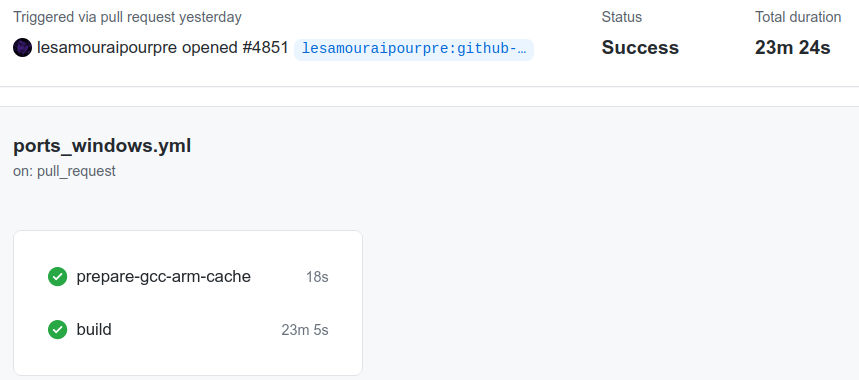
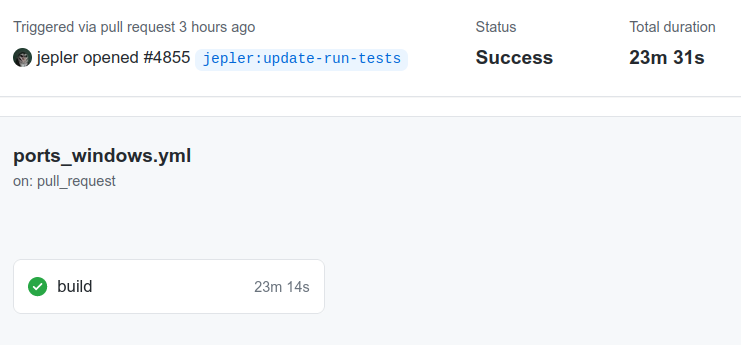
The run for this PR says a slightly lower (better) number for "total duration" but if you add the times for the "pre...
I'm still fuzzy on how this works, but if it passes your testing and the testing I suggested, then let's give it a try. I didn't perform any testing myself.
manic glacierBOT

Ok, I'm new to all things programming and microcontrollers, but after beating my head trying to get multiple spi displays to work with a pico on circuitpython I want to make sure I understand this correctly. There is an artificial limit in circuitpython, that isn't mentioned anywhere, that limits the number of displays you can use to 1. This limit is not mentioned anywhere unless you stumble across this page, and the only way to change it is to compile a custom version of Circuitpython which ...
manic glacierBOT

In updating CircuitPython with the newer versions of micropython, the functionality for getting slice indices was inadvertently disabled.
There is a new flag, MICROPY_PY_BUILTINS_SLICE_INDICES, that is used in objslice.c for turning indices functionality on/off. This flag is currently off so slices no longer support getting indices.
This is a problem in pypixelbuf ([PR and discussion](https://github.com/adafruit/Adaf...
manic glacierBOT
This fixes #4856.
In updating CircuitPython with the newer versions of micropython, the functionality for getting slice indices was inadvertently disabled.
This PR turns on MICROPY_PY_BUILTINS_SLICE_INDICES.
 hollow gazelle
What hardware did you use to support your RS485 needs? I don't seem to find any hardware on @river quest website.
 fallen anvil
@hollow gazelle wow, that's a bit of a necropost! That particular design was custom and had a driver chip on it, but if you've already got rs232 you can use something like this to do the job; https://www.ebay.co.uk/itm/272345452345

eBay
1.On-board MAX485 chip, A low power consumption for the RS-485 communication, slew-rate limited transceiver. 6,Quantity;2pcs,5pcs and 10pcs. Garden & Patio.
There are plenty of other similar ones around, I don't know that specific board or seller so don't treat it as a recommendation.
manic glacierBOT

Small change to exclude tinyusb header file if CIRCUITPY_USB is set to 0
 stone iris
Using circuit python 6.20 (have tried 6.30) getting an issue with microcontroller.nvm on a Raspberry Pi Pico. Can read bytes with no problem but when writing a bytearray either in code.py or in the repl then the system hangs and have to disconnect the Pico. When reconnected a read is showing the bytes have been correctly written. Has anyone an idea of a workround or solution. Thanks
blissful pollen
@lone axle I noticed on your stream you used VSCode, someone on twitter was asking about setting up environments other then Mu, did you have any links/tutorials to set up VSCode for CP? (or anyone else who reads this too)
 analog bridge
stone iris
Using circuit python 6.20 (have tried 6.30) getting an issue with microcontrolle...
analog bridge
stone iris
Using circuit python 6.20 (have tried 6.30) getting an issue with microcontrolle...
@stone iris Can you share your code.py... I did a quick test with following running on pi pico with CP 6.3 and it works fine for me.
@slender iron I just discovered the deep divers role... can you add me to it.
jaunty juniper
analog bridge
<@!511885017887014933> Can you share your `code.py`... I did a quick test with f...
I'm doing tests and it takes writing more than once sometimes but I can repro except... sometimes
analog bridge
import microcontroller
microcontroller.nvm[0] = 1
print(microcontroller.nvm[0])
that can be enough:
>>> import microcontroller
>>> microcontroller.nvm[0] = 0
sometimes it takes doing it twice
slender iron
hollow gazelle
What hardware did you use to support your RS485 needs? I don't seem to find any...
I have a rs485 feather design I use to talk to my tv and stereo
slender iron
analog bridge
<@!252717193496756235> I just discovered the deep divers role... can you add me ...
done!
analog bridge
jaunty juniper
sometimes it takes doing it twice
hmm... I haven't noticed that behavior...
I am doing another test now and trying to fill the complete array, maybe that will make a difference
orchid basinBOT
analog bridge
slender iron
done!
thanks for adding me scott and also a well deserved hug report for the deep dives  👍
👍
orchid basinBOT
analog bridge
@jaunty juniper I did a full re-write... still unable to replicate that behavior.
lone axle
blissful pollen
<@!382939733107408897> I noticed on your stream you used VSCode, someone on twit...
I use PyCharm mostly. No experience wiyh vscode sorry
blissful pollen
lone axle
I use PyCharm mostly. No experience wiyh vscode sorry
No problem. Thanks I'll pass that as an environment choice along too
manic glacierBOT
Fix for issue #4839. Corrected RP2040 Pulsein logic (mostly in the pause and resume functions) to properly handle the HCSR04 ultrasonic distance sensor. Also, tested DHT and Infrared remote sensors to verify that they still work correctly.
idle owl
blissful pollen
<@!382939733107408897> I noticed on your stream you used VSCode, someone on twit...
There's a plugin or extension or whatever VS Code calls them for CircuitPython that probably has instructions. I haven't dealt with it, but apparently it's nice.
I also use PyCharm, but it doesn't feel like it's designed for a CP workflow, you kind of have to massage it, or make your own workflow that works in PyCharm.
Atom has a plugin as well. That I haven't done much with.
(I enjoy PyCharm.)
blissful pollen
idle owl
There's a plugin or extension or whatever VS Code calls them for CircuitPython t...
Oh cool thanks. I'll pass that along as well! I think I installed the CP extension for VSCode but never used it
analog bridge
stone iris
Using circuit python 6.20 (have tried 6.30) getting an issue with microcontrolle...
I think I get the issue you are facing... are you trying to write multiple bytes individually?
If yes, then I would recommend the following method...
microcontroller.nvm[0:3] = b'\x00\x01\x02'
writing multiple bytes individually is very inefficient as it involves a complete flash erase each time a new byte is written...
the above method writes multiple bytes at once so only one flash erase is required
idle owl
@candid sun Hey! I'd like to help you add a page template to your guide for the install.
still zephyr
@ember iris 🙂
ember iris
I was just about to grep through an see if there's a trailing reference to busio then ping you
still zephyr
@ember iris do you want to trade places?
🙂
please?
could you review this PR? https://github.com/adafruit/Adafruit_CircuitPython_SHTC3/pull/11
ember iris
haha I can certainly try, but I'm still getting a feel for this so a second set of eyes past me would help too
still zephyr
this one is documentation only, I would like fresh eyes to see if I missed something 🙂
ember iris
Will do, let me take care of this really quick then I'll review it. Fair warning I'm a dreadfully slow reader so it might take a bit
still zephyr
Thank you very much, really appreciated
idle owl
@slender iron Are the CP reports supposed to be running as you? Running GitHub checks as tannewt
slender iron
probably not 🙂
idle owl
Didn't think so.
still zephyr
@idle owl hello
idle owl
Hello
manic glacierBOT
Ok, I'm new to all things programming and microcontrollers, but after beating my head trying to get multiple spi displays to work with a pico on circuitpython I want to make sure I understand this correctly. There is an artificial limit in circuitpython, that isn't mentioned anywhere, that limits the number of displays you can use to 1. This limit is not mentioned anywhere unless you stumble across this page, and the only way to change it is to compile a custom version of Circuitpython whic...
idle owl
@still zephyr We can continue any discussion here.
still zephyr
So, I think the problem is in here
still zephyr
htmlhelp_basename = "Adafruit_CircuitPython_Simple_text_display_Librarydoc"
 candid sun
idle owl
<@!347203168121126912> Hey! I'd like to help you add a page template to your gui...
candid sun
idle owl
<@!347203168121126912> Hey! I'd like to help you add a page template to your gui...
hi! thanks, i'm free the rest of the afternoon 🙂
still zephyr
it needs to be comparing with all the rest of the librarieshtmlhelp_basename = "Adafruit_CircuitPython_Simple_text_displayLibrarydoc"
The other libraries does not use the underscore
idle owl
candid sun
hi! thanks, i'm free the rest of the afternoon 🙂
Great! Do yo you went to vid chat? Might be quickest.
idle owl
still zephyr
The other libraries does not use the underscore
Ah ok, well give it a try. We can merge it and see what happens! It's a new lib so we have room to mess with it.
candid sun
idle owl
Great! Do yo you went to vid chat? Might be quickest.
yes sounds good!
still zephyr
idle owl
Ah ok, well give it a try. We can merge it and see what happens! It's a new lib ...
Will do Thanks (y)
manic glacierBOT

Tested hcsr04_simpletest on a feather rp2040 -- works normally.
also verified tht it still work on a feather m4
Thank you!
I've been wondering if there's a way to see the crash. The system recovers enough to give me safe mode and a REPL, so the flash chip seems likely, but it's hard to operate on guesses. ;-)
The easiest way is to connect a debugger and set a breakpoint on reset_into_safe_mode that'll stop you before the reset.
still zephyr
Thank you @ember iris 
ember iris
still zephyr
Thank you <@!459119350851567626> <:neokey:844950639250898955>
Woo! Thanks for asking!
 raven canopy
idle owl
<@!252717193496756235> Are the CP reports supposed to be running as you? `Runnin...
raven canopy
idle owl
<@!252717193496756235> Are the CP reports supposed to be running as you? `Runnin...
(& @slender iron) when run on Actions, the best i could determine in the past was that the "user" is determined by the person that made the last merge. my guess is that the git user is derived via the github.actor env var in the Actions runner instance.
slender iron
I think it's based on what API key the script uses
raven canopy
that could be true as well. is adabot's key not separate in the repo, though?
still zephyr
@idle owl PR is ready for the simple_text.
hollow gazelle
slender iron
I have a rs485 feather design I use to talk to my tv and stereo
is that rs485 feather an adafruit product? - here's my $$$ 🙂
idle owl
still zephyr
<@!330227457296957440> PR is ready for the simple_text.
Merged.
idle owl
Hmm.
still zephyr
dahs_display built without any problems, so it has to be something after.
idle owl
The docs are there. It's the subproject that's the issue it seems like.
still zephyr
yes the docs are perfect, but somehow readthedocs could not find the link
idle owl
It's my fault.
Hold on.
I named the slug wrong.
It's fixed.
I'm sorry for sending you down a rabbit hole!
still zephyr
🙂
still zephyr
just for my info what is the slug?
idle owl
OK, so first you import a project into RTD. Then you have to add it as a subproject to the CircuitPython RTD project.
When you add it, you have to give it the doc name, which is what determines the URL.
I put in simple-display-text instead of simple-text-display.
So the URL was swapped.
idle owl
That's why it was building and passing, but the URL was 404. I should have checked that first.
slender iron
hollow gazelle
is that rs485 feather an adafruit product? - here's my $$$ 🙂
its rs232 not 485 (my bad): https://oshpark.com/shared_projects/cPoaWCOm
idle owl
The circuitpython URL specifically.
still zephyr
I understand, well that is good, now we know
manic glacierBOT

Which library are you trying to move to 7.0? If it is an mpy then you'll need to snag one from a 7.x bundle or release zip.
I was trying out adafruit_irremote and assumed there weren't any builds for 7.0 because they don't appear on the libraries page, but I found the CircuitPython Bundle releases page after your comment.
It does work now and recognizes the command from my remo...
hollow gazelle
fallen anvil
<@649453464988155906> wow, that's a bit of a necropost! That particular design w...
Thanks, I ran across that - I was hoping to find some RS485 hardware that directly runs circuit python
today I've got my PC talking to one of these - maybe time to try blinka?
https://ftdichip.com/products/usb-rs485-pcb-pcb-only/
 jaunty juniper
oh hey now that we have an alpha release, there should probably be a link to the 7.x bundle on https://circuitpython.org/libraries
still zephyr
@jaunty juniper the comment in this PR https://github.com/adafruit/Adafruit_CircuitPython_ESP32SPI/pull/115#issuecomment-853721812. Are you in favor of the changes, is that a correct assumption?
jaunty juniper
still zephyr
<@!199811382793863168> the comment in this PR https://github.com/adafruit/Adafru...
yeah, I think the changes make sense, upon tests it works, though the library itself is not very solid but that's a different problem
jaunty juniper
it really only uses parse_headers from requests, (which is not even in the requirements.txt apparently)
manic glacierBOT
Ok, I don't understand how there's a VM using circuitpython on a pico but there is, and displays outlive it, and because they take space when not in use there is a tradeoff. I try to figure out what that actually means somewhere else, but it means there is a reason.
I thought I would have to comment out the pin check to have 1 command and 1 reset pin for all displays, but maybe I mis-understand what was said or how it works.
Lastly, yep, the stream deck is a single display. I still wa...
still zephyr
Yes I remember that much while testing Anecdata PR
hollow gazelle
slender iron
its rs232 not 485 (my bad): https://oshpark.com/shared_projects/cPoaWCOm
no worry, in my case, the RS485 is needed for industrial communication, but in searching the discord and forums, it seems it is also useful for robotics.
( so far, it appears that even though we have CAN feathers, we don't have a RS485 feather or hat. - need to get something from sparkfun and get a soldering iron )
manic glacierBOT
if you happen to be using a display with drivers supported by https://github.com/adafruit/Adafruit_CircuitPython_RGB_Display you can use it WITHOUT displayio as just a 'raw RGB' display. it will not be nearly as capable or as fast, but you can draw basic shapes https://github.com/adafruit/Adafruit_CircuitPython_GFX
Thanks @tannewt. I'll give that a try this weekend.
jaunty juniper
analog bridge
I think I get the issue you are facing... are you trying to write multiple bytes...
I am able to reproduce... something... every time now:
- nuked and flashed a pico with CPY 6.3.0
- open code.py, modify and save
- connect to REPL and do
import microcontrollerandmicrocontroller.nvm[0] = 5 - hang
Can you repro that ?
maybe even ctrl-C ctrl-D, just any soft reboot ? not sure
manic glacierBOT
I tried that last night with my ssd1331 since it is an option and had no luck. I'll try again tonight. Thank you.

@tannewt Couldn't you just have the concept of a primary display that has that additional functionality of persisting and additional ones being instatiated as non-primary ones with a different life cycle?
manic glacierBOT
stone iris
@analog bridge @jaunty juniper positive it was all working a couple of days ago but microcontroller.nvm is changing whether writing a single byte or a byte array as per the code example given
Hanging not changing. The bytes are being written though.
tulip sleet
stone iris
<@747673663419187281> <@199811382793863168> positive it was all working a couple...
Could you open an issue with your example? Thanks.
manic glacierBOT

I had the same issue and found that I had mistakenly used ' 's around the port number in the secrets file.
Removed the quotes and it works fine now, featherS2 to Mosquitto broker up and running.
manic glacierBOT
@tannewt @dhalbert what does the SPI_FLASH_FILESYSTEM = 1 flag in do in mpconfigboard.mk? It was in the Sparkfun Thing Plus board definition, and I left it in when I created the MicroMod def, but I just realized it's not always present. I didn't have the MicroMod RP2040 def, for example. I'm wondering if the issue here is that this needs to be swapped for QSPI_FLASH_FILESYSTEM.
OK, yeah, I think it's the SPI_FLASH_FILESYSTEM flag. I the nvm.toml repo and the Sparkfun SAMD51 Thing Plus uses an AT25SF041A, which is SPI, and the MicroMod is using a W25Q128JVPM, which is QSPI. I'm going to try making that change and building.
manic glacierBOT

Contains following modifications:
- Mark
esp32s2andraspberrypias stable. - Add link to module support matrix.
analog bridge
jaunty juniper
I am able to reproduce... something... every time now:
- nuked and flashed a pic...
@jaunty juniper I replicated the steps... still unable to reproduce the issue.
jaunty juniper
uggggh computers
orchid basinBOT

This is to add the CP Sapling Rev B to the CircuitPython.org site. Everything worked locally so hopefully there isn't any issues.
weird.. the files I need added are supposedly conflicting... also, weird straggler in there..
manic glacierBOT

This adds some steps in the actions workflows to upload the generated stubs to pypi.
It seems to fail for something about an invalid version number when it runs on my fork. But I was able to successfully test it by changing the version string to be hard coded instead of generated dynamically inside of setup.py I'm hopeful this issues is related to being a separate fork on the repo and won't be a problem on this real main branch.
The test pypi listing for the successful test can be fou...
twilit kiln
Hey @tulip sleet.I did coordinate with the Zephyr folks.They did share this link with me https://github.com/zephyrproject-rtos/zephyr/issues/22748, regarding the progress on the pinctrl api.They told me that it can be used for runtime pin assignment, because it makes it possible to construct the pinmux routing at runtime.Can you please have a look once.Like you told me previously that most of the work revolves around build systems, what can I do from now onwards for porting CircuitPython to Zephyr RTOS.
GitHub
Primary Git Repository for the Zephyr Project. Zephyr is a new generation, scalable, optimized, secure RTOS for multiple hardware architectures. - zephyrproject-rtos/zephyr
tulip sleet
twilit kiln
Hey <@!329766224093249548>.I did coordinate with the Zephyr folks.They did share...
@slender iron had proposed having a meeting with you and your co-mentors to discuss the motivations and scope of this project. I don’t think that happened yet, is that right? Early next week would be necessary for this due to some scheduling constraints.
manic glacierBOT
I tried using QSPI_FLASH_FILESYSTEM, removed the SPI flash pins definitions, and added PB22 and PB23 to the ports so they wouldn't get reset. Result was worse (crashed hard enough to keep me from the REPL) but I think I know why.
The atmel-samd port hardcodes the pins in supervisor/qspi_flash.c:
// The QSPI is only connected to one set of pins in the SAMD51 so we can hard code it.
uint32_t pins = {PIN_PA08, PIN_PA09, PIN_PA10, PIN_PA11, PIN_PB10, PIN_PB11}
The MicroMo...
twilit kiln
tulip sleet
<@252717193496756235> had proposed having a meeting with you and your co-mentors...
Yes I will have a word with them and coordinate accordingly with you regarding the meeting.Thank you @tulip sleet .
manic glacierBOT
Issue #3383. Found an answer online; we need to clear the VREF_ONDEMAND bit before reading SAMD5x voltage. Tested OK on an Itsy-Bitsy M4 Express(SAMD51); I don't have an SAMD54 to test with.
manic glacierBOT
I will test this on Monday or Tuesday with a SAMD51 board that has this problem. Could you point to the solution you found?
manic glacierBOT
manic glacierBOT
Yep, that did it. Switching to QSPI and changing the pins let me boot the board without dropping into safe mode. I'm not seeing the CIRCUITPY volume mount when I connect the device or reset, though. I guess I'll tackle that after I can something in to allow pin selection for QSPI on the atmel-samd port.
manic glacierBOT
Following today's stream I've been thinking more about this and researching PEP440 and think the following changes should be made.
diff --git a/.github/workflows/build.yml b/.github/workflows/build.yml
index 4a478c381..47813766b 100644
--- a/.github/workflows/build.yml
+++ b/.github/workflows/build.yml
@@ -63,14 +63,6 @@ jobs:
       run: |
         python -m pip install --upgrade pip
         pip install setuptools wheel twine
-    - name: Publish stubs
- if: contains...That thread is a thread I started (username "danhalbert"), and reported on some experimentation I was doing. I think that solution ended up not working, but I'll retry it to find out.
That thread is a thread I started (username "danhalbert"), and reported on some experimentation I was doing. I think that solution ended up not working consistently, but I'll retry it to find out.
manic glacierBOT

This is a couple of months old but I found this over in micropython land:
https://github.com/micropython/micropython/commit/11cf742524202fa5fc062f3e6e3040a82f49b190
Which is pretty much the same topic.
Were there any updates for this feature in CircuitPython?
twilit kiln
@slender iron can we please have a meeting tomorrow regarding the CircuitPython port for Zephyr RTOS.Thank you !!
manic glacierBOT

The documentation about math builtin module refers to 2 log functions : log2() and log10() for base-2 and base-10 logarithms : https://circuitpython.readthedocs.io/en/latest/shared-bindings/math/index.html#math.log2
But there is only one math.log() that is implemented and this function give natural logarithm if the base (2d argument) is omitted.
Adafruit CircuitPython 6.3.0 on 2021-06-01; Adafruit Feather M0 Express with samd21g18 ...You need to email me (scott@adafruit.com) and your mentors to find a time that works for us all. I'm on vacation starting Thursday as well. Your mentors need to be there so they can understand the steps as well. They need to be the first place you seek help. We don't have the time to give the detailed help you've asked us for.
manic glacierBOT
@dhalbert , I apologize for not noticing your login! All I can report is that my Itsy-Bitsy M4 Express was hanging before I put the patch in and is now working with the patch.
manic glacierBOT

Thanks, and good to know 👍
I'll be waiting for 7.0.0 then as I'm not desperately needing the onboard RGB LED right now. Enough other stuff to do first 😊
I just tested circuitpython 7 alpha3, and was able to successfully control the RGB on XENON using the adafruit_rgbled library. Code snippet below just sets it to blue, but I was also able to cycle it R->G->B->R... also. It does look like #4743 does correct the issue.
`pixel_pin = board.RGB_LED_RED
pixel_pin2 = board.RGB_LED_GREEN
...
twilit kiln
slender iron
You need to email me (scott@adafruit.com) and your mentors to find a time that w...
Sure @slender iron,I absolutely understand.Thank you very much for giving us your time.Lets finalise the time and day on mail then.
manic glacierBOT
the SH1107 chipset is actually column not row mode (like the SSD1306!) BUT the SH1107 module we use on the featherwing is vertical orientation (confusing!). We should stick to the column mode addressing, but 'rotate' the SH1107 module.
we will have to fix the SH1107 driver to match
this fix required for SH1106 (which uses the same page mode commands but ISNT rotated). Tested on Macropad hardware
manic glacierBOT
 manic glacierBOT

That should not be occurring, MiniMQTT validates if the port is an integer prior to connecting.
https://github.com/adafruit/Adafruit_CircuitPython_MiniMQTT/pull/78
The following pins re-assigned to fix the download issue
- Camera D2: GPIO36
- Camera D3: GPIO37
- AU_I2S1_SDI: GPIO34
- AU_WAKE_INT: GPIO46
At least from Adafruit, the last 2 modules I received were revision 1.3. Revision 1.3 was noted in esp-idf's git in August 2020. (Revision 1.2 was the first public revision and I had 2 mod...
manic glacierBOT
@tannewt an opinion would be appreciated.
manic glacierBOT

Firmware
Adafruit CircuitPython 6.3.0 on 2021-06-01; Raspberry Pi Pico with rp2040
REPL
>>> import microcontroller
>>> microcontroller.nvm[0:3]
bytearray(b'\xff\xff\xff')
>>> microcontroller.nvm[0:3] = b'\x00\x01\x02'
Behavior
The system hangs, no error messages
Description
When it hangs, have to unplug the Pico and plug it back in.
 turbid radish
?serverinfo
 digital shoreBOT
 adafruit
Owner
adafruit#3230
Region
us-west
Channel Categories
8
Text Channels
58
Voice Channels
6
Members
29463
Roles
35

ID: 327254708534116352 | Server Created
·
orchid basinBOT
Make sure you pull the latest changes first. I had already added this board because a release had come out and it was showing as unknown. You may just want to update that.
manic glacierBOT
thankx! dont forget to add to circuitpython.org too :)
thankx! dont forget to add to circuitpython.org too :)
Thanks! It's on my list, just waiting on fancy pictures! :)
manic glacierBOT
@elijahsgh there's a fair amount of backend work behind the scenes that would be required for this to function across ports, so it's not a very high priority for the core team. If someone would like to suggest an API implementation for it for a single port (to fit a particular application they need it for, like the GPS case on STM32), we could put a not-implemented on the others as a holdover.
idle owl
If anyone has a STEMMA QT Rotary Encoder breakout, I'd appreciate some assistance with testing something. Something isn't working and I'm not sure why.
 gloomy shuttle
idle owl
If anyone has a STEMMA QT Rotary Encoder breakout, I'd appreciate some assistanc...
gloomy shuttle
idle owl
If anyone has a STEMMA QT Rotary Encoder breakout, I'd appreciate some assistanc...
I have one and can test something
idle owl
gloomy shuttle
I have one and can test something
Or maybe I'm missing something. But the color changing works. The brightness changing when the switch is pressed does not. It should. Brightness works in seesaw, I tested it separately.
Also it's seeing the switch properly.
I have prints in weird places for testing, sorry, heh.
 thorny jay
Dear CircuitPythonista, have not done any project, PR, successful test or anything. Except for for a group hug in hug report... I don't have much to say. So I will skip the meeting, maybe without notes.
idle owl
thorny jay
Dear CircuitPythonista, have not done any project, PR, successful test or anythi...
Ok. Thanks for letting us know. You're always welcome even when you don't have updates.
gloomy shuttle
idle owl
Also it's seeing the switch properly.
To update brightness you want the button to be held down while rotating the encoder?
idle owl
Yes.
It's kind of annoying, but that's what the Arduino and Rotary Trinkey examples do.
so 🤷♀️
idle owl
gloomy shuttle
To update brightness you want the button to be held down while rotating the enco...
Did I miss something obvious?
seesaw confused me a bit to begin with.
gloomy shuttle
idle owl
Did I miss something obvious?
Your code looks fine, but I believe I am reproducing the same issue your seeing.
the brightness isn't updating
idle owl
Hmph.
blissful pollen
idle owl
Hmph.
Long shot but does the neopixel brightness parameter work? I vaguely recall something about how it was supposed to be set at construction and not updated. I may be totally off here
idle owl
blissful pollen
Long shot but does the neopixel brightness parameter work? I vaguely recall some...
I tested it alone, and it worked. I'm able to set brightness, and it changes.
That was my thought too.
Maybe it can't be changed on the fly through seesaw?
That would be odd.
blissful pollen
Yeah nothing is jumping out at me that is wrong. More so since the color is working
idle owl
If it can be set at all, it should be able to be set.
 tidal kiln
@idle owl what's your code snippet that worked?
idle owl
And no, I don't need to call show() @tidal kiln 😉
idle owl
tidal kiln
<@!330227457296957440> what's your code snippet that worked?
You mean what set the brightness properly?
tidal kiln
yep
tidal kiln
or just try via repl
tidal kiln
are you doing additional pixel setting in the loop?
tidal kiln
yah
tidal kiln
it looks like brightness is only factored in when setting something:
https://github.com/adafruit/Adafruit_CircuitPython_seesaw/blob/5cda48bcd2702737ec24ee5d4d2a921c050a4797/adafruit_seesaw/neopixel.py#L102
idle owl
Hmmmmmmm
idle owl
Right
tidal kiln
so maybe nothing is updating
idle owl
It's only brightness when pressed
ok
So it can't be updated on the fly through seesaw without color also changing or whatever.
Thanks for finding that. I would not have figured that out.
tidal kiln
i think so...looking at library code...
tidal kiln
while True:
    position = encoder.position
    if position != last_position:
        # change the brightness
        if position > last_position:  # increase
            pixel.brightness = min(1.0, pixel.brightness + 0.1)
        else:
            pixel.brightness = max(0, pixel.brightness - 0.1)
        pixel.fill(0xADAF00)
    last_position = position
try that? and just call fill() before loop with some color
idle owl
will try in a bit. meeting time.
gloomy shuttle
if you call fill in the loop it works
idle owl
Doesn't that mean it switches to that color while changing it?
hmm.
Is that worth it?
I guess maybe folks will want to know how to do it. So I guess so.
tidal kiln
yah. that's just a hack to test brightness behavior.
seems like sort of maybe a minor bug in the library? the fact that the brightness setter doesn't actually take effect immediately.
idle owl
@tidal kiln Would you want the hacky version or not have the brightness at all?
tidal kiln
looks like you're just trying to come up with a guide example?
idle owl
Yeah it's a quick example for the guide.
Because using the NeoPixel isn't intuitive.
The Arduino version already uses the neopixel.
But this will go in the seesaw library examples.
tidal kiln
looks like arduino version doesn't do brightness:
https://learn.adafruit.com/adafruit-i2c-qt-rotary-encoder/arduino
just prints "button pressed"
could do that?
gloomy shuttle
it does say this in the seesaw library "# TODO: brightness not yet implemented."
idle owl
I swear I just looked at the Arduino version and it controls the NeoPixel.
tidal kiln
yah, and skip brightness - or just set it once up top
idle owl
We are not looking at the same code.
https://github.com/adafruit/Adafruit_Seesaw/blob/master/examples/encoder/encoder_basic/encoder_basic.ino this does NeoPixel??

GitHub
Arduino driver for seesaw multi-use chip. Contribute to adafruit/Adafruit_Seesaw development by creating an account on GitHub.
Or is wheel included for no reason?
Oh wait I get it
tidal kiln
looks same?
idle owl
doesn't do brightness.
tidal kiln
yah, right, just sets it once
idle owl
Ok, skip brightness.
tidal kiln
but then no change after that
void loop() {
  if (! ss.digitalRead(SS_SWITCH)) {
    Serial.println("Button pressed!");
  }

  int32_t new_position = ss.getEncoderPosition();
  // did we move arounde?
  if (encoder_position != new_position) {
    Serial.println(new_position);         // display new position

    // change the neopixel color
    sspixel.setPixelColor(0, Wheel(new_position & 0xFF));
    sspixel.show();
    encoder_position = new_position;      // and save for next round
  }

  // don't overwhelm serial port
  delay(10);
}
just color
idle owl
Thank you @gloomy shuttle, @blissful pollen and @tidal kiln . Really appreciate the help.
tidal kiln
that TODO note - i guess ideally the brightness math would be taken care of in the seesaw firmware. just hasn't been implemented yet. so, for now, it's in the library:
https://github.com/adafruit/Adafruit_CircuitPython_seesaw/blob/5cda48bcd2702737ec24ee5d4d2a921c050a4797/adafruit_seesaw/neopixel.py#L125-L130
tidal kiln
yah
idle owl
Left brightness out. No need for it really. It works identical to neopixel so easy to do.
tidal kiln
is it crazy bright? the arduino example sets it to equivalently 0.2 in CP
idle owl
Well it's reverse mount, so unless you have it on one particular angle, it's sort of shielded.
eh I'll add it.
Put it to 0.5
Thanks for all the feedback.
tidal kiln
or...might be 20/255?
meh. yah. just some value. having the line there with any value will let people change it as they wish.
idle owl
Exactly.
idle owl
brb
slender iron
me too, water time
turbid radish
Lurking
 sterile bronze
lurking
 modern wing
Likewise, lurking happily 🙂
 onyx hinge
hmmm who has at least one thumb and didn't write their notes? 👎 this guy
idle owl
onyx hinge
hmmm who has at least one thumb and didn't write their notes? 👎 this guy
Yeah I totally forgot too. Scrambling now.
 modern wing
Yesterday? 😉
blissful pollen
Vacation is never soon enough
modern wing
Didn't really hear it, seems like the noise gate is good
onyx hinge
volume's a bit low @lapis hemlock
 lapis hemlock
@onyx hinge @modern wing Thanks!
modern wing

Discord
Check out the adafruit community on Discord - hang out with 29,465 other members and enjoy free voice and text chat.
lapis hemlock
modern wing
Didn't really hear it, seems like the noise gate is good
What is a noise gate?
Is there a noise gatekeeper?
onyx hinge
Next meeting date change: July 4th's meeting is postponed to July 5 at the same time of day.
modern wing
@lapis hemlock An audio setting essentially truncates any loud/excessive noise in one's audio -- it can be a hardware or software tool. And as for the Gatekeeper, there's only Zuul.
onyx hinge
you can sign up for those hot hot rp2040 chips 🙂 https://www.adafruit.com/product/5042

Coming soon! Sign up to be notified when these are in the store!The Raspberry Pi foundation changed single-board computing when they released the Raspberry Pi computer, now they've ...
manic glacierBOT
Just my opinion. It looks like the v1.3 should be more common. (that is what I received but I don't recall when or from where I got it...) I'd like to see 1.3 supported either as the default or as a new version.
I have not tried CP on it yet so you can tell it is not a high priority for me.
 trim elm
Next few days probably, only 90 libraries left to go!
blissful pollen
Is there a process to "take over" an older PR? Just comment and ask if the original author is about?
raven canopy
late...and lurking
onyx hinge
hey @raven canopy good to see you
raven canopy
hey @onyx hinge (and all!)
blissful pollen
Okay thanks, I'll take a look. The GH stuff I can probably figure out eventually
onyx hinge
you can check that the docs have been kept up to date with the code 😁 it's easy to forget/omit as a pull request author
lapis hemlock
onyx hinge
@gilded cradle random question, is "U2IF" counted as a single board in Blinka, or would each different U2IF board be a different Blinka board?
gilded cradle
@onyx hinge I'm not sure. We probably should count it for each board.
modern wing
So you're fixing everything, including the kitchen sink? 😛
onyx hinge
no, only the kitchen sink. everything else is in the same state as it was before
aha I think this is the crank -- an oldie, in effect
lapis hemlock
@idle owl you know that you can cut through the waves with a seesaw, don't you?
modern wing
Thanks everyone 🙂
onyx hinge
Thanks everyone!
gilded cradle
Thanks
lapis hemlock
So long, everyone!👋
raven canopy
thanks all 👋
 solar whale
👋
turbid radish
@fathom raptor, I'll finalize the newsletter once I get the PR
slender iron
👍

 idle owl
All of the CircuitPython libraries have been moved to main!
modern wing
Indeed, enjoy your time off -- especially after this past year of insanity.
slender iron
I just switched the notes repo to main too
onyx hinge
nice, that should cause a minimum of trouble for me, I usually just use the web interface to updatei t
slender iron
yup, me too
solar whale
Finally, a good excuse to delete all my forks and get fresh clones....
gloomy shuttle
@idle owl I just submitted a pull request in an attempt to fix the brightness bug in Adafruit_CircuitPython_seesaw.neopixel
idle owl
gloomy shuttle
<@!330227457296957440> I just submitted a pull request in an attempt to fix the ...
Oh nice!
I'm currently working on adding the example. I can pull down your PR and test it. I think RP2040 can handle that as a .py file.
idle owl
gloomy shuttle
<@!330227457296957440> I just submitted a pull request in an attempt to fix the ...
Merged and released. Thanks so much! Saved me filing an issue. 😄
@gloomy shuttle Disconnected you from audio chat so nobody shows up and startles you.
slender iron
Here is the notes document for Monday’s CircuitPython Weekly meeting. It is at the normal time of 11am Pacific / 2pm Eastern here on Discord. Everyone is encouraged to attend! Please add your hug reports and status updates even if you’ll be attending the meeting - it’s super helpful! If you are unable to attend but would still like to include updates, feel free to include them in the notes and we’ll read them off during the meeting. Hope to see you there! <@&356864093652516868> https://docs.google.com/document/d/10z3OQ1_Pc-cmG-CodmMsbFaebYaV81JSUGb8Tl-ql5o/edit?usp=sharing

Google Docs
CircuitPython Weekly for June 14th, 2021 Welcome to the CircuitPython Weekly meeting notes! Feel free to add your Hug Reports and Status Updates early. During the meeting, we go through them as a round robin sorted by username. If you can’t make the meeting and would still like to participate,...
slender iron
slender iron
Here is the notes document for Monday’s CircuitPython Weekly meeting. It is at t...

 idle owl
OK, folks, the next time circuitpython.org builds, there will be a 7.x bundle available for download. We can stop sending folks to the bundle repo to get the 7.x bundle. FYI. Thanks for all your patience with us as we got to a 7.x release!
manic glacierBOT
I tried this test on CircuitPython 7.0.0-alpha.2 and it worked correctly.
Hi.
I've been reading the Datasheet and the SparkFun Github and the Flash on the SAMD51-Micromod is not QSPI:
https://github.com/sparkfun/MicroMod_Processor_Board-SAMD51/commit/85ee4311319f440b5569dbe4685bf731b0e9c310
* QSPI was removed in place of a secondary SPI port
* ...
Looking at other boards with SPI Flash the WP and HOLD pins are tied to VCC.
Examples:
https://cdn-learn.adafruit.com/assets/assets/000/040/553/large1024/arduino_schem.png?1490994398
https://cdn.spar...
idle owl
@ember iris Be sure to let us know when you're ready to join the review team! You're always welcome to ask questions about how things are done, I know you were concerned about that with the documentation review you did.
@lone axle Good evening! Or afternoon or whatever it is where you are. Are you around for some cookiecutter talk?
manic glacierBOT
@lesamouraipourpre I'll give this a try. It seems that the flash chip can run in SPI or QSPI, and is suspect that PB22/23 work fine for that purpose, as they are SERCOM capable. But I'd rather keep it simple and mimic what they did with the Arduino variant, as you suggest.
I have done a few tests on this, I can definitely reproduce, but it's very inconsistent.
On a raspberry pico freshly erased it seems to happen after a soft reset or a reload or I modify the drive, maybe more than once, maybe while in the REPL, maybe when writing to the same byte. Something like this seems to cause the issue regularly right now on 7:
- plug the board
- connect to the REPL
- press enter (get the
>>>prompt) - open, modify, save code.py
- type in the REPL:
- `>>> ...
lone axle
idle owl
<@!382939733107408897> Good evening! Or afternoon or whatever it is where you ar...
on a call atm, but am available afterward. likely 20-30 minutes or so but not 100% certain
idle owl
lone axle
on a call atm, but am available afterward. likely 20-30 minutes or so but not 10...
Ok, no worries. I might be around or not. Please ping me regardless and I'll let you know my status. Thanks!
orchid basinBOT
We'll need to update at least the following:
https://github.com/adafruit/circuitpython-org/blob/2b36bba74b6820efbefa933ee7bd9a0a0abadf9e/.github/workflows/build.yml#L6
Every board file references master, but will redirect, at least for a while:
https://github.com/adafruit/circuitpython-org/blob/aa754d94214a68d314117ca9f975af2a9eca9a11/_board/aloriumtech_evo_m51.md#contribute
@kattni We should also pull anyone in that is familiar with how adabot commits to the repo, as that may need to...
@jwcooper I'll see what I can do regarding understanding adabot.
This depends on solving all outstanding issues in the following issue:
https://github.com/adafruit/circuitpython-org/issues/711
ember iris
idle owl
<@!459119350851567626> Be sure to let us know when you're ready to join the revi...
I'd be up for joining soon! I am busy today through wednesday but I've really enjoyed all of this!
idle owl
ember iris
I'd be up for joining soon! I am busy today through wednesday but I've really en...
No worries at all! And no rush whatsoever. We'll be here when you're ready. And we understand life happens, so you don't need to be concerned about taking time for yourself.
ember iris
Awesome and thank you! Yeah just some summer chores the next few days which demand attention before the hot weather gets to the midwest
idle owl
It's already here. So I feel you there.
orchid basinBOT
@jwcooper Ok, regarding adabot, it should be good to go, as long as we keep the submodule updated (presumably especially when we move adabot to main).
CircuitPython's release generators (https://github.com/adafruit/circuitpython/blob/c4f685aab1146237917fa36053d7626485330ca9/tools/build_board_info.py#L146 and https://github.com/adafruit/circuitpython/blob/c4f685aab1146237917fa36053d7626485330ca9/tools/build_board_info.py#L221) will need to be updated following the circuitpython-org move....
lone axle
idle owl
Ok, no worries. I might be around or not. Please ping me regardless and I'll let...
Just wrapped up with that call. Am available now if you are around still.
idle owl
lone axle
Just wrapped up with that call. Am available now if you are around still.
Let me go start laundry I should have started earlier, then I'd like to chat.
manic glacierBOT
@tannewt Couldn't you just have the concept of a primary display that has that additional functionality of persisting and extra ones being instatiated as non-primary ones with a different life cycle?
You could but it's not implemented that way. Having things behave differently is tricky.
idle owl
@lone axle Ok. I'm creating a Community Code of Conduct to have in cookiecutter that goes into a lib if "Community" is chosen. I copied the current CoC, and then renamed both of them to basically this: {% if cookiecutter.target_bundle == 'Community' %}CODE_OF_CONDUCT.md{% endif %}
Is that even close to right?
Because I assume it has to have two files with names like that to pick one based on the bundle type.
I'm guessing entirely based on the other files though.
manic glacierBOT
I have a Metro M4 that was exhibiting the voltage hang in 5.3.1. It does not have that problem in 6.3.0, and it also works with your patch. This is the diff of the relevant code between 5.3.1 and 6.3.0:
-#ifdef SAMD51
+#ifdef SAM_D5X_E5X
     hri_supc_set_VREF_SEL_bf(SUPC, SUPC_VREF_SEL_1V0_Val);
-    // ONDEMAND must be clear, and VREFOE must be set, or else the ADC conversion will not complete.
- // See https://community.atmel.com/forum/samd51-using-intref-adc-voltage-refere...Yep, I do think that is right. using the conditional in the filename like that will make it so that the file does exist if the condition was true, and doesn't exist if the condition was false.
idle owl
lone axle
Yep, I do think that is right. using the conditional in the filename like that w...
Oh, wow. Ok. I figured I was way off. It's going into a PR anyway for discussion, so if it needs to be fixed, it can be. But I wanted to at least start from something useful.
tulip sleet
@onyx hinge I tagged you with a testing request here: https://github.com/adafruit/circuitpython/pull/4862#issuecomment-856291286 which you may miss because it's down page. Thanks. This is all pretty mysterious but maybe we can get it to work on all the flaky SAMx chip/boards we have. Tnx.
lone axle
and both will have CODE_OF_CONDUCT.md inside of the if part so that way whichever does get created will be created with that name.
idle owl
lone axle
and both will have `CODE_OF_CONDUCT.md` inside of the if part so that way whiche...
That's what I was going for.
The files will be different.
lone axle
I hadn't run accross the way that it's using the conditionals in the filenames before diving into cookie-cutter it confused me for a bit but eventually I figured out (I think at least) it works the exact same way as it would if it were inside of a file instead of part of the filename.
idle owl
I mimicked what was there and guessed at what it should look like.
manic glacierBOT
This is a couple of months old but I found this over in micropython land:
micropython@11cf742Which is pretty much the same topic.
Were there any updates for this feature in CircuitPython?
This MP change has no guard rails. Any existing clock setups will inadvertently change.
In CircuitPython, we'd want to make sure and dependent clock and their divisors are update. OR we'd w...
Will this release to pypi every push? Ideally we'd have two pypi releases at any time, the stable one and the pre-release one. Otherwise I worry about API mismatches.
Awesome! Thank you!
My preference would be to add a new board with the version number (1.3) in the name.
idle owl
@slender iron We still haven't moved adabot to main - there are a lot of moving parts there. We're working on it. That PR should be merging into master still.
idle owl
I'll merge it.
manic glacierBOT
Have you tried rotation with this? Seems like it'd be broken before and after this change.
Could you link me to the display datasheets?
I do think it would run on every push currently. I'm still very green with github actions, I'm not certain how it specifies what the trigger should be. I think most libraries have a release.yml that gets triggered when releases are made. Perhaps we need that here as well?
I'm also not sure about how to separate out the stable version from the pre-release one if they execute the make stubs in different branches by default it may "just work" without needing to set up anything specific f...
Will this release to pypi every push? Ideally we'd have two pypi releases at any time, the stable one and the pre-release one. Otherwise I worry about API mismatches.
It pushes to PyPI every time there is an upload to S3, so I believe every time a PR gets merged.
It should push a 'RELEASE' version which will match the curated releases and a 'DEV' version which will match the other uploads being pushed to S3. Due to PyPI and PEP440 requirements the github hash cannot be part of the ver...
 tough flax
Hi Folks,
@tulip sleet and I were testing the Dynamic USB descriptor stuff & we found a problem in the HID Report structure. Basically, CP expects a 1:1 mapping of HID device to Report ID. Some HID devices (most importantly for me, Head Trackers and Eye Trackers) define multiple IN, OUT, and FEATURE report types on a single device.
Has this been discussed since we went over it last week? Or should I create an issue? The consensus seemed to be this should be fixed before 7.x since it changed the API for the Dynamic USB stuff.
tulip sleet
tough flax
Hi Folks,
<@329766224093249548> and I were testing the Dynamic USB descriptor st...
I plan to fix this before 7.0.0 final. I will make an issue.
manic glacierBOT
subrectangles = rows_per_buffer / 8; // page addressing mode writes 8 rows at a time
One minor thing plus the colstart and rowstart fix.
The dynamic USB support in 7.0.0 alpha currently assumes that a single HID device (usb_hid.Device) has a single report ID. There are HID devices that need multiple report ID's, such as eye tracking devices.
Currently the API asks for the position of the report ID in the report descriptor, and renumbers the report ID's consecutively. This is unnecessary. The report ID's just need to be distinct in the different devices.
Plan:
- Require that the report ID the user wants is in the repor...
verifying that in 7.0.0 alpha2 this is still happening
Looks good to me! Go ahead and merge once CI gives the OK.
verifying that in 7.0.0 alpha2 this is still happening
Also alpha.3?
manic glacierBOT
er, using main so its latest latest :) it just prints out alpha-2
 atomic summit
Does anyone know what would happen if the there was more than 1 RGB LED (WS or APA) connected to the #define MICROPY_HW_NEOPIXEL (&pin_GPIO18) ? @slender iron will CP just use and display on eh first one?
Like if I had 2 addressable LEDs in the chain, does it just assume it's one and only set the colour on index 0?
That's what I assume it would do, but I wanted to check first
manic glacierBOT

I'm happy to help test this. It's a blocking issue for our use with the Eye Tracker and Head Tracker HID specifications (which are new, but well supported by Windows 10). Here is a PDF of the specification:
https://usb.org/sites/default/files/hutrr74_-_usage_page_for_head_and_eye_trackers_0.pdf
Notice that there are several Report IDs in the descriptor at the bottom of the file.
Thanks Dan!

This looks like this bug: https://github.com/raspberrypi/pico-sdk/pull/457 that dhalbert squashed.
This pull fixes a clock startup glitch specific to a subset of QT Py RP2040s. Flash access takes a trip back through SDK code to get XIP going again (it needs to leave XIP to do the flash write) which also restarts xosc, so that's where it's probably happening.
blissful pollen
atomic summit
Does anyone know what would happen if the there was more than 1 RGB LED (WS or A...
I don't have a way to test it but was looking and the code sets 3 bytes and writes them for the status, so I'd assume you are correct it should only write the first LED in the chain
atomic summit
blissful pollen
I don't have a way to test it but was looking and the code sets 3 bytes and writ...
Thanks Mark - I was going to check the code later today - but thought I might ask here to avoid digging.
blissful pollen
atomic summit
Thanks Mark - I was going to check the code later today - but thought I might as...
If you're looking it is in supervisor/shared/sattus_leds.c in new_status_color()
I was curious so figured I'd learn where it is too
manic glacierBOT
slender iron
atomic summit
Does anyone know what would happen if the there was more than 1 RGB LED (WS or A...
ya, I think it'll only send one pixels worth of data
atomic summit
slender iron
ya, I think it'll only send one pixels worth of data
Thanks for the confirmation!
gloomy shuttle
idle owl
<@!517804297401008138> Disconnected you from audio chat so nobody shows up and s...
Thank you! I didn’t realize I didn’t disconnect before heading out for the day.
manic glacierBOT
The xosc fix I did is included in 7.0.0-alpha.3 and later, so I'm not sure if https://github.com/raspberrypi/pico-sdk/pull/457 is still the reason. @Neradoc, was this a local build of yours? If you git submodule update --initd after pulling, then it would be included.
You could try changing the multiplier from 32 to 64 in ports/raspberrypi/sdk/src/rp2_common/hardware_xosc/xosc.c, in xosc_init().
manic glacierBOT
I am thinking this if statement logic might need to be tweaked. it might also be good to add an else clause that prints a message about being skipped if it does evaluate to false.
I tried merging this over to foamyguy/main (with my own PyPi project name) but as far as I can tell from the actions output seems like it did not do the upload. My best guess is that this came out false and caused it to skip. tonight or tomorrow I will try to tinker some more to add some debugging output to try t...
manic glacierBOT
@dhalbert , @jepler ; I pushed the change to enable microcontroller.cpu.voltage on SAME54. Also did some more testing on a different SAMD51 board. If I take out the call to mp_hal_delay_ms it hangs even with this patch. If I take out the patch it hangs even with the delay. So - maybe we need both?
If I take out the call to mp_hal_delay_ms it hangs even with this patch. If I take out the patch it hangs even with the delay. So - maybe we need both?
Yes, let's have both. I think there may be two problems in the internal circuitry and we have to compensate for both.

I am interested in making sure it is still possible to do NUM/CAPS/SCROLL LOCk catching (that was using the .last_received_report AFAIK).
For me it can be a breaking change, no problem, but that was fun and useful side channel communication and permit nice project.
Just with all the keyboard craze in recent Adafruit product, you may want to make sure we don't lose it.
Very interested anyway in being able to pretend to be some devices, especially if it enable more AT use.
idle owl
This PR will pass eventually. When I follow the guide I wrote with the list of steps to do before a PR. 🤦
idle owl
@still zephyr https://github.com/adafruit/Adafruit_CircuitPython_seesaw/pull/73 if you have a moment.
 ember iris
idle owl
<@!607375730610798634> https://github.com/adafruit/Adafruit_CircuitPython_seesaw...
ember iris
idle owl
<@!607375730610798634> https://github.com/adafruit/Adafruit_CircuitPython_seesaw...
Ah the downsides of not having the hardware to test and just sanity check. Thanks for replying to my questions though!
idle owl
Yeah for sure! Thanks for checking into it!
@tulip sleet If I turn off CIRCUITPY, does it show up if I enter safe mode? Was that part of the deal?
idle owl
Ok thanks.
still zephyr
idle owl
<@!607375730610798634> https://github.com/adafruit/Adafruit_CircuitPython_seesaw...
I arrived to late to the party, : @ember iris Thanks.
idle owl
still zephyr
I arrived to late to the party, : <@!459119350851567626> Thanks.
No worries! 🙂
onyx hinge
@ionic elk is there any easy way to fully disable sleep modes on esp32-s2? (modifying source is fine)
tulip sleet
sleep is not used unless you ask for it
onyx hinge
context: my current project (cameras, esp32-s2 and circuitpython) is triggering watchdog resets in a way that makes no sense and I found https://github.com/espressif/esp32-camera/issues/143
GitHub
When going deepsleep or even lightsleep, there are good chances the esp32 will trigger a watchdog after waking up. Before entering any sleep mode I tried esp_camera_deinit(), gpio_isr_handler_remov...
time.sleep() doesn't use low power modes?
idle owl
@tulip sleet Am I seeing right it's two short yellow and one "long" yellow blink on start-up for CP boards? I checked three and that's what it feels like is happening, but I want to verify. Then three short blinks intermittently while in safe mode.
tulip sleet
it uses ``vTaskDelay()`. The "light sleep" and "deep sleep" are special modes that shut things down. We don't use light sleep
onyx hinge
what's going on is weird, there's something I don't understand, and it's making me frustrated.
First you give the camera a square wave on its external clock input. Then, you configure it over I2C. After a few I2C configuration steps, it starts pumping out signals on about 11 pins that are connected to the microcontroller. And then the esp32-s2 watchdog-resets.
tulip sleet
unless you are calling exit_and_deep_sleep() it should not go into a sleep mode
onyx hinge
if the clock is being driven by external hardware, so that the pins are still being driven, it keeps resetting before even booting circuitpython again
(if it's driven by pwm, the pwm is reset when the watchdog bites and can successfully boot CP, or you can power it off and back on)
manic glacierBOT
Here are my results testing with 7.0.0-alpha.3 (verified that https://github.com/raspberrypi/pico-sdk/pull/457 was in place):
| Board | Result |
|---|---|
| Feather RP2040 | passed |
| QtPY RP2040 with clock bug | failed |
| QtPY RP2040 without clock bug | failed |
| Raspberry Pi Pico | passed |
So, https://github.com/raspberrypi/pico-sdk/pull/457 does not fix this bug.
tulip sleet
hmm, the watchdog may be due to FreeRTOS getting starved
onyx hinge
so I can say some things about that.. I never configure the pins / set up the "parallel capture" peripheral, so they are unconfigured inputs and intuition says they can't affect the execution of code
tulip sleet
are you using any of the "strapping pins" by accident?
onyx hinge
no, they had that bug in the Kaluga v1.2 and fixed it in 1.3.
the pins that end up being driven by the camera are ``` { MP_ROM_QSTR(MP_QSTR_CAMERA_PCLK), MP_ROM_PTR(&pin_GPIO33) },
{ MP_ROM_QSTR(MP_QSTR_CAMERA_HREF), MP_ROM_PTR(&pin_GPIO3) },
{ MP_ROM_QSTR(MP_QSTR_CAMERA_VSYNC), MP_ROM_PTR(&pin_GPIO2) },
{ MP_ROM_QSTR(MP_QSTR_CAMERA_D2), MP_ROM_PTR(&pin_GPIO36) },
{ MP_ROM_QSTR(MP_QSTR_CAMERA_D3), MP_ROM_PTR(&pin_GPIO37) },
{ MP_ROM_QSTR(MP_QSTR_CAMERA_D4), MP_ROM_PTR(&pin_GPIO41) },
{ MP_ROM_QSTR(MP_QSTR_CAMERA_D5), MP_ROM_PTR(&pin_GPIO42) },
{ MP_ROM_QSTR(MP_QSTR_CAMERA_D6), MP_ROM_PTR(&pin_GPIO39) },
{ MP_ROM_QSTR(MP_QSTR_CAMERA_D7), MP_ROM_PTR(&pin_GPIO40) },
{ MP_ROM_QSTR(MP_QSTR_CAMERA_D8), MP_ROM_PTR(&pin_GPIO21) },
{ MP_ROM_QSTR(MP_QSTR_CAMERA_D9), MP_ROM_PTR(&pin_GPIO38) },
i guess you could try disconnecting the pins one by one and see if one is triggering something bad
onyx hinge
here's my terminal log https://gist.github.com/jepler/2f30ca0337342956f99189597d7da152 and I believe that 0x4004c6bf is trying to read flash

 mortal kernel
Hey danh, just did some testing on #4867 with my stable of RP2040 boards, you can see the results above. I'm motivated to get CircuitPython nvm working on QtPY boards, so I'm ready to devote some time to getting this resolved. Any suggestions / ideas?
onyx hinge
so the remaining observations are (A) this has never happened to me in the esp-provided demos and (B) I had something an awful lot like this on samd51, where it would "just flake right out in poorly defined ways like memory corruption" in a similar circumstance
(and B.1, the arduino samd51 camera example doesn't have any problem like that either)
ember iris
idle owl
<@!329766224093249548> Am I seeing right it's two short yellow and one "long" ye...
Would an opencv decoder be of any use in these cases?
idle owl
ember iris
Would an opencv decoder be of any use in these cases?
I don't even know what that is 😄
onyx hinge
which leaves me very tempted to draw this "it's some general circuitpython problem" line between the two behaviors but that's just implausible
ember iris
idle owl
I don't even know what that is 😄
I was thinking of writing a program so you could point your webcam at a board as it blinks and it would try to decode the color blinking into the meaning. Opencv is just the program I was thinking of using for it
idle owl
ember iris
I was thinking of writing a program so you could point your webcam at a board as...
Oh! lol. I don't think all of that is necessary. It'll be in the CircuitPython code somewhere.
tulip sleet
mortal kernel
Hey danh, just did some testing on #4867 with my stable of RP2040 boards, you ca...
i would suspect the actual read/write code for flash. @slender iron is much more familiar with that, but is going on vacation soon. So there's something different about the flash chip access for the original Pico vs the other chips. I'd check the board-specific files, and the nvm.toml files
tulip sleet
onyx hinge
which leaves me very tempted to draw this "it's some general circuitpython probl...
are you actually trying to read the data, or it's just arriving on the pins?
onyx hinge
@tulip sleet no, I do NOTHING with those pins. I do not configure them. I do not read from them.
tulip sleet
so if you disconnect one at a time, or all of them, what happens?
onyx hinge
All I do is (A) start the external clock with PWMIO and (B) send I2C configuration commands until the clock starts driving its pins
that's easier said than done, it's just a 2x9 header
tulip sleet
maybe the PWMIO is an issue? if you omit the i2c config, it does not happen?
onyx hinge
that's right. I can eliminate PWMIO by driving it with an external clock instead -- the one created by the espressif demo, say.
tulip sleet
are you sure the i2c config is finishing? maybe it's getting stuck in the I2C config and timing out inside there?
jaunty juniper
idle owl
<@!329766224093249548> Am I seeing right it's two short yellow and one "long" ye...
the long one might be a side effect, like not turning it off right at the end of the blink, but when user code starts
idle owl
jaunty juniper
the long one might be a side effect, like not turning it off right at the end of...
Hmm. Ok, I need to find it in the CP code then.
ember iris
idle owl
Oh! lol. I don't think all of that is necessary. It'll be in the CircuitPython c...
Sounds good, I wasn't sure if it would be a generally useful utility to have, or if many users asked about their decodings. I figured it a webcam decoder would be useful I could give it a shot before I start on other code
tulip sleet
idle owl
<@!329766224093249548> Am I seeing right it's two short yellow and one "long" ye...
i see something like that. I think the current pattern is confusing. I think it's blinking during the 1sec press-here-for-safe-mode time, but there are only two blinks there or something. I would prefer it go back to a steady yellow during that time.
onyx hinge
if I connect just vcc/gnd/sda/scl/xclk, then it gets approximately 240 lines through my initialization code and stops with some kind of i2c I/O error
tulip sleet
or maybe it is actually on for 1sec on yellow -- I am just going by what I heard, not what I observed
onyx hinge
but who knows, maybe introducing the 6inch jumper wires has affected something
tulip sleet
maybe take a break for a bit and then come back to this. is the i2c initialzation expecting one of the unconnected pins to be high or anything?
idle owl
tulip sleet
i see something like that. I think the current pattern is confusing. I think it'...
I'm running latest and it seems to blink, on any board, twice fast, one slow and then start up. Checked three.
tulip sleet
i'd have to look at the code. will do that
onyx hinge
no, my python code absolutely doesn't touch the pins that are being driven by the module, except sda/scl
tulip sleet
idle owl
I'm running latest and it seems to blink, on any board, twice fast, one slow and...
yeah, it is doing a complicated blink pattern during the 1000msec wait. I would propose this be simply a solid yellow instead. SAFE_MODE color is YELLOW in the code below:
    while (diff < 1000) {
        #ifdef CIRCUITPY_STATUS_LED
        // Blink on for 100, off for 100, on for 100, off for 100 and on for 200
        bool led_on = diff > 100 && diff / 100 != 2 && diff / 100 != 4;
        if (led_on) {
            new_status_color(SAFE_MODE);
        } else {
            new_status_color(BLACK);
        }
        #endif
I'm writing up a guide section on entering safe mode. That's what brought all of this up.
tulip sleet
the while (diff < 1000) is counting down 1000 msecs
idle owl
If we're going to make that change, ASAP would be good.
Solid might be better, yeah.
"While it's yellow, hit reset". "While it's fast blinking twice then slow blinking once, hit reset"....
tulip sleet
@slender iron how would you feel about making the safe-mode delay be just solid yellow? I didn't know your motivation for the fancy blink pattern during the 1000msecs (see above)
@onyx hinge I am at a loss to explain, but I am suspicious of an I2C error during setup if connetcing the other pins should notmatter. But it seems it does
idle owl
@slender iron Unless you have a really good reason for the blinking at startup, I agree with Dan. I'm typing out this explanation of entering safe mode and it feels unnecessarily complicated.
onyx hinge
@tulip sleet D4 is GPIO41 is "MTDI", which is part of JTAG/SWD
slender iron
I'm in a meeting
onyx hinge
OK, well, that's explained
manic glacierBOT
After successfully entering fake deep sleep once, subsequent attempts to enter fake deep sleep will wake immediately. Does not occur on #4684, which was the last time the NRF alarm module was modified directly, but fails on Main. Is not a library issue, issue occurs without any libraries in use. Found while testing the Circuitplayground Bluefruit. Haven't done a binary search yet.
Test sketch:
import time
import digitalio
import board
import alarm

led_pin = board.LED
led = dig...@tulip sleet I am simplifying it with these BLE changes to be a consistent blink. I don't want solid though because that then relies on color alone. With the BLE changes it'll be a slow blink for 1 second for safe mode and then a faster blink for 1 second to erase the BLE bonding info and start over
the second BLE phase will be solid when it is successfully entered. We could do the same thing for safe mode too
tulip sleet
makes sense. The current irregular blink I think is hard to describe, and seems like two separate thing happening in sequence. Maybe a 100ms on/ 100ms off would be clearer, and an even faster bink for BLE bonding erase.
idle owl
A consistent blink would at least be easier to explain.
tulip sleet
anything that's only one or two blinks is hard to recognize and discriminate between that and something else
onyx hinge
double checking the alt-functions of the parallel capture pins on samd51 doesn't turn up anything so interesting, so it's not an explanation there. oh well.
idle owl
@slender iron So will it be a 100ms blink? Is that the plan? Or should I tell Limor I need to hold off on explaining how to enter safe mode for now because it's going to change? Or document the way it is now and make a note to go back and change it when you submit changes?
slender iron
ya, just wait until it is merged in
idle owl
Ok.
slender iron
GitHub
CircuitPython, an education focused port of MicroPython. - tannewt/circuitpython
the comment is a lie
idle owl
like the cake.
slender iron
yup. I think for a learn thing you could document it as it is in 6.x
and say it'll change in 7.x
tulip sleet
it is solid yellow for 700ms in 6.x
idle owl
Ok. I guess that works.
manic glacierBOT
Will this release to pypi every push? Ideally we'd have two pypi releases at any time, the stable one and the pre-release one. Otherwise I worry about API mismatches.
It pushes to PyPI every time there is an upload to S3, so I believe every time a PR gets merged.
Note that currently local branches commits (pushes) pass the if test for uploads to S3: #4632 This happens when someone (with write access) accidentally makes a PR via a local branch in the repo (as opposed to their own f...
idle owl
Wait, we didn't fix the NeoPixel power pin thing in 6.x did we.
So I need to test on something other than RP2040.
Erm..... I was supposed to be documenting how to get an RP2040 into safe mode.
@slender iron I can't document how it works in 6.x for the RP2040. It apparently doesn't.
slender iron
right. we did have that bug didn't we
idle owl
Indeed
slender iron
where are you documenting this? I don't have context on why you are doing it now
idle owl
Limor asked me to. It's going in the template for Installing CircuitPython on RP2040.
idle owl
slender iron
where are you documenting this? I don't have context on why you are doing it now
If you think it should wait, I can let Limor know. But that's the context.
slender iron
safe mode should work in 6.3.0
idle owl
I just loaded it onto an Itsy and no yellow.
slender iron
try doing the click anyway
idle owl
Ok
idle owl
So document it for now as "click reset and then click it again w/in 700ms" ?
It worked.
slender iron
so it's not all RP2040 boards, just the ones that require power to the led
idle owl
Ok. I'll document both then.
slender iron
up. I think of it as a slow second tap
idle owl
Ok.
manic glacierBOT
.. this board is nearly the same as the "1.2" version originally released, but makes a few changes to reduce pin conflicts between the 13-pin camera header and the bootstrapping pins. "1.3" was introduced in summer 2020-- check the bottom of your board silk to find out whether you have a 1.2 or a 1.3, because it's not clear whether there is remaining 1.2 stock.
Another vexing fact about the 1.3 is that its LCD can have one of two chipsets, and the chipset used is not marked anywhere! I li...
It also introduces new revisions of the sub-boards. For the full run-down check out https://docs.espressif.com/projects/esp-idf/en/latest/esp32s2/hw-reference/esp32s2/user-guide-esp32-s2-kaluga-1-kit.html under "Hardware revision details"
(I had limited luck using a "ESP-LyraP-CAM" v1.0 board with a v1.3 kaluga but this could just be hardwar...
idle owl
Two out of three of our RP2040 boards require NeoPixel power.
¯_(ツ)_/¯
Well two out of three I have. The Trinkey is on the way.
slender iron
ya, that'll be fixed in 7.x with the blink revamp
safe mode should still work. it'll just be harder to know when to click
idle owl
I made it work on the first try with the Itsy. So I think it's fine.
slender iron
👍
jaunty juniper
yeah, it does not run any user code on boot, and disables auto-reload
idle owl
Thanks
jaunty juniper
you can still use the REPL and import code from there, but you probably don't need to mention that
 ornate breach
Thank you @gilded cradle 🙂
idle owl
Safe mode in CircuitPython does not run any user code on startup, and disables auto-reload. This means a few things. First, safe mode bypasses any code in boot.py (where you can set CIRCUITPY read-only or turn it off completely). Second, it does not run the code in code.py. And finally, it does not automatically soft-reload when data is written to the CIRCUITPY drive.

Therefore, whatever you may have done to put your board in a non-interactive state, safe mode gives you the opportunity to correct it without losing all of the data on the CIRCUITPY drive.```That's what I have so far.
There's some bold text in there. But that's the idea.
ornate breach
I’ll have an updated version of the board copy this evening so the description matches the board update. 🙂
idle owl
@tulip sleet Am I understanding correctly that the safe mode changes that are happening in 7.x are changes to the LED behavior only? The time to press reset again remains the same?
tulip sleet
time is increasing from 700ms to 1000ms, on my request
tough flax
Does anyone know of a way in CP to check whether a pin has a pull DOWN resistor on a given pin? I suppose I'm good with a list of which boards/pins have them and I can handle it, but is there such a source of metainfo about pins at runtime?
slender iron
an external resistor?
tulip sleet
tough flax
Does anyone know of a way in CP to check whether a pin has a pull DOWN resistor ...
do you mean whether it is capable of having a pull-down or not, or do you mean testing whether there is an external resistor?
you could turn on the internal pull up resistor on the pin and see what the state is. The internal pull-up resistors vary per chip. On some chips they are like 20k, on RP2040 they are 50-80k. If your external pulldown is stronger, then it will override the internal pullup
ionic elk
@onyx hinge fully disable? I mean you could just get rid of the whole module, remove alarm altogether in the macro list? Why do you ask?
onyx hinge
@ionic elk oh that turned out to be a red herring, you can read back to the conversation I had with dan if ya care
the real culprit: sending waveforms into the JTAG debug pins
ionic elk
@onyx hinge yeah I'll check it out
onyx hinge
sleep mode is blameless
ionic elk
@tulip sleet I am still getting sort of surprisingly bad power performance on NRF. My Circuitplayground Bluefruit can't seem to go below 6mA in power consumption even in deepsleep
how bad should I expect the power cost to be when connecting the PPK2 to the Bluefruit via the holes? I'm using tightly screwed M3 screws and washers to hold the supply pins directly onto the exposed copper, would that lower power efficiency by this much? I figured it couldn't be that much different than the tin pins in the battery header...
But I also recall the NRF feather seemed similarly poor
looking at my notes, the feather was a bit better, actually, but still high - 3.5mA in deep sleep
ugh on the circuitplayground my ppk says that light sleep is actually better than deep sleep. That might even be worth an issue.
tulip sleet
you are probably measuring the consumption of the power LED, the regulator, and some other stuff that is always powered, like the LIS3DH, the IR receiver, etc. The CPB is not a good candidate for low-powering. The Feather Sense has some things you can turn off. Also you should power the Feather through the battery terminals
you might try an nRF dev board, powered directly from the PPK, not throuhg USB
ionic elk
wait I thought that the CPB was the one I was supposed to get? I had a note for it and everything
tulip sleet
check the schematic about what's on the 5V line
and the 3.3V line
i don't remember why you were asked to get the CPB. We don't really have an nRF board that was designed for low power.
ionic elk
Yeah, you're right, there probably is a lot of stuff leaking.
tulip sleet
do you have an nRF dev board?
ionic elk
No, I don't have any non-adafruit NRF stuff
tulip sleet
were you powering the feather through the battery terminal?
ionic elk
VBAT,
so basically?
minus the transistor
or do you mean the CPB? That I'm powering with GND and VCC, which is also basically the same as the battery terminal minus a protection diode
tulip sleet

yes, VBAT. I have a JST cable that has Dupont headers on one side and the JST battery-style connector on the other, and just connect it to the PPK that way
ionic elk
Yeah I've just been using VBAT. I like it to be easy to plug/unplug - do you let the PPK stay plugged in when reprogramming the board with USB?
I've been unplugging it every time
tulip sleet
I use this: https://www.adafruit.com/product/3064. I honestly don't remember if I was careful to turn it off each time to avoid backpowering the PPK. Maybe the PPK has a diode or some other backpowering protection. It might say in the docs
tulip sleet
if you get that switch, note that it is ON when the button is up. Kind of confusing. I ultimately put a label on it to remember that.
idle owl
That is weird about that cable. I remember you saying that. I still haven't had to use it yet, so I haven't run into it, but guarantee, I've read it at least twice from you, and I will still forget and confuse myself.
tulip sleet
 idle owl
Love it.
blissful pollen
tulip sleet
As I just got myself a PPK the two wires leaving the button go to the VBAT/GND or feather JST input generally? before I accidentally fry anything!
ionic elk
@blissful pollen if you look at the schematics for most boards, VBAT and GND are directly connected to the JST pins, maybe sans a protection diode or something
blissful pollen
Thanks, was just going to say make sure I don't swap + and - !
manic glacierBOT
I do think it would run on every push currently. I'm still very green with github actions, I'm not certain how it specifies what the trigger should be. I think most libraries have a
release.ymlthat gets triggered when releases are made. Perhaps we need that here as well?I'm also not sure about how to separate out the stable version from the pre-release one if they execute the
make stubsin different branches by default it may "just work" without needing to set up anything speci...
manic glacierBOT

@hierophect Are you saying to raise an issue and ask for the clock speed change to be implemented just for the STM32? It would be awesome to get a solution for that, my gps project is done and just sitting on the shelf waiting for that final piece of the puzzle.
@tannewt Would making it configurable in boot.py be a good first step to later implementing the option to change in the main loop?
slender iron
@tulip sleet you around to chat bonding?
tulip sleet
ok, sure, one minute
slender iron
kk, brb myself
tulip sleet
call me when u r back
 sour yew
What's the status/plan for (expanding?) the dynamic HID descriptors in circuit python? My understanding is, with that, you can create descriptors/devices on-the-fly, which sounds really useful, but it appears that only one at a time is currently supported. Is that right?
slender iron
sour yew
What's the status/plan for (expanding?) the dynamic HID descriptors in circuit p...
this probably gives the best overview of what we could add from what we have: https://github.com/adafruit/circuitpython/issues/4868
tulip sleet
sour yew
What's the status/plan for (expanding?) the dynamic HID descriptors in circuit p...
you can have multiple devices in one USB HID interface. RIght now there is not support for multiple interfaces (if you wanted a boot keyboard, etc.).
sour yew
In my current implementation I'm using the boot keyboard and absolute mouse from the updated Arduino repository: https://github.com/NicoHood/HID and it seems to be working so far.
I would really like to be able to have two unique devices interfaces (to connect to two hosts at once), but I think that's a stretch to far for the short term. 😀 All in circuitpython, of course.
GitHub
Bring enhanced HID functions to your Arduino! Contribute to NicoHood/HID development by creating an account on GitHub.
I'm not sure I fully grasp WebUSB yet, but from what I've seen, it seems like, if you had a device (STM32F4, teensy, etc), that had two USB device interfaces, that you could make a device that plugged into a PC, and was able to emulate arbitrary HID devices on the other interface. It that completely off base?
manic glacierBOT
It would be awesome to get a solution for that, my gps project is done and just sitting on the shelf waiting for that final piece of the puzzle.
If you've got hardware waiting on a fix I can share what I did for the rp2040, @dewalex :
Add to raspberrypi/Makefile under SRC_SDK:
src/rp2_common/pico_stdlib/stdlib.c \
Add to boards/arduino_nano_rp2040_connect/board.c:
void board_init(void) {
set_sys_clock_khz(150000000/1000, false);
}
Build:
make BOARD=arduino_nano_r...
manic glacierBOT

not sure if this helps, but I tried getting the UART output, and this is what I got
ESP-ROM:esp32s2-rc4-20191025
Build:Oct 25 2019
rst:0x1 (POWERON),boot:0x8 (SPI_FAST_FLASH_BOOT)
SPIWP:0xee
mode:DIO, clock div:1
load:0x3ffe6100,len:0x8
load:0x3ffe6108,len:0x1a98
load:0x4004c000,len:0x1f28
load:0x40050000,len:0x1c08
entry 0x4004c3e0
I (46) boot: ESP-IDF v4.3-dev-1197-g8bc19ba89 2nd stage bootloader
I (46) boot: compile time 08:34:44
I (46) boot: chip revision: 0
I (49) qio_...sorry, I forgot to do DEBUG=1 for the build. tried again, and the only relevant bits I found, are these:
Guru Meditation Error: Core  0 panic'ed (LoadProhibited). Exception was unhandled.

Core  0 register dump:
PC      : 0x400358ad  PS      : 0x00060b30  A0      : 0x800e4072  A1      : 0x3ffe0cd0
A2      : 0x3f780000  A3      : 0x3ffe0cf0  A4      : 0x0000001c  A5      : 0x3ffe0d4c
A6      : 0x3ffe0d40  A7      : 0x00000001  A8      : 0xfffffffc  A9      : 0x00000000
A10 : ...@onyx hinge FYI -- did you see that there have been some recent (15 days ago) updates to the esp32s2 camera-driver code used for the kaluga? https://github.com/espressif/esp32-camera/tree/fa5020f5c75df4f4aeaaf7d7a7ddceb84969c604 looks like OV7670 was added!
manic glacierBOT
Hi! Sorry for the delay in replaying.
First off, it's important to note that sometimes reading the CPU voltage alone is fine. On the sam e54 board I have, the problem occurs after reading temperature:
>>> import microcontroller
>>> microcontroller.cpu.voltage
3.33089
>>> microcontroller.cpu.temperature
27.201
>>> microcontroller.cpu.voltage
[hangs forever]
(this is "7.0.0-alpha.3-29-gc6dee5288-dirty" on a same54_xplained but with VOLTAGE_DISABLE re-enabled)
.. ...
Testing on a SAM E54 Xplained worked (yay!) but some small improvements can be made to the PR.
tulip sleet
sour yew
In my current implementation I'm using the boot keyboard and absolute mouse from...
Just to be clear, when I said two interfaces, I meant USB descriptor interfaces, all connected to the same host. We don't have support for multiple USB PHY interfaces.
onyx hinge
@solar whale yeah, I did see that
manic glacierBOT
some small improvements can be made to the PR
I didn't see your suggestions for this.
I retested my bad board as well, and it will read voltage after reading temperature without hanging.
solar whale
@onyx hinge Did you get the sdk demo to work on the OV2640? I get a very garbled picture on my screen.
onyx hinge
@solar whale I've seen various misbehaviors, but I have gotten a relatively stable display with OV2640 on a v1.3 kaluga.
solar whale
do you hav the st7899 or ili9341 screen?
onyx hinge
one of each.
solar whale
how can you tell?
onyx hinge
you can't, you try menuconfigging for both of them until one works
even when st7899 works, in their demo the screen is rotated wrong
it's .. not great
solar whale
thats what I did -- ili9341 give me the garbled screen st7789 gives me nothing ... did you have to set anything in else in menuconfig?
onyx hinge
with a v1.3 kaluga, no, that's the only setting I've messed with
I tried various settings trying to get a v1.2 to work but never got anything
solar whale
OK thanks -- I'll keep at it.
onyx hinge
I .. feel like .. the hardware or maybe the software is not super reliable. and it worries me we won't be able to provide a solid circuitpython implementation either
manic glacierBOT
Please delete this instead of commenting it out. In fact, all traces of MICROCONTROLLER_VOLTAGE_DISABLE can be removed as there's no longer any use of it.
[this is the bit that I intended to write along with my review]
solar whale
Hopefully "it's only software" 😉
manic glacierBOT
Firmware
Adafruit CircuitPython 7.0.0-alpha.2-705-gf78cda1f8-dirty on 2021-06-09; Kaluga 1 with ESP32S2
The firmware must be built with DEBUG=1
Code
Enter the following (I do it via the REPL)
import board
import busio
import displayio
import adafruit_ili9341
displayio.release_displays()
spi = busio.SPI(MOSI=board.LCD_MOSI, clock=board.LCD_CLK)
display_bus = displayio.FourWire(spi, command=board.LCD_D_C, chip_select=board.LCD_CS)
display = adafruit_... plucky briar
Hello everyone! trying to teach myself Python and more importantly CircuitPython. I'm trying to make a wire cable tester that i turn on outputs and then make sure the correct inputs are turning on. How do i compare a list of input values (True or False) to a list for each wire number that needs to be True?
say i have wire 1 output turned on, then i need to look at all my inputs and make sure input 1 and 5 are on and the rest are off. wire 2 output turned on, then i need to see inputs 8, 10 and 12 on and the rest off. I'm sure there is an easy way of doing this but I'm not sure how. I have 4 MCP23017 chips that I'm using, 2 as inputs and 2 as outputs.
I'm able to turn on each individual wire and see what inputs are turned on but i would like to have it automatically compare them and give me a thumbs up or tell me what wire is not correct.
manic glacierBOT

6.2 on nRF52840 and PyPortal and Matrix Portal
Adafruit CircuitPython 6.2.0 on 2021-04-05; Adafruit PyPortal with samd51j20
Adafruit CircuitPython 6.2.0-beta.2 on 2021-03-01; Raspberry Pi Pico with rp2040
Code/REPL
Using the echo client example - modified for the ESP32
from adafruit_ble import BLERadio
from adafruit_ble.advertising.standard import ProvideServicesAdvertisement
from adafruit_ble.services.nordic import UARTService
from adafruit_airli...
For example, the LilyGo has these where the FeatherS2 does not:
CONFIG_SPIRAM_SPIWP_SD3_PIN=28
# ...
CONFIG_SPIRAM_MALLOC_ALWAYSINTERNAL=16384
CONFIG_SPIRAM_MALLOC_RESERVE_INTERNAL=32768
Based on some source code searching, it appears that these settings do not affect anything.
SPIRAM_SPIWP_SD3_PIN applies to ESP32 only, not ESP32-S2. The SPIRAM_MALLOC lines are equal to the defaults.
I don't know what's changed, but when I try to build this (to l...
I just discovered as well that CONFIG_SPIRAM_MALLOC_ALWAYSINTERNAL and CONFIG_SPIRAM_MALLOC_RESERVE_INTERNAL were just the default values.
Also, I added CONFIG_SPIRAM_USE_MEMMAP=y and that seemed to have fixed the issue.
If this makes sense, I can send a pull-request.
manic glacierBOT
- There is no
CONFIG_SPIRAM_SPIWP_SD3_PINfor ESP32-S2 CONFIG_SPIRAM_MALLOC_ALWAYSINTERNALandCONFIG_SPIRAM_MALLOC_RESERVE_INTERNALvalues are just the defaults. Adding them here is redundant.CONFIG_SPIRAM_USE_MEMMAP=yfixes #4810
Removed all references to MICROCONTROLLER_VOLTAGE_DISABLE
orchid basinBOT
Could you update the date on the 1.3 board to today? Otherwise it looks good.
manic glacierBOT
Thanks! I can't test this myself, but it does seem to change the configuration to be more like working boards such as espressif_saola_1_wrover. Makes sense.
orchid basinBOT
orchid basinBOT
idle owl
plucky briar
Hello everyone! trying to teach myself Python and more importantly CircuitPython...
Are you expecting this to be done in hardware, or are you wanting to compare things in software?
@plucky briar Also you might get better assistance in #help-with-circuitpython . This channel is more for development discussion. We discourage cross-posting, but in this case it's ok. I would suggest posting your question there.
manic glacierBOT
Please attach your full code. "Clock stretch" is usually a term used with I2C, not UART.
@tannewt Would making it configurable in boot.py be a good first step to later implementing the option to change in the main loop?
Yup! That'd be a good start.
slender iron
@candid sun or anyone with arduino rp2040: https://forums.adafruit.com/viewtopic.php?f=60&t=180126
candid sun
slender iron
<@!347203168121126912> or anyone with arduino rp2040: https://forums.adafruit.co...
I haven’t tried that but I can take a look
slender iron
rp2040 should autodetect the size using the flash's jedec info but I wonder if its wrong for the flash
let me know if you see the same thing
(I'm just about to head to the dentist but I'll be back on later)
I think the rp2040 code defaults to 1mb if the jedec value is out of range
candid sun
slender iron
I think the rp2040 code defaults to 1mb if the jedec value is out of range
yeah it is showing at 1MB for me too
ornate breach
Hey @slender iron, does the SPI flash for the rp2040 have to be qspi specifically or can standard SPI Flash work as long as it’s defined?
I can get my boards to enumerate over usb but I haven’t attempted to make a circuitpython build yet
Enumeration leads me to believe that standard SPI flash is fine.. but I haven’t completely deciphered any different thinking
slender iron
You really do want qspi for speed since code is stored on the flash
ornate breach
Okay, I’ll have to do that on my next revision.
orchid basinBOT
There is a reference in
images.ymlas well
I've updated that to use v2 of the checkout action.
 lime trellis
ionic elk
<@!492049388152029185> <@!329766224093249548> off this week but we can definitel...
lime trellis
ionic elk
<@!492049388152029185> <@!329766224093249548> off this week but we can definitel...
Thank you for the AWESOME flow chart on the github issue. I'm trying to get a summer student to work on implementing this. Will keep you updated.
orchid basinBOT
Oh yeah, I grabbed from the Adafruit product page, which also shows this. @ladyada we probably need to fix this there too.
manic glacierBOT
I am interested in making sure it is still possible to do NUM/CAPS/SCROLL LOCk catching (that was using the .last_received_report AFAIK).
This will still be supported by the point mentioned above:
- Change the
.last_received_reportAPI for OUT reports to something likeget_last_received_report(report_id). Maybe make this backward compatible for now.
Looks good! Thanks for revisiting this.
solar whale
@onyx hinge Have you gotten the ILI9341 board (ESP-LyraP-LCD32 V1.2) to work with the Kaluga under CP? Just curious? Not asking you to get it working.
trim elm
If anyone here is good with memory stuff it'd be amazing if you could take a look at my question in #help-with-circuitpython
onyx hinge
manic glacier
@solar whale yes I think that's the one I got Working in CP. Try the code in that issue I replied to
manic glacierBOT
Firmware
All with Arduino RP2040 Connect
Description
Filesystem size is 1MB instead of 15MB.
My guess is that the flash chip isn't correctly reporting its size. So, we hit the default case of 1 MB. Related code is here: https://github.com/adafruit/circuitpython/blob/main/ports/raspberrypi/supervisor/internal_flash.c#L67-L79
The fix would be to use the flash size from nvm.toml if the value is out of range.
solar whale
@onyx hinge Thanks -- that works!
slender iron
@candid sun I started an issue for it here: https://github.com/adafruit/circuitpython/issues/4874
GitHub
Firmware All with Arduino RP2040 Connect Description Filesystem size is 1MB instead of 15MB. My guess is that the flash chip isn't correctly reporting its size. So, we hit the default case ...
tough flax
tulip sleet
you could turn on the internal pull up resistor on the pin and see what the stat...
Sorry, I posted this and my wife sprung a surprise trip to a rays game on me :-). Ok I’m not that sorry. I’m aware that most pins have internal pull-up resistors that you can turn on. However I also know many (samd21/51 at least) also have internal pull down resistors. I’m just wondering if there’s a way to tell without going to the data sheet on each microcontroller.
manic glacierBOT
I was just thinking about this... on the OUT (or FEATURE) reports that are being sent from the Host to the CP device, what about providing an interface on the Device class that allows registering callbacks based on Report ID?
If the Device object receives an OUT or FEATURE report it would look at the registration, see if any callbacks were registered and call them. If not, it would drop the report on the floor. This would allow the application code (GamePad, HeadTracker, FancyKeyboard)...
 tulip sleet
tough flax
Sorry, I posted this and my wife sprung a surprise trip to a rays game on me :-)...
tulip sleet
tough flax
Sorry, I posted this and my wife sprung a surprise trip to a rays game on me :-)...
As far as I know, all the chips we support have both internal pull-ups and pull-downs. The main difference on GPIO's is that several don't inherently support open-collector outputs. Instead you fake it switching between input and output depending on the level. The nRF chips have genuine OC outputs that don't require that.
tough flax
tulip sleet
As far as I know, all the chips we support have both internal pull-ups and pull-...
I really hope you're right on that - it will simplify things tremendously. We have a number of devices we make that we are refactoring to work with Microsoft's XAC standard. That is that switches are provided 3.3V and send 3.3V back when "pressed". In other words they use pulldowns on the XAC. If we switch to their approach, we'll either have to add pulldowns on every board or have the pins support it. Since most of these use a Feather, Itsy, or QT sized board, I want to make sure that nRF, SAMD, and RP2040 based boards can all be used
tulip sleet
tough flax
I really hope you're right on that - it will simplify things tremendously. We h...
nRF, SAMD, RP2040, ESP32-S2 and STM all support both pullups and pulldowns. I have never heard of a chip that doesn't have pulldowns
i looked at the datasheets to double-check, but really, I wouldn't have assumed otherwise
tough flax
I know that the ESP8266 only had pulldown on one pin (pin 16) or something like that
tulip sleet
yet another reason to drop support for such an idiosyncratic chip
tough flax
Yes yes, I am happy with your answer, just explaining why I asked 🙂
tulip sleet
np 🙂 that did jog my memory, but that chip had such feeble I/O. It was built for wifi lightbulbs
 cobalt grail
Not really CP related, by the ATMega only supports pullup. Jogged my memory. 🙂
manic glacierBOT
This was addressed by PR #4773 - Implement pulseout for RP2040.
manic glacierBOT
Sorry that was left over from the bug report template.
This is the code on the MatrixPortal
`
"""
Used with ble_uart_echo_client.py. Receives characters from the UARTService and transmits them back.
"""
from adafruit_ble import BLERadio
from adafruit_ble.advertising.standard import ProvideServicesAdvertisement
from adafruit_ble.services.nordic import UARTService
from adafruit_airlift.esp32 import ESP32
esp32 = ESP32()
adapter = esp32.start_bluetooth()
ble = BLERad...
tulip sleet
cobalt grail
Not really CP related, by the ATMega only supports pullup. Jogged my memory. 🙂
@tough flax OK, AVR's don't have internal pulldowns. I am both sorry I didn't know that and glad I never had to deal with them not being there. No CPy on AVR.
manic glacierBOT
Reproduced this on a feather_nrf52840_express. Hooked up a debugger and captured this stack:
#0  reset_into_safe_mode (reason=reason@entry=MICROPY_FATAL_ERROR) at ../../supervisor/shared/safe_mode.c:119
#1  0x00045374 in __fatal_error (msg=msg@entry=0x99610 "Assertion failed") at ../../main.c:802
#2  0x0004538c in __assert_func (file=file@entry=0xa119c "./nrfx/hal/nrf_gpio.h", line=line@entry=474,
    func=func@entry=0xa16fc <__FUNCTION__.8463> "nrf_gpio_pin_port_decode",
expr=e...There is a reference in
images.ymlas well
https://github.com/adafruit/circuitpython-org/blob/df9dea3835211265f6104372c3b8c425cec675df/.github/workflows/images.yml#L8I've updated that to use v2 of the checkout action.
Shouldn't this be
- uses: actions/checkout@main for the change to main
- uses: actions/checkout@<some-tag> is a tag or branch name from https://github.com/actions/checkout, not related to our main. They have switched to main in that repo, but usually you want to stick to a particular major version for a particular GitHub action.
slender iron
@tulip sleet here is the keyscanner code from @tall vigil: https://github.com/keyboardio/avr_keyscanner/blob/master/firmware/debounce-split-counters.h

GitHub
Keyscan controller, with LED drivers using an ATtiny88 - keyboardio/avr_keyscanner
as a reference
orchid basinBOT
- uses: actions/checkout@<some-tag>is a tag or branch name from https://github.com/actions/checkout, not related to ourmain. They have switched tomainin that repo, but usually you want to stick to a particular major version (e.g.,v2) for a particular GitHub action.
Slight misunderstanding on my part. As Dan said, I think - uses: actions/checkout@v2 is the current recommended usage, even though the last release was in November.
 tall vigil
slender iron
<@!329766224093249548> here is the keyscanner code from <@!299335186246795266>: ...
tall vigil
slender iron
<@!329766224093249548> here is the keyscanner code from <@!299335186246795266>: ...
I'm happy to answer questions or braindump about what we've learned about keyscanners and debouncing over the years.
manic glacierBOT

Adding to the application conversation, I have a Feather RP2040 with a Pimoroni Envior+ wing, an AMG8833 wing, an adalogger wing, and a PoE wing all attached to a single trippler that also has an IR tranceiver on it. I would like to be able to use the 2nd core to process the analog audio from the mic on the enviro+ and possibly stream it over the network to do voice command recognition while first core handles the rest of the sensors and U/I.
manic glacierBOT

@Red-M, yes of course you're right. I think we're going to see more low end multi-core microcontrollers. And there are some tasks that are too complex for a Pio but for which you really don't want to be interrupted.
manic glacierBOT
manic glacierBOT
This PR fixes a partial refresh of displayio.TileGrid. The original code works only for limited combinations of DISPLAY.rotation and TileGrid.{flip_x, flip_y, transpose_xy}. The following is a test code to check the algorithm (tested on Wio Terminal).
import board
import time
import displayio as dpio
import bitmaptools as bmt

disp = board.DISPLAY
bmp = dpio.Bitmap(200, 150, 2)
pal = dpio.Palette(2)
pal[0] = 0xFFFFFF
pal[1] = 0x0000FF
tg = dpio.TileGrid(bmp, pixel_shader =...Draft PR (for now) with simple keypad scanning for comments on API. Works. Documentation in shared-bindings/keypad/*.c is complete.
Sample code, tested with a Feather RP2040 and a NeoKey 2 FeatherWing:
import keypad
import board
k = keypad.Keys((board.D5, board.D6), value_when_pressed=False, pull=False)
# key state is written into this list, to avoid storage allocation.
state_list = [None, None]
while True:
if k.scan():
print("D5:", k.state(0), "D6:", k.s... hollow token
@tulip sleet how does that work with more than one row?
oh, just saw the commit messages, it doesn't (yet (tm))
tulip sleet
right, not yet
manic glacierBOT
Some more comments, added to continue some internal discussions we have had internally:
This works rather differently than gamepad, which I was originally interested in emulating, but eventually did not.
- The
adafruit_debouncerlibrary, theadafruit_matrix_keypadlibrary, and the x0xb0x code all scan the keys on demand. The user program calls the scan routine as part of a loop, and then queries the latest scan results. Most do debouncing, so if...


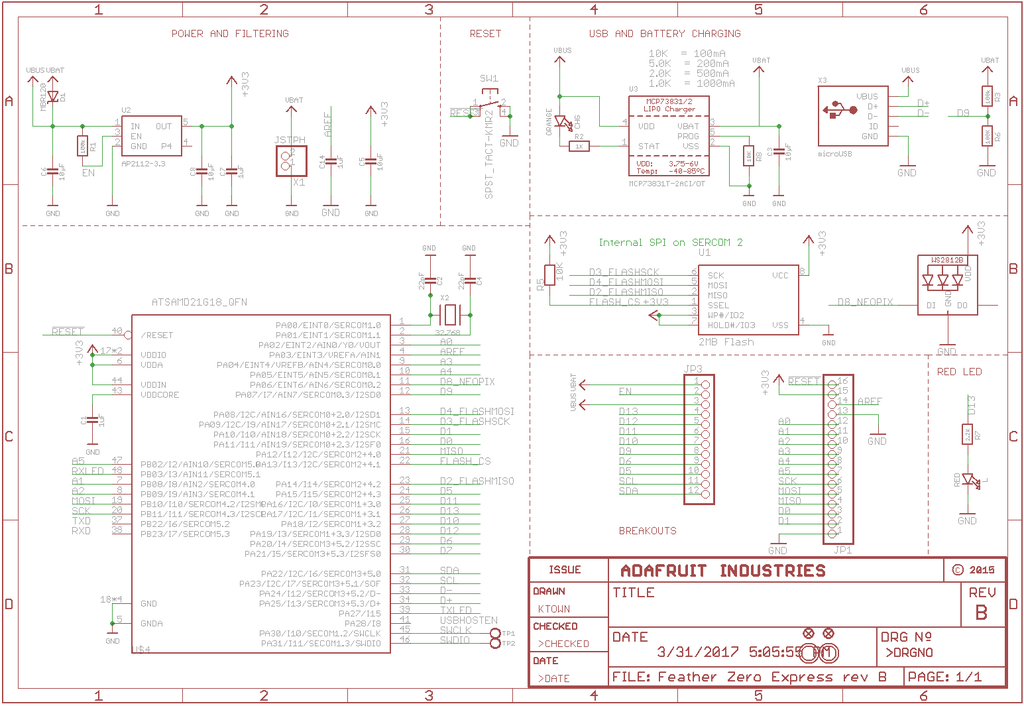
I tested
Adafruit CircuitPython 7.0.0-alpha.3 on 2021-06-03; Raspberry Pi Pico with rp2040
It looks fine.
I can detect multiple pulses without error.
Data
Illumination Ir remocon
sum: 55436 pulse count: 83 pulses: [3141, 1708, 459, 409, 483, 377, 492, 1275, 464, 1269, 467, 392, 438, 1269, 456, 441, 467, 397, 468, 391, 460, 1274, 461, 403, 463, 403, 460, 1278, 463, 395, 464, 1249, 458, 403, 457, 1275, 459, 434, 432, 408, 487, 1275, 464, 394, 463, 406, 464, 398, 455, 383,...
orchid basinBOT
Also edited the description of Tiny 2040 to include new information.
Pictures are the correct widths, and have a 4:3 ratio. Mellissa was fine with this on our last PRs, but if it is an issue, then I would suggest explicitly saying the width and height requirements within the readme of this github repo rather than hidden in some guide somewhere.
manic glacierBOT
Module doc as of this comment (this HTML rendering came out better than I expected; it's just part of the raw HTML from the readthedocs page):
<div class="section" id="module-keypad">
<span id="keypad"></span><h1><a class="reference internal" href="#module-keypad" title="keypad"><code class="xref py py-mod docutils literal notranslate"><span class="pre">keypad</span></code></a> – Support for scanning keys and key matrices<a class="headerlink" href="#module-keypad" title="P...
manic glacierBOT
Some API naming and details discussion
-
keys_with_state()writes into an existing list, to avoid storage churn. There could be a variant that returns a fresh list or tuple.
Naming alternatives:
Keys.keys_with_state(state, into_list)->
Keys.keys_with_state_into(state, into_list)
Keys.write_keys_with_state_to(state, into_list) -
I experimented with the
Statebeing a bitmask, but it was more awkward. The current set of states is not an exclusive enum, because of `PRESS...
tulip sleet
@idle owl @slender iron @onyx hinge FYI the "latest" readthedocs build has been failing for a while. Example: https://readthedocs.org/projects/circuitpython/builds/13973349/. I'm not sure what's wrong at first glance.
idle owl
tulip sleet
<@!330227457296957440> <@252717193496756235> <@!426200547024961539> FYI the "lat...
Email me, please. I'll take a look at it in a bit.
onyx hinge
@tulip sleet seems like maybe it has to do with virtualenv, except these are all super old bugs? https://github.com/pypa/virtualenv/issues/737 https://github.com/pypa/pipenv/issues/3824
tulip sleet
Not sure. I note they are buildling with 3.7.
onyx hinge
that code was recently added fwiw
it has to do with making the stubs pypi'able, I think
tulip sleet
we added code recently? I guess we need an issue on that.
onyx hinge
on examination, I am not confident that is right anyway
it builds a whl file with entries like usr/local/lib/python3.9/dist-packages/_bleio/__init__.pyi while an (I assume working) lxml-stubs package from pypi has lxml-stubs/__init__.pyi
@lone axle do you have the time to chime in about this?
lone axle
Yes, but stepping away for just a few minutes then back
lone axle
onyx hinge
it builds a whl file with entries like `usr/local/lib/python3.9/dist-packages/_b...
back now. to make sure I understand: you are running a pip install and ending up with the stubs files inside of dist-packages not site-packages ?
onyx hinge
tulip sleet
<@!330227457296957440> <@252717193496756235> <@!426200547024961539> FYI the "lat...
@lone axle We are looking at the stubs thing due to the build failures of readthedocs, see replied-to message
I was comparing what goes in a circuitpython-stubs package (built by bdist_wheel) as compared to one from pypi and I noticed that the paths are different .. it is more like a "full path" in circuitpython-stubs but a partial path in lxml-stubs
but I think the real thing to resolve first is that our readthedocs isn't building now, and it's likely that it stopped working after we merved #4844
lone axle
the code inside of build_data_files_list() is attempting to make a list of tuple pairs that represent the stubs files and where they should end up when installed like this:
[
("lib/python3.8/site-packages/digitalio/", ["circuitpython-stubs/digitalio/__init__.pyi"])
# ...
]
the part that seems to be failing in the readthedocs message is the code that is meant to programatically find the location of the site-packages directory for the environment that it's being run inside of.
weird that it seems the function is not existing in that environment. this docs page shows it was added in 3.2:
https://docs.python.org/3/library/site.html

the quickest temporary fix is probably to just remove that code from setup.py. The rest of the actions are not set up yet to deploy to PyPi anyhow so removing this back out won't have any other impact at the moment.
For a longer term fix more generally we need to figure out a way to make the pip install place all of the stub packages into the root of site-packages/ the more "standard" (I think at least) way of doing setup.py pip installation makes it so all of those stubs end up inside of site-packages/circuitpython-stubs/ which means that the IDE cannot find them unless the imports are changed to be like from circuitpython import digitalio but that would make the code incompatible with microcontrollers.
Is there a guide or any documentation around building the docs in the circuitpython repo? I tried the same command inside of docs that I use for libraries but that is not working in the main repo. I'm curious if the same error from readthedocs happens locally or not.
tulip sleet
lone axle
Is there a guide or any documentation around building the docs in the circuitpyt...
I just cd circuitpython; make html.
that bug did not happen for me locally; I build locally to get errors out of my docstrings before committing.
lone axle
nice, I really should look through the make file to learn all of the available commands.
I was missing some other required libraries, after getting them installed I think the build still failed for me though:

I don't think I understand what the specific issue is that caused it to fail though. Perhaps I am missing something required from my PATH.
ah, need to apt install librsvg2-bin possibly
yep, I got a successful build locally as well after that.
My best guess is perhaps the container that it's running inside of at readthedocs had that function removed possibly to prevent code from adding things to site-packages. I don't really have any ideas of what we could do differently in setup.py to end up with the stubs installed in they way they need to be for the IDE to find them. It seems a little odd to me that readthedocs is even trying to execute the setup.py I'm not sure why it would need to do that for the docs build process.
onyx hinge
The failure is for sure something specific to readthedocs...
manic glacierBOT
- Don't include a full path from the build system
- Rename all packages to "foo-stubs"
- Don't install stubs for standard packages like "os"
After this, I can python setup.py install --user to install the stubs
to my local environment, and successfully check code against the stubs,
such as
/$ mypy -c 'import busio; b: busio.I2C; b.readfrom_into(0x30, b"")'
:1: error: Argument 2 to "readfrom_into" of "I2C" has incompatible type "bytes"; expected "Union[bytearray, memoryview,...mypy is kinda neat but dang its mypy -c '...' is not fast for one-offs.
idle owl
@onyx hinge @tulip sleet @lone axle Did this get sorted? Or is it still up in the air. Someone should file an issue on CP and tag the four of us if it's still not resolved. This discussion is a lot of information to not have documented.
onyx hinge
@idle owl I am writing it up from my POV now
idle owl
Thank you!
manic glacierBOT
@dhalbert noticed:
FYI the "latest" readthedocs build has been failing for a while. Example: https://readthedocs.org/projects/circuitpython/builds/13973349/. I'm not sure what's wrong at first glance.
Running Sphinx v3.5.4
Traceback (most recent call last):
  File "setup.py", line 47, in
    data_files=build_data_files_list(),
  File "setup.py", line 34, in build_data_files_list
    result.append((site.getsitepackages()[0] + "/" + package + "/",
AttributeError: module 'site' h...In regards to the 4:3 issue, the website handles the various sizes better than I originally thought and even I've been submitting some 4:3 sized images. :)
manic glacierBOT
I tested the pip install from these changes successfully on my local machine by running
pip install .
Everything does seem to be working properly as far as I can tell. IDE is able to find these packages correctly when installed this way.
gloomy shuttle
@tulip sleet I made those changes you requested on the rotary encoder work for the adafruit_circuitpython_seesaw library. https://github.com/adafruit/Adafruit_CircuitPython_seesaw/pull/70
idle owl
@gloomy shuttle Does that change the user-facing behavior of it? e.g. do I have to update guides if this is merged?
gloomy shuttle
idle owl
<@!517804297401008138> Does that change the user-facing behavior of it? e.g. do ...
No, the changes are in seesaw.py which isn't in any of the examples. It does change the direction so clockwise is positive and counter-clockwise is negative to match the standard rotaryio.
idle owl
Hmm. OK. It might make my descriptions of what is happening when rotating backwards. 😕
I guess I'll have to test it when it's in.
tulip sleet
gloomy shuttle
<@!329766224093249548> I made those changes you requested on the rotary encoder ...
I didn't approve this yet because Limor didn't necessarily want to change it. I think she would be more likely to change the firmware for future products. I will ping her in the PR to see whether to go ahead or just close it.
gloomy shuttle
tulip sleet
I didn't approve this yet because Limor didn't necessarily want to change it. I ...
That makes sense and seems reasonable.
I'll go ahead and close it for now
manic glacierBOT
Thanks for investigating and fixing other things as well!