#circuitpython-dev
1 messages · Page 353 of 1
 ionic elk
 tulip sleet
it's just a few lines of code:
    const mp_int_t max_length_int = args[ARG_max_length].u_int;
    if (max_length_int < 0) {
        mp_raise_ValueError(translate("max_length must be >= 0"));
    }
that's from Characteristic.c; there are other examples
there are some validate_ routines that don't do negative checking, but they factor out common code
there isn't a common place to define these kinds of validators, else there might be more.
ionic elk
Is that something worth thinking about?
It seems like maybe mp_arg_parse_all does some validation?
tulip sleet
it just makes sure something is an INT, BOOL , etc.
ionic elk
making set of validators, or something, I mean
ionic elk
Sure, I had my own version written, I just thought it seemed unusual that it didn't exist already.
Since it's going to be in so many places
tulip sleet
you could make a shared-bindings/validators.c or util.c or something
ionic elk
I'd consider it for sure if you or @slender iron thought it was worth working on
seems like this is very widespread across shared bindings, not a lot of sanitation/validation going on
but I dunno if we care, seems like it hasn't come up before
tulip sleet
getting the bugs fixed is higher prio, but then it could make sense. I'd weight your priorities. It's been easy to just copy the code. Another frequent validator is whether an object is of the right type.
if you can do it easily and it will save you time, then go ahead
ionic elk
Right I'm thinking just one validator function that gets passed some enums describing what's valid
tulip sleet
you have to pass it a string or a translate() string so that it can throw a useful error message.
ionic elk
Sort of like an expansion of MP_OBJ_IS_TYPE, I guess
tulip sleet
i don't think you should do enums, just have multiple functions. These functions are so small that they may be inlined
tulip sleet
but do this if you think it will save time and/or space now, don't spend much time on it
ionic elk
I'm just working on it in the context of https://github.com/adafruit/circuitpython/issues/4127, which made me realize we're taking in mp_int_t for a lot of stuff and then just casting it to uint
tulip sleet
what we want to prevent is bad arguments that will cause crashes
ionic elk
and there weren't any built-in tools for dealing with that
In this particular case that shouldn't be a big deal, Socket will just fail if you pass it a ridiculous port, but for some of the other peripherals there's probably some risk.
 crimson ferry
@ionic elk struggling a bit in the core... sockets are non-blocking by default? And timeout is "-1" by default (https://github.com/adafruit/circuitpython/blob/adaf43d6d84a49c382fd6fab3cb96da33aff02e4/ports/esp32s2/common-hal/socketpool/SocketPool.c#L75), but settimeout docs say "value (~int) – timeout in seconds. 0 means non-blocking. None means block indefinitely." (https://circuitpython.readthedocs.io/en/latest/shared-bindings/socketpool/index.html#socketpool.Socket.settimeout)?
oh, is that a shared-bindings to common-hal translation... None becomes -1?
ok, I think I got it
nope, I don't... non-blocking is default, but -1 is default timeout (blocking)?
 manic glacierBOT


I have installed the bitmap font library via pip
pip install adafruit-circuitpython-bitmap_font
I use it with Blinka_Displayio on this computer.
I've noticed that if I have that library installed in my python environment then I will get this error when attempting to build circuitpython:
$ make BOARD=nucleo_f767zi
Use make V=1, make V=2 or set BUILD_VERBOSE similarly in your environment to increase build verbosity.
Unable to check whether maximum number of endpoints is respec...
Adding ParallelBus support for the RP2040.
Modified the standard bus to accept frequency to tune the PIO speed. Modified other ports to ignore this parameter which is optional.
Tested on the Raspberry Pi Pico and the 3.5" TFT (product 2050). Tested the modified build on a feather M4 but without a display attached (just to ensure the parameter did not fail)

Rebasing this on the latest from circuitpython/main and will re-open the pull request when ready.
This PR replaces my earlier one from August, https://github.com/adafruit/circuitpython/pull/3349
Adding the board definition for Gravitech Cucumber R ESP32-S2 board (https://www.gravitech.us/curesdebo.html).
manic glacierBOT

executing usb_background() right away can remove the need for introducing usb_background_schedule(). However, I am not entirely sure at this point of reload (stopping vm), it is appropriate to run background task. There is bunch of init() afterwards. Therefore I choose the safer option to schedule it. I will leave the decision for you since you understand this better.
Thank you very, very much for spending the time on this! If you want to fix anything up, I'll wait for new commits. Otherwise we can merge as is.
It is always my pleasure to help, don't hesitate to tag me for any usb-related bugs. Except for choosing between run the background immediately vs schedule as PR. I have nothing to add.
 lime trellis
is there anyway to set microcontroller.Processor.frequency from inside the VM?
Processor.frequency.setter(INT) doesn't seem like it does anything
crimson ferry
it would need to be written for the port / chip family in common-hal, and exposed to CircuitPython in shared-bindings
lime trellis
roger. thank you @crimson ferry
 onyx hinge
@lime trellis not at present
manic glacierBOT

In my testing, this works, and fixes a serious problem. I will merge. Thanks!
In my testing, this works, and fixes a serious problem. I will merge. Thanks!
manic glacierBOT

I don't believe IO4 is connected to MISO on the board. When I was working on the UF2 bootloader I attempted to query the ST7789 using this and couldn't get it to work. It also is not shown on the schematic on LilyGo Github.
https://github.com/Xinyuan-LilyGO/LilyGo-T-Display-S2/blob/master/schematic/ESP32_S2-Display.pdf
manic glacierBOT

Not sure if this is a CircuitPython issue, or an issue with the ESP network code. My home network issues 4 DNS servers (two comcast-issued DNS servers, and 8.8.8.8/1.1.1.1 as backups) via DHCP. When my MagTag gets all 4, requests with FQDN's fail:
`Connecting to dragonfly-manor
Connected to dragonfly-manor!
My IP address is 10.225.0.6
Ping google.com: 38.999985 ms
Fetching text from http://wifitest.adafruit.com/testwifi/index.html
Traceback (most recent call last):
File "code.py", ...
manic glacierBOT

@skieast thanks for pointing this out. I had just taken this over from the Lily example app :-) Ok, I removed MISO from the code.
 lone sandalBOT
 manic glacierBOT

I was able to replace by FourWire/ST7789 with simply board.DISPLAY, and everything worked as expected. :heart:
manic glacierBOT
@netroy thanks for testing this :-)
manic glacierBOT

The github webpage is saying "1 change requested", but it won't show me what that change is. What do I need to do here?
Not sure if this the ticket to discuss this, but I installed the latest tinyuf2, to test out @skieast's PR.
While both these PRs work as expected individually, once I have both installed on the board, I'm seeing some ghosting when using displayio (the slightly dark text at the top and the bottom of the screen).

...
You don't need to do anything - that's just because my review was done before your fix.
Not sure if this is the ticket to discuss this, but I installed the latest
tinyuf2, to test out @skieast's PR.
While both these PRs work as expected individually, once I have both installed on the board, I'm seeing some ghosting when using displayio (the slightly dark text at the top and the bottom of the screen).
@tannewt discussed revisiting the multi-colored status LED blinking that CIrcuitPython does to indicate errors. I think the ideas were to:
- simplify the indications
- do not repeat them indefinitely
@tannewt Please revise this post or comment as necessary.
manic glacierBOT
@m4tk the more I try to reproduce this, the weaker the ghosting gets. it's at a point where I can't see it anymore.
I'll ping you back, if I manage to consistently reproduce it.
It might be a question to ask the RPi folks if they are thinking about adding default labels on the silk in the future.
pico-sdk PR https://github.com/raspberrypi/pico-sdk/pull/80 is in progress and addresses this

What board are you using, and what versions of CircuitPython and Requests?
Now fixed in the develop branch of pico-sdk, if you fancy testing it :slightly_smiling_face:
manic glacierBOT

 ionic elk
@crimson ferry -1 is the equivalent to None, as you said, so it means it will never time out. Timeout 0 means non-blocking (functions will fail with EAGAIN if they can't be performed immediately) and timeout None means it's blocking and will never stop unless interrupted. None is the default in Cpython and for us here.
crimson ferry
oh wow, thanks, blocking was counterintuitive to me
ionic elk
wait no I got it confused. It's exactly the other way around, not enough coffee
crimson ferry
lol, same
ionic elk
you are right to find it counterintuitive it is literally the opposite. editing
lmao
my bad
Also, of course, any actual timeout number is blocking, but will throw ETIMEDOUT after that span of time.
crimson ferry
Makes sense. Requests does settimeout by default to 1 second (it's also a kwarg).
 tidal kiln
hey @gilded cradle trying to remember history of this:
https://github.com/adafruit/Adafruit_Blinka/pull/190
is that i2c3 an actual hardware ic2? or is that dtoverlay:
dtoverlay=i2c3,pins_2_3
just a short cut for the gpio overlay:
dtoverlay=i2c-gpio,bus=3
 lone axle
@still zephyr Am I correct in thinking that you are on github and your username is jposada202020?
 gilded cradle
@tidal kiln it was activated by an overlay. Something called i2c-gpio or something and that just had it try more i2c configs. That was prior to the extended bus library that handles it more gracefully.
gilded cradle
Yeah, it makes sense.
tidal kiln
any case where one sets up a i2c-gpio, they should use that extended bus library?
gilded cradle
Maybe add a note to use the extended bus library if they have any alternative mappings.
Yeah
The problem was the number of possible combinations was huge.
tidal kiln
the i2cPorts def in Blinka should only be for hardware pins/ports?
tidal kiln
ok. yep. it's a tricky issue. since the number of combos is huge.
gilded cradle
The extended bus just kind of shortcuts the whole give me some pins and I'll figure out your bus number part.
tidal kiln
looks like that bus 3 line was added to help with a specific use case
gilded cradle
It was
tidal kiln
but now with the other lib, should just remove it from blinka
and use other lib instead
?
gilded cradle
Yes
tidal kiln
ok. i'll send a PR real quick
gilded cradle
Awesome. Thanks.
tidal kiln
np. thanks for helping fill in the history.
gilded cradle
yw
 solar whale
Has anyone tried using neopixels on a Pico with the neopixel.py library? I am getting some very odd behavior.
manic glacierBOT

I am having trouble controlling neopixels on a Pico when using the neopixel.py libray
Here is an example
Adafruit CircuitPython 6.2.0-beta.1-80-gadaf43d6d on 2021-02-04; Raspberry Pi Pico with rp2040
>>>
>>> import board,neopixel
>>> pix = neopixel.NeoPixel(board.GP27,8)
>>> pix[0]= 0xff --- OK -- pixle 0 is red
>>> pix[0]= 0xff00 --- neopixel 0 turns off
>>> pix[1]= 0xff00 --- neopixel 0 is blue ???
>>>
```
I have tried it with a few different neopixel strings --... slender iron
solar whale
Has anyone tried using neopixels on a Pico with the neopixel.py library? I am g...
slender iron
solar whale
Has anyone tried using neopixels on a Pico with the neopixel.py library? I am g...
I'm using it on my feather prototype board and the color looks fine
solar whale
Its not so much the color, but the correct pixels are not responding ...
pix.fill(x) does not fill all the pixels the same
tulip sleet
do you have another string to try? It could be marginal timing. If you have a recent string or ring, try that. Also it's not RGBW?
tulip sleet
the WS2812B are more finicky than SK6812, which are the newer ones
solar whale
it is not consistent -- also suggesting timing.
tulip sleet
string powered via 3.3V?
 gloomy shuttle
I just ran the sample code you posted and don't have an issue running on a pico
solar whale
but I tries on 3 with same behavior
hmmm @gloomy shuttle did you use 3V or 5? and which type of neopixel?
tulip sleet
try powering on 3.3V, the WS2812B are marginal when driven with 3.3v control signal and powered by 5v
try a short string
oh never mind
gloomy shuttle
I take that back, I think my colors are inverted
solar whale
I'be be happy with inverted ...
just confirmed same behavior with 3 and 5 V -- with flicker at 3V
looking for some sk6812's
gloomy shuttle
I was using vbus
I playing with it more now and I am getting strange behavior as well.
tidal kiln
@gilded cradle i merged the PR, but i'll leave it up to you on releasing. i don't think it's a super urgent need.
gilded cradle
Ok, thanks
gloomy shuttle
yes ws2812
if I run in the REPL I am getting that odd behavior. If i put the same commands in a code.py, I think it is behaving as expected.
>>> import board,neopixel
>>> pix = neopixel.NeoPixel(board.GP27,8)
>>> pix[0]= 0xff   --- OK  -- pixle 0 is red
>>> pix[0]= 0xff00  --- neopixel 0 turns off
>>> pix[1]= 0xff00  --- neopixel 0&1 is green
on vbus
onyx hinge
@solar whale I have a pico with some flora neopixels running from vbus and I get glitches too
most of the time it's fine but some updates glitch the whole strip
I'm not using neopixel library, just neopixel_write
it could of course just be the vbus problem and thus my fault
and as it's a circuit sculpture it's not trivial to modify to try using the 3.3v rail for led power instead
solar whale
ok -- If I just set up my onwn PIO I am not hav ing any problems -- only with the library that uses neopixel_write.
onyx hinge
maybe the causes are different then
onyx hinge
where's pio neopixel code hiding out?
 blissful pollen
solar whale
ok -- If I just set up my onwn PIO I am not hav ing any problems -- only with th...
blissful pollen
solar whale
ok -- If I just set up my onwn PIO I am not hav ing any problems -- only with th...
I'm in a couple meetings so can't look but I did find an issue with the statemachine code that's in my parallel bus PR
gloomy shuttle
that was my output on vbus and when I moved to 3.3v it acted exactly as yours did with switching pix[0] to blue at the end.
solar whale
#
# SPDX-License-Identifier: MIT

import time
import rp2pio
import board
import adafruit_pioasm
import array

# NeoPixels are 800khz bit streams. Zeroes are 1/3 duty cycle (~416ns) and ones
# are 2/3 duty cycle (~833ns).
program = """
.program ws2812
.side_set 1
.wrap_target
bitloop:
  out x 1        side 0 [1]; Side-set still takes place when instruction stalls
  jmp !x do_zero side 1 [1]; Branch on the bit we shifted out. Positive pulse
do_one:
  jmp  bitloop   side 1 [1]; Continue driving high, for a long pulse
do_zero:
  nop            side 0 [1]; Or drive low, for a short pulse
.wrap
"""

assembled = adafruit_pioasm.assemble(program)

sm = rp2pio.StateMachine(
    assembled,
    frequency=800000 * 6,  # 800khz * 6 clocks per bit
    init=adafruit_pioasm.assemble("set pindirs 1"),
    first_set_pin=board.GP27,
    first_sideset_pin=board.GP27,
    auto_pull=True,
    out_shift_right=False,
    pull_threshold=8,
)
print("real frequency", sm.frequency)
NUM_LEDS = 8
bar = bytearray(3*NUM_LEDS)
#blue
for j in range(0, 255):
    for i in range(NUM_LEDS):
        bar[3*i] = 0
        bar[3*i +1] = 0
        bar[3*i +2] = j
    sm.write(bar)
    time.sleep(.010)
#green
for j in range(0, 255):
    for i in range(NUM_LEDS):
        bar[3*i] = j
        bar[3*i +1] = 0
        bar[3*i +2] = 0
    sm.write(bar)
    time.sleep(.010)
#red
for j in range(0, 255):
    for i in range(NUM_LEDS):
        bar[3*i] = 0
        bar[3*i +1] = j
        bar[3*i +2] = 0
    sm.write(bar)
    time.sleep(.010)
#OFF
for i in range(NUM_LEDS):
    bar[3*i] = 0
    bar[3*i +1] = 0
    bar[3*i +2] = 0
    sm.write(bar)
#for i in range(100):
#    sm.write(b"\0x0\0x0\0x0a")
#    sm.write(b"\0xa\0x0a\0x0a")
#    time.sleep(0.1)
#sm.write(b"\0x0")
print("writes done")

time.sleep(2)
``` @onyx hinge I use something like thisneopixel_write in the raspberry port directory I believe uses the PIO
solar whale
@blissful pollen yes it does use PIO
onyx hinge
@blissful pollen yes that was my understanding too
but if @solar whale says it makes a difference there's often something to the observation
solar whale
something may be different in the timing -- there is a delay in neopixel_write that is set to 0 now
I have not tried adjusting it...yet
onyx hinge
my glitches are similar with rp2pio.StateMachine as with neopixel_write fwiw
My writes are 100ms apart minimum so that's not it
solar whale
good to know -- I may not have exercised my pio example enough -- I'll do more poking at it. Glad to hear I am not the only one having issues...
onyx hinge
I didn't notice it at first because the light display code I had was pretty random anyway, with regards to colors
solar whale
same here -- the simple writes are what turned it up for me
onyx hinge
I'm not working today 😜 so I'll leave it at that for now.
solar whale
Thanks -- enjoy the rest of your vacation
onyx hinge
thank you. it's been nice, read some books, etc
solar whale
I have to go for awhile -- will try more exploring later -- thanks @gloomy shuttle
blissful pollen
I'll try to take a look at it later if I have a moment. I spent a lot of time with the PIO for the parallelbus so its all loaded in my head currently
solar whale
and @blissful pollen
manic glacierBOT

The Common-Hal API for Socket had some inconsistencies argument size and type between functions, such as the "port" argument. Some of these were even using uint8_t, which is far too small for many common port values. This PR converts all arguments to uint32_t and adds some sign checking since Python always passes them in as signed ints.
Further down the line, it may be appropriate to add more comprehensive input sanitation to this and other shared-bindings implementations.
Resolves #4127
slender iron
@stuck elbow did you (and someone I can't remember) get the nokia display going with displayio? https://forums.adafruit.com/viewtopic.php?f=60&t=175041
 stuck elbow
@slender iron not quite, we got it to work with the full-screen refresh (when col and pos is 0), but not with partial refreshes. I think I would need a way to force it to update each row separately, like it does with sh1106, but not use the sh1106 addressing.
@slender iron this part: https://github.com/adafruit/circuitpython/blob/main/shared-module/displayio/Display.c#L251-L253

GitHub
CircuitPython - a Python implementation for teaching coding with microcontrollers - adafruit/circuitpython
slender iron
👍
we should probably have an issue to support it properly. I feel like I'm hearing more about it
 cobalt grail
Hey @slender iron I found this string to translate, Instruction %d jumps on pin here - https://github.com/adafruit/circuitpython/blob/main/ports/raspberrypi/common-hal/rp2pio/StateMachine.c#L315
GitHub
CircuitPython - a Python implementation for teaching coding with microcontrollers - adafruit/circuitpython
I must admit to don't understanding it enough to make a translation.
Also note that it is used in a mp_raise_NotImplementedError_varg, does that mean I shouldn't even bother to translate it because you will get to it eventually? 😎
manic glacierBOT
@tannewt for background, I had a long chat with @hierophect on discord in #circuitpython about this. I think this PR does some good cleanup. Some general-purpose validation routines could be added, say in a top-level shared-bindings/util.c or whatever.
@hierophect looks like you need a (maybe) merge from upstream and definitely make translate.
tulip sleet
@slender iron do you have time for a secondary CDC API discussion video chat? Also we could talk about some planning for the next beta.
slender iron
cobalt grail
Also note that it is used in a `mp_raise_NotImplementedError_varg`, does that me...
Yup, that's totally ok to skip. It's a TODO for me to add a jump pin argument to the constructor
slender iron
tulip sleet
<@252717193496756235> do you have time for a secondary CDC API discussion video ...
sure! let me brush my teeth and then I'll be ready
cobalt grail
Sometimes the Weblate auto translation is less than helpful. No, SPI is not translated to I2C in swedish....
tulip sleet
wow, can you comment on the auto-translater?
tulip sleet
google translate lets you supply a better translation; I wonder if it does that or just learns from the translations you suply
cobalt grail
Yeah, this is Weblates own engine. Not sure how that learns.
manic glacierBOT

Add SMPS mode pin to Raspi Pico pins.c; see section "4.3. Using the ADC" of the Pico datasheet for discussion.
Driving this pin high forces the onboard regulator into a lower noise PWM mode.
Note: I haven't actually built with this change, but the pin defs seem to exits should be pretty low risk.
This PR fixes an issue with the TCP-only version of socket.connect() where it would always report an OSError even when successful. Thanks to @Neradoc for pointing this out, I don't know how it made it through my testing gauntlet.
ionic elk
@jaunty juniper thanks for pointing out that problem with Socket.connect() yesterday, just put up a PR for it. I don't know how on earth it made it through my connect tests, I had a whole gauntlet I put it through.
manic glacierBOT
I even made a note to do the translate this time and I somehow forgot anyway
 jaunty juniper
thanks for fixing it 😉
ionic elk
it works with the gist you put up
manic glacierBOT

So, I hooked up a small test bench using a raspberry pi to test one of the flash chip and found out it is OK.
I tried to attach it to the SAMD51 board without success.
I searched a bit more about SPI on circuitPyhton and found out this.
According to the datasheet, the wiring I used works for SAMD21, but not for SAMD51 due to the restriction on SERCOM pads.
I checked is using your ha...

Thanks for the quick turnaround! I built this branch and flashed it onto my FeatherS2 and it works just fine, at least for socket.sendto().

great! thanks @firiacto!

I don't know enough to know if it's related to this issue, but where time.time() used to fail because no RTC was attached, it now seems to produce seemingly random numbers (but they're from a repeating set) on the RPi Pico.
solar whale
Adding a pushbutton from RUN to Ground on the Pico sure does make life easier 😉
stuck elbow
@slender iron do you think it would be possible to add a flag that would disable all the sleep code in time.sleep that was added in 5.x?
slender iron
why?
stuck elbow
to get rid of the flickering
slender iron
I have zero context for what you are talking about
what flickering?
it sounds like a bug, not a reason to turn off sleep
stuck elbow
ok, thanks
manic glacierBOT
Yup! I think we only want to use the status LED on power up (not every reset) and on error. The main goal is to save power.
We've brought it up with them previously but haven't heard of any concrete plans. I wouldn't expect them to designated default busses. Our main goal was to have labels similar to those on the bottom.
@lurch Thanks! I'll update us to that commit and get it into a beta for testing.
Thank you! This is why I always like to have an explicit comparison.
Fine by me! @dhalbert please review.
Any idea where BitmapStub is coming from? We should replace it with something that works better.
solar whale
@blissful pollen @gloomy shuttle I can confirm that I get the same behavior with my PIO example -- so it is consistent with using neopixel_write. It looks to me like one byte of the transmitted array is getting missed. Not sure, on which end .
manic glacierBOT
board.h has moved. I think you'll need to add a board_deinit as well.
Please leave this. There is a chance folks will want to re-initialize the display themselves. (You can have two names map to the same pin here.)
I ran some test when I set up the PIO writes manually, so not using neopixel,py ot neopixel_write and I can reproduce the same behavior when trying to set individual pixels.
It is odd -- some programs using .fill seem to be working and the "color wheel" seems t work OK but when I try manually poking a pixel or manually setting fill, I get these odd responses.
Thank you! Looks good overall. Just a few minor comments.
{ MP_QSTR_frequency, MP_ARG_INT | MP_ARG_KW_ONLY, {.u_int = 60000000 } },
Let's do this outside of common-hal. So in the board inits and in shared-bindings.
I think you should just call the common_hal version. It'll check all of the pins for you then. You can also use it for never_reset (though we may need to implement it for pio.) neopixel_write just needs this because it weirdly takes in a digitalinout.
I had requested this PID for the Cucumber RIS variant. Its basically the same except for added onboard sensors (All I2C connected).
Does this matter as I think the code for all these will be the same? The module used is the WROVER one.
The M variants use the WROOM moulde, requiring a differing sdkconfig. (No PSRAM)
Can you capture the pulse train with a logic analyzer and verify the 1/3 and 2/3 duty cycle?
Thank you! Note you can (almost) always access chip level pin names from the microcontroller.pin module. Totally fine to have this in the board as well. Thanks!
@microdev1 any idea if your RTC work should have fixed time.time?
tulip sleet
@slender iron STM32G0x and STM32G4 both have 8 USB endpoint pairs.
manic glacierBOT

I would like to reopen this pull request. If I avoid relying on the time.monotonic() entirely, there is zero flicker in PewPew, and I don't run into problems with lowering accuracy over time.
Does it makes sense if MISO is not connected to IO4? according to @skieast and the schematics on LilyGo repo it isn't connected.

Just to add some support to this case, my Pico just arrived today and I immediately hooked it up to an "official" neopixel ring (16 pixels). With the example code supplied and minimal modification, I get a random selection of colours all over the ring and a number of points not illuminated.
My code:
`import time
import board
import neopixel
Update this to match the number of NeoPixel LEDs connected to your board.
num_pixels = 16
pixels = neopixel.NeoPixel(board.GP1, num_pixel...
Can you capture the pulse train with a logic analyzer and verify the 1/3 and 2/3 duty cycle?
I'll try to do this tomorrow.
@skieast but as I'm looking on the schematic now...what about IO37? how can I test if IO37 is MISO?
<img width="381" alt="image" src="https://user-images.githubusercontent.com/77211708/107087452-c4bb6600-67fb-11eb-91f4-9c340f5e4b4c.png">
Quick update from me, on a whim, I tried unplugging the Pico from my Mac (2020 16" MBP) and plugging it directly into a power strip on my desk that has USB ports and it started working as intended. I don't know if this is helpful, but perhaps @jerryneedell you could try as well and see if it starts working for you?
blissful pollen
does the make translate build go into the raspberry pi port yet? Had to add a new error and I don't see it checking that path
manic glacierBOT
Unfortunately their labels don't match the actual function. As their examples don't match the hardware. I spent a few hours trying to read the ST7789 registers with no success, trying all the various pins.
Looking at he OLED end they label everyything as if it was I2C and not SPI
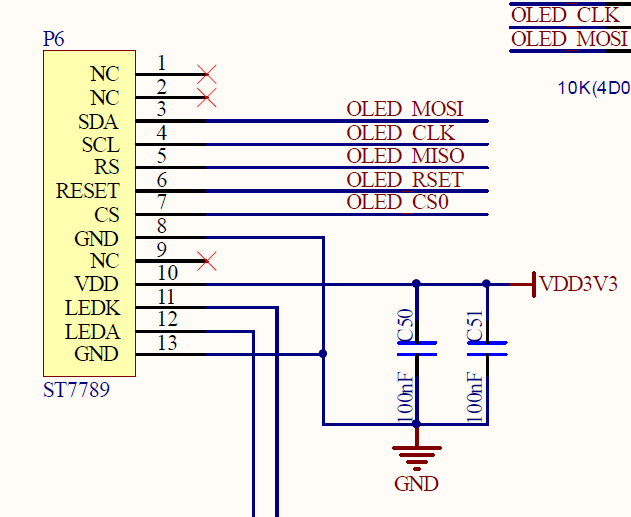
I rang out the various pins using a meter and there is no MISO on the display. They use the same di...
blissful pollen
blissful pollen
does the make translate build go into the raspberry pi port yet? Had to add a ne...
Ah the newest Makefile has it added, mine just didn't
manic glacierBOT
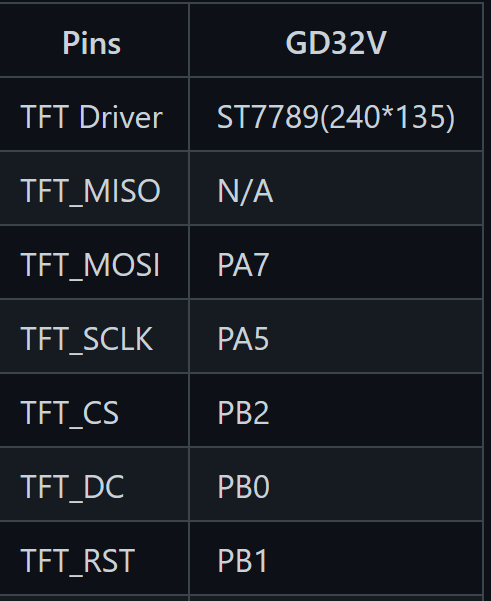
Here are the connections to the same display on the GD32 board
ok, then I would prefer to leave the code as it is. no MISO pin for the display.
 supple gale
Yes, lol. I think i did use the IO4 pin to toggle a LED to test that it was working.
manic glacierBOT
Moved, and set the default to 60Mhz. Seems to be the fastest the display can handle.
manic glacierBOT
I think it's from here:
https://github.com/adafruit/circuitpython/blob/c6a7b00030ffd8d7a9f566622fc12fcc3fd0e85b/tools/gen_display_resources.py#L27
It looks like this file does some path manipulation and import tricks to load up it's own version of bitmap_font. When I have the real one in the environment it's causing it to import the real one instead of this one internal to the circuitpython repo.
manic glacierBOT

sys.path.append("bitmap_font")
sys.path.append("../../tools/bitmap_font")
For the thing placed in the path to override, it should be placed earlier in the path, like sys.path.insert(0, "...").
manic glacierBOT
That does fix it! Thank you @jepler. I can make a PR with this fix tonight or tomorrow.
 still zephyr
lone axle
<@!607375730610798634> Am I correct in thinking that you are on github and your ...
still zephyr
lone axle
<@!607375730610798634> Am I correct in thinking that you are on github and your ...
@lone axle Indeed... Sorry for the confusing Nickname and Avatar 👀
lone axle
still zephyr
<@!382939733107408897> Indeed... Sorry for the confusing Nickname and Avatar 👀
No worries at all! Just wanted to make sure before I start asking about things that were unrelated to you in-case that wasn't you.
I tried out your proposed label change for the baseline alignment. I need to poke at it a bit more but I wanted to ask you as well. How is the user supposed to use that? set the new parameter to True on both labels in order to align along the baseline? and false otherwise?
still zephyr
So, Yes exactly, but we apply False in this case when we try to align both labels, also taking into account that we do not want to break the old code, by default the parameter is set to true, that way old code will work too
At the present, the bsaline is calculated with the decend+ascend function that varies if the Font is different in both labels
I put some examples in my repo, and I try to explain the best that I could, in the new learning guide. This morning I modify the code to include the brackground also with the new proposed parameter and it worked. I did not test very much, but I just want it to knwo your and kmatch opinion regarding that
manic glacierBOT
This PR fixes an issue where sockets created by accept() were not given the sock->connected = true internal parameter, and thus caused send() to fail when used in a server context. Found while creating a new suite of socket tests.
still zephyr
If you read paint your dragon issue is basically what we can do in some of the example using the offset parameter. But we can tinkering, change it, or refactor it
 waxen vault
Turns out creating a pull request, and having it merged was a faster way to build a binary than setting up the Circuitpython build system on my PC Thanks @slender iron !
lone axle
@still zephyr awesome, thank you I will tinker some more as well this weekend. (sorry for big delay I got distracted a bit by the stream in the other channel.)
 cedar moth
I have a noob question about a recently updated library Adafruit_CircuitPython_DisplayIO_SH1107. My PR was merged into the library yesterday and today I tried downloading the latest bundle (also dated yesterday) but it appears that the new functionality is not there. My name was listed in the list of contributors on the library bundle download page so I thought it was in the bundle, but after seeing the issue I double checked and the Adafruit_CircuitPython_DisplayIO_SH1107 library wasn't included in the list of Updated Libraries. I am guessing that the library was updated too late to make it into yesterday's bundle, but since my name was on the contributor list and this was my first PR, I just want to be sure there isn't a possible issue with my code?
still zephyr
lone axle
<@!607375730610798634> awesome, thank you I will tinker some more as well this w...
No problem, le me know if we need more examples to illusatrate all the corner cases
lone axle
I do think it's a great idea, would love to see it made easier to align them like that issue notes. I didn't have one of the fonts you used but I subbed in some others that I have into the example. I'll try to test a good range of different ones to see how it works with them.
manic glacierBOT
This change allows you to successfully build circuitpython even if you have the bitmap_font library installed in your python environment.
I'm guessing that this script is involved in making terminalio.FONT but am not certain. I tested the resulting build on a PyPortal with a script that draws text using terminalio.FONT and it does appear to work normally as far as I can tell.
still zephyr
Yeah , any different size (16) will do the trick for testing I could not find the one in the issue either.
manic glacierBOT
I ran into an issue trying to remove these. All the samples are set pindirs 1 or out pindirs 1 and from what I saw in the RP2040 docs it seems only 5 pins max set at once. Even when I run out with 0x1F and then 0x07 (for outputting 8 bits for 8 pins) it doesn't work. I tried to move my pin group to set as well as out groups and I cannot set 8 pin directions at once. The SDK code has the pins grouped into 5s and set that way. I'm thinking this may be a limit.
Every parallel pin exampl...
crimson ferry
@cedar moth Your PR was merged, but not yet released. These steps tend to be a little asynchronous. I just released it https://github.com/adafruit/Adafruit_CircuitPython_DisplayIO_SH1107/releases, so it should be in tonight's bundle.
cedar moth
No worries, thanks for confirming it wasn't me @crimson ferry... I appreciate it!
crimson ferry
Is this intentional on MagTag: microcontroller.pin.GPIO8 --> board.CS board.EPD_CS ? (all of the other EPD pins have the EPD_ prefix)
Also, should we have a board.LED alias for board.D13?
lone sandalBOT
 manic glacierBOT
With latest S3, Adafruit CircuitPython 6.2.0-beta.1-115-ge7438c481 on 2021-02-05; Adafruit MagTag with ESP32S2, I get the same behavior... slight delay, then Volume ejects and (I think) board resets. On a fresh hard reset, it will work once.
could be the VBUS voltage is too high. try powering the pixels from 3.3V
Also adds unique id support
Fixes #4039 and hopefully #4107
Seems OK. It'll be nice to have a unique identifier. No testing performed. The changes to link.ld seem to mirror those in the SDK, but I don't understand 'em.
Latest S3:
Adafruit CircuitPython 6.2.0-beta.1-115-ge7438c481 on 2021-02-05; Adafruit MagTag with ESP32S2
>>> import board
>>> spi = board.SPI()
Traceback (most recent call last):
  File "", line 1, in
ValueError: SCK in use

When using the following code, I am getting the error that all the timers are used for pinblue(GP19)
import pwmio
import board


pinred = pwmio.PWMOut(board.GP17, frequency=5000, duty_cycle=0)
pingreen = pwmio.PWMOut(board.GP18, frequency=5000, duty_cycle=0)
pinblue = pwmio.PWMOut(board.GP19, frequency=5000, duty_cycle=0)
code.py output:
Traceback (most recent call last):
File "code.py", line 7, in
ValueError: All timers for this pin are in use
...
manic glacierBOT

Testing different builds on S3, I see the error existed on January 1, disappears after #3930 "UMFEATHERS2 - implement use of DotStar for status led", and consequently comes back after #4013 which reverts 3930.
The original PR included the following change in ports/esp32s2/common-hal/microcontroller/Pin.c
bool pin_number_is_free(gpio_num_t pin_number)
(...)
-    return (never_reset_pins[offset] & mask) == 0 && (in_use[offset] & mask) == 0;
+    return (in_use[offset] & mask) =...
I have the same issue when running the mcp230xx_simpletest.py with an MCP23017:
Traceback (most recent call last):
  File "<stdin>", line 9, in <module>
  File "adafruit_mcp230xx/mcp23017.py", line 52, in __init__
  File "adafruit_mcp230xx/mcp23017.py", line 102, in iodir
  File "adafruit_mcp230xx/mcp230xx.py", line 49, in _write_u16le
  File "adafruit_mcp230xx/mcp230xx.py", line 49, in _write_u16le
OSError: [Errno 19] Unsupported operation
on line
ht...
manic glacierBOT
could be the VBUS voltage is too high. try powering the pixels from 3.3V
I've tried 3V -- same result.
manic glacierBOT
I did some tests with a logic analyzer. In general, the timing looks ok for the 1/3 2/3 duty cycle BUT there appear to be "gaps" on some of the writes. This may be causing the odd behavior


manic glacierBOT

I've been wanting to do a project and as UART is not implemeted yet:
NotImplementedError: UART not yet supported
I cannot do he project, the project uses a circuit python library, hence I cannot use micropython.
UART works well on MICROPYTHON, why not CIRCUITPYTHON?
I've been desperately waiting for this implementation, I even flash the latest uf2 from the s3 server.
manic glacierBOT

i think this would be best done as a pure python library - rather than built into the circuitpython core. is it something you'd like to hack on?
-- @ladyada
Full Yaml specification is more complex to implement than it seems, as it includes many little-known features, such as anchors and refs, flow style, etc.
A light yaml spec subset is probably more relevant for onboard electronics, as it's faster to execute.
In particular, [strictyaml](https://hitchdev....
manic glacierBOT
You can watch issue #4036. Implementing UART is on our very short list. Right now we are working on audio I/O. We don't publish schedules for when something will be done, but rest assured we want to do it as soon as possible.
solar whale
anyone have a clue what is going on here ```Press any key to enter the REPL. Use CTRL-D to reload.
Adafruit CircuitPython 6.2.0-beta.1-127-ga10ce39ae on 2021-02-06; Adafruit MagTag with ESP32S2
import board
import adafruit_si7021
sht = adafruit_si7021.SI7021(board.I2C())
Traceback (most recent call last):
File "<stdin>", line 1, in <module>
File "adafruit_si7021.py", line 110, in init
File "adafruit_si7021.py", line 107, in init
File "adafruit_si7021.py", line 107, in init
TypeError: extra keyword arguments given

FYI, I've been running a Metro ESP32-S2 for 5 days with the BOD disabled. I have a WDT setup to catch any issues that hang the application or system software. It's been working flawlessly. Zero issues.
blissful pollen
solar whale
anyone have a clue what is going on here ```Press any key to enter the REPL. Use...
I'll take a look in a couple minutes
solar whale
I hope it is something different....
manic glacierBOT

The PIO StateMachine is limiting the number of PIO instructions to 16, but it should be 32. It is a simple comparison error limiting it to 32 bytes instead of 64 bytes needed for 32 16-bit instructions. I have fixed it and can do a pull request.
blissful pollen
That driver uses read_then_writeinto which I may have missed testing
solar whale
I'm not finding it in the code
blissful pollen
with self.i2c_device as i2c: i2c.write_then_readinto(data, data)
Line 107
solar whale
I meant in the C code
blissful pollen
shared-bindings/I2CDevice.c starting at 220
Yup I think i see what it is ugh... wait mayb enot
solar whale
I don't see I2CDevice.c in shared-bindings...
blissful pollen
sorry shared-bindings/adafruit_bus_device/I2CDevice.c
Apparently I need more caffeine still
solar whale
got it.
blissful pollen
okay now I know what I did...
in the other functions the optional keyword is last, in this one one is in the middle and I just skip the array index going like [4] = ... [5] = ... [8] =...
solar whale
Sorry - I'm not following you on that, let me know if you want me to try something.
blissful pollen
I'll submit a PR in a few minutes just double double checking my change 🙂
I don't have that device so can't test it fully against the driver
manic glacierBOT
If the out_end optional keyword was omitted the keyword array skipped to indexes leading to parsing confusion.
solar whale
building it now
blissful pollen
Thanks, sorry about that. Fixed the no long int bug and introduced a new different issue.
blissful pollen
yay!
manic glacierBOT
Tested fix with si7021 on MAgTag
It was failing prior to fix with:
Press any key to enter the REPL. Use CTRL-D to reload.

Adafruit CircuitPython 6.2.0-beta.1-127-ga10ce39ae on 2021-02-06; Adafruit MagTag with ESP32S2
>>>
>>> import board
>>> import adafruit_si7021
>>> sht = adafruit_si7021.SI7021(board.I2C())
Traceback (most recent call last):
  File "", line 1, in
  File "adafruit_si7021.py", line 110, in __init__
  File "adafruit_si7021.py", line 107, in __init__
File...@blissful pollen Thanks for the quick fix!
blissful pollen
solar whale
<@!228322543507865601> Thanks for the quick fix!
No problem, hoping finally stamped out all the issues in this change
solar whale
uh -oh -- something odd happening
Adafruit CircuitPython 6.2.0-beta.1-14-gea4a12005-dirty on 2021-02-06; Adafruit MagTag with ESP32S2
>>> import board,adafruit_si7021
>>> sht = adafruit_si7021.SI7021(board.I2C())
>>>
soft reboot

Auto-reload is on. Simply save files over USB to run them or enter REPL to disable.


Code done running.

Press any key to enter the REPL. Use CTRL-D to reload.

Adafruit CircuitPython 6.2.0-beta.1-14-gea4a12005-dirty on 2021-02-06; Adafruit MagTag with ESP32S2
>>>
>>> import board,adafruit_si7021
>>> sht = adafruit_si7021.SI7021(board.I2C())
Traceback (most recent call last):
  File "<stdin>", line 1, in <module>
  File "adafruit_si7021.py", line 99, in __init__
ValueError: No I2C device at address: 40
>>>

``` after pwere cycle -- it works once -- then after soft reboot it does not ...odd behavior with this PR
It works normally after a power cycle, but not after a soft reboot.
Press any key to enter the REPL. Use CTRL-D to reload.

Adafruit CircuitPython 6.2.0-beta.1-14-gea4a12005-dirty on 2021-02-06; Adafruit MagTag with ESP32S2
>>> import board,adafruit_si7021
>>> sht = adafruit_si7021.SI7021(board.I2C())
>>>
soft reboot

Auto-reload is on. Simply save files over USB to run them or enter REPL to disable.


Code done running.

Press any key to enter...Hmm I never had an issue with the BME280 and the code to scan for devices isn't related to what I just changed
 thorny jay
ESP32-C3 on it's way to my home... wake me up if you start porting to it.
solar whale
@blissful pollen I've never seen this before either.
blissful pollen
what do you do to cause the soft reboot? just reset button? or dropping to the REPL
onyx hinge
https://www.tiobe.com/tiobe-index/?20210206 Python remains #3 in this language survey
manic glacierBOT
This makes sense, but I didn't do any testing.
blissful pollen
solar whale
let me try it on another board
I tried it (feather m4 express/BME280) and I can restart there. I have an extra MagTag but have to find it and update it
solar whale
A hard RESET (reset button) clears it. seems to only be the soft reboot.
I'll try it on a PyPortal and Metro_esp32s2
It does not happen on the PyPortal
blissful pollen
Could be an ESP32S2 issue, or busio issue on it
solar whale
yup -- happens on metro_esp32s2 as well
manic glacierBOT
the issue with the soft reboot is reproducible on a metro_esp32s2 but it does not occur on a PyPortal
I'll open a new issue for that
gloomy shuttle
There have been other i2c issues with the esp32-s2. Related? https://github.com/adafruit/circuitpython/issues/3894
GitHub
I've got a Feather S2 and this sparkfun board: https://www.sparkfun.com/products/16294 . The sparkfun board is at address 0x60 vs the 0x67 that adafruit has for their MCP9600 CircuitPython ...
manic glacierBOT
While testing #4146 I ran into this behavior on a MagTag.
It is also reproducible on a metro_esp32s2
but
it does not occur on a PyPortal (samd51)
the issue is that I can access the I2C device after a Power Cycle or Hard Reset but it fails after a soft reboot on esp32s2 boards.
Press any key to enter the REPL. Use CTRL-D to reload.

Adafruit CircuitPython 6.2.0-beta.1-14-gea4a12005-dirty on 2021-02-06; Adafruit MagTag with ESP32S2
>>> import board,adafruit_si7021
>>> sht = ...
[adafruit/circuitpython] New comment on issue #4147: ESP32S2: unable to access I2C after soft reboot
May also be related to #4046
stuck elbow
@thorny jay I finally ported Vacuum Invaders to displayio: https://github.com/deshipu/circuitpython-vacuum-invaders-displayio

GitHub
Contribute to deshipu/circuitpython-vacuum-invaders-displayio development by creating an account on GitHub.
thorny jay
Did I just see that on Twitter with someone running it on a Pico?
stuck elbow
no, that was the regular vacuum invaders
I literally just finished this now
right now the controls.py is for pygamer, I will probably need to provide a set of different controls.py for different boards
I wonder if we could standardize this and include it on the boards that have game-like controls by default
thorny jay
Yes for board that have controller, this is much wanted to simplify the process. My current trip is Wii Classical joystick, in I2C, or over Bluetooth or connected to my GD3X Gameduino Dazzler. So I am searching a way to abstract joystick and plug them into game.
manic glacierBOT
I don't have a full answer yet but looked into this a bit further. I used neopixel_write to write raw to the string (skipping the neopixel library). What I noticed is on the RP2040 the first byte of the array being sent to the string wasn't always sent correctly, resulting in the rest of the pixels being incorrect. E.g. If I sent 0xFF, 0x00, 0x00 (GRB order so a green pixel) there are times I would not see the first pixel light up (or just flash quickly on/off). If I sent 0x00, 0xFF, 0x00 (so...
jaunty juniper
so, PR #4138 makes it possible to connect without SSL, but when I try to get some http with requests using this build it gives me OutOfRetries (but works on 6.1 or SSL).
crimson ferry
confirmed with requests... what works for you, tcp socket without http?
something getting lost in translation between requests and socketpool
jaunty juniper
it works with SSL, I have a test with a simple GET without requests that does work, I have a simple version of websockets that does not work
this seems to work: https://github.com/Neradoc/circuitpython_network_tests/blob/main/purehttp.py
this doesn't (but works on 6.1.0 or SSL): https://github.com/Neradoc/circuitpython_network_tests/blob/main/wsdirect.py
it connects, sends the headers to the server, which replies with headers of it's own, but when the code reads, recv_into returns 0, and returns instantly even if I give it a timeout
crimson ferry
yeah, SSL is fine post-split, 6.1.0 was before all the changes and HTTP worked
jaunty juniper
I wasn't sure if I should comment on the PR or open a new issue
crimson ferry
"OutOfRetries" indicates it's not even getting a socket
no amount of retrying or longer timeouts gets around it
something's wrong across that API boundary
so... what's different between your purehttp and requests...
crimson ferry
requests is behaving like your websocket... no data is coming back with socket.recv_into()
crimson ferry
server is receiving the request and returning a 200 status code and all the bytes
crimson ferry
@jaunty juniper Thanks for the working example, finally found where the Requests issue is https://github.com/adafruit/Adafruit_CircuitPython_Requests/issues/71#issuecomment-774611572 (but not what causes it yet)
jaunty juniper
oh if you read one by one it returns 0, but if you read more you get something
crimson ferry
yeah, there's always an extra \x00 at the end (or just \x00 in this case of reading one byte), and the code was looking for just one real byte ("H")
jaunty juniper
I have that annoying feeling that this extra zero rings a bell, but I have no idea from what or if I just need sleep >_>
crimson ferry
there was something where wifi country code was getting returned with extra bytes, but that seems a tenuous link
yeah, definitely time for 💤
jaunty juniper
https://github.com/adafruit/circuitpython/pull/3955
"recvfrom_into(buffer) only receives len(buffer) - 1 because it's terminating the buffer with a null."
the change was:
-    int bytes_received = lwip_recvfrom(self->num, buf, len - 1, 0, (struct sockaddr *)&source_addr, &socklen);
+    int bytes_received = lwip_recvfrom(self->num, buf, len, 0, (struct sockaddr *)&source_addr, &socklen);
and recv_into does:
received = lwip_recv(self->num, (void*) buf, len - 1, 0);
so the same fix should apply ?
hmmm though that was there in 6.1.0 ? maybe ?
jaunty juniper
- switching to recvfrom_into() makes the test code run as it should
- so does a build (based on PR4138) with the fix in recv_into:
-    received = lwip_recv(self->num, (void*) buf, len - 1, 0);
+    received = lwip_recv(self->num, (void*) buf, len, 0);
now, what does it break ?
manic glacierBOT
Similar to #3955, recv_into (not SSL) only received len-1 bytes, when called with len.
Tested on a Lilygo TTGO T8 with a set of adafruit_requests, manual http get, and a websockets implementation.
manic glacierBOT
I am using a recent MagTag board, and the 6.1.0 release of CircuitPython (and whatever adafruit_requests.mpy comes with it)
manic glacierBOT
@waiweng83 If you have time, could you check https://adafruit-circuit-python.s3.amazonaws.com/bin/raspberry_pi_pico/en_US/adafruit-circuitpython-raspberry_pi_pico-en_US-20210206-a10ce39.uf2 or later for this problem. It is from #4141 and incorporates a fix in the pico-sdk. Thanks.
manic glacierBOT
gloomy shuttle
stuck elbow
I wonder if we could standardize this and include it on the boards that have gam...
I was able to modify your Buttons code and run it on a PyPortal connected to a bunch of different wii accessory controllers and play the game. I think you could easily abstract that beyond boards that just have game-like controls.
thorny jay
gloomy shuttle
I was able to modify your `Buttons` code and run it on a PyPortal connected to a...
Share please. That's one less thing I need to do. I was watching FOSDEM 21 but it is almost over now.
gloomy shuttle
thorny jay
Share please. That's one less thing I need to do. I was watching FOSDEM 21 but i...
Here is a gist using the nunchuk. https://gist.github.com/jfurcean/15d7b88ed77a9f2c98005d72ceb3a799

Gist
space invaders nunchuk controls. GitHub Gist: instantly share code, notes, and snippets.
manic glacierBOT
I think I have it solved. I noticed the problem only occurred when the transfer was smaller then the amount to use DMA for in StateMachine.c (32 bytes). In the non-DMA transfer part of the code after each byte is written "RUN_BACKGROUND_TASKS" is ran. It seems that most times after writing the first byte there were background tasks to be ran, delaying filling the TX buffer and throwing off the timing. That would explain the random pauses seen.
One solution is to run RUN_BACKGROUND_TASKS ...
Partial fix for #4135 to run background tasks before starting a non-dma transfer of data. Non-dma transfers are used when writing less then 32 bytes (which equates to 10 RGB neopixles). The fact a background task may not need to run explains why it was also further unpredictable.
Running background tasks at all during a loop writing the 32 or less bytes could cause a timing issue so discussion should take place on if that should even take place.
Ah -- that makes sense -- so when working with any string > 10 pixels and setting them all, the problem will not occur -- This explains why it was working so well with the 16 pixel ring but I started having issues with the 7 pixel jewel, and when testing writes to single pixels.
I would remain concerned if there is a known likelihood of failure during the 40 microsecond window. It will happen at the lest opportune time ;-)
blissful pollen
Ugh I somehow messed up GIT and commited a bunch of other commits with my latest PR gotta fix that
manic glacierBOT
@gamblor21 This PR appears to add "parallel buss" support, I don't see where it addresses #4135. Is taht included somewhere?
I somehow messed up my PR... the last commit fixes the issue (run background tasks...). I have to see how to remove the other commits ugh.
Ah -- now I see it -- good luck!
solar whale
Giving it a try
blissful pollen
Cool, think I fixed the git issue too.
manic glacierBOT
I tried this on a Pico, unfortunately it is not resolving the problems -- still getting some odd behavior.
blissful pollen
One thing you could try @solar whale is to comment out the RUN_BACKGROUND_TASKS that exists in the loop as well. Not sure if it will help. Thinking I also was playing with the PIO program timings let me try that again too
manic glacierBOT
0x414b on discord reports the old program seems to be gone: #help-with-circuitpython message
I tried this on a Pico, unfortunately it is not resolving the problems -- still getting some odd behavior especially on the single writes.
blissful pollen
Other thing to try if it still acts funny is to change the dma_min_size_threshold value down. Not a good long term solution but let me tell that the DMA/non-dma transfer was part of the problem
solar whale
It's still misbehaving with the RUN_BACKGROUND_TASKS in the loop commented. May be a bit "better" but still not reliable.
blissful pollen
Strange, I can't get mine to misbehave anymore.
solar whale
what test are you running
>>> from digitalio import *
>>> from board import *
>>> import neopixel
>>> import time
>>>
>>> pixpin = GP27
>>> numpix = 7
>>>
>>> strip(0)= 0xff
>>> strip = neopixel.NeoPixel(pixpin, numpix)
>>> strip[1]= 0xff
>>>
``` fails for me -- nothin lights on first write -- then 2 blue pixels on secondI have a string of 30 (from the last adabox) hooked to GP15. Then running:
`import board
import digitalio
import neopixel
from neopixel_write import neopixel_write
pin = digitalio.DigitalInOut(board.GP15)
pin.direction = digitalio.Direction.OUTPUT
pin.value = False
b = bytearray(6)
b[0] = 0x22
b[3] = 0x22
neopixel_write(pin, b)`
Your example is working for me. My second pixel lights blue
solar whale
your example only lights one pixel green for me
blissful pollen
which pixel?
blissful pollen
you could try my example but lower the byterray to 3 (or up to 9) for 1 or 3 pixels total respectively
solar whale
I forget which is which on the jewel
sorry -- I left a line out of my example -- fixed above -- there are two writes
blissful pollen
So I did a new example and I'm getting my first pixel light green randomly
b = bytearray(30) #10 pixels b[0] = 0x22 neopixel_write(pin,b) for i in range(1,30): b[i] = 0x22 b[i-1] = 0x0 neopixel_write(pin,b) time.sleep(0.2)
solar whale
😦 I think it is still funky
blissful pollen
but somewhat reproducible now, i'll take that as a sorta win
solar whale
but your explanation of the potential issue sounds great!
Just stick to arrays of >10 pixels ...
blissful pollen
yeah going to try my last example with 11 pixels to see if it always works
Hmm interestingly enough it's doing it for longer strings too, maybe a second timing issue
solar whale
what about the RUN_BACKGROUND_TASKS in line 573?
blissful pollen
maybe but I think that would be more while the DMA is still running and in theory the CPU/DMA shouldn't matter worth a shot. I'm going to look at the PIO program timings. The CP ones differ from the RP2040 example
solar whale
Good luck! I have to go off for awhile -- will try more tests later this afternoon.
blissful pollen
Thanks for your help, i'll update the PR/issue later too
manic glacierBOT
[adafruit/circuitpython] New comment on issue #4147: ESP32S2: unable to access I2C after soft reboot
Could reproduce it on a LilyGo T8 ESP32-S2 and a cheapy BME280. But it's occurring only sporadic (maybe in 1 of 10 soft reboots in a row).
I am still seeing an issue so there is another timing issue as well. I tried the following to ensure DMA is being used:
b = bytearray(36) #12 pixels b[35] = 0xff for i in range(1,36): neopixel_write(pin,b) time.sleep(0.15)
While this runs I notice the last blue pixel will dim at times (missing the LSB I'd assume) and the first pixel lights up bright green (getting those missing bits on the high side). If I alter the delay in the sleep it will not happen.
I do not have a...
gloomy shuttle
blissful pollen
Thanks for your help, i'll update the PR/issue later too
I am not seeing issues when I run tests in code.py but when I run the individual commands in REPL I am seeing a difference
import board, digitalio, neopixel, time

strip = neopixel.NeoPixel(board.GP15, 10)

strip[0]= 0xff
strip[1]= 0xff
strip[1]= 0x00ff00
In code.py , the neopixels light up with strip[0] as blue and strip[1] as green. In the REPL, strip[1] ends up off and strip[0] ends up purple.
blissful pollen
Hmm interesting if I run it in code.py I can't trigger the issue either. But in the REPL easily can
As I type that I just had it trigger 😆 but way less often
manic glacierBOT
manic glacierBOT
Opening a fresh issue, based on comments in adafruit/Adafruit_CircuitPython_Requests#63:
On CicruitPython (since PR#4049), non-TLS HTTP requests fail:
import sys
import time
import socketpool
# import ssl
import wifi
import secrets
import adafruit_requests as requests
from secrets import secrets

wifi.radio.connect(secrets["ssid"], secrets["password"])
print("RSSI", wifi.radio.ap_info.rssi)

socket = socketpool.SocketPool(wifi.radio)
# http = requests.Session(socket, ssl...@LuminousOwl A PR would be awesome! Thank you so much for fixing my bugs. :-)
slender iron
thorny jay
ESP32-C3 on it's way to my home... wake me up if you start porting to it.
I got my notice too but I probably won't add support for a few months at least. It's no use until we have a BLE workflow.
manic glacierBOT

I've been banging my head against this for a while, so apologies if this isn't clear!
Background: I'm trying to connect my Magtag to a Mosquitto server. I'm able to subscribe, publish, and receive published messages. However, I'm encountering errors when loop()ing when there are no messages to receive. Note that if you want to reproduce this, you'll have to use an IP for secrets['mosquitto_broker'], not a .local address because #4059.
When I run the following code, I get OSError ra...
 sour river
@slender iron got the audiopwmio running, though I think the sampling got mangled somehow. Circuitpython's pretty cool, though, I gotta say. The build process was pretty smooth, too.
This is just with the sample code from the docs running for the sine wave. You can see that it's producing a signal with a frequency close to 440 Hz, and that there are chunks of PWM that settle at different values at 8 kHz. But the spots of 0 PWM are unexpected, so idk if the 16-bit -> 10-bit conversion is a problem, or maybe the sample rate was just too low. I'll maybe try 8-bit and some other rates, and maybe try to figure out some of the print stuff.
sour river
ah, makes sense, then, haha. and thanks!
slender iron
🙂
sour river
while you're here, is 8-bit mode as easy as using an 8-bit sample and changing the quiescent value? i'll see if i can give that a try
slender iron
yup! you can omit quiescent value too. I think the default is sane
sour river
oh, i see, so it still converts from 8 to 16 bits, looks like. looking siny! just a sec for the screen grab
sour river
oh oh i see. "sample resolution 8" "ouput_resolution 10" I was thrown off by the 8 -> 16 bit sample 0: 512 messages but I'm not sure what those are from anyway
sour river
looks like a sin, but maybe the absolute value of a sin? It was double the frequency, too.
Still got the 8 kHz sample frequency. Much smoother this time.
slender iron
8 bit in?
sour river
yeah array.array("B",...
slender iron
it could definitely be wrong 🙂
sour river
it's definitely closer!
sour river
hmm still looking like absolute value. or maybe it's only a half period?
yep, looks like. so that's the reason for the octave shift. also nice decay at the end--i think that was discussed on one of the vids (edit: or maybe that's just caps draining? but it looks like the PWM continues, so i figured that was what it was)
it's got the 2 Pi, though, so i'm pretty confused how that happened
maybe audiocore is only converting the front half of each wave? idk...
manic glacierBOT

@waiweng83 If you have time, could you check https://adafruit-circuit-python.s3.amazonaws.com/bin/raspberry_pi_pico/en_US/adafruit-circuitpython-raspberry_pi_pico-en_US-20210206-a10ce39.uf2 or later for this problem? It is from #4141 and incorporates a fix in the pico-sdk. Thanks.
Yes, I tested with code.py and main.py and it's working perfectly now.
0x414b on discord reports the old program seems to be gone: #help-with-circuitpython message...
lone sandalBOT
 manic glacierBOT

There are tons of devices based on NXP LPC17xx MCU around.
It would be great to provide the python environment for these boards.
One real-life example is production testing.
Proposed labels:
good first issue
board
enhancement
nxp
mcb1700
lpc17xx
You're welcome. The Adafruit tutorial on building CircuitPython is great. I was surprised how easy it was to do a build for testing.
manic glacierBOT
We welcome ports to additional chip families. It's a lot of work, primarily due to supporting the clock architecture and peripherals of a particular chip family. Sometimes they resemble other chip families from the same manufacturer, sometimes not.
It sounds like you want to support existing boards, rather than a new design. The LPC17xx family, as you know is Cortex M3, which is not used in new designs that I have seen. The max RAM on the family is 96kB, which is adequate, but not great. T...
manic glacierBOT
Destinys Agent on discord [also reports success](#help-with-circuitpython message). We can close this as fixed by #4141.
manic glacierBOT
@Jerryneedell noticed that this problem affected strips short enough to not use the DMA peripheral, thanks for the hot tip!
Instead of checking for background tasks after every byte transfer, try up to 32 transfers before attending to background tasks.
This fixes the problem I was seeing on my 5-pixel circuit.
Closes #4135.
I wrote this before seeing the simpler #4149. I think this MAY be a bit better than #4149, and here's why: Occasionally, background tasks and interrupts ca...

I recently set up an Adafruit MagTag. The code I'm running can be found at https://github.com/KTibow/fridge. It seems like it randomly resets to what it would look like if I cleared the flash, and installed CircuitPython. I have the same problem on 6.10 and the latest beta.
Thanks -- I'll try this later today -- Credit goes to @gamblor21 for finding the DMA link to this issue.
Superceded by #4141, which updates the pico-sdk to several commits past 1.0.1.
What is in code.py when this happens. Is it print("Hello, world!\n")?
The way you are starting code.py from boot.py isn't necessary. code.py will run after boot.py, so you should be able to just omit these lines:
# Finally code
exec(open("/code.py").read())
main()
A different thing you may want to do is to reset the board entirely if you've loaded a new code.py, by doing microcontroller.reset(). But try just omitting the lines above first
It is poss...
What is in code.py when this happens. Is it print("Hello, world!\n")?
Yes.
The way you are starting code.py from boot.py isn't necessary. code.py will run after boot.py, so you should be able to just omit these lines:
I need to keep the context of the WiFi radio and the socket pool; in my experience, it gives me an issue if I didn't.
A different thing you may want to do is to reset the board entirely if you've loaded a new code.py, by doing microcontroller.reset(). But try ju...
If you check for the button push first, then you can do all the wifi setup conditionally. Then after writing code.py, you would reset, and you don't care when you restart about the previous state of the world.
I think I understand. I'll try to get to coding now.
 turbid radish
?serverinfo
 digital shoreBOT
 adafruit
Owner
adafruit#3230
Region
us-west
Channel Categories
8
Text Channels
58
Voice Channels
6
Members
27307
Roles
34

ID: 327254708534116352 | Server Created
·
manic glacierBOT
Need to make a final decision on whether to add these. Can discuss today.
Hello,
As you know, I built a few custom board prototypes using SPI Flash GD25Q64C.
CircuitPython now works great, but I noticed a problem with file transfer to the CIRCUITPY drive.
When I try to send a "large" file (87 kB wave file), the transfer stays stuck at 0% and never complete.
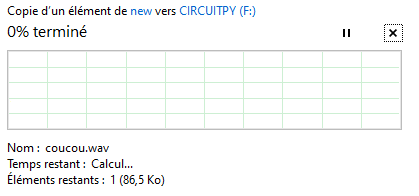
A 23 kB files is ok
A 63 kB file stayed stuck for a while at 33% and eventually finished ...
@tannewt Adding you for review since you worked on this.
This may be a duplicate of #3986, which was fixed by #4122. Could you try the "Absolute newest " build for your board or update from upstream for your custom build?
@Neradoc thanks for finding this. It's probably a carryover from the IDF's example code, which I should have fixed alongside #3955. Since @anecdata and I have both tested this should be good to go.
@jerryneedell Is this particular PR good to merge, or are you still investigating?
ionic elk
@tulip sleet could you link me to Socket issues that you review on Github? It's probably more likely at this point that I'll have worked on something than Scott, and I'm sure he'd appreciate having those issues off his inbox.
tulip sleet
@ionic elk sure, np. I forgot you were involved in that particular one, and it's good to take it off of @slender iron's plate.
ionic elk
@tulip sleet at this point there basically isn't a socket issue that I haven't been a part of
blissful pollen
@tulip sleet About the I2CDevice fix, I was talking to jerry on the weekend and think it's good to merge, but wasn't sure if I should just hit the green merge after we both tested it or let you guys choose when to merge the PR in? So I waited 🙂
manic glacierBOT

@dhalbert I don't think so. I think we ended up adding Blinka for everything anyway. If not, we'll sort it on the library end.
gloomy shuttle
@onyx hinge I built the #4155 PR for the neopixels and am no longer seeing the issues via code.py or in the terminal REPL
manic glacierBOT
I agree yours is a better implementation. I did not want to remove the background tasks all together as I wasn't sure of any potential side effects.
If we don't, there are a significant number of examples that won't work as-is and we'll have to explain updating them to use busio and board.SCL, board.SDA again after pushing to start using board.I2C(), etc. I understand the concern with it being a somewhat arbitrary decision on our part, but I think it's worth it.
Sorry to report this still not working for me.
using a 7 pixel jewel:
dafruit CircuitPython 6.2.0-beta.1-128-g5423e4966 on 2021-02-08; Raspberry Pi Pico with rp2040

>>> from board import *
>>> import neopixel
>>> import time
>>>
>>> pixpin = GP27
>>> numpix = 7
>>>
>>> strip = neopixel.NeoPixel(pixpin, numpix, brightness=0.3)
>>> strip.fill(0)
>>> strip.fill(0xff)
>>> strip.fill(0xff00)
>>> strip.fill(0xff0000)
>>>
``` after the last write, pixel 0 is green ...also ```Adafruit CircuitPython 6.2.0-beta.1-128-g5423e4966 on 2021-02-08; Raspberry Pi Pico with rp2040
from digitalio import *
from board import *
import neopixel
import timepixpin = GP27
numpix = 7strip = neopixel.NeoPixel(pixpin, numpix, brightness=0.3)
strip.fill(0)
strip[0]=0xff
strip[0]=0xff00
strip[1]=0xff00
strip[1]=0xff
strip[0]=0xff
strip[0]=0xff00
pixel 0 is not responding properly.
solar whale
What are the e-mails with 162 messages in the thread from github -- are others getting them?
from Christopher Barnatt
blissful pollen
@solar whale Even more fun with pixels today. I hooked my second pico up as a basic analyzer, and if its connected to the data pin, things work great of course, but as soon as I disconnect it, the issue occurs.
blissful pollen
For a $4 pico it works remarkably well as a basic analyzer, if nothing else that has been fun to try
solar whale
What are you using for the code -- something available to look at?
blissful pollen
I haven't put it anywhere yet I just took the pico example PIO/logicanalyzer code, wrapped it in a loop to run forever, and changed the frequency
solar whale
Just curious -- I have a Salea so will use that but alway fun to poke/prod.....
gloomy shuttle
@solar whale I ran your example in the PR #4155 on my neopixel strip using the REPL with no issues on both 3.3 and vbus
blissful pollen
It's just a PIO program that does "in pins, 1" repeatedly upon a high trigger (or low if you change it). For neopixels works remarkably well
solar whale
@gloomy shuttle good to know -- hope it is something on my end....
gloomy shuttle
solar whale
<@!517804297401008138> good to know -- hope it is something on my end....
ran the second example as well with no issues
solar whale
I will rebuild/reflash and retry with multiple strips.
manic glacierBOT
It worked :)
Thank you very much, problem solved 👍
Closing, fixed by #4148.
hmm -- I had an "Airlift" connected to the Pi - it was not being used, but now that I have disconnected it, I am so far not able to reproduce the issues -- more testing to do....
solar whale
@gloomy shuttle @blissful pollen so -- apparently -- the Airlift was somehow causing some change in teh behavior ...
manic glacierBOT
blissful pollen
solar whale
<@!517804297401008138> <@!228322543507865601> so -- apparently -- the Airlift wa...
Could be. Though after a reboot I can't reproduce it at all with nothing connected. I'm in way over my depth but wonder if it is noise on the lines or something causing an issue.
solar whale
I had also been seeing spurious USB disconnects -- waiting to see if they recur with nothing else connected.
gloomy shuttle
Is this the right place to ask a Read the Docs question?
manic glacierBOT
@gc-elec Your main appears to be way behind ours, causing many commits. Could you merge from upstream, and perhaps submit a new PR that is cleaner in terms of commits?
solar whale
@gloomy shuttle should be fine.
gloomy shuttle
I am working on a library that has subclasses but build the docs is only pulling in the main file for the API Reference. I then looked at the PyPortal library and that is doing the exact same thing. Is this right? I would like the API reference section to pull all the files.
manic glacierBOT
Thanks for your quick response and hints!
Let me give you some background information of given issue.
There are number of projects based on this MCU in our company. It will be superseded by SAME51 in next projects however. The life cycle of our products is at least 10 years. During this time we have to manufacture and test those boards.
I am going to provide low level access to MCU and peripherals to our HW developers and testers for existing devices.
Using circuitpython they will be a...
I have been unable to reproduce the issue with the Airlift disconnected....
gloomy shuttle
I think I solved my problem, but is the PyPortal Read the Docs only suppose to list the PyPortal class and non of the other modules?
manic glacierBOT
The LPC522 series is also interesting because its chips can have a substantial amount of RAM.
I believe you referer to LPC552x Cortex-M33, right?
We have been concentrating more on the NXP i.MX RT10xx line.
Is any code available publically already?
Right LPC552, typo, sorry. Our i.MX port is in circuitpython/ports/mimxrt10xx.
Thanks for the detailed explanation. What is the RAM and flash of the chip used on your existing board(s)? There are some lower limits below which it's very difficult to do any kind of build.
What is the RAM and flash of the chip used on your existing board(s)? There are some lower limits below which it's very difficult to do any kind of build.
RAM: 64 - 96 KiB
Flash: ~400 KiB
That should be fine. I looked briefly at your repo and you have defined a port-specific main.c and done some other things that might be leftover MicroPython implementation. Take a look at a clean port like atmel-samd, stm32, or `nrf``.
To be fair, I had more that just the Airlift connected.
I had the following connected:
ARILIFT -- lots of pins near the pin used for the neopixel
10Kpullups on SDA.SCL (GP0,GP1) - were for a previous test
pushbutton from RUN to GND -- to facilitate entering bootloader.
I have not determined which was the culprit...yet ... I just assumed it was the Airlift -- perhaps hastily.
With just the bare Pico -- my "jewel" is behaving very normally with this PR.
@jerryneedell let's talk about this in the discord meeting today
slender iron
@tulip sleet this is the sdcard issue: https://github.com/adafruit/circuitpython/issues/4119
tulip sleet
moved issue to library repo
solar whale
@onyx hinge I put a place holder "in the weeds" for some discussion of the neopixel/pico
 modern wing
Good afternoon all you wonderful code slingers! Happily lurking today, and updated the notes doc accordingly. 
 errant grail
Just listening today.
 idle owl
<@&356864093652516868> Meeting in a few minutes. Please add yourself to the notes doc as lurking if you're listening in, or add your hug reports and status updates. Chat with you soon! https://docs.google.com/document/d/1RTjIOUogdNgKSO5TdfzvsEoJBb1ohP5yREz6ZulzORA/edit

Google Docs
CircuitPython Weekly for February 8th, 2021 Welcome to the CircuitPython Weekly meeting notes! Feel free to add your Hug Reports and Status Updates early. During the meeting, we go through them as a round robin sorted by username. If you can’t make the meeting and would still like to participa...
solar whale
👋
idle owl
We're finishing up an internal meeting. We'll be here soon!
tidal kiln
lurking (not sure where exactly to add that in notes doc?)
 supple dirge
lurking
onyx hinge
I'll be taking notes -- if you're lurking in the audio channel and haven't noted it in the doc, please let me know and I'll add you.
 old smelt
Lurking
modern wing
That's my secret cap'...I'm always on a zoom meeting.
thorny jay
Lurking
lone axle

Raspberry Pi talks us through the company's first custom Arm chip, now at the heart of the Raspberry Pi Pico and designed in-house with Arm Flexible Access.

Innovation Coffee - live Thursday - 10 am PT (6 pm UTC)
During this episode, we had a very fun conversation with the #RaspberryPi CPO, Gordon Hollingworth, and Hardware Engineer, Luke Wren. Gordon, Raspberry Pi employee number 1, shared with us some interesting anecdotes of his time at Raspberry Pi, and Luke walked us through the hardware deve...
James Adams, Liam Fraser and Luke Wren of Raspberry Pi Trading join Chris to talk about new hardware from Raspberry Pi, including the RP2040 chip, the Pico board, the CM4 module and more!
Matt presents the latest MicroPython News Roundup. Damien discusses the exciting new Raspberry Pi Pico and the MicroPython port for the new micro!
Adafruit Industries - Makers, hackers, artists, designers and engineers!
This week we’ve added a new feature to our Adafruit AR app. If you have a Raspberry Pi Pico, you can now scan the board with Adafruit AR’s board scanner to display a pinout and power pin overlay. A…
TinyLetter
Like many of us, on January 21st I woke up to a barrage of news about the new Raspberry Pi Pico. Microcontrollers launch all the time, but this one caught everybody's imagination. So I hopped ove...

At the start of the Raspberry Pi Pico launch, it was only possible to program it in either C/C++ or MicroPython. A few languages are beginning to make an appearance now, including the quite excitin…


I can't be the first to look at these RGB "beauty" ring lights?
There is 100% an RGBW SK6812 or compatible strip in there.
If no one hacked these yet I will have a go, its almost too perfect of a setup. https://t.co/DOQ6y4WqPE
Likes
164
 Twitter
·
Twitter
·
While the de facto smartphone design ultimately went in a different direction, there’s no denying the classic BlackBerry layout offered some compelling advantages. It was a gadget primarily d…

Make Andy Make
Hey folks, today I'm going to show you how to make an awesome little soil moisture indicator for your indoor house plants using The Raspberry Pi Pico and CircuitPython so you never forget to give your ferns a little drink. I've also written a sweet little bit of code that
onyx hinge
So many animals in the list this week .. owls, bumblebees, and ferrets. oh my.
"Long Term" doesn't mean we don't want a community member picking it up and working on it!
manic glacierBOT
@jedgarpark is also seeing a similar with with SSD1306.
onyx hinge
https://github.com/adafruit/Adafruit_CircuitPython_SimpleMath -- some math-specific functions that were formerly in "simpleio"

GitHub
Math utility functions. Contribute to adafruit/Adafruit_CircuitPython_SimpleMath development by creating an account on GitHub.
tidal kiln
oof. back. ok...well, upgrading to ubuntu 20 did not solve USB lock up issue.
onyx hinge

GitHub
I am a mentor, technical writer, open source community leader and embedded software developer. I am passionate about mentoring, and creating and maintaining thorough, accessible documentation, and ...
slender iron
ivan
onyx hinge
Nice to see you @stuck elbow
thorny jay
@lesamouraipourpre sound French "les amour ai pourpre" (but what is "ai" or is it AI). And where is the plural s on "amour"?
onyx hinge
http://www.merveilleuxscientifique.fr/album-photos/bonneau-albert-les-samouraïs-du-soleil-pourpre/ a reference to the french novel "The Samurai of the crimson sun"?

Bienvenue à sur l'autre face du monde TOULON, votre interlocuteur en matière d'art et de culture. Venez découvrir nos locaux et laissez-vous émerveiller par des œuvres uniques.
(in)elegantly hacked
 mental nexus
Dial widget in progress.
onyx hinge
https://github.com/adafruit/circuitpython/compare/main...microDev1:nvm-rp https://github.com/adafruit/circuitpython/compare/main...microDev1:busio-uart-rp
GitHub
CircuitPython - a Python implementation for teaching coding with microcontrollers - adafruit/circuitpython
GitHub
CircuitPython - a Python implementation for teaching coding with microcontrollers - adafruit/circuitpython
jaunty juniper
thorny jay
@lesamouraipourpre sound French "les amour ai pourpre" (but what is "ai" or is ...
did you mean "le samourai pourpre" ? (their avatar is a purple samourai too) 😉
onyx hinge
we can help with specific git commands when you want @marble hornet
lone axle
Very possible... I was the one that originally butchered the name 😅
modern wing
oooo, the dreaded BIOS bricking of Big Sur.
onyx hinge
pours one out for all the bricked Macs
slender iron
@modern wing have you ever done APFS recovery? my mac's APFS in a sparsebundle is corrupt
(I used it for all my git repos....)
onyx hinge
@tulip sleet long term will the new usb-cdc object and busio.UART grow to have the same API?
lone axle
I'm going to have to drop off for another meeting. I'll note it in the doc. Please read my section when you get to it.
onyx hinge
good, thanks @slender iron
modern wing
@slender iron No I haven't, sorry.
Thankfully, I haven't experienced any of these issues firsthand...just read about them, as it updates the BIOS and the charge chip firmware.
On many models, including my old 15" late-2013 model specifically, it has a strong chance of bricking the system without any chance of recovery.
tulip sleet
onyx hinge
<@!329766224093249548> long term will the new usb-cdc object and busio.UART grow...
more or less, the model is PySerial
onyx hinge

PewPew in a business card form factor.
Remember how I tricked myself into not diving into the rabbit hole of what could be possibly placed in the middle of this keyboard by making an expansion module header in there? Well, it would be nice to actually have a module to place there. So I designed this:It's a basic set: a joystick for mouse emulation, two buttons for mouse clicks, and a...

Play without annoying the neighbors
slender iron
fixing socket is super helpful! thank you!
 marble hornet
@onyx hinge Thank you, I'll take you up on that if (when) I have trouble doing it.
mental nexus
🍞
solar whale
need a beta tester?
marble hornet
I'm going to drop off. Great to hear updates from everyone.
thorny jay
"a real computer" 🙂
onyx hinge
laughs like a maniac
slender iron
oooh, 🔥
gloomy shuttle
@onyx hinge any particular resources that you have found to be helpful for learning KiCad?
onyx hinge
@gloomy shuttle just spending time using it is most helpful for me.
slender iron
I know chris gammell has getting started videos about kicad
onyx hinge
If I have a specific thing, like "I want a special curved pad" then it's search time ... (and the workflow for that is not great but you can do it...)
blissful pollen
I apparently just need more sensors to test against
onyx hinge
svg2shenzen
gloomy shuttle
slender iron
I know chris gammell has getting started videos about kicad
I have his name written on my chalk board from some stream/podcast I listened to over the weekend.
probably your stream from friday
thorny jay
A document or a video that explain once perfectly and can be referenced.
But that time at the beginning is a chance to finish editing the doc... so if we cut it short, we need to be ready more in advance.
solar whale
@gloomy shuttle 4157? is that the right issue number -- not seeing it
gloomy shuttle
Its a PR
solar whale
ah -- thanks
thorny jay
If something change, and we have to do differently, please give a warning.
+1 for that.
@slender iron look at all the example using AirLift and the pin.
onyx hinge
if hasattr(board, 'ANALOG_JOY_X'): set up analog joystick...
ionic elk
Is there a way to extract the board name in python?
gloomy shuttle
You might also have accessories that are not in board that could be used for a game as well.
onyx hinge
^^^ check for properties in board to decide what "kind" of input there is
thorny jay
Can we have a library that is different for different board?
ionic elk
Do we/should we have a board.name()
thorny jay
I am interested in "added" gamepad, like Wii and wireless Bluepad32.
onyx hinge
brb setting DMA jumper on soundblaster
thorny jay
In PC game you can also choose at startup the kind of input you are going to use...
Remember, this is the year of the "Python Game Computer"...
You need those new (positional) neopixel with 3 wire and capture the signal at the end.
gloomy shuttle
are you using vbus or 3.3v?
onyx hinge
@thorny jay my test/demo is using pioasm, yeah
GitHub
Need to make a final decision on whether to add these. Can discuss today.
gloomy shuttle
"of course they are" 😆
onyx hinge
There are some libs that have def __init__(self, bus=board.I2C()): ... and those libs will fail without it .. but ALSO they will construct board.I2C() whenever the lib is imported, which is not good. but I see that's not really what the discussion is about.
solar whale
👍
thorny jay
Can we have a default pin for putting a NeoPixel... and a UF2 with colour indication like CP board?
slender iron
@onyx hinge those libraries need to be fixed
they should default to None and then have an if statement
onyx hinge
@slender iron agreed -- the one I know about was only because someone was fixing it...
thorny jay
Could be enhanced Pico with Power LED, NeoPixel and Reset button.
There could be a default Pico marking for CircuitPython usage.
onyx hinge
We could change the error message to say AttributeError: This board has no default I2C bus. Construct an I2C bus using busio.I2C.
thorny jay
I seems to remember that the new way of specifying I2C was also helping when you want to use a library use I2C and you also want to use it.
slender iron
brb
gloomy shuttle
onyx hinge
We could change the error message to say `AttributeError: This board has no defa...
I like this, but I still think a default one should be added for pi pico.
thorny jay
Pico will be an entry point to CP for a lot of user... so you have to make it easy for those.
onyx hinge
(specifically, this means board.I2C has to be a property and I don't think that actually works)
thorny jay
User that will not find driver in the MP (I guess).
tulip sleet
it could throw NotImplementedError with a board-specific message
tidal kiln
probably same with any option
thorny jay
I want a super Pico with power LED, RGB LED, reset button, ... and Feather format!
crimson ferry
Pico is more like Saola... every pin available for anything
thorny jay
Are the library are still using that?
Can we catch an exception and use the other construct if it is not present.
onyx hinge
./libraries/drivers/crickit/adafruit_crickit.py-if "I2C" in dir(board):
./libraries/drivers/crickit/adafruit_crickit.py:    crickit = Crickit(Seesaw(board.I2C()))  # pylint: disable=invalid-name
There are no label on the Pico... or they are on the wrong side!
Or when you call board.I2C() it take random pin that could be I2C, different each time.
What about Pico on a bigger board, where some pin have choosen usage, like Pimoroni is doing... what about the Pi Zero Board Limor is doing?
slender iron
@thorny jay if it's soldered down they can have a separate board def
onyx hinge
we have cpx + crickit board def too, I don't know that it strictly has to be soldered down
solar whale
great idea!
onyx hinge
so a rp2040-zero could have a board def .. I guess? not sure.
thorny jay
I have test script for PioASM. 🙂
crimson ferry
I'd love access to dev test scripts
solar whale
are thinking a new repo or within CP?
onyx hinge
tests/manual/audioio ? sure.
slender iron
in CP tests/manual/<module>
crimson ferry
plus the stuf that's not in shared-bindings
onyx hinge
🏃♂️ marathon session 🏃 🏃♀️
blissful pollen
i'll take the blame I finally had an in the weeds item 🙂
manic glacierBOT
Closing this without merging after discussion in the weekly CircuitPython meeting of 2021-02-08, timestamp 1:26:18. See summary in the linked issue, #4121.
gilded cradle
Thanks
blissful pollen
Think reseting the pin direction and value to 0 may fix the neopixel problem I still was seeing
slender iron
GitHub
I'm creating a PCB based on the RPI Compute Module 4 and have ICs attached to it that I would like to expose in a CPY fashion as a pre-configured peripheral as part of the board definition....
manic glacierBOT
[adafruit/circuitpython] New comment on issue #4147: ESP32S2: unable to access I2C after soft reboot
I crash my Cucumber when doing this. I had to do some I2C changes as the Cucumber has no pullups on its internal I2C bus (not great). Moving some of the constructor bits around seems to get rid of the crash but then nothing is found on doing a scan. I will keep looking. I am also wondering if espressif has put changes/fixes into the idf since the commit that we (CPY) use. I did try building wit version 4.2 of the idf, nothing really changed.
thorny jay
Bye.
manic glacierBOT
Closing this after discussion in the weekly CircuitPython meeting of 2021-02-08, timestamp 1:26:18. We decided that trying to ameliorate board designs that fail to label default pins is beyond our purview. We can document the problem in the FAQ section in the RPI Pico guide. If and when the board silkscreen is updated to designate default bus pins, we can reopen this.
 uncut nexus
@slender iron - if someone was to be to bold as to attempt implementing pulsein using pio on the pico; would it be appropriate to implement common_hal_rp2pio_statemachine_read and, if so, is there any reason to use/not use DMA when doing so?
gloomy shuttle
Thanks. I agree with the outcome on the Pico busio conversation. It is unfortunate just because of the sheer number of people who may try CircuitPython projects because of the Pico and will likely run into issues with it. The FAQ should help.
solar whale
Have a great week 👋
slender iron
@uncut nexus yup, I'd use DMA. coordinate with @onyx hinge on read. I'm not sure when he'll get to it
the PWM peripheral might be able to do everything we need
it can do some capture
uncut nexus
OK, thanks!
tulip sleet
@idle owl do you want me to write a FAQ for the Pico for the missing board. attributes?
or do you ahve something in mind?
idle owl
@tulip sleet Yes please. No, I added it to my list, but I didn't have any ideas for it. Can you also add another entry about MOSI and MISO being SPI_RX and SPI_TX?
tulip sleet
sure
idle owl
Thank you so much!
slender iron
ok, I'm off for a bit while I start the bbq for dinner and then have lunch. (making pulled pork)
tulip sleet
sounds great!
idle owl
Excellent choice of food.
tulip sleet
we have local bbq joint but we haven't ordered from them in a while
slender iron
🙂
idle owl
@slender iron If you do not have meat claws, you will wish you did. https://thebbqbutler.com/collections/best-sellers/products/the-original-bear-paws-meat-claws-black

BBQ Butler
As featured on BBQ Pitmasters, Guy Fieri’s Diners, Drive-Ins, and Dives, and America’s Test Kitchen. Bear Paws have been named “Best BBQ Tool” by the National BBQ Association. BBQ Butler’s Bear Claw meat shredder is the answer to perfectly shredded meat without the mess and headache of knives and forks. Perfect for pulling pork and any meat. Eas...
tulip sleet
Ballard: A slight chance of rain and snow showers. Partly sunny, with a high near 43. Calm wind. Chance of precipitation is 20%.
sorry about the weather
slender iron
@idle owl i just use forks 🙂
idle owl
@slender iron meat claws ftw.
slender iron
@tulip sleet better than weather later this week
tulip sleet
it is 27deg here now after snowing all day yesterday
slender iron
🌨️
manic glacierBOT
Once the PIO is done with the neopixel pin it needs to be re-initialized to be output and driven low to prevent the first neopixel from getting accidentally turned on. Otherwise it seems to float and can cause random behavior.
blissful pollen
@solar whale I just put in a new PR that may fix your problem as well. Seems to have solved mine at least
solar whale
Great! Just saw it and will try to test.
manic glacierBOT
Just tested with my Airlift attached -- seems to have fixed the issue for me as well.
blissful pollen
awesome
tulip sleet
https://github.com/adafruit/circuitpython/pull/4155 is still needed too, right, for the shortest strings?
GitHub
@jerryneedell noticed that this problem affected strips short enough to not use the DMA peripheral, thanks for the hot tip!
Instead of checking for background tasks after every byte transfer, try u...
solar whale
I have both 4155 and 4160 in my build
blissful pollen
tulip sleet
https://github.com/adafruit/circuitpython/pull/4155 is still needed too, right, ...
Correct, they are two separate issues
solar whale
Both look good to me.
blissful pollen
I do though I wrote one of them
manic glacierBOT
Tested with #4160 -- both are working for me.
Tested by @jerryneedell and @gamblor21.
tulip sleet
i will wait for the other one to build successfully
solar whale
Thanks -- Nice work @blissful pollen and @onyx hinge
stuck elbow
@slender iron sorry, I forgot to mention, I reopened the PR for https://github.com/adafruit/circuitpython/pull/3536 because that way of keeping time still gives me much nicer display (no flickering at all) and lets me not worry about long-running programs.
GitHub
The time.sleep() and time.monotonic() functions break the timer
interrupt on which PewPew10 display relies, so we can't use them
anymore. Instead I'm adding a time-keeping function ...
idle owl
blissful pollen
I apparently just need more sensors to test against
We can help with that. 😉
blissful pollen
idle owl
We can help with that. 😉
Thanks! I think I just didn't realize how different each device could be, and it was my first PR of any complexity. Plus side I know a lot more now
manic glacierBOT
This is OK by me, since it doesn't change anything else except your own library.
idle owl
blissful pollen
Thanks! I think I just didn't realize how different each device could be, and it...
You did great work! Thanks for getting that added. I accidentally ran into it last week and confused myself temporarily when things were working without the lib loaded onto CIRCUITPY. Then I remembered 😄
May I DM you?
blissful pollen
sure
manic glacierBOT
If we had some kind of ticks_ms() routine that wrapped around for non-longints, would that be useful to you instead?
Thanks for this fix! Will merge after jobs complete.
No, an important feature here is that it doesn't use the timekeeping/sleep machinery, and so doesn't trigger the flickering.
slender iron
@idle owl it'd be good to link to your guide from the cp.org download page for the pico too
idle owl
@slender iron Do we do that with other boards?
slender iron
some yes. they can have general links in the description
idle owl
Fair enough
manic glacierBOT
@jfabernathy Could you test this fix? It disables brownout detection just before doing a deep sleep. You can find a build for your board in the "Artifacts" dropdown on this page.

I tried testing with simpler test programs that did and did not use wifi but could not reliably generate the problem.
manic glacierBOT
Just so I'm clear. I double press reset on the Metro ESP32-S2 and then drag over the UF2 file I got from the "Artifacts" dropdown for Metro ESP32-S2 to the CIRCUITPY dir. The boot_out.txt shows:
Adafruit CircuitPython 6.2.0-beta.1-136-g5c129f813 on 2021-02-08; Adafruit Metro ESP32S2 with ESP32S2
My lib folder items are all from Feb 4 2021.
The app I'm testing is my full application that sends temp and humidity via miniMQTT and then deep sleeps for 60 sec. It also post it's loop count ...
manic glacierBOT
Right, thanks, that's exactly what I would expect you to do. This build does not have brownout detection disabled completely like your previous test version. Instead it turns it off before just before deep sleep (and actually doesn't turn it back on -- not sure if we should or it's automatic).
manic glacierBOT
Code looks good to me! Thanks!
I don't think it's the timekeeping/sleep machinery causing you problems. All of those things are still happening. I'd blame monotonic's degrading accuracy if anything.
One suggestion to simplify things. (I realize I'm a bit late. Thanks for fixing this!)
I think it'd be clearer if you replaced the original if statements with while loops. That way you'd load up the 4 or 8 entry FIFO and then move on. 32 seems arbitrary and I'm skeptical you'd ever hit that many due to the FIFO size.
My first rp2040 commit is also a good place to start: https://github.com/adafruit/circuitpython/commit/733094aead6e84b42da54655b2b0a5d0dbd1a503#diff-9a32e21d62fdae42eb9135c5c5247bb84aa3de605f4e64bb118d926cc591521e
TinyUSB support is a pre-requisite as well. If you have questions, feel free to ask them on the Adafruit Discord in the #circuitpython channel.
@gc-elec Your
mainappears to be way behind ours, causing many commits. Could you merge from upstream, and perhaps submit a new PR that is cleaner in terms of commits?
Note that this cluttered commit history can also be a function of how you do git merges. You should merge adafruit/main into your feature branch and not the reverse. So, it matters that you start on your working branch before merging.
The first hour (67 loops) are flawless. I'll let you know tomorrow what the first day looks like.
slender iron
@ionic elk do you need a socket break?
manic glacierBOT
@DavePutz Do you want to take a look at this and find my bug?
Thanks for running this down!
I'd do different boards for WROOM vs WROVER and sensors vs no sensors. The saola is an example of the first and the feather nrf regular vs sense are of the second. I wouldn't do separate versions for the antenna.
We talked about this in the meeting today and OUT should be able to set up the pin via the init sequence.
I'd do different boards for WROOM vs WROVER and sensors vs no sensors. The saola is an example of the first and the feather nrf regular vs sense are of the second. I wouldn't do separate versions for the antenna.
Thanks, what I thought as well. In that case I'll ask for some more PIDs from espressif for the variants.
(I canceled a bunch of the pending actions. That's why they failed.)
manic glacierBOT
I have received new PIDs from Espressif for the various cucumber variants.
These should be used for the non-sensor R variants (R and RI)
0x80A0 | GRAVITECH CUCUMBER R ESP32S2 - Arduino
0x80A1 | GRAVITECH CUCUMBER R ESP32S2 - CircuitPython
0x80A2 | GRAVITECH CUCUMBER R ESP32S2 - UF2 Bootloader
These are for the non-sensor M variants (M and MI)
0x80A3 | GRAVITECH CUCUMBER M ESP32S2 - Arduino
0x80A4 | GRAVITECH CUCUMBER M ESP32S2 - CircuitPython
0x80A5 | GRAVITECH CUCUMBER M ESP32...
I chose 32 because it was the DMA threshold. I didn't check the FIFO size at all! I'll open an issue suggesting the clean-up, but try to get to it next time I'm working in this code.
@tannewt [observed](https://github.com/adafruit/circuitpython/pull/4155#pullrequestreview-586038240}:
I think it'd be clearer if you replaced the original if statements with while loops. That way you'd load up the 4 or 8 entry FIFO and then move on. 32 seems arbitrary and I'm skeptical you'd ever hit that many due to the FIFO size.
Just in case I don't get to this during some upcoming PIO work, I wanted it filed in an issue instead of in the review comments of a closed PR!
slender iron
@sour river I just pushed a fix for 16 bit conversion
sour river
Ooh awesome! I'll try that out later, or maybe tomorrow. I did look around for a while to try to figure out why only half of the 8-bit samples were making it to the output, but I didn't find anything yet.
slender iron
it was missing *
so it was converting the wrong memory....
love how fresh eyes can find problems faster
sour river
oh no! I had a bug like that once. My friend and I were working on some embedded code to work with a radio module and we couldn't figure out why the output was garbled at the bit level... turned out he forgot to initialize a pointer, and the message was being passed through a buffer that happened to exist in IO registers 😬 so naturally some bits got masked. That was quite a fun one to find haha
slender iron
😄
when I was at google there was a gmail bug that marked accounts as spam and was due to a missing *
pointers are hard
sour river
haha yeah, they are. It's been a while since I worked with C too so reading all the audio code was pretty intense! but it's fun; I miss those embedded days
slender iron
🙂 you can get your kicks in the CP source
it's pretty well laid out
audio and display are the weeds
sour river
haha if i do much more i may have to take a shot at the SWD interface. There's only so much you can do with print statements
slender iron
yup yup. I'm excited to have jlink support
sour river
But yeah, I just might! Circuitpython seems really fun, and I'm intrigued by the PIO stuff a lot
sour river
Oh I'd bet there's a lot that could be done with them! They're practically like little cores to themselves. I haven't read too much of the docs yet but I want to see how far they can be pushed. I have a few charlieplexing modules on the way and I'm going to see if I can get a module working that does all the strobing in PIO, if that's possible. Then maybe rotary encoders next.
slender iron
ya, rotaryio would be nice to have
sour river
yeah i saw there was a module for that, so that could be a good interface for it. I've never actually done anything with micropython or circuitpython before but i'm down to learn! I'm guessing on the other uC's rotaryio just sets up interrupts, right?
slender iron
ya, it uses an interrupt handler
I was thinking with pio we could atleast watch for pin changes and then interrupt
I did see one example go by that had 32 instructions I think but I'd rather not use a whole PIO of memory for it
sour river
yeah so that's the big limitation, right? the 4 PIO modules share a block of only 32 instructions? That is pretty constraining
slender iron
correct
most things I've used it for only use a few instructions though
neopixel is 4
it's pretty dense overall
sour river
4 instructions on a single PIO? neat
slender iron
ya, single state machine
sour river
my friend and i made a routine for driving those on MSP430 once. 100% cpu, clock perfect, all asm. It was fun but pretty tough to make it work. Getting all that on a programmable peripheral is awesome
slender iron
ya, 100%
sour river
in 4 words no less
tulip sleet
@onyx hinge You are right, it's driving CS high, but then why did it work ??
onyx hinge
I dunno, Limor seemed to indicate that not all cards needed it
tulip sleet
yes, I can pass the raw spi and cs. The original code created the new spi in the init routine, which was unnecessary
onyx hinge
if you did it right once it would persist until you power cycled the card even if you needed it
tulip sleet
i might be able to use an SPIDevice and still force it high inside the with. or just use a raw write, as you suggested.
onyx hinge
I have no idea whether toggling CS with no clock edges is with or against the letter of SPI SD cards
since you would get a toggle
tulip sleet
i didn't know about CS high, I completely glossed over that, because I wouldn't have expected that. Where is the spec?
onyx hinge
but you gotta expect those as a system initializes itself, it could have a pull or startup transient or whatever
I mostly use http://elm-chan.org/docs/mmc/mmc_e.html#spibus as a guide but there is a "real, but simplified" spec you can view without $$$ https://www.sdcard.org/downloads/pls/
 tulip sleet
the card I have works on a power cycle without the "proper init, hmm, thanks, I will read them carefully.
Power ON or card insersion
After supply voltage reached above 2.2 volts, wait for one millisecond at least. Set SPI clock rate between 100 kHz and 400 kHz. Set DI and CS high and apply 74 or more clock pulses to SCLK. The card will enter its native operating mode and go ready to accept native command.
onyx hinge
Part1_Physical_Layer_Simplified_Specification_Ver8.00.pdf page 231
The host shall supply power to the card so that the voltage is reached to Vdd_min within 250ms and start to supply at least 74 SD clocks to the SD card with keeping CMD line to high. In case of SPI mode, CS shall be held to high during 74 clock cycles
💤
tulip sleet
night!
manic glacierBOT

FWIW the problem went away for me when I included the I2C address in my code display = adafruit_ssd1306.SSD1306_I2C(128, 32, i2c, addr=0x3d)
 idle wharf
Comment from someone who watched the Weekly meetings on YouTube most of the time. Its easy enough to skip ahead, but I'm sure it gets old to say the same thing over and over... But if you're going to do something... I think a theme song is needed. 🎶
manic glacierBOT

Not only does this resolve the time.sleep() issue, this improves cold-startup times from 3+ seconds to right around 1 second.
manic glacierBOT
This has been Resolved for the LCD -- I had forgotten to copy the adafruit 74hc595 library to my Pico.
Once I copied this to, the charlie_i2c_rgb_simpletest runs ok.
manic glacierBOT
solved for now by call of pwmout_reset() in the board_init() function.
My test on the Metro ESP32-S2 has worked flawlessly for over 12 hours. I'd say it fixed. I also put the right .UF2 file on the Magtag with a test that reads temp, humidity, and the loop count from alarm.memory and displays them every 60 seconds and them deep sleeps. It's over 11 hours without a problem. I'd say it's fixed.
supple gale
Olimex has kindly provided USB PIDs for Circuitpython andTinyUF2 for their ESP32-S2-DevKit-Lipo.
This an Open Source board.
https://www.olimex.com/Products/IoT/ESP32-S2/ESP32-S2-DevKit-Lipo/open-source-hardware
https://github.com/OLIMEX/ESP32-S2-DevKit-LiPo
Sure, no problem. Our Olimex VID is "15BA".

For PID we assign these two :

"28DB" - ESP32-S2-DevKit-Lipo Circuitpython
"28DC" - ESP32-S2-DevKit-Lipo TinyUF2 bootloader

Best regards,
Lub/OLIMEX
I'll probably get a PR out for the TinyUF2 bootloader later today or tomorrow.

Olimex
ESP32-S2 IoT developement board with WiFi, USB programmer, RGB LED, LiPo charger, GPIOs

GitHub
ESP32-S2 IoT developement board with WiFi, USB programmer, RGB LED, LiPo charger, GPIOs - OLIMEX/ESP32-S2-DevKit-LiPo
onyx hinge
@idle wharf I did not track the full progress of circup, but I recall that you were needing to query github for certain information. Did you raise the question of whether we can add the needed info to the bundle so that you have it locally instead? It would be nice if circup operated "offline" except to download the bundle itself.
manic glacierBOT
@jerryneedell What hw are you using? the I2C/SPI backpack uses an MCP23008 so I am not sure what combination of things you are using.
idle owl
idle wharf
Comment from someone who watched the Weekly meetings on YouTube most of the time...
The intro is tightened up a bit, but much of it is still intended for the recording. You'll have plenty to skip still if you want to. 🙂 As for a theme song, are you going to write it for us? 😉
manic glacierBOT
@dhalbert I'm using one of these https://www.adafruit.com/product/1109 - i have it connected to 5V GND, SDA,SCL
solar whale
With the recent changes to Requests, I may have run into an issue. I have a MagTag that fetches some data from a URL then I post the data to AIO. It WAS working until today -- now I can either do the data fetch via magtag.fetch or access AIO but if I try to do both, I get an "Out of Sockets" error. Anyone have have a clue what is going wrong?
mental nexus
Here’s the general query regarding documentation (Sphinx?): so we’re designing this new design of classes for graphical widgets. I’m struggling to keep track of all the ideas of how it will be configured and realized that the “read the docs” pages is where we eventually need to go. So, why not generate the same kind of thing while we’re still batting around ideas. So to the questions:
- Can we create “dummy” files of the class definitions with just all the documentation statements that describe the input parameters and three key functions? And then run Sphinx to generate the docs so we can discuss?
- It’s confusing to newbies like me when there is a whole bunch of nested classes. For example, a Widget is a subclass of Group. Group contains x,y parameters. When we show the parameters for “Widget” in the docs, will it also automatically include and show all the other inherited parameters for Group? Or do you have to type them all into the documentation for the subclass Widget?
idle owl
mental nexus
1. Can we create “dummy” files of the class definitions with just all the docum...
So since the library was cookiecuttered with our setup, once I set up Read the Docs, everything is automatically generated. As for creating dummy files, we usually document inline, so the docs would be a docstring in Widget etc. So it's basically built into the code.
mental nexus
- It’s confusing to newbies like me when there is a whole bunch of nested classes. For example, a Widget is a subclass of Group. Group contains x,y parameters. When we show the parameters for “Widget” in the docs, will it also automatically include and show all the other inherited parameters for Group? Or do you have to type them all into the documentation for the subclass Widget?
Mainly just wondering if we can use the same tools for generating the docs, but in the development stage so we can communicate the definition more clearly and also do the documentation work at the same time.
idle owl
mental nexus
2. It’s confusing to newbies like me when there is a whole bunch of nested clas...
It does not pull in inherited parameters. You would have to manually document them in this library.
idle owl
mental nexus
Mainly just wondering if we can use the same tools for generating the docs, but ...
We definitely can, it's simply a matter of combining what you have in mind with how it currently works.
mental nexus
Ok, so inheritance isn’t captured. Ok that’s important to remember.
idle owl
If you have plans for much more thorough documentation, for example, than makes sense inline in the code, we could try to figure out rendering that, or, as we typically do, have you write a guide 🙂
mental nexus
Right now mainly thinking about it as an easy way to document the different class organization proposals to make it easy to read, understand and give feedback and improvements.
idle owl
Ah hmm. For RTD to build, it needs to be merged, I believe. I'm not sure we can build docs out of a PR.
You can build locally, but then you'd have to add the files manually to the PR and that doesn't do anything close to what you're looking for.
I think the best you can do for multiple proposals of something like that is create draft PRs from different branches, and open the discussion on each one. Mention all of them in the comments for the others so they're linked in the thread.
Unless I'm misunderstanding your intention, which is likely.
manic glacierBOT
 tulip sleet
@idle owl I want to refer people to a Pico pinout diagram, but I don't see one in the basic guide. Should I add the colorful RPi one on the Overview page, or do you have other plans?
this is for the no board.I2C() etc FAQ
idle owl
@tulip sleet I did not have plans. I suppose the overview would work? Or we could create a pinouts page? Let me ask Limor what she wants.
tulip sleet
there is no Pinouts page
idle owl
@tulip sleet I'll create a pinouts page and you can add it there.
tulip sleet
tnx!
ionic elk
@slender iron I'm already getting a bit of a break with this I2C thing but I'm flexible to work on anything rn
idle owl
@tulip sleet Refresh. Page is created. Feel free to edit the short copy I added, then make the page live when you're done.
manic glacierBOT
gloomy shuttle
idle owl
So since the library was cookiecuttered with our setup, once I set up Read the D...
This kind of goes to the question I raised earlier yesterday, that I think got lost in preparation for the meeting. The cookiecutter or learn guide about libraries doesn't take into account how to deal with packages/submodules in the documentation portion. I noticed that none of my submodules were showing up in the RTD so I looked at the how the PyPortal RTD handled it and noticed that none of the submodules for that were listed in it's RTD either. I started going through some of the adafruit libraries last night and created a couple PRs to add them and see if that was the right approach.
ionic elk
@solar whale how many sockets in total are you using? TLS sockets in SSLSocket were changed to use 2 sockets under the hood in order to accept connections, but Scott was noting they might be better off dynamically adding sockets only when they start being used as a server.
idle owl
gloomy shuttle
This kind of goes to the question I raised earlier yesterday, that I think got l...
We need to add it to the documentation then. It's one of those things that we're used to and forget other folks might not know.
solar whale
@ionic elk I think I found a workaround -- I was not using the magtag.push_to_io -- I may have been duplicating things.
mental nexus
idle owl
I think the best you can do for multiple proposals of something like that is cre...
Thanks kattni, I'll consider building locally and see if that does what I need.
ionic elk
@solar whale good to hear, let me know if you have further issues, the low socket count thing is an ongoing issue
idle owl
mental nexus
Thanks kattni, I'll consider building locally and see if that does what I need.
Sounds good, let me know if you need help. I set it up ages ago and it still works. So whatever we have in the guide should still be accurate.
solar whale
@ionic elk Thanks -- all good now -- it's working again.
gloomy shuttle
mental nexus
Thanks kattni, I'll consider building locally and see if that does what I need.
In order for the subclasses to show in RTD even when you build locally you need to update the docs/api.rst to include them if they are separate files.
uncut nexus
@onyx hinge - Scott mentioned you might be working on state machine reads for the RP2040 ; if so have you got anything I could use? If not, mind if I take a crack at it? I'm working on implementing pulsein using pio.
ionic elk
@slender iron also, you want to create this new test folder or should I?
mental nexus
gloomy shuttle
In order for the subclasses to show in RTD even when you build locally you need ...
How does this work if a superclass is in core CircuitPython (C-code), does that incorporate inheritance too? Do you have a good example?
crimson ferry
@solar whale there may still be some conditions in Requests that don't close the socket, happy to troubleshoot if you encounter it again
solar whale
Thanks! I’ll do more tests later today to see if I can break it again!
gloomy shuttle
mental nexus
How does this work if a superclass is in core CircuitPython (C-code), does that...
No, I don't know how you would deal with superclasses outside a library. When I was looking at this issue yesterday, I saw that PortalBase included the other submodules in the API portion, while the PyPortal did not. PyPortal is a subclass of PortalBase, but they are not linked in the docs, that I can tell.
PortalBase - https://circuitpython.readthedocs.io/projects/portalbase/en/latest/
PyPortal - https://circuitpython.readthedocs.io/projects/pyportal/en/latest/
onyx hinge
@uncut nexus I haven't started writing any code yet, thanks for asking
uncut nexus
@onyx hinge OK. I'll see what I can do with it then.
onyx hinge
My initial focus is gonna be - support for reading IN from PIO; support for looping output data; and understanding PIO assembler well enough to create code that will drive a 7-segment 4-digit display smoothly (or know why it won't work out). Dunno how far I'll get this week.
idle wharf
onyx hinge
<@!624005998696333331> I did not track the full progress of circup, but I recall...
I considered it, but it was pointed out, I could get it from github, and since the verify the bundle version and download the bundle occurs all the time time anyway, it seemed fine to have to go off-box to get the requirements.txt.
But both methods could work, but the implemented method didn't require me touching every library. 😉
https://github.com/adafruit/circup/issues/50
GitHub
When you are installing one package it may also have other dependencies called out, install those as well. Not sure how this will work yet, but is the next thing that messes me up in my own workflo...
onyx hinge
@idle wharf and API rate limits didn't turn out to be a big problem?
tulip sleet
@onyx hinge I can merge your "note about sharing SPI bus with SD cards" PR if you are ready. How do you feel about my PR from yesterday now? I pulled CS high in a simple way.
tidal kiln
@idle owl i think this may have been part of discussion in yesterday meeting? sry i didn't fully follow it, but - is there some plan to add pico specific info on setting up I2C / SPI to learn guide?
idle owl
tidal kiln
<@!330227457296957440> i think this may have been part of discussion in yesterda...
Yes.
Dan's working on it or did it.
onyx hinge
@tulip sleet I will check that PR again
but yes I think my PR is mergeable if the docs built
tidal kiln
wait. maybe it just appeared 🙂
tulip sleet
@tidal kiln @idle owl just added a Pinouts page, which I just finished. I also added a FAQ pointing there. See whether you think it's clear.
onyx hinge
but it didn't build
tulip sleet
The Pinouts page is minimal. I had to do surgery on their diagram to make it less wide, otherwise it was too blurry when reduced. I stacked the color key in two rows at the bottom.
tulip sleet
onyx hinge
but it didn't build
I force-pushed a fix last night and it's building now.
idle wharf
onyx hinge
<@!624005998696333331> and API rate limits didn't turn out to be a big problem?
The API rate limit did become a problem in testing. I was using it to get the default branch. So, instead I used regex.
https://github.com/adafruit/circup/pull/72
GitHub
Fixes #71
Moved skipping non-mcu libraries to logging, output is cleaner now
Moved some logic into its own function get_requirements() which makes get_dependencies() a little cleaner too
I pretty ...
idle wharf
idle owl
The intro is tightened up a bit, but much of it is still intended for the record...
HA... I should know better by now than to make a suggestion I'm not willing to actually do. 😉
Sorry, despite my Academy Boys Choir credentials (as a 10 y.o.) songwriting never happened for me. (ABC was affiliated with Performing Arts School of Philadelphia see movie FAME!)
Maybe we could some synthy 🐍 beats from @ivory yew's CP boards?
tidal kiln
@tulip sleet thanks. looks really good. ok with you if i edit to add a specific example each for I2C / SPI / UART?
idle wharf
@onyx hinge I'm totally up to changing any of it though. I just did what made sense at the time.
tulip sleet
@tidal kiln sure, but you might mention that UART isn't implemented yet 🙂
tidal kiln
ok. i'll just skip that for now. better to just not show it then.
tulip sleet
specifics for each is a v good idea
you can just add a red box warning for now. We can remove it in a week or two or whatever
tidal kiln
yep. i can see the next question being "but how do i do SPI?" etc.
@tulip sleet you've got the pinout page locked. ok if i take over?
tulip sleet
@tidal kiln go ahead; I have to go out for a car inspection and will be phone only for a while
tidal kiln
np. thanks.
idle wharf
@idle owl do you know why in the cookiecutter repo there are filename.rst.license files alongside the filename.rst files? Is. I am assuming they are used as an include.
If so, should the library author also be added to those copyrights?
idle owl
idle wharf
<@!330227457296957440> do you know why in the cookiecutter repo there are filena...
Something to do with the way the new licensing schema works I think. I'm not entirely certain. But yes, I believe so? Unless the file is licensed to someone else by default...
onyx hinge
@idle wharf I looked into doing this in circuitpython-build-tools and it looks doable. Hypothetically, the bundle would begin to include packages like ```unzip -l bundles/Adafruit_CircuitPython_Bundle-6.x-mpy-20210209.zip | sort | grep requirements | head -3
102 2021-02-09 11:50 Adafruit_CircuitPython_Bundle-6.x-mpy-20210209/requirements/adafruit_fancyled/requirements.txt
102 2021-02-09 11:50 Adafruit_CircuitPython_Bundle-6.x-mpy-20210209/requirements/adafruit_waveform/requirements.txt
111 2021-02-09 11:50 Adafruit_CircuitPython_Bundle-6.x-mpy-20210209/requirements/adafruit_azureiot/requirements.txt
check sphinx settings. you might be able to enable it
slender iron
ionic elk
<@!252717193496756235> I'm already getting a bit of a break with this I2C thing ...
kk, just wondering if I should point another socket issue to you. sounds like you've got a good mix now
idle wharf
idle owl
Something to do with the way the new licensing schema works I think. I'm not ent...
All the files have a copyright. I assume so pre-commit \ CI won't fail. I think files migth need an if Adafruit... if not...
I'll propose something... work meetings... back in a few hours
slender iron
ionic elk
<@!252717193496756235> also, you want to create this new test folder or should I...
We both can. git will merge them together
tidal kiln
@idle owl @tulip sleet added my tweaks for whenever you want to take a look: https://learn.adafruit.com/getting-started-with-raspberry-pi-pico-circuitpython/pinouts
idle owl
idle wharf
**All** the files have a copyright. I assume so pre-commit \ CI won't fail. I th...
Ok! Thanks again for doing this!
slender iron
ok, grocery time for me
gloomy shuttle
@mental nexus it looks like there is a :show-inheritance: flag that can be set. When I tested it, it shows the name of the base class library. If the base class is within that library/module it will link to it. There are possibly ways to manually link to the docs for the base class outside of a given library.
idle owl
@gloomy shuttle Nice find!
gloomy shuttle
Here is the stackoverflow that led me to it - https://stackoverflow.com/questions/17254854/sphinx-autodoc-show-inheritance-how-to-skip-undocumented-intermediate-bases
Sphinx Documentation page - https://www.sphinx-doc.org/en/master/usage/extensions/autodoc.html

Stack Overflow
I have a three-layered class structure like this:
class Super(object):
"""This class is documented."""
class Intermediate(Super):
pass
class Sub(Intermediate):
"""This is also docume...
manic glacierBOT

hitting the same issue when using just two pwm's (16, 17)
 fossil gorge
idle owl
<@!517804297401008138> Nice find!
fossil gorge
idle owl
<@!517804297401008138> Nice find!
I've just been playing around with that too, since I needed a distraction from coding for work! It's pretty slick
manic glacierBOT

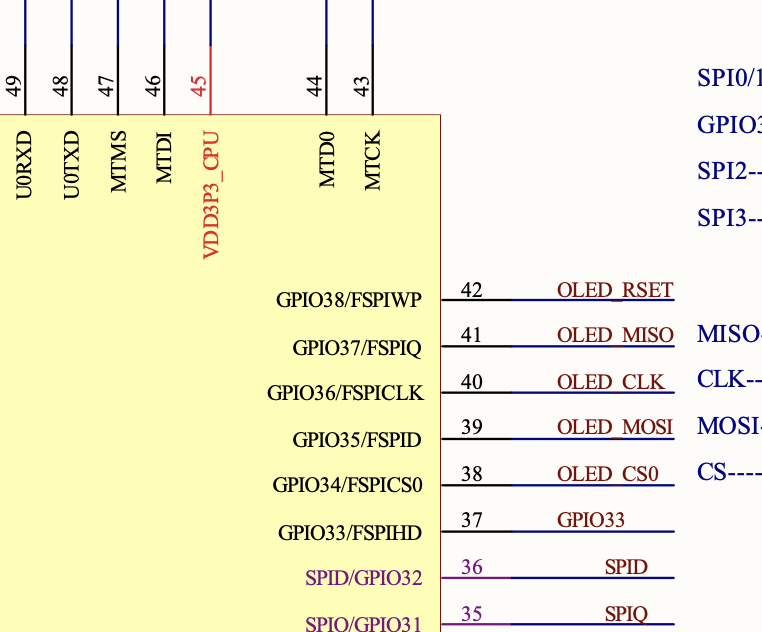 fossil gorge
What I haven't tried yet, though, it whether it will follow down to the base-most class, or if it's just the parent.
Oh, actually, what I found was slightly different - I got :inherited-members:, which shows them inline
So if "B" inherits from "A", and "A" has a method "DoTheThing()", the RTD for "B" would show "DoTheThing()" as if it were a method in "B" (which it is.. ish).
tulip sleet
tidal kiln
<@!330227457296957440> <@!329766224093249548> added my tweaks for whenever you w...
Very clear, and also handling the SPI TX/RX nomenclature.
thanks!
tidal kiln
np. thanks for creating it.
idle owl
@tulip sleet This is correct? https://github.com/adafruit/circuitpython-default-files/pull/10/files

GitHub
I updated the PyRuler example to work with CP 6.1.0. import usb_hid was needed.
It looks right, but you'd know better than I would I think
tulip sleet
yes, that's needed now
idle owl
ok, right on. Thanks
ionic elk
@slender iron I can do another socket thing if you need it, might as well since I've been thinking about it
slender iron
fine with me if you are up for it. I think there was an issue that came up yesterday
the i2c bugs would be good to look at too
ionic elk
You mean the ESP32S2 I2C bugs
slender iron
ya
ionic elk
Sure
slender iron
thanks
jaunty juniper
I haven't tested it but issue #4152 looks to me like it could be fixed by what was merged yesterday
crimson ferry
all of the libraries that use sockets need to be exception-proofed too, to avoid socket leaks
manic glacierBOT
manic glacierBOT
I have a hard time reproducing this but I get occasional drop outs for the REPL that are only recoverable after resetting the Pico.
Most of the times this would happen after a code change but also happened just while printing values to the console. It seems to have started to appear after I added the pwmout module but can't say for certain as I haven't extensively used the REPL either before adding that module.
The MSD is working fine after that and code changes are still being applied afte...
@tannewt - We are currently checking whether a PWM channel is in use and throwing an error if it is. That is why the reported error it hit when GPIOs 21 and 5 are both used - they share channel 2B. However, the datasheet says "The same PWM output can be selected on two GPIO pins; the same signal will appear on each GPIO.". So, should we just take out the check for channel re-use?
Are you using pin GP15? There is a fix needed when using that pin that can interfere with USB in various ways. Try the "Absolute Newest" build from the board page in circuitpython.org.
@DavePutz No, lets not allow outputting the same channel to multiple pins because the api implies their duty cycle would be independent.
@tannewt - Ok, I'll submit a PR for another issue causing the error (we throw the same error for 4 different conditions :-( and leave the channel check in.
I avoided using that pin.
I was running the build from 3 commits ago, it doesn't seem the last two commits touched anything relevant.
Thanks for the feedback. We'll leave this open, and if you figure out a reproducible case, of course let us know. We recently improved the way we are servicing USB interrupts but there could still be an issue.
I have been seeing this as well.
It seems to happen more frequently when I had a button attached to the RUN pin, but it has also occurred with it removed.