#circuitpython-dev
1 messages · Page 341 of 1
 onyx hinge
onyx hinge
onyx hinge
why did we decide to do a USB task on esp32s2 instead of usb_background?
 slender iron
it's how thach had the example setup
you could totally switch it back
and see if that helps
 manic glacierBOT

Changed to common_hal_wifi_radio_set_enabled(&common_hal_wifi_radio_obj, false);
After a conversation with @tannewt, we dropped wait_until_alarms() and now have two calls:
light_sleep_until_alarms()exit_and_deep_sleep_until_alarms()
The first will light-sleep to the extent possible, but will not shut down wifi, etc. The addition of light is meant to differentiate from deep.
slender iron
@onyx hinge You could have the tinyusb task suspend the main CP one
onyx hinge
I could try. How do I get the task handle of the main task?
slender iron
not exactly sure
we'd need all of the wifi code in ram though....
This buffer is assumed to be large enough to contain the generated report. Approximately 40 bytes per task should be sufficient.
yikes
vTaskList
onyx hinge
xTaskGetCurrentTaskHandle -- I can get the main task handle when creating the usb task, and then pass it in as the argument
onyx hinge
   while (1)
   {
     // tinyusb device task
     if (tusb_inited()) {
+        vTaskSuspend(main_task);
         tud_task();
         tud_cdc_write_flush();
+        vTaskResume(main_task);
     }
     vTaskDelay(1);
   }
``` .. breaks it entirelyhrm
onyx hinge
bedcause tud_task spends most of its time blocked
so main task is basically always suspended
slender iron
huh, interesting. what is it blocked on? erase?
onyx hinge
#1  0x400a4766 in osal_queue_receive (data=0x3ffd5270 <usb_device_stack+2212>, qhdl=<optimized out>) at ../../lib/tinyusb/src/osal/osal_freertos.h:139
#2  tud_task () at ../../lib/tinyusb/src/device/usbd.c:457
#3  0x400a5b59 in usb_device_task (param=0x3ff9f7ec) at supervisor/usb.c:69
``` waiting for some event to come in on a queue is my hand wavy interpretationah!
thats because tud_task has an inner loop
my guess is that loop you have before is fake
it probably never loops around
onyx hinge
something like that -- the queue receive is given portMAX_DELAY so while tud_task CAN return if no new work was found, that will never or essentially never happen
slender iron
👍
so you'd have to suspend and resume within tinyusb
that'd also mess up calling tud_task in our main task
onyx hinge
do we do that in esp32?
slender iron
no, but we talked about doing that today (that's what usb_background does)
onyx hinge
right
but if I'd done that it wouldn't have worked due to not returning. good to know.
onyx hinge
so this is another thing I changed that improved things, but didn't fix it: ```From 1db81ec892189b63e6119ce9c36cb0ec1ae134f8 Mon Sep 17 00:00:00 2001
From: Jeff Epler jepler@gmail.com
Date: Tue, 1 Dec 2020 14:03:46 -0600
Subject: [PATCH] esp32s2: experimentally raise the priority of the USB task
ports/esp32s2/supervisor/usb.c | 2 +-
1 file changed, 1 insertion(+), 1 deletion(-)
diff --git a/ports/esp32s2/supervisor/usb.c b/ports/esp32s2/supervisor/usb.c
index 2bfcdfb12..40e5b4275 100644
--- a/ports/esp32s2/supervisor/usb.c
+++ b/ports/esp32s2/supervisor/usb.c
@@ -112,7 +112,7 @@ void init_usb_hardware(void) {
"usbd",
USBD_STACK_SIZE,
NULL,
-
5,
-
                        19,
                        usb_device_stack,
                        &usb_device_taskdef);
}
2.20.1
increasing the priority of the USB taskI can get through many loops of my i2c+wifi program with it, but doing filesystem writes (especially writing a program with a syntax error!) is still crashy
slender iron
I'd increase it above the main task but maybe not wifi
did you try disabling the yield?
onyx hinge
in the usb task?
slender iron
ya, with the kconfig define
onyx hinge
oh that, no
as far as I can see, the main task has priority 1 so changing from 5 to 19 doesn't change anything WRT the main thread
slender iron
that's probably best since we can't assume other task code is in ram
onyx hinge
wifi is priority 23
the timer task is priority 1 (same as main)
should timer task be higher than main?
onyx hinge
finding task priorities is like pulling teeth but I think I've got accurate numbers
onyx hinge
happy to, I wish there was something obvious but I haven't spotted it yet.
 meager fog
@lone axle hihi ping pong
 lone axle
@meager fog hey there. Whats up?
meager fog
@lone axle is now a good time to give you some guide redlines
lone axle
Yep works for me.
lone axle
yep definitely.
meager fog
alkso, remove the protector tag 🙂
then make the thumbnail the year-progress image
and for the example code, sleep for 24 hours (24 * 60 * 60) and add a note that you will deep sleep once its added to circuitpy
and we'll uipdate the code
at that point
lone axle
will do.
meager fog
i think tahts it tho - thank ya!
as soon as deep sleep is merged, this is a great one to only wake once a day
manic glacierBOT

@jepler This is ready. The one failure was transient.
slender iron
@onyx hinge make any progress?
onyx hinge
no, only doubt
I think that adding the neopixel rainbow within my loops changed the behavior
meager fog
🤔
slender iron
did you try and turn off the yield?
onyx hinge
.. not the other stuff I was tweaking in the core
yes, no difference, also keep in mind that most of the time it's NOT a set of stack frames involving flash write where I was ending up stuck
slender iron
ya, I get there are multiple bugs 🙂
it works ok generally with the yield off though right?
probably worth merging
onyx hinge
no, my program starts working when I put in the code that touches the neopixels constantly and fails otherwise
changes to the core have had a minimal or no effect
slender iron
right, with the i2c problem right?
I'm thinking that turning the yield off would fix the filesystem erase bug
onyx hinge
it sure might help there
onyx hinge
@idle owl ?
 idle owl
Oh hey.
Would you be able to look at some code I wrote and tell me how it could be better? I made it better-er than it was, but I feel like it's probably still not right. I mean, it works, but I'm talking about efficiency and so on.
onyx hinge
I sure can -- can you give me 10 or are you trying to call it quits for the day?
idle owl
Nah I can give you 10. Although looking at it I probably should be calling it quits for the day. Bleh.
idle owl
Gah, now I need a minute. Need to order dinner. Let me give you the code first so you can at least take a look. Then we can discuss.
onyx hinge
absolutely
idle owl
onyx hinge
so the idea is, each specific color gets a specific animation?
idle owl
Yes.
Cheerlights has a list of color options
And they show up in this json file as a string of the name
(or a hex value but I went with string version)
so each color == animation of that color
onyx hinge
but there's no tweeting #33ff33 @ cheerlights ?
onyx hinge
I looked at the dataset and only saw words
idle owl
but the website has hex value equivalents

CheerLights listens to Twitter for the keyword “cheerlights” in real-time. When a Tweet matches, the CheerLights ThingSpeak Channel gets updated with the lastest color. Since CheerLights uses Thing…
onyx hinge
I think it's fine. It seems like a lot of sample code we give out stays away from dicts. Using a dict to map from the color string to the color constant is the main thing I considered changing.
idle owl
I couldn't figure out translating the color name to a color. Like making the string uppercase or whatever, it kind of crapped itself because the color.py file translates the string name to an RGB value. So you can't just set it to a string.
Hmm. Ok.
onyx hinge
color_map = {'pink': PINK, ....}

            # Then you can get rid of just a few lines if pink / if red
            if value[0] in ('red', 'pink'):
                comet_color = color_map[value[0]]
                animations = AnimationSequence(
                    AnimationGroup(
                        Comet(pixels, 0.3, color=comet_color, tail_length=3),
                        Comet(strip_pixels, 0.05, color=comet_color, tail_length=15),
                    )
                )
oh hmm
onyx hinge
I don't think it's much of an improvement, unless you had 50 colors instead of 11
onyx hinge
do you have any more leading questions to ask about the code?
idle owl
Not really. I had every color separate even though the animations were repeated at first, and managed to figure out eliminating that...
wait
I have if for everything with the colors. Should it be if and elif ? I'm never sure when to use which.
idle owl
hmm. Which is better and why?
onyx hinge
I would probably have used if/elif
onyx hinge
but the justification I started to type isn't really valid
idle owl
llol
onyx hinge
it's just what I would do
idle owl
Fair enough
onyx hinge
you intend that in what you wrote, the things are all exclusive. Writing if/elif/elif doesn't mean exactly the same thing, but I think it eases the task of understanding, because you can say "OK, just the first one of these which is true will happen"
instead of looking in the middle for another 'if value[0] in ('blue', 'pink')"
even though blue and pink already have .. places
oh oh, I might say color_name = value[0] and then say color_name everywhere. It's not terser but it gets rid of those pesky brackets. And you could just call it 'color' and then it's shorter.
idle owl
Yeah I was just thinking something like that
onyx hinge
if value [0] is 'pink': you also have a stray space here, not sure if pylint would have caught it
idle owl
Or I guess I was reconsidering your dict as well.
Ooh PyCharm was unhappy with it
but it's tiny so I missed it
Probably wouldn't have worked. Pink hasn't come up since I made these changes.
onyx hinge
none of this is a big deal, your code is easy to understand and it'll run plenty fast
idle owl
Fast enough for this anyway. Some of this crap is slooooooooow.
onyx hinge
oh value [0] and value[0] are the same to python, just one is a bit different for the eyes
idle owl
oh
onyx hinge
yeah you'll likely see it P--A--U--S--E-- every 30s when it calls magtag.fetch() but that's not your code
idle owl
Good to know.
Yes it pauses. and annoys me.
But I'm uncertain as to any options there.
onyx hinge
nothing that wouldn't get real hairy real quick, I think
idle owl
The animate() is happening outside that loop, so that's the best I can do I think.
Yeah.
At least it animates while refreshing the display.
It's only the fetch that makes it all stop.
Adding the cheerlights_color = value[0] variable.
Still works 🙂
onyx hinge
OK, do all of thse things I suggested or none -- the code really was fine to begin with
idle owl
Thank you
onyx hinge
I'm going to head out and get started on my own dinner. ttyl
manic glacierBOT

| If you are uncomfortable with git, then I can do it for you.
I'd appreciate this. I've tried to fix this mess, but seem to only add to it. Hate to admit it.
manic glacierBOT
8b7c23c
Dropped wait_until_alarms() and now have two calls:
light_sleep_until_alarms()exit_and_deep_sleep_until_alarms()
The first will light-sleep to the extent possible, but will not shut down wifi, etc. In other words you can start up from where you left off. The addition of light is meant to differentiate from deep. Documentation updated to address this semantics change.
Internal exception DeepSleepRequest is now used to pass back the deep sleep request to main.c.
slender iron
@tulip sleet want me to re-review tonight?
 tulip sleet
thanks, if you have time, just chasing a doc error (I neglected to try rebulding the docs before pushing)
slender iron
yup, I should be able to. I'm not in too many weeds
manic glacierBOT
This logic should be moved to main.c where other workflow code is.
Overall the API looks really good! Just one code move to do.
slender iron
we should probably run the QSPI in quad mode
I think we're doing dual still
@atomic summit is your 16MB flash ok with 4k erases and writes?
 atomic summit
Hiya @slender iron - I'm, I'm not sure. It's standard Winbond W25Q128JVSIQ
slender iron
k, I'll check
I assume 4k is native erase but it's big enough I wonder if it's 8k
does it have quad enabled by default?
atomic summit
Yes, QIO is enabled
atomic summit
w00p!
slender iron
oh, maybe it does it automatically already
manic glacierBOT
Otherwise we risk running code from flash while an erase is in
progress, crashing and corrupting the file system.
Related to #3744

ill try out artifacts when ready
Sorry, one last thing. I think you'll want to enable BUSDEVICE explicitly on boards that had it frozen in but FULL_BUILD is 0. Otherwise they'll lose it.
I think you'll actually want to enable CIRCUITPY_BUSDEVICE here because it isn't a full build.
 gusty topaz
Just found out that when working with displayio , the display.show() can be called just once and outside the main loop. Then, inside the While loop, updating the group contents (e.g. group[1] = label.label(...)) automatically refreshes the screen, object is replaced, no need to “clean up” and refresh that part of the screen. Nice job guys!.
manic glacierBOT
Ok @iot49 I've pushed a rebase to your branch. It looks like you may have tried to rebase and then merged on top of that. That lead to two copies of each of your commits except the final few.
Please update your local copy from github.
slender iron
thanks @gusty topaz! we try to make things just work. show() is just for the top level group
 brazen cedar
I have a question about the add-on memory chip for the QtPy. I see there's a special build for the 2MB chip that Adafruit sells. Would another special build be required if I wanted to install a chip larger than the 2MB one?
 ornate breach
@brazen cedar look for Qt Py Haxpress
slender iron
and yes, you need your own build if you use a different flash chip
ornate breach
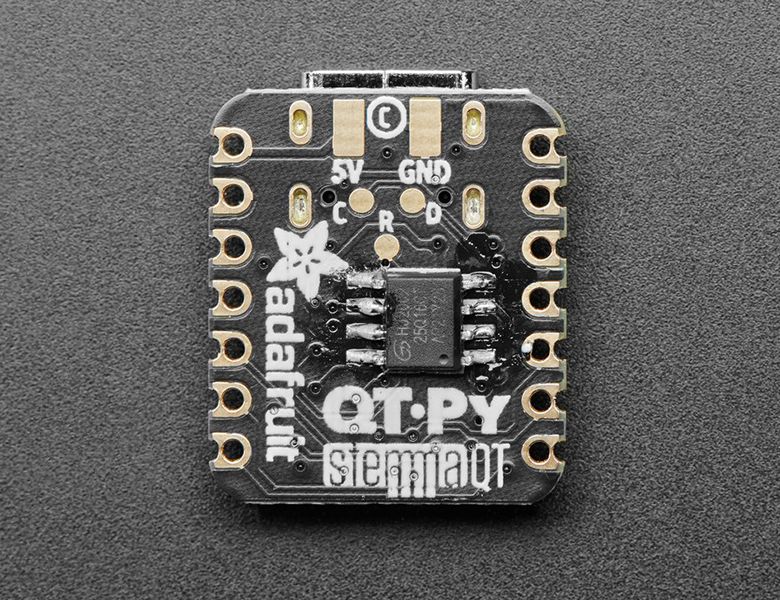
This is the QT Py board with the SOIC-8 2MB Flash chip soldered on. Both are in the Adafruit shop.What a cutie pie! Or is it… a QT Py? This diminutive dev board comes with our favorite lil chip, the SAMD21 (as made famous in our GEMMA M0 and Trinket M0 boards).This time it comes with our favorite...
If you use the one Adafruit recommended, this will work
Oh I misread the question
When you do the build you will modify this file: https://github.com/adafruit/circuitpython/blob/main/ports/atmel-samd/boards/qtpy_m0_haxpress/mpconfigboard.mk

GitHub
CircuitPython - a Python implementation for teaching coding with microcontrollers - adafruit/circuitpython
Change the EXTERNAL_FLASH_DEVICES = GD25Q16C bit to the device part number you plan to use
If you wanted to use the 8MB Adesto chip, it would be
EXTERNAL_FLASH_DEVICES = AT25DF641A
manic glacierBOT

Did another sweep, missed some were frozen but not full builds so think I caught them all.
manic glacierBOT
I did not move all of this code because it is very similar to the code on lines 98-109, for the light sleep routine, which would not go back to main.c because it does not exit. I could move the logic on lines 167-169, probably by creating another deep-sleep exception (or passing a different value). I'm not sure I want to do that because it separates the logic into two disparate pieces. Could you explain more about why you want to split it?
manic glacierBOT

That's a pity. Thanks. @tannewt
 prime cove
I think I may run into an error with pwmio in the grand central. Running this code causes D19 to idle high and not oscillate. Removing D30 from pins_temp corrects the issue. No errors are flagged. My guess is it's something to do with their TC being the same?
import board
import time
import pwmio

pins_temp = [ board.D30, board.D19]
pwm_pins = []
for pin in pins_temp:
    p = pwmio.PWMOut(pin, frequency=10, duty_cycle=0x7fff, variable_frequency=True)
    pwm_pins.append(p)

while True:
    print(10)
    for pin in pwm_pins:
        pin.frequency = 10
    time.sleep(3)
    print(20)
    for pin in pwm_pins:
        pin.frequency = 20
    time.sleep(3)
 stuck elbow
@prime cove can you report it?
tulip sleet
yes, please
prime cove
Will do!
manic glacierBOT

Running this code causes D19 to idle high and not oscillate. Removing D30 from pins_temp corrects the issue. No errors are flagged. D30 and D19 share TC4_WO1, but have different TCC peripherals.
import board
import time
import pwmio

pins_temp = [ board.D30, board.D19]
pwm_pins = []
for pin in pins_temp:
    p = pwmio.PWMOut(pin, frequency=10, duty_cycle=0x7fff, variable_frequency=True)
    pwm_pins.append(p)

while True:
    print(10)
    for pin in pwm_pins:
...I thought about this some more this morning, and did move the restart to main.c.
This signaling is done by internal-only exceptions _DeepSleepRequest and _DeepSleepRestart. An alternative would be to pass the PYEXEC flags as the SysExit` exception argument. However, the MicroPython base code currently doesn't handle the argument at all, and it's a substantial drift away the MicroPython base to do that.
meager fog
@lone axle hihi
i did some light refactoring on your code to simplify some things, remove unused code and variables
plz take a look
you will want to update the weblate page
beacuse now the name/url is fetched
lone axle
I tried them out this morning and looks good to me. I think I left a note on the PR.
lone axle
only thing I noticed was the time.sleep(4) at the beginning was removed for one but not the other.
I will update the weblate page in the guide a bit later on today to reflect the new dynamic fields
meager fog
@lone axle kk i will try it with the latest code. iuf you use magtag.refresh() in the latest it will auto-retry to refresh until it's ok to https://github.com/adafruit/Adafruit_CircuitPython_MagTag/blob/main/adafruit_magtag/magtag.py#L338

GitHub
Helper library for the Adafruit MagTag. Contribute to adafruit/Adafruit_CircuitPython_MagTag development by creating an account on GitHub.
lone axle
Ah nice! I missed that.
lone axle
Will do.
meager fog
thankya - it looks adorable. will be a great deep-sleep demo
slender iron
@tulip sleet I don't think shared-bindings should have any logic about the sleep modes
light sleep is per-port and should always allow for the workflow
deep sleep can be decided in main.c
tulip sleet
the workflow decision is documented (don't deep sleep if connected), and the check for the workflow is abstracted to supervisor/shared/workflow.c, so the shared-binding code is port-independent
main.c's job is to run a program and handle what to do when it finishes. It doesn't intervene in between.
slender iron
right but the decision is what to do after a deep sleep exit
tulip sleet
Are you saying the light sleep workflow check should move into common-hal from shared bindings? Its semantics are currently port-independent
slender iron
light sleep shouldn't care about the workflow state
you should be able to connect usb during a light sleep
shared bindings really shouldn't have logic. it should only be python -> c conversion
tulip sleet
you need to stay connected in light sleep, by definition
slender iron
right, so why does it care about workflow state?
tulip sleet
i think i see what you're saying, that I should check workflow state in common-hal. I was just thinking that was duplicative (it could be a shared-module common-hal that calls a port-specific common-hal). But yes, I can move it there
slender iron
let's video
 analog bridge
@tulip sleet how to get the alarm that caused wake-up from deep sleep ?
tulip sleet
alarm.wake_alarm
brazen cedar
ornate breach
If you wanted to use the 8MB Adesto chip, it would be
```EXTERNAL_FLASH_DEVICES...
Is there a list of supported chips or will any part number work?
ornate breach
As far as I know as long as the build can validate the part number you should be okay
I haven’t fully tested that theory but so far it seems to be the case
This would be assuming the SPI Flash is footprint compatible
brazen cedar
right
ornate breach
Which I assume most soic 8 SPI flash has the same footprint
tulip sleet
supervisor/shared/external_flash/devices.h contains all the supported devices. The device is recognized by its mfr id, etc. You cannot use any old one.
ornate breach
Thanks for the clarification @tulip sleet
brazen cedar
thanks for the clarification @tulip sleet I figured it must not be open ended but who knows maybe there a magical web service that validates part numbers? lol
ornate breach
Are all the ones there listed as compatible footprint wise or validated to format with CP?
tulip sleet
the reason you list the devices in mpconfigport.mk is so we don't have to store the whole table in a build, only the chips we expect for that particular board.
footprint is only important mechanically. two chips can have the same footprint and have very different programmatic requirements. There are "typical" ways to use the chips but it's not completely standardized, like SD cards are
the ones in that include file have actually been researched to work, and the parameters specified were taken from their data sheets and by experimentation, and to handle their idiosyncrasies.
ornate breach
I think I may add a PR for the larger variants of the AT25DF**1A
tulip sleet
it would be good if you could test them
ornate breach
I’ll grab some and test them with my sapling build
And maybe grab a few more Qt Py to test as well
Which actually works out because a feather I’m working on will use the 8MB adesto chip
brazen cedar
how have I gone my whole life not knowing what a mebibyte is?
lol
I always wondered why it was a mega byte when the value wasn't base 10
tulip sleet
@slender iron ok, bit of a problem. For deep sleep, I cannot defer the workflow checking (USB connected) to main.c, because if I am connected , I need to simulate deep sleep by just waiting for the alarms, and for that I need the alarms, which are on the heap, etc. The current code does the simulation before a program exit, to avoid this kind of thing.
The "simulation" is just calling common_hal_wait_until_alarms(...)
slender iron
@tulip sleet could we actually set them and then check their state?
tulip sleet
common_hal_wait_until_alarms() doesn't "set" them in the same sense that setting them up for light sleep or deep sleep does (which involves passing info about them to the ESP-IDF)
tulip sleet
but you have to get the details about the alarm from somewhere, and the ESP-IDF doesn't give you back the details.
in other words you really need the original alarm object or its equivalent
I could stash copies of them not on the heap or whatever, but this is getting kind of strained
idle owl
@gilded cradle So if there's an authentication failure or some kind of network failure using the MagTag library, everything halts. Is that expected behavior? Is it worth adding something to retry? Because at least in this case, it is something weird happening because it worked fine and then on reset failed. And it's working fine again now.
slender iron
Why is fake deep sleep different than real deep sleep?
tulip sleet
because all it does is do time.sleep() kind of stuff
it does waits and pin checks in a completely different way
slender iron
Why does it need to be different?
tulip sleet
(it would do pin checks in a diff way, not implemented)
because it can't use the light or deep sleep mechanisms in ESP to do the waiting
the ESP API lets you set up the timers and the pin checks, and then you go to light or deep sleep
you can't just go to wait
and even if you could, or some other platform, you might not be able to
take a look at common_hal_alarm_wait_until_alarms()
the workflow checking could still be in common-hal, I think that would be OK, if you want to push logic out of shared-bindings
i will keep as much as possible in main.c. The workflow checking needs to be in light-sleep common-hal anyway, because it doesn't touch main.c
slender iron
ignore the idf
you shouldn't need to simulate alarms
you should be able to use the real peripheral and wait for an interrupt
tulip sleet
i am, i just call common_hal_time_delay_ms(), and it does all tha work for me
for time alarms
slender iron
(want to video more?)
tulip sleet
sure
 gilded cradle
@idle owl, so it doesn't keep retrying to connect to the network?
idle owl
No, it fails to an error and the code stops running.
gilded cradle
Also, for your MagTag guide, I thought of another library for the list. The LIS3DH library.
idle owl
Did it with two different things yesterday, one unknown network failure, and one auth failure.
gilded cradle
Ok, I think it should keep retrying.
idle owl
It doesn't.
gilded cradle
I mean, it should be changed so that it does that.
gilded cradle
np
I'm working on a refactor, so if you'd like to open an issue, that would be helpful.
It would likely be part of the refactor
idle owl
Feel free to add the LIS3DH lib to the MagTag CircuitPython Libraries page. There's no screenshot so it would be an easy update. Actually, let's wait until you're done, and have Tim do it. He can update the screenshots in my guides in the process.
@gilded cradle Will do.
gilded cradle
Ok, I can update the guide
Oh whoops, that's what I get for not reading your whole comment
I'll wait
idle owl
Sounds good 😄
gilded cradle
@idle owl, also thanks for creating the issue 🙂
idle owl
For sure! Created it. Since I don't have anything replicateable, I didn't include code.
manic glacierBOT

I'm just adding this issue for reference in future PRs for additional CircuitPython SPI Flash support.
I am making a feather that will utilize the AT25DF641A SPI Flash module. I discussed in the discord about adding support for it as there was other discussions about using larger SPI Flash. I will be testing with my CP Sapling M0 boards as well as the Qt Py once I get a few more Qt Py to test this with.
I should note, if there are any other SPI Flash in the SOIC-8 that people want tes...
ornate breach
Curious, with memory type is there a reference table for the hex values used?
idle owl
@gilded cradle Just had one fail on something in requests with OutOfRetries and the code stopped. Not sure how many errors you want to catch and retry.
ornate breach
nevermind I found it was using the device ID for .memory_type = 0x45
need to get better about looking at the data type definitions 😛
I think I've got it. Now just to wait for the SPI Flash and a few more Qt Py
gilded cradle
@idle owl When it fails, do you think it should try and reconnect or something else?
manic glacierBOT

This has morphed into an implementation of SPI DMA. Unfortunately, it only outputs garbage data, and I can't figure out why. If anyone is interested in the the STM32 DMA module, and would like to help test why this occurs, it would be greatly appreciated.
idle owl
@gilded cradle Probably try to reconnect, I would say. Especially since it seems to be happening when everything is in place for me anyway. Obviously sometimes there will be an actual issue... so an error would be useful, but retrying would also be useful.
gilded cradle
Ok, hopefully I'll bump into the issue myself. Then I could test various things.
manic glacierBOT
I discussed more implementation details for simulated deep sleep with @tannewt. We decided to roll back the last 72fa7d8 commi. We can merge the current implementation as is. The API is in good shape and can be presented in a beta.
@tannewt will finish some refactoring and additional implementation to make simulated deep sleep more like real deep sleep, in that it will not start sleeping until after exiting the current VM. This assures that whatever stops when the VM is exited is really s...
tulip sleet
@slender iron ok, rolled back and ready for an as-is mege
slender iron
@tulip sleet great! Will look after I have lunch
idle owl
@solar whale I have no idea how to make the LEDs do things during the fetch().
That's what's pausing everything.
manic glacierBOT
Unfortunately, your merged messed it up again. You need to reset your branch to the remote one, not merge. The merge brings in old versions of the commits that don't match the rebased ones. I'll fix it now.
 solar whale
I understand -- I am just experimenting with saving the last color and doing a fill to see if how it looks
idle owl
I read that ^^ last PR message as "module megapack" and I was thinking...... that seems like a terrible idea, how did we manage to make it fit
slender iron
🙂
idle owl
@solar whale Can you approve that PR for now? I need it to start a guide. I won't be explaining the code too much, so if you manage to come up with something, you could submit a PR to update it.
solar whale
sure -- happy to
idle owl
Thanks so much, really appreciate it. Thank you for testing!
solar whale
mmm -- I don't think I have permission to approve it -- I don't see a review option
solar whale
I found it ...
manic glacierBOT
Looks good based on the documentation. Doing a websearch on CONFIG_SPI_FLASH_YIELD_DURING_ERASE, I see that OTA update with it turned off could cause IDF 3.x watchdog triggers, e.g. https://github.com/espressif/esp-idf/issues/4916
These make sense to me.
solar whale
@idle owl My simple idea is not working -- I'll leave it alone for now -- Thanks for the demo. Cheerlights makes me happy!
idle owl
That's lovely to hear! Thank you for looking into it! You're welcome!
manic glacierBOT

Can you share your code @endico? How many Eero APs do you have? According to this article the device would show up as "Blocked" on your home screen (if this would be an issue).
 hearty tapir
@slender iron for issue https://github.com/adafruit/circuitpython/issues/3743 I noticed a correlation on pins in the data sheet, that "may" be related to the issue.
GitHub
Using the current (as of now) main App version: 6.1.0-beta.1-14-g16fe2de70 I can running code to hang after interrupting, The code only instantiates an I2C object then loops forever printing someth...
slender iron
oh ya? that's interesting! want to reply on the issue?
hearty tapir
I'm not sure yet, unfortunately my Firefox updated itself - I just need to find the page in that PDF again.
manic glacierBOT
@jepler I could test this but I see there are a few unresolved code suggestions to do first.
What version of CircuitPython are you using?
hearty tapir
The SPI pins are related to something on Wi-Fi as well, if the SPI/I2C library would be similar (I don't know yet), then this could explain why the Wi-Fi reset is causing the hang.
slender iron
👍 thank you
manic glacierBOT
Thank you for doing this! I did a preliminary look, even though this is a draft.
hearty tapir
That page on row with 39
39/40 actually. I think those are the pins, but I'm not sure - looking at this:
slender iron
I don't think the left column is pin numbers
I think its a function index for the gpio mux
hearty tapir
Ok thanks, I guess I wished to find a correlation.
slender iron
🙂
hearty tapir
I'm currently going through a C-Essentials course to take better educated guesses.
manic glacierBOT
hearty tapir
@slender iron 🙂
I think I just fixed https://github.com/adafruit/circuitpython/issues/3743
GitHub
Using the current (as of now) main App version: 6.1.0-beta.1-14-g16fe2de70 I can running code to hang after interrupting, The code only instantiates an I2C object then loops forever printing someth...
I read up on espressif docs on how they anticipate to do the state-machine on disconnect. I added the disconnect and ended up in a backtrace.
That backtrace lead me to the wifi_reset() function, where we hit the "deregister" of a task that no longer exists. root cause is basically that wifi_inited is not set to "false" at the end of that function.
I can ctrl+c out of my i2c scan code into REPL and back into the code without hangs now.
manic glacierBOT
 fast swift
Sorry for asking this again, where's the documentation? I've been googling and can't find it
hearty tapir
fast swift
Sorry for asking this again, where's the documentation? I've been googling and c...
fast swift
@hearty tapir no, i mean where it lists all the functions in the library and what they do
hearty tapir
fast swift
<@586300798980587537> no, i mean where it lists all the functions in the library...
https://docs.espressif.com/projects/esp-idf/en/latest/esp32s2/api-reference/index.html <- this is the API guide from espressif. If this is not what you meant, I'm probably too tired to help 🙂
lone axle
Are you looking for documentation of a specific library?
If it's a circuitpython related library / project there should be a "docs passing" at the top of the readme page. You can click that to get to the docs for that thing whatever it may be.
manic glacierBOT
I have to add that I tested this just with a code that runs some i2c and has "import wifi". I didn't have time to test this longer and some additional fixes might be necessary.
fast swift
I'm sorry, i wasn't asking this correctly.
I have the bluefruit circuit playground. I want to use circuit Python to do something with the bluetooth abilities, and the circuit Python library bundle. Where do I find documentation on how to use those functions?
@lone axle where is that?
lone axle
@fast swift for that I think it will be the adafruit_ble library herer: https://github.com/adafruit/Adafruit_CircuitPython_BLE
GitHub
Bluetooth Low Energy (BLE) library for CircuitPython - adafruit/Adafruit_CircuitPython_BLE
on that page that I linked if you scroll down a bit you should see the docs passing badge. (colors will look different than my screenshot probably)
the badge color should be the same, but the background would be white by default
Also check out the scripts in the examples folder which is linked further up above the docs badge.
fast swift
@lone axle thank you!
manic glacierBOT
Sample deep sleep program:
import alarm
import time
from adafruit_magtag.magtag import MagTag
from adafruit_requests import OutOfRetries

# Set up where we'll be fetching data from
DATA_SOURCE = "https://www.adafruit.com/api/quotes.php"
QUOTE_LOCATION = [0, 'text']
AUTHOR_LOCATION = [0, 'author']

magtag = MagTag(
    url=DATA_SOURCE,
    json_path=(QUOTE_LOCATION, AUTHOR_LOCATION),
)
magtag.network.connect()

# quote in bold text, with text wrapping
magtag.add_te...
make V=2 BOARD=espressif_saola_1_wroom
GEN build-espressif_saola_1_wroom/genhdr/mpversion.h
python3 ../../py/makeversionhdr.py build-espressif_saola_1_wroom/genhdr/mpversion.h
IDF_PATH=/mnt/c/git/firialabs/circuitpython/ports/esp32s2/esp-idf cmake -S . -B build-espressif_saola_1_wroom/esp-idf -DSDKCONFIG=build-espressif_saola_1_wroom/esp-idf/sdkconfig -DSDKCONFIG_DEFAULTS="esp-idf-config/sdkconfig.defaults;esp-idf-config/sdkconfig-opt.defaults;esp-idf-config/sdkconfig-4MB.defaults;boards/e...
tulip sleet
If you want to try deep sleep on an ESP32-S2, download the 'Absolute Newest' build from here (for MagTag) or for another ESP32-S2 board: https://circuitpython.org/board/adafruit_magtag_2.9_grayscale/. Here's a sample program: https://github.com/adafruit/circuitpython/pull/3767#issuecomment-737580188
Will be in 6.1.0-beta.2, which should arrive in a day or two.
slender iron
@tulip sleet here is my WIP: https://github.com/adafruit/circuitpython/compare/main...tannewt:sleep_tweaks?expand=1
GitHub
CircuitPython - a Python implementation for teaching coding with microcontrollers - adafruit/circuitpython
for fake sleep I think we can configure multiple methods of wakeup if needed (both ext0 and gpio for example)
tulip sleet
@slender iron Looks good, but I am confused why you're checking alarm.wake_alarm in the post-code.py code in main.c. Who is going to fill that in?
slender iron
looks
tulip sleet
line 335
slender iron
oh, it's because the wait for interrupt may have ended due to something else
it's a proxy for a deep sleep completing (I hope)
tulip sleet
but I'm confused about who's going to set it. If you did a deep sleep, then you will not be here yet.
tulip sleet
ah, i see, the line 325 while loop is what's going to do the fake deep sleep; that code is just not here yet
is that right?
slender iron
right, the fake deep sleep is port_sleep_until_interrupt();
tulip sleet
line 372 is the real deep sleep, like before
tulip sleet
could you eventually just add comments about which is real and which is fake deep sleep?
slender iron
yup
tulip sleet
ok, I see where you are going, looks good!
slender iron
👍
manic glacierBOT

I didn't get a chance to test this for myself, but it seems like a good find and extremely plausible as a reason for problems subsequent to importing wifi. Thank you!
The single CI failure can be ignored.
It is "normal" to raise a single exception object multiple times, as in
try:
   1/random.randint(0, 10)
except ZeroDivisionError as e:
   print("unlucky")
   raise e
this second raise statement should not clear any exception frames already associated with e.
manic glacierBOT

#3575 might be helpful...
@dhalbert does it sleep for 60 seconds or 20?
It sleeps for 20; I just forgot to change the comment. Will fix.
manic glacierBOT
[adafruit/circuitpython] Issue opened: #3785 MagTag battery monitor is not returning expected values
There appears to be an issue with ADC calibration or operation. (Reported by @ladyada)
manic glacierBOT

When I use esp32 S2 chip nanoESP32-S2 development board, burning Firmware of
nanoESP32-S2 development board.
ESP-ROM:esp32s2-rc4-20191025 Build:Oct 25 2019 rst:0x1 (POWERON),boot:0x8 (SPI_FAST_FLASH_BOOT) SPIWP:0xee mode:DIO, clock div:2 load:0x3ffe6100,len:0x8 load:0x3ffe6108,len:0x18a0 load:0x4004c000,len:0x930 load:0x40050000,len:0x2cc8 entry 0x4004c1b4
That's the same display.
manic glacierBOT
I didn't get a chance to test this for myself, but it seems like a good find and extremely plausible as a reason for problems subsequent to importing wifi. Thank you!
Hi @jepler , thanks for your review and positive comment. I tried this briefly with a "real wifi setup" and I ran into a backtrace. I'll look into this during my evening (writing this post during my lunch break). Please don't merge yet, I should have done this as a draft and was overly excited & confident. I'll get back to ...
manic glacierBOT

Yes. Was playing with that as well. Some esp32 forum idf comments have pointed to similar issues with making sure that disconnect is finished. Cant test until later as I'm mostly skiing in the mornings here. :)
onyx hinge
While looking at the esp-idf documentation and example code, there's disagreement about the order of the call to i2c_driver_install and i2c_param_config -- the docs say to call i2c_param_config first, which some code in examples does, but the test suite program test_i2c.c source file calls them the other way around. Hmmm. I don't think it's connected to the wifi lockups but 🤷 wanted to mention it in case it rings any bells.
tulip sleet
@onyx hinge @slender iron I think I will do beta.2 today. I don't see any sure bets among the current open PR's. I did draft release notes which I will proofread. Any comments?
we'll probably have another beta in short order
onyx hinge
@tulip sleet yeah it sounds like there is still a caveat or question mark around the wifi change unfortunately.
Does the wifi/i2c problem merit a "known issues" mention?
tulip sleet
that's a good idea
onyx hinge
I keep meaning to add a script to generate translation statistics for pasting into release notes but I don't think I've gotten around to it
manic glacierBOT
Partly fixed by #3467. Let's close this and open more task-specific issues.
alarm.exit_and_deep_sleep_until_alarms() will not deep sleep if the board is connected to a host computer via USB. Deep sleep is simulated in that case by waiting for the alarms and then restarting. This does not the simulate the side effects of actually exiting before sleeping.
slender iron
@tulip sleet beta.2 sounds good to me
manic glacierBOT

[adafruit/circuitpython] New tag created: 6\.1\.0\-beta\.2

I am not sure this example pertains, as the output shows up the same
with and without the fix in PR #3702:
unlucky
Traceback (most recent call last):
File "<stdin>", line 1, in <module>
File "tracetest.py", line 7, in <module>
File "tracetest.py", line 7, in <module>
File "tracetest.py", line 4, in <module>
ZeroDivisionError: division by zero
On Wed, Dec 2, 2020 at 9:27 PM Jeff Epler notifications@github.com wrote:
It is "normal" to raise a single exception object multiple ti...
 orchid basinBOT

Automated website update for release 6.1.0-beta.2 by Blinka.
New boards:
- cp_sapling_m0
- cp_sapling_m0_spiflash
- thunderpack_v12
- thunderpack_v11
New languages:
- ko
- nl
- ID
- hi
- zh_Latn_pinyin
- cs
- sv
- es
- en_x_pirate
- fr
- pl
- de_DE
- pt_BR
- it_IT
- ja
- en_US
- fil
- el
manic glacierBOT

On the Metro Grand Central, the frequencyio.FrequencyIn functionality seems to be crashing the system:
Adafruit CircuitPython 6.0.0 on 2020-11-16; Adafruit Grand Central M4 Express with samd51p20
import board
import frequencyio
frequency = frequencyio.FrequencyIn(board.A3)
At this point the unit re-enumerates on USB:-
Auto-reload is off.
Running in safe mode! Not running saved code.
You are in safe mode: something unanticipated happened.
CircuitPython core code cra...
Most chips with deep sleep capability provide backup RAM that remains energized during deep sleep. Allow access to this RAM, say via a microcontroller.nvm-style mechanism. This will allow a deep-sleeping program to remember state without using flash.
Note that there are also retained registers usually too. The S2 has 8 32 bit retained registers in the RTC. We'll either want multiple memory segments or one oddly sized memory where you fill it from the beginning and the retention adapts accordingly. This adaptation can also match RAMs that can have varied retention sizes.

I got the numbers from some code I got from @ladyada, but hadn't done any verifications. So it's possible the numbers may need to be adjusted in the MagTag library.
My impression was that the ADC might not be linear, and that the range might be limited, but I haven't started testing yet.
@hierophect Will have context on this.
Why did you request my review? What did you change? What do you want me to review?
 lament sentinel
I'm doing some work for font management, if anyone has any commentary about the CircuitPython use of BDF, I'm happy to hear it. I have summarized what I know here: https://github.com/bcr/blinka-cli/blob/bcr-font-command/commands/font.md
 manic glacierBOT

It pertains to clearing on raise, as I (perhaps unclearly) proposed in the initial post (and is what I meant when I said it’s nontrivial), not to clearing on print, as you implemented in #3702.
As far as the other proposed solutions go, I could probably live with a flag to restrict the clearing-on-print to a subset of cases, but really the more I think about it the more it feels to me like a case of garbage-in-garbage-out where the proper solution is just “don’t reuse exceptions”.
Should be linear enough between 150 ~ 2600 mV, which covers the range for 50% of LiPo voltage. AnalogIn does apply calibration based on device-specific data in efuse.
But whereas docs say we should be able to measure voltages from 0-3.3v at 11dB attenuation, I can't get quite to zero, or above about 2.7v, with the current build.
we divide by 2 fyi - so you should have full range
lament sentinel
lament sentinel
I'm doing some work for font management, if anyone has any commentary about the ...
I think the only thing I'm slightly worried about is FONTBOUNDINGBOX and if that value is used somewhere I don't see.
hearty tapir
Hi @onyx hinge I still try to track down why I have a backtrace on the second connect attempt.
I end up in esp-idf -> wifi_netif.c:47 and the issue happens right after the scan for SSIDs, successful connect(!) and the note on "APs beacon interval".
I first thought it was related to wifi_inited being instantiated without a value and wifi_reset using it before true or false is set, but again this didn't help (I let it default to false). I'm now putting a logging into the event state-machine, to hopefully determine why it fails there
It looks like the esp_netif_handlers (that obtains the IP I guess) doesn't get initialised properly or dislike the previous destroy()
 thorny jay
tulip sleet
<@!426200547024961539> <@!252717193496756235> I think I will do beta.2 today. I ...
thorny jay
tulip sleet
<@!426200547024961539> <@!252717193496756235> I think I will do beta.2 today. I ...
I tested your demo with the latest build and it works great. I decided to put all of the initialisation and connection into a try / except. The idea is that I want to avoid an error message to replace the quote. So if for any reason I cannot connect to the Wifi. I think it would be great to have a "recommended pattern" with that kind of thing. One of the thing I miss is a way to remember a state between two restart so that when waking up after a sleep, the code know "what to do next". So there also, a nice pattern would be interesting, I believe there is already a learn guide on state machine, that is a nice place to discuss the topic.
@tulip sleet I guess the green LED cannot be turned off... maybe I will try desoldering that. What could be good in sleep demo code is to turn on an LED while not sleeping to show when it is awake.
tulip sleet
The light sleep power conusmption is about 1.4ma, as opposed to a little less than .3ma (300 uA). If you can stand the extra consumption then that's an easy to way remember state now.
yes, and the regulator is not powered off either. we can power off the eink display programmatically, but we're not sure that's being done right now. We will be checking on that.
thorny jay
tulip sleet
The light sleep power conusmption is about 1.4ma, as opposed to a little less th...
I don't get/understand that. The LED is always green, the same green be it sleeping or not sleeping. I am also a bit confused now, because I tested with USB connected, and I don't see the serial or the CIRCUITPYTHON drive was lost when sleeping. Now testing on LiPo but hard to tell if it is sleeping or not.
Anyway, it works great!
tulip sleet
when you are connected, you don't actually deep sleep or light sleep, because we want you to be able to interrupt or edit your program. The USB connection would be broken it actually slept.
This is explained in the documentation:
https://circuitpython.readthedocs.io/en/latest/shared-bindings/alarm/index.html
 lone sandalBOT
 thorny jay
Do you know if the ESP32S2 as a ULP ( https://www.youtube.com/watch?v=-QIcUTBB7Ww )? Watching that same YouTuber, it seems that on that old ESP32 consume a lot to start it's Wifi and get an IP. Knowing the number might help decide the frequency at witch we want to wake up.

We can save energy by deep-sleeping the ESP32. During this time, the chips do not consume a lot of energy but also are not responsive. This is why Espressif included a mysterious Ultra Low Power core (ULP) which is active when the main processor sleeps. People say it has to be programmed in Assembler, and nearly nobody was able to program it in ...
tulip sleet
it does have ULP, and we are thinking about how to mix that into the deep sleep capability, but we have no concrete plans
 crimson ferry
Can someone please release the merged changes at https://github.com/adafruit/Adafruit_CircuitPython_BMP3XX so that folks buying the BMP390 will get it to work with the bundle?
tulip sleet
@crimson ferry will do...
https://github.com/adafruit/Adafruit_CircuitPython_BMP3XX/releases/tag/1.3.0 -- will go in the bundle tonight
GitHub
To use in CircuitPython, simply install the Adafruit CircuitPython bundle.
To use in CPython, pip3 install adafruit-circuitpython-bmp3xx.
Read the docs for info on how to use it.
manic glacierBOT

Just a link for now...
https://github.com/espressif/esp-idf/tree/master/examples/protocols/mqtt/ssl_ds#configure_dspy
Espressif has some helper scripts for the DSP. I'm working on something also with this chip for work so when I figure it out there... I'll share here as well.
crimson ferry
tulip sleet
<@360465312518504448> will do...
Thank you!
slender iron
hearty tapir
I end up in esp-idf -> wifi_netif.c:47 and the issue happens right after the sca...
I've seen this before your change!
GitHub
I attached to the native UART on MagTag. These are the backtraces I got when the usb disappeared or the serial connection hung. ? Backtrace:0xfffffffd:0x3ffe9280 0x400e2bc9:0x3ffe92a0 0x40036827:0x...
hearty tapir
I figured it out, but now I'm again in trouble with i2c.
Ok, that one I know how to fix
slender iron
know how to fix 3717?
hearty tapir
yes
slender iron
nice!
hearty tapir
This happens once you connected once successfully, then the second connect looks successful until "connected"
right after the beacon interval it fails, this has to do with the missing ESP_ERROR_CHECK(esp_wifi_clear_default_wifi_driver_and_handlers(radio->netif)); before the netif_destroy
slender iron
excellent! that'll be good to fix too
hearty tapir
This whole wifi stuff is a very fragile element.
It appears to make a difference when you call the wifi_init, it apparently has to be done before you register the event listeners. I'm just not certain yet.
tulip sleet

Adafruit Industries - Makers, hackers, artists, designers and engineers!
This is the Beta 2 release of CircuitPython. Please use 6.0.x if you need a stable version of CircuitPython on all ports except ESP32-S2. Please use this release or newer for the ESP32-S2. See port…
ornate breach
Hey @slender iron would you be interested in a beta board of the MCU+ICE40 feather I’m making?
slender iron
no thanks, I've got too many dev boards as is
ornate breach
Okie dokie, I figured I’d ask since you were working on that i2c programming for Lattice fpga
slender iron
yup, my constraint is time and interest. not hardware
ornate breach
Makes sense
manic glacierBOT

Where is "Arial-Bold-12.bdf" and "Arial-Italic-12.bdf"
( not in adafruit-circuitpython-bundle-6.x-mpy-20201203.zip )
 hollow gazelle
@dhalbert or @tulip sleet Looking for "Arial-Bold-12.bdf" and "Arial-Italic-12.bdf" mentioned in https://github.com/adafruit/circuitpython/pull/3767#issuecomment-737580188
( not in adafruit-circuitpython-bundle-6.x-mpy-20201203.zip )
GitHub
Initial working version of light sleep and deep sleep, after several API iterations. Started coding from https://github.com/tannewt/circuitpython/tree/sleepio/ .
alarm.time.TimeAlarm implemented ...
crimson ferry
@hollow gazelle Any font will work for the demo, even terminalio.FONT, but those and many others you can find in https://github.com/adafruit/Adafruit_Learning_System_Guides, among other places (download and search for ".bdf")
hollow gazelle
I see there is a learn guide to
https://learn.adafruit.com/custom-fonts-for-pyportal-circuitpython-display/conversion
but was either hoping for a prebuild .bdf file

Adafruit Learning System
Learn how to generate bitmap fonts!
manic glacierBOT
In the REPL on MagTag Beta 2
>>> import wifi
>>> wifi.radio.enabled = False
Traceback (most recent call last):
  File "", line 1, in
AttributeError: 'Radio' object cannot assign attribute 'enabled'
looks like 1.1GB to download the .git repo, (only) 342Mb for the .zip file :-)
Thank you for the link - I can deal with it from here
slender iron
heh, looks like the RTC will reset the CPU based on time even if you don't sleep
slender iron
(nope, it's just resetting for some reason)
hearty tapir
@slender iron I can't get it to work reliably. The i2c is unhappy if you do the driver_reset I mentioned earlier, now I implemented a number of ifs that track state but while a combined wifi & i2c should work now, it now fails on channel_scan during reload. I'm running out of ideas and ability. I'm currently pushing the work I've done to my wifi-disconnect branch - but you should consider it draft please. (I've no idea how to set his)
slender iron
I'll convert it to draft. thanks for debugging it!
(its a small link under reviewers)
hearty tapir
Ok thanks. I read a lot of different examples and I believe that espressif is expecting that netif_init() is only called once and afterwards netif_new()
@slender iron https://github.com/espressif/esp-idf/issues/6173#issuecomment-735604948 <- this is the reference I found for that

GitHub
If a user didn't sent correct SSID and PW in first attempt, he resends the credentials and "wifi_init_sta(void)" is executed again. But the second time core panics. Reason...
slender iron
it'd be good to link that to an issue somewhere too
hearty tapir
I‘ll continue to look into this, but can‘t promise that I‘ll be able to fix it. good night
slender iron
np, good night!
manic glacierBOT
Fixes #3790
Tested by inserting:
import wifi
wifi.radio.enabled = False
wifi.radio.enabled = True
into a program that imported MagTag, before it tried to connect.
The alarm sleep code already calls this internally to shut down the radio.
Thanks for adding this! You should probably add a comment saying that any open sockets will be closed when disabled.
manic glacierBOT
@cwalther was this addressed by the enhancements to supervisor allocations or does it still need to be done?
tulip sleet
@onyx hinge @slender iron github actions is not doing well; often failing while cloning submodules or doing other network-related stuff
tulip sleet
@hollow gazelle look in https://github.com/adafruit/Adafruit_Learning_System_Guides, click on the "Goto file" button, which brings you to https://github.com/adafruit/Adafruit_Learning_System_Guides/find/master and type "arial" at the blinking cursor.
hollow gazelle
tulip sleet
<@649453464988155906> look in <https://github.com/adafruit/Adafruit_Learning_Sys...
Thank you, I'm running your sleep demo code now.
I did submit an issue against the learning guides, as it seems that there are a proliferation of duplicate font files scattered about! https://github.com/adafruit/Adafruit_Learning_System_Guides/issues/1345
GitHub
What started as an exercise to download a few fonts for a demo, led to the discovery that there are many duplicated fonts scattered around the Adafruit_Learning_System_Guides. ( Note: Duplicated he...
hollow gazelle
tulip sleet
<@649453464988155906> look in <https://github.com/adafruit/Adafruit_Learning_Sys...
thanks for your work - I'm running the sample deep sleep program now!
https://github.com/adafruit/circuitpython/pull/3767#issuecomment-737580188
manic glacierBOT

 hollow gazelle
deep sleep question:
is there a (non-file system) api to pass even a byte of data through from the deep sleep to the soft reboot alarm ?
What about an api to tell how long we were asleep when we wake up?
analog bridge
@hollow gazelle https://github.com/adafruit/circuitpython/issues/3789
GitHub
Most chips with deep sleep capability provide backup RAM that remains energized during deep sleep. Allow access to this RAM, say via a microcontroller.nvm-style mechanism. This will allow a deep-sl...
hollow gazelle
analog bridge
<@!649453464988155906> https://github.com/adafruit/circuitpython/issues/3789
thanks for the issue!
I was thinking of other ways to approach this common problem of non-volatile storage - and reviewed the SPI and I2C options.
Thinking about external FRAM.
Is there support in CircuitPython for an external file system in the larger FRAM products such as https://www.adafruit.com/product/4719 ?

FRAM, or Ferroelectric Ram, is the coolest new data storage method that all the fashion magazines are talking about. Oh wait, no that's quilted handbags. But FRAM is pretty damn cool ...
hollow gazelle
analog bridge
<@!649453464988155906> https://github.com/adafruit/circuitpython/issues/3789
I guess I could explore EEPROM solutions for non-volatile storage during deep sleep - such as https://www.adafruit.com/product/4701
This RFID tag is really unique: it works with mobile phones just like other RFID tags, but you can reprogram it over I2C. The tag shows up as an ISO/IEC 15693 (13.56MHz) chip which is ...
solar whale
FYI - I just updated to the current main CP repo -- now at 6.1.0-beta2 -- when I build and flash my magtag -- it will only boot to the MAGTAGBOOT bootloader after powercycle or reset -- then I have to copy over the firmware.uf2 file manually -- it runs fine but that is a new step -- has something changed. Are others seeing the same?
here is the sequence I am using ```jerryneedell@jerryneedell-ubuntu-macmini:~/projects/circuitpython/ports/esp32s2$ make BOARD=adafruit_magtag_2.9_grayscale flash PORT=/dev/ttyACM0
Use make V=1, make V=2 or set BUILD_VERBOSE similarly in your environment to increase build verbosity.
ninja: Entering directory `build-adafruit_magtag_2.9_grayscale/esp-idf'
[1/1] Performing build step for 'bootloader'
ninja: no work to do.
esptool.py --chip esp32s2 -p /dev/ttyACM0 --no-stub -b 460800 --before=default_reset --after=no_reset write_flash --flash_mode dio --flash_freq 40m --flash_size 4MB 0x0000 build-adafruit_magtag_2.9_grayscale/firmware.bin
esptool.py v3.0-dev
Serial port /dev/ttyACM0
Connecting...
Chip is ESP32-S2
Features: WiFi, ADC and temperature sensor calibration in BLK2 of efuse
Crystal is 40MHz
MAC: 7c:df:a1:06:8e:a8
Changing baud rate to 460800
Changed.
Enabling default SPI flash mode...
Configuring flash size...
Erasing flash...
Took 7.92s to erase flash block
Wrote 1302528 bytes at 0x00000000 in 29.6 seconds (351.5 kbit/s)...
Hash of data verified.
Leaving...
Staying in bootloader.
jerryneedell@jerryneedell-ubuntu-macmini:~/projects/circuitpython/ports/esp32s2$ cp build-adafruit_magtag_2.9_grayscale/firmware.uf2 /media/jerryneedell/MAGTAGBOOT/
jerryneedell@jerryneedell-ubuntu-macmini:~/projects/circuitpytho```
On my metro_esp32s2 -- it flashes then boots to CIRCUITPY normally on RESET....
I'll open an issue for the MAGTAG
manic glacierBOT

FYI - I just updated to the current main CP repo -- now at 6.1.0-beta2 -- when I build and flash my magtag -- it will only boot to the MAGTAGBOOT bootloader after powercycle or reset -- then I have to copy over the firmware.uf2 file manually -- it runs fine but that is a new step -- has something changed. Are others seeing the same?
here is the sequence I am using
jerryneedell@jerryneedell-ubuntu-macmini:~/projects/circuitpython/ports/esp32s2$ make BOARD=adafruit_magtag_2.9_grayscale ...@slender iron You mentioned in passing that you were considering whether the automatic activity on the HW neopixel was useful and whether to retain it. I wasn't sure if you meant just removing the "status animation" or removing the supervisor neopixel code entirely. In any case, I did some firmware size measurements about it.
baseline (metro_m0_express, de_DE) 972 bytes free in flash
just removing rgb status animation: 1688 (+716)
no HW neopixel: 2272 bytes free in flash (+1300)
@solar whale --after=no_reset this was recently changed in the esp32s2 Makefile, when @tulip sleet put in the deep sleep code.
I'm surprised that any board behaves differently, so maybe I'm on the wrong track anyway
solar whale
But I thought should boot to CP after pressing RESET
onyx hinge
does your metro have uf2 bootloader too?
solar whale
Neither have Uf2 bootloader. I use the DFU pin to enter bootloader
onyx hinge
MAGTAGBOOT doesn't indicate UF2? OK, ignore everything I'm saying. 🙂
solar whale
For some reason the flash operation on the mag tag seems load a UF2 bootloader then wait for manual load...
Metro does not
MAGTAGBOOT is uf2 but only appears after flashing
@onyx hinge My reason for the issue was the different behavior on the magtag vs metro -- It would be good for someone with a magtag to confirm the behavior.
manic glacierBOT
I do not see this: I do not have the UF2 bootloader on my MagTag and have been loading the .bin firmware files via esptool.py. I just tried the 6.1.0-beta.2 download and it's the same. I think it has to do with whether you have the bootloader on your board or not.
tulip sleet
@solar whale @onyx hinge I changed the esptool.py flags to --after=no_reset because it couldn't reset anyway afterwards, and would just throw an error that reset was not possible, which was confusing.
As I mentioned in the issue, I believe that what's going on is that one board has the UF2 bootloader and one doesn't. I think somewhere there's an address that says where to start after reset (.e.g an MBR-style entry). And, the UF2 bootloader also keeps track of whether it's loaded a program. If there's no UF2 bootloader then it goes directly to where the CPy .bin is located. If there is a UF2 bootloader then it goes to the bootloader. If you load CircuitPython via the UF2 bootloader, then when you reset the UF2 bootloader knows that there was a UF2 that it loaded, and it starts that. If you loaded CircuitPython via esptool, then the UF2 bootloader doesn't know there's code to run, so when the board boots, the UF2 bootloader decides to stay in the bootloader, instead of jumping to the loaded code.
This is surmise, but I have a vague memory (possibly false) of discussing this mechanism
onyx hinge
@tulip sleet for me it's a regression because the kaluga can reboot
manic glacierBOT
Why did you request my review? What did you change? What do you want me to review?
Sorry, it was a misclick, I mixed it up with another PR I had up. Nothing to review unless you can spot some obvious source of memory corruption that would be messing up the arrays.
tulip sleet
@onyx hinge why is that? Could we fix that on our boards?
It didn't seem like a board-specific thing (more like an -S2 thing)
but I didn't investigate in detail
I found the error/warning quite confusing
onyx hinge
It seems to be a usb vs hardware uart thing
tulip sleet
i think we could cater more towards our boards. I honestly thought my upload had failed at first glance.
onyx hinge
Sure, that's fine
tulip sleet
or we could have flash: and flash-and-reset: Makefile targets
manic glacierBOT
odd -- I don't appear to have a UF2 Bootloader on the MAgTag -- at least it does not got to the bootloader on double tap of reset. I am just following the same practice I always have but something has changed. Not a big deal but different.
Could you try backing up your CIRCUITPY and then erasing the MagTag flash completely with esptool.py erase_flash? Then try the plain .bin again.
What specifically is wrong with the voltage in testing? There are a number of caveats to the S2 ADC readings.
The relevant section to the voltage limits problem is here. When I asked Espressif about this issue, they confirmed that their voltage readings capped out at 2.6V. The section also notes:
At 11 dB attenuation t...
@dhalbert OK -- That fixed it. Thanks
Then you could try loading the UF2 bootloader again and see its behavior.
OK -- I'm fine staying with the DFU bootloader but apparently I had the UF2 bootloader but it clearly was not working properly since I could not get to it. But that may be because I used esptool to load the bin and corrupted it....
You can see some examples of the voltage curves on the ESP32 here. The ESP32 IDF implementation actually has the LUT lookup suggested by posters in that thread, that maps ADC readings to better values for nonlinear regions (though I'm not sure how much that can fix the low-end limit). But the ESP32 S2 doesn't have this implemented yet.
I reloaded the uf2 bootloader and it works -- just have to work on the timing of the resets!! But id I then use the esptool to refresh via DFU bootloader, it will not come out of the bootloader -- I have to manually copy the CP .uf2 to it...
reloading the UF2 Bootloader -- just have to remember not to flash via esptool!
Should we close this? Is there an issue to be fixed?
I guess the lesson is that the UF2 bootloader and esptool are mutually exclusive.
I can measure 0.000v-3.299v (calibrated) on ADC1 on the ESP32 (using CircuitPython!), so I think Espressif has solved it there.
But for 1/2 of the battery voltage, we are well within the recommended linear range on the ESP32-S2.
I may be missing something, but is the library calculation correct (see my first comment)? analogin returns 0-65535 valu...
ADC1 on the ESP32 (using CircuitPython!)
???
I see what you mean in your comment now, though. Yes, I had it multiply by 3.3 to align with the ADC readings of other Circuitpython boards and the documentation, even if it can't get all the way up to the max at whatever VDDA we're supplying. So you're right, that later adjustment should be 3.3, not 2.6.
@dhalbert i havent tried this for a while, please see if you get good numbers now
@hierophect We have analogin in ESP32SPI-NINA :-)
I think it might be worth discussing in an issue in the bootloader repo, perhaps it's a documentation question.
@ladyada will do, and I'll also see about adding the calibration code to the -S2 implementation.
@dhalbert we already use the calibration code that's implemented in the IDF, which is just the basic calibration curve without an LUT. If we want our own LUT, we'll need to decide how to generate it.
manic glacierBOT
@jerryneedell do flash-circuitpython-only. The normal flash target will overwrite the second stage bootloader that does double tap detection and also overwrite OTA data which track what to run next. It defaults to the factory partition which is where UF2 lives.
slender iron
onyx hinge
<@!252717193496756235> You mentioned in passing that you were considering whethe...
I'm not doing that now. I decided to cut down my change. Good to know that it does free up space. (Maybe I'll need it actually.)
manic glacierBOT
@tannewt Thanks -- that worked!
I should have read the makefile...
I changed the multiplier, and the battery voltage is closer, but is reading about 0.15v low. I tried at 4.2, 3.7, and 3.35v, which are the variable values available from the Monsoon power monitor. I double-checked that the Monsoon is accurate with an external voltmeter.
I have not looked at the code yet.
It's suspicious to me that the voltage curve starts at 150mV and is also off by that amount. Maybe the calibration curve offset isn't being applied properly?
tulip sleet
@ionic elk do you want to look at ESP32-S2 AnalogIn? I can do it also; Limor asked me to look at the bat voltage issue. It looks fairly straightforward.
Is there a reason you calloc'd the esp_adc_cal_characteristics_t instead of just allocating it on the stack? Does it need to be on the heap for some reason?
 ionic elk
@tulip sleet I can look at it sure. For the calloc, I don't 100% remember, it might just be based off the examples in the IDF
tulip sleet
the .15 offset does sound like a good clue
ionic elk
What needs to be done, exactly? Tracking the voltage curve and seeing where the IDF contents might be off?
tulip sleet
if you are doing something else, i can do this, as I was assigned to do it; but I might get back to you w questions
ionic elk
Yeah I'm still not totally clear how the implementation as written is supposed to deal with the fact that the fact that you can't read under 150mV
tulip sleet
so that is a given: smaller voltages can't be read properly?
I will spend some time reading issues or the esp32 forum to see what people's experience is. This sounds like oral lore
that is, it's a flaw in the ADC?
ionic elk
@tulip sleet If the S2 is anything like the ESP32S2, then yes, you can check out the links in my Github posts. Project wise, I'm admittedly a little scattered at the moment - I've been setting up the i.MX for more work but there's so much ESP32S2 stuff going on it feels like I should be engaging with it more rather than diving off in other directions
tulip sleet
I'll work on this for the moment, since I've already started, np
ionic elk
The most interesting post I was able to find was this one: https://esp32.com/viewtopic.php?f=12&t=1045
Espressif ESP32 Official Forum
This is for the ESP32, but it describes the issue and the purpose of the fixes in detail
As I mentioned in github, the LUT solution here is implemented for the ESP32, but not the S2
tulip sleet
do you mean the ESP32 comes with a factory LUT, but not the S2?
ionic elk
It's actually an LUT in the component code itself? not one written to memory
tulip sleet
or is the LUT calculated at run-time? (for example, the SAMD contain various calibration values in flash that are set at the factory)
ionic elk
let me grab a link
tulip sleet
oh, i see ... yes, that forum post is helpful
ionic elk
It's this file right here
GitHub
Espressif IoT Development Framework. Official development framework for ESP32. - espressif/esp-idf
the esp_adc_cal component
tulip sleet
ok, so the esp-idf authors just didn't get around to this for the S2 yet, i guess?
ionic elk
Check out the differences in esp_adc_cal_raw_to_voltage between that file and the S2 one:https://github.com/espressif/esp-idf/blob/master/components/esp_adc_cal/esp_adc_cal_esp32s2.c
GitHub
Espressif IoT Development Framework. Official development framework for ESP32. - espressif/esp-idf
hollow gazelle
@slender iron you mentioned double tap detection in https://github.com/adafruit/circuitpython/issues/3793#issuecomment-738896186
Did I miss that we have working double tap bootloader support now? - I've still though I was stuck with esptool.
GitHub
FYI - I just updated to the current main CP repo -- now at 6.1.0-beta2 -- when I build and flash my magtag -- it will only boot to the MAGTAGBOOT bootloader after powercycle or reset -- then I have...
ionic elk
@tulip sleet basically one of them uses the LUT and the other doesn't. But what I'm not clear on is whether the LUT fixes the low voltage limit, or the visible non-linear section of the 11dB curve seen in the ESP32 voltages:
In future versions, the low voltage limit could be avoided via hardware additions, if that's an option.
hollow gazelle
just a note about deep sleep and MagTag clock demo.
I've been able to 'mask' the unreliable MagTag wifi issues I've been seeing by using deep sleep to do a reset ( e.g. 1 second deep sleep ) as part of try / except
I was able to apply the trick to @tulip sleet 's deep sleep quote sample to get reliable overnight results
slender iron
@hollow gazelle ya, we have tinyuf2 for a uf2 bootloader
all boards can enter it with pressing reset and then boot
some boards support double reset but it requires external circuitry so not all do
hollow gazelle
slender iron
some boards support double reset but it requires external circuitry so not all d...
Thanks! Are there any pointers to follow to get the UF2 bootloader loaded into my board ( ordered during the deep dive MagTag buying spree 🙂 )
slender iron
here's the repo: https://github.com/adafruit/tinyuf2
GitHub
UF2 bootloader app for TinyUSB devices such as ESP32S2, STM32F4 and iMX RT10xx - adafruit/tinyuf2
I've not actually done it myself so I don't really know
lone axle
I think there is a section in the magtag guide that covers it possibly
hollow gazelle
slender iron
here's the repo: https://github.com/adafruit/tinyuf2
That page still has ESP32-S2 as a TODO item.
Will this eventually have an artifact to download from the circuitpython.org page
https://circuitpython.org/board/adafruit_magtag_2.9_grayscale/
( I see that circuitpython.org offers the .uf2 as well as .bin for MagTag )

The Adafruit MagTag combines the new ESP32-S2 wireless module and a 2.9” grayscale E-Ink display to make a low-power IoT display that can show data on its screen even when power is removed! The ESP32-S2 is great because it builds on the years of code and support for the ESP32 and also adds native...
slender iron
probably? it's not immediately on my list
hollow gazelle
lone axle
I think there is a section in the magtag guide that covers it possibly
thanks - reading https://learn.adafruit.com/adafruit-magtag/uf2-bootloader now
 manic glacierBOT
No problem! It's good to explain why it works the way it does. More and more boards have multiple boot stages.
hollow gazelle
not sure where to start this #magtag / 3 axis accelerometer / IRQ / deep_sleep question :-)
When the magtag is firmly affixed to the fridge door - it should be able to detect a change in force as the door is opened or closed.
I'm wondering about the INT1 line LISIRQ, - would it wake up the processor from sleep or deep-sleep?
The data sheet seems to indicate some programmable interrupt capabilities :-)
https://www.st.com/resource/en/datasheet/cd00274221.pdf
slender iron
waking up from a pin level is next on my list
analog bridge
@slender iron TinyUF2 only flashes to ota_0 partition. Any reason for it to not use the idf's OTA api which provides app rollback ?
slender iron
no, probably done for simplicity
meager fog
@lone axle hihi did ya want to update your guides for the sleep mode
manic glacierBOT
This is due to the MIDI library reusing ValueError: https://github.com/adafruit/Adafruit_CircuitPython_MIDI/blob/master/adafruit_midi/midi_message.py#L108-L109 I'll move this issue to the midi repo.
Instead, it should create a new exception each time.
I agree with @cwalther. It's weird to reuse an exception object for multiple errors. The better fix for the original issue #2056 is to not reuse ValueError in the MIDI library. I'll transfer the issue.
I've rerun the jobs for this PR too.
 idle wharf
@ionic elk and @tulip sleet I was poking around in the IDF examples and noticed this one
https://github.com/espressif/esp-idf/tree/master/examples/peripherals/adc
where they show outputting RAW and formatted Voltage values
GitHub
Espressif IoT Development Framework. Official development framework for ESP32. - espressif/esp-idf
tulip sleet
thanks! will take a loook
idle wharf
Hmm... that might not be applicable. I notice the readme has Supported Targets ESP32 not esp32s2
NVM.. the code has ESP32S2 in it
crimson ferry
same example is linked from latest ESP32-S2 API doc https://docs.espressif.com/projects/esp-idf/en/latest/esp32s2/api-reference/peripherals/adc.html
I wonder if we are using a version of the ESP-IDF that has the calibration functions available but not fully operational. The ADC calibration scheme has changed over time (the version in NINA is the old way)
tulip sleet
we had to fork esp-idf to fix a bug, but the fork was at or past 4.0.2, which is Nov 4, so it's not that old
crimson ferry
this issue confused me on the versioning https://github.com/espressif/esp-idf/issues/5889
tulip sleet
hmm, good point, I think they are updating several versions at once, so if you were using 4.0, 4.0.2 has backports of fixes
looks like @onyx hinge was on the 4.3-dev branch, according to gitk:
the 4.0.2 is a red herring
ionic elk
@tulip sleet @crimson ferry I checked and the more recent versions of the ESP_ADC_CAL do not have new updates beyond what we already use
they may be in internal development
or not
idle wharf
@slender iron I was intrigued by a comment a few weeks back in one of your Deep Dives about how all the examples use secrets.py and the naming conflict there with the CPython secrets library. I think any non-conflicted name is probably fine but I'll suggest secret_config.py because I think it conveys the point, do not check this in. The guides could use import secret_config as secrets.
I was also curious as to the convention is to use a dictionary instead of VARIABLE_NAME = "value" which would give you auto-complete when you import it. so secrets.VARIABLE_NAME and that is probably easiest to understand and use for beginners. It doesn't have to be all-caps, that convention is seemingly never followed anyway for globals. I like the dot notation over the secrets['what_did_i_call_that'] dictionary style. You might also use a class for data with several values class WIFI() with ssid and password attributes.
Anyway... you had asked in passing for suggestions... there you go. 😉
slender iron
@idle wharf I agree. the dictionary thing is weird
the other way would be to create an environment variable style thing
that'd match the best way to do it in cpython
time for me to run, will be back on later 🙂
idle wharf
"environment variable style thing" ... interesting...
I'm headed to Costco myself I'll ponder the meaning of that
slender iron
🙂
atomic summit
Hi folks, I've been out of the CPY loop for a few weeks now - and I'm about to flash and test a bunch of new FeatherS2's Ive built and I'm wondering about the state of 6.1.0-beta.2 ?
My previous boards shipped with 6.0.0 stable as 6.1.0-beta.1 had some issues at the time, but I'd like to include the latest ESP32-S2 support on my shipping boards if possible, so what are the thoughts on beta 2 and stability over 6.0.0 stable?
 supple gale
hollow gazelle
That page still has ESP32-S2 as a TODO item.
Will this eventually have an artifa...
supple gale
hollow gazelle
That page still has ESP32-S2 as a TODO item.
Will this eventually have an artifa...
I had posted a howto for the FeatherS2 and TinyUF2 over on unexpectedmaker discord.
Its a bit out of date but essentially correct. Get the zip file containing the various bins and flash.
On my version i include the flash arguments in the zip as they vary depending on the board

GitHub
UF2 bootloader app for TinyUSB devices such as ESP32S2, STM32F4 and iMX RT10xx - skieast/tinyuf2
tulip sleet
@atomic summit You may want to check it for yourself. It's probably more stable than 6.0.0. We may have yet another beta fairly soon, as we're still actively adding things.
supple gale
Pick a build that is either main-copy or master
I've flashed the magtag using the build from there.
GitHub
UF2 bootloader app for TinyUSB devices such as ESP32S2, STM32F4 and iMX RT10xx - skieast/tinyuf2
The last set of artifacts
tulip sleet
there have been a bunch of important fixes, I don't know of any regressions
wifi and i2c together are still flaky
atomic summit
@supple gale Is that to me? I'm talking CPY not TinyUF2.
supple gale
lol, i meant to reply to something further up
atomic summit
@tulip sleet ok, thanks. I'll put beta.2 on then 🙂
supple gale
time for new glasses
tulip sleet
the deep sleep is a big win
atomic summit
@supple gale ok, all good
supple gale
my win10 machine has decided it hates USB. keeps locking up. and not working correctly when hotplugging
tulip sleet
@onyx hinge i am trying openocd with a j-link on esp32-s2. Following your good instructions in the Learn Guide. I can connect, but trying to reset and continue falls apart:
(gdb) mon reset
JTAG tap: esp32s2.cpu tap/device found: 0x120034e5 (mfg: 0x272 (Tensilica), part: 0x2003, ver: 0x1)
esp32s2: Debug controller 0 was reset.
esp32s2: Core 0 was reset.
esp32s2: Target halted, PC=0x500000A4, debug_reason=00000000
esp32s2: Core 0 was reset.
(gdb) c
Continuing.
esp32s2: target not halted
esp32s2: Failed to prepare for resume!
target esp32s2 was not halted when resume was requested
have you seen this?
I see similar errors on the openocd side
 hazy plover
@supple gale Reboot. The magic Windows fix.
supple gale
yes. reboot, then when it doesnt power off with gusto. Somehow managed to corrupt some DLLs during all this. This is new. No updates. No changes to how i work. just the usb-serial ports locked. In the past I would have pulled the laptop battery to make sure but not really easy now with no removable ones.
And coming from IT support work the old reboot was our standard first response to anything. 'Smoke from your machine? Please reboot'
atomic summit
Ok, I've just updated my test jig to use the latest TinyUF2 + 6.1.0.beta.2
atomic summit
oooer, it's failing the runtime tests on the jig - oof!
atomic summit
now I need to find out why 😦
supple gale
nothing like debugging the test tool
lone axle
@meager fog yep, will be doing that a bit later tonight after work.
Where is the best place to link people if they want to read up further on the deep sleep support at the moment?
tulip sleet
ionic elk
of every issue I have on the i.MX RT, I gotta say my least favorite is how sometimes the JLink will give every indication that it has uploaded your code, but it actually hasn't. So you're trying different code out, and none of it actually matters because it's literally lying to you about all the flash it just says it wrote.
tulip sleet
have you updated the jlink software recently? they keep fixing things
i am on their email list for updates
ionic elk
I'll give that a shot
tulip sleet
@lone axle sample program: https://github.com/adafruit/circuitpython/pull/3767#issuecomment-737580188
ionic elk
I really have to fix up my debugging setup for the i.MX boards if I'm going to get anything done, it wastes so much time
tulip sleet
Download the latest SEGGER trial versions, eval packages and user manuals!
@lone axle mostly notice that the main program is NOT a while True: loop, since that happens implicitly
lone axle
Is there a guide already in the works or planned that talks about the sleep API? Am curious if / how much I should explain how that works in my progress displays guide.
tulip sleet
yes, I have a draft guide I am working on, but it hasn't gotten very far. it will have that kind of sample program and a light sleep example, and a page on the API
ionic elk
@tulip sleet does it autoupdate the existing installation? Or do I need to uninstall first?
tulip sleet
just install over it. If you haven't done it in a long while, it will probably update the firmware on the J-Link itself also. They publish updates several times a month
lone axle
ok, I'll keep it short in mine and go back and add a link to that one once it's out. thank you!
tulip sleet
@lone axle maybe you can see this if you have guide privs: https://learn.adafruit.com/admin/guides/3195/editor
lone axle
Ah nice, yep I can see that.
ionic elk
@tulip sleet do you have specific commands that you use when connecting? My board is acting like it's bricked again, no Jlink access in or out
onyx hinge
@tulip sleet try "mon reset halt" instead of "mon reset"
tulip sleet
is this after you update?
ionic elk
yes
tulip sleet
so you shut everything down and restarted?
ionic elk
not even proper grammar haha
onyx hinge
I didn't use the jlink solution much, I had more success using the debugger on kaluga . .wasn't debugging anything specific to a board at the time.
(kaluga has a FTDI JTAG adapter built in and works differently .. also with openocd though)
tulip sleet
i just wanted to set a breakpoint to look at some values. ESP_LOGI is my friend right now
ionic elk
nope I'm getting mixed up with a dan question nvm
onyx hinge
Yeah I was answering dan's question from 45 minutes ago or so
ionic elk
alrighty then
onyx hinge
sorry for the confusion
tulip sleet
i would power-cycle evertyhing except the host
ionic elk
yeah did that too
tulip sleet
so it's now worse?
ionic elk
yeah, doesn't connect at all
tulip sleet
did you install 6.88c?
aka 6.883
MAYBE you need to reboot the Mac, though that seems odd to me
on Linux it's completely not necessary
tulip sleet
do you see errors in the gdbserver window when it's not working?
i find monitoring that is informative
@onyx hinge thanks I will try further later
ionic elk
Yeah most of the time it seems to be having trouble halting the MCU
tulip sleet
did you solder the debug header on yourself? my success rate on that is about 70%. It looks ok, but it's flaky
ionic elk
I remember it was super erratic like this last time I was working on the i.MX too, it seems to change behavior by the minute
No, mine came with it on, but that's a good note
tulip sleet
or is this on the dev board with a factory header
so you are cabling straight to the board, not using the SWD breakout
ionic elk
Hopefully the fact it wasn't working after rebooting was just a fluke or something, and the update will address some of these issues.
tulip sleet
maaayyybeee... but I have never had the updates hurt
ionic elk
My specific setup is an i.MX 1011 EVK connected with a USB micro to the USB-OTG channel, with the J1 jumper set to position 2 to use the OTG port for power, and the JLink connected to the debug jumper and powered on only after the EVK is on
which seems to be working ok now
this Expected an decimal digit (0-9) after mon reset halt seems to be new with the update though, kind of weird. Must be new syntax
ionic elk
yes, that's what I've been doing instead
probably true, I guess they removed support for chaining the mon commands like that
atomic summit
something very weird is happening in beta.2 that I've never seen before... it's 100% repeatable in my test jig sequence, butI can't repo it in the REPL
if I have a function called foo with a time.sleep() in it, and I call it twice immediately, I get an error that foo is in use
doesn't happen pre 6.1.0.beta2
tulip sleet
We'd love an issue with your test code
atomic summit
I'm trying to extract the issue from my test suit in a way that keeps it 100% repeatable.
I'll work on that later today after I get these boards tested.
I've worked around it for now
btw, I'm assuming it's the time.sleep() - it might be something else 😦
manic glacierBOT
I did some instrumentation of esp_adc_cal_esp32s2.c:
- The
low_curveandhigh_curvetables are not used. In fact the comment makes it clear:
// these values are not used as the corresponding calibration themes are deprecated.
- There are efuse values for
adc_calib_lowandadc_calib_high. These values are non-zero, at least on my ESP32-S2. So the code does acharacterize_using_two_point()with those calibration values. Nevertheless, the resulting voltage value...
 timber mango
how different is circuitpython from micropython? do i have to re-learn a lot?
 robust folio
@timber mango This is probably the best resource for that info: https://circuitpython.readthedocs.io/en/6.0.x/README.html#differences-from-micropython
timber mango
thanks
thorny jay
I have made a gray scale background image for Pi-Hole with the right size in byte and pixel, saved in 16 colors BMP. But when I use it, my MagTag bootloop, when I put a background from a learn guide, it works...
How and where can I report this?
It's likely I made something wrong with my file, and using mspaint might not be the smartest move.
But even is my file is "wrong", it should not bootloop like that.
thorny jay
thorny jay
How and where can I report this?
I made an issue in MagTag library... https://github.com/adafruit/Adafruit_CircuitPython_MagTag/issues/34
GitHub
If you take my pihole.bmp in a command like 'magtag.graphics.set_background("/bmps/pihole.bmp")' the MagTag Bootloop (without error message). See https://github.co...
slender iron
@thorny jay a bootloop could be because we don't have safe mode working
it'll reboot and rerun the same code
thorny jay
Yeah, well, would like to figure out what is wrong with that BMP. 🙂
I made it myself, so anything could be wrong.
Looping and rebooting and not showing anything is a byproduct (very interesting, I guess).
slender iron
the rebooting should be fixed by my next PR
thorny jay
I'll give up for the moment, as I can always change the background image later.
Missed the begining of your stream, I can wait for next version, no worries.
slender iron
👍
crimson ferry
This is odd. After updating PyPortal from 6.0.0 to 6.1.0-beta.2 (no code or library change) results in: File "code.py", line 998, in <module> File "code.py", line 991, in <module> File "adafruit_sdcard.py", line 116, in __init__ File "adafruit_sdcard.py", line 137, in _init_card File "adafruit_sdcard.py", line 125, in _clock_card AttributeError: 'SPIDevice' object has no attribute 'spi'The offending line in code.py is sdcard = adafruit_sdcard.SDCard(spi, sdcs)
(library bundle 20201202; adafruit_sdcard hasn't changed in months)
I don't see any changes in release notes that seem relevant
lib line 124-125 looks odd to me: while not self._spi.spi.try_lock(): pass why the double spi, but again nothing has changed in code or library
some new code path due to core changes? It's happening with the library example too, so I'll file an issue
manic glacierBOT
On a Metro ESP32-S2, I fed its DAC to the ADC. I measured the voltage with the ADC, and also with a good multimeter and an ADS1115. I don't see a 150mV difference. The readers differ only by only a few mV, often only 3 or so. I did a similar test with a 1.5V battery on a MagTag, reading its voltage on D10 and also on a multimeter, with a similar minimal difference, certainly not 150mV
I'm thinking any issues with the voltage reading may have to do with the input impedance of the divider. I...
manic glacierBOT
So after a bit of experimenting I found that by only doing the i2c_driver_install once, never doing an i2c_driver_delete then everything works. Now I haven't dug into the depths of the IDF to attempt to discover why. But it works. So a clue. I'm not sure if actually not deleting the driver when i2c_reset is called is an issue.
My current branch is here https://github.com/skieast/circuitpython/tree/fix_i2c
I also was working on some ...
crimson ferry
I'm really liking these for logging to potentially correlate to any startup anomalies: alarm.ResetReason.SOFTWARE supervisor.RunReason.REPL_RELOAD
 late isle
I am very very very careful to NOT brick my teensy 4.0 Does there exist a Screenshots-Step-By-Step-Tutorial about installing circuit-python on a teensy 4.0? I have quite some experience in programming with microcontrollers using Parallax SPIN and Arduino-C++. But absolutely NO knowledge about circuitpython. So if you want to answer please use more words than less words to explain things. I have already looked up several links how do it. But for me - knowing nothing at all about circuit-python nor knowing something about bootloaders etc. The information I found there was not sufficient to make sure that I don't do something wrong just caused by knowing too less. best regards Stefan
solar whale
@late isle I use the teensy_cli command line bootloader https://www.pjrc.com/teensy/loader_cli.html You have to clone the github repository and then compile it on your local system. Once you have done that - to program the board: connect it via USB press the white button to enter the bootloader (the red led comes on) then execute : ./teensy_loader_cli --mcu=TEENSY40 firmware.hex where firmware.hex is the name of the downloaded .hex file for the board from https://circuitpython.org/board/teensy40/
I am using a Linux (Ubuntu) system to load the file to the Teensy40 so I also did install the "udev-rules" as noted in the instructions above.
FYI -- I also just tried the "graphical" Teensy Loader App https://www.pjrc.com/teensy/loader.html on my Linux system and it worked as well.
manic glacierBOT

I recently got a QT py and installed a Macronix MX25L12833F 16 MiB flash chip. I noticed it wasn't supported by default, but after adding an entry (see below) in supervisor/shared/external_flash/devices.h and then setting EXTERNAL_FLASH_DEVICES = MX25L12833F in ports/atmel-samd/boards/qtpy_m0_haxpress/mpconfigboard.mk, the new build worked fine.
Maybe not an issue, exactly, but it would be nice to have a way to specify flash devices on the command line for boards like the QT Py where...
thorny jay
@onyx hinge I am checking your guide Pedal4YouTube but I see nowhere where you talk about your python script and to run it? It is in the repo, but no mention it seems.
late isle
@solar whale Hi Jerry thank you for answering. Though your answer is above my head no idea how to clone something from github. In the meantime I have asked at the teensy-forum and got an answer how it works:
Ah not used to have enter as "send message" doesn't bother me. I'm gonna press enter as much as I like
The teensy 4.0-board has a second microcontroller that cares about flashing. This bootloader-µC offers the comfort of a "reset to factory setting"-feature. If you press the white button for 15 seconds not 13seconds not 17 seconds and the flash will be erased and the PJRC-blink-code is stored into flash. So using a teensy 4.0 is very good secured against bricking by uploading to the flash-memoy. The Teensy-loader ( filename Teensy.exe ) can be used to upload the CircuitPython firmware. After that the teensy 4.0 "signs in" as an USB-flash-drive on the computer. Circuitpython accepts only the filename code.py as the user's program
solar whale
@late isle I see you discussion on the Teensy forum. You appear to have made great progress. Glad you have gotten CircuitPython loaded. HAve you looked at this guide https://learn.adafruit.com/welcome-to-circuitpython?
code.py will be the file executed "automatically" at boot. You can manually execute any file from the REPL by typing import yourfilename if you have a file named yourfilename.py on the board.
onyx hinge
@thorny jay thanks for the note -- it appears a page in the guide has not been published. I've raised the issue internally and we'll get it fixed soon!
(sorry for the double notification, I initially posted this in the wrong channel)
thorny jay
onyx hinge
<@!681528999520108564> thanks for the note -- it appears a page in the guide has...
This is reasuring, I was super confused on where is the core explanation. But all the tricks are great. Assuming the Python run on the Pi, you could do a version for the CPB or any NRF board and control a PC or Mac or Linux (or a Pi). Just doing keyboard emulation. It remove the Pi from the equation.
onyx hinge
@thorny jay yes, there are a lot of directions to go to expand this! PC and Mac will have different methods to emulate key presses. I am excited to see what you come up with.
The page is published now, I think -- https://learn.adafruit.com/raspberry-pi-pedal-for-youtube/using-and-customizing-the-script

Adafruit Learning System
A little incentive to reach your exercise goal
late isle
@solar whale Hi , Thank you for mentioning it. Thankyou for explaining how to run code. Yes I read the welcome-to-circuitpython-page on learn-adafruit. I have a very clear opinion about it: to me it is NOT welcoming if the third pages is a FAQ with highly sophisticated specialised questions. Of couse Adafruit is free to write as they like. IMHO The first two pages should be stripped down to two paragraphs and then there should be a link to a quick-start-guide. best regards Stefan
solar whale
@late isle You can leave "feedback" on the guide -- there is a place to click on the bottom of the left side menu. I do not represent Adafruit. Good luck with your projects. If you have more questions about using CircuitPython, you should post them in the #help-with-circuitpython channel -- this channel is more for the core system developers to discuss issues with the code.
ornate breach
It would be really fun to add support for this SPI flash to CP: https://www.digikey.com/en/products/detail/macronix/MX25L25645GM2I-08G/7914972
I'm looking to see if it would work.
crimson ferry
ugh,  blocks all visits from VPNs
crimson ferry
nice
crimson ferry
if only we could boost its RAM too 😉
manic glacierBOT
Going to test out support for the MX25L25645G 32MiB NOR SPI Flash as well. It appears that the 64MiB variant is already in the devices.h file, so the 32MiB seems to make sense.
onyx hinge
'CircuitPython'
``` hmm that's a tiny bit irregular 🙂Hmm
tulip sleet
(the encoding scheme is ignored right now; this behavior is inherited from micropython)
meager fog
@ornate breach the samd21 cannot use external PSRAM... but an ESP32-S2 QT Py could.... 🙂
ornate breach
Funny enough I’m working on a tiny ESP32-s2 board
Hopefully I’ll have my design polished up by the end of the year for a first prototype
manic glacierBOT
As far as I understand it is addressed. Looking at a4b84cf, the previous implementation would allocate preferentially on the GC heap, while the new one should reuse previously freed supervisor allocations when possible.
Empirical result: In a quick test I’m seeing considerably less GC memory use after initializing an RGBMatri...
Context for confused readers (as I was at first): The moved issue is adafruit/Adafruit_CircuitPython_MIDI#28, which is why mentions of its previous number #2056 now erroneously link to micropython#2056.
manic glacierBOT

I wonder if it will fit better now, with the complex arithmetic removed.
Working on it. I plan to make it optional anyway, and then we’ll see on how many boards it can be enabled.
manic glacierBOT

I am wondering how does this interact with deep-sleep.
Could a program on the MagTag go to sleep but prepare what program to run at next wakeup?
I am still searching for a way to save state from sleep to wakeup.

This basic code for the battery fuel gauge succeeds on beta.1 but fails with this error on beta.2:
>>> import board
>>> from adafruit_lc709203f import LC709023F
>>> sensor = LC709023F(board.I2C())
>>> print("IC version:", hex(sensor.ic_version))
Traceback (most recent call last):
  File "", line 1, in
  File "adafruit_lc709203f.py", line 124, in ic_version
  File "adafruit_lc709203f.py", line 184, in _read_word
RuntimeError: CRC failure on reading word
I would guess it's ...
probably isnt handling clock stretching properly
In the current implementation, no, it’s all stored in RAM, which is powered down during deep sleep. Moving it to any kind of non-volatile memory (I’m not familiar with what the ESP32-S2 offers in that regard) would be a new requirement.
There will probably be other things to discuss though regarding interactions with deep sleep, as I discovered today while fixing merge conflicts.
manic glacierBOT

I am using a Feather M4 Express to send a sequence of voltage-levels (bits) at a defined baudrate. Because of lack of timer interrupts, the function audiocore.RawSample() seems to fill the gap using digital to analog conversion on A0.
But a simple test pattern (squarewave) showed some strange behavior.
Just run the code below and watch the DAC (A0) pin on your oscilloscope. In this example I use Pin D4 as trigger signal to sync the OSC.
The very last value of the sequence is not prese...
onyx hinge
~2kB of code size savings on m0, but the safety and applicability of each flag needs to be investigated further. -fira-loop-pressure -fno-partial-inlining -fno-trapping-math -frename-registers increases free space in metro_m0_express by 1968 bytes. no testing performed.
orchid basinBOT

After my enforced time away from my computer, I'm back and updating things.
Here's hoping that 3am brain still works!
analog bridge
ornate breach
Funny enough I’m working on a tiny ESP32-s2 board
I doubt you can get tinier then my microS2 😜
crimson ferry
"This item does not ship to United States of America." 😦
crimson ferry
Is it expected that QT Py [Haxpress] max SPI baudrate is 6MHz?
manic glacierBOT

I'm using just one Eero. The magtag doesn't show up as being blocked in the eero app. Usually if there's a crash I can just hit save in Mu once or twice and it will finally work.
Today its crashing with this:
Traceback (most recent call last):
File "code.py", line 18, in <module>
File "adafruit_magtag/magtag.py", line 89, in init
File "adafruit_magtag/magtag.py", line 407, in url
File "adafruit_magtag/network.py", line 309, in connect
File "adafruit_magtag/network.py", ...
manic glacierBOT
@tannewt "A start may be repeatedly scanning and seeing how often you don't see your ssid in the list."
I didn't try this tonight but when I scanned a couple of weeks ago I noticed that it only listed about 5 SSIDs and often my SSID wasn't listed but if I kept trying it would eventually show up. I live in an apartment building and there's a lot of wifi around. My mac lists about 45 SSIDs and 18 of them have strong signals. So maybe my SSID doesn't show up because its got too much competiti...
manic glacierBOT
OK, I'm running this code now and its listing about 10 SSIDs including mine. The first time I tried it there was a long wait but eventually it connected. After that, I've rerun it a few times and keep getting
ConnectionError: Unknown failure. Eventually I was able to reconnect and when I reloaded the magtag again right away it got the unknown failure again.
import wifi
for network in wifi.radio.start_scanning_networks():
print("\t'%s'\t\tRSSI: %d\tChannel: %d" % (network.ssid,...Never know 😉
Looking at yours, I definitely could make it smaller
But I don’t prioritize lots of GPIO
manic glacierBOT
Hi @endico,
I had best results by not calling wifi.radio.stop_scanning_networks(), as I started with a similar code like you shared (a few weeks ago).
I know it may sound a bit awkward, but could you have a look if the code like this would give you a better result?
When I had trouble, I also started to no longer specify ssid="" and password="" but just give them as positional arguments.
import wifi
import time
for network in wifi.radio.start_scanning_networks():
pr...I feel like I discover some new git complication every time I use it .. 😄
I understand better now, why @slender iron mentioned on the stream so often to always do things like "git submodule sync", "git submodule update --init". I was hit by some missing "roots.pem" from nina-fw and I would have just followed the advice I could have saved myself some hiccups; also all the tusb related compilation errors are gone 🙂
tulip sleet
I have this alias, which I use all the time:
alias gitsubupdate='git submodule sync --quiet --recursive && git submodule update --init'
hearty tapir
Thanks, will put this into my .bashrc 🙂
ornate breach
hey @tulip sleet is it possible for you to review this PR on the uf2-samdx1 repo?
https://github.com/adafruit/uf2-samdx1/pull/150
GitHub
Created the board definitions and files for building the CP Sapling boot loader files to be loaded over DAP. Wanted to make sure they were located in a central place. everything is in order, and th...
lone axle
is board.I2C() preferred over busio.I2C(board.SCL, board.SDA) in simpletests and example code in learn guides? If I run across the latter should I change/PR it to use board.I2C() instead?
 quartz wedge
crimson ferry
I'm really liking these for logging to potentially correlate to any startup anom...
quartz wedge
crimson ferry
I'm really liking these for logging to potentially correlate to any startup anom...
could you please show me your python code for checking those? I tried to do a compare alarm.ResetReason.DEEP_SLEEP_ALARM, and python told me that alarm didn't have a ResetReason, so I used a bozo method and did a string compare.
if repr(microcontroller.cpu.reset_reason) == "alarm.ResetReason.DEEP_SLEEP_ALARM":
    debugOut=False
@lone axle one reason not to is if you need to set the I2C frequency explicitly (default is now 100kHz), which can't be done post-constructor (that's kind of a bug, I think)
lone axle
The one I came across is here: https://github.com/adafruit/Adafruit_CircuitPython_SI7021/blob/d75654b7efd557591a9982091d2c8e4ad43e352f/examples/si7021_simpletest.py#L7 looks like it's using default. Was just written before the shortcut was widely available I think
quartz wedge
tulip sleet
<@394843072632061952> <https://circuitpython.readthedocs.io/en/latest/shared-bin...
yeah, I also tried it with microcontroller.ResetReason.DEEP_SLEEP_ALARM and it didn't work. (of course, I don't have the error message in front of me).
the reason I went with alarm.ResetReason is that's what repr(microcontroller.cpu.reset_reason) shows.
I'll make sure my libraries are up to date, retest, and write a better explanation.
tulip sleet
the reason I went with alarm.ResetReason is that's what repr(microcontroller.cpu.reset_reason) shows.
that sounds like a bug I should fix
when it didn't work, were you using repr(), or were just doing microcontroller.cpu.reset_reason == microcontroller.ResetReason.DEEP_SLEEP_ALARM?
@quartz wedge OK, there are several bugs here that need fixing. microcontroller.ResetReason is not acccessible, and the printer for ResetReason wrongly prints out it's part of alarm.
@crimson ferry ^^ note bugs, sorry
quartz wedge
tulip sleet
<@!394843072632061952> OK, there are several bugs here that need fixing. `microc...
Cool! Early beta, I know. Thanks for your efforts!
tulip sleet
yeah, it's just the actual enum values are not accessible for reset_reason, at least. I have to check RunReason too
it should be like RunMode
crimson ferry
gotcha, I hadn't tried comparing yet
...     print("hooray!")
...
...
...
hooray!```no?... print("sadface!")
...
...
...
>>> ```yes, that works! due to the way enums work, but I'd like microcontroller.ResetReason.POWER_ON to work too
right now you can't get to microcontroller.ResetReason, but you can get to microcontroller.RunMode, for example
manic glacierBOT
microcontroller.ResetReasonandsupervisor.RunReasonwere missing from the corresponding module dictionaries, making them unavailable.- The printer for
ResetReasonmistakenly was saying it was part ofalarm. - Fixed a typo in deep-sleep API documentation.
- Remove a blank line at the top of a file (found accidentally).
Testing:
>>> import microcontroller
>>> microcontroller.
Pin             Processor       ResetReason     RunMode
cpu delay_us ...This morning (8:30am) everything is working fine as it often does in the morning. It seems like the problem happens more often at night. I'll try again later. I'm not sure what difference time of day makes. I guess there's more WI-FI activity at night. The list of nearby APs seems to be about the same.
Yes, my AP is on channel one. I actually have two SSIDs. The guest network contains a space and the main one doesn't. I've never been able to connect to the guest network with the MagTag eve...
[adafruit/circuitpython] New comment on pull request #3797: Make ResetReason and RunReason available
hihi fyi on some chips the reset-reason register can have multiple bits set. so you can have "power on reset" bit and "reset pin" bits both set.
manic glacierBOT
[adafruit/circuitpython] New comment on pull request #3797: Make ResetReason and RunReason available
hihi fyi on some chips the reset-reason register can have multiple bits set. so you can have "power on reset" bit and "reset pin" bits both set.
I am trying to think of a use case for multiple reasons, and how to decide which one to use.
We could make microcontroller.cpu.reset_reason be plural (.reset_reasons), and make it a bit mask. Then it's no longer an enum that will print as a string.
RunReason is still one at a time.
Incomplete chip survey:
_SAMD51 says only one o...
manic glacierBOT
[adafruit/circuitpython] New comment on pull request #3797: Make ResetReason and RunReason available
theres' no particular reason youd want it but i know that some chips are like that. just an FYI that may be better to do if RESET_PIN in reset_reason) instead of ==` to account for it?
hearty tapir
I'm running out of ideas for the wifi-disconnect topic. I consider to just try the latest esp-idf and see if some of the fixes they did helps. :/
For today, I give up.
onyx hinge
@hearty tapir definitive fix or not, I really have appreciated the time you spent looking into it!
hearty tapir
I have it at the point that it now hangs during the scan after soft-reload. I thought it was related to the ap_records buffer and cleared that one specifically again during wifi_reset but didn't help.
I've started over today with a fresh start from adafruit/main. I think that the disconnect() I wanted to do is not a good idea, but setting the flag to false should be "good" in any case or way of fix. I also added some more cases to the event-handler, to display scan & start/stop when compiled with DEBUG=1.
supple gale
I also tried with the latest idf and didnt make a difference. The last thing i tried (which worked) was only creating the i2c_driver once, never deleting it. But thats probably not a suitable solution. So with that I can restart the app and it happily connects to wifi and does i2c stuff.
at least if we are talking about the same issue. i was out and joining a discord conversation mid stream
hearty tapir
Ok, thanks Bruce
supple gale
i looked at the i2c_driver stuff in the idf and cant see much wrong, Maybe something to do with how they alloc and release memory.
And by much i meant didnt see anything.
onyx hinge
Yes, is there a way we can initialize the i2c peripheral just once, but disconnect it from the pins at our soft reset? It is a workaround that I would be willing to entertain.
(but does this bug happen if you only created the i2c object during the second soft reset and not the first? that is something that could happen as people update code.py iteratively)
supple gale
For me the bug is any code that was wifi and i2c. Interrrupt the running code with ctrl-c and then either restart (ctrol-d) or enter repl and ctrl-d out of that.
It will also hang with the same python code and ctrl-c out of it. enter repl. do an 'import wifi'
Now whether it will also hang with iterative changes, not really tested but I would say yes.
My test code in the i2c.c has a flag to allow the i2c_driver to only be created once.
hearty tapir
I saw that, Bruce
I couldn't believe my issue during "hang while scanning" could be related to i2c at all.
quartz wedge
crimson ferry
gotcha, I hadn't tried comparing yet
thanks. I'll do that in the interim
supple gale
it may be some issue with how the wifi and i2c drivers are removed. maybe ordering. i put a lot of logging in both the wifi and i2c and nothing really jumped out. Only that the last thing logged was the i2c_construct return
tulip sleet
I would be suspicious of the storage allocations used for both in CircuitPython. They may be adjacent, and one might be overwriting the other. The firmware.map file will help.
In the past buggy interactions between two modules have been due to something like that, rather than something in the HAL we are calling. But it's true the ESP-IDF is much more complicated than the usual HAL.
onyx hinge
if it could be recreated by a program smaller than circuitpython, it could be fruitful to take that to espressif as a bug report. circuitpython feels too complicated to be able to say, "hey, when you run our program exactly this way, it stops responding"...
supple gale
i might try another attempt allocating the i2c driver in iram, this is very much like an adventure game. lots of twisty passages.
i was thinking of doing an idf program, taking one of their examples ,add i2c and the multiple driver delete and create cycle.
tulip sleet
@onyx hinge The common_hal_wifi_radio_obj is not in the root pointers list, but it does have pointers to python objects in it.
it is also the very first object in static RAM section in firmware.elf.map
Allocating common symbols
Common symbol       size              file

common_hal_wifi_radio_obj
                    0x13c             build-adafruit_magtag_2.9_grayscale/common-hal/wifi/__init__.o
g_wpa_password      0x4               build-adafruit_magtag_2.9_grayscale/esp-idf/esp-idf/wpa_supplicant/libwpa_supplicant.a(esp_wpa2.c.obj)
@supple gale is there a simple example that shows a problem right away when both I2C and wifi are imported and/or used? Is that example in the issue?
supple gale
my current example does enough to confirm that wifi and i2c are working. the original i in the issue
import wifi
import time
import board
from busio import I2C,SPI

# i2c = I2C(board.SCL, board.SDA)
i2c = I2C(board.IO2, board.IO1)
# spi = SPI(board.SCK, MISO=board.MISO)

while True:
    print("Looping for fun\n")
    time.sleep(1)
so rather simple
tulip sleet
is the import SPI necessary?
supple gale
nope, its there as i was checking the various possiblilties
tulip sleet
what happens: does it hang, or throw an error?
supple gale
hangs
tulip sleet
thanks very much; I will try some things
manic glacierBOT
Replicating Dan's tests on ESP32-S2, looks good:
Adafruit CircuitPython 6.1.0-beta.2-5-gacbc5fc7a on 2020-12-06; FeatherS2 with ESP32S2
>>>
>>> import microcontroller
>>> microcontroller.cpu.reset_reason
microcontroller.ResetReason.POWER_ON
>>> microcontroller.cpu.reset_reason is microcontroller.cpu.reset_reason.POWER_ON
True
>>> microcontroller.cpu.reset_reason is microcontroller.ResetReason.POWER_ON
True
>>> microcontroller.cpu.reset_reason is microcontroller.ResetReason.UNK...@supple gale it will be interesting to see how a final fix will look like for this issue.
I'm currently cloning latest esp-idf, just to give a try with my code changes (without the i2c patch you did)
manic glacierBOT
[adafruit/circuitpython] New comment on pull request #3797: Make ResetReason and RunReason available
theres' no particular reason youd want it but i know that some chips are like that. just an FYI that may be better to do
if RESET_PIN in reset_reason)instead of==to account for it?
Yes, good point. we could make it microcontroller.cpu.reset_reasons and return a set or a tuple or something else that supports in, instead of requiring someone to do bit-checking, like microcontroller.cpu.reset_reasons & microcontroller.ResetReason.POWER_ON.
supple gale
@hearty tapir Good luck. i tried changing where the i2c_driver allocates its stuff (to IRAM) no diff. I find with my code change that everything works. I interrupt the code, edit code.py, save with different i2c device, all works.
hearty tapir
I can't get the uf2 file with the updated esp-idf.
supple gale
it may indeed be an issue with the IDF.
it worked for me 🙂 Always a helpful comment
i did do a build with the idf from master. it did seem somewhat flaky on the usb side,
Lounging and coding.
so i have two i2c devices, different pins. so on the esp32s2 that uses both i2c busses (controllers?)
tulip sleet
@supple gale how fast should the example you gave me hang? I am using the default board.I2C() on a Metro ESP32-S2 and an external I2C device (so I can have pullups).
supple gale
it will run forever after reset, hang immediately after one keyboard interrupt and resume. At least for me
At least that is my experience
tulip sleet
ah yes
Loop 98
Loop 99
Loop 100
Loop 101
Loop 102
Loop 103
Loop 104
Loop 105
Traceback (most recent call last):

[hangs]
interesting. didnt let it go that long.
tulip sleet
i was just waiting for it to hang. I didn't knwo I needed to type ctlr-C
I typed ctrl-c at 105
supple gale
its the easiest issue to replicate 🙂
hollow gazelle
What is "OSError: 0"
I had been running the clock demo on the #MagTag for a while, and noticed that it was not updating
( this is with pretty recent library and
Adafruit CircuitPython 6.1.0-beta.2 on 2020-12-03; MagTag with ESP32S2 )
Getting time for timezone America/Los_Angeles
Traceback (most recent call last):
File "code.py", line 60, in <module>
File "code.py", line 54, in <module>
File "adafruit_magtag/magtag.py", line 298, in get_local_time
File "adafruit_magtag/network.py", line 206, in get_local_time
File "adafruit_magtag/network.py", line 188, in get_local_time
File "adafruit_requests.py", line 612, in get
File "adafruit_requests.py", line 576, in request
File "adafruit_requests.py", line 436, in _get_socket
OSError: 0
hollow gazelle
hollow gazelle
What is "OSError: 0"
I had been running the clock demo on the #MagTag for a whi...
Well, OSError seems to associated with errno, but I would have expected 0 to mean no error.
When I looked at the sources for adafruit_requests.py in
I see these lines
435 addr_info = self._socket_pool.getaddrinfo(
436 host, port, 0, self._socket_pool.SOCK_STREAM
437 )[0]
What is the next step?
manic glacierBOT

MatrixPortal M4 has pins A1-A4 exposed to the user, they are SERCOMs pins1, but failed when trying to setup SPI with them.
What I did was:
import board
import busio

spi = busio.SPI(board.A2, MOSI=board.A4) #I tried different variations, all failed.
And I get:
ValueError: Invalid pins
Is there a workaround?
What should I do to use pins A1-A4 for another SPI (using CircuitPython), in the MatrixPortal M4?
Thanks!
hollow gazelle
hollow gazelle
What is "OSError: 0"
I had been running the clock demo on the #MagTag for a whi...
Interesting - walking through the stack trace line 206 in adafruit_magtag/network.py contains:
204 except KeyError:
205 raise KeyError(
206 "Was unable to lookup the time, try setting secrets['timezone'] according to http://worldtimeapi.org/timezones" # pylint: disable=line-too-long
207 ) from KeyError
manic glacierBOT
Is this implemented? REPL unresponsive can be explained by infinite loop in common_hal_mcu_reset().
I think following should do. The reset reason in this case is ESP_RST_SW. Should I make a PR?
void common_hal_mcu_reset(void) {
    filesystem_flush(); //TODO: implement as part of flash improvements
    esp_restart();
}
 fluid moss
The discord invite link used in a lot of community bundles readmes is showing up as expired. eg. discord / nBQh6qu
eg. https://github.com/barbudor/CircuitPython_TMP75
Should be changed to .gg/adafruit?
lone sandalBOT
 manic glacierBOT
I got the CircuitPython update working. The changes are in my ota-s2 branch.
With the current implementation the user provides buffer to be placed in ota_0/1.
Question:
- Do we want the ability to update other flash partitions like
uf2?
Note: This could be risky as there is no rollback available for these partitions.
Todo enhancements:
- Python library to handle firmware grabbing.
- Ability to ...
tulip sleet
fluid moss
The discord invite link used in a lot of community bundles readmes is showing up...
Should be changed to .gg/adafruit?
The canonical link is https://adafru.it/discord. Could you file an issue on the community bundle to note this?
Thanks!
lone sandalBOT
 simple pulsar
Has anyone seen errors when copying uf2 circuitpython onto nrf52840 boards? This is a new one for me: https://forums.adafruit.com/viewtopic.php?f=60&t=172649
I just added the exact size of the UF2 (854016) in case this is some crazy, weird size/multiple issue.
tulip sleet
@simple pulsar I replied in the forum. I believe this is some kind of innocuous error but I will bring it to the attention of the bootloader maintainer.
I saw something similar (not exactly the same) on a vanilla Win10 system, with an identical copy to an identical board with the same version of the bootloader
simple pulsar
Thanks. I think I've got the usb stuff installed on wireshark, is it worth capturing the traffic? I've got some soldering to do now, though so will have to be later on.
tulip sleet
no, I don't think it's a low-level USB issue; I think it has to do with how fast the port switches from the BOOT drive to the CIRCUITPY drive
simple pulsar
I have four CLUEs and two CPBs which do not do this. Any thoughts on why the feather would do it and not those?
tulip sleet
it could be an artifact of an older version of the bootloader. I think that's the most likely thing. You could try updating the bootloader. I will try that later but I have some other stuff to do beforehand
check the bootloader version on the other boards vs the Feather
manic glacierBOT
These four pins supply all the pads on SERCOM0, so it should work, but perhaps another piece of functionality is grabbing SERCOM0, or there's an error in our pin table. We will investigate - thanks.
Test program:
import board
import busio

pins = (board.A1, board.A2, board.A3, board.A4)
for sck in pins:
    for mosi in pins:
        for miso in pins:

            if sck == mosi or sck == miso or mosi == miso:
                continue

            try:
...@ionic elk The ESP32-S2 AnalogIn takes 64 readings and averages them. I recorded all 64 readings while testing the battery monitor and then printed them out, in an attempt to see if the monitor voltage was sagging over time. But it was not, and the readings were pretty on par with each other, with a little jitter. I'm wondering if we can reduce this to just a few readings or even just 1, since looking at the averages based on multiple readings also shows similar jitter. How did you choose 64?
we could speed up AnalogIn by reducing the number a lot.
manic glacierBOT
I changed the multiplier, and the battery voltage is closer, but is reading about 0.15v low. I tried at 4.2, 3.7, and 3.35v, which are the variable values available from the Monsoon power monitor. I double-checked that the Monsoon is accurate with an external voltmeter.
I repeated these measurements in situ with a battery, and I don't see this 150mV offset. I'm not quite sure why I saw it the first time with the Monsoon, but I don't see any offset with the battery and a voltmeter, and ...
ionic elk
@tulip sleet I think I just matched the example code and maybe checked in with Scott to double check. If you'd like to reduce it, go for it.
tulip sleet
@ionic elk sure, will do. FYI, attached are 64 example readings that would be averaged (65xx). There is jitter but it's not terrible.
crimson ferry
That was with the 1M voltage divider and 0.1uF cap, and same device as with the earlier 150mV difference?
I infer from Espressif's statement in the API Ref, "To minimize noise, users may connect a 0.1uF capacitor to the ADC input pad in use. Multisampling may also be used to further mitigate the effects of noise." that the cap is more important than the oversampling.
What resistor tolerance is typically used for voltage dividers?
tulip sleet
yes. I measured the 150mv diff at the Monsoon. There are a couple of confounding factors: 1. The multimeter I was using stopped working a day later, and appears to be truly broken. 2. There was a power switch and some other stuff inline.
The latest check was at the battery terminals and probing the voltage divider directly, with a different multimeter.
I was thinking I might see a downward trend in the esp-adc.txt file above, as the capacitor discharged into a lower-impedance load, but that was not true.
I did some other checks of the the ESP-IDF ADC library routines (see the issue, comparing with an external ADS adc breakout), and did not see any significant offset.
crimson ferry
Thanks, Dan. Looks like we're in pretty good shape, nice analysis on all of this.
manic glacierBOT
The wifi.radio singleton object, which is in static storage, was not included in GC scanning. It does include one Python object.
It could have been added to ROOT_POINTERS, but instead I added a module-specific GC routine, as has been done in, for example, displayio and _bleio for similar static objects.
I hoped this might fix the ESP32-S2 I2C/WiFi hang. It didn't, sadly. But I think this is still necessary, unless my understanding about what needs to be scanned for GC. (I keep h...
onyx hinge
Hello <@&356864093652516868> ! It's about 2.5 hours until today's meeting. Please add your notes to the notes doc if you can -- if you'll be speaking, please at least add your name as a placeholder in the two round robin sections. This is super helpful in making the meeting go smoothly! Kattni will be moderating the meeting, and I'll be taking notes. I'm looking forward to catching up with you all. https://docs.google.com/document/d/1uYFVByF7eecqYPOPFCLeQt_Bx_3AAErUC_YBZUkLzjY/edit?usp=sharing

Google Docs
CircuitPython Weekly for December 7th, 2020 Welcome to the CircuitPython Weekly meeting notes! Feel free to add your Hug Reports and Status Updates early. During the meeting, we go through them as a round robin sorted by username. If you can’t make the meeting and would still like to participa...
simple pulsar
@tulip sleet @ionic elk If you want a comparison, this is what the nRF52840 on a CLUE looks like for analogue input: https://learn.adafruit.com/clue-metal-detector-circuitpython/adc-analysis

Adafruit Learning System
Metal detecting with a CLUE or Circuit Playground Bluefruit in CircuitPython
idle owl
@tulip sleet @onyx hinge The MagTag has a UF2 bootloader now? Erin mentioned in the meeting last week that there was a step missing on the installation page of the guide, where she ended up with MAGTAGBOOT instead of CIRCUITPY on reset following running the esptool. I was unaware of this being a thing to begin with, which is why it isn't on that guide page.
onyx hinge
I know there's a UF2 bootloader in progress, I didn't think it was shipping. I haven't used it, my magtag for sure didn't ship with it
idle owl
I don't think hers did either. Or maybe it did since I guess Limor tossed one into a box for her. Could have had it loaded or something....
tulip sleet
tulip sleet
it is possible to load a UF2 bootloader, but if you then load circuitpython with esptool.py, it gets confusing. The UF2 bootloader is not protected and does not replace the DFU bootloader