#circuitpython-dev
1 messages · Page 333 of 1
 onyx hinge
[hmmmm what if we huffman-compressed the "words" array too !? should save dozens of bits, while complicating the access to it when decompressing because now you have to recursively decompress]
 slender iron
@onyx hinge sorry, I was on a run. did you get it sorted out?
 thorny jay
@slender iron I am going to make a PR to add HCI _bleio to all boards for which it will fit (plain Metro M4, etc.). Right now it's only enabled for the MM4 Airlift Lite board. Would like to get this into the rc
@tulip sleet Can we have: PyPortal familly, Matrix Portal M4, ...
 tulip sleet
it is going to be everything except SAMD21 and a few boards with no flash chip (e.g. kicksatsprite)
that is, it is just a regular part of the "full build"
thorny jay
Perfect.
tulip sleet
and no nRF (since they have native ble
i am not sure if the wiring on the pyportal etc, will work, or if there are some needed ESP32 pins that are not connected. I haven't checked that yet.
 manic glacierBOT

@tannewt With #3547 merged, this should be good to go as well I think. Let me know if need anything else.

FeatherS2 is pretty generic, because "Feather" is generic and there are many ESP32S2 boards. How about "UMFeatherS2"?
Yeah, that works for me, good idea!
onyx hinge
@slender iron yeah I think it's just a matter of waiting. 3561 is still in progress in the CI, then the other PRs which were affected can be rebased or have main merged in
https://github.com/adafruit/circuitpython/pull/3561/checks?check_run_id=1260824356 feather m0 of 3561's run is done, let's see the memory usage of fr translation: 253072 bytes used, 624 bytes free in flash firmware space out of 253696 bytes (247.75kB).

GitHub
Translations update from Weblate for CircuitPython/main.
Current translation status:
@slender iron so if you want I can go ahead and merge that, then I can rebase my own PR
manic glacierBOT

I've updated this PR after the changes to french translation on main

And you re-added the “framebufferdisplay” typo.
manic glacierBOT
manic glacierBOT

Adafruit CircuitPython 6.0.0-beta.2-58-g40a3d11d6 on 2020-10-11; Saola 1 w/Wrover with ESP32S2
adafruit-circuitpython-bundle-6.x-mpy-20201013
Exception after a day or two of running (5-10 GETs per hour). IDF "largest block" typically is around 30KB right before a successful GET, I've seen "largest block" as low as 11KB right before a GET that fails for other reasons (e.g., " Unable to read HTTP response").
IDF total 167968 free 22132 largest 14732
Traceback (most recent call last...Should this issue be closed, or is it awaiting a separate NTP API (like NINA)?
slender iron
thanks @onyx hinge! I had a meeting and lunch
onyx hinge
I'm looking forward to the release -- it will be the highest numbered version of circuitpython ever
slender iron
for a little while at least 🙂
manic glacierBOT

RTC is done
Time is done
The NTP library is not done.
I'm sure other libraries need roughly the same port to support the ESP32S2's onboard wifi vs the previous model of using the esp32 wifi co-processor.
I'm not sure how the team prefers to track that.
manic glacierBOT

#3421 Add error to socketpool.socket.recv_into when buffer is smaller than explicit size.
Added a check if the given buffer size is greater then the actual buffer given. Raises a ValueError if so.
I did (eventually) build this for an esp32s2 which seems to be the only port currently including it, but I do not have a chip to actually test it on.
manic glacierBOT

This is ready for review. Everything passes. I had to make some minor adjustments to makefiles to get the SRC_C values correct.
@arturo182 This build does not need nvm. You might want to try this.
manic glacierBOT
To add the translation string in do I just manually edit the .pot file in the locale directory and weblate picks up the rest? Or is there a step I'm missing?
manic glacierBOT

@tannewt Ok, I think this is ready again. Just tested it and it worked as before, and it is indeed nicer and cleaner.
I admit that makes me sorta want to do the same with all the ipv4_ prefixed properties to keep things more contained, but I'm a little hazy on how to best do that with the removal/depreciation of the network shared bindings so to be honest I stopped here. I suppose I could add something to ipaddress to further encapsulate the common configuration thing...
manic glacierBOT

Hi Scott,
Thanks! We will then release the source and ask for a PID there. The moment we have it, we will submit a PR to add DynOSSAT-EDU to your repos.
About the satellite platforms, noted! Although they are great, they do not fulfill the same role as ours. Ours is a full PocketQube (5x5 cm) with a modular design, PyCubed is a payload board for a CubeSat (10x10cm).
Best regards,
Enrique
thorny jay
I am playing with a NeoTrellis connected with STEMMA.
With the STM32F405, no problem, the neotrellis_simpletest works ok any way I try.
With the QT-Py Haxpress, if main.py contain "import neotrellis_simpletest" I get
"RuntimeError: maximum recursion depth exceeded"
If I just rename neotrellis_simpletest.py into main.py, then I don't have that problem.
Maybe the QT-Py need a bit more of stack(?) love, no recursion involved, just neotrellis calling seesaw, calling bus_device.
manic glacierBOT
Hi,
We got a couple of USB PID from Microchip to use with our project (#3559), so we're ready to add the boards to the repo ;D
Thank you!
manic glacierBOT
@mesa177 When you're ready to get started on this again let us know and we will set up an empty ar.po for Arabic translation on Weblate. https://hosted.weblate.org/projects/circuitpython/main/


 solar whale
What is the difference between the unexpectedmaker_feathers2 and the unexpectedmaker_feathers2_prerelease? Is the "pre-release an earlier rev of the board?
manic glacierBOT
 idle wharf
@solar whale yes. There are differences in the pins
solar whale
Thanks, I see the pin differences, but the boards being sold now are the feathers2, correct?
I have some arriving tomorrow and just wanted to make sure I used the correct build.
idle wharf
My board says pre-release on it. I assume yours will be the final versions since Seon was just making those
Mine is also green instead of his production black
manic glacierBOT
What would the NTP API include?
To add the translation string in do I just manually edit the .pot file in the locale directory and weblate picks up the rest? Or is there a step I'm missing?
Run make translate in the top level directly and it'll add new strings to the .pot for you.
PIDs acquired from MicroChip: #3564
Looks great! Thank you!
One bug I think. Good otherwise.
slender iron
@onyx hinge is there any way to change the weblate behavior when other changes are merged in?
onyx hinge
@slender iron mmmmaybe, I can check their documentation. How would you like to see it work?
slender iron
I always reset the CI clock on weblate PRs when I merge other PRs in

GitHub
Translations update from Weblate for CircuitPython/main.
Current translation status:
can we have it not automatically rebase?
and force push
onyx hinge
hm I'm having trouble logging in to weblate 😕
manic glacierBOT
slender iron
merge would be better I think
onyx hinge
if I turn off "push on commit" I don't know how often it will push upstream
slender iron
that way it doesn't need to force push and we can easily see the CI history
onyx hinge
OK I changed merge style to merge
slender iron
thank you!
onyx hinge
I hope that helps
slender iron
we can always switch it back if it doesn't. I expect it will though
 blissful pollen
@slender iron when i do make translate it includes a bunch of other translations too (probably commits ahead of me) When I push will it prompt me about those?
slender iron
I'd expect them to be included already
blissful pollen
I'm thinking maybe my local copy wasn't up to date. Maybe I'll try pushing it to my PR and see. Learning opportunity 🙂 thanks
slender iron
👍
manic glacierBOT
You're right! But this made me wonder why my tests worked at all. I don't see any reference to anything actually setting self->sta_mode to True at any point...I'm just double checking to make sure I didn't goof up and remove that somewhere else or if it was just forgotten during start_station.
 lone axle
Does CircuitPython have support for using multiple displays? Like the two screens on the Monster M4sk both showing something at the same time with displayio?
 stuck elbow
yes
though most of the time you need to compile your own firmware for this
I think Monster M4sk is the only one that has that enabled by default
 orchid basinBOT

Automated website update for release 6.0.0-rc.0 by Blinka.
New boards:
- dynossat_edu_eps
- dynossat_edu_obc
- bdmicro_vina_d51
- metro_m7_1011
solar whale
Congratulations on 6.0.0-rc.0 
idle wharf
Woo Hoo 6.0RC ! 

Congrats to the Adafruit Team and all the CircuitPythonistas !
 ornate breach
wooo
slender iron
when does the resolution of a float become worse than an int? maybe we should use ints for time.monotonic at that point
stuck elbow
around 6 digits?
slender iron
should we reset monotonic every VM restart?
tulip sleet
I thought we were already doing that? Or only on hard reset?
manic glacierBOT
 tulip sleet
time.monotonic is defined to be a float in the CPython specs
manic glacierBOT

Should bleio_hci be built for the grand central_m4? I just built 6.0.0-rc0 and do not see it.
Should bleio_hci be built for the grand central_m4? I just built 6.0.0-rc0 and do not see it.
It should be. Do you mean import _bleio does not work?
never mind -- I forgot to look for the _ --- sorry for the false alarm
slender iron
@tulip sleet can you check the release notes. I may have said it was bleio_hci
I haven't posted it anywhere yet so we can correct things
tulip sleet
I'm editing it.
ok, now says: The HCI version of _bleio is available on many non-nRF boards (nRF is not included it already has native BLE)
slender iron
👍 thanks!
tulip sleet
i will add the word "since"
slender iron
np 🙂
tulip sleet
🙂
solar whale
@tulip sleet I just loaded 6.0.0-rc0 onto a metro_m4_airlift_lite and tried the ble_uart_echo_test.. It worked with older libraries, but when I updated the libraries it is now reporting "no adapter availible"
tulip sleet
i have to test it; arturo182 also had problems. so which library specifically did you update? airlift? ble? both?
solar whale
all -- from todays bundle
tulip sleet
actgually, hold on, you need a different test program
try this
it's less automatic but more flexible
you have to specifcally get the adapter and pass it to BLERadio()
 atomic summit
Oooer, we hit RC !!!! Congrats everyone!
solar whale
OK -- that works!! thanks!
tulip sleet
we will need more examples and a Guide
solar whale
All in good time! Still need new Nina firmware as well...
tulip sleet
that is the big stumbling block...
solar whale
We know it is possible to generate it 😉
So far I have updated a grandcentral, metro_m4_airlift, teensy 4.0, matrixportal and esp32s2_wrover to 6.0.0-rc.0.. no anomalies to report! (after a few user errrors!)
Have to quit for today --- will run more checks tomorrow.
orchid basinBOT

 fathom trellis
I'm on the organizing team for PyCascades 2021 (along with @ivory yew) and I wanted to share that the CFP is now open through Nov 10th 2020.
It's an amazing conference that loves proposals from both first time and experienced speakers. @slender iron gave a fantastic talk last year.
We'd love to see some talk submissions from CircuitPythonistas.
Submit a talk at this link: https://pretalx.com/pycascades-2021/cfp

Schedule, talks and talk submissions for PyCascades 2021
 manic glacierBOT
The NTP library already exists, it just only works with the esp32 wifi co-processor.
https://github.com/adafruit/Adafruit_CircuitPython_NTP/blob/master/adafruit_ntp.py
It (like requests did) takes an ESP object today.
esp = adafruit_esp32spi.ESP_SPIcontrol(spi, esp32_cs, esp32_ready, esp32_reset)

ntp = NTP(esp)
# Wait for a valid time to be received
while not ntp.valid_time:
    time.sleep(5)
    ntp.set_time()
I assume it should be modified to work with Soc...
orchid basinBOT
manic glacierBOT
With NINA (and the NTP library), esp.get_time() uses ESP32 Arduino core WiFi.getTime(), and that's automatcially On with NINA; the chip periodically gets the time behind the scenes, and we can query it.
For the ESP32-S2, looks like there's an IDF sequence to enable the S2 to automatically get the time in the background with SNTP:
[https://docs.espressif.com/projects/esp-idf/en/latest/esp32s2/api-reference/system/system_time.html#sntp-time-synchronization](https://docs.espressif.com/pr...
idle wharf
This would be a nice thing to get a ruling on. How do all you feel about the pylint warning to use % in logging. Its failing a PR I submitted for circup.
Discussion about W1203 here: https://github.com/PyCQA/pylint/issues/2354
No rush... the PR isn't urgent. I'll be afk in a bit too.

GitHub
Question The logging-fstring-interpolation (W1203) warning reads: | Use % formatting in logging functions and pass the % parameters as arguments Used when a logging statement has a call form of &am...
orchid basinBOT
atomic summit
I'm currently wrangling <- nice term APA support into the UF2 bootloader for esp32s2.
I'm really not the right person to be doing this, and I'm sure whatever I push is going to get shoved back at me, but well, it's an awesome procrastination opportunity!
And I have the APA lighting up - w00p!
orchid basinBOT
atomic summit
Ok, I have the boards.c side of the UF2 APA support implemented and working.
starts red, then goes green when UF2 bootloader is mounted. Flashes orange-y when writing.
Can someone explain to me what the neopixel support in the bootloader_start.c is for? That's Espressif's boootloader level right?
When does this get instigated, and what should I be seeing?
manic glacierBOT
OK we got the problems this exposed fixed and merged, so this is good to go. Thanks for turning up and helping us (me) understand the issues!

@tannewt 😱 They all passed. Please let me know if I should change anything else and I am happy to. :)
lone axle
Tinkering away at it for the night I managed to get both displays running from CircuitPython! 
I think maybe I was misunderstanding the things that are on board for this device. I think now that board.RIGHT_DISPLAY was descriptively named as the masks right eye looking outward. (with the USB port above it). board.DISPLAY I think is just an alias for RIGHT_DISPLAY so that code from other devices with built-in screens carries over without needing to be changed.
the other display which would be board.LEFT_DISPLAY is not set up by the system, perhaps because it requires using some of the pins from the seesaw. I'm not sure that I could figure out how to set it up at the C layer. But I think I could make a library that initializes it and lets user code just start showing things on it.
stuck elbow
that would be nice
manic glacierBOT
@tannewt The bug you found did actually uncover another one (self->sta_mode was never actually set to true) so I put in a quick fix to at least set self->sta_mode so it can actually be used.
Right now nothing will unset it, though. My guess is that won't really ever occur until either an equivalent start_ap method is added.
atomic summit
So I just converted my testjig over from flash firmware.bin, then run tests etc to flash uf2 bootloader, then copy firmware, then run tests etc
and my test cycle has gone down from 53secs to 42secs !!!
and it looks awesome with so much flashing APA going on....
actually, sometimes it's faster and sometimes slower. weird. best is 41secs, worst is 49 secs. Same test, different board.
Video for those interested...

 timber mango
Hi guys, silly question here, I am completely stuck. 😦 I need to restart my PCB to start over again, like it was when new. Also I need some advice how to get it back listening to a feed via IO. I got lost as I jumped between Arduino/Circuit Py and what not. I only want to make a wearable thing that subscribes to a feed that other people could submit input. For example like a christmas tree color changing feed that people decide over. (In the best of worlds I would get it to listen to triggers from other sources like a Zapier feed where I can get colors from a certain person tweeting a specific word or so, but for now it would be ok with just a feed via my Adafruit IO.) Just how to restart again and what language would be better to concentrate on? We talked about this earlier but I lost my thread and got busy with other stuff and forgot the lot... Best! /Åsa Maria
Also, is there any example code that you would recommend? I cannot find any just now, but I am pretty sure there is one.
manic glacierBOT
Thanks for the thorough reviews!
solar whale
@tulip sleet FYI -- I just verfied that the ble_hci_uart_echo_test works on a PyPortal after settig the TX./RX pins ```esp32 = ESP32(tx=board.TX, rx=board.RX)
I think I saw this come up in a discussion in the past few days.
solar whale
Also works on PyPortal Titano.
 bronze kernel
Guys, maybe a stupid question: how much does circuitpython differ from micropython? Are CP libraries compatible with micropython?
Please ping me if you answer
 lapis hemlock
@bronze kernel Here are two documents that should clarify: https://core-electronics.com.au/tutorials/circuitpython-vs-micropython-differences.html, https://circuitpython.readthedocs.io/en/2.x/README.html#differences-from-micropython
Core Electronics
Fresh electronics tutorials and guides made by us and our community.
bronze kernel
Thanks 😀
lapis hemlock
@onyx hinge I am really close now. Title of the latest git commit: restored circuitpython compatibility.
manic glacierBOT

There's one missing piece here: we need to be able to schedule a task when something happens, i.e. an interrupt routine must be able to wake up the core scheduler. This requires an atomic "check whether this attribute of that object is None; sleep until the next interrupt / for time X only if it is" library function as a building block.
MicroPython has machine.lightsleep(); I didn't find a CircuitPython equivalent. time.sleep() doesn't work for this because it's not terminated by...
 lunar crown
Is the new "FeatherS2 - ESP32-S2 Feather Development Board" F.C.C. type accepted? I don't see any labels or documentation that says it is.
ornate breach
@atomic summit ^
 toxic ice
@lunar crown it's almost impossible to certify a devboard. Even if it has a certified module at the moment you can connect an antenna to it, that certification is voided...
lone axle
Is there an appropriate way to "release" a busio.SPI() object so that the script can work successfully if it's restarted. As is I'm getting an error that CSK pin is in use when the script launches for the second time.
lunar crown
@toxic ice I agree, but that does not remove the requirement if you are openly selling to the public.
ornate breach
@lunar crown adding the words “for evaluation purposes only”
That’s how companies like TI get around it
lone axle
Looks like displayio.release_displays() is what I need, but it also releases the "main" screen board.DISPLAY
thorny jay
@tulip sleet FYI -- I just verfied that the ble_hci_uart_echo_test works on a PyPortal after settig the TX./RX pins ```esp32 = ESP32(tx=board.TX, rx=board.RX)
@solar whale And what/where version of NINA should be used?
ESP firmware: bytearray(b'1.6.1\x00')
That is what I have.
solar whale
@thorny jay there is a "special" version NINA HCI BT.bin attached to this PR https://github.com/adafruit/circuitpython/pull/3310#issuecomment-678344925 -- it si different from the released 1.6.1 but still reports itself as 1.6.1 😦
thorny jay
Thanks. I'll give this a try. I need to check the limitation. Right now I just want to listen to advertisement.
solar whale
At this point, it is the only version that works. The current master of the nina-fw builds 1.7.0, but it does not work...yet.
thorny jay
I may have the right one already... because I already downloaded that... no way to tell if I installed on my PyPortal.
solar whale
@thorny jay for a quick test, this uart echo test works for me https://discordapp.com/channels/327254708534116352/327298996332658690/766763460591484950
connect with the adafruit bluefruit connect app.
 crimson ferry
@lone axle What board? I thought boards are supposed to deinit everything on reload except certain reserved pins and any built-in display. But I get that error sometimes on boards that aren't fully fleshed out yet, and have to hard reset.
lone axle
@crimson ferry Monster M4sk
solar whale
@thorny jay if the correct version is not installed, you will get a "No adapter available" error
but on PyPortal make sure you change the TX/RX pins
lone axle
One of the screens gets initialized by the system as normal for built-in board.DISPLAY but the other needs to initialized "manually" with the st7789 library.
That manual one needs the release_displays() call to happen before it. But releasing also throws away the one screen that was already working. So then both have to be set up manually in order to use both.
solar whale
I'll be offline for an hour or so -- good luck!
crimson ferry
@lone axle It looks like they are on separate spi buses? But only the primary is init'd and common_hal_busio_spi_never_reset(spi);. I wonder if there's any drawback to adding the other TFT to the init.
...or maybe there's not infrastructure for that elsewhere in the core
lone axle
It seems like displayio is okay with it (on this device at least). It's a bit out of my depth but after playing with it, I suspect it could be done in the core, but would be trickier than the primary because it requires initializing the seesaw also.
crimson ferry
ah, yeah. Can both be set up manually after a .release_displays()?
lone axle
Yep that is working fine for me. And I no longer seem have problems restarting the code.py
Working on a library now that will do all of the setup and allow user code to start showing things after init()
thorny jay
Thank you @solar whale and great work to @tulip sleet . I was able to connect and the echo is working. I'll assume I tried this firmware weeks ago, when the support was missing from PyPortal code. I'll see how far I can go with Bluefruit PyPortal...
tulip sleet
@solar whale and @thorny jay Thanks for the existence proof for PyPortal! Brent spent a while trying to reproduce the "special build" but there is something different we haven't figured out yet.
solar whale
@tulip sleet glad to help. I keep meaning to try digging into the Nina build as well. May have some time this weekend... oooh -- UPS just arrived with my UMfeathers2 🙂
manic glacierBOT

yes, i mentioned that interrupt support is not there.
But no, it is not necessary. If nobody can interrupt and there are no currently active tasks, then nobody can make a new task until the next scheduled task. See the code in the tasko library if you are unsure of how that works. Just like in CPython, you need to call sleep on the event loop if you want the event loop to do the sleeping.
solar whale
Hmm -- How do you update CP on an Unexpected Maker FeatherS2?
ah --- got it -- RESET with BOOT down then load to /dev/ttyACM0
slender iron
When does this get instigated, and what should I be seeing?
@atomic summit In the second stage bootloader its purple while waiting for the second button press.
@toxic ice I agree, but that does not remove the requirement if you are openly selling to the public.
@lunar crown The normal way is to sell it as a component of a larger system. That leaves the need for certification to the final assembler.
thorny jay
Hi, @tulip sleet am I unlucky and scanning for BLE advertisement does not work with HCI _bleio? Still on the PyPortal where the "echo" was working, but I may have done mistake. Too bad for my Corona application scanner.
Traceback (most recent call last):
File "main.py", line 213, in <module>
File "adafruit_ble/init.py", line 267, in start_scan
NotImplementedError:
And this is my line 213:
for ad in ble.start_scan(minimum_rssi=-127, timeout=scan_time_s):
@thorny jay hci bleio currently ONLY works as a peripheral, not as a central. We wanted to get something working as soon as possible, so we chose peripheral first (with the idea of being able to do BLE UART). I will be working on central, but not immediately.
There's nothing to prevent it from working, but there's a lot of impl to do
thorny jay
Ok, perfect. No emergency, I have my scanner working on CLUE and CPB. But I figured it would be fun on a PyPortal too. My app is only checking for advertisement.
manic glacierBOT
I'm not talking about the application, I'm talking about the event loop itself. In CPython the event loop doesn't call "sleep", it calls "select" or "epoll" or whatever, which is a sleep that can be stopped by what's essentially an interrupt.
What do you mean, it's not necessary? Of course it's necessary. People want to put the MCU into some sleep state when it has nothing to do, that saves a ton of battery power. There are lots of situations where you want the sleep to end when an interru...
thorny jay
And preparing for that, I connected NeoPixel and NeoTrellis for the first time to my PyPortal. So this is all good.
idle wharf
I'm working on a fix for circup and I'm stuck at the pythonic way to format the loggging message which also makes pylint happy.
logger.info("### Started {}", datetime.now()) This doesn't work.
These two work, but pylint doesn't like f-string or format interpolation
    logger.info("### Started {}".format(datetime.now()))```

What's the correct way?pylint should be ok with f-strings. Maybe you just need to update pylint? Or change its minimum python version. Do you think this code is going to run on a version that's pre f-strings?
what doesn't pylint like about the .format version?
idle wharf
This the f-string warning W1203 discussion here: https://github.com/PyCQA/pylint/issues/2354
GitHub
Question The logging-fstring-interpolation (W1203) warning reads: | Use % formatting in logging functions and pass the % parameters as arguments Used when a logging statement has a call form of &am...
.format warning is Use lazy % formatting in logging functions
Actually they're both the same really
pylint 2.6.0
and the pylint failure is in the CI for the PR 😉
tulip sleet
ok, I see, the issue is that the logger may do nothing if the .info level is not enabled, but the .format is going to generate a value which will then be discarded. So it's a wasted computation, which is why they suggest using % instead. In the latter case you pass the arguments to the logger function, and it only does the interpolation if that logging level is enabled.
example:
import logging
logging.warning('%s before you %s', 'Look', 'leap!')
example from python docs
idle wharf
OK, I just always stick with F-strings and never learned the more confusing string stuff. I'll give that a shot. Remove the {} in the logging message and replacing with that format.
tulip sleet
also, the logging module already does timestamps if you want it to, so normally you wouldn't include a timestamp explicitly. So in the above, if the .info level is not enabled you are still calling datetime.now(), whose value would be discarded
idle wharf
This is not my orignal code, I'm just tweaking circup so it runs on Python 3.9
tulip sleet
that's what I was just thinking: the original code should not really be including a timestamp, or should not be using the logging module. It doesn't really matter, it's cheap, so anyway just do
logger.info("###Started %s", datetime.now())
idle wharf
and now pylint: "Too many arguments for logging format string"
(this is one of the reasons, I abandoned this style when f-strings was released)
I have to run and work on a home project (shelves don't paint themselves... )
You put me on the right path and I'll sit down this evening and work my way through it. I just need to put in the time and it will be good to learn. Thanks @tulip sleet
tulip sleet
ugh - checking on it
np
not sure what the issue is. this works for me:
import logging
>>> logger = logging.Logger("x")
>>> logger.info("hi there")
>>> logger.error("hi there")
hi there
>>> logger.error("hi there %s", 1+3)
hi there 4
but anyway, have a fun time with paint 🙂 🖌️
manic glacierBOT
friend be my guest and implement it. I look forward to your pull request.
I'm not sure if I'm communicating badly but literally all I'm trying to say is that async/await keywords exist and they do sane things (sane as defined by their CPython behavior).
Scheduling is an utterly different problem altogether and yeah, if you are designing a scheduler of course you'd want interrupts but no you definitely do not need them to schedule tasks in an ecosystem that does not have inter...
tulip sleet
@idle wharf maybe it's just a typo, because the above passes pylint when I put it in a file
idle wharf
@tulip sleet With datetime.now() ?
lapis hemlock
@onyx hinge Jeff, I am sure this is a trivial error, but I just don't see what it is. Here is your test script ```try:
import ulab as np
except:
import numpy as np
for num in range(1,4):
for start in range(-num, num+1):
for end in range(-num, num+1):
for stride in (-3, -2, -1, 1, 2, 3):
l = list(range(num))
a = np.array(l, dtype=np.int8)
sl = l[start:end:stride]
ll = len(sl)
try:
sa = list(a[start:end:stride])
la = len(sa)
except IndexError as e:
sa = str(e)
la = -1
print("%2d [% d:% d:% d] %-24r %-24r%s" % (
num, start, end, stride, sl, sa, " ***" if sa != sl else ""))
            a[start:end:stride] = np.ones(len(sl)) * -1
            print("%2d [% d:% d:% d]     %r" % (
                num, start, end, stride, list(a)))``` and it fails on line 15, `sa = list(a[start:end:stride])` with the error message `TypeError: 'int' object isn't iterable`. This happens, when `a[start:end:stride]` is a single value. But I still don't get it. That statement is in the `try` clause, so what the heck is going on here.
By the way, this is the very last outstanding issue. All other tests pass now.
onyx hinge
hmmm
lapis hemlock
Even if I hard-code sa = list(0), it still fails.
onyx hinge
>>> a[0:1:1]
array([1])
On the other hand, micropython is OK with the naked statement try: list(0) except: print('failed')
onyx hinge
shouldn't the result of slicing a be an iterable thing, even if the slice refers to a single element?
desktop python3 rejects list(0), so I would expect CircuitPython to reject it too.
atomic summit
@slender iron Ok, got it. The neopixel implementation between board.c and bootloader_start.c are very different. Are you ok with my APA implementation and am I ok to use it again in bootloader_start.c ?
tulip sleet
@idle wharf ok, it's datetime.datetime.now()
solar whale
@atomic summit do you have a time for a strange issue with a feathers2 board?
lapis hemlock
shouldn't the result of slicing
abe an iterable thing, even if the slice refers to a single element?
@onyx hinge That's right.
atomic summit
I don't want to implement it and then find out it's not what you are after.
@solar whale Sure! What's up?
lapis hemlock
desktop python3 rejects
list(0), so I would expect CircuitPython to reject it too.
@onyx hinge I get that, but why does it hang in atry-exceptstatement?
onyx hinge
The code you pasted only catches IndexError, but you said the type of exception thrown is TypeError.
the code you said you tested in micropython was a bare except: so it would catch a TypeError
solar whale
@atomic summit I just received 2 boards -- one is fine -- the other is acticg very oddly. It will not boot unless I probe one of several I/O pins with my multimeter. So far IO7 IO38 SCL SDA seem to make it boot.. ONce it boots it seem to work until I press RESET, then it does not rebott until I probe the pin again.. Probing voltage from Ground to the Pin)
lapis hemlock
The code you pasted only catches
IndexError, but you said the type of exception thrown isTypeError.
@onyx hinge How stupid of me! Thanks for pointing that out!
solar whale
I also cannot get it to go to the bootloader unless I hold BOOT when applying power -- RESET idoes not work. I can then flash it OK
atomic summit
Hmm... That's super strange. Ive never seen that before. I wonder if it took a knock during shipping.
DM me and I'll organise to send you a replacement.
solar whale
definately odd -- i don't see any obvious issues on the board.
atomic summit
Do you have a hot air gun ?
solar whale
Yes
atomic summit
try giving it a good heat-up with the gun. no hotter than 330deg C though. it's been ultrasonically cleaned so much of the flux is gone, but you might still see a bit come out around the S2.
solar whale
OK -- I'll give that a try.
atomic summit
All I can think of is it got a knock and maybe a bad solder joint from it, or something that might have already been on edge might have gone bad. though, super unlikely.
When you say it wont boot, you mean no USB comes up? but it powers up?
solar whale
Power ligth come on and the 3V is there, bit nothing registers on the USB
solar whale
all better now -- a little hot air worked wonders!
manic glacierBOT
manic glacierBOT
@tannewt I hope I can still get this to the point of being possible to include; but if not, we should grab the parts that fix comparisons against pin objects that don't actually exist, like https://github.com/adafruit/circuitpython/pull/3541/commits/051e7d5330611defad75c7e9849777f7bc07b5ad -- and pull in the related submodule update https://github.com/adafruit/samd-peripherals/pull/37 which will turn such mistakes into compile-time errors.
 modest hazel
HI! I'm building a CiruitPython IDE that's browser-based and designed especially for use on Chromebooks. Even though it's easy to write code in a text-editor and drop the file on the a plugged in-module, there are still steps in involved in that can be tricky to follow correctly and slow especially when you are iterating your code a lot. The IDE I made loads code temporarily right through the REPL, so as long as the device is "tethered", you can just keep loading/iterating. I also make it really easy to load in any of Adafruit's example code.
I'd love some help beta testing it and seeing how people use it.
You can try it out at https://slappy.io/
ornate breach
Hey @modest hazel try to keep your posts to one channel so it’s not spammy
manic glacierBOT
I'm closing this issue because async and await have been enabled thanks to @WarriorOfWire. For further work we can open new issues. Thanks all!
@smurfix See https://github.com/adafruit/circuitpython/issues/2796 for deep sleep and https://github.com/adafruit/circuitpython/issues/2795 for light sleep APIs.
manic glacierBOT
 modest hazel
@ornate breach ok sorry
manic glacierBOT
Thank you! In case you're not aware, you can also submit translations using hosted weblate: https://hosted.weblate.org/projects/circuitpython/main/de/
solar whale
FYI -- I've run into an issue the esp32s2 I2C when using a bno08x IMU -- it works for the "simpletest" but fails (just hangs in read_packet) when trying the more complex "more_reports" test. It works normally on a grandcentral_m4... If anyone has the hardware and time to try to reproduce this on an esp32s2 it would be good to know. My realt question is, would you suggest opening an issue in CP on the esp32s2 or in the bno08x librray?
idle wharf
If anyone had been following along at home when I was talking with @tulip sleet about logging and pylint yesterday. After spending a few enjoyable hours trying different formatting options, I believe the proper syntax is logger.info("The reading is: %s", value_read) and that the pylint warning about it having too many parameters is actually a bug which they fixed previously and either there is a regression or Python 3.9 broke it. https://github.com/PyCQA/pylint/issues/3362
GitHub
Steps to reproduce in pylintrc, set logging-format-style=fstr and disable=logging-format-interpolation have logging statement in code using % formatting logger.warning('hello %s %s'...
@solar whale that is so timely, I was just last night hooking up a BME680 to my FeatherS2 and the BME680 example doesn't work, so I was going down into bus_device to try the simple test. https://circuitpython.readthedocs.io/projects/busdevice/en/latest/examples.html
I'm curious, how did you know the device address for your board ?
solar whale
The default address in the driver is correct for the bno08x
the har part was getting the SCL/SDA pins correct?
idle wharf
are they not board.SCL, board.SDA ?
solar whale
yes -- they are for the FeatherS2, but not defined for the saola_wrover -- I tried it on both -- same result
I have not tried a bme680 yet -- I think i have one here somewhere -- i'll try that after the dog walk -- priority interrupt 😉
solar whale
I have run several other i2C devices on both the feathers2 and the wrover -- aht20, shtc3 and a few more I've forgotten...
idle wharf
Helpful to hear you're getting further than I did, maybe its the pre-release boards pinouts... 🤔
solar whale
@idle wharf I had to make a small change to the bme680_simpletest -- now it works on my feathers2 - before the fix, it threw an error converting the temperature_offset in the print statement.
I'll check this on an M4 and the put in a PR,
idle wharf
huh... I can't get passed device = I2CDevice(comm_port, addr) .... I get a value error for every possible address.
I should mention.. CP6.0 built locally as of last night's main. Not a released build.
solar whale
Me too -- build today! what code are you running -- I don't see that in the example?
idle wharf
I'm going down the layers to the basic connection (ruling out the samples above)
import busio
import board
from adafruit_bus_device.i2c_device import I2CDevice

DEVICE_ADDRESS = 0x68  # device address of DS3231 board
A_DEVICE_REGISTER = 0x0E  # device id register on the DS3231 board

# The follow is for I2C communications
comm_port = busio.I2C(board.SCL, board.SDA)
device = I2CDevice(comm_port, DEVICE_ADDRESS)
for every device address from 0x00, to 0xFF (0-255) it fails
solar whale
just a sec -- need to look up the bme680 address
idle wharf
And 77 is hardcoded into adafruit_bme680
 spare prawn
when doing a custom build of circuitpython to enable the bluetooth REPL how does one change the default to enable it? it does not seem to be indicated in the doc.
idle wharf

GitHub
CircuitPython driver for BME680. Contribute to adafruit/Adafruit_CircuitPython_BME680 development by creating an account on GitHub.
solar whale
works for me ```Press any key to enter the REPL. Use CTRL-D to reload.
Adafruit CircuitPython 6.0.0-rc.0-4-g3c05a8c68 on 2020-10-17; FeatherS2 with ESP32S2
import busio
import board
from adafruit_bus_device.i2c_device import I2CDevice
DEVICE_ADDRESS = 0x77
comm_port = busio.I2C(board.SCL, board.SDA)
device = I2CDevice(comm_port, DEVICE_ADDRESS)
ah -- yeseterdays build...
only transaltions since then
@spare prawn not ignoring you, just don't know the answer...
idle wharf
newp... same ValueError. ValueError: No I2C device at address: 77
Thanks for the help @solar whale. I'll push my forehead against this later.
Could be the library version.... I'll have to check that too.
I've not used the BLE REPL either @spare prawn
solar whale
@idle wharf you are using 0x77, correct. not 77
idle wharf
>>> DEVICE_ADDRESS = 0x77
>>> DEVICE_ADDRESS
119
>>> comm_port = busio.I2C(b
board           busio
>>> comm_port = busio.I2C(board.SCL, board.SDA)
>>> device = I2CDevice(comm_port, DEVICE_ADDRESS)
Traceback (most recent call last):
  File "<stdin>", line 1, in <module>
  File "adafruit_bus_device/i2c_device.py", line 68, in __init__
  File "adafruit_bus_device/i2c_device.py", line 182, in __probe_for_device
  File "adafruit_bus_device/i2c_device.py", line 180, in __probe_for_device
ValueError: No I2C device at address: 77
have you been able to use any I2C devices?
idle wharf
This was my first go... :-)
I have a production CP Playground Express I'm going to try that too. Things to rule out: my build, pre-release FeatherS2, library version, not enough caffeine...
solar whale
the pre_release pinouts for SCL/SDA are different from the released version.
Do you have a schematic for the Pre-release version?
crimson ferry
Not sure if this is helpful, but I have a pre-release FeatherS2, and I2C works (Qwiic connector) with this setup, I don't have a BN***:```FeatherS2 PreRelease with ESP32S2
6.0.0-rc.0 on 2020-10-16
adafruit-circuitpython-bundle-6.x-mpy-20201017
i2c = busio.I2C(board.SDA, board.SCL) # REVERSED pins
pins.c says SDA is 38, SCL is 33. The product card says SCL is 38, SDA is 33.
solar whale
That would make a difference 😉
atomic summit
@idle wharf I think I might have SDA/SCL backwards on the pre-release board pin definitions. Try switching them around, and I'll also check on a board today as well.
Though technically it should not matter, as any pins can be I2C
 low sentinel
making a basic context manager for async/await experimentation on 6.0 turned out to be straightforward: https://github.com/WarriorOfWire/tasko#you-can-use-a-context-manager-that-wraps-your-spi-bus
I don't have a current circuitpython project that shares a communication bus but this may be handy for those who do (and are interested in concurrency).
idle wharf
@crimson ferry Ding ding !! You win the prize! That was it.
manic glacierBOT
As per Unexpected Maker SDA and SCL were swapped.
Prior to this change this failed
import busio
import board
from adafruit_bus_device.i2c_device import I2CDevice

DEVICE_ADDRESS = 0x68  # device address of DS3231 board
A_DEVICE_REGISTER = 0x0E  # device id register on the DS3231 board

# The follow is for I2C communications
comm_port = busio.I2C(board.SCL, board.SDA)
device = I2CDevice(comm_port, DEVICE_ADDRESS)
but this worked (device address is specific to your d...
idle wharf
@atomic summit PR above for UMFeatherS2 PreRelease ^^
atomic summit
Ahh, ok, I wont commit my change then! Thanks @idle wharf 🙂
idle wharf
lol 😉
atomic summit
sorry about that goof-up!
idle wharf
Totally not a problem... i learned more about the whole by having to look under the covers
All good
manic glacierBOT
The ESP32SPI call for get_time which is called by NTP is here
https://github.com/adafruit/Adafruit_CircuitPython_ESP32SPI/blob/6fc889d6eaecd6c2a959d423c7cff60f81b8e3ad/adafruit_esp32spi/adafruit_esp32spi.py#L885
I see what you're saying now @anecdata about adding a get_time() equivalent to the ESP32S2 WIFI library.
Since the NTP library works with ESP32SPI by being passed a fully setup network would the equivalent of that be to add .get_time to Radio?
>>> import wifi
>>> ...That sounds reasonable. I'm not clear on what the API should be. CPython has a 3rd-party ntplib and maybe some other ways people do it, not sure how well they map to CircuitPython. I mainly wanted to highlight the auto-NTP feature of the ESP32 & S2, the potential issue of AP vs. station, and the possibility that auto-sync to time/RTC may be possible by default if that's desirable.

Wouldn't a .value property on PulseIn still leave you with a race condition?
manic glacierBOT
Use case: A trigger pulse for a Triac driving an AC load. Imagine a zero crossing detector on an input and using that to derive your pulse timing to have the triac produce the truncated sine wave each half cycle for AC light, heater, or motor power control.
Since we don't have interrupts, we can't start a timer to generate a delayed pulse asynchronously as is the usual method for this in C. But if your AC is a relatively constant frequency as most power sources are, measuring that and set...
manic glacierBOT
It looks like all that functionality might be same for the ESP32 and S2
https://docs.espressif.com/projects/esp-idf/en/latest/esp32/api-reference/system/system_time.html
To have the ESP32S2 implementation work the same as ESP32SPI wifi.radio.get_time is for sure needed and it needs to return the time since the epoch (in seconds) . And then adafruit_ntp would to be modified to accept wifi.radio OR ESP32SPI, figure out which it has and then call the right get_time.
Might be as simple...
manic glacierBOT
Not sure if this is a library issue or a Circuitpython Issue.
I have been testing out a bno08x IMU
I tried running the examples on both a grandcentral m4 and on an esp32s2 (saola_wrover and unexpectedmaker_feathers2)
both the bno08x_simpletest and the bno08x_more_reports examples run normally on the grandcentral m4
On the esp32s2 (both boards) only the bno08x_simpletest runs
When I try the bno08x_more_reports example, it prints out the word
Acceleration:
but then hangs.
I am tryi...
 blissful palm
Is there a reason why in CP SPI cannot be constructed with a CS IO and instead relies on doing that Chip Select externally to the SPI?
lone axle
I think its so that the bus can be re-used with a different CS pin to "talk" to a different device.
blissful palm
Thanks @lone axle but surely that would be optional? I.E. in that case you would construct the SPI without the CS
lone axle
Exerpt from this page: https://learn.adafruit.com/circuitpython-basics-i2c-and-spi/spi-devices.
Like I2C multiple devices can share the same SPI bus, however a big difference is that each device typically requires its own unique CS line. Remember the CS/chip select line is what tells a chip that it should listen for SPI traffic. As a result for each SPI device you connect to your board it can share the clock, MOSI, MISO lines but must have its own CS line (typically connected to any free digital I/O pin).
I think theoretically It could be setup to allow you to pass in a CS pin when you initialize it. I think it could lead to confusion that way as well though. Because if you initialize with a CS pin then it would be difficult to initialize the second device I think, since the bus is already in use.
blissful palm
Well if you pass in the CS you would expect it to have control of it, if you didn't you would expect to manage it yourself
Maybe I am missing something python specific here
lone axle
Truthfully I believe that SPIDevice is actually the recomended API for user code to implement: https://learn.adafruit.com/circuitpython-basics-i2c-and-spi/spi-devices#spidevice-library-2837757-21 In that one it does initialize a SPIDevice object with the CS pin
blissful palm
Yes but that still uses CS as a digitalInOut doesn't it?
lone axle
It does
It has to be a DigitalInOut so that it's able to toggle it high and low to indicate when there is data for the device.
blissful palm
Most uCs can do that as part of the SPI device
and avoid the terrible bitbang latency
It is particularly expensive with small SPI transfers
very poor latency
lone axle
DigitalInOut is used only on the CS pin I believe, not the data pins. I have relatively limited experience with it though to be honest. I've hooked up several devices that use SPI with CircuitPython, but not delved any deeper into it.
blissful palm
Yeah I was just testing something and it's behaviour was rather surprising to me so I took a look on the analyser
lone axle
If the hardware SPI lines are unavailable or already in use or something. You can make use of bitbangio module to use arbitrary other pins. But they won't be as fast as the main ones.
stuck elbow
there are lots of hardware spi pins, though
even the smallest samd21 has like 4 pairs
blissful palm
If you are doing large SPI transfers/transactions it's effect is relatively small but when you are performing lots of small ones it consumes the majority of the transfer time, not to mention all the cycles it steals from the CPU to do it.
I know that CP doesn't favour particular chip optimisations by principle but pretty much all the chips can optimise such transactions AFAIK
For example a 1 byte transfer will take about 45uSec and the SPI clocked part will only be about 0.5uSec at 20Mbaud, somewhat disproportional!
stuck elbow
if I only have one device on the bus, I tend to hold the cs at the beginning and never let it go
this way you don't waste any time on wiggling it
tulip sleet
@blissful palm Feel free to open an issue if you would like to propose some improvements to the SPI API, whether in busio or in bus_device
blissful palm
@stuck elbow that's fine for some devices but others look for NE and PE on the CS for transaction purposes
@tulip sleet I'm looking at the CP source right now trying to get a grip on what it does underneath there seems to be quite a bit of exception processing for certain existing Adafruit devices and pinouts etc.. that may make it difficult..
I think bus_device just wraps busio AFAIK
tulip sleet
that is correct: it ensures that transactions are atomic on an SPI or I2C bus by using the locking mechanism.
blissful palm
In my particular use case (a lot of individual register writes) it gets punished severely, but that may not be the case more generally, It might make sense to write a more specific driver for this sort of purpose, I may even go to QSPI in order to reduce then latency further..
It's the transactional latency that's killing me here..
tulip sleet
If you are using busdevice, then there's a lot of latency. You can just avoid busdevice and toggle the CS line yourself, and maybe combine multiple register writes into a single CS transaction.
busdevice is a convenience but there's certainly no requirement to use it
if you are not sharing the SPI data lines with another device, then you of course can do whatever you want
blissful palm
@tulip sleet Yup I am using busio directly, and this device needs the CS transactions (I might be able to change that later..). Is there a way to take an SPI device of the table and use it directly in my own driver?
tulip sleet
your own C driver or Python driver?
blissful palm
I'm afraid it might be claimed when I'm using it!
It would have to be C inorder to automate the CS
tulip sleet
you can allocate it in busio and then just grab the lock and hold it
so it sounds like you want to pass an optional CS pin and have the reads and writes toggle CS as appropriate ... I'm just looking at the SAMD21 data sheet ...
you want hardware-based SS, CTRLB.MSSEN
blissful palm
Yeah that sort of thing, although it's different on other boards/platforms
blissful palm
Most Uc's support it
Many use dedicated pins
I think some can use any pin
In my case I am using ESP32-S2
which can mux it to any pin AFAIK
stuck elbow
any chip with DMA SPI is going to have it
otherwise you can't really do SPI transactions in the background
stuck elbow
it doesn't
blissful palm
presumeably only for things like flash and SPI RAM in CP
stuck elbow
yes, but by the time the code gets back to Python, the transaction is finished and you can safely toggle the pin from Python
tulip sleet
the model CPy uses is the same as Arduino, which does not provide hw support for a CS pin (if I'm reading the Arduino library doc correctly)
blissful palm
I have no idea on Arduino I am afraid as haven't really used it
tulip sleet
I'm just thinking about the historical background for our choice. I don't know whether AVR chips have HW CS support.
stuck elbow
depends on the chip, attiny doesn't for sure
it doesn't even have fully hardware spi
blissful palm
I used AVRs many many moons ago, from memory the tiny devices often had cut down serial hardware units compared to their bigger more endowed brothers..
tulip sleet
it looks like MicroPython does not support hw CS either, either in machine.SPI or pyb.SPI. pyb.SPI takes an NSS pin but does nothing with it.
blissful palm
Yup you are right @tulip sleet http://docs.micropython.org/en/latest/library/machine.SPI.html#machine-spi
even the hardware version
"Each device should have a separate, 4th signal, SS (Slave Select), to select a particular device on a bus with which communication takes place. Management of an SS signal should happen in user code (via machine.Pin class)."
I.E. assumes multiple devices being connected
tulip sleet
if your are going to be around for the 2pm ET weekly CPy audio meeting, we could discuss this in the "in the weeds" section. I think it's plausible to propose an addition to busio.SPI that would take a CS pin and use the HW CS capability of the SERCOM's. We certainly have seen SPI devices that need vigorous toggling of the CS pin to work. It would not necessarily be a high priority, but I think the changes are not large. The main issue is implementing it across all the ports.
blissful palm
It could be tricky to implement in situations where there are few hardware CS/NS pins available on a board (i.e. generally)
@tulip sleet is there a way to claim an SPI device that can be particular to a given board? (I.E take it of the table completely)
(The actual device not at python level)
tulip sleet
you can just not set the flags in the pin table that say those pins can be used for SPI
but it would require a custom build.
blissful palm
WEll no I mean the device itself not the pins (in this case the device can be mapped to any pins)
tulip sleet
the busio.SPI constructor looks for a device that will work on the MOSI/MISO/SCK pins you give. If it can't find one, it will give up
i'm not sure I understand: do you mean an external device or do you mean an on-chip SPI peripheral
blissful palm
on chip peripheral
tulip sleet
why do you want to grab that peripheral?
blissful palm
In the case of the ESP32-S2 there are from memory 3 spi devices that can be muxed to any pins (1 is already taken as are its pins)
tulip sleet
so why do you want to reserve another device? If you just busio.SPI() create it, you will have grabbed one of the ones that will work? If the API were enhanced with hw CS, does it matter which of two you get?
I know ESP32S2 has been tricky to implement for SPI; Scott is the best person to comment on this
blissful palm
Yes it does matter actually in this case
tulip sleet
you mean they are not identical?
spare prawn
when doing a custom build of circuitpython to enable the bluetooth REPL how does one change the default to enable it? it does not seem to be indicated in the doc.
blissful palm
the 3 different SPis have different capabilities
tulip sleet
@spare prawn we are not really supporting the bluetooth REPL at the moment. If it works it's an accident
spare prawn
ah ok, i saw it on the nrf52 build page documentation
tulip sleet
I think that's old, unfortunately. We have not tried to maintain it; I think we got it working as an existence proof, but it could easily have broken since then. THere is also file transfer over BLE, which right now I think is not enabled, or at least not maintained. We have longer-term plans
spare prawn
ok, thank for the clarification
tulip sleet
sorry!
blissful palm
@tulip sleet What I am trying to do will be board specific, I think I will need to do it differently, however there may be a benefit to offering CS SPI control generally, but looking at the CP code it will require a rethink as much of it is based on the assumption of external CS control and multiple devices as standard.
spare prawn
i just built file transfer method over bluetooth...my implementation is a bit complicated needs testing and i was thinking that an alternative would be repl based...might be simpler to conceive with different layering of functions
tulip sleet
@spare prawn you mean like ampy? possibly, but you mean you write file transfer? I thought we had that too. We'd be quite interested in what you're doing. It also requires some app to know how to do it
@blissful palm I will ping @slender iron here to review the above, but I would encourage you to join the audio discussion if possible, or write this up as an issue with your use case
spare prawn
@tulip sleet i am happy to discuss what i have done, its not pretty, i have a pythonista app on iphone as a receiver to upload data to ML pipeline in cloud....i am not sure how to organize nor familiar with the mechanisms for audio...do we need to find a common time to meet?
i also still have a pending open item re synchronous capture of i2c a2d data to disk...we discussed in past and i have not had time to try implementing your (or maybe it wasa @slender iron)'s suggestion to implement as a PR.
blissful palm
@stuck elbow I'm a bit confused about the SPI DMA, does CP intercept the DigitalInOut calls for the CS line?
spare prawn
i think the use case i would describe as a module to faciliate timeseries capture with an all python pipeliine...over phone and ble with using file upload of files post capture.
tulip sleet
@spare prawn we have a weekly audio meeting on Mondays (usually) at 2pm Eastern time, with status reports. At the end of the meeting we devote some time to discussing some issues, in the "in the weeds section" . It's not meant for a really long meeting, but you can get quick feedback or communicate what you're doing. And/or, in the status section, you could describe your project in a few sentences.
blissful palm
@tulip sleet Thank you, not sure I can make the discussion as am on UK time I'm afraid (all depends)
spare prawn
is that happening today?
tulip sleet
So it's today, just join the "CircuitPython" voice channel.
spare prawn
ok, i guess i will sort out how to use discord 🙂
tulip sleet
in the discord settings, there is audio setup, and also some tests so you can make sure your microphone is working
spare prawn
ok thanks, is the circuitpython audio channel associated with this channel?
tulip sleet
click the "pin" icon at the top for more details about the meeting. ... not explicitly, look at the "VOICE" section in the left sidebar. but we do text in this channel at the same time
onyx hinge
That seems like as good a time as any to say <@&356864093652516868> The weekly meeting is coming up at 2PM ET today, which is about 3 hours from now. here's the notes document for the next meeting: https://docs.google.com/document/d/1YnwzXSsa2jI8DdzguNvYpXXwG7-MEip9TyDt3PmvwvM/edit?usp=sharing -- If you'll be speaking, or if you have notes for us to read, please add them to the document beforehand. If you want us to read your notes aloud, put "(text only)" "(missing meeting)" etc next to your notes. Even if you don't have time to write up your notes, please add at least your name so we know to give you a turn during the round robin sections. (and if you plan to talk but can't add your name to the notes doc for whatever reason, let me know and I'll add it for you)

Google Docs
CircuitPython Weekly for October 19, 2020 Here is the notes document for Monday’s CircuitPython Weekly meeting. It is at the normal time of 11am Pacific / 2pm Eastern here on Discord. Everyone is encouraged to attend! Please add your hug reports and status updates even if yo...
@spare prawn I have added you to the "circuitpythonistas" role, which will allow you to speak in the voice channel and will also send you a small number of notifications each week, mostly about the weekly meeting schedule.
tulip sleet
@onyx hinge could you add @blissful palm also? tnx
onyx hinge
Done!
spare prawn
ok thank you...could you add me to the appropriate place in the meeting timeline? What would be most helpful to discuss?
tulip sleet
edit the google doc above and either add something to the Status Reports section or "In the weeds". There are some entries already so you can get an idea of what kinds of things are list
 turbid radish
?serverinfo
 digital shoreBOT
 adafruit
Owner
adafruit#3230
Region
us-west
Channel Categories
8
Text Channels
56
Voice Channels
6
Members
25310
Roles
35

ID: 327254708534116352 | Server Created
·
tulip sleet
you could describe your project in a couple of sentences in the status section, and if you have questions or discussion topics, then put that in the weeds. The Status section does not usually have any discussion: it's just peopel saying what they are doing
spare prawn
@tulip sleet ok, thank you for the pointers!
tulip sleet
FYI, "Hug reports" is a section where people thank others for various things. It comes before "Status Updates".
 idle owl
@spare prawn Please add your notes in alphabetical order 🙂
That's how we read them off during the meeting.
blissful palm
BTW @tulip sleet I think for a ESP32-S2 Board specific route it would be relatively easy to claim, I just change the SPI.C common_hal_busio_spi_construct and remove SPI2_HOST branch logic..
(That way it could only offer SPI3 or soft versions..)
It would be nice to be able to do that in the board specific files though rather than the port specific ones..
@stuck elbow Looking at the code I think the DMA transactions are happening inside (and irrespective of ) the external SPI transaction boundaries.
spare prawn
@idle owl thanks for the feedback. OK! I hope I have been a good citizen...I look forward to the meeting! I really appreciate all of this. Thank you!
blissful palm
So from a latency POV it makes little real difference for these sorts of transactions
(DMA)
stuck elbow
as I said, the call waits for the transaction to finish
currently
but if you wanted to take advantage of dma and have python running while things are still being sent, then you would need a hardware CS
onyx hinge
(it arguably has to wait because there's no other general way to preserve the data from modification in circuitpython)
blissful palm
Yeah the real benefit is delivered when transferring a number of bytes that fills the DMA buffer, that's the most efficient usage..
for individual register byte writes there is no advantage
idle owl
@spare prawn By the way, if no one explained it, Hug Reports are a chance to recognise individual folks or the whole community for something positive. It sounds like you already have a hug report for the community. Feel free to add it under "Hug Reports" alphabetically, like the others in the list!
blissful palm
What might be possible is the idea of register burst writes, where registers that need updating could be done autonomously if they reside in successive addresses perhaps..
That would mean a multi-byte transfer and DMA could help there
(like memory burst writes..)
(likewise for reads)
Well I now have plenty to think about..
slender iron
@blissful palm I think the approach I'd take is to reimplement bus device as a native module
then you can bitbang CS from C instead of Python and maybe later add a special case for the CS pin that matches the transaction
 wild nebula
Does anyone know whether it is possible to have a SetTimeout or SetInterval-kind of function, the way the Smart/SimpleTimer lib in Arduino would work? I know already about NonBlockingTimer but it's not what I am looking for. Preferably it's a library that makes writing timing functions easy and fun
blissful palm
@slender iron At a board level is there a way of taking an SPI device of the table (Assuming I want to use it permanently) (ESP32-S2 SPI device) or do I have to claim it in Python?
(My native module would need to assume sole use, or claim at run time before anything else)
Also if I went the other route and did it at runtime how would my native module claim from the spi module? Can that be done simply?
(My guess is that you must have something like a common pool of these resources for uCs that have universal devices that handle say I2C and SPI)
 wispy badger
Hey guys, I just published a simple light-meter project using CircuitPython: https://www.youtube.com/watch?v=zjhoc0t7I_0 I would love to hear your feedback. Thanks

Dear friends welcome to another tutorial. Today I am going to show how to build a simple CircuitPython light meter with the Seeeduino Xiao board!
Subscribe for weekly videos ▶ https://bit.ly/33KIQ09
WHERE TO BUY
🛒 Arduino Xiao: ...
slender iron
@blissful palm if a board wants something it can set it up in board_init
thanks @wispy badger !
tulip sleet
@blissful palm we are starting an internal meeting before the public one (in one hour)
blissful palm
@slender iron didn't know about that, that could be useful for a bunch of stuff.. 😀
@tulip sleet If I am back by then (I have to go pick up my daughter) I will try to join
tulip sleet
we typically run for 1-1.5 hours
manic glacierBOT

I was unable to reproduce this on 6.0.0-rc.0.
idle owl
@blissful palm Please add your notes in the meeting notes document in alphabetical order. That's how we go through things in the meeting. Thanks! 🙂
@blissful palm Ah I see you stepped away. I'll update it.
In the weeds is whatever order folks add things. Hug Reports and Status Updates are alphabetical.
 viral minnow
Can someone help with a quick audio check before the weekly meet? Last time my audio was horrible.
solar whale
sure -- go to chat
viral minnow
No permission to chat it says
lone axle
You will need the circuitpythonistas role
solar whale
I just added it
viral minnow
maybe I need to logout and in again
lone axle
Maybe try refreshing the page if you are in the browser app.
 modern wing
Happily lurking, notes doc updated -- hope y'all are having an excellent day.
solar whale
progress -- you are unmuted
low sentinel
Lurking; @ me if you want me, I'm in another meeting!
 serene warren
Lurking
 distant shadow
Lurking
onyx hinge
We adafruit people are finishing an internal meeting, we'll be with you and get the Discord meeting started shortly! Thanks to everyone who has added their notes already. If you plan to speak, please add your notes if possible and otherwise add your name to the document, https://docs.google.com/document/d/1YnwzXSsa2jI8DdzguNvYpXXwG7-MEip9TyDt3PmvwvM/edit?usp=sharing -- if you haven't spoken before, make sure you ask us to add you to the Circuitpythonistas role.
Google Docs
CircuitPython Weekly for October 19, 2020 Here is the notes document for Monday’s CircuitPython Weekly meeting. It is at the normal time of 11am Pacific / 2pm Eastern here on Discord. Everyone is encouraged to attend! Please add your hug reports and status updates even if yo...
 balmy stirrup
yes
serene warren
yes
 trim elm
lurking
onyx hinge
@viral minnow did you get a chance to do the mic check?
viral minnow
@onyx hinge yes thanks! worked well
turbid radish
lurking
spare prawn
sorry for the basic question do i have to do something explicit to join audio?
onyx hinge
@spare prawn on the left, scroll down to "voice"
open the list if necessary,then click circuitpython
(I don't know right from left)
spare prawn
thx
lapis hemlock
I am lurking only.
timber mango
Lurking
thorny jay
Lurking, notes in the stock.
blissful palm
I made it..
lone axle

GitHub
An IoT Streaming Data app that shows you how to take a JSON web API such as the FREE Hacker News API and stream and display it on an Adafruit PyPortal or an Adafruit PyPortal Pynt. - mytechnotalent...

Now with a built-in speaker and microphone

From phones and tablets to music and sport, digital technology is everywhere! The BBC micro:bit is designed to inspire young people - providing the key knowledge, understanding and skills to become creators, not just users of technology.
The latest version of the micro:bit ha...

Announcing Compute Module 4, available from $25: the power of Raspberry Pi 4 in a compact form factor for deeply embedded applications.
serene warren
Got mine on preorder at Cankit 🙂
lone axle
Adafruit Industries, Unique & fun DIY electronics and kits : - Tools Gift Certificates Arduino Cables Sensors LEDs Books Breakout Boards Power EL Wire/Tape/Panel Components & Parts LCDs & Displays Wearables Prototyping Raspberry Pi Wireless Young Engineers 3D printing NeoPixe...
blissful pollen
My credit card was charged so guessing its real soon now!
solar whale
UPS says mine has shipped
onyx hinge
"An exclusive hint - the contents can be used in CircuitPython" shock
lone axle

Why learn Python? Learn what Python is, what you can do with it, what jobs you can get, and why Python is an amazing language for anyone to learn!
thorny jay
Nope for Adabox in Belgium. 😦
lone axle
GitHub
Community newsletter for Python on Microcontrollers. Please feel free to put your current news, projects, etc. as a PR or Issue. - adafruit/circuitpython-weekly-newsletter
onyx hinge
https://github.com/adafruit/circuitpython-weekly-newsletter/tree/gh-pages/_drafts twitter AT anne_engineer
GitHub
Community newsletter for Python on Microcontrollers. Please feel free to put your current news, projects, etc. as a PR or Issue. - adafruit/circuitpython-weekly-newsletter
turbid radish
Contact Anne Twitter @anne_engineer, email anneb(at)adafruit(dot)com
onyx hinge
If you want Hacktoberfest credit for a CircuitPython PR, mention it in the issue; we will add the tag that is needed to make the pull request valid for hacktoberfest

The easiest way to program microcontrollers
 ionic elk
Still out this week but wanted to ping @lone axle that I'd love to talk about the Monster M4sk this week
serene warren
Compute module 4 wish list - PCIE to stemma adapter.
onyx hinge

GitHub
Circuitpython async event loop library. Contribute to WarriorOfWire/tasko development by creating an account on GitHub.
hi @spare prawn nice to meet you
idle owl
😊 You're welcome!
onyx hinge
@slender iron what's the plan for branching?
(if it's not quick maybe in the weeds it?)
slender iron
want to discuss more?
onyx hinge
that answer is fine by me, makes perfect sense

App Store
Pythonista is a complete scripting environment for Python, running directly on your iPad or iPhone. It includes support for both Python 3.6 and 2.7, so you can use all the language improvements in Python 3, while still having 2.7 available for backwards compatibility.
In tru...
stuck elbow
lurking
onyx hinge

@DavidGlaude @cheerlights @CircuitPython Hey @DavidGlaude; I am looking for something similar to this. I am looking for Circuit Py-code for my CPB to listen to color changing feeds such as the cheerlights or even more nice would be code that makes my CPB + TFT listen to my Za...
 Twitter

GitHub
Detecting Contract Tracing BLE advertisement with CircuitPython - dglaude/CircuitPython_ContactScanner

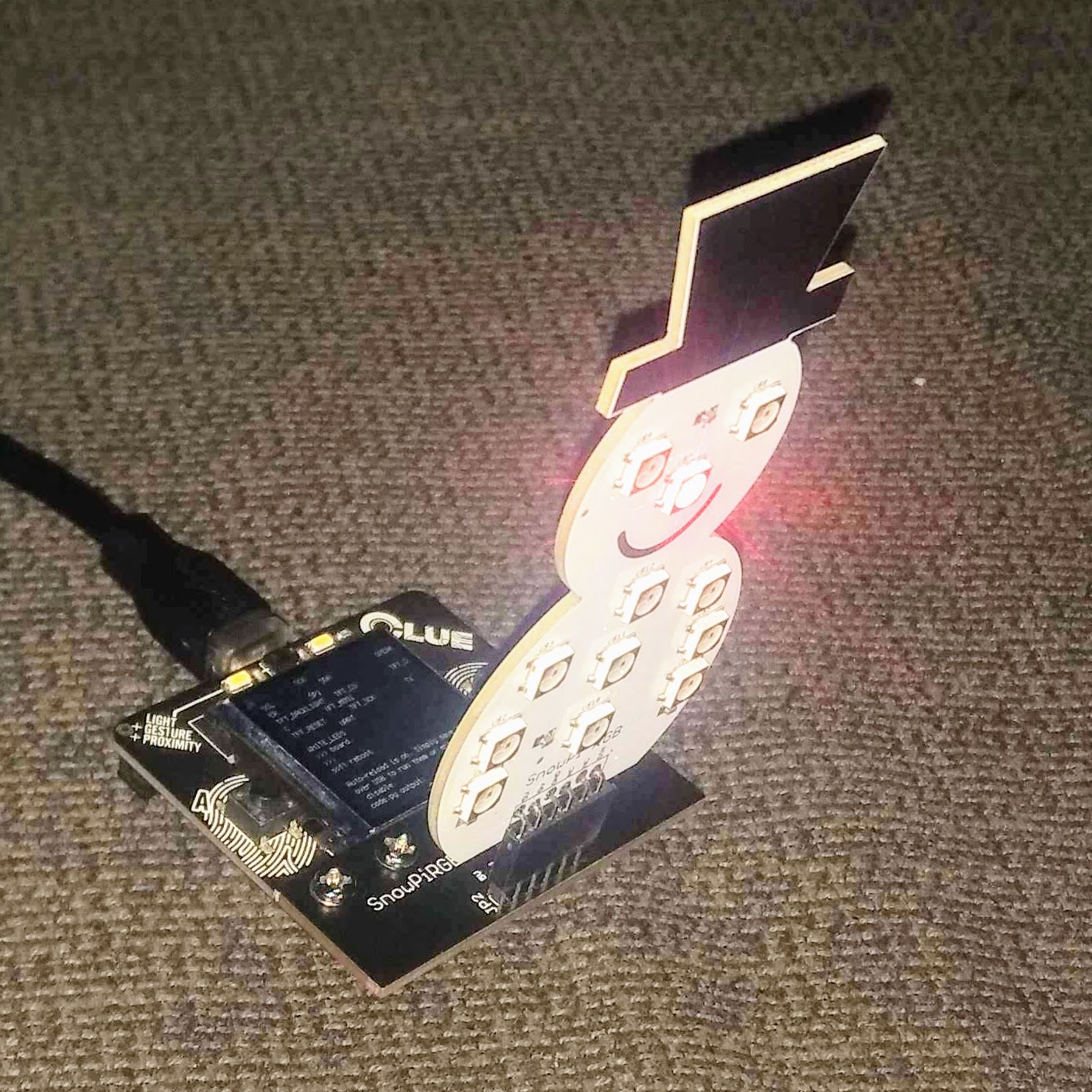
Putting #SnowPi RGB from @ryanteck to a good use.
@CircuitPython #coronavirus tracing app detector.
Turn on one LED per unique BT advertisement from a phone running a contact tracing app. Green=Low signal, RED=Strong signal, Blue=now silent.
Source code: https://t.co/jx0zDWM...
 Twitter
blissful palm
Twitter
blissful palm
Alloy Feather (Rev A) for anyone interested in what I'm working on https://github.com/folknology/alloy

GitHub
Alloy a OpenSource hardware fusion of FPGA and Microcontroller - folknology/alloy
lone axle
🎃
slender iron
nice!
thorny jay
RPM calculator are the best... if only I could remember what I was able to do on HP48!
onyx hinge
It was so tempting to add a built in programming language to it, but I was sternly encouraged to wrap up the project. The last time it had almost been finished, I decided to add an arbitrary precision decimal arithmetic library to it 🙂
idle owl
It's always clock issues!
viral minnow
thorny jay
It was so tempting to add a built in programming language to it, but I was sternly encouraged to wrap up the project. The last time it had almost been finished, I decided to add an arbitrary precision decimal arithmetic library to it 🙂
@onyx hinge This week-end, I investigated TI-Python ADAPTER that is an add-on to Ti-83 to permit running Python that was added to the math program in France. They took a Trinked with special firmware. Until I figured that I don't have a Ti-83, so I gave up. But Ti has a few Python hardware that could be CircuitPython. Also, I failed to convince my kid that I will acquire a numworks for them, but I will be the one using it... and for school they need a exam authorised calculator.
@idle owl I wanted to accumulate QT-Py project... copy cat of another such repo: https://github.com/dglaude/my_qtpy_trick
GitHub
Inspired by https://github.com/todbot/qtpy-tricks just other tricks. - dglaude/my_qtpy_trick
idle owl
@thorny jay It'll be in the Learn system this week or next.
thorny jay
@idle owl and I guess you have seen this one: https://github.com/todbot/qtpy-tricks

GitHub
Some tips and tricks for CircuitPython, using a QT Py board - todbot/qtpy-tricks
idle owl
I have, thank you!
serene warren
Been remodeling kitchen, dining rm and laundry. Can sympathize.
idle owl
@gilded cradle Hurrah!
 mental nexus
Had a water heater leak and drain pan leak so had to redo some Sheetrock so took the time to add more shelves at the same time. Unfortunately even a small room takes similar amount of work as a big one!
 gilded cradle
Thanks @idle owl
mental nexus
But avoiding going to the laundromat is great motivation to get the work done.
 inland tusk
@spare prawn speak up your voice is low
lapis hemlock
I've got to take off now. 👋
serene warren
See yens later
lone axle
Yep, better now
solar whale
better
onyx hinge
Unless your code is written extremely carefully (to avoid any memory allocations on the heap), CircuitPython will have to pause for garbage collection from time to time. It's pretty easy to engineer a scenario where the GC pause is substantially over 1ms.
idle owl
@lone axle For your ItW topic, what would that library involve? (I'm getting ahead of things.) I feel like we'd need further (read: Limor's) input on whether to add it to the main bundle.
lone axle

GitHub
Helper library for the Monster M4sk device. Allows usage of screens and other built-in hardware. - FoamyGuy/Adafruit_CircuitPython_MonsterM4sk
It's essentially a "Device Helper" library that initializes the built-in hardware. I think of it like the Circuit Playground libary is for those devices, though this one has far less built-in so it's smaller in scope
solar whale
👍
idle owl
Alright, I'll look into it.
onyx hinge

Adafruit Learning System
Convenient project storage (since there's still no breakout board for floppy disks)
thorny jay
No but you can trigger it more frequenty!
thorny jay
Frequently check gc.mem_free() to see what is happening.
gilded cradle
Gonna get going. Thanks everyone. 👋
onyx hinge
slender iron

Adafruit Learning System
How to build CircuitPython yourself on different platforms

Adafruit Learning System
From fork to merge, this guide covers all the steps necessary for a successful Git and GitHub workflow.
blissful pollen
I should have them, I've read them a ton lately
solar whale
~20 sec after reboot it will reboot again
idle owl
@tulip sleet You're not muted
solar whale
I vote for Main Bundle
onyx hinge
@blissful palm we cannot hear you
solar whale
Have to go offline -- Have a great week 👋
blissful palm
That's weird it works on the test
tulip sleet
try switching from the app to the browser or vice versa
onyx hinge
neotrellis uses trellis.pixels[nnn] = CYAN
tulip sleet
do you have manual PTT on?
onyx hinge
@thorny jay are you familiar with the term "duck typing"? It is the term for the way you can create a class which implements the required operations and substitute it for an object of some other type. So you'd look at the operations that you use on pixelbuf objects, and then implement that in a way that talks to trellis or displayio...
Duck typing in computer programming is an application of the duck test—"If it walks like a duck and it quacks like a duck, then it must be a duck"—to determine if an object can be used for a particular purpose. With normal typing, suitability is determined by an object's type....
lone axle
@idle owl I found "Transfer Ownership" in the repo settings and tried to transfer to "adafruit" but it I got this error: You don’t have the permission to create public repositories on adafruit
idle owl
@lone axle Hmm ok. Looking into it.
thorny jay
neotrellis uses
trellis.pixels[nnn] = CYAN
@onyx hinge I made i work on the Trellis, however I had to reduce the update frequency as I2C is maybe slower than NeoPixel. But I already had the code for that.
stuck elbow
@onyx hinge like this? https://i.pinimg.com/736x/6a/28/35/6a2835e623eb78617c9cea52721e5ae3.jpg
 idle owl
@lone axle That's weird because we would have to accept it, so I have no idea why it won't let you....
onyx hinge
You can transfer repositories to other users or organization accounts.
idle owl
To transfer a repository that you own to an organization, you must have permission to create a repository in the target organization.
Ok...
Transfer it to me.
tulip sleet
could you transfer it to an individual who works for adafruit, then we could transfer it to the organization?
what kattni said
idle owl
@lone axle Transfer it to me. And then I'll transfer to Adafruit.
low sentinel
GitHub
Contribute to WarriorOfWire/circuitpython-utilities development by creating an account on GitHub.
onyx hinge
[that's when the magic happens]
idle owl
Transferring now.
lone axle
That transfer seems to have been successful Repository transfer to kattni requested
thorny jay
@thorny jay are you familiar with the term "duck typing"?
@onyx hinge No, looking into that. My idea is a "sandwich" API that hide the difference between the NeoPixel and Trellis and whatever else I create. I just need to figure out how to "replace" the real pixelbuf by a fake copy.
modern wing
Thanks y'all
onyx hinge
Thanks, so happy to meet new folks!
thorny jay
Thank you.
idle owl
@lone axle Please fork and continue working on this: https://github.com/adafruit/Adafruit_CircuitPython_MonsterM4sk
GitHub
Helper library for the Monster M4sk device. Allows usage of screens and other built-in hardware. - adafruit/Adafruit_CircuitPython_MonsterM4sk
Also see if Actions will work now
viral minnow
Great call, nice to learn from you all! You'll find me around working on LoRa stuff. We have a few surprises.
slender iron
thanks @viral minnow excited to see RAK get involved
mental nexus
Is this the latest instructions for setting up the Saola for CircuitPython? https://gist.github.com/askpatrickw/0a276c7e2d4f54e442b2cb6eaa0d32ea

Gist
GitHub Gist: instantly share code, notes, and snippets.
solar whale
@mental nexus much is now in here https://github.com/adafruit/circuitpython/tree/main/ports/esp32s2
mental nexus
Thanks @solar whale.
slender iron
Here is the notes document for Monday’s CircuitPython Weekly meeting. It is at the normal time of 11am Pacific / 2pm Eastern here on Discord. Everyone is encouraged to attend! Please add your hug reports and status updates even if you’ll be attending the meeting - it’s super helpful! If you are unable to attend but would still like to include updates, feel free to include them in the notes and we’ll read them off during the meeting. Hope to see you there! <@&356864093652516868> https://docs.google.com/document/d/18_xIL_UX_ojVDne1Huz6cv13ZzVIgN2Wap_SgbzU3w4/edit?usp=sharing

Google Docs
CircuitPython Weekly for October 26th, 2020 Here is the notes document for Monday’s CircuitPython Weekly meeting. It is at the normal time of 11am Pacific / 2pm Eastern here on Discord. Everyone is encouraged to attend! Please add your hug reports and status updates even if ...
slender iron
slender iron
Here is the notes document for Monday’s CircuitPython Weekly meeting. It is at t...
spare prawn
thank you everyone, sorry i had to jump off, there was an emergency.
solar whale
Hope it was resolved.
manic glacierBOT
This looks good! Beware, I'll be tempted to set lto back to a single partition when we need the space.
Haha, oops! Thanks for fixing it up.
onyx hinge
It's been requested. Here it is with EXTREMELY rough edges: Compile C++ sources into CircuitPython.
https://github.com/adafruit/circuitpython/commit/3b7e40076919a20efb578cb5182d5b3d7330d9d6
Proof of concept: Let files be built as C++
.. this requires changing all the port Makefiles, so it's only been
done for samd so far.Trickery is needed to permit the CMSIS headers be included.
All headers need the MP_BEGIN_DECLS / MP_END_DECLS macro added.
The <stdatomic.h> header is not compatible with the C++ compiler, so
it is hacked out.The file built as C++ is shared-modules/util.cc and it doesn't actually
use any real C++ features such as classes or templates.runtime type inference and exceptions are disabled.
manic glacierBOT
//| def make_opaque(self, pixel: int) -> None:
One more tiny doc improvement. Otherwise it looks really good! Thanks!
onyx hinge
it's not even in pull-requestable state but if someone's interested in taking it further please be my guest
manic glacierBOT
@gmeader Mind trying rc.0 and seeing if you still have the issue?
I'm a bit torn between making it all work under the hood or supporting this API: https://circuitpython.readthedocs.io/en/5.3.x/shared-bindings/rtc/__init__.html
The benefit of the RTC API would be that it would work with ESP32SPI.
I'm barely following along simply because I have no triac experience. I think the challenge overall is that the CircuitPython VM doesn't guarantee any timing. That makes it really hard to do anything timing sensitive in Python. You'll need a C module to do the timing critical bits.
1. The ability to control exactly when a `PWMOut` instance starts counting. This is unspecified in the docs today. So while I might assume PWMOut construction starts the timer, that doesn't appear document...
I'd just delete this. The table below is more helpful. Thanks for the update!
slender iron
@onyx hinge I think there is an open PR to micropython for C++ too
did you see it?
@gilded cradle are you seeing the A4 in use still?
gilded cradle
I haven't checked since RC0 came out.
slender iron
this person found it on a completely different board
I can't replicate it by simply initing the bus and then reloading
gilded cradle
Yeah, it's still happening @slender iron
I was able to boil it down to a pretty basic bit of code that only uses digitalio and board.
I don't have a CPB on me though.
slender iron
happening on matrix portal? I have a board now. can you send me the repro code?
gilded cradle
@slender iron repro code is in the issue at https://github.com/adafruit/circuitpython/issues/3552
GitHub
When attempting to use board.A0 with CircuitPython 6.0 Beta 2 with NeoPixels, I am seeing this error: code.py output: Traceback (most recent call last): File "code.py", line 4, in...
slender iron
👍 thanks
manic glacierBOT
Ok, I see this on my MatrixPortal too.
I've done a little digging in NINA, Arduino, and IDF. NINA does execute the SNTP init code in WiFi init:
https://github.com/adafruit/nina-fw/blob/4b244e7559e126bb5ceec1f7e46980b7a539c950/arduino/libraries/WiFi/src/WiFi.cpp#L568
I can't conclude for sure (not a C dev, and I think the LWIP stuff is opaque to us), but it seems to me that no SNTP packets are going to g...
atomic summit
@slender iron who's looking after the esp32s2 UF2 repo?
atomic summit
Ok, all good. I'll bug him in a few days is no feedback.
atomic summit
Any idea why board.c is using a nice neopixel helper, and the bootloader_start is just using bitbanging?
slender iron
no, he'd know though
atomic summit
ok, cool, i'll chat with him about it, cheers 🙂
slender iron
np
 rare geode
minor QoL fix for language-circuitpython on Atom, tab completion support added https://github.com/jb3/language-circuitpython/pull/11

GitHub
Adds support for tab completion in the REPL by preventing the default tab event and handling the key like we do the arrow keys.
lone axle
That is awesome. I didn't realize there even was an atom plugin.
 barren peak
Hello all. Do you know where I can find the bootloader .uf2 for the QT-PY? I need to reflash the board as its not cooperating trying to load CP on it. thanks.
I did not see it here BTW https://github.com/adafruit/uf2-samdx1/releases/tag/v3.10.0
GitHub
Note: if you already have v3.9.0, there is no strong reason to upgrade to this release unless you're seeing spurious NeoPixel lighting when starting the user program.
Add PewPew M4 board. Than...
manic glacierBOT
@tannewt I thought we did have RTC... I can use it for example to do a hack NTP using requests...
    radio = wifi.radio
    pool = socketpool.SocketPool(radio)
    requests = adafruit_requests.Session(pool, ssl.create_default_context())
    response = requests.get("http://worldtimeapi.org/api/timezone/Etc/UTC")
    if response.status_code == 200:
        r = rtc.RTC()
        r.datetime = time.localtime(response.json()['unixtime'])
        print(f"System Time: {r.datetim...
[adafruit/circuitpython] New branch created: 6\.0\.x
They must have the PORT_ prefix otherwise they mask the wrong pins.
Fixes #3552
PRing to 6.0.x and then will merge from 6.0.x into main.
[adafruit/circuitpython] New comment on pull request #3231: Add extern declarations for gcc10 compat
FYI I just debugged a SAMD51 issue with GCC 10.2 and USB worked just fine. Full version:
arm-none-eabi-gcc (Arch Repository) 10.2.0
Copyright (C) 2020 Free Software Foundation, Inc.
This is free software; see the source for copying conditions.  There is NO
warranty; not even for MERCHANTABILITY or FITNESS FOR A PARTICULAR PURPOSE.
@askpatrickw I see AP mode mainly due to my wi-fi sniffers catching the Beacon frames that occur before CircuitPython switches to STA mode with wifi.radio.connect. But AP starting up also used to show up in the debug console before circuitpython messages.
Yes, could well be the scaffolding for SmartConfig.
I wondered about that. I guess I should have tried changing that to see if it fixed it.
I am cursed by this metro_m0_express board. 🤣
[adafruit/circuitpython] New comment on pull request #3231: Add extern declarations for gcc10 compat
hmm -- I don't see the gcc 10.2.0 toolchain on the arm developer site. https://developer.arm.com/tools-and-software/open-source-software/developer-tools/gnu-toolchain/gnu-rm/downloads
It still has 10.1.0 so I have no way to test this.
@jepler any ideas besides turning off the lto partitioning?
slender iron
@wise shard it's not your fault the metro m0 build keeps failing it's just really tight on space
 wise shard
Ha yeah I figured.
Thanks for looking into it everyone 😄
If there is anything else I can do I am happy to!
slender iron
we'll see what Jeff says. He just changed a setting to make builds faster at the expense of being larger.
slender iron
🙂 thanks!
manic glacierBOT
manic glacierBOT

cd ports/esp32s2
make BOARD=muselab_nanoesp32_s2
Use make V=1, make V=2 or set BUILD_VERBOSE similarly in your environment to increase build verbosity.
Unable to check whether maximum number of endpoints is respected
IDF_PATH=/home/cyz/circuitpython/ports/esp32s2/esp-idf cmake -S . -B build-muselab_nanoesp32_s2/esp-idf -DSDKCONFIG=build-muselab_nanoesp32_s2/esp-idf/sdkconfig -DSDKCONFIG_DEFAULTS="esp-idf-config/sdkconfig.defaults;esp-idf-config/sdkconfig-opt.defaults;esp-idf-config/sdkc...
manic glacierBOT

My demo program now works on 6.0.0-rc.0 on my PyPortal Titano with the latest libraries (6.x-mpy-20201019)
However, multiple Adafruit Learn Guides examples do not work accessing the Internet.
Libraries example: pyportal_simpletest.py works fine. esp32spi_simpletest.py also works fine.
These do not work:
- PyPortal_CMA_ART_FRAME
- PyPortal_NASA
- PyPortal_NewNewNew
- PyPortal_CuteFuzz
- PyPortal_Tides
Those are all I bothered to try.
The error is usually a wget probl...
manic glacierBOT
Here is an impressive open-source graphics library written in C for embedded systems.
https://lvgl.io/
Apparently it works with microPython. Sure would be nice to have these widgets in CircuitPython.
manic glacierBOT
I'm still confused by this, but #3484 seems to have caused a regression. That was my PR, but I don't yet know what went wrong!
Testing out the additions with this simple code
import wifi
import ipaddress


def cheapoHex(inBytes, delim=':'):
    res = ""
    for i, b in enumerate(inBytes):
        # print("byte %d %s (%02x)" % (i, b, b))
        res += "%02x" % b
        if i < len(inBytes) - 1:
            res += delim

    return res


for network in wifi.ra...I want to mention @atomic summit's favorite dual load of code.py. I've been trying to figure out why I can only sometimes get a wifi connection. I just pulled main and flashed and I got an IP, then it loads again and does not.
tio -b 115200 /dev/tty.usbmodem7CDFA1008C2E1
[tio 01:24:28] tio v1.32
[tio 01:24:28] Press ctrl-t q to quit
[tio 01:24:29] Connected
ip: 192.168.1.29
hostname: UMFeatherS2

Code done running. Waiting for reload.
soft reboot

Auto-reload is on. Simply save files over USB to run them or enter REPL to disable.
code.py output:
Configuring Network and System Time in UTC
ip: None
hostname: None
Traceback (most recent call last):
  File "code.py", line 42, in <module>
  File "code.py", line 38, in wifi_join
  File "code.py", line 22, in set_system_time
  File "/lib/adafruit_requests.py", line 555, in get
  File "/lib/adafruit_requests.py", line 535, in request
  File "/lib/adafruit_requests.py", line 415, in _get_socket
OSError: 0

Press any key to enter the REPL. Use CTRL-D to reload.
And then I end up where CTRL-D or unplugging also doesn't work...
But this all worked a day ago...
Let me know what info I can help pull together to provide better info.
I'll try my Kaluga too
idle wharf
Just seems intermittent, some times it works sometimes not.
solar whale
@idle wharf I have been finding similar issues on my umfeathers2 and saola_wrover ... something has broken. I need to do more testing, but it also keeps causing my Linux box to reboot!! I need to move back to the Mac for testing. Will try to do more later this morning.. . I am also seeing intermittent behavior and once it fails, it does not seem to recover after a soft Reboot.
solar whale
For me -- it works properly after a Power cycle or hard RESET, but not after a soft reboot.
manic glacierBOT
I am seeing the same behavior on both a saola_wrover and umfeathers2
Works on Hard reset, but not after soft reboot.
manic glacierBOT

Usually a make BOARD=(whatever) clean does it for me.
I actually always do the following when building (in my case under the fish shell and WSL2)
cd ports/esp32s2/esp-idf
./install.fish
set -x IDF_PATH $PWD
source $PWD/export.fish
cd ..
make BOARD=(something) clean
make BOARD=(something)
#3541 (396979a67e538da087136ce01dbc4c7a670bf60e) breaks building on macOS, which doesn’t have an nproc command. That seems to be a Linux thing. The equivalent would be sysctl -n hw.logicalcpu, but since I can’t find any existing platform distinctions in the makefiles, I chose to call Python for a cross-platform solution. (Credits to https://stackoverflow.com/questions/1715580.)
manic glacierBOT
Recently, the macos-10.15 image was updated with a non-brew version of awscli. This made our CI script, which does a brew install awscli fail:
Error: The `brew link` step did not complete successfully
The formula built, but is not symlinked into /usr/local
Could not symlink bin/aws
Target /usr/local/bin/aws
already exists. You may want to remove it:
  rm '/usr/local/bin/aws'
Thank you! The lone build failure appears to be unrelated and I've added #3578 to hopefully address it. (not that it matters, as running Python is a perfectly good alternative, but is the alternative shell command getconf _NPROCESSORS_ONLN portable?)
onyx hinge
oh hoooray, pidcodes merged tannewt's big PR
manic glacierBOT
I can’t say anything about general portability, but getconf _NPROCESSORS_ONLN works for me on macOS 10.14.6.
[adafruit/circuitpython] New comment on pull request #3578: build\.yml: Fix building mpy\-cross\-mac
I ran brew install awscli on my Mac but atmel-samd builds still fail because nproc is not found.
solar whale
@onyx hinge I think I misunderstood -- how do you get the MacOS to compile?
onyx hinge
@solar whale I don't, I have no mac. cwalther's PR fixes the nproc problem, my PR fixes a different problem affecting only the github actions to build the macos mpy-cross program
solar whale
I thought you were suggesting your fix took care of both. Actually I had no issue with mpy-cross
onyx hinge
no, that's not what I intended to say.
solar whale
OK -- I will try #3577
manic glacierBOT
@jerryneedell thanks for confirming - I went round and round for a while convinced that I had broken my esp-idf submodule when jumping up and down branches the last few days, or that the problem was really just a bug in there, but no such luck. Wondering now if the Network instance I stuff into wifi.radio.ap_info is the cause and isn't getting free'ed like I assumed it was? Still not sure what went wrong with this one.
solar whale
@onyx hinge I just trued pr #3577 on my Mac and linux systems -- seems to work OK (for Pyportal build)
onyx hinge
Thanks @solar whale !
manic glacierBOT
I tried this PR on a Mac and on a Linux system -- built Pyportal -- works OK for both.
slender iron
@onyx hinge I have write access now too.
@onyx hinge or @tulip sleet want to join the zephyr API call?
onyx hinge
No thanks
slender iron
I think they are talking about a pin muxing api today
tulip sleet
@slender iron is it now? I am free
tulip sleet
i'm on, thanks
slender iron
👍
looks like pinmuxing is just listed as "time permitting" in the agenda
which means it probably won't be discussed
@onyx hinge can we switch back to one lto partition? We can parallelize it when we switch to gcc 10
onyx hinge
@slender iron sure, if it's causing problems (will gcc10 do better at partitioning?)
slender iron
I suspect the space issue with the make_transparent PR is due to enabling the single partition
gcc 10 has better code size
onyx hinge
did it still not fit after the translation change I made? I didn't check back
slender iron
no, german isn't fitting
onyx hinge
guess not, okay
slender iron
96 bytes
onyx hinge
I only paid attention to zh_Latn_pinyin, oops.
you wanna push the reversion of the parallel lto to that branch and we'll see?
slender iron
ya, I can
onyx hinge
the mpy-cross-mac failure is addressed in #3578 ..
manic glacierBOT
Do we need this on 6.0.x? I think we generally want fixes there and then we can merge 6.0.x into main.
low sentinel
Whoa y'all are talking with Zephyr people? I just started looking at platformio Zephyr support for another project.
low sentinel
well shoot
I'm planning to learn how to write an application using Zephyr instead of arduino. I'll try to avoid asking you things :-p
slender iron
I've never actually used it though 🙂
low sentinel
Yeah the whole device tree looks a little like it will take some gymnastics to get circuitpython supported but I'm very far from grokking it
slender iron
ya, I don't think dts is useful to us
 meager fog
@ionic elk hihi im doing more ESP32S2 testing, i have some analog-in questions
(PWM out works great btw)
slender iron
@tulip sleet did we just blow their mind? 😄
tulip sleet
in some way, yes, the idea of dynamic mapping is way off their radar. They think everything is a static predefined application, spec'd in advance
i'm not sure we are going to convince them this is a use case they want to support
slender iron
yup, agreed
low sentinel
Many static predefined programs do dynamic work, how is circuitpython any different 🚎
slender iron
I'm not sure they should actually do it
tulip sleet
@slender iron you mean it's out of scope for zephyer?
slender iron
ya, I think that's a reasonable conclusion
tulip sleet
i could imagine a restricted version where you can only use some predefined sets of pins (I2C always on board.SCL and .SDA, etc.)
slender iron
I wouldn't want to move us to that though
and if we don't move, then why should they do it
tulip sleet
I just mean that you would still do busio.I2C(board.SCL, board.SDA), but it wouldn't work on any other pins. It's not that interesting, it's only
for a case where you want to piggyback on an existing zephyr port
slender iron
right
maureen would have an idea of how well that'd work. she's done the recent mp zephyr work
manic glacierBOT
@gmeader I suspect that issue is this: https://github.com/adafruit/Adafruit_CircuitPython_Requests/issues/41
I'm closing this issue because it appears the SDCard issue is fixed.
@tannewt I think you've found it! The sta_mode flag gets set the first time through start_station() but after a soft reboot it's still True, causing that function to immediately return and not actually set up station mode. Things get worse very quickly from there. I had assumed that whole struct would get trashed after a soft reboot so it wouldn't matter, but I guess not!
I tested it quickly just now by commenting out the immediate check/return of self->sta_mode and things w...
Thank you! Merging because the only failure is a known mac mpy-cross issue.
@astrobokonon -- did a quick test on both saola_wrover and umfeathers2 with this change - comment out the auto return.
diff --git a/ports/esp32s2/common-hal/wifi/Radio.c b/ports/esp32s2/common-hal/wifi/Radio.c
index 275bae31a..d55416046 100644
--- a/ports/esp32s2/common-hal/wifi/Radio.c
+++ b/ports/esp32s2/common-hal/wifi/Radio.c
@@ -42,9 +42,9 @@
 #define MAC_ADDRESS_LENGTH 6

 static void start_station(wifi_radio_obj_t *self) {
-    if (self->sta_mode) {
-        return;
- ...Do we need this on 6.0.x? I think we generally want fixes there and then we can merge 6.0.x into main.
 pastel panther
@slender iron @tulip sleet was the zephyr API meeting recorded?
slender iron
@pastel panther I don't think so. we only talked the last five minutes about circuitpython basics
pastel panther
ah, ok
slender iron
there is a channel for pin control discussion on the zephyr slack
manic glacierBOT
mental nexus
Hello World!
Yay! I just successfully loaded CircuitPython onto the ESP32-S2 Saola. Here are a few more details that slightly differ compared to the instructions below. Note: I am using an iMac to build and load CircuitPython.
- When running the CircuitPython make command, you have to have the USB cable connected to the physically built-in USB port.
- This worked when I used the serial port labeled
/dev/cu.SLAB_USBtoUARTIt gave an serial error when I used thetty.XXXXport. - My make command was
make BOARD=espressif_saola_1_wrover flash PORT=/dev/cu.SLAB_USBtoUART - After it says that it has loaded, switch the USB cable to the externally wired cable (pin20 to D+, pin19 to D-). Look for the CIRCUITPY drive.
- Celebrate!
Getting started guide is here for the ESP32-S2 and CircuitPython: https://github.com/adafruit/circuitpython/tree/main/ports/esp32s2
GitHub
CircuitPython - a Python implementation for teaching coding with microcontrollers - adafruit/circuitpython
idle wharf
I linked to the official page ^^^ from my gist so if anyone ends up there they will go to the new awesome readme for the esp32s2 port
manic glacierBOT
Should close #3576.
I opted to set both ap_mode and sta_mode flags in common_hal_wifi_init to False just to start from a clean slate every time, since at that point things aren't properly configured for either mode anyways. I think technically setting sta_mode to True might be legit after the call to esp_netif_create_default_wifi_sta but it's functionally not useful until after you load in the config so to me it seems debatable. I at least added a comment ...
Forgot to mention that in the original issue I mentioned I was seeing a hard crash - I'm still seeing that after this fix, so it seems like building with DEBUG=1 is causing issues somehow. It'd be good to fix that so I'll probably poke around that a little more and open another issue for it if it's not already known.
manic glacierBOT
I'm testing your fix and my WLAN join works, but I'm still not able to reliably do a get. Can you see if this is true for you as well. You need the adafruit_requests.
import socketpool
import ssl
import wifi
import adafruit_requests

radio = wifi.radio
pool = socketpool.SocketPool(radio)
requests = adafruit_requests.Session(pool, ssl.create_default_context())

response = requests.get("http://wifitest.adafruit.com/testwifi/index.html")
print(response.status_code)
pri...While playing around with creating and destroying displays to exercise the supervisor heap, I came across some strange behavior: When a board.SPI() object has ever been used by a FourWire or a SharpMemoryFramebuffer that has since been deinitialized, subsequent sessions can never reconstruct it, because its pins are still in use.
Steps to reproduce:
Auto-reload is on. Simply save files over USB to run them or enter REPL to disable.

Press any key to enter the REPL. Use CTRL...I have seen similar behavior with the Sharp Memory Display. I'm not sure what the fix is, but I hope you will consider making a pull request to fix this. @tannewt may have a suggestion.
[adafruit/circuitpython] New comment on pull request #3578: build\.yml: Fix building mpy\-cross\-mac
@tannewt I updated this PR so it requests a merge into 6.0.x. There were build failures uploading artifacts, but the particular step we are interested in succeeded: https://github.com/adafruit/circuitpython/pull/3578/checks?check_run_id=1282721896
@askpatrickw I haven't tested requests just yet, but I did notice just now that if I connect to an AP, and then just ping in a loop, I get about 19-20 iterations before the espidf memory stats get dire and things just fail. At this point I'm wondering if what you're seeing and #3562 are the same thing and there's something not getting cleared on the espidf side during all of this. If I just print out wifi.radio.ap_info et al. as well as wifi.radio.ipv4_* the memory usage stays c...
timber mango
Reading up on moving from "Arduino" to CircuitPython, how does the board know to run the Arduino code, or the Python code? And/or am I missing some fundamental concept?
ornate breach
When you want to program with Arduino, just double press the reset button to get the boot to appear. You just select the appropriate board in Arduino IDE, make sure the port is selected and upload
When you’re done in Arduino code, double tap the reset, drag the Circuitpython .uf2 to the boot and it should restart with Circuitpython boot loader running.
tulip sleet
@timber mango The CircuitPython firmware is "just another program" that runs on the board. It's a really big program that does a lot, but it's a program just like Blink is a program
so once you load the CPy UF2 (program), it's all set to store files, run them, etc.
timber mango
Gotcha, thanks! Will it wipe my Arduino installed code?
timber mango
Cool. WIll be sure to keep them both updated in my repos.
manic glacierBOT
Doesn't seem to be out of memory, just no socket and on the first call.
I'll dig around after a few more fixes go to main. tx!
manic glacierBOT
I implemented this PR on a saola_wrover -- seems to work OK - after reboot.
The trying requests I get intermittent failures espied.MemoryError
here is a successful enable and a failed example
Adafruit CircuitPython 6.0.0-rc.0-63-ge202da4da on 2020-10-21; Saola 1 w/Wrover with ESP32S2
>>>
>>>
>>> import wifi_test
cp mem free 2035232
idf total mem 165832
idf mem free 52724
idf largest block 48464
<Network> Needell Airport -58 6
<Network> Needell Airport -42 1
<Network> WYZE...Finding a good fix will require more analysis on my part, so I was hoping someone of you maintainers would have an idea more quickly. But I can give it a try. No promises though. It’s not urgent as far as I am concerned.
hmm -- on the umfeathers2, I am occasionally getting this error
Press any key to enter the REPL. Use CTRL-D to reload.
Adafruit CircuitPython 6.0.0-rc.0-63-ge202da4da on 2020-10-21; FeatherS2 with ESP32S2
>>> import wifi_test
cp mem free 8176784
idf total mem 165856
idf mem free 51116
idf largest block 48284
<Network> Needell Airport -48 1
<Network> WYZE_FBAB62DE71811B38 -66 11
<Network> Expelliarmus2 -81 4
None
ip 10.0.0.26
8.8.4.4
ping 0.041
200
This is a test of Adafru...Followup on "ping" issue
On the umfeathers2 and wrover, I have let it repeatedly ping and it succeeds thousands of times.
however I have also had it do the "hard crash" -- for far just once on the feathers2 -- it disconnects the USB connection. I was able to just reconnect and runs it successfully.
using this code
import wifi
import ipaddress


def cheapoHex(inBytes, delim=':'):
    res = ""
    for i, b in enumerate(inBytes):
# print("byte %d %s (%02x)" % (i, b, b)...The pin definitions in mpconfigboard.h do not match those in pins.c
using board.SPI() will get the wrong pins.
    { MP_ROM_QSTR(MP_QSTR_A1), MP_ROM_PTR(&pin_P0_02) },
    { MP_ROM_QSTR(MP_QSTR_D6), MP_ROM_PTR(&pin_P0_02) },
    { MP_ROM_QSTR(MP_QSTR_SCK),  MP_ROM_PTR(&pin_P0_02) },

    { MP_ROM_QSTR(MP_QSTR_A2), MP_ROM_PTR(&pin_P0_29) },
{ MP_ROM_QSTR(MP_QSTR_D9...@idle owl FYI -- this impacts the CPB guide -- the pinouts for SPI are incorrect https://github.com/adafruit/circuitpython/issues/3582
manic glacierBOT
@jerryneedell I noticed that the ValueError: syntax error in JSON error has a 503 HTTP status code, so we could handle more gracefully but it seems to be a server issue. Would be interesting if truncated or incorrect responses occur with a 200.
idle owl
@solar whale How does it impact the guide?
solar whale
the pinouts are wrong for the SPI pins SCK is on A1, MISO on A2, MOSI on A3
sorry -- the GIZMO guide is the one that is incorrect
CPB guide does not mention SPI...
idle owl
Do you have Learn access?
solar whale
yes
idle owl
Would you be willing to update the Gizmo guide if I add you to it?
solar whale
sure -- be happy to
idle owl
Excellent. Can you link me to it? Not certain which one it is
solar whale

Adafruit Learning System
Add a display to any Circuit Playground Express or Circuit Playground Bluefruit with this Bolt-on Display and Audio Amplifier
this came up in a forum post https://forums.adafruit.com/viewtopic.php?f=58&t=170634
idle owl
Excellent, adding you now.
@solar whale You should have access to edit the guide now.
Thanks for updating it!
manic glacierBOT
fixes #3582
tested on CPB with mini-tft featherwing.
you dont by chance have a tft gizmo or eink gizmo?
you dont by chance have a tft gizmo or eink gizmo?
I have a tft-gizmo
could you test with that too?cause thats what we use for SPI interfacing!
could you test with that too?cause thats what we use for SPI interfacing!
sure -- will do.
@ladyada
yikes! this will be a problem
the tft-GiZMO uses A3 for the backlight and uses SDA for MOSI ???
        self, *, spi=None, cs=board.RX, dc=board.TX, backlight=board.A3, rotation=180
    ):
        displayio.release_displays()
        if spi is None:
            import busio  # pylint: disable=import-outside-toplevel

            spi = busio.SPI(board.SCL, MOSI=board.SDA)
@slender iron MacOS is the only OS that does the stupid file indexing, right? Nothing else does?
manic glacierBOT
@ladyada
yikes! this will be a problemthe tft-GiZMO uses A3 for the backlight and uses SDA for MOSI ???
        self, *, spi=None, cs=board.RX, dc=board.TX, backlight=board.A3, rotation=180
    ):
        displayio.release_displays()
        if spi is None:
            import busio  # pylint: disable=import-outside-toplevel

            spi = busio.SPI(board.SCL, MOSI=board.SDA)
ah -- but since it does not call board.SPI() it should be OK
manic glacierBOT
yeah we 'recycle' the I2C pins - to keep pin compatibilitiy with CPX!
This is complete enough to build and not simply crash when creating a canio.CAN object. No other testing performed as yet, so I'm entering this as a draft. TODOs include:
- [ ] Test transmission
- [ ] Test reception in loopback mode
- [ ] Test reception filtering in loopback mode
- [ ] Test interoperation with other CAN implementations
Testes on CPB with TFT gizmo -- no problems.
slender iron
@idle owl mac is worst afaik
idle owl
Ok. Bleh. Thanks.
slender iron
yuuuup
manic glacierBOT
FYI -- this came up in a forum question about using a mini-tft with the CPB. https://forums.adafruit.com/viewtopic.php?f=58&t=170634
solar whale
@idle owl I was wrong about the GIZMO guide -- the GISMO does some funky things with the pins..... I will restore the guide and maybe ad a note.
idle owl
Alright, sounds good. Thanks for paying attention to the details!
manic glacierBOT

@cwalther yes! this seems to be the case, thank you for a more clear description of what is going on....
unfortunate to hear its not that urgent, I wish I had more expertise to help with the sharp displays. Adafruit seems to not have anyone to test these. I got myself invested into a project where I have a keyboard button array, a sharp memory display and an nrf based board hoping to use circuit python. but in my case, its several limited hitting issues with memory not being freed on reboo...
solar whale
@idle owl I added a "warning" box -- Is it ok? https://learn.adafruit.com/adafruit-tft-gizmo/pinouts#spi-display-pins-3041879-5
idle owl
@solar whale That's great, thank you!
solar whale
No problem -- glad to help.
manic glacierBOT

Hello,
I was wondering if there was any way to use one of the built-in LEDs on the Circuit Playground Express (or even an external one) in a similar way to the status NeoPixel or Dotstar seen on other boards.
I use VSCode for editing code, and it’s kind of a pain to have to screen in to get to the REPL or output.
@jepler I assume this CI failure is the same as ones that have been occurring for the past few days. Anything I need to do about it?
Regarding the memory leaks, could you try a recent “absolute newest” build (newer than 6.0.0-rc.0)? #3482 should help with these, although I’m not sure if the first commit of #3498 is also needed. (@jepler, maybe you could rebase that and leave out the second commit that is obsoleted by #3542, to get a new build to test?)

Adding Board files for Wroom and Wrover versions of ESP32-S2 Module Clip board. Along with adding those boards in build.yml
manic glacierBOT
in regard to memory leaks, if anything my experience has got worse. I just flashed adafruit-circuitpython-feather_bluefruit_sense-en_US-20201020-1a67740.uf2 and here is my experience:
prior to this build, up to 6.0.0 beta 2 when I save my files, it would reboot my code, and have about 72,000 bytes avail after freshboot init sequence, and displays this on screen.
anytime a software reboot is launched, saving a file, hitting the reset button once, or calling a soft reboot with code, it w...
@cwalther I am happy to help test any of this and learn more as long as there is attention, but the recent builds have definitely got worse for my hardware combination. im close to switching back to the Arduino side even through it slows my ability to develop about 10x, at least id have room to program more than display 5 words in a tiny byte font and blink a light :/
manic glacierBOT
As far as my contributions are concerned, I am grateful for any testing with Sharp Memory Displays, because I don’t have one. I can test memory management by pretending there was a display, but I can’t check if anything sensible shows up on the display. (I’m also unfamiliar with nRF52 hardware. Does the reset button really do a soft reboot there? That’s not what I would expect from a reset button.)
Do you think you could distill your testing procedure into a series of simple steps that som...
manic glacierBOT
yeah I totally get that! Adafruit should be shipping this hardware out to hard working folks like you! especially since not many seems to be championing the development of a product Adafruit sells thats still newer.
I can certainly work to optimize my test methods and describe them better, but I would need a bit of guidance. I understand that I have a unique combination of hardware and weird software modifications like to the .mpy libraries. I just dont know how fast I can do something tha...
manic glacierBOT
so best I can do quickly, is use this standalone piece of graphics code I wrote. it doesnt max out memory, but does point to about 10,000 bytes being used up between soft reboots. attached is my code, and the modified clue library with the sharp memory display swap, plus my additional sensors:
code.py:
`import gc
import time
from adafruit_clue import clue
import displayio
import supervisor
from vectorio import Circle, Polygon, VectorShape
print(gc.mem_free(),'bytes free --> import s...
manic glacierBOT
@tannewt I have NO idea why all these commits are listed in this PR. Do you?
manic glacierBOT
I assume they were brought in by a merge. I'm not sure why they show though. I'd expect the diff to account for it.
You can modify the CircuitPython build to set MICROPY_HW_NEOPIXEL like here: https://github.com/adafruit/circuitpython/blob/main/ports/nrf/boards/feather_nrf52840_express/mpconfigboard.h#L33
Build instructions for CircuitPython are here: https://learn.adafruit.com/building-circuitpython
This VSCode plugin may be a simpler solution: https://github.com/joedevivo/vscode-circuitpython
@jerryneedell Would you mind rebasing this onto 6.0.x? That way it'll be fixed for 6.0.0
@jerryneedell Would you mind rebasing this onto 6.0.x? That way it'll be fixed for 6.0.0
Sure -- How do I do that?
Please merge this into main rather than 6.0.x. We'll release it in 6.1
Anyone concerned that this fix is a regression? The issues above seem like ones that may exist without this fix.
@cwalther I think the bug is setting the singleton back to NULL while it's being used by the display still. It should be preserved by release_displays() in case it's referenced before it. I suspect https://github.com/adafruit/circuitpython/pull/3378 is related.
@hatchman supervisor.reload() is not the same as pressing the reset button. "reloads" don't change display state because the display will be used by CircuitPython after the VM completes.
@hatchman:
I was thinking of something a little shorter. :) Could you try to strip down this clue library to just the display-related parts needed for this application? I need to remove at least these imports to get past the import section on my board: neopixel, adafruit_apds9960.apds9960, adafruit_bmp280, adafruit_lis3mdl, adafruit_lsm6ds.lsm6ds33, adafruit_sht31d, audiobusio, audiopwmio, adafruit_matrixkeypad.
Regarding the original issue with the inability to reinitialize board.SPI, th...
If you want to do a hard reset, you can use microcontroller.reset().
Having a decreased amount of memory the second time you use a sharp memory display is hopefully going to be addressed by #3498, which is an in-progress pull request.
Assuming that what you are seeing is that the amount of available memory decreases from the first to second run, but stays broadly similar in second and following runs, I believe that is what you are seeing.
I think the bug is setting the singleton back to NULL while it's being used by the display still. It should be preserved by
release_displays()in case it's referenced before it.
I’m not sure about that. The object is spi_obj and still exists, so any Python references should remain valid, spi_singleton that is set to NULL is just a pointer to it and can be identically restored by calling board.SPI() again (at least until the end of the session, due to the bug).

On the Circuit Playground Express, after running a CircuitPython program, access to the REPL is lost. Ctrl+C stops execution and the serial connection remains, but there's no way to regain the REPL prompt. Sometimes restarting the serial console (on the PC side) unlocks the REPL, or resetting the CPX board.
Could you give more details?
What version of CircuitPython are you using?
Do you notice this in general, or with a particular program? If the latter, could you supply the program?
What kind of host computer are you using, and how are you connecting via serial (mu, screen, Tera Term, etc.)?

I have spoken with this user on Discord a bit as well. I can fill in some of that information.
They are using a CPX with 6.0.0-rc.0 I am not sure about the code they are using.
I did reproduce this issue once this morning though, my device was running simpletest script for a color sensor (that was not connected, was testing for someone else).
I haven't been able to nail down the exact steps to replicate it consistently though. I've switched to no code.py and a simple `time.mo...
The problem exists on CircuitPython v6.0.0-rc0. Did not exist on v5.3.1. It happens with this very simple program:
While True:
pass
It's occurred using Screen in iTerm on MacOS 10.15.7. Also occurred using the Atom language-circuitpython package (that's where I first saw it).
I'm testing on an itsybitsy M4 right now to see if it's the same.
@tannewt I think the other things above are variations on the theme "really weird stuff can happen when the ESP heap gets too fragmented or just plain runs out" at least based on what I've seen so far, but I don't have a good understanding on why different behaviors are seen for different folks/boards to be honest.
I used the "rebase" button on hosted weblate and it seems to have cleaned up whatever made github confused. but we get to wait for CI again now.
.. this includes the fix to the Actions so that our CI will (hopefully) pass.
@jerryneedell Would you mind rebasing this onto 6.0.x? That way it'll be fixed for 6.0.0
Sure -- How do I do that?
OK -- I think I did that correctly. If not, let me know.
But why does it now have all these other changes associated with it?
onyx hinge
@solar whale using "git rebase" is always somewhere I have trouble helping someone through the steps.
Honestly if it's an "easy change" then I would just make it freshly again.
solar whale
should I just close the PR and atart over.
onyx hinge
Yeah more or less.
Are you aware of how to start your branch from a different branch, for try #2 ?
solar whale
not really.
onyx hinge
OK, let's tackle that then
Adafruit Learning System
From fork to merge, this guide covers all the steps necessary for a successful Git and GitHub workflow.
onyx hinge
Alternatively, you can simply run git checkout ownerid/main or git checkout ownerid/master (where ownerid is the name you assigned the original project's remote repo)
I'd go sort of based off of these instructions
so you'd git checkout ownerid/6.0.x and git checkout -b cpb-spi-fix-60x or whatever you want to call your new branch
later, when creating the PR, you'll have to take care to choose 6.0.x as the branch to merge TO
solar whale
OK -- sounds good --- I'll give it a shot --
onyx hinge
there's a 1 step way to do that, git checkout -b cpb-spi-fix-60x ownerid/6.0.x^{} but now we're getting into weird punctuation and that's not a good sign
solar whale
I think I'm on my way -- Thanks!
manic glacierBOT
Replaces PR #3583 -- got messed up trying to change branch
Fixes issue #3582
solar whale
@onyx hinge Thanks -- that was easy.
onyx hinge
@solar whale you're welcome
manic glacierBOT
@tannewt @dhalbert yes, thank you for the clarifications on all this. I did change my code to use the microcontroller function, which is more what I was looking for.
@cwalther yeah sorry about that, that was just something quick, ill prune the file and add it here to test with the Adafruit sense specific stuff removed and my other hardware. the quick fix of calling board.SPI().deinit() after releasing displays and resetting is just the trick for what I need. now ill see if I can easily re...
manic glacierBOT
@cwalther try this for
code.py: displays my logo at a few sizes. prints during operation to serial. press the onboard button to issue a supervisor reload.
import gc
import time
from adafruit_clue import clue
import displayio
import supervisor
from vectorio import Circle, Polygon, VectorShape
print(gc.mem_free(),'bytes free --> import success')

clue.pixels.fill((0,0,0,0))

a = 1/30
live = displayio.Group(max_size=2, x=200, y=120, scale=1)
cblack = displayio.Palette(2)
cbl...oh hey someone's using vectorio in the wild. That's neat
lone axle
I've got displayio progress_bar and a few others partially working that I converted to use vectorio. Once we have a stable release with it in I'll start PRing more of those.
We need to figure out some kind of fallback for Blinka_Displayio as well I think before including them.
low sentinel
What have you got in mind for blinka_displayio?
lone axle
I think the lowest level kind of fallback is to catch import error and switch to bitmap or whatever other strategy is currently in use.
But I'd love to see vectorio supported more directly by blinka_displayio too
How much effort you think would involved in having a CPython implemenation for it. I have no real idea what would go into it.
low sentinel
Writing vectorio in python? Probably pretty easy. The algorithmic stuff is straightforward to copy and I imagine if displayio is already there it's not too much of a stretch.
If you weren't too worried about ram (as I was when making vectorio) you could just vector draw into displayio bitmaps.
Probably some minor gymnastics to make the apis look the same as circuitpython. I dunno, if you're good at python and can read C it's a weekend project to get it mostly done?
My estimations are usually +-factor of 3 though :-p
lone axle
Nice, I really appreciate your perspective. That sounds potentially within reach for me.
displayio groundwork is there already. If I understand correctly it builds the screen buffer into a PIL Image object and then feeds data from there to the screen.
low sentinel
Oh! Neat, yeah it should be pretty easy then. Vectorio internally has that Shape class that asks its associated.. shape implementation what the color of each pixel is one by one.
low sentinel
If you end up taking this on I'd be happy to chat. The layer._fill_area method is probably the most interesting part.
lone axle
Thank you 🙂
manic glacierBOT
I had this happen again with this code running on the CPX:
import time
while True:
    #print(time.monotonic())
    time.sleep(1)
Interestingly, it ran for a long time with the print statement un-commented before this and never got into this state during that time. I'll try to see if I can narrow down whether the printing is really making a difference or if it was just coincidence.
orchid basinBOT


Small header and site-wide a11y updates.
- Added skip link
- Updated header navigation color contrast
- Added aria-labels to icon links in header
- Added current page label in header navigation
manic glacierBOT
manic glacierBOT
So, the problem arises for me on the CPX between 1h 00m and 2h 37m. Will try 1h 45m next.
The missing REPL occurs with the original program:
while True: pass
And, I just confirmed the behavior is the same at 2h 37m with this code:
import time while True: print ("Still here!") time.sleep(10)
Last part of the output from the later when I pressed CTRL+C was:
`Still here!
Still here!
Still here!
Still here!
Still here!
Traceback (most recent call last):
Fil...
blissful palm
@slender iron you have talked about re-using the M.2 connectors before, I see Sparkfun has now implement such a reuse what do you think of what they have done, will you guys support this 'Micromod' standard especially with many of their cores capable of supporting CP?
 prime cove
So I've run into an issue with a PCF8563 RTC that appears to be linked to how the BCDDateTimeRegister handles data. Since the bits aren't getting masked off, I'm getting values returned that are larger than expected e.g. weekdays greater than 7. Would it make sense to add a masking list to the BCDDateTimeRegister class, or is it expected quirks like this should be handled in the chip specific library?
prime cove
 def __init__(self, register_address, weekday_first=True, weekday_start=1):
        self.buffer = bytearray(8)
        self.buffer[0] = register_address
        if weekday_first:
            self.weekday_offset = 0
        else:
            self.weekday_offset = 1
        self.weekday_start = weekday_start
        self.mask_datetime = [0xFF, 0x7F, 0x7F, 0x3F, 0x3F, 0x07, 0x1F, 0xFF]

    def __get__(self, obj, objtype=None):
        # Read and return the date and time.
        with obj.i2c_device as i2c:
            i2c.write_then_readinto(self.buffer, self.buffer, out_end=1, in_start=1)
        return time.struct_time(
            (
                _bcd2bin(self.buffer[7] & self.mask_datetime[7]) + 2000,
                _bcd2bin(self.buffer[6] & self.mask_datetime[6]),
                _bcd2bin(self.buffer[5 - self.weekday_offset] & self.mask_datetime[5 - self.weekday_offset]),
                _bcd2bin(self.buffer[3] & self.mask_datetime[3]),
                _bcd2bin(self.buffer[2] & self.mask_datetime[2]),
                _bcd2bin(self.buffer[1] & self.mask_datetime[1]),
                _bcd2bin(self.buffer[4 + self.weekday_offset] & self.mask_datetime[4 + self.weekday_offset] - self.weekday_start),
                -1,
                -1,
            )
        )
This is what I have for the BCDDateTimeRegister to correct my problem.
onyx hinge
@prime cove If this affects https://www.adafruit.com/product/3295 then the fix should go in the adafruit library. If it affects another RTC that is "similar to" PCF8523 then maybe not. Reading the PCF8523 datasheet, it is specifically the "seconds" byte that can have a 1 in its MSB. Other unused bits are documented to read as zeros.

This is a great battery-backed real time clock (RTC) that allows your microcontroller project to keep track of time even if it is reprogrammed, or if the power is lost. Perfect for ...
I don't think I have a PCF8523 for testing
i.e., maybe only _bcd2bin(self.buffer[1] & 0x7f) is necessary for PCF8523. That MSB of the seconds is 1 when the oscillator has stopped or when the device has lost power, until the time is set by the microcontroller.
prime cove
Everything was good on the PCF8523, the PCF8563 is fairly similar though and had the issue. The datasheet has the bits as don't cares, I figured that would mean zero but in this case sniffing the bus that was not the case and they change frequently above the mask.
onyx hinge
PCF8523 datasheet states "Bit positions labeled as - are not implemented and will return a 0 when read". PCF8563 datasheet states "Bit positions labelled as x are not relevant" and does not guarantee the value which is read.
I think the mask should be 5, even if self.weekday_offset is some nonzero number _bcd2bin(self.buffer[5 - self.weekday_offset] & self.mask_datetime[5 - self.weekday_offset]),
i.e., you want the mask for weekdays of 0x7 applied to the weekday, no matter which register position holds the weekday
does that make sense?
prime cove
Ah you're right my mistake there
got a little too excited with the copy-pasting haha
So is this something that you guys would be open to for a PR? I figure this is something that could reasonably happen with other RTC chips
prime cove
Yes it is. I would just add the mask_datetime member.
onyx hinge
is a similar change needed to i2c_bcd_alarm?
thanks for taking the time to help me understand, I overlooked at first that you said 8563
manic glacierBOT
After 3 hours running, my ItsyBitsy M4 has the same problem, the REPL is unresponsive.
Code is:
import time
while True:
	print ("Still here!")
	time.sleep(10)
After CTRL+C final output is:
Still here!
Still here!
Traceback (most recent call last):
  File "main.py", line 4, in <module>
KeyboardInterrupt:
Also, on the ItsyBitsy, after CTRL+C the dotstar blink pattern is: long-green, long-red, 4 x short-blue.
When I eject the ItsyBitsy, the dotsta...