#circuitpython-dev
1 messages · Page 291 of 1
 timber mango
 tulip sleet
do you have a voltmeter?
 slender iron
@idle owl @tiny oriole not sure why the permissions changed but I changed them back
 tiny oriole
sweet! thanks 🙂
timber mango
do you have a voltmeter?
@tulip sleet not at hand, sorry
slender iron
np, thanks for requesting access. I saw the email
tulip sleet
that would be a good thing to get for troubleshooting in the future. A cheap one from the hardware store is fine. In the meantime, try setting relay.drive_mode = digitalio.DriveMode.PUSH_PULL after setting its direction to output. But that should be the default. I don't have my RPi4 set up at the moment. It will take a bit to do. @gilded cradle do you know if there's any issue with simple DigitalInOut with blinka on the RPI4?
 gilded cradle
I'm not aware of any issues
tulip sleet
i'll bring my RPi4 up to date and try
 idle owl
@slender iron Thanks.
tulip sleet
@timber mango you could also just try an LED with resistor on that pin instead of a voltmeter, and confirm that setting relay.value = True lights the LED. Test the LED on one of the constant 3.3V pins to confirm it's working
timber mango
@timber mango you could also just try an LED with resistor on that pin instead of a voltmeter, and confirm that setting relay.value = True lights the LED. Test the LED on one of the constant 3.3V pins to confirm it's working
@tulip sleet LED works, same code. True = LED on ; FALSE = LED off
tulip sleet
did you try the PUSH_PULL with the relay?
timber mango
yes, no change (actually, it was also set for the LED, forgot to remove it)
tulip sleet
so, just to confirm, same RPi 4, same relay board, same pin, relay works with GPIO program, but not with CIrcuitPython program? Is that right?
idle owl
@slender iron I may need you to record the meeting, my internet went down a bit ago. I'm currently on our backup internet which isn't great.
timber mango
That is correct..
tulip sleet
ok, I have to update my RPI4 with the latest everything. It will take a little while. I'll ping you again after testing
tulip sleet
Are you running the latest version of adafruit-blinka, etc.?
 simple pulsar
I have a question on bootloader moder with the nnnBOOT (using x character is problematic in discord!). On the double press does the board stay there forever or is there a timeout?
idle owl
@simple pulsar I feel like there's a timeout. But that's simply from experience where it eventually drops out of the bootloader on its own for me pretty regularly, not me knowing that for certain.
simple pulsar
I've never left the boards for long but I just noticed the CLUE does it as I got distracted.
 solar whale
IIRC it is different for nrf52 vs ATMEL -- at least I think so.
I think nrf52 does time out, not sure about samd
tulip sleet
@solar whale is right; nrf times out; atmel does not (or it's really long)
idle owl
<@&356864093652516868> CircuitPython Weekly is in about an hour and 20 minutes. Everyone is encouraged to attend. Please add your status updates and hug reports to the notes doc before the meeting, even if you'll be attending - it's super helpful! Remember if you're lurking or have no mic, you can still add notes to the doc and I'll read them off during the meeting. Looking forward to seeing everyone there! https://docs.google.com/document/d/1bGuche1SWmuFUABTWpuwapGnSaz4pG9yWR_Y0JOzdbw/edit#

Google Docs
CircuitPython Weekly February 24th, 2020 Welcome to the CircuitPython Weekly meeting notes! Feel free to add your Hug Reports and Status Updates early. During the meeting, we go through them as a round robin sorted by username. If you can’t make the meeting and would still ...
 tough flax
@timber mango and @tulip sleet Just a heads up, I spent forever on rPi debugging because I forgot there are two (three?) numbering schemes for the various pins. You might make double sure CP uses the same scheme as RPi.GPIO
timber mango
@timber mango and @tulip sleet Just a heads up, I spent forever on rPi debugging because I forgot there are two (three?) numbering schemes for the various pins. You might make double sure CP uses the same scheme as RPi.GPIO
@tough flax
What does CP use? BCM?
tough flax
I'm not the one to answer (@tulip sleet, @gilded cradle , or @idle owl will) - but here's a pinout if you want to try the other two: https://pinout.xyz/
The comprehensive Add-on boards & GPIO Pinout guide for the Raspberry Pi
There's a tooltip on each pin that shows the Wiring.pi pin
And from the guides, yes, @odd vector it looks like they use BCM
Seems you can check which one you're using in rPi.GPIO https://sourceforge.net/p/raspberry-gpio-python/wiki/BasicUsage/
tulip sleet
@timber mango I did test on my own RPi4, and I see no difference between using RPi.GPIO and digitalio.DigitalInOut. However, you're trying to drive a 5V input. There is a drive-strength setting on the pins and maybe RPI.GPIO is using a higher drive strength than adafruit-blinka. I'll check into this further but it will take a while (other things to do for several hours)
 serene warren
@timber mango https://www.adafruit.com/product/2263 saved my bacon/Pi. and T=this https://www.adafruit.com/product/3577

This board makes connecting wires to the Raspberry Pi GPIO incredibly easy. It's a reference board that makes it really easy to see if you're connecting your wires correctly. ...

Pimoroni's Pico HAT Hacker gives you full access to all 40 pins on your Pi, broken out at the top. It's a super-skinny 0.8mm PCB, so you can solder it right onto the pins on your Pi ...
 manic glacierBOT

Arabic translation, incomplete, needs further editing. Suggest testing before continuing translation
simple pulsar
Why does the CLUE screen turn off under bright light? It does this on the demo code that comes with it and with CircuitPython 5.0.0 beta5
 lapis hemlock
@slender iron unless you have a way to get a toehold on fixing how packages made of built-in C modules work, I think this or "ulab_xxx" parallel modules are the way to go. If you have a direction to point me about the underlying problem I'm happy toc hase it down though
@onyx hinge @slender iron If I understand the issue correctly, this is not solved in micropython: https://github.com/micropython/micropython/pull/4731 (unumpyhas never materialised. At least, this is what I can infer from Jim's comments elsewehere.)

GitHub
The goal here is to make a built-in unumpy, and along with it unumpy.fft and unumpy.linalg.
Two main changes:
Make built-in module importing happen as part of the dotted path walking as for regula...
idle owl
@simple pulsar I'm running a working example using the PyBadger library and mine doesn't dim with bright light on it. Something in the code you're running perhaps?
simple pulsar
Try moving it gradually close to a desk lamp
At about two inches from my tungsten desk lamp it turns off. Torch on my smartphone won't do it.
idle owl
I only have LED bulbs in here. All the light are Hue.
simple pulsar
A humble cateye bike light won't do it. Curious.
 half sedge
What kind of "interference" would a tungsten lamp produce???
 modern wing
I will be happily lurking today 🙂
 old smelt
Lurking
simple pulsar
I'd assume it's just a bug with the light reading that the continuous spectrum including IR end of things triggers it but I may be wrong...
half sedge
I'll be Text Only. (I am not really lurking since I filled the meeting document)
simple pulsar
I'm finding the 4097 max value on demo app to be odd too in both senses of the word.
serene warren
Lurking today (as usual)
modern wing
loud and clear @idle owl
 turbid radish
Lurking
 tidal kiln
lurking
(until in the weeds)
timber mango
Text only
 onyx hinge
Hi all! Nearly home from my vacation but can't be at a computer or mic in time. Group hug, hug to danh for release candidate. Will look at some issues assigned to me and then ulab this week.
lapis hemlock
most probably lurking today.
timber mango
Is the port of Circuitpython for the Teensy 4.0 solid yet?
 errant grail
visiting from the lurk-zone today
slender iron
@timber mango no, consider it alpha
we haven't been putting a ton of polish into it yet
timber mango
Ah, OK, durn.
slender iron
it is usable though
timber mango
Does "usable" mean that most of it works as expected?
half sedge
Maybe we should have a recording of the introduction to meeting? It feel lenghty now that I heard that a few time. 😉
 river quest
CircuitPython library parsing the data output of a Mitutoyo Digimatic instrument, like calipers or micrometers
https://github.com/vifino/CircuitPython-mitutoyo

GitHub
CircuitPython implementation of the Mitutoyo Digimatic SPC interface. - vifino/CircuitPython-mitutoyo
For EngineersWeek check out Digi-Key's events with Circuit Playgrounds and more!
https://twitter.com/digikey/status/1230971271275597825
https://twitter.com/Kwalseth/status/1230927356174512129


Our annual Girl's Night Out was a #success! The girls learned to program a #CircuitPlayground from @adafruit, and made their own night-lights.
HUGE shout out to everyone who helped bring the event to life! #STEM #GirlsWhoCode #EngineersWeek https://t.co/rpHubMHJBq
 Twitter

These are just a few reason I love my job. Working with these girls @nationaleweek girls night out @digikey proved to be a lot of fun. We focused on @MSMakeCode programming of the @adafruit #circuitplaygroundexpress @GirlsWhoCode members gave us a hand!
 Twitter

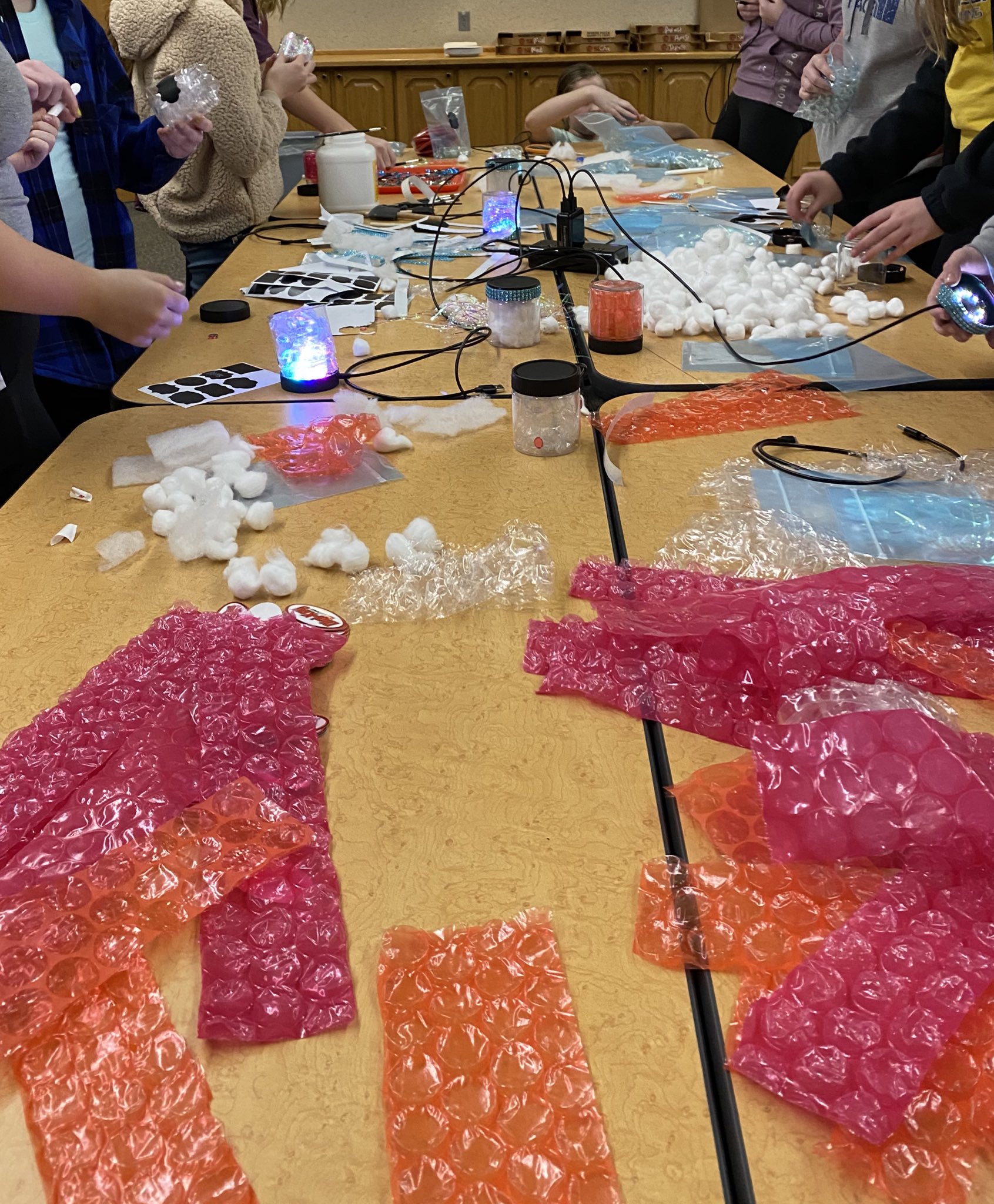
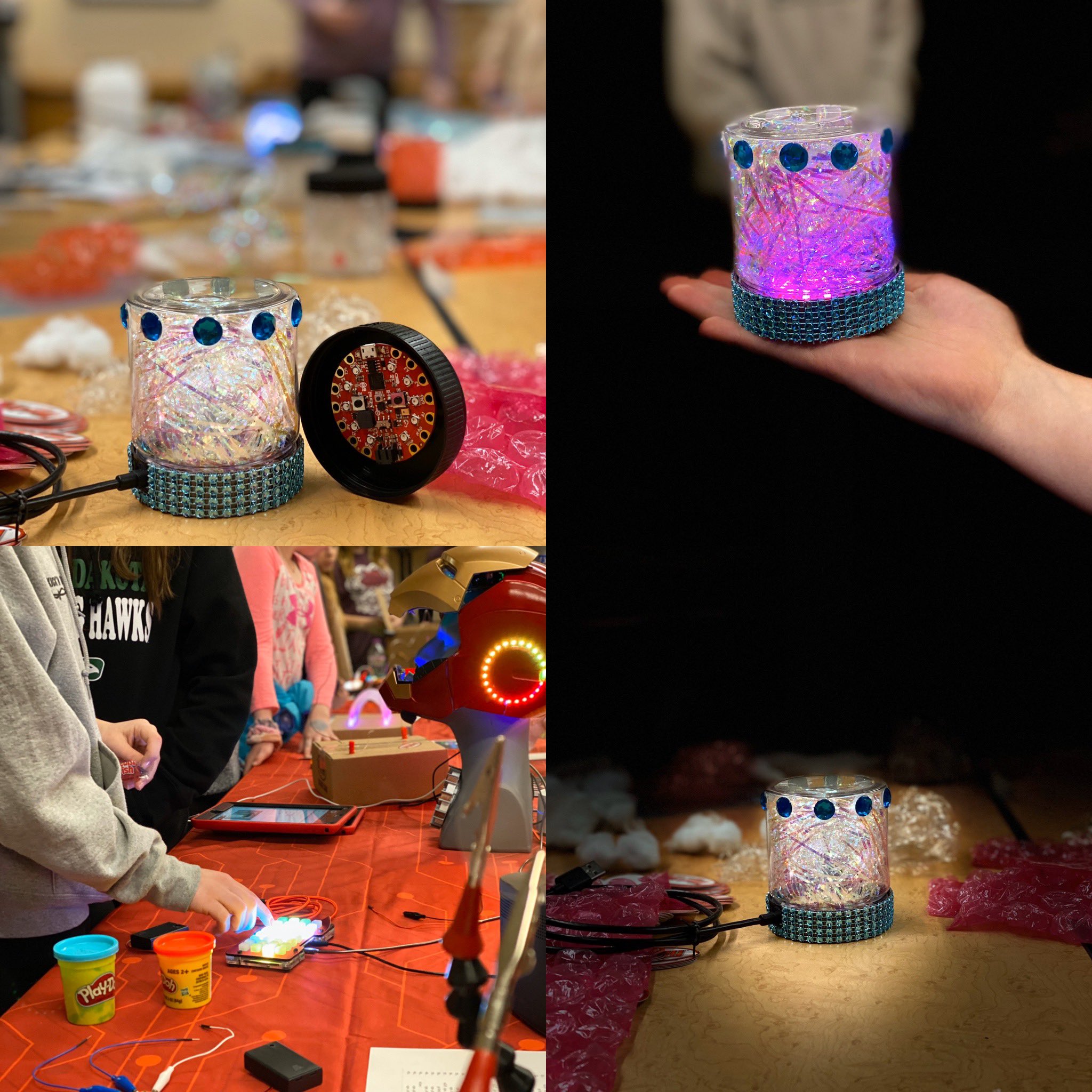 slender iron
@timber mango you can check out the issues to know what is missing. no promises that everything works
river quest
Morgan Stanley Makerspace Program (Circuit Playgrounds with CircuitPython and more)
https://twitter.com/MorganStanley/status/1231217016985604098

Our Technology team recently hosted teens from @winnyc_org to teach them coding fundamentals using the @Adafruit Circuit Python Express. Participants created light sensors, accelerometers and more as part of our Morgan Stanley Makerspace Program. #MSGivesBack
 Twitter

 slender iron
@half sedge I think it's worth doing because we may have new folks join us each week
river quest
Feather previews!
https://twitter.com/arturo182/status/1229500410664280064
https://www.instagram.com/p/B8rpJbFHovw/?igshid=1qlgbwy8rjjkp


Instagram
77 Likes, 0 Comments - Artur (@arturo182) on Instagram: “The gang's all here #adafruit #feather #circuitpython”
HackSpace Issue 28: Python on Hardware (Drew) and more!
https://hackspace.raspberrypi.org/issues/28
https://blog.adafruit.com/2020/02/18/live-chat-hackspace-magazine-chat-on-wednesday-feb-19th-at-1pm-et-hackspacemag-ben_everard/
https://hsmag.cc/adafruit

HackSpace magazine
You don't have to understand electronics to be a maker, but adding a few billion electrons can add light, interactivity, motion, or (some limited) intelligence to the things you make. In this issue we'll help you get started with electronics and build better circuits.

Adafruit Industries - Makers, hackers, artists, designers and engineers!
HackSpace – The monthly magazine for the modern maker, HackSpace magazine will inspire you to dream bigger, and build better. 132 pages – make, build, hack and create AND we’re ta…
half sedge
@slender iron no doubt about that, but it could be recorded once and "playout" at each meeting... Just the day something change, I might not notice. 😉
river quest
CLUE on Hackaday
https://hackaday.com/2020/02/24/new-part-day-ooh-the-things-you-can-do-with-a-clue/
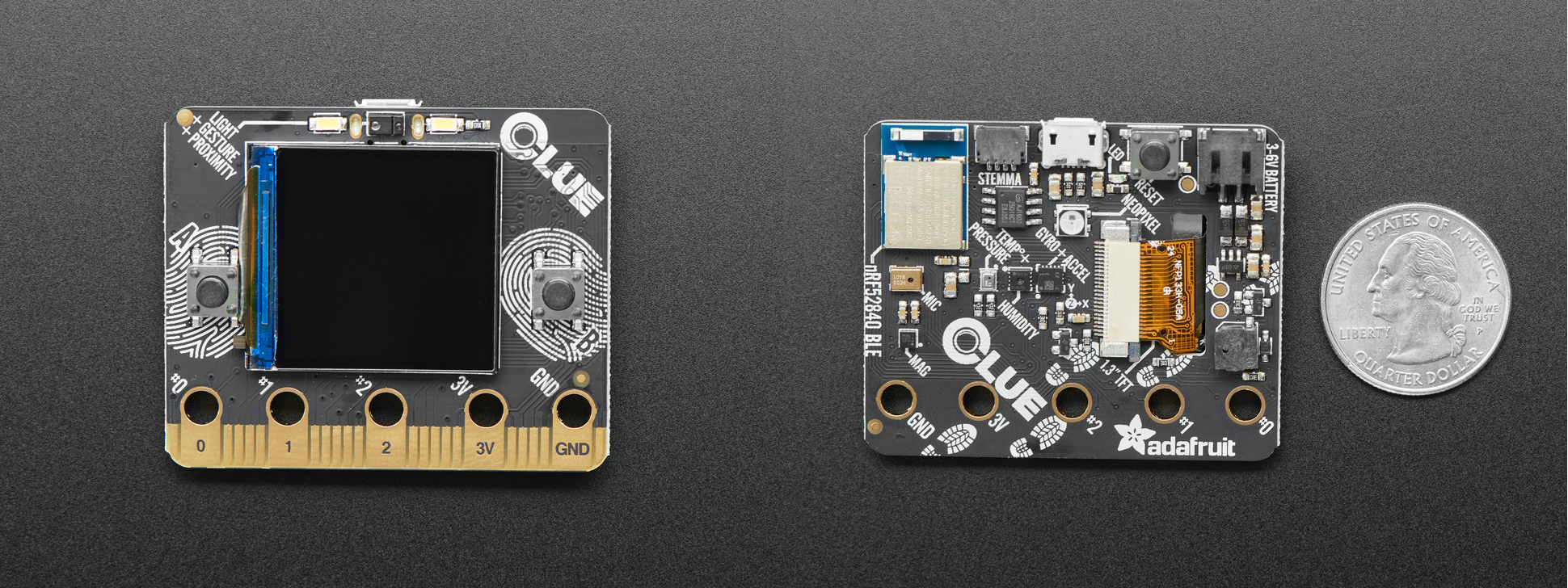
There’s a new development board in town from Adafruit, and it’s called the CLUE. This tiny board can be programmed in Arduino or CircuitPython, and it is absolutely stuffed with sensors…
Good thread "what is the most intimidating part of hardware development to you, if you've ever had doubts about starting a first project with microcontrollers, etc?"
https://twitter.com/noopkat/status/1229547642343972864

what is the most intimidating part of hardware development to you, if you've ever had doubts about starting a first project with microcontrollers, etc?
Likes
145
Twitter
timber mango
@slender iron I am very interested, but I do not have one. I was just wondering how Circuitpython for the super-fast micros were coming along.
manic glacierBOT

Thank you! This is perfect for testing our pipeline to make sure everything works. I think the first step we need to do is turn off the terminalio output until we can do the rendering natively.
Is there a reason you started with the German translation? I'd expect the untranslated messages to be empty and fall back to English.
slender iron
@timber mango it is definitely interesting and we'll circle back to it sometime after 5.0.0 is out
timber mango
Is there going to be a port of Circuitpython for the PyBoard-D series someday?
slender iron
probably. the stm32h7 series is pretty interesting
imx rt is probably a higher priority though
(imx rt has high speed usb phy and the stm32h7 doesn't)
timber mango
@slender iron I am the sort where there is no MCU/CPU fast enough, no hard disk storage large enough, and never enough memory. 😉 😎
slender iron
agree 🙂 the fast CPUs have their own challenges though.
mostly how you get them instructions fast enough
 inland tusk
lurking for hug reports
timber mango
Oh, I know, and they are typically much more complex.
slender iron
@lapis hemlock are you lurking?
timber mango
Text only
lapis hemlock
@slender iron sort of.
slender iron
do you plan on speaking when we get to you?
lapis hemlock
@slender iron no, I wasn't planning on that. I think, not too much has happened on my end in the past week.
slender iron
kk
half sedge
@idle owl and then make it work on the CPB+Gizmo?
slender iron
@tidal kiln do you have in the weeds topics?
tidal kiln
yep
slender iron
want to add them to the doc?
tidal kiln
sure...one sec...
slender iron
thanks
modern wing
Have fun in Colorado!
half sedge
I am interested in battery level for stuff like PyGamer. Is this possible? I would like to show on the thermal camera what is the status.
slender iron
@half sedge I believe so. I think most of our boards have a resistor divider hooked up to an analog pin
half sedge
Thanks, I'll have a look, that make it so much professional to have a battery indicator on screen. 😉
slender iron
🙂
half sedge
Thanks for the reading @idle owl.
 graceful heart
super cute!
half sedge
@lone axle That patchwork is interesting. I plan to display "top 3" colors + my own advertised color (or maybe keep it on my own neopixel). Maybe because I only have 4 BLE capable board (but I can cheat with an extra one from a phone). Maybe making the size dependant on the RSSI value.
slender iron
very cool @solar whale !
modern wing
@solar whale That project is for the birds 🐦
half sedge
And if it's early in the live of the library... how old is it?
errant grail
@half sedge Here's a DisplayIO TileGrid batt mon icon implementation I'm working on for a PyBadge clock. https://github.com/CedarGroveStudios/Clock_Builder/tree/master/code/clock_display

GitHub
Modules and libraries for building standalone RTC-based clocks. - CedarGroveStudios/Clock_Builder
 lone axle
@gilded cradle Oh, neat. I hadn't noticed that thank you. I see on this docs page https://circuitpython.readthedocs.io/projects/ht16k33/en/latest/api.html. that marquee is only listed under Seg14x4. Is that usable on the 16x8 matrix's as well?
gilded cradle
Right, I noticed you said 16x8 and removed my comment
lone axle
Ah, I see. sorry stepped away for a moment.
half sedge
Yeah that page is great, with the image.
gilded cradle
No problem, but maybe look at the IS31FL3731 library for inspiration
lone axle
I'm glad you mentioned it anyhow, is really good to know because if I do make an attempt to port it for use with 16x8 I'll look at how it's been done before.
half sedge
The way I learned BLE is getting to each of those video and example.
The confusing part was the "old" BLE friend things that are there... those that you control with AT on UART and SPI.
graceful heart
related to that^^, is there a way to actually use the BLE 'friend' boards in circuit python, the same way as using a bluefruit nrf built in board?
lone axle
@half sedge nice! I do like the idea of using the RSSI strength value to determine part of it. I hadn't thought of using the size though, index order is what came to mind for me.
slender iron

GitHub
Simple byte and string based inter-device communication via BLE. - adafruit/Adafruit_CircuitPython_Radio
solar whale
@graceful heart there is a separate lib for the SPI "friend"
not compatible with bleio
slender iron
I haven't looked at building a _bleio compatible library based on the friend stuff but I bet it is possible
half sedge
@lone axle One of my problem is that I don't know the min and max value for RSSI. Now on the graphical side, it could be "dots" where the surface depend on the strength. And those dots will touch each other. If you want it squarish, then it might be easier. There are those tools that tell you how your disk space is used and display it with color that fill a square.
timber mango
Will there ever be a Bluetooth module that can be added to current Express or regular boards? Something like the AirLift WiFi Feather and breakout board, but for Bluetooth.
half sedge
There is a guide that explain how to sniff BLE protocol and communicate to your gadget by replicating that.
slender iron

Adafruit Learning System
Quickly get started with an Adafruit nRF52840 board using these CircuitPython demos!
gilded cradle
@timber mango maybe something like https://www.adafruit.com/product/2633 or https://www.adafruit.com/product/2479?

Would you like to add powerful and easy-to-use Bluetooth Low Energy to your robot, art or other electronics project? Heck yeah! With BLE now included in modern smart phones and tablets, its ...

Would you like to add powerful and easy-to-use Bluetooth Low Energy to your robot, art or other electronics project? Heck yeah! With BLE now included in modern smart phones and tablets, its ...
slender iron

Adafruit Learning System
A basic overview of key concepts for BLE
modern wing
Like an awesome list of guides?
half sedge
The guide from @idle owl could use the graphics from here: https://learn.adafruit.com/ble-hid-keyboard-buttons-with-circuitpython/understanding-ble

Adafruit Learning System
Turn your Feather nRF52840 into a wireless BLE keyboard entry device
solar whale
a guide to using guides...
slender iron
@timber mango I think we'd like to get BLE going on the ESP32 at some point
half sedge
metaguide.
turbid radish
We do need some more macro guides
half sedge
The existence of a guide can drive hardware acquisition...
slender iron
@timber mango it'll probably coincide with the ESP32-S2 work
onyx hinge
hey I was here for the last 30 seconds!
turbid radish
Yay @onyx hinge
lapis hemlock
hey I was here for the last 30 seconds!
@onyx hinge 👍
onyx hinge
hi @lapis hemlock anything we need to talk about rq?
serene warren
Till next week
slender iron
👋
modern wing
Thanks y'all!
turbid radish
Thanks all
half sedge
@idle owl Do you want me to do the chronological thing?
gilded cradle
thanks
 ionic elk
thanks all
graceful heart
👋
errant grail
Thanks!
idle owl
@half sedge Yes please.
lapis hemlock
@onyx hinge I would have a couple of questions, but they are not particularly urgent, we can discuss them later.
onyx hinge
@lapis hemlock ok, I just walked in the door from vacation, so it would be better to do it later on anyway
lapis hemlock
@onyx hinge what about tomorrow?
onyx hinge
and I think there's another issue that jumped my queue to look at, because it's relative to the 5.0.0 release
lapis hemlock
OK.
onyx hinge
but yes! I'd love to chat tomorow.
timber mango
@gilded cradle Yes, like those, and fully compatible with the nRF52840. I have one of the Bluefruit LE SPI Friends, but do not know if it would be compatible.
gilded cradle
I'm not sure either
half sedge
@idle owl I think it is done.
modern wing
Awesome 🙂
onyx hinge
@lapis hemlock I am in a US time zone (GMT+6 right now) and usually work in the mornings my time.
timber mango
@gilded cradle I am thinking about connecting it up to one of my Feather M4 Express boards or my ItsyBitsy M4.
onyx hinge
so, anywhere from 18 to 26 hours from now would be pretty good for me
@slender iron HTTP supports it, but hardly anybody does it that way
http accept-language
slender iron
👍
half sedge
@idle owl Translated learn guide ??? I am helping in a Coder Dojo, but the language issue make it difficult to have kids work independently when they don't know english (most of them).
Of course.
lapis hemlock
@onyx hinge I am 7 hours ahead of you, so I could make it sometime between noon and 3 pm tomorrow.
half sedge
You need to identify a core of guide that are the most important.
lapis hemlock
@onyx hinge your time, that is.
half sedge
I would focus on CPX or CPB.
onyx hinge
@lapis hemlock okay, I will try to be around during those hours and we can talk when you're around. Or if you want to give me a narrower range just mention me
I'm going to go afk again and start unpacking.
👋
half sedge
And that is to what language?
In Belgium, there is a adafruit reseller that translate a lot of your guide
McHobby or something.
Available to all
With Adafruit bleshing.
lapis hemlock
@onyx hinge 👋
half sedge
Shop powered by PrestaShop
That is the shop, but there is a blog somewhere.
He wrote the book on Micropython too...
400+ pages. all in french.
I learned english thanks to ZX81 documentation... but I might be an exception. 😉
That was the only way
See you, good by.
gilded cradle
later
timber mango
@half sedge Do we have any fluent French speakers who would be interested in translating it? 😃 😉 😎
idle owl
The other nice thing about starting the translations on GitHub is collaboration on the translations.
CLUE badge demo:
turbid radish
I love that
onyx hinge
@slender iron since you are opinionated about the module issue and it may have some technical sticking points it would be convenient if you could chat with us tomorrow. Assuming you didn't figure out the issue already
timber mango
@idle owl Do you have any interesting 160x128 images? I need a few I can use in testing my PyGamer.
slender iron
@onyx hinge what time? I'm having lunch with a friend around 12:30 my time. I'm free otherwise
idle owl
@timber mango I have a series of kittens that I think are meant for PyBadge/PyGamer. And some Blinka iterations somewhere. But that's about it.
idle owl
All the kittens are square. So they're not quite right. Not sure what I had them for.
timber mango
I would love to get some Blinka images!
idle owl
So I'm not sure I do. Let me see if the Blinka images are proper.
turbid radish
@idle owl, there is the Adafruit image dropbox folders for art to mine if you like
idle owl
@turbid radish If you can link it, that would be great. But I think geekguy is looking for bitmaps that already work on PyGamer
lapis hemlock
@onyx hinge if necessary, I can stay till 10 pm GMT tomorrow.
onyx hinge
"same hour as weekly meeting", @lapis hemlock @slender iron ?
turbid radish
ok, I'll send linky on Slack
idle owl
@timber mango This is all I'm seeing that looks accurate.
onyx hinge
That will naturally time box it to about an hour so tannewt can make his lunch event
(likely an hour is not necessary)
timber mango
@idle owl @turbid radish I can take images I can resize. 🙂
lapis hemlock
@onyx hinge I think we should be able to sort out the conceptual issues in 15 minutes, the rest we can discuss without Scott.
That is not to say that Scott should be excluded, but he clearly has an engagement.
timber mango
@idle owl Thank you!
slender iron
@lapis hemlock @onyx hinge same as weekly is perfect for me (11am)
idle owl
@timber mango This might be right too, not sure.
lapis hemlock
@slender iron @onyx hinge OK, I can confirm.
 meager fog
@indigo wedge hihi
 indigo wedge
Hi 🙂
meager fog
checkin' if you were able to ship the feathers?
indigo wedge
I tried to get it going Friday but I require more info, I sent an email to Alicia on Friday, waiting for her reply.
meager fog
ok! thanx
timber mango
@idle owl I will check it out. 🙂
idle owl
@slender iron Meeting is up on YouTube, video successful. Thanks again for backup recording.
manic glacierBOT

I started looking at this. I get the identical memory issue when the program runs automatically as code.py. If I import code.py in the REPL it runs fine.
otter_data.py has a hideously large set of nested lists of small integers and could be made a lot more efficient.
Here is an instrumented view of memory consumption:
import board
import gc
print("before most imports", gc.mem_free())
import displayio
print("a", gc.mem_free())
from time import sleep
import otter_data
p...@timber mango I am native French, but my spelling is really poor, even when I try very hard. I try to introduce Circuit Python to other coach in the Coder Dojo where I go. Just because Scratch is boring to me and I'd like to go physical. Coming from Scratch, kids might prefer to go to Maker Code (I guess this is currently English only). Edublocks could be a way to get from Scratch to writing code in Python: https://edublocks.org/circuitpy.html (not responding, try https://edublocks.org/ )

Making the transition from Blocks to text easier. Learn more at edublocks.org
@lone axle I found the squarish algorithm name and this in your search engine could help: "squarified algorithm treemap" ... That make nice visualisation. Now I don't know how to get from RSSI to surface/percentage. RSSI are in the negative range, maybe it is a logarithmic scale. Maybe I need to experiment a bit to figure out what is the best way. And I don't know the complexity of that algorithm...
manic glacierBOT
@mesa177 I removed a trailing \n the build didn't like to see what happens if it is correct. So, make sure to pull the latest version of the branch from GitHub if you have a local copy.
half sedge
Hi @plucky flint did you meet @heavy pasture at that LEGO stuff? I wonder how many UK maker that I am following on Twitter were present. That's a place I would love to have been.
timber mango
Well this is not amusing. I have run out of AA batteries. My keyboards are dead, so I cannot use my computers. 😕🤔
simple pulsar
@timber mango Does your mouse still work?
Does anyone else have a CLUE and a non-LED desklamp? I've been puzzling over the display turning off with bright lights. It's all bit mysterious.
tiny oriole
Does anyone else have a CLUE and a non-LED desklamp? I've been puzzling over the display turning off with bright lights. It's all bit mysterious.
@simple pulsar i might have both of those things at home. 🙂
although, the display in mine is non-stock
simple pulsar
You've "pimped" your CLUE?
tiny oriole
and curiously does have a truckload of black masking over where the driver IC is
more like i broke my display, and had to order one from the product page 😛
simple pulsar
Ah, i see. I have two CLUEs and both turn off their displays if placed about 5 cm from a desklamp
tiny oriole
do you have a camera with a flashbulb? and does IT cause them to blank out or reset?
simple pulsar
I have one. Are you suggesting its the same thing that cause Rasperry Pi 2's to reset when a flash went off?
tiny oriole
reminds me of an old Raspberry Pi issue involving an improperly capped power supply IC that was having some kind of weird photovoltaic reaction with super bright light, triggering the Pi to reboot. I know the Driver IC seems to be just outside of the pixel on those screens, and on my stock screen that came wiht the clue it seemed to just be masked with blue translucent tape
maybe a similar thing is happening?
the one i replaced mine with though came with thick black epoxy covering the driver IC
half sedge
That was trigger by a flash I believe. But getting near a lightbulb?
It seems that in my house, I mostly have Ikea Tradfri. 😦
simple pulsar
The normal obvious answer would be a bug in dimming code but it does it with display.auto_brightness = False too
tiny oriole
It seems that in my house, I mostly have Ikea Tradfri. 😦
@half sedge a felow TRÅDFRI user huh?
half sedge
I was wondering if there would be a way to control Tradfri from Circuit Python...
Maybe I would need a gateway for heavy lifting.
simple pulsar
It does not like my T32 flash. That made the display go permanently off! @tiny oriole you may be onto something there.
tiny oriole
what kind of control are we talking? like a light switch or something more automatic
half sedge
@tiny oriole Color for the RGB bulb would be great. On/Off/Color/Brightness
I used Home Assistant with TradFri... and I guess with MQTT it is possible to talk from CircuitPython + AirLift to the Home Assistant. So maybe there is a way (that require a Pi) but that would work.
There is a learn guide about displaying from Home Assistant to a PyPortal. So one day, if I have time, I could try to control my home from a ... PyPortal: PyPortal => Raspberry Pi (running Home Assistant) => TradFri gateway => Light Bulb
tiny oriole
borrowed my friend's clue at the office and can confirm i can power the LCD off (backlight stays lit) by pointing my mini maglight focused on roughly the center to left side of the driver IC
simple pulsar
Tis lucky your friend has a clue. And unlucky for him/her that you have a maglight 🙂
Thanks.
tiny oriole
yup.
onyx hinge
heads to tindie to offer reasonably priced squares of electrical tape, precision cut
tiny oriole
@half sedge i think those Tradfri devices are just Zigbee, you could probably trick a TRÅDFRI Hub into thinking your CP device is just a tradfri remote
tidal kiln
is it somehow possible to have a PR create a new branch? for example - to add a documentation branch to a repo that does not have one yet?
onyx hinge
Learn how to talk to and control IKEA Trådfri smart lights from your Pi
Or you can talk to thehub over WiFi
tiny oriole
🤔
maybe some room for a CircuitPython Tradfri library? might be fun to play around with 😛
 arctic violet
Oh reeeaaaaally, I'm much more interested in those Ikea lights now.
tiny oriole
me too actually
since my house is filled with them
could use a lux sensor as a light switch
obviously not in direct view of the lamp in question... unless you like strobe lights
manic glacierBOT
I bisected and got to this commit as the first one that causes the problem: d32dc814d3f0d3e845e54a043467f37a5908f5f0, which is #2330, which fixes a GC bug in displayio, but supposedly only for epaper. I repeated the bisect and got the same thing. Moving back one commit, I don't see the issue. So this would seem to make no sense, because I'm testing with a pyportal, which is not epaper. But maybe there is a mixup somewhere in displayio about epaper vs not?
Tagging @tannewt in case this ri...
manic glacierBOT
We now correctly set the reason for the unit not being ready and
always start the unit.
Fixes #2567
slender iron
@tulip sleet sent out a pr for the usb issue I have. also found a safe mode crash exiting the repl with ctrl-d
which I'll look into tonight
 fallen anvil
@slender iron is the fact that the app restarts about 10 seconds after I've saved the App an intended behaviour or is there something a bit off happening on imxrt in that regard? Once it's restarted it's compeltely stable. I thought it was down to my OS making some kind of secondary save but it does it even when the PC is disconnected....
slender iron
it should only delay under a second
I think it might be a tinyusb thing. I feel like I've seen that on nrf too
fallen anvil
No, it runs for perhaps 10 and then does a restart
Its one of those things thats likely to have been there a while and we've all ignored it
slender iron
yup
fallen anvil
Here's an example, numbers are in seconds;
$ cu -l /dev/ttyACM0
Connected.
Starting

Code done running. Waiting for reload.
soft reboot

Auto-reload is on. Simply save files over USB to run them or enter REPL to disable.
code.py output:
Starting
1
2
3
4
5
6
7
8
9
10
11
12
13
14
15
16
17
18
19
20
21
22
23
soft reboot

Auto-reload is on. Simply save files over USB to run them or enter REPL to disable.
code.py output:
Starting
1
2
3
4
5
6
7
8
OK, just run that 3-4 times and it always gets to 23seconds. There's a 5 second boot delay and a second or two writing the screen so I'll hazard a guess at it being 30 secs on total.
fallen anvil
hang on, removed all the crud for more accurate timing...
linux session, notepad, CTRL-S
yep, smack on 30 secs.
tidal kiln
@idle owl has there been any talk of adding shake to the clue lib?
fallen anvil
so, that's the problem...just got to figure out how to solve it. I'll dig into it. Bedtime now.
slender iron
@fallen anvil some editors are better than others. they are documented somewhere
fallen anvil
Yeah, I read that, but this seems independent of editor. emacs does it too.
slender iron
hrm, weird
idle owl
@tidal kiln No talk. Shake is built into the LIS3DH library and the accelerometer on the CLUE is not the same. It would have to be added to the lib for the CLUE accel, or a lot of code added to the CLUE lib to do it.
slender iron

Adafruit Learning System
New to CircuitPython? This is the place to start.
tidal kiln
@idle owl tap is special to the LIS3DH, but shake is just math on accel values, and maybe not a ton of code? could just add this to clue lib?
https://github.com/adafruit/Adafruit_CircuitPython_LIS3DH/blob/master/adafruit_lis3dh.py#L168
fallen anvil
So, if I cp the file to the drive I don't get the issue, only if I save it...but I'm seeing it with emacs which is supposed to be a 'safe' option. I'll look further.
Well, here's the reason, this will happen independent of editor;
$ cat /proc/sys/vm/dirty_expire_centisecs
3000
$
We can switch that off, but only at the expense of upsetting the write performance of the whole system. I'll see if there's any mechanism for doing it on one drive.
manic glacierBOT
We were trying to reset bluetooth when it was off and then trying
to raise an exception without the heap.
manic glacierBOT
Nothing jumps out at me. My next step would be to see if I can break in that collect via a debugger. Let me know if you'd like me to take a look.
 bright aspen
@fallen anvil I'm coming in late, so I have missed much of this. I get a reboot after 10s on Feather Mn Express on Mac. I forgot which one, maybe both. This occurs after I save into /lib. If this is not applicable, then "never mind." I forgot what version, a 5 beta, I think.
manic glacierBOT
Yes, I'll look at this tomorrow morning: set some breakpoints and see what's going on. It shouldn't be calling the epaper code at all.
This looks good. The build failure is just one subjob that was a GitHub actions problem.
manic glacierBOT
This looks good, though the test and mpy-cross subjobs are crashing. I re-ran the actions, but the same thing happened. Merge as you wish.

macOS is so persistent to get the sense code, look perfect :D
 trim elm
@fallen anvil @slender iron I've had the same thing happen to me, just infrequently enough I personally never found it to be an issue, when editing it locally (on linux) with vim and using cp to copy it to CIRCUITPY
I'd estimate it happens once every 30 times I copy code.py over
manic glacierBOT

lgtm - please be aware that there's not enough memory in circuitpy to talk to the wifi module and do internetty things :)
Hello, nevertheless I would like to test it, so I need to upgrade the NINA firmware. So I need a Serial Passthroug firmware for the Nano IoT but I don't find the repo to fork/how to do it.
Check out this thread: https://forum.arduino.cc/index.php?topic=654833.0
The Arduino forums and website are probably best for inquiring about this.
manic glacierBOT
Thanks @dhalbert I'm so focused on CircuitPython that I forgot that it's an Arduino board ;-)
Flashing the firmware with the Arduino IDE works fine:
https://www.arduino.cc/en/Tutorial/WiFiNINA-FirmwareUpdater
@tannewt Hey Scott! It's Alaa from Lamba Labs.
So I used the German copy for 2 reasons: 1) was learning the lingo for a while before I stopped, so wanted to sink my teeth back into it. 2) saved me time adding necessary annotations. 2 birds, 1 stone.
Just make sure that what's being printed on screen characters wise and orientation wise matches the comments that I wrote in Arabic. If that's ok, then will proceed with the translation and pull a later version from my local copy.
PS: tha...
manic glacierBOT
I have done my best:
- adafruit_esp32spi as frozen module
- Adafruit NINA firmware 1.6 flashed via Arduino IDE
- MOSI pin changed to PB09 to match the pin change https://github.com/adafruit/nina-fw/commit/9e76479a7e1e11682009078c45ad307cb96c1066
But always the same error:
RuntimeError: Timed out waiting for SPI char
 plucky flint
@half sedge 👋 yeah... I know Les (@heavy pasture). He's a wonderful person, a kind and thoughtful influence in the UK community and a great writer/coder/maker. We need more Les's in the world. He was there and we got a chance to catch up all too briefly. You should drop him a line and see how he is..!
 hollow mountain
Hi there, iam completely new to Circuitpython, is there a working tutorial out there on how to get Circuitpython running on the MKR Zero?
fallen anvil
Oh, for goodness sake, the language robot is a bit draconian. I just typed out a whole explaination about the sync problem and it's thrown it away because I said something about the current mount being screwed up!!!
Anyway, let's have another go.
@slender iron @bright aspen @trim elm the language bot needs to calm down. Here's what I wrote...if anyone knows why it keeps throwing it away I'm all ears. Anyway, the above graphic is the fix as a sort of inverted capacha.
I'm not a fan of these automated checkers....they do daft things like this.
simple pulsar
I think talking about Vin Diesel's yYy (replace with previous character in the alphabet) will also get you into trouble 🙂
solar whale
the bot does not like strings of "x"s
fallen anvil
I'm all for civil discourse but politicians from around the world prove time and again that you can say excessively nasty things without swearing and the collorary to that is any performance by Billy Connelly who uses swearing, without malace, as a whole new toolset extension to the English language (look him up, but not at work!) .... and no bot can really understand if you're behaving with the right intention.
solar whale
There are some things the bot does well (that only the moderators see, thankfully) and some things that are quite annoying that we all have to live with. At this point, it is what it is.
fallen anvil
Yeah, I suspect there's some pretty horrible stuff it turfs automatically...I just wish it told you what it didn't actually like though. If you're writing something truly nasty you already know, and if it's catching you by accident you can rephrase.
solar whale
The moderators do have access to the rejected post and I looked at yours and other than the one with the "x"s I could not figure out what it was complaining about...
It does not tell us specifically what it rejected the post for, just that it did.
It will reject strings of "x"
fallen anvil
I figured I'd maybe put some inappropriate expression in the first version, but was really careful in the second, and they both got turfed. Oh well, avoid gid and uid in future :-)
Nope, not that...
Ah, it'll be the X's to replace with your gid and uid!
solar whale
Use “n” instead of “x” that will avoid one common issue.
 lone sandalBOT

 manic glacierBOT
This was not working on beta.5, but is working on tip of master now. :upside_down_face: More later.
old smelt
I was on the road yesterday and unable to attend the call. Tried, but it didn't work... Anyway, you may have covered this already, but @idle owl got some love from Kojo Idrissa on episode 168 of the PythonBytes podcast about her upcoming PyCon tutorial. I checked the hug reports from yesterday's call and did not see a reference to it, so I thought I'd mention it today.
https://pythonbytes.fm/episodes/show/168/race-your-donkey-car-with-python

News and announcements from the Python community for the week of Feb 11th, 2020
lone axle
@gilded cradle thank you for pointing me toward the IS31FL3731 library. With a bit of tweaking I was able to get one of the examples there: https://github.com/adafruit/Adafruit_CircuitPython_IS31FL3731/blob/master/examples/is31fl3731_text_example.py to work with the HT16K33 16x8 LED Matrix.
GitHub
CircuitPython driver for the IS31FL3731 charlieplex IC - adafruit/Adafruit_CircuitPython_IS31FL3731
idle owl
<@&356864093652516868> Here is the notes document for next Monday’s CircuitPython Weekly meeting. Everyone is encouraged to attend! Please add your hug reports and status updates even if you’ll be attending the meeting - it’s super helpful! If you are unable to attend but would still like to include updates, feel free to include them in the notes and we’ll read them off during the meeting. Hope to see you there! https://docs.google.com/document/d/1Lw_aT4nXU4RpuuiQophR502XjFh7n-YcI9xUG6JFY_o/edit

Google Docs
CircuitPython Weekly for 2 March 2020 Welcome to the CircuitPython Weekly meeting notes! Feel free to add your Hug Reports and Status Updates early. During the meeting, we go through them as a round robin sorted by username. If you can’t make the meeting and would still like...
idle owl
idle owl
<@&356864093652516868> Here is the notes document for next Monday’s CircuitPytho...
@old smelt Thank you for the mention. 😊 Feel free to add it to hug reports for next week!
old smelt
Done!
idle owl
@old smelt Thank you!
onyx hinge
oh this is infuriating. I initially reproduced https://github.com/adafruit/circuitpython/issues/2639 including that displayio_epaperdisplay_collect_ptrs was reached.. but I made a trivial change and it stopped doing that. and now when I revert my changes it's STILL not doing that

GitHub
re: https://forums.adafruit.com/viewtopic.php?f=60&t=162220 A hackspace magazine example no longer works due to 30k more memory use. Would someone be willing to replicate this? Thanks!
    self=0x20001718 <displays+80>)
    at ../../shared-module/displayio/display_core.c:311
311    void displayio_display_core_collect_ptrs(displayio_display_core_t* self) {
(gdb) p self.base.type
$7 = (const mp_obj_type_t *) 0x41f1c <displayio_display_type>
Has displayio changed from a user's point of view between 4.x and 5.x or is it just internals?
For https://circuitpython.readthedocs.io/en/latest/shared-bindings/displayio/__init__.html there's no 5.x link available, btw
idle owl
There are definitely user changes - keywords and some functionality differences, as far as I know.
simple pulsar
Thanks, I'll proceed with caution.
 crimson ferry
latest should be up to date with the 5.0.0 beta. I'd expect that 5.x would show up once it's released as stable
tidal kiln
"latest" is essentially 5.x, so for example, compare:
https://circuitpython.readthedocs.io/en/latest/shared-bindings/displayio/Display.html
with 4.x:
https://circuitpython.readthedocs.io/en/4.x/shared-bindings/displayio/Display.html
refresh_soon and wait_for_frame are going away as one example
meager fog
@tidal kiln ok how about shake goes in CLUE
at some point we will have a 'sensorlab' equivalent for all these generic sensor calculations
idle owl
Please welcome our new CircuitPython Helpers! When they're available, they can help with CircuitPython related questions!
tidal kiln
fine by me. i'll move the issue back.
did someone mention in yesterday's meeting that the Radio library currently does not work with latest CP release?
https://github.com/adafruit/Adafruit_CircuitPython_Radio
slender iron
@tidal kiln ya, someone mentioned it. I can't remember who
@fallen anvil sorry for the frustration with the bot. if you ever want text of yours to revise, the mods have access to what has been deleted. I'd rather have false positives instead of missing stuff. I can also look into the moderated words and tweak the settings. (It used to flag subportions of a word but we can set it better now.)
simple pulsar
Are the docs for Label class supposed to be found with this: https://circuitpython.readthedocs.io/en/latest/search.html?q=Label&check_keywords=yes&area=default# ?
fallen anvil
I wouldn't stress on it too much...I use ripcord as the client and it ate the long and thought through message I'd constructed about the sync options and I felt a bit peeved. I'd rather have a full false positives that a constant stream of adverts for extensions or reductions to parts of my body. It might be worth looking at allowing multiple X's though though...there are lots of valid use cases for those.
slender iron
@simple pulsar is will be a subproject since label is in the display text library
easiest way to find it is probably the github page for the library
thanks @fallen anvil, will see what other mods think about removing xs
fallen anvil
I would imagine X's would be accompanied by other 'indicative factors' for those messages we didn't want to see....
simple pulsar
Is that a deficiency in readthedocs?
lone axle
I use the release page in github to get the docs a fair amount. There is usually a line like "Read the docs for info on how to use it." that is linkified. Another thing I've found myself doing though is in google using a term like "circuitpython label docs" using both circuitpython and docs usually gets the correct docs page somewhere in the top results.
I don't think it's deficiency so much as organization. The search box is looking within one project. Since adafruit_display_text is a separate project it's not finding it from the base project.
once you get to the docs page for the adafruit_display_text the search box will look within that project
simple pulsar
It feels like it's going to confuse the average user.
fallen anvil
@simple pulsar speaking as a newbie on the python side....trust me, it does.
manic glacierBOT
This adds support for the SparkFun Thing Plus - SAMD51
testing performed:
- successfully store and retrieve a 500kB file on the SPI flash
- a square wave output on each pin appears on o'scope
- double checked silk vs names in pins, but you know how that goes
- board.SPI(), board.SERIAL(), board.I2C() all construct without an exception
onyx hinge
 ! [remote failure]      thing51 -> thing51 (remote failed to report status)
error: failed to push some refs to 'git@github.com:jepler/circuitpython.git'
``` well that's weirdHow many built-in fonts are there in displayio on CLUE? Is it just the (tiny) terminalio.FONT ?
simple pulsar
Ta. The C/Arduino world of Arcade appears to have the ability to modify the size of the font. That's set to 2 in the demo code: https://github.com/adafruit/Adafruit_Arcada/blob/master/examples/full_board_tests/arcada_clue_test/arcada_clue_test.ino#L71
GitHub
Gaming library. Contribute to adafruit/Adafruit_Arcada development by creating an account on GitHub.
manic glacierBOT

good enuf to get in before next release!
lone axle
@simple pulsar you can modify the size of the font in circuit python by scaling the TileGrid or Group.
tulip sleet
@onyx hinge I am wondering if there's something uninitialized somewhere
slender iron
pretty battery voltage curve
 stuck elbow
@slender iron which board is it?
slender iron
feather nrf52840 reporting internal temp on a 100mah battery
gonna run it again with the neopixel off 🙂
stuck elbow
that should help :P
slender iron
ya, this is the baseline
stuck elbow
I assume it's 4h and not 4 minutes
slender iron
yup, it is hours. voltage is in millivolts
stuck elbow
though with neopixels you never know
slender iron
I think it is broadcasting every 10 seconds
slender iron
🙂
manic glacierBOT
good enuf to get in before next release!
Are we using the inline limits at all on this board? I wonder if the compiler is improperly dropping the type check sometimes.
No, pyportal has no tricky stuff in mpconfigboard.*
I am doing some more bisects, but I'm suspicious of something uninitialized somewhere.
onyx hinge
I dunno if we want to do this as text or as voice.
lapis hemlock
I dunno if we want to do this as text or as voice.
@onyx hinge We can try over voice.
onyx hinge
Sorry I couldn't make it for in the weeds, and thanks for making time today. I think the main thing we need to decide before merging a ulab PR is how it is presented to users. Here are the options I thought about:
Option 1. multiple ulab_mmm modules
Pros: Easiest
Cons: Less pythonic than dotted names
Option 2. fix underlying code for ulab.mmm native modules
Pros: Most pythonic, no extra glue
Cons: less chance of acceptance at micropython
Option 3. Wrap multiple _ulab_mmm modules into ulab.mmm modules via frozen ulab package
Pros: most pythonic
Cons: extra glue in the form of frozen package (but can transition later to option 2)
we can step over to the voice room once @slender iron joins us, I just wanted to get that block of text out of the way 🙂
lapis hemlock
@onyx hinge I think the mike on my computer doesn't play along. I will try to install the app on the phone. I might need 5 minutes.
onyx hinge
@lapis hemlock text is fine too
lapis hemlock
Actually, I don't hear Scott.
onyx hinge
<module ''>
>>> import microcontroller.pin as pin
Traceback (most recent call last):
  File "<stdin>", line 1, in <module>
ImportError: no module named 'microcontroller'
@lapis hemlock are you using the app? it tends to work better
half sedge
Is there an "in the weed" right now? I have something that I planned for next week, but could use @slender iron or @gilded cradle opinion: https://gist.github.com/dglaude/9a158af4b0332417e34abc5f8ff6b16f

Gist
Reflexion on controling HAT from Circuit Python. GitHub Gist: instantly share code, notes, and snippets.
slender iron
@half sedge we're talking about ulab
half sedge
Nothing urgent, I don't have the hardware yet (except for the Pi and a lot of HAT)... here is a list of the Pi hardware I have (or should have): https://gist.github.com/dglaude/e5070d1f5737e80aa246ccf7db3b7e32
Gist
Pimoroni (and other) HATs. GitHub Gist: instantly share code, notes, and snippets.
slender iron
@lapis hemlock I'm taking look at why the import microcontroller.pin doesn't work
lapis hemlock
In the meantime, I am installing the app.
half sedge
Just lurking on the voice channel.
onyx hinge
@lapis hemlock text will be fine if you are tired of messing with it!
@lapis hemlock we cannot hear you
onyx hinge
@lapis hemlock what do you want to do?
onyx hinge
let's shift to text, then, instead of listening to us try to run a debugger over voice chat
@lapis hemlock you can go by e-mail too if you want
lapis hemlock
I can hear you.
onyx hinge
we can work in all the ways
half sedge
Do you want ulab to work with Blinka on Raspberry Pi? Or is this not possible because this is C code and build into Circuit Python kernel? Are we going to be like for displayio?
lapis hemlock
E-mail is out.
half sedge
Asking for a friend. 😉
lapis hemlock
I think the problem is that this concerns py-core, so Damien will take his time.
Sorry Scott, I don't have your e-mail.
slender iron
@lapis hemlock it's scott@adafruit.com
lapis hemlock
OK, then let's take the beauty plaster.
So, Jeff, then I will implement that, and then update the PR.
But whatever is in .attr, overrides the local dicts.
Right.
manic glacierBOT
I did a bisect from 5.0.0-beta.5 to the tip of master. git bisect assumes you are going from "good" to "bad", not the other way, so I had to mark good results as bad and vice versa. (I didn't know this at first and got into some confusing situations.) The problem got "fixed" at 36e6cc8febf7f744f61772d29eed68d9ebb57200 (#2614), which makes sense because it allocated memory more efficiently, but it didn't necessarily fix any underlying bug. Will do a little more looking on beta.5.
lapis hemlock
The problem is that https://github.com/micropython/micropython/pull/4731 old, and it is probably old of a reason.
GitHub
The goal here is to make a built-in unumpy, and along with it unumpy.fft and unumpy.linalg.
Two main changes:
Make built-in module importing happen as part of the dotted path walking as for regula...
Andrew needs 2 dims, but openmv needs 3.
Exactly, slices are difficult.
And broadcasting.
I mean, not conceptually, but the implementation.

GitHub
How can I create an ndarray of shape (w, h, c) from a C array of pixels (uint8_t) ? I can create 1D arrays by implementing getiter and unary_op, do I need to return an iter as the items of the firs...
Someone needed 4 dims.
OK, so are you saying that speedtest is not worth it?
FFT is another example.
I haven't yet had time.
Right.
It is easy to find out: you just have to run the code with two different types.
Float will call your code, uint16 the other.
The problem with floats is that sersor data are uint16s, right?
Treating identical types is fine with me.
But is your filter uint16?
ionic elk
hey @tulip sleet you work on Ubuntu right?
tulip sleet
@ionic elk yes
ionic elk
@tulip sleet could you run which arm-none-eabi-gdb for me real quick and tell me where it is?
tulip sleet
you need to use the gcc9 download from arm, and install its bin's in some directory you add to your path. The standard arm-none toolchain is out of date from our point of view
lapis hemlock
OK, I can relatively quickly polish the internals of 2D arrays, so you can use it.
ionic elk
hrrm
tulip sleet
download 9-2019-q4 from here: https://developer.arm.com/tools-and-software/open-source-software/developer-tools/gnu-toolchain/gnu-rm/downloads
unzip it in some directory, and add its bin directory to your path. For example. I unzip it in ~/bin as
lapis hemlock
A question about complexes: as far as I heard, complex is not implemented for all micropython platforms. WHat is the situation in CP?
tulip sleet
~/bin/gcc-arm-none-eabi-9-2019-q4-major, and have it on my PATH as /home/halbert/bin/gcc-arm-none-eabi-9-2019-q4-major/bin
onyx hinge
mkdir: cannot create directory ‘sys’: File exists
Traceback (most recent call last):
  File "<stdin>", line 1, in <module>
AttributeError: 'module' object has no attribute 'boo'
there is no PPA any more for recent versions of the arm-none toolchain
lapis hemlock
OK, so then FFT must be implemented as it is.
I would like to steer clear of them.
STM32F405 also has complexes.
pyboard.
Right, but then binary operators will again go up in size.
onyx hinge
mpconfigport.h:#define MICROPY_PY_CMATH (1)
lapis hemlock
In complexity, too.
What about floats vs. doubles?
Some hardware has doubles.
Right.
OK, then we stay with mp_float_t only, without differentiating between floats and doubles.
I am that is up to the micropython pre-processor flag/hardware.
The question really was, whether you would want to have floats and doubles side by side, if the hardware allows it.
It is not only that: matrix inversion is such an example.
OK, we would have to explore it.
@onyx hinge I think we have discussed all my questions, so I will update the the PR, and then we can merge it. After that I can clean up the internals, but that should not change the interface.
Right.
The only thing missing is the treatment of properties.
Where is the .attr overriden?
The local dict.
If the imports are sorted out, do you plan on pushing it upstream?
idle owl
@tulip sleet We've had a similar discussion before, but I'd like some advice on what type of error to throw. If it were to throw the error itself, it would be a TypeError but that's because it defaults to None and none-type objects can't be converted to strings or whatever the error is. I'm trying to throw an error if an image_name is not provided to a bitmap background feature. Right now it defaults to something else because of the code, and I'd rather it fail if someone calls the image_background feature without providing an image name.
lapis hemlock
What is the exact path of attr's resolution?
onyx hinge
after: ```155672 bytes free in flash firmware space out of 499712 bytes (488.0kB).
164584 bytes free in ram for stack and heap out of 196608 bytes (192.0kB).
before: ```156520 bytes free in flash firmware space out of 499712 bytes (488.0kB).
164584 bytes free in ram for stack and heap out of 196608 bytes (192.0kB).
metro m4 express
tulip sleet
@idle owl usually if an argument is wrong in some way we throw ValueError, with explanatory text
idle owl
@tulip sleet That's what I have in there now. Excellent. Thank you.
lapis hemlock
But sorting and things like that have to be implemented for complexes.
onyx hinge
sorted((1+0j, 1j, -1j))
Traceback (most recent call last):
  File "<stdin>", line 1, in <module>
TypeError: '<' not supported between instances of 'complex' and 'complex'
lapis hemlock
I think math function for complexes are an extra module in micropython.
On the other hand, it is not too much: https://github.com/micropython/micropython/blob/master/py/modmath.c
GitHub
MicroPython - a lean and efficient Python implementation for microcontrollers and constrained systems - micropython/micropython
manic glacierBOT
onyx hinge
see you later @lapis hemlock !
lapis hemlock
Cheers!
onyx hinge
I'm going to take a break. subsequently to that pr being merged in micropython-ulab I'll update my PR in circuitpython on top of it.
It'll take a bit more time because I'll have docs to reformat as well, and it might end up having this dependency on scott's work too
lapis hemlock
OK. I will try to fix the issue with the properties by tomorrow night.
onyx hinge
@lapis hemlock if you want to try voice chat again sometime just to figure out if your tech is working, I'm often around so don't hesitate to ask
idle owl
@lapis hemlock I recommend not remaining in the circuitpython voice channel unmuted on the off chance that your mic starts working and you begin transmitting sound without realising it.
lapis hemlock
OK, thanks for the hint!
idle owl
You're welcome 🙂
half sedge
I did not notice the voice ended. 😉
lapis hemlock
@lapis hemlock I recommend not remaining in the circuitpython voice channel unmuted on the off chance that your mic starts working and you begin transmitting sound without realising it.
@idle owl Actaually, the mike was OK. At least, it passed the mike test under settings, but for some reason, the voice didn't end up in the channel.
Weird.
idle owl
That is odd. Discord can be frustrating at times.
solar whale
@idle owl was there a breaking change for the CLUE recently https://forums.adafruit.com/viewtopic.php?f=60&t=162679 or any suggestions for this?
idle owl
@solar whale https://github.com/adafruit/Adafruit_CircuitPython_CLUE/releases/tag/2.0.0 was the breaking change. The rest were not breaking since then.
GitHub
Contribute to adafruit/Adafruit_CircuitPython_CLUE development by creating an account on GitHub.
Without seeing their code, I have no idea what is going on.
solar whale
Thanks!
manic glacierBOT
5.0.0-beta.5 gets the memory error only if compiled with -flto and with inlining enabled. Disabling -flto or enabling -fno-inline causes the problem to go away. And the breakpoint addresses are very fishy in the problem case:
(gdb) bre displayio_display_collect_ptrs
Breakpoint 3 at 0x15280: file ../../shared-module/displayio/display_core.c, line 311.
(gdb) bre displayio_epaperdisplay_collect_ptrs
Breakpoint 4 at 0x15282: file ../../shared-module/displayio/display_core.c, line 3...@indigo wedge responded to your PR comments (you're probably already aware). Will push PR update tomorrow AM after testing and , then I think it can be pulled.
indigo wedge
Yes, reading now, thanks so much 🙂
fallen anvil
One question...should UF2_MAGIC_START1 be different per board? That would stop an incompatible flash being submitted, and there's no protection against that at the moment.
I can push the PR now if you want, but I want to test against the boards before it's ready for pull, and I'm too tatered tonight to do that now.
indigo wedge
no this is part of the spec https://github.com/microsoft/uf2#file-format

GitHub
UF2 file format specification. Contribute to microsoft/uf2 development by creating an account on GitHub.
there is the family ID
so you can't send a samd uf2 file to a imx board
you can still send a rt1011 to a rt1062 but i guess that's good enough
fallen anvil
Yeah, that fixes what I was concerned about, I thought your comment about 'Randomly selected' meant it was our choice!
indigo wedge
yeah the comment came from https://github.com/microsoft/uf2/blob/master/uf2.h#L39
GitHub
UF2 file format specification. Contribute to microsoft/uf2 development by creating an account on GitHub.
fallen anvil
OK
manic glacierBOT

In a project using the Microchip PIC32MZ microcontroller I discovered that the first two versions (v1 & v2) have a hardware bug in the silicon that causes the I2C to hang occasionally. I dug into the matter and found the errata sheets indicated that v1 & v2 had this flaw but it was apparently fixed in v3. After trying out all Microchip's suggestions for fixing the hung I2C from within my program code (and failing), I eventually concluded that the ONLY possible fix was a power reset (which wor...
fallen anvil
@indigo wedge Is the syntax for the build.yaml like this boards: ['mimxrt1010_evk','mimxrt1020_evk','versiboard2'] ?
indigo wedge
i believe so, yes
indigo wedge
only tested with 1 board so we'll see
fallen anvil
shall I push these changes? I'll message you tomorrow when they're ready for pulling (i.e. tested on boards), but means I've got a backup :-)
manic glacierBOT
I forgot to mention that the Arduino board I mentioned in my previous comment energizes a relay to power reset the PIC32MZ board. The power is connected through the relay's NC contact which is opened for a few seconds to cause the power reset.
simple pulsar
Is there a recommended technique for scrolling things efficiently in displayio? I'm pondering shuffling stuff around in a Bitmap.
slender iron
@simple pulsar not really, refreshing the whole screen is slow regardless. if you are moving a bunch of individual things then I recommend disabling the refresh as you do
manic glacierBOT
This only fixes the import portion. It doesn't actually change
reference behavior because modules within a package could already
be referenced through the parent package even though an error should
have been thrown.
manic glacierBOT
Based on my eye it looks like it is partially working in iTerm with screen on Mac OSX. (I don't expect it to work on built in displays yet.)
I believe the line in the traceback is correct but the code.py : output line needs the filename in the translated string itself and the Arabic portion is reversed.
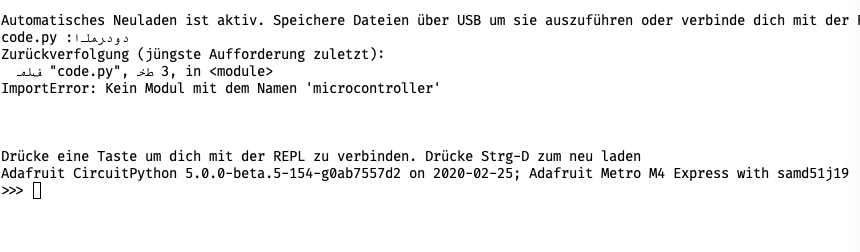
I think translating these two would be hel...
manic glacierBOT
@jepler @v923z This should allow for importing submodules of ulab.
I've linked @jimmo to it and I bet @dpgeorge would be interested too.
 analog surge
Latest being "adafruit-circuitpython-metro_m0_express-en_US-4.1.2.uf2"
manic glacierBOT
I spent time looking at the assembly code for 5.0.0-beta.5, and for e560b419f, which is the last commit before beta.5 that does not show the problem. I don't see anything wrong with the code. It did a ton of inlining: in both, all of displayio_gc_collect() is inlined, and all the single-use functions it calls are inlined. In e560b419f, even more lower-level functions are inlined.
I think the difference here may have something to do with how gc handles pointers in existing stack frames. P...
slender iron
@analog surge that is the latest stable but we recommend 5.0.0 beta. (we're releasing a release candidate for stable in the next day or so)
manic glacierBOT
@dhalbert I'm fine closing it. I've seen similar with pointers in stack frames living longer than intended. It's all part of the imprecision in the GC process.
lone sandalBOT
 tidal kiln
ok. no worries.
meager fog
ok so i like that it has the cheat sheet
cause its tough to know morse code
so this is a nice trainer
incoming on top, outgoing on bottom is good
another thing...
maybe it sends the characaters immediately?
you can see the history but its still like, all chars
cause there's no spaces and punctuation anyhow
tidal kiln
it sends dot/dash immediately? or letter?
meager fog
letter
you have to pause between letters anyways right
so it can detect end of one char
so maybe 1 second pause?
tidal kiln
or double buttons - that was working nice on that other example
tidal kiln
so left=dot, right=dash, both=done
tidal kiln
same thing? space would mean you're done with that letter?
meager fog
i mean if you press both
then dont click left or right before hitting both again
its a space
both == end char (try to decode it)
both pause both == space
maybe 3 times == stop
(period)
if that isnt hard to detect
tidal kiln
or the light sensor for that?
meager fog
risky
you could move your head and light sensor dims
could do proximity sensor
but then you have to move your hands
there's cap touch pads
tidal kiln
that also seemed ricky - they're right there while you're holding it
oh - i was using proximity, not light
while clue.proximity < 255:
meager fog
proximity is ok
tidal kiln
i was using that for "send". worked pretty well.
meager fog
that's pretty reliable
ok cool
downside is ... it only works on CLUE then
isnt as portable
tidal kiln
hmmm. you thinking CPB also?
meager fog
yeha
and other future boards 🙂
what about shake() instead of prox
then its most microbitty
or did you not like shake
tidal kiln
so far, only been using clue, so no shake
tidal kiln
i can PR that. just need to do some housekeeping in my repo. i had to do some quick mods to make a no-LIS3DM version for my one clue
but i remember using shake for something else. it worked, but was sort of GRRRRRR vs. just pressing a button.
lone axle
I've used cap sense on pin 2 as a "third button" for some things recently and found it pretty nice.
0 and 1, like you said I found that I touched it accidentally too easily but 2 I don't hit accidentally and it feels naturally to reach down and touch it with a thumb for me at least.
meager fog
@tidal kiln can change the shake calibration
tidal kiln
the defaults?
PR pretty much ready to send
oh - you mean for less GRRR
@lone axle yah, good idea about using 2. i should try that at least.
tidal kiln
@meager fog ok, i'll keep playing with the cheat sheet version, put the other one on back burner. and general summary:
left = dot
right = dash
both = end char / decode (nothing = space)
shake/cap touch/prox/TBD = send message
---
upper area = incoming message
lower area = outgoing message
ha! thanks. will at least try. l8r!
crimson ferry
I gotta ask, @rare geode, did you somehow get #1337 on purpose?
 ivory yew
👀 new circuitpython eurorack board coming soon: https://twitter.com/theavalkyrie/status/1232534946696187904

Panel dimensions are good to go.
Time to put some pretty art on this. :)
 Twitter
 manic glacierBOT
Good eye!
Yes indeed the Arabic portion is reversed. On the other hand, the nature of the written Arabic letters retain their proper forms (so the middle lam has the correct writing shape, the initial alef, and so forth...) Hope that makes sense :)
On another note, I tried continue translating some other lines and hit a snag on one of them (line 141 to be exact, 0x%x apparently doesn't like having Arabic writing within the same sentence hehe). For now I recommend just commenting it unt...
manic glacierBOT

So the claim is that
from ulab import fft

fft.fft(...)
would work with this fix, right? If so, it is really great, thanks for taking care of it!
@dpgeorge Damien, do you think this could be merged into micropython proper on a reasonable time scale? With that we could maintain a single version of ulab, ant that would save some resources on our end.
fallen anvil
@indigo wedge Good to go!
fallen anvil
Updated the push to remove the release bins. Only real remaining issue is to tidy up VID:PIDs for the individual boards, but you know what you've got allocated so it's easier for you to do it. Versiboard2 doesn't have its own VID/PID so will use the generic one unless someone wants to start making some (which won't be me...I've no interest in the pain of mass production).
manic glacierBOT

@tannewt thanks for the note, I'll look into incorporating this or similar. I didn't yet look in detail but this might be related: https://github.com/micropython/micropython/pull/4731
timber mango
I am getting the following error: Auto-reload is on. Simply save files over USB to run them or enter REPL to disable. main.py output: Traceback (most recent call last): File "main.py", line 41, in <module> File "adafruit_sht31d.py", line 169, in __init__ File "adafruit_sht31d.py", line 181, in _reset File "adafruit_sht31d.py", line 173, in _command File "adafruit_sht31d.py", line 173, in _command File "adafruit_bus_device/i2c_device.py", line 99, in write TypeError: can't convert NoneType to int The source that produces it is:```python
import board
import busio
import digitalio
import math
import time
#from micropython import const
import adafruit_lis3dh
import adafruit_sht31d
import neopixel
Configuration for the LIS3DH:
ACCEL_RANGE = adafruit_lis3dh.RANGE_16_G # Accelerometer range.
TAP_THRESHOLD = 20 # Accelerometer tap threshold. Higher values
# mean you need to tap harder to start a spin.
i2c = board.I2C()
int1 = digitalio.DigitalInOut(board.D7) # Set to correct pin for interrupt!
lis3dh = adafruit_lis3dh.LIS3DH_I2C(i2c, int1=int1)
Set range of accelerometer (can be RANGE_2_G, RANGE_4_G, RANGE_8_G or RANGE_16_G).
lis3dh.range = adafruit_lis3dh.RANGE_2_G
Set accelerometer range.
lis3dh.range = ACCEL_RANGE
Enable single click detection, but use a custom CLICK_CFG register value
to only detect clicks on the X axis (instead of all 3 X, Y, Z axes).
lis3dh.set_tap(1, TAP_THRESHOLD, click_cfg=0x01)
Create library object using our Bus I2C portLine 41
Line 41***>>>sht31d = adafruit_sht31d.SHT31D(i2c)```I have no idea what is causing this. I can not create the sht31d object.
fallen anvil
Hmm....mimxrt SPIs (at least when used with ESP32SPI) are getting created with double speed clocks...anyone aware of this I do I go fishing?
indigo wedge
Yes Limor mentioned that some time ago but I haven't looked into it yet
there might be a issue created for that
fallen anvil
The MISO/MOSI were also reversed
indigo wedge
oh?
fallen anvil
OK, I'll brew a patch
indigo wedge
GitHub
Just run sanity tests on SPI, I2C and UART, I probably missed something or there's some corner case.
fallen anvil
I've only checked 1021, which I doubt anyone else has used
indigo wedge
i tested on my 1011 feathers and it worked without reversing
but maybe it's consistently reversed everywhere and that's why it works
fallen anvil
Yeah, it's probably a 1021 specific thing, but I'll look, since I've got the manuals now.
(Makes me happy, since my ESP-32 WIFI now works :-) )
indigo wedge
@fallen anvil merged the PR, thanks again 🙂
solar whale
@timber mango what MCU board are you using?
fallen anvil
@indigo wedge Yep, saw the merge. No problem. Every little helps :-)
solar whale
@timber mango I tried your sequence on a PyGamer with an sht31d attached and it worked OK for me - bot the lis3dh and the sht31d are working.
sorry -- no idea what is going wrong for you.
manic glacierBOT

See https://github.com/micropython/micropython/pull/5701 for the equivalent change upstream. Thanks for suggesting this, I think it's a much better approach than micropython#4731
Some minor notes on this PR:
- Might need to check when looking at the globals dict that the result is actually a module (i.e. type == mp_module_type).
- You can avoid the change in objmodule.c by just setting a flag in builtinimport, then avoid calling mp_store_attr at all.
solar whale
@stable aspen i suggest just trying the sht31d_simpletest to see if you can read from the sensor.
simple pulsar
What's the purpose of the minimum refresh feature on displayio.refresh() ```>>> import board
import time
display = board.DISPLAY
display.auto_refresh = Falseprint("hello") ; display.refresh() ; time.sleep(2) ; print("world") ; display.refresh()
hello
True
world
Traceback (most recent call last):
File "<stdin>", line 1, in <module>
RuntimeError: Below minimum frame rate
@simple pulsar https://circuitpython.readthedocs.io/en/latest/shared-bindings/displayio/Display.html#displayio.Display.refresh does this help?
it works with this ```>>> print("hello") ; display.refresh(minimum_frames_per_second=0) ; time.sleep(2) ; print("world") ; display.refresh(minimum_frames_per_second=0)
hello
False
world
False

Make SPI dependant on the divisor register rather than a constant, and fix more mixup in the 1020 pinmux table relating to SPI and I2C.
fallen anvil
...@indigo wedge That should help with a few bits and pieces.
simple pulsar
@solar whale You're setting the value to 0. I'm on a CLUE with 5.0.0-beta.5. I was wondering what the purpose of the feature is.
manic glacierBOT
lone axle
@simple pulsar from the docs it looks like setting the value to 0 will prevent it from raising the RuntimeError that you posted.
the purpose I believe is to give you a mechanism to allow your app to refresh the screen at a desired rate 60 FPS for instance, without having to "manually" track the time that have logic that chooses whether or not to draw a frame yet
I believe in a "real" use case where are trying to achieve a specific frame rate you would want to set the parameter to the desired rate i.e. 60 and then your code would need to try/except to catch the RuntimeError if/when it's too early to refresh the screen.
And the True/False return help you know whether the the frame actually got drawn or not.
timber mango
@solar whale Same error on sht31d_simpletest.py. ItsyBitsy M4 Express.```python
import time
import board
import busio
import adafruit_sht31d
Create library object using our Bus I2C port
i2c = busio.I2C(board.SCL, board.SDA)
sensor = adafruit_sht31d.SHT31D(i2c)
loopcount = 0
while True:
print("\nTemperature: %0.1f C" % sensor.temperature)
print("Humidity: %0.1f %%" % sensor.relative_humidity)
loopcount += 1
time.sleep(2)
# every 10 passes turn on the heater for 1 second
if loopcount == 10:
loopcount = 0
sensor.heater = True
print("Sensor Heater status =", sensor.heater)
time.sleep(1)
sensor.heater = False
print("Sensor Heater status =", sensor.heater)```
main.py output:
Traceback (most recent call last):
  File "main.py", line 8, in <module>
  File "adafruit_sht31d.py", line 169, in __init__
  File "adafruit_sht31d.py", line 181, in _reset
  File "adafruit_sht31d.py", line 173, in _command
  File "adafruit_sht31d.py", line 173, in _command
  File "adafruit_bus_device/i2c_device.py", line 99, in write
TypeError: can't convert NoneType to int```@timber mango if you run this code in the REPL do you see any addresses get printed?
import board
import busio
i2c = busio.I2C(board.SCL, board.SDA)
print([hex(x) for x in i2c.scan()])
Looking at this page: https://learn.adafruit.com/circuitpython-basics-i2c-and-spi/i2c-devices it looks like it's using try_lock() which I don't see in your code. I'm not certain if that could result in the error you are seeing though.

Adafruit Learning System
Learn how to talk to I2C and SPI devices with CircuitPython!
I would start with the scan and verify your hardware / wire connections to see if the circuit python device can see the sensor on the I2C bus or not.
 raven canopy
@timber mango iirc, that was a recent bug. Are you using most current adafruit_bus_device?
solar whale
@simple pulsar I was on a Pybadge -- just playing with the settings -- no idea why its used.. IIRC the auto_refresh was updated not to long ago. Not sure if this is just a legacy thing or what. Best to check with @slender iron
raven canopy
@timber mango here is the fix to the issue: https://github.com/adafruit/Adafruit_CircuitPython_BusDevice/pull/45
timber mango
@solar whale I am using the Feb 22 libraries.
@raven canopy When is that fix going to get into the official library??
raven canopy
From the looks of it, it went in on 19 Feb...
Well, the fix was merged 18 Feb. Went into the Bundle on 19 Feb.
solar whale
probaly worth updating all libs -- I am using the 0226 bundle
@timber mango do other I2C devices work on yout ItsyBitsy M4 ? may be an issues with the sht31d. or try the sht31d on another board
timber mango
Yes. I also have an LIS3DH connected.
solar whale
has the sht31d ever worked?
timber mango
Yes, it has always worked great.
solar whale
@timber mango something odd with your bus device lib -- line 99 is a comment in the current release https://github.com/adafruit/Adafruit_CircuitPython_BusDevice/blob/master/adafruit_bus_device/i2c_device.py#L99
GitHub
Two helper classes that handle transaction related state for I2C and SPI including locks. - adafruit/Adafruit_CircuitPython_BusDevice
try updating
 tulip sleet
@timber mango the "TypeError: can't convert NoneType to int" was fixed by https://github.com/adafruit/Adafruit_CircuitPython_BusDevice/pull/45, which is in release 4.2.1 of busdevice
if you do:
>>> import adafruit_bus_device
>>>> adafruit_bus_device.__version__
what do you see?
 orchid basinBOT
hi, they are the same boards / pinouts. we tested specifically with the SENSE version.
It might make sense (ouch) to update the description and/or board title in https://github.com/adafruit/circuitpython-org/blob/master/_board/arduino_nano_33_ble.md. Would you like to submit a PR?
timber mango
@solar whale Here it is after I updated libraries to 0226.```python
import time
import board
import busio
import adafruit_sht31d
Create library object using our Bus I2C port
i2c = busio.I2C(board.SCL, board.SDA)
sensor = adafruit_sht31d.SHT31D(i2c)
loopcount = 0
while True:
print("\nTemperature: %0.1f C" % sensor.temperature)
print("Humidity: %0.1f %%" % sensor.relative_humidity)
loopcount += 1
time.sleep(2)
# every 10 passes turn on the heater for 1 second
if loopcount == 10:
loopcount = 0
sensor.heater = True
print("Sensor Heater status =", sensor.heater)
time.sleep(1)
sensor.heater = False
print("Sensor Heater status =", sensor.heater) Auto-reload is on. Simply save files over USB to run them or enter REPL to disable.
main.py output:
Traceback (most recent call last):
File "main.py", line 7, in <module>
RuntimeError: SDA or SCL needs a pull up```
solar whale
I suspect you have a HW issue -- check/replace the jumpers
timber mango
I already verified my circuit wiring and it is fine.
tulip sleet
could you check that the SDA and SCL pins at the itsy show 3.3V?
power-cycle the SHT31D if you have not done that yet
solar whale
@tulip sleet ```>>> import adafruit_busdevice
Traceback (most recent call last):
File "<stdin>", line 1, in <module>
ImportError: no module named 'adafruit_busdevice'
sorry adafruit_bus_device with an underscore
solar whale
Traceback (most recent call last):
  File "<stdin>", line 1, in <module>
AttributeError: 'module' object has no attribute '__version__'
@tulip sleet I do not have any way to verify the voltage coming into the circuit.
solar whale
How did you verify the wiring? I would suggest reseating all jumpers. may just have a bad connection.
slender iron
@fallen anvil adafruit gives out USB PIDs for hobby boards. https://learn.adafruit.com/how-to-add-a-new-board-to-circuitpython/customizing-the-board-files#mpconfigboard-dot-mk-5-25
Adafruit Learning System
Add your new CircuitPython compatible board to CircuitPython!
tulip sleet
@timber mango sorry, it's this:
>>> import adafruit_bus_device.i2c_device
>>> adafruit_bus_device.i2c_device.__version__
@tulip sleet The errors I am getting?
tulip sleet
i was referering to "None ... int" errors; the pull-up errors are new. But let's make sure your version is OK first.
timber mango
@solar whale @tulip sleet I reseated all the jumpers. I also reseated myself, just to be sure.
tulip sleet
i am reproducing your setup...
slender iron
@stuck elbow over 10 hours when just flashing the neopixel during broadcast (every 30 seconds)
timber mango
@tulip sleet OK. I have the ItsyBitsy M4, followed by the LIS3DH and then the SHT31D.
old smelt
A while back, I had a link to CircuitPython/Blinka logos and other such marketing fodder. Can't seem to find it. Anyone have that handy?
stuck elbow
@slender iron that is some useful battery life
ionic elk
Has anyone on here played around with Migen? It's python for FPGAs. I've got a buddy ranting about it to me over text. https://github.com/m-labs/migen

Seems neat
slender iron
@old smelt look in awesome-circuitpython
@stuck elbow it's a start. I think I'll make it broadcast every 60 seconds and see how that changes the lifetime
old smelt
Thanks @slender iron
timber mango
@slender iron I have connected my Bluefruit SPI Friend to my ItsyBitsy M4, but it is not powered up yet.
tulip sleet
@timber mango, ok, I have an SHT31D connected to an itsy m4, running 5.0.0-beta.5, with 0226 bundle, and your test program above works and gives temp and humidity
timber mango
Do I go MISO to MISO and MOSI to MOSI, or do I cross connect them? I have never connected an SPI device before.
tulip sleet
if you have the lis3dh also connected, but not powered, that can mess up the pullups for the sht31d
stuck elbow
@timber mango no crossing
tulip sleet
try just the sht31d connected
stuck elbow
they named them so that you don't have to cross them
tulip sleet
master out slave in
timber mango
@tulip sleet I just removed power from the LIS3DH and reloaded sht31d_simpletest.py. Same SDA/SCL needs a pull up error.
tulip sleet
disconnect the SDA/SCL jumpers from the LIS3DH
tulip sleet
if you connect just the lis3dh and not the shtd31d, does it work?
timber mango
@tulip sleet The LIS3DH is not powered up, and SDA/SCL are disconnected. Same SDA/SCL error.
tulip sleet
from the repl, a simple test is:
>>> import board
>>> i2c = board.I2c()
with one or the other connected. If it gives the "needs a pullup error", then there's a problem
you don't even need the test programs to do the basic "needs a pullup" test. As long as the breakout board is powered, it should work
timber mango
With just the LIS3DH connected, I have the same SDA/SCL error. It was working earlier.
tulip sleet
would it be easy to take a photo?
timber mango
Yes, I will do that, but I have no camera on my computer. I have to take the picture and email it to myself, and then download to my computer. It will take a few minutes.
tulip sleet
if you have a phone, you can install the discord app, and then in the discord app, you can upload a picture directly
you can be logged into discord from the phone and the computer at the same time
timber mango
Do you want a picture with only the I2C devices connected, or just the LIS3DH OR the SHT31D?
Oh, yes, right!
tulip sleet
i want to see the wiring from the itsy to one of the devices
timber mango
OK, this will be with just the LIS3DH then.
tulip sleet
sure
a multimeter is very handy if you can put it on your shopping list. a cheap one from the hw store is fine
timber mango
@tulip sleet Here is the picture you ordered, Sir.
The loose jumpers go to the Bluefruit SPI Friend.
Or the SHT31D.
tidal kiln
@timber mango SDA pin on the LIS3DH looks a little under soldered
timber mango
@tidal kiln It works fine though. It was working earlier.
tidal kiln
ok, i just showed up, so may not understand what the issue is. looked like a "no pullup" error?
timber mango
Yes, that is it.
tidal kiln
it could be marginal, so it worked for a bit, then stopped
timber mango
It has always worked, in several different circuits since I got it.
tidal kiln
if you connect only the SHT31, does the "no pullup" error go away?
solar whale
since it happens on both the I2c devices - you ay also want to check the soldering of the header to the ItsyBitsy M4
timber mango
If it was going to fail, it should have failed much sooner than this.
tidal kiln
oh, does it for both? yah, check the itsy headers.
"worked before" -> with something other than this itsy?
tulip sleet
all the header pins are soldered, right?
You can try another set of pins: i = busio.I2C(board.TX, board.RX) will work. Wire the SCL to TX and SDA to RX
I'd disconnect everything except one I2C device to eliminate any issues. Also try the female headers on the board rather than the breadboard, or try other breadboard slots in the same column. if the breadabord is getting worn out, the connections can be flaky
tidal kiln
^^ yep. all that. and wired directly. don't use the power rail, etc.
tulip sleet
remove the unused wires while testing
timber mango
@tidal kiln @tulip sleet Here is a picture of the bottom of the ItsyBitsy M4.
tulip sleet
looks ok; if you can use the flash (or a desk lamp) when taking photos that would be great
timber mango
The breadboard is brand new, right out of the box. The LIS3DH is the only thing connected to the ItsyBitsy M4 now.
tulip sleet
then i'd try alternate pins next, in case the pins somehow got fried
timber mango
@tulip sleet Underside on the ItsyBitsy M4.
 rare geode
@crimson ferry the 1337 is intentional yeah lol, Discord nitro
lapis hemlock
@onyx hinge Jeff, I think https://github.com/v923z/micropython-ulab/pull/41 is OK, you can definitely merge it.
GitHub
When client code is written like
from ulab import fft
...
fft.fft(...)
and a particular target disables fft at compile time, the error will occur early (at 'import' time), not late ...
@onyx hinge Do you want to wait for https://github.com/micropython/micropython/pull/5701 , or do you want to go ahead with @slender iron 's solution?
GitHub
This is a rework of #4731 based on adafruit#2657
The idea is that a built-in module can add another module as a member of its globals dict (whereas the previous approach was to allow for built-in m...
timber mango
@tulip sleet The ItsyBitsy M4 is connected only to the LIS3DH now with no connection to the power buses. Same SDA/SCL error.
 prime flower
@idle owl I marked the Wiznet5k library as an alpha initial release (https://github.com/adafruit/Adafruit_CircuitPython_Wiznet5k/releases/tag/1.0.0-alpha). Should I add it to the bundle if it's marked as an alpha release?
onyx hinge
@lapis hemlock I will leave the import resolution to @slender iron and we can move forward either way
lapis hemlock
@lapis hemlock I will leave the import resolution to @slender iron and we can move forward either way
@onyx hinge OK. I forgot to mention, I also updated the manual https://github.com/v923z/micropython-ulab/blob/2dim/docs/manual/source/ulab.rst with a couple CP-related sections, and I also gave credit, where credit was due.
GitHub
a numpy-like fast vector module for micropython. Contribute to v923z/micropython-ulab development by creating an account on GitHub.
idle owl
@prime flower That's up to you, I suppose. Are we prepared to support it as it is and so on? You're welcome to add it, but keep in mind what that means. More people will find it, but... more people will find it.
onyx hinge
@lapis hemlock thanks, we link back to ulab official documentation from ours as well.
tulip sleet
@timber mango Try two things:
Jumper the 3V to the SDA and SCL pins (with the LIS3DH not connected), and try:
import board
i2c = board.I2C()
This should work because it simulates pullups on the pins.
If that works, try wiring the LIS3DH SCL and SDA jumpers to the TX and RX pins, with the LIS3DH powered, and try:
import board, busio
i2c = busio.I2C(board.TX, board.RX)
@idle owl Yep - you're right. I'll hold off on adding it to the bundle until I merge in DNS work or people will be confused why it's failing.
Thanks!
idle owl
You're welcome
lapis hemlock
@onyx hinge I think I have fixed the mike. We can test it sometime, but I am pretty sure it is OK. It's not urgent.
onyx hinge
@lapis hemlock If you would like to change the way we attribute ulab please let me know what you'd like to see
right now what I have is
//|
ulabis adapted from micropython-ulab, and the original project's
//| documentation can be found at
//| https://micropython-ulab.readthedocs.io/en/latest/
timber mango
@tulip sleet The ItsyBitsy M4 and LIS3DH are isolated now, and everything is using alternate breadboard pins. Same error. Also when wiring to the female headers on the ItsyBitsy M4.
lapis hemlock
@lapis hemlock If you would like to change the way we attribute ulab please let me know what you'd like to see
@onyx hinge Oh, I am not picky at all, anything is fine. I have to say, you (adafruit) have gone out on your way, when acknowledging my contribution, so it is really OK, whatever you decide.
tulip sleet
@tulip sleet just to double-check, does your REPL prompt say "ItsyBitsy M4", and not some other board? And it's 5.0.0-beta.5?
timber mango
@tulip sleet Adafruit CircuitPython 5.0.0-beta.5 on 2020-02-05; Adafruit ItsyBitsy M4 Express with samd51g19.
tulip sleet
are you trying the pin stuff above?
timber mango
@tulip sleet 1) I have isolated the ItsyBitsy M4 and LIS3DH, 2) tried alternate breadboard pins for everything, and then 3) wired to the female headers of the ItsyBitsy M4, all in separate steps.
tulip sleet
did you try the tests I wrote above at xx:30 (not sure of your timezone)?
orchid basinBOT
timber mango
@tulip sleet 1) import board i2c = board.I2C() Traceback (most recent call last): File "<stdin>", line 1, in <module> RuntimeError: SDA or SCL needs a pull up
2) ```>>> import board, busio
i2c = busio.I2C(board.TX, board.RX)```
  File "<stdin>", line 1, in <module>
RuntimeError: SDA or SCL needs a pull up```
tulip sleet
@timber mango so 1) means the pins on the Itsy are OK, they are not damaged. 2) looks like there is some issue with the connections to the LIS3DH or the board itself, since even with alternate pins it is not working. (I'm assuming it's fully wired up)
in 2), you did wire the LIS3DH, right?
 main meteor
If you're not using a LIS3DH breakout with I2C pullups, you'll need to provide the pullups for it to work.
timber mango
@tulip sleet It is now. 😜
tulip sleet
@main meteor it is the adafruit breakout, which has pullups. it WAS working, and stopped
timber mango
@main meteor All of the Adafruit breakouts are supposed to already have pull ups on them.
tulip sleet
"it is now" wired, or it is now working??
solar whale
if test 1) failed above with 3V to SCL/SDA, then there is a problem with the ItsyBitsy
timber mango
@tulip sleet As in, the LIS3DH is wired now but still not working.
tulip sleet
oh, 1) failed, i see, that otuput was edited. Yes, @solar whale is right, there's something wrong with the itsy.
timber mango
@solar whale Everything has failed so far.
tulip sleet
do you have another board to try?
solar whale
do you have another MCU?
timber mango
@tulip sleet @solar whale I do not have anything else I can wire in place of the ItsyBitsy M4. I do have two Feather M4 Express boards, but they are in other circuits, and are not drop-in replacements for the ItsyBitsy M4. To use one of them, I would have to rewire my whole circuit.
tidal kiln
@timber mango are any of the hairy things conductive? where did the solder blob on the jumper pad come from (circle)?
orchid basinBOT

Hi, thanks for adding. I see a couple things that could be changed.
Can you remove the Stemma QT from features? We're trying to limit the list size to what's in this guide: https://learn.adafruit.com/how-to-add-a-new-board-to-the-circuitpython-org-website/adding-to-downloads.
For the images, can you make it so they are a 13:10 ratio? The sizes I tend to target are:
Large: 780x600
Small: 293x225
Otherwise they look quite different from the other images on the page. Thanks
timber mango
I really do not like removing and reseating MCU breakouts any more than absolutely necessary.
slender iron
@onyx hinge @lapis hemlock jimmo's idea of checking that it's a module is a good idea. I don't think we need to wait from upstream since they've redone how they handle weak modules
@tulip sleet need help with rc.0? I saw the branch go by
timber mango
As for test equipment, I can not even afford a DMM from Adafruit.
tulip sleet
@slender iron I'm working the release notes; about 80% done
slender iron
💯
tulip sleet
@timber mango do you have harbor freight?
slender iron
@prime flower I don't think the bundle includes releases marked as pre-release
I tend to release a <1.0.0 version as stable
you should have a numeric designation after alpha as well 1.0.0-alpha.0 for example
 timber mango
@tulip sleet It would not matter if I did have Harbor Freight. I would still not be able to afford any test equipment. I was lucky just to be able to get my Hakko soldering station.
tulip sleet
you can use an led and resistor as a simple HIGH/LOW indicator. So see if on the LIS3DH, the 3Vo pin is high, which means the board is powered and the regulator is working. The led prob won't work on the pullups; the current may be too low. But you could use an analog input pin on the Itsy to measure the voltage on the SCL and SDA pins on the LIS3DH.
solar whale
@timber mango can you try test 1) again - and take a picture of the setup? I'm hoping there is just some setup problem.
timber mango
@tulip sleet I had not thought of using an analog pin for that. I know about using an LED for high/low checks but thought you wanted an actual voltage reading.
tulip sleet
you could try a bare led without resistor on the SCL and SDA pins, but the pullups are 10k, so you may not illuminate the LED
timber mango
@tulip sleet I saw the solder blob, but it was not causing a solder bridge so I left it alone.
tulip sleet
the fact that if you wire the SDA and SCL pins to 3v, board.I2C() gets a pullup error is fishy. it's like those pins have been damaged, you could try the same thing to the TX and RX pins as i mentioned above
if that doesn't work either, there's something strange going on. I wouldn't expect all the pins to go bad suddenly.
fallen anvil
Folks, If someone has the chance, would they mind running the following snippet (or near equivalent for your pinning) on a non-imxrt CP board with a single I2C device present?...trying to figure out if I've got a platform or port problem here;
import board
import busio
import time

time.sleep(1)
i = busio.I2C(board.EXP_P28,board.EXP_P27)

i.try_lock()
j = 0
while True:
	j=j+1
	print(j, i.scan())
@fallen anvil
Adafruit CircuitPython 5.0.0-beta.5 on 2020-02-05; Adafruit ItsyBitsy M4 Express with samd51g19
>>> import mubes
1 [68]
2 [68]
3 [68]
4 [68]
5 [68]
6 [68]
7 [68]
8 [68]
9 [68]
...
@slender iron thx for the info. I'll remove this release and release a 1.0.0-alpha.0 instead
fallen anvil
@tulip sleet thanks.... I get to about 1800 before it falls over. With no devices connected I'm uip to 60K so far...
fallen anvil
yeah, I'm afraid I like my punishment tests :-)
fallen anvil
So long as it's not imxrt then it's partitioning the problem.
Grr, as I suspects, it's gonna be driver :-(
fallen anvil
ah, sorry! I've got a MPU-65 thing here but I don't think that makes any difference
could be anything, but if its driver I can't hand it off to anyone else 😁
Dinnertime, then back into battle. Currently at 110K with no devices connected.
solar whale
@fallen anvil running on pybadge here -- > 6000 and running
fallen anvil
drat. Thanks folks, appreciate the help!
I'm pretty sure it would have gone AWOL by 6K
timber mango
@tulip sleet 1) ```python
import board
i2c = board.I2C()Traceback (most recent call last):
File "<stdin>", line 1, in <module>
RuntimeError: SDA or SCL needs a pull uppython >>>
import board, busio
i2c = busio.I2C(board.TX, board.RX)``` NO ERRORS!!!!
tulip sleet
ok, so there's something wrong with one or both of those pins, whether it's soldering or electrical, we don't know.
you could hook up an LED or resistor to SCL and SDA one at a time, and use (in the REPL)
import board, digitalio
scl = digitalio.DigitalInOut(board.SCL)
scl.switch_to_output()
scl.value = True
scl.value = False
and see if you can toggle the pin, and do the same for SDA
or feed SCL back into an analog input pin and see if it goes up and down
timber mango
@tulip sleet Because board.I2C() does not work and busio.I2C(board.TX, board.RX)does work?
tulip sleet
board.I2C() is basically equivalent to busio.I2C(board.SCL, board.SDA)
it is the "default" I2C object, using the default pins
timber mango
@tulip sleet If both use the same pins, why does one not work and the other works fine??
tulip sleet
they're not the same pins: SCL/SDA, vs TX/RX
manic glacierBOT
Thanks @jimmo and @dpgeorge. Will keep an eye on upstream and plan on replacing this PR next time we merge from upstream.
@jimmo Good idea on the type check. I've added it and confirmed we can't import microcontroller.cpu which is not a module. My preference is to keep the set_attr because I'm assuming a module will track whether it's members have been imported in the future rather than having import manage it.
fallen anvil
Oh great, failed at 800K...this is going to be a fun one to find 😬 Definately dinnertime.
timber mango
@tulip sleet I have made an error, and am untangling it now. Please sit by.
tulip sleet
np, i am doing other things 🙂
timber mango
@tulip sleet TX/RX is for board.I2C() and SDA/SCL is for busio(board.SDA, board.SCL), right??
tulip sleet
no, board.I2C() is similar to busio(board.SCL, board.SDA). It use the SCL and SDA pins (in that order), and it creates busio.I2C() object, but only once. So the first time you call board.I2C() it creates the busio.I2C() object, and then it returns the same one over and over (it's a singleton).
manic glacierBOT
Thank you for the additional translations! Here is an updated view. I tried adding the filename into the output translation but it still messes up the direction of the Arabic portion.

Do you know how the mixing of directions is supposed to work? Are there unicode characters to designate direction that we may be dropping? Maybe @joeycastillo knows.
tulip sleet
TX/RX are normally for UART, but they will also work for I2C as alternate pins (and so will various other pins). I was just suggesting them to test whether the SCL and SDA pins were working or not.
timber mango
@tulip sleet So, TX/RX is really the same as SCL/SDA and can be used interchangeably?
Well, different pin pairs, but same usage.
I believe I am back on track now. 🙂
@tulip sleet There should be a notice in learn guides or in some other place of the various pin pairs that can be used in place of SDA and SCL.
idle owl
There is.
CircuitPython Essentials guide - I2C page.
There's even a script to find the pins.
 timber mango
@idle owl ACK! I did read that guide, but apparently not well enough. 😦
orchid basinBOT

@tannewt that's what I was thinking! As for the LPS22, the description for the Fritzing part which was released says that it uses an LPS25 and not an LPS22. Maybe they're code compatible and @ladyada I noticed that they both use the same PCB too! So it's probably 90%/100% compatible with CircuitPython.
@aidancuckoo Would you like to add a PR to CircuitPython for it? There is a guide on how to do it here: https://learn.adafruit.com/how-to-add-a-new-board-to-circuitpython
tulip sleet
i am just suggesting using those pins only because the others appear to be broken. So the test is whether the alternate pins work. I'm trying divide and conquer on the problem
in ordinary circumstances, there would be no reason to choose other pins
timber mango
@idle owl Thank you. I will take that dunce cap and go to the corner now. 😉 😎
@tulip sleet Have I helped any at all?
tulip sleet
you said that when you wired 3V to both SCL and SDA, and also TX and RX, that both still gave you pullup errors:
>>> import board, busio
>>> i2c1 = busio.I2C(board.SCL, board.SDA)
### Does the above give an error when both pins are jumpered to 3v?
>>> i2c2 = busio.I2C(board.TX, board.RX)
### Does the above give an error when both pins are jumpered to 3v?
@tulip sleet I never wired 3V to TX and RX. At that time I did not fully understand what was going on. I understand it all now.
Yes, that gave an error.
tulip sleet
ok, got it, I was giving explicit instructions for testing
timber mango
I will have to try doing that with TX/RX to verify it.
tulip sleet
try it again with SCL and SDA, and then try it with TX and RX
manic glacierBOT

This might be an issue with iTerm's RTL support... displaying ar.po in the macOS terminal on the left and iTerm on the right, only iTerm seems to have the directionality issues:
<img width="582" alt="Screen Shot 2020-02-26 at 2 13 34 PM" src="https://user-images.githubusercontent.com/1765152/75378895-848cfd00-58a2-11ea-8d38-7d8af7e22274.png">
timber mango
Yes, you were. My brain is strange sometimes and loses data right after it absorbs it. I can fully understand something one minute and lose it all the next minute. This is extremely frustrating and has gotten me in trouble with people who do not understand many times.
orchid basinBOT
Images are now:
large/sparkfun_samd51_thing_plus.jpg JPEG 780x600 780x600+0+0 8-bit sRGB 181514B 0.000u 0:00.000
original/sparkfun_samd51_thing_plus.jpg JPEG 600x600 600x600+0+0 8-bit sRGB 198979B 0.000u 0:00.000
small/sparkfun_samd51_thing_plus.jpg JPEG 293x225 293x225+0+0 8-bit sRGB 61349B 0.000u 0:00.000
timber mango
I think I may have a memory leak that needs to be debugged. 🙂
Bad people who I did not know or think were bad at the time have used this against me many times. Now, the whole Circuitpython world knows. 😦
tulip sleet
we will not take advantage of you 🙂
timber mango
@tulip sleet I want to believe that, but I have heard it before. I have trust issues because of that and now I have to be on guard again. 😦
tulip sleet
@slender iron ready to go on rc0. if you want to review the release notes, fine, else I will just go.
timber mango
@idle owl I have saved that I2C pin finder script so I will always have it. That is a great tool!
slender iron
@tulip sleet all good. I’m head out on a run
timber mango
I always have my pinouts handy when I am working on projects
orchid basinBOT

Automated website update for release 5.0.0-rc.0 by Blinka.
New boards:
- arduino_nano_33_iot
- pycubed
- circuitbrains_basic_m0
- circuitbrains_deluxe_m4
- sparkfun_samd51_thing_plus
- espruino_wifi
- stm32f4_discovery
- espruino_pico
- feather_m7_1011
lapis hemlock
@onyx hinge @lapis hemlock jimmo's idea of checking that it's a module is a good idea. I don't think we need to wait from upstream since they've redone how they handle weak modules
@slender iron @onyx hinge Do we have to change anything on my side, or does this work out of the box?
half sedge
Is this the time where I need to download the new version for all of my board?
tulip sleet
@half sedge if you want to help test, sure. It's still building. When all boards have finished building, I'll push the changes to circuitpython.org
onyx hinge
@lapis hemlock I don't think so
lapis hemlock
@lapis hemlock I don't think so
@onyx hinge You don't think that we have to change anything, or you don't think that it works out of the box?
onyx hinge
I think you won't have to change anything. At least, I hope not.
manic glacierBOT
@joeycastillo is right, and it seems to be a common issue:
https://gitlab.com/gnachman/iterm2/issues/1611
https://gitlab.com/gnachman/iterm2/issues/2686
Someone on the forum started to do something about it about 5 months ago, but it seems they haven't gotten far with iTerm / iTerm2:
https://gist.github.com/XVilka/a0e49e1c65370ba11c17
https://gitlab.gnome.org/GNOME/vte/issues/53
https://gitlab.com/gnachman/iterm2/-/milestones/12
Not sure how to move forward...
lapis hemlock
I think you won't have to change anything. At least, I hope not.
@onyx hinge Fantastic! I can then iron out a couple of internal implementation issues. I need a couple of days, but I will keep you posted on the progress.
half sedge
@tulip sleet Ok, thanks. Maybe make some noise here then. Maybe the announcement should only be done when it is downloadable. Someone seeing the following tweet could jump, try to download and then be disapointed: https://twitter.com/CircuitPython/status/1232752951422341120?s=20


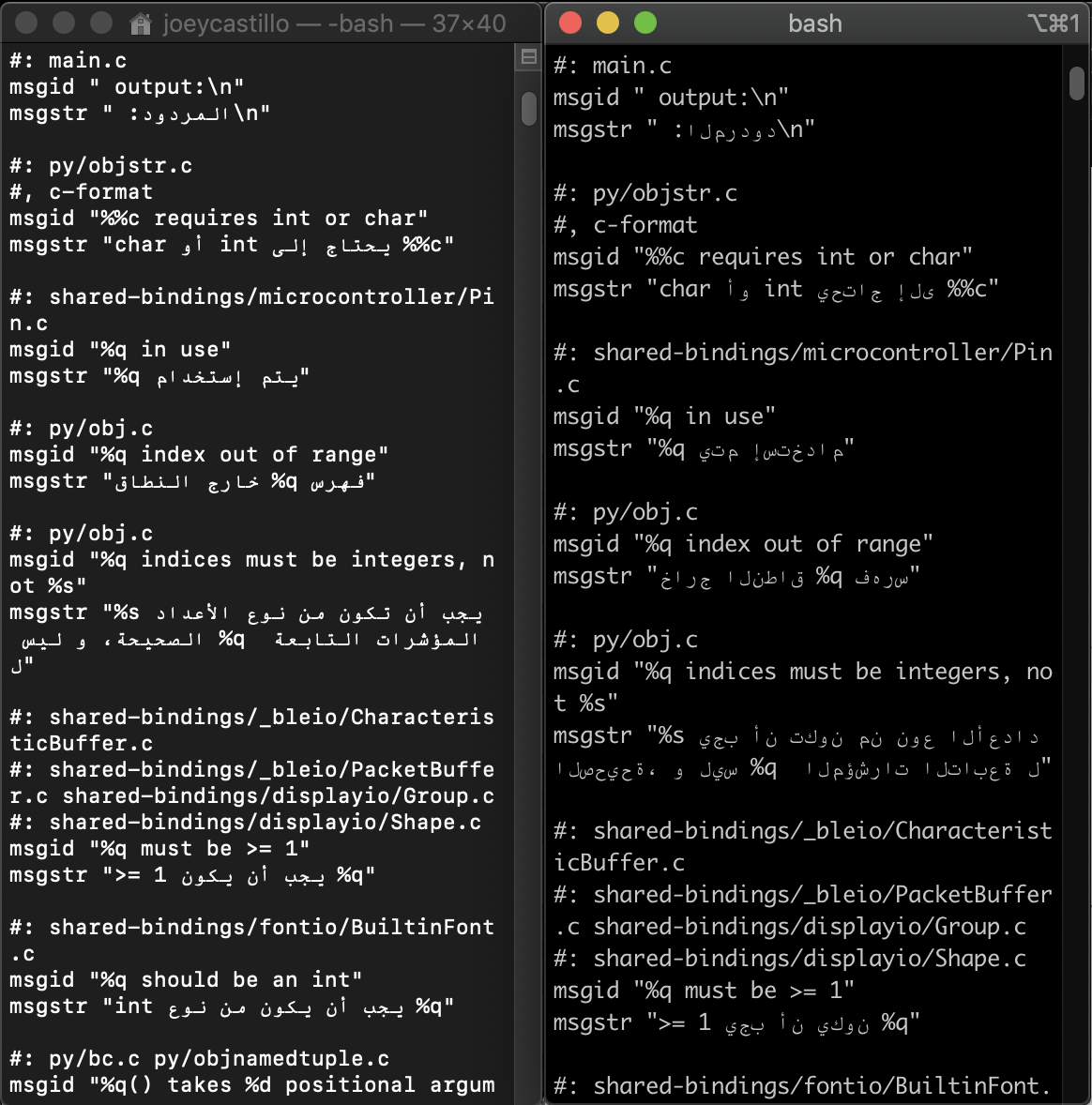 tulip sleet
that tweet is automatic; it jumps the gun a bit
we should make it contingent on something other than the github release
half sedge
All those automation (for some reason, I cannot use "D a m n" when writing here, as if I knew what word are offensive or not).
tulip sleet
yep, please don't use even mild explietives
indigo wedge
...
Feather M4 1011. Thanks @arturo182#1355.```

M7 not M4, M4 is sooo last year 😉😄
if someone is updating the M7 1011 circuitpython.org entry, you can use this image or wait a day or two until the boards reach Adafruit and then I'm guessing you'll have more pr0 photos 🙂 https://pbs.twimg.com/media/ERAQFsPW4AgvItW.jpg
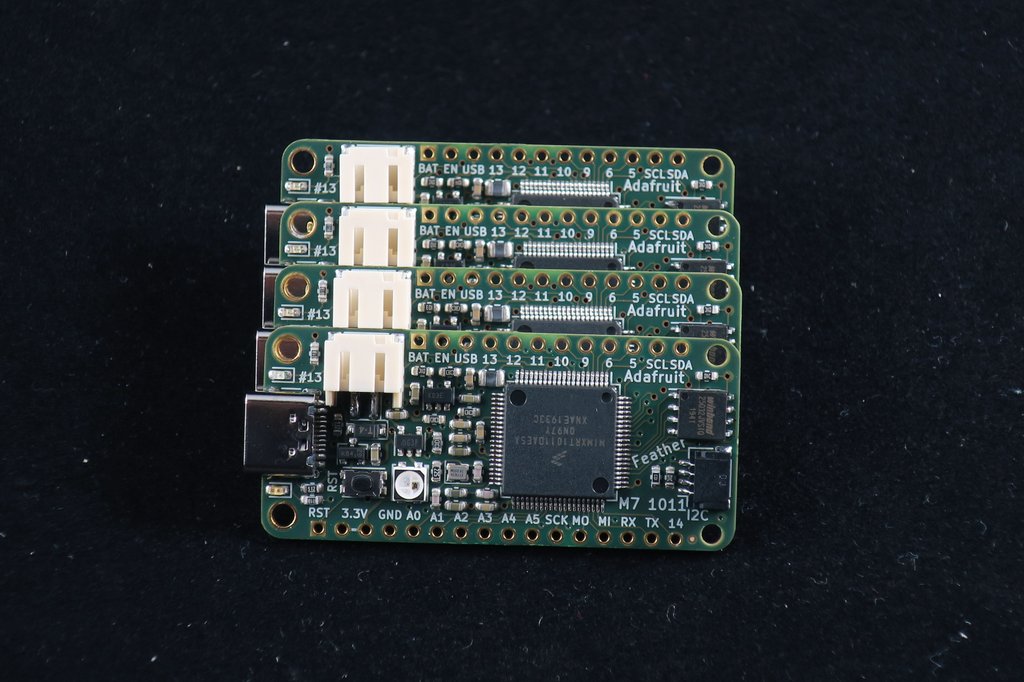

Nice that we got the spi fix for the RC 🙂
tulip sleet
i didn't expect that but it was good to get in
half sedge
This language police is so bizarre. I had to google "mild explietives" to figure out. There must be a cultural thing together with a religious thing. It could be very US centric. I must have learn some of that vocabulary by watching rated movies in original language, or is it something I got from English speaker coming from the UK.
bright aspen
I2S MCK: Though I created the issue, I don't think I will be able to work on getting the master clock output for I2S, digital audio. Well, not soon. (I still need MCK for my audiometer design, but I'm likely to go to C on a SAMD/E—wish I had time to get up to speed with Rust. I very much wanted do this in CircuitPython, but factors such as USB interface control, 1.8 V peripherals, and MCK for DAC are influencing me.)
tulip sleet
@half sedge we have a number of younger members here, and rather than try to draw a line between "mild" and "not so mild" expletives, we simply don't allow them
half sedge
One technical issue is that if you write a long message with one of those word, you loose it all.
main meteor
On another server, they modified the bot to replace (suspected) expletives with REDACTED so the gist was intact.
tulip sleet
that's an interesting idea
main meteor
On the upside, the message wasn't lost, and you could figure out which term(s) the bot objected to. On the downside, the gist could still be offensive and people might be less careful since they wouldn't lose their typing.
solar whale
@half sedge just for your information, that particular word, while very commonly used, is considered very offensive to some. I'm not justifying or agreeing with that sentiment, but I have witnessed an ugly scene based upon its utterance.....
fallen anvil
@indigo wedge are those M7 boards available on this side of the pond or do they do a round trip?
bright aspen
I REDACTED agree that some REDACTED text would be REDACTED offensive, and some REDACTED individuals would play it, REDACTED, and make a big deal of having "REDACTED" come up.
stuck elbow
5.0.0rc0 seems to be working well for me
ionic elk
@tulip sleet is there a convenient way to be notified of ALL changes to a section of a github project? For instance, someone changed up the STM32 port to revise ticks_ms and it took me way longer than it should have to figure out why nothing was working
indigo wedge
@fallen anvil I assembled them here in Sweden and should have 2 more bare boards so one assembled one could find its way to you if you want
ionic elk
I'd be super nice if there was some way of rigging a big bright notification of any commits to the stm32f4 directory that aren't mine
tulip sleet
you can just subscribe to the repo and get everything
indigo wedge
everything is a lot 😅
ionic elk
hmm but then stm32 changes just get lost in the traffic
I just need to know when people make breaking changes to the stm32 port
indigo wedge
same for me with imx 😄
ionic elk
so it doesn't bork all of my workflow
Like it's not my code, it's everyone's and I love that people are contributing but it's like coming back to your homework and finding that someone changed every x to a z
indigo wedge
I think that's fair, as a maintainer of that port you have a plan in your head 😄
fallen anvil
@indigo wedge that would be cool. I'll happily pay for it and shipping....just save a bit of import cost and perhaps a bit of tree while we're still nominally in the EU trading block. PM me when you're ready to rock.
ionic elk
ticks_ms isn't even a thing anymore, and I don't know when that change was made or who made it, I don't have any notes on what to replace it with, it's kind of crazy
tulip sleet
so you are not watching everything in circuitpython
you could have searches for comments with keywords, but no, you just have to skim everyting
indigo wedge
@fallen anvil cool, it takes about 2h to assemble, i can do that next week
fallen anvil
Ouch...if you're manual assembling then don't worry about it. Are they going to become a production item? There aren't too many 1011 boards around...
tulip sleet
@ionic elk now there's supervisor_ticks_ms64(), etc., is that what you mean has chagned?
ionic elk
I feel like there's got to be a tool out there for this... I mean we have hundreds of lines changed per day, and I won't even understand what's happening in most of them. I'll see if somebody has put together some kind of git-alerts thingy I could run when I fetch upstream
right, ticks_ms64() - how long ago did that happen?
tulip sleet
months ago
ionic elk
Oof yeah