#circuitpython-dev
1 messages · Page 203 of 1
 sudden coral
 meager fog
hi here
 errant grail
(No mic this week due to some local bandwidth issues.)
Group hug to team for helping me learn and grow. Although I don’t understand all the Discord discussions, I’m continuing to learn and apply new (to me) concepts and techniques. Special shout-out this week to Phil B, “The LED Whisperer,” for his CPy FancyLED library. It’s amazing – saving a lot of effort and producing some excellent color fades for a couple of projects. Also to @split ocean: his recent animation learning guide opened my eyes to a better way to “frame” some NeoPixel strip animations to simplify the code, improving speed and performance.
meager fog
breifly before next meatin
 idle owl
@meager fog Hug report time!
meager fog
i was under the weather most of last week, not a lot happened
pre-hug report to scott for mixer - will test soon!
hugz to all the library helprs - so much happening! jerry, sommersoft, carter are killin' it
sudden coral
bingo!
 raven canopy
- Carter for the FRAM library review, discussion, and reminding me of
Python one-liners...always forget about those. - Scott for the review on circuitpython-build-tools.
- Kattni for the review/merge on adabot
- Jerryn and Carter for always being ready to battle
DHT/AMxxx...and winning! - @process1183 for the Hacktoberfest PRs.
- The biggest of big hugs for the Group. Such a blast being involved with this community and project!
 candid stump
lurker but having fun with some small libraries for young students, such as https://github.com/fmorton/Makers_CircuitPython_remote_control

GitHub
CircuitPython helper for remote controls. Contribute to fmorton/Makers_CircuitPython_remote_control development by creating an account on GitHub.
 gusty kiln
status update: continuing to test / tweak libraries on raspberry pi as they come up, reviewing PRs where appropriate. spent a day on trellis library last week. updating docs, etc.
sudden coral
added my status updates to the doc directly
errant grail
Revamping the NeoPixel strip animations for the UFO Lighting Controller. Incorporating the FancyLED library is the current activity. I’ve been benchmarking the performance of animation frames so that the incremental performance improvements are measured and can be weighed.
Next week I hope to get back to the music synthesizers and Eurorack work whilst revamping and replacing recording studio equipment.
 neat folio
anyone else audio issues? VOgons are back
idle owl
Sounds fine to me.
neat folio
kk
sudden coral
I hear fine, little bit of static

 tidal kiln
yep
neat folio
no audio for me today, I'll just post a large unrelated image 😮 and go beat my router 😦
 slender iron
🎃
sudden coral
Core: submitted PR #1274 (modgzip support for boards powerful/flash-heavy enough to actually run uzlib)
Core-ish?: prototyped an __import__ replacement that could load gzipped py modules (https://gist.github.com/klardotsh/cfe3038c59abbc6bb15be4cc6127497c)
Core: brainstormed ZIP module support
KMK: rebased off upstream CircuitPython 4.0.0-alpha1, flashing over USB MSC rather than DFU/UF2 (https://github.com/KMKfw/kmk_firmware/pull/69)
This week: continuing all the above ^, working with @bronze shadow on serial/I2C split keyboard support in KMK-land
raven canopy
FRAM Library: I2C PR is on the move. SPI PR imminent, after change requests are merged into that branch.
circuitpython-build-tools: now includes examples in .py/.mpy bundles, and makes an examples bundle. After merge, repo update needs to be pushed to PyPi...of which I cannot exactly help with. :D
cookiecutter: Minor fix to for the README’s Travis badge.
This week: adabot command line. @slender iron, I’ve noticed you’ve used Click over argparse...do you have a preference?
sudden coral
roughly yeah - QMK with some ideas of our own, and the awesomeness of Python. Teeeeechnically we're not "public" with this project yet but y'all are welcome to poke around and provide feedback 😃
 solar whale
with ZIP - beware of Python builtin zip() -- I just stumbled across it.... may get confusing
raven canopy
👍
tidal kiln
IN THE WEEDS
- merge MCP3xxx? (sounds like kattni's on it)
- how to do custom i2c stuff through i2cdevice (see FRAM)
- how to document get/setitem
- best behavior for bad reading(s) from sensor, return None? other?
raven canopy
to note: I had to use the raw I2C bus to get it to work.
 stuck elbow
the address doesn't change, they just set the write bit
raven canopy
current:
def __init__(self, i2c_bus, address=0x50, write_protect=False,
                 wp_pin=None):
        i2c_bus.try_lock()
        i2c_bus.writeto((0xF8 >> 1), bytearray([(address << 1)]), stop=False)
        read_buf = bytearray(3)
        i2c_bus.readfrom_into((0xF9 >> 1), read_buf)
        manf_id = (((read_buf[0] << 4) +(read_buf[1] >> 4)))
        prod_id = (((read_buf[1] & 0x0F) << 8) + read_buf[2])
        if (manf_id != _I2C_MANF_ID) and (prod_id != _I2C_PROD_ID):
            raise OSError("FRAM I2C device not found.")
        i2c_bus.unlock()
another point: F8 >> 1 and F9 >> 1 evaluate to the same address.
correct. the A1/2/3 is the I2C address. F8/F9 is "reserved" address.
yes...this one seems internal to the I2C controller.
tidal kiln
@raven canopy make sense? ^^^
stuck elbow
Errors should never pass silently.
Unless explicitly silenced.
tidal kiln
if dht.humidity > 50:
    print(":(")
else:
    print(":)")
the good old "True, False, File not found"
solar whale
always thow error with None
raven canopy
i feel like teaching try:except is a fine approach. but it needs to be documented and or expected. in this case, only a number return was documented/expected...
neat folio
I'm bach
tidal kiln
if sensor.reading == value:
    print("yeah!")
have in the weeds issue re: huzzah esp 32 circuit python support
slender iron
@neat folio added to the list
errant grail
Most sensors have/should have a measurement error state.
And many serial communications protocols.
raven canopy
devil's advocate: localized exceptions increase library size. "Use an M4" is a valid response...but might not be received well. 😄
slender iron
@raven canopy we can always work to make them lighter in memory
idle owl
It's a really simple explanation, but: https://learn.adafruit.com/led-trampoline/software#try-and-except-3-5
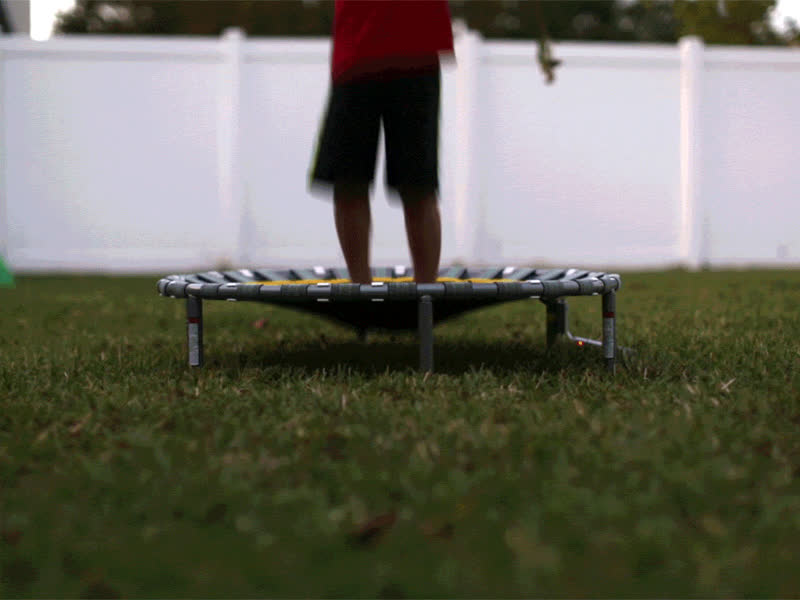
NeoPixels make you wanna, Jump, Jump, Jump!
raven canopy
i know. "fix the root cause of the memory issue". 😆
sudden coral
MicroPython supports ESP32, haven't heard of CircuitPython support. Pretty sure I can't get EITHER to run stably on my ESP32 huzzah
solar whale
@sudden coral I have run MP on an ESP32
sudden coral
I doubt it even builds - the STM32 port which was merged in from upstream is verrrrrry broken due to core files moving all over the place
raven canopy

GitHub
Notes from the weekly circuitpython meetings on Discord - adafruit/adafruit-circuitpython-weekly-meeting
neat folio
thanx all
raven canopy
thanks everyone! lets have another amazing week!
gusty kiln
later y'all.
errant grail
Thanks!
 fluid helm
ha, my pc clock is wrong, I joined an hour late 😄
tidal kiln
AFTER THE WEEDS
- how to test a PR locally
- how to check if something is not None
raven canopy
now... AFTER THE WEEDS. untz! untz! untz!
neat folio
(waves hands in the air)
raven canopy
clone the repo fork?
solar whale
git fetch origin pull/ID/head:BRANCHNAME
raven canopy
that seems quicker. and much more git-fu-ian...
sudden coral
also Github web ui will show the branch name, you can just copy-pasta that. git pull from origin (assuming origin is Adafruit/circuitpython), git checkout topic-whatever-is-in-web-ui
then you can constantly git pull from there
wait, nvm. different origins.
 tulip sleet
if x is not None
raven canopy
if n is not... i'm slow... 🐌
tidal kiln
if not a is None or if a is not None
tulip sleet
if x:
solar whale
but x != None works
sudden coral
if we're crunching for every single CPU cycle is not None is faster (doesn't run through all the casting to bool/int/whatever), on top of the readability
tulip sleet
PEP8: Comparisons to singletons like None should always be done with is or is not, never the equality operators.
Also, beware of writing if x when you really mean if x is not None -- e.g. when testing whether a variable or argument that defaults to None was set to some other value. The other value might have a type (such as a container) that could be false in a boolean context!
_Use is not operator rather than not ... is. While both expressions are functionally identical, the former is more readable and preferred.
Yes:
if foo is not None:
No:
if not foo is None:
_
solar whale
👋
Has anyone else tried this new GFX lib: https://github.com/johncblacker/CircuitPython-GFX I've tried it some and it adds a lot of features for the TFTs -- may be rendered obsolete by dsiplayio...

GitHub
A python port of the Adafruit_GFX.cpp modules plus test fonts and tools - johncblacker/CircuitPython-GFX
more info here: https://forums.adafruit.com/viewtopic.php?f=60&t=142003#p701777
 sweet elm
having trouble circuitpython hanging with no message
stuck elbow
@sweet elm any more details?
sweet elm
@stuck elbow I
@stuck elbow trying to learn circuitpython. i can send copy of code. what do you need?
@stuck elbow mu serial console doesn't respond when hanging. I'm using circuit Playground Express
tidal kiln
@sweet elm paste your code here
sweet elm
@tidal kiln not sure how to "paste code here"
tidal kiln
check out the code blocks section here:
https://support.discordapp.com/hc/en-us/articles/210298617-Markdown-Text-101-Chat-Formatting-Bold-Italic-Underline-
sweet elm
@tidal kiln ```import board
import random
import time
from adafruit_circuitplayground.express import cpx
white = (0xffffff)
black = (0x000000)
num_pixels = 10
pixel_pin = board.A1
cpx.pixels.brightness = 0.3
while True:
if cpx.shake(shake_threshold=13):
cnt = 1
for cnt in range(1, random.randint(2, 7)):
cpx.pixels.fill(white)
time.sleep(0.050)
cpx.pixels.fill(black)
time.sleep(0.050)
    for spark in range(0, 5):
        light = random.randint(0, num_pixels)
        print(light)
        cpx.pixels[light] = white
        time.sleep(0.050)
        cpx.pixels[light] = black
        time.sleep(0.050)

    cpx.play_file("thunders.wav")

if cpx.button_a:
    cpx.play_file("coin.wav")
if cpx.button_b:
    cpx.play_file("laugh.wav")
do you have that saved as main.pyor code.py?
tidal kiln
can you describe what you are seeing in the mu serial console
sweet elm
@tidal kiln I see the "soft reboot" message, then "Auto-reload is on ..." and then nothing. Enter does not give ">>>" prompt. Ctrl-D doesn't reload
@tidal kiln If i unplug USB and replug I can sometimes get get it to run. It seems to fail most when I shake it.
@tidal kiln similar algorithm in MakeCode works but I can't play wav files in MakeCode
tidal kiln
i don't have the wav files, so commented out those lines. it seems to work ok except for an index issue
but it sounds like you're not seeing those messages in the serial console
sweet elm
@tidal kiln no, I'm not. I sometimes get something about SCL and SDA not tied high
tidal kiln
ok. let's back up a little and just see if we can get mu to act like we want.
try saving this to code.py:
import time
count = 0
while True:
    print("hello world ", count)
    count += 1
    time.sleep(1)
and see if you can get that to run and show up in serial console like this:
sweet elm
@tidal kiln I had to close and reopen the serial console but it' s working
tidal kiln
cool. so the basics are working ok.
try this modified version of your code:
import board
import random
import time
from adafruit_circuitplayground.express import cpx

white = (0xffffff)
black = (0x000000)
num_pixels = 10
pixel_pin = board.A1
# cpx.pixels.brightness = 0.3

while True:
    if cpx.shake(shake_threshold=13):
        cnt = 1
        for cnt in range(1, random.randint(2, 7)):
            cpx.pixels.fill(white)
            time.sleep(0.050)
            cpx.pixels.fill(black)
            time.sleep(0.050)

        for spark in range(0, 5):
            light = random.randint(0, num_pixels)
            print(light)
            cpx.pixels[light] = white
            time.sleep(0.050)
            cpx.pixels[light] = black
            time.sleep(0.050)

        #cpx.play_file("thunders.wav")
        print("thunder")

    if cpx.button_a:
        #cpx.play_file("coin.wav")
        print("coin")
    if cpx.button_b:
        #cpx.play_file("laugh.wav")
        print("wav")
don't shake it. just try pressing the buttons to see if you can get coin and wave, like this:
meh. should've made that last one laugh....ooops. the check will still work though.
sweet elm
@tidal kiln the buttons work but shake gives ```
2
9
0
9
10
Traceback (most recent call last):
File "code.py", line 24, in <module>
File "neopixel.py", line 167, in setitem
File "neopixel.py", line 127, in _set_item
IndexError:
Press any key to enter the REPL. Use CTRL-D to reload.```
@tidal kiln but not every time
sweet elm
@tidal kiln yes
tidal kiln
so now we just need to explain why you are getting that error
it has to do with the numbers you use to index the individual pixels
the syntanx is like this:
cpx.pixels[n] = color
you're doing that several places, which is fine, like this:
cpx.pixels[light] = white
@tidal kiln so 10 is too much should be num_pixels = 9 to go from 0 to 10
tidal kiln
however, even though the CPX has 10 neopixels, they are numbered 0 to 9.
oh. yep. you got it.
and see how it printed 10 before crashing
if you run it again - that will be repeatable
it will run OK until you randomly get a 10 from random.randint
sweet elm
@tidal kiln I grabbed some of that from other examples and must have misunderstood what they were doing. Thank you for your help. I'll play with it from here and see what happens.
tidal kiln
awesome. have fun!
sweet elm
@tidal kiln thanks
tidal kiln
checkout randrange and compare it to randint
 river quest
Massive Python for microcontrollers newsletter coming out on Tuesday - sign up today! https://www.adafruitdaily.com
 slender iron
<@&356864093652516868> Here is the recording from today's meeting: https://youtu.be/XPyPmyFRXY0
 dusty plinth
idea for the morse blinker .py script on CPX. If I add an 'if buttonA' and sound output to the dot and dash blink functions, will it significally change the timing? (add to this onehttps://learn.adafruit.com/circuitplayground-morse-code-flasher-makecode-circuit-python/circuitpython )

Create a Morse code signal display with Circuit Playground Express
the dot/dash timing is already there, i just want to add sound while a button is pressed, like the sample preloaded on CPX (but as .uf2, not as .py)
is there some way to load a .uf2 into the makecode editor from disk? I can't see how/where
if I could look at the javascript of that, maybe it would give me an idea for python
(not that I'm at all familiar with js)
raven canopy
@tidal kiln just tried to hand-jam using I2CDevice for FRAM Device ID. can't remember if this is what i was getting originally. but, interesting that it didn't raise the "No I2C device at address" during __init__, and then fails for lock afterwards...
>>> import board, busio
>>> i2c_bus = busio.I2C(board.SCL, board.SDA)
>>> addr = 0xF8 >> 1
>>> i2c_address = 0x50
>>> read_buf = bytearray(3)
>>> from adafruit_bus_device.i2c_device import I2CDevice
>>> i2c = I2CDevice(i2c_bus, addr)
>>> i2c.write(bytearray([i2c_address]))
Traceback (most recent call last):
  File "<stdin>", line 1, in <module>
  File "adafruit_bus_device/i2c_device.py", line 102, in write
RuntimeError: Function requires lock.
>>>
EDIT: nvm....forgot with. trying again.
@dusty plinth there is audioout available on the CPX. let me grab you a guide real quick. wrt opening a .uf2 on MakeCode, i don't think that's possible.
@dusty plinth this is what is shipped with the boards (pretty sure) that plays the audio files already on there. as far as it affecting timing with the dits/dahs? i'm not sure...
https://learn.adafruit.com/adafruit-circuit-playground-express/circuitpython-audio-out#playing-audio-files-35-8

Make faster and easier than ever with MakeCode, code.org CSD, CircuitPython or Arduino!
 manic glacierBOT

Is there any way that I can help out in implementing this? I'm interested in using the ESB on the NRF52840 for a low latency HID project (BLE is capped at 7.5ms latency). I was looking at the Nordic's ESB protocol docs/examples and was hoping if I could implement it for circuitpython since @dhalbert seems to be busy implementing more important features 👍 . I own a NRF52840DK and the NRF52840 dongle if that is helpful at all.

hi @tannewt
We met you at Maker Faire in New York, I'm part of Electronic Cats, we've portd our Meow Meow board to Circuit Python
https://github.com/ElectronicCats/MeowMeow
Thanks
c.c: @wero1414
tidal kiln
@dusty plinth if the UF2 is a makecode UF2, you can open it by simply dragging it to a makecode editor in your browser. you can also open the code window embedded in the guide by clicking on the circled button.
@raven canopy with I2CDevice, the bus is locked/unlocked via the context manager. so by just doing this:
>>> i2c.write(bytearray([i2c_address]))
this is not getting called:
https://github.com/adafruit/Adafruit_CircuitPython_BusDevice/blob/master/adafruit_bus_device/i2c_device.py#L147
dusty plinth
dragging the uf2 I saved off the CPX into the editor window, nothing happens
tidal kiln
it was downloaded via that download link in lower right?
circuitplayground-Morse Code Flasher.uf2 ?
dusty plinth
no, the sample script that came on the CPX, cycles colored lights on CW or CCW
tidal kiln
it may not be a makecode UF2 then
dusty plinth
and I was already looking at that sound page to use snippets out of the sine script
raven canopy
@tidal kiln yeah...realized the context manager after I put up that message. I get an OSError 5 with the context manager. "No device" iirc.
dusty plinth
Can you suggest what is wrong with this block? I added the if and audio lines to a working block and now it doesn't even light up, let alone make sound. Notepad++ doesns't give me any error messages (or I don't know how to make it check)
def showDot(self):
self.light(True)
if not (buttona or buttonb):
audio.play(sine_wave_sample, loop=True)
time.sleep(dot_length)
self.light(False)
time.sleep(symbol_gap)
audio.stop()
tidal kiln
what is audio? is it created somewhere else?
dusty plinth
audio = audioio.AudioOut(board.A0)
set earlier, taken from the sine script on that page you linked
tidal kiln
no sound may be due to not enabling the speaker
dusty plinth
but would that stop the rest of the script?
tidal kiln
and the audio will only play for dot_length+symbol_gap period of time
not sure about the lights, i'd expect it to at least come on via the first line in the function
dusty plinth
added the speaker enable and still nothing (found on my own that I had to rename the script to main.py before it would run)
tidal kiln
did the basic example work for the sine tone test?
dusty plinth
and I see I should move the audio.stop up one line
beeped for a second when I loaded the page's script
manic glacierBOT

This makes the construction of the object really slow when not plugged in. Can we do one try in the constructor and one each time the other APIs are called?
dusty plinth
dropping the or (just checking buttona to simplify) didn't help either
raven canopy
@tidal kiln got FRAM Device ID to work with I2CDevice. stop bit was tripping me up the whole time, apparently. seems so simple now:
>>> with i2c:
...     i2c.write(bytearray([i2c_addr << 1]), stop=False)
...     i2c.readinto(read_buf)
...
>>> read_buf
bytearray(b'\x00\xa5\x10')
i'll throw it in on the next commit.
tidal kiln
@raven canopy
import adafruit_bus_device.i2c_device as i2c_device

class Foo_FRAM():
    def __init__(self, i2c, address=0x50):
        self._i2c = i2c
        self._address = address
        self._i2c_device = i2c_device.I2CDevice(i2c, address)

    def get_id(self):
        buf = bytearray(3)
        f8 = i2c_device.I2CDevice(self._i2c, 0xF8>>1)
        f9 = i2c_device.I2CDevice(self._i2c, 0XF9>>1)
        with f8 as i2c:
            buf[0] = self._address<<1
            i2c.write(buf, end=1, stop=False)
        with f9 as i2c:
            i2c.readinto(buf)
        return buf
😆
dusty plinth
how do you put code in a box here?
dusty plinth
test
so now simplified a step... def showDot(self): self.light(True) if not buttona: audio.play(sine_wave_sample, loop=True) time.sleep(dot_length) self.light(False) audio.stop() time.sleep(symbol_gap)
raven canopy
for a code block, use three backticks above and below:
```
code
```
dusty plinth
and shift-enter to newline...
    def showDot(self):
        self.light(True)
        if not buttona:
            audio.play(sine_wave_sample, loop=True)
        time.sleep(dot_length)
        self.light(False)
        audio.stop()
        time.sleep(symbol_gap)
 tough flax
Hi folks - I have the new builds working with supervisor.runtime.serial_bytes_available - it's awesome - thanks. I plan on making a guide on the learning center about using it. It's kinda cool. I have a way to send serial from the Windows command line (via PowerShell) and I will figure out a script for Linux (rPi). Can anyone help me test the same on Mac? I don't have a (working) mac handy.
dusty plinth
hmm, took those 3 lines back out of the dot and dash blocks and still not working. so it must be somewhere in the setup section at the top
tidal kiln
@tough flax sry. i'm mac-less.
tough flax
Harumph. Maybe @slender iron or @idle owl know someone...
dusty plinth
okay, it's the speaker.enable that's stopping things from working
manic glacierBOT

Ready for merge.
- Carlos
dusty plinth
copied from the sine audio script, yet when used in mine thr latter line stops the rest of the script from working
import digitalio

speaker_enable = digitalio.DigitalInOut(board.SPEAKER_ENABLE)

That's a good point. I meant to replace that with a proper background
timer from run_background_tasks but never got around to it.
tulip sleet
@noukf could you upload your whole script? Put it in a gist or upload it with the + to the left
manic glacierBOT

Build errors on itsy_bitsy_m4_express: https://travis-ci.org/adafruit/circuitpython/jobs/441508064#L1143
dusty plinth
modified morse flasher to add sound
tulip sleet
have you been using the repl to see where the errors are?
tulip sleet
you can use a terminal program to connect to the board and see the errors. You can use mu's terminal capability, or Putty, or Tera Term (which I like better than Putty)
it saves a lot of time over guessing where the errors are
Adafruit CircuitPython 3.0.3 on 2018-10-10; Adafruit CircuitPlayground Express with Crickit libraries with samd21g18
>>> import Code3
Traceback (most recent call last):
  File "<stdin>", line 1, in <module>
  File "Code3.py", line 47, in <module>
NameError: name 'digitalio' is not defined
it's not defined because you did from digitalio import, so you don't need speaker_enable = digitalio.DigitalInOut(board.SPEAKER_ENABLE), just speaker_enable = DigitalInOut(board.SPEAKER_ENABLE)
I dropped the digitalio.
one example did import digitalio, the other did from digitalio import..., so mixing the two was somewhat incompatible
dusty plinth
yet it worked in the sample script where I copied it from
tulip sleet
yes, but that script imported digitalio in a different way: see my last line above
with import digitalio, you must use that name as a prefix: digitalio.DigitalInOut. If you do from digital import DigitalInOut, then you can use DigitalInOut standing alone
so change lines 47 and 48 and drop the digitalio.
also note that Notepad++ is not the best editor to use for CircuitPython because it does not write the file to CIRCUITPY completely immediately, so you need to make sure to do an "Eject". See https://learn.adafruit.com/welcome-to-circuitpython/creating-and-editing-code#1-use-an-editor-that-writes-out-the-file-completely-when-you-save-it-6-13
dusty plinth
still having trouble but now it's down at the if and audio
comment them out and it still works
important part is that I got it working with 2 different messages on the switch
 bronze shadow
If I were to have 2 ItsyBitsy and have them talk i2c to each other, I would want to connect USB to USB for power and not 3v to 3v correct? I've done this on pro micros before with VCC to VCC as those were 5v VCC,. I'm assuming that sending over raw USB to USB would be better as I wouldn't overstrain the voltage converter on the "main" board that's plugged in to usb power. Is this correct?
slender iron
@bronze shadow I believe so.
bronze shadow
@slender iron Much appreciated.
solar whale
@idle owl @meager fog Is the PR for the RPI usage of the DHT waiting for more review - or can it be merged. Came up on the forum https://forums.adafruit.com/viewtopic.php?f=60&t=142347 -- PR https://github.com/adafruit/Adafruit_CircuitPython_DHT/pull/14
 manic glacierBOT
Tested with a Saleae.
Some cleanup on copyright notices and PulseOut doc.
Added general timer allocation/deallocation to nrf/peripherals.
idle owl
@solar whale Not sure. It looks like Scott asked a question and no one responded and that's where it left off.
solar whale
@idle owl Thats what I thought. Just wanted to check since it came up.
idle owl
@solar whale Thanks for checking! Is the question Scott asked something you can answer?
solar whale
not easily. I can look into it if no one else can -- but not until tomorrow at the earliest.
idle owl
Ok thank you regardless 😃
solar whale
ah - ladyada just posted to the PR --- same question...
idle owl
Ok that works too 😃
gusty kiln
@solar whale @idle owl i could check a bit later this morning, if desired.
idle owl
@gusty kiln That would be great!
tulip sleet
@slender iron I can do an alpha release today. PulseOut passed travis, if you have time to look at that. I'm working on the nrfx fork next because that enables debugging of the BLE/SPIM3 problem. I'll put a warning and workaround about that problem in the alpha release notes.
slender iron
ok, I'll look now @tulip sleet
manic glacierBOT
turn_off(self);
Should this turn off instead?
idle owl
@raven canopy Noticing that cookiecutter is adding both register and busdevice to requirements.txt even if you say no to one of them.
manic glacierBOT
This is the same behavior as in the atmel-samd port. When you deinit, it turns the carrier pin back on, as it was before you wrapped it in the PulseOut().
idle owl
@raven canopy as well as to README.rst
idle owl
@tidal kiln Let me know when you're around. Forgot to follow up on something with you yesterday. No rush.
Woo got in right before a CircuitPython build 😄
@prime flower Do you have a minute?
 prime flower
@idle owl yup!
idle owl
@prime flower Super simple fix: https://github.com/adafruit/Adafruit_CircuitPython_MCP3xxx/pull/6

Can you review and merge if you're happy with it please?
prime flower
absolutely! (altho I dont have write access on that repo...)
idle owl
Oh then review and I'll merge it 😄
prime flower
All set
raven canopy
@idle owl answered on the issue. Well, commented.
prime flower
np!
tulip sleet
@idle owl oh, yeah, I should update the frozen modules; thanks for reminding me
idle owl
@tulip sleet You're welcome? 😄
tulip sleet
maybe it was inadvertant - wasn't sure about the new CPy build remark
idle owl
Hey however we get there is good
tulip sleet
but it jogged my memory in any case
idle owl
Excellent
tulip sleet
they were all out of date
idle owl
@prime flower I have another favor to ask. Can you write up a quick list of what's been added to MCP3xxx? I need to do a release and I have no idea what was added with that PR, it was massive.
I can do the release, but it would be better with a note about what we did.
tidal kiln
@idle owl i'm around
prime flower
can do
idle owl
Thanks!
tulip sleet
@idle owl some of the frozen modules have commits since release. bus_device, Motor, and Theremistor just have "ignore board module in .pylinrc". LIS3DH just has examples fixes, but DotStar has significant changes since the last release. I set them all to the latest release, but do you want to do a release for DotStar?
tulip sleet
@idle owl I think it might be a q for @gusty kiln ... crossed
idle owl
@tulip sleet To be clear, I'm doing a release, right?
tulip sleet
you mean of dotstar? I think so
tulip sleet
no, leaving it to you as head librarian
idle owl
@tulip sleet Ok release published.
tulip sleet
k - great, and I think the others are not as important, though the LIS3DH examples could get updated. The other pylint board stuff is not important to release, right -- it doesn't affect pip installs, doest it?
idle owl
Mmm..... no, it affects when Travis runs.
whether it fails trying to load things it can't find.
If I understand it correctly.
tulip sleet
that makes sense to me
idle owl
@slender iron Adabot looks at everything with Adafruit_CircuitPython on the beginning right?
slender iron
ya, and under the adafruit user
idle owl
ok, so can/should we add a check where we can include a file in a repo that excludes it the Adabot checks for pylint/travis all of that? I created a repo for the badge README, and named it including Adafruit_CircuitPython but we're not going to set it all up like a library. or should I rename it to CircuitPython_Badge_README instead to keep Adabot from bothering with it.
nm I answered my own question I think it makes more sense to rename it anyway.
in this case.
But still, question stands for other cases.
slender iron
we have an exclude for the bundle already. we can add others as needed
idle owl
oh. handy. ok
manic glacierBOT

Ok. I looked at the schematic and it looks like PB01 was the correct pin connected to the BAT pin. Do I have to define it somehow?
Bring all frozen libraries up to the latest released versions, in preparation for next alpha release.
Reviewers: and/or -- just whichever of you has time
idle owl
@slender iron What was the reasoning behind having the folders in the newsletter repo start with _?
slender iron
its a jekyll thing
idle owl
ok
manic glacierBOT
@saspa We'd love your help! How can we help you get started on it?
@sajattack That schematic is for the Feather M4, which uses the 64-pin SAMD51J19. The Itsy Bitsy uses the 48-pin SAMD51G19. I don't see any voltag monitoring stuff on the Itsy M4. Schematic here: https://learn.adafruit.com/introducing-adafruit-itsybitsy-m4/downloads.
Neither the Itsy M0 nor M4 have a voltage divider for monitoring. So remove the BATTERY pin from the Itsy M0 as well, in your changes.
[adafruit/circuitpython] New comment on pull request #1275: Added board Meow Meow by Electronic Cats
This file should only include names for pins that people can connect to on the board. From looking at the photo here this is more than what is available.
[adafruit/circuitpython] New comment on pull request #1275: Added board Meow Meow by Electronic Cats
we have a series of pine trees on the back that can be accessed by cables https://github.com/ElectronicCats/MeowMeow/wiki/2.-Tabla-de-Pines
idle owl
@tulip sleet Do you want me to merge the frozen PR?
tulip sleet
sure! thanks
 tulip sleet
@slender iron I'll tag and release unless you want anything else in that's currently outstanding (like meow meow)
slender iron
All good! No rush on that
manic glacierBOT

This link returns 404 for me
Add a datasheet link as well?
Seems inconsistent that all other defines in this file use the pin__ objects but for QSPI we use the pin number
[adafruit/circuitpython] New tag created: 4\.0\.0\-alpha\.2
manic glacierBOT
I'm trying to get this patch working on my board. I use a different flash chip but I added it to flash_devices.h, it seems to get detected properly because I get past the if ( _flash_devices_arr[i].manufacturer_id == mfgr_id && _flash_devices_arr[i].device_id == dev_id ) { check with proper values, however the MSD does not get mounted by the system (Linux Mint), trying to mount it manually gives me an error:
> sudo mount /dev/sdb /media/arturo182/usb
mount: /media/arturo182/usb: wr...Maybe you could link me to some examples of how to port the nrf code into python? I was looking at
https://circuitpython.readthedocs.io/en/latest/docs/common_hal.html
and
https://circuitpython.readthedocs.io/en/latest/docs/design_guide.html
Sorry I'm new to circuitpython but I have some basic knowledge in C and Python.
manic glacierBOT
@arturo182 What chip is it, and does it truly have 16MiB (binary megabytes), or is it smaller?
Also 16MB is just at the boundary between FAT12 and FAT16, and it's possible either Linux or FatFS is confused about just where that boundary is: one might be think it's FAT12 and the other might think it's FAT16.
tulip sleet
@slender iron do you have an easy way of copying stuff down from the S3 buckets? I tried s3fs but I can't get the permissions right. It mounts the fs but I can't actually copy the files.
slender iron
nope, I just do it by hand. it be easy to write a script though or have travis do it on tags
tulip sleet
yeah maybe I'll write a script. I have to leave soon for a few hours but will finish the release tonight. There's a draft release right now.
manic glacierBOT
Ah yes, I should've written the model, it's IS25LP128F, datasheet available here: http://www.issi.com/WW/pdf/25LP-WP128F.pdf
I also tried setting total_size to 8MB and that didn't work either, but I'm not sure if mismatching like that should work at all.
tulip sleet
@slender iron:
aha, have to specify default umask, but then it works:
s3fs -o public_bucket=1 -o umask=0002 adafruit-circuit-python ~/s3-circuitpython/
nice!
manic glacierBOT
Do you mind doing it now?
If not, can the loop at least check for a CTRL-C? I noticed it when trying to ctrl-c and it not responding.
raven canopy
@slender iron looks like i have rights to draft a new release on build-tools. current version is 1.1.5. new release: 1.1.6?
slender iron
sure!
raven canopy
👍
slender iron
thanks!
idle owl
Wow, Hacktoberfest works quickly. I created an issue an hour ago, there's a PR in for it.
@slender iron @raven canopy Does the change to include examples in the bundle now mean we need to do releases when the example code changes?
slender iron
ya
idle owl
ok
raven canopy
i would say it extends the current philosophy, yeah. breaking change, new release, yes. documentation, probably not.
idle owl
done
raven canopy
@slender iron want me to save this release as a draft, or be "bold" and publish? 😄
slender iron
bold but then run it on a release
idle owl
I feel like we may have talked about this already, but can we rename the 3.x bundle to include 4.x in the name? Or to avoid updating everything, produce an unfortunately identical 4.x bundle? I understand that it's thempy-cross version, and it's been coincidentally in line with the CircuitPython versions, but it's confusing now because of the coincidence. Educating people as we go is also an option but this is a fairly fundamental issue that we've created by naming the bundles with the mpy-cross version and not making it clear that's what the name referred to.
@raven canopy Can this be closed then? https://github.com/adafruit/Adafruit_CircuitPython_Bundle/issues/3

GitHub
Ship examples in the bundle like Arduino has examples.
raven canopy
yep! (as long as it works...) 😄
manic glacierBOT

If (either by sloppy programming or some other mischance) an instruction requires more than sys.maxsize bytes to execute the REPL crashes. If I had to hazard a guess as to what is causing the problem I would suggest the trouble occurs when trying to compute the number of bytes to report in the MemoryLimit exception. (Note that I have no idea what is actually going on here...)
Here are the simplest steps to reproduce the problem I've managed to come up with in the short time I've mess...
raven canopy
release done. PyPi update deployed fine. running a test now. it really helps to have the cwd be the bundle location... 😄
manic glacierBOT
This reduces the popping sound on initial playback of an audio
sample.
The M4 DAC has a pop on startup that cannot be prevented. It also
does not allow readback so current values of the DAC are ignored.
Fixes #1090
raven canopy
blargh! didn't update the README.txt location in the zip. 🤦
at least the version PR was after I did a release. free[ish] number! 😄
slender iron
@raven canopy we'll need another release so you could add it now
(another release for 4.x support)
raven canopy
yeah. its pretty much done. gotta eat, then i'll push the PR.
idle owl
I just merged the adding 4.x PR.
manic glacierBOT
It's already a branch, if you're happy with the thinking behind that
I'll merge it into the PR branch.
manic glacierBOT
tulip sleet
Adafruit Industries - Makers, hackers, artists, designers and engineers!
Download the 4.0.0 Alpha 2 release here. 4.0.0 is the latest major revision of CircuitPython and features support for the nRF52840 BLE chipset, display support and translated messages. Alpha! This …
@idle owl another simpleio.Servo mention : https://forums.adafruit.com/viewtopic.php?f=60&t=142377
idle owl
@tulip sleet hmm. I guess file an issue on the learn repo and ping the author. I'm headed out but I can try to remember to do it tomorrow unless you can do it tonight
tulip sleet
i can do it now
idle owl
@tulip sleet Ok that works. Mikey has been updating guides recently so I figure should be responsive
 fathom basalt
Congrats, y'all! 👍
tulip sleet
tnx!
solar whale
Yay - 4.0.0 alpha2!
I'll wait until tomorrw to try to break it 😉
@gusty kiln there was a bug in the DHT (non-RPi) code! Simple fix - reported in the PR -- glad it turned up now!
sudden coral
So I managed to get my Feather M4 Express into such a state that LInux refuses to see the device at all now - I think this was some sort of issue with my main.py but I can't totally be sure. dmesg is telling me the device is refusing to accept addresses (which is pretty much the de facto "your device is frozen" state). I can get to UF2 successfully and copy over CPy UF2 files, so the board itself is fine. How can I erase flash without access to REPL? The rescue UF2 files I see listed on the "old way" page are for M0 and basically everything else but this board.
Alternatively if there's a magic pin combo I can short to wipe this thing (or at least go into safe mode) that'd be awesome too - I can't find such a thing poking at the PDF for this board.
solar whale
@sudden coral Can you build Circuitpython locally?
sudden coral
yep (funny enough I only STOPPED running locally-built CircuitPython on this board like two days ago)
is the answer to hack a flash erase into main.c?
solar whale
just a sec -- I'll show you the trick I use...
https://github.com/adafruit/circuitpython/blob/master/ports/atmel-samd/supervisor/filesystem.c#L55 change thsi line to if (True) It will force it to build a new FS on every boot -- You can run it then once it boots and wipes the FS -- reload a working image. The line ablove is from current master so depending on your verison it may have moved a bit.
GitHub
CircuitPython - a Python implementation for teaching coding with microcontrollers - adafruit/circuitpython
sudden coral
that fixed it right up, perfect. Thanks @solar whale!
solar whale
@sudden coral Great -- Glad to help. save that image!
sudden coral
for sure - probably going to locally git tag this too as the for when I stupidly disable GC in the wrong part of my loop commit
solar whale
good way to end my day -- good night all!
manic glacierBOT

Hi,
Thanks for CircuitPython, I'm enjoying exploring w ItsyBitsy M4.
I didn't see mention in the release notes, and given the 2.x v 3.x versioning described on the libraries page, it would seem that there will be a library bundle version for 4.x?
I don't know if you're officially using Semantic Versioning? If so, that major version bump also suggests an incompatibility from 3.x.
...
manic glacierBOT
The library bundle version numbers actually refer to the .mpy version. By coincidence this matches the CircuitPython version, but 3.x and 4.x .mpy files will probably continue to be compatible. You can use the 3.x bundle with 4.0.0-alpha.<n>
However, to avoid confusion, we're going to publish 3.x and 4.x bundles (and drop 2.x). We actually just made a change to do this: https://github.com/adafruit/circuitpython-build-tools/pull/19
 reef mantle
I was wondering if circuitPython supports the use of hardware SPI on the Adafruit feather M0 express? If it does I can buy one and use it to do some testing of a specialized SPI device.
tidal kiln
@reef mantle it does. here're the docs on the API:
https://circuitpython.readthedocs.io/en/latest/shared-bindings/busio/SPI.html
manic glacierBOT


@aturo182 is the flash wired for quad mode ? If yes, Also please check the status registers mask in device config to make sure it is correct value to put flash device into quad mode.
manic glacierBOT
I think steps = -steps and step = -step would be clearer.
How about adding a comment about why we don't reset the DACs?
I have a basic question after reviewing the PR, #1280. When I heard about doing this I thought you were going to doing the ramping based on the first and last values in a sample when you started and stopped playing that sample, so that no matter what was at the beginning or end of the sample, the output would smoothly ramp to match that. I read the issue in more detail and I realize it was not spec'd that way. @CedarGroveStudios, is that impractical, or just not how it is done?
manic glacierBOT

Sorry that I didn't make that clearer in my description.
It's standard practice for studios to record samples with a zero value at the start and at the end so ramping up to mid-point should work for those. If we want to handle "non-standard" samples that may start or end at some value other than zero, then what you described would be the ideal approach. That method is particularly important when pausing and resuming mid-sample since the DAC's resting value would be pretty random.
-- There a...
 timber mango
Hi,
is there a way to completely disable the safe mode?
manic glacierBOT
I use (1 << 6) for the quad enable value, I think it's correct according to the datasheet:
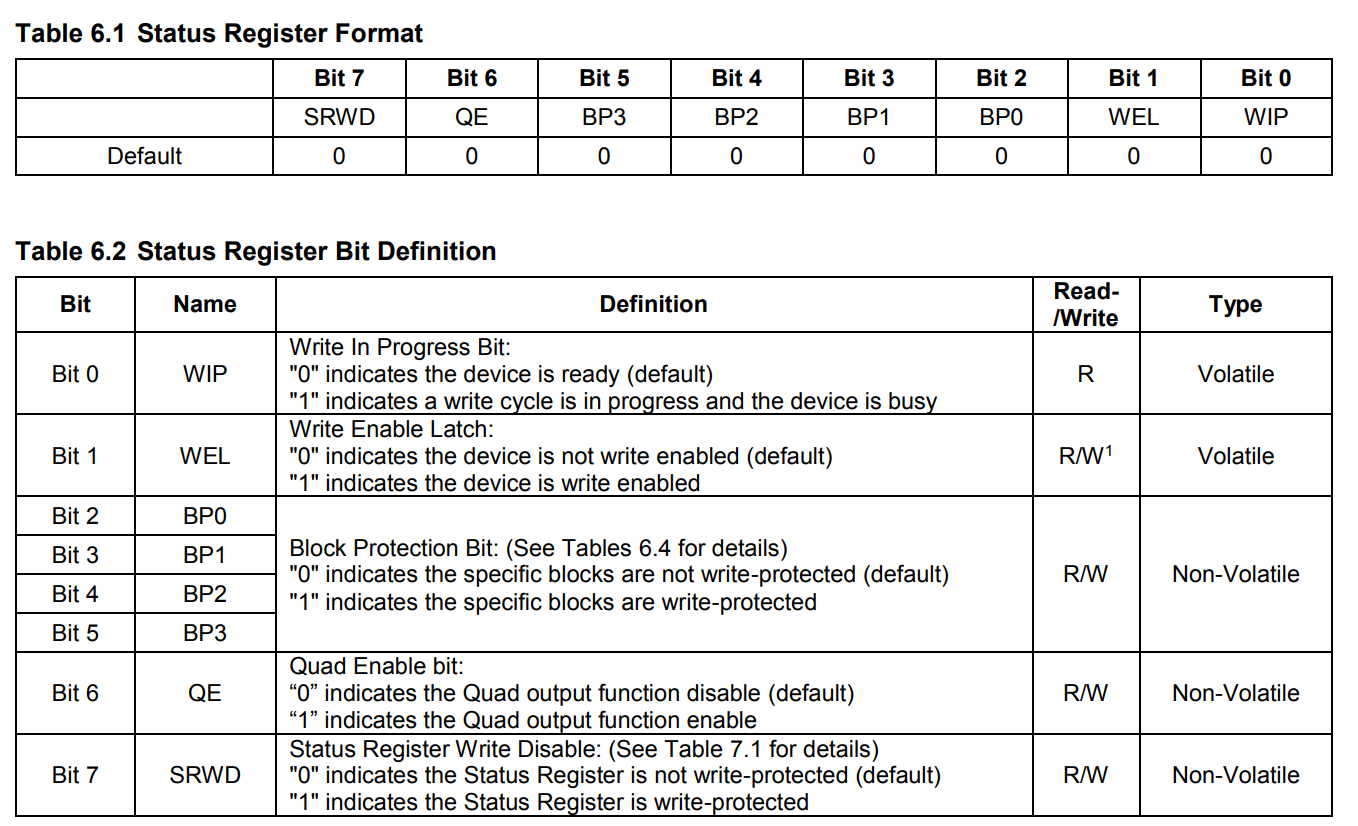
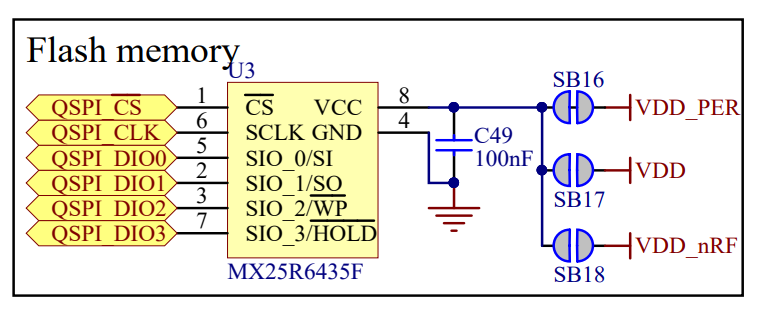
As for the design, I'm not sure what more is needed for quad mode wiring, I pretty much copied the PCA10056 except with a different chip, most qspi flash ICs seem to be pin compatible.
Datasheet:
 pastel panther
hey <@&356864093652516868>, what's the impact of using a class vs instance variable for a buffer in a driver? Seems like most cases one would only have on instance of a driver so the difference should be minimal and I've seen both in drivers. Tony's comments suggest that it helps with memory allocations and fragmentation. Is that a heap vs stack thing?
manic glacierBOT
The term "quiescent value" is frequently used to describe both the bipolar zero value of the sample stream data and the corresponding unipolar-based value of the DAC. How does that sound to you? @dhalbert
tidal kiln
class = all instances share same copy
instance = each instance has it's own copy
so the memory savings are pretty simple, by having it at the class level, you don't end up with additional copies for each instance
pastel panther
right, I get that but given you'll probably only have one instance how likely is that to matter? Also I don't think you would want multiple instances sharing a buffer
tidal kiln
good question. probably a good in the weeds discussion.
having more than one instance may not be as rare as you think
multiple same sensors on an i2c bus for example
or - what i did - through the i2c muxer (TCA thing)
CP isn't multithreaded, so having a class level buffer is fairly safe
pastel panther
right
tidal kiln
but also, these buffers typically aren't huge - typically a bytearray of about 4ish?
so is it really buying us much?
pastel panther
🤷
stuck elbow
in the class case it gets allocated on import, in the instance case -- every time you create an instance
it's not a big difference, just use the one that makes more sense semantically
pastel panther
they both get called like self._BUFFER so it's semantically the same?
tidal kiln
i think that's syntax, not semantics
semantics would deal with thinking about what the purpose of the thing is....maybe? not sure what a good def would be.
tulip sleet
tidal kiln
$
tulip sleet
not sure where that came from - i just got back to the computer 😃
stuck elbow
you can seriously sprain your ankle if it's a mech with large travel
slender iron
hows this talk abstract sound? CircuitPython, a beginner-friendly Python for electronics, has an active, vibrant community. It started with a spark of usability (demo under three minutes!) and grew by handing out shovels, saying thanks, and fighting bots together. Come learn how to help grow a healthy community around code.
stuck elbow
. s/Python/Python programming language
why doesn't Discord let me write s// :(
I don't get the shovels and bots references
slender iron
it actually will edit your last post
stuck elbow
neat
slender iron
those are meant as a teaser but maybe it should be more straight forward
idle owl
I get it, but I know the references. But I think yes maybe it should be a little more straight forward.
pastel panther
agreed
slender iron
It has to be under 300 characters too and it only has 6 left
idle owl
hmm
slender iron
so how about "handing out shovels" -> "empowering contributors"?
idle owl
Yah
idle owl
yah, still teasery but a little more clear
slender iron
gotta go get milk. brb
tidal kiln
2 characters left how about :)
stuck elbow
.oO( at least you can buy a good shovel )
idle owl
Oi, what is going on with the neopixel_simpletest.py .... I feel like it hasn't been updated in a long time.
and neither has my fork.
manic glacierBOT
Sounds good but @tannewt can weight in too.
idle owl
Ohhh I see what's going on. extra fancy stuff to make it easier to use with RGBW.
Still has some things that could be updated. But the major thing that caught my eye is deliberate.
river quest
for those interested, just posted a fun LEEK in #general-tech
manic glacierBOT
quiescent_value works for me. I don't expect people to change it very often. Will update it soon.
tulip sleet
@slender iron right, bots sounds like twitter bots or discord bots
slender iron
I mainly meant travis and the linter
idle owl
Travis and the Linter... garage band name.
tidal kiln
Trailing Whitespace for the opening band?
idle owl
lol. Except I guess the headliner would have to barge in and end the opening act early.
tidal kiln
nah...Trailing Whitespace would all be wearing t-shirts with "#pylint: disable" on them
idle owl
They could take over the whole show at that point.
tulip sleet
@slender iron wrote a quick Python script yesterday to download build artifacts for a release. I could check this in somewhere but not sure where. needs requests and click
tulip sleet
k, i thought maybe circuitpython-build-tools, but main repo is fine
makes sense though, it will change as .travis.yml and boards change, etc., so best to have that in one place
fluid helm
Hoping to launch the EduBlocks BETA for CircuitPython maybe next week for people to have a look and give feedback @slender iron
slender iron
great!
fluid helm
Also adopted the new Scratch 3/MakeCode block look
which will be more optimised for touchscreens
idle owl
@fluid helm That looks amazing!
slender iron
@fluid helm perfect! I'm really interested to use this with BLE
fluid helm
Thanks @idle owl
Yes, me too, that would be awesome! @slender iron
The new blockly layout will also allow us to make the slider idea come true
as it gives more flexibility
slender iron
awesome!
manic glacierBOT
[adafruit/circuitpython] New comment on pull request #1275: Added board Meow Meow by Electronic Cats
Thanks @tannewt !
Meow Meow has a UF2 bootloader https://github.com/ElectronicCats/MeowMeow/tree/master/bootloader_uf2
@arturo182 I think most of the QSPI testing has been done on the Nordic dev boards. The feather exists but I'm not sure if anyone has tested it at all.
Yup! Using the background tasks to drive dhcp makes sense to me. Please merge it in.
idle owl
@tidal kiln The pixels.fill() doesn't work on RGBW anymore in the example. It works if I use wheel(single_position) as a solid color.... but it doesn't work otherwise.
Displays nothing, doesn't even do the weird offset display.
tidal kiln
ok. sry. my mess. let me hook something up so i can play along...
idle owl
Ok.
I was using CPX for testing both and using the weird offset display to know that it was doing RGBW, but when it stopped displaying anything, I hooked up an actual RGBW ring to the CPX.
manic glacierBOT
Sure! The Discord #circuitpython channel is a good place to get real-time help as well.
I'd suggest by starting with the API portion first. Posting a set of example code here is a good way to brainstorm it.
Once you have an idea then you can create the Python -> C translation in ports/nrf/bindings (like this). I'd suggest copying an existing module that's similar to wha...
I see, I thought @hathach was using some early nRF52840 feather prototypes to test the qspi :D
Looking at the PCA10056 schematic the pinout seems the same, I don't think there is any limit to which pins can be used as QSPI, so maybe I'll double check my soldering, but seems odd that it managed so read the chip id without a problem.
idle owl
@solar whale I have a question about your NeoPixel on RPi setup, we're having trouble replicating your results.
solar whale
@idle owl just a sec - I'll post my code -- waht problem are you having?
tidal kiln
@idle owl works for me. i was thinking in the loop it would look something like this:
    if ORDER == neopixel.RGB or ORDER == neopixel.GRB:
        pixels.fill((255, 0, 0))
    elif ORDER == neopixel.RGBW or ORDER == neopixel.GRBW:
        pixels.fill((255, 0, 0, 0))
    pixels.show()
    time.sleep(1)
here is what I run on the RPi ```erryneedell@Ubuntu-Macmini:~$ cat ~/jewel.py
Gemma IO demo - NeoPixel
from digitalio import *
from board import *
import neopixel
import time
pixpin = D12
numpix = 7
#led = DigitalInOut(D13)
#led.direction = Direction.OUTPUT
strip = neopixel.NeoPixel(pixpin, numpix, brightness=0.3,auto_write=False)
def wheel(pos):
# Input a value 0 to 255 to get a color value.
# The colours are a transition r - g - b - back to r.
if (pos < 0):
return (0, 0, 0)
if (pos > 255):
return (0, 0, 0)
if (pos < 85):
return (int(pos * 3), int(255 - (pos3)), 0)
elif (pos < 170):
pos -= 85
return (int(255 - pos3), 0, int(pos3))
else:
pos -= 170
return (0, int(pos3), int(255 - pos*3))
def rainbow_cycle(wait):
for j in range(255):
for i in range(len(strip)):
idx = int ((i * 256 / len(strip)) + j)
strip[i] = wheel(idx & 255)
strip.show()
time.sleep(wait)
try:
while True:
rainbow_cycle(0.001)
except:
pass
finally:
for i in range(len(strip)):
strip[i] = (0,0,0)
strip.show()
must run as root -- sudo
gusty kiln
oh right! you mentioned that. lemme give that another shot...
idle owl
@tidal kiln Ah... hmm. Ok.
gusty kiln
Gpio 5 is illegal for LED channel 0
Traceback (most recent call last):
  File "neopixel_simpletest.py", line 50, in <module>
    strip.show()
  File "/home/pi/Adafruit_CircuitPython_NeoPixel/.env/lib/python3.5/site-packages/neopixel.py", line 227, in show
    neopixel_write(self.pin, bytearray([int(i * self.brightness) for i in self.buf]))
  File "/home/pi/Adafruit_CircuitPython_NeoPixel/.env/lib/python3.5/site-packages/neopixel_write.py", line 24, in neopixel_write
    return _neopixel.neopixel_write(gpio, buf)
  File "/home/pi/Adafruit_CircuitPython_NeoPixel/.env/lib/python3.5/site-packages/adafruit_blinka/microcontroller/raspi_23/neopixel.py", line 52, in neopixel_write
    raise RuntimeError('ws2811_init failed with code {0} ({1})'.format(resp, message))
RuntimeError: ws2811_init failed with code -11 (Selected GPIO not possible)
swig/python detected a memory leak of type 'ws2811_t *', no destructor found.```hmm -I'll go grab neopiex_simpletest and try it.
idle owl
@tidal kiln yah that works but oi, we are straying from simpletest. But I guess it kind of has to with 4 possible options.
Works on both RGB and RGBW successfully.
tidal kiln
the other approach could be:
# uncomment this if you have RGB
pixels.fill((255, 0, 0))
# uncomment this if you have RGBW
# pixels.fill((255, 0, 0, 0))
pixels.show()
time.sleep(1)
I think I like that better
tidal kiln
your call. i just think it's import to have the lines look like
pixels.fill((255, 0, 0))
instead of
pixels.fill(some_weird_function(255, 0, 0))
Would you mind refactoring this into the CircuitPython shared-bindings and common-hal structure? That way it'll list with all of our other modules in the docs. time, os and struct have already been done here: https://github.com/adafruit/circuitpython/tree/master/shared-bindings
I think for making uzlib a subset of CPython's zlib you'll need to remove DecompIO or move it to a new module.
While you do that I'll make some space for you in the CPX crickit build.
gusty kiln
@solar whale huh - welp, your example does indeed work (as root) as long as i use D12 instead of D5.
idle owl
So it's a GPIO5 issue? hmm
@tidal kiln I agree with you on that but having the ORDER stuff in there wasn't that much better... I like the commenty thing.
tidal kiln
cool beans
solar whale
brd
tulip sleet
@solar whale or anyone https://forums.adafruit.com/viewtopic.php?f=60&t=142406 wants to upload programs to a non-Adafruit nRF52832 board. Would they use ampy? Any suggestions welcome there.
solar whale
I use ampy for the feather52832
idle owl
@gusty kiln hmm ok
solar whale
neopixel_simpletest works for me on D12 with numpix=7 (using jewel)
gusty kiln
yep, confirm.
makes sense that it's limited to those pins. would be nice to make it work for a non-root user.
solar whale
@tulip sleet is there any other way to get files to a feather_nrf52832?
tulip sleet
not that I know of! Just confirming ampy works. I can reply to the thread.
solar whale
I posted something to it.
@gusty kiln @idle owl anything else you want me to check re: neopixel?
idle owl
@solar whale Any thoughts on why you have to run it as root? (otherwise no, all good from my end. Brennen will be the one to answer whether anything else needs checking though.)
solar whale
That came up when @meager fog wrote it into blinka -- seemed like it was a done deal. -- I'll go back and look for comments to clarify.
idle owl
@solar whale Ah ok
solar whale
@idle owl @gusty kiln see last comment here https://github.com/adafruit/Adafruit_Blinka/pull/32
idle owl
@gusty kiln It is definitely an unfriendly error.
sudden coral
@tulip sleet just confirming for you (a touch late) that ampy has worked on non-adafruit NRF boards running CircuitPython for me as well, though sometimes it gets a little buggy dealing with files longer than, say, a hundred lines, or successions of several files...
tulip sleet
thanks!
bronze shadow
I'm on the docs for OneWire and completely lost on how this is supposed to work. I'm currently under the assumption that if I have 2 boards connected, and I send a bit using the example on the docs, I should be able to read the bit on the other device. Even while sending bits in a while true loop, I never recieve a bit, and connectivity has been tested.
EDIT: I've tried bitbangio and busio as I'm not sure what pins are accelerated for this.
EDIT2: One is running Cpy 4 alpha, and one Cpy 3
 main meteor
OneWire signalling works similarly to I2C: there needs to be a pull-up resistor to supply voltage on the line when nothing is pulling it down.
bronze shadow
Ah, assumed that the board would have a built in resistor. Should have realized. Thank you.
tidal kiln
@idle owl neopix pr looks good. want me to merge?
idle owl
yes please
tidal kiln
done
slender iron
@bronze shadow why are you using OneWire?
 split ocean
@umbral dagger great guide on waveform generator, I can't wait to build one!
bronze shadow
I need to collect data on one board, and send it to another for processing. It only needs to send 3 bytes of data for each new bit of data, so it's slim enough I figured not start off with onewire. Eventually I'll go and probobly work on i2c.
 umbral dagger
@split ocean As I point out it'll work on an M0, but you can get far better output with an M4. The final part talks about some interesting directions to take it.
split ocean
Love it.
idle owl
@tidal kiln Do you want to do a release on it?
tidal kiln
sure. 3.3.2?
idle owl
if it's currently 3.3.1 then yes.
split ocean
@umbral dagger I'm thinking about fitting a Feather M4 w TFT FeatherWing into a Eurorack module, this would be a fun use for it with some additional circuitry to get out at control voltage levels.
tulip sleet
@bronze shadow Onewire and I2C are complicated protocols. You could probably get away with a UART connection between the boards
tidal kiln
@idle owl tis done
idle owl
Thanks @tidal kiln!
tulip sleet
I2C is slave and master, someone id an I2c slave impl but it's not builtin currently
tidal kiln
@idle owl check travis on neopix.
PyPI upload failed.
failed to deploy
expected? or did i mess up release?
idle owl
uh....
Shouldn't be related to what you did. I'll look into it.
@tidal kiln It was timing out. I retagged the release and it worked.
¯_(ツ)_/¯
bronze shadow
@tulip sleet Much appreciated. I'll look into uart. That is accelerated over the RX and TX pins only correct?
tidal kiln
ok. thanks. i was scared maybe i didn't call show or something...
idle owl
@tidal kiln Well I mean...
tulip sleet
@bronze shadow right, use the TX and RX pins. RX->TX and TX->RX on the two boards (or only TX->RX if it's one way communication only). Make sure to tie the grounds of the boards together to allow proper current flow. You can use busio.UART. There are many examples in our GPS tutorials and similar. And this may be helpful as an overview: https://learn.adafruit.com/circuit-playground-express-serial-communications
bronze shadow
Fantastic. That's about what I thought. I'll be eventually connecting usb -> usb (labled on the board, aka 5v) gnd to gnd, and the TX and RX. I'm trying to pack it over a TRRS cable, and was hoping that I could get away with TRS, but alas no. The help is massively appreciated.
tulip sleet
how long is the cable run?
bronze shadow
It's about 1 foot, so nothing substantial. I already do something very similar over i2c on pro micros, though I didn't write that code.
tulip sleet
sounds good! Good luck! Check back with any issues.
bronze shadow
Much appreciated! Will do.
raven canopy
I've had I2C through a 6 foot standard TRRS cable with pretty good reliability. Though, in my reading, that's probably about the limit before timing issues pop up.
idle owl
@raven canopy Can you take a look at this for me? https://github.com/adafruit/Adafruit_CircuitPython_Bundle/pull/102 If you're around...
raven canopy
👀
idle owl
That emoji is sufficiently creepy when on its own.
idle owl
Yes, thank you 😃
tidal kiln
do we have a notional standard driver folder/file layout for devices that can be I2C or SPI?
like this?
lib/
    adafruit_device.py
        class Device
        class Device_I2C(Device)
        class Device_SPI(Device)
or this?
lib/adafruit_device/
    device.py
        class Device
    i2c.py
        class Device_I2C(Device)
    spi.py
        class Device_SPI(Device)
or other?
idle owl
so....
@tidal kiln Some are in classes in the same file/different class, some are separate files. Siddacious floated the idea of having the constructor figure out which one is passed in and sorting it for you. This would be an API shift, so it needs discussion, but I like the idea a lot, as it simplifies things for the user.
tidal kiln
ok. will defer to in the weeds....
idle owl
Sounds good.
tidal kiln
anyone else want to take a look at the FRAM lib? i'm done reviewing and consider it ready4merge:
https://github.com/adafruit/Adafruit_CircuitPython_FRAM/pull/1
nice job @raven canopy
idle owl
I've been following it as it's gone. Great job @raven canopy. And excellent review, @tidal kiln
manic glacierBOT
 umbral dagger
@split ocean Yeah. You’ll probably want to play with the idea of using a fixed sample buffer and dynamic rate to get the highest res waveforms possible.
manic glacierBOT
If anyone wants a one-liner (instead of the example above) to reproduce this, the following will also work:
('a'*256)*2**29
timber mango
@tulip sleet variation of https://www.workshopshed.com/2018/04/trinket-power-reset/
Now I would like to bypass the safe mode without having to mod all of my 250 trinkets.
Could you or somebody else point me to the right bit of code so I can compile my of firmware without the safe mode and test it out?
Please, please, pretty please...

For a project I've working on, I'm using a Trinket M0 from Adafruit. This tiny board runs a cut down version of Python called CircuitPython which is a
tulip sleet
@timber mango you can make a change in main.c:
https://github.com/adafruit/circuitpython/blob/3.x/main.c#L315
Just add an assignment there to force safe_mode to be NO_SAFE_MODE.
    safe_mode_t safe_mode = port_init();
    safe_mode = NO_SAFE_MODE;     // <-- THIS IS NEW
    rgb_led_status_init();
Hopefully that will work for you. You'll want to work in the 3.x branch for now, since it's more stable.
This will help get you started on building your own version if you haven't done that already: https://learn.adafruit.com/building-circuitpython?view=all
manic glacierBOT
It adds size info and uses macros for byte code to make it more
readable.
dusty plinth
on the Circuit Playground Express, are the neopixels on an available pad (to parallel others) or does the far end have an available pad to daisychain more on it?
pastel panther
I don't think it's chainable but I can check the schematic.....
it is not further chainable
@dusty plinth
dusty plinth
at least not easily. might be able to tack a wire on the output of the last pixel if it were needed
pastel panther
Sure, if you're willing to go that far the world is your oyster!
dusty plinth
just thought I'd ask if anyone knew of available pads
pastel panther
@dusty plinth I don't think I understand your question; are you looking for pads that you can put a separate string of neopixels on? Or are you looking for how to refer to the pin that the built in ones are attached to?
dusty plinth
the other day I noticed that other onboard devices (speaker, mic,switches, etc) were labeled also with I/O labels but not the neopixels
not important, I was just asking
actual programming question... If I have a main loop doing something and below that write another loop doing something else, do they both run (more or less)simultaneously and independently or would the latter one wait til a dropout from the first?
I never really learned OO programming, learning now in small spurts
manic glacierBOT
Travis issues. I'll re-approve and merge when that's debugged. Looks like it's not building micropython_coverage.
tulip sleet
@dusty plinth
    while True:
        ...
    while True:
        ...
The second loop will not run until the first one finishes somehow (by break or whatever).
This is not OO, it's just not parallelism.
In MakeCode, multiple top level loops actually do run simultaneously, which is neat.
dusty plinth
what about Arduino code?
I was thinking the other day about 'while True'... is there such a thing as 'while False'?
pastel panther
If you want a loop that doesn't do anything, sure!
pastel panther
If you want to loop while something isn't true, you can negate the truth statement with a not (!) like
while !(pants_on_fire):
    print("your pants are not  on fire")
the body of while False would never be called
also you can refer to the built in neopixel string of a circuit playground express with board.NEOPIXEL
hey @tidal kiln, sphinx doesn't seem to know what to do with the constant that I'm using as a default param to my constructor and the docs spit out
class adafruit_adxl34x.ADXL345(i2c, address=<sphinx.ext.autodoc.importer._MockObject object>)
Is there a way to fix this?
dusty plinth
is board.NEOPIXEL programmed into CircuitPython or into the chip when the board is manufactured?
not important, aslong as it works
pastel panther
It's a part of CircuitPython
This might be useful:
https://learn.adafruit.com/adafruit-circuit-playground-express/circuitpython-neopixel
Make faster and easier than ever with MakeCode, code.org CSD, CircuitPython or Arduino!
raven canopy
@pastel panther what is the constant? if you push your code to your fork, it may cut down on the questions... 😄
pastel panther
psh, sure whatever push... I mean COME ON
raven canopy
well, future questions. :d
raven canopy
👍
manic glacierBOT
@arturo182 I only tested with pca10056, maybe you should start there to see if that works for you first and then moving to your custom board.
pastel panther
hmm, the cookiecutter didn't include a .gitignore
raven canopy
odd. it should have... 🤷
pastel panther
I just grabbed it and the other .files from the max driver

GitHub
Contribute to siddacious/Adafruit_CircuitPython_ADXL34x development by creating an account on GitHub.
raven canopy
ahh. a const. hmm. not seeing anything jump out of the autodoc settings that would help. 🤔
pastel panther
🤷
raven canopy
i almost had an idea. but i don't think it will work...
pastel panther
ok well I got range checked. I'll have to check data_rate now..
If anyone cares my hands are capable of generating over 16G
raven canopy
:hulk_smash:
@pastel panther shot-in-the-dark. change docs/api.rst to:
.. automodule:: adafruit_adxl34x
   :members:
   .. autodata:: _ADXL345_DEFAULT_ADDRESS
      :annotation: = 0x53
it doesn't like the format of that
Users/bsiepert/cpy/ADXL34x/docs/api.rst:7:Error in "automodule" directive:
invalid option block.

.. automodule:: adafruit_adxl34x
   :members:
   .. autodata:: _ADXL345_DEFAULT_ADDRESS
      :annotation: = 0x53
I'll let someone figure it out in the PR
raven canopy
maybe it can't be nested:
.. autodata:: _ADXL345_DEFAULT_ADDRESS
   :annotation: = 0x53
.. automodule:: adafruit_adxl34x
   :members:
that built at least..
raven canopy
"one small step for man..." 😄
pastel panther
Doesn't seem to have fixed the issue however
slender iron
meeting recording on diode.zone now too: https://diode.zone/videos/watch/11573967-cff3-4cde-bfdd-861e4f1d4d1d

Notes with time codes are available here: https://github.com/adafruit/adafruit-circuitpython-weekly-meeting/blob/master/2018/2018-10-08.md
Thanks to @kattni for taking notes!
Join here for the chat all week: http://adafru.it/discord
The weekly happens normally at 2pm ET/11...
raven canopy
😴 time... 👋
pastel panther
👋
manic glacierBOT
Good idea, I'll try that :D
pastel panther
@idle owl https://github.com/adafruit/Adafruit_CircuitPython_ADXL34x/pull/1 weeeee
GitHub
This is to address adafruit/circuitpython#1198
I did notice one issue with the RTD build where the docs for the constructor doesn't understand how to get the value of a const I'm using for ...
manic glacierBOT

No offence, by why does it have to be Discord?
Did anybody ever read their terms of use?
You grant them the right to record and use your uploaded content as they please.
At the same time, they deny every liability.
According to this, they could take what you said or wrote, translate it to another language, publish it elsewhere, and you'd still be reliable for it.
Thanks, but no thanks. I'll stay with irc.
stuck elbow
he's got a point
timber mango
thank you very much @tulip sleet 🙂
stuck elbow
The PCBs for the big version of PewPew arrived!
pastel panther
@stuck elbow Seems like it should be called the BangBang
stuck elbow
or BadumKshhh
stuck elbow
the st7735s?
pastel panther
the .9 inch ones; I've already forgot what controller they use
stuck elbow
that's the one
pastel panther
I made a breakout that can take one of them on one side or one of the equivalent-ish sized oleds on the other. With any luck they'll both be here around the same time
pastel panther
yea, I basically glued together a footprint for the tft and the oled stuff from the oled featherwing
prime flower
fun circuitpython project I just thought of - LoRA Packet Sniffer in CPY
but using a hallowing and a RFM module.
skull packet sniffer would be pretty spooky
pastel panther
has a lora packet sniffer been demonstrated? I thought lora used some sort of authentication between nodes
prime flower
I totally dont have one sitting on my desk

Feather #LoRa Sniffin'/Debugging using another @adafruit Feather LoRa and a FeatherWingTFT

 Twitter
pastel panther
Twitter
pastel panther
😃
prime flower
adding a nice case on it this AM, $45 of adafruit parts, OR a $300+ HackRF ONE
solar whale
There goes my weekend 😉
pastel panther
@prime flower do you have your sniffer documented somewhere yet?
prime flower
@pastel panther it's on the link I tweeted
pastel panther
derp
prime flower
@solar whale Good news this AM, I got tinyLoRa talking to my TTN gateway
solar whale
Nice -- using the Ardiuno code or did you port it to CircuitPython?
prime flower
I'll point this/clone to Adafruit/ but here's my WIP repo if you want to take a peek

GitHub
Tiny LoRa Node for TTN. Contribute to brentru/TinyLoRa development by creating an account on GitHub.
arduino code
solar whale
Thansk _ I'll takea look _ I'm working on porthing it to CP - unless you do it first 😉
prime flower
Do you have a gateway or a Pi and a RFM95 breakout?
solar whale
yes
prime flower
Ok, sweet!
https://github.com/brentru/single_chan_pkt_fwd < should be good 2 go for a Pi and a RFM breakout (I've tested it with an upcoming bonnet AND a Pi 3 + RFMx breakout)
GitHub
Single Channel LoRaWAN Gateway. Contribute to brentru/single_chan_pkt_fwd development by creating an account on GitHub.
solar whale
Thanks -- you are several steps ahead of me! I had that code bookmarked... I have a TTN gateway as well as a Pi. Lots to play with.
prime flower
(I've been working in #LoRaLand for the last few weeks)
solar whale
Looking forward to the Pi bonnet being released. So far I just have a DHT sensor sending data to the gateway - Feather M0 and RFM95 wing (using your example)
prime flower
the 'hello lora' sketch and lib for tinyLoRa uses 7.34k so far, way smaller for cpy
you do lose OTAA and some of the fancy LMIC features
solar whale
yeah - but it'll be a start -- not much room with CP on the M0s - at least it only has to encrypt the AES -- saves a lot of space not including decrypt.... I found some example python code for AES - (very close to what is done for tinyLora ) and it works under CP - now I need to incorporate it into the RFM95 code.
AES example https://github.com/bozhu/AES-Python

GitHub
A pure Python implementation of AES. Contribute to bozhu/AES-Python development by creating an account on GitHub.
prime flower
The S_Table is kinda large as well, I would add support for other frequency tables as imports, to save space
I'll post the freq bands in #help-with-radio for you, I like this list file I have
pastel panther
@solar whale I was under the impression that Limor wanted to do the AES in C
maybe I misunderstood
solar whale
hmm -- that may be best in the long run ... I thought she just wanted a "proof of concept" with the tinyLORA now. that was my intent, but I'm open to any approach.
prime flower
@solar whale would it be helpful to you for me to include a DHT22 example with TinyLoRa arduino?
solar whale

GitHub
I love circuit python since 2017. programming with python is fun. and with circuit python its amazing. I have some feather m0 lora module. i like to use them as LoRaWAN and send sensor data (will b...
pastel panther
Either way having a PY version will be interesting and probably useful if not speedy
solar whale
@prime flower I have a bme280 as well so I can go with that - I like it more than the DHT anyway 😉
solar whale
@prime flower It would be great to include both sensors as examples. - I refered to the BME280 since that is what the original project used,. I like your example with no sensor as a start -- one step at a time!
@prime flower shouldn't this include be for TinyLora.h https://github.com/brentru/TinyLoRa/blob/master/examples/Tiny_LoRa/Tiny_LoRa.ino#L1
GitHub
Tiny LoRa Node for TTN. Contribute to brentru/TinyLoRa development by creating an account on GitHub.
prime flower
Yep, I'm still working on it
Good catch tho 😆 I havent' pushed changes to there yet for the sketch. going to add a few nice things like LED blink on send, etc...
solar whale
blinking lights are always nice 😉
pastel panther
hey @slender iron is https://github.com/adafruit/circuitpython/issues/1168 going to allow for displayio support on non-hallowings? I'm hoping to be able to use the bitmap support with a display hooked up to a rando m4 board
GitHub
This will involve setting up the display constructor to construct and return a singleton. Once its initialized, the supervisor should use it for error messages.
idle owl
@pastel panther The plan is definitely for displayio to work with things other than HalloWings. It's simply the only one we have at the moment so it's what we're working with. I don't know if that specific issue will change it, but that's the overall plan.
manic glacierBOT
@uhrheber We use it because its way easier than the alternatives. For those who don't want to use it then communicating on GitHub issues is totally fine.
slender iron
@pastel panther yup thats my plan for that issue. I've started the work but am very distracted atm
pastel panther
np, I look forward to it
slender iron
👍
idle owl
@slender iron I had my review typed in for that and got distracted apparently.
slender iron
perfect!
idle owl
@slender iron Do you want to take a look at FRAM or should we call it good to go?
slender iron
up to you if you want another look
idle owl
Yah I'd appreciate it

GitHub
Here it be. Fixes Part 1 of CircuitPython Issue #665
I assume RTD sub-project will need to be created, but that can wait until I finish the SPI version (separate PR).
Also, I'm going to put in ...
slender iron
kk
idle owl
I fixed all the libs with GitHub settings issues related to wikis, merges and CPLibrarians not being active.
slender iron
great!
 onyx hinge
hmmm I see that the ESP8266's "PWM" is done in software. does this mean its jitter will be significantly higher than hardware PWM? I should throw mine on a scope tonight.
stuck elbow
@onyx hinge it really depends on what it is doing
@onyx hinge there is a delta-sigma peripheral on it, but it's only for a single pin
onyx hinge
PWM'ing a COB LED, 1A @ 12V
it looks soo good to the naked eye on Metro M4 Express even at 16/65536 duty cycle but I need to move it to a board with wifi
If it's not suitable I have a PWM servo featherwing, I can just use that.
lighting my work area with COB LED.
rolling shutter + 500Hz PWM makes flicker visible at non-100% duty cycle, but it's invisible to the eye
idle owl
So GitHub added a feature where you can suggest the change needing to be made in your change request. Then the author sees the suggested change and has the option to "Apply change" which, after providing a commit message, automatically commits to the PR. I see this as good and bad. It's going to make it super easy for people to help with change requests on code. However, it eliminates the ease of testing the changes locally by automating it on GitHub. So someone could provide a change suggestion without testing it and the author can easily apply it to the PR without having the extra step of making the change locally before pushing to the PR. Making the change locally seems to be more likely to lead to consistent testing. In this case, it is what it is, and I think all it does is change up what the workflow may need to be - if one chooses to apply the change remotely, they will still need to go through the steps needed to test locally.
onyx hinge
@idle owl so you have to "git pull" your own PR branch and test again? I'm not immediately thrilled by that idea, but probably it is OK if used judiciously and yes as long as the right testing is performed again after accepting the change.
idle owl
I'm with you on that. Yes, you'd have to update your branch with the PR update to stay in line with it.
onyx hinge
.. but it would be better if you could test it before accepting the change, sounds like that is not going to work
idle owl
Agreed
onyx hinge
does the accepted change end up being authored by the person who requested the change on GH?
idle owl
Hmm... No it goes in as a commit by you as far as I can tell.
Ooh wait no
The commit goes in as authored by both of you
https://github.com/adafruit/Adafruit_CircuitPython_MAX31856/pull/2 See the last commit on this PR
onyx hinge
Interesting! I think it's good if github is giving credit to the change-requestor
idle owl
Agreed!
I think the concept is implemented very well. I simply have opinions on the concept to begin with.
onyx hinge
"brennen authored and kattni committed 15 minutes ago" that part of this idea is fully awesome
interesting (to me) article on perception of light flicker (with special attention to LED lighting) [2015]: https://www.energy.gov/sites/prod/files/2015/05/f22/miller%2Blehman_flicker_lightfair2015.pdf
too bad the "modulation %" is hard to estimate , but based on that photo it's >>10% so I'm sure not in the "no effect" region of the graph on page 24.
idle owl
@onyx hinge tbh, I guess I didn't realise that git pull remote branch-name updated your local branch so easily. I guess I haven't had to deal with that. I'm used to the issue being that master gets ahead and you have to rebase.
tulip sleet
<@&356864093652516868> Note for 4.0.0 alpha.2 testers on nrf: Due to an #ifdef bug, there's only one SPI peripheral available on the nrf52840, running at 8MHz. This accidentally fixes the ubluepy bug that manifests when the high-speed SPIM3 periphal is used. The release notes have been updated to reflect this.
idle owl
Thanks for the update, @tulip sleet
tulip sleet
that was confusing - I was trying to debug the ubluepy bug and it was working
manic glacierBOT

I don't have my board handy to provide a proper repro case right now, so I'll do what I can to describe the scenario until I can provide said repro case (and/or crack out my JLINK and just dive in):
-
Normally, when stack depth is exceeded (too many nested imports), a
RuntimeErroris raised (and if this happens inmain.py, safe mode should be triggered) -
It appears some cases of deeply nested import trees will bypass the
RuntimeErrorentirely and simply lock the device. After a w...
solar whale
@tulip sleet does that mean I can't have 2 SPi devices on the 52840?
manic glacierBOT
I've seen a similar failure when the internal C code creates a stack that's bigger than the allocated stack space. It then writes onto the heap and then the moment the overwritten object is referenced it can cause a hard fault. This case may be different though.
solar whale
Actually - not a problem for me now -- I use 2 SPI devices on the 52832, but not on the 52840
solar whale
@tulip sleet Is this the error? https://github.com/adafruit/circuitpython/blob/master/ports/nrf/nrfx_config.h#L30 should be ifdef NRF52840_XXAA
GitHub
CircuitPython - a Python implementation for teaching coding with microcontrollers - adafruit/circuitpython
solar whale
@tulip sleet I'm a bit confused by the SPIM stuff.. Aren't SPIM1 and SPIM2 both enabled even if SPIM3 is not -- I tried enabling a 2nd SPI device on a pca10059 and it did not give me an error.
However I am seeing an odd behavior -- My pca10059 often drops the USB connection to the REPL (via acreen) if I copy a file to the CIRCUITPY drive.. Has anyone else seen this. I'll do a few more tests and file an issue if I can pin it down. So far it is not cleanly reproducible. but also seems to only happen after BLE activity.
manic glacierBOT

This is just a heads up -- trying to create a clean test case.
This seems similar to the known SPIM3 and BLE issue
When I try to copy a file to my pca10059 via USB - to CIRCUITPY drive
it woks fine unless I have previously executed some BLE activity (advertise or scan)
If I execute the BLE activity then copy a file via USB, the pca10059 RESETs
here is the dmesg output on my linux box.
[177342.519554]  sdc:
[177342.521246] sd 7:0:0:0: [sdc] Attached SCSI removable disk
...So, I have an obsure question. I have bridged 2 Itsy Bitsy together. USB->USB, TX->RX, RX->TX and GND to GND. Everything is running well, but I realized that I needed a repl on the device that's "being powered" as well. Would I damage something if I plug both in via USB if they are bridged this way?
onyx hinge
with esp8266 PWM set to 1000Hz , the smallest nonzero value that turns on the output is 128 (so, just 512 levels). On the scope, I see that the shortest pulse width is about 5us, which isn't right (should be more like 2us), so "small" values are distorted. The max jitter on the scope is another 5us, and I feel like I'm seeing visible flicker in the LEDs by eye as well. I think I'll want to dig out that PWM wing for this little project after all.
the effect of jitter is subjectively worse at 500Hz than at 1kHz, not sure why.
solar whale
@bronze shadow why are you plugging both into USB. One will power the other.
bronze shadow
I need to debug each side, and they are soldered already. I'm aware that I could desolder and resolder, but wanted to know if I would have to do that every time I needed to debug or if it's fine to do.
solar whale
I’m missing something. If you connect one to a USB power. It will power the other via the USB pin.
bronze shadow
But plugging in USB to get REPL. I need REPL on both sides.
solar whale
You want REPL on both?
bronze shadow
Yes
solar whale
Hmm. Out if my “comfort zone”
 tawny creek
@bronze shadow @solar whale maybe set up different TX, RX pins?
@bronze shadow also which kind of itsybitsy?
raven canopy
@solar whale pca10056 dropping USB: been a while since I've used mine, but i was seeing random disconnects on Win10 after it was sitting idle for a while. I disregarded it as a pre-alpha + Win10 issue...
bronze shadow
@tawny creek I could I suppose, but I still need a repl, which I know only how to get over USB, and my VCC and GND would still be bridged. I need to debug the code, not the hardware. The connection is solid.
solar whale
@raven canopy this seems like it is triggered by BLE not time. Clearly needs some systematic testing. Should have time tomorrow.
sudden coral
@bronze shadow I sent you a JLINK EDU mini, if memory serves that has a UART lane on it you could use for repl? or am I thinking of a different debugger
so basically divert REPL from onboard USB to the JLINK?
solar whale
@bronze shadow you hav VCCand VUSB bridged. Is that safe?
bronze shadow
Whoops. USB to USB
solar whale
Yes but not the 3.3 V pin?
bronze shadow
I'm so used to working with 5V pro micros that I slip and say VCC. It's the raw 5V I have bridged to the other 5V
I did that to lesson the strain on the step down and split it across both microcontrollers.
solar whale
Do you need REPL on both at the same time? Sounds like one or the other is no problem.
bronze shadow
Preferably yes.
tawny creek
does the TX/RX pins on the itsy use the same serial for REPL?
bronze shadow
I honestly don't know. I can switch the pins out if that's what I have to do. Hardware acceleration isn't needed while I debug.
solar whale
I don’t think so. Not like esp8266
I often have an M0 board “talk to” an esp8266 via tx/rx. On M0 I still have REPL. M0 sees the REPL on the esp8256
In my case I power the esp8266 from the M0 USB pin
tawny creek
@solar whale ahh that's what I was thinking about (re: ESP8266 serial)
solar whale
@tawny creek yeah! Tx/rx are tied to USB on esp8266
tawny creek
@bronze shadow how about disconnecting both power lines and individually powering each via their USB port and keeping the TX/RX connections on the two itsys?
bronze shadow
I guess I'll have to place some quick connects on the power. I'm working on a large project, and will be switching back and forth between connected and not often.
tawny creek
when you're done you can always re-connect them the way you have it now
is there a way to assign REPL output on other pins?
solar whale
@bronze shadow I certainly would not plug both into USB with USB pins tied.
 swift narwhal
hi, if i have a hallowing and double click reset, but only get pulsing red d13 led and red neopixel.. hosed?
tawny creek
@swift narwhal do you see a drive mounted on your comp?
swift narwhal
negative, tried a few different times. I loaded a large .py/and other files..
solar whale
Should see HALLOBOOT.
bronze shadow
@solar whale That's about what I figured, but was hoping I was wrong. Thanks for the help everyone +。:.゚ヽ(´∀。)ノ゚.:。+゚゚+。:.゚ヽ(*´∀)ノ゚.:。+゚
swift narwhal
I had put the circuitpython.uf2 on it last. so should see circuitpy but dont.
things were fine until i think i put too much data on it, not sure, or restarted while data xfer'ing.
solar whale
Did you ever see HALLOWBOOT
swift narwhal
out of the box yes
solar whale
But not now after double tap reset?
swift narwhal

Your playground for exploring the world of electronics
faq 2 shows steps to fix I think..
tawny creek
@solar whale what does the red neopixel mean when you double tap reset?
tawny creek
pulsing red d13 led and red neopixel
solar whale
Red pulsing led D13
swift narwhal
ya usually neopixel is green when in bootloader
solar whale
Not sure. Anyone else here that can help?
I can’t get to HW now or dig too deep. Sorry
manic glacierBOT
@dhalbert Fixed. Please take another look!
tawny creek
@swift narwhal can you try double pressing the reset again and see if you can get the 'hallowboot' drive?
@solar whale according to: https://learn.adafruit.com/welcome-to-circuitpython/troubleshooting#old-way-for-the-circuit-playground-express-feather-m0-express-and-metro-m0-express-18-18 , RED means the erase has failed.
not sure how to make one of these for hallowing: https://github.com/adafruit/Adafruit_SPIFlash/tree/master/examples/flash_erase_express

New to CircuitPython? This is the place to start.
GitHub
Contribute to adafruit/Adafruit_SPIFlash development by creating an account on GitHub.
solar whale
@tawny creek without more info, I’m not sure what is going on. Sorry I have to go and can’t help more now.
tawny creek
no worries 😃
swift narwhal
hey thanks, I was able to get it back by rebooting my mac. I quickly overwrote code.py.
thank you for looking
tawny creek
@swift narwhal aww yiss, sometimes on my mac I have to use a different USB port (alternate between different ones) if something like this happens
tulip sleet
@solar whale yes that's the error. I thought NRF_SPIM3 was defined, but it was not. We use SPIM3 and SPIM2. SPIM1 and SPIM0 are the same as TWIM1 and TWIM0 (a little like a SAMD SERCOM), but we divvy them up statically, so there are two available SPI's and two available I2Cs (TWIs). It's hard to share 1 and 0 dynamically.
slender iron
@tawny creek @swift narwhal @solar whale red neopixel in the bootloader means the usb isn't enumerated/working
tulip sleet
@solar whale I'm trying to figure out how to debug triggered faults in the softdevice (which I think are related to the SPI and USB problems), but haven't succeeded yet.
idle owl
@slender iron If a lib needs framebuf does that mean it won't work on RPi? As in is it something that needs to be added to Blinka? Or is it something that simply works?
Same question for analogio
slender iron
There is a python version of framebuf I think. I don't know if its packaged.
You'd have to check blinka for analogio. I don't know much about it
idle owl
It's not in Blinka.
Also where does the usb_hid pulled into Adafruit_CircuitPython_HID come from? Built into CircuitPython?
slender iron
ya, its built in
GitHub
CircuitPython - a Python implementation for teaching coding with microcontrollers - adafruit/circuitpython
that has the list of c modules in circuitpython
slender iron
👍
@indigo wedge are you free monday evening? @tulip sleet is going to start looking at ble and we want to meet with you and ktown
swift narwhal
if I open a bmp to read, should i close it once done? who would I do that? trying to flip between bmps using touch pads.
how*
raven canopy
@swift narwhal you should close it, yes, however, in Python you usually use a context manager when accessing files:
with open(file, 'r') as f:
    # file operations here

# once the above finishes, the file is automatically closed
Does anyone happen to know if i2cslave is turned off in the latest alphas?
Adafruit CircuitPython 4.0.0-alpha.1 on 2018-09-21; Adafruit ItsyBitsy M4 Express with samd51g19
Import errors on my devices.
tawny creek
Is there a reason why a code wont run unless I add a time delay before starting i2c?
tawny creek
@raven canopy https://github.com/adafruit/Adafruit_CircuitPython_AS726x/blob/master/examples/as726x_simpletest.py and a diy feather m4
Adafruit CircuitPython 4.0.0-alpha.2 on 2018-10-16; Adafruit Feather M4 Express with samd51j19
GitHub
circuit python driver for AS726x spectral sensor. Contribute to adafruit/Adafruit_CircuitPython_AS726x development by creating an account on GitHub.
raven canopy
are you asking about line 26? or are you having to add an extra time.sleep?
tawny creek
adding time.sleep before this line: sensor = Adafruit_AS726x(i2c)
raven canopy
are you getting an error, or is it just not working?
tawny creek
the neopixel blinks, i hit the reset button and it works after that
on the computer it just works
raven canopy
i can't see anything. there are delays in both the example and in the driver's __init__. does it happen with another i2c device?
tawny creek
lemme check, I thought this behaviour was similar to @haughty bobcat 's
Does anyone know why my Circuit Python program runs fine when the REPL is open but gives me an error when not connected to a pc?
raven canopy
that's why my first (edited) response was DHT?. there was a problem with the DHT driver, which was causing Zenith's issue.
having to put the delay where you are, leads me to think it's the i2c = busio.I2C() line. maybe your board is taking a couple cycles to sync the I2C [SERCOM]?
tawny creek
im going to try a different sensor, then try the as726x on a m0 express and see if it does the same thing
@raven canopy tested m4 with CCS811, no issues. tested as762x code on a m0, same issue
 haughty bobcat
Exactly the issue I was having.
raven canopy
hmm.
tawny creek
works ok on a reset
ill try earlier CP builds
working my way down, weird that on 3.0.1 the neopixel doesnt light up so idk if its working edit: tried 3.0.0 - 3.0.3
solar whale
The DHT issue turned out not to have anything to do with the hardware -- it was just a bug in the startup sequence.
@tawny creek just to clarify -- does it work from REPL without the delay?
tawny creek
@solar whale yep works without the delay, also works after a hard reset
trying this on a M0 Express now
solar whale
ah - OK that is not like the DHT issue . what is the condition that does not work?
raven canopy
i can't really see anything "similar" in the as726x library. there are a couple while True:s called during __init__, but i can't see where they would hang and be fixed by a reset.
solar whale
It's not clear to me when it hangs -- on power up?
solar whale
hmm -- and it happened on older builds as well?
have you ever seen a as726x work in this same configuration?
tawny creek
yup, ive tried this on a trinket m0, a trinket m0 i built myself, a feather m0 express and the m4 i just built today
hm, not really
solar whale
Possibly somethin gin the as726x need time to power up?
can you try a different I2C sensor?
tawny creek
I did, a CCS811 basic example works without any modification/time delay
solar whale
hmmm -- sound suspicious... looking for the as726x data sheet
tawny creek
I've been tinkering with the same sensors for a while now but never really noticed this behaviour since I keep the board(s) connected all the time
The status of the neopixel starts green, then magenta (pink) and then indicates line where sensor = Adafruit_AS726x(i2c) is line wise
solar whale
adruino has a 1 sec delay at boot https://github.com/adafruit/Adafruit_AS726x/blob/master/Adafruit_AS726x.cpp#L46
GitHub
Arduino Driver for AS726x series of spectral_ID devices - adafruit/Adafruit_AS726x
tawny creek
        self._virtual_write(_AS726X_CONTROL_SETUP, 0x80)

        #wait for it to boot up
        time.sleep(1)```

CP library tooyup so does CP ... how big a delay do you need to add?
solar whale
does it work if you put the delay before the i2c init --
tawny creek
yep, only works when added before the i2c init
solar whale
??? I don't understand
above it is between two lines - if you move it up one line does it still work?
tawny creek
If I add the delay before sensor = Adafruit_AS726x(i2c) it works, if below it does the blinky light dance (until hard reset, then it works even without the delay included)
yep, any line before that line it works
solar whale
ok - taht makes sense
tawny creek
the only time it doesnt work is if i omit the delay, and plug it on any other device (mac ,pc , powerbank behaves the same way)
tough flax
@idle owl - do you have an SVG/AI file for the adafruit flower?
solar whale
@raven canopy @tawny creek I wonder if it is due to the fact that the CP driver does not use the as726x RST pin to reset the board like arduino does.?
ah - no -- arduino does not either...
@tawny creek I'm out of ideas. I think it is a sensor HW or SW issue so I'd enter an issue against the CP driver for it.
tawny creek
thanks @raven canopy / @solar whale !
solar whale
Sorry I could not be of more help -- good luck -- bed time here - good night all!
manic glacierBOT
We could add MP_STACK_CHECK() before the import code to see if we could catch this. This "manually" checks for the stack overflowing into the guard region, I believe.
tough flax
@idle owl - nevermind I made one & etched it into the light housing 😃
manic glacierBOT
the flash API is async (non-blocking) when SD is enabled. Currently it is sync (blocking) API. I didn't implement the async API since we will later move to QSPI anyway.
bronze shadow
Hey, quick question. Is there a way to check to see if USB is pluged in or if my device is powered by other sources? I see that I can check for battery, but if I'm powered with a 5v power only source, and don't have USB data, I'd like my device to act differently.
Sorry for asking so many off the wall questions lately. I'm still new to the hardware realm, but am cooking something up as usual.
pastel panther
do you mean any 5v power source or USB bus power with no data, like from a charge cable?
what are you trying to determine in your use case?
bronze shadow
It's pretty specific, but basically yes. I'm actually trying to run the same code on 2 boards. The one plugged into the data connector is going to be the master, and the other the slave. I can not predetermine which will be plugged in with code. If I could detect which had usb data access, which the slave side will never have, both power and usb data lanes, as power is passed from one board to the other.
pastel panther
presumably they'll talk to each other via UART or something? I think there is a way to tell if the usb mass storage and/or serial is setup/connected/working but I don't know for sure. @slender iron?
bronze shadow
Yes, currently they are talking uart with no issues. I may try my hand at i2c for more speed/expandability later, though right now I'll deal with uart. I'm currently manually configuring which one is master and vhich is slave every time I add code, and I understand that this is an unusual situation, though I could also see this usueful for a few things.
pastel panther
I wouldn't say it's unusual, it's a pretty neat idea
You'll have to have a way for the slave to poll for a master until one is connected to usb, or something
bronze shadow
I also thought it may be nice to use as a detection if a wifi capable device is without data, would default to a web repl, and if it had usb, turn it off. Not what I'm working on, but another idea it may be good for.
The usb exposes a drive on Cpy, but I was unaware if or how that I could check to see if that's avaliable. I'm working on a project that originally ran with pro micros, and am in the process of replacing the entire functionality of that with Cpy which is where these off the wall questions are coming from.
tawny creek
sounds cool @bronze shadow , what are you building :o?
bronze shadow
It's not quite officially announced, though it accidentially got mentioned before if you are really curious. I'll just say it was on a circuitpython weekly, and leave it at that if you really want to know before real announcement ;p
slender iron
tawny creek
😄 no rush, just curious 😃
slender iron
supervisor.runtime.serial_connected
@bronze shadow I think it might end up in our newsletter
bronze shadow
You are the boss as always.
Right in the middle of a MASSIVE overhaul and feature add.
slender iron
keep an eye on: https://github.com/adafruit/circuitpython-weekly-newsletter/blob/gh-pages/_drafts/2018-10-23-draft.md
GitHub
Community newsletter for python on microcontrollers - adafruit/circuitpython-weekly-newsletter
sudden coral
hahaha @bronze shadow just means you'll have to approve my PR sooner 😉
bronze shadow
Well, I mean I'm testing it... Right now in fact, so....
bronze shadow
You... probably do.
sudden coral
lol we did a VERY bad job of hiding, I've spoken... pretty publicly in here about it 😃
pastel panther
<SEEEKRETS REDACKTED>
bronze shadow
I may or may not like cutting things in half, and... Had some strange cases because of it :p
 indigo wedge
@slender iron @tulip sleet I'm so disappointed in myself that I never got time to finish the ble work, I spent almost 2 weeks of my vacation working on it full time and got quite far, on Sunday I'll upload a PR of what I got so far
slender iron
@indigo wedge no problem! happy to see what you have so far!
 tepid sapphire
 solar whale
@tulip sleet @slender iron it looks like framebuf has been removed from the default builds 😦 This breaks support for SSD1306 boards. Is there alternative support for them available yet? I did not see any mention of this in the release notes. I was under the impression this would wait until displayio was ready to support them. the python framebuf does not support text so it is not overly useful.
@tawny creek It turns out I have an as726x board! I have reproduced your problem on a metro_m4 ... still no better idea why, but I can look into it better.
solar whale
welcome @tepid sapphire
manic glacierBOT
Was it intentional to remove the framebuf module from all builds? It looks like the intent now is that it can be added to the individual board mpconfigport.h files via:
#define MICRO_PY_FRAMEBUF (1)
but it has not been enabled for any boards in the current master.
It is easy enough to add it as desired, but this eliminates support for many display boards (SSD1306 in particular) for the released images.
There is a python frambuf module, but it is rather limited in functionali...
does this explain this issue and #1222?
manic glacierBOT
We use sync API's fo many periphals, but it doesn't explain why #1222 happens in that SPIM3 causes a crash and SPIM2 doesn't. It doesn't help to lower the speed for SPIM3 either.
tulip sleet
@solar whale I think the idea is that displayio will replace framebuf, but it's not featured enough for SSD1306 yet. @slender iron might have a comment.
solar whale
@tulip sleet That was what I thought, but I was surprised to see it gone now. I put it back for metro_m4_express and metro_m0_express for my own use.
@tulip sleet I was hoping there was an explanation for the BLE/SPI issue --- ah well -- at lease the USB one seems to be understood.
 upbeat plover
How do you use "Adafruit Mini Color TFT with Joystick FeatherWing" 's seasaw?
Adafruit CircuitPython 4.0.0-alpha.1 on 2018-09-21; Adafruit Feather M4 Express with samd51j19
>>> import time
>>> from board import SCL, SDA
>>> import busio
>>> from adafruit_seesaw.seesaw import Seesaw
>>> i2c_bus = busio.I2C(SCL, SDA)
>>> ss = Seesaw(i2c_bus)
Traceback (most recent call last):
  File "<stdin>", line 1, in <module>
  File "adafruit_seesaw/seesaw.py", line 139, in __init__
  File "adafruit_bus_device/i2c_device.py", line 68, in __init__
  File "adafruit_bus_device/i2c_device.py", line 66, in __init__
ValueError: No I2C device at address: 49
>>>
@tawny creek @raven canopy I've been playing with the AS7262 board and I "think" the problem at power up is that this board is messing with the state of SDA or SCL causing the i2c init to fail with the dreaded (SCL or SDA needs a Pullup). So far just a hunch -- I'm not having much luck capturing a smoking gun on my scope but I do see some odd spikes on SDA after power p --- still investigating, but I just wanted give a status report.
@upbeat plover I am not aware of support for the miniTFT in CP ... yet.. at least I have not gotten anywhere with it.
upbeat plover
okay, was thinking you could use it like a seasaw but i guess not
solar whale
part seesaw/ part SPI ....
upbeat plover
yeah think spi is the display right? shouldnt the joypad be all seasaw?
solar whale
yes -- but the display reset and backlight are also seesaw.
checking something...
nah -- I'm still confused by it.
stuck elbow
@upbeat plover you can do i2c.scan() to see a list of available i2c addresses
upbeat plover
[94]
was what i get returned
would i change this line in seesaw code?
to
for seesaw lib to work?
stuck elbow
just do ss = Seesaw(i2c_bus, addr=94)
solar whale
@stuck elbow do yo know the pinouts for the control lines on the miniTFT via the seesaw?
stuck elbow
@solar whale no, isn't there a schematic published?
upbeat plover
Loaded test without error, ill begin reading pins to find
stuck elbow

Add a dazzling color display to your Feather project with this Adafruit Mini Color TFT with Joystick FeatherWing.
solar whale
not in the guide
it does not say where they go -- just into the seesaw
I guess I'll have se the arduino code as a guide
tried that awhile ago and did not get very far....
upbeat plover
i used this example and only 3 buttons are working
from board import SCL, SDA
import busio
from micropython import const

from adafruit_seesaw.seesaw import Seesaw

# pylint: disable=bad-whitespace
BUTTON_RIGHT = const(6)
BUTTON_DOWN  = const(7)
BUTTON_LEFT  = const(9)
BUTTON_UP    = const(10)
BUTTON_SEL   = const(14)
# pylint: enable=bad-whitespace
button_mask = const((1 << BUTTON_RIGHT) |
                    (1 << BUTTON_DOWN) |
                    (1 << BUTTON_LEFT) |
                    (1 << BUTTON_UP) |
                    (1 << BUTTON_SEL))

i2c_bus = busio.I2C(SCL, SDA)

ss = Seesaw(i2c_bus)

ss.pin_mode_bulk(button_mask, ss.INPUT_PULLUP)

last_x = 0
last_y = 0

while True:
    x = ss.analog_read(2)
    y = ss.analog_read(3)

    if  (abs(x - last_x) > 3) or (abs(y - last_y) > 3):
        print(x, y)
        last_x = x
        last_y = y

    buttons = ss.digital_read_bulk(button_mask)
    if not buttons & (1 << BUTTON_RIGHT):
        print("Button A pressed")

    if not buttons & (1 << BUTTON_DOWN):
        print("Button B pressed")

    if not buttons & (1 << BUTTON_LEFT):
        print("Button Y pressed")

    if not buttons & (1 << BUTTON_UP):
        print("Button x pressed")

    if not buttons & (1 << BUTTON_SEL):
        print("Button SEL pressed")

time.sleep(.01)
where did yo get the example code
upbeat plover
right on d pad = "B button pressed"
B button = "Y button pressed"
A button = " X button pressed"
so its not for this...
GitHub
seesaw helper IC driver for circuitPython. Contribute to adafruit/Adafruit_CircuitPython_seesaw development by creating an account on GitHub.
think its for the other joypad
solar whale
thought so - I tried that too -- different board... buttons are OK, but the joystick is not
solar whale
you can do a lot with right 😉
upbeat plover
i think if i just randomly change "const()" to random numbers i might end up with it working
solar whale
good luck!
upbeat plover
lol ty
solar whale
I assume a CP driver for it is somewhere on the "todo" list. probably once displayio is ready for it.
upbeat plover
yea i think that is their plan, im thinking hallowing and tft wing around the same time
stuck elbow
this should work, in theory:
from adafruit_seesaw import seesaw as ss
from adafruit_seesaw import digitalio as dio
import busio
import board
from adafruit_rgb_display import st7735

i2c = busio.I2C(board.SCL, board.SDA)
seesaw = ss.Seesaw(i2c, 94)
cs = dio.DigitalIO(seesaw, 6)
rst = dio.DigitalIO(seesaw, 9)
dc = dio.DigitalIO(seesaw, 10)
spi = busio.SPI(clock=board.SCK, MOSI=board.MOSI, MISO=board.MISO)
display = st7735.ST7735(spi, cs, dc, rst, 160, 80)
display.fill(0x7521)
display.pixel(64, 64, 0)
however, it doesn't on my m0 express, because the seesaw library takes too much memory
solar whale
thanks -- I'll try it with an m4 as soon as I can hook it up
upbeat plover
ill try it on my m4
stuck elbow
actually, it doesn't work, because the display remains white
stuck elbow
yeah
upbeat plover
it works with arduino
solar whale
yes -- ardino code runs
upbeat plover
i made it into mini etch and sketch
stuck elbow
is there any way to see the Arduino example without installing everything?
solar whale
cs and dc aare in D5 D6 no?
upbeat plover
is there github just for adruino libs?