#circuitpython-dev
1 messages · Page 163 of 1
 manic glacierBOT

 stuck elbow
they are in a black cardboard box, if that helps...
stuck elbow
A lot of people say that!
 wooden lichen
What is tinier than imagined?
 wooden lichen
Cool! Do you have a picture?
stuck elbow
Here it is next to a 5CHF coin
and a usb plug, for those barbarians that don't know how 5chf looks like ;-)
stuck elbow
thanks
wooden lichen
When I was, I was surprised at how many people still pay with cash
stuck elbow
I picked that coin because it's the biggest coin I have ever seen
so it makes the project look even smaller
wooden lichen
Do you use a tft or oled?
stuck elbow
This is a TFT, there is an OLED of the same size and resolution, but it's expensive and I was trying to make this as affordable as possible.
wooden lichen
Yeah and I dont have the best experience with those smaller OLED displays
They all flicker
At least the ones I use
stuck elbow
only when the power is inadequate
wooden lichen
Ill check that
stuck elbow
powered from a lipo they work much better
also, lowering the contrast lowers the power consumption and helps with flickering this way
stuck elbow
looks very dusty and dry
 onyx hinge
That it is. Remember to moisturize
wooden lichen
Looks great
Why do you want to make the circuit python console look so small?
@stuck elbow I connected a lipo and the board to 2.4A 5v powersupply and I can still sense it flickering
I can't see it directly but I do notice it
Maybe it runs at 60hz?
stuck elbow
well, small size is not the goal in itself, but I do want it to be cheap and easy to source, and that means small pcb and cheap parts, which are usually small
maybe
though I noticed the flickering gets worse with lots of white on the screen
and with bad power
I think there are some tuning options you can do to control the refresh rate
wooden lichen
I will look into that for the future
Humans are much more capable of detecting stimuli than they can consciously hear, see and other stuff
manic glacierBOT

I discovered an issue with the REPL, originally reported to the Mu repository as issue #225. It was suggested that I report this issue at MicroPython. I submitted it there as issue #3728. They were unable to replicate so suggested that I report this issue here.
Here is what I originally said:
I have Mu configured to start in Adafruit Cir...
manic glacierBOT

I can duplicate this with Mu 1.0.0.beta.15 on Win10. However, when using the same steps, it doesn't replicate in PuTTY.
I'll look into Mu's code a little; IIRC CircuitPython assumes VT100 terminal protocol...
 raven mason
what's a good pratical way to code a sequense for animating LEDs while a wav file is playing in Mu? the LEDs would be alternating between 2 colors during the coarse for of the wav file playing. (cp express board)
stuck elbow
just a straightforward code should work
 slender iron
@raven mason 2.x has a crash that happens when playing audio and doing neopixels. The next 3.0.0 alpha will have a tweaked audio api and not crash with neopixels
raven mason
@slender iron thanks for the info... @stuck elbow wish it were that simiple for me but it's not. i have another version i'm trying to make work in makecode. it has it own issues, doesn;t like the PIR sensor and weird delays.
 umbral dagger
My Metro M4s arrived today. I'm really itching to play with them (as well as the SiFive board & @stuck elbow's uGame board). I seems to have even more to do now that I don't have a job!
stuck elbow
I never had any time for anything when I was looking for a job
wooden lichen
When you were looking for a job you didnt have any time? That's strange
stuck elbow
any quality time for hobbies — too stressed
 meager fog
 did anyone here who is a CPy beta tester NOT get their Metro M4 order in yet?
umbral dagger
@stuck elbow I haven't been looking very hard. More interested in hacking/writing/selling.
Selling project kits and such.
@stuck elbow I've mostly been bust writing. Guides and a big article for Hackspace. And refining some boards for kits.
stuck elbow
@umbral dagger if you would be intrested in selling a kit based on µGame or any of my other projects, feel free, I can assist with it
stuck elbow
That's where I sell my stuff
wooden lichen
A yeah found you
The console looks nice, it sucks that it is so hard to make a good looking case
stuck elbow
I have a student of industrial design working on a case for it
there is a lso a case made by a friend for 3d-printing
the thing is, I want to sell this as something you at least partially have to assemble yourself
because then it's worth more to you
wooden lichen
Ever thought about breaking out some gpio's?
manic glacierBOT
Thanx. As you can see I started with the Mu folks... Yes, I was using Mu 1.0.0.beta.15, I forget which build. I do mention the download package on the Mu issue.
umbral dagger
@stuck elbow Being all SMT that's a bit tricker.
@wooden lichen Yeah. I'm putting together something preliminary on Tindie.
 solar whale
hmmm - just tried current CP3.0 master on new metro_m4_express -- no USB drive mounted -- worked as shipped with Alpha4 😦
same on revb --- I built this with pr 768 this mornig and it worked - going back to that now
stuck elbow
could be the crystal thing?
solar whale
I just rebuilt the version that worked this morning and it does not work now on revb --- something going on.
doing a fresh clone/build
stuck elbow
make sure to update git submodules
solar whale
doing that now .. I'm hoping something got confused
slender iron
@solar whale I'm using master on the istybitsy m4 at the moment too
solar whale
is it working?
manic glacierBOT
 slender iron
nope
solar whale
😦
slender iron
rtc related
solar whale
ok - maybey I'll got back to the version I had yeterday without rtc - just to check
but I know I ran it this morning before the commit wirh pr768 and it worked
oh - but I may have clobbered that build ---
ok - going back to my versin from yesterday without rtc (pr 745) works on revb - trying on new m4 now
 tidal kiln
anyone have a LSM9DS0 to help test? (current conversation in #help-with-projects)
solar whale
sorry - don't have one...
 solar whale
@slender iron same version - without rtc works on new m4 as well
slender iron
yeah, the itsy bitsy is hanging at rtc init from master
solar whale
still don't understand what is different from this mornings test. I'll try trinket
@slender iron current master works on trinket_m0
slender iron
huh, interesting
stuck elbow
too short blanket :)
slender iron
it might be m4 specifically
solar whale
tried build for m4_express from clean clone - still no good.
I need to go for an hour or so - will try more testing later - see if I can reconstruct what I did this morning.
@slender iron is you itsybtsy an m4 -- I can try it on an m0
solar whale
sorry if I gave the m4 an "all clear" incorrectly this morning 😦
no go on the itsybitsy_m0
good luck - back in a bit.
slender iron
np!
 raven canopy
hmm. itsym0 (hey, that's a good phonetic) isn't working either? argh. m4 had a guess or two in that PR. sorry. 😶
solar whale
standby on itsybitsy_m0 - checking something
@slender iron @raven canopy another bit of bad information -- itsybitsy_m0 DOES work with current master
raven canopy
hehe. :phew: just got back in from football chucking, and my itsym0 build was done.
solar whale
what it does not work with is yesterdays build that did work on trinket - without RTC.... I'm confused
so - so far only m4s are an issue with current master
raven canopy
k. anyone feel free to tackle that one. i imagine it's one of the settings in asf4_config/hpl_osc32k_config.h.
my m4 won't be here until Friday...
 candid sun
snake on a cake!
stuck elbow
it was a triumph
slender iron
@solar whale @raven canopy I have a fix for the m4
stuck elbow
I'm writing it down: huge success
slender iron
will have time to send it out later
solar whale
@stuck elbow I think I missed something..what are you so satisfied with?
raven canopy
the cake, i assume...
solar whale
@raven canopy I tried to replicate the mu issue, but realized my keyboard does not have a backspace! delete works normally for me so I'm not sure what to look for
ah - it is quite a cake
who needs backspace anyway
wooden lichen
That looks like a great cake
It actually looks to good, like it isn't meant te be eaten
raven canopy
lots of fondant (which isn't that tasty)...
wooden lichen
Isn't it marzipan? @raven canopy
raven canopy
I guess it could be marzipan. Looks more like the cake has the shape and the fondant was poured over and trimmed. though, the accents ("ribs", eyes, etc) would probably be marzipan. (why do i know about cake decorating...??) 😄
wooden lichen
Yeah, it's texture probably is also a bit too smooth to be marzipan
And marzipan is expensive
In my opinion worth it. You gotta love the cyanide taste 😂
 bronze ember
can Raspberry Pi uses codes of CircuitPython language?
solar whale
@bronze ember CircuitPython is based on python3 so basic code will be the same , but the very few of the CircuitPython libraries will be directly useable on the Raspberry Pi. There are Raspberry pi libraries for most of the sensors. what are you trying to do?
bronze ember
I am experimenting with some of the devices I got for a project
some of which uses I2C connections

Bounce a mini laser off stuff!
mostly trying to get the terminal to print some values
the example codes are provided in circuit python, and some of the libraries are not available
in plain python
solar whale
@bronze ember there are some vl6180x python libraries on github - try "google vl6180x python". I have not used them. one taht looks inteesting is https://pypi.org/project/rpisensors/0.2.1/
 solar whale
well - it is github -- your mileage may vary 😉
I have not used the vl6180x but I have used the vl53l0x on a raspberry pi - there are both python and C libraries for it.
manic glacierBOT

I have a situation where I need to have a Raspberry Pi 3 interact with a board running Circuit Python. I need to use Firmata between the two for two-way communication. I would need to transfer both ASCII and binary data. Being able to do this is highly desirable for some applications, like robotics.
PS I am geekguy on the Adafruit forums.
manic glacierBOT
I started to look at this a bit. The problem shows up only in Windows. DELETE does forward delete in both Linux and MacOS. So it may just be some kind of keymapping problem. I am testing in the plain REPL using a terminal program, not Mu.
manic glacierBOT
@dhalbert yeah, that's what I did earlier. PuTTY showed no signs of reverse-delete.
I looked at Mu code, but my PyQt knowledge is...that was the first time I read it :smile:. I didn't see anything glaring.
 tawny creek
Congrats on the launch of the m4!! <33 Board looks great! Cake looks tasty :D!
manic glacierBOT
I see the problem with Tera Term on Windows. I didn't have time to try other things. The key mapping in Tera Term looked ok, so I'm going to do a little testing to see what character code it's actually receiving.
I haven't gotten much further on this. After scouring the interwebs, there is no clear cause since there is so much conflicting & incomplete information out there. I studied the Eagle drawings for the Huzzah8266, and GPIO16 is not attached to the RST pin on the layout. To verify, hooked up the new "toy" and got this capture when creating the DigitalInOut object.
. They resulted in the same manner of causing a reset.
I am really tempted to buy an ESP-12 module, and attempt to take off the metal cap to see if GPIO16 is connected to EXT_RST (external reset).
manic glacierBOT

I have one that I will be willing to sacrifice. Any tips on how to remove the cap?
 pastel panther
hey @slender iron still in NY? I'm looking at touchio again and I have a question
raven canopy
@solar whale I would say hot-air rework would be the easiest way to get the cap off. Oven/hot plate could work. Then there is the mechanical way: Dremel cutter at the base. Chipquik and an iron might be doable, but would be my last choice...
solar whale
@raven canopy hmmm - I'll see what I can do.
 idle owl
@pastel panther Yah we're still in NY.
pastel panther
No problem, it can wait; just trying to sort out what I think are some missing #includes
idle owl
Ah
pastel panther
It was a treat to see you guys on the show last nigh! Yaaaaay CP3/M4!
idle owl
Yeah it was super exciting 😃
pastel panther
Also, dude, you rock! I knew you were pretty 'new' when you started doing CP stuff but holy cow, you've come up to speed quick
idle owl
😊 Thank you so much!
pastel panther
I'm sure you'll be disassembling binaries by some time next month
idle owl
I sure hope so 😃
pastel panther
Binaries are really just overrated source files
solar whale
just lot of 1 and 0's what could be hard about that 😉
pastel panther
with a little love from ida pro or similar tools those 1's and 0's can be fairly comprehensible
(depending on your definition of "fairly" and "comprehensible")
 nocturne wren
@idle owl and @tulip sleet I'm really excited to meet you in person at PyCon. Always great to see you too @slender iron. If you need anything before or after the conference, just let me know and I'll do my best to answer or find someone that can. I love, love, love the project ideas for Open Spaces. Great work on the latest alpha too.
solar whale
@raven canopy looking at the schematics, since nothing on the feather or breakout connect GPIO16 to RST - shouldn't a simple check for a connection tell us if it is internally connected? - That is, it should be open on our boards. If it is connected internally, we should still see that if we measure the resistance between RST and GPIO16, no?
I'll try it when I get home...
idle owl
@nocturne wren I'm excited too! Thanks so much! We'll be sure to let you know if we need anything. We're hoping everything comes together!
meager fog
yay the Metro M4 sold out! but lots more PCBs on the way, and we have a reel o chips. so plenty more to come
if you missed it, sign up & you'll get the next batch for sure 😃
manic glacierBOT

We need to change the error thrown when PWM doesn't work on a pin from "Timers in use" to "Pin not supported". The current error is not clear. The pins that fail will never support PWM, and the error should be explicit.
The SysTick interrupt happens when the value is 0 so its never
readable when 0 and interrupts are enabled.
@tannewt Won't this ignore any delay < 1000 if it happens to fit in before the next tick. say us = 50 and us_between ticks is >50 then this will just return.
sorry - it will just ignore a delay that happens to meet the criterion us=us_between_ticks -- may happen, may not.
If this is not urgent, I will combine it with #765 and submit it tonight.
 manic glacierBOT
(@tannewt and I are sitting next to each other and discussing this.) us_between_ticks means us_to_next_tick. So if us < 1000 it will skip the while loop. And if us_between_ticks is < us, then the subtraction on line 69 is negative, but it's unsigned ints, so it will be a very large number. Either way, it's unintended. We think we just need to rewrite this routine completely.
manic glacierBOT
I tried to deal with that in #765. I think it can handle this with a minor change. Or we can just close it and start over
manic glacierBOT

Careful dremeling seems to be the most fault-proof method, if you don't care about putting it back. Hot air works for some, but you risk unsoldering some parts inside.
Section 45.6.3.1, page 1326 in SAMD51 datasheet.
raven canopy
@solar whale @stuck elbow I was thinking on the way home about the 8266 cap removal. If other platforms (Arduino, micropython, nodemcu) are handling GPIO16 without resets, then the module itself is probably not the issue. I just can't see how using the gpio16.c functions isn't working; need to keep looking. I still have a small desire to peek under the hood though. 🤔 😄
stuck elbow
I know that normally you need an external connection between gpio16 and reset for the deep sleep wakeup to work
solar whale
@raven canopy @stuck elbow as i mentioned, if it were connected, we would see that with a multimeter., even with the cap on. I have no objection to taking it off, but I'm not convinced it shows us anything. On my ESP8266 GPIO16 is not connected to RESET.
manic glacierBOT
More time to write now.. In #765 I think I took care of the issue with the large negative numbers and decoupled tick_delay from time_ms so it does not care if interrupts are enable or not. I you think this is a good approach, I think I can deal with the new case raised here, but if you prefer to just scrap it and start over, that is fine with me.
    uint32_t ticks_per_us = common_hal_mcu_processor_get_frequency() / 1000 / 1000;
uint32_t us_between...@raven canopy @stuck elbow I do have a Dremel tool and I'm not afraid to use it 😉
raven canopy
😆
manic glacierBOT
built this PR for metro_m4_express - It boots - CIRCUITPY mounts and seems to function normally!
 errant inlet
Help!!! My Trinket M0 is not loading up past the TRINKETBOOT ?
I'm trying to reload circuitpython and it is not working
solar whale
@errant inlet - so you see a TRINKETBOOT drive , correct --- what file are you copying to it?
errant inlet
adafruit-circuitpython-trinket_m0-2.2.4.uf2 with that name I try dragging it over and it disconnects and sits there with a green light and no drive showing
solar whale
what OS are you on
errant inlet
win10
solar whale
hmmm, not my specialty... just a sec - looking for a link to have you wipe the FS
errant inlet
I tried dropping the erase_m0.uf2 in the boot folder first but it doesnt do anything either?
manic glacierBOT
@jerryneedell I hadn't read the #765 code. Yes, please try this fix as well, if you have a good way to test. Thanks!
solar whale
hmm. that was my suggestion... anyone else have good ideas?
errant inlet
This is what it looks like when I double click the reset button
manic glacierBOT
@jerryneedell Can you rename us_between_ticks to us_to_next_tick or some similar name?
NP - I'll try to come up with a better version tonight or tomorrow. I can add the check to see if interrupt are enabled that we also talked about in that PR.
raven canopy
hehe. i was going to suggest renaming that variable, but figured it to be a little too "picky". 😄
errant inlet
Wow I wonder what happened? How do you recover from this?
 tulip sleet
@errant inlet what do you see after you drag the CPy .uf2? Look at the TRINKETBOOT drive before you press reset. If you see the file in the listing, it means it failed to load.
manic glacierBOT
I think the DHT is a good test since it uses pulseio and tick_delay. I have been using that for the testing so far.
raven canopy
I have never seen a "System Volume" folder before...
solar whale
nor I
errant inlet
adafruit-circuitpython-trinket_m0-2.2.4.uf2 is this what your talking about I drop that into the boot drive root? Do I need to rename it? the system volume is my settings to show everything. 😉
Do I leave the CURRENT.UF2 file in the directory and just drag that adafruit_trinket_mo.uf2 into the root of the trinketboot folder?
errant inlet
ok so I do that and it disconnects and has a green light on it but doesnt show up as a drive again?
until i double press the button and it goes to trinketboot drive
raven canopy
double press will always put it into bootloader mode. a single press will do firmware reset.
solar whale
Is the Green light pulsing?
errant inlet
no steady green
raven canopy
does it show up in File Explorer at all?
errant inlet
no
raven canopy
if you ran the erase.uf2, should be blank in the vfs...
errant inlet
it doesnt show up as a file system until I double press the button again and it goes to TRINKETBOOT? I drop in the file and it disconnects from usb and sits there with a steady green light
raven canopy
have you checked device manager?
solar whale
I would try the erase one more time as well.
errant inlet
yes Im looking it shows up as a usb serial but nothin in the drive manager
raven canopy
anything flagged (yellow triangle)?
also, you could try connecting the REPL. that would maybe help identify if it's the board or your computer.
errant inlet
no it shows up in the disk drives in device mangler when it is in boot mode. Im going to reboot my computer. Be back in a minute
raven canopy
k. i gotta start dinner, but i'll keep my phone close and check in.
tidal kiln
@errant inlet what is the name of the file you are dragging over to erase?
errant inlet
checking
erase_m0.uf2
when i drag it over it just sits there with a slow pulsing red led
what does the pulsinf red led mean?
tidal kiln
that's the correct file
when you drag it over, you should get rapid pulses on the red led
errant inlet
I do and then it goes to a usb disconnect and reconnect then it sits there with two green solid LEDs on and does not showup in the file manager but does show in the device manager as a disk. It does not show up in the disk manager.
sorry it dosconnects but does not make the usb reconnect
tidal kiln
but you can get back to bootloader pretty reliably? and get the folder TRINKETBOOT?
errant inlet
yes by double tapping the reset
i drop the files in either erase or the pythonfiles and it does the rapid red led for a bit then disconnects from usb and has only the two solid green led.
I wonder if it's bad hardware on the trinket M0? some kind of flash memory failure?
Im going to tryit in another computer real quick to see if it's not this computer
tidal kiln
ok
errant inlet
I took it to another computer and went through the same process and it worked? Totally weird and unexplained. Oh well at least it working! Thanks for the replies.
tidal kiln
cool. that is weird. maybe the other computer was making it read only for some reason?
errant inlet
ok so now that I rewrote everything should there be a /lib folder on the circuitpython usb drive folder?
tidal kiln
not after the erase. but you'll want to put it back on.
errant inlet
where do I get the lib files from?
tidal kiln
and you'll need to reinstall cp, you're on step 5:
https://learn.adafruit.com/welcome-to-circuitpython/troubleshooting#for-non-express-boards-with-a-uf2-bootloader-gemma-m0-trinket-m0
get cp uf2 from here: https://github.com/adafruit/circuitpython/releases/tag/2.2.4
get lib bundle from here: https://github.com/adafruit/Adafruit_CircuitPython_Bundle/releases
and since you have a non-express board:
https://learn.adafruit.com/welcome-to-circuitpython/circuitpython-libraries#non-express-boards
errant inlet
what do I put in for the include board?? I dont see a board.mpy?
tidal kiln
for which file?
tidal kiln
oh. that's built in. you don't need anything in lib.
errant inlet
ok
tidal kiln
it's what's called a core module. here's the list:
http://circuitpython.readthedocs.io/en/2.x/shared-bindings/#core-modules
umbral dagger
I started playing Mu this afternoon (with 3.0 & the Metro M4x). Seems nice.
tidal kiln
the trinket m0 would be the left column
manic glacierBOT
OK - I think I have my fork and brach synched to master - now to incorporate #771
 marble hornet
hi all, i have a question about figuring out which pins in a sercom are which, in the atsamd21 . i am making my own cir-py board and want to put the spi pins next to each other and the i2c etc... i looked though the datasheet and i see the list of the pins compatible with the protocols but not with pins do what part of each protocol. Thank you so much either way.
manic glacierBOT
Reviewing the code in tick_delay() in this PR, I think the issue raised in #771 is already handled. Let me know if you disagree. If us=us_between_ticks then it will just wait for the next RELOAD of SysTick->VAL before exiting. I think this is OK. I'll make the other pending updates - rename us_between_ticks and check that interrupts are enabled and then re-review.
sorry - originally posted to the wrong PR - deleted and moved here
Reviewing the code in tick_delay() in this PR, I think the issue raised in #771 is already handled. Let me know if you disagree. If us=us_between_ticks then it will just wait for the next RELOAD of SysTick->VAL before exiting. I think this is OK. I'll make the other pending updates - rename us_between_ticks and check that interrupts are enabled and then re-review.
tulip sleet
@marble hornet That info is in the I/O Multiplexing section of the datasheet. In the SAMD21 datasheet, it's the big multipage table in section 7.
for some peripherals, it doesn't matter which pins you choose, but for some, like SPI, the "PADs" the numbers in square brackets in the table above, can only be assigned to specific functions. That info is in each peripheral section (so check out the I2C, SPI, UART, etc. sections)
eg. for SPI see the CTRLA register description and the register fields DIPO and DOPO, section 27.8.1
tulip sleet
Limor calls figuring out which pins can work for what "pin sudoku". It's very much like that. Choosing one set of assignments can lock out others, because the pin assignments are not a general crossboar.
 ruby lake
it is annoying is what it is 😉
slender iron
@pastel panther has a handy spreadsheet for pin stuff
marble hornet
@tulip sleet 😂 nice name on her part. I'm on page 21 and i don't see any spi only i2c labels
slender iron
the pin multiplexing stuff only refers to sercoms and the specific pad
marble hornet
oh @slender iron where can that be found ?
slender iron
within the section for SPI they'll say what pad 0 can be
so its indirect: pin -> sercom pad -> specific function
for spi I look at the DIPO and DOPO register docs
marble hornet
hmm
tulip sleet
see page 33 for the pad choices per SERCOM per pin, on the latest datasheet downloadable from MicroChip (to get the page numbers to match).
marble hornet
tulip sleet
I'm looking at this datasheet: http://ww1.microchip.com/downloads/en/DeviceDoc/40001882A.pdf
a newer version, rebranded from Atmel to Microchip
manic glacierBOT
@tannewt @dhalbert I made changes to tick.c to check if interrupts are enabled if us > 1000 - if so it just returns immediately. I tested this with the DHT and with my change to common_hal_pulseio_pulsein_resume and it seems to work. I temporarily raided the threshold to 200 us incommon_hal_pulseio_pulsein_resume and accessing a dht11 with trigger_duration = 1000 returned immediately since interrupts were not disabled. When I set trigger_duration to 2500 the dht11 reads worked with the long ...
marble hornet
oh okay, do you know of any reason they did that. just chatting about it.
oh
now i see the all powerful table
@tulip sleet and @slender iron thank you
marble hornet
oh, i just though atmel was a child of microchip, that makes more sense now. i have another question, if you don't mind, about including or not including a crystal in board.
manic glacierBOT
The crash is due to a load store alignment issue which is likely due to some math that computes the register location being wrong. GPIO16 is the 17th gpio so it doesn't surprise me that we're loading or storing from the wrong location.
There is a bit of that math here (behind PIN_FUNC_SELECT): https://github.com/adafruit/circuitpython/blob/master/ports/esp8266/common-hal/digitalio/DigitalInOut.c#L40 It looks like there is more special casing below but not there.
slender iron
shoot!
manic glacierBOT
@tannewt I actually bypassed all of that on some local test; mimicking all the other digitalio functions (if pin->gpio_number == 16). Same result... 🤕
marble hornet
@slender iron so im working on two projects, one a dev board and the tother a tricorder form startrek. and the startrek project will have a samd21 pinout similar to the feather m0 express, for ease of schematics. however i know that the trinket and itsy bitsy have a #define CRYSTALLESS 1 , can i exclude the crystal on the bpard and just add that to what ill be uploading to the tricorder ??
manic glacierBOT
Related code is here: https://github.com/adafruit/circuitpython/blob/master/ports/atmel-samd/common-hal/pulseio/PWMOut.c#L179
During the pin search an additional piece of state which indicates whether a possible pin was found needs to be tracked. If no potential pins are searched then return ValueError with the message "Pin not supported" instead of the existing RuntimeError.
slender iron
@marble hornet yup, that should be fine. will you be doing audio stuff? a crystal will help time audio recording and playback more consistently
manic glacierBOT
Also, to the best of my knowledge, PIN_FUNC_SELECT won't work with GPIO16 anyway, since it isn't actually in the same register space as the other GPIOs. It is in the RTC register space so that it can remain accessible when in deep sleep. That's why there are specific functions in gpio16.c. (this is all from datasheet & GitHub reading)
marble hornet
i want to, i just haven't seen any support for it, i'm probably not looking in the right place. currently no but id love to. suggestions ?
ill be working in python
slender iron
the audio stuff is pretty quality limited on the m0
recording to a buffer and playback from it is supported. we also support wav playback
marble hornet
but that suspends the program running while the file plays, right ?
slender iron
recording is blocking but playback isn't
marble hornet
oh
slender iron
maybe I should make recording non-blocking in 3.x as well...
marble hornet
sounds great !
ha
sounds...
if you want someone to chip in on the work. although i might be more of a hindrance
manic glacierBOT
You are clearly ahead of me. Carry on. :-)
If you need another Huzzah to hack on/destroy please order it on us.
This can be us > us_until_next_tick to catch all cases where we need to handle wrap around.
I think this line is all we need after the loop above with the changed condition. We'll exit the loop when we no longer need to track ticks.
I don't think it handles when the timer wraps around between exiting the loop and hitting this one though. In that case you'll end up with an extra millisecond I believe.
We don't need this if we don't use ticks_ms right? SysTick->VAL will still be updated.
marble hornet
still having a little trouble, i'm going to take a second look later, mind if i check in tomorrow ?
slender iron
not at all!
manic glacierBOT
I think so - with your note below - this was need if we want to verify interrupts enabled for log delays - see next comment
I thought you wanted to exit if the caller "forgot" to disable interrupt for a long delay. That is what this if for. If callers behave and disable interrupts only for us<100 then this is not needed.
If we fix pulseio as in this PR then it is "well behaved but I don't know about other callers of tick_delay. The bad thing about this is it gives a very short delay "silently". It will likely break something.
I agree - so do we care if it adds a millisecond? If so, I need to figure out something more robust here.
Are you suggesting that it is not necessary to disable interrupts at all for pulseio? If so , fine we can get rid of this. If we want "precise" trigger_durations when < 1000 us then we still ned it.
marble hornet
do you think i could free up some pins like rxled, txled, and usbhosten? considering they aren't used, and just make them gpio
or do they serve integral purposes ?
solar whale
goodnight all! 💤
slender iron
@marble hornet you could definitely repurpose them
marble hornet
@slender iron thanks for all the help! saw your time on the AE, nice interview. and thank you so much for putting so much time into this great micro-controller format!!.
marble hornet
is the d9 pin on the feather m0 express connected to the battery to find the battery voltage ?
idle owl
Yes.
@marble hornet I wrote code last week that logs it from D9 so you know when it's getting low.
manic glacierBOT
I think this incorporates @tannewt comment and it seems to work for both the DHT22 and DHT11.
This does not expect or check that interrupts are disabled for any delay.
Let me know if you see any problems with it.
solar whale
@slender iron @tulip sleet @raven canopy I may have found a reason for some of the confusion yesterday regarding the M4 and the RTC mods. Is it possible that the M4's would only fail with the previous version when starting from power off, but would work after a RESET. I found today that if I loaded the latest master, it works fine. I then was doing some testing but the build did not have the latest PR installed however, I loaded it and it worked fine, until I power cycled, then it would not boot. Rebuilding with the current master works fine. Is there some subtle difference between a power on and a RESET that would come into play. This may be why I thought I had tested the M4. I had, but I had not power cycled it. Does that make any sense?
This is reproducible!
Build current master - load to M4 -- all oK ; build without latest PR 772 - roload and all OK -- power cycle and it does not boot! reload current master - all OK
marble hornet
@idle owl thanks! ill check it out
meager fog
@umbral dagger we reviewed your guide, its live now @ https://learn.adafruit.com/digital-circuits-4-sequential-circuits/

Circuits that operate over time.
nice work 😃
umbral dagger
@meager fog Excellent!
pastel panther
Hey @marble hornet My spreadsheet is here
https://docs.google.com/spreadsheets/d/1dFiim0L7ORa1kR5hebjbOxP8pamnED8GSqE3zWGZLOs/edit?usp=sharing
Try using filters on columns to find pins with specific peripherals you want.
I'm working on an updated version with more utility but I'm not quite finished and it's '21 only at this point. I'll try and get it up on github pages this weekend

Google Docs
SAMD51
48 Pin, 64 Pin, 100 Pin, 128 Pin, Pad Name, EIC( A), ANAREF( B), ADC0( B), ADC1( B), AC( B), DAC( B), PTC( B), SERCOM( C), SERCOM( D), TC( E), TCC( F), TCC, PDEC( G), QSPI, CAN1, USB, CORTEX_CM4( H), SDHC. CAN0( I), I2S( J), PCC( K), GMA...
awesome @umbral dagger! Right up my alley
manic glacierBOT
Tested this in terminal programs other than Mu REPL: Delete will delete forward if it sends 0x1B 0x4B 0x33 0x7E (ESC [ 3 ~). Backspace sends 0x7F.
Tera Term, out of the box, sends 0x08 for Backspace and 0x7F for Delete, so it only deletes backward. If I change a setting in Tera Term, I can get it to send the combinations in the paragraph above.
I don't think there's anything to change in MicroPython or CircuitPython: they support the first-paragraph combinations properly.
I posted th...
marble hornet
@pastel panther thanks !!
manic glacierBOT
Nah, lets get this in and see if it comes up.
Yeah, I'm debating that. Either way is fine for now.
We don't need this because it doesn't depend on ticks_ms being updated by the interrupt. I wanted earlier to prevent the lock up situation where we were waiting for ticks_ms to change but the interrupt was disabled.
I think this should be >= because we don't want the follow up loop to have us_until_next_tick == us. I believe SysTick.VAL will always be greater than 0 to our code that reads it.
I don't think we need this because (us_until_next_tick - 0) * ticks_per_us will always be greater than SysTick->VAL after a tick.
OK - now I see that - Will make these changes.
OK - in conjunction with comment below, I now agree.
manic glacierBOT
e55e06d modify tick.c to work when interrupts disabled... - jerryneedell
e09d950 update tick.c (fix LOAD value) update PulseIn.... - jerryneedell
3399d54 Merge remote-tracking branch 'origin/master' in... - jerryneedell
16bb40b modify tic.c to chec if interrupts are enabled... - jerryneedell
fe73859 modify tick.c to simplify - remove interupt di... - jerryneedell
raven canopy
Newest member of the family showed up today! 4⃣
Sadly, won't really be able to "play" until Sunday when company leaves. Unless I can talk them into a demonstration... Hahaha
solar whale
What could be more exciting 😉
marble hornet
@pastel panther is this sheet for all the samd chips? or just the 21 ?
pastel panther
@marble hornet There are separate tabs for the 21 and 51
marble hornet
😱
pastel panther
I'll eventually add the samd9,10,11 but not until I roll out some other features
marble hornet
what about the 21 e?
pastel panther
I'm going to go away from google sheets for a custom thing
marble hornet
would just just have different pysical pin names ?
pastel panther
the 21 and 51 sheets cover all the pin variants
marble hornet
oh, i was looking at the 51
one last question (hey says with heavy sarcasm) do you mind ?
pastel panther
no problem, whats up?
marble hornet
about making a custum uf2 bin for cirpy if one wanted to use an E chip where is it declared.
i checked the board folder in board_config.h
pastel panther
Compare the board files for the trinket to the feather m0 and it should be pretty obvious
marble hornet
okay
pastel panther
(you can ignore the pins.c for this purpose)
marble hornet
@pastel panther SAMD21E18A-Trinket-v0 vs SAMD21G18A-Feather-v0 ?
pastel panther
there are at least two places in the board files that specify the chip variant
neat!
pastel panther
the uf2 is the end product you get after compiling with a given board file, I woudn't be looking at it
sorry if I wasn't clear, I meant for you to look at the files in ports/atmel-samd/boards/trinket_m0/*
and it's peer for the feather m0 express
marble hornet
its fine, i wasn't too specific either
to me it looks like: MICROPY_HW_MCU_NAME and mpconfigboard.h ?
pastel panther
keep looking....
marble hornet
parsing... 😉
pastel panther
there are only two files you should need to look at for each board and they're pretty short...
spoiler alert: both of the mpconfigboard.X files have a reference you'll need to set according to what chip you use
then you'll give names like board.COOL_NAME in the pins.c file
they're aliases for the PA02, PB03etc. names used in the datasheet for the actual pins on the chip
marble hornet
okay,
pastel panther
for your board you can probably copy the trinket or gemma board directories and up date them for your purposes
marble hornet
ill be using the 21g for the tricorder, and i'm inquiring about the changing chips to understand what i am doing. so i looked though all four files, i only see the phrase samd21"insert letter here" in mpconfigboard.h and mpconfigboard.mk and i am in ports/atmel-samd/boards/trinket_m0 or feather_m0
am i just too sleep deprived
 river quest
https://twitter.com/adafruit/status/987451306095890432 coming soon 😃


Overnight package from Nordic Semi ... could it be nRF52840 Bluetooth Cortex M4 samples??? @NordicTweets (thanks @MouserElec) https://t.co/ckxEy4j8Ji
 Twitter
 sick creek
livesctream?
pastel panther
waaaaaw!
 zealous cobalt
Are you east coast or west coast?
I am hoping east to west mail was quick this week
pastel panther
Mine should be on my doorstep
ruby lake
I am in Chicago
pastel panther
I'm west coast, ordered wednesday afternoon
said it was delivered this morning
(turbo-fast fedex)
@ruby lake maybe something that uses both dacs for output, a couple adcs for knobs, i2c or spi to a screen and another sercom for midi out?
that should be quite the workout
and some cap touch buttons
ruby lake
Most of that is carryover from my M0 stuff
The key item I want to test out is i2s into my preferred audio dac
pastel panther
mmm yes, good call
 errant grail
an M4 will arrive in the grove next Tue --> shipment info was just updated to Monday!
 cunning crypt
Mine will also be here on Monday!
 vague monolith
Has anyone else noticed a bug in mu-editor that it hangs if you have a loop running on a device? I'm unable to ctrl+c or stop the loop and the GUI ultimately hangs. I have to kill the task.
manic glacierBOT
I think this is fixed by #765 and by DHT driver update (pr_8).
There are occasional checksum failures. And I want to dig into pulsio more. Should we track it here or close this and open a new issue specifically for the DHT checksum errors.
 warped pendant
Q: can I use a .wav to play with ciruit python adabox 006?
#noquestionsaredumb
confused about sine /wav differences & thanks for help
 timber mango
How you upload program using MU editer
slender iron
@warped pendant https://learn.adafruit.com/adafruit-circuit-playground-express/circuitpython-audio-out

Make faster and easier than ever with MakeCode, CircuitPython or Arduino!
umbral dagger
I'm tring some on my dotstar wing demos (using the metrowing by @pastel panther ). Animation is a lot smoother. Going to play around with adding things to the game. I ran out of RAM before.
I'm also making a point of using Mu.
ruby lake
odd, cannot get Mu REPL to show up but it is OK with something like putty
(on this m4 metro)
timber mango
I'm having a weird issue on my CPX
For some reason, my main.py file just empties when I reset the board
I'm pretty sure this isn't supposed to happen, how do I get it to work right?
I'm also getting a "directory not available or corrupt" error when trying to access my /lib folder
timber mango
Did these, still was acting up
There's a good time to unplug the CPX target board from its USB cable -- and a wrong time to do so.
The wrong time is what causes the corruption.
Figured I'd restart my computer to see if that helps, will try again in the morning starting with a reset
It's also very helpful to have a second MCU target board, to verify it occurs on more than one target.
When are the right and wrong times?
Basically, the system needs to synchronize. Surprisingly this isn't always instantly.
Depends on your operating system, I'd suppose. In Linux, if you wait a full minute since the last time you wrote to the SPI flashROM, before unplugging the USB cable, you almost never see the problem crop up.
If it's been sitting idle for a while (while you were doing something else entirely, for example) then it's usually okay to just unplug it.
I'm on Windows 10 if that helps with anything
Ask during the afternoon in New York -- the people who have the most experience with this issue will be online then (monday thru friday only).
But I think if you are a lot more cautious about unplugging the USB cable, it may resolve your problem in the short term.
I didn't unplug it all that much, but I will be more aware of it
What about hitting the reset button?
I am uninhibited about doing so. I am unworried about any effects of that other than during a recent write. Again, wait. If you know for sure you've altered the SPI flashROM (by dragging and dropping a file onto it, for example) you need to wait before doing anything else.
Okay, I'll keep these things in mind and report back tomorrow
It's still a LOT easier than the old ways of doing this.
Very
warped pendant
@slender iron for the win!! thank you for the link!
manic glacierBOT

e.g., in arduino code you can write SPI.beginTransaction(SPISettings(SPIRate, LSBFIRST, SPI_MODE0)); but there seems to be no equivalent in CP. A new kw-only parameter to SPI.configure could add this capability backward-compatibly.
This flag would be useful for controlling AD9850-family DDCs from CP; right now it looks like the manual bitswapping coded in Python is a main limitation of the update rate.
warped pendant
does anyone have the link for mac os for mu? that's for adafruit? the link for it isn't downloading the right file right now -and the one from mu is only showing microbit - i'm not seeing a gear icon and it's saying to change the .json file runtime and customhex.hex.hex -- thanks for the help!
meager fog
@ruby lake Mu is vid/pid detecting, so you'll need to update Mu
@warped pendant all we have is there, you could also try installing from command line tho!
solar whale
@warped pendant the link installs mu-beta14 -- the command line procedure will get you mu-beta15 (with the plotter)
warped pendant
ok thanks will work on that after i finish up this project just using another editor for now (maybe because i'm trying to do 5 things at once!) but really nice to just drag and drop files onto the board! 😉
solar whale
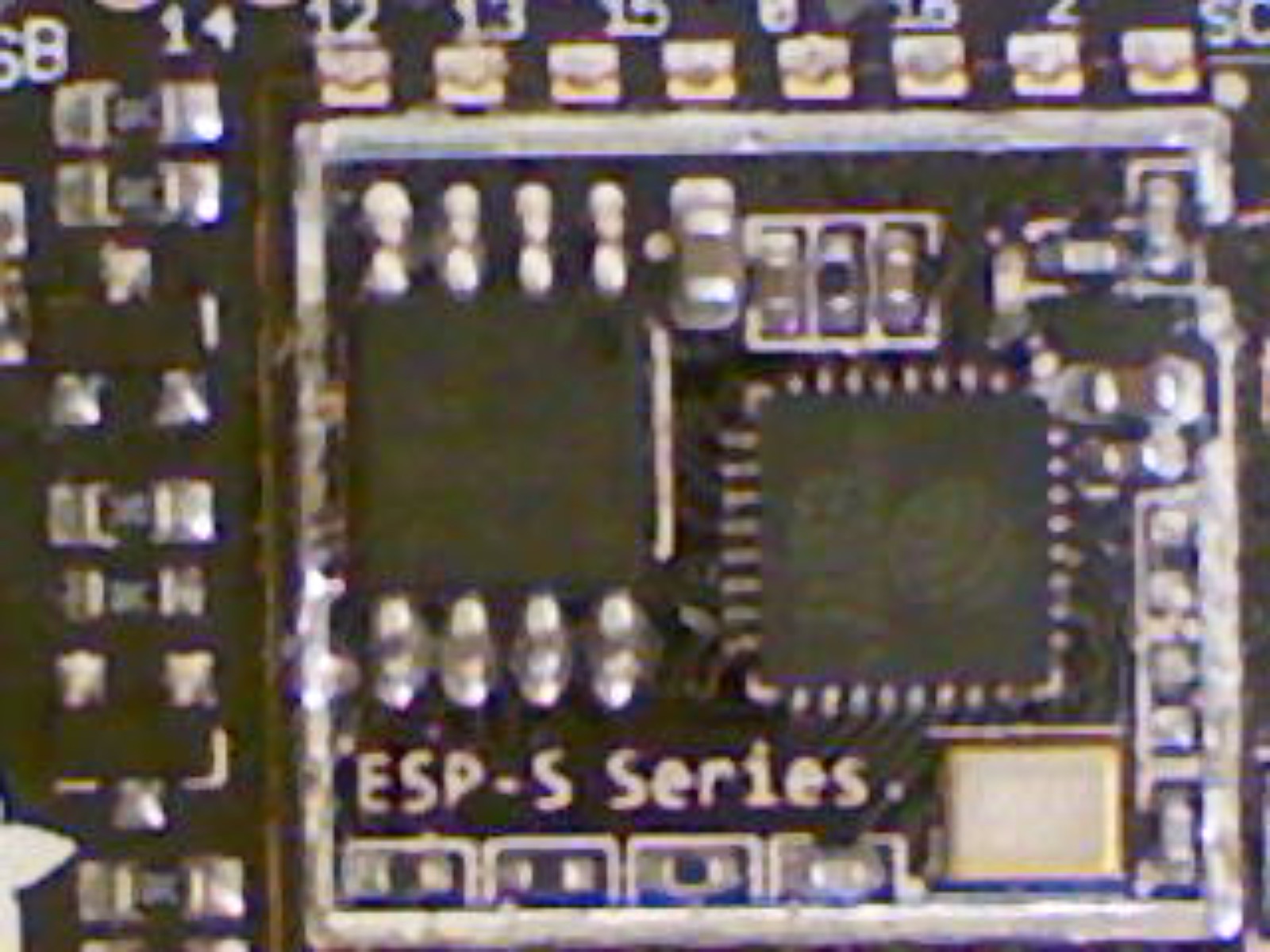
@raven canopy got the cap off - but not without damaging a few components along the edge where the antenna is connected - along the right side of this picture. 😦 So not sure if any probing will have been impacted.
stuck elbow
I usually dremel the top edge at 45°
solar whale
still no connection found from gpio16 to rst -- one of the damaged component was connected to RST - probably the capicitor or resistor for the reset
@stuck elbow yeah - I could have done a better job with it ...
stuck elbow
sorry, should have told you earlier
solar whale
np - i had no intention of using this one again and this was more to just see inside. Anything you recommend looking for. As I commented before if there were any connection between GPIO16 and RST we could have measured that wit the lid on.
only one of the pads on the damaged components connect to RST.. None to GPIO 16
I can't find anything connected to GPIO16 other than pin8 on the esp8266ex
manic glacierBOT
FYI - I did get the lid off an ESP8266-12S - but I damaged a few components along the right side of the image in doing so. One of the damaged pads is connected to RST. None of the pads is connected to GPIO16 and I can't find any connection to GPIO16 other than Pin 8 of the ESP8266ex.
timber mango
@timber mango It seems to be working great now! Thank you for the help
manic glacierBOT
 manic glacierBOT
 manic glacierBOT

I'd like to +1 this... I wanted to use my Circuit Playground Express as a tilt sensor for a Raspberry Pi because those are the items on my desk and the CPE is actually cheaper than the real-deal BNO055 plus I can echo the current tilt on the CPE's LEDs. So I want to move a number from the CPE to the Pi maybe 10 times a second and timing isn't critical. It's turned out to be surprisingly hard! This will probably end with me going to the store for an MCP3008 but I2C would be cooler, easier, che...
 edgy badge
Um... I have an LED matrix I got from banggood, which uses the WS2811. Can I just call that a noepixel knock-off?
pastel panther
@edgy badge yup
I think you'll need to figure out if it's RGB or RGBW
to properly setup the library
but yes, I'm 89% sure thats a neopixel
(equivalent)
edgy badge
Thanks! One follow up: is there a python library for rendering text on such LED matrix displays?
pastel panther
That I don't know.
rather I don't know of one offhand, but the framebuffer library might be able to help with that
I'm not super familiar with the breadth of the libraries so someone else might know better
edgy badge
Hmm. I have not run across the FB library. I did just find this though: https://learn.adafruit.com/micropython-displays-drawing-text/

How to write text on any MicroPython display.
pastel panther
that seems like a promising lead. Tonyd would be the one to know for sure
I think he wrote a bunch of the libraries in that general space
 uneven yarrow
Making progress on my trellis project 😃 https://vimeo.com/265899480

I recently was able to come back to the trellis sound box project and finally knit together the trellis and sound code using circuit python. It took me a bit…
def love learning python this way. 😃
manic glacierBOT
MicroPython supports MSB/LSB first. Checking, it appears the nRF52840 and ESP8266 peripherals support a choice of data ordering.
ruby lake
yep, Mu update got it to go.
timber mango
@timber mango I usually add a timer to the command line to unmount the target board:
$ sleep 45 && umount /mnt/foobar # cant remember the device name offhand
If I am not using the command line (in Linux) I just do something else for 45 seconds after a write to the target's SPI flashROM-based filesystem.
timber mango
Safe ejecting the drive before resetting seems to work
slender iron
@uneven yarrow mind if I link that video in the newsletter this week?
@uneven yarrow awesome video!
manic glacierBOT
 raven canopy
@uneven yarrow looks great!! and glad it's working after our little hiccup.
@solar whale thanks for verifying it isn't a hardware issue. i hope that was truly a dead esp; now you can grab the flash chip! #silverlinings 😄
solar whale
@raven canopy it’s dead now😏 totally acceptable. It was previously damaged in that the usb bridge had been fried so it was a good candidate for experimentation. Now we still need to figure out why it resets!
raven canopy
yep. company just left, so I'm back "on the clock". 😄
solar whale
Not that you need to be. It is a weekend!
solar whale
Does anyone have the instructions for doing a local install of pylint so I can check stuff before letting travis embarrass me.
hmmm - I supose "sudo apt-get install pylint" was all I needed 🤔
solar whale
better was sudo pip3 install pylint - now I just have to deal with its complaints 😦
raven canopy
another option is to have a personal Travis account, and let things run there before PRing.
solar whale
I may take that on next. Not sure I really want to befreind Travis 😉
raven canopy
haha. understand the feeling. but, since most of my bone-headedness is obscured, i value the friendship. the commit messages still tell some of the story though. 😜
solar whale
gosh - Travis was painfully easy to set up - should have done that long ago.
river quest
hi folks! there is still time to sign up for the next newsletter at http://www.adafruitdaily.com that is all about CircuitPython and Python on hardware ...

AND here's a preview - https://github.com/adafruit/circuitpython-weekly-newsletter/blob/gh-pages/_drafts/2018-04-24-weekly.md

GitHub
circuitpython-weekly-newsletter - Community newsletter for python on microcontrollers
manic glacierBOT

I see that the switch to using the external oscillator broke various boards and has been reverted.
Suprisingly this didn't affect the accuracy of the Feather M0 Express at all.
I'm getting really nice numbers, but then suddenly something happens that throws it out of wack and 3-4 secs is lost.
So far I haven't been able to find a common factor between runs that can point to a cause (it can take half a day for it to happen).
I'm using these scripts:
manic glacierBOT
"HOW did I miss that?!" Update:
So, we (I?) were chasing the RESET culprit based on rst cause:2 being linked to External reset or wake-up from Deep-sleep from Espressif's documents. Since we have pretty much ruled out a hardware issue (THANKS @jerryneedell!!), I've gone back and started looking at pin/RTC setup to see if we have a problem there.
To aid in that, I attempted to turn on debugging (didn't work; build failed; work that later?).
One thing I noticed before, and felt ...
river quest
ok! 2 new vids for our series... THE PLOTTER
capacitive touch:
https://www.youtube.com/watch?v=ZKi7e1zbzNI

Sensor graphing with plotter. CircuitPython + Mu + Capacitive Touch. Ongoing, updated guide and code on GitHub. https://www.adafruit.com/circuitpython https:...

Sensor graphing with plotter. CircuitPython + Mu + Sound. Ongoing, updated guide and code on GitHub. https://www.adafruit.com/circuitpython https://learn.ada...
Sensor graphing with plotter. CircuitPython + Mu + Capacitive Touch. Ongoing, updated guide and code on GitHub. https://www.adafruit.com/circuitpython https:...
manic glacierBOT
Interesting. I was looking at the bitbang implementation first of all, not hardware implementations. What would the circuit python philosophy be if some HW doesn't support it? Allocate extra buffers for swapped data, it tell the user to use the bitbang version via an exception?
marble hornet
awesome!
vague monolith
@uneven yarrow How'd you handle all those buttons?
@uneven yarrow Nevermind I see what a trellis is now
edgy badge
Ok, I could use some help. I've got a neopixel 8x32 display, and I can send stuff to it from a trinket. I loaded the micropython bitmapped font package, and it was working, but I wanted 6 characters, and could only fit 5 with the included font... So I looked at the code to make a new font, and decided I could do better because I could do a proportional font... So I did. It works if I display a character or two, but whenever I try to render 6, the neipixel library runs out of memory when I do a pixels.show(). It keeps trying to allocate 4k buffers, even if I specify 3 bytes per pixel. Any ideas what I can do to reduce memory usage?
marble hornet
@edgy badge could you place each letter separately overwriting the previous buffer before it. thats what i did with the rgbscreen library to add text support. I added a variable to count the number of characters and then print one character, then add one to that variable.
edgy badge
Hmm. Maybe? I'll try.
I don't think that'll work. I call neopixel.NeoPixel(board.D4,256,bpp=3,auto_write=False), followed by a fill and a show, and that's enough to run out of memory!
Is there a way to check free RAM? I'm wondering if I'm loading something I don't need/want?
raven canopy
@edgy badge are you using the .mpy version of the neopixel library? also, you could try mpy-crossing your main.py/code.py
edgy badge
I am running the .mpy. how do I mpy-cross my code.py? Is that a funny way of saying "compile"?
raven canopy
import gc
gc.mem_free()
that will get you the available heap space. let me get you the guide for mpy-cross.
edgy badge
thanks.
raven canopy
@edgy badge which firmware version are you running? 2.2.x or 3.x.alpha?
edgy badge
dunno! I should check!
raven canopy
k. REPL or boot_output.txt are the two ways to find out. or the .uf2 filename on your computer...
edgy badge
REPL says 2.0.0. so I'll go upgrade now...
raven canopy
download the mpy-cross applicable to your OS, then follow these steps to mpy-cross your .py: https://github.com/adafruit/circuitpython/blob/master/mpy-cross/README.md
cunning crypt
@raven canopy UF2 filename gets overwritten when put onto the device itself. Becomes uf2_current
or current.uf2 or something like that
raven canopy
correct. i meant the local copy on the computer. could've cleared that up in my statement... 😄
cunning crypt
I figured you knew, but wanted to make sure there's no confusion.
raven canopy
appreciated. details matter.
@edgy badge when using the pre-built versions of mpy-cross, I believe you can skip the make step.
solar whale
trying to get Travis to bless my repo before creating a PR -- got past all the real errors but stuck on this:
The command "circuitpython-build-bundles --filename_prefix adafruit-circuitpython-stmpe610 --library_location ." exited with 0.
2.69s$ cd docs && sphinx-build -E -W -b html . _build/html
Running Sphinx v1.7.3
making output directory...
loading intersphinx inventory from https://docs.python.org/3.4/objects.inv...
loading intersphinx inventory from https://circuitpython.readthedocs.io/projects/busdevice/en/latest/objects.inv...
loading intersphinx inventory from https://circuitpython.readthedocs.io/projects/register/en/latest/objects.inv...
loading intersphinx inventory from https://circuitpython.readthedocs.io/en/latest/objects.inv...
building [mo]: targets for 0 po files that are out of date
building [html]: targets for 3 source files that are out of date
updating environment: 3 added, 0 changed, 0 removed
reading sources... [100%] index
Warning, treated as error:
autodoc: failed to import module 'adafruit_stmpe610'; the following exception was raised:
No module named 'micropython'
anypne know what I am doing wrong or where lot look for guidance?
raven canopy
you need to add micropython to the autodoc_mock_imports list in the docs/conf.py.
raven canopy
@solar whale no. there is a line that is probably commented out like this: autodoc_mock_imports = ['micropython', 'adafruit_bus_device']. uncomment it, and make sure that whatever your lib imports is listed in there (non-CPython imports at least).
edgy badge
Ok, so I got mpy-cross going. I put my code into a function foo(), and then from code.py import and call foo(). It does all that... and then I get the same memory allocation failed.
solar whale
ah - nvmnd -- I see the comments now -- need to add auto_doc_imports = ["micropython"] ?
raven canopy
also @solar whale, it's not obvious until you've battled Travis on it. 😉
edgy badge
I put a gc.mem_free at the start of my foo() and it shows 14688 free...
raven canopy
@edgy badge do you have your code on a github repo or anywhere else? memory allocation gets tricky...
edgy badge
I'll put it up. gimme five.
solar whale
@raven canopy just stuff in the lib - what abotu in the examples? lib uses only micropython and time, but examples use digitalio,busio
raven canopy
@solar whale i think the examples are exempted. i should remember after doing all of them, but I brain dumped on that one. 😄
let me look at the yaml real quick..
solar whale
does it hurt to add if they are not used?
raven canopy
you don't need to include them.
solar whale
thanks!
edgy badge
 solar whale
WooHoo!! Travis gave me a green!! My life is complete! 😀
raven canopy
@idle owl is the "you can drive 300 neopixels" a verified number on the trinket? see MTO's issue above. @edgy badge if it is failing to allocate memory at the pixels = neopixel.NeoPixel line, i would think that the dictionary is eating the heap. a tuple or list would be smaller. and we'll see what kattni says about the upper limits of driving neopixels on a trinket (i don't have that many, so i can't verify myself).
@edgy badge you could also give the 3.x.alpha firmware a try; it includes some new heap management stuff. understand that it is still under development though (and will require 3.0 libraries).
edgy badge
Ok. I'll have to do it tomorrow. Gotta get to bed now. Thanks for the help.
raven canopy
yw. we'll be around to help. 💤
i want to keep working...but Westworld is calling to me. decisions. 😄
solar whale
bed time here - good night all!
raven canopy
night @solar whale! rest well knowing that Travis has been vanquished! ⚔
manic glacierBOT
I looked more closely. MicroPython machine.SPI only supports MSB first, and will complain otherwise. pyb.SPI supports both. It supports 8 or 16-bit writes, presumably due to the chip. Atmel supports 8 or 9 bit writes. I'm inclined to think if we added this, we would restrict the capabilities based on the chip involved rather than fall back to bitbang silently.
slender iron
<@&356864093652516868> and anyone else interested. Normal CircuitPython Weekly meeting tomorrow (Monday) here on Discord in the CircuitPython voice chat. As usual its at 11am Pacific / 2pm Eastern. http://everytimezone.com/#2018-4-22,1800,b8jj
manic glacierBOT

 lethal abyss
shinny @fluid helm was in France last week and there was fun with Edublocks, micropython and several boards
https://photos.app.goo.gl/UNdZKAplNXmxfLeF3

Google Photos
manic glacierBOT
@sommersoft good sleuthing! I think that SPECIAL_CASE insight is key. Its stored in gpio_function and peripheral for the pin. One of these must be used as an address (peripheral is my guess) and it isn't checked for the special case. You could compare to the other values to find the ones that are obviously memory locations.
@notro Yup, we had to follow up with a couple fixes. No big deal though. Email me at scott@adafruit.com and I'd be happy to get you more boards to test with if you like. We have an existing bug for supporting external crystals in 3.x and this should be part of it.
Thanks again for the contribution!
+1 to throwing an exception and pointing to bitbangio in the docs.
@jerryneedell good work! New issue for checksum errors would be good.
 errant grail
Ah, the relaxing sound of a mechanical keyboard. Text only for me today, BTW.
slender iron
<@&356864093652516868> starting in two minutes!
raven canopy
Haha. Almost sounded like some late '80s metal with the cutting in and out...
Fondant or Marzipan?
Yeah..tastes like chalk and sugar.
idle owl
My setup is weird today so feel free to tell me when I forget to unmute my mic.
 quick remnant
Skip me in the round robin, I'm between this and a bunch of other things so I may not hear all of it
raven canopy
Yay @errant grail! Grats!
 hollow ingot
Hugs to the amazing Micropython/Circuitpython community. I'm so reliant on everyone's freely-shared contributions such as WebREPL to offer educators and learners nice landing experiences https://vgkits.org . Blows me away every day!
VGKits shares how to source and combine low cost Python-programmable modules for classroom projects in UK schools. Please support us by buying preview kits,
errant grail
Group hug to the CircuitPython team – this time for the quality of the documentation for a couple of libraries that seemed obscure at first. Wonderful job on the RTDs and the copious comments in the code itself. Very helpful. Thanks to TonyD for his CPy servo learning guides.
raven canopy
@jerryn for "lifting the lid" on a huzzah8266 to answer a hardware question. Wasn't exactly necessary, but have a definitive answer now. @tannewt, @kattni, & @Dan Halbert for representing on AAE. Well done, and cake much deserved! And, a group hug to round it all out.
 fast wharf
yes, hugs for all 😀
hollow ingot

GitHub
vanguard - Repository to record the reference configuration of a Vanguard board
errant grail
Primary project (besides installing drip irrigation – an irrigation “circuit” playground of sorts) was to finish and test the CPy mirror galvanometer parameter-driven servo inertia controller helper. The goal was to achieve uniform movement speed. (The algorithm could also be used for steadying camera pan-tilt movement.) Control parameters include current x-y position (degrees), target x-y position (degrees), movement step size (degrees), maximum movement rate (seconds per 180 degrees), and a pause-at-target-position setting (seconds). Results were very good even when using micro servos with sloppy plastic gears.
Next steps include testing projection onto the back of a sheet of translucent glow-in-the-dark plastic.
Repository with servo helper and example: https://github.com/CedarGroveStudios/Galvanometer
M4 arrives later today! Will start testing with previously-implemented CPy projects before trying new stuff. #HappyCamper

 twin mica

This pressure sensor from Freescale is a great low-cost sensing solution for precision measurement of barometric pressure and altitude. The MPL3115A2 has a typical 1.5 Pascal resolution, ...
raven canopy
Dueling background noises, now. Tree trimming vs leaf blower. 😄
ESP8266 GPIO16 - Now that I'm chasing the actual problem, trying to get the firmware to build with the SDK's specific functions for GPIO16. Will probably still require changes in pin handling though.
ESP8266/nRF PulseIn - I've peeked at ESP a little. Most of what we'll need is scattered about in the machine_ and mod files. Haven't looked at nRF yet; kind of waiting on microbuilder and Arturo to put up any recent work.
Lastly, still working on a Windows+Atmel Studio SAMD debugging guide to add to the current one. Outline/structure mostly done.
Nope. 😔
errant grail
Rather Darth Vader - esque on this end
raven canopy
Might be able to get some time; would participate if I can..
twin mica
Adafruit Industries, Unique & fun DIY electronics and kits : - Tools Gift Certificates Arduino Cables Sensors LEDs Books Breakout Boards Power EL Wire/Tape/Panel Components & Parts LCDs & Displays Wearables Prototyping Raspberry Pi Wireless Youn...
raven canopy
:+1: thanks everyone! Have a great day!
errant grail
Thanks!
hollow ingot
Bye, have a great week.
fast wharf
yay, great show!
raven canopy
Should be able to filter it out post-pro, right?
slender iron
@raven canopy that assumes I spend the time doing it
raven canopy
Haha. fair point. 😀
errant grail
@slender iron If you want, I can do the post on the audio for you.
errant grail
Listen to it and if you think some noise reduction could help, let me know. I have some algorithms in my DAW that I've used on some on-location film work.
slender iron
ok thanks!
solar whale
Using config file /home/jerryneedell/projects/adafruit_github/Adafruit_CircuitPython_STMPE610/.pylintrc
************* Module stmpe610_paint_demo
C: 32,12: Consider using enumerate instead of iterating with range and len (consider-using-enumerate)

-----------------------------------
Your code has been rated at 9.71/10
```  on this code ```while True:
    if st.touched:
        while not st.buffer_empty:
            ts = st.touches
            for _ in range(len(ts)):
                point = ts[_]   # get the next point
                # perform transformation to get into display coordinate system!
                y = point['y']
                x = 4096 - point['x']
                x = 2 * x // 30
                y = 8 * y // 90
                display.fill_rectangle(x-2, y-2, 4, 4, color565(255, 0, 0))
Im getting the above pylint/travis complaint -- any suggestions how to appease it?
ts is not an integer - it is a dictionary
slender iron
@errant grail my voice is still audible so I think its fine
raven canopy
You could use ts.items, no?
tidal kiln
agree. interate over the items.
slender iron
but you don't need the items
solar whale
can you give a syntax example?
slender iron
you can just do # pylint: disable=consider-using-enumerate at the end of the line
tidal kiln
something like this maybe?
for p in ts:
    y = p['y']
                # perform transformation to get into display coordinate system!
                y = point['y']
                x = 4096 - point['x']
I'll try it
tidal kiln
i'm just guessing on specifics, not sure what st.touches returns
solar whale
        """
        Returns a list of touchpoint dicts, with 'x' and 'y' containing the
        touch coordinates, and 'pressure'
        """
        touchpoints = []
        while (len(touchpoints) < 4) and not self.buffer_empty:
            (x_loc, y_loc, pressure) = self.read_data()
            point = {'x':x_loc, 'y':y_loc, 'pressure':pressure}
            touchpoints.append(point)
        return touchpoints
@slender iron cool. The offer stands for any future recordings.
slender iron
thanks!
tidal kiln
@solar whale yah, try what you posted.
tidal kiln
cool. that's the basic pythonic way for any iterable:
for thing in iterable:
    #do stuff with thing
    thing.foo()
cool! and pylint likes it, too!
@slender iron @idle owl I have a working stmpe610 driver - I have not created a guide for it yet. There also may be some changes coming, but it is functional. Should I go ahead with a PR to get something out there or would you prefer I wait until the guide is ready. The current version is in: https://github.com/jerryneedell/Adafruit_CircuitPython_STMPE610/tree/jerryn_stmpe610 if you want take a look at it.

GitHub
Adafruit_CircuitPython_STMPE610 - Adafruit CircuitPython driver for the STMPE610 resistive touchscreen controller
idle owl
I think it's fine to get the working version up before the guide, @solar whale
solar whale
OK - will post it soon.
solar whale
@idle owl its there - nice to have run it through Travis "before" submitting the PR -- glad @raven canopy showed me the way!
solar whale
maddening, but handy 😉
idle owl
I don't think I have the display, but I assume you've tested it, yes?
solar whale
yes - tested with both a TFT featherwing and an stmpe610 breakout with just a touch screen attached (no display) All my testing has been on 3.0, but I don't expect any issues on 2.2.4
Would welcome anyone else taking it for a test -drive!
idle owl
I'm wondering if I have it
solar whale
No rush. I’ll be out for a while. I just wanted to get it moving along.
slender iron
@tidal kiln when you have time: https://forums.adafruit.com/viewtopic.php?f=60&t=134600
tidal kiln
@slender iron moved and responded. thanks.
slender iron
thanks @tidal kiln
errant grail
Okay. Now the fun begins!
warped pendant
@meager fog @solar whale thanks for the help with Mu install it was just showing as unix executable file - and I was rushing to make my recycle bin talk! - and this new mac - ugh to open after unzip on mac - need to - control + click on program and then go to open - it will allow (was saying unidentified developer and not allowing me to open) which just threw me for a loop cause i was rushing and tired! Full on Adadruit prefs in Mu now!! 😃 & my recycle bin worked & was sooo fun - just cap touch though - now working on better eyes and multi-lingual phrases and more my CPX can do - thanks SO MUCH!
edgy badge
Yesterday, it was suggested that I try loading CP 3.0beta onto my trinket... Where is the image for that?
idle owl
Releases are all together: https://github.com/adafruit/circuitpython/releases 😃
GitHub
circuitpython - CircuitPython - a Python implementation for teaching coding with microcontrollers
edgy badge
Thanks!
solar whale
@edgy badge the current release is Alpha4 -- Alpha5 will be out "real soon" - Beta is still a ways off.
idle owl
Oh good call, I didn't even catch that. I passed right over the beta mention.
edgy badge
Yeah, I see that! I probably glossed over that too. Doesn't matter, I'll try it anyhow. It's not like it's hard to upgrade, downgrade, or reset.
slender iron
I should be able to do the alpha tomorrow. I got distracted reading over an upcoming book draft 😃
ruby lake
hm, time to figure out how module playground v2 will panel up
edgy badge
Got it working under 2.2!! I still need to hook up the RTC, so I'll probably run into problems again, but for now, it works.
manic glacierBOT
Found the offending call!
shared-bindings/digitalio_digitalinout_make_new -> assert_pin_free calls common_hal_mcu_pin_is_free, which is checking for pin->gpio_number == SPECIAL_CASE.
SPECIAL_CASE isn't assigned as gpio_number for any pins like NO_GPIO is. Changing the conditional to gpio_number == 16 keeps the board from crashing. Now to find out how to actually che...
manic glacierBOT
Now to find out how to actually check the status of GPIO16
Kind of knew the answer to this when I wrote it, but wanted to verify. There is no "enable/disable" register for GPIO16, since it is tied to the RTC and needs to be available in deep sleep. It is always enabled, and is only configured for out or in.
So, I'll poll you all on this. Do we skip the assert_pin_free altogether, or setup a flag to track it's usage state?
And a slightly related question: which state do we wan...
manic glacierBOT
Adds a simple gamepad HID device to the devices that share a common endpoint: mouse, keyboard, consumer controls, and now gamepad.
The gamepad shows up to varying degrees in various operating systems:
- Linux: visible as a
/dev/input/js*device and a/dev/input/event*device. Events can be seen viaevtestandjstest. Firefox and Chrome do not see the gamepad via https://html5gamepad.com, but that appears to be due to limited gamepad support/compatibility between the browsers...
manic glacierBOT
Epic! Great work! I'd set up a flag.
I usually initialize it to the default state. Not sure what that is in this case.
manic glacierBOT
 manic glacierBOT
 uneven yarrow
I'm running into an issue with a circuit python project Im' working on. I worked through some matching game logic in my main.py file. Once I finished and confirmed it worked I realized it would work better as a class, so I classed it up still in my main.py file and confirmed the game still worked.
From there I wanted to move the class into its own file and put it in the lib folder with the rest of the libraries I'm using, so I created a lib/MatchingGame.py, moved the class into it, and then tried importing it back into the original file.
The problem I'm running into is when I do this I get the error:
main.py output:
Traceback (most recent call last):
  File "main.py", line 11, in <module>
MemoryError: memory allocation failed, allocating 235 bytes
I'm still learning python so I'm sure this is something I'm doing wrong or misunderstanding, but I thought that if I added the __init__.py file to my lib folder I should be able to import into my main.py file (and it works for my pitches.py file so I'm not sure why it doesn't work for my matching game file)
I should also note that I move the MatchingGame file out to the same level as my main.py file I get the same error
tidal kiln
looks like it's just a memory issue, i.e. not enough space
youre importing a lot of other modules
one easy thing to try - change the order of the imports, try putting the import for TrellisMatchingGame first
uneven yarrow
ah
tidal kiln
if that doesn't work, would need to try converting your .py to an .mpy using mpy-cross
uneven yarrow
ah ok, I moved the import to the top of the file and removed some of the imports from main.py that aren't needed anymore (b/c they've been moved to MatchingGame.py) and it worked!!!
I get a different error now, but it's one that seems to be code based and I can go from there
Thank you @tidal kiln !!
tidal kiln
cool. np.
manic glacierBOT
 slender iron
tulip sleet
slender iron
tulip sleet
tnx, replied
slender iron
thank you!
manic glacierBOT
Why do you need a wrapper class? I'd expect the module to be enough.
solar whale
@slender iron I'm having a brain cramp - can you please remind me of the necessary steps to flash a bootloader to a Metro M4 Express using my J-link. I thought I'd ask rather than falil 😉 I have a friend whose new M4 is not responding to "double-tap" so I thought I't try relaoding the bootloader.
slender iron
do you have the uf2 repo checked out?
manic glacierBOT
Originally it had a helper function which ended up not being needed. I'll make it just a module.
Anyone mind if I punt this to 4.0?
solar whale
I can get it - won't actually do this until this evening. Also have the binarys taht were posted to the forum today.
solar whale
I was planning to try that as well. I have not tried anything yet. Just got the board and won't be home for a few hours.
slender iron
kk, please keep us posted! this is why its a beta board 😃
solar whale
sure - it looks like his is not the only one. I was just trying to recall the correct commands to use.
slender iron
where did you see others? the forum?
tidal kiln
@slender iron just fwd'd you a related email
slender iron
thanks
I haven't used my production version
I'd be interested to see what the program counter is
if its hanging in the bootloader
solar whale
Sorry for the basic questions, - when you load it do you use JLinkExe or the GDB Server?
slender iron
I only use the gdb server
solar whale
I'll try to capture it before I try the reload.
slender iron
thanks!
solar whale
then do you use the .elf or .bin?
slender iron
I use the elf
solar whale
thanks - been a long time 😉
slender iron
no problem! I'd appreciate your help on this
solar whale
Glad to.
slender iron
if I want to try and replicate should I load circuitpython on it a couple times?
@tulip sleet what did you do before your metro m4 stopped responding?
tulip sleet
@slender iron I can't remember, but it was something simple like just plugging in the Metro. I don't even think it was immediately after reloading CircuitPython. (I'll forward you some email as well.)
Note that there is NO bootloader protection on the beta boards. Limor knows this - it was deliberate. But I'm not sure this has to do with the bootloader -- it could be some other hardware failure mode
raven canopy
I still haven't booted mine yet, either. I can later with the SWD, for a "fresh" look. Let me know of anything you might want to see.
slender iron
@tulip sleet hrm ok. It doesn't sound like it was dead if you could still load stuff onto it
stuck elbow
just to make sure, is the m4 we got supposed to have the bootloader on it?
solar whale
mine did.
slender iron
yeah it is @stuck elbow
stuck elbow
because it's not coming up as a usb device for me, neither normally connected nor after double-clicking reset
slender iron
actually @stuck elbow do you mean a production board or the rev b we got a couple months ago
tulip sleet
@slender iron but it wouldn't run. gdb load seemed to work, but then a mon reset and continue did nothing, and the backtrace was a single weird stackframe.
slender iron
and its black?
slender iron
yeah its supposed to have a bootloader
@tulip sleet the stack would be weird if it was stuck in the bootloader
tulip sleet
Try the bootloaders in the thread here (attached zip): https://forums.adafruit.com/viewtopic.php?f=63&t=134581
stuck elbow
ok, mine doesn't — I have to run now, but I will look with a debugger in the evening
slender iron
thanks @stuck elbow
tulip sleet
I don't have a bad one right now, since I gave it to Limor. But I wasn't doing anything that would have damaged the bootloader, so I assumed it was a hw failure. Also did not know at the time that BOOTPROT was not set, so I assumed that was very unlikely.
slender iron
isn't it possible for arduino to issue a chip erase?
tulip sleet
yes, I think so, but I wasn't using Arduino that I remember. Hmm, or maybe I was. I was maybe loading a simple Arduino program to echo serial input.. hmm, hmm
slender iron
ah! really? to check delete?
tulip sleet
no, wait, maybe not, I think I was doing that with a Trinket, because I didn't have the M4 Arduino package even loaded on the laptop.
slender iron
kk
tulip sleet
I was checking delete. It's possible it happened then. Maybe we should sacrifice an M4 to try this. (Hopefully it can be reincarnated.)
slender iron
I'd be happy to try and break mine
arduino doesn't chip erase here at least: https://github.com/adafruit/ArduinoCore-samd/blob/master/cores/arduino/Reset.cpp#L56
GitHub
Contribute to ArduinoCore-samd development by creating an account on GitHub.
tulip sleet
theory: board type is set wrong in Arduino, so it erases the upper 8k of the 16k bootloader, because it thinks Arduino program should start at 8k, not 16k.
could be smoething with bossac. shumatech changed a bunch of stuff recently, some incompatibly. Limor noticed
i like my theory maybe
tidal kiln
why couldn't you recover with jlink?
tulip sleet
I didn't know the bootloader was hosed (if it was), so I didn't even try.
slender iron
I can confirm my production version doesn't have BOOTPROT (its 0xf)
tulip sleet
yeah, I saw that last night (see hipchat) rev B is 0xd
 tulip sleet
so it could shoot itself in the foot
manic glacierBOT

I just want to say that the HTTP version @dhalbert dhalbert refer to https://html5gamepad.com/ say "Connection Refused" where the HTTP version http://html5gamepad.com/ works for me.
slender iron
yup, is the bootloader actually over 8k?
manic glacierBOT
@dglaude URL's fixed. Thanks!
tulip sleet
@slender iron
   text       data        bss        dec        hex    filename
   8764        464      54480      63708       f8dc    build/metro_m4/bootloader-metro_m4-v2.0.0-adafruit.1.elf
m0 just fits in 8k:
   text       data        bss        dec        hex    filename
   7396        460      11276      19132       4abc    build/metro_m0/bootloader-metro_m0-v2.0.0-adafruit.1.elf
I wonder whats after it
pastel panther
stupid question: wouldn't you want to look at the .bin and not the .elf?
tulip sleet
well, the text+data size tells me what I want to know, I think
8764 > 8192
those are the numbers printed by the linker during the build
pastel panther
ok
tulip sleet
the *.bin sizes are exactly 8192 or 16384, because they're specified to be that big
pastel panther
ah, right
slender iron
usb descriptors are after the 8k boundary
 .text.memcpy   0x00001ff8       0x16 c:/arm/2017q4/bin/../lib/gcc/arm-none-eabi/7.2.1/../../../../arm-none-eabi/lib/thumb/v7e-m\libg_nano.a(lib_a-memcpy-stub.o)
                0x00001ff8                memcpy
 .text.memset   0x0000200e       0x10 c:/arm/2017q4/bin/../lib/gcc/arm-none-eabi/7.2.1/../../../../arm-none-eabi/lib/thumb/v7e-m\libg_nano.a(lib_a-memset.o)
                0x0000200e                memset
 .text          0x0000201e       0x10 c:/arm/2017q4/bin/../lib/gcc/arm-none-eabi/7.2.1/../../../../arm-none-eabi/lib/thumb/v7e-m\libg_nano.a(lib_a-strlen.o)
                0x0000201e                strlen
 *(.glue_7t)
 .glue_7t       0x0000202e        0x0 linker stubs
 *(.glue_7)
 .glue_7        0x0000202e        0x0 linker stubs
 *(.rodata .rodata* .gnu.linkonce.r.*)
 *fill*         0x0000202e        0x2
 .rodata        0x00002030       0x10 build/metro_m4/cdc_enumerate.o
 .rodata.devDescriptor
                0x00002040       0x12 build/metro_m4/cdc_enumerate.o
                0x00002040                devDescriptor
 *fill*         0x00002052        0x2
 .rodata.hidDescriptor
                0x00002054       0x21 build/metro_m4/cdc_enumerate.o
                0x00002054                hidDescriptor
 *fill*         0x00002075        0x3
 .rodata.str1.4
                0x00002078       0x25 build/metro_m4/cdc_enumerate.o
 *fill*         0x0000209d        0x3
 .rodata.string_descriptors
                0x000020a0       0x10 build/metro_m4/cdc_enumerate.o
 .rodata.BootBlock
                0x000020b0       0x3e build/metro_m4/fat.o
 *fill*         0x000020ee        0x2
 .rodata.indexFile
                0x000020f0       0x69 build/metro_m4/fat.o
                0x000020f0                indexFile
 *fill*         0x00002159        0x3
Implemented by #776. @eighthree: this should be in the next 3.0 alpha. Thanks for testing, if you have a chance! See #776 and https://github.com/adafruit/Adafruit_CircuitPython_HID/pull/19 for details.
solar whale
Was the bootloader shipped with the M4's smaller?
slender iron
mine has the version number: UF2 Bootloader v2.0.0-adafruit.4 SFHWRO
(different from the zip on the forum)
solar whale
with the size >8k on the current ones, I assume there is no point in trying them until other changes are made, correct?
slender iron
they should work fine when they are loaded
the theory is that arduino overwrites where it shouldn't
though it doesn't seem that reliable
solar whale
OK - so it is just arduino - not a problem for CP 3.0
manic glacierBOT
Latent support in #776, but not turned on. Needs more testing: it appears touchscreen and gamepad on the same HID endpoints might conflict on at least some platforms (Linux). Might need to wait for dynamic HID descriptors. Also current report descriptor (emulating a digitizer with stylus), does not necessarily seem to do the right thing with existing built-in drivers on all platforms.
solar whale
😉 I meant the loading of the USB descriptors at 8K - that is an arduino thing, not a CP thing.
slender iron
those are the bootloader's usb descriptors
solar whale
ah - OK so just happen to fall > 8K now -- not hard coded to that address.
slender iron
yup, looking at the correct tag now
solar whale
I think the forum posts were arduino related
pastel panther
all hail JLink, savior of "bricked" devices
slender iron
🤞
tulip sleet
shipped bootloader id's as UF2 Bootloader v2.0.0-adafruit.4 SFHWRO. Binaries available here: https://github.com/adafruit/uf2-samd21/releases/tag/v2.0.0-adafruit.4. I think what's in the forum thread was just what Limor had handy.
Updating the bootloader with itself (from the release update-bootloader... .uf2) should set BOOTPROT, I believe.
slender iron
yup
solar whale
@tulip sleet the link to the SFHWRO bootloader did not come through: can you post it again?
tulip sleet
@solar whale edited above
solar whale
thanks
slender iron
I'm going to try and flash with arduino with a breakpoint at that erase line
tulip sleet
confirmed: using update-bootloader-metro_m4-v2.0.0-adafruit.4.uf2 will turn on BOOTPROT:
(gdb) svd/x NVMCTRL STATUS
Fields in NVMCTRL STATUS:
    READY:     0x1  Ready to accept a command
    PRM:       0x0  Power Reduction Mode
    LOAD:      0x0  NVM Page Buffer Active Loading
    SUSP:      0x0  NVM Write Or Erase Operation Is Suspended
    AFIRST:    0x1  BANKA First
    BPDIS:     0x0  Boot Loader Protection Disable
    BOOTPROT:  0xD  Boot Loader Protection Size
👍
good time to fix https://github.com/adafruit/circuitpython/issues/653
GitHub
I am unable to upload an arduino sketch to my metro_m4_express_revb if I have previously loaded CP 3.0 to it and CP 3.0 is executing
I can upload successfully if I "double-tap" to put the...
(its still broken)
seems like my bootloader crashed
when using arduino to upload to a "metro m0" (really metro m4)
fixed in master
(not sure why)
manic glacierBOT
@jerryneedell can you reproduce this? I managed to with my stock installed metro m4 but can't once I load new code. (alpha.4 or master)
slender iron
@tulip sleet I can't manage to break the bootloader
solar whale
Will try a bit later. Will an Arduino load brick the M4?
solar whale
Ok. I’ll be back inan hour or so to test.
tulip sleet
i'll try too. @slender iron are you at Arduino 1.8.5 with latest board support pkgs?
slender iron
yeah I think so
solar whale
Is theM4 now supported by the adafruit samd bsp. I had done a manual install before
tulip sleet
same results: can't break by pretending it's an M0. Used latest BSP and was able to upload Blink as m4
stuck elbow
ok, flashing the bootloader with the j-link made the metro m4 work
idle owl
nice!
tulip sleet
ooh, that is great! Did you set BOOTPROT? If not, use the update-bootloader mentioned above and reload the same one and it will set it.
@stuck elbow I can't remember -- did yours not work out of the bag?
manic glacierBOT

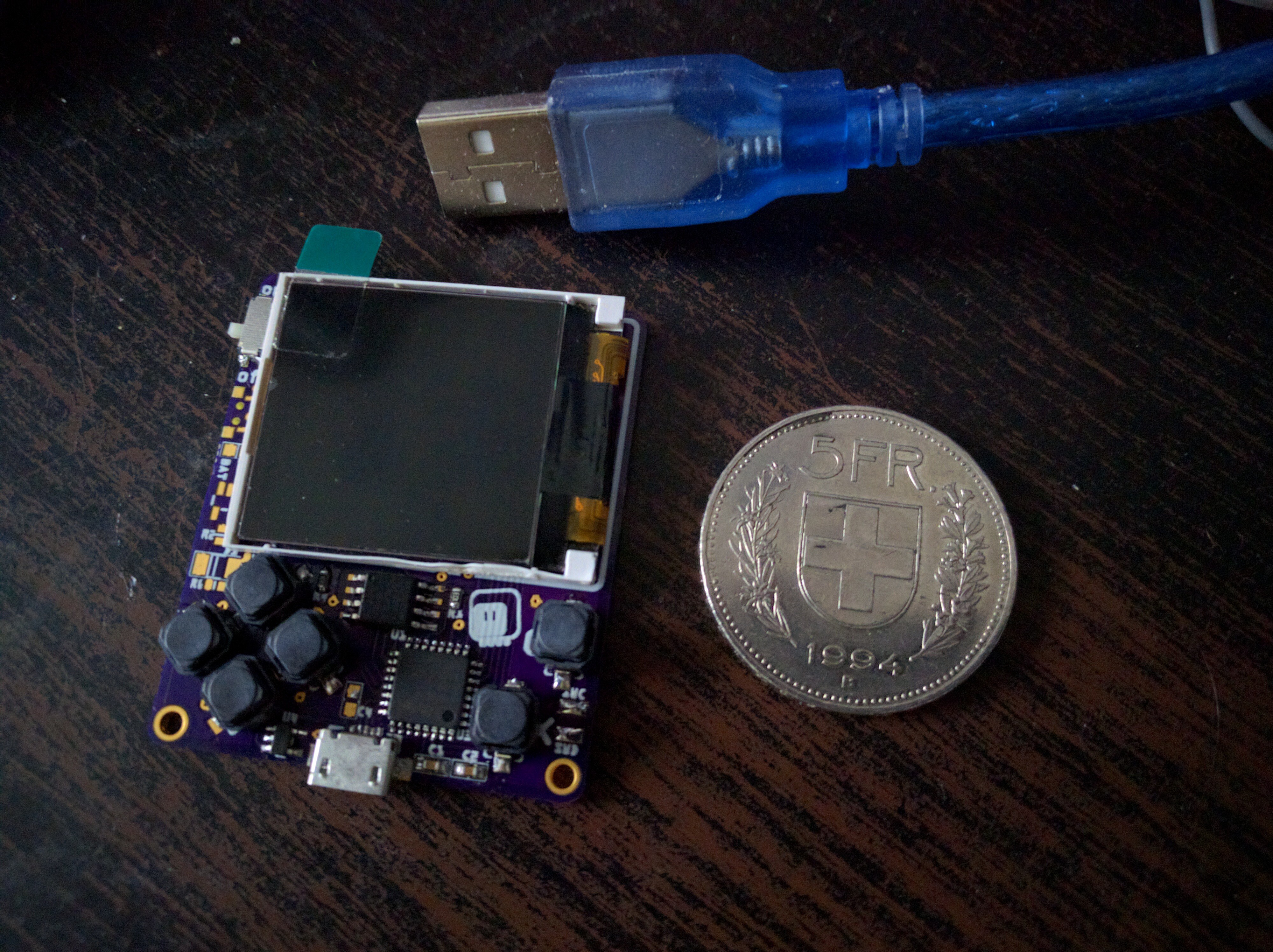 tulip sleet
statement: it didn't work when it first arrived (these double negatives)
stuck elbow
yes
true
but as soon as I loaded the bootloader, the circuitpython disk mounted
it's weird that it had circuitpython on it but not the bootloader...
tulip sleet
The tester loads the whole internal flash at once, so it may have been incorrect. Or maybe something in CPy is smashing the unprotected bootloader.
stuck elbow
well, I didn't get cpy running even once
tulip sleet
I'm not sure whether the tester load runs any CPy code or not.
is there a main.py with a demo?
tulip sleet
hmm, ok. We're keeping Limor in the loop on this. This is very helpful.
stuck elbow
well, ok, there are also .fseventsd .metadata_never_index
tulip sleet
yeah, those are all to keep MacOS from annoying us.
stuck elbow
and .Trashes, but that's probably created by my system
it's weird that boot_out.txt is empty — shouldn't it have the version line?
slender iron
@stuck elbow thats a 3.x bug
slender iron
going to release alpha 5 now
idle owl
Excellent
errant grail
FYI - Just finished testing alpha 4 on the Metro M4 with some of my projects that use the latest neopixel, motor.servo, time, random, pulseio, and simpleio libraries. No glitches or issues from this higher-level perspective.
(Is that helpful?)
slender iron
@errant grail yup! use arduino at all?
errant grail
Yes, I have. I've moved a few projects to CPy from that domain.
slender iron
on the metro m4 though?
slender iron
just wondering 😃
errant grail
I can give a couple of old Arduino projects a shot, perhaps a couple of examples.
tulip sleet
<@&370994983664091136> and Beta purchasers: See info here about protecting the bootloader: https://learn.adafruit.com/adafruit-metro-m4-express-featuring-atsamd51/beta-notes

Choo! Choo! ARM Cortex M4 @ 120 MHz coming thru!
The bricked M4 I left at Adafruit was also revived by rewriting the bootloader.
errant grail
Thanks Dan! Time to protect the bootloader.
tulip sleet
you are the guinea pig for my instructions
errant grail
I'll walk through it right now.
It worked as described. Suggest adding a step for the newbies reminding them that the CPy .uf2 file will need to be reloaded onto the METROM4BOOT drive after fixing the bootloader.
tulip sleet
will do, thanks!
errant grail
I'll open the Arduino IDE now and see what happens to the bootloader.
solar whale
I'm about to start poking at the "bricked" M4 that I have.
errant grail
Hmmm. Before playing with the Arduino IDE I tried one of the CPy tests that was working before loading alpha 4. The neopixel library stopped working.
slender iron
@solar whale before you flash it would you mind dumping the flash?
looks up the gdb command
errant grail
I'll go back to alpha 3 and test.
solar whale
ok - will take me a bit to get gdb going - I had been using Ozone.
slender iron
ah, theres probably a way to dump from it
I'm curious to get a copy of the flash
to see if its erased on the 8k boundary
solar whale
THe person using it did not use arduino at all.
solar whale
No - not intentionally -- I think I can dump the flash from JLinkExe
errant grail
My error. Loaded the feather M4 .uf2 by mistake. Alpha 4 passed the limited test. Now onto the Arduino IDE.
manic glacierBOT
[adafruit/circuitpython] tag deleted: 3\.0\.0\-alpha\.5
[adafruit/circuitpython] New tag created: 3\.0\.0\-alpha\.6
solar whale
I dumped the flash - does not look to be cleared at 8K - I dumped 16K
solar whale
flash dump
slender iron
thanks!
errant grail
Successfully downloaded Arduino code (it ran perfectly) then reloaded alpha 4. Worked as advertised. Nice.
solar whale
does the bootloader flash at 0?
tulip sleet
yes
solar whale
just checking!
tulip sleet
stranger things have been true
solar whale
interesting -- should I just try reloading at this point?
slender iron
can you dump the whole thing?
solar whale
How mnay bytes?
solar whale
how do I dump the SPI flash?
tulip sleet
you mean writing to block 0 of flash by accident?
slender iron
yup
solar whale
anyhting else you want me too do before I try flashing bootloader?
tulip sleet
maybe we should put in some checking down in the flash write code so it doesn't write where it's not supposed to.
slender iron
@solar whale not that I can think of
@tulip sleet that won't help us because its memory mapped. any store to a null pointer will write it
tulip sleet
but it's not RAM. Can't be written by a single machine instruction
solar whale
ha! it booted to CP
tulip sleet
i'd think it has to be a bug in the filesystem code or the nvm code or how they are called
solar whale
running alpha4
slender iron
@tulip sleet it could be that but there isn't anything protecting the memory from a rogue assign
solar whale
now loading update bootloader!
tulip sleet
when the board is reset, it jumps to address 0, which is mapped to the beginning of flash. But you can't write into flash even if it's at address 0: it's read-only
tulip sleet
the flash is read/write? /
slender iron
solar whale
uh o - I loaded update boot-lader before dumping the SPI flash -- sorry - looks like it wiped it!
slender iron
it shouldn't have @solar whale
tulip sleet
CPy probably thought it was a corrupt filesystem and reformatted it
slender iron
maybe
solar whale
well after loadin update bootloader, it did not reboot - I can try going back to regular bootlaoder
tulip sleet
@slender iron I think that is for RAM protection. You can't just write willy-nilly to flash with a store instruction.
the update-bootloader is not a bootloader, it's a program to be run. You need the regular bootloader .bin or .elf
you can only run the update-bootloader when there's already a bootloader that will load and run it
solar whale
acually bootlaoder still shows UF2 Bootloader v2.0.0-adafruit.4 SFHWRO Model: Metro M4 Express Board-ID: SAMD51J19A-Metro-v0
tulip sleet
can you get to METROM4BOOT?
tulip sleet
just drag or cp the update-bootloader .uf2 to METROM4BOOT. That will rewrite the bootloader with the same version, but it will also set the BOOTPROT fuses after it finishes writing.
solar whale
OK did that - so the bootlader info does not change
tulip sleet
yah, and if you checked the fuses, you'd see it's now protected.
solar whale
Ah so it just wiped the version of CP
tulip sleet
I need to make dinner but will be back in an hour or less.
Yes, because update-bootloader is just another program, and the bootloader overwrites Cpy with it.
solar whale
@slender iron I was mistaken - when to board booted to CP - the only thing on the SPI flash was boot_out.txt
slender iron
hrm
solar whale
This is how it was shipped.
slender iron
so what corrupted that bit of flash?
solar whale
hmm - possibly rebootin it cause it to create a new FS?
slender iron
yeah maybe
solar whale
how can I verify that the update bootloader is installed?
slender iron
welp, I "busted" mine
solar whale
uh oh
slender iron
(gdb) p/x *((uint32_t*) 0x0)
$1 = 0x2000d6a0
(gdb) set *((uint32_t*) 0x0) = 0
(gdb) p/x *((uint32_t*) 0x0)
$2 = 0x0
(gdb) mon reset
Resetting target
(gdb) p/x *((uint32_t*) 0x0)
$3 = 0x0
(gdb) c
Continuing.
^C
Program received signal SIGTRAP, Trace/breakpoint trap.
Dummy_Handler () at src/startup_samd51.c:545
545    {
(gdb) disconnect
Ending remote debugging.
(gdb) tar ext :2331
Remote debugging using :2331

Program received signal SIGTRAP, Trace/breakpoint trap.
Dummy_Handler () at src/startup_samd51.c:545
545    {
(gdb) p/x *((uint32_t*) 0x0)
$4 = 0x0
I managed to wipe that first word manually with gdb
the disconnect is a full power off I did
tulip sleet
you are asking the jlink to write a word, so it's smart and does a flash write
solar whale
Mine reboots OK with my latest build of CP
tulip sleet
@solar whale the bootloader is the same, so you can't tell, but you could use Ozone or gdb to look at NVMCTRL.STATUS.BOOTPROT
it should be 0xD, not 0xF
solar whale
ah - Ok - will try that
slender iron
@tulip sleet I don't think so because 0x4 is fine still
will hack my circuitpython to be mean and try it
solar whale
@tulip sleet do I need to make a debug build to be able to look at taht register?
slender iron
nope @solar whale