#circuitpython-dev
1 messages · Page 138 of 1
 cunning crypt
 idle owl
It was a linting update so I don't think so.... well linting and catching some other stuff along the way.
With a feather M0 Express it worked right though
I still have it hooked up
cunning crypt
Yeah, I wasn't sure if it was among the "Catching some other stuff along the way"
It's working properly? Fantastic
 fading solstice
I was just reading online that the power default are different between ST7735R and ST7735 with respect to RGB and BGR modes
idle owl
That could be it
I don't think it was an issue on other ones, but I only remember from one for sure
cunning crypt
With what @fading solstice just said, it seems unlikely that it'd affect others.
idle owl
Yeah agreed
 fading solstice
@cunning crypt @idle owl after reviewing the ST7735R and ST7735 datasheets, i do not see any difference with respect to RGB vs BGR. It looks like they both default to RGB
idle owl
Hmm ok.
 timber mango
timber mango
timber mango
You have to run looping() by hand or uncomment it. 😉
import main;main.looping() << like that in the REPL
 blazing trail
what is it?
blazing trail
Its also a color program
timber mango
It's a short demo of (what we used to refer to as)
ANSI.SYS use. Very common on dialup BBS years ago.
blazing trail
I don't understand why u are showing it to me
timber mango
It's just another way to do what your program is doing.
blazing trail
oh!
did you make it before mine?
timber mango
No. I've been directly editing files to include these codes for about 25 years, though. 😉
blazing trail
wow!
timber mango
ANSI escape codes. There's a special editor for this. I forget the name. Would be on ftp.funet.fi I think.
You can put them in /etc/issue (probably would work in MacOSX).
blazing trail
I just did some reaserch on color codes then added them
timber mango
You can also clear the screen and move the cursor around.
ANSI art is based on this, too.
blazing trail
I gtg
 slender iron
@timber mango it'd be awesome for circuitpython's messages use it
timber mango
@slender iron we used them in a forth interpreter. 😉
slender iron
😃
 manic glacierBOT

I'm not seeing examples for some of the repos that you have checked off: Adafruit_CircuitPython_SD for example.

@Sigafoos The checked ones are ones that I plan on adding examples to. If you want to help with examples, pick one that is not check yet.
@Sigafoos BTW: if you really like any of the ones I selected, please let me know, you can do em.
timber mango
@slender iron Looks like we borrowed from gforth:
https://github.com/wa1tnr/cpx-basic-studies/blob/master/141-print.d/ansi.fs
slender iron
borrowed what?
timber mango
all the ansi.sys manipulation code for a forth interpreter (to provide full colored text support, cursor movement, basically all that ncurses provides (or most of it). Pretty sure it's in the vt220 spec or similar.
(my first exposure to the system was called ansi.sys in MSDOS -- was an element triggered in their CONFIG.SYS file)
slender iron
yeah, circuitpython doesn't actually do anything, its the terminal program doign the hard work
thats why it just worked 😃
timber mango
hehe that's right. Fortunately, most terminals do support this (and have for decades. 😉
slender iron
yup!
 solar whale
It always goes back to forth 😉
manic glacierBOT

FYI - I was able to merge this PR into master and build/load the code into my feather52 - Seems to be working as expected.
 errant grail
Trinket M0 Circuit Python autonomous string car update: successful outside run today. Will be sending the other boards across the state to anxious string car racers. Okay, just two relatives, but it's a big step forward in performance and ease of support since they're not programmers. When updates are needed, I can just email a .py file to them that they can install themselves. Happy (Circuit Python) Camper here.
timber mango
I have a new noun.
 tulip sleet
@idle owl the "Creating and Editing Code" section in the Welcome to CPy! guide is in draft mode (again?). Do you know if that's deliberate or it's not done?
idle owl
@tulip sleet I have no idea, it's been completed from my point of view for a while.
tulip sleet
I think that was an accident - I'll flip it back again. Last updated yesterday evening.
 stark wolf
I don't know if this belongs here or in #help-with-projects but I'm having problems with the CCS811 air quality sensor breakout board and the Feather Huzzah. I can't get the CP example code to work.
I've switched busio with bitbangio and atleast one other error in the code. I'm getting "OSError: [Error 5} EIO" as the last line of the error.
Don't want to 'wall of text' you all with the full error unless asked.
solar whale
@stark wolf using bitbangio awas the first step - can you post the code you are running?
stark wolf
New to Discord. I hope this is correct.
solar whale
can you try just doing an i2c scan ```from board import *
import bitbangio
i2c=bitbangio.I2C(SCL,SDA)
i2c.try_lock()
i2c.scan()
after the tyr_lock it should respond True
solar whale
ok - so it is seeing the device
stark wolf
This is also typed directly into REPL. The example.py was run using 'ampy -p port run ./example.py'
solar whale
do you know where it was failing
stark wolf
Also I have a si7021 temp and humidity sensor and it's example.py ran just fine that way.
I haven't tried to type the CCS811 example code into the REPL so I don't know where the failure happened.
Do you want the full error message?
solar whale
ok - so try - after a reboot (control-D) ```from board import *
import bitbangio
i2c=bitbangio.I2C(SCL,SDA)
ccs=adafruit_ccs811.CCS811(i2c)
sure - post the file or post it between 3 backticks
3 backticks before -- 3 after
stark wolf
\
Traceback (most recent call last):
File "/usr/bin/ampy", line 11, in <module>
load_entry_point('adafruit-ampy==1.0.3', 'console_scripts', 'ampy')()
File "/usr/lib/python3.6/site-packages/click/core.py", line 722, in call
return self.main(*args, **kwargs)
File "/usr/lib/python3.6/site-packages/click/core.py", line 697, in main
rv = self.invoke(ctx)
File "/usr/lib/python3.6/site-packages/click/core.py", line 1066, in invoke
return process_result(sub_ctx.command.invoke(sub_ctx))
File "/usr/lib/python3.6/site-packages/click/core.py", line 895, in invoke
return ctx.invoke(self.callback, **ctx.params)
File "/usr/lib/python3.6/site-packages/click/core.py", line 535, in invoke
return callback(*args, **kwargs)
File "/usr/lib/python3.6/site-packages/ampy/cli.py", line 277, in run
output = board_files.run(local_file, not no_output)
File "/usr/lib/python3.6/site-packages/ampy/files.py", line 227, in run
out = self.pyboard.execfile(filename)
File "/usr/lib/python3.6/site-packages/ampy/pyboard.py", line 271, in execfile
return self.exec(pyfile)
File "/usr/lib/python3.6/site-packages/ampy/pyboard.py", line 265, in exec
raise PyboardError('exception', ret, ret_err)
ampy.pyboard.PyboardError: ('exception', b'', b'Traceback (most recent call last):\r\n File "<stdin>", line 9, in <module>\r\n File "adafruit_ccs811.py", line 113, in init\r\n File "adafruit_register/i2c_bit.py", line 40, in get\r\n File "adafruit_register/i2c_bit.py", line 39, in get\r\n File "adafruit_bus_device/i2c_device.py", line 94, in write\r\nOSError: [Errno 5] EIO\r\n')
\\
solar whale
hmmm - not a lot togo on - try the example in teh REPL - lets see where it is failing.
stark wolf
OK, in the last code snippet that you had me try it failed on the last line. once because we forgot to import the lib for the sensor and second with the following:
solar whale
oops
stark wolf
\
Traceback (most recent call last):
File "<stdin>", line 1, in <module>
File "adafruit_ccs811.py", line 102, in init
File "adafruit_register/i2c_bits.py", line 48, in get
File "adafruit_register/i2c_bits.py", line 47, in get
File "adafruit_bus_device/i2c_device.py", line 94, in write
OSError: [Errno 5] EIO
\\
No worries. We both forgot it.
One thing that I've noticed is that the CCS811 uses the adafruit_register lib and the SI7021 does not.
solar whale
hmm - I don't have my ccs811 avaliable now to hook up to my esp8266 - I can try tomorrow and see if I can reproduce this. I ahve oonly used it on an M0 (SAMD21) board with hardware I2C.
stark wolf
No worries. This isn't time sensitive. Just playing with new toys my wife gifted me.
solar whale
You are welcome to open an issue on regarding this - at https://github.com/adafruit/Adafruit_CircuitPython_CCS811

GitHub
Adafruit_CircuitPython_CCS811 - circuit python driver for CCS811 air quality sensor
Sorry - just recalled. I have one running on an esp8266 now - but via Arduiono ....
stark wolf
First time I might have found a genuine issue and not something I made a mistake on.
I've got an Uno board that I tested the breakout on just to make sure it wasn't borked. Worked fine there.
solar whale
So it can work with the hardware. May well be an issue with the Circuitpython bitbangio I2C.
Looks like I will have a "snow-day" tomorrow and have time to investigate.
stark wolf
I take it you are out east and have that noreaster heading in?
solar whale
sigh - its been an intersesting winter so far...
time for bed now -- have fun with the new toys.
stark wolf
Thanks. Be safe and sleep well.
solar whale
@stark wolf you have jogged my memory. You can brows through https://forums.adafruit.com/viewtopic.php?f=19&t=121816 for a long story of my struggles with this sensor on an esp8266 a few months ago. I’m looking forward to revisiting this.
stark wolf
@solar whale Thank you. I'll dig through it. I just posted an issue as you suggested as well.
solar whale
I saw. Thanks.
 sick creek
who from Circuitpythonistas are PyMLadies?
 opal elk
Hm, maybe I should try to tackle the “more helpful OSError” issue before adding examples...
solar whale
@slender iron @tulip sleet @stark wolf opened an issue against the ccs811 driver last night and I can reproduce the problems on an esp8266. I suspect the problem is really with bus_device or register and not with the ccs811 driver. Should I open an issue there is link it to the ccs811 issue or just keep is all in the ccs811 issue until we know more. https://github.com/adafruit/Adafruit_CircuitPython_CCS811/issues/9

GitHub
Connecting CCS811 to a Feather HUZZAH ESP8266 using bitbangio and adafruit_ccs811.mpy.
Example typed into REPL:
Adafruit CircuitPython 2.2.0 on 2018-01-02; ESP module with ESP8266
from board import...
manic glacierBOT
 slender iron
@solar whale adding a circuitpython issue is fine. it'll be easier to keep track of there
@opal elk adding examples will be easier
solar whale
@slender iron OK - I'm still trying to get some good scope shots. Getting very confusing results but making progress
opal elk
@slender iron yeah, but potentially less helpful overall. I'll try to add a few examples soon (I was going to yesterday and then other things came up)
slender iron
@solar whale with a saleae? sometimes having a trigger pin can help. aka use another digitalinout to just trigger the saleae recording
@opal elk its all helpful 😃
solar whale
Im using a scope for this
opal elk
documentation may be where I dump the majority of my time. always needed, always helpful.
solar whale
the I2C signals are not very clean - even on busio - but I think it is my setup.
 meager fog
CCS811 requires clock stretching, that may not be implemented on bitbangi
solar whale
ah
meager fog
raspberry pi does not, so you have to really slow down I2C
BNO055 also has clocks stretching as does PN532
they are Cursed
manic glacierBOT

Small u here because its for micro.
I don't think all of these conf_* files are needed with ASF4.
solar whale
Oy, that’s a lot of snow...
solar whale
@meager fog slowing i2c down to 10Khz does allow the esp8266 to work - for awile - that is a big improvement, but it still crashes after a few seconds to 10s of seconds.
it ran better on the m0 with bitbanging at 10 Khz
meager fog
yeah i think the Issue is just we dont have clockstretchin'
solar whale
but the signals look much nicer at 10 Khz 😉
Something to add to the todo list.
@slender iron I created an issue in circuitpython to implement clockstretching in bitbangio. I guess if arduino can do it, CP can....
manic glacierBOT
Some I2C sensors require clock stretching and do not work properly when using bitbangio (necessary on the esp8266). Examples are CCS811 https://github.com/adafruit/Adafruit_CircuitPython_CCS811/issues/9 and bno055.
 sick creek
does it handle opentype fonts?
meager fog
i dont think it does much of anything other than ascii, it has QT as the gui backend
 opaque patrol
Qt uses Rich text
Or at least mu-editor uses the RichText panes for its text areas
solar whale
@meager fog FYI - I cleaned up my setup - removed some extraneous wires and I can now get the ccs811 to run on the esp8266 at 10Khz. However, I do notice that if the ccs811 is present then the 3.3v lin show aabout 100mV ripple at ~10khz. And it is dropping below 3V sometimes.. I even see this if I run the mcp9808 at 400khz. still ripple at 10khz - it goes away if I remove the ccs811 and just run the mcp9808.
solar whale
ah - I saw it as well on the M0 so good to know it makes sense.
slender iron
I'm blowing my own mind by writing stepper motor unit tests
meager fog
mOtOrPaRtY
slender iron
@meager fog do you think I should add speed and multiple step controls? right now its only onestep
meager fog
whats the func proto for onestep?
slender iron
onestep(self, *, direction=FORWARD, style=SINGLE)
sick creek
@slender iron are you writing some motor test so you can implement them in  toaster
idle owl
whee motors
slender iron
@sick creek nope, just a side quest from getting the pca9685 driver linted
 stark hawk
Forked question: Can audioio cope with changing a sample buffer while looped-playing? -OR- is pyb.DAC actually supported, I couldn't find the library file for it
(I want to mix a couple of different waveforms at a credible audio rate on Trinket M0 -- guessing I'll likely have to go to native code to do it, but I thought I'd try to pull it off at the circuitpython level first)
(Also, hi everyone)
idle owl
Hi @stark hawk
So bossa is downloaded, not pip/brew installed?
It let's me copy the .app obviously, but it's refusing to let me put bossac into /usr/bin
even with sudo on from the command line.
opaque patrol
have you tried creating a symbolic link in /usr/bin
idle owl
No I haven't. It's working on my old machine, but I haven't done anything with it on the new one yet. And I'm not entirely sure how to make a symlink into /usr/bin.
I must have had help getting it onto the previous laptop 😄
Oh.
Looks like I cloned the repo last time.
Must have been running it from there.
opaque patrol
I usually create symlinks instead of adding files to /usr/bin, the syntax is ln -sf /path/to/file /path/to/symlink
You would need to add sudo for /usr/bin
idle owl
Ok, this is sounding familiar
I think I cloned the repo, must have built bossac? Then created the symlink? Question marks because I'm fuzzy on whether that's right
Hmm.
timber mango
 $ cd ; mkdir ~/.local
 $ mkdir ~/.local/bin
 $ ln -s .local/bin .
 $ ls -la | egrep bin
Then populate ~/.local/bin with stuff you want to override with.
 $ echo $PATH
/home/kattni/bin:..and the rest of your $PATH
For programs (xephem comes to mind) that want a full populated directory to run the binary from, I like to use:
 $ /bin/pwd
/home/nis/.local/bin/bin.0/xephem.d
The last directory in that path is full of .o object files and .c source files, having built the binary in that directory.
I generally cd to that xephem.d directory then just ./xephem in there.
slender iron
@stark hawk you should be able to change the buffer while it plays. no promises it sounds good, its being DMAed to the DAC under the hood
idle owl
I'm not even getting to that point yet. I can't get it downloaded in a way that runs in the first place.
idle owl
@slender iron I think I need some help when you get back.
slender iron
kk
slender iron
@idle owl I'm back
idle owl
Ok
I think you walked me through getting bossac setup the first time, and I'm obviously missing something crucial here.
slender iron
why do you need it?
idle owl
Install CP on an Adalogger M0 and test 2 more libraries.
slender iron
ah ok
idle owl
Yeah. heh
slender iron
I think I just download it and run it directly
idle owl
It's not working right for me then. I'll try it again.
slender iron
this is where I'd get it: https://github.com/adafruit/BOSSA/releases
GitHub
BOSSA is a flash programming utility for Atmel's SAM family of flash-based ARM microcontrollers. The motivation behind BOSSA is to create a simple, easy-to-use, open source utility to replace ...
idle owl
I'm in a dir with what I downloaded and it says command not found. You can just do bossac -h to test it right?
Oh...
right
slender iron
looks like there is no mac osx latest version though
idle owl
Still getting command not found. Can I run it from anywhere or does it have to be somewhere specific?
slender iron
if its not in your path you'll need to be specific about where it is
if its in your current dir then ./bossac
meager fog
@slender iron hiya back was fixing an arduino library. i think onestep is good for now
can always see how people use it, add more wrappers later
idle owl
Worked!
meager fog
vr00m
idle owl
oi slowly finding all of the background stuff I had installed on my old laptop. I don't remember how to get mpy-cross going either. I think I had to make it?
slender iron
its released with every circuitpython release too
idle owl
Oh. Ok.
slender iron
I think
idle owl
yep
slender iron
anyone know what voltage the automotive gauge should be used with?
 prime flower
are you driving it with a HBridge?
slender iron
ya, looks like its 5v
idle owl
I had to copy it out of one of my CP repos. I couldn't figure out how to make it work from the downloaded version.
prime flower
weird, productpage and datasheet dont have any measurements...prob ~5-6.3v
prime flower
the test circuit on the product page looks like its driven from the arduino in the GIF
 half sedge
Dear, on another Discord, I have been discussing and replicating the fact that Trinked M0 demo code fail to demo the Neopixel. Silently fail.
I am talking about this zip file: https://learn.adafruit.com/adafruit-trinket-m0-circuitpython-arduino/circuitpython#trinket-default-zip-install

CircuitPython or Arduino IDE on this tiny little microcontroller board
And tested with 2.0.0 version.
half sedge
If you flash 2.0.0 and put the demo code and connect neopixel on D4 ... nothing is happeing.
Silently fail (no error message, but no light either).
The build in dotstar does work.
Not the neopixel.
blazing trail
they recently updated the CP, so that could be a hidden problem
you can submit an issue, and they will get back to it really fast.
half sedge
Somebody receiving a trinked M0 out of factory is receiveing what??? 2.0.0. and Demo code.
No doubt about it, the topic was... do you test demo code before releasing?
slender iron
@half sedge the demo code shouldn't use a neopixel, it uses the built in dotstar
half sedge
But it does.
blazing trail
it didn't work for you though.
slender iron
ah, I see
half sedge
'''
NeoPixel strip (of 16 LEDs) connected on D4
NUMPIXELS = 16
neopixels = neopixel.NeoPixel(board.D4, NUMPIXELS, brightness=0.2, auto_write=False)
So the demo code is pushing you to connect neopixel on D4.
half sedge
Not fun if not working...
slender iron
@half sedge how ar eyou powering them?
half sedge
Quick fix is: return (0, int(pos3), int(255 - pos3))
blazing trail
@meager fog it doesn't work with the code he has
half sedge
It work with the fix !!!!
blazing trail
ik
half sedge
Not my fault, your bug.
blazing trail
it's an issue
half sedge
The trick is that neopixel expect tuple
Line 63 your code is saying:
return [0, int(pos3), int(255 - pos3)]
And that work for dotstar, but not neopixel
meager fog
i'll be updating the programmers to v2.2 anyways
half sedge
There might be another issue with the documentation of seesaw and circuit python.

An I2C to ... whatever! interface
idle owl
I'm attempting to test the adafruit_vc0706 and adafruit_sdcard but I'm running into issues. I switched to the current libs from the PR libs, same issue. Traceback (most recent call last): File "code.py", line 30, in <module> File "adafruit_sdcard.py", line 84, in __init__ File "adafruit_sdcard.py", line 117, in _init_card File "adafruit_sdcard.py", line 172, in _init_card_v2 OSError: timeout waiting for v2 card
Formatted the card using the SD formatter suggested in the guide
meager fog
@idle owl hmm what size is the card?
slender iron
we added support for any sequence to neopixel but the shipping neopixel.mpy may not have it
meager fog
i wonder if 32GB is SDXC or whatnot, do you have a 2-16GB?
half sedge
@slender iron or the demo zip 2.0.0 was not tested with 2.0.0
meager fog
worth trying another card
half sedge
Back to seesaw, the question is what should be put into the /lib ?
idle owl
true, there were issues with different cards I remember.
slender iron
@half sedge I don't think its a circuitpython version issue because this is a library issue
half sedge
Just adafruit_seesaw.py ?
meager fog
@slender iron i can take a look at the zip later, probbaly just has the older neopix mpy cause we did that changeup of tuples around the time we released
idle owl
I remember that
slender iron
yeah, I looked at the mpy but its too early to have a version string in it
half sedge
@slender iron Maybe trying to accept anything is not the best option...
slender iron
it accepts any sequence
GitHub
Adafruit_CircuitPython_NeoPixel - CircuitPython drivers for neopixels.
half sedge
What would be the recommend argument? (0, 0, 0) or [0, 0, 0] ?
idle owl
Other 32GB card does it too. Trying to locate a smaller card.
slender iron
they should both work
meager fog
@idle owl ok let me know if you'd like me to try it on a breadboard ive got
half sedge
How much extra code to support both?
slender iron
none
meager fog
iter is ~amazing~ 😄
slender iron
it works with any object that supports __len__ and __getitem__
yes though dotstar got it first
thats why I suspect there is a mismatch with the demo code, it was added to neopixel later
half sedge
When I tested 2.0.0 (and I was the one requesting a zip so that I could have a "like out of factory" when upgrading from 1.0.0 to 2.0.0) I did not knew I had Neopixel at home...
So I did not test.
It seems I have many Neopixel on Unicorn HATs
slender iron
well now we can fix it 😃
meager fog
@slender iron updatin' metro m0's - they'll be shipping with 2.2 starting this week
slender iron
yay!
opal elk
 idle owl
Getting a new error! No response from cam, check wiring.
idle owl
Is that what RX and TX are?
meager fog
its always confusing which to go to which - i get it wrong a lot
idle owl
That worked! I swear they're backwards from the board now though.... 😄
manic glacierBOT

This is strange, because I remember that I implemented clock stretching for MicroPython for the software I2C... Could it be that CircuitPython didn't use that?
Looking at the code, it's there: https://github.com/adafruit/circuitpython/blob/master/shared-module/bitbangio/I2C.c#L53
Do you have a logic analyzer to capture what is happening with that sensor?
slender iron
@idle owl they are the only labels where they don't match up RX goes to TX on another board
idle owl
Hah! ok
meager fog
yeah RX goes to TX - SPI solved this by calling them "MOSI" and "MISO" but we're stuck with UART's names
meager fog
@slender iron heya i just noticed simpleio isnt in the latest bundle?
but it is in the libraries folder? https://github.com/adafruit/Adafruit_CircuitPython_Bundle/tree/master/libraries/helpers
GitHub
Adafruit_CircuitPython_Bundle - A bundle of useful CircuitPython libraries ready to use from the filesystem.
idle owl
Also should we update the lib zip name to reflect the new release?
slender iron
looks at travis
meager fog
oh wait its from a week ago
thats odd, no new bundles?
do we have to kick it to create new bundles when we add libraries?
slender iron
sounds like a bug 😃
meager fog
oh noooo! want an issue?
slender iron
nah, I'll look now
meager fog
k - whew 😃
fading solstice
@opal elk you got a pylint complaint on the example file
opal elk
yep, working on it
stark hawk
@slender iron audioio looks not supported on Trinket M0? About to give up and make some VCOs out of discretes at this point.
slender iron
no, I don't think we had space for the code
slender iron
the script didn't expect an update to the circuitpython submodule in the bundle
manic glacierBOT
I do have some logic analyzer captures - GitHub won't accept the file types. I can get them to you in discord.
idle owl
Ok we apparently need to update the code in the guide for the cam, but it looks like the PRs for both libs are good to go.
So I'll get both of those merged.
meager fog
thx!
solar whale
@stuck elbow the logicanalyzer files are too big for discord
half sedge
@stark hawk for sound on Trinket M0 I used this: https://gist.github.com/dglaude/b085d54eec077874d28394fd317b7b54
 fading solstice
@rotund ether Before i do it. To indicate a new release of a bundle library we draft a new release or just add a new tag
slender iron
I'm gonna go climb. Before I get the bundle autorelease going I'll need to tweak the builder to fail if an added library doesn't have a release
some of the newest added are missing releases
stark hawk
@half sedge I'm looking for a pleasant drone for an accelerometer-controlled theremin, so "buzzing" doesn't sound like what I want, thank you though 😉
manic glacierBOT
I'll have to regenerate them, but it won't be today - the ones I have are too large because I captures some analog data as well. I'll try to repeat the tests tomorrow and post the files. Sorry for the confusion.
idle owl
@fading solstice You need to do a new release. But also tag it with a higher release number since it's a new release anyway.
fading solstice
@idle owl i am allowed to draft a release i.e. there is a button enabled for that on the releases, but i don't see a button on the tag page
idle owl
You don't do it through the tag page. Draft a new release, then you give it a tag from there.
Give me a minute to merge this lib and I can walk through it at the same time.
fading solstice
@idle owl thanks
idle owl
Ok. Draft new release. Then in the box that says "Tag Version" you give it a number appropriately higher than the previous one. I've been doing a whole number up for the linting and autobundle stuff, but if it's just a minor fix, give it a 0.0.1 increase, or 0.1.0 increase. Really it's up to you, in the end it's arbitrary.
So for Adafruit_CircuitPython_SD, I'm going to make the tag version 3.0.0
fading solstice
this one have 3.0.0, so it should be 3.0.1?
idle owl
If it's a little update then yep, that's perfect. If it's added functionality or whatnot, you could do 3.1.0 etc.
fading solstice
examples fo;der added ana an example .py file
idle owl
I'd give it 3.1, that's a solid addition.
fading solstice
k
The title is "Added an examples folder and example .py file." is the more i need to say in the desciption?
idle owl
Then make a note about what was added, and you can add something like this: To use in CircuitPython, simply install the [Adafruit CircuitPython bundle](https://github.com/adafruit/Adafruit_CircuitPython_Bundle/releases) or the zip from here that matches the version of CircuitPython you are using.
That will add a link
But it's not strictly necessary to add that bit
Then publish release
manic glacierBOT
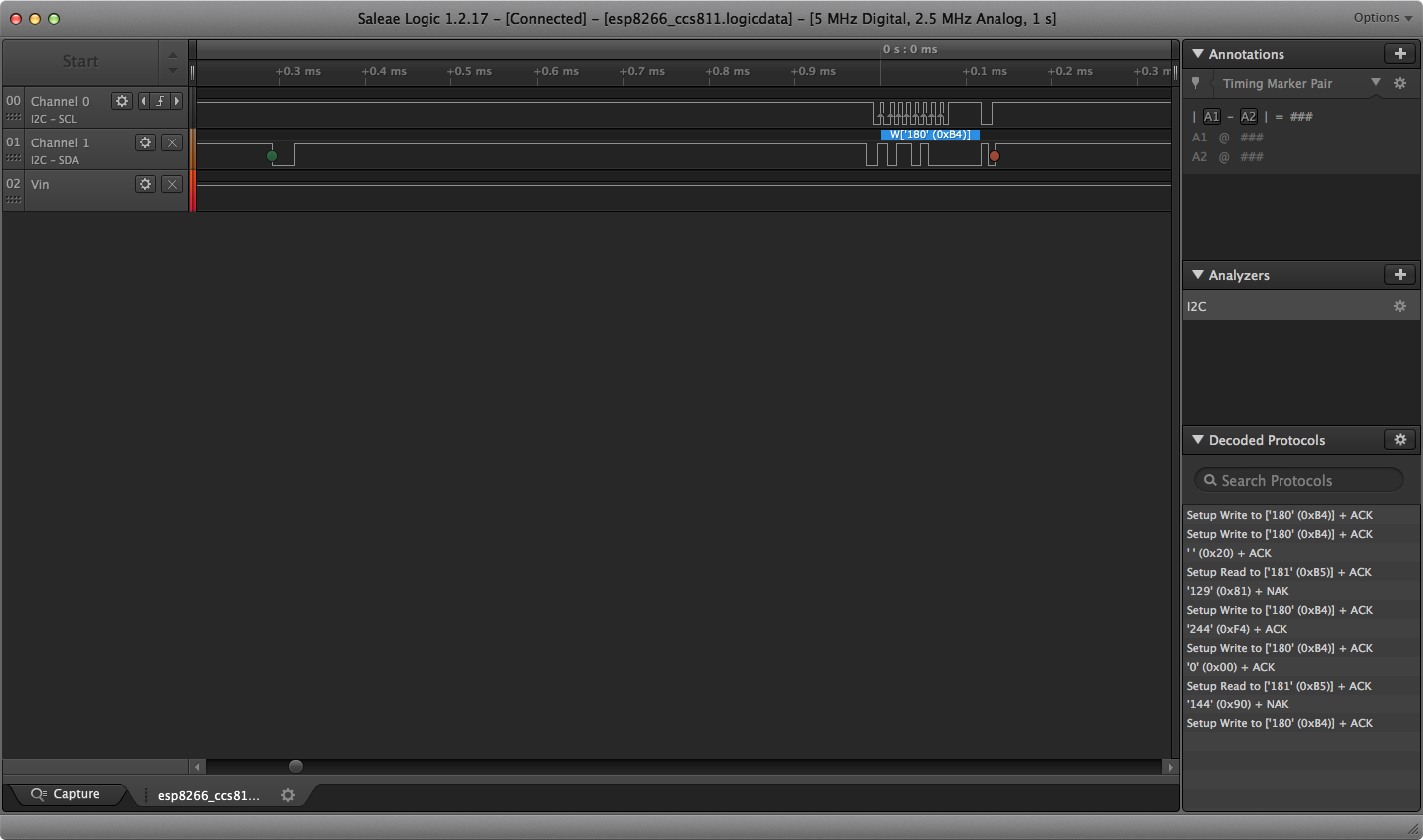
here is a screenshot of the Logic analyzer capture - perhaps it will tell you enough

this is the start of the capture
fading solstice
@idle owl tahnks and done
idle owl
@fading solstice Excellent! You're welcome 😃
 timber lion
hrm i noticed the VC0706 lint pull was just merged but i'm curious @slender iron @hollow raptorni what was the intention of moving the command buffer from its class member position to instance member? it was made a class member to reduce memory usage in the case of multiple cameras... bit of an edge case but it's not necessary to have a buffer for every cam instance
not a big issue to keep it as is with the change right now but FYI in the future, most libraries explicitly use class instance buffers for that reason
the little I2C sensors are really where it might matter the most, in those cases you could definitely have like multiple LCD backpacks
idle owl
Ok. I don't know what the intention was. I tested before merging but with a single cam.
timber lion
so having lots of little buffers is a bummer for memory usage
oh yeah functionally it should be all good, thanks for checking it!
but it's the danger of mixing lint changes with other changes to the lib.. some things are design choices
it looks like the guide will need to be updated too with new names for the sizes
sick creek
intresting point there @timber lion
timber lion
ah hrm
sick creek
one project where using small cameras as 2 in steroe could have multiple cameras
idle owl
Actually wait it looks like it's on the github repo
I can do a PR for it
But that won't update the snippets.
That I don't have access to.
timber lion
yeah i'd say in the future lets stage these updates so the guide is updated at the same time
i'll tweak the guide right now but we should get you access to edit this guide too
sick creek
timed updates
timber lion
i think you have learn system access right? to make the circuit python getting started guide
if you go here do you see an 'edit this page' button in top right? https://learn.adafruit.com/ttl-serial-camera/circuitpython-usage
Snap, Snap!
sick creek
@timber lion think if code update is there then it wait guide update for it so it can be accepted
idle owl
I do, but it won't let me edit it, it drops me to the learn admin page and does nothing. If I'm not added as a contributer, I can't edit a guide
idle owl
Seemed like a feature I guess
idle owl
I think there is extra something yes.
 raven canopy
Is the learn system server on Vogon? 😛
timber lion
yeah janisku IMHO the code shouldn't change without the guide changing too.. if it means the code has to wait a bit then that's the right call for users. the risk is the confusion of a guide being out of sync with the code
sick creek
can you make a checking policy for PR so it check if guide is updated or not for it?
idle owl
I wasn't going to let it go without getting updated. Might have been 24 hours, but I would have gotten added.
Yep I can edit it now
timber lion
oh no worries, yeah we'd get it updated eventually
but let's unblock getting you access to update them so it can be even smoother 😃
awesome!
idle owl
Eventually sure, but that doesn't help whoever is trying to use it today. I have the code already updated too.
timber lion
i'll email justin and folks to see if maybe there's a 'super contributor' status you can have to edit guide pages like that
idle owl
So do you want me to update it then? You said you were going to, I don't want to be editing over you if you were going to do it
Ok sounds good
timber lion
oh yeah go for updating it
idle owl
Ok will do
timber lion
i think it makes the most sense for people integrating the pull and making the change to update the guide
half sedge
@timber lion What about your big demo for CPX? Is it going to be publish? Is it maintain to follow potential change with new CP release/library?
timber lion
since they'll have the most context
@timber mangoGlaude ah yeah the mega demo i'd love to publish but other driver stuff is taking priority
sick creek
github have the templating now what helps it
timber lion
i was also hoping to rework it to use the frozen in versions of the LIS3DH and other modules that are available now
idle owl
I don't know if everyone who merges can update, but as long as we coordinate we'll make sure everything stays well enough synced. I'm concerned we'll end up blocking people from doing merges because they can't also update guides.
timber lion
but it might need changes to work with those updated libs
yep just be careful, we can't assume someone can update the guide at the same time.. good to send a heads up if something is changing and needs some work from someone
idle owl
I agree it's needed and communication is crucial.
meager fog
okidoke trinket m0 'default' download bundle is updated and even uses tuples ooo fancy
idle owl
nice. I have no I2C device at address 70. 😃 but it looks like I had my wires over by one. bonus!
I have 1 out of what is apparently supposed to be 3 lit LEDs.
Progress! Apparently
Hmm. It's not talking to the second part of the 16x8 matrix.
I can light up other ones on the first section of it if I but it's only showing 1 by default because the other two in the demo code are on the second section.
Checking the wiring guide. I wonder if I had to close a jumper or something.
Doesn't say.
The second section gets power if I have it plugged in with no code running, some of the LEDs are dimly lit, but with the code running it does not talk to that section.
timber lion
what type of display is it? sounds like a character LCD?
idle owl
No 16x8 led matrix
timber lion
the large ones, like 1.2" really want 5V instead of 3V to get max bright
idle owl
so the HT16K33 backpack with two of the 8x8 blue LED matrices on it
I gave it 5V
powering it from USB on a feather M0 express
timber lion
ah gotcha, have you seen it work before or first time trying that display? one gotcha if one display isn't working could be the soldering
idle owl
First time. And yeah I'm wondering if it's hardware.
timber lion
they're easy to accidentally solder in the wrong orientation, text on the matrix side should be facing down IIRC
idle owl
Same results with current version of libs as with PR version
timber lion
let me see what the guide shows
idle owl
oh bugger
timber lion
you might want to test with arduino too to try a different lib
timber lion
ahh oops yeah it needs to be in a specific orientation for the LED cathodes and anodes
idle owl
They're not the same at the moment, so one of them is definitely wrong. Ok
good to know
Going to try to fix it apparently 😃
Thank you!
timber lion
oh yeah i've been there done that 😃
if you have a solder sucker it can probably pull the solder out without too much trouble
1 sec let me jsut get a link to the guide
yeah for the backpacks here's the guide: https://learn.adafruit.com/adafruit-led-backpack/0-8-8x8-matrix

Control small LED matrices with ease
and the feathers wing: https://learn.adafruit.com/adafruit-8x16-led-matrix-featherwing/

A 128-pixel graphical display for your Feather
easy fix though, don't worry it won't damage it to have it backwards
these are the easiest for removing solder from through hole stuff: https://www.adafruit.com/product/148

Strangely enough, that's the technical term for this desoldering vacuum tool. Useful in cleaning up mistakes, every electrical engineer has one of these on their desk.To use, depress the ...
heat up and then jam the nozzle over it and press the button to suck it out
sick creek
i have that for sure
timber lion
takes a little time and might need a few passes to get it all
sick creek
i have seem some strange soldering ones what have like a sucksion container too
timber lion
a wick is handy too for small cleanup but they take a long time to desolder a big throughhole joint: https://www.adafruit.com/product/149

5ft spool - Used along with the solder sucker to clean up soldering messes. Wick really comes in handy when soldering or desoldering surface-mount parts. Even if you don't have the best ...
sick creek
idle owl
I had to press it onto the work table and pop it through. I took some of the copper off the backpack with it. The sucker wasn't enough in the end. But it's working so good enough 😃
timber lion
ah yeah with those matrices it's hard because they have so many pins, yeah usually a teeny bit of solder is left and you have to pop or pry the component out.. gets harder with a lot of pins
if it works though it's all good 😃
idle owl
Yeah! Thanks for helping me figure that out. I would have been ages staring at it if you hadn't come mentioned the orientation thing
idle owl
😃
slender iron
@timber lion I changed the command buffer to an instance variable because I was worried about behavior when multiple instances use it in separate threads.
cunning crypt
@idle owl I have never had good results with solder suckers. Solder wick with some flux on it works great for me, though.
idle owl
@cunning crypt I think maybe I don't get how to use wick. Because it didn't seem to help much. But there was silver on it when I was done, so I assume it helped a little.
slender iron
wick +1
cunning crypt
Wick without flux can be hard to use
idle owl
I fluxed it a bunch.
 tawny creek
@idle owl how hot is your soldering iron?
idle owl
700
cunning crypt
I run mine at 850...
idle owl
I got what I needed to get done though!
Still can't believe it worked.
But I have my blue LEDs.
tawny creek
370C /454C O_o
slender iron
thats what counts 😃
cunning crypt
De-soldering through-hole components is a GIANT pain
tawny creek
@idle owl woo! no 
idle owl
Yep. Blue LEDs instead of a blue smoke monster. Always a bonus.
sick creek
have you guys used solder suction + air?
slender iron
somebody want to review this? https://github.com/adafruit/circuitpython-build-tools/pull/8
idle owl
Yeah
slender iron
this will cause the bundle build to fail temporarily
(which is the point because future PRs will catch the issue earlier)
timber lion
yeah there's no multithreading right now so my take is optimize for memory.. but in this case it's fine either way
i put comments on the buffers that have this dependency so we can find them easily later
slender iron
ok
idle owl
Looks good, so unless Dan's got something else to put in, I'll approve it
tulip sleet
⚠ If you're using Atom on Windows, I just fixed a bug in this package that forces Atom to write out files immediately. It was not checking correctly on Windows for the file location. https://atom.io/packages/circuitpython-force-to-drive
idle owl
Ah ok was about something else 😃
timber lion
there's a lot of assumptions for multithreading though that will break when we get there 😃
stuff like serializing access to the busses
idle owl
I'll approve. Want me to merge?
slender iron
yeah true, I think the register classes will need a re-look too
tulip sleet
@slender iron where do the failed build msgs go?
tulip sleet
but not email to us?
tulip sleet
i'll look, prob good to get a notification
slender iron
that run failed without failing 😃
fatal: No names found, cannot describe anything. Stopping at 'libraries/drivers/drv2605'; script returned non-zero status.
thats bad but travis thought it passed
idle owl
so still merge the change? I assume what you're looking into now is travis-specific?
slender iron
yeah please
idle owl
ok on it
slender iron
I'll do a build tools release and then redo the bundle build to make it fail
then I'll fix it 😃
idle owl
I apparently can't merge
slender iron
kk
idle owl
I approved though.
slender iron
ok, bundle is officially broken
idle owl
so now what
idle owl
do you have a list of those? or need/want help with that
slender iron
I'll take care of it. I think its just four
idle owl
ok
slender iron
and next time it'll be caught in a PR
idle owl
nice
slender iron
and DRV2605 fails lint: https://travis-ci.org/adafruit/Adafruit_CircuitPython_DRV2605
somebody wanna disable those two checks?
and bump the release
idle owl
sure.
slender iron
thanks!
idle owl
Oh. Can you help me get a venv and sphinx setup again? I had pylint in the same venv
idle owl
you called it venv3 right because it was python3 ?
slender iron
nah, I just have a bunch scattered in individual repos called .env
slender iron
then its source .env/bin/activate
idle owl
ok it's started
slender iron
ok, bundle build is green now since travis checkouts each submodule each time and picks up the new tags
idle owl
ugh. need to reboot. PyCharm is doing something weird.
manic glacierBOT
065e820 merge from 2.2.0 + fix up board defs - dhalbert
d8686cc use correct LD_FILE in mpconfigboard.mk for boa... - dhalbert
19d353c nrf: fixups for changes from 2.2 - dhalbert
d0cc8ab revise boards/ files for 3.0. All now compiled ... - dhalbert
5cb361c Merge pull request #510 from dhalbert/3.0_merge... - dhalbert
idle owl
 timber mango
Need to know how to validate input as integer or string (need a safe way to test to see if it is a string
before I try to int("string") against it.)
# primitive repl-like dialog # nis 2018 January 05
# developed on Gemma M0
import builtins ; import time

versionne = "seven foxtrot two"

def prompt():
    print(" ok  ", end='',)

def get_things():
    global tib ; tib=input(); # terminal input buffer
    global tab ; tab=''
    try:
        tab='' ; tab = int(tib)
    except ValueError:
        pass
    if (isinstance(tab, int)):
        print("tab was an int. ", end='')
    prompt() ; return tab, tib

def signon():
    print(versionne, end=' ')
    print("OK. ", end='')

def looping():
    while True:
        get_things()
        if (isinstance(tab, int)):
            print("printing integer tab: ", end='')
            print(tab)
            print("less 7: ", end='')
            print(tab -7)
        if (isinstance(tab, str)):
            m = 1 ; # noop # print("ERROR - detect and ignore.")
        if (isinstance(tib, str)):
            if (len(tib) > 0):
                print("printing the str, tib, the terminal input buffer: ")
                print(tib)
        time.sleep(0.128)
# - - - - - - - - - - - - - - - - - - - -
signon()
# looping()  # run this in the REPL:
#     'import main;main.looping()'
# END.
I'll give it a go. ;) later Yes, indeed it is. Working with it now. Thank you!
tawny creek
@timber mango awesome! wasn't sure but i'm glad it's there!
timber mango
I'm getting class string for any input ;) I will update the code in the scrollback to show what I'm working with now.
 ok
33
result is:
<class 'str'>
Yeah I don't think he considered this when input.c was crafted. I'll have to look again at the source.
Or the doco. ;)
https://docs.python.org/3/library/functions.html#input
https://github.com/adafruit/circuitpython/issues/143
It's too obscure. I can't find it.
https://docs.python.org/3/library/stdtypes.html#str
slender iron
@timber mango I think isinstance(tib, str) is more common
timber mango
Thanks Scott. Will look at that!
https://docs.python.org/3/library/functions.html#isinstance
Ah. Limor was talking about 'iter' earlier. There it is.
tawny creek
thanks @slender iron 😃
timber mango
Doesn't seem to be a way to know if input() is now holding what could be an integer, before trying to int("foo") and blowing that up.
Is there a graceful way to handle a bad throw?
meager fog
@timber mango https://github.com/adafruit/Adafruit_CircuitPython_Fingerprint/blob/master/examples/main.py#L147
GitHub
Adafruit_CircuitPython_Fingerprint - CircuitPython library for talking to UART-based Fingerprint sensors
raven canopy
@meager fog to the rescue! I didn't remember the except clause to use, so I stopped short. 😄
meager fog
👍
timber mango
Very nice! Thank you vy much, ladyada.
is building a Forth inside circuit python. ;) Looks like I have working code now (updated in scrollback; verifying it now).
cunning crypt
@raven canopy Yoda would not like programming. He'd say "There is no 'Try'!"
idle owl
@tulip sleet I have that display. I'll take a look tomorrow.
meager fog
hrm memoryerrors
tulip sleet
@timber mango why not just try to convert and catch the ValueError? If it doesn't convert, then it's a string.
meager fog
cpx library struggles a bit doing both audio playing and anything else
@tulip sleet i tossed him some code 😃
tulip sleet
@meager fog tnx - @timber mango it's always a string to start. it only becomes an int when you try to convert
I just started reading the channel and forgot to scroll down
manic glacierBOT
 meager fog
i made a pomodoro itmer if anyone here is into that
timber mango
Every comment helps. Reposted the improved code. Right now it's over my head, but it does what I want it to do. ;)
If you type '0032' at the ok prompt something interesting happens. ;) (all that verbiage follows the ok prompt, which is still prompting)
errant grail
@meager fog Excellent "timing" -- my wife reminded me yesterday that I should be pacing myself when in the studio working on a project. I'd be interested in trying your timer.
manic glacierBOT
 ruby lake
bah, why is this diymall oled using a non-stand pin order
hope I didnt fry it
still works, at least
errant grail
@meager fog Thanks! I'll run it tomorrow morning.
timber mango
o.c. I pegged my analog meter movement twice, yesterday, due to shunting the milliammeter across the power supply with no resistance. Wish it were a Simpson. I haven't reacquired the muscle memory not to do that (but the meter sound allowed me to instantly separate the contacts, which I did have muscle memory for).
ruby lake
how fast is an oled.show? It greatly slows down my code loop
I am showing a converted pot value on the oled, it updates once a second at best
the AD conversion is fine
timber mango
Try not to use that. the show is slow on the graphic LCD.
ruby lake
well, I am going to need to show stuff on the display 😉
timber mango
right, but how many instances of the show do you have in the code?
ruby lake
one at start, one in loop
timber mango
Maybe the loop iterates more than is necessary (as when info hasn't changed).
timber mango
Yeah I have the same issue reading a rotary encoder during the slack time of the loop with a graphic LCD.
ruby lake
I can afford maybe 100uS for it
a single midi byte takes 320uS to receive, so I have to be ready for them
timber mango
So maybe keep a count of iterations through the loop and update the OLED 1 in 4 or 1 in 5 passes thru the loop.
ruby lake
yeah, I want to update it when it is not receiving midi data. Would be easier if I could bind an interrupt to the serial port
timber mango
You can do that in Arduino. ;)
timber mango
See you.
slender iron
<@&356864093652516868> Here is the video from the meeting last week. Sorry it took a while for me to post. https://youtu.be/GMJXIFo2HvI The notes are here: https://gist.github.com/tannewt/8c4d20223aec66398397cac3662ccfd3 The next meeting will be as usual on next Monday the 8th at 11am Pacific / 2pm Eastern.
Join here for the chat all week: http://adafru.it/discord The weekly happens normally at 2pm ET/11am PT on Mondays. Check the #circuitpython channel for noti...
 errant grail
@meager fog Couldn't wait -- needed the timer for some late-nite work. It's fantastic and the chime is not disruptive. The only mod I made was to dim the neopixels to 50%; better for nighttime use. Might have to use the light sensor to adjust. Anyway, thank you!
manic glacierBOT
 ruby lake
Refuses to find the feather m0 express. Wiped and reinstalled drivers, rebooted etc. (win7)
manic glacierBOT
This doesn't look like clock stretching is happening — the SCL line is hardly ever pulled low for a longer time. Have you tried with slower clocks?
manic glacierBOT
 manic glacierBOT


Hi Dan, sorry just saw the email alert for this. :( Looks good to me though!
I lowered the I2C frequency to 10000 and it works better, but still occasionally fails withe either an OSError 5 as above or sometimes a RunTime error 2. I don’t have a logic analyzer capture of it at 10000. Would you like to see one?
manic glacierBOT
What value of pull-up resistors are you using? Do you have analog pins on your logic analyzer, or an oscilloscope, so that you can actually see the shape of the signal? How long are the wires?
The breakout board has 10k pulllups. I’ll try to get some scopeshots to post this morning. I was having some trouble getting good shots yesterday. I also have another sensor, mcp9808 also with 10k pull-ups connected. Wires are about 15 cm. to ccs811.
timber mango
Hi, I'm new here so first of all I'd like to congratulate everyone on a great job with circuitpython.
manic glacierBOT
Thank you for the help. I have a much better idea what I am looking for now.
timber mango
I also have a rather technical question:
I know I can easily achieve the same goal by connecting an RTC module to the board but I'd like to avoid it if possible.
With arduino, you can create timer interrupts by using the on-board crystal. since the Metro M0 express has a "32.768 KHz crystal for clock generation & RTC", I was wondering if circuitpython could create such interrupts (or rather event listeners I guess) based on that crystal.
I was also wondering if the time module listens is using this crystal or something else
 stuck elbow
CircuitPython doesn't currently have support for interrupts or timers.
The time module is using the same clock source that is used for the processor itself, AFAIK.
timber mango
Ok, thanks!
stuck elbow
If you have a particular project or use case in mind, we may be able to advise a better solution.
timber mango
The project is a simple clock (no internet connection), so I see 3 solutions in python and 1 in c:
- in
while True: sleep 1 second then update everything (python is quite slow so I'm guessing it will be drifting quite fast) - in
while True: compare thetime.monotonic()and update when the difference is>=1 sec (less drifting that way) - add an RTC module
- in c, use timer interrupts to execute updates
stuck elbow
sleep(1) is a bad idea, yeah
timber mango
With the first 2 solutions, if it was just running the clock, things would be fine, but then there is everything that goes next to that like using buttons to set the time and/or alarm
stuck elbow
all the rest seems workable, RTC module giving the best results with the least work
timber mango
Yes, I just don't have one on hand (planned for next order :p )
stuck elbow
well, you can just use time.monotonic() to compute the current time at any moment, and do updates whenever it's convenient in your code
you just have to set the offset
timber mango
Yes, I guess that's the best solution for python with no RTC
stuck elbow
I mean, instead of updating the seconds counter every second, just calculate it from time.monotonic() using division and modulo.
timber mango
You mean and always update the display in the loop no matter what?
timber mango
like curent_time = (time.monotoni() + offset) % div_constant and then display the time without further check instead of: if time.monotonic() >= next_timestamp: update()
stuck elbow
well, you can have the check too, to not slow down your program with unnecessary updates
the point is, even if your program does something that slows it down for a second or two, afterwards your time is correct again
stuck elbow
good luck with the project
timber mango
Thanks 😃
manic glacierBOT
ccs811 - 10Khz clock

ccs811 - default clock

ccs811 - default clock

solar whale
@stuck elbow ccs811 is working a bit better at default clock rate today (cleaner wiring) still crashes with either EIO or ENOENT error after awhile
@stuck elbow also only have the ccs811 connected so only one set of pullups.
stuck elbow
you could try with some extra pullups
the stronger the pullups, the cleaner the signal
but you said it worked fine with Arduino?
solar whale
It works OK with arduino - It does occaisionally fail and I just reset it and continue on. Just hooked up logic analyzer - now failing every time at default clock - here is a screenshot
lower traces are analog
this is the last tranmission before it failed.
stuck elbow
looks good
solar whale
but it does not work 😦
stuck elbow
can you try compiling firmware with higher timeout for the clock stretching?
solar whale
sure - 512 or even higher?
manic glacierBOT
Those signals look reasonable, I don't think this is the problem.
solar whale
here it is working at at 10K clock
stuck elbow
the datasheet claims it should be working with 400kHz clock...
solar whale
"should" 😉 -- I'll try increasing the strech limit
stuck elbow
at some point you will get a WDT reset when it's too large
solar whale
@stuck elbow hmm - happier with 512 - get some clearly bad readings every once in ahile, but it is running
oops - died with EIO error after a minute or so...
but I think taht happens occaisionally even on arduino
now it is back to failing every time 😦
stuck elbow
what happens if you add a sleep so that your program doesn't query the sensor as often?
solar whale
it has a .5 sec sleep now
It is running with 10K clock for several minutes (with 512 stretch) oops - just died with RunTime Error 2....
stuck elbow
can you paste the exact error?
solar whale
CO2:  402  TVOC: 0  temp: -36.1665
CO2:  402  TVOC: 0  temp: 28.1072
Traceback (most recent call last):
  File "<stdin>", line 1, in <module>
  File "ccs811_bitbang_10k.py", line 19, in <module>
  File "adafruit_ccs811.py", line 155, in TVOC
  File "adafruit_ccs811.py", line 150, in _update_data
RuntimeError: Error:2
>>>
>>>
that error came from the ccs811 driver
stuck elbow
looking at the code, this is thrown when the "error" bit is set on the sensor itself
it's not a communication problem
the sensor decided to report an error
error 2 is MEASMODE_INVALID

"The CCS811 received an I2C request to write an unsupported mode to
MEAS_MODE"
that looks like the sending of data is flaky
solar whale
hmmm - I suppose it could still be communication related....
here is a screenshot of it working at default clock and 512 stretch
failed with EIO error shorly after....
I think three are problems with both read and write at times.
I have alway had problems wit this sensor - see forum discussion for a long history ... https://forums.adafruit.com/viewtopic.php?f=19&t=121816
i don't have the 100 micro farad capactor installed now.
stuck elbow
you are powering the whole thing from USB, right?
but datasheet says it should only take 20-something mA
solar whale
yes - I tried adding a lipo yesterday but it did not make any differnce.
yes, but it induces a lot of variation on the 3.3v line - presumably die to the heater cyccling. It sometimes drops below 3.0v
solar whale
I'll need to move it back to ther breadboard to add that - ran out of pins on the feather trippler! Its too bad the featehr has only one ground pin! I'll reconfigure and try more tests.
solar whale
now with 10 microF cap and 10khz clock 3.3v is 2.88 to 3.12 v - it is running.....
that may be the main problem - and I don't know wha tto do about it.....
teh 2.88-3.12 is on the breakout board 3v outout - on the input I see3.01 to 3.22
stuck elbow
can you try powering it from the VUSB pin instead of the 3V one?
it has its own voltage regulator on board
no reason to use the one on the metro
solar whale
yes, but then do I need to level shift scl/sda
solar whale
I couls also bybass the ccs81 regulator and feed 3.3 v into it.
solar whale
feather 3V into Vin - I ccan put it into the 3v3 output pin - I thinh taht bypasses the cccs811 regulator.
stuck elbow
the schematic shows it already has a 10µF cap, btw
yeah, do that
the regulators have a voltage drop of their own
solar whale
just a minute.
pulls it down when it is running 2.88 - 3.20 V
if I reset (ground ccs811 reset pin) then the 3V line goes back to normal 3.1- 3.3 v
stuck elbow
can you measure what current it's drawing?
solar whale
perhaps I should try 5V input with level shifting for SCL/SDA?
current for ccs811 or whole system?
stuck elbow
just for the ccs
solar whale
it'll take some work. I do have an INA219 that I have not used yet. I can try to hook it up. I don't have a current probe for the scope.
stuck elbow
you don't have a multimeter?
stuck elbow
you connect it in series, not like the voltmeter (you probably know that, just making sure)
solar whale
I do - but thanks fo checking!
 heavy galleon
I am new to circuitpython. I have a trinket m0 that I want to make a timed switch. Press the button and output goes high for the selected time. I want it to be able to be stopped if the button is pressed again before the timer is done. I've searched all over and can't find the best solution. I believe i need to use time.time but don't know the best way to impliment it. Can anyone help or direct me to a detailed article on using time.time?
solar whale
@stuck elbow I have the multimeter common on ground and the 10mA DC current (red) connected to VIN - is taht right? When Ia m not seeing any voltage (on the scope) at Vin. When I tru to run it, the mter say 6 or 7 mA, but it fails to recognze the device ID
solar whale
oops
stuck elbow
in series
it measures the flow, not the potential 😃
@heavy galleon I don't know about any tutorial specifically about that, sorry.
solar whale
ok - getting -18mA when running
stuck elbow
that would fit the datasheet information
but that doesn't explain the voltage sagging
solar whale
no - it doesn't
same as before - goes back to normal if I ground the rest pin -- meter shows - 5mA after RESET
when it fails to run - the voltage does not sag ....
tulip sleet
@ruby lake See here https://forums.adafruit.com/viewtopic.php?f=57&t=126780#p632659 for some help on cleaning up and reinstalling Windows 7 drivers.
solar whale
@stuck elbow If I powere it with 5V (and level shift the I2C lines) would taht be likely to help stabilze the current? I have a level shifter for I2C taht I can hook up.
stuck elbow
it's worth a try
solar whale
stabilize the voltage
stuck elbow
at least we would know it's the culprit
solar whale
OK - tath will take some time and I have to go do some snow removal (we got qutte bit yesterday) I'll hook that up this afternoon and let you know how it goes. thanks for a ll the time and support.
ruby lake
@tulip sleet yeah I'll figure it out. IT is odd though, the CPX ha no problem.
tulip sleet
@stuck elbow re SSD1306: the Arduino lib asks for a reset pin even for I2C. So it works all the time.
stuck elbow
it shouldn't be required
tulip sleet
i'll look at the datasheet. If you know this well, could you look at the init sequence?
stuck elbow
I will try, but not today
Also, I don't have that display module from Adafruit — I have similar ones from other vendors, but no problems with them other than the SH1106 one
perhaps it's enough to have the reset pulled high
tulip sleet
I'll keep looking; the datasheet is pretty clear. I did try tying reset to ground and V+, and neither helped. It does need to be toggled, and that works.
@stuck elbow I read a number of Arduino and other forum threads. One really does need to deal with the reset pin. Boards with no external reset pins have an RC circuit to do a hardware reset on that pin.
stuck elbow
I see, my modules probably all have that
good to know
that would also explain the trouble I had with a bare display I tried to use in a project recently
heavy galleon
how can I simply print time in circuit python? print time.time() does not work
cunning crypt
@heavy galleon CP boards don't have clocks onboard, so you won't be able to print out, say, 12:30 PM
time.monotonic() will print out milliseconds since... honestly, I'm not really sure, but it only counts up.
So you can use it to time things after one second, half a second, ten seconds, etc
heavy galleon
can i just: print time.monotomic()
stuck elbow
you can do that
heavy galleon
doesnt seem to work on my trinket m0
I can do nothing with the time lib except time.sleep()
stuck elbow
maybe you need to upgrade your circuitpython version
solar whale
you are spelling it correctly time.monotonic() ?
heavy galleon
yea i just mispelled it in here. my version is 2.1.0
solar whale
>>>
>>>
>>> import time
>>> time.monotonic()
30.849
>>> print(time.monotonic())
42.011
>>>
@idle owl is your 938 SSD1306 wired for SPI or I2C?
heavy galleon
ok sweet thats workin, now were getting somewhere! I can count!
tulip sleet
@heavy galleon time.monotonic() returns a float. You will get 1msec resolution up to about 2^22 ticks, then the resolution will decrease due to floating-point precision issues. No ticks get lost, but time.monotonic will start increasing only every two msecs, then four, etc.
stuck elbow
you can save the value when the button is pressed, and then compare to it
heavy galleon
is that value miliseconds since... boot up? I would be happy to be within a few seconds on the minute for accuracy
tulip sleet
2^22 msecs is about 1.165 hours. It's since hard-reset or powerup. It doesn't get reset by a soft-reset (like ctrl-D in the REPL).
heavy galleon
well thats way more than accurate enough for my application. This is the info I needed doing all this searching on time in python didnt see anything about monotonic!
tulip sleet
.monotonic() is not going to be wrong, it's just going to have less accuracy after 1.165 hours (to the nearest 2msecs instead of 1msecs)
solar whale
for example:```>>> start=time.monotonic()
do some stuff
stop=time.monotonic()- start
print(stop)
30.6021```
tulip sleet
@idle owl never mind I reconfigured mine. Less trouble desoldering the jumpers than I thought.
cunning crypt
@tulip sleet Is there anything that keeps 1msec precision past 1.165 hours, or a way to programatically reset it?
tulip sleet
@cunning crypt the internal counter is still keeping 1ms accuracy, but we don't have a way to report it (or reset .monotonic(). We're thinking about higher-precision time reporting, but haven't added anything yet. On the m4 we would be able to report the 64-bit tick value as a long int.
solar whale
@stuck elbow voltage looks better with 5V VIN but not change in behavior - fails at default clock rate - runs for awhile at 10K - here is a picture at 10K
manic glacierBOT
@microbuilder Feel free to add comments to PRs after they are merged. The author can always follow up with an additional PR.
solar whale
@stuck elbow at least I am testing all the error conditions 😉 ```CO2: 403 TVOC: 0 temp: 24.6277
CO2: 403 TVOC: 0 temp: 24.6277
Traceback (most recent call last):
File "<stdin>", line 1, in <module>
File "ccs811_bitbang_10k.py", line 19, in <module>
File "adafruit_ccs811.py", line 170, in temperature
File "adafruit_ccs811.py", line 169, in temperature
File "adafruit_bus_device/i2c_device.py", line 102, in write
OSError: [Errno 19] ENODEV
Is it ok to post full code files (~100 lines) in here, I think what I've been doing today might be of help to @heavy galleon or should I PM them?
solar whale
you can post files here especially if tehy may be of interest to others as well. or post code between sets of 3 backtics if it is a small file.
timber mango
Thanks @solar whale
Binary clock in circuit python (no RTC)
@heavy galleon ☝ This is a binary clock in circuitpython (without RTC module), you might not care about the binary part but the rest really sounds like what you're trying to do (from what I've seen here and in #general-tech )
heavy galleon
awesome thank you I am going to take a look at this
stuck elbow
@solar whale is that with the extended clock stretching timeout?
solar whale
@stuck elbow yes
stuck elbow
I'm out of ideas, sorry.
Do you have a board that has hardware i2c that you could try?
solar whale
me too! I'm not a big fan of this sensor!
yes - feather m0 - I tried it yesteday - hardware I2C works well. also tried bitbang on it with mixed results - I'll try it again with this setup. Nicce taht I can just swap the boards!
@stuck elbow deshipu - have it running on feather_m0_supersized (express with bigger flash) Hardware I2C seesm to run well - bitbang with 255 stretch ran for a minute or so then error 5. I will rebuild with the increased stretch timeout for M0
meager fog
@errant grail i updated the pomo code to turn off all the LEDs between 'sessions'
manic glacierBOT
I have tried several approaches- here is a summary:
slow clock rate to 10Hkz -- works "better" runs for 10s of seconds or minutes then fails
increase Clock stretching limit to 512 - works a bit better -sometimes works at default clock rate - still fails eventually even at 10Khz
noted that 3V line was sagging (sometimes below 3V) when ccs811 running. powered with 5Vin and level shifters on SCL/SDA
still tight increased clock stretch timeout it works "better" It now runs at both defaul...
meager fog
so at least it wont change at nite
timber mango
I was doing this a few weeks ago -- let the snooze timer run on the Android smartphone clock all day -- about 14 minute intervals. I was surprised at how uneven the periods felt, depending on what was happening.
stuck elbow
@solar whale you could also try to increase the clock stretching to something like 65535
solar whale
@stuck elbow sure - I have the m0 running now with 512 - benn running for about a minute so far
timber mango
@solar whale which salae did you use to get the analog signals side by side with the others? /shopping
meager fog
btw im also going to release an SGP30 breakout next week
which doesnt have clock stretching
since the CCS811 has been, overall, an annoying chip
solar whale
@timber mango salae 8
timber mango
Thank you!
solar whale
@timber mango it s a very nice tool!
@stuck elbow still running bitbang on m0 stretch=512 - several minutes
timber mango
Yeah that looks like a sweet unit. Your screencaps posted last 12 hours told me I already understand it enough to be able to use it. ;) /barely
solar whale
@stuck elbow - just died - error 5 - I'll set it for 65535
timber mango
I had no idea an oscope could show just the leading edge of all pulses in a pulse train, cutting out the stuff to the right of each ascender.
solar whale
I have so much to learn abut using my scope.
timber mango
Yeah on the job we had specific instructions to follow; not a whole lot of room for innovation in approach. In high school, mostly making lissajous figures (the fun part was finding new signal sources).
solar whale
@stuck elbow running now on M0 with stretch timeout 65535
just died - with erro 5 .....
stuck elbow
I wonder if there is a firmware update for that sensor
the datasheet mentions you can update it
solar whale
thanks for all the help. I think I can close the clock stretching issue - do you agree?
stuck elbow
I think so
solar whale
I learned a lot anyway.
manic glacierBOT
After much discussion with @deshipu and many tests on esp8266 and feather m0 (bit banging) there does not appear to be any problem with i2c clock stretching. At least the issues with the ccs811 do not appear to be related to clock stretching so it is time to close this issue.
meager fog
@slender iron heya im reviewing/testing @prime flower tone code, once its ready ill do the merge & release - kk?
slender iron
yup! sounds good @meager fog
solar whale
@stuck elbow > 15 minutes on M0 using HW I2C 😉
stuck elbow
maybe the chip expects some specific timings
slender iron
@meager fog the the try catch can probably be tightened up a bit
meager fog
i know the CCS811 actually has a microcontroller in it
so it may have a wonky I2C implementation
@slender iron ok he's rebasing, im checking the guide
i'll do a style review after 😃
slender iron
kk
meager fog
@slender iron eh im not seeing what i can really do to tweak the try block
it seems pretty minimal?
slender iron
last I looked it caught both ValueError and NameError
meager fog
we could do the 'opposite'
try PWM first
if that fails, then try analog, then raise if that fails??
slender iron
I think you only need ValueError
meager fog
well also this way we dont alloc each time
slender iron
thats what AudioOut raises when the pin doesn't work I think
meager fog
analog out is a rarity
slender iron
ok, that works for me too
meager fog
how about
        with pulseio.PWMOut(pin, frequency=int(frequency), variable_frequency=False) as pwm:
            pwm.duty_cycle = 0x8000
            time.sleep(duration)
    except ValueError:    # no PWM available, try analog output?
        sample_length = length
        square_wave = array.array("H", [0] * sample_length)
        for i in range(sample_length / 2):
            square_wave[i] = 0xFFFF
        sample_tone = audioio.AudioOut(pin, square_wave)
        sample_tone.frequency = int(len(square_wave) * frequency)
        if not sample_tone.playing:
            sample_tone.play(loop=True)
            time.sleep(duration)
sample_tone.stop()```@slender iron ^
slender iron
👍
slender iron
nah, the gc will clean up if an error is raised
prime flower
@meager fog ok, that works.
meager fog
ok cool, yeah its a little nicer on py, since 90% of pins are PWM, but only one is analog
prime flower
yup..was trying to figure out how not to alloc. the buffer. I'll test it out
oo cool, works. tested on A0 and PWM pins 😄
timber mango
@cunning crypt time.monotonic() appears to count up in seconds of time since last power cycled. Resolves to 0.001 second and reports in seconds and decimal fractions of a second.
cunning crypt
Thanks!
timber mango
Oh since it's you .. it was .. time for me to learn this. ;)
meager fog
@slender iron @prime flower ok travis passed https://github.com/adafruit/Adafruit_CircuitPython_SimpleIO/pull/24/files ill merge then?

GitHub
for issue #19
Uses a fixed length square wave as default (can be variable) like in the mega demo
Frequency is now a float instead of an int
idle owl
Anyone have an alphanumeric segment display on a H16K33 backpack and is willing to test a CircuitPython lib?
slender iron
@meager fog please squash since its 9 commits
idle owl
@stuck elbow Great. Want me to post the files here? Or do you want to pull them out of the PR yourself.
meager fog
(first time squashin')
stuck elbow
@idle owl I will get them
idle owl
Ok.
@slender iron It looks like there's a couple of things you copied and pasted out of another file into the H16K33 readme (from CPX). I'll try to fix it through GitHub but you might want to go over it when I'm done to make sure I caught it all.
slender iron
@meager fog yup
idle owl
Actually I'm sure what it's supposed to look like.
slender iron
should we have one library for each feather wing or one library for all wings? here is one for the motor featherwing: https://gist.github.com/tannewt/662f0ba340b6481c3ffeffb6a84d99f7
idle owl
Might run into memory issues if we have one for all wings?
meager fog
GitHub
Adafruit_CircuitPython_SimpleIO - Simple CircuitPython classes to do a wide variety of basic functionality.
slender iron
well, you can still import the particular wing you need
slender iron
yeah
idle owl
Yeah 1 might be nice
meager fog
id make one librar for HT16K33
but diff libs for each implementation?
because 7 seg is really different than 16-seg or 8x8
your API will be totall different ...
dunno if that is helpful
slender iron
I'm thinking these featherwing libs would mostly do init for you like cpx does
import time

from board import *
import busio

import motor_featherwing
from adafruit_motor import stepper

i2c = busio.I2C(SCL, SDA)

wing = motor_featherwing.MotorFeatherWing(i2c)

for i in range(100):
    wing.stepper34.onestep()
    time.sleep(0.01)

for i in range(100):
    wing.stepper34.onestep(direction=stepper.BACKWARD)
    time.sleep(0.01)
Are we wanting to be doing from board import * because I feel like right now we're being inconsistent with that
slender iron
ideally we wouldn't need to provide i2c here at all
slender iron
yeah
it'd either be from adafruit_featherwings.motor_featherwing import MotorFeatherWing or from adafruit_motor_featherwing import MotorFeatherWing
idle owl
And if we run into memory issues, we start freezing modules again. I like it. And @meager fog has a good point, we have different calls for each option.
meager fog
lunchtimz
idle owl
I mean if we run into memory issues, it's going to be a global issue I think
we haz a lot of libs.
stuck elbow
@idle owl the example code works for me
idle owl
@stuck elbow Thank you!
stuck elbow
@idle owl for the 14-seg display, I mean
slender iron
yeah, these easy init libraries aren't memory friendly
idle owl
Can you put an update that you tested it in the PR?
@slender iron Agreed but we've figured out a lot of techniques in building cpx
idle owl
sounds good to me
slender iron
that way we have a place for issues to add new ones
and its easier to track
driver chip libs should be separate because they are used in multiple ways
oooh, we could have the wing classes share the i2c on their own
idle owl
@stuck elbow I still have to fix the linting issues that came up from the travis update I assume since it didn't run a check until I did a commit to fix the typos you caught earlier. So if you can just update that you tested it with a segment display that would be great
@slender iron nice yeah!
stuck elbow
just did that
idle owl
Thank you!
slender iron
ohhh, kicad hackchat time
idle owl
Oh yeah!
@stuck elbow You have a minute? I'm not sure how to fix the issue pylint is throwing. Feels like something you might know.
stuck elbow
shoot
idle owl
class Matrix8x8(HT16K33):
    """A single matrix."""
    def pixel(self, x, y, color=None):
        """Get or set the color of a given pixel."""
        if not 0 <= x <= 7:
            return
        if not 0 <= y <= 7:
            return
        x = (x - 1) % 8
        return super()._pixel(x, y, color)```
Saying `R: 53, 4: Either all return statements in a function should return an expression, or none of them should. (inconsistent-return-statements)` - ` x = (x - 1) % 8` is line 53. There are three of these in two files. Same error for all of them.replace return with return None I guess
idle owl
ok trying that. need to make a local copy of the file so I'm not waiting for travis every time
stuck elbow
that's what an empty return does anyways
raven canopy
yep ^^
slender iron
shouldn't it raise an exception if the x, y coordinates are out of bounds?
idle owl
wait a sec bugger, wrong file. hold on.
stuck elbow
@slender iron that would make writing graphics functions very tedious
idle owl
Ok, that error is being thrown on the def pixel line here: python class Matrix16x8(HT16K33): """A double matrix or the matrix wing.""" def pixel(self, x, y, color=None): """Get or set the color of a given pixel.""" if not 0 <= x <= 15: return if not 0 <= y <= 7: return if x >= 8: x -= 8 y += 8 return super()._pixel(y, x, color)
it's on the def line of each of the class members in this file
stuck elbow
@slender iron it's much easier to assume an infinite drawing surface that is only partially shown on the screen
slender iron
ah, that makes sense
idle owl
so I don't know which return statements it's unhappy about
raven canopy
@idle owl it doesn't like the 2 empty returns. well, its not happy that they have a close relative that isn't empty like they are...
idle owl
ah ok
stuck elbow
@idle owl the empty ones inside the ifs
idle owl
So try return None there then?
stuck elbow
yes
idle owl
Hey nice. made it happy
stuck elbow
sorry about that, that was me being lazy
idle owl
Well locally I have a bunch more errors but we must have altered those in the pylint config online. need to get that locally apparently.
raven canopy
@slender iron I had Andon test UID last night. CPX and Feather M0 Basic reported unique numbers. I just wish I could figure out a way to talk to my trinket with Atmel Studio and read the memory from there to verify...