#circuitpython-dev
1 messages · Page 137 of 1
 tulip sleet
 solar whale
10000 still OK
tulip sleet
tnx. I'll look at the assembly output to see if it differs. The base problem is that the Py vm is trying to call a py list as a function. Not sure how it gets confused in that way
solar whale
ok - I'm putting a gcc 7 version back on my metro M4 to test with. just ran the 100000 test on M4 with gcc 6 and it was OK
yup - dies after 496
@tulip sleet not to complicate things, but I tried the c.r on my nrf52 with a gcc 7.2.1 build and it ran the 10000 case OK.
tulip sleet
I can use all the information I can get - divide and conquer. tnx
tulip sleet
@slender iron turned off gcc option -mlong-calls for samd51. Not sure why that was on: it's for calls that might be >64MB away. Doesn't fix the problem, but saves about 12.5kB (!) in firmware.bin. Now time to do some single-instruction stepping.
 carmine hornet
Ok, I cut off the part of the neopixel strip that was causing me problems and re-soldered the pads and now it works.
I think
Ok, now it works perfectly
tulip sleet
@carmine hornet did pushing on the neopixels help? You can fix a cracked solder joint by reheating it usually.
carmine hornet
I couldn't find a cracked solder joint and pushinh the neopixels didn't help so I just cut that part off
tulip sleet
are you using a resistor between your output pin and the input on the strip?
carmine hornet
No
tulip sleet
you might want to read "Basic Connections" and "Best Practices" in the NeoPixel Uberguide: https://learn.adafruit.com/adafruit-neopixel-uberguide/the-magic-of-neopixels?view=all#basic-connections

Everything you always wanted to know about Adafruit NeoPixels but were afraid to ask
 manic glacierBOT

After 4 different approaches, and this week's holiday break, I went back to zero and applied KISS. Previous iterations of trying to just return autogen_usb_descriptor.h/serial_number either wouldn't compile or locked the bootloader up. How can pointers be so simple, yet so confusing?! At any rate, SAMD21 seems to be working:
# Trinket CPU demo
import microcontroller, time

while True:
    print ("^...Trinket M0 CPU Information...^")
    print ("Frequency: ", microcontroller.cpu....
@jerryneedell CRLT+C breaks should work in REPL now!
>>> import time
>>> while True:
...     print("Hmmm")
...     time.sleep(2)
...
Hmmm
Hmmm
Hmmm
Hmmm
Traceback (most recent call last):
  File "<stdin>", in <module>
KeyboardInterrupt:
>>>

Thank you ! I have updated and successfully tested the control - C.
 prime flower
Is there a preference among the channel between using switch_to_output() or setting .direction?
 cunning crypt
My personal preference is setting direction.
prime flower
ok, thanks andon
cunning crypt
As far as I know, they both function just fine. I just like to see everything.
On the other hand, CircuitPython runs in a very interesting way in that the file size of the program can count, especially on non-Express boards.
So using several switch_to_output instead of setting direction might save you a small amount of space. That sort of space-saving will add up
manic glacierBOT

 idle owl
@tulip sleet Are you around? I know you're not a square.
tulip sleet
yep, in a chat with Limor atm
idle owl
Ok, let me know when you're free and I'll send you test files if you want them. I need to get them to her as well actually
cunning crypt
@idle owl I can tell I've been somewhere a while when others start making my kind of jokes
idle owl
@cunning crypt Actually he came back with that one last time, so I preempted it this time
cunning crypt
Doesn't matter, I'll accept any puns!
idle owl
As any good master punner should.
 errant grail
Holiday treats = a lot arounder
tulip sleet
@idle owl k, did you see my review comments?
tulip sleet
hold, on, let me click a button. Apparently individual comments are not sent as emails at first.
interested in Scott's take on what I said as well
idle owl
I would also want his opinion as I don't have an answer.
So your way the digitalio.DigitalInOut(int1_pin)would be handled in the driver instead of in the code?
tulip sleet
yes, but I understand and like his answer
idle owl
Ok 😃 I thought you might.
Do we want to consider changing int1 and int2 to int1_pin and int2_pin anyway? Is that the convention we've been going with in all the libs we've been linting?
tulip sleet
they're not pins if they're DigitalInOuts, so the current name is ok, unless you want to call them interrupt1 and interrupt2. I would go with the name on the breakout board if it has a name
tulip sleet
@idle owl so should I approve and make a new release to test? Or wait for someone else?
idle owl
@tulip sleet I wanted to have Limor test it before we approved it since it all started with changes she wanted. I have a test CPX build, and all the updated files.
tulip sleet
k, I will wait for that. I was not actually in the testing loop so I don't have a lot to say about that.
idle owl
Do you want the test files?
 fading solstice
Does anyone want to test a CircuitPython driver for APDS9960 gesture/proximity/color detection?

GitHub
Adafruit_CircuitPython_APDS9960 - Adafruit Bundle driver for APSD9960 Gesture breakout board
idle owl
I would love to!
fading solstice
you will the .mpy files from the adafruit_apds9960 folder for the circuitpython version you are testing. i was using 2.2rc1
idle owl
I have a feather that needs to be updated anyway, and the current one that's updated is in use, so I'll update this one to 2.2rc1
fading solstice
i tested on metro m0 express. it requires bus_device and register
idle owl
ok thanks
 solar atlas
There we go. I think it's generally the same as Kattni's original code, though I've been trying to make be able to have more keys.
To no success mind you, but still.
tulip sleet
@solar atlas when you plug the battery in, are you touching a bunch of the pads? The touch pads calibrate when they are first referenced, and they assume they are NOT being touched. If you're grabbing the board around the edges when you plug the battery in, then they will calibrate with your touch. Also, what version of CircuitPython are you using? 2.1 made the touch pads a lot more sensitive.
(this discussion moved from #help-with-projects )
solar whale
@fading solstice tested on Metro_mo_express - CP. 3.0 ```Adafruit CircuitPython 3.0.0-alpha.1-16-g36ec29d on 2017-12-23; Adafruit Metro M0 Express with samd21g18
import gesture
bytearray(b'\x81\x01')
bytearray(b'\xaa\x00')
bytearray(b'\xa02')
bytearray(b'\xa6\x83')
left
right
up
up
up
left
left
right
left
right
up
down
up
down
There was s long delay before I saw readings, but that has happend wit this sensor regularly.
@fading solstice proxility works, but I get continous outout ( =1 ) of nothing in the way.
fading solstice
@solar whale the start delay is normal. you have to get close for awhile before its active
solar whale
@fading solstice color.py ```Adafruit CircuitPython 3.0.0-alpha.1-16-g36ec29d on 2017-12-23; Adafruit Metro M0 Express with samd21g18
import color
bytearray(b'\x81\x01')
bytearray(b'\xaa\x00')
bytearray(b'\xa02')
bytearray(b'\xa6\x83')
red: 2646
green: 1390
blue: 1060
clear: 4888
color temp 13418.8
light lux -203.333
red: 2649
green: 1391
blue: 1062
clear: 4894
color temp 13572.9
light lux -201.882
red: 2646
green: 1389
blue: 1060
clear: 4887
color temp 13534.8
light lux -202.601
red: 2650
green: 1391
blue: 1062
clear: 4894
color temp 13590.2
light lux -202.207
Traceback (most recent call last):
File "<stdin>", line 1, in <module>
File "color.py", line 19, in <module>
KeyboardInterrupt:
@solar whale it looks like i need to get rid of some print output
solar atlas
Ya I was touching the pads when I plugged the battery in this time, & that would explain why the program was being a bit temperamental when I first started touching the pads after plugging the battery back in @tulip sleet . But that wouldn't account for it's behavior in general.
solar whale
@fading solstice all in good time....
fading solstice
@solar whale did the color test stop because of you or the test failed?
solar whale
I stopped it
fading solstice
k
tulip sleet
@solar atlas also when it's plugged in to USB, it's grounded (if it's not a laptop running on a battery), so that may affect the sensitivity depending on what else you're touching when you're trying the pads (e.g. leaning on a metal workbench or something.
fading solstice
@solar whale i am not sure yet. i will cmpare ii to the Arduino version
solar whale
do you see the same thing?
it reads 1 for anything more than about 100cm above the sensor.
fading solstice
yes, i do sort of. i get continuous zeros and i do get runs of 1 (ones). The interrupt is reset properly. So i my need to adjust something. don't know what yet
@solar whale i am glad to hear the another someone is showing that the code is working sort of.
solar whale
OK - I have to go for awhile - I'll try to look at the stae of the int signale when Ican get back to it. May be tomorrow. - Thaks for making it avaialble!
idle owl
I'm working on it, just running into problems that are unrelated to the driver yet
solar atlas
Na, wooden work bench and I'm not one to lean in general. I'm using 2.1 I believe. @tulip sleet Also, when I do go to put the eraser program on the CPX nothing is there. Both the code.py file & the lib folder are both already gone. Sorry forgot about that.
@idle owl , do you remember, wasn't it the CP 2.1 that you had given me the link to, to put on my CPX's?
idle owl
I assume so, I don't remember specifically
@fading solstice I am having all kinds of issues over here. I can't get the color example to work at all, and the gesture/prox examples are printing out bytearray(b'\x81\x01') type responses. I can't imagine it makes a difference that I'm using a feather. I changed the code to match the interrupt pin change.
solar whale
@fading solstice had a few minutes - here is a screenshot od SCL/SDA and A2 - clearly toggling. I tried setting the threshol to 10,175, but it did not seem to make any difference. Not sure I understand why it continuusly interrupts.
solar atlas
Ok, yes it is. @idle owl @tulip sleet Didn't think to just check the file name.
idle owl
The color example is having issues importing, but the other two are at least importing fine, and the imports look the same so I'm not sure what's going on there.
fading solstice
@solar whale thanks, this needs more investigation. cool with saleae logic output
@idle owl i mporting means memory issues?
idle owl
No, like it's saying it doesn't have a module or that it can't import that name. Not issues with memory.
It's failing in the import lines with those type of errors. So I tried the other two examples. Both are printing what looks like raw data once and then not updating.
fading solstice
there are two .mpy file. you got both?
idle owl
colorutility.py and the sensorname.py
fading solstice
acutally 3: __init__.py, apds9960.mpy, and colorutility.mpy
solar whale
@idle owl did you copy the whole folder adafruit_apds9960 to lib/ has init and 2 .py (convertedd to .mpy)
idle owl
I don't have the init no.
solar whale
tyr putting that in (as a .py)
fading solstice
that shouldn't matter, but i will try deleting mine
@idle owl i wil be removing the byte array output, so ignore that.
idle owl
ok. So I should be seeing output though right? I'm trying the proximity one right now
Oh!
Proximity works now!
What is that output? It seems backwards to me. Gets lower as I get further away
fading solstice
proximity and gesture both have a delay to start with. the gesture example, you need to get your finger fairly close
idle owl
I think I wasn't close enough
fading solstice
you know what i agree. i will verify the that
idle owl
It works!
idle owl
Now me and color are about to duke it out.
And of course now it works!
I guess it didn't like the where or how the files were the first time. Only thing I can think of.
fading solstice
well, maybe or maybe not. this is the first time for this
solar whale
I think the proximity is correct - higher for closer.
fading solstice
so i am don';t trust it completely yet
idle owl
Ok
fading solstice
@solar whale thanks for that
do eith of you know the history of the LUX and Color temp code?
idle owl
I'm not sure what the question is
fading solstice
well, i modeled the CP version of this after the Arduino library
idle owl
Color seems to be somewhat correct! (Not like the driver is wrong type correct, but like, I am testing it with post-it notes and my phone LED and it seems to be changing in the right direction)
fading solstice
there were bugs in that library in the area of color
if the colrutility.py is based on the wrong numbers, than that code is useless
@idle owl i think the color value are close.
idle owl
They're changing in the right way. At least how I think they should be changing
Is it supposed to have an LED though?
Like a pink post-it made red higher, and a teal one made blue and green higher
That's what I meant by somewhat correct. I don't have anything really red/blue/green sitting here.
solar whale
I'm still trying to understand it as well.
idle owl
Yeah, I have something here that's very cyan, and it's making red lower and green/blue increase exactly the same, so that seems right.
Since that's how you make cyan out of RGB anyway
solar whale
this time I do have to go - have a good evening.
idle owl
@solar whale Thanks! Have a lovely evening!
fading solstice
@solar whale thanks
@idle owl i like what you are seing. i have to figure out how to prove it is working perfectly.
THe color utility for calcuating LUX and Color Temperatue look like they are based on some kind of heuristic
idle owl
Yeah.
fading solstice
my code is exactly like the Arduino code, but I suspect that Arduino code is base the Arduino wrong numbers
idle owl
Seems plausible.
fading solstice
i need to find someone that know something about these functions in the Arduino land. I think LadyAda may know or Dean Miller
idle owl
Most color sensors have an LED. That's the other thing that's weird. It's having trouble picking up anything if you put anything near enough to it to try to sense color.
I mean, I say "most" and really it's that the other 2 I've seen did. So I don't know if most is right.
So I'm shining a light on whatever I'm holding up to it as well. To get better readings.
But color temp gets weird at close proximity. So something isn't right there.
fading solstice
so you are teswting reflective light color.
idle owl
I guess? Otherwise it's too dark for it to do anything if I hold something up to it.
fading solstice
i was using a neoplixel to change the color of th e light source
fading solstice
i think i need to investigate that whole concept
idle owl
I remember there being an example of holding up an orange and it doing a thing, so I assumed that was a thing.
I'm really excited about this though! This is a ton of progress! I got this sensor before realising there's no way I could try to translate it from Arduino.
You're going a great job!
solar atlas
Did I loose you @tulip sleet ?
fading solstice
@idle owl that was then, you know more now.
idle owl
Heh, more about some things, yes. Arduino still seems foreign to me. And drivers are... ok they're less terrifying than they were since I put a bunch of work into updating LIS3DH and tested all the linted libs.
fading solstice
learn by doing.
idle owl
If it were me, I'd wait for Scott. Either way you're probably going to be waiting until Tuesday.
So I guess that's what I'd suggest. Take a breather and pick it up again when you can get your reviews 😃
 sick creek
@slender iron we dont loose
fading solstice
ok, i will let it sit for a few days
tulip sleet
@solar atlas I made and ate dinner. If you have another problem, let me know. Also, maybe try Kattni's original code and see if things are better. I understand how you are trying to do double-touches to get extra notes, but perhaps it's not working so well.
solar atlas
That's why I have all of that code marked off, because I couldn't get it to work. And cool, I sincerely hope that you had a delicious supper. I didn't intend to sound impatient, I only asked, because I thought that would be good form to do before asking others for assistance. I'll do the same thing that I did before but with Kattni's original code and see if it behaves in the same manor.
 slender iron
@fading solstice still have questions for me?
fading solstice
i think we whould wrap up RGB_Display. i fixed that up.
idle owl
Did the rest of it get tested? That was why I hadn't approved yet.
fading solstice
i see. i don;t know where that lies. i saw that there were changes to SSD1331
idle owl
Yep that's been fixed in the original now, and should be linted as well, so you can just paste it into yours - need to update dc to dc_pin and I think that's it.
fading solstice
i did just that, so there is one conflict the dc to dc_pin change
@slender iron i produced theAdafuit_CircuitPython_APDS9960 library. Kattni and JerryN have done some testing on it. I have a question about some code i created from Arduino library
tulip sleet
@solar atlas when/if it doesn't work, before you erase the flash, let me know, and we can try to debug it from that point. No dismissiveness meant! I thought you were off trying more things.
slender iron
@fading solstice I'm happy to take a look at anything you like
idle owl
I was working my way through testing RGB_Display. I think I have 2 left. ili9341 and and the ST7735.
That's better than I thought. That lib was huge.
solar atlas
@tulip sleet , I took none. I however have a tendency to stick my foot in my mouth and offending. Ok, I'll do that now.
Lol, I got distracted watching the old Doctor whop episodes. lol, good stuff.
Lol, bad acting, but still good stuff. 😃
tulip sleet
we made a delicious broiled eggplant, onion, garlic, and "khask" (kind of fermentedish yogurt) dip.
with pomegranate seeds on top; we ate it on garlic naan
idle owl
That sounds amazing.
tulip sleet
my wife has a friend from Iran who made that for some lunch. She recommended a particular brand of khask, which I was able to find in a neighboring town (which has Armenian, Turkish, Greek, and Iranian markets).
solar atlas
Wow, I don't even eat stuff like that & sounds awesome.
fading solstice
@slender iron its tested so i would like you to giv me eary feedback on it
GitHub
Adafruit_CircuitPython_APDS9960 - Adafruit Bundle driver for APSD9960 Gesture breakout board
slender iron
ok, will look now @fading solstice . I realize I'm behind on reviews for you
solar atlas
That's weird, before I unplugged it, it worked fine. However after I plugged the battery back in, it wouldn't work anymore. \
And when plug it into the pc ...
The same thing happened as before.
Should I go through erase & reload everything @tulip sleet ?
slender iron
@fading solstice All of the properties should be documented as it they are variables.
No "Get or set" or "Returns"
tulip sleet
@solar atlas ok, this is the erasing problem. you have it in spades. Can I get you to try a newer version of CircuitPython which tries to guard against this? Double-click so you see CPLAYBOOT and then copy this .uf2 onto CPLAYBOOT:
then reload everything and try that same thing agian
solar atlas
Yes plz. 😃
solar atlas
Just put that & only that directly on right?
tulip sleet
once that's loaded, then you can put back what you need to into CIRCUITPY.
solar atlas
Lol, well call me Guinea
fading solstice
@slender iron removed get , set and returns
solar atlas
Works beautifully @tulip sleet
tulip sleet
you mean no erasing? Great! Lemme know if it erases again, and what happened beforehand. I had more difficulty making this happen than you or Tony DiCola. It seems to be particular batteries or boards that are susceptible.
slender iron
@fading solstice at least one of the properties is a direct pass thorugh to a register. The register could be exposed directly
fading solstice
@slender iron like the enable property?
solar atlas
I can't figure out why but my pc wont let me eject the CPX.
slender iron
@fading solstice yup, thats one
tulip sleet
@solar atlas what do you mean? Windows doesn't really eject it, it just writes everything out. If you click in the lower right of the task bar at the "^" and see the little USB drive, there's a dropdown there that will work. But it will still be mounted: it doesn't unmount it.
slender iron
gesture_gain, enable_color, enable_proximity, enable_proximity_interrupt
the read and write methods should be private too by having a _ prefix
solar atlas
But would it stop showing on the "this PC" or "my computer"
tulip sleet
@solar atlas, no, it will not. It just sets it up for "Safe Removal", making sure all the data is written out.
solar atlas
ok I thought maybe it wasn't preping it right & that's what was messing it up.
tulip sleet
@solar atlas what editor are you using to edit the files on it?
fading solstice
There are lots of properties i did not implememt becuase the demo programs did not need them. i have been running into memory issues during import. did i make the right choice?
tulip sleet
I have a package for atom that ensures the file is written out quickly: https://atom.io/packages/circuitpython-force-to-drive
solar atlas
I'll put my code on & see if it still misbehaves
tulip sleet
you can install that to save having to eject/safe-remove each time you write a file
solar atlas
NICE! u mean I won't have to dismount it eveytime anymore? I can just unplug it?
tulip sleet
yes, it should be ok. May not be perfect, but a lot better.
slender iron
@fading solstice yeah, only do the ones you really need
fading solstice
@slender iron HOw do you document a register property?
slender iron
I think you can put hte comment below the code line
I think I wrote it up in the design guide
solar atlas
Well, @tulip sleet , I'm certainly loving it so far. 😃 Thank u sir!
tulip sleet
@solar atlas yw!
 meager fog
woo i think kattni and i figured out the heck out of this lis3dh
this chip was designed weird - its really expecting a certain way to use it
while we're at it, i could also configure free-fall detection
solar atlas
Does the CPX have a 'battery low sensor? The LED's just randomly started to blink red.
Is the lis3dh the Accelerometer that is on the CPX?
slender iron
@solar atlas yup!
tulip sleet
@solar atlas not explicitly, you could attach a voltage divider to monitor it. Do you have a voltmeter to check the charge? What did you say you were using for a charger? I scrolled back but can't find it.
solar atlas
Cool. & cudos @meager fog & @idle owl !
@tulip sleet , a powerboost 1000
but it was only the CPX that was attached to the battery when the CPX started blinking red?
tulip sleet
which led was blinking red?
 umbral dagger
All kinds of issues today with readonly CP filesystems.
solar atlas
And, when I connected the battery the led's only worked for a second after plugging it in but the sounds all worked perfectly. That's why I figured the battery was dead.
umbral dagger
CPX and FeatherM0 express. Going to see if rebooting the workstation helps.
tulip sleet
@umbral dagger are you using Linux or Mac?
solar atlas
I forget the order but the top 4 LED's below the D13 LED change from bright to dim, while the rest of the LED's switch from bright to off.
tulip sleet
@umbral dagger and what editor
solar atlas
Though which led's did what changed while I was typing that.
tulip sleet
@solar atlas so maybe charge it up with the powerboost - that sounds rather flaky. I've never run one down that much.
solar atlas
& yet agin, now all LED's including D13 are switching from bright to off.
Let put a meter on the battery.
meager fog
@dao0 hey btw you know you dont need a powerboost right? can just plug the battery right into the CPX 😃
solar atlas
Just need to find probs small enough. The LED's were solid red when I unplugged it, accept for D13 that was still blinking.
umbral dagger
@tulip sleet emacs
solar atlas
WOW! I'll say it's beyond dead. 2.27V
tulip sleet
@meager fog they're using it to charge the LiPo
@umbral dagger that should be ok, no corruption. it does an fsync when writing a file. hmm.
@umbral dagger if you cp-ing stuff onto the drive, then do a sync afterwards
solar atlas
Lol, ya def need charge. I'm very impressed just how long it powered though. The CPX has a built in charger? @meager fog ?
solar atlas
O u mean to be able to run the CPX I dn't need the powerboost. Yup got that. 😃
Lol, ya it's soooo low it's about ready for services to be held.
idle owl
That explains a lot... low battery was able to erase it before the new updates
solar atlas
na it was giving the problems this afternoon, back the batt was fully charged.
idle owl
also able to erase when you didn't unplug it exactly right... it was weird
if you're shaky at all with plugging and unplugging it could wipe it
Even with a fully charged battery
solar atlas
Never did figue that out but Dan giving me CP 2.2 fixed it nun the less. 😃
idle owl
Hi and hi to Mia too 😃
solar atlas
Lol, ok I'm gonna go watch more Who & figure out how to make that Arm piano. Can't get the code to do what I want sO I'm going to make with both CPX's. 😃 As they say, were there's a will there's a way. 😃 Other wise known as I'm to stubborn to not get what I want. 😉
Have a great night all!
meager fog
nite!!
solar atlas
O hay! does anyone know where I can get a hold of a list of what tones equal actual notes?
tulip sleet
idle owl
night @solar atlas
solar atlas
Very awesome @tulip sleet . The number that goes in the 'cpx.start_tone(523)' is that number a direct use of the frequency?
solar atlas
How high can that little CPX speaker go?
tulip sleet
no idea (we encourage experimentation)
tulip sleet
bye!
idle owl
@tulip sleet I'm a few minutes from a release for you, seems like
tulip sleet
@idle owl great- have to help a neighbor with a frozen pipe; back in a little while
umbral dagger
@tulip sleet I usually use the ubuntu files app to drag/drop. I really should be cping, though.
solar atlas
I know that a LiPo is uber very fragile & dangerous if damaged, But are 18650's just as fragile & dangerous? I have the AA & AAA battery packs but with not having any cash coming in, I try & use rechargeables when ever possible. But I'm hesitant given Mia will be wanting to wear this.
Hmm, enjoy @idle owl 😃
tulip sleet
@umbral dagger doesn't matter. They're equivalent. But do a sync afterwards before you unplug.
umbral dagger
@tulip sleet Well, now I'm just trying to get it back to being writable. I can flash CP onto it but they CIRCUITPY mounts readonly.
tulip sleet
It's damaged. Copy off what you can and then erase it. Do you have the eraser program?
You could try dosfsck
umbral dagger
@tulip sleet rebooted. things are good again... usb!
 opal elk
not sure if this would be best here or in #help-with-projects but: is there anything that can display text and run off a CPX/lipo? the LCDs in the store seem to require 5v
cunning crypt
@opal elk The ST7735 screens can run off of 3.3v. All of the Feather screens can run off of 3.3v
ILI9341 screens can run off of 3.3v but I'm not 100% sure of the rest of the hardware Adafruit has on those boards.
opal elk
hm, I do have a featherwing already... is that basically just a form factor thing?
cunning crypt
Yep
@opal elk Feather boards also have built-in LiPo regulation and charging circuits too
opal elk
yeah, but I wanted to use my shiny new CPX XD
cunning crypt
Which ALSO has LiPo regulation and charging circuits
opal elk
(xd being an emoticon, not a model)
yep! I think that's my best bet
looks forlornly at their cart which won't get ordered now
(which is for the best: I shouldn't be spending money)
my plan is to make a pinewood derby car with a CPX on the back, sort of delorean style
which records some data as it goes and then displays it on an OLED
and then has blinky lights and maybe plays a jingle when it stops
tulip sleet
@opal elk all the OLEDs (SSD1306, etc.)
opal elk
Nice! Now I just have to find time to do this in between packing and moving...
umbral dagger
Dotstar wing support: check. Accelerometer wing built and supported: check. Now to get down to work.
 mental nexus
Am working on my GPS cat tracker for my mom with the Feather M0 and a gps board and trying to learn circuit python. Main objective is to have the gps log to a CSV file. With circuit python it should be able to look like a USB stick. I am having strange problems when I write to files and then import the GPS library. It throws strange memory errors sometimes at the line where I import the GPS library. I have followed the instructions on remounting the file system and a@simple code to write to a file works ok. I haven’t gotten to the bottom of it yet as to the root cause of the error, but I am interested if the file saving libraries are expected to be flaky or stable.
 split ocean
@tulip sleet I'm running into an error using adafruit_hid mouse File "adafruit_hid/mouse.py", line 136, in move
AttributeError: 'int' object has no attribute '_distance_ok'
in 2.1 w 2.1 bundle
on both a CPX and Gemma M0
seems to occur w any use of move, such as: Mouse.move(50, 20)
idle owl
@split ocean Dan's already out for the night, and I'm close behind. A quick look at whatever copy of the 2.1 bundle I have downloaded in .py (so not the most recent one, but I don't think anything changed) format doesn't show me anything obvious. Can you post your code? We can look into it tomorrow.
Or actually it might be a few days. Holiday weekend. I keep forgetting. What is this for?
split ocean
no hurry at all! I'm just noodling around while I'm on vacation ;)
idle owl
Ah ok. Figured I'd check. If you can post your code, I'll at least give it a try when I have time, see if I can replicate it.
I figured out a bunch of weird problems in the last few days so who knows, maybe I can keep it going!
I'm out for the night though! Have a good one!
split ocean
thanks, you too!
this code will provoke the error: from adafruit_hid.mouse import Mouse
Mouse.move(50, 20)
Mouse.move(50, 20)
 ruby lake
It lives,
cunning crypt
Did you capture and re-home Sparky?
ruby lake
Feather M0X on the back,
ruby lake
CicruitPython code to play MIDI notes out to CV/gate,
manic glacierBOT
shared-bindings/index.rst: added aduiobusio to Support Matrix. Used audiobusio/_init_.c to verify applicable ports; SAMD21 was the only one listed...ESP8266 wasn't. This fixes issue #448.

GitHub's forking functionality is implemented with non-permanent forks in mind. Because of this, GitHub has limited forked repositories in several ways; one of those limitations is that searching for code within them is completely disabled.
CircuitPython's codebase is different enough from MicroPython's that I cannot search for what I want to find within that repo, as is suggested by the UI:
<img width="522" alt="image" src="https://user-images.githubusercontent.com/924465/34452429...
manic glacierBOT

Or you can work around this yourself: clone this repository, create a new repository on Github under your own user, push the clone into it, search there.
manic glacierBOT

CIrcuitPython is a fork, but is not a detached fork. We still pull and merge from MicroPython on a regular basis, so we don't want to detach from that repo.
A number of us do local searches in our clones using the nice tool The Silver Searcher: https://geoff.greer.fm/ag/ and https://github.com/ggreer/the_silver_searcher.
Aside: we need to start adding more columns to say what's on SAMD51, nRF52, etc.
solar whale
@fading solstice Id dsom additional testing with the apds9960 proximity example. It appears that, for some reason, the default persistance is not getting set to 4 as the code indicates. It remains ar 0 and this appears to casue the continuous triggers. By explicity setting it to 4 apds.proximity_interrupt_threshold=(0,175,4) then the interrupt only occurs if I get closer than 175. If I us (10,175,4) then it trigger any time Ithe values is <10 or greater than 175. I think this is the correct behavior.
fading solstice
@solar whale you are so right. after you left the conversation yesterday i saw the Arduino code defaulted persistance to 4. I updated the project with that change and saw the same thing you did. You work early like i do. what locaiton are you working from?
i also remove the extra print out stuff
solar whale
Ah I only checked you repo - an not my copy so I did not pick up the change. I am in New Hampshire - not so early here
fading solstice
i guess not so early its 7am here
solar whale
Where are you - MST somewhere...
fading solstice
Arizona
solar whale
AH - well is about 0 F here this morning.....
fading solstice
chilli
@solar whale what hardware/software do you have to show the digital outputs?
solar whale
I'll grap the latest version of the code and continue playing with it.
fading solstice
thank for that.
solar whale
I have an salae 8 logic analyzer - and a RIGOL scope if necessary.
fading solstice
i am still concerned about the light calculations in coloyutililty.py . I am doing research on that today.
solar whale
I was hoping to try to uderstatnd the color stuff better myself.
@fading solstice cool I have the latest repo and proximity now works as expected - In color, I don't understand the "color temp" or lught lux values. light lux is negative ??
fading solstice
i agree, lux should be positve shouldn't it? I found the document that these calculation were taken from.
i think the problem is that the calculations in the document were devired from a color sensor that has a differnt color profile than the apds9960
solar whale
Thanks! I suspect some problem with the byte ordering/reconstruction - Just a guess.
fading solstice
tha's interesting.
the arduino library , i my opinion, has a bug in it related to byte ordering.
so my code and the arduino libary code give wildly different numbers for the color data
solar whale
OK - thanks for pointing me to that - I'll compare the codes and let you know if I find anything.
fading solstice
i just reported what i think is a bug against the Arduino library Adafruit_APDS9960
solar whale
you are referrin gto using the low byte as the higher bute of the 16 bit value??
fading solstice
yes
when i ran the arduino library example. I was getting numbers that were all >256. nothing lower
color data
the other functions of the board were very similar to my CP library version
solar whale
I'm studying the data sheet now ....
looking at some note is onther drivers and the CP code , I think the implmentation for the samd21 is "big endian" so the high portion of a 16 bit value should be in the upper bits. Need to confirm.
@tulip sleet @slender iron can you confirm the endian-ness for the samd21 and the samd51 implmentations?
@tulip sleet @slender iron If ai am reading the asf4 include files correctly the defines for LITTLE ENDIAN are comment out so it is BIG ENDIAN, correct?
fading solstice
@solar whale independ of endian question. if i have two 8 bit values, one is the HIGHBYTE and one is the LOWBYTE of a 16 bit number. Does the following code recreate a 16-bit number
twobytenumber = HIGHBYTE<<8 | LOWBYTE
yes - it really depends on how the values are sent/received -- just not clear to me yet which gets into buf[0] and which get into buf[1]. Just swapping them in the color_read16 does not work as you pointed out.
fading solstice
my understanding is that reading color data registers you get two bytes back the first byte is the low byte and the 2nd byte is the high byte.
i mean it does not send back a 16-bit number, just 2 1-byte numbers
tulip sleet
@solar whale endianess is the same in all. The SAMD21 and 51 are little-endian by design and can't be switched.
Endianness is about the address numbering when considering memory addresses and about data transmission order, not about the bit order in a 32-bit register. https://en.wikipedia.org/wiki/Endianness
little-endianess is really standard these days
solar whale
@tulip sleet agree on all points, just confused buy the commented out lines in the include files. Back to head scratching.
solar whale
@fading solstice sorry for the "red-herring" regarding the endinness. I think you have it right and if I hold a light source close to the sensor, the values for the temp and lux make a lot more sense. Lot's more testing to do.
fading solstice
@solar whale thanks for all the help. all good questions
@solar whale
i figured out why the color calulations didn't look right. the test program i wrote swapped blue with green
it was rbg instead of rgb
manic glacierBOT
@dhalbert I'll work on adding the others. I have a few precursory questions:
-
Will there be, or are there, Express versions of the SAMD51?
-
For the nRF boards, should we break them out like SAMD (i.e. nRF51, nRF52)?
-
Should we break up the table? On my screen resolution (1680x1050), it looks like there will be enough width to display a single table on GitHub. Viewing on RTD might be constrained even at my res. Looking at the page source I don't see any explicit sizes defined fo...
solar whale
@fading solstice ah - I did not notice that! I'm still somewaht confused by the paper explaing the calulations, but - if it works ....
fading solstice
it work lots better, not getting negative numbers
 raven canopy
"...if it works" fix it? 😛
tulip sleet
@split ocean Mouse is a class, so Mouse.move(...) won't work directly. You have to create an instance of a Mouse, e.g.:
from adafruit_hid.mouse import Mouse
m = Mouse()
m.click(Mouse.LEFT_BUTTON)
m.move(20,50)
Check the README.md for some examples.
manic glacierBOT
The Metro M4 prototype boards that people have are Express boards. But the M4 has much more RAM and flash, so the distinction is less important: an M4 even without SPI flash will probably be able to include all modules. The other categories are yet to be determined, so until 3.0 is closer we won't know.
The use of a full matrix will become less important, since the M4 boards will be big enough to handle everything. We might want to drop this as a table at some point, and instead say "suppo...
solar whale
arrgh - I was thinkinh taht my monitor is close to the apds9660 sensor is it's light output is skewing my readings - so I turned off the monitor and to my surprise, I could not read the output any more sice the monitor was off 🤔
manic glacierBOT
tulip sleet
@solar whale I think you need to take a break and do some more tiling or something 😃
or close the window in your office
fading solstice
@solar whale i guess you need that monitor. anyway, i LUX calculation can be negative when the light is not full spectrum. If you only have Red and Blue High and Green low the lux calculation returns negtative numbers
solar whale
That makes sense from the paper. It looks like the lux and cct are really meant for "white" light
solar whale
@fading solstice Now I am getting this error with gesture.py ```>>> import gesture
Traceback (most recent call last):
File "<stdin>", line 1, in <module>
File "gesture.py", line 12, in <module>
File "apds9960.py", line 196, in gesture
TypeError: 'NoneType' object does not support item assignment
@fading solstice is line 129 missing a "not" ? Do you want to creat the buffer if it does not exist?
solar whale
@fading solstice The "not" hleped, but it crashed a bit later - perhaps I am not understanding the intent. I also tried if self.buf129 == None then create the buffer, but that did not work either.
fading solstice
@solar whale sorry i was away from my computer.
solar whale
that is allowed 😉
fading solstice
i wanted to create a the buffer once instead of every time the gesture method was called.
should be if not self.buf129:
yeah my code is wrong, sorry but you said it failed anyway?
solar whale
I tried that - but then got an erro in line 212 call to readinto. after a few readings
i'll reproduce it if I can
fading solstice
ok i will look into that. that was a last minute change and not a very good one.
solar whale
hmmm - now it is working (with the not) I hate anomalies that go away....
just took longer ```Adafruit CircuitPython 3.0.0-alpha.1-16-g36ec29d on 2017-12-23; Adafruit Metro M0 Express with samd21g18
import gesture
left
right
right
left
left
left
right
left
right
down
up
up
down
up
left
right
left
right
left
right
up
right
left
left
right
right
right
left
right
left
right
down
right
left
Traceback (most recent call last):
File "<stdin>", line 1, in <module>
File "gesture.py", line 12, in <module>
File "apds9960.py", line 212, in gesture
File "apds9960.py", line 212, in gesture
File "adafruit_bus_device/i2c_device.py", line 78, in readinto
OSError: 5
When it fails, it leaves the metro_m0_express in a very unhappy state. Power cycle brought it back,
yes
we had some i2c issues yesterday - diff betwen 2x and 3x. may be related.
fading solstice
it look like the common hal busio in CP is return code 5.
solar whale
@fading solstice why do you use the stop=False for the write in line 211?
fading solstice
i was following a pattern i saw in the register library for Struct
solar whale
was taht changed late yesterday?
solar whale
m0
I need to go for awhile - later I'll try going back to 2.x to see if if makes a difference.
fading solstice
@solar whale i was doing a little cheat there. i am going to make it more correct in the the gesture dectection code
solar whale
@fading solstice FYI - just loaded 2.2-rc2 to my m0 express - so far gesture has not failed.
opal elk
getting this error on a CPX:
accelerometer = adafruit_lis3dh.LIS3DH_I2C(acc_i2c)``` File "main.py", line 10, in <module>
File "adafruit_lis3dh.py", line 255, in __init__
File "adafruit_bus_device/i2c_device.py", line 68, in __init__
File "adafruit_bus_device/i2c_device.py", line 66, in __init__
ValueError: No I2C device at address: 18
['A0', 'SPEAKER', 'A1', 'A2', 'A3', 'A4', 'SCL', 'A5', 'SDA', 'A6', 'RX', 'A7', 'TX', 'LIGHT', 'A8', 'TEMPERATURE', 'A9', 'BUTTON_A', 'D4', 'BUTTON_B', 'D5', 'SLIDE_SWITCH', 'D7', 'NEOPIXEL', 'D8', 'D13', 'REMOTEIN', 'IR_RX', 'REMOTEOUT', 'IR_TX', 'IR_PROXIMITY', 'MICROPHONE_CLOCK', 'MICROPHONE_DATA', 'ACCELEROMETER_INTERRUPT', 'ACCELEROMETER_SDA', 'ACCELEROMETER_SCL', 'SPEAKER_ENABLE', 'SCK', 'MOSI', 'MISO', 'FLASH_CS']
so the key exists...
it helps to fully read the demo code: I wasn't passing 0x19 as the i2c address
and it works!
solar whale
accelerometer = adafruit_lis3dh.LIS3DH_I2C(acc_i2c,address=0x19)
@opal elk try above. CPX has differnt I2C assignments
opal elk
yep, I got there eventually 🤦
solar whale
👍
opal elk
it's printing out to the OLED featherwing 😄
tulip sleet
<@&356864093652516868> CircuitPython 2.2.0-rc.2 release available: https://github.com/adafruit/circuitpython/releases/tag/2.2.0-rc.2
CPX microphone code working a lot better. New example: https://learn.adafruit.com/adafruit-circuit-playground-express/playground-sound-meter

GitHub
circuitpython - CircuitPython - a Python implementation for teaching coding with microcontrollers
opal elk
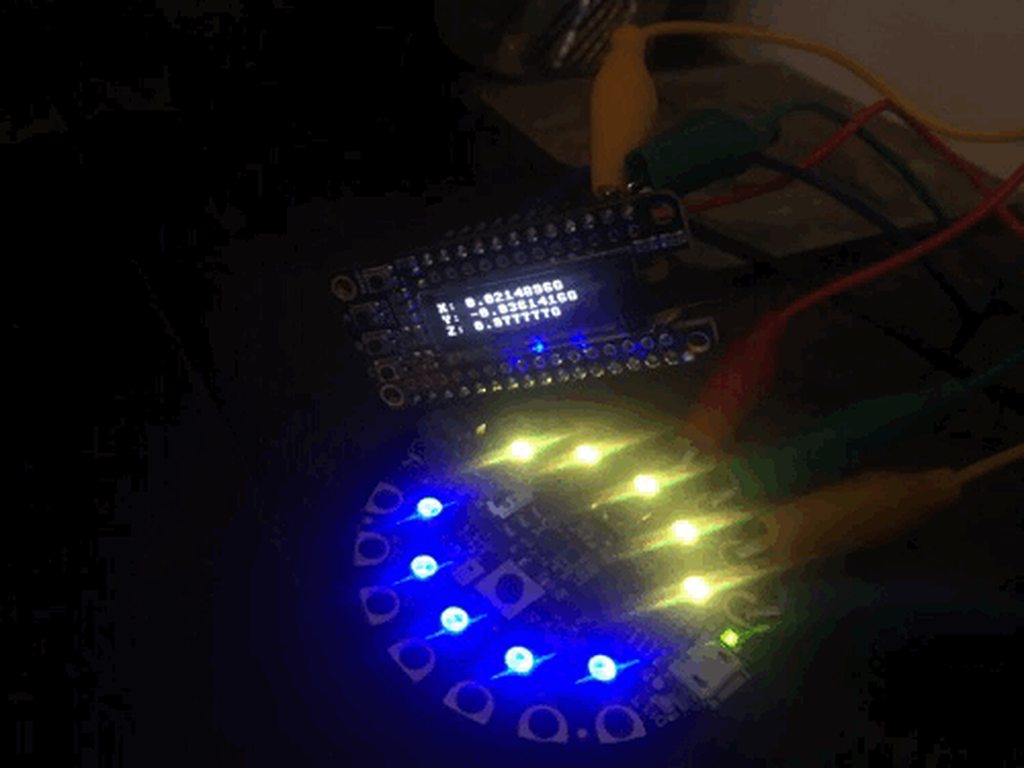
accelerometer info on the oled, blue and gold (cub scout colors) rotating on the neopixels https://i.imgur.com/nwJ2giH.gifv
 manic glacierBOT
cloning the repo to simply search isn’t particularly user-friendly. I’m not sure I understand why this repo needs to be “attached” to MicroPython, as it’s trivial to pull code from any remote via git.
 timber mango
Loud noise crashes:
main.py output:
Traceback (most recent call last):
  File "main.py", line 87, in <module>
  File "main.py", line 53, in normalized_rms
  File "main.py", line 53, in <genexpr>
OverflowError: small int overflow
Running:
https://learn.adafruit.com/adafruit-circuit-playground-express/playground-sound-meter
With:
 $ md5sum ./ad*
5989969089823f3e8bf25e0e54fc366f  ./adafruit-circuitpython-bundle-2.1.0-mpy-20171227.zip
fe6d8e85f901edab0ab989e5ee8f21a6  ./adafruit-circuitpython-circuitplayground_express-2.2.0-rc.2.uf2
@timber mango thanks. an exercise for the reader is how to fix. Could shorten sample buffer , or scale 16-bit inputs down. But I should make it more robust.
idle owl
@tulip sleet Thanks for the release!
timber mango
@tulip sleet My code no longer runs correctly on the new release:
git clone https://github.com/wa1tnr/cpx-basic-studies.git
$ md5sum ./cpx-basic-studies/141-print.d/color_print_demo.py 6c3f554e6203966d3af8c853fcdbf847 ./cpx-basic-studies/141-print.d/color_print_demo.py
The counter in that program used to .. count. Now, it doesn't.
I don't understand enough python (see the comments in the program) to understand why it counts, in the first place.
solar whale
@tulip sleet just a heads up. I think @fading solstice apds9960 driver has uncovered another (or hopefully the same) issue with some changes from CP2x to 3x in the I2C handling. The driver is still undergoing some work so I'll hold off on creating an issue for now. I want to be able to create a reproducible case. Short story is on CP 3 it crashed with a OSError 5 in readinto, but seems to run fine on CP 2.x. I did notice that the write just before the readint used stop=False and if I recall yesterdays discussiion, that was a possible concern.
@fading solstice I have had gesture running for over an hour on my Metro_m0_express (cp 2.2-rc2) no problems
tulip sleet
@timber mango in that program, you never call looping(). it's commented out. you call signon(). So I don't think that's the new release.
timber mango
No, I run it manually in the REPL.
Press any key to enter the REPL. Use CTRL-D to reload.

Adafruit CircuitPython 2.2.0-rc.2 on 2017-12-30; Adafruit CircuitPlayground Express with samd21g18
>>> import main; main.looping()
pelle conq caa42
Screen will begin to scroll in one of your Earth seconds..
neutralredgreenyellowbluemagentacyanwhiteIn red 0 in blue in magenta reset_color  In red 0 in blue in magenta reset_color  In red 0 in blue in magenta reset_color  In red 0 in blue in magenta reset_color
Where it shows a 0 it's supposed to count upward (otherwise it's monotonous to watch for more than a few moments).
raven canopy
I think scoping is your problem. try adding global to your original counter def.
tulip sleet
@timber mango it's a question of global vs local variables. If you import this, the counter variable inside looping() is local to that function. Consider this:
>>> var = 2
>>> def foo():
...     var = 3
...
>>> var
2
>>> foo()
>>> var
2
>>>
@timber mango you could also pass counter as an argument to the say_things() function.
timber mango
I've uploaded the change to my github, to work in 2.2.0-rc.2. However, it doesn't explain why the unchanged code ran fine in an earlier version of CircuitPython. 😉
tulip sleet
@timber mango you could try reloading 2.1 and doing the same things you just did. my guess is that you were doing something differently (e.g. calling things from the repl more directly). We didn't change anything in 2.2 about variable scoping.
timber mango
Either way I wouldn't have got this on my own, today. I'm very grateful.
This is what I would not have found on my own, today:
https://docs.python.org/3/faq/programming.html?highlight=global#why-am-i-getting-an-unboundlocalerror-when-the-variable-has-a-value
Dan: I ran the same code I just modified (one push, no more) on the earlier version (pretty sure the 12/27 lib).
Could have been rc1 or 2.1.0.
Hang on I think I can say for sure.
CircuitPython 2.1.0 on 2017-10-17
Seemed deterministic otherwise I wouldn't'a bothered ya'.
tulip sleet
the diff between the 12/27 version and the curren version is that you put the while True: code in a function. Once you did that, counter became a local variable instead of being global to the whole file
fading solstice
@solar whale i did update my repo to attempt to read all data that is available. before i read 128 bytes, no matter what. i thought that was bad form, so i first find out how many recrods are availble to read then only read that amount.
tulip sleet
@timber mango I was talking about this version (12/27): https://github.com/wa1tnr/cpx-basic-studies/commit/3838efb5178cf7fa907a75986624eb71c8ac7040
in that version, the loop is not in a function
so counter is global, so say_things can see it
i blieve that's why it used to work
timber mango
Dan: I now think I'm misremembering. When I introduced a change (git says the push was 8 hours ago) I may well not have noticed the counter was no longer incrementing the way it was in an earlier revision.
I made the looping() function in response to an inability to do anything in the REPL. 😉 The change allowed me to enter the REPL, and then issue 'import main;main.looping()'
Formerly, if I broke into REPL with a Control C, I had nothing to look at.
And if I did an 'import main' it would run the program, forcing me to Control C again. Was a Catch-22.
At this point all I wanted out of all that effort was to see the correct output of:
dir(main)
This feels like an engine rebuild became necessary in order to change a flat tire. 😉
tulip sleet
we had a loose tile in the bathroom, and now we have a new bathroom
ruby lake
hm, ctrl-C is not giving me the chance to enter the REPL. It says 'soft reboot' and runs the code again.
timber mango
where's your code? (awesome circuit board exhibited earlier btw)
tulip sleet
@ruby lake if you can post your code, maybe as a file if it's big (use the "+") on the left
ruby lake
It is a little long, one moment
timber mango
(on telephone) still looking at this o.c.
ruby lake
here is what the serial terminal shows,
Traceback (most recent call last):
File "code.py", line 176, in <module>
KeyboardInterrupt:
soft reboot
Auto-reload is on. Simply save files over USB to run them or enter REPL to disable.
code.py output:
Traceback (most recent call last):
File "code.py", line 176, in <module>
KeyboardInterrupt:
soft reboot
Auto-reload is on. Simply save files over USB to run them or enter REPL to disable.
code.py output:
Traceback (most recent call last):
File "code.py", line 176, in <module>
KeyboardInterrupt:
soft reboot
Auto-reload is on. Simply save files over USB to run them or enter REPL to disable.
code.py output:
Traceback (most recent call last):
File "code.py", line 175, in <module>
KeyboardInterrupt:
soft reboot
Auto-reload is on. Simply save files over USB to run them or enter REPL to disable.
code.py output:
Traceback (most recent call last):
File "code.py", line 176, in <module>
KeyboardInterrupt:
soft reboot
Auto-reload is on. Simply save files over USB to run them or enter REPL to disable.
code.py output:
Traceback (most recent call last):
File "code.py", line 176, in <module>
KeyboardInterrupt:
Adafruit CircuitPython 2.2.0-rc1 on 2017-12-15; Adafruit Feather M0 Express with samd21g18
soft reboot
Auto-reload is on. Simply save files over USB to run them or enter REPL to disable.
code.py output:
(sorry for the spam scroll)
idle owl
@ruby lake If you put 3 backtics (the one at the top left of your keyboard) on both sides of your code, it will make it a codeblockAnd is much easier to read.
ruby lake
oh, oops
idle owl
No worries. Figured I'd let you know
ruby lake
bbl, dinner bell
opal elk
you can also do one backtick for inline code
tulip sleet
@ruby lake: i loaded your code on to a Feather m0 Express, with nothign connected. I can interrupt it:
repl
Traceback (most recent call last):
  File "code.py", line 176, in <module>
KeyboardInterrupt:
Auto-reload is on. Simply save files over USB to run them or enter REPL to disable.

Press any key to enter the REPL. Use CTRL-D to reload.

Adafruit CircuitPython 2.2.0-rc.2 on 2017-12-30; Adafruit Feather M0 Express with samd21g18
>>>
do you have anything in boot.py?
timber mango
Your code structure doesn't allow a break from the loop.
soft reboot

Auto-reload is on. Simply save files over USB to run them or enter REPL to disable.
main.py output:
Traceback (most recent call last):
  File "main.py", line 176, in <module>
KeyboardInterrupt:


Press any key to enter the REPL. Use CTRL-D to reload.

Adafruit CircuitPython 2.2.0-rc1 on 2017-12-15; Adafruit Feather M0 Express with samd21g18
>>>
A not-so-quick question from a Python neophyte: Although I have code for the Trinket M0-based StringCar controller that works very nicely, it probably doesn't take advantage of the Python class structure very well. In spite of using helpers, it looks like Arduino code. I'd like to create a StringCar class library to capture the modules and attributes of the car and its components, mostly for the experience, but also to abstract the main.py code to make it easier for remotely supporting cars on the other side of the state. Here's my first take at a logical structure for the library (sans details from existing, working modules). Can someone tell me if I'm on the right track, please? ```python
stringcar summary.py library 2017-12-30 v00
class stringcar:
class motor:
def speed(vel=0): # set motor speed, -100 to +100
return vel
def accel(current=0,target=0,rate=0): # accelerate from current to target speed
return current
def brake(hold=0.2,release=0.1): # stop and freeze motor then release
return 0
def pulley(diameter): # pulley size attribute
return diameter
class sensor :
def eos(x): # EOS sensor, True/False
return sensor_eos.value
def temperature(temp): #cpu temperature value
return temp
class selector :
def trimpot(pos): # potentiometer position, 0 to 100
return x
def button(x): # button value, True/False
return x
class display: # flash integral dotstar LED, indexed colors
def flash(count=1, on=0.5, off=0.5, color = 0) :
class beeper : # start or stop PWM piezo beeper
def on(freq=440):
def off(wait=0):
class battery:
def capacity(cap): # battery capacity (mAh)
return cap
def voltage(volt): # current battery voltage
return volt
@errant grail each def in the class should take a "self" argument. do you mean for pulley, diameter, etc. to be both settable and gettable? If so, you could make them properties. Or you could pass them in to the __init__() function, which will initialize the class instance. Classes should be capitalized.
It would probably be good for you to read a basic tutorial on classes in Python, and also read about properties.
also you don't usually define classes inside classes
i realized i have to leave for a bit, back in a while
errant grail
@tulip sleet Thanks. Some are read-only properties, some are settable. I've been trying to apply the tutorials from Cory Althoff's book but am getting a little confused. I'll try another source. Appreciate the quick review and response. Back to the books/videos I go!
@tulip sleet Ah yes. You gave me just enough info to get unstuck. Found a good tutorial on setting up classes and using the magic method for object/attribute creation.
meager fog
@idle owl heya were you poking at framebuf earlier?
idle owl
@meager fog nope
tulip sleet
@errant grail I'd be interested in what you found. Looking for good intro Python material. There's a lot of material, not all of it great. I looked at Althoff's book briefly on Amazon preview, not sure about the classes section
errant grail
@tulip sleet I went back to his book and found the section that didn't make much sense the first time through. Now I'm starting to get it. I also have the Automate the Boring Stuff with Python, Python for Microcontrollers, and The Python Quickstart Guide. So far, Althoff's book is overall better than the others, but they all offer a few examples that have helped.
@tulip sleet Then there's my learning style. I learned to play a wide variety of musical instruments for many years without learning music theory -- until recently. I play much better now and can adapt more readily. I created a working CPy program, so now it's time to learn more Python "theory."
tulip sleet
@errant grail thanks - it would be great to have a single "here's how to learn python" reference, but I'm not sure it's possible.
timber mango
@ruby lake
Press any key to enter the REPL. Use CTRL-D to reload.

Adafruit CircuitPython 2.2.0-rc1 on 2017-12-15; Adafruit Feather M0 Express with samd21g18
>>> import main;dir(main)
['mux', 'getVoltage', 'go', '__file__', 'midiNoteToRemove', 'cvi', '__name__', 'daccs', 'analogio', 'cvo', 'compactMidiNoteBuffer', 'gotOLED', 'gateLED', . . . . .'doMIDI']
>>>
from:
def getVoltage(pin):
        return (pin.value * 3.3) / 65536

def go():
        while True:
                global cvi
                global mux
                cvi[mux] += (pot[mux].value  - cvi[mux]) >> 2
                mux += 1
                if mux > 2: mux = 0
# go()    # uncomment to autoexecute the program
@tulip sleet Yes, that's what I'm discovering. What I'm missing more than anything is one of those laminated quick reference guides from BarCharts, Inc.
@tulip sleet Making progress (I think):```python
stringcar summary.py library 2017-12-30 v00
class Motor:
def init(self,mn,mx,r):
self.min = mn
self.max = mx
self.rate = r
def speed(vel=0): # set motor speed, -100 to +100
# ...
return vel
def accel(current=0,target=0,rate=0): # accelerate from current to target speed
# ...
return current
def brake(hold=0.2,release=0.1): # stop and freeze motor then release
# ...
return 0
def eos_sensor(x): # EOS sensor, True/False
# ...
return x
def trimpot(pos): # potentiometer position, 0 to 100
# ...
return pos
def flash(count=1,on=0.5,off=0.5,color=0): # flash integral dotstar LED, indexed colors
def on(freq=440): # start PWM piezo beeper
# ...
def off(wait=0): # stop PWM piezo beeper after wait
# ...
class Battery:
def init(self,cap,volt):
self.capacity = cap
self.voltage = volt
@errant grail if you do a websearch for "python 3 quick reference", you'll find short and long examples of summaries. some are a page or two, some are longer, e.g. https://www.macs.hw.ac.uk/~hwloidl/Courses/F21SC/python32.pdf
indent the def eos_sensor() et al, and they need a self argument in the first position
errant grail
@tulip sleet Nice. I've done quite a few searches, but am not always sure which to choose. Thanks.
@tulip sleet The eos_sensor isn't part of the Motor class so shouldn't it be outdented?
Rather than asking you to walk me through this, I'll go back to the sandbox and do some trial and error learning. You've given me some very helpful hints, but I need to go make some mistakes to really learn this! 😉
tulip sleet
oh I though it was an attribute of the motor, never mind.
errant grail
Right now there's only one EOS (End-of-String) sensor, but there may eventually be a variety of them. I'll jump that hurdle later...
tulip sleet
@errant grail this was a really wonderful ref guide for python 2.7; unfortunately it has not bee nupdated for python 3: http://rgruet.free.fr/PQR27/PQR2.7.html
errant grail
Wow. That's what I need for a reference. In addition to seemingly everything, it covers some stuff like import... that I wondered about. Even if it's not 3.0 ready, it'll help me through my conceptual issues. Thanks!
@tulip sleet This tutorial looks pretty good, too. https://docs.python.org/3/tutorial/
tulip sleet
@errant grail That's the "official" one, which is pretty good. Looking around reminds me about this book, which is very good, but older now: https://www.amazon.com/Python-Essential-Reference-David-Beazley/dp/0672329786/ The first part about the language is what to read. But it's 3.0. Could probably find it at the library.
This newer book also looks like it might be good once you get past the basics: https://www.amazon.com/Fluent-Python-Concise-Effective-Programming/dp/1491946008/
@errant grail, oh, and I loved the 2nd edition of this book: https://www.amazon.com/Python-Nutshell-Desktop-Quick-Reference/dp/144939292X/. I see that he's finally written a 3rd edition.
raven canopy
@errant grail docs.python.org, or "pydocs" as I call it (don't know where I heard the term first), is the only one I've ever really used. I'm no py wizard, but it answers most questions to an acceptable level. Takes some getting used to wrt to reading examples and figuring out usage sometimes...
errant grail
@tulip sleet I wondered about those. They're on my wish list now, but I'll also check at some of the local libraries and the makerspace. I appreciate the help. I'm officially drinking from the firehose now!
@raven canopy Yes. It's just a matter of taking the time to go through the examples whilst also having fun building the string car code. It's tough enough to set the solder aside to program, let alone to learn the language. 😉
ruby lake
back
ruby lake
I didn't really change anything but it is fine now, go figure
solar whale
@fading solstice updated to latest versio os apds9960 driver and it gesture seesm to be running under both CP2.2-rc2 and now several minutes under CP 3.0.
@fading solstice also ran proximity and color on CP 3.0 with no problems. I still don't know if I trust cct and lux, but they do respond to changing inputs.
meager fog
i made a project for anyone with a feather huzzah who wants to not use their phone every time they log in! check it at https://learn.adafruit.com/circuitpython-totp-otp-2fa-authy-authenticator-friend

Keep accounts secure without frustration
now back to Work I Should Be Doing
split ocean
thanks @tulip sleet of course! working fine now. : )
@meager fog that guide has my new favorite FAQ "question" i've ever seen.
ruby lake
Front panel,
errant grail
Nice design @ruby lake !
Do you print your own front panels or send the design to a vendor?
ruby lake
@errant grail This one is a "panelPCB" which will be made from 062 FR4 material. I also have a version I can have milled at Front Panel Express.
errant grail
Nice. Do your "panelPCBs" ever contain circuitry?
ruby lake
Sometimes
errant grail
Since most of my projects are one-offs, I use an inkjet on photo paper under a 1/16" plexi or polycarb layer for front panels.
I may try your technique next time!
Inkjet on photo paper treated with clear plastic spray then layered under clear plexi.
ruby lake
Yeah paper laminate is a good choice for a single iteration
errant grail
Somewhat ironically, the front panel layout is done in a vendor's PCB CAD tool. It would be easy to try the panelPCB approach.
Thanks for the idea!
ruby lake
Certain panels require I use milling, too many holes to precisely align
errant grail
My designs are pretty simple. For a guitar VU pedal, I used a PCB template strip as a drilling guide 'cause I don't have a drill press. The template held up well -- was used multiple times.
ruby lake
Example, this has to be milled.
errant grail
Indeed. Don't think I'd be willing to take that on with my old-school approach!
ruby lake
But for now, I will be making several of the 10HP (2" width) panelpcbs for the circuitpython module playground
errant grail
I've seen that panel before -- just made the connection. Have enjoyed hearing your projects on S&T.
errant grail
Thanks for the ideas, @ruby lake . G'nite!
fading solstice
@solar whale Thanks for testing 3.0. BTW did you build a CP 3.0 yourself or are you using the last release of 3.0
solar whale
@fading solstice glad to help. I build 3.0 locally - using current master. BTW - I also tested the apds9960 on my metro_m4_express (CP 3.0) no problems in a short test ( built CP 3.0 for M4 with gcc 6.3.1)
fading solstice
cool. I know we have questions about the color calculation, is the rest of the library ready to be reviewed and pushed to github/adafruit
solar whale
I think so.
manic glacierBOT

I have completed a candidate library that is written CircuitPython that support gesture, proximity, and color detection. I used the Adafruit_APDS9960 Arduino library as a template for the CP version. This has had some serious testing by @jerryn and @kattni . Thanks to them. i would like the following project to be reviewed and forked into github.com/adafruit. @tannewt has already given me early feedback and I have made the requested adjustments as a result.
solar whale
@tulip sleet @idle owl I'm just starting to sort through things, but I have found taht the CP2.2-rc2 and latest bundle break a lot of my old test programs on the CPX - mostly dealing with the acceleraometer - I have not done much searcing to review teh changes and I'll do that now but just a warning - others may be impacted. BTW - I assume it is recommended to remove adafruit_bus_device, adafruit_lis3dh, neopixel (all the buil-tins) from the lib bundle.
@tulip sleet @idle owl follow-up -- updated to current examples from lis3dh driver and all work. using the frozen versions of drivers allows spinner_advanced to run. The accel demo was one taht was not working properly. new version (with changes for CPX lis3dh) works fine.
solar whale
oops - I opened a PR to the wrong dirver - how do I delete a PR?
never-mind - I actually did it right - but just incase, it would be nice to know how 😉 Do I just close it?
meager fog
just close it yup!
solar whale
Thanks!
meager fog
@fading solstice i can check yer driver!
wait nvmd i dont have a breakoutu with me oof ok ill check it later
tulip sleet
@solar whale I have a potential fix for the m4 gcc7.2.1 problem. Would you like a .uf2 to test?
solar whale
Sure. I’ll test in about a half hour.
tulip sleet
this marks some asm code as clobbering r1,r2,r3 so the compiler won't try to use r3 as a temporary storage location
solar whale
Ooh! I’ve been burned by that type of thing.
meager fog
@tulip sleet whats the bug result. i was getting USB failures?
my metro m4's on my desk...
tulip sleet
@meager fog @solar whale when it tries to call __del__ operations on objects that have them during a gc, the calls get messed up and it basically crashes or loops. So it will run for a while until a gc is necessary, and then bad things will happen. My trivial test program:
c.py:
def r():
    for i in range(510):
        print(i)
        l = [0]*50
in repl:
>>> import c
>>> c.r()
hangs at about 496 with the bug, when gc gets invoked to clean up the list garbage
But @solar whale saw these problems when trying real programs that read from sensors, etc.
I cut the programs down and realized it was due to gc (it appears)
the crash/looping will cause USB to away, etc.,
meager fog
oki can load and try!
tulip sleet
tnx!
meager fog
im micropythonin' today!
er ciruitythoning
both actually
ah i think i forgot to add M4 to mu!
solar whale
getting set up to try it.
woohoo ! c.r() runs to 10000
and my neopixel program runs as well!
@tulip sleet looks good! I have tried all the things that previously failed and all run.
Adafruit CircuitPython 3.0.0-alpha.1-28-g93978bcd2-dirty on 2017-12-31; Metro M4 Express with samd51j19
``` can you confirm the version just to be sure@solar whale that is the same in my repl
solar whale
@tulip sleet Great! Well done!
tulip sleet
lots of staring at asm. I tried a bunch of things before this worked. Best way to disassemble: arm-none-eabi-objdump -D -Mforce-thumb build-metro_m4_express/firmware.elf >~/m4gcclto-clobber-r123.asm. That gets the whole .elf after the compiler is all done with it; much easier than gcc -S and more accurate as to the final product.
i'll do a PR
i should try m0 also first
solar whale
Those are the kinds of bugs that can drive you crazy.... I recall similar issues on the SPARC! Gotta love objdump!
tulip sleet
it takes a while to generate the asm but it was gold
also accidentally found we had an unnecessary compiler switch that was generating long-address subroutine calls that were not needed
m0 looks ok on a simple test
solar whale
glad you pointed out the need for -Mforce-thumb with objdump. thanks
manic glacierBOT
(this diagnosis filed as issue in (also filed in https://github.com/micropython/micropython/issues/3526)
We recently starting using the gcc-arm-none-eabi-7-2017-q4-major toolchain, which uses gcc 7.2.1. We also use -flto. On M0+, it works OK, but on M4, I found an issue having to do with mp_call_function_1_protected(), nlr_push() and nlr_push_tail(). The assembly code emitted is below. Note that mp_call_function_1_protected() saves r0 in r3 while it calls nlr_push(). `n...
I believe I have fixed this by using the asm(...) "clobbers" setting to mark r1, r2, and r3 as clobbered, so that the compiler won't use r3 as a temp save register. Note: don't mark r0 as clobbered; that doesn't work and causes odd behavior.
Other things I tried included removing the naked attribute on nlr_push() and combinding nlr_push() and nlr_push_tail(). That didn't work. Also declaring the registers as C: int register r1 asm("r1"); to make them appear to be used didn't wo...
tulip sleet
@solar whale not sure force-thumb is necesssary but it made it easier to read
also need -D, not just -d
solar whale
@tulip sleet nice write-up
manic glacierBOT
Code after fix:
00006bd0 <mp_call_function_1_protected>:
    6bd0:	b530      	push	{r4, r5, lr}
    6bd2:	b08d      	sub	sp, #52	; 0x34
    6bd4:	4604      	mov	r4, r0
    6bd6:	4668      	mov	r0, sp
    6bd8:	460d      	mov	r5, r1
    6bda:	f7ff fbe7 	bl	63ac <nlr_push>
    6bde:	b938      	cbnz	r0, 6bf0 <mp_call_function_1_protected+0x20>
    6be0:	4629      	mov	r1, r5
    6be2:	4620      	mov	r0, r4
    6be4:	f7ff ffe9 	bl	6bba <mp_call_function_1>
6be8: f7ff fbd0 bl...@solar whale I believe in writing all this down so I don't have to try to reconstruct it later!
solar whale
it is very helpful to see.
@tulip sleet I need to go for a bit - let me know if you need any more testing - I'll grab your PR and try building i locally as well once it is available. Thanks for the effort on this. I really did not want to have to revert to gcc 6.3.1 or maintain two environments!
tulip sleet
me neither!! I'd still like to know if this is a real bug or not. 7.2.1 optimizes better in general and we could use the space on the non-Express boards
thanks for testing
manic glacierBOT
Appears to fix #500. Extensive writeup there.
Also removed a couple of compiler flags that were not needed:
-mtune=cortex-m4 supposedly subsumed by -mcpu-cortex-m4
-mlong-calls handles calls further away than 64MB. That's not an issue for us! Removing this saves about 12.5kB (!) in M4 image.
Also turned on -flto in DEBUG=1 builds to make it more likely we'll hit issues, but made it easy to comment out.
raven canopy
I'm thinking about trying my hand at a simple circuitpython MPC-style sampler. still early in concept, parts, features... thoughts?
(similar to this teensy based system: https://youtu.be/huCV6ood0t0 never knew that teensy was so loved by sound geeks)
solar whale
@tulip sleet local build of your CP 3.0 PR works fine!
fading solstice
@meager fog Thanks
tulip sleet
@solar whale tnx; travis took almost an hour to build it
solar whale
😃 much faster here!
I suppose I can update my mac arm tools , but I think I'll give it some time....
tulip sleet
that's really unusual for travis: it builds all versions, but usually takes about 12-15 mins
manic glacierBOT
Is any of this specific to the M4 ? Rephrased, is there some reason why the M0 code does not generate these errors or were we just lucky.
It should be just about the same (both are thumb), but it's a different cpu setting, so maybe there's some difference in the cpu description tables. I did check the asm for both, and the M0 didn't have the mistake that the M4 compilation did. I may look further at some point.
manic glacierBOT
 solar whale
@tulip sleet FYI - just built/loaded CP2.2.0-rc2 for esp8266 - working fine with si7021 temp/humidity sensor
manic glacierBOT

yeah please dont freeze examples, they're more useful as plain text!
 stuck elbow
happy new circuitpython year
ruby lake
Hny folks


 😃
manic glacierBOT
😃
manic glacierBOT
@dhalbert in reference to the comments on PR #503, is this along the lines of what you're looking at moving too? Kind of a middle ground of the current table, and listing only exceptions of unsupported ports.
This is going off the current list, and carbon copying SAMD51 to current SAMD21 support (which isn't an accurate future state given 51's higher mem capacity). Its right at 50/50 for supported/unsupported, so a toss-up between current style and exception-only style IMO.
I'm going to...
manic glacierBOT

Yes, thanks, something like that. I'd say "Express" explicitly, instead of introducing a new abbreviation ("X").
cunning crypt
Oh, neat. Humble Bundle has a Python book bundle right now: https://www.humblebundle.com/books/python-by-packt-book-bundle

Humble Bundle
Pay what you want for ebooks on Python and support charity!
umbral dagger
Thanks for posting that @cunning crypt ... I snapped it up.
cunning crypt
Looks super useful
 lucid arch
hi all, does anybody know how easy it is to run circuitpython on the huzzah32? ta
cunning crypt
@lucid arch As far as I'm aware, there isn't a supported CircuitPython port for the ESP32 yet
lucid arch
@cunning crypt : ah, i see. can you recommend a starting feather main board with ble and wifi?
as well as circuit python friendly? the huzzah? or the feather m0?
cunning crypt
I don't know of any CP-supported board that has BLE and wifi capabilities supported. BLE hasn't been a focus yet for CP
The M0 Bluefruit works, technically, but the BLE isn't functional yet.
solar whale
@lucid arch just to add to @cunning crypt comments. The only board with Wi-Fi support is the esp8266. BLE support may be included for some nRF52 boards in CP 3.0 but it is still under development. Wider Wi-Fi support is further down the road.
manic glacierBOT
@tannewt I think this can be merged in as is, but let me know if there is something I missed?
 pure pasture
I tried to load circuit python on a MO Express Feather and all I got was a empty boot .txt file
meager fog
thats normal
you need to put files on 😃
you can follow the starting guide here, to blink an LED /https://learn.adafruit.com/welcome-to-circuitpython/

New to CircuitPython? This is the place to start.
ruby lake
MCP4922 DAC works fine being SPI'd by 3v3 feather signals. Now to try DAC8565
ruby lake
anyone have a "go to" cp code block for maintaining an i2c oled display?
tulip sleet
@ruby lake, you mean like this? https://github.com/adafruit/Adafruit_CircuitPython_SSD1306
GitHub
Adafruit_CircuitPython_SSD1306 - Adafruit CircuitPython driver for SSD1306 OLED displays.
ruby lake
I have done that much. I need something that can display variable updates that uses as little time as possible.
tulip sleet
I have no suggestions to make that faster, sorry. If you're just debugging, just printing to the serial port will be faster.
ruby lake
I'll figure something out
manic glacierBOT
as requested by @ladyada
closed after testing - still didnt fit in the demo... so will just keep going with 2.2 as is, maybe revisit when we have express lib in a better place!
Postponed for now: see #508.
 strong violet
Hi! I'm new here, hoping this is the right place to ask my question...
In vanilla MicroPython Ctrl+C takes you right into REPL. Why does CircuitPython require two extra keypresses?
(first an ENTER to reveal the text "Press any key to enter the REPL" and then the "any key")
timber mango
Good to see you here, @strong violet. I hope to see circuit python support on Thonny at some point...
strong violet
That's my goal, but I need to understand it better first 😃
slender iron
@strong violet are you on esp8266? For it one key press tells it the serial connection is alive. The press any key state is there so we can auto reload the code on write after the main code finishes. Once in the repl we don’t autoreload. That state also gives us time to flash the status led. On esp autoreload isn’t actually supported because msd isn’t. However we want to keep our ports consistent.
slender iron
GitHub
circuitpython - CircuitPython - a Python implementation for teaching coding with microcontrollers
tulip sleet
@slender iron looks like if i type <enter><ctrl-C> when main.py is running, that reliably short-circuits it
slender iron
yeah, that makes sense because the ctrl-c can actually be processed ahead of it
manic glacierBOT

+1 for RFM69 / RFM95 support - this is a very useful building block and today, if you want to use Lora then you are not going to use python.
manic glacierBOT
@deanm1278 heya dean, here's the py library to test :)
tulip sleet
Adafruit Industries - Makers, hackers, artists, designers and engineers!
Fresh for the 2018 New Year, we are pleased to announce the release of CircuitPython 2.2.0 ! Here’s the GitHub release page. Installation To install follow the instructions in our new Welcome…
idle owl
Yay!!
slender iron
Great job @tulip sleet and <@&356864093652516868> on 2.2.0!
idle owl
@slender iron Great job you too!!
opal elk
I need to actually start helping one of these days 😐
slender iron
@opal elk no pressure. 😃
 formal plover
Don't worry @opal elk I've been outta the game for quite some time now. Desperately trying to find time to get back involved again.
opal elk
I've had months of work being terrible. it looks like I'm at least getting a few days to breathe now.
manic glacierBOT

I've forked it into the Adafruit repo. Please do a release and add it to
the bundle. Thanks!
On Tue, Jan 2, 2018 at 11:04 AM ladyada notifications@github.com wrote:
@deanm1278 https://github.com/deanm1278 heya dean, here's the py
library to test :)—
You are receiving this because you were mentioned.Reply to this email directly, view it on GitHub
https://github.com/adafruit/circuitpython/issues/290#issuecomment-354848699,
or mute the thread
<https://github.com/n...
opal elk
hence me being back! (and also playing around with my CPX)
manic glacierBOT

@ladyada @mrmcwethy @tannewt Tested all examples with circuitpython metro m0 2.1.0, latest bundle 2.1.0, myp-cross 2.1.0
gesture, color, prox interrupt all work very well! Interface is very good any circuitpythony
cunning crypt
@opal elk What's your work?
manic glacierBOT
Hopefully GitHub will add fork search in the near future. I agree it'd be good to have.
I want to leave us as a fork because its one way we can be clear that we're based on MicroPython. We already get criticized for forking. I don't want to hide it.

Dear @mrmcwethy , I tested a little bit on
Adafruit CircuitPython 2.2.0-rc.2 on 2017-12-30; Adafruit Feather M0 Express with samd21g18
Testing involved:
- Copy the 3 files
gesture.pyproximity.pyandcolor.pyfrom https://github.com/mrmcwethy/Adafruit_CircuitPython_APDS9960/tree/master/adafruit_apds9960 into a folder named/Volumes/CIRCUITPY/lib/adafruit_apds9960 - Copy the 3 examples files
/Volumes/CIRCUITPY/ - Copy each to main.py to test them one by one.
They all...
I'm suspicious of it being that short. IIRC is only unique if its 64 or 128 bits. Could you adapt it to return a bytes string instead of an int?
opal elk
https://synacor.com/ is where I work, though most of what we promote as our business model isn't what I do
manic glacierBOT
Please add a link to the issue here for more context.
cunning crypt
I'm going to guess they wanted a shiny new thing out for the holiday season
slender iron
whats every think about turning on clang-format checking on the core repo?
idle owl
Seems like a good idea to me. If we're trying to tighten everything else up, makes sense to tighten up the core.
slender iron
it'll make merges from upstream a bit trickier because we'll need to fix its style first
opal elk
finally emailed my VP asking for official permission to contribute to CP
idle owl
@slender iron Still seems like a solid idea. How often are we merging from upstream?
slender iron
once a major release basically
idle owl
ah
slender iron
@idle owl can you update the RGB display repo with your status
GitHub
Lint all the libraries! #475
Not tested
idle owl
Yep
slender iron
thanks
opal elk
I'm a fan of standardization of code format
I'll even use spaces instead of tabs if you want 😃
idle owl
YES
slender iron
clang-format can do a bunch for you too which is nice
idle owl
Nice
slender iron
I'll add it to my long todo list
idle owl
Ok keen
slender iron
I just know ktown and hathach's style is different than mine
manic glacierBOT
My fault... I had to use mpy-cross-2.2.0-macos-high-sierra to transform init.py apds9960.py colorutility.py into *.mpy file.
Now I can confirm it is working with 2.2.0-rc.2.
The only issue I have is on the non uniform use of pin for interrupt.
Readme.rst suggest to use A1:
int_pin = digitalio.DigitalInOut(A1)
Proximity.py example use A2:
int_pin = digitalio.DigitalInOut(board.A2)
Some cleaning to make Readme and example match in style and pin selec...
idle owl
@slender iron I should be able to finish testing those today and tomorrow. I got through more at the end of last week than I thought I would.
opal elk
officially good to go with helping on CP! I might tackle https://github.com/adafruit/circuitpython/issues/472 if I have spare time soon

GitHub
bitbangio.SPI is missing write_readinto() (bitdirectional SPI) and also doesn't have the optional buffer slicing start and end arguments. Implement these to make it have the same API as busio.SPI.
idle owl
@opal elk That's great!
manic glacierBOT
I agree. i fixed it and created a pull request. Next is to create a release and add it to the bundle.

I'd like to tackle this one if possible!
opal elk
(possibly) silly question: if I make changes to shared-modules/bitbangio/SPI.c how do I recompile my changes and upload it to a CP board?
tulip sleet
@opal elk in master? cd ports/atmel-samd; make clean BOARD=whatever; make BOARD=whatever. Then copy the resulting .uf2 to your board.
fading solstice
@slender iron can you give me or give adafruit librarians right to add a release to Adafruit_CircuitPython_APDS9960?
slender iron
@fading solstice added.
fading solstice
thanks
slender iron
I direct messaged you too
tulip sleet
@opal elk There is out-of-date build info in https://learn.adafruit.com/micropython-for-samd21/build-firmware. I would like to write a newer guide and describe alternatives to vagrant, but I haven't had time to do that yet.
manic glacierBOT
 blazing trail
github bot is a bit annoying
fading solstice
@meager fog Thanks for adding APDS9960 to bundle
opal elk
oh golly, this is gonna require me to know C, huh. let's see how much golang translates.
manic glacierBOT
Merge bugfixes and additionsfrom 2.2.0 to master.
Difficult merge. Checked a number of merges by hand. Non-Adafruit boards added but I did not try to build them.
Merged in 2.2 double-tap support in .ld files (@tannewt: you might double-check these).
CPX SPI flash support added, but not tested.
slender iron
@opal elk why would you need to know C?
solar whale
@tulip sleet @slender iron Thanks for all the updates to 3.0 Master. I downloaded and built metro_m4_express and nrf52/feather52. No problems with quick checkouts. I'll do more testing as soon as I can.
manic glacierBOT
 opal elk
@slender iron for #472 I will, right? I looked into it last night and may be in over my head; we’ll see.
manic glacierBOT

 lilac shore
@timber lion - New to CircuitPython and pleased to share Trinket M0 (CircuitPython 2.2) IR Control of On, Off and Flicker on electronic candle.. All thanks to your tutorial.
slender iron
@opal elk I invited you as a collaborator so I can assign the issue to you.
opal elk
thanks!
the McElroys did dub 2018 "Collaborateteen"!
(MBMBaM spoiler for this week's episode I guess)
manic glacierBOT
 timber lion
oh wow nice work @lilac shore!
tulip sleet
@slender iron I'm fixing up the big 2.2->3.0 merge. Some errors in the boards/ files. Also, it looks like it might not be building with the latest ARM release. I'll double-check and update if necessary (or maybe have to ask you, depending on travis). .. Will be offline 2:30-3:30 or 4 ET.
opal elk
should https://github.com/adafruit/circuitpython/issues/493 have the "documentation" label? and probably "good first issue" as well
GitHub
Here is the list of libraries that still need an examples folder:
Adafruit_CircuitPython_RTTTL
Adafruit_CircuitPython_SD
Adafruit_CircuitPython_IS31FL37
Adafruit_CircuitPython_Thermistor
Adaf...
if there's CP code in a learn guide, is that considered acceptable to use as an example?
lilac shore
I'm running into storage issues when I try to add the adafruit_ssd1306, adafruit_bus_device &
adafruit_register libraries to the Trinket M0 . These are the minimum requirement for the OLED Featherwing. I have emptied the library folder prior to adding, Any hints or tips here?

 blazing trail
Tandpfun is me 😃
slender iron
@opal elk yeah, go ahead and add the labels. Feel free to copy the code from the learn guide into a new examples folder
newer example code is in this repo: https://github.com/adafruit/Adafruit_Learning_System_Guides
GitHub
Adafruit_Learning_System_Guides - Smaller programs and scripts to display "inline" in Adafruit Learning System guides
manic glacierBOT
opal elk
okay, great. I just didn't want to break licenses or anything by reusing code that I shouldn't
slender iron
np @blazing trail
all the code on learn should be liberally licensed. not sure where its documented though
slender iron
yeah!
slender iron
@blazing trail did you try it on circuitpython yet?
blazing trail
Would it work?
slender iron
I think so 😃
blazing trail
it's preatty random, I made it a year ago
How would I be able to do it though. (I haven't ever tried CP)
slender iron
copy color.py over to the cpy drive, connect to the repl over serial and then import color
blazing trail
Oh, I kind of get it now
it is a lot like python but your running it via the CP board?
slender iron
yup!
blazing trail
Would it work on my gemma M0?
slender iron
yup!
blazing trail
How would you open the serial?
slender iron
@tulip sleet the master branch gets the gcc from our S3 to speed things up. I'll need to update it this afternoon
slender iron
I gotta run toa gym class. I'll be back later
blazing trail
ok
opal elk
@blazing trail is CP on the gemma yet?
blazing trail
yes
I'm watching an instrustion bid
vid**

Learn how to load MicroPython firmware on a development board.
opal elk
that's old news!

CircuitPython or Arduino IDE on this tiny little microcontroller board
it's for the trinket but the steps are the same
double click reset, GEMMABOOT appears as a drive, drop in the uf2
opal elk
ah, cool
the CP development workflow is the best part of CP, in my opinion
it's just so... easy
I like to make a lot of incremental changes and make sure it's working every step of the way, and arduino uploading adds so much more time
blazing trail
i used screen /dev/tty.usbmodemFD121 115200, but it gives me this error: Sorry, could not find a PTY
opal elk
I don't think it is usbmodem
blazing trail
hmm
opal elk
but I generally use windows and putty
blazing trail
I'm on a ma
mac**
I gtg tho, I will see if I can fix the problem later
it gives me this now: : 1.49
A1: 1.52
A1: 1.51
A1: 1.50
A1: 1.49
A1: 1.56
A1: 1.52
A1: 1.51
A1: 1.50
A1: 1.50
A1: 1.52
but it keeps changing
solar whale
hmmm
blazing trail
do you know what is happening?
solar whale
@blazing trail /dev/tty.usbmodexxxx is normal on a mac
opal elk
ls /dev | grep tty.usbmodem ?
solar whale
not sure what the bot is complainign about -- I see 2 divverent variants of the number attached to usbmodem
blazing trail
it isnt a complaint
idle owl
I think the x's @solar whale which is wierd because it didn't complain the first time.
blazing trail
it is the live pin feed
solar whale
I I tries just x-x-x-x-x-x
blazing trail
When I press the A2 pin it changes it
idle owl
No, the Discord bot censored him, he was wondering why.
blazing trail
oh
idle owl
@blazing trail I think you're running the demo that comes with it unless you wrote something new and put it on there.
blazing trail
I put a new .UF2
idle owl
That doesn't delete the demo files usually.
So it still has the CircuitPython demo it ships with.
blazing trail
oh!
idle owl
What you loaded was a new version of CircuitPython
opal elk
@solar whale maybe you had four twenty or sixty nine or some other "naughty" number in the port?
blazing trail
wow the censor is weird
opal elk
figuring our how you displeased dyno is one of my sources of amusement
blazing trail
😃
solar whale
its was the string x-x-x-x-x
opal elk
once I had a youtube id that had three letters of a four letter word and it got flagged
timber mango
@blazing trail can you try Mu? its easier!
New to CircuitPython? This is the place to start.
that way you can get the REPL and edit code at the same time
tulip sleet
@lilac shore are you getting storage errors copying the files or running a program?
opal elk
I should look into getting mu's serial console into vim as a plugin
on account of vim > * 😃
opal elk
(I understand that vim is very very not user friendly though, and mu looks nice; I'll probably install it for my son)
blazing trail
then add my color.py
@timber mango got it to work allready
but thanks!
I installed this to my Gemma M0, it was a pain, but fun. I may have to update the repository and release/
 timber mango
cool
blazing trail
Why do you have 2 accounts?
timber mango
cuz i messed up 😃
blazing trail
😃
timber mango
one for work compy one for home compy
blazing trail
there was an error with the 'print' lines
timber mango
ill fix eventually
blazing trail
good 😃
timber mango
ok for any errors, check ther REPL, itll give you line numbers to look at
dont forget we are using python 3 not 2, so you have to have print("foo") not print "foo"
blazing trail
Yep! just finished the new release!
fixed that error with it.
I probably will show it on show and tell!
opal elk
nice!
blazing trail
😃
opal elk
I need to get back on S&T
timber mango
awesome!
blazing trail
Oh, I also just finished my adabox 002 robot!
😃
lilac shore
@tulip sleet When I try to copy the libraries to the Trinket MACOS says operation can't be completed because disk is full
blazing trail
you have to make a copy of the file to your mac
then endit it
then drop the file into the disk
or else it will give you the error
@lilac shore
timber mango
@lilac shore see [https://learn.adafruit.com/welcome-to-circuitpython/troubleshooting#running-out-of-file-space-on-non-express-boards]
New to CircuitPython? This is the place to start.
idle owl
Ok so tested the ILI9341 with the RGB_Display library, and it fails with the PR version.
But it does work with the current version.
Code runs on the PR version, as in the feather is happy and pulsing green, but the display lights up and that's all. Displays a color and a pixel on the original version. So I'll leave that one be for now, since I can't fix that up on my own.
solar whale
@idle owl are you wroking on https://github.com/adafruit/Adafruit_CircuitPython_RGB_Display I have a 2..4 inch TFT taht usese it so I can try it.
GitHub
Adafruit_CircuitPython_RGB_Display - Drivers for RGB displays for Adafruit CircuitPython.
idle owl
Yeah I'm working on the Pull Request for that. And that's the same display I'm using. The 2.4 inch breakout
using SPI.
solar whale
OK - I need to updae my board - your ae using CP 2.2
idle owl
Maybe? Let me check
Nope evidently not
Sorry for the delay, new laptop, so I don't have the history I'm used to having, can't just up arrow to the last screen command.
Well I Can now that I did one 😄
I have one other one to test, so I'm going to do that up right quick
solar whale
ok - I'm update my board (feathe_m0-supersized to 2.2) and will test current Bundle version first
idle owl
Ok. I can update as well, should do anyway.
solar whale
OK - works with current bundle - I'll try thr PR - may take a few minutes
idle owl
Ok np. Like I said, I have one more to test too
Oh!
It works with the update!
Let me check to make sure I'm using the PR version
I am 😃
solar whale
cool!
idle owl
Fair enough! I'm happy with that. Need to get people updated anyway 😄
solar whale
@idle owl I updated rgb.mpy and ili9341.mpy to the PR and it works on mine as well
idle owl
Excellent!
fading solstice
@idle owl RTTTL bundle library needed an examples folder and to be pylinted. i did both on it. Also i noticed the "lint everything" issue comments are some what out of date. i would to update the issue comment to move RTTTL to Pending PR's and OneWire, DS18X20 to Complet PR's
idle owl
@fading solstice Sounds good, I'll go through it. Once more to test on RGB and then we can merge that and get it out of there.
solar whale
@idle owl if you want anoter test, I use this - it writes "tft" in a walking pattern acrooss the screen, ```
import time
import busio
import digitalio
from board import *
from adafruit_rgb_display import color565
import adafruit_rgb_display.ili9341 as ili9341
import bitmapfont
Configuratoin for CS and DC pins (these are FeatherWing defaults on ESP8266):
CS_PIN = D9
DC_PIN = D10
Config for display baudrate (default is 32mhz, about as fast as the ESP supports):
BAUDRATE = 1000000
MAXROW = 240
MAXCOL= 320
Setup SPI bus using hardware SPI:
spi = busio.SPI(clock=SCK, MOSI=MOSI, MISO=MISO)
Create the ILI9341 display:
display = ili9341.ILI9341(spi, cs=digitalio.DigitalInOut(CS_PIN),dc=digitalio.DigitalInOut(DC_PIN), baudrate=BAUDRATE)
display.fill(0)
with bitmapfont.BitmapFont(240,320,display.pixel) as bf:
try:
column=0
row=0
while(True):
bf.text('tft',row,column,color565(255,0,255))
row=row+10
if(row>=MAXROW):
row=0
display.fill(0)
column=column+20
if(column>=MAXCOL):
column=0
time.sleep(5)
except:
pass
finally:
pass
I just wired up the next one in it's place
I'll hang onto that though for sure. Way better than finding a pixel in the middle of the screen
solar whale
It also need bitmapfont.mpy so extra work....
blazing trail
@solar whale here is the code version
manic glacierBOT
@tannewt Fixed up things that broke the build. @microbuilder, note that there are a few changes in the nrf/ dir to make things compile, and I implemented bidirectional SPI by implementing one new routine (you can check that -- it was a guess based on the the read and write routines).
blazing trail
import time
import busio
import digitalio
from board import *

from adafruit_rgb_display import color565
import adafruit_rgb_display.ili9341 as ili9341
import bitmapfont

# Configuratoin for CS and DC pins (these are FeatherWing defaults on ESP8266):
CS_PIN = D9
DC_PIN = D10
# Config for display baudrate (default is 32mhz, about as fast as the ESP supports):
BAUDRATE = 1000000
MAXROW = 240
MAXCOL= 320

# Setup SPI bus using hardware SPI:
spi = busio.SPI(clock=SCK, MOSI=MOSI, MISO=MISO)

# Create the ILI9341 display:
display = ili9341.ILI9341(spi, cs=digitalio.DigitalInOut(CS_PIN),dc=digitalio.DigitalInOut(DC_PIN), baudrate=BAUDRATE)

display.fill(0)

with bitmapfont.BitmapFont(240,320,display.pixel) as bf:
    try:
        column=0
        row=0
        while(True):
            bf.text('tft',row,column,color565(255,0,255))
            row=row+10
            if(row>=MAXROW):
              row=0
              display.fill(0)
            column=column+20
            if(column>=MAXCOL):
              column=0
            time.sleep(5)
    except:
        pass
    finally:
        pass
@blazing trail - how did you create that?
blazing trail
with the python text box

Discord
Want to inject some flavor into your everyday text chat? You're in luck! Discord uses Markdown, a simple plain text formatting system that'll help you make your sentences stand out. Here's how to d...
idle owl
Having trouble with the ST7735. Lights up, not displaying anything.
opal elk
You don’t need the finally there, do you?
solar whale
@blazing trail nice - thanks - I nver got beyon the 3 backtics 😉
idle owl
Ok so I specifically ordered a display that's not the ST7735R..... but if I change the init to ST7735R it works.
solar whale
@opal elk I guess not, I jsut usually set it up with try/except/finally.
idle owl
I guess it is R.
Adafruit doesn't carry one that isn't. I see that now.
Ok. I'm happy with RGB_Display. Merging it now.
Ah there's conflicts. I remember you mentioning that now
Simple enough.
I tried using the web editor... fixed it, marked it as resolved, but it still says conflicts need to be resolved.
slender iron
@idle owl I haven't had success fixing conflicts through the web interface
I usually rebase locally
what laptop did you end up getting?
idle owl
@fading solstice Can you take care of the conflict? It's one line
fading solstice
sure
idle owl
@slender iron The 15 and I'm still not sure about it. 12 days to decide.
slender iron
that should be good
idle owl
It's really nice but it's so weird. And I don't have a dock yet so I can't really integrate it into my workflow.
fading solstice
done
idle owl
Excellent. I'll merge it once travis finishes
slender iron
@idle owl what makes it weird?
idle owl
It's big. I've had a 12" PowerBook, and a 13" MacBook and MB Air. So while it's 1"x.75" bigger than the 13" laptops.... it seems really big.
All this space around the keyboard lol
idle owl
@slender iron Yeah I do too. Which is why I'm still not sure about it 😄
slender iron
@blazing trail Awesome! i saw you were gonna show it on show and tell!
blazing trail
Yep!
I had to fix some files for python3
I released them though!
@idle owl
[adafruit/Adafruit_CircuitPython_RGB_Display] New release published: 3.0.0
yay!
3.0.0!
😃
idle owl
That one was a beast. Great job @fading solstice!
fading solstice
and to you, thanks
blazing trail
😃