#circuitpython-dev
1 messages · Page 110 of 1
 manic glacierBOT

Perhaps I am overthinking this, but the case I am concerned about if when two captures of time.monotonic differ in the lower portion of the upper 32bit word. Will differences of these time tags be valid?
 umbral dagger
@floral dagger Cool. I’ve used the web API before, but want to do some upcoming work with MQTT, since I use it extensively inside the system.
 floral dagger
Thanks @formal plover and @umbral dagger . You're gonna shake your head when you see how obvious the solution was. I couldn't believe that after all the time I spent chasing it, it was right there.
load simple.py onto the board in a folder called umqtt. Then this is the code I put in test.py
def main():
    server = "io.adafruit.com"
    testClient = MQTTClient("umqtt_client", server, port=8883, user="AIO_username", password="AIO_key", ssl=True)
    testClient.connect()
    testClient.publish("path/to/test-feed", "value")
    testClient.disconnect()```
that's it lolthe first field in the MQTTClient call is the unique identifier for that connection
 formal plover
@floral dagger Oh wow! So that's the UMQTT library from micropython?
floral dagger
yes
formal plover
Nice discovery, good work!
floral dagger
seems to work as it is. I'm testing subscribing to feeds and all that now
formal plover
Good deal. If you get everything figured out, maybe @slender iron will suggest a learn guide.
How much space do you have left after adding the library? If I recall, it's kind of a big library
floral dagger
how do I check that?
formal plover
import gc gc.mem_free()
manic glacierBOT

(I was going to mention this last night, but was too tired.) There is a precision problem with time.monotonic() but it was already there. It returns a float. A regular IEEE float is one bits of sign, 8 bits of exponent (power of 2), and 24 virtual bits of precision mantissa ( the top bit is always 1, so only 23 bits are needed to store 24 bits of precision).
In CPy/MPy, the lower two bits are truncated, and are used for flag bits to differentiate pointers, ints and floats. So its float...
formal plover
Gives you the number of bytes
formal plover
Is that after you import the MQTT library?
Try it after an import
Lol oh now I get it. Creepy
Go buy some lotto tickets
manic glacierBOT
Deferring is fine with me, to 2.2 or 3.0. Limor would like to change the font in framebuf from 8x8 to 8x5 anyway.
floral dagger
ok, just restarted the board and tried again. I got 23424 after importing the test script that included MQTTClient
before import i get 28528
formal plover
Still roughly 23kB left, not bad.
floral dagger
I'm surprised. For some reason I thought there was more space
manic glacierBOT
Dan,
Just to clarify my comment -
4294967296.000000 is exactly represented 0x4f800000
but it is not unique
4294967295.000000 also = 0x4f800000
and even
4294967200.000000 = 0x4f800000
I was concerned that it would add some discontinuity to time.monotonic.
floral dagger
yeah, so...wow. CP uses quite a bit.
Ok, so getting errors with subscribing...aaaaaarrrrrgggggggg
formal plover
Yeah well @tulip sleet had found some space saving techniques, so the next release will be smaller.
What's the error you're getting @floral dagger?
floral dagger
looks like I need to set a callback
formal plover
Gotcha. I'm in meetings like all day today. Good work so far, I hope you work through your snags. You can always ping @keen parcel if you have any IO specific questions, he's the master.
Have fun!
floral dagger
It works.
I just forgot to assign the callback function that actually does something with the data it gets back
manic glacierBOT
Okay - You have convinced me that since your really want the value to exactly 4294967296.000000 - you are OK and there will be no issues until the multiplicand gets very large and you get truncation but that is unavoidable. Thanks for the clarifications and all the work to save memory. Clever stuff!
 tulip sleet
[edit: I was writing this and saw your last comment, but I'll finish anway]
@solar whale I see your point. But I am thinking that the value of the top part*2^32 when added will swamp the bottom part. I am worried about when the top bits of the lower part get really close to incrementing the top part. The top part is going to have an exact mantissa for quite a while as it increments because the 2^32 is just adding 32 to the exponent.
I.e. if we could write the float as <n>b<exp>, where b means power of 2 (likee means power of ten in regular floating point notation), the we have 1b32, 2b32, 3b32, etc. All exact up to <2^22-1>b32, where it then starts to break down.
I was thinking of writing a test program in C or Python but it's hard due to the 30-bit stuff.
umbral dagger
@floral dagger I’ll actually be using MQTT from Scheme that is running on my linux workstation (for now, Pi class machine is my eventual target) but I have some circuitpython uses in mind.
 solar whale
@tulip sleet I thouhgt the low part was OK since you still handle it as an int. I only saw problems for very large values of the upper 32 bits. But since the low part get converted to a flost for tha addition, I guess there is a possible issue there. I 'll work on some test cases as well.
tulip sleet
@solar whale if you have any local experts to consult that would be great. I did some work on IEEE floating point a long time ago when I was a grad student, so I'm familiar with the representation, but I don't necessarily have the math intuition to see problems.
umbral dagger
@floral dagger see: https://daveastels.com/2017/03/25/smarthome-introduction/
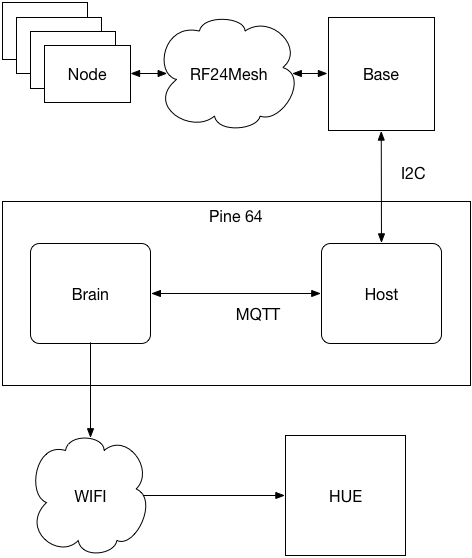
Almost a year ago a friend and I started playing with the idea of building a smart home control system. Before getting too far I ended up back in Canada and the friendship dissolved, as they do. I,…
solar whale
@tulip sleet you probaly have this, but I like this site: https://www.h-schmidt.net/FloatConverter/IEEE754.html
tulip sleet
@solar whale I did find that a few weeks ago when Limor seemed to be having rounding problems, and I discovered the 30-bitness.
@solar whale: an alternate computation: not sure if this makes it clearer or affects the result:
right now: (t in msecs)
t = hi*2^32 + lo
rewrite as:
t = (hi + lo/2^32) * 2^32
I mean that's just another way to look at it for intuition purposes. The 2^32 stuff is just adding and subtracting 32 to/from the exponent, so the code doesn't actually have to change.
solar whale
My head is starting to hurt 😉 Basically, there is no way to avoid some error - there is no free way to do this but the real question is does it cause any real problems.
tulip sleet
I don't think so, and in practice: 2^32 msecs (when the high part kicks in) is 49.7 days, so at that point you don't want to be using time.monotonic() anyway, because it will be ticking over very slowly (every 2^10 ticks or something).
Google units conversion is my friend.
solar whale
planned obsolesence 😉
tulip sleet
what we really want is long ints, eventually. It's available in MPy, along with double-precision float. We just haven't turned it on: maybe for M4.
solar whale
I like being frugal with bits in these kinds of systems - so I hate to see doubles used unnecessarily just to save a bit of arithmetic. It's worth doing things like this as long as we can be convinced there are not unantipated errors being introduced. We can deal withe the anticipated ones!
tulip sleet
yeah, I don't think we would turn on double-precision, due to RAM. I haven't looked at the double support in detail to see if you can use both at once.
manic glacierBOT
I could distribute the division among the two halves, but the precision is still lost due to single-precision floating point. So I don't believe it will make a difference:
>>> (2.0**22+1)/1000 - (2.0**22+0)/1000
0.0
>>> (2.0**22+2)/1000 - (2.0**22+1)/1000
0.00195313
>>> (2.0**22+3)/1000 - (2.0**22+2)/1000
0.0
>>> (2.0**22+4)/1000 - (2.0**22+3)/1000
0.00195313
>>>

OPTION 1
CODE
from adafruit_bus_device.i2c_device import I2CDevice

DEVICE_DEFAULT_I2C_ADDR = 0x42

Class Some_Device():
    def __init__(self, i2c, address=DEVICE_DEFAULT_I2C_ADDR):
            self._device = I2CDevice(i2c, address)
USAGE
import board
import busio
import adafruit_some_device
i2c = busio.I2C(board.SCL, board.SDA)
sensor = adafruit_some_device.Some_Device(i2c)
I like an option what would allow the simple usage syntax of Options 2-4.
tulip sleet
@slender iron I could do a 2.1 release this afternoon. I'm out ~2pm-3:30 or so. Do you want to accept the time.monotonic PR now or after?
manic glacierBOT

i think the issue with #2 is if the sensor has no args and thus creates an i2c device, then if they use that syntax to make another sensor, it will error out because the pins are in use. so id prefer requiring passing in an i2c device
 meager fog
i'm ok with skipping the time.monotonic PR for now, and next version we clean that up and also maybe take a look at framebuf
manic glacierBOT

This sounds perfectly fine to me! If we start changing the millisecond
fraction every other tick after an hour that seems plenty accurate to me.
On Tue, Oct 17, 2017 at 6:49 AM jerryneedell notifications@github.com
wrote:
Okay - You have convinced me that since your really want the value to
exactly 4294967296.000000 - you are OK and there will be no issues until
the multiplicand gets very large and you get truncation but that is
unavoidable. Thanks for the clarifications and all t...
 slender iron
@tulip sleet just pulled it in. 2.1 is a go!
manic glacierBOT
That is an issue :(
import adafruit_this_device
import adafruit_that_device

this_sensor = adafruit_this_device.This_Device()
that_sensor = adafruit_that_device.That_Device()
Looks nice, but second sensor would error out.
tulip sleet
@slender iron I will tag and write up a draft release for you to look at. It needs to have good release notes and good credits -- don't want to miss anything.
slender iron
thanks @tulip sleet !
tulip sleet
@slender iron - I forget, when I tag does travis re-run, or do I need to poke it? I want to make sure the REPL version string is correct.
manic glacierBOT
 tulip sleet
Do I get the release uf2's from travis?
slender iron
yeah, I do for them all except the esp8266
 split ocean
anyone here have thoughts on this error I get trying to import simpleio on a Trinket M0? Adafruit CircuitPython 2.0.0 on 2017-09-12; Adafruit Trinket M0 with samd21e18
import simpleio
Traceback (most recent call last):
File "<stdin>", line 1, in <module>
File "libraries/helpers/simpleio/simpleio.py", line 28, in <module>
ImportError: no module named 'audioio'
i'm using simpleio.mpy from our bundle
meager fog
@split ocean oof yah i fixed that yesterday
it hasnt been pushed to the bundle, can you grab the simpleio.py for now and remove the .mpy?
split ocean
sure thing.
meager fog
@tulip sleet we should probably push a bundle update in the next couple days too
since simpleio is used for servos on trink/gemm
tulip sleet
@yah -- @idle owl made a list of libraries to add, so we can do that very soon after 2.1.0.
split ocean
oh noes, simpleio.py is too large to fit on my Trinket.
 tidal kiln
got mpy-cross?
manic glacierBOT
For options 2-4 you are forcing it to use SDA,SCL - this is fine for boards that have hardware I2C and SCL/SDA are fixed, but what about boards like the ESP8266 where it is not fixed to these pins. Would be possible to allow for optional arguments to set the pins in all options?
split ocean
@tidal kiln no, looks cool. I may hold off since this is for a beginner-level guide
tidal kiln
meager fog
@split ocean hmm it should fit! if you're on a mac you may need to put those do-not-index files in. or you can delete unused libs.
manic glacierBOT
some boards have fixed i2c, some you can change, so i like the idea of a kwargs for the address.
also some, rare devices require another initializer when creating (since we do not use begin()) so kwargs seems best?

I'm curious is there an issue with the current state of the world (option 1, passing in an explicit I2C bus)? If the issues is reducing boilerplate IMHO I'd push that complexity to another layer and not into the drivers (where they might have to make tradeoffs like picking to use busio vs. bitbangio for ESP8266, etc.). IMHO something nice would be in the board module add functions that give you the default I2C bus for the board and can know if they should be bitbangio, busio, etc. For exam...
If the issues is reducing boilerplate
That's it really.
tulip sleet
@slender iron draft release in progress; will continue when I return
slender iron
Ok thanks @tulip sleet

 manic glacierBOT
Despite shipping with CircuitPython pre-installed, the Trinket M0 is
abset from the README.md file. This fixes that issue.
slender iron
yay! reviewing it now @cunning crypt
 cunning crypt
The pull request itself was mostly making sure everything worked as I expected it to
May as well do a useful thing while I'm at it, right?
slender iron
yup yup, I'll wait for Travis and then pull it in
 timber mango
@tulip sleet dont forget this release also fixes analogin bug where it doesnt change reference, and mcu.temperature bug (which may be same)
slender iron
@timber mango dan is out for a while I think
timber mango
k np, its just the release notes 😃
slender iron
yup yup
cunning crypt
@slender iron Is there a guide/instruction set I'm missing for building a testing version of CP from my own branch to, well, test?
slender iron
there is a guide on building micropython, which is the same process
what OS are you on?
slender iron
@cunning crypt https://learn.adafruit.com/micropython-for-samd21/build-firmware?view=all#build-firmware

How to use MicroPython with boards like the Feather M0 & Arduino Zero!
its the same process even though it says micropython
cunning crypt
Well, CircuitPython WAS MicroPython before
slender iron
yeah, and the build process hasn't changed
timber mango
@tulip sleet oops i see it at the bottom, nvmd
manic glacierBOT
This commit on my fork should address this and issue #317 - but no pull request until I have built the firmware and put it on an M0 Adalogger. I won't have the Adalogger until tomorrow, so hopefully I'll be able to tackle everything then.
slender iron
turns out the file system doesn't work well when you format it on start up every time 🤦
timber mango
@slender iron zis on the m4?
slender iron
on the m0 with the same code. haven't tried it on the m4 yet. cdc isn't happy 🙄
timber mango
oi
slender iron
yeah, I have a better understanding of the usb stack now so I'll fix it
timber mango
@idle owl hiya katt i was going to start looking at IR support for cirpy
generically, not just for CPX
slender iron
@cunning crypt looks like you pushed more changes to the same PR accidentally
slender iron
you'll need to change the branch locally and then force push it
a PR = branch
so to have a second PR you need a second branch
slender iron
nope, they are all commits unique to a branch compared to the base branch
cunning crypt
That PR is from my "Master" branch, so it should probably be kicked off and re-done.
slender iron
how is your git fu? you could put d4000212b in a non-master branch and rewind master
cunning crypt
I just reverted the M0 adalogger stuff
slender iron
kk
cunning crypt
If you accept a pull request, and I modify that branch later, it'd have to be a new pull request, correct?
slender iron
yeah
cunning crypt
Any other way would be silly, but I just wanted to be sure
cunning crypt
I'm sorting out a branch for the M0 Adalogger fixes now
So that, going forward, there needs to be fewer shenanigans
cunning crypt
That bites. And then bites again.
 idle owl
@timber mango That's excellent. IR is on my list as well.
split ocean
anyone know of examples using the accelerometer on CPX with the express.py?
idle owl
@split ocean I have the code I wrote to test the API.
split ocean
cool
 timber lion
examples here should work: https://learn.adafruit.com/circuitpython-hardware-lis3dh-accelerometer and https://github.com/adafruit/Adafruit_CircuitPython_LIS3DH/tree/master/examples it's not using the all in one library but that library uses the LIS3DH lib internally

Learn how to use the LIS3DH accelerometer with CircuitPython!

GitHub
Adafruit_CircuitPython_LIS3DH - Adafruit CircuitPython module for the LIS3DH accelerometer.
only gotcha make sure to use address=0x19 when creating the LIS3DH object as on CPX it has the addr line set to change the address from default 0x18
idle owl
@split ocean It's not posted anywhere but I can post it here. It uses the accelerometer and the neopixels.
split ocean
thanks @timber lion I'd found that ;) thanks to google.
Looking to do it with that all in one library for a guide project
yess @idle owl that's be a big help
timber lion
yeah this halloween i love you / hail satan gag also uses the accel tap detection and is a simple example: https://gist.github.com/tdicola/5891264bd8f10b390c6fff66310effe7

Gist
idle owl
@split ocean No problem!
@split ocean
The lights are more fluid the lower the sleep time is set for, or they're choppier if you set it higher.
Also it prints to the REPL which may or may not be necessary for your project.
split ocean
thanks. mind if I ask some questions about getting it to work?
idle owl
Nope, go for it!
split ocean
ok, Limor sent me express.py to use, so I changed import to "from express import Express"
and line 10 to x,y,z = Express.acceleration
running it i get error "line 10 TypeError: 'property' object is not iterable
timber lion
does
foo = Express.acceleration
x, y, z = foo
work? it might be properties don't support iterator protocol that tuple unpacking wants
tulip sleet
from express import Express.cpx
idle owl
I changed mine to import Express and it works the same...
tulip sleet
x,y,z = cpx.acceleration
timber lion
make sure there is nothing else called express on the board filesystem, like an express.mpy etc. too
it might be getting the wrong file
and ctrl-d soft reset just to be sure the FS is mounted and read fresh again
tulip sleet
could you post the express.py she setn?
idle owl
If you have the express.py file I assume you do, you can import cpx insead of Express.
Hah I changed the wrong file. Checking again.
timber lion
yeah actually it sounds like you need to be using an instance of an object
it's probably finding an Express class with a property called acceleration
Express.acceleration is valid python but it's pointing to the class-level property metaobject.. not really what you want
idle owl
@split ocean I get the same error if I use Express
timber lion
i have a feeling you need an instance it creates like something called cpx, etc.
split ocean
I got it working
idle owl
Nice!
split ocean
from express import cpx is the only change I needed to make :)
split ocean
thanks all!
idle owl
The thing I really like about that code is that it also gets brighter if you fling it around a little.
split ocean
OK, now I'll start to poke at things and see if I understand how to use it
I'm doing this at a coffee shop, so definitly!
idle owl
lol! That's great!
tulip sleet
do people ask about it, or just stare?
split ocean
I've had people ask about it, and gotten into some good conversations about building projects/props
nobody gets caught staring ;)
idle owl
That's pretty fantastic though. Starting conversations is great
timber lion
yeah there's also the mega demo I sent out before @split ocean it has a demo of interpolating colors on the pixels based on accelerometer orientation.. i can send it again if curious. same code would be easy to swap to the express.py
split ocean
of course the guy directly to my left is producing beats and songs on a Maschine midi drum pad controller, so it's a high bar
timber lion
i got a whole bag of our boards through the in-cabin security.. and lipo batteries too 😃 not a single question
idle owl
@split ocean Let me know if you run into memory allocation issues - I'll send you an .mpy of express.py
timber lion
twice actually.. but i had them in a nicely labeled bag and the batteries in individual pink bags to look more 'professional'
idle owl
@split ocean I had it open for ages too! Thank you again @timber lion for posting it for me.
 sick creek
mega robot demo from @timber lion where  robots fight
idle owl
@tulip sleet When you update the bundle, will the download be called adafruit-circuitpython-bundle-2.1.0-* ?
tulip sleet
@idle owl - I think so. They're not necessarily connected but it's easier to understand.
idle owl
@tulip sleet Right, they're currently named for the version of CP they sort of coincide with, so I thought I would check.
tulip sleet
eating dinner - back in a little while
idle owl
Have a good one!
timber mango
if anyone here has a board & IR receiver and a TV remote, i could use some testing friends
idle owl
@timber mango Will the CPX work with the onboard receiver
timber mango
yah!
idle owl
I'm in!
timber mango
ok cool !
grab adafruit_irremote.py from here https://github.com/adafruit/Adafruit_CircuitPython_IRRemote
GitHub
Adafruit_CircuitPython_IRRemote - CircuitPython drivers for IR remote send and receive
then try this sketch
import pulseio
import board
import adafruit_irremote
pulsein = pulseio.PulseIn(board.D2, maxlen=120, idle_state=True)
decoder = adafruit_irremote.GenericDecode()
size must match what you are decoding! for NEC use 4
received_code = bytearray(4)
while True:
decoder.decode(pulsein, received_code, debug=False)
received_code = [i for i in received_code]
print(received_code)
but change board.D2 to like board.IRRECEIVE or whatever its called
then open the REPL and send some codes from your remote.
idle owl
On it
timber mango
oh and change debug=False to True - that will give us more deets
idle owl
I get all kinds of data!
timber mango
ok can you put it in a file and paste here?
idle owl
Yep.
timber mango
thanku
idle owl
timber mango
ok cool you have a NEC remote too
idle owl
Don't think so
timber mango
er, it uses the same protocol as NEC even if its another brand 😄
idle owl
I figured, but I still don't think so 😃
cunning crypt
@slender iron Have the examples in the /examples folder been touched for CircuitPython at all, or are they still MicroPython examples?
slender iron
MicroPython most likely
cunning crypt
That's what I thought. 2, 3, 4 years ago, etc.
slender iron
the learn guides have circuitpython examples
formal plover
Whoa! Haha checked on this channel around lunch. Came back to it now... 187 missed messages.
cunning crypt
Doesn't mean the ones in the repo need to be outdated.
formal plover
Did I hear @slender iron right? 2.1 is out?
tulip sleet
@slender iron draft release visible to you here for review: https://github.com/adafruit/circuitpython/releases
I think it's almost ready to go.
Could you maybe expand @ circuitpython helpers into there? I made the list of discord folks the hard way, but maybe as an admin it's easier for you to see who's been in the channel during a time period.
GitHub
circuitpython - CircuitPython - a Python implementation for teaching coding with microcontrollers
@formal plover almost!
formal plover
@tulip sleet Nice!!!
Is the new support for pulseio on the Trinket M0 and Gemma M0 that Lady Ada added in there?
tulip sleet
Yes - that's the headline, basically
slender iron
@tulip sleet looking now. Thats a long list!
formal plover
Sweet.
slender iron
thank you list looks good to me @tulip sleet
tulip sleet
@slender iron I see some typos I'll fix in a minute. I think there's no locking if we are both editing.
slender iron
I edited earlier and have nothing remaining
formal plover
Good work everyone! So excited
slender iron
@tulip sleet lgtm
thanks for doing it!
let me know if you need me to blog it up and post to the forums
manic glacierBOT
tulip sleet
wow, 7pm on the nose
@slender iron I haven't done any blog posts, but I could try. I can do the forum post definitely. Will do that first.
I'll follow your previous leads.
slender iron
They are pretty straightforward
converting formats is the biggest pain
for the blog I usually use browser dev tools to grab the html
and then search and replace to change the html into phpbb format
I've been meaning to script it...
formal plover
Automate all the things
cunning crypt
As long as it's automated with CircuitPython
tulip sleet
we should try to redo the bundle soon
tulip sleet
I was thinking (maybe not right now) of building separate CPX and Gemma/Trinket bundles. CPX can omit what's frozen. Gemma/Trinket would be a selected list that fit.
manic glacierBOT
The examples in the aptly-named /examples directory are out of date, some extremely so. It appears that they're all microPython based
These should be updated, replaced, or removed, and organized depending on what boards they run on.
My preferences:
- If it relies on specific hardware that there is no CircuitPython board comparable to, remove it.
- If its purpose is outside the scope of CircuitPython, remove it.
- If we can adapt it to a specific CircuitPython board (I'm looking at...
slender iron
@tulip sleet I thought about that but am worried it'll confuse people when it doesn't just have everything
tulip sleet
@slender iron yeah, I was worried about that too. Maybe some board-specific README's are good enough.
slender iron
sure sure, I'm open to exploring variations
 river quest
h ifolks
idle owl
Hello
river quest
@slender iron whatcha think about me posting an coming soon in #general-tech ?
slender iron
do it @river quest !
river quest
you know this is
slender iron
we need a leek emoji
river quest
er, this is
man, long day
i believe i caused the worldwide adwords outage today, long story
anyhoo
posting in #general-tech in a moment, will tweet for folks to go there
cunning crypt
LeekTweets
formal plover
Hahaha I was about to say @slender iron is going to get on you if you post a leek here
river quest
ok see some of you in #general-tech
formal plover
See you soon!
 carmine basin
Hello. I have micropython with Neopixel questions(s)....
I want to adjust the brightness of the neopixel in the loop ... for example....
the command line before the loop pixels = neopixel.NeoPixel(pixpin, numpix, brightness=.02)
I want to use that in my loop.
But I tried to insert that in my loop but that was incorrect.
cunning crypt
If I'm thinking of the right stuff, that's because that's the initializer for the NeoPixel, and should only be started once.
carmine basin
ok. Is there anyway to change the brightness inside the loop?
timber lion
not easily, it's like with the arduino library where brightness changes happen 'in place'
so if you dip all the way to zero brightness you lose the color info
and same for all the way to max brightness
slender iron
pixels.brightness = .02
tulip sleet
@slender iron this was helpful to convert the HTML to bbcode: http://www.seabreezecomputers.com/html2bbcode/. I just had to change the [code] tags to [b], remove some blank lines, and touch up the headers
 carmine basin
ok, i'll try that
slender iron
nice @tulip sleet !
timber lion
one thing is to try switching to HSV color space, with HSV you can adjust the value up and down from 0 to 1.0 and it changes the intensity/brightness of the hue
cunning crypt
What I've done in the past is used HSV for color values, and then ran them through an HSV to RGB converter which dropped it into the NeoPixel-equivalents I was using.
timber lion
yep exactly
cunning crypt
But that was with Arduino, so all of the code would have to be ported
timber lion
here's an HSV to RGB conversion if you need it: https://github.com/adafruit/Circuit_Walker_Sneakers/blob/master/CircuitPython_Circuit_Walker/main.py#L80-L129
GitHub
Circuit_Walker_Sneakers - Arduino and other code for Circuit Walker Sneakers project.
if you haven't used it check out the HSV wikipedia page for good info on what the hues look like (you choose one from 0 to 360 degrees, the saturation from 0 to 1.0 and value from 0 to 1.0: https://en.wikipedia.org/wiki/HSL_and_HSV
HSL (Hue, Saturation, Lightness) and HSV (Hue, Saturation, Value) are two alternative representations of the RGB color model, designed in the 1970s by computer graphics researchers to more closely align with the way human vision perceives color-m...
or just find a RGB color you like and there are lots of little converters online to give you the HSV value
cunning crypt
HSV is just fantastic
timber lion
yeah it's a lot easier for most of the animations folks want to do
super easy rainbow cycle too 😃
just interpolate a sine wave to 0 to 360 degree hue values
cunning crypt
Yeah. Setting up my Hall Array display, I could easily map the north pole and south pole to different parts of the HSV spectrum and show it nciely
carmine basin
thanks guys, I'll try that. I'm novice(ing) my way through it.
cunning crypt
Everyone's a novice at some point. To be honest, I'm probably not that far ahead of you.
Especially compared to these guys.
timber lion
oh and actually @split ocean this reminds me, the circuit walkers are another good CPX accelerometer demo: https://github.com/adafruit/Circuit_Walker_Sneakers/blob/master/CircuitPython_Circuit_Walker/main.py tap detetction causes a really pretty rainbow flash that fades out
GitHub
Circuit_Walker_Sneakers - Arduino and other code for Circuit Walker Sneakers project.
timber lion
yeah just be careful if you drop brightness to zero you might lose the color info: https://learn.adafruit.com/adafruit-neopixel-uberguide/arduino-library-use#faq-41

Everything you always wanted to know about Adafruit NeoPixels but were afraid to ask
if you go down to like 0.1 it will probably keep enough info and still be super dim/off looking though
carmine basin
@timber lion Thanks. yes I tried that. Great videos (your micropython videos). I'm getting the hang a little better now.
timber mango
@timber lion btw, the circuitpython library does not act like the arduino library, brightness is recalculated on every write
which is why you need more memory if using brightness < 1
timber mango
yep
carmine basin
I just did it. It's working the way i want...Thanks a bunch.
timber mango
GitHub
Adafruit_CircuitPython_NeoPixel - CircuitPython drivers for neopixels.
yay awesome!
carmine basin
What's the max brightness..... .1 ..?
oh, i see it in the code (link you sent) It says max brightness is .1
manic glacierBOT
New names also maybe?
onewire_device.py containing OneWireDevice class?
(matches the i2c and spi devices)
tulip sleet
@slender iron I will do a fresh bundle tomw. will be out for a few hours late morning (10am -1pm ET roughly)
manic glacierBOT
@Andon-A this would be awesome! Are you up for it?
Absolutely. I'm guessing most of them will end up being completely re-done or removed, but first up is the guidelines.
Guidelines look good to me!
cunning crypt
Well, it's not something that I'm going to finish "Soon" expecially given everything else I've got on my plate, but I've started.

GitHub
circuitpython - CircuitPython - a Python implementation for teaching coding with microcontrollers
I'm going to have to get a Circuit Playground at some point, too.
manic glacierBOT
 manic glacierBOT
Fixes #260
This depends on https://github.com/adafruit/asf4/pull/1 as well.
floral dagger
spent some time last night on it, and I think I am finally starting to get the hang of MQTT. It's hard to find references that don't rely on a separate platform or plugin. I think some of the code I have found may be able to be optimzed a bit. I just need to use adafruit io, so that specific use will allow a good bit of trimming since a lot of the bytes in the connection array will be the same every time.
If I get an adafruit io specific library built, would it be worth submittng to be looked at for inclusion?
formal plover
Technically it'd be an API then 😉 which would make things a lot simpler for users. I'm sure that'd be a welcoming addition. @floral dagger
manic glacierBOT

I have been struggling with adding struct.error. I have created a new exception "struct.error" in objexcept.c, but you cannot handle it with try/except, so its not much good. I try to add a property to return this exception, but I cannot figure it out. Honestly, unless you want help me figure out how to add an object attribute containing an except, I think we should create an exception called StructError and emit that for our error cases.
manic glacierBOT
Yeah, I get its tough. How about just using an existing error like RuntimeError for now. I can go back and take a look into it later.
timber lion
oh nice that's great @meager fog it scales pixels as it writes. if we wanted we could even push that scaling into the C function neopixel_write to make it a little faster and use less memory if we ever need.
speaking of pixels, this is a neat dotstar thing I'm putting together to wear to a retro game event. it's 2x 8x8 high density dotstar grids next to a feather m0 express, so 128 pixels total. i have it loading PPM images and displaying them, specifically scaled down nintendo sprites (most are 16x32 pixels so pretty easy and good to scale down in half to 8x16)
with the lights off, can see how the pixel grids are perfectly the same size as feather. the mounting holes even line up and can use a couple screws to secure it
i have to say though it gets BRIGHT... 128 pixels in the space of maybe 2-3 inches is kind of crazy. it can pull 7 amps alone with all on full white. it gets really hot though so have to keep brightness very low. you can't even really look at it with full bright, even in the dark 😃
back of it is just point to point wiring
floral dagger
ha! I suppose it would be an API, @slender iron It's still this sort of amorphous idea in my head. Would an API still follow the same style guide/tutorial that is on the learning system?
slender iron
@floral dagger yup! I'm happy to chat more about it and we can involve @keen parcel on it too
floral dagger
That'd be great. I'm still very early in it, but I've been thinking about a few things I may need to ask him, and I am sure I will have loads of questions for you as well. Thanks @slender iron I'll start working on it and hit you up when I get a little further along.
Right now any questions I would have would be without context, so a bit tough to convey
manic glacierBOT
I think i have made required changes for now.
slender iron
sounds good, thanks @floral dagger !
tidal kiln
@timber lion are they animated?
river quest
hey folks!
@slender iron we have the circuitpython ads done, want me to post them here or in #general-tech ?
slender iron
here is fine @river quest
river quest
ok! here we go!
 tight flax
<drum roll>
floral dagger
ooooohhhh.....me likey @river quest
 lofty topaz
LAAAAAAADIEEEEEEEES and GENTLEMEN! Adafruit is proud to introduce.....
Very nice. Very nice indeed.
river quest
thanks folks, actually thank each other 😃
lofty topaz
The magenta really pops...
river quest
i'll drop these in #general-tech too
cunning crypt
@river quest Those are cool
river quest
created with the #circuitpython-dev community 😃
we'll try to run these on facebook, but er, there were some issues this week
cunning crypt
@timber lion You mentioned a retro game event. That doesn't happen to be RetroGameCon in Syracuse next mo th does it?
Facebook just is being a pile of crap
river quest
@meager fog wants to be able to let folks there know about this place here
so we'll keep at it 😃
cunning crypt
Hopefully it gets resolved soon
river quest
makes this place here make even MOAR special
cunning crypt
Indeed! Discord is great
river quest
just gotta let folks know that do not know about it, that we exisit here and they can be part of #circuitpython-dev right now
split ocean
Does anyone know what conflict I may be running into using auidioio speaker enable when I get this error:
ValueError: Pin PA30 in use
the two other things i'm doing is reading accelerometer and lighting neopixels
slender iron
@split ocean could you post all of the code somewhere?
split ocean
yes, i'll do a gist, one moment
slender iron
thanks!
split ocean
 tulip sleet
@split ocean @slender iron looks like express.py Express.__init()__ grabs speaker_enable and holds it, in prep for using it in cpx.play_tone(). It should probably try to grab it only if someone actually calls play_tone(). If you have express.py you could just comment that out for now.
split ocean
thanks @tulip sleet I realize for the sound and neopixel stuff I'm doing I should probably be using express calls, right?
slender iron
or we can add play_file to Express
tulip sleet
play_file is a great idea, since lots of people will want that
split ocean
sounds good to me!
tulip sleet
express doesn't have brightness control on the neopixels, but that could be added too
@idle owl see from 2:26pm above onward ⬆
idle owl
I thought brightness was an option.. hmm
split ocean
OK, thanks @tulip sleet I'll keep the neopixel code as is in this one. I'll temporarily comment out that play_tone for now just to test things out, and then move to play_sound in express when you get that in there.
idle owl
No I guess I'm thinking of the neopixel library itsef. We can definitely add it.
split ocean
that'd be great @idle owl if we're going to encourage people to use express when starting out one of the first things we do in neopixel tutorials is mention setting low brightness settings to avoid blindness ;)
oh, actually, I have exprss.mpy that @meager fog sent me. is express.py available?
idle owl
I think we've simply been doing it by setting the color numbers really low to adjust brightness.
Which isn't the best way to do it. Especially with code that's scaling the color.
@split ocean express.py? Yes, that's on github. It's the .mpy that has to be built separately.
GitHub
Adafruit_CircuitPython_CircuitPlayground - CircuitPython library for CircuitPlayground
split ocean
should I be able to use express.py in place of express.mpy once I've commented out the speaker code? It's giving me a memory allocation error when I try
idle owl
Maybe? Unlikely though. The speaker code doesn't take up that much memory. It's the acceleration and touch code that pushed it over for me.
slender iron
@idle owl is the accelerometer built into 2.1?
idle owl
It's a frozen module so if that was all included, then yes.
It was in the custom firmware build that Dan gave me. Did that end up being in the update?
tulip sleet
yep, thermistor, lis3dh, bus_device, and neopixel are frozen in 2.1
split ocean
or do I need to use mpy_cross on it?
idle owl
I found even with the modules built in, I had to use mpy_cross.
split ocean
OK
ah, just looked at @timber lion firmware building tutorial, and realized that getting that set up to use mpy-cross is more involved than i realized ;)
timber lion
@carter yeah I'm going to make it animate different PNGs
idle owl
@split ocean What type of machine are you running?
split ocean
osx
timber lion
@cunning crypt oh it's the portland retro game expo actually, it's this weekend in portland
idle owl
Hold on I already have it built for OSX
split ocean
woot!
timber lion
@split ocean you can actually compile the source tree and mpy-cross without too much pain on OSX
it's a lot easier in vagrant to keep all the dependencies there
idle owl
@split ocean
timber lion
but technically mpy cross doesn't need an ARM cross compiler
so really if you just have the OSX Xcode command line tools installed, clone the circuitpython repo and:
cd mpy-cross
make
that should build it and then you can mpy-cross anything
the vagrant thing is great if that fails or for windows ,etc. where you don't have a nice command line posix toolchain
idle owl
I had to make the file I posted too, but it works without cloning the entire repo.
timber lion
and to build the firmware you need an ARM cross compiler setup.. the vagrant thing does all that
idle owl
@split ocean When you're playing those sound files, where do you keep them? In the main CIRCUITPY directory?
split ocean
yes
idle owl
Also, could you post a couple of clips for me to test with? I'm going to write it into the API. I don't know if I have any music on this. Usually stream and I did a complete reinstall a few months ago.
split ocean
sure thing, hang on
idle owl
Thank you!
split ocean
timber lion
here's a test file from my demon toy
idle owl
lol, fantastic!
timber lion
best results are using audacity record at 16khz 16-bit PCM, mono.. then use the compressor plugin to boost the volume to max
idle owl
Good to know, I was wondering about that.
timber lion
audacity UI is a bit... challenging.. lots of googling to figure out how to set those settings
idle owl
Yeah I've used it for really basic stuff.
split ocean
i've also put a few drum samples here: https://github.com/adafruit/Adafruit_Learning_System_Guides/tree/master/Introducing_CircuitPlaygroundExpress that are part of a guide
GitHub
Adafruit_Learning_System_Guides - Smaller programs and scripts to display "inline" in Adafruit Learning System guides
timber lion
they default to 48khz 32-bit stereo.. so some finagling to get it into a lower bit depth mono mode.. also you have to use the resample function to convert from 48khz to 16khz... if you just try changing the sample rate it messes with the audio pitch (I dunno why but they don't do a proper resample with accurate audio unless you use this explicit resample command in the menus)
split ocean
here's our page on prepping audio files, we mirror or link it into lots of other guides: https://learn.adafruit.com/adafruit-wave-shield-audio-shield-for-arduino/convert-files

Add music to your Arduino
there's a project level sample rate setting that doesn't mess with the pitch, at the bottom of the UI. that's the one you want!
timber lion
yeah those are handy, if you get audio that's pitch shifted after changing the rate you might need to use the resample command in the menus instead of in the project UI.. i found that was the case for the version of audacity i'm using
the compressor plugin is handy for files that will play back on CPX too.. it will boost to max volume in the file without clipping. good to get every bit of oomph from the board's little speaker
it's still not super loud, but works well enough 😃
split ocean
@idle owl should I be able to run 'sudo ./mpy-express ./express.py' where both files live together?
I'm getting command not found error
i mean mpy-cross
split ocean
say's 'nothing to be done for 'mpy-cross'
timber lion
mpy-cross is the command name, but one tricky thing.. if you're on different major versions of OSX (like sierra vs. el capitan) you might not be able to use katni's executable
since it will be linked against different libs
split ocean
ah
timber lion
hrm are you running a make command on accident?
idle owl
I'm running Sierra
timber lion
ah yeah i bet sierra -> el cap wouldn't work.. it's going to try to use newer libs
idle owl
That's the major reinstall I did a few months ago was a massive update of versions as well.
slender iron
@split ocean you shouldn't need sudo to run mpy-cross, just chmod +x mpy-cross first
split ocean
ok
manic glacierBOT
This makes it way more reliable.
I suggest rebasing because I lumped the asf4 update commit here too.
 glacial bronze
I just flashed the Huzzah ESP8266 2.1.0 firmware to my Wemos D1 Mini, aaaand it's not quite working. Even more than it already isn't working (no USB mass storage for files, e.g.)
Specifically ```>>> import pyb
Traceback (most recent call last):
File "<stdin>", line 1, in <module>
ImportError: no module named 'pyb'
@glacial bronze usb mass storage doesn't work on ESP8266s
slender iron
pyb is for stm base micropython I believe too
glacial bronze
Then this doc should be updated https://learn.adafruit.com/building-and-running-micropython-on-the-esp8266/overview?view=all#flash-firmware

How to compile and install MicroPython for the ESP8266 WiFi breakout!
slender iron
what part?
glacial bronze
GPIO Access header, where it says to use the pyb module
slender iron
kk, I get what you are saying
@timber lion do we have a separate guide for flashing circuitpython on ESP8266?
glacial bronze
I used the Huzzah instructions, which was what previous people have done
timber lion
nope, it's the same as for micropython.. use the same flashing tools
glacial bronze
it messes up the pin numbering but otherwise should work
slender iron
@timber lion the follow up page about pyb is confusing though
timber lion
grab the circuitpython firmware like the release mentions: https://github.com/adafruit/circuitpython/releases
GitHub
circuitpython - CircuitPython - a Python implementation for teaching coding with microcontrollers
slender iron
@glacial bronze follow these instead with different pins: https://learn.adafruit.com/adafruit-trinket-m0-circuitpython-arduino/downloads?view=all#circuitpython-digital-in-out

CircuitPython or Arduino IDE on this tiny little microcontroller board
glacial bronze
Well there's no instant module failure, so that's already a step forward! :v
manic glacierBOT
timber lion
yeah so to be super clear that guide is a legacy one on micropython, it actually doesn't use the pyb interface anymore and the guide mentions at the top of the page "NOTE: The details below are a little out of date as the project has evolved significantly since the guide was written. Check out the latest documentation on MicroPython ESP8266 here for the most up to date usage details: http://docs.micropython.org/en/latest/esp8266/index.html"
so for micropython definitely check out their docs
glacial bronze
Ah. Which wouldn't apply either because I flashed CircuitPython
timber lion
for circuitpython maybe our release page should say "to flash follow the steps for using esptool.py from this legacy micropython guide, then use circuitpython APIs <link to docs for circuitpython>" ?
glacial bronze
That would help, definitely
slender iron
it could, or we could make a new guide for it
the Flash Firmware page could be mirrored
timber lion
yeah maybe in the future can do a separate one, the esptool.py page here is pretty self contained and gives all the info needed: https://learn.adafruit.com/building-and-running-micropython-on-the-esp8266/overview?view=all#flash-firmware
How to compile and install MicroPython for the ESP8266 WiFi breakout!
slender iron
yup, I'll change the link to https://learn.adafruit.com/building-and-running-micropython-on-the-esp8266/flash-firmware for now
How to compile and install MicroPython for the ESP8266 WiFi breakout!
timber lion
i'll put a red warning at the top of the micropython usage page to call out that this is micropython only and link to our API docs and other learn guides for circuitpython if using that
idle owl
@split ocean My cat is infinitely interested in your ufoup sound. She isn't a super jumpy cat and she was straight up out of sleep for that one. 😄
glacial bronze
let's see.... builtin LED is on pin 17, and that's GPIO 2, and on the Huzzah that's... straight up #2, okay
split ocean
I'm not saying cats are aliens. But they're aliens.
idle owl
This one has temporal whiskers. She can phase items and herself through space-time.
meager fog
@idle owl ok im back! and i have more ir remote code for testing
slender iron
thanks @timber lion !
idle owl
@meager fog nice!
meager fog
wanna take a look? i think i Solved some Things
tulip sleet
@timber lion @slender iron a new "Using CircuitPython" page on https://learn.adafruit.com/adafruit-feather-huzzah-esp8266/ would be a good place to put esptool instructions, I think.

WiFi with built-in battery charging for IoT on-the-go!
idle owl
@meager fog Definitely
formal plover
Just cranking away with this development. I can't keep up! Great work everyone!
meager fog
anyone else here who has a CPX and some IR remotes is also welcome!
formal plover
I'll give it a whirl sometime soon @meager fog, thanks!
glacial bronze
Neat. I've succesfully blunk the built-in LED on a Wemos D1 Mini using CircuitPython
idle owl
@glacial bronze Nice!
glacial bronze
Now here's a neat hack I'd like: Where is main.py stored on the filesystem, so I can open it via the REPL?
glacial bronze
Where should it be then?
meager fog
@idle owl ok code is here! https://github.com/adafruit/Adafruit_CircuitPython_IRRemote
GitHub
Adafruit_CircuitPython_IRRemote - CircuitPython drivers for IR remote send and receive
meager fog
copy over the irremote.py and the examples/main.py
timber lion
you can also
import os
os.listdir()
to list files in the root
 half sedge
Could you make Trinket M0 and Gemma M0 bigger? It is the second time I loose track of them and I wanted to update to CircuitPython 2.1
floral dagger
@glacial bronze you may want to copy the library bundle over there as well.
idle owl
@meager fog Ooh it looks nice now!
glacial bronze
I haven't figured out how to do file transfers yet. Right now I'm just poking the REPL via PuTTY
I did the flash on a Raspberry Pi
floral dagger
lol yeah...when you get a chance, grab Ampy as well. That wil let you do the file transfers
glacial bronze
Interesting note on this board: the LED is on when its pin is set to False, rather than True as might be expected
tulip sleet
👏 👏 Huge congrats to @slender iron for conquering ASF4, implementing USB MSC and CDC!!
slender iron
@meager fog for when you want to implement API docs: https://circuitpython.readthedocs.io/en/latest/docs/design_guide.html#document-inline
thanks @tulip sleet ! now its UF2 bootloader time
idle owl
@slender iron Great work!
meager fog
@slender iron yep want to get some more IR data 😃
(since interface may change, again)
idle owl
@meager fog I've got another remote that's only doing 1 pulse at a time. It apparently came with an old Gateway computer.
slender iron
@meager fog I don't see any major things. the if debug: print() is a bit weird to me. I'm used to print() if debug for single line ifs
meager fog
@idle owl woah thats wierd, ca n you paste the "Heard pulse" data?
meager fog
for those we might have to just say "look there's no actual data here so just use the raw pulses"
idle owl
Failed to decode:  ('10 pulses minimum',)
----------------------------
Heard 1 Pulses: [170]
Failed to decode:  ('10 pulses minimum',)
----------------------------
Heard 1 Pulses: [169]
Failed to decode:  ('10 pulses minimum',)
----------------------------
Heard 1 Pulses: [167]
Failed to decode:  ('10 pulses minimum',)
----------------------------
Heard 1 Pulses: [165]
Failed to decode:  ('10 pulses minimum',)
----------------------------
Heard 1 Pulses: [169]
Failed to decode:  ('10 pulses minimum',)
----------------------------
Heard 1 Pulses: [166]
Failed to decode:  ('10 pulses minimum',)
----------------------------
Heard 1 Pulses: [168]
Failed to decode: ('10 pulses minimum',)```@slender iron ok will change those
manic glacierBOT
meager fog
@idle owl yah thats really odd, the problem with those is that flourescent lights will trigger that kinda pulse too. so i think im ok saying "it has to be a real IR remote" 😃
slender iron
@meager fog looks good overall though
idle owl
@meager fog I changed debug to True and it doesn't respond to the gateway remote at all. I figured I'd grab the only other IR remote that I could find. I didn't assume it'd be a weird one. lol
half sedge
How does that "IR remote" relate equal or is different from this: https://github.com/cyborg5/IRLibCP
 timber lion
oh interesting @tulip sleet did you look at memory usage with doc string comments even in mpy files?
damien mentioned in a talk that they take space IIRC
but i wondered if doing them just as comments (not as strings) would get the space savings but still be parsed by sphinx
meager fog
@half sedge this is a lower level library, not nearly as full featured! but smaller so maybe easier to fit into a big project
idle owl
I'm going to change the batteries and see if it makes a difference...
timber lion
it's annoying because python doc strings are real objects.. they live on the class, so FooClass.doc is in memory
formal plover
I have a TSOP38238 (IR receiver) maybe I can use that too if I can figure out how to use it with CircuitPython @idle owl @meager fog
glacial bronze
Ha! Bash for Windows added serial support! I can fidget with this thing without having to jump between machines
timber lion
but it's kind of one of those last 10% optimizations.. if you're hurting for memory and starting to delete docstrings your days are numbered anyways.. eventually are just going to be out
meager fog
@idle owl ooh yah good idea!
timber lion
but big long doc strings with example code could be interesting to check if the memory usage improves removing them
slender iron
@timber lion I could have sworn I had looked and doc strings aren't in mpy
meager fog
@formal plover sure! if you wire it up to D2, that works, just change main.py's pin #help-with-3dprinting
half sedge
@timber lion Any news from your mega demo?
tulip sleet
@timber lion I thought I tested that a few months ago and they were not there. I just did strings on an .mpy file. I just tried it again: made an mpy and did strings foo.mpy. I don't see the docstrings.
timber lion
oh nice! yeah damien was talking about it in his pycon au talk IIRC
formal plover
Thanks @meager fog I'll be sure to do that.
tidal kiln
i have cpx. what's needed to test ir? @idle owl @meager fog
timber lion
maybe they recently got rid of storing them
@half sedge hrm nothing new with it, is there something in particular you were looking for with it?
meager fog
@tidal kiln ^ see my instructions to kattni a fe wminutes ago, thats it! i recommend cpy 2.1 just so we're on the same vers
slender iron
@timber lion I think it may be configurable
tidal kiln
oh. guess i need remote also. hold on....
tulip sleet
https://github.com/micropython/micropython/issues/708#issuecomment-283641244 re docstrings (and see entire issue). Also https://github.com/micropython/micropython/issues/521

GitHub
Space is allocated on the heap for docstrings even though they are inaccessible. The garbage collector will get rid of them eventually, but pfalcon reckons the initial allocation could be avoided.
...

GitHub
As far as I can tell (saw them in bytecode dumps), currently uPy stores docstrings when compiling a code. That's all good of course, but should be optional, and apparently disabled by default.
Usec...
timber lion
yeah just gave it a quick test and it's definitely not adding strings, so that's good 😃
half sedge
@timber lion just checking, it is a great selling argument, now I am going to upgrade to 2.1, maybe the mpy will not be compatible (but the release document don't say it is going to happen) maybe I will have issue with A0 not beeing touch anymore. The day you will make a learn page on your mega demo and/or a video about it and/or whatever, it will be more official and "supported".
split ocean
well, i succesfully used mpy-cross to build the express.mpy after commenting out the two speaker _enable lines in Init as @tulip sleet suggested. compiled it w mpy-cross, and now I don't get the PA30 error.
so yay!
tulip sleet
@half sedge no change to .mpy format for 2.1
timber lion
cool yeah I definitely want to have a guide on it, I was thinking maybe in the CPX guide as a page
tidal kiln
@meager fog got stuff. want output?
split ocean
but, I am now getting an unspecified MemoryError when it tries to play the .wav, which doesn't happen on simpler .wav playback code that isn't using express.
timber lion
but it's all good with 2.1, it should work with any future version unless that version calls out breaking compatibility in some way
the 2.0 and 1.0 split was from upstream micropython changing their mpy format
unofortunately out of our hands
half sedge
@timber lion Yes but A0 touch might break it for me. And I don't know how to make mpy from py and py might not work due to memory footprint.
idle owl
@meager fog Ooh, nice. That changed it up. But it fails to decode any of the info from it.
timber lion
A0 also won't be cap touch since it's connected to the speaker and such.. it's the one tiny diff between the arduino and python versions actually 😃
er arduino version for cp classic that is
on classic all pins are cap touch but on CPX A0 can't be
glacial bronze
Hrm. How do you run ampy via sudo? Without sudo, "ampy" just works, but it can't access the serial port. With sudo, I get "command not found"
timber lion
cool yeah when it's decided where to put the mega demo we can totally mention how to compile it to mpy files 😃
meager fog
@idle owl @tidal kiln yah sure you acn paste it here or as in issue on github
half sedge
@timber lion Before upgrading to 2.1 I noticed that one note was missing or not working consistently. I almost believed that I broke my board.
timber lion
hrm @glacial bronze that sounds like a windows linux issue, it might not be using the same path with sudo
perhaps there's a root bash profile that needs to change
idle owl
@meager fog Yep
timber lion
just try directly referencing the path to the executable
or try installing ampy as root with sudo to see if that gets it in a path it can find
glacial bronze
Installing as root just gives errors that it's already installed and also another user is the folder owner
I have to figure out where the executable is... urf, I am not great at bash
timber lion
yeah worst case you can clone the repo and run it manually.. it sounds like something is weird with linux subsystem on windows, unfortunately i've never used it
meager fog
@idle owl @tidal kiln hey i gotta run, if you can put issues on the github with your data that isnt parsing, ill check + fix later today
half sedge
On page "https://blog.adafruit.com/2017/10/17/circuit-python-2-1-0-released/" the link behind "Download a .uf2" goes to "https://github.com/adafruit/circuitpython/releases/tag/2.0.0" and it should go to "https://github.com/adafruit/circuitpython/releases/tag/2.1.0" (I guess).
glacial bronze
okay it's in ~/.local/bin
timber lion
here's what to try: clone https://github.com/adafruit/ampy and then run python on it directly
GitHub
ampy - Adafruit MicroPython Tool - Utility to interact with a MicroPython board over a serial connection.
idle owl
@meager fog I was already putting it on github so that works
meager fog
thank u
glacial bronze
... aaaand failed to access ttyS3. I'll put it down to a Weird Windows Problem
timber lion
python -m ampy.cli (run that from the cloned dir)
yeah honestly i wouldn't expect much from WSL, it's doing the best it can to make windows linuxy
😃
i have a feeling it will be a lot of head smacking getting it to work
vagrant is a good option though, you can pass through serial devices
tidal kiln
@idle owl can you school me a bit on what the output should be?
timber lion
or just try stuff outside windows subsystem
you can still install python and use ampy from regular terminal
esptool.py will flash too
idle owl
@tidal kiln Yeah definitely
timber lion
and there's the graphic nodemcu GUI flasher
glacial bronze
Windows Python gives me hives. I can always just plug this back into my Pi
it's just that plugging it in causes a soft reset on the Pi
timber lion
yep totally agreed.. windows python has always been the forgotten stepchild of the python world
if you run into dependency issues there try a distro like anaconda
it's kinda crazy to have a separate copy of an entire python stack for each project, but i've found it solves a lot of headaches
python was just never designed to work like a windows app and be self contained
there's tons of global state all around
they're working on improving it and making it more portable, but will take time
glacial bronze
... okay, what do I do with vagrant?
timber lion
what's your ultimate end goal, are you trying to compile firmware and flash for the esp8266?
timber lion
or just flash firmware that was already built?
timber lion
if it's flashed then you're all set, you can just use ampy to copy files
glacial bronze
well ampy isn't working on WSL :v
timber lion
no need for windows linux to use ampy, pip install it and then
ampy --port COM1 etc.
use device manager to see what com port your board shows up as
glacial bronze
I don't have Windows Native Python installed. As I said, hives
timber lion
you might check you can get to the serial REPL too, try using putty for example
glacial bronze
Yes, I can get the serial REPL
timber lion
ahh, well that's trickier 😃
glacial bronze
both with putty and with screen in WSL
timber lion
i don't know if you WSL will work unfortunately, you're going to eventually want real windows python
glacial bronze
Like I said, I can always plug this back into my Raspberry Pi
timber lion
you can use anaconda to keep it separate from other stuff that uses python
glacial bronze
It's just my laziness pushes me to solve complex problems to avoid small amounts of work
timber lion
inside anaconda pip install ampy will install it just to that local anaconda instance
i wouldn't use vagrant then in that case, just to use ampy vagrant will be a bit more work (you'd have to setup USB pass through for the serial device.. it's a lot of config option changing)
but anaconda would be my recommendation if you don't want to install python globally
you install it and it's a self contained python stack, you run an anaconda terminal that within its context has a whole python distro
you can pip install etc. in it and it's all self contained to that anaconda install
glacial bronze
That's a neat thing. I'm probably not going to go any further with this right now, but I'll keep that in mind
Thanks for all of your help with my weird needy babby issues, everyone.
Installing a firmware on an unsupported board and accessing it through an unsupported barely-not-beta feature of Windows
timber lion
yeah you're living a bit on the edge 😃
floral dagger
ampy would be something like ampy --port COM11 put main.py
floral dagger
I've been using ESP for a few weeks now with circuit python
glacial bronze
but didn't work for Who Knows Why
both as user and in sudo gave the same error message
floral dagger
sudo? on windows?
glacial bronze
Yep, good old GNU/NTOSKRNL. Windows Subsystem for Linux
floral dagger
If you enable webrepl, there is also an upload utility on that. It's a little wonky, but it works
ooooohhhh....wait. Are you still connected via terminal when you try the upload?
glacial bronze
No. I thought of that and power cycled the thing to make sure it wasn't connected
floral dagger
That doesn't disconnect me. I have to actually close the session in PuTTy
floral dagger
I would give ampy a try from the cmd line. It's worked for me pretty well
glacial bronze
Again, I don't have Windows Python installed
otherwise I'd do that
This isn't a critical problem to solve; I have plenty of workarounds
So for webrepl, I'd put this file: https://github.com/adafruit/circuitpython/blob/master/esp8266/modules/webrepl.py onto the ESP8266, and then invoke it from the serial REPL, and that would give me a web interface?
GitHub
circuitpython - CircuitPython - a Python implementation for teaching coding with microcontrollers
half sedge
@timber lion Mega Demo works for me on 2.1.0 . No mpy issue (as expected) and no A0 issue with the touch demo. I am happy I need nothing more. 😃
floral dagger
no...one sec. I have to look up the exact wording but i think you just type something like webrepl_enable() in the repl.
glacial bronze
ahh, neat. Hm, I bet I have to do the setup script, too
 glacial bronze
oh, it's already on the board, nice
Password too long, what is this malarky? I need my 100 characters of random garbo
floral dagger
lol
I just used "password" I figure if some random stranger that happens to be near can figure out what to do once in the webrepl, good for them.
glacial bronze
Yep there we go, webrepl is set up, along with file I/O. Such fantastic technology I am using to blink an LED
Well, even at this point I'm not sure how useful passing this board on to a friend as a learning tool/gift would be. It looks like CircuitPython is most mature on the SAMD devices
But it was fun to get it to this point and I'll figure out something to do with it
floral dagger
itmust be easier on windows I guess.
glacial bronze
Every time I set up a dual boot or a VM it quickly gets more annoying to maintain that than to just use WSL or SSH into a Raspberry Pi when I need Linux things. I'm very much a hobbyist
and my PC is primarily used for office work and gaming
sick creek
@slender iron here is CircuitPython Rosie-CI my sketch of it
idle owl
@timber lion In the audioio wav playing example, what is the "rb" for in the line f = open("cplay-5.1-16bit-16khz.wav", "rb")?
glacial bronze
That's the open mode
"rb" opens the file read-only, as a binary file rather than trying to parse it as strings
idle owl
Ah... thank you
timber lion
oh open for read in binary mode
you can do "rt" or just "r" and python goes into text mode
sick creek
@river quest what you think of that Rocie-CI?
timber lion
it's an annoying python 2-ism
timber lion
in python 2 they did more tricky stuff with text processing because it didn't support unicode
as a result you have to tell it when you're using text or binary data
on some platforms like windows opening in text mode will change line endings and such
glacial bronze
According to the Python docs, it only matters in Windows, but including it makes the code portable
timber lion
but in general 'rb' is a safe bet for reading any file
idle owl
Ok excellent
timber lion
it will do no processing and just give you bytes
tulip sleet
@glacial bronze serial support is incomplete on WSL. https://github.com/Microsoft/BashOnWindows/issues/1929. See the last post, though, someone said the Fall Creator's Update might have it (I have been testing the Insider builds and havent' seen it up to now).
glacial bronze
I'm on Insider Release Preview ring, so I already have whatever fix that is
tulip sleet
The ioctls that things like minicom needed were not yet implemented.
glacial bronze
Oh, I need to refresh my WSL
idle owl
Ok. I'm working on the play_file API. Works fine alone, as in code that is written only to play a file: ```from adafruit_circuitplayground.express import cpx
cpx.play_file("i_love_you.wav") However, as soon as I add inputs for it, for example, buttons:from adafruit_circuitplayground.express import cpx
while True:
if cpx.button_a:
cpx.play_file("i_love_you.wav")
elif cpx.button_b:
cpx.play_file("ufoup.wav")
It only works once (as in you can press button A or button B, get that sound, and then you'd have to soft reboot to get it to play either one) and it gives me this error:Traceback (most recent call last):
File "code.py", line 4, in <module>
File "adafruit_circuitplayground/express.py", line 258, in button_a
AttributeError: 'AudioOut' object has no attribute 'value'``` as if it's trying to use the output of the button A property with the code from the play_file property.
Ok weird. I think I figured it out.
glacial bronze
Ubuntu on Windows Subsystem for Linux on Windows Fall Creator's Update. The OS where you need to update your OS after you update your OS.
idle owl
I did! One of the variables in the code had underscores and it apparently shouldn't have. It's not called in init so I think it's ok this way.
glacial bronze
I'm used to Debian-types
idle owl
It's just enough different to be frustrating at times.
sick creek
so would want to get debian-type terminal?
idle owl
Not enough to be obvious, just certain things don't work quite the same.
@split ocean I have an express.mpy file for you to try, if you'd like. I'd like to see if you can include the way I wrote the API into your project. If not, I'd like to make sure you can.
split ocean
that sounds great, happy to
split ocean
OK, will try that momentarily
idle owl
Thank you!
Were you asking the othe day to be able to have one sound interrupt the other one? Was that for this project?
split ocean
@idle owl yes, but it turned out that that's what happens automatically if you just start playing another sound
slender iron
should I make the UF2 bootloader always be named UF2BOOT?
idle owl
@split ocean I'm not sure it will work that way now. At least in the simple button code I'm using it doesn't. I'll have to figure that out.
@slender iron Instead of including the board name?
slender iron
@idle owl yeah. just starting to add metro m4 support and wondering if it should also be METROBOOT
split ocean
ok. here's what I was making the other day: https://www.youtube.com/watch?v=zLD_77xkrW4

Build a simple and fun drum machine with the Circuit Playground Express using CircuitPython! Plays back drum sample .wav files with capacitive touch finger d...
idle owl
We'd have to update some things, but I don't see why not. All the CP drives are called CIRCUITPY, so it's not as though we haven't already been using a standard convention in another commonly used location.
@split ocean That's really cool
split ocean
I'm using short samples so that I can get them to play 16th notes when held, but IIRC i don't have to wait for one to finish before triggering another
thanks!
idle owl
Checking out the code now.
split ocean
w your new express.mpy I'm still getting a memory error when it tries to play a sound.
I'm gonna test w a smaller wav
idle owl
Really? I'm using your ufoup.wav as one of the sounds in my test code.
That and Tony's demon i_love_you wav, lol
split ocean
lol
it gives me that error w another wav, too
Auto-reload is on. Simply save files over USB to run them or enter REPL to disable.
main.py output:
Traceback (most recent call last):
File "main.py", line 58, in <module>
File "adafruit_circuitplayground/express.py", line 461, in play_file
MemoryError:
Press any key to enter the REPL. Use CTRL-D to reload.
idle owl
Can you post your code for me to try?
split ocean
rimshot.wav is from here:

Make faster and easier than ever with MakeCode, CircuitPython or Arduino!
OH, BTW, i'm not on 2.1 CircuitPython yet.
Limor said I should go ahead and move to that, so I'm gonna upgrade, then try again
idle owl
I don't think that's the issue. You have to comment out all the audio def you wrote, that's what play_file takes the place of.
But upgrading is also good 😃
tulip sleet
@split ocean there's some error checking added to 2.1 that will catch when you reuse an io object when you're not supposed to. It used to be that random things might happen if you did (like crashes; haven't seen memory errors). So would be good to upgrade.
idle owl
Mine plays rimshot.wav for me when I pick it up.
umbral dagger
@slender iron having the firmware drive (e.g. METROBOOT) reflect the board format seems reasonable. Do all the FeatherM0s come up as FEATHERBOOT? TRINKETBOOT, GEMMABOOT
Seems reasonable.
tidal kiln
@slender iron why did it have {BOARD}BOOT names to begin with?
idle owl
@split ocean Definitely upgrade it and let's try from there.
half sedge
import board
import digitalio
switch = digitalio.DigitalInOut(board.SLIDE_SWITCH)
switch.switch_to_input(pull=digitalio.Pull.UP)
if not switch.value:
switch.deinit()
Put your code here
pass
Else run Mega Demo
else:
switch.deinit()
import mega
mega.run()
@timber lion This was some code for you to replace your main.py for Mega Demo
It make the Mega Demo one option and other code the other option.
tulip sleet
@slender iron I@tidal kiln @umbral dagger it's kind of annoying to have <something>BOOT when writing a general guide. I have to list all the names or say "...BOOT" or something. But it does identify the board. Maybe a question for @meager fog
half sedge
The goal is to do your developpement, but always have the Mega Demo ready to show.
idle owl
@umbral dagger At the moment they all reflect the type of board, yes.
timber lion
oh wow cool idea @half sedge !
tidal kiln
@tulip sleet yep. pluses and minuses either way. was wondering why it titled the way it currently is?
tulip sleet
@tidal kiln before my time!
slender iron
@tidal kiln I'm not sure
half sedge
Feel free to reuse. Lightly tested, I found out about deinit because of an error message.
half sedge
It was something like PA15 in use.
Not sure if it was super clear, but clear enough that Mega Demo wanted to use something I was using.
Good night, it is tomorow in my timezone.
slender iron
good night @half sedge !
umbral dagger
@slender iron @idle owl @tidal kiln This is only the Samd boards?SAMDxxBOOT?
idle owl
@split ocean Hmm.
umbral dagger
Or go the other way FEATHERM0BOOT, FEATHERM0EXPBOOT, FEATHERM4BOOT
split ocean
I uncommented some of the print statments and heard the audio play once before crashing...
idle owl
I also deleted all the other libraries off of the CPX
split ocean
gotta run to a video chat for a bit.
umbral dagger
@slender iron @idle owl @tidal kiln Back to bootloader drive naming. Maybe just BOOTLOADER? I can see how having a single name for that would make writing instructions easier. Especially as new boards come out.
slender iron
its easy enough to change
cunning crypt
Fantastic. I now have a Feather M0 Express and a Feather M0 Adalogger. More CircuitPython!
 open fractal
Hey does anyone know how i can install Circuit Python on my Circuit Playground
cunning crypt
Just to confirm, you have a Circuit Playground Express, right?
open fractal
yeah
cunning crypt
Make faster and easier than ever with MakeCode, CircuitPython or Arduino!
open fractal
Thank you
formal plover
@open fractal have fun!
floral dagger
I really need to get one of those
formal plover
@floral dagger For sure
cunning crypt
I am slowly building a collection of CP-capable boards
formal plover
@cunning crypt Ditto. I think I'm only missing the adalogger
floral dagger
nice @cunning crypt
cunning crypt
@formal plover I actually just got that one in today
floral dagger
@formal plover and the new M4
cunning crypt
I need to test the changes to the board config files to make sure the new pins are working
floral dagger
IIf adafruit offered reasonable shipping I would order more $13 on a $18 order is a bit much.
I was sad when they stopped allowing USPS orders here
formal plover
My orders are usually bulk with a promo code
I ask for Adafruit gift cards every Chirstmas
lol
floral dagger
ooooh...good idea
formal plover
and if someone is picky and wants something tangible I send them a link to a kit
floral dagger
@formal plover I post an amazon wishlist....but I'm liking this giftcard idea
formal plover
I'm quite the schemer
umbral dagger
I need to start batching my orders for Wed night 😃 rather that randomly order when the need/desire appears.
formal plover
Haha that's the only way to go @umbral dagger
floral dagger
Are you guys working on any hobby projects that involve CP?
manic glacierBOT
 formal plover
@floral dagger I've mostly just been working on helping out with the development/community.
cunning crypt
My hobby project at this point is Circuit Python
formal plover
I might make a spinning bow-tie with a Gemma M0 and a servo however
cunning crypt
That is, a complete re-do of the examples that were left over from MicroPython
floral dagger
@cunning crypt That's cool. I only have the feather huzzah, but happy to test/help
spinning tie would be AWESOME!
formal plover
Thanks @floral dagger! You've been doing great work with the HUZZAH so far figuring things out. Great help already!
floral dagger
meh. I've not actually contributed yet. Hopefully soon
not like you and @cunning crypt
Hopefully I can get this MQTT adafruit IO stuff sorted
cunning crypt
Hey, my contribution at this point is a modification to the readme.md file
I'm pretty sure you're ahead of me in knowledge. I'm just tackling the low-hanging fruit
formal plover
Yeah right! your tinkering with the webrepl and the MQTT stuff is a pretty big deal.
I've been doing low hanging fruit as well. Everything helps
cunning crypt
Exactly!
floral dagger
the webrepl is a really under used tool. Full tutorials with interactive demos that work on the board would be awesome
cunning crypt
If I'm doing the low-hanging fruit, it helps me learn, gets it done faster, and lets better able people tackle the tougher stuff
floral dagger
I'm starting to see that all fruit is low hanging for someone. You both are doing things I can't.
cunning crypt
@floral dagger Oh! adds webrepl to TODO list for examples
floral dagger
@cunning crypt if you want to add that, I have been working on some socket stuff that would work really well in a tutorial environment
cunning crypt
Socket stuff is something I'll likely need a bunch of help on
https://github.com/Andon-A/circuitpython/tree/New-Examples is the branch I'm working on
GitHub
circuitpython - CircuitPython - a Python implementation for teaching coding with microcontrollers
And https://github.com/Andon-A/circuitpython/blob/New-Examples/examples/TODO.md is, well, the TODO list
GitHub
circuitpython - CircuitPython - a Python implementation for teaching coding with microcontrollers
floral dagger
lol @formal plover you keep starting to say things.
glacial bronze
geez... looking at the to-do list, I'd contribute if I had a Circuit Playground. I might have to pick one up
Even if my code is bad I can get them 90% there for someone talented to just whip out
formal plover
Haha @floral dagger I was debating on mentioning the readthedocs thing I'm working on
cunning crypt
Yeah, the CP has a TON of things because, well, it has a TON of things
floral dagger
oh cool. Tell us!
cunning crypt
And @glacial bronze Any help is welcome. Writing examples is a great way to learn.
floral dagger
@cunning crypt I think this is up to date. It just blinks an LED, but is a fun demo. https://github.com/notthatbrad/Circuit-Python-Web-Interface

GitHub
Circuit-Python-Web-Interface - A basic web page based interface to interact with esp8266 boards running circuit python
I really need a new picture
cunning crypt
@floral dagger Sweet! I'll have a look at it... later, when I don't need to reassemble a TV, clean up, and get to bed for work.
formal plover
@floral dagger So another place for CircuitPython info is called read the docs. Stuff comes from GitHub gets posted there in a guide type fashion. This process involves something called Sphinx to build the readthedoc and whatnot Here is the CircuitPython Read The Doc: http://circuitpython.readthedocs.io/en/latest/?
umbral dagger
@floral dagger I have a small trinket M0 based humidity monitor project. it wakes up every couple hours and checks humidity. If it’s in a good range it goes back to sleep. Otherwise it makes a sound every 20 seconds until it’s good. Then goes to sleep.
formal plover
So I was moving a library from GitHub to readthedoc learning how to do that along the way. It's quite involved haha.
floral dagger
That's awesome @formal plover .
umbral dagger
@floral dagger Trinket M0, Si7021 breakout, piezo buzzer, tpl5110, and a lipo battery.
Code is simple, and all in CircuitPython.
floral dagger
@umbral dagger piezo? so there's an alarm? Tell us more
formal plover
@floral dagger Thanks I'm supposed to be working on this one: http://micropython-ht16k33.readthedocs.io/en/latest/
umbral dagger
I’m still finalizing things, but I’ll write it up.
floral dagger
@formal plover Yeah, I see. At one of my old jobs I wrote the API docs, so if I can help in any way, let me know
formal plover
@floral dagger ohhh boy, sounds painful. Will do.
umbral dagger
@floral dagger I usually write stuff up at daveastels.com
floral dagger
lol @formal plover It actually wasn't so bad.
The worst part was taking phone calls with vendors asking "so, if I send you x, can you do y?"..."well, probably,but are you aproved for y yet?"
formal plover
lol nice
umbral dagger
@floral dagger but ya, it makes noise when humidity is out of range. Now that pulseio is on the trinket, I’m playing with raising/falling chirps rather than a single tone.
formal plover
Cool project btw @umbral dagger
Now if you had the HUZAAH... You could add that data to Adafruit IO 😉
floral dagger
@umbral dagger have you tried doing a bit shift debounce?
umbral dagger
@formal plover That’s not a bad idea.
@floral dagger I have not
@floral dagger @formal plover The next thing to add is a low battery alert.
floral dagger
This works really well for me. It looks for a rising or falling edge, and only triggers when it sees it. I've cut out a bunch, but hopefully it gets the idea across
cState = 0b00000000
risingEdge = 0b01111111
fallingEdge = 0b10000000

..............
    cState = int(cState << 1 | encoderPin.value()) & (0xff)

if cState == int(fallingEdge):```There may be data types that work better, but that has worked for my encoders on CP so far
formal plover
Alrighty, it's time for me to go to bed.
floral dagger
gn @formal plover
formal plover
Night!
 nocturne wren
Huge shoutout for everyone that contributed to v2.1. Way to go @tulip sleet on freeing up space for more goodies.
Love the drum machine by @split ocean. While watching the video, I kept thinking about how someone could use the concept on a larger scale to do a capacitive touch and drum machine game of Twister.
umbral dagger
Yes! Having pulseio on the Trinket M0 is huge. Or tiny...
formal plover
Agreed @umbral dagger
umbral dagger
@formal plover As I think I mentioned it let me drastically simplify my monitor project. It actually let me revert to my original design idea of using sound as the primary state indicator rather than just as an attention getter. Now I'm able to use a simple piezo buzzer rather than the fixed frequency turn it on/off buzzer.
formal plover
@umbral dagger that's awesome, yes it's very handy. However, nice work around you had there!
umbral dagger
I initially ordered the wrong buzzer (plain piezo one) to prototype with... as it turns out I'm glad I did because now I have one to play with 😃
I initially want something small/cheap/simple, but then I will look at a wifi device and publish the data (IFTTT maybe) to txt you if humidity goes out of range.
Actually... I should put an RF24L01+ on it and add it to my smarthome mesh... then have it broadcast a voice announcement. It could text as well or instead if nobody is home (which the smarthome will know).
Alas, I'll need more than a trinket to get the SPI (as well as I2C for the Si7021)
solar whale
@umbral dagger I have not tried this yet, but plan to in the next day or so. Now that pulseio is availble on the trinket, it may be possible to use a DHT22 - just needs 1 pin. Not as accurate as the si7021, but an option.
formal plover
I think I have a waterproof temp and humidity sensor laying around for some reason. I'll have to see what it is. I have no idea why I ordered it lol. I'll try to track it down later.
I had a project book that had a part list in it, I think I ordered it for that reason, but then skipped that one.
umbral dagger
@solar whale DHT support was mentioned.
@solar whale I used DHT in my earliest prototypes. I2C is so much easier, and the DHTs are soooo big.
 drowsy geyser
Yes, they're a bit chunky. 😃
formal plover
This is what I have https://www.adafruit.com/product/381

This is a pre-wired and waterproofed version of the DS18B20 sensor. Handy for when you need to measure something far away, or in wet conditions. While the sensor is good up to 125°C the ...
sick creek
there was also other sensor similar to that
drowsy geyser
@formal plover I had one of those on my weather station but now I just use separate I2C sensors.
@sick creek Are you thinking of the soil sensor?

Take your next ourdoor sensor project to the next level with a SHT-10 based temperature/humidity sensor. The sensor includes a dual-use sensor module from Sensiron in a sintered metal mesh ...
formal plover
@drowsy geyser Nice! I don't have a use for it @umbral dagger if you want it.
drowsy geyser
Ah, ok!
umbral dagger
@formal plover No use for that at the moment. My usecase at the moment is monitoring “air” ambient humidity. I’ll be building an automated balcony garden monitoring/watering system for next spring.
drowsy geyser
I had one of those too (it got lost in the move) but I found the accuracy to be way off the I2C sensors...
formal plover
It would be good for something where accuracy isn't extremely important, like measuring for a green house or something
Outdoor use type, like @umbral dagger next spring project.
I'm sure it'll still be laying around next spring @umbral dagger, lol just ping me when the time comes.
drowsy geyser
@umbral dagger Have you looked at the two-pronged soil moisture sensors?
sick creek
I am thinking the mesh protected temperature sensor or the kurt posted to sauna
umbral dagger
@drowsy geyser That’s what I had figured on using.
I haven’t started looking into it yet. I’m thinking of it as a family project (I’m not the gardener, and she has no prior tech experience)
floral dagger
The two prong are nice. Just remember to only have it ON for short data gathering intervals. Leaving it always charged will corrode your anode very quickly
drowsy geyser
Ahhh, thanks! I hadn't remembered that!
umbral dagger
I expect I’ll take a similar approach: wake up every couple hours, do measurements, take action as required.
Probably with half a dozen to a dozen pots. Likely different plants with different watering requirements.
drowsy geyser
would build a CircuitPython-controlled aquaponics setup if he didn't live in an apartment....
@umbral dagger That sounds really cool. Perhaps you could write a guide for your project?
umbral dagger
@drowsy geyser Hey, I’m building a smart home system and I live in an apartment. It adds some annoying constraints: no installing things in the walls, no messing with wiring, etc. I’m not working on how to hack into the bathroom fan switches in a safe, non-destructive way.
sick creek
for sauna the measurements is also like analyze how long sauna heat up to set parameters and does it flux in time
drowsy geyser
I'd love to know how to do that! I just haven't sat down and thought about it much....
sick creek
if you get data so what instrument is going to fail so it alert
the cost can be high when something actually breaks so pre-fix helps
drowsy geyser
@sick creek Kind of like a Nest sauna controller? 😃
sick creek
does they have sauna controller?
sick creek
you know predictive maintenance?
drowsy geyser
I've never looked into it. Seems like a good case for machine learning....
sick creek
yeah
umbral dagger
It does, analyze, learn, predict.
I’m getting into that with my smarthome system now.
sick creek
like the winds what @molten comet had outside during show and tell yesterday
drowsy geyser
Cool @umbral dagger ! What algorithms are you thinking about?
split ocean
drowsy geyser
@sick creek At least Adam didn't lose power like I did....
sick creek
@drowsy geyser I lost power yesterday during the day
just before i was going to event
umbral dagger
@drowsy geyser Not completely sure. First foray will be some basic deeplearning to have it adapt to occupant’s sleep cycle. Learn whethet you’re up & awake vs. up at night momentarily.
sick creek
@timber lion did that jupyter one for circuitpython so at with predictive maintenance scenario it can be done by python
@umbral dagger what about do it like a pulse wave measure and sent then sleep in the cycle
drowsy geyser
@umbral dagger You might want to consider keeping a log of when you're up vs. when you go to bed, then create a labeled training set....
umbral dagger
@sick creek ... I'm having trouble parsing that
sick creek
@umbral dagger well when pulse is in the peek up measure+sent then sleep and repeat
umbral dagger
@drowsy geyser I'd rather have it unsupervised, but that would be good for initial experiments. I really need to have it ignoring the cat as it prowls the apartment at night. Hence my experiemnts with the AMG8833. Actually my first dip into ML will be using it to detect people as opposed to other warm bodies.
sick creek
with timestamp it should know when it's night and when it's day
drowsy geyser
@umbral dagger That's a good use case!
umbral dagger
@sick creek hmmm... could tie into something like a fitbit or apple watch.