#circuitpython-dev
1 messages · Page 104 of 1
 analog fox
 umbral dagger
Turning on an LED is the first step.
 idle owl
Had to fix a bunch of stuff because I started out a bit wrong with my commits, but I just created my first pull request!
 manic glacierBOT

I tried a simple test case and could not reproduce this. Could you give a test case?
It may not be specific to .mpy files. What might be true is that there's a delayed write to the filesystem going on. If the board gets hard-reset (or unplugged/plugged back in) before the write is finished, then the filesystem can be corrupted.
Windows definitely has delayed writes, and on my Ubuntu 16.04 system, I am seeing them as well, though not as bad. My practice now is to run sync in the shell...
 formal plover
@idle owl Woot woot, congrats!
idle owl
@formal plover Thanks 😄
manic glacierBOT

I think it just executes some random code then from the updated file, and depending on what code you hit, unpredictable things happen.
Is this the scenario?
- You have a
main.pythat doesimport some_mpy_module. - main.py is running (you're not in the REPL).
- You copy a new version of
some_mpy_module.mpytoCIRCUITPY - Bad things happen.
So if the write is incomplete but auto-reload has been triggered, some_mpy_module.mpy will be messed up, and that could cause a problem.
 solar whale
@tulip sleet @slender iron Just a "while I think of it" - I downloaded a fresh bundle today and ran into the same problem I had previously in that during submodule update some of the repositories fail due to lack of permission. I was able to workaround it as before by changing all git@... to https:// (and com: to com/) in .gitmodules. Does anyone else run into this or am I the only "outsider" foolish enough to try to build it all? 😉
 tulip sleet
@solar whale I'll fix those. Thanks for reminding us. I have some other changes in the works so it will go right in.
solar whale
@tulip sleet Thanks!
manic glacierBOT
Ah, no, I wasn't explicit enough, my scenario is:
- I have a
main.pythat doesimport some_mpy_module main.pyis running and is constantly calling functions it imported fromsome_mpy_module- New version of
some_mpy_module.mpyfile is copied from the computer - Bad things happen.
My theory is that main.py manages to call a function pointer, which no longer points to a correct place in the flash, before the reset happens.
I would not expect that scenario to be an issue, because the initial import will load the .mpy into RAM. After that point the running program is not going to reference the filesystem. A second import will be ignored because it's already loaded.
However, any file write through the USB drive will provoke a a auto-reload. CPy waits 500 msec for the write to complete and then simulates a ctrl-C. If the file is written incompletely, and a auto-reload happens, then a bad .mpy will be imp...
The whole advantage of using .mpy files is that they are not loaded into RAM — the bytecode is ran directly from flash.
That is true of internal frozen modules. It is not true of regular .mpy files: they are not executed from the filesystem flash. All that you save is compiling. I was confused by this at first too; see https://forum.micropython.org/viewtopic.php?t=1962. Only frozen modules that are incorporated into the firmware at build time are executed from flash. Sad but true. I have a project that runs out of memory even with .mpy's. I've had to add some of my (mostly unchanging) modules to the build. So ...
manic glacierBOT
I think it depends on the platform a little. In any case, a crash does happen when I do the things I described. My theory about why it happens may be wrong, of course, but it still does happen.
manic glacierBOT
Could you try the command line with sync above? That would help narrow it down to a delayed-write problem or not.
manic glacierBOT
Now I can't reproduce the problem, whether I use sync or not. I think I must just hit some unfortunate glitch, and attributed it to this problem, but in reality it's probably a delayed write as you suggest.
umbral dagger
Yay! Just got my first bit of "real" circuitpython code running! ("real" being not just a simple linear script)
formal plover
@umbral dagger Nice!
umbral dagger
Guido couldn't convince me to give it a go, Google couldn't, but somehow circuitpython is a very different thing.
Part of the appeal of ARM Cortext based boards is the ability to work in a higher level language. So far I've been working in C on ATMEGA328 MCUs. C is fun, but the idea of doing the same type of thing in Python is huge.
formal plover
@umbral dagger indeed, python is huge deal.
manic glacierBOT

hiya the files have been updated!
formal plover
Hey @fading solstice no need to update the demo code, @river quest beat you to it.
umbral dagger
Is anyone else running into issues using the CCS811 driver with CircuitPython 2.0?
 fading solstice
@formal plover where is it kept? Github something?
formal plover
@fading solstice They pre-load the files into the boards. The files are also at the very end of the learn guide. If you go to the very end of the learn guide there are now two downloads available default files for 1.0 and default files for 2.0.
fading solstice
So you were able update the default files for 2.0
formal plover
@fading solstice it's all stashed in main.py. I don't have a Gemma M0, but Lady Ada herself updated it, so it has to be right. Haha.
fading solstice
ok, that good
formal plover
@fading solstice Yeah. I opened it with my text editor and the "demo" code was definitely updated.
fading solstice
i will take a look
formal plover

The Gemma M0 will super-charge your wearables! Small, light, and it's easy to use, so you can do more.
That's the permalink for it.
brings ya right down to the end of the guide for ya.
fading solstice
yep. works!
formal plover
@fading solstice Great!
solar whale
@umbral dagger Is this the issue you are having - looks like it is still in work. https://github.com/adafruit/Adafruit_CircuitPython_CCS811/issues/3

GitHub
 wraith tiger
Is there ntp support in circuit python? I had an idea for making a clock, which I originaly intended to make with arduino code, but since I've been working on learning regular python, I might attempt to make it with circuit python.
I did a bit of Google searching, but didn't find an answer. Searching mostly turned up references to ntp support in regular python.
fading solstice
@wraith tiger Have you looked at Micropyhon on the using an ESP8266? https://learn.adafruit.com/micropython-basics-how-to-load-micropython-on-a-board

Learn how to load MicroPython firmware on a development board.

How to compile and install MicroPython for the ESP8266 WiFi breakout!
solar whale
@wraith tiger there is amoduel for the esp8266 that looks like it will query ntp for thte time. https://github.com/adafruit/circuitpython/blob/master/esp8266/modules/ntptime.py

GitHub
circuitpython - CircuitPython - a Python implementation for teaching coding with microcontrollers
wraith tiger
Ah, cool. Thanks. Is there a article/web page/document that lists out all the circuit python compatible boards with a comparison of their features & capabilities?
fading solstice
solar whale
@wraith tiger this might also be of interest - good luck! http://circuitpython.readthedocs.io/en/latest/docs/esp8266/general.html#real-time-clock
 lethal abyss
If the list is not enough, micropython has some more : https://github.com/micropython/micropython/wiki/Boards-Summary

GitHub
micropython - MicroPython - a lean and efficient Python implementation for microcontrollers and constrained systems
And you can add micro:bit
formal plover
@wraith tiger I've been running CircuitPython on my ESP8266 for awhile now
There is a note about the built in RTC, @solar whale found it. I would suggest either having it pull the RTC info, or adding a RTC breakout
You could pull atomic clock info from the net real easily.
Like @solar whale suggested
again. haha. @solar whale You're on point my friend!
wraith tiger
Thanks, all. I'll continue my research.
umbral dagger
@solar whale No, I get " MemoryError: memory allocation failed, allocating 160 bytes" on importing the ccs811 module.
formal plover
@umbral dagger Which board do you have?
umbral dagger
@formal plover All of them :)... but this is on a Feather M0 Express.
@formal plover It's all of 143 LOC (plus driver for ccs811, si7021, and ssd1306 (plus support for those)
solar whale
@umbral dagger I can import it on my metro_M0_express. What else are you also importing. It does run out of memeory if you are using other drivers.
formal plover
@umbral dagger Yeah I was just going to ask now many other libraries you were importing/using. haha
I would delete anything you are not using.
umbral dagger
@formal plover If I comment out the import/use of the ccs881 everything works fine.
solar whale
@umbral dagger what esle are you importig?
Adafruit CircuitPython 2.0.0-1-g5aa8922 on 2017-09-16; Adafruit Metro M0 Express with samd21g18
>>> import gc
>>> gc.mem_free()
19696
>>> import Adafruit_CCS811
>>> gc.mem_free()
7584
>>>
@solar whale The usual :):
from board import *
import busio
import time
@solar whale
import gc
gc.mem_free()
19696
import Adafruit_CCS811
gc.mem_free()
7584
solar whale
Adafruit CircuitPython 2.0.0-1-g5aa8922 on 2017-09-16; Adafruit Metro M0 Express with samd21g18
>>> from board import *
>>> import busio
>>> import time
>>> import gc
>>> gc.mem_free()
19136
>>> import Adafruit_CCS811
>>> gc.mem_free()
7040
>>>
@solar whale That's in kb right?
umbral dagger
@solar whale I get almost the same numbers
solar whale
sorry -no just bytes 😦
umbral dagger
@solar whale
>>> from board import *
>>> import busio
>>> import time
>>> import gc
>>> gc.mem_free()
19200
>>> import Adafruit_CCS811
>>> gc.mem_free()
7104```@solar whale wow.
solar whale
so - when do you get th error?
formal plover
I keep forgetting the express boards only have 4MB
umbral dagger
The line the trace points me to is
import Adafruit_CCS811
It's seems to not be getting imported as gc.mem_free() reports 19696
solar whale
@umbral dagger I'm a little confused - when do you see the error?
umbral dagger
When I press CTRL-D to reload (or when it auto-reloads)
umbral dagger
No, this is something I'm working on.
solar whale
@umbral dagger I am able to run the example code.py file -- I renamed it to ccs811_test.py and ran it manually. Works OK
ah - the oled is a memory hog - taht will kill you.
formal plover
It was just one of many libraries/modules it imports, making sure that nothing in those have been impacted by the 2.0 change
annnd yes, it's a memory hog.
solar whale
I hav e rearely been able to use an OLED with any other driver on an M0
umbral dagger
Hmmmm
solar whale
@formal plover I reacll seing taht and don't recall why it needs it.
@umbral dagger if you check free memory after loading the oled drive I think you'll see the problem..
Adafruit CircuitPython 2.0.0-1-g5aa8922 on 2017-09-16; Adafruit Metro M0 Express with samd21g18
>>> import gc
>>> gc.mem_free()
19696
>>> import adafruit_ssd1306
>>> gc.mem_free()
10320
>>> import Adafruit_CCS811
Traceback (most recent call last):
  File "<stdin>", line 1, in <module>
MemoryError: memory allocation failed, allocating 896 bytes
>>> import gc
>>> gc.mem_free()
19696
>>> import adafruit_ssd1306
>>> gc.mem_free()
6384
not room for both
solar whale
sigh --- 😉
formal plover
Might be able to skinny down that CCS811... MIGHT be able to. I'm assuming it's already been skinnied down if it's running on CircuitPython though
umbral dagger
I guess if I really want the display, I could have another board run it & send the data to be displayed to it.
solar whale
and you can't even do text on the ssd1306 with the included library....
umbral dagger
OLED was a "nice to have"
solar whale
or you can, but it needs bitmapfonts - even more memory...
umbral dagger
Plan B: serial output to the console.
solar whale
@formal plover it might need starvation 😉
I've been able to us the 14 segment displays with the ht16k33 dirver for some things if you can live with 4 characters....
umbral dagger
I do kind of like the idea of using another Feather M0 Express + OLED wing as a display subsystem. Make it so it could be brought onboard when the '51s are available.
solar whale
Yes - it would be very nice. For now I have given up displays and am just playing witht sensors.
umbral dagger
Hmm.. the Trinket M0 should be able to drive the I2C OLED.
solar whale
@formal plover teh esp8266 does make some things a lot simpler.
umbral dagger
Where's the fun in simpler 😉
solar whale
true - real programmers don't need memory....
formal plover
@solar whale Sure does
umbral dagger
@solar whale I remember doing some cool stuff in 1K on the ZX81. Mind you it was all in assembly.
fading solstice
@formal plover does running mpy-cross help with memory?
fading solstice
actually i just ran mpy-cross on Adafruit_CCS811.py and imported it and still uses about 10K memory
solar whale
@fading solstice I thnk it only reduces the file size. The actual code is the same.
formal plover
Here comes @slender iron to throw down some knowledge
 slender iron
@fading solstice @solar whale mpy-cross can reduce the temporary memory needed to load a module so it can help. Once you GC after import it should show about the same because the long term memory is the same.
solar whale
@slender iron thanks for the clarification. So it can help you get started if memory is tight.
slender iron
exactly
fading solstice
@slender iron Is the memory actually used by CP to how the tokenized version of the import?
slender iron
not sure what you mean
fading solstice
what is in the 10k used after i import Adafruit_CCS811
slender iron
byte code, string names and object structure
fading solstice
ok, internal stuff. the same memory usage whether py or mpy
slender iron
yup yup
fading solstice
Does 10k memory usage seems about right or typical?
slender iron
is that for the oled?
slender iron
ah, I'm not sure I looked at it
I added a way to debug the heap through gdb and a jlink
fading solstice
import neopixel uses 3k of GC memory. adafruit_max7219.bcddigits uses 6k
formal plover
Just tried experimenting with Twitter API to see if I could pull stuff from my twitter to use on my ESP8266. Wayyyy to far over my head.
idle owl
Aw
formal plover
@idle owl yeah :( open weather was like, hey here's a URL and throw your api key in it. Twitter has you do all this weird stuff to connect and authenticate then all kinds of requests.
solar whale
@formal plover Just a thought. Is it any simpler to connect to IFTTT ? then possibly you can tie that to your Twitter. I have not tried IFTTT from circuitpython so I have no idea if it is workable,
formal plover
@solar whale Actually!!! I have successfully done IFTTT integration using Webhooks with Circuit Python, awhile ago
So maybe you are onto something
I'll have to see if I can Jerryrig something
idle owl
snrk
formal plover
lol snark snark @idle owl?
idle owl
@formal plover It's my snorting chuckle response noise. The noise equivalent of a facepalm.
formal plover
@idle owl lol nice
@solar whale Just for a test/fun I want to track changes in followers. I would need to get the number of followers, then store it so it can be compared to next time it grabs the number of followers again.
@idle owl Can you follow me on Twitter so I can test this?
idle owl
@formal plover I see, it was an elaborate ruse the entire time!
@formal plover (Yes. 🙂 )
formal plover
@formal plover Hahaha
formal plover
@solar whale It's not going to work. Good thought though
solar whale
@formal plover oh well. It was worth a shot!
formal plover
@solar whale sure was!
@opal elk yeah, there's no way to pull your Twitter account info from IFTTT. You have to use Twitter API to get that kind of data.
@opal elk if you can figure it out, more power to you! It would be much appreciated.
idle owl
A friend of mine ordered a Circuit Playground Express today. She had mentioned wanting to learn programming, so we asked her again if she meant it and ended up spending half an hour talking about the CPX, CircuitPython, the community and everything I've learned. She was so excited - we sent her a link to the CPX, just to show her and she'd ordered it before we even heard back.
I'm really excited to start helping her learn to code!
 opal elk
how do I connect to the repl on linux again?
idle owl
screen /dev/ttyACM0 115200 .. I think?
idle owl
@opal elk You're welcome
idle owl
@opal elk lol. Not sure about that one.
opal elk
there's a micropython library repo but obviously I'm team CP if there are differences
idle owl
I thought they were working on it though. Check the github issues list?
formal plover
@idle owl @opal elk I have it.
Pump the breaks lol. And screen /dev/ttyACM0 115200 isn't for the ESP8266
opal elk
I do have a Feather but t was being weird
idle owl
I didn't realise you weren't using one of the express boards
formal plover
It will only work on the ESP8266
Feather HUZZAH ESP8266 is the only Wi-Fi board that supports CircuitPython
Do you have the Feather HUZZAH ESP8266 @opal elk ?
opal elk
Yep! I've gotten to the REPL before but it would only blink for a second and then all the LEDs were turning off
formal plover
@opal elk gotcha
@opal elk Here's the Ampy info to create /lib

Learn a simple workflow for developing code on a MicroPython board.
opal elk
Thanks!
formal plover
You're welcome!
opal elk
Looks like it had been working properly, but didn't have a code.py so nothing was lit up
I loaded 2.0.0 on it and was having trouble connecting through screen/etc. Had to stop for now but I'll get back to it later/tomorrow
The nice thing about having it hooked up to my pi is I can keep going at work tomorrow 😄
formal plover
Okay @opal elk, I really appreciate you taking this on. You might need to wipe the board first if it's acting funny.
opal elk
I did erase before writing. I assume it's me not connecting properly.
formal plover
@opal elk looking forward to tomorrow. Thanks again.
 umbral dagger
I've sadly decided that CP isn't appropriate for my upcoming project... C++ on the feather M0 it is. (Still a huge advance of the atmega328, should be able to do some neat stuff). I do have a couple small projects in mind that the TrinketM0 and CP will be perfect for.
formal plover
@opal elk For tomorrow or whenever; here is what full python uses to interact with Twitter API "Twitter Tools". It's just a bunch of modules/libraries.
and here's how it is leveraged: http://socialmedia-class.org/twittertutorial.html
 stoic gazelle
greetings,
I was testing out a strand of rgb neopixels with circuit python and ended up with several utility functions. for these functions to be useful for others would they need to be structured in a class inside my source file?
https://github.com/waldo323/circuitpython_neopixel_utilities (they need comments 😕 )

GitHub
circuitpython_neopixel_utilities - library for manipulating a strip of NeoPixels
idle owl
Welcome, @stoic gazelle !
slender iron
@stoic gazelle that looks super neat! I think having them in a class would be needed when you need common state (like other lengths besides 10). Otherwise, docs and examples are way more important.
slender iron
no problem 😃
stoic gazelle
are there debugging libraries for circuit python? (like pdb or pdbpp)
slender iron
not yet, sorry @stoic gazelle !
stoic gazelle
@slender iron That's alright, thank you for letting me know :)
opal elk
so, still having problems with accessing /dev/ttyUSB0
usb 1-1.3: cp210x converter now attached to ttyUSB0
is ampy or something already connected?
dconley   2334  0.0  0.1   5332  1520 ?        Ss   Sep17   0:00 SCREEN /dev/ttyUSB0
dconley 7502 0.0 0.4 7160 4436 pts/2 R+ 10:44 0:00 /usr/bin/perl /usr/bin/ack -i usb```sigh
killing 2334 worked. no idea where I started that
slender iron
reminder, <@&356864093652516868>, the weekly is at 2pm pst / 5pm est today
solar whale
@slender iron presumably you mean pdt/edt 😉
slender iron
yeah, timezones are hard
opal elk
everyone should just use America (New York) 😄
not going to be able to make 2/5 fwiw
I do have the REPL/ampy working with my huzzah
formal plover
@opal elk Nice! woot woot!
@slender iron This is a call correct?
Like the one I hopped on late last week?
solar whale
@slender iron I will try to make it.
slender iron
Yup! Trying to do it regularly.
opal elk
sanity check: there's no way to url encode on a huzzah, right? urllib doesn't exist
formal plover
I will try to make it as well.@slender iron
opal elk
and it seems like a waste of space
formal plover
@opal elk I mean, there might be. But if so, I don't use it
I've used % before if that's what you mean
Like www.website/%code?
opal elk
well, to take "a word" and make it "a%20word"
twitter api docs say to do that to the key/secret but note it doesn't change anything
formal plover
I've used it before with the OpenWeather API project I did a couple of weeks ago.
But since it's mine, I didn't bother. I just plugged in the API key right into the URL
Not like I'm distributing the code or anything
So yes it works without a library
example: s.send(b'GET api.openweathermap.org/data/2.5/find?q=Holt&units=imperial&mode=html&appid=%s HTTP/1.0\r\n\r\n' % key)
I didn't have a special library for that to work when I had the "key" in my code
opal elk
that isn't url encoding anything though. if you did it yourself that's fine; it doesn't matter here
now having an issue with base64 encoding
formal plover
@opal elk Gotcha. Yikes, sorry; this project might be a major headache
formal plover
Hahahah!! I was just going to say: "Something tels me you're doing it because of the challenge though."
Love it. Well I appreciate you taking this on. I'm looking forward to see if it's doable. If it is, it will be great learning opportunity to see how you did it
opal elk
can I not create a lib/ with ampy to import modules?
urequests
base64```but
ampy.pyboard.PyboardError: ('exception', '', 'Traceback (most recent call last):\r\n File "<stdin>", line 14, in <module>\r\nAttributeError: \'module\' object has no attribute \'b64encode\'\r\n')
opal elk
yep. I just didn't have a trailing slash
formal plover
I gotcha 😃
opal elk
er, leading
formal plover
I follow haha
opal elk
hm it may not have mattered actually
boot.py
lib
config.json
dconley@intrigue:/home/dconley/circuitpython $ ampy --port /dev/ttyUSB0 ls /lib
base64
urequests```they don't have __init.py__ -- could that be it?
base64.py
micropython_base64.egg-info```something is going wrong somewhere
I can import the library but not do anything with it...?
formal plover
I found this "Minimal Python Twitter API" last night.

GitHub
TwitterAPI - Minimal python wrapper for Twitter's REST and Streaming APIs
opal elk
aha
print(dir("base64"))
['encode', 'find', 'rfind', 'index', 'rindex', 'join', 'split', 'rsplit', 'startswith', 'endswith', 'strip', 'lstrip', 'rstrip', 'format', 'replace', 'count', 'lower', 'upper', 'isspace', 'isalpha', 'isdigit', 'isupper', 'islower']
formal plover
Oh, sweet. There ya go
opal elk
it's encode() (which seems deprecated but whatever)
still no, somehow
I think I need to wait for scott or dan 😦
manic glacierBOT

@deshipu I don't know if these are the kind of solutions you're looking for, but MicroPython has a reset() function as well as something called a watchdog timer. Perhaps @tannewt can comment on the likelihood that one or both of these could be ported over to CP.
 timber lion
not sure i'll be around at 11 fyi, cat has her annual vet exam right before
formal plover
@opal elk yeah, this is way over my head
Hence why I was like halllllp
If we can collectively figure out Twitter API, this will make any other projects with CircuitPython and API integration a breeze.
Which will be huge whenever they make an wifi express/M0 baord
We'll be ahead of the game.  💯 😃
💯 😃
opal elk
right now I'm going to try to get it working if you b64 encode your credentials on your own
formal plover
@opal elk sounds good!
manic glacierBOT
 opal elk
okay yeah this is an import issue, because urequests ain't working either
formal plover
@opal elk strange.
This will crack you up... So I updated the board to CircuitPython 2.0, connected via serial and brought up the repl... Left it there for a couple days.. Go start working on this API project.. Can't figure out why nothing is working.
Realize I wiped the board before upgrading and never replaced the default boot.py made the /lib directory, none of that.
Scratched my head for like an hour before I realized it.
So I know creating the directory and adding the libraries to the directory works. I'm able to import them
solar whale
I think Adafruit should create a Software version of the Sparky the Blue Smoke pin. I would be eleigble for a large collection 😉
opal elk
can you ls /lib/<whatever> ?
solar whale
@opal elk are you trying top just list a single fiel if it is there or a subdirectory?
opal elk
well my issue is that modules aren't loading properly for me
formal plover
ampy --port /dev/ttyUSB0 ls boot.py lib
 drowsy geyser
Potentially dumb question but... did mass storage break/change in CircuitPython 20170916 75c3be3? I flashed my Circuit Playground Express with it this morning, and no mass storage appeared. Without noticing, I flashed my M0 Adalogger, and same thing. So I'm curious....
formal plover
ampy --port /dev/ttyUSB0 ls /lib urequests.py
solar whale
@opal elk under python3 on my desktop, I can't do os.listdir("/dir/file") - throws error since fiel is nota directory. I
opal elk
ah I might know what the problem is
solar whale
@drowsy geyser If you are using linux, I have seen it often list the drive in my file manger, but not auto mount it. If I click on the CIRCUITPY drvie in the File mager it mounts fine.
drowsy geyser
@solar whale I should have mentioned, this is on Windows10
solar whale
soryy - cna't help there. I have not determined why it sometimes automounts and sometimes does not but it has not been a big problem.
opal elk
yep, I had my structure as
    /base64
base64.py```now I'm getting a memory error
computers are fun
opal elk
haha yep
formal plover
@opal elk Haha yeah. I'll need the links to the libraries if you have them handy
I won't be able to test it till after work anyways.
opal elk
 formal plover
@opal elk thanks!
manic glacierBOT

Nope, I don't think its intentional. Mind taking a stab at adding them? Thanks!
slender iron
ok, I've got OBS set up to record the weekly later
idle owl
@slender iron Nice
slender iron
hopefully it'll work out
manic glacierBOT

I'll be glad to. Once cancer, and I can check this when I add them, is does this add to the code size? Since the trinket only has ~40bytes to spare, it may be better to deal with this via documentation rather than adding Aliases. Just a thought - I'll give it a try in the next few days.
Ok, sounds like this is too hard to repro to fix now. Please reopen if it happens again and we have a new lead.
Yeah, it will add a bit of size. Its worth a shot. The binary size will
change a bunch with 3.0 and ASF4 anyway. Thanks!
On Mon, Sep 18, 2017 at 12:51 PM jerryneedell notifications@github.com
wrote:
I'll be glad to. Once cancer, and I can check this when I add them, is
does this add to the code size? Since the trinket only has ~40bytes to
spare, it may be better to deal with this via documentation rather than
adding Aliases. Just a thought - I'll give it a try in the next few days...
You can gain space in the non-Express builds by adjusting -finline-limit=<nn> in atmel-samd/Makefile. Lower it by 1 or few at a time. It controls how big inlined routines can be. The value was recently to make room to add some code to dim the status pixel, and now there are 256 bytes free.
formal plover
@slender iron you mentioned something about posting the recording on your podcast? Do you have your own podcast channel?
manic glacierBOT
Great! I'll give that a try as well. The 40 bytes reference was to the 2 .0.0 I did not note the size on the latest. I'll be more attentive!
lethal abyss
@slender iron OBS is a nice tool, you will like it
slender iron
@formal plover I thought we'd make one for it
need to talk with @river quest about it. I figured I'd see how it went today
formal plover
@slender iron like the chat feed or did you guys have video last time and I didn't notice?
slender iron
chat feed
manic glacierBOT
 fading solstice
@tulip sleet @slender iron Adding a new library to Bundle and running build-bundle.py, i got an unexpected result. I had a libclass.py file and an example.py in my submodule project. The build-bundles.py created a subfolder in the .zip file that contained both .mpy files. I really don;t think we should emit the example.py file at all And the libclass.mpy file should be right in lib folder along with other single .mpy s. Any suggestion?
Adafruit_CircuitPython_DHTlib is the repo i am adding to Bundle
GitHub
Adafruit_CircuitPython_DHTlib - CircuitPython support for DHT11 and DHT22 type temperature/humidity devices
slender iron
wanna join the voice chat @fading solstice ?
<@&356864093652516868> we're in the voice channel
formal plover
I can't hear @solar whale?
slender iron
refresh? I can
formal plover
Good now 😃
slender iron
good 😃
 tidal kiln
no mic. just listening.
slender iron
/say hi
tidal kiln
/say later all!
idle owl
@slender iron It works if I use self.speaker_enable.switch_to_output(value=True) in the play_tone def, and then put a false one at the end, but using self.speaker_enable = True or self.speaker_enable(value=True) doesn't work. I'm sure it's that those are wrong. (If you're heading out, don't worry about it for now)
slender iron
Try self.speaker_enable.value = False
slender iron
Yay!
formal plover
Yay!
idle owl
Changes committed.
slender iron
Congrats @idle owl on the merged pull request!
Here is the video from the meeting today: https://youtu.be/OX825aegraw

CHAT IS HERE! http://adafru.it/discord ----------------------------------------- Visit the Adafruit shop online - http://www.adafruit.com Subscribe to Adafru...
idle owl
@slender iron Thank you!
drowsy geyser
BTW, the problem with mass storage was a laptop-needing-rebooting problem, not a CircuitPython build problem.
drowsy geyser
But, ah, there's a 404 link in this page: https://github.com/adafruit/Adafruit_CircuitPython_LIS3DH/releases
GitHub
Adafruit_CircuitPython_LIS3DH - Adafruit CircuitPython module for the LIS3DH accelerometer.
The link to the Adafruit CircuitPython Bundle gives a 404. I think the link needs to be updated.
idle owl
Adafruit is spelled wrong. In the link destination.
drowsy geyser
@idle owl Do you want me to go ahead and fix it?
idle owl
@drowsy geyser I don't see why not.
drowsy geyser
Ok, cool. Just wanted to check before I go tinkering in the GitHub repo.
idle owl
@drowsy geyser Just updating a link should be fine.
drowsy geyser
Ok. Danke.
idle owl
Bitte. And thank you!
drowsy geyser
You're welcome! I'm actually not sure how to do a new release, though. Perhaps I should let a more experienced dev fix it (though I'd like to know how).
idle owl
Ah right, I was thinking it was just updating docs, that link is part of the actual release. I would file an issue within the repo.
@slender iron Is there an easy way to update a link in the LIS3DH release you made 13 days ago?
drowsy geyser
Thanks. Opening an issue. 😃
slender iron
Updated!
idle owl
Excellent, thank you!
umbral dagger
I'm still learning my way around the various codebases that make up CP and its ecosystem... where woudl I find the source for pulseio?
solar whale
GitHub
circuitpython - CircuitPython - a Python implementation for teaching coding with microcontrollers
umbral dagger
@solar whale Thanks.
 marble talon
I've got a Feather M0 Express with CircuitPython 2.0.0 installed and a pam8302 amp attached to A0. Using audioio I'm able to play one of three wav files I have on the board (yay!). Playing the other two files resulted in errors so I used sox to convert the files to mono, 10-bit, and now they play, but they are garbled. I'm looking for suggestions on what I might need to do to the files to make them play correctly?
slender iron
@umbral dagger thats the bindings part. check atmel-samd/common-hal/pulseio for the port specific stuff.
@marble talon try either 8 bit or 16 bit. I'm not sure how the code will handle 10 bit. I used audacity to do the conversion when I was testing it.
marble talon
@slender iron , Yeah, that got me closer. There's still some distortion at the beginning of the sample it's recognizeable.
+but
They are similarly distorted, but the second one gave me this additional output from sox: sox WARN dither: dither clipped 17 samples; decrease volume?
I don't know sox very well but I'm sure I can figure out how to decrease the volume when converting. Meanwhile, though, the sound output is already rather quiet. I don't see a volume feature on audioio but I think I have the amp turned all the way up. Is there something else I can do in software to increase volume?
marble talon
@slender iron I have an amp (https://www.adafruit.com/product/2130) and speaker attached

This super small mono amplifier is surprisingly powerful - able to deliver up to 2.5 Watts into 4-8 ohm impedance speakers. Inside the miniature chip is a class D controller, able to run ...
slender iron
ah! I was thinking you were on the circuitplayground express!
marble talon
Ah, no--see above!
slender iron
did you try turning the pot on the amp breakout?
marble talon
Yeah, it's at full. Though it seems to turn backward from what would normally be expected?
I just realized I didn't tie Audio- to ground, though.
slender iron
I don't have one of the boards so I'm not sure the right way
marble talon
Liable to make a volume difference?
slender iron
perhaps!
marble talon
I'll have to pick it up tomorrow. Gotta hit the hay.
slender iron
I'm not an audio expert
I'm headed to bed too. The forums are another good resource to try also
marble talon
Thanks for the help!
slender iron
no problem! sorry I couldn't be more help
marble talon
I like the interactivity here. I'm impatient. 😃
marble talon
'night! Saw you're in Seattle, too, btw...
slender iron
yup! are you local?
marble talon
Yeah, Roosevelt
marble talon
Not this year. Kinda pricey and my family was only nominally interested.
We've been once or twice before, though. Good time?
slender iron
ah. yeah! I like to see what people are up to. Also got to catch up with other adafruit fans too
just added you to the channel where there is some discussion and pics
marble talon
Yeah, I've done a lot more electronics since I last attended.
Great--thanks! I saw chatter about that channel and wondered if it would persist...
What I'm up to is making a portal gun for halloween.
slender iron
I'm debating whether I'll leave it. I haven't decided
portal gun sounds awesome! john park's lucio blaster could be a good reference
marble talon
I actually built it two years ago and blue out an audio fix board whilst assembling it. It's taken me this long to get up the gumption to try again. They pulled the original board from the adafruit store and then I went down a fruitless (ha ha) Teensy rabbit trail that never worked out. So this is take 3.
blue=blew
slender iron
well I hope you get it going! the audio stuff in circuitpython is pretty new so let me know if you find any bugs
marble talon
Will do. Thanks for your efforts! Hard to say if I'm seeing a bug or just have a problem with my wav file contents.
slender iron
well, don't hesitate to file an issue on github and we'll take a look
marble talon
Will do
slender iron
😃
manic glacierBOT
lethal abyss
someone was a bad boy and push forced? 😉
(I tried another english word instead of bad but a bot learned me I had to watch my language... guess I learned another bad word 😃 )
umbral dagger
@slender iron A couple followups to my pulseio question. Where is it decided what gets included into each board build? Is there an alternative on the Trinket... I need to do some simple PWM output.
formal plover
@opal elk I just stumbled across a genius idea. Setup a Twitter rest API server; like on a VM or something, then just fetch the json data from that!
opal elk
wouldn't that be a rest api to talk to a rest api?
lethal abyss
@slender iron no pun intended, just a joke we do in the office because at the very begining of the project under git, someone tried on master 😉
slender iron
😁
idle owl
MakeCode works with the CPX, right?
Trying to figure out where to start my friend who's completely new to programming and electronics. I love CP, but I'm wondering if MakeCode is a better place to start for a true beginner. I guess it depends on how quickly she picks it up, whether she can take apart the CP examples to learn more. I never bothered with MakeCode though, I was just enough past that in knowledge that it made learning on it more difficult.
umbral dagger
@idle owl It does. MakeCode is pretty cool from a beginner perspective. Like coding with Lego.
idle owl
@umbral dagger Excellent, thank you. Do you feel like it helps you learn your way to other languages?
umbral dagger
@idle owl I think so. It has all the basic concepts. In fact I've started fiddling with writing an into programming book based on MakeCode & Micro:bit (and later CPX).
idle owl
@umbral dagger Nice!
@umbral dagger Thank you. It sounds like the best place to start. I really appreciate your feedback :)
formal plover
@opal elk Haha I suppose. I'm just thinking the amount of code and libraries required to get the Twitter API to work is too much for the ESP8266, being that it's a non-express board.
If I could have something in the web fetch the json data for me. It'd be easier
 lofty topaz
I've been programming since 1975. I used MakeCode to program my CPXDE. It worked fine. However, remember two things. Graphical Programming Interfaces are the future and MakeCode is an infant. I would have much rather seen a smart drag-n-drop "Flowchart" but MakeCode is a valid start. My other concerns are that MakeCode is visualy huge, only takes structure to a certain level and isn't easy to expand via developers code. I've always hoped for something like this to come along. When I was using Visual Studio all those years I dreamed of Microsoft coming out with Mental Studio. No typing, just thinking. Also, Eclipse is so massive and covers so many languages and platforms that a MakeCode environment should be able to thrive in the future.
That's my two cents. 😃
formal plover
@idle owl you can also have her try tinkercad https://www.tinkercad.com/learn/
 marble talon
@slender iron Grounding Audio- fixed the distortion issue and did bring up the volume. I still feel like it's not quite as loud as I would expect. Is there no software volume control in play?
formal plover
@idle owl yup! It used to be circuits.io
idle owl
@formal plover Nice!
slender iron
@marble talon no changes to the wave file in circuitpython. You could look at the waveforms in the wave file and perhaps bump it up in the file
formal plover
@idle owl I like to think so. That way she can learn basic electronics concepts as well. Even has a full blown Arduino emulator.
lofty topaz
@formal plover Used TinkerCad A while back on my last computer, before I wore it out, and wasn't too impressed with it. However, I just looked at it from your post and it seems they have taken it to a new level. I normally use Windows 10 Builder for my 3D printing work but it looks like TinkerCad may be a better way to go. Also, I looked at Fusion and its just another Windows app with tons of buttons. 99% of which I probably would never use. So TinkerCad may be of use. Checking it out. Thanks for reminding me of them.
marble talon
@slender iron I believe I've normalized the wav files for maximum non-clipping volume. I've seen other audio libraries have a volume control so wondered if audioio did as well.
formal plover
@lofty topaz it's because they acquired a lot of stuff from circuits.io recently
idle owl
@formal plover She ordered a CPX so we're starting with a lot of the electronics built in for her first learning experience. But I'll give her this too at the beginning because she seems really eager to learn a bunch at once.
lofty topaz
@formal plover Well, ok, if the integration is appropriate and they make it work, then great.
slender iron
@marble talon have you looked in audacity? there is no volume in circuitpython. It doesn't have time to do any math before outputting the audio
formal plover
@lofty topaz they basically ported it exactly how it was in Circuits.io, so it works great. I haven't done anything with their 3D stuff, but I'm glad you have a use for it!
marble talon
@slender iron I can give audicity a try, but sox should be able to do the wav manipulations to maximize volume--though it's CLI so there's no visualization. So circuitpython runs at max volume all the time? There's no voltage scaling?
slender iron
right, I'm thinking the visualization would be helpful
yeah, I think so
it reads the values from the wav file and outputs them directly via the DAC
lofty topaz
@formal plover Oh yeah, absolutely. Now, I'm not one to 3D print large objects, my little XYZ provides me with all the little parts, brackets, standoffs, supports, piece-parts, and cool stuff I need. Builder works fine, but maybe TinkerCad will work great. Who knows? Gonna give it a shot.
formal plover
@lofty topaz glad to hear it.
Let's see if this works... https://www.tinkercad.com/things/8flKnIcX9Sl-arduino-led-blink
Tinkercad
3D design 'Arduino LED blink' created by @_Kurt_H with Tinkercad.
That's my blinky example @idle owl.
idle owl
@formal plover Oh neat!
formal plover
Even works with components that require somewhat complex wiring, like a LCD display: https://www.tinkercad.com/things/1zmaLOYUTuT-lcd-display
I'm done posting links now. I promise, lol.
lofty topaz
@formal plover Running the 3D cloud app now. Really smooth. All the standard base components. Looks like more to the environment that needs investigation. Lots of learning tutorials. So far so good. I like what I see.
Thanks again eh?
<>
formal plover
@lofty topaz awesome! You're welcome! 
marble talon
@slender iron Do you know what the reference voltage for the DAC channel is?
slender iron
it should be set to vcc https://github.com/adafruit/circuitpython/blob/master/atmel-samd/common-hal/audioio/AudioOut.c#L163
GitHub
circuitpython - CircuitPython - a Python implementation for teaching coding with microcontrollers
marble talon
So the board vin will affect output volume?
slender iron
I don't think so because vcc is usually regulated to 3.3
slender iron
np!
formal plover
@marble talon interested/excited to see your project when you're done. @slender iron good work on the troubleshooting! Love watching people work through their projects here.
marble talon
@formal plover I'd enjoy showing it off if it works!
formal plover
@marble talon Fantastic. Adafruit has a live YouTube/hangouts every Wednesday where people show off their projects. You should definitely do it there when it's done. 😃
You probably already know about the segment since you're here on discord, but I figured I'd still mention it.
marble talon
Heh. Yeah, I watched once, but @river quest produces so much frickin' content I can't keep up! I'll see what I can do!
formal plover
@marble talon Haha that they do! It's awesome though.
marble talon
No doubt!
opal elk
yeah, I've missed the past few ask an engineers 😦
manic glacierBOT

Adafruit CircuitPython 2.0.0 on 2017-09-12; Adafruit Feather M0 Express with samd21g18
import os
import adafruit_sdcard
import busio
import digitalio
import board
import storage
os.listdir()
['boot_out.txt', '.fseventsd', 'lib', '._lib', 'code.py', '._code.py', '.Trashes']
spi = busio.SPI(board.SCK, board.MOSI, board.MISO)
cs = digitalio.DigitalInOut(board.D10)
sdcard = adafruit_sdcard.SDCard(spi, cs)
vfs = storage.VfsFat(sdcard)
st...
Adafruit CircuitPython 2.0.0 on 2017-09-12; Adafruit Feather M0 Express with samd21g18
import os
import adafruit_sdcard
import busio
import digitalio
import board
import storage
os.listdir()
['boot_out.txt', '.fseventsd', 'lib', '._lib', 'code.py', '._code.py', '.Trashes']
spi = busio.SPI(board.SCK, board.MOSI, board.MISO)
cs = digitalio.DigitalInOut(board.D10)
sdcard = adafruit_sdcard.SDCard(spi, cs)
vfs = storage.VfsFat(sdcard)
st...
manic glacierBOT
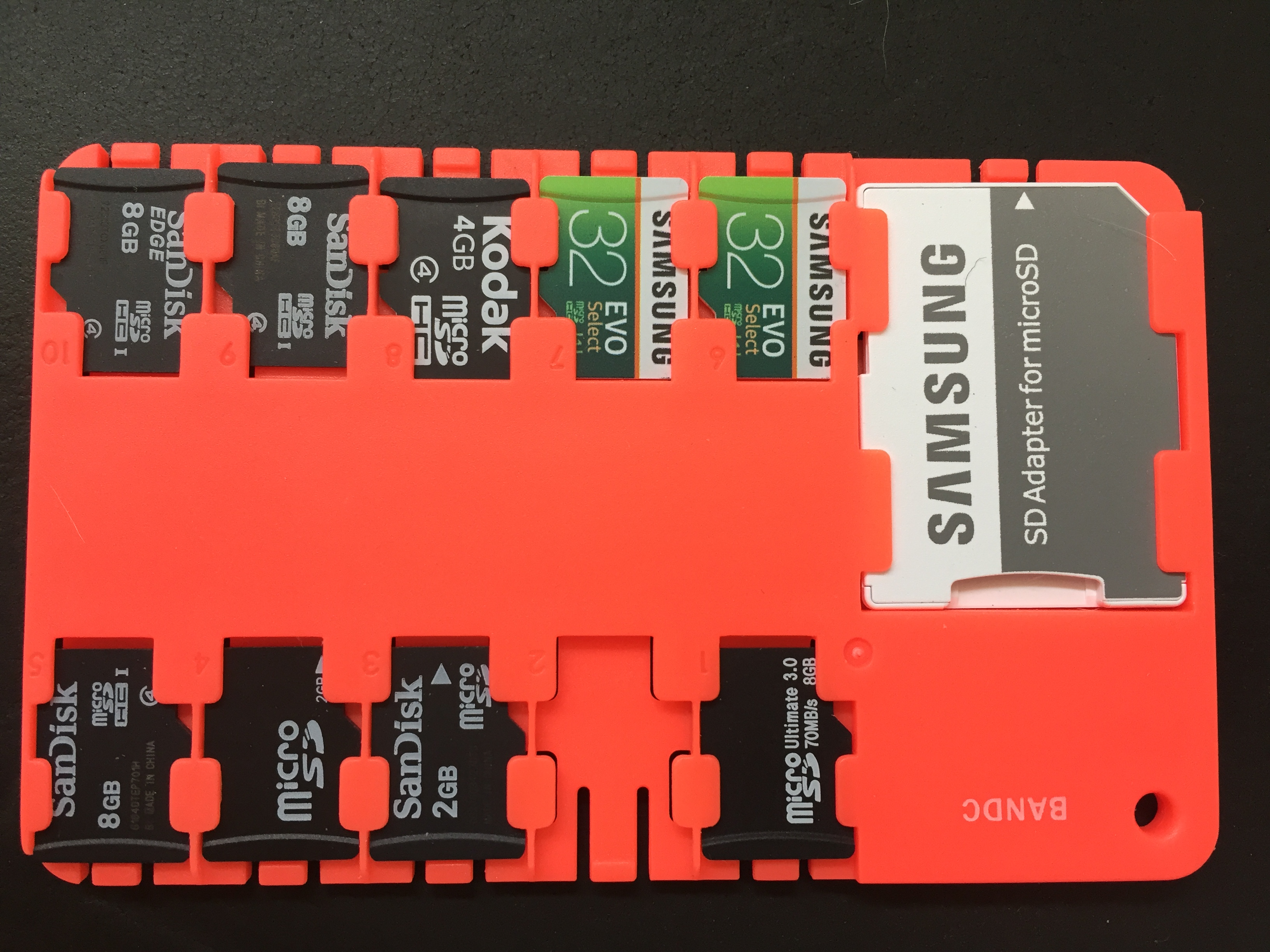
Ok, I've ordered Transcend, Verbatim and Lexar cards to test with. @meichr could you post a picture of the cards? I think I've tested a similar Samsung card and it worked ok.
My test cards so far:
slender iron
@fading solstice have you run git submodule update in the branch for that pull request?
fading solstice
i did. i run git status and I get :
Changes not staged for commit:
(use "git add <file>..." to update what will be committed)
(use "git checkout -- <file>..." to discard changes in working directory)
    modified:   circuitpython (new commits)
    modified:   libraries/drivers/dotstar (new commits)
    modified:   libraries/drivers/is31fl3731 (new commits)
    modified:   libraries/drivers/lis3dh (new commits)
    modified:   libraries/drivers/neopixel (new commits)
    modified:   libraries/helpers/bus_device (new commits)
    modified:   libraries/helpers/register (new commits)
i guess i should add these changes?
slender iron
right, I think thats undoing the first commit in your pull request
try doing git rebase -i and deleting the first commit so its dropped
how are things @plucky flint ?
 floral dagger
been setting this up on an old huzzah, and it seems to work fairl well, but when I run the line
import webrepl_setup
I just get errors and nothing starts. The ESP is connected to m home wifi network if that makes a difference.
I suppose I should have phrased that as a question. Apologies
slender iron
@formal plover or @solar whale are the esp8266 pros around here
formal plover
@floral dagger @slender iron I can help troubleshoot in a couple of hours when I'm home from work. Jerry might be available though.
floral dagger
That would be great @formal plover take your time. There's no rush at all, just thought I should ask before I forget again. Thanks
fading solstice
@slender iron that seems to clean it up.
slender iron
yay!
@fading solstice would it be easy to drop the lib from the name? the other libraries don't have it
fading solstice
i like that
so let me understand adafruit_dhtlib -> adafruit_dht?
Adafruit_CircuitPython_DHTlib -> Adafruit_CircuitPython_DHT??
formal plover
Speaking of not forgetting... Hey @slender iron can you summarize the difference between a .mpy file and a .py file?
slender iron
yes please @fading solstice
@formal plover mpy is a binary format that drops the whitespace and comments and such
formal plover
@slender iron ah, nice. Is there ever a time where you can't use one or the other?
slender iron
py is preferable because its human readable
but pys take more memory to load
after they load the memory footprint is the same though
fading solstice
@slender iron I think you need to change the Repository name. we can wait on that. i will rename the .py file and the folder submodule name
 plucky flint
hey @slender iron hi everyone
idle owl
hi @plucky flint
formal plover
@slender iron thank you for the explanation.
slender iron
good night!
idle owl
@plucky flint Have a good evening!
solar whale
@floral dagger can you describe or post the erros you are getting when you try to start the webrepl?
floral dagger
Yes @solar whale Gimme just a second, I want to finish diagramming something before my old brain forgets what I was doing lol
solar whale
np. take your time - I'll be in and out
floral dagger
Hi @solar whale thanks for taking the time to do this. The error is:
Traceback (most recent call last):
  File "<stdin>", line 1, in <module>
  File "webrepl_setup.py", line 111, in <module>
  File "webrepl_setup.py", line 79, in main
  File "webrepl_setup.py", line 48, in get_daemon_status
OSError: [Errno 1] EPERM
>>>
I honestly have no idea. I am pretty new to ths. How would I check?
solar whale
are you familiar with using ampy?
solar whale
just a sec - let me try a few things on mine.
formal plover
@floral dagger another question. Did you do an erase then put CircuitPython 2.0 in the board using the esptool?
formal plover
@floral dagger or the windows flashing tool, whatever. Just as long as you do an erase and then flash 2.0.
solar whale
@floral dagger yes - it is always good to earse the flash before loading a new copy of CP. Good catch @formal plover
formal plover
@solar whale thanks! Teamwork makes dreamwork!
floral dagger
Ok, I'll go through the tutorials on that. I'd just assumed the installer would do a wipe first. thanks @solar whale and @formal plover
solar whale
@floral dagger It doesn't - Not always necessry, but especially in the beginning it is better.
when in doubt - erase and reflash 😉
manic glacierBOT
solar whale
@floral dagger when you get a chance, please post a link to the tutorial you are using.
manic glacierBOT
floral dagger
@solar whale I had just assumed there would be one, but I can't seem to find a decent one. I think I just need to shelve this for now, nothing seems to be working. Thanks for your help.
solar whale
@floral dagger - don't give up - come back when you are ready. I'm sure we can make it work.
formal plover
@floral dagger @solar whale well I'm home now... Haha looks like I'm too late
solar whale
@floral dagger - you can take a look at this https://learn.adafruit.com/building-and-running-micropython-on-the-esp8266/overview?view=all#flash-firmware - ask questions
How to compile and install MicroPython for the ESP8266 WiFi breakout!
@formal plover I'm a failure. I was looking for a windows based tutorial and it is confusing.
idle owl
So you can run CP directly on the ESP8266 or you can add the ESP to an Express board and have wifi on the Express board? I keep getting slightly confused trying to brain it.
solar whale
@idle owl there is a build for the esp8266. nothin else needed.
idle owl
@solar whale Right, but if I wanted to do the rest of my project on an Express board, but wanted it to have wifi, how would I go about that?
formal plover
@idle owl the ESP8266 is a non express board, no UF2 bootloader (drag and drop)
solar whale
be very nice to @slender iron and mabey he'll implement it 😉
formal plover
@idle owl better off waiting for a esp8266 express
solar whale
real answer is there is no wifi suppor for express or M0 now.
idle owl
So the only way to have wifi on a project is to run the whole thing from the ESP8266 then? I somehow thought you could add it to another board and use it for the wifi.
Ok
Noted.
solar whale
not yet. and not likely until the M4 boards are avaialbe
formal plover
We're laying the foundation for when there is an express board with wifi
idle owl
I see. So it's only a few months out.
formal plover
Like @solar whale said, it'll be a while till one comes out.
idle owl
Fair enough. I had an idea for a project that I can't do right away anyway, but it involved wireless.
Shelved until it's ready then 😃
Or at least the wireless part of it.
formal plover
@idle owl maybe @slender iron can send you a esp8266 haha
solar whale
At this point the best you could do would be to transfer data via a serial connection from the express board to something else with wifi.... kludgey but possible.
idle owl
@formal plover I have some stuff on the way already. And since I'm learning to write APIs and hopefully drivers, I'll have a bunch to work with. It's so exciting!
formal plover
@solar whale the thing is that I don't think any of the libraries would work
idle owl
This was a project that jumped into my head this morning. It can absolutely wait.
I need to get the sensor for it to work first anyway, and fighting with that and wireless at the same time sounds like a chore.
I was just in the process of writing out the project and what I might need while it was fresh, so I wanted to understand how the wireless worked as of now.
@solar whale That's an interesting take though.
formal plover
@idle owl I haven't documented any of my work so far. I will eventually for your viewing pleasure. Haha
@idle owl maybe pop up on show and tell
idle owl
@formal plover Yeah after trying to finish this learn guide for an already completed project, I've decide to assume that every project I do will need to be documented and start from the beginning.
solar whale
@formal plover I meant taht the express would know nothing of wifi - it would jsut ship data to anothe board that did. running Arduino or an esp8266 or anything.
formal plover
@solar whale ah, gotcha!
solar whale
it there a better windows intro for CP on the ESP8266 tahtn the one I posted?
formal plover
@solar whale I'll have to check. Making spaghetti right now. Lol
solar whale
NP. I needd to go off for a bit too.
slender iron
thanks for the help @solar whale @formal plover and @idle owl
idle owl
@slender iron Of course 😃 Thank you for all you do
formal plover
You're welcome @slender iron!
drowsy geyser
Now that I have my order in I'll mention that the Feather M0 Express is back in stock. Get 'em while they last!
idle owl
lol, Just got the email.
manic glacierBOT
This provides limited REPL support for both the M0 and M4 based on ASF4. It should work well enough for us to start collaborating on moving the implementations to ASF4.
drowsy geyser
Tonight's project: solder up some boards for the rocket flight computer, do some more programming, and figure out how to actually get the bundled libraries to work on the Circuit Playground Express.... It's ... non-obvious.
Nothing like massive changes in that last commit there, @slender iron!
manic glacierBOT
I'm going to close this in favor of separate issues to make it easier to assign different tasks.
slender iron
😄
I like to break it all and piece it back together
expect a bunch of new issues in the next hour or so
drowsy geyser
The Lego approach. 😃
manic glacierBOT
idle owl
@slender iron Getting closer though!
idle owl
Ok so I still haven't gotten a straight answer about this: When you're connected to the live part of the REPL, it says "Press any key to enter the REPL". Is the live part of it called something else? Or is it all "the REPL" and it's just weird wording?
manic glacierBOT
idle owl
As in is the python prompt part of it called something different than the live feedback bit?
idle owl
@slender iron THANK YOU. This has been driving me batty!
floral dagger
@solar whale that was the tutorial I used to begin with. I used the windows instructions for the windows flasher. I'm going through it again now, trying to do the esptool route, but the pyserial link provided is super confusing. The file it says I needs is not there, or at the very least hard for me to find.
solar whale
@floral dagger thanks - I was afraid of that. don't have a windows system so I can walk throught it all. I'll take a looka t taht link though.
floral dagger
thanks. The link is on this page https://learn.adafruit.com/building-and-running-micropython-on-the-esp8266/flash-firmware
How to compile and install MicroPython for the ESP8266 WiFi breakout!
solar whale
@floral dagger I agee - the pyserial part is very confusing and I will need time to sort it out. In the mea time do you want to try some tests on yor board as it is - just to see if we can learn anything?
floral dagger
thanks @solar whale I'll have to try that later. I'm about to grab a bite to eat and let my brain rest a bit. Thanks for the help.
solar whale
@floral dagger - no problem - I'm about to do the same. Just don't give up on it! It is confusing at first. We are here to help.
manic glacierBOT
First, lets track all FeatherWings and breakouts in this doc. Here are what the columns are:
FeatherWings
- FeatherWing Name - Name from the Adafruit store
- Store Link - Link to the product page
- Learn Guide - Link to the product's learn guide
- CircuitPython Driver 1 - Link to one related CircuitPython driver
- CircuitPython Driver 2 - Link to another related CircuitPython d...
@tannewt I've done the above tests with the library-2.0.0 bundle from Sep. 15th and thought that it already contained the above update from Sep 9th. My error!
The pictured SanDisk sd card works with the Sep. 15th version and the above Sep. 9th version. The Transcend sd cards and the Samsung sd card work with the above Sep. 9th version, but not with the bundled Sep. 15th version.
.
solar whale
@floral dagger @formal plover I found this and I think it can be helpful - it's abit out of date but should work. https://learn.adafruit.com/arduino-lesson-17-email-sending-movement-detector/installing-python-and-pyserial#installing-python-and-pyserial

Use an Arduino to send an email, whenever movement is detected with a PIR sensor.
floral dagger
@solar whale and @formal plover thanks. I think I FINALLY got it. Got pyserial installed. Then reflashed per the instruction. It failed with the same error. Then found this commant to erase the flash.
esptool.py --port your_esp_port erase_flash
Seems to be working now. I get this:
Adafruit CircuitPython 2.0.0 on 2017-09-12; ESP module with ESP8266
>>>
and the setup seemed to run normally. it had me enter a password and restarted the board.
solar whale
great!
idle owl
@floral dagger Well done!
formal plover
Now you need to get Ampy going and you'll be all set
floral dagger
lol are you TRYING to give mehigh blood pressure?
solar whale
@floral dagger you started by asking about import webrepl_setup - do you need or want to use the webrepl or are you ok with putty for now?
formal plover
@floral dagger Haha 😂
solar whale
@floral dagger - just curious - how did you install pyserial?
floral dagger
oh yeah. I got the webrepl setup. The step that was missing was erasing the flash like @formal plover said. That got everything set up and webrepl seems to be working now
manic glacierBOT
Two examples of commits that do a similar thing are: https://github.com/adafruit/circuitpython/commit/a0058e67124b93eb1c8c9c610f823396a7ff7e68
https://github.com/adafruit/circuitpython/commit/778e975936b9e892c4f1b85ce73462a0ce6d36d2
Most of the work is restructuring the code and verifying the API is a strict subset of CPython's struct.
If you have any questions, please visit the #circuitpython channel on Discord.
floral dagger
@solar whale I downloaded the tar,gz, extracted it, then used the command line to get to the directory and ran the setup.py script
solar whale
@floral dagger - excellent! If you want to try ampy tkae a look at https://learn.adafruit.com/micropython-basics-load-files-and-run-code/install-ampy - you will need it to load files to your board - or you can use webrepl but in the long run ampy is a necessary tool.
Learn a simple workflow for developing code on a MicroPython board.
floral dagger
Seems simple now, but being unfamiliar with that, it was very confusing to find the rght file to dl
manic glacierBOT
Two examples of commits that do a similar thing are: https://github.com/adafruit/circuitpython/commit/a0058e67124b93eb1c8c9c610f823396a7ff7e68
https://github.com/adafruit/circuitpython/commit/778e975936b9e892c4f1b85ce73462a0ce6d36d2
Most of the work is restructuring the code and verifying the API is a strict subset of CPython's struct. Do NOT copy documentation from CPython.
If you have any questions, please visit the #circuitpython channe...
solar whale
@floral dagger - thanks - did you already have python3 intalled on your computer - assuming you install the latest pyserial?
floral dagger
I didn't but that installation was pretty straightforward.
One thing to note is tht adding "python" to the path variables in windows is not checked b default
solar whale
@floral dagger - Great! - glad you got it all going - have fun!
manic glacierBOT
Beginners please check out the newest version of these docs and provide feedback here!
manic glacierBOT
Testing new software builds is one of the easiest ways to get started helping CircuitPython development.
First, find an existing project of yours that works with the latest stable release of CircuitPython. Verify that it all still works as you've set it up.
Next, load a cutting edge build from here.
Now, see if your project works as it did before. If it doesn't...
Although you consider yourself a CircuitPython beginner, its likely you already know something that other folks do not! Please share that knowledge!
There are a few places where people post questions and could use a helpful answer.
If cannot answer a question yourself and its been a few ...
slender iron
Just posted a blog post encouraging people to help with CircuitPython! https://blog.adafruit.com/2017/09/19/circuitpython-3-0-plans/
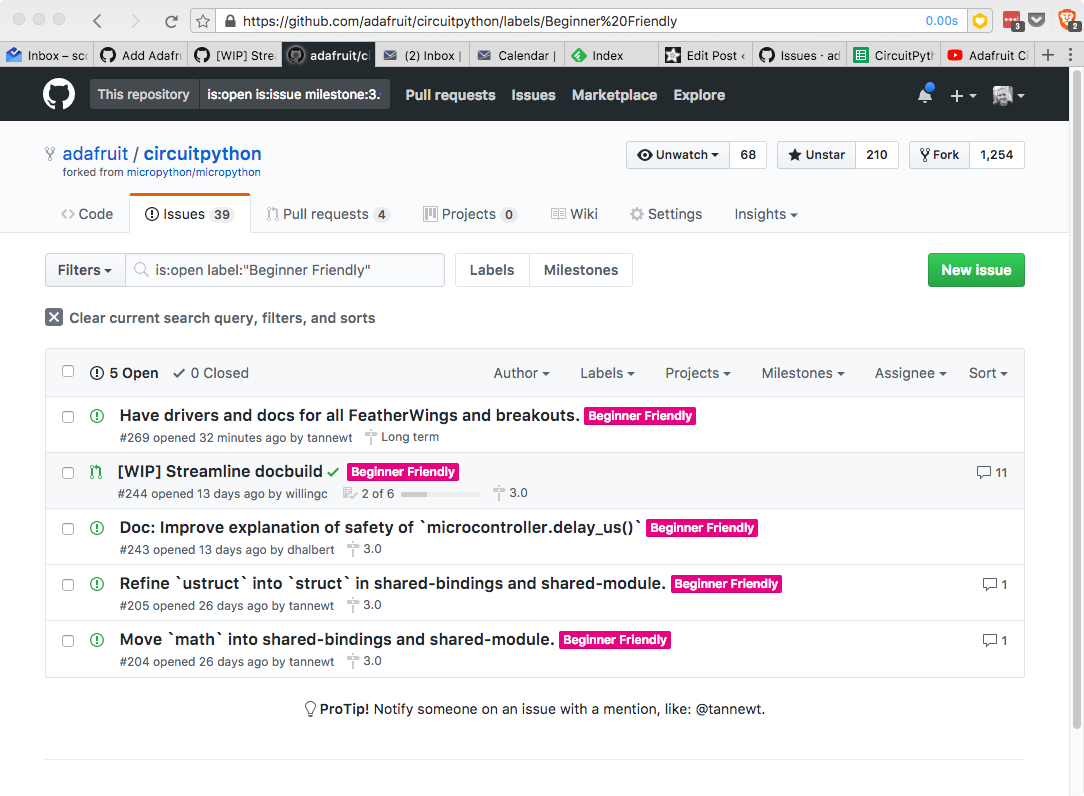
With 2.0.0 out the door, its time to start work on CircuitPython 3.0.0. Each major release I like to have a theme to guide the primary goals of the release. 2.0.0 was all about storage because it e…
idle owl
@slender iron That's great!
manic glacierBOT
Wups, looks like I forgot to request a review from @dhalbert on it! The fix is here: https://github.com/adafruit/Adafruit_CircuitPython_SD/pull/1
idle owl
@slender iron Everything and everyone being so accessible is what kept me moving forward in the community when I was just beginning. It's excellent that we're continuing to make it even easier.
slender iron
thanks @idle owl!
Yay!
I already posted this right? https://rakudo.party/post/On-Troll-Hugging-Hole-Digging-and-Improving-Open-Source-Communities
 idle owl
Yep!
slender iron
k, coding time
drowsy geyser
Have fun! I still have a bit of work before it's solder-and-code time.
manic glacierBOT
modified trinket_m0/pins.c to include pin aliases for A1,A2,A3,A4
Submitted pull request. I hope I did it correctly. Let me know if I needed to do something else.
I did not mess with makefile. Still 187 bytes free!
umbral dagger
Question: is the periodic spurious "KeyboardInterrupt: soft reboot" to be expected?
idle owl
From the serial connection?
umbral dagger
I see it printed over the usb/serial
slender iron
@umbral dagger thats the auto-reload kicking in
idle owl
What @slender iron said
umbral dagger
Why is that happening when I haven't changed any files?
slender iron
background mass storage stuff the OS does
umbral dagger
OK. so it won't happen "in the wild"?
umbral dagger
Just wanted to make sure it wasn't some random glitch that woudl restart main.py once it's deployed & on battery.
slender iron
shouldn't 😃
manic glacierBOT
Turning on MICROPY_PY_ARRAY_SLICE_ASSIGN takes something like 384 to 576 bytes to include. I got different measurements based on trying to remove it from the Express build or add it to the non-Express build.
 tawdry hatch
Any idea why flashing circuitpython to a feather huzzah would result in the blue LED blinking rapidly and serial connection cycling through garbage as though it's in some kind of reboot loop?
idle owl
@tawdry hatch I'm not sure, I haven't worked with the ESP8266. @solar whale and @formal plover are our ESP8266 experienced helpers. I would check in again tomorrow when they're around.
manic glacierBOT
 idle owl
@slender iron I have ugly code working for tap detection on x, y and z!
slender iron
nice! can you get the orientation too?
idle owl
Not yet. I tore apart the fidget spinner that Tony did, and added to it to get the tap detection on all three. I haven't found an example yet with orientation. Also I thought that circuit.tap, circuit.freefall and circuit.gyroscope(or something) should be their own things.
I'm still trying to make sense of the library written for it to actually write my own code from scratch to use it.
Not really having luck. I thought I'd get the tap stuff done first since I managed to get that working. I'll have a lot of questions really soon. 😃
drowsy geyser
@idle owl Standing by for questions. 😃
slender iron
tap and freefall sound awesome!
idle owl
😃
marble talon
I don't suppose there's NeopixelDMA for CircuitPython yet?
solar whale
@WisdomWolf#3691 try erasing the flash and re flashing circuitpython. See https://docs.micropython.org/en/latest/esp8266/esp8266/tutorial/intro.html if you are using esptool to flash.
drowsy geyser
Aaargh! I didn't think I was stupid, but I can't make NeoPixels work on a Circuit Playground Express running latest CircuitPython build. I installed the latest bundle (as of a few minutes ago). I copied the Adafruit_CircuitPython_Bundle/libraries/drivers/neopixel to the Circuit Playground Express /lib folder, did the "import neopixel", and when I try "pixels = neopixel.NeoPixel(board.NEOPIXEL, 10)" it throws AttributeError: 'module' object has no attribute 'NeoPixel'
BTW, I'm following guides and README.md files from the learning system and GitHub, respectively, trying to make this work. I feel really bad for the parents trying to help their kids get this to work!
drowsy geyser
Also BTW, here's the process I've followed so far (from my OneNote page that I'm writing so I can build a "one stop shop" guide for CircuitPython)....
And I'm using Windows10. The "sudo" commands are needed because I've broken my SSH authentication to GitHub. 😃
Annnnnd ... fixed my SSH authentication to GitHub (new laptop, so ssh-keygen and install .pub on GitHub).
Random thought - is there a conflict between the neopixel driver library from the Bundled collection and the built-in low-level neopixel library?
solar whale
@drowsy geyser when you clone the bundle like that it is so you can then build the /lib yourself. The prebuilt /lib is in the .zip file under releases. Give that a try.
drowsy geyser
Really? In every other Adafruit GitHub repo it doesn't matter if you clone the repo or download a zip. Since I use the Bash environment on Windows 10, it's just a lot easier to type "git clone ...." so I got used to doing that. I'll give it a shot!
Bingo. That was it.
Thank you, @solar whale . IMO, though, it's a bad practice to break an established workflow without significant documentation and warnings.
solar whale
Not quite clear why it did not work the other way, but glad it is OK now...
drowsy geyser
I didn't go through the full build process. I'm going to do that, take notes, and test the full library build, too.
This is going to be important information for my CircuitPython guides! 😉 I really do appreciate the help, @solar whale ! I apologize if I came across as a bit cranky.
Ahhhh, I think the right way to fix this is to have the guides point to the _Bundled releases link instead of master - that way the user following the link in the guide will only be presented with the .mpy and .Zip files....
solar whale
@drowsy geyser glad to help. Also glad you are updating the docs.
drowsy geyser
I submitted feedback for TonyD so he can update his guide. He's out of position right now so it might be a while before he can make the change. At least you put me on exactly the right track!
formal plover
@tawdry hatch yeah like @solar whale said. Gotta do an erase first with the esptool or the windows esp flasher.
solar whale
@formal plover is there an another windows flasher tool besides nodemcu-flash?
Not easy to erase with nodemcu tool
The language bot is a bit picky!
formal plover
@solar whale womp womp... Lol the one I had bookmarked was the NodeMCU one. Espressif has a flasher tool for windows, but I have no idea what it looks like. I'm at work, so I can't download it.
solar whale
@formal plover no problem. It looks like it will work, but to erase you have to upload a "blank" image and it was not clear to me where one could find the blank image file to load. I may have just missed something. esptool is much easier to use! But not trivial to install under windows...
formal plover
@solar whale that's why I would recommend using the Ubuntu VM windows 10 has in the store.
solar whale
@formal plover I'm all for promoting linux but that may be intimidating for some.
formal plover
@solar whale perhaps, but Ubuntu is new Linux user friendly. Windows 10 makes it run like an app. You're not actually configuring a VM. https://msdn.microsoft.com/en-us/commandline/wsl/install_guide
solar whale
Looks pretty slick! For a long time I did my Micropython/CircuitPython on my mac via vagrant (ubuntu vm) it worked well. This looks like a nice tool for windows10.
floral dagger
@solar whale I never got around to trying it, but the site here lists a blank flash at the bottom of the page http://www.pratikpanda.com/completely-format-erase-esp8266-flash-memory/

Completely format or erase ESP8266 flash memory. You can erase the ESP-12 flash using this 1MB blank.bin file to remove all previous information from flash.
formal plover
@solar whale slick indeed!
solar whale
@floral dagger thanks! that is what I was looking for! just never went to the bottom of the page! Nice to know where it is for future reference.
solar whale
@floral dagger Somehow I thought the file was more than just a string of 0x100000 0xff's. Combinig it 4 times makes a nice 4Mbyte file as well. I learned something new today and its still early 😉
floral dagger
@solar whale huh...I don't know what I expected either, but I guess that makes sense.
tulip sleet
@drowsy geyser The neopixel module is actually bult in to the CPX firmware in 2.0.0. It's an "internal frozen module". So you don't need it to be in /lib, and there doesn't even need to be a /lib. Just import it and it will be there. We want to build in certain Python-based library modules as long as there's still room in the firmware. For instance, the Circuit Playground-specific library @idle owl is working on will go in there as well.
You'll still be able to add a newer version to supersede the builtin one. If you look at sys.path, you'll see ".frozen" at the end, which is where all the builtin modules are. But anything earlier in the path will get loaded first.
This should all be documented! There's no CPX-specific general Learn Guide yet, and it would go in there.
drowsy geyser
Well, I'm not sure how I'm going to structure the guides, but I have extensive notes on CPX to start with!
tulip sleet
@solar whale @formal plover I used WSL on Windows 10 for some time for development. It worked well - the main issue is that disk I/O is slow, and so a build of CPy would take maybe as much as four times longer. Also, certain tty syscalls are missing right now, so you can't use screen or minicom from WSL yet. But it really is Ubuntu, minus the actual OS. Lots of things work very well. It's nice to be able to use Linux commands to manipulate or look at the Windows file system. It wrote it up here a few months ago: https://forums.adafruit.com/viewtopic.php?f=60&t=112975
solar whale
@tulip sleet So that's where I saw it before 😉 thanks for the reminder and the detatiled writeup. Now I recall seeing that when you first posted it.
floral dagger
I hate to keep bugging you all, but I'm right back to square one. I tried reflashing, but no good. Looking through the source code, it looks like there is trouble reading boot.py. Looking up this error:
OSError: [Errno 2] ENOENT
It appears to refer to a file missing. line 48 of webrepl_setup.py refers to boot.py with this line:
with open(RC) as f:
I say file error because googling the ENOENT error comes up wth results from micropython forums indicating that
formal plover
@floral dagger remove the .py
floral dagger
@formal plover what do you mean?
formal plover
Are you trying to setup webrepl?
floral dagger
yes. This is the line I enter import webrepl_setup
am I maybe using the wrong bin file? It's for huzzah feather, and I am using the old huzzah. It was working yesterday though.
solar whale
@floral dagger - so it did work yesterday - when you reflashed, did you also erase it first?
the huzzah breakout uses the same image - I have both.
floral dagger
Yeah t was working fine. I did a blink sketch, and messed aroundwith it watching the webrepl page update the putty connection and vice versa. Then I installed Ampy and tried the test.py thing, and it worked. So I tried creating a folder (testdir), and it seemed to work, but I couldn't remove it. I erased the FW, and reflashed it. Now I don't get the adafruit "press any button" message anymore (it goes straight to REPL), and it won't set up WEBREPL
solar whale
odd - if you open a putty terminal and then press RESET what do you see - should be some gibberish then dome outpout as it boots.
floral dagger
it gets the gibberish, but once the device closes the COM port it disconnects
floral dagger
I did last night, but now I get RuntimeError: No such file: boot.py to be fair though, running ampy --port COM11 ls returns a permission denied error
solar whale
Ah - interesting - your don't have putty still connceted do you. Cant do putty and ampoy at the same time.
floral dagger
No. I don't
solar whale
use putty and go into the repl then enter ```
import os
os.listdir()
'\x00\x00\x00\x00\x00\x00\x00\x00.\x00\x00\x00' over and over in an array type of format
solar whale
hmmm - I would suggest you erase and reflash one more time. Are you using esptool now?
floral dagger
yeah. I'll do it again
solar whale
you are using huzzah brakout - so you do the gpio0 thing, correct?
floral dagger
using a USB/tty adapter
close putty
enable flash mode with button presses on huzzah
enter esptool.py --port COM11 erase_flash
solar whale
yes - then also do the button press before loading the image.
floral dagger
flash erased
put esp back into flash mode
enter esptool.py --port COM11 --baud 460800 write_flash --flash_size=detect 0 C:\Path\to\bin\esp8266-20170823-v1.9.2.bin
flash done
solar whale
oh - thais is micropython, not circuoitpython - should still work but not wha tI expected.
floral dagger
yeah that was an older one....I was trying 2.0 before. one sec
esptool.py --port COM11 --baud 460800 write_flash --flash_size=detect 0 C:\Path\To\bin\adafruit-circuitpython-feather_huzzah-2.0.0.bin
solar whale
but erase agin first??
floral dagger
yes.....I copied the things I have been trying into a text file because I got tired of manually editing in COM11 and paths each time. I just copied the wrong line from that file
solar whale
ok - does it still fail?
floral dagger
yeah,flashes fine
Wrote 594300 bytes (387025 compressed) at 0x00000000 in 9.7 seconds (effective 491.3 kbit/s)...
Hash of data verified.

Leaving...
Hard resetting...```@drowsy geyser Did you get it sorted?
solar whale
@floral dagger any improvement - or still not working?
floral dagger
still same thing
Traceback (most recent call last):
  File "<stdin>", line 1, in <module>
  File "webrepl_setup.py", line 111, in <module>
  File "webrepl_setup.py", line 79, in main
  File "webrepl_setup.py", line 48, in get_daemon_status
OSError: [Errno 1] EPERM
ok, this weird...was getting this message The FAT filesystem starting at sector 153 with size 866 sectors appears to be corrupted. If you had important data there, you may want to make a flash snapshot to try to recover it. Otherwise, perform factory reprogramming of MicroPython firmware (completely erase flash, followed by firmware programming).
hit ctrl+c to copy it, and it ended the loop. Now I get the adafruit text prompt....but still get the error
solar whale
Very strange - I will try to reporduce this this evening when I get home. I have ths same board -, but it looks like the flash is getting corrupted. Just don't see how.
floral dagger
ok....reflashing got rid of that error, but back to square one. Thanks @solar whale I guess I'll keep plugging away at it off and on. Please let me know if you find anything.
the FAT filesystem error
solar whale
jsut curious if you have had this board a long time and written to it many many times. The flash can "wear-out" .. but I would expect it to fail to program.
drowsy geyser
@idle owl I did, with a lot of help from @solar whale
floral dagger
I have had it a while, but haven't really written to it much. Maybe 100 times before all this if I am very generous with the estimate
idle owl
@drowsy geyser Ok. It really should have worked without building the library. I don't think I quite got the train of things you suggested updating in docs, but I wanted to make sure you'd at least gotten it figured out.
solar whale
taht "should" be fine.
drowsy geyser
Thank you, @idle owl ! I got it sorted.
manic glacierBOT
Shouldn't read() be non-blocking, returning an empty string if there is nothing in the buffer? I think it works that way for the sockets and the serial — returning at most n characters.
manic glacierBOT
Just tried this: sys.stdin.read() in CPython 3.5 will read until EOF (ctrl-D); it's blocking. Reading a single character, sys.stdin.read(1) hangs until one character is typed (and it buffers by line, so it waits for a newline as well) or EOF is encountered.
solar whale
@tulip sleet after a pull request has been accepted, should I delete my fork on github?
idle owl
@solar whale Good question
drowsy geyser
Ah, drat. The CCS811 library/example code still throws a "lock required" error....
tulip sleet
@solar whale no need to delete your fork. We usually create a branch on the fork for a particular set of changes, and then delete the branch when it's been accepted. You need to keep the fork up to date: see here: https://help.github.com/articles/syncing-a-fork/
tulip sleet
So I do all my work on my fork, and generate pull requests from there. I update it as necessary. @idle owl, yes I delete the branch unless I'm going to use it again. I have branches like "issue_234_fix_analogio", so the name gets stale.
idle owl
Ah makes sense. I was doing the making branches and working from them correctly, I just didn't know the workflow after making the pull request.
tulip sleet
There are some details about deleting the branch locally and remotely, and pushing and pulling with "pruning" to get the branches to sync up.
solar whale
@tulip sleet OK , thanks - I did create a branch. I'll try to foloow the guide.
tulip sleet
I think Scott wants to write a guide to explain the workflow exactly. He wrote one on making a library but this is a little different.
drowsy geyser
@tulip sleet He and I talked about that last weekend. I think it's a great idea. I'm also going to be writing a "CircuitPython for raw beginners" guide (or series of guides) that walks people through all the details.
tulip sleet
@drowsy geyser sounds great!
idle owl
@drowsy geyser Good to know! I had the idea to do something similar, but I'm already writing up some stuff and it would have taken me a while to get to it.
drowsy geyser
I've had a number of people ask for it, including a few at the Maker Faire last weekend.
idle owl
I'm starting a friend who is a raw beginner, probably this evening. She bought the Circuit Playground Express board and she's never done any electronics or programming. We were talking about it before, when I was trying to decide whether to start her on MakeCode or not. I'm still leaning that way.
But that's the kind of thing where if we did want to start with CircuitPython, there's not really a good place to start yet.
drowsy geyser
@idle owl Agreed. That's kind of why I wanted to do a beginner's guide. And there have been things that have tripped me up that aren't well documented, which is prompting me to write.
idle owl
@drowsy geyser I'm terrible with documenting as I go, or at least I have been so far. I'm trying to be active about changing that because I know I'll want to do guides about a lot of it.
drowsy geyser
Me, too!!! I've started keeping everything in OneNote in the cloud so I can keep the information up to date.
I put my high power rocket stuff in a separate notebook so I can share it with people.
formal plover
@drowsy geyser is 💯
Sorry you are running into so many issues @floral dagger
I didn't realize you were using the breakout and not the Feather HUZZAH
@idle owl is also 💯
😃
drowsy geyser
Thank you, sir!
idle owl
Thank you, @formal plover !
solar whale
@formal plover I wish I had some better ideas for @floral dagger. Really puzzled. As I told him, I can try to reproduce it later, but I have not seen that kind of behavior. There was an ussue with the Huzzah breakout vs the feather when CP first began but it seemd to be fixed. I need ot go back and look at it. I don't think it is relevant.
formal plover
@solar whale hmm yes, it is a puzzling issue. The only other variable is what he's using to flash
solar whale
I don't have a windows system so I can't reproduce that, but if it falshes and verifies, it should be OK
formal plover
@solar whale should is a dangerous word Haha.
solar whale
I'm surprized the bot did not yell at me 😉
formal plover
@solar whale windows creator update totally borked my dual boot configuration I had with Linux. So I don't have windows right now either
manic glacierBOT
Yes, but that's not consistent with other stream-like interfaces.

I noticed an interesting thing on a feather M0 express with nothing attached, if you scan for I2C devices you actually get random results. It's not necessarily a bug in CircuitPython but something worth noting that might trip folks up. Here's an example of scanning with nothing connected:
>>> import busio
>>> import board
>>> i2c = busio.I2C(board.SCL, board.SDA)
>>> while not i2c.try_lock():
...     pass
...
>>> i2c.scan()
[65, 102]
>>> i2c.scan()
[33, 71]
>>> i2c.scan()
...@drowsy geyser I tried my CCS811 a few days agos and did not get any errors regarding the i2c lock.
manic glacierBOT
I think we want to make the behavior consistent with CPython. Do you mean other stream-like interfaces in Python or in general? It's a file-like interface, where the reads might be really slow, because the device (the human) is slow to supply characters. I tried to find some asyncio examples for stdin, but I didn't see anything right away.
 sick creek
@formal plover now you get WSL to windows 10
formal plover
@sick creek do I understand it now? Yes. I didn't realize it was just a terminal only type getup.
sick creek
the Linux terminals can be get from windows store
sick creek
suse enterpise as well
formal plover
Yup yup!
slender iron
@marble talon nope, no neopixel dma yet
@drowsy geyser that error can happen when you put a driver in a folder. /lib/neopixel/neopixel.py imports differently from /lib/neopixel.py because folder are packages in Python
drowsy geyser
@slender iron It was that I cloned the repo (which you do when building the libraries) rather than downloading the Zip file from the "releases" page.
slender iron
@floral dagger you may be hitting the FS issue because it may not be compatible (where its located) between MicroPython and CircuitPython. I don't test one's ability to switch between the two.
drowsy geyser
Cloning no work.
idle owl
@drowsy geyser Ahh, I hadn't sorted what happened. That makes sense.
slender iron
right, and that structures them differently than the bundle
sick creek
Fork and spoon and knife the tools you need 😄
solar whale
@slender iron @tulip sleet I had not been follwing the changes and was caught off guard by the change to build-bundles - it works well - building 1.0.0 and 2.0.0 bundles.
sick creek
@slender iron bundle and not bundle have foldered differently?
slender iron
yeah @sick creek because the pre-bundled version uses git submodules
manic glacierBOT
Looking at the documentation at https://docs.python.org/3/library/io.html I can see there is a whole zoo of different behaviors, depending on what the object on which you call read() is and how it was created, and also what options were used. Sometimes it will block, sometimes it will return 0 bytes, and sometimes it will raise an exception.
It seems that there is a way to switch the stdio into a non-blocking mode, at least on Linux, using non-standard terminal libraries: https://stack...
tulip sleet
@solar whale Yes - I tried to automate everything where I made a mistake when building the bundle. 😁
manic glacierBOT
there's nothing in 'standard' python that works on all OS's - windows uses a DLL and mscvt or whatnot - we have to do something custom :)
floral dagger
@slender iron I haven't really been switching back and forth. After several failed attempts at getting CP working again I tried MP just to see. I copied the wrong command from my file when typing.
What's weird is I can access the REPL, and run code that interacts with the GPIO through that. Uploading through the arduino IDE works fine too. I think next I'm going to try the nodemcu/lua interface to see if I can access the filesystem through that.
Is there a more appropriate place for my issues? I feel like I've eaten up far too much of this channels bandwidth as it is.
formal plover
@floral dagger if it's CircuitPython related, you can keep it here. We certainly don't mind helping! If you run Arduino or Lua on the board (long-term) and have questions, just direct them at the #help-with-projects channel. :)
floral dagger
Ok, groovy. I'm just trying the other two to verify that flashing works, and the board operates. I remember way back when, lua had a file system access that I just want to test so I can see if accessing a file system will still work on this breakout. I want to use Circuit Python ultimately
formal plover
@floral dagger ah gotcha. Well I'm glad you're still going to try CircuitPython in the end!
slender iron
@floral dagger here is fine. chat as much as you need to get going 😃
solar whale
@floral dagger @formal plover I found my notes on the early issue with the Huzzah Breakout and Feather. It had to do with the RX pin on the breakout so you could see outpout but not send input. Tah was fixed and clearly is not the problem here. Nice testing Brad . I'll be intersted to see if I can reproduce it.
formal plover
@solar whale hmm yeah, I just want it sorted out so we can get another ESP8266 companion. Hahahahaha
Well and because I sincerely want his problem solved as well.
manic glacierBOT
This doesn't actually use ASF4 at all but enables it again. This depends on #258
Good point @tdicola. We could also fix it by scanning "found" addresses a second or third time before adding them to the list.
solar whale
@floral dagger @formal plover here si s aclean install on a Huzzah breakout```
jerryneedell@Ubuntu-Macmini:~/Downloads$ esptool.py --port /dev/ttyUSB0 --baud 460800 erase_flash
esptool.py v2.1
Connecting....
Detecting chip type... ESP8266
Chip is ESP8266
Uploading stub...
Running stub...
Stub running...
Changing baud rate to 460800
Changed.
Erasing flash (this may take a while)...
Chip erase completed successfully in 8.5s
Hard resetting...
jerryneedell@Ubuntu-Macmini:~/Downloads$ esptool.py --port /dev/ttyUSB0 --baud 460800 write_flash --flash_size=detect 0 adafruit-circuitpython-feather_huzzah-2.0.0
adafruit-circuitpython-feather_huzzah-2.0.0-beta.1.bin
jerryneedell@Ubuntu-Macmini:~/Downloads$ esptool.py --port /dev/ttyUSB0 --baud 460800 write_flash --flash_size=detect 0 adafruit-circuitpython-feather_huzzah-2.0.0.bin
esptool.py v2.1
Connecting....
Detecting chip type... ESP8266
Chip is ESP8266
Uploading stub...
Running stub...
Stub running...
Changing baud rate to 460800
Changed.
Configuring flash size...
Auto-detected Flash size: 4MB
Flash params set to 0x0040
Compressed 594300 bytes to 387025...
Wrote 594300 bytes (387025 compressed) at 0x00000000 in 9.0 seconds (effective 530.7 kbit/s)...
Hash of data verified.
Leaving...
Hard resetting...
boot.py output:
WebREPL daemon started on ws://192.168.4.1:8266
Started webrepl in normal mode
Press any key to enter the REPL. Use CTRL-D to soft reset.
Adafruit CircuitPython 2.0.0 on 2017-09-12; ESP module with ESP8266
import os
os.listdir()
['boot.py', 'webrepl_cfg.py']
I removed the gibberish after the reboot but I was abble to run ```
import webrepl_setup
I can also access the board via ampy
at this point I suspect the @floral dagger has a board with failing flash or there is something funky with the windows communication. I am puzzled by his ampy problems.
Does anyone have any ideas for additional troubleshooting? The fact that os.listdir() fails makes me suspect the filesystem on the board.
floral dagger
@solar whale It all looks very similar. mine is just not writing the filesstem for some reason. I am manually able to create files both with ampy and f.write if I write the flash at 115200 baud, and os.listdir() will see them. I just can't write anything to those files
floral dagger
nope, just this
try os.listdir("/")
floral dagger
same
solar whale
so just to confirm ``` erase flase
load image
enter relp
import os
os.listdir()
yes
solar whale
also on mine I have to do a RESET after I load the image
Performing initial setup
bcn 0
del if1
usl
add if1
#5 ets_task(4020edc0, 29, 3fff9178, 10)
dhcp server start:(ip:192.168.4.1,mask:255.255.255.0,gw:192.168.4.1)
bcn 100
boot.py output:


Press any key to enter the REPL. Use CTRL-D to soft reset.


Adafruit CircuitPython 2.0.0 on 2017-09-12; ESP module with ESP8266
>>> import os
>>> os.listdir()
['boot.py']
>>>
Tried it by hitting the reset button, actually unplugging it and plugging it back in
solar whale
that is waht I see after RESET in my terminal window - what do you see in putty if you connect and RESET - does it still disconnect?
floral dagger
a popup saying error communicating. On windows it terminates the connection when the device is removed
I just changed that setting. I get this ```
Adafruit CircuitPython 2.0.0 on 2017-09-12; ESP module with ESP8266
one more config question - waht cable are you using is it the adafruit part 954 or some otehr cable. do you power it via the cable or some other source.
ok but can you atya in putty and press the RESET button -
floral dagger
now i can, yes
solar whale
waht do you see?
on mine after a bunch of junk```boot.py output:
Press any key to enter the REPL. Use CTRL-D to soft reset.
Adafruit CircuitPython 2.0.0 on 2017-09-12; ESP module with ESP8266
but on first RESET after erase and install I saw: ```
Performing initial setup
bcn 0
del if1
usl
add if1
#5 ets_task(4020edc0, 29, 3fff9178, 10)
dhcp server start:(ip:192.168.4.1,mask:255.255.255.0,gw:192.168.4.1)
bcn 100
boot.py output:
can you try that again?
floral dagger
lol f-a-r-t-h-e-r is censored
slender iron
got ya covered @floral dagger
solar whale
😃
slender iron
now benedict cumberbatch can go farther 😉
floral dagger
lol yay!!!
idle owl
So... h-o-o-r-a-y is also a problem.
slender iron
try now @idle owl
floral dagger
c-o-c-k-y is as well
solar whale
@idle owl LOL I did not know the scolding were public!
idle owl
@solar whale Oh yes 😃
slender iron
it is briefly
idle owl
@slender iron Still censored
slender iron
k try again
idle owl
Hooray!
slender iron
😃
idle owl
Yay! 😃
solar whale
Hooray was censored???
idle owl
Yeah when I typed "Hooray, results!" It failed, and I couldn't figure out which part it was.
floral dagger
Press any key to enter the REPL. Use CTRL-D to soft reset.


Adafruit CircuitPython 2.0.0 on 2017-09-12; ESP module with ESP8266
>>>
Although it took me a bit to figure out what had even happened. I hadn't seen it before that.
floral dagger
hooray benedict cumberbatch got farther
solar whale
@floral dagger - so no mention of boot.py - it looks like it can't creat the file system - as you said. odd...
solar whale
via os.listdir ??
floral dagger
>>> os.listdir()
['boot.py']
>>>
wow... try import webrepl_setup
floral dagger
holy moley ```
boot.py output:
WebREPL daemon started on ws://192.168.4.1:8266
Started webrepl in normal mode
Press any key to enter the REPL. Use CTRL-D to soft reset.
Adafruit CircuitPython 2.0.0 on 2017-09-12; ESP module with ESP8266
you fixed it 😉
floral dagger
I think it was the power supply all this time.
idle owl
!!!
solar whale
ah - dis you change something?
idle owl
@solar whale @floral dagger Great job!
floral dagger
I was powerng it via USB. Youasking how it was hooked up got me thinking, so I have it on a breadboard supply now
solar whale
@idle owl thanks, but we've been here before - hopefully @floral dagger can do this consistenetly now!
slender iron
what was the USB connected to?
idle owl
Fair enough, but still. The level of tenacity you guys have for this is nothing short of impressive.
floral dagger
underpowered makes sense. It seemed to do better at lower baud rates
lusb was to my laptop @slender iron
slender iron
is the laptop plugged in?
floral dagger
Yeah
solar whale
what usb->serial cable are you using
floral dagger
it's a usb/ttl adapter. It's possible that the 3.3v out line on it is weak
slender iron
ah yup
solar whale
It should be 3.5 to 5V on Vcc - so if it is 3.3 - that may be the problem - mine is 5V
@floral dagger - it looks like you found the culprit - nice work! see if it is stable now and by all means keep us updated!
floral dagger
Just tested file creation and writing. That seems to be good
solar whale
nice!
floral dagger
Holy cow you guys. I can't believe it was something that simple. Maybe now I can give you some peace
on the bright side....going through the docs like Ive done, taught me a lot. So there's that
solar whale
@floral dagger this was a good puzzle and we are glad to help. I leared a lot, too.
idle owl
@floral dagger It's a learning experience for all of us and we know for next time to add that into the checks. It's always helpful to work through issues.
solar whale
now you can put the hammer away agiain 😉
formal plover
Yay!!!! @floral dagger @solar whale @idle owl @slender iron
Great troubleshooting!!!
floral dagger
Yay! @formal plover too.
formal plover
I spent half a day on a bad usb cable @floral dagger
It was for my Feather M0 Express though, not my ESP8266
It would provide power and run the example code, but I couldn't connect via serial.
floral dagger
oh wow...that would be a head scratcher
Thanks so much everyone; especially @solar whale I would have thrown in the towel on thislast night if not for you all
idle owl
@floral dagger We're glad you didn't! We're super happy to have you!
formal plover
@solar whale is the man, I agree. He never gives up.
solar whale
@floral dagger you are very welcome - you were very patient with me as well - good luck!
@formal plover aw shucks 😊
 hallow vessel
I have a feather Huzzah I am trying to flash with circuitpython and I have gotten it to accept the 2.0 bin and it responds to a serial connection with Adafruit CircuitPython 2.0.0 on 2017-09-12; ESP module with ESP8266 but I was kinda hoping it would mount as a USB drive. Is there some trick to this?
formal plover
Unfortunately @hallow vessel, the HUZZAH doesn't have the UF2 bootloader. It will never show as a USB drive
hallow vessel
I thought that might be the case 😦
I read about the UF2 but.... I did not see how I could update it.
formal plover
I know, a little but of a bummer. However, once you get familiar with webrepl or Ampy it'll still be a lot of fun
formal plover
@hallow vessel womp womp. Well eventually, not in the near future sadly... They'll have an express board with wifi that'll have that awesome bootloader so it'll show as a drive.
hallow vessel
Thanks, you saved me from having to keep digging to try ti make this happen.
formal plover
@hallow vessel you're welcome! Sorry I don't have better news.
slender iron
@hallow vessel I'd love it if we could do it with the ESP but it doesn't have hardware support for USB. There is a separate converter chip for the serial connection.
idle owl
Oh that's right, Trinket and Gemma shipped with CircuitPython!
@slender iron I think I'm stuck on getting any further with the tap detection without knowing what the other options for click_cfg are. The only one I have an example of is from the fidget spinner, and that's specific to the x-axis only. I wanted to be able to specify which axis or any combination thereof, but as it is, I can specify x or none (so all enabled).
Actually, let me try something.
slender iron
Did you look at the code in the driver?
slender iron
ya
idle owl
Yeah I've been looking through it. There isn't anything specific to this. Trying something else before I say for sure I'm stuck.
idle owl
This breaks what I thought I had figured out, lol. I'll check out the datasheet.