#circuitpython-dev
1 messages · Page 103 of 1
 timber mango
 manic glacierBOT

How do you suggest structuring it when docs are extracted from code?
CircuitPython does it with sed from c and the libraries use autodoc.
On Sun, Sep 10, 2017 at 6:00 PM Carol Willing notifications@github.com
wrote:
@tannewt https://github.com/tannewt Sounds good to me.
Here's a link to a repo that has a reasonable doc structure which we can
use for a cookiecutter https://github.com/willingc/doc-basics 😄—
You are receiving this because you were mentioned.Reply to t...
 manic glacierBOT

@tannewt I would structure it similarly. I would likely move the c2rst code that does parsing into a custom Sphinx extension. Autodoc can be used as it is now (we would just have to adjust a couple of conf.py lines).
Since this PR is slated for 3.0, let me take some time when I am able to write the extension and see where that puts us. The nice thing if we can get the build simplified is it opens up the option for moving/editing docs more easily. :sunny:
 slender iron
@tulip sleet @idle owl @opal elk @fading solstice @timber lion @solar whale @plucky flint chat in an hour?
 tulip sleet
@slender iron sure
slender iron
maybe @nocturne wren too
 opal elk
I have a meeting then but as I contribute nothing that shouldn't change anything 😃
 fading solstice
@tamnewt ok
 solar whale
@slender iron I think I'll be available - will try.
 idle owl
@slender iron I'll be there in a few minutes
slender iron
sitll chatting with limor
idle owl
@slender iron Ok. Let us know when you're ready
 formal plover
@slender iron I see how it is, I'm not cool enough for the cool kid club. Lol, JK.
slender iron
join @formal plover !
formal plover
@slender iron Haha I'm working, otherwise I would. Just popping in on break to what's going on. Thanks though. 😃
opal elk
is there somewhere (github issues, etc) that lists what you'd like done, so if I have a minute I can help out?
I don't see anything in https://github.com/adafruit/circuitpython/issues?q=is%3Aopen+is%3Aissue+milestone%3A2.0

GitHub
circuitpython - CircuitPython - a Python implementation for teaching coding with microcontrollers
formal plover
I just dropped in on the call, but I'm just listening while I work (working from home today.)
opal elk
@slender iron nice!
right now I'm more able to look into existing bugs than find any on my own, which is why I was asking
slender iron
GitHub
circuitpython - CircuitPython - a Python implementation for teaching coding with microcontrollers
idle owl
I remembered I do have other questions. I can ask after everyone else.
opal elk
intro to python: "you may have seen code that has semicolons and braces in it. that's for suckers. we have two words for you: semantic. whitespace."
is kurt talking? do I have him selectively muted?
this is weird. I hear everyone else. for kurt it's just tannewt occasionally saying "mm hmm" 😃
slender iron
yeah, I can hear him
idle owl
@opal elk It's true!
opal elk
(I'm v. jealous of your hair in your profile, fwiw)
idle owl
@opal elk Aw.. thanks 😃
opal elk
ooh I like that @slender iron
formal plover
@opal elk 😂
I did have to make sure I was muted after done talking each time. Banging away on my keyboard, it's super loud
idle owl
@formal plover I said the same thing and @slender iron responded with, "I just do it anyway." 😃
My keyboard doesn't have the extra mechanical click, but it is mechanical and is also quite loud.
slender iron
hehe, I was definitely unmuted when typing
formal plover
Haha nice. Mine is a little chicklet style keyboard I use when I'm working at home. Crammed in my little ikea desk planted awkwardly in the corner of the living room
slender iron
ok I have something someone could pick up
formal plover
Knock off Roomba under my feet I have to be careful not to bump and make it turn in lol
slender iron
limor wants a temperature logging example with the trinket or gemma before we release 2.0
formal plover
With like a DHT?
slender iron
nah, the internal temp sensor
formal plover
Wasn't sure if the smaller boards had them, figured I'd ask haha.
I only have the OG trinkets, sorry.
solar whale
@slender iron Does she just want it to log to REPL or write a file?
 tawny creek
what are the cons of using circuitpython on an esp8266 huzzah over the dedicated cp boards?
solar whale
What I meant was does it have do more than jsut display the temperature reading?
formal plover
@tawny creek currently it's the only board with wifi that runs CircuitPython. There isn't a ton of networking support versus what might be available using Arduino or micropython.
solar whale
@tawny creek biggest con is that there is no UF2 support on rhe esp8266 - so no USB drive - only ampy support.
tawny creek
oh is that all?
formal plover
@solar whale @tawny creek that's a biggie too.
opal elk
Ooh I could do that, maybe...
opal elk
So using the SD capabilities too?
formal plover
Mine is hooked up to my Raspberry Pi, so I can VNC into if and do whatever. Once you learn how to use Ampy, it's not that bad. Plus the webrepl works fine. @tawny creek
tawny creek
@formal plover yeah i dont mind using ampy. I use it for my micropython stuff.
formal plover
@tawny creek That's good.
idle owl
@formal plover If it ever comes up, the RPi camera will not show you a preview through VNC. I returned and purchased a new camera and lost 5 days fighting with that. Just FYI if you ever end up using that combination.
solar whale
@slender iron I can't do it until this weekend since I will be traveling all week. If no one has done it by then - I'll give it a shot.
slender iron
@opal elk, no using storage to switch to the internal drive
@solar whale thanks! travel safe 😃
formal plover
@idle owl oh no! Thanks, no plans on using the RPi camera yet. However, per the call earlier, there are a ton of ways to learn Python using your Pi
@idle owl lots of free lessons on Raspberrypi.org
idle owl
@formal plover Yeah, that's where it was going to start for me. CPX is so much more rewarding in the immediate sense when programming python.
@formal plover I got a few Pimoroni pi hats with my first Adafruit order, so I was able to learn a little from those before I started using CPX - they have libraries and code for their products.
formal plover
@idle owl for sure. Physical computing with code is pretty fun/rewarding.
idle owl
@formal plover Nothing like blinky lights to indicate a job well done. 😃
formal plover
True that @idle owl
solar whale
@slender iron I think I can fit a gemma in my suitcase. 😉 I 'll try to find some time to play with the temperature logger. gemma has the slide switch so a minor adaptation of the CPX eample should work. Not sure if I can get to it tonight.
timber mango
Gemma slide switch is power on off.
@solar whale so No, it doesn't really have a slide switch in the way you meant.
You could use a capactive check, and someone could touch a pad on restart, that might work... as a way to decide if it's in log or usb mode.
opal elk
oh, I was thinking mode select as beingt F/C
timber mango
F/C?
solar whale
@timber mango thanks. You saved me from silly mistake! Cap touch should also work.
timber mango
"My Gemma M0 must be broken, it turns off when I slide the switch...." 😃
slender iron
😃
solar whale
😀
timber mango
advantage of using cap touch is that should also work with trinket, I think.
solar whale
Yup. Not sure about cap touch on power on, but it's worth a try.
May need time to initialize so it can sense touch. May need to hard jumper a pin to select but it's good to make it work on both.
I think @opal elk was asking if ode was for Fahrenheit vs Celsius. Also useful.
That would be left as an exercise for the user😉
timber mango
ah, that's what F/C stood for... Nope, it's read/write (so it can log, but not usb writeable. one or other only)
slender iron
one thing I need to look into is the syntax errors we've been seeing on linux
solar whale
@slender iron good catch. I forgot it was new in 2.0
slender iron
its making rosie very unhappy. I'm wondering if there is a new cache in fatfs that I'm not updating
opal elk
I've got my 7yo in the gemma REPL right now. currently he's having fun print()ing things
and luckily I'm still at work because the speed at which he's typing would drive me bonkers
idle owl
lol
slender iron
yay! its easy to do ascii art with python
opal elk
p... r... i...
opal elk
yep! I just get anxious because I'm a bad person.
solar whale
Soon he'll be teaching you !
formal plover
@slender iron what syntax errors?
solar whale
@formal plover I think he stepped away. Syntax error occur sometimes after saving a file then rebooting too soon. Depends on what editors and likely other factors.
When editing on USB drive directly.

GitHub
I have been seeing the same issue discussed in Issue #111
on a linux (Ubuntu 16.04 on a Mac Mini box) system. Since #111 focused on the Windows platform, it was recommended that a new issue be op...
formal plover
@solar whale thanks. I'll look into that
fading solstice
@slender iron . are you interested in a bundle library driver for the DHT22/DHT11 temp & humd ?
Are there other library drivers that you would rather have?
formal plover
@solar whale man that's a weird issue.
@formal plover I use caret on chrome OS, which is based off of Linux and that doesn't happen. Not assuming it would, but at least it's something to report.
solar whale
@formal plover It is a puzzle. I usually just use nano but since my default doubleclick opens gedit I sometimes get caught. just have to be patient! I should just change the default!
slender iron
@fading solstice a DHT driver would be amazing!
fading solstice
@slender iron ok then. I will do DHT
slender iron
thanks @fading solstice
 lofty topaz
Well I'll be. CircuitPython Helpers. How cool is that. This place just gets better by the day.
Three cheers @slender iron
idle owl
@lofty topaz 😃
lofty topaz
@idle owl Howdy, thank you in advance for your time. My project is on the drawing board but I would like to know what you think. It's a round Express that I want to roll across a surface from point a to point b and know the distance. Say, in inches. Possible???
idle owl
@lofty topaz That's really neat. And I'm not at all sure. You're talking about the Circuit Playground Express, right? It has the motion sensing with the accelerometer and freefall detection which in theory could test the movement...
lofty topaz
@idle owl Yup, you got it. I'm hoping with a little mathmatics and some data from the accel I will be able to figure it out. Pretty cool eh? I call it my Tapeless Measure 3. Version 2 is under development and version 1 is working. Had it on Show n Tell about six weeks ago.
idle owl
@lofty topaz That's great!
lofty topaz
They are fun projects. V1 uses Arduino Uno. V2 is using a Simblee. And V3 will use the CPExpress. Just plain cool stuff.
idle owl
@lofty topaz Very cool 😃
lofty topaz
@idle owl So it's the V3 that I will need the assistance. Python is not my forte' but know enough to use. I may need to pick your brain from time to time.
idle owl
@lofty topaz That's what we're here for.
idle owl
It's true
lofty topaz
Yooo @formal plover See ya doin some helpin' out eh? Way cool dude....
slender iron
@lofty topaz its folks who hop into our voice chat and want to help out
always welcoming more people to help. we're expecting to have more and more people playing with circuitpython
formal plover
@lofty topaz sure am! Thanks!
idle owl
@lofty topaz Our whole goal is to get everyone to where they can help too!
lofty topaz
See @idle owl @formal plover @slender iron This is what happens when Adafruit plants a seed.
formal plover
@lofty topaz great company, great community.
lofty topaz
@formal plover None better that I can tell.
slender iron
@lofty topaz another use for your tapeless measure would be putting it on a bike wheel and detecting distance and speed
lofty topaz
@slender iron I wasn't going to say anything but.....
That's exactly what my wife suggested as well. 😃
slender iron
👍
idle owl
Nice!
tawny creek
whats the analog pin for the ESP8266... I thought it was "A0" but I'm getting a NameError
lofty topaz
@tawny creek A Oh or A zero???
slender iron
@lofty topaz keep a log and pics and we'll blog it up or have you do a learn guide
tawny creek
A0
slender iron
A0 is an arduinoism
lofty topaz
hmmm
slender iron
@tawny creek looks like its TOUT
lofty topaz
@slender iron Will do, as best I can. My documentation skills leave much to be desired. Always had a Tech Doc guy working for me to do that stuff.
slender iron
we can help with it when it comes to that 😃
lofty topaz
okee doke.
tawny creek
@slender iron NameError: name 'TOUT' is not defined
slender iron
thats the name in microcontroller.pin in board its ADC
tawny creek
i'm prolly doing this wrong..
`>>> import analogio
from board import *
adc = analogio.AnalogIn(TOUT)
Traceback (most recent call last):
File "<stdin>", line 1, in <module>
NameError: name 'TOUT' is not defined
`
slender iron
try ADC
slender iron
I've redone the pin stuff from MicroPython
formal plover
@slender iron of course lol
slender iron
there is microcontroller.pin which holds the names from chips perspective
tawny creek
@formal plover link not worky atm
slender iron
and board which does it based on the board labels
formal plover
@tawny creek meh doesn't apply anyways
slender iron
😦 `Versioning of ASF4 Code
Atmel START and ASF4 are tightly connected. A specific version of ASF4 code will only run on a compatible version of Atmel START. This may pose problems as an ASF4 code generated with a particular version of Atmel START may not be possible to read back into and reconfigure with newer versions of Atmel START. Since Atmel START is a web-based tool, it may be updated without the user being able to affect the update process.
Future versions of Atmel START will add the concept of versioning, where the web-based Atmel START configurator will support different versions of ASF4.`
formal plover
@slender iron 😦
`import analogio
from board import *
pin = analogio.AnalogIn(A0)
print(pin.value)
pin.deinit()`
tawny creek
@formal plover @idle canyon ADC works !
formal plover
@tawny creek There ya go.
idle owl
Yay!
formal plover
@slender iron FTW
tawny creek
ty ty 😃 its for an analog mic im sticking beside our washer/dryer
slender iron
yay!
Goto Statments The goto statement must never be used. The only acceptable label is the default: label in a switch() statement.
tawny creek
@lofty topaz hm is that a video?
formal plover
@tawny creek So you'll know when it's done?
slender iron
I don't know what kinda of file that is
idle owl
Windows Live Movie Project. I had to look it up.
tawny creek
@formal plover yeah 😃 -- I'm gonna make it send a request to my other ESP8266 connected to LED strips x)
idle owl
@lofty topaz Can you convert that file?
formal plover
@tawny creek Getting fancy.
lofty topaz
Working on it.
idle owl
Ok keen
tawny creek
@formal plover Essentially a sound version of this https://github.com/eighthree/Simple-LED-Strip-Controller/blob/master/examples/rgb_sensor_example.py (micropython)

GitHub
Simple-LED-Strip-Controller - ESP8266 Based LED light strip controller via a web browser
manic glacierBOT
I believe I fixed Rosie by watching for outstanding IO requests. I want to validate that its not using the SPI flash scratch space all the time. That would slow down the IO and perhaps cause trouble. Otherwise, I think its ok CircuitPython-side.
slender iron
I'm taking a break. talk with you all later
idle owl
@slender iron Nice job with Rosie. Ok, talk to you later
formal plover
@slender iron see ya
slender iron
🤞
tulip sleet
@slender iron oops, missed ya. Just thought: before 2.0, is there anything to finish in the docs that Carol was working on before shipping?
lofty topaz
Tapeless Measure 3 prototype exmple use.
tawny creek
@lofty topaz COOL! Could race those things too 😃
lofty topaz
So the video worked???
tawny creek
yep!
idle owl
@lofty topaz That looks amazing!
Yep it worked
@lofty topaz If anything's going to do what you need it to, you've nailed it. It's all about the code now 😃
lofty topaz
ok, so you have the concept. Now to make it work.
@tawny creek YES, I like that idea. Kids would have a blast. Great idea...
idle owl
Light them up and have the lights change based on speed... So many possibilities with this. Such a great idea, @lofty topaz
lofty topaz
@idle owl Remember, it's going to speak the distance. Tapeless Measure 1 speaks now in inches.
tawny creek
@lofty topaz could see it attached to a circular cutting tool
idle owl
@lofty topaz That's really neat
tawny creek
How can I "deinit" a pin that is already in use?
the same code I ran earlier wont run anymore because it says its in use.. D:
idle owl
@tawny creek Oh hmm. A reset didn't help?
tawny creek
yeah tried unplugging it and such.. :<
idle owl
@tawny creek That would have been my thought. I don't know how to do it in code.
tawny creek
@idle owl my observation so far is that it works for a moment when I reset the unit, but perhaps my main.py which has the same code is running in the background 'using' the pin..
lofty topaz
@tawny creek Did you try to "delete" the "Pin"object and then declare and define a new Pin class object with reference to micro-pin in question?
tawny creek
@lofty topaz I'm not sure what's going on.. but im now using micropython example:
`from machine import ADC
adc = ADC(0) # create ADC object on ADC pin
adc.read() # read value, 0-1024`
instead of analogio
lofty topaz
Gotcha, good idea.
lofty topaz
@opal elk I love mine. Got it as a gift from Adafruit for calling in at the end of AnE. Also got both MAKE and 2600 autographed mags. My CPX runs great.
opal elk
Nice!
opal elk
I don't call every week. Sometimes I don't really have a use for what they're giving away so I don't even try: let somebody else have it.
lofty topaz
I hear ya, but most of the time I will try to come up with something just to use the hardware. Like my CPX, turning it into Tapeless Measure 3 and didn't really think about it until I actually had it in my hands.
opal elk
Hmm, good point!
idle owl
AnE is Ask an Engineer?
lofty topaz
yup
idle owl
Ah
lofty topaz
SnT = Show and Tell
idle owl
The n threw me
lofty topaz
ah
slender iron
@tawny creek its probably a bug on my part. it should get reset when the script reloads
tawny creek
@slender iron all gud ( still getting used to python syntax.. )
tawny creek
@slender iron on a side note from that point forward I kept on getting
raise PyboardError('could not enter raw repl') ampy.pyboard.PyboardError: could not enter raw repl
had to press the flash button and re-flash cp firmware on
slender iron
from which point?
tawny creek
@slender iron had a while loop on my main.py - used ampy to 'run it' then aborted it, put that file on the board.. nothing happened so I modified main.py to be just a vanilla print() but couldn't upload it.. access to REPL was fine during this period and deleted main.py (using import os)
slender iron
but you can't enter raw repl now?
tawny creek
i can, i just had to reflash cp firmware on it
else it was being erratic.. REPL was all characters and garbles
all good nao
slender iron
strange
tawny creek
next time i encounter it i shall record
slender iron
sounds good!
fading solstice
@slender iron Regrading DHT11/22 In circuitpython there is a driver object called dht_readinto() that is included in modesp.c, but no where else. how is it decided to include something is one port and not another?
slender iron
most of the hardware APIs has been redone in CircuitPython in a way that its defined outside a single port
solar whale
@slender iron I have a working example that logs temperature on a gemma if D0 is Grounded at boot. Still crude, but seems to work. If you don't need it for a few days, I'll clean it up and try it on the trinket . If you are in a hurry, I can post it for initial comment. Its very basic jsut like the original example that was posted but now writes the temperatue to the file as well. It still needs some error handling like when the FS gets full!
slender iron
@fading solstice I suggest starting here: https://circuitpython.readthedocs.io/en/latest/shared-bindings/pulseio/PulseIn.html#pulseio.PulseIn.resume
@solar whale awesome! please do share on github so others can help and tinker
solar whale
ok - I'll post it.
fading solstice
@slender iron that is helpful, thank you. i assume you want to accomplish this in a python with no additional C
slender iron
I added the trigger argument with DHT in mind so it should be doable
fading solstice
@slender iron as well as being fun to do.
slender iron
😃
manic glacierBOT
[adafruit/circuitpython] New branch created: 2\.x
[adafruit/circuitpython] New branch created: 1\.x
Ok, I checked the SPI flash bus traffic and it looks as I expect. I'm not going to block 2.0 on this.
slender iron
@fading solstice Do we have any bundle updates we need to do before we release one with 2.0? I know @solar whale found a bug in dotstar. I'll fix it now.
I need to upgrade my keyboard to 2.0.0 so I can make the drive read only
I just accidentally overwrote the keyboard software with dotstar test code 😬
idle owl
I don't think it works like that. Maybe it'll make your keyboard light up?
slender iron
nope, keyboard has a neopixel
solar whale
@slender iron take alook at https://github.com/jerryneedell/m0_temperature_logger - it is my first public github attempt. Readme is very crude - as is the code.
GitHub
m0_temperature_logger - sample code for loging cpu temperature to M0 file system
slender iron
looks good @solar whale !
solar whale
Ill work on it this week between meetings - and at teh airport...
slender iron
thanks so much! I just pinged it to limor too
solar whale
you're welcome - it was fun to do and it'll be even more fun to make it better.
formal plover
@solar whale Very nice. What happens when storage is full? Just starts overwriting?
solar whale
@formal plover No idea 😉 I expect it will just die.... thats next on the todo list
formal plover
lol okay @solar whale
slender iron
I'd hope it throws an exception when writing the file
I think logging once every few minutes would be ok to
formal plover
Prob throws an exception that it can't write to the file anymore
slender iron
we hope
solar whale
@slender iron agreed! The quick writes are just for quick test. I'll slow it way down.
formal plover
@solar whale I doubt someone would want really frequent CPU temp pulls anyways. Test success , Good job!
solar whale
thanks!
 opal elk
Nice @solar whale !
solar whale
@slender iron I forgot who write te orginal FS example. Do you recall?
@opal elk thanks - needs lots of work...
opal elk
How much space does a gemma have to write to?
opal elk
I think writing relatively frequently would be okay, because this is more an example of how to use the filesystem, access the temperature, etc
So people aren't going to be running it for long periods of time (hours/days)
solar whale
no - fs_gemma.py is just a copy of code.py - I grabbed the example somone posed and made it work with the CPX slide switch. Just forgot who it came from.
slender iron
ok, I can't remember either
solar whale
@opal elk mine only has a few Kbytes available but depends on the libraries loaded. Not much!
opal elk
I'm just thinking of how long it'd take to test what happens on write
Probably an exception of some kind. I can try to find out tomorrow!
solar whale
It'll be easy to fill it!
formal plover
How do we check the space left on flash?
Without UF2 bootloader
microcontroller.nvm ?
solar whale
@formal plover hopefull with os.statvfs https://circuitpython.readthedocs.io/en/latest/shared-bindings/os/__init__.html#module-os but I ahve not tried
>>> import microcontroller
>>> microcontroller.nvm
>>>
>>>
>>> help(microcontroller.nvm)
object None is of type NoneType
>>> import os
>>> os.statvfs("/")
(512, 512, 118, 9, 9, 0, 0, 0, 0, 255)
>>>
9 free blocks
formal plover
Thanks @solar whale
>>> os.statvfs("/") (4096, 4096, 860, 856, 856, 0, 0, 0, 0, 255)
solar whale
oohhh - I am jealous 😉
formal plover
lol that's my ESP8266 with a couple libraries imported
solar whale
wait til I mount my 16G SDcard.....
formal plover
There's like nothing on it though, been doing most things right in the repl
@solar whale Show off. man oh man the possibilities though
solar whale
I have to get to bed. Long day tomorrow - Good night all.
formal plover
Okay, I hear ya there. Night @solar whale
manic glacierBOT

It's possible for Raw REPL will stop working properly if main.py contains code that looks like what I whipped up below:
main.py contents
import time
from machine import ADC

x = True
while True:
  startMillis = time.monotonic()
  signalMax = 0
  signalMin = 1023
while time.monotonic() - startMillis < 10:
  adc = ADC(0)
  sample = adc.read()
if sample < 1024:
  if sample > signalMax:
      signalMax = sample
  elif sample < signalMin:
      signalMin = sample
pea...I accidentally figured out that I had code that wasn't necessary. Handy. It means slimming down my code.
solar whale
Ah found it - the original FS write example was written by @prime ingot - The examples I posted were based on his example.
timber mango
Oh good, I was gonna go search for who it was, since I commented on it back then.
manic glacierBOT
 manic glacierBOT

Your first "while" loop will never exit. It just executes the next 3 lines repeatedly. You need to revise your indentation.
something more like:
import time
from machine import ADC

x = True
while True:
  startMillis = time.monotonic()
  signalMax = 0
  signalMin = 1023
  while time.monotonic() - startMillis < 10:
    adc = ADC(0)
    sample = adc.read()
  if sample < 1024:
    if sample > signalMax:
      signalMax = sample
    elif sample < signalMin:
      signalMin = sample
  peakToPeak = signalMax - signalMin
  print(peakToPeak)
RE your comment #6 , #7
You can't run ampy if you have a screen session open. Either ampy or screen can access the USB port at a time not at the same time
formal plover
@tawny creek
screen -list screen -X -S <session #> quit
don't include the brackets or whatever you call the < > lol.
You have to install screen, doesn't come with Linux.
formal plover
Unless you are using picom, which I don't know how to end a picom session
 drowsy geyser
@tawny creek @Kurt H - It's included in most/all package managers, so you can use the normal process to install it, e.g., sudo apt-get install screen
kibitzing from the peanut gallery
tulip sleet
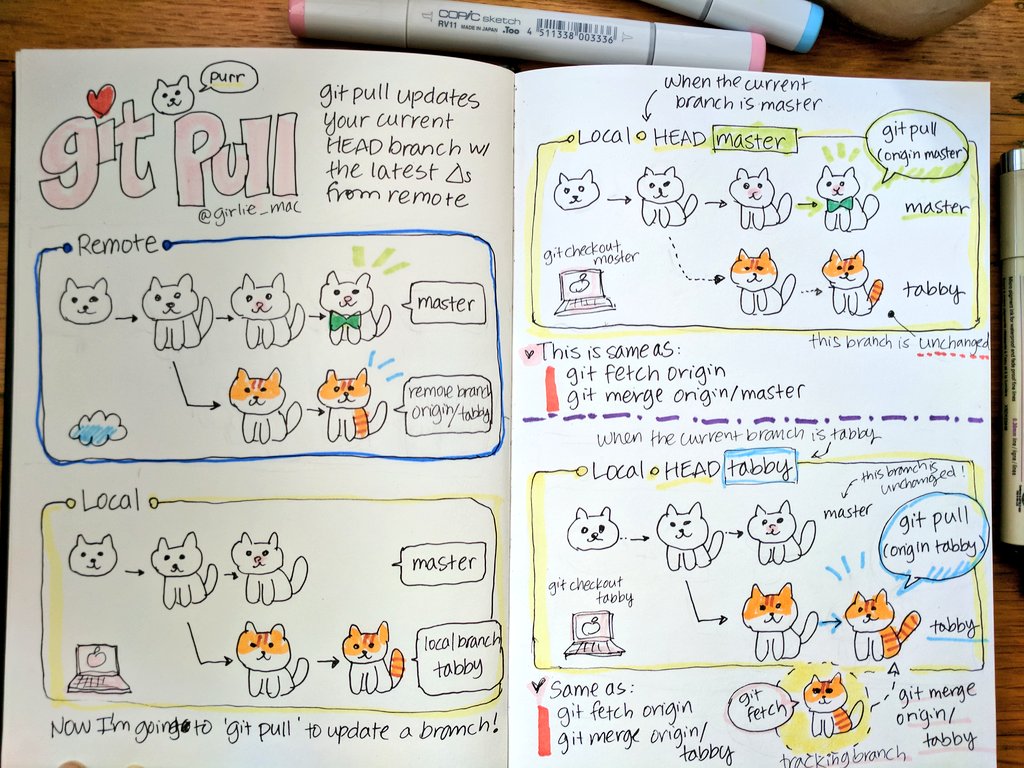
@idle owl did you see this on #general-tech from @bronze geyser ? I think you said you were writing a Git tutorial for someone else. https://twitter.com/girlie_mac/status/905270297128865792?s=15

"git purr" - I re-did my old git pull notes with cats. 🐈🐈🐈 #sketchnotes #git
Retweets
3597
Likes
7632
 Twitter
opal elk
Twitter
opal elk
or use tmux which is much better than screen 😃
formal plover
@opal elk Haha well explain how to end a tmux session and I'll use that.
formal plover
@opal elk ctrl + b, then d
tmux list-sessions if you want to check if you left one open on accident.
manic glacierBOT
Thanks Jerry! Will revise the indentation.
To clarify No. 6 and No. 7: I'm not trying to have ampy and screen running at the same time. I could reset the unit , unplug it from power -- and Raw REPL will exhibit the same behaviour as shown in the video.
No. 5 when it hangs, I abort the process (Ctrl + C) before opening a screen session.
sudo ampy -- port /dev/ttyUSB0 run 'home/timothyDocuments/development/circuitpython/analog-read/main.py' ^C Aborted!
tawny creek
@formal plover @drowsy geyser I'll check and see if that running process in the background is what's causing it. I'm pretty sure i've restarted/shutdown the VM and the unit while I was encountering the issue
tawny creek
Just recreated the issue.
All I have to do is upload code that will fail or loop forever
then reset the unit
and Raw REPL will stop working
 lethal abyss
as circuitpython is not available for the micro:bit boards, I adapted a library to handle 8x8 leds matrix with Max7219 using micropython. Hope it is enough pythonic, I still learn how to do things with this nice langage : https://github.com/titimoby/microbit4all/blob/master/libraries/matrix7219.py

GitHub
Contribute to microbit4all development by creating an account on GitHub.
idle owl
@tulip sleet I had not seen it. That's hilariously delightful.
solar whale
@tawny creek @slender iron are you thinking this is an issue. If the processor is in an infinite loop, I don't see how it can run REPL. Maybe I'm missing something
 plucky flint
👋
Is there a chat tonight..? If so, I'll have to send my apologies but will be around next week.
Also, who (or what) is Rosie..?
😃
@lethal abyss nice work! 😃
idle owl
@plucky flint Rosie is a what and my explanation won't be as solid as @slender iron 's obviously, but it's a thing he made for continuous integration for all the boards that run CircuitPython. (I asked at the chat a couple of weeks ago 😃 )
slender iron
@plucky flint we had it yeseterday
plucky flint
@slender iron ahh... oh well. 😉
slender iron
anything you want to chat about @plucky flint ?
any issues you are aware of in 2.0? we're thinking we'll release today
plucky flint
Not right now.... I'm just finishing for the day.
I've not seen any issues in 2.0
and congratulations on the 2.0 release
idle owl
I've been getting help from my mate and he was adamant about hating Python when I started asking for help a few weeks ago (he programs and designs DOD software and hardware for his job), and by the end of yesterday, he was mumbling about how maybe he needs to buy a CPX, and maybe he needs to look into some change suggestions for the code.... lol.
plucky flint
actually, just a FYI over the next few days I'll be looking to scrape your various API docs so Mu has auto-suggest and call tips when in Adafruit mode. 😉
Also, (now that I'm thinking of things), I'll try to add a "flash" button so it's easy to get CircuitPython onto the boards. I should be able to get Mu to download the latest builds via https://github.com/adafruit/circuitpython/releases/latest
GitHub
circuitpython - CircuitPython - a Python implementation for teaching coding with microcontrollers
then detect the board and, assuming it finds CPLAYBOOT drive mounted on the filesystem, copy it over.
idle owl
@plucky flint that would be super keen!
plucky flint
where "it" = the correct build of CircuitPython
for the detected board
@idle owl Python sort of creeps up on you. A mate of mine called Brett once said that he "came for the language, but stayed for the community..." 😉
Now we stick that quote on t-shirts at Python conferences 😉
idle owl
@plucky flint lol. Well done there. I can see why though.
plucky flint
Regarding the flash button, I imagine people will want to try different platforms and move between each. This will smooth the path where CircuitPython is concerned.
OK... it's 8pm here in the UK and I need to do something not-computer-y 😉 Ciao ciao.
idle owl
@plucky flint Ciao! Have a good evening!
lofty topaz
@plucky flint MAKE a good evening!
manic glacierBOT
Ok, so I took a look at this. I don't think its a CircuitPython bug. I think you've found a state where the code in AMPY to get into raw REPL isn't enough. (It does two CTRL-Cs but thats not enough.)
Please re-file it here: https://github.com/adafruit/ampy/issues
tawny creek
@slender iron https://github.com/adafruit/ampy/issues/19 AHA! Thanks for looking into the ticket btw!

GitHub
I'm using this board https://www.olimex.com/Products/IoT/MOD-WIFI-ESP8266-DEV/. When I try to run
"sudo ampy --port /dev/ttyUSB0 run test.py" or any other command, it says "Could not enter raw repl...
slender iron
not a problem @tawny creek thank you for the testing
manic glacierBOT
opal elk
do we still need a learn guide written?
solar whale
@slender iron congratulations on 2.0.0!!
idle owl
@slender iron Great job!
slender iron
thanks for the help <@&356864093652516868>
opal elk
@slender iron I meant for the temp sensor. I know we have the code, but I didn't know about a guide
slender iron
a guide would be welcome @opal elk
opal elk
>>> import microcontroller
>>> microcontroller.cpu.temperature
29.6556
that's celsius, right? I mean, it isn't freezing in my house
drowsy geyser
@slender iron Challenge accepted.
tawny creek
that's warm @opal elk 😃
drowsy geyser
@tawny creek I believe it's the die temperature, not the air temperature....
Is that right, @opal elk ?
opal elk
that's what I'm saying in this guide, definitely, so I hope it's true! but I'm no expert
tawny creek
24 C is a good room temp :3
opal elk
it's also fairly warm here. we don't have central air.
actually my thermostat says it's 74*F now
tawny creek
23 C ~ close!
slender iron
@drowsy geyser correct, its die temp
slender iron
thanks @formal plover !
I'm going to write up something about 3.0 this afternoon I think
opal elk
(512, 512, 118, 19, 19, 0, 0, 0, 0, 255)
>>> stat = os.statvfs("/")
>>> stat[0]*stat[3]
9728```that's the number of kb free on the device, right?
0 = block size, 3 = free blocks
formal plover
@slender iron you're welcome! Nice. As always I'll flash each release candidate as it becomes available
 half sedge
Hi, I have "issue" with 2.0.0 upgrade of Gemma M0... so this is the place?
half sedge
I went double click, pushing the UF2 and go.
opal elk
and I just upgraded from rc2 to 2.0.0 without issue so maybe I could help too
what colors were the lights?
half sedge
First thing is that the blinking is "different"... I don't know where it is documented. I had a blink/color change also when connecting on the REPL in "serial". Would be great to document the new color meaning... but that is not my problem.
My problem is space issue to put back the lib on the Gemma M0.
The CIRCUITPY disc seems to small for the content of the zip.
Even if I try to limit myself to what was present on the 1.0.0 Gemma M0, it is too short (and filename do not match).
slender iron
@half sedge with the Gemma you need to selectively load files. The whole zip will not fit
what files do you need?
half sedge
I understand that, but what would be the content of a "from the shop" Gemma M0?
slender iron
right now its still 1.0 but will soon be upgraded to 2.0
half sedge
I need nothing, I try to replicate the minimum that was there in the first place, that is: lib/adafruit_hid/* + lib/dotstar.py + lib/neopixel.py + main.py (with the demo code)
I don't need README.txt nor Windows 7 Driver and content.
But it seems that 2.0.0 has inflated the size of what was the demo content of 1.0.0
half sedge
Independently of the upgrade to 2.0.0. what if a user want to return a Gemma M0 to "factory default"? Do you publish somewhere the CIRCUITPY content (I have a backup, maybe I uncommented some lines in main.py) but imagine a user deleted the demo. You should publish that content.
slender iron
yup, totally agree with you
opal elk
would that be the 1.0.0 uf2?
slender iron
nah, the files that are loaded onto the drive
half sedge
The UF2 is the fill you push to GEMMABOOT drive (you received the 1.0.0 and some of use try the 2.0.0). What I talk about now is the CIRCUITPY drive.
slender iron
@half sedge I think they are here: https://learn.adafruit.com/adafruit-gemma-m0/handy-tips?view=all#downloads

The Gemma M0 will super-charge your wearables! Small, light, and it's easy to use, so you can do more.
(we also need a good place for example code.)
half sedge
I don't really "need" the GEMMA, what I really need now is to find where my Trinket is hidden. It is so small, I may have lost it. Maybe searching for it I will find my Circuit Playground Express. 😃
slender iron
good luck!
half sedge
Is there a place where @river quest compare the various M0 hardware... like number of pins, storage size, ...
opal elk
okay so now a very silly question seeing as I'm writing a guide on using storage to save data... can I do that in the REPL?
Traceback (most recent call last):
  File "<stdin>", line 1, in <module>
RuntimeError: Cannot remount '/' when USB is active.```so I assume it has to be in code
I'm trying to figure out what the error will be if it tries to write when the drive is full
slender iron
@half sedge not that I know of. its mostly form factor and express or not
@opal elk boot.py only (before USB starts)
opal elk
👍
half sedge
@slender iron So from a storage point or view there is no difference between my Gemma and my now found Trinket? I will have the same size issue while trying to upgrade to 2.0.0 the content of the CIRCUITPY drive?
And then, what about my Circuit Playground Express? Same size?
half sedge
I already felt with 1.0.0 that M0 was very short in memory, especially trying the figglet code from tony. I hope that what you(?) did with the heap/stack memory will make things better. But that is for "RAM" memory. Now I see that storage might be an issue too. With the UF2 bootloader, then the Circuit Python UF2 there is not a lot of space left for "user" content...
 sick creek
2.0 have 4K more ram?
slender iron
yup, 4k in the heap
half sedge
@slender iron The space issue (for Gemma M0) and installing the lib is clearly explained on https://learn.adafruit.com/adafruit-gemma-m0/installing-libraries . Since I am on a Mac, I may need to check if hidden file are not eating the space.
The Gemma M0 will super-charge your wearables! Small, light, and it's easy to use, so you can do more.
slender iron
yup definitely!
opal elk
btw, OSError 28 if device is full
I'm also including instructions on how to remove boot.py via the REPL in case you lock yourself out of USB via storage.remount()
not that I, uh, did that
slender iron
👍
half sedge
I saved a lot of space... now in 1.0.0 there was the file /lib/dotstar.py I don't find that file in 2.0.0 zip bundle, but there is adafruit_dotstar.mpy . Do I need to copy that file? Also rename it or automatically the "import dotstar" will search and find that mpy file?
The answer is NO:
This might do the trick: main.py output: import adafruit_dotstar as dotstar
I mean "import adafruit_dotstar as dotstar" rather than "import dotstar"
formal plover
adafruit_dotstar is the name of the library. If it's in your /lib then do a import adafruit_dotstar @half sedge
half sedge
Yes, but the Gemma M0 out of factory is having a file /lib/dotstar.py and that is used by the demo main.py
So I believe the library changed name...
slender iron
I changed the name to match other adafruit libraries
half sedge
So now, I try to remake the "main.py" that would work in a 2.0.0 context.
As far as I understand, changing the UF2 (upgrading from 1.0.0 to 2.0.0) does not touch the content of the CIRCUITPY. So upgrading break the demo code.
So the first thing you notice after upgrade is that you don't have the rainbow effect on your Gemma.
opal elk
OSError(30,)
>>> e[0]
Traceback (most recent call last):
  File "<stdin>", line 1, in <module>
TypeError: 'OSError' object is not subscriptable
>>> e.errno
Traceback (most recent call last):
  File "<stdin>", line 1, in <module>
AttributeError: 'OSError' object has no attribute 'errno'```how do I get access to the error code? OSError should have an errno attribute according to CPython docs
@half sedge that does seem to be the case, yes
manic glacierBOT

This may be a separate issue, but OSError doesn't seem to have some of the attributes the CPython docs says it does:
This exception is derived from EnvironmentError. It is raised when a function returns a system-related error (not for illegal argument types or other incidental errors). The errno attribute is a numeric error code from errno, and the strerror attribute is the corresponding string, as would be printed by the C function perror(). See the module errno, which contains names ...
half sedge
@slender iron I am in CET timezone, so it is time for me to sleep... I really hope @river quest will release a zip file that contain all the files from CIRCUITPY as release in the current factory version of Gemma M0 with version 1.0.0. Then I would love them to release a zip file with the new demo that work with 2.0.0 and whatever part of the library they plan to distribute with the factory version of Gemma M0 with version 2.0.0. of Circuit Python. That way "upgrade" from 1.0.0 to 2.0.0 will be possible and easy for customer. Regards.
slender iron
@half sedge good night! The 1.0.0 zip is here: https://learn.adafruit.com/adafruit-gemma-m0/handy-tips?view=all#downloads I'll update the gemma example now and post a new version
The Gemma M0 will super-charge your wearables! Small, light, and it's easy to use, so you can do more.
manic glacierBOT

 errant grail
Express upgrades to 2.0 were soooo easy. Next is the upgrade for the M0 AdaLogger...
idle owl
@errant grail Nice!
drowsy geyser
Yes, I have a Metro M0 Express here at work so I upgraded it on a coffee break. 😃
opal elk
nice!
errant grail
All test boards are set up. Time to convert some projects. Thanks to the circuitpython team!
solar whale
@opal elk @slender iron aha - I found the origina @prime ingot code https://github.com/edgecollective/circuitpython-flash-logger

GitHub
circuitpython-flash-logger - Basic datalogging to SPI flash memory on CircuitPython Express boards.
slender iron
anybody speak a language beside english? It might be cool to support non-english messages in circuitpython
slender iron
think its worth a try?
I'm looking at strings like: mp_hal_stdout_tx_str("Auto-reload is on. Simply save files over USB to run them or enter REPL to disable.\r\n");
tawny creek
most Tagalogs speak "taglish" now and can speak english ~ but can try a list if you want!
tawny creek
mp_hal_stdout_tx_str("Awtomatikong reload ay on. I-save lamang ang files sa USB o buksan ang REPL para i-disable. \r\n");
tawny creek
wouldn't mind helping with the translation, could also try promoting circuitpython to the tagalog communities im in
slender iron
that'd be awesome
tawny creek
(most of them use ESP devices atm)
slender iron
I wonder if python has translated error messages?
idle owl
I remember it offering languages when I installed it from the web the first time, but I am unsure what it uses them for.
fading solstice
@slender iron i got the PulseIn class to work pretty good with DHT22 and DHT11, but it occasionally loses pulses (i think).
@slender iron I was looking at the C code in common_hal/pulseio/pulsein.c There isn't coordination to the pulse list. is it possible to have a multi-tread issue with that list.
fading solstice
i am using popleft() to remove items.
slender iron
is it paused while you are doing that?
fading solstice
no
slender iron
ah
my intention was that you'd resume until you had the number of pulses you expect and then pause it
fading solstice
ok i will try that
manic glacierBOT

I am experiencing similar behaviour with the following:
-Adafruit CircuitPython 2.0.0 on 2017-09-12; Adafruit Feather M0 Express with samd21g18
-Adafruit Adalogger FeatherWing
-adafruit-circuitpython-bundle-2.0.0-20170912
-SanDisk Ultra 64GB microSDXC UHS-I Card (Class 10)
import os
import adafruit_sdcard
import busio
import digitalio
import board
import storage
os.listdir()
['boot_out.txt', '.Trash-1000', 'code.py', 'lib']
spi = busio.SPI(board....
idle owl
Metro Express arrived!
formal plover
@idle owl Yay!
idle owl
@formal plover You've got one right?
formal plover
@idle owl Nope.
idle owl
@formal plover Hmm for some reason I thought you mentioned having one.
formal plover
M0 Express
idle owl
Yes
formal plover
Got the express part right lol @idle owl
idle owl
I left out the M0 when I said what arrived. It's the Metro M0 Express.
formal plover
And I left off the Feather part. Lolololol. It's a Feather M0 Express
idle owl
lol. Fair enough
idle owl
Indeed!
I just hooked up a sensor to it, the only breakout board sensor I have. There's python code for it, I'm going to try to make it work in CircuitPython. I think this is entirely over my head.
formal plover
What sensor @idle owl?
idle owl
SHT31-D, Sensiron humidity and temperature sensor
Sensiron has a library for it. I'm giving it a try as is to see what happens
formal plover
@idle owl I have that same sensor. I could probably hook it up and help you test. Someone made a CircuitPython library for the DHT22 recently.
idle owl
So the code runs, but it doesn't find the sensor. This also marks the first time I've used a breadboard, so maybe I just wired it wrong.
formal plover
You'll have to make sure that the pins are declared correctly and a couple other things. Won't be 100% plug and play that's for sure. Can you attach the code that you have right now?
idle owl
I cloned this and then put all the files in / on the board. https://github.com/Sensirion/libsensors-python

GitHub
libsensors-python - Python library for accessing Sensirion RH/T and Flow sensors
Figured starting with their code made sense.
manic glacierBOT

In my opinion you're missing some files on circuitpy's directory. Personally mine is like this and is working with a 16 G Verbatim card...
os.listdir()
['boot_out.txt', 'adafruit_sdcard.mpy', 'adafruit_bus_device', '.Trash-1000']
idle owl
Is the wiring at least correct?
I figured out where it's looking for the sensor in the code. Improvement over the last time I tried to use older code with CircuitPython.
formal plover
@idle owl I have a better example code for you
idle owl
@formal plover Oooh excellent
formal plover
Annnnnnd it's from Adafruit
idle owl
It's in the downloads for the sensor isn't it
I saw the testing code while wiring it and then promptly forgot because I'd already had it in my head that I'd have to try to port the Sensiron code.
formal plover

GitHub
Adafruit_Python_SHT31 - Python Driver for the Adafruit SHT31-D Breakout
idle owl
I should have just waited for your link before babbling. The testing code is all arduino.
In the actual wiring and testing tutorial I mean
formal plover
Haha no worries. @timber lion made that Library, and he does CircuitPython. So maybe he could create a port for it eventually.
but for now, you get to try to port it! 😃
idle owl
I'm excited about it! I would have been glad to just use a sensor but a little disappointed if someone had already ported it.
formal plover
There is also a Micro Python lib for it if you want to try that as well.

GitHub
micropython-sht31 - Micropython "driver" for the SHT31 temperature and humidity sensor
idle owl
That'd be great
formal plover
@idle owl and here's how CircuitPython uses I2C: https://circuitpython.readthedocs.io/en/latest/shared-bindings/bitbangio/I2C.html
idle owl
@formal plover You have perfect timing.
formal plover
Haha, I try
idle owl
I had figured out that I needed to change that, and tried a couple of things that failed, and was in the middle of typing that here.
formal plover
Yeah, I knew it was going to handle I2C differently... Well had a hunch at least. So I went to the "Core Modules" section to look
manic glacierBOT
The necessary libraries are in the /lib folder. However, I reformatted Fat32 using gparted and that got things working. Thank you!
manic glacierBOT
My pleasure. Really glad to know it. That's exactly what happened in my case.
 timber lion
yeah the SHT series sensors are going to be interesting, they don't use the typical register model most other I2C devices use
I remember I had to do some tricks because Linux's SMBUS interface expects registers
you need lower level I2C access to read the data
so yeah it might be a bit trickier and more involved to get it going
it's not on the radar right but definitely as we port more drivers over we'll get there
idle owl
@timber lion So this appearing to be entirely out of my skill range is probably accurate.
timber lion
it's do-able but I'd say start with a different I2C sensor if you have one handy 😃
this is a handy guide to check out though: https://learn.adafruit.com/circuitpython-basics-i2c-and-spi

Learn how to talk to I2C and SPI devices with CircuitPython!
the little mcp9808 sensor used in there is a good one for learning and playing with I2C though
it has a really simple register model, just read one register and it gives back the temperature
formal plover
Thanks for posting that @timber lion. I have a ton of sensors that use I2C, so that will come in handy.
@idle owl that SHT31-D is your only sensor you said?
idle owl
@formal plover Yeah. Humidity was the only sensor that I was looking at on a Pi bonnet that wasn't already included on the Circuit Playground Express, so we got that one extra.
@timber lion Thank you for the link!
formal plover
@idle owl Well I have a ton laying around. I could mail you one or two. Probably really cheap since we live in the same State
@idle owl Or maybe @slender iron can hook you up
idle owl
@formal plover That would be amazing
slender iron
@idle owl email me what you'd like to experiment with and I'll see what I can do
manic glacierBOT
@cehiles glad that worked!
manic glacierBOT

 analog fox
<@&356864093652516868> I'm trying to add the circuit python kernel to the jupyter notebook, but it says it's looking for .yml or .txt, but the kernal is .py?
tulip sleet
@analog fox The .yml or .txt is probably the description of what to add. It probably names the .py file(s). But I am guessing.
opal elk
Yet, I suppose. Maybe I can use my zero w for it...
analog fox
The install window is looking for yml
tulip sleet
Where did you get the kernel from? That place should have a .yml file or similar?
analog fox
It came from github
tulip sleet
url?
analog fox
Hang on, I restarted that computer
tulip sleet
@restive crescent is the Jupyter expert. She does it for a living. If we can't help, address a query to her.
formal plover
Yeah, I don't know anything about Jupyter
tulip sleet
She's on the core team.
analog fox
It looks like I was trying to install an environment apparantly
slender iron
@royal ridge https://github.com/mu-editor/mu/tree/numu

GitHub
mu - A "micro" editor for MicroPython and the BBC micro:bit. Written in Python and Qt5.
 royal ridge
@slender iron, I love you 5EVAR!
slender iron
just gotta know where to look
formal plover
Have my ESP8266 plugged into one of my Pis and I use Ampy to move stuff around. Going to plug my Feather M0 into it as well. Multi-tasking.
formal plover
Wait, can I use the UF2 bootloader on Linux? works on my chromebook, but not my Pi
solar whale
@formal plover should work. Sometimes on my ubuntu system it does not automatically open but it shows up in the file manager and opens fine when I click on it. Are you trying to access the boot loader or just the file system?
Or just try it again...
formal plover
@solar whale Raspbian seems to not like it. Can't flash the 2.0 update on it. Can't see it at all as a drive when it's plugged in not in bootloader mode
solar whale
Hmmm.. odd. Sorry, I can't test it on mine since I'm not at home. So it does show up in boot loader mode?
solar whale
@formal plover does it show as a USB device - try dmesg right after connecting it an see if it show up.
Should be on ttyACM0
formal plover
Or I could use BOSSAC, I'd like to avoid it though.
15.432505] EXT4-fs (mmcblk0p5): mounted filesystem with ordered data mode. Opts: (null)
solar whale
Does it show if you type: df?
df
formal plover
nope
This might be it
/dev/mmcblk0p6 66528 21418 45110 33% /boot
That's not it
solar whale
Doesn't look right to me. /boot does not seem right. Hopefully someone else can help. I'm out of ideas.
I can try it on Saturday 😉
formal plover
I'll try BOSSAC fbefore then hahah
solar whale
@formal plover what is on the M0 now. CP or an arduino sketch?
formal plover
CP 1.0
Runs a blinky example code with an LED. So I know it's working lol
I did that when I first got it and had it plugged into my ChromeBook
solar whale
Can you connect to REPL: screen /dev/ttyACM0 115200
formal plover
Also, as a side note... double tap makes the NeoPixel stay solid red
idle owl
@formal plover You're trying to get an M0 to mount to a Raspberry Pi in the bootloader mode?
formal plover
@idle owl Correct
idle owl
I have pis, I can check with my board. Different board, but same concept maybe?
Wait, how are you connecting it?
formal plover
USB
idle owl
hub?
formal plover
No
idle owl
Hmm. Wait which rpi?
formal plover
3
idle owl
Ahhh.... I only have Raspberry Pi 0 Ws... which only have micro USB.
I have an OTG adapter though. I can still try it.
formal plover
I have like 3 or 4 normal pi 3s, a Zero, and a Zero W
@solar whale No dice
Doesn't even list
solar whale
Sigh...
formal plover
ls /dev | grep ttyUSB ttyUSB0
formal plover
s /dev | grep ttyAMA0 ttyAMA0
yessir
Boom, in the REPL
Or not
nvm, it doesn't do anything
solar whale
TtyAMA0 is the uart -won't work.
M0 should be ttyACMx
Sounds like it is not seeing it. No idea why not. I have used it lots of times on a pi.
formal plover
s /dev | grep ttyA ttyAMA0 is all that comes up
solar whale
May be worth rebooting pi.
idle owl
I just did it on mine with the Metro M0 and it loaded immediately.
With a USB hub plugged in through an OTG adapter
formal plover
@idle owl Don't tell me that. lol
idle owl
@formal plover lol. Sorry..
formal plover
If it's a reboot to fix, I'll have to emoji shame myself
solar whale
@idle owl as it should! Must be @formal plover fault 😉
formal plover
Still nothing btw
idle owl
Hmm. I have no help to suggest. I was hoping I would have more after trying it. I'm already on 2.0 though? Maybe that matters. Doesn't help you, but could be the issue...
solar whale
@idle owl do you see a /dev/ttyACM0 device?
idle owl
Ah bugger I already disconnected everything. Give me a minute and I can check
(Most of the pi adapter stuff stays connected unused, it's not a big deal)
Yes I do
solar whale
Cool! Thanks. Just wanted to be sure I was telling @formal plover the correct thing too look for.
@kurt sorry I can't be of more help.
formal plover
No worries @solar whale!
idle owl
@formal plover Is there anything else I can check that might help?
solar whale
I need to get some sleep - good luck and good night.
idle owl
@solar whale Have a good night
manic glacierBOT
 formal plover
@idle owl No, I don't think so. I'm calling it a night. Thanks for the help
idle owl
@formal plover You're welcome. Sorry I couldn't do more. Have a good night.
lethal abyss
note to people who enjoy receiving their CircuitPlayground at the office : default demo produce a lot of sound 😃
tulip sleet
@lethal abyss If you slide the slide switch to the other position, it makes less noise.😁
lethal abyss
too late, now I have to explain circuitpython to colleagues 😃
tulip sleet
sounds like a good thing in the long run!
lethal abyss
...I'm a java developper with java dev around me... lot to explain why I like micro/circuit/plain python 😄
formal plover
@lethal abyss sounds like you're well on your way to a lot of fun. You're understanding of another language will certainly come in handy. Even if they are much different, you still will handle debugging well and whatnot.
@idle owl and @solar whale, I'm going to try another Pi when I get home. If that doesn't work, well I'll try the Pi Zero since it works for @idle owl. If it STILL doesn't work, I'll just use my Chromebook.
lethal abyss
@formal plover the main advantage of having some years of experience is that you may have worked on more than one language 😉 By the way, I always had some python scripts all those years from 1999 when I first discovered it through the french translation effort. That's always a bonus to be able to talk to kids in workshop with a minimum knowledge of what they bring with them.
formal plover
@lethal abyss That's awesome. That's also great that you share your knowledge and experience with kids.
lethal abyss
@formal plover it's always fun to feel the moment they start thinking I'm an old thing... then they learn I was game developper in my carreer begining. 😄 always great
opal elk
I think going from java to python will make that xkcd comic seem extra relevant
@formal plover can you try another cable? getting both LEDs red in boot mode means something isn't working properly
or another port, etc
formal plover
@opal elk I've done all those things.
opal elk
yeah, I figured. hrm.
can you put something into boot mode without a cable attached? I haven't tried
idle owl
@formal plover I had to use a powered USB hub, and the USB3 powered hub I have didn't work. I ended up needing a USB 2.0 powered hub.
formal plover
@opal elk it's always that way. Putting it in bootloader mode powered by a LiPo wouldn't make sense
idle owl
It turns red if you do it that way.
slender iron
@formal plover trying usb 2 ports vs usb 3 ports is a good idea from @idle owl
idle owl
@slender iron He was using the ports built into the RPI3,. My need for USB 2 was because I used a RPi0W, so I had to use an OTG adapter. It shouldn't have been Kurt's issue, but it could still be one of those fixes that doesn't make sense.
formal plover
@slender iron @idle owl yeah, I was using the built-in ports as Kattni stated.
My HUZZAH shows up just fine. Non UF2 obviously, but I have no problem using it
I think it has something to do with the UF2 bootloader and raspbian
slender iron
what version of raspbian? Rosie is running off an updated pi 3
I have seen intermittent issues that a restart of the pi fixes
formal plover
The most updated version possible. Updated the Pi 3 before even starting to mess with the Feather M0 Express
Sorry if if have a salty tone. THE WORST day ever at work today. Lol. Salty as the ocean today.
 idle owl
That's good 😃
formal plover
Sure is. Lol.
tawny creek
The latest version of raspbian is "Stretch" im not sure if that has any effect @idle owl
just updated a pi zero w with it the other day, but the rest of my pies are still on jessie
idle owl
@tawny creek Mine are running Stretch, and Kurt said he updated his before attempting anything. Thanks for letting me know though, it's always something I could have missed. Haven't been focused on pis lately.
tawny creek
@idle owl np! are you just starting out with python too?
idle owl
@tawny creek Essentially, yes. I started at the end of June. I take it from the "too" that you are as well?
tawny creek
yep!
idle owl
Nice!
opal elk
yeah, I was reading about that in the magpi that came with the adabox
I like that, because IDLE has not impressed me
tawny creek
was just using the default text editor with ubuntu, this works pretty nicely
idle owl
@tawny creek Nice! I use Atom.
tawny creek
atom is a nice editor! been using vs code lately
idle owl
I researched it a bit before getting into it, and the easy cross-platform aspect was key as am running Mac primarily but also Windows and Linux. Figured if I was going to learn an editor, I might as well be able to use it wherever. My mac was acting up a bit but has settled since a clean install. So in the end I am using that most of the time anyway, but it meant all the learning I did on Windows in the beginning of learning Python carried over.
opal elk
(btw I just posted in #general-chat about how I really learned python, having known just php)
idle owl
I have some linter stuff installed that checks the code, checks python anyway, but it seems to do alright with CircuitPython.
tawny creek
@idle owl my husband told me he switched from using macvim to visual studio code so i HAD to check it out (he's a long time vim fanboy) -- so far its pretty nice and also cross platform. Atom is really nice too though, I have it installed for web development stuff
@opal elk cool! I'm a PHP guy too 😃
idle owl
@opal elk I've got a mate who doesn't try at all not to do that. He does it every time.
opal elk
if I had my way I'd be doing mostly golang nowadays
tawny creek
@opal elk my husband is a golang developer ^^
my soldering station has a buncha go "gopher" stickers from this year's conference
opal elk
I guess my day to day job doesn't have me do much php at all, really. I don't do much programming here, and when I do it's usually (ick) perl. and then arduino/CP at home
@tawny creek I think we're friends now
tawny creek
PERL!
idle owl
lol
formal plover
I'm an IT guy who does all this stuff as a hobby.
At work I don't have anything to do with coding, engineering, electronics or anything.
royal ridge
@opal elk Embrace the line noise!
formal plover
Sooooo.. Yeah.... It was the micro USB cable(s).
lol
I say that with an s on the end. Those micro usb cables work with other devices, so weird. @idle owl @solar whale
What's that saying "It's usually the simplest solution." or something like that
Well now I can do some 2.0 testing done before a new release candidate comes out hopefully.
idle owl
@formal plover Glad you sorted it!
formal plover
So frustrating @idle owl , lol. It would have been a no brainer if it weren't for the fact the board would light up and run code, just not work as a drive or connect during bootloader.
Had to rummage through my box o cables for one that worked. I had two that made it start and run code, but wouldn't work as a drive.
 fast ember
Awesome
idle owl
@formal plover Sometimes cables can be finnicky in odd ways. I've run into that before.
Weird that multiples did it though. Something is just being rude, lol.
formal plover
@idle owl Certainly
slender iron
@formal plover no more release candidates but please do continue to test!
<@&356864093652516868> The CircuitPython weekly here on Discord will be Monday 5pm EST/2pm PST next week. I may try to record it for YouTube and a podcast as well.
formal plover
@slender iron I meant 3.0 beta or something like that. The in between Haha.
slender iron
we're a bit far from 3.0 beta currently. I'm currently breaking it all with asf4 and we'll have to reimplement a bunch of stuff
opal elk
Break all the things!
formal plover
@slender iron yeah that's gonna be fun haha.
slender iron
yeah, literally
working here: https://github.com/adafruit/circuitpython/tree/asf4
GitHub
circuitpython - CircuitPython - a Python implementation for teaching coding with microcontrollers
I haven't pushed my latest though
formal plover
@slender iron I just hope there's not another dramatic change like the asf4 not too far down the road
formal plover
Yay! 
slender iron
@timber lion is the python framebuf module not in the bundle? we should add it if not
lethal abyss
After watching video from Tony D https://www.youtube.com/watch?v=B-PfKv7DCbc I tried my Gemma M0 with my Chromebook. Everything went smooth except I could'n't to flash the firmware of my gemma. it says not enough space. I tried by removing main.py and lib folder I had but no success
Live stream to http://twitch.tv/adafruit showing how to use CircuitPython on Circuit Playground Express with ChromeOS on a Chromebook. Learn how to load Circ...
opal elk
you mean by putting it in bootloader mode and dragging the uf2?
formal plover
@lethal abyss you have to double tap the reset button to enter bootloader mode
Like @opal elk mentioned
opal elk
yeah, double tap reset and two LEDs should light up. one should be red and one green. if both are red the board is angry with you.
and you probably need another USB cable and/or USB port
formal plover
@opal elk yeah like what happened to me and it was the dang cable the whole time.
opal elk
I swear I have 3 million cables and like one of them works for CP
formal plover
@opal elk Haha glad it's not just me. Well I got a false sense of security from no problems with the ESP8266, I'm still convinced it has something to do with the UF2 bootloader
opal elk
I also don't treat them particularly well
idle owl
I bought a bunch recently for another project we're doing here, and all of them seem to work.
idle owl
@slender iron If you have time today to teach me about API integration, I'm free. I have smaller code written for the speaker and the touch sensors, and some ideas of what they could look like. I was going to try to write some code for the other bits that don't yet have APIs but I'm going to need separate help there first. I don't know if having code for two more is enough to start teaching me or not.
lethal abyss
@formal plover @opal elk thanks I feel stupid to forget this. I have my Gemma only since a few days.
idle owl
@lethal abyss Never feel stupid. We all forget things.
@lethal abyss It took me an hour the other day to realise the code wasn't my problem, I hadn't plugged the LED strip into the power outlet.
formal plover
@lethal abyss Nah don't feel stupid like @idle owl said. Mistakes are all good, they help you learn. Even if you make the same ones over and over again, judge free.
opal elk
and especially because you just got it!
my gemma/metro were the first time I had flashed firmware
lethal abyss
That's what I say to kids in my code club but never apply to myself 😇
formal plover
@lethal abyss I'll chase things down the rabbit whole for hours and hours and find out it was something I missed or something not worth looking into.
All part if the process :)
You may find that after some updates you'll have to update your code depending on the code you have on main.py or what libraries you were using.
It's covered in the guide and GitHub though.
lethal abyss
Yes, I read this. I downloaded the libs with the firmware
formal plover
@lethal abyss Good deal. Have fun!
solar whale
@idle owl there is a thread on the forum https://forums.adafruit.com/viewtopic.php?f=58&t=123582&p=617027#p617027 where somone is trying to use the touch sensor on a CPX but finds that it seems to behave differently when a battery used. Have you ever tried the touch sensor with a battery powered system rather than USB? I wonder if there is s differcen e in sensitivity. I can test it tomorrw, but thought I ask if you or anyone has ever tried it wit a battery on a CPX, Gemma or Trinket.
@tulip sleet I hope you did not mind my jumping in on that
idle owl
@solar whale I'll look into it. I've used the touch sensors a lot, a few times with a battery, and didn't have an issue. I'm going to plug it into the battery pack that came with it and see what happens.
solar whale
@idle owl thanks - just a hunch on my part and may be completley wrong. But worth a test. No hurry.
@idle owl when you use the touch are you jsut using the bare pad or do you have something attached?
tulip sleet
@solar whale no problem!
idle owl
@solar whale Both.
solar whale
@idle owl My hope is taht it may make a subtle difference when using the bare pad and a battery. that perhaps the initial "calibration" is a bit different.
tulip sleet
I am debugging USB enumeration on Windows right now ... ☹
solar whale
@tulip sleet my condolences.... good luck!
formal plover
@solar whale I had a capacitive touch Pi hat a while back and I always had to calibrate it if I had anything connected to the alligator clips. Clip to pad cool, but pad to clip to object; required calibration to work best.
Like zeroing out a scale
The .py file had something in the beginning that would calibrate at the beginning of running the file
solar whale
@formal plover Tha was my experiece with the MPR121 touch sensors so I am hopeful tha this is something similar. The M0 souch pads seem to work well usually but I have always used USB for them. Using a battery may introduce some small differenese. Not sure why ...
@formal plover I think all that initialization is hidden in touchio.
formal plover
@solar whale gotcha. Probably is.
tulip sleet
I just tried the CPX touch with and without battery and it worked in both cases, though it was a little flaky. For some reason A1 seemed more sensitive. Posted another reply to the thread.
and an alligator lead was not that great
solar whale
@tulip sleet thanks - I wonder if it will get more stable if you add some wire or some conductive surface to the pad.
idle owl
@solar whale It seems to recalibrate every time you start it up. So if you want it to work with something attached, you start it up as you plan to use it and it seems to calibrate. Sometimes it takes a couple of resets. I've been using fruit and it took a few tries before it was all settled.
I just tried it with the battery pack and attached alligator clips without resetting. Works across the board.
solar whale
@idle owl that makes sense and is what I expect. I think the bare pad is a marginal sensor in general.
idle owl
@solar whale Bare pads are working perfectly as well.
solar whale
@idle owl great - thanks -I may be way off base. Thasnks for doing the tests!
idle owl
@solar whale Of course! Anytime.
solar whale
@idle owl waht baord were you using ? just curious so I can reproduce things.
idle owl
@solar whale Circuit Playground Express with the 3xAAA battery pack that came with the "Developer Kit" version of it, alligator-to-male jumper wire clips, and female/male jumper wire extensions included to try to make it fail.
I checked A1 because I saw @tulip sleet mention it, I didn't find any differences or issues with any specific pads.
solar whale
@idle owl Oh that s great - perfect setup! We can all compare CPX responses!
idle owl
@solar whale I used my own code though. Let me input the poster's code and try that to be certain.
A0 is analog output. It doesn't work for touch.
It used to, but the last update made it not work. I checked it recently by trying to include it in my code, but the code fails.
solar whale
very interesting, but the opriginal poster seemd to get it to work under USB????
idle owl
Yeah I'm trying it now
tulip sleet
@idle owl. I just used CPX with the 2.0.0 release and A0 did work?!
idle owl
Ok I must be off about something then.
solar whale
That would have been a great solution 😉
idle owl
The poster's code isn't working at all for me.
solar whale
thats good news - perhaps there is just something we are not seeing.
idle owl
Wait - it fails in my code because I'm enablng the speaker before I put the A0 touch in , and the speaker and A0 are on the same pin. That's the problem with my code.
import board
import neopixel
import touchio

pixels = neopixel.NeoPixel(board.NEOPIXEL, 10)
touch1 = touchio.TouchIn(board.A0)

while True:
    if touch1.value:
        pixels.fill((0, 255, 0))
        pixels.write()
        print("A0 touched!")
        time.sleep(0.5)
    else:
        pixels.fill((255, 0, 0))
        pixels.write
Is what I changed their code to
and it works.
Now I'm checking with battery pack
And it fails. Neat!
idle owl
Aha!!
It is an A0 issue. I added A1 to the list as well, and A1 works. It has to be something to do with how the battery pack is attached to the board. It interferes with A0.
YES.
solar whale
@idle owl fantastic - great work - would you please post your findings to the forum thread? My bus ia about to pull in. I have been flying/rinding all day...
idle owl
Definitely!
manic glacierBOT

code to test the internal dotstar on trinket (or gemma)
# Trinket Dotstar

from digitalio import *
import board
import adafruit_dotstar as dotstar
import time

numpix = 1
strip = dotstar.DotStar(board.APA102_SCK, board.APA102_MOSI, 1, brightness=0.2)

led = DigitalInOut(board.D13)
led.direction = Direction.OUTPUT

def wheel(pos):
    # Input a value 0 to 255 to get a color value.
    # The colours are a transition r - g - b - back to r.
    if (pos < 0):
retur...@idle owl @tulip sleet @formal plover this was a fun way to troubleshoot!
idle owl
@tulip sleet When I first started my project, Scott explained it that they had to sacrifice some of A0's functioning to fit the speaker on, so that's why my first thought was that it was an A0 issue. I'm wondering if there's a lot of other stuff using the same routes. I know they had to make design decisions to manage to fit so much onto the board.
idle owl
Or specifically that the way the battery pack works is using something that interferes anyway.
idle owl
@solar whale That was fun 😃
manic glacierBOT

(diagnosed in chat)
Whoops! We updated Adafruit_CircuitPython_DotStar, but didn't publish a new bundle. So it was version skew. Bundle updated: https://github.com/adafruit/Adafruit_CircuitPython_Bundle/releases/tag/20170915
 umbral dagger
I just want to say "Hi" to everyone and "Well done" to everyone working on circuitpython. It's a really nice system and I'm looking forward to using and abusing it as I do more with the M0/express series of boards (and the eventual SAMD51 based line).
idle owl
Hello, @umbral dagger
slender iron
@umbral dagger you should post pictures of your trinket m0 express to the #show-and-tell channel
and welcome!
umbral dagger
@slender iron Done.
slender iron
@idle owl I have time now if you want to chat
idle owl
@slender iron Sounds good!
tulip sleet
FYI #circuitpython-dev folks: There's a new bundle release with a fixed dotstar library: https://github.com/adafruit/Adafruit_CircuitPython_Bundle/releases/tag/20170915. Significant if you are using DotStar strips or using the DotStar on the Trinket M0 or Gemma M0. Otherwise it's the same as 20170912
slender iron
thanks for the fix @tulip sleet !
manic glacierBOT
i think after mcu temperature is read the MUX isnt cleared or something because analog reads have a max range change?
see demo, try commenting out mcu temp print out, note analog voltage changes. with temp read, voltage never gets above 0.21 (4096 raw). using trinket but temp read is correct!
import board
from analogio import AnalogOut, AnalogIn
import time
import microcontroller

# Analog input on D0
analog1in = AnalogIn(board.D0)

######################### HELPERS #######...We setup and teardown the ADC struct each time. However, the doc says to discard the first reading. The temp code does that but the regular AnalogIn code does not. I'll test more thoroughly but if you are still setup to test try repeating the getVoltage call a second time.
manic glacierBOT
Trying this in the REPL and I get ~4095 all the time as you do. The ASF calls we make are supposed to reset all the ADC logic completely, but apparently not. I'll look further. The double read is just because the ADC supposedly doesn't stabilize after you change the voltage reference: http://www.atmel.com/images/Atmel-42645-ADC-Configurations-with-Examples_ApplicationNote_AT11481.pdf, page 28:
Discard the first conversion result whenever there is a change in ADC configuration like voltage
...
fading solstice
@tulip sleet Dan, regarding bundle release. missing max7219 which was just added.
tulip sleet
@fading solstice Didn't know that. We'll add it on the next release. Could you open an issue to add it?
GitHub
Adafruit_CircuitPython_Bundle - A bundle of useful CircuitPython libraries ready to use from the filesystem.
oh, there's already an issue ... never mind
tulip sleet

GitHub
We need to create a ReadTheDocs file for adafruit max7219 and update circuitpython/index.rst to reference it. One file we could use is kept in https://github.com/adafruit/Adafruit_CircuitPython_MA...
fading solstice
That the read me doc. we are missing the whole library Adafruit_CircuitPython_MAX7219
@tulip sleet i thtink you have to run git submodule update or git submodule -init. before you build things
 tacit glade
Hi @slender iron, sorry I haven't been in touch for a while. I tried your suggestion to specify a number of bytes when using UART.read() to improve the speed, but if the input buffer is empty, it still takes a while to timeout before returning None. I know you don't want to add an any() method to the UART class, but I was wondering if you would be open to altering the read() method to check the length of the buffer before calling common_hal_busio_uart_read in this function: https://github.com/adafruit/circuitpython/blob/5aa8922038a5f0ee07c7c36a3d8eab0547f585bc/shared-bindings/busio/UART.c#L181. My hope is that this would avoid waiting for the timeout (speeding up my soundboard library) without changing the API. Thoughts?
GitHub
circuitpython - CircuitPython - a Python implementation for teaching coding with microcontrollers
slender iron
@tacit glade welcome back! yeah, I'm ok if we add a common_hal method to know how many bytes are buffered so that readall can request that amount
 normal mica
Is theres a code for a lightsaber, no sound just light
tacit glade
@slender iron that would be awesome, thank you!
slender iron
@tacit glade can you do it?
tacit glade
I wish I could, but I don't think so. My C is pretty rusty so it would take me quite a while to understand what I need to change/add
slender iron
ok please file an issue so I don't lose track
tacit glade
You bet
manic glacierBOT

Regarding #209, I had an idea that may help speed things up. Instead of simply waiting for read() (and more specifically common_hal_busio_uart_read()) to timeout when the buffer is empty, why not just check the length of the input buffer first and request that amount? The use case scenario this fits best is when read() is called with no value for nbytes specified, meaning they want to read all available bytes.
If a value is specified for nbytes and it is less than or equal to the...
opal elk
This is the nicest channel on a nice server
slender iron
😃
formal plover
@opal elk 😃
Everyone is super quick too.
@slender iron will post something and be like can someone look at x or fix x. I'll read it at work, oh hey maybe I'll take a look at that when I get home... Open discord 2 hours later.. Fixed among 10 other things. Hahahahaha
idle owl
I just successfully wrote my first method!
Or function or something like that anyway. API!
formal plover
@idle owl Yay! Way to go!
idle owl
The CPX speaker now works with the same type of code as the neopixels and such!
@formal plover Thanks! I'm really excited, lol
manic glacierBOT
microcontroller.cpu.temperature uses different ADC settings, and caused
AnalogIn to give wrong answers. AnalogIn can no longer assume it's the
only user of the ADC.
This fixes #253, at the expense of re-initing the ADC on every read, and also doing double reads to ensure accuracy of the result.
A more sophisticated implementation would remember the last ADC settings and not re-init if they were the same. If we're not going to do that, the AnalogIn code could be simplified to not sav...
manic glacierBOT

This plus the fact that the name changed make the demo code distributed in
Gemma M0 and Trinket M0 not work when upgrading from 1.0.0 to 2.0.0.
And since the CircuitPython filesystem survive the upgrade, the hardware
appear to be not working (the led not blinking the right way).
Please provide to early adopter (those with hardware loaded with 1.0.0 and
demo code) a zip file that will match the content of new customer that will
get it with 2.0.0.
Both Gemma and Trinket have no space to load th...
manic glacierBOT
 fading solstice
regarding gemma m0 failure with newest 2.0 release. i did have to delete the lib contents and the windows driver before i could copy the new files onto gemma m0
formal plover
@fading solstice Interesting
fading solstice
I then had to change twos lines in the demo program (line 10 and line14) to refer to adafruit_dotstar instead of dotstar. after that the demo program seems to work
formal plover
@fading solstice Yeah, the Dot Star library has been updated
fading solstice
maybe the demo progam isn't working after all. the dot is not changing colors. i think it is supposed to.
 floral dagger
I have one of the original Huzzah boards and was thinking of putting circuit python on there to mess around with. Anything I should be aware of before doing that?
formal plover
@fading solstice The demo code stills needs to be updated to reflect the changes to the library and other changes from 2.0.
fading solstice
ohh, more changes. is that something i can do?
formal plover
@fading solstice I'm trying to locate where the demo code for the Gemma M0 originates from to make sure it's not already updated and there just needs to be something added to the guide and or GitHub saying "hey download this."
I don't have a Gemma M0, so I'm not 100% on the documentation.
@fading solstice If you know where it's at and can see that it's not updated, I'd ask @slender iron or @tulip sleet about it. I'm sure they'd love your assistance!
I think... don't quote me... @idle owl successfully updated the Demo code for the CPX which didn't work after 2.0 either. If my timeline is correct. Might have been discovered before the 2.0 release.
solar whale
@idle owl @tulip sleet just FYI - I tried adapting the touch test from the CPX to run on a gemma_mo (switch from neopixel to dotstar) On the gemma-m0 both A0 and A1 work when using a battery. Here is the gemma version:
import time
import board
import touchio
import adafruit_dotstar

# One pixel connected internally!

dot = adafruit_dotstar.DotStar(board.APA102_SCK, board.APA102_MOSI, 1, brightness=0.2)

touch1 = touchio.TouchIn(board.A0)
touch2 = touchio.TouchIn(board.A1)

while True:
    if touch1.value:
        dot[0]=(0, 10, 0)
        dot.show()
        print("A0 touched!")
        time.sleep(0.5)
    elif touch2.value:
        dot[0]=(0, 0, 10)
        dot.show()
        print("A1 touched!")
        time.sleep(0.5)
    else:
        dot[0]=(10, 0, 0)
        dot.show()
next I'll try it on a trinket_m0
formal plover
Awesome job @solar whale!
solar whale
@formal plover thanks - having fun 😃
fading solstice
@solar whale that works for me too. the demo is very similar with respect to the dotstar
i see one differnce the parameters to the Dotstar init are switched!
fading solstice
The original was DotStar(APA102_MOSI, APA102_SCK, 1, brightness=0.2) now DotStar(APA102_SCK, APA102_MOSI, 1, brightness=0.2) works!
solar whale
yup!
fading solstice
i wonder when that happened
solar whale
just a sec and I can tell you
looks like it has been that way in adafruit_dotstar - since it replaced dotstar - on Sept 6.
fading solstice
ok. i sent an email to @slender iron for the location of the Gemma M0 demo main.py
solar whale
I have the oe shipped with the gemma_m0, but it was for CP 1.0.0 and wont work now.
formal plover
@fading solstice Good deal. I think he's going to be out and about a lot for some maker events. He'll likely respond at night still prob, haha.
While digging through this guide: https://cdn-learn.adafruit.com/downloads/pdf/adafruit-gemma-m0.pdf
I did find a useful I2C scanner section
Unrelated, but cool!
Found the demo code @fading solstice & @solar whale!!!
Page 85 on that PDF I just linked.
It pulls from the Aug release though, I'm not sure how to locate the September file
The Gemma M0 will super-charge your wearables! Small, light, and it's easy to use, so you can do more.
solar whale
too bad it just downloadls the files and tehy are out of date. I have not found them on githuib yet.
formal plover
Yeah, so it appears the demo code in the default files package needs to be updated.
Which @fading solstice already said he'd be happy to fix the demo code.
At least the mystery has been solved. It'll have to be updated in both the Learn Guide and GitHub. Most of the new users will grab the files from the Learn Guide and not the GitHub.
solar whale
IT looks like the examples in the guide are correct, just not the lownlaode files, right?
slender iron
@fading solstice sorry for the dotstar confusion. I reworked the library and change the name and init order to match our other libraries
it should be set going forward
formal plover
@solar whale That demo isn't in the guide that I saw, it's shipped with the board and downloadable at the end
solar whale
ah ok - I just glanced at the dotstart demo and it looked like it was correct.
formal plover
Yeah, I believe the rest of the examples/demos are up to date/correct.
other than the demo demo haha
demo of the demo
demoception
solar whale
@idle owl @tulip sleet here is a touch example for the trinket_m0 - I had used A4 as the second pad. Note: the board definintions do not have A1,A2,A3,A4 defined and A0 maps to D1 as in the guide. A bit confisuing. Is there a reason A1-A4 are not defined? ```
import time
import board
import touchio
import adafruit_dotstar
One pixel connected internally!
dot = adafruit_dotstar.DotStar(board.APA102_SCK, board.APA102_MOSI, 1, brightness=0.2)
touch1 = touchio.TouchIn(board.A0)
touch2 = touchio.TouchIn(board.D4)
while True:
if touch1.value:
dot[0]=(0, 10, 0)
dot.show()
print("A0/D1 touched!")
time.sleep(0.5)
elif touch2.value:
dot[0]=(0, 0, 10)
dot.show()
print("A4/D4 touched!")
time.sleep(0.5)
else:
dot[0]=(10, 0, 0)
dot.show()
works with USB and battery on both pads.
manic glacierBOT
The contents of the default file system are available in the learn guide: https://learn.adafruit.com/adafruit-gemma-m0/installing-libraries?view=all#downloads https://learn.adafruit.com/adafruit-trinket-m0-circuitpython-arduino/downloads?view=all#downloads
Its still the 1.0 contents for now because the manufacturing hasn't been switched fully to 2.0 yet.
To upgrade your existing installation you'll need to copy each library in the lib directory from the bundle and replace the old versio...
The guide https://learn.adafruit.com/adafruit-trinket-m0-circuitpython-arduino/downloads?view=all
describes the us of mnemonic A1,A2,A3,A4 but they are not defined in the pins.c file.
Using the correct D# works, but I wondered if this was an intentional omission.
The mapping is bit confusing since Ax does not got to Dx in all cases.
yah we just did this yesterday at 7pm :) will update the bundle shortly!
formal plover
Not saying we should mimic Arduino (Because CircuitPython is already the bee's knees). However, way down the roadmap, it'd be cool if we could get some kind of basic GUI helper tool; ie; Select you board -> Select which version of CircuitPython -> here are all the libraries. I know it's already available in between the Learn Guides and Github, but something condensed with less noise around would be cool.
opal elk
To download from GitHub? That would be relatively simple to write...
formal plover
@opal elk Yassss. Fetching it from GitHub would prob be best
That way it's being maintained in it's natural habitat haha
formal plover
@opal elk That'd be legit
 buoyant wigeon
Hi, I am first time here and I do first steps with CP but have some experience with MP. I wanted to go through source code of all drivers and tried to download "source_code.zip" here... https://github.com/adafruit/Adafruit_CircuitPython_Bundle/releases ... but all directories are empty... Have I missed some information or do I do something wrong?
GitHub
Adafruit_CircuitPython_Bundle - A bundle of useful CircuitPython libraries ready to use from the filesystem.
slender iron
@buoyant wigeon all of the drivers are git submodules so you would have better luck cloning and then updating them
idle owl
@slender iron I have the speaker working in the CPX API file. I wanted to make sure that the next step is the pull request before doing it. Does someone need to review it first? Or is that the point of the pull request.
slender iron
thats the point of the pull request
idle owl
Excellent
slender iron
😃
buoyant wigeon
@slender iron Thanks, yes, I have to do it this way or another way but I was looking for quick solution (overview). Though I would be interested if source_code of all drivers should be in this ZIP (as a picture of actual state) or if it is done unintentionally.
slender iron
its unintentional
idle owl
@slender iron I made an image for it, like the ones you have on readthedocs, but I have no idea how to upload it. So in the comments inside the express.py file, I added the ..image thing like you had with the name speaker.jpg, but obviously the image only exists on my computer.
slender iron
I think the images are in the repo
idle owl
Oh, so they are. Thanks 😃
buoyant wigeon
@slender iron Thanks, I thought I was doing something wrong.
slender iron
nope, just a bug in github I think
analog fox
Circuit python is kind of a challenge compared to arduino (although I think it's worth it)!
formal plover
@analog fox It's a maturing language. The end goal is for it to be as easy or even easier than Arduino.
Plus Python is becoming one of the fastest most in demand languages out there. CircuitPython knowledge has the potential to be leveraged in different areas. Knowing Python helps, but not a requirement.
Python is also used on the Raspberry Pi! You can do lots of cool stuff with Python and the Pi. It's not CircuitPython, but there are some similarities when you get rid of the board specific stuff.
analog fox
Yep! 🙂
manic glacierBOT


When your program imports and uses a precompiled .mpy file, and you upload a new version of it, CircuitPython will often crash and stop responding.
The crash is pretty bad — I have to reflash CircuitPython afterwards to make the board appear as USB drive again.
analog fox
sick creek
cool