#circuitpython-dev
1 messages · Page 100 of 1
 slender iron
 manic glacierBOT

 tulip sleet
@slender iron I'm using kdiff3 for merging. It has mostly been the best for me, but has a few quirks. Just curious - what do you use?
tulip sleet
tnx - you are dedicated; I'll keep going with kdiff3 - resolves a lot of stuff correctly the first time
slender iron
ok @tulip sleet
@sick creek they are breakout boards we sell for playing sound files
tulip sleet
@slender iron
Seeing various differences in exception raising:
            "memory allocation failed, allocating %u bytes", (uint)num_bytes);```
vs
```    nlr_raise(mp_obj_new_exception_msg_varg(&mp_type_MemoryError,
        "memory allocation failed, allocating %u bytes", (uint)num_bytes));
Are these equivalent? Looks like you cleaned some of these up, and they haven't been cleaned up in MPy.
I am mostly keeping your changes, which uses shorter forms ("raise_IndexError" vs passing in the exception type, e.g.)
tulip sleet
So mp_ vs nlr_ is not different, jsut a lower level call (?). These are just the merge conflicts.
slender iron
nlr is lower level I think
tulip sleet
That's what it looks like. Most changes are easy. The esp8266 merge was kind of messy, and I may have to go over it. ufoo vs foo modules, etc. Some new stuff added on their side. Otherwise not bad. (Dyno does not like x x x
will keep going. tnx
slender iron
np, its a good way for you to see what I've changed 😃
slender iron
(venv) tannewt@shallan:~/repos/circuitpython/atmel-samd (asf4 *) $ make BOARD=metro_m4_express
Use make V=1, make V=2 or set BUILD_VERBOSE similarly in your environment to increase build verbosity.

1032192 bytes free in flash out of 1032192 bytes ( 1008.0 kb ).
260096 bytes free in ram for stack out of 262144 bytes ( 256.0 kb ).
must have optimized everything away 😛
tulip sleet
it's very compact
slender iron
asf4 is much better
tulip sleet
really, that's nice! Looking forward. I am getting closer to getting everything to compile. Will take a break for supper and movie. Fore some reason
__MICROPY_INCLUDED_FOOBAR_H__ changed to MICROPY_INCLUDED_FOOBAR_H everywhere in MPy,(dropping __), so I made ours consistent as well.
slender iron
nice work!
have a good weekend @tulip sleet
I'm about to wrap up
and fight windows some more

 tulip sleet
@slender iron ttyl. Same to you for the weekend!
 royal ridge
Does CircuitPython make any assumptions about the size of the SPI flash?
royal ridge
K
royal ridge
#define BOARD_FLASH_SIZE (0x00040000 - 0x2000 - CIRCUITPY_INTERNAL_NVM_SIZE) ??
(from feather m0 express)
tulip sleet
@royal ridge that's the on-microcontroller flash
tulip sleet
it's used in spi_flash.c, and defined elsewhere
royal ridge
(which TOTALLY makes sense)
tulip sleet
right
royal ridge
K, so, it'd be REASONABLY simple to give my feather express a much bigger backpack.....
(no, I'm not actually doing it at the moment.... but I'm thinking about it)
manic glacierBOT
 manic glacierBOT

[adafruit/circuitpython] New branch created: merge\-v1\.9\.2
6ca086a docs/btree: Add hints about opening db file and... - pfalcon
08c73d9 docs/btree: Typo/wording fixes. - pfalcon
d42b80f unix/modtime: Replace strftime() with localtime(). - pfalcon
6ed4581 py/formatfloat: Fix number of digits and expone... - dpgeorge
f01c1c6 lib/axtls: Upgrade to axTLS 2.1.3 + MicroPython... - pfalcon
slender iron
Yes @royal ridge
tulip sleet
Took a little while to find them: travis and rosie statuses for any push can be found here: https://github.com/adafruit/circuitpython/branches (click on Branches link on main page for adafruit/circuitpython). Click on the X or checkmark. 1.9.2 merge is passing rosie tests on the first try (!).

GitHub
circuitpython - CircuitPython - a Python implementation for teaching coding with microcontrollers
tulip sleet
Some notes on MicroPython v1.9.2 changes. There are many fixes, and also many stylistic changes. I'll put this in the commit message or a pull request comment as well:
Micro Python -> MicroPython everywhere.
#include guard #define's lose their leading and trailing double underscores
(The above two affect many files and account for the majority of changes in the merge. I've edited our own code to include those stylistic changes going forward.)
nlr_raise_whatever -> mp_raise_whatever (higher level exception raising).
Double precision added, including libm_dbl double precision math library added.
Many tests improved.
For STATIC dicts, mp_map_elem_t replaced by mp_rom_map_elem_t, and the macros defining the entries changed from OBJ_NEW_whatever to MP_ROM_whatever. I'll make a pass over our own code to do this as well.
mp_uint_t -> size_t where appropriate.
.. -> $(TOP) in makefiles.
Some changes and additions to rst documentation markup. See CODECONVENTIONS.md for details. In particular, argument names are asterisk'd, not backquoted. Addition of docs/templates/replace.inc; it includes boilerplate text that can be inserted by inserting a small |something| marker.
 formal plover
It'd be great if I could figure out how to use a NeoPixel ring with Feather M0 Express
The fragmentation is confusing me. I tried reading into the guides, but it seems like Circuit Python varies for each board. It's not used the same way board to board.
 timber mango
Kurticus, 90% of difference is pins. After that it's pretty much the same.
I'll get my basic CP Neopixel /animation stuff posted to github this coming week. That'll help.
formal plover
Thanks @timber mango!
import digitalio
from board import *
import time
led = digitalio.DigitalInOut(D10)
led.direction = digitalio.Direction.OUT
while True:
led.value = True
time.sleep(0.1)
led.value = False
time.sleep(0.1)
timber mango
The biggest gotcha is CP is slow for Neopixel still... stuff that blazes on same hardware using Arduino/C is slow with Circuit Python at this point. For 10-20 pixels, it's not bad, but then speed drops too much...
timber mango
That should be correct, I think. I'd have to double check it and can't right now.
Is it working for you?
formal plover
Nope
There's no debugger, so not sure what's wrong . NeoPixel is showing an error with the code
timber mango
Wait, that's a Neopixel or a Led?
Those are totally different animals.
Neopixel is not the same as above at all.
formal plover
LED. but the Neopixel is supposed to be a s,low pulsing green showing everything is good
timber mango
Ah, I see what you mean..... you meant there is an error.
formal plover
Yeah, sorry
timber mango
What does the REPL say?
That's the debugger.
If you connect to usb serial at 115200, you get the debugger and also can access the REPL...
timber mango
Add some debugging prints
Print ("turn off"), etc
You should see that output to the serial while it's running.
If you don't see Turn off, Turn on, repeated over and over, you know the loop isn't working for examplem
formal plover
pin is not defined
timber mango
Ah, what LED, the onboard one?
timber mango
Pin 13 is onboard led, I think.
formal plover
I changed it to Pin D10
formal plover
That worked
However that was the blinky example from the readme
well form there
timber mango
Hahaha, bug report that. It's wrong. @slender iron @tulip sleet
formal plover
Yayyy look at that, I found a bug!
timber mango
The learn guide example of blinky on feather M0 is correct.
(Which is why I caught the out vs output issue)
Gotta run, glad I could help get you blinking.
formal plover
Yeah, that one is for the on board LED. I was messing with my neopixel ring and couldn't figure it out. So I was like okay, I at least want to test on analog and digital read/writes
Yes, thanks for the help!
timber mango
Neopixel are different. But not hard. Just have to understand how they work. I highly recommend TonyDs videos
formal plover
Yeah, I'll check some out. That's how I got started using my M0 with my Chromebook
slender iron
thanks for the bug @formal plover !
formal plover
You're welcome! I found it, but @scruffynerf identified it. 😀
manic glacierBOT
[adafruit/circuitpython] New branch created: tannewt\-patch\-3
Thanks to @Kurticus and @scruffynerf from discord for finding it.
formal plover
 💯
💯
I am starting with the basics; digital & analog read/write, controlling LEDs and servos. Then maybe some OLED displays or 7 segments
 scenic timber
we should build out some code katas for circuit python.
 solar atlas
Adjusting for pin numbers & pin quantity. Will micro python programs done on Circuit playgraound carry over to the new trinket MO & gemma MO?
solar atlas
Question pertains to the physical Circuit playground too but however, my main thinking is: can a program be written using makecode.adafruit.com or the Microsoft make code app and then transferred to a Trinket MO? Mind you I haven't checked but this question is going on the assumption that you can turn the block code into micro python code.
royal ridge
Makecode decomposes to typescript, IIRC, and there's not currently a typescript core for trhinket/gemma
solar atlas
Thanks @royal ridge . Does that mean that you can't edit the code on the Trinket MO & Gemma MO as easily as u can the circuit python? Cuz that's what I was thinking as to how the block code might be able to be transferable. By just copying the type code once the block is up loaded to the Curcuit Playground.
manic glacierBOT

Hi, if you use the sync command on linux/mac you can get around this issue. However, unless CircuitPython gets a proper IDE it's going to be a problem in general. I have the following code in OpenMV IDE for the OpenMV Cam to fix this:
`#elif defined(Q_OS_LINUX)
bool ok = false;
                    DIR *dirp = opendir(m_portPath.toUtf8().constData());

                    if(dirp)
                    {
                        if(syncfs(dir...
makecode isn't circuit python. it's a different language.
solar atlas
Ya its the block code isn't it? Or do u mean once it's downloaded to a physical Circuit playground its different and not editable the same way as if you programmed it directly using circuit python?
slender iron
@solar atlas Correct. The code Make Code generates is not CircuitPython compatible.
manic glacierBOT
 solar atlas
Gotcha, thanks again @slender iron . 😃
 upbeat plover
how do i use CPX accelerometer in circuitpython I.E. the "ACCELEROMETER_INTERRUPT", "ACCELEROMETER_SDA", and "ACCELEROMETER_SCL" also the how do I use the microphone?
eh while your at it, how do you use the IR stuff.... Is there a Tony D video on those things?
dargh well i found this https://www.youtube.com/watch?v=p27rk7AyUJQ

Live stream to http://twitch.tv/adafruit showing how to use the LIS3DH triple-axis accelerometer with CircuitPython. Companion to the guide at: https://learn...
yeah that didnt help me at all
slender iron
@upbeat plover https://github.com/adafruit/Adafruit_CircuitPython_LIS3DH/blob/master/examples/accel.py
GitHub
Adafruit_CircuitPython_LIS3DH - Adafruit CircuitPython module for the LIS3DH accelerometer.
upbeat plover
im currently using 2.0
slender iron
👍

Live stream to http://twitch.tv/adafruit showing the pulseio module in CircuitPython and how to use it with an IR receiver and IR LED to clone a remote contr...
 upbeat plover
Thank you very much, @slender iron Once again, more then a little helpful.
 ionic tangle
always carry a pan
upbeat plover
import adafruit_lis3dh
import busio
i2c = busio.I2C(board.ACCELEROMETER_SCL, board.ACCELEROMETER_SDA)
lis3dh = adafruit_lis3dh.LIS3DH_I2C(i2c)```

i get "ValueError: No I2C device at address: 18" i get same thing when i try bitbangio, im doing it wrong...@upbeat plover I'll give it a try tomorrow
upbeat plover
the other stuff is working fine, im guessing im just doing something wrong for the accelerometer
ive only tried it in 2.0.0 also... so idk if it works in the stable release
manic glacierBOT
The 2.0.0-beta1 release filesystem operations work:
Adafruit CircuitPython 2.0.0-beta.1 on 2017-08-27; ESP module with ESP8266
>>> import os
>>> os.listdir()
['boot.py', 'test']
>>> os.mkdir('test1')
>>> os.listdir()
['boot.py', 'test', 'test1']
but the current tip of master does not:
Adafruit CircuitPython 2.0.0-beta.1-12-g774bf0cf on 2017-08-27; ESP module with ESP8266
>>> import os
>>> os.listdir()
[]
>>> os.mkdir("test2")
Traceback (most recent call last):
...I have a question about IR for
'''ir_read = pulseio.PulseIn(board.IR_DX, maxlen=100, idle_statuse=True)'''
does that only record at 38KHz? if i wanted to make something harder for others to read how would i go about reading at say 27KHz?
slender iron
PulseIn doesn't do the 38khz demodulation. the IR receiver does
upbeat plover
ooh
 remote sandal
I would like to install CircuitPython on my Feather M0 Adalogger. Is this the best/most up to date tutorial? www.learn.adafruit.com/micropython-for-samd21/overview
tulip sleet
@heavy sluice That's pretty old. Follow the Trinket and M0 Express guides, but use the adalogger version of circuitpython. The Trinket is most up-to-date re CircuitPython, and M0 Express guide will have pin info that's appropriate to Feathers. Notice that you will have much tinier local filesystem (64kB vs 2MB), and if you re-upload CircuitPython, you will wipe out the filesystem, because it's stored in the internal flash of the microcontroller.
https://learn.adafruit.com/adafruit-trinket-m0-circuitpython-arduino/circuitpython
https://learn.adafruit.com/adafruit-feather-m0-express-designed-for-circuit-python-circuitpython/circuitpython

Get running faster than ever with the first Adafruit Express board

CircuitPython or Arduino IDE on this tiny little microcontroller board
manic glacierBOT
Some notes on MicroPython v1.9.2 changes. There are many fixes, and also many stylistic changes. I'll put this in the commit message or a pull request comment as well:
Micro Python -> MicroPython everywhere.
#include guard #define's lose their leading and trailing double underscores
(The above two affect many files and account for the majority of changes in the merge. I've edited our own code to include those stylistic changes going forward.)
nlr_raise_whatever -> `mp_ra...
tulip sleet
@slender iron Rosie seems to be missing some boards at the moment: https://rosie-ci.ngrok.io/log/adafruit/circuitpython/c679c80c710fd4a0e37ad87200d8a721e19727aa
upbeat plover
import array
import board
import digitalio
import pulseio
import time

A_butt=digitalio.DigitalInOut(board.D4)
B_butt=digitalio.DigitalInOut(board.D5)
A_butt.switch_to_input(pull=digitalio.Pull.DOWN)
B_butt.switch_to_input(pull=digitalio.Pull.DOWN)
ir_read=pulseio.PulseIn(board.IR_RX, maxlen=200, idle_state=True)
ir_led=pulseio.PWMOut(board.IR_TX, frequency=38000, duty_cycle=2**15)
ir_send = pulseio.PulseOut(ir_led)
ir_command=0
print('READY')

while True:
    if B_butt.value:
        print('IR Getting...')
        ir_command=0
        ir_read
        ir_read.clear()
        ir_read.resume()
        time.sleep(2)
        ir_read.pause()
        ir_command=array.array('H',[ir_read[x] for x in range(len(ir_read))])
        print('IR Got')
        print(ir_command)

    if A_butt.value:
        print('IR Going...')
        ir_send.send(ir_command)
        time.sleep(1)
        print('IR Gone')
so far it has worked very well, as a demo kind of thing, now im gana make my CPX pet eat IR signals for another food source..... muahahahaha
royal ridge
Hey @tulip sleet, how much of a headache would it be to get an adalogger board to treat the sd card as our SPI Flash chip?
tulip sleet
@ogredrew See here: https://github.com/adafruit/Adafruit_CircuitPython_SD. Note you need CPy 2.0.0+.
If you want to do imports from the SD card you'll need to add its filesystem to sys.path.
royal ridge
ohh nice.
the Silly Questoin: does it show up as part of the circuitpy drive when connnected to a computer?
remote sandal
@tulip sleet Thanks!
tulip sleet
@royal ridge See the example in the library link above. If you follow the example, it will be mounted as /sd, so it should appear as a top-level folder named "sd". I have not tried this myself.
royal ridge
Hrm... gonna have to decomission my adalogger and find out 😉
tulip sleet
I have a spare one right here. I'll try it.
royal ridge
Dan, I ❤ you forever
tulip sleet
Note that some fetures are missing from the firmware due to lack of space.
royal ridge
I'll have to look at the feature comparison, but I'm really just tthinking about 'whole dev environment in my pocket' right now
(this is how my brain works)
tulip sleet
Also the adalogger doesn't come with the .uf2 bootloader initially, so you'll have to use bossa
royal ridge
There are worse things
is there a uf2 version for the adalogger?
goes hhunting
wait.. the feather boothloader should be universal across the SAMDs....
unless pa06 is in use somewhere else..
tulip sleet
You don't have to replace the bootloader now: do bossac -evwR adafruit-circuitpython-feather_m0_adalogger-2.0.0-beta.1.bin
You'll need a 2.0.0 version of https://github.com/adafruit/Adafruit_CircuitPython_BusDevice/releases. The releases there are for 1.0.0, so you'll need to mpy-cross it with a 2.0.0 mpy-cross.
Also I started trying this, but I only seem to have 16GB uSD cards handy, so not sure they will work.
Is this all just because you don't happen to have an M0 Express yet?, or do you want a big card?
royal ridge
Bigger storage space
 solar whale
@upbeat plover If you are using a CPX - try lis3dh=adafruit_lis3dh.LIS3DH_I2C(i2c,address=25)
trying to find the doc, but that is how I have it setup and i works for me.
tulip sleet
@royal ridge YYou should be able to replace the bootloader. I just meant it doesn't ship with that bootloader.
upbeat plover
@solar whale thank you, that works!
manic glacierBOT

@dhalbert @tannewt This a big PR. I'm wondering if it would make sense to break this into 4 PRs: Jun 14, Jun23, Jul 24, Jul 29. It might make the review, tests, and git bisect easier if any regressions are introduced with 1.9.2.
I'm ok with just pulling it all in. I'd prefer to get it in so we have people using it sooner.
@tannewt What's rosie-ci? A custom ci machine of yours?
[started wring this before @tannewt's comment above] I looked at the original diffs of nearly all the files, which took a couple of hours. I only skipped over files in implementations we don't cover (cc3200, etc.). What I would say is that if we need to debug a regression, we could do that in micropython instead of circuitpython. I don't mind importing new bugs if they are the same bugs in MicroPython.
We don't make very many changes in the py/ and similar parts of the tree. Most of our ...
@willingc Yup it runs tests on actual hardware. https://github.com/adafruit/rosie-ci The Feagther M0 Express isn't happy now though so I'll need to poke it tomorrow.
@dhalbert Nice work going through each module. I would say merge and correct the Feather M0 Express in a separate PR :cake:
upbeat plover
Im working on my CPX pet (serial text based), does text like this show up always? or is there windows only stuff I should avoid using?
if emote is 'non':
        print('░▒▒▒▒▒▒▒▒▒▒▒▒░')
        print('░▒▒░░▒▒▒▒░░▒▒░')
        print('░▒▒▒▒▒▒▒▒▒▒▒▒░')
print('░▒▒▒▒░░░░▒▒▒▒░')```Hi @willingc - rosie is an RPi with one of each different CPy-compatible board attached (except ESP8266, I think). It loads up the appropriate firmware and then runs a set of Python tests. I think @tannewt meant that the attached Feather M0 Express board doesn't seem to be working. I did see a test failure on one of the working boards, but that might be a red herring. Once Scott gets it up again, I'll take a look at the rosie results and do another push if necessary.
upbeat plover
I'm getting circuitpython 2.0.0 to crash from "MemoryError: memory allocation failed, alloca" and thats where it crashed
i'll start using deinit()
upbeat plover
everything working great now, 😋
manic glacierBOT
Great @dhalbert. Thanks for the more detailed explanation.
 prime flower
@slender iron is SimpleIO going to be included in the v2 bundle?
slender iron
@prime flower it already is but do we need a new release?
slender iron
@tulip sleet want to chat shortly?
tulip sleet
Sure 1 minute.
slender iron
we could do voice only in a channel if others want to join/listen in
I'm gonna get a load of laundry going and then I'll be ready
 sick creek
Rosie CI Voice
slender iron
brb
sick creek
omg think Voice Assistant for Rosie
tulip sleet
ok
 idle owl
You were serious about joining your conversation?
slender iron
yup!
 opal elk
I feel like a voyeur!
idle owl
@opal elk We are 😉
opal elk
I don't! I need to get something I can get circuit python running on
actually, yeah, the difference between travis and rosie is something I don't know
opal elk
100% coverage isn't 100% tested though 😉 (that is impressive! just something I like to point out to people I do code reviews for)
opal elk
I thought rosie was a more widely used thing, not adafruit specific
idle owl
It does, thank you
opal elk
see what asking questions gets? info!
 dusk hemlock
is there a CircuitPython driver for SHARP memory display? trying to get it to work with ESP8266 and Arduino but the sampe code is crashing ESP
opal elk
every time I think saying "dan" means me
idle owl
@slender iron lol
tulip sleet
Dans are great
slender iron
lol
dusk hemlock
the code is a sample sketch from the Adafruit library, it runs fine on Metro M0 Express but on ESP the watchdog is reseting the chip constantly
dusk hemlock
GitHub
Adafruit_SHARP_Memory_Display - This is an Arduino library for the Adafruit Monochrome SHARP Memory Displays
yeah, other code runs fine, I've flashed CircuitPython, MicroPython and NodeMCU on it
I've even tried running it on several different boards with various flash sizes
slender iron
I can't help much with arduino. If I were debugging it I'd printf a bunch to figure out where it was hanging
dusk hemlock
yeah, no worries, I thought to give CircuitPython a shot if there would be a driver for it
thanks, I'll do that
tulip sleet
@dusk hemlock I did some brief Googling and it seems like you shouldn't put delays in setup() on the ESP8266.
Try moving the demo code into loop() and don't have delays in setup().
E.g.: here people are talking about disabling watchdog in setup(), which you don't need to do because the demo code could all go in loop(): https://github.com/esp8266/Arduino/issues/34

GitHub
Should WDT be disabled during setup()?
It's quite common situation when setup() executes quite long time.
opal elk
wait could that be the problem @royal ridge was having last week?
unrelated to circuit python
royal ridge
Um... What problem @opal elk ?
opal elk
the WDT errors with the music maker feather wing aaaaand I just realized I don't think that was you
royal ridge
Nope. Not me
opal elk
slinks back into the shadows
slender iron
@tacit glade I got the sound boards in
opal elk
it was @limber tulip who had the issue I think! if not I'm really sorry and I'll stop @ ing people now. but the WDT issues with the feather could be that setup() taking longer than 1s errors out
slender iron
@river quest @tulip sleet and I did our sync up in a voice room and had some other folks participate. It was awesome!
 limber tulip
I did/do have problems with the Music Maker Wing throwing exceptions on Huzzahs
Gave up solving it b/c the same Wing works on the M0
This problem is not, however, related to setup time or WDT
WDT was only in play due to the exceptions
dusk hemlock
@tulip sleet thanks, I'll give it a shot
and I do apologize for hijacking a CircuitPython room with Arduino issues 😃
sick creek
your Rosie RPI is unhappy?
slender iron
ya
tulip sleet
@slender iron sorry to hear I have about five of them, in the wrong place. Think it might be the SD card?
slender iron
will update it and get it going again
I just think it needs a restart
and I do have a spare here if needed
it did ruin one SD card I had though
sick creek
i have tried to flash my SD card to get new OS version but the software crash when it do so, so, one of pi what i try to use rosie in
slender iron
putting a heat sink on it now
tulip sleet
I might consider something that won't wear out an SD card for Rosie East. I have a spare little Dell box, NUC-sized. It has a proper SSD. Also seems like one can boot an RPi3 from an HDD if it spins up fast enough: https://www.raspberrypi.org/blog/pi-3-booting-part-i-usb-mass-storage-boot/. Or any RPi with a helper script: https://learn.adafruit.com/external-drive-as-raspberry-pi-root/

Quickly set up your Pi to boot with a USB stick or external hard drive as main storage.

When we originally announced the Raspberry Pi 3, we announced that we’d implemented several new boot modes. The first of these is the USB mass storage boot mode, and we’ll explain a little bit about it in this post; stay tuned for the next part on booting over Ethernet tomorrow. We’ve also supplied a boot modes tutorial over on the Raspberry …
I have various leftover laptop drives and external cases.
idle owl
Truth.
sick creek
RPi and external drives from the store
slender iron
updating it to stretch
idle owl
I was so thrown by that - the predictable network interface name change bit, and not using /etc/network/interfaces anymore
I figured it out eventually, but oi.
If you're updating from Jessie you won't see the name differences
slender iron
ya, I remember when that happened before
idle owl
ah
idle owl
It's much worse. It's based on mac address, and it's something like 10 characters long
idle owl
Same here, for the most part. Mostly on the pis.
idle owl
Same here 😃
prime flower
@slender iron It is? I was under the impression v2 repos need a new mpy (format change)
 tacit glade
@slender iron awesome. You probably already figured this out, but if you're following the scenarios I listed in the commit message, you'll probably want a short and a long track (>3-4 seconds) to get the full effect of what I was seeing
prime flower
Ok nvm in that case, mustve misread
slender iron
ok thanks! I'll look later @tacit glade what times will you be around today?
tacit glade
haha, usually I only hop on when I need a break from writing my dissertation, but I can stay logged on for the next few hours
tacit glade
wait, lunch? Isn't it like 4:30 where you are?
slender iron
no, I'm in seattle
tacit glade
ah! that makes more sense
prime flower
@tulip sleet If you need some more power, I can set up a rosie east on the umass network /server
sick creek
me Windows10 for daily dev as my avatar say
tulip sleet
@prime flower We had a voice chat earlier and I was going to set one up here at home. If you want to as well, have at it! I have a lot of the pieces already and will order a few more. Mostly Scott and I thought we might want two for redundancy and less latency when needed.
prime flower
oh nice!
tulip sleet
Scott's is a little sad right now, but he is rebuilding it, with a newer Raspbian, I think. Might have been the SD card or some other problem.
prime flower
@dusk hemlock Oh that's a discontinued product. BUT, it does talk thru SPI. If you want to make a module, check out - https://circuitpython.readthedocs.io/en/stable/shared-bindings/bitbangio/SPI.html?highlight=spi
sick creek
@prime flower what is cool that i can talk to linux from windows 10
prime flower
@sick creek what do you mean?
idle owl
Bash for Ubuntu on Windows.
prime flower
Right! Totally forgot about that. It worked really poorly when I tried it the first time, idk if it got updated.
sick creek
@prime flower I can install linux to my windows 10 machine from windows store as windows 10 have WSL
idle owl
There's a few finicky things, but as whole, it's pretty solid. Especially considering what it is and how long it took them to bother.
dusk hemlock
@prime flower 96x96 is discontinued but there's a new 168x144 version for sale

The 1.3" 168x144 SHARP Memory LCD display is a cross between an eInk (e-paper) display and an LCD. It has the ultra-low power usage of eInk and the fast-refresh rates of an LCD. This ...
idle owl
@prime flower The last couple of times I did it, it was a really smooth install. You should look into it again if you haven't recently.
tulip sleet
it worked fine for me but the disk I/O is slow. A circuitpython build took several minutes instead of 20 secs. It also needs serial ioctl() support, which is in progress.
prime flower
@dusk hemlock I could try putting a driver together for it if you'd be willing to test it out on your h/w
sick creek
now Windows Store have Ubunty and Suse Enterprise server and opensuse leap 42
prime flower
@sick creek Really?! I've been putting off using windows primarily bc of lack of a CLI....is there a package manager?
idle owl
Once it's installed, it uses apt-get
sick creek
Fedora Linux is coming
prime flower
grabs thinkpad from other table, boots into windows 10
idle owl
@prime flower Do it up!
prime flower
Okay, I don't own that part (not at hq) so I'll dm you the repo link when I finish it
dusk hemlock
@prime flower I'd be happy to but bear in mind, I'm quite new to Python
prime flower
no problem!
dusk hemlock
I'm struggling with a lack of proper debugger, you don't appreciate it until it's gone 😃
prime flower
I felt the same way initially, but the REPL is fine for me
slender iron
@tulip sleet 👍 from Rosie on your merge. anything you want eyes on otherwise I'll approve it
tulip sleet
@slender iron Thanks! It should be fine. ... Anything to this: RuntimeError: Board not found at path: 1.5.4 in Rosie? Or are you just trying multiple locations for the board?
slender iron
the log has previous runs in it
thats from when it wasn't working
I should make that clearer 😃
tulip sleet
got it. OK, merge and squash as you wish. Great!
manic glacierBOT
6ca086a docs/btree: Add hints about opening db file and... - pfalcon
08c73d9 docs/btree: Typo/wording fixes. - pfalcon
d42b80f unix/modtime: Replace strftime() with localtime(). - pfalcon
6ed4581 py/formatfloat: Fix number of digits and expone... - dpgeorge
f01c1c6 lib/axtls: Upgrade to axTLS 2.1.3 + MicroPython... - pfalcon
Thanks a bunch @dhalbert! It looks really good.
tulip sleet
i am ok with merges. Every other time I try to rebase I get some conflict and it's more work than I thought.
slender iron
yup, merges are ok to me when integrating from MicroPython
tulip sleet
That was much less painful than I thought. Onward to 2.0.0-something-better.
tulip sleet
ok - what are you making, or is it just headers on boards?
sick creek
Soldering Rosie?
tulip sleet
off to cook
slender iron
taking rosie offline to add two more boards
 tawny creek
ooh did i miss a demo for #show-and-tell @slender iron
slender iron
a demo?
@tacit glade I'm trying to duplicate your setup now
its the mini soundboard and a metro right?
slender iron
nah, I was just getting it going again.
Nope, different Rosie. Ours is the continuous integration tester
tawny creek
ah!
manic glacierBOT
tacit glade
@tannewt yes, that's right
slender iron
ok awesome. I'm on my way then
solar atlas
I've read a couple different pages on circuit python, but didn't you guys have 101 kind of beginners tutorial? I thought I had seen one a while back that started at step 0 kind of thing?
sick creek
@slender iron have you get rasbian sketch working?
formal plover
I have to re-solder the headers on my Feather HUZZAH ESP8266, I went to try loading circuit python on it and the LEDs flash for a second and then go dark
slender iron
@solar atlas what board do you have? we're hoping to have the board guides as the place to start
@sick creek I don't know what you mean by sketch. It is up and running again.
formal plover
I have my M0 Express to tinker with for now.
slender iron
@formal plover how do the headers effect it?
formal plover
I'm just saying, it worked before I soldered the headers... Or assuming it did since Adafruit tests all the boards first
idle owl
I wish I'd had the courage to call on Saturday. Couldn't do it. Would have loved an new trinket, heh.
slender iron
@idle owl they are making more 😃
formal plover
So perhaps I have a sloppy connection or bridged two pins together that I can't see @slender iron
slender iron
@formal plover did you erase it first? they are kinda finnicky
solar atlas
@slender iron I won one of the Trinket MO's Sat n I'll b getting circuit playgrounds in a couple weeks.
sick creek
@slender iron new rasbian for rpi
slender iron
ah! yes @sick creek . I was thinking arduino sketch 😛
idle owl
@slender iron I would hope so 😃
formal plover
I didn't even try anything after the LEDs flashed and shut off, I assumed it was just busted
idle owl
@solar atlas Congrats
slender iron
@formal plover I wouldn't assume that. can you talk with it over serial still?
formal plover
Well I used beagle terminal @slender iron, it acted like it was connected but I couldn't get it to respond.
slender iron
ah, from a chromebook?
solar atlas
Thanks @idle owl . I'm really excited about getting m y hands on a circuit python device.
formal plover
Yeah. I have a dual boot windows and Linux box, I was going to try it on that eventually
idle owl
@solar atlas I got the CircuitPlayground Express a couple of months ago (I think), and I love working with it and CircuitPython. You're in for a treat 😃
solar atlas
Lol, I already have my daughters one hoody with dotstars ready & waiting for it.
idle owl
Nice!
slender iron
@formal plover try using linux to flash the esp
@tacit glade I think I see the hang you are talking about
tacit glade
@slender iron, that's good and bad I guess
slender iron
definitely good 😃
tacit glade
good for me because I'm not doing things in some weird way, bad that there's such a big delay
idle owl
@solar atlas I turned it into a tone piano that uses the capacitive touch pads as keys, and lights all the Neopixels for each note. And the slide switch mutes it
@solar atlas I'm also working on a tabletop lightbox photo studio using just under 2m of dotstars, PVC, a small ikea side table, ripstop nylon and various other little bits. Running the dotstars from a Rasberry Pi. Nearly done with that.
formal plover
@slender iron will do
slender iron
@tacit glade looks like the volume isn't being increased
tacit glade
Depends on which scenario you have set
tacit glade
@slender iron do you have the RST pin connected to the Metro?
slender iron
no
tacit glade
have you been getting messages back from the board? I'm trying to figure out if the soundboard is already in UART mode...
tacit glade
yeah, definitely make sure that UG is connected to GND per the guide instructions
https://learn.adafruit.com/adafruit-audio-fx-sound-board/serial-audio-control#general-usage

All about our great new audio trigger board
slender iron
ah ok 😃
tacit glade
then as long as RST is connected to your metro and you specify that pin in the constructor, it will make sure the soundboard is ready to talk over UART
slender iron
ok, I need to grab another wire
tacit glade
feels weird for me to be giving you instructions, haha
idle owl
lol
slender iron
your commit was my guide 😃
tacit glade
good. hopefully it made sense
ah, looks like the project's README doesn't mention anything about the UG pin. I'll correct that now
tacit glade
interesting
slender iron
I'm gonna take a look and see why
the danger of calling read is actually getting fewer than 7 bytes back
tacit glade
right, because then it will hang again, right?
slender iron
maybe. you won't read the full volume number it responds with
tacit glade
@slender iron I know this is kind of an obscure question, but do you know what motivated removing the UART.any() method from the upstream MicroPython?
slender iron
I just never implemented it
and its a terrible API IMO
its simply the buffer length
so readall is slow because internally it tries to read the default buffer size. which is why you get a timeout
tacit glade
is there another way to check the buffer length myself? or should I find some way to read one byte at a time until the buffer is empty?
slender iron
I think ideally you'd know how many characters to expect in response
you can always read(1)
to get a single byte
tacit glade
I see. Well that gives me something to think about. I set things up so that one method does all the communication regardless of the command sent, so that runs a bit contrary to the approach of knowing how many bytes to expect for a specific command, at least the way it's programmed now. Thanks so much for taking a look a things @slender iron
solar atlas
Hay @slender iron . You had that you guys want the board guilds to be the teacher. Does that mean that circuit python is different depending on which board it's on?
slender iron
@tacit glade you can always pass it in when you know it and fall back to read(1) when you don't
@solar atlas nope, we just want to be able to give specific instructions
tacit glade
true. I'll do some experimenting when I can and get back to you. thanks for all your efforts to help debug my code
slender iron
on our end we can share content between guides where its the same
@tacit glade not a problem! I'm happy to help. I'll leave it on my breadboard for now
solar atlas
Ah gotcha @slender iron . Ok so then is it https://learn.adafruit.com/adafruit-trinket-m0-circuitpython-arduino that I shld basically be reading then right?
CircuitPython or Arduino IDE on this tiny little microcontroller board
solar atlas
K thanks. 😃
solar atlas
Lol, dnt suppose that it has one that cld automatically run a string of dotstars?
slender iron
I think its in progress.
looks like the library needs a little love: https://github.com/adafruit/Adafruit_CircuitPython_DotStar
GitHub
Adafruit_CircuitPython_DotStar - Dotstarrin' away in CircuitPython land
idle owl
I fought with those for so long....
manic glacierBOT
slender iron
@idle owl polishing up the dotstar library based on this guide would be helpful: https://learn.adafruit.com/creating-and-sharing-a-circuitpython-library/releasing-on-github?view=all

Share your code with the world
climbing time! ttyl
idle owl
@slender iron I ended up going with a different library, and in the end, someone who knows a lot more than me wrote most of the code for my actual file.
Have fun!
slender iron
which library @idle owl ?
idle owl
@slender iron https://github.com/tinue/APA102_Pi

GitHub
APA102_Pi - Pure Python library to drive APA102 LED stripes; Use with Raspberry Pi.
@slender iron We're only using the apa102.py file, and the rest is all custom in another file. I'm also using all white Dotstars, and while they respond to the RGB code, the rainbow and animation stuff isn't quite the same. I also needed some specific features like specifying every other LED for example.
I need to ask my friend who wrote my custom bits whether he cares if I open source it, and if he doesn't mind (which is likely), I'll post everything we did.
timber mango
@idle owl The 'every other' code hopefully is done similar to the neopixel slicing that works in CP.... [and I'm hoping to push code soon (likely in an unoffical repo to start) that all works with CP and makes a lot of it easier to abstract (so eventually neopixel or dotstar, it'll all just work the same once you create the object)
idle owl
@timber mango I'm not sure how the Neopixel slicing works in CP. We did it essentially manually. The entire project is divided up into strips of 9, set into 3 squares of 4 strips each. So specifying every other is a matter of writing out the code to apply to 9 LEDs and then pushing it to all the strips. It was a long day, so we decided we needed code that worked, and elegance would have to wait.
timber mango
the neopixel slicing is using pure pythonic array slicing (so given 10 pixels 0-9, you can use python array slcing like pixels[start : end : step] such as pixels[::2] which would do every other pixel....
the advantage is you can take advantage of all the python array tricks/code....
idle owl
That would have been much easier. Wouldn't have covered a few modes we included with inconsistent numbers and locations of LEDs - inconsistent in the sense that it's not every third or something. It's the second one, then the even ones, which would mean, if done for the whole strip would have been 2, 4, 6, 8, 11, 13, etc. But I'm honestly not sure we needed every one of the modes we included. Once we started doing them, we just did a bunch more.
timber mango
it also allows negative slicing. And I actually have code for arbitrary reuse of pixels (to allow you to literally make a pixel object of '2,4,6,8,11,13' as you wish, and treat it as it's own object (so you could just 'fill' it, etc.
that code is coming soon.
idle owl
Good to know.
We're going to need to improve this code eventually. Like I said, it works. It's not pretty.
timber mango
the goal is taking multple strips, combining them togther and then making new sub'strips' of pixels so you can just use them as you wish.
idle owl
That's kind of exactly what we did except mostly manually
That and physcially. They're all wired in groups.
timber mango
yeah, I wrote it generically, got inspired by TonyD's work on the reactor, and then wanted to do the opposite (turn a circuit playground into 2 half rings.
idle owl
Neato!
timber mango
in parallel, two strips do the same thing.
useful if you want to put 2 strips back to back, or on opposite sides and have them mirror.
idle owl
No they're all serial, so it's just wired into squares out of a 2m strip.
Yeah it would be
slender iron
@timber mango I haven't added the slicing to the dotstar library yet. I've been meaning to though
timber mango
I made sure to support it in the neopixel chaining/ninjaing helper stuff I wrote, it was so simple and neat.
I just started organizing code to share that among other things. made a git repo for it /sethcohn/circuitpython_helpers (nothing there yet, my code is a mess and I wanna clean it up a bunch before I push anything.)
if stuff ends up feeling useful as an adafruit-y helper library, we can spin bits off, but this way, it's just me futzing around still.
mostly it's 3-4 areas of interest... TonyD inspired for some of it. SignalProcessing stuff (makes it easier to do flow-y animations if the signal processing helpers are all in one place), Pixel munging (the above chaining/ninjaing), Animation class (and lots of example animations... I'm enjoying converting c coded into python, or even python into classed python), and Misc Visual helpers (color/gamma/etc)
slender iron
ok, lets get it in the community bundle too when you are ready
timber mango
yeah, once it's in a good shape, we can discuss how to do that.
it's a bunch of things, so for now, having it in one place is good, but really, it's a few different things, and library space is tight enough, few will want or need all of this at once.
slender iron
sounds good. the bundles also nice so I can keep track of it and send pull requests if it needs to be fixed up
sick creek
omg finally I can flash my rpi2 sd card so rosie if it fits to it
tulip sleet
@slender iron core.temperature is working. However... having trouble fitting it into non-Express boards, which is the original idea.
Before 1.9.2 merge, Gemma M0 had 244 bytes free. After merge, 28 bytes free (!). Adding core.temperature overflows by 392 bytes. I also added core.frequency when I was debugging. That's 80 bytes of the 392.
Trying to see what to remove...
Could trim 4k-8k off of filesystem...
or less
tulip sleet
gcc option -finline-limit=<n> limits the size of inlines. -finline-limit=80ish is close to current size. Going to 70 or 60 frees up enough. 20 gives 1132 bytes free.
Interestingly, -fno-inline is way worse. Overflows by 5656, which means that many functions are smaller than function call overhead size.
off to lunch
slender iron
tuning inline-limit sounds good to me @tulip sleet
slender iron
it shocks me whenever ASF4 generates a GCC warning
slender iron
@tulip sleet I'd like to add a knob to facilitate porting CircuitPython. It would basically control what functionality gets compiled in
would it make sense as a value in mpconfigport.mk?
tulip sleet
want to audio chat?
slender iron
sure
manic glacierBOT
Add microcontroller.core.temperature, for use as a simple sensor on minimal boards.
Also added microcontroller.core.frequency to return CPU frequency, in int Hertz.
Added -finline-limit=<n> to atmel-samd/Makefile to squeeze non-Express enough to fit.
This branch crossed the v1.9.2 merge, so I gave up trying to rebase.
Fixes #177.
sick creek
2.0 is coming
manic glacierBOT
This will break the ESP8266. You probably want to #ifdef it out like nvm.
Please rebase so this isn't in the diff.
I don't think this should be documented as a mod because properties only work on objects. Instead, document microcontroller.core as an object of microcontroller.Core. Please capitalize where appropriate such as the file, docs and QSTR name.
manic glacierBOT
 manic glacierBOT
Instead, I implemented core for ESP8266. core.temperature does not exist (or at least there's no public API yet) and will return None. The common-hal temperature function returns NAN to signal no value is available. core.frequency is available and I return that.
 slender iron
@tulip sleet I think you have changes to push to your PR
tulip sleet
@slender iron Not done yet; I should have waited. I just commented on the things so far. Still fixing the doc. nvm is marked as an attribute in shared-bindings/microcontroller, but as a module in shared_bindings/nvm. I might be able to mark things as an object; I see something like that in the sphinx source. Also microcontroller.core is an orphan right now in the sphinx tree. Gotta fix that.
slender iron
the microcontroller.core should be an attribute whose value is an object
nvm is a module with the ByteArray class in it
so microcontroller.Core would be like ByteArray
tulip sleet
So ByteArray and Core are fictitious. There are actually no such classes. That's what you mean, right?
nvm is an object that's duck-typed to look like a bytearray
I'm not sure I see how nvm is a module, because you can subscript it: nvm[0:255]
slender iron
there are two nvms
one you can import thats a module and one thats an attribute on microcontroller
ByteArray and Core aren't ficticous you should be able to get the objects type and get it back. you just can't create one of your own
tulip sleet
ah, ok, I didn't realize you could import the shared-bindings/nvm. I was wondering why it was at the top level. I implemented core as a singleton object with its own unique attributes and no useful class. Ok, I need to write some more dicts, etc. to fulfill that model. I need to make a core at the right level. Sorry for the misunderstanding.
slender iron
yeah, its a bit weird
but for the core stuff there will be microcontroller.core and microcontroller.Core
timber mango
ugh. Capitalization difference?
tulip sleet
>>> import nvm
>>> nvm.
__name__        ByteArray
>>> nvm.ByteArray
<class 'ByteArray'>
>>> dir(nvm.ByteArray)
[]
>>> ba = nvm.ByteArray()
>>> ba
>>> ba[3]
Traceback (most recent call last):
  File "<stdin>", line 1, in <module>
TypeError: 'NoneType' object is not subscriptable
>>> type(ba)
<class 'NoneType'>
@timber mango yeah, we could rename it though
@tulip sleet yeah, it should probably raise an exception or return the singleton like you do
right now it returns None
tulip sleet
yeah, not sure if it should throw or return microcontroller.nvm. There's no standard way of doing singletons in Python I can find.
tulip sleet
I agree. I'll see about having it throw and saying to access via microcontroller.nvm instead.
slender iron
thanks!
manic glacierBOT
manic glacierBOT
[replaces #210 due to force push problems]
Add microcontroller.core.temperature, for use as a simple sensor on minimal boards.
Also added microcontroller.core.frequency to return CPU frequency, in int Hertz.
Added -finline-limit=n to atmel-samd/Makefile to squeeze non-Express enough to fit.
This branch crossed the v1.9.2 merge, so I gave up trying to rebase.
Fixes #177.
tulip sleet
@slender iron I had to force-push after the rebase, and that made some source changes not visible in the original pull request. I closed that and opened a new one.
core is a proper module now with a core.Core class. Also redid module support matrix: transposed it to make it not so wide and added core and nvm modules. But could back that out if you don't like the way it looks.
24 bytes left in non-Express builds. Could decrease -finline_limit if we need to add more.
aaah - forgot to check sphinx build. well, we'll see
timber mango
just successfully flashed Wio Link ESP8266 to micropython 1.9.2
And now I've successfully flashed CP 2.0.0 beta 1 onto the same board.
manic glacierBOT
Implemented as microcontroller.core.temperaure. A few notes:
It works! There is significant thermal mass, but reflects the ambient temperature pretty well. Just putting your thumb on the chip doesn't do much immediately., but breathing on it will raise the temperature after a few seconds. I also put it in the freezer and it tracked nicely. Tested on CPX, Gemma M0, and Trinket M0.
Temperature value can vary by several tenths of a degree Celsius between consecutive readings. I am using ...
timber mango
and I got the wireless webrepl (and mpfshell/fuse too) working. Nice job, @slender iron / @tulip sleet I know it's not a 'supported board', but the huzzah binary firmware for CP seems to work so far on the Wio Link.
manic glacierBOT

yep this isnt precision, its just sort of a 'hey you get a free sensor for playing with' type thing :)
 hushed plover
i just have a simple ESP8266-01.. no fancy breakout boards or anything..is that supported by circuitpython?
timber mango
@hushed plover the ESP -01 only has 1 mb of flash, so I'd bet circuitpython might not work (it might... it's only 600k or so), but I suspect one of the Micropython firmware will certainly work: http://micropython.org/download

MicroPython is a lean and efficient
implementation of the Python 3 programming language
that includes a small subset of the Python standard library and is
optimised to run on microcontrollers and in constrained environments.
hushed plover
ive already got micropython and i love it - i was curious if circuitpython had more useful features for actual circuit creation
hence why i came to ask 😄
timber mango
ah... no, functionally it's similar... adafruit is doing a lot of work to enhance improve MP... lots of small things.
hushed plover
mostly trying to hunt down a way to use mongodb...
timber mango
???
hushed plover
pymongo for micropython :/
i cant seem to find anything about it, so i was looking around to see if it would be potentially easier to make my own restful api for mongodb with circuitpython
timber mango
yeah, the wifi/network stuff isn't something improved (yet)
few of the adafruit boards have networking at this point...

GitHub
Contribute to esp8266-mongodb development by creating an account on GitHub.
did you see this?
that's not python though.
hushed plover
yeaaaaa i only really know python
(though js isnt that confusing..)
i could just make a server/client sort of thing
where server has a socket waiting for commands and then sends them off to mongo
timber mango
so have you tried pymongo on micropython?
https://gist.github.com/javierarilos/d5fce5d50b1b9b8e2784 (no idea but google says...)

Gist
Based in the micro python+mongodb book examples, used mongodb DBRef to model employe => manager(s) relationships.
hushed plover
>>> upip.install("micropython-pymongo")
Installing to: /lib/
Error installing 'micropython-pymongo': Package not found, packages may be partially installed
there is no micropython-pymongo as of now
timber mango
right, there is no micropython-pymongo.
hushed plover
well, its one of my github accounts at least
trying to make a more professional github account cause id like to eventually work as a programmer...
timber mango
and regular pymongo is too big?
hushed plover
it doenst install
if theres no micropython-* in upip, it wont install
you cant juse upip.install('pymongo') - the board crashes
timber mango
I'd go ask in MP forum, and see if anyone is interesting in helping you figure out the missing bits.
timber mango
OR, as you said, write just enough to make it work for your needs.
hushed plover
basically the project is making a sort of portable little wardriving box
since i can scan for wifi with the esp i can return a list of all the networks found
i thought a database would be interesting for logging, but the main idea was to display them in a web interface
timber mango
I've seen that done on esp without python...
solid idea.
wait, you wanna put mongo onto the esp?
or figure you'll store data on db afterward?
cause you won't be able to push data to mongo while scanning.
hushed plover
i could if i were able to talk to a GSM network
timber mango
oh, that's different, using some other network besides wifi.
hushed plover
>>> import network as n
>>> w = n.WLAN()
>>> nets = w.scan()
>>> print(nets)

>>> print(nets)
[(b'xfinitywifi', b'\xe2\x88]\xcfO^', 1, -83, 0, 0), (b'CoolCatsOnly', b'\xdc\xef\t\xa8\xb5\x1b', 2, -68, 3, 0), (b'Polybius_optout', b'\xb0\xb9\x8a\xa9T+', 9, -27, 3, 0), (b'PS4-E790E99B904C', b'\xa8GJ\x8b\xbe\xd3', 6, -69, 3, 0), (b'NETGEAR23', b'\xa0\x04`\xf9\xc5C', 6, -58, 3, 0), (b"Terry Knapp's Network", b'\xb8\xc7]\x03\xc5\x1f', 6, -71, 3, 0), ....etc```yeah, that's a nice python list to do something with...
hushed plover
syntax : (ssid, bssid, channel, RSSI, authmode, hidden)
an utterly fantastic little list
timber mango
ah, I found it for you: https://github.com/nakagami/nmongo
 hushed plover
!! 😮
timber mango
I win.
hushed plover
you do!
i also found this

In this video i show how to replace the memory chip on the ESP8266 (W25Q8 or W25Q4) with W25Q32 to increase the space available for programs, data and websit...
which for me is FASCINATING
timber mango
btw, google search that hit this first: micropython push to mongodb
yeah, that's just adding spi flash, I think.
hushed plover
you literally take the existing flash off
the board is so tiny i couldnt do it myself..
timber mango
given the price of new boards, buy a 4meg board. 😃
timber mango
yup, tiny tiny stuff.
hushed plover
i love it, thats why i want to use the teeny esp
timber mango
I mentioned it above a bit... I have mpfshell doing fuse mounting (again, the author stopped doing it, removed his code)
so that I literally have my esp8266 remotely mounted into a directory via wifi...
it can be plugged power across the room, and I can edit files using my laptop editor.
hushed plover
thats super neat
timber mango
I really like the nmongo stuff, thanks for asking about it, gonna find a use for it.
hushed plover
problem though
>>> upip.install('micropython-time')
Installing to: /lib/
Installing micropython-time 0.3.2 from https://pypi.python.org/packages/1a/fc/3445e5add897317a59caf239c497e4                        1b7690098b6f496e367d0f63d9625b/micropython-time-0.3.2.tar.gz
Error installing 'micropython-time': memory allocation failed, allocating 4096 bytes, packages may be partia                        lly installed
yup, not enough space in 1meg. 😃
timber mango
You might also find that using .mpy files helps if things don't all fit with .py files.
hushed plover
>>> upip.install('nmongo')
Installing to: /lib/
Error installing 'nmongo': , packages may be partially installed
😦
>>> micropython.mem_info(1)
stack: 2128 out of 8192
GC: total: 36288, used: 13152, free: 23136
 No. of 1-blocks: 99, 2-blocks: 26, max blk sz: 264, max free sz: 1000
GC memory layout; from 3ffef2c0:
00000: MDBhhLMhADSDhDhB=BBBh===h====hhBhh==h===========================
00400: ================================================================
00800: ================================================================
00c00: ================================================================
01000: ============================================h===BhMDMBDSSBBBBBBB
01400: Shh===h==B=B=Sh=hB=BBhBMDhh=B=B=BBBh=======h====================
01800: ================================================================
01c00: ================================================================
02000: ==========================================================h=====
02400: ===BBSh=h==hh==h=h==h===============================h===h=h==h=h
02800: ==hh======h=hh=hhhhh=hhh=h====h==h=h==Mh====h=DDBBhTT.D.D..BBBB=
02c00: Bh==h===...hh=h===DB.B=BBBh=.h===h===h====...h===......A........
03000: h=BhSh==================hLhh=...L...h...h==.....................
03400: .............................S....T=hTLhh==h=...h===============
03800: ...........................h================....................
       (4 lines all free)
04c00: ...................................................A............
       (15 lines all free)
08c00: ............................
i have utterly no idea how to read this ^
timber mango
but then it needs to compile it into bytecode, and that could be running out of space.
timber mango
You can... yes, but if it can't make bytecode due to space issus... same problem.

GitHub
micropython - MicroPython - a lean and efficient Python implementation for microcontrollers and constrained systems
hushed plover

timber mango
pre-compile into nmongo.mpy then put that onto board.
hushed plover
perfect
timber mango
they did change mpy format at some point (unsure when...) so make sure you use same version of MP code as you have installed
(for CP, v1 doesn't work with v2...)
timber mango
just grab the source for whatever version, and compile the mpy-cross there.
hushed plover
webrpl
timber mango
ah.
hushed plover
putty for terminal
timber mango
yeah, that's why i got mpffuse running. 😃
it's so nice to just have it mounted.
I need to tweak it and see if I can make it better, I just did bare minimum to get it working so far.
hushed plover
29K Aug 30 04:29 nmongo.mpy
hey, not too bad
i wonder if i could do that recursively for the entire folder
for .py in mongo; do mpy-cross .py ; done
or something
(not that theres many files 🙄 )
timber mango
yes, you can, and should if space is tight.
manic glacierBOT
- Add navigation to the long file
- Clean up markdown style
- Edit grammar and prose
timber mango
you should do that for all of the files in /lib
hushed plover
ill test this one first
timber mango
you're essentially pre-compiling so python doesn't have to waste time/space.
hushed plover
import nmongo
Traceback (most recent call last):
File "<stdin>", line 1, in <module>
MemoryError:
well ok
i guess mongo on this tiny thing is a pipedream
timber mango
maybe not... but 1meg is tiny for sure.
hushed plover
i still dont even know how to tell how much flash im using lol
timber mango
precompress everything in .py into .mpy...
timber mango

GitHub
From forum discussion.
Example use case (markxr):
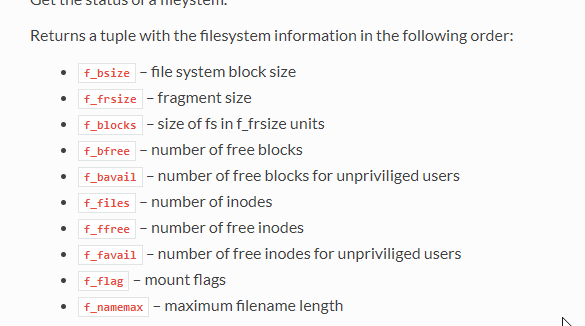
Check free fs space
If less than some threshold, delete the oldest file
Write data to new file....
os.getfree(path) returns the free space availa...
boot should be tiny, but yeah.
timber mango
os.getfree() ?
hushed plover
AttributeError: 'module' object has no attribute 'getfree'
timber mango
try uos.getfree ?
 timber mango
aka "it's full" 😃
hushed plover
welllllllllcrap
yea ima reflash it
im too lazy to go and remove all of them, ill just start precompiling
timber mango
good luck. Let me know how it goes. I'm gonna play with nmongo at some point now... too nifty to not.
hushed plover
heres how ive been using pymongo
db_user = 'user'
db_password = 'password'
from pymongo import MongoClient
client = MongoClient()
#our db
db = client.dbname
#lets auth that
db.authenticate(db_user,db_password)
#our collection
codes = db.collection
codes.insert({'discordId':this_id, 'FC':this_info})
as an example my discord bot stores nintendo switch friend codes in a mongo database and recalls them by using @username
so that function looks a bit like
    if codes.find_one({"discordId" : user.id}):
        cur = codes.find({"discordId":user.id},{"_id":0,"FC":1 })
        for doc in cur:
            qResult = doc.values()
            ourFC = list(qResult)[0]
return await bot.say('Their FC is '+str(ourFC))```for the record, mongodb doesnt require the auth by default, but i set it up earlier
if thats something you want i used this
Medium
A recent analysis showed that there are at least 30.000 instances of MongoDB left unsecured on the Internet. That means than anyone can…
but instead of modifying /etc/mongodb.conf i changed the systemd flag
[Service]
User=mongodb
ExecStart=/usr/bin/mongod --auth --quiet --config /etc/mongodb.conf
just add --auth
timber mango
so you gonna add a gps element to this, so it'll map it all out?
hushed plover
im not sure
i once used kali linux and my android phone as a gps transmitter to map wifi points on google maps with kismet
timber mango
walk/drive around with the tinyest wardriver ever...
hushed plover
but that was with an app, bluenmea, my phone acting as a hotspot, and some dirty socat commands
timber mango
little button on your lapel.
hushed plover
i dont know if theres micropython code for gps, buit that would be fantastic
also you can apparently add an external antenna to the esp by soldering PWR to the weird..wobbly antenna thing on the esp and the other side to GND
timber mango
hushed plover
i think a restful api would end up being more esp friendly than a full mongo library, but who knows
timber mango
uses Adafruit Ulitmate GPS breakout
You can always trim nmongo.py down to just the bits you need.
hushed plover
thing is, if im going to use gps why dont i just go for full blown gsm
manic glacierBOT
Looks much better! I had never seen the [link][] style before!
Thank you so much.
manic glacierBOT
@tannewt Thanks. As an FYI on the link style, I usually only use it when the link will be used more than once. I've found that it's handy also if you have a link that might change or need updating since it's all in one place.
manic glacierBOT
 manic glacierBOT
Makes sense! Thanks!
On Wed, Aug 30, 2017 at 3:57 AM Carol Willing notifications@github.com
wrote:
@tannewt https://github.com/tannewt Thanks. As an FYI on the link
style, I usually only use it when the link will be used more than once.
I've found that it's handy also if you have a link that might change or
need updating since it's all in one place.—
You are receiving this because you were mentioned.Reply to this email directly, view it on GitHub
<https://github....
slender iron
@tulip sleet what was the rebase trouble you were having?
tulip sleet
@slender iron if you go to the old pull request I closed, click on "View Changes", and you'll see the problem. https://github.com/adafruit/circuitpython/pull/210

GitHub
Add microcontroller.core.temperature, for use as a simple sensor on minimal boards.
Also added microcontroller.core.frequency to return CPU frequency, in int Hertz.
Added -finline-limit=n to atme...
View Changes link is: https://github.com/adafruit/circuitpython/pull/210/files/adc2ddb51429c64548d4180cdc55837fbba3b4c7
GitHub
circuitpython - CircuitPython - a Python implementation for teaching coding with microcontrollers
slender iron
yeah, that makes sense because the comments were on a commit that got force pushed
the Files Changed link at the top works still though
tulip sleet
Oh, that's not so bad. Ok, next time! Actually I'll be more careful to rebase immediately instead of merge. When I wanted to rebase I saw the hundreds of commits from the merge, and if I tried reordering I got merge conflicts. It pays to pull early and often and rebase before too many changes have happened.
Of the changes you requested, the only one unfulfilled in the old pull request was to reimplement as Core.core, so that's in the new one.
slender iron
kk, I'll take a look now
tulip sleet
... I was just looking at adding ".frozen" to sys.path. I'll have to do it in main.c for both atmel-samd/ and esp8266/. The ".frozen" change is a general change for all ports in py/, but there's no general call to set up sys.path in each port. Probably should fix that eventually.
slender iron
yup yup, unifying main.c will allow that
formal plover
Wednesdays are my geek out days, so I'll be hopefully tinkering with my Feather M0 Express and the Feather HUZZAH ESP8266.
slender iron
awesome @formal plover let me know how it goes
formal plover
Thanks @slender iron! I'll definitely do that. I'll be taking a break during ask an engineer of course. Lol
I don't have a project yet. My goal right now is "how many sensors, NeoPixels, servos, misc components can I get to work with Circuit Python.
Not counting the on board stuff, that's pretty well covered.
slender iron
@tulip sleet I don't think core needs a separate module
timber mango
yeah, now that I have a WIo link (ESP8266) running CP, I'll tackle making sure all of the grove sensors I have have drivers for CP too. @formal plover thanks for reminding me.
slender iron
maybe we could have the attribute called core and the class called Processor
timber mango
I like Processor, makes sense with temperature, etc.
formal plover
You're welcome @timber mango!
manic glacierBOT
Any idea why this diff is still in here?
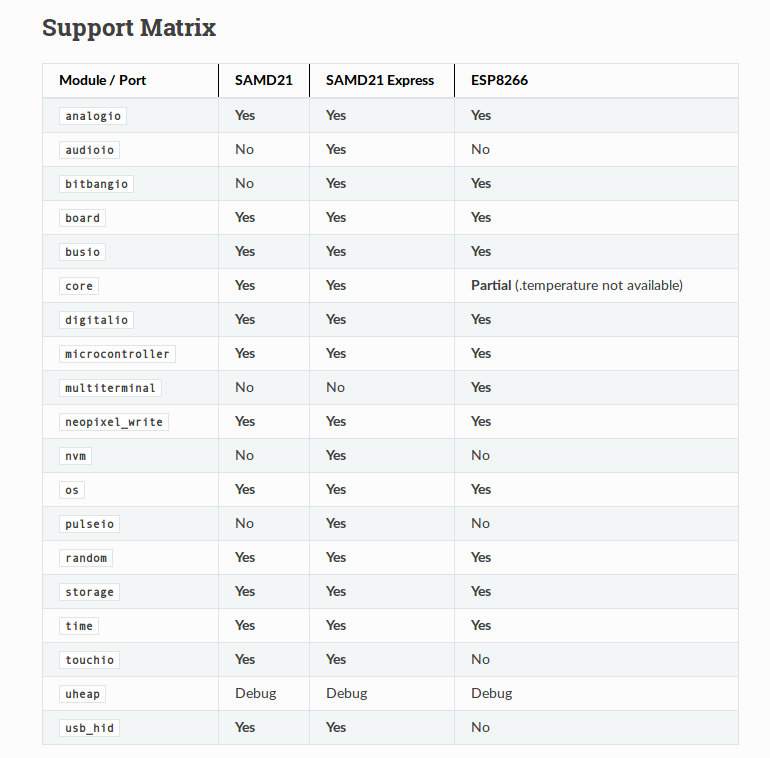
rst tables are really finicky. I have a feeling the last ====== will need to be longer.
That's a good question. It's possible I deleted a commit when I did a rebase, but I don't remember doing that. However, I'd say it's harmless. If you do a squash merge you could just delete the redundant comment, I think.
There were two merges from adafruit/circuitpython. One was the v1.9.2 merge, and the next was one or two commits after that, including this one.
I built the docs with sphinx locally to check, and it looks OK. I forgot the ending ========== line the first time, and pushed a new commit to fix that.
tulip sleet
@slender iron so rename Core to Processor, and make microcontroller.core be the singleton instance of that? Or call it microcontroller.processor? What would you say distinguishes the stuff in microcontroller.core from the plain old functions in module microcontroller? I think a bit of part of the problem is that microcontroller is a module with functionlity, but it's not a class.
slender iron
ah good point
I'd be ok moving that functionality into the Processor class
then interrupts_enabled could be a property
thats more work but does unify things I think
tulip sleet
And the only other function is delay_us(). There could be other functionality like reset, brownout detection, etc. I could move it. Not sure anyone is using the interrupts code right now in any library. I'll look later.
slender iron
yeah, delay_us is a bit weird
tulip sleet
I kind of like microcontroller.processor better than microcontroller.core
delay_us() should be in a time-like module.
slender iron
ok, I was just hoping to name the class differently from the attribute
yeah, I was debating having precisetime
tulip sleet
I think that would be great. Also some stuff returning ticks as ints rather than floats, maybe, for more precise timing on chips without floating point.
Maybe the top-level module should not be called microcontroller, but something else. Not sure what else.
Kibitzing from the rest of you welcome. Names are hard.
slender iron
yeah, names are hard. I was so blocked on the SD card stuff until I came up with storage
slender iron
machine is a much larger collection with the goal of modeling all of the hardware of the micro
tulip sleet
A board has pins (which are mapped to the microccontroller pins, which are otherwise inaccessible).
slender iron
most of our hardware API is functionally specified rather than structural
timber mango
trying to picture the hierarchy (even if it's not direct, it at least should make sense)
tulip sleet
If we eventually run on some ARM7 without its own RAM and flash, it's not really a microcontroller.
slender iron
we can change it when we do 😃
we'll need to deal with multicore before then probably too
tulip sleet
I think maybe you picked microcontroller because machine and board were already taken.
slender iron
yeah, I do consider that
I'd say do the minimal thing now for 2.0 and we can add precisetime in 3.0
tulip sleet
suppose processor were the top-level module name, and it had a class processor.Processor, and an attribute processor or core ... no I'm not sure I like processor.processor
slender iron
haha, yeah. thats the challenge
I like that microcontroller encompasses the pins too
tulip sleet
OK, I will stick with renaming Core to Processor, and make microcontroller.core be the instance of processor for now. If it's easy I will move the interrupt stuff to Processor. We can think harder for 3.0. 2.0 is too imminent.
slender iron
Sounds good! Thats the nice thing about doing major revs, we can change API where we think its needed.
tulip sleet
Brainstorm while I was cleaning up after lunch: microcontroller.cpu is the instance of Processor. Then cpu.frequency, cpu.temperature, etc. Also it's separated from nvm, which is not the cpu.
tulip sleet
our cat was really interested in the sardines I was eating and i had to share
slender iron
😃
hushed plover
for the record, boot.mpy does not work
slender iron
yeah, I think the filename is hardcoded
timber mango
good to know.
 vague monolith
Is there any documentation on the circuitpython dotstar library?
tulip sleet
@vague monolith Did you look at the source? It's very similar to the NeoPixel library, except you need to supply two pins instead of one. Source: https://github.com/adafruit/Adafruit_CircuitPython_DotStar/blob/1.0.0/dotstar.py
GitHub
Adafruit_CircuitPython_DotStar - Dotstarrin' away in CircuitPython land
@slender iron I looked into doing cpu.interrupts_enabled as an attribute of cpu. But I think I will back off for now. Right now calling disable_interrupts() twice in a row may actually break things, because it remembers the interrupt state and will overwrite it. It should probably remember it was called. On the pyboard, you get an opaque value you have to pass back to enable_interrupts(). Also, one might want to disable/enable only certain interrupts. Kinda think it deserves more thought before we change it and then may have to change it again.
slender iron
sounds good @tulip sleet
tulip sleet
maybe use a context manager to implement critical sections
slender iron
yup yup
formal plover
@slender iron my ESP8266 Feather HUZZAH definitely was never broken... It's broadcasting. Lol I'm such an idiot. I was like, oh no LEDs, busted
slender iron
😃
tulip sleet
@slender iron renamed stuff is pushed and passed. I think you probably got an email. I'm cooking.
tulip sleet
processor is a module. Processor is a class. I was using the same structure as nvm and ByteArray.
slender iron
I don't think we need that in this case because all ports should have Processor
I was thinking it'd be in microcontroller
tulip sleet
so there's no processor/ directory, but processor.c and Processor.c will be inside microcontroller/ ?
slender iron
right, there is no processor.c and all of the Processor.c files will be in microcontroller/. I made nvm a new module to indicate that some ports won't support it. This should be available in all so I think folding it into microcontroller is best.
tulip sleet
But the classname Processor will be visible, right? No anonymous classname. I will try that.
slender iron
right, thats ok
if people use it they'll just get an error suggesting they use microcontroller.cpu
tulip sleet
I guess it's like Pins
slender iron
yup yup
tulip sleet
ok - that makes sense. I'll be back in a while. About to assemble a casserole.
slender iron
k no worries 😃
manic glacierBOT
 tulip sleet
@slender iron I did have processor in the Support Matrix indicating it was only partially supported on ESP8266 (no meaningful temperature value)
slender iron
yeah, I think returning NaN or None is enough
tulip sleet
It's documented. OK. ttyl
slender iron
👍
manic glacierBOT

Trying to run any of the SPI examples, I get:
>>> spi = busio.SPI(clock=board.SCK, MOSI=board.MOSI, MISO=board.MISO)
Traceback (most recent call last):
  File "<stdin>", line 1, in <module>
AttributeError: 'module' object has no attribute 'SCK'
Changing this to:
spi = busio.SPI(clock=board.D3, MOSI=board.D4, MISO=board.D2)
makes it work, but then I have to write board-specific code.
How does it work when there is no chip select line? Isn't that usually used to signify transaction boundaries?
No idea, honestly, but it works. It would be nice to have those pin names in the board module, though.
formal plover
Do you think there would be any advantages of Circuit Python running on the HUZZAH 8266 vs using NodeMCU?
manic glacierBOT
I hesitate to add the pin names because most SPI devices won't work due to no pin for the chip select.
Any pin can be specified as chip select, and it's the driver for the particular device that is responsible for toggling it.
I really have no idea about how the chip select line is related to this issue at all.
To make it clear what actions to take.
vague monolith
Will a feather huzzah flashed with circuitpython show up as a storage device like the Circuit Playground Express does?
Or is that a feature of the serial converter on the express?
slender iron
@vague monolith no it won't it requires USB built-in support
formal plover
Do I have to be using Linux to get esptool to work?!
I'm riding the struggle bus here
I can't get pip to work using pypi
slender iron
I use it on mac
formal plover
This is a cluster on windows
My Linux distro won't display on my smart TV for some reason. I can only get it to work on windows, so that's why I'm trying to make it work.
formal plover
Apparently either Adafruit or someone developed a gui based NodeMCU tool for windows that I can use to flash micropython
slender iron
andrew from show and tell did some flasher for it
formal plover
Nice
slender iron
I can't remember which flasher though
vague monolith
Wouldn't esptool work in windows just have to specify the proper port.
formal plover
 vague monolith
There ya go
formal plover
Windows creator update is getting updated right now... 😫
So I'll try flashing Circuit Python on my 8266 after it updates, watching the live show right now anyways
timber mango
@Kurticus I do it on a Mac... msg me later.
More for replacing the usb piece with something similar.
formal plover
Okay @timber mango will do.
idle owl
Oh @formal plover You might not get back to Windows for a while.
formal plover
@idle owl Well it broke my grub menu.... can't get any OS to load right now
idle owl
Oi, didn't think it could do that.
formal plover
apparently it can
hushed plover
i use esptool and it works fine, but ive got the esp8266-01
tulip sleet
@formal plover yes, it overwrites that. You can Google about restoring grub, but it's kind of painful. I use two drives for dual-boot system.
formal plover
@tulip sleet So much pain
hushed plover
i just had the pleasure of sitting on this bus and talking to some older gentleman about fortran and cobol and a whole bunch of stuff id never even heard of
just thought id share that
slender iron
😃
idle owl
@hushed plover That's delightful
hushed plover
It definitely was a learning experience.. I'd never heard of ADT and spaghetti code..
tulip sleet
I am such an older gentleman.
formal plover
well since I pretty much temporarily bricked my PC... figured what the heck I'm try flashing my ESP8266 with my Raspbery Pi
Raspberry Pi* yeah... Don't lol
idle owl
Oh no..
idle owl
I assembled some things wrong, had to take them apart to redo it... Not nearly so bad. At least I realised it before I soldered more wires together, I guess.
And... I just reassembled it the wrong way again.
formal plover
alright @tulip sleet or @slender iron Got esptool on my OTHER pi lol, how do I flash Circuit Python now
tulip sleet
hold on, I have it in my bash history...
formal plover
I can only find the (similar assuming) instructions for micro python
Thanks @tulip sleet
tulip sleet
esptool.py write_flash 0 ~/CP/circuitpython/esp8266/build/firmware-combined.bin
tulip sleet
I didn't. The instructions I found were really long giving lots of options, but you only really need the 0, which says where to start. Maybe specifying a baud rate would make it faster, I dunno. But that works fine.
tulip sleet
I'm doing it on Linux.
formal plover
ditto
i@raspberrypi:~ $ esptool.py write_flash 0 ~/CP/circuitpython/esp8266/build/firmware-combined.bin
usage: esptool write_flash [-h] [--flash_freq {keep,40m,26m,20m,80m}]
[--flash_mode {keep,qio,qout,dio,dout}]
[--flash_size FLASH_SIZE]
[--spi-connection SPI_CONNECTION] [--no-progress]
[--verify] [--compress | --no-compress]
<address> <filename> [<address> <filename> ...]
esptool write_flash: error: argument <address> <filename>: [Errno 2] No such file or directory: '/home/pi/CP/circuitpython/esp8266/build/firmware-combined.bin'
tulip sleet
That's my path to the .bin file. Substitute your own.
formal plover
derp
tulip sleet
Once it's loaded, try:
screen /dev/ttyUSB0 115200
to get into the repl. I have an alias for that, I type it so much.
alias huzzah-repl='screen /dev/ttyUSB0 115200'
hushed plover
uhj
hold on
esptool.py --port /dev/ttyUSB0 --baud 460800 write_flash --flash_size=detect -fm dio 0 firmware.bin
this is what the official micropython docs say on how to install the firmware
and its how i do it and it never fails me
tulip sleet
I am using esptool.py v1.2, which takes different arguments. @formal plover, if you type esptool.py -h, what version does it report?
OK!!
Well, maybe the same arguments. The help info is not consistent. @hushed plover's method may be faster or more reliable.
formal plover
Blue LED is flashing really really fast
tulip sleet
But it's giving you an increasing percentage on the command line, right? It takes tens of seconds.
tulip sleet
sudo apt-get install screen
tulip sleet
To exit from screen, type ctrl-A at the beginning of a line then backslash, then answer "y" to "kill all windows" or whatever. You can't just ctrl-C out of screen.
formal plover
It won't stop lol
The second I reset blue LED goes cray
I'm using the beta CP
I guess switch to stable
tulip sleet
Rpi might be screen /dev/ttyAMA0 115200
formal plover
okay, now just a blank line
tulip sleet
oh, I think that's for something else, sorry
formal plover
I thought the baud rate was supposed to be different
tulip sleet
Try 9600, but 115200 works for me.
solar whale
screen /dev/ttyACM0 115200
tulip sleet
@solar whale Thanks, Jerry! Jerry knows -- he does dev on Rpi's all the time.
solar whale
@formal plover glad to help. Good luck!
formal plover
no such file or directory
solar whale
Hmmm.
formal plover
I think there's a problem though
The blue activity LED pulses like crazy
no matter which rev of CP I flash
solar whale
Sorry if this is esp8266 then use /dev/USB0
/dev/ttyUSB0
formal plover
I got a weird page
hushed plover
ls /dev | grep ttyUSB*
formal plover
spitting out bad characters again
[screen is terminating]
pi@raspberrypi:~ $ screen /dev/ttyUSB0 115200
solar whale
Gibberish at reset is normal. Should stop .
formal plover
Lasts endlessly
Now it just terminates the screen every time I try to connect
pi@raspberrypi:~ $ screen /dev/ttyUSB0 115200
[screen is terminating]
pi@raspberrypi:~ $
solar whale
Disconnect USB then reconnect and type dmsg
Last entry will show the USB connection.
hushed plover
id personally use minicom...
solar whale
Ok - old instructions had wrong size. You an also try erasing flash before loading...
formal plover
How do I erase?
hushed plover
esptool.py --port blah erase_flash
solar whale
Yup
formal plover
lol wait, what?
formal plover
Device is busy
solar whale
Is screen connected? If so exit
solar whale
Depends. Proper exit is control -a then \ and answer yes
formal plover
Just unplugged the &#@( thing lol
It's been wiped
That was it the whole time!!!
lol
Needed to be wiped
solar whale
Cool!
formal plover
Thanks @solar whale
solar whale
Have fun!
formal plover
I have a blank line for screen now though
nvm press any key for REPL
we're live!!!!!!
yahooooo
 autumn umbra
 solar whale
Good idea to erase whenever you load a new image.
@formal plover one other tip. When you start using ampy to load scripts, you must exit screen first. Only only one program can access the USB port at a time.
formal plover
Thanks for the tips and help @solar whale!