#circuitpython-dev
1 messages · Page 32 of 1
 tulip sleet
 thorny jay
Once I had a squished pin, so I tried to connect somewhere else... squished pin again. That is when I understood the connector I had in my hand was the faulty one breaking the other one by one.
 midnight ember
those pics don't help, that's after i took it apart and rerouted stuff
yes socket 4 was squished, fixed it back, have yet to run any code.
however it was not squished until i started plugging stuff in again today. i verified non squished pins every single time because i know how easy they are to squish so it just happened.
tulip sleet
I do not see any code error in the library, and I tested the library a couple of different ways, and it's OK, so I'm suspecting wiring
i have the same setup with you (using RP2040). I have one old board without STEMMA/QT and one new one with.
midnight ember
when i plug it into the backpack now the circuit python drive doesn't show up
tulip sleet
so maybe it's shorting power
i had bent pin on these and it was extremely hard to fix. It had to be exactly right or it would bend again
(not exaclty these, another board0
midnight ember
>>> import board
>>> i2c = board.STEMMA_I2C()
>>> i2c.try_lock()
True
>>> i2c.scan()
[11, 113]
 devout jolt
yeah if the i2cscan doesn't give you back 0x71 & 0x72 then something is bad with board or wiring
tulip sleet
I think the 11 is the battery sensor on the Feather?
tulip sleet
try to not use the socket with the squished pin
midnight ember
that would make sense i have battery plugged in but this all started before i added the battery
tulip sleet
you have enough choices
tulip sleet
i mean the LC709203F or MAX chip onboard the feather that is a battery sensor
devout jolt
Can you wire things up to avoid that squished socket?
midnight ember
now i chain both together
>>> i2c.scan()
hangs forever
ok disconnect the cable from the feather, put it into the other backpack (while both backpacks are chained together
>>> i2c.scan()
hangs forever
tulip sleet
check the chaining sockets for bent pins too
midnight ember
i've done that, every single time i've tried plugging them in, which is about 50 different times during this whole process now
i'm on like day 3 of this one
tulip sleet
what is connected to what, given my 1 2 3 4 labeled photo above?
midnight ember
depends on which minute i'm trying different iterations. it should just work. so i've been moving things around a lot.
tulip sleet
i mean now
 jaunty juniper
I've seen scan hanging (for a few minutes) when the pullups where bad, so it times out, which I think takes 1 s per address or more, not sure how the wiring could cause that
 silver tapir
Yeah, right now don't try them all. Let's just try one scenario that works.
midnight ember

the multiplexer you can see peaking out through the middle hole, it's not in the equation anymore.
tulip sleet
also measure the voltages on the SCL and SDA pins on each one and the +V on each one
tulip sleet
so green light gives you +V is ok, but not whether SCL/SDA are pulled up
midnight ember
3.31V each SDA & SCL to GND
feather pins for SCL and SDA i should specify
as for the stemma pins i'm not sure which one is which 😅
silver tapir
They are on the top of the board.
Next to the "Default i2c" text, at the top center.
midnight ember
There doesn't seem to be a schematic for https://www.adafruit.com/product/1910
scl and sda on 0x71 are 3.31V to gnd
same for 0x72
except there are no pin headers in those slots if you look at the image
is it supposed to be like that?
yeah seems so since im using stemma instead
tulip sleet
try some STEMMA board without a battery-monitor IC on it, if you have one, like a Feather RP2040 or Metro ESP32-S2
devout jolt
midnight ember
There doesn't seem to be a schematic for https://www.adafruit.com/product/1910
I think it's probably here: https://github.com/adafruit/Adafruit-LED-Backpacks but I do wish technical docs like schems were put on the product pages
devout jolt
tulip sleet
<https://learn.adafruit.com/adafruit-led-backpack/downloads>
aha! there they are
 tulip sleet
i will add a couple to my next order to check
midnight ember
my only main gripe is the extra room the multiplexer takes because i'm trying to make a small enclosure as possible for that one. still, a problem is a problem.
does the feather rp2040 not have board.stemma_i2c?
jaunty juniper
it sure does, it's uppercase
midnight ember
import board
>>> i2c = board.STEMMA_I2C()
Traceback (most recent call last):
  File "<stdin>", line 1, in <module>
RuntimeError: No pull up found on SDA or SCL; check your wiring
>>>
so it's basically not detecting the pull up resistors on the backpacks?
 jaunty juniper
yeah, the ESP feather has pullups on the board because of the battery monitor, but the RP2040 doesn't
so that might hide the issue when connected to the ESP feather
so maybe that stemma plug on the backpack is bad ? is it the one you used when testing the backpack alone ?
midnight ember
I just tried all 4 ports, both on each backpack
>>> i2c = board.STEMMA_I2C()
Traceback (most recent call last):
  File "<stdin>", line 1, in <module>
RuntimeError: No pull up found on SDA or SCL; check your wiring
Just put 10K resistors in the holes for SCL and SDA to VCC and that didn't do it either.
 manic glacierBOT

resolves #7824
Tested successfully on Monster M4sk
Not sure if we need to guard more cautiously against circuitpython_splash being null or not having in_group. This code assumes it will exist and have that property to check. It does seem safe after testing on Monster M4sk but I don't know if there are other scenarios that could be problematic.
midnight ember
When chained I get continuity gnd to gnd, vcc to vcc, scl to scl, sda to sda
Only one I don't get continuity on is VIO to VIO
I guess it works with the multiplexer because the multiplexer has the pull up resistors and an I2C address. This is starting to make sense.
and the reason it was working one at a time on the ESP32-S2 is as Neradoc said it has built in pullups.
but the onboard pullup couldn't do both
This might be a manufacturing issue?
Possible pick and place put some component on backwards?
resistors can't be backwards, would have to be a diode or something.
but it works with a multiplexer... this is beyond me.
manic glacierBOT

Lora modules seem to be getting more popular, and I'm looking to add a couple esp32 boards that have lora modules soldered on them that work with the adafruit rfm9x library.
I noticed recently that theres a new rp2040 feather with lora from adafruit.
Since the Adafruit Feather RP2040 with RFM95 is new and awesome it would be nice for documentation on how to use the board to have good pin names up front. This new feather uses MP_QSTR_RFM_, while the feather M0 uses MP_QSTR_RFM9X_.
...
tulip sleet
The pullup resistors are near the second STEMMA/QT connector, on the non-Adafruit-Star side. You could measure the voltage on both sides of them. VDDIO is connected to the STEMMA V+. There is a diode from VDDIO to the V+ pin, which is used to power the HT16K33


 thorny jay
Apparently I did not even knew that a DAW is a DAW or what is a DAW (even if I have paid a few hundred of € to offer FL Studio for my son that wanted to do music, and that seems like a DAW). I'll see for free option for the moment as the licence is at his name on his PC. But sure he should be able to help.
midnight ember
I get 3.29V from GND to VDIO, expected?
tulip sleet
rev B schematic

note that in Rev B, the STEMMA/QT's are connected to VDD, NOT VDDIO. Diode D3 in the lower left corner prevents VDD from flowing to VDDIO, which is connected to the pullups. So I think the solution is to jumper VDD to VDDIO at the pin holes
midnight ember
pretty much the same except the introduction of the led
tulip sleet
nope, not the same in a critical way
@midnight ember jumper these

on both boards
that shorts the diode and allows 3.3V to go to the pullups
midnight ember
>>> i2c = board.STEMMA_I2C()
>>> i2c.try_lock()
True
>>> i2c.scan()
[113, 114]
That's what it is.
tulip sleet
i have a query in about this
midnight ember
Did I miss some direction/instruction about this somewhere...
tulip sleet
that's what I'm trying to find out
midnight ember
It's almost like they forgot to connect the trace from VIO to VDD?
i'll pull up the board file
tulip sleet
not forgot, but STEMMAs go to VDD on rev B and VDDIO on the rev C
the problem in general is that some LED's want more than 3.3V, so the data voltage is not the voltage you want to drive the LED's with
midnight ember
they do not connect directly. they both split off and meet just above the adafruit star


Whatever that little black box is directly to the right of the LED jumper pad is the culprit.
or they just missed connecting the two pins directly together at the pin header holes.
Guess I could take some more voltage readings and narrow it down for sure?
any directions?
yes and broke the stemma connector faceplate from plugging/unplugging it sooo many times
it's just a plastic part, connector still works fine without it
jaunty juniper
so, the issue is that one of the stemma port is not connected to the pull ups ?
midnight ember
it seems so, all the boards are complaining about no pullup
except esp32 which has one which is why it will do 1 board at a time but not both, the pullup on the ESP32 isn't good enough to do more than 1
that's just a logical guess
tulip sleet
did you do the jumpering, that should just fix it, no more diagnosis needed
midnight ember
the schematic says it uses 10K pullups on the backpacks. either something is wrong with them or the wrong part was accidentally substituted. end result is just no pull up on the 14 segment backpacks.
tulip sleet
no, it's because ofthe difference of the schematics.
it's not a manufacturing defect. It's a design change
midnight ember
true @tulip sleet out of my hands now, let the Adafruit engineers take a look. I haven't confirmed it actually works, only that the I2C scan picks them up.
tulip sleet
I'm saying that if you do that jumpering on both boards, it will work
and you will be done
you don't need to wait for an answer
midnight ember
right, just want to make sure this issue is addressed somewhere. yeah i think i'm good to go.
tulip sleet
problem is solved
midnight ember
Thank you for all your help. ❤️ What an adventure!
tulip sleet
right, the followup on our side is to check the documentation
@jaunty juniper there was a design change from rev B to rev C of the board
rev B does not power the pullups from the STEMMA/QT connectors alone.
rev C does
schematics above
jaunty juniper
ok
 lone axle
is it documented somewhere how to make a debug build of the core project? The way to do that has slipped my mind.
lone axle
okay, in the command line as part of the make command? That is what I was thinking but wasn't certain and it completed so fast I worried it was incorrect. I might need to do a clean one too tho. I'll give it a shot. Thank you 🙂
 idle owl
make yes.
idle owl
lone axle
okay, in the command line as part of the make command? That is what I was thinki...
You're welcome! 😄
jaunty juniper
and a bunch of things = 0 if it doesn't fit
 blissful pollen
idle owl
But actually I think I'm right.
blissful pollen
idle owl
But actually I think I'm right.
You are correct 🙂
Yeah depending on the board you may have to turn some modules off to get the debug build to fit
lone axle
yep it was at about -70k on the first try 😅 axing modules now to get it to fit.
blissful pollen
Yup need a big axe depending on the board
lone axle
esp32s2_tft seems very tight. Even cutting all the same things as a CPX+Displayio build I'm still only down to -30k. Got to find more to cut
How does CIRCUITPY_FULL_BUILD = 0 work? If I set that one and then enable displayio (which my testing is around) will that cut out lots of things that I won't have to explicitly select with those lines?
blissful pollen
That may.. you may have to turn displayio back on though explicitly.
lone axle
is there a convenient place to find a list of all available CIRCUITPY_SOMETHING that can be disabled? Full build 0 gave me a different issue that I suspect is due to missing something with wifi or web workflow
tulip sleet
lone axle
`esp32s2_tft` seems very tight. Even cutting all the same things as a CPX+Displa...
setting CIRCUITPY_ULAB = 0 is the easiest way to save a lot of space.
that is probably enough
lone axle
Thank you!
 slender iron
I do make <stuff> V=2 which will print the command lines and the -DCIRCUITPY_ show there
lone axle
I'm guessing no, but just to double check. Is there anything about a DEBUG=1 build that would lead to ValueError: SCL in use ? I'm getting that now on this build from i2c = board.I2C() line.
blissful pollen
I would not think so
jaunty juniper
@lone axle did you still encounter the crash when saving on the Monster Mask ? I don't know if it's related to the use of the displays or if there is more
lone axle
jaunty juniper
<@382939733107408897> did you still encounter the crash when saving on the Monst...
Yes, but it seems to be upon any reset, not just from saving code. Entering REPL with ctrl-C also goes to the same hard crash I think.
 stuck elbow
lone axle
I'm guessing no, but just to double check. Is there anything about a DEBUG=1 bui...
stuck elbow
lone axle
I'm guessing no, but just to double check. Is there anything about a DEBUG=1 bui...
maybe if one of the pins is used for some debug function?
is that an esp32 board?
lone axle
I am / was (wrapping up for now) attempting to troubleshoot that bit further by looking for interesting output on the dbg pin on a feather tft (with modified custom build for 2 displays).
I'll spend some time later getting down to minimal reproducer for the SCL in use thing and file an issue for that.
Will have to overcome that in order to be able to get to the hard crash dbg output in my case though because my 2nd display is I2C, although I guess I could try another SPI one instead, I may go that route if I2C is looking difficult upon closer look.
lone axle
stuck elbow
is that an esp32 board?
yep, Feather esp32s2 TFT
jaunty juniper
ah you need to release_displays(), but then you lose board.DISPLAY
displayio is not flexible enough to handle an internal and an external display gracefully (then again support of 2 displays is disabled by default anyway)
lone axle
jaunty juniper
ah you need to release_displays(), but then you lose board.DISPLAY
I have release_displays() and my code.py is "manually" initializing both the built-in and my addon i2c display. It works to successfully set up and show stuff on both in a non-debug build.
it would be really nice if we could somehow make it so that adding an additional display didn't require release_displays() though!
My next experiment in mind is trying to make board.DISPLAY1 and board.DISPLAY2 as part of the definition. That way user code doesn't ever manage either.
jaunty juniper
there was a case where some things were marked never-reset at a point where the init could still fail and raise, which left the pins unusable
oh I just realized that the Monster Mask has board.DISPLAY
which is also board.RIGHT_DISPLAY
midnight ember
@tulip sleet put everything back together, changed a few lines, works as intended now 👍
tulip sleet
midnight ember
<@329766224093249548> put everything back together, changed a few lines, works a...
i have been told the Rev B boards were meant to be pulled and not sold; you can ask for replacements if you want. Write to support@adafruit.com.
midnight ember
nah, if it works it works. as long as i know how to make it work that's all that's really necessary.
Gave me the opportunity to add some reflective film anyway. Back to normal.
 thorny jay
I have an Adafruit I2S AMP. So I was considering using I2S on the pico of my TR-Cowbell, so that it produce sound. So I started to google for "pico I2S circuitpython" and opened the 5-10 first result.
And then what I found is this article from 2 years ago where I helped a UK blogger to do sound with I2S on the pico: https://www.recantha.co.uk/blog/?p=20950
This is such a strange feeling, I totally had forgot I ever did I2S, or I2S on the pico. At the time I was literally giving advice on how to do it, and now I have to learn it back from the internet.
tulip sleet
midnight ember
nah, if it works it works. as long as i know how to make it work that's all tha...
when did you order and receive those Rev B boards?
midnight ember
not sure i want to tell you now, seems like you want them back 😛
I have a total of 6. 3 should be red, 3 blue. I don't know which are which. There's no way to tell without turning them on.
The first 2 blue's I ordered were on Sept 13th, 2022
The third blue was ordered Feb 7, 2023
tulip sleet
midnight ember
I have a total of 6. 3 should be red, 3 blue. I don't know which are which. Th...
They have a B in a circle or a C in a circle. That designates the revision. We don't want them back. We would just replace them if you wanted. If you feel the jumper solution is fine for you, nothing you need do.
midnight ember

These are the remaining ones I have, no clue which are which color. 3 should be red, 1 blue.
tulip sleet
those are all C -- they will not have this problem. See the "C" in a circle to the upper left of the Adafruit star
midnight ember
ah, yes the others are b's
tulip sleet
the ones you have mounted are labeled as "B"
midnight ember
those are the ones going to the game company, they'll never need to open it or modify them anyway.
tulip sleet
you are a sophisticated user. For those who might have trouble, we are happy to replace.
midnight ember
the rest are C's. it's really no problem. they work... that's all i needed them to do in the first place.
bodge fixes.... i'm perfectly familiar with and ok with. 😉
yeah for others... like beginners... they're definitely going to have issues if they connect more than 1. needs a footnote somewhere about rev B's in the wild.
tulip sleet
I will check about adding that to the guide
midnight ember
there very well could have been a note in the learn guide about the different revs and needing to jump that pin and i probably still would have had an issue... because i jump first and read documentation second sometimes.
like even if you said, yes it's in the learn guide you just didn't read it... i would believe it.
from the pictures looks like there are 2 different versions of Rev C as well. The silkscreens are slightly different.
I'm sure they're functionally the same, just a neat difference to spot.
tulip sleet
we went to a nicer-looking way of producing the silk-screen bitmaps
midnight ember
that makes sense, one probably happened after the pengin change
manic glacierBOT

This code looks fine, but I noticed a few lines later it checks if root_group is NULL and if so assigns it to circuitpython_splash with no checks and not using the function. Not sure how that may affect anything. But your check on its own looks good.
manic glacierBOT
CircuitPython version
Adafruit CircuitPython 8.1.0-beta.1-6-g4e7bbf70a-dirty on 2023-04-03; Adafruit Feather ESP32-S2 TFT with ESP32S2
Code/REPL
>>> import board
>>> dir(board)
['__class__', '__name__', 'A0', 'A1', 'A2', 'A3', 'A4', 'A5', 'BOOT0', 'BUTTON', 'D1', 'D10', 'D11', 'D12', 'D13', 'D14', 'D15', 'D16', 'D17', 'D18', 'D2', 'D35', 'D36', 'D37', 'D41', 'D42', 'D5', 'D6', 'D8', 'D9', 'DISPLAY', 'I2C', 'L', 'LED', 'MISO', 'MOSI', 'NEOPIXEL', 'NEOPIXEL...
It looks like it's the default JTAG pins, enabled on debug:
I think you'll want to
#define ENABLE_JTAG 0
Are you talking about when calling display.show(None) ? It uses common_hal_displayio_display_show which does a few checks, including if the group is already in a group, and returns False when those checks fail. That return is checked and an exception is raised in the shared-bindings part:
https://github.com/adafruit/circuitpython/blob/4e7bbf70a67fe15a135ad859fa04c13bcef4fde3/shared-bindings/displayio/Display.c#L261-L264
Maybe it could use common_hal_displayio_display_set_root_group in...
manic glacierBOT

CircuitPython version
Adafruit CircuitPython 7.3.3 on 2022-08-29; Raspberry Pi Pico with rp2040
Board ID:raspberry_pi_pico
boot.py output:
Code/REPL
import board
import busio
import digitalio
import analogio

import time
import pwmio

p1 = pwmio.PWMOut(board.GP18,frequency = 4000)
p1.duty_cycle = -1 + 2 ** 0
p2 = pwmio.PWMOut(board.GP19,frequency = 4000)
p2.duty_cycle = -1 + 2 ** 0
p3 = pwmio.PWMOut(board.GP20,frequency = 4000)
p3.duty_cycle ...
Peripheral and Bluetooth support for xG24 explorer kit, xG24 devkit and Sparkfun Thingplus Matter MGM240 board.
Please refer to README.md in ports/silabs for the list of supported modules.
 proud canopy
Hi , forum, I'm new to CircuitPython/MicroPython. I've started project with Pico W and circuit python 8.0.1 beta . I need to integrate in hdate pypi library but the straight forward way of installing it via Thonny didnt work as I exhausted all the 0.5M storage... obviously ... is there a place where this kind of standard package already converted to mpy lean format? if not what is a recommended guide to convert this package to something I can run on pico w?
stuck elbow
proud canopy
Hi , forum, I'm new to CircuitPython/MicroPython. I've started project with Pico...
I don't think you can use that in circuitpython
it depends on pytz which is huge
proud canopy
Thanks! make sense, ptyz indeed a big one. just couldnt estimate what will be the efficiency of mpy compaction/compression
stuck elbow
there is no compression
it just compiles the code to bytecode
but any data still takes up as much as it did
proud canopy
so mpy benefits are just perf wise?
stuck elbow
perhaps you would be able to write a pared down version of pytz that only contains the data you need
stuck elbow
proud canopy
so mpy benefits are just perf wise?
it also uses less ram, because it skips the parsing step that needs ram
proud canopy
option to consider.. thanks or bit stronger platform like zero.
stuck elbow
yes, a single board computer shouldn't have problems with it
proud canopy
while struggeling specifically with hdate, circuitpython platform is amazing!, thankyou all developers for that...
stuck elbow
hmm, seems like it's not pytz itself that is so big, but if I remember correctly, there was one package with all the data on the timezones that was required, that is very big
proud canopy
I think it is relying on some flavour of ptyz as I sw it extracted to the Pico W flash, I will check further 10x
stuck elbow
time keeping is one of those things that seem trivial, but are incredibly complicated due to historical reasons
why can't everyone just use unix time ;-)
stuck elbow
I can only imagine
you know, I'm kinda happy we are not really doing much space exploration yet and don't have to deal with times on other planets and moons or space stations...
manic glacierBOT
Thank you! I reckon that is my issue. I'll try this out tonight. Can re-open if it turns out not to work.
thorny jay
tulip sleet
those are all C -- they will not have this problem. See the "C" in a circle to t...
C in a bubble 🙂 this could be confused for Copyright logo!!! (C) ©️ Aaaargh.
thorny jay
stuck elbow
you know, I'm kinda happy we are not really doing much space exploration yet and...
I think we don't have a standard time for the moon yet... and that might become a problem if we want to permanently stay there. I did read an article about that.
There are Mars and other planet "watch" that would just replace 24H by the rotation of that planet, and maybe it is less of a problem for a planet. But for a moon, I don't know what make sense.
 crimson ferry
humans on these places would still have their Earth-like body clocks
manic glacierBOT

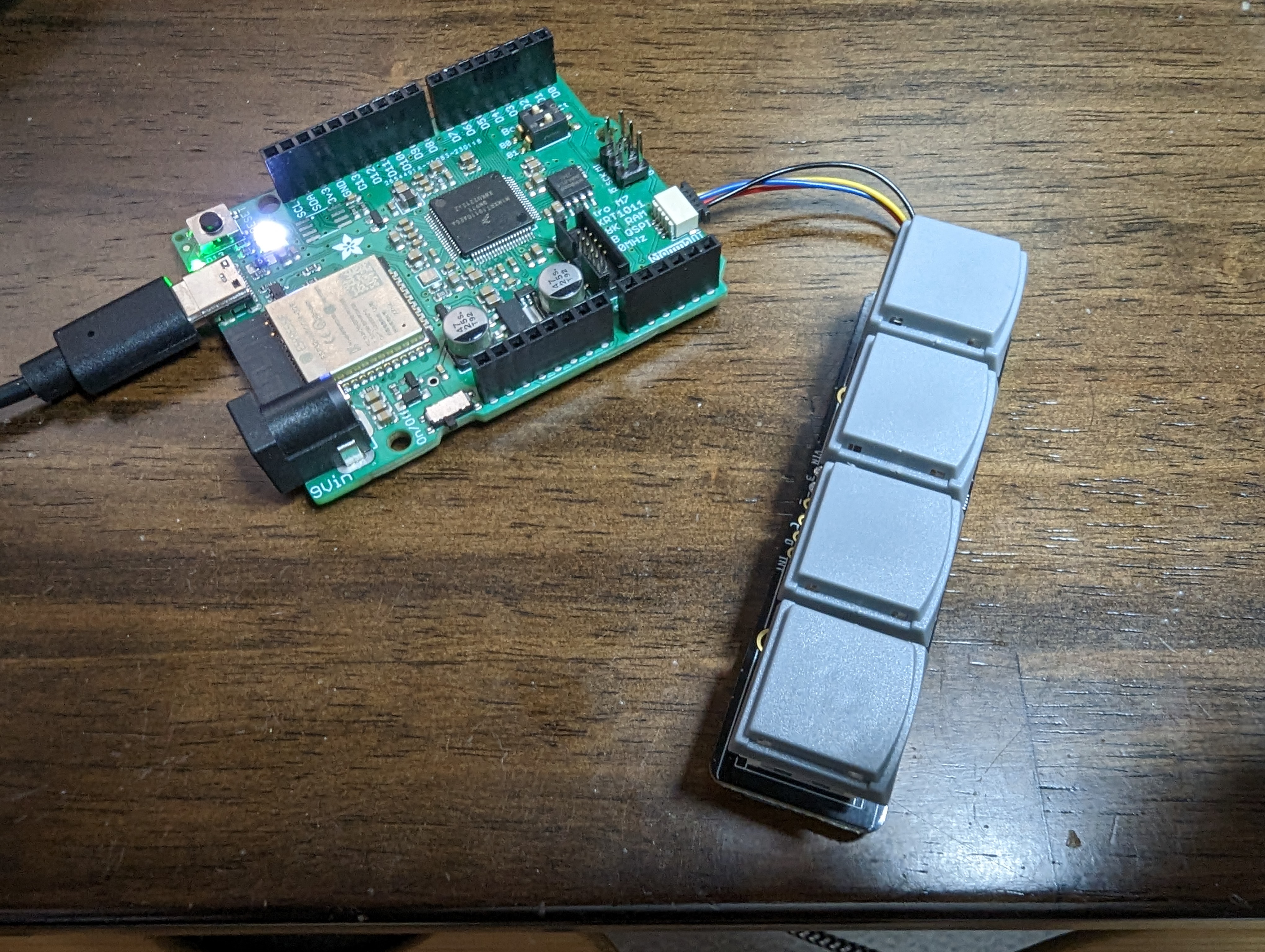
Limor points out that the neokey 1x4 does not use clock stretching so it's not that
 random junco
@turbid radish Thank you for including the podcast in the newsletter this week
idle owl
crimson ferry
humans on these places would still have their Earth-like body clocks
I have no sense of time to begin with. 😄
manic glacierBOT
however it may be specific to this device in some way. I also used a Nunchuk and it's fine so far...
import board
from wiichuck.nunchuk import Nunchuk
controller = Nunchuk(board.STEMMA_I2C())

while True:
    print(controller.values)
@gilded cradle What goes into making "Unknown" boards known on /downloads? This is still listed as unknown: https://circuitpython.org/board/unknown/?unknown_id=adafruit_feather_rp2040_rfm
I know it would show up if in a release, but I'm not sure on the timing there, and this guide is supposed to go live this week. Which means needing a legit link for it.
slender iron
@idle owl it needs to be added I think. https://learn.adafruit.com/how-to-add-a-new-board-to-the-circuitpython-org-website
idle owl
Hmm alright. I'll try to figure that out. Haven't done it. Melissa did it last time because she has tooling to make it quick.
slender iron
I haven't heard of the tool but it sounds handy
idle owl
It might be local scripts or something, not necessarily "a tool" specifically. I'm unsure though.
idle owl
@gilded cradle Hmm, sorting it out, but I do have a question for you. This download will apply to four different boards (only two in the shop so far). I see I can put multiple purchase links in the "Purchase" section on the main page. But is there a way to have multiple board_urls listed? Or do I need to pick one and deal with it.
(Also I pinged the wrong Melissa earlier. Corrected it, but you wouldn't have gotten the ping.)
 gilded cradle
I need a moment to catch up...
idle owl
Understood
idle owl
The Adafruit Feather RP2040 RFM. There will be 2x 69, and 2x 9x in the end. At the moment it's one 69 and one 9x. CP is identical for both. Therefore there is only one board definition, per Limor. Which I assume means one entry on /downloads.
Yeah
Sorry, was verifying what I was about to say.
I'm not sure what the board_url even does, so it may be fine to pick one and go with it. But if it ties it to things, or some such, I wanted to ask if there was something to be done.
gilded cradle
If they all use the same firmware, there a few options:
- If they have the same board_id, you could do a link to each board on the same page
- I had made a way of aliasing the boards on circuitpython.org, but can't remember how (I may have added to guide, but should if I didn't)
- Make an alias in CircuitPython itself
gilded cradle
I think board_url is just a link to an informational page about the board. I don't think it's actually renendered at the moment, but I usually fill it in in case we want to in the future.
idle owl
Oh oh oh right
gilded cradle
Board_id should match the circuitpython board id...
idle owl
I did add that, obviously
And yes, same across the board.
I'm uncertain how to link each board on the same page. Do you mean in the text part of the .md file?
gilded cradle
For instance, you could find the board IDs for the raspberry pi boards here: https://github.com/adafruit/circuitpython/tree/main/ports/raspberrypi/boards

GitHub
CircuitPython - a Python implementation for teaching coding with microcontrollers - circuitpython/ports/raspberrypi/boards at main · adafruit/circuitpython
idle owl
Yeah got it, I added the board def, so I already knew what it was 🙂
gilded cradle
I mean just create multiple links at the bottom of the page. For board_url, just choose a broad url if possible or a random one.
idle owl
Ok ok ok,. I'm starting to get this.
gilded cradle
🙂
idle owl
I'm wondering if aliasing would be the least confusing though.
Folks expect to find their exact board, and I feel like it leads to support issues if they don't.
gilded cradle
Yeah, it also increases the number of boards we can show
idle owl
OK, so, how does that work? Do I create this RFM entry for /downloads, like I already am, and then we do another step to alias it to RFM69 and RFM9x?
gilded cradle
Let me check how I've done it before...
idle owl
Thank you
Also does aliasing mean that the board_url is the same in both anyway?
If yes, I'll put the search URL to find them.
gilded cradle
Ok, so it looks like I used it on this one: https://raw.githubusercontent.com/adafruit/circuitpython-org/main/_board/adafruit_feather_esp32s2_bme280.md
It's board_alias
idle owl
ohhhhhh
gilded cradle
I think all it does is point the links to the board you are aliasing
idle owl
Hmm. But it appears to be its own page?
gilded cradle
Correct
idle owl
So it's basically its own page, but the downloads are both the same thing.
So I would create two pages, and alias to the first one?
idle owl
Ok, I think I understand 🙂
gilded cradle
If you want to use the same image, just use the same filename
idle owl
I'll put images for both, the radio modules do differ. And it took me 3 minutes to make the images, I already have the base images.
gilded cradle
I think I should probably create a basecamp task to add some explanation of features I've added like aliasing and tags.
idle owl
I'll put together this PR and tag you for a review. If it turns out I don't understand, we can work through it there. Is that alright with you?
manic glacierBOT

Thank you for opening this pull request! I've ordered the boards so I have ones here to test with. The Discord is the best place to get help with the CI: https://adafru.it/discord
gilded cradle
idle owl
I'll put together this PR and tag you for a review. If it turns out I don't unde...
Sounds good
idle owl
Thanks!
gilded cradle
👍
manic glacierBOT
@kattni has been working on the new board defs.
idle owl
@gilded cradle A thought occurs. I don't need to alias it because it's not a new version of the previous board. The board_id is already rfm-agnostic. So, all I need is two pages with the different URLs and slightly different technical details. Am I correct about this? Can I make two separate downloads pages with the same board_id without causing issues?
manic glacierBOT
I've added this to our In the Weeds section of next week's community meeting to discuss it.
gilded cradle
@idle owl the file name should natch the board_id. I'm not 100% certain what happens if you do as you describe. you'll have to try it and see if it works.
idle owl
Ohhhhhh. Hmmmmm.
gilded cradle
For the secondary board it might work anyways even if it doesn't match
idle owl
I'll alias it. I understand now. Is it ok if the filename is different from the title and name? I'm not sure if the filename is public facing.
Mmm wait. I don't understand now. lol.
gilded cradle
The filename is public facing in the url at least. Otherwise, yeah it is fine.
idle owl
Ahhhhh.
So do we have any idea what happens if the filename doesn't match the board ID?
e.g. Should I try it?
gilded cradle
Under normal circumstances, I believe either it shows up as a duplicate of the unknown board or maybe it doesn't show at all.
Yes, please do.
idle owl
Ok! Will do
gilded cradle
It won't break anything on you system locally.
idle owl
Oh right! I can build it.
gilded cradle
Yeah, it really helps with getting things right the first time
idle owl
I have appointments starting in 8 minutes, and I won't be back until after 3pm. So I'll be out for a bit here quite soon. I'll pick this up when I get back.
gilded cradle
Ok. Let me know. I'm out for a few days starting tomorrow.
idle owl
I'll have a PR in today for sure.
@gilded cradle Is the ruby and ruby-bundler I'm expected to install a pip thing, or do you mean the actual language.
There is a pip ruby package, is why I ask.
gilded cradle
Good question. I've had it installed for a few years, so I can't remember. Let me check...
gilded cradle
@idle owl I think I wasn't super specific because it varies by system. For MacOS, try this: https://www.ruby-lang.org/en/documentation/installation/#homebrew
For bundler, try this: https://bundler.io/guides/getting_started.html
idle owl
Got it, thanks!
manic glacierBOT

I was thinking that for an app in "production", you wouldn't want the web workflow running, to reduce power draw or startup time, or to prevent it interfering with the app in some way. But during development, you want to test it with real sleep, and would want it to start up.

As of 4/3/23, version 8.1.0 for the Metro ESP32-S2 still has this DHT issue, at least with the DHT11. V8.0.3 still works with DHT11.
crimson ferry
idle owl
The Adafruit Feather RP2040 RFM. There will be 2x 69, and 2x 9x in the end. At t...
have the variants that aren't in the shop yet been mentioned publicly yet?
random junco
I think here? https://www.youtube.com/watch?v=E0_pR_ordNo
crimson ferry
oh, the frequencies
idle owl
Yep!
manic glacierBOT
I think this is ready, it's nice increment in the functionality. I showcased it in a quick youtube video: https://youtube.com/shorts/Q_Cbmx3uvco
import time
import array
import math
import audiopwmio
import audiobusio
import audiomixer
import board
import synthio
import ulab.numpy as np
import board
from wiichuck.nunchuk import Nunchuk


#  lists of modal intervals (relative to root). Customize these if you want other scales/keys
major = (0, 2, 4, 5, 7, 9, 11)
minor = (0, 2, 3, 5, 7, 8, 10)
dorian = (0, 2, 3, 5, 7, 9, 10)
phrygian = (0, 1, 3, 5, 7, 8, 10)
lydian = (0, 2, 4, 6, 7, 9, 11)
mixolydian = (0, 2, 4,...

FWIW, I'm having a similar problem. I was on Monterey 12.5.1 and all CircuitPython devices are no longer recognized. I'm mostly using Waveshare RP2040 LCD boards. I do not see the same mount/unmount behavior to my knowledge but no CircuitPython devices ever show up. This after weeks of dev with no issues. I also have a mac Catalina 10.15.7. When my boards stopped working there, I moved over to that one. After less than an hour of working, the same thing happened. I think it may be som...
idle owl
@gilded cradle !!! Ok, so initially it only showed one of the boards on /downloads. So I changed the board_id in one of them to something else (that didn't exist), and both of them appeared, but the one with the nonexistent board ID did not show any releases (no surprise there). I tried aliasing, I tried whatever, nothing was working, only showed one board. So..... I figured why not, and I tried removing the board_id altogether in the second file, and replaced it with the board_alias which was obviously identical. Tah dah! They both show up, both show the appropriate release info.

So the top of one of them says layout: download board_alias: "adafruit_feather_rp2040_rfm" title: "Feather RP2040 RFM69 Board Download" name: "Feather RP2040 RFM69" manufacturer: "Adafruit" board_url: "https://www.adafruit.com/product/5712" board_image: "adafruit_feather_rp2040_rfm69.jpg" date_added: 2023-4-4 family: raspberrypi
The other one says layout: download board_id: "adafruit_feather_rp2040_rfm" title: "Feather RP2040 RFM9x Board Download" name: "Feather RP2040 RFM9x" manufacturer: "Adafruit" board_url: "https://www.adafruit.com/product/5714" board_image: "adafruit_feather_rp2040_rfm9x.jpg" date_added: 2023-4-4 family: raspberrypi
gilded cradle
idle owl
<@478616919721771019> !!! Ok, so initially it only showed one of the boards on /...
Cool. It makes sense why removing the board_id altogether would work since it's not used when board_alias is set.
gilded cradle
I'm not 100% sure the board check file will work though with no board_id.
gilded cradle
You can run from the command line. It's jsut python
gilded cradle
It just checks image sizes, looks for nonstandard features, etc. I think there's 2 of them.
manic glacierBOT

This is so great @jepler! With the waveform variable being able to be changed after passing it off to synthio.Synthesizer, does this mean we could have similar functionality to audiocore.RawSample? This could enable real-time changing of a playing sample, which would be incredibly useful.
gilded cradle
I think you'll need to install some python dependencies (check actions) and then run it with python check-boards.py and python check-images.py just to make sure they both work.
idle owl
Ok will do
gilded cradle
If they don't it should probably be updated to work with the alias also.
idle owl
gilded cradle
If they don't it should probably be updated to work with the alias also.
I ran check_boards and it looks like it did nothing.
Is it supposed to look like something happened?
gilded cradle
Then it worked
gilded cradle
Sweet
idle owl
PR time?
gilded cradle
yeah
crimson ferry
Who do we tell about changes to product pages? The radio boards and wings have inconsistencies in naming that can make it really confusing... especially frequency: sometimes "915MHz", sometimes "900MHz". There are so many varieties, simple, consistent names sould help.
idle owl
No.
gilded cradle
I don't think so
idle owl
crimson ferry
Who do we tell about changes to product pages? The radio boards and wings have i...
support@adafruit.com - Product copy is not our domain.
 orchid basinBOT

As per discussion on Discord, one is aliased to the other as it was the only way to get them both to show up. Everything passed and built locally.
idle owl
@gilded cradle ^^ 🙂
gilded cradle
Ok, I'll take a look
idle owl
Thank you!
gilded cradle
Reviews are easy now since the check scripts do most of the heavy lifting
idle owl
Excellent
gilded cradle
Oops, looks like my generate-board-info.py script failed.
idle owl
Oh. Hmm.
gilded cradle
Let me make a fix real quick...
gilded cradle
@idle owl After thinking about it, I think we should require the board_id. The reason is because the installer needs it as a key for the json file so that it can show the proper board name, but use the correct files.
idle owl
gilded cradle
<@330227457296957440> After thinking about it, I think we should require the `bo...
Then I'm not sure how to make this work.
gilded cradle
I'm still making a fix, but I 'm also updating the check scripts to check for that
Just make up a unique id for that board
gilded cradle
it doesn't need to reflect an actual name
gilded cradle
I'm fixing that now
idle owl
Oh. That works too!
Oh. They both show up that way too. I guess I never tried this.
Should I push to the PR, or am I going to have to pull in a bunch of other things too?
gilded cradle
It's all good. That's how I did it for the bme280 board
Hold on a bit. I'll get my PR in and then it can check your stuff.
jaunty juniper
hey I'm thinking that the compiled board ID in boot_out.txt can be used to link to the board page in some tools, and it will be the same for all 4 boards, could there be a "disambiguation" section like in wikipedia ?
idle owl
gilded cradle
Hold on a bit. I'll get my PR in and then it can check your stuff.
Ok will do.
orchid basinBOT
 gilded cradle
@idle owl https://github.com/adafruit/circuitpython-org/pull/1182 should make things better.
After that is merged, add board_id and push
idle owl
OK! Approving now
gilded cradle
thanks
gilded cradle
idle owl
OK! Approving now
I'm rerunning your PR checks, but if it fails, you may have to rebase
idle owl
gilded cradle
I'm rerunning your PR checks, but if it fails, you may have to rebase
Passed here.
idle owl
Thank you so much for your help @gilded cradle
gilded cradle
You're welcome 🙂
idle owl
🎉
 manic glacierBOT

Ideally, one would probably want web_workflow operational whenever an app wasn't running. When an app starts, workflow should shut down. The part about not allowing it to startup after a deep-sleep is a separate issue. Perhaps not trying to start workflow every time a script is launched (including safeboot.py & boot.py) but waiting until you find nothing to run automatically would suffice. However, using the remote serial console can have its uses during script execution. Not having a cool f...
manic glacierBOT
If I understand what you're asking -- yes. the waveform can be updated at any time. This is used in my demo code to morph between square & sine wave, and to implement volume control:
waveform[:] = mix(sine_weight, square_weight, volume)
waveform has to be updated in-place by the [:] slice assignment.
manic glacierBOT
Ideally, one would probably want web_workflow operational whenever an app wasn't running. When an app starts, workflow should shut down.
That would completely defeat the purpose. There is always "an app running", it's code.py, and the workflow is to edit the code, save, and auto-reload. You don't want to block the access to the workflow when the code is running. You might want to manually turn it off "in production" when you are happy with your code.
@ladyada In particular:
- Is the name
adafruit_feather_rp2040_usb_hostin line with what you'd like the product name to be? - How are the pin names, compared with what you are thinking?
board.USB_HOST_DATA_PLUSboard.USB_HOST_DATA_MINUSboard.USB_HOST_5V_POWER
manic glacierBOT
Actually I guess what I'm really asking is: what's the difference between synthio.Synthesizer and audiocore.RawSample?
A long while ago I did some explorations in allowing one to replace the buffer given to RawSample while it was running. I'm very excited to see similar (and better) capability in synthio.Synthesizer.
Another variation of the question: does the waveform buffer to synthio.Synthesizer need to be a small single-cycle waveform, or can it be a longer arbitrary wa...
manic glacierBOT
One thing synthesizer does is stretch or compress the waveform according to the note pitch. While rawsample just always plays the same. It also plays multiple notes, without requiring a Mixer involved (though if you want multiple different waveforms simultaneously you would presently need multiple synthesizer objects), including starting and stopping multiple notes at the same instant.
Right now the length of the waveform is limited to 1024 samples and can only be mono. The limit has to ...
I also should add I'm not a strong audio person and I want to be open to having primitives in circuitpython to better serve those who are; so especially if you think something here is going in a wrong direction or even a "not quite right" direction the feedback absolutely would be welcome.
I also should add I'm not a strong audio person and I want to be open to having primitives in circuitpython to better serve those who are; so especially if you think something here is going in a wrong direction or even a "not quite right" direction the feedback absolutely would be welcome.
This is all brilliant and I think it's awesome. It's something I am very excited to try. (and hope we can up MAX_CHANNELS to more than 2 for rp2040)
I had assumed any sort of actual synthesis w...
 wraith crow
I just watched the MicroPython 1.20 update from Damien and he mentioned that they got back 20 to 30 K of RAM on the PicoW/Pico (and all RP2040 boards) "because there was a whole bunch of RAM that was unused". Makes me wondier if there's a chance CircuitPython might "find" that RAM as well?
manic glacierBOT
Do you want a build with more channels on rp2040?I can try increasing it in this PR but I wouldn't be testing it myself
I'm getting my environment setup to pull this PR and try exactly that
manic glacierBOT
I have replicated this issue on a feather S2 TFT. I believe the same issue actually effects more ports as well, perhaps all of them. I'm thinking it may trace back to the displayio api change, but haven't done before/after testing yet to narrow it down.
I think @Neradoc saw this occur on Monster M4sk as well, and I've seen the same on that device.
It seems to boil down to right now the initial setup of 2 displays works fine, but then whenever the device resets it will hard fault, as d...
Yep I get a hard crash when saving on the Monster M4sk, with the displays setup form the monster_mask library (which occasionally causes the file I'm editing to be corrupted).
You are in safe mode because:
CircuitPython core code crashed hard. Whoops!
NLR jump failed. Likely memory corruption.
Please file an issue with your program at https://github.com/adafruit/circuitpython/issues.
Press reset to exit safe mode.
I followed the backtrace a bit, and I think this actually is the same kind of issue as #7829 is addressing. The circuitpython_spash was being added after already being added to the first I think.
I added a commit to that PR branch that addresses the issue. It's adding the same if statement previously added into the constructor into reset_display() function also.
Tested successfully with the Feather S2 TFT. Will try Monster M4sk next.
Worth noting something may still be wonky though b...
I tried the latest version from that PR on a Monster M4sk and I do still get a hard fault. Slightly different wording I don't have "NLR jump failed. Likely memory corruption."but rather "fault detected by hardware"
I did ctrl-C instead of saving a file though, that could factor in.
I'm not sure if it's possible or how to get hard crash traces out of the samd51 / Monster M4sk but if we could it might help work toward the solution.
Later on the week I'll try to probe a bit further o...
The latest commit adds the same check as the original commit but to a different section of code inside reset_display() which had caused trouble raised by #7472
I appreciate that! please let us know your findings.
manic glacierBOT
Hmm, currently does not work on RP2040 at all as far as I can tell. I made a simpler version of your test code above that has no user input. The I2S DAC I'm using is verified working (using RawSample example code), but synthio doesn't appear to output anything. Am I doing something obviously dumb?
import time, math
import board, audiobusio
import synthio
import ulab.numpy as np
import random

# pimoroni pico dv board
lck_pin, bck_pin, dat_pin = board.GP28, board.GP27, boar... manic glacierBOT
slender iron
wraith crow
I just watched the MicroPython 1.20 update from Damien and he mentioned that th...
manic glacierBOT
slender iron
wraith crow
I just watched the MicroPython 1.20 update from Damien and he mentioned that th...
I know theres been some discussion of C++ heap I think. That might be what hes referring to
manic glacierBOT
@Neradoc - agree with your use case. I was being a bit too facetious :wink:
manic glacierBOT
I'll investigate; it could be related to why synthio + audiomixer seemed not to work, and which I glossed over assuming my test code was broken.
midnight ember
wraith crow
I just watched the MicroPython 1.20 update from Damien and he mentioned that th...
Link to the MicroPython update video? I can't find any mention of the video on their site or on youtube.
Oh it's Damien George on a channel named Matt Trentini? https://www.youtube.com/watch?v=fH33D6ER7ls

Damien gives an update on
- PreRelease discussion on R1.20
- BLE Demonstration on Picow
He's got Adafruit's website in the background. 🙂
stuck elbow
Matt
stuck elbow
http over ble
manic glacierBOT
I think that there's an original problem with synthio. I ran the following in 8.0.5 on a pico w and i get an incorrect repeated block of sound instead of the whole melody:
import board
import synthio
import audiobusio
lck_pin, bck_pin, dat_pin  = board.GP28, board.GP27, board.GP26
audio = audiobusio.I2SOut(bit_clock=bck_pin, word_select=lck_pin, data=dat_pin)
melody = synthio.MidiTrack(b"\0\x90H\0*\x80H\0\6\x90J\0*\x80J\0\6\x90L\0*\x80L\0\6\x90J\0" +
b"*\x80J\0\6\x90H\0*\x80...I want to see this fixed but I'm also going on vacation starting Friday, so I'll file a separate issue for this and declare it out-of-scope for this PR. I'm sorry the rp2040 part didn't work out right now.
manic glacierBOT
What started as an investigation of un-explained 403 errors from what I think
is a questionable CORS implementation along with interface hangs and connection
timeouts, I would like to propose the attached changes to the web_workflow
service. [Note: The CORS implementation is another topic not covered here.]
Observed problems (ESP32 platforms):
- Listening socket closed at lower level lwip resets not re-opened.
- User sockets being added to socket select fd lists causing errors.
3...
No worries, not time-critical. Very excited this is on deck at all
CircuitPython version
Adafruit CircuitPython 8.0.5 on 2023-03-31; Raspberry Pi Pico W with rp2040
Board ID:raspberry_pi_pico_w
Code/REPL
import board
import synthio
import audiobusio
lck_pin, bck_pin, dat_pin  = board.GP28, board.GP27, board.GP26
audio = audiobusio.I2SOut(bit_clock=bck_pin, word_select=lck_pin, data=dat_pin)
melody = synthio.MidiTrack(b"\0\x90H\0*\x80H\0\6\x90J\0*\x80J\0\6\x90L\0*\x80L\0\6\x90J\0" +
b"*\x80J\0\6\x90H\0*\x80H\0\6\...@todbot maybe see if the synthio+audiomixer workaround can get you going with this on rp2040? (see #4783)
import audiomixer
synth = synthio.Synthesizer(sample_rate=24000, waveform=waveform)
mixer = audiomixer.Mixer(sample_rate=synth.sample_rate, channel_count=1)
audio.play(mixer)
mixer.voice[0].play(synth)
 cerulean fractal
I'm making an rp2040 board with CMOS oscillator IC like in arduino nano rp2040 connect. I didn't notice anything special in circuitpython port for that board, but just in case I'd like to ask if I missed anything
manic glacierBOT
Don't these devices have native USB? You should provide USB VID and PID for them. The creation IDs will be derived from them. No need to add them explicitly.
tulip sleet
cerulean fractal
I'm making an rp2040 board with CMOS oscillator IC like in arduino nano rp2040 c...
Looking at the datasheet, I don't see any register bits that need to be changed to enable using an external oscillator. So I think it should "just work".
cerulean fractal
tulip sleet
Looking at the datasheet, I don't see any register bits that need to be changed ...
What about XOSC CTRL register?
manic glacierBOT
One copy-pasta to fix. Looks good otherwise! Thanks for improving this! Video looks awesome.
#if CIRCUITPY_KEYPAD_SHIFTREGISTERKEYS
#if CIRCUITPY_KEYPAD_SHIFTREGISTERKEYS
#if CIRCUITPY_KEYPAD_SHIFTREGISTERKEYS
I don't see that one has to distinguish between an attached crystal and an external oscillator. Is it working for you?
There is no bit to change if there is an external oscillator, that I see.
 clear dagger
Hi all, I was directed here by @slender iron to see about finding out about how to put CP on a board I want to make with an ESP32 chip. I saw https://learn.adafruit.com/circuitpython-with-esp32-quick-start/installing-circuitpython but think it might be outdated, anyone have any ideas or places to look?

Adafruit Learning System
Install and Code CircuitPython on ESP32 boards
slender iron
https://learn.adafruit.com/how-to-add-a-new-board-to-circuitpython is a good reference too
cerulean fractal
tulip sleet
I don't see that one has to distinguish between an attached crystal and an exter...
It's just that the datasheet says
If the user already has an accurate clock source then it is possible to drive an external clock directly into XIN (aka XI), and disable the oscillator circuit. In this mode XIN can be driven at up to 50MHz
So I'm not sure what is meant by disable and if XOSC has to be disabled using CTRL register
tulip sleet
cerulean fractal
It's just that the datasheet says
> If the user already has an accurate clock so...
me neither. I will look at startup code for that Arduino board
you can disble the XOSC in favor of the ROSC, but that's not what we want
cerulean fractal
Yup
jaunty juniper
clear dagger
Hi all, I was directed here by <@252717193496756235> to see about finding out ab...
see if there is an existing build with a module similar to what you use as a start. Then:
- setup to build standard CP (try an existing board)
https://learn.adafruit.com/building-circuitpython/build-circuitpython - make a definition for your board (even if you don't PR, also use a branch) and make it build until you have access to the REPL
https://learn.adafruit.com/how-to-add-a-new-board-to-circuitpython - do the web workflow configuration and/or use Thonny
https://learn.adafruit.com/circuitpython-with-esp32-quick-start
tulip sleet
cerulean fractal
It's just that the datasheet says
> If the user already has an accurate clock so...
I looked both in the Arduino mbed core and the philhower core, and I don't see any special setup of the XOSC being done in either
for the nano board
cerulean fractal
Alright, thanks!
tulip sleet
you could open an issue in https://github.com/raspberrypi/pico-feedback quoting that offhand remark in the datasheet, and ask whether anything needs to be done. I think that is the right place to ask. The datasheet should be clarified.
cerulean fractal
Also, based on my limited understanding of electronics, without the crystal, XOSC circuit would only apply some voltage gain to the external clock signal. So it would indeed just work. However, if my assertion is correct, that voltage gain would also increase noise, so if feedback loop can be broken, that would be slightly more optimal
tulip sleet
they have been pretty receptive to datasheet clarifications
manic glacierBOT
Thank you so much for these improvements. I just have a couple of questions before merging.
Why add this argument? I don't see it used anywhere.
Go ahead and delete then. git has it in the history.
cerulean fractal
tulip sleet
they have been pretty receptive to datasheet clarifications
Yep, I'm on it!
manic glacierBOT
manic glacierBOT
At one point I was passing some context between threads. I left it there rather than using a needless function call just to strip the data arg. I'll clean it up a bit.
manic glacierBOT
This was prompted by a recent issue (turned out to be not our bug) about the behavior of the ctr mode of aes encryption, and incomplete blocks.
Wow! This is an amazing amount of work. My comments are mostly style, because I don't have a board to test.
How about submitting this to https://github.com/adafruit/nvm.toml so it can be used by anyone?
There are now MP_WEAK versions for the default implementations of these functions.
#include "supervisor/board.h"

// Use the MP_WEAK supervisor/shared/board.c versions of routines not defined here.
Instead of doing this here, how about refactoring and supplying BOARD_BRD in each mpconfigboard.mk file? Then a new board can be added and its changes isolated to its own file.
This should be the frequency in Hertz. Not sure what this value signifies.
Try to reuse an existing message with %q if possible. Also, is this a ValueError or a RuntimeError?
@tannewt I incorporated your fixes but still have a CI failure to deal with. hopefully the next round will be green.
 proven garnet
Not sure if anyone else saw this, but worth sharing for many of the peeps here: https://github.blog/2023-04-03-calling-all-open-source-maintainers/
We are building a private space for maintainers to connect with peers, preview features, and learn from each other!
I signed up since I was interested, definitely will bring anything interesting learned back to share.
stuck elbow
Microsoft is really trying hard these days
 onyx hinge
@slender iron can you re-review & merge https://github.com/adafruit/circuitpython/pull/7825 ?

GitHub
Allow >2 notes at a time (increased to 12 on mimxrt10xx including metro m7, left unchanged elsewhere)
allow specifying a single-cycle waveform instead of the built in square wave
a couple of vi...
slender iron
yup, lemme look
onyx hinge
thanks
onyx hinge
thank you!
manic glacierBOT


 cobalt grail
I just passed the 1000 mark for translating CircuitPython strings to swedish!
Wohoo! 🥳
onyx hinge
[now we just need 9 more people to click the 💯 ]
@slender iron @tulip sleet I have a feeling the API for synthio.synthesizer will ahem benefit from work, after JP and todbot get a chance to use it; and I'd want to be free to change it incompatibly even if 8.1 comes out. Does that mean denoting it as "alpha" in the docs? is there an existing example of that? I could move the new synthesizer class it to a new module _synthio but only if that's preferred...
Complicating factor is of course me being out starting soon and through the end of the month, which is why I am wanting to talk about it right now.
slender iron
onyx hinge
<@252717193496756235> <@329766224093249548> I have a feeling the API for synthio...
After 8.1 we can break it with 9.0
and not do our typical backwards compatibility
tulip sleet
@onyx hinge we can say "experimental", I have done that before
onyx hinge
I wonder why the type of the press argument is not shown here.
//|     def press(self, /, press: Sequence[int] = ()) -> None:
//|         """Turn some notes on. Notes use MIDI numbering, with 60 being middle C."""

//|     def release_then_press(
//|         self, release: Sequence[int] = (), press: Sequence[int] = ()
//|     ) -> None:
//|         """Turn some notes on and/or off. Notes use MIDI numbering, with 60 being middle C."""
 manic glacierBOT
manic glacierBOT
manic glacierBOT
I followed the instructions to enter safe mode on the above link and deleted my code.py while in safe mode (drive mounted properly in safe mode). Once I did that I was able to see the drive when I plugged it back in. I haven't had time to try a new code.py file yet but will report back when I do. @abhnvahoo - have you tried safe mode yet?
manic glacierBOT
Yes! These fixes work on RP2040! Sounds pretty great. Thank you @jepler!
(I'm now looking into how to add a simple amplitude envelope to Synthesizer, but will emulate it now with waveform hacking)
tulip sleet
onyx hinge
I wonder why the type of the press argument is not shown here.
```c
//| def ...
I wonder if this is related to https://github.com/adafruit/circuitpython/issues/6072
onyx hinge
tulip sleet
I wonder if this is related to <https://github.com/adafruit/circuitpython/issues...
sure could be
manic glacierBOT
 manic glacierBOT

Hello @dhalbert , @tannewt,
Thanks for your review. I will improve them and commit again.
I have a question about building CI. Set matrix run failed.
Can we run the ci_set_matrix.py file locally before committing? Do you have any suggestions for me?
 acoustic field
please i need a big help from u all
how to use PiEEG with raspberry pi 4 python
i need to make a brain controlled wheelchair with PiEEG using python
i dont know anything about eeg
please help me!
 brazen hatch
time to hack away at the pystack issue
S3 has arrived.
Turns out it's an opensource board.
It links to vcc-gnd.com which has git links.
So I will be making a port if they didn't forget my psram. It's supposedly n16r8.
 thorny jay
Hi, I was watching Show and Tell and @candid sun was presenting something that maybe already exist: https://github.com/jfurcean/CircuitPython_WiiChuck
It should be part of the community bundle. The story is that it started as PR for the official wiichuck library, but we were suggested to go in community because Adafruit does not sell the classical and other Wii accessories, except the chuck.

GitHub
CircuitPython library to support some Wiimote extension controllers. - GitHub - jfurcean/CircuitPython_WiiChuck: CircuitPython library to support some Wiimote extension controllers.
orchid basinBOT

This pull request add the M5Stack AtomS3 Lite board
I have one question. In the board definition file I have added bootloader_id: m5stack_atoms3_lite with the bootloader directory from adafruit/tinyuf2 repository.
Is this enough for display the bootloader zip download?
 ornate breach
acoustic field
please i need a big help from u all
how to use PiEEG with raspberry pi 4 python
...
ornate breach
acoustic field
please i need a big help from u all
how to use PiEEG with raspberry pi 4 python
...
Hi, this channel is for circuitpython core development. I noticed you posted in multiple channels as well. We discourage cross posting, so please in the future pick the best channel that suits your question, as post there. If you’re unsure #general-tech is a good place to start. If your questions are off topic or not suited for a channel, a helper or moderator will help get you to the right places.
manic glacierBOT

I just wanted to note that I have a case where I have two identical boards set up identically at the same time: erase flash first, then install .bin. One unit has way more safe modes during run than the other. It always has, but still happening when set up identically makes me wonder if there's something marginal in the flash or hardware.
@anecdata have you checked the 3.3V line to see if the voltages differ substantially?
And are they talking to the same host? Is one always started after another? Maybe one is stalling on a network operation?

If the voltages are good, maybe try lowering psram speed and cpu freq temporarily to see if this goes away?
Same host. Both at 3.28v. Reloads, resets, and safe modes occur at seemingly random times . code.py reloads for various exceptions and for a certain number of consecutive failures in wifi or network operations, and resets if there have been a certain number of consecutive reloads. Safe miode triggers on this project due to an intermittent bug in wifi monitor init that I haven't had time to dig in to deeper (need to file an issue), safemode.py resets it.

... if you are ok with disabling the terminal in the python-side, you can make use of this recently-added feature and move the root_group outside of the visible display. Keep in mind the terminal will still be present in memory and will reappear whenever you fall back into the REPL.
Thank you - this is the easy fix that I was looking for. Just add
display.root_group.hidden = True
after defining your display. e.g.:...
brazen hatch
ESP32-S3-WROOM-1-N16R8 is a new module for circuitpy
it's psram is wired for octal spi
jaunty juniper
like the N32R8 ?
brazen hatch
Idk really.
 crimson ferry
yeah, CP has S3 N8R8 and N32R8 set up as octal PSRAM, N8R2 is set up for quad, the others with PSRAM we don't have defs for
brazen hatch
Well, I haven't gotten CP to work with it yet, but micropy does.

So I haven't been scammed. Now onto actually getting it to not hardfault on CP.
I have tried several configs, but it always crashes.
I have no idea how to read psram size from micropy lol.
Haven't ever touched micropy since I learned about circuitpy.
Well, big buffers go brr. It takes a minute to fill up.

Imma go guestimate some more on the circuitpy sdkconfig.
manic glacierBOT

Closing due to added features with root_group.
manic glacierBOT

And with a new code.py, the procedure above seems to have fixed whatever issue I was facing. Not sure it'll fix yours but I've repeated it across all my boards and it seems to have worked. No clue why it'd read on a mac for a time or two then fail. No clue why it seemed to work on its own power or on a windows machine. But it seems to be working now.
Looks good to me! Thanks for more improvements!
So it looks like I am not able to sleep with the backlight off unless you have another suggestion to try.
Please open a separate issue for this.
Closing now that the root_group can be hidden.
manic glacierBOT
Hello @dhalbert , @tannewt, Thanks for your review. I will improve them and commit again. I have a question about building CI. Set matrix run failed. Can we run the ci_set_matrix.py file locally before committing? Do you have any suggestions for me?
I just ran it locally from the main branch.
I think you need to add the silabs port to this list: https://github.com/adafruit/circuitpython/blob/main/docs/shared_bindings_matrix.py#L34
When it comes to CI fixes, I generally just test by...
 edgy flax
has anyone else noticed that in the 8.0.5 download for adafruit-circuitpython-adafruit_feather_esp32s3_4mbflash_2mbpsram-en_US-8.0.5.uf2 that the boot_out.txt file has a date in 2074?
slender iron
that'll depend of the rtc state I think
edgy flax
 edgy flax
slender iron
that'll depend of the rtc state I think
edgy flax
slender iron
that'll depend of the rtc state I think
wouldn't they all get that date?
edgy flax
oh. I think this is the first time I've seen it like this....although this is the 2nd write of the .uf2 to the board - the first failed at 97%, so perhaps they are related
jaunty juniper
there is an issue open about the RTC being weird on reboot immediately after UF2 install
edgy flax
ok then
jaunty juniper

GitHub
CircuitPython version Adafruit CircuitPython 8.0.0-6-g58c0c2212 on 2023-02-14; Adafruit QT Py ESP32S2 with ESP32S2 Code/REPL # after setting the internal rtc >>> import time >>> t...
proven garnet
slender iron
could we put them all under tools?
Like conf.py?
slender iron
proven garnet
Like conf.py?
maybe not that. I was thinking of the shared_bindings_matrix.py (iirc) file
it is used by tools scripts
the silabs folks ran into needing to add their new port to it
manic glacierBOT

This is a regression caused by https://github.com/adafruit/circuitpython/commit/1063ec064961ab40121f1aebf2746de09a6cedcf
moving port_background_task() to port_background_tick(); so pulsein_background() is no longer getting called. Looking into possible fix.
brazen hatch
Finally!

Now I only need to do the pins and get usb pids.
Cuz ofc, chinese boards.
I will die from shock if they have already aquired usb pids.
Well. Expect a pr in a few days.
manic glacierBOT
Fix for issues #7742 and #7817. Moving the call to pulsein_background() from port_background_tick() back to port_background_task(); which was changed by commit https://github.com/adafruit/circuitpython/commit/1063ec064961ab40121f1aebf2746de09a6cedcf
 dawn rampart
Having a bit of trouble with my circuitpython RP2040 port pins.c file: https://github.com/adafruit/circuitpython/tree/main/ports/raspberrypi/boards/bwshockley_figpi
It builds - but has a couple issues afterward. The GPIO0 assignments don't seem to take (D13 and LED).
Adafruit CircuitPython 8.0.5 on 2023-03-31; Fig Pi with rp2040
import board
dir(board)
['class', 'name', 'A0', 'A1', 'A2', 'A3', 'BUTTON', 'D0', 'D1', 'D10', 'D11', 'D12', 'D14', 'D15', 'D16', 'D17', 'D2', 'D3', 'D4', 'D5', 'D6', 'D7', 'D8', 'D9', 'I2C', 'MISO', 'MOSI', 'NEOPIXEL', 'NEOPIXEL_POWER', 'RX', 'SCK', 'SCL', 'SCL1', 'SDA', 'SDA1', 'SPI', 'STEMMA_I2C', 'TX', 'UART', 'board_id']
Additionally, the board has two I2C ports - I tried calling them I2C0 (a.k.a. STEMMA_I2C0) and I2C1 (a.k.a. STEMMA_I2C1)
dawn rampart
Hmm - actually. Maybe nevermind. I am not sure 8.0.5 built with my latest files. I also removed "NEOPIXEL_POWER" from the definition.
Actually - yup. 8.05 built with old definition of my board. It is set for 8.1 Ignore. I'll leave this here for anyone else confused like me. 🙂
manic glacierBOT
[adafruit/circuitpython] New comment on issue #7769: intermitant code freeze using touch capacitance
I also tried most of your while True: loop, but removed the NeoPixel and I2C code. I then tried this bare-bones test.I could not make it hang. I was testing the A2 pin directly with the board on a breadboard.
import board
import time
import touchio

touch = touchio.TouchIn(board.A2)

while True:
    print(touch.value)
    time.sleep(0.2)
If you remove the I2C and/or NeoPixel from your own code, does it make any difference? How is the touch wired? A picture would be hel...
manic glacierBOT
manic glacierBOT
manic glacierBOT

@tannewt has there been any development on this? i was curious to see if there's any way to implement small scale audio synthesis on circuitplayground bluefruit
 lone sandalBOT

 clear halo
slender iron
I know theres been some discussion of C++ heap I think. That might be what hes r...
clear halo
slender iron
I know theres been some discussion of C++ heap I think. That might be what hes r...
Although there are efforts in progress to simplify C++ heap allocations, no, the 30-odd KB gain for rp2 was unrelated - the improvement was made simply by calculating the start/end heap addresses more carefully. I don't think this would affect CircuitPython? See PR 10968:

GitHub
(Second attempt)
Borrowing an idea from the mimxrt port.
In the loader input file memmap_mp.ld calculate
__GcHeapStart and __GcHeapEnd as the unused RAM.
In main.c use these addresses as arguments ...
manic glacierBOT
 orchid basinBOT
Depends on adafruit/circuitpython#7843.
manic glacierBOT
PR for circuitpython-org - adafruit/circuitpython-org#1184.
manic glacierBOT
You might look at the recent PR's #7825 and #7840
manic glacierBOT
slender iron
clear halo
Although there are efforts in progress to simplify C++ heap allocations, no, the...
Thanks! Yup, we already do it based on linker script values.
manic glacierBOT
I definitely broke this with #7497 but I don't think this is the right fix. I'll make a PR shortly with what I think the fix is. (There is a port_background_task() call that should have been renamed to tick.)
manic glacierBOT
In #7497 port_background_task was renamed to port_background_tick but the actual call site wasn't changed. This meant that it was no longer called!
Rename more functions from task to tick to make it clearer which is which.
edgy flax
is this the right place to ask sphinx / RTD questions?
edgy flax
trying to get sphinx to run to generate RTD pages - it keeps erroring out. issues with a split import that we fixed for pylint to digest. The error I'm getting is:
$ sphinx-build -E -W -b html . _build/html
Running Sphinx v6.1.3
loading intersphinx inventory from https://docs.python.org/3/objects.inv...
loading intersphinx inventory from https://docs.circuitpython.org/projects/busdevice/en/latest/objects.inv...
loading intersphinx inventory from https://docs.circuitpython.org/en/latest/objects.inv...
building [mo]: targets for 0 po files that are out of date
writing output...
building [html]: targets for 3 source files that are out of date
updating environment: [new config] 3 added, 0 changed, 0 removed
reading sources... [100%] index
Warning, treated as error:
autodoc: failed to import module 'adafruit_pn532' from module 'adafruit_pn532'; the following exception was raised:
Traceback (most recent call last):
File "C:\Users\Thomas\AppData\Local\Programs\Python\Python310\lib\site-packages\sphinx\ext\autodoc\importer.py", line 60, in import_module
return importlib.import_module(modname)
File "C:\Users\Thomas\AppData\Local\Programs\Python\Python310\lib\importlib_init_.py", line 126, in import_module
return _bootstrap._gcd_import(name[level:], package, level)
File "<frozen importlib._bootstrap>", line 1050, in _gcd_import
File "<frozen importlib._bootstrap>", line 1027, in _find_and_load
File "<frozen importlib._bootstrap>", line 1006, in _find_and_load_unlocked
File "<frozen importlib._bootstrap>", line 688, in _load_unlocked
File "<frozen importlib._bootstrap_external>", line 883, in exec_module
File "<frozen importlib._bootstrap>", line 241, in _call_with_frames_removed
File "C:\Users\Thomas\PycharmProjects\Adafruit_CircuitPython_PN532\adafruit_pn532\adafruit_pn532.py", line 158, in <module>
class PN532:
File "C:\Users\Thomas\PycharmProjects\Adafruit_CircuitPython_PN532\adafruit_pn532\adafruit_pn532.py", line 165, in PN532
irq: Optional[DigitalInOut] = None,
NameError: name 'DigitalInOut' is not defined
idle owl
Oooooh.
idle owl
edgy flax
$ sphinx-build -E -W -b html . _build/html
Running Sphinx v6.1.3
loading intersp...
So here's what's going on. Sphinx likes to try to actually use the things mentioned in the documentation. And the way CircuitPython works, the libraries are not necessarily installed on your computer, so the Sphinx build will fail to find things. The other thing that may be happening is if you mention a thing in documentation, that you surround with one ` (backtick) on either side, Sphinx will try to use it to verify it, even if it's not something you're meaning to use. If that's where this is coming from, you want to use `` (double backticks) on either side. That causes Sphinx to ignore it.
That's what often causes this issue.
Have you posted what you're working on anywhere?
manic glacierBOT
This makes sense to me. @DavePutz could you try this as a PulseOut fix?
idle owl
I can take a look at it if you have to see if something sticks out to me.
edgy flax
only on github with the reviewer, and we weren't making headway, so I brought it here
idle owl
edgy flax
only on github with the reviewer, and we weren't making headway, so I brought it...
You should be able to link me to it on GitHub.
Unless it's a private repo.
Got the ping!
Looking now.
edgy flax
do you need my side of the branch?
idle owl
I can get to it from the PR.
edgy flax
ok then
idle owl
I need to relate your errors to the code. Give me a few minutes.
idle owl
edgy flax
ok then
Ok, looking at what you posted as your errors, I think the issue is that Sphinx can't find the library. I see you're using PyCharm.
edgy flax
you can have a few days if you need it!
idle owl
Do you know how to pip install a library into a PyCharm project?
idle owl
Ok, please do pip install adafruit-circuitpython-pn532
edgy flax
no I've not pip a library into a project
idle owl
Oh ok
Let me get PyCharm up here and make sure I remember how to do it right.
Hooray, I do.
Ok, so in your PyCharm window, you should near the bottom left of the window, a few tabs "Version Control" "TODO" "Problems" and there should be "Terminal" which is what you need.
Click on "Terminal" and wait for the prompt to appear
Then type out the pip command like this:

And it should install the library into your PyCharm venv
Along with all the dependencies.
@edgy flax I'm not using Community version, so I'm hoping the tabs at the bottom are the same - either way I'm 98% sure Terminal should be down there in any version.
idle owl
Excellent
Now try running the Sphinx command again.
You might even want to run it from within PyCharm, in that Terminal.
But that would mean installing Sphinx again
idle owl
The key with your errors is that, if you notice, the errors are in a file you did not change.
edgy flax
it seems this was the next rung on my experience ladder
idle owl
Hooray!
I'm glad to hear that!
You're welcome to continue troubleshooting in the PR thread with Jose David, or if you both end up stuck again, feel free to pop back in here.
@edgy flax As a side note, the reason the checks are failing on your PR are not Sphinx related.
idle owl
Sounds good!
edgy flax
specifically, I have a closed pr that updated typing
i didn't think I'd affected any code since that messed things up
thank you again!
idle owl
You're quite welcome!
manic glacierBOT

Hi,
This PR tries to resolve #7511
- Please let me know if the implementation is aligned with the web workflow design.
- I tried to update the documentation.
- Not sure if there is a
settings.tomltemplate that would need to be updated. - Tested
cp/version.jsonwith aadafruit_feather_esp32s3_nopsram - Could not test
cp/devices.jsonbecause I only have one board with WIFI. It would be great if someone could help testing!
Thanks in adnvance!
tulip sleet
@slender iron hi - would you like to do a video chat to do triage on the 8.1.0 and 8.x.x issue list? I thought we might do it before Jeff was away, but it didn't happen.
i got plenty to do, no rush if you are busy today
slender iron
Our nanny is out today so I'm about to get up. I will be back at my desk during second nap.
I was nerd sniped by my feather dvi...
slender iron
3ish?
tulip sleet
that's fine, just ping
slender iron
gonna fix 7845 before I get up
manic glacierBOT
This makes sense to me. @DavePutz could you try this as a PulseOut fix?
This looks incredible, thank you!
 still zephyr
@idle owl Thank you for all the help. I just solved the problem with the CI :). So @edgy flax any more work or that Pr or could we merged?
idle owl
still zephyr
<@330227457296957440> Thank you for all the help. I just solved the problem with...
You're quite welcome! Glad to hear it's solved!
still zephyr
idle owl
You're quite welcome! Glad to hear it's solved!
For the PR, was just a that I introduced in github. Thanks again!
edgy flax
I’m reading the learning guide and comparing what I’ve defined to make sure pins , etc match up
edgy flax
When I’m done I’ll commit. There’s a couple of tweaks I’ve made
still zephyr
Good. Thanks
manic glacierBOT
Re-tested on a Metro M7 1011, with an SHT40 and a BNO055. Seems to work now. Scan works. To get the BNO055 to work, I had to length the clock-stretching timeout when creating the bitbangio.I2C() object. So something fixed this, maybe #5866.
I am seeing the same error immediately with a BNO055, which does clock stretching.
manic glacierBOT
Verified that PulseIn and PulseOut both work correctly with this patch on ESP32-S2
idle owl
Is there a way to update everything you have pip installed in a venv without updating each one individually?
I think my build environment for CircuitPython is way out of date.
Or maybe there's a requirements.txt file I should be using instead in case there's something pinned....
jaunty juniper
to update all I think you would need to pipe pip list into something that transforms the input into a pip install -U etc.
idle owl
Ohhhh right ok.
jaunty juniper
you can pip install -U -r requirements-dev.txt
idle owl
I'll try that.
jaunty juniper
but that won't update the things that are not in the requirements I think
idle owl
right.
jaunty juniper
or you could just recreate the venv
idle owl
I'm mostly concerned about requirements.
Blergh. I suppose.
Wait, what version of Python are we building against?
Like, what version of Python should my env be
jaunty juniper
I don't think we have a rule about that, I think some scripts use python 3.9 features or more maybe
maybe not
blissful pollen
I thought we needed 3.10 or something in that range. I ran into a problem but a couple months ago
idle owl
I'm angsty about recreating this. But it's 3.6.7, and the pip stuff is out of date.
I swear getting this to work in the first place was a nightmare though.
jaunty juniper
I was wondering if I remembered correctly that something might need 3.10
tulip sleet
at least 3.7, I think, and maybe 3.8, due to some language feature
blissful pollen
There is some python library that needed newer, may have been 3.8 as Dan said. I thought I was on 3.7 before. I could be wrong
jaunty juniper
something like click/typer or cascadetoml
tulip sleet
@slender iron Thanks for the chat. I think I'll be mostly done for the day after all. Let's wait until next week for the triage -- I have some more issues I want to re-check anyway to have more info.
slender iron
tulip sleet
<@252717193496756235> Thanks for the chat. I think I'll be mostly done for the d...
Sounds good. Have a good weekend!
 cedar veldt
Having git issues. ports/espressif/esp-idf is saying "modified content", and from inside it, several components are like "modified: components/bt/controller/lib_esp32 (new commits)". How to fix that?
jaunty juniper
cedar veldt
Having git issues. ports/espressif/esp-idf is saying "modified content", and fro...
when that happens I usually delete it then rerun make fetch-submodules
that is, if running make fetch-submodules didn't do it to begin with
cedar veldt
It fixed the other submodules but that particular one is special
I deleted esp-idf and checked it out again and it seems to be happy now. I'm not actually building espressif right now but I guess I just have to redo esp-idf/install.sh if I do.
I don't seem to have got any disk space back there, though I thought the install.sh step was pretty big
Thanks for the suggestion to delete it, I didn't think of that somehow 😉
cedar veldt
cedar veldt
I don't seem to have got any disk space back there, though I thought the install...
Oh yeah I think it actually goes somewhere else
jaunty juniper
esp-idf installs a GB or two in ~/.espressif or IDF_TOOLS_PATH if you set it (which I do, because ugh)
 small cypress
Which stream? Was wondering how doable it'd be to get Pimoroni's Inky Frames (Pico W based) working in CP but I'm not sure where to find info on the newly added 7 colour e-ink support. This? https://github.com/adafruit/circuitpython/pull/7497
midnight ember
Sorry I can't remember. Was likely either Ask an Engineer or might have even been a FoamyGuy stream.
That comment was during the Monday meeting so I must have been referencing something I saw the previous week.
midnight ember
oh that was from March 6th's meeting a month ago. Yeah I can barely remember anything that happened 2 days ago. Things move fast around here. Sorry. :/
@small cypress https://www.youtube.com/watch?v=e3LbjytTYvc
Powered by Restream https://restream.io
Javascript example
small cypress
midnight ember
<@465213173239382026> https://www.youtube.com/watch?v=e3LbjytTYvc
oh lol that's an Inky Frame
midnight ember
Well then you kinda lucked out. Voila.
small cypress
Ahh actually no, it's an Inky Impression, their Pi displays, not the Inky Frames, which have a Pico W stuck on the back.
Not sure if that's related to the support that got added to CP 8.1 hmm
manic glacierBOT

I was checking if os.urandom was available on the nRF52840 board that I use (Circuit Playground Bluefruit) and I saw that the function is unavailable on the nRF52 series. I've seen that Adafruit have an Arduino crypto library for the nRF52 series, and according to Nordic's documentation it seems it covers the cryptography functions that are implemented in CircuitPython, namely AES, hashing, and TRNG. Are th...
manic glacierBOT
I have tested it a good bit on the n16r8 variant which I have. It's all good so far.
The pid pr should be merged soon, so I am marking this 'ready for review'.

I'm having issues loading 8.9.5 on Win11. I've discussed this in the Adafruit forums and Discord and an answer hasn't been found yet. The consensus is that there is some problem with the UF2 being > 1M which is keeping the install from completing properly. I was told to try going back to an earlier version that was < 1M and try that. I had to go back to 7.3.3 and that loads successfully. They also said the install should work properly on othe ISs but I haven't had a chance tobtry as of yet.
...
jaunty juniper
can someone confirm that:
- installing the latest Circuitpython UF2 on a CPB
- on windows 11
- with the default bootloader (around 0.2.11 or something)
Fails to update ?
I do remember seeing something about that in the past too, but I can't find a reference (I think there was also something about MacOS Ventura and that bootloader, that was or wasn't fixed when the other Ventura problem was fixed)
tulip sleet
cedar veldt
I deleted esp-idf and checked it out again and it seems to be happy now. I'm not...
You can also cd into the submodule and do git restore .. Then do git status. sometimes what's there is just new added files, which you can remove
manic glacierBOT
@darianbjohnson if you have a moment please try the latest build from the S3 link for your project that this issue was originally made for.
I think that the specific hard crash you observed should be resolved after #7829, but I'm also still trying to work through further potential issues. It'd be helpful to know how your setup behaves on the current version.
tulip sleet
jaunty juniper
can someone confirm that:
- installing the latest Circuitpython UF2 on a CPB
- o...
This is not the macOS-only program. It is UF2 >512KB:
0.6.1 - 2021.08.04
Edit: 0.6.1 - 2021.08.04
Delete: 0.6.1 - 2021.08.04
Fix failed to upgrade ssue when flashing uf2 with more than 512KB payload
0.2.11 can't be updated with an update-*.uf2. That feature arrived in 0.4.0:
0.4.0 - 2021.01.19
Edit: 0.4.0 - 2021.01.19
Delete: 0.4.0 - 2021.01.19
Decouple bootloader and softdevice i.e bootloader will always work with and/or without softdevice present. This allows application to pack firmware + softdevice into an uf2/serial for DFU.
Add self-update feature with update-{board}.uf2. This allow bootloader to update itself easily (requires running bootloader with at least 0.4.0)
...
This is all from https://github.com/adafruit/Adafruit_nRF52_Bootloader/releases
The macOS issue is that using an MSC-style bootloader that takes .BIN files (like the micro:bit) does not work with >1MB payloads, because it writes the blocks out of order. This is not a problem with UF2 because each 512-byte block of the UF2 self-identifies where it should go, so the order of writing the blocks does not matter
jaunty juniper
ah ok
if the issue is new with win11 + the default bootloader + CP over 1 MB, we are gonna see that happen more often
(512kB payload often makes for a 1MB UF2 because it doesn't always pack it but uses a 256B payload + headers + unused space per 512B block)
the CPB guide doesn't include the Update Bootloader page, it would be nice to add it
What is the current version installed on new boards ?
jaunty juniper
(Apparently it's still the original one since the user reported the issue had a new board. I know that testers are rarely updated, but can somebody convince someone to update these ones to 0.4.0 at least ? That would be nice. 😉 )
cedar veldt
tulip sleet
You can also `cd` into the submodule and do `git restore .`. Then do `git status...
I thought I tried that but maybe I didn't!
manic glacierBOT

@FoamyGuy I’ll test it out… though I might need a few weeks to retest (heads down on another project that I need to resolve first)

Previous pins definition stated that the UART1 RTS and CTS were not connected. They are connected and can currently be used via A1 and PWM0 respectively. To make things a little clearer, enabling the RTS1/CTS1.
manic glacierBOT
@dhalbert I finally got around to testing this out and RTS/CTS flow control seems to work as expected on both SAMD21 and SAMD51 boards where I could get at the correct pins for hardware flow control on a given board (e.g. Feather M0 Adalogger, MicroMod SAMD51).
orchid basinBOT

Fixed typo: "deep sleep model" -> "deep sleep mode"
manic glacierBOT
@stonehippo glad to hear it's working for you
Well this has been resolved. Adafruit helped me get if figured out. The issue was that the CPB can with an old bootloader version installed which wasn't allowing the 1M+ versions to be successfully downloaded. I used Arduino to update the bootloader (to version 0.6.2) and that resolved the issue and I was able to download CP 8.0.5 (current version) from Win11 and everything works properly now.
 mystic flume
Hi folks, I'm trying to write some code that can output a PWM signal on two pins, but the second pin is inverted - for driving a piezo transducer. This is going to be on a XIAO nrf52840, and I'm pretty sure I can do it looking at the nrf datasheet.
However - it needs direct access to the PWM registers, and I think adding this to the main circuitpython code is a bit overkill
Is it possible to make a library that can be installed via circup, but written in C?
Would I be better implementing memorymap for the nrf - I'd be happy to do so.
Or finally would it be appropriate to add a "polarity" property to PWMOut?
orchid basinBOT
Updated the board description and links.
Added newer images in the original, small, and large sizes.
stuck elbow
mystic flume
Is it possible to make a library that can be installed via circup, but written i...
not in CircuitPython
mystic flume
mystic flume
Or finally would it be appropriate to add a "polarity" property to PWMOut?
Actually, looks like adding a polarity option won't help as I'll just have two PWM modules and can't guarantee they'll be in sync
mystic flume
Looking at the implementation for ESP32, it looks like the allow list is really quite restrictive - just limited to the RTC. I presume this is so that people can't trample over other settings and interfere with other circuitpython state
lone axle
Is this output expected / normal during an ESP port build?
[241/747] Building C object esp-idf/esp_system/CMakeFiles/__idf_esp_system.dir/port/arch/xtensa/panic_arch.c.obj
/home/timc/new_repos/circuitpython/circuitpython/ports/espressif/esp-idf/components/esp_system/port/arch/xtensa/panic_arch.c: In function 'print_cache_err_details':
/home/timc/new_repos/circuitpython/circuitpython/ports/espressif/esp-idf/components/esp_system/port/arch/xtensa/panic_arch.c:174:25: warning: variable 'size' set but not used [-Wunused-but-set-variable]
     uint32_t vaddr = 0, size = 0;
                         ^~~~
/home/timc/new_repos/circuitpython/circuitpython/ports/espressif/esp-idf/components/esp_system/port/arch/xtensa/panic_arch.c:174:14: warning: variable 'vaddr' set but not used [-Wunused-but-set-variable]
     uint32_t vaddr = 0, size = 0;
              ^~~~~
/home/timc/new_repos/circuitpython/circuitpython/ports/espressif/esp-idf/components/esp_system/port/arch/xtensa/panic_arch.c: In function 'print_memprot_err_details':
/home/timc/new_repos/circuitpython/circuitpython/ports/espressif/esp-idf/components/esp_system/port/arch/xtensa/panic_arch.c:265:17: warning: variable 'operation_type' set but not used [-Wunused-but-set-variable]
     const char *operation_type;
                 ^~~~~~~~~~~~~~
I think I've seen them before, I can run my own build if you want to check. The warning isn't that serious so I don't think it is anything to worry about
 shadow vigil
that's either "legacy code" that hasn't been cleaned up or something that might be up and coming - my guess is it's "copy/paste" (or as I prefer "copy/pasta") from elsewhere
manic glacierBOT
The pid has been secured.
manic glacierBOT
I thought os.urandom was expected to work on nrf52: https://github.com/adafruit/circuitpython/blob/50e259fefc0712e43ff2b894a5cb1f2aae7c9a81/ports/nrf/common-hal/os/__init__.c#L66
What are you seeing when you try to call it? I don't have any nrf boards handy to test.
manic glacierBOT
manic glacierBOT
Ah - my bad, seems like the documentation from https://docs.circuitpython.org/en/latest/shared-bindings/os/index.html#os.urandom is outdated, it told me that it wasn't available on nRF52 boards.
manic glacierBOT
Aha, thanks--I'm going to file a separate issue about the incorrect documentation so this issue can be specifically about the use of trust cell.
CircuitPython version
Main
Code/REPL
#this pertains to the docs
Behavior
Docs say that nrf doesn't support is urandom, but it does
Description
No response
Additional information
No response
manic glacierBOT
Also has a fix for a broken link in the Code of Conduct.
@jepler I've made #7852 to fix this.
manic glacierBOT
tulip sleet
jaunty juniper
the CPB guide doesn't include the Update Bootloader page, it would be nice to ad...
re updating old non-self-updating bootloader on CPB or other nRF board with Arduino: I was not aware this was possible or else I forgot. What is the procedure? I don't see it in the README. I am going to bring up adding a guide page in today's internal meeting.
tulip sleet
lone axle
Is this output expected / normal during an ESP port build?
```
[241/747] Buildi...
I see that too - Espressif hasn't fixed up the code to match their compilers yet, I guess. Will be interesting to see if this is fixed for ESP-IDF v5.0
jaunty juniper
tulip sleet
re updating old non-self-updating bootloader on CPB or other nRF board with Ardu...
it's in the feather guide
manic glacierBOT

this still does not work as expected.
On Mon, Apr 10, 2023 at 2:58 AM MicroDev @.***> wrote:
Closed #7817 https://github.com/adafruit/circuitpython/issues/7817 as
completed.—
Reply to this email directly, view it on GitHub
https://github.com/adafruit/circuitpython/issues/7817#event-8962484677,
or unsubscribe
https://github.com/notifications/unsubscribe-auth/AAAEXFWK2SUIGHM2SVIU33DXAPKULANCNFSM6AAAAAAWMRAGJQ
.
You are receiving this because you were mentioned...
tulip sleet
jaunty juniper
it's in the feather guide
so we should mirror or template those pages for the CPB
jaunty juniper
yeah
and maybe link or duplicate the instructions to install the adafruit support in the arduino IDE
jaunty juniper
that seems more technical and error prone
lone axle
Is there any setup needed for the default Github Release actions for a cookie-cuttered project set for community bundle?
Error: Error: unexpected status code: 403
{"message":"Resource not accessible by integration","request_id":"5801:7FC4:10751B:1850B7:64342405","documentation_url":"https://docs.github.com/rest"}
I think during this step:
Run shogo82148/actions-upload-release-asset@v1
It seems like it doesn't have correct authorization to upload the release mpy zips. I found this line in release_gh.yml
github-token: ${{ secrets.GITHUB_TOKEN }}
Which seems like it would look for a github token similarly to how the release_pypi.yml looks for the pypi auth in the repo secrets configured in github. I attempted to create this secret var, but github will not let me make a secret that has GITHUB[underscore] as it's prefix. (I also cannot figure how to get discord to let me show a literal underscore after GITHUB)
I think this answer has the reason and solution: https://stackoverflow.com/a/75250838/507810
Seems like maybe the default permissions changed at some point, I don't recall having to do that in the past. Might be worth mentioning that read / write setting in this guide: https://learn.adafruit.com/creating-and-sharing-a-circuitpython-library/releasing-on-github#common-release-failures-3063163 and perhaps a note in the common failures section. Although the error message is very similar in nature to the one for pypi so perhaps just an additional mention of the setting as it relates to gh release actions.
manic glacierBOT
Re-closing due to accidental re-open
@jschachter did you delete your remark that it wasn't working?
tulip sleet
lone axle
I think this answer has the reason and solution: https://stackoverflow.com/a/752...
Did you fix this, or maybe did the token expire?
lone axle
tulip sleet
Did you fix this, or maybe did the token expire?
It's unclear to me what token it's using (I didn't explicitly give it one, that I am aware of. I tried to manually set one up but it didn't let me). I think maybe it's using it's own special token that gets created for actions perhaps?
I did have to change the permission to read / write, and after doing that the release_gh action did complete successfully.
tulip sleet
lone axle
It's unclear to me what token it's using (I didn't explicitly give it one, that ...
if it works, that's great. They canceled some tokens a few months ago due to a security issue at Travis. I thought I reset them all but I thought here maybe I missed one. But then it wouldn't work at all, so sounds like you fixed the problem. But is this different from the Adafruit Bundle somehow, maybe because the libraries are not all in a single organization?
lone axle
I'm not sure how the organization factors in. This repo is only under foamyguy user currently though.
manic glacierBOT
Yes, I should not have replied.
On Mon, Apr 10, 2023 at 8:39 AM Dan Halbert @.***>
wrote:
@jschachter https://github.com/jschachter did you delete your remark
that it wasn't working?—
Reply to this email directly, view it on GitHub
https://github.com/adafruit/circuitpython/issues/7817#issuecomment-1501967945,
or unsubscribe
https://github.com/notifications/unsubscribe-auth/AAAEXFUUEG7MEQC2LXCUIYTXAQSUHANCNFSM6AAAAAAWMRAGJQ
.
You are receiving this because yo...
 candid sun
<@&356864093652516868> We'll have our weekly meeting in about 90 minutes from now in this text channel and in the circuitpython voice channel. Please take the time to add your notes in advance to the document: https://docs.google.com/document/d/1jrPUGHtdlFWcsD-IV5CoDtVFHZrot3yK-Cxt63lgvng/edit# -- I look forward to everyone's updates!

Google Docs
CircuitPython Weekly Meeting for April 10, 2023 Welcome to the CircuitPython Weekly meeting notes! Feel free to add your Hug Reports and Status Updates early. During the meeting, we go through them as a round robin sorted by username. If you can’t make the meeting and would still like to parti...
proven garnet
lone axle
I'm not sure how the organization factors in. This repo is only under foamyguy u...
I think there's an org secret with that name so once it moves to Adafruit it should be fine. I do also believe default scopes changed recently.
slender iron
mystic flume
Looking at the implementation for ESP32, it looks like the allow list is really ...
Ya, I wanted to be cautious and thoughtful about what memory regions could be accessed with memorymap. I think it is a good option for your use case.
lone axle
proven garnet
I think there's an org secret with that name so once it moves to Adafruit it sho...
This one is for the community bundle, so it won't move to Adafruit org in this case.
proven garnet
Oh gotchya
The intention was to pass the GitHub token of the same name to the script to use, where you'll need to set the scope accordingly
Well, generate one and add it as a secret, but you can't you said?
The script could probably be changed to use a token if passed in, but otherwise default to the secrets
Scratch that, I misspoke. Its the typical GH token, I don't think you need to add it based on my own community library. Let me dig a little
A new release of my CSV library worked.
onyx hinge
Missing the meeting, but hi from Boulder Colorado! Take care all, and group hug.

 idle owl
onyx hinge
Missing the meeting, but hi from Boulder Colorado! Take care all, and group hug.
idle owl
onyx hinge
Missing the meeting, but hi from Boulder Colorado! Take care all, and group hug.
Added to the notes! 😉
manic glacierBOT
Are there any specific reasons why the CryptoCell can't be used in the CircuitPython implementation.
Not that I know of. We just haven't added it.
manic glacierBOT
Thanks for the PR! One comment on memory allocation.
I don't think this will work right because we don't usually use malloc() directly. Instead, I'd just add a static variable to hold the data. Memory allocation is tricky because it can happen via the MP heap or via supervisor.
lone axle

Hackster.io
A gelatinous cube fights a nervous cleric on this (actually edible) birthday cake. By AAEJ.
idle owl
🎉
@timber mango Paul will read the Library section today!
@errant grail Are you text only for Status Updates as well?
 errant grail
Yes, text only today.
thorny jay
Luckily I made notes early, it is still more or less accurate.
I did a lot of non CP stuff involving WireGuard and Stable Diffusion, and that is not listed.
lone axle
Scott, if you happen to have Samsung PRO 980 or 990s those had a potential issue with those models firmware that led to similar symptoms like you described
tulip sleet
@slender iron did you see what smartctl had to say about the drive? sudo smartctl /dev/nvme0 -a or similar, and there are windows tools too
slender iron
I don't. This drive is an SN850x iirc. The thing I found was a bit flip due to RAM.
blissful pollen
I was just going to say making it configurable would be nice. Then maybe I could do start wifi every 5 minutes but take a reading every minute
Is it possible to use the deep sleep memory (I thought there is a tiny bit?) to hold a flag so you say what to start up after wake up from deepsleep?
@idle owl Always feel free to ping me if there is a question during the sprints, I am not always actively watching discord but tend to notice if pinged
idle owl
blissful pollen
<@330227457296957440> Always feel free to ping me if there is a question during ...
Perfect, thank you, I will!
lone axle
Thanks for hosting Liz! Have a great day everyone!
errant grail
Thanks!
random junco
thanks Liz!
candid sun
thanks folks!
candid sun
Here is the notes document for next Monday’s CircuitPython Weekly meeting. It is at the normal time of 11am Pacific / 2pm Eastern here on Discord. Everyone is encouraged to attend! Please add your hug reports and status updates even if you’ll be attending the meeting - it’s super helpful! If you are unable to attend but would still like to include updates, feel free to include them in the notes and we’ll read them off during the meeting. Hope to see you there! <@&356864093652516868> https://docs.google.com/document/d/1qghGAtx8DGO8UV_0hIy9R8n3UWM9ICSSSMR0Wkgs0u4/edit

Google Docs
CircuitPython Weekly Meeting for April 17, 2023 Here is the notes document for next Monday’s CircuitPython Weekly meeting. It is at the normal time of 11am Pacific / 2pm Eastern here on Discord. Everyone is encouraged to attend! Please add your hug reports and status updates even if you’ll be ...
candid sun
candid sun
Here is the notes document for next Monday’s CircuitPython Weekly meeting. It is...
 digital shoreBOT
proven garnet
digital shoreBOT
proven garnet
@idle owl I couldn't tag librarians so I tagged you - I have a quick CI update to the I2C Addresses repo whenever you get a chance to look (or other reviewers that see this, really)
idle owl
proven garnet
<@330227457296957440> I couldn't tag librarians so I tagged you - I have a quick...
I saw it 🙂
It's on my list. I'll take a look.
When I can 😄
proven garnet
Perfect, thanks!
idle owl
Does anyone have a Feather RP2040 RFM69, a MAX98357A I2S amp, a speaker, and a moment to test something for me?
manic glacierBOT
I tested CP 8.1 beta on a doit_esp32_devkit_v1. After taking out the #ifdef in wifi_reset() in /ports/espressif/common-hal/wifi/init.c ; I was able to run code.py multiple times and successfully reconnect to wifi. @jepler , are there some other tests that you would like done?
tulip sleet
idle owl
Does anyone have a Feather RP2040 RFM69, a MAX98357A I2S amp, a speaker, and a m...
I think I have these.
no, sorry, I have the RFM95, not the 69
does it matter?
idle owl
tulip sleet
does it matter?
It does. I mean, I guess the Feathers are the same.... Maybe it doesn't? Board is identical, radio module differs, but that shouldn't change I2S working or not. Right?
tulip sleet
that's what I'd say
idle owl
@tulip sleet Let me get code filled in for you, I didn't realise that I don't have the exact code yet.
Here is the wiring though: ```
Feather 3.3V to breakout VIN
Feather GND to breakout GND
Feather A0 to breakout BCLK
Feather A1 to breakout LRC
Feather A2 to breakout DIN
Speaker + to screw terminal +
Speaker - to screw terminal -
I have to solder headers. lemme check whether i have that exact amp
tulip sleet
ok, yes, have the amp. I'll start soldering.
idle owl
Thank you!!
@tulip sleet Ok, here are the files. The .wav file obviously goes with the WAV code. Tone coder stands alone. Please test that both of these work.
Also here is example wiring diagram if needed.
 devout jolt
idle owl
Also here is example wiring diagram if needed.
devout jolt
idle owl
Also here is example wiring diagram if needed.
Are you getting an error from CircuitPython or just no audio?
idle owl
devout jolt
Are you getting an error from CircuitPython or just no audio?
Neither! I can't find my amp, and I am about to publish a guide page that tells you how to wire it up and run this code, and I'd prefer it be tested before I make it live. 😄
tulip sleet
about to test
idle owl
Thanks Dan!
devout jolt
A0,A1,A2 is GP26, GP27, GP28, so should be able to use any RP2040-based board with those pins free to test
idle owl
That's what I thought, but the RFM95 is super closer-er to the one I need tested (and also will need tested for the next guide), so this is a perfect option.
devout jolt
yeah
tulip sleet
idle owl
That's what I thought, but the RFM95 is super closer-er to the one I need tested...
It works, though sometimes the tone player is louder and raspier than other times. I think you would see this with any RP2040 board. The wav player is fine
idle owl
Great! Thank you so much!!
tulip sleet
@idle owl the raspy playback apparently I've seen before: https://github.com/adafruit/circuitpython/issues/5313. I don't remember what I fixed to make it better :/
tulip sleet
fiddling with the breadboard fixed it 🤷
I think it needs a really solid ground connection
manic glacierBOT
I rediscovered this issue again. I had a MX98357A breadboarded and was getting erratic raspy tones. Wiggling the breakout on the breadboard fixed the problem. It needs really good connections.
idle owl
tulip sleet
I think it needs a really solid ground connection
Ah good to know. I'll add that to the template somewhere.
Done.
midnight ember
@idle owl I have an RFM69 featherwing if that'll help get you closer. I also have multiple MAX98357A I2S modules.
idle owl
midnight ember
<@330227457296957440> I have an RFM69 featherwing if that'll help get you closer...
Thanks so much! Dan's test is more than enough. I really appreciate you checking in!
midnight ember
Seeing FoamyGuy and Tannnewt's drives fail in identical fashion at almost the same time with 2 different SSD's from an IT perspective is alarming. The controllers and DDR4 modules "should" be completely different. Samsung uses their own RAM and WD uses Micron. It's possible they have a private deal to share controller technologies which has yet to come to light... it's too much of a coincidence. It reminds me a lot of the time when WD's EARX HDD's were failing at the same time Seagate's were and was later found out WD was licensing Seagate's controller firmware. The story with the 980 Pro and 990 Pro might not end with only Samsung SSD's being affected.
Backups... if you're running a new SSD in your PC please ensure you have some type of full backup happening. If possible buy SSD/HDD's in pairs so you'll always ensure you have enough room for a full backup... or run a NAS or other solution.
slender iron
midnight ember
Seeing FoamyGuy and Tannnewt's drives fail in identical fashion at almost the sa...
I don't think my drive failed. I think it was a RAM error that botched the FS.
midnight ember
When the SSD fails enough SMART checks it will enter into read only mode. It has to do with drive health status. Would be equivalent to corrupted sectors and bad blocks.
slender iron
midnight ember
When the SSD fails enough SMART checks it will enter into read only mode. It has...
It was btrfs errors. Not smart checks.
 woeful abyss
tulip sleet
I think it needs a really solid ground connection
woeful abyss
tulip sleet
I think it needs a really solid ground connection
I found I had really bad audio because the MAX98357A was simply pulling too much power for the USB powered microcontroller to supply. Put it on its own power supply (linked grounds together obviously) and found the audio quality was really good. So I can well believe a poor breadboard connection could cause that, a little bit of resistance could cause a drop in available power.
manic glacierBOT

I am trying to build from this PR and got the following:
In file included from ../../py/obj.h:33,
                 from ./mphalport.h:30,
                 from ../../py/mphal.h:35,
                 from ./common-hal/microcontroller/Pin.h:30,
                 from ../../shared-bindings/microcontroller/Pin.h:30,
                 from /home/pi/circuitpython/ports/silabs/gecko_sdk/../boards/sparkfun_thingplus_matter_mgm240p_brd2704a/board.c:28:
../../py/qstr.h:42:14: fatal error: genh...Thanks, that's helpful!
errant grail
woeful abyss
I found I had really bad audio because the MAX98357A was simply pulling too much...
Same experience here. It’s easy to overlook that the amp could easily draw > 300mA when using an 8-ohm speaker. I try to remember that class-D amps are really motor controllers with a thin disguise.
midnight ember
I never considered powering it separately. That's good info. I've actually been using it the gnd not connected and it works fine. Yes floating gnd should produce random results but it works in how I'm using it.
It really only needs power, bit clock, and word select to work. I found the gnd made no difference if it's floating or not. 🤷♂️
errant grail
midnight ember
I never considered powering it separately. That's good info. I've actually been...
… and you’re running it without a resistive load, if I recall. The capacitive load may not draw as much current as a speaker.
midnight ember
I have multiple setups. 3 actually.
I was experimenting with the 3W I2S amps a lot last month for multiple different projects with different setups. Yes the one to the 20W amp is one of them but not the only setup.
devout jolt
errant grail
Same experience here. It’s easy to overlook that the amp could easily draw > 300...
also @tulip sleet, on these I2S power amps, I would recommend lowering the gain via the GAIN pin (it's set fairly high by default) and using a speaker in an enclosure, like PID 3351. Both of these will reduce your power use, putting it < 300mA
manic glacierBOT

CircuitPython version
Adafruit CircuitPython 8.0.5 on 2023-03-31; Raspberry Pi Pico with rp2040
also
Adafruit CircuitPython 8.0.5 on 2023-03-31; Pimoroni Pico LiPo (16MB) with rp2040
Code/REPL
#
import board
import digitalio
import time
import alarm
from analogio import AnalogIn

logInt = 15.0  # seconds

led = digitalio.DigitalInOut(board.LED)
led.direction = digitalio.Direction.OUTPUT

vsys = AnalogIn(board.A2)  #reads the voltage
conversio...Thanks, Scott!
Didn't think of the static variable.
Just updated the PR. Please let me know if this would work.
Thanks!
manic glacierBOT
RetiredWi
Hi @RetiredWizard
Could you pull code and try again with ubuntu or rebuild without option -j ?
make BOARD=explorerkit_xg24_brd2703a slc-clean (clean code)
make BOARD=explorerkit_xg24_brd2703a V=2 (without -j )
manic glacierBOT
manic glacierBOT
@Neradoc This is still in progress, is that right?
It looks like the AXP192 is used on on the M5 Stick C as well. Is this just the same code, or close? Could you refactor so that the code is in a common place, say in a couple of files in ports/espressif, in a directory or not?
manic glacierBOT
Yes I need to get back to it.
The AXP192 is used in several M5Stack products:
- Stick C
- StickC Plus
- Core2
- Station
Each of these devices use some AXP192 LDO/GPIO lines in the same way but other lines in different ways. For example all board use DCDC1 for MCU_VDD but only on Core2 LDO3 drive the vibration motors.
It would make sense to create a common AXP192 module that can set LDOs and GPIOs and then for each board create a custom initialization using its functions.
I think it would be nice also to create ...
orchid basinBOT
Yeah, bootloader_id and family should be all that are needed for the bootloader zip to show.
Looks good. Thanks for adding.
manic glacierBOT
@CDarius could the AXP code just be written as a CircuitPython library? I don't know how low-level it needs to be. For instance, if a non-espressif board had an AXP192 attached, or the AXP192 were on a breakout, would you just want a library?
There are examples of port-specific modules, such as samd or espulp. Look in ports/*/bindings.
The BNO055, and some other BNOxx sensors, have bugs in their I2C implementations. Some chip families handle these better than others. We are going to attempt to work around at least some of these in the CircuitPython libraries, and will add more warnings to the sensor guides. I'll close this now since it does not reflect a bug in our mimxrt10xx I2C implementation itself.
@dhalbert Yes it could be written as CircuitPython python library, AXP192 is just an I2C device with some register that handler LDOs and GPIOs.
The AXP192 must be initialize at boot on M5Stack boards to make them work properly, is not optional. It's possible to achieve this with a CircuitPython library?
manic glacierBOT
The AXP192 must be initialize at boot on M5Stack boards to make them work properly,
Could you explain this in more detail? What makes that necessary compared with just initializing them in code.py?
manic glacierBOT
Looks good to me now. Thanks!
To fix the doc build, you'll want to exclude your directory from ReadTheDocs here: https://github.com/adafruit/circuitpython/blob/main/conf.py#L167
manic glacierBOT

Hi
When I was compiling mpy-cross with GCC 13 , I got the following error:
main.c:313:6: error: conflicting types for ‘mp_import_stat’ due to enum/integer mismatch; have ‘uint(const char *)’ {aka ‘unsigned int(const char *)’} [-Werror=enum-int-mismatch]
313 | uint mp_import_stat(const char *path) {
| ^~~~~~~~~~~~~~
In file included from ../py/compile.h:29,
from main.c:11:
../py/lexer.h:205:18: note: previous declaration of ‘mp_import_stat’ with type...
thorny jay
slender iron
I don't think my drive failed. I think it was a RAM error that botched the FS.
Please let that be a Cosmic Ray... they are famous for flipping bit in single upset event (even during election in Belgium). You recently upgraded your RAM, so either you increase the risk, or one of those was bad RAM. I guess you don't use ECC RAM?
manic glacierBOT
[adafruit/circuitpython] New comment on issue #7769: intermitant code freeze using touch capacitance
I am going to close this now, since I can't reproduce. @teejay0909 Please reopen or post further if you have further information.
slender iron
thorny jay
Please let that be a Cosmic Ray... they are famous for flipping bit in single up...
Ya, I think it was the new RAM at the stock OC speeds. memtest86 overnight showed 180 errors. I ordered ECC RAM to replace it. 🙂
manic glacierBOT
I think just RFM_* would be OK, as the simplest, assuming there wasn't a board with more than one module :) . It also makes the examples more uniform.
We can always add multiple names for a single pin. On the M0 boards, this takes valuable space, but those boards are difficult to use with CircuitPython because they have such limited RAM. The RP2040 board is what we would recommend going forward.
@kattni Do you have an opinion here?
slender iron
@tulip sleet I was thinking we should document standard pin names in the design guide
or maybe the how-to-add-a-board learn guide
tulip sleet
that sounds like a good a idea. I normalized LED at some point
 tall tide
@gilded cradle before I spent more time polishing this, I'd be interested to hear your early thoughts!
manic glacierBOT
@fabaff Are you willing to do a PR to pid.codes for WeAct PID's? I don't think they are going to do anything.
The BNO0xx sensors are known to violate the I2C bus protocol under certain conditions. I did some testing of the BNO055 here: https://github.com/adafruit/Adafruit_CircuitPython_BNO055/issues/115. I expect similar results with the BNO080. Perhaps we can make the library do some error recovery, but given that the BNO sensors themselves are flaky, I'm not sure we should characterize this as a bug that we expect the ESP-IDF to fix. The ultimate bug is in the BNO sensors themselves.
I will clos...
lone axle
Probably a strange question, but I'm curious if there are any available configurations or additional flags or anything that can be passed during a build of the core to try to limit the resources available to gcc when it makes the build. Like limit how much RAM it can use, or how much CPU in order to effectively slow it down some 'artificially'.
stuck elbow
you can nice it when starting make
manic glacierBOT

CircuitPython version
CircuitPython 8.05 on the ESP32. Image file used: adafruit-circuitpython-doit_esp32_devkit_v1-en_GB-8.0.5.bin
Code/REPL
import board
import busio
import sdcardio
import storage
import audiocore
import audiobusio
import time
import pulseio
import array
import gc

spi = busio.SPI(board.D18,MOSI=board.D23,MISO=board.D19)
cs=board.D5
sdcard = sdcardio.SDCard(spi, cs)
vfs = storage.VfsFat(sdcard)
storage.mount(vfs, "/sd")

...Thank you, never knew about nice before.
woeful abyss
I understand that CircuitPython is generally not asynchronous. However I am wondering why pulseio.PulseOut isn't. Looking in the code for the ESP32 using the build-in RMT module it would appear that it does everything it needs to do, then sits in a tight loop waiting for the RMT to finish doing its work. This seems really inefficient, when all it needs to do is have a property that becomes true when the RMT has finished. I assume this is just for consistent behaviours with other ports? But feels like it misses out a really useful potential feature. I've never contributed to an opensource project before, so I'm really not familiar with using git, and how agreement is reached about for example introducing an optional parameter to the PulseOut.send method that says return immediately and monitor a property for completion.
slender iron
Most of our APIs are synchronous for simplicity and ease of implementation.
we'd probably want an async version of the API rather than a flag and property

Adafruit Learning System
From fork to merge, all the steps necessary for a successful Git and GitHub workflow!
manic glacierBOT
Whatever I did for the Feather RP2040 RFM board definition is what we should use moving forward. IIRC, those pins show up as RFM_*. If we eventually end up with a board with multiple modules, we can address how to handle that.
lone axle
I've already gotten ahead of myself with thinking I know what's the root cause of my segfaults during builds, so maybe I am again. But I'm starting to suspect it has something to do with some form of asynchronous work or other load sharing scheme within the CPU or other system components. In my main OS I observe pretty consistent segfault during builds currently. I made a VM with limited RAM and CPU and have made several builds inside of there successfully (ultimately residing on the same hardware). I've now also made several builds successfully with
nice -15 make BOARD=adafruit_feather_esp32s2_tft V=1 -j 1
I can't really quantify it, but I know the system is working less hard (as compared to no nice and no -j 1) from watching the graphs in system monitor and hearing how much (or little) the fans rev up during the build. It feels like when it works as fast as it can maybe somethings are getting done out of order and/or spliced together wrong or something, but I have no idea if that actually makes any technical sense.
slender iron
have you run a memory test? (that's been my problem recently)
segfaults during builds is very weird
lone axle
I did at one point, but I need to do a more thorough one from a live disk still. I've also swapped RAM sticks entirely though and still observe same problem with the other sticks.
lone axle
and tried swapping the slots used (2 of 4 total in use and I've tried different sets). I will try to narrow it further to certain sticks or slots if I can at some point but it's kind of tedius to get into and muck about with the hardware.
lone axle
I did suspect that (overheating )at one point as well. I've cleaned everything out pretty thoroughly I believe, but I'll see if there different parts that I didn't get to before.
blissful pollen
There are some utilities to find out the current CPU temp. I just ran into though (CPU was 90-100C not ideal). Would be real rare but the CPU itself could be at fault. Only ever encountered that once
woeful abyss
slender iron
Most of our APIs are synchronous for simplicity and ease of implementation.
Thanks. I'll take a look, seems to be a good guide to contributing. I guess my thoughts were along the lines of the pulseio.PulseIn implementation which dumps the data as it arrives in to a buffer with no callback or notification, you just have to look at the buffer to see what data has landed. I thought maybe a similar implementation with the pulseio.PulseOut would make sense. tbh I don't care about being notified once it has been sent, I'd just prefer it not to be blocking so my code can go do something useful rather than be stuck in an idling while loop until it has finished.
jaunty juniper
Is there a learn guide that explains how to install Circuitpython libraries with Blinka ? I can't see a dedicated page in the blinka on raspberry pi page or the U2IF or MCP2221 pages for example
the best I've seen is this mention in the SPI page:
https://learn.adafruit.com/circuitpython-on-raspberrypi-linux/spi-sensors-devices#install-the-circuitpython-max31855-library-2993469
I know it is mentioned in each device's guide, but maybe a "installing Circuitpython libraries"/"drivers" would be useful
tulip sleet
jaunty juniper
the best I've seen is this mention in the SPI page:
<https://learn.adafruit.com/...
I agree, I think that guide could use a separate page about using pip, and the "Installing CircuitPython Libraries on Raspberry Pi" could be renamed, or the info could be added to that page.
proven garnet
That's also where info on pip installing "optional" dependencies could go, since I know it was recently brought up what they were and there doesn't exist any explanation currently on how to get them (i.e., pip install adafruit_libname[optional])
manic glacierBOT
[adafruit/circuitpython] Issue opened: #7857 A way to disable all interruptions for a few commands\.
If ota's are about to happen, and other critical stuff be done, it seems useful to have something like a lock for keyboard interrupts and reloads.
This would also perhaps allow the code to catch and read keyboard interrupts in a more elegant way than a million 'catch'.
manic glacierBOT
Could you explain this in more detail? What makes that necessary compared with just initializing them in
code.py?
The AXP192 is a power management IC, it handle the board power supply from different sources (battery, usb, m-bus) and power the different devices.
For example on Core2 the board_init intialize the onboard display but before initiliaze the display board_init need to power up the display via AXP192.
In addition to pwer up the on board devices AXP192 handle alse the o...
manic glacierBOT
Thanks. It looks like micropython's already taken the same fix: https://github.com/micropython/micropython/commit/32572439984e5640c6af46fbe7c27400c30112ce
proven garnet
When importing a module does from x import y require x be fully imported then discard anything not used in y? Asking to figure how to beat gauge RAM usage with rp2040js.
Libraries are designed so differently that just trying to figure out how to measure it meaningfully is a little mind boggling.
I think it'll end up being a combination of looking at each importable (sub)module, as well as imports from examples so there's context.
proven garnet
Also, super delayed hug report to @onyx hinge because rolling this out is going to be not only super easy now that much of the library CI is a handful of composite actions, but I realized that that means a botched deployment could be easily reverted by removing it from the composite actions as opposed too 300 patches 🤩
That continues to be a good change.
manic glacierBOT
Thanks, got it. So adjusting the power management in, say, boot.py, sounds like it would be a bad idea. It should be done properly, always on startup, because if it's not done, the battery could be charging at a dangerous level, etc. If you can refactor the common code for the AXP192 that would be more elegant and would make updating it easier if things change.
jaunty juniper
proven garnet
When importing a module does `from x import y` require x be fully imported then ...
importing submodules imports the parent __init__.py; importing objects inside a module imports the module and adds only the imported things to the global namespace.
from x import y does not add x to the global namespace, but it is in sys.modules.
import a.b imports a and b and adds them to the global namespace
proven garnet
Thanks!
@jaunty juniper So from a RAM perspective from x import y should use about the same RAM as import x or then, right?
It's just a question of x being in the namespace
jaunty juniper
>>> from neopixel import NeoPixel
>>> globals()
{'__name__': '__main__', 'NeoPixel': <class 'NeoPixel'>}
>>> import sys
>>> dir(sys.modules["neopixel"])
['__class__', '__name__', '__file__', '__version__', 'adafruit_pixelbuf', 'board', 'digitalio', 'neopixel_write', 'sys', 'NeoPixel', '__repo__', 'RGB', 'GRB', 'RGBW', 'GRBW']
>>> import neopixel
>>> globals()
{'__name__': '__main__', 'neopixel': <module 'neopixel' from '/lib/neopixel.mpy'>}
>>> import sys
>>> dir(sys.modules["neopixel"])
['__class__', '__name__', '__file__', '__version__', 'adafruit_pixelbuf', 'board', 'digitalio', 'neopixel_write', 'sys', '__repo__', 'RGB', 'GRB', 'RGBW', 'GRBW', 'NeoPixel']
the difference is just in globals()