#circuitpython-dev
1 messages · Page 2 of 1
 midnight ember
 radiant trench
I've already submitted a PR with the basic implementation and some minor typography improvements. Once that gets approved, I'll try and improve it further
midnight ember
Keep in mind they want a light and dark theme. So that you're not repeating a lot of work manually theme templates could be a thing and would probably be easier to work with. Front end template system would be a good idea.
I had a one-click CSS template switcher years ago (change page from dark to orange, yellow, white theme with one click). Might be able to dig up some of the code. It's not a full template system like Smarty so it should be pretty light and unobtrusive on ram.
Though if they've already got a light and dark theme then something like that is already implemented, nvm.
radiant trench
midnight ember
Keep in mind they want a light and dark theme. So that you're not repeating a lo...
Who is "they" in this instance?
 viscid pine
dark theme enthusiasts
midnight ember
First time I saw it I think was on Show & Tell by tannewt. Oh yes if you mean dark mode users, umm we exist for sure.
radiant trench
Oh for sure, I'm one myself - my only real direction so far is to keep the additional code minimal so we don't bloat the firmware. I think there are media queries now for detecting if the user is running dark/light mode so theres potential to handle this easily but it's a lot of extra css
midnight ember
ahhh because it's running in a web browser it can use the browser preference. i don't think that kind of thing was being implemented though, i think it was a manual toggle within the webpage.
trying to find a way to hook into the browser theme preference makes much more sense.
midnight ember
shouldn't it do that automatically? if so why was tannewt coding a dark mode switcher manually?
radiant trench
I'm not really sure... I only just started getting into this. I don't have a lot of historical context
but for sure, media queries would be way more efficient
midnight ember
derp, just because you have dark mode on your browser it's still going to display a website in the css of its choice/design.
theme only applies to window modes not website display, that's still dependent on the site's css. might need a switcher after all.
 jaunty juniper
@media (prefers-color-scheme: dark) works nice, but I personally find it better to give the choice to the user anyway, not everyone wants the same mode everywhere
radiant trench
Whichever way we do it, adding support is going to add a lot of extra weight to the CSS unless we put it in a separate file hosted on a CDN somewhere
jaunty juniper
it's like language, I hate it when websites set the language exclusively from your browser setup, I speak 2 languages and you don't get to tell me which one I want to read your site in
radiant trench
as an English person living in the Netherlands, I feel this pain 😉
jaunty juniper
yeah I think we just want a very minimal one for the on-board version, anything else can be on code.circuitpython.org
radiant trench
I played a bit with the media query for dark mode detection... plays really nice with the built in dark mode switcher in OSX, so I'm not sure theres a need to build out separate functionality (although I don't know how this works in windows or linux systems)
(btw the reason the text colour doesn't change is because I only changed the background colour in the two versions).
this was all it took in code:
body { background: black; }
}
@media (prefers-color-scheme: light) {
body { background: white; }
}``` proven garnet
@idle owl looks like the pylint pinning caused issues, might be worth reverting the change until it can get fixed correctly
 slender iron
midnight ember
shouldn't it do that automatically? if so why was tannewt coding a dark mode swi...
slender iron
midnight ember
shouldn't it do that automatically? if so why was tannewt coding a dark mode swi...
I don't remember doing this. (Dark mode would be nice but not worth a bunch of extra size.)
proven garnet
proven garnet
<@330227457296957440> looks like the pylint pinning caused issues, might be wort...
It does seem, after digging deeper, like the issue is that not enough disables are getting passed to the linter. The repos have a few disables for things like f-strings that are disabled not in .pylintrc but .pre-commit-config. I think I can fix it after I'm back from vacation but until then should probably unpin pylint version 😅
 manic glacierBOT

This will unblock a number of PRs


Totally untested change (will try with the artifact), but I think every board should have a board.LED if possible to be able to use the learn guide basic instruction.
midnight ember
ok maybe wasn't tannewt, i swear i saw someone add dark mode for web workflow. maybe tim, or perhaps it was for wippersnapper/adafruitio? i saw a dark mode become available for some ui lately, maybe two weeks to a month ago. if that's not for web workflow then just ignore everything i said. browser themes should work and not add much if any code to the build, sounds better.
jaunty juniper
my version has dark mode
I'd share it but I need to figure out the password issue, Firefox doesn't ask for it so I have it hard coded for now
slender iron
@jaunty juniper you could ask for it yourself. I think you can manually add the header
manic glacierBOT
 random junco
How can I test the web workflow on a QTPY-ESP32S2? I've downloaded the latest UF2 from here: https://adafruit-circuit-python.s3.amazonaws.com/index.html?prefix=bin/adafruit_qtpy_esp32s2/en_US/ and installed it on my drive. But I can't connect to circuitpython.local and tio shows "Wi-Fi: off" in the terminal header. My .env file looks correct with my SSID and password
radiant trench
Did you add the .env file?
random junco
Yup
slender iron
@random junco did you reset your device after writing .env?
@radiant trench I'm fixing up your PR. (Things pre-commit would have fixed.)
random junco
Yes, but I'll do it again
radiant trench
slender iron
<@353187226517110784> I'm fixing up your PR. (Things pre-commit would have fixed...
No rush from me
random junco
Single
random junco
I think it's me, one sec
slender iron
should be CIRCUITPY_WIFI_SSID and CIRCUITPY_WIFI_PASSWORD
random junco
I think I screwed up the filename and it has a .py extension and shouldn't.
slender iron
that would do it
random junco
Sorry and thank you
slender iron
np
random junco
oh yes, now the header shows the ip and I connected! This is so cool
slender iron
🎉
manic glacierBOT
I tested the artifact and it is working for me.
Without this PR my code goes in error:
Auto-reload is on. Simply save files over USB to run them or enter REPL to disable.
code.py output:
Traceback (most recent call last):
  File "code.py", line 183, in <module>
AttributeError: 'module' object has no attribute 'LED'
Code done running.

Press any key to enter the REPL. Use CTRL-D to reload.
With this PR the LED is blinking RED:
Auto-reload is on. Simply save files ...@kattni is out today so I'm just gonna roll back adabot to remove the pinned pylint version update since it wasn't successful. Don't think it matters to anyone but just a heads up!
Just kidding I don't have permissions to do it, can anyone roll it back to commit e606512b?
 tulip sleet
proven garnet
Just kidding I don't have permissions to do it, can anyone roll it back to commi...
tulip sleet
proven garnet
Just kidding I don't have permissions to do it, can anyone roll it back to commi...
I cliked the revert button, which opens a PR to revert: https://github.com/adafruit/adabot/pull/284 You can approve that if you want (though I can merge it without approval)
proven garnet
tulip sleet
I cliked the revert button, which opens a PR to revert: <https://github.com/adaf...
I don't have approval for adabot, so please merge!
tulip sleet
all done
proven garnet
Thanks! Back to the drawing board!
manic glacierBOT
This has a bug. Fixing it now.
manic glacierBOT
They shouldn't rely on the CIRCUITPY name because users can change it.
@dhalbert This CI is ok because the one failure is the mac mpy-cross build. Ready for review.

@aivarannamaa this may affect how pipkin finds the download URLs of mpy-cross
 tidal kiln
anyone else getting this when trying to add an image to a github discussion thread?
 jaunty juniper
how much control is there over the USB Serial/JTAG of the C3 ? can we rename it ?
 hidden rain
I compiled my 'toy' module for raspberrypi (pico) and loaded the UF2. However, it fails when trying to import, indicates no module named ...
 stuck elbow
hidden rain
I compiled my 'toy' module for raspberrypi (pico) and loaded the UF2. However, i...
stuck elbow
hidden rain
I compiled my 'toy' module for raspberrypi (pico) and loaded the UF2. However, i...
paste your code
hidden rain
These are from /ports/raspberrypi/common-hal/
DO you need the shared-bindings files?
stuck elbow
show us the shared-bindings
hidden rain
ok
stuck elbow
also the python code you are using
hidden rain
Well I can't get past the import fibonacci
tulip sleet
@hidden rain did you fork the circuitpython repo on github? Make a branch and push your changes to your fork. That is the easiest way for people to look at your code.
hidden rain
ok.. its been awhile since using github. I did create the fork and download my copy...give me a few to branch and push
@tulip sleet I did populate the files as you suggested last night
tulip sleet
did you set CIRCUITPY_FIBONACCI to 1 in some file?
hidden rain
Yes...
Pardon my slowness, its been a few years since I did git. I need to cross this hurdle anyway...sorry you guys will have to wait
slender iron
jaunty juniper
how much control is there over the USB Serial/JTAG of the C3 ? can we rename it ...
I don't believe we can
hidden rain
LOL...I'll come back...
manic glacierBOT
There is 125 byte boundary for the websocket frame length. I may be encoding the higher number wrong. Will look now. Thanks!
Thanks, this seems to address the issues that were raised. Still didn't do any testing myself.
 onyx hinge
@slender iron I re-reviewed and dismissed @tulip sleet's review but did not merge ^^
slender iron
thank you!
tulip sleet
slender iron
thank you!
i did not plan to re-review
manic glacierBOT
 warm stump
do we have anything that measures USB line temperature?
a few of the boards I have (non-adafruit) seem to have chips that melt themselves
due to the fuses being set to 0xFFFFFFFF over a long time (or the opposite of what they should be)
this is an issue especially when powering a device from the wall charger or hot laptop
and the device will usually try to go to sleep in this event
slender iron
most micros have a built in temp sensor
manic glacierBOT
I got the name for the universal build wrong. Let's try again.
warm stump
which normally reads about 50°C (max 80°C) for this SAMD21
and some will be across analogio, but a sustained transient spike in temperature
has still been knocking these boards out (and USB Flash Drives alike)
- thermio, 2. zener diode (or otherwise) reverse voltage protection,
- resettable polyfuse overcurrent protection, should prevent boards from randomly falling over
and maybe a llama should be there to give you an alert by text that the board got too hot
1 - might also have some things to do with infrared thermal imaging and an IR matrix display that's probably also worth a look into
warm stump
I found a temperature reading on my USB voltage meter, it reads 27-32°C increasing
while the temperature is definitely higher on the board itself
there is a disparity between the reading on the meter and the board's temperature connected via separate serial adapter (which is expected, but the regulator's temperature is unusually high for USB)
manic glacierBOT
- Fixes #6221 - C3 hang on
import wifi. Enabling the WiFi PHY was
disabling USB. Now boards that use it set CONFIG_ESP_PHY_ENABLE_USB
explicitly. - Fixes #6655 - Allows pasting into the web serial page. Fixes reading
more than 0xf bytes at a time. - Fixes #6653 - Fixes web socket encoding of payloads >125 bytes. Can
happen when printing a long string. - Fixes C3 responsiveness when waiting for key to enter REPL. (It
now correctly stops sleeping.) - Disables title bar upda...
manic glacierBOT
The mpy-cross builds don't get uploaded until a PR is merged, so not so easy to test. I cancelled the rest of the build here since it was unnecessary.
manic glacierBOT

Maybe I messed up my git commands?
 common-hal/alarm/touch/TouchAlarm.c:33:10: fatal error: supervisor/esp_port.h: No such file or directory
  #include "supervisor/esp_port.h"
           ^~~~~~~~~~~~~~~~~~~~~~~
 tiny token
Successfully built CP the ESP32-S2 for qypy, but it generated a .bin file, do I load that to my board the same way as a .uf2.

 wraith crow
a .bin file would need to be flashed using the esptool program, but I think the build should have also dumped a firmware.uf2 in the build directory for you
jaunty juniper
manic glacier
I was able to compile (and test the C3 fix to enter the repl)
I use the gh tool
@wraith crow
midnight ember
when did nabucasa web flasher start redirecting people to espressif?
jaunty juniper
gh pr checkout 6666
wraith crow
Yep, the automated build got the C3 as well, but not the S3... Guess I'll test the C3
midnight ember
https://nabucasa.github.io/esp-web-flasher/ now recommends people use https://espressif.github.io/esptool-js/
warm stump
for the shortest time ever I got 8.0.0-alpha running on macropad rp2040 but still no sign of the custom module, even having checked py/circuitpy_defns.mk, always forgetting that one
unless shared modules aren't "shared compiled modules" and need to be copied to common-hal manually?
update: it will result in multiple definition if it's in common-hal, suddenly the shared-module is working
https://learn.adafruit.com/extending-circuitpython/inside-the-virtual-machine
- #include "lib/utils/context_manager_helpers.h" - this isn't present in 8.0.0 but is on branch 7.0.x

Adafruit Learning System
Turn the dials to 11 by writing CircuitPython modules in C.
manic glacierBOT

@jepler , than you for the heads up! I assume that the files will be still listed at https://adafruit-circuit-python.s3.amazonaws.com/index.html?prefix=bin/mpy-cross/, so I can go and copy the right url-s for https://github.com/aivarannamaa/pipkin/blob/master/data/circuitpython-mpy-cross.json once the new version of CircuitPython gets released.
warm stump
not sure I remember that line being a requirement...it makes some sense but still...
MP_REGISTER_MODULE(MP_QSTR_customio, customio_module, CIRCUITPY_CUSTOMIO);
also just got this, not sure if that's right/emulated or not:```py
hex(customio.read_register(0x00000000))
'0x20041f00'
 warm stump
If all goes well in chip production I really shouldn't have to write this,
but there we go, that's why firmware exists, to iron out the bumps
it seems to work, the ADC for the temperature sensor is reading 0x100, bit 9 is the FULL bit, bit 8 is the EMPTY bit (it's likely empty)
can't enable it without being able to write a 1 to that same register (but only on RP2040)
 warm stump
well it works as far as that, but it's not quite enough to enable the ADC yet, the chip or chiplet specific driver will then do the rest using this
these peripherals can also be added and removed at runtime like importing python modules but at risk of causing undefined behaviour in running software
and this prevents it from bricking the device until reset, tested working on Adafruit Macropad RP2040
 warm stump
It's not directly relevant or formatted in such a way that it could be made into a pull request for CircuitPython 8.0,
but here is the work on a separate branch if you want to see it as a newer template for shared modules (with help from the other shared modules in the tree)
https://github.com/TheMindVirus/awesome-circuitpython/tree/macropad-mmio
manic glacierBOT
Yes, as far as I am aware the containing location is the same.
onyx hinge
I don't suppose anyone here knows how to make the CircuitPython espressif build see a component outside of esp-idf, so that I can "make menuconfig" its options and get them in the usual compiler commandline.
in this case, it's to start using esp32-camera for camera stuff on esp32 rather than the current code (which was copied from a different espressif repo, rather than taken as a submodule with the component structure)
set(EXTRA_COMPONENT_DIRS) in the CMakeLists maybe? I'll fiddle with it
 mortal iris
tiny token
Successfully built CP the ESP32-S2 for qypy, but it generated a .bin file, do I ...
mortal iris
tiny token
Successfully built CP the ESP32-S2 for qypy, but it generated a .bin file, do I ...
isi it similar to the pico build
from the documentation "you must install the full "Windows 10 SDK" package as the SDK will need to build the pioasm and elf2uf2 tools locally. Removing it from the list of installed items will mean that you will be unable to build Raspberry Pi Pico binaries."
tulip sleet
warm stump
not sure I remember that line being a requirement...it makes some sense but stil...
MP_REGISTER_MODULE() was introduced a while ago when we merged updates from MicroPython.
warm stump
tulip sleet
`MP_REGISTER_MODULE()` was introduced a while ago when we merged updates from Mi...
as I can see from the 7.1.x, though I think the build folder I had from before for the macropad was for 7.0.x and it looked very different
manic glacierBOT

Is this related? I don't seem to be able to set up the pun to go low-power.
Adafruit CircuitPython 7.3.2 on 2022-07-20; Adafruit Feather ESP32-S2 TFT with ESP32S2
>>> import board, digitalio
>>> i2c_tft_power = digitalio.DigitalInOut(board.TFT_I2C_POWER)
Traceback (most recent call last):
  File "<stdin>", line 1, in <module>
ValueError: TFT_I2C_POWER in use
history of this is here: https://github.com/adafruit/circuitpython/issues/5183
The easiest way to add a new module is to copy an old module, gut it, and rename things
warm stump
tulip sleet
The easiest way to add a new module is to copy an old module, gut it, and rename...
this was the case for dotenv which had that all important line to fix the module in 8 which had been written previously to work with 7
tiny token
mortal iris
from the documentation "you must install the full "Windows 10 SDK" package as th...
Interesting. Which doco is this from.?
manic glacierBOT

The ESP32-S2 feather guide https://learn.adafruit.com/adafruit-esp32-feather-v2/power-management says deep sleep is activated by turning NEOPIXEL_I2C_POWER pin low. On the ESP32-S2 TFT feather an additional regulator was added and should be triggered by turning off TFT_I2C_POWER which is traced back to pin GPIO21 on the espressif module.
There is a difference how deep sleep is entered on the feather ESP32-S2 and feather ESP32-S2 TFT.
 brazen hatch
pre-commit run fails with:
Checking locale/circuitpython.pot
Missing message id. Please run `make translate`
{'corrupted file', 'wrong dtype', 'wrong index type', 'usecols is too high', 'wrong length of index array', 'array has too many dimensions', 'usecols keyword must be specified', 'maximum number of dimensions is ', 'empty file', 'input must be 1- or 2-d'}
make: *** [Makefile:255: check-translate] Error 255
Like.. What did I even do wrongg???
slender iron
@brazen hatch do you have polib for python installed?
slender iron
does your change actually add any translate strings?
I would try reverting it
you can always generate the changes again
brazen hatch
slender iron
does your change actually add any translate strings?
Not that I know of, I only added a new board
copy pasta another folder and editing
slender iron
kk, then ya, try reverting it
I get that issue when I don't have my venv with polib active
brazen hatch
did git checkout -- locale/circuitpython.pot, nothing changed
imma check polib just in case
nop polib it good
mortal iris
KarlF | 74916130 it s from the Pico
brazen hatch
Imma just pre-commit uninstall and never bother with it in my life ever again.
mortal iris
an aside after the fact, are threads welcome/of use or discouraged in Adafruit discord topics?
jaunty juniper
they are welcome where they are enabled, but in practice I think they are better used to continue an in-depth conversation. Blindly starting a thread, people will probably not notice or click on it if there isn't a message that leads to it
manic glacierBOT
 common-hal/alarm/touch/TouchAlarm.c:33:10: fatal error: supervisor/esp_port.h: No such file or directory
  #include "supervisor/esp_port.h"
           ^~~~~~~~~~~~~~~~~~~~~~~
Just checked the automated build for the PR and they ran into the same thing...
Yup, this is what I get for not building all boards myself. Will fix now.
onyx hinge
@slender iron where does documentation of "things in /.env" go? I am adding the ability to reserve a portion of psram for use by esp-idf allocation functions, and it will be able to fetch the value from .env. This is in service of updating the camera library, since it REALLLLLY wants to use esp-idf for allocation. It may also help with the dot clock framebuffer stuff, it had a similar problem.
CIRCUITPY_RESERVED_PSRAM=524288
onyx hinge
thank you! I am not sure why I failed to find that.
maybe my text searches aren't looking in .rst files (?)
manic glacierBOT
.. the primary user of which will be the camera, since the framebuffers must be allocated via esp-idf allocation function and never from the gc heap.
A board can have a default value, and the value can also be set in the /.env file using the key CIRCUITPY_RESERVED_PSRAM with the value being the reserved size in bytes.
This may also help with the allocation of memory for dot clock framebuffers, so giving @kmatch98 a ping.
onyx hinge
huh it says "build failing" but the last finished workflow on that branch was a success.


is the image-link wrong or something?
   :target: https://github.com/adafruit/circuitpython/actions?query=branch%3Amain
``` I wonder if the build status image needs to say something about "main" as well. I'll look into it for a momentoh maybe it's looking waaaayyyy back to https://github.com/adafruit/circuitpython/actions/runs/2756388297 which is the last "Build CI" that finished.

GitHub
CircuitPython - a Python implementation for teaching coding with microcontrollers - Merge pull request #6608 from tannewt/web_workflow_port · adafruit/circuitpython@c4c1520
tulip sleet
@onyx hinge is it the mac mpy-cross builds which I keep fixing?
onyx hinge
@tulip sleet yeah! thanks for working on that, sorry it turned into a "no good deed goes unpunished" situation
I bet the next one will work
tulip sleet
i am not too fond of the "name" and "path" stuff in upload-artifacts; it's very confusing
"artifact-name" "original-path" or something might be clearer
radiant trench
So I’m starting to think about the best way to add additional CSS to web work flow without adding bloat to the uf2 files. @slender iron you suggested we could put it on code.CircuitPython.org. Does that have a repo I can contribute to?
slender iron
yup! there or circuitpython.org
@tulip sleet or @onyx hinge have you tried enabling web workflow on esp32?
onyx hinge
@slender iron yes, it worked for me on feather esp32 v2
tulip sleet
more than I tried
onyx hinge
that one bug I reported about the repl becoming unresponsive was on esp32
tulip sleet
still working on the no-psram, but I'm getting closer
slender iron
hrm, I just tried to enable it and it didn't work...
onyx hinge
@tulip sleet any particular "aha"?
slender iron
will try main on the esp32
tulip sleet
no, just logging and getting deeper. it's now down to a function call to do filesystem setup. I expect to find some bad args, and figure out why they are bad
I did get the dev boards, but I did not try to set up one yet. I am just disabling psram on the V2 board. Also I cleaned up the sdkconfig's yet more
it is not in the bootloader or anything that I can find. I just put logging before function calls, and continued down the fn call chain as needed until I get to the failing point
radiant trench
Does anyone know who is working on porting CircuitPython to the Pico W? I have a couple at home and would be happy to help test as and when needed
tulip sleet
the major work is the wifi library; see https://github.com/adafruit/circuitpython/issues/6558; richsad said he would work on it
slender iron
@radiant trench we'll get to it after this web workflow / esp32 stuff
radiant trench
slender iron
<@353187226517110784> we'll get to it after this web workflow / esp32 stuff
Just give me a shout as soon as you need a tester. I’m back home in a week and will be more than happy to crack open one of my Pico W’s in the name of CircuitPython
slender iron
radiant trench
Just give me a shout as soon as you need a tester. I’m back home in a week and w...
think months, not weeks. but thanks for the offer!
@tulip sleet should I wait to make more esp32 board defs?
slender iron
I just don't want to copy and paste files you are improving
tulip sleet
slender iron
I just don't want to copy and paste files you are improving
you could add this in if you want: https://github.com/dhalbert/circuitpython/commit/3817d007aa78b3389adbf26cbbb4e08e16870d12
that's all I have in terms of cleanup at the moment'
 radiant trench
slender iron
<@353187226517110784> thanks for the css! looks better!
radiant trench
slender iron
<@353187226517110784> thanks for the css! looks better!
No problem. I have a few more tweaks to make to the html to make it a little more semantic (which improves the default styling without css) and I’m working on the “expanded” css via my own web server as I imagine there will be quite some delay to get my css code published on CircuitPython.org
jaunty juniper
speaking of that, where is the work done on code.circuitpython.org ?
 devout jolt
slender iron
what do you mean?
devout jolt
slender iron
what do you mean?
I think maybe he's asking where is the repo for the source? Since https://github.com/adafruit/circuitpython-org seems to contain the main site but not the "code." site. oh it's here perhaps? https://github.com/circuitpython/web-editor
slender iron
yup, there
jaunty juniper
yes
slender iron
@tulip sleet https://github.com/adafruit/circuitpython/pull/6666 is green if you have time left today for a review
onyx hinge
CONFIG_ESP_PHY_ENABLE_USB=y <-- are there c3 boards for which we don't want that?
slender iron
onyx hinge
CONFIG_ESP_PHY_ENABLE_USB=y <-- are there c3 boards for which we *don't* want th...
I thought we'd omit it if the board doesn't do serial over the usb serial/jtag
jaunty juniper
what does that do ? Most C3 boards I have seen use a CP210x
slender iron
because it warns wifi will be a little slower
onyx hinge
can not work properly. Notice: Enabling this configuration option will slightly impact wifi performance.
huh okay
jaunty juniper
the QT PY being the exception
slender iron
the wifi and usb phy share a clock
that setting ensures that usb phy stays enabled when wifi is turned on
manic glacierBOT
getc() can differentiate between EOF and one of the valid values of 'char' by having the return type of "int". However, websocket_read_char() returns char. One manpage explains how (f)getc works as follows:
fgetc() reads the next character from stream and returns it as an unsigned char cast to an int, or EOF on end of file or error.
slender iron
@onyx hinge are you suggesting I change it?
onyx hinge
I'm not sure if it's important, it wasn't enough for me to leave a "requests changes" review since I don't know if a "clean 8 bit serial" it needed or not
manic glacierBOT
I tried the latest build on a Feather ESP32-S2 TFT. I saw the title bar come up when I gave an incorrect wifi password, but when the password was fine, the title bar did not change (!). This was with tio connected, even after pressing reset. I wonder if the title bar string is being sent before the connection has come back up.
onyx hinge
The "problem byte" is never used in utf 8
slender iron
other "backends" already do the -1 thing so I'd rather not change it
@tulip sleet I think you are right that that is a bug
can I fix it in a follow up? the other fixes are really nice too and I don't want to wait for the CI
tulip sleet
it is my standard test now to test with a good and a bad password 🙂
sure, I'll approve for now; this is an evolving thing
slender iron
👍 yup, I want to try and get status bar on all builds too
manic glacierBOT
Thanks for the other fixes! Approving now to get them in; the terminal title bar problem will be fixed later.
As @dhalbert found in #6666, the wifi status isn't always updated when it should be. Perhaps there is a race between when the callback says we have an IP and when we actually can retrieve it from the status code.
manic glacierBOT
SAMD normally forbids I2C bus speeds >>
import board,busio
i2c = busio.I2C(board.SCL, board.SDA, frequency=30000)
Traceback (most recent call last):
File "", line 1, in
ValueError: Unsupported baudrate
```py
Adafruit CircuitPython 8.0.0-alpha.1 on 2022-06-09; Adafruit PyPortal Titano with samd51j20
>>>
>>> import busio,board
>>> i2c = busio.I2C(board.SCL, board.SDA, frequency=30000)
# NOTE NO ERROR
Code is https://github.com/adafruit/circuitpython/blob/8b2f0...
slender iron
@tulip sleet is your esp32 that it gets reset by TG1?
tulip sleet
?? what is TG1?
slender iron
timer group 1 watchdog timer
I'm trying to get CP going on an esp32 with 16mb flash and 4mb ram
tulip sleet
I saw that error a while ago but jeff fixed it??
it sounds familiar but that is not the current problem, I think, with the no-psram problem
slender iron
ah, ok. did it get checked in?
tulip sleet
but I saw your issue comment or whatever and it soudned familiar
I thought it was part of the original esp32 PR that jeff finished
looking
slender iron
k, trying with latest main
tulip sleet
ok... when jeff was trying to get the no-pasram ESP32 build working, I think he was hitting a wdt reset (#circuitpython-dev message). But I am not seeing that now, after revamping the flags. I am seeing something looking for the partition table, but not a wdt reset
honestly, this sounds vaguely familiar, but I cannot recall the details. we were seeing so many problems...
manic glacierBOT

Man, thought I fried my Raspberry (was playing with non-micro USB connection). The same issue as above.
Adafruit CircuitPython 7.3.2 on 2022-07-20; Raspberry Pi Pico with rp2040
Fixes #6669.
Incorrect boolean operator introduced when consolidating error messages and checks.
Tested on a Metro M4.
slender iron
ok, my issue is due to resetting a pin I shouldn't
tulip sleet
I had that problem early on with ESP32; the module pins were extremely confusing, and not consistently labeled (sometimes GPIO, sometimes special-purpose name having to do with flash or psram
 dense hound
anyone have any experience using micropython modules from inside circuitpython (that are not documented in the circuitpython docs)?
I assume the answer is going to be "port the modules yourself and recompile circuitpython" but I'm hoping there's a simpler way
I'm hoping to use the littlefs support that was added to micropython (https://docs.micropython.org/en/latest/reference/filesystem.html#littlefs)
manic glacierBOT

I am still having problems on QTPy ESP32C3, even after #6548 and #6666. I built and flashed from main, and can reliably get a REPL now after a reset, but if I copy-n-paste this as a block from my editor into a terminal running tio to the REPL, it hangs:
f = open('.env', 'w')
f.write("CIRCUITPY_WIFI_SSID='todbottestwifi'\n")
f.write("CIRCUITPY_WIFI_PASSWORD='sshh12345'\n")
f.write("CIRCUITPY_WEB_API_PASSWORD='passw0rd'\n")
f.close()
The hang isn't consistent where in t...
wraith crow
I can't seem to get the Feather ESP32-S3 to boot into REPL, mount CIRCUITPY or present a serial port since #6666 was merged
Going to build for the Devkit and see if I have the same problem, I'll be able to watch the UART output at least
slender iron
dense hound
anyone have any experience using micropython modules from inside circuitpython (...
unfortunately littlefs isn't a simple piece. what board are you wanting to use it on?
@wraith crow @devout jolt I may need to test without debug mode. will look on monday!
Distracted by

 spiral elk
tulip sleet
general wrover, for instance
spiral elk
tulip sleet
general wrover, for instance
ESP32-CAM is also a relatively popular board with PSRAM if you're looking for suggestions and you've run out of adafruit boards to do.
dense hound
slender iron
unfortunately littlefs isn't a simple piece. what board are you wanting to use i...
itsybitsy m4 express. I mainly want to guarantee that I never corrupt a SDCard, so if you know of a different/better approach I'd be interested
manic glacierBOT
CircuitPython version
Adafruit CircuitPython 8.0.0-alpha.1-85-g462eb7157 on 2022-07-29; Adafruit Feather ESP32S2 with ESP32S2
Code/REPL
None
Behavior
In the Web Workflow file browser, if you navigate to a folder and attempt to edit a file a loading status: 404 message on top of an empty edit window is displayed. The browser Developer tools console window displays:

@todbot I know it has been reported before that some low power embedded targets would would loose characters when doing block pastes using tio because it used to write to the serial port one character at a time and that may have caused issues with some usb serial devices because of how the low power target can not keep up with the USB ring buffering. This issue has been resolved since tio v1.41. Now, if you paste a block tio will process the block and write it to the serial port as a block.
...
manic glacierBOT

Disclaimer: I am not affiliated with waveshare in any way.
All board functions are working as intended.
My only concern is the USB_VID & USB_PID.
Waveshare hasn't provided official values and I stole the ones you see from Waveshare RP2040 Zero.
I have opened a support ticket to waveshare and this issue is also tracked in the tinyuf2 port pr.
 manic glacierBOT

CircuitPython version
Various versions but now using: Adafruit CircuitPython 8.0.0-alpha.1
Code/REPL
import rtc
r = rtc.RTC()
# [...]
# Below the commands to request and receive response to/from io.adafruit.com
TIME_URL = "https://io.adafruit.com/api/v2/{:s}/integrations/".format(aio_username)
TIME_URL += "time/strftime?x-aio-key={:s}".format(aio_key)
TIME_URL += "&fmt=%25Y-%25m-%25d+%25H%3A%25M%3A%25S.%25L+%25j+%25u+%25z+%25Z"
# [...]
response = r...I think I'm seeing the same thing todbot is, except I'm using a puTTY terminal on Windows rather than tio.
Right, then it is probably because the device can't quite process the incoming lines as quickly as they come in. If so, using the tio output line delay feature with an appropriate delay value should make it possible to paste blocks.
stuck elbow
slender iron
Distracted by
I hate how they did buttons on that one
maybe we need to add analog mode to keypad
and touch
manic glacierBOT

If I understand this correctly, this may be a benefit to the FrameBuffer code for the dot clock display. I ran into a likely related issue that since CircuitPython claims all the ESP32-s3’ s PSRAM, there is no PSRAM available for ESP-IDF allocations. I needed to initialize a big FrameBuffer for the dot clock display, usually allocated by the ESP-IDF RGB panel init function. To make it work, I chose to hack the ESP-IDF so that the RGB display init function can be called with a pre-allocated Fr...
manic glacierBOT
 manic glacierBOT
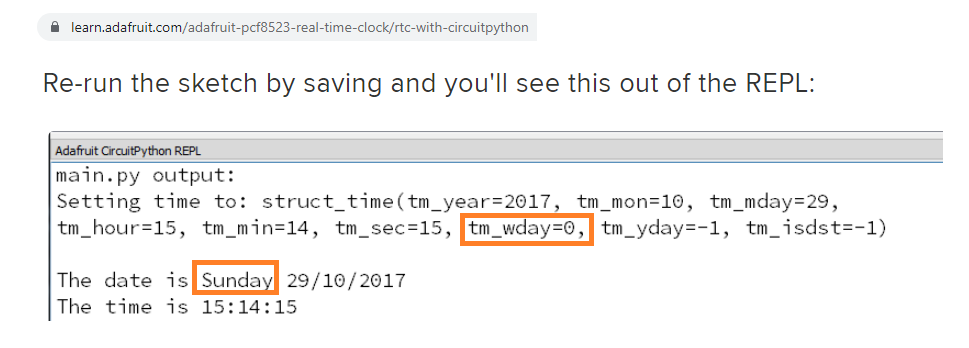
I just found this article on adafruit learn: rtc-with-circuitpython. In the example the tm_wday is based on Sunday = 0.
manic glacierBOT

Yep, sunday is 0 in struct_time in python:
https://docs.python.org/3/library/time.html#time.struct_time
Other implementations might use a different way of counting.
The weekday is computed by the time module, it doesn't matter what value you give it.
Note that when you set the RTC you can then use the time module to get the time.
>>> rtc.RTC().datetime = time.struct_time((2022,7,30,19,14,0,5,211,-1))
>>> time.localtime()
struct_time(tm_year=2022, tm_mon=7, tm_mday=30, tm_hour=...
我也遇到过和你一样的问题
I've had the same problem as you
这可能是麦克风电源没有打开导致的
This may be caused by the microphone power not turned on
你可以尝试加入以下代码
You can try adding the following code
micpwr = digitalio.DigitalInOut(board.MIC_PWR)
micpwr.direction = digitalio.Direction.OUTPUT
micpwr.value = True
time.sleep(0.1)

mic = audiobusio.PDMIn(board.PDM_CLK,board.PDM_DATA,bit_depth=16)
希望对你有帮助
I hope that will be helpful.
 tough flax
Hi folks, has there been any update on the USB Host support in CP? Before @slender iron took his leave (congrats btw) there was progress by @gentle bronze on getting PIO USB support into TinyUSB and @tulip sleet was looking into how to leverage that into USB Host support. And I know Scott had a plan for the structure... I just thought I'd ask if there was any progress recently that I'd missed.
tough flax
If you're wondering the driver, I made a video in June that explains it ad nauseum... basically we want to make filters that counteract folks' disabilities (like essential tremors, vision impairment, etc.) https://www.youtube.com/watch?v=1_tUe9kjHt0

An update on how we're making USB Filters, how we expect to use them and where we're stuck on certain aspects. Includes instructions on how to build the latest USB Filter for IntelliKeys and more.

 lone sandalBOT
 manic glacierBOT
There are indications 32MB+ support is merged into 4.4 (though not sure what snapshot we use). Taking out of draft to see what happens. This is only a test.
hidden rain
Added my toy module, fibonacci. Performed local build and loaded UF2. Tried to import. No module named fibonacci.
GitHub
CircuitPython - a Python implementation for teaching coding with microcontrollers - GitHub - latkinso42/circuitpython: CircuitPython - a Python implementation for teaching coding with microcontrollers
branch toyfib
 subtle fog
I'm looking for advice on how to play sounds (e.g., in a game) without pausing the main display update loop.
I've got blinka moving around with a joystick on the pygamer, and the four buttons are mapped to the bottom of an A pentatonic scale (so you can't play anything that sounds bad, and you can play Mary Had a Little Lamb). The challenge is to have Blinka keep moving while the sound is played, as I'm doing here: https://github.com/davclark/pygamer-constructionism/blob/5076bd7f47fbdedaaa0f4c33c1645299a0d22995/musical_snake/code.py#L24

GitHub
Experiments in constructionism and community with a focus on the Adafruit PyGamer - pygamer-constructionism/code.py at 5076bd7f47fbdedaaa0f4c33c1645299a0d22995 · davclark/pygamer-constructionism
 red condor
Hi, I am using Circuity Python on my RPI4 with a "MCP9808 Precision I2C Temperature Sensor"
The board is wired correctly as I can detect the sensor, read to it, write to it.
However, when I use the Adafruit sample code on https://learn.adafruit.com/adafruit-mcp9808-precision-i2c-temperature-sensor-guide/python-circuitpython, I get temperature readings that are about 15-20 deg F too low. The RPI is reading some temperature since when I put my finger on the chip, the temperature goes up a few degrees... just the calibration seems way off. Any idea what I might be doing wrong?
manic glacierBOT

plz if ((frequency < 95000) || (i2c_m_sync_set_baudrate(&self->i2c_desc, 0, frequency / 1000) != ERR_NONE)
slender iron
stuck elbow
maybe we need to add analog mode to keypad
oh no! I hadn't even gotten that far
slender iron
tough flax
Hi folks, has there been any update on the USB Host support in CP? Before <@252...
I merged in the api bits (to match pyusb iirc) and tested device discovery on imx but the rp2040 bits weren't ready yet. Thach has made rp2040 usb host available in arduino I think. So testing there would help. I haven't found time to connect the CP api to the tinyusb one. It shouldn't be too hard but I'm busy wrapping up esp32* and web workflow stuff before my second stretch of leave in a few weeks.
slender iron
hidden rain
branch toyfib
Looks correct to me! What does help("modules") show in the repl?
manic glacierBOT
@Neradoc thank you for your explanations. Yes, I know how to use the time module. I have done different projects using external and internal RTC on differen microcontrollers. I just 'stumbled' over the difference of 'day-of-the-week' value as explained above. Guess have to live with that and - as written above - add a correction of -1 on the wday received from the aio time service.
For me case closed
Guess have to live with that and - as written above - add a correction of -1 on the wday received from the aio time service.
You set the time from the aio time service, and then get the time with time.localtime().
At no time do you need to care what the wday of aio is.
random junco
red condor
The board is wired correctly as I can detect the sensor, read to it, write to it...
You might have better luck finding help in #help-with-circuitpython or #help-with-linux-sbcs - this channel is for the development of CircuitPython
hidden rain
+@slender iron: no fibonacci module listed
manic glacierBOT

I recently saw a closed issue for this topic but I would really love to see it reconsidered. The MicroPython btree module is extremely useful. It is a core component of some projects I am building, which in turn keeps me from being able to use CircuitPython.
manic glacierBOT

CircuitPython version
Adafruit CircuitPython 8.0.0-alpha.0-dirty on 2022-07-26; S2Mini with ESP32S2-S2FN4R2
Code/REPL
>>> b = displayio.Bitmap(8, 8, 65526)
>>> m = memoryview(b)
>>> b[0, 0] = 1
>>> m[0]
1
>>> b = displayio.Bitmap(8, 8, 256)
>>> m = memoryview(b)
>>> b[0, 0] = 1
>>> m[0]
1
>>> b = displayio.Bitmap(8, 8, 16)
>>> m = memoryview(b)
>>> b[0, 0] = 1
>>> m[0]
0
>>> m[1]
0
>>> m[2]
0
>>> m[3]
16
Behavior
When the dept...
 cunning orchid
I'm currently at an ideation phase for some projects and looking at bus protocols. I3C, spec-wise, appears to be a great fit but, I'm not seeing implemention in busio yet to support it. Would I be correct in assuming that this is likely due to there being very few devices yet released that don't require an FPGA (that Renasas switch is about all that I have found) and we'll likely get support roadmapped once there are more devices available?
stuck elbow
cunning orchid
I'm currently at an ideation phase for some projects and looking at bus protocol...
I think it's more because none of the circuitpython-supported chips has an I3C peripheral
even can is pretty niche
manic glacierBOT
Another issue to resolve:
foamyguy noted that the unit is tripping into HardFault whenever the display is initialized and then the code is rerun using Ctrl-D or re-saving code.py. I confirmed this observation by watching the console using the “tio” terminal.
Two possible causes I can think of now. First is mentioned above that the code currently doesn’t move the framebuffer off the heap when the virtual machine closes. Perhaps that is causing something to write into memory out in “l...
proven garnet
@tidal kiln I added the question regarding SI1145 to the meeting today. I won't be there but I'll catch up after the fact.
Please add anything you think is relevant to it if I missed anything!
onyx hinge
proven garnet
<@337989520962093057> I added the question regarding SI1145 to the meeting today...
I added a link to the PR for context
 lone axle
Anyone familiar with the intricacies of DHCP? I'm wondering what this logic is attempting to catch or act upon? https://github.com/adafruit/Adafruit_CircuitPython_Wiznet5k/blob/a7d28e37920089fb3d24b38c4835e0a867bcb9ce/adafruit_wiznet5k/adafruit_wiznet5k_dhcp.py#L253-L256
There is a print("f") in here, I'm not really sure if that is supposed to indicate something, and I don't really know much about the DHCP process to be able to follow the code and figure out what it's checking for here.
proven garnet
onyx hinge
I added a link to the PR for context
Thank you!!
lone axle
It seems that the 0, 0 that it returns can be problematic as well because one of them eventually gets passed to a int.from_bytes() call which raises an exception due to the argument being int instead of supporting the buffer protocol.
tidal kiln
proven garnet
Thank you!!
thanks. i'll try and join the meeting for this.
manic glacierBOT

CircuitPython version
Adafruit CircuitPython 7.3.2 on 2022-07-20; Adafruit Feather ESP32S2 with ESP32S2
Code/REPL
import board
import alarm
import time
from digitalio import DigitalInOut, Direction, Pull

led = DigitalInOut(board.LED)
led.direction = Direction.OUTPUT
led.value = False
time.sleep(10)
print("Waking up")
time_alarm = alarm.time.TimeAlarm(monotonic_time = time.monotonic() + 20)
pin_alarm = alarm.pin.PinAlarm(pin=board.D12, value=True...@lone axle heads up, Anne says https://github.com/adafruit/circuitpython-weekly-newsletter/blob/gh-pages/_drafts/2022-08-02-draft.md is ready for you to take items from for the meeting
GitHub
Community newsletter for Python on Microcontrollers. Please feel free to put your current news, projects, etc. as a PR or Issue. - circuitpython-weekly-newsletter/2022-08-02-draft.md at gh-pages · ...
lone axle
Thank you
<@&356864093652516868> The weekly meeting will occur here on Discord about 90 minutes from now (2pm Eastern). You can add your notes to the doc ahead of time if you have the opportunity https://docs.google.com/document/d/1NX3NLArhourMkBpuPxREEFkv1-wVkLUJixBwGvU-eKY/edit?usp=sharing We're looking forward to hearing from everyone!

Google Docs
CircuitPython Weekly Meeting for August 1, 2022 Tim is hosting. Video is available on YouTube. Join here for the chat all week: http://adafru.it/discord. The CircuitPython Weekly happens normally at 2pm ET/11am PT on Mondays. Check the #circuitpython channel on Discord for notices of ch...
 kind meadow
Howdy folks. Just curious...is there an ETA on when the wifi capability of the new Pico W will be supported by CircuitPython?
 ornate breach
kind meadow
Howdy folks. Just curious...is there an ETA on when the wifi capability of the ...
ornate breach
kind meadow
Howdy folks. Just curious...is there an ETA on when the wifi capability of the ...
No one is actively working on it yet (last I saw from Scott) , though it’s been requested.
kind meadow
Shoot. I guess I need to extend or modify Micropython's framebuf class to support the ability to rotate then. Because the CircuitPython framebuf supports it, but not the MicroPython one =/.
slender iron
hidden rain
+<@252717193496756235>: no fibonacci module listed
ok, I can look in more detail today. what board are you testing on?
warm stump
If anyone is at all still working on the circuitpython avr8 port (I think not, though I still am by proxy), I've documented a vital piece of information for it to be deployed correctly
here: https://github.com/TheMindVirus/micropython/blob/master/README.md#deployment-issues
I had always wired it by hand so I didn't notice the first few times, but there is a nub on the standard Atmel-ICE connector for AVR and SAM which doesn't fit into the ISP header
without a 2x3 2.54mm Pitch Standoff Header (pictured). I thought my Arduino Uno Rev3 was dead until I realised this and was able to rescue it. It seems daft, but is often overlooked.
would be useful to have on the 328p feather but it's not a problem on the Metro as it is already the right way round on that
slender iron
warm stump
If anyone is at all still working on the circuitpython avr8 port (I think not, t...
I don't think CP will ever work on avr8 because it leverages 32 bit pointers
warm stump
slender iron
I don't think CP will ever work on avr8 because it leverages 32 bit pointers
it's starting off as a micropython port / whistles / icicles so while it is a port like circuitpython is, it might end up looking very different
slender iron
the same restriction will apply to micropython
midnight ember
can the meeting be joined by anyone (kept mute) or is it for official adafruit folks only kind of thing?
random junco
midnight ember
can the meeting be joined by anyone (kept mute) or is it for official adafruit f...
anyone
You can add status updates and hug reports too, if you wish. And then you can either have them read out for you or request the CircuitPythonistas role and you can speak during the meeting
or just lurk. 🙂
midnight ember
planned to lurk, first time
tidal kiln
lurk is default, no special call out needed, just join voice channel 🙂
 idle owl
midnight ember
planned to lurk, first time
idle owl
midnight ember
planned to lurk, first time
Please do!
radiant trench
I’m lurking too! Might even make it for the whole thing if my kids go to bed nicely
 modern wing
Happily lurking 🙂
midnight ember
is it really lurking if you announce it? 😛
radiant trench
Worst lurker ever 😂
idle owl
@lone axle We're wrapping up our meeting.
onyx hinge
midnight ember
planned to lurk, first time
welcome, it's nice to have you!
idle owl
@radiant trench Please put your hug report in alphabetical order in the list, excluding foamyguy who is hosting. 🙂
Perfect!
slender iron
yup, sorry
onyx hinge
If you're outside the US, check out our list of distributors at the bottom of the page in the shop
idle owl
😊 Yep!
tulip sleet

Talk by Kattni Rembor at PyOhio 2022.
Description: CircuitPython is an open source version of Python, designed to run on tiny computers called microcontrollers. It has, from the start, focused on being beginner friendly and lowering the barrier to entry for new folks into programming and electronics. This focus has l...
random junco
Scott Hanselman only has 300,000 followers on Twitter 🙂
slender iron
only
onyx hinge
20 authors is .. wow!
modern wing
There's always time for a 555 joke.
 mental nexus
modern wing
There's always time for a 555 joke.
mental nexus
modern wing
There's always time for a 555 joke.
Wait for it…
onyx hinge
https://github.com/adafruit/Adafruit_CircuitPython_SI1145 https://github.com/adafruit/Adafruit_CircuitPython_AGS02MA

GitHub
CircuitPython helper library for the SI1145 Digital UV Index IR Visible Light Sensor - GitHub - adafruit/Adafruit_CircuitPython_SI1145: CircuitPython helper library for the SI1145 Digital UV Index ...
GitHub
CircuitPython / Python library for AGS02MA gas sensor - GitHub - adafruit/Adafruit_CircuitPython_AGS02MA: CircuitPython / Python library for AGS02MA gas sensor
With the community bundle we're well on the way to 400 I'm sure
 radiant trench
OMG... png support. Yes please! @timber mango let me know if you need help testing at any point
manic glacierBOT
One question: to preserve a display framebuffer when code.py finishes, Scott mentioned that the memory needs to be copied over somewhere else. Will this PR allow for that capability to move the FrameBuffer even if it’s allocated by the ESP-IDF?
The memory that is allocated by the esp-idf remains forever, even over resets of the interpreter.
onyx hinge
Nice to hear from you Tammy!
mental nexus
https://gist.github.com/FoamyGuy/642358cf5c8193b2b4b4704d10f021c6
Info on the HACKtablet giveaway.
stuck elbow
cameras!
modern wing
Installing iron filters is so metal.
onyx hinge
The very first implementation of camera was on Metro M4, so when we first started doing cameras on ESP32 and the high level camera library from Espressif didn't fit with how I was doing it. M4 was never super reliable, and it's clear it would be better to break compatibility in CircuitPython 8.x and support more cameras & possibly ESP32, -S2 and -S3 microcontrollers from a single set of code.
idle owl
modern wing
Installing iron filters is so *metal*.
Hah!
onyx hinge
@midnight ember do you have a specific question for your "in the weeds" topic or is it more of a status update?
midnight ember
not a question, status update i guess, wrong section? :/
slender iron
np
midnight ember
yes 😅
lone axle
GitHub
I don't have the hardware but did by best to resolve #1 by adding the UV index functionaliy. Some other changes happened along the way:
_i2c is now i2c_device, because that's what adafrui...
midnight ember
This is how the USON8 to USOIC8 board will look, it's just a tiny adapter board. Same pinouts, direct drop in.
 tidal kiln
 ember iris
When looking at these sensors--should driver writers aim for completeness of the datasheet or should it aim for a simpler implementation?
Related, is there a way to have a bare minimum version of the driver and a child of the bare minimum which is more expansive?
 errant grail
When writing a driver, it's tempting to represent all registers (for convenience and completeness) while you're sorting out and testing the driver code. A second pass to remove unused register defs is something I haven't put into my workflow.
onyx hinge
@ember iris It sounded like what Scott said is the API should reflect what is needed for the examples, rather than implementing every bit of every register in the datasheet

 ember iris
onyx hinge
<@459119350851567626> It sounded like what Scott said is the API should reflect ...
ember iris
onyx hinge
<@459119350851567626> It sounded like what Scott said is the API should reflect ...
thank you! (I'll have to relisten to this week's meeting, my discord is acting weird so there's a few folks who's audio doesn't reach me and I'm only able to hear about half of this conversation).
Is there a workflow/guide for memory profiling in circuit python?
onyx hinge
@ember iris scott is just saying that there aren't good tools right now
you can import and see how much gc.mem_free() goes down by
midnight ember
windirstat for cp ram use possible? 😛
manic glacierBOT
please note that turning off the regulator does not trigger deep sleep mode - only the deep sleep command does that. turning off the regulator will reduce power greatly which will make entering deep sleep use the minimal power possible (approx 100uA)
@kattni plz check guides "The low power section is also missing for the S3 in its learn guide." etc
slender iron
ember iris
When looking at these sensors--should driver writers aim for completeness of the...
Not completeness. We should curate the functionality we expose to what will actually be used
(We do this implicitly with CP ports code for MCUs as well.)
ember iris
slender iron
*Not* completeness. We should curate the functionality we expose to what will ac...
What about kinds of workflows like in a a constantly on vs low power mode for some sensors? that might be too small of a difference, so the basic mode would just have always on, and the expansive child version would include low power drivers
midnight ember
trimming libraries will create more smaller libraries which might confuse new users more but could be crucial for smaller devices.
 glass violet
hopefully this is the correct topic to ask this in, but im working on supporting CP for my ESP32S3 boards and im currently trying to create the uf2 firmware. im following this guide https://learn.adafruit.com/building-circuitpython/build-circuitpython and on the step where it has you "make fetch-submodules" i get this error "This update will fail because the commits we need aren't the latest on the". i was going to just use "git submodule update --init --recursive" but the size of all the dependency trees is absolutely massive. anyone have a work around or know of a more up to date guide?

Adafruit Learning System
How to build CircuitPython yourself on different platforms
slender iron
Zipping
adafruit-circuitpython-bno055-7.x-mpy-508c0a9/lib/adafruit_bno055.mpy 9390 9728
adafruit-circuitpython-bno055-7.x-mpy-508c0a9/requirements/adafruit_bno055/requirements.txt 184 512
adafruit-circuitpython-bno055-7.x-mpy-508c0a9/examples/bno055_i2c_gpio_simpletest.py 1765 2048
adafruit-circuitpython-bno055-7.x-mpy-508c0a9/examples/bno055_simpletest.py 1365 1536
adafruit-circuitpython-bno055-7.x-mpy-508c0a9/examples/bno055_webgl_demo/server.py 6484 6656

21504 B 21.0 kiB 0.0205078125 MiB
Bundled in bundles/adafruit-circuitpython-bno055-7.x-mpy-508c0a9.zip
see you all later. was planning to lurk but ended up participating. you made it really easy to participate with the google doc so kudos to whoever thought of that.
slender iron

You can now output and group custom Markdown content on the Actions run summary page.
ember iris
thanks all! Have a great start to the week everyone!
lone axle
midnight ember
see you all later. was planning to lurk but ended up participating. you made it ...
Thanks for joining! Always great to have new folks getting involved.
slender iron
glass violet
hopefully this is the correct topic to ask this in, but im working on supporting...
make fetch-submodules should work for you
the big submodule is in ports/broadcom if you want to avoid it
jaunty juniper
glass violet
hopefully this is the correct topic to ask this in, but im working on supporting...
that's not an error, that's a normal comment in the script
This update will fail because the commits we need aren't the latest on the
branch. We can ignore that though because we fix it with the second command.
slender iron
I'm glad the pico w led is on the wifi chip
makes it easy to know when someone has a w vs regular
jaunty juniper
true !
jaunty juniper
glass violet
hopefully this is the correct topic to ask this in, but im working on supporting...
so basically you get a list of error: submodule git dir ... is inside git dir ... followed by a list of things that actually work, as the comment warns about
glass violet
jaunty juniper
that's not an error, that's a normal comment in the script
i think i know where i went wrong. that line was in the error, but i missed the bit about installing WSL on windows. doing that now.
glass violet
full error was "C:\Users\ubers\Desktop\circuitpython\circuitpython>make fetch-submodules
This update will fail because the commits we need aren't the latest on the
'#' is not recognized as an internal or external command,
operable program or batch file.
make: *** [Makefile:327: fetch-submodules] Error 1"
but yea, im assuming i missed that important step in the setup for windows.
 digital shoreBOT
hidden rain
slender iron
ok, I can look in more detail today. what board are you testing on?
digital shoreBOT
hidden rain
slender iron
ok, I can look in more detail today. what board are you testing on?
@slender iron I am using the rp2040 Pico. It seems I have moved past the immediate issue. Had some missing lines in circuitpy_defns.mk. Now fighting normal coding errors, so I'm ok for the moment. I have been using pulseio and busio as examples. Time to find the next major hurdle.. Thanks!
 orchid basinBOT

We want to use remote CSS pulled from the main circuitpython.org site to enhance the usability of Web Work Flow without significantly impacting firmware size. This is an initial file so I can test and make sure it works as intended.
lone axle
Here is the notes document for next Monday’s CircuitPython Weekly meeting. It is at the normal time of 11am Pacific / 2pm Eastern here on Discord. Everyone is encouraged to attend! Please add your hug reports and status updates even if you’ll be attending the meeting - it’s super helpful! If you are unable to attend but would still like to include updates, feel free to include them in the notes and we’ll read them off during the meeting. Hope to see you there! <@&356864093652516868> https://docs.google.com/document/d/1Er0hHc_OOdxBFBxa4stgh7lVcQ9HPF1kzocUKuqOvno/edit?usp=sharing

Google Docs
CircuitPython Weekly Meeting for Here is the notes document for next Monday’s CircuitPython Weekly meeting. It is at the normal time of 11am Pacific / 2pm Eastern here on Discord. Everyone is encouraged to attend! Please add your hug reports and status updates even if you’ll be attending the m...
slender iron
hidden rain
<@252717193496756235> I am using the rp2040 Pico. It seems I have moved past the...
Nice work!
tulip sleet
@tidal kiln I did a 5-minute audio of TMP117 and added to https://github.com/adafruit/Adafruit_CircuitPython_TMP117/issues/11
slender iron
@lone axle you around to video chat about deep dive?
(I will plan on streaming this week)
lone axle
slender iron
<@382939733107408897> you around to video chat about deep dive?
Yep I am
manic glacierBOT

CircuitPython version
Adafruit CircuitPython 7.3.1 on 2022-06-22; Adafruit PyPortal with samd51j20
Code/REPL
class SpecialTuple(tuple):
    def __init__(self, item1, item2):
        super().__init__((item1, item2))

if __name__ == '__main__':
    instance = SpecialTuple(1, 2)
    print(instance)
Behavior
On CPython this example raises this exception:
Traceback (most recent call last):
File "/home/timc/repos/circuitpython/Adafruit_...Based on a cursory test, the same behavior exists in micropython. Please check micropython's list of differences from standard python; if it's not listed there consider opening an issue with them. They may know if there's a "good reason" it's that way and if it's not documented they may wish to document it.
I don't think this is intentional. My brain hurt after writing all that code. I'd be happy to merge in a change for this. I agree it should be consistent.
Thank you. I'll look into the micropython differences list.
Poking at this a bit more I did find that this variation using __new__ instead of __init__ does run successfully under CPython:
class SpecialTuple(tuple):
    def __new__(cls, item1, item2):
        self = super().__new__(cls, (item1, item2))
        return self

if __name__ == '__main__':
    instance = SpecialTuple(1, 2)
    print(instance)
CPYthon output:
(1, 2)
But this one raises an err...
We'd be happy to have it added. I doubt Adafruit-funded folks will pick this up soon though. Let us know if you'd like to work on it, we're always happy to help get folks started developing CircuitPython.
There are indications 32MB+ support is merged into 4.4 (though not sure what snapshot we use). Taking out of draft to see what happens. This is only a test.
We're using: https://github.com/adafruit/esp-idf/tree/circuitpython8
lone axle
Micropython docs may be temporarily down? I'm unable to load https://docs.micropython.org/ atm
manic glacierBOT
Thanks for the PR! You can probably get an Espressif PID here: https://github.com/espressif/usb-pids/blob/main/allocated-pids.txt
tulip sleet
lone axle
Micropython docs may be temporarily down? I'm unable to load https://docs.microp...
micropython.org is also not responding
manic glacierBOT
From @todbot on #6597:
I am still having problems on QTPy ESP32C3, even after https://github.com/adafruit/circuitpython/issues/6548 and https://github.com/adafruit/circuitpython/pull/6666. I built and flashed from main, and can reliably get a REPL now after a reset, but if I copy-n-paste this as a block from my editor into a terminal running tio to the REPL, it hangs:
f = open('.env', 'w')
f.write("CIRCUITPY_WIFI_SSID='todbottestwifi'\n")
f.write("CIRCUITPY_WIFI_PASSWORD='ss...
@todbot Thanks for testing! Please file new issues. It's harder to track comments on closed issues. (We could reopen if the problem is the same as original.) I've opened #6678 for your report.
Are we missing the folder name from the edit url? What is the edit url for you?
glass violet
so i got the circuit python uf2 build tool working. it made the uf2 firmware for me. but i had to make a few minor changes and now when ever i try and rebuild it it appears to do what its supposed to but the last line is this "Build files have been written to: /home/strid3r/circuitpython/ports/espressif/build-smartbeedesigns_bees3/esp-idf" and not making (as far as i can tell) the uf2 firmware at "build-smartbeedesigns_bees3/firmware.uf2" ive tried make clean a few times with the same results
warm stump
you know the feather from before time? make that the vidor from before time...
CircuitPy Drive just came up on an Arduino MKR Vidor 4000 which I thought was dead (it was, the regulator was out of whack and was overheating for a while)
every SAMD board now thinks it's an Adafruit Feather
manic glacierBOT
Here is a screenshot of the URL after clicking on the Edit button:
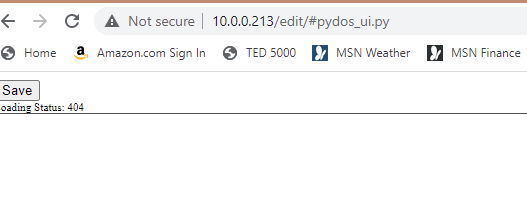
Yes, I think the issue is missing the folders in the edit links.
For the file /lib/adafruit_logging.py We have this URL:
http://192.168.1.113/edit/#adafruit_logging.py
Which is missing /lib/ in the hash portion of the URL.
The edit page itself does seem to support the sub directory if you construct the URL yourself though. This URL does allow me to edit the file inside of it's directory successfully:
http://192.168.1.113/edit/#/lib/adafruit_logging.py
I'll ...
Bits are painful, I will see if I can get it consistent without making the code bigger.
orchid basinBOT
@dglaude please check the questions above
warm stump
please enjoy this for your time and effort
ok...so maybe I couldn't see the serial terminal for a while when switching drivers...
the name can be changed when it gets a custom build with its own peripherals alongside the feather's board module
that voltage_monitor will now logistically be in the wrong place when you try to read it physically or if the emulator is missing a quick version check
a bit like reading an ordnance survey map upside down
 slender iron
glass violet
so i got the circuit python uf2 build tool working. it made the uf2 firmware for...
slender iron
glass violet
so i got the circuit python uf2 build tool working. it made the uf2 firmware for...
what command are you running?
glass violet
slender iron
what command are you running?
make BOARD=smartbeedesigns_bees3
manic glacierBOT
slender iron
glass violet
make BOARD=smartbeedesigns_bees3
could you copy all of the output somewhere and post it?
most of us are on linux or mac for development
glass violet
slender iron
could you copy all of the output somewhere and post it?
yeah give me a minute
slender iron
I've gotta run so someone else can hopefully pick up. or I'll be on tomorrow
manic glacierBOT
CircuitPython version
adafruit-circuitpython-adafruit_feather_esp32s3_4mbflash_2mbpsram-en_US-20220801-664cadc.uf2
Absolute newest from S3
Code/REPL
N/A
Behavior
No REPL, No CIRCUITPY USB drive, no Serial Port.
Lights on the Feather ESP32-S3 when powered up: 1 Purple Flash, 4 rapid Yellow flashes, Green flash every 5 seconds.
Description
No response
Additional information
Also built a DEBUG-1 image for the ESP32-S3-DevkitC-1-N8R...
manic glacierBOT
[adafruit/circuitpython] New comment on issue #6679: ESP32\-S3 builds don't boot into Circuit Python
Not sure if it’s relevant to your issue, but on the ESP32-S3 devkit N8R8 boards, after I flash the .bin file to the UART port using esptool, I have to plug into the “USB” port to access the REPL and CIRCUITPY drive.
manic glacierBOT
Fixes the URL for the edit link on directory pages in the web workflow to include the directory in the hash portion of the URL.
Resolves: #6671
Under current version the file /lib/adafruit_logging.py will end up with a url containing only #adafruit_logging.py
With this branch it will include the directory so it will be #/lib/adafruit_logging.py
proven garnet
Oh no, botched my hug report!
Thank you @lone axle for doing a CircuitPython game jam - it's something I've been interested in doing myself for a while so I'm excited to see it happen
proven garnet
Thanks for the discussion on adafruit_register, that all aligns with what my thoughts are. Let me know if I can help with any of the decided updates/changes!
manic glacierBOT
From the support ticket, I got the official values.
Commiting them now
manic glacierBOT

As the title suggests this PR adds support for our latest RP2040 board with SubGHz support.
lone axle
proven garnet
Thank you <@382939733107408897> for doing a CircuitPython game jam - it's someth...
Nice! Thank you, I am excited to do it as well. I've done a hackathon where I made a game with someone, but never have done an actual game jam yet. I love watching folks working on them and playing the games from them on Twitch.
If there is wider interest in the community I'm open to organizing a larger one with more participants down the road sometime.
 blissful pollen
lone axle
Nice! Thank you, I am excited to do it as well. I've done a hackathon where I ma...
blissful pollen
lone axle
Nice! Thank you, I am excited to do it as well. I've done a hackathon where I ma...
Not sure if I would be interested in entering (did a few game jams in the past) but if you need help organizing something let me know.
manic glacierBOT
[adafruit/circuitpython] New comment on issue #6679: ESP32\-S3 builds don't boot into Circuit Python
@kmatch98 are you using the "Absolute newest" bits from S3? I don't even get a serial port device listed from the USB port.
manic glacierBOT
[adafruit/circuitpython] New comment on issue #6679: ESP32\-S3 builds don't boot into Circuit Python
@RetiredWizard To confirm, I just took a fresh ESP32-S3 devkit N8R8 board, connected the UART port and loaded the UF2 bootloader as described in these instructions at the bottom right of the page.
I switched to the "USB" port and the S3DKC1BOOT drive appeared.
Then I copied the latest UF2 file adafruit-circuitpython-espressif_esp32s3_devkitc_1_n8r8-en_US-20220801-664cadc.uf2. Results were as-expected, with a `CIRC...
orchid basinBOT
Reverted back to "white" scheme so we don't have everyone testing webworkflow stuck in dark mode ;)
manic glacierBOT
added remote css URL to pull additional CSS from the circuitpython.org site (apologies for the black background - this is temporary, I'll send an update to the CP.org css very shortly that will undo this).
slender iron
@radiant trench maybe the webworkflow.css filename should have a major version number in it
radiant trench
That would make sense... then we just duplicate for each future version?
slender iron
ya, or we just have another number for version
that wouldn't match up. I'm just thinking about how we can set ourselves up to evolve it
radiant trench
so format wise would you be happy with just something like webworkflow-8.css or does it need to be more specific?
radiant trench
ok, I'll make that change now
radiant trench
noice
manic glacierBOT
[adafruit/circuitpython] New comment on issue #6679: ESP32\-S3 builds don't boot into Circuit Python
Okay, I was using esptool to flash the .bin files and I probably had one of the parameters wrong again :/ When I originally read the boot loader install instructions I took the note about update.uf2 not available on the S3 to mean that I couldn't use the UF2 boot loader.
After installing the UF2 boot loader and grabbing the latest UF2 file the devkit is running fine. I'll take another look at my feathers3, but this obviously isn't a generic S3 issue and the Feather ESP32-S3 problem I was ...
proven garnet
lone axle
Nice! Thank you, I am excited to do it as well. I've done a hackathon where I ma...
I would definitely participate!
 solar whale
For the "web workflow" on the esp32, how you you get the .env file onto the board? Do you use something like ampy or rshell?
tulip sleet
thonny seems to work well
you could try ampy, rshell, or mpremote, but I'm not sure they will work
solar whale
They will likely need the "ubinascii" modifcation. -
tulip sleet
one of them used uos
solar whale
So you just use esptool to flash the .bin then connect with thonny?
tulip sleet
yes, thonny talks to the board through the serial REPL in raw mode
solar whale
Cool! I'll give it a try. Thanks!
tulip sleet
you may need to put thonny into "CircuitPython mode". lower right of main window
jaunty juniper
when I tested on C3 I used the REPL to edit the file with open() but that's the low tech version
solar whale
I think mpremote needs uos -- I submitted PRs to ampy and rshell to fix ubinascii -- I think it was megerd into rshell...
I will check it all out later today.
jaunty juniper
what ampy do you get with pip ?
solar whale
I don't think ampy has been updated in a long time.
rshell was merged https://github.com/dhylands/rshell/pull/181
manic glacierBOT
[adafruit/circuitpython] New comment on issue #6679: ESP32\-S3 builds don't boot into Circuit Python
For posterity, here is the esptool command that I use to flash my ESP32-S3 boards:
python3 -m esptool -b 921600 --chip esp32s3 write_flash 0x0 build-espressif_esp32s3_devkitc_1_n8r8/firmware.bin
pip install ampy fails, adafruit-ampy points to https://github.com/scientifichackers/ampy
solar whale
yes use adafuit-ampy, but the default will not work with CP
jaunty juniper
I was thinking if I should adding a files-over-serial feature to discotool, like just to install a .env
or more elaborate make a circup-over-serial, but probably not since I have the web workflow one
tulip sleet
i think it's a bit of an insidious project, because there are more and more features people want
manic glacierBOT
[adafruit/circuitpython] New comment on issue #6679: ESP32\-S3 builds don't boot into Circuit Python
That's what I was using as well, IDK....
tulip sleet
I don't really find any of them that intuitive
random junco
Just installed the latest nightly, the CSS is looking good, nice work
radiant trench
random junco
Just installed the latest nightly, the CSS is looking good, nice work
Lots more to come now we have it pulling CSS from circuitpython.org!
tulip sleet
random junco
Just installed the latest nightly, the CSS is looking good, nice work
side note that they are the latest merge, not just nightlies (we don't actually have nightly builds of CircuitPython, only of library bundle builds)
random junco
tulip sleet
side note that they are the latest merge, not just nightlies (we don't actually ...
Oops, now I know, thanks!
tulip sleet
there may be many in one day 🙂
wraith crow
@radiant trench If you're on a local net without internet, will it fall back to a local CSS?
solar whale
hmmm when I connect with Thonny to esp32v2 -- all I see is ```
rst:0x10 (RTCWDT_RTC_RESET),boot:0x13 (SPI_FAST_FLASH_BOOT)
invalid header: 0xffffffff
invalid header: 0xffffffff
invalid header: 0xffffffff
invalid header: 0xffffffff
invalid header: 0xffffffff
invalid header: 0xffffffff
invalid header: 0xffffffff
invalid header: 0xffffffff
ets Jul 29 2019 12:21:46
Yup that’s the plan. Super minimal on the device with all the fun stuff remote
solar whale
What is the proper command line to use to flash the .bin to the esp32?
wraith crow
@solar whale might be something different for you but I got those header messages when I flashed with the wrong command
esptool --chip esp32 -p COM39 --before=default_reset --after=no_reset --baud 921600 write_flash --flash_mode dio --flash_freq 40m --flash_size 4MB 0x0000 firmware.bin is what worked for me
onyx hinge
ValueError: ValueError must be 936-2 well that's a curious message
wraith crow
But I was on using a V1, not V2
solar whale
that was likely my issue -- trying again.
onyx hinge
mp_int_t framebuffer_count = mp_arg_validate_int_range(args[ARG_framebuffer_count].u_int, MP_QSTR_framebuffer_count, 1, 2); ah my arguments were out of order, but the compiler couldn't detect it
and just to make things weirder, apparently 2 is the number indicating ValueError
solar whale
@wraith crow --that worked -- thanks!! I was using the MicroPython command line...
onyx hinge
(or maybe it was a different line with the same problem, but anyway, coincidence)
manic glacierBOT
Makes Safari happy with CORS.
Also added the mention that the user field should be left empty.
wraith crow
hehe, that's exactly what I did too 🙂
onyx hinge
If you're building from source, make flash always shows the right arguments, but you may have to specify the PORT= of the USB serial port to use
slender iron
@solar whale I just write /.env from the repl
solar whale
slender iron
<@343570430042308609> I just write `/.env` from the repl
How do you write it to the board?
slender iron
by repl I mean over the serial connection
f = open("/.env", "w")
f.write("CIRCUITPY_WIFI_SSID=ssss\nCIRCUITPY_WIFI_PASSWORD=zzzz\nCIRCUITPY_WEB_API_PASSWORD=passw0rd\n")
f.close()
jaunty juniper
same
solar whale
Ah -- OK -- thanks -- Thonny is working well for me now -- but nice to know.
jaunty juniper
it's quick and dirty
tulip sleet
@slender iron I was going to add HUZZAH32, and the QT Py ESP32. Check your email re a corrected PR to the creation id repo.
slender iron
I'm excited for the thonny beta: https://github.com/thonny/thonny/issues/2349#issuecomment-1201074497

GitHub
CircuitPython 8 will be using the OSC set title sequence to show a "sticky status". This is mainly useful for the IP address of a wifi board. The escape sequence is: \x1b]0;&l...
@tulip sleet I've done the qt py already
tulip sleet
but the creation ID is for a C3
slender iron
ah, ok. I'll update it
I need to tweak the pin never resets for the different modules
gonna see how the bootloader determines them and then copy it
slender iron
no, but it is here: https://github.com/tannewt/circuitpython/tree/esp32_ww
I need to tweak the pin reset for the odroid go that is also in the branch
tulip sleet
slender iron
gonna see how the bootloader determines them and then copy it
I think I did something already for that, let me look
slender iron
tulip sleet
@slender iron I was looking at esp-idf/components/esp_hw_support/port/esp32/spiram_psram.c and esp-idf-config/sdkconfig-esp32.defaults and esp-idf/components/esp32/Kconfig and search for PSRAM_CLK_IO, etc., but yes, it appears that the bootloader looks at the fuse values instead at runtime, which seems better
ok, I will do HUZZAH32 (an old WROOM) but will wait for your PR to see how you changed the fixed-pin stuff
tulip sleet
i thought the other stuff was pretty weird
slender iron
other stuff?
tulip sleet
that you had to use menuconfig or whatever to set the module
and then it would choose the pins based on your choice
slender iron
it doesn't seem like thats the case
tulip sleet
not for bootloader, but seems to be true for other things
slender iron
did you see a switch that is the module in the sdkconfig? I didn't see one
tulip sleet
see esp-idf/components/esp32/Kconfig lines 360 and on
ok, no, it's not a switch, it's just multiple defns of pins for each module
slender iron
right right
tulip sleet
D0WD_PSRAM_CLK_IO, D2WD_PSRAM_CS_IO, etc.
slender iron
and then the module detect is at runtime
tulip sleet
pico vs pico-mini :head spin: on the marketing names
jaunty juniper
I put the circup-for-web-workflow work I have on here, instructions in the readme:
https://github.com/Neradoc/circuitpython-web-packager
the password management is a little flimsy yet (there's a field but no popup, so you have to fill it beforehand)
(instructions being, download it, run a server, open localhost/workflow.html)
stuck elbow
milli-micro-pico-nano-mega
slender iron
@jaunty juniper want to put it on circuitpython.org somewhere?
tulip sleet
stuck elbow
milli-micro-pico-nano-mega
lol, i mean pico vs pico mini. So the next size down is pico micro, then pico nano, then pico pico, then pico femto
are the pico femto and femto pico the same size?
same exponent
jaunty juniper
slender iron
<@199811382793863168> want to put it on circuitpython.org somewhere?
yeah, once we figure out some aspects of it, in particulat how to get the bundle. Right now it uses by default a proxy on my website that allows cross-site, which github doesn't
blissful pollen
I want a pico pico now just to say that name
jaunty juniper
it can use static files on cp.org if we add them, or anything that allows loading a URL in javascript
stuck elbow
blissful pollen
I want a pico pico now just to say that name
pika pika!
tulip sleet
pico de gallo - small serving - pico de gallo pico
solar whale
I have bothThonny and rshell working OK with the ESP32 - -- I'm a bit confused about the web workflow. After creating the .env should I see anything in the REPL that shows it setting up... I am not and I am not able to connect to circuitpython.local...yet
manic glacierBOT

All the links look valid and the version is consistent. Looks good to me!
radiant trench
Is Github drunk?
 wraith crow
I'm hesitant to post another issue on this but I think my problems with the S3 and latest bits has been that all my boards have a .env already and I'm thinking the S3 build crashes when wifi gets initialized. I took the .env off my devkit and it boots into CP now but if I import WIFI it crashes. Anyone else seeing anything like this on the S3?
@solar whale I'm not 100% sure but I think the esp32 web workflow may still be in an unmerged @slender iron branch. If/when it's active, you won't see any setup in the repl but you should see a wifi status in the terminal title bar. If it get's connected the IP address will show up there.
jaunty juniper
solar whale
I have bothThonny and rshell working OK with the ESP32 - -- I'm a bit confused ...
you have to reset first, and then it should send info on the wifi status to display in the serial console title (or appearing ugly if not managed by the serial console)
solar whale
wraith crow
<@343570430042308609> I'm not 100% sure but I think the esp32 web workflow may s...
OK - thanks -- I have to go offline for a few hours. I'll keep trying this later.
solar whale
jaunty juniper
you have to reset first, and then it should send info on the wifi status to disp...
hmmm OK -- I'll keep at it.
jaunty juniper
yeah I don't know the status for suffixless ESP32
solar whale
slender iron
for the feather esp32 v2 it is disabled
AH -- that explains a lot! Thanks! I'll be patient....
slender iron
I can give you a build if you like
solar whale
Be happy to try -- I have to go now but will try it later if you want --- no rush.
slender iron
k, will post one shortly and you can ping me when you are back
I'll be on until 5ish here
solar whale
OK -- not sure when I'll be back -- may not have much time until tomorrow anyway. Don't spend any time on it -- I'm just playing!
manic glacierBOT
[adafruit/circuitpython] New comment on issue #6679: ESP32\-S3 builds don't boot into Circuit Python
@kmatch98 On the S3 Devkit you have running with the latest bits, can you jump onto the REPL and import wifi ?
[adafruit/circuitpython] New comment on issue #6679: ESP32\-S3 builds don't boot into Circuit Python
Mine crashed, didn't come back on its own.
$ tio /dev/cu.usbmodemC7FD1A0EA9CF1
[19:36:35.209] tio v1.47
[19:36:35.210] Press ctrl-a q to quit
[19:36:35.213] Connected
Auto-reload is on. Simply save files over USB to run them or enter REPL to disable.

Press any key to enter the REPL. Use CTRL-D to reload.

Adafruit CircuitPython 8.0.0-alpha.1-86-g664cadc3a on 2022-08-01; ESP32-S3-DevKitC-1-N8R8 with ESP32S3
>>> import wifi

[19:36:42.439] Disconnected
[19:36:43.442] Warning:...Thanks @jaunty juniper , Think I'll just re-open and re-title that issue....
manic glacierBOT
jaunty juniper
oh yeah that works too
slender iron
thanks for running this down. I'll take a look after I wrap up my outstanding changes
@tulip sleet I think you need to pr: https://github.com/adafruit/adafruit-creations/commit/88c8a2936e187b34c29d3a05e357461f4fef03ef
manic glacierBOT
This is Adafruit's VID. This is in no way official from Waveshare. Can you link me to the support ticket?
Board files look ok. PID doesn't match the rpi listing though.
Thank you! There is an edit.html too you may want to tweak in a follow up PR.
As you wish, Attaching .eml file & screenshot.
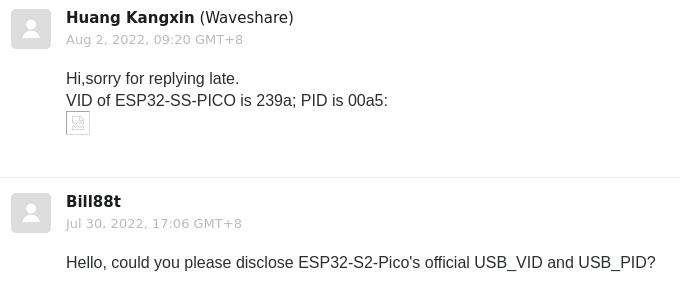
https://github.com/adafruit/circuitpython/files/9244660/Waveshare.Re.ESP32-S2-Pico.USB_VID.USB_PID.-.Waveshare.support%40waveshare.com.-.2022-08-02.0420.zip
In zip cuz github doesn't allow .eml
Should you wish for me to reply to the support ticket, please let me know.
tulip sleet
slender iron
<@329766224093249548> I think you need to pr: <https://github.com/adafruit/adafr...
I am afk and will do this when I return. Tnx
slender iron
np
manic glacierBOT
Screenshot is enough. Thanks. I won't merge this with an Adafruit VID. I'd suggest requesting one from Espressif.
@SSYYL @waveshare do not use adafruit VID for your products, they are allocated for adafruit products only
manic glacierBOT
I'd suggest requesting one from Espressif.
I have requested one in https://github.com/espressif/usb-pids/pull/55.
orchid basinBOT

Wrong infromation how to enter UF2 bootloader.
No propose changes button exist for "Install, Repair, or Update UF2 Bootloader" section on page
https://circuitpython.org/board/lolin_s2_mini/
manic glacierBOT
This removes the old camera module (imagecapture) from the Espressif port and replaces it with a wrapper around esp32-camera, a very capable library that handles a whole range of cameras on esp32, esp32-s2 and esp32-s3.
The old Python modules such as adafruit_circuitpython_ov5640 are not used anymore, as the C code does mode setting. The API is also unabashedly different than the old Python modules, and is instead intended to be more like the esp32-camera C API.
Creating the PR in draft...
@FoamyGuy finished this by adding the edit page. Considering this done! Thanks all!
Also add QT Py ESP32 Pico and Odroid Go support.
Fixes modified_ns output for ESP32 which fixes directory listing.
manic glacierBOT
@tannewt can u ping me when the odroid artifact bin is ready for test? ill load it up here :)
radiant trench
manic glacier
Will pop that in this evening if my kids ever go to sleep 😂
slender iron
they will eventually 🙂
manic glacierBOT
updated the edit.html to use the onboard stylesheet and remote css. Moved the css inside the tags into the stylesheet
radiant trench
Dayum @slender iron you're on fire today! 😄
radiant trench
@slender iron what do you think to adding a global nav bar to the header? (this is just a mockup for now)
 slender iron
works for me!
onyx hinge
@tulip sleet Are SENSOR_VP and SENSOR_VN I/O pins? If so, what's their GPIO## This is an ESP32 (OG) schematic from Espressif for the esp32-who camera devkit.
 orchid basinBOT

Ok, so the problem with this approach is that the boot loader section will still be there, which could be confusing (See https://github.com/adafruit/circuitpython-org/blob/main/_includes/download/board.html#L171-L248). Also, since I don't have the Lolin S2 Mini, I can't verify that these steps are different, so I'll have to take your word on it. You could always remove the value from bootloader_id to hide the section, but the downloadable file wouldn't be there.
I'm wondering if there may ...
onyx hinge
apparently, yes
 stuck elbow
I was just about to paste that
manic glacierBOT
The new Kconfig that fixed C3 added a dependency on USB_OTG_SUPPORTED
that is only calculated if we include the usb module in cmake.
Fixes #6679
slender iron
@jaunty juniper @wraith crow ☝️
blissful pollen
Can you install UF2 onto the S3 (specifically n8r8?) finally dug mine out of its box and it doesn't want to load
blissful pollen
trying to use the web tool but I can try command line too (on windows so can't easily do it from WSL)
wraith crow
I found that the newer web tool timed out during the flash but I was able to flash with the version that was linked from the circuitpython.org instruction page
It comes up with a message saying it's no longer maintained and links you to the newer one, but it still worked
blissful pollen
did you have to set the offset value or just choose the combined file?
manic glacierBOT
This change got WiFi working again on my Feather ESP32-S3
slender iron
@wraith crow (wifi still worked afaik. usb was broken)
wraith crow
an Import to wifi was crashing the board, doesn't now
slender iron
it wasn't crashing. usb stopped working
wraith crow
ahhhh, I see
slender iron
the green light blinking meant cp was still running
wraith crow
Felt like a crash 😄
slender iron
yup 🙂
manic glacierBOT
It doesn't mean this PR shouldn't be taken as-is but just for posterity I noticed that I can make the components conditional on CircuitPython settings in mpconfig...
if("${CIRCUITPY_ESP32_CAMERA}")
message("Including esp32-camera")
set(EXTRA_COMPONENT_DIRS "esp32-camera")
list(APPEND COMPONENTS "esp32-camera")
message("COMPONENTS = ${COMPONENTS}")
endif()
and in Makefile add to the cmake command: -DCIRCUITPY_ESP32_CAMERA=$(CIRCUITPY_ESP32_CAMERA)
something similar coul...
wraith crow
So I guess I didn't poke at it enough, I guess I could have connected to web workflow.... I though I tried, oh well....
slender iron
I didn't try either
but it was this same issue with USB and wifi phys sharing a clock
blissful pollen
wraith crow
I found that the newer web tool timed out during the flash but I was able to fla...
Thanks that worked! I think (haven't tested) the default start in the new tool is 0x1000 and the old was 0x0000. May be the issue
wraith crow
I did play with different start values when I was trying to get it going but I might not of hit the right combo before getting the old version to work 🙂
blissful pollen
either way, thanks!
wraith crow
Didn't see your question earlier sorry, not that it matters now but I was using the combined at 0x0000 🙂
blissful pollen
That's what worked for me too
manic glacierBOT
If this is green, ship it.
blissful pollen
Is there a quick guide/docs on starting with the new web interface? Sorry can't find it offhand
manic glacierBOT
The ringbuf used to fill up and the recv interrupt would block CP.
Now it'll disable the interrupt until we have enough room in the
ringbuf.
Fixes #6678
slender iron
@devout jolt ☝️
midnight ember
How about "You have (int) other CircuitPython devices on your network"
tulip sleet
onyx hinge
apparently, yes
Their schematics drive me crazy
manic glacierBOT
Just tested on Adafruit QTPY ESP32C3.
Yup, looks like #6688 fixes big pastes.
Thanks! Getting ESP32C3 boards up on WiFi is now much faster.

I think this is related to other classes defined in C - I think I ran into this issue when working with __init__() when subclassing displayio.Group. I can do testing next week to confirm the specifics.
orchid basinBOT
Ok, so the problem with this approach is that the boot loader section will still be there, which could be confusing (See https://github.com/adafruit/circuitpython-org/blob/main/_includes/download/board.html#L171-L248).
Note that this is only one paragraph, the one added in #1005
Also, since I don't have the Lolin S2 Mini, I can't verify that these steps are different, so I'll have to take your word on it.
These are the generic instructions for any ESP32-Sx board. The instructio...
manic glacierBOT
CircuitPython version
Adafruit CircuitPython 8.0.0-alpha.1-89-gb38109c48-dirty on 2022-08-02; ESP32-S3-DevKitC-1-N8R2 with ESP32S3
Adafruit CircuitPython 8.0.0-alpha.1-89-gb38109c48-dirty on 2022-08-02; Adafruit Feather ESP32S3 4MB Flash 2MB PSRAM with ESP32S3
Adafruit CircuitPython 8.0.0-alpha.1-89-gb38109c48-dirty on 2022-08-02; Adafruit Feather ESP32S2 with ESP32S2
Code/REPL
from supervisor import runtime
print("Press any key to stop output")
while r...Tested on my DevkitC-1-n8r2 with no problems.

This looks good but I did not test. Two suggestions.
Generally, only set this to a non-zero value when it is required by a specific core module.
I think it would be OK to use existing exception classes here, like SystemError and MemoryError.
manic glacierBOT
Thanks for your work on this. I will make a new PR that includes more up-to-date code, and will close this. @tannewt is working on dynamic determination of which pins are never-reset due to use for SPI/QSPI/DSPI flash and SPIRAM
tulip sleet
@onyx hinge got HUZZAH32 to work -- thanks for your previous work on this. Pins to never reset are different than V2; Scott is working that.
Adafruit CircuitPython 8.0.0-alpha.1-75-g3817d007a-dirty on 2022-08-02; Adafruit Feather HUZZAH32 with ESP32
>>> 1+2
3
nice!
I'm wondering if the esp32 camera board is also having trouble because of dedicated pins
it has psram so that's not it
manic glacierBOT
I tested this and had no problems pasting 100 lines of python code into a QT Py C3 via puTTY
tulip sleet
onyx hinge
I'm wondering if the esp32 camera board is also having trouble because of dedica...
do you have the URL for the datasheet? I could take a look
I had to add this TEMP stuff for now
static const uint64_t pin_mask_reset_forbidden =
    #if defined(CONFIG_IDF_TARGET_ESP32)
    // Never ever reset serial pins for bootloader and possibly USB-serial converter.
    GPIO_SEL_1 |          // TXD0
    GPIO_SEL_3 |          // RXD0
    // Never ever reset pins used to communicate with SPI flash and PSRAM.
    GPIO_SEL_6 |          // CLK
    /////////TEMP
    GPIO_SEL_7 |          // SD0
    GPIO_SEL_8 |          // SD1
    ////////END TEMP
Pico Mini module doesn't use SD0 and SD1
onyx hinge
I had added 7 and 8
this is a DW0D module with external flash and psram
so s/module/chip I guess
tulip sleet
GPIO16 and 17 used for PSRAM, but those are already never ever reset
otherwise looks similar
yeah looks like WROVER, more or less
does it not boot at all?
onyx hinge
let me flash it again
I put micropython on it, which works
ets Jun  8 2016 00:22:57

rst:0x1 (POWERON_RESET),boot:0x13 (SPI_FAST_FLASH_BOOT)
configsip: 0, SPIWP:0xee
clk_drv:0x00,q_drv:0x00,d_drv:0x00,cs0_drv:0x00,hd_drv:0x00,wp_drv:0x00
mode:DIO, clock div:2
load:0x3fff0030,len:1416
load:0x40078000,len:12820
load:0x40080400,len:3268
entry 0x40080608
ets Jun  8 2016 00:22:57

rst:0x3 (SW_RESET),boot:0x13 (SPI_FAST_FLASH_BOOT)
configsip: 0, SPIWP:0xee
clk_drv:0x00,q_drv:0x00,d_drv:0x00,cs0_drv:0x00,hd_drv:0x00,wp_drv:0x00
mode:DIO, clock div:2
load:0x3fff0030,len:1416
load:0x40078000,len:12820
load:0x40080400,len:3268
entry 0x40080608
``` it loops like this (SW_RESET)I did a flash_erase followed by make_flash
It's a DEBUG=0 build
I don't get any additional messages with DEBUG=1
onyx hinge
feather esp32 v2 is where I started
onyx hinge
CONFIG_SPIRAM_TYPE_ESPPSRAM64=y
CONFIG_SPIRAM_SIZE=8388608
and 4MB for flash
it's 4 flash / 8 psram right? or did I get it backwards?
onyx hinge
"ESP-EYE offers plenty of storage, with an 8 Mbyte PSRAM and a 4 Mbyte flash" is what the advertising page says https://www.espressif.com/en/products/devkits/esp-eye/overview
ESP-EYE is a development board for image recognition and audio processing, which can be used in various AIoT applications. It features an ESP32 chip and supports image transmission via Wi-Fi and debugging through a Micro-USB port. ESP-EYE is AWS-qualified and belongs to Espressif’s AIoT solution, together with IoT and AI development frameworks, ...
tulip sleet
datasheet says those sizes also
did you set CONFIG_ESP32_SPIRAM_SUPPORT=y explicitly?
onyx hinge
yes that line is present
ESP-EYE is a development board for image recognition and audio processing, which can be used in various AIoT applications. It features an ESP32 chip and supports image transmission via Wi-Fi and debugging through a Micro-USB port. ESP-EYE is AWS-qualified and belongs to Espressif’s AIoT solution, together with IoT and AI development frameworks, ...
I was just trying with auto ram detection, didn't make a difference
     GPIO_SEL_6 |          // CLK
+    GPIO_SEL_7 |          // SD_DATA0 on D0WD
+    GPIO_SEL_8 |          // SD_DATA1 on D0WD
     GPIO_SEL_9 |          // (PSRAM) SD2
``` other local change I'm carrying, looks much like yoursthere is CONFIG_SPIRAM_CACHE_WORKAROUND, and related, but they should be set. You could check the build-.../esp-idf/sdkconfig file
maybe you are already
onyx hinge
no that's not a bad idea
tulip sleet
i finally figure out what the V1 problem is by comparing the generated sdkconfig of V2-nopsram and V2-with-psram and saw that something I thought should be set was not
onyx hinge
+++ build-espressif_esp32_eye/esp-idf/sdkconfig    2022-08-02 20:22:49.056915371 -0500
@@ -96,2 +96,2 @@
-# CONFIG_ESPTOOLPY_FLASHSIZE_4MB is not set
-CONFIG_ESPTOOLPY_FLASHSIZE_8MB=y
+CONFIG_ESPTOOLPY_FLASHSIZE_4MB=y
+# CONFIG_ESPTOOLPY_FLASHSIZE_8MB is not set
@@ -102 +102 @@
-CONFIG_ESPTOOLPY_FLASHSIZE="8MB"
+CONFIG_ESPTOOLPY_FLASHSIZE="4MB"
@@ -129,2 +129,2 @@
-CONFIG_PARTITION_TABLE_CUSTOM_FILENAME="esp-idf-config/partitions-8MB-no-uf2.csv"
-CONFIG_PARTITION_TABLE_FILENAME="esp-idf-config/partitions-8MB-no-uf2.csv"
+CONFIG_PARTITION_TABLE_CUSTOM_FILENAME="esp-idf-config/partitions-4MB-no-uf2.csv"
+CONFIG_PARTITION_TABLE_FILENAME="esp-idf-config/partitions-4MB-no-uf2.csv"
@@ -282,2 +282,2 @@
-# CONFIG_SPIRAM_TYPE_AUTO is not set
-CONFIG_SPIRAM_TYPE_ESPPSRAM16=y
+CONFIG_SPIRAM_TYPE_AUTO=y
+# CONFIG_SPIRAM_TYPE_ESPPSRAM16 is not set
@@ -286 +286 @@
-CONFIG_SPIRAM_SIZE=2097152
+CONFIG_SPIRAM_SIZE=-1
@@ -290 +290 @@
-CONFIG_SPIRAM_IGNORE_NOTFOUND=y
+# CONFIG_SPIRAM_IGNORE_NOTFOUND is not set
Hmm is something needed in sdkconfig to tell it the psram pins?
manic glacierBOT
Smoke-tested this and got the file browser - yay!
onyx hinge
the changes seem to be just what I expect, except for the bit about ignoring missing spiram for the v2 feather -- which we probably want to remove
manic glacierBOT
onyx hinge
still bootloops with CONFIG_SPIRAM_IGNORE_NOTFOUND=y
tulip sleet
when I did a DEBUG=1 build I did get debug output on the debug UART pins before it boot-looped
onyx hinge
it is a very fast boot loop too, multiple per second.
tulip sleet
pretty fishy
one thing I did try that never worked was ot import the micropython sdkconfig, so I'd suggest not going down that rathole

 onyx hinge
something's deeply wrong because a DEBUG=1 build doesn't show early-boot-time messages on the UART
onyx hinge
since the camera on esp32 was just a "would be nice" I'm not going to spend more time on this right now. someday.
tulip sleet
you should not need to specify the partition .csv explicitly if you are; that was a mistake of mine. It should get the right one based on the mpconfigboard.mk settings
manic glacierBOT
onyx hinge
OK
you mean it should work the same if I delete the lines?
you mean it DOES work the same if I delete the lines?
tulip sleet
i deleted the lines and it worked
onyx hinge
CONFIG_BOOTLOADER_REGION_PROTECTION_ENABLE=y keeps getting re-added when I run make sdkconfig. wonder what it does.
tulip sleet
i did not need them; I was taking that from something else which did not need them either
try the V2 build and see whether it's set in there
see the board sdkconfig I uploaded to discord above
when I forgot to not reset a pin it looped a lot later, in the gpio messages
did you try a full erase? I don't think it should make a difference but just in case
onyx hinge
CONFIG_ESP_CONSOLE_UART_TX_GPIO=8
CONFIG_ESP_CONSOLE_UART_RX_GPIO=7
wait a second those are psram pins
yes I've done full erases
tulip sleet
yeah, those are not psram pins on the pico mini; very confusing
onyx hinge
yup the uart was stomping things
[20:41:58] Board ID:espressif_esp32_eye

[20:41:59] Auto-reload is on. Simply save files over USB to run them or enter REPL to disable.
[20:41:59] code.py output:
[20:41:59] Hello World!

[20:41:59] Code done running.

[20:42:00] Press any key to enter the REPL. Use CTRL-D to reload.
so the final addition that let it come up was: ```#
CONFIG_ESP_CONSOLE_UART_TX_GPIO=1
CONFIG_ESP_CONSOLE_UART_RX_GPIO=3
YAY
onyx hinge
I think the esp32 overall sdkconfig has TX_GPIO and RX_GPIO set, can you look? is that something else that got changed during your current work?
these problems can recur within a week and I've forgotten it already
I may not be at the latest main since this is all happening on the camera branch
tulip sleet
yes
CONFIG_ESP_CONSOLE_UART_TX_GPIO=8
CONFIG_ESP_CONSOLE_UART_RX_GPIO=7
that should not be in there
I need to menuconfig it again
i forgot to turn it off after finishing debugging. That was an early attempt to set those values
sorry
onyx hinge
sadly the camera didn't immediately work. "espidf.IDFError: Generic Failure"
np!
OK it was a memory allocation error, I forgot to reserve psram for esp-idf. now I get a jpeg image but it's black. huh.
and not that I tested it on the other devices, but I can never take a 2nd picture, it fails with a timeout
tulip sleet
now these are ordinary bugs 🙂
tulip sleet
good night, really, really stop
onyx hinge
thank you for the encouragement and the other kind of encouragement. talk to you soon.
image contrast-stretched on PC .. it's actually working, just exposure is wildly off
 tulip sleet
I see the resemblance
manic glacierBOT
I wonder if the idea of reserving RAM for some purpose or other could be generalized across ports. The reserved chunk could be available from, say, supervisor as a bytearray you could pass somewhere, such as to the camera API. Or does the library need to know exactly where the reserved RAM is?
 manic glacierBOT

Thank you @ladyada. I quite agree with you. I have told the colleague in charge of this board.
manic glacierBOT
I have no idea what is wrong with the github actions. Should changes be needed, let me know.
brazen hatch
I am also reachable here, should you need me.
manic glacierBOT

ok so I'm perplexed. This was working now today - same code it isn't. What's up with this?
import _bleio

current_address = _bleio.adapter.address
print("current address:", current_address)

address_bytes = bytearray(current_address.address_bytes)
address_bytes [5] = 0xDD
new_address = _bleio.Address(address_bytes, _bleio.Address.RANDOM_STATIC)
print("new addreass:   ", new_address)

_bleio.adapter.address = new_address

print("address is set")
What I get is
...
solar whale
WooHoo!!!
 manic glacierBOT
Yeah, the problem that I'm 'attacking' with this patch is that esp-idf components such as camera and lcd want to allocate things only through esp-idf allocation APIs. We, of course, chose to use the whole psram region for the CircuitPython heap (and "supervisor allocations", so it's unavailable to the system allocator.
(wifi is of course the same, except that its allocations are modestly sized compared to the framebuffers that a camera works with)
What I found was that there's an API in...
@tannewt do you remember why you (I think?) used subclasses here instead of re-using the normal error? Happy to change it, but only if there's agreement about it.

@willwade same code, works on my Makerdiary NRF52840 USB dongle, only if I disable the ble workflow by supervisor.disable_ble_workflow(). You have to call the method in boot.py(before fully boot up, I assume), otherwise you have to do a manual soft reboot(aka. reset the REPL) after that.
looks like scott added MemoryError (#3326) and I added IDFError (#3733)
orchid basinBOT
The information is available in Adafruit Tinyuf2 gitrepo.
https://github.com/adafruit/tinyuf2/blob/master/ports/espressif/boards/lolin_s2_mini/board.h
Line 31
// Enter UF2 mode if GPIO is pressed while 2nd stage bootloader indicator
// is on e.g RGB = Purple. If it is GPIO0, user should not hold this while
// reset since that will instead run the 1st stage ROM bootloader
#define PIN_BUTTON_UF2 0
hidden rain
I am refining my first toy module. I'd like to present an output, like print, if the user inputs the wrong parameters. Under first compile, I realize that none of the modules in common-hal use print. Is there another facility?
stuck elbow
raise an exception?
hidden rain
wow, yes I see that being a possibility. Isn't that overkill. Is there no stdout?
jaunty juniper
there is mp_printf, but if the arguments are wrong it's the normal way to raise an exception
it's a programmer error, it should be reported by the code
"warning" prints are a bad thing, they put noise in your serial communication if you need it, and are ignored otherwise
hidden rain
so just return gracefully and let the user (programmer) figure out why, right?
jaunty juniper
raise an exception so the error is caught and the user can fix it
hidden rain
is there an example?
jaunty juniper
look for mp_arg_error_invalid and mp_raise_* I think, in shared-bindings
onyx hinge
also check out the functions in py/argcheck.c (declared in py/runtime.h) for checking if a number is in range, etc.
Example: check that an argument is an integer in the range 2..8 inclusive: mp_int_t width = mp_arg_validate_int_range(args[ARG_width].u_int, 2, 8, MP_QSTR_width);
@hidden rain ^
hidden rain
That will help with the args in a few places. Great. I have one need for a runtime value exceeding max int for py which needs to fail appropriately.
tulip sleet
@hidden rain minor note: the validation functions are in py/argcheck.c
hidden rain
Gotcha. I'll use those first.
Any idea what to do if a calculation exceeds normal operating values during runtime? I would think a runtime error of some sort.
tulip sleet
hidden rain
Any idea what to do if a calculation exceeds normal operating values during runt...
if there's an error due to bad data you read or something, then you might want RuntimeError. What kind of circumstance are we talking about exactly?
what's an example of such a problem?
onyx hinge
tulip sleet
<@314934150647906305> minor note: the validation functions are in `py/argcheck.c...
thanks, I edited the above message
hidden rain
ok, this is a toy module to expose such issues and learn by: Try Fib.generate(N); When N is too large the result will be over the max CPy Int value.
Note that the Fib model is determined by the seed numbers the users sets
tulip sleet
so ValueError makes sense there because the input value was ultimately too large (even if you didn't figure that out later)
hidden rain
ok.. off to code .. and try.. thanks!
 slender iron
@hidden rain this is a good reference for what exceptions are used for different scenarios https://docs.python.org/3/library/exceptions.html
hidden rain
@slender iron Thanks! Great Article. Pinned for Reference!
manic glacierBOT
I made a new memory error subclass so that we could distinguish between running out of heap memory from running out of IDF memory if we wanted to.
a few comments I should have noted in my review
I'll remove this in another PR.
This is done automatically by the makefiles. I'll remove it in another PR
manic glacierBOT
I did a quick local test in my esp32-camera branch and found that annotating m_malloc with __attribute__((return_nonnull)) saved 136 bytes in feather_m4_express. However, I also tried it real quick in micropython bare-arm and it did not help.
In principle, this helps the optimizer remove if-checks that follow (possibly across translation unit boundaries if lto is enabled, which it is for our atmel-samd but not for micropython's bare-arm) and in practice it looks like it was helpful to ...
onyx hinge

I notice the last line of text is cut off. Is this new? is it because of the title bar?
slender iron
ya, must be
we used to cut off the top line
we could probably shift the math so that the top line is under the title bar
onyx hinge
I think you're right about cutting off the top line before
slender iron
@onyx hinge are you messing with that or should I? I'm doing titlebar stuff right now
onyx hinge
no I'm not doing more than remarking on it right now
slender iron
kk, my display does it too....
 sterile sentinel
peers into the room
heyo 🙂
what (if anything) are folks using for menuing on their circuitpy systems with TFTs and the like? DIY displayio stuff or something convenient layered atop?
(I enjoy the artistry of designing an interface, but it's a time sink when really I just need a quick menu)
slender iron
I don't know of many menu systems. #help-with-circuitpython would be a good place to ask too
sterile sentinel
Ah thanks. The channel topic is a bit ambiguous... development /of/ circuitpython or /in/ circuitpython? 😉
lone axle
sterile sentinel
what (if anything) are folks using for menuing on their circuitpy systems with T...
There is a basic 'list with selector' type menu in this project: https://github.com/FoamyGuy/CircuitPython_Blink_A_Sketch/blob/main/code.py but it's not broken out into it's own self contained thing. Maybe could be some inspiration for you though.
sterile sentinel
@lone axle thanks!
lone axle
I think I have a different example on one of my other devices. It'll take me a bit but I'll try to dig that up and link it here as well if I'm recalling it correctly.
slender iron
sterile sentinel
Ah thanks. The channel topic is a bit ambiguous... development /of/ circuitpytho...
np
lone axle
It basically uses a Label with ">" character at the beginning of the row to indicate selection.
sterile sentinel
Oh okay. Yeah I've done that sort of menuing in a pinch before.
I'm craving something on the path to an lvgl-like interface, but even that is probably a bit too heavyweight... though it could be interesting trying to bind to it at a lower level and expose some of the calls to CP. 🤔 I'll think about it 🙂
Oh, another question, before I eternally lurk: for the Matrix Portal M4 specifically, what are the obstacles to inclusion of socketpool either in CP proper or in the esp32spi library? The latter exposes a socket, but not a socketpool which libraries like adafruit_ntp seem to be stubborn about wanting...
I took a stab at some python getattr trickery earlier to see if I could make it think I had a socketpool but I haven't dug deep enough into how socketpool works to know if I'm on the right track yet.
I could probably take a stab at it, if I knew which approach would be best.
midnight ember
@onyx hinge 2560x1920? whew that's big. congrats!
jaunty juniper
there's a note in adafruit_ntp releases that explains how to do it with the esp32spi library
jaunty juniper
because you have to know it's there
slender iron
the esp32spi stuff was done before socketpool
sterile sentinel
nodnod.
slender iron
we've discussed redoing esp32spi internally
and may do that if the web workflow stuff takes off
sterile sentinel
Cool beans. Not a super pressing issue if there's a workaround in the meantime for NTP.
slender iron
ya, the esp32spi library has a get_time call of its own
(that the NTP library used to wrap)
manic glacierBOT

Since the issue is noted here, I am closing https://github.com/v923z/micropython-ulab/issues/541. For 8.0.0, we simply have to uncomment https://github.com/v923z/micropython-ulab/blob/dfed7a844a9bf16c14e7e04282422fad03632dd6/build-cp.sh#L47.
 edgy flax
when annotating types, how to deal with "buffer" types? [bytes]? [int]? something else?
Thanks!
lone axle
@sterile sentinel Okay it turns out I did actually refactor that out into a re-usable library and it's published here: https://github.com/FoamyGuy/CircuitPython_Org_DisplayIO_ListSelect Definitely not quite the level of LVGL, but it does give you a re-usable component to avoid having to "re-invent the wheel" of that basic text based menu with pointer selection.
The API for this re-usable component is much nicer than what was in the etcha-sketch thing I linked earlier.
sterile sentinel
bookmarked for once the workday is done, thanks much!
tulip sleet
@slender iron do you have any guidance about SPIRAM_USE_MEMMAP vs SPIRAM_USE_MALLOC? The board-specific sdkconfig I was using for Feather V2 used the default, which is MALLOC, but your sdkconfigs set it to MEMMAP. I am not sure of the implications of either choice
choice SPIRAM_USE
    prompt "SPI RAM access method"
    default SPIRAM_USE_MALLOC
    help
        The SPI RAM can be accessed in multiple methods: by just having it available as an unmanaged
        memory region in the CPU's memory map, by integrating it in the heap as 'special' memory
        needing heap_caps_malloc to allocate, or by fully integrating it making malloc() also able to
        return SPI RAM pointers.

    config SPIRAM_USE_MEMMAP
        bool "Integrate RAM into memory map"
    config SPIRAM_USE_CAPS_ALLOC
        bool "Make RAM allocatable using heap_caps_malloc(..., MALLOC_CAP_SPIRAM)"
    config SPIRAM_USE_MALLOC
        bool "Make RAM allocatable using malloc() as well"
        select FREERTOS_SUPPORT_STATIC_ALLOCATION
endchoice
Now that is slick! It even detected the other board .... very nice.
 tulip sleet
@slender iron also you added CONFIG_ESP_INT_WDT_TIMEOUT_MS=3000 to the odroid specifically, not sure why
jaunty juniper
ah that's a thing I need to manage too in the installer, selecting the board
slender iron
tulip sleet
<@252717193496756235> also you added `CONFIG_ESP_INT_WDT_TIMEOUT_MS=3000` to the...
just for debugging to see if the wdt was due to external chip slowness. it can be removed
slender iron
tulip sleet
<@252717193496756235> do you have any guidance about ` SPIRAM_USE_MEMMAP` vs `SP...
@onyx hinge may have thoughts too. I was doing memmap so that the idf wouldn't allocate to the psram
tulip sleet
seems to affect some wifi allocations, but not a lot to go on
manic glacierBOT
I prototyped this here: https://github.com/tannewt/circuitpython/tree/unifont/ using the unifont. I think we'll also want to add half and full width support to Terminal so that mixing latin and ja looks ok.
slender iron
@tulip sleet ya, it does limit how many sockets you can have open
manic glacierBOT

CircuitPython version
Adafruit CircuitPython 7.2.0-alpha.2-12-ga50b0580b-dirty on 2022-02-16; PyCubedMini with samd51J20
Code/REPL
from ulab import numpy as np
np.arctan2(3,1)
Behavior
array([1.24905], dtype=float32)
Description
- Should just return a float, not an array.
- In numpy it returns a float as expected
Additional information
Happy to help if someone points me in the right direction.
tulip sleet
which way is more limiting?
slender iron
memmap limits the idf and malloc limits cp
malloc won't be correct for psram until this is changed: https://github.com/adafruit/circuitpython/blob/main/ports/espressif/supervisor/port.c#L300
GitHub
CircuitPython - a Python implementation for teaching coding with microcontrollers - circuitpython/port.c at main · adafruit/circuitpython
tulip sleet
slender iron
malloc won't be correct for psram until this is changed: https://github.com/adaf...
OK, I will make them all MEMMAP for now. Just trying to make them all consistent
slender iron
edgy flax
when annotating types, how to deal with "buffer" types? [bytes]? [int]? somet...
You probably want ReadableBuffer to mean bytes, array or bytearray
@tulip sleet that's what we'll want for jeff's reserve PR too. It adds the heap region to the idf malloc itself: https://github.com/adafruit/circuitpython/pull/6667/files#diff-cb4341e72bfac04ae5a0084b80431338595203d71bb6dbce2dbb71d5959eea1aR91
manic glacierBOT


Heads up @v923z - the "ulab" label was applied to this issue.
I verified the difference. The implementation is in https://github.com/v923z/micropython-ulab/blob/1347694672dc76ae2d6d74fd2c76cccab7dfc311/code/numpy/vector.c#L242 so @v923z might be able to give you some guidance how to proceed.
@willwade same code, works on my Makerdiary NRF52840 USB dongle, only if I disable the ble workflow by
supervisor.disable_ble_workflow(). You have to call the method inboot.py(before fully boot up, I assume), otherwise you have to do a manual soft reboot(aka. reset the REPL) after that.
Hmmm. So that's not making any difference for me on a adafruit itsybitsy nrf52840
manic glacierBOT
I unceremoniously stole this java code from https://w3c.github.io/aria-practices/examples/table/sortable-table.html.
Before finding this solution, I also started hacking up the _reply_directory_json method in web_workflow.c. I think that option will work but given my c skills I'm still a fair bit away from a working demonstration. The advantage of modifying _reply_directory_json is that the code can be optimized to trade performance off for space. Essentially, I was looking at reading th...
manic glacierBOT
I noticed the edit links were active when the CIRCUITPY drive was mounted. Attempting to save resulted in a subtle error message and any changes were not saved but I added a test to enable/disable the link.
blissful pollen
Pro tip: two double your FPS on a display, don't refresh the display twice every update 🙃
slender iron
nrf and atmel builds are so much faster than esp
jaunty juniper
right ?
blissful pollen
I think I finally remember how to start an esp build too
jaunty juniper
I have a script to launch multiple builds one after the other, it measures the time (this is with make clean)
adafruit_qtpy_rp2040     701056 bytes (latest) ⏱  0:45
adafruit_qtpy_esp32s2   1403056 bytes (latest) ⏱  2:03
qtpy_m0_haxpress         249892 bytes (latest) ⏱  0:34
I'm adding a UID: like with the uid printed as %02X per byte.
 lime trellis
quick question since it wasn't immediately obvious from the source code:
Anyone know if the SAMD port has SRAM ECC enabled? (i'm assuming no)
onyx hinge
@lime trellis yeah almost certain that "no", since it looks like it must cut usable RAM in half.
lime trellis
onyx hinge
<@492049388152029185> yeah almost certain that "no", since it looks like it must...
yep yep - figured. Thanks 🙂
manic glacierBOT
Thanks for pointing out the glitch! I know where the error is (universal functions with a single argument treat scalars correctly, arctan2, on the other hand, needed a different implementation, since one has to loop through two arrays at the same time), and the fix is trivial. I can pull it off later today.
manic glacierBOT
manic glacierBOT
@dhalbert any advice for the ports that are out of space with this addition? I can disable the module on funhouse, magtag and mixgo since they don't have enough exposed pins anyway, but technically I think a feather could have a camera module attached and not quite run out of GPIOs.
manic glacierBOT
the feathers that failed have already had -Os applied so that trick won't help.
That is understandable and I really appreciate the response. Unfortunately, that would be beyond my current skill set to accommodate.
manic glacierBOT
This fix will need to be incorporated into CircuitPython as well. Re-opening the issue so we can continue to track it.
hidden rain
Trying to create setter. Interface uses uint16_t but no define macro to to convert mp_obj_t to such. Only mp_obj_is_small_int. After setting the value is always 1. Not sure why this would happen. Should I stop using uint16_t for int16_t or is there another way?
onyx hinge
mp_obj_get_int may be what you're looking for. It will return an mp_int_t, then you can check it against the range of an int16_t with the routines we talked about the other day. mp_obj_is_small_int is returning true (1) if the object is an int, and 0 otherwise.
hidden rain
ah.. I should have actually read the define in obj.h
onyx hinge
Note that on 32-bit microcontrollers it doesn't increase speed much or decrease code size much to have locals or function parameters that are 16-bits instead of 32 bits. This is quite different than on 8-bit micros where the difference in performance can be 2x or more..
hidden rain
Good to know. For this toy module idc, but the next module might take that into consideration. Thanks!
Yes !!! That worked .. Thanks Again!
manic glacierBOT
Having the ability to re-sort ascending/descending doesn't seem to be of much value to me, so I'm going to try and clean up the JavaScript so that it simply sorts the directory with no button press required. I'm hoping that will cut out a lot of the code.
orchid basinBOT
Ok, so the problem with this approach is that the boot loader section will still be there, which could be confusing (See https://github.com/adafruit/circuitpython-org/blob/main/_includes/download/board.html#L171-L248).
Note that this is only one paragraph, the one added in #1005
Also, since I don't have the Lolin S2 Mini, I can't verify that these steps are different, so I'll have to take your word on it.
These are the generic instructions for any ESP32-Sx board. Th...
After a little discussion, this is fine.
solar whale
Just an FYI -- I have gotten the web wrokflow to connect to an esp32 v2, qtpy esp32 pico esp32s2 and an esp32s3 --- I have not been able to get it to work with a qtpy esp32 c3 yet -- has anyone tried a qtoy c3 with the web workflow and had success? Should I open an issue? From waht I can tell, it looks like the web workflow is now enabled for all esp32 boards. Is that correct?
jaunty juniper
I thought I did with some version at some point 🤔 but it, and wifi autoconnect overall, doesn't seem to work now (I'm not sure it ever did now 🤷 )
ah I stand corrected
it shows up now
 crimson ferry
pssst, pico w in the shop
random junco
crimson ferry
pssst, pico w in the shop
Very tempted, thanks for sharing!
jaunty juniper
solar whale
Just an FYI -- I have gotten the web wrokflow to connect to an esp32 v2, qtpy es...
looks like it took some time to connect ? Not sure, the REPL still doesn't give an IP, but I got the web workflow page up:

(that's latest + a minor change in a js file)
solar whale
jaunty juniper
looks like it took some time to connect ? Not sure, the REPL still doesn't give ...
Thanks -- Mine is also behaving very "sluggisly" in rshell... I'll keep trying...
jaunty juniper
might have taken a power cycle too 🤷
solar whale
How do you get the IP in the REPL?
slender iron
solar whale
How do you get the IP in the REPL?
you can probably get it from the radio object
it should show in the terminal title bar too
I've been doing some testing on the C3 so I'd expect it to work
the serial should work better than it ever has
solar whale
I'll keep trying it...something is not working for me, but may well be on my side...
solar whale
from this morning -- -- have not updated yet today.
solar whale
slender iron
it should show in the terminal title bar too
Where is the "terminal title bar"???