#circuitpython-dev
1 messages · Page 1 of 1 (latest)
 manic glacierBOT


To fix this, we could prevent pulling up the battery pin in its reset state on the MagTag, using the custom pin reset code.
 onyx hinge
@tulip sleet which would work better for you, ~11AM ET or ~2PM ET?
 tulip sleet
11 is fine
onyx hinge
OK, I should have most of my working knowledge back in my head ~75 minutes from now.
 tidal kiln
is there a solution here other than using older firmware?
https://forums.adafruit.com/viewtopic.php?f=52&t=192980
tulip sleet
tidal kiln
is there a solution here other than using older firmware?
<https://forums.adafru...
i think that is right, we removed onewireio on the tiny M0's to make room for other stuff
there is a bitbang impl in the library, but i kind of remember I couldn't get it to work properly
onyx hinge
@tulip sleet I'm in one of the voice channels if you're available
tulip sleet
sure, one minute
onyx hinge
wow it looks dark in here from the camera
manic glacierBOT

I see. Thanks for the reply. If not then it seems like a fair amount of documentation will need to be updated; the pi pico W is already very popular because of price and capabilities and a lot of folks are going to run into the basic getting started tutorials and samples and hit this.
manic glacierBOT
The code to blink the LED via PIO is rather intense for a new learner like the ones CircuitPython is catering to:
https://github.com/micropython/micropython/tree/master/ports/rp2#pio-blinky
So I don't know if it's possible, but it sounds like there are two cases (Arduino Nano Connect and Pi Pico W) where this is probably desirable. Seems like board-specific code (in ports?) is a big part of what CircuitPython is doing to abstract away these complexities for new learners? I'm new to l...
onyx hinge
@tulip sleet did you find the "super never reset pin" stuff?
ah static const uint64_t pin_mask_reset_forbidden =
tulip sleet
onyx hinge
ah `static const uint64_t pin_mask_reset_forbidden =`
I was forbidding GPIO17 ever, which is not necessary when no PSRAM (but can fix that later)
onyx hinge
I'm thinking that it needs a set of definitions for the PICO (like feather v2), WROOM (feather v1) and WROVER, which will all be slightly different?
tulip sleet
or it could be conditionalized based on the sdkconfig settings (CONFIG_ESP_PSRAM... or whatever)
I would rather not get back into the WROOM vs WROVER module specification. I successfully removed that. It was wrong on a lot of boards
onyx hinge
OK I don't know what to do then. These two screenshots are from the wrover pdf and it seems to show that GPIO6..11 are used for the SPI flash. That's different than the PICO, isn't it?

 manic glacierBOT
The code to blink the LED via PIO is rather intense for a new learner like the ones CircuitPython is catering to:
PIO for that is not going to work for the LED on the Pico W either, since it assumes a direct pin connection. The blinking has to be handled by the firmware on the wifi module, and corresponding software on the Pico side. So we have to make a duck-typing implementation of DigitalInOut for that "pin". And use of that "pin" for other purposes that it doesn't support, like inp...

Adding this as a draft because there are a number of unresolved problems. However, the repl comes up and the internal filesystem can be read on a feather esp32 "v1"
- [ ] The pin reset stuff needs to be scrutinized, so that it can be right for feather v1 and v2 and for future esp32 boards. without reintroducing the wroom/wrover(/pico) distinction, which @dhalbert thinks was unhelpful and error-prone
- [ ] need to determine why turning off spiram support breaks it. ("spiram enabled but op...
 jaunty juniper
so, how about a big red banner here saying "this is not the pico W" ? 😔
https://learn.adafruit.com/getting-started-with-raspberry-pi-pico-circuitpython
tulip sleet
@onyx hinge I wonder if turning off PSRAM completely changes something in the generated bootloader or expected partition table such that the partition table is invalid for the uf2? Maybe if we erased completely and loaded the .bin ??
hmm, no I think you were loading the bin anyway, but did you erase completely beforehand?
onyx hinge
no I don't generally do a full erase.
but "make flash" does replace/update the bootloader
it seems clear that the flash WORKS since the code can execute, it's something else spooky
but now I'm working on other thing 🙂
manic glacierBOT
Thank you for your patience. I apologize for my ignorance. I'm on day 2 of looking at python on these type of boards and most of that was spent fighting with building Mu locally so I could fix an annoying bug (can't seem to get it to build on my M1 MBP for some reason).
Yah, "LED" seemed like an easy of use definition - thanks for pointing me to the MicroPython code.
Interesting to read the pico sdk source that points down into a cyw43-driver project that doesn't provide source for th...
That AR is from us :) . I made this paper label you can stick underneath: https://learn.adafruit.com/getting-started-with-raspberry-pi-pico-circuitpython/downloads

Thank you for your patience. I apologize for my ignorance. I'm on day 2 of looking at python on these type of boards and most of that was spent fighting with building Mu locally so I could fix an annoying bug (can't seem to get it to build on my M1 MBP for some reason).
It's a known bug on the Mu side with changing from PyQT5 to 6 in Mu's requirements. I had the same issue last weekend.
manic glacierBOT

Just opening this and self-assigning so people know its coming.
manic glacierBOT
Fixes #6633
TODO
- [ ] Update Creator ID
- [ ] Update PINS.c
- [ ] Upate mpboardconfig.h
 haughty ledge
Is it possible to run circuitpython on an ESP-WROOM-32 chip? I found a few different things online, but one of them recommended running some .sh scripts in the ports/espressif folder but the files aren't present
jaunty juniper
haughty ledge
Is it possible to run circuitpython on an ESP-WROOM-32 chip? I found a few diffe...
Circuitpython does not quite support the suffix-less ESP32 yet, but it's actively being worked on
https://github.com/adafruit/circuitpython/pull/6571
https://github.com/adafruit/circuitpython/pull/6632
 rough folio
Are there any library standards or designs for things with many many bitflags
the tmc2209 driver has 24 registers and some of them read out pretty complex bitflag sequences
for personal use I'm happy to just build and parse the ones I need but it got me wondering what would be needed to accept it into community libs
for example
 manic glacierBOT

@dhalbert Thank you for your detailed reply. So there is no quick & dirty possibility to manipulate the registers in the RP2040 and switch on the pullups for I2C at runtime, am I right?
manic glacierBOT
It would not be hard to add a couple of calls to enable internal I2C pullups on the RP2040. In fact it was already done in another PR I forgot to mention that was not merged, because the reason became moot. See https://github.com/adafruit/circuitpython/pull/4488/files#, lines 127-128 on the right.

I am currently testing and debugging a lot and use prints for that in my code. (Who does not!?)
I would find it helpful if when pressing ctrl-L (or any other control char) if this would be echoed to the terminal.
With that, one would have a fast and efficient way to clear the terminal screen.
 tame creek
rough folio
the tmc2209 driver has 24 registers and some of them read out pretty complex bit...
tame creek
rough folio
the tmc2209 driver has 24 registers and some of them read out pretty complex bit...
the usual way in C would be to define integer constants for each flag bit, or maybe bitfields in a C structure (less portable because of implementation-specific bit ordering)
tulip sleet
rough folio
Are there any library standards or designs for things with many many bitflags
For CircuitPython, we have the https://github.com/adafruit/Adafruit_CircuitPython_Register library (there's also an SPI version). We use it a lot in our various driver libraries. We wrote a similar thing for Arduino as well
rough folio
Suppose I should have mentioned it's UART but this should inspire some design, thanks @tulip sleet
Though I'm not too sure how applicable these designs are hmm
manic glacierBOT


Almost everything working on Core 2, including the LCD, speaker, the green LED, vibration motor, internal I2C, and the grove connector.
The LCD on this device is an ili9342c, which is similar to ili9341 but has a few extra initialization commands.
The power management chip on this device is in charge of almost everything, even the green LED, the buttons and the vibration mo...
 hidden rain
In order to create a new CPy module, written in C/C++ and compiled with CPy API, must I download the entire CIrcuitPython Repo (or fork thereof) and compile it, OR Do i merely use CookieCutter to create the Git Environment (etc) and just build only the module (which would of course require some CPy dependencies. ??? I know its a noobie question, but floating in a sea of info and not sure which direction to swim....
 stuck elbow
hidden rain
In order to create a new CPy module, written in C/C++ and compiled with CPy API,...
stuck elbow
hidden rain
In order to create a new CPy module, written in C/C++ and compiled with CPy API,...
a C module must be part of the firmware, so you have to compile it into the firmware, so you need the whole repo
hidden rain
Would it be best to fork the repo and then copy or just copy to my local. I do not intend on sumitting the entire fork back, merely the module extension.
stuck elbow
there is currently no way to have a module separate from the rest of the code, right now you would have to make it part of the main code, and make it disabled with a #define by default, and only enable it in the board definitions you want
you can look at how I added the _stage module for example: https://github.com/adafruit/circuitpython/pull/398/files
hidden rain
I think CPy libraries (written in C/C++) are separate, since you can add the ones you want/need...
stuck elbow
they are enabled/disabled with variables in the board definition, but the source code is all in the main repository
hidden rain
So when I add a library to lib, its merely turning on the API?
stuck elbow
no, those are libraries written in python
the ones written in C are always built-in
sometimes a library might have a python part and a C part – like the stage and _stage in the example I linked
hidden rain
I guess that makes sense. The entire object code has to be there or it would require dynamic linking...
OK. So should I fork the entire repo for myself and then copy, or worry about all that another day.
stuck elbow
the workflow is generally: you fork the whole repo, clone it to your computer, make changes, compile, test, etc. then push it back to the forked repo, and make a pull request to the main repository
there might be some changes requested to conform to the structure of the other modules, but generally if it's disabled by default, getting it merged is not a problem
hidden rain
Ok. I read that somewhere. But I read so much my head is swimming with multiple things. Just got the build environment up on Vbox Ubuntu. may have gotten confused. Thanks for the clarification...
Now...on to forking...
stuck elbow
yeah, and it's not helped by the fact that micropython has several ways of doing external C modules
but circuitpython didn't use that
hidden rain
Glad you were around.. I hate waiting for all the regular experts on the weekend....I'll be back ...most likely when I fail to compile the repo
copt
y
hidden rain
I have it.. along with 20 other links...i'm so impatient
stuck elbow
aren't we all
hidden rain
cheers!
stuck elbow
@lone axle in September I will be giving my talk about game development in CircuitPython again, do you have anything you would like me to mention in it?
manic glacierBOT

CircuitPython version
Adafruit CircuitPython 8.0.0-alpha.1-57-gc105ec913-dirty on 2022-07-17; Raspberry Pi Pico with rp2040
Code/REPL
stepper_program = adafruit_pioasm.Program("""set pins, 0b00""")

sm = StateMachine(stepper_program.assembled, frequency=2000)
Behavior
Throws ValueError: init length must be 2-64
Description
init should be optional- and is, on cirpy 7, but it appears to have had validation added that expects it to not b...
manic glacierBOT
The "2 to 64 bytes long" condition was added when the code was converted to use the common length checking functions, but actually 0 to 64 bytes is just fine for init code.
Closes #6636
 midnight ember
Aren’t triple quotes a way to comment out large sections of code? Why are they valid there?
 ornate breach
rough folio
python doesn't have multiline comments
ornate breach
rough folio
python doesn't have multiline comments

dbader.org
Does Python support multi-line comments the way other languages do? What are your options for writing comment blocks in Python if you need them?
You can do multiline comments, there is just a very specific way to do it
rough folio
yeah this says python doesn't have multiline comments lol
rough folio
that's a multiline string optimization
but it's still a multiline string
if you parsed the ast or something you'd get a multiline string
cpython (wisely) just optimizes them away
it does the same thing if you were to just drop a 2 in there
but you wouldn't call 2 a comment
or, for example- ```
a = 2+2 """ the start of my multiline
comment"""
throws a syntax errorwould you do this? no, not really- but it's still not a multiline comment
rough folio
wot
ornate breach
Read the article
rough folio
I did
there is no specific syntax here
all it is is cpython optimizing orphaned strings away
"""x""" alone on an empty line would get optimized away as well
ornate breach
def add_stuff(a, b):
    result = a + b
    """
    Now we return the result, wee!
    Hurray! I'm so excited I can't contain
    my joy to just one or two lines!
    """
return result```Example from the article of block comment
rough folio
>>> def x(y):
    x = 2+y
    3
    """abcd"""


>>> dis.dis(x)
  2           0 LOAD_CONST               1 (2)
              2 LOAD_FAST                0 (y)
              4 BINARY_ADD
              6 STORE_FAST               1 (x)

  4           8 LOAD_CONST               0 (None)
10 RETURN_VALUE```is 3 a comment
ornate breach
It parses
rough folio
it literally is
ornate breach
Removing false statements
rough folio
>>> c = '''
def x(y):
    x = 2+y
    3
    """abcd"""
    # a comment
    """
    words
    """
'''
>>> print(ast.dump(ast.parse(c, mode='exec'), indent=4))
Module(
    body=[
        FunctionDef(
            name='x',
            args=arguments(
                posonlyargs=[],
                args=[
                    arg(arg='y')],
                kwonlyargs=[],
                kw_defaults=[],
                defaults=[]),
            body=[
                Assign(
                    targets=[
                        Name(id='x', ctx=Store())],
                    value=BinOp(
                        left=Constant(value=2),
                        op=Add(),
                        right=Name(id='y', ctx=Load()))),
                Expr(
                    value=Constant(value=3)),
                Expr(
                    value=Constant(value='abcd')),
                Expr(
                    value=Constant(value='\n\twords\n\t'))],
            decorator_list=[])],
    type_ignores=[])
>>> ```notice how the comments are removed
but the multiline string literals are not comments
I can't imagine a scenario in which you couldn't use multiline strings as comments excluding accidentally docstringing but they're still not comments
ornate breach
I mean, people do use them for block comments right wrong or indifferent
rough folio
rough folio
it _literally_ is
actually as a note this was wrong because
"""
words
"""``` includes two newlinesAlso Python creator endorsed multi line literals as comments
“Python tip: You can use multi-line strings as multi-line comments. Unless used as docstrings, they generate no code! :-)” (Source)
rough folio
I found out recently groovy which is some java fork thing has both multiline strings and a cool syntax-method to handle indents in multiline strings
which are largely a disaster in python
ornate breach
To be fair, Python was a mess for… a long time
rough folio
oh actually textwrap.dedent doesn't have the behavior I thought it did
problem ofc being how
def x():
  """multiline
string"""
is how you have to write it out if you don't want "multiline\n string"
groovy solves this via
  """multiline
|string""".something()```but python has
  x = """multiline
     string"""
  x = textwrap.dedent(x)
yeah I've just taken over the jenkins pipelines at work so I've had to get familiar with it
ornate breach
Eh.. I dislike Jenkins. Jenkinsfiles are not really intuitive
Once you know how to use them, great. Learning them is another story
rough folio
their newish declarative pipelines are relatively akin to the yaml thing everyone else is doing
ornate breach
Yeah, I’m unfortunately familiar lol
rough folio
but it still has some very obtuse syntax and you need to dip into script blocks
and then blue ocean doesn't display a bunch of things correctly and really it's been a whole thing
ornate breach
Yeah.. anyway not too get the dev chat off topic, should probably move this to #general-tech
rough folio
Lel
probably
 lone sandalBOT

 orchid basinBOT

Thank you for this.
I was desperated and every time I have to use esptool to upload the bin file... just because I did not knew that trick.
Thanks.
I guess that works for most Espresif... it deserve to be known.
orchid basinBOT
@kattni How about we add specific info on the "CircuitPython Quickstart" and "Installing UF2 Bootloader" Learn Guide templates that double-clicking on the Espressif boards involves waiting for the purple. I myself didn't know this a few months ago and was stymied until I was told.
manic glacierBOT
manic glacierBOT

CORS (Cross Origin Resource Sharing) has the browser do a "preflight" unauthenticated request using OPTIONS before it sends authenticated requests. This PR makes the web workflow respond to OPTIONS requests for /fs/ and /cp/ urls regardless of the authentication.
ok_hosts are tested ignoring the port.
"127.0.0.1" is added to the list to share a little bit of code.
"localhost" is added to the list.
Host compar...
hidden rain
I have a build environment and have built the latest vanilla build and loaded it successfully. Now I would like to create a test API in my private build to make sure I have the process and technique down. Any suggestions or guidance on this 'next' step?
onyx hinge
@hidden rain https://learn.adafruit.com/extending-circuitpython/inside-the-virtual-machine is a good reference EXCEPT that the style of adding a new module is different & simpler now. It is just a single line at the end of the bindings __init__.c similar to this one: ```c
MP_REGISTER_MODULE(MP_QSTR_zlib, zlib_module, CIRCUITPY_ZLIB);

Adafruit Learning System
Turn the dials to 11 by writing CircuitPython modules in C.
hidden rain
Good starting point! I think I'll try to create a Fibonacci API, very basic, easy to test. This will ensure I have the process down before moving to the more complicated feature. Thanks!
manic glacierBOT

I usually do that with print("\x1b[2J").
manic glacierBOT
.. similar to how standard Python does it.
Closes: #6635
manic glacierBOT

The code looks good, the control string works when I copy it to PuTTy but I'm having issues (on my end and ran out of time) testing it so I do not want to approve just by myself.
manic glacierBOT

I don't think the _origin_ok method does what one might expect. From my earlier testing it seems the "origin" passed in isn't the source of the request but rather the token (mdns name, dhcp name, ip address, etc) used to reach the microcontroller. So I really don't think there's much value in validating it against the hostname returned from common_hal_mdns_server_get_hostname. If the origin variable is some random hostname the traffic won't reach the microcontroller anyway. The same goes for ...
manic glacierBOT


Origin is the cause of the request sent from the client.
It is what is in the address bar of the browser when the page makes a request to the server.
- If you are on the page of the workflow, say
http://cpy-123456.local, the ajax requests (fetch in javascript) will have that address as Origin. - If you are on http://code.circuitpython.org, the requests will have that address as origin.
- When I run a page on my own computer that is on
127.0.0.1and does a fetch to the microcontrolle...
manic glacierBOT
Thanks for the explanation, your first example is what I had seen and led me to the conclusion that target would have been a better name than origin, however I did not understand the fetch behavior. My experience thus far has been simply accessing the microcontroller presented workflow page and the "origin" in that case has always been the address or logical representation (dns, dhcp) of the microcontroller, I guess because the microcontroller is hosting the javascript that is actually perfor...
manic glacierBOT

I tested this on a CircuitPlayground express. The memset build took an extra 5812 bytes, but performance tested about the same between the two builds.
manic glacierBOT

Foamyguy is making progress on several items in this branch:
https://github.com/foamyguy/circuitpython/tree/foamy_tablet
manic glacierBOT

Should probably have the flash chips for the 4mb and 16mb versions of the board added to EXTERNAL_FLASH_DEVICES, although they both seem to function with just the 2mb chip defined.

how can i create a ap(local host) with pico w?
 willow totem
Stumbled upon this while searching to see if anyone has done an SSL server. Very interesting reading thanks @viscid pine, especially the further dns-rebinding attack and reliable webRTC ip leak (wifi password theft via B&O Speakers). An oldy but a goody 🙂
manic glacierBOT
Closing because this is better done in #6629.
In the raw REPL, all usual output (such as echoing back characters) is stopped. This should probably include the status bar, since otherwise there's no way for a GUI like Thonny to differentiate between output from the code it executes remotely, vs the status bar changing.
(This is separate from whether the regular friendly repl's status bar updates will confuse Thonny; in that case, it'll be up to Thonny to show or suppress the status bar updates as appropriate)
Note: I only compile-te...
It's very surprising that this branch would take an extra 5812 bytes of flash storage. In case you looked at the size of this PR vs the size of main, I've updated the PR with the latest changes on main as of today.
manic glacierBOT
More progress here: https://github.com/espressif/esp-idf/commit/04959af6354ba28b5559f39ccb339b49521dc114
I did not verify whether this was backported to v4.4.
 subtle marsh
how i create a ap local host with a pico w?
jaunty juniper
subtle marsh
how i create a ap local host with a pico w?
hi, Circuitpython does not currently support the pico W
jaunty juniper
you can program with the pico SDK or Micropython to use the the wifi module
subtle marsh
yeah but micropython
i did't see any ducky there
i have programed in mricro
a remote control with request
jaunty juniper
or use an ESP32-S2 board like the QT PY ESP32S2
subtle marsh
i cant buy anything now
but i cant install wifi module?
if i buy a sd card module i can put libs in there?
jaunty juniper
the wifi module of the pico is not supported in Circuitpython yet
 lone axle
stuck elbow
<@382939733107408897> in September I will be giving my talk about game developme...
lone axle
stuck elbow
<@382939733107408897> in September I will be giving my talk about game developme...
Thanks for reaching out! Probably the thing I'm most interested in sharing is that we have support for maps created with Tiled map editor software: https://www.mapeditor.org/. I created a helper library for this, though it's still referencing "tests" in the repo name. I should definitely make a more proper / permanent home for it with explanations and examples.
 stuck elbow
lone axle
Thanks for reaching out! Probably the thing I'm most interested in sharing is th...
stuck elbow
lone axle
Thanks for reaching out! Probably the thing I'm most interested in sharing is th...
there was a nicer map editor out there, with a more efficient binary map format
jaunty juniper
subtle marsh
and if i buy a sd module i can put lib there and use?
you can use an SD card to store stuff on it yeah, here is one guide on that for example: https://learn.adafruit.com/adafruit-micro-sd-breakout-board-card-tutorial/circuitpython
lone axle
Oh neat, this is the only one I've seen so far. It's definitely got some clunkyness that took some getting used to. I ended up using the JSON exported format from it for the CircuitPython library.
subtle marsh
jaunty juniper
you can use an SD card to store stuff on it yeah, here is one guide on that for ...
good
stuck elbow
stuck elbow
there was a nicer map editor out there, with a more efficient binary map format
weird, I can't find it now, maybe I was just dreaming it
 radiant trench
Does anyone know of any good guides for how to contribute code to the CP repo? I'm not an expert (have some basic git knowledge) in these things. I assume I have to create a branch and then do a pull/merge request? If I have the right terminology I can probably google it 😄
NM, I found this: https://learn.adafruit.com/contribute-to-circuitpython-with-git-and-github/grab-your-fork

Adafruit Learning System
From fork to merge, this guide covers all the steps necessary for a successful Git and GitHub workflow.
@slender iron do you have any recommendations for hardware if I want to test web workflow? I'm guessing the Feather S2 or S3 would be a solid bet?
lone axle
radiant trench
<@252717193496756235> do you have any recommendations for hardware if I want to ...
I have used the Feather ESP32-S2 TFT https://www.adafruit.com/product/5300 the built-in display is quite nice because it shows the IP address to access the device from the browser with.

We've got a new machine here at Adafruit, it can uncover your deepest desires. Don't believe me? I'll turn it on right now to prove it to you! What, you want unlimited mozzarella ...
radiant trench
That would be a nice one for sure, looks like I can get it in the UK via PiHut (currently in the airport and forgot my hardware and will be stuck in the UK for two weeks so I need something to play with!)
manic glacierBOT
This chip has enough pins, and the hardware supports it, but the register level code is different because the functionality moved from the I2S peripheral to the LCD peripheral. Merely enabling the flag to build (and adding cam.c to the source list) it leads to compile errors.
Espressif has an implementation for esp32-s3 for study/use: https://github.com/espressif/esp32-camera/blob/master/target/esp32s3/ll_cam.c
 proven garnet
@idle owl I'm good to support those adabot changes if you're down to do them today/tonight. I'm out for a week starting Saturday but expect to see anything not working as soon as the job to update the website runs so 9:15 am Tuesday 😁
radiant trench
Hardware will probably be a couple of days, but I'm going to need some advice on how to build libraries and stuff from my local repo.
 idle owl
proven garnet
<@330227457296957440> I'm good to support those adabot changes if you're down to...
idle owl
proven garnet
<@330227457296957440> I'm good to support those adabot changes if you're down to...
Sure. I'm still catching up from being off for two days. You'll have to let me know exactly what we're talking about here. 😄
tulip sleet
<@&356864093652516868> Reminder that the CircuitPython Weekly meeting is today at the normal time of 11am Pacific / 2pm Eastern here on Discord. Everyone is encouraged to attend! You are welcome to add your hug reports and status updates to the notes document, even if you cannot attend.
https://docs.google.com/document/d/174YocaomvHHy4OktyspTOISd3ynNpG6PWtLDBT4hd2c/edit?usp=sharing
proven garnet
idle owl
Sure. I'm still catching up from being off for two days. You'll have to let me k...
Haha fair, the CI and RTD build status changes to adabot to better pick up on those.
And add them to the CircuitPython website
idle owl
proven garnet
Haha fair, the CI and RTD build status changes to adabot to better pick up on th...
Oh right, ok. Yeah. Please send me links again so I don't have to dig. Thanks!
onyx hinge
@idle owl do you know if there's a fritzing for the 128x32 OLED with Stemma QT? I only see ```./parts/Adafruit 128x32 Pi OLED.fzpz
./parts/Adafruit OLED Monochrome 128x32 I2C.fzpz
Certainly doesn't look like it.
idle owl
onyx hinge
adding it is not a road I want to go down alone
Absolutely not.
Liz or I would do it.
tidal kiln
./parts/Adafruit OLED Monochrome 128x32 I2C.fzpz ?
idle owl
tidal kiln
`./parts/Adafruit OLED Monochrome 128x32 I2C.fzpz` ?
That is from 6 years ago.
So it's not STEMMA.
onyx hinge
any good way to fake it?
tidal kiln
idle owl
onyx hinge
any good way to fake it?
Yes.
tidal kiln
yah...doesn't look like the stemma connector is done up in the fritz
 blissful pollen
onyx hinge
any good way to fake it?
blissful pollen
onyx hinge
any good way to fake it?
Depending on your use I just found a similar part with similar pins (but that was so I remembered what I did only)
idle owl
tidal kiln
yah...doesn't look like the stemma connector is done up in the fritz
I don't know what that is, but it's not a STEMMA connector. Those are on the back, so you don't see them in the Fritz from the display side.
tidal kiln
./parts/Adafruit OLED Monochrome 0.91in I2C with STEMMA QT.fzpz maybe?
idle owl
onyx hinge
any good way to fake it?
You would drag wires out of the STEMMA connector on your board, make sure they are, on the opposite end, in the proper order so if a STEMMA connector was present, it would be accurate. Make them disappear under the display part.
I'll make it.
This is silly.
If something about it turns out to be bonkers complicated, we'll fake it.
But it should take me 20 minutes.
proven garnet
idle owl
Oh right, ok. Yeah. Please send me links again so I don't have to dig. Thanks!


GitHub
Uses a version of the code I made for tools/ to better check the RTD docs build status and GitHub Actions CI status. Hooks into adabot the same way as all the other checks so circuitpython.org get...
idle owl
proven garnet
Zoop <:zoop:415996886575742977>
https://github.com/adafruit/circuitpython-org/p...
Ok give me ~20 minutes 😄
onyx hinge
@idle owl really appreciate it, thank you!
tidal kiln
is it that one?
 idle owl
Um...
No.
It's. close
Wait
yes.
No idea what the black thing is
but there you go
STEMMA connector included.
Good sleuthing, @tidal kiln!
tidal kiln
it's the oled ribbon connector 🙂
 idle owl
Ohhhhhhhh
uff. Should have been grey. lol.
Anyway. @onyx hinge There you go!
@tidal kiln What's it named?
Because I didn't see it when searching.
proven garnet
idle owl
Ok give me ~20 minutes 😄
Sounds good, gives me time to dic the merge conflict haha
tidal kiln
onyx hinge
what is the filename?
./parts/Adafruit OLED Monochrome 0.91in I2C with STEMMA QT.fzpz
idle owl
proven garnet
Sounds good, gives me time to dic the merge conflict haha
Turns out I can do it now.
onyx hinge
yay
and the wires end up going straight because it's a top connector to a bottom connector? I was confused for a sec
idle owl
onyx hinge
and the wires end up going straight because it's a top connector to a bottom con...
Yeah.
onyx hinge
@idle owl sniff test?
 idle owl
You're not connected to the other leg of your button
onyx hinge
oops
idle owl
Send me the fzpz file, and let me show you how I'd do it. Easier for me to do that than to try to explain.
OR fzz file, whatever it saves as.
onyx hinge
OK -- I corrected the button & moved the kb2040 to the same spot so all its connections turned green
I'm going to be AFK a bit to eat before the meeting, this can wait for the afternoon if it's better for you.
thanks for being willing to help me with this stuff I don't know well though
 gilded cradle
@tulip sleet it looks like you're running the meeting according to the meeting notes doc. I have a dr. appt and I've added my notes, but will likely be late to the meeting.
idle owl
@onyx hinge Ok, here you go. Change the button wire colors though.
 tulip sleet
gilded cradle
<@329766224093249548> it looks like you're running the meeting according to the ...
tulip sleet
gilded cradle
<@329766224093249548> it looks like you're running the meeting according to the ...
np, I'll read the Blinka section if you're out
gilded cradle
tulip sleet
np, I'll read the Blinka section if you're out
Thanks
lone sandalBOT

 wanton latch
Hi guys. I'm the author and maintainer of tio. I see that tio is starting to gain some popularity in your community. If you have encountered any issues using tio feel free to let me know and I will try fix it. Thanks.
https://github.com/tio/tio

GitHub
A simple serial device I/O tool. Contribute to tio/tio development by creating an account on GitHub.
idle owl
wanton latch
Hi guys. I'm the author and maintainer of tio. I see that tio is starting to gai...
Hello and welcome!
wanton latch
@idle owl Thanks.
 random junco
@wanton latch I just installed it this weekend and becoming a big fan, thanks for tio!
wanton latch
@random junco Thanks. I'm glad you like it.
stuck elbow
wanton latch
Hi guys. I'm the author and maintainer of tio. I see that tio is starting to gai...
wow, thank you so much for that tool, it's so convenient!
wanton latch
Thanks. I'm just trying to create a simpler but modern alternative to the old serial clients we all know and love.
stuck elbow
@idle owl did you mean to put that in hug reports?
jaunty juniper
I love tio but I changed the shortcut to ctrl-A on mine, easier to type with one hand with my small hands 😛
wanton latch
Also, make my own daily work easier ha ha
idle owl
stuck elbow
<@330227457296957440> did you mean to put that in hug reports?
Uff no.
Thank you.
wanton latch
@jaunty juniper At least now it is configurable 😉
stuck elbow
old habits die hard
idle owl
@wanton latch It's all I use now. I haven't run into a single issue yet, or anything that trips me up. I used screen before that, and everything that annoyed me about screen is not present in tio.
jaunty juniper
ah I need to update then, amazing 👍
wanton latch
@idle owl Fun fact, I created tio exactly because I used to be a screen user but then I became a tmux (screen alternative) user and it started to seem a bit silly to start screen in a tmux session. tmux + tio is my recommendation 😉
idle owl
wanton latch
<@330227457296957440> Fun fact, I created tio exactly because I used to be a scr...
I have a friend who would love you for that. He's been trying to get me to use tmux for a few years now. Still haven't tried it.
wanton latch
he he
stuck elbow
tmux is evil
jaunty juniper
you know I just want a good serial tool that lets me scroll back up on my own term(s) ! 😉
wanton latch
Yeah, if you only used to use screen for serial access then you will happily live on without tmux 🙂
stuck elbow
also, lilo was better than grub
wanton latch
@idle owl Warning, if you start using tmux you will never turn back. It is so easy for terminal management.
idle owl
wanton latch
<@330227457296957440> Warning, if you start using tmux you will never turn back....
Hah, good to know.
stuck elbow
wanton latch
<@330227457296957440> Warning, if you start using tmux you will never turn back....
but you can't switch screens with space
ctrl-a space is pretty much built-in into my hands
wanton latch
@jaunty juniper Exactly, tio does not do any buffer management. That is left for whatever terminal (gnome-terminal, tilix, kterm, etc.) you use.
@stuck elbow ctrl-b q is your friend in tmux 😉
stuck elbow
wanton latch
<@351136009922019331> ctrl-b q is your friend in tmux 😉
that's like on the opposite side of the keyboard
idle owl
I read that as ctrl+bbq.
stuck elbow
the scroll mode sucks, though
wanton latch
Don't know what to tell ya. Yes, tmux uses different keys. One just have to get used to that.
lone axle
wanton latch
Hi guys. I'm the author and maintainer of tio. I see that tio is starting to gai...
 person saying thanks for the great tool, and for stopping in the channel here. 👋
onyx hinge
@wanton latch I love tio, it's nice to see you drop in!
I haven't looked at the latest updates, but one "would be cool" that I considered at one time is if you could pass in a quoted wildcard to tio and it would expand the wildcard each time it looked for a device. This would be nice if I had a bunch of boards that differed by serial number and used /dev/serial/by-id
wanton latch
@onyx hinge Thanks. I stumbled across this community because someone hinted me this video:
https://www.youtube.com/watch?v=gAs45AOycrg

#circuitpythonparsec
Check out 'tio' the Serial IO tool for any operating system that makes it painless to debug your microcontroller, even when resetting or power cycling your board.
https://github.com/tio/tio
To learn about CircuitPython: https://circuitpython.org
Visit the Adafruit shop online - http://www.adafruit.com
---------------------...
@onyx hinge I think the shell completion kind of supports that.
onyx hinge
<@&356864093652516868> We'll be having the weekly meeting in about 1 hour, so it's a great time to add your notes to https://docs.google.com/document/d/174YocaomvHHy4OktyspTOISd3ynNpG6PWtLDBT4hd2c/edit?usp=sharing -- see you in the voice channel at 2PM ET.

Google Docs
CircuitPython Weekly Meeting for July 25, 2022 Welcome to the CircuitPython Weekly meeting notes! Feel free to add your Hug Reports and Status Updates early. During the meeting, we go through them as a round robin sorted by username. If you can’t make the meeting and would still like to partic...
 slender iron
@wanton latch any thoughts about adding websocket support?
onyx hinge
wanton latch
<@426200547024961539> I think the shell completion kind of supports that.
I will have to update, I'm using what's in debian stable which is now quite out of date
slender iron
(and thanks for tio!)
@radiant trench you all set with hardware? I'm just online now
wanton latch
@slender iron That could be done. I recently added network support so it could become an extension of that.
slender iron
nice! so network is something like telnet?
wanton latch
@slender iron Exactly, if you see the man page there is an example how to connect using e.g. nc.
slender iron
👍
wanton latch
This way you can share your tty or use it for interactive scripting etc. Very flexible.
slender iron
I've added websocket support to circuitpython so it is available from the browser as well
wanton latch
@slender iron Do you have en example of the web page output somewhere?
onyx hinge
https://github.com/vi/websocat @slender iron this looks promising

GitHub
Command-line client for WebSockets, like netcat (or curl) for ws:// with advanced socat-like functions - GitHub - vi/websocat: Command-line client for WebSockets, like netcat (or curl) for ws:// wi...
slender iron
wanton latch
<@252717193496756235> Do you have en example of the web page output somewhere?
I could get you a copy of the html we serve but that's different from the websocket stuff
wanton latch
@onyx hinge What I mean is, if you start writing tio /dev/se... it will quickly autocomplete to /dev/serial/by-id/ and from there you can quickly autocomplete to your boards id filenames
slender iron
onyx hinge
https://github.com/vi/websocat <@252717193496756235> this looks promising
yes, but I like tio 🙂
stuck elbow
slender iron
yes, but I like tio 🙂
if tio works with nc, it should work with websocat
onyx hinge
@wanton latch do you have any interest in seeing github actions added to tio, so that the branches are tested to compile over some set of platforms? It's free for public github projects, and I've implemented github actions for a number of projects in the past.
wanton latch
@onyx hinge Right now we simply do circleci for one platform.
 low sentinel
til about tio
I cannot wait to use this - I was looking for basically exactly this a few years ago. Thank you! ♥️
an rc file? I am not worthy of this luxury
wanton latch
@slender iron I can see this feature working in the future: tio --socket ws:1234 /dev/ttyUSB3
I'm putting it on the todo list.
@low sentinel Great, because tio have been looking for you too! 😉
slender iron
wanton latch
<@252717193496756235> I can see this feature working in the future: tio --socket...
I'm imagining tio circuitpython.local/ws/
(web sockets are weird because they start as http and then onto a websocket specific protocol)
wanton latch
@low sentinel Oh yeah, I'm very happy about the recently added configuration file support. It is so flexible, especially if you have different boards and want custom serial configurations for each. Simple but very useful.
@slender iron My tio command will simply host the tty I/O via websocket protocol on port 1234
Then you can connect any way you want.
slender iron
ah! that's the opposite of what I'm talking about
using tio to connect to a websocket from a cp device
wanton latch
No no no, sorry. That will never happen. Tio is a serial client, it's sole purpose is to connect to serial devices. From there it can forward I/O to file or network sockets and maybe websocket in the future. For what you want you use a different tool like websocat.
I mean, a tool can do too much 😉
 trim elm
@proven garnet I'm wanting to do this patch. Both files need to be done at the same time, but I was told to talk to you about it first https://github.com/adafruit/Adafruit_CircuitPython_MONSTERM4SK/compare/0.3.8...main
jaunty juniper
@slender iron speaking of web workflow, what do you think of webdav support ?
slender iron
@jaunty juniper I saw your issue but haven't circled back to it yet. I need to re-look at webdav to understand how much more code it'd be.
I didn't realize there was broad support for it
jaunty juniper
yeah it's a few more commands than GET/PUT but we can probably ignore some of them
slender iron
I'm worried about the space for it but would be open to adding it if we could figure it out
onyx hinge
idle owl
<@426200547024961539> Ok, here you go. Change the button wire colors though.
it's just standard to use opposite corners (on a tactile button)? I guess I need to update my photos then
tulip sleet
onyx hinge
it's just standard to use opposite corners (on a tactile button)? I guess I need...
opposite corners is good because you don't have to worry about rotation of the button
idle owl
onyx hinge
it's just standard to use opposite corners (on a tactile button)? I guess I need...
I wouldn't worry about the photos. The wiring diagrams are clearer with opposite legs.
But, exactly what Dan said, too.
onyx hinge
OK. One photo I need to re-do anyway, I had something extra stuck in for no good reason
 idle owl
onyx hinge
OK. One photo I need to re-do anyway, I had something extra stuck in for no good...
idle owl
onyx hinge
OK. One photo I need to re-do anyway, I had something extra stuck in for no good...
Hah yeah.
manic glacierBOT
@jepler , I was surprised as well. My numbers for a Trinket M0 build matched the ones you saw. I'll continue to investigate.
idle owl
Jerry!
 solar whale
👋
 modern wing
[happily lurking 🙂 ]
blissful pollen
Cannot attend today 😦
idle owl
Foamyguy.
radiant trench
slender iron
<@353187226517110784> you all set with hardware? I'm just online now
Yup! All ordered, should be here mid-week
slender iron
great!
 turbid radish
😊
lone axle

GitHub
CircuitPython - a Python implementation for teaching coding with microcontrollers - adafruit/circuitpython

Adafruit Industries - Makers, hackers, artists, designers and engineers!
Friday August 19 (8/19/2022) is CircuitPython Day 2022, being designated the snakiest day this year! The day highlights all things CircuitPython and Python on Hardware. Below is the latest on event…
modern wing
Progressive Field in Cleveland, OH has a capacity 34,788.
So we can fill that entire stadium 100%, while needing a little bit more space. 🏟️
slender iron
probably blues wireless
idle owl
Yes it's Blues
onyx hinge
@slender iron where do creation IDs "come from"?
onyx hinge
so we get to allocate the numbers however we like? do they need to not collide with USB VID/PIDs that are allocated?
slender iron
and then the creators manage the "creation ids"
ya, it is defined as a superset of USB VID/PID
GitHub
Central place to register creation id creator ids. These are used to digitally identify anything. - GitHub - creationid/creators: Central place to register creation id creator ids. These are used t...
I had grand plans to use the creation ids for open fpga peripherals too
onyx hinge


Nabaztag (Armenian for "hare", նապաստակ (napastak)) is a Wi-Fi enabled ambient electronic device in the shape of a rabbit, invented by Rafi Haladjian and Olivier Mével, and manufactured by the company Violet. Nabaztag was designed to be a "smart object" comparable to those manufactured by Ambient Devices; it can connect to the Internet (to downl...
looks like something N&P could make a 3d printable version of. I think they haven't been made for a decade
 thorny jay

Instructables
Nabaztag:tag : Installation De La Carte TagTagTag Pour Nabaztag:tag / Installing the TagTagTag Board on Your Nabaztag:tag: (see below for English version)Bienvenue et merci de participer à la resurection des Nabaztag !Ce tutoriel concerne les lapins V2, c'est-à-dire les Nabaztag:tag (et non Nabaztag). Pour reconnaitre un Nabaztag:tag, c'est simp...
stuck elbow
btw, you can tag projects on pypi with micropyton tag
or you can ask them to add a circuitpython tag
gilded cradle
@tulip sleet I'm back and can read my status updates
idle owl
stuck elbow
or you can ask them to add a circuitpython tag
They already have it. Default part of cookiecutter.
stuck elbow
oh, sorry then
slender iron
should it be under the "topic": https://pypi.org/project/adafruit-circuitpython-lis3dh/ ?

 mental nexus
Drywall…ugh
slender iron
ah, this as "MicroPython" under python implementation: https://pypi.org/project/micropython-mdns/
onyx hinge
@lone axle @mental nexus do y'all have a datasheet for this dot clock display? I am wondering what the datasheet says about refresh rate & clocking, for the partricular display you're using.
mental nexus
lone axle
onyx hinge
<@382939733107408897> <@366059101203202052> do y'all have a datasheet for this d...
The closest thing I have seen was a product sheet that was more on the commercial / product side than technical.
oh, nice. This is definitely more in depth
mental nexus
Was lucky to find this on “panelook.com”, thanks to madbodger for connecting me to that website.
lone axle
slender iron
ah, this as "MicroPython" under python implementation: https://pypi.org/project/...
looks like maybe the implementations are listed in this file: https://github.com/cbrand/micropython-mdns/blob/a3e0d47f1f9e760e088fbfc71c1467119e069b66/src/setup.py#L51
lone axle
This is the branch for it: https://github.com/foamyguy/circuitpython/tree/foamy_tablet
and the new core module is here: https://github.com/FoamyGuy/circuitpython/tree/foamy_tablet/shared-module/dotclockdisplay
onyx hinge
this view may be helpful too: https://github.com/adafruit/circuitpython/compare/main...FoamyGuy:circuitpython:foamy_tablet
slender iron
the dotclock class can implement this: https://github.com/adafruit/circuitpython/blob/4c20b3cb63abee964c34bd24000a41bad0f53579/shared-module/framebufferio/FramebufferDisplay.h#L98=
onyx hinge
def refresh(self, *, target_frames_per_second: Optional[int] = None, minimum_frames_per_second: int = 0) → bool```Thanks for the clarifications, makes a lot more sense now.
onyx hinge
Thanks Dan! Lovely to catch up with you all.
thorny jay
Longest meeting in a long time. 🙂 Thank you all.
mental nexus
Thanks all!👋
stuck elbow
thanks
modern wing
Thanks everyone!
gilded cradle
thanks
 ember iris
thanks all!
manic glacierBOT
Re-tested CircuitPlayground Express with the latest changes. Size now looks much better, the increase was 148 bytes and performance was on a par with main. I built some boards with CIRCUITPY_FULL_BUILD = 0 (itsybitsy_m0, metro_m0_express, and qtpy_m0) and all saw reduced code sizes. The difference with CircuitPlayground Express looks to be due to it being a full build. An itsybitsy_nrf52840_express build (which is also a full build) was 208 bytes larger.
lone axle
Thanks everyone 👋
modern wing
Now time for lunch 🙂
solar whale
Thanks -- have a great week all!
blissful pollen
I'm sad I have been missing most of the meetings lately. Sadly working does give me money to spend on electronics
manic glacierBOT
hmm that's still odd. If storage in flash isn't being freed up with this PR it doesn't make sense to take the change.
onyx hinge
oops I took off my headphones but forgot to leave the voice channel
I hope my mic was off 🙂
mental nexus
@lone axle what Scott mentioned about pulling dotclockdisplay and putting it down in the ports/Espressif…. Rather than figuring out the tree to make that work, this is one of the hacks I used to “just get it to work” and left this to deal with later. One related example I know of is ParallelDisplay module where a lot of ports raise “NotImplemented”.
Can’t remember if I included this in the ToDo list on the issue.
lone axle
I've made a note to work on moving it over. I'll look into that one to find the necessary fallback for other ports.
jaunty juniper
oh Adafruit_CircuitPython_Pixelbuf doesn't have the same signature as the builtin
slender iron
other ports shouldn't try to build it
@gilded cradle going to eat lunch now. 1pm work for you?
gilded cradle
slender iron
<@478616919721771019> going to eat lunch now. 1pm work for you?
Sounds good
manic glacierBOT
https://github.com/readthedocs/sphinx-autoapi/issues/328 has been fixed and released in version 1.9.0 on pypi. This version should automatically be picked up, as we use unversioned dependencies on the package.
idle owl
@inland tusk I disconnected you from the voice channel to avoid any surprises.
radiant trench
thorny jay
Longest meeting in a long time. 🙂 Thank you all.
I actually posted a reply in this group as the meeting started (you can see it on the YouTube reply) and I was able to join for the last couple of minutes of the call. In the middle I flew from the Netherlands to the U.K. AND drove from the airport to our family home 😂
tulip sleet
Here is the notes document for next Monday’s CircuitPython Weekly meeting. It is at the normal time of 11am Pacific / 2pm Eastern here on Discord. Everyone is encouraged to attend! Please add your hug reports and status updates even if you’ll be attending the meeting - it’s super helpful! If you are unable to attend but would still like to include updates, feel free to include them in the notes and we’ll read them off during the meeting. Hope to see you there! <@&356864093652516868>
Welcome to the CircuitPython Weekly meeting notes! Feel free to add your Hug Reports and Status Updates early. During the meeting, we go through them as a round robin sorted by username. If you can’t make the meeting and would still like to participate, add your notes with a “(missing meeting)” after your username and we’ll read them off for you.
Add any longer-form discussion topics or general questions you have to the “In the weeds” section.
Thanks! We hope to see you in the meeting!
https://docs.google.com/document/d/1NX3NLArhourMkBpuPxREEFkv1-wVkLUJixBwGvU-eKY/edit?usp=sharing
tulip sleet
tulip sleet
Here is the notes document for next Monday’s CircuitPython Weekly meeting. It is...
tulip sleet
radiant trench
I actually posted a reply in this group as the meeting started (you can see it o...
in 50 minutes??
wow
radiant trench
tulip sleet
in 50 minutes??
Yeah I was just trying to figure out how the physics of that whole thing worked 😂
tulip sleet
how long was that flight 🙂
radiant trench
Did the voice chat go on a little longer after the official call ended?
tulip sleet
nope
radiant trench
That’s really weird then because the overall journey was about 2 hours
I mean I know the U.K. is an hour behind Europe but I don’t think that’s how any of that works 😂
 unique python
are meetings usually streamed on Youtube? I thought it was only the voice channel..
radiant trench
unique python
are meetings usually streamed on Youtube? I thought it was only the voice channe...
Just replayed
lone axle
There is an intro section that happens before the recording begins. If you listened live at the beginning you may have heard that but it won't be in the recorded version.
tulip sleet
not streamed, just recorded and then posted
lone axle
unique python
are meetings usually streamed on Youtube? I thought it was only the voice channe...
Discord is the only place it's live. The recording is uploaded to Youtube afterward.
tulip sleet
the meeting started at 1800 UTC and ended before 1900 UTC
radiant trench
lone axle
There is an intro section that happens before the recording begins. If you liste...
That could be it!
unique python
I see... thank you both! I'll try to listen some time!
hidden rain
I have my build environment for the rp2040, the Simple 42 template and mymodule/myclass renamed (both fibonacci). From CPy, I would like to call an interface to establish the fibonacci class instance, then call an interface to calculate N values, retrieving the sequence of values. This is merely a dry run to see that I have the process down (prep for ADC-DMA). Any advice on how to augment the template (api) to achieve this goal or otherwise?
tulip sleet
hidden rain
I have my build environment for the rp2040, the Simple 42 template and mymodule/...
not sure what you mean by "augment" in this case. The shared-bindings code creates the instance, and then you're going to implement a method to do the calclulation. That will be in ports/raspberrypi/common-hal/<nameofnewmodule>/<nameofnewclass>.c.
hidden rain
So other than renaming mymodule and myclass in files in shared-module and shared-bindings folders, the real implemetation is in common-hal. OK. So far I built the latest (vanilla) build and tested the UF2 on my Pico. You guys have made things very straight forward....
manic glacierBOT
I tried building this and putting it on my Feather ESP32 Huzzah32 w/4Mb Flash (V1 I assume) but ended up in a boot loop.
If it's of any value to have me try and get it working and you have any suggestions let me know :)
slender iron
@hidden rain implementation is in shared-module for port-agnostic implementations or common-hal of a particular port
hidden rain
I suppose since I am ultimately creating an ADC-DMA module it might only be available for DMA enabled boards and each may have independent implementations. I'm only going after the RP2040 for now.
Will attempt to keep API generic enough for others.
slender iron
yup, those modules are generally shared-bindings and common-hal then
manic glacierBOT
@RetiredWizard We were having trouble figuring out the right way to specify no PSRAM. If you have any insight, go ahead and try. We also have some things we are going to try. There is probably something wrong with the sdkconfig settings.
hidden rain
ok, Ill check back when the compile fails or the API fails... Everything so far is straight forward, but I'm sure I will run into the rough soon enough.
tulip sleet
you could make the routine return some dummy values for now, just to make sure the linkage is working
slender iron
@tulip sleet should we publish the "other chip families" page in the deep sleep guide?
hidden rain
404 error
tulip sleet
I have no idea how accurate it is
I guess we could publish it and wait for complaints 🙂
Does the RP2040 info make sense to you?
slender iron
let me read over it
did lucian write it?
ya, the rp2040 looks ok to me
using the cp bluefruit doesn't do the nrf52 justice
slender iron
I think it could be neat
but it should say the exact setup and CP version used
may be worth including pics/diagrams of using ppk2
¯_(ツ)_/¯
tulip sleet
slender iron
may be worth including pics/diagrams of using ppk2
we have ppk2 graphs in the already published pages, so could skip that for now
slender iron
yup
manic glacierBOT
Yeah it needs some good low-level sleuthing, and Dan's right that doing a thorough comparison of the sdkconfig with a "known good one" (could be arduino or micropython) would be a good idea
That said, I didn't expect this thing to bootloop for you, since it worked for me on a 4MB flash / no psram Feather ESP32. Having (A) a legible picture of the metal enclosure of the ESP32 module from your Feather and (B) any output that is shown on the TX pin of the module (at 115200 baud) might be help...
 crimson ferry
Probably answered long ago, but... There is no explicit wifi disconnect(). You can disconnect by using either wifi.radio.enabled = False or wifi.radio.stop_station(). The .enabled property will affect any current Station or AP. start/stop``_station()' and start/stop``_ap()can be used independently of.enabledto change whether a device "mode" is a Station, AP, both, (or none). i.e., Station and AP can be started and stopped when wifi is enabled or disabled, and "mode" will survive an.enable = False. This gives a lot of useful flexibility in adjusting the mode (and various other wifi.radio.` properties), whether or not wifi is active. /cc: @jaunty juniper
onyx hinge
@crimson ferry Thanks. I think the question became moot but I appreciate the detailed answer.
I wanted a way to simulate some of the things that happened to wifi when the interpreter reset, but I worked around the problem with just a few more CP rebuilds than I might have needed otherwise.
manic glacierBOT

I suspect this may be due to large RAM sizes. I'd be curious to see the timing output in the ESP-IDF debug output.
Yup, this should generally be in a library rather than built in.
@Billy-Bogardus I don't use a particularly fancy editor. We're happy to answer more specific questions on the Discord (https://adafru.it/discord) in #circuitpython-dev.
Overall USB names will be configurable with: https://github.com/adafruit/circuitpython/pull/6247 (Testing would be helpful.)
You may also be able to provide a new USB descriptor for the MIDI with: https://learn.adafruit.com/customizing-usb-devices-in-circuitpython
@brentru Is wipper using FATFS? CircuitPython must be reusing the partition.
@prcutler It is intended to not be CIRCUITPY if the existing file system has a different name. We don't want to mess with the FS if it exists already.
I'm not sure what the right thing to do here is. We could send extra characters to delete and send the rest of the line. I'm worried it's going to add a lot of logic. This might be a case that the full serial on code.circuitpython.org is better to use.
how can i create a ap(local host) with pico w?
You can't currently from CircuitPython.
@richsad Please let us know when you've started working on this. I want to make sure folks don't duplicate work.
Want to make this work in Terminal too? (For displays that echo the serial output.)
Nice work @steveatinfincia !
Hey, how about Webdav ?
I don't know much about it, except that it uses http. It would be nice to have some minimal implementation of it, if that doesn't require too many additions. That would allow accessing the files with a file manager application like Cyberduck, and use editors like VSCode, PyCharm, etc. maybe even mount as a drive on the computer (and run circup, why not).
Please open a separate issue for it. I think it'd be good to have a list of clients we want to support. That...
I'd be ok with adding serial to boot_out.txt. Maybe it'd be better to write a json file with info we get from boot_out.txt. That'd make version agnostic parsing much easier. (It'd be bad for tiny filesystems though.)
manic glacierBOT
Awesome! I merged a conflict in (sorry!) so it'll need one more rev. Thanks!
There is an sdkconfig setting CONFIG_SPIRAM_MEMTEST=y which does an SPI RAM test on startup. Is this what you are thinking of?
Now, the Origin field can be spoofed (I think), and I am in favor of allowing any origin, as long it's authenticated, so as to allow anyone to write a web app that uses the web workflow API.
Can it be spoofed from a browser? My hope was to make it harder for malicious websites to get local CP info. I don't care about custom HTTP request clients.
Thank you so much for this! I'm excited that you are working with this API.
Do you have a version that is textarea + js without deps? I was hoping it'd work offline. code.circuitpython.org can be used when online.
I'd rather not have any extra deps that require the browser to have general internet access. I want to link to code.circuitpython.org for a full editing experience.
[adafruit/circuitpython] New comment on issue #6610: Web Workflow on ESP32\-S2 chips doesn't respond
@RetiredWizard would you mind testing with latest main? 6e7fdcc24b2aec8397528577d74a04bf36226ded fixed an mdns issue on S2 boards.
Can it be spoofed from a browser? My hope was to make it harder for malicious websites to get local CP info. I don't care about custom HTTP request clients.
Maybe not, I'll admit I don't know much about that aspect of browser security, I think it's meant to protect against malicious pages that run a in a regular browser, so it's probably a good thing to have. But for example I can't share a demo of the installer by putting it on my website, one would have to download and run it from 127....
Do you know if mp_plat_print will allocate to the MP heap? I think that's why I avoided it.

(apologies, was traveling on vacation and taking a break from email)
@Billy-Bogardus https://github.com/Billy-Bogardus - like Scott, I don't
use a fancy/graphical IDE; I tend to work from the command-line, and do my
editing in Emacs. emacs does have a system called "etags", where you can
feed it a bunch of code, and it sort of semi-parses it, and creates a
database of where various symbols appear to be defined. Then you can do
things like point at a symbol and give commands like "take m...
slender iron
whoa 1441792 bytes used, 0 bytes free in flash firmware space out of 1441792 bytes (1408.0kB).
manic glacierBOT
It would be nice to support some native clients in the web workflow.
Since we already have a web server, we could add (some of) the Webdav extensions to it.
That would allow accessing the files with a file manager application like Cyberduck, even mount as a drive on the computer (and run circup, why not). This in turn allows editing the code with our editor/IDE of choice, some of them might even directly support webdav.
It might not be necessary to support all of the commands, the [nginx...
lone sandalBOT
 tulip sleet
slender iron
whoa `1441792 bytes used, 0 bytes free in flash firmware space out of 1441...
tulip sleet
slender iron
whoa `1441792 bytes used, 0 bytes free in flash firmware space out of 1441...
yeah, I got 0 bytes with an ru build on something else the other day
slender iron
reminds me "googlewhacking" where you got one result
unfortunately that 0 is without my change...
tulip sleet
I made a build be -Os instead of -O2. can't remember which one, very recent. Really helped a lot
slender iron
ya, s3_tft
tulip sleet
bingo
slender iron
I did it for s3_4mb just now
manic glacierBOT
If by "Terminal" you mean the mac terminal program / command window, I don't have a mac to test on. I only tried xfce4, a standard-ish terminal on Linux, based on the list of ANSI escape codes at https://en.wikipedia.org/wiki/ANSI_escape_code#CSI_(Control_Sequence_Introducer)_sequences (though I was reading a different reference the wikipedia codes match)
If it's not widely compatible then we can just close this up, I'm not a terminal expert.
Using CSI 2 J might be worth trying, that's "clear entire screen" instead of "clear to end of screen". After the cursor has moved to 0,0 with CSI H, they should be the same, and so I chose the sequence that was shorter by 1 byte.
oh! taking a quick look at that code, it may be that the fix is to use the sequence CSI ; H as the H-parsing only comes after a ';' is encountered.
oh yes and only CSI 2 J is supported by the terminal class too
orchid basinBOT

Added WIZnet W5500-EVB-Pico board
will replace image and resubmit
Prompt review will be highly appreciated!
manic glacierBOT

The latest commits change over to a more basic version with just <textarea> interface. Also merged main and resolved conflicts.
OK it's now tested on a pyportal. In addition to the problem of the incompatible escape sequences, it was originally inside a disabled #if block, but one that is enabled in the 'unix port' which is where I had tested initially.
manic glacierBOT
This shows up over the the usb serial, I didn't see any output on the rx/tx pins.
 rst:0x1 (POWERON_RESET),boot:0x13 (SPI_FAST_FLASH_BOOT)
 invalid header: 0xffffffff
 invalid header: 0xffffffff
 invalid header: 0xffffffff
 invalid header: 0xffffffff
 invalid header: 0xffffffff
 invalid header: 0xffffffff
 invalid header: 0xffffffff
 ets Jul 29 2019 12:21:46
,boot:0x13 (SPI_FAST_FLASH_BOOT)
invalid header: 0xffffffff
invalid header: 0xffffffff
invalid header: 0xffffffff
invalid header: 0xffffffff
invalid header: 0xffffffff
invalid header: 0xffffffff
invalid header: 0xffffffff
ets Jul 29 2019 12:21:46
The failure to boot with the "invalid header" messages is something I've seen before but I remember when or what fixed it for me.
can you erase the whole flash with esptool erase_flash and then flash it again?
what flash line are you using? It should be similar to
esptool.py --chip esp32 -p $(PATH) --before=default_reset --after=no_reset --baud 921600 write_flash --flash_mode dio --flash_freq 40m --flash_size 4MB 0x0000 build-adafruit_feather_esp32_v1/firmware.bin
Flashi...
Well give me a second to wipe all the egg off.... Yep, I just modified the flash command I was using for my S2 boards swapping out the --chip. With your flash command I'm no longer boot looping. Time to start testing :)
manic glacierBOT
[adafruit/circuitpython] New comment on issue #6610: Web Workflow on ESP32\-S2 chips doesn't respond
The latest build is working much better on the Feather ESP32-S2, If the REPL is displaying the message Press any key to enter the REPL. Use CTRL-D to reload. the web workflow seems to work fine. :1st_place_medal:
However, if I'm at the >>> REPL prompt or a python program is running the workflow is unresponsive.
Flash I/O no longer has any impact on moving the web workflow forward, however it seems that if the circuitpython code performs internet requests the workflow will move forwar...
manic glacierBOT
[adafruit/circuitpython] New comment on issue #6610: Web Workflow on ESP32\-S2 chips doesn't respond
Once you get connected to the workflow serial terminal, unlike the other workflow page, it continues to operate regardless of weather you are at the REPL prompt or running python code.
I also tested a Feather ESP32-S3 board and it behaved exactly the same so this doesn't appear to be just an S2 issue.
manic glacierBOT
This same behavior is happening on S2 and S3 chips. I suspect this is a subset of the issues I'm seeing in #6610
manic glacierBOT
This has not been crashing on my QT Py ESP32C3 board with recent 8.0.0-alpha.1 builds
manic glacierBOT

A line in boot_out.txt would be good enough for my projects. If I simply had to find a line with specific prefix (eg. Serial: ), then parsing wouldn't be too much harder compared to json format.
 viscid pine
whoever made the terminal title customized, nice work!
 manic glacierBOT

Adds a new board from seeed.
Purchase: https://www.seeedstudio.com/Seeed-XIAO-ESP32C3-p-5431.html
Pinout: https://wiki.seeedstudio.com/XIAO_ESP32C3_Getting_Started/#pinout-diagram
Schematic: https://files.seeedstudio.com/wiki/XIAO_WiFi/Resources/Seeed_Studio_XIAO_ESP32C3_v1.0_SCH.pdf
Note about renaming of the xiao range: https://www.seeedstudio.com/blog/2022/07/06/notice-on-product-name-change/.
Tested all digital pins, wifi, i2c and uart on the hardware, didn't test analog or spi but...
 warm stump
https://github.com/TheMindVirus/macropad/tree/archive/sketches/StopwatchTimer - needed something to take both Formula Technic lap times and Raspberry Pi boot times
supervisor.disable_autoreload() works for when you save the file but not when you press Ctrl-D in PuTTY or when there's a USB host error which happened a few times during testing
another name suggestion for Bells, "Icicles"...like Atmel-ICE and plenty of frozen modules...
midnight ember
I think tannewt was talking about adding more display info to the titlebar during the weekly meeting. As long as you know which device is on which IP it's a great way to say more with less about the device identifier.
manic glacierBOT
Yay! Please add any observations you have on this PR.
orchid basinBOT

Looks like the PR this was waiting on has now been merged.
Waiting on response to Neradoc's and my questions...
Thanks, got it. In the future, you can just push additional changes without opening a new PR.
manic glacierBOT
I can't share a demo of the installer by putting it on my website,
Would it be possible to use a .env variable to authorize hosting websites in _origin_ok?
Ya, I think that's a good idea. Want to make an issue for it?
Ok, closing for now. There's been a lot of churn so I'd expect it's fixed. (Folks have been adding C3 boards too so they must work.)
mp_hal_stdout_tx_str("\x1b[;H\x1b[2J");
I don't think you need the teapot bit and removing it will save a little code space.
slender iron
@jaunty juniper want me to finish your extensions PR? it's hitting a bunch of conflicts as people add more boards
jaunty juniper
ah, I'll look into it
stuck elbow
so, I don't suppose there is a stream version of zlib.zlib_decompress hidden somewhere, is there?
because it looks like we could add PNG file support really easily
tulip sleet
stuck elbow
so, I don't suppose there is a stream version of `zlib.zlib_decompress` hidden s...
manic glacierBOT
I didn't spot any concerns. I didn't do any direct testing, though, so leaving unmerged right this second in case someone else wants to do that. Thanks for working on this! The scripts don't have to be perfected today, but it's good to take a look every now and then to see what can be better. Please feel free to ping if nobody else weighs in.
stuck elbow
tulip sleet
Indeed there is: <https://docs.circuitpython.org/en/latest/shared-bindings/zlib/...
but that's not streaming?
or am I missing something?
tulip sleet
stuck elbow
or am I missing something?
nope, there's some discussion of this in the PR: https://github.com/adafruit/circuitpython/pull/6069
stuck elbow
oh well, I will try with just bytes, should work for small images
manic glacierBOT
hahaha thanks, that was from my debugging

What if the user locks themself out of the file system by disabling it and the serial? Perhaps the safemode should be an alternate binary?
@protosam in the worst case, the user can load a .uf2 that erases the CIRCUITPY flash, e.g.: https://learn.adafruit.com/welcome-to-circuitpython/troubleshooting#erase-circuitpy-without-access-to-the-repl-3105309
I'm not sure what you mean by an "alternate binary", but in general there's not enough space for an alternate copy of the CircuitPython firmware.
tidal kiln
@idle owl (not urgent) please ping me when you got a sec to help out with a new CP lib setup thing
idle owl
tidal kiln
<@330227457296957440> (not urgent) please ping me when you got a sec to help out...
Sure, what's up?
tidal kiln
hey! just looking to bring in a brand new library.
haven't done one in a while, so want to check process.
it's living in personal repo for now
could just transfer it over? or other?
idle owl
@tidal kiln I'm assuming you used cookiecutter to generate it?
tidal kiln
yep
idle owl
Then, yes, you should be able to transfer it directly to Adafruit org. If you have issues, transfer it to me and I'll transfer it to Adafruit. Can't remember who had that issue before or why, but it was a thing at some point.
manic glacierBOT
tidal kiln
transferring....what teams need access? CP and CP libs?
tidal kiln
manic glacierBOT
Was thinking a copy of the circuitpython binary could be maintained to replace what's loaded. Though, that's problematic if the controller is in a product I guess.
I just learned that "run" is the equivalent of "reset" on the feather r2040 after looking at the code.
tidal kiln
oops. forgot to merge the dev branch first.
manic glacierBOT
 devout jolt
I'm playing with the web workflow on ESP32C3, from current main branch. Is the serial REPL supposed to be janky/laggy? Seems to freeze up regularly. I was able to get it up enough to write a .env file and am now in the web interface, with web-based serial REPL but USB TTY serial REPL connects but doesn't respond
jaunty juniper
devout jolt
I'm playing with the web workflow on ESP32C3, from current `main` branch. Is the...
is it the QT PY ?
orchid basinBOT
 devout jolt
jaunty juniper
is it the QT PY ?
devout jolt
jaunty juniper
is it the QT PY ?
Kinda. I'm running the adafruit_qtpy_esp32c3 build but on "ESP32-C3FH4-RGB" boards (https://github.com/01Space/ESP32-C3FH4-RGB). Since they're both one-chip ESP32C3 solutions (e.g. no flash issues) running the same chip and with very similar schematics, I figured it wouldn't be a problem
jaunty juniper
devout jolt
Kinda. I'm running the `adafruit_qtpy_esp32c3` build but on "ESP32-C3FH4-RGB" bo...
there's a problem with the native USB-Serial on the C3
https://github.com/adafruit/circuitpython/issues/6220
devout jolt
jaunty juniper
there's a problem with the native USB-Serial on the C3
<https://github.com/adafr...
ahh! thank you
jaunty juniper
it doesn't happen when there's a dedicated serial chip
manic glacierBOT

Repo moved to Adafruit:
https://github.com/adafruit/Adafruit_CircuitPython_SI1145
and PR made to add to bundle:
https://github.com/adafruit/Adafruit_CircuitPython_Bundle/pull/388
orchid basinBOT
Thank you @makermelissa !
Looks good, and a nice thing for people to know. Helps then understand what rev of the board they have.
manic glacierBOT
This is totally anecdotal, but in playing with the C3 boards lately, I have also seen this. Ex: If run dir(boards) several times, I will sometimes be missing entries, or missing the # for a pin (D1, D, D3,..).
I assumed this was something with my setup using tio on MacOS in iTerm.
 idle wharf
Cross posting this from Circup for discussion.
I think its interesting to start to think about pip and how it works (or doesn't) not that libraries are on PyPI.
GitHub
NO good to place to open this really, so putting in circup for discussion. Now that all libraries are available on PyPi, you can install libraries with pip. ex: pip install adafruit_circuitpython -...
idle owl
@tulip sleet When you suggested adding the ESP32-xx purple LED to the CircuitPython Installation page (along with the install UF2 bootloader page)? You called it "CircuitPython Quickstart", and I don't see any pages called that. There is certainly not a template called that.
tulip sleet
idle owl
<@329766224093249548> When you suggested adding the ESP32-xx purple LED to the C...
I forget where i posted that github comment, could you give me a link?
tulip sleet
idle owl
<@329766224093249548> When you suggested adding the ESP32-xx purple LED to the C...
https://learn.adafruit.com/adafruit-qt-py-esp32-s3/circuitpython-2#circuitpython-quickstart-3106398 is the "Quickstart" heading
tulip sleet
is that non-standard?
idle owl
No, it's standard, but I was looking at page titles, not headers.
tulip sleet
I tried to edit it, and saw it was a template. I looked at the section header by mistake, sorry
idle owl
I'll add another template area to the templates because including it hard-coded into the template would be confusing for other boards.
On it.
tulip sleet
I did this Google search to find it because I couldnt remember:
site:learn.adafruit.com "circuitpython quickstart" "esp32"
Ah nice
@tulip sleet "For this board, tap reset and wait for the LED to turn purple, then tap reset again." Good enough?
I want it to be vague enough about the board to be a copy paste job.
tulip sleet
idle owl
<@329766224093249548> "For this board, tap reset and wait for the LED to turn p...
you have to tap again while it's still purple. If you wait too long it just goes back to CIRCUITPY
idle owl
Ok
tulip sleet
"tap reset again while the LED is still purple" or "before it changes again" or something
idle owl
"For this board, tap reset and wait for the LED to turn purple, and while the LED is STILL purple, tap reset again. If you wait too long, the board will show up as CIRCUITPY again."
How's that?
OR "and as soon as it turns purple, tap reset again"
tulip sleet
I said it wrong, if you wait too long before resetting, it will just reset again
idle owl
ok
tulip sleet
you can just leave out the "if you wait too long" sentence
idle owl
"For this board, tap reset and wait for the LED to turn purple, and as soon as it turns purple, tap reset again. The second tap needs to happen while the LED is still purple."
tulip sleet
sounds good
idle owl
Thanks.
@tulip sleet It doesn't fit on the "Install UF2 Bootloader" page, or the Factory Reset Page. Both use the ROM bootloader. Which does not involve the LED.
tulip sleet
idle owl
<@329766224093249548> It doesn't fit on the "Install UF2 Bootloader" page, or th...
I suggested that because the first paragraph (example her on ESP32-S2 Feather) says:
The Adafruit ESP32-S2 Feather ships with a UF2 bootloader which allows the board to show up as FTHRS2BOOT when you double-tap the reset button, and enables you to drag and drop UF2 files to update the firmware.
tulip sleet
similar casual reference to double-clicking on Factory Reset page
idle owl
Actual instructions I mean
It's simply explaining what you're missing and going to replace.
I mean, I can add it, but it doesn't feel like it makes sense.
tulip sleet
i agree; I think I was going by the kmatch's OP in the issue: https://github.com/adafruit/circuitpython-org/issues/1001
tulip sleet
hmm, yeah, it's actually wrong
tulip sleet
they meant click reset again
jaunty juniper
the issue is that circuitpython.org does not tell anywhere how to install a UF2
idle owl
Wait, not sure about the UART stuff kmatch was talking about.
Every board guide tells you.
tulip sleet
idle owl
I'll reply and close the issue.
don't close the issue, since we still need to actually update the description in the circuitpython.org boilerplate, I think
jaunty juniper
yes, but the page where you download the files don't
idle owl
tulip sleet
don't close the issue, since we still need to actually update the description in...
I see that now.
jaunty juniper
I think that's what they meant: it says how to install the UF2 bootloader, not how to use it
idle owl
I'm unassigning myself though.
orchid basinBOT
I updates all the guide templates and the applicable guides to reflect the purple LED bootloader indicator.
tulip sleet
np - my tagging of your was to get the guides fixed up (since we don't have guide issues)
idle owl
Yep got it
tulip sleet
on boards without an RGB status LED, is it just a slow double-click. Any attention to be paid to the mono-color LED?
idle owl
tulip sleet
on boards without an RGB status LED, is it just a slow double-click. Any attenti...
I don't think so? I think it pulses on our boards when in the bootloader though.
Don't know about other boards.
manic glacierBOT
That requires zlib to be enabled.
orchid basinBOT
Fixes #1001.
Caution users to refer to board documentation to update or install UF2 bootloader.
Describe how to enter UF2 bootloader.
slender iron
@onyx hinge I think I sorted out the responsiveness issue
idle owl
@tulip sleet Why wouldn't A2 on the SAMD51 support servo PWM? It returned "all timers for this pin are in use", there's only the servo code in code.py. I had them switch to D4, and now the servo works fine.
tulip sleet
idle owl
<@329766224093249548> Why wouldn't A2 on the SAMD51 support servo PWM? It return...
are there other pins being used for servos as well?
tulip sleet
each pin only supports a few timers
hmm, maybe there are NO timers on that pin. I'll look
idle owl
tulip sleet
on the Feather M4?
tulip sleet
testing ...
idle owl
Thank you
tulip sleet
@idle owl A2 is not a pin that can be used for PWMOut. I tested with CPy 5.0.0, so I'm pretty sure this has always be true. That pin only has one internal timer that can be used, and it can't actually be used for Reasons.
there are other pins with similar issues
idle owl
tulip sleet
<@330227457296957440> A2 is not a pin that can be used for PWMOut. I tested with...
Ok. Uff.
The pinouts page does not indicate that at all.
Is it a CircuitPython thing?
tulip sleet
i'm not sure, there's a comment:
// NOTE(tannewt): TC wave out 0 is commented out because the first channel is
// used to vary the 16 bit timer's frequency.
It's not actually commented out, but it doesn't work. I have to remember what is going on here. It is probably CPy-specific
idle owl
Ok.
manic glacierBOT
https://github.com/micropython/micropython/commit/f9cbe6bc47dd4f5b8e85178caecd6f0de22b4c34 is a fix to MicroPython that improves the representation of printed floats noticeably.
ulab testing now breaks because the tests print differently for CircuitPython and MicroPython:
https://github.com/v923z/micropython-ulab/issues/541
We should consider cherry-picking this fix for 8.0.0 to allow ulab CI to work better again and to incorporate the improvement.
Tagging @v923z, who asked that...
manic glacierBOT
The _origin_ok method in supervisor/shared/web_workflow/web_workflow.c checks for acceptable request "origin" names. Currently the mDNS name or the IP address of the microcontroller board as well as 127.0.0.1, localhost and code.circuitpython.org pass the test.
In order to authorize additional web pages that may interact with the microcontroller via Web Workflow or to support local network naming schemes (netbios, dhcp, ...) other than mDNS, the ability for a user to define aut...
slender iron
@wraith crow you around? I have a build that should be more responsive
@tulip sleet I'm working on refining the board build matrix
 wraith crow
@slender iron Yea, I can test it
slender iron
what board?
wraith crow
Let's do the Adafruit Feather ESP32-S2
wraith crow
Looking really good, I'll give it a workout but so far none of the normal sticking points are showing up 👍
manic glacierBOT
@jepler, please take another look. This also shrinks the 4mb feather s3 build which will fix at least one other PR.
slender iron
great! any other board builds you'd like?
wraith crow
The QT Py C3 and the Feather ESP32-S3 would cover all the flavors 🙂
wraith crow
Yes
slender iron
kk
wraith crow
4M Flash/2M PSRAM
manic glacierBOT
@tannewt before I make this PR actually build .. do you think this makes sense or am I on the wrong track?
slender iron
@onyx hinge I haven't fully decided what the best way is
wraith crow
adafruit_feather_esp32s3_4mbflash_2mbpsram 😄
manic glacierBOT
- Run the socket select task at the same priority as CP. This is needed because it queues up the background work. Without it, CP needed to sleep to let the lower priority task go.
- Close the active socket on disconnect. This prevents looping over a disconnected but not closed socket.
This also improve CI builds by using board compute settings for some changed file paths.
onyx hinge
slender iron
<https://github.com/adafruit/circuitpython/pull/6608> is ready
mdns_service_port_set(service_type, protocol, port);
does service_add just do the equivalent of port_set if it was already created/added?
the docs are not particularly clear on this point https://espressif.github.io/esp-protocols/mdns/en/index.html?highlight=mdns_service_add#_CPPv416mdns_service_addPKcPKcPKc8uint16_tA_15mdns_txt_item_t6size_t
wraith crow
All three pass the initial tests, the only thing I've notice so far is that occasionally when bringing up the file browser page no path is displayed next to the python and no files are listed. Simply refreshing the page has brought up the correct file list and path each time so far. I haven't tested enough for the numbers to really mean anything yet, but it's happened twice on the C3 and once on the S3. In my testing of the C3 so far the networking has been hit or miss, so I'm thinking the file browser may be giving up too early
slender iron
@onyx hinge I'm not sure if I tried it
@wraith crow can you see what happens in the browser's dev tools? I'd be curious if the js fetch is getting an error or empty result
@onyx hinge it does look the service_add fails if it already exists
    if (!_mdns_can_add_more_services()) {
        return ESP_ERR_NO_MEM;
    }

#if CONFIG_MDNS_MULTIPLE_INSTANCE
    mdns_srv_item_t * item = _mdns_get_service_item_instance(instance, service, proto, hostname);
#else
    mdns_srv_item_t * item = _mdns_get_service_item(service, proto, hostname);
#endif // CONFIG_MDNS_MULTIPLE_INSTANCE
    if (item) {
        return ESP_ERR_INVALID_ARG;
    }
@slender iron Ok
OK my eyes were reading the diff backwards anyway, the change makes sense. I'd better do something other than reviewing code right this second (I'm getting signals from the kitchen that it's time to help anyway:) )
slender iron
np, I'm just about done for the day too
wraith crow
 blissful pollen
Anyone here can point me to where to download the actions builds? Sorry I always forget where
slender iron
once the run finishes, there is an Artifact link
wraith crow
 wraith crow
Do you have a PR for this build yet? If not how should I identify it?
slender iron
but I suspect it is unrelated
https://github.com/adafruit/circuitpython/pull/6608 also tweaks this code
(but isn't in the builds I sent)
manic glacierBOT
Works in PuTTY now. The ifdef was why it wasn't working for me before.
#6608 includes a fix for the build that runs out of space.
#6608 includes a fix for the build that runs out of space.
Have seen this on the Lolin C3 Mini as well. Webserial is fine.
manic glacierBOT

I've tested this with the Challenger 840 8MB boards I have on hand and it works with them.

orchid basinBOT
The update may cover some ESP32-XX boards, but the ESP32-S3 devkits are slightly different than the instructions you added.
The ESP32-S3 devkit boards have both a RESET and a BOOT button. Also, this board has “UART” and “USB” ports.
After installing the UF2 bootloader using the “UART” port, now connect your PC to the “USB” port.
To enter the UF2 bootloader mode, click the RESET button. As soon as the LED turns purple, click the BOOT button. The LED should quickly flash red and the...
manic glacierBOT
CircuitPython version
Adafruit CircuitPython 8.0.0-alpha.1-69-gbc926b041-dirty on 2022-07-26; Adafruit QT Py ESP32C3 with ESP32-C3FN4
Adafruit CircuitPython 8.0.0-alpha.1-69-gbc926b041-dirty on 2022-07-26; Adafruit Feather ESP32S2 with ESP32S2
Adafruit CircuitPython 8.0.0-alpha.1-69-gbc926b041-dirty on 2022-07-26; Adafruit Feather ESP32S3 4MB Flash 2MB PSRAM with ESP32S3

Circuit Python Built from Pull Request #6651
Code/REPL
cmd = ""
while cmd.upper()...CircuitPython version
Adafruit CircuitPython 8.0.0-alpha.1-69-gbc926b041-dirty on 2022-07-26; Adafruit QT Py ESP32C3 with ESP32-C3FN4
Adafruit CircuitPython 8.0.0-alpha.1-69-gbc926b041-dirty on 2022-07-26; Adafruit Feather ESP32S2 with ESP32S2
Adafruit CircuitPython 8.0.0-alpha.1-69-gbc926b041-dirty on 2022-07-26; Adafruit Feather ESP32S3 4MB Flash 2MB PSRAM with ESP32S3

Circuit Python Built from Pull Request #6651
Code/REPL
cmd = ""
while cmd.upper()...@tidal kiln Noticed the SI1145 library doesn't have permissions set for CircuitPythonLibrarians, but didn't know if that was intentional. But since you submitted the PR to the bundle I thought I'd ask (noticed while I was adding the type annotation issue).
manic glacierBOT
CircuitPython version
Adafruit CircuitPython 8.0.0-alpha.1-69-gbc926b041-dirty on 2022-07-26; Adafruit Feather ESP32S3 4MB Flash 2MB PSRAM with ESP32S3

Circuit Python Built from Pull Request #6651
Code/REPL
None
Behavior
If you attempt to paste text into the command line of the serial terminal the text is displayed as it's pasted, however pressing enter or the "Send" button only sends a carriage return to the microcontroller
Description
...
tidal kiln
proven garnet
<@337989520962093057> Noticed the SI1145 library doesn't have permissions set fo...
thanks. just changed it, so hopefully fixed. guess the option that came up when it was transferred was just for read.
manic glacierBOT

Hi I am trying to port circuitpython on riscv64 it is not working can we get support on riscv. please help me out or when can we expect the support for riscv.
orchid basinBOT
Yeah, almost only Adafruit boards have the double reset feature. It's a support issue that comes up. And most boards are not Adafruit boards anymore, and will not have a learn guide or instructions about using tinyUF2. I would prefer if instructions with boot were given.
After installing the UF2 bootloader using the “UART” port
It works on the USB port too. You can completely ignore the UART port on the devkit, it's an additional CP2102 connected to the debug UART.
manic glacierBOT
I got it to fit even with the Japanese translation. No idea why one check was cancelled.
orchid basinBOT
I don't really want to embed detailed instructions in this circuitpython.org page, because it's harder to maintain than a Learn Guide page, and the instructions may not be applicable to all ESP32-nn UF2-capable boards. That is what I was trying to convey as a caveat. I think it would better to have general-purpose Learn Guide page for these non-Adafruit boards that we can link to. I was thinking of removing the reference to the "ESP Web Flasher", for instance.
manic glacierBOT

Hello you lovely folx.
Wasn't sure if this was an accidental or intentional omission. I needed the fifth button on my MagTag today and realized it isn't bound to a name, so I did that.
If leaving it out was intentional and I just missed the discussion to do so, feel free to close this! Otherwise, maybe there's more weirdos out there like me that wanted the extra button 🙂
manic glacierBOT

@tannewt WipperSnapper uses FatFS for filesystem-backed provisioning.
orchid basinBOT
I understand @dhalbert but my practice is to go to circuitpython.org download and get a hit from there on how to upgrade...
The first reason for having the information on that page is to know if I have to download the ".bin" or the ".uf2" (else I will download both, just in case).
The issue and pain is when working with non Adafruit board or unusual Adafruit board that run CP such as STM32, Teensy, or that have special button clicking like the Wio Terminal, I fail remember and I hate to...
So if basic information is not on that page, it should be one click away somewhere.
Right, this is what I have in mind.
tulip sleet
@onyx hinge I can move to ESP32 no-PSRAM debugging at this point. I think you are far away from that at the moment, is that right?
onyx hinge
@tulip sleet that's right, I'm working on this camera stuff
I'd appreciate it, your fresh eyes will hopefully turn over a rock I didn't notice for the trees, if you'll forgive me mixing all those metaphors
radiant trench
Good news, my ESP32-S2 TFT Feather thingy arrived so I can get to playing with web workflow and testing my CSS. @slender iron can you give me some pointers where I can start with web work flow please?
random junco
@radiant trench Start here: https://docs.circuitpython.org/en/latest/docs/workflows.html#web
Create your /.env file with your credentials and then off to circuitpython.local!
radiant trench
do I need to be a specific version of CircuitPython for this to work?
I'm currently running 8.0.0-alpha.1
jaunty juniper
the absolute latest
radiant trench
for that I have to build myself right?
jaunty juniper
it's still in development and there's new fixes all the time
you get it from the site on the "Absolute Newest" S3 link
top one will be the latest build (it's uploaded every time a PR is merged)
radiant trench
Boom! That got it working
onyx hinge
hmph. I had noticed that the gc_alloc took both a flags argument AND a bool for long-lived. I thought maybe putting long-lived in the flags argument would save code size but .. it didn't.
(I figured it'd be able to avoid loading a register with 0 or 1 for every gc_alloc call but either there aren't that many [there aren't that many] or lto is able to optimize it out since it's usually a constant argument)
radiant trench
I can't tell if I'm being daft, but I don't see the default username for the web work flow file manager in the documentation (I set the password)
jaunty juniper
leave it empty
radiant trench
Ha ha, it's on the previous screen, I just noticed that
Could be good to add that to the comment in the /.env file to catch the dopes like me 😄
jaunty juniper
I'll make a note
onyx hinge
yeah passing a non-blank username is apparently unsupported at the moment
radiant trench
Now going through the building circuitpython learn guide to get my dev environment up and running, then I should be able to get the CSS modifications I promised a week ago 🙂
slender iron
@radiant trench I'm at my desk now so can answer any questions too
radiant trench
awesome, I'm just getting the local repo up and running and will do a practice build
did you have any thoughts on how you want it to look and feel? I was thinking of borrowing some basic typography styles from circuitpython.org for consistency?
slender iron
not really. my main concern is that it works offline and without bloating the firmware size too much
(though we could have a second online css to supplement)
the online one will be hard to maintain though because it'll be used with different versions of the files from cp
radiant trench
I'll make the first pass super minimal then. I think it's a good place to start, just improve the typography a little, get the line-lengths under control etc
less for me to mess up too 😄
slender iron
@onyx hinge did you mean to finish https://github.com/adafruit/circuitpython/pull/6608?
radiant trench
I'm following the guide here to get setup to build CP locally... https://learn.adafruit.com/building-circuitpython/build-circuitpython
When I do pre-commit install I get the error zsh: command not found: pre-commit
is there something missing from the guide?
everything else before that seems to have gone ok
(I'm on a Mac running Montery)
slender iron
did you do a pip install before?

 slender iron
yup
radiant trench
Yes, I got "Requirement already satisfied" for most of the lines
radiant trench
yes, I don't see it in there anywhere
slender iron
pip install pre-commit
radiant trench
pip3 right?
radiant trench
ha ha, sure happy to do so
I guess I just have to add it to requirements-dev.txt ?
slender iron
yup
radiant trench
is it as simple as? # For pre-commit pyyaml black pre-commit
slender iron
yup, think so
slender iron
thanks!
manic glacierBOT

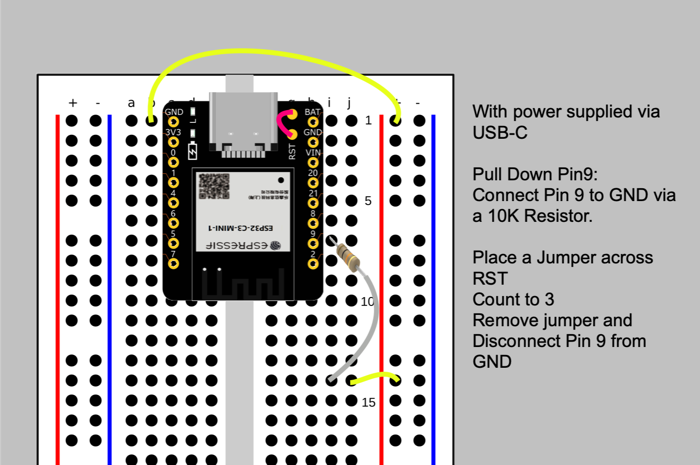
added pre-commit as it wasn't installed resulting in error when following learn guide: https://learn.adafruit.com/building-circuitpython/build-circuitpython
radiant trench
😄
manic glacierBOT
 dense hound
hey guys, quick PR question - to add support for a RTC I ended up needing to add many optional arguments to adafruit_register.i2c_bcd_datetime and adafruit_register.i2c_bcd_alarm - is that something that I should propose as a PR? Or are those classes supposed to stay simple
tidal kiln
could open an issue in the repo as a way to start a general discussion
manic glacierBOT
I think we will need something like this. I'm still thinking over exactly how I want to organize the status bar stuff.
radiant trench
Is there someone at Adafruit I need to ping to get the learn guide updated now that part is no longer needed?
slender iron
what part isn't needed?
slender iron
dense hound
hey guys, quick PR question - to add support for a RTC I ended up needing to add...
PRs are great if you've already made the changes
manic glacierBOT
Ok, this is as intended then. @prcutler let me know if you think we should do something else.
idle owl
radiant trench
Is there someone at Adafruit I need to ping to get the learn guide updated now t...
If a guide needs to be updated, please click the "Feedback? Corrections?" link at the end of the list on the left side of the guide page, and let us know what needs to be updated. I would follow up with Scott's question though to make sure anything needs to be changed.
slender iron
@tulip sleet you should like https://github.com/adafruit/circuitpython/pull/6651
manic glacierBOT
CI failure due to mac brownout. Not this PR.
This is likely because the "beforeinput" event handler needs to look at input types that are caused by the paste.
What chip are you trying to run CircuitPython on? How is it not working? Please link to the code you are working on.
We do support riscv32 on the ESP32-C3 already.
CI failure is due to mac brownout. Not this change.
Still good! CI failure is due to mac brownout.
By reinstalling a CircuitPython UF2, I would expect the drive to now be called "CIRCUITPY" - doesn't things like Mu rely on that?
Hurrah on the CI improvements - very nice!
I tried the web workflow on an ESP32-S2 Feather TFT. Starting up with correct credentials is very snappy. Starting up with a bad password shows "Authentication Failure" on the display pretty quickly, but the lines like:
Auto-reload is on. Simply save files over USB to run them or enter REPL to disable.
code.py output:
come out slowly, with a few seconds in between each line. (The printing of each line is fine; it's the interval betwee...
tulip sleet
@slender iron should we bump the mpy-cross-mac build to macos-11? I'm thinking that rather than 12. 12.0 was released 10/2021. 11 was introduced 11/2020.
I have not heard of many people running 10.x (except my father 🙂 ) and the older ones can remain for download
tulip sleet
i'll make a PR
manic glacierBOT
GitHub Actions is dropping runs-on: macOS-10.5. There have been intermittent brown-outs to alert us of this, with the message:
_This is a scheduled macOS-10.15 brownout. The macOS-10.15 environment is deprecated and will be removed on August 30th, 2022. For more details, see https://github.com/actions/virtual-environments/issues/5583_
Update to macos-11, not macos-12 since many users may still be on 11.
Also update the names to have the architecture uniformly as the suffix: ...
manic glacierBOT
It had a tight 5ms timeout before that caused some characters to
drop. Now the wait is longer and reset after a successful transmit.
This follows what MicroPython does.
Fixes #6220
Failed due to mac brownout. Not this PR.
slender iron
I enabled auto-merge on the circuitpython repo
tulip sleet
does that mean an approval causes a merge?
slender iron
approval + green CI
tulip sleet
if there is more than reviewer, does it wait for all?
slender iron
not sure
tulip sleet
looking...
it doesn't really say
we can see what happens. Sometimes I don't want this - I want to approve but defer the merge build for timing reasons. It's not so much the merge, but the action triggering
radiant trench
I'm still having some trouble getting my build environment working... when I run the pre-commit install stage, I still get the error zsh: command not found: pre-commit (and I ran pip3 install pre-commit first which seems to have gone fine)
radiant trench
ah cool. ok. So on to the next problem 😄
I'm in the directory ports/espressif and I run the command make BOARD=adafruit_feather_esp32s2_tft I get the error CMake Error: CMake was unable to find a build program corresponding to "Ninja". CMAKE_MAKE_PROGRAM is not set. You probably need to select a different build tool.
(sorry for all the questions, I'm not familiar with a lot of these tools)
slender iron
did the esp-idf install work?
radiant trench
this is the full error:
IDF_PATH=/Volumes/CP-DEV/circuitpython/ports/espressif/esp-idf cmake -S . -B build-adafruit_feather_esp32s2_tft/esp-idf -DSDKCONFIG=build-adafruit_feather_esp32s2_tft/esp-idf/sdkconfig -DSDKCONFIG_DEFAULTS="esp-idf-config/sdkconfig.defaults;esp-idf-config/sdkconfig-opt.defaults;esp-idf-config/sdkconfig-4MB.defaults;esp-idf-config/sdkconfig-esp32s2.defaults;boards/adafruit_feather_esp32s2_tft/sdkconfig" -DCMAKE_TOOLCHAIN_FILE=/Volumes/CP-DEV/circuitpython/ports/espressif/esp-idf/tools/cmake/toolchain-esp32s2.cmake -DIDF_TARGET=esp32s2 -GNinja
CMake Error: CMake was unable to find a build program corresponding to "Ninja".  CMAKE_MAKE_PROGRAM is not set.  You probably need to select a different build tool.
-- Configuring incomplete, errors occurred!
See also "/Volumes/CP-DEV/circuitpython/ports/espressif/build-adafruit_feather_esp32s2_tft/esp-idf/CMakeFiles/CMakeOutput.log".
make: *** [build-adafruit_feather_esp32s2_tft/esp-idf/config/sdkconfig.h] Error 1
Ahhhhhh 😄
tidal kiln
@tulip sleet hey, can u take a quick look at this and see if you've got any suggestions. i think i'll set this back up and look into it a little more.
https://github.com/adafruit/Adafruit_CircuitPython_MPL3115A2/issues/19
tulip sleet
tidal kiln
<@329766224093249548> hey, can u take a quick look at this and see if you've got...
if it doesn't even work on SAMD51, I'm at a loss. You could try SAMD21; if it works it might indicate a timing problem. Is the library maybe making a mistake about something, and the chip is responding in a fragile way?
radiant trench
slender iron
follow this? <https://learn.adafruit.com/building-circuitpython/esp32-s2-build>
How the heck do you keep this all in your heads? 😄
tidal kiln
tulip sleet
if it doesn't even work on SAMD51, I'm at a loss. You could try SAMD21; if it wo...
yah. ok. not sure. so...will investig8. thanks!
tulip sleet
tidal kiln
yah. ok. not sure. so...will investig8. thanks!
maybe interesting: https://www.avrfreaks.net/forum/solved-fleury-i2c-problems-mpl3115a2
there are many itneresting results with https://www.google.com/search?q=MPL3115A2+i2c+problems
not just CircuitPython by any means
tidal kiln
great. maybe it's destined for a place here:
https://learn.adafruit.com/i2c-addresses/troublesome-chips
jaunty juniper
radiant trench
How the heck do you keep this all in your heads? 😄
that's what guides are for 😉 Me, I write myself scripts so I don't have to look it up
radiant trench
ha ha, makes a lot of sense if you're doing this stuff on the daily for sure
tulip sleet
tidal kiln
great. maybe it's destined for a place here:
<https://learn.adafruit.com/i2c-add...
the datasheet does not really say what value pull-ups are recommended, but the timing values table shows 1k pullups (!).
radiant trench
slender iron
follow this? <https://learn.adafruit.com/building-circuitpython/esp32-s2-build>
ok I followed that but still having some troubles, it's getting late here now and I've just about run out of steam, I'll come back to it tomorrow with a fresh head hopefully
Thanks for all the help so far everyone! You sure know how to make people feel welcome!
tulip sleet
@slender iron @onyx hinge FYI, GitHub actions is pretty flaky today. Most job sets have at least a couple of failures that are internal Azure network failures. I found another job that had spent an hour trying to fetch the last little bit of some file, and cancelled that run (it was just a PR merge build).
proven garnet
@idle owl - this quick PR I think should resolve the pylint errors listed on circuitpython.org by forcing adabot to use the same pylint version as the repos, let me know what you think whenever you get a chance to take a look: https://github.com/adafruit/adabot/pull/282
GitHub
Based on what I'm seeing here, I think a mismatch between the version of pylint being used within adabout on the libraries, and what the version the pre-commit hooks are running is likely causi...
idle owl
Will do in a bit!
slender iron
radiant trench
Thanks for all the help so far everyone! You sure know how to make people feel w...
Thanks for the help! We do it every day and, therefore, remember more of it.
idle owl
proven garnet
<@330227457296957440> - this quick PR I think should resolve the pylint errors l...
Merged!
 tiny token
a small celebration here... I was able to build my own CP .uf2 for a rp2040 today using WSL. Even loaded it to the board and it's working. Woot!!!!
 onyx hinge
I guess we'd better finish version 8, the poster has come into stock! https://www.adafruit.com/product/5513

Can you believe CircuitPython is now in its eighth iteration? That's right! Join us, Blinka, and the ESP32 maker community as we connect ...
 brazen hatch
Is psram slow or is it my idea?
built tinyuf2 & circuitpython from scratch for Waveshare ESP32-S2-Pico
and successfully booted ljinux onto it
but the commands seem oddly slow to start and finish
tulip sleet
certainly slower than on-chip static ram
brazen hatch
like its not a catastrophic delay, but its a good half a second for most external commands
thats a board circuitpy doesnt support, and I will have to pr it when im done
waveshare is kinda weird
they "advertise" circuitpy support, but they provide a uf2 for a completely different board..
tulip sleet
it's not -that- slow, it maybe reading files or something
brazen hatch
tulip sleet
it's not -that- slow, it maybe reading files or something
yea, ljinux commands are files, cant keep em all in ram. I need it to work under 120k
but that half a second delay is not present on the pico
slender iron
@onyx hinge still waiting for your review: https://github.com/adafruit/circuitpython/pull/6608
brazen hatch
brazen hatch
but that half a second delay is not present on the pico
perhaps I have something wrong with my board config for the build, I will have to test it more extensively when I get the platform changes for ljinux in place
manic glacierBOT
I have seen the "Could not decode a text frame as UTF-8" dev console message a number of times when the serial console stops working but it's difficult to nail down reproducible steps. I think the following REPL commands do cause the error on all three chip types:
 a = b'*'*160
 print(str(a))
@slender iron I'll try to get to it after S&T, thanks for the ping! hopefully my brain is still working so I can give it proper review.
slender iron
it's blocking a couple other PRs, so that's why I'm bugging you
could have dan review
onyx hinge
OK, I think I can get it done.
@tulip sleet have you checked whether booting a no-psram build on a has-psram module has the same problem? for devkits I'm only seeing ESP-WROVER-KIT with jtag, but it has psram. in any case, let me know what you pick up and I'll preemptively pick up two too
tulip sleet
onyx hinge
OK, I think I can get it done.
i was testing on ESP32 V2 Feather, just now
@onyx hinge https://www.digikey.com/en/products/detail/espressif-systems/ESP-WROVER-KIT-VE/13584249 maybe. also the smaller Saola boards. I have to go, will look later tonight
Order today, ships today. ESP-WROVER-KIT-VE – ESP32-WROVER-E series Transceiver; 802.11 b/g/n (Wi-Fi, WiFi, WLAN), Bluetooth® Smart Ready 4.x Dual Mode Evaluation Board from Espressif Systems. Pricing and Availability on millions of electronic components from Digi-Key Electronics.
Order today, ships today. ESP32-DEVKITC-VIE – ESP32-WROVER-IE series Transceiver; 802.11 b/g/n (Wi-Fi, WiFi, WLAN), Bluetooth® Smart Ready 4.x Dual Mode Evaluation Board from Espressif Systems. Pricing and Availability on millions of electronic components from Digi-Key Electronics.
not saola, thats ESP32-S2
onyx hinge
another distinguishing feature is the embedded FTDI FT2232HL chip - an advanced multi-interface USB bridge. This chip enables to use JTAG for direct debugging of ESP32 through the USB interface without a separate JTAG debugger https://docs.espressif.com/projects/esp-idf/en/latest/esp32/hw-reference/esp32/get-started-wrover-kit-v3.html
I think this is the one to get
https://www.espressif.com/en/products/devkits lists features, and this is one of the only two with JTAG listed. The other is ESP32-LyraTD-MSC which is for audio stuff and it doesn't seem to be via the dual-ftdi solution
For easy prototyping and interfacing choose Espressif’s development boards! Powered by our well-known SoCs, the all-in-one DevKits are all you need to develop your own IoT applications.
tidal kiln
@tulip sleet fyi:
https://github.com/adafruit/Adafruit_CircuitPython_MPL3115A2/pull/22
it was just a silly software thing
manic glacierBOT
manic glacierBOT
Hi! I spotted one thing I think needs to be fixed (the buffer that's not used anymore), and a couple of other things that I wasn't sure about.
thanks for incorporating the idea about using mp_printf. I hope it saved code size.
does it matter if a location like "circuitpython.local.example.com" would now be a match according to strncmp()?
Is there a port_encoded[5] = 0 or port_encoded[port_len] = 0 needed here, to ensure the string is terminated before passing it to strtoul? (since port_encoded is a local variable with no initializer, I think the contents are unpredictable)
is this encoded_len used anymore? I think it can be safely deleted.
onyx hinge
@slender iron I wonder if it would be helpful to add a function that gets a guaranteed-terminated, guaranteed-untruncated value. I think it might read like this but of course with buffer handling in C there's always a great deal of room for embarassing failure: ```c
/* Retrieve the value for a given key, if it fits in the buffer (including a terminating '\0')
*
- Returns: NULL if the key was not found, or the value did not fit (including the terminating '\0')
- Returns: value if the key was found, and its value fit. value is a '\0'-terminated string.
*/
char *dotenv_get_key_terminated(const char *path, const char *key, char *value, mp_int_t value_len) {
mp_int_t actual_len = dotenv_get_key(path, key, value, value_len-1);
if(actual_len == -1) {
return NULL;
}
if(actual_len >= value_len) {
return NULL;
}
value[value_len] = 0;
return value;
}
drat, the direct use of the FAT file access APIs means I can't build dotenv module into the unix port for testing. 😕 @slender iron I guess this is a necessary evil? Does it mean I also couldn't access /sdcard/.env with it if I mount /sdcard?
slender iron
@onyx hinge probably. I need to figure out what api to use. Probably the same reason that mounting an sd card messes up the web workflow
manic glacierBOT
CircuitPython version
Adafruit CircuitPython 8.0.0-alpha.1-75-gfed3f9c97-dirty on 2022-07-27; Raspberry Pi Pico with rp2040
Code/REPL
import dotenv

for i in range(0, 11):
    key = f"env_test_{i}"
    value = dotenv.get_key("env_test", key)
    print(i, key, repr(value))
Behavior
compared to running on cpython with python-dotenv installed, the variables env_test_8 and env_test_9 get incorrect values due to a bug in parsing
Descript...
Output with standard Python:
Key env_test_0 not found in env_test.
0 env_test_0 None
1 env_test_1 'hi mom'
2 env_test_2 'hi mom'
3 env_test_3 'hi mom'
4 env_test_4 'hi mom'
5 env_test_5 None
6 env_test_6 ''
7 env_test_7 '#'
8 env_test_8 ''
9 env_test_9 '#'
10 env_test_10 'last'
(note that the "Key env_test_0 not found" line is printed by dotenv, but this behavior is probably not important)
circuitpython prints:
0 env_test_0 None
1 env_test_1 'hi mom'
2 env_te...OK this is not super important, but wanted to report it anyway ^^^
tulip sleet
tidal kiln
<@329766224093249548> fyi:
<https://github.com/adafruit/Adafruit_CircuitPython_M...
glad to hear it is not totally weird
@onyx hinge ok I am back, so https://www.digikey.com/en/products/detail/espressif-systems/ESP-WROVER-KIT-VE/13584249 is what you got?
onyx hinge
yes
the espressif page says -E so not sure how -VE is different. part numbers are hard.
tulip sleet
yes, that looks right to me, so I'll get two. Mouser has the same thing
onyx hinge
OK. I'm unlikely to get to it this week. Next week I'll be prepared to switch off with you if you haven't cracked it.
tulip sleet
onyx hinge
OK. I'm unlikely to get to it this week. Next week I'll be prepared to switch of...
I think I will also get this: https://www.digikey.com/en/products/detail/espressif-systems/ESP-PROG/10259352 which seems like just the JTAG part -- may come in handy with other boards
onyx hinge
oh, too bad I missed seeing that. I'll try to remember it if I make another digikey order sometime soon
tulip sleet
i'll tell you if it's good for anything
manic glacierBOT
hidden rain
Evening. About ready to build with a test module for RP2040. I have files in shared-bindings subfolder and in ports/raspberrypi/common-hal subfolder. The instructions indicate to add file names to Makefile (SRC_SHARED_MODULE list) and mpconfigport.h (EXTRA_BUILTIN_MODULES). However, these places do not exist, so instructions might be a bit dated. Can not find a consistent example to follow. Please guide...
tulip sleet
hidden rain
Evening. About ready to build with a test module for RP2040. I have files in sha...
You don't do that any more. Just add something like this to the bottom of the __init__.c file for your new module:
MP_REGISTER_MODULE(MP_QSTR_busio, busio_module, CIRCUITPY_BUSIO);
ah.. already did that. guess i'm a little over efficient and precautious.
tulip sleet
substitute the name of your module for busio and BUSIO. CIRCUITPY_BUSIO indicates the compile-time enable/disable flag, which is handled in py/circuitpy_mpconfig.mk and py/circuitpy_config.h. Look at other examples there.
put it in alphabetical order
hidden rain
Will do.. very close now. After test module works out, I'll start on the ADC-DMA stuff. Already found lots of good references and some code. Will resume tomorrow .. was up at 5AM ...pushing this thru...Thanks!
manic glacierBOT
//| ``service_type`` and ``protocol`` can only occur on one port. Any call after the first will
 quaint gull
rough folio
quaint gull
rough folio
you could just write a code.py that was just import main
but micropython and circuitpython are somewhat incompatible lib-wise
and course that wouldn't work if you did the whole if-name-eq-main affair
tulip sleet
quaint gull
So does anyone have a CircuitPython build that renames main.py like you can down...
what board is it? You can go into safe mode https://learn.adafruit.com/welcome-to-circuitpython/troubleshooting#safe-mode-3105351 though it's a little hard to see on a Pi Pico. Worst case you can load an eraser that clears CIRCUITPY
yes #help-with-circuitpython is a more appropriate channel
rough folio
Oh
and I
entirely missread the question
quaint gull
tulip sleet
yes <#537365702651150357> is a more appropriate channel
Dan it's a Pico W. Sorry, should have mentioned that in the question.
tulip sleet
quaint gull
Dan it's a Pico W. Sorry, should have mentioned that in the question.
This UF2 will erase all flash: https://learn.adafruit.com/getting-started-with-raspberry-pi-pico-circuitpython/circuitpython#flash-resetting-uf2-3083182
or you can touch the reset pin to ground twice with a slight delay to simulate a slow double-click, which would get you into safe mode
quaint gull
tulip sleet
This UF2 will erase all flash: <https://learn.adafruit.com/getting-started-with-...
Yep, I wound up using the UF2 on raspberrypi.org to reset the flash. Lost a bit of work on my project but shouldn't be too hard to get back. Moral of the story: always make backups. 🙂
@tulip sleet I'm also using your excellent library to use an LCD with a PFC8574! Can't wait to do a show-and-tell of my MIDI control code footswitch.
tulip sleet
thanks! glad it was useful
manic glacierBOT
@tannewt I had to remove special-case stuff for the M1; it is no longer necessary.
radiant trench
Hey folks, I know most of you are probably asleep so no rush on this one, but I'm still having trouble building CP for the Feather ESP32-S2 TFT. I can build the standard ESP32-S2 and other boards successfully but get this massive wall of errors when I build the TFT feather). If anyone has any thoughts, I would appreciate it. Cheers! https://gist.github.com/andywarburton/c45d44b2add4c7b268fe6cc1cf849f70

Gist
Can't build ESP32-S2 TFT. GitHub Gist: instantly share code, notes, and snippets.
jaunty juniper
radiant trench
Hey folks, I know most of you are probably asleep so no rush on this one, but I'...
did you try a make BOARD=... clean ?
stuck elbow
yes
you can also try re-running esp-idf/install.sh and . esp-idf/export.sh to make sure you have the right version
radiant trench
looks like it's going well now!
yes it worked!
Thanks folks
Yay! I managed to successfully flash a self-built UF2 file to my Feather. Ok now I can get down to work!
stuck elbow
it's just the beginning
radiant trench
ok I know this is ugly as sin, but I just wanted to check and I've now been able to add an external css file with modifications to my custom build.
 manic glacierBOT
Added a bare minimum css implementation to web workflow to improve readability
brazen hatch
I have finally gotten the Waveshare ESP32-S2-Pico working properly
Waveshare's uf2's were borked (did not use psram or the led) and obsolete (cp 6.x)
Is there a proccedure for pr'ing new boards to circuitpython?
Or do I just yolo the pr?
I have also built tinyuf2 and I'm ready to pr that too
 random junco
brazen hatch
I have finally gotten the Waveshare ESP32-S2-Pico working properly
Waveshare's u...
random junco
brazen hatch
I have finally gotten the Waveshare ESP32-S2-Pico working properly
Waveshare's u...
Have you seen: https://learn.adafruit.com/how-to-add-a-new-board-to-circuitpython ?
brazen hatch
no I haven't, I will read it now, thanks!
manic glacierBOT
The default extension is now set to "bin" for C3 in mpconfigport with #6629.
Undoing the change to build_board_info.py will resolve the conflict.
manic glacierBOT