#Can someone help me install
38 messages · Page 1 of 1 (latest)
 zinc tartan
 jaunty pond
On Windows? Use Vortex mod manager. It's easy to use and add your mods to that
Nexus Mods :: Vortex Mod Manager
zinc tartan
yeah it wont bring up the mod menu in the game
 empty echo
On epic you can't use qmm mods, you have to use living large mods. On living large, the mods menu in game only shows up if you have a mod installed that adds it, like nautilus.
 limpid cedarBOT
On December 14th 2022, the Living Large update was released, which broke QModManager along with the majority of available mods. As a result, support for QModManager ended going forward (it is currently only being used to mod older versions of the game). Modding the latest version of the game now requires the Subnautica BepInEx Pack.
Latest (2.0 - Living Large Update)
- Uses BepInEx Pack to load mods
- Is only compatible with mods made for BepInEx
- Mods must be updated and/or released after December 14th 2022
- Note: If a mod has Legacy in its name or title that means you still can't use it, as it was made for the Legacy branch despite the date it was published on.
Legacy
- Uses QModManager to load mods
- Is only compatible with mods made for QModManager (with few exceptions. See individual mod page's description for details)
zinc tartan
so i just download that
empty echo
Install bepinex pack and nautilus. Uninstall QModManager if you installed it
zinc tartan
damn how do i uninstall
empty echo
Did you install qmm with vortex?
zinc tartan
yeah
empty echo
In the mods list where it says enabled next to qmm
Change the drop-down to uninstalled
zinc tartan
and then activate tobeys
empty echo
Yep. And nautilus.
zinc tartan
wait nautilus what is that
empty echo
It's a mod library that many mods use
It adds the mod menu to the options menu in game
empty echo

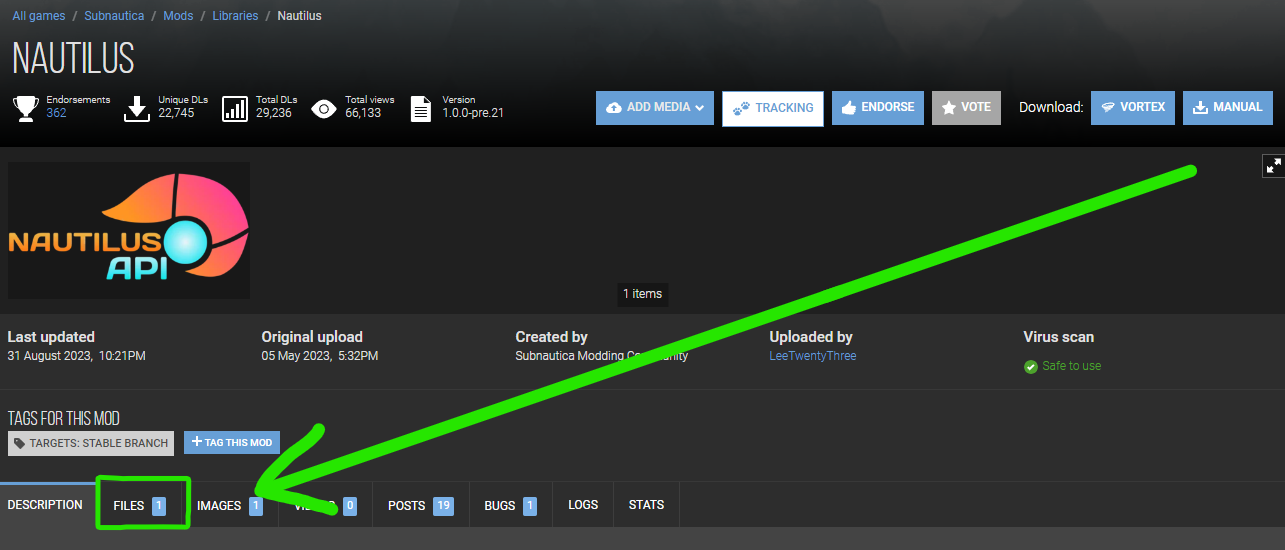
Nexus Mods :: Subnautica
Nautilus is the core Subnautica modding library that aims to enhance developer productivity by offering common helper utilities as easy to use and robust as possible.
empty echo
zinc tartan
okay both of them are downloaded now
Cool. Do you have any notifications in vortex? In the bell icon at the top right?
zinc tartan
yeah i deployed and shi
empty echo
And there aren't any warnings or errors in notifications?
zinc tartan
nah none
empty echo
zinc tartan
what mods are the best for this
It's not really my place to tell you what mods are best. And I don't really have the time, either. I'm here to help you get mods installed. It's your job to decide what mods you want. Browse around nexus, look through trending and popular mods, etc. Read what they do.
zinc tartan
right thanks bro
empty echo
But just remember, you can only use mods for living large
limpid cedarBOT
 Subnautica | Identifying Mods for Legacy & Mods for BepInEx (Living Large / 2.0)
Note: Legacy is the version of the game prior to the Living Large update, available only via Steam
- Mod title
- Does not apply to all mods, but recently updated mods tend to include either 'BepInEx' or 'Legacy' in their mod title to indicate which version of the game it is made for
- Description
- You should always read the description of any mods you wish to use, 99% of the time this is all you need to do to determine if a mod is for BepInEx or legacy
- Release date
- BepInEx: any mods that have been released after December 14th 2022 and meet other listed criteria are likely for BepInEx
- Legacy: any mods that have not been released or updated since December 14th 2022 will 100% of the time be for legacy
- Requirements
- BepInEx: dependencies set to the BepInEx Pack, or Nautilus and other 2.0 only mods
- Legacy: dependencies set to QModManager, SMLHelper 2.15 or older, or other legacy only mods
- Mod contents
- BepInEx: should not contain a mod.json file
- Legacy: should always contain a mod.json file (exceptions apply to some plugins that work on legacy, e.g. SnapBuilder)
- Mod tags
- BepInEx: has the tag "Targets: Stable Branch"
- Legacy: has the tag "Targets: Legacy Branch"
Note: Some mods may indicate they are for BepInEx in their title and description, but have a Legacy version available in the Files tab, as you can see in the image below: