After changing my PC and operating system from Windows 10 pro to Windows 11 pro, I can't get the voice commands in singleplayer to work at all, which is a real shame, because they contributed majorly to immersion. Tested in a few vanilla missions. I checked if the correct microphone is selected and if my game window is focused on, I tried both PTT and hot mic, verified the game files, even changed my display language and configured and run windows speech recognition, because I read somewhere that it's needed, although I'm pretty sure it worked fine with display language set to Polish and without the speech recognition running on my last PC. Nothing worked, so I purged the folder and reinstalled the game, thinking that maybe there is something left from the mod manager that broke it? But that didn't work either, no one responds and now I'm sad, as using the screens for comms is much less fun. maybe I'm missing something obvious? Please help. Attaching player logs.
#Voice commands no longer working
1 messages · Page 1 of 1 (latest)
 cursive vault
 junior mural
Can you talk to other players in multiplayer?
cursive vault
I Haven't tested that yet after the problem occured, I will let you know when I do. But I played for example VRChat and people could hear me normally.
cursive vault
junior mural
Can you talk to other players in multiplayer?
I tried it, and yes, other players hear me well, both in the briefing room and while flying.
cursive vault
Do you need any other info?
junior mural
Not AFAIK, but I'm afraid I can't help with this either. Have to wait for Baha.
Sorry I forgot to remove the"need info" tag
 distant pivot
I hope you don't mind me putting this here, because it seems kind of related - but yetserday I noticed people couldn't hear me after I had died and respawned.
cursive vault
junior mural
Not AFAIK, but I'm afraid I can't help with this either. Have to wait for Baha.
About when will Baha be able to help? I'm really missing those singleplayer voice commands...
junior mural
No idea. He comes and goes.
junior mural
@twin turtle is having the same problem: #1044438264137928714 message
Ok, so before I played I checked and verified all 579 files were valid. Player no Voice Commands. Closed game. Reverified files. All OK. started game. Comms worked, but experienced shuttering on comms activations. After a few minutes Voice Commands no longer working. All this time the comms on the MFCD always worked. This is starting to suck BIG TIME!
Voice commands no longer working
 twin turtle
Update: I unistalled the Mod Loader completely. I also went and uninstalled the game and reinstalled it. Voice Commands now seem spotty at best. Soemtimes they work, sometimes they don't. I am also using Windows 11 and have to stop the holograhic shell everytime I start my computer (last Windows update caused annoying lagging & shuttering). Stopping the shell rectifies that issue. Hopefully the Voice Commands issue will be rectified as well as I really enjoy this game!
twin turtle
So today, upon mic activation (PTT) game shuttered. It did this two or three times, then.... Voice Comands for the duration without issue. We'll see what happens next time! The saga of the Voice Commands mystery continues!
cursive vault
Interesting, for me a voice command hasn’t worked even once since I wrote the post, and I tested a few times. Also I have no idea what holographic shell is…
twin turtle
There seemsto be an issue with the Windows 11 update 22H2. I am using the HP Reverb 2 and had a lot of head movement issues after the update. Now when I start my computer I have to do the following: Go to Computer Management → System Tools → Performance → Data Collector Sets → Event Trace Sessions. In this list, find HolographicShell, right click, and choose ‘Stop’. Again though, not sure if this is related to the Voice Commands issue.
 spare scarab
might be a accent issue
cursive vault
Hmm, I don’t think my accent has gotten much worse since the time that they worked.
cursive vault
twin turtle
There seemsto be an issue with the Windows 11 update 22H2. I am using the HP Rev...
Alright I will try doing that too.
twin turtle
Gave it a rest for a couple of days. Went on tonight, played for almost 3 hours no problems with Voice Commands! Worked first time - and every time after that. Go figure...? Hopefully my issue is solved, don't want to jinx it though 🙂
cursive vault
twin turtle
There seemsto be an issue with the Windows 11 update 22H2. I am using the HP Rev...
I don't even see anything called HolographicShell in here, I'm pretty sure it's the right place...
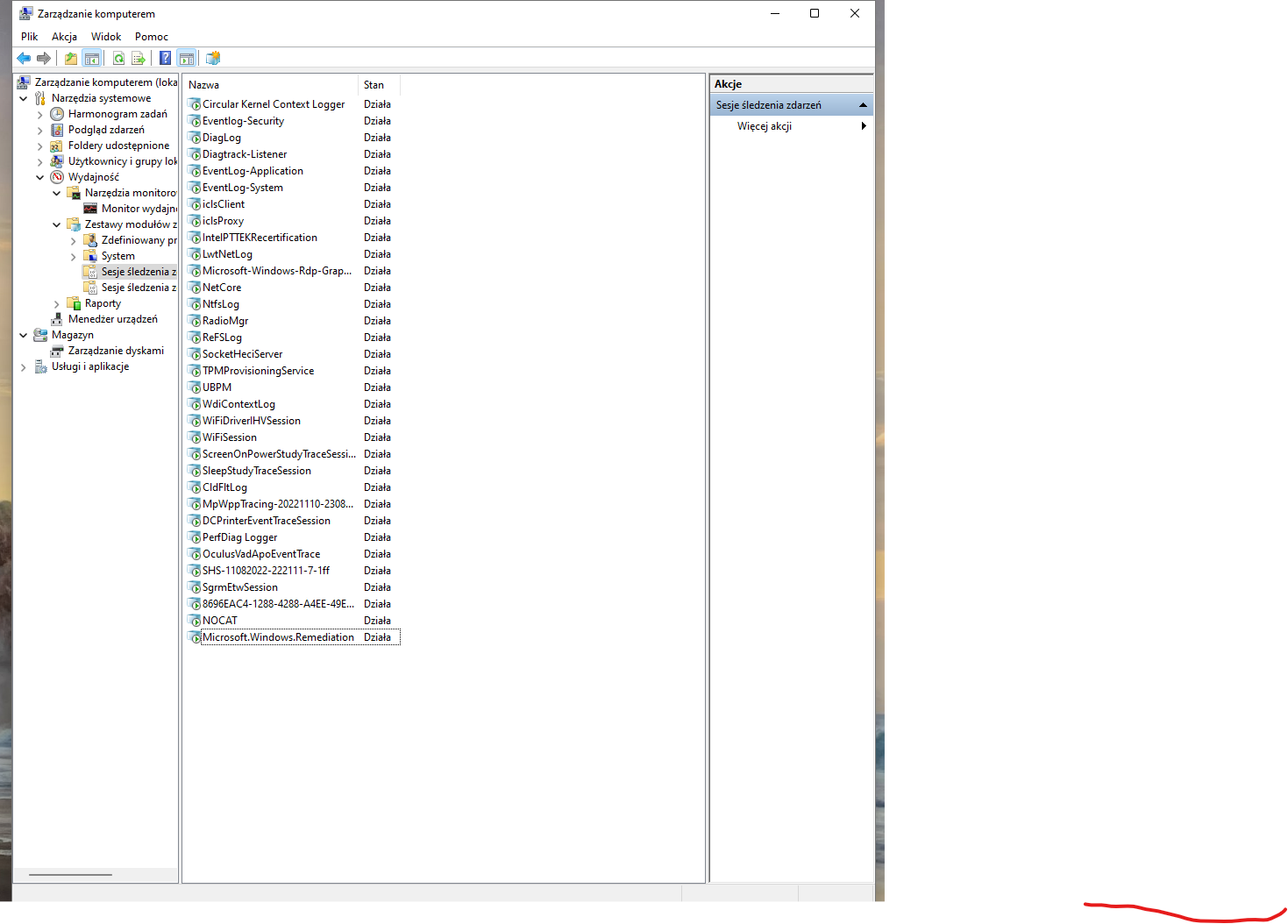 twin turtle
Looks like the right place. I have noticed on ocasion it is not there as well. Maybe start Steam and/or the game?
twin turtle

Well, I jinxed it! No joy when I started game tonight. Did a restart and they worked a few times, then stopped working. On initial attempts to use Voice Commands I usually get a lot of stuttering then it clears right up. Same thing happens when I do a screen shot (SS) from the S-Cam screen. Just gonna ride it out and wait for updates for Windows or the game itself. MFCD Comms have always worked just fine. Put my logs up in case someone can figure this out from there. I refuse to give up on this sim - it's awesome. Just an FYI - I played DCS for almost a year and it just wasn't fun. Too many tech issues for one, and second all the peripherals and mods got expensive quickly, lastly learning the F/A-18C was a full time job (over a 700 page Chuck's guide - jeez I already have a FT job and finished grad school a long time ago!). Sold all the peripherals on eBay - much to my wife's chagrin - haha! "FLY VTOL VR NAVY"
cursive vault
twin turtle
Looks like the right place. I have noticed on ocasion it is not there as well. M...
Nope, it still wasn't there, maybe that's a good thing.
cursive vault
twin turtle
Well, I jinxed it! No joy when I started game tonight. Did a restart and they wo...
Yes, the game is awesome, even with only MFCD Comms, but it's even better with verbal commands. My root problem seems to be different to yours, though, I don't get any stuttering, never a response, nothing.
twin turtle
Yeah, they sound like different issues. I might just as well re-install the mod loader, as I really liked the extra air traffic and contrials!
twin turtle
Sooooo, after much trial and error I figured out my issue!!!! I just have to make sure to click on the VTOL page once I start the game so Windows will then recognize Voice Commands. This fix has completely fixed the issue mods installed and all 🙂 Cheers!
I actually meant to say, "I must click anywhere on the VTOL VR window which opens once the game has started"... o7
cursive vault
Yesterday, I updated the game to v1.5.1 and cliked on the game window a few times. Voice commands still did not work once. Today I switched my system language to english again, set up voice access and tested it, signed in to Cortana for the first time and it worked well. I changed my privacy settings for Cortana to be able to be activated by voice. I launched the game, switched it to fullscreen again and cliked on the window. Started playing, voice commands still didn't work. I voice-activated Cortana and told her to search up something. The game's sound stopped while she responded and then returned. A bit later, a voice command WORKED, for the first time on the new PC and operating system. Then they worked well for the rest of the session. I don't know what happend but I hope they keep working. Attaching logs for analysis.
twin turtle
voice commands work for me and I have cortana completely disabled. all I have enabled is to allow desktop apps to access my microphone under the "Microphone" privacy settings page, and have online speech recognition turned ON
Just installed Windows 11 Pro yesterday

I don't think Windows 10 had this same requirement, but I am not sure.
twin turtle
cursive vault
Yesterday, I updated the game to v1.5.1 and cliked on the game window a few time...
👍
 dawn moat
voice commands never worked for me no matter how hard I tried to fix it