#Platinum — Path Tracing in Metal
1 messages · Page 2 of 1
 timid frigate
what a "new sampler" is?
 winged veldt
implementing the sampler from ahmed/wonka https://abdallagafar.com/publications/zsampler/
iirc you sent me that paper
timid frigate
winged veldt
implementing the sampler from ahmed/wonka https://abdallagafar.com/publications/...
oh yeah it is good
timid frigate
winged veldt
implementing the sampler from ahmed/wonka https://abdallagafar.com/publications/...
not published yet?
winged veldt
wdym
timid frigate
on your github
winged veldt
no, i'm working on it
 quick zealot
so what's this one? the sampler
timid frigate
winged veldt
implementing the sampler from ahmed/wonka https://abdallagafar.com/publications/...
@quick zealot this one
quick zealot
oh ye 
timid frigate
please show compare on 64 spp this new one vs older(it was halton?)
winged veldt
so it's sort of working, but doesn't look right, there's a lot of artifacts at 1k spp that makes me think there's some sample correlation

my approach is a little different from the one in the paper, as i generate samples on the fly while they seem to generate all the necessary samples ahead of time (i don't know how that is even remotely practical), but they should be mathematically equivalent so i suspect there's a bug
there's also clearly correlation between samples of the same pixel, because gmon isn't even getting rid of all the fireflies—which means there are repeated outlier samples in the same pixels
 winged veldt
@timid frigate have you implemented this thing before? i think i have no clue how it actually works
timid frigate
winged veldt
<@370829073288527872> have you implemented this thing before? i think i have no ...
no. I just checked how it works in https://github.com/MomentsInGraphics/vulkan_renderer
maybe try to use this github source?
GitHub
A toy renderer written in C using Vulkan to perform real-time ray tracing research. - MomentsInGraphics/vulkan_renderer
winged veldt
i'll check it out, hopefully less weird than the code from the paper
timid frigate
winged veldt
so it's sort of working, but doesn't look right, there's a lot of artifacts at 1...
can you do 2 images to compare?
w/o usage of gmon. for samplers compare - new and old
winged veldt
ye, i'll do that when it's not broken 
winged veldt
timid frigate
no. I just checked how it works in https://github.com/MomentsInGraphics/vulkan_r...
ah, the renderer doesn't implement the sampler, it loads a precomputed noise texture
timid frigate
yes. why need to compute? use precomputed
winged veldt
...no?
how does a precomputed texture even deal with the high number of samples and unknown number of dimensions needed
in any case even then i'd have to implement the thing offline, which that repo doesn't
timid frigate
dont know but works ok
please reread pdf and article about this texture usage https://momentsingraphics.de/ToyRenderer3RenderingBasics.html
 bronze sedge
btw do you not like the fbx sdk for a specific reason?
timid frigate
bronze sedge
btw do you not like the fbx sdk for a specific reason?
I like one header libs
winged veldt
oh my god i am fucking stupid
so the reason the samples were fucked was because i changed the sampler init to use the proper spp number for the naive kernel and forgot to change the hardcoded 128 for the mis+nee kernel
so it was fine up to 128 samples then it got fucked
i think it works fine now, but i still have a bug where it freezes if the sample count is a power of 4 (they are handled differently at one point, so no surpises there)
it's also a really annoying bug because for some reason when it happens it fucks the driver and i have to restart my mac to unfuck it
at least it restarts in like 10 seconds
 hazy zenith
That sounds like the average GPU programming experience 
winged veldt
@timid frigate here's the comparison you asked for and some more: top is the old halton sampler, bottom is the z/sobol sampler

(the image is huge, so open it in a browser window and zoom in)
to be honest, i'm gonna go ahead and call this a fail
i'm not sure my implementation is entirely correct, as it's showing some structured artifacts that shouldn't be there (most visible at 4-16spp), but my code is mathematically equivalent to the implementation provided by the authors and very similar to the pbrt v4 implementation, so it should be fine
though the pbrt version does add owen scrambling on the samples, and i know for a fact that works well because i used it for yart, so i'll add that and see how it compares
at higher sample counts they're close as makes nearly no difference visually, z/sobol is maybe a little cleaner (not sure how much is down to faster convergence or blue noise, hard to tell at that point) but the structured artifacts are still there so it loses for overall image quality
and then there's the part the comparison doesn't show: z/sobol sampler is consistently about 50% slower at the same sample count, and gets worse with more samples, being as much as 67% slower at 4k spp

honestly, i think the main takeaway here is the halton sampler i already had is not so bad after all
 copper halo
do you happen to have a gltf of your test scene, i wonder how my piece of junk would render it 
winged veldt
it's about as good iq-wise, much faster so in equal render time it wins by a mile, and is much simpler with 25% of the code by line count (and much more readable code to boot)
so i think i'm going to stick with it, i put it in a class to make sampling more ergonomic and replaced the shitty cpu-side-generated randomness texture with pcg4d in the shader and... it works great
winged veldt
copper halo
do you happen to have a gltf of your test scene, i wonder how my piece of junk w...
ye, here you go
copper halo
the only sampling strategy i use is some gpu rng i yoinked from somewhere
i think it's a PCG?
copper halo
what's an lds
winged veldt
low discrepancy sequence
copper halo
ah
winged veldt
tbh there's nothing about the sobol sequence that's inherently better than halton afaik, aside from some base-2 fractal shenanigans you can exploit to get blue noise characteristics on your entire sample space a good part of the reason it's used is because it's supposedly faster to compute (since it's all in base 2 and thus can use only fast bit ops instead of expensive integer division)
but the rest of this sampler is so complex (even the fast hash-based version) it ends up being way slower anyway
copper halo
ok not bad actually

i was expecting it to completely fail
yours is definitely much less noisy tho lmao
 copper halo
both my dragons are missing a lot of GI yeah
winged veldt
not a gi issue, it means the bsdf is losing a ton of energy, happens with high roughness ggx
copper halo
my dielectric specular is also goofed i think?
winged veldt
since it only models single scattering and a good bit of energy for rough materials comes from multiple scattering (light bounces off multiple microfacets)
anyway, materials are hard lol
copper halo
yeah 
winged veldt
i have to fix my layered glossy lobe
and possibly the clearcoat blending
my bsdf code is ass
copper halo
oh is the left dragon clearcoat?
winged veldt
not clearcoat, it's just dielectric with roughness
which... is functionally a lot like a clearcoat over diffuse
copper halo
well yea
compare the horns between our renders, that looks very fucked on mine 
and the shadow along the body
winged veldt
ye, idk what's going on in there lol
but mine is also borked
specular highlights are not nearly bright enough
copper halo
winged veldt
but mine is also borked
 copper halo
winged veldt
specular highlights are not nearly bright enough
copper halo
winged veldt
specular highlights are not nearly bright enough
wellllll atleast you have them!
winged veldt
tom's render is correct: #1332402779276316695 message
should look like that
basically i gave up trying to get layered right with mis+nee and left it at "good enough" but i'm realizing it's worse than i thought lol
so ima have another go at it
copper halo
oh lol the wall and ceiling intersection is also broken on mine
copper halo
i blame it on hwrt apis
 copper halo
i love deblubbing light transport
copper halo
is it the bsdf? is it the MIS? is it the shrampling? is it some random pdf somewhere? are your rays just fucked? who knows!
and this is all running on a shitty undebuggable piece of junk called a gpu
i wish nv's realtime shader debugger worked with slang...
copper halo
to be fair i don't know if nv's debugger works
because i've never been able to use it
winged veldt
i need to git bisect and figure out where i wrote code that's causing it to segfault
copper halo
riir
winged veldt
oh and also for some raisin the shader validation layer doesn't like my alpha test intersection function and crashes the shader compiler when it's on
copper halo
lol imagine supporting transparents
winged veldt
copper halo
ray flag opaque my beloved
copper halo
wait, does metal have hw rt now?
winged veldt
yeah, has had for a while
iirc, it had the apis before macs even supported it in hw lol
copper halo
lol
winged veldt
my m3 pro does have hwrt though
it's actually pretty fast
i think it might beat my 2060s for rt perf, or get very close
copper halo
tbf the 2060s is like... the slowest RT dGPU
winged veldt
it's certainly much closer than you would think on raster, given it's on like 20% the 2060s power budget for the entire soc 
winged veldt
copper halo
tbf the 2060s is like... the slowest RT dGPU
hey, og 2060 is slower
and the uhh laptop parts
winged veldt
meme hw doesn't count
copper halo
lol
winged veldt
anyway, i tried fast-owen scrambling the z/sobol samples and they suck even harder
winged veldt
so there's definitely something wrong with the implementation, i might try to fix it at some point but it's so much slower i won't even bother
winged veldt
copper halo
just stick with halton
ye, that is the plan
ima commit this so it's in the git history should i want to go back to it, though
copper halo
wow my dingus is 1.4 ms per shrample on a 4070 at 1080p
it even manages to have 50% SM utilization somehow!
oh right no textures to murder perf (mip 0 only )
winged veldt
copper halo
wow my dingus is 1.4 ms per shrample on a 4070 at 1080p
neat, idk how long my samples take but definitely way more than that lol
copper halo
remember this is a 1440p card running at 1080p running meme code
winged veldt
my occupancy is also kinda trash, but trying out wavefront is a problem for later
winged veldt
copper halo
remember this is a 1440p card running at 1080p running meme code
yea i would hope a desktop 4070 runs a few laps around my 25w arm soc
copper halo
occupancy, what's that?
 winged veldt
copper halo
how would you impl wavefront with hwrt tho 
winged veldt
i have no fucking clue
possibly you'd do an intersection pass, store hit info, sort by material, do a shading pass, sort rays, and repeat
but idk if you'd actually gain anything from it
anyway that's far in the future, megakernels are comfy and i'm not that concerned about perf in offline rendering as long as i can get a nice render in the time it takes me to make a cup of tea
i'd much rather implement volumetrics, path guiding, bdpt, restir, etc
and there's always the temptation to go spectral
copper halo
winged veldt
possibly you'd do an intersection pass, store hit info, sort by material, do a s...
ah, so SER
doing it manually isn't worth it at all
and SER is only worth it in very specific cases
copper halo
winged veldt
anyway that's far in the future, megakernels are comfy and i'm not that concerne...
fair
I'm writing this path tracer so I have a ground truth to compare my realtime PT to
and I wanna share as much as poshribble
winged veldt
just to close the samplers issue for the time being, i tried out a plain pcg sampler
render times are about 10% faster than with halton, but convergence is definitely a bit worse so i think halton still wins overall
 tropic ibex
winged veldt
anyway that's far in the future, megakernels are comfy and i'm not that concerne...
tropic ibex
winged veldt
anyway that's far in the future, megakernels are comfy and i'm not that concerne...
Well said brother, very well said
Everybody likes a good path traced image dont they
tropic ibex
winged veldt
and then there's the part the comparison doesn't show: z/sobol sampler is consis...
I should start doing these too
Assimp is mostly a close your eyes and hope that everything goes okay kind of parser
(I still use it)
 stoic crag
winged veldt
but idk if you'd actually gain anything from it
stoic crag
winged veldt
but idk if you'd actually gain anything from it
you would depending on how "hybrid" your rt is, I do that except for the sorting parts and the gains are huge
winged veldt
what does hybrid mean in this context?
stoic crag
ray march > compact screen space misses > ray gen > reproject hits to last frame screen space > compact off screen hits > shade
i guess that's kinda wavefront'ish
tropic ibex
stoic crag
ray march > compact screen space misses > ray gen > reproject hits to last frame...
How much faster is this
hazy zenith
winged veldt
and then there's the part the comparison doesn't show: z/sobol sampler is consis...
Isn't the whole point of sobol being faster than Halton since it doesn't use integer division ops? 
timid frigate
winged veldt
<@370829073288527872> here's the comparison you asked for and some more: top is ...
thank you anyway
timid frigate
copper halo
i think it's a PCG?
here is interesting approach with blue noise https://www.shadertoy.com/view/wltcRS
 winged veldt
timid frigate
here is interesting approach with blue noise https://www.shadertoy.com/view/wltc...
winged veldt
timid frigate
here is interesting approach with blue noise https://www.shadertoy.com/view/wltc...
sadly blue noise relies on sampling a large texture and is only spatial, not temporal (which for offline pt means no blue noise distribution across samples)
winged veldt
hazy zenith
Isn't the whole point of sobol being faster than Halton since it doesn't use int...
yes

the expensive part is not the sobol sampling itself, but the fancy "z" part of the sampler that gives it the blue noise distribution
timid frigate
winged veldt
sadly blue noise relies on sampling a large texture and is only spatial, not tem...
I seen spatio-temporal bn tex exists
winged veldt
the thing is, without that fancy part a sobol sampler is... kinda crap, because the lds has a lot of structure to it
just look at the pbrt one
timid frigate
for me is ok this https://www.shadertoy.com/view/wltcRS
winged veldt
timid frigate
I seen spatio-temporal bn tex exists
yea, 3d texture will do it
but do you really want like a 1k^3 texture for sampling
timid frigate
winged veldt
but do you really want like a 1k^3 texture for sampling <:KEKW:66684932146279223...
not me 🤣
winged veldt
i much prefer being able to generate arbitrary numbers of samples on the fly without sampling anything tbh
(and also ime so far, blue noise distribution isn't nearly as relevant at higher sample counts as you start to converge, so most any lds will give you the convergence benefit over white noise)
timid frigate
winged veldt
i much prefer being able to generate arbitrary numbers of samples on the fly wit...
volkano from drone
as generate samples
hazy zenith
winged veldt
the expensive part is not the sobol sampling itself, but the fancy "z" part of t...
Oh, interesting.
stoic crag
tropic ibex
How much faster is this
around half the cost of doing it all in 1 pass, compaction is done with wave intrinsics the sssr way
hazy zenith
Why is the z ordering so expensive?
winged veldt
hazy zenith
Why is the z ordering so expensive?
if you look at the code or paper you'll probably notice, but basically for each sampled dimension it has to compute permutations for each base-4 digit (pair of bits) of a morton code, which involves log2(N) + log4(M) hashes with N the image resolution rounded up to the next power of two and M the total sample count
the hashes are cheap but they add up
tropic ibex
stoic crag
around half the cost of doing it all in 1 pass, compaction is done with wave int...
Thats sounds reasonable, Imma try that sometime
timid frigate
winged veldt
if you look at the code or paper you'll probably notice, but basically for each ...
Did you like result of pcg4d?
timid frigate
winged veldt
if you look at the code or paper you'll probably notice, but basically for each ...
I find pcg4d with blue noise
https://github.com/zhing2006/hala-pathtracer/blob/a2cbf1aae9bd2ef03cae1defdc059b19d91c723e/shaders/src/common/wltcRS.glsl#L51
Used only for jitter camera rays. For other rays used pcg4d w/o blue noise
GitHub
Contribute to zhing2006/hala-pathtracer development by creating an account on GitHub.
winged veldt
timid frigate
Did you like result of pcg4d?
it's a very good hash, but any lds will converge faster
in my testing it resulted in ~10% faster render times than the halton sampler but slightly slower convergence as well, so halton is probably worth it
copper halo
MIS vs no MIS

 winged veldt
mis is rendering the glossy material as diffuse, something wrong there
i'll have to work on fixing my own bsdf code soon but i'm adding some fun bokeh stuff first
copper halo
MIS is left, so it's the other way
my PDFs were big goofed, i think i made them a bit better?

this is with MIS
copper halo
my pdfs were very wrong
winged veldt
copper halo
my PDFs were big goofed, i think i made them a bit better?
looks better
copper halo
copper halo
my PDFs were big goofed, i think i made them a bit better?
the only thing wrong i can see with this is that when i shrample the GGX lobe i don't multiply with n dot l or divide by the pdf
if i do the entire render becomes white
do you do stochastic multiscattering GGX or the filament approximation?
winged veldt
hm, idk what the filament approximation is but i use kulla & conty's method
basically storing directional and hemisperical albedo in a lut
added some shrimple bokeh
 timid frigate
winged veldt
added some shrimple bokeh
timid frigate
winged veldt
added some shrimple bokeh
camera.pixelDeltaU, camera.pixelDeltaV can be stored in prenormalized form
and it can be rewriten as
float2 lensPos = samplers::sampleDisk(lensSample);
ray.origin += (lensPos.x * camera.pixelDeltaU + lensPos.y * camera.pixelDeltaV) * camera.apertureRadius;
or length of camera.pixelDeltaU, camera.pixelDeltaV can be stored and
normalize((camera.topLeft
+ filmPos.x * camera.pixelDeltaU
+ filmPos.y * camera.pixelDeltaV
) - ray.origin);
can be
normalize((camera.topLeft
+ (filmPos.x - lensPos.x/length(camera.pixelDeltaU))* camera.pixelDeltaU
+ (filmPos.y - lensPos.y/length(camera.pixelDeltaV)) * camera.pixelDeltaV
) - camera.position);
many optimizations can be applied
if aperture doesnt exists then just
normalize((camera.topLeft
+ filmPos.x* camera.pixelDeltaU
+ filmPos.y * camera.pixelDeltaV
) - camera.position);
1.0 / length(camera.pixelDeltaU) can be precalculated and passed to shader as float
/ is more costly than *
winged veldt
cool
i don't care
this thing is a path tracer, the initial ray position is taking up 0.0001% of the shader time, i'm not gonna waste my time micro optimizing it
timid frigate
please think. this calculated for every pixel and it is 800x600 for example pixels
winged veldt
feel free to make those optimizations and measure performance, i can guarantee there will be exactly zero difference
timid frigate
if you do calculations same values which can be calculated and stored it can give you up to 10-15% of speedup
timid frigate
winged veldt
feel free to make those optimizations and measure performance, i can guarantee t...
try and check
if it can be 5% of speedup it is good thing
try
for optimizations calculate usage of multiplys and divides and usage of sin, cos, tan, pow
x * x * x * x * x calculated faster vs pow(x, 5)
timid frigate
if cos can be calculated - use sqrt(1 - cos*cos) - it can be faster than sin and cos both
winged veldt
anyway
timid frigate
for sin and cos of random angle you can use
float cosine = 2 * rand() -1 //for -1..1
float sine = sqrt(1 - cosine*cosine)
timid frigate
winged veldt
i have a non deterministic bug in my gltf/texture loading, yay
show me
copper halo
winged veldt
hm, idk what the filament approximation is but i use kulla & conty's method
they just increase the energy by reading from a lut parameterized over n dot v and roughness
winged veldt
i mean, that's basically what all the lut approaches do
or do they just like
sample the lut and add that
copper halo
multiply the end eval with it
sorta
vec3 energyCompensation = 1.0 + f0 * (1.0 / dfg.y - 1.0);
// Scale the specular lobe to account for multiscattering
Fr *= pixel.energyCompensation;
that looks kinda like turquin's method?
probably based on it
well uh
apparently the crash is because this gltf has a 16bpc normal map
copper halo
winged veldt
that looks kinda like turquin's method?
yeah i just found and read the paper and was about to link it here
winged veldt
it's not reciprocal, which will bite me in the ass when i eventually want to add bdpt
it's marginally better, yes
copper halo
well they say
However, we believe that this lack of formal reciprocity is unlikely to produce any significant artefacts.
lol
winged veldt
yea
i'll have to test it myself later
tbh
they are pretty similar, turquin's is somewhat simpler in implementation
they use the exact same luts so it's trivial to switch
i'm actually using turquin's method for glass, cause i can't figure out how kulla and conty's works
winged veldt
i wrote the tool to generate them into my renderer
so i can render like 4k luts if i wanted to for some insane reason
copper halo
it's ok, your luts are now my luts
probably not gonna exr them
just gonna dump them into a beautiful binary blob
that i will include_bytes!
winged veldt
copper halo
it's ok, your luts are now my luts <:froge_love:1105211408255295624>

lmk if you want some other res
winged veldt
fixed my texture issue and now i have hopefully much more robust texture handling on import, so that's nice
winged veldt
a nice render with some bokeh

trying to work out a way to model realistic looking aperture blade shapes now, so i can have curved blades when stopped down
 fair marsh
winged veldt
a nice render with some bokeh
fair marsh
winged veldt
a nice render with some bokeh
Damn that's pretty
What is the performance like on this?
fair marsh
Even the noise looks kinda good, reminds me of film grain at like 400iso
quick zealot
winged veldt
a nice render with some bokeh
What's the material for the paint? It looks cool
Like on the highlight under the right headlight, the brighter spot makes it look pretty cool I think
quick zealot
winged veldt
and then there's the part the comparison doesn't show: z/sobol sampler is consis...
Just changing how random numbers are generated slows down the whole renderer by 50% O_o
That's a big fat slowdown just for random numbers
winged veldt
fair marsh
What is the performance like on this?
not great, not terrible, render took about 4 minutes at 2048spp, 1920x1280
and ye that's a lot of samples lol, everything behind glass is extremely slow to converge because nee fails
i should try implementing mnee or something (don't think bdpt will help in this case, given the light source is an environment map)
winged veldt
quick zealot
Just changing how random numbers are generated slows down the **whole** renderer...
yeah it's... oof
the thing is samples are being generated all over the place in hot code, so even a small slowdown adds up quick
winged veldt
quick zealot
What's the material for the paint? It looks cool
Like on the highlight under the...
just a medium roughness (~0.45) metallic with clearcoat
that highlight is just from an out of view fill light, and it goes yellow thanks to agx (filmic curve my beloved)
timid frigate
winged veldt
it's a very good hash, but any lds will converge faster
pcg4d can be faster. this algo generate 4 uints which used as float. I use pos variable as
on Init pos = 3;
on every rand()
pos++;
if(pos == 4) { pcg4d(); pos = 0; }
return float(seed[pos])/float(uint(~0));
winged veldt
yeah it's fast, but slower to converge (more samples) because it's white noise
timid frigate
I mean it can be faster vs call pcg4d() on every rand() call
winged veldt
yea true, i am wasting samples
 old hollow
winged veldt
just a medium roughness (~0.45) metallic with clearcoat
old hollow
winged veldt
just a medium roughness (~0.45) metallic with clearcoat
Analytic car paint BRDF when
Pretty sure there’s a paper out for proper car paint with speckles heh
winged veldt
worry not i have that tab open somewhere heh
copper halo
so i fixed ggx and then broke diffuse in the process


 winged veldt
i think it's better? whole image looks underexposed tho
but don't trust your eyes, do a furnace test
 jaunty void
make the front face (which is currently culled) an area light 😛
winged veldt
it's not culled, it just isn't there
copper halo
winged veldt
i think it's better? whole image looks underexposed tho
well it is what autoexposure says
and a little bit of compensation based on average lum
jaunty void
winged veldt
it's not culled, it just isn't there
i know, but, make it happen anyway 🙂
winged veldt
added support for non circular bokeh: left is 7 straight blades, right is 7 rounded blades


i'm only roughly approximating the rounded blade shape by lerping between a circle and polygon, but it works pretty well
winged veldt
jaunty void
i dont see any difference tbh
if you look closely at the highlights right is a bit more rounded
jaunty void
ah indeed, if you look at the lights in the middle/left of the picture
winged veldt
ye, it's a subtle difference
winged veldt
timid frigate
pcg4d can be faster. this algo generate 4 uints which used as float. I use pos v...
so i tried something like this real quick and it's actually slower than the seemingly more inefficient method by a few %
unexpected, i actually did expect it to be a little faster
ig pcg4d is just very fast
winged veldt
added an option to control the distribution of light in bokeh, biasing toward the center or the edges


i think that's basically it for now, time to fix my materials
winged veldt
you probably wouldn't even be able to see them lol but i'll do that for the interior shots
jaunty void
you can replace the textures with some gold metal or brushed aluminium then, their textures are ass for this 🙂
or bismuth
 copper halo
winged veldt
added an option to control the distribution of light in bokeh, biasing toward th...
copper halo
winged veldt
added an option to control the distribution of light in bokeh, biasing toward th...
is there supposed to be a difference between the images
winged veldt
jaunty void
thin film interference?
winged veldt
copper halo
is there supposed to be a difference between the images <:KEKW:66684932146279223...
ye
look at the out of focus highlights in the background
jaunty void
winged veldt
thin film interference?
it do be looking like that, but its probably a different phenomenon, crystal structure vs thin filmism
im not a fisicist
winged veldt
copper halo
how does that work?
different lenses have different optical quirks which give the bokeh balls a different shape, ideally the light distribution would be perfectly even (middle image) or even somewhat biased toward the center for softer bokeh (some super expensive specialized lenses do this)
copper halo
jaunty void
im not a fisicist
you should be
winged veldt
on some cheaper lenses it's common for the edges to be a little brighter, which makes the bokeh look kinda crap (those edges interact with each other and make backgrounds look busier)
i'm only very roughly approximating that, but it's enough to get the right sort of look
real lenses do all kinds of crazy stuff especially when stopped down to f/11 or so
copper halo
you should model the lens physically
either the fun way or the boring optimized way pbrt does
winged veldt
i might at some point, tbh
i didn't care much for it until i found a huge database of lens construction data for actual modern lenses
including the ones i own lol
so that would be pretty fun
winged veldt
but if i do that i'm also tempted to go all in and go spectral, because you get even more fun lens effects that way (lateral and longitudinal ca)
winged veldt
copper halo
with a saw
sure just send me $5k
copper halo
ca?
winged veldt
chromatic aberration
winged veldt
i have a very simple lateral ca done in post processing now which is close enough, but you get much better results simulating the lens ofc
and longitudinal (aka color blur) i have no idea if it's even possible without modeling the lens
copper halo
anything is possible with a liberal interpretation of reality
winged veldt
copper halo
spectral on the GPU though <:agonyfrog:1166444649850884138>
yea that's my main reason against it besides the asset pipeline becoming much more convoluted
it's likely gonna be a lot slower
copper halo
yeah
you should read hg2dc it's very fun

Ever wonder just what is happening when you are pushing pixels around? This is a series of articles to help you, the image maker, survive in a world full of bulls*it regarding digital colour. If yo…
winged veldt
though actually not sure how much slower, i mean you're mostly doing the same math and the actual tracing doesn't change
copper halo
winged veldt
though actually not sure how much slower, i mean you're mostly doing the same ma...
yeah but a lot more multiplications and memory
winged veldt
ye
more multiplications because of the spectral response functions being evaluated you mean?
copper halo
depends on how you're implementing it
winged veldt
texture sampling definitely gets more expensive lol
cause your textures are still gonna be rgb
so for every sample you need to create a spectrum and evaluate it at the ray's wavelength(s)
winged veldt
i've also been wondering if it's viable to maintain rgb and spectral versions of a renderer in the same codebase
without it becoming a complete nightmare lol
copper halo
copper halo
actually idk how you'd even work with rgb textures
because you'd only ever work with the specific wavelengths of r, g, and b you select for the textures
copper halo
winged veldt
>without it becoming a complete nightmare
hey it's just a nightmare in general
not because of spectral and rgb
hazy zenith
pbrt3 was spectral?
winged veldt
copper halo
because you'd only ever work with the specific wavelengths of r, g, and b you se...
nah, pbrt describes a method for creating a spectrum from rgb values
you use some uhh curves
iirc you basically add three gaussians centered around the srgb primaries scaled by the components or something like that
copper halo
human perception curves?
winged veldt
might have been a little more sophisticated
copper halo
that's goofy
winged veldt
yea
copper halo
troy sobotka would get mad
winged veldt
the results are ofc not as good as you get with actual spectral materials, but who the fuck puts actual spectral data in a texture
copper halo
read hg2dc if you wanna get mad at how that works too
winged veldt
sure, will do
timid frigate
winged veldt
so i tried something like this real quick and it's actually _slower_ than the se...
Optimisations cant be up to 30-40% faster. It up to 5-10% usually
winged veldt
good news, reworked my bsdf eval (back to eval everything and blend model) and the specular highlights are no longer broken

bad news, the glossy core fails the furnace test

i genuinely have no idea why—the pdfs are correct as far as i can tell
quick zealot
winged veldt
bad news, the glossy core fails the furnace test <:agonyfrog:1166444649850884138...
Is it worse with energy conservation disabled? i.e. is energy conservation doing anything here?
What if you set the IOR to 1.0f?
You should only be left with the Lambertian so this should be perfectly conserving. And if it still has energy conservation issues at IOR 1, it may actually be easy to debug
winged veldt
hm, low roughness, ior 1

there be bugs
huh it actually happens with the naive integrator as well
quick zealot
Yeah so I guess it's the PDF then
Because at IOR 1, the specular layer has literally no effect
So even if Lambert has issues, has to be the PDF blend/whatever of the whole BSDF I guess
winged veldt
ye
copper halo
my lambert is also fucked similarly
 quick zealot
copper halo
my lambert is also fucked similarly <:froge_love:1105211408255295624>
quick zealot
copper halo
my lambert is also fucked similarly <:froge_love:1105211408255295624>
not enough bounces?
really looks like that
copper halo
quick zealot
not enough bounces?
thanks
i changed max bounces to 2 to debug something ages ago
never turned it back up
now my specular looks like this
 quick zealot
roughness from left to right?
quick zealot
My expert eyes can tell that this is fucked
winged veldt
copper halo
now my specular looks like this <:agonyfrog:1166444649850884138>
i had a similar issue at 0 roughness
make sure you still eval the diffuse part
for nee
even though the specular part is zero
copper halo
winged veldt
make sure you still eval the diffuse part
it's a metal so diffuse is 0 too
winged veldt
clearcoat is back in and now correct

i have decided to ignore the uhhh issues with energy conservation in dielectrics for now since it's only like <1% in most cases and near invisible in real images and i don't really feel like getting bogged down debugging my bsdf for a week again right now
timid frigate
 dense jacinth
winged veldt
clearcoat is back in and now correct
dense jacinth
winged veldt
clearcoat is back in and now correct
i need these beautiful images on my hdr screen
winged veldt
no hdr output sadly
yet
tbh shouldn't be too hard to implement, just have to figure out how hdr display in macos works
dense jacinth
winged veldt
no hdr output sadly
bro get real
dense jacinth
winged veldt
tbh shouldn't be too hard to implement, just have to figure out how hdr display ...
do you accept PRs
winged veldt
yea, sure
dense jacinth
gives me a good reason to get this running on my mac, too
dense jacinth
oh ok so that's somethign you need to do first
winged veldt
yea, i'm thinking switch to rendering in rec 2020
dense jacinth
you need to support either P3 or 2020
winged veldt
i'd have to convert textures on import, ig
dense jacinth
ideally both
the last renderer I did used BT 2020 internally, and then converted that to either P3 or 2020
winged veldt
wouldn't it make sense to render in 2020, which is wider, and just support p3 as an output color space?
yeah that exactly
dense jacinth
yea
actually I think Apple is even quite funny and allows HDR on BT. 709 but let's just not
winged veldt
hm, i'd have to modify the tonemappers as well right? i mean, ofc i'll need an hdr tonemapper for hdr, but even when rendering sdr i'd need say agx to support bt.2020 input and p3 output
afaik should be a matter of just swapping the color space conversion matrices
dense jacinth
well the tonemapper doesn't care iirc
winged veldt
right, you can just give it out of gamut colors
though if they go negative it will probably get funny
dense jacinth
can they?
winged veldt
sure can if you go out of gamut
dense jacinth
how would that happen
winged veldt
a tonemapper like, say, agx is meant for bt.709 input, afaik
so if you render in 2020 you'd be converting to 709 before feeding it to the tonemapper
dense jacinth
well maybe but I just didn't bother converting it beforehand
winged veldt
fair enough lol
honestly agx works in its own color space so
idk if it would even be a problem
actually nvm
the curve is applied in log space
dense jacinth
dense jacinth
actually I think Apple is even quite funny and allows HDR on BT. 709 but let's j...
just checked any yea kCGColorSpaceITUR_709_PQ is a thing
but realistically we're only interested in kCGColorSpaceITUR_2020 and kCGColorSpaceITUR_2100_PQ
winged veldt
where are these, btw?
dense jacinth
don't even need to do P3 explicitly cause I think CG can convert 2020 to P3 implicitly
dense jacinth
winged veldt
where are these, btw?

GitHub
iOS 9 - iOS 18 SDK including symbols for private frameworks. - xybp888/iOS-SDKs
idk how to use xcode to search for headers in the SDK so I just used that
and clion is too stupid to analyze objc++ files
but yeah perhaps first just get Rec 2020 and/or P3 to work and then HDR
winged veldt
yeah that sounds reasonable
dense jacinth
but at the end of the day it just boils down to this:
    layer.wantsExtendedDynamicRangeContent = YES;
    layer.colorspaceName = kCGColorSpaceDisplayP3_PQ;
hdr shouldn't be an issue once i get proper color management in
winged veldt
dense jacinth
but at the end of the day it just boils down to this:
```objc
layer.wantsExt...
oh
that's pretty shrimple
i bet imgui is gonna hate it though
dense jacinth
oh yes
winged veldt
fuck it, i'll just store the coordinates and draw my viewport on top of imgui
dense jacinth
do you have autoexposure working?
winged veldt
nah just have an exposure slider lol
dense jacinth
well fair
winged veldt
i might add ae at some point but i'd want to have the slider anyway so it's no big deal
anyway i'm working on some editor stuff rn but once i get that done i'm gonna look into color spaces
btw i suppose i'll have to convert textures as well since those will be srgb, right?
dense jacinth
it might sound weird but trust me the colors will instantly pop more
winged veldt
oh yea i know
dense jacinth
winged veldt
btw i suppose i'll have to convert textures as well since those will be srgb, ri...
yeah at every texture sample you'll need to convert
winged veldt
i switched to p3 for all my photo editing and it looks so much better
winged veldt
dense jacinth
yeah at every texture sample you'll need to convert
hm, why not just convert the textures themselves
like on import
dense jacinth
you could do that too, but I didn't do it to save memory since all my input images are Rec 709
winged veldt
fair enough
yeah i think ima do it on sample
come to think of it i should also not linearize textures when i import gltf lol
i'm probably losing a lot of detail on the darker areas
dense jacinth
well you shouldn't just because of how gltf specifies how textures should be sampled
winged veldt
yea, though really the gltf spec is going out the window the moment i import because i'm converting to my own scene representation
winged veldt
been reading about color management and such, considering integrating ocio to get more flexibility in my tonemapping step
as it stands the agx fit i'm using only works for linear rec 709—it expects input with rec 709 primaries, and outputs rec 709 primaries with a 1/2.2 gamma curve (meaning you actually have to apply the srgb eotf to get linear output, for... whatever reason)
fixing the input should be simple enough, just a matter of replacing the input matrix with one that transforms rec.2020 or acescg to the same color space it uses internally, but the output matrix is kinda cursed: it transforms log-encoded "agx space" color to gamma-encoded rec.709... somehow? i have no idea how a 3x3 matrix multiply (by definition a linear transformation) is getting through not one but two non-linear transfer functions, and it makes me think the whole thing is kinda fucked
quick zealot
winged veldt
been reading about color management and such, considering integrating ocio to ge...
been reading about color management and such
where? any good sources?
quick zealot
winged veldt
fixing the input should be simple enough, just a matter of replacing the input m...
wait but that's a general question on Agx right? that's not your-implementation-specific?
so you're saying the Agx pipeline everyone uses has been broken forever because of that mysterious matrix at the end?
copper halo
quick zealot
wait but that's a general question on Agx right? that's not your-implementation-...
they (like most of us) are probably using that agx fit on shadertoy
which isn't real agx
quick zealot
oh and so it's a fit for outputting in rec 709 then ?
copper halo
yeah
quick zealot
oh okay makes sense then
winged veldt
copper halo
which isn't real agx
"real agx" also only works with rec.709 input and, far as i can tell, output btw
(if i'm reading the ocio config right, and that's a big if, all the display p3 version does is convert the srgb output to p3 at the end)
copper halo
o
winged veldt
yeah
i have decided to make my own tonemapper, actually
if nothing else should be a fun side quest/learning experience
(i might still implement ocio as well, idk)
basically i'm just trying to figure out color management
 burnt peak
winged veldt
fixing the input should be simple enough, just a matter of replacing the input m...
burnt peak
winged veldt
fixing the input should be simple enough, just a matter of replacing the input m...
by skipping converting optical density into transmittance
it's actually pretty dang clever
I was just writing an explainer about this earlier - at least as best as I can understand it...
After the polynomial response curve, you actually need account for this. So normally, you'd compute transmittance, then apply the sRGB OETF.
As far as I can tell, the minimal AgX implementation just fitted its response such that it just shits out sRGB gamma instead of having to apply two subsequent nonlinearities.
 winged veldt
burnt peak
by skipping converting optical density into transmittance
it's actually pretty ...
winged veldt
burnt peak
by skipping converting optical density into transmittance
it's actually pretty ...
the what now
winged veldt
burnt peak
I was just writing an explainer about this earlier - at least as best as I can u...
but... how? it's a linear transform
or is that built into the polynomial fit
burnt peak
winged veldt
but... how? it's a linear transform
so, when mimicking film, you're 'supposed' to go:
- scene-linear to log exposure space
- normalize [0, 1] range
- apply Hurter & Driffield-ish sigmoid curve
- convert optical density into transmittance
going from density space to linear space and then from linear space to sRGB gamma seemingly just about cancel each other out
burnt peak
winged veldt
or is that built into the polynomial fit
and yeah, I think the polymonial curve has to be fitted to make that work
winged veldt
burnt peak
so, when mimicking film, you're 'supposed' to go:
- scene-linear to log exposure...
ah
burnt peak
I'm guessing but it's the only thing that makes sense to me.
it's hilarious that I was breaking my head over this probably the same day you were, just by coincidence
anyway, you can just compute transmittance/opacity and go the long way
I'm doing it three times, for two passes.
I was about 95% done the other day. Now I'm about 60% done.
I think that's how color stuff works....
by the way - you can empirically fit the same response to any color space you want
or, better yet, just fit it to AP1 gamut and put everything in that
or rec2020 ... it's almost exactly the same thing
they're off by a hair
 burnt peak
there's probably smarter ways to do it, but I would just target an sRGB-gamut hue/exposure sweep, then have the optimizer find a curve and linear transform where things desaturate about the same
with a few guardrails to keep it monotonic, avoid negative values, etc
winged veldt
burnt peak
so, when mimicking film, you're 'supposed' to go:
- scene-linear to log exposure...
wait, so you apply the sigmoid in log space, and then?
what is "optical density" and "transmittance" exactly?
sounds like density is logarithmic? so transmittance (actual amount of light that makes it through the film) would be 2^density?
winged veldt
burnt peak
or rec2020 ... it's almost exactly the same thing
yes, the plan is to render in rec.2020 internally, and have the tonemapper output either rec.2020 or a smaller gamut color space (p3 or rec.709)
burnt peak
winged veldt
what is "optical density" and "transmittance" exactly?
density is log10(Li/Lo) - it's a more perceptually aligned scale, where more density means less light gets through, but I'm not a smart physics guy so beyond that I can only describe with hand gestures
winged veldt
hm, right
i guess since you are modeling film response it makes sense the input and output of the curve mean different things, i hadn't thought about that
winged veldt
burnt peak
density is `log10(Li/Lo)` - it's a more perceptually aligned scale, where more d...
i'm assuming Li/Lo is the ratio of light in vs out?
burnt peak
anyway - either because it's somehow intimately linked with the way light actually is or because it's a useful contrivance, it's used all over in photography and radiology apparently
burnt peak
winged veldt
i'm assuming Li/Lo is the ratio of light in vs out?
yup
this is useful
i stole it from somewhere
 winged veldt
so transmittance (which is basically your final color, if we're simulating slide film?) would then be 1/that ratio right? since Lo = t * Li -> 1 = t * Li/Lo => t = 1 / (Li/Lo)
burnt peak
winged veldt
so transmittance (which is basically your final color, if we're simulating slide...
T = 2 ^ (-R * Dmax) get you the transmittance of a film negative, or the opacity of a film positive
winged veldt
so then you have density d = log10(1/t) -> 1/t = 10^d -> t = 1/(10^d) = 10^-d ?
burnt peak
R is response Dmax is maximum optical density in the film/medium
and I thnk everything is suppossed to be in log10 but that's really shit for computers, so log2 is used
winged veldt
hm
burnt peak
but I guess if you want to be scientific
winged veldt
very different bases though
burnt peak
yeah
winged veldt
so hang on then agx is taking a massive shortcut
winged veldt
it's basically taking the output of that sigmoid and going "eh, close enough"
burnt peak
except I think the gamut and polynomial curves weren't fitted just by eyeballing
so it may well be "close enough"
winged veldt
the output of the agx curve is in the 0-1 range
burnt peak
yes - you give it normalized input
burnt peak
but then you remap the normalized output to your optical density scale (going the long way)
winged veldt
but it also has "normalized" output, and i don't see a step after that to encode a response and max density
unless that is encoded in the ouput matrix
burnt peak
my honest guess, but I'm ~95% sure: all the back and forth matches the sRGB OETF closely enough that you can just fit the curves to skip the back and forth
winged veldt
burnt peak
`T = 2 ^ (-R * Dmax)` get you the transmittance of a film negative, or the opaci...
so here assuming you're modeling slide film the final color is 1-T right?
burnt peak
yeah
I'm writing a whole thing right now expanding on what the flim guy explained basically.
ihavenoideawhatimdoing.jpg
winged veldt
burnt peak
I'm writing a whole thing right now expanding on what the flim guy explained bas...
neat
you have a wip you can share?
burnt peak
too much IP
later today maybe
I did a whole algorithm flow chart and it's fucked because I changed everything around
winged veldt
burnt peak
my honest guess, but I'm ~95% sure: all the back and forth matches the sRGB OETF...
i don't see how these are even remotely similar

blue is srgb oetf (well, the cheap gamma 2.2 version) and red is 2^-x
burnt peak
2^(-x * maximum-optical-density)
and Dmax is a parameter - as well as the beginning and end of the sensitivity scale
winged veldt
yea, this is about as close as i can get them to match with Dmax ~4
 burnt peak
nothing a little polynomial fuckery can't fix
winged veldt
that's not a linear transformation though 🤔
there is literally one matrix between the sigmoid output and the final output
burnt peak
well, neither is polynomial curve?
winged veldt
so either the sigmoid output doesn't represent density at all
burnt peak
right - my thinking is it represents density + whatever bullshit needs to happen to it to approximate the OETF
winged veldt
or there is some linear transformation that somehow converts density to something close enough to srgb encoded 709
well you do have a point there, the thing doesn't look quite like a sigmoid...

it doesn't asymptote, for one
burnt peak
oh yeah - that thing is completely fucked and fitting it (at least as real coefficients) is a fucking pain in the ass
but it's quite bendy
burnt peak
yeah, I'm using the 7th order one
winged veldt
but it's pretty close, same rough shape—the point is, that don't look like no sigmoid i've ever seen
now i'm wondering what the heck agx is actually doing
i assume that function is encoding something more than the sigmoid
ig i could just email troy and see if he replies lol
burnt peak
You might take a look at the original stuff by Troy James Sobotka and Liam Collod.
https://github.com/sobotka/AgX-S2O3
https://github.com/MrLixm/AgXc
... there's a bit more to it than the minimal one.
winged veldt
i was just looking at those repos, lol
burnt peak
I haven't looked at it in detail but I gotta say I'm kind of a big fan of turning everything into demoscene shit that defies all logic.
winged veldt
it's amazing
but at the same time, fuck you, i want to understand the damn thing
the s2o3 code is what generates the lut/ocio config right? time to read the thing i guess
python
always encouraging to see this kind of comment
 burnt peak
I did not have a very good time with OCIO. One of the main reasons I made my dumb python color library's specifically because I had such a not good time with OCIO. But I wish you godspeed.
winged veldt
it seems uh
difficult
tbh
i'd rather not implement it, if i can figure out how to make agx work with arbitrary color spaces, or just come up with my own tone map that does, i might just do that
iirc flim can be easily made to work with a different color space, but i don't like the results i get off it
burnt peak
if you like - let me finish my film thingie and I'll try and give you a hand
I think I know how to do it
winged veldt
way too many parameters and no combination of them looks very good
winged veldt
burnt peak
if you like - let me finish my film thingie and I'll try and give you a hand
sure, in the meantime i'll be looking at agx code and trying to figure out how this shit works
burnt peak
winged veldt
way too many parameters and no combination of them looks very good
that's why god made adam
that's not a biblical thing
i mean the optimizer
winged veldt
what optimizer
burnt peak
pytorch can barely tune them
winged veldt
do you just give it reference images?
burnt peak
winged veldt
do you just give it reference images?
yes, when I can, with per pixel MSE loss, when I can
that and some regularization... and a few other things to keep it from trashing the curve
the ideal input imo is a hue/exposure sweep... but if you had that you wouldn't need the optimizer
but I think carrying something AgX like over to AP1 gamut or whatever can be done that way
winged veldt
you think you'd need an optimizer?
i figured the curve would work regardless of colorspace, but if it's tailor made for srgb that might be the case
but also, the blender fork of agx works in p3, rec.2020 and more
ocio config does use different luts for each, far as i can tell
burnt peak
my intuitions are usually wrong, but the if you're not taking it to sRGB gamut for the TMO, my concern is the colors would desaturate badly/unevenly
because e.g. ACEScg luminance isn't exactly sRGB luminance
but I have no idea
maybe the same curve is fine and nothing really needs to be done
I can actually test this though... but I have to run and take care of some stuff first
even if it's complicated - if we can steal the OCIO LUTs intended for various color spaces, then fitting the stuff should be no big deal
or you can just use a proper CMS.... but where's the fun in that
winged veldt
hm, i'm looking at the source for the blender version
though it might help to figure out the original first
why do y'all use python for this shit
copper halo
jupyter notebook
burnt peak
python is friend, conda is foe
winged veldt
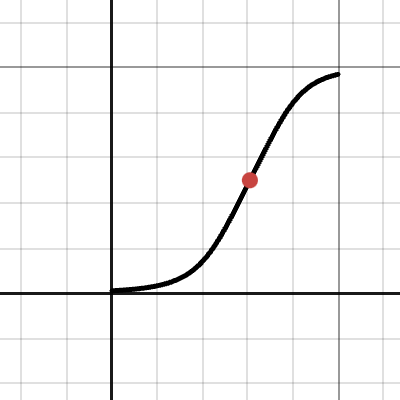
https://www.desmos.com/calculator/rctyzhx6jf some progress in trying to figure out wtf agx does, plotted the sigmoid curve, now i just need to figure out what the parameters actually mean

Desmos
burnt peak
winged veldt
https://www.desmos.com/calculator/rctyzhx6jf some progress in trying to figure o...
the polynomial coefficients?
winged veldt
it's a pretty neat thing actually, two-part sigmoid curve with a bunch of parameters
seems to be based around a hyperbolic function?
winged veldt
burnt peak
the polynomial coefficients?
no, this is the actual agx curve that's baked in a lut for the original ocio config
burnt peak
H&D curve approximation
burnt peak
yeah, I'm sure there is but it probably needs actual research sorry 😦
winged veldt
np i'll look into it
burnt peak
I think it's getting into actual-photo-scientists territory
winged veldt
but i assume it's some kind of measured response curve for photographic film?
though it seems to be from like the late 1800s so i wonder just what kind of film that would be lol
burnt peak
it accounts for what physically happens to optical density vs exposure, yeah
as to how, why, what physics govern it - I have no idea
winged veldt
time to read a 135 year old paper
burnt peak
something something silver halides
burnt peak
winged veldt
time to read a 135 year old paper <:KEKW:666849321462792234>
yyyyyup
my impression is also that a lot of photo science, while "understood" by a specific group of people is under lock and key so far as good, thorough publications
winged veldt
oh yea definitely
burnt peak
fuji and kodak not keen to share that shit
winged veldt
i wanna know what the canon/nikon/fuji guys know
anyway, plotting the actual curve helps to know what the actual parameters to the real agx even are
i feel like i'm one step closer to figuring the thing out, but there's a big gap between what the parameters are and what was the intention behind their actual values
...i could also just ignore that intention and steal whatever the blender config does for rec.2020
also, just an idea i had: what if i just make the input color space, say, cie XYZ with a d65 illuminant?
hm, ig i'd still have to convert to some rgb space for the actual curve
burnt peak
winged veldt
i feel like i'm one step closer to figuring the thing out, but there's a big gap...
I remember reading or hearing somewhere that the intention was to replicate the response of an ARRI ALEXA
burnt peak
winged veldt
also, just an idea i had: what if i just make the input color space, say, cie XY...
you can make your working space whatever
I would postprocess stuff in AP1 or rec2020 though
if you want wide gamut
XYZ is a reference that contains color spaces, not so much a (practical) color space in itself
if that makes any sense
most of your chromaticity values are psychophysically impossible colors
they don't mean anything
and that makes certain things weirder than they have to be
winged veldt
burnt peak
I remember reading or hearing somewhere that the intention was to replicate the ...
doesn't arri have their own transform? why not just use that?
burnt peak
i have no idea what it does internally
winged veldt
burnt peak
most of your chromaticity values are psychophysically impossible colors
yea
burnt peak
burnt peak
i have no idea what it does internally
rather - what's hardware, what's firmware
winged veldt
hardware? cmos sensor, probably a sony one
burnt peak
what i'm saying is I have back-of-a-cereal box knowledge on how sensors actually work
winged veldt
oh yea same here
i have zero clue what the response curve of a sensor looks like
i know it's different for ccd and cmos
and probably not linear
copper halo
just test it on your camera sensor 
 winged veldt
apparently vulgar is old timey for base 10
i don't really get it, substituting log10 for a natural log seems like a massive approximation
the relationship between the functions is not even linear
oh, i think it cancels out with another natural log they replace with 10 on the other side of the scale
okay nevermind actually their density scale is entirely arbitrary and made up
winged veldt
yo @burnt peak i think i hit something good

i've been reading the h&d paper
the red curve is the exact curve as described in the paper (with certain parameters), blue is agx curve (the real one)
now the interesting bit: green curve?

as you can see it's very close to the red one, meaning the agx curve is a pretty good approximation of the density to the power of 1/2.2
i still need to figure out how it works out with the density -> transparency calculation and the srgb oetf
winged veldt
not sure i get this part, though: blue and red still the same, orange curve is the light in the positive image 1-T, dotted black is that same curve with the srgb oetf applied (power 1/2.2)

orange is kinda close to the agx curve, but the black one is nowhere near it—and if the theory is right, these curves should at least somewhat match, indicating the agx curve is an approximation of the h&d density curve + transparency transform + srgb oetf
anyway, i better go eep
though now i'm wondering what a display transform based on the actual h&d curve would look like—then again, it's measuring the response of silver bromide plates from the late 19th century, so not entirely accurate to the 35mm film we want to model, having flexibility/good parameters and getting the sigmoid shape vaguely right is probably better than using the exact equation as described
 charred crescent
winged veldt
apparently vulgar is old timey for base 10
charred crescent
winged veldt
apparently vulgar is old timey for base 10
how did you even figure this out
can't find anything claiming so online
burnt peak
winged veldt
now the interesting bit: green curve?
well you're going to have way too much blue
nice find
winged veldt
burnt peak
well you're going to have way too much blue
huh?
winged veldt
https://www.shadertoy.com/view/WcXSWn @burnt peak trying out a super basic tonemap with the h&d curve just to see what's possible
 burnt peak
winged veldt
huh?
burnt peak
winged veldt
huh?
just a dumb joke, don't worry
winged veldt
still trying to figure out wtf agx is doing
as far as i can tell, the agx curve only makes sense if you just output density directly which should be incorrect
burnt peak
winged veldt
as far as i can tell, the agx curve only makes sense if you just output density ...
how do you figure
I mean, the OETF component certainly, but minus that
winged veldt
because it looks roughly like the h&d curve, which models exposed particle density, composed with the srgb oetf
otoh, if you use the density to calculate transmission you get something that looks absolutely nothing like the agx curve
burnt peak
you're talking about the polynomial fit or the OCIO one?
winged veldt
either, they are for all intents and purposes the same curve
fwiw i'm using the original one, though
burnt peak
I get AgX-like results with my film sim, but there's a lot more going on than a basic TMO
maybe this is better example
 winged veldt
yeah i'm just trying to figure out how in tf agx works
cause it inexplicably spits out srgb
winged veldt
burnt peak
maybe this is better example
those look very nice btw
burnt peak
I thought you figured it out earlier?
winged veldt
what does your process look like?
winged veldt
burnt peak
I thought you figured it out earlier?
i mean i know what the curve is and found how it relates to h&d, i still don't understand the intent behind it or why it all works out if you just interpret what it spits out as basically srgb
burnt peak
winged veldt
what does your process look like?
I promise I'll put the article out shortly* but tl;dr I'm mapping transmittance, but also using ASC CDL
    def _film_pass(self, val, fit, scale_in, sensitivity_start, sensitivity_end, max_density, slope, offset, power, eps=1e-7):
        exp = torch.clamp(torch.log2(torch.clamp(val * scale_in, min=eps)), sensitivity_start, sensitivity_end) # exposure
        dns = remap01(exp, sensitivity_start, sensitivity_end) # rescaling
        pos = fitted_polynomial_curve_7th_order(dns, fit)  # contrast curve
        cdl = asc_cdl(pos, slope, offset, power)
        res = torch.pow(2, -(torch.clamp(cdl, min=0.) * max_density)) # negative
        return res```
but this is the film pass - apologiesi'm looking up everything i can find online about it, but tbh i'm mostly coming up with more specific questions—i might just email troy when i know precisely what to ask, he seems like a cool guy
burnt peak
winged veldt
i'm looking up everything i can find online about it, but tbh i'm mostly coming ...
yeah, that's probably a good idea
all we can do is speculate
winged veldt
burnt peak
I promise I'll put the article out shortly* but tl;dr I'm mapping transmittance,...
what's your curve look like?
burnt peak
winged veldt
what's your curve look like?
like shit
winged veldt
burnt peak
I mean, it's radically different for every sim
winged veldt
that makes sense since it's modeling the film's response right?
but also
isn't optimizing a polynomial fit kind of a nightmare?
burnt peak
I get stuff like this usually
 winged veldt
might want to try parametrizing your curve differently, both agx and flim have parametric sigmoids with pretty nice parameters
burnt peak
winged veldt
isn't optimizing a polynomial fit kind of a nightmare?
yes, which is kind of surprising to me because curve fitting is about as fundamental to ML as it gets
but there's certain shortcuts that apply here very well
winged veldt
burnt peak
I promise I'll put the article out shortly* but tl;dr I'm mapping transmittance,...
btw, do you do something like flim and do two of these?
one for negative and one for print
burnt peak
winged veldt
might want to try parametrizing your curve differently, both agx and flim have p...
yup... was going to try chebyshev basis
winged veldt
hm, that is a word yes
burnt peak
winged veldt
one for negative and one for print
yes, and it gets worse
every dye layer transparency is a triplet
winged veldt
burnt peak
yup... was going to try chebyshev basis
oh it's polynomials
i meant ditch the polynomials and try something like agx has with actually meaningful (for the shape of the curve) parameters
burnt peak
I might do that yeah... I'm still trying to answer really simple questions, like "should I model the mask and imperfect dyes at all"
winged veldt
Desmos
(that's basically the equation agx uses for its curve in the ocio lut gen)
also in one of the comments in his website troy states
The AgX experiment was a proof of principle that works with any colourimetrically defined spaces
which is just more confusing to me because it clearly assumes rec.709, does that mean it will happily eat up (and output) out of gamut values?
burnt peak
you should definitely email him
winged veldt
if so you can just transform rec.2020 to 709 primaries, get some out of gamut bullshit, feed that to agx, get some more out of gamut bullshit, apply the eotf to get linear 709, transform back to your color space of choice and then clip and apply the oetf for whatever?
burnt peak
this is valid if you don't truncate negatives
so you can just not clamp and you'll get same colors back
as to what agx will do to that - no clue
well, I'm not so sure about eotf - but I mean going from AP1 gamut to sRGB gamut and back is fine
winged veldt
burnt peak
well, I'm not so sure about eotf - but I mean going from AP1 gamut to sRGB gamut...
yeah, this is just linear transforms
what i mean is, what the fuck does agx do with out of gamut values?
it does clip in log space, as there's a minimum and maximum exposure it works with
burnt peak
winged veldt
what i mean is, what the fuck does agx do with out of gamut values?
it shouldn't work... you should get sRGB gamut colors mapped back to rec2020/ap1/whatever
winged veldt
unless it outputs out of gamut
burnt peak
negative values should get mapped to zero
burnt peak
yes
log2(-whatever) is NaN
just email Troy James Sobotka
maybe he meant something different
or maybe we're both completely misunderstanding things
copper halo
winged veldt
also in one of the comments in his website troy states
> The AgX experiment was ...
i assume this means that the way he derived agx should work for any colorspace, not that agx itself would
winged veldt
yeah, sounds like that
which is why i want to know how he derived agx
the internal color space is created from rec.709 primaries, so you'd probably at least need to rebuild that color space (actually pretty shrimple) from whatever primaries you want to use as input
copper halo
i also need to figure out how to get HDR metadata from a voolkin swapchain
dxgi has a function to do so
vulkan lets you set the metadata your content uses, but doesn't let you query it
i'm gonna have to interface with a dxgi swapchain amn't i
winged veldt
at least metal/macos is actually good at color management/hdr so i don't have that to worry about lol
winged veldt
yea afaik i should be able to just tell macos "hey this is p3" and it should be fine
ima have to deal with imgui, though
winged veldt
easiest solution is probably just render imgui to an offscreen rt and do a second pass
yea
lol
winged veldt
yes
copper halo
just write your own
winged veldt
i cba to write an imgui backend on top of everything lmao
copper halo
hey mine is like 450 lines of code
winged veldt
but even with the included backend
i can either modify it
or just run a compute shader on the drawable after drawing imgui lol
copper halo
thought it would be funny to just make an hdr swapchain and treat it the same lol
 winged veldt
ah yes
copper halo
looks quite good if you ask me
burnt peak
winged veldt
what's your curve look like?
this looks right, yeah?

 winged veldt
got a great response, troy is a cool guy: https://github.com/sobotka/AgX-S2O3/discussions/2
main practical takeaway is agx can be made to work with any reasonable rgb colorspace, "reasonable" being not ACEScg because quote "AP1 is a nonsense encoding, and it will not work"
and as far as i can tell (i've asked to clarify on this, though) the output should be within the input color space, with a 1/2.2 power curve applied to it
i'm not surprised ap1 breaks things because it's a weird colorspace with imaginary non physical primaries, so i'll likely stick to bt.2020 for rendering
anyway, ig the next step is writing a "generalized agx" that can work with any input color space using this information, calculating the internal working space ("inset" as troy called it) should be all it takes
then i can see how bad the gamut clipping is if i try and go bt.2020 -> p3/srgb
copper halo
winged veldt
then i can see how bad the gamut clipping is if i try and go bt.2020 -> p3/srgb
seeing as your source colors (textures and material multipliers) are always gonna be rec709, you're never gonna actually clip
if you do clip, you were gonna clip anyways
winged veldt
lighting can quickly bring those colors out of rec. 709 gamut, though
and if i'm rendering in bt.2020 i probably will be feeding it bt.2020 colors from anything that isn't a texture
copper halo
winged veldt
lighting can quickly bring those colors out of rec. 709 gamut, though
yeah but that would clip even if you were rendering in 709
winged veldt
oh ye
copper halo
basically it's all just barycentric coordinates in a triangle lmao
winged veldt
but we're not talking about that kind of clipping
that happens regardless of tonemap
i mean the clipping that happens if the tonemap outputs rec. 2020 and i clip to display p3
winged veldt
we'll see
copper halo
I was gonna use different tonemappers for HDR and SDR output
because I already have the SDR tonemappers lol
burnt peak
winged veldt
main practical takeaway is agx can be made to work with any reasonable rgb color...
I don't understand why. It's basically just rec2020 primaries
winged veldt
it's not
copper halo
I'm probably gonna render in rec2020, then steal your agx for HDR tonemap, and clamp to rec709 for SDR tonemap
burnt peak
winged veldt
it's not
there's a tiny sliver of hypergreen in there at the edge, but that's about all I see
winged veldt
image kinda sucks but you can see here the green primary is out of the physically possible colors

that's probably enough to fuck things up
copper halo
unfortunately I need to figure out how to render gui nicely first
burnt peak
winged veldt
image kinda sucks but you can see here the green primary is out of the physicall...
yeah, I posted another of these up above... that's not a lot
copper halo
because the alpha blending egui does fucks up if you output anything that isn't rec709
burnt peak
like if you displayed ACEScg as Rec 2020 it would be hard to notice anything's wrong
winged veldt
copper halo
I'm probably gonna render in rec2020, then steal your agx for HDR tonemap, and c...
oh i'm not doing agx for hdr (yet)
just wider gamut
i'll deal with hdr after
but an "hdr agx" might happen anyway cause i'd like something at least somewhat consistent with my sdr tonemap
burnt peak
what exactly is the point of "hdr agx"?
isn't the whole point to crush dynamic range?
winged veldt
hdr is not unbounded, you still need a tonemap
burnt peak
agx isn't unbounded either
winged veldt
true
burnt peak
long before you get to +5 exposure everything is white and as white as it'll get
winged veldt
i can probably do something simpler than agx
copper halo
I might have to convert to rec709 (and store floats so my out-of-gamut values are preserved), then back to rec2020 when blitting to swapchain
winged veldt
the point is i'd want to get a similar look on the sdr range, going hdr for the highlights
copper halo
burnt peak
long before you get to +5 exposure everything is white and as white as it'll get
the main issue is that rec2020 goes up to 10k nits but your monitor does not
winged veldt
anyway, problem for later
copper halo
so you need to ask the OS or user for the max brightness and then tonemap to that
winged veldt
i think i can go up to 1600nits
it hurts
i'm not going to post flashbang.png here again, but it is very funny
copper halo
otherwise you leave it up to your OS or display to tonemap down => clipping
copper halo
winged veldt
i'm not going to post flashbang.png here again, but it is very funny
surely discord doesn't support HDR images
winged veldt
wanna bet
copper halo
I'm on my phone in the dark so no
winged veldt
copper halo
my phone can definitely get brighter than my monitor
winged veldt
i think discord mobile doesn't, so you're safe
copper halo
ah lmao
copper halo
I need to figure out how to take HDR screenshots first
default windows thing fails miserably
I don't think it tonemaps either
winged veldt
idk if macos does hdr screenshots actually
copper halo
it just reads your 10 bit data and chops the extra bits off
or clamps
your fancy pq oetf is now gamma
winged veldt
winged veldt
idk if macos does hdr screenshots actually
nope
winged veldt
new side project
the nih is never ending
actually speaking of side projects one has been in the back of my mind for a bit now
i'll probably do it after this whole colorspace/hdr thing since it's also relevant
node based image manipulation with a bunch of fancy effects (maybe even custom shader editor using msl reflection?)
partly intended as a more advanced post processing step for platinum (export exr into this new thing), partly as its own image processing thing
copper halo
does anything even support exr lol
I was gonna do ultrahdr in jpeg or something
so it doesn't look like garbo in SDR
winged veldt
copper halo
does anything even support exr lol
yes?
it's widely supported as an interchange format
openimageio handles it
copper halo
yeah
winged veldt
copper halo
and discord embedding lmao
discord can't even embed avif lmao
lame
the web sucks tbh
timid frigate
winged veldt
discord can't even embed avif lmao
Twitter cant embed avif also. Did you try to embed avif hdr or in which format?
winged veldt
couple tests rendering in rec. 2020 internally, output color space is still srgb for now


left images are rendered with rec. 709 (srgb) primaries, right with rec. 2020
there's definitely some changes to how colors are rendered, the sponza render becomes cooler with slightly more vibrant reds and blues
on the dragon render it seems to get deeper blues and more saturated reds, while the green wall gets more of a yellowish tint
biggest difference is in the metallic orange dragon, it seems to tint the reflections far more when rendering in rec.2020 while it picks up the wall's green color a lot more in 709
the nice thing is i've set it up in such a way it's trivial to swap both working space and output space, so i can add all of this to the ui
anyway, the whole point of rendering in a wider colorspace is to output p3 and such, so that's the next step
(tonemapper is just agx, turns out i don't even need to recalculate the inset matrix since it's relative to the input colorspace anyway)
dense jacinth
winged veldt
left images are rendered with rec. 709 (srgb) primaries, right with rec. 2020
i was actually able to guess it cause it looks more "realistic"
winged veldt
in theory it's closer to spectral
i don't have a spectral renderer to test that theory
copper halo
winged veldt
i don't have a spectral renderer to test that theory
... yet 
burnt peak
winged veldt
there's definitely some changes to how colors are rendered, the sponza render be...
that's a hell of a green shift on the golden gradon reflection
winged veldt
yeah, odd thing isn't it
i'm inclined to believe the rec.2020 render is more accurate but not sure what's going on
copper halo
winged veldt
i'm inclined to believe the rec.2020 render is more accurate but not sure what's...
how does mitsuba/pbrtv4 render the scene
timid frigate
@winged veldt apertureRoundness what used for in your code?
What this parameter do?
copper halo
probably blend between an n-gon and circle aperture
winged veldt
very rough approximation of rounded blade bokeh, but it's close enough
timid frigate
0 is ngon, 1 is rounded?
winged veldt
ye
winged veldt
added options for output colorspace, now supports display p3 output
just need to support exporting it as well
winged veldt
cool, doesn't support that either
(neither do most displays on earth )
so ig now i'm looking for an image io lib that supports proper color management
or, more likely, just do it myself
time to use libpng directly, ig
winged veldt
nope
from what i can see it supports arbitrary colorspace data and hdr
though i can also add avif output at some point (oiio avif support sucks ass, no hdr)
charred crescent
winged veldt
from what i can see it supports arbitrary colorspace data and hdr
Well it’s unclear if any image viewer will actually take that into account
winged veldt
that is the image viewer's problem
it's part of the spec, i'm not going to care about non conforming image viewers
winged veldt
are you on pc
copper halo
yes
charred crescent
winged veldt
that is the image viewer's problem <:KEKW:666849321462792234>
How are you gonna look at it then tho
copper halo
ow
copper halo
that's just some data that the monitor is tonemapping
ya need correct metadata for hdr images to look good
copper halo
winged veldt
objectively a better format
copper halo
agreed
winged veldt
but discord doesn't support embedding it sadge

 winged veldt
eh since when
copper halo
i dunno
winged veldt
