#Luna Engine - C++ and Vulkan
1 messages · Page 2 of 1
 west hamlet
its still a sphere, if you say its a 3d sphere and the plane cuts through it, giving you a slice of it
 true willow
fun fact most 2d functions are actually 3d functions with sulutions lying at an isosurface with z=0
2x+2y=0
z=2x+2y
tada it's now 3d
that's why marching squares and marching cubes works at all
even for implicit functions
west hamlet
i see what you did there
true willow
west hamlet
i see what you did there
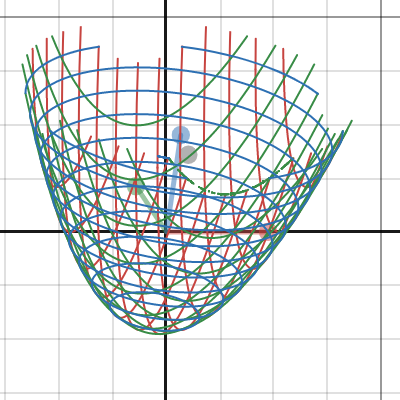
here is how x^2+y^2=1 circle equation looks when extended to 3d
you can actually see that the original circle is the intersection with z=0 plane
west hamlet
yeah
we did do a bit of this stuff back in school, very briefly
grade 11? or so
21 years ago
true willow
you're a dinosaur

 cloud osprey
Finding the sum of infinitely many infinitesimal slices of the function
I'm sure you already know sigma notation for taking the discrete sum of a function
An integral is just that, but for a continuous one
E.g., a question we have in rendering is "how much light is hitting this point from all directions". The answer is to find the integral of incoming light across the hemisphere
 prisma folio
Good news: The entire scene is now rendering with one vkCmdDrawIndexedIndirect
Bad news: RenderDoc hates me
also the FPS has taken a fairly steep dive, down to 47FPS
west hamlet
Bad news: Its not vkCmdDispatchIndirect
 fleet hollow
prisma folio
also the FPS has taken a fairly steep dive, down to 47FPS
fleet hollow
prisma folio
also the FPS has taken a fairly steep dive, down to 47FPS
So you have a GPU bottleneck? Lack of sorting by depth and or culling causing overdraw?
prisma folio
fleet hollow
So you have a GPU bottleneck? Lack of sorting by depth and or culling causing ov...
I mean to be fair this is 47FPS on an Intel iGPU
And there's a bit of overdraw, but it's only rendering Sponza so it's like a max of 3 overdraws
prisma folio
IBL looks like absolute crap tho

this is the diffuse part of the IBL, which is the one sampling from the irradiance map

the irradiance map is only 64x64 but why isn't it smoothly interpolating
true willow
what do normals look like because this doesn't appear to be a problem with the cubemap
there is no reason for a cubemap to give such oddly specific pixellations at the edges
I've only seen similar artifacts when your g-buffer is smaller than the swapchain and it gets interpolated when sampled, but this is not correct
prisma folio
The normals on the curtains are definitely bumpy, but I wouldn't really expect that level of blockiness from it

Even if I disable normal mapping, there's harsh borders when the normals change sharply
 true willow
can you change the output of the irradiance map sampling to the vector it's sampled with (which should be a normal)?
so like output normals in the irradiance map pass
prisma folio
Virtually identical if I do that
 true willow
no you can see there's an issue
prisma folio
is the Y supposed to be flipped? because I thought that was a bug and "fixed" it 😅
true willow

 prisma folio
ah
true willow
look second screenshot has weird "bevel" at the intersection
this causes your jaggies
again I suspect your resolution may not match between g buffer and the framebuffer you perform the pass in
so the g-buffer pixels get linearly interpolated and cause the artifacts
prisma folio
no, everything is definitely at 1600x900, renderdoc confirms. and the normals are subpassLoaded so there shouldn't be any interpolation
the first screenshot is straight from the final output
they both are
true willow
then I'm out of ideas but you have a lead now
prisma folio
unfortunately Intel has decided to declare war on RenderDoc today

according to renderdoc all of my vertex buffers are nan
I already had one issue with renderdoc yesterday related to buffer device addresses
I guess Intel just really hates them
prisma folio
So apparently setting it to only sample mip 0 fixes it?
 true willow
this is fragment shader?
prisma folio
wat
prisma folio
you mean because all the barycentric data is lost in the gbuffer?
true willow
no I mean that rasterization pipeline attempts to calculate mip levels the best it can whenever you sample a texture
so you need to be explicit if you want to sample only top mip level
prisma folio
Why would it suddenly switch mips though? The only "geometry" being rendered is a full screen triangle. What else goes into mip selection?
true willow
honestly I have no clue what exactly can cause it but mip levels are selected from the gradients, I have no specific cause in mind for a fullscreen triangle
prisma folio
Weird, I always assumed mips were basically chosen by primitive size and/or depth
which is constant in this case
true willow
depth and depth gradient afaik yes
prisma folio
well in any case I guess I need some AA now to deal with these fireflies
true willow
I'm going to read about how mips are selected instead of spreading misinfo
because it still doesn't make sense that it would cause the issue if it's depth
it has to be uv or something
prisma folio
but UV is also a smooth gradient, it's a full screen tri
unless you mean the sampled UV
true willow
the uv used to sample the texture
across multiple adjacent pixels
hmm yeah it seems like it's uv gradients
not depth
prisma folio
that would make more sense, since there is a sharp change in UV on those borders
true willow
so it projects the sample points to the uv space and checks how much of an area it covers and picks an optimal level that best fits the size of the gradient in texture space
prisma folio
and I guess that makes sense too, since having a sharp change in UV usually means you're sampling less often, and thus need a lower mip
I'm just confusing the mip algorithm by sampling 1 texture across the entire scene
true willow
I think you should switch to the compute though, raster pipeline will inherently give a slight overhead
this is something you really don't need for post processing
you work strictly with texture data after all
prisma folio
I guess I never thought of it as post processing
I was thinking of using light meshes next to do spot and point lights though
prisma folio
visibility buffer progress

 prisma folio
Point lights, tonemapping, and some simple threshold/downsample/upsample bloom

 muted aurora
nice!
true willow
prisma folio
Point lights, tonemapping, and some simple threshold/downsample/upsample bloom
which tonemapping?
prisma folio
uncharted 2
prisma folio
wot
prisma folio
I don't have a way to load dds, uh
true willow
convert it
prisma folio
trying
west hamlet
convert to ktx mayhaps
true willow
west hamlet
convert to ktx mayhaps
it was already done https://github.com/h3r2tic/tony-mc-mapface/issues/2

GitHub
Hi! I was experimenting with https://github.com/expenses/ktx2-tools and thought I'd cook up a KTX2 version of the LUT texture as that might be more usable for some folks. I supercompressed it w...
true willow
@west hamlet wanna try it too?
prisma folio
[16:06:44] Luna-E: [Viewer] Failed to load LUT texture: Texture type not supported.
the official libktx library can't open the ktx file
true willow
are you using ktxTexture2_CreateFromNamedFile()?
prisma folio
CreateFromMemory but yes
true willow
does it not default to the ktx1 by chance?
prisma folio
Create a ktxTexture1 or ktxTexture2 from KTX-formatted data in memory according to the data contents.
doesn't seem to be a way to tell it 1 or 2
true willow
it should automatically deduce the version it seems
damn this is weird
if only you had the ktx built from sources in debug
you could tell where it fails
not that it would help much
prisma folio
literally stepping through as we speak XD
prisma folio
no idea what a Bdb is but apparently it's not 0

the only image loading I have so far is stb_image XD
true willow
data format descriptor
prisma folio
to be fair This is actually modified
cloud osprey
hmm does doxygen have an inout concept
Possible values are "[in]", "[in,out]", and "[out]", note the [square] brackets in this description. When a parameter is both input and output, [in,out] is used as attribute.
they done goofed
 prisma folio
something tells me I didn't load the LUT right
 true willow
hey so apparently renderdoc can convert images?
I don't have it on this pc
bruh no ktx option

 true willow
better, good path to white
uncharted appears to die on that purple spot on the helmet
cloud osprey
muh 100% saturated magenta
prisma folio
I know the basic concept of what tonemapping is but I have no idea what's good vs bad 😄
 prisma folio
vec3 Lradiance = point.Radiance * point.Multiplier * attenuation;
Radiance = color
Multiplier = intensity
west hamlet
one could say, 👂:slayer.gif: is a fuchsiado
prisma folio
Radiance is always 0-1 for each channel
prisma folio
it's dds
cloud osprey
prisma folio
Radiance is always 0-1 for each channel
that doesn't sound physically based
prisma folio
I found a single-header DDS loader but I had to convert to RGBA16 to make it load
prisma folio
cloud osprey
that doesn't sound physically based
bold of you to assume I know anything about PBR
cloud osprey
well irl radiance isn't restricted to some range, unless 1 is mapped to infinity in your thing
prisma folio
problem is I've more or less blindly copied the shader code so I have no idea if the inputs had units or what they are
I mean it is
I'm not restricting it at all, I'm just only using 0-1 so far
cloud osprey
tbh the units don't matter as long as they're consistent
so you better hope they're consistent 
prisma folio
pl.Radiance = glm::vec3(0.36f, 0.0f, 0.63f);
true willow
they matter if you use real life data

 prisma folio
and now I can do fancy things
 prisma folio
obligatory deferred lighting test

38FPS though, def needs work
Interesting how the scene gets brighter with no point lights enabled; is that the tonemapping?
true willow
prisma folio
Interesting how the scene gets brighter with no point lights enabled; is that th...
like how?
 spare otter
i mean it should just be black
true willow
the LUT maps from classic reinhard so yes it should be black
prisma folio
I do have a bit of IBL too
but I think it was either a weird perception issue or my monitor doing dynamic brightness
prisma folio
honestly I'm bouncing between things so often even I don't know what my goal is
prisma folio
I wonder what everyone thinks about dealing with missing data. e.g. a mesh without normals, or a material without emissive. Is it better to keep 1 shader and fill/bind placeholder data, or might it be better to build a shader that has those things removed entirely, and save what little processing time you can?
west hamlet
i was finking about that too some time ago
and i think i ont care actually
i assume positions, normals, uvs, tangents, i guess if you have animations going you want to have either a separate vs for your skinning or you also mix it into one
then when i load meshes, i fill the meshprimitive with dummy data, if normals or tangents are not present
and try to calculate tangents afterwards, when uvs and normals were present but no tangents for some reason
prisma folio
Yeah as of right now my mesh loader will do as the glTF spec says and generate flat normals and tangents if missing; but I'm thinking about other more esoteric attributes like UV1 or color
And is it worth it to build a new shader that doesn't sample a 1x1 placeholder texture?
west hamlet
atm im fiddling with shadow and lighting..., i render my light volumes with a vao which only has positions for instance, and its shader is also super shrimplified to understand positions only too
for things like color i just use something like a base_color attribute in my material
prisma folio
true but you can have a material color and a color per vertex
west hamlet
if no texture is present i use that instead
yes, if you want to support vertex color, and its a thing for all of your stuff then have it in your main vertex format
otherwise making a 2nd inputlayout/vertexforma should be fine too
you most likely have at least another inputlayout/vertexformat going, when you do UI, imgui at least, they have vec2 positions, vec2 uvs and some uint color thing
maybe yet another one to debug certain things... light positions/probes/bounding boxes with positions only or position and color
true willow
I always make sure all data is generated if missing
west hamlet
im sure its also ok to have separate shaders for your formats, if you want/have to
or somehow branch inside
or #ifdef your attributes and access within the shader
like godot/filament do it
true willow
it is, moreso if you have on demand generation
prisma folio
I'm just wary of approaching shader permutation hell, where 1 shader can compile 65,536 ways
west hamlet
you dont have to permutate each and everything
true willow
that is something like what unreal has
west hamlet
just the formats you need right away
prisma folio
And yeah right now my shaders are all on-demand compiled
west hamlet
lets say you wont have more than 10 input layouts for the vertex shader and vaoisms, and then depending on how complicated your materials are a few shaders + shadows (perhaps more than one for the different algos you want to support?) + effects + tonemap + atmosphereisms + pbr+iblisms + perhaps all the compute shaders for whateverisms
true willow
realistically it won't compile to such huge numbers
prisma folio
I've been working on this copy of the engine for about a month
I think it's time I add camera movement
prisma folio
Behold: A different position!
 west hamlet
🟣 🟠
 prisma folio
refactor time is go
prisma folio
refactor has gotten this far
 west hamlet
looks like you render the spheres properly
their basecolor is that same bleu iirc
😄
spare otter
13ms gui 
prisma folio
13ms vsync
spare otter
ahh
west hamlet
75hz screen?
prisma folio
I guess so? Intel's only offering me FIFO and Immediate present modes
immediate be like

...and a massive memory leak
uh
prisma folio
jesus christ, I've been tearing my hair out looking at all of my object pools, memory allocations, destructors, trying to find this
I wasn't even progressing to the next frame context, so the deletion queue wasn't emptying
it's a miracle this even worked, considering that it wasn't even waiting on the timeline semaphores

gotta love windows, moving my mouse adds 0.5ms frametime
prisma folio
0.8, bumping to 1.3 when moving mouse
west hamlet
on what hardware are you running this?
prisma folio
that was running on GTX 3080
prisma folio
multiple scene views is go

max of 8 right now, might limit to 4 or something reasonable
prisma folio
and now I've got Vulkan crying about a multithreading violation, but I can clearly see only one thread is accessing the object at a time
 rich coral
@prisma folio why your keeping restarting your engine?
I did this lot of time and trust me it just gives you burnout
prisma folio
this one isn't a restart, just a huge refactor
prisma folio
[Luna] =================================
[Luna] === FATAL UNHANDLED EXCEPTION ===
[Luna] =================================
[Luna] Exception Code: 0xC0000005
[Luna] Exception Occurred At: 0x00007FF60E633029 (Luna::IntrusivePtr<Luna::Vulkan::ImageView>::operator*) - (C:\Dev\Luna\Luna\Include\Luna\Utility\IntrusivePtr.hpp:178)
[Luna] - Access Violation while reading memory at 0x0000000000000028
[Luna]
[Luna] Backtrace (up to 32 frames):
[Luna] - 0:  0x00007FF60E633029 (Luna::IntrusivePtr<Luna::Vulkan::ImageView>::operator*)     (C:\Dev\Luna\Luna\Include\Luna\Utility\IntrusivePtr.hpp:178)
[Luna] - 1:  0x00007FF60E631E17 (Luna::Vulkan::Image::GetView)                               (C:\Dev\Luna\Luna\Include\Luna\Vulkan\Image.hpp:169)
[Luna] - 2:  0x00007FF60E630225 (Luna::UIManager::Texture)                                   (C:\Dev\Luna\Luna\Source\UI\UIManager.cpp:403)
[Luna] - 3:  0x00007FF60E8C38DB (Luna::ContentBrowserWindow::Update::<lambda_0>::operator()) (C:\Dev\Luna\Luna\Source\Editor\ContentBrowserWindow.cpp:80)
[Luna] - 4:  0x00007FF60E8C3482 (Luna::ContentBrowserWindow::Update)                         (C:\Dev\Luna\Luna\Source\Editor\ContentBrowserWindow.cpp:113)
[Luna] - 5:  0x00007FF60E63A240 (Luna::Editor::Update)                                       (C:\Dev\Luna\Luna\Source\Editor\Editor.cpp:65)
fancy custom exception handler, inspired from Worlds 😄
west hamlet
its quite noisy
and reminds me of the time where everyone wrote custom exception handlers 😄
prisma folio
it gives me what I need
means I don't have to switch over to a debugger just to figure out I'm stupid for using a null
west hamlet
fair
it helps to handle null tho 🙂
before getting it to crash your stuff at runtime
prisma folio
that's a future me problem
west hamlet
heh
prisma folio
on the brighter side, whee browser
 west hamlet
that looks neat
 faint spindle
i like it 🙂
spare otter
icons make any engine look so much better
west hamlet
even the schmaller ones the arrow thingies look neat
muted aurora
prisma folio
```
[Luna] =================================
[Luna] === FATAL UNHANDLED EXCEPTIO...
woah nice!!
getting backtraces is a pain but that would be super handy for me lol
prisma folio
it really wasn't that bad
basically 1 call
sec
it's really just this one line, and it gives you an array of pointers that you can resolve to symbols the same way as all the others https://github.com/Eearslya/Luna/blob/dev-reorg/Launcher/Launcher.cpp#L111
also random question, is virtual address space limited to 6 bytes or can it use all 8?
I noticed the top 2 bytes are always zeroes
cloud osprey
When in doubt, just assume and you'll probably be right
prisma folio
also FYI, SymInitialize is very hit-or-miss, because apparently it's only legal to call it once per application lifetime, and you can't tell if it's been called by some other program already, so it's literally impossible to guarantee you're doing it right
but I've found that symbols usually resolve even if SymInitialize returns false so I took that check away
cloud osprey
Least scuffed win32 function
prisma folio
also love how the win32 documentation says "hProcess should be your process's ID, but don't use GetCurrentProcess()" and then I went to look at their official example and

However, if you do use a process handle, be sure to use the correct handle. If the application is a debugger, use the process handle for the process being debugged. Do not use the handle returned by GetCurrentProcess. The handle used must be unique to avoid sharing a session with another component, and using GetCurrentProcess can have unexpected results when multiple components are attempting to use dbghelp to inspect the current process.
this whole page is just confusing
"it must be a unique value, but it doesn't have to be your process's ID. but if it is a process ID, make sure it's the right one" like wtf how is the function supposed to know the difference
prisma folio
not until c++23
prisma folio
 prisma folio
almost back to rendering real meshes
 prisma folio
tfw you forget the depth buffer
 west hamlet
heh
muted aurora
who needs a depth buffer anyway, just draw things in the right order without resorting to hacks like that smh
true willow
 prisma folio
Scene serialization, woo
 true willow
how?
prisma folio
json
cloud osprey
I would've made a new interchange format called nson (nanomachines, son)
cloud osprey
maybe a library like cereal
prisma folio
nah it's manual field-by-field
true willow
I see
prisma folio
gotta start somewhere
cloud osprey
cereal basically makes the process of specifying which fields you want to serialize a bit shrimpler
true willow
is there a library called milk that you need to use with cereal?
prisma folio
 true willow
I think this is notepad++
prisma folio
ye
true willow
epic
cloud osprey
how are you writing jsons
cloud osprey
i c
prisma folio
yeah
true willow
btw
what are you planning to do with editor vs game
are you going to have to write a separate project for the game?
i.e. how do you actually deploy the game to platforms
west hamlet
there's a typo
prisma folio
I haven't fully planned it out, but more or less I'm trying to architect it so you just have a single "launcher" exe that you can point at any data pack and have it run
west hamlet
"Hierarchy" vs "Heirarchy"
true willow
archy heir
west hamlet
hairy arch
prisma folio
damnit I always do that
true willow
prisma folio
I haven't fully planned it out, but more or less I'm trying to architect it so y...
ah like idtech1
quake engine that is
wait idtech1 is doom right
quake engine is quake engine
prisma folio
I honestly haven't given much thought to the game part since I have little to no interest in making a game, which is...not ideal for someone writing a game engine, but I'm having fun 😄
true willow
poople aren't usually happy when you can open their game in an editor and just use their assets in a different project on the same engine
prisma folio
yeah I don't even know where to start with issues like that
true willow
but alas it happens even on engines that obfuscates and packs assets and builds an executable at deploy time
people just make decompilers
and deobfuscators
same story as with DRMs
if it's on the user's machine you're basically only putting effort into making it harder to get immediately, but it's inevitable if there is an effort to get it
prisma folio
Yeah more or less this project has been me just having fun making the systems, rather than actually wanting to make/ship something usable. It's basically a learning project for me.
It's more fun for me to try and implement concepts instead of just reading about them
true willow
yeah that's OK, actually good you're honest with it being a toy project rather than cryengine/unity/UE killer
prisma folio
oh god no
yeah if I ever make anything close to a game with this it'll be a miracle
I just love the programming and getting to play with all the buttons and switches to see how they dance
true willow
make an eschatos clone

Eschatos came out on Steam recently and it's a really good game. I've always regretted not playing it much when it came out on the Xbox 360 way back in 2011 so you could say that this was an old score that I had to settle.
On the surface Eschatos might look a bit bland and standard but the true beauty and what makes the game so good lies in th...
doesn't look hard to make
mayhaps deceptive
 prisma folio
better if I restrict the distance a bit more
 true willow
what was it?
prisma folio
I changed from a quad shader (6 vertices) to a fullscreen tri (3 vertices) and didn't change the draw count

well after nearly tearing my hair out, the grid is now a fullscreen tri
 prisma folio
I mean the geometry it draws is a single triangle that covers the entire screen
true willow
but is the grid drawing a shader?
prisma folio
yeah it's a single vertex/fragment pair
prisma folio
tbh I have no idea what fwidth is but yes
I took it all from here https://asliceofrendering.com/scene helper/2020/01/05/InfiniteGrid/
true willow
basically dividing the curve by its derivative you get the signed distance iirc which you then smoothstep to have a smooth falloff
prisma folio
I just changed it to use a fullscreen triangle shader instead of the special quad shader they used
also not passing 2 mat4s between the vertex and fragment shader 
true willow
    vec2 derivative = fwidth(coord);
    vec2 grid = abs(fract(coord - 0.5) - 0.5) / derivative;
    float line = min(grid.x, grid.y);
read what I said, doesn't that sound like it
except this uses something else than smoothstep
prisma folio
I mean it makes sense but I am still completely green on derivatives in general so I don't fully get it 😅
true willow

visual clue
well if you don't get derivatives maybe even this isn't clear
though you need to be familiar with how any plotting works
to understand this
basically if you plug xy to the function you get a value, and your curves are functions where solutions are the points on that curve
so say solutions for x^2+y^2=1 is a unit circle equation and each point on that circle is a solution
but you can rewrite it as x^2+y^2-1 = 0 and then as f(x, y) = x^2+y^2-1, and now you have a scalar field that you can evaluate and all xy that give 0 are solutions
so say you want to plot it now, you evaluate f(x,y) at every pixel
and check if |f(x,y)| < epsilon
this will approximately give you pixels that are close to solutions
there's a problem though that the scalar field doesn't give actual distance
but if you divide by derivative it will, I think
(I haven't proven it but it seems to be somewhat true and this is what you can see in the desmos graph)
or maybe not at all, honestly I forgor
ah nope no that doesn't sound right
would have been too easy if it was true
prisma folio
 prisma folio
I'm back, baby
 west hamlet
woohoo
prisma folio
and just like that, more texture
 west hamlet
emissive neh?
my pbr is still somewhat fucked, but not that fucked, but i think im going to try to get saschaw's vulkanpbr example to work in gl
helmet looks so neat in his demo
muted aurora
eyyy welcome back
prisma folio
ah yes, perfect gizmo first try
 true willow
writing to the front draw lists?
or just rendering custom gizmo on top of imgui pass
 prisma folio
no, there's no ray tracing at all here
you give it the view, proj, and matrix to manip
true willow
damn that sounds unstable to me
prisma folio
wot
true willow
unstable
muted aurora
it is kinda unstable, i switched away from it because my objects were slowly shrinking when i had the scale gizmo active and not doing anything (due to precision issues with conversions from trs and back)
true willow
I actually tried it at some point but noped out and made my own gizmos to operate on TRS and never looked back, it wasn't even hard to make one
prisma folio
muted aurora
it is kinda unstable, i switched away from it because my objects were slowly shr...
what did you end up using
having a hard time figuring out what it wants for matrices
muted aurora
ended up writing my own
muted aurora
yeah lol
prisma folio
well I fixed it

iirc if you use the delta matrix instead of letting it manip the original matrix, the instability doesn't happen
prisma folio
What method do you guys use for selection/outlines?
prisma folio
first foray into inverse-z ala @regal elk's blog post, so far so good, now I just need to figure out how to fix the grid

 regal elk
tbf not my article, just in my collection of saved crap
prisma folio
having a hard time getting the linear depth though, hmm

float linearDepth = -(Camera.ZNear / clipSpaceDepth);
that looks like what it's supposed to be
-zNear / gl_FragCoord.z
it works for me in my CSM
 lone moon
I too am having a super hard time converting to infinite reverse Z lol
Mainly because of frustum culling plane extraction, I have no idea how to do that
prisma folio
the article I read suggests using 0 + epsilon for the far plane, since just 0 will give you an infinite frustum and who knows what that breaks
regal elk
what are you using it for
prisma folio
me? the linear depth is used to fade the grid out
regal elk
then yeah especially weird -zNear / gl_FragCoord.z isn't doing it for you
prisma folio
otherwise you get this


well that's...not right
oh shoot
Riiiight. Okay so the problem is I'm not actually passing the camera zNear, I'm deriving it
which...clearly doesn't work for infinite
or it might, if I flip the value correctly
okay sanity check, this should be able to get me the zNear from just a projection matrix, right?
auto near = _invProjection * glm::vec4(0, 0, 0, 1);
near /= near.w;
_zNear = near.z;
or at least close enough to it
spare otter
vec2 near_far_decompose(mat4 perspective) {
    float near = (1.0 + perspective[3][2]) / perspective[2][2];
    float far = - (1.0 - perspective[3][2]) / perspective[2][2];
    return vec2(near, far);
}
this is what I do
regal elk
^ that's a probably better general solution but zNear is just [3][2] in the infinite proj matrix
spare otter
yeah for infinite projection its different
regal elk

and in the inverse it seems to be 1 / matrix[2][3]
but I actually have the zNear available as the w in my deprojection vec4 thingy
so my linearization usually looks like this
 prisma folio
okay well I have the right values now at least, still working out how to use them

debugging a random pixel gives me a linear depth of -6.2108
so this is the equation I'm trying to adapt to reverse-inf
float linearDepth = (2.0 * Camera.ZNear * Camera.ZFar) / (Camera.ZFar + Camera.ZNear - clipSpaceDepth * (Camera.ZFar - Camera.ZNear));
linearDepth /= Camera.ZFar;
maybe I just don't fully understand what this was doing
regal elk
it was converting linear depth with a different projection matrix, the answer is literally -zNear / gl_FragCoord.z
prisma folio
but the original one doesn't match any of the linearization functions on the article, which leads me to believe this isn't really linear depth
regal elk
why not
prisma folio
I think it's supposed to be in 0-1 range
prisma folio
I guess? It definitely seems to want 0-1 based on the way it's used
float fade = max(0, (0.4f - linearDepth));
-zNear / gl_FragCoord.z is true linearized range, in the sense that it's in view space
it's linear in that 1 unit of that is 1 unit away from your camera
prisma folio
hmn
regal elk
what I'd do is just declare an arbitrary fade distance
and just do float fade = 1.0 - min(1.0, linearizedDepth / FADE_DISTANCE);
prisma folio
okay yeah that's pretty good

    _projection       = glm::mat4(0.0f);
    _projection[0][0] = 1.0f / tanHalfFovx;
    _projection[1][1] = -(1.0f / tanHalfFovy);
    _projection[2][3] = -1.0f;
    _projection[3][2] = _zNear;
so there's my projection matrix now, it surprises me how...simple it is
prisma folio
I was just working on moving to reverse-Z
spare otter
ah
prisma folio
I think I'll try mouse-picking/outlines next
lone moon
Just passing by, you can reference this very dumb free-list allocator if you want https://github.com/LVSTRI/Iris/blob/master/src/allocator.cpp
(Or use an existing library that does it for you)
regal elk
also you can save freeing for later
lone moon
Yes
prisma folio
MDI Pondering:
- Use BDA for vertex buffers, references can be passed in uniforms with the transform data
- Generate IBO each frame, possibly using a compute shader, which could be the same step as culling
regal elk
my freeing is stubbed lol
because I just run scenes that load everything at startup anyway
are you doing meshlet culling or something?
west hamlet
that should still be the same path
you provide all your meshes in your indirect buffer, but let a computeshader run over it to cull away invisible meshes and let it cook up a new indirect buffer as the result
regal elk
yeah, though going from non-MDI to meshlet/triangle culling seems to really be jumping into the deep end
west hamlet
yeah
lone moon
That's a 4km jump, yes 
west hamlet
if meshlet part1 is, just cull meshprimitives, and part2 is meshlet for visbuffer isms
prisma folio
Generating the IBO on CPU means I need to keep them in RAM rather than VRAM, unleeeess I make a compute shader that can do the copying and combine them all into one; that compute shader could also do culling and generate the indirect commands at the same time, hmm
lone moon
You need to keep the indices in RAM? Why?
prisma folio
well the alternative without compute shader would be a bunch of vkCmdCopyBuffers I guess
west hamlet
dont worry too much about it
ram should be no problem
and a bunch of meshes consuming vram shouldnt be either
if that becomes a problem then gltfpack might come in handy, or LOD enters the chat
prisma folio
mesh quantization is a whole other can of worms with MDI
west hamlet
also also, all those things can be optimized/refactored later(tm)
lone moon
By the way, LODs means more data not less 
Unless you like the 90's aesthetic and just store the highest LOD, which is a valid solution tbh
regal elk
I still don't get why your IBOs need to persist on your CPU
you copy them into your main MDI buffer and discard the staging buffers
prisma folio
because I actually want to implement the freeing
actually, hmm
I see what you mean
so I would just create one big IBO at the start, instead of making one that perfectly fits
regal elk
yeah if it helps you at all, "perfectly fitting" is an NP problem (the packing problem)
well, helps you not rabbit hole down sometihng every allocator ever has sought for
prisma folio
well I meant "perfectly fit" as in generating each frame, exactly how much space the indices need
lone moon
regal elk
yeah if it helps you at all, "perfectly fitting" is an NP problem (the packing p...
I can solve that in constant time and space, get on my level
regal elk
ingredients: 1 infinite turing belt
prisma folio
64MB IBO would allow me to have about 5 million tris
regal elk
 prisma folio
of course it can
lone moon
Yeah, in GL I specify offets in the indirect command
regal elk
yeah pretty much all of those members go into the indirect command, and m_meshIndex is the index of the indirect command itself, essentially
west hamlet
west hamlet
@prisma folio are you slacking again? 🙂
west hamlet
weird this thread is active all of a sudden, but last activity was in may 😛
prisma folio
it lives
 prisma folio
Probably going to focus more on the renderer than the scene editor aspect, want to try some of these new fancy techniques
regal elk
I'm curious what techniques
prisma folio
I've been looking at #1128020727380054046 with no small amount of envy; so I guess things like VSM, meshlets, compute culling, there's a LOT I haven't done
west hamlet
: )
i was also thinking about adding hzb
after watching simondev's latest video
he made it sound so simple hehe
regal elk
it isn't too bad tbh, vkguide is absolutely the best place to get up to speed on it
west hamlet
i also need proper culling
ah another thing i need to attend to, i promised vb to replay the new vkguide2
regal elk
I've been meaning to upgrade mine to 2 pass culling, replace the single atomic with a prefix sum scan, and change out the MDI for an MDIC
west hamlet
: )
lone moon
prisma folio
I've been looking at <#1128020727380054046> with no small amount of envy; so I g...
welcome to the meshlet club
+1 lads
west hamlet
yeah, i also want to dive into that a bit
make more sense when you want to cull all the shizzle
regal elk
same, luckily I proved that yours run on my PC lol
west hamlet
: D
lone moon
meshlets are for everybody
west hamlet
as in you dont need a new gpu neh?
lone moon
I will convert your renderer to meshlets
regal elk
as in I don't have to do anything particularly crusty to port someone else's solution
west hamlet
: )
lvstri did you write it down somewhere by any chance? a bullet point list of what you need to do exactly?
lone moon
hopefully I'll get some of you frogs to do the dirty work for me and write a graph partitioner 
west hamlet
or a blog 🙂 i thought you wanted to blog too
prisma folio
Well right now I've just got a basic render graph doing imgui so my render architecture is pretty wide open; not sure where to start
lone moon
west hamlet
lvstri did you write it down somewhere by any chance? a bullet point list of wha...
unfortunately no, but frogfood should be a good reference
with mesh shaders it's even easier
west hamlet
something DR cant use unfortunately
regal elk
I probably would need to invest in some CPU-side meshlet culling and streaming as well, the biggest issue is idk if I have enough device memory (2GB) to actually have meaningful benefits from meshlets
lone moon
download 4090 bios
west hamlet
you need to prepare the gltf a little too, neh? and quantize the vbo here and there with meshopt
regal elk
just run it through meshoptimizer
prisma folio
I could use mesh shaders on my home PC but I do a lot of dev on an intel integrated
regal elk
meshoptimizer also does the meshletification
west hamlet
ah
then "all" you need is calculate the aabbs per meshlet and bob is my aunty so to speak
prisma folio
well I guess step 1 will be to at least get a gltf loaded and rendered, then I can do the fancy
prisma folio
I do want to reimplement my shader manager first tho, hot reloading is ❤️
 prisma folio
(I say "my" shader manager, but it's almost entirely "inspired" from other projects)
west hamlet
like all our projects hehe
regal elk
lol speaking of which, potrick's headway in daxa has made me notice how many things I could improve in my granite-based abstraction
prisma folio
oh you're going off of granite too
lone moon
I started off granite and wandered off to daxa as well
regal elk
I went roughly off granite and kinda went my own way in places, I think daxa is bikeshedded towards a lot of the same API design goals that I'd want though
prisma folio
I've often wondered if granite's just-in-time pipeline creation would screw over GPU-driven shenanigans
regal elk
it definitely wouldn't, you can't GPU-drive that hard
lone moon
gpu driven shader compilation would be intetesting though
regal elk
GPU driven rendering just puts your drawcalls proportional to material count instead of object/mesh/texture count
prisma folio
Well yeah I know you can't compile on GPU, I was more thinking about... Isn't a big part of GPU driven that you sort draw calls into bins by pipeline? If the pipeline is JIT-ed, you technically don't know what pipeline is going to be used beforehand, right?
regal elk
I don't sort by true VkPipeline, materials/material passes/etc are a higher order of abstraction
lone moon
you hopefully have one pipeline
regal elk
especially since they don't corellate 1:1 with draw call emissions
lone moon
ubershaders are great you know
regal elk
yeah but you still might have multiple
west hamlet
i stick to naive stuff
prisma folio
as of right now my project is basically Granite's Vulkan abstraction with a few minor tweaks, plus I also took the render graph
lone moon
regal elk
yeah but you still might have multiple
then you visbuffer your shit up
prisma folio
All of that stuff seems great, but when I started looking at their actual renderer setup it felt...weird
lone moon
and do the unreal materialId = depth trick
regal elk
I took the render graph but stripped out the strings and the single use handles, although those might be somewhat smart for parallelism in hindsight
prisma folio
shader suites and render queues and stuff, it all felt very overengineered and rigid
like it will work for naive calls but not for GPU-driven
prisma folio
Yeah I've stripped out a lot of the old cruft; like hard requiring sync2, effectively removing fences
west hamlet
i still need to add CSM :3 VSM is too bigbrain for me for now, maybe next year
regal elk
yeah timeline semaphores are a big driver for me to do a rewrite
I haven't read a write up on why I should care about sync2 barrier types though
prisma folio
It's a bit messy right now but you can clearly see the Granite influence in the repo https://github.com/eearslya/luna/
regal elk
lol yeah I definitely can
one big thing I haven't paid much mind to is parallelism, I deifnitely need to think more about stuff like framegraph building and JIT pipeline compilation from the perspective of trying to parallelize it
prisma folio
who's got a cool gltf to play with
 runic forum
sample assets not enough?
https://github.com/KhronosGroup/glTF-Sample-Assets
lone moon
too low poly
prisma folio
step 1 accomplished

Might have to start using release mode though, the load time on this glb hurts 😄
cloud osprey
You can parallelize various aspects of gltf loading
I did it with std::execution and now it's bearable even in debug
prisma folio
I'll have to get tracy in to see exactly where the holdup is
cloud osprey
The big one for me was parallelizing texture decoding
#questions message
west hamlet
i wonder if one could turn a big boi mesh like that into smaller chunks (ie breaking the model into various models and en load them in paraalallel as well
prisma folio
I haven't even done textures yet so this has to be either file I/O, fastgltf, or me building the vertex buffers
regal elk
yeah, generally the big hitters are texture stuff, anything that allocates, and just reading the file in
cloud osprey
The vertex buffer loading and conversion can also be parallelized
regal elk
west hamlet
i wonder if one could turn a big boi mesh like that into smaller chunks (ie brea...
meshlet streaming 👀
prisma folio
file I/O I kinda doubt is the issue since I'm using windows file mapping
regal elk
I've profiled it before, on windows it's actually slower to file map than to just dump it into a malloc'd buffer
west hamlet
regal elk
meshlet streaming 👀
ah you mentioned that earlier as well, sounds like something worth to be tried : )
regal elk
with the malloc time counted in the profiles
windows file mapping isn't meant to be used like mmap on linux, I forget why it's there but it's not the fastpath to reading large files in memory
prisma folio
welp
regal elk
also with this same test, mingw gcc's fopen beat OpenFile or whatever the winapi function is, 0 clue why, maybe buffered reading or some fancy syscalls or better flags than I picked for my test
but literally the age old
fseek(file, 0, SEEK_END);
long size = ftell(file);
rewind(file);
char* data = (char*)malloc(size);
fread(data, size, 1, file);
is the fastest possible
lone moon
just map the file bro
west hamlet
make sure to buy more ram before that
lone moon
use the god given 64 bit address space you have
regal elk
the data is probably paged in/out either way, but for some reason mapping is slower on binbows
regal elk
lone moon
use the god given 64 bit address space you have
see my comment above
prisma folio
prisma folio
file I/O I kinda doubt is the issue since I'm using windows file mapping
yes, I am XD
lone moon
classic windows L
west hamlet
time to switch to Lunix
prisma folio
I'll deal with ktx tomorrow, good progress today
lone moon
no meshlets? :(
prisma folio
I don't even know how to start with those
cloud osprey
step 1: kindly ask lvstri to implement them 
regal elk
I found my old benchmark (and cleaned it up a bit)
https://github.com/forenoonwatch/file-load-benchmark
lone moon
I should write something about software meshletisms
regal elk
 regal elk
I've rerun it a few times, but usually the result is about the same, windows and memory map are roughly equal (but they go up and down between test runs), but stdio always beats it
lone moon
crazy
also slight tangent
new discord android mobile app fucking sucks
I send a text and the textarea doesn't clear
I can't even edit my msgs
discord™️
cloud osprey
The app is already a buggy, laggy POS. How could it get worse
lone moon
anyways, one day I'll write a gist on software meshletisms, the only resource is that garbage bogus blogpost from tellusim
regal elk
awesome
prisma folio
Guess I'll go and look at Fwog for now then
cloud osprey
frogfood is the one with meshletisms btw
fwog is just my opengl wrapper which I assume you don't care about 😄
rich coral
Isn't gltf loading part of the asset pipeline process? The runtime usually loads a light file format usually and textures are pre processed as well
prisma folio
meshlets are going pretty well
 west hamlet
: D
prisma folio
minor improvement?
 west hamlet
now it looks like some index issue
runic forum
Is this done with mesh shaders?
prisma folio
nope
lone moon
may I suggest starting with a cube
also, meshoptimizer's build meshlets func's arguments are tricky to get right, make sure they're good
west hamlet
lone moon
also, meshoptimizer's build meshlets func's arguments are tricky to get right, m...
do you remember posting them in iris or frogfrood by any chance?
west hamlet

west hamlet
ah
i totally forgot meshopt is also a lib 😄
i was seeing cli parameters for some reason hehe
prisma folio
well a triangle works 😅
 lone moon
the first time I did meshlets, I hit the first wall at a cube
i.e the cube was bogus
so the path I followed was, tringle -> cube -> deccer cubes -> 2 balls -> sponza
prisma folio
don't have a cube at hand but boombox is unhappy

oh wait gltf samples has a cube
I've immediately noticed a problem... I'm being given 64 indices per meshlet? Which...isn't a whole number of triangles? Is that normal?
I am passing 64 max indices as per meshopt's recommendation, but I didn't expect it to actually give me a partial triangle
Is this backwards? It says it recommends 64 indices and 124 triangles as max. How can you get to 124 triangles with 64 indices?
lone moon
the same vertices can be part of multiple triangles
one of the main points of meshlets is high vertex reuse
prisma folio
wait so I'm not supposed to use the indices as actual indices?
lone moon
it's a bit tricky
so meshoptimizer gives you two buffers in output
meshletIndices and meshletPrimitives
prisma folio
yeah I haven't touched the primitives bit
lone moon
meshletPrimitives is an array of uint8, because it assumes that a meshlet must not have a triangle count greater than 255, the values in this array serve as an index into meshletIndices
meshletIndices is an array of uint32 and it's basically your "index buffer", because those indices will be used to index the vertex buffer
so to get a vertex you must do: vertices[meshletIndices[meshlet.indexOffset + meshletPrimitives[meshlet.primitiveOffset + index]]]
where index = gl_VertexIndex, gl_LocalInvocationID.x, whatever else
prisma folio
Ah. Shoot. Haven't done vertex pulling yet...
lone moon
It's kind of a requirement with meshlets
prisma folio
So wait, what would I actually pass to draw indexed then?
lone moon
good question
ok so you can do this
you can generate an index buffer on the CPU
like this
lone moon
vector<uint32> indexBuffer;
for (meshlet in meshlets) {
  for (int i = 0; i < meshlet.primitiveCount * 3; ++i) {
    indexBuffer.emplace_back(meshletIndices[meshlet.indexOffset + meshletPrimitives[meshlet.primitiveOffset + i]];
  }
}```then you bind this as a regular index buffer
no vertex pulling required I think
uhhh
no actually you need vertex pulling for this too nevermind
if you have more than one mesh from which you generate meshlets then you need vertex pulling
because meshlet indices and offsets are local per mesh
west hamlet
: ) that is quite the little rabbithole... but im also taking notes
prisma folio
vertex pulling, perfect on the first try

added scalar layout, back to where we were 👍

so I'm still a little confused as to what draw command I would execute for each meshlet
lone moon
there's just a lot of gotchas
prisma folio
even with vertex pulling, it's still 64 indices, no?
lone moon
it can be less than 64 indices
remember, the 64 and 124 you set previously are upper bounds
prisma folio
yeah but shouldn't it be a multiple of 3?
lone moon
yesn't
prisma folio
 lone moon
the reason is cause if you have 124 primitives you need memory to hold 124 * 3 = 372 vertices
NV and AMD use this to reserve 4 additional bytes of memory to write about other stuff
this is only relevant to mesh shaders though
you can realistically set your upper bounds to whatever you want really, since you're not doing mesh shaders
I personally recommend and use 64/64, it offers good vertex reuse and excellent culling quality
prisma folio
Right, so what else needs to change without mesh shaders? Because I'm sure vkCmdDrawIndexed doesn't deal with partial-triangles very well
prisma folio
Aha. And what do I use for the actual bound index buffer? Would that be the normal index buffer for the mesh?
lone moon
lone moon
```cpp
vector<uint32> indexBuffer;
for (meshlet in meshlets) {
for (int i = 0;...
this will do for now
if you feel adventurous you can use the frogfood method (patented by yours truly)
prisma folio
lone moon
so to get a vertex you must do: `vertices[meshletIndices[meshlet.indexOffset + m...
you mean this one?
lone moon
nono, if you use the index buffer I showed you then that becomes vertices[gl_VertexIndex]
prisma folio
ah okay so the frogfood method is a lot more complex then
lone moon
a bit
right now the frogfood method is huge
but if you go to the early commits, you can find a shrimplified version
 lone moon
make sure that the vertex buffer you gave to meshoptimizer is exactly the same as the vertex buffer you are using to pull vertices from
also perchance renderdoc may help here
prisma folio
got a feeling it's an offset problem
meshlet 0

meshlet 1

ohh wait I know what it is
lone moon
what are you setting baseIndex of vkCmdDrawIndexed to


 west hamlet
noooooice
lone moon
let the meshletization commence
prisma folio
and with a little extra shader magic

there we go, much more distinct

now to try bistro again...my pc was crying last time
lone moon
try sponza first
there is one last thing to take care of my frog
vertex offsets and mesh offsets
prisma folio
oh no
lone moon
you can render goodfroge though
prisma folio
something tells me Intel does not appreciate multiple thousands of draw calls
lone moon
oh
yeah I have one more bad news to tell you
and this one is really bad
with the frogfood method, you can only render scenes whose primitive count is less than one million
this is only true on intel iGPUs
prisma folio
what did intel do
lone moon
limit indexCount to 4 million
prisma folio
honestly this is better than I expected
 prisma folio
lone moon
limit indexCount to 4 million
prisma folio
lone moon
limit indexCount to 4 million
Would it not be possible to just try and batch the draws?
lone moon
yes
but you need to dispatch more workgroups and send more info with relation to offsets and what not
big pain
prisma folio
hello sponza foliage, you're looking extra spaghetti today

I have a 3080 at home I could be doing this on, but work is often slow so I've just taken to doing this whenever I can
Though at the same time, optimizations and culling are even more important to implement on this PC 😄
west hamlet
time to setup your home machine for remote work my man
then you can use your schlepptop as a monitor
prisma folio
Haven't implemented the culling, but now fully set up on the compute-generated index buffers

disco boombox
 west hamlet
im jealous
prisma folio
meshlet frustum cull
 west hamlet
can you also visualize the frustum?
prisma folio
sorta

frustum visualization is a bit weird because the far plane ends up culled
since it's the same far plane as the matrix drawing the lines
west hamlet
hehe
lone moon
next up, render 4 billion triangles
prisma folio
how many does bistro have
cloud osprey
uh like a couple million iirc
it has about 1 million "primitives" (meshlet indices) according to one random vid I posted
prisma folio
drawIndirect.instanceCount = 400'000;
cloud osprey
About 70k meshlets in mine
prisma folio
I'll be curious to see if my intel cpu can handle the meshlets once I finish culling
Do you guys do the "cone" culling too? idk what the real term is
where it determines if a meshlet is entirely back-facing
cloud osprey
I don't do cone culling since I heard it barely helps
I guess it's basically free at runtime though
Idk if it makes meshlet building take longer though
prisma folio
https://github.com/zeux/meshoptimizer/blob/master/src/clusterizer.cpp#L712
seems to be a sqrt and a couple dozen flops per triangle, probably not too bad?
could easily be paralelled too
cloud osprey
Oh so they compute the normal cone no matter what
west hamlet
i rewatched that video about the cones 2 days ago
prisma folio
happens alongside the AABB too so
cloud osprey
So the parameter I'm thinking of is related to making the meshlet based on the normal angle
prisma folio
and yeah at runtime it's practically free
if (dot(normalize(cone_apex - camera_position), cone_axis) >= cone_cutoff) reject();
I wonder how the cone parameter in meshopt affects perf, if at all
Because you will get different meshlets if you have a stricter cone weight
prisma folio
I don't think it affect build perf at all, looking at how it's used
cloud osprey
Ye it looks like it only affects runtime perf
prisma folio
Do shaders get the benefit of short-circuit? e.g. if I did bool isVisible = CullCone() && CullFrustum();, if it failed the cone test would it skip frustum entirely?
cloud osprey
it's a language feature
I mean if one thread succeeds the test then you're executing both sides regardless
lone moon
Cone culling is typically not worth it, especially in the software version of meshlets because you can very easily discard backface primitives
just compute the det
https://zeux.io/2023/04/28/triangle-backface-culling/ here's why it's not worth it
prisma folio
"software version"?
lone moon
the one where you use compute shaders instead of mesh shaders
prisma folio
it's beautiful
 west hamlet
: D
prisma folio
turned fully away from the mesh...4311 meshlets enter, 3762 survive. sooomething's fucky
 west hamlet
they snuck away when you werent looking
prisma folio
that could be a problem

yep, my index buffer only allowed up to 200k tris, rip

vkCmdDispatch(): groupCountX (73459) exceeds device limit maxComputeWorkGroupCount[0] (65536).
oh dear
prisma folio
probably
cloud osprey
I remember my whole PC locking up when I was doing compute experiments with vulkan and accidentally using a too-large dispatch or group size
prisma folio
 prisma folio
[13:31:29] Luna-E: [Vulkan] Vulkan ERROR: Validation Error: [ VUID-vkCmdDrawIndexedIndirect-None-08613 ] Object 0: handle = 0x18dd50911a8, type = VK_OBJECT_TYPE_QUEUE; | MessageID = 0x1d58dc14 | vkQueueSubmit():  (set = 1, binding = 2) Descriptor index 0 access out of bounds. Descriptor size is 46827900 and highest byte accessed was 84637343 Command buffer (0x18dd550edf8). Draw Index 0x1. Pipeline (0xb3c7bc000000007f). Shader Module (0x53e60f000000006b). Shader Instruction Index = 310.  Stage = Vertex. Vertex Index = 1 Instance Index = 0.  Shader validation error occurred in file res://Shaders/StaticMesh.vert.glsl at line 60.
60:   gl_Position = Scene.ViewProjection * transform * vec4(position, 1.0);. The Vulkan spec states: If the robustBufferAccess feature is not enabled, and any VkShaderEXT bound to a stage corresponding to the pipeline bind point used by this command accesses a storage buffer, it must not access values outside of the range of the buffer as specified in the descriptor set bound to the same pipeline bind point (https://vulkan.lunarg.com/doc/view/1.3.268.0/windows/1.3-extensions/vkspec.html#VUID-vkCmdDrawIndexedIndirect-None-08613)
GPU assisted validation is my new best friend
lone moon
Do note that OOB validation is very funky sometimes (I know this isn't OOB related, just be careful )
prisma folio
but it's exactly OOB related
prisma folio
triangleOffset = 11531648
well that...can't be right
I've obviously got some weird sync error or undefined behavior because I've got flickering meshlets
or my two compute dispatches could be fighting over the same buffer memory, that'd do it
okay now this is downright bizarre... I shouldn't have to do any sync between 2 vkCmdDrawIndexedIndirect calls, right?
lone moon
if there is nothing potentially catastrophic in between, no
prisma folio
I am...so confused. Somehow, despite the fact that I'm giving 4 indirect draws, only the first one ends up being displayed. Renderdoc can see the others just fine.
actual window output

indirect 0

indirect 1

I even merged them into one MDI
how even
lone moon
mayhaps it's the kompute
you do need sync between dispatches if you access the same memory
prisma folio
the dispatches do use the same buffer, but at separate offsets, no overlap at all; does that still need sync?
lone moon
I don't think so, put a megabarrier just in case
prisma folio
VisibleMeshlets.Indices[index + (BatchID * MeshletsPerBatch)] = meshletId;
const auto b = vk::MemoryBarrier2(vk::PipelineStageFlagBits2::eAllCommands,
                                  vk::AccessFlagBits2::eMemoryRead | vk::AccessFlagBits2::eMemoryWrite,
                                  vk::PipelineStageFlagBits2::eAllCommands,
                                  vk::AccessFlagBits2::eMemoryRead | vk::AccessFlagBits2::eMemoryWrite);
Like so? doesn't seem to change anything
regal elk
you should change your event browser to $action() Barrier so you can see where they're at
makes it a bit easier to investigate sync issues
prisma folio
These are the barriers I have already between compute and draw, I would think it covers everything...
 regal elk
do you barrier before the compute?
prisma folio
Before meshlet cull (barrier to sync a vkCmdUpdateBuffer)

between meshlet and triangle cull

these also to sync against previous frame reads
 regal elk
that looks right
lone moon
prisma folio
Before meshlet cull (barrier to sync a `vkCmdUpdateBuffer`)
vkCmdUpdateBuffer is sus
prisma folio
it's what I did to initialize instanceCount to 1
prisma folio
It's not flickering at all now, it's just not showing the second indirect draw at all
cloud osprey
prisma folio
Before meshlet cull (barrier to sync a `vkCmdUpdateBuffer`)
where is this vkCmdUpdateBuffer
lone moon
what does the mesh viewer show in rdoc for the second draw
regal elk
if you open one of the buffers in the data viewer, sometimes you can see the values change as you progress through the timeline when there's a sync bug
prisma folio


the values do change, but I assumed that was because each compute invocation can complete in any order
since it writes to buffers using an atomicAdd as an index
regal elk
they shouldn't go wacky within the confines of one captured frame though
prisma folio
cloud osprey
where is this vkCmdUpdateBuffer

 prisma folio
regal elk
they shouldn't go wacky within the confines of one captured frame though
prisma folio
regal elk
they shouldn't go wacky within the confines of one captured frame though
if I just go back-and-forth between this and the barrier below the values do change, yeah

isn't rdc actually executing the dispatch anew every time you click on it though?
prisma folio
then it makes sense to me why the values would shuffle
cloud osprey
it can be fine though
regal elk
oh, maybe I only noticed them shuffling when I was investigating sync issues to begin with, making me think it was due to them
cloud osprey
yeah if you use atomics to append data to a buffer then the order will be nondeterministic, but that's not necessarily an issue
prisma folio
the vertexCount of the draw command stays the same always though, which tells me it's all the same just in a different order

the rendered output also stays stable in rdc
am so confused
cloud osprey
what card
prisma folio
intel uhd 630
prisma folio
I hope so, never really tested it on other people's setups https://github.com/eearslya/luna/
right now it's configured to load Resources/Models/Bistro.glb (not part of the repo)
first compile is a bitch (thank you glslang)
oh and make sure to run it from the root dir; ala Build\Bin\Luna.exe
cloud osprey
compilin
prisma folio
prayin
cloud osprey

Bitmask.hpp(155,115): error C3539: a template-argument cannot be a type that contains 'auto'
prisma folio
u wot
cloud osprey
[[nodiscard]] constexpr auto operator~(IsBitmaskType auto a) noexcept -> Bitmask<decltype(a)>
I guess it doesn't like the Bitmask<decltype(a)>
I'm using msvc btw
lone moon
need C++20 for this to work
prisma folio
cmake should be configuring c++20
cloud osprey
I checked the cmake and it's using cpeepee20
lone moon
msvc skill issue?
cloud osprey
msvc doesn't have an issue here
https://godbolt.org/z/MfexqcYTT
prisma folio
https://developercommunity.visualstudio.com/t/Get-C3539-with-abbreviated-function-temp/10119570?space=21&q=Git+LFS this was back in august, claims to have released a fix?
cloud osprey
even more errors now
just linker errors, so I'm nuking the build folder and trying again
prisma folio
oh boy
cloud osprey
I think I saw that msvc didn't recognize some compile flags btw
I didn't look very hard though
but I'dn't be surprised if you put some clang-only flags
prisma folio
I don't think I set any compile flags manually 🤔
cloud osprey
o
prisma folio
ye that one's just for glm intrinsics really
cloud osprey
it's building but I'll have to leave in a few mins
damn I'm getting a billion linker errors again
prisma folio
odd
cloud osprey
they're all in glslc and shaderc
it first has a bunch of errors complaining about runtime library mismatch
so you may need to set a build option for shaderc
cloud osprey
also getting a bunch of errors like this
 prisma folio
I'm willing to bet this whole vulkan issue is an intel L tho
cloud osprey
lol I could've shrunk that error window
cloud osprey
it's only constexpr in c++23
prisma folio
well that's a clang oddity then
cloud osprey
all of that is only constexpr in c++23
I ran into it myself
anyways gtg, will be bach in 1-2 hours
prisma folio
o/
cloud osprey
 with your msvc journey
prisma folio
turns out the linker errors are because vs is stupid and is trying to compile a shared AND static version of the same lib, despite me disabling it in cmake
set_target_properties(shaderc_shared PROPERTIES EXCLUDE_FROM_ALL ON)
guess vs doesn't care
works if you specifically build Luna-Launcher instead of the entire solution
still working out the constexpr stuff
and now the rest of it is hating on my bitmasks
prisma folio


clean build \o/
also figured out how to make vs ignore certain projects so building the whole solution works