Hey! I'm relatively new to Denizen and have been thoroughly following the beginners guide for a script that I'm trying to make. Basiclaly, I'd like the script to function as such: When a player types "--" at the end of their message, the text before the "--" will be saved and stored, allowing the user to continue the message past minecrafts chat text limit. Once a message is send without a "--" then the two messages would be combined to send one full message that exceeds minecrafts chat limit. I've successfully been able to script this. However, there are some small things i'd like to tweak which I am a bit lost on how to do so. When sending the combined message, it appears that minecraft still capitalizes the first letter of the first word of each message. I was wondering if there was a way to adjust my script so that I can bypass the capitalization of the first letter for each message AFTER the first saved message. Additionally, I have scripted a narrate which basically says "You have <player.flag[messages].size> appended messages.". Though, with the way I scripted this, it always says "You have 1 appended messages." no matter the amount of appended messages I have saved. I'd appreciate any help a ton! I can also send the current script here if needed!
#(7NEL) Help needed. Questions about a script. (Fixing capitalization/integer issues)
163 messages · Page 1 of 1 (latest)
 worthy lance
 fallow rockBOT
worthy lance
Hey! I'm relatively new to Denizen and have been thoroughly following the beginn...
fallow rockBOT
worthy lance
Hey! I'm relatively new to Denizen and have been thoroughly following the beginn...
Hi I'm AutoThreadBot! Don't mind me, I'll just be adding the helper team to this thread so they can see it. A human will get to you soon.
worthy lance
 warm copper
!pastelog
 real vesselBOT
warm copper
!pastelog
real vesselBOT
warm copper
!pastelog
 Info: pastelog
Help us help you by pasting your full server log directly to https://paste.denizenscript.com/New/Log (and not any other pastebin service) and linking it back here.
warm copper
Could you use our paste site please so we dont have to download your script?
worthy lance
warm copper
Could you use our paste site please so we dont have to download your script?
Gotcha!
oops
ill just paste the link
Content of Denizen Script Paste #124601: Appendscript... pasted 2024/07/14 11:37:42 UTC-07:00, Paste length: 823 characters across 22 lines, Content: ChatAppend: type: world
warm copper
worthy lance
lmao
worthy lance
i thought it would put the little viewable command box LOL
real vesselBOT
warm copper
!debug
Info: debug
If you need help with a script issue, one of the most powerful tools Denizen has to offer is full debug output. This is displaying in your console whenever scripts are running until you turn debug off. To share a debug log quickly and easily with helpers, simply run the command /denizen debug -r in-game to begin recording, then run through the part of the script you need help with, then run the command /denizen submit. This will give you a link to a paste of the debug log, which you can then copy/paste back to us!
worthy lance
warm copper
Your script looks a little complicated, mind if you record a debug?
Content of Server Log Paste #124602: Denizen Debug Logs From TEST SERVER ROLEPLAY... pasted 2024/07/14 11:40:15 UTC-07:00, Paste length: 19107 characters across 186 lines, Content: Java Version: 21.0.3Up-time: 25m
that was odd. it seemed to cut out a previous message after the 3rd and 4th appends
ah this is all so confusing haha
 boreal plover
worthy lance
https://paste.denizenscript.com/View/124601
boreal plover
worthy lance
https://paste.denizenscript.com/View/124601
use <context.message.split.(your options)>
worthy lance
boreal plover
use `<context.message.split.(your options)>`
in what context? like where?
boreal plover
 worthy lance
boreal plover
worthy lance
boreal plover
i see, so id replace the content of the if statement with that?
worthy lance
what would that fix exactly?
boreal plover
it should work
worthy lance
boreal plover
it should work
sorry, what should though? would it fix the capitalization?
boreal plover
yes, try it
worthy lance
gotcha let me try
worthy lance
boreal plover
yes, try it
im getting this warning "ag tracer: Tag part '("--")' does not exist for object type ListTagDenizen Script Checker(tag_trace_failure)
Invalid tag part ("--") (check !tag ... to find valid tags).Denizen Script Checker(bad_tag_part)"
i put the "--" where you said to put your options
boreal plover
!paste
real vesselBOT
boreal plover
!paste
Info: paste
Help us help you by pasting your script to https://paste.denizenscript.com/New/Script and linking it back here.
worthy lance
boreal plover
!paste
Content of Denizen Script Paste #124603: appendscript... pasted 2024/07/14 12:27:56 UTC-07:00, Paste length: 822 characters across 22 lines, Content: ChatAppend: type: world
would the split syntax work with an if condition? it doesnt return any boolean values
warm copper
worthy lance
https://paste.denizenscript.com/View/124601
Reviewing this script
What if the message ends with -- and the user has the flag messages?
This would reset saved strings.
worthy lance
warm copper
This would reset saved strings.
ahhh i see thats probably why the messages didnbt send after the 4th append
would there be an easy fix to that?
warm copper
Also line 6 gets everything before --, what if -- is in the middle of text?
real vesselBOT
warm copper
!t element.before_last
Returns the portion of an element before the last occurrence of a specified element.
For example: abcabc .before_last[b] returns abca.
element manipulation
ElementTag
worthy lance
warm copper
Also line 6 gets everything before `--`, what if `--` is in the middle of text?
i believe it wouldnt register? or maybe it would. i havent tested
let me try right now
warm copper
No like
What if -- is at the end and in the middle of the text? It would get only half of the message. Thats why you should use before_last instead of before.
worthy lance
gotchaa i see i mostly made it "--" because its uncommon for a user to use those symbols two times. kind of like a thing where they know thats the function of the symbols
warm copper
The fix would be using data actions and add to the list on line 7 and check if the message does not ends with -- + player has flag on line 10
"messages:-:><[message]> "
!lang data actions
real vesselBOT
warm copper
!lang data actions
Several commands function as a way to modify data values,
including !command flag, !command yaml, and !command define.
These commands each allow for a set of generic data change operations.
These operations can be used with a syntax like "<key>:<action>:<value>"
For example "mykey:+:5" will add 5 to the value at 'mykey'.
The following actions are available:
Actions that take no input value:
Increment: '++': raises the value numerically up by 1. Example: - define x:++
Decrement: '--': lowers the value numerically down by 1. Example: - define x:--
Remove: '!': removes the value entirely. Example: - define x:!
Actions that take an input value:
Add: '+': adds the input value to the value at the key. Example: - define x:+:5
Subtract: '-': subtracts the input value from ...
Useful Lists
worthy lance
warm copper
The fix would be using data actions and *add* to the list on line 7 and check if...
like this?
Content of Denizen Script Paste #124607: appendscript... pasted 2024/07/14 12:50:17 UTC-07:00, Paste length: 869 characters across 23 lines, Content: ChatAppend: type: world
warm copper
warm copper
`"messages:-:><[message]> "`
Need to use quotes like this ^
worthy lance
i didnt haha
warm copper
And line 10 should check if the message does not end with -- plus the flag check
worthy lance
i see
worthy lance
warm copper
And line 10 should check if the message *does not end with --* plus the flag che...
- else if <player.has_flag[messages]> and if !<context.message.ends_with[--]>:
would that work?
real vesselBOT
warm copper
!guide if command

View the guide page 'Changing The Path: The If Command' at: https://guide.denizenscript.com/guides/basics/if-command.html
real vesselBOT
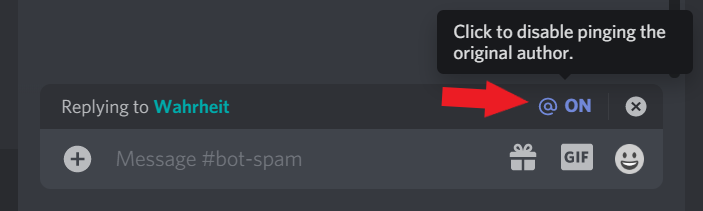
+++ Info disablereplies: Please disable reply-pings when responding to helpers. This relates to Rule #3: https://denizenscript.com/discord_rules#rule3
https://denizenscript.com/discimg/disable_replies.png
 worthy lance
So sorry! will do
worthy lance
warm copper
Could you do me a favor and remove ping on replies please.
done. work better?
odd, i just tested it out but it seems to not send anything past the most recent message
so the appended messages arent sending
warm copper
!debug
real vesselBOT
warm copper
!debug
Info: debug
If you need help with a script issue, one of the most powerful tools Denizen has to offer is full debug output. This is displaying in your console whenever scripts are running until you turn debug off. To share a debug log quickly and easily with helpers, simply run the command /denizen debug -r in-game to begin recording, then run through the part of the script you need help with, then run the command /denizen submit. This will give you a link to a paste of the debug log, which you can then copy/paste back to us!
real vesselBOT
warm copper
!guide solving problems you encounter
View the guide page 'Solving Problems You Encounter' at: https://guide.denizenscript.com/guides/first-steps/problem-solving.html
worthy lance
ok will do ty so much
warm copper
@worthy lance were you able to figure it out?
worthy lance
warm copper
<@279321066890067971> were you able to figure it out?
no haha
still trying rn
warm copper
Wanna post your current script and debug?
worthy lance
yea i sure
Content of Denizen Script Paste #124615: appendscript... pasted 2024/07/14 13:56:16 UTC-07:00, Paste length: 905 characters across 23 lines, Content: ChatAppend: type: world
currently restarting the server for the updated script so ill send the debug once thats done restarting
warm copper
Line 7 you need quotes, you want - flag <player> "messages:->:<[message]> "
worthy lance
ahh i see. what does that do?
warm copper
So it counts as one argument, and adds that space in that you had earlier.
While looking on your proc, that's slightly overcomplicated.
Actually, you want - flag <player> messages:->:<[message]>, no need for the extra space here
Because you can replace your proc with a tag
!t list.space_separated
real vesselBOT
warm copper
!t list.space_separated
Returns the list in a cleaner format, separated by spaces.
ElementTag
# Narrates "one two three"
- narrate <list[one|two|three].space_separated>
i actually needed the space so that it automatically puts a space between each appended message. I assumed that that how itd work?
warm copper
worthy lance
i actually needed the space so that it automatically puts a space between each a...
Please read my full reply
worthy lance
oh i see, apologies
warm copper
You can also determine passively so the script queue still runs.
- determine <[appended_message]> passively
- flag <player> messages:!
This will let you run commands after determine ^
worthy lance
I seeee
worthy lance
warm copper
Actually, you want `- flag <player> messages:->:<[message]>`, no need for the ex...
and this is supposed to be with or without quotes including the exclusion of the extra space?
warm copper
You only need quotes when you have an extra space that is not enclosed in <[]>
worthy lance
i see i see. gotcha
warm copper
<element[This requires no quotes]>
worthy lance
gonna try this new version out
worthy lance
warm copper
```
- determine <[appended_message]> passively
- flag <player> messages:!
```
it seems to ALMOST work as intended. For some reason, it's leaving out any appended messages that ARENT the first and last appended messages. let me send the debug here!
Content of Server Log Paste #124617: Denizen Debug Logs From TEST SERVER ROLEPLAY... pasted 2024/07/14 14:08:22 UTC-07:00, Paste length: 13209 characters across 133 lines, Content: Java Version: 21.0.3Up-time: 2m 13s
when typing "test1--" "test2--" "test3--" and "test4", i only get "test1test4" with no space in between as well
worthy lance
warm copper
and use the space_separated tag instead
Content of Denizen Script Paste #124618: appendscript... pasted 2024/07/14 14:13:46 UTC-07:00, Paste length: 719 characters across 15 lines, Content: ChatAppend: type: world
like that?
warm copper
Youre still using your proc
worthy lance
warm copper
Youre still using your proc
oh sorry, i believe im confused as to what you meant by that then. I assumed it meant the procedure at which i was using to combine the messages.
oh i see
sorry
i was confused
let me fix
so like this?
Content of Denizen Script Paste #124619: appendscript... pasted 2024/07/14 14:20:11 UTC-07:00, Paste length: 940 characters across 24 lines, Content: ChatAppend: type: world
warm copper
Well does it work now as intended?
worthy lance
almost. when i type test1-- then test2, i get the result "Test1 Test2Test2"
tfor some reason it repeats the last one
warm copper
Sounds like you add it twice
warm copper
Probably dont even need a debug
worthy lance
worthy lance
https://paste.denizenscript.com/View/124619
this is it right here lol
warm copper
Ya check yer script
worthy lance
i think i see the issue
let me retry
it works now! Though, i was wondering if there was any way to stop the capitalization of the first letter after the first append?
like for example:
warm copper
Are you on a custom client?
worthy lance
Is it possible to adjust the script so that The T in test2 and Test3 are lowercase?

yea im currently using lunar
warm copper
Can you try on vanilla
worthy lance
sure!
warm copper
there might be an option to disable that
Also there is some room to clean up your script
          - define appended_message <player.flag[messages].space_separated>
          - determine <[appended_message]> passively
          - flag <player> messages:!
          - determine <[appended_message]>
You're determining twice for no reason
warm copper
And the definition is argueably redundant, could determine <player.flag[messages].space_separated> directly.
It's just an extra step
The proc CombineMessage can be entirely removed, if not already.
I'll go to sleep now, have a great day.
 rose meadowBOT
Has your issue been resolved, or your question been answered?
If so, please use the </resolved:1028673926114594866> command to close your thread.
Or </invalid:1028673926898909185> if it's not possible to resolve.
If not yet resolved, please reply below to tell us what you still need.
(Note that if there is no reply for a few days, this thread will eventually close itself.)
@worthy lance
worthy lance
warm copper
I'll go to sleep now, have a great day.
thank you so much for the help!
warm copper
:D
rose meadowBOT
Has your issue been resolved, or your question been answered?
If so, please use the </resolved:1028673926114594866> command to close your thread.
Or </invalid:1028673926898909185> if it's not possible to resolve.
If not yet resolved, please reply below to tell us what you still need.
(Note that if there is no reply for a few days, this thread will eventually close itself.)
@worthy lance