I have used the Citizensapi plugin many times in the past and now the npc doesn't move i have tried many solutions but none of them work. I use the latest citizensapi and paper 1.20 the npc moved some time ago but i removed the code and tried something else but the npc only spawns and doesnt move i now use npc.navigator.settarget (something along those lines)
#(daniel4b) NPC does not move
62 messages · Page 1 of 1 (latest)
 formal solstice
 gloomy gazelleBOT
(daniel4b) NPC does not move
gloomy gazelleBOT
formal solstice
I have used the Citizensapi plugin many times in the past and now the npc doesn'...
Hi I'm AutoThreadBot! Don't mind me, I'll just be adding the helper team to this thread so they can see it. A human will get to you soon.
formal solstice
when i search this error up on google there are a lot of people who had the same bug and it doesn't give a wrong output
 winter edge
!logs
 stoic hollowBOT
winter edge
!logs
stoic hollowBOT
winter edge
!logs
 Info: logs
Please post your full latest log file.
Background Info: One of the most helpful tools to identifying the source of a problem is your server logs file! Logs contain all sorts of important information like server and plugin versions, any error messages, and a lot more important information (More Info).
How To: Your log can be found in the logs folder within your server folder. The most recent log is a text file labeled latest.log. To get help using these logs, please open that file in a text editor and copy all of the text, then open https://paste.denizenscript.com/New/Log and paste the text into the box on the page. Then click "Submit" and copy the URL and paste that back into this channel.
Please do not upload the file to Discord or to other pastebin services, use the log pastebin linked above.
formal solstice
Sure will do but i'm home in 4 hours
If you guys are still available at that time?
winter edge
Just post it, we’ll get to it eventually
Don’t expect an instant response though, we live all around the world
formal solstice
I'm also not english originally what you maybe gussed already
formal solstice
winter edge
Just post it, we’ll get to it eventually
Alright I really hope that this problem can be fixed I find Citizens a great plugin
In the mean time is there a way for a npc to sit on a chair of some sort like you have sit plugins for players to sit
winter edge
Yes, you can use sittingtrait
formal solstice
winter edge
Yes, you can use sittingtrait
Thanks
Content of Server Log Paste #121314: Spawning the npc with the /testnpc command and trying to move it to clicked block when pressing right click on a block... pasted 2024/03/27 12:09:56 UTC-07:00, Paste length: 179012 characters across 1436 lines, Content: `[19:48:55] [ServerMain/INFO]: Environment: Environment[sessionHost=https://sessions...
tried many different ways but this is the most recent code: https://paste.denizenscript.com/View/121315
Content of Java Paste #121315: I spawn the npc with the command and then I try to move it to the clicked log (it does not move)... pasted 2024/03/27 12:15:11 UTC-07:00, Paste length: 1590 characters across 50 lines, Content: ------------------------CITIZENS LISTENER---------------------------public class CitizensCostumersLi...
winter edge
Content of Server Log Paste #121314: Spawning the npc with the /testnpc command and trying to move it to clicked block when pressing right click on a block... pasted 2024/03/27 12:09:56 UTC-07:00, Paste length: 179012 characters across 1436 lines, Content: `[19:48:55] [ServerMain/INFO]: Environment: Environment[sessionHost=https://sessions...
stoic hollowBOT
winter edge
!logcheck https://paste.denizenscript.com/View/121314

Server Version
Paper version git-Paper-423 (MC: 1.20.4)-- (:warning: Outdated build, behind by 39... Current build is 462)
Plugin Version(s)
Citizens v2.0.33-SNAPSHOT (build 3319) -- (:warning:Outdated build, behind by 55)
Checked For
@winter edge
UUID Version
4 (:white_check_mark: Online)
Other Noteworthy Plugin(s)
ProtocolLib v5.2.0-SNAPSHOT-679
Potentially Bad Line(s)
[20:23:30] [Server thread/INFO]: daniel4b issued server command: /rl confirm :warning: NEVER reload your server. If you change plugin files, you MUST RESTART your server properly.
[19:49:11] [Server thread/ERROR]: [ItemsAdder] [Pack] No URL set. Please follow the hosting tutorial http://a.devs.beer/first-respack-hosting :warning: Log contains error messages.
winter edge
You should delay setTarget by about 10 ticks
formal solstice
Alright I will try it is there a reason why I suddenly need to delay it when it worked before without any delays?
Sorry for the late reaction btw I had a few very busy days
winter edge
@formal solstice depends on spawning delay (paper takes a few ticks to spawn the entity properly now)
 copper sailBOT
Thread Closing Reminder
Has your issue been resolved, or your question been answered?
If so, please use the </resolved:1028673926114594866> command to close your thread.
Or </invalid:1028673926898909185> if it's not possible to resolve.
If not yet resolved, please reply below to tell us what you still need.
(Note that if there is no reply for a few days, this thread will eventually close itself.)
@formal solstice
formal solstice
Wait so I have to put the settarget in a runnable to run a couple seconds later or to run until the npc is at the the target?
winter edge
!rule 3
stoic hollowBOT
winter edge
!rule 3
Rule 3
Don't ping for help. https://denizenscript.com/discord_rules#rule3
"Pinging" refers to using an @ to alert somebody to your post.
Generally only ping somebody if your message is very specifically directed at them (meaning, only that person has anything to do with the information in your message, and it would be confusing who it was for without the ping).
If you're asking a question, please just make a forum post and ask.
If you have a bug report or a feature request, please just make a forum post about it.
If this is pulled up for you by a helper, your ping was unneeded.
If you're arguing about it, you're wrong.
This message is not a warning, it is just for your information.
winter edge
@formal solstice the former
formal solstice
stoic hollow
Well then you are giving a wrong example sir
formal solstice
winter edge
<@301713056101171201> the former
But what do you mean with 'the former' my English isn't the best
winter edge
!disablereplies
stoic hollowBOT
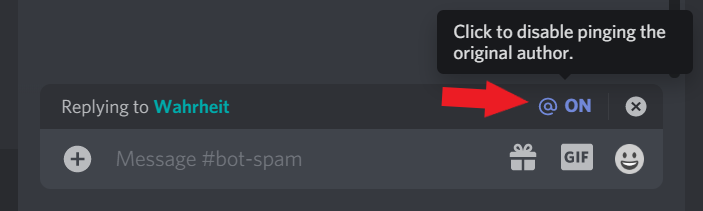
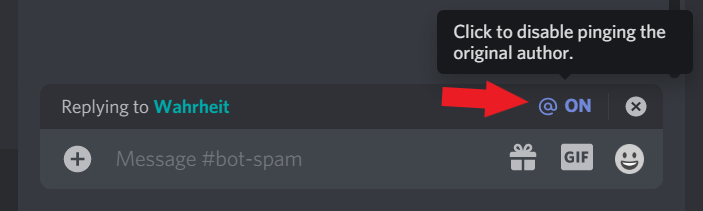
+++ Info disablereplies: Please disable reply-pings when responding to helpers. This relates to Rule #3: https://denizenscript.com/discord_rules#rule3
https://denizenscript.com/discimg/disable_replies.png
 winter edge
formal solstice
But what do you mean with 'the former' my English isn't the best
winter edge
formal solstice
But what do you mean with 'the former' my English isn't the best
in a runnable
formal solstice
Alright I will try it today and when it does or does'nt work I will say it right away in this 'ticket'
If it works you can close the ticket is that fine?
winter edge
formal solstice
If it works you can close the ticket is that fine?
you can close it
formal solstice
Thank you it works I have another question. At the website it says that you use a code to see if the npc is at the target but that doen't work

I bc want the npc to walk to a location and then sit at that location
But now it just only walks to the location and does not sit
I have used both npc.getOrAddTrait(SitTrait.class).setSitting(location); and npc.getOrAddTrait(SitTrait.class).run(); but the second one does nothing
formal solstice
Yes with the first one
winter edge
@formal solstice ok... you need to do a bit more debugging please
formal solstice
I will try a few things when i'm at my pc
winter edge
@formal solstice
formal solstice
I have a lot on my plate and a birthday tomorrow but im very much trying to get it done so I can focus on the project
My apologies
 keen vault
formal solstice
I have a lot on my plate and a birthday tomorrow but im very much trying to get ...
keen vault
formal solstice
I have a lot on my plate and a birthday tomorrow but im very much trying to get ...
you can consider closing this thread until you have time, it doesn't disappear and can be re-opened at any time typing here again
there's no expectation made for you, you're fine
happy birthday and take it easy
copper sailBOT
Thread Closing Reminder
Has your issue been resolved, or your question been answered?
If so, please use the </resolved:1028673926114594866> command to close your thread.
Or </invalid:1028673926898909185> if it's not possible to resolve.
If not yet resolved, please reply below to tell us what you still need.
(Note that if there is no reply for a few days, this thread will eventually close itself.)
@formal solstice
formal solstice
Oh well in that case
formal solstice
keen vault
happy birthday and take it easy
Thanks!